
How to Delete Facebook Account Permanently in 2026


 3 min. read
  Updated on
Thinking of deleting your Facebook account? Whether it is for privacy, security, or taking a break, removing your profile is straightforward. This guide will show you exactly how to delete your Facebook account step by step.
Table of contents
How to delete your Facebook account?
Use Facebook settings
- Log in to your Facebook account.
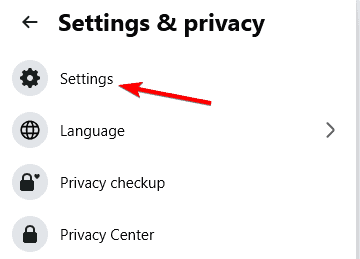
- Click your profile picture in the top right and select Settings & privacy, then choose Settings.
- In the left menu, go to Your Facebook information.
- Select Deactivation and deletion.
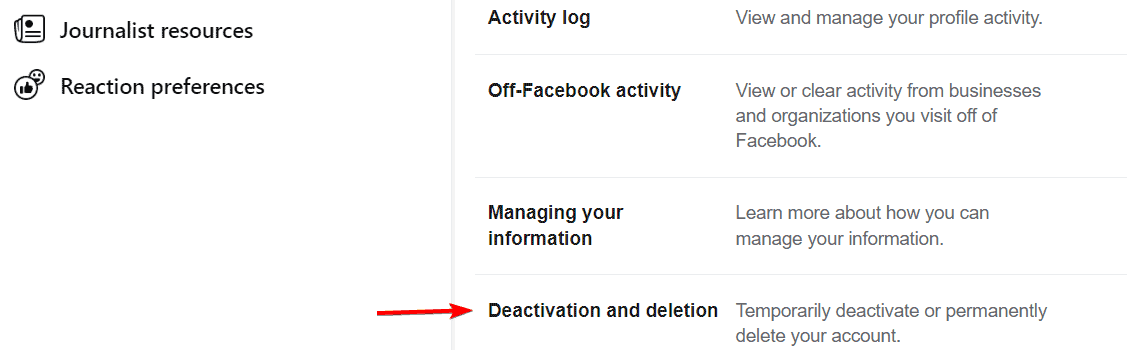
- Choose Delete account and click Continue to account deletion.
- Follow the on screen instructions and select Delete account to confirm.
If you are having trouble signing in, see this guide on what to do if you are unable to log into Facebook on PC.
What to do before deleting your account
- Download a copy of your data including photos, posts, and messages so you do not lose important memories.
- Check apps and services that you log into with Facebook and update them with another login option.
- Inform friends and groups about how they can reach you outside Facebook.
- Consider deactivating your account instead if you just want a temporary break.
Before you confirm deletion, sign out of Facebook on every device to close active sessions by following this step by step guide.
What happens when you delete Facebook
- You have 30 days to cancel the deletion by logging back in and selecting Cancel Deletion.
- After 30 days, your account and all data including posts, photos, and details are permanently erased.
- Some information such as messages you sent to others may still appear in their chats.
FAQs
Yes. You can cancel the deletion within 30 days by logging back in. After that, your account is permanently gone.
Deactivation is temporary and allows you to come back later. Deletion permanently removes your profile and data after 30 days.
No. Messages you sent to others may still appear in their chats even after your account is deleted.
Yes. You can download your photos, posts, and messages before confirming deletion to keep your information.
Conclusion
Deleting your Facebook account is permanent, so back up your data and update any linked apps first. If you face issues before deleting, check fixes for the Facebook switch account button missing or Messenger login problems.

Read our disclosure page to find out how can you help Windows Report sustain the editorial team. Read more



Improve this guide



User forum
2 messages