
KB5067115 Brings Bluetooth LE-Based Shared Audio (Preview) to Copilot+ PCs
Stream sound to two Bluetooth devices at once


 2 min. read
  Published on

Microsoft has begun rolling out a new Shared Audio (preview) feature with Windows 11 Insider Preview Build 26220.7051 (KB5067115) for Dev and Beta Channels. The update adds support for Bluetooth LE Audio broadcast, allowing users to share sound with two wireless devices at once.
Built for Copilot+ PCs, Shared Audio enables one system to transmit the same audio stream to two connected Bluetooth accessories simultaneously. Microsoft says the feature can make study sessions, flights, or movie nights more convenient. It allows two users listen together without splitting earbuds.
You can try it out by pairing two Bluetooth LE Audio–compatible accessories and use the new “Shared audio (preview)” tile in Quick Settings. You can stop sharing anytime with a single click.
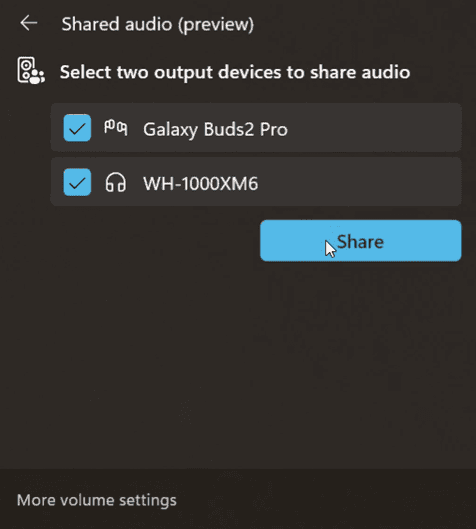
Currently, the feature is available on Surface Laptop (13.8” and 15”) and Surface Pro models powered by Snapdragon X chips, with broader support coming to Samsung Galaxy Book5 and Book4 Edge devices soon. Here’s the full list of devices for which the support will be coming soon:
- Samsung Galaxy Book5 360 | Intel Core Ultra Series 200
- Samsung Galaxy Book5 Pro | Intel Core Ultra Series 200
- Samsung Galaxy Book5 Pro 360 | Intel Core Ultra Series 200
- Samsung Galaxy Book4 Edge | Qualcomm Snapdragon X
- Surface Laptop, 13-inch | Qualcomm Snapdragon X
- Surface Laptop for Business, 13-inch | Qualcomm Snapdragon X
- Surface Pro, 12-inch | Qualcomm Snapdragon X
- Surface Pro for Business, 12-inch | Qualcomm Snapdragon X
Shared Audio works with popular LE Audio headsets, including Galaxy Buds3, Sony WH-1000XM6, and ReSound hearing aids. The preview rollout continues over the coming weeks, with more Copilot+ PCs expected to join as driver updates land through Windows Update.
Alongside this update, KB5067115 brings Ask Copilot to taskbar, expands Full Screen Experience to more handhelds, and improves emulation of x64 apps on Arm-based Windows PCs.

Read our disclosure page to find out how can you help Windows Report sustain the editorial team. Read more



Improve this guide



User forum
0 messages