Rethink Internet Explorer: Microsoft showcases what the browser has done and what it can do

rethinkie

Internet Explorer, the browser you all once loved to hate, has grown stronger over the last few years. After ignoring its web-browser for a long time, the software giant not only added many enticing features into it, but also made the browser much more secure and stable. Today, Microsoft has launched a website RethinkIE which documents all its recent developments and accomplishments.

The latest version of IE, Internet Explorer 11, sports some unique and intuitive features that make it stand tall against its competitors. The browser supports 3D graphics rending as well as a touch-first experience. In past few months, Microsoft partnered with an array number of firms, including GlacierWorks, Atari, Red Bull to exhibit the astonishing results its browser could produce. At the same time, it also encouraged web developers to write optimized codes to make their website faster.

Microsoft wants you to rethink the web as we know it. Not only is the company working on making a modern browser which will enhance your browsing experience, it is also working on making the web much more beautiful. 

“People expect their browser to be fast and so do we”

“Rethink is about where the Web has come from and where it can go with a modern browser like Internet Explorer. We’ve taken a different approach than others by helping create experiences that work well not only with Internet Explorer but across any modern browser and device,” Microsoft stated in an official blog post. 

If you are a web-developer, you can hop over to Get Tools page to find yourself a wide range of software that will help you benchmark your site. Although Windows XP users have got a big hand behind this, but according to NetMarketShare, Internet Explorer is being used by over 57% people across the globe. 

Windows 8, 10 App Check: Valentine Photos

Valentine’s day is just around the corner and if you are looking for an app to celebrate this magical day on your Windows 8 tablet, then you need to have a look at Valentine Photos. Find below more details about it.
windows 8 valentine appJust like with Christmas, many people have no clue what is the real origin of the holiday; and such is the case with the Saint Valentine’s Day. Throughout history, it has been celebrated in many countries as the holiday when love is promoted and you need to do something special for your loved one. In the majority of situations, it’s a boy’s duty to show his love, but we won’t get into that now…

Browse through Valentine photos on your Windows 8 tablet

Saint Valentine’s Day, also known as Valentine’s Day or the Feast of Saint Valentine, is observed on February 14 each year. It is celebrated in many countries around the world, although it remains a working day in most of them. This application provides list photos about Valentine in around the world.

The Valentine Photos app for Windows 8 is pretty straightforward and easy to use. It simply collects from social networks as much photos as it can that are somehow related to the upcoming holiday. What I don’t like about the app is that there are many low-resolution images, but I hope that a future update will take care of this and only high-quality images will be displayed.

Download Valentine Photos app for Windows 8

Windows 8, 10 App Check: Answers.com

Answers.com is one of the most visited online portals when it comes to various questions that people might have. In the past we have reviewed the official ChaCha app for Windows 8 users and now we’re having a look at Answers.com.
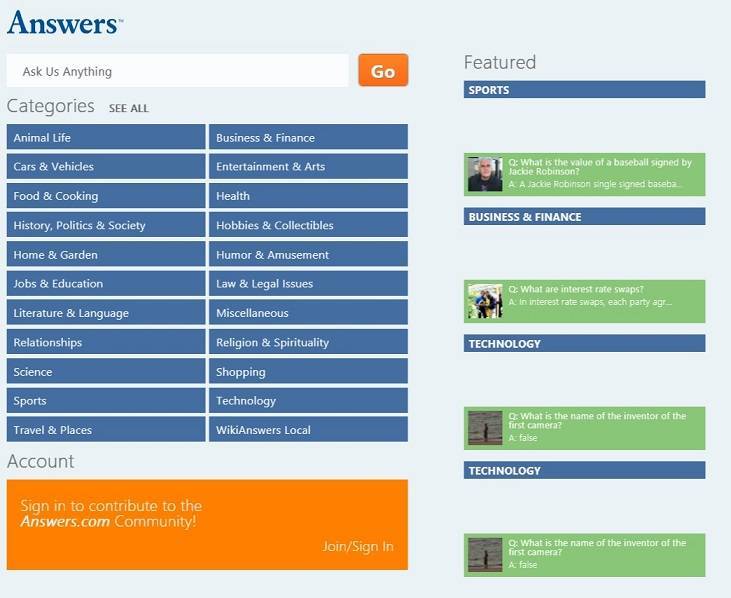
answers.com windows 8 app
Answers.com has been available in the Windows Store for quite a while now, being among the most important first apps that have been launched for Windows 8 users, but only now do we have a look at it. By using this app, you won’t have to open your browser anymore, as you will be able to ask questions straight from your Windows 8 tablet or desktop device.

Read Also: Windows 8 NFL Connect App Launched in the Store

Get answers to your questions on your Windows 8 tablet

As you read this sentence there are more than 75,000 people actively asking, answering, learning and sharing on an Answers property. In a typical month, we touch more than 130 million people on the web, 45 million on social network applications, and 42 million on mobile. Over 60 million user generated questions across 8,000 categories. Our Q&A platform allows users to create new content around trending topics, world events and everything in between. All available on your Windows 8 computer!

Inside the Windows 8 official Answers.com app, you will be able to ask and answer questions, as well as improve the answers that you have given. There are many categories and topics that you can explore to find the right answer for what is bothering you. Your navigation history inside the app will be enabled and there will be featured content at your disposal, as well.  The app is really well designed and seems pretty fast, so if you’re a Answers.com user, head over to the Windows Store and get it on your Windows 8 devices.

Download Answers.com app for Windows 8

Windows 8, 10 App Check: Museums of the World

I love museums, so whenever I travel to a new city, I don’t miss the opportunity to explore the local museums. There are plenty of museum apps for iOS and Android devices, but if you are running Windows 8, then you definitely need to check out Museums of the World.
windows 8 museum app
Museums of the World is a new Windows 8 app that has been recently launched in the Windows 8 Store but it is not the single one. There are plenty others, but in my opinion, it comes with the most complete set of features and options that you’d expect from an app like this one. The app looks absolutely gorgeous on a Windows 8 tablet, so I recommend it to anybody that is interested in exploring museums straight from their Windows 8 tablets.

Read Also: Windows 8 Zara App Launched in the Windows Store

Explore museums from your Windows 8 tablet

Museums gives you free access to thousands of museums around the world. It’s designed to give you up-to-date information about museums, exhibitions and other cultural events in your city and across the world. This easy to use and professionally designed application is a must-have for art and culture lovers, travel aficionados and all those who want the right information instantly in the palm of their hand!

By using this app on your Windows 8 tablet or desktop device, you will be able to explore thousands of museums and galleries from all over the world. When you will open the app, you will have the option of inputting your location and the app will then showcase museums and galleries available near your location. Also, you will be able to get detailed museum and gallery information and see current and upcoming exhibitions and events that will happen there.

If you have some favorite museums and exhibitions, there’s the option of marking them as such to make it easier to get back to them easily. There’s also a trending section where users of the app share interesting things that they  found in various museum locations. If you will follow certain museums, you will also have the option of tracking the activity that happens there. So, if you want to enrich your cultural knowledge, then go ahead and download the app right away.

Download Museums of the World app for Windows 8

Windows 8, 10 Zara App Launched in the Windows Store

The official Zara app has been recently launched in the Windows Store and it thus becomes one of the best Windows 8 fashion apps to download on your tablet or desktop device. Read below for our detailed insight.
windows 8 zara app
Zara is one of my favorite clothing lines and it has great apparel for both women and man, not to mention the great looking clothes for kids. And if you are interested in Windows 8 fashion apps, then you will find the official Zara app for Windows 8 quite enjoyable. The app has no advertisements at all, and it comes with a really great content that is of high-quality and the images presented are simply gorgeous.

Read Also: Use This Windows 8 App to Improve your Speed Reading

Windows 8 fashion app Zara launched

Enjoy the latest fashions for women, men and children. Find all the latest from ZARA online: Lookbook, People, Campaign and more weekly contents. Online shopping

windows 8 zaraThe famous Spanish clothing retailer offers a great shopping experience through its app, by offering campaigns and clothes for purchase straight from within the app. Besides looking at the clothes catalog for women, men and children, you can also locate nearby Zara stores, buy gift cards for the loved ones, save money with the articles that have been discounted. Head over to the Windows Store and download the app right away.

Download Zara app for Windows 8

Use This Windows 8, 10 App to Improve your Speed Reading

I read so many news articles every day that I can’t keep count, so I am very grateful that I have mastered the speed reading technique. Recently, I’ve discovered that there’s one such app for Windows 8 users. Read my thoughts on it below.
windows 8 speed reading
Windows 8 tablets can become awesome tools in the right hands and with the right apps that can be downloaded from the Windows Store. Recently I’ve discovered an interesting new app that is really well-designed and will help you improve your reading. Entitled simply “Speed Reading”, the app contains both tips that you can use to improve your speed reading, and also some interesting information.

Read Also: Windows 8 App Naturespace Improves your Sleep and Meditation

Improve your reading speed with this useful Windows 8 app

windows 8 reading speed app

You probably read many things every day: newspaper, emails, books, letters, reports etc. So maybe reading is a skill that you should improve? Average person read at a rate of 200-250 words per minute. You can increase your reading speed. Just learn the methods presented here and practice them for a few weeks.

The Windows 8 Speed Reading app will keep track of your reading speed progress and will come with exercises that you can use to train your eyes. There’s a simple calculator inside the app that you can use to test your current reading speeds and there’s also an option to keep track of your results. The “theory” section of the app contains important tips on how you can increase your reading speed. What’s interesting is that albeit the app is free to download, I haven’t seen any ads at all. So, if you want to be a better reader while maintaining comprehension levels, go ahead and download it from the Windows Store.

Download Speed Reading app for Windows 8

Windows 8, 10 App Naturespace Improves your Sleep and Meditation

This might sound crazy or at least unusual for some, but there are actually apps that you can use to help you in your meditation or even to have a better sleep. Usually, these are timer apps or apps with special music. For Windows 8 users, we have selected the Naturespace app.
windows 8 sleep meditation app
There are plenty of meditation and sleep apps available in the Windows Store, but from the plethora of titles, NatureSpace is in my opinion, the most professional one to choose. This is a masterfully crafted app that will help you with your meditation or when you are trying to sleep, as the app isn’t focused only on relaxing sounds, but also on beautiful holographic imagery. Here’s how the description of the app goes:

Read Also: Play Bowling on Windows 8 With These Apps

Probably the best sleep and meditation Windows 8 app

Naturespace is unique. It’s not just about nature’s sound, it’s about nature’s space. All 3 dimensions (including height) are accurately reproduced, providing the listener with a true “being there” experience under headphones. The impact that spatially accurate outdoor sound has on the brain is astounding; it is immensely relaxing and entertaining. Whether you take a 5 minute vacation to a gentle evening by a lake, or an extended stay underneath a powerful thunderstorm, Naturespace provides the brain with the sense of openness and vastness that is so important to a balanced state of well-being. Naturespace is a spectacular catalyst for creative visualization and imaginative exploration.

windows 8 sleep meditation appAs you can see from the description, this is a really professional sleep and meditation app for Windows 8 users and the guys behind have really put soul in it. However, be aware that it has quite a big size – more than 670 MB, which shows just how much work has been put into its creation. Thus, the 3 dimensions that the team behind Naturespace is talking about will create a soothing 3-D experience which will induce a “physiological sense of safety, peace, and tranquility”.

The app comes with 6 pristine holographic spaces, sound tracks that are quite long and intentionally looped for endless hours of listening. While the app is totally free to download and use, for more features, you can purchase other items and complete the 41 available additional spaces. So, if you want to have a good sleep or meditate better, then waste no time and download it on your Windows 8 tablets.

Download Naturespace: Relax Meditate Escape Sleep app for Windows 8

ChartIQ is the Best Windows 8, 10 Forex App Available

There are plenty of Forex traders that use their Windows 8 tablets as main tools, and if you too are among them, then you need to have at your disposal a handy Windows 8 Forex app. From all the apps currently available, ChartIQ seems to be the best proposal.
windows 8 forex appChartIQ has released their touch-enabled Windows 8 stock and Forex charting app almost a year ago, back in February, 2013, but only now do we have a look at it. Since the main tool for a Forex trader is represented by charts, that’s what this app is all about. At $22.99, it’s definitely not the cheapest Forex app available, but at least you know it’s something professional. There’s also the free trial option, so you can see if it’s worth the money or not.

Read Also: Windows 8 Fitbit App Receives Improvements

Master Forex on your Windows 8 tablet with this app

ChartIQ Plus provides a full range of charting and technical analysis tools, including premium indicators, drawing tools, and high-quality data. ChartIQ works with touch gestures, or with a keyboard and mouse – allowing you to use it no matter what Windows 8 device you’re on. The power of desktop charting with the ease and elegance of a touch app! ChartIQ Plus includes free high-quality end-of-day data with inexpensive subscription options for real-time, streaming intraday data.

windows 8 forex chart appSince Windows 8 is all about mixing the desktop and mobile together, the app will work on desktop devices, with the traditional keyboard and mouse and on mobile interfaces, with touch support. You will have at your disposal a full range of charting and technical analysis tools, like premium indicators, drawing tools, and high-quality data. The app comes with plenty of interesting and useful feature, from which here are some of the best important ones:

  • StockTwits! – over 150,000 investors discuss stocks, join them and learn more about the markets
  • Free end of daycharts for equities and major indices
  • Automatic detection of open or closed gaps
  • Easily create watch lists
  • The Projection Tool predicts future price scenarios
  • Calculate and plot moving averages against indicators such as RSI and volume

Download ChartIQ Forex app for Windows 8

Windows 8, 10 Vine app PrimeVine Released in Windows Store

The official Vine app for Windows 8 users is yet to launch in the Windows Store, and until then we have to resort to third-party apps. Besides the recently launched Bine app, we now have a look at PrimeVine and see what its features are.
windows 8 vine app
Recently released in the Windows 8 Store, PrimeVine wants to be yet another third-party Vine app that will benefit from the fact that Vine is yet to launch their official Windows 8 app. Actually, the developers of the app have went as far as to say that their app is the “first and only fully featured Vine Client for Windows 8 devices“, which is debatable, really. Nonetheless, the app is quite well designed and looks premium enough for you to give it a try (download link at the end of the article).

Read Also: ‘The Weather App’ for Windows 8 Gets Launched

PrimeVine brings full Vine functionality to Windows 8

The best way see and share life in motion. PrimeVine is the first and only fully featured Vine Client for Windows 8 devices. Watch short, beautiful, looping videos in a simple and fun way. PrimeVine is 100% Free.

After signing in by using your email or Twitter accounts, you will be able to explore popular Vine posts and channels, as well as search for Vine users and hashtags. There’s also the ability to quickly re-post videos on Vine and share them to social networks, such as Twitter, Facebook or Google Plus. If you are a Vine user and owner of a Windows 8 tablet, then you’ll find the app really useful. You will also be able to pin and search Vine tags to the home screen of your Windows 8 tablet or Windows 8 desktop device.

Download PrimeVine app for Windows 8

‘The Weather App’ for Windows 8, 10 Gets Launched

There isn’t a lack of weather apps in the Windows 8 Store, and we have featured and described in the past the famous AccuWeather app, its updates, and also the Bing Weather app by Microsoft. But if that’s not enough for you, then have a look at the recently launched “The Weather App”
the weather app windows 8
First of all, let me start by saying that The Weather App for Windows 8 is just at its beginning, so bugs and glitches are expected to be present, so be patient with it as I’m sure the developer will take care of them on the go. What I particularly love about it is the absence of ads, which could be something temporary to attract more users to download it. The background images are beautiful, but they really need to improve the relevancy and location of the apps, perhaps borrowing the same design idea from the Yahoo! Weather app.

Read Also: Discounted Windows 8 Apps & Games This Week #7

The Weather App launches for Windows 8 users

Check the weather in most cities and towns in the world with this app. The app’s beautiful and minimalistic layout shows the current weather condition in the given location as well as a 3 day forecast. Provided by World Weather Online, the data provided is accurate and is available for almost every city in this planet (so sorry for any alien being living somewhere outside Earth).

It can be used on a desktop Windows 8 device, and on a Windows 8 or Windows RT tablet. It says that most of the world’s cities are included, but I tried inputting some European locations, and it didn’t show up anything. Most certainly, this is a temporary bug that will be fixed.  The app offers a 3 day forecast and by using a live tile pinned on the start screen, you will always get the latest weather updates. There’s also the option of sharing the weather conditions on social networks. Follow the link from below to download it.

Download The Weather App for Windows 8

Update: Microsoft did not remotely uninstall Tor software from computers to halt botnet

Microsoft remotely uninstalled Tor software from computers to halt botnet

When a virus strikes, the first line of defense is antivirus software. But when a botnet is running wild, things aren’t quite as simple. In the middle of last year, millions of computers around the world were infected with Sefnit malware. Communicating over the anonymizing Tor software automatically downloaded and installed by the malware, Microsoft had a battle against a huge botnet on its hands.

The company took an interesting, and ultimately very effective, line of attack against the botnet. In addition to remotely removing the malware itself from as many computers as possible, Microsoft also wiped out copies of Tor in a bid to stop the malware from communicating and spreading.

It was possible to identify which machines had Tor installed by the malware — rather than those whose owners had purposely installed it — by detecting which folder it had been installed to. Tor can be installed anywhere, of course, but most people stick to the default folder, or use one of a few common variants. When installed by malware, Tor was installed in a strange location.

In this instance it was very helpful that Microsoft could detect the presence of a particular piece of software and remove it from computers without the owners being aware of anything that was taking place.

How do you feel about this capable of Microsoft? It is worrying or reassuring that the company is able to remove software from your computer? Looked at in terms of malware, few people would have a problem with having their system protected for them, but Tor also has plenty of legitimate uses — it is fair to have software uninstalled without consent?

Update

Since posting this article, we have spoken with Microsoft who want to make clear that Tor was not in fact removed from any computers — the original source was incorrect. A Microsoft spokesperson said: “Microsoft Malware Protection Center has protections to remove the services started by the Sefnit malware, but it does not uninstall Tor, remove any Tor binaries, or prevent users from using Tor.”

Windows 8, 10 App Check: Where’s Waldo?

Where’s Waldo is one of the games that I remember clearly playing while I was just a little kid. I was mesmerized by Waldo and tried finding him in those deceiving colored books. Now, there’s an app that you can enjoy on your Windows 8 tablet to find Waldo.
windows 8 where's waldo
There aren’t too many things to be said about the Where’s Waldo game for Windows – there are a few images and you have to find the elusive Waldo with his hat in white and red stripes. The biggest complaint that I have with regards to this game is the fact that there are only ten challenges that a true aficionado will complete quite quickly.

Read Also: Windows 8 App Check: Music Maker Jam

Where’s Waldo game lands for Windows 8 users

Find Waldo! Your aim is to search for Waldo. Waldo is the little guy wearing a red-and-white-striped shirt, bobble hat, and glasses. Find him and just tap him to complete the level. Where’s Waldo? is an app made by Brainstorm (c) 2013. Original game Where’s Waldo was created by British illustrator Martin Handford.

The app has only 15.8 MB and is obviously aimed at kids. Since its launch in the Windows Store, the Where’s Waldo app for Windows 8 hasn’t received any updates, which leaves a shade of hope that the developer will decide to add more features in the near future. First of all, as I said before, there definitely need to be more levels to complete, and maybe add more options that will make the game even more challenging. Until then, follow the link from below to get it on your Windows 8 tablets.

Download Where’s Waldo for Windows 8

Outlook.com gains improved Search and Sweep to keep your inbox manageable

Outlook.com gains improved Search and Sweep to keep your inbox manageable

These days we all receive more emails than can be easily managed, and this is precisely why Outlook.com includes designed specifically to make life easier. One of the most popular features of Microsoft’s web-based email service is Sweep which makes light work of banishing unwanted emails.

Sweep has been updated so that it is now quicker and easier to use. Unwanted emails can be cleared out in fewer clicks, leaving you more time to get on with more important things. Also receiving an update is the all-important search tool.

There have been a number of improvements made here. One of the most important updates means that when you search for a contact you will be displayed messages from all of the email addresses they may have used. Coupled with the ability to use even more criteria than before when conducting an advanced search, it is now easier than ever to perform very specific searches to home in on precisely what you’re looking for.

These updates have been timed to coincide with the seventh National Clean Out Your Inbox Week — yes, there really is such a thing! So if you’ve found that your emails have spiraled out of control, there has never been a better time to try to get things back in order.

If you pay a visit to the Outlook Blog, you find a range of advice about how to get your inbox back in order. Whether you’re an Outlook.com newcomer, or a more seasoned user, there’s bound to be something you could learn!

What are you waiting for? Go and give the updated tools a test drive.

Music Maker Jam app: Start a jam session on your Windows 8 tablet!

If you want to transform your Windows 8 tablet into a DJ’s set, then you need to use the right apps for that. Music Maker Jam is one of the best choices at your disposal in the Windows Store. We go through its features below.
windows 8 music maker jam
Recently, we have shared with some interesting Windows 8 drum apps that you could use to spice up the party. Also, we did share with guitar and piano apps, as well. Now, if you are really into music, then what you need next is a reliable Windows 8 DJ app. One of the best such apps available for download in the Windows Store is Music Maker Jam, which makes music creation seem very easy to do.

Music Maker Jam is possibly the best Windows 8 DJ app

Start a jam session – anytime, anywhere! Music Maker Jam is the first app that combines easy music creation with maximum fun. In no time at all you’ll be producing your own hits thanks to a huge selection of professionally produced loops and styles! Simply combine the song parts and instruments to get the sound you want, then adjust the key and the tempo or add some spectacular effects in real-time. Intuitive touchscreen control puts the full studio experience in the palm of your hand! And the best thing is, all of the sounds are perfectly synchronized to keep you on the beat when you’re jamming live in front of your friends and fans.

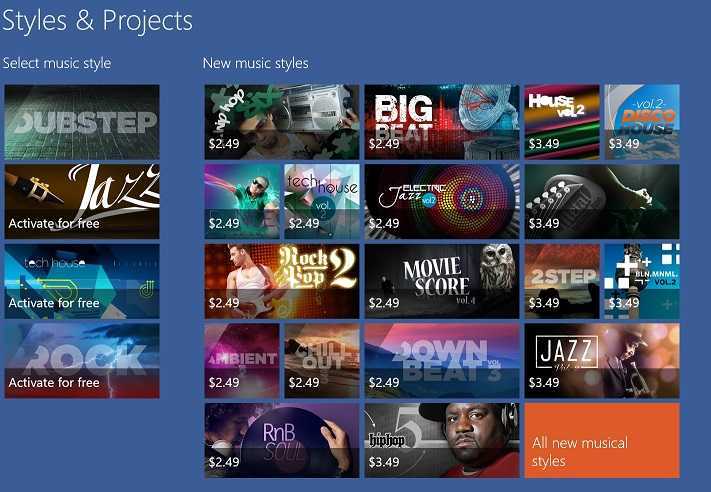
The app looks simply gorgeous on a Windows 8 tablet, and while the looks are vivid, the sound is crystal clear. Once you’re inside the app, you can select from professionally produced loops like dubstep, tech house, jazz and rock and choose to set the tempo and melodic progression as you please. There are plenty of effects that you can add to your songs in real-time. When you think you have created a masterpiece, you save your jam session as an MP3 file and then share the project with your friends.

The 8-track mixer  lets you mix tracks and just by tipping your Windows 8 tablet, you will be able to change the effect settings. Also, you can use loops from several music styles in one project in the same time and buy new music styles. So, if you want to get the music going, waste no time and download it from the Windows Store.

Download Music Maker Jam for Windows 8

Microsoft agrees to share Skype user data with Russian Government

skypeconversationstored

Addressing the Russian government, Microsoft who owns the voice-over-IP and instant messaging service Skype, said that it will provide law enforcement officials with the information about Russian Skype users if required. The software giant will keep data of users during a six month period and share it with Putin’s secret police, the KGB.

Microsoft has made it clear that it will comply by providing any information about its users when necessary, if any such regulation does come into effect in Russia. These sudden changes are the consequence of last month’s terror attacks in Volgograd.

Also to keep in mind, Sochi Winter Olympics are to be held there next month. Their new bill, proposed by a group of Russian deputies in accordance with the Anti-Terrorism law states that the government can demand the “information about the reception, transferring, delivery and processing of voice information, written texts, images, sounds and any activities made by the users.”

Yandex, the leading search engine in Russia expressed its discontentment over this new bill. Yandex says that storing such huge chunk of data for such prolonged duration will require extra cost. 

For those of you who use Skype in Russia, how do you feel about this?

UPDATE: Microsoft has issued the following statement to WinBeta: “Microsoft has not commented on draft legislation in the Russian State Duma or committed to sharing customer data with the Russian authorities. We have clear principles in responding to legal demands for customer information from governments around the world. We review the applicability of any new laws given that many of our internet services may not subject to local jurisdiction if they do not store or process data locally”.

Microsoft extends anti-malware support for Windows XP users until July 2015

Microsoft extends anti-malware support for Windows XP users until July 2015

Not that long ago, we mentioned that Microsoft was killing support for Windows XP on April 8th along with support for Microsoft Security Essentials for Windows XP. Microsoft has now stated, in an official blog post, and anti-malware solutions for Windows XP will continue being supported until 2015 as the operating system reaches its end of life.

“Microsoft has announced the Windows XP end of support date of April 8, 2014. After this date, Windows XP will no longer be a supported operating system. To help organizations complete their migrations, Microsoft will continue to provide updates to our anti-malware signatures and engine for Windows XP users through July 14, 2015,” Microsoft stated in an official blog post.

So what exactly does this mean? Microsoft will continue providing anti-malware support for the operating system by providing updated signatures for System Center Endpoint Protection, Forefront Client Security, Forefront Endpoint Protection and Windows Intune for enterprise customers. Microsoft’s Security Essentials will also receive updated signatures, for consumers running Windows XP until July 14th of 2015.

Microsoft wants to make sure no one feels rushed to migrate from Windows XP – and it sounds like the devices and services giant understands that it is a daunting task to migrate from an operating system that came out in 2001. “Our goal is to provide great anti-malware solutions for our consumer and business customers. We will continue to work with our customers and partners in doing so, and help our customers complete their migrations as Windows XP end of life approaches,” Microsoft adds.

Windows 8, 10 App Check: Wreck-it Ralph Disney Game

There are plenty of Disney games in the Windows Store, and we have reviewed in the past plenty of them – The Little Mermaid Undersea Treasures, Seven Dwarfs: The Queen’s Return, Disney Infinity: Toy Box, Where’s My Water? and Star Wars Tiny Death Star. Now, it’s time to have a look at the popular game Wreck-it-Ralph
windows 8 wreck-it ralph
If you have watched the animated movie Wreck-it Ralph, then you were probably curious to see how a game would look like. Well, you probably know that there was no game that inspire the movie, but it was the movie that then made Disney to release games for all the major mobile platforms. Disney has also released the game for Windows 8 users, so I downloaded it recently, because it was free in the Windows Store.

Read Also: Windows 8 App Check: Periodic Table (Chemistry)

Wreck-it Ralph on Windows 8 brings 5 addictive games

Welcome the new year with these amazing deals – Download 7 of your favorite Disney games FREE for a limited time only! WELCOME TO GAME CENTRAL STATION! Hit the arcade and game-hop between 5 different arcade games all based on the film, Wreck-it Ralph!

Once you will open the game, you will be able to select from 5 different arcade games, all from the movie. The first game that you need to complete is Fix-it Felix Jr. where you have to fix what Ralph wrecked it. The 8-bit graphics will take you back in time. In the second game, Hero’s Duty, you play as Sergeant Calhoun where you fight agaisnt cy-bugs. Sweet Climber is Ralph playing in an endless climbing game; Turbo Time is a classic arcade racer with oldie 16-bit graphics and Flight Command is a flight simulator that means a lot of fun on your Windows 8 tablet. Hit the download button from below and start playing!

Download Wreck-it Ralph for Windows 8

Posterpedia app teaches you about Microsoft technologies in a simple yet beautiful interface

Posterpedia app teaches you about Microsoft technologies in a beautiful interface

There are plenty of apps in the Windows Store for entertainment and fun, but how about an app to teach you about Microsoft’s technologies? Check out Posterpedia for Windows 8.1 and Windows RT – a free app created by a member of Microsoft’s Cloud and Server team.

Curious as to what Windows Azure is all about? Looking to gain a better insight into the Hyper-V architecture? Posterpedia is a simple app that combines graphical content (or posters) with content from MSDN and Technet, and is updated frequently with new material to keep your knowledge up.

The app showcases the poster and gives you the option to download it as well. These posters are a great way to provide visual references for understanding  particular technologies. ​Posterpedia was recently updated to version 2 and contains the following new features:

  • Image hotspots that allow you to get content specific to a part of the poster (new).
  • Semantic zoom that enables easy navigation of the different groups (new).
  • A full-screen viewing mode without the chrome and hotspots (new).
  • The ability to share a link to a poster through email (new).
  • App bar buttons specific to each poster.
  • Technical content for Hyper-V, Active Directory, Remote Desktop Services, Windows Server 2008 R2, Windows Server 2008, Exchange Server 2010, Exchange Server 2007, SharePoint Server 2010, Windows Azure, SQL Server, Lync Server 2010, and Office 2013.

Hit the download link below to snag the app. Try it out and let us know in the comments below if you like it! You can also check out a video of the app in action, embedded below for your viewing pleasure.

Windows 8, 10 App Check: Periodic Table (Chemistry)

The Windows Store is just at its beginning and there aren’t so many chemistry apps available for download. But the Periodic Tablet (Chemistry) app is definitely among the best and you need to download it right away, if you are in need of such a tool.
windows 8 periodic table app
In the past, my dear colleague Ionut has reviewed another reliable Periodic Table app for Windows 8 devices, so you can feel free and go ahead to read more about it. But I’ve recently discovered the Periodic Table (Chemistry) Windows 8 app and I’ve been pleasantly surprised by its performance. The app is masterfully crafted and comes with impressive content at a pristine quality.

Read Also: Official Windows 8 App Jamie Oliver’s Recipes Launched

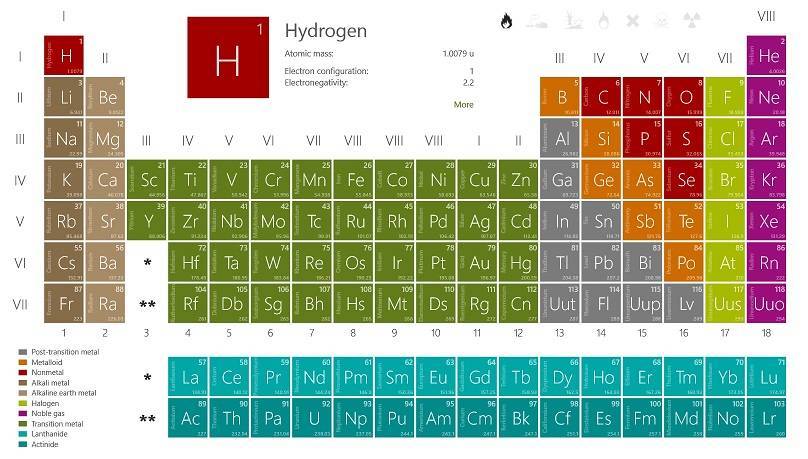
This is a simple periodic table of the elements. It shows the different groups in different colors and lets you zoom in and out. It displays the atomic mass, the electronegativity, the electron configuration and much more for each element. There is also a search function included. The perfect companion for school or professional life.

Transform your Windows 8 tablet into a periodic table

Albeit the app is totally free, I couldn’t find any ads at all inside the app, so my guess is that the developer is offering it free for a limited time, so you definitely need to hurry up and download it, as this is definitely one of the best Windows 8 school apps to use. As expected, the app features all the 118 elements and you have atomic mass, electronegativity, electron configuration and much more at your disposal. There’s also a search function for quick access.

The developer has released plenty of updates, as well, and the app is fully optimized for Windows 8.1, which means you can use it in snap mode and also choose different live tile sizes. The latest updates new properties and languages, the bonfey and abubakr view, the ability to choose temperature unit and also, the tooltips for symbol icons has been included.

Download Periodic Table (Chemistry) for Windows 8

Official Windows 8, 10 App Jamie Oliver’s Recipes Launched

When it comes to cooking, there aren’t too many chefs as good Jamie Oliver. So, naturally, if you own a Windows 8 tablet and you want to cook like a boos, then you need some really good Windows 8 cooking and recipe apps. Today, we’re reviewing the Windows 8 app Jamie’s Recipes
windows 8 jamie oliver app
In the past, we have featured more Windows 8 recipe and cooking apps to help you in the kitchen, with Allrecipes Cookbook being among the most important ones. Now, I’ve discovered the official Windows 8 app made under Jamie Oliver’s coordination. At first, I was surprised to see such awesome design, but then I discovered that this was the official Windows 8 Jamie Oliver app, so it all made sense. There’s even a welcome message inside the app, so you can see everything is genuine. This is what Jamie Oliver himself says about the app:

Read Also: Windows 8 HackerNews App Launched in Windows Store

My app is all about giving you the tools and inspiration to create really great-tasting food easily at home. With retina imagery for each and every recipe step, as well as HD video guides for some of the tougher techniques, you really can’t go wrong. I’ve included a free taster pack consisting of ten recipes to get you started, and I’ll be updating the app with my latest and greatest discoveries from all over the world. You’ll find a whole library of recipes to choose from, from classic comfort food and beautiful baking recipes to festive treats, super-quick suppers and a whole lot more – there really is something for everyone. I’ve also included a clever shopping list to make life a bit easier – it sorts ingredients by supermarket aisle and lets you cross off items as you shop.

Is this the best Windows 8 cooking app?

You can download the Jamie’s Recipes Windows 8 app for free (link at the end) but the optional in-app purchases for additional content. The app comes with a free taster pack which contains 10 free recipes and three videos, but for more, you will have to pay. But if you’re seriously into cooking, then you might thinking of investing money in the art of cooking.

There are 200+ recipes that you can buy, and all of them contain unique step-by-step high-quality photos. The videos, as well, have a gorgeous HD quality which will look absolutely stunning on your Windows 8 tablet or desktop device. Besides this, you will find inside the app handy shopping list, personalised notes, favorites and plenty more other features.

Download Jamie Oliver’s Recipes app for Windows 8

Windows 8, 10 HackerNews App Launched in Windows Store

Recently, while browsing through the Windows 8 section on Reddit, I was informed that a new Hacker News app for Windows 8 users had been made available in the Windows Store. Read below to find more details about it if you’re a reader of the popular Hacker News portal.
hacker news windows 8 app
I read Hacker News quite a lot and have always looked for a dedicated Windows 8 app to download and install on my Windows 8 tablet. If  I recall correctly, at a certain moment, there was one, but it was paid, and I didn’t want to invest in something that I could open by going into the browser. Now, be aware that the HackerNews app has recently been launched in the Windows Store, so it is expected for plenty of bugs and glitches to appear, so be indulgent as I’m sure the developer will fix this as users will start reporting.

Read Also: Use Windows 8 App Compass+ to See Cardinal Directions on Your Tablet

HackerNews Reader app lands in the Windows 8 Store

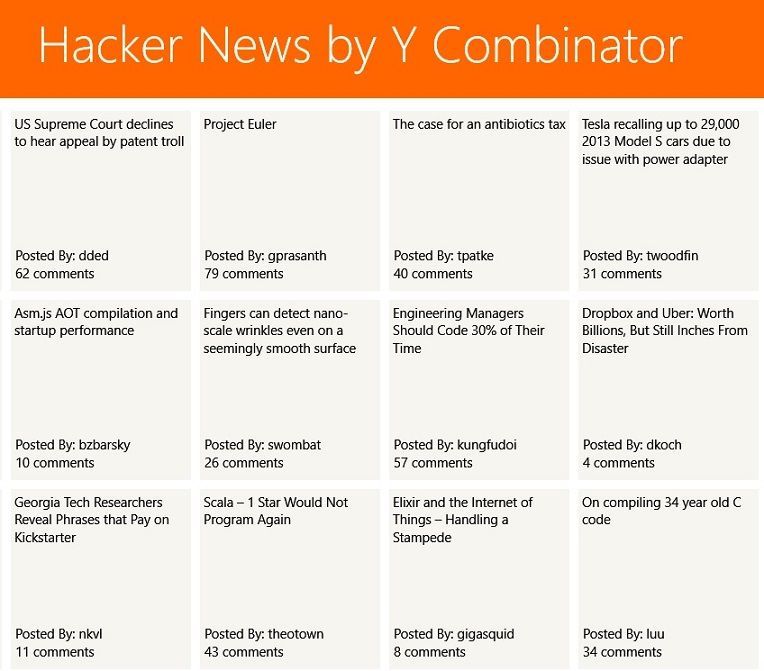
This is an application that allows users to browser the top current stories from the popular technology news site Hacker News. It allows the user to view the top stories as well as visit each one. The user can also read the comment threads for each story.

The app comes with a full list of the top stories, threaded comments and a responsive which is really easy to use. What I didn’t like is the way how articles are structured and I’d personally like something that resembles more than original design of Hacker News. Also, at times, the articles seemed to load quite slow, but besides this, it’s a good start, so go ahead and download it on your Windows 8 tablet or desktop device.

Download HackerNews app for Windows 8

Where is Microsoft’s wearable tech?

Where is Microsoft's wearable tech?

Throughout 2013 we saw the arrival of a raft of wearable device. The likes of Pebble and Galaxy Gear fought for space on wrists all over the world, but it is probably Google Glass that is causing the most excitement. Amongst all the names showing off watches, glasses and other devices that can adorn the body, there’s one name that have been notable by its absence: Microsoft.

There have been rumors for some time that Microsoft is working on its own version of Google Glass, and it would certainly be interesting to see what sort of dent the company would be able to make on the market. Wearable tech is still very much in its infancy, but 2014 could well the year that things really start to take off.

But the question that needs to be asked is “is it what people want?”. There have been a few problems with wearable devices so far. Really, they are not problems unique to this market, but looks and price are major sticking points. Any developing technology is bound to be comparatively expensive, but there is the risk that it makes the technology elitist.

Looks are important to the success of any wearable device. Units that are ugly are going to have very limited appeal, after all. The problem with smart watches being super bulky are starting to be eliminated, and there are now various devices to choose from which are not significantly bulkier than a regular, dumb watch.

Watches are great, but the futuristic look and feel of a pair of glasses like Google Glass really does get people excited. With early adopters used to paying a premium, there has to come a time when pricing levels out to a point that makes it accessible to a wider range of people. We all love the idea of a HUD accompanying our day to day activities, but what price tag would be appropriate?

We already know that headsets and watches are incredibly popular, and it’s likely that Microsoft will go down one or both of these routes at some point in the future. But what other wearable devices would you like to see? Could intelligent jewelry take off? Imagine a necklace or bracelet that acts as portable storage, transferring files using NFC.

This likes of Xbox One’s Kinect show that Microsoft is already capable of producing some impressive smart hardware, and there is potential for use in business as well as the home for the right product.

Shoes with built-in pedometers and other trackers would be another interesting option, but would probably require collaboration with a footwear manufacturer. There’s scope for plenty of other wardrobe additions. Rather than using a plethora of gadgets to monitor your blood pressure, heart rate, body temperature etc, how about simply donning a smart t-shirt that could beam this information to your phone.

What are you looking for from wearable tech? Share your thoughts and ideas below.

Microsoft’s BUILD 2014 Developer conference registration opens tomorrow January 14th

Microsoft's BUILD 2014 Developer conference registration opens tomorrow January 14th

Microsoft is set to hold its Build 2014 Developer Conference at the Moscone Center in San Francisco from April 2nd to April 4th, and registration for the event opens tomorrow, January 14th. It has also been rumored that we will see the official release of the first update to Windows 8.1, dubbed the Spring 2014 update or Update 1, during the event.

“The momentum just keeps building and that is why I’m so excited to announce our next developer conference, Build 2014, which will take place April 2 to April 4 at the Moscone Center in San Francisco. Save the date and mark your calendar for registration, which opens at 9 a.m. PT on Jan. 14 at www.buildwindows.com,” Microsoft stated in an official blog post back in December.

The event runs for $2095 and registration opens at 9AM PST at buildwindows.com. While the price may be a bit steep for some, keep in mind that the event sold out in just one day last year. This resulted in Microsoft re-opening registration and adding more seats.

Microsoft annual BUILD conference is set to happen in April of this year, which is a lot earlier than usual. It’s highly likely that Windows 8.1 Update 1 will be shown and maybe even released around this time, introducing new API’s and features for both developers and consumers.

GoDaddy partners with Microsoft to offer Office 365 to small businesses

GoDaddy partners with Microsoft to offer Office 365 to small businesses

GoDaddy is used by more than 12 million customers all over the world, and thanks to a new partnership with Microsoft, the company will now be offering Office 365 as its core business-class email and productivity service to its small-business customers. In what is described as a “long-term strategic partnership”, Microsoft and GoDaddy are making it easier for smaller businesses to gain access to the best products to drive things forward.

Senior vice president of Business Applications at GoDaddy, Steven Alrich, said “We’ve created a simple way to attach Office 365 to a domain name, helping small-business owners look professional and work anywhere, making the business of running their business easier.”

The new arrangement means that GoDaddy’s business customers will be able to take advantage of professional email through their domain, make use of the full range of Microsoft productivity suite, and enjoy cloud storage. To help very small businesses to get off the ground, Microsoft has created a new, unique way of offering domain-based email and storage.

John Case, corporate vice president, Microsoft Office said “GoDaddy’s relationship with small businesses combined with Office 365, the fastest-growing Microsoft product in history, will help bring the benefits of Office 365 and modern cloud services to even more companies, whether they’re seeking to modernize how they do business or simply starting up.”

For now, Office 365 from GoDaddy is available in the US and Canada, but over the next three months it will roll out around the world.

Check out the video to find out more!

Discounted Windows 8 Apps & Games This Week #6

Another week is here and Microsoft, as always is publishing the discounted Windows 8 apps and games in the Windows Store. For this week, we have four interesting games and two Windows 8 productivity apps. Read below for more details
windows 8 red stripe deals
Last week, we have seen the following apps and games get discounted in the Windows Store – Hydro Thunder Hurricane, Dungeon of Legends, Pettson’s Inventions 2, Big Mountain Snowboarding, Files&Folders and Pocket Yoga. I hope you managed to download and install them on your Windows 8 tablet if they were from your area of your interest. You will find in this week’s discounted Windows 8 Red Stripe Deals some apps that we have previously covered here on Wind8apps, such as Chimpact, Doodle God or the Farming Simulator game.

Windows 8 Red Stripe Deals for this week

  • iStunt 2 ($2.49, regularly $4.99) – an interesting Windows 8 snowboard game
  • Chimpact ($2.49, regularly $4.99) – fun game with a cute chimp that collects gems, medallions and, of course, bananas in the jungle
  • Doodle Kingdom ($1.49, regularly $4.99) – rule over your own kingdom, with castles, knights, warlocks and dragons.
  • Farming Simulator ($1.49, regularly $4.99) – cultivate fields, maintain roads and run your farm in a small village on your Windows 8 tablet
  • MoBu ($3.49, regularly $6.99) – a Windows 8 financial app to help you track and manage your personal finances
  • LCARS Interface ($1.49, regularly $2.99) – an interesting that makes you feel like you’re aboard the computers in  Star Trek: The Next Generation

Read Also: Best 5 Windows 8 Air Hockey Games for Fun Play

SEA attacks official Microsoft News Twitter page and Technet Blogs after recent Skype attack

Social Network Hack

The Syrian Electronic Army is at it again, targeting Microsoft’s social media accounts as a way of spreading information about NSA spying. This isn’t the first time the SEA has hacked one of Microsoft’s social networking accounts, recently Skype’s blog and twitter page were affected. Today, the official Microsoft News Twitter page was affected.

So far, they’ve used the Twitter account to warn users of using Outlook, and have also said that IE’s top two links users visit are download pages for Google Chrome and Firefox. Whether or not this information is true is irrelevant, as it is something Microsoft wouldn’t be touting on its official Microsoft News Twitter account.

It was revealed in 2013 that the NSA had the ability to listen in on Skype calls, among a number of other things. The SEA are simply spreading awareness of such ability, but as Microsoft are denying involvement, things have gotten a little fishy.

Update: It appears the tweets have quickly been taken down. “Microsoft is aware of targeted cyberattacks that temporarily affected the Xbox Support and Microsoft News Twitter accounts. The accounts were quickly reset and we can confirm that no customer information was compromised,” a Microsoft spokesperson stated.

Update 2: Looks like Microsoft’s TechNet blog was also a victim:

Windows 8, 10 App Check: Belote

There are plenty of interesting Windows 8 cards games to be played and Belote is one of them. Not too many have heard about this cards game, but those who do, will definitely find it enjoyable on a Windows 8 tablet.
windows 8 belote
I have been playing Belote as a kid with my friends and even now I won’t refuse a good old game of Belote. This is a cards game that has been allegedly played for the first time by French, but is especially popular in Russia and Eastern Europe. So, if you know how the play the Belote cards game and you also own a Windows 8 tablet, then what you need to do is to download the Belote! app that we’re talking about here.

Read Also: Play Bridge Cards Game in Windows 8

Play Belote on your Windows 8 tablet

Join this great Belote event: the Gardon.org Belote Tour. Practice much as you want on short game. Start the adventure with $ 5,000. Your goal? Win a lot of dollars day after day, and go higher and higher in the world best belote players ranking. Take your chance and challenge the most talented players. Will you be one of the best? Will you be able to get at the top?

The single downside of this interesting Windows 8 Belote app is the fact that you will have to pay $2.49 to get it, but since it is the single such card game in the Windows 8 Store, perhaps it makes sense to price it like that. What is not so great is the fact that there is no trial option available, so that you could see whether or not this game is for you. Inside the app, you will have access to world ranking, full HD support and there is also the option of training with a short Belote game. If you are into cards game, you might check out the recently launched UNO card game, as well.

Download Belote cards game for Windows 8

Microsoft displays themes created by users in Open Call program

Microsoft displays themes created by users in Open Call program

Themes are one of those little behind-the-scenes things that Windows users all take for granted. We all use them, we look for cool new images to add to our desktops, but we tend not to really give the whole thing much thought. Fortunately, Microsoft does — otherwise we would not have as many of them to choose from.

The company adds a continuous stream of new themes, incorporating seasons, holidays, movies, games and more into the mix. But Microsoft has also asked photographers to submit their own creations and promised to push out the best ones in its Personalization Gallery.

Now the company is unveiling its most recent batch of winners. Sets of images include pictures of Queensland, colorful birds, sunsets in the beautiful Sierra region, dragonflies and a whole lot more.

All can be found here. Each theme is free to download and install and works with Windows 7, Windows 8, Windows 8.1 and Windows RT.

Microsoft Surface 2 vs Dell Venue 11 Pro: Who Wins?

2013 did not end without leaving us with something to talk about when it comes to tablets. During the final months of the year, Microsoft and Dell unveiled their latest Windows 8 tablets. Looking at them from a material point of view, both tablets look amazing, and their cost is on par with the performance.
dell-venue-11-pro-vs-surface-2As far as performance goes, both the Microsoft Surface 2 and Venue 11 Pro are extremely fast, among the most powerful Windows tablets money can buy and you can tell Microsoft and Dell really put some thought into their new generation of tablets. Although similar, there are some differences between them so let’s go over a specs and features breakdown. We are not comparing the Microsoft Surface 2 Pro with the Dell Venue 11 Pro, but the second edition of the Surface tablet. We have just finished comparing the Dell Venue 11 Pro with the Asus T100, so head over and see the comparison, if you’re interested.

Read Also: Dell Venue 8 Pro VS Lenovo Miix 2: Who Wins?

Dell Venue 11 Pro vs Microsoft Surface 2: specs compared

  • Price – Microsoft Surface 2 starts at $449 and the Dell Venue 11 Pro at $499. There is a slight difference between the price of both models, and the Microsoft Surface 2 sells $50 cheaper than the Dell counterpart. The lower price helps Microsoft take the lead, however the difference is relatively small and both tablets are in the same price category.
  • Display – Both tablets are similar when it comes to the display and are equipped with IPS with 1920 x 1080 resolution. The slight difference is that the Dell has a 10.8″ and 10-pt capacitive touch compared to Microsoft’s 10.6″ and 5-pt one.microsoft surface 2 vs dell venue 11 pro
  • Processor – The processor tells a different story and Microsoft went with the NVidia Tegra 4 1.7 GHz superior to the Intel Atom 1.33 GHz that is present on the Venue 11 Pro. Although both CPU’s are quad core and very powerful, the Surface 2 is a bit faster and more responsive.
  • Memory – There is no difference between the two when it comes to memory and both have 2 GB of RAM, the same as most of this generation of tablets.
  • Storage – The storage available for the Microsoft Surface 2 is 32/64 GB, in contrast to the 64/128 GB available for the Venue 11 Pro. There’s also a 32 GB version available, but we didn’t manage to find it nowhere. The comparison was done between the basic versions of the tablet from both manufacturers, so the Dell Venue 11 Pro has double the storage available on the Surface 2.
  • Multimedia – Both models offer two microphones and stereo speakers, however the Surface 2 is slightly superior having Dolby sound. Both tablets are designed to offer a great experience for video calls, watching movies or listening to music.
  • Connectivity – The ports on both these tablets are the same, the only difference is that the Venue 11 Pro has a mini HDMI compared to Microsoft’s HD Video out port. Dell takes a small lead when talking about connectivity because the Venue 11 Pro supports NFC, the Surface 2 doesn’t. This might come in handy when pairing the tablet and a smartphone for easy transfers between the two.Dell Venue 11 Pro
  • Battery – The battery life is pretty much the same, both of the models going for the 10 hours mark. This is a huge improvement compared to older versions of Windows tablets and now it’s more than enough to power through a whole work or school day.
  • Camera – Let’s start the comparison with the rear cameras, and give the Dell Venue 11 Pro the lead on this one with an 8 MP camera compared to Microsoft’s 5 MP. Looking at the front cameras, the Surface is clearly superior with a stunning 3.5 MP webcam recording at 1080p way better than the 2 MP on it’s counterpart.
  • Size – The size of the tablets is pretty much the same, both being 11″ and even the weigh is similar. In one corner we have the Surface 2 at 275 mm x 173 mm x 8.9 mm weighing 1.49 lbs and in the other, the Venue 11 Pro at 297.7mm x 176.8mm x 10.2mm weighing 1.57 lbs. The differences are barely noticeable, we are talking about a couple of millimeters and grams in favor of Dell, but the weigh difference present only because the tablet is slightly larger in size.

Seeing the hardware specs of these two state of the art tablets, there is no clear winner and it all breaks down to personal preference. But, there is one thing that puts the Microsoft Surface 2 in a rather big disadvantage, Windows RT. Dell Venue 11 Pro has Windows 8.1 operating system and that resolves all the compatibility issues, allowing you to use any PC software. There is no reason to use Windows RT on a tablet with the specs like the Surface 2, simply because it has more than enough juice to let Windows 8.1 run perfectly.

Read Also: Lenovo Miix 2 vs Acer W4: The 8-inch Windows 8.1 Battle

Windows 8, 10 ChatON App is Now Available for Download

Samsung has released its very first Windows 8 apps in the Windows Store and it’s one that many Samsung users have been expecting for quite a while now – the official ChatON app. Targeted at Windows 8 tablet users, the fresh new ChatON app will also work on Windows 8 desktop devices, as well.
windows 8 chaton app
If you have a Samsung phone, then most likely you have heard about the ChatON application and chances are that you are even using it, as well. Now, if you happen to own a Windows 8 tablet or another Windows 8 device, you can now use the official Samsung ChatON app to chat with your buddies and friends that are also users of the same service.

Read Also: Windows 8 Game Check: World Cricket Championship Pro

No.1 mobile messenger application in the US and France! Create a global social community with over 100 million friends who have ChatON through a Samsung account. You can chat with 70 million friends in ChatON being serviced in 237 countries in 63 langauges. ChatON supports 9 kinds of different platforms including Android, iOS, and web. You can enjoy ChatON on smart phones, tablets, and PCs by signing in with a Samsung account. ChatON is the best social communication service for you. Start now!

ChatON gets released for Windows 8 users

The official ChatON app for Windows 8 users has plenty of features, and among the most important ones you will find the group chat, the sharing multimedia option, the trunk option for chatrooms to see all sent images and videos. Even more, there’s the broadcast function that will let you send the same messages to multiple numbers in individual chat room.

Just like the other apps on iOS and Android, ChatON for Windows 8 comes with the My page function which acts as a personal page and by using the Multi device option, you will get to experience ChatON by connecting a smartphone, Windows 8 tablet or Windows 8 PC.

Download ChatON for Windows 8

Microsoft’s mass appeal makes it a far stronger brand than Apple

Microsoft's mass appeal makes it a far stronger brand than Apple

Microsoft’s “One Microsoft” brand is proving more popular than Apple with the US public. A survey by Forrester Research tested the brand strength of ten top technology firms including Apple, Microsoft, Samsung, and Sony. The results, which found Microsoft coming out on top ahead of Apple and Sony, surprised even those carrying out the survey.

Forrester analyst Tracy Stokes said “Time was definitely a factor. I think the results would have been much different a year or 18 months earlier.” But she also explained that Microsoft has become so ubiquitous that it is more of a household name than many of the others.

But Microsoft scored very highly when rated in terms of “essentiality” and trust. Microsoft is seen as being an essential part of life these days — how many people could live without Office and “Windows ?! — and the research also found that the company received a very high trust rating from people in of all ages.

Apple holds different place in people’s hearts. While Microsoft may be seen as producing essential products, Apple is regarded as producing the must-have ones. “Microsoft has a utilitarian essentiality, not the kind of emotional essentiality that Apple relies on.”

Another factor in Microsoft dominance is the fact that the company manages to appeal to such a broad age range. High rating were received in every category from every age group.

Stokes said that it is too early to tell whether the “One Microsoft” is a success — but perhaps the results speak for themselves. What do you think?

A staggering 422 million Windows devices could ship in 2015

A staggering 422 million Windows devices could ship in 2015 according to Gartner

If the figures from Gartner are to be believed, there are some seriously impressive shipments of Windows devices on the cards over the next 24 months. Truth be told, 2013 was not a great year as there was something of a slump from 2012 — around 328 million devices were shipped compared to 346 million the previous year — but things are on the up!

Gartner is predicting that nearly 360 million Windows devices will ship in 2014, representing an increase of over 9 percent. And 2015 looks like it could be even rosier, with an estimated 422.7 million devices with Windows installed to be shipped.

The figures also show that our love of desktop computers is on the wane. There was a dramatic drop from 341 million PC shipments in 2012 to just 299 million in 2013. In the coming twelve months, it is expected that this will drop further to 278 million, while 2015 could see as few as 268 million desktop shipments.

Perhaps unsurprisingly, tablet shipments are predicted to rocket. Starting off at a fairly lowly 120 million in 2012, numbers jumped to 180 million in 2013. Over the next couple of years there will be further increases to 263 million in 2014 and then 325 million in 2015.

What do you make of the predictions? Any surprises for you?

Office 365 has 10 top tools to help you stick to your New Year’s resolutions

Office 365 has 10 top tools to help you stick to your New Year's resolutions

We’re into the first week of 2014. If today feels like a bit of a downer, it could be because it’s the first Monday of the year! It could also be because you’re already finding it difficult to keep to those New Year’s resolutions you decided to make. But never fear; office 365 is on hand with a series of tools to help you stick to your goals and stay on target over the coming months.

In a post on the Office blog, Jevon Fark from the Office team reveals just how helpful Office 365 can be, no matter what goal you have set yourself. Whether you have decided to shed a few pounds and get into better shape, or you want to get yourself a new job and travel more, it’s all easily managable.

Jevon’s post explains how Excel, OneNote, Word and online tools can be used to help you. You’ll find links to helpful templates — great if you need to give your resume a facelift, or can’t face putting together a budgeting spreadsheet — all of which can be downloaded and used completely free of charge. Work your way through the Office 365 top ten tools, and you’ll find it hard not to stick to your resolutions.

Have you made use of Office to help with your goals for 2014, or are there any other app you turn to? Maybe you find that your Windows Phone is used more than your computer because you have it on you at all times. Share your thoughts and experiences!

Windows 8, 10 App Check: Pin Steam

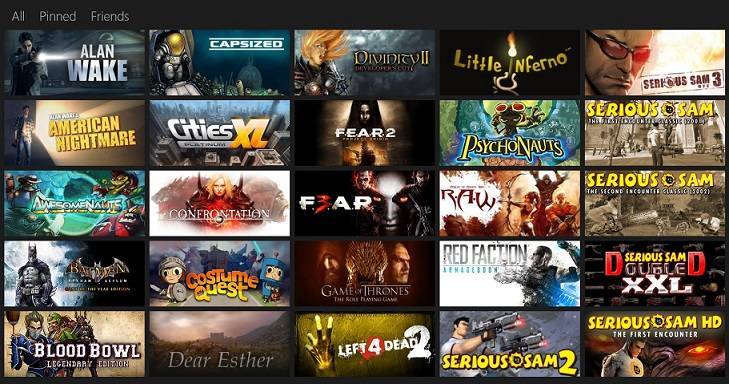
Unfortunately, Valve said that it is not going to release a Windows 8 Steam app anytime soon, citing “business reasons”, which probably means there are not enough touch Windows 8 users. However, there is a reliable third-party Steam app that you can use for increased Steam functionality on your Windows 8 tablet
windows 8 steam appIn the past, we have shared with you the Steam Tiles app for Windows 8 users that allowed you to pin Steam games to the start screen of your Windows 8 tablet. Now, another similar Steam app for Windows 8 app has caught our attention, called simply Pin Steam. Just like the Steam Tile app that we have covered, this too lets you pin your Steam games or friends to the Start Menu with good looking tiles.

Read Also: Microsoft Hires Former Steam Boss Holtman to Make Windows Great for Gaming

Windows 8 Steam app for the player in you

UNLIMITED FREE TRIAL! Live tiles show you which of your friends are playing which games. You can also pin friends directly to the start screen and follow their online status. To use Live Tiles, this app requires you to have a Steam account and to have setup a Custom URL in your steam profile. It also requires Steam to be installed on your device to launch games. (NOTE: Steam is not available for Windows RT yet!) Neither this app or it’s creator is affiliated with Valve Software in any way. This app has an unlimited trial! You can do everything except actually launching the game from the Start Menu.

Since the app comes with full Windows 8.1 support, you can change the live tiles to support any tile size – large, wide, medium or small. The app has been recently updated with a new user interface and a lot of bug fixes. This Windows 8 Steam app is really, really fast and this is probably the reason why so many have given it a good rating.

What’s really cool about the app is that it comes with an “unlimited free trial”, which means you can use the app for as long as you want, with no ads at all. If you want to support the developer, the app costs $1.49. The looks really, really gorgeous and fetches your games collection instantly. Follow the link from below to download it from the Windows Store and start enjoying your Steam games!

Download Pin Steam for Windows 8

Windows 8, 10 App Check: Gmail Touch

I have been looking for a dedicated Windows 8 Gmail app for quite a long while to download and install on my Windows 8 tablet. That’s because Google hasn’t yet decided to release an official Gmail client for Windows 8 users. Third-party app Gmail Touch seems to be the best one that is currently available in the Windows Store
windows 8 gmail app
When you go the Windows Store and type “gmail” there, a plethora of Windows 8 apps will appear before your eyes. The problem is that a staggering majority of them are spam and useless apps that you really should avoid downloading on your desktop or touch Windows 8 devices. Gmail Touch is the single one that I can recommend when it comes to trying out the Gmail experience on your Windows 8 tablet.

Read Also: Microsoft’s Latest Scroogled Attack Slams Gmail’s Email-like Ads

Description: Gmail Touch is a mail client for Windows 8. View your inbox, compose messages, search your mail, and more! Features: View your inbox, Compose messages, Search your email, Live Tile, Badge and Toast Notifications, Multiple Accounts Support, Share target

Reliable Windows 8 Gmail app for your Windows 8 tablet

windows 8 app gmailThe app is very basic and comes with a design that isn’t necessarily appealing, but you get used to it really quick. I still rely on the built-in Mail app for my Windows 8 tablet, but if you want a dedicated Gmail app, at the moment, this is the best to choose. Inside the app you will be able to do the basic things – view the inbox, send emails, search through your mail. You can also pin the app to the start screen and thanks to the Windows 8.1 support, you can change its size how you want it to be. At times, I found the app to be slowly loading, so I hope the developer takes care of this in a future release.

Gmail Touch for Windows 8 has been updated multiple times and user interface updates and tweaks have been put in place. The app can be downloaded for free but there’s an advertising square banner in the lower right corner that you will get used to. Or, you can choose to pay $2.99 and get the ad-free version. The app also comes with Badge and Toast Notifications, Multiple Accounts Support and Share target features. We will be monitoring the app and if there will be any worthy updates, we will let you know.

Download Gmail Touch for Windows 8

Windows 8, 10 App Check: BBC Earth Wonders

The BBC Earth Wonders app has been recently launched in the Windows Store for Windows 8 and Windows RT users, joining other apps launched by BBC, such as BBC Good Food, Top Gear News and others. Read below for more details regarding this Windows 8 BBC app.
windows 8 app bbc
First of all, let me start by saying that I absolutely hate paid Windows 8 apps that don’t let you try out the title for a few days, at least. Unfortunately, such is the case with BBC Earth Wonders. Truth be told, for $1.99, its price, you will get access to amazing content, the kind that only BBC can make. More than 500 stunning HD images from the natural world and 50 HD video clips will await for you to discover and enjoy them.

Read Also: Windows 8 App Craigslist Classifieds Launched

BBC Earth Wonders brings high-quality content on Windows 8

This BBC Earth Wonders app showcases some of the most beautiful BBC natural history content, taken from landmark series such as Planet Earth, Frozen Planet and Life, along with stunning images from world-renowned natural history photographers. We won’t give it all away now, of course, but with this app you’ll learn an astonishing fact (or two) about the diminutive spectral tarsier, one of the world’s most unusual and secretive primates. The killer whale is a whale by name only – can you imagine what species it actually is?

By using the BBC Earth Wonders Windows 8 app you will be able to explore awesome content using a simple map interface and the HD video option will bring  50 points of interest with a 30 second clip of pin-sharp HD video. The “Picture of the day” feature will bring you daily a new amazing picture accompanied by a little-known fact. If you’re looking for a Windows 8 BBC app with amazing content to be displayed beautifully on your Windows 8 tablet, then you have found it. Follow the link from below to download it.

Download BBC Earth Wonders for Windows 8