
YouTube Not Working on Switch 2? 5 Easy Fixes


 3 min. read
  Published on

If YouTube won’t load or keeps crashing on your Nintendo Switch 2, don’t worry. You can usually fix the problem with a few simple steps.
Table of contents
What can I do if YouTube is not working on Switch 2?
1. Check your internet connection
A weak or unstable connection is the most common reason why YouTube fails to load on the Switch 2. Make sure your console has access to a reliable Wi-Fi network.
- Go to System Settings > Internet > Test Connection on your Switch 2.

- Restart your Wi-Fi router and wait about 1–2 minutes before reconnecting.
- Move your console closer to the router for a stronger signal.
If YouTube isn’t loading on other devices either, you can also check our guide on how to fix YouTube not working on Samsung TV.
2. Restart your Switch 2
Sometimes a simple restart clears temporary glitches and fixes streaming problems.
- Hold the power button for about 3 seconds.
- Select Power Options from the menu.
- Tap Restart and wait for your console to reboot.
- Launch the YouTube app again to check if it works.
3. Update YouTube and your system software
Outdated apps or firmware can cause compatibility issues with YouTube on your Switch 2. Updating both often resolves playback errors.
- Go to the Nintendo eShop.
- Search for YouTube and select Update if available.
- Open System Settings > System > System Update.

- Install any new firmware updates.
For issues with YouTube’s features after an update, such as captions not loading, see this fix for YouTube auto translate not working.
4. Clear the cache on your Switch 2
Corrupted cached data may stop YouTube from working correctly. Clearing the cache is safe and often helps.
- Open System Settings on the home menu.
- Go to System > Formatting Options.
- Select Clear Cache and choose your user profile.
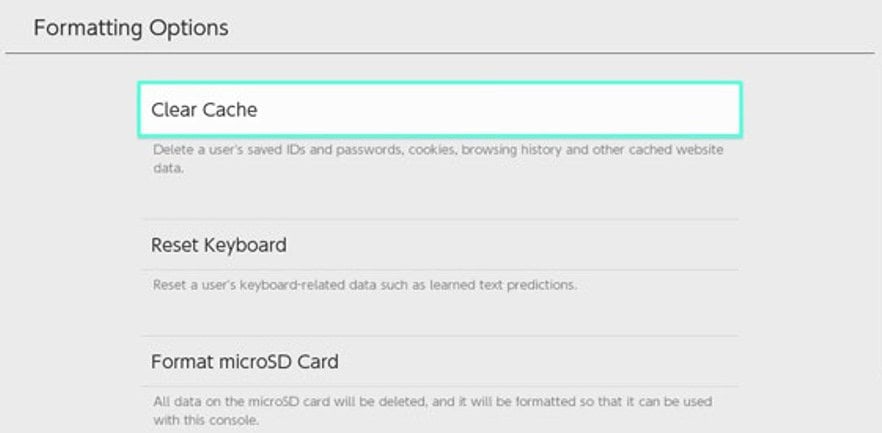
- Restart the console and try opening YouTube again.
5. Reinstall the YouTube app
If nothing else works, reinstalling the app ensures you have the latest version and clears any corrupted files.
- Highlight YouTube on the home screen.
- Press the + button and select Manage Software > Delete Software.
- Open the Nintendo eShop and download YouTube again.
- Install the app and log back into your account.
- Open the app to see if the problem is resolved.
If the mini player or playback controls still don’t work after reinstalling, you can follow the steps in this guide on how to fix YouTube mini player not working.
Conclusion
When YouTube is not working on Switch 2, it usually comes down to internet connectivity, outdated software, or corrupted cache. By following the steps above, you should be able to restore access quickly. If the issue continues, check the YouTube Help Center or Nintendo’s support page for service updates.
FAQs
It often happens because of outdated software, temporary server outages, or weak internet connectivity.
Open the Nintendo eShop, search for YouTube, and select Update if a new version is available.
Yes, unstable or slow Wi-Fi can prevent videos from loading or cause frequent buffering.
If the problem continues, reinstall YouTube and check if there are any service outages. You can also contact Nintendo or YouTube support for further help.

Read our disclosure page to find out how can you help Windows Report sustain the editorial team. Read more



Improve this guide


User forum
0 messages