
Cricut Design Space Not Working? 5 Quick Fixes That Work


 3 min. read
  Published on

If Cricut Design Space is not opening or keeps freezing, don’t worry. This guide will help you fix it quickly with proven troubleshooting steps.
What can I do if Cricut Design Space not working?
Table of contents
1. Clear the Cricut cache files
Cache buildup can stop Design Space from working properly. Clearing them often resolves slow or frozen behavior.
- Close Cricut Design Space completely.
- On Windows, press Win + R and type %localappdata%

- Open the Cricut Design Space folder.
- Delete the Cache folder.
- Restart your PC and relaunch the app.
If you use older machines, you might also want to check this guide on Cricut Expression not working.
2. Update Cricut Design Space
Running an outdated version may cause loading failures.
- Visit the official Cricut website.
- Download the latest version of Design Space.
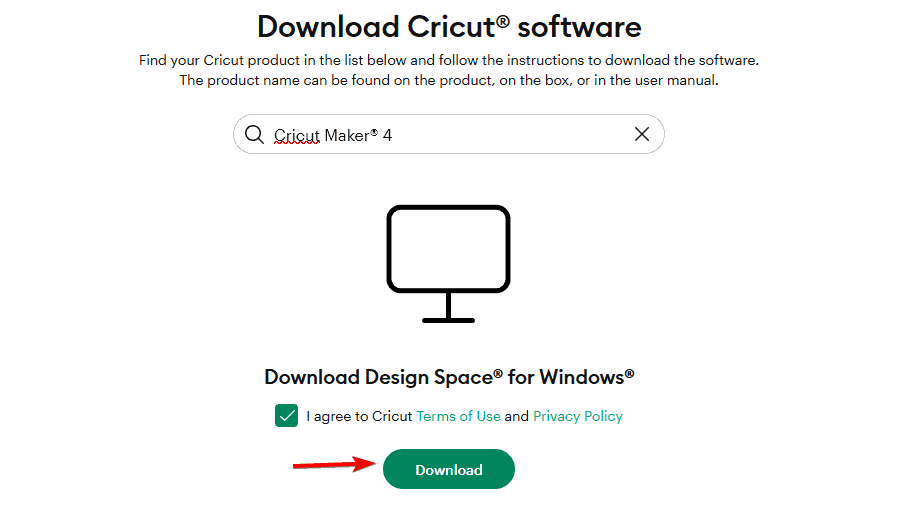
- Uninstall the old version from your computer.
- Install the freshly downloaded copy.
- Restart your system and log in again.
If your computer does not detect the device at all, see this guide on computer not finding Cricut.
3. Check your internet connection
Since Design Space runs online, a weak connection can block it from loading.
- Restart your router and modem.
- Switch to a wired Ethernet connection if possible.
- Disable VPNs or firewalls temporarily.
- Run a speed test to confirm stable connectivity.

- Reopen Design Space after reconnecting.
4. Disable antivirus or firewall interference
Security programs may block Cricut from running.
- Open your antivirus software settings.
- Add Cricut Design Space as an exception.
- Do the same for your firewall rules.
- Relaunch the app to test.
5. Reinstall Cricut Design Space
If all else fails, a clean reinstall can remove hidden corruption.
- Uninstall Cricut Design Space completely.
- Delete leftover folders in %localappdata% and %appdata%.
- Restart your computer.
- Download the latest version from Cricut’s official site.
- Install it fresh and log back in.
If you still cannot access your projects, check this fix for Cricut not connecting to Design Space.
FAQs
It usually crashes due to corrupted cache files, outdated software, or internet issues. Clearing cache and updating the app often helps.
Yes, but you must save projects for offline use beforehand. Not all features work without internet access.
It works on Windows and Mac, but you need to meet minimum system requirements such as updated OS and stable internet.
Delete cache files, reinstall the app, and check security permissions in macOS settings.
Conclusion
When Cricut Design Space is not working, these fixes usually restore functionality. With the added guides for related issues, you should be able to get back to designing and cutting without interruptions.

Read our disclosure page to find out how can you help Windows Report sustain the editorial team. Read more



Improve this guide


User forum
0 messages