
How to Overclock With MSI Dragon Center
This can be done by modifying Turbo settings


 2 min. read
  Published on

Many users are wondering if you can overclock with MSI Dragon Center, and the answer is yes. If you’re not familiar with the process, this guide will show you everything you need to know.
How can I overclock in MSI Dragon Center?
Modify the Turbo settings
- Open the MSI Dragon Center.
- Next, select the desired profile.
- Set Shift to Turbo.

- Click the Cog icon to adjust the settings.

- Adjust the Core Clock and VRAM Clock offset slightly. Once done, click on Save.

- Optional: Set Fan Speed to Cooler Boost.
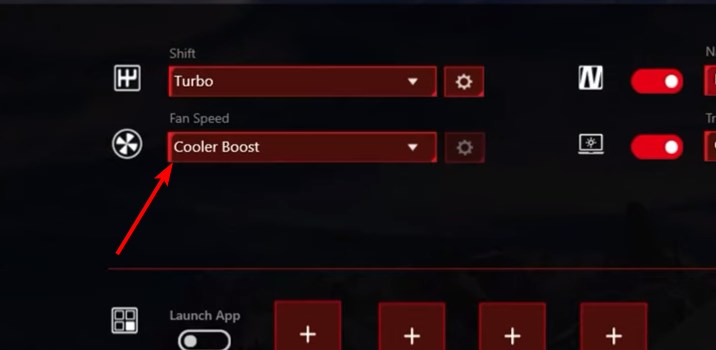
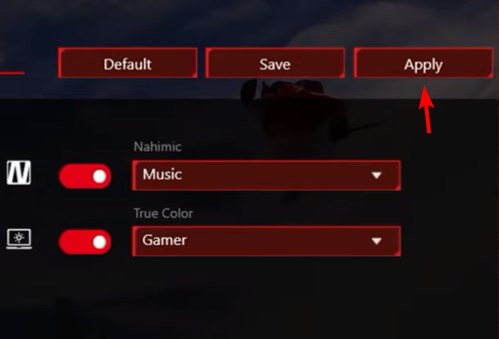
- If you want to save the preset, click on Save.
- To apply the settings, click on Apply.
Does MSI have overclocking software?
While MSI Dragon Center can do some basic overclocking, MSI Afterburner is a far better option, especially if you have a dedicated GPU.
As you can see, MSI Dragon Center can overclock your CPU, but the available options are rather limited, so you’re probably better off using BIOS or any other MSI Dragon Center alternatives.
This tool can do more than overclocking, and you can use it to update BIOS with MSI Dragon Center. Keep in mind that this software has issues, and many reported a black screen after a BIOS update using MSI Dragon Center.

Read our disclosure page to find out how can you help Windows Report sustain the editorial team. Read more



Improve this guide




User forum
0 messages