For the next two weeks, people across the world will be taking stock of their time in 2016 and what is to come in 2017. New Year’s resolutions abound, many people will be preparing for 2017 by looking back on the events in their lives and around the world that helped shape 2016 for better of for worse.
However, in 1999, a large intersection of people were clearly preparing for the worst in the following year as the Y2K scare ran rampant across the globe. As the Y2K scare or otherwise known as the Millennium Bug, grew in myth banks, software providers, computer OEMs, and other electronic device manufacturers prepared for an estimated issue programmers were not taking into account when applying the Gregorian calendar rule to software.
While the company may have ben confident in its software’s ability to handle the calendar oversight written into integrated systems, Chen informs that Microsoft brought in backup generators and on-call staff to work around the clock in case issues did arise.
Luckily for most, 1999 smoothly transitioned into 2000 without little or no fuss regarding Y2K. As for the men and women that were on call that evening, Chen clarifies that they received their very own special Y2K celebratory party in lieu of relatively quiet night.
For more behind the scenes-type historical information, Raymond Chen hosts a series titled One Dev Question on Microsoft’s Channel 9.
In the market for a new movie streaming service? Vudu just got a significant update that might just make it a prime contender. The latest update – primarily focused on the Xbox One S app, offers support for 4K streaming on the new console. On top of adding 4k functionality to those who happen to have a 4K TV, the new update also made Vudu a UWP compatible app.
With Vudu being updated to the Universal Windows Platform and its library being expanded for Xbox One S to include 4K content, it’ll be interesting to see if more people end up adopting the service. The addition of 4K streaming is absolutely a big deal, making Vudu join a very short list of apps that offer the functionality – with big names like Netflix and Hulu being some of their only competition in that area.
If you’re still using the original Xbox One, you won’t be getting 4K functionality with the newest update to Vudu – the Xbox One just can’t handle it. Still, you’ll be getting all of the benefits that come with Vudu becoming a UWP app, so there’s still a good reason to check it out.
There have been a ton of questionable touchpad technologies used since laptops came onto the scene. For quite some time, manufacturers were using touchpads from countless third party companies, each one of them generally lacking quality in one area or another. When Microsoft introduced Precision Touchpads, a lot of manufacturers jumped on board to adopt what seemed to be the best touchpad technology that was available at the time. Every once in a while, though, you still see some manufacturers not falling in line.
With future builds of Windows 10, some news from WinHEC suggests that Microsoft intends to make sure that everyone sticks with the Precision Touchpad standard that mostly everyone has already accepted. For those of you with old laptops, don’t worry: this isn’t going to change anything for you. All this is going to affect is the “Built for Windows 10” sticker that manufacturers are always looking to grab. Nothing is going to stop working with Windows 10 as a result of this.
All we know is that this is going to be happening “at a later date.” We have no idea when, exactly, Microsoft plans to implement this policy. It’s very likely that it could be going into effect with Redstone 3, though. At the end of the day, this doesn’t have too much effect on the end user – again, your existing laptop should be able to upgrade to the next version of Windows 10 without any trouble. This policy should just make sure that manufacturers looking to ship with Windows 10 installed will have the best touchpads available.
In order to highlight the accomplishments of women in the gaming industry, Microsoft is announcing the 17th Women in Gaming Luncheon. The event will take place on March 2nd, and will be held during the 2017 GDC (Game Developers Conference) in San Francisco’s Moscone Center. The theme is going to be “Be You,” and will celebrate the individuality and unique offerings brought to the table by every female game developer.
Team Xbox is committed to empowering women to do the job they love. This year we will host our biggest luncheon ever with women from across the gaming world. Thanks to feedback from our community, we will be creating a more inclusive event that allows for stronger connections to be developed. Join us as we come together to celebrate you, just as you are.
Are you a woman in game design that has something to say to your peers? Microsoft is looking for speakers to fill the event with a bit more content. If you’re interested, you just need to check out the criteria and send over a submission to the Xbox team. If you’re lucky, they’ll send you an invite to the event so you can do a bit of speaking.
The OneDrive team has been working to deliver some features that were originally announced back at Ignite 2016 earlier this year. While we reported just a few hours ago that OneDrive’s long anticipated activity feed was now available, the SharePoint/OneDrive sync will have to wait just a little bit longer (via ZDNet).
Even though the public preview has had the sync feature between SharePoint and OneDrive, it seems the developers just aren’t ready to push it through for December. According to the post by Stephen Rose, general users should see it next month.
We remain committed to providing a reliable and performant sync experience for all your Office 365 files and continue to refine the public preview to meet our quality expectations. We’re on target to make this capability generally available in January.
Furthermore, the team also released a standalone OneDrive sync client for Mac that can be used outside of the Mac App Store. A slightly more convenient way of distributing software, for certain. It can be downloaded straight from Microsoft by clicking this link.
For those feeling adventurous, LibreOffice is testing version 5.3 of its software, the version that presents a new user interface that is a nod to Microsoft’s Ribbon-like Microsoft Office look.
If you are looking for a Microsoft Office replacement kit, you should probably look no further than LibreOffice. The option of having a similar level of quality while dumping extra costs seems appealing not only to normal users but to commercial and corporate entities as well. With the implementation of the ribbon-like UI which groups together all toolbars, LibreOffice has gotten one step closer to being a complete Microsoft Office replica. This change was long expected by consumers who were first promised it in 2015.
It was only in the 2010 version of Microsoft Office that integrated all its tools under a the Ribbon-based user interface, with the rest being added to Word, PowerPoint, Access and Excel. Over time, additional Microsoft Windows content was revamped to use the Ribbon UI.
Using Microsoft’s Office suite was facilitated with the release of the 2007 version which first featured the Office ribbon. Facilitating use also meant improving productivity with the suite, something Microsoft is all about with its Fluent UI. The highlight of this UI is the way all the toolbars were grouped.
What used to be a combination of multiple toolbars is now represented by a single toolbar which houses multiple tabs, each with its own options and settings. This helps users by offering the additional and side features in an accessible manner without losing track of the important ones that are a core necessity in working with the software.
Astroneer is already one of the most popular titles among Windows gamers even though it was only recently launched. This game takes you all over the universe as you explore new planets looking for rare resources. Mine planets and moons and use the raw materials in them to trade or to build new vehicles.
Astroneer is currently available as an Early Access game. As a result, the game is affected by quite a large number of issues. Fortunately, System Era Softworks regularly pushes patches to fix these bugs.
In order to avoid the risk of encountering various bugs, you should first check out the title’s system requirements and make sure your computer is capable of properly running the game.
Astroneer minimum system requirements:
OS: Windows 7, Windows 8, Windows 10
Processor: X64 Dual Core CPU, 2+ GHz
Memory: 4 GB RAM
Graphics: Discrete Non Mobile GPU with 1 GB Ram
DirectX: Version 11
Storage: 2 GB available space
Sound card: Any
Astroneer recommended system requirements:
OS: Windows 7, Windows 8, Windows 10
Processor: X64 Quad Core CPU, 3+ GHz
Memory: 8 GB RAM
Graphics: Discrete GPU with 2 GB RAM
DirectX: Version 11
Network: Broadband Internet connection
Storage: 4 GB available space
Sound card: Any
Astroneer also offers controller support. For the time being, there is no official list of controller models supported by the game. Both the Steam controller and the Xbox One controller as well are confirmed, but nothing is available as to other controller models.
Astroneers Facts
The game features hazards that could damage your base, such as toxic plants and storms.
There are two known ways to die: by running out of oxygen or falling from a great height.
Earlier today, and thanks to a tip from our reader Adam, we reported that Microsoft started Windows 10 Insider testing of Focused Mail in the Windows 10 Mail and Calendar app. Our tipster has since come back to us, and we have some updated information in regards to the matter.
According to a new email sent to us by Adam, the Focused Inbox feature is currently deactivated in the Windows 10 Mail and Calendar app. Adam arrived at this conclusion after downloading the update we previously reported about and has since notified us that the “Reading” section of the settings menu in the Mail app now has a “Focused Inbox” setting.
Judging from this, and a comparison which was done on another one of his machines, both Adam and we here at OnMSFT would assume that Microsoft may slowly be rolling out the full Focused Inbox feature over time in future updates.
As always, if you’re a Windows 10 Insider, we urge you to check the Windows Store for updates, and let us know if you too have been selected for the Focused Mail feature by dropping us a comment below! And, just like Adam, if you ever notice any new features in Windows 10 apps, please do not hesitate to send us a tip!
It’s not always a straightforward affair shopping for a young person. Holiday seasons are often spent traipsing through the stockpiles of stuffed animals, loud electronics, and the latest fads and trends. Not that these are bad presents, but rare is it to find a gift that is productive, fun and introduces children to a new and innovative way to explore the world around them, such as Minecraft.
Sure, a few of you are groaning. After all, Microsoft’s acquisition of the small indie company has paved the way for a cacophony of products including but not limited to Lego sets, stuffed animals, books, posters, t-shirts, and even a spin-off video game from Telltale. The sheer amount of focus put into Minecraft by the tech giant as of late is almost staggering, but that’s for one simple reason.
Minecraft is a good product. The limitless potential of the sandbox video game to reach children in an educational and fun method while also inviting adults to dive in makes Minecraft one of the best gifts for younger gamers.
Freedom with Boundaries
If there is one thing that young minds have strived for through the decades, it’s a means to express themselves. Whether it’s through hairstyle, clothes, art, or music, generations have made determined efforts to fight for their unique identifiers and make their place in the world. In an age of growing technology, another way of being creative has turned to the computer screen.
There is no argument that the massive scale of Minecraft’s sandbox is beyond limitless. The virtual world generates more and more as you travel through it, mining, killing off mobs, and building. That is where Minecraft truly shines with some users even having the inspiration to create masterpieces of their own on a canvas of digital blocks.
Of course, not all creativity is by building something up. For some, being able to destroy and tear down something is their way of sharing their emotions. Because not everyone is the same, and Minecraft helps them embrace that. For all genders, showing who you are through the blocky character avatars is completely customizable. You can use premade, download a community made one, or make your own.
The Redstone Connection
Playing together with your child is the staple of building a positive gaming habit in an environment that it’s easy to get lost in. The Minecraft universe is a vast one with countless hours and attention put into it that can easily sink someone in that isn’t used to gaming. Of course, many studies believe that a growing dependency on video games is directly related to lack of parent involvement. At a leading school for psychological research, a Brigham Young University study even went so far as to link young adults who played video games an unhealthy amount to poor relationships with family and friends.
This day and age, video games don’t have to be single player. In Minecraft, you can build, create, and explore together tethered together by your Local Area Network (LAN) or create a Minecraft Realm where you can create a small network of friends and family to play together without concern. These Minecraft Realms make it possible to have the multiplayer features and enjoy time together without public knowledge. In fact, the Realm is only visible towards players you have invited to the list, making it a safe and fun spot for friends and family. And if you’re feeling adventurous, there are countless of Minecraft public servers available to join via third parties.
Minecraft for Education
Young minds are like sponges, and while playing video games, they aren’t just having fun but are learning as well. Minecraft has been used for teachers, administrators, and parents worldwide to portray complex lessons such as geometry, history, and problem-solving. Microsoft’s push for Minecraft Education Edition has opened up broad horizons for teacher, parent, and student connections. The C++ version of Minecraft is reserved for students, teachers, and administrators that want to use the game as an education tool.
Teachers are given more control over multiplayer sessions such as the Build Allow and Build Deny commands, mainstreaming the ability to control the environment while offering a unique perspective on lessons. Students can learn with a hands-on experiment about geometry, building to scale, and even bring history to life through a 3D virtual environment. Not to mention team building exercises and creative arts.
Playing Minecraft not only presents lessons in a creative and personal way, but students can also use the source coding to experiment in the vast world of technology at an early age. Encouraging the ability to customize and build from a stable platform will inspire and motivate deeper dives into coding at an early age. The gateway to many game developers, technology experts, and engineers were the first few hours of playing behind the scenes of another game’s code.
Furthermore, these lessons could be accessed across any platform including PC, consoles, and mobile making it the ultimate homework.
Flagship of Future Technology
There’s something to be said for Microsoft’s guiding hand to Minecraft’s development. Ever since the acquisition, Minecraft has stepped out of its boundaries of Java into the world of mass production across multiple devices. Furthermore, it has made just one leap further into the development of virtual and augmented reality as the flagship of the HoloLens.
We’ve been hearing for years about how Microsoft’s intent to purchase Mojang was largely driven by the development of the HoloLens. Now that patience has paid off where not only is Minecraft often used to demonstrate the capabilities of the augmented reality device, but Pocket Edition has already opened up the public to virtual reality sandbox with the Samsung Gear VR Edition.
We’ve already established that not only is Minecraft a video game, but it is also a learning tool, social community, and a gateway to a much more complex world. Virtual reality brings that to life with nearly authentic hands-on experiences where users can step into 3D environments and explore to scale historical monuments, forgotten eras, and cultures, and connect with family through what once started as simply a video game from an inspired indie developer.
Availability Everywhere to Everyone
The Minecraft community is built up of all ages from young to old with all types of occupations. As of June, it had sold over 100 million copies to date across all the globe for PC, consoles, and mobile. That’s nearly 53,000 copies sold on average per day, and the community just keeps growing. Even four copies were recorded to be sold to players in Antartica!
Through various sources and forums, the community has built up not only digital worlds, but mods, texture packs, and impressive multiplayer servers with a common goal. Charities like Block by Block have built their initiatives around one guiding principle: to inspire and encourage growth in the real world through Minecraft as an outlet.
All of this came from such a simple sandbox video game made by an indie company.
There are a plethora of ways that you can buy and play Minecraft for PC, consoles, mobile, and more. Minecraft can be purchased for as little as $9.99 for the Windows 10 Edition if you act fast, but that’s a small price to open up an incredible new world for minds young and older. Xbox One console gamers can share a four player co-op split screen for $19.99 from the Microsoft Store. Otherwise, purchasing the gift is easy through Windows Store and Xbox Live gift cards, or pick up the original Minecraft for Windows pre-paid card at your nearest retailer for $29.95 with a free Windows 10 Edition key included.
If you’re looking for the most bang for your buck, why not try giving Minecraft to your niece, nephew, son, daughter, or to yourself and see what all the buzz is about.
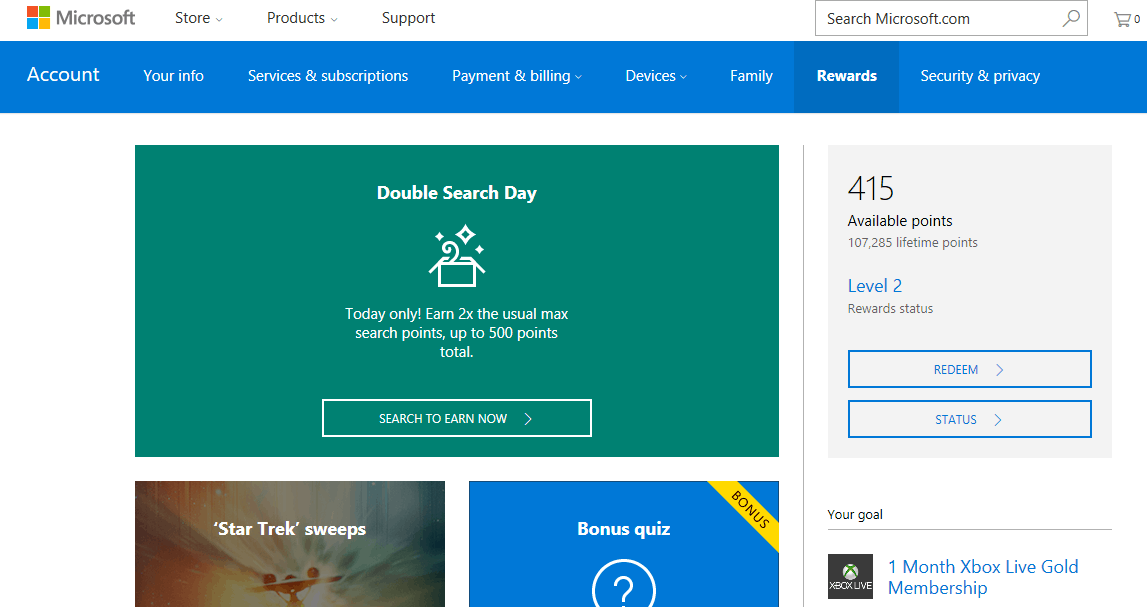
If you’re looking to score some extra Microsoft Rewards points, then now is the time to head to the Windows Store. Microsoft has announced a new limited time only Rewards initiative where you can earn 200 Microsoft Reward points for every dollar you spend on select games from the Windows Store.
According to Microsoft, the best way to score the extra Rewards points is to head over to the Rewards promotional page. It would be wise to hurry, though, since the offers will only last until December 30th. While you’re at it, we also invite you to head over to the Windows Store and check out the holiday hits collection which includes various holiday-themed collections of music, movies, TV shows and apps.
For some extra search points, you also can head over to Bing and examine 2016’s top search trends! As always, please let us know how you have been spending your Microsoft points by dropping us a comment below!
Yesterday, Minecraft released the Ender Update 1.0 to the Windows 10 and Pocket Editions, bringing them out of beta and into official release. In fact, they are nearly as complete as the original Java version. However, in the wake of the Ender Dragon some behind the scene features slipped through that Mojang felt the need to point out in the latest update.
One major advantage the Java for PC version of Minecraft has had over other editions was the ability to customize the game through world templates and easily accessible mods. Community made packages are now available for the Windows 10 and PE versions such as using mcpack and mcaddon files.
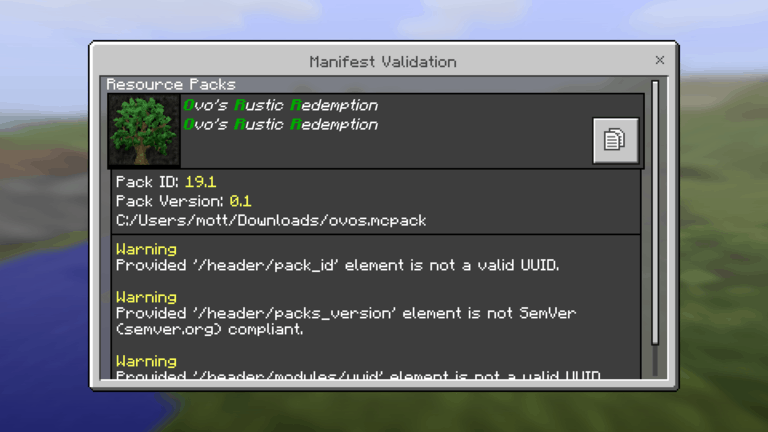
Community developers that build these files have new validation tools available to them right in the client. With 1.0, add-on packs will display warnings to help keep mods up to date and accurate for users. While these world templates and add-ons are obviously easier to export and create on Windows 10, they can be used with both editions.
Mojang intends to continue providing players ways to make Minecraft their own. Some features they intend to roll out eventually include sound and music in resource packs, more entity behavior modification, and better debugging tools for modders.
If you’re a Windows Insider on the current fast ring build and you’re actively using the Mail app, you might want to check your app for a special message from Microsoft. Thanks to a tip from our reader Adam Bicak, we have just learned that Microsoft is reportedly selecting certain Insiders for the testing of focused mail in the Windows 10 Mail and Calendar apps.
Windows 10 mail app update
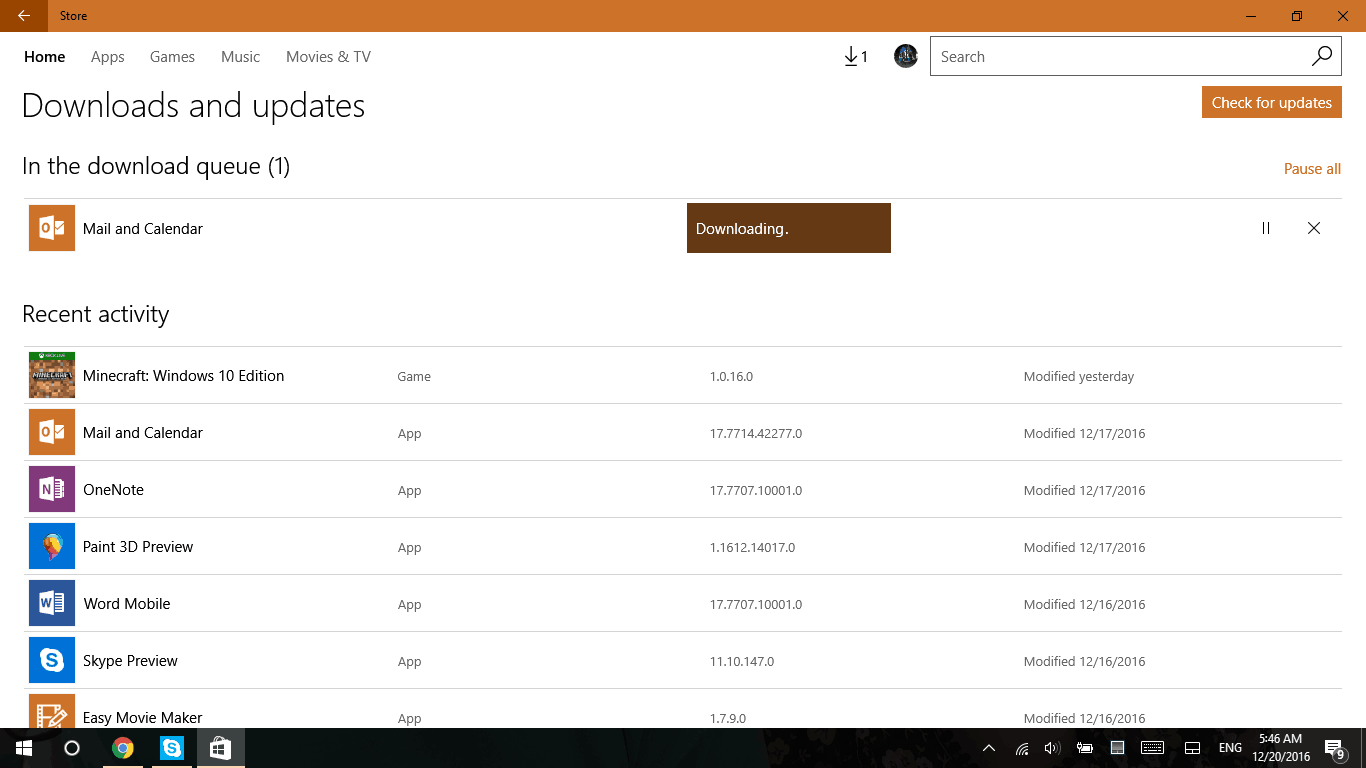
According to Adam, who is a Windows 10 Insider on the Fast Ring, upon opening his inbox on Mail for Windows 10, he was greeted with a message which mentioned that his account was selected to be one of the first Insider Preview accounts to try out Microsoft’s new focused mail feature. Though he did not screenshot this initial notice, he did provide us with the screenshot above which shows that he was then was able to install a new update that gave him the focused mail functionality. Note that his build is x.42277.0, while our current Fast Ring Mail and Calendar app (updated today) is at x.42257.0.
We have yet to receive this notice on the mail app on our machine which is running the latest fast ring build, so please do let us know if you have also been selected for focused mail by dropping us a comment below! And, as always, be sure to stay tuned to our Windows 10 news hub, so you won’t miss a single bit of the latest Windows 10 news.
Three months ago, we reported that Microsoft Azure and Office 365 became available from UK data centers. Yesterday, Microsoft announced that it has expanded on this availability of Azure in the UK by bringing several new services to the region.
Topping the list of new services is SQL Server Stretch Database, which Microsoft believes is “cost effective and can migrate your cold data transparently and securely to the Microsoft Azure cloud.” Second is Azure Functions, which is a solution for “easily running small pieces of code in the cloud.” Third up is Power BI, which Microsoft describes as, “a cloud-based business analytics service that enables anyone to connect to, visualize, and analyze data with greater speed, efficiency, and understanding.”
The fourth new service is Power BI embedded, which “enables application developers to embed stunning, fully interactive reports and visualizations in customer-facing apps without the time and expense of having to build custom controls from the ground up.” Other new services include:
Azure DocumentDB: Azure DocumentDB is a fully managed NoSQL database service built for fast and predictable performance, high availability, elastic scaling, global distribution, and ease of development. As a schema-free NoSQL database, DocumentDB provides rich and familiar SQL query capabilities with consistent low latencies on JSON data
Azure DevTest Labs: Azure Devtest Labs is a service that helps developers and testers quickly create environments in Azure while minimizing waste and controlling cost. The goal for this service is to solve the problems that IT and development teams have been facing: delays in getting a working environment, time-consuming environment configuration, production fidelity issues, and high maintenance costs.
Are you an Azure Customer in the UK? What are your thoughts on these services becoming available in the region? As always, please do let us know what you think by dropping us a comment below!
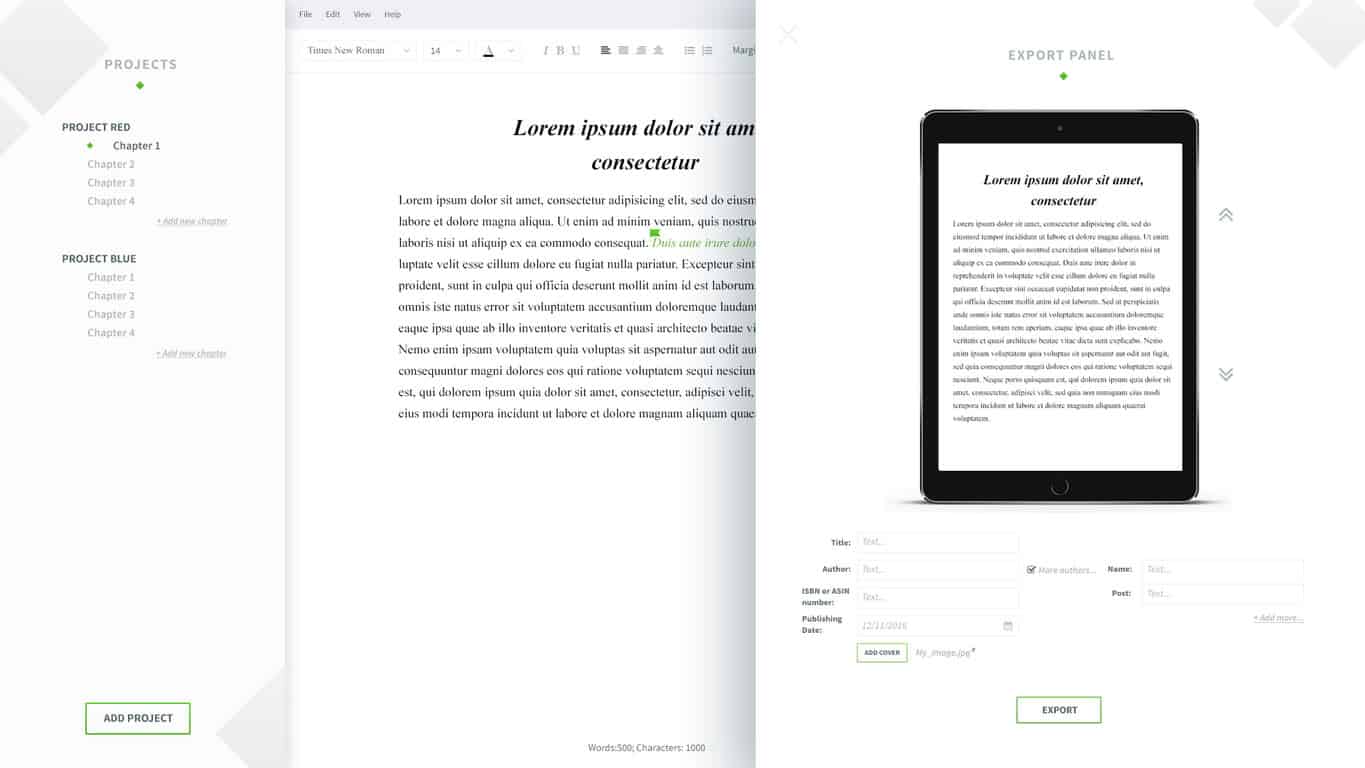
While popular note-taking apps such as OneNote or Evernote may well pack enough features for most bloggers or writers, professional authors usually rely on more specialized software. For Windows users, several solid options such as Ulysses or Scrinever are already available on the platform, though self-published author Ivan Samokish wants to develop a more focused app for writing novels and exporting them to ebook format.
Samokish has started to work on Winkle, a writing app he has started developing for himself because he was “never fully satisfied with the software on the market today.” The app is still a work in progress, but the developer is focused on designing a simple and elegant UI for writers that don’t want to be overwhelmed by power-user features they don’t really need. Here are some of the main features that the app will support:
Autosave to selected directory/folder
Ebook export tool (export to EPUB, MOBI and IBOOK format)
Ebook preview panel (see how your ebook looks and edit it live)
Built-in dictionary/thesaurus
Notes panel (add notes throughout your work)
Tabbed notes (divide your work into Projects and Chapters)
Available for Windows only (and hopefully for Mac later on)
FREE to use (*donate to remove startup popup & export signature*)
If you’re willing to give Winkle a try, you have until December 31 to register as a beta-tester for the beta version which be released in January 2017. The app will be free to use, though those of you who wants to support the developer and remove the startup popup and export signature will be invited to donate a minimum of $1. Head over to Samokish’s website if you want to sign up for the beta version of Winkle.
Earlier today, Microsoft India, in collaboration with L V Prasad Eye Institute, launched Microsoft Intelligent Network for Eyecare (MINE), a new organization aimed at encouraging similarly motivated commercial, research, and academic institutions to help prevent avoidable blindness in individuals through the use of artificial intelligence and machine learning.
“By using our capabilities and pioneering work in the field of machine learning over the years, Microsoft has helped accelerate digital transformation in various key sectors in India, including agriculture and education,” Microsoft India’s managing director, Anil Bhansali, said of the collaboration. “Today, I am happy to take forward the work we have done in healthcare with an esteemed set of partners. MINE, a global collaboration, reinforces Microsoft’s belief in the combined power of data, cloud and advanced analytics to drive public good. In our shared vision to eradicate preventive blindness, MINE will help redefine eyecare by bringing together the power of technology and knowledge of global experts.”
L V Prasad Eye Institute’s founder-chair, Dr. G.N. Rao, was also present at the announcement and revealed a bit about his company’s current progress and how they will be combining their efforts with Microsoft going forward.
“At LVPEI, we have been using Microsoft Azure Machine Learning and Power BI to drive clinical interventions and improve patient outcomes,” he explained. “Today, we take great pride in taking forward our partnership with Microsoft and joining forces with global institutes to revolutionize the field of ophthalmology in India and across the world. We are confident that this partnership will not only open doors to opportunities in the field of eyecare, but also pave way for others to leverage technology to address several other critical eye diseases.”
Microsoft’s corporate vice president of data group, Joseph Sirosh, reportedly joined the announcement via Skype and specified that the Microsoft Cortana Intelligence Suite would be one of the tools used going forward with this project. “This unique partnership with LVPEI and the consortium brings the best in the field together to reimagine healthcare using machine learning through the Microsoft Cortana Intelligence Suite,” he said. “We will continue to drive our investments in cloud, machine learning and advanced analytics to provide the building blocks to empower people and organizations to build, innovate and transform.”
Some specific eye-related conditions mentioned in the press release were, “rate of change of myopia in children, conditions that impact children’s eyesight, predictive outcomes of refractive surgery,” and improving eye surgery conditions and practices.
Are you impressed with Microsoft’s initiative? Is there another area that you would like to see them focus on? Let us know in the comments below.
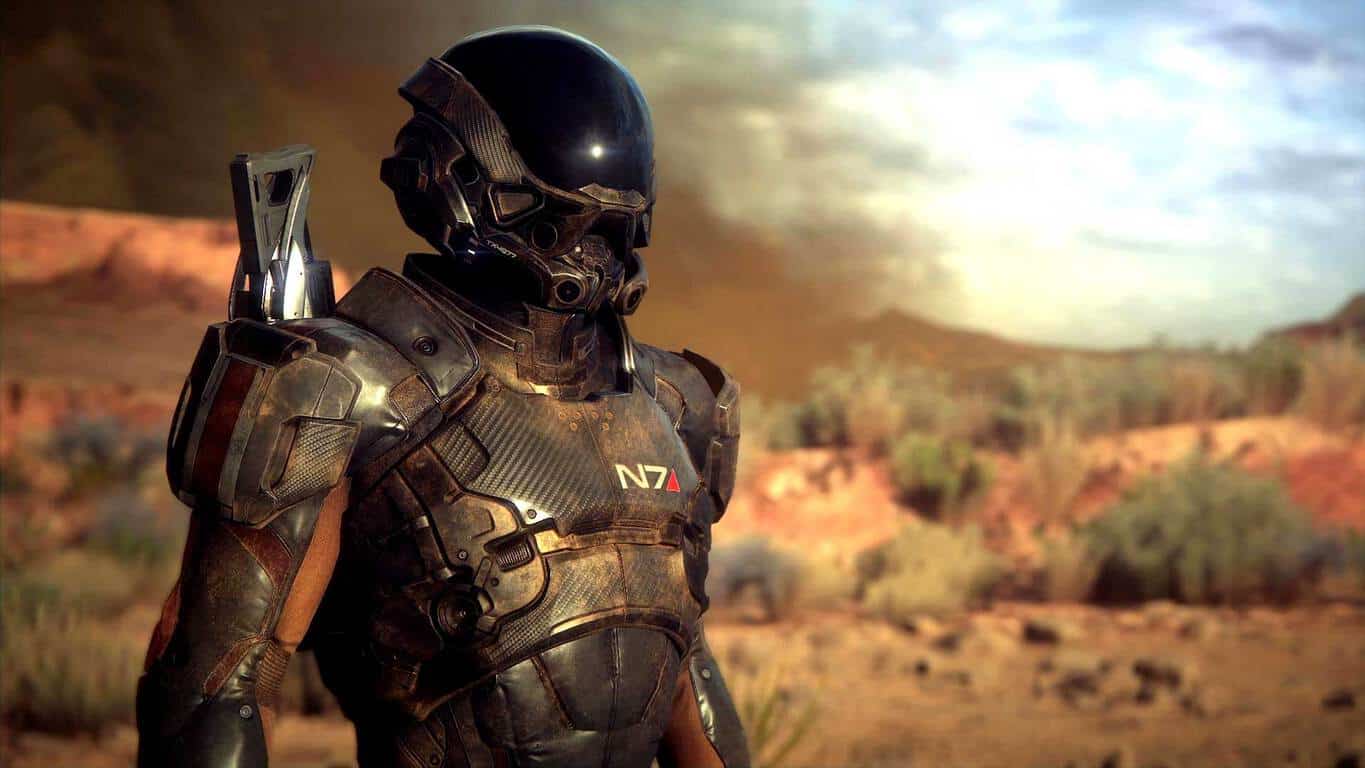
In an interview with Stevivor, BioWare’s Michael Gamble spoke about his studio’s upcoming video game, Mass Effect: Andromeda, and revealed that, while they will be discussing plans to enhance the video game for Sony’s PlayStation4 Pro console, they don’t currently have anything in the works for Microsoft’s Project Scorpio.
“In the world of PS Pro, we do similar things where we say, ‘Okay, what are the strengths of the console, and how can we optimise to make that experience best for players?’ In terms of PS Pro, we’ll probably talk more technical about that in January or February,” he says in the interview. “For Scorpio, we have absolutely no plans right now. You never know what’ll happen after that.”
Project Scorpio is the current codename for the next iteration of the Xbox One video game console. While it will still be within the same console generation and play all of the Xbox One games, Scorpio will boast significant upgrades that will enhance its processing power significantly. It’s speculated that many future Xbox One games will work on all Xbox One consoles but, like PC games, will be able to change their settings based on the hardware that’s playing them.
Would you like to see an enhanced version of Mass Effect: Andromeda on Project Scorpio? Share your thoughts with us and the community in the comments below.
The Mobile World Conference 2017 is confirmed to be held in Barcelona. What’s interesting is that even after several reports suggesting that Microsoft is walking out of the mobile business, the company is still making an appearance at the big event.
Microsoft also launched a web page labeled msmwcmeetings.com, allowing MWC visitors to arrange meetings during the annual mobile showcase. At this point, it is still uncertain as to what they are planning for the event. It’s no secret the company has sold off or shuttered all of its phone factories, but it does not mean that Microsoft will be left out of the mobile party.
MWC is the forefront for manufacturers to showcase their smartphones alongside add-ons ranging from accessories and other goodies. So it is about time we say out loud what everyone has been thinking: Will Microsoft be unveiling the Surface Phone at the event?
What the MWC holds for the Surface Phone:
There might or might not be a Surface Phone appearance at the MWC 2017 as the device is barely ready, but there does exist a strong possibility of a Sneak Preview into its core features.
We are also half expecting an announcement from Microsoft regarding its progress in bringing the full version of Windows 10 to mobile devices, as per Microsoft and Qualcomm’s intentions announced a few weeks ago. As the current generation chipsets come running 64-bit capable processors, compatibility should not be an issue at all. These are going to be the first ARM-based processors that will allow users to run full desktop apps on phones and PCs.
With full compatibility with the Windows 10 ecosystem, the Qualcomm Snapdragon platform is expected to support mobility to cloud computing and redefine how people will use their compute devices, Qualcomm said at the time.
Apart from this, Microsoft has a lot to flaunt at the MWC next year, mostly because the tradeshow’s timeline aligning with its Creators Update release. The upcoming Windows 10 update is expected to bring a bunch of significant changes to the mobile devices. It might be possible that Microsoft will be using this event to give its users a glimpse of what they should be expecting from the update in addition to positioning the OS to OEMs and ODMs.
Who knows: Maybe Microsoft will take everyone by surprise and reveal the elusive Surface Phone after all.
Astroneer is an impressive game of about the aerospace industry and interplanetary exploration. The title is available as an Early Access game and you can buy it for $19.99 from Steam.
Astroneer allows players to explore and reshape distant worlds. Gamers must explore the frontiers of outer space and risk their lives in the 25th-century gold rush. You’ll alter the terrain and extract valuable resources from both planets and moons. You can then trade these resources or craft them into new tools and vehicles.
Astroneer was only recently launched but already has tens of thousands of fans all over the world. Naturally, every player wants to have the game’s interface in their mother tongue. Currently, Astroneer supports 13 languages and you can easily change the game’s default language to another.
Astroneer: how to change the game’s language
1. Right click Astroneer > go to Properties > Set Launch Options 2. Type -culture=”VALUE” 3. Use the following list to set your preferred language. Replace “VALUE” with the language codes below:
German – de
English – en
Spanish – es
Catalan – es-ES
French – fr
Italian – it
Japanese – ja
Korean – ko
Dutch – nl
Polish – pl
Portuguese – pt
Russian – ru
Chinese – zh-hans
As you can see, Astroneer supports quite an impressive number of languages. Usually, most games don’t support so many languages when released.
However, many Astroneer players report the game’s translation is not very accurate for particular languages. For example, one Russian player reports that the Russian localization is inaccurate, with wrong item names — the same problem plaguing the Polish localization of the title.
We’re sure that System Era Softworks will provide gamers with more accurate translations of the user interface, but patience is required since Astroneer was launched only a few days ago.
The Windows 10 Insider program allows people to sign up and be part of the testing experience that takes place before an update is rolled out to the public version of the operating system.
Microsoft takes its Insider program seriously and has released an abundance of updates over the months. Looking at the pattern established by the Windows 10 build releases, it seemed like Microsoft was aiming towards a weekly release schedule. This was the case for the majority of the program with a couple of instances where the Windows developer skipped a launch day. When that sort of thing happens, it is usually due to an inconsistency in the release content Microsoft wishes to fix before putting out the build.
The same thing has happened now: Microsoft is holding off on releasing a bad patch close to Christmas, preferring to postpone the next update release for another day. Microsoft is trying to compensate for the lack of a new build for the Fast Ring of the Insider program by releasing a Slow Ring update in the form of an ISO. The update is downloadable and intricate in terms of new additions, including both features and changes.
Unfortunately, for those waiting on a new Fast Ring update, that won’t be happening in 2016. We are less than a month away from 2017 and with it come new updates for the various services Microsoft offers. Users will be able to see the new Insider build which will more than likely compensate for being late with new features that will please the crowds. We will just have to wait and see if Microsoft prepares any other last minute patches.
In a blog post, Microsoft’s Nitin Soneji, current program manager of Cloud and Enterprise, announced the addition of Exclude Disk Support to Hyper-V Virtual Machines (VMs) with Azure Site Recovery (ASR). Based on customer feedback, ASR now gives users to ability to exclude disks from replication.
Soneji indicates that there are two instances where Microsoft customers would need to exclude disks from replication:
The data churned on the excluded disk is not important or doesn’t need to be replicated (or / and)
Storage and network resources can be saved by not replicating this churn
Earlier this year, ASR’s VMware to Azure gained this capability. Starting today, ASR’s Hyper-V to Azure will also be getting this capability. Soneji goes on to describe typical scenarios where Microsoft users need to exclude disks from replication:
Splitting the single virtual disk into two virtual disks – one with the OS and one with the page file
Excluding the page file disk from replication
Similarly, for Microsoft SQL Server with tempdb and system database file on the same disk can be optimized by:
Keeping the system database and tempdb on two different disks
Excluding the tempdb disk from replication.
Here’s a Microsoft Channel 9 video showing how to replicate Hyper-V VMs to Azure using ASR.
Microsoft offers a 31-day free trial of ASR’s replication capabilities for any new physical server or virtual machine that you replicate. Offer is open to new and current Microsoft customers with an Azure account. Let Microsoft know what features you want to see next through the ASR UserVoice or solve any issues you have via the MSDN ASR forum.
Gamers are always looking to find new ways to express themselves through their Xbox Elite controllers. Now, the exclusive partner SCUF has released their customized accessories for Microsoft’s console controller, announced Xbox Wire.
Fans have eagerly gobbled up the Xbox One/SCUF news since Microsoft first announced the partnership. Now, they can get their hands on their own custom controller with one of two different upgrade SCUFF kits for the Xbox One Elite controller, just like 90% of the professional gamers use.
These peripheral accessories are intended to make gaming sessions more comfortable and effective. The first kit is the SCUF ELITE Paddle Control System & Directional Bias D-pad Kit available for $39.96. This includes the Paddle Control System and Directional Bias D-pad that is slanted to reduce the distance to the joystick. Not to mention the selection of designs and treatments for faceplates, buttons, and trims.
The second SCUF ELITE Pro Grips & Precision Thumbstick Kit will become available ‘soon’ for $29.99. Of course, you can always order a custom made controller with all the features installed from SCUF starting at $149.95.
SCUFF accessories and controller kits are available for sale now although they are cutting it close to the holiday. According to their website, any orders by tomorrow December 20 are guaranteed to be delivered by Christmas and free shipping is available for orders about $250.
The Preferred Practices for Office 365 ProPlus Deployment guide was created for IT pros by a team of Office 365 deployment experts. The guide is available for download in the Office 365 onboarding resources at fasttrack.microsoft.com and features actionable guidance and real-world scenarios, including:
Recommended guidance for discovery of applications.
IT Pros can currently look forward to sectioned into parts that cover Assess, Plan, Deploy and Manage of ProPlus deployment. Download a copy of the guide today and get started on deployment soon.
In our modern world, almost every device has a camera on it. After taking pictures, you might also end up offloading them to your PC to spice them up and share on social media. Luckily, if you’re looking for a guide on how to spice up your holiday photos, it’s time to look no further. Elana Pidgeon from the Windows Experience Blog has just posted on how you can edit your holiday photos using the Windows 10 Photos App.
Editing Photos with the Windows 10 Photos app
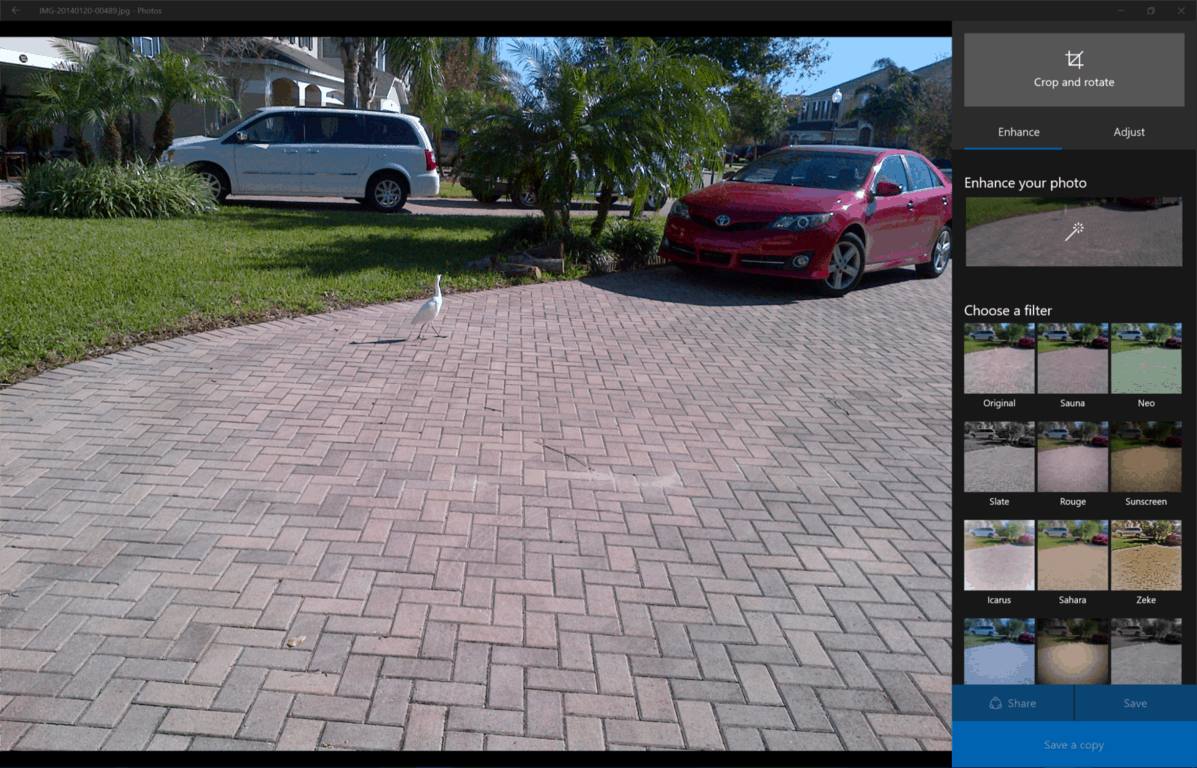
Pigeon begins by explaining that all it takes to edit your photos is to open the file and then launch “edit” from the full-screen viewer in the Windows 10 photo app. After doing so, you will find controls to easily crop, rotate and enhance your images. To customize your pictures, you can add a filter to your image by selecting one from the list and even alter the light, color, contrast, exposure, shadows, highlight, tint and warmth by dragging the sliders for granular controls.
Inking on Photos in Windows 10
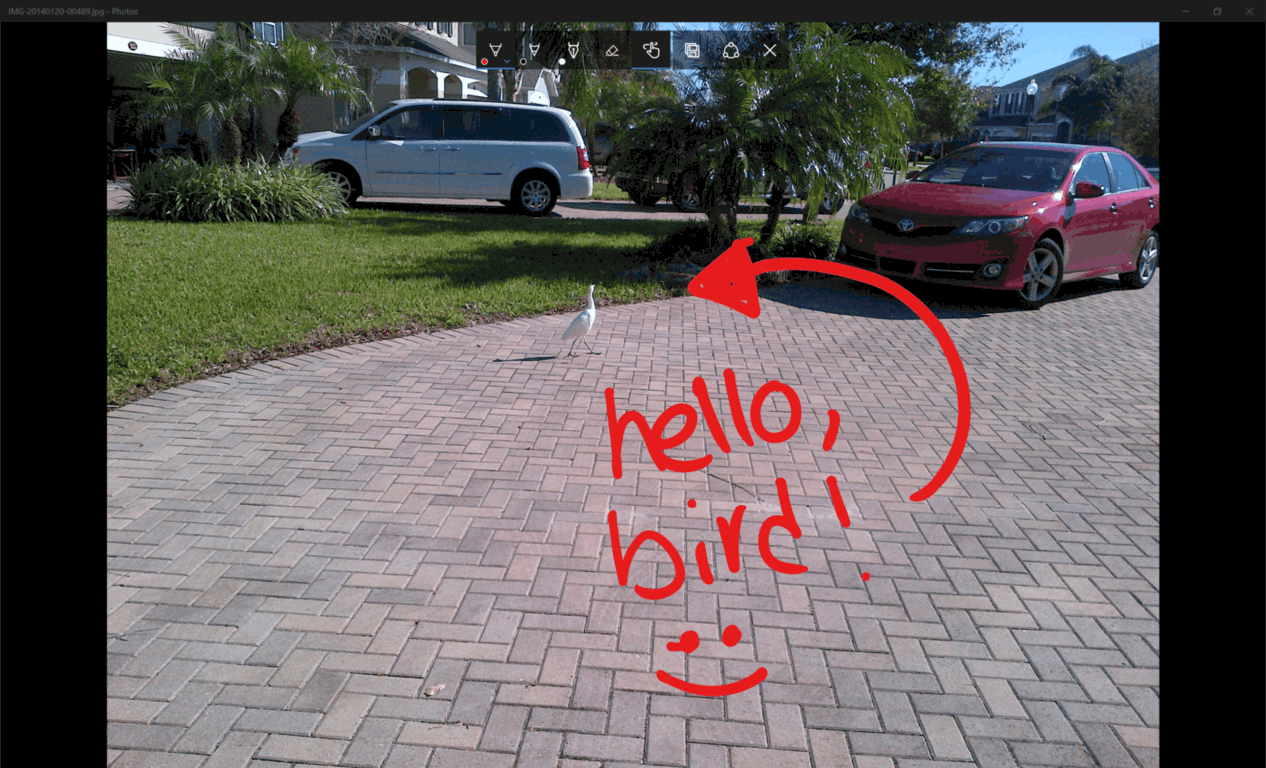
For an extra kick of photographic spice, you’re able to annotate photos using the pen, mouse, and touch controls in the Windows 10 Photos app. All you need to do is use your pen directly in the full-screen viewer or tap the Draw icon. Just as if you were an artist with a canvas, the ink will animate back to you in the way you drew it, even on videos during playback.
After you’ve fixed up your masterpiece, you can share your photo with friends and family without even leaving the Photos app! You can Copy your files to paste elsewhere, or click Share and select an app.
Have you been enjoying the photos app on your Windows 10 device? As always, please do let us know what you think by dropping us a comment below! And, if you’ve created anything cool, tweet it to us at @ONMSFT on Twitter!
If you want to buy a new laptop this month for yourself, or maybe to offer it as a present, we’re sure that HP is a pretty good choice. For this reason, we’re going to list the best HP laptop deals available in HP’s store in December. Happy shopping!
Best HP laptop deals this winter
HP ENVY – 17-u153nr
This laptop is powered by a 7th Generation Intel Core i7 processor and offers 16 GB memory with 512 GB SSD storage. It comes with a 17.3″ UHD IPS UWVA touch display and NVIDIA GeForce 940MX. You can purchase it for $1,299.99 down from $1,699.99.
HP Pavilion Laptop – 15z
The HP Pavilion 15z laptop is equipped with an AMD Dual-Core A9 APU, 8 GB memory and 1 TB HDD storage. It comes with a 15.6″ HD display and up to 7 hours of battery life. It can be yours for only $329.99, down from $$579.99
HP ENVY Laptop -15t touch
This laptop offers an impressive 15.6″ FHD touch display, and is powered by a 7th Generation Intel Core i7 processor. It features 8 GB memory, 256 GB SSD storage, and Intel HD Graphics 620. You can buy it for only $699.99, down from $949.99.
OMEN 17t gaming laptop
This gaming monster can be yours for $1,399.99, down from $1,599.99. The HP OMEN 17t is powered by a 6th Generation Intel Core i7 processor, and features 16 GB memory and2 TB HDD + 128GB SSD storage. The huge 17.3″ UHD display and NVIDIA GeForce GTX 106 will offer you a smooth gaming experience.
HP ENVY – 15-as152nr
HP ENVY 15-as152nr7th relies on a 7th Generation Intel Core i7 processor. It features 16 GB memory, 512 GB SSD storage and Intel HD Graphics 620. This device will take your entertainment experience to a new level, thanks to its brilliant 4K display, audio by Bang & Olufsen and HP Audio Boost technology.
Major Nelson has taken to his blog to announce the biggest Xbox sale ever. The sale will cover both Xbox One and Xbox 360, will begin on December 22nd, and will continue until January 9th, for a total of 19 days of deals on games, movies, TV shows, music, apps, and more.
As part of the Xbox Store Countdown, some of the year’s top games such as Final Fantasy XV, Battlefield 1, Watch Dogs 2 will all be on sale, as well as 40 backward compatible titles. Additionally, starting December 21st, and lasting until January 9th, Xbox One and Xbox 360 owners can upgrade to Gold for $1 for the first month of membership. As an added bonus, Gold members can even get up to 10% off all Xbox Store deals during Countdown.
Movies and TV Season passes are also included in the Xbox Store Countdown, which means you can enjoy your favorite entertainment directly from your own Xbox. According to Major Nelson, more deals are coming soon later in the week, and will include:
Movies $9.99 and Up, including Deadpool, Batman v. Superman, and The Night Before
Today’s Hit TV up to 33% off, including South Park and Orphan Black
Bundles up to 33% off, including all Hobbit and Lord of the Rings films, X-Men Collection, and Alien Collection
TV Favorites up to 50% off,including Band of Brothers and Doctor Who
Xbox Live Rewards members, meanwhile, can also enjoy some added bonuses from the Xbox Store Countdown. According to Major Nelson, Xbox Live Rewards members can get even more, such as 10% back on purchases with MyVIP, and the opportunity to boost their Star Rank for 2017. And, for some more Xbox Store Countdown fun, eligible customers will also receive 3 more months free with a 30-day trial of a Groove Music Pass.
Enpass is a popular cross-platform, offline password manger, that has had brilliant support for the Windows platform. One of the early apps on UWP, the universal app supports marquee Windows 10 features like Windows Hello as well as Cortana and is available for both Windows 10 and Windows 10 Mobile.
While there’s a free trial available, the pro version of the app costs $9.99, but our friends at Enpass are in the holiday spirit, and have decided to give five promo codes to our readers to score free licenses of Enpass for Windows app.
All you need to do is follow OnMSFT on Twitter via the widget below, and that’s that. Make sure you use your correct email address (or use Facebook) to login, so that we can contact you if you’re one of the winners. We’ll randomly select five winners from the entries, and share a promo code that can be redeemed for Enpass pro edition.
Apple TV users will be happy to know that they aren’t left out in the cold without Minecraft 1.0. Mojang is on a gifting spree for their fans it seems. Earlier today, Mojang announced that Minecraft was out of beta with the global release of its Ender Update 1.0 as well as the new Festive 2016 Mash-up Pack on sale via the in-game store.
This puts Minecraft at a total of ten different editions across PC, console, mobile, and now streaming devices where fans can play, explore, and build in the limitless sandbox world.
Now gamers can use their little black boxes to play the popular sandbox game from Mojang with the same features and content as the Windows 10 and Pocket Editions. Well, most of them. According to the announcement post, this new edition doesn’t currently include Minecraft Realms or Xbox Live support. However, the developers intend to add them in the ‘near future’.
We knew that the Apple TV Edition was in the works, but now it’s available just in time for the holidays priced at $19.99. The purchase also includes seven DLC packs: Holiday 2015, Town Folk, City Folk, Plastic, Natural, Cartoon, and most recent Festive 2016.
Not everyone has the chance to spread joy, love, and happiness of the holidays in person. Luckily, the folks over at Skype have you covered, and have just posted about some new Mojis which will be sure to bring the holiday spirit alive.
Skype holiday Mojis
Seen above, the new mojis are an annual tradition and are perfect for helping you celebrate the holidays using Skype. There are special holidays Mojis which feature audio, which you can share to bring sparkle any chat. To use the Mojis, you should head over to the emoticon picker, select your favorite holiday themed Moji or emoticon, and then use it in your chat!
The Skype team also wants you to know that you can further spread the joy this holiday by sending a snowy holiday video card to your friends and family on Skype. If you’re using the latest version of Skype, all it takes to use this feature on iOS is to open Skype and select the snowflake to get started. On Android phones, meanwhile, you just tap the “+” button on the lower right, then tap the snowflake.
Do you know someone who you would send these video messages or mojis to? Please do let us know what you think by dropping us a comment below!
If you have been online over the last few months, or just were casually watching TV, you’ve probably noticed more than one advertisement for the Xbox One family of games and devices. In fact, a recent report from one month ago found that Xbox was outspending everyone in game-related TV advertising heading into the holiday season. It is fitting then that Microsoft just released a new ad for Xbox, featuring former NFL Star Marshawn Lynch (via Gamespot.com)
While Microsoft has released NFL-themed Xbox ads in the past, this latest ad is a bit odd, to say the least. The ad features Marshawn Lynch as an assistant, though he does not get the “assist” part very well, and rather sits back in a chair with “lumbar support” playing Madden NFL 17, while claiming that he should be getting paid more.
That aside, it is interesting to note that the latest ad features a message which claims that Xbox Live is the “fastest gaming network” which “won’t let you down.” As we have reported three months ago, a study done by IHSMarkit has found that Xbox Live performs better than Sony’s PlayStation Network when it comes to reliability, speed, and overall quality.
What has been your experience with the Xbox One S? Please do let us know what you think of this latest ad by dropping us a comment below!
The End is nigh for Minecraft Pocket Edition and Windows 10 players. The Beta tags are finally off and adventurers are ready to explore End Cities, tackle the famed Ender Dragon, and find all the End loot.
Today’s release for Minecraft has been building up for quite some time after the Ender 1.0 Update was announced last month. The release brings PE and Windows 10 versions of the sandbox Mojang title to nearly complete feature parity with its Java release for Windows.
Of course, it doesn’t’ just stop at The End. Here’s the rest of the content added into Minecraft 1.0 for PE and Windows 10:
The End, End cities, End ships, Ender dragon & all the other End goodies
Strongholds now fully implemented and have a chance of spawning in newly generated chunks
Support for world templates
Of course, the team over at Mojang are feeling festive about this major gift to players that they’ve even added in a new Festive Mash-Up pack for $3.99 USD. It has 21 jolly skins, a texture pack for most blocks, and a festive world reflecting the holiday season.
That’s right, now you can slay Ender dragons in a Santa Claus outfit. What better way to get into the holiday spirit? The Festive Mash-Up Pack can be bought via the in-game store while the 1.0 update will roll out for free automatically across all devices today.
With Christmas less than a week away, now is the perfect time to mention that the holiday season is not just a season for shopping, it’s also a season for giving. If there is one thing in society to stand up to this testament, though, it is Reddit’s annual Secret Santa program, which tasks Redditors from across the globe to secretly send each other gifts.
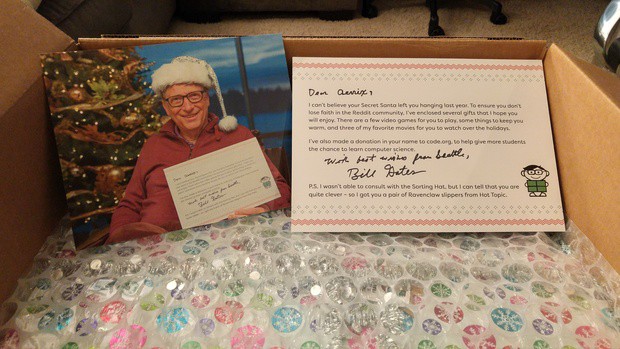
As we reported last year, Microsoft co-founder Bill Gates has been known to participate in the program, and this year yet another Redditor was lucky enough to be on the receiving end of the Microsoft founder’s gifts (via Fortune.com)
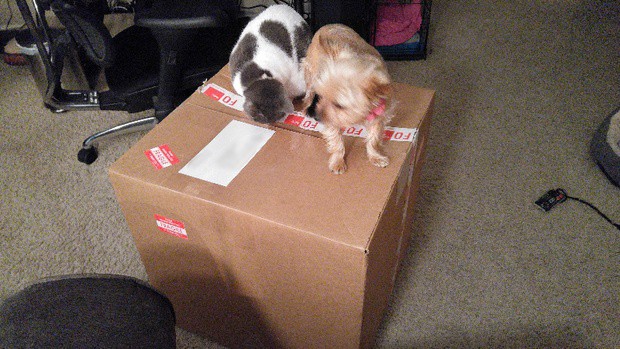
What could possibly be in the box?
A Redditor who goes by the name of Aerix is claiming that she received a package straight from Bill Gates, which was filled with gifts as part of the Reddit Secret Santa Program. The package was set overnight to her home and contained a Minecraft Edition Xbox One Console, a Nintendo Entertainment System Classic, mittens for both herself and her dogs, and a personal note and photo from Bill Gates. In a post to the RedditGifts website, the Redditor describes her experience of opening the gifts:
And I said BILL GATES IS MY FREAKIN SANTA!!!!!!! It took a second for it to sink in but oh MAN I was excited and flipping out!… I got everything out and laid it out all nice, and there was glitter EVERYWHERE. I just had to go for the two unwrapped boxes that said “Aerrix’s Mittens” and “Clairrix’s Mittens… Next I open the three pink boxes stacked together, and it’s three special edition wireless XBOX one controllers! I was confused, but only for a moment, because then I noticed the specific SIZE of the big pink box to my left….I knew what it was, I KNEW WHAT IT WAS. It was an XBOX ONE MINECRAFT EDITION!!!!!!!!! There was also a handwritten note from him that says “I love my XBOX and thought you might like one too.”
Lots of Presents from Bill Gates
The Microsoft co-founder also sent the Redditor a Cajun cookbook, Zelda tie blanket, and a box which remarked, “Be careful this gift is very fragile.” As if what she had already received was not shocking enough, in this box was a final form Master Sword from Skyward Sword made of paper.
Next, I reach for a box that has a tag on it that says “Be careful this gift is very fragile” and I really couldn’t tell you how long it took me to open it I was being SO CAREFUL!!! You guys…it’s a PAPER, seriously all made out of PAPEEEEERRRRRRRRRR version of the final form Master Sword from Skyward Sword!
Bill Gates’ gifts did not end there, though, and he also sent the Redditor a Zelda picture frame with Link and Zelda made with Perler Beads. In the frame, was a cool photo.
And the picture in it is just the best…he used my profile picture on here of me, my husband, and my dog, PHOTOSHOPPED HIMSELF IN, and put Santa hats on all of us! Come on now, that is the cutest thing! I just couldn’t get over it and my mom thought it was hilarious. XD
Santa Bill gives awesome gifts!
Last, but not least on the list of Bill Gates gifts is a limited edition of Halo 5 Guardians, an NES Classic, and two movies.
The aforementioned movies came next. Two of them I have never heard of, but will be watching soon, and he also sent The Martian… I I tear into the next box and I just…I lost it yall. I did. I started screaming like a little girl to my mom on the phone…I was just blown away! An NES Classic Edition… I go for the last gift, (it was the prettiest wrapping imo), and it’s Halo 5 Guardians (Limited Edition, of course) and the new Tomb Raider YOU KNOW FOR MY NEW XBOX ONE YOU GUYS!!! And there’s also a YEAR’S WORTH of gold membership cards
Bill Gates is great at wrapping
It’s safe to say that these gifts are truly awesome. What do you think of these gifts from Bill Gates? Does it make you want to join in on the Reddit Secret Santa fun? As always, please do let us know what you think by dropping us a comment below!
Microsoft (MSFT) news recap is a weekly feature highlighting the top Microsoft news stories of the past week. Sit back, grab some coffee, and enjoy the read!
Microsoft makes four green tech predictions for 2017
With 2016 coming to a close and 2017 right around the corner, Microsoft takes a look at green technology for 2017. Rob Bernard, who is Microsoft’s Chief Environmental Strategist, made 4 predictions for next year:
IoT and Cloud Computing will begin to transform utility energy management
Water will begin to emerge as the next critical world-scale environmental challenge
Data will increasingly be used to try to better understand our planet
Organizations and policy makers will start leveraging cloud-based technologies
Microsoft, others partner with LG on foldable display technology
Display technology has improved in terms of quality, with 4K and even 8K resolutions being made available, however, what has been stagnant is the ways in which we can position a display. Microsoft has now partnered with LG Display to assist in developing foldable display technology and has signed-up to be one of the first buyers, too. It’s not certain what the company could use foldable display technology for – we may see some of it in the 2017 line-up of devices, particularly where smartphones, more specifically, Windows phones, are concerned.
Microsoft reiterates after meeting with Donald Trump: “We oppose discrimination”
Rumors have been spreading that data computing companies may be asked to create a ‘Muslim Registry’ that is based on religious beliefs, as noted by Donald Trump during his presidential campaign. A spokesperson for Microsoft has reached out to state that the company opposes discrimination and gave the following statement:
We refuse to participate in the creation of databases of identifying information for the United States government to target individuals based on race, religion, or national origin.
Microsoft plans a presence at Mobile World Congress 2017 in February
Welcome back to our Windows 10 news recap. We are continuing the trend of our weekly “Windows 10 news recap” series where we go over the top stories of the past week in the world of Microsoft’s flagship operating system.
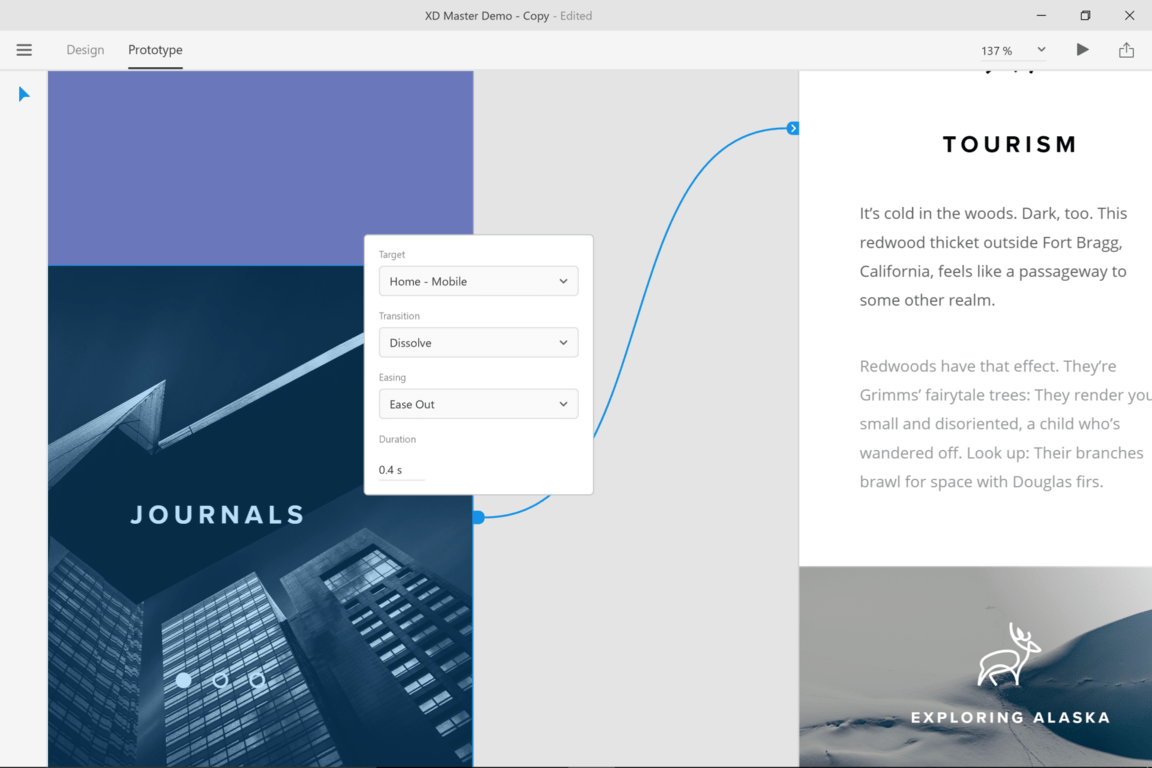
First public beta of Adobe XD for Windows 10 now available
Prototyping new websites and mobile apps on Windows 10 just got that little bit easier, as Adobe has released the first public beta of Adobe XD for Windows 10. It is built as a Windows 10 app, one of the first such apps by Adobe. It comes with many features, including basic text support, animations and artboards.
Easier ways to pay coming to Microsoft Edge with the Windows 10 Creators Update
Microsoft has released the Payment Request API for Microsoft Edge. Payment Request aims to simplify the online checkout process when using Microsoft Edge. It can connect, with the users permission, to Microsoft Wallet, allowing saved payment information and addresses to be used without having to type everything each and every time. It is currently in preview and will be rolled out to the general public in the Windows 10 Creators Update in early 2017.
No new Fast Ring Windows 10 Insider builds this year, says Dona Sarkar
Internet connection problems surface after latest Windows 10 update, are you affected?
One of the more recent Windows 10 updates caused havoc for many, preventing them from accessing the internet. Microsoft has acknowledged the issue and asks users who are affected to not shut down their PC but to instead restart it, then follow these steps:
Open an elevanted command prompt by right clicking the start button and choosing Command Prompt (Admin)
Final Fantasy XV is a great game, as long as you don’t encounter any technical issues. Unfortunately, the game is affected by many bugs, and gamers discover new ones with every passing day.
Back in November, we listed the most common Final Fantasy XV issues reported by gamers. According to the latest gamers’ reports, there are many new issues that we can add to the list. Recent reports reveal that there’s a game breaking bug affecting chapter seven, and Noctis often can’t jump or attack.
Same Problem obtained at Imperial Base as well. Both the that and the Behemoth Missions have the sneak style missions so I wonder if those mechanics are the problem. Have 30 hours in the game so Im kind of pissed.
Players also report that after starting a new game, usually Noctis gets back his abilities. Apparently, this issue could be caused by a corrupt game save file. However, many gamers don’t agree with this method and request that Square Enix rolls out a hotfix as soon as possible.
The most annoying part is that Noctis usually loses his ability to attack and jump after players accumulate tens of hours of gameplay. For many, this issue is not just a simple bug, it’s a game-breaking problem.
For the time being, Square Enix has yet to issue any comments about this problem. Hopefully, the company is already working on a fix and will release it in the coming days.
In 2016 Microsoft made quite a few headlines for its software releases, hardware reveals, and its increasing cozy relationship with the open source community. Orbiting parallel to Microsoft’s newsworthy notes of Windows 10 Anniversary Update, Surface Studio reveal and leading most companies in GitHub contributions, are the occasional acquisitions that shake up the tech sector.
Looking back on the company’s acquisitions in 2016, Microsoft might be best remembered for its whopping $26.2 billion purchase of LinkedIn, but that would only be a small glimpse into the small spending spree of the company for the year.
While Microsoft’s 2016 purchasing list may have seemed like a muted affair compared to its 2015 shopping spree, the businesses that litter the list this year should help to clarify where the company will be headed in 2017 and beyond.
LinkedIn
By far the most glorified purchase for Microsoft is its $26.2 billion dollar elephant in the room, LinkedIn. On June 13, 2016, Microsoft declared its intentions to purchase the business professional social networking site for what’s being recorded as one of the largest buys in the tech community in recent years. Despite competitive opposition from SalesForce, Microsoft came out on top and finalized the deal a few weeks ago.
Xamarin
Next up can arguably viewed as the most important purchase for the company moving forward in its acquisition of Xamarin. Headling Microsoft’s developer conference earlier this year was the announcement of the company getting into the multi-code cross-platform development game with Xamarin.
“With today’s acquisition announcement we will be taking this work much further to make our world class developer tools and services even better with deeper integration and seamless mobile app dev experiences. The combination of Xamarin, Visual Studio, Visual Studio Team Services, and Azure provides a complete mobile app dev solution that provides everything you need to develop, test, deliver and instrument mobile apps for every device. We are really excited to see what developers build with it.”
MinecraftEdu
Following up its increasingly successful buy of Minecraft, Microsoft also gobbled up MinecraftEdu to bolster its younger audience play.
The Rest
Microsoft spent the remainder fo the year snatching up some comparatively low-key companies such as SwiftKey, Solair, Wand Labs, Beam, Genee, Event Zero and Code Connect.
Here is the full list of Microsoft’s acquisitions and dates for 2016.
Microsoft’s reorganization is fully underway in large part due to its acquisitions list over the past few years. Company purchases and integrations such as Sunrise, Xamarin, LinkedIn, Acompli, Mojang, Double Labs, Havok and more are helping Microsoft chisel out a new foundation for forward progress.
It’ll be interesting to see who Microsoft has its eye on next year and how it fits into Microsoft’s new productivity focused future.
Remember all of the hype that happened last year around Star Wars: Episode VII? It’s back. A year after the revival of the Star Wars Franchise, Rogue One: A Star Wars Story has arrived, offering fans a look into something that happened before the events of A New Hope. If you aren’t going to be able to go to a theater and check out the film on the big screen, Microsoft is letting you pre-order it right now.
As the Empire continues to gain power, a group of rebel spies will risk everything to steal the plans to their enemy’s most terrifying new weapon: the Death Star.
Now you can pre-order “Rogue One: A Star Wars Story” – while the film is still in theaters – in the Movies & TV section of the Windows Store.
There’s no word yet on when the film is going to be releasing on DVD, but you can pre-order to own it as soon as it ends up dropping. Until then, Rogue One is in theaters right now. See if you can’t get to the theater for it!