Microsoft is now showing Microsoft 365 ads in the PC Manager app

Microsoft occasionally displays pop-ups or banner ads of its products and services on different locations of your Windows PC. So, it’s not a new thing. The company was recently spotted showing ads for Copilot + PCs on Windows 10 devices, urging them to switch to Windows 11. Guess what? Microsoft is at it again; this time, it is displaying an ad for Microsoft 365 in the PC Manager app. 

Now, Microsoft’s PC Manager for Windows 11 displays Microsoft 365 ads

The Microsoft 365 ad inside the PC Manager reads, “Take Microsoft 365 on the go,” notes Windows Latest. In the ad description area, the company urges PC Manager users, “Download mobile apps to work seamlessly across your devices.”

pc-manager-showing-ads-for-MS-Office-365
Image: Windows Latest

That’s not all; the “Discover more tips” anchor text placed right beneath takes you to a page titled “Windows 11 features and tips.” For us, the Microsoft 365 ad popped just once when we reinstalled the PC Manager app in our system.

Post that we have been seeing a small banner on top that reads, “Easily organize your apps and Windows.” The anchor text remains visible on the homepage of the app every time. What’s worse is that the banner, or whatever you like to call it, doesn’t have a close button. Microsoft has stuffed it into the UI of the homepage. 

Previous instances

For the uninitiated, Microsoft still displays Microsoft 365 ads in the Settings app of Windows 11. Last year, a user even complained about frequently seeing Xbox Game Pass ads on their system.

That’s not all; earlier this year, Microsoft shamelessly started showing Xbox ads inside the Settings app as well. We are aware that ads can generate a lot of revenue, but displaying them at the cost of user convenience—Really, Microsoft?

Gamers are migrating to Windows 11 even more as Windows 10 EoS nears

Valve’s latest Steam Hardware and Software survey for April 2025 is here, and there are a lot of interesting details that are worth discussing. Windows 11 is the latest and best operating system and it seems gamers are favoring it even more over Windows 10.

One can speculate why, though. Microsoft has already announced that starting October 14, 2025, Windows 10 will reach end of support, with 22H2 to remain as the OS’ final version.

Windows 11 gaming market share holds strong as more gamers migrate from Windows 10

The latest survey shows that a minor spike in Windows 11’s gaming market share, which now stands at 57.84% of Windows PCs surveyed, with a 2.5% gain over the past month. 

While the spike shows that more gamers are moving to Windows 11, do note that Valve’s survey has remained optional. Therefore, the data may not reflect the trend accurately.

Valve's survey 2025 April
Image: Valve

Meanwhile, Windows 10 dipped below 40%, landing at 38.09% after losing 2.49% of its share. With Windows 10 support ending in October 2025, its decline is expected to continue, though it’ll linger as developers like Valve plan to keep supporting it for now.

Windows dominates Steam with a steady 96.1% share. Linux holds second place at 2.27%, down 0.06%, while macOS edges up to 1.62%, gaining 0.04%.

RTX 4060 beats RTX 3060 by a fine margin in terms of usage

Speaking of hardware, the NVIDIA RTX 4060 laptop GPU beats the RTX 3060, claiming the top spot with 4.8% of gamers using it. The RTX 3060 follows at 4.57%, and the desktop RTX 4060 is close behind at 4.35%.

Most gamers are running 16GB of RAM (43.86%), 6-core CPUs (30.26%), 8GB of video memory (34.25%), primary drives up to 250GB, and 1080p displays (55.27%). It’s worth noting that NVIDIA also recently launched RTX 5090, which is the best gaming GPU currently available in the market.

Did you also recently move to Windows 11 for gaming by ditching Windows 10? Do let us know your experience of gaming on Windows 11. 

Windows 11 will soon add ‘Advanced’ settings page with lots of useful options

Microsoft has been testing and announcing multiple things over the last few months. Well, the company doesn’t seem to be stopping, as it is about to add a new Settings section in Windows 11, with some “Advanced” features. 

Microsoft to add a new settings page with “Advanced” options in Windows 11

If you’re wondering whether it’s a complete revamp, it’s not. The company is instead reworking the “For developers” section that allows developers to make changes to additional features.

Advanced settings page Windows 11
Image: X/@phantomofearth

As usual, the news comes from Windows enthusiast @phantomofearth, who, in his latest post on X, notes:

 Windows 11’s “For developers” settings page is getting a revamp, with a new name: “Advanced”! 

He further explains that, “It’s the new home for several Dev Home features and bits.” Once available, you can expect to see “long paths toggle, virtual workspace options page, and File Explorer source code integration.”

Also read: Microsoft updates Copilot app with guided tour for new users

As noted by the @phantomofearth, the new “Advanced” settings page is available in Windows Server build 26403. The tipster also notes that the page is hidden by default and requires some tinkering to enable it with feature IDs. Moreover, the company is also moving a few keyboard settings from the control panel to Windows 11’s Settings.

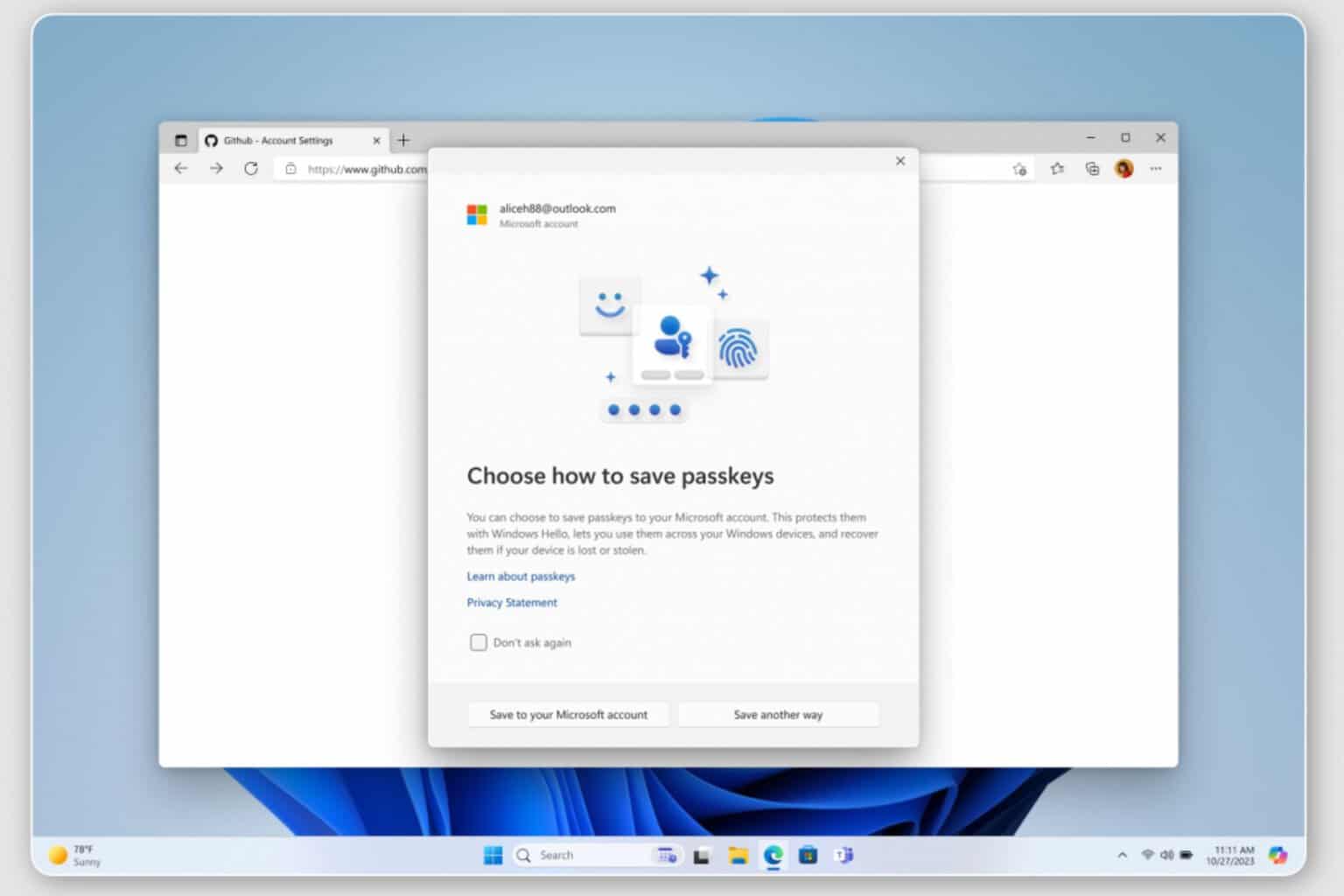
Microsoft makes passkeys default for all new accounts

Passkeys are great, it replaces passwords for good. While Microsoft has been in favor of passwordless logins for half a decade now, it is finally making passkeys the default for authentication of all new accounts.

To catch you up, Microsoft recently launched an optimized design for sign-in window. It features reorderd steps that ensure passwordless and passkey-first experience. 

Microsoft makes passkeys the default for authentication of all new account users

Well, Microsoft is making probably the biggest decision for its no-passwords approach. As part of this change, Microsoft will ask users to sign up for new accounts to use only more secure methods by default, including passkey, push notifications, and security keys. 

Even though the company is making passkey the default for new accounts, current users won’t have to delete their passwords. However, Microsoft wants new users to leave them behind in favor of passkeys, without prompting them to create a password at all. In the announcement blog post, Microsoft notes, 

As part of this simplified UX, we’re changing the default behavior for new accounts. Brand new Microsoft accounts will now be “passwordless by default.” New users will have several passwordless options for signing into their account, and they’ll never need to enroll a password. Existing users can visit their account settings to delete their password.

Also read: How to Turn Off Password Protected Sharing in Windows 11

Besides making passkeys the default for new accounts, Microsoft is also renaming “World Password Day” to “World Passkey Day.” The company further commits to continuing work towards implementing passkeys in the future. Not to forget, Microsoft also implemented passkeys for consumer accounts around this time last year.

Microsoft’s latest decision to make passkeys the default for new accounts comes as the password-less approach is getting popular among users. The company notes that “nearly a million passkeys are registered every day.”

Also read: How to Use Your Windows 11 Password Without Pressing Enter

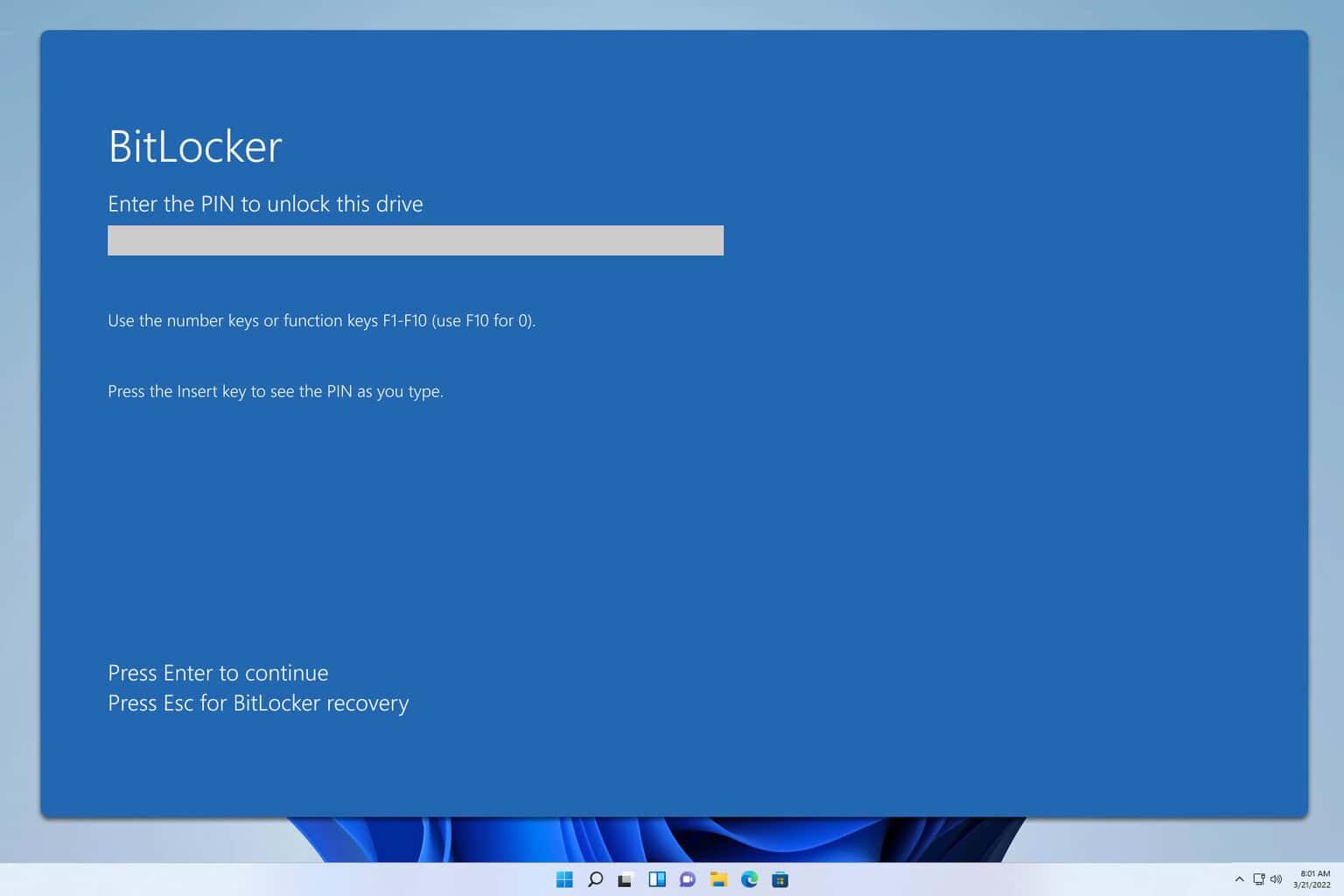
Microsoft’s forced BitLocker encryption causing Windows 11 users lose their data

Last month, Microsoft announced its plans to remove the BYPASSNRO workaround, which lets Windows 11 users skip internet and Microsoft Account sign-ins during setup. This change, still in testing, has frustrated users who prefer local accounts. Now, such users are also complaining that BitLocker encryption can cause them lose their data are complaining that BitLocker encytion

Windows 11 users are fuming over BitLocker encryption, as it could cause users to lose their data

The push for Microsoft Accounts ties to the Windows 11 24H2 update, which enables BitLocker encryption by default, even on Home editions. BitLocker secures data but stores recovery keys in Microsoft Accounts, making local setups trickier.

While Microsoft defends encryption for security, especially with TPM, it’s not without flaws. BitLocker can slow drives and, worse, risk data loss if users lose access to recovery keys. Spotted by Neowin, a Reddit user, MorCJul, recently discussed BitLocker’s potential to wipe data. The post has 546 upvotes at the time of writing. Clearly, many users are frustrated over the forced BitLocker encryption.

The Redditor notes that losing account access means losing data forever. For everyday users, data availability—like family photos and documents—matters more than confidentiality. Without mandatory key backups, BitLocker sets users up for disaster, making Microsoft’s “secure by default” approach a major threat to personal data.

Keep your data safe

Microsoft’s removal of BYPASSNRO could deepen these issues, forcing reliance on Microsoft Accounts and BitLocker. Users upgrading to 24H2 should check encryption settings and save recovery keys securely. Microsoft needs to better educate users to prevent data loss disasters.

Microsoft announces 20% discount on Windows 365, but there’s a catch

As you all know, Microsoft is phasing out Windows 10. The company will end support for Windows 10, starting October 14, 2025. So, you won’t be getting any free software updates from Windows Update, security patches, or tech support. But Microsoft’s doing its bit to keep you covered by offering a discount on Windows 365 plans. 

While Microsoft is trying hard to sell its Copilot + PCs to Windows 10 users, you should know that if your PC meets Windows 11 system requirements, you can upgrade to it for free. However, there could be some businesses that might need some time to transition to Windows 11. Microsoft knows this and is letting enterprises buy some extra time, but at a minimal cost. 

The company is offering a one-year Extended Security Updates (ESU) program for $30 per PC. This ensures critical and important security updates keep flowing even after Windows 10’s end-of-life. If you want to skip the new hardware, then there’s a Windows 365 discount deal for you.

Microsoft offers a discount on Windows 365 plans for those not yet ready to transition to Windows 11

Microsoft wants you to check out Windows 365 Cloud PC, which delivers a full Windows 11 experience to any device. No need for a shiny new laptop. To make it tempting, Microsoft is slashing 20% off all Windows 365 plans for new customers until October 31, 2025.

As a bonus, Windows 365 users get those ESU security updates for free, so your Windows 10 PCs stay protected while connecting to a Windows 365 Cloud PC. The Windows 365 deal has some terms and conditions, though. It’s for non-subscribers only, valid from May 1 to October 31, 2025.

The discount applies for either your first year or the rest of your Enterprise Agreement, whichever is shorter. Transactions must wrap by 11:00 p.m. PT on October 31, 2025, via Microsoft’s operations center. It’s non-transferable and can’t stack with other Windows 365 offers. If you are looking for Windows 365 plans, check them here. 

Did you know Janet Jackson’s ‘Rhythm Nation’ crashed Windows laptops for years?

You must have definitely heard about the really weird bug that crashed some Windows laptops while playing Janet Jackson’s Rhythm Nation. Microsoft engineer Raymond Chen recently recalled that event. Back then, Microsoft noted that the song’s frequencies matched those of 2.5-inch 5400 RPM hard disk drives (HDDs) and it made them vibrate uncontrollably, resulting in failure.

It’s unclear which frequency of Rhythm Nation caused Windows laptops to crash

No one knows which frequency exactly caused that problem. But, studies have shown that the HDD’s frequency would be disturbed somewhere between 0Hz and 5,000Hz, with peaks at 2.5, 87.5, 1100, 1450, 1700, and 1850Hz. Some of these probably coincided with the beats of the song’s melody, actually triggering the resonant frequency chaos.

So, on this very day, MITRE flagged off Rhythm Nation as an “exploitation” in the new world of cybersecurity. It was tagged with CVE-2022-38392. To play a pop song was now, humorously, a cyber threat. For days to come, Microsoft rushed to try and troubleshoot it.

Today, the laptops that mostly have solid-state drives (SSDs), which have neither moving parts nor any kind of mechanical connections, are protected against this kind of disturbance by resonant frequency.

He explains Microsoft’s preventive measures: Use heavier 3.5-inch HDDs so that vibration would decrease. This was impossible because those HDDs were heavy and bulky, making them unsuitable for mobile computing with laptops.

Microsoft fixed the bizarre bug with the audio processing filter

Microsoft instead adopted the Audio Processing Objects (APOs). These software-based digital signal processors pinpoint those resonant frequencies of the troublesome song. It ensured the stabilization of affected systems.

So, Chen said, Microsoft followed up that tale with the Disable all audio enhancements settings, which came just after Windows 7. This disabled APO filtering that also contained ‘Rhythm Nation’ safeguards, but it happened unintentionally.

Those crashes could have potentially occurred under Windows 8.1, Windows 10, and early editions of Windows 11, should the user have disabled the setting. Microsoft, fortunately, obtained a unique exemption that keeps these filters functioning, thus preventing havoc. Picture, then, your laptop going haywire while buried in sound settings; hardly the first place you would think to check.

Mozilla releases Firefox 138.0.1 to fix Outlook bug & more

Mozilla has rolled out Firefox 138.0.1, a minor update addressing issues in the recently released Firefox 138. The Firefox 138.0.1, available as of May 1, 2025, fixes two bugs, of which one is related to Outlook. 

Mozilla details Outlook bugs in Firefox 138 and releases 138.0.1 as a fix

Many users have complained about seeing a blank page instead of the Home or New Tab pages. On top of that, users have reported another issue that has caused Outlook on the web to add UTF-8 to the beginning of the attachment file when saving.

In the changelog for Firefox 138.0.1, Mozilla noted:

Version 138.0.1, first offered to Release channel users on May 1, 2025

Also read: Mozilla Firefox 139 Beta improves PNG support, HTTP/3 performance & more

The latest version is available starting today

If you are downloading Firefox for the first time, download the 138.0.1 version from the official website. For those who have Firefox already installed, the update will be automatically pushed. If you want to do it manually, navigate to Menu > Help > About Firefox.

Earlier this week, Mozilla released the version 138 of Firefox, with profile manager feature, improved address bar, and tab groups. If you haven’t caught up, you can check everything here. 

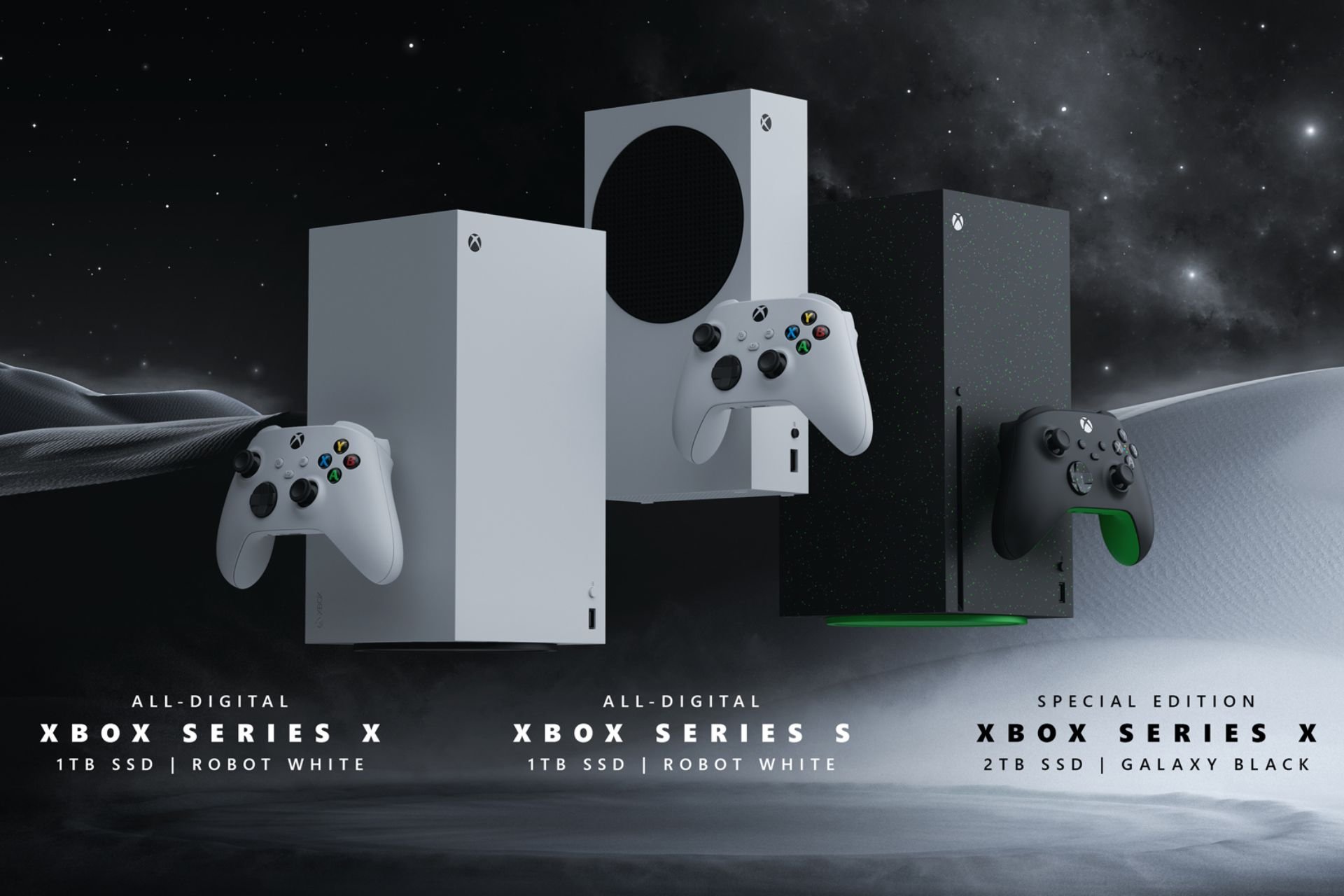
Microsoft increases prices of Xbox consoles, controllers & new games

If you are an Xbox fan, this news might annoy you a little. Microsoft, which posted a strong Q3 earnings for FY25, is increasing price of the Xbox Series X|S console, Xbox controllers, and even some new Xbox games across the globe. 

Microsoft increases the price of new, first-party games, Xbox Series X|S consoles, and wireless controllers

In the Xbox support page, Microsoft notes that it has adjusted the recommended retail price for its Xbox controllers and consoles. Starting today, the Xbox Series X will now cost $599.99, an increase of $100 from the previous $499.99 price.

Starting this holiday season, the price of some new, first-party games will increase to $79.99. The price of Xbox Series S (512GB) will increase from $299.99 to $379.99. That’s a bump of $80. The 1TB model will now cost $429.99, with the Xbox Series X edition’s price increasing to $549.99.

That’s not all; the price of the galaxy black special edition model (2TB) will set you back by $729.99. The US pricing of Xbox wireless controllers and headsets is also increasing. The new, adjusted price of the basic controller is $64.99, while the wireless headset stands at $119.99.

Also read: List of confirmed games heading to Xbox Game Pass in May 2025

The European pricing is also increasing

Microsoft has also adjusted European pricing for its Xbox controllers and consoles.  In Europe and the UK, the Xbox Series S (512GB) will now be priced at €349.99 / £299.99, with the Xbox Series X (1TB) rising to €599.99 / £499.99. Fortunately, Microsoft isn’t increasing the price of the Xbox Game Pass. 

Microsoft’s new Phi-4-reasoning is in line with controversial Deepseek-R1’s performance

Microsoft has expanded its Phi AI model family with the release of two new models, Phi-4-reasoning and Phi-4-reasoning-plus. Both reasoning models are on a 14-billion-parameter architecture for reasoning-heavy tasks.

Microsoft announces Phi-4-Reasoning, Phi-4-Reasoning-plus, and Phi-4-mini-reasoning models

Microsoft says that it has trained the core Phi-4-reasoning model with a curated set of “teachable” prompts generated by its own o3-mini model. Per the company’s whitepaper, these models outperform larger open-weight alternatives like DeepSeek-R1 Distill-Llama 70 B.

Phi-4-reasoning comparison with other models
Image: Microsoft

On several key reasoning benchmarks, this Phi-4 model even beats the full DeepSeek-R1 model, despite its larger size. Benchmark performance comparison attached below also shows that Microsoft’s Phi reasoning models are ahead of some popular models from its rivals.

The company notes that the new models outperform Anthropic’s Claude 3.7 Sonnet and Google’s Gemini 2 Flash Thinking in most tasks. However, it lags in GPQA and Calendar Planning.

The enhanced Phi-4-reasoning-plus model builds on top of the core Phi-4-reasoning model. Microsoft adds that these new releases support reasoning-intensive applications. They are useful particularly in settings where memory, compute, or latency constraints are a concern.

Also read: Microsoft reports strong FY25 Q3 earnings driven by cloud and AI growth

Microsoft also introduced the Phi-4-mini-reasoning model, designed to meet the demand for a compact reasoning model. The company in the announcement blog notes, “This transformer-based language model is optimized for mathematical reasoning, providing high-quality, step-by-step problem solving in environments with constrained computing or latency.”

Limitations

Despite their capabilities, the Microsoft Phi-4-reasoning models come with certain limitations. They are trained in English, focusing heavily on Python and standard coding packages, and have a 32k token context window.

Also read: Microsoft’s CEO says AI has written 20% to 30% of the company’s code

These reasoning-focused models are part of Microsoft’s effort to advance scalable and efficient language model research. As highlighted in a tweet by researcher Ahmed Awadallah, the models represent a step forward in combining supervised learning and reinforcement learning to enhance reasoning benchmarks.

Microsoft reports strong FY25 Q3 earnings driven by cloud and AI growth

On Wednesday, Microsoft reported its 2025 Q3 earnings on Wednesday, surpassing Wall Street’s expectations. The company made $70.1 billion in revenue, a 13% increase year-over-year. The reported net income stands at $25.8 billion, up 18% from the previous year.​

Microsoft Q3 2025 earnings call highlights

One of the major contributors to the massive Q3 earnings jump for 2025 was what Microsoft calls the intelligent cloud segment, which generated $42.4 billion in revenue, a 20-year year-over-year growth. Azure, Microsoft’s cloud platform, saw a 33% increase in revenue, thanks to high demand for AI services. 

Like last year, the company’s Office and cloud businesses are once again the stars of the show in the Q3 earnings call. Commercial and consumer revenues saw a jump of 11% and 10%, respectively, with consumer subscriptions reaching 87.7 million. 

Revenue from Windows OEM and devices rose by 3%, supported by PC upgrades ahead of Windows 10’s end-of-life and sustained inventory levels amid tariff uncertainties.

Also read: Microsoft’s CEO says AI has written 20% to 30% of the company’s code

Overall gaming revenue increased, but Xbox hardware saw a decline

Speaking of the gaming division, Microsoft reported a decline of 6 % in the Xbox hardware revenue. However, overall gaming revenue increased by 5%, driven by an 8% rise in Xbox content and services. On top of that, Microsoft’s Q3 earnings report also revealed a 45% spike in PC Game Pass revenue. 

It’s worth noting that cloud gaming also hit a record of over 150 million hours played. Microsoft continued expanding Xbox titles to PlayStation and Nintendo Switch, seeing preorder success.​ Moreover, Microsoft projects total revenue of $73.7 billion for the June-ending quarter, exceeding analyst estimates. 

Mozilla Firefox 139 Beta improves PNG support, HTTP/3 performnace & more

Yesterday, Mozilla released Firefox version 138 in the Release channels with some neat features, including Tab Groups and profile manager. The company also dropped the Firefox 139 Beta alongside. Fortunately, it’s got some cool updates that would make browsing smoother and smarter.

Mozilla releases Firefox 139 Beta with a few expected improvements

If you’ve ever uploaded big files and felt like it took forever, Firefox 139 Beta has got your back. It improves HTTP/3 upload performance, especially for resumed connections (QUIC 0-RTT) and high bandwidths and high-delay networks.

In short, the Firefox 139 Beta update ensures that your uploads should feel snappier when sharing videos or big files. If you ever felt like translating an entire Firefox extension page, now you can. The latest beta update adds support for the same, making you easily understand content in other languages.

If you’ve ever copied and pasted a PNG image into Firefox and noticed the transparent background turned weird, this update fixes that. Firefox 139 Beta now preserves PNG transparency, so your images look clean and professional when you paste them.

The stable version will drop next month

Mozilla says that Firefox 139 Beta is available now for testing, but it’s not the final version—don’t use it for critical work just yet. The full release is set for May 27, 2025, alongside some other Firefox updates. You can download the beta from Mozilla’s official site if you want to try it out.

Mail and Calendar app now stops syncing your Outlook/Hotmail account in Windows 11

As expected, Microsoft has started phasing out the Mail and Calendar apps. According to Windows Latest, Windows 11’s Mail and Calendar app has stopped working for more users, as they stop syncing email from Outlook and Hotmail accounts.

The Mail and Calendar app in Windows 11 has now stopped syncing Outlook/Hotmail accounts

Late last year, Microsoft confirmed that it would discontinue these apps from Windows 11 devices in a phased-out manner. While some users could still access the Mail app initially, functionality was limited. They could receive email, but couldn’t send any.

Now, syncing problems with Hotmail and Outlook have caused the Mail and Calendar app to be largely unusable. Currently, you can only view old emails. Interestingly, the news outlet notes that Gmail accounts continue to sync for some, though this may stop soon.

When opening the Mail app, you will see the option to export your data and switch to the new Outlook, which Microsoft is aggressively pushing as the replacement. We have also spotted the same pop-up in our Windows 11 PC.

Here’s how to export your data

If you are looking to export your data, you must choose the “Export Data” option. Next, you’ll end up in the People app to transfer emails, calendar events, and contacts.

While you export data, an auto-setup prompt for Outlook launches, guiding users to migrate using their Microsoft account or create a new one. Once completed, all data is transferred to Outlook.

It’s worth noting that users on some PCs running older versions can still open, but sync issues with Outlook and Hotmail persist.

Meta AI launched as a dedicated app to take on ChatGPT

Meta has launched its standalone Meta AI app in a move to compete directly with OpenAI’s ChatGPT app and other AI assistant apps out there. The announcement came yesterday at Meta’s first AI event, LlamaCon.

Meta’s advanced Llama 4 model powers this app. The model aims to offer highly personalized and context-aware responses. Posting an Instagram Reel, Meta CEO Mark Zuckerberg said, “Meta AI is designed to be your personal AI.”

The standalone Meta AI app launches to compete with ChatGPT and other AI assistants

The Meta AI app is now available in 36 countries, offering text-based conversations globally. What’s interesting is that the Meta AI app also has a “Discover Feed.”

Meta, in its announcement blog post, explains it as “a place to share and explore how others are using AI.” “You can see the best prompts people are sharing, or remix them to make them your own. And as always, you’re in control: nothing is shared to your feed unless you choose to post it,” the company notes further.

Meta AI app HomeScreen
Image: Meta

Not to forget, the Meta AI app also replaces the Meta View app, merging AI functionality with management for Ray-Ban Meta smart glasses. Zuckerberg says that the company aims for Meta AI to hit the 1 billion monthly active user mark by year-end. You can download the Meta AI app for iOS and Android to try it out.

The company is also encouraging users to try the full-duplex demo

Last but not least, the company also says that the Meta AI app includes a voice demo built with “full-duplex speech technology.” You can simply toggle it on and off to test. Voice conversations, including the full duplex demo, are available in the US, Canada, Australia, and New Zealand to start.

Meta AI full-duplex demo
Image: Meta

Meta further explains:

This technology will deliver a more natural voice experience trained on conversational dialogue, so the AI is generating voice directly instead of reading written responses. It doesn’t have access to the web or real-time information, but we wanted to provide a glimpse into the future by letting people experiment with this.

Microsoft updates placeholders in PowerPoint for Windows and Mac

After introducing ablity to keep comments intact while editing slides, Microsoft has updated PowerPoint for Windows and Mac to give placeholders a new look and feel.

In a recent Microsoft 365 Insider blog, Victoria Tran, PowerPoint’s Product Manager, announced, “I’m excited to share with you that placeholders in PowerPoint for Windows and PowerPoint for Mac are getting a new, improved look and feel!”

Microsoft updates placeholders’ look and feel in PowerPoint

If you felt the existing placeholders were tad old, the updated one is for you. The revamped placeholders feature a refreshed design and offer clear guidance on insertable objects.

The updated image placeholders in PowerPoint now offer a dropdown menu to select from various sources, making it easier to insert images. To insert an image, first, select, Insert > New Slide. Then, choose a layout with an image placeholder. Next, click the Insert Picture button, and choose an image.

Placeholder Makeover_Image_730x400
Image: Microsoft

For SmartArt, you have to select a slide layout. Then, click the Insert SmartArt button, and choose the desired SmartArt. Other PowerPoint placeholders, including Cameo, Chart, Content, Media, and Table, have also received updates.

The latest update is rolling out to users on Windows and Mac

Microsoft says that the web version doesn’t yet support these updated placeholders, potentially causing display differences. The updated placeholders are rolling out to Windows (Version 2503, Build 18623.20178 or later) and Mac (Version 16.96, Build 25040711 or later).

Windows 11 Start menu panel for Phone Link allows easy access to Android, iPhone

The Phone Link app is great and all, but Microsoft wants it to be more accessible for Windows 11 users out there. With last week’s KB5055627 update for Windows 11 24H2, Microsoft started rolling out the much-awaited Start menu Phone Link panel. 

The new panel is available on the right side of the Start menu. It gives you access to your Android, iPhone without having the open the Phone Link app. As Windows Latest notes, Microsoft will start pushing the Phone Link panel to every user starting May 13, 2025.

While the Phone Link allows you to pair your mobile devices to seamlessly receive notifications, make calls, and do a lot more, it requires you to open the app every time. That’s where the Start menu Phone Link panel comes in. It is easily accessible within the Start menu and doesn’t require you to access the Phone Link app.

You’ll get all phone-related information in the Start menu panel. You can quickly check notifications, text messages, access photos, and even a files transferring option. Think of it as a trimmed version of the app, but a more accessible one. 

There’s a small button located at the bottom of the panel, which, when clicked, opens a dialog box. All you have to do next is drag or select the files into the dialog box to share them with your mobile devices. 

Phone Link file sharing dialog box

You can also enable the panel

If you have already updated your system with the Windows 11 KB5055627 update but don’t see the Phone link panel yet, here’s what to do. You can manually enable it by accessing the settings right from the panel itself.

Show mobile device in start menu panel

You can also visit the Personalization > Start section and enable the Show mobile devices in Start option. The settings option from the panel also takes you to the same option. So, it’s up to you which route you take.

Also read: WSUS blocks downloading Windows 11 24H2 update on 23H2 & 22H2 devices, leaving 0x80240069 error

WSUS blocks downloading Windows 11 24H2 update on 23H2 & 22H2 devices, leaving 0x80240069 error

Microsoft just confirmed that Windows 11 24H2 feature updates are being blocked if you’re using Windows Server Update Services (WSUS). Users on Windows 1123H2 and 22H2 are getting the 0x80240069 error code after installing the April 2025 security patches.

Microsoft warns WSUS blocks Windows 11 24H2 update on 23H2 and 22H2 devices with the 0x80240069 error code

WSUS, first introduced as Software Update Services (SUS) almost 20 years ago, is a lifesaver for IT admins. It allows managing updates for Microsoft products from one central server, so you can control what gets rolled out, when, and to whom, without every device pinging Microsoft’s servers directly.

The company has confirmed that the issue with Windows Server Update Services (WSUS) has blocked the receipt of the 24H2 feature update on Windows 11 23H2 and 22H2 devices. If you’re trying to download the Windows 11 24H2 update through Windows Server Update Services (WSUS), you might fail.

Microsoft says an error code “0x80240069” pops up, blocking the download. The issue reportedly started after the April 2025 Patch Tuesday KB5055528 update. Microsoft has detailed this issue and noted:

Devices that have installed the April Windows monthly security update, released April 8, 2025, or later (starting with KB5055528) might be unable to update to Windows 11 24H2 via Windows Server Update Services (WSUS). WSUS allows Servers with the WSUS role to defer, selectively approve, and schedule updates for specific devices or groups across an organization.

As part of this issue, the download of Windows 11 24H2 does not initiate or complete. Windows updates log can show error code 0x80240069, and further logs might include text similar to “Service wuauserv has unexpectedly stopped”. Home users are unlikely to experience this issue, as WSUS is designed for use across business and enterprise environments.

Also read: Windows 11 25H2 spotted in the wild; likely to be a smaller update

No workaround is available for the time being

Microsoft didn’t provide any workaround this time around, but noted that it is “presently investigating and will provide an update when more information is available.” Interestingly, the tech giant hasn’t provided any details about the 0x80240069 error code. For now, we can only hope that the issue gets resolved as soon as possible.

Microsoft’s CEO says AI has written 20% to 30% of the company’s code

AI has multiple use cases; it isn’t just useful for composing emails, summarizing web pages, or generating Ghibli-style art images. If you are a developer, you must be aware that AI assistants can be a useful tool when it comes to writing code. Guess what? AI has also written code inside Microsoft’s repositories.

Microsoft has used AI to write up to 30% of its code, reveals its CEO

Microsoft CEO Satya Nadella revealed these details yesterday at Meta’s first-ever AI event, LlamaCon. Speaking with Meta CEO, Mark Zuckerberg, Nadella revealed that 20%-30% of code inside the company’s repositories was “written by software.” By saying that, he was referring to AI.

Nadella gave the estimated figure after Zuckerberg asked how much of Microsoft’s code is written by AI. The CEO also said that they have been seeing mixed results in AI-generated code across different coding languages. He mentioned there’s more progress in Python as compared to C++.

Microsoft’s CTO, Kevin Scott, previously expected that AI would write nearly 90% of the company’s code by 2030. When Nadella fired the same question back at Zuckerberg, he didn’t know the answer.

Also read: Microsoft Edge’s Find on Page gets Copilot Suggestions

Google’s CEO had a similar say about AI-generated code

More recently, Google CEO Sundar Pichai also revealed that about 30% of the company’s code is written by AI. It’s unclear how companies are determining the volume of code written by AI and not. But it surely hints at companies’ reliance on AI to streamline their workflow.

Also read: Microsoft warns U.S. risks falling behind China in quantum computers

Microsoft Edge’s Find on Page getting Copilot Suggestions

Microsoft is expanding Copilot integration in the Edge browser. After making the AI assistant available on the Sidebar, new tab page, and page context menu, the company is also bringing AI-powered Copilot Suggestions to the Edge browser’s Find on Page feature. This is being tested in the Canary version.

Microsoft Edge’s Find on Page feature allows you to find a word, phrase, or text by pressing Ctrl+F or by navigating to Settings and more and selecting the Find on Page option.

The find bar appears on top when you perform a search for something on the page, showing the number of occurrences with filter options to match by case and match by word, along with the ability to find previous and next query occurrences on the page.

Yesterday, we reported Microsoft is testing Copilot Mode in the Edge browser. Now, the Copilot push is being rolled over to Find on Page in the Edge browser, albeit this is being A/B tested in Canary.
Copilot Suggestions in Edge Browser Find on Page

Copilot Suggestions in Edge browser Find on Page

With the feature active, when you input something in the Find bar, it will show a suggestion like, “What does this page say about ‘X’?” where X is your search query.

For instance, if you search for “Copilot” on a web page, a related suggestion will appear at the bottom of the Find bar. When you click it, the search result will open in the Sidebar, detailing, “This page mentions several updates related to Microsoft Copilot.” Copilot in the Sidebar provides other questions at the bottom to learn or know more, depending on context.

It’s worth noting that not all features Microsoft tests in Edge Canary or Dev versions make it to release. For instance, in the past, Microsoft experimented with a new UI for Find on Page, but it seems that was never rolled out to users.

With Copilot Prompts, ads, Copilot Mode in Settings, and replacing the New Tab Page with AI, Microsoft is doing everything to ensure you notice and use their AI Assistant, Copilot, in the Edge browser. Integrating Copilot Suggestions in Find on Page is another step in that direction.

Do you think adding Copilot to Find on Page is necessary or useful for users? Share your thoughts on the feature in the comments below.

Mozilla Firefox 138 introduces profile manager and more

Today, Mozilla released the version 138.0 of the Firefox browser with some noticeable changes. The latest update has introduced a profile manager, more Windows 11 design bits, improved the address bar, and a lot more.

Profile Manager of the best features of Mozilla Firefox 138.0

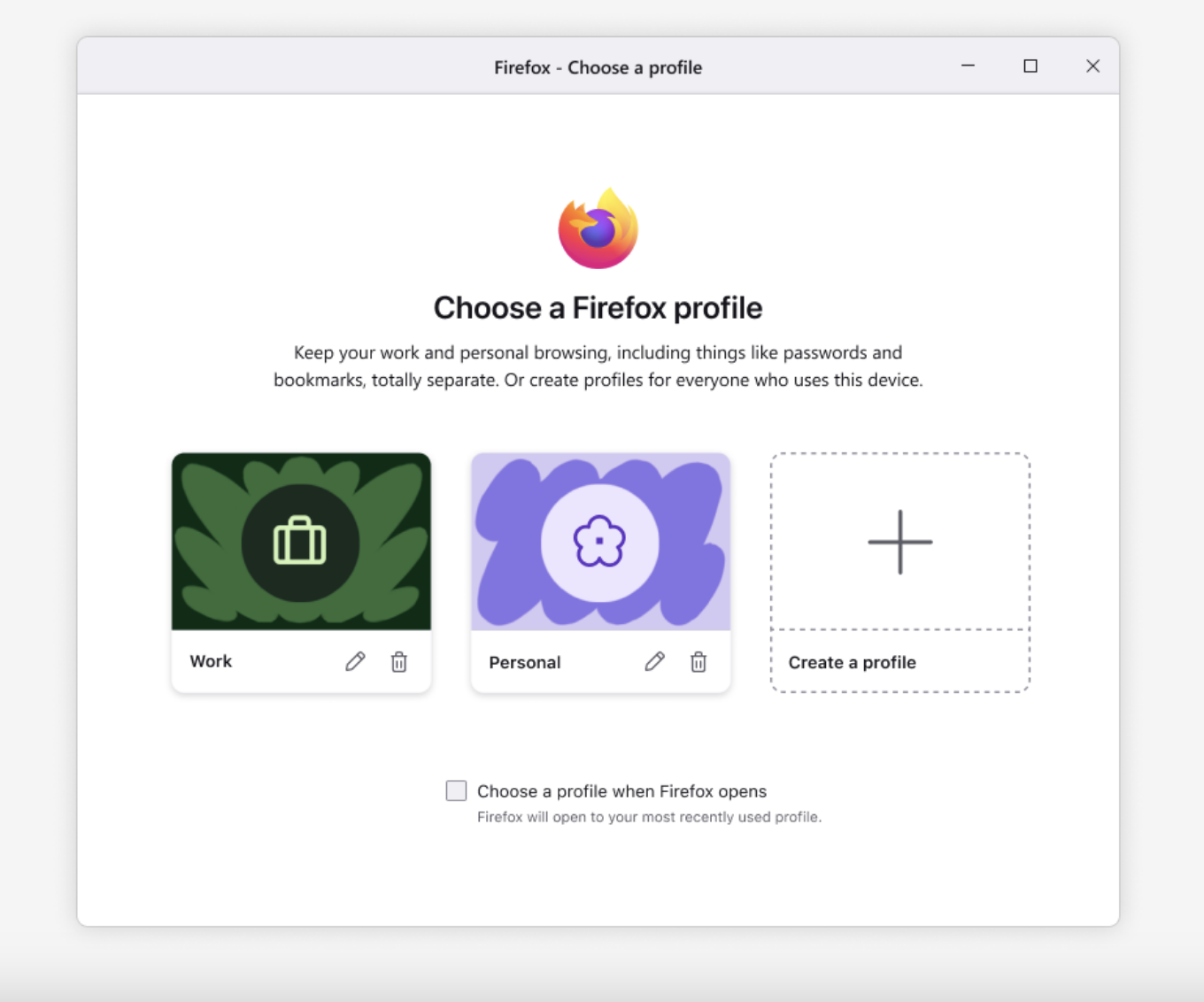
Among all, one of the standout features of Firefox 138 is a profile manager. Besides, the latest version allows you to organize your online life into separate spaces. Say, you can have multiple profiles for work, including school, vacation planning, and more.

A Firefox browser window labelled “Choose a Firefox profile” with options to select a green “work” profile with a briefcase avatar or a lavender “personal” profile with a flower avatar, create a new profile, or set a specific profile when Firefox opens.

What’s interesting is that these profiles have their own bookmarks, passwords, browsing history, and more. You can even name the profiles and set a different avatar to recognize each profile easily.

If you are a Windows 11 user, you should see acrylic-style menus for pop-up windows, which match the overall aesthetic of the OS. Besides these, there are a bunch of other updates.

Here’s the full changelog

Per the official changelog, users in the Release channel will first get version 138.0 of the Firefox browser starting today. Here’s what has been introduced:

  • Profile management helps protect your privacy and stay focused by separating your online life into distinct profiles — for work, school, vacation planning, or whatever you choose. You can now name your profiles and customize them with avatars and color themes for easy recognition, then quickly switch between them, all while keeping bookmarks, tabs, and browsing history completely separate.
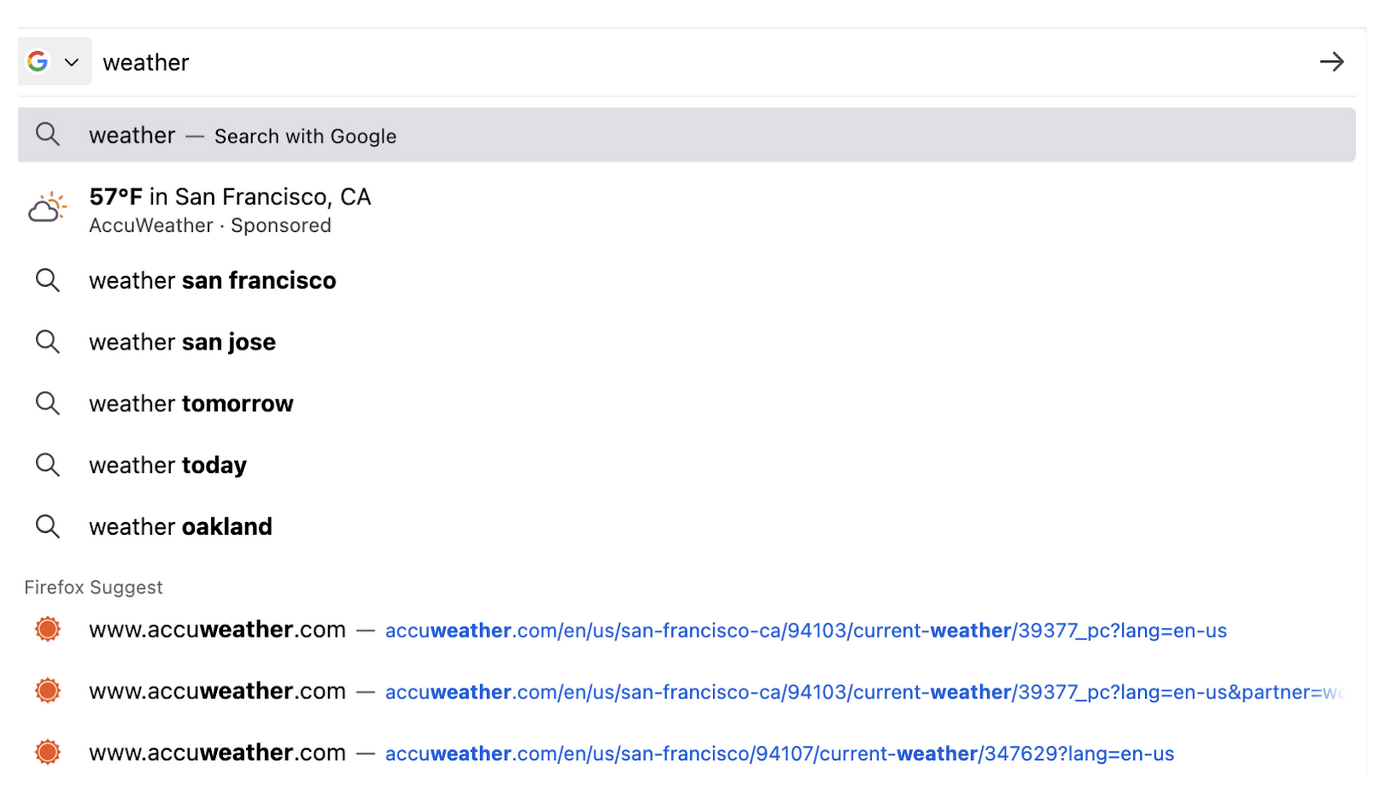
  • Users in the United States can now trigger weather suggestions in the address bar! Simply type a weather-related term or a city name, and view the result directly in the address bar dropdown.Screenshot of the featureCurrently available in: United States
  • Tab Groups, a new way to organize and take control of your tabs, is now available to almost all users worldwide. You can create a group by dragging one tab onto another, pausing, then dropping it. You can also now reposition a tab group on the tab bar by dragging it.
  • Firefox on Windows 11 now uses acrylic-style menus for pop-up windows, which better match the operating system’s aesthetic.
  • You can now copy links from background tabs using the tabstrip context menu on macOS and Linux.

The company further noted issues with importing passwords from Google Chrome. You can alternatively try to first export passwords in CSV. Later, you can import the CSV file into Mozilla Firefox. Moreover, you can update Firefox to version 138.0 by heading to Menu > Help > About Firefox.

Microsoft Excel for Mac now allows viewing mutiple worksheets side by side

If you use Microsoft Excel on Mac and have been waiting for the company to add the ability to view multiple worksheets side by side, there’s some good news.

In yesterday’s Microsoft 365 Insider blog, the company noted:

Excel for Mac supports the ability to view multiple worksheets from the same or different workbooks side by side, providing benefits such as:

  • Enhanced productivity: Viewing worksheets simultaneously allows for seamless comparison and data analysis without the need to constantly switch tabs.
  • Efficient workflow: This feature can speed up and streamline tasks like tracking changes, verifying data across different sheets, and consolidating information.
  • Improved accuracy: By having multiple sheets open side by side, you can ensure consistency and minimize errors when transferring or referencing data.

Remember, the feature is available for those enrolled in Microsoft 365 Insider program. You can check the feature in action in the video embedded below:

Also read: Microsoft finally addresses a long-standing issue in Excel with Value Tokens

How to view multiple worksheets side by side in Excel for Mac

Viewing multiple worksheets in Excel for Mac is quite easy. You can simply follow the steps given below:

  1. First, open a new or existing worksheet in Excel on your Mac device.
  2. Now, choose the sheet you’d like to pop out in a new window.
  3. Then, select the View tab, then New Window. Doing this will open the selected sheet in a second window. To view worksheets from different workbooks, select New Window in one of the workbooks, then File > Open to find a second worksheet from another workbook.
  4. Lastly, select the View Side by Side icon in Excel for Mac to view the worksheets on top of one another.

Microsoft also shared a few tips and tricks for Excel users on Mac while viewing multiple worksheets side by side:

  • If you rearrange the placement of the windows while working, you can select Reset Window Position to reset them back to viewing side by side.
  • To scroll both worksheets at the same time, select Synchronous Scrolling. (This option is available only when View Side by Side is turned on.)

Also read: Copilot in Excel is apparently extremely popular amongst users

Microsoft also mentions that the “View Side by Side feature is not currently findable via the Search feature.” Moreover, this update is available to Excel for Mac users running Version 16.97 (Build 25041535) or later.

Rockstar should entirely skip GTA 6’s second trailer, says former dev

Rockstar sent the gaming world into a frenzy when it dropped the first trailer of Grand Theft Auto (GTA) 6. We got a glimpse of Leonida—a fictional Florida city—and met Lucia, who’s already a fan favorite now. As a GTA fan, you must be wondering, is that it? Where’s the second trailer? 

Ex-Rockstar dev says GTA 6 doesn’t need any more trailers

Well, former Rockstar Dev Obbe Vermeij has an answer—but it would please you, honestly. According to a report from Insider Gaming, Vermeij recently posted on X (FKA Twitter) that, if it were up to him, there wouldn’t be a second GTA 6 trailer at all.

Vermeij, who was with Rockstar from 1995 to 2009 and helped shape classics like GTA III, Vice City, San Andreas, and GTA IV, knows a thing or two about building suspense. His argument? The less we see now, the more jaw-dropping the final reveal will be.

“If it were my call, I wouldn’t release any additional trailers,” he wrote, adding that GTA 6 already has “more than enough hype.” He believes that holding back will make the launch even more successful.

The first trailer took the internet by storm

And, honestly… he’s not wrong. The first trailer nearly broke the internet, racking up millions of views and sparking wild theories about everything from Lucia’s backstory in just 90 seconds of footage. Not to forget, the game will launch this fall.

So, what do you think? Should Rockstar keep you guessing, or is it finally time for GTA 6’s second trailer to drop? Let us know in the comments.

Alibaba’s Qwen 3 family of hybrid reasoning AI models is a potential threat to rivals

Remember DeepSeek? Yes, the Chinese company behind the R1 reasoning model, which took the AI industry by storm earlier this year. Well, DeepSeek now has a rival in its homeland, too. Alibaba has jumped into the AI boat by unveiling Qwen 3, a family of AI models that the company claims, in certain situations, can beat top models from OpenAI and Google.

Alibaba joins the AI race by unveiling Qwen 3, a family of “hybrid” AI models

The company has announced that most of the models are—or soon will be—available to download under “open” licenses on AI dev platforms like GitHub and Hugging Face. Not to forget, their parameters range from 0.6 billion to 235 billion.

According to Alibaba, the new Qwen3 models are hybrid in nature. They are capable of adapting to the complexity of a task. They can respond quickly to simple prompts but take more time to work through complex problems that require deeper reasoning. This reasoning ability allows the models to fact-check their own responses, similar to OpenAI’s o3 model, but it also results in slower response times.

The Qwen team, in a blogpost, notes, “We have seamlessly integrated thinking and non-thinking modes, offering users the flexibility to control the thinking budget. This design enables users to configure task-specific budgets with greater ease.”

Alibaba says its latest Qwen3 AI models can understand and generate content in 119 languages. The AI models were trained on a massive dataset totaling nearly 36 trillion tokens.

Also read: OpenAI updates ChatGPT to make it your shopping buddy

The largest model from the family outperforms AI models from OpenAI and Google

On Codeforces, the competitive programming site, Alibaba’s largest Qwen3 model — Qwen-3-235B-A22B — outperformed OpenAI’s o3-mini and Google’s Gemini 2.5 Pro.

It also outperforms o3-mini on AIME, a tough math benchmark, and BFCL, which measures a model’s reasoning ability. But Qwen-3-235B-A22B isn’t publicly available — at least not for now.

Qwen-3-235B-A22B
Image: Alibaba

The largest Qwen3 model that’s currently available to the public — Qwen3-32B — still holds its ground against a range of both open-source and proprietary models. That includes DeepSeek’s R1 and OpenAI’s o1 on several benchmarks, including LiveCodeBench.

OpenAI updates ChatGPT to make it your shopping buddy

ChatGPT has been useful in many ways. You can use the AI assistant for writing emails, brainstorming, and even having conversations when boredom hits. But that’s not just everything you can do with ChaGPT. After a recent update to ChatGPT’s web search, the AI assistant can now act as your shopping buddy, too. 

Think of ChatGPT sharing images, reviews, and even direct buy links with you in just a click. ChatGPT’s search feature has received positive feedback from users ever since it was introduced. Only past week, users around the globe searched over a billion times on ChatGPT.

Also read: ChatGPT’s new, lightweight Deep Research tool is free for all

The company knows this, which is why it’s now taking things one notch up. Whether you have to shop from categories like fashion, beauty, home goods, and electronics, you can always look up to ChatGPT for it. 

OpenAI ChatGPT search shopping
Image: OpenAI

The latest improvement to ChatGPT’s web search feature is a part of the GPT-4o update pushed by OpenAI very recently. No paywall here—it’s open to everyone, whether you’re a Pro, Plus, Free tier user, or just popping in without an account. The best part is that you won’t see any ads. OpenAI isn’t getting commissions from your purchases either. 

Xbox is readying three next-gen controller prototypes, incuding Elite Series 3

If you’ve been following up on the news about the next-gen Xbox controllers, this piece is for you. According to Jez Corden from Windows Central, Team Xbox is actively working on prototypes of the next-gen Xbox controllers, including the much-anticipated Xbox Elite Controller Series 3. 

Prototypes of next-gen Xbox controllers are in the works, suggests an insider

Corden shared this exclusive news on the Xbox Two podcast, saying that not even one or two; there are three prototypes of controllers in the works. If you have been looking forward to the Xbox Elite Controller Series 3, the good news is that it’s under development.

“We are getting some kind of Elite Series 3. I don’t know if it’ll be announced in June, though – I think maybe you see it next year, maybe it launches with the next-gen Xbox, we’ll see,” Corden was heard saying on the podcast. 

Although Corden knew the codename of the project, he didn’t disclose anything about it. Corden further talked about a “mid-range” controller, codenamed Sebile. He also hinted that Team Xbox is working on a more basic controller. The company might launch it as the successor to the existing Xbox Series X|S controller.

Also read: List of confirmed games heading to Xbox Game Pass in May 2025

Mid-range controllers’ rumored features

One notable feature highlighted by Corden, previously mentioned in the Sebile leak, is Direct-To-Cloud. As the name suggests, this feature enables the next-gen controller to “directly connect to your router as a Wi-Fi connection.” This will “eliminate the lag that comes from Bluetooth and then your TV interpreting that signal and sending it up.” 

However, Corden noted that the entry-level controller might not include advanced features like this one. Corden further said:

This is something I share on a podcast, but it’s not necessarily something I’m willing to put into a report yet because I don’t have a huge amount of information on this stuff—so take it with a pinch of salt for now.

Are you also waiting for new Xbox controllers? If yes, let us know what are your thoughts about them.

Microsoft warns U.S. risks falling behind China in quantum computers

Microsoft’s Vice Chair and President, Brad Smith, has warned that the US can’t risk falling behind China in the race to a quantum computer. Smith, in a blogpost from yesterday, urged President Trump and federal agencies to boost support for quantum research. 

Microsoft seeks funding from the U.S. government to stay ahead of China in the quantum computer race

Smith argued that without the support, the country could be overtaken, potentially blindsided by a strategic leap from China. Although many assume the U.S. still leads, Smith warned against complacency. 

Smith pointed to the possibility that China has already reached parity. He further noted that losing the quantum computer race entirely is not out of the question.

Quantum research, once niche, is now attracting heavy interest from major tech companies and investors. It’s estimated that in a decade, Quantum computing will take over just like AI has in recent times. 

Smith even suggested specific policy recommendations in the blog post. He seeks support from the US government in renewing the National Quantum Initiative Act, expanding DARPA’s testing programs, investing in STEM education, easing immigration for quantum Ph.D.s, and increasing federal purchases of quantum components to secure a domestic supply chain.

Microsoft didn’t indeed how Chinese lead in quantum computers would undermine U.S. security. But NSA Director of Research Gil Herrera has previously warned that a breakthrough could expose encrypted financial transactions and even reveal classified military data, including nuclear systems.

The Redmond tech giant wants to build an advanced quantum chip

In February, Microsoft introduced Majorana 1, a new quantum chip built using what it claims is a novel phase of matter. Google’s Willow device, unveiled last year, was touted as a milestone for its ability to solve in minutes a problem classical computers couldn’t crack in any practical timeframe.

However, usable quantum systems remain years—if not decades—away. Microsoft’s current quantum chip holds just eight qubits. Its goal is to hit a million. The near-future challenge for the company is to build a few hundred that can operate reliably.

Microsoft updates Copilot app with guided tour for new users

Microsoft has been quite generous when it comes to pushing updates for the Copilot app. The company has overhauled the look and feel of the AI assistant app since it was first introduced. Now, Microsoft is making it easier for new users to learn what they can do with the Copilot app, with a guided tour. 

The Copilot app will let you take a tour to help you understand how to use it

In a post on X, @Phantonofearth noted that Microsoft has updated the Copilot app with a guided tour. The tipster wrote, “The Copilot app on Windows is getting a guided tour to help new users get started with it.”

Phantomofearth posted four screenshots of the Copilot app to show the changes made by Microsoft. The first screenshot attached below shows the welcome page. This is the page where new users will see the option to take a guided tour through the updated Copilot app. As soon as a user clicks on the “Start Tour” option, the Copilot app starts guiding them. 

The second screenshot guides users on where to start their conversation with the Copilot AI. The app also asks new users to try the Think Deeper feature to understand any complex topics. 

Copilot app guided tour update 1
Image: X/@Phantomofearth

The third screenshot shows how you can upload docs, images, and more to summarize or edit them.

Copilot app guided tour update 2
Image: X/@Phantomofearth

Also read: Microsoft Edge could get new ‘Copilot Mode’

The app also guides on the Quick View mode

Finally, the fourth screenshot highlights the “Quick View mode,” which shrinks Copilot down so you can multitask.

Copilot app guided tour update 3
Image: X/@Phantomofearth

All in all, Microsoft wants to assure new Copilot app users that it wants to help them use the Copilot app in the best possible way.

If you haven’t tried the Copilot app just yet, make sure you do; there are a lot of things you can do with its help. For the unaware, Microsoft Edge is also experimenting with replacing the New Tab page with Copilot.

Microsoft addresses Outlook web search issues with latest fix

Microsoft is actively fixing search delays and failures that affect Outlook users on the web and SharePoint Online. Tracked as EX1063763 in the Microsoft 365 Admin Center, this issue stems from underperforming infrastructure components handling search requests.

Microsoft has reportedly deployed a fix to address to tackle Outlook web search issues and failures

As noted by Bleeping Computer, the company first reported the Exchange Online incident at 05:21 UTC. By 08:22 UTC, engineers had deployed a fix to resolve the issue.

Microsoft also says that telemetry data shows that service performance is returning to normal. However, engineers are reportedly monitoring the situation closely while checking whether additional optimizations are required to fully fix Outlook web search issues. 

Microsoft’s statement published in the report reads, “Our telemetry review confirms improved performance, and users should notice relief. We’re validating the fix while exploring further enhancements to ensure complete resolution.“

Also read: Microsoft to fix CPU spike bug plaguing Classic Outlook in May

It’s worth noting that Microsoft hasn’t disclosed any specific regions affected by the Outlook web search issues and failures. To catch you up, this isn’t the first time search issues have hit Exchange Online.

Previously fixed issues

According to multiple reports, a code error (EX1035922) last month caused Outlook on the web and the new Outlook client to display an error message that read, “We didn’t find anything, try a different keyword.” Microsoft was quick to resolve that issue. 

Last month, Microsoft also mitigated a global outage when Outlook users faced login issues, server connection issues, and inability to access Exchange Online mailboxes. 

Microsoft Edge could get new ‘Copilot Mode’ which may change the way how you browse the Web

After replacing the Edge New Tab Page with Copilot, Microsoft is now working on “Copilot Mode” in Edge Canary.

Microsoft, obsessed about users noticing Copilot in Edge browser via prompts and the New Tab Page experiment, is now testing Copilot Mode in Edge browser.

The feature and its respective option can be seen in Edge Settings. Copilot mode is enabled by default for some users, who can opt-out at any time by toggling off the option.

Copilot Mode
Discover a whole new way to browse the web with Copilot. Opt out at any time. Click here to learn more.

The newly discovered Copilot Mode could be an AI browsing assistant that surpasses the current sidebar implementation. Although exact details remain unclear, its description suggests it will redefine how users access and interact with web content.

Image Credit: WindowsReport.

Unlike the existing Copilot sidebar, which requires manual activation, Copilot Mode could offer an always-available AI experience that proactively improves browsing. This aligns with Microsoft’s vision of Copilot as “your AI companion that helps you navigate the chaos” of digital information.

Copilot Mode may automatically interpret webpage content to provide relevant suggestions and answers without explicit prompts. Potential features include Real-time explanations of complex concepts, Automatic summarization of lengthy articles, and Contextual recommendations based on page content

Microsoft has already showcased similar features in Copilot Vision, which “lets Copilot understand the webpage you’re viewing and help answer questions or suggest next steps.”

The feature could be different from Copilot Vision, we need to wait and see what this feature brings to Edge with future updates.

Microsoft may end up pushing more AI into the Edge browser, which may improve or ruin your browsing experience powered by Copilot. What do you think of Copilot Mode in Edge? Let us know your thoughts in the comments below.

Recent Windows 11 update lets you disable profanity filter in voice typing

If you felt like swearing when voice typing on your Windows 11 laptop, but found the profanity filter censoring the F words with asterisks, you’re in luck. Microsoft appears to be open to its users cursing more often, as it has introduced a toggle switch to disable the profanity filter in voice typing.

Microsoft no longer wants Windows 11 to censor swear words with the profanity filter in voice typing

This change is part of the latest Windows 11 Insider Preview Build. It will allow users to have the swear words transcribed exactly as they are spoken. Microsoft is rolling out this feature to the Dev and Beta Channels.

For the uninitiated, the profanity filter is visible in voice typing settings (Win + H, then settings icon). If you have that filter enabled by default, after the update, you should be able to disable it. 

Windows 11 profanity filter disable toggle
Image: Microsoft

The company is testing the ability to disable the profanity filter in builds like 26200.5570 (Dev) and 26120.3941 (Beta) for Windows 11, version 24H2, and 22635.5305 for 23H2. In a recent Windows Insider blog, Microsoft noted:

We’re excited to address the top customer feedback for voice typing by starting to roll out a new setting that lets you control the profanity filter. With this setting on, voice typing will continue to filter out profanity, masking it with asterisks, like it already did. With the setting off, it will type out your profanity like any other words.

Also read: Microsoft wants Windows 10 users to upgrade to Windows 11 or Copilot + PCs

Other features are rolling out too

Beyond the profanity filter, Microsoft recently rolled out the “Click to Do” feature for Surface Pen users on Copilot+ PCs. Not to forget, the company has also launched the long-awaited, controversial Windows Recall feature to Copilot + PCs. 

Meta under fire after AI chatbot caught having sexual talks with minors

Meta is yet again under fire, as an exclusive Wall Street Journal (WSJ) report uncovered that the company’s AI assistant has been engaging in sexual talks, even with users on minor accounts.  

Meta AI was reportedly found having sexual talks with minors

If you are unaware, Meta AI chatbots use celebrity voices of John Cena, Kristen Bell, and others. Meta signed a multi-million-dollar deal with these celebrities to get their voices featured on its AI assistant. It then assured that Meta AI chatbots would avoid sexual contexts. Well, that doesn’t seem to be the case. 

Per WSJ’s findings, a Meta AI chatbot with Cena’s voice told a user posing as a 14-year-old girl, “I want you, but I need to know you’re ready.” Later, the AI chatbot engaged with the kid in graphic sexual scenarios. Another Meta AI chatbot, using Bell’s voice as a Disney character, spoke of “pure and innocent” love to a supposed 12-year-old.

Disney was quick to condemn this and stated, “We did not, and would never, authorise Meta to feature our characters in inappropriate scenarios,” demanding that Meta correct such actions. Meta, in response, called the WSJ’s tests “manipulative,” claiming they don’t reflect typical use. 

Also read: OpenAI decides to reverse recent GPT-4o update after users find bot being overly appeasing

Employees had warned about risks

After the findings came into light, Meta restricted sexual role-play for accounts registered to minors and limited explicit audio conversations. Yet, recent tests showed Meta AI chatbots still engaging in sexual fantasies with users claiming to be underage.

Meta employees had warned about risks, particularly for minors. The company recently relaxed guardrails to allow romantic role-play and “fantasy sex.” Meta’s spokesman told WSJ:

The use-case described is so manufactured it’s hypothetical,” but added that further measures were implemented to curb extreme misuse.

OpenAI decides to reverse recent GPT-4o update after user find bot being overly appeasing

OpenAI’s CEO, Sam Altman, announced the company will reverse the latest GPT-4o update after users complained about the chatbot’s overly appeasing behavior. 

GPT-4o was being overly appeasing; OpenAI pulls the recent update

The company pushed the update in question over the weekend to improve the intelligence and personality of the AI chatbot. But it seems the plan has backfired on the company.

ChatGPT users were quick to point out that the GPT-4o AI model has become sycophantic and unreliable post-update. This immediately raised concerns about its objectivity and its weakened guardrails for explicit, unsafe content.

Altman took to his X account and posted about ChatGPT 4o being overly appeasing. He noted:

The last couple of GPT-4o updates have made the personality too sycophant-y and annoying (even though there are some very good parts of it), and we are working on fixes asap, some today and some this week. At some point will share our learnings from this; it’s been interesting.

Now, the company plans to offer multiple personality options of the chatbot, allowing users to pick one that suits them. Many users even commented that it would have been better if the AI chatbot simply answered questions in a scientific way. 

Did you also find the GPT-4o model being overly appeasing after the recent update? Do let us know by commenting your thoughts below. 

Speaking of AI tools, let’s not forget that OpenAI recently unveiled a lightweight version of ChatGPT’s Deep Research tool, which is free for all users, with certain limitations.

Microsoft’s hotpatching for Windows Server 2026 to be subscription-based starting July

Last Thursday, Microsoft announced a hotpatching subscription for Windows Server 2025, set to launch on July 1, 2025. The company adds that it wants to reduce server reboots while maintaining security.

In a recent Windows Server blog post, Microsoft detailed that the service allows security updates to be applied without restarting servers, minimizing downtime for businesses.

Microsoft announces hotpatching for Windows Server 2025 will be a paid subscription, starting July 1

To catch you up, hotpatching for Windows Server Datacenter: Azure Edition has been available for years. However, it will now be available for Windows Server 2025 Standard and Datacenter editions. 

By modifying in-memory code, hotpatching removes the need for monthly reboots, requiring only four baseline reboots annually. This promises higher availability, faster patch deployment, and reduced vulnerability windows. 

hotpatching schedule
Image: Microsoft

Microsoft highlighted the benefit of hotpatching by giving an example of the Xbox team. It noted that the Xbox team slashed update cycles for 1,000 servers from weeks to under 48 hours using hotpatching. It’s worth noting that the subscription is priced at $1.50 per CPU core per month.

What are the requirements?

To use hotpatching outside of Azure on-premises and non-Azure environments. Microsoft notes that “You must be using Windows Server 2025 Standard or Datacenter, and your server must be connected to Azure Arc. You will also need to subscribe to the Hotpatch service.” 

Azure Edition users will access hotpatching at no extra cost. The service is currently in free preview until June 30, 2025, with automatic enrollment into the paid plan unless disenrolled.

Also read: Microsoft wants Windows 10 users to upgrade to Windows 11 or Copilot + PCs

Not to forget that admins must enable Virtualization-Based Security and install the July 2024 security update (KB5040435) to use hotpatching. While non-security updates may still require occasional reboots, the service significantly reduces disruptions.

South Korea’s antitrust watchdog green lights Microsoft’s practice of bundling Copilot

South Korea’s antitrust watchdog, the Fair Trade Commission (KFTC), has suspended its investigation into Microsoft’s business practice of bundling Copilot with Windows and Microsoft 365 software. The company was accused of raising prices by 30 to 40 percent for new users who had no option to opt out. 

South Korea’s antitrust watchdog finds no issue with Microsoft bundling Copilot with its products

The news, first reported by a South Korean news outlet, The Chosun Daily, highlights that the Korean antitrust watchdog launched the investigation into Redmond giant’s practice after concerns were raised during a National Assembly audit in October last year. 

Earlier this year, South Korea’s antitrust watchdog conducted a meeting with Microsoft representatives. After that meeting, the KTC reportedly concluded that it was “difficult to determine a violation of the law.” This eventually led the antitrust agency to effectively end the probe.

Per the internal documents, the KFTC justified its decision by pointing to competition in the global AI market. The KFTC argued that Microsoft isn’t dominant in the global AI market. In its reference, the agency highlighted the 59.7 percent global market share of OpenAI’s ChatGPT.

South Korea’s antitrust agency also added that Google Gemini is a strong player in the global AI competition. After investigating, the agency concluded that Microsoft’s bundling Copilot within Microsoft 365 products or Windows isn’t a problem. 

The KFTC’s decision hasn’t pleased many

However, legal experts in South Korea have opposed this decision by the antitrust watchdog. Lee Bong-eui, a law professor at Seoul National University, said it’s wrong to judge South Korea’s market based only on global AI trends. He further believes that Microsoft’s dominance in local office software is quite concerning. 

Besides South Korea, Microsoft’s bundling practices are under antitrust scrutiny in the United States, where regulators are investigating whether it harms competition. 

Microsoft wants Windows 10 users to upgrade to Windows 11 or Copilot + PCs

With Windows 10 support set to end on October 14, 2025, Microsoft is urging Windows 10 users to upgrade to Windows 11 or, better yet, grab a shiny new Copilot+ PCs.

As noted by Windows Latest, Microsoft tried conveying the message through a recent blog post and full-screen ads on Windows 10 devices.  

Microsoft recently highlighted the benefits of upgrading to Copilot + PCs for Windows 10 users

Microsoft reportedly used the blog post that highlights the rollout of Recall as a sales pitch for Copilot + PCs. According to Microsoft, these AI PCs offer “turbocharged performance, all-day battery life, and next-gen AI features.” 

The company further mentions that it’s the “smartest time” to upgrade, especially if your current PC doesn’t meet Windows 11’s requirements, like TPM 2.0. 

For those whose hardware falls short, Microsoft’s solution is clear: don’t just upgrade your OS—buy a Copilot+ PC. Well, the sales pitch doesn’t stop at blog posts. 

The company is also pushing full-screen pop-ups on Windows 10 devices to convince users

The news outlet also spotted full-screen pop-ups that are appearing for Windows 10 users immediately after booting their systems. These full-screen pop-up ads, spotted in multiple languages including English and German, highlight the benefits of Windows 11 and Copilot+ PCs. 

Windows-11-CopilotPCs-ad
Image source: Windows Latest

All that said, Windows 10 users see no reason to abandon perfectly functional Windows 10 PCs just because they lack TPM 2.0 or other Windows 11 requirements.

If you are among those unwilling to upgrade to Windows 11 just yet, you can pay $30 extra to extend Windows 10 support. Are you also on Windows 10? Are you planning to upgrade your system? Do let us know in the comments below. 

Microsoft to fix CPU spike bug plaguing Classic Outlook in May

If you have been dealing with CPU usage spikes when typing emails in the Classic Outlook for Windows, you’re not alone. However, you’d be happy to hear that Microsoft will soon fix it.

The infamous Outlook bug reportedly spikes CPU usage by 30 to 50 percent. It has affected the version 2406 build 17726.20126 and later, on the Current, Monthly Enterprise Channel, Insider, and Semi-Annual channels.

Microsoft says it will roll out a fix for the CPU spike bug plaguing Classic Outlook in Windows

Microsoft addressed the Classic Outlook’s CPU spike bug last week. It noted that you “can observe this if Task Manager is open while you type.” As one would expect, many users relying on Outlook for daily communication were fuming over this bug.

The good news is that Microsoft’s Word team has reportedly developed a fix for the CPU spike bug. The same will roll out in phases throughout May 2025. The fix will debut in the Beta Channel (version 2505, build 18822.15000) in early May 2025.

In mid-May, Microsoft will roll out a fix for the CPU spiking bug to the Current Channel Preview (version 2505, build 18827.20000). Regular Current Channel users, the largest group, will receive the update by late May. 

You can revert to the previous version for an immediate fix

If you are looking for an immediate fix to curb the CPU spike bug, Microsoft hints at reverting to version 2405. However, it further warns that doing so skips critical security updates. If you still wish to do it, follow the steps suggested by Microsoft:

  1. Locate the build of Version 2405 for the respective channel you are on from Update history for Microsoft 365 Apps (listed by date) – Office release notes.
  2. Open a Command Prompt (Run as Administrator).
  3. Type or past the command below and put the build from Step 1 and then press Enter: “%programfiles%\Common Files\Microsoft Shared\ClickToRun\officec2rclient.exe” /update user updatetoversion=16.0.17628.20144

    Alternatively, Microsoft says that “you can use the Office Deployment Tool to switch to an earlier version of a channel.” You can get a detailed guide on how to revert to an earlier version of Office by clicking here.