Latest .NET updates patch the Visual Studio Remote Code Execution Vulnerability

Microsoft issued updates for .NET 6, .NET 7 and .NET 8 to address the CVE-2024-21409 listed as an important vulnerability for .NET and Visual Studio Remote Code Execution.

A Remote Code Execution (RCE) attack allows an attacker to execute malicious code on an organization’s computers or network. This capability to run code controlled by the attacker can serve multiple objectives, such as installing further malware or exfiltrating confidential information.

RCEs attacks are very common means for attackers nowadays to steal data and break into Government and organizations systems.

How do I patch my .NET to avoid security issues?

The latest .NET updates, .NET 8.0.4, 7.0.18, .NET 6.0.29 for Windows, macOS, and Linux, for x86, x64, Arm32, and Arm64 are available for download from the dedicated GitHub page.

However, you may also use the Windows Package Manager CLI (winget) commands to install them:

  • To install the .NET 8 runtime: winget install dotnet-runtime-8
  • To install the .NET 8 SDK: winget install dotnet-sdk-8
  • To update an existing installation: winget upgrade

Microsoft also warns about a use-after-free vulnerability in WPF which may result in Elevation of Privilege when just by viewing untrusted documents. We recommend updating .NET as soon as possible to avoid these security issues.

You should also be aware that .NET 7 will soon reach end of support. The apps will still run but Microsoft recommends an upgrade.

Did you encounter any problems with the updates? Let us know in the comments section below.

Intel’s latest Wi-Fi driver package, 23.40.0, fixes BSOD, includes functional and security updates

Intel, on April 9, 2024, released the Wi-Fi package drivers 23.40.0 for Windows 10 and Windows 11. So, if you are using Intel Wi-Fi cards on your PC, it’s time to install the latest drivers!

As per the release notes, the latest Intel wireless driver package, 23.40.0, introduces the following changes on both Windows 10 and Windows 11:

1. Regulatory updates for China.

2. Fix for Wi-Fi Yellow Bang in device manager with very low occurrence.

3. Fix for Wi-Fi blue screen with low occurrence.

4. This software release version 23.40.0 has been updated to include functional and security updates. There may be other minor issues addressed which will impact performance, stability, or vendor specific functionality not listed above. Users are encouraged to update to the latest version for best performance.

You can download the latest Wi-Fi driver package, 23.40.0, from Intel’s official website. It also lists the products supported by the driver package. So, check if yours is on the list!

Besides, Intel rolled out a fix for BSOD caused by the Wi-Fi driver in Windows in the previous driver package.

Updating the Wi-Fi driver is critical for many reasons. It improves security, fixes any existing bugs, may help increase the Internet speed (if it’s being limited due to a bug), and ensures smooth functioning of the PC.

Did you face any issues with the latest Intel Wi-Fi drivers? If yes, share them with our readers in the comments section.

Dell’s new XPS and Alienware AI laptops are out featuring Intel Core Ultra CPUs

Dell brings four laptops for gaming and general use. However, two of them, specifically the Dell XPS Laptops, share some specs but have different sizes and customization options. Yet, they all have AI features and cutting-edge Intel Core Ultra Processors. So, without further ado, the laptops are XPS 14 (9440) and XPS 16 (9640), Alienware m16 R2, and Inspiron 14 Plus (7440).

Dell laptops and specifications

You can personalize most of the new Dell laptops based on your needs. However, if you want a durable gaming device, go for the Alienware m16 R2 as it has the most options. Yet, if you want a work laptop, Inspiron 14 Plus has everything you need. Additionally, you can go for the XPS for video editing and content creation.

Dell XPS Laptops

Two Dell XPS laptops, one with a 16-inch screen and the other with a 14-inch screen, are displayed side by side on a white surface. Both laptops feature sleek, modern designs with thin bezels and high-resolution displays. The larger laptop is on the left, and the smaller one is on the right.

The XPS laptops are the first ones from this category. After all the only difference between XPS 14 and XPS 16 is their display size and some customization options. Other than that, the XPS 16 is 45% more performant than its predecessor.

If you are looking for a laptop on the go, XPS 14 could be the better choice because it’s more compact. Additionally, you can customize their storage, memory, graphics, and display. For example, you can opt for an NVIDIA GeForce RTX series 40. Also, you can change the display type to OLED.

Both Dell laptops have an incorporated Copilot key to improve workflows. They have an integrated Copilot assistant too. On top of that, you could go for the premium version if you work with AI.

Alienware m16 R2

The Alienware m16 R2 laptops from Dell deliver superior performance. In addition, they are great for gaming. Also, it features Intel Core Ultra 9 185H processors and NVIDIA GeForce RTX 40 Series graphics. Furthermore, it has a stealth mode for quiet gaming sessions.

You can adjust some of its specifications, such as storage, graphics, CPU, and memory.

Dell Inspiron 14 Plus

Inspiron 14 Plus offers many AI features, like auto framing and eye contact. Thus it is a better fit for office work. It has a 16:10 aspect ratio and a 2k resolution. In addition, it received military-grade certification for durability. However, unlike the previous models, it can’t be personalized too much.

In a nutshell, Dell offers various laptops with AI features for different uses. You can personalize most of them. In addition, the cheapest one, the Dell Inspiron 14 Plus, is $849.99. On top of that, the gaming laptop, Alienware m16 R2, starts at $1,499.99. However, the most expensive Dell laptops are the XPS 14, which starts at $1,699.00, and the XPS 16, which starts at $1,899.00.

What are your thoughts? Are you going to buy any of them? Let us know in the comments.

Unified Copilot experience in Visual Studio will take AI integration to a new level

Copilot is an irreplaceable tool, and it’s available in various Microsoft Software, including Visual Studio.

Speaking of which, the company has plans to bring a unified Copilot experience in the future versions of Visual Studio.

Visual Studio 17.10 announced, comes with a unified Copilot Experience

The new version of Visual Studio was just announced, and it will offer in-depth Copilot integration, as Neowin writes.

This is advertised as a unified Copilot experience, and it combines the features of Copilot and Copilot Chat into one.

By doing so, users won’t have to install two separate extensions, thus offering a more deeply integrated AI experience in the future.

If you haven’t used Copilot in Visual Studio, you can use it to speed up coding tasks, improve code quality, help you learn new patterns and languages, and help you focus on important tasks.

It’s great to see that Copilot is now available right out of the box, and if you’re impatient, you can download the Preview 3 version and give it a try.

As for others, they will have to wait for May to see this feature available to the public. As for other Copilot news, Copilot for Security vows to make Microsoft 365 more secure.

You should also know that Microsoft is working on Qualcomm-based Windows that will bring Copilot to everyone.

Qualcomm Snapdragon X Elite laptops are great for gaming and editing

Some lucky journalists had the chance to test the Qualcomm Snapdragon X Elite laptops. Based on their affirmations, they were pleasantly surprised by the capabilities of the demo laptops. Thus, some used it for content creation software. To test its capabilities, they edited videos in 4K using Blackmagic Davinci Resolve and rendered text to images in OpenVino. Additionally, they were happy with the results of the new laptop.

During the Snapdragon X Elite event, another journalist had the chance to check out the laptop’s gaming performance. In addition, by attending the event, people could check the device’s specifications. After all, even if there are many benchmark results, they don’t specify the exact characteristics used.

Snapdragon X Elite laptops are great AI powerhouses

According to the journalists from Laptop Mag, the Snapdragon X Elite laptop features 32GB RAM and a 2.8K 120Hz screen. Each one of the demo devices showcased during the event had a specific task. Some were for gaming, others for editing, and some ran benchmarks. Yet, they are all running their tasks flawlessly.

If you are a content creator or editor and have a Macbook, the Snapdragon X Elite might be your next device. After all, it is more proficient than the Pro M3 and some versions of MacBook Air. Also, with it, you can edit videos smoothly in 4K using the Blackmagic Davinci Resolve tool. On top of that, compared to the Intel Core Ultra 7, it delivers a smoother experience.

The demo Snapdragon laptop easily handles tasks other devices struggle with, such as masking, audio editing, color grading, and frame-by-frame scrubbing.

The Qualcomm Snapdragon X Elite laptops ran Baldur’s Gate III, Control, and Redout II on 1080p. According to Madeline Ricchiuto, the games run smoothly on the demo devices. Additionally, there were no frame drops during gameplay, especially on BG III during encounters. Yet, the chips are not for ray tracing. So, you might feel the absence of ray-tracing effects.

Ultimately, the Snapdragon X Elite laptops are powerful AI PCs. Thus, their performance and great speed in editing content show how far this technology has progressed. However, compared to the demos, the devices featuring the Snapdragon X Elite chips might have a lower performance based on their specifications. Yet, the laptops with similar specs might perform the same.

What are your thoughts? Are you going to get a Snapdragon laptop? Let us know in the comments.

PC shipments surge back to Pre-pandemic levels in Q1 2026

When the pandemic hit, everything changed. The world’s economy was standing still, and it has been a couple of years, but we are still recovering from the losses it left behind, trying to get back to normal every day, whether it is the PC market or day-to-day life.

Speaking of the PC market, according to the International Data Corporation (IDC) Worldwide Quarterly Personal Computing Device Tracker‘s latest report:

 After two years of decline, the worldwide traditional PC market returned to growth during the first quarter of 2024 (1Q24) with 59.8 million shipments, growing 1.5% year over year.

So, after two years of consecutive decline, the global conventional PC market, which includes desktops, workstations, and notebooks, exhibited growth during the first quarter of 2024.

However, it is worth noting that the market experienced a steep decline of 28.7% in the first quarter of 2023, marking it the lowest point in PC history.

Apart from the growth this year, global PC shipments managed to return to pre-pandemic levels in Q1 2024. In the first quarter of 2019,  60.5 million units were shipped worldwide.

Inflation is going down in most parts of the world, like America, Europe, the Middle East, and Africa (EMEA). Therefore, PC shipments have started to recover. However, the same could not be said about China, which has impacted China and the global market.

As China is the largest consumer of desktop PCs, weak demand from the region could cause a decline in the percentage of global desktop shipments in the next quarter.

Jitesh Ubrani, research manager with IDC’s Worldwide Mobile Device Trackers, said:

“Despite China’s struggles, the recovery is expected to continue in 2024 as newer AI PCs hit shelves later this year and as commercial buyers begin refreshing the PCs that were purchased during the pandemic. Along with growth in shipments, AI PCs are also expected to carry higher price tags, providing further opportunity for PC and component makers.

Here are the details of the top 5 companies, globally in terms of shipments(millions of units), market share, and growth comparing quarter 1 of 2024 and quarter 1 of 2023:

Company1Q24 Shipments1Q24 Market Share1Q23 Shipments1Q23 Market Share1Q24/1Q23 Growth
1. Lenovo13.723.0%12.721.6%7.8%
2. HP Inc12.020.1%12.020.4%0.2%
3. Dell Technologies9.315.5%9.516.1%-2.2%
4. Apple4.88.1%4.27.1%14.6%
5. Acer Group*3.76.2%3.45.7%9.2%
5. ASUS*3.66.1%3.86.4%-4.5%
Others12.621.1%13.322.6%-5.0%
Total59.8100.0%58.9100.0%1.5%
IDC Quarterly Personal Computing Device Tracker, April 8, 2024

With that said significant developments are expected in 2024 and beyond. The emergence of AI-powered PCs, the retirement of Windows 10, the introduction of new powerful processors, and more. We hope these hold the potential to bolster PC sales in the years to come.

What do you think about it? Share your thoughts with our readers in the comments section below.

16″ of awesomeness: Samsung’s Galaxy Book4 Pro 360 is now less than $1500

Samsung has a reputation for having amazing devices, but usually, such quality comes with a price.

If you’re on a budget, you’ll be pleased to hear that Galaxy Book4 Pro 360 is currently available at a discount.

You can get Galaxy Book4 Pro 360 for $400 off

Samsung Galaxy Book4 Pro 360 is an amazing device, and it comes with the following specs:

  • 16-inch, 2880×1800 AMOLED touchscreen display
  • Intel Core Ultra 7 155H 3.8GHz CPU, can be boosted up to 4.8GHz
  • Intel ARC Graphics
  • 16BGB RAM, 1TB SSD
  • 76Wh battery that can last up to 21 hrs

As for other features, there’s a full HD webcam, and AKG Quad speakers with Dolby Atmos. Regarding connectivity, Wi-Fi 6E and Bluetooth 5.3 are available.

There are also two Thunderbolt 4 ports, a single HDMI 2.1, one USB-A 3.2 port, a microSD card slot, and a headphone and mic combo.

Regarding security, you can find a fingerprint reader, TPM, Secured Core PC, and Knox. And last but not least, the S Pen also comes with this device.

Galaxy Book4 Pro 360 is an amazing device with a sleek design and great features, so be sure to get it from Samsung’s website while the discount lasts!

If you’re a fan of Samsung, you’ll be pleased to know that Galaxy Book5 Pro will use the next-gen Lunar Lake CPU.

In case you prefer phones, you might want to check Samsung Galaxy M55 5G specs for more information.

Your RAM could burn the GPU, reports emerging across the globe

It may be difficult to digest, but two different users have reported burn marks on the back plate of their GPU, and the RGB lighting from the RAM is reportedly to blame!

The first report on Reddit, from almost a week ago, was concerning burn marks on the MSI RTX 3080 GPU.

Under the thread, we had multiple users confirming witnessing the same pattern on their GPUs.

This happened to me too, I used Corsair RGB RAM

Yep. I have that types of marks too, on my strix 1080ti after 7 years with trident z rgb. I have them set red, not with full brightness and marks are red.

Three days later, another user took to Reddit and shared two photos as evidence of the burn marks on the same GPU, MSI RTX 3080.

In this case, too, many others came forward to corroborate things and share their experience.

I have this memory and an Asus 1080ti strix and mine IS faded, I’ve been using this card since 2018 so it definitely took a while. May have something to do with what color/ brightness the RGB is set to, what color are your lights? Mine were set to blue for most of that time, but definitely some time on rainbow.

i have similar markings on my zotac but in a different spot and not where my ram is ? something about this coating is sensitive to heat or something
Discoloration marks

The discoloration of the GPU’s back plate shows a similar pattern and is in line with what would be caused by RGB lighting from RAM modules. This appears to be due to a reaction between the RGB UV light and the coating used on the back plate.

Whatever the case, the reports so far are limited, although we expect an increase as more and more users minutely observe their GPU’s back plate for burn marks or discoloration. The good news is that the GPU’s functionality and performance performance hasn’t been affected!

Besides, it could just as well be due to a faulty batch of memory modules or GPUs with incomplete/improper coating. Because the majority of users with MSI RTX 3080 haven’t reported any problems, indicating that the issue is not widespread.

If you are looking to replace it, we recommend you check if the current GPU shows signs of failure.

What do you think is responsible for discoloration and burn marks on GPUs? Share with our readers in the comments section.

Soon, you will be able to customize MSN in the lock screen on Windows 11

In March 2024, Microsoft introduced a lot of changes to the lock screen of Windows 10, including MSN, which added more visual clutter.

The Redmond tech giant also added MSN-powered widgets to the lock screen in Windows 11 last month. However, not all users appreciated this move as they were not able to change or modify them.

The good news is that Microsoft is working on offering full control over how the lock screen on our PC appears. As Microsoft mentioned to WindowsLatest, you will be able to customize Widget cards along with the content appearing on them.

However, the company has not yet shared the estimated time of arrival for the feature. As of now, the lock screen widgets powered by the MSN feature are included in an optional update. However, after installing the patch Tuesday update in April 2024, these will become the default for everyone.

The mandatory patch Tuesday update will be available on April 9, and this will turn on MSN integration. All the MSN widgets will show up by default on the lock screen if you have the Weather option enabled in Settings>Personalization>Lock screen.

In the future update, as Microsoft mentioned, we can expect to choose which widget to keep or remove on the Lock screen.

However, people like me don’t like clutter on their lock screen and, therefore, would want to remove the MSN content completely. Fortunately, you can do that.

For that, open Settings (Windows + I), then go to Personalization>Lock screen> Lock screen status> choose an appropriate option.

As of now, I have KB5035942 installed and am running Windows 11 Home Single Language. When I navigate to the Lock screen status, I can see None, Weather, Mail, Calendar, and Dev Home options. If these don’t change in the future update, you can select any of them to get rid of MSN integration.

In other news, we know Microsoft has been experimenting with the Widgets panel for some time in Windows 11 24H2 and has added a navigation panel to the left-hand side, letting you switch between feed and widgets.

You can quickly access the Settings app from the Widgets app, as the icon is placed at the bottom left corner, but you won’t get the extended view option, meaning you won’t be able to go full screen in the Widgets app.

Would you like to turn off the MSN integration on your lock screen? If so, share the reasons with our readers in the comments section below.

Is Legion Go’s successor coming? Speculations are rising after a manager interview

Gaming PC handhelds are a great option if you want to play the latest titles while on the go, and we saw several different models from various manufacturers.

Speaking of which, it seems that Lenovo is working on a new gaming handheld, so let’s dive in and see what Lenovo has in store for us.

Lenovo seems to be interested in the Legion Go successor

Lenovo Legion Go is a decent device, and according to the XDA Developers, the company might be working on a new model.

There was an annual Innovate event held in Thailand, and during the event, Gaming Category Manager, Clifford Chong, said the following:

Definitely it’s a product category that we do see potential in and we continue to invest and we are looking towards when the time comes right of course having the next generation to provide even more features.

So while this isn’t a confirmation that the new Legion Go is releasing, the statement leads us and many others to believe that Lenovo plans to stay involved in the handheld gaming market.

While this is great news for Lenovo fans, many are wondering if we will get a handheld Xbox following the rising popularity of handheld devices.

Microsoft added a new Recommended button to Windows 11. Here’s what it does

There could be a new button called Recommended coming to Windows 11’s taskbar soon, according to the latest findings of the Windows enthusiast, Albacore, who spotted it. The new button currently has the icon of a globe, and it could be used as a central point for the Start menu’s current Recommended section.

For now, the button doesn’t do anything when enabled, and it’s not functional, according to the Windows enthusiast only the Settings page recognizes it, as it doesn’t appear in the Windows 11 taskbar at all.

As of right now, only the Settings framework is aware of this setting (backed by HKCU\SOFTWARE\Microsoft\Windows\CurrentVersion\Explorer\Advanced\ShowRecommendations) As of right now Taskbar.View.dll contains no trace of the new functionality, will keep an eye on future betas

Albacore

The new Recommended button can be bad news for those Windows 11 users who hope Microsoft won’t blast any new ad space to the operating system, because, according to the Windows enthusiast, it might end up being a new section that contains ads.

Lowkey hoping that this is just a piece of unfinished (and never to be finished) work from Mikhail’s brief reign over Windows. Fingers crossed we aren’t getting more ad surfaces.

Albacore

However, since it’s not functional, Microsoft might not add it. The Windows enthusiast spotted the button on a channel within the Windows Insider Program, and these channels are known for displaying experimental features that might not make it to the stable channel. But that doesn’t mean the Redmond-based tech giant will abandon the idea.

With this being said, the latest button added to the Windows 11 taskbar was none other than the Copilot, for which Microsoft is also releasing a special key, which is expected to ship with the new AI PC laptops these months.

For now, Copilot is still in trials and tribulations, as Windows users are not fond of it, according to our survey.

Limited time deal: Get the Aorus 15 gaming laptop for just $1,299 on Newegg

The demand for gaming laptops is on the rise, driven by their multi-purpose utility and long-term functioning. Right now, you can get one of the best value-for-money gaming laptops, Gigabyte Aorus 15, for just $1299.99, down $350 from its regular price of $1649.99.

The deal price comprises a $50 rebate on specific products on Newegg and NeweggBusiness. If you don’t fill out the rebate form, the effective cost of Gigabyte Aorus 15 in the deal comes out to be 1,349.99!

The powerful yet portable gaming laptop delivers smooth and stunning graphics, comes with a backlit keyboard, and is perfect for gaming on the go. It uses AI to optimize the performance, thus maintaining optimal temperature, reducing the fan noise, and improving battery life.

As for cooling, a vital aspect in any gaming laptop, the Gigabyte Aorus 15, works on the exclusive WINDFORCE Infinity technology, which ensures higher cooling efficiency and doesn’t take up as much space.

Gigabyte Aorus 15’s specification

ProcessorIntel Core i7-13700H
GraphicsGeForce RTX 4070 Laptop GPU (8GB)
Operating SystemWindows 11 Home 64-bit
Storage1 TB SSS (Solid State Drive)
RAM16 GB DDR5 4800
Display size15.6”
Display resolution2560 x 1440

Get Gigabyte Aorus 15 from Newegg at just $1299.99 today. It’s a limited-period deal, so hurry up!

When we looked through the reviews, a few were not happy with the Gigabyte software and the frequent dust accumulation in the fans, necessitating regular cleaning. Functionality-wise, it’s good for the price range!

If you are looking for budget options, check out our top picks for gaming laptops under $800.

What do you think of Gigabyte Aorus 15? Share with our readers in the comments section.

Azure Backup’s support for Azure virtual machines that use disks with private endpoints enabled is now in public preview

Azure Backup now supports backing up Azure virtual machines with private endpoints enabled. The update applies to both standard and enhanced backup policies.

According to the official changelog, users can specify network access settings for restored disks, choosing between the same configuration as source, specific network access, or public access.

  • Use the same network configurations as the source disk(s): This option allows the restored disks to use the disk access and network configurations same as that of the source disks.
  • Enable public access from all networks: This option allows the restored disk to be publicly accessible from all networks.
  • Disable public access and enable private access (using disk access): This option allows you to disable the public access and assign disk access to the restored disks for private access.
Microsoft

The new Azure Backup capability is now in public preview. However, for now, it’s only available for backed-up VMs that use private endpoint-enabled disks.azure backup

The settings can be chosen every time users start a new recovery process, and the three options are suitable for a variety of situations: for instance, some disks might contain sensitive information, in which case private access is recommended.

You can read more about it here.

Microsoft has used Azure Backup for a variety of tasks, over the years. Some while ago, the platform also supported Windows 7, 8, and 8.1, and it would allow up to 50 machines to register for it. Now it’s mainly used to restore Azure Virtual Machine data in the Azure portal.

AI-generated video is one of the winners of Pink Floyd’s animation competition and the fans are enraged

The legendary rock band Pink Floyd celebrates 50 years from the Dark Side of the Moon album launch. They thought that it was a good thing to have an animation contest with a £100,000 ($126,833) prize pool for this anniversary but things got haywire when one of the winner clips turned out to be AI generated.

Damián Gaume, the artist behind the video called Any Color You Like has admitted that he used the Stable Diffusion LLM and then he edited the clip using the Blender software. Actually, Pink Floyd included his Thank you video on their X channel congratulating him for the win.

What is all the stir about the AI-generated clip?

Pink Floyd’s prize announcement almost immediately caused negative comments on the X thread. Most commenters were arguing about the fact that the so-called artist didn’t, in fact, do anything except hit the Generate button. Others were enraged because an AI-generated video took the £10,000 ($12.633) individual prize that would belong to a real artist. The shaming continued on the same tone in the thread but they are all probably missing an important point to this contest: its rules and regulations.

Pink Floyd’s team clearly outlined that the use of Artificial intelligence software is allowed as long as you don’t try to claim any copyright or other rights of ownership on the clip and submit a detailed description of the creation process.

We don’t know if the jury received the description they needed from the contestant, but we think they did. Although the clip clearly bears the mark of the AI to the naked eye, it’s also as clear that he worked a lot on the video after its raw generation. And if you’ve ever used Stable Diffusion to generate a video, you know exactly what we mean.

If we look at the jury board, we have the English cartoonist Gerald Scarfe, who produced animations from Pink Floyd’s The Wall, the famous Terry Gilliam, who needs no other presentation, and Nick Mason, the Pink Floyd drummer. Although they are all legendary for their work, we honestly wonder if they know anything about AI video generation software.

The bottom line is that although we respect the artistic process and drive behind an artist’s creation, Gaume didn’t do anything out of the guided lines of the contest. However, he openly recognized that he made his job a lot easier by using AI for his clips. So, if anyone wronged here, it’s only the staff who wrote the rules and regulations of the contest to allow AI-generated videos in the contest. That is also debatable because Pink Floyd has been known for promoting avant-garde creations in terms of graphics and design.

It all falls in a gray area that will be widely explored in the future with all AI-generated content. However, these disputes will draw some lines around what can and cannot be considered original art and creation.

If you want to talk further about this matter, you can do so in the comments section below.

Neat trick: Narrator lets you open & run apps even in the Windows installer. Here’s how

Many users have been complaining about the need to connect to Wi-Fi while trying to install Windows 11 on their computers. Some don’t have access to Wi-Fi, and others just don’t want to. However, if they don’t make a choice, they are stuck on the OOBE screen on their device.

To avoid this, you can skip the step using the Command Prompt. All you need to do is press Shift + F10 to open CMD, then type OOBE\BYPASSNRO and hit Enter.

However, what if you want to access Wi-Fi but need to work on something right away before doing that? Many of us don’t know that the Out of the Box Experience is an overlay, but you can still open apps.

Let’s say you want to invoke Windows File Explorer; you can use Windows + E to do that. Only the difference between the usual desktop screen and the OOBE overlay is that the Explorer window will not be visible.

To solve this and interact with the app that has been opened, you need to use the Narrator app, so press Windows + Ctrl + Enter to launch the app.

Now press Tab to see the outline of the buttons and hear what buttons you have selected. Press Enter to press that button. You can also see a preview of the app that has been opened by pressing Alt + Tab.

This way, you can open documents, change folders, modify Windows Settings, and even listen to music while working on other tasks on the computer. However, you can play games or open Windows Search to find something on your device.

Please try it and let us know if this helps you open and access apps in OOBE on Windows 11 in the comments section below.

Die Again: A fast-paced shooter with unique mechanics will hit the stores soon

The shooter genre is one of the most popular ones on the market, and a new shooter game is coming to Xbox and other platforms in just a few days.

The game is called Die Again and it comes with a unique mechanic that not many games use.

Die Again is set to launch on April 11

According to Xbox Wire, Die Again is a top-down shooter with an interesting death mechanic. While you can use various weapons to dispatch your enemies, you can also possess enemies when you die.

Due to this mechanic, it’s not always the best option to go guns blazing, and possessing enemies after perishing might be a better choice.

The game is incredibly fast-paced and requires quick reflexes with each level allowing you to use a different approach. The game will also introduce various characters, and some of them will have a major effect on you, so be cautious.

The game is set to release on April 11 on all major consoles and PCs, and you can preorder it today. In other news, Xbox is the most popular platform for Diablo 4 and the new Xbox console will use Gaming AI to revolutionize gaming.

TikTok Notes is coming soon: Is Instagram’s near-monopoly under threat?

After securing a solid position in the short video-sharing apps segment, TikTok is making strides in the photo-sharing app market. There were previously rumours that TikTok was working on photo-sharing apps. We now have confirmation that it will be called TikTok Notes.

In the last few days, many TikTok users have received prompts about TikTok Notes detailing the app’s functioning and how it would change things. Besides, there’s a toggle to enable/disable photo sharing on TikTok Notes.

Prompt about TikTok Notes

TikTok’s executive also confirmed this to TechCrunch.

As part of our continued commitment to innovating the TikTok experience, we’re exploring ways to empower our community to create and share their creativity with photos and text in a dedicated space for those formats.

Though there is no official confirmation regarding the release date, we expect it to be soon, given TikTok has started the outreach.

Can TikTok Notes compete with Instagram?

TikTok Notes, in the early days, might be a match for Instagram in terms of the number of photo posts.

TikTok Notes doesn’t need to onboard new users at a massive scale. Its already available user base will drive the numbers in the initial days, as was the case with Threads. But if the app isn’t good, the numbers will start to dwindle, and it might reach a state of obscurity.

The initial hype doesn’t necessarily translate into long-term success. The Covid-era fad, Clubhouse, is another example!

On the other hand, if TikTok’s Instagram rival turns out to be good, it will drive engagement and might boast a higher user base than Instagram in some countries. As for those where TikTok faces legal hurdles or is banned, Instagram will retain its position as the market leader.

The coming days will be exciting as TikTok Notes and Instagram battle it out in the photo-sharing app space.

Which of the two do you think will be a better pick? Share with our readers in the comments section.

Microsoft Teams introduces Call Record Insights, an advanced platform for call records data analysis

Microsoft released the new Call Records Insights inside the Teams platform, a new method for organizations to retrieve data from call records and use it to improve their infrastructure.

Admitting that organizations often lack tools to understand and act on complex call data, the Redmond-based tech giant says the new capability addresses many of these challenges, allowing organizations to have a hold on the precious data.

According to the official blog post, Call Records Insights comes with a variety of capabilities, including:

  • Automated Retrieval
  • Simplified Data Transformation
  • Secure and Efficient Storage
  • Code-Free Deployment
  • Quick and Powerful Data Analytics using KQL
  • Simplifying Complex Reporting Challenges
  • Connect directly with PowerBI and Generate custom views, including custom DAX measures and columns
  • Built for Scale and Resilience
  • Seamless Data Augmentation

These capabilities will enhance productivity and streamline data gathering and analysis. For instance, the Automated Retrieval capability Call Record Insights automatically fetches all the call records, right after the call is done. The Simplified Data Transformation converts JSON data structures to manageable formats that are easy to use.

Quick and Powerful Data Analytics using KQL will gather thousands of call records in a matter of seconds, by leveraging the Kusto Query Language, while Seamless Data Augmentation enhances call record data with additional information.Call Record Insights

According to Microsoft, there are several benefits of using Call Record Insights to analyze call data. Organizations will have complete data ownership and control over it, and the capability can be scaled to fit every organization, from small businesses to large corporations. The Call Record Insights can also be customized to the specific requirements of every organization.

It is now available to deploy on GitHub, and those interested can see a detailed repository on the platform, as well.

The Redmond-based tech giant is planning on enhancing Teams with another app suited for Customer Support agents who deal with daily calls: the new Queues app, slated for release in June 2024, will greatly streamline customer calls, by allowing the entire team to contribute to solving issues over the phone.

Coupled with the new Call Record Insights, these calls can be used to come up with strategic plans that enhance the productivity and profitability of these companies.

Will we be getting a handheld Xbox soon? Here’s what Microsoft’s gaming head has to say

Handheld video games were a hit in the ’90s when Nintendo introduced GameBoy. Then, they were slowly replaced with PC games and consoles. However, tech companies are again trying to revive the, and now we have a few PC gaming handheld devices, including Steam Deck, Asus ROG Ally, and Lenovo Legion Go.

There have been rumors that Microsoft is working to introduce handheld devices. When Phil Spencer, CEO of Microsoft Gaming, attended the annual Game Developers Conference, he was asked about the same.

Phil Spencer told Polygon:

I want my Lenovo Legion Go to feel like an Xbox. I brought [the Legion Go] with me to GDC. I’m on the airplane and I have this list of everything that makes it not feel like an Xbox.

Forget about the brand. More like: Are all of my games there? Do all my games show up with the save [files] that I want? I’ll tell you one [game] that doesn’t right now – it’s drivng me crazy – is Fallout 76. It doesn’t have cross-save.

He further said:

I want to be able to boot into the Xbox app in a full screen, but in a compact mode. And all of my social [experience] is there. Like I want it to feel like the dash of my Xbox when I turn on the television. [Except I want it] on those devices.

Fortunately, what Phil Spencer aspires to create already exists; it is called Steam big picture mode, but the difference is that it doesn’t have a big green X on the screen; instead, it has a Steam logo.

As per Spencer, the Xbox hardware team, which Roanne Sones leads, is considering:

different hardware form factors and things that [they] could go do. What should we build that will find new players? That will allow people to play at times when they couldn’t go play [in the past]?

He further added:

I like the fact that Valve, Lenovo, and Asus went out and innovated in a new form factor. And I will say that when I’m playing on those devices, it almost feels more like a console than a PC — nine times out of 10. The things that usually frustrate me are more Windows-based than device-based. Which is an area I feel some ownership of. Like, I want to be able to log in with a controller. I’ve got my list of things we should go do.

From a game creator standpoint, I can then go build a single version of my game that spans more hardware and reaches more customers. And I would say for players, it reduces the friction. Like, if I want to go play my console games on the go with a handheld, I don’t want to only be able to buy one brand of handheld. Right? […] I want everything that we’re doing in the hardware space to be great. But if somebody chooses to go play today [somewhere else], I don’t want them to feel like a lesser Xbox [player].

I think it’s important. You and I, we’ve been around for a couple of days. Look at the real inflection points in our industry, like look at the Wii. It was hardware innovation that was linked with great software innovation.

Spencer mentioned that Microsoft is working on making Xbox available on handhelds using two distinct approaches: software and hardware. These two approaches will be used as Microsoft understands that it is not necessary for all players to choose their brand. Therefore, they want to work on improving the Xbox handheld gaming software experience. This means Microsoft is working to cover all the grounds for handheld devices, be it hardware or software.

A lot of Reddit users have expressed their thoughts about this news. Winston_Feesh said:

I hope we can merge and not just cross save. I have a LOT of stuff on my pc account but its relatively new while my xbox save is from when I pre orderee the game.

Another Reddit user, Sniper_Brosef, said:

Cross saves seems like it would open cross plat too? Which would mean completely changing the market. I’m soooo here for that.

Most of the Reddit users who participated in the conversation were hopeful and happy that Microsoft is working on cross-save and handheld gaming software.

What do you think about it? Share your thoughts with our readers in the comments section below.

Seriously, Google wants you to Get the most out of Chrome, especially when it comes to privacy

Google hasn’t had the best track record when it comes to user privacy, but the company is trying to change that.

Speaking of which, Google is working on proper documentation that will help users learn more about Chrome.

Chrome is adding additional privacy documentation in the About section

This change is already available in Chrome Canary and you can find it in the Get the most out of Chrome section. To access it, you just need to open Settings and select About Chrome.

In there you should be able to see the following sections:

  • How does data help Chrome work better for you?
  • How are browsing and Search history different?
  • Why is Chrome moving beyond third-party cookies?

You can click on each of them to get additional information or you can visit the following link instead: chrome://settings/getMostChrome

In there you’ll find three sections, Chromes makes the work better, Your data as you browse, and Beyond cookies. Unfortunately, there’s no information available at the moment since this feature is still in development.

However, we believe that this section will hold the information regarding Tracking Protection as the feature is ready for 100% rollout among other information.

In addition to these changes, Google added additional documentation for explaining what happens when you enable Use Secure DNS in Security settings.

The explanation says the following:

Make it harder for people with access to your internet traffic to see which sites you visit. Chrome uses a secure connection to look up a site’s IP address in the DNS (Domain Name System).

To enable the new documentation, do the following:

  1. Open the Canary version of Chrome.
  2. In the address bar, navigate to chrome://flags
  3. Enable the “Get the most of Chrome” documentation flag.
  4. Now go to Menu, choose Settings, and select About Chrome.

As previously mentioned, this documentation is under development, so you’ll only see placeholders. Regarding other security features, Chrome has added V8 Sandbox recently, thus making its browser even more secure.

Iceotope hires former Microsoft executive to focus on AI cooling systems

Iceotope, a specialized company in liquid cooling for data centers, is seeking to expand. The idea came from the high demand for liquid cooling systems for AI. Thus, they hired Christian Belady, a former Microsoft executive with extensive experience in data center management. He will be the company’s senior advisor. After all, Belady has decades of experience in data centers and developed the Power Usage Effectiveness (PUE) metric used to measure energy consumption.

According to The Register, Christian Belady believes industries should collaborate and find effective and safe liquid cooling solutions. After all, AI applications require high-powered servers, and they generate a lot of heat. In addition, Iceotope believes that liquid cooling is an efficient way to allow data centers to operate efficiently without impacting the environment.

Is water cooling an efficient solution for AI data centers?

Unfortunately, for now, the water cooling needs of the AI data centers represent a problem for the environment. After all, look at what Microsoft did in Arizona, where its AI consumes more water than 670 families yearly. Yet, with the help of Belady, Iceotope could discover a better way to enhance its liquid cooling for data centers.

Belady advises not only Iceotope but also DigitalBridge Group, a major data center investor. There, he uses his expertise to guide the company strategically to expand DigitalBridge’s data center portfolio. Similar to Iceotope, the company experiences a high demand for data center infrastructure.

Recently, Iceotope launched the KUL RAN gear, a liquid cooling system that integrates HPE servers. This technology targets telecommunication companies. Furthermore, BT Group, a UK telecom provider, hired Iceotope last year to test and enhance its liquid cooling across its network and IT infrastructure. Additionally, the company will add new tech this year and wants to get more partnerships for its global expansion.

In a nutshell, Iceotope is working with Christian Belady to expand the company due to the high demand for cooling technologies for AI data centers. In addition, Belady wants companies to join forces and develop new efficient cooling technologies. On top of that, Iceotope will bring some new technologies this year.

What are your thoughts? Do you agree with Belady? Let us know in the comments.

Elon Musk’s Grok AI does more harm than good, spreads misinformation, reports jokes as actual news

When Elon Musk launched Grok-1 AI to tackle ChatGPT, everyone had their hopes up because the project looked promising. As it turns out, Grok AI is still in its infancy, making too many grave mistakes, misconstruing information, and often spreading fake news!

In a recent instance, Grok AI reported about Iran attacking Israel in the ongoing conflict, which was based on false claims by several verified X handles. The piece soon made it to X’s trending News section and was promoted by the social media giant. The headline read, Iran Strikes Tel Aviv with Heavy Missiles.

Image source: Hasan Piker

On opening the news, you were welcomed with a short summary of the ongoing conflict, followed by false posts about the attacks shared by verified handles.

This wasn’t the only instance. In a more recent example, Grok AI reported, Adams vs. Earthquake: 50,000 Cops in Subway Shutdown, a story based on a series of jokes doing rounds on X.

This one came as a surprise because the humour here was quite apparent.

For instance, the statement, Eric Adams gonna send more cops into the subway to catch the earthquake, appears to be a joke even on first impression. Every part of it is factually incorrect, and Grok AI building new stories around such posts highlights that it needs a lot of polishing!

Yesterday, Grok AI was again trending for the wrong reasons. This time, it mistook humorous posts on the Solar Eclipse from verified accounts as actual news and built a story around it. The headline read, Sun’s Odd Behaviour: Experts Baffled.

On opening the Grok AI’s fake news, you will find a quick summary detailing how the sun has been behaving strangely in recent months. It then goes to list posts that were clearly a humourous take on the Solar Eclipse.

Something’s going on with the sun. Don’t want to alarm anyone but seems like I’m not the only one noticing it.

BRO DO YALL SEE THAT ON THE SUN OR IS IT JUST ME?????

The sun doesn’t even look that bright. I have been staring at it for 2 minutes straight.

Grok AI comes bundled with X’s subscription service, meaning it’s not free unlike ChatGPT and Microsoft Copilot. So, we had higher expectations from it. But let’s not forget that Grok AI is in the early stages, and the final product could be much better!

In the past, Google disabled image creation on Gemini after it came under heavy criticism for misrepresenting history. Besides, Microsoft Copilot has been accused of spreading misinformation.

AI-powered chatbots, image-creation tools, and information aggregators are far from perfect. They still need at least a few years of work before we can blindly trust them, if that’s ever the case!

What do you think about Grok AI spreading fake news? Share with us in the comments section.

Microsoft Teams will introduce a private chat channel for organizers and presenters

Organizers and presenters will soon be able to chat privately and securely, away from the other attendees, in a private chat channel coming to Microsoft Teams in June 2024, according to the latest entry in the Microsoft 365 Roadmap.

They will have access to the private chat channel before, during, and after events, and it’s a good way to keep everything under control, without attendees seeing a thing.

Organizers, co-organizers, and presenters can chat privately in a separate chat from attendees. This chat is available to access before, during, and after the event.

Microsoft

The new private chat channel will be available on desktop, and Mac platforms, meaning organizers and presenters accessing Teams from different devices, such as Windows or Mac devices, will be able to communicate in the same private channel.

As we mentioned earlier, this new feature is actually useful, as it gives all the Microsoft Teams organizers and managers a safe place to discuss the event without having attendees know what’s going on behind the scenes.

Speaking of managers, the Redmond-based tech giant also announced that Teams will be getting a new Bookable Desks feature that will allow users to book their desks right from the platform, without having to talk with management about it. This new feature is coming to the platform next month, in May.

What do you think about these features coming to Teams?

Solved: YouTube Download Error Loading Captions

YouTube is great for watching videos and sometimes you need captions if the speaker is talking too fast. However, you may encounter an issue where the YouTube download error loading captions message appears on your screen.

Usually, a poor internet connection, a change in interface or a browser/device issue may cause captions not to load. Sometimes, it’s your geographical location whereby some features are limited or are yet to be availed.

How do I fix the YouTube download error loading captions?

1. Update your browser/YouTube app

  1. Launch your Chrome browser and click the three vertical ellipses in the top right corner.
  2. Click Help, then select About Google Chrome.
  3. Check if there is an update available.

If you’re using YouTube on your TV or any other device, be sure to check from the respective app store and see if there’s an update available.

Once you’re up-to-date, also verify that YouTube servers are up and running, ensure you have a strong and stable internet connection, refresh your browser and see if the YouTube download error loading captions persists.

2. Include auto-generated captions

  1. Launch your YouTube app or on a web browser.
  2. Click on your profile picture and select Settings.
  3. Go to Playback and performance then check the Always show captions and Include auto-generated captions (when available) options.

Auto-generated captions will show up whenever you play a video. This can act as a backup plan for when manual captions fail.

It also increases your chances of successfully downloading captions for YouTube videos. Manually created captions may not always be available or may run into such errors.

If you still can’t see captions after enabling auto-generated ones, you might be running into translation problems. In that case, check our fixes for YouTube autotranslate not working to restore subtitles.

3. Disable extensions

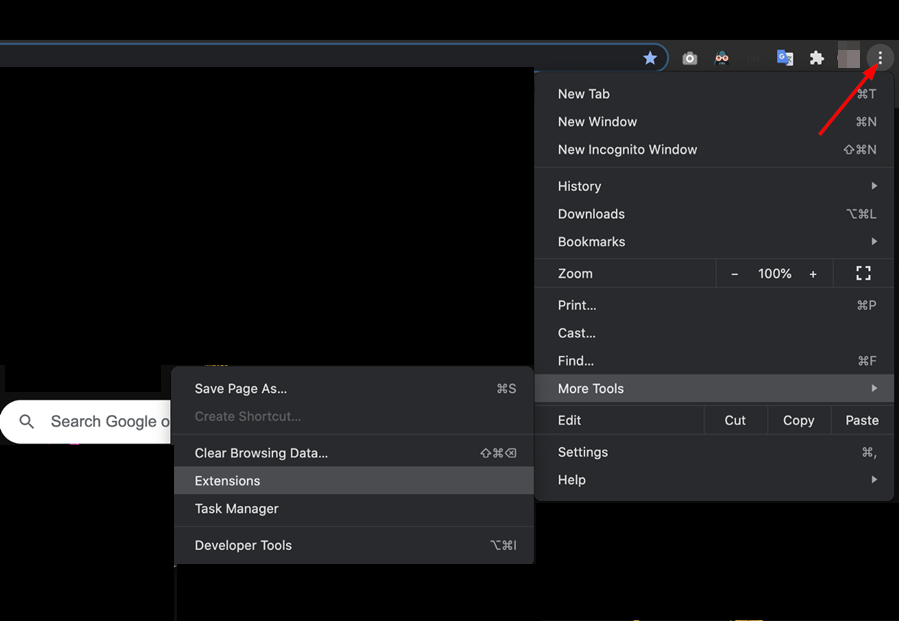
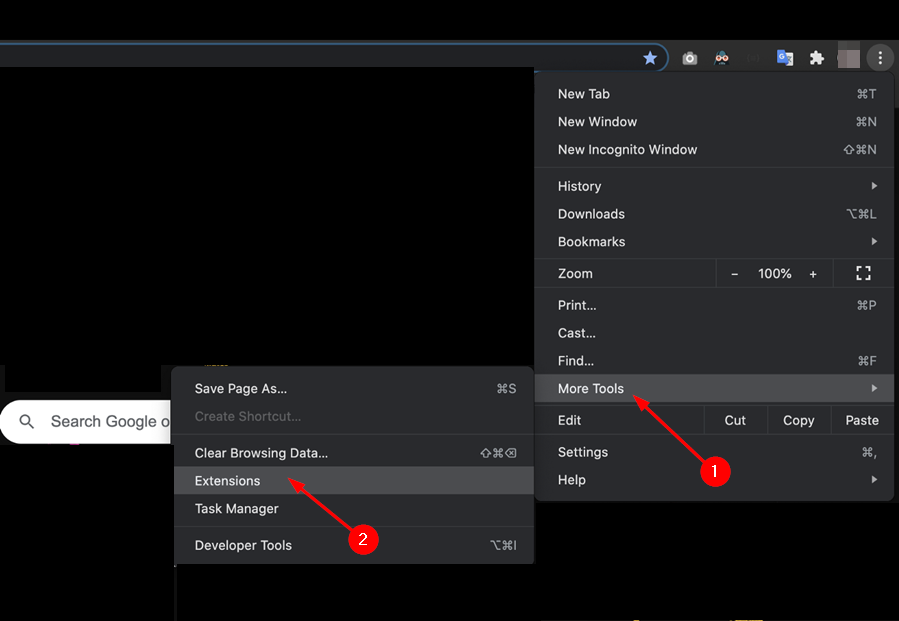
  1. Navigate to your Chrome browser and click on the three ellipses at the top right corner.
  2. Select More tools then click on Extensions.
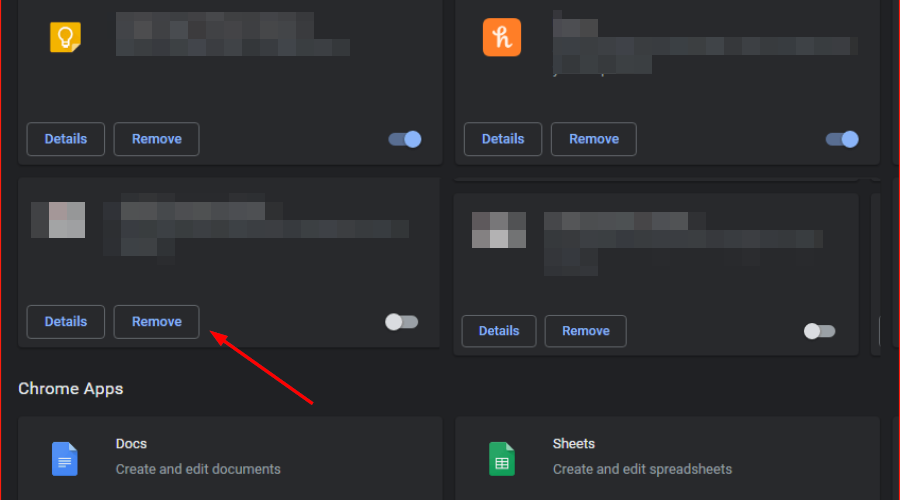
  3. Navigate to the extension you wish to remove then click on Remove. Adblockers are notorious for interfering with app functionality so start with these.
  4. Confirm in the new pop-up dialog box that you wish to remove the extension.

Some extensions are known for taking over your browser and altering how it functions so you may want to disable them or use an incognito tab.

4. Clear cache and cookies 

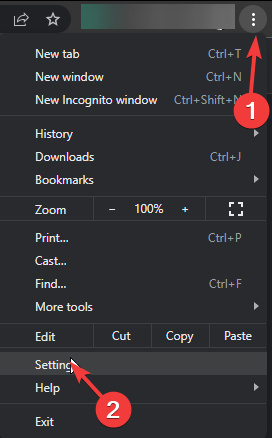
  1. Launch your Chrome browser and click the three vertical ellipses in the top right corner.
  2. Select Settings.Settings CHrome
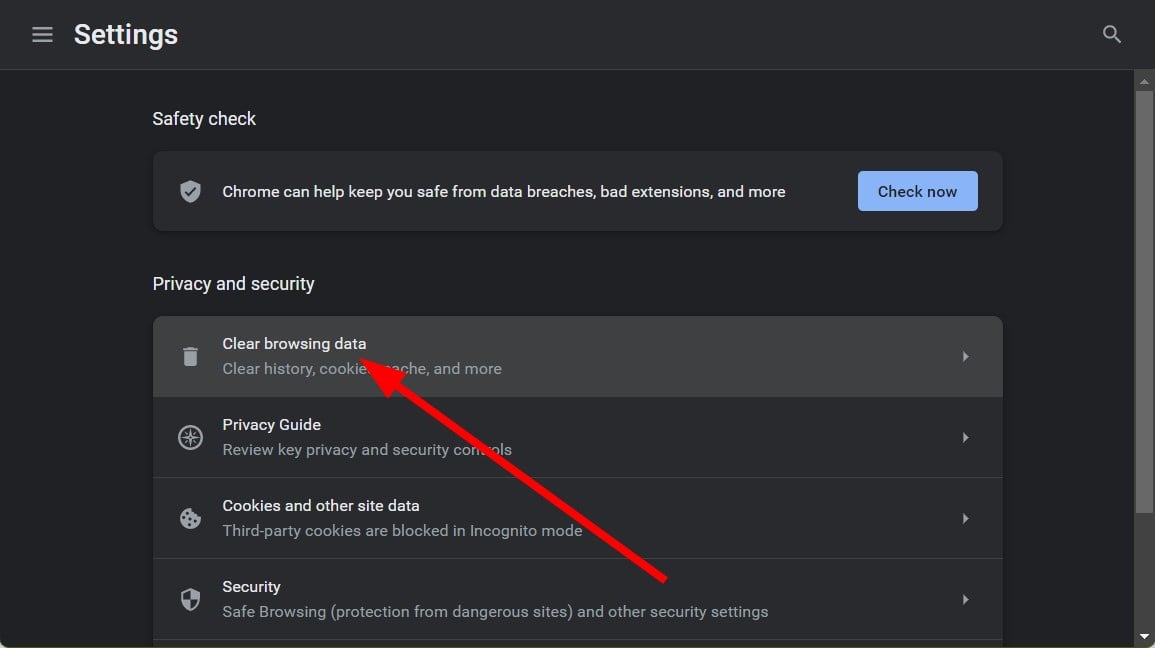
  3. Click on Privacy and security, then select Clear browsing data.
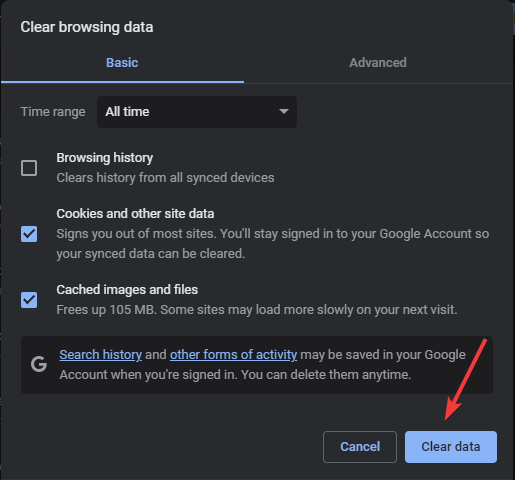
  4. Check Cookies and other site data and Cached images and files, then hit Clear data.Clear data

You can also reset your browser or try with another one and see if you have better luck.

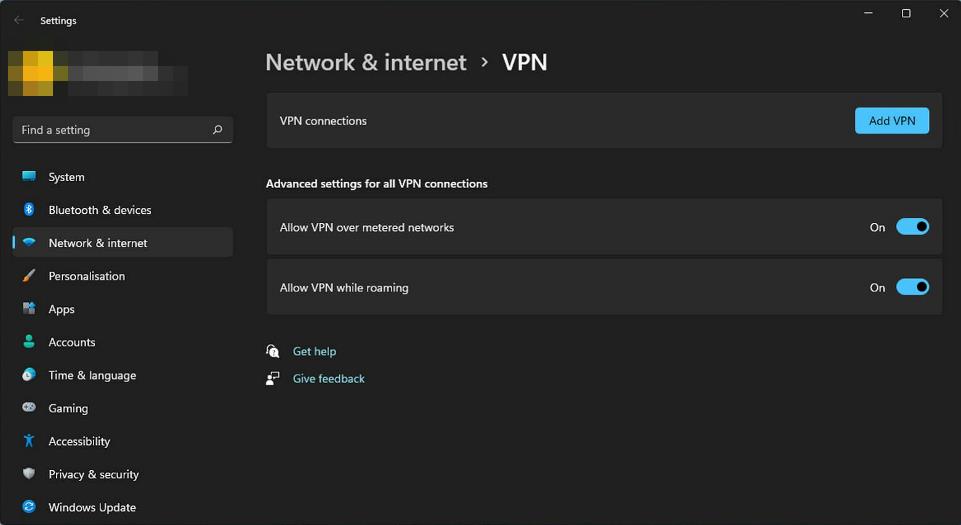
5. Try with a VPN

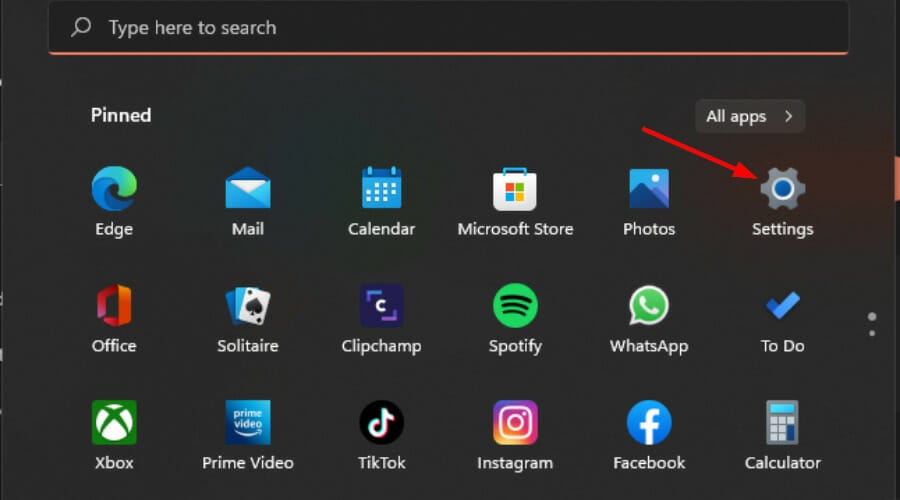
  1. Press the Windows key and select Settings.settings windows 11
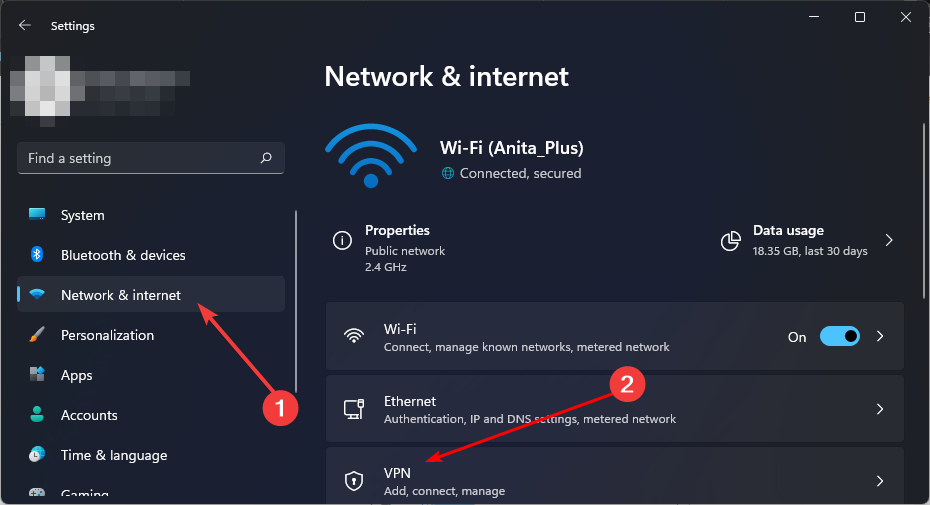
  2. Next, select Network & internet and click on VPN in the right-side menu.
  3. Click on Add VPN and follow the prompts to enable it.
  4. Try logging in again and see if the issue persists.

Some users reported that there was an error loading captions but with a VPN, this error disappeared. This could indicate a temporary issue with YouTube servers that make captions unavailable or regional restrictions that prevent captions from loading in your area.

6. Contact YouTube support

The issue of YouTube download error loading captions is a peculiar one. Some users were on the premium subscription plan and couldn’t load their captions while others couldn’t get the same on offline videos. All in all, the answers may be on the other end when you contact YouTube support.

Sometimes, you need assistance specifically tailored to your device, account or even geographical region. If the error persists, we have a couple of genius ways to get the unofficial YouTube with the same perks and more functionality. You may have better success loading captions on them.

And when it’s your turn to upload your own videos, you can make use of the best YouTube video editors and ensure you got your captions on deck.

Aside from caption issues, you may also encounter playback error codes from time to time but we have that covered with our comprehensive guide.

Finally, if you’re more of an audio person and like listening to music as you work, we’ve got a trick up our sleeves on how you can enjoy uninterrupted music ad-free.

Have you had trouble with loading captions on YouTube before? Has any of the above methods been fruitful? Do let us know in the comment section below.

Microsoft said 2026 is the year of the AI PC, but what is an AI PC?

You’ve probably read or heard about the term AI PC, and Microsoft went further to declare 2024 as the year of the AI PC by slapping the Copilot key on a keyboard. It that it? Do you have an AI PC if it has the Copilot key on the keyboard? The short answer is no, but we will get into it.

What is an NPU and do you really need an AI PC? We will try to answer as clearly as possible to all these questions.

What is actually an AI PC?

If you expect a quick and short answer, we don’t really have one because things are more complicated than that.

For instance, Intel’s definition of an AI PC is a computer that has a CPU, a GPU and an NPU inside. At least, that’s the short version. Here’s the long one, from Intel:

An AI PC has a CPU, a GPU and an NPU, each with specific AI acceleration capabilities. An NPU, or neural processing unit, is a specialized accelerator that handles artificial intelligence (AI) and machine learning (ML) tasks right on your PC instead of sending data to be processed in the cloud. The GPU and CPU can also process these workloads, but the NPU is especially good at low-power AI calculations. The AI PC represents a fundamental shift in how our computers operate. It is not a solution for a problem that didn’t exist before. Instead, it promises to be a huge improvement for everyday PC usages.

Intel Newsroom

So, the NPU, or Neural Processing Unit is a hardware element inside a processor that handles the machine learning and deep learning apps on a PC. If you want more information about this, we have a guide on how to figure out if your PC has an NPU.

Slowly but steadily, a lot of apps will run better on NPUs and Microsoft recently announced that their AI services will be able to run locally if you have an AI PC.

Now, switching over to the Redmond giant, they have a more complex definition of an AI PC, made jointly with Intel. According to Microsoft, besides the three elements mentioned by Intel, you also need Copilot (that nowadays comes with Windows) and a Copilot key. So, in their vision, even if your PC has an NPU, you won’t be able to call it an AI PC without the Copilot components.

Of course, Microsoft is pushing for OEMs to include NPUs in their hardware configurations, and that means also including the latest Intel CPUs we’ve spotted recently into the wild or Qualcomm’s X Elite SoCs that come with Hexagon NPUs. The laptops with the latest Qualcomm X Elite CPUs can run Windows and even PC Games using a built-in emulator, but they may also run any other OS or LLM. So, if they are running a Linux distribution and Gemini AI, you won’t be able to call them AI PCs?

Lenovo also announced that their latest AI PCs will have an NPU but they won’t have Copilot or its dedicated key.

The common denominator here is the NPU. Every AI PC will have it or needs to, in order to be called an AI PC. So, for now, we will need to settle for Intel’s definition of an AI PC that must carry a CPU, a GPU, and an NPU. Of course, this may change as this concept is still blurred.

One question remains: do you need an AI PC? It depends on whether or not you want to run AI processes locally. If you want a powerhouse PC to handle the strain of an LLM, you will need an AI PC. If you’re an average user who uses AI bots to manage simple tasks, you don’t need one, at least not yet. The apps you use regularly on your PC will still run just like they did yesterday. You will be able to carry on with your tasks on your computer even without that NPU.

By the way, the featured image for this article was created using DALL-E. So, that’s the AI bot’s vision of an AI PC. Cool, right?

We hope that this article cleared out at least some of your questions, if not all. But if you need more, let’s discuss in the comments section below.

New Xbox will bring next-gen gaming experience thanks to Gaming AI, leaked emails reveal

It’s no secret that Microsoft is working hard to integrate AI in almost every aspect of its services and Xbox is no exception.

Speaking of which, we finally have some information on what can we expect from future Xbox and AI integrations.

New information regarding Xbox and AI integration has just been leaked

We know that Microsoft is planning to integrate AI with Xbox, and the leaked email from Xbox President Sarah Bond has confirmed this.

As TweakTown writes, Microsoft is building a next-gen console that should deliver the biggest technical leap in a generation.

Bond mentioned Gaming AI in the email stating the following:

We are innovating in Gaming AI, focused on delivering player-first, developer-first value for discovery, engagement, and creator velocity.

There’s no additional information available regarding Gaming AI, but some speculate that AI will be integrated into DirectX allowing developers to develop and optimize games faster than before.

Since there’s no additional information available, we’ll just have to wait for Microsoft to make an official announcement. As for other AI news, Microsoft is working on an Xbox AI chatbot, and we might see it available in the near future.

Microsoft is working on a system that automatically finds local files and transfers them between devices

There are a multitude of ways to transfer files between multiple devices nowadays, but all of them require a manual upload of the said file in a cloud system, such as OneDrive. Once there, as long as the other devices have access to the same OneDrive account, the user can easily get their files across their desktops, laptops, tablets, mobile phones, and so on.

However, it seems that Microsoft might soon release a system that automatically finds local files and transfers them between different devices. The technology, described in a patent published recently by the Redmond-based tech giant, seeks to address the limitation of the current cloud-based platforms.

There is a need for improved systems and methods that provide a technical solution for synchronizing hierarchical information among client devices without automatically synchronizing the files and folders.

In other words, the patent envisions a system that keeps track of files and folders on different devices used by a user.

It syncs their topological and metadata information across all devices by scanning and mapping them, without uploading the files and folders to the system.

Instead, it works this way: if a device asks for a file that is stored on another device, the system asks the second device to upload the file. Once the file is uploaded, the first device can download it.transfer files between devices

The request processing unit receives requests from a client device or the application service to upload or download one or more files or folders. An upload request indicates that the one or more files or folders are to be uploaded and stored in the file datastore of the file services platform and/or pushed out to one or more other client devices. A download request indicates that one or more files or folders are to be downloaded from the file services platfrom to the client device.

This system can be used on different devices. We’re talking about portable electronic devices, mobile phones, tablet computers, laptops, desktops, digital assistants, AI assistants, portable game consoles, and standard game consoles, but not limited to them.

The system can also have multiple designated users that can access the network and transfer files between devices at will. The patent describes it as being capable of running a web browser to access different files right within the platform, and Microsoft envisions it as a collaborative platform, as well, with users being able to consume, create, share, collaborate on, and/or modify content, according to the patent, which can be read here.

The system is quite revolutionary because it doesn’t require users to manually upload files and folders to the cloud service. Instead, it automatically scans all devices connected to it and uploads the metadata of their files and folders, which is enough to figure out where these files are located. The system also automatically syncs the metadata, meaning it will regularly update itself to be aware of any changes made to local files and folders.

The user then can explore each device connected to the system and download the preferred file on a certain device.

This could be the future of OneDrive, or Microsoft Teams, but the Redmond-based tech giant might release the system as a Windows feature, with Copilot being able to retrieve a file from your mobile device to your Windows device in just a matter of seconds.

Have you received a two-step verification setup email lately? It’s not from Microsoft

In recent months, we have witnessed an increase in the Microsoft two-step verification email scams. The scam has been going on for years, ever since Microsoft released two-step verification.

A lot of reports have appeared in Microsoft forums and Reddit detailing such instances. A user recently wrote in the Microsoft Community.

I received an email Action required for two-step verification directed to another email cc’ing my email address asking “Now that you’ve turned on two-step verification (not my email address) make all your apps and devices work with it. If you use any of the following, we’ll help you set them up:” email I don’t recognize. It’s this a scam?

We could find reports from as far back as 2020 highlighting similar instances. Back then, many fell prey to such scams due to a lack of awareness. Here is a user’s experience after clicking on a link in the Microsoft two-step verification scam email.

Today, I unfortunately didn’t look over an email similar to this properly and clicked the link. It opened in Microsoft Edge and immediately the page tab said “you’ve been phished”. I promptly closed the tab, changed my outlook password. About 10 mins afterwards I disconnected from the internet for perhaps 20 mins and decided to run a virus check. Is there anything else I can do to minimse the chances that my computer is compromised?

If you ever come across an email that looks like an attempt at phishing, never click on any links or call the provided numbers. In case you do, scan the PC for malware and change all your passwords.

How can I spot a fake Microsoft two-step verification setup email?

  • Verify the sender: Look at the sender’s email ID and verify if it ends with microsoft.com. In case not, it’s a scam email.
  • Check the tone: Phishing emails usually have an informal tone. Match it with any other official emails from Microsoft and look for differences.
  • Look for grammatical errors: Grammatical errors are common in phishing emails, at least they were until a few years ago. So, if you find any grammatical errors, disregard the scam email.
  • Identify if anyone is CC’d: In the cases we observed, the emails were CC’d to other generic email addresses, which is a sign of a scam.

Phishing emails have been out there for decades, but they were easier to detect. Now, with AI becoming a tool for cyberattacks, these are highly identical to the actual ones and use the same tone, making it challenging to identify one.

For instance, Norton scam emails and Geek Squad scam emails will now appear more aligned with the official ones!

Were you able to identify the Microsoft two-step verification scam email? Share with us in the comments section.

Toshiba Satellite BIOS password was defeated by an unlikely tool – a paper clip!

Many users tend to lock their BIOS with a password to prevent others from changing their settings or accessing their system.

However, this protection can be bypassed, and all that is required is a couple of paper clips and some technical knowledge.

You can bypass the Toshiba laptop BIOS password with a paper clip

As Tom’s Hardware writes, it’s possible to bypass the BIOS password on the Toshiba Satellite with several paper clips and a parallel port.

Bob Pony on Twitter recently shared that he managed to bypass the BIOS password on his Toshiba laptop with this hack.

Bob used paperclips and he connected them to a parallel port in such a way to zap the BIOS on startup thus clearing the password.

While his approach does look a bit messy, someone also posted a diagram in which you can see how the parallel port lines were connected to achieve this.

This is a great way to bypass the BIOS password Toshiba Satellite, and if you’re having the same problem on your device, perhaps you should try looking for a diagram that matches your device.

In other security news, the new Microsoft Entra Recommendations will boost your security, so make sure you use them.

Modder transforms his Framework 13 laptop into an AIO PC perfect for flights

Some people mod PCs just for fun, like Rees, who bought a desk PC to run Doom, but others, like NoisyCarlos, do that to make their lives more comfortable.

It all started with this guy being frustrated that there’s not enough space on the plane to use his regular laptop. Which is completely true, at least if you’re not flying in business class, right?

So, he decided to mod his Framework 13 to build an all in one PC for his needs. He decided to make to sit comfortably on the food tray from an airplane, hooked on a rack board or stand on a desk like any other PC.

He used Framework components because the manufacturer already has a module-oriented build and can be easily dismantled and put together.

Here’s the short story directly from the YouTube clip description written by NoisyCarlos:

In this video, I will go over why I felt the need to create my custom portable all-in-one computer. Thanks to #framework I was able to put together something that’s super easy to assemble and reproduce. I generally use my #dygma Defy split keyboard, but working around my Macbook Pro’s keyboard was always a pain, especially on flights and other places with limited space. One of the options I considered was a Lenovo Yoga, but I wanted something more repairable. My wife thought of the name Flying Lotus, which I really like, but like I said in the video is not for everyone.

NoisyCarlos

The Flying Lotus, as his wife called the PC, has an AMD Ryzen 7 7840U CPU clocking at 5.1 GHz with 8 cores and 16 threads. The 32 GB of RAM are plenty enough for everyday tasks. However, the combo, as the modder pointed out, is more powerful than a Intel Core i9-9900K desktop PC, or than a 15-inch Macbook Pro 2016.

You will get more detail about the tech specs in the clip above, but what is more important, a lot of people liked it. Therefore, NoisyCarlos decided to create a conversion kit for Framework 13 laptops which is available online for $299. Carlos also used some 3D printed parts that he supplies and he says that it doesn’t take more than 20 minutes to put all together is the Flying Lotus configuration.

The AIO PC has also has a few trade-offs. First, you can’t use it on your lap, obviously, and it’s a bit bulkier than most other laptops. Another important point is the price. A Framework 13 laptop with 13 gen Intel Core CPU is $1.049 to which you add the price of the conversion kit. However, the whole story is based on the fact that you already own the Framework 13 laptop and want to mod it.

Other than that, we could have never imagined that an AIO PC could be better than a laptop on a flight, but the Flying Lotus clearly is. We’ve learned about this story from Tom’s Hardware.

Would you consider modding your Framework laptop? Let’s talk about this in the comments section below.

Greylock McKinnon Associates falls victim to cyberattack, 341,650 Social Security numbers stolen

Greylock McKinnon Associates (GMA), a Boston consulting firm, became the latest reported victim of a sophisticated cyberattack affecting 341,650 users.

As per reports, the breach occurred on May 30, 2023, and GMA soon informed law enforcement and DOJ. Details pertaining to the breach are available with the Office of the Maine Attorney General and can be accessed from its official website.

In the meantime, GMA hired cybersecurity experts to mitigate the threat and identify the extent of damage. By February 7, 2024, the consulting firm had discovered the extent of the data breach, what information was stolen, and the details of the affected users.

Greylock McKinnon Associates notifies users of the breach

As more details emerged of the cyber breach, Greylock McKinnon Associates got into the process of notifying users on April 4, 2024. It sent out a notice to affected parties on April 8, 2024, roughly a year after the data breach.

As for the information breached in the cyber attack, GMA confirmed that it included the Social Security number.

Your personal and Medicare information was likely affected in this incident. This information may have included your name, date of birth, address, Medicare Health Insurance Claim Number (which contains a Social Security number associated with a member) and some medical information and/or health insurance information.

The good news at the moment is that there has been no reported misuse of the breached information, and GMA has confirmed the same in its notice to affected users.

At this time, GMA is not aware of any reports of identity fraud or improper use of your information as a result of this incident. We have been informed by the DOJ that the Centers for Medicare and Medicaid Services will begin to monitor for any improper use of your Medicare information.

Now, Greylock McKinnon Associates is offering 24-month complimentary access to Single Bureau Credit Monitoring/Single Bureau Credit Report/Single Bureau Credit Score services to the affected parties. This will help notify you of any changes to the credit file the same day.

Cyber attack statistics for 2024 hint towards a worrying future if the necessary steps are not taken right away. Recent cyber attacks were fueled by AI, which increased their scale and made them difficult to detect. As per Microsoft, 87% of companies in the UK are at risk of an AI cyberattack.

What’s your take on the GMA data breach and increasing cyberattacks in general? Share with our readers in the comments section.

Windows 11 VMs are incredibly slow on Xeon processors, compared to the Core ones, according to user

The Intel Xeon processors are lauded as being the right choice for servers and workstations due to their huge processing capabilities, while the Intel Core processors are more suitable for gaming PCs and productivity (the latest Surface laptops are sporting some performant Intel Core Ultra processors), and they’re perfect for devices such as desktops, or laptops.

However, this Reddit user found a hard truth: running Windows 11 VMs on Xeon processor-based servers turned out to be way slower compared to running the same Windows 11 VMs on Core processors.

I have been running Windows 11 VMs on proxmox running on a Dell desktop PC with no issues for a few years. I access them over RDP and they are just as responsive as if they were running on bare metal. Desktop specs:

– Dell XPS 8940 Core i7-10700 (16 cores); 64GB RAM; Proxmox installed on nvmE; VMs installed on SATA SSD; Proxmox 8.1.4; all EXT4 partitions.

I have now obtained an HP tower server, installed proxmox on it, and have migrated some of the VMs over to it. However, with the same configuration, it is noticeably laggier. Mouse movements are fine, but opening applications is slower, it takes longer for context menus to appear after right click, scrolling within applications is laggier, etc. It’s borderline unusable. The specs of the server are:

– HP ML350 G9; 2x Xeon E5-2699 v3 (36 cores each, 72 total); >200 GB RAM DDR4; HBA card with Enterprise SATA SSDs; proxmox installed on one SSD and VMs installed on another; Proxmox 8.1.4; All EXT4 partitions.

Reddit user

The user tried everything before realizing that the lag might be caused by the Xeon processors themselves:

I have tried changing the following with no improvement:

– CPU type (Host, kvm64, x86-64-v2-AES). All perform flawlesly on the desktop but are laggy on the server.

– Increased the RAM allocated to the VMs.

– Tried a different HBA card

– Tried a different SSD (including the same one from the desktop)

– Increased RAM allocated to each VM.

– Increased cores allocated

– Decreased cores allocated (in case it was a CPU scheduling issue)

I’m starting to wonder whether it has something to do with the processor. The desktop i7 has a built in GPU and the Xeon doesn’t. I haven’t passed through GPUs to the VMs, but I’m wondering if the i7 GPU is somehow helping for GUI-based VMs like Windows which the Xeon cannot do.

Reddit user

At quick research, it would be quite unfair to discredit the whole Intel Xeon series. Why? Well, in this case, it’s good to know that the Xeon E5-2699V3 processor was released in 2014, so 10 years ago. The other one, the Intel Core i7-10700 was released in 2020, 4 years ago.

With 6 years apart, the two processors cannot compete, even if in theory, the Xeon E5-2699V3 could be capable of running Windows 11: the processor has 18 cores, 36 threads, and a Max Turbo Frequency of 3.60 GHz.

A server of the scale presented by the user would be quite suitable for Windows 10 VMs, but to run Windows 11 VMs as proper parameters, newer Xeon processors, such as the ones from the 5th generation, would be preferable.

Otherwise, it’s not a fair comparison by any means, and other Reddit users agree:

Your Xeon is a 2014 CPU with a max core clock of 3.6GHz. The i7 is from 2020 and has a max clock of 4.8GHz. On top of the clock speed difference, there are also IPC improvements that come from the multi-generational gap.

Sure the Xeon has more cores, but each core is considerably slower. You’re noticing this difference in single-core performance.

Reddit user

Yeah, that Xeon was launched 10 years ago, and it is clocked slower because it has to many cores. It is not a fair a comparison by any means.

Reddit user

What do you think of this comparison?

Make searches faster with Chrome’s Search video frame with Google feature

Over the years, we saw all sorts of new and interesting features added to Chrome, and it seems that a new feature has been found and is available for testing.

With this new feature, you’ll be able to use videos for performing searches, so let’s take a closer look at it and see how it works.

You can now use video frames to perform Google searches in Chrome Canary

As you know, Chrome has been testing the ability to save frames from videos in the past, but it seems that Google has more plans for video frames, according to Leopeva64 on X:

As you can see, in addition to the option to save video frames, now there’s an option available to search video frames with Google whenever you right-click a video.

That video frame will be used to perform an image search on Google allowing you to find more information about the content of the video.

The feature is now available by default in Chrome Canary, and we have no information on when will it land in the stable version.

As for other improvements, Google is also testing the tab groups menu in Chrome and its tracking protection for Chrome is also ready for rollout, so many great features are coming our way.

The US Government doesn’t sanction Microsoft for its security failures

Even though Microsoft allowed Chinese cybercriminals to steal data from the US government, they continue paying for its services. However, the company also focuses on AI more than security features and services. On top of that, researchers train Copilot on stolen data. Yet, none of it seems to be a problem. After all, Microsoft said a year ago that they would focus more on security.

Since then, Microsoft laid off multiple departments in favor of AI features and development. But, there are some improvements to their Azure security systems. Yet, they are using Copilot for Security. Unfortunately, this is not the first time Microsoft has failed to protect customer’s data.

Russian cybercriminals targeted Microsoft’s weak MFA authentication to steal the source code from the emails of its executives.

Did the us officials sanction Microsoft?

Microsoft didn’t receive any sanctions for its security vulnerabilities. On the contrary, the US government keeps working with the company for hefty sums. For example, according to the USASpending, the government paid $498.5 million to Microsoft in 2023.

Based on multiple sources, Microsoft is a major tech provider for the US government. Thus, they heavily rely on the company. So, they might introduce some rules and regulations for all tech vendors to enhance their security systems.

US Senator Ron Wyden wants tech companies that don’t respect the rules to be held accountable for security vulnerabilities. After all, the US government’s reliance on Microsoft could lead to additional security threats.

Furthermore, according to Jon Clay, the VP of threat intelligence at Trend Micro, Microsoft has to bring evidence of its security improvements. Also, the Redmont giant has to provide more information about the breach. Clay hopes to see quick answers from the tech giant. Additionally, he says that a stern warning could work in this situation.

Unfortunately, the US government continues facilitating Microsoft’s errors through their contracts. For example, they have a non-competitive procurement agreement. So, they don’t solicit bids from other companies. Also, the government uses limited source deals and makes Microsoft the only vendor allowed to bid. Thus, there is a lack of choice and security risks.

In a nutshell, even if Microsoft has security vulnerabilities, US authorities overlook them and continue to provide unfair support to the company. Thus, its competitors don’t have a say in the matter. So, the US government might face more security threats in the future.

What are your thoughts? Should the government search for alternative providers? Let us know in the comments.

EURUS will revolutionize the way AI handles complex reasoning tasks

Large language models are crucial for the development of AI. They can handle various tasks like solving math problems and content creation. However, LLMs sometimes struggle with complex queries. After all, scientists lack adequate training data to teach them proper reasoning. Thus, some researchers created EURUS, a collection of large models for reasoning tasks.

Besides EURUS, researchers use DPO and KTO, two techniques that help LLMs understand human preferences. DPO stands for Direct Preference Optimization. This technique uses a dataset of human preferences to train LLMs to understand preferable answers. It is a simple and efficient approach. However, it requires a lot of data. Thus, DPO is time-consuming and expensive.

On the other hand, the Kahneman-Tversky Optimization (KTO) is the cheaper alternative to DKO. It uses labeled examples of good and bad answers. Yet, it is not as effective as DPO or EURUS.

Why do we need EURUS?

Researchers from various backgrounds made EURUS specifically for reasoning tasks. Thus, it should have improved decision-making capabilities compared to other LLMs. So, it should be better at dealing with complex problems.

On top of that, it has a unique dataset known as Ultra Interact. This feature incorporates preference learning capabilities, intricate interaction models, and reasoning chains with multi-turn interactions.

EURUS is based on Mistral-7B and CodeLlama-70B and uses the Ultra Interact dataset to fine-tune their capabilities. In addition, they assessed the reasoning capabilities of EURUS by using LeetCode and TheoremQA. So, the LLM collection should be able to deal with complex theorems and mathematical problems.

Researchers tested the performance of EURUS-70B, a specific LLM from the collection, using LeetCode and TheoremQA. As a result, according to the research paper, the LLM scored 33.3% in LeetCode and 32.6% in TheoremQA.

As a result, they consider that EURUS-70B has strong algorithm problem-solving skills. On top of that, it is proficient at explaining scientific concepts and mathematical statements.

Surprisingly, EURUS-70B surpasses existing LLMs by 13.3%. Additionally, the model performs well in multiple benchmarks. So, EURUS has a broad reasoning ability. As a result, it became a new standard for LLM performance.

Ultimately, the EURUS collection will improve other LLM models as well. Thus, with its enhanced reasoning capabilities, researchers could hit a breakthrough in AI problem-solving techniques. Furthermore, it might be more accurate and efficient than DPO and KTO.

What are your thoughts? Are you eager to see how EURUS will change AI? Let us know in the comments.

In case you forgot the passwords to your Microsoft accounts, you can now log into them with the Outlook app

Yes, you read that right. Microsoft now allows users to access all Microsoft products and services, including Microsoft 365, OneDrive, Teams, and even Windows through the Outlook for Android app.

In the official blog post, Microsoft admitted that sometimes it is a hassle to manage dozens of passwords, so the Redmond-based tech giant updated the Outlook app to support easy sign-in to all Microsoft accounts, from one point.

We know how much of a hassle it is to use and manage passwords for your personal accounts. In addition, passwords and even easy to use sign-in methods like SMS messaging leave accounts vulnerable to attack. That’s why we are excited to announce that now you can use the Outlook app to sign in to your Microsoft services, such as Microsoft 365, OneDrive, Teams, and Windows, in a secure and convenient way.  

Microsoft

Users won’t need to remember or type any passwords or use a one-time SMS code. Instead, opening up the Outlook app and providing a biometric or PIN will be enough to approve the sign-in to all of the aforementioned Microsoft services and products. outlook sign in microsoft

Outlook for Android must be updated to the latest version, and the capability will be automatically enabled.

Meanwhile, despite this new and easy way to access all the Microsoft services, people still lash out at the New Outlook, asking the Redmond-based tech giant to bring the old version back. As you might know, Microsoft is planning to retire the classic Outlook entirely by 2025, and users are not happy.

Many of them don’t like the new capabilities and feel that the new version of Outlook is not running fast at all, and it’s always laggy. While this might be true, depending on the system, the new Outlook has indeed some exciting features, such as Copilot.

The new integration with the rest of the Microsoft 365 Suite is always welcomed, but users don’t seem to be excited about it.