For many, the next phase of computing involving dynamic cloud processing symbolizes nothing more than a place to store old smartphone photos, tax documents, and college reports perhaps mixed with an occasional voice query of the internet. Where businesses and large enterprises have been chided for their pace of consumer-facing trends of adoptions, they are using the cloud at a much more sophisticated level.
Clearing the regulatory bar, Microsoft has now been given the green light to become the public cloud and back-end support for the eHealth agenda in New Zealand.
For Microsoft’s part, the company is pleased to offer its cloud platform for health care to the area.
At the same time, the Microsoft cloud will provide another important platform with which to operate their business models, develop and deploy innovative solutions for the local and international markets and advance this country’s ability to be a leader in the delivery of high quality, responsive and personalized health outcomes.”
As with many cloud-based solutions, the Ministry of Health’s decision to use Microsoft’s Cloud comes with its set of benefits beyond data storage. Now, the Ministry can build upon a scalable foundation that will enable its employees to take advantage of new technologies and faster data response times when providing healthcare.
New Zealand Ministry of Health employee
Gabe Rijpma, the senior director of health and social services Asia at Microsoft, helps echo the sentiment in which the Ministry of Health’s adoption of Microsoft’s Cloud was decided upon.
The Ministry of Health’s decision to accept the use of Microsoft’s public cloud for storage of personal health records will help transform the eHealth agenda in New Zealand. It comes at exactly the right time, as globally we are at an inflection point of all of this innovation in the sector.
The local health tech sector has already been rapidly adopting the public cloud to develop futuristic solutions, but until the announcements this week have only been able to sell those solutions in international markets.”
As companies such as Amazon, Microsoft, IBM, and Google continue to gobble up landscape in fierce cloud-based competition, perhaps Microsoft’s play in healthcare attention could see it become the unseated backbone of the health industry in the future. Let us know in the comments what you think of Microsoft’s latest cloud initiative.
Frank notes what the Privacy Shield will do for Microsoft in the on both sides of the Atlantic:
“This is an important achievement for the privacy rights of citizens across Europe, and for companies across all industries that rely on international data flows to run their businesses and serve their customers. The successful and rigorous negotiations also demonstrate progress between Europe and the United States on a vital issue for transatlantic coordination. While we rely on different legal frameworks, we share the same privacy values on both sides of the Atlantic.
I believe the Privacy Shield now meets each of those requirements. The Privacy Shield secures Europeans’ right to legal redress, strengthens the role of data protection authorities, introduces an independent oversight body, and it clarifies data collection practices by U.S. security agencies. In addition, it introduces new rules for data retention and onward transfer of data. Importantly, key Privacy Shield provisions will also be extended to alternative data transfer mechanisms, such as EU Model Clauses.
The Privacy Shield puts data flows between Europe and the U.S. on a solid legal foundation. For me, one of the key points in the decision is the annual review clause. This makes the Privacy Shield a living framework. It can evolve over time, adapting to changes in data practices, technology and privacy laws. Our customers, our vast network of partners in Europe and Microsoft itself will all benefit from a stable legal framework, with flexibility built in. The Privacy Shield ensures that enduring values remain protected at a time when technology changes ever more quickly.”
Earlier today, Microsoft held the introducing keynote for its Worldwide Partner Conference 2016 and Microsoft’s CEO Satya Nadella made it clear during his introducing speech that the main theme for this three-days event would be digital transformation. But while over 85 percent of the Fortune 500 are already using the Microsoft Cloud today, Nadella explained that “every operation is going to be connected”, which means that this digital transformation is going to affect all types organizations, big or small.
On a blog post on the Official Microsoft blog, Microsoft’s new Channel Chief Gavriella Schuster added that Microsoft aims to be both a technology partner and a business partner to companies going through digital transformation. She added:
Our partners drive creative implementations of our technologies and build partnerships with each other to delivery complementary services that power new revenue streams. It’s incredible to watch our partners embrace digital transformation through Microsoft’s cloud by taking advantage of the scalability and flexibility combined with the power of intelligence and security.
Predix on Azure will offer customers “the largest cloud footprint available today, along with data sovereignty, hybrid capabilities, and advanced developer and data services.” Moreover, General Electric and Microsoft also announced the upcoming integration of Predix with Microsoft’s Azure IoT Suite, Cortana Intelligence Suite and Microsoft business applications such as Office 365, Dynamics 365 and Power BI, which will make it possible to connect industrial data with business processes and analytics.
Ecolab, a leading global provider of water, hygiene and energy technologies is also leveraging Microsoft technologies such as Azure IoT Suite, Power BI and Dynamics 365 to help other companies reduce their water usage. By collecting and analyzing data about its worldwide customers, the company aims to conserving up to 300 billion gallons by 2030 – equaling the annual drinking needs of more than 1 billion people. You can learn more about this use case in the video below:
Lastly, Microsoft showcased today how Japan Airlines used the HoloLens mixed-reality headset to develop two proof-of-concept programs to provide training for engine mechanics and for flight crew trainees who want to be promoted to co-pilot status. Using the HoloLens, trainees will be able to see and interact with virtual cockpit devices and switches, while the headset will provide visual and voice guidance.
An airliner’s cockpit, as seen through Microsoft HoloLens (credit: Japan Airlines).
Microsoft’s Worldwide Partner Conference is just getting started and Microsoft will have much more to share with its 16,000 attendees looking for guidance through their digital transformation. Stay tuned on Winbeta to learn more about the new opportunities for Microsoft’s partner community throughout the week.
Some of the information revealed at BitSummit is the fact that in the three years since the program started, ID@Xbox has allotted hundreds of millions of dollars in revenue for independent developers on Xbox One. The inner workings of the ID@Xbox program, as revealed by Chris Charla, included the following:
ID@Xbox Developers can ship games on Xbox One and Windows 10 with full access to all platform features, from Xbox Live to HDR.
ID@Xbox Developers can get the exact level of access as any other publisher.
ID@Xbox Developers have free access to 2 Xbox One dev kits and Unity for Xbox One.
ID@Xbox Developers have all games sold on the same marketplace (On Xbox, a game is a game)
ID@Xbox Developers have the ability to seamlessly ship games on Xbox One and Windows 10 with Xbox Live.
Microsoft provides ID@Xbox partners with a robust and sustainable worldwide marketplace in which to sell games.
Through transparency and communication, Microsoft listens to and implements feedback from developers and players to make ID@Xbox the best experience possible.
With ID@Xbox there are NO paid fees to Microsoft for certification or updates, and no limits on updates.
One worldwide submission process.
Local account support in Japan.
Development support and promotional application.
ID@Xbox Process (Graphic from dualshockers.com)
The process for joining the ID@Xbox Program was also detailed by Charla, and as dualshockers.com notes, is relatively simple. Having a team, signing an NDA, Registering, Submitting a concept, building, and publishing is all it takes to being part of the ID@Xbox Program.
Promoting ID@Xbox games (Graphic from dualshockers.com)
Additionally, it was also noted that Microsoft helps ID@Xbox developers promote their games. This is done through the dashboard, through the store, social media, and large events. Key factors in a release of a title were also explained by Charla, and information on Launch timing, box art, and awareness wrap up the inner workings of the ID@Xbox Program.
Microsoft’s Worldwide Partner Conference, WPC 2016, is officially underway today in Toronto. With over 15,000 attendees, and 144 countries represented, Microsoft Partners from around the world are expected to be at the event. The event is a can’t miss experience for those who are looking to grow their businesses, and strengthen ties with Microsoft, so we will be covering the biggest news coming from the event throughout the week.
To follow the keynotes at WPC, you can tune into the WPC home page from 8:45 AM to 10:45 AM Eastern Time on July 11, 12, and 13th. Top Microsoft executives, including C.E.O. Satya Nadella, Executive VP Judson Atlhoff, President & Chief Legal Officer Brad Smith, and Corporate Vice President, Worldwide Partner Group Gavriella Schuster are all expected to speak at the Vision Keynote at WPC.
WPC Vision Keynote speakers
Additionally, there are other general WPC sessions which will feature Chris Capossela, Phil Sorgen, and many more notable Microsoft employees. Of course, break out sessions, workshops, and panels are also expected to occur at WPC. These events will feature Dona Sarkar, and other noted speakers from Microsoft partners from across the globe.
For the complete list of speakers you can check out this official WPC Webpage. Then, you can click here for information on the Partner of the Year Awards, and here more information about partner stories.
We Happy Few is taking another step towards its official release date on July 26. And while the game can now be seen on the Xbox Store, no pre-download option is available.
As we already reported, the We Happy Few Game Preview will have an initial price tag of $29.99. You should purchase it only if you are really interested in the game and are comfortable with the current unfinished state.
Compulsion Games, the game’s developer, has been very generous in details and offered a fabulous description of the game:
Set in a retrofuturistic 1960s, you will find a city ravaged by war and rebuilt by delusionally happy people. Everything appears to be happy in Wellington Wells, including the roads, the people, and its omnipresent television personality, Uncle Jack! However, it’s a beautiful world on the brink of collapse. […]
If you act out of turn, or you’re not on Joy (the local happy pills), the locals will become suspicious and will rapidly turn your frown upside down! Forcefully. You will need to practice conformity, stealth and combat if you want to survive long enough to escape.
The characters themselves are not your typical video game heroes. They are extremely flawed and haunted by the collective trauma.
We Happy Few’s characters […] are flawed and not particularly heroic, warped by the trauma their world has been through. Each character has their own storyline that reacts to the events of the world around them, and their place within it.
Other game features include:
A procedurally generated world, meaning that everyone’s experience will be unique.
Three modes: sandbox, story and Wellie mode.
You’ll have to collect recipes, scavenge items and craft dozens of weapons, tools and devices, fight with your bare hands or the crazy weapons you create.
Watch out for traps, or learn how to use them to your advantage.
This game is definitely not for the faint-hearted!
ADR1FT is a first-person-shooter game that takes place in space. The game aims to immerse you as much as possible by having realistic physics, beautiful graphics and more.
The PS4 release has been scheduled for next week, but no exact information on the Xbox One release has been released. The release is expected later this year as the Xbox Store lists September 16th as the release date. This could be a mistake and the game could arrive sooner or later than that, as there is a lack of any official announcements, however, for those wanting to get their hands on the game, it looks set to be the release date for Xbox One.
The same listing says that the game will cost around $20, although, this could decrease if the game is older by the time it releases for Xbox One.
While Twitter has its own official app on Windows 10, in the form of a Universal App, it’s not the same case for its secondary service, Periscope. Periscope enables live streaming of video and Twitter sessions, which your followers can be alerted of when you go live, so they can tune in from any of their devices.
Easyscope, discovered by WindowsBlogItalia, is a new third-party app that aims to fill the void left by the lack of a Windows 10 app for Periscope. It is in beta for the time being, and appears to lack actually starting a streaming session, but you are able to view live streams around the world and take a look at your own profile.
According to its store listing, the app currently supports the following features, with more to come:
List of subscriptions
Find accounts and manage subscriptions
Manage your profile and view others profiles
View broadcast information and comments
Comment on broadcasts
The app is available on PC, Windows 10 Mobile and the Surface Hub.
It is available now on the Windows Store. Give it a try and let us know what it’s like.
Welcome back to our weekly “Windows 10 news recap” series where we go over the top stories of the past week in the world of Microsoft’s latest operating system. Let’s get started.
Struggling to link to your Feedback Hub items? A Windows enthusiast makes it a little easier
Sharing your Feedback Hub items across the internet can be a painful and tedious task, with there being no universally accepted URL schema available. A Windows enthusiast has made efforts to reduce the pain involved with an all-new Link Generator.
Microsoft may have finally worked out what it is doing with SMS integration in Windows 10
Acer announces its TravelMate X349 notebook running Windows 10
Bringing performance and looks with a reasonable price, Acer unveiled its TravelMate X349 notebook on Microsoft’s Windows blog, offering up a nice device for work on-the-go and travelling.
Task View improvements will be arriving in the Anniversary Update
New Windows 10 devices are appearing all over the place and ASUS is no exception. The company is releasing its ZenBook Flip UX360CA, providing a mid-range 2-in-1 device at a price of $799.
Microsoft working to provide a workaround for Build Expiration notices
Build expiration notices have been appearing some of the recent Insider builds, prompting users that their build will expire and not be usable soon. Microsoft is working to provide a workaround for these in the upcoming Insider Preview builds.
Stronger security will be arriving in Windows 10’s Anniversary Update thanks to Windows Information Protection
Microsoft (MSFT) news recap is a weekly feature highlighting the top Microsoft news stories of the past week. Sit back, grab some coffee, and enjoy the read!
This week has been a little calmer than usual in the run-up to the Anniversary Update, however, several leadership changes have taken place, along with a few other headlines: Windows Store Anime Month, a bold statement from Microsoft’s CEO Satya Nadella saying Excel is Microsoft’s greatest product, changes in Microsoft China and France and more. Let’s get right into it!
Satya Nadella makes a bold statement about Excel begin “a symbol of what Microsoft is al about”
Greater China CEO moves up, Microsoft France President takes over, new CVP for Latin America
Several leadership changes took place at Microsoft this week, where Ralph Haupter is moving up the ladder to become Microsoft’s Asia Pacific president, and also gain the title of worldwide senior vice president. His place will be taken by Alain Crozier, who has been leading Microsoft France as its president.
Moving to America, Cesar Cernuda will be in charge of six subsidiaries as the new Corporate Vice President for Latin America, moving from the position of leading Microsoft’s business in Asia Pacific for the last three years.
Microsoft announces Australia Partner Awards finalists highlighting cloud transformation innovation
Microsoft’s chief operating officer, Kevin Turner, leaves for Citadel Securities, and Satya Nadella updates on the topic
Microsoft is not done with changes in their management. Chief Operating Officer, Kevin Turner, who was previously in charge of Microsoft’s global sales operation, has left the company.
Data centre expansion continues, by leasing space, most recently in Northern Virginia
Data space is something that businesses constantly need more of. Major cloud providers are trying new technologies to increase available space, and lately, Microsoft has been pretty influencing.
Back in May, Microsoft quietly released an app, together with Windows 10 build 14316. With builds following that, the app couldn’t be launched from the app list, instead, you had to open Cortana and search for it there.
This changed in build 14383. The app can now be launched by anyone directly from the app list. The app is a TeamViewer competitor, that aims to help system admins in helping users remotely. It features a clean, simple design and ease of use, unlike its bigger sister, Remote Desktop.
This app could eliminate the need for third-party tools, by other software vendors, be less clunky, and easier to use. It is pretty simple and works as expected. You open the app, either request or provide assistance, and you’re good to go.
Some of the features include:
Pen input support
Smooth display mirroring
Easy to use interface
Pausing of current session
Right now, the app is pretty rough, and may not be ready for daily use, but because of its inclusion in the latest Insider build, it is expected that the app should be ready for use when the Anniversary Update rolls out to users, on August 2nd.
We Happy Few is a game that caught our attention ever since we saw the first game pictures at E3. The game got us so hooked that we constantly scour the Internet to find out more details about the upcoming Game Preview version scheduled for release on July 26.
Fortunately, the We Happy Few team is generous in details and has recently published a new blog entry, keeping fans up to date with the latest elements and changes brought to the games. We’re more than happy to share the news with you.
Compulsion Games has rewritten the diary entries, so that players can find out more about what is going on by reading Arthur’s journal. Some of the things he has written down in his diary may actually help you to solve your problems in the game. Some of them will fill you in on Arthur’s past.
Take the time to read them, but do that only when you’re in a quiet, safe place. Otherwise, the locals will find out you’re not on Joy and they will lynch you.
Another element that will reveal more information about the people of Wellington Wells are the letters they are writing to one another. It’s not sure who delivers them, but you should read them as well as some of them will warn you about things you’re going to run into. It appears that whoever delivers the letters is not on Joy, so you’re not alone. Or is this nothing but a concoction of the system to trap you?
Compulsion Games also decided to make small but powerful changes to increase the gore level of the game. The piñata scene in the intro involved a piñata rat being smashed by the locals. But things would have been too simple, so the team decided to have the locals hit a rat in a bag and create a blood explosion.
Showing them hit just a rat was more powerful and got the point across better. In these images [we] wanted to get across really how much Joy influences the Wellies’ perception of their world.
All these details revealed by the Compulsion Games team hint to a fabulous game. We can’t wait to get our hands on it!
Team engagement and motivation is one of the cornerstones to success. That is why, as a good leader, it is always essential to provide a means of recognition and reward to your team members. Nearly 64% of employees that have quit their job say it was mostly because they didn’t feel that they were recognized for the amount of time and effort put into it. But with the Tap My Back app’s debut on the Windows Store, teams are able to provide peer-to-peer recognition to each other through a sleek interface.
Brought to us by the startup studio Build Up Labs, this app like many of their others is meant to have a ‘real value’ to promote great social experiences through technology. The application is meant to work in collaboration with the website where employers and team leaders can set up a personal team environment.
Tap My Back lets your team build each other up as they accomplish goals, provide insights, and work together towards their objectives. Teams share motivation by dragging and dropping pictures of their teammates, inputting a description of why they are worthy of some praise, and submitting it. Good deeds are met with climbing leaderboard ranks and unlocking achievements as they are rewarded. It even has Slack integration, sharing a notification via Slack every time a team member receives recognition for their hard work.
Team leaders can personally define what actions are available for recognition, building a personalized environment for behavioral change and growth. Weekly reports make it clearer to view top talent and sifting through each employee’s brightest skills for better engagement.
If you value team engagement and constructive feedback between employees, this might be the app for you. Try out the app today by downloading it for Windows 10 PC or mobile devices with just a click below.
Microsoft recently announced their Play Anywhere feature for Xbox and Windows 10. The feature is supposed to bring console gamers and PC gamers closer together, and allow games to be bought once on one platform and be able to play it easily on another.
Microsoft stated that all future Microsoft Studios games will be compatible with Play Anywhere but lately, they changed that statement to “every new title published from Microsoft Studios that we showed on stage at E3”. This led to some confusion and anger towards Microsoft and now, the company is apologising for the change.
A Microsoft employee got in touch with PCGamesN and commented on the subject, apologising for the change.
When we unveiled Xbox Play Anywhere, we said that every new Microsoft Studios title shown at the Xbox E3 2016 Briefing will support Xbox Play Anywhere.
We understand that a recent blog post didn’t specify that the only Microsoft Studios titles we’ve confirmed to date as Xbox Play Anywhere were shown at the E3 2016 Xbox briefing.
We’ve updated the blog post and apologise for any confusion.
Microsoft has stated that the original version of the blog post was a mistake and apologises for the change, however, won’t change it back.
In a world driven by technology and convenient methods, awareness of physical health becomes even more important for every person. That is why Baris Ozaydinli, an entrepreneur that supported by Microsoft’s Accelerator startup program, created Fitwell. The idea came to him after repeated attempts to remain faithful to going to the gym and breaking his bank on personal trainers. With Fitwell, users were going to be able to receive the care and instruction they deserve without the expensive sessions that some trainers could ask for.
But first, there was the issue of building the business from the ground up. Baris Ozaydinli was introduced to a team of engineers that liked the idea of his app so much that they actually closed their own company to commit to the Fitwell full-time. That’s where Microsoft stepped in to help. Ozaydinli became a member of BizSpark Plus, an initiative focused on helping start-ups gain access to training, software, and advice. The Fitwell creator was even honored with a meeting with Satya Nadella and became closer with the Microsoft team in Turkey. Not long after, Ozaydinli decided to apply for Microsoft Accelerator.
With seven Microsoft Accelerators across the world, the global initiative is always looking for entrepreneurs with big dreams to build great companies. Particularly startups that will ‘change the world’ on a larger scale. Accelerator provides resources, support, and tools through four to six month long programs to take late-stage startup companies from development to a functioning business.
The Fitwell mobile app has both a free subscription as well as a paid subscription. The Fitwell Standard version includes a wide array of tools that include setting/tracking goals for health and fitness, free generalized assessments and suggestions, tracking activities and progress, free workout guides and videos, and settings for reminders. The basic app also has little tidbits such as leveling up by becoming healthier and supports using Google Fit alongside the app’s tracking features. In fact, the list of features through Fitwell Standard is quite impressive.
For users that want to amp up their fitness investment, they are able to “Go Premium & Get Personal” with Fitwell Premium. The subscription model asks you to shell out for $4.52 USD monthly or $36.67 annually to have access to all of the app’s features. This includes a personal meal and workout plan designed by a team of trainers, weekly performance reports and unlimited access to all programs and workouts on top of the Fitwell Standard list.
In Turkey, the fitness application instantly took off and became the most popular health app in the country without competition. It waws even on top of the country’s most downloaded charts with one million users globally. As a local incentive, Turkey retailers offer loyalty points to users of the app based on their performance. The clear success in his country has Ozaydinli hoping that Fitwell will be able to expand to other markets in the UK, US, and India for the future.
The clear success in his country has Ozaydinli hoping that Fitwell will be able to expand to other markets in the future. As it moves forward, Fitwell will be fitted with new bot and AI capabilities thanks to Microsoft Accellerator.
Back in 2012, Microsoft announced some apps for Scandinavia. The blog post had announced two Sweden-specific apps, PrisJakt and Drickit, as well as some other apps: Nordea, Aftonbladet, Reseguiden, Teknikens Värld, Skolmaten and Wordfeud. Only four of these can still be downloaded from the Windows Store today.
The apps were probably gone for a longer time than noted, and no official word has stated the reason for their disappearance. Users with the apps still installed have reported that they still work.
PrisJakt, which posted an entry on their own blog back when the app was released, still has the post available in Swedish on their website. However, opening their link at the bottom of the page redirects you to the apps for Android, macOS, and iOS without a mention of Windows Phone or Windows 8 whatsoever. Both apps were present before, but now both seem to have been killed off.
On the other hand, the app Drickit seems to have been either rebranded to Systembolaget AB (the name of the company itself) or simply cancelled on all platforms as it is absent from all three major mobile app stores.
The other two removed apps are Reseguiden and Teknikens Värld. Reseguiden is a website for finding trips and comparing prices of different airlines. Teknikens Värld is a news site for mostly cars nowadays despite the name that roughly translates to “Technology world”.
The biggest loss of all of these seems to be PrisJakt, as it is a very popular app in Scandinavia, however, it hasn’t been updated recently and the mobile website offers enough functionality, so this shouldn’t bother users of the app all that much.
Have you noticed any other apps missing? Let us know in the comments below.
Windows 10 and Windows Insider Program users that have used the Feedback Hub know of the difficulty working around the generated links. While Microsoft has done well to include sharing feedback through social media, the core links lack the ability to be clicked on. In fact, the inability to click the link has been a major flaw of the Feedback Hub since implementation.
Many users love the ability to give feedback but are very dissatisfied with the way the current app works. Even Windows app developer Rudy Huyn vocalized his frustration about how using the Feedback Hub was unnecessarily complicated. One of these Windows enthusiasts was Bavo Luysterborg from Belgium. Bavo spent much of his free time working on a new way to work around the inability to click on Feedback Hub links. By developing an online tool conveniently called Feedbackhub.link, he managed to take the format given through the app and apply a traditional http/https web link to navigate.
Feedbackhub.link is very simple to use. Just by copying the Feedback Hub’s link into the input, a dialogue will reply with an easily shareable link. Using that link will open up the Feedback Hub immediately for users with the application installed.
As of yesterday, the tool can support up to three kinds of links: Feedback links, Announcement links, and Quest links. It even includes the essential social media buttons to click and share easily across Facebook, Twitter, Reddit, and more.
With a copy and paste, Bavo has opened up a new easier way to share feedback through Microsoft’s Feedback Hub application. Response has been positive towards the tool, with fellow Windows fans sending grateful tweets in reply. Some have even asked him if creating a web app for the Feedback Hub is possible, but unfortunately, the internal API isn’t open sourced as of yet. Perhaps we’ll see some compliance with Microsoft in the future to open up the hub to a broader audience either through open source API or the simple addition of clickable links.
Perhaps we’ll see some compliance with Microsoft in the future to open up the hub to a broader audience either through open source API or the simple addition of clickable links.
Microsoft has been quietly working on the Office Lens for Windows 10 app for some time now, after already being available for Windows Phone and Windows 10 Mobile.
This new version makes use of the Universal Windows Platform. It functions as a way of taking pictures of whiteboards and documents in the real world, then cleaning them up, so that they are more readable for sharing with others so that you aren’t left with blurry pictures. One good use of this is in the workplace, after a meeting, when there is quite a bit of notes on a whiteboard, but you need it in digital form to store it and share with the team – Office Lens is the solution.
An internal test version of the app, discovered by well-known leaker WalkingCat, codenamed Otemoto, has been released on the Windows Store and can be downloaded by some users, although you’ll need a camera to launch it.
The app can be downloaded from the Windows Store, although, the link could stop working at any time, and doesn’t appear to be working for everyone.
This week, just like the prior week, is full of information surrounding HP’s upcoming Windows 10 Mobile flagship, the HP Elite x3. We’re now finding out about some of the possibilities of where you may be able to pick up the Elite x3.
According to French news site, TheWinDose, HP employees have informed them that the device will be sold via the HP Store, but that it may also be distributed through some of its partners. These partners currently include the Microsoft Store and Orange Business. While these channels haven’t been officially confirmed, it would make sense, as the device is oriented towards business customers, and these are the stores that businesses would normally look towards.
It is not yet clear if the device will be sold through any consumer outlets, although, that possibility does look unlikely. If you’re a consumer and wanting to purchase this device, the Microsoft Store could make it generally available, like many of Microsoft’s own handsets, such as the Lumia 950XL and 950. There’s also the chance that the HP Store may offer it to general consumers.
We’ll continue to follow the HP Elite x3 and let you know of any further developments.
After a weeklong break, a new Windows 10 build is out for both PC and Mobile. Dona Sarkar got us used to a machine gun-like pace of build releases, so much so that we were wondering when the next one would be.
Well, it seems that the normal one-week build release cycle is back on track and Insiders will now have enough time to test out the latest Windows 10 builds.
Windows 10 Build 14383 is available only for Fast Ring Insiders and marks the beginning of the final code check in preparation for the Windows 10 Anniversary Update release. Due to the code check, a series of changes are already visible in this build, such as the desktop watermark which is now gone.
As usual, build 14383 focuses on bringing a series of bug fixes for both PC and Mobile in order to perfect the Windows 10 user experience. This build doesn’t bring any new features.
Here are the fixes and improvements available for PC:
The link to “Get more extensions from the Store” from Microsoft Edge now takes you directly to the Store to download available extensions.
The new keyboard shortcut to invoke Cortana in listening mode now is Win + Shift + C. Speaking “Hey Cortana”, when enabled in Cortana Settings, continues to invoke Cortana in listening mode as it always has.
From now on, updates to the Quick Action area of Action Center will be preserved across upgrades.
Microsoft has fixed the issue where disconnecting the Surface Book from an external monitor set as primary resulted in the Surface Book screen showing in portrait rather than landscape.
The issue where the Settings app was showing media controls in the taskbar preview window has also been fixed.
The dialog content now displays correctly when dragging the file comparison or managing library dialogs between two monitors with different DPIs.
The checkmark used to indicate a selected state in app bar toggle buttons is now visible in high contrast.
Microsoft fixed the issue where connecting to a PC using Remote Desktop when a maximized window is immediately behind the Remote Desktop dialog would result in the subsequent the Credential UI window being displayed behind the maximized window.
Explorer.exe no longer hangs on certain monitor configurations.
Bluetooth mice, such as the Microsoft Arc Touch Mouse, no longer accelerate erratically when moving the cursor across the screen.
The bug where Narrator wouldn’t announce the hyperlinks on certain webpages on Edge has been fixed.
Memory leaks no longer occur in Microsoft Edge when the LastPass extension has been enabled.
Here are the fixes and improvements available for Mobile:
The battery performance has been improved when quickly turning the screen on and off in order to look at the Lock screen.
Embedded maps in Microsoft Edge no longer jump to an unexpected location when zooming in and out.
The volume mute now works on all devices when playing YouTube videos that use the OPUS audio codec.
You can now make Store purchases using mobile operator billing with an Orange SIM.
Groove no longer unexpectedly pauses music after music has manually been paused and resumed.
The keyboard no longer outputs @ and € instead of “a” and “e” for certain languages in Windows Phone 8.1 apps.
Windows Phone 8.1 games no longer play in slow motion on certain devices, such as the Lumia 535.
Microsoft fixed the issue where notifications received while the screen was off didn’t take into consideration the proximity sensor, resulting in the screen turning on to display the notification while in pockets, potentially leading to accidental screen presses.
Tiles pinned from within apps no longer go blank and now show the app name within the tile.
The “SIM 2” title now appears on pinned Messaging and Phone tiles for the second SIM.
Microsoft fixed an issue resulting in incorrect Start screen scaling after switching from Continuum/Extended Desktop to Mirrored/Duplicated screen on devices with a non-default DPI.
The missed call count on the Phone app Live tile now displays information in real time, delays have been done away with.
Unlike build 14376 where there were no known PC issues on the list, Microsoft listed two PC bugs and three Mobile bugs for the current build.
RELATED STORIES YOU NEED TO CHECK OUT:
Microsoft will roll out Windows 10 Preview Builds even after the Anniversary Update is released
ARK: Survival Evolved is one of the most popular games among Steam users. Its game developers appreciate the fan dedication and are doing their best to rise up to their expectations. After the long-awaited Redwood Biome Update brought the Titanosaur, the largest dinosaur in gaming, a new mysterious creature will soon enter the game.
The game’s developer published a rough drawing of an eagle-like dinosaur under the title “Mysterious Mysteries: Introducing ???????” without revealing any details. Fans quickly rushed to guess what the creature may be and even found a few names for it.
Many even suggested the creature could be a shoulder pet that could help players to find dead bodies. Others had a different opinion:
These dossiers are from dinos which are already ingame and have evolved differently, and now they are more adapted to the new desert biome. They may be argentavis with different model and textures (looks) but does the same as common ones. This could also be related with the new mutations system.
The mysterious creature’s presence is probably related to the new Redwood Biome Update and could have an important part to play in the new environment.
It doesn’t really matter if players guess what role the mysterious eagle-dinosaur could have as the game developers achieved their goal: awaking fan interest in the upcoming creature so they eagerly wait for more details.
Although the pictures published by the game’s developers don’t reveal many details about this creature, one of them shows the eagle-dinosaur scavenging on a dead creature. Compared to the man seen in the picture, the eagle-dinosaur is a big bird and continues the trend set by the Titanosaur.
Office 2016 add-ins allow you to extend the capability, functionality, and features of Office clients such as Word, Excel, PowerPoint, and Outlook by using web technologies like HTML, CSS, and JavaScript. Office Add-ins can be used to do the following:
Add new functionality to Office clients – For example, augment Word, Excel, PowerPoint, and Outlook by interacting with Office documents and mail items, bringing external data into Office, processing Office documents, exposing third-party functionality into Office clients, and much more.
Create new rich, interactive objects that can be embedded into Office documents – For example, maps, charts, and interactive visualizations that users can add to their own Excel spreadsheets and PowerPoint presentations.
Office Add-ins are able to run across a variety of platforms including Office for Windows 10, Office Online, Office 2016 for Windows, Office 2016 for Mac, and Office for the iPad. Office Add-ins are not yet available for Windows 10 Mobile or Android, but the Office team is working on it (see the Office Add-in host and platform availability for more details). In order to run Office Add-ins, there are certain system requirements needed for your device, and you can find those requirements here.
How can an Office Add-in help me?
Office Add-ins can help you be doing almost anything a website can do within a browser. Office Add-in capabilities include:
Extend Office native UI by creating custom ribbon buttons and tabs.
Provide an interactive UI and custom logic through HTML and JavaScript.
Use JavaScript frameworks such as jQuery, Angular, and many others.
Connect to REST endpoints and web services via HTTP and AJAX.
Run server-side code or logic, if the page is implemented using a server-side scripting language such as ASP or PHP.
The Office Add-ins infrastructure allows interaction with the Office application and user content through a JavaScript API.
Types of Office Add-ins
At the moment, there are a few types of Office Add-ins currently available:
Word, Excel, and PowerPoint add-ins that extend functionality
Excel and PowerPoint add-ins that create new objects
Outlook add-ins that extend functionality
Word, Excel, and PowerPoint add-ins that extend functionality
Adding new functionality to Word, Excel, or PowerPoint is relatively simple. All you need to do is register your add-in by using the task pane add-in manifest. This add-in manifest allows for two integration modes; add-in commands and insertable task panes.
Add-in commands
You can use add-in commands to expand the UI of Office for Windows 10 and Office Online. With add-in commands, you have the ability to add buttons for your add-ins on the ribbon or within selected contextual menus, giving you easy access to your add-ins within Office. Add-in command buttons can be used to launch different actions, such as showing a task pane with a custom HTML or executing a particular Javascript function.
In case you have a client that does not yet support add-in commands (Office 2013, Office for Mac, and Office for iPad), you will need to run your add-in commands as an insertable task pane using the DefaultURL provided in the manifest. From there, you can launch your add-in from the “My Add-ins” menu from the Insert tab.
Excel and PowerPoint add-ins that create new objects
You can also insert add-ins to Excel or PowerPoint to create new web-based objects or content that can be embedded within documents or presentations. Content add-in commands allow for embedded media, such as a picture gallery or YouTube video, as well as web-based data visualizations and other external content.
Outlook add-ins present an opportunity to extend the Office Ribbon and provide additional display content next to an Outlook item when you are creating or viewing an email message. Add-ins can work with an email message, meeting request, response, or cancellation, as well as appointments.
Outlook add-in with command buttons on the ribbon
Outlook add-ins can use the contextual information from an item, such as an address or package tracking ID, and then use that data to access additional information from web services to create complete user interactions. For the most part, Outlook add-ins can run without any problems with Outlook, Outlook for Mac, Outlook Web App, and OWA for Devices, to provide a unified experience on the desktop, online, tablets, or mobile devices.
An Office Add-in is composed of an XML manifest file and your own web application. The XML manifest file creates rules for various settings, including how your add-in integrates with your Office clients. On the other hand, your web application needs to be hosted on a web server or you can use a web-hosting service, like Azure.
XML Manifest File + Web Application = Office add-in
Manifest
The XML Manifest file indicates specific settings and capabilities of the Office add-in, specifically:
The add-in’s display name, description, ID, version, and default locale.
How the add-in integrates with Office:
For add-ins that extend Word/Excel/PowerPoint/Outlook: The native extension points the add-in uses to expose functionality, such as buttons on the ribbon.
For add-ins that create new embedable objects: The URL of the default page that is loaded for the object.
The permission level and data access requirements for the add-in.
The most basic version of a web app is a static HTML page that is displayed within an Office application, but the page doesn’t interact with the Office document or the Internet. The page needs to be hosted on a web server, or a web hosting service, such as Azure; it is up what service you feel suits you best.
Example of a Hello World Office Add-in
Because it is a web application, you can use any client and server technologies that your hosting provider supports (such as ASP.net, PHP, or Node.js). In order to interact with Office clients and documents, you need to use the office.js JavaScript API that Office 2016 provides.
JavaScript APIs and Additional Resources
The JavaScript APIs for Word and Excel provide host-specific object models that can be used in an Office Add-in. These APIs support access to paragraphs and workbooks, which provides an easier way to create an add-in for Word or Excel. See Word Add-ins and Excel Add-ins for more information.
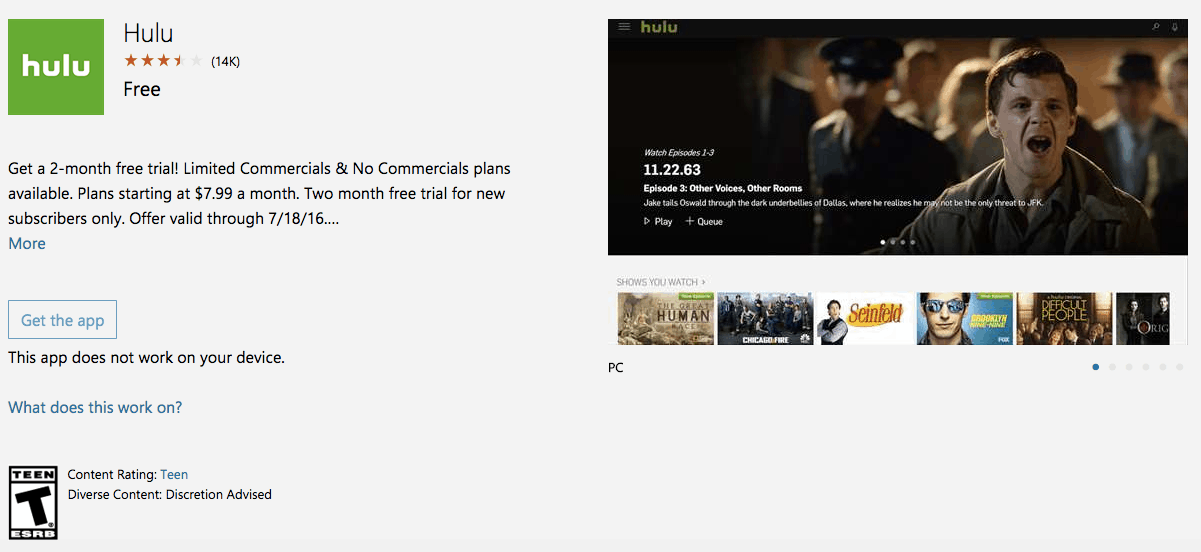
If you’re a streaming media fan, you have a number of great services to choose from. Netflix and Amazon Prime Video are the most popular, certainly, but other players can dish up some good TV and movie selections. One of the longest-running services is Hulu, which in addition to its limited free service has a premium offering that rivals the bigger players.
Right now, Microsoft and Hulu have gotten together to offer up something special. If you download and install the Windows 10 Hulu app and sign up for the service, you can give it a nice 2-month trial. Normally, Hulu’s premium offer will set you back $9.99 a month, and so that’s a nice opportunity to get hooked on give the service a try without putting down your hard-earned cash.
Hulu Windows 10 app.
And so, go download the Hulu app and get signed up. You’ll have a full 60 days to decide if you should add Hulu to your list of streaming TV and movie services.
If you like survival games, we have a suggestion for you: The Long Dark. The game is in its preview version, but it’s already one of the most popular games on the Xbox Store. The Long Dark is an exploration-based survival game that challenges players to think for themselves as they explore an expansive frozen wilderness.
In this game, you can rely only on yourself. If things go wrong, there is no one who can help you as you are totally on your own. You need to constantly monitor your condition, search for life-saving supplies, and master survival skills like fire-building, gear maintenance, hunting, fishing, and landmark-based navigation. Learn to decipher Mother Nature’s signs so that extreme weather conditions doesn’t catch you off-guard. Stay alert as dangerous wildlife can attack you at any moment. Protect yourself against bears and other animals by crafting weaponry.
The Long Dark sends you straight to the harsh cold environments of Canada as you fight to survive as long as possible:
Imagine the lights go out, never to return. Bright aurora flare across the sky, and all humanity’s technological might is laid to waste, neutralized in a kind of quiet apocalypse. Everything that has shielded humanity from the disinterested power of Mother Nature is suddenly wrenched from us, dropping us a few links down the food chain. Food and water are scarce. The roads are no longer safe. And winter approaches…
The Long Dark is in the game preview stage but still costs $19.99 to buy. Since the game is still work in progress, it may or may not change over time and may not even release as a final product, so be aware.
Studio Wildcard, the publisher and developer of Ark: Survival Evolved, has released a new teaser trailer of content that will be added to the game with the upcoming Redwood Biome Update.
The Xbox One version of ARK Survival Evolved recently received an update that introduced the biggest dinosaur to this open-world survival game. Check it out in the Redwood Biome trailer below:
The new Redwood Biome Update will introduce Redwood trees with new wood and metal tree platforms. You will be able to live in these massive trees and also exact their sap thanks to the new Tree Sap Taps. This update will also bring Retractable Rope Ladders with which you will be able to reach new heights. You can use them to let your allies onto your ramparts while making sure that the enemy is kept out.
The new update will be dropped somewhere in the middle of The Island in the Grand Peak area, which is the south of the Volcano. The update will have about 12GB in size, which is the biggest update that this game has received until now. It is good to know that the new update will also come with giant Redwood trees that you will NOT be able to harvest, but as we’ve told you above, you will be able to build wooden and metal bases.
It is good to know that the Center map will NOT receive the Redwood Biome via the 737 update and, instead, it will arrive at the end of July or even later. Since the Redwood Biome is being added, the Snow Biome from the northern side of the map will be extended to the east.
Yesterday, Microsoft’s former chief operating officer Kevin Turner made waves with his departure from the company. Turner’s departure was punctuated by Microsoft organizationally reshuffling the responsibilities of his position to funnel more of the daily sales operation functions towards CEO Satya Nadella’s desk.
News of Turner’s move of leaving Microsoft to become CEO of Citadel Securities followed a string of rumors and speculations about Microsoft’s board pushing for more focus on its seemingly in flux sales operations where Turner was at the helm.
The board is examining whether Microsoft has invested enough in its complete cloud lineup, Thompson said. It’s not just about developing better cloud technology — it’s a question of how the company sells those products and its strategy for recruiting partners to resell Microsoft’s services and build their own offerings on top of them. Persuading partners to develop compatible applications is a strong point for cloud market leader Amazon.com Inc., he said.”
There will be a live webcast of the earnings call up for viewing around 2:30 p.m. PTD. Specifically, we’ll be keeping an eye on the numbers around profits (not revenue) surrounding Azure, how well Office 365 subscriptions are doing, and how the Windows 10 free upgrade continues to affect the company’s bottom line.
Visit WinBeta on July 19, 2016, to get detailed breakdowns of Microsoft’s numbers and what they mean for the company going forward.
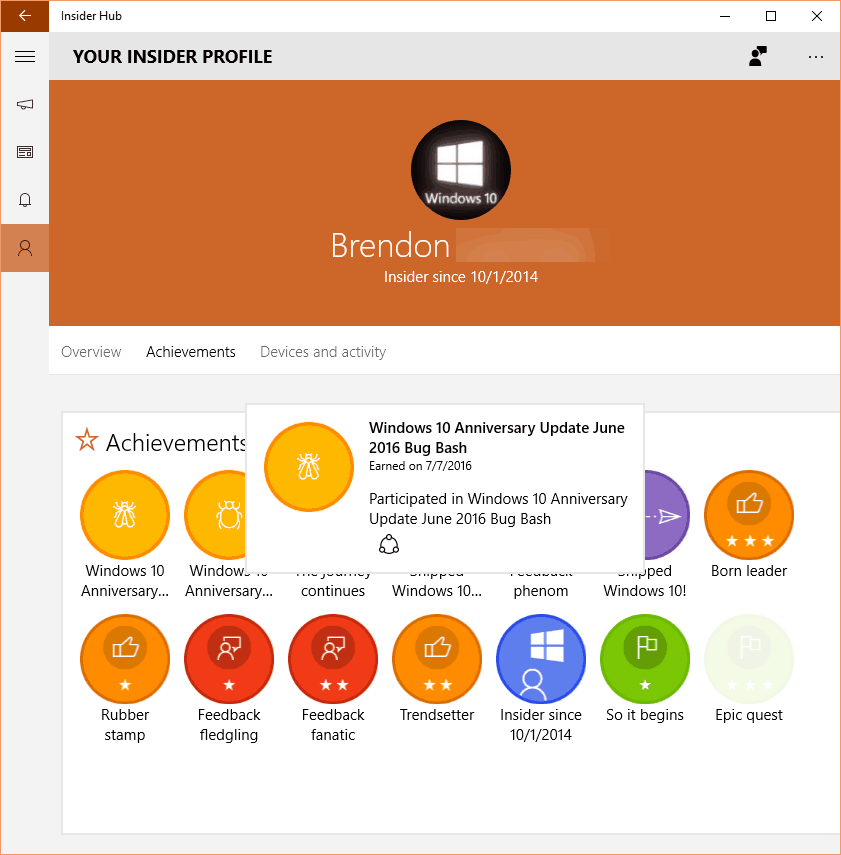
If you’ve been an active provider of feedback as a Windows Insider, then you’ve likely noticed your collection of Achievement badges located in your profile selection. Similar to gold stars received in elementary school for getting a good grade, the badges are handed out for everything from providing feedback to setting trends to being an early Windows Insider.
Apparently, Microsoft is now handing out Achievements for being a participant in the June Bug Bash. In case you’re unaware, the Bug Bash is an initiative meant to leverage the growing number of Windows Insider builds being released in preparation for the Anniversary Update coming on August 2.
The info comes from WinBeta tipster Brendon via email, and here’s what the Achievement looks like:
Feedback Hub Bug Bash Achievement.
There’s no monetary value to the Windows Insider feedback Achievements, but they do provide some nice bragging rights. If you participated in the Bug Bash and have received the Achievement, let us know in the comments.
Following up on the Botness conference and Skype Hackathon last month, Microsoft has released a new update for the Microsoft Bot Framework just yesterday. With droves of feedback in favor of bot development, the newest version supports some awesome new features for Skype Bot developers to play around with.
Groups – Bots are now able to take part and reply to group conversations.
Cards – Bots can be programmed to support the use of visual cards with images, carousels, and receipts.
Natural Language – Using the current preview of Bing Entity and Intent detection, Skype Bots will now be able to detect natural language.
Third-party Authentication – Developers can enable third-party authentication to verify user’s credentials and have them sign in via a card.
With the use of Microsoft Bot Framework, your Skype Bots can be published and submitted through the bot directories. Developers can also access bot building resources through the Framework’s hub.
To learn more about how to update to the new framework, visit the official page.
Data space is a valuable resource for major cloud providers. In fact, the wholesale data center market is expected to grow at least 13% by the year 2020. At least, that’s what the Research and Markets June 2016 report predict in the growing market’s forecast. Many of these centers leased to companies offer up megawatts (MW) of storage. With the advance of cloud technology, more and more competitors struggle to lay claim to more regions through data centers and expanding their own available services to customers.
Perhaps one of the most major influences on the data center market as of late is Microsoft. The company reported spending an increasing $2.3 billion on cloud data center expenditures alone. With a global reach that includes many major countries such as Ireland, Germany, and Canda, Microsoft’s investments in the expansion of their cloud coverage is one of their main focuses.
Microsoft is also keeping their investments close to home, signing data center leases across the United States as well. Most recently is the activity in Northern Virginia. The North American Data Centers July 2016 report authored by Jim Kerrigan reveals that Microsoft is honing in on more data center space in that area.
Microsoft isn’t the only cloud with their sites set on Northern Vergina. Oracle also signed for a chunk of that capacity. The report states:
Large cloud providers are signing transactions throughout the country highlighted by more than 55 MW of transactions for Microsoft and Oracle in Northern Virginia that have been signed or finalized during the past 30 days with several different Multi-Tenant Data Center (MTDC) providers.
According to Jim Kerrigan’s response to Data Center Knowledge, Microsoft has claimed about 30MW of the available space, leaving only 25MW behind for Oracle. The NADC managing principle also shared that “not all of those leases have been signed as of Thursday.”
According to past reports, Microsoft continues to lead by example through the consumption of wholesale leases throughout the first half of the year, standing up Oracle’s attempts to lay claim across the available data centers.
The official Formula 1 Windows 10 app has just launched and can be downloaded for free on compatible devices. The app allows for users to follow their favorite teams and drivers with the latest news articles, videos, and leaderboards. It also provides post-race highlights, race schedules, and driver standings.
While the app and most of its basic features are free, it does offer a premium service for those that have an F1 Access annual or monthly subscription. Here are the features for those that wish to pay for a more comprehensive experience:
Official Live Timing of all F1 sessions.
Sector times with intervals and gaps, live tyre and pit stop information.
Interactive 3D maps with driver gears and speeds, plus Drag Reduction System (DRS) usage indicator.
In-Corner Analysis comparing drivers’ entry, apex and exit speeds.
Immersive dashboard with text commentary (English, French and German), and English audio commentary during all F1 sessions.
Team Radio Transmissions and Race Control Messages.
Personalisation Options and more!
Have you downloaded the app yet? Let us know your first impressions of it in the comments below.
According to the latest rumors, Microsoft is getting ready to unveil the third-generation Band activity tracker with an unconfirmed release set in October.
Evidence of the impending reveal is steadily gathering as the company is already replacing some Band 2 models which suffered from cracking rubber with other made of a more durable material, a precursor to the wearable being pulled from stores.
Microsoft won’t be refilling Band 2 stock anymore because it’s focusing on the third generation wearable which will release this fall. Rumors are spreading fast and they suggest that the device will come with interchangeable bands which will make it more comfortable to wear.
Apple is another smartwatch manufacturer offering its customers the possibility to select their own band, and now it seems that makers of activity trackers are doing the same for their devices. The Fitbit Blaze can be used for fitness tracking and comes with interchangeable bands as well.
The Microsoft Band 2 was released on October 30 and is currently sold for $250 in the US. The device has a capacitive AMOLED display measuring 32 x 12.8 mm which supports a resolution of 320 x 128 pixels. It’s compatible with devices running on Windows Phone 8.1 (Update 2), Windows 10 Mobile, iOS 8.1, Android 4.4 or later through Bluetooth 4.0.
Its list of sensors include an optical heart rate monitor, three-axis accelerometer, gyrometer, GPS, ambient light sensor, galvanic skin response sensors, UV sensor, skin temperature sensor, capacitive sensor and barometer.
South Park The Fractured but Whole is a role-playing video-game based on the popular South Park series. The Fractured but Whole is actually a sequel to 2014’s award winning The Stick of Truth. If you haven’t played the 2014 game version, you can now get it for free if you pre-order South Park The Fractured but Whole.
A young hero will rise from the perilous battlefields of the fourth-grade playground. His destiny is to become South Park’s savior, but his path will not be an easy one. You will assume the role of the New Kid and you’ll arm yourself with weapons of legend to defeat underpants gnomes, hippies and other forces of evil ready to do anything is takes to ruin your plans.
Go and discover the lost Stick of Truth and earn your place at the side of Stan, Kyle, Cartman and Kenny as their new friend. This hilarious and outrageous RPG adventure will have you hooked for hours on end until you reach your goal.
In South Park: The Fractured but Whole, players will delve into the crime-ridden underbelly of South Park with Coon and Friends. This dedicated group of crime fighters was formed by Eric Cartman whose superhero alter-ego, The Coon, is half man, half raccoon. As the New Kid, players will join Mysterion, Toolshed, Human Kite and a host of others to battle the forces of evil while Coon strives to make his team the most beloved superheroes in history.
When the sun sets, havoc and chaos reign the place. A whole new world opens up where your alter ego can use its powers to save the town. Combine your special powers with your team’s skills and defeat the dark power that has spread its evil tentacles over South Park.
Microsoft is determined to convince as many users as possible to adopt Edge as their main browser. While Microsoft Edge is far away from becoming one of the most popular browsers, its market share increases constantly.
According to the latest figures published by NetMarketShare, Edge now has a 5.09% market share, up from the 4.99% market share from June. This growth is triggered by Windows 10’s market share increase, as Microsoft’s latest OS now runs on 19.14% of the world’s computers.
The most popular browser out there remains Google Chrome with a 48.65% market share, which means that this browser is running on nearly 1 in 2 computers. The second place is taken by Internet Explorer, with a solid 31.65% market share, down from 36.61%, while Firefox gets the third place with a 7.98% market share.
It is worth mentioning that 5.21% of the world’s computers are still running unsupported IE versions, making them easy targets for hackers.
Edge’s arch rival, Opera has a modest 1.63% market share. Microsoft has waged a battery life war against the Opera browser, publishing a battery test that allegedly confirmed Edge was the most battery friendly browser. However, Microsoft didn’t publish the methodology is used for the test, making the results a bit difficult to take for granted.
Opera didn’t remain silent, and released a similar browser battery test, claiming that its browser consumed 22% less battery than Microsoft Edge. Microsoft adopted the ostrich policy and hasn’t issued any comments following Opera’s battery test results.
As far as Microsoft Edge’s market share is concerned, it should continue to grow as it appears that more and more users decide to upgrade to Windows 10. The Edge browser is currently available only on Windows 10, which makes its market share growth dependent on Windows 10’s.
Earlier today, Microsoft announced a name change to its Enterprise Mobility Suite to the ever so creative Enterprise Mobility + Security. While the name change may seem lackluster, the proposed additions to the software planned for Q4 of 2016 should be worth a look for companies who value a secure, productive enterprise.
In recent months, we’ve announced cutting edge cloud-based security technology including Windows Defender Advanced Threat Protection for end point breach detection, Microsoft Cloud App Security for getting control of the SaaS apps employees are using, Azure Information Protection to ensure information stays secure and Office 365 Advanced Security Management to give greater visibility and control over your Office 365 environment. All of these capabilities are included in the Secure Productive Enterprise offering.
We’ve also introduced leading cloud-based productivity technology including Office 365 Delve Analytics to understand personal productivity, Skype for Business PSTN conferencing and Cloud PBX bringing voice to the cloud, Microsoft Power BI for data analysis & visualization, and even Office 365 Advanced e-Discovery to ensure customers can find just the information they need for the issues at hand. All of these technologies are part of the Secure Productive Enterprise.
Everything you need to empower employees in a single package. It’s that simple.
White continues her pitch on security by also attempting to codify Microsoft’s offerings into two simple packages across Windows 10, Office 365 and its Enterprise Mobility Suite + Security. Essentially, businesses can opt for one of the two-tier plans distinguishable in name by the E3 and E5 monikers. The E3 tier of security offers Windows Defender and Advance Threat Protection in a package, whereas the new E5 package includes some of the newly listed additions planned for Q4 of 2016 and the release of the newly minted Enterprise Mobility + Security tools.
Microsoft and Creative England have partnered up for the third consecutive year to set up the Greenshoots Programme, an initiative meant to facilitate the growth of the video game industry outside of the Greater London area. These games all go through the ID@Xbox program for their development, and are all required to be “innovative” new ideas, as per the requirements to qualify for Greenshoots funding. The team over at True Achievements has put together a list of some of the titles we can expect to see from Greenshoots soon, and they all look pretty intriguing.
The Other 99
The Other 99 is a survival game that ought to be launching in August, with a release on Xbox One on its way in early 2017. For a better idea of what it’s supposed to be, here’s some of its description on Steam:
The Other 99 is a deadly first-person action-survival game. Ripped from your ordinary life you awaken on a desolate, windswept Hebridian island with nothing but a single note that reads, “The only way off the island is through The Other 99.”
it is up to you to make yourself into something. Will you brutally murder all those who stand in your way? Or will you move silently through the forests, eliminating anyone that crosses your path? Just remember each person is unique and has their own story to tell and their own pieces of the jigsaw that makes up The Other 99.
Q.U.B.E. 2
https://www.dailymotion.com/video/x2v9n3s
QUBE 2 is a sequel to QUBE, which came out way back in 2011. Those who are familiar with games like Portal will be well familiar with its genre, as it employs the same sort of first-person puzzle solving gameplay. There’s almost nothing out there explaining QUBE 2 in any sort of depth right now, so you’ll need to just watch the brief gameplay trailer above to get a sense for what it’s going to be when it finally releases.
The Last Word
The Last Word is shaping up to be one of those games that’s going to be a unique brand of heartwarming entertainment. The game, which has already won awards at Game Connection and Intel Buzz, is a platformer that takes place within the diary of a little girl. Players drag and drop words in order to make platforms, play around with photos, and do more diary-themed platforming in order to progress through each stage. Above is an early build of the game that reared its head back in 2015, and it seems to be quite promising.
Fugitive
Fugitive is a top-down stealth game coming from Fallen Tree, the studio that’s been doing pretty well for themselves in the mobile market with the Quell series. As far as this game is concerned, there’s barely any evidence of it existing on the internet – it’s not even listed as one of Fallen Tree’s games on the studio’s official website. We’re just going to have to wait until we get closer to Fugitive’s 2017 release date before we get any hints as to what this ID@Xbox indie title has in store for us.
Vantage Point
If you follow the indie game scene at all, you’re very familiar with game jams. These events are put on by studios and other gaming enthusiast groups all of the time, and make small teams come together with a very limited amount of time (usually 48 hours) to create a very small, usually just proof-of-concept game. This next ID@Xbox game came out of a Game Jam with Coatsink entertainment, who you might know for making popular party game Gang Beasts. Vantage Point is something of a cooperative horror game, with one player being the “infiltrator” and any number of spectators being “navigators.” The goal of the navigator is to use a map of the facility being infiltrated, and stay in communication with the infiltrator to get them safely to their goal – sort of like that scene in The Matrix, where the protagonist is led out of his office building.
We know that Vantage Point is coming out in 2017, but there’s not much else available. We look forward to seeing where it goes.
Off Grid
Are you a fan of Mr. Robot? Off Grid might be your cup of tea. This game uses real world hacking mechanics to put you in the shoes of a whistleblower who’s shown the dark nature of the practices that his company gets up to. Here’s the official description.
Off Grid is an adventure, satire and stealth game about a mishap antihero. You play an everyman pencil pusher, who is oblivious to the city’s prying and spying, corporate-sponsored government until a series of dark events unfold. The contemporary storyline follows real-world events surrounding data privacy, and gameplay utilizes unique mechanics that allow you to manipulate the world and people around you with the data they unwittingly leave behind.
The game – which was initially destined for a 2015 release – is being given the complete ID@Xbox treatment and coming out to Windows devices in 2017.
There’s no question that ID@Xbox has a pretty nice lineup for Xbox One users who want to get a taste of the latest in indie games, and the sheer creativity coming out of these games should inspire anyone who’s been a little bit bored of recent rehashes of the same old genres that AAA studios have been subjecting us to. Beyond all the titles we’ve gone over here, there’s also an unnamed project to look forward to being funded by the Greenshoots programme. The game is apparently going to be a futuristic racing title, and it’s coming out of Supergonk, a studio comprised of industry veterans.
If you want to keep an eye out for all of these ID@Xbox titles and more, you can check out the ID@Xbox website, which keeps track of tons of projects being managed through the service.
As a celebration of fifth annual UFC International Fight Week, the Xbox One video game EA SPORTS UFC 2 is opening up to a free trial throughout the rest of the weekend until Monday, July 11. The demo lets players pit themselves into the ring for five full hours to experience all of the features available through the complete 20.1 GB game.
Having just released earlier this year in March, the fighting game debuted at 2nd place in the UK sales charts. The game description reads:
EA SPORTS™ UFC® 2 innovates with stunning character likeness and animation, adds an all new Knockout Physics System and authentic gameplay features, and invites all fighters to step back into the Octagon® to experience the thrill of finishing the fight.
The timing corresponds with the upcoming live event where the growing e-sport will crown its first World Champion at the UFC 200 competition finals between Cormier vs. Jones 2. Both are duking it out for a grand prize of $10,000 and the World Champion title. According to the UFC news release, this event is the culmination of over 495,000 fights involving 43,000 fans from 25 different countries. You can watch the competition finals on the official EA SPORTS Twitch stream as it happens on July 8, 2016, at 1:30 PST.
It’s worth noting that the free demo only pertains to the standard edition, not the deluxe edition bundle. However, if you enjoy your time in the virtual ring, the game is currently available for the Xbox One Ultimate Game Sale for as low as $30 for Xbox Gold subscribers. Some retailers are also jumping into the festivities by offering up discounts as high as 50% to the purchase of EA SPORTS UFC 2.
Averaging a rating of 4.5 stars through the Xbox Store with over 6,000 reviews, EA SPORTS UFC 2 is a fighting game worth looking into for the free trial period. Download it from the Xbox Store to hop in the Octagon and put ’em up against the best.