The last few days have been very exciting at Microsoft, especially the Build 2024 event, where the company unveiled its flagshipCopilot+ PCs. But there was another announcement that many missed: Microsoft’s collaboration with Cognition AI!
With the partnership in place, Devin, an AI-powered software developer, will now be available to customers. According to Microsoft’s official blog, it will help developers with intricate tasks like code migration and modernization projects.
Reports suggest that Devin is more capable than the available alternatives. It doesn’t just write code but helps troubleshoot coding errors and inform developers of the real-time progress.
Speaking about Devin, Microsoft’s CTO Kevin Scott said,
There are some tedious things you do as an engineer or a software developer, such as replatforming. It’s rare that an engineer really enjoys doing that. Devin is a tool designed to help you with those tasks.
Also, as is the case with most of Microsoft’s recent collaborations, Cognition AI’s Devin will now be powered by Azure, the Redmond-based tech giant’s native cloud computing and AI platform. Recently, Seimens, upon collaborating with Microsoft, moved Xcelerator to Azure.
These collaborations have helped Microsoft Azure emerge as a key player in the cloud computing landscape, outperforming Amazon Web Service and Google Cloud.
Besides, the collaboration comes at a time when Cognition AIclaims a $2 billion valuation after raising $175 million in recent funding. Not to forget, the startup was founded just six months ago in Nov’23. This is a significant feat for a startup still pretty much in its infancy!
What do you think about Microsoft and Cognition AI’s collaboration? Share with our readers in the comments section.
Is Virgin Media blocking NordVPN? Unfortunately, certain internet providers may block VPNs occasionally. On the brighter side, you can easily bypass these restrictions — with the help of this guide.
Below, I’ll show you step by step how to get out of that situation and browse privately again. Let’s begin!
How Is Virgin Media Blocking NordVPN?
ISPs, like Virgin Media, don’t officially state that they block VPN services. In fact, they provide the necessary fields in their router software for configuring VPNs. Still, you might experience significantly throttled internet surfing, streaming, and downloading speeds when you start using a VPN.
Virgin Media may resort to any or all of the following tactics to unofficially block your access to premium or free VPN networks:
Browser SSL Error: You’ll see this error when browsing if the ISP uses DPI (Deep Packet Inspection) via packet sniffing tools to block VPNs. DPI works by examining data packets flowing through the network. If DPI misinterprets the encrypted VPN traffic due to its inspection, it might disrupt the connection, causing the error.
Webpage Connection Reset Error: If the ISP disrupts the successful communication between your device and the VPN server, you might encounter a Webpage Connection Reset Error. This error indicates the connection was abruptly terminated, so you can’t access the webpage through the VPN.
Virgin Media Web Safe: This is a specific service offered by Virgin Media. It’s possible it includes VPN-blocking functionalities. If you’re using a VPN and you keep encountering screens that say “Sorry, Web Safe has blocked this site,” VM is to blame.
DNS Sinkhole Error: This error usually indicates an issue with the Domain Name System (DNS). DNS translates website names into IP addresses. VM might employ DNS redirection to route VPN traffic to a dead end (sinkhole) instead of the intended VPN server. This would disrupt the connection and could cause this error. Your Chrome Browser may display Failed to Connect, Slow Loading or Timeouts, and Error Name Not Resolved.
How To Fix Virgin Media Blocking NordVPN
I’ve arranged the troubleshooting tips in order of complexity. You’ll find the simplest ones at the top:
Preliminary Checks
Give the following steps a try first before moving on to the more technical ones:
Choose the right VPN server: Not all of Nord’s 6,000+ servers are always in their peak performance. Some might face disruptions created by technological and human factors. So, try switching to one that’s close to your location. For example, to stream VM television shows in Ireland, use NordVPN’s Irish servers. Similarly, for the Virgin TV GO app in the UK, use any one of the 440+ servers located in the UK.
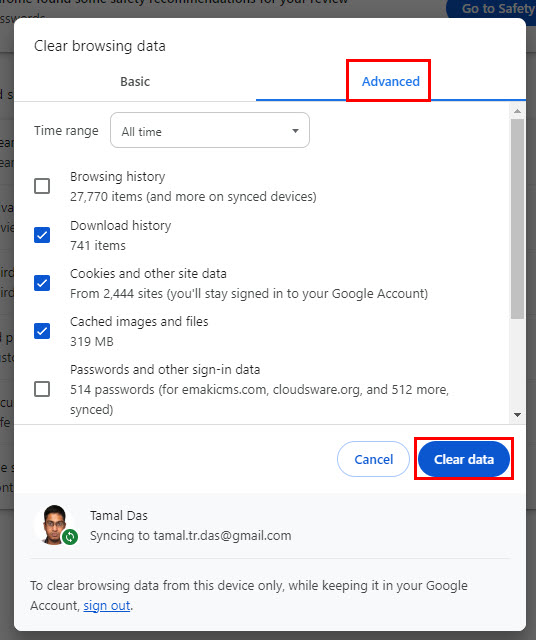
Clear browser cache and cookies: Try clearing cache and cookies from your browser by pressing the Ctrl + Shift + Delete hotkey. You should see the Clear browsing data or a similar dialog box. There, navigate to the Advanced tab, checkmark these options, and click on the Clear data button:
Browsing history
Cookies and other site data
Cached images and files
Site settings.
Restart the NordVPN app: Open the app from the Windows System Tray area. You’ll find a cogwheel icon in the lower-left corner. That’s the Settings menu. Click on that to find the Logout button in the lower right corner. Click it and open the Task Manager app by pressing Ctrl + Shift + Esc. Find the NordVPN service under the Processes column, and end it by right-clicking on it. Now, open the app again from the Start Menu and log in with your registered NordVPN email.
Restart the device: Reboot your PC, Mac, or tablet and try connecting with the VPN again.
Were you able to resolve Virgin Media blocking NordVPN so far? If not, continue with the following troubleshooting ideas:
Disable Child Safe on Your Virgin Media Account
Virgin Media Web Safe feature may also prevent some VPN services from working properly or utilizing the full bandwidth of VPN servers.
If you go to the Virgin Media Web Safe portal, you’ll see that the feature claims that it prevents address hiding, which is related to VPNs.
You might need to sign up using your Virgin Media subscription credentials to activate the account if you haven’t done that already.
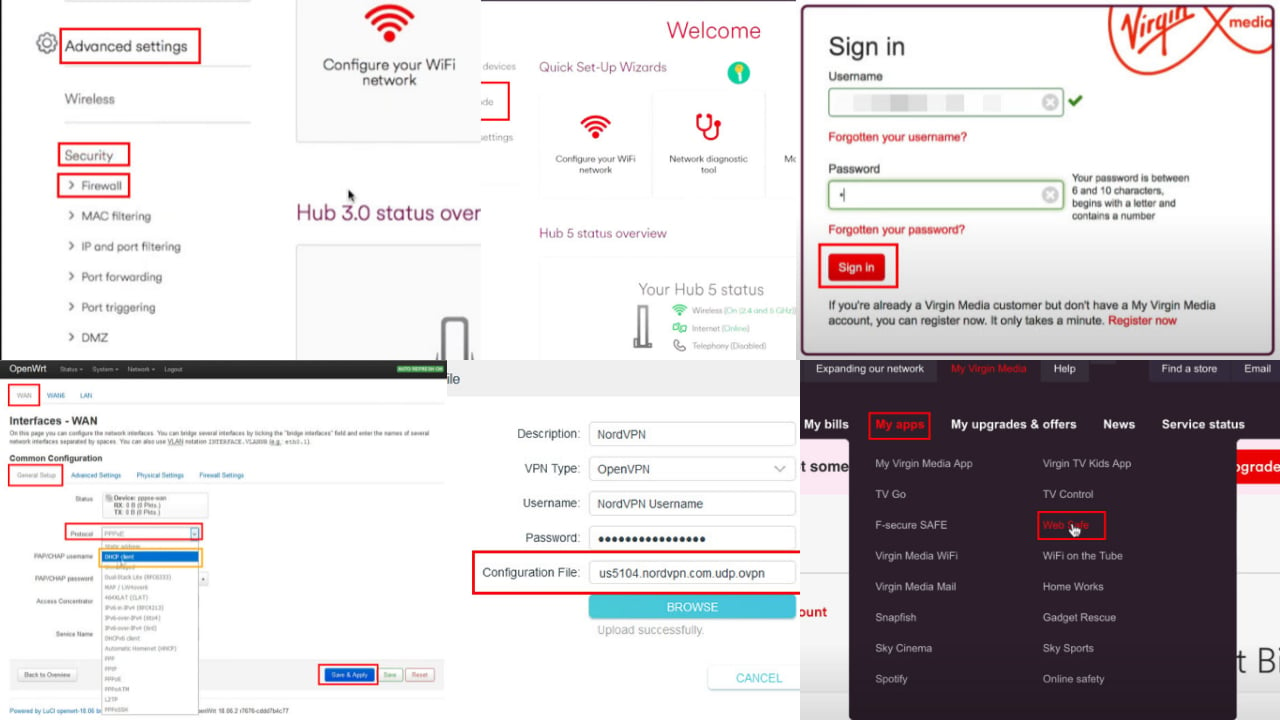
Now, click on the Sign in button on the right side of the portal. It should be the My Virgin Media block.
You’ll need to log in with your username and password.
On the top of the website, find My apps and click on that to expand the list of services.
Click on the Web Safe hyperlink below the TV Control service.
You should now be on the Manage your Web Safe settings page.
By default, Virgin Media keeps the Child Safe feature enabled. You need to click on the toggle button to deactivate it.
Now click on the Apply button just below the Manage your Web Safe settings header.
Enable PPTP Pass-Through on VM HUB
You’ll have to enable PPTP Pass-Through or set it to default on all physical routers for NordVPN to work. Here’s how to do so on the VM Hub:
Open a web browser tab and enter 192.168.1.1 or 192.168.0.1 to access the Virgin Media Hub control interface.
If prompted, you’ll need to log in with your username and password. These are typically printed on a sticker on the Hub, but if you’ve changed them before you’ll need to use your custom credentials.
Once logged in, you’ll need to find the Advanced Settings section. The exact way to get there depends on your Hub model:
Hub 3 models: Look for Advanced Settings or Network Settings.
Hub 2 models: Try the Firewall option under the Security settings.
Once you’re in Advanced Settings, look for a section related to VPN or Advanced VPN Settings.
Look for the PPTP Pass-Through setting and check the toggle switch.
Click the Save or Apply button to confirm your configuration.
Restart the router.
Restart the NordVPN app.
Now, try to visit a streaming site using NordVPN again on your Virgin Media broadband network.
Use the NordVPN Browser Extension
Nord’s browser add-on allows you to enforce VPN settings exclusively on your web browser.
Click on the Add to Chrome button and then the Add extension button.
Navigate to the Extensions menu in the top-right corner of Chrome.
Click on the Pin icon near the NordVPN extension.
Now, open the NordVPN extension from the Extensions tab on Chrome.
Click the Login button and enter your credentials.
Hit the Quick Connect button to connect to a VPN server.
Uninstall and Reinstall NordVPN App
Open Apps and features from the Start Menu.
Find NordVPN in the list of installed apps.
Click the Uninstall button.
Once the uninstallation is complete, visit this site to get the most recent version of NordVPN.
Download and install the app.
Log in with your NordVPN credentials.
Test the VPN again.
Try Resetting the TCP and UDP Ports
TCP and UDP ports facilitate successful communication between your device and websites, apps, IPTV portals, etc.
Here’s how you can close and reset these ports to fix NordVPN blocks imposed by Virgin Media:
Click on the Start menu and type Command.
On the right side of the Command Prompt result, you’ll see the Run as administrator option. Click on that.
In the Command Prompt window, type the following command exactly as shown here: netsh int ip reset.
Press Enter to execute the command.
The reset process may take a few moments.
Once complete, you’ll need to restart your computer for the changes to take effect.
Try Disabling the Router and Device Firewall
To deactivate Virgin Media Hub’s firewall, follow these steps:
Open a web browser and enter the IP address 192.168.0.1 or 192.168.1.1 in the address bar to access the Virgin Media Hub settings page.
Log in using your admin credentials. The default username is usually admin and you can find the default password on the hub’s sticker.
Navigate to the Advanced settings or Security section, then select Firewall.
Turn off the firewall by unchecking or switching off the firewall option.
Save the changes by clicking the Apply or Save button.
Switch to a Third-Party Router
Instead of using the Virgin Media Hub as the primary router, use another brand’s router. For example, you can go for Cisco, TP-Link, Tenda, D-Link, etc. They’re unlocked routers. That means you can modify their settings any way you want.
Also, you can avoid the risk of Virgin Media embedding programs in the router to disallow VPN servers no matter what you do.
However, you must use the Virgin Media Hub to receive a broadband signal. Here’s how to shift routing to a third-party device:
Use Virgin Media Hub as a Modem Only
Access the Hub console by going to 192.168.0.1.
Log in with your administrative username and password.
You should see the Welcome screen.
Click on the Modem mode link on the left side navigation panel.
Select the Enable Modem Mode radio button.
Click on the Apply changes button.
You’ll see a status page as shown below.
It might take up to 5 minutes to re-configurate the router to modem mode.
Now, if you ever want to enable the modem and router mode of your Virgin Media Hub, you can do that easily by reversing the above steps. Instead of going to 192.168.0.1, this time you need to use 192.168.100.1 as the IP address for the Virgin Media Hub Modem Mode. The remainder of the steps are the same.
Set Up a New Router
Now, follow these instructions to route broadband connectivity from the Virgin Media Hub to your own router. I’m using a Cisco device for the tutorial. However, the steps are similar for any popular make and model.
Take the LAN cable provided by the Virgin Media Hub and connect that to the no. 1 LAN port at the back of the Hub.
Ensure that other Hub cables are connected, like the coaxial cable coming from outside and the power cable coming from the adapter.
Connect the other end of the LAN cable to the third-party router’s Internet or WAN LAN port.
If it’s a Wi-Fi router, connect to that network from your PC.
If it’s an Ethernet-only router, connect the LAN cable provided to the PC’s LAN port.
The other end of this LAN cable should go into the first (no. 1) LAN port on the third-party router.
Open the router control panel and log in.
You should find its IP address and password on a sticker on the back.
For me, the default IP was 192.168.1.1.
Inside the control panel, click on the Network drop-down at the top.
Choose the Interfaces option from the menu that opens.
You’ll see all the usable Interfaces for the Cisco or your own router.
Click on the Edit button for the WAN interface.
Go to the Protocol drop-down menu and change that to DHCP client from PPPoE.
Click the Save & Apply button at the bottom.
It can take up to one minute for the Virgin Media Hub to transfer the public IP to the third-party router.
Once done, restart the third-party router.
Now, try to access a website using NordVPN. It should work this time.
Use a VPN Within the Router
Here’s how you can set up NordVPN at the router level to avoid VPN restrictions imposed by the ISP. I’ve used a TP-Link model for this tutorial. However, you’ll see that the steps are similar for all major router makes and models.
Log in to the TP-Link router console by visiting 192.168.1.1.
Click on the VPN Client menu in the left-side navigation panel.
Checkmark the Enable checkbox for VPN Client.
Bring up the new profile configuration window by clicking Server List and then by clicking Add.
Fill in the fields of the pop-up window that follows:
Description: NordVPN
VPN Type: OpenVPN
Username: NordVPN subscription username
Password: NordVPN subscription password
Visit the Server Tools portal to download OpenVPN client configuration files.
You can download either the TCP or UDP configuration files.
Upload the configuration file in the Add Profile dialog.
Go back to the Server List page and add the newly created profile.
On the Device List page, add the devices from which you want to use the VPN.
Use a NordVPN Alternative
If none of the above work, you can try these alternatives in your VM broadband network:
Browsec
Browsec is one of the best free Chrome Browser-based VPN solutions. In the free edition, you can swap within only three VPN servers from the US, the UK, Singapore, and the Netherlands. Also, the surfing and streaming speed is throttled. You can get a paid plan for unlimited bandwidth and access to more servers than the default four destinations.
The best thing is you can easily check out if the VPN solution will work with Virgin Media. If it works, you can buy it. If it doesn’t, simply skip it.
If you wish to apply a VPN from the system level, you can use Windscribe. You can get its desktop app for macOS, Windows, and Linux devices. It comes with a 10 GB free surfing and downloading quota. The free usage renews every month. It also offers more free VPN servers than Browsec.
I’ve been using it to surf, stream, and download seamlessly on any ISP. I haven’t experienced any ISP-level block on it.
ExpressVPN is a premium VPN tool with no free trial. However, there’s a money-back guarantee if you’re not satisfied with its service.
Moreover, it has servers in 105 countries. When I reviewed this VPN solution, it didn’t disclose how many servers it maintains. You can install it on a desktop, mobile, and Chrome Browser. It allows you to simultaneously run a VPN on eight devices from one subscribed account. Furthermore, you can set up Express VPN within the router as well.
Proton VPN is a Switzerland-based VPN solutions provider. It comes with a no-log policy. That means it won’t log your browsing habits on any server for any reason. Also, it uses AES-256-CBC encryption so ISPs can’t decode your browsing behavior.
Furthermore, you can experience download speeds of up to 10 Gbps. You can run the tool on up to 10 devices with a single subscription. Moreover, it offers an effortless router setup option as well.
Try the free trial and see if it works on Virgin Media before subscribing.
As we’ve learned recently, Arm shifting their attention on the PC market and it seems that NVIDIA wants to catch this big wave too. If the rumors are true, NVIDIA, a titan in the graphics processing world, is reportedly working on a new generation processor that could redefine the boundaries of computing as we know it.
What are the rumors about the new NVIDIA SoC?
This rumored processor is said to be a powerhouse, combining ARM’s latest Cortex X5 cores with NVIDIA’s cutting-edge Blackwell GPU. But that’s not all; it’s also expected to feature LPDDR6 memory, which could significantly boost its performance. The tech community is on the edge of their seats, wondering how this chip could change the game, especially for AI PCs. The processor is rumored to be crafted using Intel’s 3nm process technology, a detail that suggests NVIDIA is not holding back on ensuring this chip is at the cutting edge of technology.
What makes this rumor even more intriguing is the potential collaboration between NVIDIA and MediaTek, hinting at a processor that could find its way into a variety of devices, from next-gen gaming handhelds to AI-driven PCs. This move could place NVIDIA in direct competition with Qualcomm, especially in the Windows on ARM space, where Qualcomm has been a dominant player. The thought of NVIDIA stepping into this arena with a processor that could potentially outperform Qualcomm’s offerings is certainly something to get excited about.
NVIDIA is no stranger to the SoC business, having developed its Tegra series for over a decade. The company’s experience and success with the Nintendo Switch, powered by the Tegra X1 processor, demonstrate its capability to innovate and deliver high-performance chips. However, the rumored processor seems to be a leap into a new direction, focusing more on AI and high-performance computing rather than gaming consoles.
The anticipation for this processor is palpable, with potential implications for laptops, tablets, and even AI PCs. It’s a bold move that could see NVIDIA heating up the battle for AI chips, but as AI wave is on the rise, we can see a place for everyone on the market.
In the meantime, let’s remember that NVIDIA is also working on the new SFF ecosystem that might also be leading to a new console-like device.
However, we remind you to take this information with a grain of salt because right now it’s just a rumor and until we get any official information, we can’t put a finger on anything.
What do you think about such a new SoC from NVIDIA? Let’s talk about it in the comments below.
Microsoft has flagged a PLUGScheduler security vulnerability (CVE-2024-26238), which allows threat actors to gain access to the affected system.
Titled Microsoft PLUGScheduler Scheduled Task Elevation of Privilege Vulnerability, it was reported to Microsoft by Synacktiv. The latter has a dedicated page detailing the vulnerability and its effect on Windows 10 devices. The issue’s description reads,
The PLUGScheduler.exe binary performs file operations such as deletion and renaming as SYSTEM, in a directory where standard users have partial control. This leads to arbitrary file write as SYSTEM.
This vulnerability is an arbitrary file write. It can be used to execute code as SYSTEM by writing a DLL file in C:\Windows\System32\SprintCSP.dll and triggering the SvcRebootToFlashingMode method of the StorSvc service.
The vulnerability was first reported on Jan 22, 2024, acknowledged by MSRC (Microsoft Security Response Center) on Feb 1, 2024, and a patch for it was released on May 14, 2024, alongside the KB5037768 update. Microsoft has assigned the PLUGScheduler vulnerability a severity rating of Important!
To patch the CVE-2024-26238 vulnerability, open the Settings app > go to Update & Security > click on Check for updates > install KB5037768 > then restart the PC for the changes to come into effect.
Besides, several critical threats to Windows 10 devices have been identified in the recent past, including the ShrinkLocker ransomware. And given the fact that Windows 10 will be out of support in less than 18 months, questions arise about the future course.
The Microsoft Surface laptop series is great with its sleek design and great performance, and it just got better with recent discounts.
Microsoft Surface Pro 8 is currently on sale, so let’s take a closer look at it, shall we?
Microsoft Surface Pro 8 hit with massive discount
As PhoneArena reports, the Microsoft Surface Pro 8 is available at a discount at Woot and you can save a whopping 43%. As for the specs, it offers the following:
Screen:
13-inch, 10-point multitouch display, 2880×1920
CPU:
Intel 11th Gen Core i5-1145G7 CPU
GPU:
Intel Iris Xe Graphics
RAM:
8GB
Storage:
512GB
Connectivity:
2 x USB-C with USB 4.0/Thunderbolt, 3.5mm headphone jack, Surface Connect port, Wi-Fi 6 802.11ax + Bluetooth 5.1.
Overall, it’s a decent device for everyday use or multimedia. As for the price, this model will set you back $679.99.
Hackers are using a code from a Python clone of Minesweeper to attack financial and insurance organizations from the United States and Europe. According to Bleeping Computer, the Computer Security Incident Response Team (CSIRT-NBU) and the Computer Emergency Response Team of Ukraine (CERT-UA) tracked the attack and found UAC-0188 responsible.
The UAC-0188, also known as FromRussiaWithLove, is a Russian hacktivist. The attackers use the Minesweeper code to hide their Python scripts that install the SuperOps RMM, a tool that helps them gain access to the affected systems.
How do hackers use the Minesweeper code?
The wrongdoers disguise themselves as a medical center. They use the [email protected] email. In addition, the subject of the mail is Personal Web Archive of Medical Documents.
In the email, recipients can find a Dropbox link, which leads to a 33 MB .SCR file that contains the code from the Python clone of Minesweeper and a malicious one that downloads additional malware from anotepad.com.
The Python clone of Minesweeper serves as a decoy for the real 28MB base64-encoded string, which contains the malicious code. Also, the create_license_ver function contained by the code decodes and executes the malware. This process hides the malicious code from security systems.
When the function finishes decoding, it reveals a .ZIP file containing the SuperOps RMM. Then, it extracts and executes it using a static password.
Cybersecurity specialists recommend that if you notice SuperOPS RMM activity on your device, you should be cautious, especially if your organization doesn’t use it. Also, check for calls to the following domains: superops.com and superops.ai. In addition, use an updated antivirus device, back up important data, and change your passwords regularly.
Ultimately, the Minesweeper malware is a serious threat that you shouldn’t treat lightly. CERT-UA revealed five similar files sent in the US and EU. So, be cautious, especially if you run a financial organization.
Every Xbox gamer would love to get some free store credit, and you might even have it at hand, but you don’t know about it. Well, it turns out there’s a pretty simple trick that can get you there, and it’s all about tweaking one little setting. So, let’s dive into how you can ensure you never miss out on these sweet, sweet freebies.
The secret sauce to this whole operation is the Microsoft Rewards scheme. It’s like a treasure trove for gamers, rewarding you with points for just doing your regular gaming stuff. These points can then be turned into all sorts of goodies, like video games, accessories, and yes, that coveted store credit. Imagine grabbing the latest game release or extending your Xbox Game Pass subscription without spending a dime. Sounds pretty good, right?
Now, here’s what you need to do. Once you’re a part of the Microsoft Rewards program (which is totally free, by the way), all you need to do is sign in with your Microsoft account in the Rewards hub. From there, you can start racking up points by playing on Xbox, PC, or even just by hopping onto the Xbox mobile app.
Earning points is a breeze. Whether you’re diving into games via Xbox Game Pass, buying digital games from the Xbox Marketplace, or completing those Xbox Game Pass Quests, you’re on your way to scoring some rewards. You might even have those points stacked up and don’t even realize it.
By changing one simple setting, you can make sure you automatically redeem your hard-earned points for free store credit. This magical setting, known as Auto redeem, can be activated right in the Rewards app on your Xbox console. Once it’s set, you can sit back and relax, knowing your free credit will pop up around the first day of each new month.
Just as a smart user posted out on Reddit, basically, you snag up those Xbox gift cards by using points from the Microsoft Rewards program.
However, it’s important to note that this feature isn’t available worldwide just yet. Currently, it’s only up and running in the U.S., UK, Germany, France, Canada, Brazil, Mexico, and Australia. So, if you’re gaming in one of these regions, you’re in luck.
In summary, don’t sleep on this opportunity. With a simple adjustment, you could be enjoying all the benefits of the Microsoft Rewards scheme without lifting a finger. While you’re at this, why don’t you also check our story about the Weekly Console Bonus?
If you are looking for a budget 2-in-1 laptop, the search ends here. The popular and in-demand Lenovo Yoga 7i received a price cut this Memorial Day and is available for just $699.99, down 22.2% from its original price of $899.99!
With the 2-in-1 functionality, you can seamlessly perform most of the operations with a simple touch. And if you are streaming a video, simply rotate the Lenovo Yoga 7i around the hinges and convert it into a comfortably held tablet.
Having used a 2-in-1 for the last few years, I can tell you that it was my best-ever purchase. Although you have to be careful with the movements as the hinges and the display around it are prone to damage!
Coming to the Lenovo Yoga 7i, it features a large 16″ touchscreen display, 512 GB storage and 16 GB RAM. So, storage and performance are never a concern on this power-packed device.
Boasting the military-grade rugged MIL-STD-810H standard, the laptop is designed to deliver durability and peace of mind. Besides, it has a flawless finish and feels premium to hold!
If you need the Lenovo Yoga 7i for work or school, the FHD webcam, along with noise cancellation and privacy shutter, will enhance the experience.
With the purchase, you also get a free 1-month Xbox Game Pass Ultimate membership and Norton 360 Deluxe(with a built-in VPN). Also, save extra when you trade in another laptop, getting the Lenovo Yoga 7i at a price lower than the current deal.
ASUS is one of the leaders when it comes to gaming hardware, and if you’re looking to get a new laptop for light gaming, then TUF Gaming A15 might be perfect for you.
This model is currently available at a discount on Amazon, so don’t miss this chance to save a bit of money.
Save a bit of money on ASUS TUF Gaming A15 laptop
This information comes from Tom’s Hardware, and the device is currently on sale and you can save $41 on it. As for the specs, this device offers the following:
Screen:
15.6” Full HD, 144Hz
CPU:
AMD Ryzen 5 7535HS
GPU:
NVIDIA GeForce RTX 2050
RAM:
8GB of DDR5-5600MHz
Storage:
512GB NVMe PCIe 4.0
Cooling:
84-blade Arc Flow Fans
This is a decent laptop, but it has a few drawbacks. 8GB of RAM might be enough for light gaming but don’t expect to run the latest games without issues.
Also, 512GB storage is the bare minimum for today’s standards, so if tend to play a lot of games, this might not be enough for you.
However, both RAM and storage are easily upgradable, so you can easily turn this laptop into a good gaming laptop.
You can get this laptop for $658.99 on Amazon, which is a steal, so don’t hesitate too much. In case you need something with a better GPU but at a similar budget, the HP Victus 15 is currently 35% off.
We would all like to run LLMs fast and smooth but we can’t all afford powerful configurations. That’s why Microsoft created Phi-3, which is actually an SLM (small language model) that can work locally on much modest machines.
Now, Intel has stepped up its game by announcing its full support for Microsoft’s latest Phi-3 AI models across its entire CPU and GPU lineup. This move is not just about keeping up with the times; it’s about pushing the boundaries of what’s possible in AI computing, especially when it comes to personalization and efficiency on devices that aren’t exactly powerhouses.
Intel and Microsoft bring powerful AI processing to everyone
So, what’s the big deal with Microsoft’s Phi-3, you might wonder? Well, it’s all about making AI more accessible and efficient. Phi-3 models are designed to run smoothly on devices with limited processing power, which is a game-changer for developers and users alike. Imagine having the power of advanced AI on your smartphone or a small home device – that’s the future we’re looking at.
Intel already optimized their hardware to work seamlessly with these models. From their Gaudi AI accelerators to the Xeon and Core Ultra CPUs, and not forgetting the Arc GPUs, Intel is all in. This means better performance, more efficient AI processing, and, ultimately, a richer, more personalized experience for users.
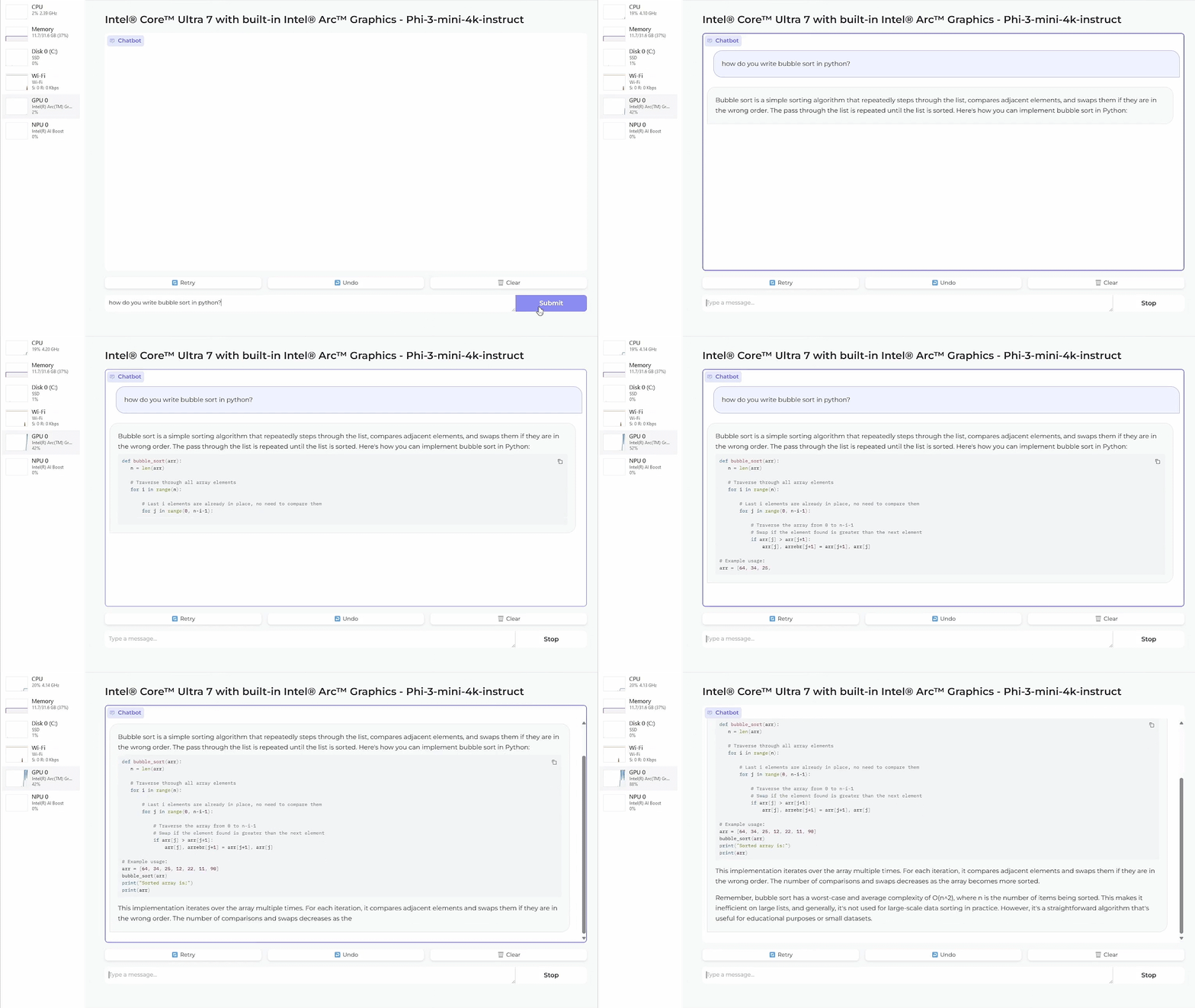
And here’s the kick: According to Intel, their 6th Gen Xeon CPUs are showing twice the performance with Phi-3 models compared to their predecessors. And when it comes to edge AI processes, their Core Ultra CPU platform is making significant strides in personalization and responsiveness. The benchmarks are in, and the results are impressive, especially with the Phi-3 mini model tested on Intel’s Core Ultra 7 165H, paired with an Arc A770 GPU.
The possibilities are endless, from smarter home devices to more intuitive personal gadgets, all powered by AI that’s more accessible and efficient than ever before.
AI will soon be blended into all the intelligent devices around us. I don’t want to get into any doomsday scenarios you can find wherever you look on the internet, but I’ll have to agree that all this is a bit worrying.
What do you think about the new Intel developments? Feel free to express your opinion in the comments below.
The featured image is generated using DALL-E and it’s not an actual depiction of the game
Whispers and rumors often lead to the grand unveiling of the next big title. This time, it’s about DOOM: The Dark Ages, a game that’s been shrouded in mystery and anticipation. Slated for a grand reveal at the Xbox Games Showcase on June 9, this title is stirring up quite the excitement.
Imagine, after four years since the release of DOOM Eternal, fans are on the edge of their seats, eager to dive into what promises to be a medieval-inspired doom world. And of course, we also needed a new pun for will it run DOOM: The Dark Ages.
The buzz around DOOM: The Dark Ages started with Insider Gaming, hinting at a journey back in time, possibly exploring the early life of the Doomslayer. Think about it: a younger Doomslayer, not yet the legendary figure we know, battling demons in a medieval setting. The thought alone adds a fresh layer to the rich tapestry of the DOOM universe. And with the game being developed for at least four years, one can only imagine the depth and detail woven into this new chapter.
DOOM: The Dark Ages will not be an Xbox exclusive
Now, let’s talk platforms. The game is expected to land not just on Xbox, but also on PlayStation and Windows PC. This multiplatform approach is a nod to the series’ history of being accessible to a wide audience. It’s interesting to see how Microsoft, after acquiring Zenimax, continues to honor the legacy of making DOOM a universal experience, despite the potential to make it an exclusive title.
For the fandom, DOOM: The Dark Ages is a bridge to the past, an exploration of the origins of a character that has become a legend in the gaming world. As we eagerly await the reveal, one thing is clear: the DOOM saga continues to evolve, promising us more heart-pounding action, deeper lore, and, of course, the satisfaction of ripping and tearing through the forces of darkness.
By the way, anyone remembers Heretic? Are we expecting wands and magic or just blunt swords and hammers? We’ll just wait and see.
In the meantime, we can talk about all this in the comments section below and see who will be right.
The IT team from Microsoft Digital (MSD) used Copilot to deploy the AI assistant for Microsoft 365 internally. Its implementation required planning and a well-developed strategy. The deployment team has employees from multiple fields, including project managers, communications and change management practitioners, and researchers. So, the AI assistant needs to tend to each of their needs.
How do the teams from Microsoft Digital use Copilot?
Each team needs Copilot for Microsoft 365 to perform different tasks, and you can find some examples below. Maybe they will give you some ideas.
Project managers from Microsoft Digital use Copilot for Microsoft 365 Teams to summarize meetings and chats and Whiteboard for task management and categorization. Also, it helps them synchronize data across various channels when they work in different time zones. After all, the AI assistant can provide summaries of the latest updates.
Communications and change management practitioners from Microsoft Digital use AI to generate and edit content, conduct brainstorming sessions, and research data. In addition, they use it for multimodal media creation and recaps. Also, communicators use Copilot for Microsoft 365 Teams to experiment with prompts and create guides and presentations.
In addition, the team uses a few parameters while prompting, such as who’s speaking, what kind of communication they were trying to create, where they planned to post it, and more. So, before you start prompting, you could make up a set of questions to ensure the content you are trying to generate is accurate.
The research teams from Microsoft Digital use Copilot for Microsoft 365 Teams for summaries and note-taking. This process makes their work more efficient because it takes less, and their data doesn’t get outdated. On top of that, Copilot can assemble and translate data from surveys and written feedback to discover trends.
The Microsoft Digital adoption team also uses Copilot for Microsoft 365 to make their work more efficient and look for new ways to use the AI assistant. Also, it helped them find new opportunities through automation.
Tips and tricks from Microsoft experts
According to Microsoft, if you want to use Copilot for Microsoft 365 at your company, you should start by:
Explore prompting and understand where and when Copilot is useful on each app.
Learn how Copilot manages data and documents.
Create a dedicated space where others can learn about the AI assistant.
Encourage your coworkers to experiment with prompts.
Gradually introduce the AI to others.
In a nutshell, Microsoft Digital employees are happy with the AI implementation because it made their work more efficient. Additionally, you can start using the AI assistant for various tasks and promote it across departments. After all, they might find different uses for it. Also, to implement Copilot successfully, you can use the tips provided by Microsoft Digital experts.
Are you using any AI assistant to improve your work? Let us know in the comments.
Raspberry Pi is a small but powerful device, and while it can run operating systems like Linux, it can’t handle any modern gaming.
Even though your Pi isn’t a gaming device, you can make it look like one with this special gaming case.
Make your Raspberry Pi look like a gaming PC with a Pironman 5 case
While Raspberry Pi can’t run modern games, it’s perfect for emulating older games, but that doesn’t mean you can’t make your device look like a modern PC.
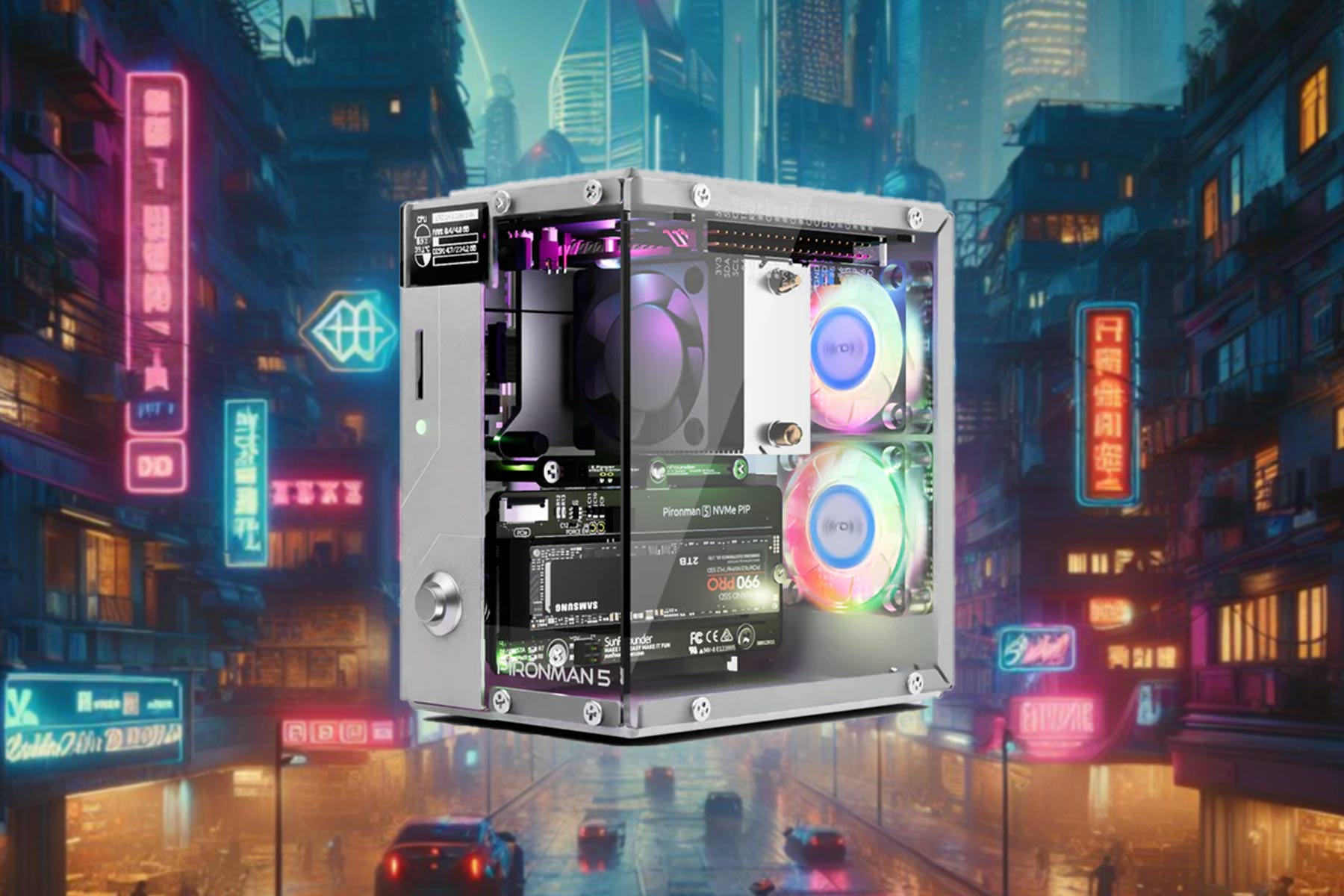
As XDA Developers writes, the Pironman 5 case will make your Raspberry Pi 5 look like a gaming PC. The case looks impressive, and it comes with a dedicated power button, cooling fans, RGB lights, and even an OLED monitor for monitoring resource usage.
The case has access to GPIO pins, and it even has room for expansion allowing you to add NVMe M.2 storage. Overall, it looks pretty impressive, and it will set you back $79.99 on SunFounder.
If you are a Windows user, it’s time to take measures to protect your PC and personal data. Recently, researchers at Kaspersky identified a new ransomware, dubbed ShrinkLocker, that can encrypt the data and remove recovery options on Windows PCs.
The ShrinkLocker ransomware, once loaded on the PC, checks the installed edition of Windows and enables BitLocker, if it is available. Then, it encrypts the whole drive and creates a new partition for the boot files of the operating system.
Now, threat actors delete any Bitlocker keys and remove available recovery options, thus eliminating the possibility for users to revert the PC to a stable state or recover the data. The keys are then sent to a server controlled by the attackers, and all traces of the attack are wiped out!
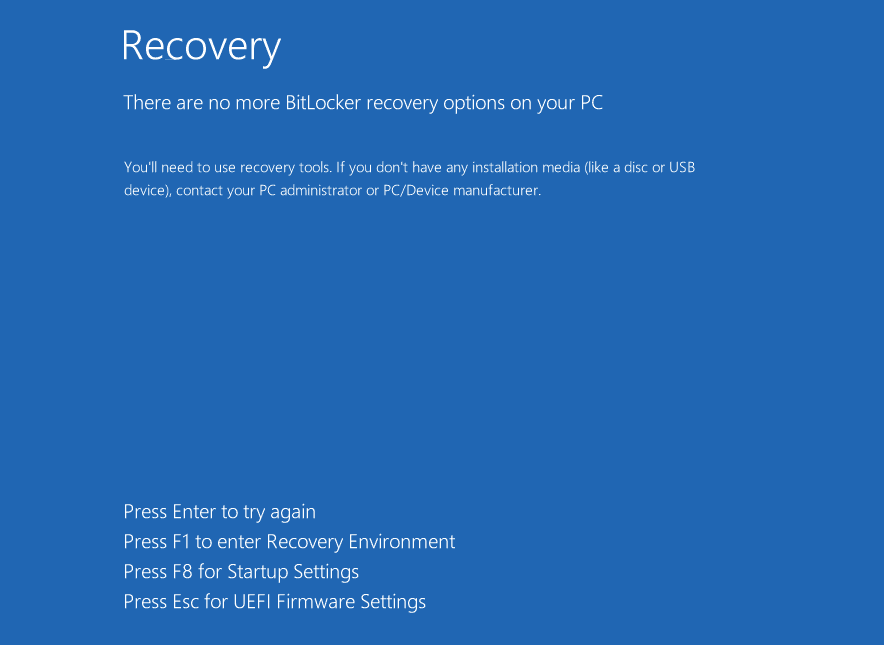
Finally, the ShrinkLocker ransomware initiates a full system shutdown. Upon restarting the computer, users see the message, There are no more BitLocker recovery options on your PC. You’ll need to use recovery tools. If you don’t have any installation media (like a disc or USB device), contact your PC administrator or PC/Device manufacturer.
BitLocker recovery screen on a system infected by ShrinkLocker (Image source: Kaspersky)
All of it is done using a VBscript and the built-in encryption tool, BitLocker. While the former lets threat actors automate the entire process, the latter allows effective encryption without relying on third-party tools.
Speaking about the ransomware and detailing the tips to stay protected, Cristian Souza, Incident Response Specialist at Kaspersky, said,
What is particularly concerning about this case is that BitLocker, originally designed to mitigate the risks of data theft or exposure, has been repurposed by adversaries for malicious ends. It’s a cruel irony that a security measure has been weaponized in this way. For companies using BitLocker, it’s crucial to ensure strong passwords and secure storage of recovery keys. Regular backups, kept offline and tested, are also essential safeguards.
So far, instances of the attack have been reported in Mexico, Indonesia, and Jordan, with steel and vaccine manufacturers as the prime target. Although a government entity was also attacked, according to Kaspersky.
The ShrinkLocker ransomware is the first of its kind, and it leverages a built-in Windows feature, BitLocker meant to enhance data protection and keep your PC safe from data theft.
Tips to stay protected against the ShrinkLocker ransomware
Use an effective antivirus solution: An effective antivirus solution is a must, considering it will warn you of such attacks before the final shutdown is triggered.
Minimize user privileges: For organizations, administrators can reduce the privileges granted to end users in order to prevent the attack. This includes limiting changes to the Registry, including manually or by unreliable third-party apps and scripts.
Monitor network traffic and script execution: You must regularly monitor the network traffic for any data sharing between the PC and the threat actor’s servers. Also, identify instances of VBScript execution.
Create regular cloud backups: While local backups have their share of benefits, a cloud backup will help you recover the data even when you are locked out of the PC.
This isn’t the first time concerns have been raised about BitLocker. A few months ago, we reported how BitLocker encryption can be bypassed in less than a minute,
So, it’s time to take things into your own hands and deploy additional measures to protect your PC. Cyberattacks are on the rise, and you must act accordingly!
If you have any more tips to stay protected from the ShrinkLocker ransomware, share them with our readers in the comments section.
If you launched Minecraft Realms and got the 502 Bad Gateway error, you’re not alone with this problem.
It’s an issue that Mojang is dealing right now and some users started posting on Reddit about it. We don’t know why, but the r/Minecraft moderators removed the post.
Some users also posted on X about the 502 error in Minecraft so the issue is generalized.
Anyway, Mojang acknowledged that the Realms error 502 issue and they are dealing with it, as we’ve learned from their webpage.
Now, this is a server-side problem related to the Microsoft Azure gateway so you can’t do anything much from your PC except waiting for a solution from Mojang.
The next AI stride is cloning or reproducing someone’s voice. OpenAI is developing Voice Engine and even TikTok is working on a voice-cloning feature. Edge will also implement a voice dubbing translator, so we know that this is big. Therefore, we’re not really surprised to see that a developer grabbed the oportunity to use this feature for voice calls.
Truecaller, a caller ID and spam blocking software developer teamed up with Microsoft to integrate the Redmond giant’s Azure AI Speech’s Personal Voice into Truecaller’s AI Assistant.
How is Truecaller working with Azure AI Speech?
Now, let’s dive a bit deeper. Truecaller’s AI Assistant, which made its debut in September 2022, is already a handy tool for automatically answering calls, screening them, taking messages, and even responding on your behalf. But with the new addition of Personal Voice, things are getting personal.
Basically, you can now create a digital version of your own voice. That means instead of a robotic tone, your callers can hear a voice that sounds just like you. Of course, this adds a touch of familiarity to the conversation. Thankfully, when the AI answers the call, it presents itself as a digital assistant, otherwise, the caller might need a couple of seconds to figure out they’re not actually talking to you.
This collaboration was showcased with a working demo at the Microsoft Build conference in Seattle, and it’s been the talk of the town since. The idea is simple yet revolutionary: record a few seconds of your voice, and voila, you’ve got a digital twin ready to handle your calls. Raphael Mimoun, from Truecaller, couldn’t hide his excitement, describing this integration in the company’s press release as a significant step towards a truly personalized communication experience.
The thought of your digital assistant not just working for you but sounding like you is pretty cool. But, as always, there are concerns about security. Well, Microsoft has put in several safeguards to ensure that this technology is used responsibly.
Consent from the original speaker is a must, and there’s a clear disclosure that the voice is synthetic. Plus, there’s a watermark added to the speech output for an extra layer of security, boasting a 99.7% accuracy in detection. So, will the app stop you from using the voices of famous actors like Morgan Freeman or Scarlett Johansson to answer your calls instead? We’ll just have to see about that, right?
Accessing this futuristic feature requires the latest version of the Truecaller app and a subscription to Truecaller Premium, which is priced at $4.99 per month.
We’re sure that Truecaller is just one of the many apps that will play with voice cloning so expect some surprises in the near future. Did you know that soon, you will be able to create a virtual AI vlogger to work for you? The future might look a bit creepy, but it’s definitely not boring at all.
What do you think about Truecaller’s app using Microsoft’s Azure AI Speech? Let us know in the comments below.
Lenovo is one of the leading laptop manufacturers, offering a wide range of options that cater to both the premium and budget segments. One of its budget laptops, the Lenovo IdeaPad 3i, is now available for just $399.99, down 12% from its original price of $455 during this limited-period Amazon deal!
The budget laptop features a 15.6″ FHD (Full HD) display, sports 8 GB RAM and 512 GB SSD (Solid State Drive) storage, and is extremely slim and lightweight (5.55 pounds), making it your perfect companion on the go.
Since the laptop ships with a built-in SSD, you benefit from faster boot time and seamless navigation. Besides, with Windows 11 Pro preinstalled, you get a bunch of additional security and productivity-oriented features, along with improved hardware support. The two alone cost $200-$300, compared to their cheaper alternatives, HDD and Windows 11 Home, respectively!
I would call it the perfect laptop for web browsing, running Microsoft Office, photo and video editing, and for educational purposes. As for video conferencing, the laptop features an HD webcam with a privacy shutter for complete peace of mind.
During this year’s Build conference, we saw some amazing new features and devices, one of them being Automatic Super Resolution.
While this feature will improve your performance in the game, not all games will support it, but we finally have a list of games that are compatible with it.
The following games will have full Automatic Super Resolution support
If you’re not familiar, this feature will help you achieve a higher frame rate in games while enhancing visual details, all by relying on the NPU instead of GPU.
As Wccftech writes, only 12 games will have out-of-the-box support for this feature and the list includes the following:
The Witcher 3: Wild Hunt
Dark Souls III
God of War
Resident Evil 2
Resident Evil 3
Sekiro: Shadows Die
Borderlands 3
7 Days to Die
BeamNG drive
Control
Kingdom Come: Deliverance
Twice Sniper Ghost Warrior Contracts 2
Some games, such as Shadow of the Tomb Raider and Skyrim SE will have opt-in support for Super Resolution.
This doesn’t mean that other titles won’t support it, but only the listed ones have perfect support for the time being.
All this information comes from the WorksOnWoA website, so we suggest you take a look at it to learn which games are fully supported on the ARM platform.
Not long ago, a Reddit post (which was later deleted) showed some leaked images of what supposedly were Windows 11 Enterprise 24H2 build 26120.670 wallpapers. Now, another leaker posted on X leaked images of the same wallpapers, saying that he obtained the images from an Inside Windows Telegram group.
New Windows wallpaper that will be flooded on Monday.
Windows Latest got hold of the high-res, downloadable versions, so you can have them right now.
Is there anything new with the Windows AI-themed wallpapers?
Bloom wallpaper Light version
The new wallpapers are a colorful twist on the familiar Windows 11 bloom, designed specifically for the tech enthusiasts among us.
The Light, Dark, and a special Dark/Black (OLED) versions were allegedly been crafted to celebrate the launch of Snapdragon X Elite and Plus PCs. The OLED variant, in particular, is a game-changer for devices with OLED displays, offering a pitch-black background that’s as sleek as it is power-efficient.
Even if they were created for the Copilot + PC, you may still use them on your slightly older, non-AI machine. Microsoft hasn’t mentioned anything about adding these to the Microsoft Store, but if the rumor is correct and they were installed on the Windows 11 Enterprise 24H2 build 26120.670, they will soon surface officially.
Actually, to be frank, there is not so much innovation in the new Windows 11 Bloom wallpapers. The only one that stands out is the OLED version. However, if you don’t have an OLED display, you will not see the difference from the other Bloom dark one.
The Bloom wallpaper is part of the Windows 11 brand, but you might also be creative with it. Above, you can see our first take on creating an DALL-E AI-generated wallpaper that uses the Bloom motive. We’re sure that you can get lots of interesting results.
The bottom line is that the new wallpapers look cool whether you’ve got an AI ARM PC or not. Now, it’s up to you if you go for the classic look, or get out of the regular pattern.
Do you like the new Windows 11 AI-themed wallpapers? Let us know in the comments below.
Many are eager to try Windows 11 because it comes with a wide array of new features, but installing it might not be as simple as you think.
Few users encountered an issue that prevented them from accepting or declining license terms thus stopping the installation process entirely.
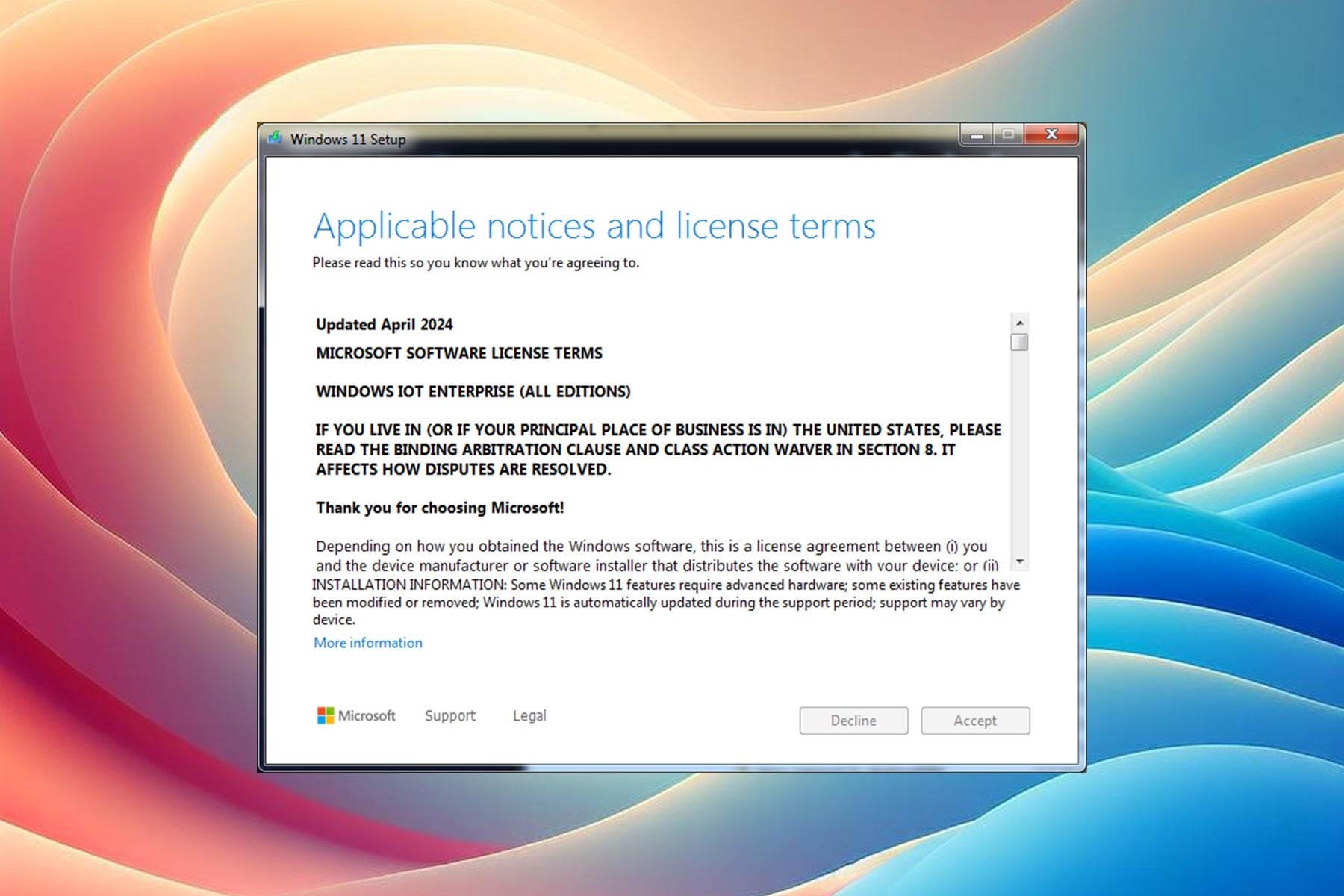
Users unable to accept or decline Windows 11 IoT Enterprise LTSC license terms
This comes from user Bob Pony on X, and it seems that Bob was trying to install Windows 11 IoT Enterprise LTSC edition, but was unable to accept the Terms of Service.
During the setup, both the Decline and Accept buttons are grayed out, thus making users unable to accept or decline Terms of Service.
While the scrollbar works, accepting terms of service isn’t possible thus making users unable to install this edition of Windows. Unfortunately, we don’t have any additional information on this problem, so we can’t tell what causes it.
Hopefully, Microsoft will take notice of this issue and fix it with an update. If you want to try this edition of Windows, ensure that your system meets Windows 11 IoT Enterprise LTSC system requirements before doing so.
We all know, Windows 11 hasn’t been as huge a success as Microsoft would have hoped. But it’s still a seamless and straightforward operating system and the first to offer a wide array of AI-powered features. The best part, you can now upgrade to Windows 11 Pro for as low as $24.97(roughly $34.12 CAD) during the Memorial Day deal!
It’s a digital purchase, so you wouldn’t have to wait for the product to be shipped. The license key will be available post purchase for redemption and activation of Windows 11 Pro.
Windows 11 Pro at 87% off this Memorial Day
You can get the Windows 11 Pro license for $24.97 from Financial Post during the ongoing deal live until May 31, 2024, and save 87%. The product typically costs $199.99!
It’s a lifetime license which will receive all future updates, and the key can be used to activate Windows 11 Pro on two desktop devices.
Since the offer is from a certified Microsoft Partner, you don’t have to think twice before making the purchase. Everything is in order, as confirmed by many, and the activation process is hassle-free.
Cheapest credible deal I believe over the internet. Keys work and the delivery is digital format. Everything was ready very quickly after purchase.
Great price and product. Instant access for installation code. Flawless transaction. More purchases on the way.
A few did report problems with the initially received activation keys, but the new one, issued right away, worked flawlessly.
Things to keep in mind:
System requirements: Your PC must meet the system requirements for Windows 11 for the operating system’s installation. Verify that before making the purchase!
30-day validity: The license must be redeemed within 30 days of purchase. If not done within the time frame, you can return it for store credits.
As for the hardware capabilities, while the Pro edition supports 2TB RAM, it’s 128 GB for the Home edition. Even for the processor, the Pro edition supports 128 processing cores and up to two processors, while the Home edition supports one processor of up to 64 cores.
So, if you are aiming for improved security, virtualization, and remote desktop capabilities, Windows 11 Pro is the most suited edition.
Besides, at just $24.97 during the limited-period offer, Windows 11 Pro is a steal deal and a viable alternative for the Home edition!
A groundbreaking stride has been made by Microsoft Research, introducing GigaPath, a novel vision transformer designed for the intricate realm of digital pathology. This innovation might be a crucial tool in the fight against cancer, where precision and detail are paramount. In fewer words, GigaPath is transforming a tiny slice of tumor tissue into a high-resolution digital image that can reveal the secrets of cancer’s behavior.
How will GigaPath revolutionize cancer research?
The software tackles the computational behemoth of analyzing gigapixel slides, which are thousands of times larger than your average digital photo. Traditional methods just can’t handle this scale efficiently, often missing the forest for the trees by ignoring the interconnectedness of different parts of the slide. But GigaPath, with its dilated self-attention mechanism, manages to keep the computational demands in check while not losing sight of the big picture. It’s like having a super-powered microscope that can zoom out to understand the entire landscape of the tumor environment and then zoom in on the details without breaking a sweat.
Collaborating with Providence Health System and the University of Washington, Microsoft Research has created Prov-GigaPath, a powerhouse AI model pre-trained on over a billion pathology image tiles. It’s the first of its kind to be pre-trained on such a massive scale of real-world data. And the results? Prov-GigaPath is outperforming the competition and setting new benchmarks in cancer classification and pathomics tasks.
However, GigaPath may also be used in other vision-language tasks. By marrying pathology slides with reports, it’s learning to understand the nuances of cancer diagnosis and treatment in ways that were previously out of reach.
The potential of GigaPath is immense, not just for the immediate tasks at hand but for the future of healthcare. GigaPath is at its start but, as the Microsoft scientists point out in their announcement, the tool also has applications for treatment response predictions.
Going forward, there are many opportunities for progress. Prov-GigaPath attained state-of-the-art performance compared to prior best models, but there is still significant growth space in many downstream tasks. While we have conducted initial exploration on pathology vision-language pretraining, there is still a long way to go to pursue the potential of a multimodal conversational assistant, specifically by incorporating advanced multimodal frameworks such as LLaVA-Med. Most importantly, we have yet to explore the impact of GigaPath and whole-slide pretraining in many key precision health tasks such as modeling tumor microenvironment and predicting treatment response.
Microsoft Research
What do you think about the new Microsoft GigaPath AI tool? Let’s discuss in the comments below.
The rumors about Xbox’s next-gen console are all over the internet. However, there seems to be a new addition to the long rumors list. Wccftech reports a new rumor that has been doing rounds online. Per the report, the Xbox Next will be a different gaming device altogether as compared to its predecessors.
Next-gen Xbox console reportedly will serve as a reference for manufacturers to make their own devices
The latest rumor about Xbox’s next-gen console comes from none other than Jez Corden from Windows Central. He says that the next-gen Xbox console will likely be a reference device with a heavy Windows slant for manufacturers making their own devices. Corden adds that it could be like the Surface Pro 11 which is a reference device for AI PCs.
If the claim turns out to be true, this would be a massive jump from previous Xbox consoles as it will be more like a PC that could run Steam games too. Corden’s Surface Pro 11 example is quite interesting since early rumors from this year hinted that the Surface team could lead Xbox Next’s development.
The next Xbox has a heavy Windows slant and will be a reference device for manufacturers making devices like the ASUS ROG Ally most likely. Like Surface Pro 11 is a reference device for AI PCs.
As we write, there’s no major information about Xbox Next. However, multiple reports suggest that the next-gen Xbox console is in the works. And, will be an example of the largest technical leap to date.
It will be interesting to see how Microsoft pulls this off. But one thing is sure that software and storage upgrades will play a crucial role in it. All that said, no official confirmation has been received on this matter, so it is more of Corden’s opinion than any concrete evidence-based report. Therefore, we urge you to take it with a grain of salt.
We earlier reported that many users are showing their concerns over Microsoft’s announcement of the new AI-based Recall feature in Windows 11. Well, that’s understandable totally. For the uninitiated, Recall on Windows 11 is a new feature that takes screenshots of your laptop screen every few seconds. Microsoft says that the feature is exclusive to the upcoming Copilot + PCs.
Although the company says the feature is optional for users and they can turn it off, the new feature seems to have grabbed the attention of regulators.
The Information Commissioner’s Office reaches out to Microsoft to enquire about the privacy risk posed by the Windows Recall feature
According to a recent report by BBC, the Information Commissioner’s Office (ICO), the UK data watchdog, has contacted Microsoft for additional information about the safety of the Recall feature in Windows 11.
Notably, the decision to enquire Microsoft reportedly came after privacy campaigners raised concerns about the new feature and called it a potential privacy nightmare. Speaking with BBC, an ICO spokesperson said:
We expect organizations to be transparent with users about how their data is being used and only process personal data to the extent that it is necessary to achieve a specific purpose. Industry must consider data protection from the outset and rigorously assess and mitigate risks to peoples’ rights and freedoms before bringing products to market.
AI advisors worried about Microsoft’s “photographic memory” feature
Talking about the privacy risks posed by the new Recall feature, Dr. Kris Shrishank, an AI and privacy adviser says:
This could be a privacy nightmare. The mere fact that screenshots will be taken during use of the device could have a chilling effect on people. People might avoid visiting certain websites and accessing documents, especially confidential documents, when Microsoft is taking screenshots every few seconds
Some other privacy experts voiced their concerns about passwords getting screengrabbed with the feature in place. Even Elon Musk has his say about the new feature Recall feature. He took to X and called the recently announced feature a Black Mirror’ episode.
Microsoft says its commitment to the users’ privacy and safety is paramount
Business Insider who reached out to a Microsoft representative says that they didn’t get any response on the matter. However, the company responded to BBC’s inquiry on this matter. Microsoft says the Recall feature is an optional experience and anyone without access to the device can’t see it.
All in all, the new feature certainly has raised eyebrows among privacy experts across the industry. Time will tell if there’ll be any objection from ICO in this matter. If there’s any update, we will update you with a new article.
What do you think about the Windows Recall feature? Please share your thoughts with our readers in the comments below.
Microsoft has finally announced the Windows 11 IoT Enterprise LTSC 2024 this week. To remind you, it earlier got leaked in February. The company has now published the minimum system requirements and categorized them as Preferred and Optional. That’s not all, we also have minimum processor requirements for Windows 11 IoT Enterprise LTSC 2024.
As Tom’s Hardware notes this specification will help decide design decisions for new devices and computers powered by Windows IoT Enterprise. For the uninitiated, Windows 11 IoT Enterprise is the full-fledged version of Windows Enterprise and is there for fixed-purpose devices including ATMs, kiosks, and more.
System Requirements for Windows 11 IoT Enterprise LTSC 2024
Component
PREFERRED Minimum Requirements
OPTIONAL Minimum Requirements
Processor
1 GHz, 2 cores
1 GHz, 2 cores
System memory
4GB
2 GB
Storage size
64GB
16 GB
Storage type
SSD
SSD, HDD, Hybrid Hard Drive, Flash
System firmware
UEFI
BIOS
TPM
TPM 2.0
Optional
Secure Boot
Enabled
Optional
DirectX
DirectX 12
DirectX 10 / none
Display
9-inch diagonal, 720p HD
Custom size / optional
Source: Microsoft
The minimum requirement above highlights that Windows 11 IoT Enterprise LTSC 2024 can run on computing devices with as little as 16GB storage. Plus, the Secure Boot and TPM requirements are optional for this Windows version. Microsoft has also added SSD as a preferred minimum system requirement which was rumored since 2022.
Not to forget, the support for Qualcomm processors was missing earlier in Windows 10 IoT LTSC, although it included support for AMD, Intel, and NXP’s processors. So, if you are interested to know more about the minimum processor requirement, click here.
Recently, Microsoft quietly launched an official end-of-support page for Windows 10 alongside older Windows versions like Windows 7 and 8.1. While Windows 10 is still supported, Microsoft ended support for the other two Windows versions on January 10, 2023.
Microsoft’s new end-of-support page features three different tabs, each for Windows 7, Windows 8.1, and Windows 10. The Windows 10’s end-of-support page gently reminds users about the imminent death of the operating system slated for October 14, 2025.
Microsoft launches an official Windows 10 end-of-support page with several details
The company also details what users can do with their soon-to-be outdated systems. Microsoft simply reminds users to upgrade to Windows 11. One part of the official support page mentions:
Support for Windows 10 will end in October 2025
After October 14, 2025, Microsoft will no longer provide security updates or technical support for Windows 10. Your PC will still work, but we recommend moving to Windows 11.
The page further highlights several links that talk more about Windows 11 and its features. There’s even a comparison chart interlinked on the page that differentiates Windows 10 and Windows 11. Not to forget, there’s a dedicated section on the support page with a laptop buying guide to upgrade to Windows 11.
As you know, Microsoft has announced minimum requirements for Windows 11, so having an outdated system can prevent you from upgrading to the OS. Therefore, you’ll need a laptop that meets the stringent system requirements for Windows 11. That’s where Microsoft’s laptop buying guide will come in handy for you.
You will also find links to visit the Microsoft Store to shop Winsiows 11 PCs within the support page as well as a guide to help you learn about transferring data from Windows 10 to Windows 11. The company further suggests backing up your files in OneDrive if you plan to keep using your Windows 10 PC.
Lastly, there are several FAQs including questions about the Windows 10 Extended Security Updates (ESU) Program. For the uninitiated, ESU is a paid program that allows enrolled systems to receive security updates beyond the end-of-support date for Windows 10. There’s no clarity about the pricing and enrollment criteria for the ESU program. However, Microsoft says that it will be made available near the end-of-support date.
Microsoft’s gaming division Xbox is working towards reducing environmental impact to achieve the company’s goal of becoming carbon-negative by 2030. Last year, Microsoft made Windows Update carbon-aware for PCs running on Windows 11.
And, earlier this year Xbox took some steps to reduce its carbon footprint with the help of multiple new features. These include carbon-aware Xbox game updates and downloads as well as the new energy settings.
Xbox’s new energy settings come in handy to save your electricity bill
This year, Xbox Series X|S consoles were automatically updated with a Shutdown (energy-saving) power option. Microsoft says this one-time energy settings update will decrease energy consumption when your Xbox console is off. The best part is that this won’t impact gameplay, performance, or the console’s ability to receive nightly updates.
Besides, you can use the remote features only when the console is turned on. However, the remote wake feature is not supported when the console is shut down. That said, you can always adjust the settings ensuring what’s best for you.
Notably, the Shutdown (energy saving) decreases power usage by up to 20 times compared to the Sleep feature. Currently, the update is only available to Xbox Insiders. But all Xbox gamers will soon get a chance to update their Xbox console to make it carbon-aware.
The new energy settings update called Active hours is also rolling out for Xbox Insiders. Whereas, Insiders who choose the Sleep power option can set the console’s active hours. During those hours your Xbox will power on quickly and be available for remote wake.
Source: Xbox
However, when the active hours end, Xbox will shut down drawing only 0.5 Watts compared to 10-15 Watts when the device is active. Microsoft in its blog asks all the stakeholders to contribute to the reduction of gaming’s impact on the environment. It says:
We can’t do this alone. We must work together with our players, developers, studios, and the industry if we’re going to help reduce gaming’s impact on the environment. We’re committed to collaborating with our developers, partnering with organizations, and empowering players to make more informed decisions.
Xbox is now the first gaming console to offer carbon-aware game downloads and updates
Xbox now optimizes game updates and downloads to run when the console can use the most renewable energy to become carbon-aware. Microsoft via the Xbox Wire blog explains how this would work. It adds:
When your console is plugged in, connected to the Internet and regional carbon intensity data is available, Xbox will schedule game, app, and OS updates for your console at specific times during the nightly maintenance window that may result in lower carbon emissions because a higher proportion of electricity is coming from lower-carbon sources on the electric grid.
It simply means, your Xbox console will wake up at a time when it can use renewable energy in your local grid rather than waking up during a specific maintenance window, say between 2AM and 6AM. One might wonder what difference does that make? This method decreases the dependency on CO2 emissions and fossil fuels, eventually saving your electricity bill.
You can also read more on what Xbox is doing for sustainability by clicking here.
If you’re eyeing to grab Activision Blizzard games on Xbox, this is the best time of the year. There were reports that over 200 games were added to this week’s Xbox deals as a part of a new Activision Blizzard Sale that just started on the Xbox Store.
The latest sale features popular game titles from franchises such as Call of Duty, Diablo, and Crash Bandicoot.
Grab your favorite Activision Blizzard Games on Xbox at a heavy discount
The Activision Blizzard Sale is set to end on June 8, a day before the Xbox Games Showcase which is scheduled for June 9. Not to forget a few reports are hinting towards the inclusion of some Activision Blizzard titles to Xbox Game Pass around the event. Therefore, if you are an Xbox Game Pass subscriber, it is feasible to wait until that happens.
You can go to the Deals sections of the Microsoft Store app on your Xbox to check all the deals from the Xbox Activision Blizzard Sale. However, the following are some of the best deals from the sale which will end June 8.
You can also check the full list of discounted games by clicking here. Which of the above Activision Blizzard games on Xbox will you pick? Please let us know in the comments below.
The Memorial Day sale is in full swing with jaw-dropping deals on gaming laptops like Razer Blade 15. So, if you are an avid gamer looking for a discounted gaming laptop, grabbing the Razer Blade 15 is a no-brainer.
Best Razer Blade 15 deals to grab today
As TechRadar notes, Walmart currently has the best deals for the Razer Blade 15 Advanced Edition. The premium gaming laptop is now on sale at Walmart for $2,481.95, amounting to a hefty discount of more than $800 from its regular price of $3,291.32. That’s approximately a 25% discount on the usual price of the Razer Blade 15.
If you are an Amazon customer, there’s some superb news. You can get the Razer Blade 15 at an additional discount of $130 (approx.), with a final price of $2350. However, there’s only one model left, so hurry up and grab it before it goes out of stock. Don’t worry if you miss this deal, you can always grab Walmart’s Razer Blade 15 deal right now.
Highlights of the discounted gaming laptop
Razer is one of the top names in the gaming industry with Blade 15 being one of the best portable options out there. This amazing gaming laptop flaunts a stylish design and has all things premium. The Razer Blade 15 Advanced Edition brings the power of an Intel Core i7-12800H processor alongside the Nvidia RTX 3070 Ti graphics card for smooth gaming performance.
The beefy gaming laptop has 16GB system RAM and a 15.6-inch 1440p display with a refresh rate of 240Hz. Plus, the 1TB SSD storage ensures you never run out of space and compromise with your games library. Not to forget, this Razer Blade 15 gaming laptop comes with 8GB of VRAM too. Therefore, you don’t have to worry about blurry textures and choppy frames while playing high-res games.
While these specs could sound underwhelming by 2024 standards, the performance and power brought in by the Alder Lake range processor are worth the money. On top of that, the GeForce RTX 3070 Ti remains one of the speedy GPUs for gaming out there. So, it’s a win-win situation for you, don’t miss this Razer Blade 15 deal after all.
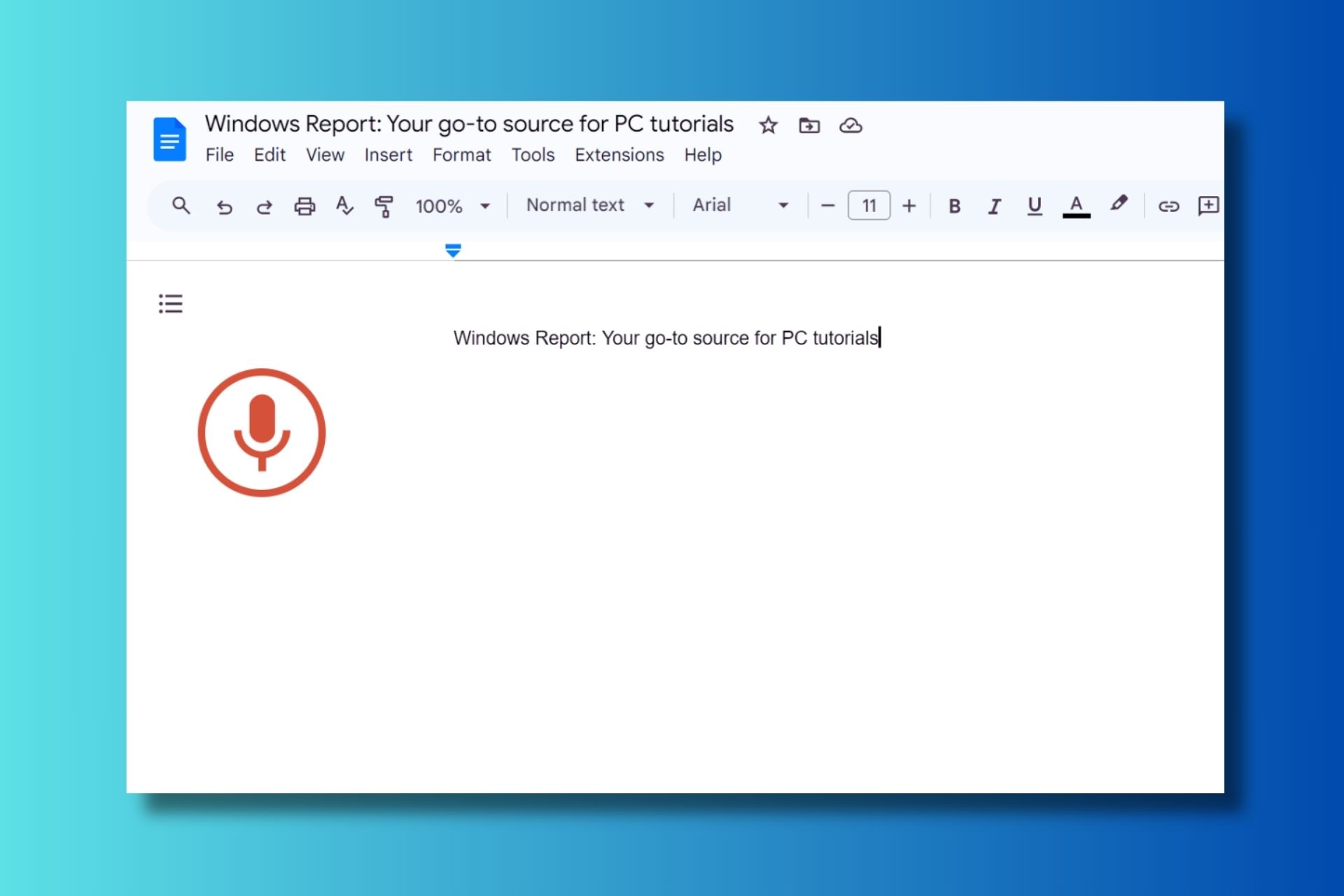
Google is expanding Docs’ voice typing and Slides’ captions feature to Safari and Microsoft Edge. For the uninitiated, these features were previously only available for Google Chrome desktop users.
Voice typing tools for Google Docs and Slides are coming to Edge and Safari browser
The company added that the voice typing feature will be rolling out for all Google Workspace users over the coming weeks. Not to forget, the latest change will also cater to users with personal Google accounts.
Starting today, we’re expanding support for voice typing and captions features to additional browsers, such as Edge and Safari. When a user turns on voice typing or captions, the web browser controls the speech-to-text service, determines how speech is processed, and then sends text data to Google Docs and Google Slides.
Voice typing has been quite beneficial for users
Users can edit documents and speaker notes using voice typing in Google Docs and Google Slides, respectively. Notably, you can access voice typing in Google Docs by going to Tools > Voice Typing. You can choose to edit or format your document using different voice commands.
Besides dictation, you can use voice commands to start/stop voice typing, select items, copy-paste content, add punctuation, etc.
Let’s not forget that you can choose from multiple languages to voice type in Docs in Edge or Safari browser after the latest update. However, you must ensure that the account and document language are both English to use voice commands.
That’s not all, you need to ensure the microphone should be working fine in order is working fine on your Windows PC or Mac. From the users’ point of view, you will see the following notice while enabling the feature for the first time:
Source: Google
The company also says the workspace managing admin will have some control over the voice typing feature. It adds:
Admins can control which web browsers are supported in their domain. Certain browsers may offer browser-level controls for disabling the Web Speech API.
What do you think about the recent update related to voice typing and captions? Please share our thoughts below.
The Read Aloud feature in Chrome Reading mode is getting upgraded. Google is adding two new features to Read Aloud for automatic voice selection based on the webpage language and on-demand language downloads within Read Aloud menus. These features are being tested in Chrome Canary.
Chrome offers a built-in Reading Mode that displays clutter-free content, improving your reading experience while browsing websites. This mode is accessible from a side panel.
Chrome has an experimental Read Aoud feature integrated into Reading Mode for accessibility needs. It allows you to choose from various voices and set voice speed according to your liking.
Chrome adds Automatic Voice switching and Language downloading to Read Aloud
Automatic Voice Switching takes the guesswork out of choosing the best voice for the text being read. This feature analyzes the language of the webpage in Reading Mode and automatically selects the most suitable voice from the available options. This can be particularly helpful for users who frequently encounter articles in different languages.
On-demand Language Downloads: This feature allows users to download language packs directly from the Read Aloud menu within Reading Mode. It eliminates the need to manage voice downloads beforehand and makes sure you have the necessary voice pack for the language you’re encountering.
Benefits:
Users with visual impairments or reading difficulties can access content in various languages with the most natural-sounding voice.
Users can easily switch between languages without interrupting their reading flow.
Comparison with Microsoft Edge:
Currently, Microsoft Edge offers a Read Aloud feature but lacks built-in automatic voice switching or direct language downloading within Read Aloud. While Edge users can choose from pre-downloaded voices, they need to manage these downloads manually.
How to enable new Read Aloud Features in Chrome
Open Chrome.
Visit chrome://flags
Find and enable the following flags: Reading Mode Automatic Voice Switching Reading Mode Language Downloading
ShrinkLocker is the name of the new ransomware that’s affecting Microsoft’s BitLocker. Like most ransomware, it encrypts corporate files, steals decryption keys, and asks you to pay a ransom to retrieve them. So, BitLocker isn’t safe on modern devices.
Global Emergency Response, the maker of the Kaspersky antivirus, discovered and named it. According to them, the ransomware targets steel and vaccine manufacturing companies and governmental institutions from Mexico, Indonesia, and Jordan.
How did the hackers develop the ShrinkLocker ransomware?
Cybercriminals created the ShrinkLocker ransomware using Visual Basic Scripting (VBScript), a deprecated programming language for automated tasks and controlling applications on Windows-based systems. The ShrinkLocker script can verify the current version of your Windows. According to Kaspersky, it can attack new and old systems dating back to Windows 2008.
The ShrinkLocker ransomware will delete itself if your device doesn’t meet the requirements of the wrongdoer. For example, if your domain doesn’t match the target or your device is older than Vista, it won’t affect you.
If your device is suitable for the attack, ShrinkLocker will change your boot settings. Then, it will use BitLocker to attempt to encrypt your partitions. Besides that, it will use the diskpart command to shrink your non-Windows partitions. Afterward, it creates primary volumes using the unallocated space left and reinstalls the boot files on the new partitions.
The ransomware locks you out
ShrinkLocker can lock you out of your device because it removes the security systems of your BitLocker encryption key to prevent you from recovering it. The ransomware removes the key from your device after sending it to the hackers.
When the malware finishes its process, it shuts down your device and leaves you with all drivers locked and without a way to recover what’s lost. Also, it deletes the files and logs that could lead to details about the attack. On top of that, if you attempt to open your device, it shows the following message: There are no more BitLocker recovery options on your PC.
Ultimately, to protect your device and organization from the ShrinkLocker ransomware, you can use an Endpoint Protection Platform (EPP) solution. It will help you find out if anyone tried to tinker with your BitLocker, limit users, and track events related to VBS and PowerShell.
Did you ever encounter a BitLocker malware? Let us know in the comments.
Have you considered what horizontal video suggestions on YouTube on a desktop would look like? Well, it seems that Google is testing this option, as noted by some Reddit users, and quite frankly, it’s not looking good, at all.
The new layout would display video suggestions right below the main video, where the title and its descriptions usually are located, as you can see in the image below.
The title and its descriptions would be placed vertically, in the top right area of the screen, followed by the comments section below it. We have to say: it’s not entirely a bad idea, not at all. This way, you are able, theoretically to read comments while watching the video.
Currently, YouTube on desktops doesn’t allow that: you have to scroll every time you want to read comments while watching, which makes the whole experience a bit frustrating, and annoying, to be honest. Why? Because you miss out on what’s being shown. And yes, I know many of you will say “Well, you shouldn’t read comments while watching YouTube, anyways!”, but oh, well, I do it. I always do it.
So, theoretically, YouTube showing video suggestions horizontally on desktop platforms shouldn’t be the end of the world, and I would like it, eventually. However, when looked at the image posted on Reddit, for the first time, I automatically said: “No, I don’t like it!”.
This is normal: YouTube’s video suggestions have always been vertical, for as long as I can remember, so seeing the platform that way made me think this is not YouTube. The company is testing it, and it could show to users randomly, and then disappear, as noted by many Reddit users:
That appeared for me a couple weeks ago and then went away. Seems like they’re just testing it.
Reddit user
I don’t know when and if YouTube will release this update, and I couldn’t find anything specific about it online, other than the Reddit posts, but I’m hoping the company will release it as optional so that people can go back to the original layout if they don’t like this one.
This is the only way it would work. What do you think?
In other bizarre news, YouTube is now entirely blocking adblockers, but Chrome Store is still promoting them. So, you’re encouraged to download and install them, but they won’t work on YouTube.
European Parliament elections will happen in two weeks, and wrongdoers are using AI deepfakes to manipulate them. As you might already know, they are getting more accurate. Thus, Microsoft wants to provide political parties, campaigns, news organizations, and voters with the right tools to safeguard the democratic process.
Can hackers use Microsoft AI tools to manipulate elections?
The tech giant announced a few months ago that cybercriminals won’t be able to use official tools to generate AI deepfakes. Also, during the Munich Security Conference, Microsoft and other companies such as X, TikTok, Google, Adobe, LinkedIn, Meta, and Amazon signed the Tech Accord to Combat Deceptive Use of AI in the 2024 elections.
The companies are developing tools, like Content Credentials, to prevent AI deepfakes from manipulating elections. Also, they are working on implementing a C2PA standard, using watermarks for AI generations and education campaigns.
Microsoft arranged sessions in Brussels and across the 27 Member States to educate candidates and the political staff about deepfakes and provide effective solutions. One of them is a website that allows us to report deceptive AI-generated content.
The news organizations and election officials also received other Content Integrity tools, such as an easy-to-use web application and a mobile application that will enable them to add Content Credentials to their media. The apps should prevent hackers from using AI to create deepfakes from their photos and videos to manipulate the elections.
Protect your organization with AccountGuard
Human rights and Non-profit organizations, journalists, and political members can now use Microsoft AccountGuard. The tool detects and defends users against high-risk organizations. If you are a Microsoft 365 customer, you can use it without an additional fee. However, it is only available in 23 EU Member States and the European Parliament.
Microsoft recently launched an educational campaign to teach EU citizens from all 27 EU Member States about AI-generated deepfakes to prevent hackers from manipulating the elections. Besides, it promotes trusted official EU sources for voting information and other non-governmental initiatives related to this topic.
In addition, Microsoft and OpenAI launched the Societal Resilience Fund. It provides grants to promote AI education and training among voters and vulnerable communities. Also, the tech giant supports the Use Your Vote campaign.
Ultimately, Microsoft will work on various tools to prevent AI deepfakes from manipulating elections. In addition, we can also contribute by reporting AI-generated content when it spreads misinformation. Hopefully, more companies will sign the Tech Accord to Combat Deceptive Use of AI.
Did you see any AI deepfakes on your feed spreading misinformation about a political party? Let us know in the comments.
So far, there’s no official information available, and this seems more like Jez Corden’s opinion than insider information, so take it with a grain of salt.
According to a leaked contract, repair stores need to notify Samsung when you bring in a device. They have to give details about your problem and send additional information such as your name, contact information, and device identifier. Additionally, if the ones repairing your phone discover an aftermarket part, they will have to disassemble your device. Otherwise, Samsung can nullify their agreement.
The Samsung contract brings new challenges
One of the main problems with the Samsung contract is that independent repair centers won’t receive the Samsung Authorized Service Provider status but will need to sign it to gain authorization to mend phones. Fortunately, according to 404 Media, the service centers from the 30 states where the Right to Repair legislation exists won’t need to sign it.
The Samsung contract will lead to a lot of issues. For example, some of us will stop repairing our devices, which could lead to various safety issues. Besides, we might throw faulty devices, and they will significantly impact the environment.
The contract might increase repair costs
If repair shops sign the Samsung contract, the company could force them to purchase overpriced parts. This decision will increase the repair costs, and if the price to repair a broken screen is one-quarter of the price of the phone, some of us will most likely switch to another company. In addition, the agreement prohibits service centers from performing board-level repairs.
Service centers use aftermarket parts because they are way cheaper. Also, for a phone that lasts just a few years, they are the better option. However, some repair shops might not tell you if they use it. So, your phone might already have aftermarket parts. Also, the new Samsung agreement is a problem for older phones because there is a chance that their parts are no longer supplied.
Some consider the Samsung contract a severe breach of privacy, especially since the company asks for your phone number, address, zip code, region, and email. Besides, the company shouldn’t have access to our private information.
Ultimately, the Samsung contract is inconvenient for repair shops and mobile phone users. Also, it might drive customers away. In addition, the repair costs will most likely increase, and the process won’t be available for older devices anymore.
Will you continue using Samsung devices? Let us know in the comments.