Anthropic Signs Compute Deal with Google and Broadcom as Run-Rate Revenue Exceeds $30B

Anthropic has officially signed a massive compute deal with Google and Broadcom to create multiple gigawatts of AI processing power using TPUs. This will allow the company to power its future Claude language models. The company says that the processing facilities should be online by 2027.

The push for more AI compute is getting serious

The announcement follows a significant increase in the demand for Anthropic’s Claude models in 2026. Notably, the company also announced that it has surpassed $30 billion run-rate revenue mark, almost tripling the $9 billion reported in 2025. Additionally, the company saw a doubling of the number of organizations paying them over $1 million annually, climbing to more than 1,000 in the last few months.

This new agreement builds on Anthropic’s earlier partnerships, especially with Google Cloud and Broadcom. Most of the new infrastructure will be based in the United States, expanding its earlier $50 billion commitment toward domestic compute investments.

Anthropic is not relying on a single ecosystem either. It continues to train and run Claude across multiple platforms, including AWS Trainium, Google TPUs, and NVIDIA GPUs. This multi-platform approach likely helps balance performance, cost, and reliability depending on workload needs.

Speaking of competition, this move highlights how aggressively AI companies are locking in compute supply. Google strengthens its TPU position here, while Broadcom benefits from deeper infrastructure integration. At the same time, Amazon remains Anthropic’s primary cloud partner through AWS and Project Rainier.

Claude also stands out as one of the few frontier models available across all major cloud platforms, including AWS Bedrock, Google Vertex AI, and Microsoft Azure. All that said, it’s still early to tell how this capacity will translate into real-world performance gains. The 2027 timeline suggests a longer runway, and demand may shift further by then.

Windows BlueHammer Zero-Day Lets Attackers Gain SYSTEM Access

Microsoft is dealing with a newly disclosed zero-day vulnerability in Windows that could allow attackers to gain full system control, with no official fix available yet.

The flaw, called BlueHammer, combines multiple techniques to bypass security protections and escalate privileges to the highest level on affected systems.

BlueHammer zero-day exposes Windows systems to SYSTEM-level attacks

According to Bleeping Computer, the BlueHammer vulnerability is a Local Privilege Escalation (LPE) flaw that leverages a combination of time-of-check to time-of-use (TOCTOU) issues and path confusion bugs.

The exploit was discovered and publicly released by security researcher Chaotic Eclipse, who cited frustration with Microsoft’s disclosure handling as the reason for publishing proof-of-concept code on GitHub.

An exploit allows access to password hashes and full system control

If successfully executed, the exploit can grant attackers access to the Security Account Manager (SAM) database, exposing password hashes and enabling privilege escalation to the SYSTEM level.

At that point, attackers can run commands with the highest privileges, effectively taking full control of the compromised machine.

Not remote, but still dangerous in real-world attacks

The vulnerability requires local access first, meaning attackers must already have a foothold on the system through methods like phishing, social engineering, or stolen credentials.

Even so, once access is gained, BlueHammer can be used to quickly escalate privileges and deepen the compromise.

The proof-of-concept is not entirely reliable and may fail in some scenarios, but it still demonstrates a viable attack path.

Behavior varies between Windows and Windows Server

Testing shows that the exploit works more reliably on standard Windows systems, where it can achieve full SYSTEM-level access.

On Windows Server environments, the same exploit may only elevate privileges to the administrator level instead of full SYSTEM control.

Microsoft is investigating as a public exploit spreads

Microsoft has acknowledged the issue and confirmed it is investigating the vulnerability, while also reiterating its stance on coordinated disclosure practices.

At the time of writing, no patch or official mitigation has been released.

In other security developments, Microsoft recently warned users about Medusa ransomware activity, while attackers have also been distributing malware on GitHub disguised as leaked Anthropic Claude code. Meanwhile, Google has already moved quickly to patch a separate Chrome zero-day vulnerability.

Microsoft Brings AI Document Generation to Word on iOS

Microsoft continues expanding its AI push across Office, this time bringing new Copilot-powered writing features to Microsoft Word on iPhone. After improving the commenting experience on iOS, the company now focuses on helping users create content faster using natural language.

The feature is now live for Word on iPhone and requires a Microsoft 365 Copilot license to access.

Copilot brings AI-powered writing to Word on iPhone

The new functionality allows users to co-create documents directly inside Word using prompts. Instead of starting from scratch, users can simply describe what they want, and Copilot generates a draft instantly.

To use it, users need to tap the Copilot icon within a document and enter a prompt. This can include a topic, idea, or specific instructions. Copilot then produces content based on that input, which users can further refine or edit.

Microsoft also added tools to make the experience more flexible. Users can update existing content using clear prompts, reference other parts of the document using the “/” command, and quickly undo changes if the AI output is not useful.

Still limited in key areas

Despite the new capabilities, the feature comes with several limitations. Users cannot create entirely new documents automatically, and Copilot does not support inserting images directly.

It also lacks the ability to add or edit comments and offers limited support for Tracked Changes, which may impact collaborative workflows.

This update is part of a broader push to integrate AI deeper into Microsoft’s productivity apps. The company recently introduced faster search across Office apps and added AI-powered alt text generation in Word and PowerPoint on Mac.

With Copilot steadily expanding across platforms, Microsoft is clearly positioning AI as a core part of the Office experience, including on mobile devices.

Via Neowin

Nintendo Switch 2 Bundle Gets $20 Discount with Super Mario Galaxy Games

Nintendo is rolling out a limited-time promotion for the Switch 2, giving buyers a small but timely discount amid ongoing concerns about pricing and supply. The new offer bundles the console with two classic Mario titles, making it one of the first notable deals for the platform.

Limited-time bundle offer across major retailers

The promotion runs from April 12 through May 9, offering a $20 discount when buying a Nintendo Switch 2 alongside Super Mario Galaxy and Super Mario Galaxy 2. The bundle applies to both physical and digital versions, which is notable as Nintendo has recently introduced separate pricing for digital and physical games.

Major retailers are participating in the promotion, including Amazon, Best Buy, Walmart, Target, and GameStop, making the offer widely accessible across the US market.

Free update brings 4K and new gameplay features

Alongside the promotion, Nintendo has released a free update for Super Mario Galaxy and its sequel on Switch 2. The update brings several technical and gameplay improvements, including support for 4K resolution and a refined user interface. Players will also find additional Storybook Chapters and a new Assist Mode designed to make gameplay more accessible.

Control enhancements are also part of the update. The new Joy-Con 2 mouse functionality allows a second player to interact in a more dynamic way, adding a fresh cooperative element to the experience.

The timing of this promotion is notable. Reports suggest Nintendo has faced slower-than-expected Switch 2 sales in the US, leading to a reported 30% reduction in production. At the same time, a former Nintendo executive has hinted that prices for the console could increase in the future.

With uncertainty around pricing and availability, this limited-time bundle may be one of the better opportunities for early adopters to jump into the Switch 2 ecosystem.

Starfield’s Big Update Drops Today: Here Is When You Can Play

Bethesda is rolling out its biggest Starfield update of the year this week, bringing a massive wave of fresh content to the popular space game. Players across Xbox Series X, Xbox Series S, PC, and PlayStation 5 can look forward to the arrival of both the Free Lanes and Terran Armada additions.

This double drop includes a mix of completely free features alongside a new paid expansion.

Here’s when the patch goes live across the globe

The developer confirmed the exact global release times for this highly anticipated patch. Everything officially launches on April 7, meaning fans will not have to wait much longer. The content unlocks at 8 AM PDT, which translates to 11 AM EDT, 4 PM BST, and 5 PM CEST. 

Once the clock hits that time, you should see a fairly large download become available on your preferred platform. After the installation finishes, you can jump right back into your ship and start exploring everything the patch has to offer.

These are the differences between free and paid content

Everyone who owns the base game gets access to the Free Lanes content at absolutely no extra cost. This free portion of the patch brings various improvements and fresh activities to the galaxy. If you want to dive into the Terran Armada expansion, that part will cost an extra ten dollars on the digital storefront.

However, people who have already purchased the Premium Edition or the Premium Upgrade will get this new paid content automatically without spending another dime. The studio hopes this major content drop gives lapsed players a great reason to revisit the game.

Via PureBox

LinkedIn Faces Spying Claims Over Secret Browser Extension Scans

LinkedIn is dealing with heavy criticism after a new security report revealed it runs a hidden script to scan the computers of people visiting the site. A German group representing commercial users claims the massive professional network secretly checks browsers for thousands of installed extensions.

The group calls this a major espionage operation, raising serious questions about how the platform handles user privacy, monitors daily activity, and tracks personal device data.

LinkedIn’s hidden scripts look for tax software, hardware details, and detailed work histories

The report, dubbed BrowserGate, explains that LinkedIn injects a silent file into every page load. This script probes Chromium-based browsers for over 6,000 specific extensions. Many of these targeted tools are sales intelligence products that directly compete with the platform. However, the scan also looks for grammar checkers, tax software, and even extensions that might reveal a person’s political or religious views.

Along with checking for extensions, the script harvests hardware details like available memory, processor core count, screen resolution, and battery status. Since user profiles display real names and detailed work histories, privacy advocates worry that this data can easily identify individuals.

They argue that linking specific browser habits to an actual person crosses a clear privacy line, especially when the scanning happens completely in the background.

LinkedIn has denied all spying allegations through browsers

Microsoft-owned company LinkedIn strongly denies the spying allegations. The company states it only collects this data to stop automated bots from scraping user information without permission. A spokesperson clarified that it does not use the findings to guess sensitive details about its members. Instead, it claims the main goal is to block tools that violate site rules and to keep the servers running smoothly for everyone.

The company also pointed out that the group behind the report includes a developer whose account was previously restricted for unauthorized data collection. A German court even ruled against that individual in a related lawsuit.

Despite this legal defense, privacy experts and everyday users remain upset that the site does not clearly mention this extensive scanning practice anywhere in its official privacy policy.

Via Beepingcomputer

Intel Ends Official XeSS Plugin Support for the Unity Engine

Game developers using the Unity engine will have to figure out their own upscaling solutions if they want to keep using Intel’s technology. Intel recently archived its official XeSS plugin for Unity, permanently freezing the code and walking away from the project.

This means the popular game engine will no longer receive official updates or bug fixes for the feature from the hardware giant.

The developers are now on their own

Intel quietly changed the GitHub repository for the plugin to a read-only status. The last public release of the tool came out back in March 2025. While the company is still updating its main XeSS software and its Unreal Engine plugin, Unity creators are currently stuck with an outdated version.

Because of this move, any studio in the USA or abroad that wants to keep using the plugin will have to manually manage the code. Interestingly, AMD made a similar choice by dropping its own Unity plugin updates a while ago. Game makers will simply have to adapt to these sudden changes if they want to optimize their future releases.

To make its stance clear, Intel posted a final notice on the project page. The company stated, “Intel will not provide or guarantee development of or support for this project, including but not limited to, maintenance, bug fixes, new releases or updates. Patches to this project are no longer accepted by Intel.”

The move does not affect XeSS as a whole. The upscaling tech is still supported in other engines and through different integrations. Still, dropping official Unity support could slow adoption among smaller studios that rely heavily on the engine.

Via Techpowerup

Sony Purges More Low-Effort Shovelware Games From PlayStation Store

Sony is cleaning up the PlayStation Store once again. The company recently removed a large batch of low-effort games from its digital catalog. This move targets publishers that flood the system with cheap titles to make a quick profit.

Players in the USA and around the world have complained about these games cluttering the search results and making it harder to find actual quality releases.

Sony removes entire catalogs from creators using copied assets

The latest ban wave specifically hit developers known for releasing asset flips or content generated by artificial intelligence, as spotted on PSNProfiles. Entire game collections from publishers like GoGame Console Publisher, Welding Byte, and VRCForge Studios are now completely gone. Some of the deleted games include unusual titles like Urban Driver Simulator and Jesus Simulator. 

These games often try to copy the names of successful independent projects to trick people into spending money. Sony has been trying to tackle this issue for a while. Earlier in the year, it took down over a thousand similar games from a single developer. The main focus is to stop these creators from taking advantage of the digital store.

Sony is protecting buyers from bad purchases

Digital storefronts are constantly fighting a battle against low-quality software. When a platform is full of asset flips, buyers get annoyed, and developers of real games lose their visibility. By deleting these games, Sony is making it easier for customers to browse the store without stumbling over clear scams.

Other tech companies face similar issues. Mobile app stores frequently deal with fake versions of popular games, leading to lawsuits and constant moderation efforts. For now, PlayStation owners will enjoy a slightly cleaner digital shop.

Sony is expected to keep monitoring its platform to prevent these types of games from returning in the future.

Via Insider-Gaming

Intel Sticks with Raptor Lake Processors as PC Building Costs Keep Rising

Intel is officially keeping its focus on older Raptor Lake processors as the price to build a desktop computer keeps climbing in the USA and globally. Even though newer generations of chips have entered the market, the company sees this older lineup as a critical piece of its strategy moving forward.

With memory and motherboard prices pushing builders out of the market, this move offers gamers a reliable safety net.

Intel is keeping its Raptor Lake chips alive 

Intel executive Robert Hallock recently confirmed to Club360 that Raptor Lake is not going anywhere anytime soon. The 13th and 14th-generation processors are still incredibly fast. They also hold their ground well against newer hardware from other brands. While the recent Core Ultra series had a somewhat rocky start with gamers, the older CPUs are easy to find.

More importantly, they pair well with cheaper motherboards. This makes them a highly attractive option for anyone who wants good performance without draining their bank account.

Hybrid memory support helps cut costs

A major reason for this extended lifespan is memory support. Many motherboards that fit Raptor Lake processors still work perfectly with older DDR4 memory. Since DDR5 prices are increasing rapidly, jumping to a completely new platform is getting too expensive for average builders. To help solve this problem, hardware makers are releasing new motherboards that actually include slots for both DDR4 and DDR5 memory.

This hybrid approach lets buyers choose the cheaper memory option right now. They can then upgrade their memory later without having to replace the entire computer system.

Via Wcctech

GTA 6 PC Release Delay: Fans Torn Between Waiting and Consoles

The wait for Grand Theft Auto 6 feels like it will never end. While the finish line is finally in sight for console players, a huge portion of the fanbase is stuck waiting even longer. It is no secret that Rockstar Games decided to skip a simultaneous PC launch. Now, the reality of that delay is setting in, and PC gamers are getting seriously annoyed about having to wait.

The fear of missing out is pushing PC players to buy a PS5 or Xbox

Even though many players want to hold out for the highest quality PC version, the fear of missing out is incredibly strong. Recent online discussions show fans are deeply torn on what to do. Some players admit they will buy a PlayStation 5 or Xbox Series just so they do not miss the launch day hype. The idea of dodging spoilers for months is pushing people toward unfamiliar systems, as Screen Rant reports.

Since a playable PC version could easily take a year or more to arrive, waiting is a really tough sell. For context, Rockstar took a massive 19 months to put out the PC version of Grand Theft Auto 5 after its initial console launch. With reports of upcoming PlayStation 5 price hikes, some gamers are even buying up new or used consoles right now before prices get worse. It shows just how much pull this single release has on the market.

There are some upsides to waiting it out

Given the developer’s history, it seems highly likely that many dedicated fans will end up buying the game twice. This strategy repeats what fans often call a huge mistake from the company, as it forces double-dipping. Still, holding off does have real, tangible perks for those who strictly stick to their computers.

When it finally drops, PC players will almost certainly get better visual options and improved performance sliders compared to console owners. You also have to factor in access to custom servers and community mods. That kind of custom content always adds countless hours of replay value to the base game.

The main problem is that nobody knows exactly how long it will take for the game to actually land on home computers. Until Rockstar gives a solid date, PC gamers will be stuck tiered of waiting to the brink.

Microsoft Warns Storm‑1175 Targets Web Systems With Medusa Ransomware

Microsoft recently issued a serious warning about a financially motivated cybercriminal group known as Storm-1175. This dangerous hacking group targets vulnerable web servers across the globe. It uses high-speed tactics to deploy the destructive Medusa ransomware. 

Microsoft explained that the group usually attacks systems right after a new software flaw is discovered. This rapid action traps organizations before any critical software patches get applied.

Hackers are exploiting vulnerabilities for quick initial access

The hacking group moves incredibly fast to weaponize recently disclosed security flaws. It specifically targets exposed web applications. Security teams observed the group exploiting over 16 different vulnerabilities since last year. It attacks servers during the short window between public disclosure and widespread patch adoption.

In some extreme cases, the threat actors struck within a single day of a flaw becoming public. The attackers even use zero-day exploits to break into systems. This shows an advanced capability to find fresh targets. After finding a weak spot, the group quickly establishes a foothold. It often drops a remote access payload or creates a hidden web shell. 

This allows the hackers to securely enter the targeted network. Recent intrusions heavily impacted the healthcare sector. The group also targets education and finance organizations in the United States and the United Kingdom.

They are stealing data and deploying the final payload

Once inside the network, Storm-1175 moves rapidly toward its ultimate goal. It frequently creates a new user account with full administrator privileges. The group then uses legitimate remote monitoring software to move laterally across different computers. It often disables local security tools like antivirus programs to avoid detection. The attackers then steal sensitive documents and private information using a synchronization tool called Rclone. This stolen data is likely to be used for extortion later.

Finally, the group deploys the Medusa ransomware across the compromised environment. This final step locks users out of their critical files. Protecting administrative accounts helps stop the group from spreading. Monitoring remote access tools is also a crucial security step. Microsoft noted that the entire attack chain can unfold in just a few days.

Sometimes, the attackers complete their mission in under 24 hours. The software maker urges all network defenders to patch web systems quickly.

OpenAI is Reportedly Testing Its Next-Gen Image V2 Model in ChatGPT & Arena

OpenAI is quietly testing a brand new visual generation model across different platforms. Users recently spotted the software, currently called Image V2, appearing on the popular Arena website under some unusual codenames. While the company pulled the model from the public leaderboard over the weekend, a select group of people can still access it directly inside ChatGPT through an ongoing testing phase.

Here’s how the trial testing phase works

The artificial intelligence firm is using a familiar strategy to test the waters. It asks regular users to generate pictures and then choose the best result without knowing which software actually made it. This blind testing method gives the company real feedback on what people actually like.

It did the same thing late last year before officially launching its current standard image software just a few weeks later. Right now, some lucky accounts have permanent access to this upcoming version, while others only see the new results mixed into regular prompts.

OpenAI is fixing old text spelling problems

Early reactions from testers show that Image V2 is a serious upgrade. One of the biggest complaints about generated art is how it handles written text. The old versions often spit out garbled letters or nonsense words. The new software fixes this annoying issue. People say it can generate realistic user interfaces and buttons with correctly spelled words. It also follows complex instructions much better than before.

The tech brand needs a big win to stay competitive. Google currently dominates the top spot on the public leaderboards with its own visual tools. A strong release here could help the creator of ChatGPT reclaim its crown. The main question left is whether the public release will look as good as these test runs.

The firm sometimes lowers the quality of its products to keep operating costs down or improve safety. There is no official release date yet, but OpenAI is already excited about the potential for building accurate UI mockups and layouts.

Microsoft Finally Focuses On Windows 11 Settings And New Design

Microsoft is finally turning its attention to the visual side of its popular operating system. For a long time, the software maker prioritized basic function over visual appeal, often leaving menus feeling clunky or disjointed. Now, the company wants to change that. The lead design director recently announced a wave of fresh visual updates coming this April. 

These changes specifically target cluttered menus, outdated dialog boxes, and the main system control hub to make everything look much better.

Microsoft is cleaning up the messy Settings app

The main settings menu in Windows 11 has felt crammed and overwhelming for quite some time. As it slowly continues to replace the classic Control Panel entirely, the new application ended up holding far too much information on every single page. Microsoft plans to polish these pages based on direct user feedback. 

The upcoming April update will reorganize the layout, stripping away unnecessary visual clutter so you can actually find what you need without hunting through endless walls of text. Making this core hub easier to read is a massive step forward for the overall user interface, especially for people who just want to quickly adjust their display or network options.

It is adding dark mode for account dialogs

If you prefer using your computer in dark mode, you probably noticed a glaring issue when adding a new user account. When you open the account settings and try to add someone new, the pop-up box still appears in a blinding light mode. Thankfully, the software maker is correcting this oversight.

The new update forces these specific dialog screens to respect your system preferences, keeping the colors dark and consistent with the rest of your desktop environment.

The new update will refresh outdated pen and voice controls

The design improvements extend to other neglected areas of the system as well. The pen control menu has not seen a real update in a few years. Because touchscreen laptops are very popular right now, the company is finally cleaning up this specific settings page to make it more intuitive for stylus users.

Additionally, the update includes better integration for accessibility tools. The built-in screen reader will now work alongside the AI assistant on more devices. Users can also enjoy a very handy feature that lets them rename files and folders inside the file explorer using just their voice.

This specific tool started appearing in recent optional patches and proves very useful for quick organization.

Microsoft is aiming for a better future for Windows 11

Decades ago, critics argued that Microsoft lacked visual taste and only cared about raw technical output. While its software definitely got the job done, it rarely looked as sleek as the competition. It seems the company is finally ready to shed that old reputation. By focusing on aesthetics and creating a cohesive visual framework, it can offer an interface that feels modern and intentional.

These April tweaks might seem small on their own, but they show a genuine commitment to building an immersive digital space for everyone.

Via Windows Latest

Xbox Exclusive State of Decay 3 Just a Word Document When It Was Revealed

Back in 2020, fans were thrilled when a cinematic trailer dropped for the next major zombie survival game on the Xbox console. The teaser showed a survivor screaming at a terrifying undead deer in a snowy wilderness. It looked like an amazing leap forward for the popular franchise.

However, recent reports reveal a shocking truth about that flashy debut. The video game literally did not exist yet.

State of Decay 3 was just a cinematic trailer built on empty promises at announcement

Undead Labs created a massive wave of hype with its cinematic reveal. At the time, players assumed the studio was deep into production. A recent investigation shows the team had nothing more than a basic concept pitch. Undead Labs studio head Philip Holt recently confirmed to Kotaku that the entire project was basically a single text document when the public first saw the zombie deer footage.

The Xbox parent company, Microsoft, wanted something exciting to show during its big summer showcase. It decided to push out a pre-rendered video to build early momentum for its new console generation.

The actual development team had not started writing code or designing any real gameplay mechanics. It was simply a marketing tool to generate excitement.

The developer is finally showing the real thing

Creating a game to match a pre-made trailer is a stressful task. The studio had to figure out how to deliver the snowy environments and mutated animals promised by the marketing department. It took years for the actual software to even slightly resemble what was shown on stage. Revealing games far too early is a common issue in the industry. It often leads to impossible expectations and overworked staff.

Thankfully, recent updates suggest the zombie survival title is finally coming together nicely. The developer recently showed off real gameplay footage, proving it managed to turn that initial text document into a fully functional experience. Players just had to wait a lot longer than they originally expected.

After six long years of waiting on an empty teaser, fans will finally get to help the developer test its actual four-player survival mechanics next month.

Word, Excel, and PowerPoint on iPhone Just Got a “Modernized” Commenting Experience

Microsoft today announced that it is rolling out a refreshed commenting experience for Word, Excel, and PowerPoint on iPhone. The update makes threads easier to read, locate, and act on, helping users stay on top of feedback while on the move.

Commenting experience just got better in Word, Excel, and PowerPoint on iPhone

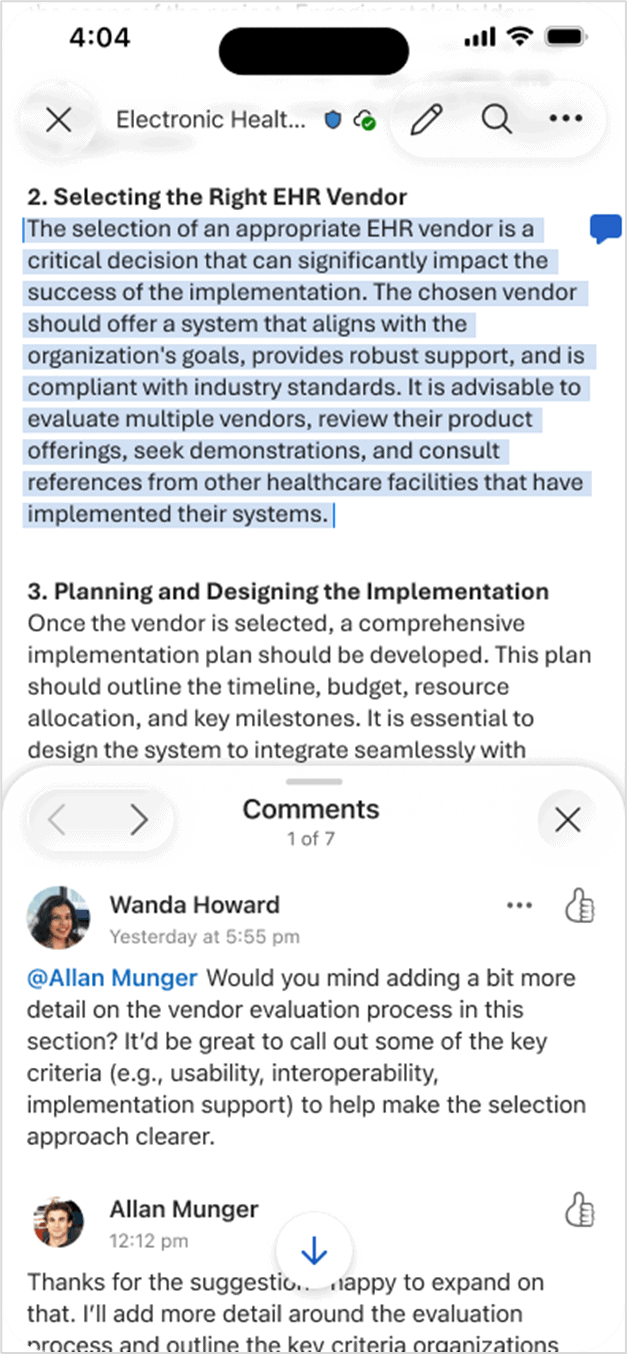
The new Comments pane features a streamlined design and clearer layout. Users can quickly see which comments need attention, respond without hunting through threads, and keep collaboration flowing. In Word and PowerPoint, comments are accessible via the bottom task bar, while all three apps allow tapping a comment icon or the Review tab.

Image credit: Microsoft

This isn’t the full feature set yet. Microsoft further plans to add filters, a drafting sheet, and ways to comment from empty states in the coming months. The new comments experience is rolling out in Word, Excel, and PowerPoint for iOS users via version 2.106 (Build 26022013). However, it’s unclear when all iPhone users will see the update.

Microsoft appears to be bridging the gap between desktop and mobile Office, keeping the iPhone experience closer to what users are used to on larger devices. More cross-device feature could be coming soon. Speaking of Office apps on Apple devices, you can now generate richer alt text in Word and PowerPoint for Mac.

ROG Xbox Ally’s Price Drops $100 on Amazon, Now Available for $499.99

If you are looking to grab the Lenovo Legion Go 2 handheld, you might want to rethink that decision as it’s listed on Best Buy for $1999.99. That’s a price twice as much as a $999.99 Xbox Ally X handheld that comes with AMD Ryzen AI Z2 Extreme. That said, the ROG Xbox Ally, which was launched as an entry-level option, is still a great gaming handheld. And, if you have been thinking for some time to get your hands on it, this might be your best chance.

With the latest discount, the ROG Xbox Ally is now cheaper than the Steam Deck OLED

The ROG Xbox Ally, which originally launched for $599.99, is now available to buy for $499.99 on Amazon US. That’s a $100 discount for a handy gaming handheld. If you want to check specs of the device, we’ve listed it for you below, give it a thorough read.

Do note that this deal hasn’t been officially announced. It appears ASUS and Microsoft are likely trying to attract customers surprised by the sudden Lenovo Legion Go 2 price hike.

ROG Xbox Ally Specifications

Operating SystemWindows 11 Home
Comfort & InputStandard triggers, contoured grips, ABXY, D-pad, Hall Effect triggers, back buttons
ProcessorAMD Ryzen Z2 A
Memory16GB LPDDR5-6400
Storage512GB M.2 2280 SSD
Display7-inch FHD IPS, 120Hz, 500 nits, FreeSync Premium
Ports2x USB-C (DP 1.4), microSD, 3.5mm jack
ConnectivityWi-Fi 6E, Bluetooth 5.4
Dimensions290.8 × 121.5 × 50.7 mm
Weight670g
Battery60Wh
In the BoxDevice, 65W charger, stand

Just to be clear, this offer price is only available on Amazon US. Microsoft Store still lists the device at its official launch price and is marked currently out of stock. Notably, the discounted price is still $10 higher than the $489.99 deal from February.

In comparison, the latest discount brings ROG Xbox Ally’s price down from that of Valve’s Steam Deck OLED, which starts at $549 for the base variant. It is still unclear if this is a limited-time deal or part of a wider pricing strategy. Whatever may be the case, at the current price, the ROG Xbox Ally is a steal for anyone looking for a decent gaming handheld.

Microsoft Retires Semi-Annual Enterprise Channel in Office Customization Tools Starting Today

Microsoft has announced that it is retiring the Semi-Annual Enterprise Channel option from the Office Customization Tool and Configuration Manager between April 6 and April 11, 2026.

In a Microsoft 365 Admin Center message, first spotted by Neowin, the company confirms that existing deployment configurations will remain unaffected. However, any new setups will now require either the Current Channel or the Monthly Enterprise Channel.

The change affects organizations using the Office Customization Tool in the Microsoft 365 admin center or the Office 365 Client Management experience in Configuration Manager. Starting today (April 6), Semi-Annual Enterprise will no longer appear as a selectable option for new deployments. That said, current configurations using this channel will continue to function without interruption.

Microsoft says the retirement is part of its ongoing effort to simplify update channel management for Microsoft 365 apps. The company is focusing investment on Current Channel and Monthly Enterprise Channel, which deliver more frequent feature and security updates. Admins don’t need to take any immediate action, though notifying relevant teams and updating internal documentation is recommended.

Existing deployments will keep their Semi-Annual Enterprise settings, but any new configurations must select from the remaining channels. You can find more information about the aforementioned changes in M365 Admin Center under Message ID MC1249427 and MC1249428.

Windows 11 Feature Flags Spotted, Promises More Control for Insiders

Microsoft is working on a new Feature Flags section in Windows 11, designed to give users more control over experimental features and improve transparency inside the Insider Program.

The feature was spotted by @phantomofearth on X and highlighted by Neowin, appearing in the latest Dev Channel build KB5083822. It remains hidden for now, and Microsoft has not officially announced it.

A response to long-standing CFR complaints

For years, Windows Insiders have voiced frustration with Microsoft’s Controlled Feature Rollout (CFR) system. Features often roll out unevenly, even across similar devices, which makes testing inconsistent and difficult to track.

The new Feature Flags section appears to directly address those concerns by introducing a centralized place where users can see and manage experimental features.

What the Feature Flags section aims to do

Early findings suggest that this section will allow users to view available experimental features, manually enable or disable them, and check their current status within the rollout process. It also appears to include warnings about potential instability or performance risks, which indicates Microsoft wants users to understand the trade-offs before toggling anything.

This approach signals a shift toward more transparency, giving Insiders clearer visibility into what is being tested and how it is being deployed.

A possible end to ViVeTool reliance

At the moment, many advanced users rely on third-party tools like ViVeTool to unlock hidden Windows features. If Microsoft rolls out Feature Flags publicly, it could replace the need for those tools entirely.

That would simplify access to new features and reduce reliance on unofficial methods.

Still hidden and not publicly available

The Feature Flags section is currently hidden in Dev builds and cannot be accessed by regular users. Microsoft has not shared any timeline or confirmation regarding a wider rollout.

Even so, its presence suggests that the company is actively exploring ways to improve the Insider experience.

This development comes as Microsoft continues pushing new Insider builds, including Windows 11 Canary Build 29560 and the Canary update KB5083824. These releases focus mainly on stability improvements and minor refinements rather than major new features.

If Feature Flags makes it into public builds, it could become one of the most significant usability improvements for Windows Insiders.

Intel Core Ultra 7 251HX Arrow Lake CPU Is Official With 18 Cores and 3 Xe GPU Cores

In what appears to be a quiet launch, Intel has added the Core Ultra 7 251HX to its Arrow Lake HX lineup. The processor reportedly appeared on Intel’s website shortly after showing up in Lenovo Legion 5i 2026 and MSI Raider 16 HX listings. Unlike previous launches, there was no formal announcement.

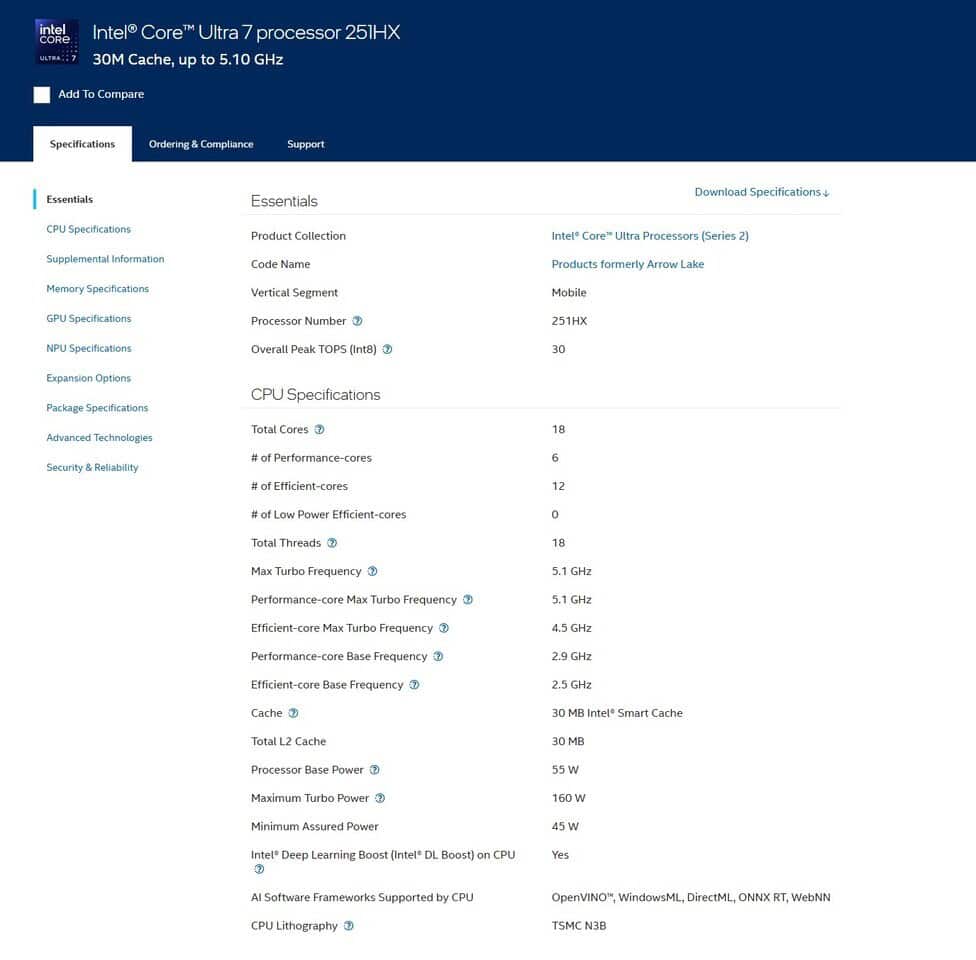
The Core Ultra 7 251HX comes with 18 cores and 18 threads, split between 6 Performance cores and 12 Efficient cores. It sits between the Core Ultra 5 245HX and Core Ultra 7 255HX. Compared to the 255HX, it drops two P-cores and loses two threads but retains all 12 E-cores and 30 MB of Smart Cache.

TDP ranges remain the same, with a 55 W base and up to 160 W maximum turbo power. Max Turbo for the chip is 5.1 GHz, slightly lower than the 255HX, while the E-core base clock rises to 2.5 GHz and P-core base to 2.9 GHz. Memory support extends up to DDR5-6400.

Image credit: Intel

The integrated GPU has three Xe3 cores running up to 1.8 GHz, down from four cores on the 255HX. This reduction also slightly lowers AI throughput from 33 TOPS to 30 TOPS. While not a huge difference, it may matter for workloads that rely heavily on AI acceleration.

Overall, the Core Ultra 7 251HX fills a mid-range slot in Intel’s Arrow Lake HX family. It sits above the 14-core Core Ultra 5 245HX and below the higher-end 20-core Core Ultra 7 255HX and 265HX models. For users building laptops or portable workstations, it offers a balanced mix of performance and efficiency. In a related news, Intel is also reportedly looking to hike CPU prices yet again in May. If the rumors are accurate, it would be Intel’s third price hike of the year.

OneDrive Overhaul Moves Deleted Cloud Files Away From Local Recycle Bin

Microsoft is changing how deleted cloud files behave in OneDrive, introducing a new recovery model that shifts entirely to the web.

The update, detailed in Microsoft 365 Admin Center Message ID MC1269861, is set to roll out starting May 2026 and complete by the end of the month.

OneDrive Moves Deleted Cloud Files to Web-Only Recycle Bin

With this change, files deleted from the OneDrive cloud will no longer appear in the local Recycle Bin on Windows or Trash on macOS. Instead, users will need to restore deleted items directly from the OneDrive or SharePoint web-based recycle bin.

This applies specifically when a file is synced to a device but deleted through the OneDrive web interface or another cloud-based action.

Files deleted directly from a local device will still go to the system’s Recycle Bin or Trash as usual. The change only affects cloud-originated deletions, not local file actions.

Why Microsoft Is Making This Change

Microsoft says the update aims to streamline file handling across devices and improve overall sync behavior. By removing local recycle bin duplication for cloud deletions, the system can process file changes faster and avoid inconsistencies.

The company also positions this as a move toward a single, authoritative recovery location, making it clearer where users should go to restore deleted files.

No Opt-Out for Admins

The update will apply globally across all OneDrive users, including commercial, government (GCC, GCC High), and DoD environments. There is currently no option for administrators to disable or delay the feature.

Microsoft recommends that organizations inform users about the change and update internal documentation to reflect the new recovery workflow.

This update comes alongside several other recent changes across Microsoft’s ecosystem. The company has started enforcing OneDrive usage for Clipchamp projects, issued retirement notifications for Microsoft Publisher, and continues to phase out legacy Teams meeting controls.

Via Neowin

Hackers Breached Axios npm by Impersonating Companies and Hijacking Maintainer Access

A recent attack on the widely used JavaScript library Axios has exposed developers to a serious supply chain breach. The incident involved malicious packages that stayed live for hours and silently infected systems.

Malicious Axios Versions Distributed Through npm

Attackers published two compromised versions of Axios, 1.14.1 and 0.30.4, which remained available for about three hours. During that window, anyone who installed or updated the package unknowingly exposed their system.

The malicious versions injected a fake dependency called plain-crypto-js, which executed a postinstall script. This script deployed a remote access trojan, giving attackers full control over affected machines.

North Korean Group Linked to the Attack

Security researchers have attributed the campaign to UNC1069, a threat group linked to North Korea. The attack stands out not just for its impact, but for the level of coordination behind it.

Instead of exploiting code vulnerabilities, attackers targeted people. They launched a sophisticated social engineering campaign aimed at npm maintainers using platforms like LinkedIn and Slack.

The attackers created fake companies with cloned branding and invited targets into realistic Slack workspaces. Inside, they staged conversations with fake profiles to build trust.

The final step involved a fake Microsoft Teams meeting, where victims saw a fabricated error message prompting them to install a supposed update. That “update” actually deployed malware.

MFA Bypassed Through Session Hijacking

Once the malware was executed, attackers gained access to npm credentials and bypassed multi-factor authentication using session hijacking techniques. This allowed them to publish the malicious Axios versions directly.

This was not an isolated incident. Multiple Node.js maintainers were targeted in a coordinated campaign focusing on high-impact packages. Attackers also used fake SDK downloads and attempted to trick users into running malicious curl commands.

Maintainers Respond and Contain the Threat

Axios maintainers quickly removed the malicious versions, reset credentials, and wiped affected systems. Additional security measures are now being implemented to prevent similar incidents.

Developers who may have installed Axios 1.14.1 or 0.30.4 should immediately audit their systems. Removing the plain-crypto-js dependency is critical, but not enough on its own.

All credentials, including npm, SSH keys, and API tokens, should be rotated. Developers should also avoid running unknown install scripts and carefully review dependencies before installing updates.

This attack highlights a growing trend of targeting developers through trusted ecosystems. In related cybersecurity developments, VoidStealer malware has been found extracting encryption keys directly from Chrome memory, while Google recently patched a new zero-day vulnerability in Chrome.

The Axios incident shows that supply chain attacks are becoming more advanced, combining technical exploits with human manipulation at scale.

Via Bleeping Computer

Intel Reportedly Eyeing Another CPU Price Hike in May Amid Growing AI Demand

Last week a report hinted that AMD could increase Ryzen CPUs by up to 15% this year. Now, in what could be the third jump this year, Intel is reportedly planning another round of CPU price hikes. The news comes via Chinese research firm Minutes Logic Society, which claims prices may rise by around 30% compared with 2025 levels.

Just to be clear, an earlier report by ET News hinted that a 10% hike for the consumer CPUs, like the Core Ultra family of CPUs. As with the previous rumor, the report also links the possible price hike to soaring demand from AI data centers, which rely heavily on CPUs.

It’s unclear when the trend might stabilize. Much depends on how long the so-called “AI bubble” continues to inflate. Component shortages have already forced companies like Lenovo to hike handheld device prices by nearly 50%, showing how pervasive the effect has become. That’s not all; the ongoing CPU price hike could increase laptop prices by nearly 40%.

Earlier this year NVIDIA announced to adjust its strategies, with some pausing new releases to focus on AI-related workloads. Intel’s move suggests that CPU buyers, from gamers to PC builders, could face continued price shock for months to come.

While these increases are frustrating for consumers, they reflect a larger industry shift toward AI-driven demand that shows little sign of slowing.

Microsoft Replaces Native Copilot With Web App on Windows 11, RAM Usage Spikes

Microsoft is rolling out a redesigned version of Copilot for Windows 11, but the change comes with a major shift under the hood. The app is moving away from a native experience and back to a web-based architecture.

Copilot Drops Native WinUI App for Web-Based Version

According to Windows Latest, Microsoft has replaced the native WinUI Copilot app with a web-powered version. The new app closely mirrors the experience of using Copilot in a browser.

However, this is not a typical lightweight web app. Instead, Microsoft bundles a full version of Microsoft Edge directly inside the Copilot app.

Built-In Chromium Engine Changes Everything

The updated Copilot includes a complete Chromium-based environment, powered by WebView2 and an embedded Edge runtime. This means the app ships with its own browser components, including executables, DLL files, and DRM modules.

The embedded Edge package alone reportedly takes up around 850MB, making the app significantly heavier than before.

Faster Experience, But at a Cost

From a usability standpoint, the new Copilot feels smoother than traditional progressive web apps. The dedicated embedded browser helps improve responsiveness and consistency. But this comes with a trade-off.

Idle memory usage now sits around 500MB, while active usage can climb close to 1GB. The previous native version used less than 100MB, making this a substantial increase.

Growing Concerns Over “Web App Bloat”

This move adds to ongoing concerns about web-based apps increasing system resource usage in Windows 11. Critics argue that bundling a separate Edge instance duplicates existing system components and contributes to unnecessary bloat.

The approach also aligns with a broader trend of Electron-style apps, where performance often takes a back seat to development speed and cross-platform compatibility.

Interestingly, this change comes as Microsoft reportedly builds a new internal team focused on improving Windows 11 performance. The initiative aims to prioritize fully native apps and reduce system overhead.

If that effort delivers, Copilot could eventually return to a native implementation. For now, though, the app is heading in the opposite direction.

Microsoft Adds 13 More Games to Xbox Handheld Support Program

Microsoft is continuing its push into handheld gaming by adding support for 13 more titles on the Xbox Store, according to True Achievements. The update improves compatibility for devices like the ASUS ROG Ally and ASUS ROG Ally X.

The company is classifying games into two categories to help users understand performance and usability. Titles labeled as “Handheld Optimized” run smoothly out of the box, while “Handheld Compatible” games may require minor tweaks to deliver a good experience.

Handheld gaming support keeps growing

The new Handheld Optimized titles include Aliens: Dark Descent, Atomic Owl, Clean Up Earth, Haste, and Revenge On Gold Diggers. These games should offer a seamless experience without additional setup.

Meanwhile, the Handheld Compatible list expands with titles like ACA NEOGEO METAL SLUG 4, Beautiful Sakura: Volleyball Club 2 (Windows), Dark Light, Hole Digging Master, Hoof and Seek, John Fart: Text-iverse of Crazyness, Kamikaze Lassplanes, and Meow Moments: Celebrating Myth & Machine. These may need adjustments such as control remapping or performance tweaks.

Xbox handheld strategy becomes clearer

This move highlights Microsoft’s ongoing effort to make Xbox content more accessible across portable gaming devices. By clearly labeling compatibility levels, the company is giving players better insight into what to expect before downloading a game.

With the Microsoft Spring Sale 2026 currently underway, many of these titles are likely available at discounted prices, making it an ideal time for handheld gamers to expand their libraries.

In other handheld-related developments, the Legion Go 2 is reportedly priced significantly higher than devices like the Xbox Ally X, while rumors suggest that a Steam Deck successor may not arrive until 2028.

Gemma 4 Gets Day 0 Support on AMD GPUs and AI CPUs

AMD has announced Day 0 support for Google’s Gemma 4 across its entire hardware ecosystem, signaling a major push into open AI deployment.

The company confirmed that Gemma 4 runs across Radeon GPUs, Instinct accelerators, and Ryzen AI CPUs, enabling a unified experience from consumer PCs to datacenter infrastructure.

Full-stack support across AMD hardware

AMD designed this rollout to cover its full product stack. Gemma 4 works on Radeon GPUs used in gaming and professional systems, Instinct GPUs built for datacenter workloads, and Ryzen AI CPUs that power AI PCs with dedicated NPUs.

This unified approach allows developers to build once and deploy anywhere without switching platforms or rewriting workflows.

Strong ecosystem support from day one

AMD paired Gemma 4 with broad software compatibility across popular AI tools. The model works with frameworks like vLLM and SGLang for high-performance inference, while also supporting lightweight environments such as llama.cpp.

Local AI applications like LM Studio and Ollama also integrate seamlessly, and developers can access OpenAI-style APIs through Lemonade Server. AMD offers flexible deployment options through Docker images, Python packages, or direct local execution.

Built for performance and scale

AMD emphasized performance as a key advantage of its implementation. The company optimized Gemma 4 for concurrent inference workloads using vLLM, while SGLang enables high-throughput serving in production environments.

One of the standout claims is the ability to run the full Gemma 4 model on a single MI300X GPU with 192GB of VRAM, reducing the need for multi-GPU setups in certain scenarios.

Hardware-specific acceleration also plays a major role. Radeon GPUs benefit from ROCm optimizations, while Ryzen AI CPUs leverage XDNA 2 NPUs to accelerate on-device AI processing.

More optimizations coming soon

AMD confirmed that this is just the beginning. Future updates will bring additional optimizations for MI300 and upcoming MI350 GPUs, further improving performance in enterprise environments.

The company also plans to expand NPU support for smaller Gemma models such as E2B and E4B, which will improve efficiency on AI PCs and edge devices.

AMD pushes deeper into open AI

With Day 0 support for Gemma 4, AMD continues to position itself as a full-stack AI platform that spans consumer hardware, enterprise infrastructure, and local AI applications.

The company’s focus on open-source tools and flexible deployment highlights its strategy to compete across both developer ecosystems and large-scale AI deployments.

In other news, AMD recently launched FSR 4.1, while Sony confirmed that its PSSR technology shares similarities with AMD’s approach. AMD has also rebranded Anti-Lag as FSR Latency Reduction 2.0 as part of its broader ecosystem push.

Via Wccftech

Xbox is Getting 23 New Titles, Including The Occultist, This Week (April 6 to 10)

Xbox’s upcoming games lineup for this week includes 23 new games. Announced via Xbox Wire blog post, this week’s lineup spans across Xbox Series X|S, Xbox One, Xbox on PC, and Game Pass, offering a mix of indie titles and darker narrative-driven experiences. While it may not be the biggest week in terms of major releases, several titles stand out across genres.

Early in the week, smaller titles begin to roll in, but things pick up quickly. By midweek, horror fans get The Occultist, while strategy and wordplay blend in Beyond Words later on. Toward the end of the week, Tiny Bookshop adds a softer, more relaxed tone to the lineup.

Additionally, from RPG musicals like People of Note to puzzle-driven and simulation titles, the Xbox catalog for this week appears designed to appeal to niche audiences rather than chase mass appeal.

Here’s every games coming to Xbox this week:

Game TitleRelease Date
Hacked: The StreamerApril 6
People of NoteApril 7
ChainStaffApril 7
Dragon Snack: From Ice to EmberApril 7
Jaden & Jasmine II: Lost MemoriesApril 7
Solid Void – Topsy Turvy WorldApril 7
Airplane Flight Simulator: EvoApril 8
IncantationApril 8
The OccultistApril 8
Beyond WordsApril 9
Bytebond: Deluxe EditionApril 9
Arcadia Fallen IIApril 9
Little Helper Cafe: Sugar CubesApril 9
One Card One Shot – MafiaApril 9
Skautfold: Moonless KnightApril 9
Tears RevoludeApril 9
ViscerafestApril 9
Tiny BookshopApril 10
Ninjora EchoesApril 10
Nocturne RoutesApril 10
To the Basement: BeforeApril 10
Zumba – Treasures of Marble IslandApril 10

Back in recent months, Xbox has leaned into consistent weekly drops instead of relying only on big exclusives. Some popular games, including GTA 5, are leaving Xbox Game Pass mid-month. Moreover, the Stream Your Own Game library grows by 50 more games in this month’s update.

NVIDIA NTC Slashes VRAM Usage by 85% With AI Compression

A new AI-powered texture system could drastically reduce memory usage in games. NVIDIA has introduced Neural Texture Compression (NTC), a machine learning approach that changes how textures are stored and rendered.

AI replaces traditional texture storage

According to Wccftech, instead of storing full texture data like traditional formats, NTC compresses textures into compact latent representations. The GPU then reconstructs the final image in real time using a small neural network.

This process remains deterministic, meaning it produces consistent results every time rather than generating new variations.

How Neural Texture Compression works

NTC relies on a combination of compressed data and lightweight AI processing. The system stores a latent texture and uses a neural decoder to rebuild the final output during rendering.

Positional encoding helps preserve fine details, ensuring that reconstructed textures maintain visual accuracy even at high compression levels.

Training enables high-quality reconstruction

The neural network learns how to rebuild textures during a training phase. It optimizes both the latent data and model weights through repeated iterations, minimizing reconstruction errors.

This allows NTC to maintain quality while significantly reducing storage requirements compared to traditional compression methods like BCN.

Major gains in memory and efficiency

In NVIDIA’s demo, NTC reduced VRAM usage from around 6.5GB to just under 1GB. That translates to roughly an 85% reduction without sacrificing texture fidelity.

The system also supports multiple material channels such as normals and roughness in a single representation, avoiding the need to split data across multiple textures.

What this means for games

NTC could lead to smaller game downloads, faster updates, and better visual quality within the same hardware limits. Developers may also push higher-resolution assets without increasing VRAM demands.

The technology already works across NVIDIA, AMD, and Intel GPUs, making it broadly compatible despite being introduced by NVIDIA.

Still early, but promising

The SDK for Neural Texture Compression is currently available in beta, and no major titles use it yet. Adoption will depend on how easily developers can integrate it into existing pipelines.

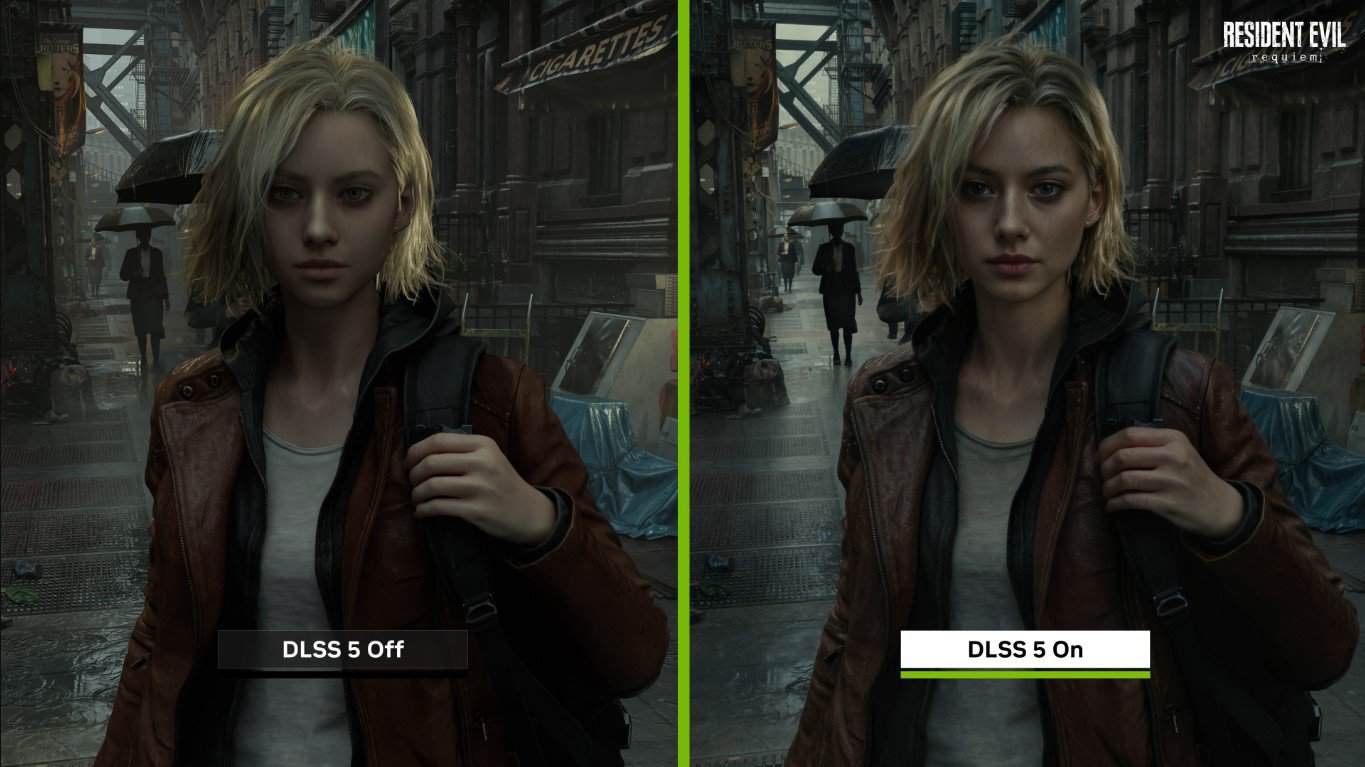
While NTC focuses on texture efficiency, NVIDIA continues to evolve its upscaling tech. DLSS 5 remains under scrutiny, with reports suggesting a possible driver-level toggle.

At the same time, a DLSS 4.5 over-the-air update has surfaced, rumored to include up to 6x multi-frame generation.

New Steam Feature Could Soon Estimate Game FPS Based on Your Hardware Specs

Steam appears to be experimenting with a new feature that estimates game framerates based on your hardware. According to the latest client update, the functionality is currently in Beta and focuses on SteamOS devices (via Tom’s Hardware). By gathering FPS data from players, Valve aims to create baseline metrics that could inform gamers how smoothly a title will run on their system.

For now, it seems Valve is limiting the test to SteamOS, which powers devices like the Steam Deck OLED and Lenovo Legion Go S. Fewer hardware configurations make it easier to produce accurate predictions compared with desktop and laptop PCs, which can vary widely in performance. Beta testers on these devices may get early insights into expected framerates, potentially helping handheld users choose the right titles for smooth gameplay.

While consoles and services like Xbox offer performance guidance, those predictions are often imprecise. Games may meet recommended specifications yet run with inconsistent framerates or slow load times. If Steam can provide accurate FPS estimates, it could give gamers more confidence before buying, especially on systems with borderline performance.

The feature is still in early testing, so its wider rollout is uncertain. Valve will need to prove that its FPS estimates match real-world gameplay, otherwise players could end up disappointed. The potential is promising, however, particularly for handheld SteamOS devices or future Steam Machines, which have been repeatedly delayed but remain a point of interest for enthusiasts.

It’s unclear when PC users outside of SteamOS will see the feature, or whether the FPS data will appear directly on Store pages. That said, if successful, Steam’s hardware-based framerate predictions could change how gamers plan purchases and anticipate performance.

Xbox Stream Your Own Game April Update Adds 50 New Titles

Xbox Game Pass has quietly expanded one of its more flexible features, with 50 new titles now added to the Stream Your Own Game library (via True Achievements). The update, which rolled out in early April, significantly grows the number of games players can stream directly from their owned collection.

50 new titles make their way to Stream Your Own Game library this month

The new lineup spans AAA releases, indie projects, and a noticeable batch of legacy titles, giving the library a more balanced feel. For those unaware, if you already own supported titles, you can stream them through Xbox Cloud Gaming without installing them locally. That makes quick sessions far easier, especially on handhelds or lower-storage devices.

Several classic titles from Rare’s catalog are now included, such as Banjo-Kazooie, Perfect Dark, and Kameo Elements of Power. These older games may benefit the most from streaming, since they are lighter and less demanding on network stability.

That being said, newer titles are also part of the mix. Resident Evil 7 Biohazard, Crimson Desert, and Like a Dragon Infinite Wealth headline the modern additions, while Life is Strange Reunion stands out as a more relaxed experience that fits streaming conditions well. To catch you up, Microsoft has been expanding the Stream Your Own Game library steadily over the past few months. Notably, the company added 45 new titles to the service last month.

List of all the new games added to Xbox Stream Your Own Game library:

  1. Absolum
  2. Bad End Theatre
  3. Baking Time
  4. Banjo-Kazooie
  5. Banjo-Kazooie: Nuts & Bolts
  6. Banjo-Tooie
  7. Big Buck Hunter: Ultimate Trophy
  8. Bioweaver
  9. BucketCrusher
  10. Buffet Boss
  11. Crimson Desert
  12. Curious Cases
  13. Dragonkin: The Banished
  14. DreamWorks Gabby’s Dollhouse: Ready to Party
  15. Duck Detective: The Ghost of Glamping
  16. Dunjungle
  17. Easy Delivery Co.
  18. Football, Tactics & Glory Treble Deluxe Edition
  19. Goetia
  20. Heading Out
  21. Jetpac Refuelled
  22. Kameo: Elements of Power
  23. Killer Instinct Classic
  24. Killer Instinct 2 Classic
  25. Legacy of Kain: Ascendance
  26. Life is Strange: Reunion
  27. Like a Dragon: Infinite Wealth
  28. Love is all around 2
  29. Mega Man Star Force Legacy Collection
  30. MLB The Show 26
  31. Moon Mystery
  32. Mortal Glory 2
  33. Mutant Football League 2
  34. Perfect Dark
  35. Perfect Dark Zero
  36. Rage Swarm
  37. Raptor Evolution
  38. Resident Evil 7 Biohazard
  39. Rhythm Doctor
  40. Screamer
  41. SimRail – The Railway Simulator
  42. Sleep Awake
  43. Stylist Girl
  44. Super Meat Boy 3D
  45. Talisman: Digital 5th Edition
  46. The Last Camp
  47. Truck Simulator Cargo Driver 2025 – USA
  48. Viva Pinata
  49. Warframe
  50. Your Toy

So, which of the games are you looking to stream via Xbox Cloud Gaming? Share your favorites in the comments below.

NVIDIA’s Official DLSS 5 Trailer Taken Down in YouTube AI Moderation Blunder

In what appears to be a bizarre incident, videos featuring NVIDIA’s DLSS 5 trailers have been taken down across YouTube, affecting creators large and small. Reports indicate that an Italian TV channel used the trailer for its own coverage, but a mass DMCA notice sent by one of its employees seems to have triggered YouTube’s AI systems to remove all copies containing the same footage (via IXBT.games). Shockingly, even NVIDIA’s official upload was taken down in the process.

These days, YouTube relies heavily on AI for content moderation, claiming the technology speeds up the detection of policy violations. Human reviewers are supposed to confirm issues, but many creators argue the system often acts too quickly, flagging videos without proper context. This incident shows that even high-profile content is vulnerable, while smaller creators face the added risk of strikes that could endanger their channels.

Unlike a simple DMCA complaint, this case shows how automated enforcement can ripple across the platform. Videos meant for commentary, reactions, or reviews can be caught in the crossfire, leaving creators frustrated and uncertain. Appeals reportedly process in minutes, which critics say is far too fast to allow meaningful human oversight.

For NVIDIA, restoring the video may be straightforward given its resources. For independent creators who shared or reacted to the trailer, however, the takedown could result in lasting strikes or account penalties. The episode underscores the tension between efficient moderation at scale and fair treatment for all users.

As AI continues to handle more moderation duties, it’s YouTube’s responsibility to prevent automated systems from overreaching while still managing the enormous volume of uploads. It’ll be interesting to see how successfully the company manages to pull off that challenging task.

Windows Installation Media Gets New Defender Update With Latest Threat Protection

Microsoft is stepping up its security efforts across Windows, not only by upgrading unmanaged systems to Windows 11 25H2, but also by strengthening protection at the installation level. The company has now released updated Microsoft Defender packages designed specifically for Windows installation images, ensuring systems stay protected from the very first boot.

According to Neowin, the new Defender update brings the latest security intelligence directly into Windows deployment files, eliminating a long-standing vulnerability window during fresh installs.

Updated Defender packages target installation media

Microsoft has rolled out new Defender definitions and platform updates that apply to Windows installation images, including WIM, VHD, and ISO files commonly used for OS deployment.

The update includes security intelligence version 1.445.323.0, platform version 4.18.26020.6, and engine version 1.1.26020.1. These updated components now cover a wide range of Windows environments, including Windows 11, Windows 10 (ESU, LTSC, LTSB), and Windows Server 2016, 2019, and 2022.

Protection starts before the first login

This change focuses on a critical gap in Windows security. Traditionally, installation media ships with outdated Defender definitions, leaving freshly installed systems exposed until the first update completes.

With this update, Microsoft ensures that new installations can immediately detect threats such as trojans, backdoors, ransomware, information stealers, and AutoKMS tools. That means systems receive modern protection from the moment they boot for the first time.

Closing the “fresh install” vulnerability window

The move addresses a known issue where newly installed systems remain temporarily vulnerable to emerging threats. By embedding up-to-date antivirus definitions directly into installation images, Microsoft reduces the risk of early-stage compromise.

This approach also benefits enterprise deployments, where large-scale rollouts rely on prebuilt images that may otherwise lag behind current threat intelligence.

Alongside improved detection, updated Defender components may also enhance system performance. Newer engine and platform versions often include optimizations that reduce resource usage and improve scanning efficiency.

Broader security push across Windows

This update comes as part of a wider security push from Microsoft. The company recently introduced Secure Boot alerts in Windows 11 to warn users about expiring certificates and required updates.

At the same time, Microsoft continues to shift enterprise security tooling by moving users toward Purview Data Loss Prevention, as it phases out Defender Endpoint Data Alerting.

Together, these changes show a clear direction: securing Windows systems earlier in their lifecycle while tightening protection across both consumer and enterprise environments.

Windows 11 Canary Update KB5083824 Improves Pen Controls, Fixes SFC Scan Errors & More

On Friday, Microsoft released four new builds for Windows 11 Insiders in the Dev, Beta, and Canary channels. Among them, one landed in the optional Canary channel and another one in regular Canary channel. The latter, which bumps Canary Insiders systems to Build 28020.1803, has been released under KB5083824.

Microsoft says the build focuses on a small set of improvements and fixes that focues on smoothing the overall experience. as for imlut improvements, pen users now get refined options for the pen tail button, including a new setting that mirrors the Copilot key.

Speaking of usability, voice typing also gets attention. The fluid dictation setting within Windows plus H reportedly sees improved reliability. That may sound minor, but it could make a noticeable difference for users who rely on speech input regularly.

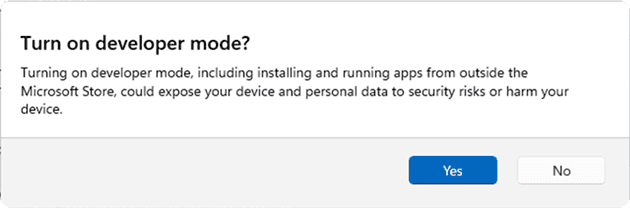
That being said, the Settings app continues to receive visual improvements. The Developer Mode dialog has been updated to better match the overall Windows 11 design language.

Image: Microsoft

As with recent Canary builds, Microsoft’s focus with this build has largely been on improving the existing features and fix issues rather than adding new features. Speaking of which this update also fixes an unexpected error that appeared when running sfc /scannow, a tool often used to check system integrity.

Speaking of updates, let’s not forget that Beta and Dev channels Insiders will see Xbox Mode in place of Xbox full screen experience and other few improvements.

Windows 11 Canary Build 29560 Fixes System Freezes & USB Devices Not Working Issue

Microsoft has released a new Canary Build 29560.1000 for Windows 11 Insiders on the optional 29500 build series. As usual, this optional Canary build is all about fixes and small reliability improvements.

In the changelog, Microsoft notes that this “update includes platform changes in moving to a new active development build.” Besides that, Microsoft has fixed a few issues that Canary Insiders encountered after updating to previous optional build.

Microsoft has fixed an issue that was causing some Insiders to experience increased system freezes after recent Canary builds, which should improve overall stability. Another notable fix addresses a problem where attached USB devices stopped working for some users after the latest flight. This should bring things back to normal for anyone relying on external peripherals.

That being said, there’s also a small improvement to Screensaver settings. Microsoft says it has improved the reliability when setting the Screensaver option back to “None,” which should now work more consistently.

In recent optional Canary builds, the company has been quietly fixing bugs without adding major features, and this build follows the same pattern. Last but not the least, Beta and Dev channel Insiders also received Preview Builds that introduces Xbox Mode in Windows 11 and more.

KB5083825 (Beta) & KB5083822 (Dev) Bring Xbox Mode for Windows 11 Insiders

Microsoft has wrapped up this week with four new updates for Windows 11 Insiders. Among them one each have landed in the Beta and Dev channels that bumps your system to Build 26220.8148 (KB5083825) and Build 26300.8155 (KB5083822), respectively.

With these builds Microsoft has rolled out Xbox Mode, which it first announced at GDC 2026. The new mode replaces the Xbox full screen experience branding, which was recently spotted in the Xbox app. Speaking of a related change, Microsoft has also added an improved first run experience when entering Xbox mode.

After installing KB5083825 and KB5083822, Dev and Beta testers will also feel subtle haptic feedback on supported input devices while snapping windows, resizing, aligning objects in PowerPoint, or even hovering over the Close button. You can tweak these haptic effects from Settings under Bluetooth & devices > Mouse > Haptic signals.

Last but not least, Microsoft has improved the performance of launching startup apps after boot, specifically those listed under Settings > Apps > Startup. These updates also fix an issue where some apps couldn’t sign in and showed an internal connection error despite an active internet connection and also resolve a crash that was preventing some Insiders from printing on recent builds.

Moreover, Insiders in the Beta channel will now see a new icon which lets to know where a printer supports Windows Protected Print Mode in print settings.

Xbox Backward Compatibility May Be Returning as Store Listings Spark Speculation

Microsoft has confirmed that Xbox backward compatibility will return in 2026, with the announcement made during GDC. While details remain scarce, recent activity on the Xbox Store has sparked speculation about what’s coming next.

Classic games briefly reappear on the Xbox Store

According to reports from Pure Xbox, users on X noticed that several older titles were relisted on the Xbox Store, only to be removed again shortly after. This unusual behavior has raised questions about whether Microsoft is preparing for a broader backward compatibility update.

The titles spotted in this cycle include Armed and Dangerous, Aegis Wing, Prince of Persia: The Sands of Time, and Mars: War Logs, which was recently delisted. The pattern suggests coordinated backend activity rather than random updates.

What could the backward compatibility revival include?

Microsoft has not confirmed what the revival will bring, but the timing aligns with recent discoveries like the Codename TRITON project. This has led to several possible interpretations.

The company may be preparing to add new backward-compatible titles, expand support beyond consoles, or introduce new access models and features. Some also believe this could involve deeper integration with PC or cloud platforms.

Backend testing or something bigger?

The relisting and removal of games could indicate internal testing of store listings or preparation for re-releases. It may also point to ongoing compatibility work behind the scenes.

At the same time, there is a possibility that these changes are unrelated to the revival announcement. However, the timing has fueled speculation that something larger is in motion.

Backward compatibility still active today

Even without new updates, many backward compatible titles remain playable today. Players can still access supported games via physical discs on Xbox One and Xbox Series X consoles.

Microsoft has continued to support legacy titles over the years, making backward compatibility a key part of the Xbox ecosystem.

In other news, the Xbox Spring Sale is now live, offering discounts on a wide range of games across the platform.

Best Buy Lists Lenovo Legion Go 2 at Twice the Price of the ROG Xbox Ally X

If you were planning to pick up the Lenovo Legion Go 2 anytime soon, the latest pricing might make you pause a little. The handheld is now listed at $1,999.99 on Best Buy, a sharp jump from its original $1,349.99 launch price in the US (via VideoCardz). That’s roughly a $650 increase, or close to 48 percent higher than what Lenovo initially asked.

At a time when handheld gaming PCs are getting more competitive, this pricing shift raises some obvious concerns among players out there. The listing is also marked as unavailable, which suggests this may not reflect steady retail pricing just yet. However, the number stands out, especially when compared to other handheld devices.

That comparison becomes harder to ignore next to the ASUS ROG Xbox Ally X, currently priced at $999.99. Both devices sit in a similar performance tier, with AMD’s Z2 Extreme chips at the core. However, Lenovo’s handheld is now effectively priced twice as much, which makes the value gap difficult to justify.

Speaking of hardware, the Legion Go 2 still looks solid on paper. It packs an 8.8-inch 2K OLED display with a 144Hz refresh rate, alongside 32GB of RAM and 1TB of storage. That being said, the broader handheld market also seems to be at a crossroads. AMD-powered devices continue to rely on older GPU architectures, and there’s still no clear sign of RDNA 4 in this space. Meanwhile, Intel’s Arc G3 handheld chips have been rumored for months, but nothing concrete has surfaced yet.