Microsoft introduces its number-centric fact site, By the Numbers

If you like math and Microsoft, then you’re in for a treat, as Microsoft just rolled out Microsoft by the Numbers, a site dedicating to present facts about the company, all in easy-to-get statistics, reported the company’s blog.
The site is presented in a friendly and modern manner, with most numbers accompanied by playful fully-animated 3D objects (the cute kind you can spend hours staring at.)

A personal favorite.

Among the statistics, which include impressive numbers that reflect Microsoft’s achievement in each of its businesses (like 75 million Windows 10 installs from 190 countries all over the world, 1.5 billion Office users, and 80% of Fortune 500 companies being on Azure), there are also some interesting, and some downright silly-fun, tidbits. Did you know that 20% of Azure VM servers are on Linux? Or 984,000 orders of french fries are consumed each year in Microsoft’s Redmond campus area? Or how Microsoft’s optics fiber cables can stretch 3 times the distance to the Moon? Many more are waiting for you at the site, so visit it now.

 

Microsoft beefs up CRM portfolio with Adxstudio Inc. acquisition

Corporate Vice President of Microsoft Dynamics CRM, Bob Stutz, took to the company blog today to announce Microsoft’s acquisition of a long-time partner, Web portal and application lifecycle management solutions provider Adxstudio Inc.
According to the post, Microsoft will acquire “key product and technology assets” of Adxstudio Inc, and this will translate into features that customers can “immediately take advantage of.” Adxstudio Web portals are built natively on Microsoft’s Dynamics CRM and can also be used with its Parature Service. The acquisition also delivers pre-built engagement solutions both on-premises and in the cloud, and will enable independent software vendors (ISVs) to “build their own CRM Web engagement solutions on Microsoft technologies.”
The acquisition is said to be “another step” towards fulfilling Microsoft’s commitment to “delivering intelligent customer engagement solutions.”

LG Gram ultrabook set to be newest Microsoft Signature Edition PC

The Verge is reporting that LG’s 14” ultrabook, the Gram, is coming to the US as a Microsoft Signature Edition and will be available in the Microsoft Stores across the US today.
Vlad Savov of the Verge did a quick review of the Gram in his announcement of today’s news and notes that this device seeks to one up the dominant ultrabook on the market, the Macbook Air, in terms of display with an impressive looking 1080p IPS. But other than its display, the Gram falls short of being a hands down winner compared to the MacBook Air. Savov comments that the construction is a little flimsy in comparison to the Macbook Air’s aluminum unibody design. Also, the Gram comes with Windows 10, but does not feature a touch screen or Intel RealSense camera to best utilize some of the new features in Microsoft’s latest OS.
The Gram does weigh in at less than a kilogram (980 grams or 2.16 lbs to be precise) and has a slim profile. But it is also shipping without the latest Skylake generation of processors from Intel and is instead going with the 5th generation Broadwell Core i5 and i7 chips. The Gram is currently listed on Amazon for $999 for the 14” base model with a Core i5 processor and 128GB of storage and $1,399 for the more top of the line Core i7 model with 256GB of storage. The official Microsoft Store listing has not been posted but will probably have comparable, if not identical pricing. For those unfamiliar with Microsoft Signature Edition, it is their line of PCs sold without bloatware pre-installed in order to boost performance both in terms of speed and battery life.
While LG certainly knows how to build impressive displays, the Gram may face steep competition from other similarly priced ultrabooks. For example, the Dell XPS 13 comes the same gen processor but with more features like a higher resolution screen, touch enabled, and better battery life. Not to mention the slew of Skylake powered devices set to be unveiled as the PC manufacturers and sellers gear up for the holiday season. Ultrabooks may also face an uphill battle in this next commercial cycle as the 2-in-1 form factor continues to grow in popularity with Apple recently unveiling its own version of the concept Microsoft pioneered, and with Microsoft’s rumored Surface Pro 4 set to be shown off for the first time next week on October 6th.

Microsoft aims to bring low-cost broadband to 500,000 Indian villages

While speaking at a dinner in honor of visiting Indian Prime Minister Narendra Modi, Microsoft’s CEO Satya Nadella said the Redmond-based company aims to bring low-cost broadband to 500,000 villages in India as a part of Digital India initiative (via Times of India).

“We believe that lost-cost broad band connectivity coupled with the scale of cloud computing intelligence that can be harnessed from data can help drive creativity, efficiency and productivity across governments and businesses of all sizes… A key part of both Make in India and Digital India, bringing world class infrastructure into India, respecting India’s digital security, sovereignty and privacy is a key milestone for us.”

Microsoft’s jumping on the Digital India initiative program will be a large help as they have the capacity and the technology to make sure high-tech equipment is available in the country. While technology such as broadband internet can be taken for granted, it is not as widely available as some would initially believe. Last week Engadget reported on the United Nation’s findings that indicate over 4 billion people in the world will go without internet access in 2015.

Windows 10 Build 10547 Causing a Lot of Problems for Those Who Installed it

Microsoft has recently released the Windows 10 build 10547 which brought a lot of improvements. But as it is the case with almost every new build, various problems have been reported.

Windows 10 Build 10547 issues

The most recent Windows 10 build 10547 brings some much need updates, and this is all great and nice, but there are plenty of problems that have been recently reported by those who have downloaded and installed it.

I’ve been looking around the Microsoft support forums and found plenty of problems and have decided to put here some of the most annoying ones. If you have other problems that aren’t listed here, do leave your comment below and let us know which these are, so that we could compile all of them together.

Windows 10 build 10547 problems

Here are some of the main problems, bugs and glitches that we have managed to find and put together:

  • “Check your connection” issue on Windows 10 Store with error 0x80004005

Check your connection issue on Windows 10 Store error 0x80004005

  • Windows 10 displays windows mark and small white points circling below it as usual, and after that screen turns black, and begins strange behavior. Sometimes goes dumb, sometimes white flash repeats. Sometimes ctrl+alt+del brings to login screen, but other times I need to turn off and on. Then suddenly I see login screen. After login screen I can log in normally.
  • I  am trying to install build 10547 for Windows 10 pro and, the installation is failing, and reverting to current build 10240. I had the same issue with other insider builds like previous 10532. I am currently stuck on build 10240. The installation completes but upon restart of PC reverts back to previous build i.e. 10240.
  • It seems like I have a problem when upgrading my PC from build 10532 to 10547. The upgrade progress gets stuck at 93% overall (Configuring settings 75%) and it has been like that for around one hour or two. The hard drive light blinks, but it only blinks once every few seconds which causes me to worry. Apparently, a program called mcbuilder.exe opened before progress gets stuck there.
  • I upgraded to Windows 10 Build 10547 just now. And, when I try to logoff em logon, I am stuck on a blank screen, with internet status and power icons in the right corner, but no sign-in box. The same happens when I try to reboot, or turn off and On.

  • I’ve always been on the fast ring and I always got builds with no problem. But today, after almost an hour after a new one has been made available, it’s still not showing up to me!

windows insider build not showing up

  • I have just upgraded from a troublesome Windows 10 build 10532, which kept freezing, to a new build 10547-has anyone else had the same problem 

So, as we can see, there are plenty of problems listed here. Of course, many of them have fixes, but I invite you to leave your comment below with a problem that hasn’t a fix yet. Hopefully, a future build will take care of these current issues.

READ ALSO: OneDrive for Windows 10 Mobile Gets Improvements to Files and Folders Sorting

There are now over 669,000 apps in the Windows Store

There are now over 669,000 apps in the Windows Store, which includes apps for both Windows (desktop) and Windows Phone, as well as Universal apps which work on both platforms. The Redmond giant is highlighting this achievement on it’s “Microsoft by the Numbers” website, which you can take a look here (first spotted by Neowin).
There are quite a few other cool stats mentioned by the company. For example, 80% of the Fortune 500 is on the Microsoft cloud, more than 75 million devices are running Windows 10, Skype Translator can translate voice calls in six different languages, and Office has been downloaded more than 100 million times on iOS and Android.
Microsoft also mentions that there are over 48 million Xbox Live users in 42 different countries. Outlook.com has more than 400 million active users and more than 1.2 billion people use Office.
Probably the most interesting statistic is the 669,000 apps in the Windows Store. Over the past year, new apps have made their debut and some developers are even jumping onboard the Universal app train (TuneIn, iHeartRadio, Fitbit, etc).
You can check out the webpage here. Do you believe the Windows Store has improved over the past year? Let us know in the comments below.

Windows 10 news recap: App updates, new partnerships and more

Welcome back to another addition of the Windows 10 news recap. This week, Microsoft began hinting at a lot more features coming for Windows 10 apps very soon. Joe Belfiore, corporate vice president at the Operating Systems Group at Microsoft, shared on Twitter that the apps bundled with Windows 10 will receive many more new features. Although we don’t know what features exactly, we hope Microsoft will detail their plans soon.
Also this week, Microsoft released an update for the Photos app on Windows 10. The update doesn’t appear to add any new features to the app so it most likely brings performance or stability improvements. The Photos app receives regularly updates and just recently it was updated with an option to browse content by folders from the sidebar.
Up next, the Redmond giant announced a brand new partnership with Baidu in China. As China continues to become an increasingly strong point of interest for outside companies, Microsoft’s new partnership with one of the largest used Internet gateways in China is pivotal. As much as Bing is heavily touted in the US (features wise, not usage) it’s great to see Microsoft opening Windows 10 to arguably offer a better-localized experiences.
Microsoft also detailed its new activation methods with Windows 10. Gone are the days of requiring a product key to activate your copy of Windows. Microsoft is introducing a new term called “digital entitlement.”
“Activation helps verify that your copy of Windows is genuine and hasn’t been used on more devices than the Microsoft Software License Terms allow. Depending on how you got your copy of Windows 10, activation will use either a digital entitlement or a 25-character product key,” Microsoft explains.
Finally this week, Microsoft mentioned that a new Windows 10 desktop insider build could be making its way to insiders soon.Gabriel Aul, head of Windows Insiders, revealed on Twitter that build 10550 is in Microsoft ring at the moment, and it may roll out to Windows Insiders Fast ring soon. He didn’t mention an exact availability date, but it shouldn’t be too far off.
That’s all for this week, what was your favourite story? Leave your comments below!

Microsoft news recap: Skype outage, Office 2016, China, and more

Microsoft news recap is a new weekly feature highlighting the top Microsoft news stories of the past week. Sit back, grab some coffee, and enjoy the read! Let us know in the comments section if you would like to see this particular recap every week!
At the start of the week, we learned that Microsoft has filed a lawsuit against software recycling firm Global Electronics Recycling  for improper disposal of its Office software. The Arizona-based recycling company reportedly unknowingly allowed as many as 10 employees to steal 70 thousand copies of Office 2010 meant for disposal, which went on to be sold on the black markets. The company and its owners Danny and Gary Kirkpatrick are liable for the copyrights damage, according to Microsoft’s lawsuit.
Skype faced a massive outage this week, with frustrated users unable to log into the service or use it. Turns out, a “larger-than-usual” configuration change was the culprit, causing some versions of Skype to disconnect users from the network. Microsoft offered an apology shortly after the services were restored. “No matter how quickly we were able to resolve this issue, it would not have been quick enough. We know many of you needed to use Skype during the outage, and finding that you couldn’t would have been incredibly frustrating. We are extremely sorry for any inconvenience caused to our users, and appreciate your patience while we addressed the issue.”
Familiar with Amiibo? Nintendo’s hugely successful figure-slash-interactive-toys that are all the rage these days? Well it looks like the market has caught Microsoft’s attention, as it filed a patent for a similar device. The patent, filed in April and published on September 17,  feature a device akin smart bracelet or accessory, consisting of a “connecting element” and “two or more smart beads” which are user-re-arrangeable. Each smart bead will have its own ID and data storage, and can presumably interact with some sort of base, similar to how Nintendo’s Amiibos work with Wii U and Nintendo 3DS. No word if Microsoft actually has something planned in this arena.
Office 2016 was released this past week, and you can read our hands-on review right here. Alongside the Windows release, Microsoft is also rolling out Office 2016 for Mac, which brings the same much needed features over to the Apple platform.
Microsoft and Baidu have partnered up to deliver a local Windows 10 experience in China. In other words, Baidu.com will become the default homepage and search for Microsoft Edge in Windows 10 (at least in China). Chinese President Xi Jinping, First Lady Peng Liyuan and other high-profile Chinese executives also visited Microsoft’s Redmond campus this past week, talking about the importance of a global partnership between the US and China. After the welcoming session, the visitors were taken on a tour around the Redmond campus, where they met with executives, watched tech demos and potentially had a hands-on with Microsoft’s most game-changing product in recent years, the HoloLens. Interestingly enough, while this get together was occurring, China’s government debuted NeoKylin OS, a Windows XP clone.
Do you know who Brad Anderson is? He is the Corporate VP of Cloud and Enterprise at Microsoft. Our very own Kip Kniskern had lunch with him and it was on video. Check it out below.

Expect to see two new Microsoft Stores opening up in the United States in November. International Plaza and Bay Street in Tampa, Florida, and the King of Prussia Mall in Pennsylvania are the two new locations. You can check out the details here.
A few years ago, Microsoft applied for a patent of a 3D cube-based user interface element based on its Live Tile theory. The patent covered a cube based Live Tile that could rotate in 3-dimensional space and house smaller cubes or subfolders within the larger Live Tile. Microsoft has now been granted this patent and we wonder if the company plans to do anything with it.

Digital entitlement: a new method of activation in Windows 10

Windows 10 has been available for quite some time now but one aspect of the new operating system still has people scratching their heads — activation. Gone are the days of requiring a product key to activate your copy of Windows. Microsoft is introducing a new term called “digital entitlement.”
“Activation helps verify that your copy of Windows is genuine and hasn’t been used on more devices than the Microsoft Software License Terms allow. Depending on how you got your copy of Windows 10, activation will use either a digital entitlement or a 25-character product key,” Microsoft explains.
The following scenarios fall under digital entitlement and will not require a 25-character product key:

  • You upgraded to Windows 10 for free from an eligible device running a genuine copy of Windows 7 or Windows 8.1.
  • You bought genuine Windows 10 from the Windows Store and successfully activated Windows 10.
  • You bought a Windows 10 Pro upgrade from the Windows Store and successfully activated Windows 10.
  • You’re a Windows Insider and upgraded to the newest Windows 10 Insider Preview build on an eligible device that was running an activated previous version of Windows and Windows 10 Preview.

The following scenarios will require a 25-character product key:

  • You bought a copy of Windows 10 from an authorized retailer. (on a label inside the retail packaging)
  • You bought a digital copy of Windows 10 from an authorized retailer. (in a confirmation email)
  • You have a Volume Licensing agreement for Windows 10 or MSDN subscription.
  • You bought a new device running Windows 10. (pre-installed or included with your device)

So there you have it. Upgrading for free to Windows 10 from a genuine copy of Windows 8.1 gives you digital entitlement, whereas purchasing a retail boxed copy of Windows 10 will require a product key to activate. Hopefully this clears up some confusion regarding activation on Windows 10.

Windows 10 Upgrade for BLU Win HD Phone Confirmed

Windows 10 Mobile is just around the corner and many current Windows Phone owners are wondering if they will be able to make the upgrade. There’s good news for owners of BLU Win HD devices, read below to find out more.
blu win hd windows 10 updateBLU, the American mobile phone manufacturer, has confirmed via their official Twitter account that their BLU Win HD smartphones will be updated to Windows 10 Mobile.

The phonemaker didn’t reveal exactly when will that happen but they said that once Windows 10 for phones is out, Blu owners will get it. Of course, this could change once Windows 10 Mobile is released, so if the actual availability date gets delayed, that shouldn’t be too surprising.

Nonetheless, it’s great news that BLU Win HD will be updated to Windows 10, but it would be really awesome of other devices from their portfolio, such as BLU Win JR, and others, will get it, too.

BLU is specialized in affordable devices, and such is the case with the Win HD. The phone currently retails for around $130 and comes with
a 5-inch IPS HD Display, 8MP camera, Dual SIM, 8GB storage/microSD 32GB and is available in five colors – grey, white, pink, orange, yellow.

Are you excited regarding the upcoming Windows 10 upgrade? Shout below and let us know what’s your take.

READ ALSO: WeChat for Windows 10 Gets Video Calls, Stickers, Multiple Chat Windows and More

Download offline map data in Windows 10 Mobile

Having the ability to view maps on a smartphone is quite a remarkable feature that has come up in the past several years, considering in the past we would need an expensive GPS device or a heavy map book. Unfortunately, viewing maps on a smartphone can eat up quite a bit of data, or it can be problematic to view a map when you don’t have a data connection.

Fortunately, for all the travelers out there who don’t have immediate access to a data connection, there is a way to download maps for offline viewing in Windows 10 Mobile. Here’s what you need to do in order to accomplish this:

  • First, go into Settings and tap on “System”
  • Tap on “Offline maps”
  • Tap on “Download maps”
  • Simply select the maps you want to download and you are done!

Microsoft EVP Peggy Johnson: "partnerships are a path to innovation"

There is no denying that Microsoft is in a very ‘collaborative’ mood as of late. The software and services company at its core has always been about partnerships, deals, and collaborations. However, over the last few years, Microsoft has muddied the waters a bit, on where it wanted to stand in certain industries. To its defense, some industries benefited from Microsoft-led competition, while other endeavors left people scratching their heads.
Armed with a new CEO, a clearer goal for its future and a new top-down philosophy, Microsoft is once again about collaborating and partnerships.
Peggy Johnson, the executive vice president of Business Development, recently spoke about the five partnership principles for the new Microsoft. Peggy joined the Re/code Decode podcast hosted by Kara Swisher, where she talked about her recent high profile acquisitions and partnerships. She began her discussion withthe importance of Microsoft and its valued partnerships.

Since joining Microsoft a year ago to lead business development, I often get asked how I think about partnerships. To me, partnerships are a path to innovation. By coming together with others, we’re able to unlock new opportunities, chart new territories and reach people in new ways. Office 2016, released this week, is a great example of partners like Salesforce, Dropbox and Uber bringing so much innovation to the Office platform.
When you work with competitors, as we often do, it’s easy to think that partnerships are about competing for value. They are not. Partnerships are about creating mutual value. Competition is not a barrier to partnership. Even with companies that compete, if you open your eyes and mind to the potential, you can often find rich areas of collaboration.”

To Peggy, every relationship is different but she believes are five universal understandings to every partnership.
mpn-parallax-bg3
Respect
Simple and almost self-explanatory – respect for the people at the table and the experiences they bring, respect for the other company and its mission, according to Peggy.
Listen
Perhaps the easiest of her five focuses, listening is another form of respect. Listening also helps with connecting while establishing a relationship built on effective communication. “Plus it’s just hard to build a relationship with a bad listener, Peggy says.
Say what you mean and mean what you say
Peggy encourages being straightforward as a way to not only keep pace in continually innovating industry but as a way to achieve a mutually agreeable outcome. While we in the press might mock Microsoft for its lack of transparency or communication at times, its contracts and negotiations with its partners are often very clear.
Stay focused
Starting small and providing accomplishments is Peggy’s way of staying focused. Rather than tackle a broad scope of interest, the idea is to start with one or two areas of focus and prove that the each contributing partner can work together, successfully. Then expand from there.
Don’t be afraid to take a pause or hit reset
At first blush, this may seem like a horrible idea in a partnership. However, this is more about constantly evaluating and reevaluating the partnership so that parties involved do not begin to strain the relationship or stagnate. “Sometimes, it’s critical to look at an existing relationship with a fresh set of eyes,” Peggy believes.
As the landscape of technology and business continues to shift and evolve it’s crucial for Microsoft to do the same. Fortunately, for the company, the person helping to change its business development is not interested in playing hardball. Rather, Peggy Johnson and the new Microsoft are more interested in building relationships and establishing partnerships.

This is NeoKylin OS: China's new Windows XP clone

For some time now, China has made it clear that it would like to transition away from the governmental use of Microsoft’s Windows operating system. Part of the Chinese government’s wish to transition away from Windows was due to Microsoft dropping support for the fourteen-year-old operating system. Over the years, we’ve seen reports of the Chinese government partnering with Linux based developers and engineers to build its own operating system offering. Every so often, news about the Chinese Linux-based operating system would flare up for a month or two and then the stories would subside and government offices in China would go back to Windows usage.
As the Chinese government undoubtedly realized, building an operating system from the ground up is a rather arduous and daunting task. Even more difficult, is retraining thousands, if not millions, to learn a newly developed operating system. It would seem the Chinese government has a solution for both instances, rebuild Microsoft’s Windows XP on Linux.
Recently, screenshots and walkthroughs of China’s new Linux-based operating system codenamed NeoKylin surfaced from Quartz. NeoKylin is the successor to the Chinese government’s first attempt to transition away from Microsoft’s Windows operating system in 2013. In the two years since Kylin’s first appearance, the Chinese government learned a thing or two, and its result is an operating system that looks and operates suspiciously similar to Windows XP.
NeoKylin comes equipped with a Start Menu, Media Center, Taskbar, Jump List and Linux alternatives to games such as Minesweeper. Other similarities include an identically looking office alternatives bundled into the software as well as references to ‘My Computer’ ‘Control Panel’, etc.
neokylin-neoshineicons
The overall look and feel of the NeoKylin is unabashedly Microsoft’s Windows XP, and for good reason. Historically, government offices have been slow to transition between operating systems. While Microsoft may have killed support for Windows XP last year, it still runs on an estimated 27 percent of Windows-based machines in China. Arguably, much of that 27 percent Windows XP usage is hanging around on government-issued laptops and desktops.
Beyond government, it seems that the NeoKylin Operating system is also being picked up commercially thanks to Dell in China shipping it on various laptop and desktop offerings. “The NeoKylin OS is available on Dell Latitude commercial laptops, Dell OptiPlex commercial desktops, and DellPrecision workstations,” a spokesperson for Dell in China told Quartz. As it stands, Dell in China is reporting that 40 percent of its commercially sold PCs are running the new operating system.

This begs the question, where does Microsoft and Windows stand in China?
Microsoft’s ability to monetize its Windows usage in China due to piracy has been an ambiguous numbers game. Just because people are transitioning to NeoKylin does not necessarily translate to a lost customer for Microsoft. While the hoopla over Windows XP losing support and the Chinese government banning Windows 8 in protest, Microsoft has been providing the Chinese government with copies of Windows 7. We’ve also recently reported a partnership between Microsoft and Baidu that places China based Baidu front and center on Windows 10. Microsoft’s position in China is definitively in flux, but the company has laid the ground for a positive future in the area.

Upcoming accessibility improvements for Microsoft Edge revealed

For those of you hoping Microsoft’s newest browser Edge becomes the ideal replacement to Chrome, Firefox, or Internet Explorer, Microsoft is reassuring consumers that they are committed to making Edge the best tool for browsing the web. Today, the company has revealed upcoming accessibility improvements for the browser– useful for those who depend on assistive technology in Windows 10.
“We’ve made a major step forward with architectural changes in Microsoft Edge, some of which regress experiences compared to Internet Explorer in the short term, but which are in the interest of creating a more inclusive experience for everyone in the long term,” the company stated in an official blog post.
According to Microsoft, the following new accessibility features will be made available to Microsoft Edge in the coming months:

  • Better keyboarding and narrator support in major UI elements such as the address bar, settings, favorites, history, and downloads
  • Support for semantically tagged PDFs for paragraphs, links, and images including alternative text specified for links and images. PDF improvements also include better keyboarding for links within a document
  • Improved Flash accessibility
  • Improved ARIA and HTML mapping to UIA

“We recognize Microsoft Edge isn’t where it needs to be to provide a fully accessible browsing experience. Building a new browser required new user experience work in all levels of the product, including accessibility.  Windows Insiders and others in the accessibility community have provided valuable feedback which we’re using to prioritize improvements to the accessibility of the browser’s controls and the web itself in Microsoft Edge that will be available in the coming months,” the company explained.
Alongside WebDriver support for automating accessibility API testing, the following improvements to Edge are considered high priority to Microsoft and are longer-term investments:

  • HTML Semantic Elements and Narrator Landmark Navigation
  • Accessible Name and Description: Computation and API Mappings 1.1
  • Improvements to Core Accessibility API Mappings 1.1 (ARIA implementation)
  • Improvements to HTML Accessibility API Mappings 1.0 (HTML accessibility implementation)
  • Including text in default Narrator navigation
  • Improved Tagged PDF support

These improvements are based on your feedback, so continue chiming in! No word from Microsoft on when we might see other improvements to Edge like support for extensions.

How to Reduce Fan Noise in Windows 10

Microsoft promised an improved performance with Windows 10, and while that has been the case, there still are some issues with the iteration. One of the more serious problems is increased fan noise, though not always an OS issue. But, users can quickly reduce fan noise in Windows 10.

So, what exactly causes fan noise, whether the fan is as effective, and ways to make your fan quiet are a few questions users keep asking on forums. Since there are several underlying causes, you must follow a comprehensive troubleshooting approach. Keep reading to find out!

Why is my Windows 10 fan so loud?

A common question many ask is, why is my Windows 10 fan so loud? And here are the reasons for it:

  • High resource consumption: A common reason behind the problem is high resource consumption. When you have 100% CPU or high RAM usage, the fan tends to run faster to maintain temperature levels and, as a result, makes more noise.
  • Dust accumulation: In many cases, the dust accumulation around and inside the fan case led to increased noise. This usually happens over time and has to be resolved manually.
  • Broken parts or hardware malfunction: There is also a chance that a part is broken or a component is malfunctioning. And to reduce fan noise in Windows 10, repairing or replacing it is the only viable solution.

How do I reduce fan noise on a Windows 10 laptop?

Before we head to the slightly complex solutions, here are a few quick things to try:

  • Restart the computer.
  • Check for dust accumulation and remove it with a can of compressed air. Do not use pointed objects to clear dust deposits.
  • Enable performance enhancement settings in Windows and check whether this helps reduce fan noise on a Windows 10 PC.
  • Optimize the PC for gaming in case your experience loud fan noise when running games.
  • Uninstall Windows updates installed recently, in case the problem appeared after installing one.

If none work, move to the fixes listed next.

1. Close processes that use a lot of CPU power

  1. Open Task Manager. You can open it by pressing Windows + X and selecting Task Manager from the menu.
  2. Now you need to locate processes that use a lot of your CPU power. The most common processes are IAStorDataSvc, NETSVC, IP Helper or Diagnostic Tracking Service, but there could also be some other process that is using your CPU.
  3. If you find any of these processes using your CPU power more than they should, terminate them by selecting End task, and see if the fan noise is lowered. fan noise windows 10
  4. If this helps, you can also go to the Startup tab in Task Manager and right click the process that is using your CPU and disable it from starting with your Windows 10.

2. Disable duplicated display drivers

  1. Open Device Manager. You can open it by pressing Windows + X and choosing Device Manager from the list.
  2. Find the Display adapters section and expand it.
  3. If there are two drivers available, right-click the one you don’t use and choose Disable.disable device to reduce fan noise in Windows 10

Users have reported that Windows 10 sometimes installs two graphic card drivers, and sometimes that can cause fan noise. The easiest way to fix this is to disable the graphic card driver that you don’t use. Or you could also update the graphics driver.

3. Manually control the fan

If nothing works, a quick solution is to manually control the CPU fan and set it to run at a lower speed. Because speed is often linked to noise, the lower the speed, the lesser the noise.

But, be careful when making the change, as setting the speed to low could lead to an increased temperature which might damage the sensitive components. So, you will have to find a perfect balance.

These are simple solutions that can reduce your CPU usage and reduce fan noise on a laptop in Windows 10. Before you leave, check some quick tips to make Windows faster while also lowering the fan speed.

Tell us which fix worked for you in the comments section below.

Microsoft granted patent for 3D Live tiles

A few years ago, Microsoft applied for a patent of a 3D cube-based user interface element based on its Live Tile theory. The patent covered a cube based Live Tile that could rotate in 3-dimensional space and house smaller cubes or subfolders within the larger Live Tile. We could only assume at the time, the idea was for Microsoft to expand, what it thought, would be the future of the Live Tile.
After the push back of  Live Tile usage in Windows 8 and 8.1, it’s understandable that we didn’t see much movement on this project. However, it looks like Microsoft hasn’t completely given up on the idea. Rumors had Microsoft working on a new touch (or lack thereof) implantation of a 3D-like touch interface for its unannounced Lumia flagship last year. The mystery handset codenamed the McLaren was rumored to bring along some form or expanding Live Tile functionality. A user would be able to hover over a regular functioning Live Tile and trigger an ‘explosion’ of information from within the tile. Mini tiles of information pertaining to an app would propagate the screen similar to the Zune interface for desktops. While not identical to the patent, the idea still encompasses the fundamental layering of information the 3D cubed tile patent would.

CubeInterface
3D live tile

Microsoft specifically highlights the activity with its 3D cube as such:

A basic concept used herein will be that of a three-dimensional volume with faces. A volume or its faces may correspond to applications or elements (sub applications) thereof, with appropriate icons or graphic representations displayed thereon. A volume may be any three-dimensional volumetric shape, such as a pyramid, cube, and polyhedron, etc. When displayed, the volume may have graphic faces and edges, or alternately, transparent or semi-transparent faces and edges (or no edges).”

HoloLens_3
We found that Microsoft has been granted the patent. Even though much of Windows 10 relies on flat 2D interactions and transitions, the 3D cube patent could be a sign of Microsoft looking to turn Windows 10 3D with the help of the HoloLens. During Build 2015, Microsoft showed a lengthy demo of HoloLens and isolated apps that were already open and functioning. It’s not hard to image a series of floating cubes that can be manipulated in 3D spaces to access layered information populating the screen on start up.
However, don’t be surprised if nothing comes out of this patent.
Thanks Adrian for the tip!

Microsoft announces grand opening dates for two new Stores

Microsoft recently announced that it is to open a new flagship store at 677 Fifth Avenue in New York City, but that’s not the only US city lucky enough to be getting a new Microsoft store. Other locations with new Microsoft stores on the way are two cities in Florida and Pennsylvania.
Here are all the details:

International Plaza and Bay Street (2223 N Westshore Blvd, Tampa, Fla. 33607) – Thursday, Nov. 5. The store will be located on the upper level Nordstrom wing. This will be Microsoft’s eighth retail store in Florida. The store will have 3,521 square feet of retail space and employ approximately 30 people.
King of Prussia Mall (160 N Gulph Rd, King of Prussia, PA 19406) –Saturday, Nov. 7. The store will be located on the Plaza lower level near the fountain. This will be Microsoft’s first full line store in Pennsylvania. The store will have 3,565 square feet of retail space and employ approximately 30 people. It is an exciting time for King of Prussia Mall with the upcoming wing expansion and Microsoft is excited to be a part of the second largest mall in the country.

We’ll bring you more details about all the activities surrounding the opening of these stores as soon as we receive them.
It’s great to see Microsoft rolling out more stores across the country as these are a much needed physical presence in the community. Microsoft stores offer customers technical guidance and give them the opportunity to go hands on with Microsoft hardware such as the Surface tablet devices or Microsoft Band.

Office 365 helps expand productivity for high end jewelry retailer Pandora

We’ve been reporting recently on how many designer and luxury brands have opted to use Microsoft’s Office 365 to help them get their products to customers, and that trend is still ongoing.
Pandora is a luxury jewelry company that sells coveted pieces to over 9,500 stores in over 90 countries and is an avid customer of Office 365. Philip R. Kennedy, the director of Information Technology at Pandora, recently spoke about how Office 365 has helped the company make sweeping changes in its interactions with its franchisees.

We adopted Microsoft Office 365 a while back and find ourselves constantly benefiting from the continuing innovations that Microsoft adds. For example, we recently gave Microsoft Office 2016 a try so we could take advantage of lots of time-savers. Our geographically dispersed employees have already become enthusiastic users of the new Office Groups features, which give them an easy, organized way to share conversations, calendars and notebooks. Office Groups are easy for anyone to create, and they’re particularly effective when used in conjunction with Microsoft Outlook, because everything related to a team project shows up right within Outlook, which is where I spend most of my day.”

pandora-store-within-store
Specifically, Kennedy is a fan of Microsoft’s OneNote, claiming it “may be the best app ever developed.” Kennedy enjoys the ability to have a single place to put anything he can think of such as notes, images, jewelry design, sketches, production schedules and logistical information. On top of Microsoft’s OneNote catch-all ability, Kennedy is also pleased he and others can now make those ideas and notes searchable, accessible from any device and share that access to anyone.

In fact, one of our executives used to be a strictly paper guy. He had special notebooks that he carried around everywhere. When we showed him OneNote, he immediately switched over completely, and now he uses it for everything, making his notes available to the executive team, who comment on them electronically.”

Windows8_OneNote
When dealing with the terms ‘luxury’ and ‘designer’, it’s easy to get lost in the idea of only top-level executives benefiting from highly niche services. Kennedy is quick to note that Office 365 did more than help the executives make faster decisions that moved the company forward. Pandora employees routinely make use of Skype for Business for instant messaging, telephony, presence and video calls. Beyond the connections that occur when sharing something face-to-face, many of Pandora’s employees use screen sharing of marketing campaigns and IT schematics to effectively collaborate.
[pullquote align=”left” cite=”” link=”” color=”” class=”” size=””]”Use Office 365 on Microsoft Surface Pro 3, MacBook Pro, and an iPad, all without missing a step in productivity”[/pullquote]
Another tool Kennedy points out is the use of OneDrive for Business among employees. Using OneDrive for Business means employees don’t have copies of changing project plans or spreadsheets cluttering up their inboxes. Instead, Kennedy can just send out links that take employees to the latest version of the document, and he can continue to modify the docs after his link has been sent out.
Arguably, Office 365’s biggest strength is in its cross-platform functionality. Kennedy notes that he’s able to use a Microsoft Surface Pro 3, MacBook Pro, and an iPad, all without missing a step in productivity. The same goes for his employees, many of which are free to use whatever device works for them.

We’re getting so much value from Office 365 and the new Office 2016 suite, but I feel like we’ve only scratched the surface of what it can do for us.”

Kennedy is so impressed with Office 365’s ability to streamline processes within the company; he’s already looking forward to using expanded Office toolsets. Items, such as Sway for more polished presentations and Outlook Clutter to keep his emails prioritize, are next on his list.

Microsoft updates details on Windows 10 for IoT Core

There have been murmurs and rumors about Windows 10 for IoT. From its early announcements, many have questioned whether Microsoft could target small embedded devices that don’t have screens with Windows 10. During Build 2015, Microsoft made an impressive albeit brief argument that it could. However, since Microsoft’s developer conference in April, the news about the company’s development of Windows 10 for IoT has sputtered out in dribs and drabs.
Here we are in late September, and Microsoft is finally offering a clear picture of what’s to come for Windows 10 for IoT. The news includes support for pulse width modulation (PWM), analog-to-digital converters (ADC) and Windows IoT Core Starter Kits.
Back in early August Microsoft announced the Windows Insider release of its Windows 10 IoT Core. Also, the Windows team says they are receiving tons of feedback that is helping them build out the next update to the Windows 10 IoT Core.

Your feedback on Windows 10 IoT Core has been tremendously influential in improving the quality and completeness of this release, and we’ll be including many of the changes and requests that you have made, such as adding support for pulse-width modulation (PWM) and analog-to-digital converters (ADC) via an integrated and extensible provider API, addressing issues around the USB HID class driver, and many bug fixes. We also saw how popular the web-based device management interface is with customers, so we’re continuing the investment in it and delivering new functionality to change the device name, password and the ability to start processes.”

On top of those additions, Microsoft is also announcing a partnership with Adafruit. The partnership has enabled Microsoft to release a new Starter Kit, “designed to get you started quickly and easily on your path of learning electronics or Windows 10 IoT Core and the Raspberry Pi 2.” The new kit includes a set of compatible sensors, wires, electronic parts and cables that all work with Windows 10 IoT Core. Users will also receive a preloaded Windows 10 IoT SD card in their kits along with instructions and sample codes for beginning projects to get them up and running immediately.
1_iotKit
Kits can be ordered from www.adafruit.com/windows10iotpi2 or picked up at Microsoft’s booth at World Maker Faire in New York on September 26th and 27th. Other information about Microsoft’s Windows 10 IoT progress can be found at both Windows Insider Program and WindowsOnDevices.com
Microsoft’s progress with Windows 10 for IoT is impressive and fortunately for the company the IoT revolution has yet to be fully realized. No one company has come up with a centralized hub for connected devices, and Microsoft has as much a chance of turning Windows 10 into that hub.
 

Rock Band 4 available for pre-order, releases 10/6/2015

Okay, music fans, Rock Band 4 download is now available for pre-order, according to MajorNelson.com. The game should be available for download on October 6, 2015, and if you order now you get 12 free bonus tracks:

  • All That Remains – “What If I Was Nothing”
  • BABYMETAL – “Gimme Chocolate!!”
  • Earth, Wind & Fire – “September”
  • Interpol – “All The Rage Back Home”
  • Jefferson Starship – “Jane” – Linkin Park ft. Daron Malakian
  • “Rebellion” – Marilyn Manson – “The Mephistopheles Of Los Angeles”
  • Mastodon – “High Road”
  • My Morning Jacket – “One Big Holiday”
  • Pierce The Veil ft. Kellin Quinn – “King For A Day”
  • “Weird Al” Yankovic – “My Own Eyes”
  • The Wild Feathers – “Backwoods Company”

Rock Band 4
Rock Band 4

Here’s the official description of Rock Band 4, in case you’re just getting caught up:

With Rock Band 4, players get access to the incredibly deep music library, featuring over 1500 great songs. Additionally, Rock Band 4 supports most songs you have purchased for previous Rock Band titles. All this, combined with a cutting edge visual presentation and a soundtrack featuring some of rock’s biggest acts, makes Rock Band 4 the defining music gaming platform for this generation.

The game comes in at $59.99, and requires some equipment. If you have Xbox 360 wireless music controllers, you can buy an adapter to use them with the Xbox One. If you don’t have the Xbox 360 controllers, then you’ll want to hold off and purchase the Rock Band 4 guitar bundle or the Rock Band 4 Band in a box. The Xbox One controllers don’t seem to be available as a separate purchase.
So there you have it. If you just can’t wait to get your musical fix, head on over and hit the pre-order button.
 

Microsoft welcomes China's President in Redmond

Chinese President Xi Jinpin, First Lady Peng Liyuan and other high-profile Chinese executives visited Microsoft in Redmond, reported Microsoft on their blog.
The group was greeted by Microsoft CEO Satya Nadella at the company’s Executive Briefing Center, and talked about the importance of a global partnership between the US and China “based on cooperation and mutual respect” in advancing technology in various areas including healthcare, energy and data sciences. Nadella also expressed optimism regarding the development of tech education in China, as well as a future shaped by technology.
After the welcoming session, the visitors were taken on a tour around the Redmond campus, where they met with executives, watched tech demos and potentially had a hands-on with Microsoft’s most game-changing product in recent years, the HoloLens (hinted at with the phrase “reviewed innovative new devices” in the original blog post.) President Xi also met with other tech companies CEOs and had a private meeting with Bill and Melinda Gates.

Windows 10-powered Lumia 750 spotted on AdDuplex data

Microsoft has scheduled an event on October 6th where the company is expected to take the wraps off a number of new devices alongside the new Windows 10 Mobile operating system, a new Surface Pro 4 and the Microsoft Band. It’s not just the high-end flagships which we’re anticipating, rumors hint that Microsoft will also take the wraps off a few mid-range devices, and one of them could be the alleged Lumia 750.
AdDuplex’s head Alan Mendelevich recently posted a teaser about the company’s upcoming data. In the recent data collected by AdDuplex, they spotted a mid-range device with a model number RM-115 which appears to be the Lumia 750.

In addition, the teaser also revealed some of the internals of the upcoming handset, which is said to come with a 5-inch display boasting a resolution of 1280 by 720 pixels, and will ship with Windows 10 Mobile as its operating system out of the box.
There’s no information about more specifications, but it seems we’ll see a handful of new devices next month. Stay tuned to WinBeta as we’ll make sure you get every bit of the October 6th event as it happens.

Microsoft and Baidu partner to deliver a 'local' Windows 10 experience in China

The relationship between Microsoft and China recently, has been prickly, to put it nicely. While, Microsoft’s Windows OS has a significant desktop presence there, the awkward level of nationwide piracy obscures Microsoft ability to monetize its efforts in the area effectively. Added complications include Microsoft’s mobile ambitions in China that are all but extinguish, as Android and iOS have become the platforms of choice, leaving Microsoft with a less than 1% OS presence.
However, Microsoft’s relationship with China may be turning around and charting a new course. Recently, the Windows team spoke about partnerships between Microsoft and China that would have the two working on groundbreaking devices and consumer experiences for Windows 10.
As it stands, with the help of a few established partnerships such as Tencent, Qihoo 360, and Lenovo, Microsoft has seen Windows 10 installed on over 10 million devices in China. It’s Microsoft’s newly announced partnership with China-Baidu though that will help Microsoft tap into over 600 million active Baidu Internet users.
The outlined strategy between the two includes making it easier for Baidu customers to upgrade to Windows 10 by delivering ‘custom experiences’ such as local browsing and search, according to Microsoft.

Baidu.com will become the default homepage and search for the Microsoft Edge browser in Windows 10. Baidu’s new Windows 10 distribution channel, Baidu “Windows 10 Express” will make it easy for Chinese Internet users to download an official Windows 10 experience. Additionally, Baidu will deliver Universal Windows Applications for Search, Video, Cloud and Maps for Windows 10.”

As China continues to become an increasingly strong point of interest for outside companies, Microsoft’s new partnership with one of the largest used Internet gateways in China is pivotal. As much as Bing is heavily touted in the US (features wise, not usage) it’s great to see Microsoft opening Windows 10 to arguably offer a better-localized experiences.

How to Fix Printing Problems in Windows 10/11

We use printers a lot, and since printers are quite useful devices having problems with your printer can be quite a bother, especially if you print a lot of documents on daily basis. If you’re having printing problems on Windows 10 there are few solutions that you can try.

windows 10 printing problems

What to do if You Have Printing Problems in Windows 10

Solution 1 – Troubleshoot your printer

  1. Search for printers in the Search box and select Devices and Printers from the list.
  2. Locate your printer in Printers or in Unspecified category.
  3. Right click it and choose Troubleshoot from the menu.
  4. Follow the instructions to complete the troubleshooter.

After running the troubleshooter, try printing a test page in Windows 11 or 10 to confirm that your printer is functioning properly.

Solution 2 – Check if your printer is installed

If Windows 10 troubleshooter cannot fix your problem, perhaps your printer isn’t installed. To check if the printer is installed do the following:

  1. Make sure that your printer is connected and turned on.
  2. Click Start and go to Settings > Devices > Printers and scanners.
  3. If your printer isn’t listed click Add a printer or scanner and wait to see if Windows 10 tries to detect it. If the printer is detected follow the onscreen instructions to finish its installation. Don’t worry about drivers, Windows 10 should download them automatically. If your printer isn’t listed, proceed to step 4.
  4. If for some reason your printer isn’t detected, click The printer I’m trying to install isn’t listed.
  5. Select My printer is a little older. Help me find it and click Next.
  6. Windows 10 will search for connected printers, and you’ll be notified if your printer is recognized.

Solution 3 – Install your printer manually

For this step you’ll need to go to your printer manufacturer’s website and find your printer model and download the proper drivers for it. Try to download the latest driver, especially if it’s optimized for Windows 10, but if no Windows 10 driver is available, you can also download Windows 8 drivers instead. Also, if universal driver for all printers made by your manufacturer is available you can try downloading it as well.

We hope that these solutions were helpful to you, but there can be other problems with printers such as printer being offline in Windows 10, but we already have already covered that issue in one of the previous articles.

Read Also: Fix: Apps Freeze in Windows 10

Dell introduces the Windows 10 powered Venue 8 Pro and Venue 10 Pro

The Dell Venue 8 Pro was a very capable tablet, good enough to tackle the routine tasks such as checking emails on-the-go, browsing and more. Earlier this month, a rumor popped up hinting at the launch of its successor, and it turns out the leak was spot on.
Dell has introduced the all-new Venue 8 Pro and Venue 10 Pro 5000 series tablets, and this time, they are shipping with Windows 10 as their operating system (via Windows Central). The new tablets also ship with improved internals, and feature an Intel Atom quad-core processor, 4GB of RAM, and USB Type-C port for fast data transfers. Additionally, they support Wacom styli, have LTE connectivity, an option for NFC, and more.
The Venue 8 Pro ships with an 8-inch display with option to go for either the FHD version with 1920 by 1080 pixels resolution or and HD version which comes with a resolution of 1280 by 800 pixels. On the other hand, the more powerful Venue 10 Pro boasts a 10.1-inch Full HD display and can be used as a 2-in-1 device which are quite popular these days. There’s a detachable keyboard which give users the ability to use it as a laptop as well as a tablet when removed.
The Dell Venue 8 Pro starts at $299, while the bigger Venue 10 Pro starts at $429. The exact availability details are not available yet, previous reports indicate that we may get to see it by November this year. We’ll update you as soon as we get to hear anything about its availability.

Terry Myerson blogs about Office 365 discount with Windows 10 upgrade

Terry Myerson could be considered the second most powerful man at Microsoft. He was (and still is) leader of the team that created Windows 10. However, Terry was also recently promoted to the Windows and Devices Group (WDG), which is a merging of the Operating Systems Group and Microsoft Devices Group. Incidentally, the latter group was once headed up by Stephen Elop until he was let go from the company. The WDG covers an enormous part of Microsoft’s portfolio and is a massive responsibility for Myerson.
Typically, when Myerson wants to communicate a new feature or nuance of Windows 10, he does so in substantially long blog posts over at Blogging Windows. In a post today, Myerson issued a short but sweet message about Microsoft Office that include a nod to Windows 10 in a roundabout way. First off, Myerson congratulates the Office team on getting Office 2016 out the door.
In the second part of the message Myerson informs readers of a new offer from the Office team. The promotion involves a “50% discount on a one-year subscription to Office 365 Personal through the pre-installed “Get Office app”. The only requirements are that users must upgrade to Windows 10 and own a copy of Office 2010 or earlier.
So, if you own an old version of Office and want to take up Myerson on his offer, all you have to do is upgrade your operating system to Windows 10. Remember that if you’re running Windows 7 or Windows 8 you can upgrade to Windows 10 for free. Presumably if you have already upgraded to Windows 10, and you own an old copy of Office you can also benefit from this generous offer.
Windows 10 has been a free upgrade for the past two months and in that time it has been installed on 100 million devices in the market. One can imagine that this latest offer detailed by Myerson will encourage more users to upgrade to Microsoft’s newest version of Windows and Office.
 

Microsoft jointly invests in cloud security service Cloudflare

What is CloudFlare and why is it worth the combined interest of Microsoft, Google, Qualcomm and Baidu? On its own, Cloudflare is a U.S. based content delivery network that acts a reverse proxy for websites. Chiefly specializing in the protection of websites or mobile applications, Cloudflare also manages to help increase speed, reduce load times and optimize for best performance of content.

“Once your web site is a part of the CloudFlare community, its web traffic is routed through our intelligent global network. We automatically optimize the delivery of your web pages, so your visitors get the fastest page load times and best performance. We also block threats and limit abusive bots and crawlers from wasting your bandwidth and server resources. The result: CloudFlare-powered websites see a significant improvement in performance and a decrease in spam and other attacks.”

However, what makes Cloudflare such a hot commodity these days are the deals, it’s landing. According to recent Forbes article, the relatively new startup managed to partner up with Baidu to bring its security and cloud protection services to over 650 million Chinese Internet users.
network-map
As far as Microsoft’s involvement, it may have to do with CloudFlare’s already four million customers in 30 various countries. Microsoft may also be very interested in CloudFlare’s ability to process 5% of the world’s Internet request while squashing more than 200 billion cyber attacks monthly. In the enterprise, security perhaps outweighs productivity in many cases. A partnership with a security firm able to be cross platform and multi-national could be a critical investment for Microsoft.
In regards to Google and Qualcomm’s contributions, CloudFlare CEO Matthew Prince clarifies that the company’s expansion was dependent on four key avenues. Google helps with collaborating with Baidu, Qualcomm addresses mobile; Baidu answers the company’s China strategy while Microsoft supports its enterprise ambitions.
While the company is playing the field as it looks to expand, it is no doubt companies such as Microsoft and Google see the potential of CloudFlare’s 17 data centers in China as future opportunities.
In its latest round of funding, Cloudflare found Microsoft, Google, Qualcomm and Baidu contributing to its $110 million dollar cash pile.

Grids is an Instagram Client for Windows 10 Worth Checking Out

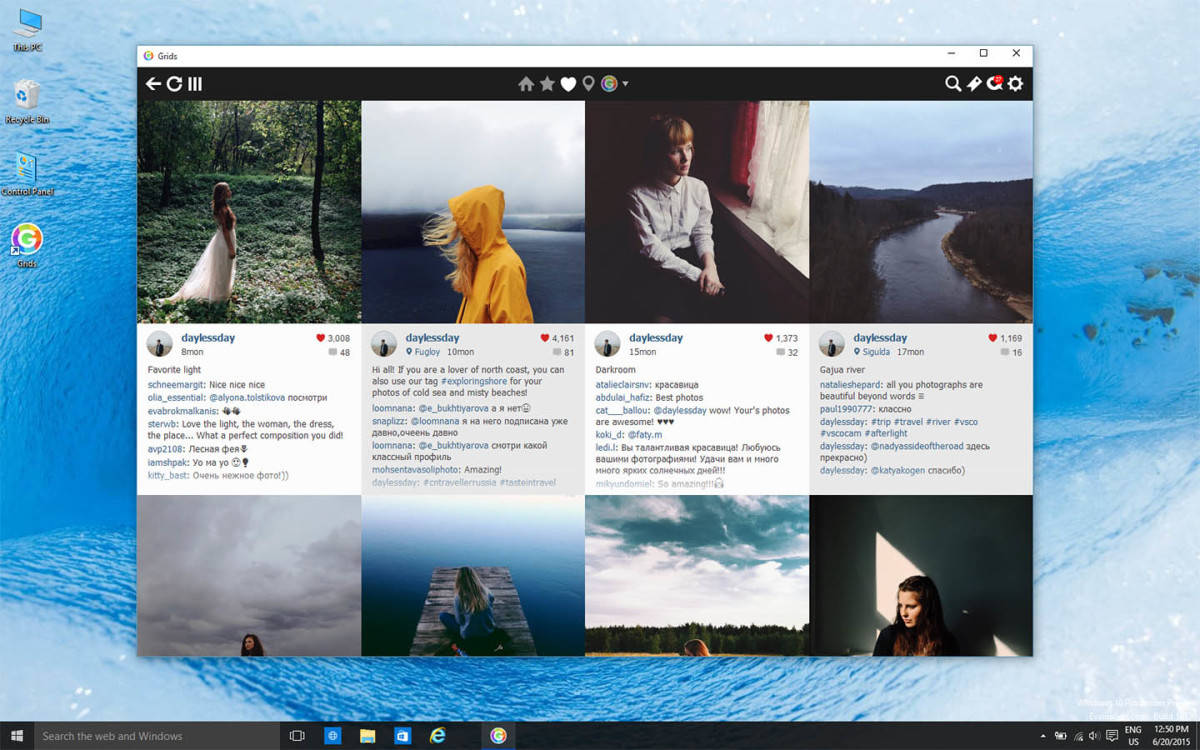
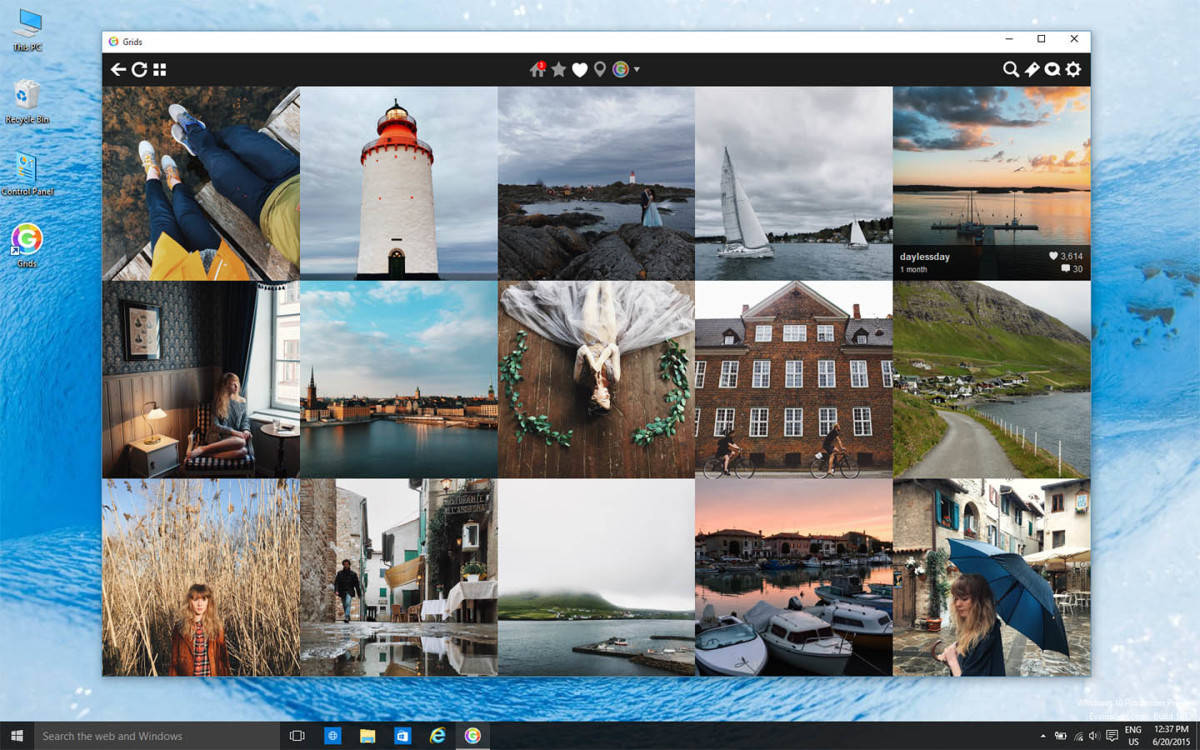
If you’re a social media person, you probably noticed that the official Instagram app is missing from both Windows 10 and Windows Phone 8.1. There are actually a lot of Instagram clients in the store, but none of them seems to be satisfying enough for users, and since you can’t use the official Instagram app, you’re forced to use one of these third-party clients. But one of them is actually better than others, it’s called Grids for Instagram, and it’s probably your best bet.

grids app

Grids was first introduced to Mac users, and it received mainly positive reviews, so its developers made a decision to make it available on Windows 10 platform, as well. What makes Grids better than other third-party Instagram clients is its slick design, along with solid functionality.

Grids’ interface is really beautiful, it shows pictures from your Instagram feed in a grid layout (that’s why the app is called Grids, I suppose), so you can easily see them, like comment, etc. And you can use the app just like you use the mobile version, you can like posts, comment, search, follow other users, etc.

It’s free to download and use, but you’ll have to pay $4.99 to unlock some ‘Premium’ features, like receiving notifications (which could be also available in a free version, if you ask me, but okay), multiple account support, full-screen browsing, etc. Also, the ability to upload photos from desktop isn’t available, and it’s unlikely that it will be included at all.

The app is available to download only via the official website, and you cannot find it in Windows Store. This is a little bit surprising, as we know that most developers focus on developing apps for Windows Store, instead of regular ones.

You can check out screenshots from the app below:

grids app windows 10 grids app wind 10 grids app win 10

If you think that Grids is worth using, you can download it for free from getgridsapp.com

Read Also: Yahoo Mail App for Windows 10 now Available for Free Download

Joe Belfiore hints at 'lots more' features coming to Windows 10 apps

Recently, we reported that the some of the Windows 10 apps (including the Photos app) were updated. But it seems that was just the beginning of what Microsoft has in store for us.
Joe Belfiore, corporate vice president at the Operating Systems Group at Microsoft, shared on Twitter that the apps bundled with Windows 10 will receive many more new features.

We don’t know what new features Belfiore might be talking about, but we will share them with you as we find out. Be sure to follow us on Twitter or add us to your feed reader so you can have the latest news delivered to you as soon as they come in.
What kind of features do you think will be added to Microsoft’s Windows 10 apps? What do you think Microsoft can do to improve some of the apps? Let us know what you think in the comments below!

Import contacts from Outlook into the People app on Windows 10

Whether you use a PC, tablet, or phone, it’s handy to have a list of contact names and numbers of all the people you know. If you’re unsure how to bring your contact lists from services such as Gmail or Outlook to Windows 10, then read on.

Windows 10 stores all contact names and numbers in an app called the People app, so let’s start there. First you need to launch the people app by opening the Start Menu and clicking on the following icon (the color of yours may be different):

Peopleicon
People App icon

When the People app opens, click on the three dots (shown highlighted in red below) and a menu will open below it. Now in that menu, click on “Settings” (also shown highlighted in red below):

People settings
Open Settings

Inside People Settings, click on “Add an account”:

Add account
Add an account

Now you can select the service you wish to import your contacts from and for the purposes of this tutorial, we’ll click on Outlook:

Outlook account
Choose an account

This will bring you to an Outlook login page. Here you need enter your Outlook email and password and press the “Sign in” button to complete the Outlook connection. This step would be similar if you were connecting to a different account; instead you would see the login screen of that service.

Outlook connect
Outlook sign in

Once you have signed into your Outlook account, your Outlook contacts will be imported and you can find them in alphabetical order in the People app.

It is possible to add contacts manually by pressing the + button in the second image above but that will be covered in more detail in another tutorial. Only contacts that have been manually added can be deleted in the People app. All other contacts must be deleted within the service they were imported from e.g. Gmail.

On a side note, social media contacts (Facebook, Twitter, etc.) are not included in the People app but are available in separate apps which can be downloaded from the Windows Store. This is changed from Windows 8.1 where social media contacts were included in the People app.

If you need more help on anything to do with Windows 10, we have a comprehensive How-To section at the top of every page. Should you think of something that we haven’t covered yet, you can suggest it by contacting us.

Insteon confirms update to Hub for Windows app but leaves users waiting

Insteon is a supplier of home automation kits and devices that are conveniently used to control the appliances of a house. Specifically, Insteo provides kits that can be used to monitor the lights in someone’s home via an app or other ‘smart home’ related duties, remotely. Insteon gadgets are rather well represented in Microsoft Stores due to a partnership between the two companies. A little over a year ago Insteon updated its app to allow voice activation with Microsoft’s digital assistant, Cortana so that users could control their appliances with verbal dictation.
Insteon’s current app is a Windows 8.1 app, and the company keeps it well supported with its most recent update occurring just this August. However, Windows 10 is nearly two months old to the world, and Insteon has yet to get around to releasing a Windows 10 Universal app. According to an anxious user over on Window Central, who sent Insteon an email, the company is hard at work on one. Unfortunately, the news ends there, as Inseton has no info on when Windows 10 users can expect an updated app to drop.

It’s still not clear from this reply if Insteon is developing a Windows 10 app or not, but hopefully they won’t let Microsoft down. The two companies have been in partnership over a year and with Google now owning home automation company: Nest, it would serve Microsoft well to keep Insteon as a valued partner. The home automation space is an obvious area where Microsoft and it’s devices such as Windows 10 Mobile or an Xbox One with Cortana, can shine.

Fhotoroom gets Windows 10 app update

Fhotoroom has just gotten an update that transforms it into a Windows 10 app. It still supports Windows 8, and will soon be updated to support Windows 10 Mobile via the universal platform.
The latest version includes several bug fixes, as well as a fix for issues with AMD processors. It also includes a new border blur feature.
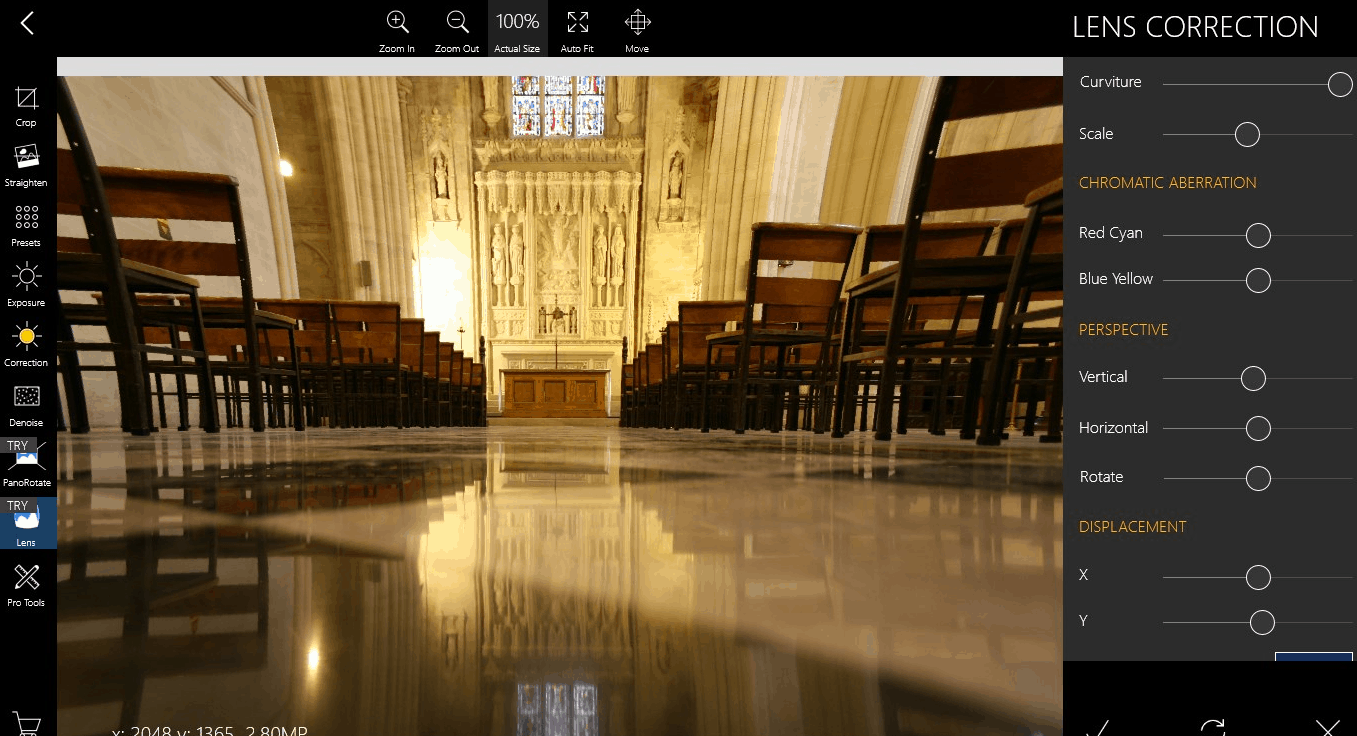
Fhotoroom is an app that aspires to be “The Photography Experience Platform”, elevating photo editing and sharing to a whole new level. It espouses interactive, touch-driven photo editing with features including:

  • Edit photos up to 41MP. Whip out that Lumia 1020!
  • Full Exif and GPS data support.
  • Support for a full roster of file types including  650 RAW*, JPG, JXR, WDP, PNG and TIFF.
  • Standard editing features such as crop, curves, resize, rotate, color correction, exposure correct, and more.
  • HDR filter
  • Lens Correction, panorama rotate, tiny planet
  • Masking tool
And much more.

The app also features robust sharing features revolving around the fast growing Fhoto community. Users can follow, like, comment on, and share photos. Other app additions include,  joining challenges and contests, as well as discussing and sharing filter combinations and recipes to enhance your photo editing skills.
And of course, Fhotoroom lets you share on Facebook, VK, Flickr, and Twitter.

Fhotoroom
Fhotoroom
Price:
Free


Skype fixes network issue, users coming back online

As WinBeta reported earlier today, Skype users experienced a momentary outage of Skype services. The Skype Heartbeat Blog announced that they deployed a fix for the Skype outage that many users experienced, noting that the Skype service disruption did not affect Skype for Business users:

“We have identified the network issue which prevented users from logging in and using Skype today. We’re in the process of reconnecting our users, and focused on restoring full service. The issue did not affect Skype for Business users.”


The Skype outage issues revolved around not being able to change your online status, video calls and messaging issues, and problems signing in to your Skype account. It looks like everything is back to normal as Skype services appear to quickly be coming back online. I barely noticed the outage; I only had problems with setting my online status and some problems signing into my Skype account, but it looks like the issue is fixed (for me at least).
 

Windows 10 news recap: New builds, new features, and more

Another Windows 10 news week has passed us. This week kicked off with a new Windows 10 build leaking onto the web. Build 10537, which is an unofficial Insider build, found its way onto public sharing sites at the beginning of the week. The build didn’t include much, but as per usual we went hands on with all the new changes.
Up next, Microsoft kicked off the Windows 10 for Xbox One preview for select Xbox Preview members. Invitations started going out earlier in the week, but the update only just started rolling out as of a few days ago. The new update includes a brand new user-interface and a whole bunch of performance enhancements which will make the Xbox One experience a lot better.
Microsoft also published a number of new app updates for the Mail and Calendar apps, improving their user-interfaces and overall experiences dramatically. The updated apps now include a new and improved dark mode, with the ability to have a wallpaper within the app, and new icons which make the taskbar a lot more detailed.
Furthermore, Microsoft released a new Windows 10 Insider build, build 10547. The new build is available now for fast ringed Insiders, and packs a number of new features such as the ability to have 4 columns on Start, disable the login wallpaper, and more. Make sure you check for updates via Windows Update as an insider if you’re yet to install the latest bits.
Microsoft’s October 6th event is almost upon us and we expect Microsoft to announce new devices. There will be a live stream of the private event, and oh, of course, we will be in attendance too! Stay tuned for another exciting week of Windows 10 news!
That’s all for this week. What was your favorite story? Let us know below.

Maximize a YouTube video in Microsoft Edge the cool way

Here’s a cool feature in Microsoft Edge that you won’t find on Firefox or Chrome — the ability to maximize a YouTube video in Microsoft Edge while resizing the Edge browser! How cool is that?

As you can see in the image below, you can resize the Edge browser while maintaining a “full-screen” YouTube video that fills up the entire browser screen. I mean, it technically isn’t considered “full-screen” when using this method, but it does allow the video to take up the entire browser real-estate regardless of the browser’s size. Here’s how to achieve this.
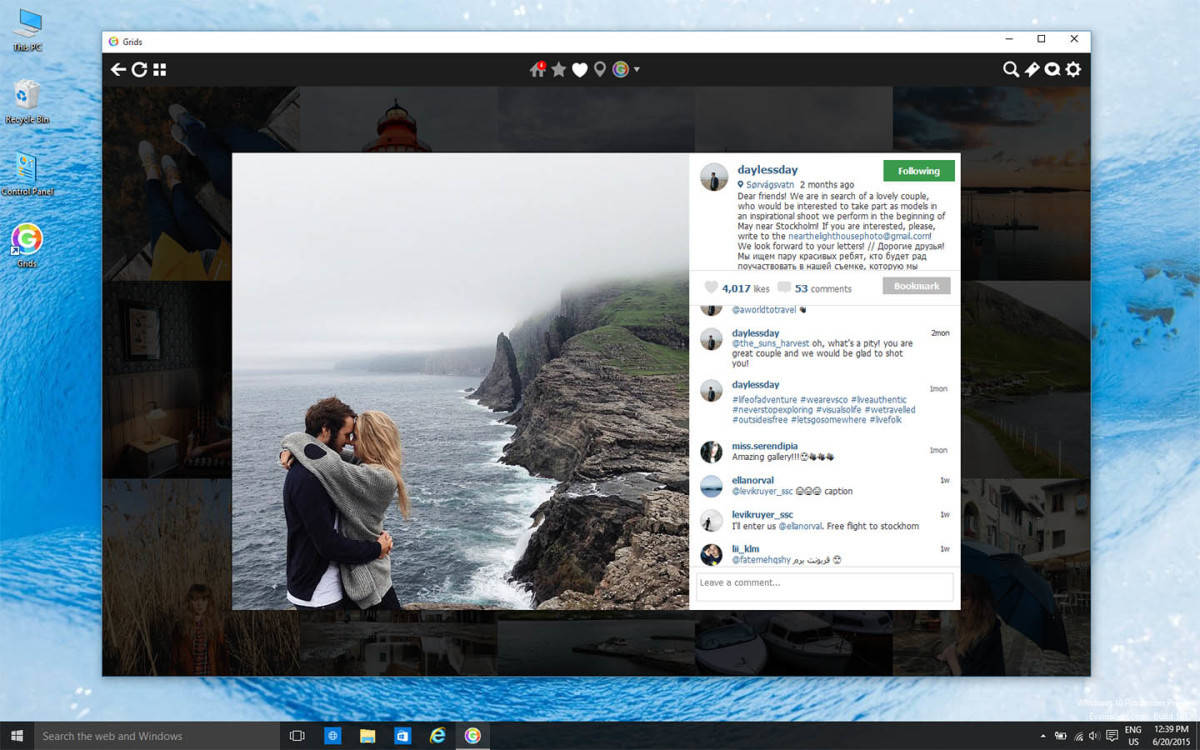
  • Play a video on YouTube
  • Click the full-screen button on the YouTube player
  • Hover to the top-right of the screen, pause for a second, and click the restore button on Edge
  • Bam! You can now watch YouTube videos in a whole new manner!

Try it out for yourself and let us know in the comments below if you like this neat little feature. There are still improvements that need to be made, for example, it can be a bit hard to move the Edge browser window around your desktop once you have a YouTube video playing in full-screen mode.

microsoftedgecool
Full-screen YouTube video on Microsoft Edge


Microsoft Edge will soon be able to make Skype audio and video calls without a plugin

The Skype Team has announced the availability of the Object RTC API preview on Microsoft Edge for the latest Windows 10 insider build. According to the Skype team, later this year when Object RTC is fully enabled in Edge, users will be able to make audio and video calls within the browser without the use of plugins. The Skype and Edge teams are also working on bringing this functionality to Skype for Business.
ObjectRTC (ORTC), as well as its sister API, Web Real-Time Communication (WebRTC), are in-development web standard APIs that enable real time streaming of data between web browsers. This facilitates web apps such as voice calling, video conferencing, and general P2P data sharing directly within the browsers. These APIs are the last puzzle pieces needed to make apps like Skype for Web and Skype for Outlook.com fully functional within the browser.
With Adobe’s Flash browser plugin on its way out of mainstream browsing, the healthy development of ORTC and WebRTC brings us one step closer to the web ideal: a world wide web where content is powered without the use of proprietary and potentially unsecure plugins, entirely by open standard browser technologies. Although, interestingly enough, what constitutes a viable “open standard” is still a hotly contested arena.
Object RTC was developed by Microsoft in response to what the company saw as a flawed WebRTC standard. The WebRTC standard is backed most noticeably by Google and Mozilla, the developers of Edge/IE competitors Chrome and Firefox respectively. It should be mentioned that Google is also an active participant in ORTC development as well.
If web standards are supposed to eliminate unnecessary in-fighting and strengthen interoperability between browsers, doesn’t having two competing real-time data APIs go against this ideal? Not necessarily in this case, as the ORTC developers have promised that ORTC will be compatible with WebRTC. Currently, Edge will be the only browser support ORTC, whereas Chrome, Firefox, and Opera will support WebRTC. It should be noted that Apple is conspicuously absent from officially supporting either API.
For those interested in the more technical explanation of what the ORTC API encompasses, the vaunted Edge Team discusses it here.