Microsoft rolls out Internet Explorer 11 Release Preview for Windows 7

IE11

Internet Explorer 11 first made its debut in the Windows 8.1 Preview earlier this year. Much like Internet Explorer 10, the latest version of IE is always exclusive to the operating system it debuts on at first, but after a while Microsoft will eventually release it for older operating systems.

Microsoft rolled out Internet Explorer 11 Developer Preview for Windows 7 users back in July of this year. Microsoft has now rolled out the Release Preview version of IE11 and the download is now available.

“The IE11 Release Preview for Windows 7 is available for download today and includes performance improvements making it 30% faster than other browsers, updates to support the latest Web standards, and developer tools improvements in response to your feedback on the IE11 Developer Preview for Windows 7,” Microsoft stated in an official blog post.

IE11 reflects the latest emerging Web standards as well as several developer tools enhancements to increase developer productivity. Microsoft is also touting an increase in JavaScript performance, even going as far as saying IE11 Release Preview is 9% faster than IE10.

In the Windows 8.1 version of Internet Explorer 11, users can sync their tabs across devices via their Microsoft Account. However, since Windows 7 doesn’t have such integration with Microsoft Account, this tab sync feature isn’t available for Windows 7.

Hit the download link below to snag it! No word on when IE11 for Windows 7 will go final, but we can venture a guess and say sometime around October 17th (the day Windows 8.1 with IE11 rolls out).

Say hello to Cortana, Microsoft’s Siri and Google Now killer

Cortana Halo Character Picture

We’ve been covering the latest news of Windows Phone, with the leaks of the Nokia Lumia 1520, GDR3 – aka Bittersweet Shimmer, and Windows Phone 8.1, which is also known as Windows Phone Blue. But one thing we have yet to cover is a new feature rumored to come with Windows Phone 8.1, called “Cortana”.

Cortana is Microsoft’s “revolutionary” assistant technology. Although we do have a voice command system built in, it’s time Microsoft improved on it to have competition with Siri and Google Now. According to other Microsoft execs, this technology would not be available to users until they finalize every bit of it, so it will be most likely between 2014 and 2016.

If you ever played Halo, you would recognize the name “Cortana”. Cortana is named after a Halo character that knew everything. According to Mary Jo Foley from ZDNet, “Cortana will be more than just an app that lets users interact with their phones more naturally using voice commands. Cortana is core to the makeover of the entire “shell” — the core services and experience — of the future versions of Windows Phone, Windows and the Xbox One operating systems.”

While we have to rely on leaks only, Microsoft’s CEO Steve Ballmer has hinted that Microsoft will be working on “a family of devices powered by a service-enabled shell.” He continues, “Our UI will be deeply personalized, based on the advanced, almost magical, intelligence in our cloud that learns more and more over time about people and the world. Our shell will natively support all of our essential services, and will be great at responding seamlessly to what people ask for, and even anticipating what they need before they ask for it.”

Ballmer later on says in his memo that this shell will also be a “broker information among our services to bring them together on our devices in ways that will enable richer and deeper app experiences.” Ballmer has been touting publicly how users will be able to use voice assistant technology for all their devices. An example would be telling your PC to “print my boarding pass on Southwest” and then their systems would automatically jump into action.

Cortana will be made up of several services combined into one. It would pack Bing’s information, TellMe speech recognition technology, and “natural-language-plus-social-graph concoction.” To view screenshots of Cortana, head on over here.

Microsoft and Nokia to seek a ‘unified brand’ across Lumia and other Windows devices (Surface?)

Nokia Lumia 920 - Smartphone of the year

Microsoft recently acquired Nokia’s hardware and software division, which means that Microsoft owns the Lumia smartphone brand. But what are Microsoft’s plans for the Lumia brand? According to Nokia’s EVP for Sales and Marketing, Chris Weber, Microsoft wants to create a unified brand across Lumia and other Windows based devices, such as the Surface.

“On smartphones, it’s more complicated and we’ll be seeking to create a unified brand across Lumia and other Windows based devices. But we’re still a long way from when that decision has to be made,” Nokia stated in an official blog post. The big question is, will Microsoft get rid of the Lumia brand name and simply call new Windows Phone devices as Surface phones? Or will we see new Lumia tablets? These names are just speculation since no one knows just yet what Microsoft intends to do.

“Nokia as a company will remain. Microsoft isn’t buying the whole company, just a part.”

So what’s next for Nokia after this acquisition? Well, in essence, nothing has changed now. In six months, we will see faster innovation from Nokia when it comes to the feature phone range, backed by Microsoft’s help. As for customer support, warranties, and guarantees, nothing changes due to the acquisition.

“We expect our smartphone, mobile phone, industrial design, support and all the related teams to be doing their same job to the same standards, but working for Microsoft. Working with Microsoft we can increase the awareness and growth of Windows Phone, Asha and our feature phones. We can build upon the success of Lumia and create a stronger, faster, more innovative route to driving this portfolio and the exciting ecosystem around it,” Weber stated.

It will also mean faster innovation in our Asha and feature phone range – with the backing of Microsoft – a real boost to our goal of connecting the next billion people to the Internet,” Weber adds.

The bottom line is that the Windows Phone ecosystem now gets more investment, while Nokia’s design, durability, apps and support will not change. Nokia, as a company, isnt going anywhere. Microsoft simply purchased a portion of the company. It is still a great time to purchase a Nokia smartphone!

Windows RT 8.1 RTM has leaked onto the web

Windows RT 8.1

We’ve had pretty much every edition of Windows 8.1 leak onto the internet already, and today we can finally tick off the final SKU of Windows 8.1 that was yet to leak, Windows RT. Today, Windows RT 8.1 has leaked onto the web, but installing it will require a lot more work than usual.

Since this is our first ever Windows RT leak, it isn’t entirely clear how installation works. More so, as the ISO’s are clean, installing this leak will ultimately result in your Windows RT device being unbootable as it will not have the required drivers. WZOR, the guys behind the Windows RT 8.1 leak have provided drivers for Surface RT only, but you will be required to insert them manually before hand.

In a matter of fact, it’s more of a reflash than install. So bare that in mind.

Of course, with all leaks we suggest you do not try and install, especially with a leak which is very difficult to install. We will not be posting direct links to said leak, and we also do not permit download links in the comment section. Again, for the sake of your beloved RT device, just wait for the official update coming in October.

Lenovo: With new battery-efficient Haswell CPU, Windows RT is no longer needed

Lenovo Windows 8

Not that long ago, Lenovo’s Think PC and Visual Category Manager Simon Kent stated that Windows RT is not what businesses want. Instead, businesses want the ‘full version of Windows.’ During the IFA 2013 conference Friday, Lenovo added that Windows RT is no longer needed. But why?

When Microsoft rolled out Windows RT, the idea was to provide a Windows experience that was similar to the full-fledged Windows 8 but offered support for low powered ARM chips to achieve longer battery life. However, Lenovo argues the fact that thanks to Intel’s upcoming Haswell chipset, battery efficiency will become a norm and Windows RT will no longer be needed.

Haswell offers battery efficiency and performance at the same time, so it makes sense to simply have a device running the full-fledged Windows 8 operating system. Given Lenovo’s stance on Windows RT, it comes as no surprise that the company wants to focus solely on Windows 8. Lenovo has already discontinued its Lenovo IdeaPad Yoga 11 product, powered by Windows RT.

Do you agree with Lenovo? Is Windows RT redundant now that battery efficient chipsets are making their way onto devices?

Microsoft dropping Xbox 360 support in 3 years

Xbox 360 photo

After the recent updates that Microsoft did to its Xbox One consoles improving its CPU and GPU, it looks like Microsoft is ready to ship the consoles to retailers for its November 22nd release date. It will be $499 including the console itself, Kinect, one controller, and the headset.

During the Citi Global Technology Conference, Yusuf Mehdi, who is the Xbox Chief and Strategy Officer, stated that Microsoft will continue to support the Xbox 360 for another 3 years while also releasing more than 100 games.

“We’re going to continue to invest in Xbox 360, and the two devices can work in concert. So it’s not like the day we ship Xbox One your 360 won’t work. We’ll continue to support it.”

If the Xbox 360 will be supported for another 3 years, then it will ‘die’ after 11 years ever since it got released in fall 2005. While the Xbox One will get released in successful markets, the Xbox 360 will still be able to sell in low-end markets like the Middle East or Africa due to its low price and availability of games. If this were to happen, then we can suspect the Xbox 360 to surpass its 100 million user mark over the new few years.

We’ve heard in the past that EA and several other game vendors stated that games released before the next generation consoles will be able to run on current generation consoles. If the consumers plan to buy the new Xbox One or PS4, a $10 upgrade fee is charged on a select variety of games so users can get the new next-generation-supported game discs.

Microsoft: IllumiRoom cost was ‘just too big a barrier’ for it to happen

Xbox One

Remember IllumiRoom? IllumiRoom was described as a proof-of-concept system that augments the area surrounding a television with projected visualizations to enhance traditional gaming experiences. Truly the future of gaming. But it wont be here anytime soon due to costs.

According to a new report, Microsoft’s Albert Penello, head of product planning for Xbox One, revealed that the future of gaming known as IllumiRoom was not followed through due to the cost. “It’s very, very cool tech but it’s, like, for a consumer, it requires projectors and things. It’s really super-neat if you’re in the lab and you’ve got Microsoft money and you could totally set up this awesome lab, but… we looked at it, but for an average customer it’s, like, thousands of dollars [for the set up],” Penello stated.

Rumors had indicated that we might see the IllumiRoom feature during the launch of the Xbox One, but as we now know, cost will play a crucial role in delaying that. Until Microsoft can figure out a way to bring the price down, IllumiRoom will end up being a cool gaming concept restricted to Microsoft’s internal labs.

If you are unfamiliar with IllumiRoom, take a look at the video we’ve embedded for your viewing pleasure below.

Microsoft and Google join forces to sue the US Government over surveillance transparency

Google/Microsoft

If you follow up to the latest technology news, then you are aware of the relationship between Google and Microsoft. After ‘trying’ to make an official YouTube app available for Windows Phones, they still can’t seem to be able to work together. Well today you’re going to be in shock because they are now joining forces to sue the US government.

Microsoft has partnered up with Google to sue the US government over surveillance transparency. Although the government has said that it will release the total number of national security demands for consumer data for the past 12 months, Microsoft and Google think this is not enough. Both companies feel that everyone deserves the right to know which details, involving official data requests for user data, was requested. This is why Microsoft and Google have both stated yesterday that they will sue the US government to battle over the Foreign Intelligence Surveillance Act (FISA), for the sake of their customers.

We’ve seen the reaction to everyone when Edward Snowden leaked details on what the US government is up to, which was about the NSA, FISA, and PRISM and their actions against internet users. But everyone raged not only at the government but to the companies providing information for the US government. These companies included Microsoft, Google, and some others. After Microsoft admitted that they were not spying on its customers, some critics still believe they were aiding the US government to spy on people.

“Each company filed a suit in June arguing that they should be allowed to state the details under the first amendment, which guarantees freedom of speech, and in the process defend corporate reputations battered by Edward Snowden’s revelations,” The Guardian’s Rory Carrol wrote.

Microsoft’s legal counsel Brad Smith said in a blog post, “On six occasions in recent weeks we agreed with the department of justice to extend the government’s deadline to reply to these lawsuits. We hoped that these discussions would lead to an agreement acceptable to all.”

“With the failure of our recent negotiations, we will move forward with litigation in the hope that the courts will uphold our right to speak more freely. And with a growing discussion on Capitol Hill, we hope Congress will continue to press for the right of technology companies to disclose relevant information in an appropriate way,” Smith adds.

This seems to be the tech giant’s ways to boost their morale due to previous false allegations and to fight for more transparency for their consumers.

Office 365 subscribers now get 25GB of SkyDrive Pro storage, new ‘Shared with Me’ feature

SkyDrive

In an official blog post today, Microsoft has revealed some new features for SkyDrive Pro. SkyDrive Pro is a cloud storage service tailored to Office 365 subscribers, now offering a whopping 25GB of storage rather than the default 7GB. Microsoft has also rolled out a new feature called “Shared with Me” which offers SkyDrive users the ability to easily find documents others have shared with them.

“Have you ever experienced the pain of trying to locate a document or folder a colleague previously shared with you? Shared with Me eliminates the worry of finding those important items, because now they’re all visible in a single view from within your SkyDrive Pro,” Microsoft stated in an official blog post. Shared with Me appears in the left-hand side of the navigation pane of your SkyDrive Pro.

Microsoft has also increased the default storage space for new and existing SkyDrive Pro users from 7GB to 25GB. Even better if you are a SharePoint Online admin, because you can now increase SkyDrive Pro storage space to 50GB or 100GB for your users.

“In the spirit of continually improving the SkyDrive Pro service, we’re also increasing the overall file upload limit in SharePoint Online to 2 GB/file and the default recycle bin retention to 90 days (up from 30 days). And we’re enabling versioning by default on newly provisioned SkyDrive Pro libraries, which saves the last ten versions, so you never lose an important document. These service improvements apply to SkyDrive Pro and to team site documents and data,” Microsoft added.

So there you have it. These features do not apply to the standard SkyDrive which we all have access to, this simply applies to SkyDrive Pro for those of you who are Office 365 subscribers.

Steve Ballmer’s biggest regret is Windows Vista, codename Longhorn

Steve Ballmer

Earlier today, we learned that Microsoft CEO Steve Ballmer would be retiring within the next 12 months. This news was surprising and unexpected. In an interview with ZDNet’s Mary Jo Foley, we learn that Ballmer’s biggest regret during his tenure at Microsoft was Windows Vista.

“Oh, you know, I’ve actually had a chance to make a lot of mistakes, and probably because, you know, people all want to focus in on period A, period B, but I would say probably the thing I regret most is the, what shall I call it, the loopedy-loo that we did that was sort of Longhorn to Vista. I would say that’s probably the thing I regret most. And, you know, there are side effects of that when you tie up a big team to do something that doesn’t prove out to be as valuable,” Ballmer stated.

Windows Vista, codename Longhorn, is widely known as a flop in the eyes of many consumers, due to glitches and crashes. Aero made its debut in Windows Vista, offering a new visual feel to the operating system. This feature was great but the operating system had its fair share of problems when it came to driver support and other glitches.

Microsoft has yet to select a new CEO for the company.

Microsoft Reveals ‘ID@Xbox’: Xbox One Indie Self-publishing Program

Microsoft wants to do all that it takes to promote better the upcoming Xbox One. For that, the Redmond company has announced that it will allow independent (indie) developers to self-publish on the Xbox One. And now Microsoft has officially unveiled its ID@Xbox program, which stands for Independent Developers.

Starting from today, indie developers can submit their applications to get the official Xbox One developer status. However, as per some recent reports, the program will be initially available only in the United States, so if you will access the ID@Xbox website from another country, you might not see yet the program being active in your region.

ID@Xbox detailed

xbox one indie developers

The Xbox One registered indie developer will get two Xbox One dev kits for free, which is indeed really cool. They will thus be able to utilize Xbox One’s entire power, along with Microsoft’s cloud services, Kinect and the Xbox Live toolset consisting of the Xbox SmartGlass, Xbox multiplayer, Xbox Achievements and Xbox Gamerscore.

Getting your Xbox One developer status might take a while but if you “have a proven track record of shipping games on console, PC, mobile or tablet“, then you should receive it faster in order to prepare yourself for the Xbox One launch. Not only that indie developers will get two Xbox One dev kits completely for free but they will also not pay any application or certification fees. Accepted indie Xbox one developers will also get free support.

Marc Whitten, Xbox Chief Product Officer:

We know Xbox fans will fall in love with the quality and diversity of games on our platform. We are committed to ID@Xbox and are fully invested in helping independent developers succeed on Xbox One.

Microsoft EMEA boss Phil Harrison added

I am really looking forward to the diversity and creativity of games that will come to Xbox One through the ID@Xbox program. We’ve worked with the community of developers to craft a platform that helps creators self-publish on Xbox One – irrespective of their size or location.

The ID@Xbox program will be ideal for the indie games developers that don’t belong to any major publishing house; by using this program they will get early access to the Xbox One. After all, we’ve seen so many awesome indie games that were developed by small teams. Microsoft’s move in this direction is to be appreciated.

xbox one indie

SpyParty’s creator, indie develop Chris Hecker is convinced of the potential of the ID@Xbox program:

I’m really excited that Microsoft has listened to feedback from developers and created this program. As an independent developer, I want SpyParty to be available to as many players as possible, and it feels like Microsoft is interested in not only removing roadblocks for indies to get their games on Xbox One, but they’re also genuinely interested in finding ways to bring new and innovative indie games to their platform to help games reach their potential as an art and entertainment form.

Recently, Microsoft announced that they will reduce the number of launch markets for the Xbox One which has obviously created a lot of frustration among possible buyers. Now, Redmond wants to get some love from the developer community with the introduction of the ID@Xbox self-publishing program.

Recently, we’ve seen that Microsoft has hired former Steam boss Jason Holtman in order to improve the gaming and entertainment strategy on Windows. Also, Redmond will be closing the Xbox.com PC marketplace as soon as August 22nd this year. Now, with the launch of the ID@Xbox, Microsoft shows that it is changing its approach towards gaming. But will this be enough to lure long-time PlayStation users and maintain PC gamers’ interest?

Skype for Outlook.com now available in North America and United Kingdom

Outlook + Skype

Not that long ago, Microsoft announced that its Outlook.com email service would have built-in Skype video calling and messaging functionality. As of today, Skype for Outlook.com are now intertwined in the UK and North America, with more countries receiving this feature soon.

“A few months ago we announced that a preview of Skype video calling and messaging was starting to arrive in Outlook.com. Today we are excited to give you an update: Skype for Outlook.com is now fully available in several countries around the globe including the United Kingdom, Germany, Brazil, France, Canada, and the United States,” Microsoft stated in an official blog post.

However, more countries will see this feature in the near future. “For those of you outside those countries, we’re still working hard to ensure this is available worldwide in the near future,” Microsoft explained.

Having the ability to make Skype video calls directly from Outlook.com only adds to the benefits of the service’s features, which includes social connections with Facebook and Google. Microsoft cites a statistic in which 76% of those who email frequently follow up via a phone call or video call. This makes Skype for Outlook.com ideal for those who wish to easily make a video call right from their inbox.

Head over to Outlook.com and give Skype a try. Do you find this feature to be useful?

Microsoft unveils the Sculpt Ergonomic Desktop, designed based off extensive research

Sculpt Ergonomic Desktop

Microsoft has unveiled a new evolution of its ergonomic product line called the Sculpt Ergonomic Desktop, which was designed based off extensive research. With this new keyboard, Microsoft wanted to create “something beautiful” without sacrificing the ergonomic benefits.

The Sculpt Ergonomic Desktop features a combo of the Sculpt Ergonomic Keyboard and Sculpt Ergonomic Mouse. The Sculpt Ergonomic Keyboard features a split layout and is actually beautifully designed and is unique. The layout is designed to help position your wrists and forearms in a natural and relaxed position.

“The palm rest is cushioned and the keyboard has a “domed” shape, as shown above, to reduce wrist pronation. Matter a fact, the internal codename for the keyboard was “Manta Ray” because as you can see, it resembles a manta ray. It also allows for reverse-tilt angles to promote a straight, neutral wrist position. All these adjustments to a traditional keyboard put your body in the best possible position for comfort and ergonomics,” Microsoft explained.

The keyboard was designed for Windows 8, featuring hotkeys that work with the operating system. You can also remove the number pad if you don’t want it.

The Sculpt Ergonomic Mouse was “designed for healthy computing with a unique ergonomic shape that encourages natural postures.” The mouse is a bit bigger than typical mice, but only because it reduces the contact between the desktop surface and the underside of your hand which reduces carpal tunnel pressure. Not only is the mouse designed to place your forearm in a relaxed position but the mouse also features a Windows Start button so you can access the Start screen faster. There is also a back button and a four way scroll wheel.

The Sculpt Ergonomic Desktop will be available this month for $129.95 (US). The mouse can be purchased separately for $59.95 (US).

Microsoft offers ‘visual statistics’ of all its products and services in the form of a Start screen

Microsoft Visual Stats

Microsoft has rolled out a new website called “Microsoft by the Numbers” which offers visitors a unique way of showcasing all of the company’s product and service stats in one visually appealing manner. In fact, the website is designed as a large Start screen.

On the website, which you can check out by clicking the source link below, products and services are listed in a live tile format. We learn that Microsoft’s Windows 8 operating system has sold 100 million licenses, which could be an old statistic by now. We also learn that Bing holds 17.86% of the U.S. search market share and that the Windows Store has seen 250 million app downloads from users.

It does appear that some of these stats are old and need to be refreshed. Microsoft is also apparently using data from other sources, such as Netmarketshare, to brag statistically about a product or service.

At the bottom of the website, there is a link to download all the stats in PDF format. This offers readers a two-paged PDF file that outlines all of the stats. If you are interested in checking out the new “Microsoft by the Numbers” visual stats website, hit the source link below.

Microsoft: Google reads your private email conversations and spams you

Scroogled

Microsoft is promoting its Outlook.com email service in a new anti-gmail manner, pointing out that Google reads your private email conversations. On top of that, Google will push junk mail directly to your email inbox.

“Google violates your privacy by reading every single word of every single email sent to and from Gmail accounts so they can better target you with ads. Now, they’re going one step further over the line by using that same personal information to spam your inbox with ads that look like real emails. Your email provider should protect you from spam, but Google is doing just the opposite; they’re reading your private email conversations and using what they find to push junk mail directly to your Gmail inbox,” Microsoft stated on its Scroogled website.

Microsoft has been going at it with Google with the company’s Scroogled campaign, highlighting privacy concerns and issues with Google’s products and services. Microsoft has been running these campaigns in an attempt to get users to ditch Gmail and Google Search for Microsoft’s Bing Search and Outlook.com email service.

Microsoft’s Bing team launched the “Scroogled” campaign earlier this year intended to bring back “honest search” by slamming Google and their practice of using paid advertising to promote products to shopping searchers during search results. Instead of seeing consumers being “Scroogled”, Microsoft wants you to see what is really going on with Google.

Head over to the source link to learn more about the Scroogled campaign. You can also watch the embedded video below showcasing how users are getting Scroogled with Gmail.

Surface RT battery drain issue with Windows RT 8.1 caused by Bluetooth being disabled

Surface

For those of you who are running Windows RT 8.1 Preview on your Surface RT, you might have experienced an issue where your battery would drain out quickly. This is a known issue and Microsoft has offered a temporary workaround until the final version of Windows RT 8.1 is released.

“Since installing the Windows RT 8.1 Preview I have experienced high battery drain in Connected Standby. I’m losing 2-3% an hour when the Surface RT is in standby, so losing 30% battery during the day when not being used,” one user stated on an official Microsoft support forum. The issue stems from a Bluetooth setting in Windows RT 8.1 and Microsoft is aware of this issue.

In essence, the reason this issue occurs is because the Bluetooth radio was turned off. In order to fix this issue, simply enable Bluetooth. “Do you have your Bluetooth radio turned off, e.g. through airplane mode? If so, please turn it on as a workaround. Swipe in from right to bring in charms bar, tap on Settings and then on Change PC Settings at the bottom. Subsequent steps to get to the switch to enable Bluetooth: Change PC Settings > PC and Devices > Bluetooth,” a Microsoft support member explained.

Enabling Bluetooth fixes this issue. “I’ve now tested over an extended Connected Standby time, and can confirm that turning Bluetooth on has stopped the high battery drain,” another user mentions.

While it may seem counter intuitive to enable a radio to save battery life, this is simply a bug and shouldn’t come as a surprise since Windows RT 8.1 is still in a Preview stage. “It is reasonable to want to turn off the Bluetooth radio to conserve even more power, but be aware that the major contributor to drain on battery is overall system power use, not just an individual radio. Microsoft teams are aware of this issue in the preview build of Windows 8.1,” the Microsoft support member adds.

So if you have this issue, make sure you enable Bluetooth on your Surface RT!

Best Windows 8 Apps for This Week [August 4]

We missed the previous rondup with the best Windows 8 apps and we are deeply sorry for that. At its fourth edition, our list of the best Windows 8 application for the past week contains new Windows 8 apps and some very important Windows 8 apps that have received some updates.

You should also know that Windows 8 is now the second most used OS on Steam, clocking in at more than 14 percent. Windows 7 is stil number one with almsot 65 percent, which is indeed a huge lead. Without further, let’s have a look at 10 best Windows 8 apps that we have selected for this week, along with some other mentions.

10 Best Windows 8 apps this week

InstaPic (Free)

instapic best windows 8 app

We have previously talked about Metrogram, a Windows 8 app that was meant to mimick a true Instagram app experience, while we’re waiting for the real deal. Just like Metrogram, InstaPic is not the official Instagram app for Windows 8 but it is said to be “the first and only fully featured Instagram Client for Windows 8 devices”. A big advantage is that InstaPic doesn’t come with advertisements inside the app, albeit the it is 100% free. Makes you wonder how will developers make money. All Instagram features are included:  Register, Sign in, Upload, Comment, Follow, like etc. From app’s official description:

InstaPic comes with a suite of Photo editing features ranging from filters to adjusting brightness, saturation, contrast and several more. InstaPic provides you the most intuitive and elegant way to shoot, edit, share and view the world’s moments in pictures and videos.

Redbox Rentals (Free)

redbox rentals best windows 8 app

Windows 8 users have long waited for the official Redbox app. It is now on the Windows Store and lets you rent your favorite movies. Redbox users know that they can also rent games, not only movies. You can search by:

  • release date
  • genre
  • rating

You can also watch trailers inside the Redbox Rentals Windows 8 app. The app also features a list of the closest Redbox location to your home.

9Slides (Free)

9 slides best windows 8 app

If you have a Windows 8 tablet that you take along with you in business meetings, then most likely you are also looking for some presentation apps. 9Slides is a Windows 8 presentation app that lets you add video.audio commentary to presentation slides straight from your Windows 8 tablet, laptop or hybrid.  The app has some much needed features as:

  • Allows for importing of Microsoft PowerPoint and Adobe PDF presentations
  • Records your video delivering the presentation
  • Allows for online publishing

Rhapsody (Free)

rhapsody best windows 8 app

Music on Windows 8 gets much more interesting if you’ve got a Rhapsody music subscription, right? The Windows 8 Rhapsody app comes with any song you might think off, as well as entire artist albums. You can test Rhapsody on Windows with a 14-day free trial. Here are Rhapsody’s main fetures:

  • Millions of songs
  • Full-length albums
  • Create playlists
  • Save favorite songs to library
  • Rhapsody radio
  • Rich-album imagery
  • Intuitive navigation

QuickScan for Amazon (Free)

quick scan for amazon windows 8 app

Amazon has its very own official app in the Windows Store and we actually did a thorough review of it a while back. Now it’s time for QuickScan For Amazon Windows 8 app. This app basically transforms your Windows 8 device into a barcode scanner, provided that you have a webcam or you can simply insert the barcode. You just need to grab a product that has a barcode on it, scan it and compare it with what Amazon has to offer. Who knows, you might be getting a better deal! Here are the most important features of the app:

  • Barcode Scanner via camera
  • Obtain barcodes from pictures or directly type them
  • Roaming integrated
  • Scans are saved
  • Purchase in your browser
  • Supported countries: United States, Canada, United Kingdom, Germany, France, Italy & Spain

TextNow (Free)

text now windows 8 app

TextNow is one of the most used apps in the world when it comes to free and unlimited texting. Now it lets you send free text messages directly from your Windows 8 computer! We have previously also talked about MySMS Windows 8 app that lets you send free SMS. TextNow is an obvious rival for the yet to be released WhatsApp. The drawback is that TextNow will only work for Windows 8 users from USA and Canada.

Cattergories (Free)

cattergories best windows 8 app

If you’ve been following Wind8Apps, then you know we like word games; we actually reviewed three of them – Wordament, WordTwist, AdLib.  Cattergories also falls into that cattegory (pun intended).  From the app’s description:

You have 90 seconds to match as many words to categories and starting letters as you can. Better yet, everyone playing Cattergories is playing the same challenges as you! Can you race to the top of the leaderboard? Or can you pick more unique words than everyone else? It’s okay if you don’t win your first round, another will start 30 seconds later!

The games actually take place online which means that there will be new categories being added. It’s definitely one of the coolest brain training apps to use in your Windows 8 device.

MoviePlanet (Free)

movie planet best windows 8 apps

Movie apps are essential in order to have a complete Windows 8 experience and that’s why we have featured a long list with them a while ago, with MovieGuide being one of my favorites. MoviePlanet is now a worthy addition to our list of the best Windows 8 movie apps. The app lets you watch over 5,000 free movies online that are actually taken from Youtube, thus belonging to the public domain. There is even a disclaimer regarding this:

The content provided in this app is hosted by YouTube and is available in public domain. We do not upload any Movies to YouTube. This app is just an organized way to browse and view these YouTube Videos. For better performance use 3G or Wi-Fi.

Dominoes (Free)

dominoes best windows 8 apps

Classic games will be here for ever, no matter how advanced our tech toys will be. If you enjoyed our Windows 8 chess and Sudoku apps, then I am sure you will find pleasure in Dominoes for Windows 8, as well. The game features 3 classic game modes (Muggins, Block, and Draw). You can also change the theme and the backgrounds. The game is 100% free and allows for accomodation of up to 4 players, Of course, you can also play against the computer bu that ain’t that funny, right?

Ragdoll Run (Free)

ragdoll run best windows 8 apps

If you have a Windows Phone phone, then there are chances you have heard about Ragdoll Run, one of the most downloaded games. From the app’s description:

Ragdoll Run is easy to pick up, impossible to put down. Tired of long tutorials before the action starts? Just tap the screen to jump and swipe to rotate the stage when on green blocks, or use the left and right mouse buttons. Now you are ready to choose a character and start running!   All ragdolls have different abilities, guaranteeing different play styles. Ragdolls can be customized with new costumes and aquire awesome powers. Tired of the in-game background? Choose another theme and play it your way.

Ragdoll Run for Windows 8 comes with a high resolution and 3D graphics in 60 FPS. With twelve unlockable characters, there is sure some fun doll running to do there!

Other new & updated Windows 8 apps worth sharing

Starting with this week’s roundup, we will also do a short list of apps that have been updated, as well as new apps. Some of them might matter only to a limited number of users, such as Redbus or Praxair from our current list. We do hope this will prove to be useful for Windows 8 users from all over the world

  • Redbus – Official redBus.in Windows 8 app which is India’s largest bus ticketing company. Search and book for more than 10,000 routes
  • Windows 8 Travel App – the official Windows Travel app (here are some more) gets an update in resolution with help from Leibniz platform
  • Netflix – the app has been given a minor update to fix previous bugs and glitches some users reported
  • Praxair Direct – a really niche Windows 8 app, this one helps you ge information about gases for industrial, welding, laboratory and medical uses
  • Evernote – the updated app brings a new hub page, shortcuts, support for Evernote Business and note options
  • Twitter – the latest updates brings the multiple account sign-in option and the ability to pin users’ accounts and lists to your home screen

IE10 is the second most popular Internet Explorer version, IE8 still number one

Internet Explorer

According to new data from Net Applications, Microsoft’s Internet Explorer 8 is still the top browser in terms of market share, beating out Google’s Chrome and Mozilla’s Firefox. On top of that, Internet Explorer 10 is currently the second most popular Internet Explorer version in terms of market share.

According to the data which was released today and is current as of July 2013, Internet Explorer 8 retains the top spot with a 23.52% browser market share. Internet Explorer 10 comes in second place with a 15.36% share. Mozilla’s Firefox 22 rounds off the top three browsers with a 11.67% share. IE9, on the other hand, holds a 9.69% share while Google’s Chrome 28 holds a 8.98% share.

Microsoft has been touting Internet Explorer 10 as the browser that was designed with security in mind as well as the browser perfect for touch. Microsoft also touts Internet Explorer 10’s ability to block over 99% of malware and has less vulnerabilities compared to rival browsers on the Windows operating system.

Microsoft also recently released Internet Explorer 11 Preview for both Windows 8.1 and Windows 7, offering users a better touch experience than that of its younger brother Internet Explorer 10. Which browser and version do you currently enjoy using? Sound off in the comments below!

VLC for Windows RT progress ‘improving quite a bit’, release coming soon

VLC

VideoLAN President and developer Jean-Baptiste Kempf has posted up a new blog post and has provided us an update on the progress of VLC for Windows RT. According to Kempf, there has been good progress and a release is coming soon.

“As people who follow @videolan know, we keep working quite a bit on our port to the WinRT platforms. It is probably the port where the most effort is spent on those days, and is probably the most difficult. The good news is that we are improving quite a bit, and we are closer to having something on the store,” Kempf stated on his blog.

Since VLC has also been working on platforms such as iOS and Android, Windows RT has not created an impact in development. “..work on one platform does not slow down the development of other platforms ports,” Kempf adds.

A beta of VLC for Windows RT will soon hit the Windows Store, as certain issues are continuing to be addressed. “We fixed most of the issues, including the WinRT static calls, meaning that we rewrote a lot of idl, idl tools and header files,” he adds. So far, they are at 5 forbidden calls and as soon as there are 0, the app will be uploaded to the Windows Store as a Beta for all to test.

Microsoft Rolls Out Windows 8.1 Enterprise Preview [Download]

A little over a month ago, Microsoft released the first update to Windows 8, the preview version of Windows 8.1. Now, Microsoft has announced that Windows 8.1 Enterprise Preview has been made available for download (links at the end of the article). Of course, as always, you need to test the operating system with precautions, as this is not yet its final form and you might encounter some errors.

The Windows 8.1 Enterprise Preview actually builds on the Window 8.1 Preview with some extra, premium features meant for business users, involved around security, mobility, management and virtualization. IT professionals should hurry up and download the Windows 8.1 Enterprise Preview to get to play around with the OS.

Download Windows 8.1 Enterprise Preview

download windows 8.1 entreprise

Here are some of the most important features found in Windows 8.1 Enterprise Preview:

  • Windows To Go Creator: Create a corporate Windows 8.1 desktop on a bootable external USb drive. You can use it to support bring Your Own Device scenarios or you can give to your staff to access securely the corporate environment.
  • Start Screen Control: Control the layout of the Start screen on company-issued devices. This feature prevent users from customizing their Start screen.
  • DirectAccess: Remotely access inside a corporate network without launching a separate VPN. Keep remote users’ PCs up-to-date by installing latest policies and software updates.
  • branchCache: This allows for caching of files, websites and other content from central servers locally on hosted cache servers or PCs so that employees in branch offices no longer need to download content multiple times across their Wide Area Network (WAN).
  • Virtual Desktop Infrastructure (VDI): Play 3D graphics, use USb peripherals and use touch-enabled devices across any type of network (LAN or WAN).
  • AppLocker: Create a more secure environment by restricting the files and apps that users or groups can run on a PC.
  • Windows Enterprise Side-Loading: Side-load Windows apps on domain-joined PCs and tablets running Windows 8.1 Enterprise.

before installing Windows 8.1 Enterprise Preview, be careful at the following things, suggestions given by Microsoft:

Windows 8.1 Enterprise Preview should be installed on a test machine. Following the preview period, it is not possible to upgrade to a licensed working version of Windows 8.1 Enterprise. Personal data will be kept on your test computer, but the Windows OS and your applications will need to be reinstalled when moving from the preview to production bits.

At the moment, the Enterprise Preview ISO is available in the following languages: Arabic (Saudi Arabia), Chinese (Simplified), Chinese (Taiwan), English, French, German, Japanese, Korean, Portuguese (brazil), Russian, Spanish, Swedish, Turkish. Also, the product key activation for Windows 8.1 Enterprise Preview is the following YNb3T-VHW8P-72P6K-bQHCb-DM92V. The Windows 8.1 Enterprise Preview is available in 32 and 64-bit versions.

Just a reminder, don’t forget to check the requirements for Windows 8.1 Enterprise Preview. If you are curious already, then follow the link from below to download Windows 8.1 Enterprise Preview for your network. You will receive two emails: one containing resources that will guide you and another one notifying you when the final version will be released.

Download Windows 8.1 Enterprise Preview

Microsoft’s modern.IE one-click scanning tool now available open source via GitHub

modern.IE

Earlier today, Microsoft rolled out Internet Explorer 11 Preview for Windows 7 and Windows Server 2008 R2 users. Microsoft has also announced that the modern.IE one-click scanning tool for website developers is now available via GitHub as open source under an Apache 2.0 license.

“With the release today of the Internet Explorer 11 Developer Preview for Windows 7, we’ve also updated modern.IE – a set of tools and resources that make developing for the web (and IE) just a little bit easier. We want the web to move forward. And, we want to help web developers spend more time innovating and less time testing,” Microsoft stated in an official blog post.

Microsoft’s one-click scanning tool allows developers to see how their website looks across common devices in the market available today and it costs you nothing. Developers can see a free screenshot of how their website renders across browsers and devices.

Microsoft has released modern.IE on GitHub for developers to download and test locally. “Today, we announce its release under the Apache 2.0 license and available for you on GitHub so you can have complete confidence in scanning for your intranet, line-of-business web app, authenticated firewall, or super-secret project,” Microsoft explains.

Microsoft has also released new virtual machines for download featuring Windows 8.1 Preview with IE11 and Windows 7 with IE11 Developer Preview. Microsoft is also featuring a 25% off Parallels Desktop 8 for Mac discount, which lets you run Windows and Mac apps side by side. You can snag the VMs or check out the discount at the source link below.

Hit the download link below to check out the open source modern.IE.

Microsoft to Add Oracle’s Java as a Service on Azure Cloud, Windows Server

At the O’Reilly Open Source Convention (OSCON) in Portland, Oregon, Microsoft Open Technologies, the subsidiary of Microsoft Corp corporation along with Azul Systems, a leader software company in providing Java solutions, have announced that they will bring an open source Java implementation (OpenJDK) on Microsoft’s Windows Azure platform.

java windows server azure

Thus, Microsoft will now allow Azure customers to run open source implementations of Java in its cloud platform through the OpenJDK tool, which will be distributed for free. From the announcement at the convention today, Microsoft’s Open Technoligies president, Jean Paoli:

This partnership will enable developers and IT professionals to ensure their mission-critical apps deploy and run smoothly on Windows Azure, using the open source Java environment they prefer. Microsoft Open Technologies and our Azul Systems partner are motivated by a common goal to make the world of mixed IT environments work better together for customers.

This announcement is an obvious effect of the recently declared partnership between Microsoft and Oracle that will further cementify the relationship between the two companies.The OpenJDK for Windows Server on the Windows Azure technology is expected to come later this year, but a precise date has not been provided. Azul Systems was crucial in bringing the open-source Java technology to Windows Azure’s platform and they will actually receive compensation from Microsoft for this.

Scott Sellers, president and chief executive officer of Azul Systems said the following:

This initiative is all about bringing Java to the masses in the cloud. We will be providing a fully open and unconstrained Java environment — with open choice of third-party stacks — for developers and essential applications deployed on Windows Azure.

Azul Systems will maintain and update the Open JDK solution. IDC analyst Al Hilwa expressed his views on the move:

Microsoft is serious about running any and every workload and is striking partnerships in every direction to make sure its vast cloud infrastructure is put to work. Of course this is the Microsoft subsidiary that focuses on Open Source and Azul is an excellent partner that knows Open Source and can really bring its Java knowledge to Azure cloud enterprise clients

97-year-old Uses Windows 95’s Paint to Create Amazing Art

Paint was probably the first fun program that I started using when I was given my first computer. Probably, like most of you out there, I remember that I used to draw stupid and ugly flowers and modify pictures, adding funny text on them. I’ll admit that even now, in Windows 8, I do use from time to time the Fresh Paint application.

But never did I imagine that someone could create such amazing art (his most prominent works are in the gallery below), using a tool that lacks seriously in reliable and professional drawing tools. And when that someone is a 97-year-old person that is also legally blind, meaning he almost can’t see, you just stand in awe.

Hal Lasko, “the pixel painter”

Hal Lasko didn’t have expensive brushes, nor did he use any high-end software solutions. He used one of the most primitive painting tools on modern computers – Microsoft Paint from Windows 95.  We didn’t manage to understand if he is using newer versions of Paint, as the documentary didn’t bring in too many details about that, but it would appear that all his awesome art has been done exclusively with the Paint tool in Windows 95.

17 years ago, mister Hal Lasko was introduced to Microsoft Paint in his Windows 95 computer by his sons and since then, he has been creating some amazing, painstaking art. Mister Hal Lasko said he literally could spend months, if not years to finish a certain painting, and he definitely is not young, as he is nearing his 100-yeas. The documentary (at the end of the article) about his unusual passion is really touching and it is under ten minutes, so I really, really recommend it to watch it if you found this story interesting.

In the beginning of the documentary, Hal Lasko says:

Do you know I do a lot of my painting with my eyes shut?

You might wonder how mister Hal Lasko manages to create such stunning works of art, being almost blind and using such an outdated tool that operates only with 8-bits. This true artist relies only on the magnify option on his computer, which helps him to work on the details. The rest is just magic.

Lasko has also took part in the WWII, working as a draftsman (the persons responsible for drawing maps mostly used in bombing raids). He has also worked as a graphic designer and typographer, so he was always linked to painting. But only after so many years of his scrupulous work we get to see his paintings. And they are just wonderful.

[youtube]EVQHeowMdjI[/youtube]

Hal Lasko’s online shop with his prints 


WebGL returns in Internet Explorer 11 thanks to security improvements

IE11

Back in 2011, Microsoft announced that they would not be “endorsing” WebGL in its current form as a security precaution. The key concerns included the exposure of hardware functionality, a heavy reliance on third parties to secure web experience, and unproven denial-of-service protection capabilities. However, fast forward to now, Microsoft has added support for WebGL in Internet Explorer 11. Why?

Microsoft has made a few security improvements to allow the safe support of WebGL in IE11, no longer relying solely on the GPU for hardware acceleration. “We did a lot of analysis of vulnerabilities, we did threat modelling, and we have essentially a pre-screening stage. Think of it like SmartScreen for WebGL content; we screen WebGL content for dangerous and suspicious patterns,” Microsoft’s Internet Explorer boss Dean Hachamovitch stated in a recent interview.

“Running WebGL on top of the latest DirectX technology provides additional security. On other devices and operating systems it’s possible to overwhelm the GPU and get all sorts of bad things happenning. On the DirectX architecture there is time-out detection and recovery. If you overwhelm the GPU, instead of taking down the whole system, it will just reset the GPU. So we feel we have defense in depth and, with the changes in the standard, that makes it safe to implement,” he adds.

The Internet Explorer team actually had to convince Hachamovitch to add WebGL support, since he was the one who was hesitant about adding it. He changed his mind as soon as the WebGL spec included technology called CORS. This technology effectively prevents image stealing attacks.

While Microsoft may have thought it was a security risk to use WebGL, it seems that the company has changing its mind after seeing Google’s Chrome dominate in market share. The internet is shifting towards a more 3D and immersive experience, so having WebGL support is a must for Internet Explorer.

Best Windows 8 Apps for This Week [July 21]

Another week has passed and we’ve seen some awesome apps make their way onto user’s devices. This is our third Best Weekly Apps story, where we make a quick countdown of the best apps for Windows 8 that we’ve seen this week. If you haven’t seen our last weekly countdowns, then take a look at our July 5th top and our July 14th countdown.

If you’ve enjoyed our last weekly countdown, then these apps will definitely be to your liking. This week we have games, utilities and entertainment apps that will take full advantage of your Windows 8 device. Also, if you know other awesome apps that should be listed here, don’t hesitate to leave a comment.

6 Best Windows 8 Apps this Week

PDF Touch

PDF Touch best windows 8 apps this week

Most electronic resources come in PDF format. It has become an industry standard, and even though Windows 8 comes with a PDF reader, some users feel the need for more options when it comes to this type of document. As you all know, PDF documents can be read and sometimes modified, but there is still room for improvement.

Trying to make PDF documents feel more like real paper, the developers of PDF Touch added the option for users to interact with their documents, adding notes or highlighting important content. This is very helpful for students who have PDF style courses and they want to easily find the most important content from a document, and customize it by adding annotations with explications and other important information.

Skype WiFi

best weekly app Skype WiFi

We talked quite a lot about Skype recently. We covered how to install the Skype desktop client on Windows 8 or how to uninstall it. Now we take a look at another Skype app, especially designed for those who want to talk with their friends, but not blow a hole in their data plan. Of course, the solution is WiFi.

Skype WiFi was designed to be the ultimate travel app, is it allows users to search for free WiFi hotspots all over the world and quickly connect and make calls. The app features a database of over 1 million hotspots around the world, and it allows its users to easily make Skype calls to anyone. In order to make calls, the user is required to have Skype credit, but in order to maintain costs as low as possible, the app charges only the time the user is connected in a call.

Lucky Media Player

windows 8 best apps Lucky Media Player

A good media player is hard to come by. Each of us has his own favorite video or audio player that looks just the way we like it and has the perfect features. While browsing the Windows Store for a good media player that can handle both audio and video files easily, we came across Lucky Media Player.

Having an intuitive interface that allows users to quickly create playlists with audio and video files, Lucky Media Player is a great tool to have on your Windows 8 device. It’s easy to add files to the playlist, sort them via album or folder and share files. Overall, it is a good player to use, and it suits both occasional users and those that need a day-to-day player.

VimeoRT

best windows 8 app weekly VimeoRT

Alongside YouTube, Vimeo is one of the most used video sharing networks of all. It has quality videos and it allows anyone to upload and share their videos easily. For Windows 8 users that are also avid fans of this network, VimeoRT is a good app to view their favorite content.

It features a simple and intuitive interface and it provides pretty much all the feature that you might find on the website. Apart from uploading videos, users can do pretty much anything, including adding comments, create playlists or share videos with their friends.

Evolve Magikarp

Evolve Magikarp best weekly windows 8 app

Every time I come across anything related to Pokemon, I feel like a child once again. I remember how happy I was when I watched the show, collected everything that had the Pokemon name on it, or played any game that had anything to do with it. Evolve Magikarp is a Windows 8 game that takes me back to my childhood, as I struggle to gather points and evolve this awesome pokemon.

The game has pretty nice graphics, quality textures and fun (and somewhat frustrating) gameplay. Many would argue that this game is a knock-off of Jetpack Joyride, and while I do admit that the games are similar, Evolve Magikarp has its own style. Also, I find the game to be harder to control than Jetpack Joyride, but at the end of the day, it is an awesome game!

Hedges

Hedges windows 8 best weekly apps

 Everyone remembers those awesome 8 bit games, such as Space Invaders and others of that golden age. Hedges is a Windows 8 game that offers users the same experience, but in a modern world, where mobile devices offer users the possibility to take their games and apps anywhere.

This free puzzle game for Windows 8 offers users 24 levels where they have to avoid or battle monsters and find their way through mazes. All of this, done in classic graphics that take us back to our childhoods.

Discounted Surface RT Will Most Likely Come With Windows 8.1

The original Surface tablet is still available to buy, for only $349 and the good news is that it comes with Windows 8.1 preloaded
surface rt discount
So far, Microsoft has been keeping quiet about the exact sale numbers of its new Surface tablet. Might it be that sales have been noticeable lower than the company first expected? It might be a good theory, especially since this week Microsoft will be consistently axing the prices of the Surface RT tablet.

herefore, from now on, customers looking to purchase the Surface RT without a cover will pay $349 for 32GB model. That’s a discount of $150, certainly not one to be overlooked. The 32GB model with a cover that acts like a keyboard when needed will cost $449. The same discount of $150 is applied.

A Microsoft spokesperson who talked to the Wall Street Journal stated:

We’ve been seeing great success with pricing and cover promotions over the past several months on Surface RT in the U.S. and other markets

Following Apple’s example with the “Back to School” program, Microsoft has also reduced prices for customers involved in the educational field and students going to or enrolled in college. Until summer ends, the 32GB Surface RT is available for them with $199.

Even with all these price cuts, perspective tablet owners seem to be unimpressed, and won’t give up so easily their Apple gear. The sales numbers predicted by analysts and market watch firms also paint a gloomy picture. Back in May, IDC issued an estimate of Microsoft’s tablet sale number which showcased that company sold 900,000 Surface tablets in Q1 of 2013. Even if IDC stated that the numbers are decent, they do not compare to the ones Apple boasted. The Cupertino tech giant shipped 19.5 million tablets word-wide.

Even if the Surface RT got a nice price cut, the Surface Pro tablet remains with the same price tag attached to it. This indicates that a new generation of tablets might be under way , which might be sporting the new Windows 8.1. Until now, we hope that the new discounts will attract more customers to the Microsoft tablet family.

Microsoft Extends Office 365 to 38 New Countries and 5 New Currencies

Microsoft is a huge company with many divisions, therefore you can find the Redmond folks in the news when they file lawsuits or when they announce how many servers they have. Right now, we’re learning that Microsoft is extending its Office 365 suite coverage to thirty-eight new markets and also allows for payments to be made in five new currencies.

If you live in the countries that are mentioned lower, then you should know that the Office 365 is now available as a local product. Office 365 has to fight in this field with Google Apps, therefore Office 365 is aimed at bringing together Microsoft’s online services. The suite is being formatted for use on mobile devices, such as smartphones and tablets, which are obviously the ones experiencing a steady growth.

office 365 extends availability

With this announcement, Microsoft is targeting mainly countries from the Asia-Pacific region, but there are also countries from Africa, Eastern Europe, Central America and other regions.

Office 365 is now available in 38 new countries

Here is the list of the countries that are now getting Office 365:

  • Asia-Pacific : Philippines, Thailand, Vietnam, Brunei, Macao
  • Africa: Senegal, Côte d’Ivoire, Angola, Ghana, Mauritius, Rwanda, Cameroon, Zimbabwe, Cape Verde
  • Europe: Albania, Armenia, Bosnia and Herzegovina, Moldova
  • Central America, South America: Jamaica, Bolivia, Nicaragua, Honduras, Bermuda, Belize, Bahamas, Barbados
  • Asia-Middle East, rest of Asia: Lebanon, Yemen, Iraq, Bangladesh, Uzbekistan, Libya, Georgia, Nepal, Mongolia, Kyrgyzstan
  • Others: U.S. Virgin Islands,Cayman Islands

Also, the new currencies accepted for Office 365 payments now include: Brazilian Real (BRL), Mexican Peso (MXN), Malaysian Ringgit (MYR), Hong Kong Dollar (HKD) and Indian Rupee (INR). From Office 365’s official blog posting

Office 365 is expanding commercial availability in 38 new markets, 3 new languages, and 5 new currencies. Office 365 is now available in 127 markets worldwide and it is easier for customers to pay with their method of choice. For both the Philippines and Thailand all Office 365 plans are now available for customers to subscribe to. The other new markets can now start a 120-day trial before paid subscriptions are made available.

If you are among those living in the above mentioned countries, are you excited about this or you think Microsoft doesn’t stand any chance against Google?

Microsoft’s ‘Surface Watch’ prototypes feature removable and colorful wrist bands

Surface Watch

New details have emerged today regarding Microsoft’s rumored Surface Watch. Apparently, the prototypes of this watch are housed in Oxynitride Aluminum, which is an expensive “translucent aluminum.” On top of that, the prototypes feature removable and colorful wrist bands.

Details about this touch watch first broke back in April of this year when we learned that Microsoft had reportedly asked its Asian suppliers to ship components of a potential touch-enabled watch. Microsoft had requested these components to potentially create a touch-enabled watch device, featuring a 1.5 inch display.

The report also indicates that the Surface Watch will feature a custom tailored version of Windows 8 with 4G LTE capabilities and 6GB of internal storage for the operating system. Best of all, the watch doesn’t need to be connected to your smartphone. Microsoft will be relying on cloud storage for this Surface Watch.

Microsoft is also focusing on the idea of having removable wrist bands, which include a variety of colors such as blue, red, black, white, yellow, and grey. While this device is rumored to be in prototype state right now, we expect to be hearing more about it by next year.

Would you be interested in a Surface Watch?

Best Windows 8 Apps for This Week [July 14]

It’s time for our weekly series showing you the best Windows 8 apps this week. Although we said that the series will come live at the end of every business week, we thought it will have more value if we included an extra two days, so we’re sure not to miss any awesome apps appearing in the weekend.

Therefore, our weekly best apps series will be going live every Sunday from now on, so stay tuned and so, you will know which are the very best apps of the week. Also, if you have suggestions for us, be sure to let us know so we will be able to add them to the list. Also, if you’ve missed last’s week roundup of the best apps, you can check it out now.

8 Best Windows 8 apps for this week
Find Me Coffee

Find Me Coffee windows 8 best apps

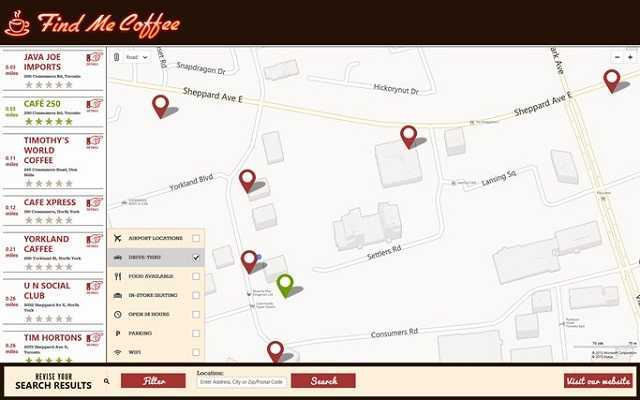
Are you a coffee drinker? I know I am, and therefore, I find this app to be purely awesome. As the name suggests, the app will allow you to find all the coffee shops in your vicinity. With a simple glance at the map, you will see where you can drink a tasty cup of Joe and you will also be able to get directions to anyone of the results.

More so, the app allows users to share coffee shop locations via the Windows 8 Search charm so they can set up meetings with their friends. Other nice features of the app are the ability to read and write reviews, get information on the coffee shops it shows or filter them via facilities (free WiFi, parking etc.).
GimmalPoint

GimmalPoint best apps windows 8

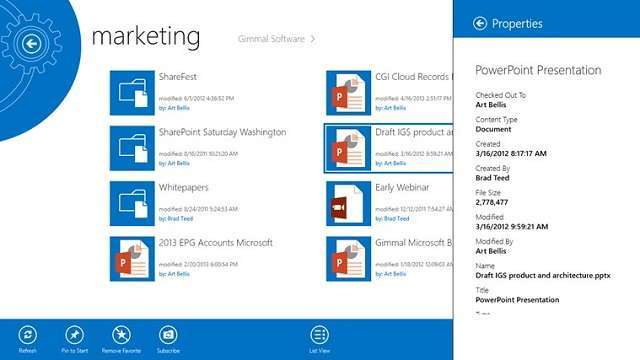
If you are using SharePoint or other cloud-based Office 365 products, then GimmalPoint is an app that you might want to have on your Windows 8 device. Allowing users to access multiple SharePoint environments simultaneously or add different locations on their Start Screen as live tiles.

Subscribing to different SharePoint locations is also easy, as the app has a simple user interface can can be easily accessed by anyone. The app is compatible with both SharePoint 2010 as well as SharePoint 2013, both local or cloud based Office 365. It is an excellent tool to use in an office environment, where multiple users need access to different locations and files.

GuruCool PlaySchool

GuruCool PlaySchool windows 8 best weekly apps

I remember my early life was filled with Cartoon Network series that used to re-run episodes day in and day out. Nowadays, kids can use Windows 8 tablets or computers to have way more fun than what I used to have, and at the same time, develop life skills that will help them as they grow older.

This app is perfect for parents that want to provide a learning environment for their kids with games and images that help them learn vocabulary, problem solving, image and shape puzzles and many more. The games that are featured within the app are especially designed by child development specialists in order to give kids the best of both worlds: learning and having fun.

Chimpact

Chimpact windows 8 best apps games this week

When it comes to games, users mostly prefer those that have a very attractive gameplay that is entertaining and top notch graphics. Both of which are present in Chimpact for Windows 8. This game is a great addition to Windows 8 devices, as it will keep players on edge for a long time.

The very well designed environments look stunning and the gameplay is alert and fun. The developers have put a lot of work in this game, providing not one, but four environment with 12 level each and as many as 240 medallions that users have to earn to fully complete the game.

Solitaire Online

Solitaire Online weekly best windows 8 apps

Solitaire is one of the most iconic Windows games of all times. It was part of all the recent Windows versions, and Windows 8 has one of the biggest collections of solitaire games of all, thanks to the introduction of the Windows Store, where developers can create their own games and give them to the public.

Solitaire Online is a perfect example of how Solitaire fans can have some fun by playing this single-player game against their friends. Comparing scores, times or achievements can all be done within this app, which makes Solitaire be more fun that it ever was. The app also looks pretty good, having decent graphics. If you are interested in other Solitaire Apps for Windows 8, be sure to check out our countdown.
Einstein™ Brain Trainer HD

Einstein Brain Trainer HD widows 8 best weekly apps

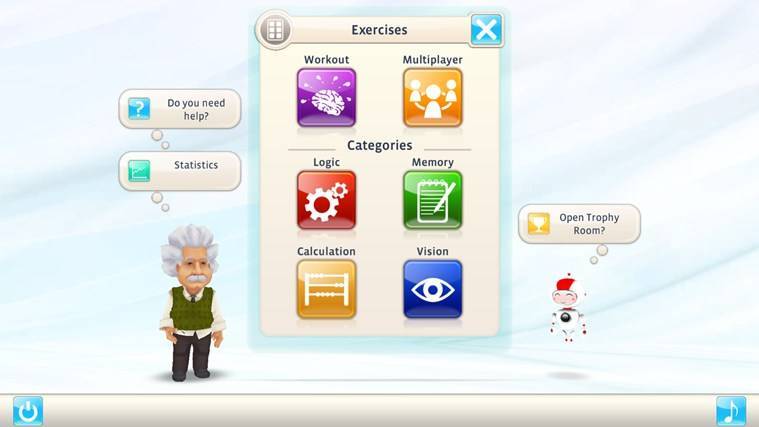
Training your brain is as important as training your body, and there are some great exercises that you can try to make the best brain workout. These are designed to stimulate the brain and make new neural connections, or to strengthen up existing ones. Even though statements like “the brain is also a muscle” aren’t quite true, it is true that you have to keep your brain active if you want it to run at full capacity.

This Windows 8 app is specifically designed to give users the perfect brain workout. It features 30 brain exercises as well as Daily Tasks that are designed to monitor your brain’s fitness and give you information on how well you’re doing and what you should focus on. Of course, Chess is another sport that will most definitely exercise your brain thoroughly.

Super Golf Land

Super Golf Land best weekly apps for Windows 8

Golf lovers will be very pleased to know that there is a simple and very fun game that they can play on their Windows 8 devices. Super Golf Land is a free game that has much to offer. For starters, the game has 72 holes that players must clear, and for each hole, there are three mini-games that they can try.

Also, by progressing through the game, players will unlock power-ups that will help them improve their game. The physics engine of the game is very well designed, providing a realistic scenario, and the textures and environment have high quality textures, despite the fact that they are minimalistic in looks.
Alchemy Reactor

Alchemy Reactor best windows 8 apps this weekAlchemy Reactor best windows 8 apps this week

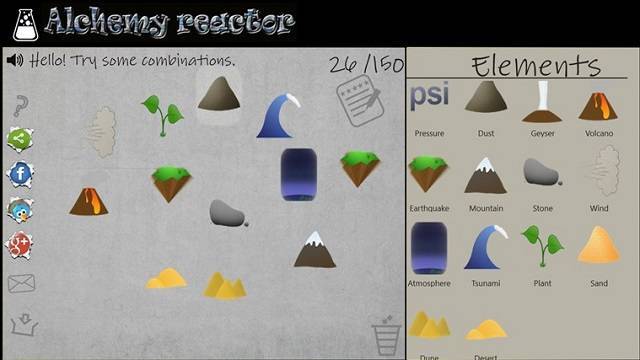
Although this game is very closely related to Doodle God for Windows 8, it can also be a good resource for those who like chemistry and want to learn how certain elements are created. The basic idea of the game is that you start off with four basic elements and take on the alchemist role of creating new materials.

Although you won’t discover the Philosopher’s Stone, if you like this type of games, you will have fun with it. For some, the game might lose some points for design, as it is very simple and it has basic graphics, it is very well designed and simple to play. We encourage you to look past the simplicity of the graphics and immerse yourself in the alchemy world.


Will the Death of Windows XP Increase Windows 8, Windows 10 PC Sales?

Microsoft will officially end support for Windows XP on April 8, 2014. Which means that especially enterprise users, government agencies will start slowly replacing their Windows XP machines with newer Windows versions. And I find it hard to believe that they will choose to install Windows 7 instead of Windows 10, Windows 8, but there is still a chance of that happening.

Windows XP is already  12-years old and until now, it still holds an impressive share of the operating systems market – 37%, according to Net Applications.

Business owners will have two choices: one will be to buy a new Windows version and install it on their old machines and another one will be to buy a new machine with a new operating system. Now, this is where it will be interesting to observe what will they choose. For example, some might opt for a hybrid device, since maybe their employees need a device with them all the time. So, when they’re back to their desks, they can easily use it as a personal computer. After all, this is what Windows 10, Windows 8 is about – unfiying the experience on tablet and desktop mode and I still think Microsoft designed a product that will keep on rising.

windows xp death boosting pc sales

If business owners and agencies orient themselves towards that kind of devices, then Windows 8, Windows 10 and those selling Windows 8, Windows 10 devices will definitely find a boost in sales. The problem for the Windows 10, Windows 8/RT adoption is going to rely in what will those leaving Windows XP behind will choose next. According to IDC market research firm data, PC shipments have apparently stabilized and Windows 8, Windows 10 is starting to see some real sales, at least in the United States:

Worldwide PC shipments totaled 75.6 million units in the second quarter of 2013 (2Q13), down -11.4% compared to the same quarter in 2012 but slightly better than expected.

The numbers reflect a market that is still struggling with the transition to touch-based systems running Windows 8 as well as justifying ultrabook prices in the face of economic pressures and competition from tablets and other devices. A silver lining is that a number of vendors and regions seemed to be focused on inventory reduction during the second quarter, which could reflect planned launches of new models as well as lower inventory going into the second half of the year.

A wider selections of Windows 8 models offered by top vendors and migration from Window XP to Win7 helped to push volume higher than anticipated. Dell managed to climb above 3.8 million units for the first time since 2011, gaining a few points of share in the U.S. PC market. HP maintained its leadership position, growing roughly even with the market. These two vendors represented nearly 50% of total U.S. PC shipments in 2Q13.

Windows XP dies to help Windows 8, Windows 10 grow

windows xp death windows 8 pc sales

No official support for Windows XP from April 8, 2014 means that Microsoft will no longer issue security patches and software updates, which means systems running Windows XP will be the most vulnerable to malware and hacker attacks. But keeping this in mind, we realize that not everybody is going to make the switch to a new Windows version and even less folks are going to pay for it, even if upgrading to Windows 8, Windows 10 from XP isn’t that expensive.

Actually, the funny thing is that the end of Windows XP might do more for PC sales than Windows 8, Windows 10 actually did, as Patrick Thibodeau with ComputerWorld puts it.

What is your take on this? Will Windows 8, Windows 10 sales increase, as well as PC sales, as an effect of Windows XP’s demise?

Microsoft Sues U.S. Customs For Allowing Imports of Motorola Banned Phones

Now, this is not something that you see quite often in the lawsuit brouhaha – a legal action against the U.S. Customs, which is actually, the government, right? Microsoft had previously won a legal battle against Google’s Motorola and the court ruled that some Motorola devices infringe Microsoft’s ActiveSync technology. Now, it seems that Microsoft has some serious accusations – they company says Google and U.S Customs and Border Protection have secretly met to allow the import of those banned phones

On Friday,  July 5, Microsoft officially filed a lawsuit at the U.S. District Court in Washington against the United States Customs. The official import ban was actually established more than one year ago, in May 2012, and it ruled that Motorola’s devices use the same technology that allow synchronization of calendar events on other machines.

microsoft us customs lawsuit

Microsoft feels U.S. Customs and Google are conspiring

What’s even more interesting is that Microsoft “dares” to affirm that the U.S. Customs have actually had secret meetings with Google to continue the import of the banned products, even if Google’s Motorola Mobility have done nothing to exclude the infringing technology. Here are the products we are talking about, with most of them definitely not being amongst your want-to-have list, but they still could end up bought by some consumers.

  • Motorola Atrix
  • Backflip
  • Bravo
  • Charm
  • Cliq
  • Cliq 2
  • Cliq XT
  • Defy
  • Devour
  • Droid 2
  • Droid 2 Global
  • Droid Pro
  • Droid X
  • Droid X2
  • Flipout
  • Flipside
  • Spice
  • Xoom

Microsoft’s Deputy General Counsel, David Howard, said in a statement:

Customs has a clear responsibility to carry out ITC decisions, which are reached after a full trial and rigorous legal review/ Here Customs repeatedly ignored its obligation and did so based on secret discussions.

What happened is this – Google’s Motorola Mobility lawyers have allegedly convinced the agency to give it a grace period to in order for the changes to be made. However, the United States International Trade Commission has rejected this request, according to Microsoft. So, this basically means that the U.S. Customs went against the law. It’s also worth noting that Microsoft’s patent, the ActiveSync technology involved, only expires in April 2018.

As a result, we should expect a new court hearing on Aug 6 in Washington. But the fact that there were secret meetings involved might definitely tip the scales in Microsoft’s favor:

The only conclusion that can reasonably be drawn from CBP’s pattern of conduct is that CBP will not enforce the commission’s exclusion order absent a court order compelling it to do so. CBP (U.S. Customs and Border Protection) has repeatedly allowed Motorola to evade that order based on secret presentations that CBP has refused to share with Microsoft.

This comes at an interesting moment because we know that some older iPhone models should be banned from import in the United States after August 5. In the same time, Apple is also suing Samsung for other patents. But whoever wins, apparently has to face another issue – will the U.S. customs respect the court ruling?

U.S Customs neglect the ITC and side with Google

One of the reasons why the U.S. Customs might not be so strict and correct regarding intellectual property is expressed by patent lawyer Robert Stoll of Drinker Biddle & Reath LLP in Washington

They want to focus their efforts on terrorism and the issues related to intellectual property is not their concern

Apple was in the exact situation just like Microsoft is now, when they filed an enforcement action after the same U.S. Customs didn’t stop imports of some HTC phone models that were infringing intellectual property found inside Apple’s older iPhone. Back then, the companies managed to reach to  an agreement and the lawsuit was withdrawn by Apple.

It’s interesting to observe how this will evolve, as we are talking about a federal agency that is apparently involved in secret meetings and refuses to deploy a court’s ruling. Google could also suffer from this, as well.

What’s curious is that on Microsoft’s Exchange ActiveSync protocol webpage, we can find Google amongst the licensees.

Windows Store reaches 100,000 apps, but i’m not impressed (editorial)

Windows Store

Microsoft’s Windows Store has finally reached the coveted 100,000 app mark. Windows 8, which introduced the Windows Store, was launched back in October of 2012. While some of you might be impressed with the 100k mark, I am not.

Microsoft revealed today that the Windows Store had finally reached 100k apps. Microsoft has kicked off several incentives for developers to create a Windows Store app, including tools and tutorials, even offering developers cash for developing apps in at attempt to “spark creativity.” Just recently, Microsoft revealed some future plans for the Windows Store, including PayPal SDK integration as well as support for a game development platform called Unity Pro 4. But all this doesn’t change the fact that the Windows Store is still full of crap apps.

Windows Store Spam

Take a look at the screenshot above and below this paragraph. Notice how there are numerous apps from the same developer. These apps are numerous and simply “spam” the Windows Store in quantity. As I monitor the Windows Store on a daily basis for new app releases, I am surprised to see so many useless apps being approved in large quantities. Why is Microsoft approving these apps? Is the race to have so many apps in the Windows Store such a big priority for the software giant?

Windows Store Spam

Back in January of this year, the Windows Store surpassed the 40,000 app mark and I wrote a piece similar to this one bashing the fact that the Store was full of useless apps. I pointed out how we would see the same app over and over again in the Windows Store and if Microsoft even actively checks the Store to weed out “spam” apps or even duplicate apps submitted under a different name or submitted to a different category. Unfortunately, fast forward to now, the same issue persists.

To me, a quality app is an app that someone can use over and over again. It’s an app that has usefulness and makes you tasks easier. For example, a Facebook app, an Instagram app, or even a Twitter app. Most of the non-quality apps I have tried only once and removed them immediately after due to the fact that they were either rushed, poorly designed, or served no purpose at all.

But i’m not going to be all negative about the Windows Store. The cover of the book, so to speak, shows us that there are now 100k apps in the Windows Store. Congrats Microsoft, you have developers who have shown interest in creating “apps” for the Windows Store in return for some little cash via advertisements or paid apps. This shows momentum and the fact that developers are showing interest. During Build 2013, Microsoft even revealed that the Store has seen over “hundreds of millions” of app downloads to date. Amazing!

However, I am simply looking at things from another perspective. I’m sure there are many of you out there who share the same feeling I do. If you disagree with me, then that’s totally fine. 100k apps is a great feat to reach but with all the non-quality apps in the Windows Store, I’m not all that impressed.

How do you feel about the Windows Store? Do you share my feelings or do you disagree?

Windows Store Spam

Internet Explorer 10 surpasses IE9 in market share, IE8 still in the lead

IE10

According to new data from Net Applications for the month of June 2013, Microsoft’s Internet Explorer 10 browser has surpassed Internet Explorer 9 in market share. However, Internet Explorer 8 still remains as the most widely used Internet Explorer version.

According to the data, Microsoft’s Internet Explorer 8.0 currently holds a 22.67% market share, while Internet Explorer 10 holds a 13.52% share. Internet Explorer 9 is down to 11.71% share while Internet Explorer 6 is down to 6.13% share. Google’s Chrome 27 comes in second place, right behind IE8 and right above IE10. Mozilla’s Firefox rounds out the top three browser brands and is right below IE10 in terms of market share.

Microsoft has been touting Internet Explorer 10 as the browser that was designed with security in mind as well as the browser perfect for touch. Microsoft also touts Internet Explorer 10’s ability to block over 99% of malware and has less vulnerabilities compared to rival browsers on the Windows operating system.

IE share

SkyDrive to be renamed Microsoft Drive in the UK?

Microsoft Drive

A recent court ruling has resulted in Microsoft losing the trademark to the name SkyDrive in the UK due to a news broadcaster being worried that the name SkyDrive could be confused with their Sky video streaming services. Microsoft are appealing the decision, however if the company are unable to win back the trademark, they will have no choice but to rename SkyDrive.

It appears Microsoft are already preparing for a worst-case scenario, as the term ‘Microsoft Drive’ has been coded into the Windows 8.1 operating system, and can be seen in PC Settings once a registry setting is tweaked. If the term Microsoft Drive isn’t a backup name for SkyDrive, then what are Microsoft planning to use it for?

Hopefully Microsoft won’t have to result to the name Microsoft Drive, as SkyDrive is now a well known cloud storage service and having a rename in Europe could result in loss of market share. What are your thoughts on this? Leave them in the comments area below!

Microsoft’s SkyDrive name in jeopardy after trademark case loss against UK’s Sky

SkyDrive

Bad news for Microsoft and its SkyDrive brand name, as a new report revealed today indicated that Microsoft had lost a trademark case against British Sky Broadcasting Group. This Group goes by the name Sky and the group had filed a complaint against Microsoft alleging that the SkyDrive name was a trademark infringement against the Sky brand.

This ruling is from a British court and states that Microsoft’s SkyDrive does in fact infringe on Sky’s trademarks in both the United Kingdom and the European Union. According to the judge, Mrs Justice Asplin, Microsoft’s use of SkyDrive was likely to cause confusion amongst consumers and that the use of SkyDrive was detrimental to the Sky name, which amounts to a trademark infringement.

The best case scenario is that Microsoft wins an appeal against Sky. The worst case scenario is Microsoft completely drops the SkyDrive name and re-brands the service or even pays Sky royalties to continue using the SkyDrive name. This isn’t the first time Microsoft went all out with a brand name only to change it. Remember the Metro name? Microsoft had to cease using that name thanks to a lawsuit from a group called “Metro AG.”

“Sky is pleased with the judgment handed down today by Mrs Justice Asplin. We regard any unauthorized use of the Sky name as a clear infringement of our well-established Sky brand. We remain vigilant in protecting the Sky brand and will continue to take appropriate action against those companies that seek to use our trademarks without consent,” Sky stated in an official statement.

Microsoft’s response to this? “This case is only about the SkyDrive name and has nothing to do with service availability or future innovation. The decision is one step in the legal process and Microsoft intends to appeal,” Microsoft stated. Let’s see how this turns out.

Microsoft details Skype’s future, fast yet familiar across different platforms

Skype

For those of you who have been using the Skype service, Microsoft has detailed the future roadmap for the communications service. Based on user feedback, Microsoft is working on improving and adding a few new features to Skype.

According to Microsoft, more people are using Skype from their phone or tablet, rather than a PC. Skype continues to grow in users and the Skype app is one of the top 10 most downloaded apps of all time on the Windows Phone, iOS, and Android platforms.

“As more and more people take Skype with them on the go, we’re continuing to evolve the experience according to the mobile user’s unique and ever-changing needs,” Microsoft states in an official blog post. So what can we expect? Microsoft is working on improving battery consumption from the app as well as making the messaging feature much more convenient and touch friendly.

Microsoft is also working on making the Skype experience fast yet familiar across different platforms, including adding the same features across platforms. “More and more of our users have Skype on their phone, tablet, and PC. So while we still need to make Android feel like Android and Windows feel like Windows, people want a fast, beautiful, and more coherent design across all the devices they use,” Microsoft adds.

Microsoft’s number one concern right now is to increase performance and quality of the Skype app. Microsoft is also working to make conversations at the heart of the redesigned app experience. “To make all your interactions on Skype easier, we are putting conversations at the heart of a redesigned experience. Not only is this Modern design bold and beautiful, but it’s also simpler and easier to use. Doing this on Windows 8 and Windows Phone 8 dramatically reduced the time it takes to reply to a message, while making it even simpler to upgrade that conversation to a voice or video call. Our aim is to make the experience and design of our apps as consistent as possible, while still respecting each device’s unique look and feel,” Microsoft explained.

Microsoft did not reveal exactly when we can see these changes take place, however, now we have an idea of what Microsoft is working on. Eventually, all the Skype apps on each platform will share the same vision and feature-set!