4 Ways to Download & Install Epson L130 Driver on Your PC

The Epson L130 printer is great for its impeccable prints and thus needs accompanying drivers to complete the job. Regardless of the Windows version you’re on, getting the correct drivers is crucial for optimal performance.

How can I install the Epson L130 driver?

1. Use a driver installer software

Now, if you’re looking for the easiest way to get you drivers for your Epson L130, a driver updater software for Windows 7, Windows 10 or Windows 11 should suffice.

The good thing about these tools is they do all the work for you in the background. Once you plug in your printer, the software will automatically scan the PC, identify missing drivers, and install a fresh copy from its wide database.

The success rate is also pretty high so you can take out all the worry of ending up with a wrong driver. Because there are so many out there, we’d recommend Fortect Driver Updater. It’s fast, reliable and has additional features like regular maintenance schedules making sure your drivers never go out of date.

⇒ Get Fortect Driver Updater

2. Download and Install from the manufacturer’s website

  1. Navigate to your browser and go to Epson’s official driver download page.
  2. Select your OS from the Operating System list. In most cases, it detects your Windows version but it can be incorrect so make sure you manually select for Windows 7, 10 or 11.
  3. Now, download the driver.downlading epson es-400 driver windows 11
  4. Open the installer file and install it on your computer.
  5. Restart your PC.

3. Use Device Manager

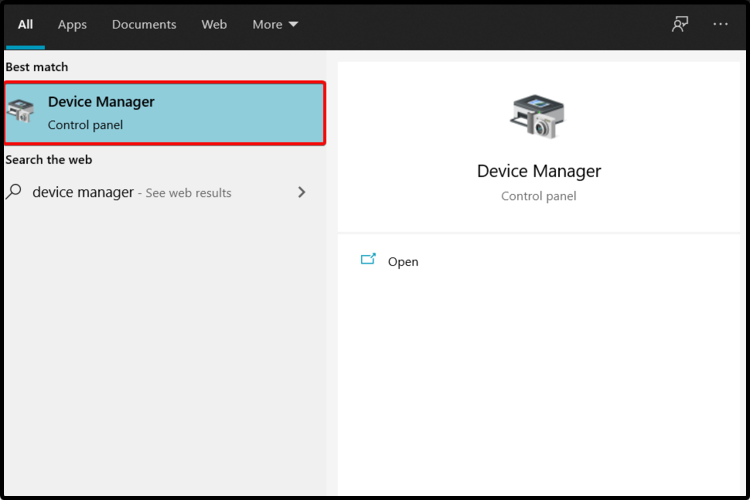
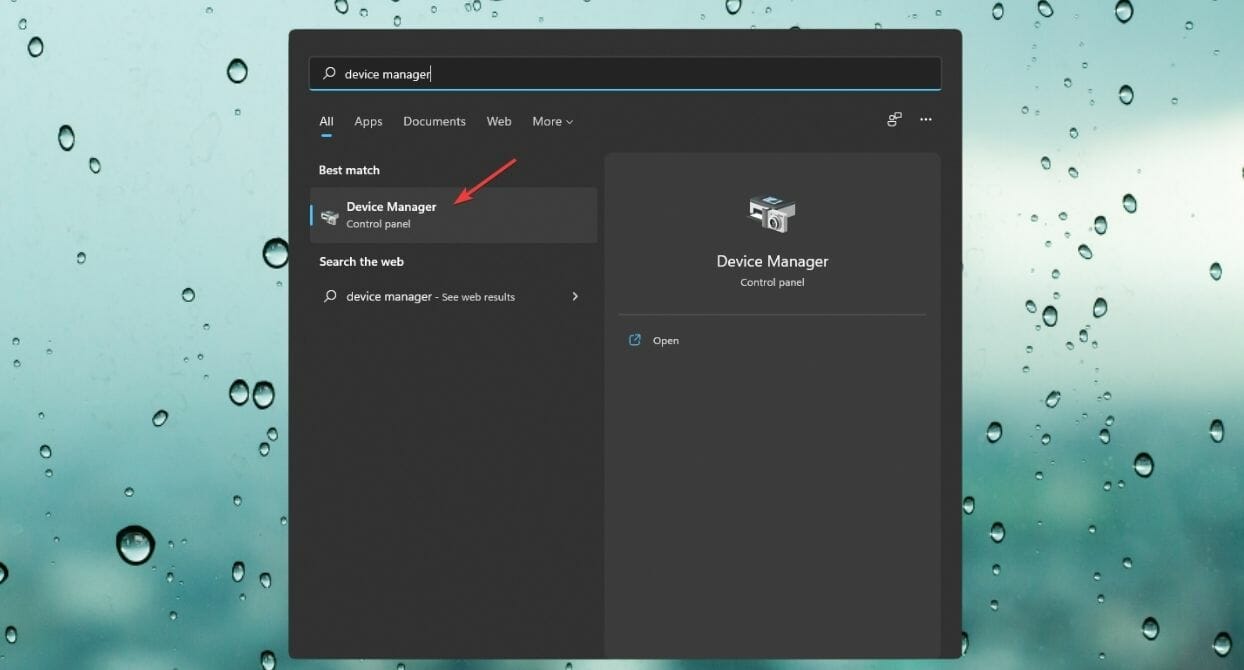
  1. Open the Start Menu, type Device Manager, and hit Enter.device manager open
  2. Expand Print queues.print queues device manager
  3. Right-click on the one you need, and select Properties.
  4. Select the Driver tab and click on Update Driver.
  5. Choose to Browse my computer for drivers.browse computer for dirvers
  6. Navigate to Let me pick from a list of available drivers on my computer.choose from PC drivers
  7. Click on Have Disk…, and locate your driver file.
  8. Select Next and wait until the installation is completed.
  9. opening device manager windows 11
  10. Find the Epson device you want to update.
  11. If you don’t have the driver in your files, right-click on the device and choose Update driver.updating epson printer windows device manager
  12. Click on Search automatically for drivers.
  13. Finish the update process.

4. Install drivers from Windows Update

  1. Connect your Epson printer to your Windows 11 computer using a USB cable.
  2. Press the Windows + I keys to open the Settings app.
  3. Then, click on Windows Update and select Advanced options.
  4. Then, check Optional updates for available updates.
  5. Now, select Driver updates and click on Download & Install.
  6. Restart your computer.

Older versions like Windows 7 and Windows 10 may not have a dedicated driver download page via Windows Update. However, all other steps apply for when you want to download Epson L130 drivers for your Windows 7, Windows 10 or Windows 11.

How do I install printer drivers on Android?

Android devices are different from PCs and don’t necessarily require separate drivers for printing to be successful. Most modern manufacturers have a dedicated app that allows you to print directly.

Epson printers like the L130 leverage the Epson iPrint app to print from your phone. Sometimes the Epson printer may have trouble connecting to the Internet so make sure you have a working Internet connection.

If you have another model, we also have a dedicated article on how to download drivers for your Epson L380 printer or Et-4850 driver.

You might also benefit from downloading the Epson Software Updater to keep your printer working well and avoid issues like the printer not working.

For any additional comments, drop us a line below.

Kena: Bridge of Spirits is finally launching on Xbox with exclusive content

Kena: Bridge of Spirits, an indie standout, has been making waves since it first appeared in 2021. It won awards such as Best Independent Game and Best Debut Indie Game at The Game Awards 2021. At first it was only for PlayStation and PC (due to a one-year agreement with Epic Games Store). But now this game is breaking the shackles of exclusivity and heading towards Microsoft’s console. And let me tell you, the excitement is real, at least for you, cozy gamers out there!

What is the Kena BoS exclusive content for Xbox?

This game is about the lovely tale of Kena who is a spirit guide and her journey with Rot creatures. The narrative is not the only thing causing a stir; it includes the Anniversary DLC update on Xbox, which brings in Charmstones, Spirit Guide Trials, Kena Outfits and crucial accessibility elements. Also, there’s a New Game+ choice for those who want more.

Hold on, there’s another exciting thing! A physical Premium Edition will be in the stores too. This is possible because of a collaboration with Maximum Entertainment. This edition that collectors would love to have can be found from 15 August 2024 and it includes not only the game but also a digital soundtrack, sticker sheet, unique Kena staff as well as Golden Rot skin. And for Xbox players, exclusive pirate-themed Rot hats! How cool is that?

Even though some critics have noted the game’s gameplay elements are similar to others in this genre (like Zelda), Kena: Bridge of Spirits still manages to bring its own charm and magic. It feels like entering a world that has been beautifully animated with surprises at every turn. Also, when you add in the extra content and Xbox exclusives, it feels like a fresh experience.

Therefore, for all those who are experienced gamers or just starting out with Kena’s universe, this release is something we can anticipate. Pre-orders will be available shortly, and I have a sense that it will be one of those games which adds some extra happiness to our gaming periods.

Have you played Kena: Bridge of Spirits on PC or PS5? Share your experience in the comments below.

Microsoft officially deprecates NTLM, but you can still use it

Microsoft will officially deprecate NTLM (New Technology Lan Manager), a core part of Windows authentication since the ’90s after the company teased it last month.

Microsoft’s decision to stop developing all NTLM versions—LANMAN, NTLMv1, and NTLMv2—shows an important shift toward newer, safer authentication methods.

All versions of NTLM, including LANMAN, NTLMv1, and NTLMv2, are no longer under active feature development and are deprecated. Use of NTLM will continue to work in the next release of Windows Server and the next annual release of Windows. Calls to NTLM should be replaced by calls to Negotiate, which will try to authenticate with Kerberos and only fall back to NTLM when necessary.

Microsoft

The tech giant is promoting the Negotiate protocol, which encourages users to use more secure Kerberos authentication first and only turn to NTLM when needed. This change comes from Microsoft’s general push for improved security throughout its systems.

For us, who have been playing in this field for some time now, Microsoft NTLM’s retirement may seem like an era coming to a close. Nevertheless, it is time for this change because cybersecurity threats are changing rapidly.

Now, perhaps you are thinking, “Why this quick alteration?” It is not quite quick. Microsoft has been showing signs of this change for some time to direct users towards safer authentication procedures such as Kerberos.

Since its introduction in Windows 2000 Service Pack 4, this method has been preferred. In today’s digital era, where data breaches and cyber-attacks are frequent, the strength of security and authentication mechanisms is important. Kerberos has a reputation for providing stronger protection in these areas.

It is a signal for the developers and IT admins to get ready. The applications that now depend on NTLM for verification will require modification.

Microsoft proposes that, in numerous instances, changing to Negotiate by modifying one line in the AcquireCredentialsHandle request might solve this issue. However, if hardcoded to anticipate a particular count of authentication round trips, certain applications may encounter difficulties.

For those who’ve grown a little sentimental about Microsoft NTLM’s lengthy service, let us recall that it first appeared in Windows NT 3.1 in 1993. While it has served well for many years, shifting towards newer protocols is essential to match changing security requirements.

Even though it’s also quite “old” regarding tech age, Kerberos provides a stronger and more secure structure for present necessities.

This implies adjusting to the changes and accepting the new protocols for users and developers. Change might be scary at times, but it is surely a good change in this situation.

Grab DELL’s G16 Gaming Laptop for only $900 right now

Great news for gamers, DELL slashed the price of their G16 Gaming Laptop with $350 and it’s now for only $900 on their store. It comes with a large 16-inch, QHD+ (2560×1600) display at 240Hz, and a monster configuration.

Why would I buy DELL’s G16 Gaming Laptop?

For starters, even though it’s not an AI PC, it is powered by a 13th gen Intel Core i7 CPU, and the NVIDIA GeForce RTX 4060, graphics card with 8 GB of GDDR6 memory.

The storage comes in the flavor of a 1TB NVMe SSD and the RAM is only at 16 GB, but you can add another 16 GB module later for more powerful gaming.

When if comes to ports, you will get 3 USB 3.2 Gen 1 ports, a Thunderbolt 4 port with DisplayPort capability and a USB-C 3.2 Gen 2 port with DisplayPort capability as well. You will also be ready for a sweet WAN party with the Wi-Fi 6 connectivity.

The 6 cell, 86 Wh, integrated battery is touted for about six hours of usage, but we would recommend keeping that charger close. DELL’s G16 Gaming Laptop is ready for video conferencing with the built-in 720p at 30 fps HD RGB webcam and the dual-array microphones.

Now, grabbing a gaming laptop with this configuration for $900 is simply extraordinary, so hit the buy button while it’s hot.

MSI Claw 8 AI+ announced: Comes with Intel Core Ultra 7 155H and 8-inch screen

Handheld gaming PCs are taking over the market by storm, and we saw handhelds from various manufacturers.

MSI also has its gaming device, and recently the company has announced a new version, so let’s see what it can do.

MSI Claw 8 AI+ was announced at Computex 2024

As reported by Tom’s Hardware, the new MSI Claw 8 will run on an Intel Meteor Lake Core Ultra 7 155H CPU, and unlike its predecessor, it will have an 8-inch screen.

The device will also have a larger battery, providing you with more hours of gameplay. MSI also stated that the new Claw will have a Thunderbolt 4 port and we assume it will probably be used for a docking station or with an eGPU.

That’s not all, the original Claw has been redesigned, and we got a new Claw x Fallout model. This model is the same as the original but with a unique case that resembles something from a Fallout universe.

No additional information regarding MSI Claw 8 AI+ is available at the moment, but we hope that it will be able to compete with the newly announced ASUS ROG Ally X.

Speaking of handhelds, the new Xbox app Compact Mode features will make switching games on handhelds a breeze.

Microsoft and Litera announce the Litera Search Copilot plugin

In a world where the law profession and advanced technology blend together, Litera has made a substantial move by collaborating with Microsoft to incorporate Copilot into its collection of legal tech solutions.

The partnership wants to be more than just an agreement: it combines many years of experience and creativity to change how law professionals do their work. Litera’s journey shows their dedication to improving legal operations, making them smarter and more productive.

They’re introducing Copilot to Microsoft 365, a move that will establish a fresh level of effectiveness for legal tech.

Imagine writing contracts in minutes, not hours, or having immediate access to many legal examples and matters. This is what Litera’s connection with Microsoft Copilot can provide.

It’s not simply a tool that speeds up repetitive duties; it could change how we approach the process of law drafting and knowledge handling. In this situation, AI will also give legal experts the understanding and instruments required for their success.

This means less time doing administrative tasks and more time available to focus on critical thinking and strategy making which are key characteristics of this profession.

The Litera Search Copilot plugin is changing things—it lets you do advanced searches on legal issues or past events right from inside Microsoft Word. This isn’t only about ease; it’s the key to providing lawyers with necessary data at exact times.

The main goal of focusing on legal-specific technology is to ensure that Litera’s solutions are strong, applicable, and understandable for people working in the legal profession. This partnership implies a strong move ahead, showing that in the coming time, legal tech will not be merely an extra item but an important section of the legal workflow.

In the coming years, AI will be at the core of the legal profession. The teamwork of Litera and Microsoft indicates this start. More innovations and combinations are set to be revealed, suggesting great change can happen soon.

For people in the legal field, this teaming up gives a hint of a coming era in which technology not only makes things easier but also creates fresh chances for efficiency, understanding, and influence.

Basically, combining Litera’s skill in legal tech with Microsoft’s AI abilities is like planning the future of the law profession. While these technologies keep growing and changing, the potential is huge and full of thrilling options.

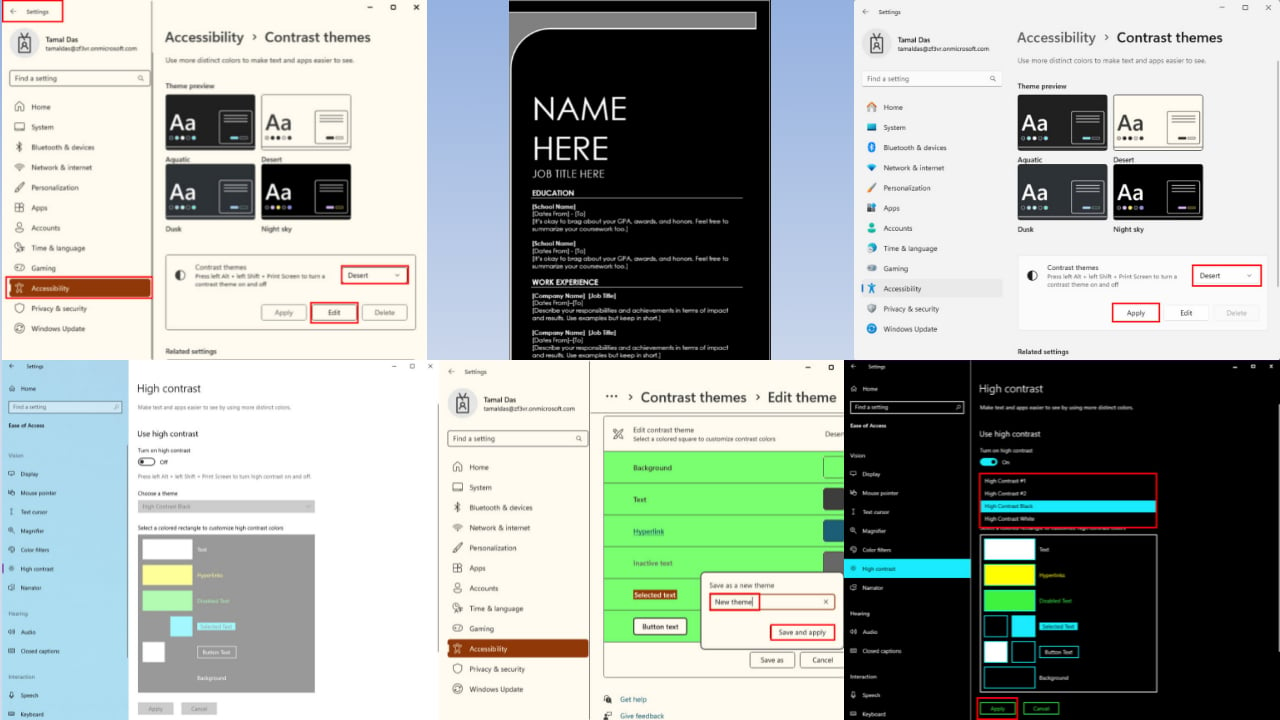
What Does High Contrast Mode Do? [All You Need To Know]

So, what does high contrast mode do on your Windows 10 and Windows 11 PC?

Computing devices like Windows PCs, Macs, smartphones, tablets, and others include some features for accessibility improvement. One such feature for Windows 10 and 1 is the High Contrast and Contrast Themes, respectively.

What Does High Contrast Mode Do

If you’re visually impaired or aiding such persons and looking to explore these settings, read this article until the end. I’ll explain everything you need to know to use these features efficiently and customize them.

What Is High Contrast Mode?

High Contrast Mode is an accessibility display setting that can significantly improve the readability of your screen.

Find below two distinctive settings available on Windows 10 and 11 PCs:

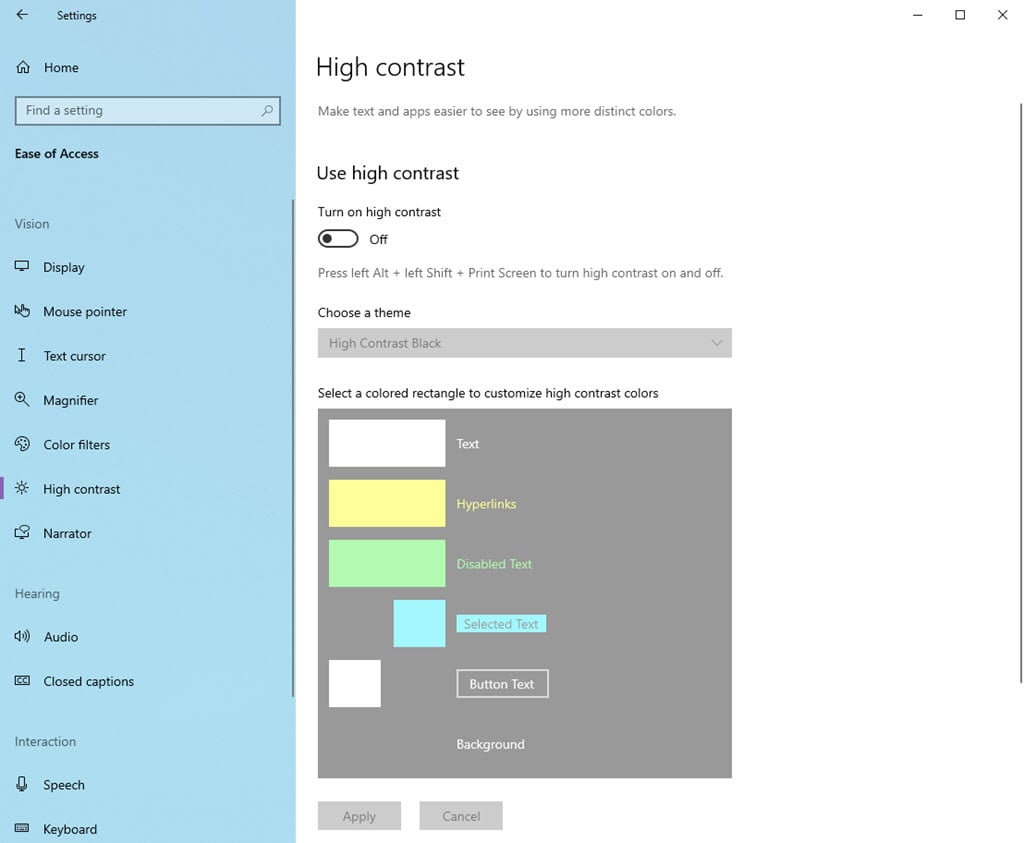
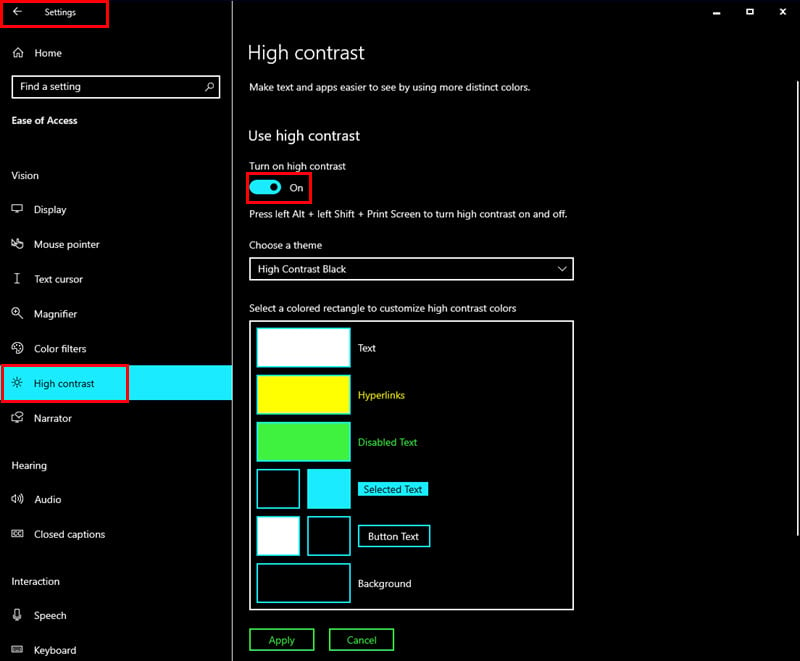
High Contrast Mode in Windows 10

If you find the standard Windows 10 interface a bit hard on the eyes, the High Contrast Mode can help you here. This mode simplifies the on-screen visuals by using bold colors and removing distractions. This makes text and other elements stand out.

High Contrast Mode in Windows 10

Here are the features at a glance:

  • Replaces the standard color scheme with high-contrast colors, typically black text on a white background or vice versa.
  • Hides background images and other non-essential visual elements to minimize distractions.
  • Text becomes bolder and easier to read.
  • You can choose from pre-defined high-contrast themes or create your own color combinations.

Contrast Themes in Windows 11

Windows 11 introduced the Contrast Themes feature. This refined approach offers even more control over how your screen displays information especially when you activate accessibility settings.

Contrast Themes in Windows 11

Take a look at its quick features below:

  • Provides a wider range of color options beyond just black and white for a more personalized experience.
  • Ensures better legibility for text and interface elements across all Microsoft and non-Microsoft applications.
  • Maintains accessibility standards for users with low vision or color blindness according to the latest guidelines.
  • Applies the custom contrast themes consistently throughout the system and all supported applications.

What Does High Contrast Mode Do?

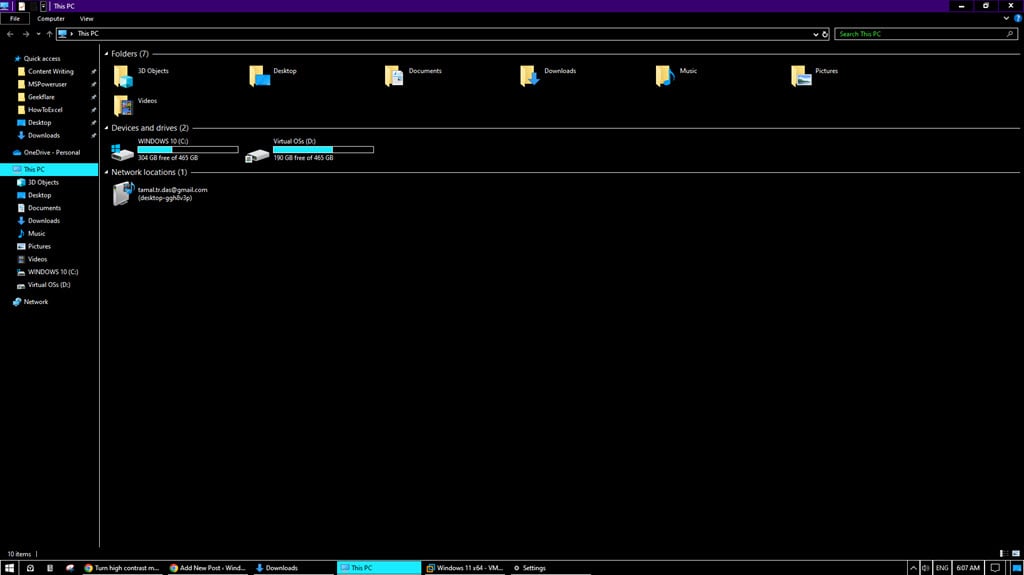
High contrast mode significantly alters the color scheme of your device’s interface to improve visibility. This is particularly helpful for users with visual impairments by making text and background elements stand out.

On Windows 10, it can:

  • Increase the contrast between text and background colors: Text is usually displayed in black or white, with a contrasting color for the background. This makes it much easier to read.
Example: High Contrast Between Text and Background Colors
  • Simplify the color palette by reducing the number of colors: High contrast mode eliminates clutter and makes it easier to focus on the essential information.
  • Adjust the brightness of the display: In some cases, high contrast mode might also adjust the brightness to further improve the clarity of the text and interface elements.

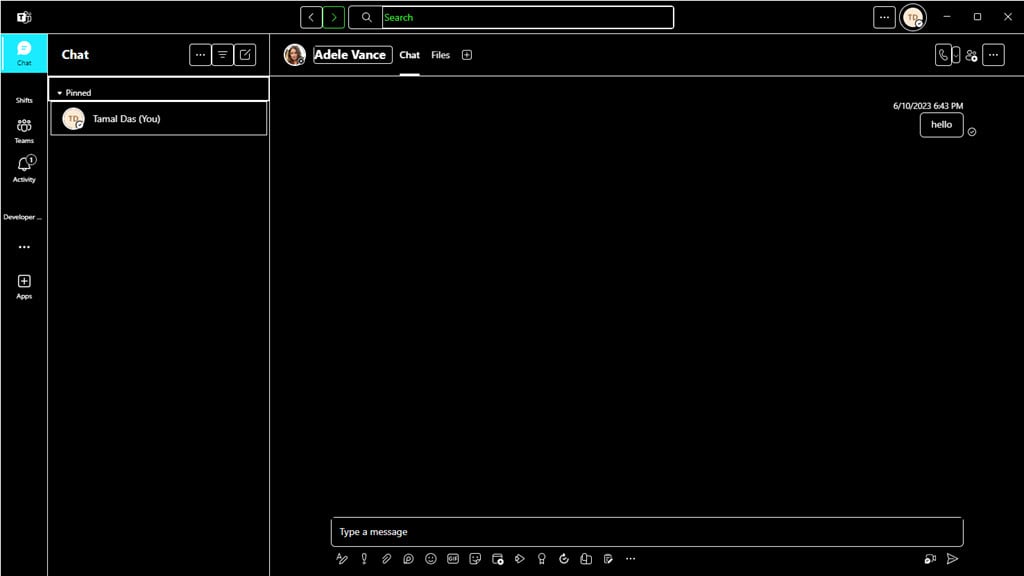
Here’s what Microsoft Teams looks like after enabling this setting:

Microsoft Teams

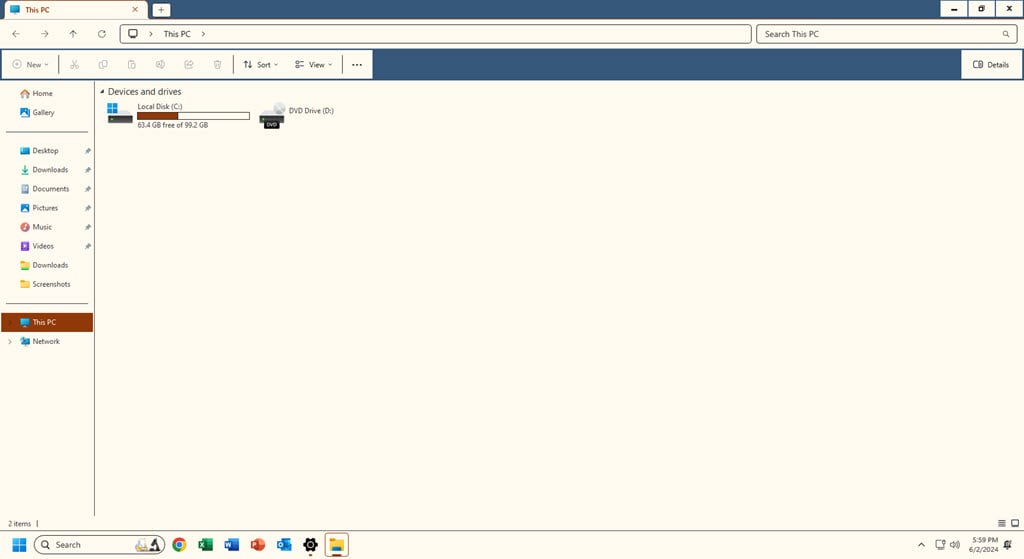
Moreover, on Windows 11 it can:

  • Provide a variety of pre-defined high-contrast color schemes: Instead of a single on/off switch, most devices offer various themes. They use different color combinations that meet high contrast requirements.
Variety of Pre-Defined High Contrast Color Schemes
  • Customize the color scheme according to user preferences: This can be helpful for people with specific color blindness conditions or those who prefer a particular combination for better readability.

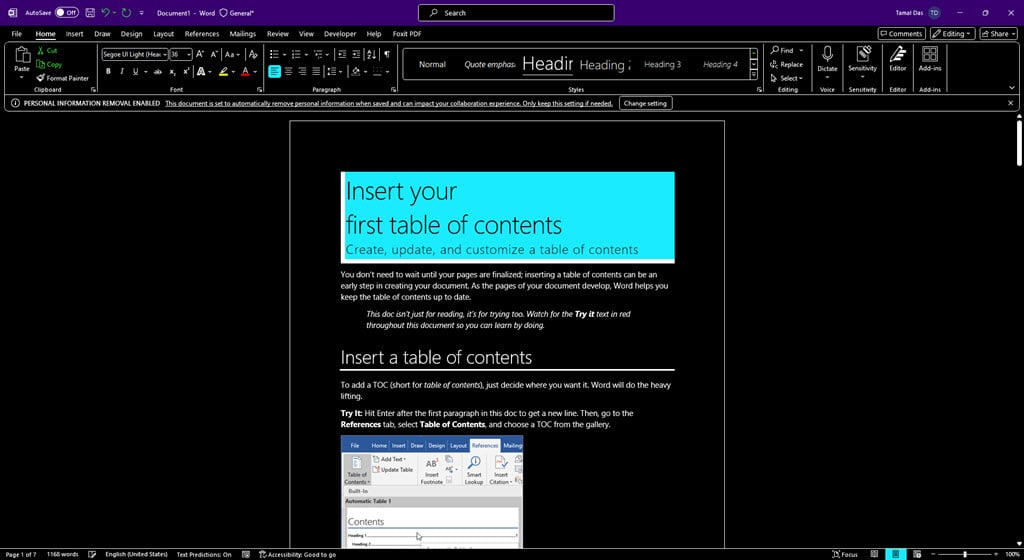
Here’s Microsoft Word in High Contrast mode:

Microsoft Word

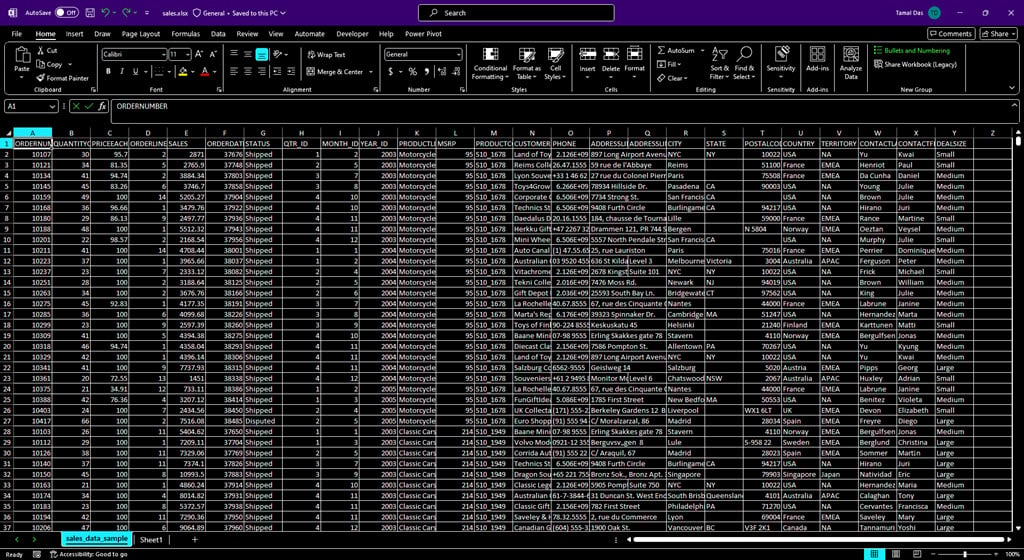
And here’s the look of Microsoft Excel:

Microsoft Excel

What Is Changed in High Contrast Mode?

When you enable this mode, Windows makes the following changes to its user interface and all third-party apps that support Windows accessibility settings:

  • All the UI toolbars that were previously transparent show solid color.
  • It removes the display wallpaper or desktop background.
  • It removes extra background designs and graphics of Microsoft 365 apps.
  • Custom or default device color schemes or accent colors are disabled.

How To Enable High Contrast Mode

Want to experience high contrast mode? Try the following methods:

Activate High Contrast Mode in Windows 10

  1. Press the Windows + I keys on your keyboard to open the Settings app.
  2. Click on the Ease of Access menu at the bottom.
  3. Select High contrast from the left-hand menu.
  4. Click on the toggle button to activate Turn on high contrast.
High contrast 1
  1. Choose a high contrast theme from the Choose a theme dropdown menu.
  2. There are several options available, such as Black, White, High Contrast White on Black, etc.
Apply high contrast
  1. Click Apply to save the changes.
  2. Your screen should now be in the High Contrast mode.

Enable Contrast Themes in Windows 11

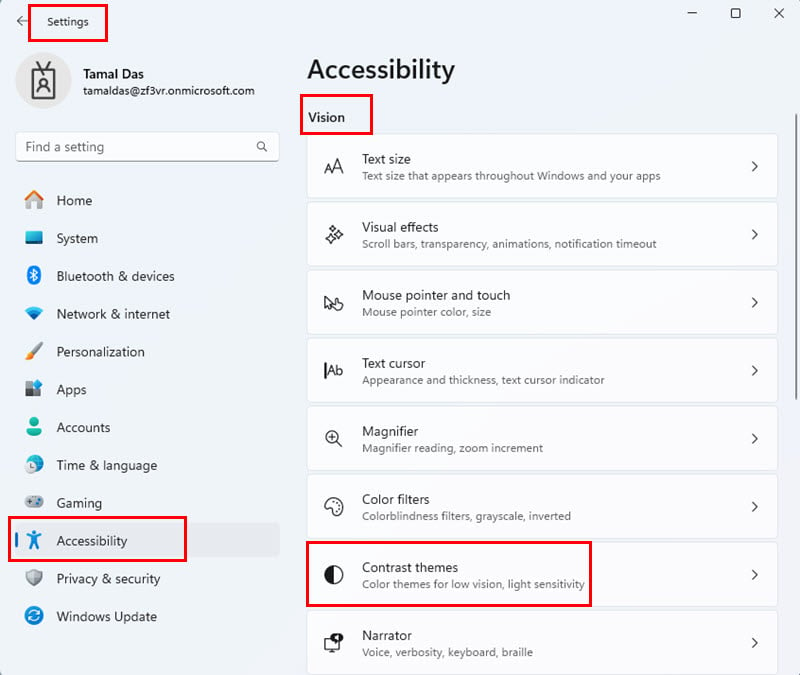
  1. Go to the Windows 11 Settings app by pressing the Windows + I keys on the keyboard.
  2. Click on the Accessibility settings on the left side navigation panel.
  3. Below the Vision column on the right, find and click on Contrast themes.
contrast themes 1
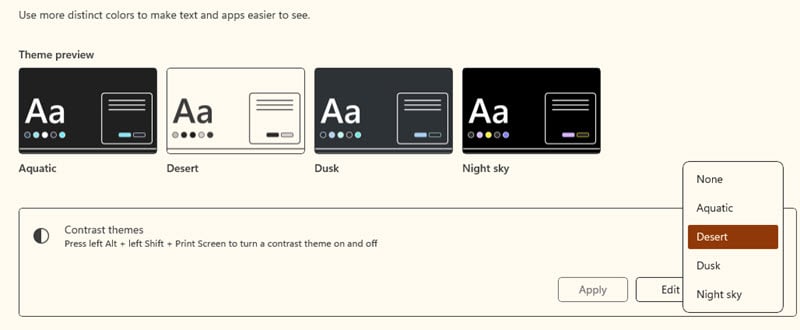
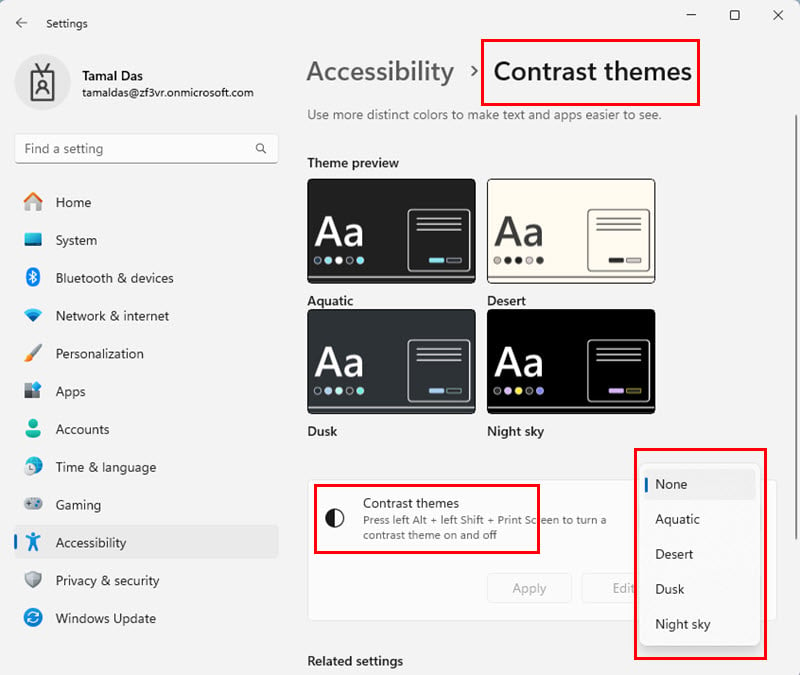
  1. On the Contrast themes screen, click on the None drop-down menu and choose any one from the following four options:
    • Aquatic
    • Desert
    • Dusk
    • Night sky
Contrast themes 2
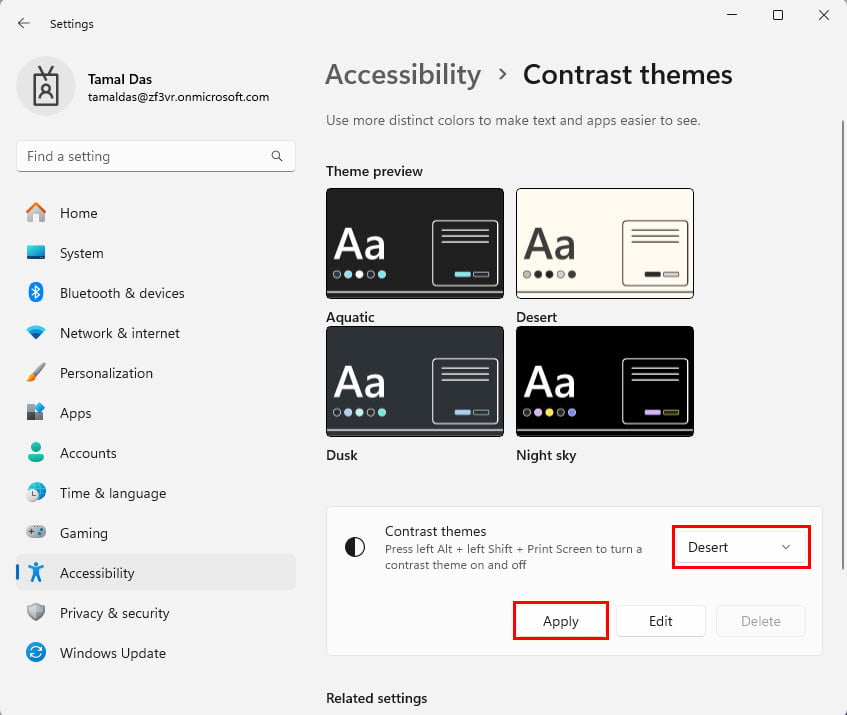
  1. Click Apply to make the Contrast themes settings effective throughout the device.
Apply contrast themes

Customize the Colors of High Contrast Mode

Once you’ve already activated the High Contrast mode on a Windows 10 PC, follow these steps to personalize the theme:

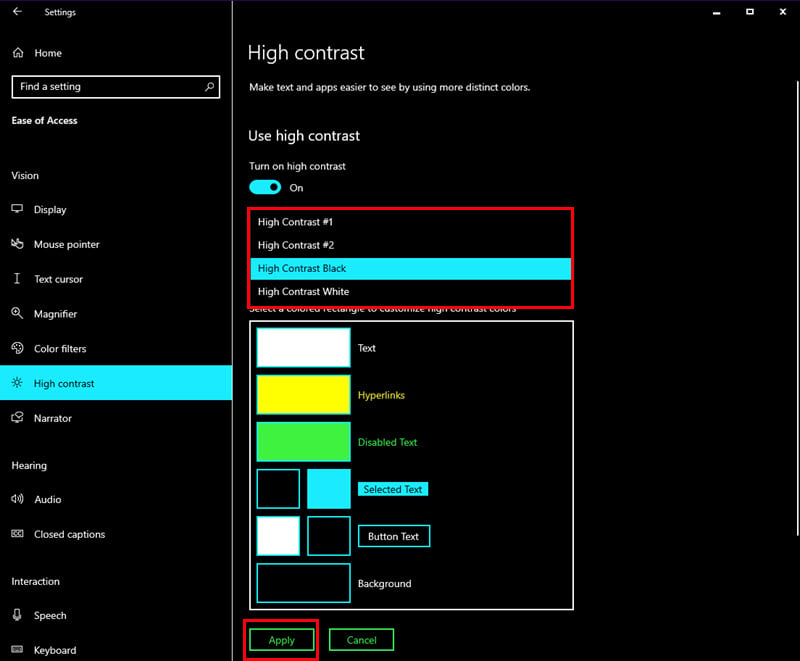
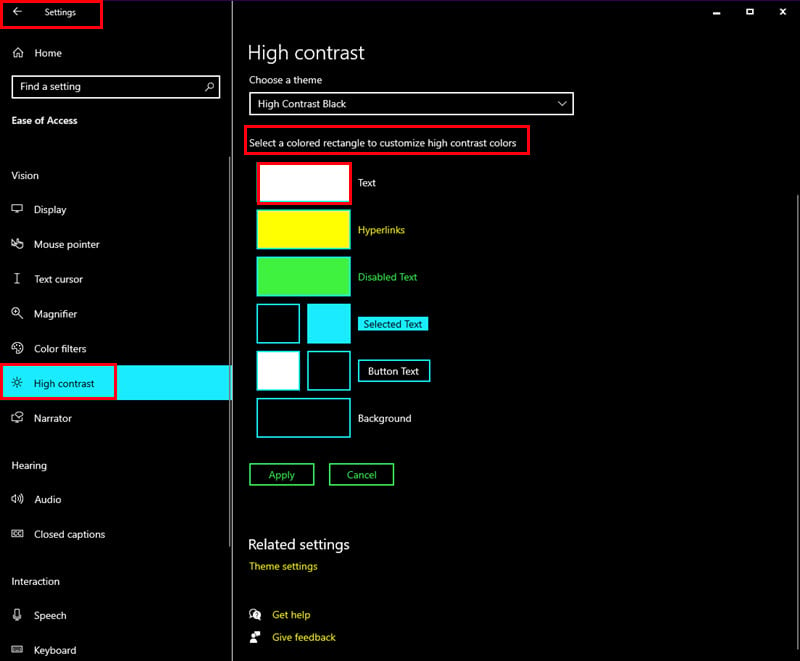
  1. Go to the High contrast mode screen via Settings > Ease of Access.
  2. On the right side, scroll down to the Select a colored… section.
Click on the Text box
  1. To change the color of the fonts or texts shown on the Windows 10 UI, Microsoft apps, and third-party apps, click on the Text box and pick a color from the Choose text color box.
  2. Click Done to apply this color coding.
Click Done
  1. Other color customizations available are as outlined below:
    • Hyperlinks
    • Disabled Text
    • Selected Text
    • Button Text
    • Background.
  2. Once you’re done, click on the Apply button.
High contrast change apply

Creating Your Own Contrast Themes on Windows 11

If you have already activated the Contrast themes on your PC, here’s how to create your own one:

  1. Go to the Accessibility settings screen from the Settings app.
  2. Click on the Contrast themes option on the right.
  3. On the Contrast themes box, you should see the active theme, like Desert.
  4. Click Edit.
Edit theme
  1. You should now see the color customization list on the Edit contrast theme menu.
  2. Click on a rectangle near an element, like Background.
Click color box
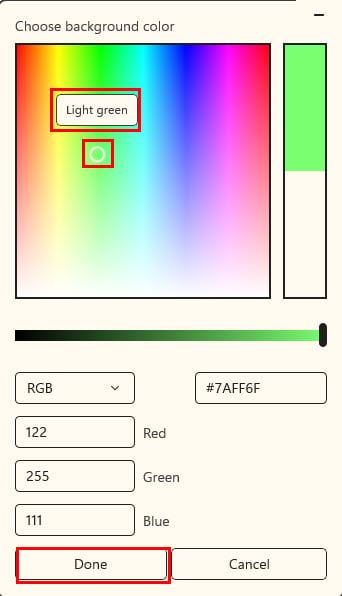
  1. Now, pick a color from the Choose background color box.
  2. Click Done to save it.
Choose color for background
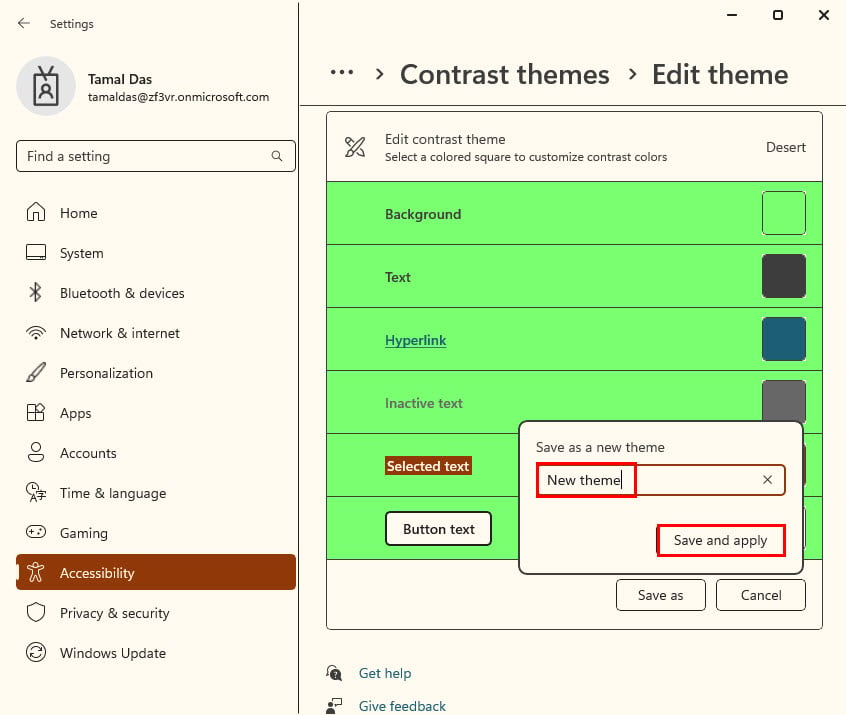
  1. Now, hit the Save as button and give the new theme a different name.
  2. Click on the Save and apply button.
Save and apply new theme name

High Contrast Mode With Other Accessibility Settings

You can use the following Accessibility or Ease of Access settings with High Contrast mode to further enhance user experience:

Windows Magnifier

Windows Magnifier enlarges a specific area of the screen to make it easier to see the content, like text and graphics. You can zoom in and out, and move the magnified area around the screen.

Cursor Size and Blink Rate

You can customize the default values to adjust the size and blinking behavior of the cursor for better visibility. This can also be helpful if the default blinking rate is too distracting.

Narrator

It reads through the screen’s content to give you a better understanding if you’re facing visual challenges. You can quickly enable or disable this feature by pressing Windows + Ctrl + Enter.

Display Scaling

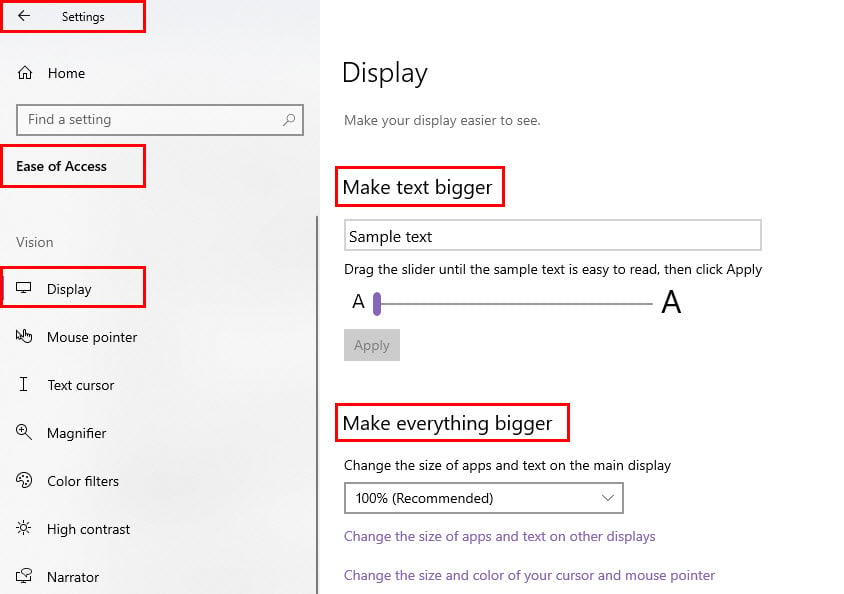
You can supplement the High Contrast mode in Windows 10 with the Make text bigger and Make everything bigger features in the Display section of Ease of Access.

Display Scaling win 10

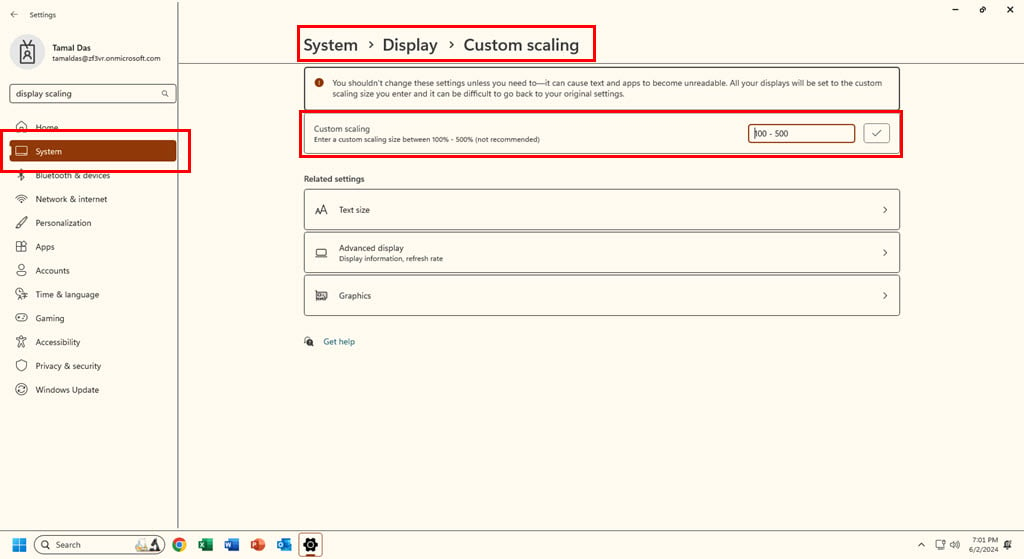
For Windows 11, you can use the Custom scaling feature in System > Display menu.

Display Scaling win 11

Summary

So, what does high contrast mode do? In short, it adjusts the visual elements of the UI so that they’re more accessible and readable. I’ve shown you examples of apps in the Windows 10 High Contrast and Windows 11 Contrast Themes modes.

You’ve also learned how to enable and tweak these accessibility settings on compatible devices. In addition, you can adjust and calibrate the display colors.

Did you try High Contrast or Contrast Themes on your Windows PC? Comment below to share your experience with other readers.

OpenAI is down for many, but the fix is already underway

ChatGPT is used daily by millions of users around the world, however, the service seems to be having problems today.

ChatGPT seems to be down for many, so let’s investigate what’s behind this outage.

ChatGPT is down for many, OpenAI confirms

OpenAI went down today and according to Downdetector, more than 2600 users reported that the service is down for them.

Even the OpenAI status page says the same, and according to OpenAI the issue is identified and the developers are working on a solution.

Reddit users were quick to point out this problem:

I realised that my GPT4o option is missing. There is only 3.5 and 4. Someone know why? It was still there yesterday

For others, ChatGPT is down completely:

Mine is gone completely, I cant even see 3.5 or 4 or even get a response. I can type it in the message box but enter does nothing. And i know my subscription is good.

We’re having the same problem, and the problems persisted even while using a VPN and a different Cloudflare server.

Hopefully, OpenAI will fix this problem soon. Stay tuned for updates!

Update: The issue has been resolved and ChatGPT is now fully functional.

In other news, OpenAI is training a new language model that will replace ChatGPT 4.

Azure Service Tags might be dangerous, claims Tenable, a cybersecurity company

Tenable has made an unsettling finding just days after Microsoft announced the deprecation of the Azure Update Delivery service tag. They have uncovered a weakness in Microsoft Azure’s Service Tags.

The tags are supposed to help those who use Azure manage network traffic and make their lives easier overall, and the flaw could let hackers access private information by pretending to be trustworthy Azure services.

Tenable Research has discovered a vulnerability in Azure that allows an attacker to bypass firewall rules based on Azure Service Tags by forging requests from trusted services. Customers who rely on these firewall rules for security are at risk from this vulnerability. They should take immediate action to mitigate the issue and ensure they are protected by robust layers of authentication and authorization.

Tenable

Although the problem is serious, Microsoft maintains that Service Tags were never intended to serve as a security boundary. This viewpoint has initiated a discussion about the real safety of Azure services and what actions customers need to take to safeguard their data.

Service tags are not to be treated as a security boundary and should only be used as a routing mechanism in conjunction with validation controls. No exploitation or abuse of service tags has been reported by a third-party or seen in the wild per our own investigation.

Microsoft

Tenable, who deals with cybersecurity, has sounded the alarm about this problem, stating that attackers could circumvent firewall rules by utilizing these Service Tags. This kind of vulnerability isn’t limited to one or two services; it impacts at least ten different Azure services, such as Azure DevOps and Azure Machine Learning.

The message from Tenable for people who use Azure is simple: add more authentication and authorization steps. This shows that just having Service Tags is not enough; there must also be other protections to guard your assets. Tenable suggests that those using Azure check their security arrangements and make changes if needed.

In other news, Forrester Wave just named Microsoft a top leader in cybersecurity. The Redmond-based tech giant had the highest scores in the strategy, current offering, and market presence categories.

Qualcomm and Arm aim for a 50% PC market share in 5 years. Is that a realistic goal?

At Computex 2024, the CEO of Qualcomm, Cristiano Amon, made some big forecasts. He is supporting the views of Arm’s CEO Rene Haas that Arm chips will make up 50% of the Windows PC market in coming five years. But now comes a real kicker for you. A few OEMs are targeting for Snapdragon chips to comprise 60% of their sales in merely three years.

Why are Qualcomm and Arm so confident about their prediction?

Truth be told, the confidence of Amon is not just empty talk. He mentions that the PC market is at a crucial turning point, led by fresh versions of Windows which are substantially expanding the limits of what PCs can perform.

It’s about more than simply shifting to the most recent OS; it’s regarding an entire different kind of machine that improves efficiency and introduces novel uses. Amon’s trustworthiness is shown in his claim about new versions of Windows, especially when he emphasizes how these changes will impact the performance limits for PCs. This indicates that upcoming iterations will be demanding more powerful hardware to support their advanced features and functions (Cowley, 2021). Qualcomm is in the lead, putting constant efforts to bring Orion CPU that works with ARM instruction set into this changing industry.

Also, very important, Copilot+ will debut on Qualcomm powered laptops, with Intel and AMD expecting to launch their x86 SoCs later this year. On the other hand, Arm chips are certainly different and until now, they were reserved for tablets and smartphones. Moreover, Qualcomm is not the typical choice for a regular PC user who might still recognize names like AMD or Intel more easily.

Will Arm SoCs rule the PC market?

You may argue that ARM-based CPUs are not new and AMD dipped their toe into this type op architecture before. Also, let’s not forget Intel’s XScale for a change. And we must not overlook Apple’s M series chips that have demonstrated the strength of ARM CPUs. ARM possesses the potential to create a notable influence in the PC sector, but it will require convincing efforts particularly for people who construct their personal PCs or are deeply rooted in x86 design.

Some people think that Arm could dominate everything, while others have a more skeptical view on its growth potential. It’s obvious that moving to a different architecture won’t be easy. There are big challenges to face, and one is making sure developers accept it and also getting new chips that just work for regular users too.

So, what is the outcome? The confident forecasts of Qualcomm regarding ARM chips in Windows PC market have triggered a heated discussion. Some people are prepared to welcome this fresh time, while others still show doubt and highlight difficulties in moving from recognized x86 architecture. We can only wait and see if the hopes of Qualcomm and ARM will come true. But, one thing is certain: the PC market is on the edge of some fascinating transformations. While Qualcomm has a foothold on the first Copilot+ PC, the latest chipsets from Intel and AMD are certainly something to look forward to.

We’ve learned about this from Reuters and Tom’s Hardware.

Xbox S is not powerful enough to experience Deliverance 2 in its full glory, users agree

A very interesting development has occurred in the world of gaming. There is much talk about how the Xbox Series S will influence the making of Kingdom Come: Deliverance 2.

The core issue revolves around technical details related to Xbox Series S. As per some reports, these specs are quite restricting for the scope of this game. This limitation has provoked a discussion among gamers and developers, highlighting difficulties in managing game creation between various console generations.

The main point of this argument is the Xbox Series S’s 10 GB RAM capacity, which is just over 25% more than that of last-gen consoles. Due to this limitation, the game’s size increase was only 25% bigger than its previous version.

This restriction isn’t merely a technical detail; it directly affects how much depth and scope developers can provide in their games.

The game’s resolution and frame rate have also been debated. The Xbox Series X and PlayStation 5 versions are planned to run at 4K / 30 FPS, while the Series S game will operate at 1440p / 30 FPS.

This difference shows the difficulty of creating games that can perform nicely on varying hardware abilities, and this was recently seen with Baldur’s Gate 3.

The discussion of Xbox Series S and how it could affect game creation isn’t new. Earlier, some developers worried that the console’s specifications might restrict their games’ possibilities.

However, the situation with Kingdom Come: Deliverance 2 makes this matter clearer. This is especially true when we consider the game’s goal of providing a large, realistic medieval world for players to explore deeply.

What does this imply for gamers? It highlights how crucial hardware potential is in determining the gaming path. Moreover, it raises inquiries about how developers can handle these restrictions to offer games that match what players anticipate across every platform.

This information could be somewhat discouraging for those Xbox S users who want to play Deliverance 2 on the console. Nevertheless, it’s important to remember that the console still provides an affordable entry point into next-gen gaming.

Game creators will face difficulty in enhancing their games for this specific hardware while maintaining high quality and size.

While we anticipate Kingdom Come: Deliverance 2’s coming, it is intriguing to consider how Warhorse Studios will manage these difficulties.

Will they produce a game that satisfies players’ demands on every platform? We’ll see. But no matter what, it’s obvious that the discussion about Xbox Series S and its effect on gamemaking is not finished yet.

Opera will be the first browser to use AI LLMs directly on your PC

Picture this: Opera is giving a boost to the game with on-device AI, bringing it into its browsers named Opera One and Opera GX. I’ve seen many changes in browsers, yet this one is quite the jump. In April 2024, we reported that Opera brought local Large Language Models (LLMs) right inside the application. This was much more than just a test; it was a serious decision to provide AI abilities for many users on Windows, MacOS, and Linux devices.

Opera is giving you a choice on which LLM to use

In the latest press release, Krystian Kolondra, EVP of Browsers and Gaming at Opera, talked about their idea to shift on-device AI from being in a test phase to being a standard feature of flagship browsers. This change isn’t only for staying updated with technology advancements; it’s about completely reshaping the landscape.

At first time when on-device AI was tested by Opera as an experiment, it became one part among many other features in their AI Feature Drops Program which introduced more than 2000 local LLM variants from over 60 model families locally. This change was important, because it allowed Opera to become the first big browser that had this characteristic already included.

But why do you and I care about this? It’s because of privacy and innovation. By handling AI tasks on our own devices, Opera reduces the requirement to send our personal information to faraway servers. Moreover, they always include more AI features. For instance, you can comprehend images via their browser AI called Aria. Just visualize putting up a picture and receiving thorough information about it directly from your browser sidebar.

Opera does not end its AI developments with software alone. They are also incorporating significant hardware and collaborations, such as a connection to Google Cloud and the NVIDIA H100 card-powered AI data cluster in Iceland. It is noteworthy that this cluster operates exclusively on renewable energy sources and ranks among the top supercomputers globally.

However, the most important aspect in Opera’s AI approach is the fact that you can choose the LLM of your choice, it doesn’t force you to use ChatGPT, LLama, or any other. You may actually pick the one that suits your needs best. So, while Edge is stuck on Copilot and Chrome will be linked to Gemini, Opera will be a strong alternative in this department.

What do you think about Opera’s Ai developments? Let’s discuss in the comments below.

Microsoft’s new Synthetic Data will train AI models as well as personal data

In a world where data is worth its weight in gold, there’s an ongoing struggle between utilizing its potential and safeguarding personal privacy. Picture yourself on the front lines of this dispute, attempting to understand how to use data for training AI models while avoiding crossing into privacy violation territory.

Many organizations encounter this challenge, and Microsoft is in a privacy controversy with its new AI-powered Recall; however, synthetic data provides a light at the end of the tunnel. Synthetic data acts like a superhero in the data world, helping construct believable datasets without violating personal privacy.

This implies that firms can continue training their AI models well, follow tough rules on data privacy, and might also be able to utilize new AI applications that were not possible earlier due to a lack of or issues related to data availability and privacy.

Microsoft’s Phi-3 small language model (SLM) illustrates the responsible use of synthetic data. It successfully avoids the requirement for real-world personal information by blending well-made web data with synthetic content created from large language models (LLMs).

But synthetic data also has weaknesses. It can be challenging to create artificial data that is realistic and representative of diverse use cases without introducing bias or inaccuracies.

Differential privacy—the name might appear complicated at first, but at its core, it’s about applying a mathematical safeguard to data. This method assures that the created data is similar for practical purposes yet modified adequately so as not to reveal specific identities. It provides an innovative shift by providing a means to create without risking privacy.

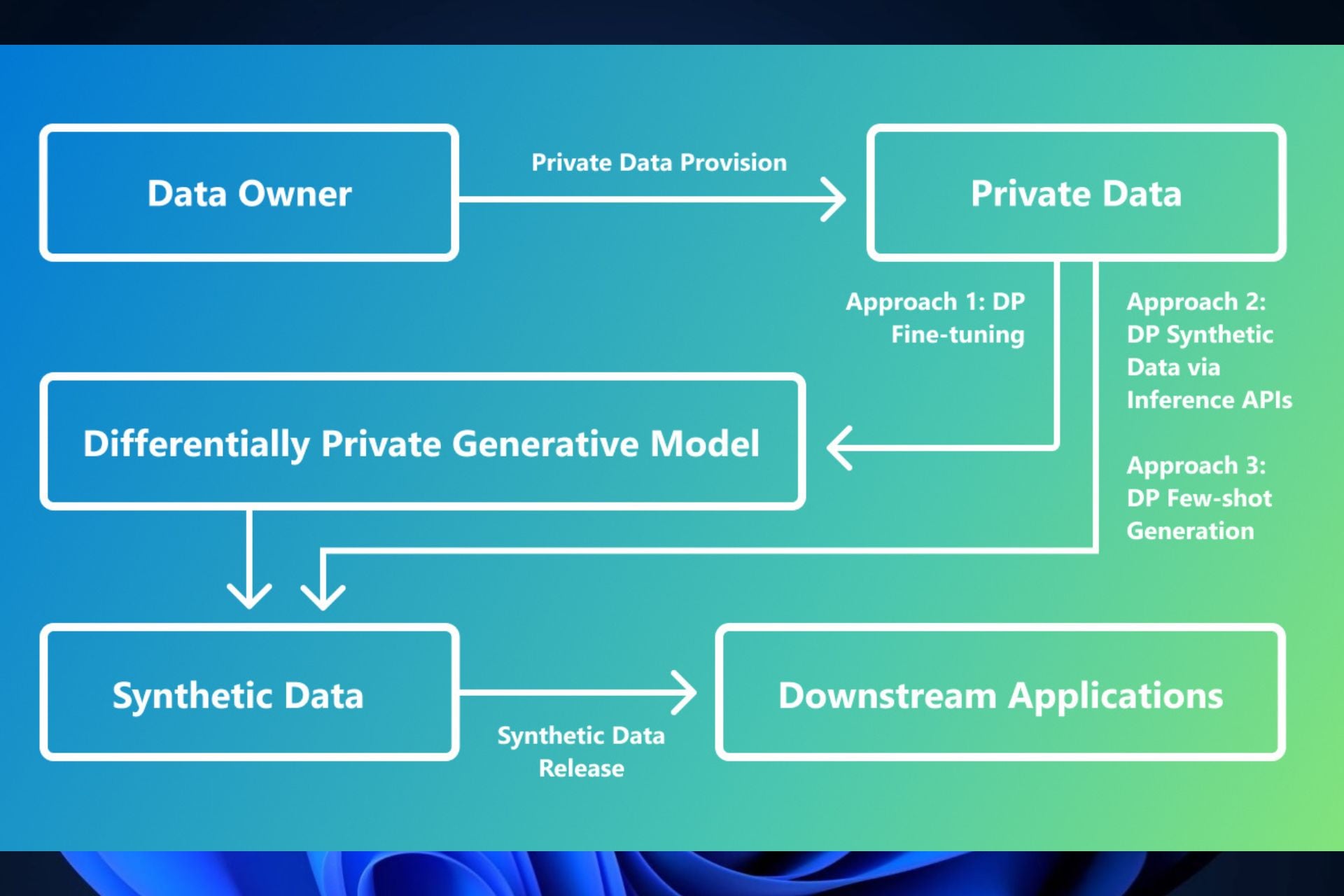
Now, we are entering the realm of technical magic. The researchers at Microsoft have been creating ways to make synthetic data with these privacy protections built in. One method is adjusting how we train generative LLMs with differential privacy by introducing some noise during training so it stays anonymous but still realistic.synthetic data

Another creative idea doesn’t need any training. It treats pre-trained models like a black box and involves querying them to generate fresh data in a privacy-protecting manner. This could be useful for people who cannot train big models starting from zero.

But what if you possess only a small number of instances, and they are confidential? The researchers have an answer to this as well. You can create synthetic instances guided by private information but guarded by differential privacy. Therefore, AI models can still learn efficiently without jeopardizing the privacy of those involved.

The path to finding an equilibrium between innovation and privacy keeps progressing. The developments in creating synthetic data hint at a future where AI can advance while protecting our privacy rights.

It’s a delicate balance between algorithms and morals, but it is key for the ongoing development of responsible AI.

Copilot+ will only work on Qualcomm laptops on its June 18th launch

Microsoft’s Copilot+, a new unveiling by the company, is set to bring high-tech artificial intelligence features on PCs. But, there’s an interesting turn of events: at the time it’s released, Copilot+ will not be compatible with Intel or AMD processors.

However, at first the introduction will be focused on devices running Snapdragon processors and it has been planned to happen by June 18th. This choice shows a big change in Microsoft’s approach, putting more importance on ARM silicon instead of the usual x86 structure from Intel and AMD.

In Computex 2024, Intel and AMD showed off their latest x86 chips. The NPUs in these chips are powerful, with a maximum speed of 50 TOPS. These features go beyond what Microsoft asked for Copilot+. But even so, at first devices that use this kind of processor will not have Copilot+ characteristics. This time, it appears that Microsoft is teaming up more closely with Qualcomm. It might be the initial case where Windows provides backing for ARM-based devices even before x86 hardware; however, it does not necessarily imply exclusivity but can be seen as a significant shift in direction.

Copilot+ will still come for x86 CPU laptops

Regarding Copilot+ availability on x86 hardware, it is anticipated to arrive possibly by Q4 of this year. Microsoft has affirmed that Intel, AMD and Qualcomm are all vital collaborators in the Copilot+ mission. The delay for x86 support appears more related to timing of software updates rather than lack of cooperation. Intel and AMD did not mention any exact schedules for their processors to work with Copilot+. We can anticipate updates coming after these processors are released.

In an interesting development, there is a rumor that Copilot+ may not be fully prepared for Snapdragon PCs, either. Microsoft seems to be rushing against time as they get ready for the launch planned for June 18th. The hurry involves making certain features like Recall and Cocreator function correctly and on schedule. And with all the turmoil around Recall’s privacy concerns, we can expect anything.

It’s clear that initially, Qualcomm was Microsoft’s preferred partner, but now they are also thinking about offering support for dedicated GPUs in desktops. This is an important recognition because many people who use Windows prefer laptops yet still have investments in Intel-powered devices.

If you are excitedly waiting for laptops with either Intel’s Lunar Lake or AMD’s Strix Point processors, then perhaps the wait for Copilot+ is pretty close. Both processors are anticipated to be sent out in small amounts at first, but Microsoft’s dedication in making Copilot+ available on x86 hardware stays strong.

This is an interesting shift for Microsoft, showing a more comprehensive acceptance of ARM technology while not severing its connections with Intel and AMD completely. While we anticipate additional information, it’s apparent that the path ahead for Windows and AI on PCs is changing. Copilot+ seems to lead this transition.

What do you think about the latest developments in the Copilot+ PC saga? Let us know in the comments below.

Larian confirms: Modding tools for Baldur’s Gate 3 are coming

Baldur’s Gate 3 has been an extremely successful game, and rightfully so. Even after the release, Larian Studios continued to release new content and update the game.

Speaking of which, the company has announced the next major update that will bring the official modding tools for the game.

Modding tools for Baldur’s Gate 3 are coming later this year

As Neowin writes, Larian is working on modding tools for the game that will allow players to create their adventures.

With these tools, you’ll be able to test your mods in the game and get access to internal assets, including visual models, textures, UI, etc. This will allow you to customize them as you see fit.

Once you’re done, you can publish your mod via editor to mod.io servers where it will be moderated and visible in the game browser. Of course, you’ll be able to pack your mod locally and share it on third-party sites.

Modding tools will be released in September, and the closed alpha test is currently taking place, with closed beta coming in July.

As for availability, these tools will be available only on PC, but the ability to download and play mods will come later to other platforms.

It’s worth mentioning that Larian is moving away from the game, but Baldur’s Gate 3 will get a sequel, probably made by another developer.

This isn’t the only game that is getting a modding tool, and the Witcher 3 REDkit mod is already available.

Microsoft and Hitachi’s new partnership will see the training of 50,000 GenAI Professionals on advanced AI skills

Hitachi and Microsoft have just inked a three-year, multibillion-dollar partnership that seeks to grow the Lumada business by 18.9 billion USD by the end of the fiscal year 2024. According to the official press release, the partnership is a strategic alliance aimed at pushing the boundaries of business and social innovation through the power of generative AI.

Imagine, if you will, a future where the efficiency of 270,000 employees has skyrocketed, thanks to the integration of Microsoft’s cloud, Azure Open AI Service, Dynamics 365, Copilot for Microsoft 365, and GitHub Copilot into Hitachi’s Lumada Solutions. Sounds like a game-changer, doesn’t it?

There’s more. Hitachi isn’t stopping at integrating some of the most advanced technologies. They’re going all-in on education, too, training over 50,000 ‘GenAI Professionals to master these advanced AI skills.

This move is part of a broader vision to not only enhance their own productivity but to also drive significant growth within the Lumada business, aiming for a revenue target that’s nothing short of ambitious.

You might wonder, “What’s in it for society?” Well, this partnership is set to tackle some of the most pressing issues facing businesses today, including enhancing cloud services, beefing up security, and even reducing the environmental footprint of data centers, something Microsoft has already made several pledges on, most recent being the Datacenter Community Pledge.

We are entering a new era of AI with the promise to deliver transformative business outcomes across every role and industry. Our expanded partnership with Hitachi will bring together the power of the Microsoft Cloud — including Microsoft Copilot — with Hitachi’s industry expertise to improve the productivity of 270,000 Hitachi employees and help address customers’ biggest challenges, including sustainability.

Satya Nadella, Microsoft

With the growing concern over the environmental impact of digital expansion, this focus on sustainability is a breath of fresh air.

Hitachi’s commitment to innovation doesn’t stop there. They’re leveraging generative AI for predictive maintenance in Hitachi Rail, enhancing equipment monitoring and improving forecast accuracy.

This proactive approach prevents breakdowns before they happen, ensures smoother operations, and, ultimately, safer travel for everyone.

Hitachi is stepping up its digital solutions game by enhancing its Lumada solutions with generative AI capabilities.

This includes everything from speeding up IT department response times to supporting the energy transition with digital solutions that optimize asset performance management, energy trading, and risk management.

As for the partnership’s focus on talent development, Hitachi’s ambitious plan to train more than 50,000 GenAI Professionals is a clear signal that they’re not just adapting to the future but actively shaping it.

By incorporating training on advanced software development skills using GitHub Copilot and Azure OpenAI Service, Hitachi is laying the groundwork for a new generation of AI-savvy professionals.

This partnership between Hitachi and Microsoft could be more than just a business deal; it could be a bold step towards a future where technology and human ingenuity come together to solve some of the most challenging problems facing businesses and society today.

Intel’s new Lunar Lake chips top Snapdragon’s Arm SoCs for AI PCs

After AMD showed off their new Ryzen Zen 5 CPUs touting 50 TOPS processing power, it’s Intel’s turn to unveil their Lunar Lake mobile processors during their third Tech Tour in Taipei. Apparently, the new chips aren’t only about brute strength but also a harmonious mix between power, thermals, and bandwidth.

What is Intel’s Lunar Lake bringing to the game?

Lunar Lake brings 48 peak TOPS for its NPU alone, on par with Microsoft’s requirements for Copilot+. However, when combined with the 67 TOPS from the GPU and the rest of the components, this platform’s total processing power reaches an incredible 120 TOPS.

Intel also pays great attention to efficiency. When we see a real demonstration that compares Lunar Lake with its previous model Meteor Lake, it is clear the new chip doesn’t just work more effectively; it achieves this while using less energy as well. This is especially necessary for laptop users, who are always fearful of their battery running out at critical times.

It’s not just about improved performance, but Lunar Lake’s Skymont architecture could also change the way we think of computing tasks. With a possible 40% reduction in SoC power consumption, it hints at a substantial advancement in battery life – something all mobile users would welcome. We discussed recently why Qualcomm is pointing out this particular aspect. In fact, according to Intel’s Lunar Lake fact sheet, the new chips will bring up to 60% better battery life in real-life usages.

Finally, we must mention the gamers and creators. The emergence of Battlemage Xe2 GPU with Lunar Lake is a significant development. It will undoubtedly improve game compatibility and performance, bringing ray-traced shadows as well as XeSS enabled features to laptops. Gaming future on laptops appears better now more than ever before. Here’s a glimpse of what gamers should expect from the new Xe2:

Xe2 GPU – Brings more than 80% more gaming performance and more than five times the AI throughput over the previous generation, delivering more than 60 tera-operations per second (TOPS) New microarchitecture for the display and media engines delivers a best-in-class visual experience.

AMD demonstrated that you don’t need an Arm SoC to work with the new Copilot+ and now, Intel is bringing yet another alternative to the table. The only issue is that neither AMD’s, nor Intel’s options are yet on the market while Qualcomm laptops are prepared to get your cash.

What are your thoughts on the new Intel Lunar Lake chips? Let’s talk about that in the comments below.

Forrester Wave declares Microsoft the top leader in cybersecurity

In a fast-changing world filled with cyber dangers that move quicker than the human eye, companies are expected always to search for stronger shields to safeguard their digital fortresses. Microsoft has returned as a symbol of expectation among these knights in bright armor.

Through its Defender XDR platform, it’s participating in and leading this cybersecurity fight. A famous analyst firm called Forrester Wave declared Microsoft the top leader in the Extended Detection and Response (XDR) platforms for Q2, 2024. This is not small; it’s similar to winning in the cybersecurity Olympics.

The praise from Forrester was not lacking, emphasizing Microsoft’s dedication to honing what they confidently term “the most complete XDR offering in the market today.” The devotion of Microsoft towards innovation is not just about words; it has a substantial R&D budget that can compete with top creative suppliers in the security area. They’re not playing around.

So, why is Microsoft Defender XDR special? It got the best possible score in 15 of 22 evaluation points. That means it got top marks in areas such as Endpoint Native Detection, Surface Investigation, and Threat Hunting. It’s like having a security Swiss Army knife.

Today, we are excited to announce that Microsoft has been named a leader in The Forrester Wave: Extended Detection and Response (XDR) platforms, Q2, 2024, with the highest scores in the strategy, current offering, and market presence categories. Microsoft Defender XDR was rated the highest possible in 15 out of 22 evaluation criteria, including Endpoint Native Detection, Surface Investigation, Threat Hunting, Analyst Experience, Vision, and Innovation.

Microsoft

The Microsoft XDR solution is wide-ranging, encompassing everything from endpoints to IoT, operational technology (OT), and cloud workloads. It provides a unified security operations platform that incorporates the top features of XDR, SIEM, and other systems into a single location for ease of use.

But the part that is even more exciting – Microsoft comprehends that in cybersecurity, cooperation is crucial. This platform has been designed by them to let customers combine security signals from different places. This is about the idea of breaking down silos and making security teams more efficient.

We must also consider the role played by AI. Microsoft uses generative AI, such as Copilot for Security, to simplify incident remediation, reverse engineer malware code, and even assist junior analysts in advancing their abilities. It’s similar to having a cybersecurity mentor within the system. Generative AI is a game changer, and Microsoft leads in using it to counter advanced attacks with unrivaled speed.

In a world where cyber attackers are also using AI, the importance of AI is very high. Microsoft’s acknowledged leadership in XDR by Forrester demonstrates their dedication to inventiveness and capability to assist organizations in preparing their defenses for future risks.

Microsoft Defender XDR might be worth considering if you are searching for a cybersecurity solution that finds threats and stops them from causing harm. It’s not just about defense; it could help to turn the tide in the cyber war. This is the ally you desire in the current digital era.

Hyperkin is honoring the first ever Xbox controller with the new DuchesS

Hyperkin is making nostalgia touchable with the revealing of DuchesS – a wired controller for Xbox Series X|S and Xbox One. This isn’t just your regular controller; it’s a licensed replica from Japan that mimics the S model which was initially released alongside the very first Xbox.

Xbox Duke controller – Source: Wikipedia

Do you recall the issue regarding the Duke controller’s large size? The DuchesS is now showing up to remind us of the solution that came afterwards. Starting preorders on 15th July and having an official launch date of 21st August, 2024, it shows clearly Hyperkin keeps pushing to bring back old classics.

The DuchesS is not Hyperkin’s initial attempt. They have already brought back the Duke and Xenon controllers, targeting individuals like us who miss old-fashioned gaming experiences. The DuchesS, costing $50, offers not only a history lesson but also modern functional gaming with features such as impulse triggers, 3.5mm headset jack and many more (Chacos). Hyperkin’s lead developer, Slade Dude Suzuki, calls it a cool feat to let gamers use any version of Xbox controller from all the generations on modern consoles.

The DuchesS, together with the Duke and Xenon, are parts of gaming history. It’s quite sad that these rare gems are wired because of decisions made by Microsoft concerning Xbox wireless protocols; however at $50 each they can be seen as reasonably priced for their uniqueness and sentimental value.

It’s good that Hyperkin is trying to maintain the history of Xbox. Whether you remember the first Xbox well or are interested in special gaming tools, DuchesS will probably attract your attention. Now, are you prepared to go on a journey into the past with the DuchesS in your hands?

Microsoft introduces its AI forecast, Aurora, capable of detecting storms weeks ahead

After Storm Ciarán’s surprising strength caused destruction in northwestern Europe, it became clear that existing weather prediction models have limits.

This event was a rare meteorological occurrence for England, and it highlighted the pressing requirement to improve forecasting methods so as to effectively prepare for and lessen the impacts of severe weather occurrences like this one.

Now comes Aurora, Microsoft’s pioneering AI-based weather forecast model. According to the Redmond-based tech giant, it has been carefully created to change how we predict the weather using large quantities of atmospheric data, helping us foresee and anticipate the intense increases in events similar to Storm Ciarán.

This flexible 3D Swin Transformer model with 1.3 billion parameters has been fine-tuned to provide high-resolution forecasts of weather and atmospheric processes.

The model consists of a flexible 3D Swin Transformer with Perceiver-based encoders and decoders, enabling it to process and predict a range of atmospheric variables across space and pressure levels. By pretraining on a vast corpus of diverse data and fine-tuning on specific tasks, Aurora learns to capture intricate patterns and structures in the atmosphere, allowing it to excel even with limited training data when it is being fine-tuned for a specific task. 

Microsoft

The special thing about Aurora is its capacity to learn from more than a million hours of different weather and climate simulations. This makes it very good at prediction work in places where data is less present or during severe weather situations.

This ability is very important, especially as climate change makes the weather increasingly unpredictable.

The model’s spatial resolution of 0.1°, or about 11 km at the equator, is very high. It can catch intricate information in the atmosphere. This means Aurora can predict more precisely than ever before and at a computational speed-up that might be around 5,000 times faster than normal forecasting systems. Think about how this could make weather predictions timely, efficient, and accurate like never before!

However, the AI-powered Aurora’s strength is not just in weather forecasting. It also shows its ability to predict atmospheric chemistry and air pollution levels, doing better than operational models for many targets.

It can be used in many ways because its complex structure can handle different inputs and make predictions at various resolutions and fidelity levels. Aurora’s capability to successfully detect variations in pollutants like nitrogen dioxide at extremes and background levels highlights its potential for enhancing air quality monitoring and prediction.

The special ingredient that makes Aurora so great is the pretraining it goes through with various datasets. This ensures Aurora performs well in many different tasks and resolutions, surpassing the best numerical weather prediction models and deep-learning approaches.

The model’s capacity to accurately predict extreme values reveals its potential for revolutionizing Earth system modeling.

The making of Aurora shows us that AI is very important to improve the general knowledge and forecasting of Earth’s intricate systems. Even though Microsoft already has some of the best weather forecasting systems in the world, the AI-powered Aurora might make it easier for everyone to get important weather and climate details worldwide, especially in places with less data available.

This can influence many areas, such as agriculture, transportation, energy, and disaster readiness. It may assist communities worldwide in adjusting to the difficulties brought by climate change.

In the time ahead, Aurora’s plan gives us thrilling chances to create detailed models that include the total Earth system. As computer resources and data keep improving, basic models such as Aurora might become the main structure of weather forecasts and climate prediction systems.

It means people who make decisions and the general public could get precise information at the right moments to make choices about how to respond actively to problems on our changing planet.

Microsoft has tested Aurora. The Redmond-based tech giant published a paper earlier this year describing a patented technology powered by AI that can predict storms. We thought it was Copilot at the time; it turns out it was the new Aurora AI weather forecasting model.

Get rid of Windows 11 Start Menu ads with this simple trick

Microsoft is notorious for showing ads, or as the company calls them, app recommendations. These types of ads usually include Microsoft apps or sponsored apps from the Microsoft Store.

If you don’t want to deal with ads, it’s easy to disable them in the Start Menu, and today we’re going to show you the simplest way to do it.

How can I disable Windows 11 Start Menu ads?

Ads are nothing uncommon for Microsoft, and to hide this fact, Microsoft has renamed all instances that mention ads in Windows 11.

Keep in mind that only the setting was renamed, so the ads are still available. But luckily, How to Geek has shared a way to quickly disable them. You just need to do the following:

  1. Open the Settings app and go to Personalization.
     
  2. Next, choose Start.
  3. Locate Show recommendations for tips, shortcuts, new apps, and more, and uncheck it.

While this will stop ads from showing in the Start Menu, some users like to go a step further with the Oh Freak Go Back tool that removes all ads. With it, you can remove all types of advertisements, including ads located in the Settings app.

And if you thought ads were bad, Microsoft also brought back nag screens to Windows 10, pestering users to upgrade.

Approvals add-in makes creating and managing approval requests on Word doc easier

Microsoft has introduced a new add-in, Approvals, that allows you to create and manage approval requests for a Word document.

Connor Rodewald, Senior Product Manager on the Low Code Experience team, said in a post on the Microsoft 365 Insider blog:

Using the Approvals app for Microsoft Teams, you can attach links to files when you create approval requests, but these approvals aren’t currently attached to the Word document itself. By bringing the Approval add-in to Word, you now have a direct entry point to create approval requests for a specific document you’re working on.

This Add-in also allows you to see all approval requests that took place over time in a specific document. As an approver, you can also respond to the request right in the Word document, rather than needing to go to the Approvals app in Microsoft Teams.

How does it work?

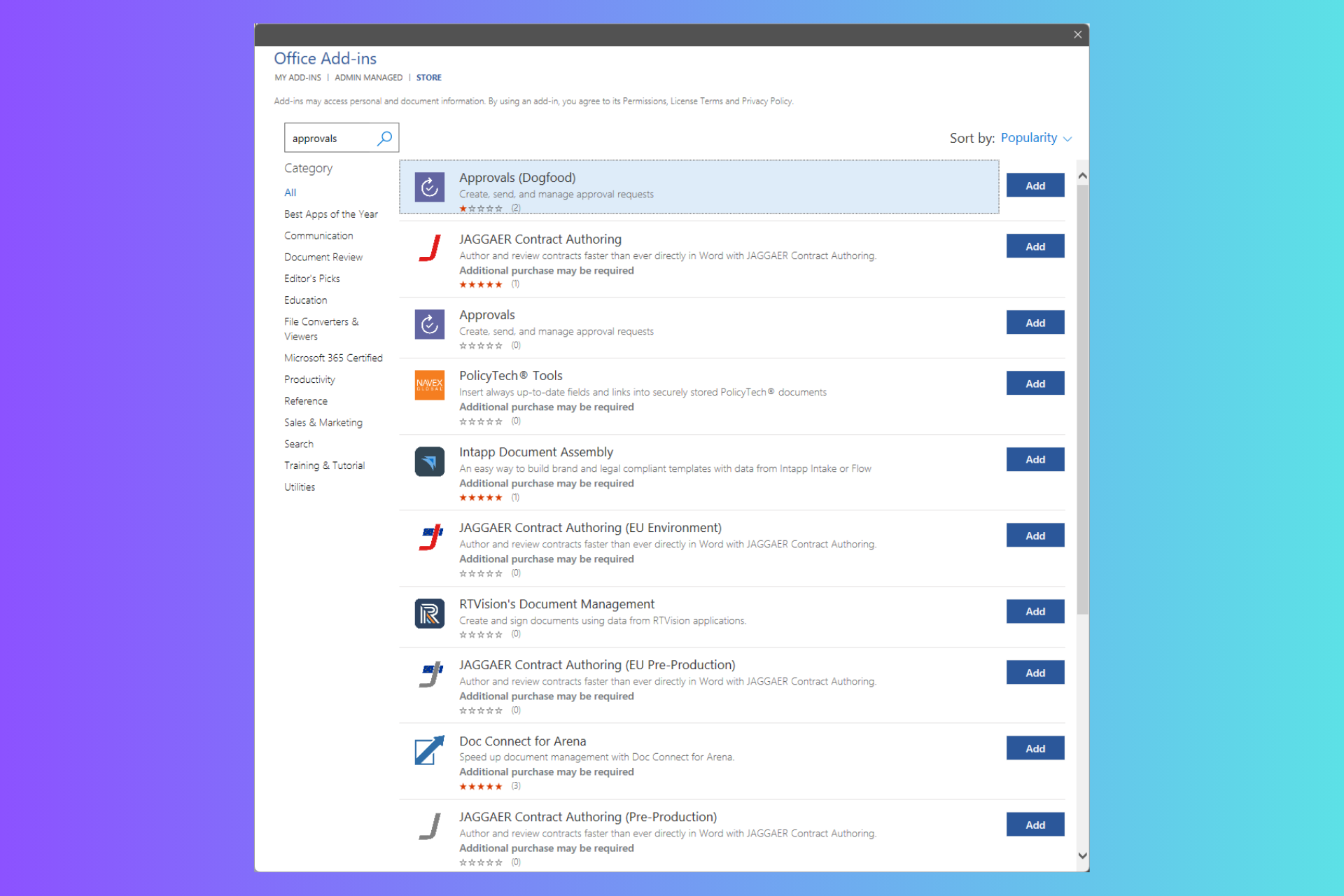
On the Word document, click File, then Home, and click Get Add-ins. Type Approvals in the search box. From the search results list, select Approvals.

Next, click the Add button on the Approvals page, then accept the license terms and click the Continue button.

To create a request in Word, click the New approval request button in the Approvals pane. You can create a basic request or use the existing template. Once you have filled in the details, click the Send button.

To respond to a request, click the request in the Approval history section, you can either select the Approve button or Reject button.

To create a Word template as a team owner within Microsoft Teams, launch the Approvals app, click Create or manage templates > New template, then choose the team you are creating the template for, and enter a template name.

In the Category drop-down, choose Word, add a description, and complete the process as prompted.

Here are the scenarios and tips & tricks mentioned in the official post:

Scenarios to try

  • Create an approval request for a document.
  • Approve or reject a document approval request.
  • As a team owner, create a template for your team to use when submitting a document for approval. 

Tips and tricks

  • Only one Approval request can be active at a time. 
  • To cancel a request, open it within the Approvals History section, and then click the Cancel request button. 
  • When rejecting a request, you can include additional information in the Comments box above the buttons.
  • To learn more about the template creation process, see: Discover templates in Approvals – Microsoft Support

To use this add-in, you need Microsoft 365 with an F1 (Frontline worker) license and above. This also includes EDU and Enterprise licenses.

What do you think about the Approvals add-in in Word? Share your views with our readers in the comments section below.

May update for Visual Studio Code added AI-related feature for Java developers

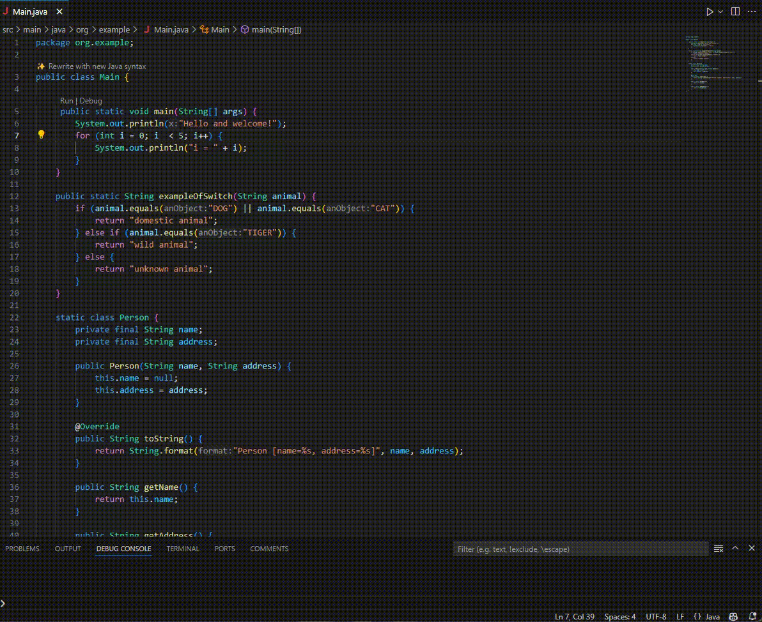
Microsoft added an exciting AI feature for Java developers on Visual Studio Code, Rewrite with new Java syntax with Copilot.

You get this feature with the insider (pre-release) version of the extension pack for Java. It is seamlessly integrated with GitHub Copilot, so you need a GitHub Copilot license to use it.

How does the feature work?

On your Java class, you will see a new CodeLens text above the name of the class Rewrite with new Java syntax. Once you click t, it will initiate the inspection on the current Java class

Once the examination is done,  Visual Studio Code will display some improvement suggestions and point users to the location.

For each suggestion, you will get an additional CodeLens displaying the solution and changes to be made. Clicking on the CodeLens will invoke the GitHub Copilot inline chat box.

You can then see the difference between your code and the suggestion and choose to Accept or Discard the suggestion. If you accept the suggestion, the workflow will be completed.

In a different scenario, if a code is complex, you may not want to inspect the whole class at once. So, with the feature, you can also inspect a part of the code. To do that, select the code you want to inspect, then click the lightbulb icon on the left and choose Rewrite with new Java syntax.

To use the new feature, you need to install both the Insider (Pre-release) version Extension Pack for Java and GitHub Copilot extensions with a GitHub Copilot license.

What are the Spring updates?

Along with this, Microsoft also added Spring updates to Visual Studio Code, here is what the release notes say:

JPQL syntax highlighting

The Spring Boot Tools extension now features syntax highlighting for JPQL query strings. The syntax highlighting works for @Query annotations inside of Java source files as well as for named query property files. This makes reading those query strings much easier. (screenshot JPQL query syntax highlighting)

Add Starters directly from within `pom.xml` files

We added a clickable hint to pom.xml files of Spring Boot projects, directly  in their dependency section. This clickable hint directly invokes the support to add additional Spring Boot starter modules. This improves discoverability and usability of this feature and makes it super easy to find and use. (screenshot add pom starters)

Dashboard shows active profiles

The Spring Boot Dashboard now shows the active profiles of a running Spring Boot application directly side by side with the port the app runs on. This is available in the pre-release version. (screenshot active profiles in dashboard)

Automatically convert application properties to YAML and back

The Spring Boot tools now offer actions to automatically convert `application.properties` files to YAML format and the other way around. This makes the switch to your (newly) preferred format super easy.

Performance and footprint improvements

The indexing infrastructure for Spring projects got improved. Previously, the mechanism was able to index about 6.5k Java source files inside of a single project before running out of memory. The latest versions can now index up to 60k Java source files instead within the same memory constraints. In addition to that the initial as well as ongoing performance of reconciling Java source files for Spring specific validations is now twice as fast as before.

What do you think about these changes in Visual Studio Code, especially Rewrite with new Java syntax? Share your views with our readers in the comments section below.

Firefox Nightly introduces Alt text generation for enhanced web accessibility

Mozilla’s Firefox Nightly version is working on an experimental feature that will be added to a PDF editor to improve web accessibility for all users.

The feature automatically generates alternative text for images using private on-device AI models. It is all set to be included in Firefox 130, which can empower users with screen readers to understand images better across the web, thereby facilitating a more inclusive browsing experience.

The importance of Alt Text

Alt text is an important part of web accessibility. It provides textual descriptions of images, enabling individuals using assistive technologies such as screen readers to comprehend visual content.

Even if proven significant, many web pages don’t have alt text, making them inaccessible to visually impaired users. According to the Web Almanac’s 2022 report, nearly 50% of images on the web don’t have alt text.

Addressing the issue

To address this problem, Mozilla uses a Transformer-based machine learning model to describe image content accurately. In a recent blog on Mozilla Hacks, Tarek ZIade said:

These models are getting good at describing the contents of the image, yet are compact enough to operate on devices with limited resources. While can’t outperform a large language model like GPT-4 Turbo with Vision, or LLaVA, they are sufficiently accurate to provide valuable insights on-device across a diversity of hardware.

Model architectures like BLIP or even VIT that were trained on datasets like COCO (Common Object In Context) or Flickr30k are good at identifying objects in an image. When combined with a text decoder like OpenAI’s GPT-2, they can produce alternative text with 200M or fewer parameters. Once quantized, these models can be under 200MB on disk, and run in a couple of seconds on a laptop – a big reduction compared to the gigabytes and resources an LLM requires.

Enhancing performance and integration

The experimental feature is integrated into Firefox Nightly’s PDF editor, which signifies an important step towards broader implementation across general browsing to ensure future accessibility for all web users.

By harnessing the capabilities of small open-source models, Mozilla ensures privacy, resource efficiency, and increased transparency. These models work entirely within the device, so users’ data is not transmitted to external servers, and their resource efficiency reduces the environmental impact.

Mozilla extends Firefox Nightly’s infrastructure, thereby adapting the Translations inference architecture to include alt text generation. By using the ONNX runtime and Transformers.js library, Mozilla seamlessly integrates and optimizes model caching within the browser environment for better performance.

What’s in the future?

Mozilla aims to reduce biases and improve alt text accuracy by leveraging ViT (Vision Transformer) + DistilGPT-2 architecture and refining training datasets.

 Tarek Ziadé also highlighted that Firefox can incorporate an image into a PDF using a popular open-source pdf.js library.

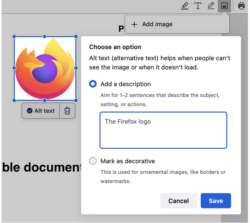
A screenshot of the PDF.js alt text modal window

In Firefox 130, PDF.js will automatically generate alt text for the images added to PDFs, allowing users to validate them.

Thus whenever an image is added, Mozilla gets an array of pixels, which are then passed to the ML engine. After a few seconds, you will get a string corresponding to a description of this image.

Initially, when the user adds an image, there might be a delay in downloading the model; however, with time and usage, the process will speed up as the model is stored locally.

In the future, Mozilla aims to provide alt text for any image in PDFs except images with just text.

Mozilla also plans to continuously work on enhancing the alt text generator with input and collaboration from the community. Once it works well with PDF.js, Mozilla hopes to make the feature available in general browsers for users with screen readers.
What do you think about this feature? Share your views with our readers in the comments section below.

Microsoft Teams will soon come with the ability to export Q&A

Microsoft is working on a new feature, Feature ID 398446, called Export Q&A questions, which will allow event organizers to export questions asked by attendees during events or meetings as a CSV file.

The feature’s description in the Microsoft 365 Roadmap says,

Event organizers can now export questions that attendees asked as a .csv file in order to better understand the questions asked and general sentiment in a meeting or event.

This means that all the questions asked by meeting participants will be compiled in a spreadsheet, which can be later processed and analyzed without any issues.

Exporting these questions can help meeting organizers gain insights into concerns and topics mentioned during the meeting. They can review them later to understand the problems and issues deeply.

Furthermore, the data can prove important in understanding attendees’ needs, allowing organizers to plan team meetings or events that match their expectations.

Another related feature, with Feature ID 398445, Voting, Filtering, Sorting, and Archiving questions in the Q&A app on Teams, will add powerful features like Vote, Filter, Sort, and Archive to enhance the Q&A experience for organizers and attendees during events and meetings.

The feature’s description in the Microsoft 365 Roadmap says,

Take your Q&A to the next level with this new update that lets attendees vote on the questions they want presenters to answer. Organizers can sort questions by most voted, filter and archive, questions to keep the discussion focused in meetings and events.

With these new features, attendees can now vote on the questions they want organizers to address. You can also filter questions on different criteria, including relevance, topic, or popularity, so all meeting attendees remain aligned with meeting objectives.

Organizers can then sort the questions based on the votes received and archive them to remove them from the active discussion.

These features will improve the Q&A app’s functionality in Microsoft Teams, allowing organizing to facilitate better discussions during the meetings.

Both features will help organizers manage the Q&A session efficiently. One allows organizers to gain insights into attendees’ engagement, and the other allows them to deal with questions in a streamlined manner.

They were added to the Roadmap on May 31, 2024, and will be rolled out in July 2024. Upon general availability worldwide, these features will be available on the Mac, Android, iOS, and Windows versions of the Teams app.

Last month, during Microsoft Build 2024, the Redmond-based tech giant announced a wide array of improvements in Microsoft Teams.

What do you think about these new features in Microsoft Teams? Share your views with our readers in the comments section below.

Surface Go 2 firmware update brings security fixes and improves Wi-Fi stability

Microsoft has released a new firmware update for  Surface Laptop Go 2 devices. It includes some critical security fixes and improves the stability of Wi-Fi during Reset/Recovery.

This latest version also fixes the issue that prevents the devices from resetting by holding the power button.

Here is the changelog mentioned on the update history page:

  • Addresses a potential security vulnerability related to Intel® Security Advisories INTEL-SA-00923, INTEL-SA-00929 & INTEL-SA-00950.
  • Addresses pre-boot (PXE) and other security vulnerabilities.
  • Extends device security certificate authority.
  • Addresses a concern that was preventing the device to reset by holding the power button.
  • Improves the stability of Wi-Fi during Reset/Recovery.

The release also comes with some components, which will be installed based on your device’s configuration:

Windows Update NameDevice Manager
Intel – System – 2334.5.1.0Intel(R) Management Engine Interface – System devices
Intel – Software Component – 1.70.101.0Intel(R) iCLS Client – Software components
Surface – Firmware – 15.0.2473.3Surface ME – Firmware
Surface – Firmware – 26.102.143.0Surface UEFI – Firmware
Surface – Firmware – 7.55.8454.9750Surface TPM – Firmware
Intel – net – 22.230.0.8Intel(R) Wi-Fi 6 AX200 160MHz – Network adapters
Intel Corporation – Bluetooth – 22.230.0.2Intel(R) Wireless Bluetooth(R) – Bluetooth
Surface – Firmware – 6.100.139.0Surface System Aggregator – Firmware

The update is available for Surface Go 2 devices with Windows 10 version 22H2 and newer and Windows 11 version 22H2 or higher.

To install the update on your device, go to Settings>Windows Update and click Check for updates. You can also manually install the update from this website.

You need only choose the version compatible with your device’s OS. Once you’ve done this, double-click the file to initiate the installation. The file size is 382.6 MB, so ensure you have enough space.

Have you installed this firmware update for Surface Go 2? If so, share your experience with us in the comments below.

Qualcomm’s subtle dig at macOS, featuring Justin Long, sees mixed reactions

The I’m a Mac guy, Justin Long, who had earlier switched to Intel, was recently seen during the Snapdragon Computex 2024 Keynote.

In a dig by Qualcomm aimed at Apple, the 30-second performance shows Long getting persistent notifications on macOS, a fact he’s visibly upset about. A few seconds later, he’s seen searching for Where can I find snapdragon powered pc on a Macbook, a subtle, yet effective, hint for Mac users to switch to the Windows OS.

In the last few years, many have complained about increasing notifications and pop-ups on macOS. The notifications appearing on the screen during Justin’s Long performance include messages, news, app compatibility and low battery alerts, device connection errors, emails, and reminders.
Toward the end of the act, Long says, “What, Things change” while sipping a cup of coffee!

The dig by Qualcomm comes on the heels of the release of Copilot+ PCs, a new class of PCs with AI capabilities powered by the Snapdragon X Elite. Its release is set for June 18, 2024.

While effective to a certain extent, the campaign with Justin Long, the I am a Mac guy, also raised questions about the Windows ecosystem.

Users rightly point out incessant notifications on Windows

While this dig by Snapdragon, aimed at Apple, might have been hilarious to a few, others were quick to highlight how Windows itself isn’t in the best of positions to be making such claims. Here’s what a few said,

Windows taking the “MacOS has too many notifications” angle is funny to me, as somebody that only switched to MacOS a month or so ago because I was tired of the literal ads and forced restarts on Windows.

Opposed to Windows which makes sure to tell you that Defender did in fact not find any threats and 10 other annoying things that I definitely did not ask for.
The audacity to go for that angle with how annoying Windows 11 is all around…

My professionally-managed Windows 11 PC literally had an otter in the search bar the other day because it was World Otter Day…like you’re going to go after Apple for UX frivolity?

My husband used to be a Mac user years ago and made the switch to Windows cos that’s all I know (despite owning many different Apple devices).
He hates how many notifications his Windows laptop has whenever he opens it up… update reminders, expired firewall/antivirus notifications, windows defender reminders, other random notifications too… he hates it.

As a long-time Windows user, I am not too sure about macOS, but I have seen a massive number of complaints about persistent notifications in Windows in the last few years. And things don’t seem to be improving!

However, you can always disable popups in Windows 11 or even macOS. It just takes a bit of time and effort.

Nevertheless, the release of Copilot+ PCs has rekindled the macOS vs Windows debate. Many are comparing the latest Surface Laptop with MacBook Air.

Which of the two, Windows or macOS, is better? Share with our readers in the comments section.

Microsoft is one of the top organizations hackers love to impersonate, according to new research

Nowadays our email boxes are filled with countless messages that it becomes increasingly difficult to distinguish between an authentic message and a smartly hidden threat.

Cisco Talos has recently highlighted an advanced type of cyber deception known as brand impersonation through email, and unfortunately, Microsoft seems to be the preferred target for such an attack.

This strategy, in which attackers pretend to be trusted companies, isn’t only about creating a genuine email; it’s also about using our confidence in well-known logos and titles to gain unauthorized entry past our security systems.

Because these fraudsters use various techniques – from the simple insertion of a brand’s name into an email’s HTML code to the complicated delivery of logos from remote servers – it is clear why many people are deceived by them.

Additionally, we see that this type of scam not only affects well-known brands such as PayPal or Microsoft but also includes many other less famous names. This shows how widespread and diverse this threat can be.microsoft impersonation

Why do attackers prefer to copy models from big names like Microsoft? It’s about trust. When we view a recognized brand, our caution reduces, and we become more prone to phishing efforts. These emails frequently trick people into giving away important details or clicking on harmful links, potentially causing data breaches and financial harm.

Brand impersonation could happen on many online platforms, including social media, websites, emails and mobile applications. This type of threat exploits the familiarity and legitimacy of popular brand logos to solicit sensitive information from victims. In the context of email security, brand impersonation is commonly observed in phishing emails. Threat actors want to deceive their victims into giving up their credentials or other sensitive information by abusing the popularity of well-known brands.

Cisco Talos

These impersonation techniques are so clever that they can fool even the most knowledgeable users. For example, the attackers could encode the email’s content or fetch logos when it is opened, making it harder to find them using regular security tools.
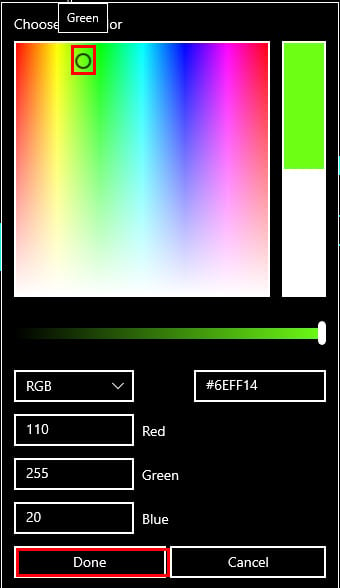
But there is hope. When people grasp the usual tricks employed by attackers, they can better identify and dodge these imitation assaults at an individual or group level.

Additionally, Cisco and other companies are developing more sophisticated detection techniques, including solutions based on machine learning, to keep up with fraudsters.
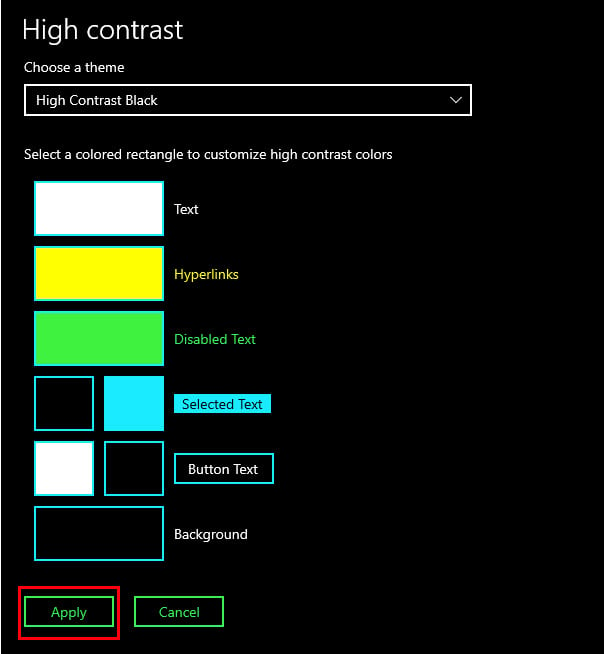
A variety of methods are involved in the protection against brand impersonation. The organization can work towards securing its brand assets, like registering domain names and safeguarding their information on WHOIS records. Moreover, spreading awareness about the dangers and indications of brand impersonation to employees and customers can greatly decrease successful attacks.
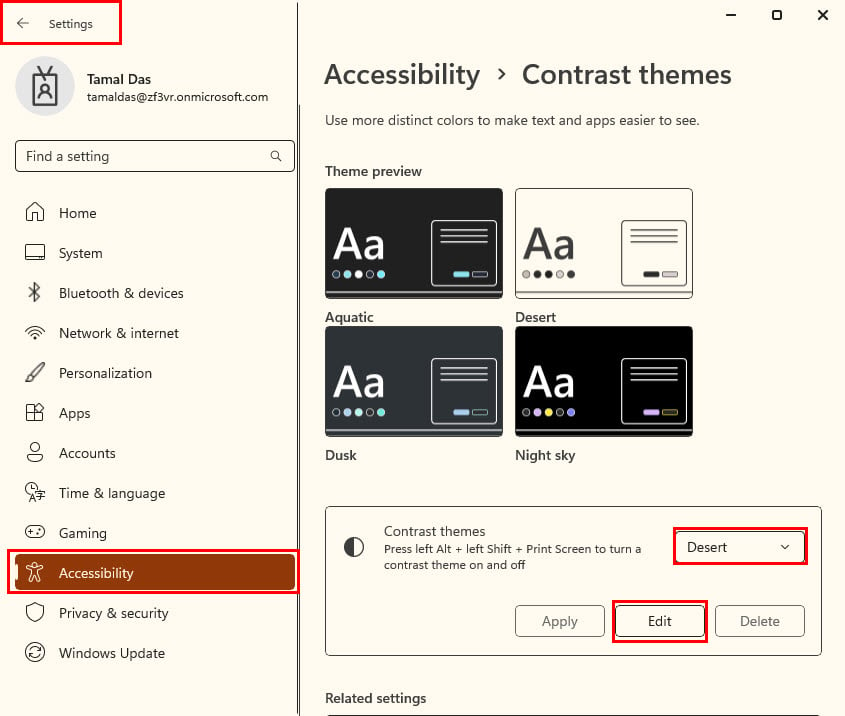
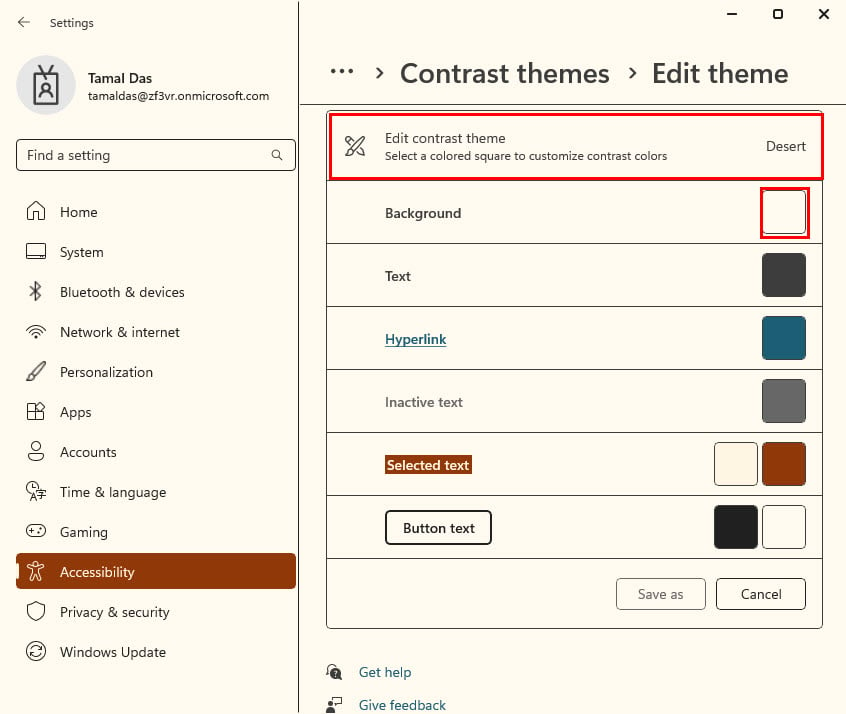
Brand impersonation tactics are becoming more complex, and it is very important to keep up with new methods and use advanced security steps to protect yourself. Microsoft knows this very well, as it is one of the most targeted companies: in 2022 alone, over 80% of Microsoft 365 accounts were hacked.

Remember that skepticism can help safeguard your personal and professional information online against Microsoft impersonation attempts in this digital era.

Xbox Games Showcase and Call of Duty: Black Ops 6 Direct: Back-to-back live-stream on June 9

Microsoft announced that the Xbox Games Showcase will be live-streamed on June 9, 2024, starting from 10 am PT/1 pm ET / 6 pm BST.

In the official blog, the Redmond tech giant also mentioned that Black Ops is back and said:

We’re delighted to announce that our previously-redacted Direct broadcast will be a full show dedicated to Call of Duty: Black Ops 6. Read on for all the details and stay tuned to Xbox Wire for more on Call of Duty: Black Ops 6 Direct.

Here is what the company said about COD Black Ops 6

Previously, Operators in the Urzikstan AO uncovered a 9MM Daemon Handgun with markings of particular interest. Starting on May 29, squads dropping into Urzikstan are wise to thoroughly inspect any ground loot for signs of this weapon returning. If the handguns are equipped, a Challenge may be in play: Ensure you defeat an enemy combatant with this sidearm to unlock this Blueprint.

So, on June 9, 2024, you can watch the special event for the next installment in the Call of Duty franchise: Call of Duty: Black Ops 6, just after the Xbox Games Showcase.

The Showcase features games from the company’s portfolio of studios, including Blizzard, Activision, Bethesda, and Xbox Game Studios, along with some titles from third-party partners.

The event will be available in more than 30 languages, and  American Sign Language and English Audio Descriptions and you can watch them on

Microsoft also mentioned the airtime for the Xbox Games Showcase, followed by Black Ops 6 Direct, here is the list:

  • PT: June 9, 10am
  • ET: June 9, 1pm
  • BST: June 9, 6pm
  • CET: June 9, 7pm
  • JST: June 10, 2am
  • AEST: June 10, 3am

You can also get information and updates about the games mentioned in the broadcast on Xbox Wire and the Official Xbox Podcast.

What do you expect from the June 9’s double-feature broadcast? Share your thoughts with our readers in the comments section below.

Path of Exile 2 is coming to consoles, developers confirm

Path of Exile has been a spiritual successor of Diablo 2 for a while, so it’s no wonder that the game has achieved tremendous popularity.

When the sequel was first announced, the fans of the game were pretty excited, and today we have some good news for console owners as well.

Path of Exile 2 will be available on Xbox Series X|S and PlayStation 5

This Path of Exile 2 information comes from One Esports, and in a recent showcase video, the developers shared the information regarding the console release.

Grinding Gear Software now has a dedicated team for console development that managed to create a new interface that will make the game more accessible on consoles.

The interface allows you to easily assign skills and items for quick access with the controller. The inventory system has been redesigned and it uses full-screen view on the consoles.

It allows you to manage items the same as before, but it offers shortcuts that allow you to quickly equip or unequip items.

Another feature that deserves a mention is couch co-op so you can play the game with your friends on the same device. Last but not least, is the full support for cross-play and cross-progression, so you can play with your friends regardless of the platform.

The game will be released for PC, and next-gen consoles on the same day, and if can’t wait to try it, it will be available for early access later this year.

Path of Exile 2 isn’t the only game confirmed to be released on console, and recently Marvel Rivals console release was confirmed.

In other news, Call of Duty: Black Ops 6 won’t require a new Xbox Game Pass tier, so everyone with a subscription will be able to play it.

Azure Update Delivery will be deprecated, and Azure Firewall will be impacted

Do you know about future changes to the Azure Update Delivery service tag? If you use Azure Firewall to handle Windows updates, there is significant news that you should be aware of. From July 1st, 2024, the Azure Update Delivery service tag will no longer exist, according to the official blog post published by the Redmond-based tech giant last week.

This signifies that if your setup depends on this service tag for receiving Windows updates, now is an ideal time to alter course and employ Azure Firewall application rules. Let us delve deeper into what this implies and how you can shift seamlessly without interruption.

Using Azure Firewall service tags has helped make firewall configurations easier to handle. These tags are like groups containing IP addresses and ranges linked with certain Azure resources; they automatically update whenever a change occurs.

This feature proves very handy when ensuring Windows devices can connect securely to Microsoft Windows Update services without constantly adjusting the firewall rules. For instance, the AzureUpdateDelivery service tag has allowed devices to scan for updates like operating system enhancements and driver and application patches by recognizing IP addresses used by Microsoft’s scanning services.

But change is happening. The method of content downloads is changing, too. Downloads are now more often coming from reliable third-party Content Delivery Networks (CDNs), which don’t have service tags, and this might interrupt the update process at a stage when content gets downloaded.

The answer is to stop using service tags such as AzureUpdateDelivery and AzureFrontDoor.FirstParty, and start using Azure Firewall application rules with Fully Qualified Domain Name (FQDN) filtering.

It is time to take action if you have explicitly used these service tags in your Azure Firewall rules. You should review your Azure Firewall policy network rules to verify their usage and begin planning the migration.

For affected individuals, the action suggested involves establishing Azure Firewall application rules set for the Windows Update FQDN tag.

This method ensures that your firewall recognizes precisely which hosts are reliable to scan and get update content from, maintaining security without needing you to manually update IP addresses.

But what if I’m using my own firewall or proxy services? Don’t worry; Microsoft assists with setting up these services to work well with Windows Update services.

For people who like to limit updates only inside the network boundary, there is another option called Windows Server Update Services (WSUS). This lets devices search and get updates without touching the internet at all.

The deprecation date is near, so it’s necessary to start moving forward with these new methods. The reason for this change isn’t merely to keep pace; it’s about guaranteeing that your environment stays safe and current.

In other news, Microsoft also released the capabilities of the Azure Web Application Firewall (WAF) and Azure Firewall into the Copilot for Security last month in a public preview.

Discord ditches the download links for the Windows 7 and 8 clients on June 15

We know for a while now that Discord dropped their support for their Windows 7 and 8 client on 15 March. However, they still had the direct distro download link on their website, as we’ve learned from one of the latest X posts of Bob Pony.

Discord also announced a while ago that they are are also deprecating their client for all 32-bit Windows systems, hinting at the Windows 10 users who are still using the 32-bit version on July 15.

What will happen on June 15 with Discord?

You’re wondering what’s the big deal, right? Well, past June 15, Discord will get rid of the download links for the Windows 7/8/8.1 clients and after July 15, the links for the Windows 32-bit clients will vanish as well.

So, if you’re running Windows 10 64-bit or Windows 11, you have nothing to worry about. However, if you’re still, for some reason, hung up on Windows 7, 8, 8.1 or Windows 10 32-bit, download the installer now and keep it safely if you still want to use Discord after a reinstall or some other issue.

The problem is that even if you will still be able to use the software, you won’t get any updates and the app will be vulnerable to who knows what attacks some hackers are planning right now.

Better more, you should think about upgrading to at least a 64-bit version of Windows 10 to enjoy the latest updates from Discord. If you want to know if you’re on a 32-bit or a 64 bit Windows 10 OS, press Win + I to start the System Settings and look for System Type. There, you will see what type of version you have.

What are your thoughts about Discord discontinuing the download links for the old Windows versions? Let us know in the comments below.

Microsoft and Broadcom announce partnership, which includes a license portability for VMware

Microsoft and Broadcom have agreed to collaborate, a development that will likely thrill IT departments and those enthusiastic about the cloud.

This collaboration allows VMware Cloud Foundation users even more flexibility by making licenses portable between on-premises data centers and Microsoft Azure VMware Solution. Customers can shift their workloads into the cloud without buying new licenses. Pretty cool, right?

The news comes days after Broadcom announced in a blog post published last month that VMware Workstation Pro and Fusion Pro are free for personal use.

For those who may not know, VMware Cloud Foundation is similar to a Swiss Army knife for cloud infrastructure. It provides an all-inclusive range of software-defined services in computing, storage, networking, security, and cloud management.

And Azure VMware Solution? This is Microsoft’s fully managed service that allows you to run VMware directly on Azure. So, merging these two is essentially the expression of “having your cake and eating it too,” combining the advantages of each side.

But why is this important? It allows businesses to adjust without being tied down by one deployment type. If you’ve ever had to manage licenses and think about following rules while shifting applications onto the cloud, you understand the headache involved.

This collaboration intends to do exactly that, alleviate this pain and facilitate the transition of workloads into Azure without the need for a complete VMware environment shift.

Additionally, the positive news is that Microsoft has also introduced license portability. They have set up the VMware Rapid Migration Plan to assist you in moving to the cloud with greater ease and at a lower cost.

In addition to the new VMware license portability benefit, the VMware Rapid Migration Plan provides an additional and comprehensive set of licensing benefits and programs to reduce the cost and time it takes for organizations to migrate to Azure VMware Solution.  

Microsoft

It offers Price protection, Windows Server and SQL Server savings, migration support, and Azure credits. It’s like a bundle that will improve your experience with Azure VMware Solution without hassle.

Now, you may be asking, “When can I begin?” VMware Cloud Foundation license portability to Azure VMware Solution is expected to be ready for use later this year, so now is the ideal time to initiate your migration plan.

If you need to expand your existing VMware setup on-premises into the cloud or want help updating and transforming your IT infrastructure, this collaboration provides all these solutions.

The future for cloud migration seems more promising now with this partnership between Microsoft and Broadcom.

Microsoft Teams will soon automatically hide inactive channels

Microsoft is testing a new feature, titled Hiding of inactive channels, which will automatically detect and hide the inactive channels where there has been no interaction for a while in Microsoft Teams.

The feature’s description in the Microsoft 365 Roadmap says,

Easily keep your channels list relevant. Teams will automatically detect inactive channels you haven’t interacted with in a while, and automatically hide them for you. You have the option to review the list of channels and unhide some or all of them, opt out of automatic hiding from settings, or initiate this process on demand.

The Hiding of inactive channels feature, added to the roadmap on May 31, 2024, will be available for the desktop, web, and Mac versions of the Microsoft Teams app. It’s under General Availability and is expected to roll out by July 2024!

However, there’s a lack of clarity from Microsoft’s end as to what entails an inactive channel. It failed to mention the maximum duration of inactivity, after which Teams will automatically hide a channel. Perhaps it will all be available in the feature’s dedicated settings.

The good news is that you can always review and unhide inactive channels, manually initiate the detection of inactive channels, and disable the feature altogether.

Last month, during Microsoft Build 2024, the Redmond-based tech giant announced a wide array of improvements in Microsoft Teams.

What do you think about the Hiding of inactive channels feature in Microsoft Teams? Share with our readers in the comments section.

Rumors suggest that Bethesda is preparing something big for Starfield fans

With the summer sun becoming warmer, it feels like a gaming heatwave is on its way too as we near Microsoft’s Xbox Games Showcase announced for June 9. But wait, there is more action in the pot—the Steam backend has been active, suggesting that something significant is coming up for Bethesda’s Starfield.

Now, the exciting part begins. A Reddit user saw a lot of updates in Starfield’s backend on SteamDB. We’re talking about changes that are happening more frequently than ever before since this game was launched. It feels like a spaceship is being constructed back there with all these updates. What can be happening? It’s difficult to know exactly, but when you observe so much activity, it indicates that something significant is forthcoming.

But what is coming now? This is the million-dollar question. We can’t see the SteamDB’s changelogs, so we need to know exactly what’s happening. However, the large number of updates suggests something exciting awaits us. Also, considering the upcoming Xbox presentation, it is likely that we could see a preview of what’s to come. For example, we might witness the first expansion for this RPG called Shattered Space.

While we wait to hear more news, let’s remember the main point. Starfield is not only getting a change in map but also important alterations before the massive Shattered Space expansion. It appears as if developers have listened to our group’s sighs for new content and given us an opportunity with this game-changing update. And if you want more Fallout, Todd Howard suggests that Bethesda is thinking about increasing production. So, there are many things to anticipate.

In the bigger picture, this rush of news and the expectation for more serves as a lively reminder that gaming is an always active and changing scenery. It doesn’t matter if you are constructing massive mechs in Starfield or impatiently waiting for the next big update, there’s constantly a reason to feel thrilled about games. We’ve learned this from VG247.

What do you expect from Bethesda’s Starfield? Let’s talk about it in the comments below.

Windows 11’s popularity on Steam is growing slowly

We don’t know exactly if Windows 11’s slight downfall from the latest months is due to Microsoft’s aggressive push for AI, but now we know that gamers are more prone to adopt the latest version, thanks to the latest data from Valve’s Steam.

According to their latest May 2024 report, Windows 11 gained almost one percent off from Windows 10, Windows 7 and other OSes. Just to be clear, we’re talking about Windows 11 popularity among users on Steam, not global market share.

Even so, the most popular OS on Steam is the old Windows 10 with 50.35%, following a slight decline on 0.67%.

So, gamers are definitely starting to favor Windows 11, and you might think that those 0.93% popularity increase might be insignificant. In fact, according to the latest data, Steam has surpassed 132 million active users. That means that roughly 1.22 million Steam users switched or upgraded to Windows 11, which is not a small number.

We also have some other interesting data we can chew on. For instance, the data about graphics card usage. NVIDIA is leading all across the board with GeForce RTX 3060 being the most popular, with 6.01% of the gamer’s choices.

Another fun fact is that 58.08% of the gamers on Steam still enjoy their titles on the old, FullHD resolution (1920×1080 pixels). About the same percentage of users also have drives of 1TB or larger.

So, if you’re a PC gamer, it seems like all the roads converge to the same outcome, a Windows 11 upgrade.