A new puzzle game, Castles, is coming to the Xbox One on October 5th. The game is set in a magical fantasy world and involves a combination of action and grid-based puzzle challenges as well as a variety of different modes such as multi-player and a solo-player story mode. Here’s the official game description:
Castles is an exciting puzzle game with high doses of action, set in a fantasy medieval world. Up to two players have to match rows of 3 or more blocks with the same color or tool. The players don’t control blocks, instead, they control the “engineers”, which makes for a very different game experience. The whole game takes place in a 7×7 block grid, in which the perimeter is limited exclusively to the character movement. Blocks will fall from above onto the central 5×5 grid, where the player have to push and pull them in order to make combinations. If you complete the level goals, the tower grows taller. As it grows, different challenges in the shape of weather effects or enemies will get in the way. These challenges will be randomly generated, so you’ll never play the same game twice. In Castles, you lose the game when the 5×5 grid gets full of blocks. Play the Adventure mode to follow the story and defeat Kind Edmund, or the Survival mode where the challenge is to build the tallest tower. If you want to play against a friend you could try Battle mode, where each player builds a tower and tries to ambush his opponent.
Castles isn’t yet available to purchase in the Windows Store but we’ll make sure to post about it as soon as it goes online. Do you enjoy playing puzzle games on the Xbox One? Share your favorite titles with the site community in the comments below.
During a trip to Sydney, Australia for the launch of Forza Horizon 3 on Xbox One and the Xbox FanFest, Phil Spencer sat down with NZ Gamer to talk about the announcement and launch of the new Xbox One S console and the upcoming Project Scoprio. While a lot of what was discussed had been stated previously in other recent interviews, of particular interest was the part of the conversation concerning the implementation of 4K streaming capability on the Xbox One S and upcoming Project Scorpio consoles and the reality that, right now, not many regions have internet speed high enough to take advantage of it.
“It was one of the reasons we made the physical media decision that we did,” he says in response to a statement about slow internet speeds in countries like Australia and New Zealand. “I know that if you look at usage on the box, you would say ‘Hey, everybody is watching YouTube, everybody is watching Netflix. Why would you do anything physical?’ But I do think markets where bandwidth capabilities and caps, and cost is prohibitive. So we wanted to make the decision that there would be physical media. I think for us games and the native rendering of 4K games is going to be important for Scorpio, which obviously alleviates any kind of need to stream. But I think we’ve been conscious that not everybody lives in a bandwidth happy, uncapped world.”
While incredibly likely that Project Scorpio, like the Xbox One S, will have a 4K physical disk drive, Phil Spencer is quick to state that that hasn’t been confirmed yet. “We’ve seen great adoption of it with the S. People seem to like it, but those kinds of decisions aren’t the decisions that we announced at E3,” he clarifies. “That’s not a push-back, I’m just saying those are the kind of decisions that can kind of bind later, what the drive is. But it has been really great to see how people have responded to the S, and it seems like we would want to continue to ride that option.”
Another detail many gamers and developers have been keen to learn is the eventual price of the new Xbox console, something that could equally make or break the device in regards to overall sales and adoption. As expected, he doesn’t reveal any specific details but does provide some insight into where abouts the price will sit in regards to the Xbox One S and previous video game consoles.
“So you can see the price of the S today. When we designed both of these, which we kind of designed it in parallel. We thought about the price performance of what we wanted to hit with the Scorpio, relative to what we were going to be able to do with the S. So that we would have a good price continuum, so people wouldn’t look at these two things as so disconnected because of the price delta,” Spencer explains. “So I think you will feel like it’s a premium product, a premium console. And not something, anything more than that. So I wouldn’t get people worried that this thing is going to be unlike any console price you’ve ever seen. We didn’t design it that way. That said, the opening price point for the Xbox One S, and the different hard drive sizes that is a critical part of this whole product. When I think about it as a product line, you should expect the pricing to kind of be in line with that.”
Project Scorpio is expected to release publically sometime during the fourth quarter of 2017 and specific details concerning pricing and its final name (Project Scorpio is just a temporary codename) should drop sometime next year.
Is having a physical drive and 4K streaming capability important to you? What sort of price point would you like to see Scorpio hit? Let us know in the comments below.
Re/Code is reporting tonight that Qi Lu, Executive Vice President of the Applications and Services Group, is leaving the company. The report says that Lu suffered injuries from a bicycle accident several months ago. Microsoft has declined to comment on the report. There’s no word from the Re/Code report on the extent of Lu’s injuries.
Re/Code says that Corporate VP Rajesh Jha, who has been leading Microsoft’s efforts with Outlook and Office 365, will take over many of Lu’s duties.
Lu came to Microsoft in 2008, leading what was called Online Services at the time, and pushing Microsoft’s efforts with Bing. He has been responsible for “all of the research and development teams across Microsoft Office, Office 365, SharePoint, Exchange, Yammer, Lync, Skype, Bing, Bing Apps, MSN and the Advertising platforms and business group,” according to his executive biography.
Qi Lu came to Microsoft from Yahoo, where he spent 10 years.
The fourth entry in the King’s Quest video game series is now available to buy, download, and play on the Xbox One console for those who are buying each chapter individually. Gamers who have bought the King’s Quest Season Pass or the King’s Quest The Complete Collection should find the new content downloading automatically on their consoles.
King’s Quest is an interactive story-based video game series, not dissimilar to Telltale Games’ popular titles. Like Telltale Games’ video games, King’s Quest is also released as individual chapters which allows players to try out the first chapter for a rather cheap price and purchase the additional entries at their own leisure. Fans of the series can also buy the Season Pass, which is essentially a pre-order of all future chapters (there will be five King’s Quest chapters in total), or The Complete Collection, which also contains all five chapters plus an additional extra epilogue storyline.
Here’s the official game description for the King’s Quest Complete Collection:
Save money with King’s Quest: The Complete Collection (Chapters 1-5). This collection gives you full access to all 5 chapters plus an additional story epilogue exclusive to The Complete Collection, offering even more gameplay at an incredible value! King’s Quest is a collection of five different chapter releases, each focusing on an untold tale in Graham’s past. In each chapter, an aging King Graham reflects on his life of adventure with his granddaughter, Gwendolyn, while players are transported back to influence first-hand the decisions and events that shaped a kingdom.
Embark on an extraordinary journey across the world of Daventry, full of whimsical characters, charming puzzles and perilous dangers. Chapters can be downloaded from in-game upon individual release throughout 2015 and 2016.
There’s always been a rift between Windows operating systems and the Xbox gaming console. It wasn’t until the Windows 10 Anniversary Update this year that we saw a significant merge between the two. Windows Central had the opportunity to speak with Xbox Lead Mike Ybarra personally about the integration between Windows 10 and Xbox with the development of versatile Universal Windows Platform
Microsoft has been pushing development for UWP by encouraging interested parties to join their growing platform. Now that Xbox and Windows 10 have found a happy medium between the two, Ybarra clarified that Microsoft isn’t intending on one taking over the other.
We’re not out to turn the console into a PC, or vice versa, but by providing a common operating system, application platform, gaming services and developer tools, we can make it easier for developers to create and ship games and apps across multiple platforms.”
He also admitted to Jez Corden that there is still a lot of work to be done to make the UWP as versatile as they want.
The use of UWP development will also move forward towards Project Scorpio; the VR enabled 4k resolution console projected to release in the later months of 2017. When asked about the availability of games on Project Scorpio compared to Xbox One, Mike shared that only VR games with accessories that Xbox One cannot support will be on the chopping block of support. Otherwise, it should be 100% compatible with all Xbox One titles.
Even Cortana was mentioned. Jez from WC asked if we could expect to see Cortana being integration for UWP apps on the horizon. Mike gave a basic answer indicating that Cortana has a lot of potential, but her introduction to Xbox One is basically in its infancy since the Summer Update last month.
Obviously, Mike couldn’t confirm any suspicions or reveal any details on upcoming features or content, but the interview is worth a read if you’re curious about the future of Xbox gaming through the Universal Windows Platform. The full back and forth can be found over on Windows Central.
A couple of months ago, Satya Nadella, CEO at Microsoft, announced the company would change the way it monitors Windows 10 growth, observing monthly active users instead of devices. This comes after the company noticed the sales of Windows phones were so low that they could not achieve the goals it originally set of selling one billion devices by the middle of 2018.
At Ignite, however, Microsoft announced another milestone for the devices, declaring that the operating system is now running on 400 million devices. It is indeed a big number but only shows that once the company stopped offering Windows 10 for free, growth slowed.
In the beginning of May, Windows 10 was present on 300 million devices. Two months later, the number went up to 350 million. Another three months and the number added another 50 million. But if you’re thinking this is the number of users that installed the new OS voluntarily, you’d be wrong. In this calculation, Microsoft includes all devices running the OS, including tablets and computers found in warehouses or shops around the world that haven’t been sold yet.
The company also keeps track of the Windows install base. Back in June, Windows 10 owned 39% of the global market, 50% in the US and 51% in the UK. It remains to be seen where the OS will be placed when its next update is released and whether the canceling of the free download will also be reflected in the numbers.
At the end of this week, NetMarketShare should release the latest figures for users, not for devices. The last similar infomation was released for August and showed Windows 10 occupying 22.99% of the world. These numbers only take into account the desktop users and also include some older OS, such as Windows XP.
Microsoft Edge is obviously Microsoft’s favorite browser, but this doesn’t mean that users can’t criticize its design and capabilities. In fact, alphabetizing folders in the Favorites Bar in Edge was one of the reasons users refused to switch to Edge.
Fortunately, Microsoft resolved this issue with the latest Windows 10 Anniversary Update. Now, Edge automatically sorts the content of the Favorites Bar. This ended the wave of complaints that were invading Microsoft’s forums ever since the browser was first launched.
Many users also criticized Microsoft for not having fixed this issue earlier, suggesting that adding the option to sort the Favorites Bar in an alphabetical order was a very easy task and that the company shouldn’t have waited until the launch of the Anniversary Update to make this feature available.
Although users will be happu to hear the news, some users criticize Microsoft further still for not having spread the information to all users:
It’s a pity MS didn’t feel it was necessary to tell the millions of MS Edge users they have fixed it. Perhaps because that would mean admitting there was a problem in the first place.
As stated before, alphabetizing Favorites in Edge is only supported by the Anniversary Update. All the other versions of Windows 10 don’t support sorting. This means that if you want to use the sorting feature in Edge, you need to upgrade to the latest Windows 10 version 1607.
The bad news is that the free upgrade offer has expired on July 29 and because of that, you’ll need to shell out $119 if you want to purchase this OS. If you’re satisfied with the current version of Windows 10 you’re running and you don’t want to install the Windows 10 Anniversary Update, you can use the good old drag-and-drop technique to organize Favorites.
The snapshot we’ve been waiting for since Minecon is finally here! Or at least for Minecraft PC version players. Snapshot 16W39A was teased to us during Minecon over last weekend with just enough to whet our whistle and get our appetite flowing. Aptly named The Exploration Update, the update includes many new adventures to undertake as you lay claim to the world block by block.
We’ve already covered the major key features of The Exploration Update snapshot, but to remind you there will be new Cartographer villagers in the library where you can buy maps. These will help you locate generated Ocean Monuments and a new location called the Woodland Mansion with its own list of horrible mobs to cut through.
It’s not surprising that there is a list of bug fixes included in the snapshot as well. Fixes are being rolled out to correct a GUI capitalization issue, adding missing sound files, and so on.
Bugs fixed in 16w39a:
[Bug MC-58677] – GUI has inconsistent capitalization
[Bug MC-92139] – Too many tipped arrows in the “Combat” section of the creative inventory
[Bug MC-106077] – Missing sound files (largeblast1.ogg / largeblast_far1.ogg) because of CamelCase in 1.11.json
[Bug MC-107154] – Junk potion from fishing is uncraftable potion
[Bug MC-107165] – Brewing icon displays the incorrect color in Creative inventory tab
[Bug MC-107166] – Experience bottles produce pink particles.
[Bug MC-107170] – writeString method of PacketBuffer is not creating correct exception text
[Bug MC-107284] – disabling shields with axes doesn’t work
[Bug MC-107320] – Sort order of command autocomplete confusing
Just in case you don’t know, a snapshot is a small update that is in beta. You can access this preview by selecting it for download in your Minecraft installer profile. It’s important to remember that updating to a snapshot can corrupt your current save games and may not always be stable, and so remember to back up your save files.
It’s hard to believe that the original PC version of Minecraft is seven years old now. Through blood, sweat, and many, many tears, fans keep coming back for more. And there’s still plenty to come for Minecraft- like llamas! Download the snapshot (after backing up your save files) and jump into The Exploration Update today.
Microsoft’s retail initiative has been a focus of the company’s for a few years now. They’ve opened new stores at a fairly decent clip and have made a concerted effort to provide good coverage across the U.S. Today, the Microsoft Store team let us know that two new outlets will be opening up fairly soon, this time in Boca Raton, Florida and Nashville, Tennessee.
Here are the details:
• Microsoft Store at Town Center at Boca Raton will officially open its doors at 11 a.m. ET on Thursday, Nov. 3.
• Microsoft Store at The Mall at Green Hills will officially open its doors 11 a.m. CT on Thursday, Nov. 17.
If you’re in the area, then you’ll want to line up early in the day to attend the openings. Microsoft will be hosting some nice events and giving away some prizes, but you’ll want to be among the first to show up.
During a high-energy ribbon cutting ceremony, Microsoft will award technology grants to deserving community organizations in the area, as well as offer customer giveaways and one-day only product offers. More details to come!
The first 200 customers in line at Microsoft Store at Town Center at Boca Raton will receive a ticket to meet retired Hall of Fame Quarterback of the Miami Dolphins, Dan Marino, on Saturday, Nov. 5 from 12:30-2:30 p.m. ET.
Additionally, the first 200 customers in line at The Mall at Green Hills will receive a ticket to meet retired Tennessee Titan, Eddie George, on Saturday, Nov. 17 from 12:30-2:30 p.m. CT.
Microsoft Stores provide perhaps the best opportunity to get your hands on Microsoft’s own first-party hardware as well as select OEM products. Whether it’s the Surface line, new hybrids and notebooks, Xbox One, or accessories, the Microsoft Store is a great place to visit. Let us know in the comments if you’re excited to see these two new Stores.
The Skype team has released a new update to the Skype UWP app on Windows 10 devices running the Anniversary Update. The app has been bumped to version 11.8.190 for non-Insiders and the update brings some of the new features that have been available for Windows Insiders for a few days ago such as the ability to hide conversations, loudspeakers improvements, and more.
Here is the detailed changeling:
Clean up your recent list by hiding conversations.
Hear people better with loudspeaker improvements.
Easily add new contacts with the add contact button.
Support for Skype URIs, a simple way for people to start Skype calls and chats directly from websites, desktop and mobile apps.
If you’re wondering, this new version has not brought support for the « SMS Relay » feature yet. For now, only Windows Insiders running the preview version 11.8.192 are able to set the app as the default messaging app on Windows 10 Mobile as well as sending and receiving messages from their Windows 10 PC. We expect this feature to roll out to non-Insiders in the coming weeks.
Next month will be full of quarterly earning reports for many publicly traded companies. Among them will be Microsoft, which will be reporting their earnings for the first quarter of their Fiscal Year 2017 on October 20th.
But now, Microsoft Investor Relations has announced the company’s upcoming SEC Filings will include a few new metrics. These investor metrics help capture various aspects of the company’s performance beyond what’s on the balance sheet and income statement. Some of these metrics include figures like how much Window’s OEM revenue has grown or how many more subscribers have signed up for Office 365.
Three new investor metrics
The first quarter of Fiscal Year 2017 filing will include a total of 20 investor metrics, three of which are brand new. The newest metrics are Commercial cloud gross margin percentage, Windows Commercial products and cloud services revenue growth, and Gaming revenue.
List of investor metrics for FY2017 via Microsoft Investor Relations
Commercial cloud gross margin percentage will measure the profitability of Microsoft’s Commerical cloud business. This will give investors insight into the collective profitability of Office 365, Azure, Dynamics Online, and other commercial cloud services.
The next two new investor metrics both fall under Microsoft’s More Personal Computing business. This includes their Windows, Surface, and Xbox businesses. One of the new metrics is Windows Commercial products and cloud services revenue growth. Microsoft says this figure will show how much “all Windows products and services sold through commercial channels” has grown. That will include “Windows Volum Licensing, new Windows cloud services, and other Windows commercial offers aimed at specific customer segments (e.g. Academic).”
Lastly, Microsoft will begin reporting Gaming Revenue. The company defines this as all revenue dollars from “Xbox consoles, Xbox Live service, first party games, and third party game royalties.” This figure should give a clearer picture of how their entire Xbox business is performing, particularly when coupled with Xbox Live active users metric.
So why these metrics now?
These investor metrics certainly help paint a picture of how the company is performing. But just like every company that files earnings reports to the SEC, investor metrics are a selective view of their business unit performance. Results are constructed and chosen by the company itself, and companies always want to put their best foot forward with their financial statements. They also don’t want to give away too much intelligence to their competitors about the inner workings and performance of their divisions.
Former CEO Steve Ballmer
One notable Microsoft shareholder, former CEO Steve Ballmer, openly criticized the company’s investor metrics, specifically their reporting of cloud revenue. Microsoft has until now liked to boast about the annualized run rate of their cloud revenue. The company has set an ambitious goal to hit $20 billion in annualized cloud revenue. But Ballmer balked at this, noting that just reporting revenue gives no measure of profitability.
It is one thing if revenue is growing incredibly fast. But if costs are growing faster than revenue, or even surpass it in overall terms, then that business most likely isn’t very sustainable. And only reporting the run rate says nothing about how cloud revenue is growing in terms of its costs.
The new ‘Commercial cloud gross margin percentage’ may very well be a concession of sorts to Ballmer’s concerns. Again, as Microsoft describes it, this metric will give “visibility into gross margin contribution from the commercial cloud.” But we’ll have to wait until October 20th to see how investors respond to these new metrics and what these new figures reveal about Microsoft’s growth.
Judson Althoff, Microsoft’s business sales chief is currently working on finding better ways to sell the company’s enterprise solutions. The new exec who replaced previous COO Kevin Turner in July gave an interesting interview to the Seattle Times this week where he explained that trying to bundle Azure with other Microsoft enterprise products was not a good sale strategy. “It was a flawed strategy to try to sell Azure like, ‘Do you want fries with that?’ But it isn’t our approach today,” he said.
Indeed, Microsoft’s previous strategy was inefficient as enterprise customers who used to buy Azure in a bundle including other business products from Redmond often didn’t know what to do with the cloud services. “Our sales approach has changed entirely,” explained Althoff, which you can tell by the fact that Microsoft has hired more than 1,000 salespeople specialized in the company’s cloud product over the last year. This new sales team is now perfectly prepared to explain to business customers how they can leverage Microsoft’s cloud technologies to accomplish their digital transformation.
In the end, the exec acknowledges that Azure has become “a bit of an anchor tenant” for his salespeople’s pitch, especially with customers interested in Microsoft’s machine-learning capabilities. “It really does put Azure at the center,” he added.
The Windows Insider program is expanding under the leadership of Dona Sarkar to not only push out new builds, but to help spread the word about the program and do some good in the world at the same time. Sarkar has been working to push a “WINsiders4Good” program, and recently travelled to Lagos, Nigeria, to meet with present and future Windows Insiders:
While there, we also met with several key business and IT decision makers to understand the current landscape for tech usage in their companies as well as their goals for the coming year. From us they learned…the ways of the #NinjaCat.
Windows Insiders in Lagos, Nigeria
Windows Insiders were also well represented in Atlanta this week at Microsoft’s Ignite conference, as
Director of Program Management, Windows Insider Program & OS Fundamentals, Bill Karagounis gave a talk called CoCreate(Community), addressed a number of other audiences, and met with Windows Insiders.
The Windows Insider program will have more to share on these and other activities coming up, so stay tuned to WinBeta for all the latest!
Could a Surface-branded keyboard be in the pipeline for Microsoft? German website WinFuture.de has spotted a listing for a Surface Ergonomic Keyboard on the Bluetooth Special interest Group website earlier this week (via Windows Central). For now, we don’t know much about the keyboard except that it will use the latest Bluetooth 4.2 norm.
The listing for the Surface keyboard on the Bluetooth SIG website.
Microsoft is already selling a wide portfolio of wired and Bluetooth keyboards, though a Surface-branded keyboard would be a first for the company. The technology giant is reportedly planning a hardware event in October and this new keyboard could well be unveiled at this occasion. If you read our previous reports about the event, you may already know that Microsoft is rumored to introduce an all-in-one Surface PC code-named “Cardinal” and we’ll have to wait to see if this new Surface keyboard may be bundled with it.
Microsoft has officially taken to the Office 365 blog to announce a new version of the Office 365 App launcher. The new launcher marks the company’s continued commitment to improving and tying together the Office 365 experience and also an expansion of the set of online tools available for Office 365 users.
Office 365 App Launcher
Overall, the new Office 365 App Launcher has a new tabbed layout which will allow you pin and organize tiles in a “Home” section for faster and familiar access to your favorite Office 365 apps. Recently added apps will also appear in a “NEW” section, along with badge notifications for when a new app is added. Additionally, there is also an “ALL” apps section, which lists the apps available for download, enabling faster access to your entire catalog of Office 365 applications.
Similar to the Windows 10 Start menu, with the new launcher, you can also resize, pin, and organize tiles for your Office 365 apps. Then, for added customization, the redesigned App Launcher supports Office 365 themes, including your company’s custom theme. According to Microsoft, these features make switching between applications as seamless as possible.
Office 365 Launcher teams
These features will be coming later this month to customers who have opted into First Release. Only customers with Exchange will be able to pin, resize and customize tiles, or see the tabbed layout. Support for accessing recent files from across Word, Excel, PowerPoint and OneNote Online simply by clicking the icon’s ellipsis menu is also in the works and will be coming soon.
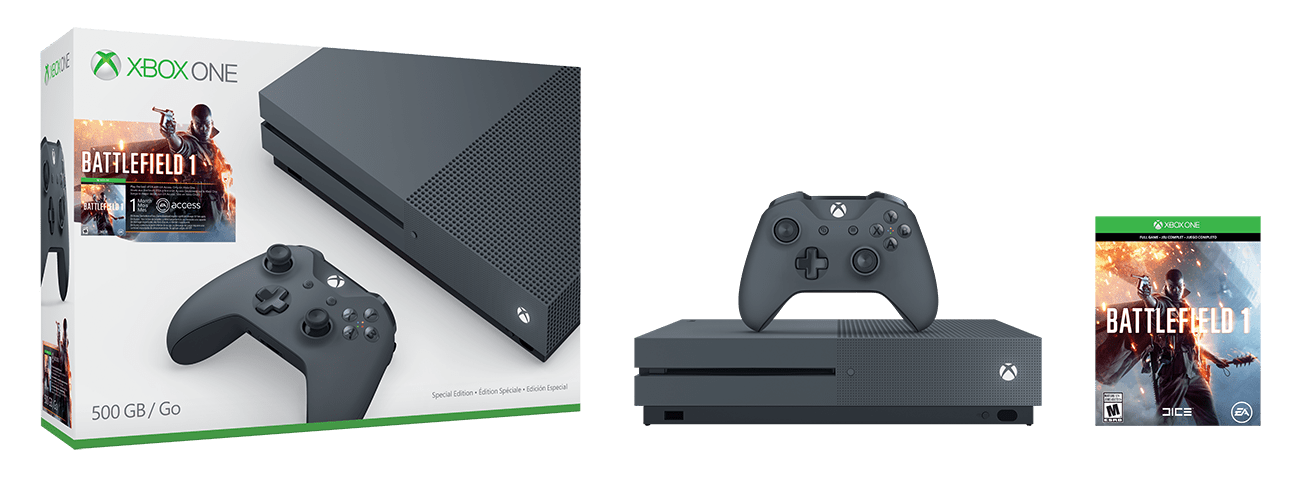
Priced at $299, Walmart lists that the bundle will ship on October 1st, 2016. The bundle includes a storm grey controller and console which of course has support for 4K Blu-ray and 4K video streaming, and High Dynamic Range audio. Additionally, a full game download of Battlefield 1, and one month of EA Access is included. As an added bonus, a special offer of 5 Free movies and 5 additional movies for only $5 to enjoy from the VUDU app on your Xbox One console is also added into this bundle.
As she’s prone to do, Dona Sarkar has again hinted at a new build being readied for Windows Insiders, and this time she’s enlisted some help in announcing that the next Windows Insider build will be 14936:
The puppies have spoken, indeed! While we’re hoping for a “usual” 10am release (in just over 2 hours from this posting), the last release didn’t happen until later in the day so get your “F5” finger ready and get ready for Windows 10 Insider version 14936!
Head of Xbox Arron Greenberg has tweeted out a new advertisement for the Xbox One S. The new ad highlights the features of the console and labels it “the ultimate games and entertainment system.”
— Aaron “Day One On Game Pass” Greenberg ????????♂️????U (@aarongreenberg) September 27, 2016
Overall, the advertisement features the same upbeat techno music and female voice from the previous Xbox One S ad which was released back on August 16th. This time, however, there is extra focus on theMicrosoft gaming system being the only console with 4K Ultra HD Blu-Ray, 4K video streaming, and high dynamic range gaming.
Just like last time, it’s safe to say you might see this Xbox One S commercial more than a few times over the next few days if you’re on the web or just watching TV. Did you like the advertisement? As always, please do let us know your thoughts on the commercial by dropping us a comment in the section below!
If you’re looking for an Xbox Controller which can brighten up your console, then Microsoft has the solution for you. The company’s new blue Xbox One controller is now available for purchase from the Microsoft Store or Best Buy for the price of $64.99.
The blue controller features the enhanced comfort and feel of the new Xbox Wireless Controller, and has a sleek, streamlined design and textured grip for those moments when your games get extra intense. It also boasts a 3.5 mm headphone jack, new Bluetooth technology, and support for custom button mapping and up to twice the wireless range. This new technology also offers up seamless profile and controller pairing, and up to twice the regular range than previous controllers.
Will you be picking up this controller? What are your impressions on the Xbox One Blue controller? As always, please do let us know what you think by dropping us a comment in the section below!
The ReCore Premium Figure Line will feature die cast metal bodies and detailed inner skeleton construction. The exterior parts of the robots will however be made out of plastic and it will be up to the customer to place the parts on the core body. The official announcement describes this functionality as, “a fun step in completing the corebots design which can then be displayed on their base.” Each of the Premium figure will also incorporate LED lights for added effect.
ReCore Premium Figure Line
The ReCore Anime Style Mini Figures are exactly what they sound like; reinterpretations of the game’s characters inspired by Japanese anime character designs. Each figure will come with a custom base.
Both series of ReCore figures are due for release in spring 2017 however no specific dates have been released. Are you interested in buying these? Let us know which line of figures excites you the most in the comments below.
Error 0x8024001e is one of the oldest errors affecting Windows 10 Mobile build installation. Unfortunately, this bug reared its ugly head in the latest Windows 10 Mobile build as well, as many users reported having encountered it while trying to install the update.
Unfortunately, this is one of the most severe installation errors, and fixing it is not an easy job. According to user reports, soft and hard resets don’t solve the issue. Moreover, after a hard reset following error 0x8024001e, the phone often crashes.
I am trying to download updates but getting this error “Windows 10 Technical Preview for phones (10.0.14393.189) – Error 0x8024001e” every time. I tried to resolve issue by doing soft reset but it not helpful and I am getting this error again and again. Anybody can help me?
Users also reported that they often encounter the message “Operation Ended With Failure” when trying to roll back to the previous Mobile build using the Windows Device Recovery Tool from a PC.
How to fix error 0x8024001e
The good news is that error 0x8024001e can be fixed. One lucky Insider shared the workaround he used after encountering error 0x8024001e, and other users affected by this error quickly confirmed this solution worked.
[…] I gave up and soft reset my phone by holding the volume down key and power button at the same time until the phone vibrates and then restarts. After which, I went to Settings >> System >> About >> Reset your phone. After the phone has reset, I did not go through the setup process on the phone. Instead, I used the Windows Device Recovery Tool on my PC and finally, my phone was rolled back to Windows Phone 8 and then was able to update to 8.1 and finally upgraded to Windows 10 Mobile.
So far, this is the only workaround users confirmed it works. If you’ve encountered other workarounds to fix error 0x8024001e, share them in the comment section below.
If you haven’t heard, ScriptSafe is a free extension for Chrome that proves useful for many customers who want to manage their privacy on the web. Though at first it was simply designed, it evolved in time to introduce more useful features.
This add-on is helpful for blocking several types of content, cookies, web bugs, fingerprint technologies, cross-media requests, social media buttons, Google Analytics and others. If you’re just a regular user, these terms might sound like a big deal, but you don’t have to or need to use all the features it offers you.
The bright side is that it still offers some simple and easy tools that will make downloading ScriptSafe a necessity. One of these easy things to do, for example, is spoofing the user-agent. If you don’t want websites to know what browser you are using, you can do this with ScriptSafe by going to Settings > Privacy Settings > User-Agent Spoof. There are also some other specialist extensions that do that, but ScriptSafe offers much more than that.
This particular extension also lets you spoof the timezone and the referrer (URL you come from), with all of this possible with just a few clicks. If you check out the Privacy Settings page, you will see some other options the extensions gives you. One of them is blocking unwanted content, which eliminates all the content funneled to you by malware and adware domains.
However, if you plan to use the extension in a minimalistic way, remember that you have to disable its default settings. Go to General Settings and clear all the options under “Disable and Remove“. They refer to Embed, Object, Script tags and others.
RELATED STORIES TO CHECK OUT:
Windows 10 privacy concerns draw criticism from the EFF
As more companies place their data in the cloud while continuing to gather multitudes of information from various sensors, apps, and devices, many are finding that there can be an awful lot of noise out there.
Fortunately, Microsoft’s Powe BI is helping make sense of seemingly complex data sets by enabling users to craft maps, visualizations, and graphical analysis.
What is GIS? It’s the combination of authoritative data layers on a map with spatial analysis applied to gain a better understating of your world. It’s a way to discover, use, make and share the maps that are important to your organization.
As per the collaborative nature of Esri and Microsoft’s efforts, users will need to consent to Esri’s terms and services as well as acknowledge that they are using Esri services before getting started with the new ArcGIS feature.
Using ArcGIS Maps for Power BI enables users to apply advanced styling properties to maps that include detailed color preferences such as degrees of transparency or fill color of the map data points. PowerBI users can also choose map themes while also selecting point based or shape based maps and adding heat maps to clustered areas.
base maps
The list of additional feature benefits continues on with users getting the ability to combine layers with PowerBI data while also selecting across layers the user chooses to include.
The PowerBI team promises more ArcGIS and ArcGIS related features coming to the Power BI platform in the not too distant future.
Keeping track of the stability of your resources is vital if you’re going to run a successful IT operation. Being able to know what happened to your resources is a big deal, but perhaps even more important is being able to look back and see when things went wrong. Thanks to new improvements in Azure’s resource health, you can now check the “historical health” of your resources. Put simply; you can now look back up to two weeks and check on the status of your resources at any given time.
The history blade shows any changes in the health of the resource during the last 14 days, including the staring time, the end time and a summary of the text customers would have seen if they had visited the Resource health blade during this time.
To get all of the details about the feature you can go ahead and check the Azure blog post, which comes with a few visual guides and a good explanation of how you can best make use of the new history blade. Hopefully, this addition to the resource health UI can shave some time off of the troubleshooting process when you’re trying to figure out what’s throwing a wrench in your Azure resources.
When you’re on the racetrack, everything moves at a faster pace. When you’re on the side as an IT team, the action can be even faster. In a recent blog post written by NASCAR fan Jason Campbell of Windows Commercial, he tells readers about how Hendrick Motorsports tackles the challenges of crossing the finish line with the help of Windows 10.
Hendrick Motorsports has transitioned all of their drivers and workers to Windows 10 operating systems and services. That’s approximately 600 employees that are on the Windows 10 Enterprise. According to their IT team, they saw a significant 64% reduction in installation and patching time which would be spent being a bit more productive.
According to their IT team, they saw a significant 64% reduction in installation and patching time which would be spent being a bit more productive.
Hendrick Motorsports uses Skype for Business and OneNote to keep each other in the loop with messages and conferences whether they are on the track or at their home base.
When the cars and the drivers are on the racetrack, the people behind the scenes work diligently to collect data about how the car is running, how the person is driving, and what can be done to improve their combined performance. At one point, they would have a team spend hours managing data into formats. But now a lot of their free time has been opened up with the use of Azure Cloud to parse the information for them.
Because Hendrick Motorsports needs some high power to manage all of that data, they chose Azure combined with Cortana Intelligence Suite where they can switch virtual machines one and off as needed without wasting money on their hardware.
A season is a marathon of 39 races. When you’re successful, it’s the challenges you win that you remember, not necessarily the champagne at the end,” says Doug Duchardt, General Manager at Hendrick Motorsports. “We’re using Windows 10, Microsoft Cloud and Office 365 to work together and get better every day—just as we do across all our race teams.”
The team felt confident that Windows has managed through the trial by fire out on the nontraditional field of the racetrack and that it plays a major role in the outcome of their sport.
Many students today may feel like the era of pen and paper has come and gone, and they may be right. The dominance of laptops, mobile phones, tablets, and other devices have all but eliminated the use of handwriting in many classroom settings. Microsoft, while obviously supporting the digital revolution that transpired over the past few years, thinks that we should try and bring back the soul of handwriting – albeit with a little bit of help from technology. In a new video, Microsoft encourages students to start thinking with ink.
The video is an endearing series of interviews with kids who’ve heard stories about the ancient times in which students would need to write down their notes with pencil and paper, and talks a bit about how handwriting is still useful. This – as you might have guessed – is aimed at promoting Windows Ink, which lets you enjoy the full handwriting experience while still being able to keep your notes in a familiar and simple digital format. Hopefully, with the help of Windows Ink, more and more students will be able to get back into handwriting and benefit from all of its advantages.
Whenever you visit a website, the relevant data needed to load the web page is downloaded and stored on your PC and is called internet cache. The downloaded information and files allows the web page to load faster the next time you visit it without the need of downloading everything again.
Why clean it?
When you refresh your browser, you are purposefully cleaning your data and it should be done every now and then. So why should you remove the downloaded files if you are going to need them again when you visit?
Well, developers frequently update a website and make changes, which include the files they send to a user’s computer, on page load. A refresh is required to flush out the previous data and load the updated data. By pressing the refresh button, you basically force a website to send you clean and fresh version of data.
This is where Browser Refresh comes in. It is a handy Windows application that assists Web developers and designers by quickly refreshing browsers.
Browser Refresh for Windows
The application runs as a service. Users can download zip files, extract contents and run them. If a SmartScreen warning pops-up, click on “More Info” and hit the “Run Away” button.
When the application is launched, it shows a simple notification via Action Center of Windows 10 and sits steadily in the background. The notification is to inform users of the actively running application.
To explore all the provided options in the app, click the application’s icon from the System Tray and the menu will list all available options that can be used for changing settings to each’s preference.
The Browser Refresh shortcut is Control+D hotkey and for hard refresh is Alt+D. These keys are configurable from the options menu. To tweak hotkeys, open the configuration dialog and hit a key combination for your desired hotkey and click save to store your changes in the app.
If the user has selected all browsers to be refreshed, close them and Browser Refresh will generate an automated refresh on the ones that are active and running. Browser Refresh supports Google Chrome, Google Chrome Canary, Yandex Browser, Firefox Developer Edition, Opera Browser, Internet Explorer, and Mozilla Firefox Browser and is compatible with Windows 10 too.
Users can download Browser Refresh but they’d need .NET framework 3.5 to be installed on their PCs to run the application on their systems.
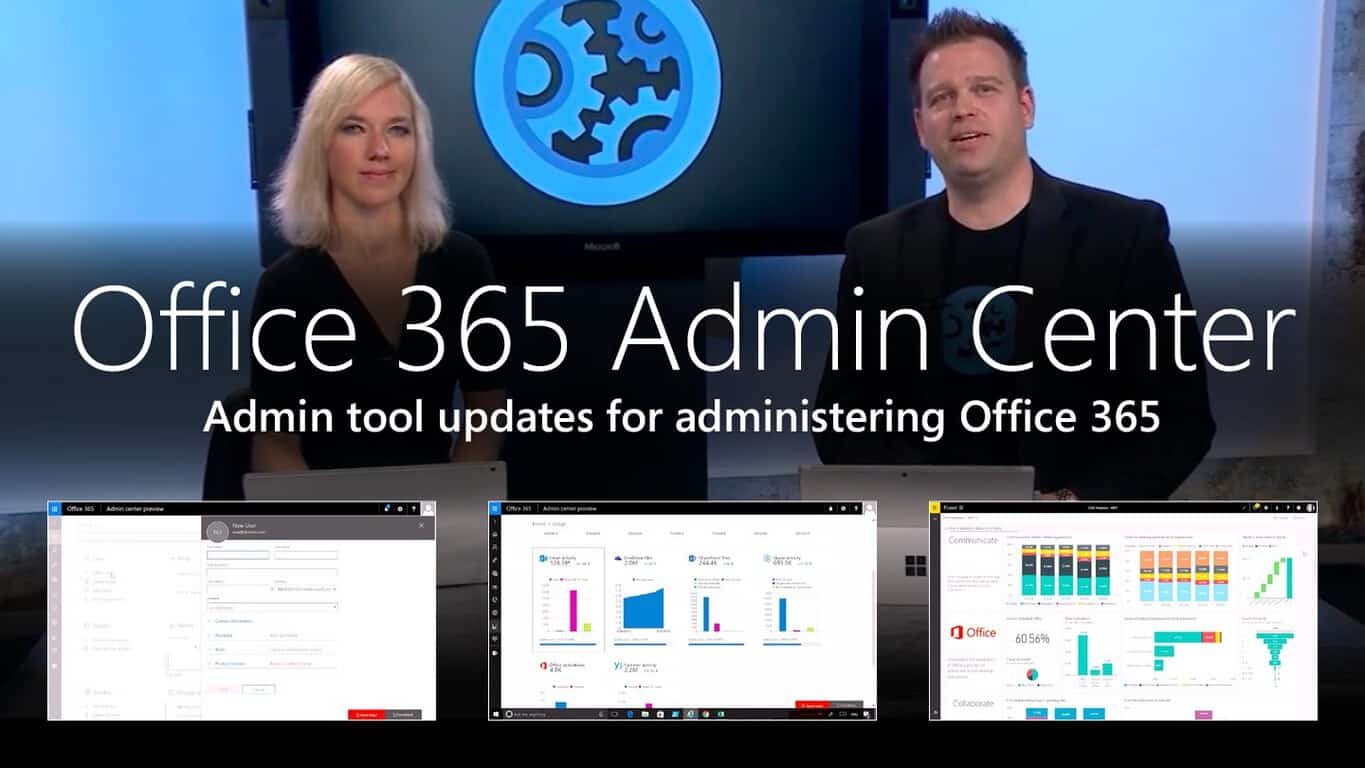
The Office 365 admin center has been in the works for over a year now. At Microsoft Ignite 2016, the company announced that it is finally breaking free to general availability.
With its latest release, the Office 365 admin center has received a few more updates since the last preview. The new version brings basic improvements to design, performance, and functionality around the board, with the most visible changes occuring on the home page where most of the common tasks are easily found. Checking your notifications, configuring your settings, and adding or editing a user including their licenses is all readily accessible.
Furthermore, you will be able to see even more users on a single page and edit them in bulk, up to 100 users at a time. Other small improvements were also added such as choosing a language preference for your Message Center and a better way to report through the new usage report dashboard.
The blog post explains that “the usage reports will be accompanied by a Power BI content pack that will allow you to share the reports and to pivot by attributes like region or department,” and the following video provides an overview of the Office 365 admin center.
Administrators should also able to look forward to using the new Service health dashboard. This tool will help administrators assess service incidents, improve internal support, and assist with the Office 365 experience for their organization’s employees. Outages of services can be indicated as incidents compared to minor situations which are better categorized as advisories.
With more critical information available to you in quick summaries and important details upon inspection, the Service health dashboard will help you respond more efficiently. You can even see how many people are affected by the service incident at a glance.
The Service health dashboard will also be adding more functionality in the future such as reporting issues that aren’t being shown directly to feedback, signing up for notifications through text and/or email, accessing a full list of impacted users, and allowing you to request on-demand user health checks to monitor risks. Stay up to date on changes to the admin center at the Office 365 blog.
One of the most anticipated and welcome Windows 10 features arriving with the recent Anniversary Update is Edge extensions, or the ability to access new functionality when surfing the web using Microsoft’s newest browser. Chrome and other browsers have had extensions for quite some time, and Microsoft hasn’t yet opened up the extensions framework to all developers.
Nevertheless, new extensions continue to dribble out, and the latest is one that we reported on a week or so ago, Turn Off the Lights (via MSPU). This latest Edge extension provides for a more pleasant video consumption experience by dimming everything in the browser except the most important thing–the video that’s currently playing.
You can now install the extension from the Windows Store, and here’s what it offers up:
The entire page will be fading to dark, so you can watch the videos as if you were in the cinema.
With a single click on the lamp button, the page will fade to dark. And automatically focus on the video. By clicking on it again, the page will return to normal.
Turn Off the Lights is a lightweight and useful add-in designed for a more comfortable watching experience. It works for all known video sites such as YouTube, Vimeo, Dailymotion, Hulu, Metacafe, YouKu, etc. Not only this but these extensions are compatible with Google Chrome, Apple Safari, Mozilla Firefox, Opera, Microsoft Edge, Maxthon and Yandex web browsers.
A few great features in this browser extension:
+ Turn the lights back on, by clicking on the black layer
+ Supports multiple video sites: YouTube, HTML5 video,… and more
+ Customize your YouTube:
Auto HD: Set videos to play in HD automatically. Users can select from highres 8K > 5K> 4K > 1080p > 720p > 480p > 360p > 240p > 144p > default
Auto Wide: Automatically plays the videos on the widest mode
,… and more
+ Easter Eggs: Shortcut key: T -> Do you like a real movie theater feeling?
+ Option to make the screen dark when the user clicks on the play button
+ Option to turn on/off the fade in and fade out effects
+ Custom colors + Option for Flash Detection
+ Option to Show Dimness Level Bar
+ Option for Eye Protection for when it’s night, with whitelist/blacklist filter
+ Option for atmosphere lighting that shows a glow around the video player
+ Option to show the dark layer on the top of the window
+ Option for shortcut keys:
Ctrl + Shift + L to toggle the lights
Alt + F8 to restore the default opacity value
Alt + F9 to save the current opacity value
Alt + F10 to enable/disable the Eye Protection feature
Alt + (arrow up) to increase the opacity Alt + (arrow down) to decrease the opacity
Alt + * to toggle the lights on all open tabs
+ Option for Camera Motion + Option for Speech Recognition
+ Option for Mouse Wheel Volume Control for each HTML5 video player
+ Option to add a filter to the current HTML5 video player (grayscale, sepia, invert, contrast, saturate, hue rotation and brightness)
+ Option to show the Audio Visualization effect on top of the current HTML5 video (Blocks, Frequency and Music Tunnel)
+ Option to loop the current HTML5 video player
+ Option to place the Night Mode switch to toggle YouTube in black or white theme, with whitelist/blacklist filter
Time stamp: Activate the Night Mode within the chosen time
Blackout: Dims the web page and activates the Night Mode
+ Option to stop YouTube and HTML5 videos from automatically playing.
+ and more…
This is the initial public release of the extension, which currently stands at version 3.3.0.0. Install the extension from the link below and let us know in the comments what you think.
Just last week, Microsoft added Call of Duty 3 to the list of backward compatible games on the Xbox One. Today, another Call of Duty game and several other Xbox 360 titles have been added to the list as well. As always, we’ve given the titles a look and have included descriptions, downloads, and trailers for your viewing pleasure below.
Call of Duty: World at War is coming to Xbox One Backward Compatibility today. Now, all back compat COD titles are purchasable on Xbox One pic.twitter.com/NsLkdJJGqu
Call of Duty: World at War Experience the intensity and brutality of war like never before. Unleash the power of the flamethrower, flame tanks, and other lethal weaponry while battling through the most harrowing campaigns in the Pacific and Europe. For the first time ever in Call of Duty, play Co-Op with up to 4 players on Xbox LIVE. In Multiplayer, compete on Xbox LIVE to complete challenges, gain experience, level up, and unlock perks to take out your opponents.
Purchase the full version of E4 now to get all four primary stages, 100 Revenge levels, five great game modes, leaderboards, achievements, and the ability to play along to your own favorite music! This sensational shooter is one that you won’t want to miss.
Unlock the full game to offer your assistance in Professor Ivor Question’s Encleverment Experiment! He’s looking for people just like you to play his 16 exciting minigames, collect 60 available Mascots and create new challenges in his Home-made Game editor! Featuring support for the Big Button Controller and Live Vision Camera, the Encleverment Experiment also includes full Avatar support and LIVE play for up to four players! Unlock the full game now and massage those mental muscles!
Unlock the full version of FunTown Mahjong to play even more of this traditional Chinese tile game! The full version includes the ability to compete against your friends on Xbox LIVE or against AI opponents. You can also earn achievements, aim for the top of the leaderboards, and enjoy tons of exciting Mahjong variations!
And so, those are the four titles which have been added to the list of Xbox One Backward Compatible Titles. Which of these great games do you own or are planning to buy? Let us know what you think by dropping us a comment below!
Recently, Microsoft decided to change its certification requirements, effectively eliminating the need to retake certain exams for some Microsoft Certified Solutions Expert (MCSE) and Developer (MCSD) certifications. Microsoft Learning GM Alsion Cunard is looking to make earning more certifications easier for MCSE and MCSD certified professionals. Cunard also wants to make sure the certifications are more in tune with the Centers of Excellence guidelines that are used by the Microsoft Partner Network.
In addition, Microsoft announced five new MCSE and MCSD certifications are now available:
MCSE: Cloud Platform and Infrastructure – focusing on skills validation for Windows Server and Microsoft Azure
MCSE: Mobility – focusing on skills validation for Windows Client and Enterprise Mobility Suite
MCSE: Data Management and Analysis – focusing on skills validation for both on-premises and cloud-based Microsoft data products and services
MCSE: Productivity – focusing on skills validation for Office 365, SharePoint, Exchange, and Skype for Business
MCSD: App Builder – focusing on skills validation for Web and Mobile app development
Microsoft Certification Pathways
In order to be eligible to receive any of these certifications, you must first earn a prerequisite Microsoft Certified Solutions Associate (MCSA) certification as well as pass an additional exam as required by the corresponding Center of Excellence.
“The resulting MCSE or MCSD certification will be added to your transcript and will never expire. Instead, the achievement date will signify your investment in continuing education on the technology. Every year, you will have the opportunity to re-earn the certification by passing an additional exam from the list of electives, demonstrating your investment in broadening or deepening your skills in a given Center of Excellence. Each time you earn the certification, a new certification entry will be added to your transcript.”
Quincy, Washington is a small town located near the Columbia river and the hydroelectric power from the Grand Coulee Dam. The city also enjoys an arid and cool climate, which is probably why five big tech companies including Yahoo and Microsoft chose it to build data centers. Before Microsoft kicked off its Ignite 2016 conference this week, the company invited The Next Platform for a tour of its five generations of data centers in its Quincy facilities.
As Microsoft’s online services including Azure and OneDrive are currently growing very fast, the Redmond giant has started building a fifth generation data center in Quincy which will take up about 300 acres in total. However, Rick Bakken, senior director of datacenter evangelism for Microsoft’s Cloud Infrastructure and Operations team explained that the previous generation data centers will still be useful:
We have taken all of the learnings from prior generations and put them into Generation 5. I am standing up four versions of infrastructure that we call maintenance zones. They are identical to each other and I am going to stripe some fiber between them to have great communication. I am on cement floors, I am using adiabatic cooling, and I don’t have chillers.
Credit: The Next Platform.
Bakken gave The Next Platform a limited tour of Microsoft’s fifth generation datacenter which is still under construction, and this is what our colleagues wrote about it:
Bakken said that the Generation 5 datacenters would use 96-inch tall racks (compared to 74 inches for a standard server rack), and that should mean Microsoft can get racks to go floor to ceiling. That 55U rack is odd in that it is not divisible evenly by the 12U height of the Open Cloud Server. It leaves room for four Open Cloud Server enclosures plus 7U left over for other gear – or for a taller or shorter future Open Cloud Server that will fit the racks.
The maintenance zones of the Generation 5 datacenters will be ganged up in quads, called theaters, which are mirrors of each other, and they can be georeplicated around the globe to other similar datacenters at some point and provide 32-way replication (four-way datacenters in a zone and four zones in the theater times two theaters with for geo-replication) for absolute high availability for strategic applications. (…)
Microsoft wants to get more time out of its datacenters, and has designed them to have longer lives than its prior datacenters; 30 years instead of 20 years, to be precise. And the Generation 5 datacenters have lots of power, at 10.5 megawatts each, 42 megawatts for a maintenance zone, and 168 megawatts for the theater, to take some dense gear if need be.
Inside Microsoft’s fifth generation datacenter in Quincy (credit: The Next Platform).
Lastly, the exec emphasized that this fifth generation data center will allow the company to bring costs down significantly. “We have moved to a resiliency configuration where I put more servers in each box than I need and if one breaks, I just turn it off and wait for the next refresh cycle,” he explained. Overall, the company iterated on its data centers over roughly 25 years, but the exec thinks that the company did what was necessary to stay competitive against it rivals in the cloud. “We learned quite a bit there, but now we have got to really scale,” added Bakken. We invite you to read the full story over here to get more technical details about Microsoft’s next generation data center.
Political tensions between the United States and Russia are rising, but a new report out by Bloomberg News is indicating that these political tensions might have just crossed into the world of technology as well. Moscow is reportedly ready to ditch Microsoft Software in a move toward “self-reliance.”
The move is all a part of Vladimir Putin’s call for the Russian government to reduce dependence on foreign technology. As part of that call, Russia will be replacing the Microsoft Exchange Server and Microsoft Outlook technology in over 6,000 computers in Moscow with an email system from state-run carrier Rostelecom PJSC.
Additionally, as per a statement from Artem Yermolaev, head of information technology for Moscow, Russia may also consider replacing Windows and Office, and may expand the replacements to as much as 600,000 computers and servers. Microsoft declined to comment on the Bloomberg report, which draws into question how this new call from the Russian government may affect the technology market.
Forza Horizon 3, the latest entry in the open world racing video game series is being released today on both the Xbox One and Windows 10 PCs. To celebrate the launch of the already critically-acclaimed title, Xbox France its giving away a collector Forza Horizon 3 Xbox One S console. Watch the video below to see how this unique, heavily customized console looks:
Car enthusiasts may recognize the stylish lines of a vintage Ford Mustang on the collector Xbox One S design. The console looks really gorgeous in a subtle black & white finish and it also comes with a classy leather Xbox One S controller. To get a chance to win the unique console, Xbox France is inviting French fans to let a comment on Twitter, Facebook or Instagram. However, it’s not clear if the contest is only restricted to people in France or open to all Xbox enthusiasts. Let us know in the comments what do you think of this collector Xbox One S console.
EA SPORTS FIFA 17 and Forza Horizon 3 both launched today on the Xbox One. Forza Horizon 3 had been playable for a few days through early access for those gamers who had pre-ordered the Ultimate Edition version of the racing game but all versions are now available to download and play across Xbox One video game consoles and Windows 10 tablets and PCs. Here’s the official game description:
You’re in charge of the Horizon Festival. Customize everything, hire and fire your friends, and explore Australia in over 350 of the world’s greatest cars. Make your Horizon the ultimate celebration of cars, music, and freedom of the open road. How you get there is up to you. Drive through the vast desert and rocky canyons of the Outback to lush, wild rainforests, and to the sandy beaches and gleaming skyscrapers of Australia’s Gold Coast. Every car is recreated with ForzaVista™ detail including full cockpit views, working lights and wipers, and new vehicle types bringing all-new driving experiences never before seen in Forza.
Forza Horizon 3 is one of the first video games to release under Microsoft’s new Xbox Play Anywhere label. This means that users can purchase the title on the Xbox One console or on a Windows 10 device and gain access to the alternate version for free. In addition to this cross-buy functionality, game progress and downloadable content will also sync between devices. This means that someone could start a game on an Xbox One and pick it up later on their Surface Pro 4. Conversely, gamers can also begin a Forza Horizon 3 session on their Windows 10 PC and continue it on their Xbox One.
EA SPORTS FIFA 17 is the latest game in the FIFA sports franchise and boasts significantly improved graphics over its predecessors and more comprehensive gameplay. Here’s the official description:
Powered by Frostbite, FIFA 17 transforms the way you play, compete, and emotionally connect with the game. FIFA 17 immerses you in authentic football experiences by leveraging the sophistication of a new game engine, while introducing you to football players full of depth and emotion, and taking you to brand new worlds accessible only in the game. Complete innovation in the way players think and move, physically interact with opponents, and execute in attack lets you own every moment on the pitch.
A special tie-in FIFA Mobile app has been announced for Windows 10 Mobile, iOS, and Android smartphones but it has not released yet. It is due out sometime in Autumn 2016. The app is expected to be an alternate take on the FIFA gaming experience with shorter games designed for players on the go and a simplified control scheme suitable for touch devices.
Have you played EA SPORTS FIFA 17 or Forza Horizon 3 yet? Which devices are you playing them on and are they as good as the previous entries in their respective franchises? Let us know in the comments below.
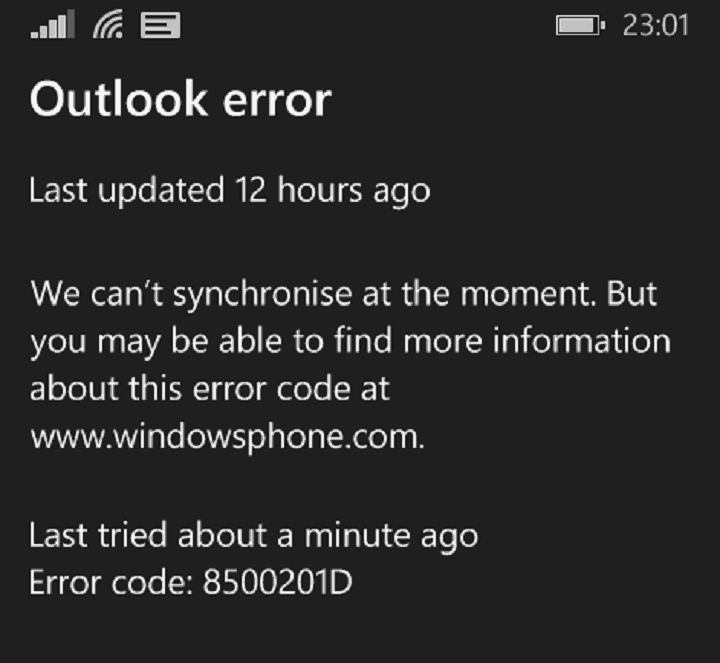
Error 8500201D has reared its ugly head again, much to the disappointment of many Windows 10 Mobile users. This is an old and constant error that has been plaguing Windows phone users for years, and after a calmer period, it seems that error 8500201D is back.
Since the beginning of September, thousands of Windows phone owners have been complaining about this annoying error that prevents them from syncing their emails and calendar events. Error 8500201D makes no discrimination, affecting Windows Phone 8.1 users, as well as Windows 10 Mobile users. However, it does indeed seem that the latter are particularly plagued by this bug.
Windows phone error 8500201D blocks email synching
here is what I am getting after several years of using a Windows phone with no real problems. Nokia Lumia Icon 929 up to date in upgrades. Starting Monday the 5th of September I have been getting this error. […] Last tried 7 minutes ago. Error code: 8500201D. […] The only thing that I have not done is reset the phone, I did delete most mails that I had in all the different folders. But same results.
Despite this sync error, new emails are well received on the affected devices. Also, according to user reports, this sync error also affects contacts, SMS and MMS backup. Some users also came up with a few workarounds, but unfortunately, none of them proved to be permanent. In the best case scenario, some workarounds manage to fix this bug for a limited period of time, in general for no more than one hour. Soon after, error 8500201D comes back.
For the time being, the best solution to get rid of this bug is to perform a hard-reset, which will most likely delete the items that failed to sync. If having your emails synced is not that urgent, you may want to wait for a while until Microsoft fixes this issue. The company has officially acknowledged the annoying Windows phone error 8500201D issues and is actively looking for a fix.
Thank you for posting on the forum. We are currently aware of this issue and it is under investigation. Once a fix is released, you can view it here: Fixes or workarounds for recent issues on Outlook.com. Thank you for your patience and understanding.
Have you encountered error 8500201D? If you’ve also come across a permanent workaround, list the troubleshooting steps in the comment section below.