RIN Studio: RIN Authoring tool released by Microsoft Research

RIN Studio: RIN Authoring tool released by Microsoft Research

Microsoft Research has released an ambitious research project dubbed Rich Interactive Narratives (RIN). It seems like a great way to educate people on landmarks and a great interactive way to explore history. The Microsoft RIN project combines storytelling with visual and audio technology to create an intense exploration experience. It looks like a massive undertaking by Microsoft Research.  

The RIN research project has already been implemented in the Everest Project by GlacierWorks. GlacierWork’s Everest Project shows the change over time to the glaciers located in the valleys that surround Mount Everest and how climate change has affected the Himalayan region. The Everest Project is a great example of RIN.

RIN Studio: RIN Authoring tool released by Microsoft Research

Honestly, I do not thoroughly understand the entirety of RIN, but I am just starting to learn more about it as I work my way through RIN Studio, a RIN Authoring tool that Microsoft Research has released to the public. RIN Studio allows you to create your own RIN without the need to code; which is great, because I have no idea how to code. You can create your own RIN story and publish your story to the Windows Store as an app.

For more technical information, check out the RIN websites in the links below and try your hand at making your own RIN by downloading RIN Studio in the download link below!

Many Windows 10 Users Report Problems With Steam

Many users have reported that Steam crashes every 20 or 30 minutes on Windows 10. Of course, what we call Windows 10 is now only the technical preview version, therefore bugs and crashes are to be expected, but it seems that the crash of Steam is one of the most frequent issues.
steam-crashes-on-windows-10-technical-preview
Microsoft is aware of the problem, but for the time being the tech giant hasn’t come up with a solution yet. It makes no difference whether you use the compatibility mode or not, although Microsoft engineers have suggested launching the app in Windows 8 compatibility mode. Given the fact that Microsoft’s answer is only a piece of advice, not a solution, users have been trying to solve this issue in various manners on their own.

For example, creating a .BAT file could do the trick. Name the file steamrestart.bat and run it while playing. Here is the code you need to use:

net stop “Steam Client Service”
net start “Steam Client Service”
timeout 900
steamrestart.bat

For games that do not require VAC, users suggest that deleting steamservices.exe and making changes in services.msc fixes the crashes.

Obviously, this crash is extremely annoying for gamers. You may be in the middle of an epic battle and, bang, Steam crashes. Microsoft needs to solve this issue before launching the consumer preview, otherwise possible Windows 10 users could suddenly change their minds and stick to previous Windows versions.

Some users have even suggested that Valve should solve the problem. However, let us remind you one more time that this is only the Technical Preview. Microsoft has already warned users not to install  this Windows 10 version on their everyday computers and underlined the fact that the software is still in development. Therefore, fixing this bug is not Valve’s responsibility.

All we can do is wait for the next Windows 10 update to be launch to see if Microsoft has managed to solve this problem.

READ ALSO: HERE Maps App for Windows Migrates Nokia Accounts, Extends Voice Navigation to More Countries

Microsoft launches new Pinterest-like boards for Office Delve, lets businesses organize and share work

Microsoft launches new Pinterest-like boards for Office Delve, lets businesses organize and share work

For those that didn’t know, Microsoft rolled out Office Delve last year, codenamed Oslo, for Office 365. Delve taps into Microsoft’s Office Graph machine learning database to display your most relevant documents, in an attempt to have information find you rather than you having to find information.

Microsoft has rolled out a new feature for Office Delve today, called boards. With this feature, businesses can organize content, making it readily accessible and easy to share with others. Basically, any card you see in Delve can be added to a board — this means documents, sites, videos and more. You can even share the URL of a board with your team, or click ‘send a link’ directly from the board.

“In Delve, you can use boards to group together and share related documents. For example, you can create a board to collect and organize all documents related to a specific project your team is working on. Everyone in your organization can view and contribute to an existing board or create a board – but they can only see and open documents that they have permission to access,” Microsoft explained.

This feature will be a part of Delve as it rolls out over the next few days to those of you on the Office 365 First Release program. It will be widely available to all Office 365 customers by early 2015. Microsoft plans to roll out boards across Office 365 in the near future. “Over time, boards will be integrated across other Office 365 experiences with support for new content types and will also benefit from existing SharePoint metadata management capabilities,” the company explained.

Windows Update KB3004394 Crashes Windows Defender on Windows 7

KB3004394,  one of the updates recently launched by Microsoft, seems to do more harm than good. Users have reported that it stops Windows Defender completely, leaving their systems vulnerable to threats.
windows-update-kb3004394-crashes-windows-defender-windows-7
According to user reports, although they are logged on as administrators, all MMC require administrator actions.  On top of all that, users also get an error message: %%-2147023113.

Apparently, the only computers affected are those running Windows 7. Users who have uninstalled the update confirmed that everything went back to normal once KB3004394 had been removed.

“All MMC functions (Event Viewer, etc.) now require Administrator action, although in an Administrator account.
Windows Defender service will not start.
The Windows Defender Service Terminated with the following error
%%-2147023113

Removing it  returns the system to normal.”, confirms one user on Microsoft’s Community page.

Of course, users who use only Windows Defender as their protection system run the highest risk of becoming a target for malicious software. Since KB3004394 shuts down Windows Defender, such computers constitute an easy target.

Microsoft hasn’t provided users with a solution for this issue yet.  So far, all the other complicated solutions tried out by users have failed to fix this bug as one user confirms:

“I had this issue with KB3004394, on a Windows 7 SP1 64 bit Home Premium; read in another forum someone had claimed this update broke their “diagnostic tool”, so after having tried every known re-registering of Defender dlls/update fixes/SURT, all to no avail and all responding “unknown” problem, I removed KB3004394, restarted, and Defender et al back to normal functions.”

Basically, all you can do is hide the update if it hasn’t been installed on your computer. However, if KB3004394 has been installed on your computer, remove it as soon as possible if Windows Defender is the only software you use to combat malware.

READ ALSO: Total Conquest Strategy Game from the Windows Store Gets Better Graphics

Microsoft Adds New Features to Document Inspector in Excel, PowerPoint and Word

 Microsoft Office 2010 and 2013 now benefit from a series of new Document Inspector features. Also known as the “Check for issues tool”, Document Inspector checks your Office documents for items that may contain personal or hidden information.
microsoft-adds-new-features-document-inspector--excel-powerpoint--word
This sensitive information is important because it can reveal details about the presentation or your company that you do not want to share with other people when you share your Excel, PowerPoint or Word documents.  This is why you should check the documents or the metadata (document properties) before you share them publicly.

This is how the Document Inspector works. First, it tries to automatically remove the private or hidden content from the document and if it fails, then you get an alert.

Here is the list of the new inspections:

PowerPoint and Word:

  1. Embedded Documents
  2. Macros, forms or ActiveX Controls

Excel:

  1. Embedded Documents
  2. Macros, forms or ActiveX Controls
  3. Links to other files
  4. PivotTables, PivotCharts, Cube Formulas, Slicers and Timelines*
  5. Real Time Data Functions
  6. Excel Surveys*
  7. Defined Scenarios
  8. Active Filters
  9. Custom Worksheet Properties
  10. Hidden Names

Timelines and surveys are not supported in Excel 2010, therefore Document Inspector detects them only in Excel 2013.  Also, the official Microsoft blog informs us:

“Some of the new inspectors may not show up in Excel 2010 with the November and December updates for Office 2010. They will appear in an update in early 2015.”

Although the new features improve Document Detector, if you work with sensitive information, keep in mind that some items are undetectable simply because Document Detector was not designed to detect them.

“For example, in Excel you can put data in a far off row or column that you might not see when casually reviewing the spreadsheet, or in Word or PowerPoint, you could cover some data with a picture and forget it’s there.”

As the official Microsoft blog points it out again, remember that Document Detector does not replace legal review. In case you get in trouble for revealing confidential information because you thought that Document Detector also took care of that matter, keep in mind that Microsoft will not be liable for that.

For more information about the Document Inspector, check out Microsoft’s support page for Excel, Word and PowerPoint.

READ ALSO: No Luck for Windows PC: Rise of the Tomb Rider to be Released on Xbox

Windows 7, 8 and 8.1 Now Supported by Azure Backup

Good news for Windows 7, Windows 8 and Windows 8.1 users. Azure Backup now supports Windows client operating systems which means that you can back up your on-premises files and folders directly to Azure. In other words, Azure becomes Microsoft’s cloud platform.
windows-7-8-8.1-supported-azure-backup
This is how it works. Azure Backup saves your initial back up copy and then keeps a record of all the modifications made the that file. Only the changed content is then transferred over HTTPS.

In order to benefit from this feature, you need to download the KB3015072 update. There is no need to make any changes to the registry to apply this update but you may have to restart your computer after having installed it.

As the official Microsoft blog informs us, by downloading this update you also have access to the following features released in the last few months:

  • KB2989574: Support for data sources more than 850GB
  • KB2997692: Long Term Retention and Simplified Signup & Registration
  • KB2999951: Support for Windows Server 2008
  • KB3015072: Support for Windows 7, Windows 8, Windows 8.1

Here are some details about the Azure Backup:

  • You can register one machine on the backup vault or you can choose to registrer multiple machine. If you want to register more than 50 machines on the same data vault, then you should choose the second option.
  • A user provided encryption passphrase controls the access to the backup data. For each machine, you have a different passphrase.
  • If you’re using you laptop’s battery, scheduled backups are postponed until you plug the laptop in for charging.
  • Make sure you schedule the backup when your computer is turned on.
  • The first 5GB per month are free of charge, then you pay $0.20 per GB per month.

Here are the three steps necessary for you to get started:

  1. Sign in to Azure Portal and create a back up vault
  2. From the backup vault  page, download agent and vault credential
  3. Install Recovery Services agent and then register the server.

For a step-by-step tutorial on how to get started, check out Microsoft’s Azure Blog.

READ ALSO: Windows Apps and Windows Servers Are Now Supported by Google Cloud Platform.

Test your site on any version of Internet Explorer with modern.IE, now refreshed with new improvements

Virtually test your site on Internet Explorer with modern.IE, now refreshed with new improvements

For those that didn’t know, modern.IE is a service that contains pre-configured virtual machines for testing Internet Explorer 6 through Internet Explorer 10, across Windows, Mac, and Linux. Modern.IE features a scanning tool that will flag common compatibility issues for your website, so you can test your site on various operating systems and Internet Explorer versions with ease.

In the latest update to the service, Microsoft has added the following new improvements. These improvements were made based on feedback and to ‘update the base Windows versions.’

  • Now use IE blocker toolkit to keep the version of IE for that image fixed and not auto-updated
  • Set Windows Update on and to auto update
  • Applied all applicable Windows Updates to the images up to November 2014
  • Changed the archive technology from RAR to ZIP based on community feedback
  • Added a single large ZIP file archive as a download option in addition to multi-part files as requested by the community

Modern.IE has been quite successful since launching over a year ago. Here is what Microsoft had to say once the service reached its first birthday. “Since launching modern.IE last year, developers have saved over 1 million hours testing for Internet Explorer! We launched modern.IE with the simple aim of helping web developers test their sites with IE and are thrilled to find that the site has made a real impact after just one year,” Microsoft stated in an official blog post.

Windows 10 rumor: First look at Microsoft's new browser leaks onto the web – is this Spartan? (UPDATED: FAKE)

Windows 10: First look at Microsoft's new browser - is this Spartan?

Update: Our sources claim that the screenshot above is fake. Take it with a grain of salt.

Early last week, we told you about confirmation that Microsoft is working on a successor to Internet Explorer, going by the name of Spartan.  Now today, we’re getting a first look at what that new browser might look like, thanks to the Boy Genius Report.  Of course we have to treat this as a rumor, at this point, and Microsoft declined to comment to BGR.

Alongside the image, which shows an older version of the new browser loading a Facebook page, BGR’s tipster revealed some new information they dubbed “amazing new features”: 

More interestingly, Microsoft’s new browser is said to come with some amazing new features that should further improve the Internet browsing experience. Apparently, Spartan will let you speak entire voice commands such as “add to favorites, “make that my home homepage,” or “go to Facebook.com.”
…
Additionally, we are told Spartan will also be able to run different browsers inside it, “with the push of a button.” For example, users could split the browser into four windows that would be showing them four different ways to seeing a website or online application, as long as those browsers are also installed on the same device.

We already know that Cortana, with voice commands, is coming to Windows 10, but it looks like Spartan and Cortana will be close friends.

The tipster confirmed that “Spartan” is indeed a code name, and that Microsoft had assigned a special team to work on the new browser back in September. The design you see, their second version, was finished in November, and shortly after that, the team completed a new design, which was done by Christmas.  There’s no word on whether we’ll be seeing Spartan later this month at the Consumer Preview for Windows 10.

As always, everything is subject to change, so stay tuned as we bring you the latest on Windows 10, Spartan, Cortana, and more!

How to Download the Rummikub PC Game for Free

When it comes to Rummikub games from the Microsoft Store, there are a few to choose from. One of the best you have at your disposal is called Rummi. And now it has been upgraded with a new feature.

There are many Rummikub players around the world. Some of them own Windows tablets with Windows 7 or Windows 10 on-board. And they will be happy to hear that Rummi, their favorite Rummikub game, has been improved with better AI on the hard level.

So, it will be even harder to beat it when you are not playing with your friends. The classic family game, anytime, anywhere on your Windows computer. It is based on rules of the rummy-style games like Rummy or Rummikub.

Rummikub is a popular family game, played by millions of people all over the world. For over 70 years players have loved the combination of tactical thinking, luck, and tense competition. Combine the titles to create the smartest combinations. Be the first to put all your tiles on the table.

Can I play Rummikub on my PC?

Yes, you can play Rummikub on a Windows PC, as well as on a Mac. The gameplay is seamless, though you may experience a few trivial issues, given that it requires an emulator.

So, for those waiting to get their hands on Rummikub, the options listed next will allow you to enjoy the game on any device.

How do I play Rummikub on the PC?

There are several ways you can play Rummikub on the PC for free, and we have some great options here:

So, now that you know how to download the Rummikub game on the PC for free, play your favorite title once again and beat those old records.

For any queries or to share another method to play Rummikub, drop a comment below.

How to Enable and Open the Charms Bars in Windows 10

Since the release of Windows 8, people have been arguing whether the Charms bar was good or not. And to everyone’s surprise, Microsoft decided to get rid of it. But if you still want the Charms Bar in Windows 10, we have a solution to enable it.

Does Windows 10 have Charms Bar?

In the Technical Preview of Windows 10, Microsoft changed a few things about the Charms Bar. Actually, Microsoft decided to completely remove the Charms bar from the new version of the Windows operating system.

Microsoft decided to make this move probably because the Charms Bar doesn’t fit in the environment. Another reason is that many users complained about it, saying that this feature is “annoying and unnecessary.”

Microsoft has removed the Charms Bar from the User Interface, but it is still inside modern apps, with a small dropdown in the left corner.

How do I access the Charms Bar?

If you’re among those who actually liked the Charms Bar, and you want to use it like earlier for a better Windows experience, there is a new app that will enable the Charms Bar in the right corner of the Windows 10 screen.

The app is called PopCharms and was created by a member of the Neowin forum who goes by the username of CyclingGuyNOLA.

PopCharms is a simple .exe file that will place an icon in the system tray to control whether you want Charms Bar to be on or off. When the app is running, the Charms Bar in Windows 10 will show up when you move your mouse cursor to the bottom right corner of the screen.

Remember, the Windows + C keyboard shortcut no longer works to open the Charms Bar in Windows.

Also, as this app is not official, take extra precautions and install it at your own risk. Verify the reliability of the download source. Even better, scan the downloaded file with an effective antivirus solution to check for issues.

For any queries or to share another way to access Charms Bar in Windows 10, drop a comment below.

Microsoft Advertising releases some interesting stats on UK gamers

UK Microsoft Advertising releases some interesting stats on gamers

Microsoft has a wealth of data at their disposal when it comes to assessing who is using their products and how. Internally, Microsoft can use Bing data to judge how popular a game or media release is compared to other releases. Microsoft can also determine how its users are using their gaming consoles and then where to focus their efforts. Finally, Microsoft has access to data gathered by 3rd parties who survey people and ask about their gaming habits.

The results concerning the typical gender or age of gamers has been shifting since the introduction of mobile casual games. Citing a study in the UK by the IAB (Interactive Advertising Bureau), Microsoft can see that 52% of gamers are female and the remaining 48% male. In addition to more female gamers, there also seems to be a bigger age range of gamers with the largest group between the ages of 25-44. This study shows how the advent of personal devices enables everyone from all ages to game wherever they are, but the definition of gamer has now stretched to include players of casual games like Candy Crush or 2048.

Seach data can track popularity over time

A games initial popularity can now be tracked by following web search results, and Microsoft uses Bing data to do just this. The release of Destiny was a big day for gamers, and it is very apparent in the search results. Destiny was launched around the same time as the Sims 4 and FIFA 15, but had a dramatically higher volume of searches regarding it. Using data like this, Microsoft can hone their advertising and offer deals to try and boost sales.

The Xbox One also offers Microsoft unique insights into the media consumption habits of their users. By tracking activity of the Xbox One console, Microsoft found in the last month 91% of consoles were used just for gaming, 45% of them were used for video, 43% socializing, 38% internet, 37% music, and 12% live TV (these are percentages per category). It is evident here that gaming consoles are used for so much more than only gaming, however gaming is a big use. Most important to note that the normal user does a range of different things sometimes at the same time.

Debate: Should Windows 10 be Called Windows 8.2?

It’s been a while since Microsoft released it’s Technical Preview for Windows 10 and a lot of people had an opportunity to test it. Of course, there are positive and negative reviews, but one question arises, is Windows 10 really worth to be called the brand new operating system, or is it just an improved version of Windows 8?
windows 10 or Windows 8.2 wind8apps

Before we start our debate, I have to say that this is just a Technical Preview of the new operating system, so many new features are excluded from it, but we can make an analysis based on what we got so far.

After testing Windows 10, most users were satisfied with it, way more than they were with Windows 8 (Just as a reminder, Windows 8 and Windows 8.1 combined had a minor operating system market share of just 16.8%, which is unacceptable for Microsoft). The main reason for positive reviews is that people got what they requested, the Start Menu. This is also the main feature of Windows 10 Technical Preview, and the main change, besides some other interface tweaks, all other stuff are almost the same as they were in Windows 8 or 8.1. So an average user could tell, why this is presented as a brand new operating system, when there’s only one crucial change? Because of that, a lot of people call it Windows 8.2.

In my opinion answer for that question lays in the name of Windows 10. When Microsoft skipped one number and presented the new operating system to go by the name of Windows 10 they explained that they’re not “building and incremental product,” but people understood it as a way for Microsoft to distant from Windows 8 as much as possible. Because of that, people expected wonders from Windows 10 and expected it to be drastically different from Windows 8. But if we take a look at history of Windows OS, neither version of Windows is drastically different than its predecessor. Here’s a proof I found on Microsoft forum:

  • Windows NT 4.0 (along the same time as Windows 95)
  • Windows 2000 was just NT 5.0
  • Windows XP was just NT 5.1
  • Windows Vista was 6.0 and was a major change, mostly to take advantage of new hardware for things like graphics acceleration that were never possible before.
  • Windows 7 was just 6.1 and really just changed some taskbar behaviors.
  • Windows 8 was 6.2 and although it looked different, the big change was just a bigger (full-screen) start menu. Although it was big, it had the same function (shortcuts and an ‘all programs’ directory).
  • Windows 8.1 was 6.3 and added some mouse functions and title bars
  • Windows 10 is just going to be 6.4.

So the impression is that people really expect too much from just a Technical Preview of the new Windows. But there’s another interesting inference from this. It looks like people didn’t disliked Windows 8 as much as they disliked its certain features. And now when we have Windows 8 look-a-like operating system with improved features (read: Start Menu), people are pretty much satisfied with it and experts are predicting that Windows 10 will do much better job than Windows 8 did.

Also, as I said at the beginning of the article, this is just a Technical Preview, and a lot of features, along with Microsoft’s much anticipated voice assistant Cortana, need to be included in the final version, so I think that we should wait until the final release to make comparisons.

Read Also: How to Downgrade From Windows 10 to Windows 8.1

Windows 10 news recap: Cortana everywhere, the ever shrinking app gap, and a 'Spartan' is to be born

Windows 10

It’s 2015! And already we’ve had a few Windows 10 bits trickle out onto the internet. This week,  we revealed that Microsoft had started their plans to bring Cortana to iOS and Android, in an attempt to bring Cortana to everyone running Windows 10. It’s happening because of her arrival on Windows 10, and how Microsoft is setting her up to be the same assistant available to you everywhere. Set a reminder on the desktop and it’ll popup on your phone, or setup a meeting on your phone and have it popup on your desktop. It works both ways, and much like a personal assistant, is always available to you where most convenient.

Furhtermore, information regarding the upcoming Spartan browser for Windows 10 was revealed. Microsoft may be shifting focus from its long time web browser Internet Explorer (IE) to a new product, code named “Spartan”, while still maintaining support for IE.  The browser, said to be “lightweight” and based on Microsoft’s Trident rendering engine (not the more widely used WebKit, as some have hoped), as well as the company’s Chakra JavaScript engine.

Up next, info about Microsoft’s plans to close the shrinking app gap on Windows Phone appeared online. Over the past few years, Microsoft has been trying to grab developer interest with its Universal App model. The software giant is making it easy for developers to write their apps once, and have it available across the desktop, the tablet and the phone. Another strategy is rumored to be enabling Android apps to run on Windows, which according to sources is “still a possibility with Windows 10”.

Finally, it was revealed that Windows XP and Windows Vista users would not be able to directly upgrade to Windows 10.  For those running Window Vista, XP or older, a complete format will be required, so all files and settings will be lost according to Microsoft‘s Gabriel Aul.

And that’s it for this weeks Windows 10 roundup. Stay tuned for even more Windows 10 news in the coming weeks, leading up to the January 21st event.

A glitch in the system: Bing, Outlook.com, Cortana go down, come back

A glitch in the system: Bing, Outlook.com, Cortana go down, come back

A few minutes ago, from about 11:25 am PST or so until about twenty minutes later, Bing.com and a number of Microsoft services went dark.  Multiple reports on Twitter showed that the outage was widespread, if not long lived.  Chip Locke, a “random coder for Bing” and @doubleyewdee on Twitter, confirmed the outage and the restoration, albeit with a bit of tongue-in-cheek:

As of now, everything seems to be back up and running.  Let us know if you hit any further snags. 

Only Windows 7 and 8 users will be able to upgrade to Windows 10, older systems will require a complete format

Only Windows 7 and 8 users will be able to upgrade to Windows 10, older systems will require a complete format

Upgrading operating systems is always an exciting event, it almost feels like the device you’re upgrading gets a breath of fresh air. The good news is that anyone running Windows 7 or Windows 8/8.1 will be able to upgrade to Windows 10.

This means that those users will not need to backup all their personal files as the upgrade process will leave them intact, although it’s always recommended to do so just in case. The same goes for personal OS settings. Unfortunately for those running Window Vista, XP or older, a complete format will be required, so all files and settings will be lost according to Microsoft’s Gabriel Aul.

A few months ago, Microsoft was testing the distribution of the Windows Technical Preview via Windows Update, and if the results of the test are all positive, the final version of Windows 10 may be delivered this way, possibly as a free upgrade. This should make it really easy for those running the current and last generation version of Windows to get the latest version. If you recall, Microsoft has also delivered the Windows 8.1 upgrade via the Windows Store, so that’s an option too.

Windows 10 will be ready for release in the second half of the year, but in the meantime, there is still the January Technical Preview and the Microsoft event happening later this month to look forward to, so stay tuned! 

Welcome to 2015: A look ahead as Microsoft faces perhaps its biggest year, ever

Welcome to 2015: A look ahead as Microsoft faces perhaps its biggest year, ever

In many ways, 2014 was a year of survival for Microsoft.  With a new CEO, a newish “One Microsoft” mantra, a giant acquisition of Nokia’s phones businesses, the Xbox One, Microsoft Band, and even a surprising winner in the third generation of Surface, Microsoft spent 2014 setting expectations, re-aligning, and laying the groundwork for an even bigger year ahead.

There’s no doubt, 2015 will be the year of Windows 10, and all its permutations.  While Windows 10 may finally deliver the Windows 8 we wanted all along, it will even more importantly offer up the first incarnation of a “unified platform”, where apps can ship to desktops, phones, tablets, and Xbox, all based on a single code base, tweaked only for form factors. 

It’s a make or break year, too, for Windows Phone: either it gains some traction, or we mark 2015 as the beginning of the end for the troubled mobile ecosystem. Windows 10 is a bit of a last gasp for Windows Phone, and if a unified apps platform doesn’t do it, maybe nothing will.

Build 2015

This year, we’re not going to have to wait long for the action to begin, and Microsoft’s 2015 calendar is filling up fast.  Here are some highlights:

  • January 6-9: CES
    Microsoft pulled out of making a big splash at CES a few years ago, but the first big show of the year is still important.  Expect new third party devices, and hopefully a few surprises.
  • January 21: Windows 10 Consumer Preview press event
    Microsoft released a Tech Preview of Windows 10 last fall, but expect lots of fireworks in Redmond on the 21st.  News about an Internet Explorer successor, our first look at a new Windows Phone OS, and lots of consumer features for Windows 10, including Cortana on the desktop, Continuum, and lots more (we hope).
  • February 17: Chinese New Year – Joe Belfiore has promised some Office love for Windows Phone by this date
    Microsoft has placed Office on iOS and Android, but now it’s time to see more of what Office has in store for Windows.
  • March 2-5: Mobile World Congress
    Microsoft has never had a huge presence at MWC, but Nokia did, and it will be interesting to see how Microsoft courts the mobile tech community at this seminal event.
  • April 29-May 1: Build 2015
    We’re expecting lots of news from Build, too – as Microsoft completes the developer picture for its “unified platform” of app development.  We should have a pretty full picture of Windows 10 by the time Build is over.
  • May 4-8:  Ignite
    Microsoft has combined a number of conferences into “Ignite”, and the former Tech-Ed / Management Summit / Exchange, SharePoint, Lync, Project conference should clear up the Windows 10 picture from an enterprise standpoint.
  • June 16-18: E3
    E3, as usual, will be all about games, games, and games, and Xbox will need to make a big splash in order to capitalize on the momentum it created with the holiday sales blowout of 2014
  • Late Summer (?): Windows 10 RTM
    For us Windows enthusiasts / early adopters, this is when we’ll get our hands on the final Windows 10 product. 
  • Late Fall (?): Windows 10 General Availability
    Just in time for the 2015 holiday season, Microsoft and its partners will begin to ship new Windows 10 hardware by late September or early October.
  • Holiday Season 2015: lots of new devices
    With Windows 10 out the door, it’s time to sell, sell, sell!

Somewhere in there too should be the introduction of a new member (or new members) of the Surface family, an updated Band, some new brand names and maybe even some new services, renewed emphasis on Bing Maps, a better Skype, a touch-centric Office, and hopefully even a few surprises.  This is going to be a big year for Microsoft, a year of rapid innovation and deployment.  For the first time in a long time, all the shackles are off and Microsoft will be moving full speed ahead.  We can’t wait!

What was your favorite Microsoft moment in 2014?

Microsoft

2015 is now upon us, which means now is a great time to look back at all the things Microsoft did in 2014 and reflect on the many new products that were announced as well as many other things.

We want to know what your favorite Microsoft moment of 2014 is. Was it the unveiling of Windows 10? The death of Windows XP? The announcement of the Microsoft Band? There are so many possibilities, so get thinking!

My favorite moment of 2014 was easily the launch of the Windows Technical Preview. It was refreshing and exciting to see Microsoft open up about their development plans with the next version of Windows, and having an invite to help them develop it via the Windows Insider Preview was an awesome opportinity.

So, let us know below what your favorite Microsoft moment in 2014 was!

Deals, ads, stores, and buzz: Has Microsoft retail grown up?

Deals, ads, stores, and buzz: Has Microsoft retail grown up?

There’s just no getting around it, this has been one heck of a holiday season for Microsoft.  12 days of deals, Xbox One blowouts, $20 brand new smartphones, doorbusters, and potshots at Apple, Microsoft has been pulling out all the stops.  So far, this “One Microsoft” approach to retailing seems to be working.

Back in the old, pre-Satya days, Microsoft’s retail decision-making made you scratch your head more than grab your wallet. Probably the most recent and glaring example was the pricing and launch of the original Surface tablets.  If you remember, when the Surface launched, Apple was killing it with the iPad, and cheap Android tablets were just starting to appear.  To everyone’s surprise, and to Steven Sinofsky’s credit (if nothing else he was obsessed with keeping secrets) Microsoft announced the Surface, but attached to it was a price only bean counters could love.  From day one, tech pundits and Microsoft watchers deemed the Surface as interesting but overpriced, and sure enough, a year later, Microsoft took a $900 million write-down on poor sales.  How many Surface devices could Microsoft sold with more competitive pricing?  Who knows, but one thing’s for sure, even at a loss, they wouldn’t have lost $900 million.

Then the Xbox One came out, and again, the bean counters had prevailed.  Bundled tightly with the Kinect, the Xbox One was $100 more than its arch rival the Sony PS4, and while the Xbox One didn’t tank like the original Surface, Sony pulled ahead in early sales.

Xbox One

But somewhere in between Sinofsky’s ouster, Ballmer’s “retirement”, and the choosing and rise of Satya Nadella as Microsoft’s new-age leader, something happened. Microsoft went back to the drawing board with the Surface Pro 3, but more than that, it upped its marketing game, by a lot.

Azure has been pushing hard with competitive pricing for a while, and it’s starting to show. So has Office 365.  OneDrive, while it still has work to do, is making inroads. Microsoft’s push into iOS and Android app markets are striving to increase not only market share for the apps, but market awareness of Microsoft as a player.

This holiday season, Microsoft went against its old bean counting dna and dropped the price of Xbox One, making it not only competitive, but an outright bargain.  We’ve since learned that this bargain basement pricing will only last through the holidays, and Xbox One’s price goes back up (to $399) next week.  The wisdom of that is already being debated, but there’s no denying that the price drop pushed Xbox sales and Microsoft’s stature in gamers’ eyes, and the multitude of Xbox game deals helped, too.

Microsoft Band

Microsoft’s new retail savvy goes beyond Xbox deals, too.  Microsoft Stores, the physical ones, are popping up everywhere, and are proving to be a great showcase for the company’s 1st party and 3rd party hardware offerings.  And while the poor sales of the first generation Surface models may have provoked some gun-shy thinking about making big bets on hardware, early indications are that the Microsoft Band could be a big seller as well.  So far, the Band has been sold out more than it’s been available, and that may be because of low production numbers.  Still, when shipments do hit the stores, they sell out quickly.

None of this retail expertise has seemed to do much for Windows Phone, but the combination of a transition from Nokia to Microsoft, expectations of a new OS and new marketing opportunities that will come with Windows 10, and perhaps a reluctance to go head to head with the iPhone 6 have put a damper on new Windows Phone models.

Windows Phone

2015 will be a different story, and it’s going to take every bit of retail trickery that Microsoft can muster to get Windows Phone sales out of the doldrums.  Competitive pricing; bundled marketing with Windows 10, Surface, and services; a down year for new iPhone releases and the continued struggles of Samsung; and some really great new phones will all be necessary to get Windows Phone rolling.

Microsoft has always tended to tread lightly with hardware marketing, as it walks the fine line between pushing its own products and not stepping on partners’ toes.  It crossed that line with the initial Surface launch, not telling OEMs about the new line until VERY late in the game, but Microsoft has come a long way since then.

This new year, we’ll see if Microsoft really has become better at retailing.  Windows 10 will be a huge launch, of course, but so too will be new Windows Phones, a new Surface line (or so we hope), and the continued refinement of Microsoft Band, not to mention Skype and OneDrive and Office 365 and a renewed emphasis on Bing Maps and the MSN apps.  And oh, by the way, the first new Microsoft browser brand in 14 years. 

Has Microsoft turned a corner on successful retailing of its hardware and services brands?  This holiday season showed glimpses of a new Microsoft.  In 2015, we just may see a markedly different (and hopefully marked-down) Microsoft.

Microsoft’s new strategy to close the Windows Store ‘app gap’ unveiled

Microsoft's new strategy to close the Windows Store 'app gap' unveiled

The ‘app gap’ has been a constant problem for Windows Phone, at least in the minds of consumers. And having third-party apps forcefully pulled from the Store again and again is certainly not indicative of a healthy app ecosystem. The good news is that Microsoft is working hard to find a way to overcome the issue and increase developer interest in Windows-based platforms.

Over the past few years, Microsoft has been trying to grab developer interest with its Universal App model. The software giant is making it easy for developers to write their apps once, and have it available across the desktop, the tablet and the phone. Another strategy is rumored to be enabling Android apps to run on Windows, which according to sources is “still a possibility with Windows 10”.

Microsoft's new strategy to close the Windows Store 'app gap' unveiled

However, Microsoft is reportedly working on a new strategy that will see the company work closely with independent software vendors (ISVs) to spark new interest in Windows which in turn should result in greater app development momentum.

According to an email sent by Microsoft’s Corporate Vice President of Developer Experience and Evangelism group Steven Guggenheimer and obtained by ZDNet, Microsoft is about to change the way it views and works with ISVs. An excerpt of the email reads:

“DX has built a global ISV management capability over the past 18 months and now we will extend that capability to manage top ISVs in the field. In partnership with WPG (Worldwide Partner Group), we will also develop a broad programmatic approach to reach and engage a broader set of ISVs that scales from higher touch programs and offers through to self-service with MPN (Microsoft Partner Network). We must be selective in how we look at ISVs to drive the greatest adoption of our cloud and mobile platforms. We will no longer define ISVs in the traditional sense.”

The email goes on to detail that four types of ISVs will be focused on; start-ups, traditional client/server ISVs, and ISVs with a renewed focus on mobile and cloud solutions, as well as those that have started life on mobile or on the cloud.

Microsoft’s Developer Experience group is to become a trusted partner and advisor to the aforementioned ISVs, aiding them with getting their apps on Microsoft platforms, and making those apps successful with co-marketing, promotion and selling techniques. In other words, Microsoft is taking a hands-on approach to bringing apps to Windows-based platforms and supporting them. This approach will also extend to ISVs building for Azure and Office 365.

We should see the results of the new efforts next year as the launch of Windows 10 nears for desktops and phones. Although it may take a few years to close the app gap, it’s good to know Microsoft is working on it. You’ll know the new strategy is working when Instagram for Windows Phone gets updated with video support. 

0xc1900101 Windows 10 Installation Error: How to Fix


After installing Windows, some users are constantly getting the 0xC1900101 on Windows 10. This was frustrating for many of them because they thought it was some dangerous error, but don’t worry, it’s not.

If this error code sounds familiar, it’s because it’s quite similar to the install error 0xc1900101 we covered earlier.

Join us while we take a closer look at this error, and keep reading to learn how to fix it.

What is 0xC1900101 failure?

0xc1900101 is an error message that appears while trying to install Windows. It occurs due to the following reasons:

  • Insufficient storage space to install Windows.
  • Your system doesn’t meet the hardware requirements.

How can I fix 0xc1900101 on Windows 10?

1. Check if your system meets the hardware requirements

The hardware requirements for Windows 10 are the following:

  • 1 GHz processor with SSE2 support, NX and PXE
  • 1 GB (32-bit) and 2 GB (64-bit) RAM
  • 16 GB (32-bit) and 20 GB (64-bit) disk space for a clean installation
  • 80 GB (32-bit) and 130 GB (64-bit) disk space for the upgrade
  • GPU-compatible with DirectX 9

If your PC doesn’t meet them, you will probably encounter 0xc1900101 – 0x30018 or 0xC1900101 – 0x3000D error.

2. Free up some space

  1. Press Windows key + S and type storage. Select Storage settings.
  2. You’ll get information regarding disk usage.
     
  3. Simply click on any of the available categories and follow the instructions to free up space.

After freeing up some space, check if the problem is still there.

We hope that this guide helped you fix 0xc1900101 error on Windows 10. If you’re having additional problems, visit our 0xc1900101 – 0x20017 Installation Error in Safe_OS article for more solutions.

If your computer is fully compatible with Windows 10 and you have enough disk space, but you still get this message, please let us know in the comments because we would like to help you solve this problem.

Microsoft boasts about the success of the Surface Pro 3 in new ‘Accolades’ commercial

Microsoft boasts about the success of the Surface Pro 3 in new 'Accolades' commercial

The Surface Pro 3 is a commercial – and financial – success for Microsoft. Students are accepting it, business are demanding it, and customers love it. Microsoft’s bet on a tablet that can replace your laptop has paid off.

Of course, how else can you let everyone know about the device’s success other than releasing a video ad, suitably entitled ‘Accolades’. The commercial, which you can watch below, highlights a number of review quotes from around the web such as “…the most beautiful thing Microsoft has ever produced” from the Verge, “Gadget of the Year 2014” and “Computer of the Year 2014” from Stuff, and “One of the 25 best inventions of 2014” from Time.

Some of those sites have been rather critical of the first two generations of the Surface Pro, praising the concept but criticizing the execution. However, it seems Microsoft has finally managed to hit the sweet spot between performance, portability, and flexibility with the 3rd generation.  

This commercial joins a number of others that Microsoft has released for the Surface Pro 3, and you can check out some of the most popular ones here.

Microsoft’s Final Security Update of the Year Fixes IE, Word and Office Web Apps

Microsoft has launched the last security patch for this year, fixing a number of critical vulnerabilities in Internet Explorer, Word and Office Web Apps.
microsoft-releases-final-security-update-for-2014
Since the tech giant doesn’t release these security improvements for nothing, it is recommended that users get the new updates as soon as possible in order to avoid any possible attacks from malicious software.

Microsoft has patched fourteen vulnerabilities in Internet Explorer. The most important involved remote code execution that allowed the attacker to gain user rights. This was done through a specially developed webpage that incorporated the malicious software.

“The most severe of these vulnerabilities could allow remote code execution if a user views a specially crafted webpage using Internet Explorer. An attacker who successfully exploited these vulnerabilities could gain the same user rights as the current user.”, the official bulletin summary informs.

Secondly,a malicious software that had the same modus operandi like the Internet Explorer thread, was also lurking in the dark for Word and Office Web Apps users. The malicious code was incorporated into a Word / Office document.

“The vulnerabilities could allow remote code execution if an attacker convinces a user to open or preview a specially crafted Microsoft Word file in an affected version of Microsoft Office software. An attacker who successfully exploited the vulnerabilities could gain the same user rights as the current user. If the current user is logged on with administrative user rights, an attacker could then install programs; view, change, or delete data; or create new accounts with full user rights.”

The remote code execution bug also targeted the VBScript scripting engine and users got infested in the same old fashioned manner. They visited a specially crafted website and the system got infected.

Thirdly, Adobe Flash Player has been incorporated into Internet Explorer together with a new version that fixes major vulnerabilities. In order to install the new flash player, the browser has to be rebooted. This also means that Windows Update now delivers the patches for the flash player.

These are the most important security updates for December. For more information about the vulnerabilities patched this month, go to Microsoft’s page.

READ ALSO: KB3002339 Update Causes Problems for Windows 7 and 8.1 Users

Wolfram Alpha releases seven new Math Course Assistant apps for Windows

Wolfram Alpha releases 7 new Math Course Assistant Apps

In November, Wolfram Alpha was released to Windows Phone and Windows 8.1 as a universal app. Thankfully for Windows and Windows Phone owners, you do not have to pay for it twice. Purchase it once on your Windows 8.1 PC, Windows tablet or Windows Phone device and it is available to download on all other your Windows devices for free.

Wolfram Alpha has many subject areas to choose from; like Math, Chemistry, Physics, and Engineering. All those subject areas were terrifying to me in college, and I still avoid them to this day (I still use my Windows Phone’s Calculator app just to figure out what to tip). I would have settled for easier college courses (I wish these courses existed), which Wolfram Alpha provides course assistants for; Sports & Games, Dates & Times, and Colors.

The Wolfram Alpha app can help you solve any math problems you may encounter in high school or college, but when you need to know step-by-step instructions on how to solve those problems, Wolfram just released seven new Math Course Assistant apps. The Math Course Assistant apps are:

  • Pre-Algebra Course Assistant
  • Algebra Course Assistant      
  • Linear Algebra Course Assistant  
  • Precalculus Course Assistant
  • Calculus Course Assistant
  • Multivariable Calculus Course Assistant
  • Linear Algebra Course Assistant
  • Statistics Course Assistant

Although I do not understand what most of the equations that these Math Course Assistant apps help you learn to solve, from what I can see it looks like it covers all sorts of equations that someone from high school may encounter, all the way up to the college level. 

Remember, you only have to buy each Math Course Assistant app once, either on Windows Phone or your Windows 8.1 device, and it will be available for download for your other Windows (Phone) devices free. I prefer the apps on the Windows Phone, because I like the portability and it might be easier to use if you are using your Windows PC or tablet for other more important coursework. If you choose to download these Math Course Assistant apps to another Windows 8.1-compatible device, the option is always available for free. So check out the download links below!

KB3002339 Update Causes Problems for Windows 7 and 8.1 Users

Microsoft’s Update KB3002339 for Visual Studio 2012 doesn’t install correctly. Apparently, the update and Visual Studio are not compatible since many users reported that installation had been unsuccessful.
microsoft-kb3002339-update-has-stopped-working-on-windows-7-and-8-1
So far, only Visual Studio 2012 seems to be the only version for which such issues have been reported. And the bug is present only for devices running Windows 7 and Windows 8.1. Long story short, KB3002339  installation cannot be completed or it takes more than one hour only to trigger an error message.

According to users, to fix this issue, you have to download and install the patch manually.

“I ran into the same issue with three machines. Manual download and install did the trick.”

So, if you haven’t tried to install KB3002339 automatically, do it manually in order to avoir any trouble. But if you have chosen the automatic update option, do not interrupt the update because this could cause other malfunction issues.

However, until Microsoft fixes this bug, the best solution is to hide the update in Windows Update altogether. The tech giant seems to take its time on this one, since Microsoft officials have not uttered a single word on this blotched update despite of its forums being filled with comments on this issue. Actually, it seems Microsoft has no idea how to fix this since the only answer from their forum moderators was this:

“I understand the inconvenience that is caused when certain updates don’t install and keep you waiting for a longer period of time. We’ll be glad to assist you in fixing this issue.
Have you tried downloading and installing the update as mentioned by “W Jezewski” in this thread as it seems to have helped a number of users? If not, we would suggest that you give it a try and let us know as to how it proceeds.”

In other words: “Dear users, you’re on your own.”

READ ALSO: Microsoft Flight Simulator X Available on Steam for Windows Machines

Sonic Dash Game for Windows Available as a Free Download on the Windows Store

Sonic Dash, this  endless runner platform video game is finally available for Windows 8.1. Now you can dash, run at incredible speed and jump across surreal 3D environments on Windows Phone. 
sonic-dash-app-available-in-windows-store
First launched on March 3rd 2013 for iOS and then on November 26th for Android phone, Sonic Dash is now available for Windows Phones starting with December 3rd.

This single-player game allows you to swipe your way over and under a wide array of challenging obstacles as you guide Sonic through levels, collecting rings and trying to avoid obstacles and enemies ready to get you. You can also use the special feature of dashing, thus propelling Sonic forward at extreme speed breaking anything that might stand in his way.

Due to extremely well designed graphics, you will be amazed by the level of detail. You can also choose one of Sonic’s friends: Tails, Shadow or Knuckles as you avatar.

In case of emergency, you can use Sonic’s super-powers to avoid obstacles, jump over barriers and speed insanely fast.  Enemies can’t resist Sonic’s devastating homing attack so don’t be afraid to use it in case you get in trouble. Especially if you  meet Zazz from Sonic Lost World, one of the nastiest and most evil enemies ever.  When you confront Zazz make sure you use all of Sonic’s agility and abilities to defeat him before he gets you.

Complete unique missions, Daily Challenges and play the Daily Spin to win amazing prizes such as Red Star Rings & additional characters. You can also unlock, win or buy power-ups such as head starts, shields, ring magnets to help you run faster.

In the Windows version the interface has been improved and you can follow your progress more easily. Also, you can dash faster because the loading times have been improved. You have the chance to collect more rings and use them to purchase further content. Plus you have daily rewards.

This game requires about 43.5 MB to install and is available in six languages. You can download it here for free.

READ ALSO: Asus’s New VivoMini Windows PCs Start at Less Than $200

Windows 10 Baterry Saver Setting Gets Improved UI

According to a recent leak, Microsoft has come with a new improvement for Windows 10. Battery Saver will help you to make better use of you battery so that you do not run out of battery on your device when you need it most.
Battery Saver Windows 10
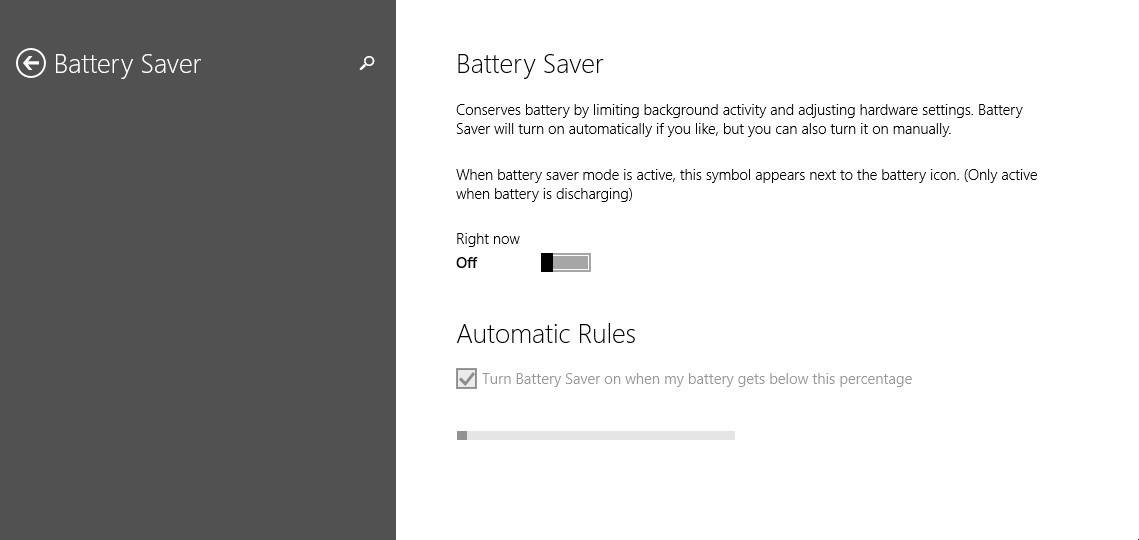
This is not the first time we have heard about this feature, but in previous leaks it was revealed that it did not work properly. This time, Batter Saver has proven it can work as it was designed to. This feature allows users to limit the background activity so that battery life improves. According to a fresh update that was released

In other words, the functions of the operating system as well as the apps will be minimized. Most probably, the display will be dimmed as well since it uses more power than any other part of the computer.

Users can activate this feature manually or they can set it to turn on automatically once the battery charge has reached a certain percentage. All you have to do is go the Setting page, click on the option Automatic Rules and choose the percentage at which Battery Saver will turn on.For the moment, these are the two settings available on Windows 10 regarding Battery Saver. Maybe the next leaks will reveal more information.

Battery Saver is a feature that has been available on mobile devices for a long time, and the fact that Microsoft has decided to incorporate it in Windows 10 proves once again that the company has turned to its Windows Phone software to look for inspiration for Windows 10.

We are really curious to see how this feature will work out for early Windows 10 users, once the operating system gets officially released. It’s another feature borrowed from Windows Phone that will make the unified OS feel much, much more mobile.

READ ALSO: Beware: Fake Windows 10 Activators are Lurking Everywhere

Microsoft announces the sale of MixRadio to popular free messaging provider LINE

Microsoft announces the sale of MixRadio to popular free messaging provider LINE

Earlier today, Microsoft announced that it had sold its MixRadio service to the popular messaging company LINE. You may remember that Microsoft itself acquired MixRadio from Nokia as part of the deal to transfer the phone manufacturer’s Devices & Services division to Microsoft.

“We wanted MixRadio to continue to operate with a commitment to constant innovation and aspiration to deliver the best possible mobile-first experience to listeners. LINE share this vision and our passion for simple, personal and fun user experiences in every way.” – Jyrki Rosenberg, Head of MixRadio

With Xbox Music already up and running at Microsoft, it seems the software giant couldn’t find a place for MixRadio within its ranks. And with LINE, the fastest growing messaging service looking to expand its offerings, MixRadio finally found a place to call home.

Microsoft announces the sale of MixRadio to popular free messaging provider LINE

“As the world’s leading mobile messenger with 170 million monthly active users in 230 countries, LINE constantly seeks to expand its range of services to become an integral part of consumers’ daily lives. Acknowledging the fact that Music and Entertainment are essential aspects in life, LINE has chosen to acquire MixRadio…” – LINE PR

Both Microsoft and LINE confirmed that the team behind the MixRadio service will continue to be headquartered in Bristol, United Kingdom, and will continue to provide the service to Lumia customers, now as a third-party application. The acquisition is expected to be finalized early next year.

New transparent Modern UI icons found in latest build of Windows 10

Windows 10

Keen to avoid the mistakes of the past, Microsoft have been hard at work in their attempts to make Windows 10 not only the OS that will return them to complete market dominance, but remove any bitter flavours left behind by the previous incarnation of their operating system.

This is reflected in their attention to detail. Following a Windows 10 leak earlier in the week, there have been a number of new features for users to pore over as they update their machines. Among these is an update to the old icon pack, which has been replaced with a new set which better reflect the Modern style that the firm seek to imbue all of their products with. Shown below, the new icons are shown in bold white, whereas the older pack is in faded grey.

Modern Icons

Compared to the old icons, the new pack offers less colour-blocking with a prominently focus on transparency, somewhat similar to potential upcoming changes to the Xbox One user interface. Whether this might indicate a new focus on transparency throughout the modern UI as a whole is yet to be seen, however it could potentially be a sign of further things to come given that this feature was offered to Windows Phone users for the first time earlier in the year. The files containing the new icon pack was titled ‘MDL2 Asset’, which among other things may very well stand for ‘Modern Design Language 2’.

These icons are expected to be featured in the next build of Windows 10 to be released from Microsoft, whether they are representative of the design language as a whole is yet to be seen, however this is undoubtedly good news for those who pay attention to the smaller things.

Are you excited by the idea of transparency in Windows 10? Let us know in the comments below.

A period of obligation ends: Microsoft kills Browser Choice for European users

Internet Explorer

Microsoft has had something of a rocky relationship with EU regulators in the past. Amid concerns over anti-trust violations and other infringements of corporate law, Redmond has had a number of restrictions placed on the means by which it conducts itself in Europe, perhaps most significantly this was displayed in the case of the Windows browser dispute.

The issue involved Microsoft being the only internationally significant distributor of computer software in Europe. Their bundling of Internet Explorer as the default browser for new computers sold in Europe constituted an abuse of their monopoly over consumer software, and as such, the EU regulatory agencies and Microsoft worked together to find a solution. That was implemented in 2009 — called the ‘Browser Choice’. Upon starting their newly purchased Windows machines, users would find themselves prompted to choose among a dozen or so browsers to act as their default. Redmond agreed to adhere to this standard of practice for a period of five years, after which they would be under no obligation to continue.

Browser war

This period has now passed, and as was expected this practice has ceased. This is a welcome change both for users and Microsoft, for though the idea was tidy in theory, it was messy in practice. The decision barely made a dent in European browser usage, moreover the market has changed massively since 2009, and previous big beasts such as Firefox now find themselves at the mercy of the likes of Google (the new EC whipping boys), being as the market now has a semblance of balance between at least two major players.

Now with Google in the limelight over search engine monopoly concerns, the road ahead now seems safe for Redmond, at least with regards to the EU. What is for sure is that, in future, Microsoft will tread just a little more lightly when walking on European soil.

Are you pleased to see the end of the Browser Choice? Let us know in the comments below.

Microsoft: Over 1.5 million Windows Insiders are testing Windows 10, roughly 450,000 are ‘highly active’

Microsoft: Over 1.5 million Windows Insiders are testing Windows 10, roughly 450,000 are 'highly activea

On October 1st, Microsoft launched the Windows Insider Program, allowing eager testers a chance to provide feedback on Microsoft’s new Windows 10 operating system. Up until this point, the builds of Windows 10 that have been offered were designed for enterprises in mind, however, anyone interested in helping Microsoft with feedback for the next version of Windows has been welcomed to participate.

In an official blog post today, Microsoft has revealed that more than 1.5 million registered users are participating in the Windows Insider Program, as of December 2014. Roughly 450,000 of those testers are considered “highly active” — meaning they are using the latest build of Windows 10 every day “putting it through its paces.”

Touting the initial success of the Windows Insider Program, Microsoft’s Gabriel Aul also stated that Windows Insiders are using Windows 10 preview builds “more actively” than beta testers from any previous version of Windows. This fact is visualized in the chart below.

Microsoft: Over 1.5 million Windows Insiders are testing Windows 10, roughly 450,000 are 'highly activea

Microsoft is set to talk about Windows 10 on January 21st, in an event hosted at the Redmond campus. A newer build of Windows 10 is expected to hit in the next few weeks — focusing on the consumer side of things.

Windows App Studio begins accepting TouchDevelop code in a recent update

Windows App Studio begins accepting TouchDevelop code in a recent update

Developing apps for the Microsoft ecosystem is extremely easy to do, because Microsoft has a huge range of tool to use. These tools range from Windows App Studio which provides templates and an easy to use interface for simple apps, to Visual Studio which is used by massive companies to develop the software we use every day. One of the tools Microsoft has created is called TouchDevelop and now it is being slowly integrated into Windows App Studio.

TouchDevelop is a tool where users can quickly make apps using simple apps on almost any device. These apps are coded with a unique UI which links together blocks of code the user pick to create the program without typing every character. Tools like TouchDevelop can act as an on-ramp to more advanced programing methods and tools like Visual Studio. By adding the ability for elements of TouchDevelop to be integrated into the Windows App Studio, Microsoft has made it easier than ever to begin making apps for Windows. 

TouchDevelop can be used on almost any device

Windows App Studio will have the ability to import chunks of TouchDevelop code to make the universal apps more fully featured. TouchDevelop can be used to create games or tools, while Windows App Studio mostly focuses on create content display apps for websites and content streams. It seems Microsoft is taking the first steps toward simplifying their novice developer tools into a more streamlined solution.

Making apps which access more of a particular device’s features enable the apps to be more powerful and engaging. Better universal apps means a stronger ecosystem for Microsoft with Windows 10. The Windows app story has always been criticized for having too few of the essential apps, but what if Microsoft enabled all of their users to create apps. Then their app store could be full of unique and regionally relevant apps for any purpose. Local restaurants, resorts, businesses, stores, and more could create their own apps for Windows in a day and showcase their products and services.

Microsoft trying to put white space to use in order to reach more people in India

Microsoft is trying to put white space to use to reach more people in India

White space is the part of the radio spectrum which has been designated to sit empty between different channels of used space. The intent of leaving empty space in the radio spectrum is to ensure that signals do not interfere with each other. Recently government agencies around the world have been opening the white space up to tech companies to use. This is possible because technology is sophisticated enough that different devices can delineate between the different signals.

In India Microsoft is trying to put that white space to use by connecting users to the web with the empty space. Implementing this plan would require special equipment on the end of the consumer, but Microsoft said they are prepared to give any devices or antenna need to people who want to connect. Putting the white space to use is a common focus of tech companies and has gained the attention of Google and Facebook as well. In the long term it makes sense for these web and software companies to spend the money now in order to connect with potential customers down the road.

Microsoft promises an FBL_AWESOME new year with Windows 10

Microsoft promises an FBL_AWESOME new year with Windows 10

Microsoft has today opened up a little more on their future plans with Windows 10, as well as unveiled a few details about how the Windows Insider Program has helped shaped Windows 10 over the last few months. According to Microsoft, the Insider Program has gained lots of momentum, with over 1.5 million registered participants and over 450 thousands ‘highly active’ users.

Not only that, but the team working on Windows 10 has made a heap load of fixes and changes based on your feedback alone. Over 1,300 bugs have been mended thanks to the continuous feedback you keep giving via the Windows Feedback app. A pat on the back for everyone indeed.

Furthermore, Microsoft has announced that they’ve got an exciting build to share in January. It’ll be part of the FBL_AWESOME branch and include a ton of UX changes and new features:

I’m itching to tell you more about stuff that’s coming. You’ll see some big things, lots of small improvements, and I hope there will be something for each of you to point to and know your influence was felt and appreciated by us. I’m confident that the next build we release will be an exciting one and will show how Windows 10 is evolving with your input.

Stay tuned as we are only a few weeks away from yet another official Windows 10 build to play with — unless of course another build manages to leak.

Windows 10 Technical Preview (build 9879) gets two hotfixes to address Explorer.exe crashes

Windows 10 Technical Preview (Build 9879) gets two hotfixes to address Explorer.exe crashes

Microsoft is set to roll out a new Windows 10 build in January, likely the January Technical Preview geared towards consumers, but that is not stopping Microsoft’s hard-at-work Windows team from rolling out two hotfixes that addresses a bug with Windows 10 Technical Preview build 9879. 

The two hotfixes have rolled out just recently and are available via Windows Update. Many Windows Technical Preview users who are running build 9879 have been experiencing frequent Explorer.exe crashes and Microsoft has taken time to fix these issues going into the new year.

This problem only affects a handful of testers (roughly 12% of those who are testing Windows 10 build 9879). The two issues deal with “the logic for low-space detection” which happens to get inverted and compressed automatically as a background operation and a second issue dealing with the file system causing the “installer to think that the temp files failed to extract correctly” resulting in the installer failing because it thinks it cannot complete.

Microsoft’s Gabriel Aul, the man who has been at the forefront of Windows 10 Technical Preview, has shown a very positive attitude towards feedback given by eager testers which is quite evident especially from the way he responds on Twitter. Microsoft has done well (so far) having this man front and center with the company’s new Windows 10 operating system and the Windows Insider Program.

Microsoft opens up registration for Windows Hardware Engineering Conference (WinHEC)

Registration for Windows Hardware Engineering Conference (WinHEC) is now open. Originally announced in Shenzhen in March, the WinHEC Summit is an important venture for Microsoft. The last WinHEC occurred in 2008 and it will be great to see what comes out of the WinHEC Summit in Shenzhen. It will be interesting to see how Microsoft connects with and learns from the various OEMs, ODMs, and other partners throughout the Asian community to see how different groups work together to make Windows devices as great as they have become in the last few years.

Microsoft Executive Vice President of the Operating Systems Group, Terry Myerson will be doing the keynote address on March 18th. WinHEC Shenzhen is a summit designed for executives, engineering managers, engineers, and technical product managers at OEMs, ODMs, IHVs, and IDHs who work with or want to work with Windows software and technologies.

Most of the agenda for the summit will focus on hands-on training and technical training sessions using a multitude of Windows hardware and software. From Windows PCs, tablets, and smartphones, attendees will have a good look on what Microsoft has been working on through the past few years. There will also be an opportunity to speak directly with Microsoft engineers and experts to get more insight on what Microsoft continues to work on to expand and grow its technology in ever-expanding new ways. 

More details to come so stay tuned!

Partners can now take Microsoft certification exams online via Pearson VUE

Partners can now take Microsoft certification exams online

After announcing its intentions earlier this year, Microsoft has today confirmed to partners that its certification exams can now be taken online, and that the online exams are available to more than 20 countries outside the United States. This makes it a lot easier for partners to take the certification exams without having to travel to testing facilities.

“We all have different ways of learning and test-taking. Some people prefer lectures, while others enjoy hands-on labs. Some prefer a traditional classroom environment, while others wish to study (and test) from their comfortable home or office. We recognize there are differences in style, and also logistical concerns – some people simply cannot take time out of a busy week to travel for a class or test.” – Burke Fewel, Director of Partner Capability Development Management, Microsoft.

Partners can now take Microsoft certification exams online

Microsoft has chosen Pearson VUE as its exam delivery provider which requires participants have a webcam connected during the exam so that the exam moderator can visually sweep the room to determine if any unauthorized materials are available. Right now, participants can choose from 50 exams available to take online, with more to be added in the future.

In order for participants to prepare for the exams, the software giant is also making the Microsoft Labs Online service available to all Silber and Gold level Microsoft partners. This enables them to purchase digital courseware, provide technical readiness for employees and help them study for competency exams among other offerings.

If you have further questions, you can check out the frequently asked questions over at the source link below.