If last week’s reveal events left you with a long wishlist, this is your chance to sample the games in action. The event highlights hundreds of demos—from gritty survival games to chill indies—many of which were featured in recent presentations.
Try upcoming games like Stellar Blade, Neon Abyss 2, and more
You’ll find popular titles like Stellar Blade, Pioner, Dead as Disco, and Neon Abyss 2 already climbing the charts. Valve’s event hub makes it easy to sort demos by genre, theme, or even quirky mechanics, making discovery a bit more fun than your average store scroll.
Steam Next Fest runs through June 16 at 10 AM PT. If you’re holding out for full-game deals, Valve’s Steam Summer Sale kicks off June 26. Until then, this is your hands-on sneak peek at what’s coming next.
Intel has dropped a new graphics driver update, version 32.0.101.6881, but don’t expect a big overhaul. This WHQL-certified driver update comes from Intel with a single fix aimed at Overwatch 2.
If you’ve been crashing on launch while using High or Ultra settings on an Intel Arc A-Series GPU, this update should fix that. The bug involved DirectX 12 and was causing the game to crash right at startup. That’s it—no performance boosts, no new features, just one much-needed patch for Blizzard’s hero shooter.
Not to forget, the driver also brings a long list of known issues. From crashes in Returnal and Spider-Man 2 with ray tracing on, to graphical glitches in Call of Duty: Warzone 2.0, users across Arc A- and B-Series GPUs may still hit snags. Adobe Premiere Pro issues also remain for Core Ultra Series chips.
The new driver supports a wide range of hardware—from Intel Arc GPUs to 11th Gen Core processors and newer. It’s available now for 64-bit Windows 10 and 11 via Intel’s website.
Mozilla is trimming its Firefox services lineup. After announcing the end of Pocket and Fakespot, the company has now confirmed that Orbit and Deepfake Detector are also shutting down.
Pocket, the popular read-it-later app Mozilla acquired in 2017, will stop working on July 8, 2025. Users have until October 8 to export their saved content. Fakespot, which flagged fake product reviews, is also being retired.
Orbit and Deepfake Detector are next to go
Folks over at Neowin spotted a shutdown notice for Deepfake Detector, Mozilla’s AI-text analysis extension. It will go offline on June 26. The same date applies to Orbit, Mozilla’s privacy-focused AI sidebar for Firefox.
Orbit gave users private, on-device summaries using Mistral 7B, but Mozilla says the built-in Firefox sidebar with third-party bots like ChatGPT will take its place.
These cuts are part of Mozilla’s shift to double down on Firefox. With fewer resources than big-tech-backed browsers, the company says it needs to focus where it counts.
Xbox Game Pass may have crossed 35 million subscribers sometime in mid-2024, based on a LinkedIn listing spotted by user Timur222 (via GameRant). Microsoft hasn’t officially confirmed the number or timing, but the milestone lines up with previous growth trends.
The service turned eight on June 1. Microsoft last shared a firm number—34 million—in early 2024. Before that, updates were more frequent, but subscriber growth has slowed in recent years. Now, the company tends to highlight growth in specific segments, like PC Game Pass, rather than the full total.
Xbox Game Pass hits 35 million, according to a LinkedIn profile
Industry estimates suggest the platform may now have over 38 million users. That would match the record revenue Microsoft recently reported for Xbox Game Pass, though no specific earnings were disclosed.
Microsoft will likely wait for a round number—40 million or more—before giving another official update. Until then, it’s loading the service with big titles from the Xbox Games Showcase, including Ninja Gaiden 4, which drops in late 2025.
Microsoft wants you to think of Surface when it comes to serious video work. In a new push, the company is highlighting its Copilot+ PCs—specifically the Surface Pro and Surface Laptop—as ideal tools for video editing, production, and creative workflows.
Surface wants to be your next on-the-go editing rig
Filmmakers and content creators juggle fast turnarounds, color grading, audio syncing, and visual effects—all without room for lag. That’s where Microsoft thinks Surface can step in.
The Surface Pro and Surface Laptop now run on Snapdragon X Elite and Plus chips, with built-in NPUs capable of 45 trillion operations per second. In simpler terms: fast enough for real-time 4K edits, AI effects, and quick rendering.
The OLED touchscreen on the Pro and the bright HDR panel on the Surface Laptop also help with visual precision when you’re editing in the field.
Both devices are also lightweight—just 1.5 pounds for the Pro and 2.7 pounds for the Laptop—and promise up to 16 and 23 hours of battery life, respectively. USB-C ports (and one USB-A on the Surface Laptop) make room for drives, cameras, and monitors when working on set.
Microsoft is tying the Surface line tightly to its AI ambitions. Copilot is baked in, offering suggestions like royalty-free music, project help, or script tips. Snapdragon Sound support also means wireless audio checks won’t sound muddy, even in the rough cut stage.
Editing tools like Adobe Premiere Pro and DaVinci Resolve are optimized for the platform, and even beginners can jump in with Clipchamp, Microsoft’s own browser-based video editor.
Microsoft is finally stepping into handheld territory with more than just compatibility. The full-screen Xbox-style UI—first seen on the new ROG Xbox Ally series—isn’t staying exclusive for long. Microsoft told The Verge it’s bringing this handheld-friendly interface to other Windows handhelds “starting next year.”
Xbox-like UI for future Windows handhelds—really?
This new interface ditches the usual desktop-and-taskbar layout in favor of a gamepad-ready shell, similar to SteamOS on the Steam Deck. On the ROG Xbox Ally, it cuts down on memory and power use, while offering quicker navigation with a controller. That’s something regular Windows installations have struggled to deliver on handhelds.
This isn’t coming out of nowhere. Microsoft engineers had already started sketching out a “Handheld Mode” back in 2022, complete with mockups showing a tile-based layout and touch-friendly controls. The goal? Fix how awkward Windows feels on small, touch-first gaming hardware.
It’s no secret Valve’s Steam Deck got a head start. SteamOS, powered by Proton, runs many Windows games without needing Windows at all. Microsoft didn’t rush to respond, and that gave Valve time to improve compatibility and expand to other hardware.
Now, with Xbox-branded UIs landing on portable PCs and coming to more devices in 2025, Microsoft is trying to take back control. Not just by offering better compatibility, but by building an experience that feels native to the form factor.
Microsoft quietly dropped support for Windows Mixed Reality headsets with the rollout of Windows 11 24H2. That move instantly bricked compatibility for a range of headsets from Acer, HP, Lenovo, Dell, Asus, and Samsung.
That’s not all; even SteamVR’s access vanished. But a surprising comeback may be in the works—and it’s not coming from Microsoft officially (via UploadVR).
One dev, a big idea, and a new driver called “Oasis”
Software engineer Matthieu Bucchianeri is building something called “Oasis”—a native SteamVR driver that bypasses the broken MR runtime entirely. This would let headsets like the Reverb G2 work with SteamVR directly, just like a Valve Index or HTC Vive.
Bucchianeri isn’t just tinkering. He’s a veteran developer with deep VR and hardware experience. His résumé includes work on the PS4 and PlayStation VR at Sony, rocket systems at SpaceX, and HoloLens at Microsoft.
He also co-created tools like OpenXR Toolkit and VDXR, and he’s been vocal about where the industry has gone wrong, particularly Meta’s past OpenXR approach. Per Bucchianeri, getting Oasis to function took a mix of heavy reverse engineering and persistence.
He insists it doesn’t break IP laws, but he’s keeping the code closed to avoid brushing up against internal Microsoft NDAs or confidential documentation.
What’s the catch?
For now, Oasis only works with NVIDIA GPUs. That’s because AMD locks down its VR direct mode more tightly, though talks are ongoing. Bucchianeri hopes to release the driver for free this fall, opening the door for cheap, secondhand Windows MR headsets to plug back into PC VR.
We’ve been covering a lot of new updates around the Phone Link feature lately, and here’s another genuinely useful one. Microsoft is now testing a shortcut in Windows 11 that lets you mirror your Android phone’s screen directly from the Start menu—no need to open the Phone Link app manually.
As spotted by Windows Latest, this new feature adds a screen mirroring trigger to the Start menu’s phone companion panel. If your Android device is already linked to your PC via Phone Link, you’ll see your phone icon there. One click, and you can instantly start mirroring the screen.
Image: Windows Latest
This builds on an already solid set of features in Phone Link. Users can transfer files between devices, send texts, take calls, and even use their phone as a webcam for the PC. Now with this Start menu integration, the workflow feels even more streamlined.
The screen mirroring shortcut is currently limited to select Android smartphones and is only available for testers in the Windows Insider Program. Microsoft is expected to expand availability to everyone in June.
It’s true that there haven’t been many leaks regarding Windows 11 25H2 at the moment. However, a few have started to pop up gradually. Well, the latest Windows 11 25H2 leak hints at smarter power management that adapts to how you interact with your device, possibly saving battery.
Folks over at Guru3D (via ExtremeTech) reported that Microsoft is working on a new User Interaction-Aware CPU Power Management feature, which should roll out with the Windows 11 25H2 update.
First tested in build 26200.5603, this setting helps Windows understand when you’re not actively using your laptop and then cuts back on CPU power to extend battery life.
Let’s say you stop typing, don’t touch your mouse, or leave the screen idle for a bit. Windows will now recognize that lull and gently shift into a lower-power state using CPU limits defined by the device manufacturer. No performance dip kicks in if you’re gaming or watching video—it’s smart enough to stay out of the way when things are active.
As soon as you move your mouse or start typing again, the CPU bounces back to full performance with no delay. The result: more efficient energy use during downtime without compromising responsiveness.
According to details shared by Guru3D, this new system uses tweaks within Processor Power Management (PPM), but only kicks in when it makes sense. If you’ve ever wanted your battery to last just a bit longer while your laptop’s idle on a desk, this might do the trick.
There’s no confirmed release date yet, but Microsoft is expected to ship this feature with Windows 11 25H2 later this year.
The two-page layout is gone. Now you get a single, scrollable view with your pinned apps at the top, followed by a Recommended section—fully optional this time—and an all-apps list shown as a grid or grouped by category.
Larger displays now benefit from an expanded layout with up to eight columns of pins, six recommended slots, and four category columns. A small but useful addition is a new toggle to expand or collapse the Phone Link pane directly from the Start menu.
Narrator now includes a Screen Curtain feature that blacks out the display while keeping it fully accessible for screen reader users. This helps maintain privacy while navigating. It’s enabled using Caps Lock + Ctrl + C.
Image: Microsoft
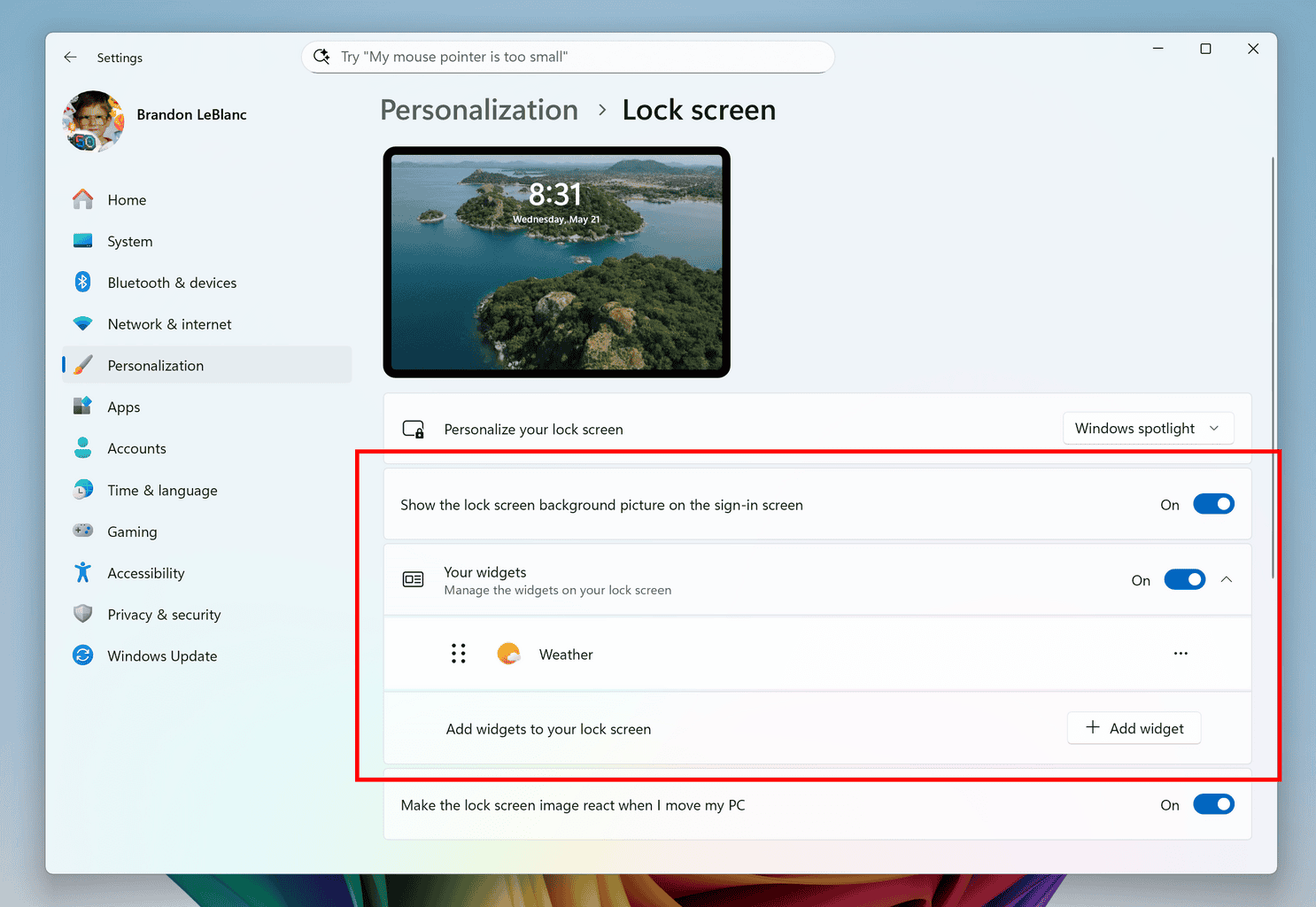
The narrator also opens with a new welcome guide that walks users through features and recent updates. The lock screen is getting smarter, too. Users can now choose which widgets appear before logging in.
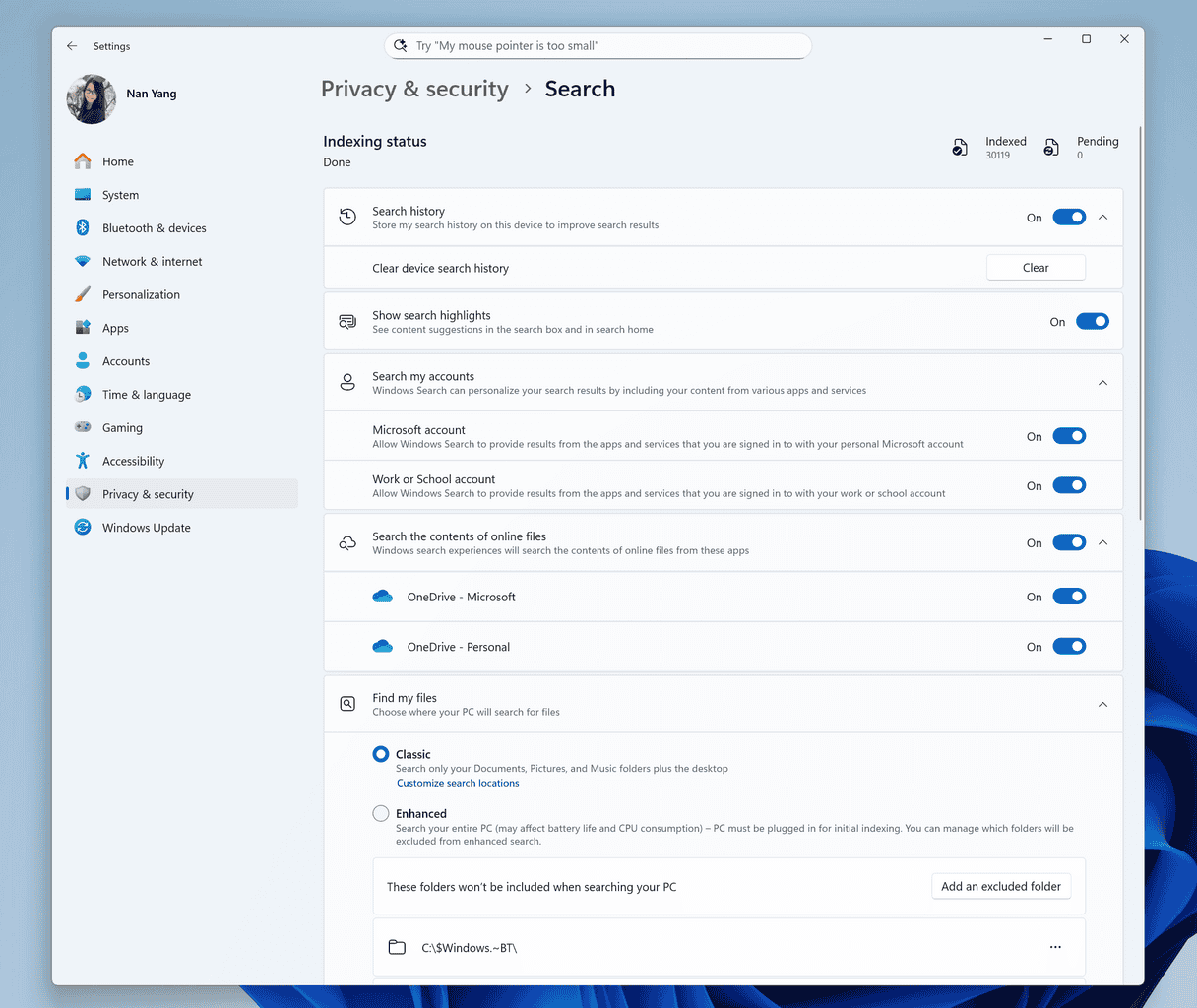
Microsoft is merging “Searching in Windows” and “Search Permissions” into one streamlined section called “Search” under Privacy & Security settings.
Image: Microsoft
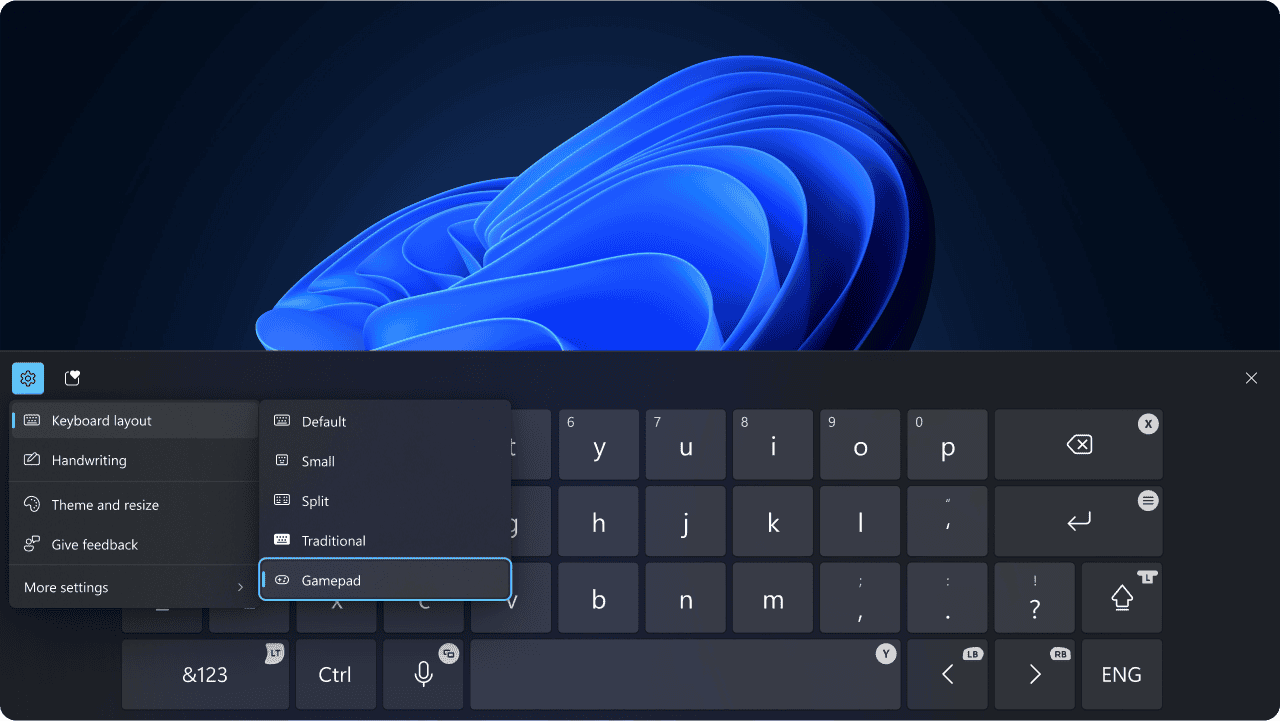
Improvements also extend to the gamepad keyboard. It now handles flyout menus, child keys, and language switching more smoothly.
Image: Microsoft
Word suggestions and focus management are more refined, and the keyboard now works reliably on the lock screen for PIN input.
This year’s Xbox Games Showcase was packed with some great announcements. However, one particular announcement sparked more frustration than hype: the price of The Outer Worlds 2.
Obsidian’s long-awaited sci-fi RPG finally got a release date—October 29, 2025—and a new cinematic trailer. But as soon as pre-orders went live, players noticed something else: The Outer Worlds 2 is launching at $79.99 for the standard edition and $99.99 for the Premium Edition. That did not go down well.
Within hours of the announcement, fans flooded Reddit and Steam with complaints. One post, featuring a screenshot of the Steam page, went viral.
“Well, the pre-order prices are live and they’re ******* expensive!” said one Redditor, comparing it to a Premium Edition they grabbed earlier this year for just $50.
Image: Reddit/@Successful_Page_4524
Others on Reddit had similar reactions to The Outer Worlds 2’s price. What’s interesting is that in the UK, prices are listed at £69.99 and £89.99. That’s the same pricing we’re seeing for Bethesda’s DOOM: The Dark Ages, another Xbox-owned title from yesterday’s showcase.
This pricing trend isn’t limited to Microsoft. Nintendo lit the fuse earlier this year when it priced Mario Kart World at £74.99/$79.99. Since then, the dominoes have begun to fall. To be fair, both The Outer Worlds 2 and DOOM: The Dark Ages will be available on Xbox Game Pass on day one. However, that only helps if you’re already subscribed.
PC and Xbox players benefit. PlayStation players? Not so much. For now, The Outer Worlds 2 lands on October 29, and if you’re not on Game Pass, better brace your wallet.
YouTube has started displaying messages asking users to find out why they are experiencing “interruptions,” linking to a YouTube Help document. This comes as Manifest V3 led to the downfall of the UBlock Origin extension, with its developer claiming that the extension now works best on Firefox.
It’s no surprise that Google has begun pushing notifications to users who have enabled ad blockers, urging them to turn them off, citing that “Ad blockers violate YouTube’s Terms of Service.”
Here is the warning message recently received by Firefox users, according to a Reddit thread:
Ad blockers violate YouTube’s Terms of Service. It looks like you may be using an ad blocker. Video playback is blocked unless YouTube is allowlisted or the ad blocker is disabled. Ads allow YouTube to be used by billions worldwide.. You can go ad-free with YouTube Premium and creators can still get paid from your subscription.Allow YouTube ads. Try YouTube Premium. Not using an ad blocker? Report issue”
YouTube is encouraging users to disable ad blockers, arguing that doing so supports the revenue of content creators. It also suggests subscribing to YouTube Premium. From Google’s perspective, this might seem fair, but for users, it feels like they are being forced to watch ads. Not everyone can afford YouTube Premium, yet many still prefer an ad-free experience.
Recently, we noticed that YouTube displays ‘Experiencing Interruption’ warnings when uBlock Origin is enabled in Firefox. The message, along with a link, directs users to a YouTube help page urging them to check browser extensions, including ad blockers:
“Check your extensions, including ad blockers. Check whether your browser extensions that block ads are affecting video playback. Alternatively, try opening YouTube in an incognito window with all extensions disabled to see if the issue persists.”
This issue is not limited to Firefox, as Brave users with ad blockers enabled have also reported receiving similar warnings, according to a community forum post.
All in all, Google wants users to refer to its official help page for resolving issues related to blocked YouTube videos due to ad blockers.
Microsoft has officially revealed its new line of ROG Xbox Ally gaming handhelds. Both ROG Xbox Ally and Xbox Ally X are powered by AMD Ryzen chips and a customized version of Windows 11.
Built for gaming and designed from the ground up, the new Xbox Ally devices run a streamlined version of Windows 11 Home that sheds all the usual desktop weight. The Verge reports that Microsoft tapped longtime Xbox OS engineers to cut the clutter and tailor the system for handheld performance.
“We were able to take people who have been working on the Xbox OS for 20 years or more and have them work directly on the Windows codebase and start reimagining what that operating system looks like for this form factor,” said Jason Beaumont, VP of experiences at Xbox.
“When the player boots into the full-screen experience, there is a whole bunch of Windows stuff that doesn’t get loaded.”
That includes skipping the desktop, taskbar, and background processes you don’t need mid-game. The result? Faster startup, better focus, and more resources for your games.
According to Xbox’s Brianna Potvin, players can gain back “about 2GB of memory” just by skipping unnecessary Windows components. She also noted the device pulls “one-third of the idle power” compared to launching into full desktop mode.
Roanne Sones, CVP of gaming devices and ecosystem, added that Microsoft is also trimming down pop-ups and system noise to “continue to listen to feedback from players to make continued improvements.”
All that said, it’s Windows 11 reworked with gamers in mind—and these new Xbox Ally handhelds might just prove that less really is more.
Owlcat Games is diving into sci-fi with The Expanse: Osiris Reborn, a third-person, story-driven action RPG based on the hit TV series and books. Known for isometric titles like Pathfinder and Warhammer 40K: Rogue Trader, the studio is shifting gears to deliver a cinematic, choice-heavy RPG more in line with Mass Effect.
Set during the first two-and-a-half seasons of the show, players take on the role of a Pinkwater Security mercenary trapped on Eros Station. You’ll build your own captain—Martian, Belter, or Earther—assemble a squad, fly your ship, and travel to iconic locations like Ceres and Mars.
Owlcat promises party-based combat with real-time gunplay, branching dialogue, and romance options. Some actors from the show are even returning, though no names yet. The team openly cites Mass Effect as a core influence, and they’re leaning into the moral complexity and grounded sci-fi tone that defines The Expanse.
No release date yet, but The Expanse: Osiris Reborn is coming to PS5, Xbox Series X|S, Steam, Epic, and GOG. And despite juggling other projects, Owlcat says this is their “flagship.”
ChatGPT now feels less like a voice assistant and more like someone you know. In a post on X, the company rolled out a major update to Advanced Voice Mode, and it’s one of the most human-sounding AI voices yet.
It adds realistic cadence, soft pauses, emotional cues, and even manages to sound empathetic or sarcastic when it needs to. If you’ve used it before, you’ll immediately notice the upgrade. Think of it as the difference between a monotone audiobook and a friend telling you a story.
Advanced Voice Mode, which runs on OpenAI’s GPT-4o, is now capable of translating languages live in conversation. You can simply ask it to “start translating,” and it’ll keep going until you say stop, replacing the need for most translation apps.
OpenAI says responses come in as little as 232 milliseconds, with an average of 320 ms. That’s close to how quickly humans reply in real life. Voice Mode also got a few improvements earlier this year, including better handling of interruptions and accents.
The updated Voice feature is rolling out now to paid ChatGPT users. OpenAI admits there are still some quirks, like slight pitch shifts or the occasional weird audio blip.
Jony Ive, the design legend behind Apple’s most iconic products, is now working with OpenAI. After acquiring Ive’s startup “io” in a massive $6.5 billion deal, OpenAI has pulled the curtain back just a little on what Ive is building. According to Bloomberg, it’s not just one AI gadget—it’s a whole AI hardware lineup.
In his Power On newsletter, Mark Gurman noted that Ive is already shaping a range of experimental AI devices under OpenAI’s roof. One standout concept is a wearable—something like a pendant—that you’d wear around your neck. This thing won’t look like a phone, but it may end up replacing one. It’s reportedly built to let you interact with ChatGPT on the go, using just your voice.
Another is a home assistant-style device, designed to sit on a table like a smart speaker. But instead of just reading the weather, it would tap directly into ChatGPT’s capabilities—maybe even with more personality than your typical AI speaker.
Then, there’s the most sci-fi project of all: a robot. Still very much in the early stages, this thing is supposed to form an emotional relationship with its user. Think of it less as a robo vacuum and much more as an AI companion.
OpenAI CEO Sam Altman called Ive the “best designer in the world” when announcing the acquisition. Apple execs like Eddy Cue are already predicting a post-iPhone future, and OpenAI’s hardware ambitions might be arriving right on time.
At the end of the Xbox Games Showcase 2025 livestream, the Microsoft Gaming CEO confirmed three major 2026 releases: a brand-new Fable, the next Forza, and what he called “the return of a classic that’s been with us since the beginning.” It’s worth noting that Tom Warren, from The Verge, first spotted it. Here’s a tweet from him.
here's Xbox chief Phil Spencer announcing Gears of War: E-Day for 2026, and in the same year "the next Forza" and a tease of a Halo CE remaster pic.twitter.com/tTueF3YQcR
That “classic” mention has fans locked in on one likely candidate: a full-blown remaster of Halo: Combat Evolved. The long-rumored project, reportedly built in Unreal Engine 5, could be the first time the original Halo makes its way to PlayStation hardware, signaling another major shift in Xbox’s multiplatform strategy.
The comment also confirmed that Gears of War: E-Day will hit sometime next year, now with a window. But the Forza mention might’ve been the biggest stealth reveal. It’s the first time anyone’s acknowledged a new game in the series is coming, and right now, there’s no clarity on whether it’s Forza Horizon 6 or another motorsport-style release.
Spencer framed it as a way to celebrate 25 years of Xbox, with a lineup aimed squarely at long-time fans. “I’m excited to share that players will get to celebrate 25 years of Xbox with a new Fable, the next Forza, Gears of War: E-Day, and the return of a classic that’s been with us since the beginning,” he said.
If Halo really is coming back in a newly rebuilt form, the only question left is how far Microsoft’s willing to go with it. The Master Chief Collection already offers a remastered version of the original game, but a full Unreal Engine makeover might finally give Combat Evolved the modern upgrade fans have been hoping for.
Fallout 76’s latest update might be its chillest yet. Yesterday, at the Xbox Games Showcase, Bethesda highlighted the recently dropped “Gone Fission” update, and it brings something the apocalypse was missing: fishing.
You can now grab a rod, find a pond (or puddle), and start catching fish across Appalachia. If you can swim there, you can fish there. Over 30 weird and wonderful fish are waiting to be reeled in, whether you’re hanging out solo or swapping wasteland war stories with friends by the water.
But it’s not just about the catch—there’s cooking too. The update adds a ton of new recipes at your Cooking Station, letting you turn your fish into proper, stat-boosting meals. To get started, head to a new location in the Mire: Fisherman’s Rest.
It’s where you’ll meet some curious characters—The Fisherman, a blank-eyed Captain Raymond Clark, and a massive hermit crab named Linda Lee (who also happens to live in Clark’s wrecked fishing boat). They’ll walk you through a new questline called Casting Off, and hand you your very first rod.
From there, you can take on daily fishing challenges, chase rare “Local Legend” fish, and collect unique rod styles, bobbers, reels, and bait types. You can even decorate your gear with some pretty wild looks.
Also new to the update? Axolotls. They’re adorable, slightly mutated, and there’s a new one to track down each month. Bethesda’s creative director, Jonathan Rush, says, “We can’t wait to see what our tenacious trawlers fish out of the Appalachian waters!”
For weeks, rumors swirled that Persona 4 was getting the full remake treatment — and now it’s official. During the 2025 Xbox Games Showcase, Persona 4 Revival made its debut with a brand-new trailer, and yes, it’s just as stylish as you hoped. Not to forget, Call of Duty: Black Ops 7 was also announced at the same event.
The updated visuals breathe new life into the rural town of Inaba, where the game’s quiet start quickly unravels into something far darker. You arrive as a transfer student expecting an ordinary school year, but the mysterious Midnight Channel, a series of strange murders, and your awakening Persona powers pull you into a shadowy world beneath the surface.
What follows is part high school sim, part supernatural murder mystery, and all JRPG greatness. Persona 4 was already considered a modern classic — now it looks set to win over a new generation with this gorgeous Revival edition.
The remake will be available on Xbox Series X|S, PC, Cloud, and Game Pass on day one. And yes, thanks to Xbox Play Anywhere, your progress moves with you. Sadly, we don’t know any release date yet, as the trailer didn’t mention it.
Surprise: Final Fantasy XVIis now live on Xbox. No countdowns, no build-up—just a full-on shadow drop during the Xbox Games Showcase. The Xbox launch includes Echoes of the Fallen and The Rising Tide, two DLC chapters that expand the story and add Leviathan as a new Eikon to command.
If you’ve never touched XVI, here’s what to expect: towering kaiju battles, some of the slickest real-time combat the series has ever had, and a main character, Clive Rosfield, who’s basically revenge incarnate. The story swings big, the voice acting is top-tier, and the boss fights? Total chaos—in the best way.
Square Enix and Xbox are clearly in sync again. After bringing Final Fantasy XIV to Xbox last year, they’re now following through on another big ask from fans. Final Fantasy VII Remake Intergrade—yes, the enhanced edition with Yuffie’s DLC—is officially coming to Xbox this winter.
That means Xbox players are finally getting to catch up on some of the biggest single-player Final Fantasy titles that were missing from the ecosystem for years. With Play Anywhere support and cross-saves in place, you can pick up your story wherever you are.
PowerToys Run, an already popular utility tool within the Microsoft PowerToys suite, will become even more popular as it adds three new plugins: SpeedTest, Definition, and VideoDownloader. Now, beyond app launching and quick search, you will be able to check internet speed, find word definitions, and download videos from the web.
What are the features?
SpeedTest Plugin
This plugin uses Ookla’s Speedtest CLI to check your internet speed locally, so you don’t have to worry about third-party tracking or ads. It also supports both x64 and ARM systems. To use it:
Press Alt + Space to launch PowerToys Run.
Type spt. You will be presented with a new window displaying your speed results, along with an option to share the results via a link.
Definition
This plugin provides you with definitions of words, pronunciations, phonetics, usage examples, and synonyms. To use it:
Launch PowerToys Run.
Type def followed by the word you want to search for.
VideoDownloader Plugin
This video downloader plugin allows you to download videos from YouTube and other websites. You can select the quality, download format, and even the save location. To use it:
Open PowerToys Run.
Type dl followed by the URL of the video.
How can I install them?
As these are not available by default, you need to install them. To do that:
Grounded 2 is heading into the suburban wilds this July, and things are about to get a whole lot stranger. Obsidian is back with a full sequel, and this time the action moves beyond the lawn and into the overgrown chaos of Brookhollow Park.
It’s still tiny kids versus giant bugs, but now with new biomes, new gear, and—for the first time ever—rideable bugs.
Built in collaboration with Eidos-Montréal, Grounded 2 launches into Game Preview on July 29, with the same survival-meets-slapstick tone that made the first game a surprise hit.
There’s a new all-in-one Omni-Tool for smoother crafting, combat, and building. There are new bug types crawling out from every direction. The team clearly hasn’t been shy about digging through player feedback—the game’s stuffed with community-requested features that longtime fans will recognize immediately.
Whether you’re hopping in solo or dragging friends along for co-op mayhem, Grounded 2 opens up more right from the start. Not to forget, you can ride the bugs, too. The story kicks off stronger, the systems are deeper, and the world feels more reactive than ever, thanks in part to the 25+ million players who shaped the original into a fan favorite.
Ninja Gaiden 4drops on October 21, and it’s not just a sequel. It’s a full-blown reboot of the franchise’s signature chaos, built as a powerhouse collaboration between Team Ninja and PlatinumGames.
The debut trailer wastes no time. We meet Yakumo, a new-gen ninja prodigy cutting his way through swarms of enemies with wild precision.
Weapon switching is near-instant. Combos are brutal. That’s not all; Bloodbind Ninjutsu is back in all its messy glory, alongside revamped Ninpo arts and a whole spread of new tools you’ll get to master mid-fight.
Visually, it’s a blend of sleek Tokyo neon and crumbling dystopia. The city feels alive and overrun, and boss fights are massive, screen-filling battles that look pulled straight from a fever dream.
You can expect to see Seori—a new character who might be an ally, rival, or both—and a shadowy link back to none other than Ryu Hayabusa. The torch is being passed, but the legacy’s still sharp.
The Xbox Wire team reportedly got hands-on with the game. Team Ninja’s combat bones are still here, but Platinum’s flair adds a fresh, stylish edge that makes Ninja Gaiden 4 feel like a franchise reborn, not just revived.
After Windows 2025 April Patch Tuesday update for Windows 11, and 10, some of the users noticed a new C:\inetpub folder, an empty folder in their devices with Internet Information Systems not enabled, which made them suspicious and many of you might have deleted it.
What is inetpub folder?
Microsoft has confirmed that the folder is not malicious and is a part of a security fix for CVE-2025-21204, a privilege escalation vulnerability, and it must not be deleted, irrespective of the fact whether IIS is active.
For systems with KB5055528 installed but %systemroot%\inetpub directory deleted, immediate remediation is required. If the inetpub directory has been deleted, you need to run the remediation script Set-InetpubFolderAcl.ps1.
While Microsoft is calling a part of security patch, some of the security researchers found out that this could help the threat actors to block the future security updates. However, if we check the MSRC log, it is categrozied as moderate severity, meaning this should be a matter of concern.
What can I do to restore it?
Microsoft has released a powershell script to restore the folder if you have deleted it. The script will be doing the following:
This script sets the security permissions on the directory inetpub. The script is designed to be run as an administrator.
If inetpub directory does not exist, it gets created and default IIS permissions are applied to the directory.
If an empty inetpub directory exists, the default IIS permissions are applied to the directory.
If inetpub directory exists and only contains the sub-directory DeviceHealthAttestation, default IIS permissions are applied to both directories.
If inetpub directory exists and contains any other sub-directories, the script exits without making any changes.
Remember that you need admin privileges to run the script and for more instructions, you can check out the powershell script here.
The chainsaw is revving again—only this time, Gears of War isn’t just staying on Xbox. Gears of War: Reloaded, a full remaster of the original game, officially drops on August 26, 2025, and it’s hitting more platforms than ever: Xbox Series X|S, PC, Steam, Cloud, and for the first time in franchise history—PlayStation 5.
The trailer shows off the same iconic third-person combat and cinematic drama that helped define the Xbox 360 era, now rebuilt with 4K textures, 60 frames per second in Campaign, and up to 120 FPS in Multiplayer. Cross-play and cross-progression are both baked in, so your progress moves with you, no matter where you play.
And before launch, you’ll get to test it all for yourself. A multiplayer beta kicks off on June 13 and runs for two weekends.
It’s open to Game Pass Ultimate members, Game Pass PC users, anyone who owns the digital edition of Gears of War: Ultimate Edition, and fans who preorder Reloaded. It’s happening across all platforms, so PlayStation players can finally get a taste of COG warfare firsthand.
If you’re curious about how this remaster came together, Xbox is sharing more behind-the-scenes details, including an official podcast with the team at The Coalition. It’s been nearly two decades since Marcus Fenix first kicked down a door. This August, he will be kicking down a few new ones.
Microsoft rolled out a new update for its Edge Beta Channel, which changes the browser version to 138.0.3351.14. With this feature, you gain access to a range of new AI-powered enhancements, designed to improve productivity, enhance performance, and improve usability. The update also includes bug fixes and policy changes for enterprise users.
What are the new features?
AI-powered history search
AI-powered History Search feature is designed to help you find previously visited websites even if you don’t remember the URL or name. With an on-device AI model, this feature understands synonyms, typos, and phrases, making your search easier. Additionally, if you are concerned that Microsoft will collect your data with this feature, you have no reason to worry. The company has already stated that user data will remain on the device and will never be shared with Microsoft servers. It will roll out gradually, and you will be able to manage it using the EdgeHistoryAISearchEnabled policy in the future.
Centralized media control
With Media Control Centre (music note icon on the toolbar), you can manage audio and video content playing in different tabs of your browsers. You can play, pause, skip tracks, launch picture-in-picture mode, or cast media to other devices with ease.
Better profile management
Now, all the external links will open on MS Edge using the Primary Work profile by default. Previously, the browser would open it in the last used profile. For Enterprise users, the Primary Work Profile, when signed in with Microsoft Entra ID, provides a consistent experience. Admins will be able to manage it using the EdgeOpenExternalLinksWithPrimaryWorkProfileEnabled policy.
Autofill is more intelligent
With Microsoft Edge 138, you get a new toggle in the personal information settings. This setting allows users to continue sharing web content from field labels, including First Name, Email, and more, which helps the browser understand structures and improve autofill accuracy.
Other enhancements
The Chat with Copilot option in the context menu allows you to get a quick summary and interact with the webpage through Microsoft 365 Copilot.
You can now view Microsoft Information Protection (MIP) sensitivity labels in the built-in PDF viewer of Microsoft Edge, which helps maintain data compliance.
Edge has introduced performance-related alerts in the settings menu, including options to increase browser speed and address browser lag issues.
Policy updates
BuiltInAIAPIsEnabled: For accessing Edge’s built-in AI APIs.
TLS13EarlyDataEnabled: For configuration of TLS 1.3 Early Data settings.
Some older policies related to private network access have been removed.
Microsoft Edge 138 Beta version will be available for download via the Microsoft Edge Insider website, with a stable release expected by June 26, 2025.
To learn more about this update, you can check out the release notes here. If you want to learn what’s new with the Edge browser lately, you can check out our latest news section.
Double Fine is back doing what they do best: making the kind of game no one else would dare to dream up. Keeper, their newest third-person adventure, arrives October 17, and the first trailer already feels like a lucid dream. It’s weird. It’s beautiful.
Guess WHAT? It features… a lighthouse that walks. The story begins when a long-dormant lighthouse collapses into rubble, then suddenly reassembles itself and walks upright, ready to explore a strange island teeming with mystery.
You play as that lighthouse, casting beams of light that shift the world around you, opening pathways and revealing secrets. A feisty seabird companion tags along, and together you set off toward the heart of an unknowable island that seems to react to your every move.
The trailer doesn’t give too much away—and honestly, that’s part of the appeal. There’s a surreal energy to it all, a sense that you’re about to take a journey that won’t explain everything, but will definitely make you feel something. Think Journey meets Inside with a dose of psychedelia and just enough Double Fine oddness to keep you wondering what’s coming next.
Want more insight into the story behind Keeper? Xbox has a deep-dive feature up now, including developer interviews and concept art that makes it clear this game is more than just a quirky idea—it’s a full-on emotional ride in the making.
The wait is almost over. The Outer Worlds 2 is set to launch on October 29, 2025, and it’s ready to pull players back into a galaxy gone sideways. This time, the action centers on Arcadia—a remote colony cut off from the rest of the system, wracked by faction wars and dangerous space rifts threatening its very existence.
Building on the original’s mix of sharp satire and player-driven storytelling, The Outer Worlds 2 promises bigger worlds, deeper RPG systems, and choices that actually matter. Your alliances will shape the fate of Arcadia, but so will your knack for making deals—because in this fractured world, survival isn’t just about firepower, it’s about who you trust.
The game expands its toolkit with new companions, enhanced movement and combat mechanics, and a fresh arsenal of science weapons and armor. Full character customization lets you craft the hero—or anti-hero—you want to be. Whether you sneak, fight, or talk your way through, the chaotic world responds to every move.
Featured at the Xbox Games Showcase 2025 and detailed further in The Outer Worlds 2 Direct, this sequel isn’t just a follow-up. It’s a bold evolution that challenges players to take control of chaos and decide what kind of future Arcadia will have.
Are you ready to step up? Because the colony needs a hero. And for now, that hero’s you. You can pre-order the game now.
For the first time in franchise history, developers Treyarch and Raven Software are delivering two Black Ops games back-to-back, with Black Ops 7 officially on the way.
Set in the year 2035, the world is unraveling. The fallout from Black Ops 2 and Black Ops 6 has left the globe teetering on the edge of all-out collapse. Psychological warfare has replaced conventional battle tactics, and fear has become the deadliest weapon.
Now, under the command of David Mason, the Black Ops team has to face an enemy who doesn’t just fight with guns, but with the human mind. This time, players aren’t alone. The campaign is built around a fully playable Co-op mode, so you can team up with friends and dive into the chaos together.
Multiplayer is bringing fresh near-future weapons and brand-new maps, all wrapped in the high-speed, twitch-reflex gunplay the series is known for. And yes—Zombies is back, weirder and darker than ever. The next round-based chapter drops you straight into the heart of the Dark Aether storyline, with a new mystery to unravel and new horrors to face.
The full reveal of Call of Duty: Black Ops 7 is coming later this summer. But one thing’s clear already—this is going to be one of the most ambitious entries the series has seen in years.
The game will be available on Xbox Series X|S, Xbox One, Xbox PC, Xbox Cloud, and Xbox Play Anywhere. You can play it day one on Xbox Game Pass – also available on Battle.net, Steam, PlayStation 5, and PlayStation 4.
Microsoft finally unveils the ROG Xbox Ally and Ally X Specifications
The standard Xbox Ally runs on AMD’s Ryzen Z1 processor, with 16GB of RAM and 512GB of SSD storage. The Xbox Ally X bumps things up to a Ryzen Z1 Extreme chip, 24GB of RAM, and a full terabyte of SSD space.
Image: Microsoft
Image: Microsoft
Both models support microSD cards, so expanding storage won’t require any proprietary nonsense. They also have the same display: a 7-inch, 1080p screen with a 16:9 aspect ratio, 120Hz refresh rate, 500 nits of brightness, and anti-reflective Corning Gorilla Glass Victus. FreeSync Premium support rounds out the visual experience.
But let’s be honest—these handhelds are not light. Both the ROG Xbox Ally and Ally X measure 290.8 x 121.5 x 50.7 mm. The base Xbox Ally weighs 670 grams, making it slightly heavier than the Steam Deck, while the Xbox Ally X adds even more heft at 715 grams.
Image: Microsoft
However, Microsoft claims that the grips are styled after the Xbox Wireless Controller, and in early hands-on footage, they appear to be significantly more ergonomic than those of the Steam Deck or even the Switch.
The ROG Ally X also comes with a larger battery—80Wh compared to the ROG Xbox Ally’s 60Wh—which should help with longer play sessions. Both handhelds include dual USB-C ports with DisplayPort 2.1 and Power Delivery 3.0.
The ROG Ally X has one port that supports Thunderbolt 4. Each model includes a charging stand in the box, and you’re also getting modern extras like Wi-Fi 6E, Bluetooth 5.4, a 3.5mm headphone jack, and support for video output to TVs or monitors.
Not to forget, both devices support HD haptics, motion controls via a 6-axis IMU, two assignable back buttons, and trigger tech that mirrors what PlayStation did with DualSense. The ROG Ally X includes impulse triggers for extra control, while the standard ROG Xbox Ally uses hall effect analog triggers.
The power of Xbox with the freedom of Windows
These handhelds don’t lock you into the Xbox ecosystem. Sure, you can play native Xbox titles, stream from your console or the cloud, and access Game Pass. But Microsoft made it clear—this is still Windows. That means you can also install games from Steam, Battle.net, and other storefronts without jumping through hoops.
Image: Microsoft
Xbox Game Pass integration is there from day one, alongside Xbox Play Anywhere, which syncs your progress across platforms once you buy a title. The interface has been reworked to feel more console than PC. There’s a full-screen Xbox UI, complete with a physical Xbox button that brings up the Game Bar overlay.
Image: Microsoft
It lets you swap between games and apps, adjust settings, start party chats, and more—just like on an Xbox console. Windows 11 has also been tuned for handheld use, with changes to the lock screen and task switcher so you’re not stuck fumbling with a touchscreen. ASUS’ Armoury Crate software offers quick access to performance controls and input settings, too.
Release date, pricing, and availability
You won’t have to wait long either. Both devices are launching this holiday season. Microsoft hasn’t shared pricing just yet, but it says more details on cost, pre-orders, and accessories are coming soon. The launch will roll out to over 30 countries, including the US, UK, Japan, Canada, Germany, India, and Australia.
Also—if you blinked during the showcase, you might’ve missed it, but Hollow Knight: Silksong popped up in the reveal trailer. No release date, of course, but it was there.
Indiana Jones fans, get ready to dive back into adventure. Indiana Jones and the Great Circle is expanding with a new DLC chapter titled The Order of Giants, coming September 4, 2025.
Announced at Xbox Games Showcase 2025, Indy heads beneath the busy streets of Rome to unravel a dark mystery tied to the Nephilim Order. The DLC slots right into the main game’s timeline, adding layers to the story and sending players into uncharted territory.
You’ll explore Rome beyond the usual Vatican City walls, confront old enemies and fresh threats, and chase the legend of a colossal beast lurking in the shadows. It’s the kind of ancient secret you might want to think twice about disturbing.
The Order of Giants will be available on Xbox Series X|S, Xbox PC, Xbox Cloud, Steam, PlayStation 5, and through Xbox Play Anywhere. If you grabbed the Premium Edition, Premium Upgrade, or Collector’s Edition, this DLC is already part of your package.
Speaking of your favorite Xbox games, The Outer Worlds 2 is arrivinng October 29. Don’t forget to check it out too.
Microsoft Edge already supports extensions on Android, including a built-in ad blocker, as well as uBlock Origin, UBlock Origin Lite, and others. Now, Microsoft appears to be adding extensions to the Edge browser on iOS as well. That makes Microsoft Edge on mobile the only browser app to support extensions.
According to a Reddit post, the latest beta build of Microsoft Edge for iOS has quietly added support for extensions, allowing users to install them. Currently, the extensions are hidden behind flags.
Here is how to install extensions in Microsoft Edge on iOS
Launch Microsoft Edge Beta
Visit edge://flags
Find and enable “Edge iOS Web Extension” and “Edge iOS Web Extension Web UI”
Restart Edge browser
Visit edge://extension to browse and install extensions. According to the Reddit thread, as of now, there are currently 13 extensions available, with Microsoft promising more to come soon.
As you might know, extension support on iOS is limited. However, Safari supports extensions via the App Store, while the Orion Browser claims full extension support.
Microsoft has added a yellow banner to the Settings app on Windows 11, advising you to take a backup of your PC. This banner is drawing criticism as it’s disruptive, difficult to dismiss, and in some cases, blocks access to their PCs.
The persistent yellow banner in Windows 11 Settings prompts you to back up your system frequently using OneDrive. If you want, you can click Continue to create a backup.
This may seem like a minor reminder, which seems harmless. Still, many users have complained that the notification can’t be dismissed permanently, as it reappears after a few days, which is annoying. Many users referred to it as an advertisement for OneDrive’s paid storage plan rather than a recommendation or alert.
What’s more alarmingly frustrating is that after rebooting, this backup prompt escalates into a full-screen message that blocks system access, preventing you from logging in until you interact with the message.
Brien Posey, an IT professional, shared an example where his remote PC was running AI models, which became inaccessible due to a post-reboot alert covering the screen. And to regain access, he had to intervene manually, which stopped important tasks and demonstrated how these interruptions could slow him down and disrupt his workflow. Posey said:
This kind of interruption isn’t just annoying—it can stop automated tasks and force downtime. There’s currently no reliable way to permanently disable these prompts.
Users and experts, especially using Windows 11 Pro, are urging for a clearer opt-out option so that they can have better control over such notifications. So far, Microsoft has not addressed this concern and has not mentioned whether a group policy setting exists to suppress these messages.
Do you also find this Windows 11 backup prompt annoying? Tell us in the comments section below.
If you’re looking for a clean and modern taskbar look, the TranslucentTB utility tool for Windows 11 is a great option. You can make your taskbar transparent or add blur effects. This third-party, lightweight, free customization app is available on the Microsoft Store and can give you more control over desktop appearance.
What are the key features of Translucent TB?
Clear mode: Helps you get a clean, and modern destop look.
Different blur styles: Multiple options including Acryclic, Opaque, and Fluent allows you give a persoanlized touch.
Custom profiles: Allows you to set different styles based on events like Start menu open, connected monitors, or maximized windows.
This open-source tool barely consumes system memory and can easily be integrated on startup.
How can I use TranslucentTB on Windows 11?
Launch Microsoft Store from the start menu, click the search icon and type TranslucentTB.
Click Get to install it.
Once installed, launch the app and make desired changes to your taskbar.
You can change your desktop visually and access advanced settings from the system tray, as well as make other changes to personalize your taskbar on Windows 11. The app stands out as it is a great way to customize your desktop and taskbar without adding bloat and complexity.
What do you think about TranslucentTB? Share your thoughts in the comments section below.
If you’ve been waiting for Microsoft to do more with its Photos app on Windows 11, that wait’s finally paying off. A new update rolling out across all Insider channels brings fresh features tailor-made for Copilot+ PCs, including a powerful lighting tool, better photo search, and expanded access to AI editing for work accounts.
Relight brings pro-level lighting tricks to your fingertips in Microsoft Photos
The standout feature here is called Relight, and it’s exclusive, for now, to Copilot+ PCs powered by Snapdragon chips. With it, you can place up to three light sources in a photo, tweak their color and brightness, and focus them on one point in the image. It’s like staging a tiny photo shoot after the fact, except without complicated sliders or layered edits.
There’s also a set of lighting presets for quick fixes, whether you’re cleaning up a poorly lit shot or adding some drama with more creative styles. AMD and Intel Copilot+ PCs will get the feature in the coming months.
Another major upgrade is semantic photo search. You can now type natural phrases like “kids at the beach” or “snowy hike last winter”, and the Photos app will show you matching results — no more guessing filenames or scrolling through folders.
Image: Microsoft
This smarter search taps into the same AI indexing used across Copilot+ PCs, but it works only on locally saved and indexed files in your Pictures Library (for now).
Microsoft is also opening up its Restyle Image and Image Creator tools to commercial users signed in with Entra ID — previously, these were only for personal Microsoft accounts. It’s a quiet but meaningful step toward making AI-powered photo editing feel more integrated in the workplace. To try these features, make sure your Photos app is updated to version 2025.11060.5006.0 or newer.
It’s official. After months of speculation and vague teases, Capcom has finally unveiled the next mainline Resident Evil game—and it’s not just “Resident Evil 9.” It’s Resident Evil Requiem, and yes, it’s as haunting as it sounds.
Resident Evil Requiem (Resident Evil 9) Release Date
If you were watching Summer Game Fest 2025 hoping for a quick teaser or title drop, Capcom gave you far more than that. Not only did we get the chilling name reveal, but Resident Evil Requiem already has a release date: February 27, 2026. It’s headed to PS5, Xbox Series X/S, and PC.
But not everything was crystal clear. In a surprise moment, executive producer Jun Takeuchi showed up at the event only to admit he wasn’t quite ready to “announce anything”—just before the game’s terrifying trailer rolled. Well, Capcom was being Capcom.
The trailer itself is a masterclass in atmospheric dread. We meet a new protagonist, Grace, who’s returning to the hotel where her mother died. Long-time fans may have expected Rose (from Resident Evil Village) to lead the story, but Capcom seems to be taking a different route. Also teased? A return to Raccoon City—because, of course.
We didn’t get any solid gameplay footage, so it’s still unclear whether Requiem will be first- or third-person. What we did get, though, is arguably the most terrifying trailer the series has delivered so far.