Chrome now knows your default browser on Windows, thanks to Microsoft

Microsoft Windows sometimes keeps the information about uninstalled default browsers in the Registry. This could lead to problems if you uninstall your default browser and don’t set a new one. Clicking on links might result in no action. Microsoft’s proposed change enables Chrome to use a more reliable method to identify the default browser for HTTP and HTTPS links.

For example, if you use Firefox, Chrome, and Edge on Windows with Firefox being the default, uninstalling Firefox and not setting a new default can confuse Windows. Clicking links might then lead to nothing happening.

Microsoft helps Chrome to know your default browser on Windows

Now, Microsoft has proposed a change where Chrome will use a newer, better way to ask Windows which browser is the default. This is done using a modern API (Application Programming Interface) that Windows provides for more accurate results. Chrome using this modern API asks Windows “Hey, which browser should I use for links?” Windows gives the correct answer, and Chrome uses this information to open links correctly.

This change makes Chrome more reliable when you click on links, especially if you’ve changed your default browser or removed it. Chrome double-checks with Windows to ensure you are using the browser you prefer.

In summary, Microsoft has noticed that Chrome’s way of figuring out your default browser is based on outdated registry information in Windows. They suggest using a newer method provided by Windows to fix the issue.

Apart from this, chrome is getting revamped Google Lens Search on desktop powered by Gemini AI, and the browser can show Password suggestions right from the context menu, useful when automatic password generation doesn’t work.

ARM wants to dethrone x86-based processors with a new strategy

ARM Holdings wants to seize a part of the Windows PC market. Yet, the PC industry always focused on Intel’s x86 architecture. Besides, the x86-based PCs were around for longer. On top of that, most PC software, peripherals, and accessories use x86 drivers. However, Rene Haas, CEO of the UK chipmaker and semiconductor designer, believes ARM-based processors will be as successful on Windows PCs as on Apple.

Are Arm-based processors better than their competitors?

According to Canalys Insights, ARM-based processors represent less than 1% of the Windows PC market. However, compared to the x86-based processors, they are more energy efficient and performant. Also, the ARM processors are suitable for cloud computing, edge computing, and AI implementation.

In addition, there are PCs based on ARM processors, but they have some compatibility and pairing issues. For example, most ARM PCs aren’t for gaming because game developers build them for x86 systems.

ARM Holdings plans on bringing more products to chip away the Windows PC Market share from the x86-based CPUs. To do this, the company will work with various suppliers to provide multiple units with ARM-based processors, Stock Keeping Units (SKUs), price points, and experiences to customers. For instance, Windows on Arm started supporting Chrome this year.

Qualcomm and Asus partnered to bring the Snapdragon X Elite SoC (system-on-a-chip) and new gaming ARM-based PCs to the market. However, according to Rene Haas, multiple suppliers will join the race and create new systems with ARM-based processors in the following years.

ARM PCs have better efficiency and performance compared to their competitors. Also, their battery life lasts longer. Besides that, ARM-based devices don’t need an active fan to attain high performance. So, we might get silent PCs in the next few years.

Ultimately, ARM Holdings expects significant growth in the next three years. In addition, based on what Rene Haas said, more manufacturers will start focusing on ARM-based technologies. So, even if the upcoming Snapdragon X Elite SoC is for premium systems, manufacturers could design new ARM-based processors for a larger audience.

Will you get an ARM-based PC? Let us know in the comments.

Nvidia Blackwell superchips can cost up to $70, 000, estimates say

Nvidia is the leading chip developer, and we have seen some high-quality chips from Nvidia over the years. As you know, the company plans to focus on AI, with its Blackwell series.

Speaking of which, we finally have an estimate of how much these chips will cost, and the prices are as high as you might expect.

We finally have the Nvidia Blackwell price estimate

Not that long ago, we wrote about how Microsoft and Nvidia are working on Blackwell superchips and now we finally have an estimate on how much these chips will cost.

As Tom’s Hardware writes, the GB200 superchip that combines CPU and GPUs could cost up to $70,000. With Nvidia selling entire servers, it’s expected that B200 NVL72 servers to cost up to $3 million a piece.

This information comes from the firstadopter on X.

According to the HSBC estimates, the entry model, B100 GPU, will have an average price ranging between $30,000 and $35,000.

As for servers, the GB200 NVL36 server with 36 GB200 superchips is expected to cost $1.8 million. Keep in mind that these are just the entry models, and higher-end models will cost more.

Compared to the previous generation, GB200 superchips are about five times more powerful in terms of performance, which justifies their price.

Do keep in mind that these are just estimates, and the actual prices might differ depending on many factors.

As for availability, we know that NVIDIA’s GB200 will go into production in September, and we might see them in near future.

Ghost of Tsushima Director’s Cut will support crossplay on PC but not on Steam Deck

All set for release on May 16, 2024, Ghost of Tsushima Director’s Cut will have crossplay support, but there’s a catch. Actually, there are three!

First, the game will support crossplay for the PC version but not on the Steam deck. This is due to the multiplayer mode requiring Windows to get features available on the PlayStation Network.

Second, Ghost of Tsushima Director’s Cut will be marked as Unsupported on Steam Deck for the same reason.

Nixxes Software, the game developer, shared the information in a post on X (formerly Twitter).

We know many of you are eager to play Ghost of Tsushima Director’s Cut on handheld gaming devices like the Steam Deck. We’re happy to share that the single player experience, including the Iki Island expansion, can be enjoyed on Steam Deck and similar handheld gaming PCs as we’ve worked extensively to optimize performance and deliver the best possible experience on these devices.

You may notice that Steam marks the game as ‘Unsupported’ for Steam Deck. This is due to the Legends co-op multiplayer mode requiring Windows to access PlayStation Network integrated features.

PSN sign-in requirement also affected Helldivers 2 players, with thousands dropping negative reviews on Steam. The developers ultimately had to cancel the account linking update!

But it seems like that’s not the case with every title. Sony is making PSN account linking mandatory this time around. It even removed Ghost of Tsushima Director’s Cut from regions without PSN access.

Coming to the third and last catch. Crossplay in Ghost of Tsushima Director’s Cut will be in Beta testing and won’t be automatic. So, you can expect changes to the functionality in the coming days based on the feedback.

As for the automatic part, players will have to invite friends on a Windows PC, PS 4, or PS 5 to the PlayStation Network to enjoy crossplay. Nixxes Software explains it in the official post.

As previously announced, Legends co-op multiplayer mode will include cross-play between players on PS4 consoles, PS5 consoles and PC. Legends will be functional on PC at launch, but you won’t be automatically matched with players on different platforms. Cross-play will launch in beta, meaning you can try it out by inviting your PlayStation Network friends. We would love your feedback as we continue to make adjustments in the weeks following launch!

The PlayStation blog has been updated to include the information.

If you are keenly waiting for the PC version of Ghost of Tsushima Director’s Cut, Nixxes Software has shared the launch schedule detailing the exact time it will be released across regions. Although, the game is available for pre-download on Steam.

PC launch schedule for Ghost of Tsushima Director’s Cut (Image source: Nixxes Software)

Besides crossplay support on Ghost of Tsushima Director’s Cut, there’s another feature you should be excited about. PlayStation trophies are coming to PC!

What do you feel about the PSN account linking requirements? Share with our readers in the comments section.

Firefox 126 released, letting you copy links without site tracking

Firefox is a rather popular web browser, due to its privacy features, and if you’re a fan of Firefox, you’ll be pleased to hear that a new version was just released.

That’s right, Firefox 126 is now available to anyone, so without further ado, let’s see what this version has to offer.

Firefox 126 is here, brings the ability to copy URLs without tracking, and more

Not that long ago, we wrote about Firefox 126 beta, and now we’re happy to announce that the final version is here.

The most interesting change in this version is the ability to copy URLs without tracking parameters.  This option is available in the context menu, and it can be found while copying links from the page or the address bar.

The feature can block over 300 tracking parameters from links, so you’ll never share any trackers via links again.

As for other improvements, Firefox now supports Content-encoding: zstd, as well as Catalan language in Firefox Translations.

There is good news for NVIDIA users as NVIDIA RTX Video Super Resolution and NVIDIA RTX Video HDR features are now available in Firefox, thus enhancing the quality of videos.

This version also brings AV1 hardware decode acceleration on macOS for M3 Macs. We also have some good news for developers as the split console feature is here, allowing you to have your console anywhere in the Developer Tools.

The update has also added support for other web development features, and you can find more information about it on Mozilla’s release note page.

This is a decent update, especially if you’re tired of dealing with tracking URLs, so go ahead and download the new version.

In other news, Firefox 127 is testing the ability to close duplicated tabs, and this version will also get Bounce tracing protection as well as a profile manager.

Minecraft turned 15! Expect 15 days of Character Creator gifts and huge discounts

Can you believe it? Minecraft is turning 15 years old and Mojang has been teasing the event since the beginning of the month! It’s still pretty wild to think that this game, which has become a global phenomenon, has been around for a decade and a half. To mark this milestone, Xbox and Mojang Studios are rolling out the red carpet with 15 days of celebrations and gifts that promise to be a real treat for fans.

Now, I’ve seen people stretch their birthday celebrations over a weekend, but dedicating two weeks to celebrate the world’s best-selling video game? That’s on another level, especially when you consider that Minecraft has sold over 300 million copies worldwide.

What can you expect from the Minecraft 15th anniversary?

Starting from May 15th, players are in for a treat with 15 days of deals, themed gifts, and surprises. Imagine logging in each day to find a new Character Creator item waiting for you, totally free! That’s 15 new items to collect, each representing a different year of Minecraft’s rich history. It’s like a mini-adventure every day, wondering what cool new item will pop up next.

And it’s not just about collecting items. The Minecraft Birthday Bonanza teaser has hinted at even more exciting things to come. With words like download, share, watch, and play being thrown around, it feels like we’re on the cusp of something big. Could it be related to the upcoming Tricky Trials Update that’s set to bring new paintings and music to the game? Only time will tell, but the anticipation is definitely building.

Speaking of which, according to Mojang’s 15th anniversary announcement, you will also have up to 50% OFF for a lot of Minecraft games and the Minecraft for Mobile version will have an up to 70% discount in this period.

We’ve saved the best for last. You can also snag 500 minecoins to spend in the Minecraft Marketplace. That’s a nice little bonus to start the celebrations. And the best part? These festivities aren’t just confined to the game. Minecraft’s Instagram page will be buzzing with daily updates, giving players a sneak peek at the items being released each day. It’s a great way to stay in the loop and make sure you don’t miss out on any of the fun.

So, if you’re a Minecraft player, the next 15 days will be all about fun and joy in the pixelated world. Happy birthday, Minecraft!

Valheim’s Ashland update is not available on Xbox yet, here’s how to get it

Valheim’s Ashland update has been garnering a lot of attention, primarily due to the wide array of new weapons, ammunition, building items, locations, and a series of fixes. But many running the Xbox or Microsoft Store versions can’t locate the Valheim Ashlands update, let alone install it!

Developers have already acknowledged the problem in the official blog post. It reads,

Unfortunately there are currently some issues with the Microsoft and Xbox versions of Valheim, which means there will be a slight delay in getting the update properly uploaded there. However, the current version on Xbox Flight is the same as the version coming to live, so crossplay will still be possible between Xbox Flight and Default Steam games.

Although it fails to mention a specific timeline, there’s a vital piece of information towards the end. It states that the latest version, 0.218.15, is already available on Xbox Flight.

For the unversed, Flight here refers to the Xbox Insider Channels. So you can get your hands on the latest Valheim Ashlands update by switching to an Xbox Insider Channel. Many have confirmed that the update is available to insiders!

The process involves joining the Xbox Insider Channel > restarting the console > going to Manage games > choosing Valheim > checking for updates > then downloading the Ashlands update.

After becoming an Xbox Insider, you can also crossplay with PC players. The functionality wasn’t working properly in the recent while!

What’s new in the Valheim Ashland update?

The release notes for the latest update list the following improvements

– 30+ New weapons
– New bombs and ammunitions
– 3 New armour sets
– 2 New capes
– 10+ New creatures
– 70+ New buildable items
– 5 New crafting station upgrades
– 30+ New crafting materials
– 15+ New food items and potions
– New locations
– New music
– New events
– New mechanics

Fixes and Improvements

– Fixed Mead materials
– Standardised texts throughout the game
– Various fixes and improvements

Go ahead and download the Valheim Ashland update. It shouldn’t be a problem anymore. If you don’t want to go through all the trouble, wait for a few days, and the update should be out for stable Xbox channels and the Microsoft Store.

Also, in case you don’t know, there’s a new Xbox feature that will automatically install updates even before they go live!

What’s your favourite thing about the Valheim Ashland update? Share with our readers in the comments section.

Microsoft’s PC Manager promotes Bing Search as preferred repair tip

The Microsoft PC Manager app recently got a slew of new monitoring and repair features that include enhanced file clean up, partition management and suggested Repair Tips that cleverly help to promote Bing Search.

The Microsoft PC Manager app is seemingly endorsing monitoring and repair options that now promote Bing as part of its Repair Tips suggested improvements, following a recent update.

When using Microsoft PC Manager, the app will scan Windows to identify which browser and search engine are being used to determine the best suggested repair option going forward, and it just so happens that Microsoft Edge with Bing Search is the preferred repair option.

If users aren’t particularly scrupulous or detailed oriented, it’s easy to mistakenly switch their default browser and search engine to Edge and Bing with a single click as part of a pre-selected repair option in the Microsoft PC Manager’s menu.

Microsoft has been increasingly getting on the nerves of users sensitive to garish marketing and advertising tactics in Windows 11, and the new self-preferential suggested Repair Tip of Edge and Bing in the Microsoft PC Manager app could feel like another line being crossed by the software provider.

The Edge and Bing suggested repair tip feels especially wrong because it’s also seen by Windows users who already use the platforms.

Just so you know, the Microsoft PC Manager app was developed by company engineers based in China and that an official US launch could be delivered sans Edge and Bing suggestions. Microsoft has habitually attempted to cross the delicate line of advertising versus suggesting and in most instances, swift and vocal feedback from Windows users has won out in the practical application of this new self-promotion effort.

Maybe this new Edge and Bing suggestion will be as short-lived or infrequent as previous attempts. We would appreciate your thoughts in the comments below.

The new GitHub prompt repo can help you use Copilot more efficiently

AI is almost everywhere. Recruiters are looking for people experienced in AI. Companies try to implement this technology. Many of us use AI tools to learn new things. It feels like the world is revolving around AI. That’s why most of us should understand how to craft better prompts. Fortunately, Microsoft shared some Copilot prompts in the GitHub Repo to inspire us.

How can you add prompts in the GitHub prompt repo?

The Copilot prompts repo from GitHub is community-led. In addition, it has some of the samples shared by Microsoft. So, feel free to use them or to look around for new ones. Besides, you can add new prompts, and there are two ways to do that. If you are familiar with the GitHub repo, follow the steps below.

  1. Fork the repository: This first step is easy. You need to open the GitHub Prompt Repository and press the Fork button underneath the search bar. Then, create a copy.
  2. Clone a new branch: Make a copy of the fork repository and create a new branch with a unique name based on its purpose.
  3. Add a new folder: In the samples folder, create a new one but follow the naming method <apphost-functionality-prompt>. For example, if your prompt is for a PowerPoint introduction slide, you will name it ppt-introduction-slide-prompt.
  4. Add a readme file: Copy an existing readme.md file and add it to your folder. Then, change its text to match your prompt’s description.
  5. Create an assets subfolder: In this folder, you should store any images and gifs that refer to your prompt.
  6. Copy the sample JSON file: You can get the file from the sample folders. Then, add it to your assets subfolder.
  7. Update the JSON file: Edit the sample.json file to match the details of your prompt.

Someone else could add the prompt for you

In addition, if you encounter any issues with the instructions above, you can ask someone else to add your prompt sample to the GitHub repo. To do this, open an issue and post an image and prompt. Afterward, someone from the community will review it. Also, you will get full credits for your discovery.

Rabia Williams advises contributors to create a pulled request from their forked repos’ new branch to the main branch. Like this, others from the community could review and approve prompts in their free time.

Ultimately, the GitHub prompts repo could eventually help you, especially if there are a lot of contributors. Besides, the process to add them is not complicated. Also, if you don’t have time to follow the instructions, the community can add your prompt and credit you for it.

Do you have any prompts to add to the GitHub repo? Let us know in the comments.

How to Install Windows 11 on a New PC Without an Operating System

A new PC comes as is without an operating system unlike ones that only require an upgrade to the latest Windows 11 OS.

Without an operating system, a PC can only perform basic functions. You may be able to boot it but you’ll probably only be able to access the BIOS menu. To perform other functions, you’ll need to install an operating system so here’s how to start from scratch.

How do I install Windows 11 on a new PC without an operating system?

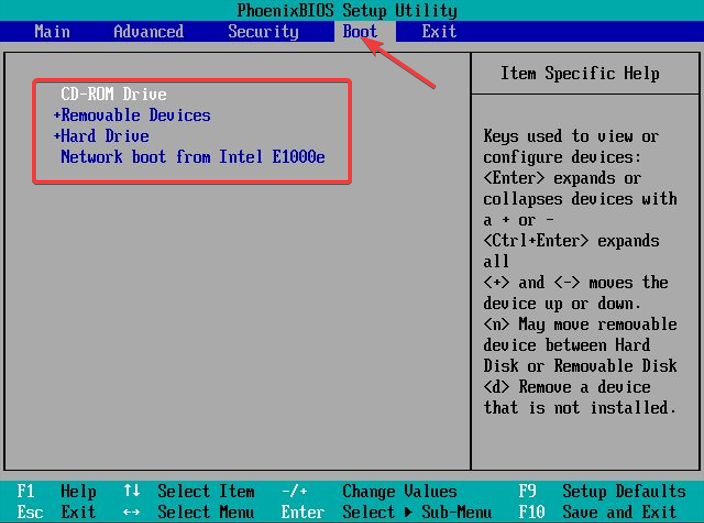
1. Change boot priority

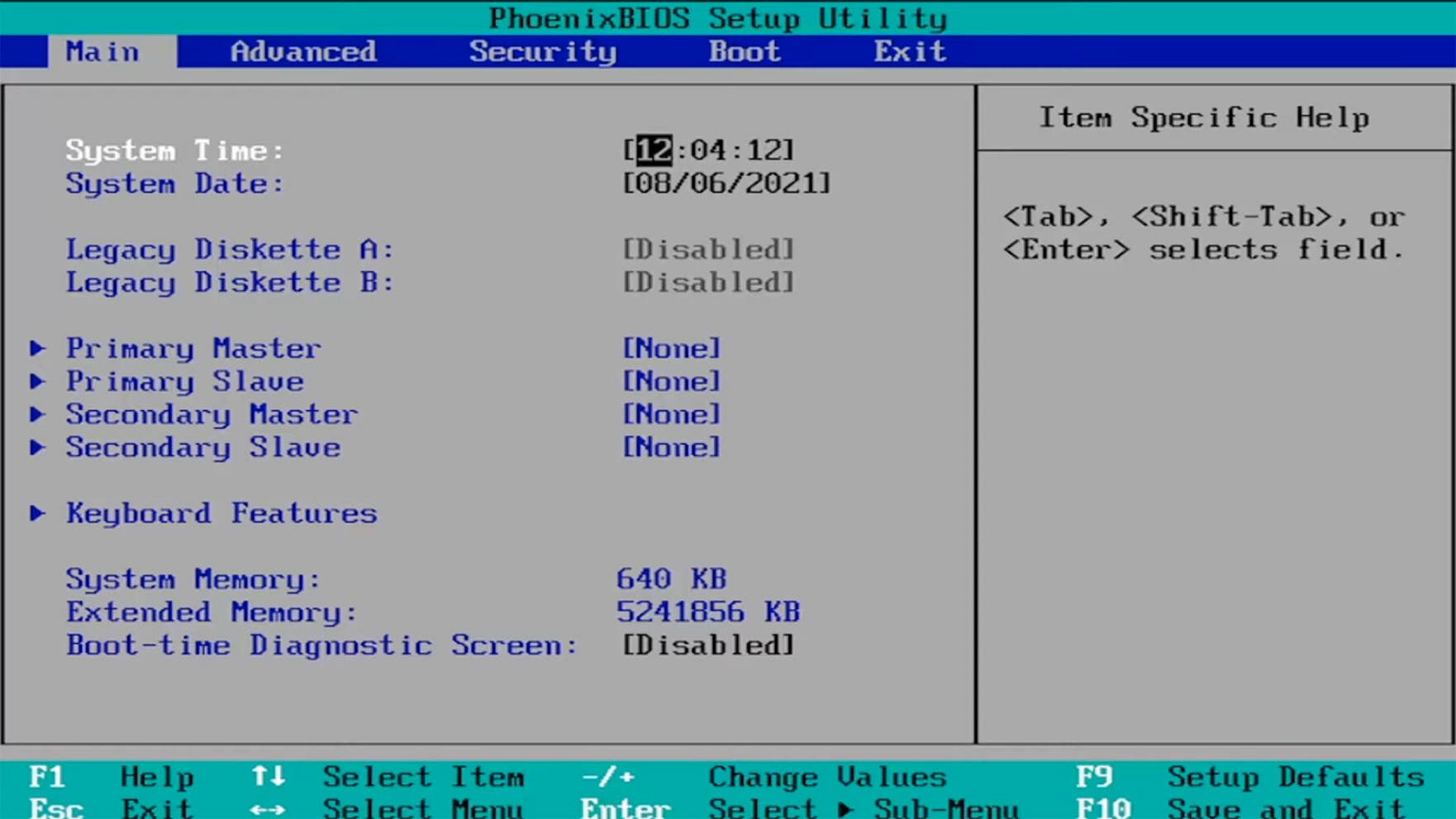
  1. Open the BIOS settings by pressing the F10, F2, F12, F1, or DEL keys constantly when the computer starts.Open BIOS
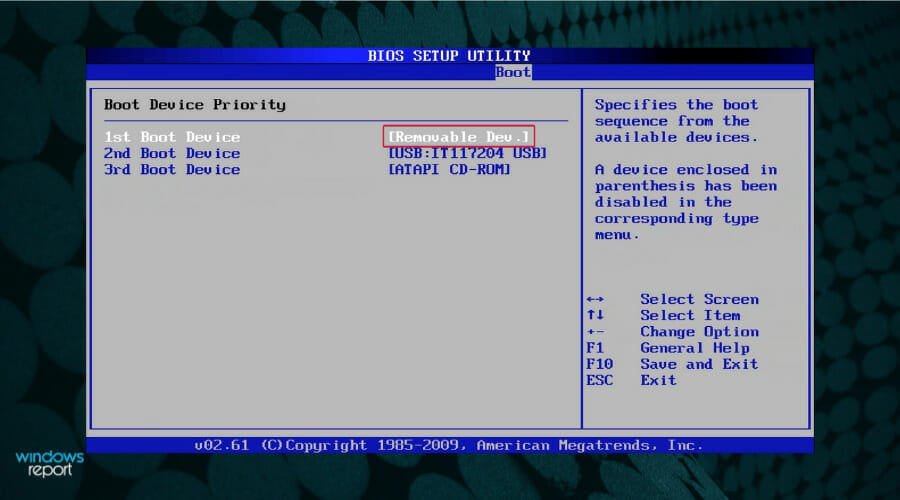
  2. After that, switch to the Boot tab. Then, under Boot Option Priorities, select Removable Drive s your preferred option and press Enter.

2. Download the Windows 11 Media Creation Tool

2.1 For PCs that meet Windows 11 system requirements

Note icon NOTE
For this procedure, you will need a USB flash drive of at least 8 GB in capacity.
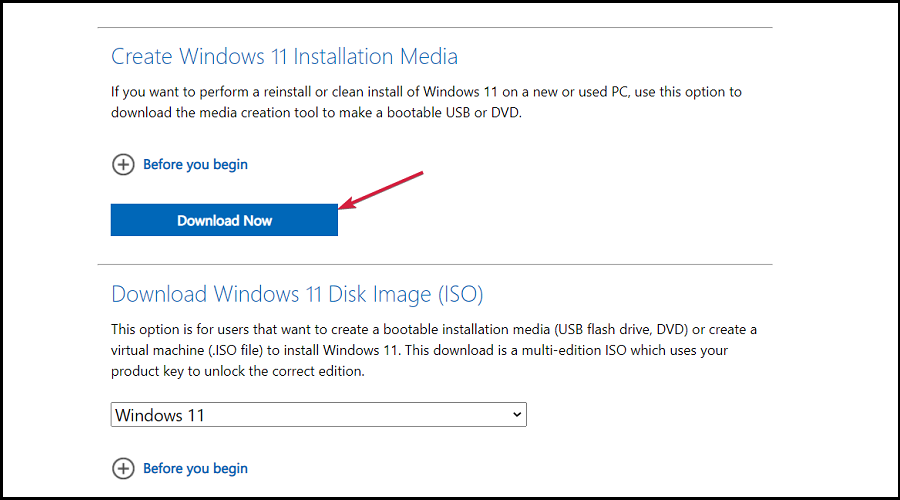
  1. Navigate to your browser and go to the Windows 11 Downloads page and click on Download now under Create Windows 11 Installation Media, to download the Windows 11 Media Creation Tool.
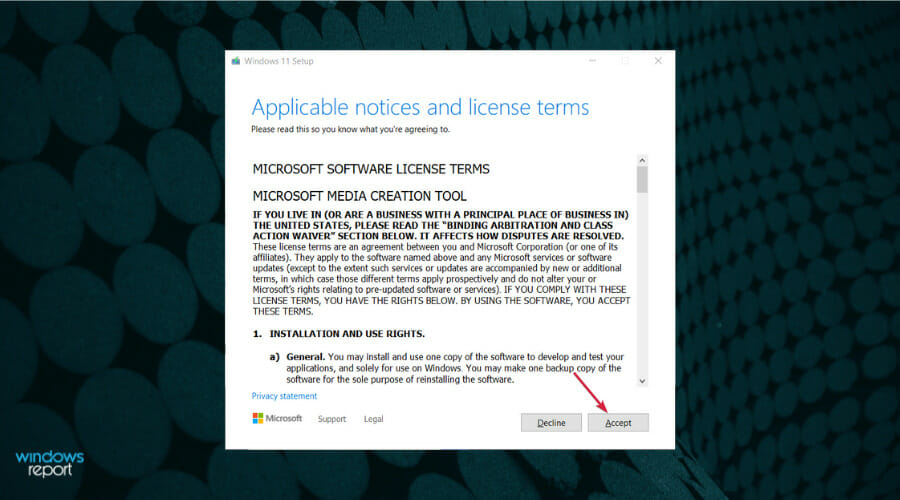
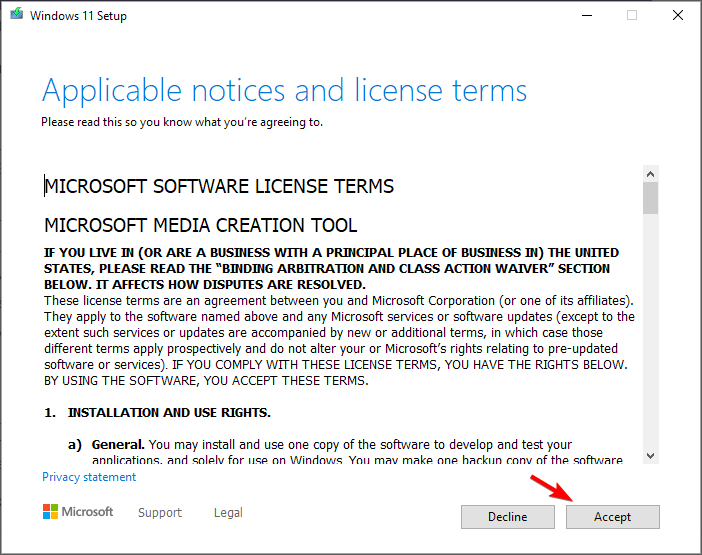
  2. Run the downloaded file to start the Media Creation Tool app. Start by accepting the license terms.
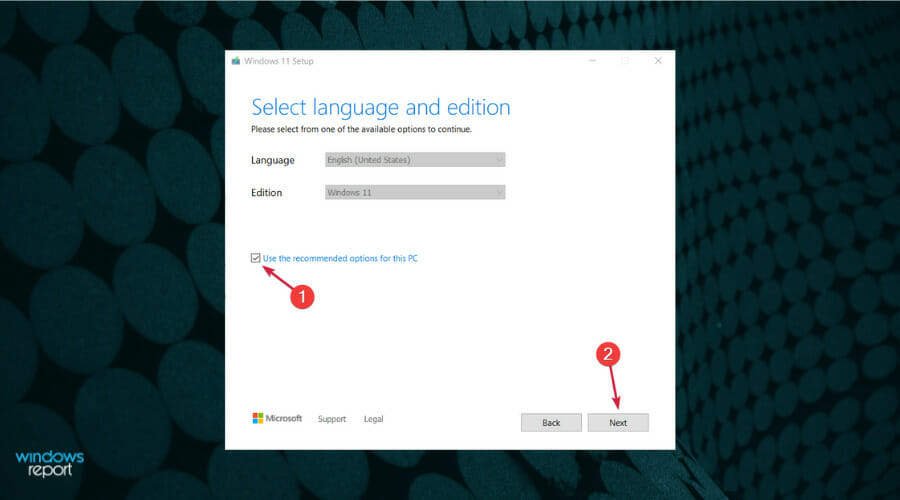
  3. Uncheck the Use recommended box if you want to change the Windows language, then hit the Next button.
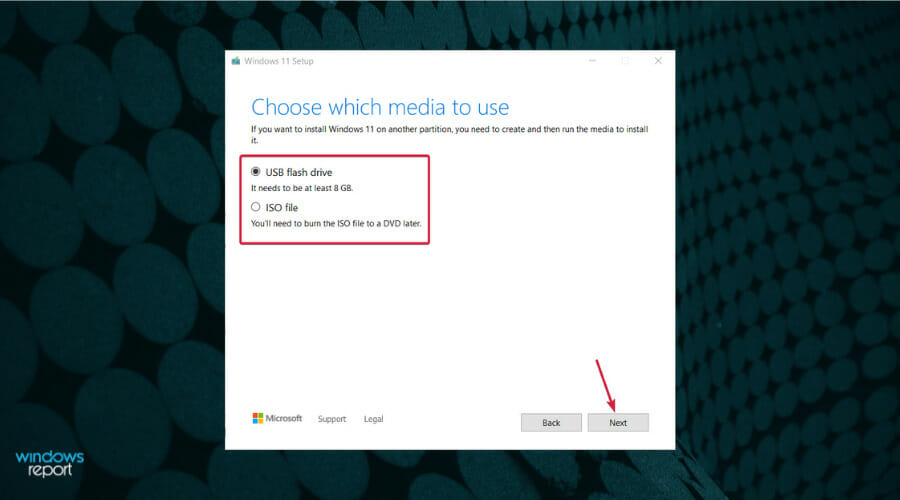
  4. Next, you can choose whether you want to create a bootable USB drive or just to save the Windows 11 ISO and use it later. Insert your USB drive and select the first option then click Next to create a bootable USB drive.
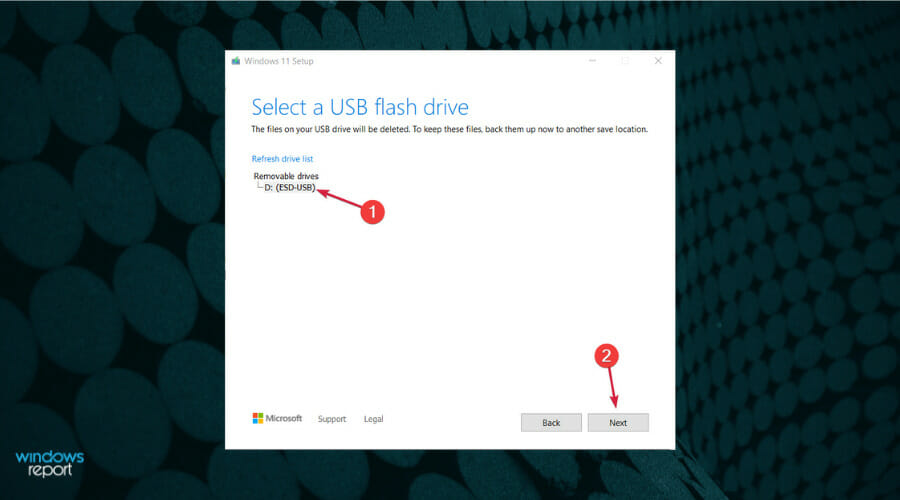
  5. Now select the drive you prepared and hit Next.
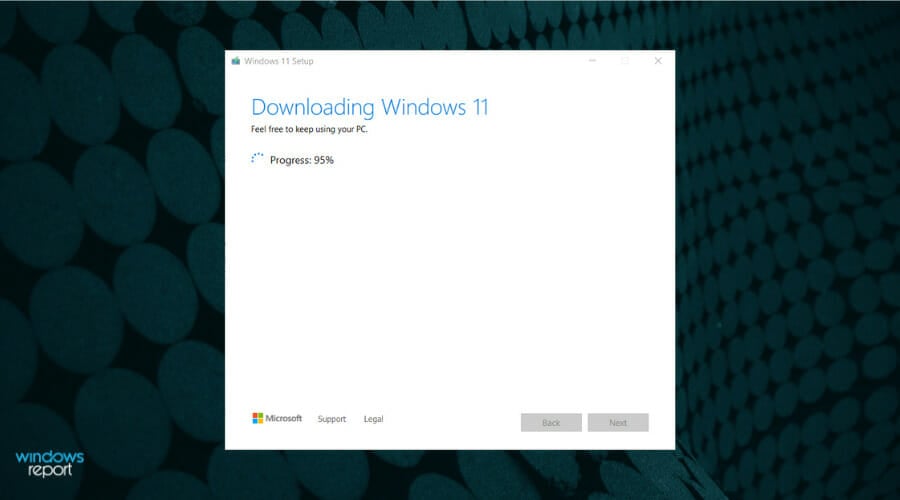
  6. The app will start downloading Windows 11, then verify the download and ultimately creating your Windows 11 bootable media you can use to install the new OS.

If your new PC meets the Windows 11 system requirements, the Windows ISO file from the official Microsoft site is the way to go. This ensures you get the most up-to-date version of Windows.

Need a detailed walkthrough to create the installer? Follow this step by step guide to make a Windows 11 bootable USB drive.

2.2 For PCs that don’t meet system requirements

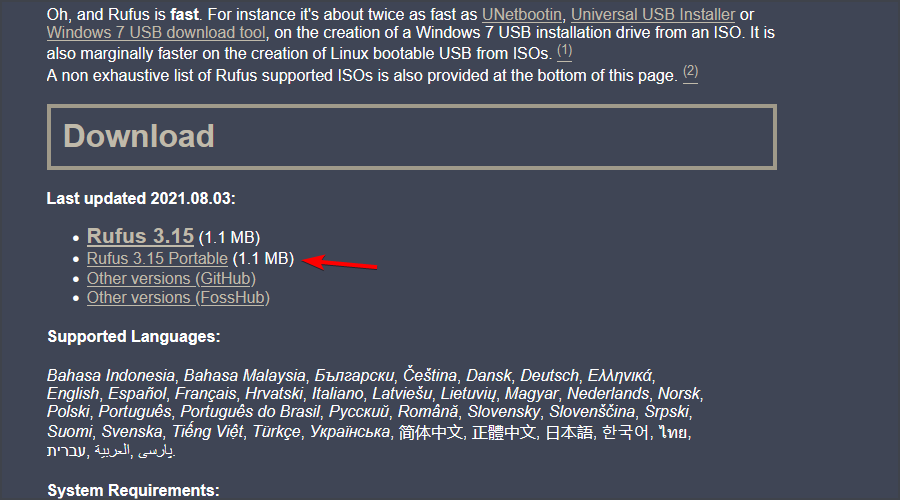
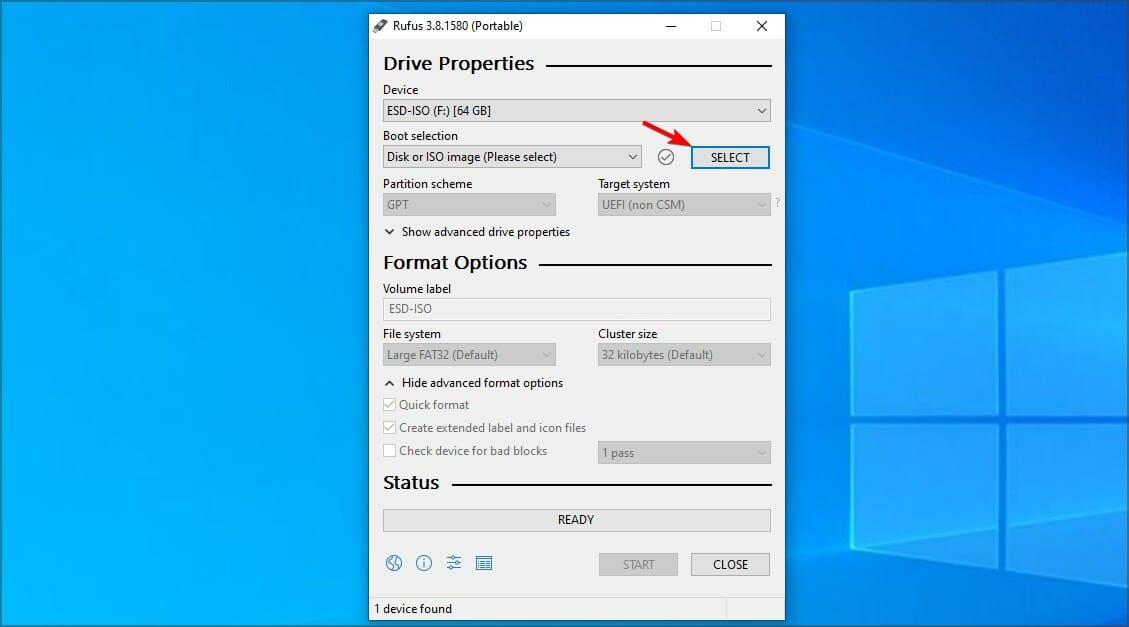
  1. Download Rufus.
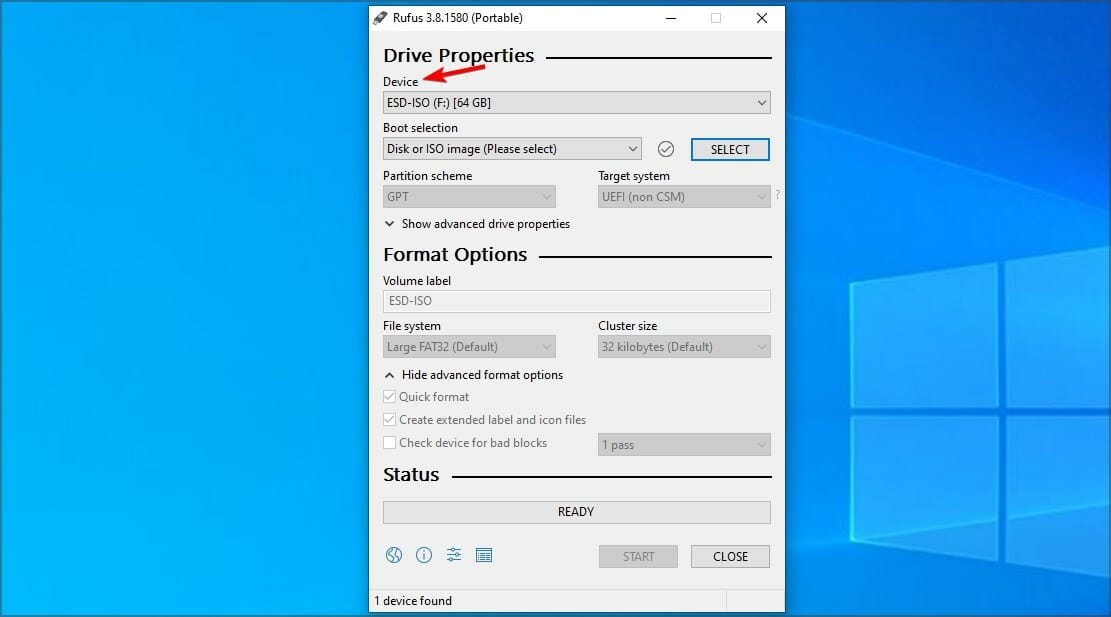
  2. Make sure that the correct device is selected. This is especially important if you have multiple USB storage devices connected to the PC.
  3. Make sure that Boot selection is set to Disk or ISO image. Now click the Select button.
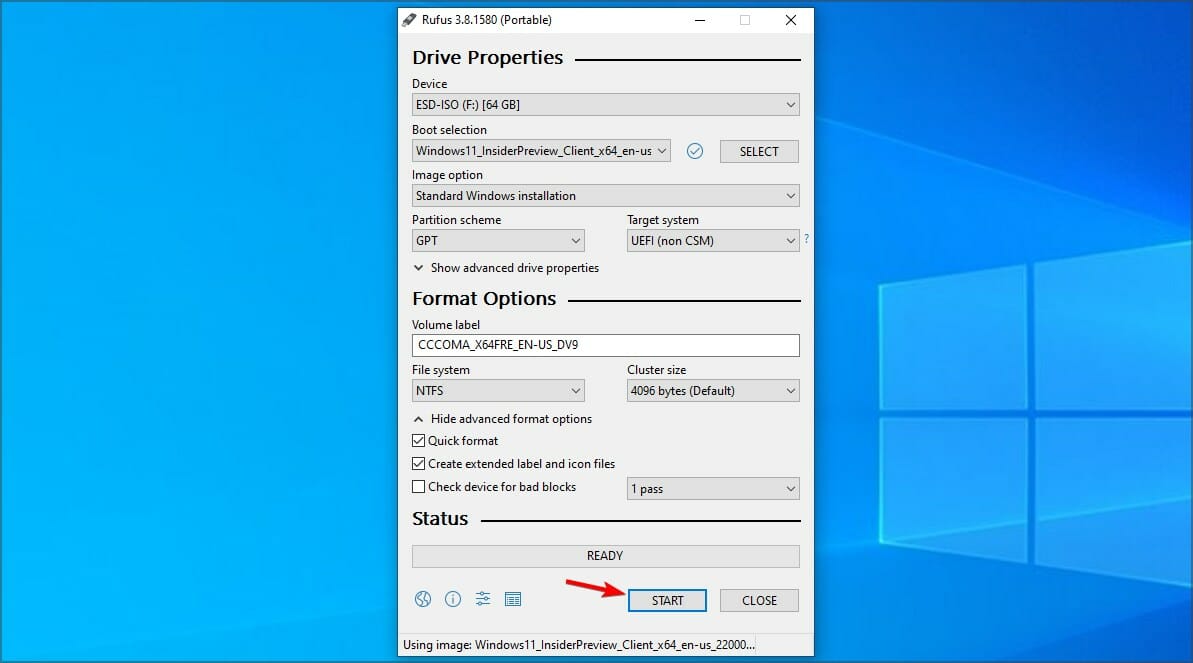
  4. Select the Windows 11 bootable ISO file.
  5. Set Image option to Standard Windows installation. Now set your Partition scheme to GPT.
  6. After doing that, click on Start.
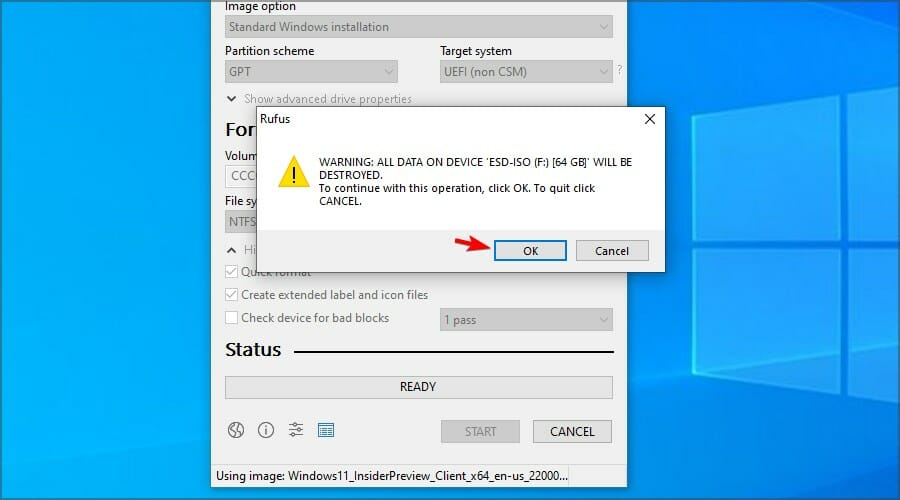
  7. A warning window will appear asking you to confirm that you want to format your flash drive. Select OK.
  8. Wait for the process to finish.

Aside from providing a loophole for when your new PC has failed to meet the minimum Windows 11 system requirements, Rufus also offers advanced features. These include customization options on your new OS like partition styles or even hardware configurations.

Just remember that installing Windows 11 on unsupported hardware may present some limitations.

3. Install Windows 11 on the new OS

  1. Restart your new PC with the bootable USB flash drive which has Windows 11 on it.
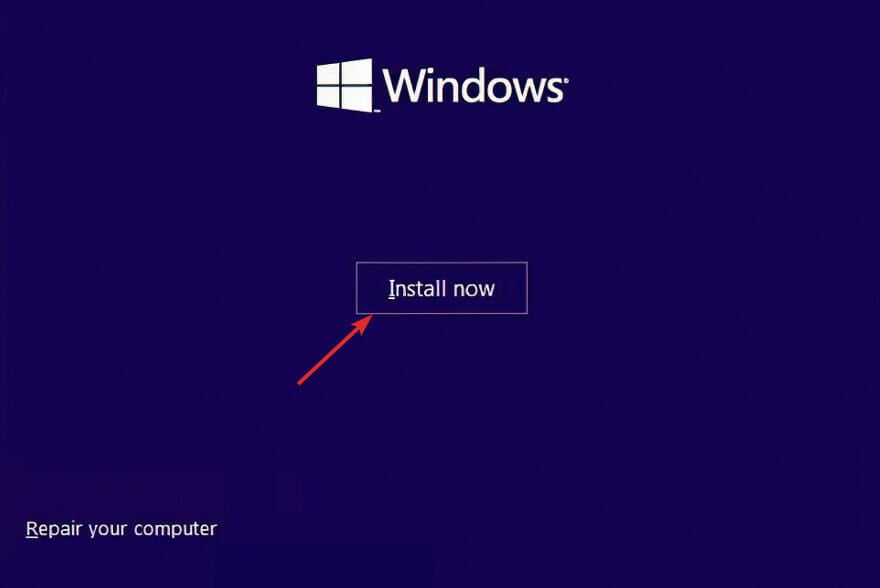
  2. Click on the Install now button then follow the onscreen steps to start the installation process.windows-install-now windows 11 setup without internet
  3. Press the I don’t have a product key button from the bottom side of the window if you don’t have one available.
  4. Accept the terms of service and click Next.accept-terms-of-service-w11
  5. Next, choose the Custom installation option when they ask you what type you want to perform.choosing custom windows setup
  6. Select your region, and keyboard layout then once you get the Oops you’ve lost Internet connection screen, press SHIFT + F10 from your keyboard to open a Command Prompt window.
  7. Type the following command and press Enter:OOBE\BYPASSNROoobe windows 11 setup without internet
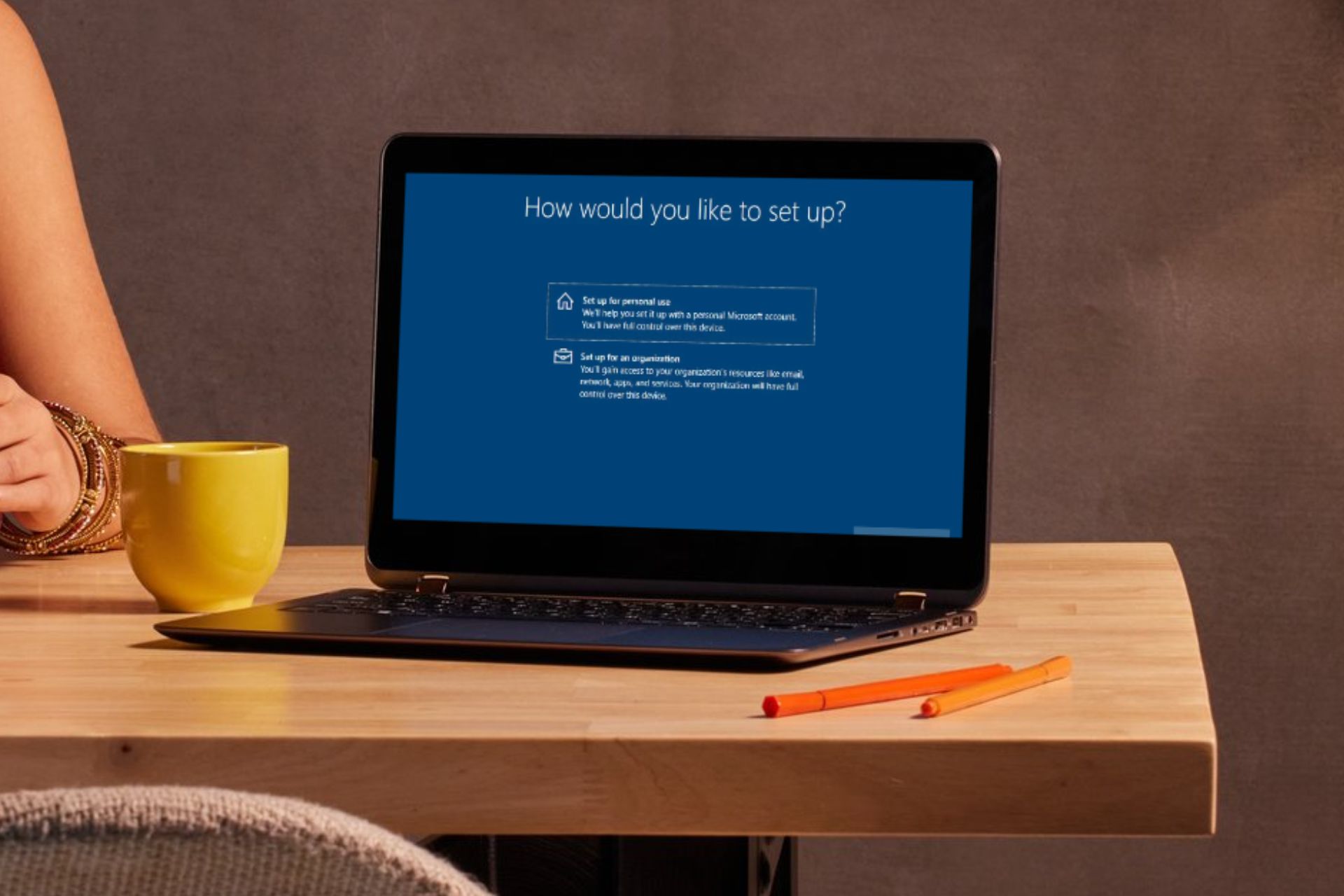
  8. Your computer will automatically restart and enter the Let’s connect you to a network screen. Here press the I don’t have Internet button. If you have an internet connection, press Next and plug in your Ethernet cable.lets-connect windows 11 setup without internet
  9. Next, click the Continue with limited setup button and proceed with the setup process.
  10. Select the Primary drive and click Next. Double-check to make sure that you’ve selected the correct drive.select-drive
  11. Follow the instructions on the screen to complete the process.

4. Set up user account and password

  1. After the installation, you’ll be directed to the setup screen where you’re supposed to create a user account.
  2. You’ll be asked Who’s going to use this PC page. Enter your preferred name.
  3. From here, enter your security questions and follow the onscreen instructions to complete the installation.
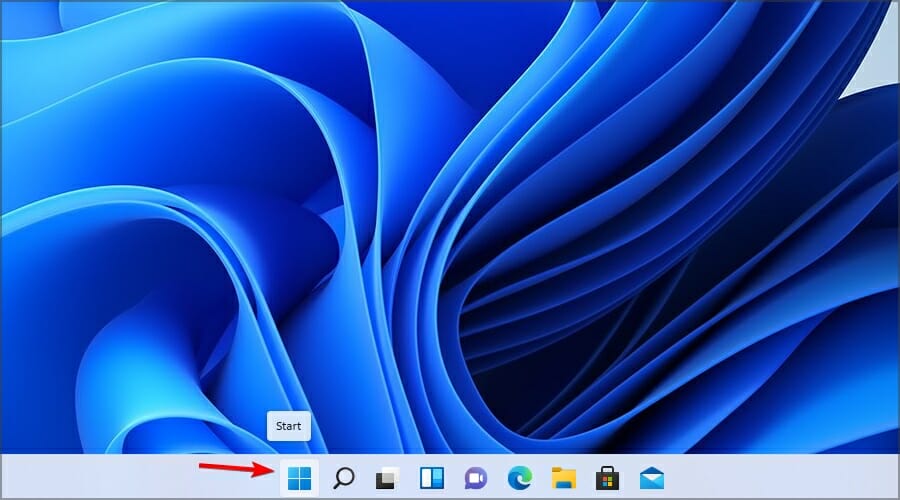
  4. Once you’re logged in, you can proceed to create a new user account or edit the one you logged in with to make yourself the administrator. Click the Start button in the Taskbar.
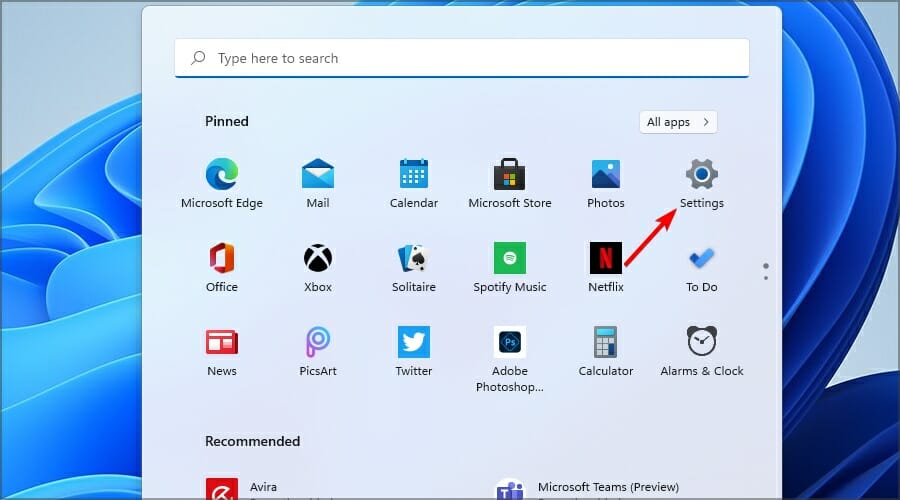
  5. Select Settings.
  6. Now go to the Accounts section and choose Family & other users.
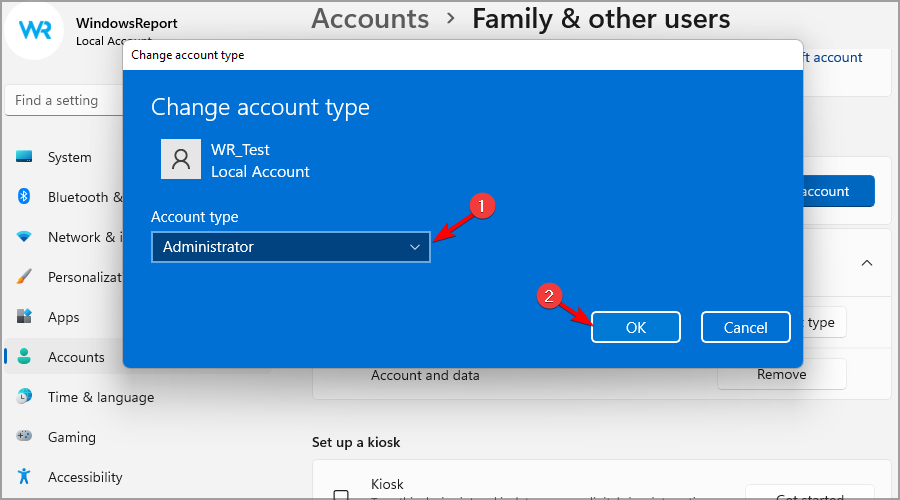
  7. Select the account that you want to change to administrator and click on Change account type.
  8. Set the Account type to Administrator and click OK to save changes.

Should you encounter any boot problems, we’ve got answers in our dedicated guide. Once you’re in you’re good to go but we suggest you pass through our checklist for things to do with a new PC.

Since you’ve also installed Windows 11, we have another list on how to customize your PC to work for you.

If you’re new on the Windows 11 group chat, check out all the cool features you probably didn’t know about. You’ll be glad to know that you can transfer your old settings to a new PC as well as move old apps to your new PC.

With a new PC and OS, you’re bound to encounter errors so we came up with some of the most common Windows 11 bugs and how to resolve them.

Hopefully, the installation of Windows 11 on your new pC has been seamless and you can now dive into exploring the best OS yet.

If you’ve successfully installed the OS on your new PC, we’d like to hear about your experience. How easy or difficult was it? We’d like to get your thoughts on this so drop us a comment down below.

Did you know that you can view files in Windows 11 without opening them? Here’s how

When you are looking for a file but don’t remember the name and don’t want to waste your time opening several files to check the content, all you need is a file viewer.

File viewer software can help you view or check your files without opening them and can also help you view files if you don’t have compatible software to open them.

In Windows 10 and 11, File Explorer has a preview pane, saving you from loading a program to view a file. Furthermore, if you are a power user, you must have heard about PowerToys. Let’s discuss them both in detail.

Windows File Explorer Preview Pane

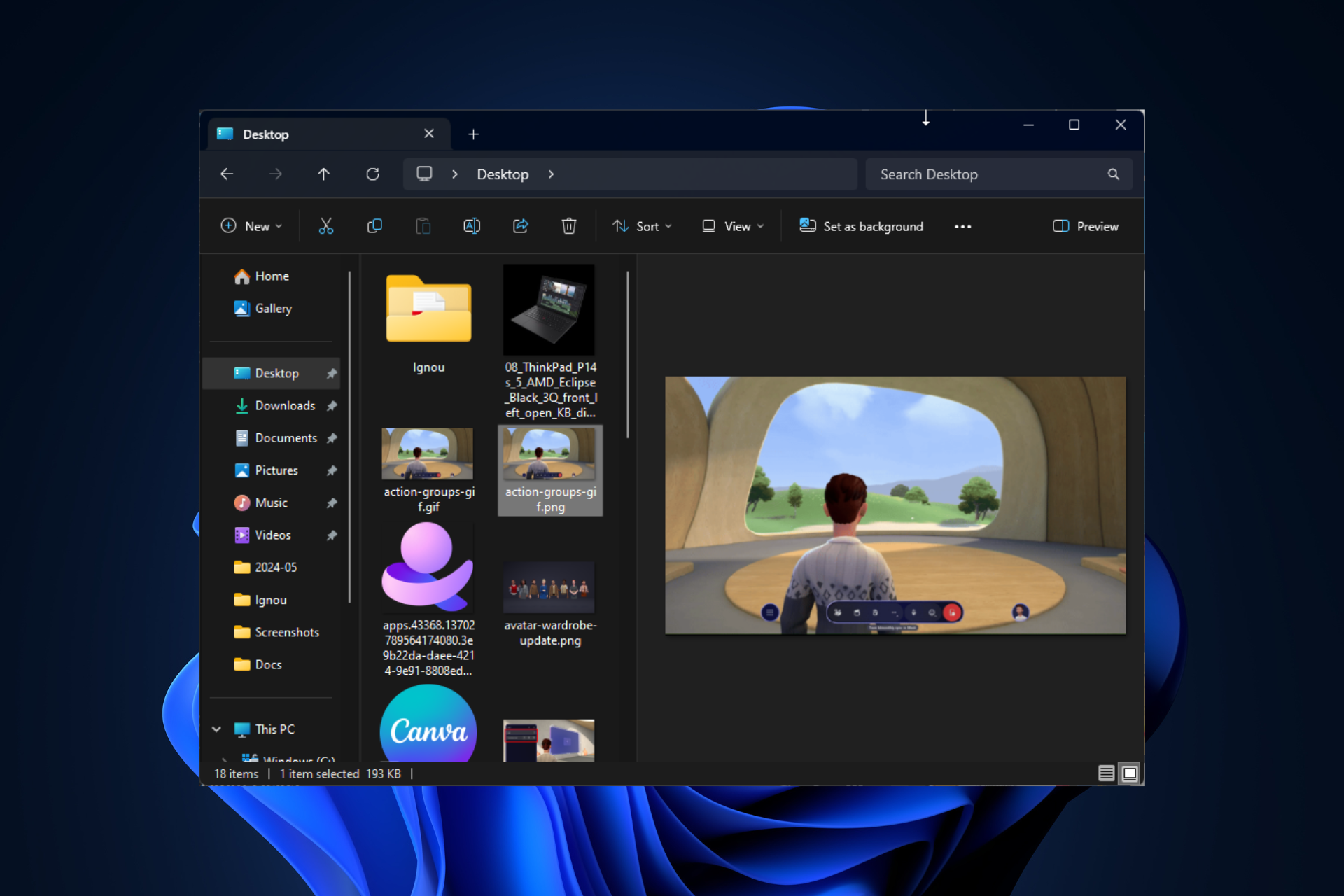
Windows File Explorer comes with a preview pane that acts as an inbuilt file viewer. To use it, press Windows + E to open File Explorer and go to the file you want to view. It could be a Word document, Excel spreadsheet, PDF, PowerPoint, or image.

If you can’t see the Preview pane in the File Explorer window, head to View, then from the drop-down, select the Preview pane.

Now click on the file you wish to view; it will appear in the preview pane. You can drag the separation bar left or right to increase or decrease the file’s width.

PowerToys Peek

If you want a utility with extra functionality to tune your Windows to your liking but don’t prefer third-party apps, PowerToys by Microsoft is just the tool for you. You can download this free tool from the Microsoft Store.

If you have PowerToys already installed, launch it, and from the left side pane, select Peek. Toggle on the switch for Enable Peek and make sure the activation shortcut Ctrl + Spacebar is also enabled.

Once you’ve done this, go to File Explorer, choose a file, and press the activation shortcut. A new window will open, showing you the file’s content.

To conclude, you can choose to either rely on the native features of Windows or the versatility of PowerToys, a utility for power users; you can access and preview different file types within a few clicks without even loading a specific application, thereby saving valuable time and streamlining workflow.

Which file viewer application do you rely on? Share your favorite file viewer software with our readers in the comments section below.

Google I/O 2026 came with announcements about future tools and features

Google I/O 2024 is a company event where executives present the most important announcements. For example, this year, the event focused on artificial intelligence. Thus, Google announced its goal to make AI more accessible to everyone. That’s why the company will bring various tools for developers. On top of that, some of its applications, such as Gmail, Google Maps, and Photos, will get AI enhancements.

What’s new in Google I/O 2024?

According to the announcements made during Google I/O 2024, the new tools are LearnLM, Firebase Genkit, Imagen 3, Veo, and Project IDX. You can find more about them below.

LearnLM is a family of generative AI models. Google partnered with GenMind to build them. Their purpose is to help teachers with lesson planning and content discovery. Also, they can conversationally tutor students. Besides that, LearnLM provides opportunities for active learning, presents information in multiple ways, adapts to the needs of its students, stimulates curiosity, and deepens metacognition.

Firebase Genkit is an open-source framework that allows you to integrate AI into JavaScript/TypeScript and Go applications that use Node.js. With it, you can build AI features in mobile and web apps. In addition, it gives you access to templates, plugins, and simple abstractions to make your development more efficient.

Imagen 3 is Google’s image-generating tool, and this version has better accuracy, creativity, detail, and text rendering capabilities than the previous one. Hopefully, the new model won’t repeat the mistakes of Imagen 2.

Veo is an AI model that generates 1080p video clips from text prompts. The tool could potentially rival Sora AI and other models. Also, it will be available to some creators using VideoFX. So, if you want to try it, join the waitlist.

Project IDX is an AI-assisted workspace that integrates with Google Cloud, Google Maps Platform, Chrome Dev Tools, and Lighthouse. In addition, you can access Gemini from within it, and it can help assist you with coding. Also, it offers templates for frameworks and supports various languages.

New features and enhanced capabilities

Based on the announcements from the Google I/O 2024, there will be new features for YouTube, Google Play, Android, and Google Photos. Also, Google will add enhanced capabilities for its search engine, Circle to Search, Gemini, and Gemma 2.

YouTube‘s new feature brings AI-generated quizzes to its educational videos. As a result, it will be easier to ask questions, receive explanations, and test your knowledge. 

Google Play will have a new immersive app discovery feature and better user acquisition tools. In addition, it will receive some updates for its developer tools like Google Play SDK.

Google Photos will get the Ask Photos feature that uses AI to help you search through your photo collection.

Circle to Search, the AI-powered Android feature, is also getting enhancements and will be better at solving complex math and physics problems.

Scam Detection During Calls is another enhancement for Android. It will use Gemini Nano to scan conversation patterns to detect scams during calls.

Gemini received more improvements than any other tool. The AI assistant will support larger documents, codebases, videos, and audio recordings. Also, the new feature, Gemini Live, lets you converse with the AI. On top of that, it can respond to visual input and adapt to speech patterns.

In a nutshell, these are the most important keynotes from Google I/O 2024. The company also announced the Pixel 8a smartphone and the Pixel Slate tablet. Besides, Google has new Tensor Processing Units (TPUs) that will bring a significant performance boost and better capabilities for AI workloads.

Will you be using any of the new tools from Google? Let us know in the comments.

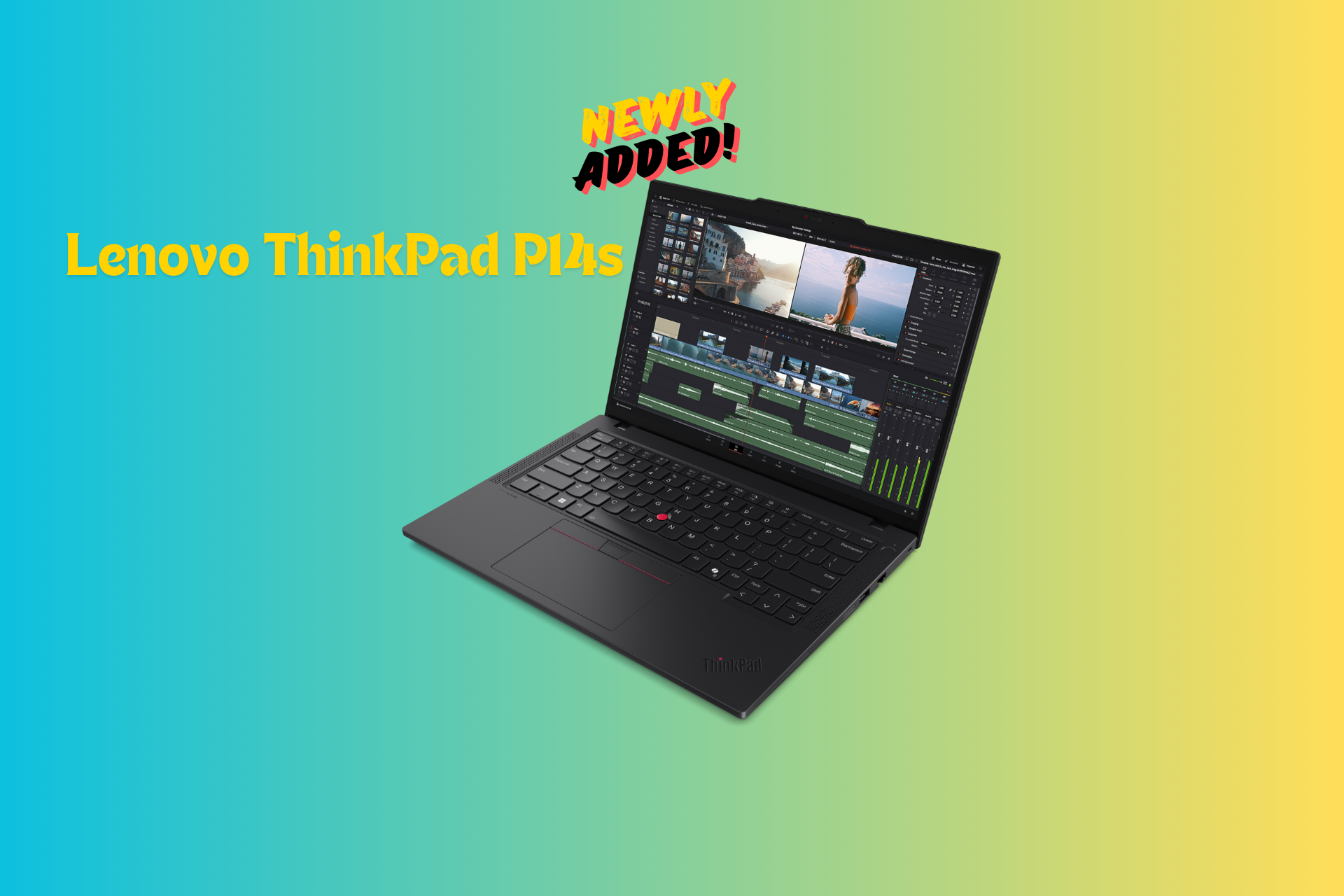
Lenovo ThinkPad P14s now comes with Ryzen Pro 8040 HS processor

The sleek Lenovo ThinkPad P14s Gen 5 notebook will now support the AMD Ryzen PRO 8040 HS processor. It can be ordered with up to 96 GB RAM and 2 TB storage.

Here are the specifications for the device:

Processor AMD Ryzen 7 PRO 8840HS processor with AMD Ryzen AI
Graphics cardup to AMD
Radeon 780M, AMD RDNA 3
Architecture + AMD PRO Graphics Driver
Operating systemWindows 11 Pro
Windows 11 Home
Ubuntu Linux1
Red Hat Enterprise Linux2
Fedora Linux1
Total Memory Up to 96GB DDR5 5600MHz
Memory DIMM Capacity8GB / 16GB / 32GB / 48GB
Storage up to 2TB PCIe 4×4 Performance SSD
Display 14″ 16:10 Display
1. 2.8K OLED (2880 x 1800)
IPS 400nit, 100% DCI-P3, X-Rite FCC,
Anti-Glare/Anti-Reflective, Low Blue
Light, TÜV Eyesafe
2. WUXGA (FHD+) (1920 x 1200)
IPS, Touch, 500nit, Privacy Guard,
100% sRGB, Anti-Glare
IPS, 400nit, 100% sRGB, ICC Template
color calibration, Anti-Glare, Low Blue
Light, TÜV Eyesafe
IPS, Touch, 400nit, 45%
CG, Anti-Glare, 3M Dual Brightness
Enhancement Film 5
IPS, 400nit, 45% CG, Anti-Glare, 3M
Dual Brightness Enhancement Film 5
ConnectivityWi-Fi 6E3 Qualcomm NFA-725A
Bluetooth 5.34
Quectel 5G RM520N-GL
with QC SDX622,5
Quectel CAT16 EM160R-GL
with QC X242,5
Near Field Communication (NFC)
Camera5MP RGB Camera with ThinkPad
Webcam Privacy Shutter
5MP RGB + IR with ThinkPad Webcam
Privacy Shutter and Human Presence
Detection
Ports(2) USB-A (5Gbps)
, 1 Always On
(2) USB-C® Thunderbolt 4
(1) HDMI 2.1 TDMS
(1) Mic/Headphone Combo Jack
(1) RJ-45 Gigabit Ethernet
(1) Smart Card Reader2
(1) Nano SIM2
Battery Life 39.3WHr
52.5WHr
Power Supply65W AC Adapter Type-C
WeightStarting at 1.31kg / 2.89lbs
Starting price$1,379
Availability May 2024

This laptop is designed for professionals who require the best performance in a portable laptop. The processor included is not only fast but also energy-efficient.

As every manufacturer is working on AI PCs, Lenovo has also included AMD Ryzen PRO HS- Series processors, which come with inbuilt artificial intelligence capabilities and a Neural Processing Unit (NPU), making it the next-gen device.

Thanks to integrated AMD Radeon graphics, you will be able to run applications like AutoCAD, Revit, and SOLIDWORKS without problems.

To conclude, Lenovo AI PC ThinkPad P14s Gen 5 Mobile Workstation is ready for the future and recommended for mobile power users.

Would you consider buying this robust, compact AI-powered laptop? Share your thoughts with our readers in the comments section below.

With GPT-4o already released, here’s how you can switch to it for better results

You must have heard about OpenAI unveiling their latest model, GPT-4o, a massive improvement over GPT-4, with better performance and faster speed. The best part is that you can use GPT-4o right away in ChatGPT across all devices, be it mobile, desktop app, or PC.

OpenAI, in the official blog post, has confirmed the immediate availability of GPT-4o to ChatGPT Plus and Team users, in addition to the free ones. However, it will be released for Enterprise customers later.

Even the plans window in ChatGPT has been updated to include the latest model. It now lists Limited access to GPT-4o under the Free plan, Up to 5x more messages for GPT‑4o under the Plus plan, and Higher limits for GPT-4, GPT‑4o… under the Team plan. So, it’s evident that the model is available across the three, albeit with limited access!

ChatGPT plans

How can I use GPT-4o?

1. On the ChatGPT website

If you are eligible for the model, OpenAI will send a prompt asking you to switch to GPT-4o. I, being a free user, received the prompt and quickly switched to the latest model.

On my end, I see a few changes. Now, instead of listing the GPT-3.5 and GPT 4 models, it just says ChatGPT and ChatGPT Plus. The URL, of course, has changed from chatgpt.openai.com to chatgpt.com!

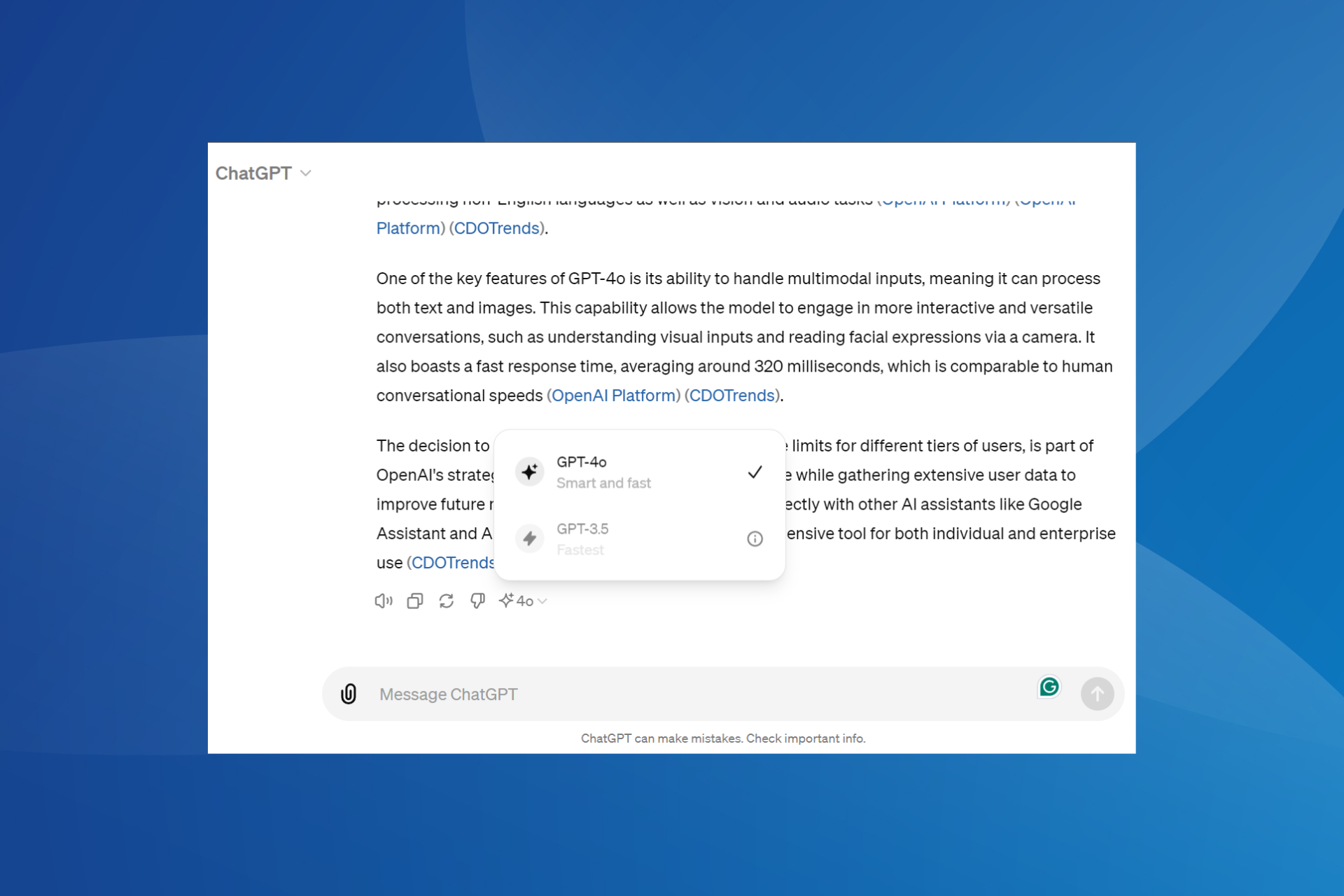
To verify if I was on GPT-4o, I asked ChatGPT a quick question and then clicked on the Change model option at the end of the response. To my surprise, I was using GPT-4o on ChatGPT, and that too as a free user.

GPT-4o as the selected model in ChatGPT

On another account, though, it still didn’t offer GPT-4o, confirming that this is a phased rollout. The interface was the same as earlier, except for the new URL.

GPT-4o not available on the other account

If you are a free ChatGPT user, open the website and see if you are prompted to try out the new model. For Plus and Team users, the GPT-4o should appear alongside the other models.

2. ChatGPT mobile app

Once you have switched to GPT-4o on the web, the changes will reflect for the account in the ChatGPT iOS app. To verify which model you are currently on, simply tap on the ChatGPT option at the top, and the current model will be listed at the top.

For others who haven’t yet switched to GPT-4o, the model should be listed alongside GPT-3.5 and GPT-4 in the dedicated menu near the top right. So, you can always make the switch from there, given the model is available for your account!

3. ChatGPT desktop app

OpenAI has released a ChatGPT app for macOS, and if you have already got that, it’s slightly trickier to use GPT-4o, but nonetheless, shouldn’t take more than a few minutes.

First, when you open the ChatGPT website, it will show you a Download button to get the app. From there on, you will be able to change the GPT model.

Some users also downloaded the app from third-party sources, as shown in several tutorials, but I would recommend waiting for the app to be available for your account.

Even downloading it from other sources doesn’t whitelist your account. If it’s not yet available, you will get an error!

Error in ChatGPT app on macOS

Besides, do not forget that the rollout is gradual, so it might take a while for GPT-4o to be available for use.

In case you are on Microsoft Azure, GPT-4o is now available in Azure AI!

What do you think about the latest GPT-4o model? Share with our readers in the comments section.

Windows Server KB5037782 update brings quality improvements and fixes the NTLM bug

Recently, Microsoft acknowledged that KB5036909, released on April 9, 2024, had bugs that caused various issues, including NTLM traffic spikes in Domain Controllers (DCs) and LSASS crashes.

Microsoft fixed the issue with the latest update, released on Tuesday, 14 May 2024, which is also called the Patch Tuesday update. This update brings the version to OS Build 20348.2461.

As mentioned on the Microsoft Learn website, the NTLM traffic issue was resolved on 2024-05-14, 10:00 PT; here is what the resolution in the notes says:

Resolution: This issue was resolved by Windows updates released May 14, 2024 (KB5037782), and later. We recommend you install the latest security update for your device. It contains important improvements and issue resolutions, including this one.

This issue affected these platforms:

  • Windows Server 2008
  • Windows Server 2008 R2
  • Windows Server 2012
  • Windows Server 2012 R2
  • Windows Server 2016
  • Windows Server 2019
  • Windows Server 2022

Here is the list of other quality improvements added in the  KB5037782 Server update

  • This update addresses a known issue that might affect domain controllers (DC). NTLM authentication traffic might increase.
  • This update addresses an issue that affects IE mode. A webpage stops working as expected when there is an open modal dialog.
  • This update addresses an issue in that affects IE mode. It stops responding. This occurs if you press the left arrow key when an empty text box has focus and caret browsing is on.
  • This update addresses an issue that affects Wi-Fi Protected Access 3 (WPA3) in the Group Policy editor. HTML preview rendering fails.
  • This update addresses an issue that affects a server after you remove it from a domain. The Get-LocalGroupMember cmdlet returns an exception. This occurs if the local groups contain domain members.
  • This update affects next secure record 3 (NSEC3) validation in a recursive resolver. Its limit is now 1,000 computations. One computation is equal to the validation of one label with one iteration. DNS Server Administrators can change the default number of computations. To do this, use the registry setting below.
    • Name: \HKEY_LOCAL_MACHINE\SYSTEM\CurrentControlSet\Services\DNS\Parameters\MaxComputationForNsec3Validation
    • Type: DWORD
    • Default: 1000
    • Max: 9600
    • Min: 1
  • This update addresses an issue that affects a network. An error occurs when credentials expire.
  • This update addresses an issue that occurs when you use LoadImage() to loada top-down bitmap. If the bitmap has a negative height, the image does not load, and the function returns NULL.
  • This update includes quarterly changes to the Windows Kernel Vulnerable Driver Blocklist file, DriverSiPolicy.p7b. It adds to the list of drivers that are at risk for Bring Your Own Vulnerable Driver (BYOVD) attacks.
  • This update addresses an issue that affects a workstation that is not in a domain. When you connect from it to a share and use an IPV6 address, you get the error, “ERROR_BAD_NET_NAME.”
  • This update addresses a known issue that might cause your VPN connection to fail. This occurs after you install the update dated April 9, 2024, or later.
  • This update addresses an issue that might affect Virtual Secure Mode (VSM) scenarios. They might fail. These scenarios include VPN, Windows Hello, Credential Guard, and Key Guard.
  • This update addresses an issue that affects Group Policy Folder Redirection in a multi-forest deployment. The issue stops you from choosing a group account from the target domain. Because of this, you cannot apply advanced folder redirection settings to that domain. This issue occurs when the target domain has a one-way trust with the domain of the admin user. This issue affects all Enhanced Security Admin Environment (ESAE), Hardened Forests (HF), or Privileged Access Management (PAM) deployments.

The resolution or the list of improvements does not mention the LSASS crashes issue, so we are unclear whether it has been resolved.

Microsoft also mentioned a known issue in the update:

SymptomWorkaround
After installing this update, you might be unable to change your user account profile picture.When attempting to change a profile picture by selecting the button Start> Settings > Account > Your info and, under Create your picture, clicking on Browse for one, you might receive an error message with error code 0x80070520. We are working on a resolution and will provide an update in an upcoming release

To install the update, you can simply head to Settings>Windows Update, or you can also download & install the update from the Microsoft Update Catalog website.

Have you installed the update yet? If so, share your experience with our readers in the comments section below.

Microsoft Mesh new update adds new professional wardrobe styles to the Avatar builder

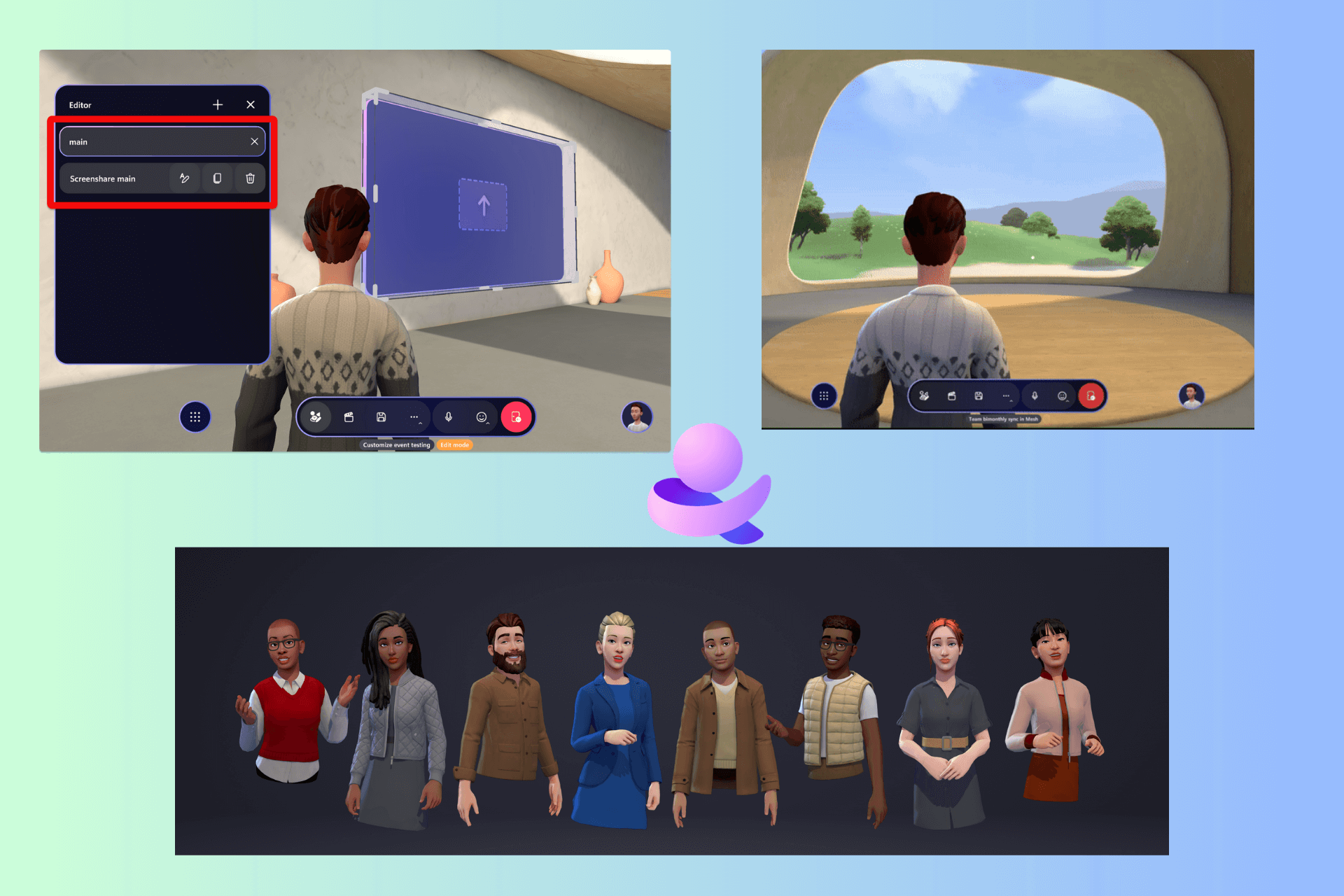
Microsoft released a new update for Mesh, adding features like Action groups, which are now available at the event, and new professional wardrobe styles for the Avatar builder. The update has brought Microsoft Mesh to the 5.2405.0  version. Let’s know more!

What are the new features?

Action groups availability

  • Action groups are available in event or template customization flow, which allows an organizer to control multiple objects in an event with the control panel to change the environment according to the event’s needs.
  • With a push of a button, you can also display several images of your team & play a video or show a ScreenShare screen and show other images simultaneously.

Avatars

avatar-wardrobe-update
  • More professional wardrobe styles will now be available from the Avatar builder.
  • You can customize your avatar and check out all the updated looks available.

ScreenShare

Earlier, event hosts couldn’t check their screen on ScreenShare objects. However, with the new update, you can see your ScreenShare when you share your screen in Mesh. This change can resolve the usability limitation issues and improve the sharing experience for hosts.

Furthermore, if you are using PowerPoint for a presentation on a ScreenShare object, you can now use PowerPoint Slideshow to display content. Mesh will now show the presenter view of a PowerPoint presentation.

Search and filter

customization

If you want to search for objects or controls in a customization session for a template or an environment, you can use search and filter for content in the Editor and Control panel.

The official blog post also mentioned resolved fixes:

In the previous release there was requirement that single room and multi-room events required the same firewall and port configurations. This issue is resolved. For info on the firewall and port requirements, please see Endpoints and firewall ports for immersive spaces in Mesh (Mesh app).

Have you downloaded the latest version of Microsoft Mesh? If so, share your experience with our readers in the comments section below.

AMD Ryzen 7900X3D and 7800X3D are up to 35% off

AMD is well-known for its processor, with the Ryzen series being the most popular on the market due to its performance.

In case you’re looking for a processor that can handle gaming, you’ll be pleased to know that several Ryzen models are available at a discount.

You can get Ryzen 9 7900X3D and AMD Ryzen 7 7800X3D at a discount

AMD Ryzen series is a no.1 choice for many gamers due to its performance, but if you find them too expensive, you’ll be happy to hear that two popular models are now available at a discount as TechRadar writes.

The first model is Ryzen 9 7900X3D, and this model comes with a 12-core processor as well as 3D V-Cache technology.

As for other specs, it comes with 128MB of L3 cache, so it will be perfect for gaming and other demanding task.

The second CPU on our list is AMD Ryzen 7 7800X3D, and unlike the previous model, this one comes with 8 cores as well as 96MB of L3 cache. On the bright side, it also uses the 3D V-Cache technology, so it offers great performance, but not as Ryzen 9 7900X3D.

Both models are available at a discount at Micro Center and you can get Ryzen 9 7900X3D for $385 and Ryzen 7 7800X3D for $350, so if you’re building a gaming PC, don’t miss them.

If you’re a fan of AMD, you should know that AMD Zen 5 CPU architecture won’t support Windows 10 drivers.

In other news, AMD has gained CPU market share in the first quarter of 2024, proving the quality of its products.

Windows Holographic 24H1 brings Microsoft Entra account sharing and more

Microsoft has just rolled out the latest version of Windows Holographic, version 24H1, and it’s packed with a lot of exciting features for professionals. They were designed to make the HoloLens 2 even more intuitive and user-friendly, especially for those in the workplace.

For those who are not familiar, the Windows Holographic is the software that powers Microsoft’s mixed reality headpiece, HoloLens 2. Let’s dive into what makes this release stand out and how it’s set to revolutionize the way we interact with mixed reality.

What’s new with the Windows Holographic 24H1 update?

First off, the introduction of shared Microsoft Entra accounts is a game-changer. Imagine being able to pick up any HoloLens 2 device, click a single sign-in button, and jump straight into your work. This feature is perfect for environments where devices are shared among multiple users, streamlining access to corporate resources and significantly reducing downtime.

For IT Admins, the update brings a sigh of relief with new policies that simplify device management. Whether it’s controlling user access when the device wakes up from a suspended state or scheduling device maintenance, these policies are designed to keep things running smoothly without constant oversight.

Network connectivity issues can be a major headache, especially when you’re relying on cloud services to get the job done. The addition of a network connectivity report to Offline Diagnostics is like having a diagnostic wizard at your fingertips, ready to pinpoint and solve connectivity issues so you can get back to work without skipping a beat.

Microsoft also brought some improvements to the Intune app update experience and eye tracking calibration. These enhancements ensure that your apps are always up to date and that your device understands your gaze with pinpoint accuracy.

Lastly, the update introduces policies to set device standby actions, giving admins even more control over how the HoloLens 2 behaves in different scenarios. It’s about making the device work for you, not the other way around.

Whether you’re an IT Admin, a frontline worker, or just a tech enthusiast, there’s something in this update for you. What do you think about the Windows Holographic 24H1 update? Let us now in the comments below.

Dell’s 2027 leaked roadmap has details about the future XPS laptop series

Someone leaked Dell’s 2027 XPS roadmap on Scribd. It contains information about future Intell, AMD, and Qualcomm releases. Also, there are additional details about future Nvidia mobile GPU release dates. After all, the upcoming XPS laptop series might use the new Nvidia GENxx GPUs.

Is Dell going to use AMD?

Dell is considering using an AMD processor for its upcoming XPS 16 Performante. This decision is interesting because Dell hasn’t released an XPS device containing an AMD chip since 2009.

Based on Dell’s 2027 roadmap, the XPS 16 Performante could also use Intel and Qualcomm chips. In addition, Dell plans on updating XPS 14 PISTA and XPS 16 Diablo in 2025 with Arrow Lake-H processors.

Dell will also introduce new versions of the XPS 13 Tributo featuring the Qualcomm Snapdragon X processor with 10 and 12 cores. Also, according to Dell’s 2027 roadmap, the company will bring XPS 13 laptops with Intel Lunar Lake-MX processors in August or September. So, this model will be the first to have Intel Core Ultra 200V chips.

Dell’s 2027 roadmap leak features new updates for the XPS series

The company plans to update the XPS 16 Diablo with a Panther Lake-H processor in 2026. In addition, there are two new entries on Dell’s 2027 roadmap. The first one is XPS 14, it comes with Panther Lake-Px40 and Qualcomm Snapdragon X Gen2 and a Thermal Design Power (TDP) of 40W. The second one is the XPS 13 Divo, which features the same chips but has a TDP of 20W.

In addition, according to Dell’s 2027 roadmap leak, Intell will release the following processors:

  1. Lunar Lake-MX: Intel might release this processor in August or September 2024.
  2. Arrow Lake-H: The processor might be out in February or March 2025.
  3. Panther Lake-H: Intel might release this one in February or March 2026.
  4. Nova Lake: This one might appear in the first quarter of 2027.

The end of the roadmap also shows that Qualcomm will most likely launch Oryon V3 in 2027. However, there are no mentions of XPS laptops showcasing this processor.

Ultimately, Dell’s 2027 roadmap is subject to change. However, VideoCardz might release more information about it in the future. After all, they discovered a 300-page document that features more aspects of Dell’s laptop development process. On top of that, the company might introduce more laptops to stay competitive and to bring us more options based on our preferences and budget.

What are your thoughts? Are you going to wait for the official news? Let us know in the comments.

Speculations rife over DOOM announcement at Xbox Games Showcase

While the news hasn’t been officially confirmed, several recent developments suggest a new DOOM game release and an announcement could be made as early as June 9 during the Xbox Games Showcase 2024.

Last year, documents accidentally shared during the proceedings of the Activision Blizzard acquisition listed a project titled Doom: Year Zero, in addition to Dishonored 3 and Ghostwire: Tokyo, amongst others. That was the first time the Xbox community got a whiff that a new DOOM game might be on the cards!

Early this year, in January’24, we reported about a trademark filed by Bethesda titled IDFKA. For the unversed, IDFKA is a popular in-game cheat code in DOOM. So, it’s highly likely that a DOOM sequel is under wraps!

Not to mention, a recent cryptic post on X (formerly Twitter) by Tom Warren, Senior Editor at The Verge, highlighted the possibility of Microsoft releasing another DOOM game to recover from recent failures and quell the resentment amongst the community.

Things haven’t been too good at Microsoft’s Gaming Division this year. Earlier, Microsoft fired 1900 Activision employees soon after the expansion, and now it has closed down multiple studios.

Amongst all these developments, rumours of a new DOOM game being announced at the Xbox Games Showcase come as a relief to fans of the series. It’s been almost four years since the release of DOOM Eternals. That’s like an eternity for fans!

Fans rejoice over the possibility of a new DOOM game

I came across multiple players in communities and forums who shared the same level of excitement during discussions about a new DOOM release on Xbox.

Doom Eternal is the last game in years to make me smile from ear to ear from start to finish.

So new Doom rumors seem to be legit in that case, a surprise, but a welcome one.

The last two were phenomenal so I’m all for it.

If it happens I’ll play it, but I sure do want a bit of variety from them.

Not to mention, some were surprised by the move while a few wanted a sequel for Quake instead. I hope their wish comes true, because the two titles do have a massive fan base.

Right now, a DOOM sequel for Xbox is all everyone’s talking about. Wait for the Xbox Game Showcase until June 9, and we shall have a confirmation!

How excited are you about a DOOM sequel on Xbox? Share with our readers in the comments section.

Lenovo Yoga 9i is currently available with a 27% discount

2-in-1 laptops are rather useful since they can work as both standard laptops or tablets depending on your needs.

Lenovo is known for such devices, and speaking of which, you can find one of its models with a nice discount.

Lenovo Yoga 9i is available at a discount, so don’t miss it

If you’re looking for a new laptop, but you don’t want to break the bank, you might be interested in the latest sale from Lenovo. We did review Lenovo Yoga 9i, but in case you missed it, here are the key specs:

CPU:13th Generation Intel® Core™ i7-1360P Processor up to 5.00 GHz
RAM:16 GB LPDDR5-5200MHz
Storage:1 TB SSD M.2 2280 PCIe Gen4 TLC
Graphics:Integrated Intel® Iris® Xe Graphics
Display:14-inch 3840 x 2400, 60Hz, touchscreen OLED
Connectivity:USB-C 3.2 Gen 2, USB-A 3.2 Gen 2, 2 x USB-C Thunderbolt™ 4.0 with DisplayPort and power delivery, headphone and mic combo

This is a great laptop for users who want a powerful PC that can handle everyday tasks, multimedia, and basic gaming.

It’s worth mentioning that RAM is soldered, so it’s not possible to upgrade it, so that might be a problem for some users.

As for the price, this device is currently available on Lenovo’s website for 27% off, and you can get it for just $1,199.99.

In case you’re looking for something different, Lenovo Legion Slim 5 is also available at a discount. If you prefer desktop PCs, you should know that Legion gaming desktops will come with laptop processors.

Microsoft Surface Pro 9 gets a huge 30% discount on Amazon

Have you been eyeing the Surface Pro 9 but waiting for the right moment to snag a deal? Well, it seems like the stars have aligned for Windows enthusiasts because Amazon is currently offering a sweet discount on this gem of a tablet. With a whopping 30% off, the Surface Pro 9, specifically the version with an Intel Core i5 processor, 8GB RAM, and 256GB storage, is $772 on Amazon. That’s a 30% saving right there!

Why should I get Microsoft Surface Pro 9?

Note icon NOTE
Prices and offers are prone to change so check out the deal before hitting that buy button.

This deal isn’t just about the numbers, though. The Surface Pro 9 shines with its built-in kickstand and a 13-inch PixelSense display, boasting refresh rates between 60-120Hz. Its performance is pretty solid, especially for those of us who lean heavily into the Windows ecosystem. Sure, it’s not the cheapest tablet even with the discount, but considering its usual price tag hovers around $1,100, it’s a steal.

Now, if you’re wondering whether this deal is exclusive, it kind of is. While other retailers like Walmart and Best Buy are also in the race, they haven’t matched Amazon’s generosity.

But let’s talk specs for a second. The Surface Pro 9 isn’t just any tablet. It’s a premium device through and through, with a lightweight design that’s easy to carry around. The kickstand is great for hands-free use, and the display is nothing short of gorgeous. Under the hood, the 12th Gen Intel Core i5 processor ensures that your work tasks run smoothly, although it’s worth noting that it might not hold the crown in the power department compared to, say, the latest iPad Pro models.

Video chats and work meetings are a breeze thanks to the tablet’s respectable camera, and with up to 15 hours of battery life, it’s quite the workhorse. For those willing to invest a bit more, there’s an option to bundle the tablet with a compatible keyboard and pen, essentially transforming it into a desktop experience.

In conclusion, while the Surface Pro 9 might not be the undisputed champion of tablets, it certainly holds its ground among its Windows-powered peers.

Do you already own a Microsoft Surface Pro 9? Tell us about your experience in the comments below.

Next generation of Windows on ARM will be a focal point of Build 2026 event

Microsoft is constantly improving its services, and it seems the company plans to focus on enhancing Windows experience on ARM.

The next Build event will take place soon, and we finally have some details about the upcoming conference.

Build 2024 event will take place soon, and ARM will be in the spotlight

Microsoft Build 2024 event will take place on May 21 and will last until May 23, as Windows Latest writes.

The event details are finally available, and the one that gained the most interest is titled Next Generation of Windows on ARM.

During this presentation, attendees will be able to learn more about ARM-powered Windows and intelligent Windows apps that utilize the power of the NPU.

Hopefully, we’ll get to see some of the native AI features of Windows 11 in action. Despite the ARM session, Microsoft also plans sessions on AI and its advantages, as well as several sessions on Copilot.

It’s no wonder that ARM will be the focus for Microsoft, especially after impressive Snapdragon X Elite benchmark results. Speaking of which, Dell XPS 13 Plus will feature Snapdragon X, and we’re positive that more manufacturers will follow suit.

Even though Snapdragon is dominating the ARM market, MediaTek and NVIDIA are working on a new chip that might challenge it.

VMware Workstation Pro and Fusion Pro are free for personal use, commercial customers still need a license

If you use VMware Workstation Pro on Windows or Linux or the Fusion Pro on macOS, there’s good news. The two products are now absolutely free for personal use after VMware’s acquisition by Broadcom!

However, users who need the software for work will need a commercial license.

In the official blog, Michael Roy from VMware, announcing the change and highlighting the reasons behind it, says,

For many in our community, Workstation and Fusion are the first VMware products that they’ve ever used, and it’s an important tool for understanding Virtualization as well as the fundamentals of vSphere. Going beyond that, commercial organizations get value from VMware Desktop Hypervisor apps for a number of reasons including development and testing of apps and systems and interacting with their vSphere environments.

The products, VMware Workstation Pro and Fusion Pro, will now have two license models, a free option for personal use and a paid one for commercial use. The two software are now available for free download on Broadcom’s website.

Trying to download them for VMware’s official website led us to the message, VMware Store Down for Maintenance. Seems like the transition to Broadcom’s system is not yet complete!

As for the commercial license, VMware introduced a new VMware Desktop Hypervisor that reduces the group offerings to a single SKU. It’s a subscription-based plan priced at $120 per year, significantly lower than earlier!

VMware discontinues Workstation Player and Fusion Player

Citing the recent changes in pricing models, VMware has decided to discontinue Workstation Player and Fusion Player, and the two are no longer available for purchase.

Those who have the Fusion Player software for personal use can upgrade to the Pro version for free. You only need to update to Fusion 13.5.2 and delete any saved license key. As for the Workstation Player, you will have to download the Pro version separately from Broadcom’s website.

VMware has also confirmed that the two subscriptions, free and paid, don’t differ in terms of functionality. So, even if you are a free user who works on VMware Workstation Pro or Fusion Pro for everyday tasks, you won’t miss out on anything.

Since we are on the subject, do check out our top picks for Windows 11 virtual machines. VMware, of course, makes it to the list!

Aren’t you excited that VMware Workstation Pro and Fusion Pro are now free? Share with our readers in the comments section.

Before Xbox 360 store shuts down, Microsoft plans to have two major sales

Xbox 360 was a great console, despite its flaws, and the console has been discontinued for a while now.

However, the Xbox 360 online store is still active, and Microsoft plans to have a few sales before the store completely shuts down.

Two big sales are coming to the Xbox 360 store before the shutdown

Xbox 360 store is shutting down on July 29th, but before that happens, Microsoft plans to have two big sales as Pure Xbox writes.

There will be two sales, and the first one is scheduled for June 18th while the second one will take place on July 16th.

Microsoft plans to bring as many games as possible, and it will keep the same discounts until the store shuts down.

To celebrate the legacy of Xbox 360, we’re working with our amazing publishing partners to bring you as many price reductions from our online store or from the Xbox 360 Store on the console. We’ll be updating this list with more games on June 18, 2024, and on July 16, 2024, bringing you as many repriced games as possible before the end of July. These price reductions will remain in place for each game through the 360 store closing on July 29, 2024.

Once the store closes, you won’t be able to purchase Xbox 360 digital games any longer. However, that doesn’t mean that the games are permanently lost.

Xbox 360 games that are available on Xbox One, or Series X|S will be available for purchase from their stores.

If you still own and use your Xbox 360, keep an eye out for these sales and make sure to get your favorite games before they are gone forever.

In other news, an upcoming Xbox feature will allow you to pre-load game updates, so you can continue playing without any breaks. In case you missed it, prices for Xbox games went up to 300% in certain regions.

Microsoft’s latest update patches the bug that caused VPNs to stop working

Earlier this month, we reported that a bug in the April’24 update broke the VPN functionality, affecting Windows 10, 11 and Server. Microsoft soon acknowledged the issue and has now released a patch for the broken VPN bug in Windows.

The release notes for the Windows 11 update, titled KB5037771 (OS Builds 22621.3593 and 22631.3593), read,

This update addresses a known issue that might cause your VPN connection to fail. This occurs after you install the update dated April 9, 2024, or later.

As for Windows 10 users, the KB5037768 update will patch the VPN bug, and for Windows Server, it’s the KB5037782 update!

To install the latest update in Windows 11, press Windows + I to open Settings > go to Windows Update from the navigation pane > click on Check for updates > wait for KB5037771 to download and install > restart the PC for the changes to come into effect.

Installing the KB5037771 update

Remember, the latest update introduces a new bug, as confirmed by Microsoft. After installation, you may be unable to change the user account’s profile picture. Instead, you get the 0x80070520 error and will have to resort to a workaround to change the account’s profile picture.

Not to forget, the KB5036893 update that introduced the broken VPN bug also caused a range of other issues in Windows 11, including slow boot time, random reboots, unresponsive taskbar and icons, and black screen errors. And Microsoft has yet to fix these problems!

Broken and buggy updates are one of the primary reasons for the decline in Windows 11’s market share, an aspect Microsoft must seriously look into.

Did the latest Windows update fix the broken VPN bug on your PC? Let us know in the comments section.

Chrome Prepares to revamp Google Lens Search with Gemini AI Integration on desktop

Google is upgrading the Lens features in Chrome on desktop. The feature is getting expanded beyond images with possible Gemini AI integration and is now prepared to identify objects similarly to how Copilot does in Edge. You can “search anything on a page with Google Lens” going forward in Chrome. The Google Lens Search redesign is being tested in Chrome Canary.

Google has integrated “Search with Google Lens” in the context menu as well as Chrome menu. When you initiate Lens Search for the first time, it asks for your consent informing screenshot the page is sent to Google.

Unlike the previous Lens search with images that offered related searches and the ability to extract text, the feature under testing sees a huge AI upgrade, and of course, you should expect it to be powered by Gemini.

The feature, hidden in the context menu, provides an overview of the object or Lens Search you’ve performed. It limits people’s results in search, which Gemini does.

The smart search bar that appears on the side panel after your search, comes prepopulated with queries users expect to enter. For instance, if you capture the Copilot logo, it provides results and an AI overview of what Copilot is.

On foreign pages, the selected region offers ‘Copy and Translate’ options for highlighted words.

Apart from the Context menu, Chrome’s 3-dot menu also features the “Search with Google Lens” option.

We noticed The search with Google Lens is integrated into the Find dialog also in Chrome.

Like Circle to Copilot in Edge, the new Google Lens Search in Chrome powered by Gemini AI is useful for identifying gadgets, phones laptops, or new devices.

How to enable and use redesigned Google Lens Search in Chrome Powered by Gemini AI

  1. Close Chrome Canary, if already open
  2. Right-click on its desktop shortcut and select Properties
  3. In the Target field, at the end, append the following and click Apply and Ok
    --enable-features=LensOverlay
  4. Launch Chrome, visit a webpage, right click on page and select “Search with Google Lens”.

Chrome already is integrating Gemini into the address bar, and now it is adding the AI Assistant to Google Lens search, indicating a broader use of Gemini in Chrome going forward. What do you say?

Microsoft Patch Tuesday, May’24: Over 60 vulnerabilities fixed

If you are a part of the Microsoft ecosystem, it’s vital to understand what vulnerabilities were fixed in the latest Patch Tuesday. In May 2024, Microsoft released patches for 60 vulnerabilities, including two zero days.

For the unversed, Zero Day vulnerabilities are the ones that have been identified and disclosed, but a patch hasn’t been released yet.

Vulnerabilities addressed in Microsoft Patch Tuesday, May 2024

The two zero days patched this time around are:

CVE-2024-30051 (Windows DWM Core Library Elevation of Privilege Vulnerability)

One of the most severe existing vulnerabilities, it received a CVSS rating of 7.8. Other than that the fact that it allowed an attacker to gain access to the system, Microsoft failed to share much about the vulnerability.

Available reports suggest that the vulnerability was being actively exploited to load malware on the end user’s PC, including the Qakbot banking trojan.

CVE-2024-30040 (Windows MSHTML Platform Security Feature Bypass Vulnerability)

Granted a CVSS score of 8.8, Microsoft explains that for this vulnerability to be exploited, attackers have to convince the end user to load a malicious file (even a document), which would then allow them the code execution privileges.

Both these vulnerabilities are critical and actively exploited. We recommend you download the patch right away from the dedicated page, depending on the Windows version and the system architecture.

Of the security updates released by Microsoft, here’s a quick classification:

CategoryNumber of Vulnerabilities
Remote Code Execution Vulnerability27
Elevation of Privilege Vulnerability17
Information Disclosure Vulnerability7
Spoofing Vulnerability4
Denial of Service Vulnerability3
Security Feature Bypass Vulnerability2

These include security updates for Microsoft Edge (Chromium-based), Microsoft 365, Power BI, Windows Cloud Files Mini Filter Driver, Windows Task Scheduler, Microsoft Windows Search Component, and Windows Common Log File System Driver, amongst others.

It’s also vital to separately mention the CVE-2024-30044 SharePoint Server Remote Code Execution vulnerability, the only one in the list to be marked as Critical. It has a CVSS score of 8.8. Microsoft’s official website, while explaining the exploitation process, reads,

An authenticated attacker with Site Owner permissions or higher could upload a specially crafted file to the targeted Sharepoint Server and craft specialized API requests to trigger deserialization of file’s parameters. This would enable the attacker to perform remote code execution in the context of the Sharepoint Server.

Download the security patches for all the vulnerabilities that apply to you, and work stress-free in a secure environment.

Also, Microsoft has confirmed that the hotpatching feature is now available. So you won’t have to reboot the device after installing the update for the changes to come into effect!

Do you know any vulnerabilities that weren’t addressed in this Microsoft Patch Tuesday? Share with our readers in the comments section.

Microsoft Places: A premium Teams app to help maintain a flexible work schedule

It has been more than three years since most of our work lives have changed, and due to perks like flexible work hours and the comfort of home, people still want to continue working from home while maintaining connections at work.

To solve this, Microsoft has developed a new innovative AI-powered connected workplace app, Microsoft Places, which promises to transform your spaces into engaging places.

In the official Microsoft blog, the company mentioned:

In addition to fostering improved coordination and connection, Places optimizes the effectiveness and engagement of the workplace. Importantly, Places features are accessible across surfaces you regularly use for coordination and collaboration, like Outlook and Microsoft Teams, so flexible work coordination and connection can happen within your normal flow of work.   

How does Microsoft Places cater to your needs?

Enhances In-office collaboration

With Microsoft Places, you can:

  • Effortlessly coordinate office schedules and spaces with coworkers.
  • A location plan lets you set & share your proposed location schedule and view your coworkers’ plans.
  • Modify or update location within the Places app or access it in your Outlook calendar
  • With the Peek card feature, you can access coworker schedules and get quick access to space booking. You also get a link on the peek card, which allows you to see all coworkers’ schedules with the app.
  • Team guidance facilitates communication between managers and their teams. Managers can easily plan when they should all be in the office, and it clarifies team priorities for in-office days.

You can also look at your manager’s schedule to manage their expectations.

Integration with Microsoft Copilot

With Copilot, Microsoft Places

  • Can analyze office attendance days, considering things like in-person meetings and coworker attendance.
  • Enables you to ask Copilot to adjust your schedule based on information such as changing work locations and rescheduling in-person meetings.

This feature is not currently available in Microsoft Places but will be in the second half of 2024.

End-to-end booking solution

  • Places finder – Accessible in Outlook, allows you to search for rooms and desks and obtain more information to help you decide on a booking. It also shows you images of rooms and desks with additional information such as space in the office and amenities available.
  • Bookable desk capabilities – Enables you to walk up to a shared work desk, connect your laptop to a monitor and reserve the spot automatically.
  • Calendar reminders – Offers timely reminders if no desks or rooms are booked for an in-office day. You can click the location pin and access the peek card to check the suggestions for available rooms and desks.

Microsoft also mentioned that end-to-end booking will be refined in the future with the addition of Copilot in the second half of 2024. Based on the booking suggestions, Copilot will find and book suitable spaces for recurring meetings according to your meeting requirements.

Facilitating spontaneous interactions

  •  Expanded presence – As the feature is available across Microsoft 365 apps, you can see your coworkers’ whereabouts so that in-person quick chats can happen when needed.
  • Presence indicators – You can modify or change your presence status to indicate the in-office presence and even specify which build you are in.
  • Integration with Teams group chats – In group chats, participants can view each other’s locations or use the @nearby to inform nearby colleagues about activities or meeting room changes.

With all these features promoting real-time collaboration, people could be concerned about privacy, so the Redmond tech giant has ensured that all location data collection adheres to Microsoft’s stringent privacy standards.

However, if you are still uncomfortable with features like expanded presence, you can always opt-out whether you are an admin or a user.

Empowering workplace optimization

  • Intent and actual occupancy patterns – Allows IT admins to see a clearer picture of the space available and actual usage patterns, thereby helping in decision-making.
  • Improved utilization management – Let admins adjust policies to automatically release unused rooms or desks that have been booked, giving a better idea of the availability and utilization of spaces.
  •  Microsoft Teams Rooms Pro Management – Provides valuable space and device utilization data for meeting and collaboration spaces and shared desks.

As we have already mentioned, Copilot integration will be available in the second half of 2024, and the data from Places will allow Copilot to offer additional intelligence on space management strategies.

Furthermore, IT admins will be able to manage and adapt space according to insights from Places and Copilot, which can significantly impact operational budgets and sustainability goals.

Availability

Microsoft Places is currently available in public preview. To try it out, you need to sign up for the Microsoft Places Public Preview Program. Once it is released to the general public, it will be a part of the Teams Premium plan.

Have you tried Microsoft Places yet? If so, share your experiences with our readers in the comments section below.

Hackers used the Phorpiex botnet to spread the LockBit Black ransomware

Threat actors sent millions of phishing emails through the Phorpiex botnet since April. Their goal was to conduct a LockBit Black ransomware campaign. According to New Jersey’s Cybersecurity and Communications Integration Cell (NJCCIC), the wrongdoers used ZIP files containing the LockBit Black payload. The ransomware can encrypt your system once you launch it.

In addition, according to Bleeping Computer, attackers built the malware using the LockBit 3.0 builder, which surfaced on Twitter in September 2022.

The phishing emails share some characteristics. For example, they use the same aliases, Jenny Green or Jenny Brown. Additionally, the message usually states that a document or a photo from the ZIP attachment belongs to you. Also, the hackers send emails from 1.500 IP addresses worldwide, including Kazakhstan, Uzbekistan, Iran, Russia, and China.

How does the LockBit Black ransomware campaign work?

The threat actors sent the emails containing a ZIP doc through the Phorpiex botnet. Afterward, when someone opens the document, it starts running the malware inside. Then, the virus installs LockBit Black ransomware from the Phorphiex botnet. When the installation finishes, the malicious program tries to encrypt files, steal data, and terminate services.

The approach used by hackers is not new. However, the LockBit Black ransomware campaign is efficient due to the high number of sent emails. Yet, compared to other cyberattacks, this one lacks complexity. 

According to the cybersecurity experts from Proofpoint, cybercriminals target companies across various industry verticals worldwide. Also, they begin their operations on April 24, 2024.

What is the Phorpiex botnet?

The Phorpiex botnet is an IRC-controlled trojan. It used to spread through USB drives, Skype, and Windows Live Messenger. On top of that, it has been active for over a decade. In addition, cybercriminals used it for more operations besides the LockBit Black ransomware campaign.

The virus gained control over millions of devices. So, its developers tried to sell it on a hijacking forum after they shut down the Phorpiex infrastructure. In addition, wrongdoers used it to spam over 30,000 sextortion emails per hour and delivered over a million emails.

Recently, cybercriminals used a clipboard hijacker module with malware. This method allowed them to replace the cryptocurrency wallet addresses copied to the Windows clipboard of their victims with other ones controlled by them. After a year, they hijacked 969 transactions and stole 3.64 Bitcoin ($172,300), 55.87 Ether ($216,000), and $55,000 worth of ERC20 tokens.

Ultimately, to protect your device from the LockBit Black ransomware and Phorpiex malware, use endpoint security solutions, email filtering tools, or features, and implement ransomware mitigation strategies. In addition, do not open any ZIP files from shady emails, and double-check the sender.

Do you have some ransomware mitigation strategies? Let us know in the comments.

Microsoft’s Return-to-Office mandates led to senior-level brain drain

According to a joint study from the University of Chicago and University of Michigan, the push from tech giants such Apple, Microsoft, Google and SpaceX to force employes back to the office resulted in high percentage of senior level employees leaving the company.

Shortly after the Biden administration declared the COVID-19 pandemic over, many employers sought to regain a sense of normalcy by ushering in relatively harsh RTO mandates to employees who had been working remote for the past two and half years.

Despite overwhelming statistical evidence that remote work had little to no impact on productivity across the labor market, companies including Apple, Amazon, Google, Microsoft, Tesla, and SpaceX began mandating RTO orders or favoring in-office promotions as policy.

However, it seems those RTO mandates may have had the opposite effect than what was envisioned by the companies pushing for them.

The Washington Post reported on the joint study published by both the University and University of Michigan which specifically covers Microsoft, SpaceX, and Apple RTO mandates and “its negative effects on the tenure and seniority of their respective workforce.”

The specifics of the study include looking at resume date from People Data Labs while also viewing “260 million resumes matched to company data.” While the study on examined the effects of RTO mandates from Apple, Microsoft and SpaceX, the three were large enough to account for roughly thirty percent of the tech industry’s revenue and just over two percent of the sectors workforce.

The findings of study implied “that return to office mandates can imply significant human capital costs in terms of output, productivity, innovation, and competitiveness for the companies that implement them.”

“We find experienced employees impacted by these policies at major tech companies seek work elsewhere, taking some of the most valuable human capital investments and tools of productivity with them.

 Austin Wright, an assistant professor of public policy at the University of Chicago

Following Apple’s RTO mandate back in May of 2022 that supported some work-from-home time as well as in office requirements it saw senior level departures decrease by five percentage points. Microsoft, which held a similarly revised RTO mandate saw a similar decline in its executives and senior developers leaving the company.

However, SpaceX which stuck to an ardent full-time RTO mandate saw its senior-level employee rate drop by fifteen percentage points, according to the joint study.

While Apple was the only company to respond to the joint-study with spokesperson Josh Rosenstock claiming that report represented an “inaccurate conclusion” because the company is seeing “historically low levels” of attrition, it should be noted that another analysis of 457 S&P 500 companies also buttress the notion that RTO mandates decrease moral and ultimately affect a company’s value and productivity.

Microsoft began 2022 with much harsher RTO mandates than they currently have, and it may be due to the level of attrition or employee feedback, but the company has evolved its stance over time.

Newer WFH policies include part-time off-site work as well as revisiting their position on promotions for WFH employees. With over seventy five percent of the tech sector accommodating flexible work environments, Microsoft’s RTO mandates feel outdated and could lead to long term harm to the company as its valued employees leave for positions at rival companies that support better work/life balances.

A new Windows 11 Netflix app will remove offline downloads feature

Netflix is working on a new Windows 11 app experience. Unfortunately, Netflix looks to ostensibly be developing a web wrapper of its browser-based app equipped with all the same features and downsides.

If you’ve visited your Netflix app on a Windows 11 powered device, a new pop up appears that informs the user that streaming service is working on a “new Windows app experience.”

The update includes access to live events, compatibility with ad-supported plans, and more! Downloads will no longer be supported, but you can continue to watch TV shows and movies offline on a supported mobile device.

Netflix

The folks over at WindowsLatest got in contact with Netflix’s support team and were able to confirm that the prompt is correct and that the ‘new experience’ will be similar to visiting Netflix.com from a supported browser.

When combing through support documents on the proposed new app experience, Netflix echoes the same talking points of better streaming quality, live event support, and still no offline download support for Windows devices.

WindowsLatest was also able to nail down an upgrade timeframe of June 2024, at which point Netflix will begin to shuffle users off the old, useful app and onto its new web wrapper via automatic updates in the Microsoft Store.

Eventually the old Windows 11 Netflix app will cease to work, and users will be forced to make do with the same web experience they can get from visiting Netflix.com.

At this time, it is unclear why Netflix has chosen this development path for Windows users who use devices offline when traveling, on insecure networks, in rural areas without broadband or poor connections.

The functional degradation of the Netflix app for Windows will not go unnoticed and comes at a time when Microsoft and partners are gearing up to deliver more mobile device experiences with a crop of devices powered by enhanced mobile processors.

Microsoft steps up to tackle spam emails in Outlook

No matter how careful you are while sharing your email address, you will eventually get spam emails, which bother you more when they land in your inbox.

These spam emails are usually from companies trying to sell their products or services. However, some could be phishing emails disguised as a credible source with the motive to steal your information.

Microsoft has tried to make some improvements to help you protect yourself from these threats in Outlook. Let’s check out how!

Shows sender’s email address in Junk message section

Now, you can see the sender’s email address next to the name of the sender in the Junk folder message list. This will help you filter if the email is legit or not without even opening it, thereby minimizing the risk of being a victim of malicious infection.

The feature is available for Outlook for Windows, the new Outlook for Mac, iOS, and Android, and you can even use it on Outlook on the web.

Warning before opening links in the Junk folder

If you can’t recall the email address but the message could be important, you can open it. However, if you click on any of the links in the message by mistake, you will get a Junk Email Security pop-up warning you about the same.

The feature is available for Outlook on the web, Outlook for Windows, and the new Outlook for Mac, iOS, & Android.

Option to Report and unsubscribe

While reporting a spam or junk email, you can also block or unsubscribe to avoid getting emails from that sender.

Earlier, even after reporting, you would get emails from the same sender as reporting the message didn’t block or unsubscribe emails from that sender.

This feature is now available for Outlook on the web and New Outlook for Windows and it will be coming soon for iOS and Android users.

Manage your mailbox

With the new changes, you get two unsubscribe suggestions: you can use them to unsubscribe from unwanted messages from a specific sender and declutter your inbox.

If you are using Focused Inbox, the unsubscribe suggestions will show for messages in the Other tab. The feature is only available for New Outlook for Windows and Outlook on the web.

Unverified (spoofed) sender warning

Outlook now adds an Unverified sender warning to the reading pane and message list to alert you that a sender may be suspicious or an email could be spoofed. The warning also presents you with the option to delete the email. Here is what the warning says:

Warning: Unverified sender This message may not bbe sent by the sender that’s displayed. If yoiu aren’t certian this message is safe, please be cautious when interacting this email, and avoid clicking on any links or deonloaing attachments that are on it.

The feature will be available for New Outlook for Windows and Outlook on the web by June 2024. However, users of Outlook for iOS, Android, and New Outlook for Mac might have to wait sometime.

What do you think about these improvements introduced in Outlook? Share your opinions with our readers in the comments section below.

Microsoft will update Copilot in Forms to help you collect more responses to your surveys or quizzes

Microsoft has recently updated its surveys/quizzes-based platform, Forms, to support AI capabilities through Copilot, and the AI model is more than capable of doing some fantastic work over there.

For starters, the AI model will generate quizzes based on your data, in just a few seconds. Then, when rolling them out, Copilot will also come up with smart reminders to increase their engagement by proactively checking the status of forms made on the platform, auto-notifying those participants who didn’t fill out the form or have forgotten to do so.

And if your surveys and quizzes still don’t meet expectations, Copilot will have one more trick under its sleeves. According to the latest entry in the Microsoft 365 Roadmap, the Redmond-based tech giant will update the Copilot to come up with solutions should this situation ever happen.

Copilot will assist Microsoft Forms users in suggesting ways to share surveys and quizzes. The AI model will then come up with different recommendations, such as email marketing, sharing on different social media platforms, and generating QR codes for faster and more efficient quiz campaigns.

Copilot in Forms assists form owners by recommending optimal distribution channels and settings for sending forms or quizzes. This includes leveraging email, social media, and QR codes to maximize the benefits of digital forms and quizzes.

Microsoft

The new enhancements should be entirely rolled out by the end of this month, giving managers more than enough time to get used to it, before Microsoft updates Copilot to come up with the ability to generate quizzes on its own, in June.

Either way, these features are more than welcome for those small companies, or small creators who don’t have the budget to develop quiz campaigns. In just a matter of minutes, Copilot will be able to provide you with forms and quizzes based on your data, and the AI model will also help get the maximum number of responses you can get.

A win situation!

Microsoft introduces MatterSim: Revolutionizing materials simulation and design

Microsoft Research team developed MatterSim, an innovative deep-learning model for accurate and efficient materials simulation and property prediction over a broad range of elements, temperatures, and pressures, to enable in-silico materials design. 

The team included four people, Han Yang, Senior Researcher  Jielan Li, Researcher 2  Hongxia Hao, Senior Researcher  Ziheng Lu, Principal Researcher

How does MatterSim help?

Accurate and comprehensive simulation

MatterSim uses deep learning to comprehend atomic interactions on the basis of fundamental principles of quantum mechanics

It covers an extensive range of elements and conditions, spanning from 0 to 5,000 Kelvin (K) and from standard atmospheric pressure to 10,000,000 atmospheres.

Microsoft mentioned in the blog:

In our experiment, MatterSim efficiently handles simulations for a variety of materials, including metals, oxides, sulfides, halides, and their various states such as crystals, amorphous solids, and liquids. Additionally, it offers customization options for intricate prediction tasks by incorporating user-provided data.

Uses large-scale synthetic data

The model’s learning foundation is based on large-scale synthetic data generated via a combination of generative models, active learning, and molecular dynamics simulations.

This approach ensures comprehensive coverage of material space, enabling MatterSim to predict energies, atomic forces, and stresses. It functions as a machine learning force field, boasting an accuracy level on par with predictions derived from first principles.

Furthermore, MatterSim attains ten times more accuracy than the previous state-of-the-art models in terms of material property predictions at finite temperatures and pressures.

Adaptable design & has high data efficiency

As MatterSim is trained on broad synthetic datasets, it can adapt to specific design requirements by adding additional data.

With active learning and fine-tuning, it can customize predictions with high data efficiency. Compared to conventional methods, the model only needs 3% of data to match experimental accuracy and versatility.

Narrowing the gap between Models and Real-World Measurements

Decoding material properties from atomic structures is complicated and challenging if done using existing statistical methods like molecular dynamics.

MatterSim addresses this by mapping these relationships directly via machine learning. The model has custom adaptor modules that refine it, allowing it to predict material properties without requiring intricate simulations.

How MatterSim can be useful?

MatterSim can be beneficial in a lot of ways:

  • Accurate – Offers high accuracy in predicting material properties, thereby ensuring reliable simulation results and helping informed decision-making.
  • Versatile – Can simulate materials across various elements, temperatures, and pressures, allowing you to explore various material compositions and conditions.
  • Efficient – Allows faster experimentation and iteration, thereby saving time and resources in the materials design process.
  • Customization – Offers customization options for intricate prediction tasks by incorporating user-provided data.
  • Streamlined workflow – Simplifies the translation of material properties from structural data, thereby eliminating the requirement of complex simulations.

What is the future?

As the research progresses, Microsoft plans to shift its focus towards experimental validation to reinforce its potential role in pivotal sectors, including the design of catalysts for sustainability, energy storage breakthroughs, and nanotechnology advancements.
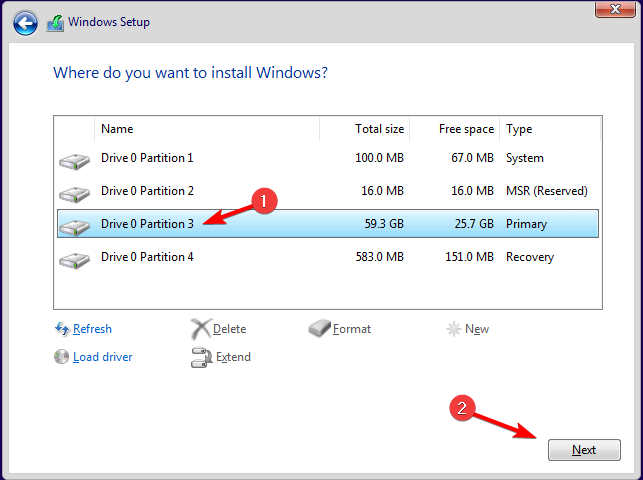
The integration of MatterSim with generative AI models and reinforcement learning signifies a transformative shift in the methodical generation of innovative materials customized to meet a wide range of applications.
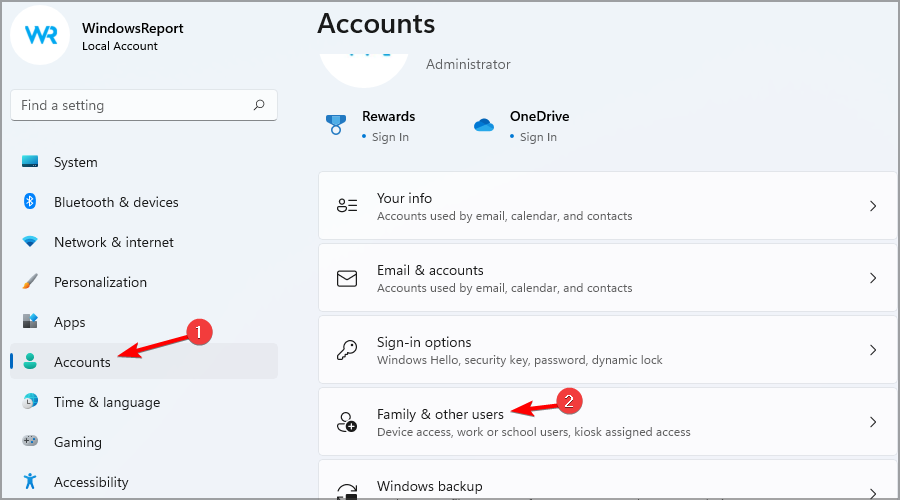
Furthermore, this advancement ensures speed-up material development and sustainable industrial practices, thereby addressing critical challenges in the materials engineering industry.
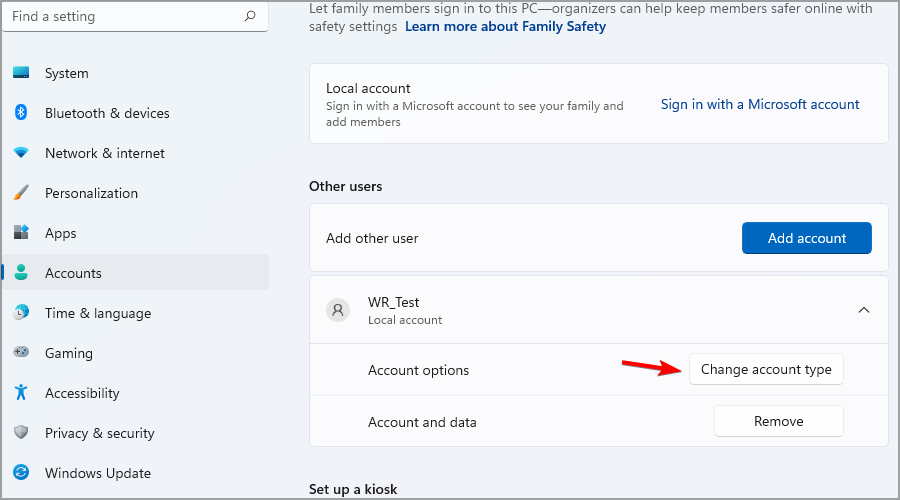
What do you think about this development? Share your opinions with our readers in the comments section below.

You can swap Windows 11 shell and bring back the old Taskbar and context menu

Windows 11 brought many changes in terms of user interface, but the old Windows interface is still available, and it still works.

Tech-savvy users have found a way to swap Windows 11 shell and use the one from the previous version, and it’s easier than you think.

You can easily swap the Windows 11 shell with the one from Windows 10

This discovery comes from X user Bob Pony, and he has managed to swap his Windows 11 shell.

As you can see, the process is incredibly simple, and it requires you to shut down Windows Explorer entirely.

Then you need to open Windows Explorer from an older version of Windows, such as Windows 10 20H1-22H2 or Server 2022.

During his demonstration, Bob used version 10.0.19041.4355 of Windows Explorer. Once you do that, you’ll get the old Taskbar back as well as the old context menu.

Do keep in mind that some components won’t work properly, such as Task View, and there are also issues with the alignment of certain menus.

While it’s great to see that Windows 11 version 24H2 can handle the old shell, this isn’t something that you should use daily.

If you’re nostalgic about previous versions of Windows, don’t be, as AMD Zen 5 CPU architecture won’t support Windows 10 drivers.

In addition, Windows 10 21H2 Enterprise and Education editions are reaching the end of support, and Microsoft advises them to upgrade as soon as possible.