With Microsoft planning to integrate Copilot into various aspects of Windows 11, we have been hearing a lot about AI Explorer, which will be introduced with the much-anticipated 24H2 release.
Another leak told us something more about the pending feature; it looks like you will need an ARM64 processor like the Snapdragon X Elite powered with NPU, storage of 225 SSD and 16 GB RAM to use it.
Apart from this, all the other new upcoming features will work on all PCs with minimum system requirements.
This was all confirmed by Albacore’s recent X (Formerly known as Twitter) post, which specifically mentions AI Explorers will only work on Snapdragon’s X Elite processors. Here is what the post said:
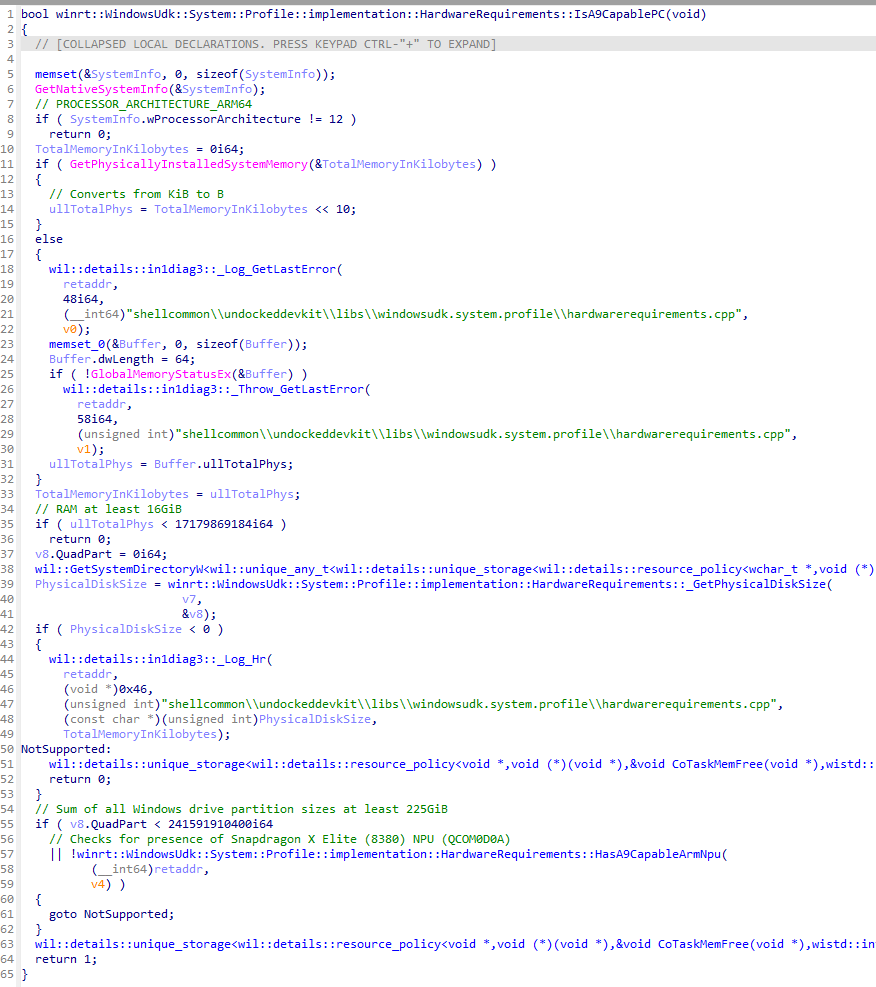
Turns out Windows 11 build 26100 (purported 24H2 RTM) contains the AI Explorer requirements baked into the OS
ARM64 CPU
16GB of RAM
225GB system drive (total, not free space)
Snapdragon X Elite NPU (HWID QCOM0D0A) I guess that’s one way to drive ARM64 adoption
The code in the screenshot implies that it is designed to work with a Snapdragon X Elite processor with a designated NPU ID, meaning that many people, even with newer hardware, won’t be able to use AI Explorer.
He also mentioned:
I suppose this implies all upcoming devices will be offered in at least a 16/256 config? Quite the jump from past Surface baseline SKUs. That, or MS will sell you lower tier SKUs anyway and just go no AI Explorer for you
AI Explorer is not the new File Explorer. Instead, it is similar to the Windows 10 Timeline feature, which keeps a record of everything you do on your computer, such as your tasks, browsing history, and meetings, so that you can search for them later.
We hope that as the feature works locally on your device, we won’t have to worry about sending your data to Microsoft.
Microsoft has stressed enough that 2024 will be the year dedicated to AI integration and innovation around the technology. However, the Snapdragon processor constraint and the company trying to highlight that the Qualcomm processor is the best choice for an AI PC implies that not all of us will be able to experience it.
On the contrary, it could be the initial launch strategy to see how things pan out. The Redmond-based tech giant may eventually bring the feature to other NPU-powered devices. Who knows?
Do you think AI PCs will increase the Windows 11 usage rate or even lower it further due to the constraints? Share your opinions with our readers in the comments section below.
Microsoft introduced a new framework known as VASA that can create lifelike talking faces. All it needs is a static image and an audio clip. Afterward, VASA-1, the first model, will generate a video featuring lip movements synchronized with the audio, facial expressions, and natural head motions.
Why is VASA-1 better than other video generators?
VASA-1 is a complex model which uses a disentangled face latent space. This feature allows it to store different expressions separately. As a result, it can recreate expressive facial dynamics based on various emotions. So, the videos generated by the Microsoft tool look more accurate than the ones generated through other means.
The tool has the potential to help us develop better avatars. In addition, we can use it in various other applications. For example, @Wisemasters on TikTok uses a similar technology on historical faces for educational purposes. Unfortunately, they look out of place and stiff compared to the ones generated by VASA-1.
The Microsoft VASA-1 framework allows you to gain control over some aspects. For example, you can set the eye gaze location, adjust the head distance, and use emotional offsets. So, you can make the generated face appear angry or happy, making it more credible.
In addition, the Microsoft video generation tool can handle artistic photos, singing, and non-English speech. However, researchers didn’t train the model to do that. So, the fact that it can handle unexpected situations was a surprise. Below you can find an example featuring the Mona Lisa.
Microsoft VASA-1 AI can make single image sing and talk from audio reference quite expressively.pic.twitter.com/7yaSBZlKRj
Disentanglement plays a great role in the video generation capabilities of the VASA-1 framework. After all, it allows you to control and edit multiple video aspects because it separates them. For instance, you can tweak the 3D head position, facial features, and expressions.
Researchers claim that the framework can offer real-time efficiency because its offline batch processing mode can generate 512×512 videos at 45 FPS. Additionally, it can support 40 FPS in the online streaming mode with a 170ms latency.
Is the VASA framework a potential threat?
Unfortunately, the tool comes with risks. The X user @EyeingAI calls it alarmingly realistic. After all, someone could use your photo and an AI-generated audio featuring your voice for ill intentions. Additionally, hackers could use the model for cyber attacks and to spread misinformation and fake news.
In a nutshell, the VASA-1 framework has surprising capabilities and exceeds other video generators. In addition, you can make the videos more accurate by using its control options. Future models could help us create better avatars. However, there are many risks, and Microsoft should prioritize minimizing the damage the tool can do.
What do you think? Are you eager to try VASA-1? Let us know in the comments.
The new version of Llama is finally here, so without further ado, let’s see what’s new.
Llama 3 is finally here, bringing enhanced performance and more
As reported by MSPowerUser, Meta has just released the latest version of its language learning model, bringing improved performance and scalability.
This allows the AI to perform multi-step tasks, lower false refusal rates, improve response alignment, and understand nuances and complex tasks.
Llama 3 was trained on 15T token of data, which is seven times larger than was used for Llama 2. This version supports 8K context length doubling the capacity of Llama 2.
Regarding performance, Llama 3 8B and 70B outshine the competition in almost every regard.
Meta will also make Llama 3 available to everyone by making smaller versions of Llama 3 available as open-source models.
The new version is more secure, and it will utilize Llama Guard 2, Code Shield, and Cybersec Eval 2.
The model is already available in action and it’s powering Meta AI assistant that can be found in Meta’s services such as Facebook, Instagram, and WhatsApp.
Meta also has plans to bring video and image support to Llama 3, but no release date for these features is known.
The Microsoft 365 Admin Center will be updated to allow managers to perform a streamlined Teams app management across Teams, Outlook, and Microsoft 365 App.
According to the latest entry in the Microsoft 365 Roadmap, starting in May 2024, administrators who manage apps that work on Outlook, and the Microsoft 365 App will be able to perform unified management across all these 3 platforms.
Until now, all of the changes made to these apps using the Integrated Apps section (which should provide a unified management experience) would only impact certain apps. With this change, however, all the changes made to these apps in the 365 Admin Center, will affect all of them at once.
Here’s what the entry says:
Administrators using the Microsoft 365 admin center and Teams admin center who manage Teams apps that work on Outlook and the Microsoft 365 App will be able to apply their changes across all three clients (Teams, Outlook and Microsoft 365 App). Before this update, changes made through the Integrated Apps section in the Microsoft 365 admin center would only affect these apps on Outlook and the Microsoft 365 App; similarly, changes made in the Teams admin center would exclusively affect Teams. With this change, management of these apps will be unified across Teams, Outlook and Microsoft 365 App.
Microsoft
The changes will impact admins everywhere. Curiously enough, the Microsoft 365 admin center was plagued with some strange issues that affected users on a global scale: some of its parts were displayed in Croatian when accessed from certain browsers.
With this being said, the 365 Admin Center will also be updated to support organizational messages, allowing managers to edit and schedule organizational messages on Windows 11.
Microsoft is adding them in the Reports section of the 365 admin center, and managers and admins will have a variety of capabilities and features that will allow them to create new messages, review delivery reports, and so on.
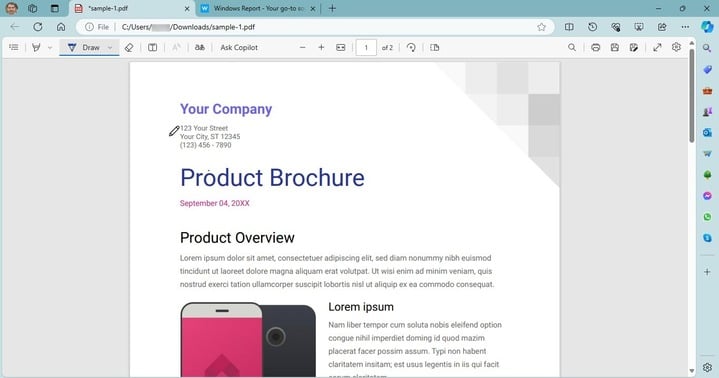
Google is introducing the ability to add ink signatures to PDFs directly within the built-in PDF Viewer in the Chrome browser. Chrome possibly gets a draw tool to make this possible.
The functionality is currently being tested in Chrome Canary and is available as a flag (features under testing that are not available by default).
Chrome may soon let you sign PDFs with the Draw tool
Google Chrome comes with a native PDF Viewer, which allows quick access to documents along with some pretty basic functionalities, negating the need to rely on third-party PDF viewers.
Until now, Chrome supported a Table of Contents, a Two-Page View, offered controls to Zoom and Fit to Page, and the ability to rotate clockwise/anti-clockwise. You now get the ability to annotate PDFs and add ink signatures, as highlighted on the Chromium Review website.
With the new ink signature feature, you will be able to sign and annotate PDFs directly in Google Chrome. The functionality is currently available behind the PDF Ink Signatures flag in Chrome Canary, the description for which reads,
Enables the ability to annotate PDFs using a new ink library. – Mac, Windows, Linux, ChromeOS, Fuchsia, Lacros
How can I enable ink signatures for PDFs in Chrome?
Launch Chrome Canary, paste the following path in the address bar, and hit Enter: chrome://flags/
Search for the PDF Ink Signatures flag and choose Enable from the dropdown menu next to it.
Relaunch Chrome for the changes to come into effect.
From now on, when you open a PDF, Chrome will have the annotate option within the PDF viewer.
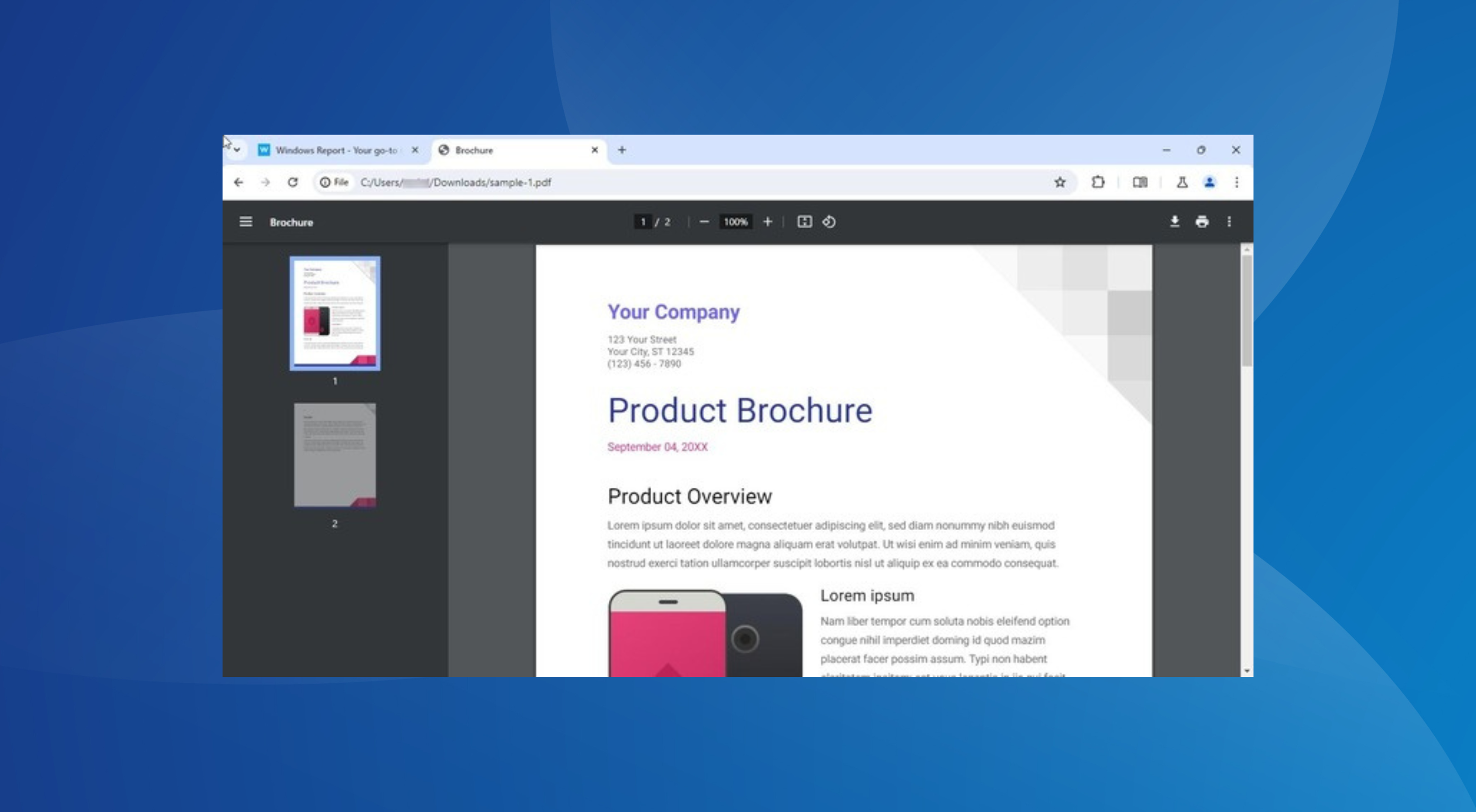
Update: Google has added an Annotate option on the toolbar as well as Pen,Highlighter, and Earser tools when you click it. Please check the screenshot below.
Chrome PDF Viewer with Pen tool in Side Panel. Image Credit:WindowsReport
The newly available annotate option on the PDF Viewer Toolbar offers pen, brush, and eraser options on the side panel with different sizes and colors to choose from. Users can undo any changes with the Ctrl+Z shortcut or by using the undo/redo buttons available on the toolbar. The pen tool lets you draw and highlight text over PDF with different colors.
The functionality, however, is not new to browsers. Microsoft Edge, which received most of the PDF features from legacy Edge, comes with a built-in annotation tool that allows you to draw and add handwritten signatures directly in the browser. You can also customize the pen’s color and thickness.
Annotating PDFs in Microsoft Edge
While Google Chrome lacked annotation capabilities earlier, with the feature in the testing phase, you soon won’t have to rely on other software or browsers like Edge to sign PDFs, saving significant time and effort.
Microsoft introduced Copilot to the Word app a while ago, allowing users to summarize, edit, and compose text with AI. However, according to the latest in the Microsoft 365 Roadmap, Word will update Copilot to showcase complex answers to all sorts of questions.
The interesting thing? Microsoft Word will basically use the Internet, more specifically Bing Search, to make Copilot answer this way. So in other words, Word might become a search engine on its own.
Well, not really, but it’s close.
Here’s what the entry says:
Ask Copilot a question in Word chat and Copilot generates an answer using the power of integrated Bing search. And you never have to leave the app.
Microsoft
This is quite useful, as you can do everything in Microsoft Word: for example, if you work on a project, you can use Bing Search within Copilot to look for information without even leaving the platform at all.
It becomes a centralized hub, which streamlines productivity, and allows for a lower power consumption: after all, you’ll only be using Microsoft Word. However, you’ll need to be connected to the Internet to be able to use this.
Copilot will also help you edit the newer information to fit your projects, or it can summarize the information you’ve found to better suit your tone and style.
The update will impact Word users everywhere, and it should be completely rolled out by the end of this month.
In other news, Microsoft is also updating Word to support Designer, which means users will be able to enhance their texts with AI-generated images directly on the platform.
The capability is quite useful for those who want to enrich their texts with images, but don’t have the means or the budget to purchase images or create them by themselves.
In a matter of seconds, Copilot can analyze the text, and create an image based on it, and Microsoft will also allow you to choose from different versions until you get the one that fits the text best.
What do you think about these features coming to Microsoft Word?
Microsoft Edge is a solid browser, and Microsoft is constantly working on making it even better with various updates.
Speaking of which, the new version of Edge has just hit the stable channel and it’s available to everyone, so let’s see what this version has to offer.
Edge 124 is rolling out, here’s what’s new
According to Microsoft’s release notes, the new version of Edge is here, and it brings security updates from the Chromium project.
In addition, it also brings fixes for the following Edge vulnerabilities: CVE-2024-29986, CVE-2024-29987, and CVE-2024-29991. These are low-risk vulnerabilities, but it’s still great to see that Microsoft has patched them.
The update brings various new features, and most of them are related to Microsoft Edge management services, including the following:
Email notifications for extension requests
Enterprise secure AI controls
Customization of organizational branding
Automatic profile switching controls for Edge for Business
With these features, administrators will be able to receive email notifications if a user requests an extension.
Admins will also be able to manage AI-related policies and customize their organization’s branding.
This version also brings an improved Edge Profile account re-authentication dialog if the SSO fails. Web SQL support is removed, following the changes in the Chromium project.
Profile management and customization controls have been improved with the introduction of additional avatars.
Speaking of profiles, the First Run Experience has been improved encouraging users to sign in and create meaningful profiles.
Edge will now also show notifications on Edge updates in the Browser Essentials instead of the Settings page, thus improving visibility.
Lastly, this update introduced CopilotPageContext and CopilotCDPPageContext policies that will allow Copilot to access browser context. As a result, the DiscoverPageContextEnabled policy was removed.
This update is mostly aimed at business users, but personal users can benefit from it thanks to the improved security.
Microsoft will be updating its Defender app to become more versatile for users. After announcing that it will flag the AIR fixes as automated actions approved by SecOps, the Redmond-based tech giant says it will update Threat Explorer within the platform to become a hub for direct cyber protection actions.
In other words, Microsoft Defender’s Threat Explorer will allow SecOps to perform a variety of actions, from submissions, and purging emails, to blocking Tenant-wide messages.
According to the latest entry to the Microsoft 365 Roadmap, the Redmond-based tech giant will also make Tenant-level block URL and File actions available on this page, later in April.
SecOps can take multiple actions such as purging emails, submissions, and Tenant-level block actions through a single wizard on the bulk of messages. In addition, Tenant-level block URL and File actions are now available directly from Threat explorer.
Microsoft
The change will allow SecOps to take action against cyberthreats faster, and more efficiently, ensuring the companies are responding quickly in such situations, where time is important.
This means security experts will have a clearer picture of what’s happening inside an organization by just opening up Microsoft Defender, allowing them to take action when needed.
Microsoft Defender will update its Threat Explorer this month, and it’s expected to be completed by the end of April. All the web versions of the app are impacted, and customers everywhere will have access to the new and enhanced Threat Explorer.
In a major relief for Microsoft, EU antitrust regulators have decided not to proceed with a formal probe into the $13 billion investment the Redmond-based tech giant made in OpenAI.
This comes after the regulators came to the conclusion that the $13 billion Microsoft put into OpenAI is an investment, not an acquisition and that the former doesn’t control the latter, negating the need for an investigation, at least for now.
The Commission had been following very closely the situation of control over OpenAI before the recent events involving its management. We are checking whether Microsoft’s investment in OpenAI might be reviewable under the EU Merger Regulation.
Microsoft isn’t completely off the hook yet. A report in Reuters suggests that with pressure mounting, Microsoft could still face an investigation by the EU antitrust regulator.
Besides, the investments are also under the radar of authorities in other regions, as well as the Competition and Markets Authority in the UK. The latter is primarily concerned with the deal’s impact on market competition.
Not long ago, Microsoft discovered Russian and Chinese hackers sponsored by their countries. Most of them use social engineering tactics to spread misinformation on social media. In addition, they are targeting the U.S. institutions. On top of that, they are using various ways to exploit the security vulnerabilities of Microsoft.
According to Microsoft, on 17th April Russian hackers started online campaigns to weaken U.S. support for Ukraine. Through their content, they try to generate hostility between us. On top of that, Chinese hackers are trying to diminish our trust in the U.S. democratic systems.
What methods did the Russian hackers use?
The wrongdoers from Russia use multiple methods to catch our attention. For example, besides social media, they engage in covert and overt campaigns and use traditional media.
Russian and Chinese hackers use AI in their campaigns to spread misinformation. One of their methods to spread fake news is to edit videos using AI-generated audio content. Unfortunately, many of us believe their lies without analyzing them.
The Russian group Storm-1516 targets U.S. audiences with fake narratives. To do this, they use the same pattern but multiple languages. Also, they use a three-stage process.
During the first phase of the process, they create a believable persona often posing as a whistleblower or a journalist who promotes an anti-Ukraine narrative. Then, they post the video on an independent channel. In the second phase, multiple websites managed by the Russian group of hackers promote the video to spread their influence. The last phase of their campaign uses Russian expats, officials, and supporters to spread the lies further.
How do Chinese cybercriminals spread misinformation?
Chinese hackers similarly use AI tools like the Russian ones. Thus, they spread misinformation by creating and sharing memes, videos, and enhanced images featuring fake narratives. Also, most of them post as American voters.
In addition, Chinese threat actors use more advanced tactics based on political divisions. Also, they promote content that benefits a political party while spreading misinformation about others.
Besides Russian and Chinese hackers, Iran might launch cyber attacks when we get closer to the U.S. Election Day. Through their attempts, they might try to steal and manipulate data and affect critical systems.
According to the Microsoft Threat Analysis Center (MTAC), the most efficient tactics feature:
AI-enhanced media instead of generated content.
AI-generated audio tapes instead of deep fake videos.
Fake phone calls.
Disinformation campaigns when there’s a crisis or during breaking news.
Impersonators of lesser-known figures.
Ultimately, Russian, Chinese, Iranian, and other hackers might increase their threat attacks close to Election Day. MTAC will continue to search and analyze malicious uses of AI. However, Microsoft says that hackers are using an unreleased tool. So, the rapid development of AI could be a critical threat. As a result, there’s no way to prevent what will happen in November.
What are your thoughts? Do you think the AI is advancing too fast? Let us know in the comments.
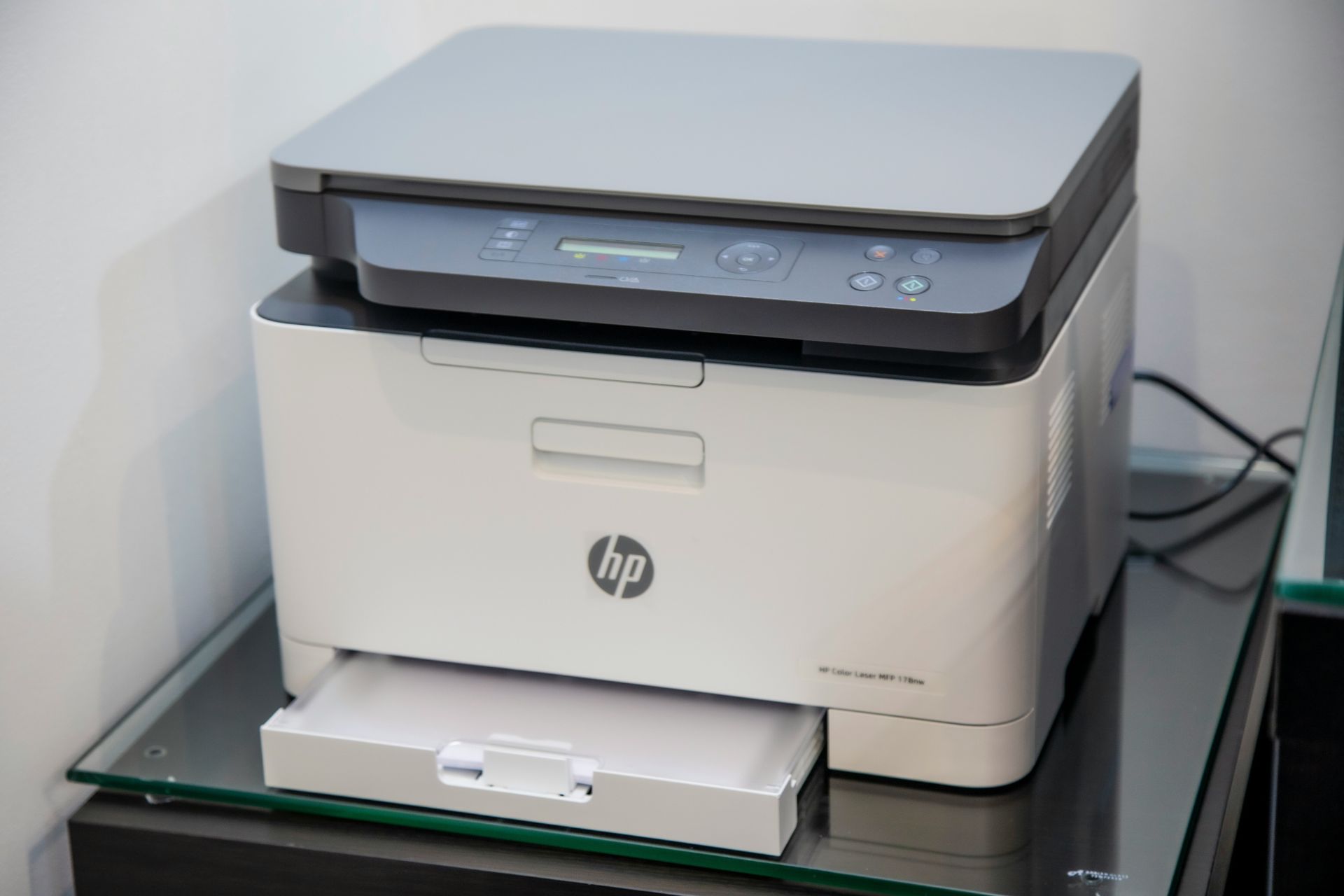
Microsoft will increase the number of print jobs per license to 100, up from 5, for all organizations with Microsoft 365 A3 and Microsoft 365 A5 licenses, starting May 1, 2024. That is about a staggering 1900% increase.
The Redmond-based tech giant says the decision to increase the number of Universal print jobs will benefit many organizations, and it cited the use of the print add-ons as an example, saying that now, this new benefit will eliminate the need to rely on them (thus, not having to spend budget on them, anymore).
100 print jobs is a significant increase from the existing licensing terms, which provided only five print jobs. This means that most organizations can use Universal Print with no extra cost if they have eligible licenses. Also, if you have already purchased volume add-ons, this new benefit may reduce or eliminate the need for you to purchase print job add-ons and may allow you to give more users access to Universal Print. Carefully investigate what volume you need and cancel any additional volume purchases if they are no longer necessary.
Microsoft
Alongside this staggering increase, Microsoft is bringing new capabilities to Universal print: users will soon be able to print from macOS devices, but also from any device with the new pull print feature.
Pull Print (coming soon) simplifies the printing process for users, allowing them to print to any printer. Users can print from any device or app without having to choose a printer in advance. Then, they can go to any corporate printer that’s nearby, verify their identity, and safely retrieve their document.
Microsoft
Microsoft decided to increase the number of Universal print jobs, after many educational organizations, including schools, and universities complained about the rising costs of printing.
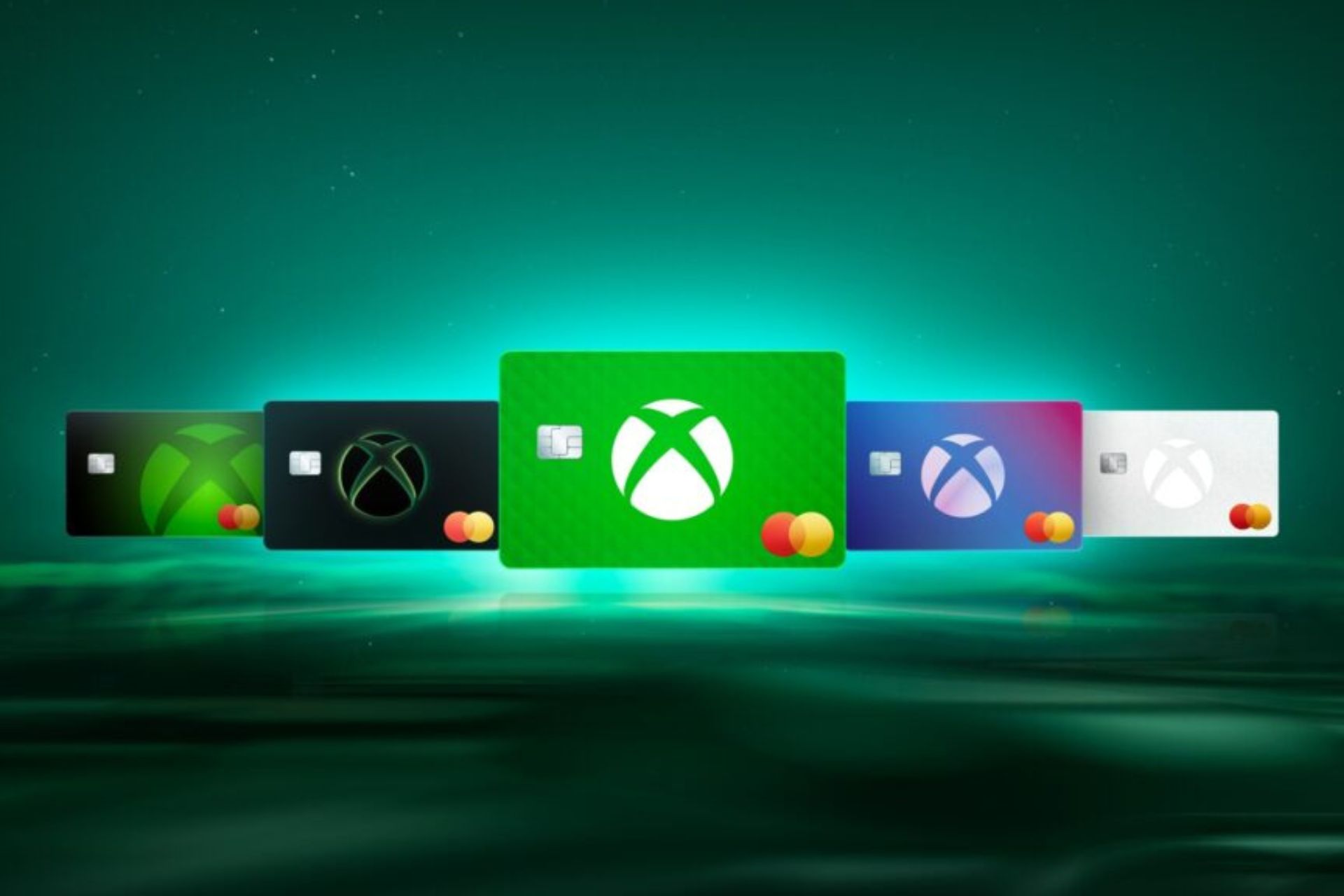
The Xbox Mastercard is finally available to users after Microsoft announced it last year. It is a no-annual-fee credit card issued by Barclays, that can be used to earn points with everyday purchases and use them to redeem games and other valuables in the Xbox Store.
According to the official announcement, Microsoft is releasing the Xbox Mastercard as a no-annual fee product that can be used to earn points for every $1 spent on a variety of purchases.
Starting today, the Xbox Mastercard with no annual fee is available to all residents in the continental United States, Alaska and Hawaii.
Microsoft
The places you need to spend your budget to earn points on the Xbox Mastercard are:
Xbox & Microsoft – Earn 5x card points on eligible products at the Microsoft Store.
Streaming services – Earn 3x card points on eligible streaming services like Netflix and Disney+.
Dining delivery services – Earn 3x card points on eligible dining delivery services like Grubhub and DoorDash.
Everyday purchases – Earn 1X card points on all other everyday purchases.
Plus, those who enlist for the new card will receive a handful of new benefits which include 3 months of Premium Spotify, an instant level 2 on the Microsoft Rewards program, and two 3-month codes for Game Pass Ultimate that can be gifted to family or friends.
It does sound like a good deal, but if you want to enlist in the program, you have to take into consideration the Xbox Mastercard’s terms and conditions. Why? Because it can get you in debt if you have no experience with cards.
Xbox Mastercard’s Annual Percentage Rate (APR) for Purchases is 20.99%, 26.99%, or 31.99%, based on your creditworthiness. The APR for Balance Transfers is 20.99%, 26.99%, or 31.99%, based on your creditworthiness.
When considering the Xbox Mastercard’s transaction fees, we have a Balance Transfer, that is either $10 or 5% of the amount of each transfer, whichever is greater.
If you have $1000 on your Xbox Mastercard, for instance, with an interest rate of 31.99%, and a monthly payment of $100, with an introductory balance transfer of 5% for 18 months, you’d need to pay $59 a month on the balance transfer card to pay off your balance before the intro period ends.
If you paid off your balance by the end of the intro period, you’d save $122 in interest. If you fail to do so, you’ll have a penalty fee of $41, whether we talk about late payments or returned payments.
So, owning this card is no easy task, but if you already own several other cards, and you’re comfortable with it, the Xbox Mastercard could end up being a good deal, as long as you’re spending, of course.
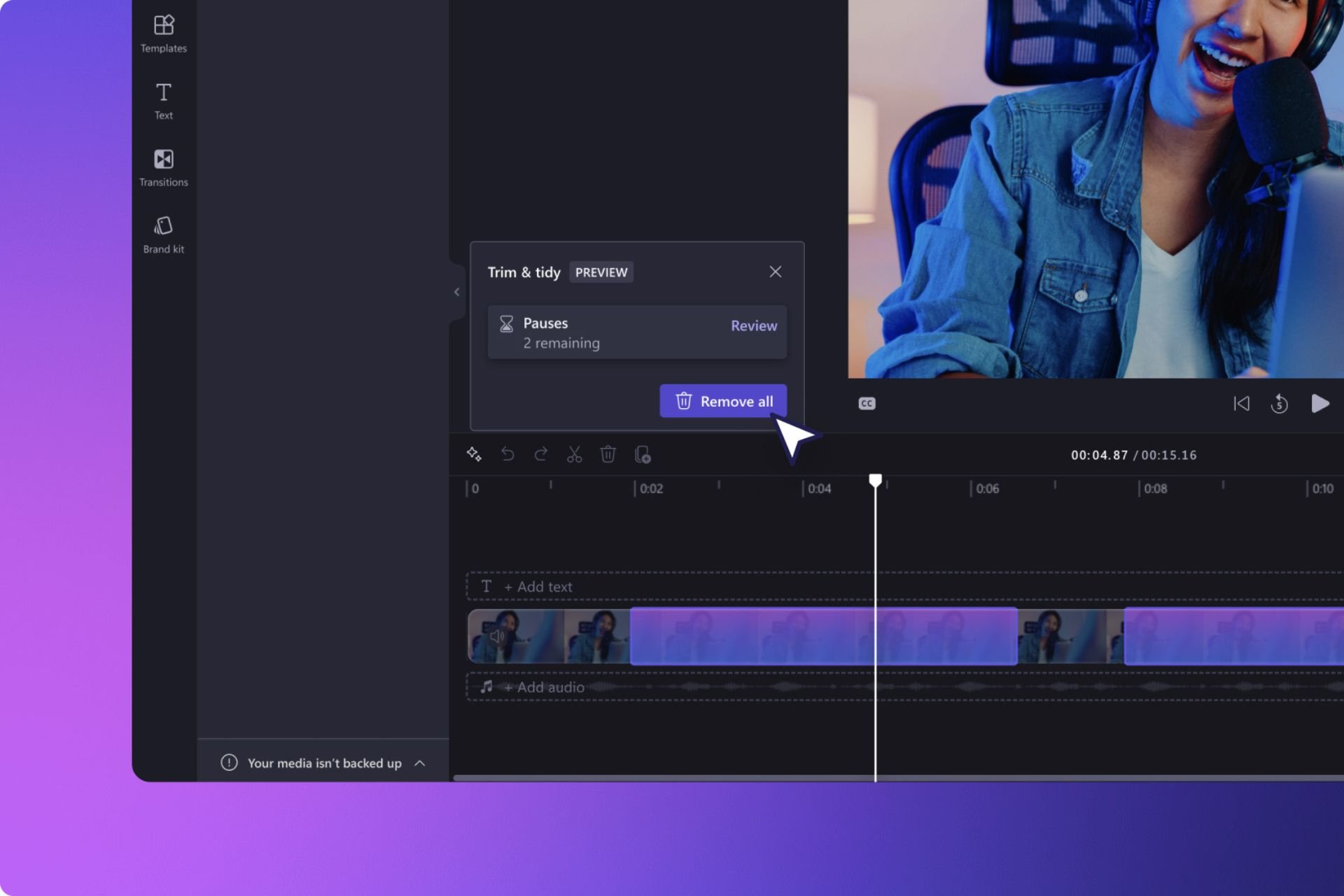
And by automatically, we mean that now Clipchamp will clean your videos of long silences in just a matter of seconds. According to the official blog post, Microsoft added a new AI-powered capability that will detect long periods of silence and suggest the user push a button and clean them all.
The new capability is called Silence Removal, and it’s perfect when editing video podcasts, for example, something that Microsoft wants users to use Clipchamp for. In fact, in a previous update, Microsoft added a bunch of audio-related features just for that.
This new AI feature in Clipchamp can remove long boring silences in a snap. Silence removal allows you to find, trim and delete the silent parts of audio or video files. This is perfect for anyone who wants to tidy up their podcasts, meetings, interview videos and voiceovers, without having to spend hours tediously editing out silences bit by bit.
Microsoft
Users will be able to let AI detect these periods of silence, and they can choose to review and remove them one by one, or all at once.
The best thing? Silence Removal is available for free to all users with a personal account.
And, in case you need an intro and an outro for your podcasts when you edit in Microsoft Clipchamp, the Redmond-based tech giant has you covered with a packet full of over 200 new exclusive stock audio tracks, all copyright-free, and free to use for all users with a personal account.
Our content library has had a major improvement in the quantity and quality of audio tracks. You can now find over 200 new exclusive stock audio tracks, plus intro and outro, 30-second and 60-second versions to use as background music in your next video. These exclusive to Clipchamp songs came from artists and are so catchy you’ll find yourself bopping along to your video as you edit. Not only that, but they are all copyright free, and free to use. You can listen to the full library of new tracks in our stock library and read more about it here.
Microsoft
If you prefer video podcasts, Microsoft makes it easier for you with these new Clipchamp enhancements:
You can now add multiple track items to the timeline at once. Simply hold down the Shift key to select multiple items in your media library, and then click the plus button at the top of the library to add them all to the timeline. This is great news for users creating slideshow videos that contain many media assets.
When freehand editing on the stage, you can now edit multiple items at once. To give it a try, hold down Shift key to select multiple items on the stage and move them around, as well as resize and rotate until your heart’s content.
To allow you to further customize the position of your media in the stage, we’ve added the ability to freely rotate any item.
This is a good day for those commercial users waiting for the new Microsoft Office LTSC 2024: the suite is officially in commercial preview for Windows and Mac users.
We are pleased to announce that the commercial preview of Microsoft Office LTSC 2024 is now available for both Windows and Mac. Office LTSC is built for specialized use cases that require a long-term servicing channel such as regulated devices that cannot accept feature updates for years at a time, manufacturing process control devices that are not connected to the internet, or medical testing equipment running embedded apps that must stay locked in time.
Microsoft
According to the announcement, Microsoft Office LTSC 2024 will also have a subset of features that are already available in Microsoft 365, but previously unavailable to the Office suite, which means many of them will be useful in modern situations.
Office LTSC 2024 will include features from past Office releases as well as a subset of new features already available in Microsoft 365 Apps for enterprise.
Microsoft
The Redmond-based tech giant also said that Windows 11 LTSC is going to be released later this year, confirming the operating system. Together with the new Microsoft Office 2024, both services will be supported for a total of 5 years, under the Fixed Lifecycle Policy.
This means commercial customers will be able to use these services until 2029, with full support from Microsoft, and regular updates.
Speaking of which, commercial customers are now able to preview the following suites:
Microsoft Office LTSC Professional Plus 2024 (includes Word, Excel, PowerPoint, Outlook, OneNote, and Access)
Microsoft Office LTSC Standard for Mac 2024 (includes Word, Excel, PowerPoint, Outlook, and OneNote)
Microsoft Project Professional 2024
Microsoft Visio Professional 2024
Microsoft announced the preview a while ago, and it stated back then that the suite would be updated to deal with modern issues and infrastructures, introducing new features to Excel, and Outlook to keep up with the current demands.
Microsoft Edge was updated to support Magnify Image a while ago, and the feature allows users to magnify images straight in the Edge browser without opening them in a new tab and zooming in.
It seems that now, the Redmond-based tech giant will add some AI-powered capabilities to the Magnify Image capability in Edge that will let users enhance image quality from low to high. According to the findings of the tech enthusiast, @Leopeva64, the new capability is already enabled in Edge Canary, but it’s not functional.
It can be accessed by selecting an image, magnifying it, and then using AI to enhance it, as you can see in the image below.
Users will have to wait a few seconds, but the feature should enhance the image to a higher quality than it was before.
As we said earlier, the feature is currently non-functional, which means Microsoft did not intend to release it just yet. As the AI-powered Magnify Image is currently Edge Canary, the capability might not see the light of day, but that is a small chance, given how invested Microsoft is in everything AI.
Speaking of AI and Edge, the browser will also support Designer as its image editor, and it will be capable of Generative Erase, a feature that was first introduced in the Windows Photos app. With it, users will be able to edit images directly in Microsoft Edge, by removing unwanted objects from them.
Users will only need to select the highlit area provided by the Designer, and the tool will the rest. Once the object is removed, the Designer will automatically fill the void using AI, and the results are quite impressive.
These capabilities will most likely be available in the next weeks, giving users a plethora of free ways to edit their images fast and professionally.
Acer announced a few stunning gaming displays before CES 2024, but the one that stood out was the Acer Predator Z57, which features a 57-inch screen, 120Hz refresh rate, and 32:9 DUHD with curved display and 7680×2160 resolution.
It has a 2304-zone MiniLED backlighting for better contrast, VESA DisplayHDR 1000, and 98% coverage of the DCI-P3 color space.
The monitor has adaptable ergonomics, which means you can easily adjust, title, swivel, and change the height to find the perfect viewing angle.
With dual HDMI 2.1 support, you can enjoy next-generation gaming with your PlayStation 5 or Xbox Series X console seamlessly.
It was expected to be priced somewhere around its competitor, the Samsung 57-inch Odyssey Neo G9, which is available at $2499. However, Acer launched it to the retail market at $1999, giving it a competitive edge.
Here is the detailed information about the monitor:
Details
Screen size
57 inches
Display
curved MiniLED DUHD (7680×2160) resolution Local Dimming Zones: 2304 ZONES Refresh Rate: Up to 120HZ DCI-P3 – 98% coverage VESA DisplayHDR 1000 Cinematic immersion – 1000R curvature and a panoramic 32:9 aspect ratio
You might already know some AI tools in Microsoft Teams: Copilot, for instance, or the Intelligent Recap, which lets you process recorded Teams meetings easier and faster.
Well, you should know that Microsoft is planning to add the new AI-powered Intelligent Call Recap to your Teams calls soon, allowing you to easily keep track of everything that’s discussed in the call, automatically.
According to the latest entry in the Microsoft 365 Roadmap, Teams Premium users will be able to use the feature to have it cover the call, extracting information and notes, while letting you pay attention to the discussion. In other words, AI will take notes for you so you won’t have to.
Transcription will have to be enabled for this feature to work, but once that is done, you won’t have to worry about not noting everything down.
Here’s what the entry says:
The Calls app in Teams will soon have AI-generated notes and action items from your calls, so you can pay attention to your conversations and save time coordinating next steps. Intelligent call recap will work for both VoIP and PSTN calls, and summaries will be generated from calls for which transcription was enabled.
Microsoft
The feature will be added to Teams in June 2024, almost a year after the introduction of the Intelligent Recap feature, basically one of the first AI-powered capabilities to be introduced to Microsoft Teams.
Intelligent Recap is a tool that leverages AI to provide a detailed overview of your professional meetings, and it summarizes calls for you with important keynotes and a detailed map of all the speakers. Plus, at the end, it also generates suggestions and recommendations. Microsoft also added it to Teams Mobile.
The new Intelligent Call Recap on Teams is no different, but it does it while you attend the meeting, basically, providing you with notes as you participate in the meeting.
Microsoft introduced the addition of Copilot features in Dynamics 365 Field Service. Managers can use Copilot’s generative AI features with Dynamics 365 Field Service, which can help create and manage work orders easily using natural language prompts.
Copilot can assist in retrieving work order details, summarizing them, and presenting them in an easily digestible format. Copilot can also go beyond searching work orders to searching other Microsoft Dataverse records, including accounts, contacts, opportunities, and more. In addition, organizations can now configure the data that Copilot uses to generate work order summaries in Dynamics 365 Field Service to meet their specific business needs.
The Dynamics 365 Field Service users can also access the Outlook email add-in and ask Copilot to make work orders on the basis of emails they get from Outlook.
In addition, the field service managers can ask Copilot to send customers email updates with details of scheduled work orders or suggestions for unscheduled work orders.
The Dynamics 365 Field Service plugin for Microsoft Copilot is generally available. Managers and field workers can use it to ask questions from the Copilot assistant with natural language prompts within Teams. This allows them to collect essential information about work orders and other records saved in Dataverse.
Furthermore, technicians can use this feature to speed up problem resolution by asking Copilot to search extensive product manuals for relevant information.
Amit Nene, Business Applications Director, BW Packaging Platform, Barry Wehmiller said:
The introduction of Copilot in Dynamics 365 Field Service, with its powerful summarization capabilities, is a game-changer. Not only does it benefit our leaders, but it also streamlines internal communications, aids finance, and helps customers stay up to date. By automating this process, we reduce manual work and ensure critical information isn’t overlooked.
Lastly, the Field Service app within Microsoft Teams now allows you to automatically expand shared links to work orders, letting workers access additional details about the work orders right from the Teams interface.
What are your thoughts on the matter? Share your opinions with our readers in the comments section below.
SharePoint will be updated to support the newer Made for Email template as the platform’s default one, starting in May 2024.
According to the latest entry in the Microsoft 365 Roadmap, the reception to the Made for Email template has been positive, and this prompted Microsoft to turn it into the default template, replacing the News Posts.
However, the News Posts will not be entirely gone. Instead, you can still create them in any way you want, and you can even copy existing posts and turn them into News Posts. The good thing is that now, due to the new policy, they will be treated through the Made for Email template, effectively giving them additional settings, while keeping their existing ones.
Even more, every News Post user creates will have all the Made for Emails capabilities that can be used to customize and send the post further.
Here’s what the entry says:
Following the positive reception of the “Made for Email” News templates, we are rolling out a change that will make every news post you create “Made for Email” by default. Now, no matter how you create your new News Post, whether it is copying a previous post or using an existing template, you will have access to send that full distribution as an email. With this change, authors will still have access to our full webpart library by selecting “all” webparts in the webpart picker but are defaulted into having additional sending functionality.
Microsoft
Aside from making the Made for Email template the default one, SharePoint will also be updated to support a reporting mode capable of keeping track of a 180-day history of all changes.
This way, IT admins and managers will be able to create custom reports that can be used to strengthen security, and privacy and even plan actions for when issues such as cyberthreats are happening.
Microsoft revealed an attack that takes advantage of new critical vulnerabilities in OpenMetadata to access Kubernetes workloads and utilize them for cryptomining activity.
Initially, the attackers detect and target Kubernetes workloads of OpenMetadata that are exposed to the internet for entry.
After identifying the vulnerable version of the app, the hackers exploit the above-mentioned vulnerabilities to execute code on the container running the vulnerable OpenMetadata image.
Once they gain a foothold, these attackers try to validate their successful intrusion and evaluate the level of control over the affected system. This reconnaissance phase usually includes contacting a publicly accessible service.
In this type of attack, the hackers send ping requests to domains ending with oast[.]me and oast[.]pro, linked with Interactsh, an open-source tool used for detecting out-of-band interactions.
OAST domains, publicly resolvable yet distinctive, let attackers determine network connectivity from the infiltrated system to the attacker’s infrastructure discreetly. This allows them to verify successful exploitation without raising any suspicious outbound traffic that could trigger security alerts.
In addition, this method is beneficial for attackers because it allows them to confirm their connection with the infected device before establishing a command-and-control (C2) channel and deploying malicious payloads.
Once they have initial access, hackers execute a series of reconnaissance commands to collect information such as OS version, network and hardware configuration, active users, and more to learn about the infiltrated system’s environment. Moreover, they also read the workload’s environment variables.
In OpenMetadata’s scenario, the variables could possibly involve connection strings and credentials for various services utilized for OpenMetadata’s operation. If these are exploited, this information could be used to execute lateral movement within the network, leading to gaining access to additional resources and escalating attacks.
After confirming their access and ensuring connectivity, the hackers download the payload, a crypto mining-related malware, from a remote server.
This what Microsoft found:
Additional cryptomining-related malware in the attacker’s server Source: Microsoft
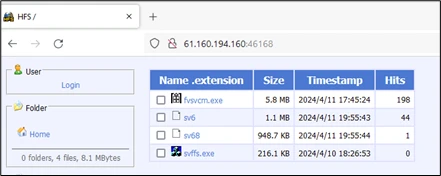
We observed the attackers using a remote server located in China. The attacker’s server hosts additional cryptomining-related malware that are stored, for both Linux and Windows OS.
The downloaded file’s permissions are then elevated to grant execution privileges. The attacker also added a personal note to the victims:
Once done, hackers run the downloaded malware and remove the initial payloads from the workload. Finally, to engage in hands-on keyboard activity, the attackers establish a reverse shell connection to their remote server with the help of the Netcat tool. This will allow them to remotely access the container and take more control over the system.
Furthermore, these attackers use cronjobs for task scheduling, allowing them to execute malicious code at set intervals.
How do you identify if your cluster is vulnerable?
Admins who use the OpenMetadata workloads in their cluster should make sure that the image they are using is then the latest one.
To avoid OpenMetadata being exposed to the Internet, it is recommended that strong authentication measures be used and that default credentials be avoided.
If you want to get a list of all the images running in the cluster, use this command
kubectl get pods --all-namespaces -o=jsonpath='{range .items[*]}{.spec.containers[*].image}{"\n"}{end}' | grep 'openmetadata'
If you find any of the pods with a vulnerable image, ensure you update the image to the newest version.
How can Microsoft Defender for Containers help?
To avoid these attacks, Microsoft Defender for Containers is a robust security solution that provides agentless vulnerability assessment for Azure, AWS, and GCP. This allows you to detect vulnerable images in the environment before the attack.
Another good security solution to monitor Kubernetes clusters can be Microsoft Sentinel via Azure Kubernetes Service (AKS) solution for Sentinel, which provides an audit trail to keep an eye on user and system actions to detect suspicious activities.
Here are the indicators of compromise (IoCs) mentioned by security researchers in Microsoft:
To avoid being victimized by this attack, Microsoft recommends users check clusters that run OpenMetadata workload and ensure the image is up to date (version 13.1 or later).
What are your thoughts on the matter? Share your opinions with our readers in the comments section below.
It has been over a year since Microsoft retired the Save as PDF option from its Edge browser, but it seems that this super useful capability is making a comeback. According to tech enthusiast, @Leopeva64, Edge Canary, and Edge Dev are now allowing users to use this option once again.
We’ve tried it on both Edge Canary and Dev, and we haven’t seen it yet, which means Microsoft is gradually rolling it out, but if it’s coming, then this feature could steal the show.
Basically, Edge will let you save anything on the webpage as a PDF document. There is currently a way to do it: you can always highlight something on a webpage, right-click it, and select Print, and it will also let you save the webpage as a PDF document with pictures, text, and so on.
But this method is not so direct, and not intuitive as the Save as PDF option. The latter lets you save anything in the format in a matter of seconds, by right click and selecting the option.
The Redmond-based tech giant has been making some big changes to the Edge browser: for instance, we found out that the company will lock the Settings page to those using Edge on unactivated Windows devices.
Microsoft will also enhance Copilot on Edge to help users draft emails more easily. With it, users can write emails more efficiently with the desktop version of Outlook, as the AI will suggest text, and complete sentences, and improve the clarity of the message.
Both of these new capabilities are now being tested in Edge Canary, and we don’t know for sure if they’re going to make it to the stable channel, but there is a big change they might. That means that those users browsing on Edge on unactivated Windows devices should consider activating their Windows.
Ultimately, they will have access not only to the full capabilities of Windows but a stable, secure, and safe Edge, as well.
Microsoft is actually thinking about introducing the new AI File Explorer to Windows 11, as the Redmond-based tech giant has hidden information on its system requirements in the latest Windows Insider builds.
According to a Windows enthusiast, Albacore, who discovered the strings revealing the information, Microsoft wants devices to have 16 GB of RAM, 225 GB free storage space, a Snapdragon X Elite NPU (HWID QCOM0D0A) processor, and ARM64 CPU, which is a relatively new and not so popular among casual Windows users.
Turns out Windows 11 build 26100 (purported 24H2 RTM) contains the AI Explorer requirements baked into the OS:
ARM64 CPU
16GiB of RAM
225GiB system drive (total, not free space)
Snapdragon X Elite NPU (HWID QCOM0D0A)
Albacore
Turns out Windows 11 build 26100 (purported 24H2 RTM) contains the AI Explorer requirements ? baked into the OS ? ARM64 CPU ? 16GiB of RAM ? 225GiB system drive (total, not free space) ? Snapdragon X Elite NPU (HWID QCOM0D0A) I guess that's one way to drive ARM64 adoption ??️ pic.twitter.com/ZbQf4KY1BN
The new AI File Explorer is quite demanding on Windows systems, as you can see, but it should deliver appropriate capabilities. For instance, it will have a built-in history or timeline feature capable of searching everything Windows 11 users tell it to, using natural language.
The AI File Explorer will have access to everything on Windows 11 and it will greatly ease the way users find documents, chats, or any other files on this operating system.
You can even tell it a word, for instance, summer, and the AI File Explorer will display all the documents that include or reference the word summer, and it doesn’t have to be explicit, as this feature is also capable of context. With it, the AI File Explorer automatically suggests tasks when opening up an app on Windows 11.
Prior to unveiling the requirements necessary to run the AI File Explorer on Windows 11, Microsoft also published a paper describing a patented technology strikingly similar to the tool, which means, that one way or another, the company wants to integrate AI into Windows, with experiences especially tailored for usual customers.
Considering that Windows users still don’t use Copilot very much, according to our latest survey, it will be interesting to see how is Microsoft planning to to attract people to use the new AI File Explorer. By all means, it does sound exciting, but it will be a long journey, and these system requirements don’t help either.
In a bid to expand its footprints in the region, Microsoft announced investments to the tune of $1.5 billion in G42, an AI giant headquartered in Abu Dhabi, UAE. With the deal going through, G42 will now run its services on Microsoft Cloud.
According to the official blog post, the partnership had the backing of the UAE and the US governments. After the deal, Microsoft President Brad Smith gets a seat on G42’s Board of Directors. The blog further reads,
G42 will expand its existing commitment to deploying Microsoft Cloud offerings, demonstrating confidence in Microsoft as its preferred partner to enhance services and deliver value-added solutions to its customers. With the partnership, G42’s data platform and other essential technology infrastructure will migrate to Microsoft Azure to benefit from industry-leading performance, scalability and security capabilities.
We are excited to announce a $1.5 billion investment from @Microsoft in G42, marking a significant step forward in our journey to lead in #AI innovation globally. pic.twitter.com/XJ0Q4WiZta
The deal is expected to aid industries in the Middle East, Central Asia, and Africa in harnessing the true potential of Artificial Intelligence and Microsoft Cloud.
G42’s past dealings with China
Ever since Microsoft made its investments in G42 public, the latter’s past dealings with China have been widely reported. G42 had to cut ties with China for the deal with Microsoft to go through. It has previously been accused of spying, according to Japan Today.
A Forbes report says that the deal hints at improving ties between the US and UAE, and the former trying to stay ahead of China in the AI race.
The New York Times reports that under the agreement, G42 will cease to deploy Huawei telecom equipment in operations, which the USA believes could be exploited by China to access critical data.
Beyond all the concerns, the deal will prove beneficial to both companies and countries. Going forward, G42, headed by Sheikh Tahnoon bin Zayed of the royal family, will be able to expand operations at an even faster rate with support from Microsoft.
Corsair is famous for its gaming peripherals, and if you’re looking for a new pair of headsets, this is your lucky day.
The company has just introduced two new pairs of affordable headsets for PCs and consoles, so without further ado, let’s see what they can offer.
Corsair has just introduced two new HS35 v2 headsets
Finding a quality but affordable headset isn’t always easy, but according to TweakTown, Corsair might have just what you need.
The HS35 v2 headset comes with custom-tuned 50mm neodymium drivers that can produce high-quality sound.
If you need something more advanced, HS35 Surround v2 headset has a USB receiver to deliver Dolby Audio 7.1 surround sound when connected to a PC or Mac.
According to Corsair, this is especially noticeable in games such as Overwatch 2 or Starfield. Both headsets have adjustable headbands, making them comfortable for longer gaming sessions.
In addition, there’s a comfortable and soft fabric used for earpads, so you’ll never feel uncomfortable while using these headsets.
Both headsets have on-ear volume control with a mute button, and thanks to the 3.5mm cable you can connect them to a PC, PlayStation, Xbox or Nintendo Switch.
As for pricing, the HS35 v2 headset costs $49.99 while the HS35 Surround v2 model is priced at $59.99. Both models are now available in North America.
Phishing attacks are fairly common as they allow hackers to obtain your information such as login data.
To prevent this, Microsoft has developed Enhanced Phishing Protection, and we can finally see how it works in action.
Enhanced Phishing Protection can now alert you if you type your password on unsafe websites
Many users tend to save their passwords in Notepad since it’s convenient, but this is a terrible practice since Notepad saves your passwords in plaintext format.
By doing so, anyone who has access to your PC, such as a hacker, malware, or anybody else, can find and read them.
If you happen to do that, Enhanced Phishing Protection will now inform you that it’s not safe to save passwords in this format.
This will even generate an event in the Event Log that your system administrator can later review if needed.
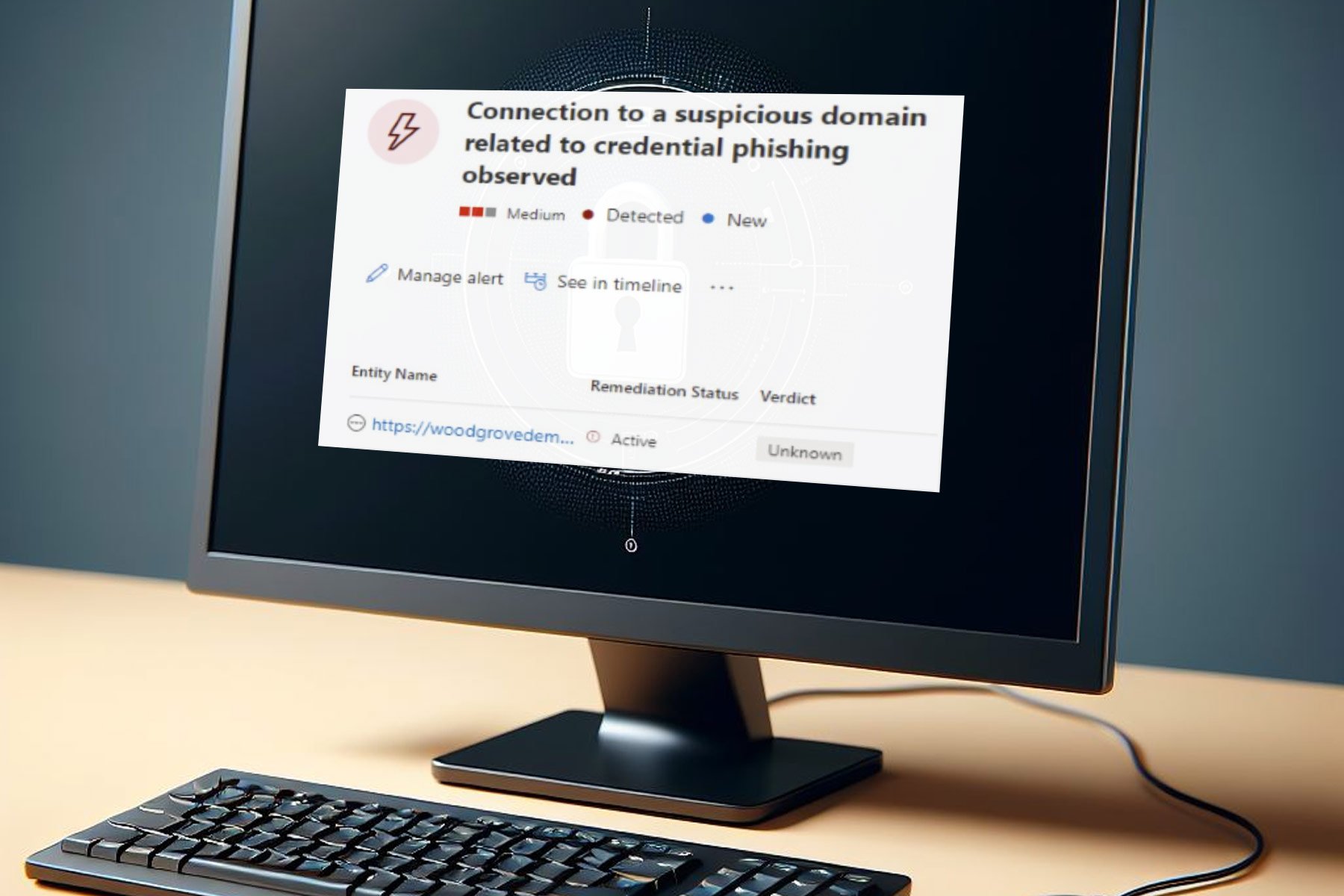
That’s not all, the feature will also detect if you type your Windows password to a known phishing website in any browser and give you an alert in the Defender for Endpoint portal.
If EPP sees you type your Windows password into a browser (e.g. Firefox, Chrome, Brave, etc) that's connected to a known phishing site, the Defender for Endpoint portal shows the following alert: pic.twitter.com/ElYQdgHPwD
For all PlayStation players out there, we have got exciting news. PlayStation trophies would soon debut on PC with the release of Ghost of Tsushima Director’s Cut!
Confirmed by PlayStation in a post on X(formerly Twitter) and an official blog, Ghost of Tsushima Director’s Cut will be the first game to support the PlayStation overlay that offers Trophies, Friends list, Settings and Profile on the PC.
FYI if you unlocked Trophies on Ghost of Tsushima Director’s Cut on PS5, when you connect the same PlayStation Network account to the PC version you will have those Trophies also unlocked there.
Accessible via the in-game menu and the dedicated Shift + F1 keyboard shortcut, the PlayStation overlay will be available when Ghost of Tsushima Director’s Cut releases on May 16, 2024. But you will have to sign in using a PlayStation Network account.
The trophy set for Ghost of Tsushima Director’s Cut on PC is the same as that for PlayStation 5.
PlayStation hasn’t yet shared any update about the functionality coming to any previously released or future titles. However, many in the gaming industry suggest that all future PlayStation games on PC will support the overlay and allow you to collect trophies.
Some excited about trophies on PC, while others express concerns
When we tried finding out how PlayStation players responded to the change, most were excited about the prospects.
This is so cool!! I hope that other Sony PC games like SpiderMan, Sackboy: A Big Adventure, Ratchet and Clank: Rift Apart and Horizon can receive a patch to add the trophies to their PC versions.
Finally – this has held me off getting PC versions of these games for so long! Going to go hog wild once they’re available!
I find myself playing the same game on PC and PS5 regularly so this is a great news.
Though some did express concerns, primarily with players manipulating the algorithm for trophies, due to fewer restrictions on PCs.
Cool beans. I also vouch for cross-saves and even day 1 releases at some point. I support anything that eventually leads to more accessibility. But, how are they going to prevent the cheaters? With PS5 saves the opportunity was gone and now it’s kinda back again.
I really hope Sony has a mitigation/ban plan in effect to stop that from happening. Good for the PC community, and I’m happy for them, as long as it doesn’t result in diminishing the work console users put into achieving trophies (I’m talking about trophy hackers here).
Eh trophies will become even easier to hack. Might finally be time to give up trophy hunting and actually enjoy games again.
We will have to wait and find out whether Sony enforces any additional measures to prevent players from manipulating the systems.
For now, PlayStation trophies coming to PC is a big development and in the right direction, especially for the proud trophy hunters!
Copilot is everywhere as Microsoft is doing its best to integrate it into various services and products.
Speaking of which, Microsoft is bringing its Draft with Copilot feature to Edge.
Draft with Copilot is currently being tested in Edge
If you’re using the Edge Canary browser, you should have access to Draft with Copilot and use it to easily create drafts for Gmail or social networks such as Twitter.
This isn’t a new feature, and it has already been available to Microsoft 365 Copilot subscribers. With it, users can write emails more efficiently with the desktop version of Outlook, as the AI will suggest text, and complete sentences, and improve the clarity of the message.
Although this is an Outlook feature, Microsoft is now testing it in its basic form in Edge.
In the past, whenever you would hover the cursor over a text field in Gmail or Twitter, you would get a Rewrite with Copilot (Alt + I) option for highlighted text.
In Microsoft Edge you’ll now get the Draft with Copilot option, however, the keyboard shortcut will remain the same.
Using this feature, you can add your description, and adjust the tone, format, and length. After that, Copilot will generate the draft allowing you to review it before inserting it into the text field in question.
Once you add the draft, you can rewrite it again if needed. It’s important to mention that Draft with Copilot in Edge lacks certain functionality compared to its Outlook counterpart.
The Outlook version can write the email and send it automatically to the recipient, while this version isn’t automated, and requires user input.
On the other hand, this version doesn’t require a Microsoft 365 subscription, and during our testing, it worked perfectly with the web version of Outlook, Gmail, and Twitter.
Microsoft acquired Activision Blizzard in 2023. So, many of us were skeptical about the future of its games. After all, there were also employee layoffs. However, since then, things calmed down for both companies.
Blizzard benefits from the Microsoft takeover, especially since it feels like a partnership. According to Holly Longdale, the executive producer and vice president of World of Warcraft, the company shares information with Mojang and the Elder Scrolls Online team.
How does Microsoft influences Blizzard?
Based on Holly Logdale, Microsoft allows Blizzard to do whatever they want. In addition, World of Warcraft keeps having a steady player count. On top of that, the number of subscribers is slowly rising. Also, at the moment, WoW might have more than seven million players.
Microsoft might be able to make Blizzard shine again in the upcoming years. After all, three new World of Warcraft expansions will be available soon. The first one is The War Within and comes with the 20th Anniversary Collector Edition. Afterward, we are getting Midnight and The Last Titan.
By the way, you can register for the beta version of The War Within.
The War Within will happen in the underground kingdoms of Azeroth. On top of that, this expansion lets you play as an Earthen. However, Midnight and The Last Titan take place in the Old World.
Diablo 4 is getting its first expansion this year, known as Vessel of Hatred. It will bring a new class to the game and new areas. Also, this is just one of the two announced expansions.
As you can see, the reign of Microsoft over Blizzard is not that bad. The game developer can continue its work unbothered. Additionally, the company has more resources and help from developers who work under Microsoft.
In a nutshell, Microsoft is greatly helping Blizzard accomplish new heights. In addition, the company has more resources available. Unfortunately, the layoffs slowed down or stopped the work on some projects. Yet, we can hope Blizzard will bring more new games to their library. Also, Microsoft might revive some of the old franchises.
However, we do remember about the latest Microsoft guidelines for the developers to avoid gender stereotypes, so we’re not 100% sure that there is no implication from the software giant.
What are your thoughts? Do you think that Microsoft’s takeover benefits Blizzard? Let us know in the comments.
The featured image is generated using DALL-E and it’s not actually a prototype of NVIDIA’s gaming console.
NVIDIA is on a mission to revolutionize the Small Form Factor (SFF) gaming PC world, and it’s doing so by introducing a new ecosystem powered by what they’re calling SFF Enthusiast GeForce GPUs. This initiative isn’t just about shrinking the size of graphics cards; it’s about ensuring that these compact powerhouses can fit into the tiniest of spaces without compromising on performance.
According to WCCFtech, NVIDIA is collaborating with partners across the board, from graphics card makers to chassis and PSU manufacturers for this project that could become a game-changer for those of us who love our setups small yet mighty.
The beauty of SFF PCs lies in their ability to save space while allowing for creativity in assembly. However, the challenge has always been finding components that play well together in such tight quarters. NVIDIA’s new guidelines aim to simplify this process, offering builders a great way to create their dream rigs without the guesswork.
This initiative is particularly exciting because it opens up the possibility for more Mini-ITX and compact NVIDIA GeForce RTX GPUs, even though allegedly, NVIDIA won’t be producing these compact variants. Instead, it’s empowering its partners to innovate, which could lead to a wider range of options for SFF enthusiasts.
Is there an NVIDIA gaming console on the way?
NVIDIA RTX 4000 SFF
But here’s a thought: could this whole endeavor be a stepping stone toward a GeForce-powered console? The speculation isn’t too far-fetched, especially considering the potential for NVIDIA to shake up the console market. By setting new standards for SFF builds, NVIDIA is not just catering to PC builders but could also be laying the groundwork for its entry into the console space.
Imagine a future where NVIDIA competes with the likes of Microsoft and Sony, offering a console that leverages its GPU prowess. It’s an exciting possibility that could redefine gaming as we know it.
The SFF Enthusiast GeForce label isn’t limited to ITX options alone. NVIDIA’s initiative also accommodates enthusiast GPUs that fit within SFF PC chassis supporting 3-slot wide cards. This move is set to encourage innovation among partners, potentially leading to high-performance graphics cards that pair perfectly with ITX motherboards in SFF builds. The anticipation for this program to go live is palpable, and while there’s no set date yet, the promise of a new standard in SFF gaming PCs is on the horizon.
So, what does this mean for us, the gamers and builders? It’s a sign that the future of gaming PCs is not just about going bigger but smarter and more efficient. The push towards smaller, more powerful systems could revolutionize our setups, making high-performance gaming accessible in the smallest of spaces.
NVIDIA is already preparing a big AI CPU announcement soon, so we’ll see how it all turns out in the future.
What do you thing about the new SFF Enthusiast GeForce? Let’s talk about that in the comments section below.
Microsoft is at the forefront of the AI revolution, integrating artificial intelligence into native tools and products. The release of Copilot, Microsoft’s AI chatbot, provided a much-needed boost. Now, in an effort to cement its position as the market leader, Microsoft has set a target to acquire 1.8 million AI chips by the end of the year.
First reported by Business Insider, acquiring more chips will allow Microsoft to make its AI offerings better, faster, and cheaper. Microsoft aims to triple the number of GPUs in 2024, with NVIDIA as the primary source!
The Redmond-based tech giant also plans to invest roughly $100 billion in GPUs and data centers by 2027 to ramp up the existing infrastructure.
It remains to be seen whether NVIDIA will be able to fulfil Microsoft’s AI chip requirements. However, with its competitors making strides in the space, NVIDIA isn’t the only option now!
During Vision 2024, Intel released its Gaudi 3 AI accelerator, which the company claims delivers 40% higher power efficiency than NVIDIA H100, a chip crucial to Meta’s AI plans.
Lenovo is well-known for its outstanding devices, and many are eager to see a new series of laptops powered by Qualcomm’s Snapdragon X Elite processors.
If you’re impatient, today we have leaked renders of the upcoming model that you mustn’t miss.
Renders of the upcoming Lenovo Snapdragon laptop have just leaked
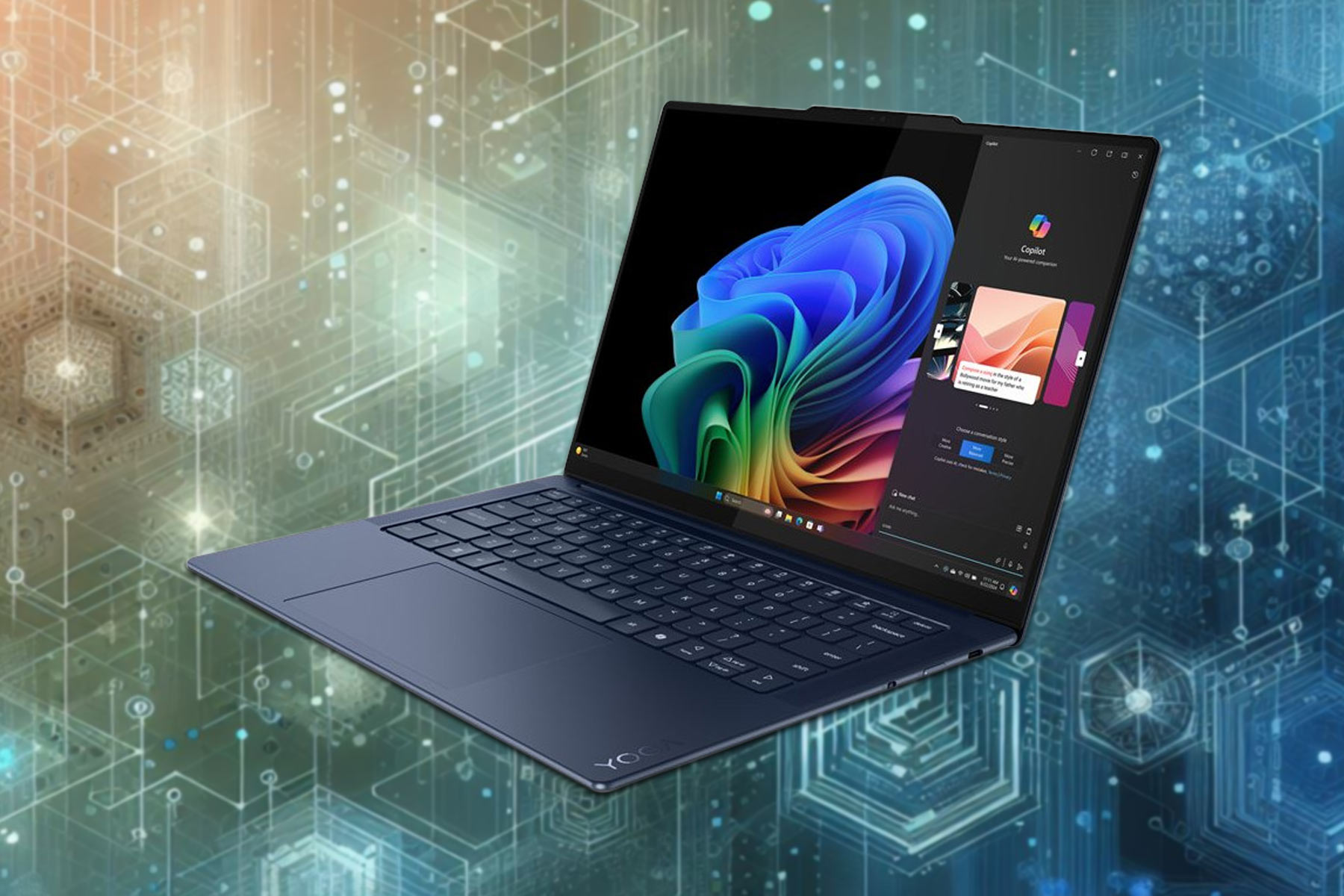
The user has posted four renders of the alleged Yoga Slim 7 14(.5) 2024 Snapdragon Edition on its account. Do keep in mind that neither Lenovo nor Qualcomm commented on this leak.
However, WalkingCat has a history of reliable leaks, so these renders may be real.
As for the design, this model looks similar to the Lenovo Slim 7i, also known as the Yoga Slim 7i. The design is amazing with a slim base, top speakers, rounded edges, and a dedicated Copilot button.
While specs aren’t known yet, according to the scraps of information that we have, we expect to see a high-end camera with a shutter, and three USB-C ports, most likely USB4.
When it comes to Sea of Thieves, an exciting action-adventure title, the bar is never too high. The game is improving with each update and adding more players. And recently, Sea of Thieves crossed the 40 million user mark on Xbox, PC, and Steam.
As confirmed by the team in a blog post and on X (formerly Twitter), the game reached the 40 million user milestone, and we will soon have Season 12 of Sea of Thieves, along with the introduction of a wide array of new pirates.
More than 40 million pirates have set sail on the Sea of Thieves! That's going to be quite the tavern tab…
On this occasion, Executive Producer Joe Neate also highlighted the contributions of the team,
I also want to take this opportunity to offer heartfelt thanks to the team, who’ve worked so hard to deliver over a hundred free updates since launch and have plenty more excitement and innovation on the horizon.
Sea of Thieves is yet to release on PlayStation
With the game still in the pre-order phase on PlayStation, the 40 million user base is limited to Xbox, PC, and Steam. The PlayStation 5 release on April 30, 2024, is expected to significantly boost the numbers, given Sea of Thieves is the top pre-ordered game on the console.
So, you might soon see the Sea of Thieves team reaching the next 50 million players milestone.
When released on Steam in June’20, Sea of Thieves received a massive response from users and, within days, became the global top seller. And a similar response is expected on PlayStation 5.
Would you buy Sea of Thieves on PS5? Let us know in the comments section.
Have you ever wondered how the future of remote work and collaboration looks? Well, it seems Microsoft has been pondering that too and has come up with something quite intriguing. Microsoft Teams is introducing Spatial Annotations, a feature that’s set to revolutionize mixed reality (MR) collaborations.
Imagine being able to collaborate with your colleagues remotely, using 3D annotations on physical objects through your mobile device. Sounds like something out of a sci-fi movie, right? But it’s becoming a reality, and here’s how it’s shaping up.
First off, this feature is currently in public preview for iOS users, with Android enthusiasts expected to join the fun later this summer. The idea is simple yet powerful. By using the front-facing camera of your mobile device during a Teams call, you can share your view with remote participants.
How do I use Spatial annotations in Microsoft Teams?
This allows for real-time collaboration with 3D annotations overlayed on physical objects, enhancing understanding and communication. No more app switching or losing context; everything you need for effective collaboration is right there in the Teams environment. And guess what? The annotations stay anchored to the environment even as you move around.
If you’re thinking about possible security issues, Microsoft has got that covered too. The Spatial Annotations feature comes with end-to-end encryption, data loss prevention, and compliance certifications. This means not only is collaborating easier, but it’s also secure.
If you’re eager to dive in, you’ll need a valid Dynamics 365 Field Service, Guides, or Remote Assist license to access the feature. And if you’re wondering about the broader implications, integrating MR functionalities into mobile apps signifies Microsoft’s commitment to making these advanced tools more accessible. It’s a big step towards democratizing mixed reality, making it available to frontline workers across various industries.
With Spatial Annotations in Microsoft Teams, it seems the future is not just near; it’s here. And it’s looking more interactive and immersive than ever. Tell us about your thoughts in the comments section below.
Assassin’s Creed series has a long history, and the game’s latest installment was released last year.
If you ever wanted to try Assassin’s Creed Mirage, this might be the perfect time for it, since the game is available for a free trial.
Assassin’s Creed Mirage is available for a free trial until April 30
According to MySmartPrice, you can test Assasin’s Creed Mirage for free on all major gaming platforms.
The trial period has started on April 16th and it will last until the end of the month. Once you download the game, you can freely test it for up to 2 hours.
According to Ubisoft, you’ll need an active Internet connection to participate in the free trial, and you’ll see a countdown timer on the top right side of the screen showing how much time you have left.
If you decide to purchase the game, all your progress will be saved and you can continue where you left off.
Regarding the availability, you can try the game on Epic Games Store or Ubisoft Connect on PC. The free trial is also available on PS4, PS5, Xbox One, and Xbox Series X/S.
Gamers have been waiting for Manor Lords since its announcement in 2020 and it will finally be unveiled on April 26th on Steam. Another great surprise is that the Early Access version of Manor Lords will also be available on Xbox Game Pass from the first day of its launch.
For those who are less familiar with the title, Manor Lords is an indie a medieval city-building strategy game that surpassed anticipated titles like Silksong and Hades 2. What makes this even more impressive is that Manor Lords is the brainchild of a single developer, Greg Styczeń, known by his pseudonym Slavic Magic.
Through the support of Patreon and the publishing prowess of Hooded Horse, Styczeń’s vision is coming to life, offering gamers a chance to dive into the intricacies of medieval lordship with a focus on historical accuracy and strategic depth.
How can I get Manor Lords?
As we’ve mentioned above, Manor Lords will be available on Steam and Xbox Game Pass. The game promises a rich, immersive experience, blending city-building with real-time strategy elements, where every decision could lead to prosperity or ruin.
But before you dive in, it’s essential to ensure your gaming setup meets the requirements. Thankfully, Manor Lords is built on Unreal Engine 4, known for its scalability, meaning it should run smoothly on a wide range of systems, including older PCs. Whether you’re planning to engage in the ultra-hard variant for a challenging experience or prefer the peaceful city-building mode, Manor Lords aims to offer something for every type of player.
The game has been tested to run well even on modest hardware, with support for features like FSR and DLSS upscaling to boost performance without sacrificing visual quality. So, whether you’re playing on an aging desktop or the latest gaming laptop, Manor Lords is poised to offer a visually stunning and smooth gameplay experience.
The bottom line is that Manor Lords is shaping up to be a must-play title for fans of strategy and city-building games. If you don’t have an Xbox Game Pass account, rush in because it features tons of free games.
Are you into strategy city-building games? Tell us more about that in a comments below.
Baldur’s Gate III fans should rejoice because the game will get a sequel. However, it won’t be a part of Larian Studios. The Belgian video game developer will move from the D&D genre and bring something new. Some speculate that Larian could work on a new Divinity game, especially after Swen Vicke tweeted about it.
I’d love to talk about what divine thing we’re working on but that would be announcing it and we’re not ready. Here's another picture of project Gustav though. pic.twitter.com/f9sMf49YDx
After gaining several awards for Baldur’s Gate III Hashbro wants to make a sequel. So, even if there won’t be any DLCs for the game from Larian, the universe won’t end. Hopefully, we won’t have to wait 25 years. Yet, the future of the game is a long way off.
Fortunately, the studio is in talks with multiple possible partners after its success. Also, according to Eugene Evans, the senior vice president of Digital Strategy and Licensing for Hasbro and Wizards of the Coast, Hasbro is figuring out where the series is going.
How long must you wait for the sequel of Baldur’s Gate III?
Eugene Evans said the company will take time to select the next partner. The company doesn’t want to make any rush decisions about the Baldur’s Gate III sequel and other products. So, the studio might take a while to work on a new game.
The sequel of Baldur’s Gate III will most likely bring back some of the characters we got close to, especially since they are a part of the D&D canon. Also, it is most likely to see them because they belong to Wizards of the Coast and not Larian. Additionally, the sequel might allow us to explore more stories that didn’t end in BG3.
Unfortunately, the bar for a Baldur’s Gate III sequel is high. Yet, according to a tweet from Swen Vincke, the CEO of Larian, Hasbro laid off many employees, and there aren’t many people left from the old team. So, the future BG3 projects could be a bit lacking.
I also want to thank @Wizards_DnD and specifically the DnD team for giving us carte blanche. I’m really sorry to hear so many of you were let go. It’s a sad thing to realize that of the people who were in the original meeting room, there’s almost nobody left. I hope you all end…
Hasbro is investing in a new D&D game development. After all, there is a high demand for D&D and RPG games, and BG3 made this visible. In addition, based on the claims made by Eugene Evans, in the next five years, we will have a lot of upcoming D&D games while we are waiting for the sequel of BG3.
Ultimately, the sequel of Baldur’s Gate III is on its way, and it might have new D&D features. Also, we might have the option to play with past characters. However, it will take a long time to develop the new game. So, in the meantime, we could either replay BG3 and add mods to it or wait for a D&D game from another studio.
What are your thoughts? Are you going to add mods to BG3? Let us know in the comments.