Exclusive images: Lenovo is dressing its Legion Go in 5 new official skins

We were the first to bring you exclusive images and technical specification details about Legion Go, and now, thanks to our trusted sources, we’re keeping the tradition alive by bringing you exclusive images of the 5 new official skins for this popular Lenovo handheld console.

While there are already countless wraps and skins for Legion Go that people can purchase from third-party manufacturers, these official skins are made by Lenovo themselves and they come in 5 versions, each sporting a different color and design, and looking flawlessly while doing so.

There is a chipset-themed skin, which sports linear designs and various darker colors; another skin has a red and blue design which could be inspired by anime themes; then, there is a simple matte dark brown version that looks professional, and could make people mistake the Legion Go console for another item.

One of the most gorgeous skins is the nebula-themed one, which sports a design with various space-related elements, and ultimately, there is also a white-colored skin for the Legion Go handheld that will surely make it stand out everywhere you take it.

If you’d prefer to give your Legion Go console a professional look, you should choose the matte dark brown skin. As you can see below, this one has a quiet design, nothing fancy, but quite good-looking. If you’re a gamer who doesn’t like attention, this one is for you.legion go skins

The chipset-themed skin would be suitable for those Legio Go users who are always on the run, or for those who are passionate about tech. What better way to show it than with a vibrant-looking console?legion go skins

The red and blue anime-inspired skin looks quite impressive, as you can see below. This would give the handheld console the edge it needs to be considered cool. Anime kids, this one is for you.legion go skins

The nebula-themed Legion Go skin looks impressive, and for those who always gaze at the stars, this is definitely the right one. Plus, your console will stand out everywhere you take it.legion go skins

Ultimately, the white-colored skin might seem bland at first, but it could help you identify the console way more easily if you ever lose it. What do you think?legion go skins

Aside from their design, which makes Legion Go look brand-new, these skins can also be practical, as they will greatly reduce the fingerprints on the console, keeping it all clean during longer gaming sessions.

However, Lenovo, per se, doesn’t manufacture skins for its devices, especially when there are dozens of third-party manufacturers already doing it, so the decision to release 5 new official skins is somehow surprising, as it can be telling: is Legion Go not selling well? Is Lenovo trying to bump up sales by releasing official skins for the console?

Well, the answer is uncertain, in both cases. We don’t have any official numbers regarding the commercial success of the Legion Go handheld console. While The Verge reported that Steam Deck sold millions of units, as of October 2023, we don’t know how many units Lenovo sold with Legion Go.

It is possible the console is not doing good, as the reviews for it are somehow critical towards many aspects: its battery life, its design, and its detaching mechanics, but in terms of performance, Legion Go impressed many.

Either way, if you already own a Legion Go, these skins will make you see the console in a new light. For now, we don’t have any information regarding the price, or the release date. But compared to the prices of the existing Legion Go skins by third-party manufacturers, they shouldn’t cost more than $40.

What do you think about them?

Google Keep will soon have an AI-powered list creation feature, courtesy Gemini

With AI becoming integrated into every other app and the rise of Gemini, Google Keep is also getting ready for an AI upgrade. The upcoming Help me create a list feature, which uses Gemini, is supposed to streamline list-making processes within the app.

9to5Google spotted the feature, which is set to be released in 2024 and is said to introduce convenience for Google Keep users.

It will use Gemini to generate lists based on natural language descriptions, making tasks such as checklist of meal prep, grocery shopping, or ideas to decorate living room, more efficient.

How does the Help me create a list feature work?

Launch Google Keep on your Android phone or tablet, and locate the Help me create a list button from the bottom right corner. Now type in Classic movies to watch over in Christmas holidays or anything related to a checklist you want to make.

Gemini will analyze the input and suggest the items to create a list. You can click Input to add the items suggested by AI, which ensures that you have control.

Future Rollout

As mentioned, the feature will be released in 2024, but there is no official date, and it is currently under testing.

Once the feature is added to Google Keep in the public version, you will see a floating action button in Google Keep.

Initially, the feature will be available in English for the United States market and is anticipated to expand to other languages and regions in the future.

Tips and Tricks to use the feature efficiently

  • Be precise in your description to get relevant suggestions.
  • Use color coding and sublists for better categorization.
  • Always be ready to provide feedback to help AI and get improved suggestions.
  • Don’t completely rely on AI suggestions, do you research before finalizing a list.
  • Avoid sharing personal or sensitive information.

We all know about the Help me write feature in Google Workspace apps like Sheets, Docs, and Slides; however, it is limited to the web. However, according to 9to5, Google Keep’s AI list creation feature will join Help me write in Gmail.

Like other tech companies, Google is also working hard to integrate AI into its Workspace apps and other products to ensure you can complete your everyday tasks more efficiently.

What do you think about the new feature? Share your thoughts in the comments section below.

Online leak exposes AMD 4800S BIOS, leaving Xbox Serious X potentially vulnerable

It seems that AMD has been in hot water recently since info regarding its graphics card was leaked online. While this is bad news for AMD, this info can be beneficial for reverse engineers.

To learn how this affects AMD and the gaming community as a whole, keep on reading.

AMD 4800S BIOS and other data have been leaked online

It seems that an anonymous security researcher has released the AMD 4800S Main BIOS, Backup BIOS, ROM, and fuses according to the Wololo.

As you may know, AMD 4800S is an APU with a deactivated GPU, and it is used in the Xbox Series X. PlayStation uses a similar hardware, but in the form of AMD 4700S.

With this data released to the public, enthusiasts can learn more about firmware, explore hardware glitches, and learn more about CPU and by extension Xbox Series X.

If any vulnerabilities are found, they might be replicated on Xbox, if the CPU on the console is using similar firmware, and this can be a serious problem for Microsoft.

There’s also a chance that these vulnerabilities can be replicated on PS5 and its 4700S CPU. At the time of writing, these dump files are still available, and we hope that the online community won’t abuse this data for malicious purposes.

This isn’t the only bad news for AMD, and we already wrote about how Microsoft added only Intel chips to the Windows 11 CPU compatibility list while leaving AMD out.

You can now design your own Fallout-themed Xbox Controller, and you should

Xbox now lets you design your own Fallout-themed Xbox Controller, and let us tell you, the variants look incredible.

The controllers can be highly customized in the Xbox Design Lab, and while you can choose from a variety of colors for the buttons, metallic triggers, D-pads, and so on, the base, which is colored in a gray pattern, will stay the same.

You can watch the official teaser for these awesome Fallout-themed Xbox Controllers below:

Needless to say, while this Xbox controller can become quite expensive (the base only costs $84, and with additions, it can get to $120-$130), it is a must-have for every Fallout fan out there.

The Fallout-themed Xbox Controllers don’t have a deadline, so you can purchase them at your own pace with your customization. And you should: Xbox is letting users customize their controllers while keeping a base inspired by various pop culture phenomena.

For instance, Palworld is taking the gaming world by storm, Xbox released Palworld-themed controllers that can also customized in the Xbox Design Lab.

Will you get this one?

The OOBE shortcuts are no longer a secret, but there is more to it

Enderman, the software engineer and security researcher, recently published his findings on the Windows 11 OOBE (Out of Box Experience) source code in a YouTube video. The OOBE in the video is for the first Windows 11 24H2 build, 26040.

He mentioned that Windows 11 build 26040 brought us the old installer back, which was first featured with Windows 10 build 9780.

On the setup page, while selecting the setup option, there is a Previous Version of Setup option, which is confusing as Microsoft has labeled the old installer as the previous version, which is misleading. The reason is that both installers co-existed for some time and are suitable for different purposes.

Enderman couldn’t get the version to work, so he installed Windows 11 build 26052 (24H2) and discovered a few hidden functionalities inside the OOBE.

Most Windows users know that we can bring up Command Prompt by pressing Shift + F10 keys to bypass the need for an internet connection or a Microsoft account while in the OOBE. Let’s find out what new things he discovered:

  1. Audit mode
    • Press the hotkey – Ctrl + Shift + F3 during OOBE to reboot your computer into Audit mode.
    • Can access the Audit mode inside the Sysprep tool.
    • This mode exists parallel to the OOBE mode so that you can invoke it via OOBE.
    • It is also called default boot.
    • Allows you to configure the system before deployment, meaning you can change the Windows system image.
    • And, by generalizing the image and distributing of a custom install.wim, pre-configuring for a large number of devices becomes scalable and quick.
  2. OOBE is a web application
    • It is run using WWAHost.exe, which is a Windows Web Application Host.
    • When checked in the Task Manager, under Processes, open the OOBE process; it is called CloudExperience Host and is located in C:\Windows\SystemApps
    • In further checking the folder, he found the app uses the plain old HTML/CSS/JS stack and to be specific WinJS framework is the choice.
    • You can redesign and change the text on OOBE or control anything, which opens up many modding capabilities.
  3. Provisioning menu
    • Press the Windows key five times in the OOBE, you will get provisioning menu.
    • Allows you to change advanced installation options, such as installing an app or configuring or resetting a device with Autopilot.
  4. Developer console
    • Press Ctrl + Shift + J to open a developer console in a production environment inside Windows 11 OOBE.
    • The console supports executing JavaScript code & a set of in-built commands.
    • Allows multiline input and to execute it you can press Ctrl + Enter.
    • To traverse through history, press Ctrl + Up and Ctrl + Down.
    • Allows you to edit an app, debug the console, and then make changes to OEM EULA.
  5. Windows Autopilot diagnostics
    • Press Ctrl + Shift + D to access the Diagnostics Page during OOBE.
    •  Allows you to view troubleshooting details about the Autopilot provisioning process.

This all seems too exciting and fun to play with; however, ability to customize OOBE on Windows 11 setup can open doors for cyber criminals as it would be easy for them to infect the Windows image before deployment.

Also, we at WR, always advise that no one should make changes to the original ISO image of an operating system, as this could harm their device and may make it susceptible to harmful things.

What do you think about it? Share your thoughts in the matter in the comments section below and let’s start a conversation.

Google retires StoreBot user agent version in favor of placeholders

Google has recently made some changes to its user agent, and this is a minor change, so it probably won’t affect online websites too much.

Join us while we take a look at this change, and see what’s new.

Google updates the Google StoreBot user agent version

It seems that Google has made some minor changes to its Google StoreBot User Agent as Search Engine Roundtable reports.

In the past, the Google StoreBot user agent used a static version. If you take a look at Google Developers documentation, you can see that this has been changed.

Instead of an actual version, the user agent shows Chrome/W.X.Y.Z. This represents a placeholder for the version of the Chrome browser that is used by that agent.

The version number will change accordingly to match the latest Chromium release version used by Googlebot.

According to Google, if you’ve hardcoded the old value in your code, you need to update it to ignore this version. This is a minor change, and according to Google, it was implemented to make maintaining the StoreBot crawler easier.

Speaking of Google and its products, Chrome has been recently updated and now it provides better search suggestions, so if you haven’t tried it, be sure to check it out.

Microsoft Edge introduces advanced translation capabilities and here’s why you should be excited about them

It’s well known that Microsoft Edge is one of the best Internet browsers around, with many believing it is superior to Google Chrome, in terms of capabilities. Microsoft updates it regularly with exciting features, including these 3 experimental ones that were introduced recently.

But the Redmond-based tech giant is not here to play around: the company introduced advanced translation capabilities that effectively allow users to audio or subtitles while watching videos on Microsoft Edge.

The new features were spotted by tech enthusiast @Leopeva64, and in a post made to X (formerly known as Twitter), they are quite easy to use. However, they are not functional.

The advanced translation capabilities were released in the experimental Canary channel of Microsoft Edge, and they will most likely be extensively tested before making them available to the stable channel.

However, as a drawback, these advanced translation capabilities will need to be accessed manually, by right-clicking on the video, accessing the Translate panel, selecting the video language and the language you want to translate the video in, and then finally hitting the Translate button.Microsoft Edge translation

Another drawback is the lack of an automatic language detector, as many users might not be able to identify the language of the video by themselves. For now, only a handful of languages are available, including English, French, Spanish, Russian, German, Hindi, and Italian.

We don’t know if Microsoft intends to do something about these aspects, but the Redmond-based tech giant might enhance the Translation capability with these features before releasing it.

If Microsoft adds an automatic language detector, the translation capabilities of Microsoft Edge could become some of the most exciting on the market. You’ll be able to watch videos in any language even if it doesn’t have any translation available.

We’re not talking only about YouTube videos, but virtually any video that you watch on Microsoft Edge.

Stuck in fullscreen mode in Chrome? Google might let you escape it with the Esc key

A few days ago, we saw an update for Chrome that improves search suggestions, but it seems that Google has something new in the store.

The company is working on a new feature that will change how the fullscreen mode works, so let’s see what the fuss is all about.

Google will offer a new way to exit fullscreen mode on Chrome

Google will finally change how fullscreen mode works, according to MSPowerUser. This was first spotted by Leopeva64 on Twitter.

Currently, you can enter and exit fullscreen mode in Chrome by pressing the F11 key. However, less experienced users can activate this mode by accident and then get stuck.

This change will fix that, and now users will be able to exit fullscreen mode by pressing the Esc key on their keyboard, which is more intuitive.

Laptop users should be especially happy with this change since they won’t have to use the Fn + F11 keyboard shortcut anymore.

This feature seems to be available only internally and to access it, users need to enable a hidden Esc to exit browser fullscreen flag.

Although the release date remains unknown, this feature will be available on all desktop platforms. Keep in mind that this feature is in the testing phase, just like password sharing on Chrome for Android, so we might not see it anytime soon, or at all.

Is ChromeOS Flex a good operating system for your business? Google seems to think so

Keeping up with the latest security issues, especially on Windows, can be a major problem for system administrators and security experts.

Even government agencies are warning their employees about the Microsoft Streaming exploit, so maybe the security of businesses could benefit from a different operating system.

ChromeOS Flex might be a great security alternative for businesses

According to Chrome Unboxed, the annual cost of cybercrime is expected to reach $10.5 trillion in 2025. To top it off, many companies will have to switch to Windows 11 or upgrade their hardware to make the switch.

This is why many Google experts believe that ChromeOS Flex might be a better, and more secure alternative because all new threats are addressed by automatic updates. In addition, the system isolates suspicious files in a sandbox environment.

Data encryption is available, and there have been no ransomware attacks on ChromeOS Flex so far. The system is also incredibly simple to use, and if you’re used to Chrome or Google Workspace, you’ll feel right at home.

It is worth mentioning that ChromeOS Flex is incredibly fast, even on older devices. Remote management is also a breeze allowing administrators to manage devices via Google Admin console.

Enterprises can also benefit from this operating system through Google’s Chrome Enterprise Recommended program. With this program, you can validate third-party solutions and ensure that you can deploy additional software securely.

ChromeOS Flex can work with older hardware, thus drastically slashing upgrade costs. You can test the OS on any PC from a bootable flash drive, and if you choose to install it, the process lasts about 5 minutes.

We also have to mention that devices running ChromeOS Flex consume 19% less energy and they are great for both smaller and large businesses.

Due to the design of the OS and frequent patches from Google, there’s less need for tech support involvement.

Overall, ChromeOS Flex does sound like a decent alternative, but can a cloud-based system replace Windows in a business environment? We doubt it, but let us know what you think in the comments.

It’s KB5001716’s turn to create havoc, with many getting install errors & duplicate conflicts

The KB5001716 update for Windows 10 is causing issues for users out there, with many reporting that they’re not able to install the package, which is related to the Update Service Components, and includes a new user interface (UI) functionality for Windows Update in Windows.

However, according to its official blog post, Microsoft is not aware that the KB5001716 update has problems, as the Redmond-based tech giant says there are not any known issues with it.

On the other hand, many Windows 10 users are encountering the 0x80070643 Windows Update error when trying to install this update. Until Microsoft resolves this issue, there are solutions you can try.

How do I fix the KB5001716’s 0x80070643 error?

The problem is that Microsoft already issued this KB5001716 update in October, 2023 and if you already install it, this would come as a duplicate. All you need to do is to uninstall the old one.

To do that go to Settings > Apps > Apps & features, look for the KB5001716 update, click on it, and then select Uninstall. Now, check for updates and install the new one.

If you can’t find it under the new updates, try the solutions below to fix the problem.

1. Run the Windows Update troubleshooter:

Settings > Update & Security > Troubleshoot > Additional troubleshooters > WIndows Update > Run the troubleshooter

Follow the troubleshooter, and wait for it to be completed.

When the troubleshooter is done, restart the device and reinitiate the process of installing the KB5001716 update.

2. Repair corrupted Windows files with the System File Checker tool

The SFC tool is quite useful in these situations, as it can repair corrupted or missing Windows 10 files. These files often cause issues and bugs in the Windows operating system, so repairing them is essential.

Running the command follows the same steps in Windows 10, and Windows 11, and you can check out this guide on how to do it.

3. Restart Windows Update Related Services

Open up Windows 10’s Run window, type in services.msc, and then hit Enter.

Windows 10’s Services will open up, and you’ll have to follow these steps:

Services > Windows Update > Startup type > Automatic > Service status > Start > Apply > OK.kb5001716

Repeat the same steps with Background Intelligent service.

Services > Background Intelligent service > Startup type > Automatic > Service status > Start > Apply > OK.

4. Clear the Windows Update cache

This solution might be a bit hard to try, as it requires a bit of tech knowledge, so if you’re not tech-savvy, then don’t try it on your own.

That said, you can clear the Windows Update cache by accessing Windows PowerShell with admin rights and running the following commands, one at a time:

  • net stop bits
  • net stop wuauserv
  • net stop msiserver
  • net stop cryptSvc

After this, you’ll need to run the %windir%\SoftwareDistribution command to open the SoftDistribution folder, where you will delete all the files from there.

Then, go back to the Windows PowerShell and run the following commands to start the updating process again:

  • net stop bits
  • net stop wuauserv
  • net stop msiserver
  • net stop cryptSvc

5. You could also wait it out, and try to install the update in a few days

This solution is a bit unconventional, but the 0x80070643 error might be a known issue for the KB5001716 patch, even though Microsoft hasn’t documented it yet.

So if you tried all the solutions above and none of them worked, then it’s best to wait a few days and try again.

If any of these solutions worked for you, let us know in the comments section below.

Outlook mobile app will soon have an In-app Contact Editor

According to the Microsoft 365 roadmap page, Microsoft is currently developing an In-app Contact Editor for your Outlook mobile app.

The feature will allow you to create & edit their contacts with a first-party form and is expected to be available in April 2024 for Android and iOS users.

A post on the Outlook blog said:

 With our latest release, we’re addressing one of our most highly requested features with improvements to our People experience. You will now have the ability to add and edit contacts right from Outlook on iOS, coming soon on Android. We’ve also completely redesigned the contact card to show more details—including latest conversations and shared files—and enabled easier calling and messaging with your contacts.

Any changes made in Outlook for iOS and Android will be synced and available across all versions of Outlook.

This could revolutionize the way you save your contacts on Outlook and eliminate the need to switch between apps.

Earlier, you could only use the device’s native contacts app to add or edit contacts related to your Outlook contacts.

Microsoft has finally redesigned contact cards in Outlook to ensure the important information is upfront. The contact card now shows recent conversations, upcoming meetings, and shared attachments you have with the person

What do you think about this feature? Share your thoughts in the comments section below.

Microsoft’s Project for the Web finally introduces this highly-requested feature

Microsoft finally allows multiple users to edit shared projects on Project for the Web platform, within Microsoft Planner. The feature was frequently requested by users in the past, and it can be used to seamlessly edit and update different projects.

Users will be able to access and edit the same set of capabilities in Project within Planner, and for now, the set includes fields such as task name, start and due date, priority, labels, checklists, notes, and attachments.

However, Microsoft says there is an entire list of fields that can or can’t be edited, and users will be able to find the list here.Project for the Web

The new update is available to a variety of Office 365 plans, their education, and GCC counterparts, including:

  • Microsoft 365 F3 and Office 365 F3 
  • Office 365 E1 
  • Microsoft 365 for Business Standard 
  • Microsoft 365 for Business Premium 
  • Microsoft E3 and Office 365 E3 
  • Microsoft E5 and Office 365 E5 

The Redmond-based tech giant says those who want to try this update, only need to open up any project that is shared with them. Those who want to create a project or use more advanced capabilities such as dependencies or custom fields, should get a Project license.

In case, they don’t have a Project license, they can try out a free 30-day trial of Project for the web at aka.ms/tryprojectnow.

The feature will most likely be available in the new Office 2024, which is set to be released later this year. In case you want to try the new office, you can access the preview version of the suite. Differently from Microsoft 365, which offers access to the same platforms, the Office suite doesn’t follow a subscription plan.

However, this will be the first Office suite in 3 years, and if it follows this pattern, the Redmond-based tech giant might retire it in favor of the monthly subscription-based Microsoft 365.

You can read the official blog post for the new feature for Project for the Web here.

Sage Copilot might be a better alternative to Microsoft Copilot and here’s why

Sage, the British multinational enterprise software company that develops products and services mainly for small to medium businesses (SMBs), released Sage Copilot, a complex AI assistant with generative AI capabilities that can handle HR and accounting-oriented tasks.

Sage Copilot is our new generative AI-powered assistant that tackles your to-do list, automates tasks, and recommends ways to help you make savings and drive improvements. It works around the clock so you don’t have to, letting you work on your terms. All so you can focus on making smarter, faster decisions.

Sage

The AI tool could be of help to CFOs, small businesses, accountants, or HR leaders, as it can engage and deal with repetitive work while providing recommendations and suggestions to users.

Alongside its summarizing qualities, and the ability to handle tedious tasks, Sage Copilot will be quite helpful to financial accountants, as the model can come up with financial forecasting, predictive budgeting, and real-time analytics that will ultimately culminate in suggestions regarding smarter financial decisions, or business capital management.

These assets would make the tool quite useful to SMBs, those companies that often lack the necessary budget for financial experts.

Conversating with Sage Copilot will done through natural language, so companies won’t need to be aware of certain inputs or prompts to make the model complete tasks as intended. Instead, the AI tool will take any prompt, and it will even come with recommendations on its own, even if users are not tech or AI-savvy.

For instance, when dealing with a lot of data, Sage Copilot will recommend you allow it to export that data into Excel documents. And yes, similar to Microsoft 365 Copilot, Sage Copilot will work alongside Microsoft 365 apps.Sage Copilot

Regarding privacy and security, Sage says its model employs robust encryption and compliance with the latest data protection regulations, ensuring your information remains secure and private. In other words, it will keep the user data safe.

For now, Sage Copilot is available to registered Sage customers in an early access preview, but the company will release the tool later in 2024, on the British market, initially, then worldwide.

Compared to Microsoft Copilot, Sage Copilot can be used in very specific situations, and its ability to comment and recommend financial advice would make it a valuable addition to any SMB. The tool is also capable of any other features the current AI models are capable of, but those companies who lack resources to fund financial or business strategy experts should consider investing in this AI model.

You can find more about it here.

Microsoft Edge is deprecating third-party cookies in favor of the new Ad Selection APIs

Microsoft announces the brand-new Ad Selection API on its Edge browser, a new capability that will allow advertisers and publishers to display relevant ads to users without relying on third-party cookies.

The Ad Selection API is a browser platform feature that enables advertisers and publishers to show relevant ads to users—all without relying on third-party cookies or other cross-site tracking identifiers.

Microsoft

In the official blog post, Microsoft stresses that third-party cookies are coming to an end, and almost all browsers are seeking to deprecate them sooner or later. The Redmond-based tech giant says the Ad Selection APIs are a natural alternative and upgrade from them, and the company hopes to make them the industry’s standard by the second half of 2024.

The API has robust privacy protections built into it, including K-anonymity constraints, the use of differential privacy, and protecting user data throughout the ad auction process. The API enables relevant ads to be shown to users while keeping them in full control of their data. A key building block is the use of Trusted Execution Environments (TEEs) which enable more computationally heavy tasks to be processed off-device yet not allowing anyone to directly observe the data being processed.

Microsoft

As the deprecation of the third-party cookies will start in the coming months, Microsoft says that Edge will block them entirely by default.

In the initial phase, 1% of non-managed device users will be targeted, and they will no longer have third-party cookies. Then, the company will gradually deprecate them in a manner that prepares and encourages the ecosystem to proactively prepare for the eventual removal.

Meanwhile, Microsoft will get Edge ready with the Ad Selection API to test the environment and make sure it is viable to have such a capability in place.

Users that want to experience third-party cookies deprecation for themselves, can do so, starting today, by:

  • Going edge://flags/#test-third-party-cookie-phaseout in a new tab.
  • Enabling the Test Third Party Cookie Phaseout flag.Edge Ad Selection API
  • Restarting Microsoft Edge.

Microsoft Edge is quietly becoming one of the best browsers around, surpassing Opera, Safari, and Mozilla, but still being far away from Google Chrome, even though it’s on par with it, or even better. Microsoft constantly updates the browser with useful features, but for now, it’s still not enough to overtake Chrome.

Anthropic’s Claude 3 is better and stronger than any other AI currently on the market

A little over half a year ago, Anthropic, an AI company, announced the release of the Claude 2 AI model, which at that time was the most powerful AI on the market at its release. Well, approximately 7 months later, Anthropic claims that it repeated the achievement with the release of its new AI model, Claude 3.

The company announced the release of Claude 3 in no less than 3 versions: Claude 3 Opus, Claude 3 Sonnet, and Claude 3 Haiku, each one with its specificities. When it comes to raw computing power, however, Claude 3 Opus is the strongest of them all, similar to GPT-4 Turbo, or Copilot Pro, for that matter.

Claude 3 is a multi-modal AI, meaning it is capable of working with text-based inputs, as well as visual-based inputs, as most current AI models do now.

According to Anthropic, Claude 3 Opus manages to outperform all the other existing AI models on the market, when it comes to common evaluation benchmarks for AI systems, including undergraduate-level expert knowledge (MMLU), graduate-level expert reasoning (GPQA), basic mathematics (GSM8K), and more, as you can see in the image below.anthropic claude 3

However, when it comes to visual understanding, Claude 3 is slightly behind Google’s Gemini 1.0 Ultra.

The model is nonetheless faster and more accurate than its previous model and performs tasks at a much faster time, overall.

Anthropic has chosen to dissect Claude 3 into 3 different versions, possibly following the competition’s model: there are already 2 versions of the Copilot and 3 versions of the Gemini AI.

Claude 3 Opus is the most capable model of the 3, and Anthropic describes it as best-in-market performance on highly complex tasks. It can also navigate open-ended prompts and sight-unseen scenarios with remarkable fluency and human-like understanding. It has a context length of 200K and it costs $15 | $75 (input/output).

Claude 3 Sonnet is described as the balance between intelligence and speed, and it is aimed at those customers looking to use it for scaling products and services. It has a context length of 200K and it costs $3 | $15 (input/output).

Finally, Claude 3 Haiku is aimed at personal users, as it is capable of completing tasks at a faster speed than the other two versions, as long as the tasks are not complex. It has a context length of 200K and it costs $0.25 | $1.25 (input/output).

The Opus and Sonnet versions are now available to use immediately upon registering, but the Haiku version will be available at a later date.

You can read the full blog post here.

Microsoft’s enterprise Facebook-clone Viva Engage gains long form formatting

A year after evolving from Yammer to Viva Engage, Microsoft’s work-place social media solution gains the long-awaited ability for users to craft articles or long-form pieces that adhere to company formatting and design requirements.

Enterprise customers with Microsoft Viva or Employee Communications and Communities licenses will now be able to view, react, and respond to shared Articles posted by other employees or executives within Viva Engage.

While many admins may be reluctant to roll out Articles access given support for SharePoint news is already a thing, Microsoft encourages the use of Articles for anyone who wants more granular analytics on how engaging a post has become.

Another benefit of using Articles is the additional controls over how each post is formatted and designed including the inclusion of quotes, rich media, and code inserts.

Other features of Articles in Viva Engage include:

  • Simple to start publishing content without the need for technical expertise
  • Focus on the content creation instead of building a full site
  • Design that can be easily viewed on mobile, teams or via email
  • Draft and schedule content for a specific time
  • Preview how the content looks before publishing
  • Analytics available for the article
  • Article content is fully interactive (view, like, react, respond, share) directly within Outlook and Teams
  • Use Copilot to help you create, draft, and improve the content for the article 

The average employee may never encounter Viva Engage, but the fact that Microsoft continues to show the platform love after Yammer’s stagnant existence signifies there is business there for the company and perhaps a funnel of experience and development that will surface in a service or product many do end up using regularly.

The Microsoft Secure event promises an expert understanding of the current cyber threats

Microsoft and OpenAI recently published a report chronicling the ascension of a new sort of cyber threat: the AI-powered cyberattacks that were enabled by threat actors all over the world, from Asia to the Middle East.

The two companies assured users everywhere that they eliminated all Microsoft and ChatGPT accounts related to these actors, and urged their customers to become aware of and educated on the means to prevent and resolve these cyberattacks.

Now, a few weeks later, the Redmond-based tech giant announced the Microsoft Secure event, a conference where the company will talk about and teach participants how to defend their enterprises against such cyber attacks by using AI.

The event is a digital one, and it will last for about 2 hours. It will take place on March 13, 2024, from 9:00 AM-1:00 AM PT, and those wishing to participate can register now.

Microsoft Secure is a two-hour digital showcase that will focus on product announcements and immediate use cases for new capabilities. Join thousands of other cybersecurity professionals inspired by AI’s promise and eager to gain product knowledge for an advantage over bad actors.  

Microsoft

The event will have a keynote and customer story, where Microsoft will showcase the capabilities of the Copilot for Security, as well as how to use AI alongside the features of Microsoft Purview, Microsoft Defender, and Microsoft Entra to secure and govern its powers.

On the other side, the Microsoft Secure event will also have practical sessions, where participants will learn to defend their enterprises with AI tools, as the official blog post says:

  • 9:30-10 AM PT: Microsoft Copilot for Security: Tailoring defense with AI—Principal Product Manager, Brandon Dixon, and Senior Director, Microsoft Security Business, Scott Woodgate, will show you Copilot for Security in action and share how to initiate Copilot and use customizable features to fit your security needs.  
  • 10-10:30 AM PT: Secure and govern AI to enable responsible adoption—Principal Product Manager, Neta Haiby, and General Manager of Data Security, Compliance, and Privacy, Herain Oberoi, will offer guidance on how to leverage built-in security and compliance controls to secure and govern your AI stack. They’ll address AI adoption challenges we see in the market such as preventing oversharing, data leaks, and misuse.   
  • 10:30-11 AM PT: Stay ahead of threats with proactive posture management—Alym Rayani, Vice President, Security Marketing, and Tomer Teller, Group Project Manager for Exposure Management, will explore how to detect, disrupt, and prevent threats in near real time with Microsoft Exposure Management solutions. Stopping cyberattacks at machine speed is crucial, but prevention is even more powerful. 

The event can also be watched on demand for those who can’t attend it. The video on demand will be available after March 13.

Microsoft adds a new Windows Studio Effects button in Windows 11’s taskbar

In a surprising move, Microsoft released the Windows 11 Insider Preview Build 22635.3276 (KB5034857) to the Beta Channel on Monday, at the beginning of the week, introducing several new changes, and improvements, with no new documented features.

However, some undocumented features were released with the build, but they are hidden, and insiders can only uncover them using a third-party app such as ViveTool. Windows insider @PhantomOfEarth, discovered the new Windows Studio Effects button this way, and Microsoft decided to place it in Windows 11’s taskbar.

The Windows Studio Effects button comes with a brand new icon, which you can see below, and if you hover over it the following text will be displayed:Windows Studio Effects

Enhance your video experience using Studio Effects.

The button can be uncovered by using the following command (credits to @PhantomOfEarth) in the ViveTool platform (and if you don’t know how to use the ViveTool app, we have this comprehensive guide that will show you step-by-step how to do it).

vivetool /enable /id:46107637

It’s safe to assume that the new button will enable users to control video setting options and customize the way they will be watching videos on Windows 11 devices. While the icon looks quite elegant, clicking on it might open up a new menu, allowing users to have access to all sorts of settings.

What do you think about it?

Windows 11 is getting an AI File Explorer, and this is what you can do with it

The new Surface Pro 10, and Surface Laptop 6 are reportedly being released this month, on March 21, more specifically, and they will also be Microsoft’s first true AI PCs.

These AI PCs will be different from regular PCs due to their implementation of the newest AI File Explorer, an upcoming Windows 11 feature, that Microsoft will release this fall.

Zac Bowden of Windows Central reported in exclusivity about this upcoming feature, stating that the AI File Explorer will also be the capability that will separate the AI PCs from regular PCs.

What is it, though? Well, AI File Explorer is basically an advanced Windows Copilot that has a built-in history or timeline feature capable of searching everything Windows 11 users tell it to, using natural language.

According to Bowden, the AI File Explorer will have access to everything on Windows 11 and it will greatly ease the way users find documents, chats, or any other files on this operating system.

Assuming you tell it a word, for instance, summer, the AI File Explorer will display all the documents that include or reference the word summer, and it doesn’t have to be explicit, as this feature is also capable of context. With it, the AI File Explorer automatically suggests tasks when opening up an app on Windows 11.

For example, if you were to open up an image, the tool would then suggest an edit in Microsoft Paint, and other similar actions.

As we mentioned earlier in this article, Microsoft is reportedly making this capability available to Windows 11, with the 2024 Update, most likely to be released this fall, in October. The new AI PCs won’t initially have this feature right away, and users of these devices will need to wait for the update, for the new AI File Explorer to be available.

So, basically, Microsoft has been toying with the idea of bringing Windows to life, through AI means. What do you think about it? Let us know.

Microsoft’s Performance Max could easily replace marketing departments with AI

Microsoft released Performance Max on its Microsoft Advertisement platform, and starting today, it is available globally to every customer, personal and commercial, who wants to employ AI capabilities to take their marketing efforts to the next level.

Yes, you heard that right: Microsoft is bringing AI into marketing with Performance Max, and the Redmond-based tech giant promises that the results of using this platform will match those achieved by a professional marketing team, without the hassle, of course.

Performance Max (also known as PMAX) is a new campaign type enabling you to work with best-in-class AI for your campaign management, from building your assets to finding your audiences, all to bring you better results in one hassle-free campaign.

Microsoft

The platform’s most important capability is the automatization of a marketing campaign through AI means. In other words, users will be able to come up with a marketing plan that contains goals, certain KPIs, signals, and assets, and Performance Max, through its AI capabilities, will take that plan and implement it automatically.

The platform will make use of a streamlined setup for multi-format, cross-channel optimization that will bring users more conversions; as the marketing plan is set in motion, Performance Max will also suggest recommendations to meet the end goals of the campaign.

As you can see below, this is how Performance Max implements the marketing campaign.Microsoft Performance Max

It’s also worth mentioning that Microsoft’s Performance Max will be able to import marketing campaigns from Google Ads, and third-party platforms: in the first case, the Google Ads campaigns will be automatically transformed into a Performance Max campaign, while in the second case, the platform will import campaigns as smart shopping or DSA.

The steps to implement a Performance Max campaign are quite simple, and Microsoft explains it in detail, in the official blog post, stating that users will need to:

  1. Define their goals.
  2. Add creative assets.
  3. Create audience signals.

Once those are done, Performance Max will automatically take care of everything, while also informing users of all the changes.

Microsoft plans to add a plethora of new capabilities to the platform in the following months, including brand exclusions, search insights reports, search themes, and video assets.

The Redmond-based tech giant has integrated AI in platforms in the past, with Copilot in Microsoft 365 helping users with a variety of tasks.

The company also announced the release of Copilot for Sales, which is an AI model specifically tailored for those working in sales. So, are we wondering why Microsoft is trying to come up with AI-based platforms for marketing plans? Not really.

Microsoft will deprecate Windows Subsystem for Android, and installing new apps won’t be possible

Sad news for WSA users: the Windows Subsystem for Android deprecation will happen on March 5, 2025, leaving users with only a year to experiment with mobile apps on Windows 11 devices.

Windows Subsystem for Android, which enabled Windows 11 devices to run Android applications that are available in the Amazon Appstore, will no longer support installing new applications starting today March 5, 2024. However, the apps that were already installed can be accessed on the platform for one more year.

The Redmond-based tech giant quietly updated the official page for the platform with the warning that the deprecation will happen in a year, stating:

Microsoft is ending support for the Windows Subsystem for Android™️ (WSA). As a result, the Amazon Appstore on Windows and all applications and games dependent on WSA will no longer be supported beginning March 5, 2025.

Microsoft

However, until the deprecation happens, users will still receive technical support from Microsoft when dealing with all sorts of issues, and as we mentioned earlier, they will also have access to apps that are already installed.

Customers that have installed the Amazon Appstore or Android apps prior to March 5, 2024, will continue to have access to those apps through the deprecation date of March 5, 2025. Please reach out to our support team for further questions at support.microsoft.com. We are grateful for the support of our developer community and remain committed to listening to feedback as we evolve experiences.

Microsoft

The Redmond-based tech giant hasn’t stated why it’s ending the program, but the company will most likely provide users with an official statement as the deprecation date approaches.

Windows Subsystem for Android is available as a platform within Insider channels, such as the Dev channel, where it receives updates regularly. Microsoft hasn’t stated if the platform will continue to receive any new updates, coming its deprecation, but chances are it will not receive them so often.

The Windows Subsystem for Android deprecation will surely upset many Windows Insiders, and those passionate about accessing Android apps on Windows 11 devices, so it is indeed sad news.

One more for the Microsoft Graveyard, right?

Microsoft’s Surface Pro 10 and Laptop 6 could land as early as this month

The folks over at Windows Central are reporting that Microsoft is prepped to deliver the long-awaited hardware refreshes to its Surface Laptop and Pro lines as early as the end of this month.

According to the report, Microsoft will be roll out its new hardware offerings for 2024 in two waves with an initial announcement on March 21, 2024, followed by staggered release schedule of April for Intel-powered devices and a June period for ARM variants.

As a bit of a refresher, in late 2023, reports first surfaced of Microsoft’s plans to refresh the hardware design of its Surface Laptop line up alongside a major focus on improved CPU and NPU pairings from chip partners Qualcomm and Intel.

Both the Surface Laptop 6 and Surface Pro 10 are reportedly coming with Intel Core Ultra and Qualcomm Snapdragon X Elite SoC variants as well as some updated hardware features that include anti-reflective OLED screens, brighter NIT counts, thinner bezel profiles, rounded industrial design, ultrawide front facing webcam, haptic trackpads, dedicated Copilot AI buttons on the keyboard, NFC-reader, an additional USB-C port, and AI-powered extras.

Among the reported AI-led features coming with NPU paired PCs are beefed up Windows Studio Effects for enhanced video and call conferencing, on-device Copilot suggestions and aid, improved battery management, as well as a new AI Explorer experience.

The folks over at Windows Central are reporting that AI Explorer “is the blockbuster AI experience that will separate AI PCs from non-AI PCs. It’s described as an “advanced Copilot” with a built-in history/timeline feature that turns everything you do on your computer into a searchable moment using natural language. It works across any app and allows the user to search for previously opened conversations, documents, webpages, and images.”

For those of us old enough to remember Windows 10 Timeline feature, it sounds like Microsoft is about to bring that back to be a bit more useful than simply showing a thumbnail of used in-box Windows apps.

Microsoft is also said to be rolling out the new AI features and services at a different time than shipping its new hardware. According to Microsoft’s own roadmap, the version of Windows with all the new AI goodies, Windows 11 version 24H2 Update, won’t land until the fall of 2024.

Microsoft will presumably have a sizzle reel of what the new AI features can do as it announces the hardware these experiences will run on, while also planning on an additional software-focused announcement sometime later this year.

Without an official word from Microsoft or formal invitations for the press available, it’s very plausible that the company follows through with a March and June release of its hardware, which isn’t unprecedented for Surface team.

Facebook and Instagram were down, and users were automatically logged off the platforms

Facebook was down, globally, and apparently, millions of users (including myself) were affected by it. The platform automatically logged users off of it, and when trying to log back in, Facebook displayed the ‘Session expired’ error.

According to the downdetector, there were hundreds of thousands of reports globally, and Instagram was affected alongside Facebook, as well.

All the versions of these platforms were affected, including desktop, and mobile devices, and Facebook, and Instagram were not working on Android, or iOS operating systems as well, so it’s safe to say Meta suffered a major outage.

Messenger was also affected by this error, and Facebook let users initiate the login process, but it didn’t respond to their requests. Moreover, even Meta Quest headsets were affected by this outage.

Ultimately, Meta communication leader, Andy Stone, released a statement saying the company is aware of the issues, and it’s working on getting the platforms back online.

And later, Meta released a message, stating:

We are aware of an issue impacting Facebook Login. Our engineering teams are actively looking to resolve the issue as quickly as possible.

Meta

Meta said there was a major disruption on its platform going on currently, and the company promised to fix the issues as soon as possible.

Threads, Meta’s X clone, wasn’t working either, although, WhatsApp, on the other hand, appeared to be working properly.

The Facebook login error seems to be improving, as some users reported they were able to log back into the platform, and a few moments later, Facebook seemed to be back and running again, as I was able to access my profile a few moments ago.

We still don’t know why this outage has happened, but Meta says that the platforms are currently recovering from majoring disruptions:

We are recovering from an earlier outage impacting Facebook Login, and services are in the process of being restored. We apologize for any inconvenience that this may have caused.

Meta

The company will most likely release a statement later today, and in the following days.

If you’re an Xbox fan, you should attend Capcom Highlights, and here’s why

Big week for Xbox fans, everywhere: these days, there are going to be 2 events that will shed light on the upcoming Xbox titles coming to Game Pass.

The first, Xbox Partner Preview takes place on March 6, and you can find more details about it here. The second, Capcom Highlights will take place on March 7, and March 11, and Xbox users should check it out, as the company will share more details about its upcoming Xbox titles.

According to a post made by Capcom on X (formerly known as Twitter), the Highlights event will focus on several titles, many of them coming to Xbox in the following months.

  • Day 1 (March 7) – Kunitsu-Gami: Path of the Goddess, Dragon’s Dogma 2
  • Day 2 (March 11) – Street Fighter 6, Exoprimal, #MHStories & #MHNow

The event will take place at 3 PM PST on both days, and the presentations won’t last more than 20 minutes, according to the official website.

Xbox users should be particularly interested in attending this event and they can do so, by accessing the YouTube and Twitch channels of Capcom USA, as well, as following their other social media platforms:

You’ll be able to find more details and updates about Xbox titles such as Kunitsu-Gami: Path of the Goddess (which also be presented at the Xbox Partner Preview), Dragon’s Dogma 2, Exoprimal, and Street Fighter 6.

Popular video games streamer, FightinCowboy, will be hosting the events on both days, and Xbox users will get a glimpse of the future updates coming to these games, maybe through gameplay teasers, or special trailers.

To have a complete idea of these updates, you should also attend the upcoming Xbox Parter Preview where several Capcom games will be presented during the 30-minute event.

Big week for Xbox gamers, right?

Xbox will preview the future games coming to Game Pass on its Partner Preview event

Are you ready to find out which are the next games coming to Game Pass in the following months? Well, if you are, you won’t want to miss the Xbox Partner Preview event on March 6th. Don’t worry, though, the event is virtual, it lasts for 30 minutes and will be buffed with video game trailers.

According to the official blog post, Xbox will unveil details about upcoming games from EA, Capcom, and Nexon. Should we expect a new Resident Evil remake video game? Well, anything is possible at this point.

However, there are some specific games that will be presented during the Xbox Partner Preview event, as the company states:

During Xbox Partner Preview, you can learn more about combat and traversal in Tales of Kenzera: Zau, with a video narrated by Abubakar Salim himself, see new gameplay from Kunitsu-Gami: Path of the Goddess, get a closer look at The First Berserker: Khazan, and other great titles coming to Xbox, Windows, or Game Pass.

Xbox

So when and where to watch?

  • When: Wednesday, March 6, at 10 AM Pacific Time / 1 PM Eastern Time / 6 PM UK Time
  • Where: across all the Xbox channels on YouTube and Twitch.

More specifically, you’ll be able to watch the event by accessing one of these links (depending on the platform that you prefer):

It’s worth mentioning that the YouTube streams will be in 4K at 60fps, while all other channels will be 1080p / 60fps, so make sure to watch those gorgeous trailers at the highest quality.

The event will also be available in more than 40 languages, including Arabic (MSA), Chinese (Simplified), Chinese (Traditional – Hong Kong & Taiwan), Czech, Danish, Dutch, Farsi, Filipino, Finnish, French (EU & Canadian), German, Greek, Hebrew, Hindi, Hungarian, Indonesian, Italian, Japanese, Korean, Malay, Norwegian, Polish, Portuguese (Brazilian & EU), Russian, Slovak, Spanish (Castilian & Mexican), Swedish, Thai, Turkish, Ukrainian and Vietnamese but also, and for the first time ever, Bengali, Māori, Punjabi (Gurmukhi), Swahili, Tamil, Urdu, and Zulu.

The event might be similar to the recent Xbox Business Update, which also revealed big things, such as Diablo IV coming to Game Pass, so expect some big announcements.

You can now hide Copilot results from Bing Search, thanks to the new settings

Copilot is constantly evolving with new features, and just recently Copilot got three new integrations.

It seems that Microsoft is making some changes to the Bing Search related to Copilot, so let’s see what’s new.

Bing Search now allows you to hide Copilot results

According to the Search Engine Roundtable, Microsoft has added new Copilot settings to Bing Search. With them, you can hide Copilot’s responses on the search page if you want.

You can set Copilot to appear when you scroll or swipe up to the top of the page. This sounds like a great change, especially if you don’t want to constantly see Copilot suggestions.

However, not many have access to these settings, and at the time of writing, we weren’t able to test these settings. However, we’re certain that they will appear for more users in the upcoming days.

This isn’t the only change related to Copilot, and in the future, you’ll be able to open Copilot on Windows 11 faster than ever before.

What are your thoughts on these settings? Let us know in the comments!

Grab the limited edition SpongeBob Xbox Series X console on March 7

Good news for SpongeBob fans, the good-natured and enthusiastic sea sponge: Microsoft has announced a SpongeBob SquarePants-themed Xbox Series X.

This is a huge leap from the monolithic gray and green console to a famous cartoon character, which is loved both by kids and adults.

It is called Xbox Series X – Nickelodeon All-Star Brawl 2 Special Edition Bundle and has the SpongeBob SquarePants with its iconic smile, Krusty Krab uniform, and ecstatic arms.

Along the console, you get an Xbox Wireless controller featuring SpongeBob and all his underwater friends, including Mr. Krabs, Squidward, and Gary, in a colorful collage.

The bundle is a limited edition and available for purchase at $699, starting at 8 am PST on Thursday, March 7, 2024, and you can only purchase it in the USA.

Due to its status as a limited edition, the post on Xbox Wire suggests to download the Best Buy Mobile app to get a notification on its availability, so that you don’t miss out on this opportunity. This means the Redmond tech giant has partnered with Best Buy for this exclusive release.

Microsoft has released cartoon-themed and popular game theme controllers in the past, including a previous SpongeBob iteration for Nickelodeon All-Star Brawl in 2021. The company is known for releasing special edition versions of its console, namely Starfield Wrap.

This seems to be a strategic move by Microsoft, which not only promotes Nickelodeon All-Star Brawl 2 but keeps up the sales in the months between the new year and summer.

What do you think about the SpongeBob-inspired console? Share your thoughts in the comments below, and let’s dive into a conversation!

Opening Copilot on Windows 11 is easier than ever

Microsoft continues to provide a sneak peek to exciting features of Windows 11 though its Insider preview program.

This time, it was with Microsoft’s latest Windows 11 Insider Preview build 22635.3276; you get the hover experience for Copilot, your AI assistant for Windows, for easy accessibility.

If you want to try the new features before they are released in the public version, you can join the Windows Insider program. To learn how to get the Insider updates, follow our guide.

As of now, in Windows 11 version 23H2, you need to click the Copilot widget icon from the Taskbar’s right corner to launch Copilot.

Now, Copilot will get a new hover behavior, and you can hover over your mouse cursor on the Copilot icon, and it will launch the chatbot.

The same behavior is already available for the Widgets panel; if you have enabled it on the Taskbar, you can hover over it to open the Widgets panel and click anywhere else to close it; however, the Redmond tech giant has added a twist to it for Copilot.

Unlike the Widgets panel, if you don’t interact with the Copilot pane, it will close automatically, which can save a lot of time for you, provided you are a frequent Copilot user.

As of now, you can experience this feature on the Beta Channel. However, it is limited to selected Windows Insiders in the Beta Channel. Microsoft is using a phased rollout, which means all the Beta Channel users will get to use it over a few weeks.

Also, even if you have the Get the latest updates as soon as they’re available feature enabled, it doesn’t increase the chances of getting the feature faster than expected.

The feature doesn’t seem to be as important for people who don’t use Copilot so often, but for frequent users, it is a matter of better accessibility and saving time while interacting with the AI assistant.

In case you have any questions about the process, you can refer to the Microsoft Answers post for that. If you have any questions, feel free to mention them in the comments section below.

Larian confirms Baldur’s Gate 3 will have four discs for Xbox, cutting content not an option

When Baldur’s Gate 3 was first announced for Xbox Series S and X, it was expected to be a three-disc game. While that did come as a surprise to many given advancements in modern-day media storage, as it turns out, the game will instead have an extra disc, i.e., a total of four.

This is because Larian Studios had an additional 500 MB over the three-disc limit and had to bring in a fourth one. Because cutting content wasn’t a viable option!

This was confirmed by Michael Douse, Director of Publishing at Larian Studios, in a post on X (formerly Twitter).

For those who don’t know, this is still an improvement over the previous versions. The first in the series, Baldur’s Gate, came with 5 discs at one point, while the sequel had 6.

As per the initial announcement, the PlayStation edition was to come loaded on 2 discs. But we can expect an additional disc or two, given how the situation changed for Xbox.

Balder’s Gate 3 won The Game Award for the Game of the Year and several others in 2023 and has been a popular choice amongst the community. Though the game’s system requirements have been a cause of concern for some.

Now, an additional disc and a slightly delayed delivery (by a week), as confirmed by Michael Douse, could upset a few fans. Some reports state that Balder’s Gate 3 is the first game on Xbox Series S and X to come with as many as 4 discs!

Baldur’s Gate 3 Deluxe Edition Box is available for pre-order at $79.99 for all three platforms, Xbox, PlayStation, and PC, on the official website.

Windows 11 quietly adds Suno, Adobe Express, and Spotify integration to Copilot

Copilot is everywhere, and we’re constantly seeing new features being added. After adding the Azure Migrate tool in Visual Studio via GitHub Copilot Chat, we’re finally seeing some non-developer features.

What are these features, and how can we use them? Keep on reading to find out.

Windows 11 Copilot just got three new free integrations

As reported by Windows Latest, Copilot has quietly added support for Suno, and by using this service you can generate a song from your text inputs using an AI.

We encountered some issues with this service in the browser, so we haven’t been able to test it properly.

Next on our list is Adobe Express, and if you’re familiar with this service you can use it to generate images, logos, flyers, and other types of graphics with ease.

Last but not least is the Spotify integration which will give you links to a specific artist on Spotify when searching for it.

Unfortunately, this integration won’t open the Spotify app and instead will start Spotify in your web browser.

These are some interesting integrations, and we hope to see more of them in the future. Speaking of Copilot, did you know that you can upload documents in Copilot?

Are you excited about these new features? Let us know in the comments.

Microsoft’s new Copilot for Security gives you an upper hand against threat actors

In the era of Artificial Intelligence (AI), it’s imperative to leverage the technology to boost the organization’s security infrastructure and fight against human-generated ransomware. Microsoft Security Copilot does just that!

Presently in Early Access and available on an invite-only basis, Microsoft Security Copilot is amongst the latest AI-based products from the Redmond-based tech giant.

In its latest blog post, Microsoft highlights how Copilot for Security introduces new tools to help the SecOps team protect the data and, in case of an attack, give the much-needed advantage to eliminate the threat and limit the extent of damage.

How does Microsoft Security Copilot help eliminate threats?

Copilot for Security, when coupled with Microsoft Defender XDR, delivers enhanced protection and can help pinpoint threats, identify the affected devices, and take the necessary action.

In the blog post, Microsoft explains how the two would act in the case a human-operated ransomware attack is detected on devices.

  • Quickly assess the attack: With AI-backed tools, administrators will be able to swiftly identify the type and extent of the attack, saving precious time.
  • Simplifies the scripts: If the attack employs PowerShell scripts, Copilot for Security will, in simple terms, break down what’s going on in the background to help administrators prioritize things and form a relevant plan of action.
  • Gives more power: Lastly, Copilot allows quick translation from natural language to Kusto Query Language, gives security analysts information about the source of the threat, and lets them quickly deploy fixes company-wide.

Microsoft Secure is also holding an event on March 13, 2024, where experts in the field will discuss the different ways Copilot for Security can augment the security infrastructure through demos.

Microsoft is pushing for AI-backed advanced protection, and it’s the right step. To combat critical attacks, especially human-operated ransomware, leveraging Copilot for Security will give you the edge!

Do not forget to read our review of Microsoft Security Copilot to understand if it would be the right choice for your organization!

Microsoft tries to lighten the copyright lawsuit from The New York Times

On 27 Dec 2023, The New York Times sued OpenAI and Microsoft for copyright infringement. While the news publisher is the first to sue the two companies, it is not the last.

However, Microsoft is trying to lighten the suit by claiming that using their data is legal. After all, their chatbots generate content based on it without replying to it directly. Yet, that wasn’t the case, as The New York Times showed.

Unfortunately, if Microsoft wins the copyright lawsuit, it could possibly lead to smaller publishers losing legal battles against AI companies. As a result, they will also suffer significant losses. In addition, if you are a commercial customer who uses the Copilot service, Microsoft will legally defend you against copyright lawsuits.

Who owns copyright in AI?

If AI generates content alone, it won’t benefit from copyright protections due to the lack of human authorship. After all, the content is public, and the AI might replicate the answers it gives you to someone else. However, Microsoft is trying to lighten the copyright lawsuit by stating that the content they use to train the large language models (LLMs) is also public.

Unfortunately, chatbots also compete with news outlets, and many of us consider them a reliable source of information. However, Microsoft claims that they are not causing any harm to the news publishers. Furthermore, The New York Times seems to have no evidence of any actual damage. On the other hand, the news publisher told the court that if people can get the information from their site from the chatbot, they will lose revenue. After all, users will stop using referral links.

Neither Microsoft nor OpenAI denied copyright allegations. After all, they might use millions of articles to train their LLMs. However, Microsoft compares their LLMs to video cassette recorders and claims they face a similar problem. Yet, Ian Crosby, the lead counsel for The Times in this case, said that VCR makers never needed to infringe copyright protections to build their products.

Ultimately, the copyright lawsuit is trying to limit companies like Microsoft to copy content without consent or remuneration. Furthermore, depending on the results, more or less content creators could benefit from this by suing against copyright infringements. However, if The New York Times loses the lawsuit, smaller news outlets and publishers might think twice before going to court.

What do you think? Should Microsoft at least offer remuneration in exchange for the data they use? Let us know in the comments.

AI gets into your browser and it’s faster than ever

We were wondering when will they use the full power of AI within our browsers and, apparently, the time has come.

We’re talking about a new feature called ONNX Runtime Web which uses the WebGPU accelerator that allows AI models to be built directly into the browser and make them faster. A lot faster!

What is the ONNX Runtime Web?

To explain that, you need to know that WebGPU is engine, like WebGL, but a lot more powerful, capable of dealing with larger computational workloads. It is basically harnessing the GPU power to perform parallel computational tasks needed in AI processes.

Now, getting to ONNX Runtime Web, it is a JavaScript library that enables web developers to embed LLMs right into the web browsers and benefit from the GPU hardware acceleration.

Usually, large LLMs are not so easily deployed into browsers because they require a lot of memory and computational power.

ONNX Runtime Web’s innovation is that it enables the WebGPU backend which Microsoft and Intel are developing right now. 

How fast is the ONNX Runtime Web?

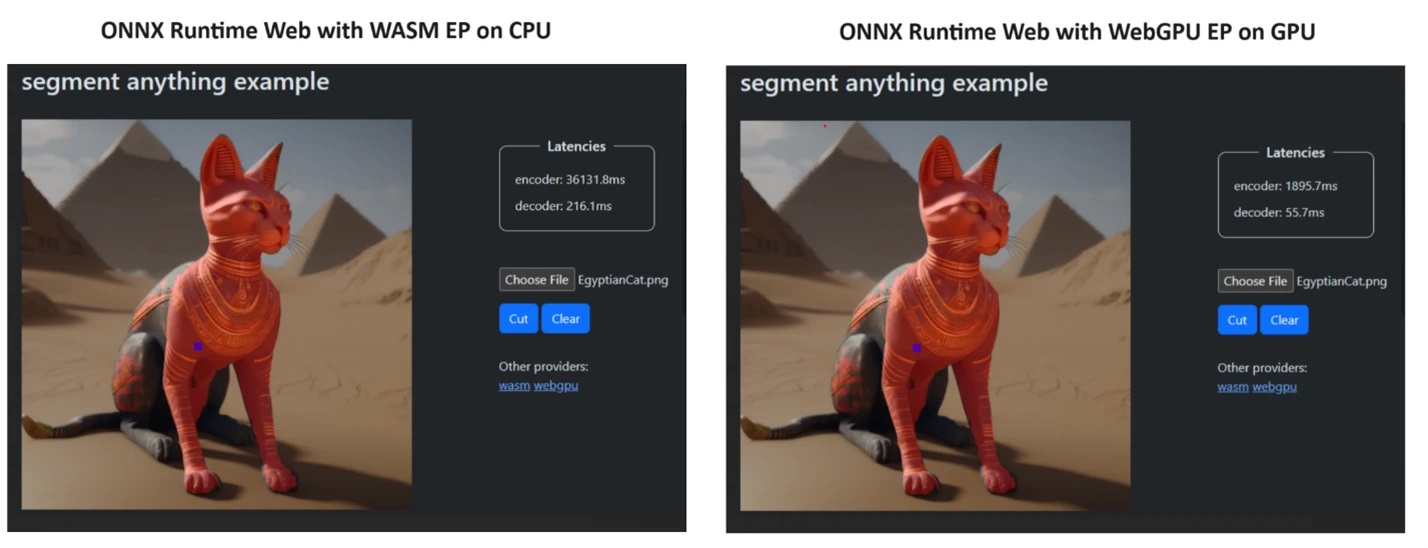
To prove their point, the ONNX Runtime team created a demo using the Segment Anything model, and the results were little short of amazing.

They incorporated WASM EP and WebGPU EP and used an NVIDIA GeForce RTX 3060 and Intel Core i9 PC. Then, they compared the encoder using the CPU and the new WebGPU and the latter proved to be a lot faster, as shown in the screenshot above.

The good news is that WebGPU is already embedded into Chrome 113 and Edge 113 for Windows, macOS and ChromeOS and Chrome 121 for Android. That means you can also play with ONNX Runtime Web on these browsers.

The developers explained how to try ONNX Runtime Web on their project page:

The experience utilizing different backends in ONNX Runtime Web is straightforward. Simply import the relevant package and create an ONNX Runtime Web inference session with the required backend through the Execution Provider setting. We aim to simplify the process for developers, enabling them to harness different hardware accelerations with minimal effort. 

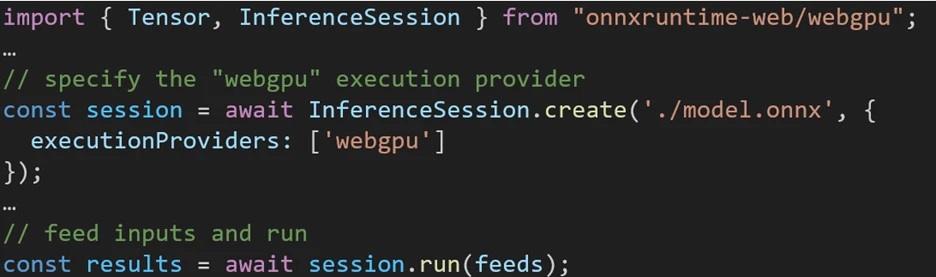
The following code snippet shows how to call ONNX Runtime Web API to inference a model with WebGPU. Additional ONNX Runtime Web documentation and examples are accessible for delving deeper.  

Microsoft Open Source Blog
Code snippet to call the ONNX Runtime Web API

So, now that we have anything in place, let’s start deploying some powerful LLMs into the browsers!

What do you think about the new ONNX Runtime Web? Let’s talk about this development in the comments section below.

PowerToys got a new update, and some of its tools got superpowers

Microsoft PowerToys received a big update, which introduced a lot of features and improvements to the system utilities, focused on bringing stability.

Here are the enhancements mentioned on the PowerToys’ GitHub page that you will be able to see in its v0.79.0 :

Highlights

  • New feature: Keyboard Manager allows mapping shortcuts to start applications or opening URIs.
  • New feature: Keyboard Manager allows shortcuts with chords.
  • Modernized Color Picker with Fluent UX.
  • Peek now is able to preview drives.
  • File Locksmith has now an entry in the Windows 11 tier 1 context menu.

General

  • Refactored code so that English is used as a fallback language when a localized resource cannot be found.

Awake

  • The setting now reverts to “Keep using the current power plan” after Awake deactivates itself after any of the timed modes has expired.

Color Picker

  • Now uses WPFUI and the UI was updated to follow Fluent UX principles.
  • Added enable and disable telemetry to align it with the other utilities.

Command Not Found

  • Added telemetry for when a module instance is created in PowerShell.

FancyZones

  • Fixed a memory leak occurring on work area changes.

File Explorer add-ons

  • Added support to the .ksh, .zsh, .bsh and .env file types to Monaco previewer. Thanks @Aaron-Junker!
  • Re-enabled the RendererAppContainer feature in WebView2, since the associated crash has been fixed in the latest WebView2 releases.

File Locksmith

  • Added as an entry in the Windows 11 tier 1 context menu.

Hosts File Editor

  • Tweaked filter button style to indicate if filters are applied.
  • Added an error indicator to each input field to indicate why a new entry can’t be created.
  • Added an in-line delete button for each entry.

Image Resizer

  • Units and resize modes are now localized.
  • Tweaked and improved UI.

Keyboard Manager

  • Added a feature that allows remapping a shortcut to starting an application.
  • Added a feature that allows remapping a shortcut to open a URI.
  • Added chords to shortcuts.
  • Send telemetry about the key/shortcut to key/shortcut remappings that are set. This doesn’t include remap to text, application or URI since those might contain personal information.
  • Added telemetry to send a daily event that at least a key/shortcut to key/shortcut remapping was used.
  • Tweaked and fixed the chords code to better follow conventions when trying to call the same chord multiple times.

Mouse Without Borders

  • Fixed an issue causing the target path string to be corrupted when registering as a service.

Paste as Plain Text

  • Prevent the start menu from activating when the Windows key is part of the activation shortcut and is released sooner.

Peek

  • Fixed a title bar issue after maximizing Peek’s window.
  • Fixed a crash when trying to use Peek in File Explorer alternatives.
  • Added a previewer for drives.
  • The folder previewer will now asynchronously calculate size, similar to the Properties screen in File Explorer.
  • Added support to the .ksh, .zsh, .bsh and .env file types to Monaco previewer.

PowerRename

  • PowerRename context menu accelerator key readded.
  • Tweaked PowerRename apply button style.

PowerToys Run

  • Fixed an issue causing win32 application icons to not appear correctly in the Programs plugin.
  • Unified phrasing in the plugin descriptions.
  • Fixed an issue causing the PowerToys Run plugin settings to be cleared with each upgrade.
  • Fixed an issue causing VSCodeWorkspaces plugin to not find WSL workspaces.
  • Fixed results tooltip closing fast.
  • Improved the Registry plugin tooltip spacing.
  • Allow pressing ‘=’ to replace the query with the current result when using the calculator plugin. Optimized the code that gathers results from the plugin to reduce CPU consumption.
  • Optimized memory usage in the Window Walker plugin.
  • Fixed crashes and improved error handling when saving json configuration files.
  • The Program plugin will now correctly get the icon for a newly installed packaged application.

Quick Accent

  • Added support for the Slovenian character set.

Registry Preview

  • Fixed a crash when closing the application and the editor’s right click menu is opened.

Settings

  • Fixed an alignment issue in the flyout icons causing some icons to be centered when they shouldn’t.
  • Added the mention that Monaco supports .txt files.
  • Fixed an issue causing the Settings window to lose its previous maximized state.

Documentation

  • Fixed broken links in doc/devdocs/readme.md.

Development

  • Updated Microsoft.MSBuildCache to 0.1.258-preview.
  • Fixed CI to point VCToolsVersion to VC.CRT instead of VC.Redist version.
  • Updated MSTest adapter and framework to 3.2.
  • Fixed CI by pointing WiX 3.14 urls and hashes to the latest release on GitHub.
  • Added Pro and Enterprise editions of Visual Studio to the repository’s development configuration DSC scripts.
  • Updated CppWinRT to 2.0.240111.5.
  • Updated System.Drawing.Common to 8.0.2 to fix CI builds after the .NET 8.0.2 upgrade was released.
  • Updated WPFUI version to 3.0.0.
  • XAML Styler is now fully tested in the solution when CI runs.
  • Fixed a faulty XAML binding in the Text Extractor settings page.
  • Updated Microsoft.Web.WebView2 to 1.0.2365.46.

If you haven’t installed it on your Windows computer yet, go to the PowerToys GitHub page and download the compatible version of PowerToys, then double-click it and follow the on-screen instructions to install it.

Have you tried these features yet? If yes, share your experience in the comments section below.

Windows 10 successfully runs legacy software: Office 95 spotted in action

As you probably know, Microsoft is forcing users to upgrade to Windows 11 via nag screen, citing compatibility issues and security.

Many are worried about software compatibility, but it seems that Windows is rather compatible with old software.

Windows 10 can still run 29-year-old software with no issues

First spotted by Neowin, there’s a video on Twitter showing Windows 10 running Word 7 for Windows 95. You’d expect to see some compatibility issues, but no, everything works without a hitch.

This was first discovered by Niko on Twitter and she used Microsoft Office 95 on Windows 10 Enterprise edition, build 15063. Another user, WinExperiments, shared the video of this in action.

So how is this done? According to WinExperiments, 32-bit Office 2021 was installed on the computer, followed by Office 95, without Excel.

It seems that Microsoft is still using the same API calls, which allows the software to work. While this works, it doesn’t mean that every legacy software will be compatible.

We have to notice that in this case Office 95 probably relies on libraries from Office 2021 to work properly, and it won’t work on its own.

Nevertheless, it’s great to see that older software is still able to run with some tweaks. However, Microsoft Office 2024 is coming, and it doesn’t require any tweaks, so it’s a superior choice for everyday use.

LargeWorldModel defeats all other LLMs just because it’s trained differently

As spotted by ZDNet, the LargeWorldModel (LWM) appeared out of nowhere and demonstrated that it can find the needle in the haystack of a one hour YouTube video faster and using less resources than any other LLM.

LWM is a GitHub project developed by Hao Liu, Wilson Yan, Matei Zaharia, and Pieter Abbeel, a team of students from the University of California at Berkeley, which makes it all even more exciting.

What are the LargeWorldModel results?

The students performed the Needle in the Haystack test on their model, which involves feeding the bot a one hour video with more than 500 clips from YouTube and asking it precise questions to identify.

Their LWM outperformed all other LLMs and answered all the questions correctly in less time and using less tokens, which translates into lower computing power needed.

This capability was also demonstrated by Gemini 1.5, although Google’s bot is definitely having some problems right now.

However, to be fair, LWM was tested against Gemini 1.0, not Gemini 1.5 which, according to Google’s technical report, is significantly better. 

Another particularity is that the LWM tests were performed for 58 hours on one slice of a TPU Version 4 POD, made out of 256 TPU chips. The Google’s technical report only specifies that they trained their model on TPU Version 4 and Version 5 PODs, so we don’t really know the extent of used resources.

How did they do it?

The students came up with a new training approach called Ring Attention. Instead of feeding the model with sequential sample data, Liu’s team provides the data concurrently, thus avoiding training blocking. That technique leads to less processing time and the training is using the chips more efficiently.

To be more specific, the LWM was trained in multiple successive steps, using larger and larger data samples each round. They started with 32,768 tokens and gradually increased the amount to 1 million.

Intuitively, this allows the model to save compute by first learning shorter-range dependencies before moving onto longer sequences. By doing this, we are able to train on orders of magnitude more tokens compared to directly training on the maximum target sequence length

LWM project technoical description

Google doesn’t provide too much information on how they have trained their model but they say that it can work with an input of up to 10 million tokens. In comparison, according to the Berkeley team, Ring Attention only depends on the number of devices available and theoretically can extend to unlimited content.

There only one thing that the LWM was not addressed: the audio identification and that is also handled by Gemini 1.5.

Considering that the LWM project is open source and available on GitHub, anyone can get the code and develop it further. So, we’re witnessing exciting developments in the AI model training here.

What do you think about the new training model? Let’s discuss it in the comments section below.