Microsoft highlights how to edit your holiday photos using the Windows 10 Photos App

In our modern world, almost every device has a camera on it. After taking pictures, you might also end up offloading them to your PC to spice them up and share on social media. Luckily, if you’re looking for a guide on how to spice up your holiday photos, it’s time to look no further. Elana Pidgeon from the Windows Experience Blog has just posted on how you can edit your holiday photos using the Windows 10 Photos App.

Editing Photos with the Windows 10 Photos app

Pigeon begins by explaining that all it takes to edit your photos is to open the file and then launch “edit” from the full-screen viewer in the Windows 10 photo app. After doing so, you will find controls to easily crop, rotate and enhance your images. To customize your pictures, you can add a filter to your image by selecting one from the list and even alter the light, color, contrast, exposure, shadows, highlight, tint and warmth by dragging the sliders for granular controls.

Inking on Photos in Windows 10

For an extra kick of photographic spice, you’re able to annotate photos using the pen, mouse, and touch controls in the Windows 10 Photos app. All you need to do is use your pen directly in the full-screen viewer or tap the Draw icon.  Just as if you were an artist with a canvas, the ink will animate back to you in the way you drew it, even on videos during playback.

After you’ve fixed up your masterpiece, you can share your photo with friends and family without even leaving the Photos app!  You can Copy your files to paste elsewhere, or click Share and select an app.

Have you been enjoying the photos app on your Windows 10 device? As always, please do let us know what you think by dropping us a comment below! And, if you’ve created anything cool, tweet it to us at @ONMSFT on Twitter!


Here are the best HP laptop deals to grab in December

HP is the most popular Windows 10 PC manufacturer among Windows 10 users. The tech giant has a solid market share of 32%, which is likely to increase as the company releases new computer models.

If you want to buy a new laptop this month for yourself, or maybe to offer it as a present, we’re sure that HP is a pretty good choice. For this reason, we’re going to list the best HP laptop deals available in HP’s store in December. Happy shopping!

Best HP laptop deals this winter


HP ENVY – 17-u153nr

HP ENVY 17-u153nrThis laptop is powered by a 7th Generation Intel Core i7 processor and offers 16 GB memory with 512 GB SSD storage. It comes with a 17.3″ UHD IPS UWVA touch display and NVIDIA GeForce 940MX. You can purchase it for $1,299.99 down from $1,699.99.


HP Pavilion Laptop – 15z

HP Pavilion Laptop 15z dealThe HP Pavilion 15z laptop is equipped with an AMD Dual-Core A9 APU, 8 GB memory and 1 TB HDD storage. It comes with a 15.6″ HD display and up to 7 hours of battery life. It can be yours for only $329.99, down from $$579.99


HP ENVY Laptop -15t touch

HP ENVY Laptop 15t touch
This laptop offers an impressive 15.6″ FHD touch display, and is powered by a 7th Generation Intel Core i7 processor. It features 8 GB memory, 256 GB SSD storage, and Intel HD Graphics 620. You can buy it for only $699.99, down from $949.99.


OMEN 17t gaming laptop

HP OMEN 17t gaming laptopThis gaming monster can be yours for $1,399.99, down from $1,599.99. The HP OMEN 17t is powered by a 6th Generation Intel Core i7 processor, and features 16 GB memory and2 TB HDD + 128GB SSD storage. The huge 17.3″ UHD display and NVIDIA GeForce GTX 106 will offer you a smooth gaming experience.


HP ENVY – 15-as152nr

HP ENVY 15-as152nr laptop
HP ENVY 15-as152nr7th relies on a 7th Generation Intel Core i7 processor. It features 16 GB memory, 512 GB SSD storage and Intel HD Graphics 620. This device will take your entertainment experience to a new level, thanks to its brilliant 4K display, audio by Bang & Olufsen and HP Audio Boost technology.

You can buy the HP ENVY 15-as152nr laptop for $1,019.99, down from $1,199.99.

RELATED STORIES YOU NEED TO CHECK OUT:

Xbox Store’s Countdown, its “biggest sale ever,” begins Thursday December 22nd

Major Nelson has taken to his blog to announce the biggest Xbox sale ever.  The sale will cover both Xbox One and Xbox 360, will begin on December 22nd, and will continue until January 9th, for a total of 19 days of deals on games, movies, TV shows, music, apps, and more.

As part of the Xbox Store Countdown, some of the year’s top games such as Final Fantasy XV, Battlefield 1, Watch Dogs 2 will all be on sale, as well as 40 backward compatible titles. Additionally, starting December 21st, and lasting until January 9th, Xbox One and Xbox 360 owners can upgrade to Gold for $1 for the first month of membership.  As an added bonus, Gold members can even get up to 10% off all Xbox Store deals during Countdown.

Movies and TV Season passes are also included in the Xbox Store Countdown, which means you can enjoy your favorite entertainment directly from your own Xbox. According to Major Nelson, more deals are coming soon later in the week, and will include:

  • Movies $9.99 and Up, including Deadpool, Batman v. Superman, and The Night Before
  • Today’s Hit TV up to 33% off, including South Park and Orphan Black
  • Bundles up to 33% off, including all Hobbit and Lord of the Rings films, X-Men Collection, and Alien Collection
  • TV Favorites up to 50% off,including Band of Brothers and Doctor Who

Xbox Live Rewards members, meanwhile, can also enjoy some added bonuses from the Xbox Store Countdown. According to Major Nelson, Xbox Live Rewards members can get even more, such as 10% back on purchases with MyVIP, and the opportunity to boost their Star Rank for 2017. And, for some more Xbox Store Countdown fun, eligible customers will also receive 3 more months free with a 30-day trial of a Groove Music Pass.

Giveaway: Promo codes for Enpass for Windows

Enpass is a popular cross-platform, offline password manger, that has had brilliant support for the Windows platform. One of the early apps on UWP, the universal app supports marquee Windows 10 features like Windows Hello as well as Cortana and is available for both Windows 10 and Windows 10 Mobile.

While there’s a free trial available, the pro version of the app costs $9.99, but our friends at Enpass are in the holiday spirit, and have decided to give five promo codes to our readers to score free licenses of Enpass for Windows app.

All you need to do is follow OnMSFT on Twitter via the widget below, and that’s that. Make sure you use your correct email address (or use Facebook) to login, so that we can contact you if you’re one of the winners. We’ll randomly select five winners from the entries, and share a promo code that can be redeemed for Enpass pro edition.

a Rafflecopter giveaway

Spread the word around, and check back in a week when we announce the winners.

Minecraft releases Apple TV Edition, includes Ender Update

Apple TV users will be happy to know that they aren’t left out in the cold without Minecraft 1.0. Mojang is on a gifting spree for their fans it seems. Earlier today, Mojang announced that Minecraft was out of beta with the global release of its Ender Update 1.0 as well as the new Festive 2016 Mash-up Pack on sale via the in-game store.

This puts Minecraft at a total of ten different editions across PC, console, mobile, and now streaming devices where fans can play, explore, and build in the limitless sandbox world.

Now gamers can use their little black boxes to play the popular sandbox game from Mojang with the same features and content as the Windows 10 and Pocket Editions. Well, most of them. According to the announcement post, this new edition doesn’t currently include Minecraft Realms or Xbox Live support. However, the developers intend to add them in the ‘near future’.

We knew that the Apple TV Edition was in the works, but now it’s available just in time for the holidays priced at $19.99. The purchase also includes seven DLC packs: Holiday 2015, Town Folk, City Folk, Plastic, Natural, Cartoon, and most recent Festive 2016.

Use these special Mojis or add some snow to your calls when using Skype this holiday season

Not everyone has the chance to spread joy, love, and happiness of the holidays in person. Luckily, the folks over at Skype have you covered, and have just posted about some new Mojis which will be sure to bring the holiday spirit alive.

Skype holiday Mojis

Seen above, the new mojis are an annual tradition and are perfect for helping you celebrate the holidays using Skype.  There are special holidays Mojis which feature audio, which you can share to bring sparkle any chat. To use the Mojis, you should head over to the emoticon picker, select your favorite holiday themed Moji or emoticon, and then use it in your chat!

The Skype team also wants you to know that you can further spread the joy this holiday by sending a snowy holiday video card to your friends and family on Skype. If you’re using the latest version of Skype, all it takes to use this feature on iOS is to open Skype and select the snowflake to get started. On Android phones, meanwhile, you just tap the “+” button on the lower right, then tap the snowflake.

Do you know someone who you would send these video messages or mojis to? Please do let us know what you think by dropping us a comment below!

OK this new Xbox One ad with Marshawn Lynch is a little weird, watch it here

If you have been online over the last few months, or just were casually watching TV, you’ve probably noticed more than one advertisement for the Xbox One family of games and devices. In fact, a recent report from one month ago found that Xbox was outspending everyone in game-related TV advertising heading into the holiday season. It is fitting then that Microsoft just released a new ad for Xbox, featuring former NFL Star Marshawn Lynch (via Gamespot.com)

While Microsoft has released NFL-themed Xbox ads in the past, this latest ad is a bit odd, to say the least. The ad features Marshawn Lynch as an assistant, though he does not get the “assist” part very well, and rather sits back in a chair with “lumbar support” playing Madden NFL 17, while claiming that he should be getting paid more.

That aside, it is interesting to note that the latest ad features a message which claims that Xbox Live is the “fastest gaming network” which “won’t let you down.” As we have reported three months ago, a study done by IHSMarkit has found that Xbox Live performs better than Sony’s PlayStation Network when it comes to reliability, speed, and overall quality.

What has been your experience with the Xbox One S? Please do let us know what you think of this latest ad by dropping us a comment below!

Minecraft Windows 10 and Pocket Editions get 1.0 Ender Update, Festive Mash-Up Pack

The End is nigh for Minecraft Pocket Edition and Windows 10 players. The Beta tags are finally off and adventurers are ready to explore End Cities, tackle the famed Ender Dragon, and find all the End loot.

Today’s release for Minecraft has been building up for quite some time after the Ender 1.0 Update was announced last month. The release brings PE and Windows 10 versions of the sandbox Mojang title to nearly complete feature parity with its Java release for Windows.

Of course, it doesn’t’ just stop at The End. Here’s the rest of the content added into Minecraft 1.0 for PE and Windows 10:

  • The End, End cities, End ships, Ender dragon & all the other End goodies
  • Ender Pearls
  • Eye of Ender
  • Ender Chest
  • Dragon head
  • Shulkers & shulker shells
  • Chorus fruit and popped chorus fruit
  • End stone & End stone brick
  • End poem
  • Purpur block, purpur pillar, purpur slab & purpur stairs
  • End Rod
  • Dragon Egg
  • Exit Portal & End Gateway
  • Ender charge
  • Ability to craft lingering potions in survival
  • Ability to craft tipped arrows in survival
  • Ability to respawn Jean? the Ender Dragon
  • Dragon’s breath
  • Elytra
  • Ender crystals
  • 256 world height!
  • World seed library
  • Igloos & polar bears
  • Strongholds now fully implemented and have a chance of spawning in newly generated chunks
  • Support for world templates

Of course, the team over at Mojang are feeling festive about this major gift to players that they’ve even added in a new Festive Mash-Up pack for $3.99 USD. It has 21 jolly skins, a texture pack for most blocks, and a festive world reflecting the holiday season.

That’s right, now you can slay Ender dragons in a Santa Claus outfit. What better way to get into the holiday spirit? The Festive Mash-Up Pack can be bought via the in-game store while the 1.0 update will roll out for free automatically across all devices today.

Minecraft for Windows
Developer:
Microsoft Studios
Price:
Free


Bill Gates was a Secret Santa to another redditor, gives them an Xbox One S, and more

With Christmas less than a week away, now is the perfect time to mention that the holiday season is not just a season for shopping, it’s also a season for giving. If there is one thing in society to stand up to this testament, though, it is Reddit’s annual Secret Santa program, which tasks Redditors from across the globe to secretly send each other gifts.

As we reported last year, Microsoft co-founder Bill Gates has been known to participate in the program, and this year yet another Redditor was lucky enough to be on the receiving end of the Microsoft founder’s gifts (via Fortune.com)

What could possibly be in the box?


A Redditor who goes by the name of Aerix is claiming that she received a package straight from Bill Gates, which was filled with gifts as part of the Reddit Secret Santa Program. The package was set overnight to her home and contained a Minecraft Edition Xbox One Console, a Nintendo Entertainment System Classic, mittens for both herself and her dogs, and a personal note and photo from Bill Gates.  In a post to the RedditGifts website, the Redditor describes  her experience of opening the gifts:

And I said BILL GATES IS MY FREAKIN SANTA!!!!!!!  It took a second for it to sink in but oh MAN I was excited and flipping out!… I got everything out and laid it out all nice, and there was glitter EVERYWHERE. I just had to go for the two unwrapped boxes that said “Aerrix’s Mittens” and “Clairrix’s Mittens… Next I open the three pink boxes stacked together, and it’s three special edition wireless XBOX one controllers! I was confused, but only for a moment, because then I noticed the specific SIZE of the big pink box to my left….I knew what it was, I KNEW WHAT IT WAS. It was an XBOX ONE MINECRAFT EDITION!!!!!!!!! There was also a handwritten note from him that says “I love my XBOX and thought you might like one too.”


Lots of Presents from Bill Gates

The Microsoft co-founder also sent the Redditor a Cajun cookbook, Zelda tie blanket, and a box which remarked, “Be careful this gift is very fragile.” As if what she had already received was not shocking enough, in this box was a final form Master Sword from Skyward Sword made of paper.

Next, I reach for a box that has a tag on it that says “Be careful this gift is very fragile” and I really couldn’t tell you how long it took me to open it I was being SO CAREFUL!!! You guys…it’s a PAPER, seriously all made out of PAPEEEEERRRRRRRRRR version of the final form Master Sword from Skyward Sword!

Bill Gates’ gifts did not end there, though, and he also sent the Redditor a Zelda picture frame with Link and Zelda made with  Perler Beads. In the frame, was a cool photo.

And the picture in it is just the best…he used my profile picture on here of me, my husband, and my dog, PHOTOSHOPPED HIMSELF IN, and put Santa hats on all of us! Come on now, that is the cutest thing! I just couldn’t get over it and my mom thought it was hilarious. XD


Santa Bill gives awesome gifts!

Last, but not least on the list of Bill Gates gifts is a limited edition of Halo 5 Guardians, an NES Classic, and two movies.

The aforementioned movies came next. Two of them I have never heard of, but will be watching soon, and he also sent The Martian…  I I tear into the next box and I just…I lost it yall. I did. I started screaming like a little girl to my mom on the phone…I was just blown away! An NES Classic Edition…  I go for the last gift, (it was the prettiest wrapping imo), and it’s Halo 5 Guardians (Limited Edition, of course) and the new Tomb Raider YOU KNOW FOR MY NEW XBOX ONE YOU GUYS!!! And there’s also a YEAR’S WORTH of gold membership cards


Bill Gates is great at wrapping

It’s safe to say that these gifts are truly awesome. What do you think of these gifts from Bill Gates? Does it make you want to join in on the Reddit Secret Santa fun? As always, please do let us know what you think by dropping us a comment below!

Microsoft (MSFT) news recap: green tech predictions, opposes discrimination and more

Microsoft (MSFT) news recap is a weekly feature highlighting the top Microsoft news stories of the past week. Sit back, grab some coffee, and enjoy the read!

Microsoft makes four green tech predictions for 2017

With 2016 coming to a close and 2017 right around the corner, Microsoft takes a look at green technology for 2017. Rob Bernard, who is Microsoft’s Chief Environmental Strategist, made 4 predictions for next year:

  • IoT and Cloud Computing will begin to transform utility energy management
  • Water will begin to emerge as the next critical world-scale environmental challenge
  • Data will increasingly be used to try to better understand our planet
  • Organizations and policy makers will start leveraging cloud-based technologies

Microsoft, others partner with LG on foldable display technology

Display technology has improved in terms of quality, with 4K and even 8K resolutions being made available, however, what has been stagnant is the ways in which we can position a display. Microsoft has now partnered with LG Display to assist in developing foldable display technology and has signed-up to be one of the first buyers, too. It’s not certain what the company could use foldable display technology for – we may see some of it in the 2017 line-up of devices, particularly where smartphones, more specifically, Windows phones, are concerned.

Microsoft reiterates after meeting with Donald Trump: “We oppose discrimination”

Rumors have been spreading that data computing companies may be asked to create a ‘Muslim Registry’ that is based on religious beliefs, as noted by Donald Trump during his presidential campaign. A spokesperson for Microsoft has reached out to state that the company opposes discrimination and gave the following statement:

We refuse to participate in the creation of databases of identifying information for the United States government to target individuals based on race, religion, or national origin.

Microsoft plans a presence at Mobile World Congress 2017 in February

Despite its failing mobile business, Microsoft is planning to make a presence at the Mobile World Congress, which takes place in February, 2017. The company has created a dedicated website to announce its presence.

That’s it for Microsoft news this week – we’ll be back next week with more!

Windows 10 news recap: Adobe XD public beta released, pay easily in Microsoft Edge and more

Welcome back to our Windows 10 news recap. We are continuing the trend of our weekly “Windows 10 news recap” series where we go over the top stories of the past week in the world of Microsoft’s flagship operating system.

First public beta of Adobe XD for Windows 10 now available

Prototyping new websites and mobile apps on Windows 10 just got that little bit easier, as Adobe has released the first public beta of Adobe XD for Windows 10. It is built as a Windows 10 app, one of the first such apps by Adobe. It comes with many features, including basic text support, animations and artboards.

Easier ways to pay coming to Microsoft Edge with the Windows 10 Creators Update

Microsoft has released the Payment Request API for Microsoft Edge. Payment Request aims to simplify the online checkout process when using Microsoft Edge. It can connect, with the users permission, to Microsoft Wallet, allowing saved payment information and addresses to be used without having to type everything each and every time. It is currently in preview and will be rolled out to the general public in the Windows 10 Creators Update in early 2017.

No new Fast Ring Windows 10 Insider builds this year, says Dona Sarkar

As 2016 draws to an end, with Christmas just around the corner and 2017 not far away now, Head of the Windows Insider program, Dona Sarkar, has announced that there will be no new Fast Ring Windows 10 Insider builds this year.

Internet connection problems surface after latest Windows 10 update, are you affected?

One of the more recent Windows 10 updates caused havoc for many, preventing them from accessing the internet. Microsoft has acknowledged the issue and asks users who are affected to not shut down their PC but to instead restart it, then follow these steps:

  1. Open an elevanted command prompt by right clicking the start button and choosing Command Prompt (Admin)
  2. Type in ipconfig /release
  3. Press enter
  4. Type in ipconfig/renew
  5. Press enter
  6. Type exit
  7. Press enter

The company has since released a patch that is supposed to fix the issue, although, some are still experiencing issues even after this update.

That’s it for Windows 10 news this week – we’ll be back next week with more!

Many Final Fantasy XV fans report that Noctis often can’t attack or jump

Final Fantasy XV is a great game, as long as you don’t encounter any technical issues. Unfortunately, the game is affected by many bugs, and gamers discover new ones with every passing day.

Back in November, we listed the most common Final Fantasy XV issues reported by gamers. According to the latest gamers’ reports, there are many new issues that we can add to the list. Recent reports reveal that there’s a game breaking bug affecting chapter seven, and Noctis often can’t jump or attack.

Noctis can’t attack or jump

FFXV players complain that after they attack the second imperial base and use the Armiger, Noctis can no longer jump or attack.

Same Problem obtained at Imperial Base as well. Both the that and the Behemoth Missions have the sneak style missions so I wonder if those mechanics are the problem. Have 30 hours in the game so Im kind of pissed.

Players also report that after starting a new game, usually Noctis gets back his abilities. Apparently, this issue could be caused by a corrupt game save file. However, many gamers don’t agree with this method and request that Square Enix rolls out a hotfix as soon as possible.

The most annoying part is that Noctis usually loses his ability to attack and jump after players accumulate tens of hours of gameplay. For many, this issue is not just a simple bug, it’s a game-breaking problem.

For the time being, Square Enix has yet to issue any comments about this problem. Hopefully, the company is already working on a fix and will release it in the coming days.

RELATED STORIES YOU NEED TO CHECK OUT:

Spending spree: looking back on a notable year of Microsoft acquisitions

In 2016 Microsoft made quite a few headlines for its software releases, hardware reveals, and its increasing cozy relationship with the open source community. Orbiting parallel to Microsoft’s newsworthy notes of Windows 10 Anniversary Update, Surface Studio reveal and leading most companies in GitHub contributions, are the occasional acquisitions that shake up the tech sector.

Looking back on the company’s acquisitions in 2016, Microsoft might be best remembered for its whopping $26.2 billion purchase of LinkedIn, but that would only be a small glimpse into the small spending spree of the company for the year.

While Microsoft’s 2016 purchasing list may have seemed like a muted affair compared to its 2015 shopping spree, the businesses that litter the list this year should help to clarify where the company will be headed in 2017 and beyond.

LinkedIn

By far the most glorified purchase for Microsoft is its $26.2 billion dollar elephant in the room, LinkedIn. On June 13, 2016,  Microsoft declared its intentions to purchase the business professional social networking site for what’s being recorded as one of the largest buys in the tech community in recent years. Despite competitive opposition from SalesForce, Microsoft came out on top and finalized the deal a few weeks ago.

Xamarin

Next up can arguably viewed as the most important purchase for the company moving forward in its acquisition of Xamarin. Headling Microsoft’s developer conference earlier this year was the announcement of the company getting into the multi-code cross-platform development game with Xamarin.

“With today’s acquisition announcement we will be taking this work much further to make our world class developer tools and services even better with deeper integration and seamless mobile app dev experiences. The combination of Xamarin, Visual Studio, Visual Studio Team Services, and Azure provides a complete mobile app dev solution that provides everything you need to develop, test, deliver and instrument mobile apps for every device. We are really excited to see what developers build with it.”

MinecraftEdu

Following up its increasingly successful buy of Minecraft, Microsoft also gobbled up MinecraftEdu to bolster its younger audience play.

The Rest

Microsoft spent the remainder fo the year snatching up some comparatively low-key companies such as SwiftKey, Solair, Wand Labs, Beam, Genee, Event Zero and Code Connect.

Here is the full list of Microsoft’s acquisitions and dates for 2016.

Microsoft’s reorganization is fully underway in large part due to its acquisitions list over the past few years. Company purchases and integrations such as Sunrise, Xamarin, LinkedIn, Acompli, Mojang, Double Labs, Havok and more are helping Microsoft chisel out a new foundation for forward progress.

It’ll be interesting to see who Microsoft has its eye on next year and how it fits into Microsoft’s new productivity focused future.

Pre order Rogue One: A Star Wars Story from the Windows Store now

Remember all of the hype that happened last year around Star Wars: Episode VII? It’s back. A year after the revival of the Star Wars Franchise, Rogue One: A Star Wars Story has arrived, offering fans a look into something that happened before the events of A New Hope. If you aren’t going to be able to go to a theater and check out the film on the big screen, Microsoft is letting you pre-order it right now.

As the Empire continues to gain power, a group of rebel spies will risk everything to steal the plans to their enemy’s most terrifying new weapon: the Death Star.

Now you can pre-order “Rogue One: A Star Wars Story” – while the film is still in theaters – in the Movies & TV section of the Windows Store.

There’s no word yet on when the film is going to be releasing on DVD, but you can pre-order to own it as soon as it ends up dropping. Until then, Rogue One is in theaters right now. See if you can’t get to the theater for it!

Microsoft makes four green tech predictions for 2017

As another year goes by with the planet still under threat of any number of environmental disasters, Microsoft is looking to the future to see just what’s in store for green technology in 2017. Rob Bernard, Microsoft’s chief environmental strategist, wrote up four predictions that we can all expect to come to fruition next year.

  • IoT and Cloud Computing will begin to transform utility energy management

As the strain on the Earth’s resources gets heavier, so too does the world’s need to manage data. Many people are embracing digital infrastructure in the Internet of Things to manage things like electric vehicles and solar panels, so Microsoft thinks that cloud computing and IoT are going to be two big influences on green energy next year.

  • Water will begin to emerge as the next critical world-scale environmental challenge

As acidification, pollution, and a warmer climate cause water scarcity, the next big environmental problem makes itself evident. If things keep going the way they are, people’s food, water, and livelihoods could all be in serious risk. Bernard notes that the Great Barrier Reef is already showing signs of what the consequences of this water problem could be.

  • Data will increasingly be used to try to better understand our planet

In typical Microsoft fashion, Bernard believes that data will be the answer to our problems in 2017. More accurately, the companies that are all putting effort into truly understanding the numbers behind their environmental impacts will be able to help move change forward. As more data becomes available, it’s more likely that we’ll see that data be put to use proactively.

  • Organizations and policy makers will start leveraging cloud-based technologies

If we’re going to protect the environment, we need to use technology to do it. The problems we’ve caused are too massive for us to handle without the assistance of cloud-based technologies that can collect and utilize the data we need. Bernard thinks that, while it will take many years to truly take hold, 2017 will have people finally start to embrace technologies like machine learning when they approach environmental issues.

The environment is in serious danger, and it’s great to see giants like Microsoft be willing to help lead the change to a more green future. We’ll have to keep a keen eye out for the goings-on in the environmental scene next year to see just how accurate Bernard’s predictions ended up being. Let’s just hope that, whatever changes next year, it’s for the better.

Microsoft, others partner with LG on foldable display technology

A new report has emerged from Etnews (via 9to5Mac) that claims LG Display has partnered with multiple businesses in the technology industry to develop foldable displays, also known as an out-foldable panel.

Some of the companies involved in the partnership include Microsoft, Apple and Google. The report also states that Microsoft, along with the other companies, are in the process of being the first buyers of the foldable displays.

It is not certain what Microsoft’s intentions with a foldable display are. We could see these displays arrive in their 2017 line-up of devices, which is rumoured to also include the Surface Phone, as many other smartphone manufacturers are jumping into the foldable display world, such as Apple and Google, making it important for future high-end phones to include foldable displays if they wish to succeed.

Let us know what you think Microsoft could use foldable displays with in the comments below!

EFF releases Privacy Badger 2.0 for Chrome, Firefox, and Opera with new features

Online tracking has been constant fodder for debate between privacy advocates and tech companies. And in its continued support of online privacy, Electronic Frontier Foundation, a non-profit group at the forefront of digital rights advocacy, has now updated its anti-tracking extension for the Chrome, Firefox and Opera browsers.

Privacy Badger detects and blocks third-party domains that could be monitoring your browsing activity. The blocking phase occurs only when the tool finds that a certain domain has been tracking you on three or more websites. It will then sever the third-party domain’s link to your computer.

The extension puts an icon in the main toolbar of a browser and shows how many trackers have been blocked on a specific website. Privacy Badger 2.0 now brings with it a number of enhancements for users and developers such as:

  • Support for incognito or private browsing
  • Import/export capabilities to export a backup of what Privacy Badger has learned about your tracker-blocking needs and import that into another browser
  • Fixes to break fewer websites, ensuring that you can both block trackers and enjoy rich content
  • Improved user interface translation for non-English-speaking users
  • Blocks WebRTC from leaking your IP address
  • Blocks HTML5 ping tracking
  • Notable speed improvements (Firefox only)
  • Multi-process compatibility (E10S) (Firefox only)
  • A single code base for both the Firefox and Chrome versions

However, Privacy Badger 2.0 does not seem to be working well on Firefox. Users have reported that the extension blocks Google Sheets even if the domain is on a white list. Other users have noticed that WebRTC is missing after installing the updated add-on. Although EFF considers Privacy Badger 2.0 a major release, it’s advisable to wait for a more stable release of the add-on.

Privacy Badger has been used to block online tracking, with the exception of online ads. EFF said in a blog post that the extension does not intend to block ads, but only to bar invasions of internet user privacy. That means Privacy Badger blocks trackers directly instead of scripts. EFF also calls on advertisers to help protect the privacy of users.

Read also:

Windows 7 loses 9% market share in one year, Windows 10 enjoys new users

Microsoft’s effort to convince users to upgrade to Windows 10, whether willingly or forcefully, have paid off. In just one year, from November 2015 to November 2016, Windows 7 lost almost 10% of its market share in favor of the company’s latest OS.

According to the data available on NetMarketShare’s website, back in November 2015 Windows 7 had a market share of 56.11%, compared to November 2016 when it had a total market share of 47.17%.

This is surprising if you consider the strong upgrade opposition that Windows 10 has encountered. Many Windows 7 users said they wouldn’t upgrade their OS because they believed Windows 10 was not stable enough. However, judging by this significant market share drop, it appears that Windows 7 users are abandoning the ship.

It seems that Microsoft manages to convince more and more users to upgrade their OS with every new Windows version it releases. It’s not too far-fetched to say that the secret weapon behind Windows 10’s success is patience. In November 2015, Windows 10 had a weak 9% market share, while in November 2016 it reached an impressive 23.72%.

windows 10 market share increasewindows 7 market share evolution

Of course, Windows 7 is not the only victim of Windows 10. Another very popular Windows OS version, Windows XP has lost a significant market share percentage over the course of the last year. Windows XP had a 10.59% market share in November 2015, compared to the 8.63% market share it reached last month.

Judging by these numbers, Windows 7 is not the new Windows XP, as we predicted a while ago. Windows 7 users are indeed more susceptible to change, while Windows XP users cling to their good old reliable OS.

Microsoft will release a new Windows 10 edition sometime in early 2017. Judging by the current Windows 10 adoption trend, it appears that the Windows 10 Creators Update will boost the popularity of Microsoft’s latest OS. After all, Microsoft said that Windows 10 is on track to beat Windows 7 within a year.

What do you think about the manner in which Windows 10’s adoption rate has evolved? Share your thoughts in the comments section below.

RELATED STORIES YOU NEED TO CHECK OUT:

Easier ways to pay coming to Microsoft Edge with the Windows 10 Creators Update

Today, Microsoft released the Payment Request API preview for Microft Edge. The Payment Request API will allow for easier checkout and payments on the web on Windows 10 and Windows 10 Mobile. Stable builds of Windows 10 will receive Payment Request API support in the Windows 10 Creators Update due out in early 2017.

Payment Request works with Microsoft Wallet on Windows 10 and Windows 10 Mobile too. The Payment Request API is available in Windows Insider Preview builds, starting with Windows Insider Preview build. End-to-end Payment request API support will be coming in later Windows Insider Preview builds.

In the blog post, Microsoft detailed the how the Payment Request API will work with Microsoft Wallet:

“In Microsoft Edge, the Payment Request API connects to Microsoft Wallet (with the user’s permission), allowing easy access to payment information associated with the user’s Microsoft Account. Because payment information is securely saved in a digital wallet, shoppers don’t have to navigate through traditional checkout flows and repeatedly enter the same payment and shipping address information repeatedly. The wallet can provide a faster and more consistent experience across websites, which saves shoppers time and effort by allowing them to securely share saved payment information. With the Payment Request API, payment information is provided by the wallet (once the user has granted consent), as opposed to being collected via a checkout form in the website. The browser mediates all the information passed between the wallet and the merchant.”

Microsoft designed the Payment Request API for Edge with other members of the W3C Web Payments Working Group. The Payment Request API was designed with the intention to provide a standard way for merchants, browsers, and payment methods to provide a better user experience.

Find all the Payment Request API details on GitHub. If you come across any issues, reach out to the Microsoft Edge team on Twitter and you can also file bugs you encounter on bugs.microsoftedge.com.

Windows 10 Cumulative Updates: How to avoid install issues

Sometimes, installing Windows 10 cumulative updates can be a nightmare. If you’ve been following the activity on Microsoft’s forum, you may have noticed that every time a new update is released, a never-ending list of bugs appear.

Windows 10 users have long complained about Windows Update bugs and have asked Microsoft to offer them more leeway in managing them. The good news is that Redmond heard you: Windows 10 users will soon be able to schedule update downloads, just like they can currently schedule restarts.

Until the company fully implements this feature, here are a few tips on how to make the Cumulative Update installs safer for your Windows 10 computer.

How to avoid Windows 10 Cumulative Update install bugs

  1. Make sure you have a recent manual restore point before Microsoft rolls out the Patch Tuesday updates.
  2. Run wushowhide.diagcab on Patch Tuesday day to see if any updates are available.
  3. Hide the new Cumulative Update. In this manner, the update won’t fail and roll back when installed through Windows Update.
  4. Check for updates with Windows Update. Install all the updates that don’t require a restart.
  5. Create a new manual restore point
  6. Download the new Cumulative Update from the Microsoft Update Catalog website
  7. Disable the Internet connection to avoid any installation interference via Internet
  8. Type msconfig > go to System Configuration > go to the Services tab > Hide all Microsoft Services > uncheck all the non-Microsoft Services > click OK > restart
  9. Run the .msu file downloaded in step 6 > select “Run anyway”> restart > install should be successful
  10. Run winver to verify if the update succeeded
  11. Type msconfig > go to System Configuration > go to the Services tab > Hide all Microsoft Services > check all the non-Microsoft Services >click OK > restart
  12. Enable the Internet connection
  13. Go to the Device Manager > update your NVIDIA driver. Get the latest driver modified by Microsoft, the driver file details should say UGLY Version 2.1 Build_223. Users report that the Windows 10 drivers downloaded from Nvidia’s website often cause BSoD issues. We also recommend a driver updater tool (100% safe and tested by us) to automatically download all the outdated drivers on your PC.
  14. Create a new restore point
  15. Sleep your computer.

And if you’d like to set priority security updates automatically, check out our article on the same.

If you’ve got other tips and tricks on how to install Windows 10 cumulative updates in a way that avoids bugs, feel free to list them in our comment section below.

RELATED STORIES YOU NEED TO CHECK OUT:

Microsoft reiterates after meeting with Donald Trump: “We oppose discrimination”

Tensions have been high since the Presidential Election 2016 in which Donald Trump won the election over Hillary Clinton. In its wake, rumors have begun circulating that data computing companies such as Microsoft might be called upon to assist in creating a ‘Muslim Registry’ based on religious beliefs that Trump spoke about during his campaign.

Today, Buzzfeed reports that Microsoft spokesperson confirmed that consumers have no reason to worry about their personal data being used for the wrong reasons.

“We’ve been clear about our values. We oppose discrimination and we wouldn’t do any work to build a registry of Muslim Americans,” said Shaw.

This comes only a day after the tech summit at Trump Tower which many of Silicon Valley’s elite leaders attended, including Microsoft CEO Satya Nadella. The meeting consisted of quite a few tech companies with employees that have previously made their stance to fight against any ‘unethical or illegal misuse of data’.

Employees from leading companies even went so far as to sign a declaration that they would rather resign than to comply with such a request should it be made.

It states:

We refuse to participate in the creation of databases of identifying information for the United States government to target individuals based on race, religion, or national origin.

We will advocate within our organizations:

  • to minimize the collection and retention of data that would facilitate ethnic or religious targeting.
  • to scale back existing datasets with unnecessary racial, ethnic, and national origin data.
  • to responsibly destroy high-risk datasets and backups.
  • to implement security and privacy best practices, in particular, for end-to-end encryption to be the default wherever possible.
  • to demand appropriate legal process should the government request that we turn over user data collected by our organization, even in small amounts.

If we discover misuse of data that we consider illegal or unethical in our organizations:

  • We will work with our colleagues and leaders to correct it.
  • If we cannot stop these practices, we will exercise our rights and responsibilities to speak out publicly and engage in responsible whistleblowing without endangering users.
  • If we have the authority to do so, we will use all available legal defenses to stop these practices.
  • If we do not have such authority, and our organizations force us to engage in such misuse, we will resign from our positions rather than comply.

Furthermore, the undersigned intend to raise awareness and ask critical questions to ensure fair use of data and algorithms beyond even their own countries.

It’s worth noting that Facebook, who also signed the pledge, told Buzzfeed that nobody has asked them to help build a Muslim registry. Nor would they if they were asked to.

Retrieve a Laptop with These Lost Laptop-Tracking Software

Lost laptop-tracking software helps you find a missing laptop or notebook that might have been nicked. A few recovery programs available for Windows will help you retrieve missing devices, such as laptops and tablets.

Such software can also disable laptops so hard drives aren’t accessible. Here are some lost laptop-tracking programs compatible with Windows and other platforms.

What’s the best lost laptop-tracking software?

1. Prey

Prey is multi-platform laptop-tracking software for Windows, iOS, Android and Linux devices. It helps retrieve laptops with its geolocation tech that you can set up by adding the software to Windows, creating a Prey account, and registering a device.

Prey has Basic, Personal, Home, and Business $5 to $15 month subscriptions. Press the For Windows button on this page to add the client software to your laptop.

This software tracks laptops by connecting to Wi-Fi access points. The program then provides reports to users, including evidence of the laptop’s whereabouts and even pictures or screenshots. Users can log in to the Prey website, mark the laptop as missing, and track it via a control panel.

In addition, Prey enables users to remotely lock laptops and devices and wipe data if they really need to. This software also includes file retrieval options.

2. Absolute LoJack

LoJack is highly rated laptop-tracking software compatible with the Windows, Android, and Mac OS X platforms. Users can install the software and log in to the LoJack site to retrieve lost laptops much the same as Prey. The program is available with a £29.96 one-year subscription.

This software can locate numerous devices with GPS or IP geolocation tech. Note that Absolute LoJack even locks into the laptop BIOS (Basic Input Output System), so the software can’t be removed.

LoJack includes a handy Device Lock; you can delete all user files. One of LoJack’s novelties is that the company promises to send out an investigator team to recover laptops within a couple of months. If the team doesn’t recover the laptop, the company pledges to reimburse you up to $1,000. The software’s web page meta tag states:

“Our promise to you. If your stolen device isn’t recovered within 60 days Absolute LoJack will reimburse you up to $1,000 for a laptop and $600 for a tablet or smartphone.”

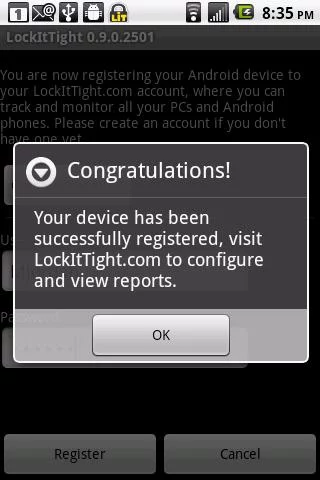
3. LockitTight

LockitTight is a laptop tracker for Windows and Android devices with some rave reviews and plenty of handy options. It’s fairly similar to LoJack and Prey as it has a client application for the laptop and a web-based UI you can log into via a browser.

LockitTight has Free, Standard, Premium and Ultimate subscriptions ranging from $1.99 to $9.99 monthly. Click Download Windows Client on this web page to add the client program to a laptop.

laptop software3

The LockitTight client software sends reports, which can be encrypted, for registered devices to a central server. It incorporates Google Maps to highlight potential laptop whereabouts. The client software will take desktop screenshots and webcam snapshots to provide further evidence for laptop retrieval. LockitTight also lets you delete up to 500 megabytes of files or retrieve data on the laptop.

4. GadgetTrak

GadgetTrak has a range of tracking software for Windows, Mac OS X, iOS, Android, and Blackberry devices. The software has assisted in the recovery of numerous devices such as iPods, USB flash drives, and laptops. The GadgetTrack laptop software is retailing at $19.95.

When you’ve registered a user account, users can log in to a tracking dashboard at this page. The software uses Wi-Fi positioning tech to retrieve laptops with Google Maps integration and gives detailed reports.

GadgetTrak also provides 150 integrated police reports to file with 150 U.S. departments. Its webcam support captures snapshots to provide further evidence to find the laptop. However, GadgetTalk doesn’t provide file retrieval options.

5. My Laptop Tracker

My Laptop Tracker is tracking software for Windows that has plenty of handy options and a straightforward setup. It’s currently retailing at $29.95. This software is more specifically designed for Windows laptops, so you can’t use it with iOS or Mac OS X devices. However, the publisher does have separate MyMacTracker software to retrieve Apple laptops; and that has many of the same options as the Windows version.

This software has a stealth mode that excludes My Laptop Tracker Start menu, system tray, and desktop entries to conceal it. So the only way to open the program on laptops is by entering ‘mydevicetracker’ into Run. When you log in to the web account, you can instantly activate the software with one-click activation.

My Laptop Tracker utilizes IP positioning to track laptops, and the web portal includes data retrieval options. That portal also has an option that locks laptops. The software’s publisher even offers a My Laptop Tracker guarantee along the lines of:

“In case you find a anti theft software that performs better than My Device Tracker, please send us bill details of that software. We will refund the complete amount you paid for My Device Tracker – no questions asked!“

6. EXO5

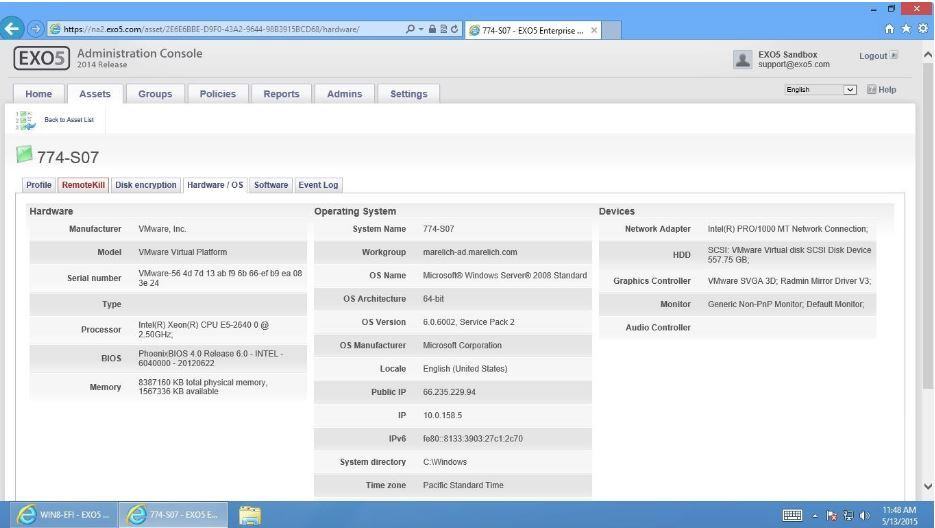
laptop software2EXO5 is business-orientated tracking software for laptops. The software has a $499 three-year subscription. That subscription fee doesn’t make much sense as you could feasibly replace a lost laptop with another, retailing at $499. Still, this program does have some more advanced options for tracking multiple devices.

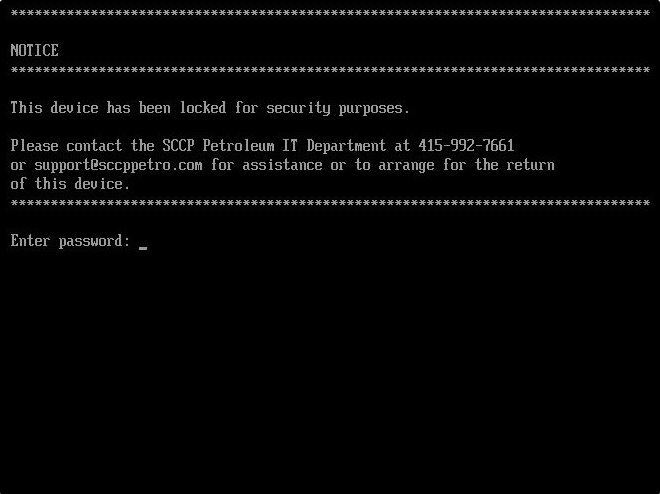
EXO5 tracks laptops with Wi-Fi triangulation tech and has a Google Maps UI. It includes handy RemoteKill options for encrypting data. With RemoteKill, users can initiate a drive lockup that locks the hard disk and prevents further OS access, as shown in the snapshot below. That lockout is still reversible if you retrieve the laptop. In addition, EXO5 provides users with software, hardware, and event log inventories on its Assets tab.

laptop software

So, if you suspect your laptop is stolen, these programs will certainly come in handy. With them, you might be able to retrieve a lost laptop or at least encrypt some files and lock up its hard disk.

Note that Windows 10 now also includes a Find My Device tracking tool. Windows 11 also has the Find My Device feature, which has fairly limited options. Sometimes, the Find My Device tool is not working, so you’re better off using third-party software.

If your device is locked by this tool, we have a great guide on how to unlock a PC locked by the Microsoft Find My Device feature, so don’t hesitate to check it out.

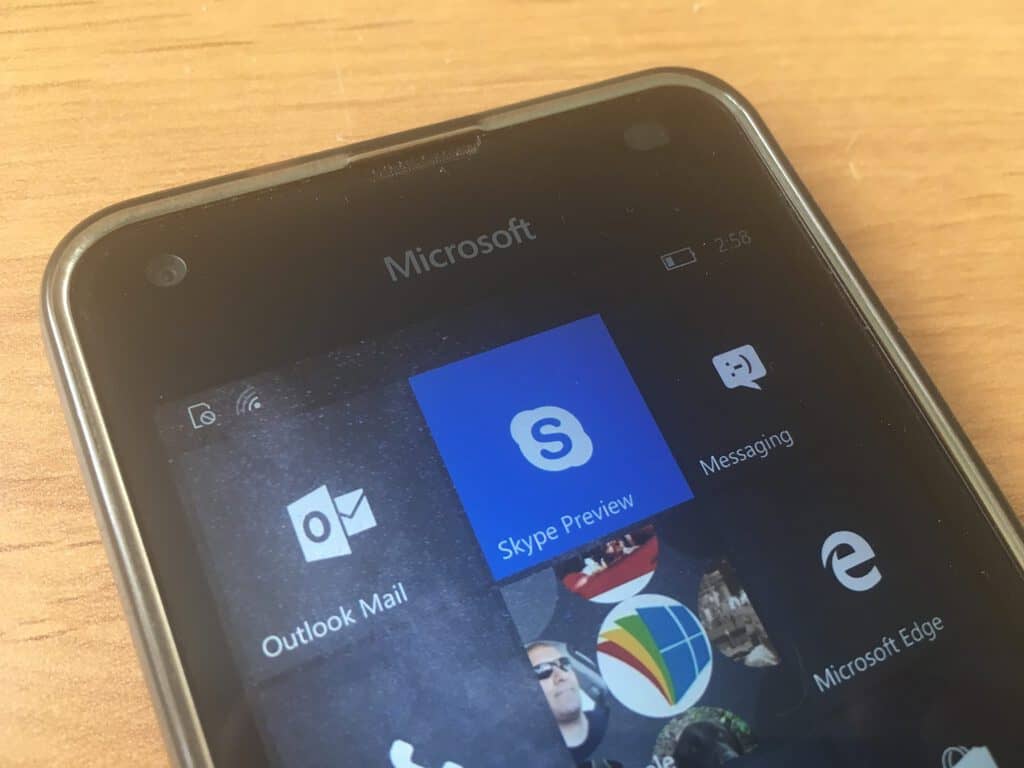
Skype Preview for Insiders updated with quick fix for startup crashes

As we reported yesterday, Skype Preview version 11.10.146.0 released to Windows Insiders was crashing upon startup for many users. As with most app breaking issues, the Skype team addressed the bug with a quick fix version 11.10.147 rolled to Fast, Slow, and Release Preview rings.

When asked why such a broken update was rolled out in the first place, Luis-Escobar of the Skype staff released this statement on the community forum:

We just published a fix in version 11.10.147 and you should be getting it shortly.

As to your question, this was only seen by users in the Windows Insider program. Although not ideal this situations can happen, we should always remember that at the end of the day there are humans building these apps
Luckily this issue was fixed fast and you and all of our users affected will be able to continue using Skype Preview.

We really appreciate your feedback and the fact that you took the time to report this issue, and we will work really hard so situations like this don’t happen again.

Hopefully, this resolved the issues that many users were having starting up Skype Preview. Windows Insiders are encouraged to download this newest update as soon as possible.

Skype
Skype
Developer:
Skype
Price:
Free

Astroneer space exploration title gets a Game Preview on Xbox and Windows Store on December 16

After over two years of development, the last one with a full-time schedule, indie game developers System Era is finally releasing Astroneer into the Game Preview program. The announcement blog post for its early access release describes the game as follows:

This is a game about discovery and mystery, as you uncover rare artifacts and the resources you need to find, on vast worlds where every cubic inch of space can be explored. It’s a game about creativity, as you use your tools to dig, build, sculpt, and shape the very ground to serve your needs, whether utilitarian or aesthetic. It’s a game about solitude, as you enjoy the beauty of your surroundings as you might on a long hike or camping trip. It’s also a game about cooperation, as you invite your friends to share the experience with you in multiplayer co-op.


Unfortunately, the multiplayer co-op will not be available on release tomorrow but is yet to come in a future update. Even so, Astroneer has some pretty ambitious goals for a small indie team. The game aims to be a sandbox of interplanetary exploration where the player can deform terrain and build their own world’s.

Still, Astroneer is in early access for a reason. System Era warns any players that are intending to buy and play the game tomorrow might be met with a less than stellar product, particularly for the Xbox. “The game is very incomplete,” noted the team in their Xbox Wire announcement post. “We’ve worked hard to ensure a stable experience without game-breaking bugs, but there definitely will be some we haven’t caught, along with many minor issues.”

Of course, with many games in early access, System Era is hoping the fans will join in the development process to pound out the bugs and work towards the successful launch of Astroneer 1.0.

Described as a game about independent space exploration, many gamers are having flashbacks to the controversy surrounding No Man’s Sky. But System Era is determined to shed any negative vibes with pure transparency. In fact, the team released a Trello roadmap with their clear intentions and progress of the game.

Astroneer will be available to play for the first time tomorrow, December 16. Eurogamer reported that it will cost $19.99 USD. As an Xbox Play Anywhere title, you’ll be able to purchase it once from console or on Windows Store and switch as you see fit. Astroneer will also be available to play on Steam.

PicsArt Windows app adds AI powered photo effects

For the past couple of years, smartphone hardware manufacturers such as Apple, Samsung, HTC and Nokia have combined their meticulous camera lens designs with advanced software manipulation to produce eye-popping images for everyday consumers.

However, as cloud computing becomes more ubiquitous and abundant, customers should begin to see a similar level of software manipulation trickling down to app developers who don’t have access to the direct hardware but can still produce incredible works of art.

One such company making use of software manipulation is PicsArt for Windows, in the form of AI-Powered Magic Effects.

“Today, we’re happy to announce a new PicsArt for Windows with AI-powered Magic photo Effects that will transform your holiday photos into amazing works of art…

LinkedIn, Tay, and Project Scorpio – a look back at 2016’s top Microsoft searches, according to Google

With the end of December just a few weeks away, 2016 is drawing to a close. For the folks at Google, who love nostalgia and publish a year in review video every year, now is the perfect time to look back on the year and discover what has captivated the interest of the world.

Being curious, we’ve visited Google’s #YearInSearchPage Trends Page, and have examined the years top Microsoft themed searches for the United States.

Top Microsoft Searches in the US

When it comes to the United States, the top five breakout searches for Microsoft include, Tay Microsoft, Microsoft Scorpio, Tay Tweets, Microsoft Twitter Bot, and Microsoft Buys Linked in. Then, when it comes down to location, searches for Microsoft were most popular in the company’s home state of Washington.

Maryland, North Dakota, New Hampshire, and Virgina, meanwhile, top out the areas that were most interested in searches for Microsoft.  Nonetheless, as you may recall, these Microsoft stories all emerged towards the middle of the year. So, please do read below as we remind you of how these stories emerged, and where they are today at the end of the year.

Everything about Tay

To begin we must remind you of Tay. Tay was a joint chatbot project by Microsoft Research and Bing, and was aimed towards 18-24-year-olds, to engage entertain people through casual and playful conversation. The project proved to be a massive failure, as users abused the chatbot and caused it to spew out racist, homophobic, and nonsensical remarks.  Microsoft was not happy with the results of Tay, and apologized for the unintended offensive behavior by the Tay bot and disbanded it.

The company, though, recently rebounded from the disaster, and quietly pushed out Zo, its latest AI project, and chatbot, on Kik Messenger.

Tay was a disaster

Project Scorpio

Next up (and ranking second on Google’s Microsoft breakout searches) is Project Scorpio, which is the next generation Xbox console. As you may recall, Project Scorpio took the world by storm at the E3 conference in 2016, as Microsoft called it, “most powerful console ever.”

The console will pack eight CPU cores and six teraflops of power and will have support for True 4K gaming.  Set to ship out in Holiday of 2017, it even will support high frame rate VR. In fact, all Xbox accessories will be backward compatible with the system and all Xbox One games will play on Scorpio, as well the Xbox One S. While the company has remained quiet on Project Scorpio since E3, Phil Spencer has come out and said that the company is making progress on the console, that it will have a console and not PC price, and that it “may be years” before a new Xbox is launched after Scorpio.

Project Scorpio took the world by storm in 2016

Microsoft Buys LinkedIn

Trending #5 on Google’s breakout searches in the United States is Microsoft’s purchase of the business and employment-oriented social networking service LinkedIn. As we originally reported, Microsoft acquired LinkedIn for $26.2 billion in an all-cash deal, but quickly faced regulation troubles and scrutiny from rivals such as Salesforce. In fact, the acquisition of LinkedIn only officially closed one week ago, after the European Union expressed antitrust concerns, and after the service was banned in Russia over data storage issues.

Microsoft’s LinkedIn Purchase

When it comes down to OnMSFT, we would like you to know that we appreciate every single one of our readers. According to our WordPress backend, top searches on our website this year include, WinBeta, Windows 10 Mobile, Microsoft, Product News, Pokemon Go Windows Phone, Windows 10, Windows Phone, and Snapchat for Windows Phone. Again, all of us here at OnMSFT would like to thank you for taking your time off from your busy schedules to read our website and we all wish you a happy, safe, and healthy holiday season and new year!

Check if Application is 32-bit or 64-bit [How to]

In order to achieve maximum performance, it’s you should use software that matches your architecture. This is why many users wonder how to check if the application is 32-bit or 64-bit.

Before we start, it’s important to check if Windows is 32-bit or 64-bit to know what kind of applications you can run on it.

As for the applications, keep reading to check the type of applications you’re using.

How can I check if the application is 32-bit or 64-bit?

One quick way but somewhat unreliable method you can use to check the application architecture is the following:

  • Check the installation directory – If the application is installed in the Program Files directory, it’s usually 64-bit. If installed in Program Files (x86) directory, it’s 32-bit.

1. Use Task Manager

  1. Press Ctrl + Shift + Esc to open Task Manager.
  2. Go to the Details tab. Right-click the labels and choose Select columns.
  3. Select Platform and click OK.
  4. After doing that, you’ll see the Platform column in the Task Manager with the necessary information.

If you’re wondering how to check if the application is 32-bit or 64-bit for running applications, this is the best method to use.

2. Check compatibility settings

  1. Locate the application’s exe file, right-click it, and choose Properties.
  2. Navigate to the Compatibility tab and check Run this program in compatibility mode for.
  3. Expand the menu. If Windows 95, 98, and XP are visible, it means that this is a 32-bit application. If you can’t see systems older than Vista, it means that you’re working with a 64-bit app.

These are just a couple of methods that allow you to check if an application is 32-bit or 64-bit easily.

In case you want to learn more about this topic, we have a great guide on how to run 32-bit programs on 64-bit Windows that you should check out.

If you know of other means to determine a 32-bit or 64-bit program, leave a comment below.

Skype looks back on a year of innovation

This year has been kind of busy for messaging apps, as the most popular options out there including Facebook Messenger and WhatsApp now claim 1 billion monthly active users. All these apps are now transforming into platforms, welcoming brands and bots to give users more incentives to spend time with them.

Of course, this is great competition for Skype and this year Microsoft didn’t rest on its laurels. Today, the company published a new blog post to look back at some of the things that have been accomplished by the Skype team over the last 12 months, and there are quite a lot of highlights to cover.

First of all, one of the biggest new features that rolled out this year is group video calling on mobile. Skype was not the first messaging app to bring this feature on mobile devices (Google likely did it first with Hangouts), but this is still a big deal considering that Microsoft has also increased the number of people who can have a video call from 5 to 25.

Next, Microsoft introduced Skype Bots during its Build 2016 developer conference, giving developers and brands a new way to reach consumers in the messaging app. Microsoft and other messaging apps are just getting started with bots, but the new tools look to be an interesting way to bring artificial intelligence to the mainstream. “From finding gig tickets with StubHub to planning flights to your perfect vacation with Hipmunk and Skyscanner, or simplifying shipping with UPS—you can achieve so much more, right from a chat window,” added Microsoft

Following the release of the Anniversary Update, Windows 10 users are now able to try the new Skype Preview universal app which is slowly reaching feature parity with the legacy desktop apps. Moreover, the app is currently available on Windows 10 PCs, mobile, HoloLens and will eventually release on the Xbox One. Also, some exclusive features: With SMS Relay, Windows 10 Mobile users can finally set the Skype UWP app as an all-in-one messaging app on their Windows phone and send and receive a text message on their PCs.

Skype Translator also reached new milestones this year, now supporting text-to-text translation in 50 languages as well as voice translation in 9 spoken languages. Earlier this month, the Skype team also rolled out voice translation for calls to mobiles and landlines on the Skype Preview UWP app, bringing, even more, value to Skype credit and subscriptions.

The Skype team also released a new Skype for Linux client this year, while Skype for The Web has become even more useful for those who don’t have a Skype account. While it was previously possible to invite non-Skype users to join a chat by sharing a unique link, the new “Skype as a guest” feature goes a step further. Now, everyone can visit web.skype.com, click “start a conversation,” enter a name, share the conversation link with others and start chatting right away.
Earlier this year, Skype also announced the move from its peer-to-peer infrastructure to a cloud-based one, which will improve reliability and enable new services going forward. However, this also means that older versions of Skype on iOS, Android, and Windows Phone will no longer work starting early next year.

Lastly, the Skype team has introduced new holiday themed emoticons and emojis that will be fun to use during this holiday season. iOS and Android users can also use the app to send personalized Skype holiday card videos that they can also share over on other social networks and email.

As 2016 is coming to a close, next year is expected to be another interesting year for Skype. We’re still waiting for the universal app to be officially announced on the Xbox One, while Android users can now try a new alpha app with native calling, SMS, and contacts management capabilities. Skype may still continue to struggle to get as much momentum as WhatsApp and Facebook Messenger, but Microsoft seems to be doing the right thing to make its messaging app one of the most full-featured and ubiquitous solutions on the market.

Japanese video game Valkyria Azure Revolution confirmed for Western release on Xbox One

According to a report, Valkyria: Azure Revolution is a Japanese game for PS4 that is on its way to Xbox One in North America via Sega and Europe via Deep Silver. Here’s the game trailer for Valkyria: Azure Revolution, and a quick look at some gameplay.

Valkyria Azure Revolution will come to North America and Europe as Valkyria Revolution. According to Sega, there are two reasons for the name change:

  1. The way the first Valkyria title was localized had a really nice ring to it: Senjou no Varukyuria (lit. Valkryia of the Battlefield) became Valkyria Chronicles. When faced with Aoki Kakumei no Varukyuria (lit. Valkyria of the Blue Revolution), a literal translation was unwieldy, and difficult from a graphic design standpoint as well, and adding in extra punctuation (e.g. Valkyria: Azure Revolution) didn’t help either. So we stuck to a similar cadence of the first Valkyria title and went with a two-word title.
  2. Given how vastly different the two games are (Revolution drops the turn-based gameplay, takes place in a different time period, different world, different almost everything), the new name helps to ensure the two titles stood equal but apart from each other.

Valkyria Revolution steps away from the gameplay of Valkyria Chronicles, which was a traditional turn-based RPG game on PS3. Valkyria Azure Revolution is a combination of real-time combat and tactical strategy.

Here’s a look at the game description and features:

All it takes is a single spark to start the inferno of war, and in the story of Valkyria Revolution, players will experience that firsthand. Five lifelong friends consumed by personal revenge plunge an entire continent into a terrible war, sacrificing the lives of countless innocents for a cause based on twisted half-truths and outright lies. This “Circle of Five” use their combined influence in their political and military positions to motivate their small, economically blockaded homeland to rise up and become a powerful resistance against its imperialist oppressors. Will the Circle of Five be remembered as heroic liberators, or will their selfish motives expose them as traitorous conspirators who sacrificed untold lives just to carry out a personal vendetta? Players will watch this history unfold in Valkyria Revolution and find out the truth behind the events.

Microsoft, Xbox One, Valkyria

Features

  • A Brush with Death – Turning the tide of battle in Valkyria Revolution is Brunhilde, one of the last of the ancient and powerful Valkyrur, magical beings with near limitless power. She’s bound by oath to the enemy forces and players will have to figure out how to defeat her.
  • Prepare for LeGION – Valkyria Revolution has a brand new battle system that mixes real-time combat and tactical strategy. Players can take control of the battlefield using brazen combos or cunning tactics and finding a balance between them is the key to excelling in skirmishes.
  • The Ingenuity of War – Through adversity comes great engineering, and with a besieged homeland, players will have upgrade their existing weapons through branching customization paths.
  • A New Painterly Look – Valkyria Revolution has a refined look thanks to the new Gouache rendering engine, giving the graphics a unique canvas texture.
  • Classic Composer – Valkyria Revolution has a vibrant soundtrack brought to life by the incredibly talented composer Yasunori Mitsuda (Chrono Trigger, Stella Glow).

Valkyria Revolution is not just a new chapter in the legendary Valkyria series, but a whole new entry with new characters, a new world, and new gameplay mechanics. The static, turn-based battlefield has become an action-oriented stage for devastating melee combos, lethal ranged attacks, and strategic shifts to turn the tide of battle, all while exploring the incredible history of the Circle of Five.

Microsoft, Xbox One, Valkyria

Are you familiar with the Valkyria series of games on PlayStation? Are you excited to see Valkyria: Revolution come to Xbox One? Let us know in the comments. Look for Valkyria Revolution on Xbox One arriving sometime in Q2 2017.

It’s Free Music Thursday at the Windows Store, pick up these seven albums free today only

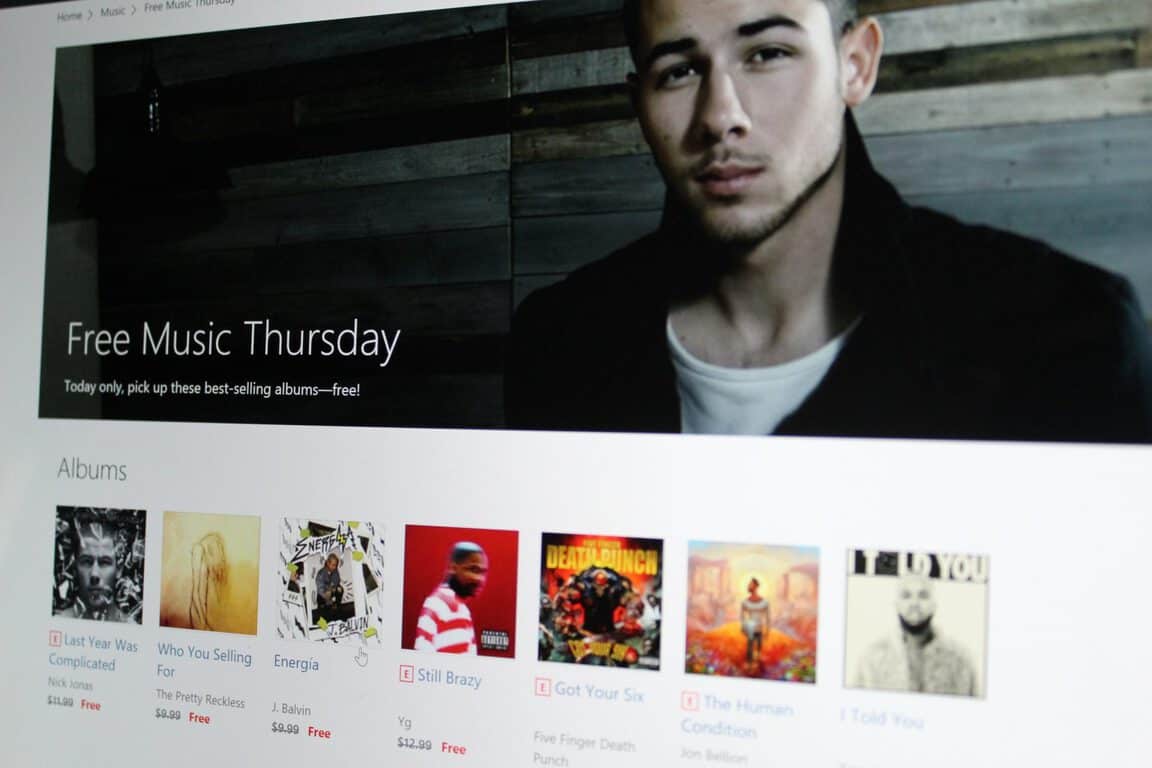
With the weather getting dangerously cold outside here in the United States, one good way to spend the evening is to sit back and enjoy some tunes in the warmth and comfort of your own home. Luckily, today is Free Music Thursday on the Windows Store, and you now can pick up seven free albums for today only, and for your listening pleasure.

Included in today’s free albums are albums which usually range in price from $7.99 to $13.99. The first album is “Last Year Was Complicated” by Nick Jonas (usually $11.99,) followed by “Who You Selling For” by The Pretty Reckless (usually $9.99.) Third on the list is “Still Brazy” (usually $12.99,) and then “I Told You” by Tory Lanez (usually $9.99). Fifth up is “Got Your Six (Deluxe)” by alt-metal favorites Five Finger Death Punch (usually $13.99.) Lastly, are “The Human Condition” by Jon Bellion (usually $7.99,) and “Energía” by J. Balvin (usually $9.99.)

Do you think you will purchase any of these albums? If you plan to do so, please do act fast, as these free albums are only available until 11:59 p.m. PT Thursday night. As always, please let us know your thoughts by dropping us a comment below! And, be sure to check out the full collection on the Windows Store!

AdDuplex adds native SDK support for apps on Xbox One

AdDuplex, the largest cross-promotion network for Windows phone and Windows Store apps and games has announced today that developers can now use the AdDuplex SDK to promote their UWP apps on the Xbox One for free. “AdDuplex SDK v.10.1 (or newer) now supports apps running on Xbox One natively – including controller support for ad selection (clicking) and interstitial dismissal,” explains AdDuplex CEO Alan Mendelevich.

To enable Xbox One support for their apps that are already using the cross-promotion network, developers will have first to make sure that their apps are running the AdDuplex SDK v10.1 or or newer. Then, it will be as simple a checking the Xbox checkbox in the app details:

To add a new Xbox app that supports the AdDuplex SDK or to separate an an Xbox One version of an app from its mobile and desktop counterparts, the process will be straightforward for developers: they’ll just need to create a new app record on AdDuplex, choose the Windows 10 platform and then select the Xbox device family.

As for ad campaigns, Mendelevich explained that “while our ad inventory on Xbox One is ramping up we will not provide a publicly accessible way for paying advertisers to advertise on Xbox One.” Still, developers who want to take advantage of the holiday season to promote their Xbox app are invited to contact AdDuplex by email to get some support from the company’s sales team.


Microsoft partners with mapping companies HERE, TomTom and Esri to create the next “world graph”

Today at the at the Microsoft Technology Center in Detroit, Microsoft announced new and expanded partnerships with HERE, Esri, and TomTom, all which are aimed at creating the next “world graph.” The partnerships also come at a time when location is ever more essential to understanding the world around us, and as it has growing potential in transforming our lives, cities, and industries.

With the TomTom partnership, which is based on TomTom’s maps, traffic, and navigation software, TomTom has plans to integrate its own services to Azure in order to make it easier and flexible for developers to build and manage enterprise, mobile, and IoT applications which depend on location.  In a statement, Peggy Johnson, the EVP of Business Development at Microsoft expressed excitement for what the partnership with TomTom means for developers:

“Making TomTom’s services available through the Microsoft Azure cloud platform will allow developers and our customers to make location a core part of their cloud-based applications.”

Microsoft will also be extending their ongoing partnership with HERE, which already powers many services such as Bing, Cortana, Windows, and Office. Under the new agreement, Microsoft may use HERE data and services into productivity scenarios in cars.  In a similar statement, Ashish Pandya, the director of the corporate strategy for HERE also expressed thoughts on the expanded partnership:

“We are entering a new era of services around connected cars in terms of safety, in-car productivity and making journeys more efficient…We don’t think one single entity can do this by itself. It’s going to take a collaborative effort. We’re very pleased to expand the agreement we’ve had with Microsoft.”

HERE MAPS in the Windows Store

Esri, which is a market leader in geographic information system (GIS) technology, is also another Microsoft mapping partner, and its ArcGIS products are already deeply integrated into many Microsoft applications and services. Esri’s GIS products run on Azure, and-and can ingest any real-time, location-based data,  and location services data from companies like HERE and TomTom. Microsoft has recently announced a preview of ArcGIS Maps for Power BI for compelling visualizations. Heather Blatchford, director of global alliances at Esri, reflected on the power of Microsoft Azure:

“Esri’s ArcGIS platform is turbocharged by Azure, and it’s the power and scalability of the performance of the cloud that starts to make transacting billions of observations, tens of thousands of images and millions of maps a reality.

According to Microsoft, with these three partners, the ultimate goal is to create a “World Graph,” which is a “new data index of physical places, objects and devices and their interconnectivity.”  Microsoft believes this will be the next big concept in graph technology, adding onto systems such as Bing’s knowledge graph, Facebook’s people graph and Microsoft Office’s and LinkedIn’s professional graph.

The software giant also envisions global location-based services for customers differentiated by an open platform, with large data sets and natively integrated functionality for developers, and deep integration with other data graphs for new scenarios. The company sees many uses for global-based location services and writes:

Scenarios could include connected cars that combine up-to-date mapping, traffic and weather data with a driver’s schedule, to-do lists and preferences for personalized planning and routing. Intelligent cars could re-route away from accidents, recommend nearby restaurants and find commutes with good cell coverage for work calls. To increase safety and efficiency, data from road conditions, car sensors and driver behavior can inform predictive car maintenance.

Today’s announcements are very interesting, and clearly show that Microsoft is very interested in using mapping to empower businesses, cities, and the world, to do more. Let us know your thoughts on this by dropping us a comment below!

Don Bradman Cricket 17 now available on Xbox One

Don Bradman Cricket 17, the latest entry in the Don Bradman Cricket video game series, is now available to buy, download, and play for Xbox One owners in Australia and India. The Don Bradman Cricket games are popular with cricket fans for their detailed portrayal of the sport and the improvements each entry makes over the previous ones. Don Bradman Cricket 17 features several new features, among them being the ability to use female cricket players for the first time. Here’s the official game description:

Don Bradman Cricket 17 brings a new revolutionary control system delivering the best batting, bowling and fielding experience by providing you an even greater level of variety and precision of play.Bat like a pro with the new Helicopter, Reverse Sweep and Scoop shot.Stump your opponent by mixing up your fast deliveries with Leg-cutters, Off-cutters, Cross-seam or go with spin deliveries including Doosra or Flipper.Enhanced fielding, it now includes Slides and Tap Backs inside the boundaries, plus Relay Throws.Deep Career Mode that gives you the choice between a seasoned pro or a rookie just starting out in club cricket, Captain your International team to the top of the World Rankings.Motion captured first class cricketers, including Female Cricketers for the first time in all game modes. A world first Stadium and Logo Creator that allows you to customise and share your play experience.Download and play with thousands of Community created Players, Teams, Stadia and logos.

Buy Don Bradman Cricket 17 on Xbox One

Are you a fan of Don Bradman Cricket? Let us know why in the comments below.

Anime fans can now download the AnimeLab streaming app on Xbox One

The popular Australian anime streaming service, AnimeLab, has finally announced its app for Microsoft’s Xbox One console and it can be downloaded right now for free from the app section of the store.

AnimeLab is a free anime streaming service that provides a wide range of episodes to consume from Fairy Tail and Naruto to the new Dragon Ball Super anime series. Here’s the app description:

Anime fans love AnimeLab! AnimeLab is the best way to watch anime hits and fast-tracked simulcast shows direct from Japan in HD. There are thousands episodes available to watch for free and new shows are added every week. AnimeLab supports the anime creators and is free and legal. AnimeLab is made by fans for fans.

Features: Stream in multiple bitrates and resolutions. Choose from Japanese with subtitles or English dubs (where available). Use the play queue to customise your viewing experience. Watch as much as you want, whenever you want.

Are you a fan of AnimeLab or do you prefer another service on Xbox One? Share your recommendations with us and the community in the comments below.

Unlock your AMD Radeon RX 460 to gain 12.5% of free performance

When talking about graphics cards, the Radeon RX 460 from AMD is considered a pretty good model. However, it is well known in the community that this particular graphics card is held back by its manufacturer because of parts of its physical composition locked. While this is a process that’s often used, most of the times it has beneficial results. In this instance, though, it seems Radeon might have gotten it wrong. Before we get into that, let’s take a look at what exactly Radeon did.

The issue is related to the number of texture mapping units found on the card and the number of texture mapping units actually used. Both the TMUs and stream processors are distributed with a portion locked off. This is done due to the usage of faulty pieces of hardware which could compromise the card. By locking them off, Radeon is able to sell the card at a lower market level and capitalize on the stream processors and TMUs that would otherwise become obsolete.

That being said, Roman Hartung, also known as der8auer, realized that locking off some of the components might have not been necessary and came up with a firmware update that would unlock said components. According to him, users that get the firmware are looking at 12.5% increased performance in completely safe conditions.

There is a flip side to this, however. Even though it is believed Radeon was looking to falsely brand the TMUs and stream processors as faulty with the intention of supplying a product at a lower market point, there is a chance the components are actually unstable. If this is the case, users that unlock them might be  left with a dead graphics card. Since no one wants that, you should know that flashing the edited firmware is done at your own risk.

RELATED STORIES TO CHECK OUT:

Someone made an Xbox One controller table and it’s awesome

An Xbox One fan has just created a table inspired by the video game console’s controller and it’s getting a lot of buzz online right now. The table, which can be bought on Etsy for just a little over one and a half thousand dollars, isn’t just a flat table in the shape of the Xbox One controller. This table includes indents that resemble the ones on the real thing as well as three dimensional buttons and joysticks that stick up and act as some sort of mini-tables.

Xbox One Table

As with most other fan-made products, this Xbox One controller table isn’t officially licenced and will understandable have its Etsy product page taken offline as soon as Microsoft gets wind of its existence. Still, the design shown in its creation is fairly impressive and deserves some recognition. What do you think about this table? Would you buy it? Share your thoughts with us in the comments below.