Windows XP is still the third-most popular OS

Windows XP was launched a whopping 15 years ago but still can claim to be more popular than Windows 8.1. In the end, that feat couldn’t have been that hard given how dreadful it was. Still, it’s a remarkable performance Microsoft must be proud of despite having ended support for Windows XP two years ago.  Not much can stop die-hard fans from continuing to run it on their devices, though, even considering that third parties like as Google and Opera have also long ended their support for XP. None of this seems to bother Windows XP users in the slightest.

According to Tech Radar, Windows 10 currently has a market share of 14.15%, Windows 8.1 is on 9.56% of the world’s PCs, and Windows XP stands tall with a market share of 10.9% — making it the third most popular OS worldwide

But how could this surprising reality be explained? It appears this is not a matter of choice: XP users haven’t make the transition to another Windows OS because they simply can’t. In emerging markets, most people use recycled computers that already have Windows XP installed on them. These users can’t afford to buy an original Windows 10 pack. Corporations also use Windows XP because they don’t have the necessary resources to upgrade their OS.

The main issue when it comes to using Windows XP is its vulnerability to threats. Since Microsoft has not rolled out any upgrades or security patches for two years now, the systems running Windows XP are exposed to risks, making them easy prey for all the malware programs that have released ever since 2014. Again, corporations using Windows XP are running the highest risk by using the outdated OS since malicious programs can break the system and send valuable or confidential data to hackers.

Nevertheless, Windows XP has been one of the most successful operating systems launched by Microsoft. Thanks to its plethora of features, its very user-friendly interface, its security level (let’s not forget that XP was launched in an era where malware and spyware became a huge problem) and its default browser among other elements, Windows XP is a king in the OS world. And who knows how long it will still be in the top three most popular OS?

iOS app Pori Fashion Show becomes a Windows 10 app thanks to Windows Bridge for iOS

Pori Fashion Show is a dress up children’s game created for iOS. Kids can drag and drop the clothes and accessories that they want to wear on ‘paper doll’ cartoons, save the images for sharing later, or even walk them down an animated fashion runway like top models.

This game, like many apps, was once restricted solely to iOS. Dong Yoon Park, creator of the Pori Fashion Show, is also the Senior User Experience Designer at Microsoft. As the design leader for Windows Bridge for iOS, Park decided to bring his game over to the Windows platform while re-using the existing code.

About the Game

Pori Fashion Show uses a standard UIKit controls like UICollectionView, UIImageView, and UIButton. UILongPressGestureRecognizer and UIPanGestureRecognizer enable the drag and drop gestures in the game.

Importing the Project

For developers that use a Mac, the easiest way to get started is to set up Windows 10 and Virtual Studio on a virtual machine. This will make it simpler to switch between Xcode and Visual Studio. Developers can download an evaluation virtual machines with both Windows 10 and Visual Studio installed already on the bottom of the Windows Bridge for iOS page.

After configuring your developing environment:

  1. Use the vsimporter tool to import your Xcode project to a new Visual Studio Universal Windows Platform project with Objective-C support.
  2. Type ‘powershell“ in Cortana’s search box to open Windows PowerShell.
  3. Run ‘C:\YOUR_WINOBJC_PATH\bin\vsimporter’. The .vsimporter and .sln will be generated automatically.

4_vsimporter

Using a virtual machine will provide a shared folder feature on a network drive which Visual Studio will not allow. The easiest means to share the source code folder to Windows is to override the project’s output directory. Right-click the project, click on Properties, and change the output directory under the General menu to $(Temp)\$(MSBuildProjectName)\bin\$(Configuration)\. Please note that Temp should be an environment variable pointing to your Temp directory.

6_outputdirectory

Building A Solution

At this point, clicking the Build Solution button will come up with many errors. The most common errors are caused by developers forgetting to remove the iOS-specific frameworks and libraries. Other errors might crop up from libraries that are still in active development. The Pori Fashion Show app had both, creating the need to remove the StoreKit, MessageUI, and Social frameworks and find a workaround to replace Storyboard.

For some errors, you might have to rewrite the iOS layout in the code. For most common issues, Auto-Layout Constraints can fix the problem. However, if a developer has trouble adding them, there is a Programmatically Creating Constraints webpage to help. In Pori Fashion Show’s case, the Auto-Layout Constraints worked just fine.

8_errors

Park’s app uses standard UIKit controls with custom images. Most of the UI elements are container types that don’t have OS-specific style or UI controls with custom images. For these types, Windows Bridge for iOS will not require any changes to run the app. For UIKit controls without customization, however, the program will try to translate them into UI controls for Windows.

An example of the default iOU controls translated to Windows versions.
For Pori Fashion Show, the UIAlertView was translated to Dialog UI control in Windows.

When your app is accessing unimplemented APIs, the console will respond with an error message “[Stubbed function called!]” or “(E_NOTIMPL)” in the output console. Even though Pori Fashion Show uses two APIs for gestures, the console only came up with a recognizer error. UILongPressGestureRecognizer is the API that makes it possible to scroll through the collection of neat clothes collection on the app.

Finding alternatives and workarounds to unimplemented APIs might take a few creative tricks. For Pori Fashion Show, this meant using the app’s other recognizer’s velocity to detect the scrolling direction instead.

18_scrolling
Park removed the unimplemented API causing errors and made a workaround in his app’s gesture recognizer.

Another common problem for errors is failing to use cross-platform naming conventions such as using colons in iOS while Windows does not allow it. Pori Fashion Show updated their screen capture code but now there was another problem! Saving images of the dressed up dolls caused the colors to be altered. Since Windows Bridge for iOS is under constant development, Park went back to the source. After opening an issue with WinObjC on GitHub, the team responded and fixed the issue with an updated SDK release.

Bridging the Gap

It’s best to test the shared source code in both Xcode and Visual Studio. After confirming that the code ran on both Windows and iOS, Pori Fashion Show was successfully bridged!

20_apprunning-1024x638
Pori Fashion Show running on an iOS Simulator and on Windows.

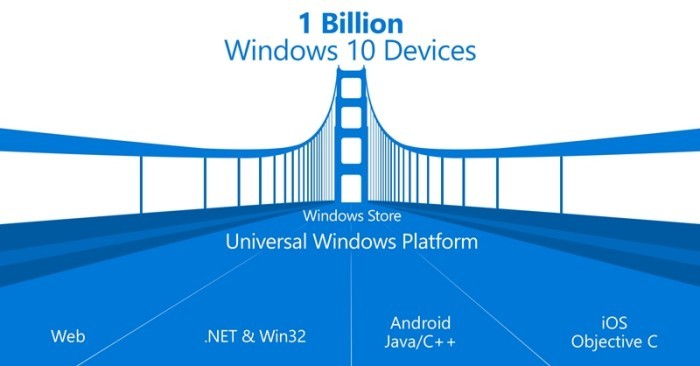
Bridging current iOS apps to the Windows platform is an effective way to bring your project to a new level with a larger market. Universal Windows Platform apps are capable of running across many types of devices including smart phones, tablets, laptops, desktops, and even the upcoming XBox that is still in development.

Killer Instinct World Cup 2017 announced, here’s how to qualify

With season 3 of Killer Instinct finally available for Xbox One and Windows 10 users and the already nice bundles you can check out to go along with its release, details are now emerging regarding the qualifiers for Killer Instinct World Cup 2017.

Brandon Alexander, head of the Killer Instinct World Cup, made the official announcement today. In it, he listed what needed to be done in order to qualify for the World Cup; namely, any gamer with a Xbox One or Windows 10 PC must enter the series of 8 Bit Beatdown Tournaments first. (You can do so by following this link.) Here’s what else the executive said:

We just announced our Online KIWC Qualifiers: the KI Pro League and the sanctioning of the 8 Bit Beatdown tourtnaments! Both are FREE to enter and is open to anyone via Xbox One or Windows 10 PC! To register for 8 bit beatdown and KI Pro League (until the KIWC site is up and running) go to 8bitbeatdown.net

I have some more ways for you to qualify from the comfort of your own home! In KI we have something awesome called Ranked leagues and once you achieve Killer Tier you can start competing for Top 32! Well I am happy to announce that all of Top 32 will receive KIWC Points again for the Season! Let the grind begin!

Offline tournaments for this KIWC season are also going to be available. It’s important to note that Kombo Klash events are the only way to earn points offline for KIWC 2017. Here’s how the complete list with locations looks like:

  • Texas Showdown (4/22-24, Houston, Texas)
  • Northwest Majors (4/29-5/1, Des Moines, Washington)
  • Combo Breaker 2016 (5/27-29, St. Charles, Illinois)
  • CEO (Community Effort Orlando, 6/24-26, Orlando Florida)
  • Kombo Klash (8/6-7, San Antonio, Texas)
  • Absolute Battle (8/26-28, Dallas, TX)
  • Heart of Battle (12/2-4, Houston, Texas)
  • Kumite In Tennessee (1/6-8/2017 and location TBA)
  • Kombo Klash Netherlands (Date and location TBA)
  • Kombo Klash France (Date and location TBA)
  • Kombo Klash Canada (Date and location TBA)
  • Kombo Klash Community Choice (Date and location TBA)

Furthermore, once you achieve Killer Tier in the ranked leagues, you can start competing for the top 32 spots. Those in the top 32 will then receive Killer Instinct World Cup points for the season.

READ ALSO: TellTale Games launching 7 Days to Die on Xbox One in June

Windows 10 Insider build 14316 adds QR codes to bluescreens of death

One of the more frustrating aspects of using a personal computer–any computer, in fact–are the inevitable bugs and crashes. Every modern operating system suffers from the same, and sometimes those crashes can be catastrophic, requiring hard reboots to resolve. Windows has its own version of these sorts of crashes, once called the black screen of death (BSOD) and more recently evolved into the blue screen of death (also BSOD).

BSOD’s have always presented sometimes arcane bits of information on what problem caused the crash, and in the past, the information sometimes flew by so quickly that no normal person could jot down error codes and other information fast enough to help with troubleshooting. It looks like Microsoft might be working to help with this specific issue, according to forum visitor at BetaArchive, who posted a screenshot from Windows 10 Insider build 14316 showing a QR code embedded in a BSOD.

Windows 10 BSOD QR Code
Windows 10 BSOD QR code.

This looks like a nice solution for grabbing information on exactly which codes were generated during a BSOD and quickly researching a solution to them. We’ll need to keep our eye on this and future Windows 10 Insider builds to see how helpful these new QR codes really are in the troubleshooting process.

This new Windows 10 Mobile smartphone sells for $230 but only in Japan

For whatever reason the Japanese are loving Windows 10 Mobile, and we’ve seen them unveil a few impressive devices in that regard. Now another new smartphone is being prepared for voracious Japanese consumers: the Covia BREEZ X5.

This is probably the first time when you’re hearing about this company, but we believe it’s not going to be the last time. The Covia is slated for a release later this month. Here’s a quick rundown of some if its most important specs:

  • dual SIM phone covia breeze windows 10 mobile smartphone
  • 1280x 720 IPS display
  • quad-core Qualcomm Snapdragon 210 processor running at 1.1GHz
  • 1GB of RAM and 8GB of onboard storage
  • 8MP rear camera with a LED flash along with a 2MP front-facing camera
  • 2500mAh removable battery
  • 4G LTE, WiFi 802.11 b/g/n, Bluetooth 4.0 and GPS connectivity

Since it gets Windows 10 out-of-the-box, the device will come with Cortana, Microsoft Edge, OneDrive and the Microsoft Office Suite. Covia is marketing its BREEZ X5 at business users, saying it “allows IT to test the latest Windows 10 Mobile updates against critical line of business systems and apps, before you distribute to end users via MDM (Mobile Device Management)“.

The smartphone will retail for around ¥24,800, which equals roughly $226. However, the smartphone is most likely going to be available for the Japanese market only. Still, it would be great if OEMs from other parts of the world could learn from how these Japanese companies are approaching Windows 10 Mobile overall

READ ALSO: The downgrade from Windows 10 Mobile to Windows Phone 8.1 still possible

Microsoft makes it easy for educators to get free Office 365 and share OneNote Staff Notebooks

A few months after the Office team announced new features for OneNote Class Notebooks and Staff Notebooks, Microsoft announced today that school leaders, teachers, and education staff who do not have an Office 365 Education account can now sign up to get a free Office 365 account that will allow them to create OneNote Staff Notebooks for their schools. Staff Notebooks are an Office 365 feature that allows education staff leaders to “set up a collaboration space for meeting notes, shared curriculum or initiatives, create a content library for read-only staff material and add a private workspace for each staff member.”

To sign up for a free Office 365 Education account, education staff just need to visit this address and click on “Sign up for a free Office 365 account.” Then, users have to enter their school email address to check if their institution is eligible for a free Office 365 account. In case you already have an Office 365 account set up by your school, then you can just click on “Staff Notebook Sign-In” to sign in with your existing account and launch the Staff Notebook app.

The sign-up or sign-in process is pretty straightforward.
The sign up or sign in process is pretty straightforward.

Once your Office 365 account is set up, open the app launcher on the upper left corner and select “View all my apps” in the lower left corner to launch the Staff Notebook app. Then, you will first have to choose a name for your notebook before being allowed to add staff members by entering their school email addresses (your colleagues will then receive an email invitation to set up an Office 365 account and join your Staff Notebook). Right after that, you will be able to see a preview of your Staff Notebook, just click on “create” to follow through.

At the end of the process, click "create" if your Staff Notebook looks good.
At the end of the process, click “create” if your Staff Notebook looks good.

To complete the process, you will receive a link to the Staff notebook that you can share with other staff members. Clicking the link will open your Staff Notebook in OneNote, and your staff members who will open it will receive an email invite to join it. The overall process is pretty straightforward, but you can get more detailed instructions on this help page if you need it. Last, Microsoft has also set up a dedicated page for free OneNote professional development for education staff.

Office 365 email security tells you if an email message isn’t safe

In today’s modern world of phishing and malware, clicking what may seem like a legitimate link in an email may end up not only compromising your own computer, but also your entire company. Luckily, the folks over at Office 365 are working on rolling out an additional layer of email protection for all users of Office 365.

Named Safety Tips in Exchange Protection, the addition layer will ensure a warning to the user in an email that is marked suspicious, or reassurance when a message is safe.  Under the new protection, Messages will be marked in color-coded categories as either, Suspicious, Unkown, Trusted, or Safe. As per Microsoft, the categories are described below:

  • Messages marked Suspicious have a red safety tip and are either a known phishing message, have failed sender authentication, are a suspected spoofing message or have met some other criteria that Exchange Online Protection has used to determine the message is fraudulent. You should not interact with suspicious messages and instead should delete them.
  • A yellow bar at the top of the message indicates an Unknown safety level. Being marked as Unknown indicates that Exchange Online Protection has marked the message as spam. You can click the It’s not spam link in the yellow bar of a junk mail item to move the message to your inbox.
  • Messages from a Trusted sender display a green bar at the top of the message. These are from domains identified by Microsoft as being safe.
  • Messages marked with a gray safety tip indicates that the email was not filtered for spam because it is either considered Safe by the user’s organization, is on the user’s safe senders list or Exchange Online Protection marked the message as junk but the user moved it out of the junk folder to the inbox. The gray safety bar also appears when images within the message have been disabled.
Types of Filers
Color-coded categories

This level of protection analyzes data patterns across millions of emails to identify spam, malware and phishing threats.  Then, based on this ongoing analysis, Exchange Online Protection is able to identify suspicious messages and apply the appropriate Safety Tip.

All types of Safety tips are included in Outlook on the web, and Outlook clients will only display the Suspicious safety tips. It is also worth noting that most messages will not have a safety tip, as Microsoft only adds them in as when they have information users need.

Microsoft Research to attend the 25th annual WWW conference

The 25th annual World Wide Web conference kicks off today in Montreal. From now until Friday, tech experts and academics from around the globe will be discussing research, development, standards and applications for the future of the web.

Microsoft is one of the high-level sponsors of the event, but Microsoft Research is there this week for very practical reasons. In a blog post published today, Microsoft research detailed more about why they are attending the 25th annual WWW conference and what they hope to achieve.

At last year’s WWW conference, Microsoft Researched announced the release of Microsoft Academic Graph to help academic researchers map the citation relationships between scientific publications. This allows researchers to map out when scientific studies and journal articles cite each other or have other relationships such as similar authors, institutions, journals, venues, and fields of study. As a result, researchers and academics can connect with existing research in new ways as they perform their own studies.

Now Microsoft Research is back at the WWW conference with two new workshops related to the Microsoft Academic Graph. One workshop, titled BigScholar, focuses on how researchers from the National University of Singapore are using MAG data “to explore a methodology for conference rating” based on the research that is related to a conference and how that research is used by other academics.

Microsoft Research’s second workshop is SAVE-SD, which stands for Semantics, Analytics, Visualization: Enhancing Scholarly Data). This workshop is described as focusing “on bridging the gap between theoretical and practical aspects of scholarly data.”

Microsoft Research states they are hoping this year to connect with “innovators and researchers to learn more about how they’re using and integrating our academic services,” as well as explain the future direction of Microsoft Academic. They feel their two workshops show how in the past year Microsoft Research’s Academic Graph has had an impact on the variety of research. They are also excited by new possibilities with practical applications which they will be speaking more about this week at the WWW conference.

If you are attending this year’s WWW conference in Montreal, you can stop by booth 701 to speak with the Microsoft Research team which is eager to hear more about how academics are utilizing their Academic Graph.

Upgrading your Office 365 subscription from Personal to Home

Microsoft’s Office 365 Personal subscription plan is one of best cloud service subscriptions you can get in terms of value. For $69.99 USD per year (or $6.99 per month), you not only get the full repertoire of desktop and mobile editable Office apps, you also get 60 complementary minutes of Skype calls per month, and a massive 1TB of online OneDrive storage: by far the most competitive rate for personal cloud storage among the major providers today.

Alas, the “Personal” in Office 365 Personal is to be interpreted quite literally, as it only allows one desktop installation (Mac or PC), one tablet, and one phone installation. This is easily remedied by upgrading to the Home subscription, which costs $99.99 USD per year (or $9.99 per month), and expands the device capacity five-fold each way.

It’s a perfectly conceivable that a subscriber, after using the his/her Personal subscription for a few months, may deem it wise to upgrade to the Home subscription to take advantage of the extra carrying capacity. As it happens, Microsoft’s front-facing website materials don’t exactly make it clear what this entails or how to achieve this. The abundance of FAQs meticulously avoid answering this really obvious question.

Office 365 upgrade personal to home 03
Office 365 upgrade personal to home
Office 365 upgrade personal to home 04
Office 365 upgrade personal to home

You’d think there would be a “convert to XYZ subscription” button found in account management, and that you simply pay the difference for the remainder of the year if applicable, but no. I found no such option.

Only after some deeper digging into a relatively obscure Office 365 support page do we find a clear, if a bit indirect, answer to this question.

Office 365 upgrade personal to home 05

As it turns out, if you buy another year of a Home subscription on top of your current Personal subscription, your account will automatically convert the remaining time on your Personal subscription into a Home subscription. To do this, just buy an Office 365 yearly Home normally through the main Office 365 product page.

Once that’s done, in addition to the usual array of receipts and confirmations,  you’ll receive an email confirmation indicating that your Personal subscription has successfully been converted to a Home subscription.

Office 365 upgrade personal to home 02

You can confirm this by going into your account’s settings, and seeing the subscription type, in addition to the added year.

Office 365 upgrade personal to home 01

In my case, I have a Personal subscription I paid for this year, and additional “free” year of Personal granted to me via a promotion on my Lumia 950, and finally, I topped it off with a new Home subscription, converting that extra 1.5 years to Home “for free” in a certain sense.

It’s worth noting that according to the FAQ, this game of subscription Othello can only be played for up to five years.

This conversion strategy Microsoft employs can be either a good or bad thing. If you plan on committing yourself to Redmond’s master plan, this is great, because by just renewing for Home another year (which you ostensibly were going to do anyway), you get your remaining Personal time converted for free.

This could also be seen as a bit of a sucker punch to some, as it forces you to indulge another year of subscription that you might not actually want or need. It’s also obnoxiously opaque, as it takes a lot of digging just to only tentatively confirm that this is the actual behavior. But it’s not intuitive. Buying an advanced subscription doesn’t immediately seem like it would retroactively change a previous subscription.

This system seems to be designed to encourage people to stay with Office 365 for as long as possible. Which is be perfectly fine if the company could just be a bit more obvious about it.

Either way, I’m thoroughly enjoying my new Home subscription.

Quantum Break is the best selling new game for Xbox One, says Aaron Greenberg

Quantum Break, Microsoft’s newest Xbox One exclusive title is less than a week old, but it has already broken records. Aaron Greenberg, Xbox’s head of marketing, has just said that Quantum Break is now the best selling new Microsoft Studios IP this generation, as well as the best-selling boxed game in the UK this week.

Overall, the milestone also means that in one week Quantum Break has outsold other IP titles from this Xbox generation, such as Sunset Overdrive and Crytek’s Ryse.

ChartTrack, meanwhile, is the group behind the statistics for the best-selling boxed game in the UK statistic. Tracking only Xbox One physical disc based sales for the title, the group claims that Quantum  beat out Codemasters Dirty Rally for the top spot in the UK.

We previously reviewed Quantum Break, and we found it to be a masterfully presented game that achieved exactly what it set out to do—marry the mediums of live action film and video games.

Microsoft adds picture zoom and more to latest Sway app update for Windows 10

Microsoft’s popular storytelling app Sway has picked up an update on Windows 10 with some notable new changes on board. Along with the usual bug fixes, the new update give users the ability to zoom in and navigate photos on touch-enabled devices by touching their screen.

Additionally, another new feature introduced in the latest update is Jump lists, which offer users a quick way to access the recent sways and pin them. Simply right click on the Sway app in Windows taskbar to access the recent sway and add them to their jump lists.

Here’s the complete change log:

  • Picture Zoom: You can now touch your screen to zoom in and navigate through groups of photos on touch-enabled devices.
  • Jump List: Right-click the Sway app in the Windows taskbar to quickly access recent Sways. You can also pin your favorites so they always show up in the Jump List
  • Miscellaneous: We’ve fixed several bugs in this release.

Other Recent Updates:

  • New Languages — Sway now supports 14 additional languages.
  • Living Images — Sway now supports Windows 10 Living Images, bringing more life to your stories.
  • Viewing Navigation — While viewing any Sway, you can now select your preferred navigation style.
  • Recent Documents — Using your Microsoft Account, it’s now easy to find documents on your OneDrive sorted by work you’ve done most recently and then drag and drop them right into your Sway.
  • Faster Viewing — Viewing Sways with multiple photos is now a faster, more fluid, and responsive experience.

If you happen to be a regular user of Sway, head over to the Windows Store and update the app to make use of all the new features introduced in the update.

Sway
Sway
Price:
Free

Google might bring Chrome notifications to Windows 10 Action Center

Although the company originally denied it, there’s actually a good chance that Google will introduce native Chrome notifications to Windows 10. Google Chrome native notification support is already being tested for Mac OS X with some users already able to try the feature and luckily for Windows 10 users, there’s still hope.

Native notification support allows Mac OS X users to receive Chrome native notifications through the Mac’s own Notification Center, just like notifications from every other app. Users are able to receive Chrome notifications about new e-mail, websites, and more — all with integration with the platform’s own Do Not Disturb option, as well.

If Chrome native notifications ever come to Windows 10, users will receive them through the Action Center in the same manner as notifications from UWP apps and other programs. While Mac users can enable this option by going to chrome://flags/#enable-native-notifications, as of now it is not available for Windows 10 users.

  • Read Also: Microsoft Edge for Windows 10 to get even more new features soon

Windows 10 might receive Chrome notifications in the future

Originally, Google stated that they wouldn’t support Chrome native notifications in the Windows 10 Action Center. Although this Windows 10 feature looked like a perfect fit for Chrome notifications, the company explained that there were too many “behaviorial differences between Windows 10 and older versions” and therefore had no plans to bring Chrome notifications to Microsoft’s latest operating system.

However, it looks like Google changed its tune: when asked about possible notifications support on Windows 10, a Google developer said that the team is actually exploring ways to bring Chrome notifications to the Windows 10 Action Center.

“Nothing is 100% sure on Windows until implementation begins and we fully evaluate what is possible, but it seems likely to me at least that we will be able to support native notifications on Windows 10,” the Chromium team member said.chrome notification center

The Windows 10 Action Center would be a perfect replacement for Chrome Notifications Center because it will make receiving Google notifications more natural. However, it remains to be seen would like to receive Chrome notifications in their Action Center in the first place.

Previously, Google decided to pull support for Chrome Notification Center because some users didn’t even notice it was there. So, with this, no one can guarantee that a transition from the Chrome Notification Center to the Windows 10 Action Center would make any positive changes.

However, Google probably thinks that both the Windows 10 Action Center and Mac Notification Center will make Chrome notifications more visible and therefore more accessible to users, which could translate to a superior advantage compared to the old Chrome Notification Center.

Tell us in the comments below: would you like to receive Google Chrome notifications in your Windows 10 Action Center? Or do you think another type of notifications in Windows 10 is unnecessary?

Marvel: Avengers Alliance 2 comes to Windows 10

The wait has ended: Marvel: Avengers Alliance 2 has finally landed in the Microsoft Store. The sequel to the smash hit Marvel: Avengers Alliance brings a more robust mobile gaming experience, greater customization and awesome visuals. In the follow-up, the context of the game is the same: players must assemble a team of superheroes from Daredevil and Spider-Man to heroes from teams like the Guardians of the Galaxy and the Avengers to fight against Ultron, Baron Strucker, and other menacing super villains.

To make things more difficult, a bizarre set of galactic collisions called Incursions have threatened the fate of Earth. Use the powerful energy of Iso-8 to prevent the destruction of the universe by yourself or with friends and other players from around the world to carry on this battle against the most evil of enemies.

READ ALSO: Madefire comic book store now supports Windows 10 PC and mobile

The app contains social media links to connect with others so you can let others know how brave you are. There are also in-app purchases that cost real money, so pay attention what you click on (because that Vault of Gold costs $99.99!). If you’re the free-to-play type, you can watch ads for rewards since the game comes with third party advertising .

Here’s for a brief description of the game:

  • assemble the ultimate team to defeat notorious super villains

  • strategize and defeat evil forces in epic 3-on-3 combat

  • level-up and customize Super Heroes

  • collect and equip unique abilities for each Super Hero

  • take on dozens of replayable missions

  • win bonus rewards for completing Daily Operations

  • get powerful rewards in PVP tournaments

  • team up with friends’ Super Heroes to conquer missions

Despite the fun the game promises, many users have complained about game crashes after the first day:

This game worked fine for the first day. Played it for an hour, tried the second day, app doesn’t work. Now have tried for the last 4 days to no prevail. It doesn’t work.

Another player confirms:

I’ve installed this twice now, same thing issue both times. Game works the first time, the second day it stops working and crashes on the Marvel startup screen.

An upgrade to Windows 10 is necessary to play this game and maybe explains why the game crashed for certain users. Try it out for yourself though: download the game from the Microsoft Store.

READ ALSO: TellTale Games launching 7 Days to Die on Xbox One in June

Monitor your app’s performance with the Dev Center Windows 10 app

For those of you who are Windows app developers, you utilize Microsoft’s Dev Center as a resource to update and monitor your app in the Windows Store. With the Dev Center app, you can monitor the health and performance of your app, as well as see acquisitions data, investigate app crashes, and more using the official Dev Center app for Windows 10.

“The Microsoft Dev Center app allows you to quickly view details about the health and performance of your Windows Store apps on any Windows 10 device. Note: You must have an active Windows developer account in order to view this data,” the app description reads.

The app is universal and works on both mobile and desktop. This is the first public release of the Dev Center app and there is one known issue in regards to analytics data. “Some Analytics data shown in the app may differ slightly from what you find on the Dev Center Dashboard. This difference has to do with differences in the data refresh times of the two systems. We are actively working to bring these two systems in sync.”

This is the first public release of the Dev Center app and there is one known issue in regards to analytics data. “Some Analytics data shown in the app may differ slightly from what you find on the Dev Center Dashboard. This difference has to do with differences in the data refresh times of the two systems. We are actively working to bring these two systems in sync.”

Microsoft is working to add IAP reporting, payouts reporting, and more features to the app this summer. Thanks @nithinsuren for the tip!

Dev Center
Dev Center
Price:
Free

Plenty of Windows 10 build 14316 issues being reported by Insiders

Microsoft released the new build 14316 for Windows 10 Preview a couple of days ago, and it brought a lot of improvements, additions, and new features. Like every new build, though, t looks like it also caused a lot of problems for the Insiders who installed it.

As usual, Microsoft told us both which issues were addressed and which new ones were created, but users are encountering many more problems than Microsoft originally mentioned. For the past couple of builds, the number of issues reported by users is relatively high, which is not good especially if Microsoft wants to keep as many insiders in the Insider program as possible.

Check out the list of issues reported by users in Windows 10 Preview build 14316 below.

Windows 10 Preview build 14316 reported problems

We will start off with our old friend: the update installation failure, present in the previous 14295 build along with the 14291 and 14279 builds — pretty much all the build releases. We can’t recall if there had been a single build released since the introduction of Windows 10 Preview that hasn’t caused installation problems for at least a few users. Build 14316 is of course not different, as some users reported on the Community forums that they’re unable to download and install the latest build.

“The last 3 updates on the windows 10 insider program have all failed with similar messages to this one. Windows 10 Insider Preview 14316 – Error 0x80070005. I’m beginning to wonder if Microsoft has forgotten how to write their own software.”

By now, you can guess how helpful Microsoft engineers were with regards to this problem, so users who encountered it again basically can’t do anything to solve the problem. We can recommend you to try running the WUReset script  like wealways always have, but we can’t guarantee it will work.

Those who were able to install the build encounter problems of their own. One user reported on the forums that upon installing build 14316, he got caught in a continuous reboot loop. Reportedly, everything worked fine, than the computer just started to restart by itself. Other users and Microsoft engineers tried to help him, but without any luck.

“Hello, I installed Windows 10 Insider Preview 14316 and got caught in a continuous reboot loop. All the applications I’ve tried work fine but the system reboots after 10- 20 minutes from booting up. In fact, I just noticed that the system reboots even when I’m not logged in. Is this common with this build? What should I do from here?”

constant reboot windows 10 buld 14316

If you too encountered this problem, you can try solutions listed in our article about constant reboot problem in Windows 10. While we hope it will be helpful for you, once again, we can’t guarantee anything.

I can confirm that unlike in the previous two builds, the sfc/scannow command now works fine for me, so it seems Microsoft finally fixed this issue (If it’s different for you, please let us know in the comments). But users reported that another diagnostics command doesn’t work in the latest build. Namely, the dism.exe command in the Command Prompt doesn’t work in this build.

“I try to repair build cos some problems and “dism.exe /online /cleanup-image /scanhealth” said that “The component store is repairable”, but after that I’ve run “dism.exe /online /cleanup-image /restorehealth” and 1st time stuck at 4,5% with Error: 1726, than I’ve run for the 2nd time but it stuck at 93,1% with the sameError: 1726.”

Unfortunately, you’ll have to wait for Microsoft to fix this issue as we don’t have the proper solution. This is probably the similar case as with the sfc/scannow command in previous builds.

dism.exe command doesnt work windows 10 build 14316

We continue our report with crashing problems in Windows 10 Preview after installing the latest build. One user said on the Microsoft Community forum that her system simply crashes without any reason. “Build 14316.rs1 keeps crashing with ‘fault on non-paged area. The system just randomly crashes and restarts.” Do you have any idea what might fix this issue?

Microsoft introduced Bash on Ubuntu for Windows 10 with the latest Preview build, which is a welcom feature. However, some users reported that they’re unable to install Bash, as they encountered the “Downloading from the Windows Store… 0%Error: 0x800c0008″ error.

Luckily, users who reported the issue found the solution by himself. So, if you’re also encountering a problem with installing Bash on your Windows 10 Preview, try the following:

  1. Go to Search, type internet options, and open Internet Options
  2. Go to Advanced tab, and click on Restore Advanced settings
  3. Click OK
  4. Open the Command Prompt, and try to install Bash again.bash windows 10 problem

Restoring Advanced internet setting should solve the problem with installing Bash, so we don’t consider this problem a serious issue.

One user also complained that he wasn’t able to perform some basic actions, like updating drivers and syncing files to OneDrive, upon installing the build. He said that every time he tried to perform a certain action, he received a ‘critical error’.

“After Build 14316 install finished today, I tried to: Install latest ASUS Smart Gesture touchpad software; Pick & sync my files, folders to Onedrive; Clicking link to Microsoft help provided in “Feedback Hub” app on Developer mode problem. In all three instances my ASUS K-55A laptop went to Critical error message & rebooted.”

Unfortunately, he didn’t receive a single response on Microsoft’s forum, so we’re not sure what can be done to fix this issue.

BSODs are a common thing in Windows 10 Preview, and it looks like build 14316 isn’t an exception. One user reported on the Community forum that he receives a “DRIVER_POWER_STATE_FAILURE” error, followed by the BSOD, on his Surface Pro 4.

“It’s seems like this was an issue in builds early last year, but I’m getting in the latest build 14316 on my Surface Pro 4. My computer crashes to a BSOD using within the first few minutes after I have logged in.  It’s possible that either Skype or Skype for Business is a contributor to the problem, but obviously a drive is involved as well.”

For BSOD issues caused by the “DRIVER_POWER_STATE_FAILURE” error, we recommend our article about it. So, if you’re also facing the same problem, check out the suggestions from the article and you might find a solution. Make sure to let us know in the comments if you managed to solve the problem.

DRIVER_POWER_STATE_FAILURE windows 10 preview 14316

These are the most serious problems in build 14316 reported by users. As the build is just a few days old, we’ll check again for the new issues soon, and we’ll update this article if new problems are reported.

If you’ve encountered any of your own issues that we didn’t include in this article, please let us know in the comment so we can mention it here.

Interview: Opera founder Jon von Tetzchner speaks about Vivaldi

The long awaited stable version of the Vivaldi web browser has finally been released for public consumption and we have to say, it certainly brings back the old feeling of using the original version of the Opera web browser.

We got the chance to speak with the CEO of Vivaldi, Jon von Tetzchner, about the web browser and why folks should give it a try. It is clear from what he has to say that he is passionate about this browser and confident in its capabilities of walking with the big boys.

What were the motivations behind the creation of Vivaldi?

There are not a lot of browser choices today on the PC side. Most people cannot even name the five main browsers. In addition, they all address the same users and follow the same philosophy. They are all about reducing the feature set and being as simple as possible. That sounds great until you want to do something a bit more complicated and find that the browser will not do it or makes it difficult.

Vivaldi is different. We are proud to offer more features out of the box than any other browser. We are also proud to offer more ways to configure the browser than any other browser. We believe we should adapt to the user. When you download Vivaldi, you will note the fresh look, the fresh colors, that change when you browse. But after a little while, you start learning new things. You change some settings. After a while, it feels like Vivaldi was made just for you and it was!

How will Vivaldi compete with Chrome seeing as both web browsers use the same rendering engine?

There is a lot more to the browser than the engine. Vivaldi has a very different user interface. It has a lot more features out of the box. Just try it out and you will understand.

Have you ever thought about Vivaldi having its own extension storefront to be more independent from Google?

We have discussed it, but for now, we believe it is best to just offer the Chrome store.

Opera Software has decided to create its own browser-based adblocker. Do you guys have similar plans?

No. We believe there are plenty of great extensions available if this is something you wish to do.

The Bing search engine has not been added as a search option in Vivaldi. Are there any plans to change this in the future to come?

Bing is the default search engine in most markets.

Will future versions of Vivaldi tap into some Windows 10 features such as Cortana?

We will evaluate that as we continue to develop the browser.

What is Vivaldi’s mobile strategy when it comes down to Windows 10 Mobile?

Our primary focus will be Android, but we will evaluate our options as we move forward.

Give the best reasons why advanced web users should choose Vivaldi over the likes of Microsoft Edge or even newest version of Opera.

It is all about the features and the ability to tailor the browser to your needs. Let’s look at a few reasons, but every user has their own.

We know that many users like having a lot of tabs. Thus, we have done a number of things to make that easier:

1. Vivaldi has tab stacks. This provides a hierarchy of tabs and makes it easier to have an overview over a lot of tabs.

2. Vivaldi has tab stack tiles. This enables you to view multiple pages at the same time. Great if you have a huge screen

with high resolution.

3. If you happen to close a tab by mistake, Vivaldi has an undelete feature.

4. You can place your tabs on the left, right, top or bottom or you can hide them all.

This was all about tabs and we have plenty of tab options as well. But there is more. The panel we have in Vivaldi has some great features as well:

5. The panel on the left side in Vivaldi (or right side if you prefer) has bookmarks, notes and downloads out of the box.

6. The bookmarks panel includes thumbnails of your bookmarks (when you have visited them), which makes it easier to browse the bookmarks.

7. The notes panel is useful for adding notes. Select a piece of text on a web page. Use the context menu to add it to a note. The text is added and the link to the page as well. You can add a screenshot as well if you like.

8. You can add your own web panels. Great for things like twitter, news feeds, or any other site or service that you want to always have available.

When opening a blank window, there is plenty to play with as well. Vivaldi has speed dials. This is for your favorite sites.

You can have groups of speed dials and folders as well. This visual presentation of your bookmarks is a firm favorite of our users.

At the bottom of the window, we have included a few more controls. These allow you to zoom web content, turn on and off image loading and generally play with the presentation of the page.

We recognize that people have different ways of interacting with their computers. Some people like to mostly use the mouse. Others like mouse gestures. Some prefer keyboard shortcuts. We provide all of that and quick commands as well, which is a command interface to the browser.

In most browsers, these settings are hidden. They are not considered important and they tend to not provide a lot of choices.

We do things differently here as well and provide very rich options. Try it out!

So the list is long. It is all a question of what is important to you. Our experience is that our users love the flexibility and features we have on offer.

Skype UWP Preview debuts in latest Windows 10 build

Just like it was announced a couple of weeks ago, Microsoft released the preview version of Skype UWP with the latest build 14316 for Windows 10 Preview. The app is already integrated, with all Insiders who’ve installed the latest Windows 10 Preview build able to test it.

Microsoft hasn’t precise revealed when it would be released to users who with Windows 10 Threshold 2, but we won’t be surprised if it comes with the Anniversary Update. One thing is for sure: Insiders will receive updates for the app all the way until its release.

The app doesn’t contain any new features compared to the Desktop version, and it actually looks like a light version of Skype for Desktop complete with a rougher design and fewer features. So, at least for now, Microsoft hasn’t done anything but transfer the app to the UWP platform and subtract a few features. But this was expected as the Skype UWP is still in its early development phase. We’re sure Microsoft will polish it in the coming Windows 10 Preview builds. Remember how Windows 10 itself looked like in the earliest builds?

skype uwp windows 10 preview

Despite the fact that this is the very first version of Skype UWP Preview, it worked just fine. We haven’t encountered a single crash while using it (although we heard some people complained about occasional crashes, but nothing serious), so Microsoft did a solid job with that. The app does feel a little laggy, but you can’t get everything perfect in the first try.

Microsoft is looking for a better future of Skype UWP

Microsoft tried to bring Skype to the Metro platform in Windows 8, but that didn’t work out. Microsoft tried to separate Skype into two apps in the Threshold 2 Update for Windows 10 to an even worse fate, with the project shut down only a few moths after. So, the company now hopes that third time’s a charm and that Skype UWP will actually be well received by users. Will Microsoft achieve that? We’re not sure. Skype for Desktop was, and is still is, the most popular version of the service among Windows users. The introduction of the new version will hardly convince those who already were used to using the desktop version to switch.

If Microsoft wants users to adopt the UWP version, it’ll need to make the UWP version the absolute best version of Skype ever. This could be a complex process for Microsoft and the company will need to play its cards carefully. If Skype UWP gets some cool features that are not available on the Desktop version, some users will change apps but some other will be very unsatisfied. Perhaps the most drastic measure to convince people to use the UWP version is to discontinue the Desktop version completely. That, however, would probably cause a riot and could potentially cost the company millions.

It will be interesting to see how the situation with the Skype UWP develops, and what Microsoft plans to do to avoid the “Skype Metro app scenario”.  Until then, if you’re a Windows Insider, you can try the app for free — just don’t forget to tell us about your impressions in the comments below!

Enpass password manager service is working on an Edge extension

Enpass is a desktop and mobile app that’s designed to manage your passwords and make sure that you can keep all of your sensitive information together in a way that’s not only convenient, but secure. It only makes sense that an application focused around the cutting edge of digital security would look into what Microsoft has been doing, and according to Enpass’ Twitter account, the app may soon be making its way onto Microsoft Edge some time in the near future as an extension.

There’s a whole lot of room for Enpass to integrate their service into Microsoft Edge, most notably – as Tiago mentioned – the upcoming integration with Windows Hello that was announced during Build last week. We know that Windows Hello is going to be an asset for any organizations that intend to make a priority out of security, especially ones like Enpass whose entire business revolves around managing sensitive login information.

With this being a brief Twitter announcement, we don’t know much of anything about the details of Enpass’ upcoming Edge integration. As stated in their tweet, details should be coming soon.

Thanks to BiggishTuba558 for the tip!

Convert your Win32 apps to the UWP with Project Centennial

Microsoft wants developers to convert their classic desktop apps to the UWP (Universal Windows Platform). Its new plan is called Project Centennial, and the software giant is hoping it takes off because it would be a great tool to get many more Win32 apps on the UWP train.

From what we have come to understand, the use of Project Centennial would place Win32 apps in an AppX package that can be installed and uninstalled easily. Furthermore, the app should available from the Windows Store, but we’re not sure how much work will be required from developers to make this possible.

With Project Centennial, each Win32 app must take advantage of some Windows 10 features before Microsoft will consider accepting the app in the Windows Store. The app must also be reliable and safe from viruses and other potential threats. From our point of view, this is the perfect initiative for the many legacy Win32 apps that will never be rewritten from scratch to support the Universal Windows Platform.

Here are some key benefits of converting your Win32 apps with Project Centennial according to Microsoft:

  • Your app’s installation experience is much smoother for your customers. You can deploy it to computers using sideloading (see Sideload LOB apps in Windows 10), and it leaves no trace behind after being uninstalled. Longer term, you’ll also be able to publish your app to the Windows Store.
  • Because your converted app has package identity, you can call more UWP APIs, even from the full-trust partition, than you could before.
  • At your own pace, you can add UWP features to your app’s package, like a XAML user-interface, live tile updates, UWP background tasks, app services, and many more. All of the functionality available to any other UWP app is available to your app.
  • If you choose to move all of your app’s functionality out of the full-trust partition of the app and into the app container partition, then your app will be able to run on any Windows 10 device.
  • As a UWP app, your app is able to do the things it could do as a classic desktop app. It interacts with a virtualized view of the registry and file system that’s indistinguishable from the actual registry and file system.
  • Your app can participate in the Windows Store’s built-in licensing and automatic update facilities. Automatic update is a highly reliable and efficient mechanism, because only the changed parts of files are downloaded.

If converting is as easy as Microsoft says it will be, then we should see thousands of legacy apps moving over to the Windows Store in the near future.

Microsoft Garage releases Hub Keyboard for iOS

Microsoft Garage is continuing with its plan to provide interesting apps for mobile devices. The latest is Hub Keyboard, an app that was first released on Android but is now available on Apple’s iOS mobile platforms.

Hub Keyboard takes full control by replacing the stock keyboard that comes with your iOS device. This keyboard from Microsoft makes it possible for users to gain access to OneDrive where they can select files and share them with friends or family.

It’s an interesting app with neat features, but there is one major downside that might discourage many users from giving it a try. What is that reason, you wonder? Well, users will need to have an Office 365 account to take advantage of Hub Keyboard and all its features.

We’re not certain why Microsoft decided to travel down this route as it would definitely limit the amount of people who would be willing to see what this Hub Keyboard is all about.

The main reason behind the decision to create this keyboard app, is to increase productivity in the workplace. As it stands right now, users tend to be clunky when working with their mobile phone, and that is understandable seeing as the screen is small.

With this Hub Keyboard idea, users will no longer have to switch between a million apps since many cool features are built-in and ready to go on all cylinders.

“I was thinking about how we can help users be more productive in the mobile space,” according to Steve Won, a senior designer on the Office team. “After a couple of months hacking at it, there was an internal science fair, a showcase of independent projects, and that’s where I was able to receive a lot more feedback and attention. Things started picking up.”

At the end of the day, unless Microsoft makes some big changes Hub Keyboard will probably be left stuck in the gutter with no way out. Furthermore, this keyboard will likely never make it to Windows 10 Mobile.

Vivaldi browser for Windows 10 brings back the old Opera

The Vivaldi web browser has finally exited its beta phase and now sports a stable version number of 1.0. Many of us here at Windows Report have been following the progress of this web browser ever since it was announced, so we’re happy to see it reach this point. And ever since the stable version was made available, we’ve been using it nonstop to see if it’s worth your time.

What’s the verdict?

Well, yes, it is worth your time — especially if you’re a remnant from the old Opera days. This web browser is smooth and fast, which shouldn’t be surprising because it relies on Google Chrome’s rendering engine, the very same engine that powers the new version of the Opera web browser. But unlike Opera, the boys at Vivaldi have not shied away from adding several advanced features to their web browser. The ability to customize Vivaldi in a multitude of ways is one of the reasons why old Opera fans are adopting this new browser: to regain a feeling of an experience lost to the annals of old technology.

READ ALSO: Best Windows 10 Email Clients and Apps to Use

Here are all the key features offered by Vivaldi:

  • Tab Stacks
  • Tab Stack Tiling
  • Sessions
  • Notes
  • Quick commands
  • Mouse gestures and keyboard shortcuts
  • Speed Dial
  • Better bookmarks
  • Web Panels

When compared to the likes of Microsoft Edge, Firefox, Google Chrome and Firefox, how does Vivaldi compare?

Vivaldi in its current form feels great and never fails to render pages correctly. On the Windows 10 platform, we find that sometimes it would take a long time before it would recognize that the user had entered a URL. This tended to happen with Google Chrome and Opera at times, but seeing as all three are based on the same rendering engine, this doesn’t come as much of a surprise.

We ran some HTML5 tests and Vivaldi came in third, with Chrome at the top and Opera a close second. Firefox came in at fourth with Edge fighting its way up from the bottom of the pile.

Overall, Vivaldi has quickly transformed into a web browser anyone can use. In our minds, this is what the new Opera should have been instead of the watered down mess it is now.

If you’re a person who misses the old Opera, then this web browser is for you. The majority of its cool features are here and we’re certain the team will now focus on adding missing elements in future updates.

Download Vivaldi via its official website right here.

  • READ ALSO: Microsoft’s RemoteEdge will stream Edge browser to other platforms

Edge gets Pin It Button, OneNote Clipper extensions in Windows 10

Microsoft introduced the first set of extensions for Microsoft Edge a few weeks ago in build 14291 for Windows 10 Preview. Now, with the latest build 14316 released, Microsoft Edge is enjoying two new extensions.

Edge users are now able to use the Pin It Button and OneNote Clipper extensions in Microsoft Edge. Alongside these new extensions, Microsoft also updated a few other Edge extensions: Mouse Gestures, Reddit Enhancement Suite, and Translator. If you want to install any extensions on your Microsoft Edge browser, go to the three dotted menu, open the Extensions pane, and click “Get extensions”.

“A few weeks ago, we announced the availability of extension support for Microsoft Edge with more on the way. Today, we are excited to share with you some new extensions that you can try out – Pin It Button and OneNote Clipper. In addition, we have updated versions of Reddit Enhancement Suite, Mouse Gestures, and Microsoft Translator.”

The Pin It Button allows you to save your favorite images from across the internet to your Pinterest profile. It basically works like any other Pinterest plug-in, and is very practical for storing images quickly. The OneNote Clipper extension allows you to clip any web page and use it in a OneNote note or save it to your OneDrive account.

onenote clipper pin it button extensions windows 10

  • Read Also: Tell Microsoft about your problems in Edge with Microsoft Edge Platform Issue Tracker

As pointed out on the Edge Extensions page, these two extensions are only available in build 14316. If you decide to downgrade to the previous release, these extensions will be removed. Additionally, Gabe Aul warned users that extensions from the previous build that are already installed might not work in build 14316. To solve that problem, just reinstall all extensions.

More extensions to come to Microsoft Edge soon

Both the OneNote Clipper and Pin It Button make the total number of extensions five, all of which are available to download in the Edge browser. In the end, though, users will agree that this is not enough, as a higher variety of extensions is needed to make Microsoft Edge not only easier to use but more competitive.

As these features were introduced only a couple weeks ago, Microsoft is still testing it. We’re sure that the company will release many more extensions once they’re ready and once the browser is fully optimized for them.

Besides Microsoft’s in-house extensions, a lot of developers are also interested in releasing their own third-party extensions. Two big names, AdBlock Plus and LastPass, have already confirmed that their Edge extensions are in the works, so we should expect them to arrive this year. However, it seems unlikely that Microsoft will include third-party Edge extensions into the browser while this feature is in the preview phase. As such, the most realistic release date for third-party extensions is some time after the Anniversary Update’s release. Additionally, Microsoft is also preparing a tool which will allow developers to easily port their Chrome extensions to Microsoft Edge. So, a lot of extensions are coming to Microsoft Edge — the only question is: when?

Tell us in the comments below: what Edge extensions are you most looking forward to?

  • Read Also: Microsoft’s RemoteEdge will stream Edge browser to other platforms

Microsoft looks to improve Bing Maps by bringing new technology to developers

Microsoft released its new Bing Maps V8 control preview at Build 2016, taking another step forward towards improving this web mapping platform for developers. Four words best describe this version: more features and faster performance.

Let’s start with the features recently added. The company’s aim is to make business intelligence and data visualization richer and more interactive so that users can find locations more easily and get a clearer picture of them at the same time.

  • READ ALSO: Microsoft revamps the Maps app for Windows 10 with build 14291

The list of new features includes:

  • Autosuggest – Provides suggestions dynamically as you type a location in a search box

  • Clustering – Visualize large sets of pushpins, by having overlapping pushpins group and ungroup automatically as users change zoom level.

  • GeoJSON Support – Easily import and export GeoJSON data, one of the most common file formats used for sharing and storing spatial data.

  • Heatmaps – Visualize the density of data points as a heatmap.

  • Streetside imagery – Explore 360-degrees of street-level imagery.

  • Touch support – Easily navigate Bing Maps using a touch-screen device as well as mouse or keyboard.

  • Spatial Math module – Provides a large set of spatial math operations from calculating distances and areas, to performing boolean operations on shapes.

  • Administrative boundary data – easily access Bing Maps boundary data.

Performance has also been improved via the use of the HTML5 canvas, resulting in improved rendering performance compared to previous map controls. This allows users to view more data and gain deeper insights.

An annoying issue with Bing Maps has long been the search results for addresses outside the USA. Users have always complained that maps outside the USA are of bad quality and that search results are not accurate. What will be interesting to see is whether or not the Bing Maps V8 can address this issue. With Microsoft having recently updated Windows 10 Maps App with better search results for Insiders, it seems like the company is well on its way to do so. If this was possible for Windows 10 Maps, why shouldn’t it be the case for Bing Maps?

For more information about the Bing Maps V8 control preview, check out Microsoft’s page.

READ ALSO: Microsoft competing with Amazon for HERE Maps contract

Doom open beta begins next week, gets a $40 multiplayer DLC season pass

During the last year’s E3, Bethesda showcased the latest Doom game. Unsurprisingly, many fans were ecstatic over the game’s announcement. Since then, Bethesda has been actively working on latest Doom installment and according to the latest blog post by Bethesda, it seems that the Doom open beta is coming our way.

The first Doom game was released way back in 1993, quickly becoming the seminal first-person shooter with its fast-paced action and networked multiplayer support. Doom was a revolutionary game and therefore, it’s no surprise that many fans are excited for the latest Doom release.

Doom open beta to take place on April 15th

There was a closed Doom multiplayer test recently, but don’t fret if you didn’t get your chance to participate: Bethesda has plans for an open beta. Everybody is welcome to take part in open beta — in order to join, you only need to download the beta client and you’re good to go.

There won’t be any substantial differences between the open and closed beta. Just like in closed beta, you’ll have access to Team Deathmatch and Warpath game modes, and you’ll be able to play on the Heatwave and Infernal maps.

User created content was always a key aspect of Doom series, and the latest Doom game will also feature a map creator called SnapMap. Developers plan to update SnapMap regularly so we expect to see new objects and features added frequently. There are plans for future multiplayer updates as well, and both updates and SnapMap editor will be available to users for free.

In addition to free updates, there will be three DLC packs available after the game’s release. The first DLC will be available this summer and contain three new maps, one new weapon, and one playable demon. Additional content includes a new armor set and a new piece of equipment along  with new hack modules, taunts, and new customization colors and patterns. This DLC will cost$14.99, but you can purchase all three DLC for $39.99 using the Doom Season Pass.

The Doom open beta will take place from April 15 to April 17, and will be available on all major platforms. Regarding the full version of the game, the latest Doom installment will be available on May 13th.

  • READ ALSO: Battleborn Open Beta debuts in April for Windows PC, Xbox One, and PS4

Microsoft’s latest Windows Insider “Made by You” segment focuses on Cortana

Feedback! Feedback! Feedback! An argument could be made that ever since Microsoft cut part of its software and code testing division, the company has outsourced those jobs and responsibilities to consumers at larger by “inviting” eager participants into Insider, Preview and Beta programs for its various software and services. While that’s a strictly speculative assumption, the reality is that Microsoft has opened various programs, apps, and software up for feedback from its more educated and vocal minority groups of users to better assess how it should approach its entire consumer base.

In the latest “Made by You” article posted in the new Feedback Hub, the Windows team walks Insiders through the process of using the digital assistant Cortana, to gather even more feedback from users.

Cortana Feedback Hub
Cortana Feedback displays

One of the key sources of feedback comes from within the Cortana experience. You can provide ideas, likes and dislikes to our team. Each is recorded by our systems, including a screenshot (if you allow), as well as a few key details such as the Windows language used.

All that feedback is correlated into our system to the tune of thousands of items every week for Cortana alone. User-reported issues and ideas are key to finding which problems to concentrate on fixing and what the new experiences you want most. Don’t forget to add positive feedback too – we use this feedback to see which experiences we should invest in with even more features.”

Similar to the pop-ups that accompany the various new and retooled experiences in Windows 10, the Windows team is also seeking user info and feedback directly from within the Cortana app. While some users might argue that their feedback gets lost in the ether of Windows 10 because they never hear back about a particular request or the time frame between feedback given and implementation are so wildly spaced apart, an example of Cortana sourced feedback come by way of recent Cortana customizations.

Cortana Feedback Hub 1
Cortana requested additions and features

When we first shipped Cortana on the desktop, the final step of setting up Cortana required that users convert the local account they used to sign into their PC into a Microsoft account. Our Insiders reported that this was not quite ideal and that feedback helped us prioritize the fix. Now when you are setting up Cortana for the first time, you are given the ability to “Sign in to just this app instead”, instead of switching your entire login to use your Microsoft Account. This brings Cortana in-line with the other Windows 10 apps that make use of your Microsoft Account, such as Groove and Store.”

The feedback implementations didn’t stop there, however.

Another of the first major pieces of feedback that we received via the Insider program was the taskbar enabled Search Box, while useful, was taking up too much space. The Cortana team was able to quickly respond to that feedback by adding additional sizing options to the search box accessible via the right-click menu.”

The net result was a move from the seemingly large search box option to a more refined Cortana icon that sits flush with the other icons in the taskbar. The post continues at length about the new features found in Cortana as well as walking Insiders through a discoverability of Cortana-specific navigations.

At the end of the day, conspiracy theories withstanding, Microsoft’s approach to user feedback is a welcomed change from most. Despite the time it takes to gather, digest, and act upon user feedback, the Windows, Azure, Xbox, Office, and other software and hardware division within the company seem to value and appreciate what their users have to say about products. Hopefully, the trend continues and as a result, Windows 10 and the other software as a service model, projects get the attention and consideration users have been clamoring for.

Microsoft provides new ways to report on usage in SharePoint, OneDrive, Skype, and Yammer

If your organization is using Microsoft’s cloud services, it’s likely that you have some interest in knowing how your users are accessing them. Whether it’s because you need to predict the resources you’ll need as your organization grows and shrinks, or you have security and privacy issues around how your data is accessed and shared, being able to determine usage is vital.

New usage reports for SharePoint OneDrive Yammer and Skype 1
Office 365 usage reporting sample.

Today, Microsoft announced at the Office blog that some new usage reports are available for a variety of Office 365 services. Specifically, SharePoint, OneDrive, Yammer, and Skype can now access the following usage reporting tools:

  • Activity dashboard (also called reporting dashboard)—Provides you with a high-level overview of how many people in your organization are using Office 365. Each service in the suite, such as Skype for Business and Exchange, has its own tile that surfaces key activity data, making it easy for you to get a quick understanding of the activity within that service. To view detailed information by service or by individual user, simply click the specific tile or use the drop-down menu at the top of the reporting dashboard.
  • Email activity report—Enables you to understand email usage, such as send, receive and read activity. It also enables you to monitor trends in email traffic, and can be especially helpful in scenarios such as user migration.
  • Office activations report—Shows which users who have been assigned an Office 365 license have signed into Office 365 on at least one device, including a breakdown by device type. This report helps you identify users who have been assigned a license but have not yet activated it, so you can provide assistance as necessary.
  • SharePoint site usage report—Provides you with storage consumption details across all your SharePoint sites. The report helps you see activity across sites, how much storage is available per site and how the sites are being used for file storage.
  • OneDrive for Business usage report—This report helps you understand storage and sharing activity across OneDrive for Business, including number and size of files stored, in aggregate and per user.
  • Skype for Business report—Shows Skype for Business usage, with details such as minutes spent in a Skype Meeting and with breakouts on peer-to-peer activity such as IMs and calls, meetings organized and meeting participation.
  • Yammer report—Provides details on Yammer engagement—breaking out Like, Read and Post activities.

The reports are available both en masse and on a per-user level, providing some flexibility in how much detail are provided by reports. Reporting timeframes also vary, with 7 day, 30 day, 90 day, and 150 day options, and reports can be exported to CVS and Excel formats.

New usage reports for SharePoint OneDrive Yammer and Skype 2
Usage reporting detail and timeframes can be dialed in.

You can find additional information at the Compliance Center, and Microsoft promises more reports will become available in the future. Right now, the usage reports are available to Office 365 customers in the U.S., Australia, and Canada, and other regions will start receiving them in May, 2016. Finally, APIs to allow customers to develop their own reports will be coming this fall.

Microsoft is “ready” for cross network play on Xbox One

Over the past couple of months, the folks over in the Xbox division of Microsoft has dropped some rather large bombshells on both the gaming as well as the developer communities as they announced Xbox One dev kits, cross network play, and the development of Universal Windows Apps.

Some of the announcements are a bit of a rehash from what the console was originally introduced as over three years ago, but now with Microsoft finalizing the API underpinnings for cross-platform development and shared experiences across devices, Xbox executives are finally free to promote their efforts.

Speaking with Tom Philips from Eurogamer, ID@Xbox’s European boss Agostino Simonetta talked to the Xbox development efforts post announcements as well as Microsoft’s overall plan to re-court indie developers. While relatively new to his position within the Xbox division, Simonetta seems well versed about Microsoft’s cross-network efforts.

Well, now I should get back to programming as a hobby! Cross-network play was extremely well received; Rocket League will be the first to do it. And then there’s Game Preview, which when we announced we said was a pilot. Ark: Survival Evolved is unbelievable – after two, three weeks they came out and said how many concurrent users they had – they’ve been very vocal about how good it has been. Then there’s the Solus Project, Starbound, they’re both here [at Rezzed], and we’re working with them on their launch via Game Preview. Subnautica, too.”

Off to a modest start, the question of whether or not the full suite of tools for indie developers were available also came up during the interview.

But all the technology is there?

Absolutely – we’re ready. Rocket League is the first game – and it is a heavily network-orientated game. Last weekend I had a problem with my wife, I was playing too much Rocket League.

But yes, any title that wants to update their game to include cross-network play, any title that wants to launch soon and take advantage of that, we are ready.”

Moving onto a more recent announcement unveiled at Build 2016, Simonetta discusses the new Xbox One dev kit enabling the feature for developers. Back during the Xbox One’s unveiling event in 2013, Xbox executives highlighted the console’s differing development environment from previous generations by allowing consumer versions of the hardware to be turned into dev kits with a few software tweaks.

Rather devs having to purchase a console for a few thousand dollars to develop and test indie or less than AAA fidelity games, Microsoft would enact a software switch that could turn a four-hundred-dollar console into a test rig. As the company sought to right a colossal mismanagement in communication early on in the consoles life, it seemed the Xbox team had all but forgotten its promise to developers.

XboxStage_1
E3 2015 Xbox annoucement

Fortunately, with a bit of stability underneath them, the Xbox team is ready to revisit the conversation in a much more substantial way.

We went into preview mode for it on 30th March, and right now we’re seeing more professional developers use it. But it’s still in preview – when it’s not, we expect to see plenty more use it. We expect developers to take advantage of that path. 1400 developers now have Xbox One dev kits in their living rooms, basements. We build the technology, and the development community will get on board at their own pace. We were very keen to get this out there.
We have been dealing with a university in the UK which was interested because it’s an easy way to get their students programming.”

Beyond being able to create indie games on current consoles or enabling cross-network play in games, Simonetta cautions developers to consider timing when attempting to capitalize on the new tools allowed by Microsoft.

There is an element of timing – the way the industry behaves as a whole regarding releases is always changing. We’re always in discussion with the game creators. They are the publishers, but we can give them help or advice on when launching their project might maximize their profitability.

September until December, in general, is a difficult period for the retail business. We advise indie developers to be smart about their release dates. There was one game in particular recently who launched at the right time and got a lot of visibility in the console store’s list. There are busy periods in the year, but it’s not just games – it is the amount of content coming out. It’s not just an indie-related problem.”

There seems to be a lot of moving parts for developers to consider these days, but at least the landscape appears to be opening up. Hopefully, with a more integrated storefront, relatively inexpensive developer kits and a more open cross-network field, gamers and app developers alike will begin to offer consumers experiences never before seen in console history.

Microsoft partners with Seattle Reign Women’s pro soccer team for jersey sponsorship, more

Microsoft became the newest partner for the Seattle Reign FC today for the 2016 season, starting April 17. The Seattle Feign FC are a part of the National Women’s Soccer League and the latest Seattle team to join up with Microsoft. The Seattle Sounders FC and the Seattle Seahawks also partner with Microsoft. The Seattle Reign FC will utilize Microsoft’s technology and services on the field and in their offices.

Seattle Reign FC owner, Bill Predmore, released a statement about the new partnership with Microsoft:

“We are excited by the opportunity to partner with Microsoft and look forward to the chance to work together during the upcoming season. Our collaboration with Microsoft exemplifies what we believe our partnerships can and should be: an opportunity to leverage our unique assets and experiences to add meaningful value to our partner’s business.”

For the 2016 season, Microsoft’s logo will be branded on all Seattle Reign’s jerseys. Since 2009, Microsoft has a similar deal with the Seattle Sounders FC with the Xbox-themed logos printed on their jerseys. Previously, Microsoft had a partnership deal with the WNBA team, Seattle Storm, in 2010, but that deal expired in 2014.

Seattle Reign’s head coach and general manager thinks the Microsoft partnership will be good news for the club:

“I am a firm believer that player data can be utilized to improve player and team performance and to better manage the fitness of our players. Microsoft’s sports science and analytics platform provides our club with a powerful, easy-to-use way to develop actionable insights from the data we collect. I am excited about the impact this information can have on our club, and I am looking forward to working with Microsoft to provide a footballer’s perspective on how to optimize and evolve the platform.”

In addition to the Microsoft-branded jerseys and Microsoft wearables and hardware, like the Microsoft Band and tablets from the Surface Pro line, Seattle Reign’s front office will use the power of Microsoft’s other products and services like Microsoft Azure and Office 365 to help with Seattle Reign’s business operations.

Here’s how visual cues impact the effectiveness of Universal Windows Apps

The Windows team has just published the next post in a series of best practices in designing Universal Windows Apps (UWA), and this time, it’s about designing visual cues.

Specifically, the Windows team looks at the generals of visual cues before diving deeper into how they can inform users of possible interactions, as well as guiding them to do transactions. One of the rules being emphasized is that visual cue should never distract users from the main content. They also need to be easy to understand,  visible, and eye-catching.

Visual cues help your user to quickly understand what is happening in your app and to see what is important and what is not.

Similar to real-world objects, visual cues should also communicate well what they do and how they can be interacted with. The specific kind of visual cues that instruct people on these interactions are called “affordances”. These mostly come in the form of contextual changes to visual cues. According to famed designer Don Norman, two things matter in affordance design: whether they can be readily perceived and interpreted, and whether the desired action can be discovered.

Examples of affordances.

Call-to-actions (CTA), on the other hand, are used to guide users towards transactions, by inviting them to give information, urging them to act, and offering an opportunity. These are often seen in free-to-play games and apps that rely heavily on ads and in-app-purchases. Some oft-used elements in CTAs are contrasting colors, noticeable difference in scale, larger fonts, and noticeable margins. Nevertheless, they should not be jarring and frustrating to look at.

5_calltoaction
Makes visual cues and CTAs more like this..
..and less like this.

All in all, the post presents fascinating and useful guidelines on making your apps not just attractive, but also usable and effective. While the Windows team’s intention is obviously geared towards UWA builders, these guidelines should work for any developer who wants their apps to be as effortless to users as possible.

Image credits: The Windows Blog


Tron RUN/r FINALLY arrives on Xbox One with a host of cool extras for fans

TRON Run/r has finally arrived on the Xbox One. The game had initially been set for a February release on the console and despite it coming out on the PlayStation 4, TRON Run/r stayed in the “coming soon” section of the Xbox One game store and appeared to jump around with release dates until ending up with no release date at all and being placed in the bottom of the upcoming games list.

It’s unclear what caused the delay but it’s out now and should be available in most Xbox One regions.

TRON Run/r is an endless runner game that incorporates elements from the brilliant Tron Legacy movie that came out several years ago. The film was originally scheduled to get a sequel that was to begin filming in 2015 but even with the director and actors on board, it was cancelled a week after being announced, presumably due to the poor box office earnings of Tomorrowland, another live action Disney movie that came out the same week.

The game’s creation may seem a bit odd given how many years have passed since Tron Legacy came out but it’s likely that it was initially planned to help reintroduce audiences to the franchise in the lead-up to the now-cancelled film which would have come out in late 2016 or early 2017. Here’s TRON Run/r’s official description:

Return to the world of TRON with TRON RUN/r, a new lightning fast, action-adventure runner with a twist! Blaze through dynamic circuits, facing-off against virulent adversaries while taking on all challengers. Pack your loadouts with dozens of combinations of cycles, suits and powerups. Hone your DISC and CYCLE skills on the 32 included levels, then challenge your friends to the grueling STREAM program that throws endless combinations of modes and levels at you until you crash. New music from EDM godfather Giorgio Moroder and Raney Shockne, and remixes by Autechre, Bibio, patten, Joywave and others power you through this dazzling TRON universe.

TRON Run/r is available as a basic stand-alone edition or a special TRON RUN/r Digital Deluxe Edition which comes with the main game as well as all of the current and future add-on content. Some of this extra content right now includes 18 new levels, 8 more multipliers, 6 new light cycles and 3 new suits, extra in-game currency, and the special OUTLANDS and DISC Extender packs.

This OUTLANDS pack is rather significant and features an entire alternate game theme, 16 more levels, and 20 more multipliers while the DISC Extender pack comes with 9 new levels of DISC mode, 4 multipliers, 3 new light cycles, and a variety of character skins based on characters such as Classic Flynn, Legacy Clu, Legacy Quorra, Rinzler, Beck, and Mara.

With the cancellation of the third TRON movie, it’s fantastic to see new content being made for fans of the franchise. TRON characters and themes have also recently appeared in Disney Infinity 3.0, also on the Xbox One (and Windows 10 and Xbox 360), which features Sam Flynn and Quorra as playable characters, Tron Legacy and Tron objects, and two downloadable levels that tell an original story set after the events in Tron Legacy.

Are you a TRON fan and will you be supporting the franchise by buying TRON Run/r? Let us know in the comments below.

Buy TRON Run/r on Xbox One

Buy TRON Run/r Digital Deluxe Edition on Xbox One

Ubisoft dumps Xbox Live support in latest Rayman video game

In a rather perplexing move, Ubisoft has re-released the Windows 8 video game, Rayman Fiesta Run in a new version designed for the Windows 10 operating system but without some of the features that made the original release so popular.

While the game appears to very almost identical to the previous version, Rayman Fiesta Run Windows 10 Edition lacks any support for the Xbox Live service which means no syncing between devices, no Xbox Live cloud saves, and no Xbox Achievements. The most insulting aspect of this release is that it’s being sold as a completely separate game from the original Rayman Fiesta Run so even if users already own it, they’re expected to buy the Windows 10 version all over again. Granted, the game is only a few dollars but it’s still a very unusual decision to make on Ubisoft’s part.

Here’s the official description:

Join legendary platforming hero Rayman for a new adventure on your favorite mobile device! If you enjoyed Rayman Jungle Run, you will love Rayman Fiesta Run and its new wacky Fiesta world! Lunge for cocktail umbrellas, leap on limes and punch those piñatas…the sky’s the limit!

PARTY ALL NIGHT LONG

More than 75 levels welcome you for the Fiesta!

Bounce on sausages and make your way through 4 new festive worlds

Beat all 3 new epic bosses to reach the dreaded Land of the Livid Dead Island!

Collect Lums to get awesome rewards and power-ups

The game appears to have added Facebook connectivity, so that may be a feature that could appeal to those with no Xbox Live friends though. However, with the growing connectivity between Windows 10 on PC and Mobile and the Xbox One console, this does seem like a bit of a move backwards.

Let us know what you think in the comments. Does this release of Rayman Fiesta Run make sense to you?

Rayman Fiesta Run Windows 10 Edition

Microsoft Edge seriously improved with latest Windows 10 build

Windows 10’s default browser, Microsoft Edge, received a ton of improvements in build 14316, the latest for Windows 10. In the last few builds, Microsoft’s star browser received a lot of love, a good move by the company if it wants to stay competitive with rival browsers.

Windows 10 build 14316 brings Edge improvements

Improvements introduced with the latest release are mainly functionality enhancements. Users are now able to drag and drop files into the browser, import features from other browsers, change the default save location, and more.

Read Also: Windows 10 Preview Build 14316 brings Cortana low battery notifications

Check out the full changelog below:

  • “Drag and drop folders: Users can now upload folders to sites like OneDrive, Dropbox, and Google Drive by dragging and dropping into Microsoft Edge.
  • Better favorites importing: You can now import favorites from Firefox, in addition to Chrome and Internet Explorer. When you import favorites from any browser, they will now land in a separate clearly labeled folder, instead of mixed in with your existing favorites.
  • Favorites tree view: Organizing your favorites is now easier using the new “tree” display in the Hub. You can expand and collapse folders to see the contents of as many or few as you like, and easily move favorites between folders with drag and drop.
  • Download reminders: Edge now gives you a reminder of in-progress downloads whenever you close Edge. This gives you the opportunity to complete downloads prior to closing Edge.
  • Default save location: You can now set where downloaded files are saved by default. Just open “Settings”, choose “Advanced settings”, and find the new option under “Downloads.”

Along with these functionality improvements, the new build also brought with it two new extensions to Microsoft Edge. Besides the original extensions set (Translator, Mouse gestures, and the Reddit Enhancement Suite), users are now able to install OneNote Clipper and Pinterest extension  as well.

The fact that most of these new features are already present in rival browsers confirms our theory about Microsoft’s efforts to keep up with the competition. Tell us in the comments below: what features would you like to see in the coming Windows 10 Preview builds?

Read Also: Microsoft Edge boasts 150 million+ monthly active devices

The downgrade from Windows 10 Mobile to Windows Phone 8.1 still possible

According to Microsoft, users who’ve upgraded from Windows Phone 8.1 to Windows 10 Mobile are always able to roll back to the previous version. This is because when a user decides to upgrade, their original Windows Phone 8.1 recovery image is saved so that if for some reason they’re not satisfied with Windows 10 Mobile, they can easily roll back using the Recovery Tool.

Unlike the PC version of Windows 10, where users have the option to downgrade only for the first month of use, this option will always be available to unsatisfied Windows 10 Mobile users. However, Microsoft is currently offering the downgrade to Windows Phone 8.1 only, meaning users will not be able to go back to the previous Windows 10 Mobile build using the Recovery tool.

(READ ALSO: How to Downgrade From Windows 8, 8.1 to Windows 7)

Although this option might come in handy for those who want to permanently downgrade to Windows Phone 8.1, it will make life harder for users who just want to restore their Windows 10 Mobile devices. They will need to downgrade to Windows Phone 8.1 first and then upgrade to Windows 10 Mobile again — something which is more complicated and takes more time than a single restore process.

Users still have a reason to downgrade

We’ve waited more than a year for Microsoft to release the full version of Windows 10 Mobile. And when the company finally released it, users were far from satisfied. The fact that Windows 10 is only available to a certain number of devices caused a large number of complaints. But even those who were able to perform the upgrade feel that Microsoft should have done the better job with the new OS.

Windows 10 Mobile is still bug prone, even outside the Windows 10 Mobile Preview program. So, users who got used to the smooth experience of Windows Phone 8.1 might find it annoying to use the new operating system. On the other hand, some users simply don’t like Microsoft’s approach for Windows 10.

If for any reason a user decides to downgrade to Windows Phone 8.1, they can always reinstall Windows 10 Mobile, making the process risk-free. However, we hope that Microsoft will eventually include the ability to downgrade to a previous Windows 10 Mobile build to avoid the whole “Windows 10 Mobile-Windows Phone 8.1-Windows 10 Mobile” labyrinth.

[READ ALSO: How to Downgrade From Windows 10 to Windows 8.1]

Microsoft Lumia 950 discounted to $499 at American retailer B&H

There’s a hot deal in our midsts: B&H Photo is currently offering an unlocked, black Lumia 950 for just $499. And so far, the offer can be deemed a success judging by the fact that the white version is already sold out. The regular price for this phone is $548.99 at B&H Photo and $549 at the Microsoft Store, meaning that you can save $49 if you go for this hot deal.

The Microsoft Lumia 950 was released in November 2015 and was among the first flagship Windows phones to receive Windows 10 updates — a good thing since new owners will benefit from the newest updates up until the launch of the next Windows version.

The Lumia 950 is an excellent multimedia oriented smartphone. With its 5.2-inch display and a 20 MP PureView rear camera, it sports everything needed to take spectacular photos this summer. The phone boasts 3GB of RAM and 32 GB of expandable storage space — up to 200GB — so there is more than enough storage for all those beach photos and videos.

(READ ALSO: Microsoft putting an end to the Lumia brand on social media?)

Speaking of camera performance, Microsoft describes the Lumia 950’s very well:

Magic happens in a flash — that’s why the Lumia’s 20MP camera has been engineered to virtually eliminate motion blur. And with unique features like Rich Capture and triple LED natural flash, you have all the tools you need to capture every birthday, vacation, and date-night selfie—day or night.

And since the phone is powered by Windows, you can use various Microsoft apps such as Outlook and Office while on the move:

Windows 10 keeps your digital life in sync across all your devices. All your apps, games, and music are in one convenient place with the Windows Store. And Cortana provides reminders on your Windows 10 devices. Plus, Office is easy to use on the 5.2-inch screen, and Outlook has the same rich editing tools as Microsoft Word

If you are interested, hurry up and order your Lumia 950 at this fabulous price while it’s still available!

READ ALSO: Microsoft Lumia 650 released in the US and Canada at $200

World of Tanks gets new Soviet tank destroyers, Provisions, and improved maps

World of Tanks is definitely one of the best games currently available on the Windows Store for Windows 10 players. The game is constantly being updated with new content and it hasn’t been a long while since its last.

The popular game has now been bumped to version 2.8, introducing a lot of fresh content to the game, like new Soviet tank destroyers, Provisions, and the improved Winter Malinovka map. Here’s the full changelog:

Soviet Reinforcements

Discover new Soviet tank destroyers: the SU-100М1 (Tier VII), SU-101 (Tier VIII), SU-122-54 (Tier IX), and Object 263 (Tier X) are here, so put them to the test.

Equipment Changes

Tankers have received new “passive” consumable—Provisions. These are automatically activated during battle, and include Standard Fuel, Improved Fuel, Protective Kit, Chocolate bar, White Rice, and more.

Improved Maps

Burst into the battle on the enhanced Winter Malinovka map. As well as landscape changes, there is now no mountain on the map, and the plane is replaced with a ship. Black Goldville, Fort Despair, Copperfield, Mirage, Himmelsdorf, Middleburg have also been slightly reworked.

world of tanks windows 10

For Windows 10 users, this update clocks in at around 180 MB. Once you deploy the update, you will see that Wargaming has prepared a gift, too:

In order to claim your 2 free days of Premium Account you must play at least one battle between 09 April at 12:00 and 10 April at 12:00 CEST (UTC+2). As soon as you do this, the two days of Premium Account time will begin!

Do not be alarmed if you see that you have two days accredited to your account – you will not be charged for anything! Why should I care about Premium Account?

In short, having a Premium Account is a quicker way of progressing through World of Tanks Blitz. Premium Account holders earn extra XP and credits when battling, so they can unlock and purchase that next tank faster than regular-account holders. For more info, see our guides section, specifically our Guide to Premium Account.

If you want to earn this nice gift, then make sure you log in between the mentioned hours and get your game on. Let us know how you like the game so far and your take on this update in the comments below!

Windows 10 Anniversary update will bring new Flash settings to users

Flash helped glamorize the web back in its heyday as it ran rampant across various websites and services, bringing never-before-seen animations and video content to millions of Web pages. Unfortunately, as with most beautiful things on the internet, advertisers and hackers hijacked the technology and made Flash implementation something to fear in recent times. Coupled with poor website implementations, virus-riddled updates, and gratuitous use by advertisers, Flash is increasingly becoming the older child in a group home that nobody wants to adopt.

However, an equivalent replacement technology has yet to standardize and overtake Flash’s abundant usage, so Microsoft has found itself trying to implement a happy compromise for Windows users. According to the Microsoft Edge team, the Windows 10 Anniversary Update, scheduled for later this year, will bring a new pause feature that users can enact when engaging with Flash content.

With the Anniversary Update to Windows 10, Microsoft Edge will intelligently auto-pause content that is not central to the web page.  Peripheral content like animations or advertisements built with Flash will be displayed in a paused state unless the user explicitly clicks to play that content. This significantly reduces power consumption and improves performance while preserving the full fidelity of the page. Flash content that is central to the page, like video and games, will not be paused.”

The net result is a more efficient browsing experience for Edge users when navigating around websites that implement Flash, by presumably suspending all the annoying sidebars, popup ads, and auto play banners that tend to slow down a Flash-heavy page. The new pause feature should, in theory, also minimize the number of crashes users run into on various pages as well.

Even though Microsoft is working to give Edge users a more reliable Flash experience in the browser, the company is still pushing for the reduced use of the technology for more standard compliant implementations.

We encourage the web community to continue the transition away from Flash and towards open web standards.  Standards like Encrypted Media Extensions, Media Source Extensions, Canvas, Web Audio, and RTC offer a rich way to deliver similar experiences with increased performance and security.”

Beyond providing a crash-free and lag-free experience, Microsoft would like to see the adoption of more secure methods of animation and video content be applied across the web, thus unburdening the company from having to fight uphill against socially engineered attacks on Windows users. We think everyone can agree that Microsoft’s direction is a good one.