Windows 8, 10 Battleship HD Game gets Updated

Battleship HD is one simple, yet great Windows 8 app that has already a lot of Windows users. Now, a new update has been made available in the Windows Store. Read below more details.
best windows 8 app battleship
We love battleship games for Windows 8 tablets, that’s why in the past we have reviewed the Airplanes app, that is a great looking variation of the classical battleship game. Also, recently we have included the Battleship HD game for Windows 8 in our list with the best weekly Windows 8 apps. Now, I’ve noticed a new update that has been made available by the developer.

Battleship – a classic strategic game for two people, but with additional weapons, making the game more exciting and addictive. The game has a upgrading system levels, increasing that you will have access more extra weapons. Purpose of game – hit all the enemy ships.

The release note reads like this:

  1. The problem with incorrect moves AI had been fixed
  2. Optimizations were added to work of server
  3. For each new level the user will get bonus 100 points
  4. In the arrangement of ships had been added information on the cost of additional weapons
  5. Fixed: problem with buying skins ships
  6. Added: support for switching between the skins of the ships in the settings menu

Read Also: Best 10 Windows 8 Tower Defense Games

If you haven’t downloaded the app yet but you are looking to do it, then follow the link from below. For me, this game reminds of childhood and the awesome battleship games (that we called morskoi boi) we played during class.

Download Battleship HD for Windows 8

MetroTwit App Receives Windows 8.1, 10 Support

If you are not happy with the official Twitter app for Windows 8, you can make use of MetroTwit, one of the best Twitter clients on could use. And now, it has received support for Windows 8.1, as well.
metrotwit windows 8.1
MetroTwit is one of the most used Twitter clients in the Windows Store. Actually, it has been released much earlier than the official Twitter app, so maybe that’s why it has managed to amass such a big number of users. Now, according to the latest release notes, it has receives Windows 8.1 support.

MetroTwit is the Twitter client for Windows 8 you’ll love to use. INSPIRED BY METRO. MetroTwit celebrates an elegant and clean user interface that’s beautiful to look at and a pleasure to read. LESS IS MORE. It looks simple because it is simple. MetroTwit is proudly just a Twitter client and brings out the best Twitter has to offer with simple yet intuitive features. MADE FOR WINDOWS 8. Designed from the ground up, MetroTwit is a native Metro application that showcases the best Windows 8 has to offer.

Read Also: Twitter Plans to Fight Child Porn Using Microsoft’s PhotoDNA Technology

The official release notes read as follows:

  • Added username autocomplete when composing tweets
  • Added support new Windows 8.1 snap sizes
  • Fixed crashes

You can use MetroTwit in Windows 8.1 to track your Twitter feeds with interactive tiles, pin multiple columns on the homescreen and have access to the usual Twitter functions. If you haven’t downloaded the app, follow the link from below to download it from the Windows Store.

Download MetroTwit for Windows 8

Microsoft Store Digital Storage Deals for Cyber Monday

For this Cyber Monday, Microsoft has prepared quite a lot of deals in its Microsoft Store. Here are the offers that you can benefit on digital storage, as you can save up to $100!

We’ve went together through what seems to be the best Cyber Monday deal from Microsoft, some other Windows 8 offers and Xbox + Surface and also Xbox games. We now turn our attention to what Redmond has prepared in the Digital Storage department. The deals are very hot, and you can save up to $100 on a 120 GB SSD. The print screen from below shows all the deals that are currently available in the Microsoft Storage for digital storage, but hurry up, as stock is expected to get exhausted quickly!

microsoft cyber monday digital storage

Microsoft has originally made these digital storage deals available for Black Friday, but Redmond has decided to extend them through Cyber Monday, as well. So, hurry up if you want to get a cheap storage device!

Microsoft Store Windows 8 Cyber Monday Deals: Laptops, Ultrabook, AIO

Cyber Monday is here and you need to hurry to the Microsoft Store for some smoking hot Cyber Monday deals for 2013. Microsoft is discounting Windows 8 laptops, Ultrabooks and All-in-one devices. Here they are.

Sweet Windows 8 deals are here!

We’ve just given you an overview of Microsoft’s Cyber Monday deals for Xbox, Surface and Xbox games and now it’s time to put under the spotlight Windows 8 laptops, ultrabooks and even All-in-one computers. Hurry up, as the deal expires today. So, here are the juicy offers. Note that they come with Windows 8 but you can be update to Windows 8.1 for in the Windows Store.

Microsoft’s Cyber Monday Deals for 2013

Cyber Monday is today and you should hurry up to make the most of these deals that will quickly fade away. Read below to find out what exactly is discounted and what you can get for the 2013 Cyber Monday from Microsoft
microsoft cyber monday deals
Black Friday is gone and I hope that you managed to get some sweet deals from the Microsoft store. But the shopping bonanza hasn’t ended as Cyber Monday is here and Microsoft has prepared some sweet Cyber Monday deals for 2013, as well.

Microsoft is discounting several Xbox 360 games that we’re going to enlist below, as well as many other sweet, sweet deals that include a Xbox One bundle, as well as a seriously discounted original Surface tablet. Find all of them below.

Xbox Cyber Monday deals

  • Xbox One Day One Complete Bundle – discounted price of $699.95, was $749.95, (save $50)
  • Xbox One Day One Ultimate Bundle – discounted price of $799.99, was $869.93, (save $69.94)
  • Xbox 360 4 GB Console with KinectSave – discounted price of $179.99, was $299.99, (save $120)
  • Xbox 360 250 GB Holiday Value Bundle – discounted price of $249.99, was $299.99 (save $50)

Surface Cyber Monday deals

  • Surface Free Cover Holiday Bundle – discounted price of $528.99, (save $79.99)
  • Surface Pro – discounted price of $649.00, was $799.00, (save $150.00)

Xbox Games Cyber Monday deals

These games have a dicounted price from 50% off the regular price until 75% off.

You can also have a look at our other article on this:

You will also find in the Microsoft Store a lot of deals on bags and sleeves, touch and music accessories, so hurry up. Also, by using Bing Rewards, you get an additional 5% of your already discounted product. So, say, for a $500 laptop you will pay only $475. Ain’t that extra cool?

Internet Explorer 8 still the top browser, Internet Explorer 11 jumps up in market share

Internet Explorer 8 still the top browser, Internet Explorer 11 jumps up in market share

The month of November has come to a close and new data from NetApplications has been released giving us an idea of how well Microsoft’s Internet Explorer browser is doing in terms of market share. Internet Explorer, in its entirety, commands the browser market for the month of November with a 58.36% share. Mozilla’s Firefox comes in second place with a 18.54% share, while Google’s Chrome rounds out the top three with a 15.44% share.

Internet Explorer 8 continues to be the top Internet Explorer browser with a 21.74% share, slightly down from the previous month’s 21.76%. Internet Explorer 10 snags a 17.50% share and comes in second place. Internet Explorer 9 drops to 9.25%. The browser that shipped with Windows XP back in 2001, Internet Explorer 6, still holds a 4.92% share.

Internet Explorer 11, Microsoft’s latest browser, owns a 3.27% share as of November 2013. This is up from the previous month’s 1.31% share. Microsoft made available the Windows 7 version of the browser, which helped increase the market share.

Microsoft claims that Internet Explorer 11 makes the web 40% more secure just by using the browser. “Internet Explorer 11 is the first browser to make Internet connections more secure and reliable by reducing the use of vulnerable ciphersuites, such as RC4 and by using the latest security standards, TLS 1.2, by default,” the IE team claims. 

Which browser do you use?

How to Turn off the Facebook Chat in Windows 8.1, 10 App

Those of you who have installed the official Facebook app on their Windows 8 or Windows 8.1 devices might have troubles turning off the Chat function. Below are some basic advices on how you can do that.
facebook new windows 8.1 app
Facebook has finally unveiled an official app for Windows 8 users when Microsoft has launched the Windows 8.1 update. Since then, the Windows 8.1 Facebook app has received a good number of updates that we’ve covered. We’ve talked recently about video calling and chat problems with the Windows 8.1 Facebook app, but now it’s time to go a little deeper and explain briefly how can we turn off the chat function,

What you need to do is to go to the Facebook Windows 8.1 chat app, click on accounts, then click your Facebook account, and click ‘manage it online’. On the page you’ll be able to disable the chat functionality. If this doesn’t work in the Windows 8.1 app, then you need to go to the web browser and disable this from there, unfortunately.

Read Also: Windows 8 App Check: Vkontakte

Facebook is releasing frequent updates for its Windows 8 app, so stay subscribed to Wind8apps and we will definitely let you know about the upgrade once it’s made possible. If you happen to know a 100% working method to turn off the chat in Facebook on Windows 8, then please let us know by leaving your comment.

Windows 8, 10 App Check: Gardener’s Calendar

The recently released Gardener’s Calendar app for Windows 8 in the Windows Store is one of the best gardening tools to be used with your Windows 8 tablet. Gardening and technology wonderfully mixed together!
windows 8 gardener calendar
The Gardener’s Calendar app for Windows Phone users has been very popular and now the developer has decided to bring it in the Windows Store for Windows 8 users, as well. So, those of you who own a Windows 8 tablet and are looking to make some smart gardening, then you really need to download this useful app that reminds you now to forget watering plants.

Improve the care of your garden and houseplants with Gardener’s Calendar for Windows 8. This Windows 8 app works by customizing the most important activities to the moon cycle. Also, there’s Windows 8.1 support, as the app works with Live Tiles in all supported sizes which means you can take care of your plans without having to open the app itself.

Gardener’s calendar provide the best way, to synchronize your garden care with the moon cycles. Moons gravity influence soil water and growth of the flowers and herbs. If you start to follow laws of the nature, you will see great results in growth and quality of your garden or indoor plants. This application will provide you information, when is the best day for planting, sowing, watering or mow the lawn.

Read Also: AccuWeather for Windows 8: One of The Best Weather Apps

You can check out the weather forecast for the next few days at your location, which is a specific feature for the Windows 8 app and isn’t present in the Windows Phone version. Here are some other important features that the app comes with:

  • Daily list of events
  • Weekly and monthly review
  • 11 different activities associated with the cycle of the moon
  • Support for multiple languages – English, German, Hungarian, Czech, Slovak
  • 10-day weather forecast based on GPS device position

Download Gardener’s Calendar for Windows 8

Microsoft warns Windows XP, Server 2003 users of zero day flaw

Microsoft warns Windows XP, Server 2003 users of zero day flaw

Customers still on Windows XP, and there are many thanks to corporate IT departments, have a number of reasons to be concerned. The biggest of which is that the operating system is scheduled to die this coming April. No, it won’t suddenly stop working, you’ll still be able to boot up your computer and continue on your merry way, but Microsoft will no longer support it. That’s important, because it means that bugs and security flaws will not be patched.

Now Microsoft is warning of one of those flaws, in the form of a new zero day vulnerability in the vintage OS. Advisory 2914486 states that the company “is investigating new reports of a vulnerability in a kernel component of Windows XP and Windows Server 2003. We are aware of limited, targeted attacks that attempt to exploit this vulnerability.” The software giant does promise that this bug does not affect newer versions of Windows, only those on XP and Server 2003 have reason for concern.

Security researchers at Sophos explain the problem as a “bug is in the NDPROXY.SYS driver, which co-ordinates the operation of Microsoft’s Telephony API (TAPI).” The researchers go on to announce that instances have been found in the wild. Sophos also claims that, due to the nature of the exploit, it presents a rather tough problem, when it comes to finding a solution. That’s never what you wish to hear, especially if you have hundreds of these systems deployed in your business.

At the moment, there is no solution for the problem. The company states only that “upon completion of this investigation, Microsoft will take the appropriate action to help protect our customers. This may include providing a security update through our monthly release process or providing an out-of-cycle security update, depending on customer needs.” In other words, all Microsoft can really do right now is tell customers to stay calm and hope for the best.

Discounted Windows 8 Apps & Games This Week #2

It’s the second week for the Windows 8 Red Stripe Deals, which means we have three more Windows 8 discounted apps and games. This time, Microsoft is discounting Halo: Spartan Assault, FlightRadar24 and Hills of Glory 3D. Read below for more details

Last week’s Red Stripe Deals on Windows 8 saw the following apps and games be discounted – Reckless Racing Ultimate , Einstein Brain Trainer HD and Joining Hands 2. Now, three new items have been discounted in the Windows Store, with two games and one top app, as always. And without further ado, here they are:

Hills Of Glory 3D

hills of glory windows 8Original price: $N/A. Sale price: $1.99

Hills of Glory 3D along with Halo: Spartan Assault are one of the best Windows 8 games you could play right now. And this deal is the right occasion to get this awesome game downloaded to your Windows 8 tablet.  An awesome WW2 reverse Windows 8 tower defense game that has stunning 3D graphics is bound to keep you glued to the screen!

It’s time to save Europe and make History. We’ll land in Italy, fight many battles to reach Germany and end this War. We need you to maintain our most critical positions!

Halo: Spartan Assault

red stripe deals windows 8 haloOriginal price: $N/A. Sale price: $3.49

You might think that this game is better played with a mouse and a keyboard, but once you get used to it with a Windows 8 tablet, you just can’t let it go. 30 action-packed missions await you as you have to fight the Covenant and xplore the origin of the Spartan Ops program and Halo 4’s Spartan Commander.

Halo: Spartan Assault brings the excitement of Halo combat to touch-based devices for the very first time. Battle your way through 30 action-packed missions against the Covenant as you explore the origin of the Spartan Ops program and Halo 4’s Spartan Commander, Sarah Palmer.

FlightRadar24

flight radar windows 8Original price: $N/A. Sale price: $1.49

Probably the best apps to see air traffic radar and see airplane traffic around the world in real-time on your Windows 8 tablet and computer. FlightRadar 24 has roughly 95% of the European continent covered, as well as North America and the rest of the world. Just input your location and have a detailed flight map at your disposal.

Turn your Windows 8 PC into an air traffic radar and see airplane traffic around the world in real-time. Discover why millions are already using FlightRadar24. FlightRadar24 is, or has been the number one travel app in more than 50 countries including Germany, France, United Kingdom, Japan, and Australia. We are frequently featured in the media and recent media mentions include Bild (Germany), Le Monde (France), and CNN (US).

Windows 8, 10 App Check: CyberLink PowerDVD Mobile

cyberlink powerdvd mobile windows 8

CyberLink is one of the best known software developers in the world when it comes to media products. Many didn’t know that the company has released an official PowerDVD Mobile app for Windows 8 and Windows 8.1 users

With CyberLink’s PowerDVD Mobile app from the Windows Store you get to do a lot of things, such as watching movies, viewing photos, and even listening to music in the best quality. The app is also compatible with Windows 8.1, as CyberLink has added support for Microsoft’s latest operating system.

The app has so many features, that it’s easier just to enlist them here:

  • Video, photo & music playback and editing
  • Play MPEG and MKV videos
  • Watch videos from Facebook and YouTube
  • Support for all major subtitle formats
  • Playback and control DLNA streaming from servers in your home network
  • Support of multiple audio tracks MKV/MP4 file
  • Create playlists for your videos, photos & music directly on your Windows 8 tablet
  • Edit and add cool effects to your photos and see the dates when they were taken
  • Pin playlist on Windows 8 start interface

Besides this, CyberLink’s PowerDVD Mobile Windows 8 app has received quite a lot of updates in the Windows Store, which bring many new options, as follows: DLNA DMC functionality, gesture-controlled video zoom-in/out, live tile support, content searching via the Charm bar, “Repeat one” feature for music playback.
Of course, the biggest downside is that it has a price that isn’t accessible for everybody – $14.99. There is also a free 30-days trial available so you can try the app and see if it’s worth the money. It is available in the following languages – German, Spanish, Japanese, French, Italian, Korean, Chinese (Simplified), Chinese (Traditional), English (United States) and has an approximate size of only 11.6 MB.

⇒ Get Cyberlink PowerDVD Mobile for Windows 8

Windows 8.1, 10 Slow Boot Time After Upgrade with Laplink PC Mover

A frustrated HP user is saying that his laptop currently running Windows 8.1 is having a terribly slow boot and reboot times, after he made the Windows 8.1 upgrade with the Laplink PC Mover software. Below are more details.
laplink pc mover windows 8.1
Slow boot times and problems with slow performance  have been reported before in Windows 8.1. Here are few of the issues that we have covered in the past – Slow USB 3.0 Problems in Windows 8.1, Lag and Slow Performance for Yoga 13 Users, Slow Search Charm Bar. Now, according to a HP user, he is having a slow boot time after upgrading to Windows 8.1 using the Laplink PC Mover software. Here is what he said:

I bought a new HP Envy installed with 8.0. I upgraded to 8.1 before transferring old Vista computer files to the new computer using Laplink PC Mover. Everything seemed to be great. However, once the transfer was completed, it now takes 4 minutes to reboot. I am wondering if I may have transferred some settings or drivers that are causing the problem.

What I’m afraid of is that I may have transferred some outdated data or driver that is causing the problem.  On the other hand, when I search for slow boot times in 8.1 there are plenty of complaints. So maybe it has nothing to do with the transfer at all. GeekBuddy from Comodo disabled the start-ups for some programs on the new computer, but the boot time after they were done is still a solid 4 minutes.

Related Read: You Can Now Transfer Office 2013 to a Different PC or User

We’re reaching out to LapLink with this post so that they could provide an explanation or at least some helping tips. A clean install of Windows 8.1 is the right way way to choose when setting up a new operating system, but if you want to take with you all the previous apps and settings, then it’s understandable why one would choose Laplink. Have you experienced any similar issues?

Valid Key Media Center Activation Doesn’t Work in Windows 8.1, 10

More and more problems appear everyday with Windows 8.1 and our duty is to report them to help the community. Now, a new issue is being reported by an user who says that he can’t activate Media Center in Windows 8.1 even if he has a valid key

Thank God I am running Windows 8.1 Pro!

As it seems, even if you have a valid product key, this doesn’t mean your problems are over in Windows 8.1. A fresh new problem has been made official on the Microsoft Community support forums that we scour daily to try and solve annoying problems related to Windows 8 and Windows 8.1. Here’s what the user is saying:

I had updated to windows 8.1 media center , after the installation it had asked to enter the key for activation. i had enter the key and it had accepted the key and display the massage windows is activated. after few days now it gives the notification to enter the product key. and when i enter the same key , its not accepting the key and gives the massage. This key didn’t work , please check it and try it again. i dont know what to do despite of entering a valid key.

Read Also: Chrome Looks Blurry in Windows 8.1: What to do

Now, this is a serious problem, actually. Let’s say that you have a valid key, you bought the product or you are a student, anyway, you have a legit software. So, when you see that you can’t activate the much-needed Media Center in Windows 8.1, then it definitely breaks your nerves. If you somehow know a solution for this fix, do share it with us so we can help all those in trouble.

Windows 8.1 Tablets with Intel Bay Trail 64-bit Chips Coming in Q1 2014

Intel is preparing for 2014 with Intel Bay Trail chips that the company is expected to unveil in the first quarter of the next year. But what’s interesting is that besides Windows 8.1, Android is also targeted

Get ready for a 2014 filled with awesome Windows 8 tablets!

During an investor meeting in Santa Clara, California, which was webcast, Brian Krzanich, the new CEO of Intel, has revealed a part of Intel’s plans for the beginning of the next year. According to him, tablets with 64-bit versions of the Bay Trail chips will become available next year. Intel is developing a 64-bit version of the Android OS to work with Bay Trail chips, that will be released after Bay Trail tablets with a 64-bit version of Microsoft’s Windows 8.1 will be unveiled in Q1 of 2014.

What’s interesting is that Intel said that Android tablets with Bay Trail could be available starting at $150, so this means that Intel keeps the price affordable for its new 64-bit chips. At such a low price tag, it’s quite possible that 2014 will be the year when the tablet market will see a huge boost in number of users.

64-bit chips are capable of supporting more than the 4GB of RAM that 32-bit chips are limited to, which will make place for intense gaming and 4K Ultra HD support on Windows 8.1 and Android tablets. Intel didn’t mention when exactly will we see the first 64-bit Bay Trail Android or Windows 8.1 tablet, but the Consumer Electronics Show (CES) in Las Vegas in January 2014 could be a potential place.Hermann Eul, Intel’s general manager, mobile and communications group, speaking at the company’s investor day on Thursday said the following

It’s not only about Windows 64-bit, we’ve been talking about Android as well. We have 64-bit Windows shipping next quarter and, needless to say, we’ll run fast to make this happen on Android as well.

Kraznich also said that sales of Intel based tablets will quadruple next year, to more than 40 million, which is definitely going to put a huge pressure on the iPad’s shoulders.

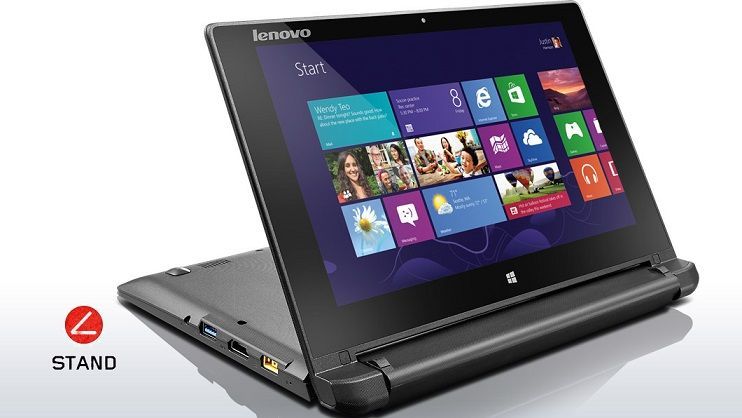
Cheap Windows 8.1 Laptop Announced: Dual-mode Lenovo Flex 10

Lenovo is one of the biggest computer and laptop manufacturers in the world and it releases new products almost every week. Now, the company has announced the Lenovo Flex 10, a cheap Windows 8.1 laptop that can be used in dual-mode
affordable windows 8.1 laptop
The Lenovo Flex 10 is a cheap Windows 8.1 touch convertible notebook that is perfect if you want to benefit from its portability and the touch interface of Windows 8.  The Flex 10 flips 300 degrees from laptop to stand mode, making it perfect to enjoy movies or to use touch applications. So, if you’re not using the keyboard, you can just flips its screen to see some pictures or watch the latest episode from your favorite show. We don’t know yet its official pricing, but it is rumored to be around $550.

It comes with a 10.1″ 10-point multitouch display that is optimized for Windows 8.1. The Flex 10 is less than 1″ thick and weighs less than 3 pounds – 17.3mm (0.68″) thick and weighs 1.2kg (2.6 lbs). You will find the ergonomic AccuType keyboard, stereo speakers,  integrated 720P HD webcam inside. It has a 1,366 x 768 resolution and a Bay Trail Pentium or Celeron processor instead of Haswell. Find below its full tech specs:

  • Processor – Intel® Quad Core™ Pentium™ N3510 processor, Celeron® N2910 processor; Intel® Dual Core™ Celeron® N2810 processor, Celeron® N2805 processor
  • Display / Resolution – 10.1″ HD (1366 x 768) resolution
  • Graphics – Integrated graphics
  • Memory – Up to 2GB DDR3L memory (Celeron® model), Up to 4GB DDR3L memory (Pentium™ model)
  • Hard Disk Drive – Up to 500GB storage
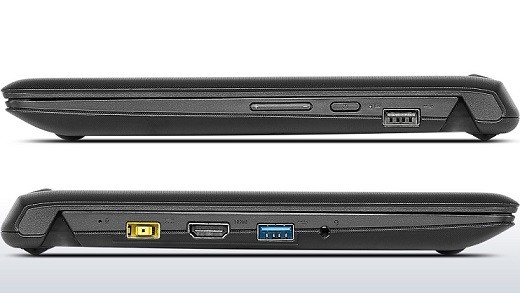
  • Connectors – USB 3.0 x 1, USB 2.0 x 1, HDMI, Audio combo jack
  • Sound – Stereo speakers
  • Integrated Communications – Bluetooth® 4.0, WiFi 802.11 b/g/n
  • Weight – 1.2 kg (2.64 lbs)
  • Camera – 720p webcam
  • Dimension – 273 mm x 188.5 mm x 21 mm (10.74″ x 7.42″ x 0.82″)

Its battery life is said to last only up to 4 hours with a standard 3-cell battery, which is probably its biggest drawback. It also comes with the  Lenovo Energy Manager software to increase battery life and the Veriface Pro face recognition software.

Nokia 2520 vs iPad Air: Video Advertising

This is not a battle of specs, but rather Nokia’s take on the iPad Air with their latest advertising. This is the same advertising philosophy that Microsoft has been trying for years now. But will it work?

This new advertising meant to highlight how awesome the Nokia Lumia 2520 Windows RT tablet seems very similar to a Microsoft Surface RT vs. Apple iPad that Microsoft has released quite a while ago, despite horrible sales back then. Albeit initially Nokia was said to quit working on a  Windows RT tablet project, it has finally seen the daylight under the form of Nokia 2520.

Read Also: Former Microsoft CTO Creates Exclusive $80 App for iPhone/iPad

As for the above ad itself, we must give the due credit to the advertising agency, as it brings out the advantages that the Lumia 2520 has over the iPad Air, and it all basically boils down to productivity. However, despite this, the iPad doesn’t seem to be afraid of Windows 8 tablets, but maybe the launch of such devices as the Dell Venue 8 Pro or the Lenovo Miix2 and the Toshiba Encore will put pressure on Apple’s darling tablet.

Windows 8, 10 App Check: Vkontakte

The official VKontakte Windows 8 app or VK, as it is also known, is available in the Windows Store. We take it for a quick ride to see if it can suit your needs of online communication.
vkontakte windows 8
The official VKontakte app for Windows 8 has been available in the Windows Store for quite a while now, but it lacked a lot of important features to make it truly a standalone client. With the launch of Windows 8.1, the developers of VKontackte have also released a revamped version of this popular social network in Russian speaking countries.

Vkontakte is some sort of a local Facebook, similar to Odnoklassniki and is very popular in Russia, Ukraine, Belorussia, Moldova and other countries where there is a considerable number of Russian-speaking people. There are actually over 220 million with registered profiles, so there is quite a lot of interested for a Windows 8.1 app, as well.

The multiple-sized Live Tiles are available, including the big one. Also, there’s split screen support. The VKontakte app for Windows 8.1 is very similar to the Windows Phone 8 version. If you don’t want to install Vkontacte for Windows 8 (download link at the end), you can use the IM+ Instant Messenger, which also has ICQ login options.

Read Also: Yahoo Messenger for Windows 8: The Same Fun While Chatting

The latest update for Windows 8.1 app Vkontakte has added the  “Feedback” section, English and Ukrainian languages, Bing maps and Yandex.Maps, as well as many other small changes and fixes.

Download Vkontakte VK for Windows 8

Microsoft admits Windows RT is inflexible, could disappear

Microsoft admits Windows RT is inflexible, could disappear

Microsofts’s Executive Vice President of Devices and Studios, Julie Larson-Green, has strongly hinted that Windows RT could be disappearing from the Windows line-up at some point in the future. IN a Q&A session at the UBS Global Technology Summit earlier in the week, Larson-Green was asked about the initial launch of Surface and the confusion that the existence of Windows RT caused.

Hear the word Windows and you probably immediately think of the desktop version of Windows 8.1 — it’s easy to forget that Windows RT exists, and Windows Phone is usually thought of as being an entirely separate entity. At Microsoft, these are seen as three branches from the same tree, but it is fair to say that there has been some confusion about the difference between Windows 8.1 and Windows RT 8.1.

In the Q&A session, Larson-Green agreed that both consumers and suppliers had been confused by the two variants of Windows 8, going on to say that the aim with Windows RT was to create a “closed, turnkey experience” much like Apple has done with iOS. Explaining the reason for the two different branches of Windows, Larson-Green said that the aim was to create one system that delivered the full power of a PC, and another that provided the simplicity of a tablet.

She did admit that the goal had not been explained “super-well” and said that more could have been done to differentiate between the two. She also went as far as saying that Windows RT “doesn’t have all the flexibility of Windows”. But what she says next is particularly interesting.

“We have the Windows Phone OS. We have Windows RT and we have full Windows. We’re not going to have three. We do think there’s a world where there is a more mobile operating system that doesn’t have the risks to battery life, or the risks to security. But, it also comes at the cost of flexibility. So we believe in that vision and that direction and we’re continuing down that path.”

So what is meant by those six little word “we’re not going to have three”?

There are a few options open to Microsoft here. Windows Phone and RT could be merged into a single mobile platform, Windows RT could be renamed so as not to include the Windows name and hopefully eliminate confusion, or Windows RT could just be completely dropped.

Which route do you think makes the most sense? Was Windows RT badly thought out? Can Microsoft rescue the platform and make it a success?

Dell Venue 8 Pro: the Best Windows 8 iPad Mini Competition?

Dell’s Windows 8.1 Venue 8 Pro Windows 8.1 tablet is one of the most interesting tablets to consider for buying and we go through the most interesting review to make a conclusion.
dell venue 8 pro reviews
We’ve just finished comparing the Dell Venue 8 Pro with the Lenovo Miix 2 in a battle of cheap, reliable and small-ish Windows 8.1 tablets. Now, it’s time to see what the reviewers are saying about the Dell Venue 8 Pro in order to make a compilation of judgments, if I can say so, from the people who tested the tablet.

What you need to know is that there is confusion between this tablet and the Dell Venue 8 smartphone, so be careful. If you want, you can also have a look at the Dell Venue 8 Pro user manual, as well. A reminder of the specs that Dell Venue 8 Pro comes with can also be found in our vs piece with the Lenovo Miix 2, so we won’t go over that again in detail, so here are the main features:

Dell Venue 8 Pro Specifications

  • 8 inch 1280×800 HD IPS display w Active Digitizer (more on this later)
  • Intel Bay Trail Z3740D 1.33Ghz Quad core CPU with Intel HD graphics
  • 2GB DDR3 RAM
  • 32 or 64GB eMMC storage
  • Office Home and Student 2013
  • Dimensions: 216.2 mm (8.51”) x 130 mm (5.11”) x 9 mm (0.35”); 405g (0.89lb)
  • Ports: Micro USB 2.0, microSD, headphone jack
  • 1.2MP front and 5MP rear cameras

Dell Venue 8 Pro Reviews Roundup

The reviews for the Dell Venue 8 Pro are lengthy and if you’re interested in buying the product, I’m sure you’ve browsed a few of them already. But what I will be focusing here is the conclusion and the wrap-up lines that usually matter when giving your final opinion about a certain product. Here are the ones I found to be the most conclusive.

David Pierce with The Verge found the following strong and weak points

  • Good Stuff – Great price for a Windows tablet, Good battery life, Solid performance
  • Bad Stuff – Broken auto brightness, No Micro HDMI to make use of desktop apps, Bad Windows key placement

Dell’s Venue 8 Pro is the best Windows competition for the iPad mini, but it’s still far from matching Apple’s tablet. The out of box experience of the display dimming is unforgivable in a modern device, and Dell’s odd decision to place a Windows key at the top of the tablet is equally puzzling. The lack of Windows 8 apps holds this type of device back somewhat, but the potential is promising. Microsoft has laid some solid foundations with Windows 8.1, and will let you read, surf, listen to music, and watch movies. That’s really what these types of tablets are about: consumption.

Paul Thurott from Winsupersite:

I really hoped to offer something definitive about this well-made device, to be able to issue some kind of a general recommendation that could stand up to deeper scrutiny. But the Dell Venue 8 Pro is a victim of the Windows Store interface and a few strange design decisions, and while some will take no issue with either, many will. And you need to be aware of the limitations. I like this device quite a bit. It pretty much proves that a Windows mini-tablet can work, and work well. Can I recommend it? Not without caveats, and without a discussion of those ecosystem issues.

But yes, this is a high-quality machine, and it has me wondering now about its bigger brother, the Dell Venue 11 Pro, which comes in a low-end version that features innards similar to the Venue 8 Pro. I also has me wondering about competing Windows 8-based mini-tablets like the Lenovo Miix 2 and Toshiba Encore. Perhaps it’s time to look at one of those next.

Ef Jay with UmpcPortal:

In summary, the Dell feels more like a regular, full powered PC than a tablet built for casual usage. Tasks execute quickly, with the exception of things like installing programs or unzipping files since that is still dependent on relatively slow eMMC storage but once programs are installed working with them and navigating round the OS feels responsive and fast in such a way that you do not feel you are using a budget system.

Only a side by side comparison with a more powerful PC will expose the Dell’s limitations but in isolation it could easily work as a main system for work processing, web browsing and even some light PC gaming. Compared to Atom devices of old including those that launched with Windows 8, the Dell Venue 8 Pro and other Bay Trail tablets are a much better and satisfying experience and finally realize the dream of having a full PC in your hand without compromising on performance, portability or battery life.

Preston Gralla from ComputerWorld

If you’re looking for a reasonably priced, well-performing Windows 8.1 tablet, the Dell Venue 8 Pro is the one to get. Given its size, it’s suitable only as a tablet and won’t do double-duty as an ultrabook, as the far more expensive Surface Pro 2 with keyboard can. If an 8-inch screen isn’t big enough for you, you might want to consider the $500 Dell Venue 11 Pro, which comes with a 1920-x-1080-pixel 10.8-in. screen, can handle up to 8GB of memory and up to 256GB of storage, has a 2-megapixel front-facing and an 8-megapixel back-facing camera, and includes a full USB 3.0 port as well as a Mini HDMI port. The Venue 8 Pro may not be quite perfect — but let’s face it, $300 won’t buy you perfection. However, it will buy you a quite good Windows 8.1 tablet, and that’s great news for Windows lovers.

Read Also: New Windows 8.1 Toshiba Ultrabook has an Amazing Battery Life of 22 Hours

Now, after reading these reviews, no doubt I am going to include it on my short list of Windows 8 tablets for this holiday. What about you?

Dell Venue 8 Pro VS Lenovo Miix 2: Who Wins?

The fight for the best small and cheap Windows 8 tablet is going on and now we confront the Dell Venue 8 Pro and the Lenovo Miix 2 to see who is the winner that you might be looking to get this holiday.

Holidays are just around the corner and I guess that you, just like me, are planning on buying a Windows 8 tablet, but you don’t know which one. The above link will point you to a guide that will try to explain what Windows 8 or Windows 8.1 tablet to get this holiday season. Microsoft has got some sweet Black Friday and holiday deals, so maybe you could have a look there, as well.

Previously, we have did some other Windows 8 tablet comparisons, putting tete-a-tete the Toshiba Encore and the Asus T100 and comparing the same Toshiba Encore with the Lenovo Miix 2. Now, it’s time to bring in a new player – the Dell Venue 8 Pro and confront it with the Lenovo Miix 2 to see who wins.

Lenovo Miix 2 vs Dell Venue 8 Pro: Battle of Specs

Both these tablets come with Windows 8.1 built-in and have the same size of 8 inch. There are many other similarities between these two, but what you need to be paying attention are the differences. We will highlight them to make it easier for you.

  • Price – both the Lenovo Miix 2 and the Dell Venue 8 Pro have the same starting price of $299, but you can buy the Dell Venue Pro 8 from Amazon for $20 less, that is, if Amazon is available in your countrydell venue 8 pro
  • Display – the Miix 2 has a HD 16:9 widescreen with IPS technology and a 1280 x 800 with 10-finger multi-touch support while the Venue Pro 8 comes with IPS LED of the same 1280 x 800 resolution and 10-finger multi-touch support. Although the wording is a little different, these displays are basically the same
  • Processor – both Windows 8.1 tablets come with the same Z3740D Intel Bay Trail Dual Core up to 1.80 GHz
  • Memory – Again, here we see some small differences, the Lenovo Miix 2 coming wit a 2 GB LPDDR2 800 MHz vs Dual Venue 8 Pro’s 2 GB DDR3L-RS 1333 MHz one. This means that the Dell Venue 8 Pro should be a tad faster than the Miix2. But, in real-life usage, I reckon that this difference is negligible
  • Storage – no differences here a 32 GB SSD internal storage for both tablets. To extend that storage, the Miix 2 comes with a Micro SD reader while Dell Venue 8 Pro supplements that with SDHC and SDXC versions. Another small win for the Venue 8 Pro.
  • Audio and Video – no differences here, both the Lenovo Miix 2 and the Dell Venue 8 Pro coming with integrated audio and intel HD graphics. It’s hard to expect something else at this price tag, to be frank.lenovo miix 2 vs dell venue pro 8
  • Ports – the Lenovo Miix 2 seems to be the winner here as it has Micro USB 2.0, Micro HDMI and Headphone output while the Dell Venue 8 Pro comes with an older generation Micro USB and only headphone output/microphone input combo. The Micro HDMI and Micro USB 2.0 on the Miix 2 are much welcome inclusions
  • Battery – both Windows 8.1 tablets have  a 2-cell lithium-ion battery and what I’ve seen from the reviews is that both of them average somewhere around 7+ hours. But, the specs sheet says that the Lenovo Miix 2’s can be alive for up to 7 hours while Dell’s Venue 8 Pro promises 8 hours.
  • Camera – the Lenovo Miix 2 has a 2 MP front camera sensor and a 5 MP in the rear while Dell’s Venue 8 Pro has only a 1.2 MP HD webcam and a 5 MP in the back. If you plan on doing a lot of video chatting, then the Miix2 should be your choice.
  • Wireless – Bluetooth is found on both tablets but where it gets interesting is that while the Lenovo Miix2 comes with the 802.11b/g/n WiFi standard, the Dell Venue 8 Pro wins the game with the latest 802.11a/g/n WiFi standard, which is faster and also Miracast enabled. Read more about Miracast on the above link.
  • Dimensions – Now, we’re getting down touchy and feely, comparing the sizes. Lenovo Miix2 comes with the following dimensions – 8.46 x 5.19 x 0.31 in (214.88 x 131.82 x 7.87 mm) while the Dell Venue 8 Pro has these 8.50 x 5.12 x 0.35 in (215.90 x 130.04 x 8.89 mm). So, we can see that the Lenovo Miix 2 is a tad thinner, by around 1mm.
  • Weight – the Lenovo Miix 2 wins the weight battle, as well, wheighing 0.77 lbs (349.26 g) versus Dell’s Venue 8 Pro’s 0.87 lbs (394.62 g). So, this means fifty grams lighter, but personally that shouldn’t matter that much. But, then again, it’s up to your personal taste.

Read Also: AMD to Launch a Windows 8.1 Gaming Tablet with Mullins Chips

So, it’s pretty hard to see which one you should go for as each one has its strong and weak points. Go through the article once more and decide for yourself what matters the most and what are the features you’re looking for.

update – the Lenovo Miix 2 does not have a micro HDMI port, and I previously said it comes with one. The information was taken from Microsoft’s Store, but the official Lenovo website says that it doesn’t have one, so please excuse my mistake.

Windows 8, 10 App Check: TripAdvisor

TripAdvisor has finally made it to the Windows Store for Windows 8 and Windows RT owners. Read our review to understand whether the Windows 8 app performs as good as the web version of TripAdvisor.

Start planning your awesome trips and travels straight from your Windows 8 tablet with the TripAdvisor app

What I didn’t understand about the TripAdvisor app’s coming to Windows 8 is the fact that it wasn’t promoted as much as Facebook or even Flipboard. That’s why many didn’t find out that the official Tripadvisor app has been launched for Windows users. Well, now you know, so it’s time to have a quick look at it.

The official Windows 8 app lets you browse Tripadvisor’s entire travel database and doesn’t serve just like a cloak for the web interface, like many LinkedIn Windows 8 apps do, for example. As always, TripAdvisor can be used to look-up a hotel or location and when searching for a location, a list of hotels, restaurants, attractions and guides will be displayed for you.

Just like we’re used to with the web app of TripAdvisor, the hotels and attractions are sorted by popularity, but you can change that to make the sorting by price, business or family, price per night, rating, hotel class and a number of other parameters. You also have the option of clicking on a map to view places of interest near your location. The user interface is neatly designed and doesn’t make you wanna switch to the web browser. If you have a TripAdvisor account, you can log in to post reviews or save places. App’s description goes like this:

Millions of traveler reviews, photos, maps from TripAdvisor. Plan and have your perfect trip. With over 100 million reviews and opinions by travelers, TripAdvisor makes it easy to find the lowest airfare, best hotels, great restaurants, and fun things to do, wherever you go. And booking options for hotels, restaurants and flights are just a tap away.

Read also: 10 Best Windows 8 Travel Apps

When looking for he best hotel for you, you will see which places won the Travelers’ Choice award. You can also compare airfares and find great deals straight from within the Windows 8 TripAdvisor app. Despite the fact that it has got a huge database, the app was very smooth and quick, without any lags, whatsoever. Follow the link from below to get the official TripAdvisor app for Windows 8 and start planning the perfect travel.

Download TripAdvisor Hotels Flights Restaurants for Windows 8

Parrot AR Drone and Zik get Windows 8, 10 Support

Parrot and Microsoft have announced that the official Parrot Apps which control the Parrot Zik headphones and Parrot AR.Drone 2.0 quadcopter will soon get Windows 8, Windows 8.1 and Windows Phone 8 support
parrot ar drone windows 8
Windows Phone 8 users have long awaited for Parrot to make their AR Drone and Zik headphones apps and driver available, and now it seems that the company is almost there. The augmented reality gaming fun will come to Windows 8, as well, since the company has announced that they will be bringing support to Windows 8 and Windows RT, as well.

You will soon be able to use the Parrot Zik headphones and pilot the AR Drone or AR Drone 2.0 Parrot drone even from your Windows 8 desktop or tablet as well as Windows RT. Windows Phone 8 users can already download the free Parrot Audio Suite app from the Windows Phone store (link at the end) will the Windows 8.1 and Windows RT 8.1 version of the app will be released next month.

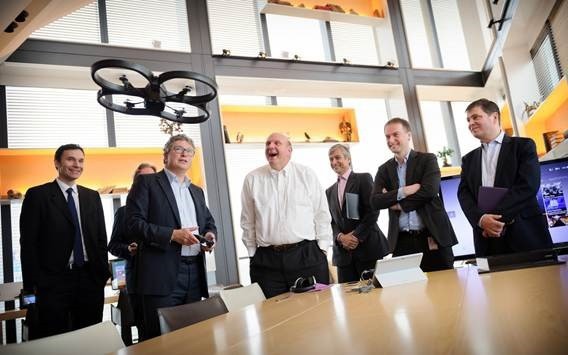
The Parrot AR.FreeFlight app will be appearing on Windows 8, being available in the Windows Store in early December of 2013 while the Windows Phone 8 app for the Parrot AR.Drone 2.0 is expected to launch in early 2014. Henri Seydoux, founder and CEO of Parrot said the following during a meeting with Steve Ballmer:

Read also: Steve Ballmer: Microsoft Has 1 Million Servers in their Datacenters, Only Second to Google

parrot ar drone 2.0 windows 8 zik

We have been working for months with Microsoft to ensure the compatibility of Windows 8 and Windows Phone 8 devices with Parrot products. I am happy to announce the Windows compatibility of apps that are linked to two of our star products: the AR.Drone and the Zik headphones.

I don’t know about you, but I’ve always wanted a gadget like the Parrot AR Drone and now that support for Windows 8 is coming, I will soon be able to control it from my Windows 8 tablet as I plan on buying on this Christmas. Sweet!

Download the Parrot Audio Suite application for Windows Phone 8

Windows 8, 10 App Check: Flow Free

Flow is one of the most popular games for those playing it on mobile devices. But when it comes to Windows 8 tablets, there aren’t too many compelling Flow games in the Windows Store, but Flow Free is a great exception and we take it for a ride

Once you start playing, you become glued to the screen - I am telling you this!
Once you start playing, you become glued to the screen – I am telling you this!

When I first saw a Flow game that a friend of mine was playing, I didn’t really get the point, but now after playing for several hours in a row on my Windows 8 tablet, I realize what the big deal was about. Flow Free for Windows 8 is an addicting game but one that puts your brain to work, just like a chess or a checkers game would do.

Flow Free is a simple yet addictive puzzle game. Connect matching colors with pipe to create a flow. Pair all colors, and cover the entire board to solve each puzzle. But watch out, pipes will break if they cross or overlap! Free play through hundreds of levels, or race against the clock in Time Trial mode. Gameplay ranges from simple and relaxed, to challenging and frenetic, and everywhere in between. How you play is up to you. So, give Flow Free a try, and experience “mind like water”!

This is how the official description of the Flow Free game for Windows 8 goes like. This is a free app with more than 600 free levels available in the Free Play mode. The app comes with 10 different board sizes and four different level packs: Free Classic, Bonus, 8×8 Mania, and Jumbo level. If you want, you can purchase more packs, and if you’re a Flow aficionado, I assume you’ll do that. But it is not necessary, as 600 free levels are more than enough.

Read Also: 5 Best Windows 8 Scrabble Apps

You get to track the completion of each level in the Free Play mode and try to be as accurate and quick as possible by using the fewest number of moves. The Time Trial is a special mode where speed is all that matters. The user interface is clean and smooth with fun sounds and clean graphics. Follow the link to download and install Flow Free on your Windows tablets.

Download Flow Free app for Windows 8.1, Windows RT

See Microsoft’s Black Friday Deals for 2013: Gaming, Tablets, Laptops

Black Friday is just around the corner but Microsoft has already started its offers for the 2013 holiday season. We will be updating the post with more deals as we get them

microsoft black friday deals 2013
Start saving, because BlackFriday is finally here! What are you going to get this year?

Set your alarm (you can do it in Windows 8, as well) for BlackFriday, as prices will drop at midnight ET on November 28th on Microsoft’s Stores, both online and physical locations. To make it easier for you, we have gathered in a single place all of Microsoft’s Black Friday Deals for 2013 which include Xbox One and Xbox 360, games, Windows 8 tablets, laptops and much more.

Some of the prices have been leaked already, while we wait for other product listings to get a price tag, as well. Once that happens, we will update this article as soon as possible. So, be sure to bookmark it and come back just in time for 2013’s edition of the Black Friday.

Microsoft’s Black Friday Deals for 2013

At the moment, we also don’t know if the Black Friday deals are exclusive to online ordering or if you can get them from Microsoft’s physical retail stores, as well. The 2013 Black Fridaysale kicks off at midnight EST November 28th, and here’s what Microsoft is going to seriously discount. All orders include free shipping, as well, but we don’t know an estimate shipping time as of now.

For now, we only have the link to Microsoft’s online store, but will provide individual links once they become available, as well.

Microsoft’s 2013 Black Friday Xbox and Games offer

2013 black friday xbox games microsoft

  • $299 Xbox 360 250GB console for $199
  • $249 Xbox 360 4GB console for $179
  • $59 Call of Duty: Ghosts for $39.99 (Xbox 360), $49.99 (Xbox One)
  • $59 Grand Theft Auto V for $33.99
  • $59 Battlefield 4 for $38.99 (Xbox 360)
  • $59 FIFA 14 for $24.99 (Xbox 360)
  • $59 Assassin’s Creed IV: Black Flag for $33.99 (Xbox 360)
  • $59 Madden NFL 25 for $24.99 (Xbox 360)
  • $75 Skylanders Swap Force for $38.99
  • $20 Minecraft for $14.99
  • $39 Halo 4: Game of the Year Edition for Xbox 360 for N/A
  • $55 Xbox 360 Special Edition Camouflage Wireless Controller for N/A

Microsoft’s 2013 Black Friday Tablets offer

microsoft black friday 2013 tablets surface

  • $349 Surface RT 32GB for $199
  • $399 Surface RT 64GB for $379 (December 1st)

Microsoft’s 2013 Black Friday Laptops offer

microsoft black friday 2013 laptops

  • $849 Dell Inspiron 15Z with Intel Core i5 processor, 6GB RAM, 32GB SSD and 500GB HDD for $399
  • $849 Samsung ATIV Book 5 NP540U4E-K01US Ultrabook for N/A
  • $649 Gateway NV570P10u Touchscreen LaptopGateway NV570P10u for N/A

Microsoft’s 2013 Black Friday Headphones and Speakers offer

headphones speakers black friday 2013 microsoft

  • $55 WeSC Piston Street Headphones for N/A
  • $200 Beats by Dr. Dre Pill Bluetooth Wireless Audio System for N/A
  • $25 Skullcandy Ink’d 2 Earbuds with Inline Mic for N/A
  • $250 Beats by Dr. Dre Mixr Headphones (Neon Orange) for N/A
  • $180 Beats by Dr. Dre Solo HD Headphones (Blue) for N/A
  • $150 Jawbone JAMBOX (Black) for N/a

Microsoft’s 2013 Black Friday Smartphones offer

nokia lumia black friday 2013 microsoft

  • $99 Nokia Lumia 520 No Contract for AT&T for N/A

Other Microsoft 2013 Black Friday offers

  • $2,200 MakerBot Replicator 2 Desktop 3D Printer for N/A

Windows 8.1 Xbox One SmartGlass App Released in the Windows Store

The Xbox One commercial launch is just around the corner and to have everything in place, Microsoft has decided to launch the Xbox One SmartGlass App in the Windows Store for Windows 8 and Windows 8.1 users

xbox one smartglass windows 8.1
The Windows 8.1 companion app for the Xbox One is already here, this is how it looks like

You are probably waiting for the moment when the Xbox One pre-orders finally start so you can order yours. But if you have a Windows 8 tablet or device, you can already download and install the official Xbox One SmartGlass app that Microsoft has just launched in the Windows Store. By using the new app you will be able to  navigate on the Xbox One using the keyboard or touch.

The application has received companion apps for Windows Phone 8, iOS and Android, as well.  The Xbox One SmartGlass App for Windows 8 comes with options to control your media and set top box with the remote control function. You can also browse the web, track achievements, chat with friends and access the help files of each game from a Windows 8.1 device. Here’s how the app’s description goes:

Xbox One SmartGlass is the perfect companion app for your Xbox One, both in your living room and on the go. Connect and control your Xbox One. Stay connected with the games and gamers you like. And add a new dimension to your console entertainment with the mobile device you already own.

Read Also: Microsoft Reveals ‘ID@Xbox’: Xbox One Indie Self-publishing Program

The Windows 8 and Windows Phone 8 apps for the Xbox One are very similar to the one for Xbox 360. The app is currently available in the following languages: German, Spanish, French, English (Australia), Italian, Spanish (Mexico), Portuguese (Brazil), English (United Kingdom), English (Ireland), English (New Zealand), English. Follow the link from below to download and install it on your Windows 8 and Windows RT devices.

Download Xbox One SmartGlass app for Windows 8.1

Microsoft Store on eBay officially opens today in the USA

Microsoft Store on eBay officially opens today in the USA

Microsoft has expanded its retail footprint and unveiled the Microsoft Store on eBay today, for those of you in the United States. The Microsoft Store on eBay offers consumers another convenient and safe online shopping experience for Microsoft products.

“Today, I am thrilled to announce the opening of the Microsoft Store on eBay in the U.S.! We are excited to work with eBay to help expand our retail footprint and give even more customers another complimentary, convenient and safe online shopping destination to purchase their favorite Microsoft first-party products – just in time for the busy holiday shopping season,” Microsoft’s Vice President Online Commerce Kevin Eagan stated in an official blog post today.

Since eBay features over 124 million active users globally, the made sense for Microsoft to capitalize on having its own products given special attention on the popular site. “Our customers can expect the same safe online shopping experience, return policy and free shipping from the Microsoft Store on eBay that they’ve come to expect on microsoftstore.com,” Microsoft explained.

“The Microsoft Store on eBay will sell Microsoft first-party products, as well as curated products appealing to the eBay community, resulting in a unique shopping experience entirely different from shopping in a brick and mortar store,” eBay stated in an official press release today. This store will offer Surface RT, Surface Pro, Xbox 360 and accessories, Kinect, Surface accessories, Microsoft keyboards and mice, and refurbished products. Interestingly, the store isn’t offering the Surface 2 or Surface Pro 2 – at least not yet .

The Microsoft Store on eBay looks very similar to the online Microsoft Store, so your shopping experience can be familiar. Head over to the store and check it out for yourself – they even have a Deals section!

Windows 8.1, 10 VLC App is Almost Ready to be Released

We have been waiting for quite a while now for the official VLC app to make its way into the Windows Store for Windows 8, Windows 8.1 and Windows RT users. Now, it seems that the team is closer than ever to finally releasing it as a Windows 8.1 app

VideoLAN, the developer of VLC, is getting closer and closer to finally releasing an official VLC app for Windows 8 users. Almost a year ago, VideoLAN started a KickStarter project and managed to raise more than $75,000 for the development of an official Windows Store VLC app. The long wait is mainly due to “forbidden calls” in the program.

But now it seems that the VideoLAN developers have overcome and the final moment is nearing. The team has recently tweeted that VLC for Windows 8 now has audio output. The VLC app for Windows 8 has already passed the Windows App Certification Kit back in September, so any moment now we could see it in the Windows Store.

The VideoLAN team also replied to someone asking on Twitter that they are going to release an official VLC app for Windows Phone 8 users, as well. There is a chance that the company could launch them in the same time.

Tests Show SSD to be Faster on Windows 8.1, 10 than Windows 7

A couple of recent hardware tests prove that the Solid State Drives are indeed faster in Windows 8.1 as it was previously assumed. Not over the previous Windows 8 edition but when compared to Windows 7. Read to find out more.
windows 8.1 vs windows 7 ssd
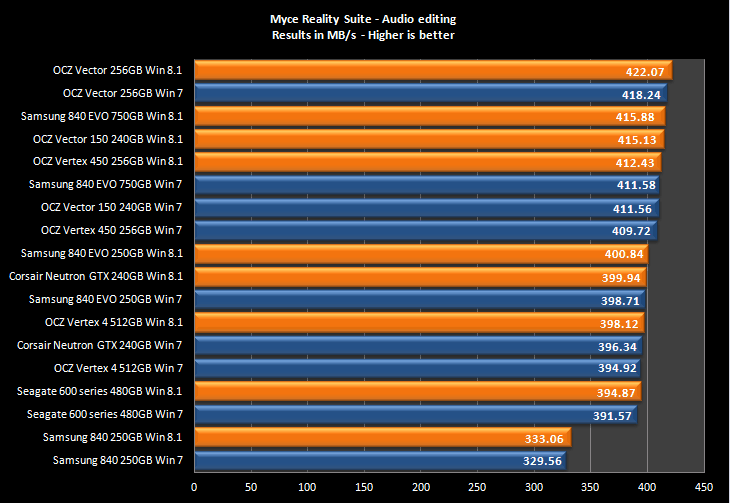
According to some hardware testing performed by Myce.com, it seems that Windows 8.1 is faster in data throughput on Solid State Disks (SSDs) than Windows 7 is. Results on Windows 8.1 are on all occasions 3 MB/s to 4 MB/s higher than the same hardware speed tests on Windows 7. You will find below the graph with results from several SSDs. Here’s what else was said regarding this discovery:

The reason why it’s faster is unknown, it wouldn’t be surprising if Microsoft made optimisations to its latest operating system but the company has not disclosed any information on what was internally changed for disk operations. The differences were discovered during the development of the third version of our Myce Reality Suite of tests. A range of tests made from real everyday applications and real data, there are no simulated tests and everything is in the real world. The only thing that’s synthetic is that everything is automated to make the tests fair, no matter which drive the tests are run on.

windows 8.1 ssd speed

I can confirm myself that the SSD is much faster on my Windows 8.1 desktop than it is on my previous Windows 7 laptop. But, of course, let’s not overlook the obvious fact that the Solid State Drives are also newer and come with several improvements, but Myce did include in the above graph older versions, as well. What is you personal experience with this?

Best 8 Windows 8 Apps This Week

Another week has come to an end and we are there to report you the best Windows 8 apps that have been launched in the Windows Store. Some of the most important ones are Flibpoard, Walgreens, TripAdvisor, 3D Builder, Asphalt 8: Airborne and a few more!

At the moment of writing this roundup with the best Windows 8 apps for the past week, there were more than 127,000 apps in the Windows Store, which represents an increase of more than 1,000 apps in just one week. We’ve still got a long road before we can compare against Play Store or the iOS App Store, but at least we know things are moving.

You can also check out the best Windows 8 apps from the past week where you will find Facebook, 7-Eleven, UNO and others. Now, without further ado, let’s have a look at best 8 new Windows 8 apps that have been launched in the Windows Store.

Best 8 new Windows 8 apps this week

Flipboard

windows 8 app flipboardFlipboard has finally made it to Windows 8, just as it was promised by Microsoft when it unveiled Windows 8.1. Use the app to discover and save online content on your Windows 8 tablet. Flipboard for Windows 8.1 comes with a completely optimized touch interface, offering the options to save stories, share links, topics, blogs, or sites and create your own magazines.

Asphalt 8: Airborne

asphalt airborne 8 windows 8.1

Get read for some awesome racing on your Windows 8 tablets, as the Asphalt 8: Airborne game developed by Gameloft has been launched in the Windows Store. The game has amazing graphics and can be played both on desktop and touch screen devices. A must-have for any gamers out there!

Walgreens

walgreens windows 8The Walgreens chain of stores is United States’ largest drug retail store and it has now released a Windows 8 app for its customers. You can use the Windows 8 pharmacy app to locate a Walgreens store near your location and also to easily refill prescriptions. I hope to see more health-oriented apps released in the Windows Store in the future.

3D Builder

free 3d printing app 3d builder

Microsoft has announced even prior to the release of its Windows 8.1 update that the company is going to include support for 3D printing. Now the company has released the 3D Builder app in the Windows Store. You can print to your Windows 8.1-ready 3D printer from a wide range of 3D ready objects. You can also upload CAD projects, but unfortunately you can’t create 3D objects straight from the app.

Lexmark Printer Home

best windows 8 apps lexmarkWith the Lexmark Printer Home app for Windows 8 you will be able to configure advanced Lexmark printer settings directly from Windows Store, check the status of printers associated with the app and monitor supply levels, like toner and paper. Let’s wait until HP, Canon and others will receive similar apps.

TripAdvisor

best windows 8 apps trip advisorFinally, TripAdvisor has been released as a Windows 8 app, albeit without too much fanfare. For many users out there, it is the best travel app to have on your Windows 8 or Windows RT tablet. It brings all the functions that the web app has, so go ahead and start planning the perfect holiday!

Newton

newton best windows 8 appsNewton, as the description of this awesome Windows 8 game goes, is a:

hamster powered by science, on a madcap adventure! Smash through objects and collect atoms in this fast paced and addictive running game. Use the atoms to customize and power up Newton. Destroy everything in your path in order to save science itself!

Once you start playing, you will become glued to the screen of your tablet, so proceed with maximum care!

Battleship HD

best windows 8 app battleshipBattleship games are very popular in countries from the Eastern Europe but people from all over the world play the game. We’ve previously written about another awesome Windows 8 battleship game, so check it out, as well. Battleship HD is a paid game that comes with upgrading levels, statistics and achievements, ranks, information about the opponent and skin effect fleets.

Remove Delta Search Malware in Windows 8, 10 [How to]

Delta-Search is a program which comes with certain free software downloaded from third party sites. But the problem is that it brings malware and third-party advertising. Here’s how to get rid of it.

The program installs a new toolbar (Delta-toolbar), changes your homepage, your default search engine, adds additional search providers and because it modifies the Windows registry after you restart your web browser it overwrites default values. Why to get rid of it? Because it’s an unwanted program which tracks and sends information about your web searches to third party servers for advertising so when you make a search the first results are sponsored links that might not be related to your search queries.

How to get rid of Delta-Search?

There are some steps you need to follow in order to completely remove it:

      1. Uninstall the program from your Windows 8

  • Drag your mouse pointer to the right edge of the screen, select Search and search for “control panel” .
  • Select Programs and Features or Uninstall a program and when the list of currently installed programs appear scroll through it, select the programs related to Delta (Delta, Delta Toolbar, Delta Search, etc) and any other unwanted program.

     2. Remove browser extension

Internet Explorer

– Click on the Tools icon and select Manage add-ons.
– Click on Toolbars and Extensions and select Delta Toolbar and any other extension related to Delta.
– Under Toolbars and Extensions click on Search Providers and on the right side right-click on Bing and select Set as default.

windows 8

– To remove Delta Search right-click on it and Remove.

windows 8

– To change your home page click again on Tools icon and select Internet Options. In the General  tab click on Use default to use Internet Explorer default home page.

Mozilla Firefox

– Click on the Firefox button (left-up corner) and select Add-ons.
windows 8
– Click on Extensions and remove Delta Toolbar and any extension related to Delta.
– Click again on the Firefox button and then click on Options. From the General tab click on Restore to default button under the homepage address.

windows 8
– Click on Delta Search icon, as shown in the image below, and select Manage Search Engines. Select from the list Delta Search and click on the Remove button.

windows 8

Google Chrome

– Click on the Chrome menu button Chrome-button (right-up corner), select Settings and then click on Extensions.
– Remove Delta Toolbar and any other Delta related extensions by clicking on the trash can icon from the right side.
– In the left panel of the Settings window click on Settings tab and click on Manage search engines from the Search section.

– Click on the X that appears in the left right when you put the mouse pointer on the Delta Search search engine and click on Make default that appears when you hover on Google search engine.

windows 8
– Click again on the Chrome menu button, then on Settings, select Settings tab and check Open the New Tab page from the On startup section.

3. Remove Delta Search using AdwCleaner

This utility will scan your computer for malicious files and registry keys that may be installed on your computer.

You can download AdwCleaner by clicking on the following link: general-changelog-team.fr/fr/downloads/finish/20-outils-de-xplode/2-adwcleaner  .

Install and open the utility. Click on Scan button.
After the scan is over click on Clean button in order to remove Delta Search malicious files.
Now the program will ask to reboot the computer. Press Ok and it’s done.

Now your problem is solved. To prevent a future infection try to install software from the developer’s official website and choose Custom installation so you can install only what interests you and get rid of PUPs (potentially unwanted program).

Awesome Windows 8, 10 Puzzle Game: Animated Puzzles

Passionate about puzzle games? Great, because Animated Puzzles is one of the best looking puzzle apps you can play on your Windows 8 device and it’s perfectly suited for the touch interface.
animated puzzles windows 8
Here, at Wind8Apps we love puzzle games for Windows 8 and he have reviewed quite a lot of them. Here are some of the past articles on this – Best Windows RT Games: Puzzle Games, Picture Logic: Addictive Windows 8 Puzzle Game, Play Puzzle in Windows 8 With PuzzleTouch App. Now, it’s time to welcome a new puzzle game in the family – Animated Puzzles.

Here’s how Mexond, its developers, officially describes the app:

Jigsaw puzzle game with a new and challenging twist! A super fun and relaxing picture puzzle game, with an intriguing, mind-bending twist; animated puzzles! Try to get the right pieces into place while parts of the image keeps moving. It’s new, different and extremely pleasing! The motions in the pictures gives a completely new puzzle experience! Go ahead and try for yourself! It’s free!

As you can see from the description the puzzles actually “move”, which is kind of awesome and looks great especially on a Windows 8 tablet. The developer also notes that this puzzle game belongs to the jigsaw genre. Inside the puzzle game, to overview you can just pinch to zoom in/out and adjust the size. You can switch from portrait to landscape mode anytime you want.

The app also has live tiles support, which means it is fully compatible with Windows 8.1. Some of you might be a little annoyed by the advertising banner inside the app, but hey, developers have to survive somehow, right? And, after all, this is a free Windows 8 puzzle game app. You can choose to remove ads for $1.49, which is a feature that can be found in app’s settings.

Inside the Animated Puzzles app everything is very simple. On the main menu you can choose to start playing, see the app’s rating or socially connect to the app. While playing you can pause and have a quick glimpse at the puzzle’s solutions. You can then proceed to the next one and see how you fare on the leaderboard thanks to the global highscores option. Follow the link from below to download and install Animated Puzzles on your Windows 8 device.

Download Animated Puzzles for Windows 8

Is your computing life 100 percent dedicated to Microsoft and its products?

Is your computing life 100 percent dedicated to Microsoft?

As you’re reading this website, there’s an extremely high chance that you’re using at least one Microsoft product — the chances are that you use more than one. It would be a pretty safe bet for me to place money on the fact that most of you use Windows as your main operating system… I wouldn’t expect to win any prizes for insight there!

But it would be foolish to think that 100 percent of visitors to WinBeta are using exclusively Microsoft products. If you’re anything like the team here, you probably use a wide variety of devices.  I thought it would be interesting to share some details about the devices I use and see how it compares to everyone else.

As a writing, I spend a huge proportion of my time sitting in front of my computer. My operating system of choice is Windows; it has been for years. I have been known to dip into the world of Ubuntu from time to time, but I always return to the fold after a little while. Although I have a decent desktop machine — which dual boots between Ubuntu and Windows 8 (yep… this baby is yet to be upgraded to 8.1!) — I spend most of my time working on a laptop.

I find this gives me greater flexibility in terms of working in different locations as I can just grab my machine, take it wherever I’m going and pick up from where I left off. I have a netbook (oh yes!) running Windows 8.1, but the majority of my time is spent typing away on a Surface Pro. This is a device that took me a little while to get used to (and I still rarely make use of the touchscreen) but it is a great compromise between a tablet, a laptop and a desktop computer.

“My reliance on Windows for work means I just could not use a Chromebook full time”

But this is not the only operating system I use. I also have a couple of Chromebooks which make for a nice change from time to time. I’m yet to fully immerse myself in Chrome OS, but the Chromebook 11 is a lovely machine — providing you’re not one of the unlucky people to have one with an overheating charger. These are more of a curiosity for me at the moment than anything else. In terms of writing, they are perfectly competent machines, but my reliance on Windows for work means I just could not use one full time — well… I guess I could remotely access a Windows computer, but that’s too much like hard work when working away from home!

With mobile devices I’m a little fragmented. Going back a few years I owned, and loved, an iPhone 3GS. But it seemed that this was just a phase I had to go through, and I found that I feel out of love with iOS, my eye distracted by the lure of Android (oh, there was a brief flirtation with BlackBerry, but the less said about that the better!).

Android is still my mobile OS of choice at the moment. I have a semi-retired HTC Sensation which was replaced with an HTC One and then a Samsung Galaxy S4. What’s that? Microsoft make a mobile OS too? Yep, I know. I also have a Nokia Lumia 928, and it’s a device that confuses me. Back in the years before smartphones, I’ve got through more Nokia handsets than I care to remember! The 928 is a lovely piece of hardware. It is solid, pleasing to hold and feels incredibly well-built.

What lets it down for me is Windows Phone 8. Sure, it’s an improvement on Windows Phone, but I actually preferred Windows Mobile 6! I’m looking forward to upgrading to 8.1, but for the time being it just feels too restrictive to me. My opinion may change in time, but for now Android wins me over.

The same is true for tablets. While I have a Surface Pro, it’s a bit too heavy to me to consider using it as a tablet in bed. The significantly smaller and lighter Nexus 7 fits the bill for me right now. Being Android-based like my phone, it’s great to be able to keep my apps and settings in sync and it’s great for keeping up to date with news, browsing the web, watching videos and playing games. It does everything I need it to and more, and there are more apps than you can shake a stick at. There’s also an iPad 2 knocking around the house, but that’s rarely fired up these day. But I’m still more likely to pick up Apple’s tablet than my Surface Pro to use as a tablet (although an iPad Air would be tempting if it was rather cheaper!).

“I still consider myself primarily a Microsoft user”

That said, I am very much looking forward to getting my hands on the Nokia Lumia 2520 when it launches. Thus far I have limited myself to fully-fledged Windows on a tablet in the form of my Surface Pro, so it will be interesting to try out a “proper” dedicated tablet running the RT variant of Windows 8.1.

With this mix-bag of devices and operating systems, I still consider myself primarily a Microsoft user. I’ve never been much of a gamer, but I have owned both an Xbox and an Xbox 360 over the years (both were used mainly as media servers). The Xbox One is grabbing my attention though, and I’m looking forward to playing with one. It could be the console that gets me back into gaming (the last time I was seriously a “gamer” was when the SNES was king!).

So — how about you? Let us know about your set up. Do you rely on different hardware for different tasks, such as Windows for your desktop, Android for a tablet and iOS for a phone? How many of you are completely dedicated to Microsoft? It would be interesting to know if you think Microsoft has anything to learn from the likes of Apple, Google and Linux — or if the influence could work the other way as well. Share your thoughts in the comments below!


What Windows 8 Tablet to buy This Holiday? [2013]

Christmas and the Holiday shopping season is approaching and you are probably wondering what Windows 8 or Windows 8.1 tablet to buy, either for you or to gift it to someone. We go through the best offers in the market and bring you the best there is.
what windows 8 tablet
This holiday season is a very important one for Microsoft as the Redmond giant plans on selling 16 million Windows tablets, which is a very bold purpose and one that is obviously aimed at the new iPads and Android tablets. The overhaul that Windows 8.1 brought to Windows 8 hopes to help Microsoft make Windows 8 tablets mainstream and also improve the Windows retail experience.

We won’t put here all the Windows 8 and Windows RT tablets but only the best there is, of course, without making a hole in your budget. Prior to getting down to some of the best Windows 8.1 and Windows 8 tablets you could buy this holiday, what you need to know is how to choose your tablet. There are some important things we need to clear before proceeding, as you might find use in these advices when looking for the best Windows 8 tablet to get this Christmas.

What are you going to use it for?

This is the very first question you need to ask yourself. If you plan on buying a Windows 8 tablet this holiday to play games, watch move and entertain yourself, then you don’t need to buy accessories to stay productive. Instead, you’ll need to pay attention at its performance and display. If, on the other hand, you plan on doing a lot of work on it, software and accessories mater. Or, you could find one that makes a mix of these two.

What is your budget?

The cheaper, the better, one might say, but cheap many times means also poor quality. While hunting for a good offer make sure you don’t forget about quality. If you have a generous budget, then you could be looking at a hybrid device, not only a tablet. Of course, only if you need such a device. If you have more than $1000 to spend, then you’re probably looking at an awesome hybrid, convertible laptop. But there are even sub-$500 Windows 8 convertibles that you could rely on. Bottom line is this – decide how much you can spend and what is your definite budget for the acquisition.

What software?

Here, it all comes down to Windows 8 or Windows RT. If it weren’t for under-$500 tablets that come with Windows 8.1 preinstalled, maybe Windows RT would still have a chance. But other that Microsoft’s Surface tablets and Nokia’s 2520, there’s not too much to see here. Granted, the Nokia 2520 is one great looking device and if you’re attracted by its shine, then go for it, it deserves it. But don’t forget that Windows RT is a dumber version of Windows 8, lacking a lot of the important features.

Some of the best Windows 8 tablets for this holiday

Some of you might consider this list biased, but feel free to leave your comment at the end of the article letting us know what do you consider to be the best Windows 8 tablet to choose this 2013 season. What we have included in this list is a good mix of affordable and reliable tablets, but also gaming machines and super powerhouses. You decide what’s best for you.

Lenovo Miix 2 from $300

lenovo miix2 holiday windows 8 tablet

  • Processor – Intel Atom Processor Bay Trail T 1.8 GHz
  • Operating System – Windows 8.1
  • Display/Resolution – 8″ HD 1280 x 800 WXGA display with IPS technology
  • Graphics – Integrated graphics
  • Memory – 1GB, Up to 2 GB LPDDR3 memory
  • Hard Disk Drive – 16GB, Up to 128 GB eMMC storage
  • Integrated Communications – Bluetooth® 4.0, WiFi 802.11 b/g/n, 3G
  • Sound – Stereo speakers, integrated microphone
  • Battery – Up to 7 hours
  • Dimension – 5.2″ x 8.5″ x 0.3″
  • Weight (Net) – 0.77 lbs
  • Camera – 2MP front camera / 5MP rear camera
  • Connectors – Micro-USB, Micro SD, Micro SIM, Audio Combo Jack
  • Software Offering – Lenovo Companion App, McAfee Internet Security (30-day free trial), VeriFace Pro face recognition, Office Home and Student 2013, Lenovo Cloud Storage, Evernote, CyberLink YouCam, Skype, Zinio Online Newstand, Amazon Kindle for PC

Lenovo Yoga 2 Pro from $929

Lenovo Yoga 2 Pro best windows 8 tablet holiday

  • Processor – 4th Generation Intel Core i3-4010U Processor (1.70GHz 1600MHz 3MB)
  • Operating System – Windows 8.1 64
  • Display/Resolution – 13.3″ QHD+ LED Glossy Multi-touch 3200×1800
  • Graphics – Intel® HD Graphics 4400
  • Memory – 4.0GB PC3-12800 DDR3L SDRAM 1600 MHz, up to 8 GB
  • Hard Disk Drive – 128GB SSD, up to 256
  • Integrated Communications – Bluetooth® 4.0, Intel® Wireless-N 7260 (802.11bgn)
  • Sound – Stereo speakers Dolby® Home Theater®, integrated microphone
  • Battery – Up to 9 hours with standard battery
  • Weight (Net) – Starting at 3.1 lbs
  • Camera – 2MP front camera / 5MP rear camera
  • Connectors – 1 USB 3.0, 1 USB 2.0, micro-HDMI, 2-in-1 card reader, combo jack

Lenovo IdeaPad Yoga 11S from $800

Lenovo IdeaPad Yoga 11S christmas

  • Processor – 3rd generation Intel® Core™ i3-3229Y (1.40GHz 1600MHz 3MB)
  • Operating System – Windows 8.1 64
  • Display/Resolution – 11.6″ multimode high-definition (1366 x 768) display, 16:9 widescreen with IPS technology
  • Graphics – Integrated Intel® HD Graphics 4000
  • Memory – 4GB PC3-12800 DDR3 SDRAM 1600 MHz SODIMM, up to 8GB
  • Hard Disk Drive – 128/256/512GB DDR (double data rate) SSD (solid state drive); HDD Interface: m-SATA II (SATA300); DMA Mode: Transfer Multiword DMA mode-2, Ultra-DMA Mode 6; User Upgradable: No
  • Integrated Communications – Bluetooth® 4.0, WiFi 802.11 b/g/n, 3G
  • Sound – Stereo speakers, integrated microphone
  • Battery – Up to 7 hours
  • Weight (Net) – Starting at 3.1 lbs
  • Camera – Integrated 720p HD webcam
  • Connectors – Micro-USB, Micro SD, Micro SIM, Audio Combo Jack

Toshiba Encore from $330

toshiba encore windows 8 holiday season

  • Screen Size – 8 inches
  • Max Screen Resolution – 1280×800 pixels
  • Processor – 1.8 GHz Atom Z3740
  • RAM – 2 GB DDR3
  • Internal storage – 32 GB
  • Thickness – 0.43 inches
  • Cameras – high-resolution 8MP camera, plus 2MP HD webcam for video calls and chats
  • Graphics Coprocessor – Intel HD Graphics
  • Wireless Type – 802.11bgn and also Micro USB 2.0 and Micro HDMI ports
  • Weight – 1.1 pounds (0.5 kg)
  • Flash Memory Size – up to 32 GB
  • Sensors – gyroscope, accelerometer and GPS
  • Other offers – 30 days of free unlimited world calling to landlines in Skype; full version of Office Home Student 2013

ASUS Transformer Book T100 from $350

asus transformers book t100 best windows 8 tablet

  • Size and type – 10.1” HD IPS display with multi-touch capabilities, 2 in 1 tablet with a detachable keyboard, transforming the device from a 10-inch tablet to a laptop
  • Weight – thin and light design weighing in at only 1.2 lbs. in tablet mode
  • Ports – the detachable keyboard dock includes a USB 3.0 SuperSpeed port for quick file transfers
  • Battery – estimated 11 hours of battery life
  • OS – Windows 8.1
  • Processor – Intel® Atom™ Bay Trail-T Z3740 Quad Core processor

Dell Venue 11 Pro from $500

Dell Venue 11 Pro windows 8 holiday

  • Thickness – .4 inches
  • Weight – 1.57 pounds
  • Screen size – 10.8 inches
  • Operating system- Windows 8.1
  • CPU – Intel Bay Trail
  • RAM size – 2 GB, 8 GB, 4 GB

Dell XPS 11 from $500

Dell XPS 11 windows 8 christmas

  • Dimension – 0.6 inches Thickness, 1.20 Kg (2.5 Pounds)
  • Display – 11.6 inches, 2560 x 1440 Pixels resolutions, Gorilla Glass, Wireless Display
  • Connectivity – USB 3.0, Wi-Fi, Bluetooth
  • Software – Windows 8 OS
  • Performance –  Intel HD Graphics, Intel Core i3 Processor, 4 GB RAM, 256 GB Internal Memory

DellVenue 8 Pro

dell venue 8 pro

  • Processor – Intel® Atom™ processor Z3740D with 32GB storage (2MB Cache, up to 1.8GHz Quad-Core)
  • OS – Windows 8.1 (32Bit) English
  • Memory – 2GB Single Channel DDR3L-RS 1600MHz
  • Video Card – Intel® HD Graphics
  • Display – 8.0 inch IPS Display with HD (WXGA 1280 x 800) resolution with 10-pt capacitive touch
  • Dimensions – Thickness: 0.35” (9mm), Width: 5.12” (130mm), Length: 8.50” (216mm); Weight – Starting at 395g / 0.87lb
  • Wireless – Dell Wireless 1538 Dual-Band 2×2 802.11n WiFi + Bluetooth® 4.0
  • Camera – Integrated 1.2MP HD Webcam (front) / 5MP (back)
  • Ports – 1 x Micro-AB USB2.0 (for trickle charging and data transfer), 1 x Headphone and microphone combojack, 1 x 3FF micro-SIM slot (optional)

Sony Vaio Tap 11 from $800

sony vaio tap 11

  • World’s thinnest (0.39”) Windows 8 Tablet PC
  • Features an aluminum magnetic full pitch keyboard/cover with a touch pad
  • SD card reader, USB 3.0, micro HDMI and Intel® Wireless Display (WiDi) which easily streams the computer screen directly to compatible HDTV
  • Estimated 6 hours of battery life
  • OS: Windows 8.1
  • Powered by the Intel® Pentium® 3560Y or 4th generation Intel® Core™ processors

Sony Vaio Tap 21 from $1000

sony vaio tap 21

  • Battery life – Up to 4 hours
  • Weight – 4.4 lbs
  • Dimensions – 20.61″ x 12.63″ x 1.39″ All-in-One PC
  • Screen size and resolution – 21.5″, 1920 x 1080
  • Hard drive size –   1000 GB HDD
  • RAM – 4 GB
  • Processor – Intel Haswell ULT i5
  • Graphics -Internal
  • Ports – Wireless keyboard & mouse, HDMI® out, USB 3.0, NFC

Microsoft Surface Pro 2 from $900

microsoft surface pro 2 holiday

  • Software –  Windows 8.1 Pro
  • Dimensions – 10.81 x 6.81 x 0.53 in
  • Weight – 2 lbs
  • Casing – VaporMg
  • Color – Dark Titanium
  • Storage & Memory – 64/128GB, 256/512GB; 4GB RAM/GB RAM
  • Display – Screen: 10.6 inch ClearType Full HD Display, 10-point multi-touch
  • Resolution: 1920 x 1080, Aspect Ratio: 16:9 (widescreen)
  • CPU & Wireless -4th generation Intel® Core™ i5 Processor, Wi-Fi (802.11a/b/g/n), Bluetooth 4.0 Low Energy technology
  • Battery Life – 7-15 days idle life, Charges in 2-4 hours with included power supply
  • Camera,Video & Audio – Two 720p HD cameras, front and rear-facing, Microphone, Stereo speakers with Dolby® sound
  • Ports – Full-size USB 3.0, microSDXC card reader, Headset jack, Mini DisplayPort

Lenovo ThinkPad Tablet 2 from $566

lenovo thinkpad tablet 2 christmas

  • Processor – Intel® Atom™ Processor Z2760 (DC/4T, 1.8Ghz Burst, 1.5Ghz HFM, 600Mhz LFM)
  • Operating System – Windows 8 32
  • Display – 10.1″ (16:9) HD WXGA (1366×768), Multitouch IPS
  • System – Intel HD GMA
  • Base – 64GB, WiFi, Digitizer & Pen
  • Memory – 2GB LPDDR2
  • Battery – 2-cell Li-Polymer Battery, 30 Wh

These are, in my humble opinion the best Windows 8 tablets and convertibles you could buy for the 2013 holiday season. We will be updating this story with new entries, if needs be. Albeit we did include some ultrabooks, powerful convertibles and even all in ones, we tried to stay below the $1000 mark.

Feel free to leave your comment below if you think another device should make the cut. You can also feel free to let us know which is your favorite Windows 8 tablet and why. Happy Christmas and have a wonderful holiday season ahead of you!

Windows 8, 10 App Check: TED Speakers

If you were looking for a reliable TED Windows 8 app, your search needs to stop as TED Speakers is the one you need. If you will not be satisfied with this one, we’ll throw in two more TED apps as bonus
ted talks windows 8 app
Many are inspired by the TED talks as you will find there thousands of videos from awesome people that have ingenious ideas to fix various areas of our lives. Therefore, many who own a Windows 8 tablet are probably looking to find a reliable TED app to use on their slates.

By using the TED Speakers app on Windows 8 or Windows RT you can watch videos completely free, search for the topics you are interested and even download the desired TED talks. You will find TED Speakers who talk about art, design, politics, education, culture, business, global issues, technology and development, and entertainment.

What is nice is that the TED talks are chronologically organized, with more than 900 TED talks grouped by the latest month. The also has received a recent update in Windows 8.1 that brings improvements in the contract search and graphic details. If you are interested, the developer has created an exact copy of this TED app but which comes with subtitles.

ted app windows 8Follow the links from below to download TED Speakers for Windows 8 as we ll as the app that brings subtitles to the videos. You can also give it a try to the TED App by Thomas Mutzl developer and the Windows 8 app TEDTalks HD by Krzysiek Kozak.

Download TED Speakers for Windows 8

Download TED Speakers Subtitled for Windows 8


You Can Now Remotely Connect Windows 7 to Windows 8.1, 10

One sought after feature brought by a recent update released by Microsoft is the ability to remotely connect Windows 7 SP1 to device running Windows 8.1 and Windows Server 2012 R2. Read below to find out more
remote connect windows 7 windows 8Microsoft released quite a lot of updates in its November 2013 Patch Tuesday, but one of them that wasn’t so talked about is the ability to remotely connect a Windows 7 SP1 computer to a Windows 8.1 and Windows Server 2012 R2 device. Rod Trent with WindowsItPro has discovered the finding, saying the following:

In a recent Windows 7 update designated as a performance and reliability patch, there’s also a sought after component that allows computers running Windows 7 SP1 to create remote connections to computers running Windows 8.1 and Windows Server 2012 R2. Unless you dig around in the release notes for the update, you’ll just never know that a new Remote Desktop Connection (RDC) client is included.

By installing this update, Windows 7 SP1 users will be able to use the new Remote Desktop Services features introduced in Windows 8.1 and Windows Server 2012 R2. They will get faster reconnections, dynamic desktop resolution modifications, session shadowing, and better security.

However, before installing the reliability patch that brings this feature you will also have to make sure you have the following updates: KB2574819 and KB2857650. They add support for DTLS in Windows 7 SP1 and Windows Server 2008 R2 SP1 and improve the RemoteApp and Desktop Connections features available for Windows 7.

If you are looking to connect remotely to another Windows 8.1 device, be it a tablet or a desktop machine, you should know that there’s an official TeamViewer app that you could use, as well, called the Team Viewer Touch. How do you plan on using the remote connectivity feature from Windows 7 to Windows 8.1?

Windows 8 App Flipboard Arrives in the Windows Store with Full Windows 8.1, 10 Support

The long wait for Flipboard users has finally come to an end as the official Flipboard app has been launched in the Windows Store for Windows 8.1 and Windows RT 8.1 users. Read below to find more about it.

windows 8 app flipboard
The official Flipboard app has finally arrived in the Windows Store, Windows 8.1 and Windows RT 8.1 users are invited to download it, of course, as well, as Windows 8 and Windows RT users, if you haven’t made the update yet. Flipboard for Windows 8.1 comes with a completely optimized touch interface, offering the options to save stories, share links, topics, blogs, or sites and create your own magazines.

You can use the Windows 8.1 Flipboard app to connect up to 12 social networks, including Twitter, Facebook, Instagram, and Google+. There are 12 localized editions of the Windows 8.1 Flipboard app that include Australia, Canada, UK, US, Japan, Italy, and Germany. As expected, live tile support is also offered to Windows 8.1 users, so by pinning your favorite topics on the Start screen, you won’t even need to launch the Windows 8 Flipboard app.

The official Flipboard app for Windows 8.1 description reads like this:

Flipboard is your personal magazine. It is the most popular way to catch up on the news you care about, read stories from around the world and browse the articles, videos and photos friends are sharing. To begin, pick a few topics and tap any of the tiles to begin flipping through your personal magazine. Use the Discover button to customize your Flipboard with iconic sources like The New York Times, PEOPLE magazine, Fast Company and many more.

You can also connect your social networks like Facebook, Instagram and Twitter. Share what you are reading and enjoy updates from friends all in one place. When you find things you like on Flipboard, use the + button to save it into your own magazines. Build magazines on any topic, from Great Hikes to Gear & Gadgets. Tap the Discover button and select “By Our Readers” to explore magazines other readers are making.

Follow the link from below to download and install the Windows 8.1 Flipboard app on your devices:

Download Windows 8.1 Flipboard app