Big discount alert: Get $600 off on Dell’s Alienware x16 R2 RTX 4090 gaming laptop

If you’re searching for a gaming laptop that appears awesome and has sufficient power to smoothly run the latest AAA games, there is a deal that cannot be ignored. The Alienware x16, a gaming laptop which shows style along with strength, is on sale now at $600 less than its first cost.

Why should I buy this Alienware x16 R2 gaming laptop?

To start, the Intel Core Ultra 9 processor is at the center of this beast along with an Nvidia GeForce RTX 4090 GPU – yes, an RTX 4090. This graphics card is a monster that pledges to keep your games running flawlessly for many upcoming years. And having 16GB of RAM on the graphics card itself, along with another 32GB in the system, means that you will not experience any lag or stuttering.

So you may question, what about storage? This machine has an impressive 2TB of SSD storage, giving plenty of room for your games and media. Yet, considering how large current-day games are, it’s possible that eventually you will start looking at offers for external hard drives.

Next, we talk about display. The Alienware x16 has a 16-inch FHD+ screen with 480Hz refresh rate and 3ms response time. Although this is good, people who really love gaming understand that using an external monitor can reduce the response time to only 1ms which gives you even more smooth gaming experience.

Yes, it still has the hefty price of $3000, but it’s still worth every buck. These types of offers do not stay available for long so if you have been imagining about owning a top-level gaming system then maybe now would be an ideal opportunity to make your dream come true.

Yet, the tech world doesn’t stop spinning with just one deal. If you’re in search of something that’s a bit more budget-friendly, or maybe a different kind of tech altogether, there is always more deals and discounts to explore. From laptops priced under $70 to huge markdowns on high-end models such as the Dell XPS 17; there are no limits for choice. And we should also mention renewed deals, where you can get top-notch laptops for a very low price.

Therefore, if you are a dedicated gamer, a working individual or simply someone requiring new technology, there is no shortage of options available. Be vigilant and you could discover an ideal deal that matches your requirements and financial resources.

If you are looking for low to mid-range options, discover our top picks for budget gaming laptops.

Do you believe the Dell Alienware x16 is a value-for-money purchase at the discounted price? Share with our readers in the comments section.

Moment 5 will now be available to all Windows 11 users

The Windows 11 Moment 5 Update was first released on February 29, 2024, for people who manually install updates from the Windows Settings app, but it was an optional non-security update

However, starting April 9 with the April 2024 Patch Tuesday updates, the Moment 5 update has become mandatory and available for all Windows 11 users.

Unlike the previous iterations, Moment 5 is smaller and has introduced a handful of features like Snap Layouts and  Windows Spotlight.

The update also brought changes to existing features like the Nearby Share feature, Copilot, and more. To learn all about Moment 5 in detail, you can check out this guide.

You can install the update manually by launching the Settings app. Once there, navigate to Windows Update, and click Check for Updates.

However, if you want to install the update manually, you can go to Microsoft Update Catalog, search for KB5036893, and click Download. Then, run the downloaded file and follow the on-screen instructions to complete the process.

Have you downloaded the Moment 5 update? If yes, then tell us how you feel about the changes and features introduced in the comments section below.

This feature in Spotify AI Playlist will quickly become your favorite

Spotify’s first AI-powered feature, AI Playlist, quickly lists out a series of songs that match the vibe of your prompt, allows you to preview or remove them, and finally create a playlist. At its core, the idea is simple and effective!

At present, the AI Playlist feature is not available to all. It has only been rolled out in the United Kingdom and Australia. Besides, since AI Playlist is in the Beta phase, we didn’t have high expectations from it. But as it turns out, we were wrong!

What we liked the most was the ability to refine the initially generated playlist. For instance, quick follow-up prompts like more pop or less upbeat will revise the generated list of tracks instead of creating a new one altogether. These are just two examples. Find out more to quickly and effectively refine playlists.

Spotify has confirmed that there will be improvements in the final version at the time of public release, but even in its initial state, AI Playlist is great. The official blog post reads,

You can use prompts that reference places, animals, activities, movie characters, colors, even emojis. The most successful playlists are generated with prompts that contain a combination of genres, moods, artists, or decades. It’s a brand-new tool, and still in beta, so we’ll continue to iterate and innovate on the experience. Stay tuned for what’s to come!

Considering its early stage, the only thing AI Playlist lacks at the moment is support for non-music prompts. For instance, if I want to create a playlist based on recent events, it’s not possible.

Besides, you may have trouble getting the best results from Spotify’s AI Playlist in the first few attempts or maybe for a day or so, but once you get the hang of the prompts, it will be a seamless experience. And you will be able to create a refined playlist in no time!

Spotify has been in the news for the last few months. An update for Spotify Desktop introduced the Jam feature, while there were also concerns about Spotify’s high data usage.

What do you think of Spotify’s AI Playlist? Share with our readers in the comments section.

Elevate your gaming potential with Razer BlackShark V2 Pro, which comes with superior audio quality, and all-day comfort

In a press release, Razer announced the Razer BlackShark V2 Pro for PlayStation and Xbox, the ultimate headset for taking your gaming experience to the next level.

The headphones ensure crystal-clear audio, advanced noise isolation, and multi-day use on a single charge. They boast 70 hours of battery life with Type C charging.

The ultra-soft flowknit memory foam cushioned ear pads make them comfortable to wear all day long, and the steel-reinforced headband and slider ensure robustness and flexibility.

Nick Bourne, Head of Razer’s Console, Mobile& Streaming Division, said:

The BlackShark headset is an icon among esports pros and hardcore gamers for a reason. Leveraging our position as the top gaming headset brand, we tuned these headsets for Xbox and PlayStation, working closely with pro gamers to refine the fundamentals of an esports class headset while introducing upgrades that we know highly competitive gamers are seeking.

He also mentioned that with the help of elite esports pros such as Hakis (Alliance) and Shotzzy (OpTic Gaming), both PlayStation and Xbox editions are tested and fine-tuned to meet the demands of top-most console gaming.

Key features of the BlackShark V2 Pro for PlayStation and Xbox:

Top-notch audio with HyperClear Super Wideband mic

The headband comes with a HyperClear Super Wideband mic, which ensures crystal-clear voice communication and immersive soundscapes

Brandon Dashy Otell, Professional Call of Duty player for OpTic, says:

This headset’s a game-changer: super light, insanely comfortable, and competition-ready—plus, the mic clarity is unbeatable; truly the definitive console headset for esports.

With the help of TriForce Titanium 50mm Drivers, it can deliver unparalleled audio clarity and pinpoint sound cues, giving the players a competitive edge.

Pro-tuned FPS audio profiles

Razer collaborated with popular esports athletes and prepared sound profiles specially optimized for renowned titles like Call of Duty, Apex Legends, and Fortnite.

Pro-Tuned FPS audio profiles

However, you can also adjust the game/chat audio settings from the headset without installing extra software.

Featuring Razer HyperSpeed Wireless, a 2.4GHz wireless connection, ensures high-performance and low-latency competitive play with audio synced to the game

The headset comes with built-in Bluetooth and Razer’s SmartSwitch on-device control, which helps you switch between a 2.4GHz or Bluetooth connection easily.

 Light as a feather and has a comfortable design

BlackShark V2 Pro, despite being power-packed with features and supreme quality material, only weighs 320 grams, i.e., 11.29 oz, which means you can wear them during your long gaming sessions without feeling fatigued.

The headset also provides superior comfort and comes with passive noise cancellation as it has soft, plush memory foam ear cushions for distraction-free gaming days or nights.

Flawless Reliability

BlackShark V2 Pro’s excellent battery life, which ranges from 48 hours on console to 70 hours on PC, makes it a great pick for uninterrupted and long gaming sessions without the hassle of recharging them often.

It comes with a 3.5mm jack and is suitable for consoles, computers, mobile devices, and even handheld gaming devices with either a USB-C port or Bluetooth audio feature.

Here is the detailed information provided on the Razer BlackShark V2 Pro’s official website:


Razer BlackShark V2 Pro for Playstation & for Xbox
DriversRazer TriForce Titanium 50mm Drivers
Surround SoundSpatial Audio with Windows Sonic on Xbox Series X|S, Xbox One, and Windows 10/11
PlayStation Tempest 3D Audio on PS5™
HapticsNo
Connectivity2.4GHz HyperSpeed Wireless or Bluetooth
Battery lifeUp to 70 hours
*Tested with PC (Up to 48 hours with PlayStation & Xbox)
Platform supportsPS5
Xbox One / Xbox One S / Xbox One X/ Xbox Series X|S
PC, Mac
Smartphones, tablets, and handheld gaming devices with Bluetooth audio capability or USB-C port

Prices

Both Razer BlackShark V2 Pro for PlayStation and Razer BlackShark V2 Pro for Xbox are priced at $199.99USD / €219.99 MSRP and available on Razer.com, RazerStores & Authorized Resellers starting
April 9, 2024.

 The White Edtion headsets of the series are also available at the same price and in the same stores, but you can also get them from the nearest Best Buy store in the USA.

In addition to this, Razer BlackShark V2 X for PlayStation and Razer BlackShark V2 X for Xbox are available at $49.99USD / €59.99 MSRP on Razer.com, RazerStores & Authorized Resellers starting
April 9, 2024.

Would you like to try these headsets? Share your opinions with our readers in the comments section below.

You can now go live on TikTok from a desktop using Logitech’s Streamlabs

TikTok is a heaven for live streamers all over the world but until now, you could do that only from your mobile. Gamers just got a breakthrough here because now you can use Logitech’s Streamlabs desktop app to stream directly on TikTok.

At the last year’s end, Streamlabs got the same feature to broadcast on Twitter (X) and Elon Musk demonstrated the feature himself playing Diablo IV.

Since then, gamers rushed to post their exploits on X and probably that’s going to happen with TikTok as well.

However, Streamlabs has some limitations for streaming on TikTok. The maximum video bitrate is 10Mbps and the maximum audio bitrate is 1Mbps. Logitech recommends a video bitrate of 8,000Kbps for 1080P streaming at 60FPS (the maximum possible resolution and frame rate) and 6000Kbps for 30FPS.

The good news is that there is no clip length limitation, but you should know that TikTok only supports H.264 encoders.

How do I broadcast live on TikTok from a PC using Streamlabs Dektop?

After you download Streamlabs Desktop and install it on your PC, if you launch the app, it will ask you to connect to a media platform so select TikTok. Then, log into your TikTok account and authorize Streamlabs to access it.

Finally, select TikTok to go live and hit the button to start. If you don’t have permission to stream, Logitech advises to select the Apply for TikTok Live Permission. You will be redirected to the TikTok application page to clear the permissions problem.

The only problem is that Streamlabs doesn’t support native chat in TikTok streaming sessions.

Here are some of the top tips from Streamlabs:

  • Use the Streamlabs Desktop Dual Output feature to simulcast on TikTok, plus one horizontal-orientated platform to expand your reach. Learn more about Streamlabs Dual Output in our handy guide.
  • Set up your TikTok LIVE stream with custom overlays and alert themes by installing one from the Streamlabs Library. There are thousands to choose from.

Soon enough, your gaming adventure will be out there for everyone to see on TikTok. How cool is that?

If you try the new TikTok live streaming with Streamlabs, let us know how it went in the comments section below.

Microsoft Edge to skip ads while translating video’s audio and subtitles

Microsoft Edge is constantly being improved with new features, one of them being video translation.

It seems that this feature was updated recently, and that might change how Edge works with ads.

Video translation in Edge might skip ads

A few months ago, we wrote about the video translation feature in Edge, but the feature was in the early stages and it wasn’t working.

Video translation was spotted in Egde Canary recently with some basic settings, but still unable to translate anything.

Speaking of which, this feature was updated and now it supports Hindi, German, Spanish, Italian, and Russian languages.

While the feature is still not working, when trying to use it you’ll get a message saying: The language you selected needs to be installed and we’ll alert you when your video is ready.

To enable this feature, you need to do the following:

  1. Open Settings and navigate to Languages.
  2. Select Translation.
  3. Lastly, enable Offer to translate videos on supported sites.

After doing that, you should see a translate icon when hovering over a video and you’ll be able to access it.

Currently, YouTube has the option to translate videos, and you can enable it by going to Settings and choosing Subtitles and the desired language or the Auto-translate option.

On the other hand, this feature on Edge offers both audio and subtitle translations, so it’s more advanced than its YouTube counterpart.

Also, it seems that the translate feature will skip ads or at least won’t translate them, but since the feature isn’t working yet, we haven’t had the chance to properly test it.

Overall, this sounds like an amazing feature, and we can’t wait to see it in action in future versions of Edge.

Google Axion boasts 30% higher performance and superior efficiency, set to take on Microsoft and Amazon

Google is designing custom Arm-based CPU chips, Axion, initially to be used in its data centers and then rolled out for Google Cloud customers later in the year.

With Axion, Google aims to tap into the cloud services segment, where it already has a presence, and not compete with players in the hardware market.

The California-based tech giant won’t be selling these chips. Instead, it will employed to facilitate and support the native cloud service, Google Cloud, which the customers can subscribe to.

Talking about Axion, Google Cloud’s Vice President Mark Lohmeyer, in an interview with Reuters, said,

We’re making it easy for customers to bring their existing workloads to Arm. Axion is built on open foundations but customers using Arm anywhere can easily adopt Axion without re-architecting or re-writing their apps.

Axion is meant to enhance the performance of general-purpose workloads such as web and app servers, open-source databases, media processing, data analytics engines, in-memory caches, CPU-based AI training and inferencing, and more!

Highlighting the performance and efficiency of Google Axion, the official blog post reads,

Axion processors combine Google’s silicon expertise with Arm’s highest performing CPU cores to deliver instances with up to 30% better performance than the fastest general-purpose Arm-based instances available in the cloud today, up to 50% better performance and up to 60% better energy-efficiency than comparable current-generation x86-based instances.

Axion is also an environmentally friendly option, delivering more computing power at the same electrical consumption, making it both sustainable and financially viable for users.

Arm CEO Rene Haas also spoke about Google Axion.

Google’s announcement of the new Axion CPU marks a significant milestone in delivering custom silicon that is optimized for Google’s infrastructure, and built on our high-performance Arm Neoverse V2 platform. Decades of ecosystem investment, combined with Google’s ongoing innovation and open-source software contributions ensure the best experience for the workloads that matter most to customers running on Arm everywhere.

With Axion, Google intends to decrease its dependence on Intel and NVIDIA. Microsoft, too, has previously launched custom silicon chips to ramp up its cloud infrastructure. And much like Microsoft’s custom chips, Axion will also help train AI models!

Other tech giants are also making strides in the AI space. Intel launched Gaudi 3, NVIDIA is working on its own AI chips, Microsoft is in the process of integrating Copilot while also boosting AI capabilities for enterprise users, and Apple has acquired multiple AI startups.

What do you think of Google Axion? Share with our readers in the comments section.

GPT-4 with Vision is available, allowing JSON mode and function calling

Recently, Open AI released GPT-4 to everyone in Copilot. Now, we have great news for coders. The LLM developer announced that they have launched GPT-4 Turbo with Vision, or GPT-4V in the API.

According to the documentation, GPT-4V comes with a JSON mode and function calling that will help coders with visual data processing. It also features 128,000 tokens in the context window, just like GPT-4 Turbo.

Basically, GPT-4V will be able to process images from a link, or by passing the base 64 encoded image directly in the request. Microsoft also provided a python code example of usage:

from openai import OpenAI

client = OpenAI()

response = client.chat.completions.create(
  model="gpt-4-turbo",
  messages=[
    {
      "role": "user",
      "content": [
        {"type": "text", "text": "What’s in this image?"},
        {
          "type": "image_url",
          "image_url": {
            "url": "https://upload.wikimedia.org/wikipedia/commons/thumb/d/dd/Gfp-wisconsin-madison-the-nature-boardwalk.jpg/2560px-Gfp-wisconsin-madison-the-nature-boardwalk.jpg",
          },
        },
      ],
    }
  ],
  max_tokens=300,
)

print(response.choices[0])

Open AI points out that there are some important limitations to GPT-4V. Within this example, the model is prompted about what are the contents in a certain image. The LLM understands the relationship between certain objects from the image but can’t provide further information about their location. You can ask it for instance what color is a pencil on the table but you’ll probably get no answer or a wrong one if you ask it to find the chair or the table.

The GPT-4V guide, also explains how to upload 64 encoded images or multiple images. Another interesting mention is that the model is not ready to process medical images such as CT scans. If there is a warning about that particular usage type, probably someone tried doing that for diagnosis.

You will also find a guide on how to calculate token costs. For instance, the high mode cost for a 1024 x 1024 square image in detail is 765 tokens.

What do you think about the new GPT-4 Turbo with Vision? If you’ve tried it, tell us about your experience in the comments section below.

New Windows 10 Update brings Bing Spotlight integration on desktop & more

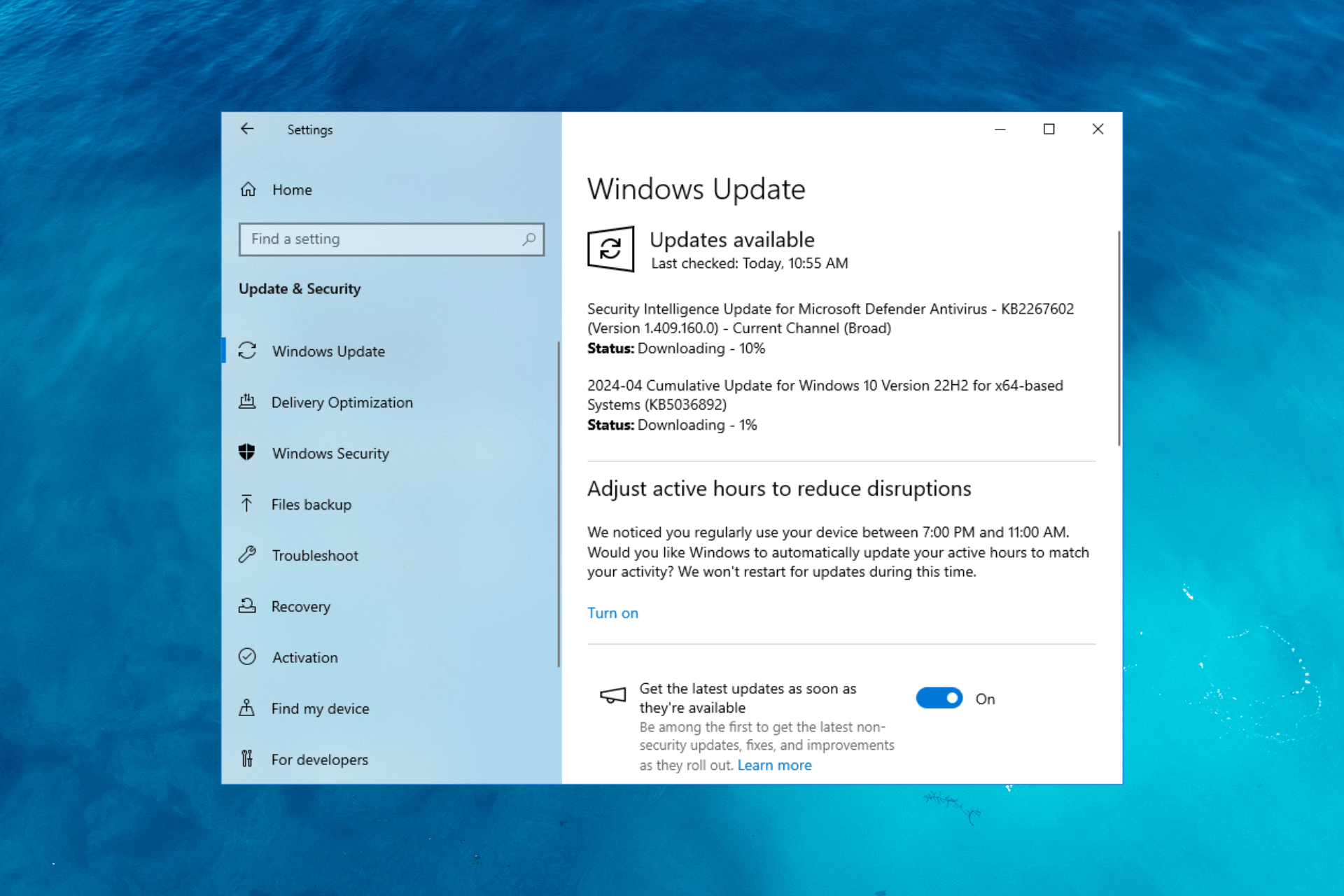
Windows 10 KB5036892 was released on April 9, 2024, and the new update brought on exciting features. One of them is Bing Spotlight integration on the desktop.

Bing Spotlight integration

Spotlight on the desktop feature, when turned on, will display new Bing-powered images as your desktop wallpaper all by itself. To enable the feature, open the Settings app, go to Personalization, then Background. For the Personalize your background option, select Windows spotlight from the drop-down menu.

Just like the lock screen, if you want to learn about the image on your desktop, you can click the Learn More button, which will redirect you to Bing for more information.

Add content to your lock screen

Starting with this update, you can add content like MSN cards that can appear on your computer. To set it up, you need to go to Personalization under the Settings app and select Lock screen. Now choose the Lock screen status from the drop-down as you like. So, you can choose weather, updates on sports, traffic finance, and more to get displayed on your lock screen.

Windows Hello for Business

Windows Hello for Business was introduced to Windows 10 a while ago. With the latest update, IT professionals can use mobile device management (MDM), and disable DisablePostLogonProvisioning to prevent a prompt from appearing when users sign in to an Entra-joined machine.

Taskbar will have special skills in the European Economic Area

In EEA, the search box on the Taskbar will now show you search highlights, providing you with quick information and other updates.

Along with this, Microsoft also fixed an issue that caused the on-screen keyboard to act funny. Once you update, you might also see an option to upgrade to Windows 11 if your device is eligible for upgrade. However, you might not see it right away.

To access the features, you need to install the update. Launch the Settings app, navigate to Windows Update, and click Check for Updates.

However, if you want to install the update manually, you can go to Microsoft Update Catalog, search for KB5036892, and click Download. Then, run the downloaded file and follow the on-screen instructions to complete the process.

If you don’t see the features right after installing the update, you need to wait sometime, as Microsoft has already mentioned that the features will roll out gradually.

The Rust CVE-2026-24576 vulnerability lets hackers access your system

Cybercriminals discovered how to exploit the critical security vulnerability (CVE-2024-24576) in the Rust standard library. Through it, they can threaten Windows systems with injection attacks. Cybercriminals can use this technique to execute malicious programs on your device.

In addition, according to the Common Vulnerability Scoring System (CVSS), this issue with the Rust standard library is critical. After all, hackers don’t need you to interact with their malware to exploit it remotely with low-complexity attacks.

What does the critical security vulnerability (CVE-2024-24576) mean?

According to the Rust security team, the critical security vulnerability (CVE-2024-24576) means the Rust standard library can’t handle special characters used in batch arguments. So, when Rust programs execute the Command API to use batch files, wrongdoers can control arguments and find a way in. Afterward, they can run malicious commands on your system.

The CVE-2024-24576 vulnerability doesn’t affect other operating systems or Rust programs that don’t use batch files. Additionally, the flaw is present only in Rust versions before 1.77.2.

The Rust security team had a challenge patching the vulnerability due to the complexity of the cmd.exe. So, they couldn’t escape all the arguments. However, they found a way around it by modifying the Command API. After the update, if the API can’t escape an argument, it will return an InvalidInput error.

If you need to bypass the standard escaping, use the CommandExt::raw_arg method. It will allow you to handle trusted inputs or to make your escape.

Even if there are a few critical security vulnerabilities like (CVE-2024-24576), the White House Office of the National Cyber Director (ONCD) considers that tech companies should use memory-safe languages like Rust. After all, they minimize the memory-safe vulnerabilities hackers use to execute malicious codes. On top of that, they cause crashes and data corruption.

Ultimately, to fix the critical security vulnerability (CVE-2024-24576) of the Rust storage library, upgrade it to 1.77.2. In this way, you will prevent threat actors from exploiting it. Thus, they won’t be able to use special arguments to execute malicious commands.

What are your thoughts? Do you use Rust applications? Let us know in the comments.

Microsoft is shoving default Copilot prompts in Edge’s address bar, but they’re irrelevant and annoying

Microsoft tends to push its products to users, and it has been doing that for years, and Copilot is no exception.

It seems that the company is doing the same by having Copilot prompts right in the address bar in Edge.

Microsoft is testing Copilot prompts in the address bar in Edge

Copilot in Edge has been present for a while, and it has been confined to the sidebar, so you didn’t have to use it, unless you needed it.

This was useful since you could activate it when needed, and you would get a list of prompts you could use.

It seems that Microsoft is making some changes, and Copilot prompts are now available in the address bar in the Dev version of Edge.

This can be rather annoying since you’ll get a different prompt whenever you open a new tab thus making the prompts irrelevant.

To make this feature more useful, Microsoft could make it work with your recent searches or trending searches, but in its current form this feature feels useless.

While there’s no way to get rid of these suggestions, they at least don’t appear in the Private Browsing mode.

It’s not uncommon for Microsoft to push its products, and speaking of which users are furious by the new Outlook. As for Copilot, some users are disappointed by Copilot, so perhaps Microsoft needs to reconsider its strategy.

Spellcheck for Notepad is rolling out, Windows Insiders first to test it

As you may remember, Microsoft is planning to add the spellcheck feature to Notepad, and it seems that we finally have some news about this feature.

It appears that this version of Notepad is rolling out for testing, so here’s what you should know.

Spellcheck for Notepad is slowly rolling out to Windows Insiders

We already wrote that Microsoft was working on a version of Notepad with spellcheck feature not that long ago, and now it seems that this version is rolling out, as MSPowerUser writes.

According to Windows Blog, the feature is rolling out to Windows Insiders in the Beta and Release Preview Channel:

UPDATE 4/9: The below update for Notepad (version 11.2402.22.0) that introduces spellcheck has begun rolling out to Windows Insiders in the Beta and Release Preview Channels.

The spellcheck feature will be enabled by default and it will underline misspelled words allowing you to correct them by selecting the misspelled word or by using Shift + F10 shortcut.

Of course, you’ll be able to ignore certain words in the document or add them to the dictionary to permanently ignore them.

You can also disable spellchecking for certain file types or temporarily disable it for the current file. Overall, it’s a welcome feature and we hope to see it available soon.

This is not all that Microsoft has in store, and the new Microsoft Store is 40% faster than before, and the Settings app will get some new features in the upcoming feature update.

Windows 10 KB5036892 update brings two new features and more than 20 fixes

On April 9, 2024, Microsoft released the KB5036892 Cumulative Update for Windows 10 Version 21H2 and 22H2. The update bumped the build to 19044.4291 and 19045.4291 for 22H2 and 21H2.

The KB5036892 update is a mandatory Windows 10 cumulative update that adds two new features and contains Microsoft’s April 2024 Patch Tuesday security updates, along with a handful of bug fixes and improvements.

Here are the two new features added mentioned on the Microsoft support website:

  • New! This update adds Windows Spotlight to your desktop background. This feature displays new images as your desktop wallpaper. If you want to know more about an image, click or tap the Learn More button, which takes you to Bing. To turn on this feature, go to Settings > Personalization > Background > Personalize your background. Choose Windows spotlight.
  • New! This update adds more content to your lock screen. In addition to weather, sports, traffic, and finance content will appear.  To turn on this feature, go to Settings > Personalization > Lockscreen. 

Here are the improvements mentioned on the support site:

  • This update addresses an issue that affects the touch keyboard. It does not open sometimes.
  • When you sign in, you might see a message that invites you to upgrade to Windows 11. This message only appears if your device is eligible for an upgrade.
  • This update affects Windows Hello for Business. IT admins can now use mobile device management (MDM) to turn off the prompt that appears when users sign in to an Entra-joined machine. To do this, they can turn on the “DisablePostLogonProvisioning” policy setting. After a user signs in, provisioning is off for Windows 10 and Windows 11 devices.
  • This update adds search highlights to the taskbar search box for the European Economic Area. To learn more, see Windows Search providers.
  • This update addresses an issue that affects the touch keyboard. It does not open sometimes.
  • When you sign in, you might see a message that invites you to upgrade to Windows 11. This message only appears if your device is eligible for an upgrade.
  • This update addresses an issue that affects a network resource. You cannot access it from a Remote Desktop session. This occurs when you turn on the Remote Credential Guard feature and the client is Windows 11, version 22H2 or higher.
  • This update addresses an issue that affects Microsoft Edge. It fails to open on Surface Hub (Team OS).
  • This update affects the Antimalware Scan Interface (AMSI) AmsiUtil class. It helps to detect the bypass of the AMSI scan. This update also addresses some long-term issues that expose your device to threats.
  • This update addresses an issue that affects the time service. You can configure it using mobile device management (MDM) or a Group Policy Object (GPO). But the Windows Settings app does not match what you have configured.
  • This update addresses an issue that occurs when you use LoadImage() to loada top-down bitmap. If the bitmap has a negative height, the image does not load and the function returns NULL.
  • This update addresses an issue that affects scanners. They stop responding when you connect to them using eSCL over USB.
  • This update makes Country and Operator Settings Asset (COSA) profiles up to date for some mobile operators.
  • This update addresses an issue that affects the existing AppLocker rule collection enforcement mode. It is not overwritten when rules merge with a collection that has no rules. This occurs when the enforcement mode is set to “Not Configured.”
  • This update addresses an issue that affects the Group Policy service. It fails after you use LGPO.exe to apply an audit policy to the system.
  • This update addresses a reliability issue. It affects a Virtual Remote App product when you use a custom shell to open it.

As Microsoft has mentioned, these features will roll out to you gradually, so if you don’t see the changes right after you install the update, wait for some time.

Two of the existing issues in Windows 10 are still not addressed, including Copilot not being supported if your taskbar is located vertically on the right or left of the screen or icons switching between multiple monitors due to Copilot.

To install the update, launch the Settings app, then navigate to Windows Update, then click Check for Updates.

However, if you want to install the update manually, you can go to Microsoft Update Catalog, search for KB5036892 and click Download. Then, run the downloaded file and follow the on-screen instructions to complete the process.

Latest .NET updates patch the Visual Studio Remote Code Execution Vulnerability

Microsoft issued updates for .NET 6, .NET 7 and .NET 8 to address the CVE-2024-21409 listed as an important vulnerability for .NET and Visual Studio Remote Code Execution.

A Remote Code Execution (RCE) attack allows an attacker to execute malicious code on an organization’s computers or network. This capability to run code controlled by the attacker can serve multiple objectives, such as installing further malware or exfiltrating confidential information.

RCEs attacks are very common means for attackers nowadays to steal data and break into Government and organizations systems.

How do I patch my .NET to avoid security issues?

The latest .NET updates, .NET 8.0.4, 7.0.18, .NET 6.0.29 for Windows, macOS, and Linux, for x86, x64, Arm32, and Arm64 are available for download from the dedicated GitHub page.

However, you may also use the Windows Package Manager CLI (winget) commands to install them:

  • To install the .NET 8 runtime: winget install dotnet-runtime-8
  • To install the .NET 8 SDK: winget install dotnet-sdk-8
  • To update an existing installation: winget upgrade

Microsoft also warns about a use-after-free vulnerability in WPF which may result in Elevation of Privilege when just by viewing untrusted documents. We recommend updating .NET as soon as possible to avoid these security issues.

You should also be aware that .NET 7 will soon reach end of support. The apps will still run but Microsoft recommends an upgrade.

Did you encounter any problems with the updates? Let us know in the comments section below.

Intel’s latest Wi-Fi driver package, 23.40.0, fixes BSOD, includes functional and security updates

Intel, on April 9, 2024, released the Wi-Fi package drivers 23.40.0 for Windows 10 and Windows 11. So, if you are using Intel Wi-Fi cards on your PC, it’s time to install the latest drivers!

As per the release notes, the latest Intel wireless driver package, 23.40.0, introduces the following changes on both Windows 10 and Windows 11:

1. Regulatory updates for China.

2. Fix for Wi-Fi Yellow Bang in device manager with very low occurrence.

3. Fix for Wi-Fi blue screen with low occurrence.

4. This software release version 23.40.0 has been updated to include functional and security updates. There may be other minor issues addressed which will impact performance, stability, or vendor specific functionality not listed above. Users are encouraged to update to the latest version for best performance.

You can download the latest Wi-Fi driver package, 23.40.0, from Intel’s official website. It also lists the products supported by the driver package. So, check if yours is on the list!

Besides, Intel rolled out a fix for BSOD caused by the Wi-Fi driver in Windows in the previous driver package.

Updating the Wi-Fi driver is critical for many reasons. It improves security, fixes any existing bugs, may help increase the Internet speed (if it’s being limited due to a bug), and ensures smooth functioning of the PC.

Did you face any issues with the latest Intel Wi-Fi drivers? If yes, share them with our readers in the comments section.

Dell’s new XPS and Alienware AI laptops are out featuring Intel Core Ultra CPUs

Dell brings four laptops for gaming and general use. However, two of them, specifically the Dell XPS Laptops, share some specs but have different sizes and customization options. Yet, they all have AI features and cutting-edge Intel Core Ultra Processors. So, without further ado, the laptops are XPS 14 (9440) and XPS 16 (9640), Alienware m16 R2, and Inspiron 14 Plus (7440).

Dell laptops and specifications

You can personalize most of the new Dell laptops based on your needs. However, if you want a durable gaming device, go for the Alienware m16 R2 as it has the most options. Yet, if you want a work laptop, Inspiron 14 Plus has everything you need. Additionally, you can go for the XPS for video editing and content creation.

Dell XPS Laptops

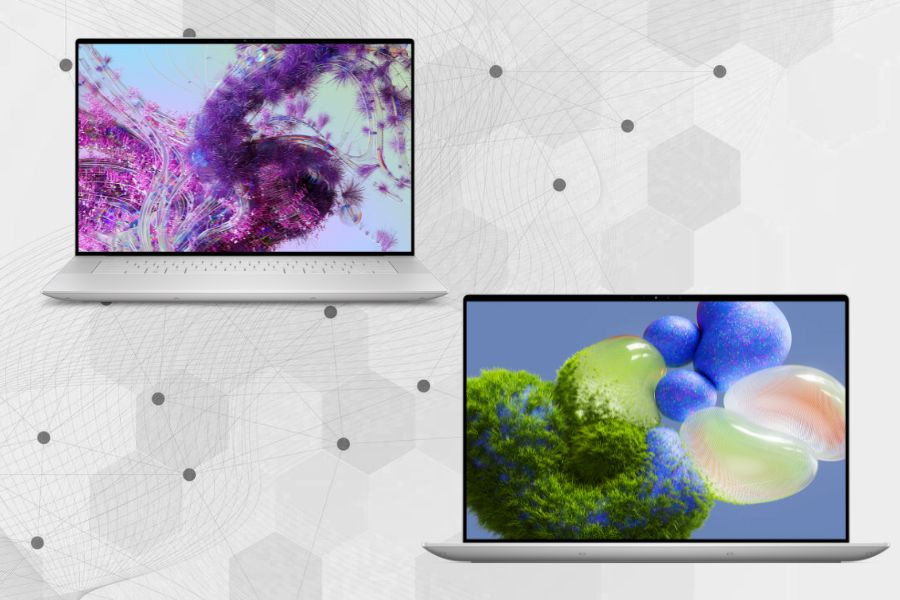
Two Dell XPS laptops, one with a 16-inch screen and the other with a 14-inch screen, are displayed side by side on a white surface. Both laptops feature sleek, modern designs with thin bezels and high-resolution displays. The larger laptop is on the left, and the smaller one is on the right.

The XPS laptops are the first ones from this category. After all the only difference between XPS 14 and XPS 16 is their display size and some customization options. Other than that, the XPS 16 is 45% more performant than its predecessor.

If you are looking for a laptop on the go, XPS 14 could be the better choice because it’s more compact. Additionally, you can customize their storage, memory, graphics, and display. For example, you can opt for an NVIDIA GeForce RTX series 40. Also, you can change the display type to OLED.

Both Dell laptops have an incorporated Copilot key to improve workflows. They have an integrated Copilot assistant too. On top of that, you could go for the premium version if you work with AI.

Alienware m16 R2

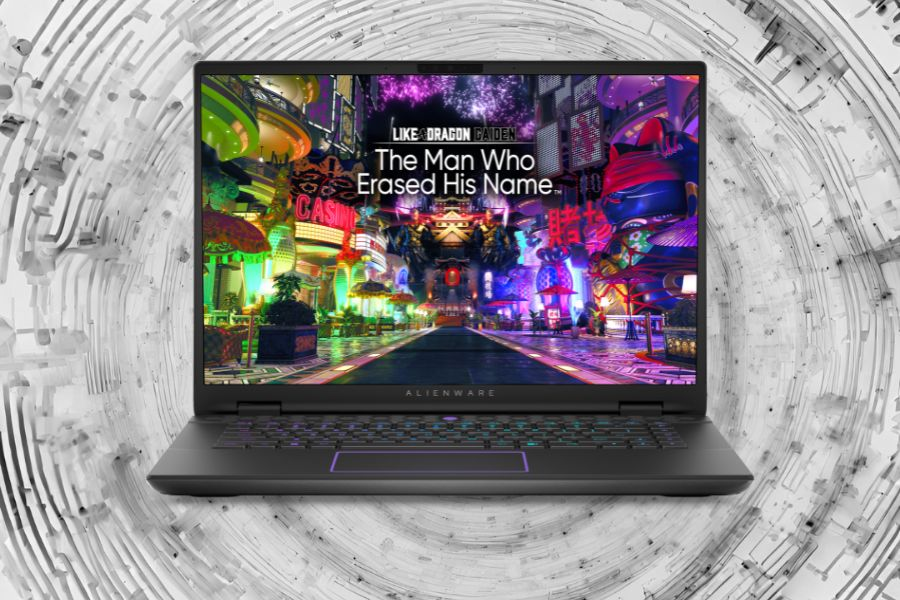
The Alienware m16 R2 laptops from Dell deliver superior performance. In addition, they are great for gaming. Also, it features Intel Core Ultra 9 185H processors and NVIDIA GeForce RTX 40 Series graphics. Furthermore, it has a stealth mode for quiet gaming sessions.

You can adjust some of its specifications, such as storage, graphics, CPU, and memory.

Dell Inspiron 14 Plus

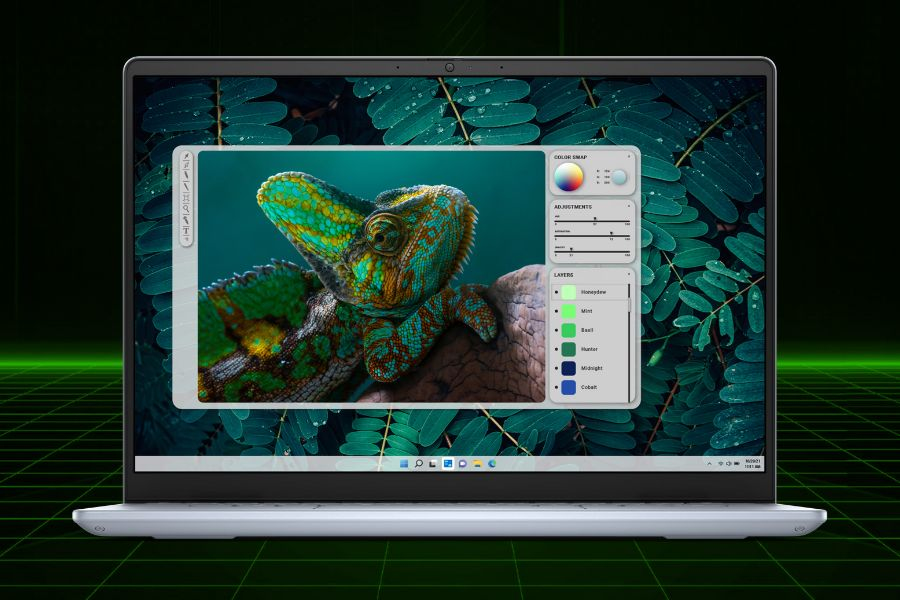
Inspiron 14 Plus offers many AI features, like auto framing and eye contact. Thus it is a better fit for office work. It has a 16:10 aspect ratio and a 2k resolution. In addition, it received military-grade certification for durability. However, unlike the previous models, it can’t be personalized too much.

In a nutshell, Dell offers various laptops with AI features for different uses. You can personalize most of them. In addition, the cheapest one, the Dell Inspiron 14 Plus, is $849.99. On top of that, the gaming laptop, Alienware m16 R2, starts at $1,499.99. However, the most expensive Dell laptops are the XPS 14, which starts at $1,699.00, and the XPS 16, which starts at $1,899.00.

What are your thoughts? Are you going to buy any of them? Let us know in the comments.

Unified Copilot experience in Visual Studio will take AI integration to a new level

Copilot is an irreplaceable tool, and it’s available in various Microsoft Software, including Visual Studio.

Speaking of which, the company has plans to bring a unified Copilot experience in the future versions of Visual Studio.

Visual Studio 17.10 announced, comes with a unified Copilot Experience

The new version of Visual Studio was just announced, and it will offer in-depth Copilot integration, as Neowin writes.

This is advertised as a unified Copilot experience, and it combines the features of Copilot and Copilot Chat into one.

By doing so, users won’t have to install two separate extensions, thus offering a more deeply integrated AI experience in the future.

If you haven’t used Copilot in Visual Studio, you can use it to speed up coding tasks, improve code quality, help you learn new patterns and languages, and help you focus on important tasks.

It’s great to see that Copilot is now available right out of the box, and if you’re impatient, you can download the Preview 3 version and give it a try.

As for others, they will have to wait for May to see this feature available to the public. As for other Copilot news, Copilot for Security vows to make Microsoft 365 more secure.

You should also know that Microsoft is working on Qualcomm-based Windows that will bring Copilot to everyone.

Qualcomm Snapdragon X Elite laptops are great for gaming and editing

Some lucky journalists had the chance to test the Qualcomm Snapdragon X Elite laptops. Based on their affirmations, they were pleasantly surprised by the capabilities of the demo laptops. Thus, some used it for content creation software. To test its capabilities, they edited videos in 4K using Blackmagic Davinci Resolve and rendered text to images in OpenVino. Additionally, they were happy with the results of the new laptop.

During the Snapdragon X Elite event, another journalist had the chance to check out the laptop’s gaming performance. In addition, by attending the event, people could check the device’s specifications. After all, even if there are many benchmark results, they don’t specify the exact characteristics used.

Snapdragon X Elite laptops are great AI powerhouses

According to the journalists from Laptop Mag, the Snapdragon X Elite laptop features 32GB RAM and a 2.8K 120Hz screen. Each one of the demo devices showcased during the event had a specific task. Some were for gaming, others for editing, and some ran benchmarks. Yet, they are all running their tasks flawlessly.

If you are a content creator or editor and have a Macbook, the Snapdragon X Elite might be your next device. After all, it is more proficient than the Pro M3 and some versions of MacBook Air. Also, with it, you can edit videos smoothly in 4K using the Blackmagic Davinci Resolve tool. On top of that, compared to the Intel Core Ultra 7, it delivers a smoother experience.

The demo Snapdragon laptop easily handles tasks other devices struggle with, such as masking, audio editing, color grading, and frame-by-frame scrubbing.

The Qualcomm Snapdragon X Elite laptops ran Baldur’s Gate III, Control, and Redout II on 1080p. According to Madeline Ricchiuto, the games run smoothly on the demo devices. Additionally, there were no frame drops during gameplay, especially on BG III during encounters. Yet, the chips are not for ray tracing. So, you might feel the absence of ray-tracing effects.

Ultimately, the Snapdragon X Elite laptops are powerful AI PCs. Thus, their performance and great speed in editing content show how far this technology has progressed. However, compared to the demos, the devices featuring the Snapdragon X Elite chips might have a lower performance based on their specifications. Yet, the laptops with similar specs might perform the same.

What are your thoughts? Are you going to get a Snapdragon laptop? Let us know in the comments.

PC shipments surge back to Pre-pandemic levels in Q1 2026

When the pandemic hit, everything changed. The world’s economy was standing still, and it has been a couple of years, but we are still recovering from the losses it left behind, trying to get back to normal every day, whether it is the PC market or day-to-day life.

Speaking of the PC market, according to the International Data Corporation (IDC) Worldwide Quarterly Personal Computing Device Tracker‘s latest report:

 After two years of decline, the worldwide traditional PC market returned to growth during the first quarter of 2024 (1Q24) with 59.8 million shipments, growing 1.5% year over year.

So, after two years of consecutive decline, the global conventional PC market, which includes desktops, workstations, and notebooks, exhibited growth during the first quarter of 2024.

However, it is worth noting that the market experienced a steep decline of 28.7% in the first quarter of 2023, marking it the lowest point in PC history.

Apart from the growth this year, global PC shipments managed to return to pre-pandemic levels in Q1 2024. In the first quarter of 2019,  60.5 million units were shipped worldwide.

Inflation is going down in most parts of the world, like America, Europe, the Middle East, and Africa (EMEA). Therefore, PC shipments have started to recover. However, the same could not be said about China, which has impacted China and the global market.

As China is the largest consumer of desktop PCs, weak demand from the region could cause a decline in the percentage of global desktop shipments in the next quarter.

Jitesh Ubrani, research manager with IDC’s Worldwide Mobile Device Trackers, said:

“Despite China’s struggles, the recovery is expected to continue in 2024 as newer AI PCs hit shelves later this year and as commercial buyers begin refreshing the PCs that were purchased during the pandemic. Along with growth in shipments, AI PCs are also expected to carry higher price tags, providing further opportunity for PC and component makers.

Here are the details of the top 5 companies, globally in terms of shipments(millions of units), market share, and growth comparing quarter 1 of 2024 and quarter 1 of 2023:

Company1Q24 Shipments1Q24 Market Share1Q23 Shipments1Q23 Market Share1Q24/1Q23 Growth
1. Lenovo13.723.0%12.721.6%7.8%
2. HP Inc12.020.1%12.020.4%0.2%
3. Dell Technologies9.315.5%9.516.1%-2.2%
4. Apple4.88.1%4.27.1%14.6%
5. Acer Group*3.76.2%3.45.7%9.2%
5. ASUS*3.66.1%3.86.4%-4.5%
Others12.621.1%13.322.6%-5.0%
Total59.8100.0%58.9100.0%1.5%
IDC Quarterly Personal Computing Device Tracker, April 8, 2024

With that said significant developments are expected in 2024 and beyond. The emergence of AI-powered PCs, the retirement of Windows 10, the introduction of new powerful processors, and more. We hope these hold the potential to bolster PC sales in the years to come.

What do you think about it? Share your thoughts with our readers in the comments section below.

16″ of awesomeness: Samsung’s Galaxy Book4 Pro 360 is now less than $1500

Samsung has a reputation for having amazing devices, but usually, such quality comes with a price.

If you’re on a budget, you’ll be pleased to hear that Galaxy Book4 Pro 360 is currently available at a discount.

You can get Galaxy Book4 Pro 360 for $400 off

Samsung Galaxy Book4 Pro 360 is an amazing device, and it comes with the following specs:

  • 16-inch, 2880×1800 AMOLED touchscreen display
  • Intel Core Ultra 7 155H 3.8GHz CPU, can be boosted up to 4.8GHz
  • Intel ARC Graphics
  • 16BGB RAM, 1TB SSD
  • 76Wh battery that can last up to 21 hrs

As for other features, there’s a full HD webcam, and AKG Quad speakers with Dolby Atmos. Regarding connectivity, Wi-Fi 6E and Bluetooth 5.3 are available.

There are also two Thunderbolt 4 ports, a single HDMI 2.1, one USB-A 3.2 port, a microSD card slot, and a headphone and mic combo.

Regarding security, you can find a fingerprint reader, TPM, Secured Core PC, and Knox. And last but not least, the S Pen also comes with this device.

Galaxy Book4 Pro 360 is an amazing device with a sleek design and great features, so be sure to get it from Samsung’s website while the discount lasts!

If you’re a fan of Samsung, you’ll be pleased to know that Galaxy Book5 Pro will use the next-gen Lunar Lake CPU.

In case you prefer phones, you might want to check Samsung Galaxy M55 5G specs for more information.

Your RAM could burn the GPU, reports emerging across the globe

It may be difficult to digest, but two different users have reported burn marks on the back plate of their GPU, and the RGB lighting from the RAM is reportedly to blame!

The first report on Reddit, from almost a week ago, was concerning burn marks on the MSI RTX 3080 GPU.

Under the thread, we had multiple users confirming witnessing the same pattern on their GPUs.

This happened to me too, I used Corsair RGB RAM

Yep. I have that types of marks too, on my strix 1080ti after 7 years with trident z rgb. I have them set red, not with full brightness and marks are red.

Three days later, another user took to Reddit and shared two photos as evidence of the burn marks on the same GPU, MSI RTX 3080.

In this case, too, many others came forward to corroborate things and share their experience.

I have this memory and an Asus 1080ti strix and mine IS faded, I’ve been using this card since 2018 so it definitely took a while. May have something to do with what color/ brightness the RGB is set to, what color are your lights? Mine were set to blue for most of that time, but definitely some time on rainbow.

i have similar markings on my zotac but in a different spot and not where my ram is ? something about this coating is sensitive to heat or something
Discoloration marks

The discoloration of the GPU’s back plate shows a similar pattern and is in line with what would be caused by RGB lighting from RAM modules. This appears to be due to a reaction between the RGB UV light and the coating used on the back plate.

Whatever the case, the reports so far are limited, although we expect an increase as more and more users minutely observe their GPU’s back plate for burn marks or discoloration. The good news is that the GPU’s functionality and performance performance hasn’t been affected!

Besides, it could just as well be due to a faulty batch of memory modules or GPUs with incomplete/improper coating. Because the majority of users with MSI RTX 3080 haven’t reported any problems, indicating that the issue is not widespread.

If you are looking to replace it, we recommend you check if the current GPU shows signs of failure.

What do you think is responsible for discoloration and burn marks on GPUs? Share with our readers in the comments section.

Soon, you will be able to customize MSN in the lock screen on Windows 11

In March 2024, Microsoft introduced a lot of changes to the lock screen of Windows 10, including MSN, which added more visual clutter.

The Redmond tech giant also added MSN-powered widgets to the lock screen in Windows 11 last month. However, not all users appreciated this move as they were not able to change or modify them.

The good news is that Microsoft is working on offering full control over how the lock screen on our PC appears. As Microsoft mentioned to WindowsLatest, you will be able to customize Widget cards along with the content appearing on them.

However, the company has not yet shared the estimated time of arrival for the feature. As of now, the lock screen widgets powered by the MSN feature are included in an optional update. However, after installing the patch Tuesday update in April 2024, these will become the default for everyone.

The mandatory patch Tuesday update will be available on April 9, and this will turn on MSN integration. All the MSN widgets will show up by default on the lock screen if you have the Weather option enabled in Settings>Personalization>Lock screen.

In the future update, as Microsoft mentioned, we can expect to choose which widget to keep or remove on the Lock screen.

However, people like me don’t like clutter on their lock screen and, therefore, would want to remove the MSN content completely. Fortunately, you can do that.

For that, open Settings (Windows + I), then go to Personalization>Lock screen> Lock screen status> choose an appropriate option.

As of now, I have KB5035942 installed and am running Windows 11 Home Single Language. When I navigate to the Lock screen status, I can see None, Weather, Mail, Calendar, and Dev Home options. If these don’t change in the future update, you can select any of them to get rid of MSN integration.

In other news, we know Microsoft has been experimenting with the Widgets panel for some time in Windows 11 24H2 and has added a navigation panel to the left-hand side, letting you switch between feed and widgets.

You can quickly access the Settings app from the Widgets app, as the icon is placed at the bottom left corner, but you won’t get the extended view option, meaning you won’t be able to go full screen in the Widgets app.

Would you like to turn off the MSN integration on your lock screen? If so, share the reasons with our readers in the comments section below.

Is Legion Go’s successor coming? Speculations are rising after a manager interview

Gaming PC handhelds are a great option if you want to play the latest titles while on the go, and we saw several different models from various manufacturers.

Speaking of which, it seems that Lenovo is working on a new gaming handheld, so let’s dive in and see what Lenovo has in store for us.

Lenovo seems to be interested in the Legion Go successor

Lenovo Legion Go is a decent device, and according to the XDA Developers, the company might be working on a new model.

There was an annual Innovate event held in Thailand, and during the event, Gaming Category Manager, Clifford Chong, said the following:

Definitely it’s a product category that we do see potential in and we continue to invest and we are looking towards when the time comes right of course having the next generation to provide even more features.

So while this isn’t a confirmation that the new Legion Go is releasing, the statement leads us and many others to believe that Lenovo plans to stay involved in the handheld gaming market.

While this is great news for Lenovo fans, many are wondering if we will get a handheld Xbox following the rising popularity of handheld devices.

Microsoft added a new Recommended button to Windows 11. Here’s what it does

There could be a new button called Recommended coming to Windows 11’s taskbar soon, according to the latest findings of the Windows enthusiast, Albacore, who spotted it. The new button currently has the icon of a globe, and it could be used as a central point for the Start menu’s current Recommended section.

For now, the button doesn’t do anything when enabled, and it’s not functional, according to the Windows enthusiast only the Settings page recognizes it, as it doesn’t appear in the Windows 11 taskbar at all.

As of right now, only the Settings framework is aware of this setting (backed by HKCU\SOFTWARE\Microsoft\Windows\CurrentVersion\Explorer\Advanced\ShowRecommendations) As of right now Taskbar.View.dll contains no trace of the new functionality, will keep an eye on future betas

Albacore

The new Recommended button can be bad news for those Windows 11 users who hope Microsoft won’t blast any new ad space to the operating system, because, according to the Windows enthusiast, it might end up being a new section that contains ads.

Lowkey hoping that this is just a piece of unfinished (and never to be finished) work from Mikhail’s brief reign over Windows. Fingers crossed we aren’t getting more ad surfaces.

Albacore

However, since it’s not functional, Microsoft might not add it. The Windows enthusiast spotted the button on a channel within the Windows Insider Program, and these channels are known for displaying experimental features that might not make it to the stable channel. But that doesn’t mean the Redmond-based tech giant will abandon the idea.

With this being said, the latest button added to the Windows 11 taskbar was none other than the Copilot, for which Microsoft is also releasing a special key, which is expected to ship with the new AI PC laptops these months.

For now, Copilot is still in trials and tribulations, as Windows users are not fond of it, according to our survey.

Limited time deal: Get the Aorus 15 gaming laptop for just $1,299 on Newegg

The demand for gaming laptops is on the rise, driven by their multi-purpose utility and long-term functioning. Right now, you can get one of the best value-for-money gaming laptops, Gigabyte Aorus 15, for just $1299.99, down $350 from its regular price of $1649.99.

The deal price comprises a $50 rebate on specific products on Newegg and NeweggBusiness. If you don’t fill out the rebate form, the effective cost of Gigabyte Aorus 15 in the deal comes out to be 1,349.99!

The powerful yet portable gaming laptop delivers smooth and stunning graphics, comes with a backlit keyboard, and is perfect for gaming on the go. It uses AI to optimize the performance, thus maintaining optimal temperature, reducing the fan noise, and improving battery life.

As for cooling, a vital aspect in any gaming laptop, the Gigabyte Aorus 15, works on the exclusive WINDFORCE Infinity technology, which ensures higher cooling efficiency and doesn’t take up as much space.

Gigabyte Aorus 15’s specification

ProcessorIntel Core i7-13700H
GraphicsGeForce RTX 4070 Laptop GPU (8GB)
Operating SystemWindows 11 Home 64-bit
Storage1 TB SSS (Solid State Drive)
RAM16 GB DDR5 4800
Display size15.6”
Display resolution2560 x 1440

Get Gigabyte Aorus 15 from Newegg at just $1299.99 today. It’s a limited-period deal, so hurry up!

When we looked through the reviews, a few were not happy with the Gigabyte software and the frequent dust accumulation in the fans, necessitating regular cleaning. Functionality-wise, it’s good for the price range!

If you are looking for budget options, check out our top picks for gaming laptops under $800.

What do you think of Gigabyte Aorus 15? Share with our readers in the comments section.

Azure Backup’s support for Azure virtual machines that use disks with private endpoints enabled is now in public preview

Azure Backup now supports backing up Azure virtual machines with private endpoints enabled. The update applies to both standard and enhanced backup policies.

According to the official changelog, users can specify network access settings for restored disks, choosing between the same configuration as source, specific network access, or public access.

  • Use the same network configurations as the source disk(s): This option allows the restored disks to use the disk access and network configurations same as that of the source disks.
  • Enable public access from all networks: This option allows the restored disk to be publicly accessible from all networks.
  • Disable public access and enable private access (using disk access): This option allows you to disable the public access and assign disk access to the restored disks for private access.
Microsoft

The new Azure Backup capability is now in public preview. However, for now, it’s only available for backed-up VMs that use private endpoint-enabled disks.azure backup

The settings can be chosen every time users start a new recovery process, and the three options are suitable for a variety of situations: for instance, some disks might contain sensitive information, in which case private access is recommended.

You can read more about it here.

Microsoft has used Azure Backup for a variety of tasks, over the years. Some while ago, the platform also supported Windows 7, 8, and 8.1, and it would allow up to 50 machines to register for it. Now it’s mainly used to restore Azure Virtual Machine data in the Azure portal.

AI-generated video is one of the winners of Pink Floyd’s animation competition and the fans are enraged

The legendary rock band Pink Floyd celebrates 50 years from the Dark Side of the Moon album launch. They thought that it was a good thing to have an animation contest with a £100,000 ($126,833) prize pool for this anniversary but things got haywire when one of the winner clips turned out to be AI generated.

Damián Gaume, the artist behind the video called Any Color You Like has admitted that he used the Stable Diffusion LLM and then he edited the clip using the Blender software. Actually, Pink Floyd included his Thank you video on their X channel congratulating him for the win.

What is all the stir about the AI-generated clip?

Pink Floyd’s prize announcement almost immediately caused negative comments on the X thread. Most commenters were arguing about the fact that the so-called artist didn’t, in fact, do anything except hit the Generate button. Others were enraged because an AI-generated video took the £10,000 ($12.633) individual prize that would belong to a real artist. The shaming continued on the same tone in the thread but they are all probably missing an important point to this contest: its rules and regulations.

Pink Floyd’s team clearly outlined that the use of Artificial intelligence software is allowed as long as you don’t try to claim any copyright or other rights of ownership on the clip and submit a detailed description of the creation process.

We don’t know if the jury received the description they needed from the contestant, but we think they did. Although the clip clearly bears the mark of the AI to the naked eye, it’s also as clear that he worked a lot on the video after its raw generation. And if you’ve ever used Stable Diffusion to generate a video, you know exactly what we mean.

If we look at the jury board, we have the English cartoonist Gerald Scarfe, who produced animations from Pink Floyd’s The Wall, the famous Terry Gilliam, who needs no other presentation, and Nick Mason, the Pink Floyd drummer. Although they are all legendary for their work, we honestly wonder if they know anything about AI video generation software.

The bottom line is that although we respect the artistic process and drive behind an artist’s creation, Gaume didn’t do anything out of the guided lines of the contest. However, he openly recognized that he made his job a lot easier by using AI for his clips. So, if anyone wronged here, it’s only the staff who wrote the rules and regulations of the contest to allow AI-generated videos in the contest. That is also debatable because Pink Floyd has been known for promoting avant-garde creations in terms of graphics and design.

It all falls in a gray area that will be widely explored in the future with all AI-generated content. However, these disputes will draw some lines around what can and cannot be considered original art and creation.

If you want to talk further about this matter, you can do so in the comments section below.

Neat trick: Narrator lets you open & run apps even in the Windows installer. Here’s how

Many users have been complaining about the need to connect to Wi-Fi while trying to install Windows 11 on their computers. Some don’t have access to Wi-Fi, and others just don’t want to. However, if they don’t make a choice, they are stuck on the OOBE screen on their device.

To avoid this, you can skip the step using the Command Prompt. All you need to do is press Shift + F10 to open CMD, then type OOBE\BYPASSNRO and hit Enter.

However, what if you want to access Wi-Fi but need to work on something right away before doing that? Many of us don’t know that the Out of the Box Experience is an overlay, but you can still open apps.

Let’s say you want to invoke Windows File Explorer; you can use Windows + E to do that. Only the difference between the usual desktop screen and the OOBE overlay is that the Explorer window will not be visible.

To solve this and interact with the app that has been opened, you need to use the Narrator app, so press Windows + Ctrl + Enter to launch the app.

Now press Tab to see the outline of the buttons and hear what buttons you have selected. Press Enter to press that button. You can also see a preview of the app that has been opened by pressing Alt + Tab.

This way, you can open documents, change folders, modify Windows Settings, and even listen to music while working on other tasks on the computer. However, you can play games or open Windows Search to find something on your device.

Please try it and let us know if this helps you open and access apps in OOBE on Windows 11 in the comments section below.

Die Again: A fast-paced shooter with unique mechanics will hit the stores soon

The shooter genre is one of the most popular ones on the market, and a new shooter game is coming to Xbox and other platforms in just a few days.

The game is called Die Again and it comes with a unique mechanic that not many games use.

Die Again is set to launch on April 11

According to Xbox Wire, Die Again is a top-down shooter with an interesting death mechanic. While you can use various weapons to dispatch your enemies, you can also possess enemies when you die.

Due to this mechanic, it’s not always the best option to go guns blazing, and possessing enemies after perishing might be a better choice.

The game is incredibly fast-paced and requires quick reflexes with each level allowing you to use a different approach. The game will also introduce various characters, and some of them will have a major effect on you, so be cautious.

The game is set to release on April 11 on all major consoles and PCs, and you can preorder it today. In other news, Xbox is the most popular platform for Diablo 4 and the new Xbox console will use Gaming AI to revolutionize gaming.

TikTok Notes is coming soon: Is Instagram’s near-monopoly under threat?

After securing a solid position in the short video-sharing apps segment, TikTok is making strides in the photo-sharing app market. There were previously rumours that TikTok was working on photo-sharing apps. We now have confirmation that it will be called TikTok Notes.

In the last few days, many TikTok users have received prompts about TikTok Notes detailing the app’s functioning and how it would change things. Besides, there’s a toggle to enable/disable photo sharing on TikTok Notes.

Prompt about TikTok Notes

TikTok’s executive also confirmed this to TechCrunch.

As part of our continued commitment to innovating the TikTok experience, we’re exploring ways to empower our community to create and share their creativity with photos and text in a dedicated space for those formats.

Though there is no official confirmation regarding the release date, we expect it to be soon, given TikTok has started the outreach.

Can TikTok Notes compete with Instagram?

TikTok Notes, in the early days, might be a match for Instagram in terms of the number of photo posts.

TikTok Notes doesn’t need to onboard new users at a massive scale. Its already available user base will drive the numbers in the initial days, as was the case with Threads. But if the app isn’t good, the numbers will start to dwindle, and it might reach a state of obscurity.

The initial hype doesn’t necessarily translate into long-term success. The Covid-era fad, Clubhouse, is another example!

On the other hand, if TikTok’s Instagram rival turns out to be good, it will drive engagement and might boast a higher user base than Instagram in some countries. As for those where TikTok faces legal hurdles or is banned, Instagram will retain its position as the market leader.

The coming days will be exciting as TikTok Notes and Instagram battle it out in the photo-sharing app space.

Which of the two do you think will be a better pick? Share with our readers in the comments section.

Microsoft Teams introduces Call Record Insights, an advanced platform for call records data analysis

Microsoft released the new Call Records Insights inside the Teams platform, a new method for organizations to retrieve data from call records and use it to improve their infrastructure.

Admitting that organizations often lack tools to understand and act on complex call data, the Redmond-based tech giant says the new capability addresses many of these challenges, allowing organizations to have a hold on the precious data.

According to the official blog post, Call Records Insights comes with a variety of capabilities, including:

  • Automated Retrieval
  • Simplified Data Transformation
  • Secure and Efficient Storage
  • Code-Free Deployment
  • Quick and Powerful Data Analytics using KQL
  • Simplifying Complex Reporting Challenges
  • Connect directly with PowerBI and Generate custom views, including custom DAX measures and columns
  • Built for Scale and Resilience
  • Seamless Data Augmentation

These capabilities will enhance productivity and streamline data gathering and analysis. For instance, the Automated Retrieval capability Call Record Insights automatically fetches all the call records, right after the call is done. The Simplified Data Transformation converts JSON data structures to manageable formats that are easy to use.

Quick and Powerful Data Analytics using KQL will gather thousands of call records in a matter of seconds, by leveraging the Kusto Query Language, while Seamless Data Augmentation enhances call record data with additional information.Call Record Insights

According to Microsoft, there are several benefits of using Call Record Insights to analyze call data. Organizations will have complete data ownership and control over it, and the capability can be scaled to fit every organization, from small businesses to large corporations. The Call Record Insights can also be customized to the specific requirements of every organization.

It is now available to deploy on GitHub, and those interested can see a detailed repository on the platform, as well.

The Redmond-based tech giant is planning on enhancing Teams with another app suited for Customer Support agents who deal with daily calls: the new Queues app, slated for release in June 2024, will greatly streamline customer calls, by allowing the entire team to contribute to solving issues over the phone.

Coupled with the new Call Record Insights, these calls can be used to come up with strategic plans that enhance the productivity and profitability of these companies.

Will we be getting a handheld Xbox soon? Here’s what Microsoft’s gaming head has to say

Handheld video games were a hit in the ’90s when Nintendo introduced GameBoy. Then, they were slowly replaced with PC games and consoles. However, tech companies are again trying to revive the, and now we have a few PC gaming handheld devices, including Steam Deck, Asus ROG Ally, and Lenovo Legion Go.

There have been rumors that Microsoft is working to introduce handheld devices. When Phil Spencer, CEO of Microsoft Gaming, attended the annual Game Developers Conference, he was asked about the same.

Phil Spencer told Polygon:

I want my Lenovo Legion Go to feel like an Xbox. I brought [the Legion Go] with me to GDC. I’m on the airplane and I have this list of everything that makes it not feel like an Xbox.

Forget about the brand. More like: Are all of my games there? Do all my games show up with the save [files] that I want? I’ll tell you one [game] that doesn’t right now – it’s drivng me crazy – is Fallout 76. It doesn’t have cross-save.

He further said:

I want to be able to boot into the Xbox app in a full screen, but in a compact mode. And all of my social [experience] is there. Like I want it to feel like the dash of my Xbox when I turn on the television. [Except I want it] on those devices.

Fortunately, what Phil Spencer aspires to create already exists; it is called Steam big picture mode, but the difference is that it doesn’t have a big green X on the screen; instead, it has a Steam logo.

As per Spencer, the Xbox hardware team, which Roanne Sones leads, is considering:

different hardware form factors and things that [they] could go do. What should we build that will find new players? That will allow people to play at times when they couldn’t go play [in the past]?

He further added:

I like the fact that Valve, Lenovo, and Asus went out and innovated in a new form factor. And I will say that when I’m playing on those devices, it almost feels more like a console than a PC — nine times out of 10. The things that usually frustrate me are more Windows-based than device-based. Which is an area I feel some ownership of. Like, I want to be able to log in with a controller. I’ve got my list of things we should go do.

From a game creator standpoint, I can then go build a single version of my game that spans more hardware and reaches more customers. And I would say for players, it reduces the friction. Like, if I want to go play my console games on the go with a handheld, I don’t want to only be able to buy one brand of handheld. Right? […] I want everything that we’re doing in the hardware space to be great. But if somebody chooses to go play today [somewhere else], I don’t want them to feel like a lesser Xbox [player].

I think it’s important. You and I, we’ve been around for a couple of days. Look at the real inflection points in our industry, like look at the Wii. It was hardware innovation that was linked with great software innovation.

Spencer mentioned that Microsoft is working on making Xbox available on handhelds using two distinct approaches: software and hardware. These two approaches will be used as Microsoft understands that it is not necessary for all players to choose their brand. Therefore, they want to work on improving the Xbox handheld gaming software experience. This means Microsoft is working to cover all the grounds for handheld devices, be it hardware or software.

A lot of Reddit users have expressed their thoughts about this news. Winston_Feesh said:

I hope we can merge and not just cross save. I have a LOT of stuff on my pc account but its relatively new while my xbox save is from when I pre orderee the game.

Another Reddit user, Sniper_Brosef, said:

Cross saves seems like it would open cross plat too? Which would mean completely changing the market. I’m soooo here for that.

Most of the Reddit users who participated in the conversation were hopeful and happy that Microsoft is working on cross-save and handheld gaming software.

What do you think about it? Share your thoughts with our readers in the comments section below.

Seriously, Google wants you to Get the most out of Chrome, especially when it comes to privacy

Google hasn’t had the best track record when it comes to user privacy, but the company is trying to change that.

Speaking of which, Google is working on proper documentation that will help users learn more about Chrome.

Chrome is adding additional privacy documentation in the About section

This change is already available in Chrome Canary and you can find it in the Get the most out of Chrome section. To access it, you just need to open Settings and select About Chrome.

In there you should be able to see the following sections:

  • How does data help Chrome work better for you?
  • How are browsing and Search history different?
  • Why is Chrome moving beyond third-party cookies?

You can click on each of them to get additional information or you can visit the following link instead: chrome://settings/getMostChrome

In there you’ll find three sections, Chromes makes the work better, Your data as you browse, and Beyond cookies. Unfortunately, there’s no information available at the moment since this feature is still in development.

However, we believe that this section will hold the information regarding Tracking Protection as the feature is ready for 100% rollout among other information.

In addition to these changes, Google added additional documentation for explaining what happens when you enable Use Secure DNS in Security settings.

The explanation says the following:

Make it harder for people with access to your internet traffic to see which sites you visit. Chrome uses a secure connection to look up a site’s IP address in the DNS (Domain Name System).

To enable the new documentation, do the following:

  1. Open the Canary version of Chrome.
  2. In the address bar, navigate to chrome://flags
  3. Enable the “Get the most of Chrome” documentation flag.
  4. Now go to Menu, choose Settings, and select About Chrome.

As previously mentioned, this documentation is under development, so you’ll only see placeholders. Regarding other security features, Chrome has added V8 Sandbox recently, thus making its browser even more secure.

Iceotope hires former Microsoft executive to focus on AI cooling systems

Iceotope, a specialized company in liquid cooling for data centers, is seeking to expand. The idea came from the high demand for liquid cooling systems for AI. Thus, they hired Christian Belady, a former Microsoft executive with extensive experience in data center management. He will be the company’s senior advisor. After all, Belady has decades of experience in data centers and developed the Power Usage Effectiveness (PUE) metric used to measure energy consumption.

According to The Register, Christian Belady believes industries should collaborate and find effective and safe liquid cooling solutions. After all, AI applications require high-powered servers, and they generate a lot of heat. In addition, Iceotope believes that liquid cooling is an efficient way to allow data centers to operate efficiently without impacting the environment.

Is water cooling an efficient solution for AI data centers?

Unfortunately, for now, the water cooling needs of the AI data centers represent a problem for the environment. After all, look at what Microsoft did in Arizona, where its AI consumes more water than 670 families yearly. Yet, with the help of Belady, Iceotope could discover a better way to enhance its liquid cooling for data centers.

Belady advises not only Iceotope but also DigitalBridge Group, a major data center investor. There, he uses his expertise to guide the company strategically to expand DigitalBridge’s data center portfolio. Similar to Iceotope, the company experiences a high demand for data center infrastructure.

Recently, Iceotope launched the KUL RAN gear, a liquid cooling system that integrates HPE servers. This technology targets telecommunication companies. Furthermore, BT Group, a UK telecom provider, hired Iceotope last year to test and enhance its liquid cooling across its network and IT infrastructure. Additionally, the company will add new tech this year and wants to get more partnerships for its global expansion.

In a nutshell, Iceotope is working with Christian Belady to expand the company due to the high demand for cooling technologies for AI data centers. In addition, Belady wants companies to join forces and develop new efficient cooling technologies. On top of that, Iceotope will bring some new technologies this year.

What are your thoughts? Do you agree with Belady? Let us know in the comments.

Elon Musk’s Grok AI does more harm than good, spreads misinformation, reports jokes as actual news

When Elon Musk launched Grok-1 AI to tackle ChatGPT, everyone had their hopes up because the project looked promising. As it turns out, Grok AI is still in its infancy, making too many grave mistakes, misconstruing information, and often spreading fake news!

In a recent instance, Grok AI reported about Iran attacking Israel in the ongoing conflict, which was based on false claims by several verified X handles. The piece soon made it to X’s trending News section and was promoted by the social media giant. The headline read, Iran Strikes Tel Aviv with Heavy Missiles.

Image source: Hasan Piker

On opening the news, you were welcomed with a short summary of the ongoing conflict, followed by false posts about the attacks shared by verified handles.

This wasn’t the only instance. In a more recent example, Grok AI reported, Adams vs. Earthquake: 50,000 Cops in Subway Shutdown, a story based on a series of jokes doing rounds on X.

This one came as a surprise because the humour here was quite apparent.

For instance, the statement, Eric Adams gonna send more cops into the subway to catch the earthquake, appears to be a joke even on first impression. Every part of it is factually incorrect, and Grok AI building new stories around such posts highlights that it needs a lot of polishing!

Yesterday, Grok AI was again trending for the wrong reasons. This time, it mistook humorous posts on the Solar Eclipse from verified accounts as actual news and built a story around it. The headline read, Sun’s Odd Behaviour: Experts Baffled.

On opening the Grok AI’s fake news, you will find a quick summary detailing how the sun has been behaving strangely in recent months. It then goes to list posts that were clearly a humourous take on the Solar Eclipse.

Something’s going on with the sun. Don’t want to alarm anyone but seems like I’m not the only one noticing it.

BRO DO YALL SEE THAT ON THE SUN OR IS IT JUST ME?????

The sun doesn’t even look that bright. I have been staring at it for 2 minutes straight.

Grok AI comes bundled with X’s subscription service, meaning it’s not free unlike ChatGPT and Microsoft Copilot. So, we had higher expectations from it. But let’s not forget that Grok AI is in the early stages, and the final product could be much better!

In the past, Google disabled image creation on Gemini after it came under heavy criticism for misrepresenting history. Besides, Microsoft Copilot has been accused of spreading misinformation.

AI-powered chatbots, image-creation tools, and information aggregators are far from perfect. They still need at least a few years of work before we can blindly trust them, if that’s ever the case!

What do you think about Grok AI spreading fake news? Share with us in the comments section.

Microsoft Teams will introduce a private chat channel for organizers and presenters

Organizers and presenters will soon be able to chat privately and securely, away from the other attendees, in a private chat channel coming to Microsoft Teams in June 2024, according to the latest entry in the Microsoft 365 Roadmap.

They will have access to the private chat channel before, during, and after events, and it’s a good way to keep everything under control, without attendees seeing a thing.

Organizers, co-organizers, and presenters can chat privately in a separate chat from attendees. This chat is available to access before, during, and after the event.

Microsoft

The new private chat channel will be available on desktop, and Mac platforms, meaning organizers and presenters accessing Teams from different devices, such as Windows or Mac devices, will be able to communicate in the same private channel.

As we mentioned earlier, this new feature is actually useful, as it gives all the Microsoft Teams organizers and managers a safe place to discuss the event without having attendees know what’s going on behind the scenes.

Speaking of managers, the Redmond-based tech giant also announced that Teams will be getting a new Bookable Desks feature that will allow users to book their desks right from the platform, without having to talk with management about it. This new feature is coming to the platform next month, in May.

What do you think about these features coming to Teams?