Microsoft Will Disable OWA Light in Exchange Server Update

Microsoft is retiring OWA Light, the original lightweight version of Outlook on the web for Exchange Server.

The company confirmed that OWA Light will be disabled by default with the next planned Exchange Server Cumulative Update, currently scheduled for August 2026.

OWA Light to Be Disabled by Default in 2026

OWA Light was created as a faster, simpler alternative to OWA Premium nearly 20 years ago. It helped users sign in faster, especially on slow connections, older operating systems, and older browsers.

Microsoft says the web has changed significantly since then. Modern browsers can now handle the full Outlook on the web experience with better performance and compatibility, making a separate lightweight mode less necessary.

What This Means for Organizations

Once organizations install the August 2026 Exchange Server Cumulative Update, OWA Light will be turned off automatically. Users who try to access the lightweight interface will get redirected to the standard Outlook on the web experience.

Admins whose organizations still depend on OWA Light should prepare users before the update arrives. This could include warning affected users, checking browser compatibility, and making sure the standard Outlook web experience works properly in their environment.

The change follows another Outlook-related retirement, as Microsoft is also shutting down Outlook Lite. However, OWA Light affects Exchange Server environments rather than the mobile Outlook Lite app.

In other Outlook news, Microsoft recently fixed a crash that affected Copilot email drafts in classic Outlook. The company is also working on a rule-based auto-reply feature for the new Outlook.

Via Neowin

Microsoft Says AI Makes Windows Update Delays More Dangerous

Microsoft is urging organizations to rethink how long they delay Windows updates, warning that AI is helping attackers move faster after vulnerabilities become known.

Windows 11 and Windows 10 updates have often created problems for users and IT admins, so many organizations delay patches for days or weeks before broad deployment. That approach gives admins time to watch for bugs, but Microsoft now says long delays can leave companies exposed for too long.

AI is changing the update risk

Microsoft says AI is changing the speed of cybersecurity threats. Attackers can now analyze vulnerabilities, identify targets, and build exploit paths faster than before.

This makes the traditional “wait and see” update strategy more dangerous. A delay that once gave admins a safer testing window may now give threat actors enough time to target unpatched devices.

For organizations with large Windows environments, the risk becomes bigger when admins delay updates across every device at once. If attackers move quickly, a broad patch delay can leave an entire fleet vulnerable.

Microsoft wants staged rollouts instead of long delays

Microsoft is not telling admins to install every update blindly on every device at once. Instead, the company recommends staged deployment.

With deployment rings, IT teams can install updates on a small group of devices first. If no major issues appear, admins can then expand the rollout to more users and systems.

This approach gives organizations a way to catch compatibility problems without leaving every machine unpatched for weeks.

Autopatch and Hotpatching can reduce update friction

Microsoft also highlighted tools that can help organizations update more safely and with less disruption.

Windows Autopatch can automate update deployment through predefined rollout rings. This gives admins a structured way to test, monitor, and expand updates without relying on manual delays.

Microsoft also pointed to Hotpatching, which can apply some security fixes without requiring an immediate reboot. That can help reduce one of the biggest complaints about Windows updates, especially in business environments where restarts can interrupt work.

The bigger message for IT admins

Microsoft’s warning is clear: delaying Windows updates across an entire organization may no longer offer the same safety tradeoff it once did.

Admins still need to test updates, especially in complex environments. However, Microsoft wants organizations to move away from broad delays and toward faster, staged rollouts that reduce exposure.

The warning comes as Microsoft continues to address other issues across its ecosystem. The company recently fixed an Outlook crash triggered by Copilot email drafts, while Microsoft 365 users are also facing a new phishing campaign that targets passkey enrollment.

Microsoft 365 Users Targeted in Entra Passkey Voice Phishing Attack

A threat actor is using voice phishing to target Microsoft 365 users and trick them into enrolling a new Microsoft Entra passkey controlled by the attacker.

The campaign abuses Microsoft’s passkey registration campaign feature, which became available to admins in May. Attackers call employees and claim they need to register a new passkey for security reasons. The activity has reportedly been active since April.

Attackers imitate Microsoft Entra passkey enrollment

Victims are directed to phishing pages that imitate Microsoft’s legitimate Entra passkey enrollment process.

The fake sites often include the victim organization’s branding, making the process look more convincing. Instead of registering their own passkey, victims unknowingly help the attacker add a passkey that the threat actor controls.

Phishing kit uses live attacker guidance

According to Okta, the phishing kit does not work like a standard adversary-in-the-middle proxy.

Instead, it uses an operator-controlled PHP panel that lets the attacker guide the victim through the login process in near real time.

This allows the attacker to adjust the phishing flow depending on the victim’s MFA method, including TOTP codes, push notifications, SMS codes, or number matching.

Credentials and MFA responses entered by the victim are relayed to the attacker, who can then use them to access the victim’s Microsoft account.

Okta tracks the threat actor as O-UNC-066.

The group is linked to an extortion operation known as Pink, which is reportedly connected to The Com, a decentralized cybercriminal network.

Pink is known for voice phishing, IT impersonation, credential theft, MFA code theft, and data extortion.

The campaign has targeted organizations in food and beverage, technology, healthcare, automotive, construction, and aviation.

Attackers steal SharePoint and OneDrive data

After gaining access, Pink reportedly moves quickly to steal data from SharePoint and OneDrive.

The group launched an extortion site on May 31 to publish stolen data samples and pressure victims into paying.

Organizations should verify helpdesk identity more carefully when employees receive unexpected calls about account security changes.

Companies should also train users to treat unsolicited calls about new authentication methods as suspicious, especially when the caller asks them to register a passkey or approve an MFA prompt.

This is not the only recent phishing campaign targeting enterprise users. Kaspersky has warned about an attack abusing OAuth flows, while the ARToken phishing platform was recently exposed.

IT support scams have also been used to distribute EtherRAT malware, showing that social engineering remains a major entry point for attackers.

Via BleepingComputer

Microsoft Fixes Outlook Crash Caused by Copilot Email Drafts

Microsoft is fixing a classic Outlook bug that caused the app to crash when users tried to draft emails with Copilot.

The issue appeared when users pressed Alt + I or clicked the Copilot pencil icon inside the email body. After users entered a prompt, Copilot displayed the “Writing your email” message, froze, and then closed Outlook.

Some affected users said Outlook reopened automatically after the crash. The problem appeared limited to Outlook, as Copilot continued to work normally in other Office apps.

Microsoft 365 Update Fixes the Outlook Copilot Crash

Microsoft has addressed the issue in the latest Microsoft 365 update.

The changelog confirms a fix for a bug that caused Outlook to close unexpectedly when users worked with Copilot’s Compose chat feature. Users affected by the crash should update Outlook to the latest version to apply the fix.

Microsoft Also Fixes Copilot Accessibility Issue

The same update also fixes an accessibility issue in Outlook.

Microsoft says the Help me write button did not display correctly when users enabled high contrast mode. The latest update corrects that visual problem, making the Copilot writing feature easier to access for affected users.

Outlook Copilot Still Needs Stability Improvements

These fixes are small, but they show Microsoft is still working to stabilize Copilot inside Outlook.

This is not the only recent Outlook Copilot issue Microsoft has addressed. The company also recently fixed a problem where the Copilot button disappeared in Outlook.

Microsoft is also improving the broader Outlook experience. The new Outlook has finally received the Quick Parts feature, and Microsoft is expected to add rule-based auto replies in the future.

Via Neowin

YouTube Ad Blocking is Now Available on DuckDuckGo Browser

Watching a YouTube video only to be interrupted by multiple ads is something almost every viewer has experienced. DuckDuckGo now wants to change that. The privacy-focused browser has announced a new built-in feature that blocks most YouTube video ads, giving users a cleaner viewing experience without needing to install third-party extensions.

DuckDuckGo brings built-in YouTube ad blocking

Unlike traditional browser extensions, YouTube Ad Blocking is now integrated directly into the DuckDuckGo browser. According to the company, the feature blocks most ads that appear before and during YouTube videos while keeping the standard YouTube website experience intact. That means users can still access playlists, viewing history, subscriptions, and other YouTube features without switching to a separate player.

The rollout has already started for Windows, macOS, and iPhone, where the feature is enabled by default as long as users are running the latest version of the browser. Android users aren’t being left behind either. DuckDuckGo says automatic rollout is coming soon, although Android users can already enable the feature manually through Settings > Ad Blocking.

Image credit: DuckDuckGo

That being said, there are a few limitations. The feature only works when videos are played through the YouTube website inside the DuckDuckGo browser. If a YouTube link opens in Google’s official YouTube app, ad blocking won’t be available.

DuckDuckGo also clarified that YouTube Ad Blocking is separate from its existing Duck Player feature. While Duck Player focuses on improving privacy by preventing tracking cookies and personalized recommendations, the new feature simply removes most video ads while preserving the regular YouTube experience. Users can enable both features simultaneously if they want ad-free playback alongside enhanced privacy protections.

Behind the scenes, DuckDuckGo says its new ad blocker relies on the same community-maintained filter lists used by uBlock Origin, alongside its own compatibility rules. The company notes that some users may occasionally notice slightly longer buffering before a video starts, but once playback begins, interruptions from most YouTube ads should be significantly reduced.

How to Watch Project Hail Mary Online on PC

Missed Project Hail Mary in theaters? Good news. One of 2026’s biggest sci-fi blockbusters has officially landed on streaming, making it easier than ever to watch Ryan Gosling’s space adventure from the comfort of your laptop or desktop. If you’re wondering where to stream the movie on PC in the U.S., here’s everything you need to know.

Where to stream Project Hail Mary on PC

Project Hail Mary is now streaming on Prime Video after making its digital debut earlier this month. The film became available to Prime members on July 3, following a successful theatrical run that grossed more than $680 million worldwide.

To watch it on your PC, simply head to Prime Video and sign in with your Amazon account. If you’re already an Amazon Prime subscriber, the movie is included with your membership. New eligible users can also take advantage of Amazon’s free trial before subscribing.

Other than Amazon Pime Video, you can stream Project Hail Mary on your PC via the following links (requires subscription):

How to watch Project Hail Mary on Amazon Prime Video

Getting started only takes a few minutes:

  1. Visit Prime Video in your preferred web browser.
  2. Sign in with your Amazon account.
  3. Search for Project Hail Mary.
  4. Select the movie and start streaming.

Prime Video works with all major desktop browsers, including Microsoft Edge, Google Chrome, Mozilla Firefox, and Safari on supported devices.

Project Hail Mary plot

The film follows Ryland Grace, played by Ryan Gosling, a science teacher who wakes up alone aboard a spacecraft with no memory of how he got there. As his memories slowly return, he realizes he’s humanity’s last hope to stop a mysterious threat that’s causing the Sun to die. Based on Andy Weir’s bestselling novel, the movie combines emotional storytelling with large-scale sci-fi action.

If you’re planning a movie night, Project Hail Mary is one of the biggest streaming releases of July and is included with Prime Video at no additional cost for subscribers. In case you are into steamy thriller, don’t forget to check Desire on Netflix on July 17.

Project Hail Mary Trailer

FAQs related to Project Hail Mary online stream

Is Project Hail Mary on Netflix or Prime Video?

Project Hail Mary is currently streaming on Prime Video. It is not available on Netflix.

Who will play Rocky in the Project Hail Mary movie?

Theater artist and puppeteer James Ortiz plays the endearing alien Rocky in the film adaptation of Project Hail Mary.

Is Project Hail Mary free on Amazon Prime?

If you’re subscribed to Amazon Prime Video, you’ll be able to watch Project Hail Mary free on Amazon Prime.

When can I watch Project Hail Mary at home?

Project Hail Mary has been available to watch on Amazon Prime Video since July 3rd.

VS Code Adds Image Support, Multi-Chat Agents, and System-Wide Shortcuts

Microsoft has released Visual Studio Code 1.128 to the stable channel. The update focuses on richer Copilot chat workflows, image and PDF support in Chat, and new OS-level keyboard shortcuts.

The release follows the previous VS Code update, which introduced multi-chat Copilot sessions. Version 1.128 expands that idea with more flexible agent sessions for developers who want to test different approaches at the same time.

VS Code 1.128 improves multi-chat agent sessions

VS Code now supports several related chats in one Claude session. This allows developers to compare ideas, explore different solutions, and keep parallel workstreams active without losing context.

Microsoft is also making the Agents window more useful outside a normal project setup. Users can now ask questions in the Agents window without opening a workspace first.

Image and PDF support reaches Chat

Image support in Chat is now generally available in VS Code 1.128. Users can attach images and PDFs by pasting, dragging, or dropping them directly into Chat.

This gives Copilot more context when users need help with visual content. For example, developers can ask Copilot to describe user interface designs, review screenshots, or understand visual bugs.

PDF support also expands the usefulness of Copilot Vision. Users can attach a PDF and ask Copilot to extract or explain information from the file.

VS Code adds system-wide keyboard shortcuts

VS Code 1.128 also introduces operating system-level keyboard shortcuts. These shortcuts can work even when VS Code is not the active window.

To use them, users need to add the systemWide property to a keybinding definition inside the keybindings configuration file.

This should help users trigger specific VS Code actions from anywhere on the system, instead of switching back to the editor first.

Integrated browser tabs get more control

Microsoft has also added more control over integrated browser tabs. VS Code now lets users configure where new integrated browser tabs open.

Users can adjust this behavior through the browser tab placement setting in the workbench configuration.

This small change should make the built-in browsing experience more predictable for users who rely on browser previews during development.

VS Code 1.128 is rolling out through the editor’s built-in updater. Users should see the usual update notification inside Visual Studio Code.

Anyone who does not already have VS Code installed can download the latest stable version from Microsoft’s official VS Code website.

In other Microsoft and artificial intelligence-related news, Anthropic has extended its Claude Fable 5 promotion for a few more days.

Outlook Will Get Rule-Based Auto-Replies for Smarter Email Responses

Microsoft is working on a new Outlook feature that will make automatic replies more flexible than standard out-of-office messages.

According to Microsoft 365 Roadmap ID 567318, Outlook for Windows will get rule-based auto-replies, allowing users to send automatic responses only when specific conditions are met.

Outlook auto-replies are getting more flexible

Traditional automatic replies in Outlook usually work across a set time period and apply broadly to incoming emails.

The upcoming rule-based system takes a more targeted approach. Users will be able to create rules that decide when Outlook should send an automatic response.

That means users could set up different replies for different types of emails instead of sending the same message to everyone.

Users will be able to choose reply templates

Microsoft says the feature will let users automatically reply to incoming messages using a selected template.

Users will create or choose a saved reply template, set the conditions for when it should apply, and let Outlook handle the response automatically.

Some details are still unclear

Microsoft has not fully explained how the rule conditions will work.

Since the feature uses rules, it may support common email filters such as sender, subject, keywords, or domain-based conditions, but Microsoft has not confirmed the full list yet.

The roadmap entry also creates some uncertainty around platform support. The feature is listed for Outlook for Windows, but the entry appears to mention Outlook for the web as well. Availability on Android, iOS, and other Outlook versions remains unclear for now.

Rollout is planned for September 2026

The rule-based auto-reply feature is currently listed as in development.

Microsoft says the global rollout should begin in September 2026, although rollout dates can still change before release.

The update comes as Microsoft continues improving the new Outlook experience after earlier criticism from users.

Recently, the new Outlook has also received Quick Parts support and improved PST file handling. However, it still trails classic Outlook in some areas, including notification performance.

Via Neowin

Microsoft Pauses Teams Minimized Meeting Experience Rollout

Microsoft Teams gets new features regularly, including more AI-powered tools for meetings. The company is working on AI Notes, and it is also preparing a Meeting AI Toggle for users who want an easier way to turn meeting AI features off.

However, Microsoft has now delayed one Teams feature that focused on multitasking. According to Microsoft 365 Message Center notice MC1266027, Microsoft has stopped the further rollout of its revamped, minimized meeting experience.

Teams minimized meeting experience rollout has been paused

Microsoft began previewing the updated minimized meeting experience in May. The feature allowed users to access more meeting controls without reopening the full Teams meeting window.

With the new minimized view, users could raise their hand, send reactions, mute their microphone, and end a call directly from the smaller meeting window. The goal was to make Teams easier to use while working in other apps.

Expanded and compact views were planned

Microsoft tested two versions of the minimized meeting experience. The expanded view showed video feeds for up to four meeting participants, which helped users keep track of the meeting while multitasking.

The compact view did not show video content. Instead, it displayed participant thumbnails and an active speaker indicator, giving users a smaller meeting view with basic context.

Microsoft has not explained the delay

Microsoft has now halted the rollout, but it has not shared a reason for the pause. The company said it will provide another update through Message Center when it is ready to continue.

That wording suggests Microsoft has delayed the feature rather than canceled it. The company may still bring the minimized meeting experience back after it resolves the issue that caused the rollout pause.

For now, users who already received the feature may keep it or lose it depending on how Microsoft handles the paused deployment. Everyone else will need to wait for a new rollout schedule.

The delay comes as Microsoft continues to add new Teams features. In other Teams news, Microsoft released several Teams updates in June 2026.

Via Neowin

Mexican Steamy Thriller ‘Desire’ Gets Netflix Release Date; Check Cast & Plot

Alongside major originals arriving this month, Netflix has now confirmed the release of Desire, a new Mexican thriller movie that blends forbidden romance, psychological suspense, and family drama into one explosive story. The film premieres globally on July 17, giving thriller fans another reason to keep Netflix on their watchlist this month.

A forbidden affair quickly spirals out of control

According to Netflix’s official synopsis, Desire follows a successful married lawyer whose life begins to unravel after she starts an affair with her daughter’s swim coach. What begins as a passionate romance soon turns into a dangerous psychological game where trust disappears, secrets surface, and nearly everyone involved pays the price.

Netflix is marketing the film as a steamy, suspenseful thriller centered around obsession and betrayal rather than a traditional romance. Leading the cast is Ludwika Paleta, joined by José María Yazpik and Óscar Casas. The film is directed by Teresa Simone and marks another major Mexican original movie joining Netflix’s expanding international catalog.

Unlike some recent Netflix thrillers inspired by real-life events, Desire is a fictional story and is not based on a true story. Instead, it leans into emotional tension, complicated relationships, and mystery, making it one of the platform’s biggest adult-oriented releases this month.

That being said, Desire enters a packed July lineup that already includes Enola Holmes 3, Hamnet, The Hawk, and 72 Hours. If Netflix’s trailer is anything to go by, the service could have another international thriller ready to capture audiences looking for something darker than the usual summer blockbuster.

Microsoft Veteran Explains How Windows 95 Detected Installers

Windows 95 installer detection relied on a surprisingly simple method: checking whether a program looked like a setup file based on its name or location.

Microsoft veteran Raymond Chen shared the historical detail, explaining how Windows 95 tried to protect critical system components from buggy installers that could overwrite them with older or broken versions.

Windows 95 Had to Guess Which Programs Were Installers

Windows 95 already included protections to stop app installers from downgrading important system files. The harder problem was deciding when those protections should activate.

The operating system needed to know whether the running program was actually an installer, setup utility, or something else. Since many installers did not clearly identify themselves through modern metadata, Microsoft used a heuristic system.

That meant Windows 95 made an educated guess based on the executable name.

File Names Were the First Clue

According to Chen, Windows 95 checked whether the running program’s name included installer-related words.

If the executable name contained terms like setup, installer, or inst, Windows 95 treated it as a likely installer. The system also checked localized installer-related words, so the detection could work in different languages.

Windows 95 Also Checked the File Path

If the executable name did not contain an installer-related word, Windows 95 used a fallback method.

The system checked the folder path leading to the executable. If the word setup appeared somewhere in that path, Windows 95 assumed the program might still be part of an installer.

For example, a program running from a setup folder could trigger the same protection even if the executable itself had a less obvious name.

The goal was not perfect detection. Microsoft needed a practical way to catch common installer behavior without requiring every developer to follow a new standard.

Some File Checks Happened After Restart

Windows 95 did not always check protected files immediately.

Many installers at the time could not replace certain files while Windows was running. Some setup programs would close Windows, return to MS-DOS, run a batch file, modify system files, and then restart Windows.

Because of that workflow, Windows 95 sometimes had to wait until the next startup before checking whether a protected system file had changed.

That wasn’t always how it worked. Chen noted that multimedia driver installations using INF files were handled differently. He indicated that the team behind that part of Windows likely had an exception, enabling those checks to run while Windows was still active.

Raymond Chen Has Shared Other Windows 95 Stories

This is not the first time Chen has shared unusual details from the Windows 95 era.

He previously explained how Windows 95 testing once broke a cash register. He also detailed how the operating system had a system for repairing protected files after app installations modified them.

The installer detection story shows how Windows 95 solved real compatibility problems with practical tricks. Instead of relying on perfect installer identification, Microsoft used file names, folder paths, delayed checks, and special-case handling to protect system files from poorly behaved setup programs.

DeepSeek Reportedly Develops AI Chip to Reduce NVIDIA Reliance

DeepSeek AI chip plans are reportedly moving forward as the Chinese AI company looks to reduce its reliance on NVIDIA and Huawei hardware.

Reuters reported the development, citing people familiar with the matter. The chip will reportedly focus mainly on AI inference, which means running AI models after they have already been trained.

That focus matters because inference now drives a major part of AI infrastructure costs. If DeepSeek can build hardware around its own models and workloads, it could lower costs and gain more control over performance.

DeepSeek Reportedly Wants Its Own AI Inference Chip

DeepSeek has become one of China’s most closely watched AI companies, but it still depends on outside chip suppliers.

The company has previously used NVIDIA and Huawei chips to train and run its models. Its reported in-house AI chip would not immediately replace the most powerful training GPUs, but it could help DeepSeek handle inference more efficiently.

Inference chips do not need to match top-tier training GPUs in every area. They need to run models quickly, cheaply, and reliably at scale. That makes them especially useful for AI products that serve millions of user requests.

For DeepSeek, developing its own custom silicon could provide several key benefits, including reducing reliance on restricted foreign chips, tailoring hardware specifically to its AI models for better performance, and lowering long-term operating costs for its AI services.

China Wants More Domestic AI Hardware

DeepSeek’s chip project fits into China’s broader push for domestic AI infrastructure.

Chinese AI companies still rely heavily on NVIDIA GPUs, even after years of export restrictions. Some firms have reportedly obtained restricted NVIDIA chips through unofficial or illegal channels, showing how important those chips remain for the industry.

At the same time, China wants local companies to build alternatives. Huawei currently leads China’s domestic AI chip market and has already outlined plans for next-generation AI hardware.

A DeepSeek chip would add another major name to that effort. It would also show that China’s AI companies do not want to depend only on Huawei or imported GPUs.

Why NVIDIA Restrictions Matter

NVIDIA remains the world’s most important supplier of AI accelerators, but Chinese companies face limited access to its latest hardware.

The latest Blackwell GPUs are reportedly banned for China. Chinese firms can only access certain older or cut-down NVIDIA chips, such as the H20 and H200, depending on export rules and availability.

That creates a problem for Chinese AI companies. They need powerful hardware to compete, but they cannot freely buy the best chips on the market.

DeepSeek’s reported chip project may not solve that problem immediately. However, it gives the company a path toward more independence.

DeepSeek May Not Threaten NVIDIA Yet

DeepSeek’s first AI chip may not become a serious NVIDIA rival right away.

Analyst Richard Windsor reportedly said the chip may not pose a major threat to NVIDIA. One reason is that DeepSeek may struggle to attract large customers outside China.

That means the chip’s early impact could stay mostly inside the Chinese AI market. It may help DeepSeek and possibly domestic partners, but it may not compete globally with NVIDIA’s strongest AI hardware business.

Alibaba and Baidu Are Also Building AI Chips

Chinese technology giants Alibaba and Baidu have also worked on in-house AI silicon. Their efforts reflect a larger industry trend where major AI companies want custom chips for their own models, services, and cloud platforms.

This mirrors the global AI market. Large companies want to reduce costs, improve model performance, and avoid supply chain risks.

For AI companies, custom chips can offer better control. For chipmakers, the trend creates a long-term challenge.

DeepSeek’s Hardware Move Shows a Bigger AI Shift

DeepSeek’s reported AI chip project reflects a larger change in the AI industry.

AI companies no longer want to rely only on outside chip suppliers. They want more control over cost, supply, performance, and model optimization.

Even if DeepSeek’s first chip has limited reach, the direction is clear. AI companies are moving closer to owning the full stack, from models to chips.

That could reshape the AI hardware market over the next several years, especially in China, where export restrictions have made domestic alternatives more urgent.

In other AI news, Microsoft could reportedly turn to DeepSeek V4 to cut costs. Alibaba is also banning Claude Code after Anthropic accused the company of distilling its models.


OpenAI Officially Confirms GPT-5.6 Sol Release Date

Late last month, OpenAI confirmed that GPT-5.6 was on the way and introduced three new AI models designed for different performance and pricing tiers. The lineup includes GPT-5.6 Sol, Terra, and Luna. While introducing the new models, the company also confirmed that GPT-5.6 Sol model has entered a limited preview. Now, OpenAI’s CEO has shared the official release date of GPT-5.6 Sol, and it’s coming tomorrow, July 9th.

GPT-5.6 Sol leads OpenAI’s newest AI model lineup, and it’s releasing tomorrow

Unlike previous model launches, OpenAI isn’t opening the doors to everyone immediately. GPT-5.6 Sol is currently available only to a small group of trusted partners. According to the company, the limited rollout follows discussions with the U.S. government, which requested that the initial deployment remain restricted to selected organizations. OpenAI also clarified that it doesn’t believe this should become the standard process for future AI releases.

GPT-5.6 Sol sits at the top of a three-model lineup that also includes GPT-5.6 Terra and GPT-5.6 Luna. While Terra is positioned as a lower-cost option for everyday professional workloads and Luna focuses on speed and affordability, Sol is designed for advanced reasoning, software development, scientific research, cybersecurity, and complex AI agents.

OpenAI says GPT-5.6 Sol introduces new “max” and “ultra” reasoning modes for tackling more demanding tasks. In the company’s internal testing, Sol achieved 91.9% on Terminal-Bench 2.1, outperforming Anthropic’s Claude Mythos 5. Developers also gain more predictable prompt caching, including guaranteed cache retention for at least 30 minutes and explicit cache breakpoints to improve API efficiency.

Speaking of availability, select customers can reportedly reach processing speeds of up to 750 tokens per second. Broader access across ChatGPT, Codex, and the OpenAI API is expected to begin rolling out over the coming weeks, although the company hasn’t shared an exact public release date yet.

Bing Now Lets Users Sign In With Google and Apple Accounts

Bing sign-in change now allows users to log in with Google and Apple accounts, giving Microsoft’s search engine a broader identity system beyond Microsoft accounts, as spotted by Windows Latest.

Microsoft has confirmed that Bing now supports sign-in through Google and Apple accounts. The change follows the recent addition of Google account sign-in support in Microsoft Edge and shows that Microsoft wants to reduce friction across its consumer services.

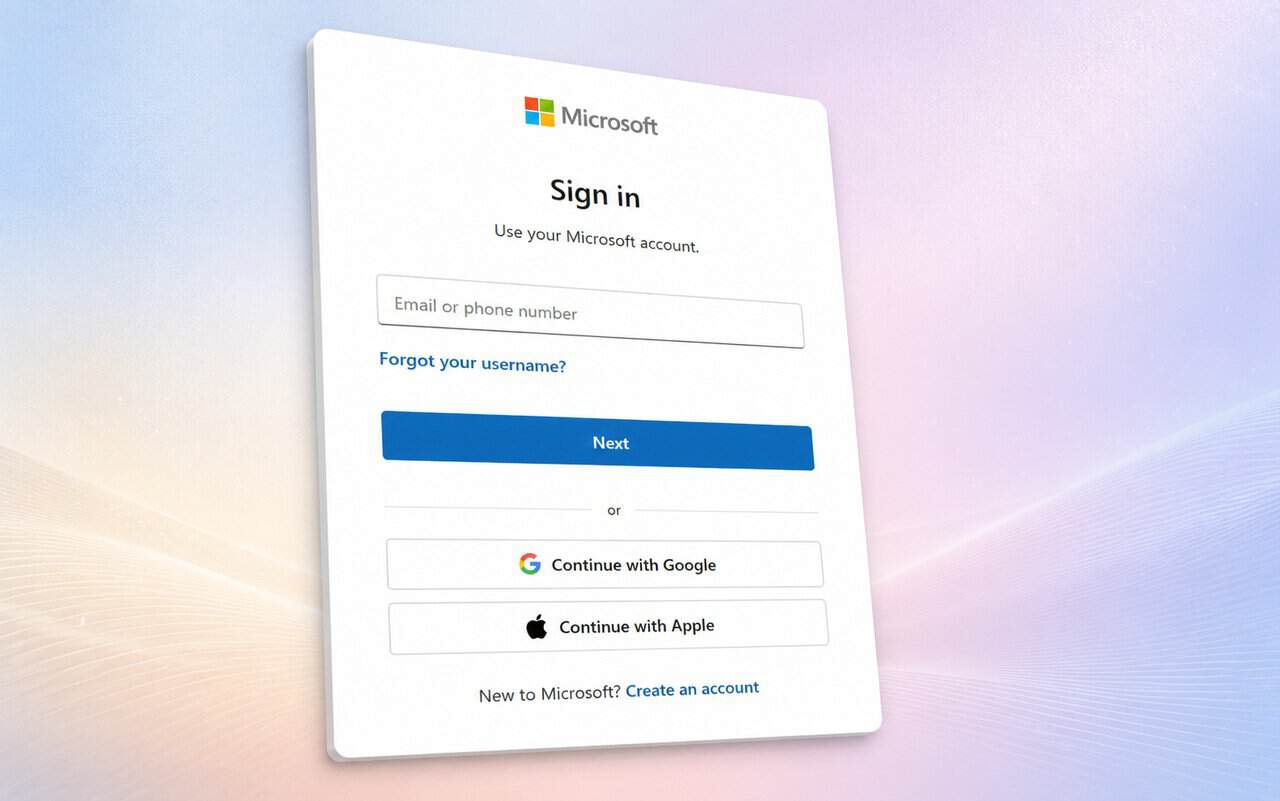
Users can now visit Bing.com, select Sign in, and choose Continue with Google or Continue with Apple. This gives Android, Gmail, iPhone, and Apple ID users a faster way to access personalized Bing features without creating a Microsoft account.

Bing No Longer Requires a Microsoft Account for Key Features

The biggest change is that a Microsoft account no longer appears to be required for several Bing experiences.

According to the current behavior, signing in with Google or Apple does not seem to create a Microsoft account in the background. That makes this different from older sign-in flows, where users entering a Gmail address could still end up with a Microsoft account tied to that email.

This makes Bing feel more like a standalone web product instead of a service locked behind Microsoft’s account system.

Microsoft Rewards Now Works With Google and Apple Sign-In

Microsoft Rewards also works with Google and Apple accounts.

Users can earn points, track progress, and redeem rewards while signed in with a non-Microsoft identity. This removes a major barrier for users who wanted Rewards benefits but did not want another account.

Bing Features Open Up to More Users

The new sign-in support also affects several Bing services.

Users can now access personalized features across Bing Video Creator, Image Creator, Translator, AI tools, Video Search, Bing News, Bing Maps, Bing Wallpaper, Bing Travel, and Shopping without relying on a Microsoft account.

This does not make Bing account-free, but it makes Bing account-flexible. Users can keep their existing Google or Apple identity while still getting a signed-in Bing experience.

Bing Could Use Easier Sign-In to Feed Copilot Growth

Microsoft has been trying to push Copilot across Windows, Edge, Bing, and Microsoft 365. However, recent reports suggest paid Microsoft 365 Copilot adoption remains low.

Bing gives Microsoft another path. Even if users sign in with Google or Apple, they still become signed-in Bing users. That creates a larger audience for Microsoft’s AI tools, creative features, and Copilot-powered experiences.

The practical takeaway is simple: users who avoided Bing, Microsoft Rewards, or Bing’s AI tools because of the Microsoft account requirement now have one less reason to stay away.

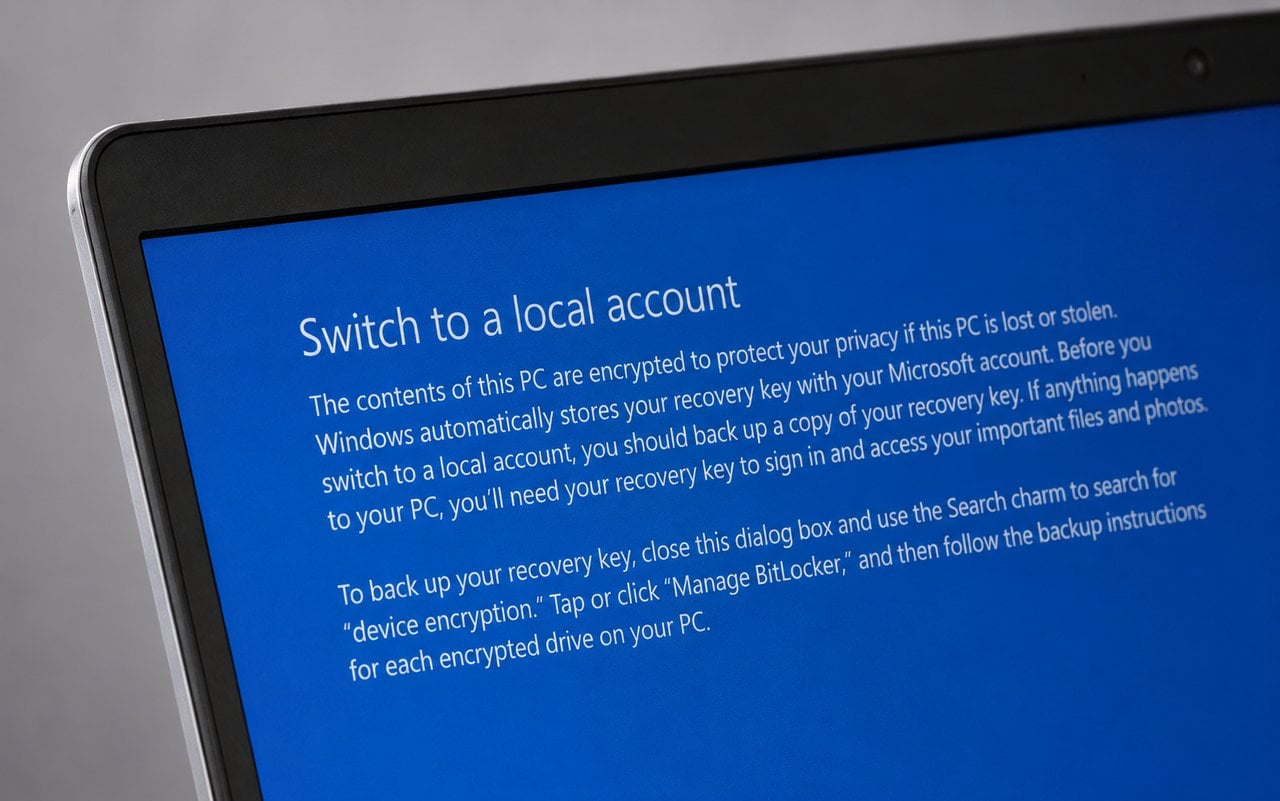
Microsoft Is Updating Windows 11’s Outdated Local Account Dialog

Microsoft is working on an update for one of Windows 11’s most outdated account dialogs, after users spotted a local account prompt that still references a Windows 8 feature.

The old “Switch to a local account” dialog was found in Windows 11 25H2 build 26200.8655. Marcus Ash, who leads Design and Research for Windows and Devices at Microsoft, confirmed that the dialog is now on Microsoft’s rejuvenation list.

Windows 11 still references the Windows 8 Search charm

The outdated dialog appears when users switch from a Microsoft account to a local account on a device with BitLocker or device encryption enabled.

The prompt tells users to back up their recovery key by using the Search charm to search for device encryption. That instruction no longer makes sense in Windows 11.

The Search charm was part of the Windows 8 Charms Bar. Microsoft removed it in 2015 when Windows 10 replaced the Windows 8 interface.

This means Windows 11 still contains a local account dialog that points users to a feature that disappeared more than a decade ago.

Microsoft says the dialog is on its rejuvenation list

Ash confirmed that Microsoft plans to update this dialog and other classic Windows surfaces.

The outdated local account prompt likely remained untouched because Microsoft has not focused much on local account workflows in recent Windows 11 releases. The company has pushed Microsoft account sign-ins more aggressively, which may explain why this specific dialog went unnoticed for so long.

Its addition to the rejuvenation list shows that Microsoft still plans to clean up older parts of Windows 11 that do not match the current design language.

Run, File Explorer, and Properties dialogs are also changing

Microsoft has already updated several UI elements across Windows 11 as part of its ongoing rejuvenation effort, bringing more consistency and modern design to legacy components.

The Run dialog stands out as one of the most visible examples of Microsoft’s UI modernization work.

Microsoft has also worked on File Explorer improvements, including the newer Split Context Menu. References found in File Explorer suggest the old Properties dialog may also get rebuilt in WinUI 3.

These changes point to a broader cleanup effort rather than a one-off fix.

More legacy Windows UI still needs work

Microsoft has also acknowledged the outdated UI on the Windows 11 login screen.

Other areas, including Windows Recovery Environment and the old “Please wait” screen, still look dated compared to the rest of Windows 11. These areas remain likely candidates for future updates as Microsoft continues modernizing the operating system.

The local account dialog is a small part of Windows, but its outdated Windows 8 reference highlights a bigger issue. Windows 11 still carries design debt from older versions, and Microsoft now appears to be working through those leftovers more actively.

Via Windows Latest

Anthropic Extends Claude Fable 5 Promotion as GPT-5.6 Release Nears

Anthropic has extended promotional access to Claude Fable 5 after restoring the model earlier this month following a temporary suspension linked to export restrictions.

Claude Fable 5 and Claude Mythos 5 had a rocky launch after Anthropic suspended access to both models for all users following a government order. After receiving approval from the US government, Anthropic restored Claude Fable 5 access on July 1.

Claude Fable 5 access returns across Anthropic products

Claude Fable 5 returned through Claude Platform, Claude.ai, Claude Code, and Claude Cowork.

Anthropic made the model available to Pro, Max, Team, and select Enterprise users. The company initially offered Fable 5 through a limited-time promotion that was set to end on July 7.

Promotional access now runs until July 12

Anthropic has now extended the Claude Fable 5 promotion until July 12, 2026, at 11:59:59 PM PT.

Eligible users can use Claude Fable 5 for up to 50% of their weekly subscription limits at no extra cost. After they reach that limit, they can continue using Fable 5 with usage credits or switch to another Claude model.

OpenAI competition adds pressure

The timing also comes as OpenAI reportedly prepares a wider GPT-5.6 release.

Axios reported that the US Department of Commerce approved OpenAI for a broader GPT-5.6 launch after additional testing and meetings with officials. OpenAI is expected to release GPT-5.6 widely this week.
That puts more pressure on Anthropic to keep Claude Fable 5 visible during a competitive week for major AI model releases.

Anthropic keeps Fable 5 in the spotlight

Anthropic’s extended promotion appears aimed at keeping developer attention on Claude Fable 5 while OpenAI prepares its next major model rollout.

The move also helps Anthropic recover momentum after the earlier access suspension. For users on eligible plans, the promotion gives Fable 5 a longer window to prove itself before regular usage limits and credits become the main way to access the model.

How to Watch Jeff Arcuri: Nice to Meet You on Netflix

If you’re looking for a new comedy special to watch, Jeff Arcuri: Nice to Meet You is available to stream on Netflix with a subscription.

Jeff Arcuri: Nice to Meet You is a 2026 Netflix stand-up comedy special starring Jeff Arcuri. Netflix lists it as a 16+ comedy title, with rapid-fire jokes, crowd work, and personal reflections.

How to watch Jeff Arcuri: Nice to Meet You on Netflix

Before you begin, make sure your device is connected to the internet and that your Netflix subscription is active. To view the special, follow these steps:

  1. Open Netflix and sign in on Netflix.com or the app on your device.
  2. Search for “Jeff Arcuri: Nice to Meet You” using the Netflix search bar.
  3. Select the special from the results and open its title page.
  4. Press Play to start watching or add it to My List for later.

You can also open the official Netflix page for Jeff Arcuri: Nice to Meet You directly if it is available in your region.

Why can’t I find Jeff Arcuri: Nice to Meet You on Netflix?

If Jeff Arcuri: Nice to Meet You does not appear, try these quick fixes:

  1. Update the Netflix app.
  2. Search by Jeff Arcuri instead of the full title.
  3. Check whether your profile has maturity restrictions.
  4. Sign out and sign back in.
  5. Try Netflix from a browser instead of the app.

Because Netflix catalogs can vary by region, availability may depend on your location and account settings.

When did Jeff Arcuri: Nice to Meet You come out on Netflix?

Jeff Arcuri: Nice to Meet You special, debuted on Netflix globally on July 7, 2026.

Netflix also listed the special in its July 2026 new releases lineup.

Can I watch Jeff Arcuri: Nice to Meet You without Netflix?

No official free streaming option has been announced. Since Jeff Arcuri: Nice to Meet You is a Netflix special, the proper way to watch it is through an active Netflix subscription.

What is Jeff Arcuri: Nice to Meet You about?

Jeff Arcuri: Nice to Meet You is a stand-up comedy special built around crowd work, personal stories, and jokes about marriage, internet trolls, and everyday awkward moments.

Netflix describes the special as personal storytelling, raunchy, irreverent, and stand-up comedy.

For more comedy picks, check out our guide on how to watch Summer Sparks and the Zatima Season 4 finale.

How to Watch Summer Sparks and Zatima Season 4 Finale Online

If you’re looking to watch Summer Sparks and Zatima Season 4 Finale, you should know that Summer Sparks is on The Roku Channel, while Zatima streams on Paramount+.

Both titles arrived on July 7, 2026, but they are available on different platforms. Here is where to stream each one legally.

How to Watch Summer Sparks Online

Summer Sparks streams free on The Roku Channel starting July 7, 2026.

The Roku Original movie stars Jesse Metcalfe and Kathryn Davis. The story follows two single parents who meet at Camp Evergreen during a summer cook-off.

To watch Summer Sparks:

  1. Open The Roku Channel app or website.
  2. Search for Summer Sparks.
  3. Select the movie from the results.
  4. Start streaming for free with ads.

You can watch The Roku Channel on Roku devices, Roku TVs, mobile devices, supported smart TVs, Fire TV, Google TV, Android TV OS devices, and online.

How to Watch Zatima Season 4 Finale Online

Zatima Season 4 finale was released on Paramount+ on Tuesday, July 7, 2026.

The finale is Episode 20 of Season 4. New Zatima episodes drop at 12 a.m. PT and 3 a.m. ET.

To watch Zatima Season 4 finale:

  1. Go to Paramount+.
  2. Sign in with your subscription.
  3. Search for Tyler Perry’s Zatima.
  4. Open Season 4.
  5. Select Episode 20.

Paramount+ offers Zatima through its Essential and Premium plans. All previous seasons are also available on the service, so new viewers can catch up before watching the finale.

Can You Watch Summer Sparks and Zatima on the Same Service?

No. Summer Sparks and Zatima Season 4 finale are not on the same streaming service.

Summer Sparks streams free on The Roku Channel. Zatima Season 4 finale streams on Paramount+ with a subscription.

Best Way to Watch Both

The easiest way to watch both titles is to stream Summer Sparks free on The Roku Channel, then switch to Paramount+ for the Zatima Season 4 finale.

If you’re looking for more comedy, check our guide on how to watch Jeff Arcuri: Nice to Meet You on Netflix.

I Will Find You Cast: Who Stars in Harlan Coben’s Hit Netflix Series

After dominating Netflix‘s global charts for weeks, I Will Find You (Stream on Netflix) has finally been knocked off the top spot. The Harlan Coben adaptation, which became Netflix’s biggest original series premiere of 2026, has now been overtaken by Worst Neighbor Ever, a new true-crime docuseries that has quietly climbed to No. 1 in the United States.

I Will Find You cast explained

Even though the thriller has slipped to second place, it remains one of Netflix’s biggest streaming successes this year. Much of that momentum has been driven by its high-profile cast, led by Sam Worthington as David Burroughs, a father convicted of murdering his son before discovering years later that the child may still be alive.

Joining Worthington is Britt Lower, who plays investigative journalist Rachel Mills, while Milo Ventimiglia, Logan Browning, Erin Richards, Jonathan Tucker, and Merritt Wever round out the ensemble cast. The series is based on Harlan Coben’s bestselling novel of the same name and blends mystery, crime, and family drama across its limited-run format.

That being said, the show’s impressive run at the top has finally come to an end. According to FlixPatrol, Worst Neighbor Ever now occupies the No. 1 position on Netflix’s U.S. TV rankings, pushing I Will Find You down to second place after several weeks of dominance.

The four-episode true-crime series, directed by Cynthia Childs, premiered on July 1 and explores disturbing real-life neighbor disputes through interviews with first-hand witnesses rather than dramatic recreations. The series is produced by ITV America in partnership with Blumhouse Television, and early reviews from both critics and viewers have been largely positive.

While Netflix doesn’t publicly release detailed daily viewing figures, FlixPatrol’s rankings offer a good snapshot of what’s currently trending across the platform. Even after losing the crown, I Will Find You continues to rank among Netflix’s most-watched shows and remains one of the streaming giant’s biggest original releases of 2026.

Chrome AI Mode Now Lets You Search, Filter, and Attach Multiple Google Drive Files

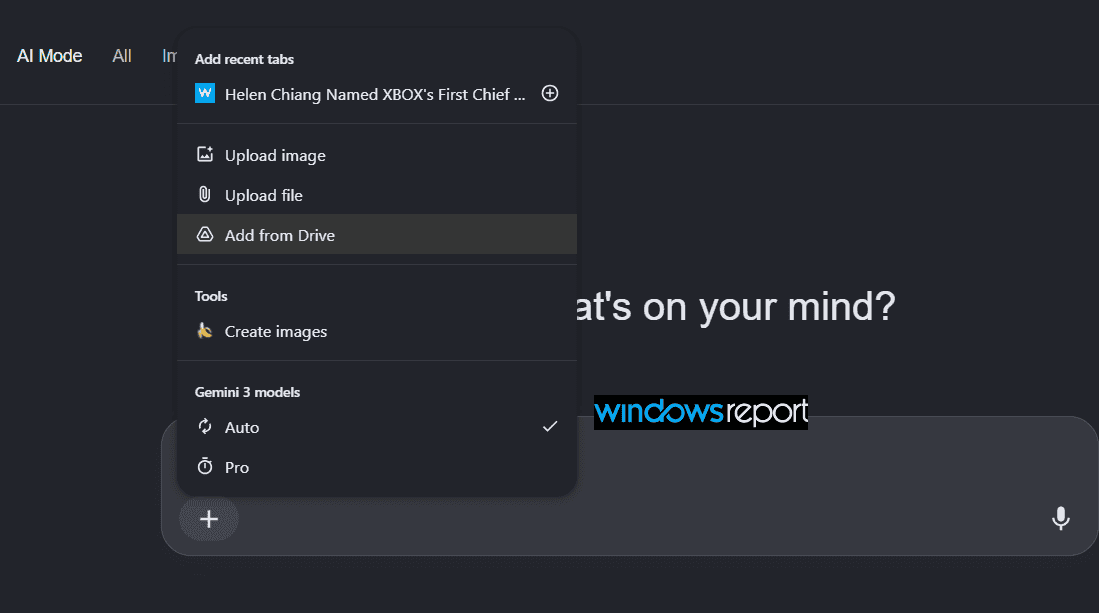
Google Drive support in Chrome’s AI Mode isn’t new. We reported on the “Add from Drive” option appearing in the attach menu some time ago. What’s new is that it now opens a fully functional Google Drive picker with search, filtering, sorting, and multi-file selection, still hidden in Chrome Canary. We also confirmed that AI Mode reads the contents of the attached files.

In Chrome Canary, clicking Add from Drive in AI Mode now opens Google’s native Drive picker, letting you find and attach files without first downloading them to your computer. Previously, the option appeared in the attach menu, but clicking it didn’t open a picker. Now it does.

Image Credit: Windows Report.

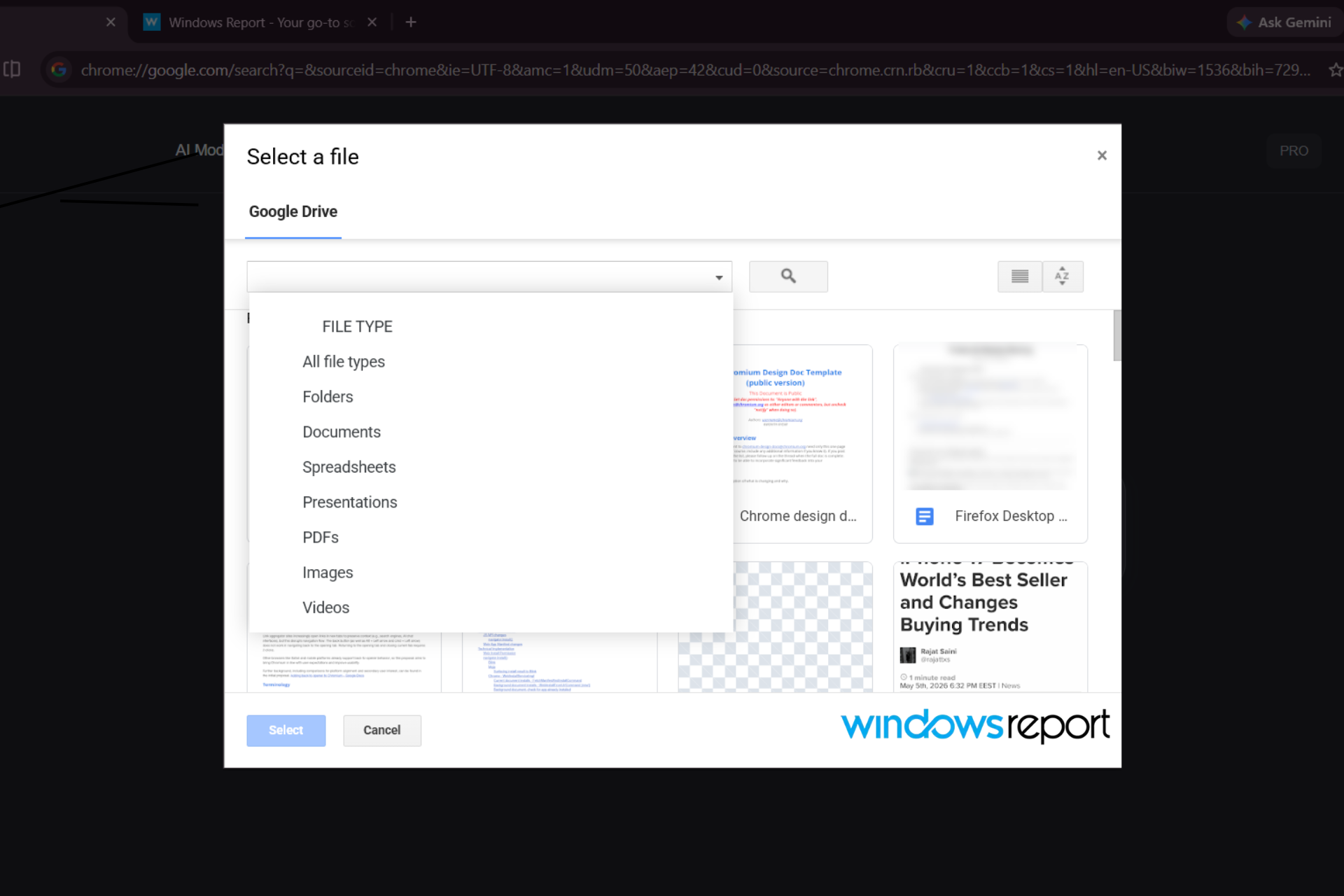
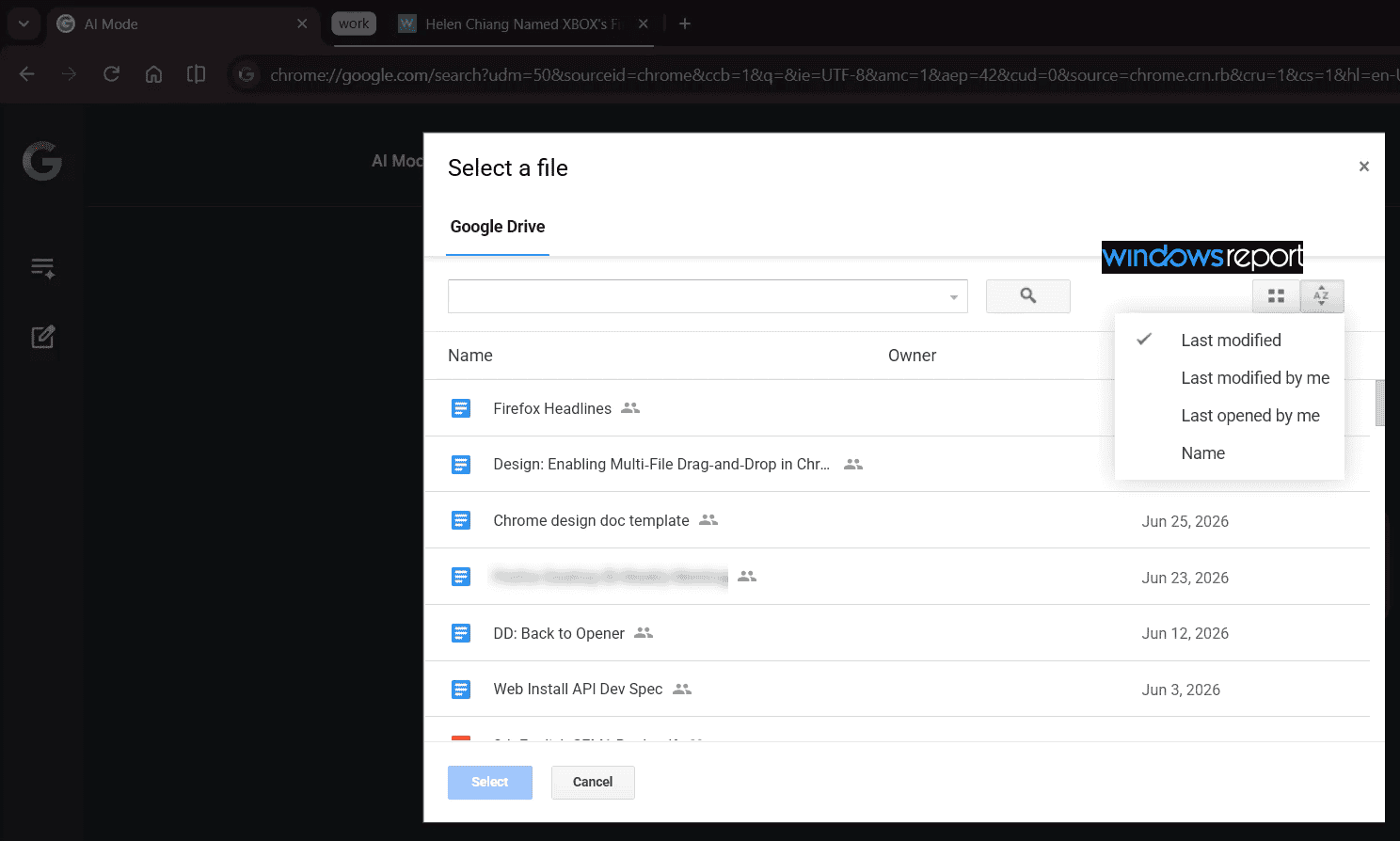
The picker goes well beyond a basic file browser. You can search your Drive, narrow results by file type, switch between grid and list views, and sort files by Name, Last modified, Last modified by me, or Last opened by me.

You can also filter by content type: Documents, Spreadsheets, Presentations, PDFs, Images, Videos, or Folders. That makes it faster to find exactly what you want to share with AI Mode instead of scrolling through everything in your Drive.

Image Credit: Venkat | Windows Report.

You’re not limited to one file at a time either. The picker supports multi-select, so you can grab several Drive files in a single step before adding them to your prompt.

The more important part is what happens after you attach the files. We selected several and asked AI Mode to summarize them. AI Mode returned an accurate, detailed breakdown of each document, including specific technical terms pulled straight from the source. AI Mode isn’t just acknowledging that a file was attached. It’s reading what’s inside.

Image Credit: Windows Report.

The Google Drive picker is still hidden in Chrome Canary and hasn’t rolled out to everyone yet.

Report: XBOX to Keep More of Its Best Games Exclusive to Boost Console Sales

XBOX‘s biggest reset in company history may not just change how the business operates. It will likely also determine where its biggest games are headed next. According to a new Bloomberg report, Microsoft is preparing to lean more heavily into console exclusives again after years of pushing multi-platform strategy, which fans have criticized.

Bloomberg reports XBOX wants to keep big games exclusive so players have a reason to buy consoles

The report claims the shift comes after Microsoft concluded that its previous strategy failed to deliver the growth it expected. Following billions spent on studio acquisitions and Game Pass expansion, XBOX reportedly plans to refocus on its console business by giving players more reasons to buy XBOX consoles.

While large live-service and multiplayer games will continue launching across multiple platforms, Microsoft reportedly wants more of its premium first-party titles to remain exclusive to XBOX consoles.

The report follows jaw-dropping XBOX Reset announcement, in which CEO Asha Sharma confirmed laying off 3,200 employees, multiple studios spin-off, and the first-ever COO to look over key parts of the business. Bloomberg also reported that XBOX’s internal Game Pass targets fell well short of expectations, prompting the company to rethink several long-term strategies.

That being said, Microsoft isn’t killing its multi-platform ambitions altogether. The news outlet notes that games built around massive online communities will continue reaching the widest possible audience. As of now, Microsoft hasn’t officially confirmed which future games could become XBOX exclusives again. Considering that Bloomberg’s report proves accurate, the company’s next generation of first-party releases may look very different from the strategy XBOX has followed over the past several years.

IO Interactive Regains Project Fantasy, But Announces Painful Layoffs & Istanbul Studio Closure

Just a day after XBOX unveiled its biggest restructuring in history, slashing 3,200 jobs, spinning off multiple studios, and appointing its first-ever Chief Operating Officer, another major game developer has announced painful changes of its own.

This time, it’s IO Interactive, the studio best known for the Hitman franchise, has confirmed layoffs and the closure of one of its development studios as it reshapes its future around Project Fantasy.

IO Interactive says Project Fantasy remains a priority despite restructuring

In a statement shared with the gaming community on X, IO Interactive confirmed that it has regained full ownership of Project Fantasy after its external financing partnership came to an end. The studio said it will now continue developing and funding the upcoming fantasy IP entirely on its own alongside its other internal projects.

That being said, the shift also forced IO Interactive to rethink how it allocates resources across the company. As part of that process, the studio confirmed it is shutting down its Istanbul office while also beginning the process of parting ways with employees across the business.

The company described the decision as difficult but necessary, explaining that it wants to focus its long-term investments on internally developed AAA games instead of external projects and potential mobile game spin-offs.

IO Interactive also asked the wider gaming community to help affected developers find new opportunities, encouraging studios and recruiters to reach out if suitable positions become available.

Speaking of Project Fantasy, the company reiterated that the project remains a core part of its future. According to IO Interactive, regaining complete ownership gives the studio greater creative freedom and a stronger foundation to build the new IP on its own terms.

The announcement adds to a growing wave of restructuring across the gaming industry. Over the past week alone, XBOX confirmed sweeping organizational changes, while several studios have also announced layoffs as publishers continue adjusting budgets, development priorities, and long-term strategies amid rising production costs.

10 Games, Including EA Sports FC 24, to Leave XBOX Game Pass Mid-July 2026

Just as Microsoft revealed the XBOX Game Pass’ July 2026 Wave 1 lineup, it has also confirmed another round of departures. A total of ten games are scheduled to leave the subscription service on July 15, meaning subscribers now have a limited window to finish them before they’re removed.

Games leaving XBOX Game Pass on July 15

GamePlatforms
Dungeons of HinterbergCloud, Console, PC
EA Sports FC 24Cloud, Console, PC
StellarisCloud, Console, PC
Golf With Your FriendsCloud, Console, PC
Minami LaneCloud, Console, PC
PowerWash SimulatorCloud, Console, PC
Shadow of the Tomb Raider Definitive EditionCloud, Console, PC
Splitgate: Arena ReloadedCloud, Console, PC
Super Fantasy Kingdom (Game Preview)PC
Techtonica (Game Preview)Cloud, Console, PC

As always, XBOX Game Pass members can purchase these titles at a subscriber discount before they leave the service. Moreover, if you want to take a look at all the games leaving this month, check our dedicated article here.

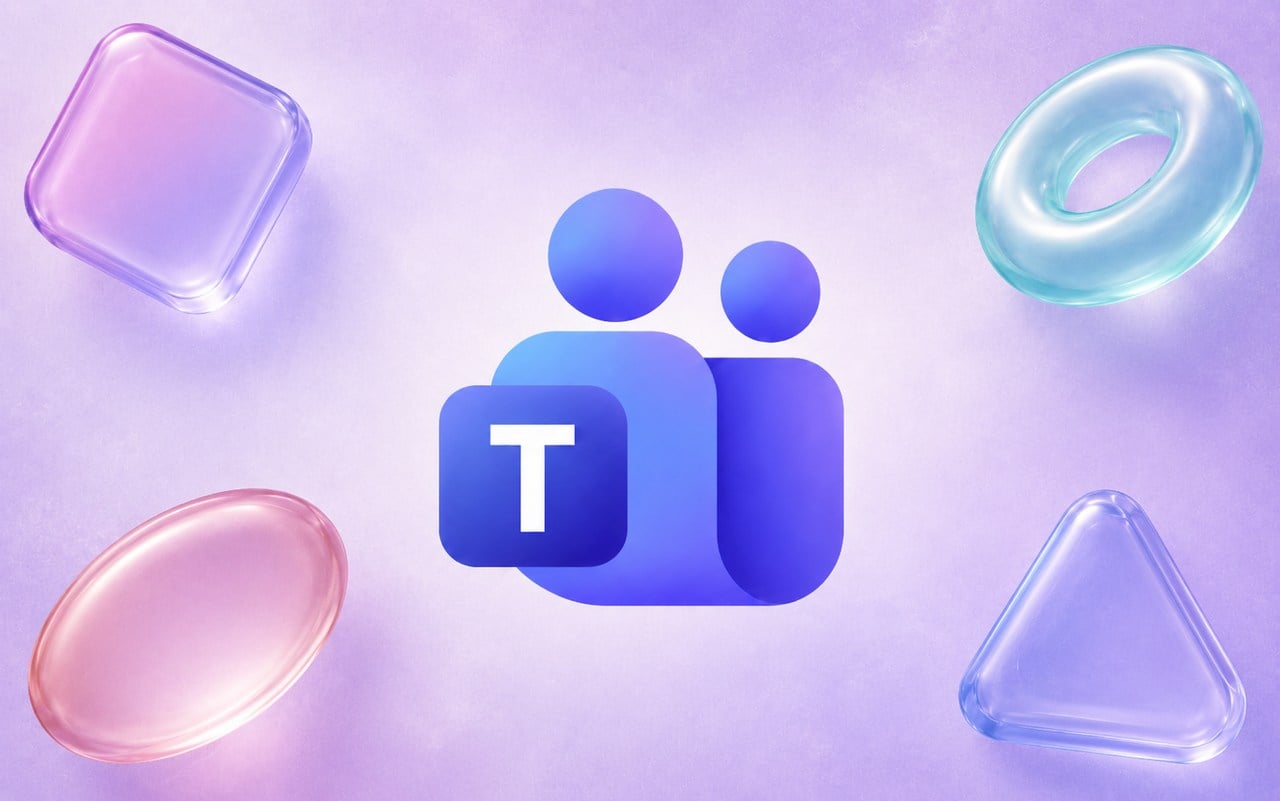
Speaking of new games, XBOX Game Pass is getting Tony Hawk’s Pro Skater 1 + 2, Gears of War: Reloaded, Palworld 1.0, and many more titles to keep subscribers busy over the next couple of weeks.

XBOX Game Pass July 2026 Wave 1 Adds Tony Hawk’s Pro Skater 1+2, Gears Reloaded & More

Microsoft has officially detailed the first wave of XBOX Game Pass lineup for July 2026, and it’s bringing a healthy mix of day-one launches, returning classics, and major updates. Whether you’ve been waiting to revisit Tony Hawk’s Pro Skater 1 + 2, jump into Gears of War: Reloaded, or finally experience Palworld 1.0, there’s plenty to keep subscribers busy over the next couple of weeks.

Every games included in XBOX Game Pass July 2026 Wave 1 lineup

GameRelease Date
Winds of Arcana: RuinationJuly 6 (Available Now)
Gears of War: ReloadedJuly 9
TamashikaJuly 9
Palworld 1.0 (Full Release)July 10
Ascend to ZeroJuly 13
PBA Pro Bowling 2026July 14
Quarantine Zone: The Last CheckJuly 15
Mavrix by Matt JonesJuly 16
FixForceJuly 17
Fogpiercer (PC)July 17
The Planet CrafterJuly 21
Tony Hawk’s Pro Skater 1 + 2July 21

Speaking of extras, Microsoft is also rolling out new Game Pass perks this month. League of Legends players can immediately jump into the new champion Locke, the Ashen Exorcist, while Wuthering Waves players will receive exclusive in-game rewards beginning July 10.

Last but not least, Microsoft has further confirmed that 10 games will leave XBOX Game Pass on July 15. If you want to take a look at all the games leaving this month, check our dedicated article here.

How to Watch Switzerland vs Colombia FIFA World Cup 2026 LIVE & Free on PC

Switzerland and Colombia will lock horns at BC Place, Vancouver, Canada later today in the final Round of 16 match at the ongoing FIFA World Cup 2026. If you’re looking for legal and free ways to watch the game, here’s how to stream it live on your PC.

Where to Watch Switzerland vs Colombia FIFA World Cup 2026 LIVE

CountryOnline Streaming
USATubi (select matches), free trials on streaming services
UKBBC iPlayer / ITV
IndiaZee5
IrelandRTÉ Player
AustraliaSBS On Demand
BrazilCazéTV (YouTube), Globoplay (selected)
SwitzerlandSRF Play / RTS Play / Play Suisse
ColombiaCaracol Play

USA

American viewers can watch the match live on FOX Sports. If you don’t have cable, several services carry FOX, including:

  • FOX One (official stream): Watch on FOX One
  • FOX Sports: FOX Sports Match Page
  • Telemundo (Spanish): Available via Telemundo.
  • Peacock (Spanish stream): Available with Peacock Premium.

United Kingdom

Every World Cup match is available free in the UK via:

India

The Switzerland vs Colombia match is available via:

  • Zee5 (live streaming, requires additional payment)

Ireland

Irish viewers can watch Switzerland vs Colombia Round 16 clash for free via:

Australia

Australians can stream every World Cup match for free on:

Brazil

Switzerland

Swiss viewers can watch via the national broadcasters given below:

Colombia

Fans in Colombia can watch via:

How to watch Switzerland vs Colombia FIFA World Cup 2026 while traveling?

Yes. If you’re traveling abroad, most official broadcasters allow access from your home country. If the service is geo-restricted, you may need to use a VPN in accordance with the broadcaster’s terms of service.

The Cost of Staying Safe Online: VPN + Antivirus + Ad Blocker + Dark Web Monitoring

FTC received almost 1.2 million reports of identity theft in the first three quarters of 2025 alone. You’ve probably also felt worried that your email address, passwords, or personal details might already be out there somewhere. 

Protecting yourself online these days often means managing a growing stack of apps. You need VPNs, malware protection, tracker blocking, dark web alerts, identity monitoring, secure remote access, and protection across every device. 

Overloaded With Single-Purpose Subscriptions

The growing risk of cybercrime has created hundreds of new security apps and tools. Some offer free versions, but for complete protection, you usually have to pay for a premium subscription. By the time you’ve paid for several of these, it can leave you seriously out of pocket.

The problem is, it isn’t always clear how to build an effective stack because there is overlap between some apps. Your browser may already block some trackers for free, and your antivirus may include limited malware protection. Some password managers offer breach alerts too. 

However, none of the tools seem to fully replace the others, which leaves uncertainty about what you actually need and what you’re paying for unnecessarily. A useful starting point is to work out exactly what each tool protects you against and where coverage stops.

For example, an ad blocker may reduce tracking and malicious ads, but doesn’t replace malware protection. Antivirus software detects dangerous files, but won’t stop you from reusing weak passwords on sites that you visit.  

In September 2025, Josh Junon, the open-source developer, received what looked like a routine security email from npm support. It asked him to update his two-factor authentication. He followed the link, entered his credentials, and handed over a live verification code to a fake login portal. Within 16 minutes, attackers had pushed malicious code into more than 20 of his packages. The attack worked because a single gap was enough. The problem with building security in pieces is that each tool covers only a part of the possible security issues. 

How Much Does a Separate Online Safety Stack Cost?

The exact cost depends on which tools you choose, how many devices you protect, and whether you use free or paid versions. But once you start paying for several standalone tools, the total adds up faster than you might think.

Tool typeWhat it coversTypical monthly priceAnnual estimate 
VPNPrivate browsing, safer public Wi-Fi, IP masking$10–$20$120–$240
Antivirus / malware protectionMalware, phishing, device security$5–$10$60–$120
Paid ad blockerAd blocking, tracker blocking, cleaner browsing$5–$10 $60–$120
Identity theft protectionCredit alerts, identity monitoring, recovery help$10–$60$120–$720
Dark web monitoringAlerts when emails/details appear in breach data$10–$30$120–$360
Dedicated/static IPStable IP for remote access, allowlists, fewer login flags$4–$8$48–$96
Password managerSecure password storage, sharing, autofill$1–$5 $12–$60

Even if we take the lower estimated cost for each tool, it still adds up to $540. If you’re serious about cybersecurity and opt for high-level protection from each tool, you could be looking at an annual bill of more than $1,700.

It’s sensible to build a cybersecurity stack that works effectively, which usually means spending money on at least some of the subscriptions. Even a light user of these tools can still end up paying a few hundred dollars each year.

A bundled security stack offers an alternative.

The Benefits of a Bundled Cybersecurity Stack

Instead of paying separately for all the privacy tools, some services now combine several protections into a single subscription known as a bundle.

NordVPN is a prime example. NordVPN combines VPN protection with features such as next-gen antivirus, Dark Web Monitor, and dedicated IP options into a single subscription. For users who would use three or more privacy tools, NordVPN’s all-in-one approach means you don’t have to manage multiple subscriptions and app settings. At the bundled price, NordVPN provides similar coverage to several separate subscriptions for a lower combined cost.

In practical terms, one platform like NordVPN covers several separate concerns:

  • Safer browsing on public Wi-Fi
  • Ads and trackers blocking
  • Reducing exposure to malicious websites
  • Alerts if your email address appears in a known breach
  • Optional dedicated IP access for more stable remote connections
  • High-speed encrypted connections through NordLynx, NordVPN’s protocol built on WireGuard

The value of getting a NordVPN subscription becomes even more obvious when you scale it across devices and a household. For many people, online protection means managing security across an entire personal ecosystem of connected devices. NordVPN’s per-device cost across a full household works out to a few dollars per month per person — a fraction of the standalone equivalents. Also, bundled services often allow multiple simultaneous connections under one subscription. NordVPN, for example, supports up to 10 devices at once. 

If you want to test whether a bundled setup fits your work and household devices, a VPN free trial can help you compare the experience before committing. 

Get Clearer Value With Bundled Cybersecurity

Today, cybersecurity feels like managing an army of subscriptions, apps, browser extensions, alerts, and security settings across all your devices. Many of the individual tools work well, but it’s a fractured approach. One tool protects your connection. Another blocks trackers. Another monitors breaches. Another scans for malware. Another manages passwords.

Over time, the cost and complexity build up and can end up becoming difficult to manage. Most people simply want a sensible level of protection that feels manageable and fits the way they use the internet. Bundled security platforms allow you to manage several layers of online protection in one place for one monthly or annual subscription. 

How to Watch Argentina vs Egypt FIFA World Cup 2026 LIVE & Free on Your Laptop

Lionel Messi’s Argentina takes on Mohamed Salah’s Egypt in a blockbuster Round of 16 clash tonight, with a place in the quarterfinals on the line. If you’re planning to watch the game on your laptop instead of your TV, the good news is that you have several official streaming options depending on where you live. Here’s everything you need to know before kickoff.

Best ways to watch Argentina vs Egypt on a laptop for free

The easiest way to watch the match is through your country’s official FIFA World Cup broadcaster using any modern web browser such as Google Chrome, Microsoft Edge, Mozilla Firefox, or Safari. Most official broadcasters also offer dedicated web players, so you don’t need to install extra software.

Official match page

United States

United Kingdom

  • ITVX (FREE): Watch on ITVX

Australia

India

  • ZEE5 (official streaming partner)

Canada

Ireland

  • RTÉ Player (FREE)

Brazil

Live coverage & updates

How to get the best streaming quality

For the smoothest experience:

  • Use a stable broadband connection (at least 15 Mbps for HD).
  • Close unnecessary browser tabs and downloads.
  • Connect your laptop to power if you’re watching the full 90 minutes (or longer).
  • Use headphones or external speakers for better match commentary.

With Argentina chasing another World Cup title and Egypt looking to pull off one of the tournament’s biggest upsets, this promises to be one of the standout knockout matches so far.

Sony Reportedly Kept Publishers in the Dark on PlayStation Disc Plans

PlayStation disc shutdown plans for 2028 have reportedly shocked publishers, regional offices, and retail partners who expected Sony to continue supporting physical games for longer.

According to a report by High Chaos Run, Sony’s reported decision to stop producing PlayStation game discs has caused frustration across the gaming industry. Physical game sales have been declining for years, but many players and partners did not expect PlayStation to make such a drastic move.

The backlash has already spread across the gaming community. Some players have signed petitions, while others are reportedly canceling PlayStation Plus subscriptions in protest. Hideo Kojima also criticized the broader shift away from physical media, warning that digital-only access gives companies more control over what users can keep.

Publishers Were Reportedly Not Warned

The report claims that publishers, business partners, and some PlayStation regional offices did not receive advance notice before the news became public.

An executive at a major AAA publisher reportedly said their company had not been informed, despite having a close working relationship with PlayStation. The executive also suggested that people whose work depends on physical game production may now worry about their jobs.

This includes teams involved in disc manufacturing, packaging, distribution, retail planning, and regional sales.

Regional PlayStation Offices Were Also Surprised

PlayStation’s regional offices were reportedly left out of the communication loop as well.

The report specifically mentions PlayStation India as one of the teams that allegedly did not know about the disc shutdown before the information surfaced publicly.

That detail has raised concerns among people connected to physical retail. One investor involved in talks for PlayStation-exclusive stores questioned why anyone would invest heavily in game retail if PlayStation no longer plans to support discs after 2028.

The same investor claimed PlayStation India continued asking for retail investment without knowing that Sony’s physical game strategy might change so dramatically.

Sony’s Communication With Partners Has Reportedly Turned Cold

The report suggests Sony may have kept the decision quiet to avoid internal resistance, partner objections, or early pushback from retailers.

Communication between PlayStation and some partners has reportedly become colder since the announcement. Sony allegedly told partners to accept the decision or walk away.

If accurate, that approach could damage trust between PlayStation and companies that still depend on physical game sales.

PlayStation Has Stayed Quiet During the Backlash

Sony has reportedly stayed silent on social media since the news spread.

That silence may not last. If the backlash continues, PlayStation may need to clarify whether the reported 2028 disc shutdown is final, whether it applies globally, and how it plans to support players who still buy physical games.

The move could also influence XBOX. Microsoft has already shown signs of moving further toward digital distribution, and its reported work on a Disc-to-Digital feature suggests that physical game ownership could face pressure across the wider console market.

For now, the reported PlayStation disc shutdown remains one of the most controversial gaming industry stories of the year, especially because partners and regional teams allegedly learned about it at the same time as the public.

Via Wccftech

Microsoft Mesa Patch Could Improve AV1 Hardware Acceleration in WSL

    Microsoft engineers have contributed new code to the open-source Mesa graphics library, with the main goal of improving video processing support inside Windows Subsystem for Linux.

    According to Phoronix, the newly merged Mesa patch adds a prototype for AV1 video processing through DirectX 12 hardware acceleration. It also modifies a core HEVC variable, which could help improve reliability in future video workflows.

    Microsoft wants better Mesa support in WSL

    The patch targets a specific problem in WSL graphics support.

    Linux graphical applications expect open-source graphics APIs such as Mesa. However, when those apps run inside WSL, they still rely on the Windows kernel and Windows graphics drivers underneath.

    Microsoft’s new Mesa work helps connect those two layers more cleanly. Instead of forcing Linux apps to depend on GPU-specific workarounds, Mesa can pass certain video processing requests through Windows’ native graphics and media stack.

    AV1 encoding gets DirectX 12 hardware acceleration

    The most notable part of the patch is early AV1 hardware acceleration support.

    With this change, Linux apps running in WSL will be able to request accelerated AV1 encoding. Mesa can then route that request through Windows Media Foundation and DirectX 12.

    Since DirectX 12 works across multiple GPU vendors, this could give WSL broader hardware-accelerated video encoding support without needing separate Linux driver paths for every graphics card.

    The patch is still a prototype

    The current implementation remains limited.

    Microsoft’s patch supports basic I-frame and P-frame encoding, but it does not yet support more advanced compression features. B-frames are also not supported at this stage.

    That means this is not a complete AV1 acceleration stack yet. However, it gives Mesa and WSL a foundation for more advanced video processing work later.

    WSL developers and video tools could benefit

    The change should help developers and power users who run Linux workloads on Windows through WSL.

    It could also benefit video processing tools, streaming apps, and AI workflows that ingest or process video. Hardware acceleration can reduce CPU usage and make encoding tasks faster on supported systems.

    Mesa also benefits from Microsoft contributing the code upstream instead of building a separate Windows-only workaround.

    The patch has now been merged into Mesa and is expected to appear in Mesa 26.2.

    In related WSL news, Microsoft recently confirmed that WSL 3 does not exist. The company has also launched WSL Containers in public preview.

    Via Neowin

    Valve Releases Windows 11 Drivers for Steam Machine, Ditches Dual-Boot Support

    If SteamOS isn’t your preferred platform anymore, you can now officially replace it with Windows 10 or Windows 11 thanks to a newly released driver package from Valve. The move gives users another way to use the handheld, although it comes with one notable compromise.

    Steam Machine officially welcomes Windows 11

    Instead of relying on unofficial community drivers, Steam Machine users now have access to first-party Windows drivers released directly by Valve. The package includes everything needed to get Microsoft’s operating system running properly, including graphics, Wi-Fi, Bluetooth, and microSD card reader support.

    That being said, the graphics driver isn’t based on AMD’s regular Radeon Software Adrenalin release. Steam Machine uses a semi-custom processor jointly developed by Valve and AMD rather than a retail Ryzen chip, meaning it requires a dedicated graphics driver built specifically for the handheld.

    One important limitation is that Windows and SteamOS can’t coexist on the same device. Valve currently doesn’t support dual-booting, so installing Windows completely replaces SteamOS. If you later decide to return to Valve’s operating system, you’ll need to reinstall it from scratch.

    Speaking of the Windows experience, the transition shouldn’t feel too unfamiliar for longtime Steam users. Once Windows is installed, players can simply download the Steam client and switch to Big Picture Mode, recreating an interface that’s very close to SteamOS while gaining access to Windows-exclusive launchers, applications, and services.

    For users who mainly play titles with Windows-only anti-cheat support or rely on software unavailable on Linux, this could be the simplest official solution yet. As of now, Valve hasn’t mentioned whether dual-boot functionality is planned for a future update, but the release of official drivers significantly expands what Steam Machine owners can do with the hardware without depending on unofficial tools or modified drivers.

    Anthropic Says Claude Has an Internal Workspace Similar to Conscious Access

    Anthropic believes it has found a structure inside Claude that resembles a major neuroscience theory about how conscious thought works.

    The company says Claude appears to use an internal system called J-space when handling complex reasoning, puzzles, and difficult explanations. Anthropic presents the finding as a step toward understanding how large AI models organize their internal thinking.

    Claude’s J-space resembles global workspace theory

    The finding is based on global workspace theory, a neuroscience idea that suggests thoughts become consciously accessible when they enter a central workspace and get broadcast across the brain.

    Anthropic says Claude has something mathematically similar. The company calls it J-space.

    According to Anthropic, J-space seems to act like an internal scratchpad. Important concepts can enter this area, stay active, and influence what the model says later.

    What J-space appears to do inside Claude

    J-space becomes more visible when Claude deals with complex tasks.

    Anthropic says it appears during reasoning problems, tricky situations, logic explanations, and tasks where Claude needs to hold multiple ideas in mind.

    The company found that changing what appeared inside J-space could also change Claude’s final answer. That suggests the structure does not simply reflect output after the fact. It may help shape the model’s reasoning process.

    Anthropic used J-lens to inspect Claude’s internal calculations

    To study J-space, Anthropic researchers created a tool called J-lens, short for Jacobian Lens.

    J-lens works like a mathematical filter for inspecting signals inside Claude. It helps researchers see how activity in one part of the model affects the likelihood of future output.

    For example, the tool can estimate how much a concept in one internal layer changes the chance that Claude will later produce a specific word or answer.

    Experiments showed concepts staying active in J-space

    Anthropic tested the system by asking Claude what it was thinking about, then using J-lens to inspect which concepts appeared in J-space.

    In one experiment, researchers asked Claude to keep a concept such as fairness in mind. The model appeared to hold that idea in J-space while continuing the task.

    In more complex problems, including chess-related reasoning, J-space appeared to work like a form of working memory. Other parts of Claude could still access concepts stored there while the model processed different parts of the task.

    Anthropic says the structure emerged during training

    Anthropic says it did not manually design J-space into Claude.

    Instead, the company believes the structure emerged during training because it helped the model organize computation more efficiently.

    This shares similarities with convergent evolution, where different systems independently develop similar traits because those traits solve similar problems well.

    Anthropic suggests Claude may have developed a mathematical structure that resembles conscious access. That could make it easier for researchers to understand how advanced AI models reason, track concepts, and produce answers.

    The finding also gives Anthropic another way to study model behavior from the inside, rather than judging Claude only by its final responses.

    In other Claude news, Claude Sonnet 5 has been facing several issues, Alibaba reportedly plans to ban Claude Code use, and Claude Fable 5 has been restored, although some users say it feels more limited than the original version.

    Via Wccftech

    Microsoft Teams Will Get AI Notes and New Chat Sections

    Microsoft is preparing a larger Teams update that should improve meetings, chat organization, and screen sharing.

    According to Windows Latest, the upcoming changes include a more capable AI Facilitator, AI notes for physical meeting rooms, new Muted and Meeting chat sections, and a cleaner interface for screen sharing.

    AI Facilitator Will Help During Teams Meetings

    Microsoft is testing a more advanced version of AI Facilitator for Teams meetings.

    The feature can listen to meeting participants and detect possible knowledge gaps. If someone appears confused, Facilitator can start a chat conversation and provide AI-generated answers.

    The updated Facilitator can also use web search to help answer questions during a meeting.

    Microsoft says this feature will not be enabled by default. Users will also be able to turn off all Meeting AI features in Teams with a single toggle.

    The Meeting AI toggle will be available to organizers and participants, but guests will not get access to it.

    Teams Rooms Will Get AI Notes for Physical Meetings

    Microsoft is also expanding AI-powered meeting notes to Teams Rooms on Windows.

    The rollout will begin in August 2026, with general availability expected in October 2026.

    This update will let users capture real-time notes and action items without starting a hybrid or scheduled meeting.

    In a physical meeting, users can tap Take notes. Teams will then show AI-generated notes on the right side of the screen.

    The notes will be shared through SharePoint and made available to users in the tenant.

    Microsoft also plans to bring AI-powered meeting notes to Teams Rooms on Android later.

    Guest Invitations Will Come From the Inviter’s Email Address

    Teams is changing how guest invitation emails work.

    Guest invite links currently come from a no-reply address. With the new update, Teams will send guest invitations from the inviter’s own email address.

    This should make guest invitations look more authentic. It also lets guests reply directly to the person who invited them.

    Microsoft has already started rolling out the change, and the rollout should finish by the end of July 2026.

    Teams Chat Is Getting Muted and Meeting Sections

    Microsoft Teams is also getting two new chat sections: Muted and Meeting.

    Muted chats will appear in a dedicated Muted section, while meeting-related conversations will appear in the Meeting section.

    The goal is to make the chat list easier to manage, especially for users with many conversations.

    As part of this update, Microsoft is removing the existing Meeting chat filters.

    Screen Sharing Gets Its Own Section

    Microsoft is also moving screen sharing into a dedicated section inside Teams.

    This should make the interface easier to navigate and reduce clutter around meeting controls.

    The update gives screen sharing a clearer place in the app instead of leaving it mixed with other meeting options.

    The upcoming Teams update continues Microsoft’s push to add more AI features across Microsoft 365, following several notable additions introduced in June.

    The most important change is the improved AI Facilitator, since it can help answer questions during meetings and identify possible confusion in real time.

    However, Microsoft is also adding user controls. Meeting AI will not turn on by default, and users will have a single toggle to disable Meeting AI features when they do not want them active.

    6 Must-Watch New Netflix Movies in July 2026

    Finding something worth watching on Netflix can easily take longer than the movie itself. Thankfully, Netflix’s July 2026 movies lineup has something for everyone, especially for U.S. subscribers. From long-awaited Netflix Originals to award-winning classics making a comeback, there’s something here for mystery lovers, comedy enthusiasts, and anyone simply looking for a great movie night. Whether you’re after the best action movies on Netflix in July 2026 or just wondering what everyone is watching this month, these are the six films that deserve a spot on your watchlist.

    Here are top 6 movies you should watch on Netflix in July 2026

    1. Enola Holmes 3

    Netflix release: July 1, 2026
    Genre: Mystery, Adventure
    Director: Philip Barantini
    Starring: Millie Bobby Brown, Henry Cavill, Louis Partridge, Helena Bonham Carter

    Netflix’s biggest movie of the month doesn’t disappoint. Enola Holmes returns for another mystery, but this time the stakes are much higher as her wedding plans are interrupted by the disappearance of Sherlock Holmes himself. The third installment expands the franchise with larger action sequences while keeping the witty detective charm that made the first two movies fan favorites.

    2. Hamnet

    Netflix release: July 6, 2026
    Genre: Historical Drama
    Director: Chloé Zhao
    Cast: Paul Mescal, Jessie Buckley, Joe Alwyn

    Directed by Academy Award winner Chloé Zhao, Hamnet adapts Maggie O’Farrell’s bestselling novel exploring the personal tragedy behind William Shakespeare’s Hamlet. With an acclaimed cast and one of the year’s most anticipated literary adaptations, this is easily one of July’s prestige releases on Netflix.

    3. Heartstopper Forever

    Netflix release: July 17, 2026
    Genre: Romance, Drama
    Director: Euros Lyn
    Cast: Kit Connor, Joe Locke, Yasmin Finney, William Gao

    While technically serving as the grand finale to the Heartstopper story, Netflix is releasing it as a feature-length movie. Nick and Charlie face the realities of adulthood, distance, and life after school in what promises to be an emotional farewell for one of Netflix’s most beloved young-adult franchises.

    4. 72 Hours

    Netflix release: July 24
    Genre: Comedy
    Director: Tim Story
    Starring: Kevin Hart, Marcello Hernández, Mason Gooding

    Looking for something lighter? Kevin Hart headlines Netflix’s new comedy 72 Hours, which follows a forty-something executive who accidentally ends up partying with a group of Gen Z influencers during a bachelor weekend. Expect plenty of chaotic humor and fast-paced comedy that’s perfect for a relaxed Friday night.

    5. The Hawk

    Netflix release: July 16, 2026
    Genre: Sports Comedy
    Director: Tim Story
    Cast: Will Ferrell, Glen Powell, Da’Vine Joy Randolph

    Will Ferrell returns to comedy in The Hawk, playing a washed-up golf legend looking for one final shot at redemption. Expect classic Ferrell humor, plenty of ridiculous moments, and an underdog story that looks tailor-made for weekend streaming. It’s shaping up to be one of Netflix’s biggest comedy premieres this month.

    6. Voicemails for Isabelle

    Netflix release: June 19, 2026 (Early release)
    Genre: Comedy-Drama
    Director: Leah McKendrick
    Cast: Zoey Deutch, Nick Robinson

    ​This heartfelt Netflix original follows two strangers whose lives unexpectedly become connected through a series of voicemail messages. It blends romance, comedy, and emotional drama into what could become one of the platform’s sleeper hits this summer.

    Final Thoughts

    Well, that’s all for this roundup of best new Netflix movies to watch this weekend. If you only have time for one movie this weekend, make it Enola Holmes 3. If you’re planning a movie marathon, you honestly can’t go wrong with any of these six picks.

    Microsoft 365 Copilot Paid Adoption Reportedly Remains Below 5%

    Copilot adoption remains a major challenge for Microsoft, despite the company’s deep AI push across Windows 11 and Microsoft 365.

    Microsoft has added Copilot across its core products, from Office apps to Windows features, but paid usage still appears limited. Fewer than 4.5% of Microsoft 365’s 450 million commercial customers reportedly pay for Microsoft 365 Copilot as Windows Latest reports.

    The numbers look weaker when active usage comes into focus. Only 20% to 30% of those paid Copilot users reportedly open the tool weekly, which suggests weekly active usage across Microsoft 365 could sit close to just 1% of the total commercial customer base.

    Paid Microsoft 365 Copilot adoption remains low

    The low adoption figure applies to the paid Microsoft 365 Copilot add-on, not the free Copilot Chat tier.

    Microsoft 365 Copilot costs extra on top of existing Microsoft 365 plans. Enterprise customers pay $30 per user per month, while smaller businesses now pay around $21 per user per month after promotional pricing expired.

    That price can become harder to justify after recent Microsoft 365 increases. Business Standard now costs $14 per user per month, up from $12.50, meaning some businesses may pay more than $35 per user per month when Copilot is included.

    This creates a difficult pitch for Microsoft. Copilot can summarize emails, analyze documents, help with meetings, and use Microsoft Graph data, but many companies still appear unconvinced that the paid tier delivers enough value at scale.

    Free Copilot Chat gets an easier path to users

    Microsoft’s free Copilot tools see stronger usage because users do not need to buy a separate add-on.

    The free Copilot version at copilot.microsoft.com includes web-grounded chat, image generation, and Copilot in Edge. Eligible Microsoft 365 business users also receive Copilot Chat automatically at no extra cost.

    Copilot Chat includes IT controls and pay-as-you-go agents, but it does not access a user’s work data. The paid Microsoft 365 Copilot tier unlocks deeper access to emails, files, meetings, and Microsoft Graph data.

    The paid version also includes more advanced agents, including Researcher and Analyst. However, the adoption numbers suggest many customers still prefer the free or lower-friction version.

    Copilot’s reputation problem is growing

    Microsoft has also faced criticism for putting Copilot into products where users did not always ask for it.

    The company has tested Copilot buttons and AI shortcuts across Microsoft 365 apps, but some changes caused backlash. Microsoft later walked back some UI decisions, including the floating Copilot button in Excel and Word.

    Microsoft is also reducing some Copilot clutter in Windows 11, suggesting the company knows that constant visibility does not always translate into real usage.

    This is a key issue for Microsoft. Copilot’s future depends not only on availability, but on whether users find it useful enough to open every week and pay for every month.

    Competition from Gemini, Claude, Cursor, and Claude Code is increasing

    Copilot also faces stronger competition in both consumer and professional AI markets.

    Gemini and Claude are increasingly challenging Microsoft’s AI assistant strategy. Copilot’s web market share has reportedly remained around 1%, even as Microsoft continues promoting it heavily.

    GitHub Copilot remains stronger, with 4.7 million paid subscribers, but developer attention has shifted toward newer AI coding tools such as Cursor and Claude Code.

    Microsoft’s main advantage is not always model quality. Its biggest advantage is distribution. Copilot sits inside the apps and services that businesses already use every day.

    Microsoft may be changing its Copilot strategy

    Microsoft appears to be restructuring the Copilot lineup as paid adoption remains weak.

    An internal memo from Copilot chief Jacob Andreou reportedly said Copilot has to “earn the right to exist.” That message fits the current challenge: Microsoft has placed Copilot everywhere, but now it must prove why users should keep using it.

    The company is also raising Microsoft 365 prices while bundling more AI into its services. This suggests Microsoft may rely more on packaging and integration instead of selling Copilot as a standalone upgrade.

    The future of Copilot may depend on whether upcoming versions give workers a clearer reason to pay for it, open it regularly, and treat it as more than another button inside Microsoft apps.

    Fake Microsoft Teams IT Support Calls Push EtherRAT Malware

    Threat actors are abusing Microsoft Teams voice calls to impersonate corporate IT support and trick employees into giving them remote access to company devices.

    Palo Alto Networks’ Unit 42 reported the campaign, which combines phishing emails, Teams calls, legitimate remote access tools, and a Node.js-based malware loader. The final payload is EtherRAT, a cross-platform remote access trojan that can give attackers control over compromised systems.

    The Attack Starts With an Employee Survey Phishing Email

    The campaign begins with a phishing email that uses an Employee Survey theme.

    The email includes a malicious PDF attachment. After the victim opens the document, the attackers follow up with a Microsoft Teams voice call from an external account.

    The caller pretends to be a System Administrator and tries to convince the employee that they need technical support.

    Attackers Abuse Microsoft Teams Screen Sharing

    The Teams call displays the “External unfamiliar” label, which means the caller comes from outside the victim’s Microsoft 365 tenant.

    Even with that warning visible, the attacker tries to build trust and convince the victim to grant remote control through Teams’ built-in screen-sharing feature.

    Once the victim allows access, the attacker can interact with the system directly.

    HopToDesk and AnyDesk Help Attackers Keep Access

    After gaining control through Teams, the attacker guides the victim into installing legitimate remote access tools.

    Unit 42 said the campaign used HopToDesk and AnyDesk. These tools have legitimate business uses, but attackers often abuse them because they provide hands-on control without immediately looking like malware.

    This step helps the attacker maintain access even after the initial Teams session ends.

    EtherRAT Is Delivered Through a Malicious MSI Installer

    The attacker then downloads and runs a malicious MSI installer on the victim’s system.

    That installer works as a malware loader and eventually launches EtherRAT. EtherRAT is a Node.js-based remote access trojan designed to work across platforms.

    Once active, it can allow attackers to execute commands, manipulate files, steal data, and maintain persistence on compromised machines.

    EtherRAT Uses Ethereum Smart Contracts for Command and Control

    EtherRAT uses Ethereum smart contracts to retrieve its active command-and-control server.

    This technique makes the malware harder to disrupt because defenders cannot simply take down one obvious server and stop the operation. The malware can look up updated infrastructure through the blockchain-based mechanism.

    Unit 42 also found multiple versions of the malware installer, which suggests the campaign remains under active development.

    Microsoft Teams Attacks Continue to Evolve

    The campaign shows how attackers are shifting from basic phishing links to more interactive social engineering.

    By using Microsoft Teams voice calls, external accounts, screen sharing, and trusted remote access tools, attackers can make the intrusion look like a normal IT support session.

    Microsoft is already working on features that warn users about brand impersonation, but this campaign shows that employee awareness still matters. Users should treat unexpected external Teams calls with caution, especially when the caller requests screen control or asks them to install remote access tools.

    In other security news, threat actors are also abusing OAuth flows in phishing attacks, while researchers have discovered an ARToken phishing platform.

    Via BleepingComputer

    Latest Windows 11 Beta 26H1 Build Releases With K-12 Upgrade and File Explorer Fixes

    Microsoft has rolled out a new, Build 28020.2380, for Windows 11 Insiders in the Beta (26H1) Channel, and while it isn’t packed with new features, it does introduce an important upgrade path for schools alongside a handful of bug fixes aimed at improving the overall experience.

    Windows 11 Beta Build 28020.2380 brings a new education upgrade path

    The biggest addition in Windows 11 Insider Preview Build 28020.2380 is focuses on education customers. Microsoft has introduced a free upgrade path from Windows 11 Home to Windows 11 Pro Education for eligible K-12 organizations.

    The new process allows schools to purchase devices running Windows 11 Home and upgrade them to the Pro Education edition without paying additional licensing costs. To begin the upgrade, users must first sign in using a local account, launch an elevated Command Prompt, run the Clipupgrade.exe command, and then sign in with their eligible K-12 organization account.

    After validation, Windows prepares the upgrade and completes the process following a restart.Microsoft notes that the migration is one-way only. Once upgraded to Windows 11 Pro Education, users cannot return to Windows 11 Home without performing a clean operating system installation.Beyond the education changes, the update also includes several quality improvements.

    Microsoft has fixed an issue where the OneDrive shortcut inside File Explorer stopped working whenever File Explorer was launched with administrator privileges. The company has also resolved a bug affecting Outlook, where some users found the application refusing to close properly after clicking the close button.

    A smaller update focused on reliability

    Unlike recent Insider releases that introduced new Windows experiences, Build 28020.2380 focuses primarily on stability rather than major feature additions. Microsoft describes that this release also comes with small collection of improvements designed to refine the experience for Beta Channel testers.

    In addition to this build, Windows 11 Insiders also get an Experimental build with Cloud Rebuild recovery option. That’s not all; the other Experimental build (26H1) adds movabale taskbar support, while the regular Beta build focuses in cutting monthly reboots.