Lake game review: Who knew delivering mail could be this relaxing

Lake is a game about taking a break. About escaping from the busy day-to-day city life and getting away from computers or phones and getting back in touch with your social self.

It’s September 1986 and Meredith, a programmer who has moved to the big city to work on cutting edge software (well, for 1986 at least) is asked by her dad to fill in for two weeks while he is on holiday. He’s the local postman in the lakeside US town of Providence Oaks and you’ll be delivering mail in his stead.

Life is Strange Normal

Error 403: Mail forbidden

Lake is a narrative game that lets you take it easy and do things at your own pace, you get a list of packages and letters to deliver each day and you drive around town to drop them off. Just a normal scenario mimicking everyday life, with no magic or supernatural elements, and that’s perfectly fine every once in a while.

There is no big central plot-line to follow or big story goal to work to, other than the decision you’ll have to make after two weeks: to stay or to go back into the fray. To help you form an opinion on that choice, you chat with people when they open the door and reacquaint yourself with old friends in the town you grew up in.

One such example is Kay, your best friend while growing up and someone who has lived the polar opposite life, while you went to the big city to make a career for yourself, she stayed in your hometown, had kids, and works at the local diner.

Be sure to pass that manual around!

Talking to the townspeople will help you discover yourself in a way and it certainly feels like it gives you enough freedom to make your own choices. I’m a people pleaser by nature and whenever someone asked for my help, I was eager to provide assistance.

During my two weeks in Providence Oaks, I helped a cat lady’s feline companion get back to good health after eating one too many cupcakes, allowed a young mechanic to watch a horror movie at my house because her parents wouldn’t let her and helped prevent deforestation and the building of apartments.

We’ll have a meowvelous time together.

No fear of missing out

Whenever I play a game, I want to be as efficient as possible in experiencing all the possible content. I’ll go out of my way to make sure that I don’t miss a single thing and will not require a second playthrough to get access to a part of the story where it branched off into multiple paths.

Whenever you talk to someone in Lake, there are branching choices you can make in the conversation and even some decisions that can lead to romance, but I never felt like I was losing access to other parts of the game.

If you simply deliver all your packages and mail every day, you’re guaranteed to get all the key interactions the game has to offer and it’s not to be underestimated how that eases the mind and relieves you of all FOMO-related stress.

A Beautiful, relaxing experience

(with this order of images, it looks like I kidnapped her cat, but I assure you I didn’t)

Lake is above all, a relaxing game. It helped me lift my foot off the gas pedal of everyday life a little bit and appreciate the simple, genuine interactions with the townsfolk.

The visuals help bring this experience home, they’re bright and colourful with playful shadows and a calm, overall ambiance. It’s like taking some days off from work, even though you’re technically still working in the game.

The slightly cartoony style fits the game perfectly and when it zooms in on characters during conversations, you can even notice a lot of time went into the lip-syncing, which really matched the narration.
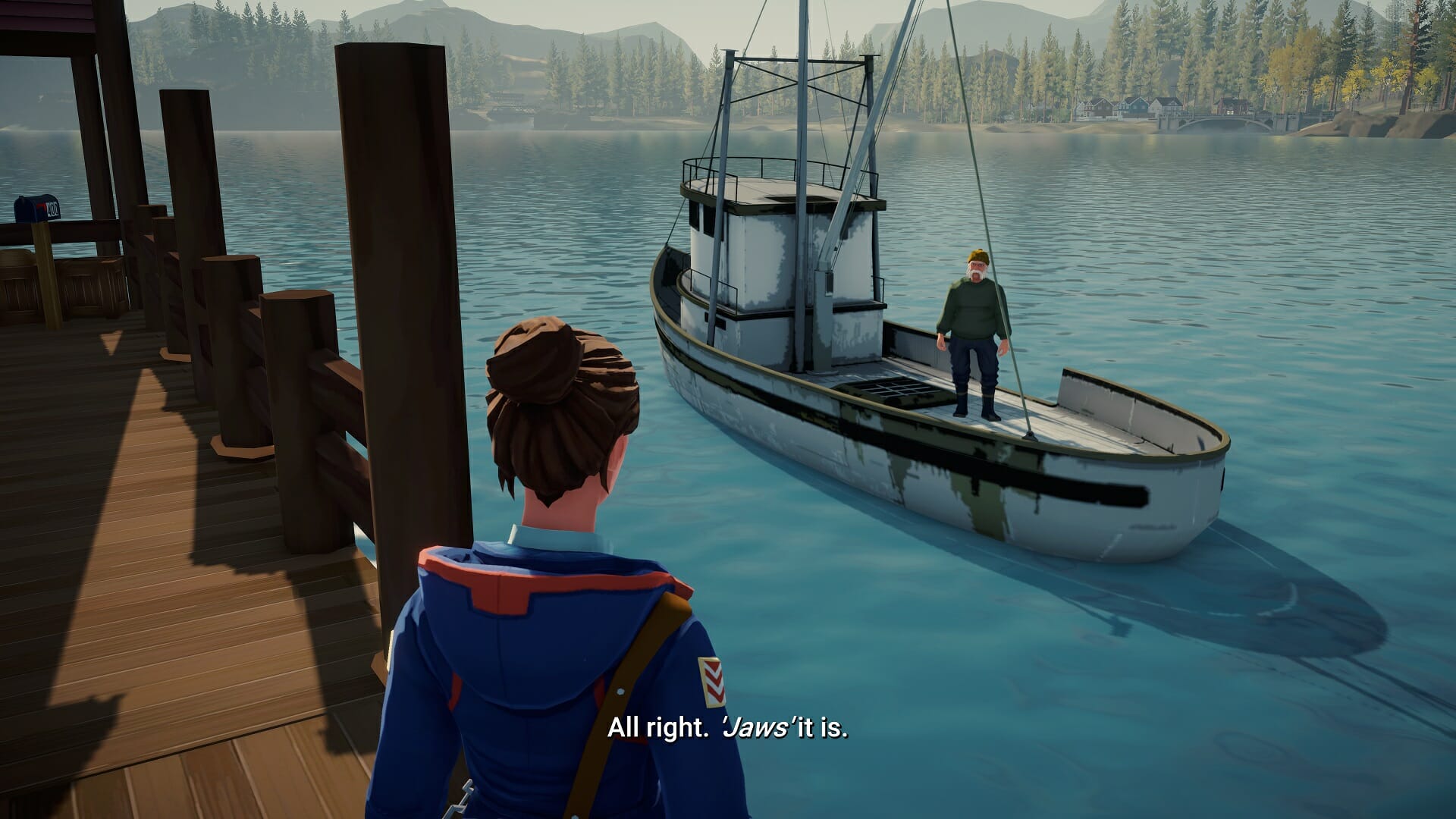
A very so-fish-ticated movie

The delivery of most characters’ voice acting is also spot-on. Outside of perhaps the above-mentioned cat-lady, I never felt like someone was trying too hard to portray a stereotypical persona and they all felt credible to me, including their drives and motivations.

How does it play?

Outside of the narrative choices, you’ll spend most of the game driving around in the Goose, your trusty mail truck, and deliver mail to addresses highlighted on your map. You can look at the minimap in the corner of your screen, or bring up a big version that shows you all the locations you will have to visit that day.

Small note: I thought it was weird that the game used RB to open the map, typically an action you’d press Select/Menu for.

The Goose. It honks. I get it now!

The game had a voice line near the very start about not needing the map soon enough, and I was critical of that idea because I’m notoriously bad at orientation, but true enough, when the second week started, I already knew the streets by heart.

It’s a decently sized area, but the minimal amount of streets makes it easy to navigate. Driving is a joy, with a world that feels alive because of the other cars, pedestrians, and even wildlife.

There is a fast-travel system in place and also an auto-pilot, but you’d be doing yourself a disservice by relying on those too much. Though auto-pilot is useful if you want to send a quick tweet – EDITOR’S NOTE: Don’t text & drive kids!

The map. I’d be lost without it.

Some minor issues

I’ve mostly been singing Lake’s praises so far, but there were still a few rough edges in the version I played on Xbox Series X, though let me preface this by saying that most of these will be fixed on day one or soon after.

I had some cars that seemed to float above the road, pictures not showing up and the loading screen freezing on me in a very particular situation when fast-traveling from one location to another. (See, I told you not to use fast travel. KARMA!)

There was even a moment when the old fisherman turned into a much smaller version of himself. But none of these were game breaking and in the last case, quite hilarious.

I’ve relayed all of the bugs I found to the developer and they should soon be fixed.

Tiny fisherman

What could have been better?

I did have some remarks while playing the game though, for example, I was very impressed with the lip-syncing but I was missing some emotions in the facial expressions on the characters. Joy, sadness, anger, they all didn’t translate as well visually, even though the voice actors do a great job.

Keep in mind that this is a small indie studio however and what they have here is already VERY impressive.

Second is the walking speed of Meredith, she’s rather slow on her feet and while there is a “run” button, it’s more like a slightly faster trot. In a game about slowing down and taking in the atmosphere though, I can look past this.

Lastly, the camera was a bit wonky at times. For instance, when walking down a staircase, it would show you the backside of those stairs when walking down.

All minor hindrances in an otherwise great game.

Get out of the way, Em! You’re blocking traffic!

Achievements

Lake only has hidden achievements and most of them are hard to miss if you follow through with all your package deliveries each day. There are a few contextual ones you can get, like finding a guy with a metal detector, climbing the watchtower, or going to the white chapel on a hill, but it’s easy to get them if you know where to look.

Near the ending of the game, there is one final choice you will have to make and each results in one of three different achievements though, so be sure to make a save file on the final playable day for efficiency reasons.

For completionists: All in all, it took me around 6-7 hours to beat the game on my first playthrough.

Need a hand with the Achievements? Check our useful Achievement Guide for Lake!

Final thoughts on Lake

Pros
Very nice visual style that feels soothing
A stress-free experience that slows you down
Interesting people to interact with
Cons
Some minor bugs at the time of writing
Not very replayable

Final Score: 4/5

Lake is a rare game that really forces you to slow down and take in its atmosphere. There is nothing supernatural about it, yet talking to the townspeople had a magical calming effect on me and I was honestly sad to see the credits roll. If you need a break from hectic everyday life, take a trip to the lake.

Lake has genuine human interactions, a bright visual art style that is like a balm for the soul, and a no-stress approach to story-telling. You’re guaranteed to come out of it a more relaxed human being after playing it.

Lake costs $19.99 and is currently available on PC and Xbox consoles, with other console versions on the way.

Disclaimer: Reviewed on Xbox Series X. Review copy provided by the developer.

Movie companies demand that VPNs log user data and disconnect pirates

You should probably know, if you’re into this kind of stuff, that a group of movie companies continues its legal efforts to hold VPN services liable for pirating subscribers.

A new pending lawsuit lists service providers like Surfshark, VPN Unlimited, Zenmate, and ExpressVPN as defendants.

Besides damages, the filmmakers want the VPNs to block pirate sites and start logging user data. The accused companies have yet to respond in court.

As a direct result of the growing threats against online privacy and security, VPN services have become increasingly popular in recent years.

Filmmakers ask for RARBG and The Pirate Bay to be shut down

It’s already a well-known fact that millions of people use VPNs to stay secure and prevent outsiders from tracking their online activities.

However, as with regular Internet providers, a subsection of these subscribers may be engaged in piracy activities.

Throughout the years, we’ve seen copyright holders take several ISPs to court, under charges of failing to disconnect repeat copyright infringers.

Now, these lawsuits have expanded, with VPN providers as the main targets.

Ever since the COVID-19 pandemic started and people spend more time at home, downloading and pirating movies of all sorts, the numbers have grown to staggering heights.

These above-mentioned lawsuits were filed by a group of independent movies companies that also took it upon themselves to go after piracy sites and apps.

Among them are the creators of blockbusters and award-winning movies such as The Hitman’s Bodyguard, Dallas Buyers Club, and London Has Fallen.

One of the main accusations is allowing VPN subscribers to bypass the geographical restrictions of streaming services such as Netflix.

The filmmakers bring to attention various examples of promotional pages where the VPN providers claim that their services can bypass blocking efforts and other restrictive measures.

In some cases, these VPN providers don’t even go to the trouble of hiding such actions, as the following announcement from UnlimitedVPN shows.

Besides bypassing geographical restrictions, the movie companies also list many examples of VPN subscribers who are directly involved in sharing pirated movies via BitTorrent.

And while BitTorrent can also be used legally, the VPN companies allegedly promote their service as a tool to download copyright-infringing material anonymously.

And that’s not all! Filmmakers also argue that some VPNs even partner up with notorious movie piracy websites, in order to promote their services.

As an example, the website YTS.movie encourages the use of ExpressVPN. It’s not immediately clear whether ExpressVPN is aware of that, however.
Hold on to your chair, because the list of grave accusations continues in a manner you wouldn’t have expected.

The movie companies also allege that VPN customers are engaged in other types of inadmissible conduct under this privacy shield, including racist comments, child pornography, and even committing murder.
Based on these claims, as well as others, the filmmakers argue that the VPN services are liable for direct, contributory, and vicarious copyright infringement.
Besides the money they solicit for these frauds, the movie companies also request that the VPN services start blocking known pirate sites such as The Pirate Bay and RARBG.

How do you feel about these legal actions being taken by these production companies? Share your opinion with us in the comments section below.

Microsoft mistakenly posts about public preview of Visual Studio Code for the web

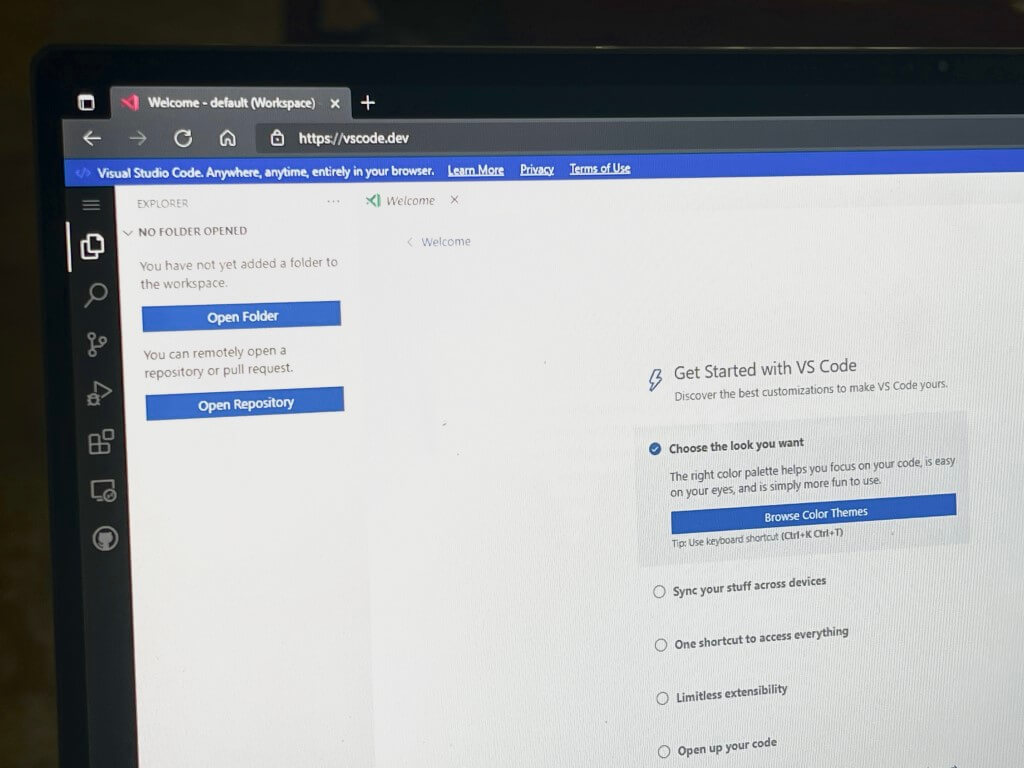
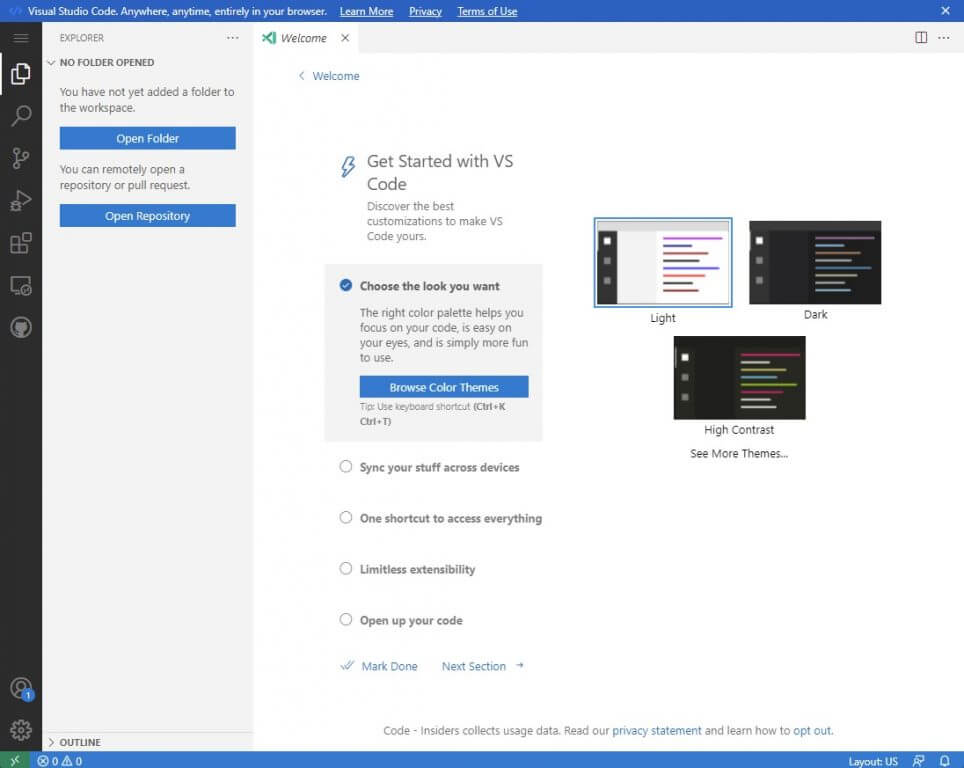
Though an official Microsoft announcement was posted by mistake and has since been deleted, a working version of vscode.dev is still available online. This browser-hosted version of Visual Studio Code lets developers open and browse source code hosted on GitHub and on a local machine (via Bleeping Computer.)
Microsoft tells us via email that a public preview of vscode.dev is not currently available, but Simon Bisson notes that it is working just fine with non-AAD accounts. We were able to log in to the experience using a personal Microsoft Account just fine. You can see a preview of the experience below.

Despite this not being an official public preview, overall, it looks pretty clean with some side toggles for opening repositories, searching, controlling sources, debugging, extensions and GitHub pull requests. Even the area to type code lines is pretty clean and close to the Visual Studio desktop experience.

As a web-based experience, it is important to note that vscode.dev will not have access to building, running, or debugging applications. It also won’t have access to an integrated terminal. Rather, it is more about using the browser as a sandbox for editing code. Bleeping Computer reports that developers can perform functions such as syntax highlighting, search, multiple file editing, and a source control view.

Update: We updated our headline and this article to clarify that a public preview isn’t available and that the Microsoft update was posted by mistake.

How to disable auto-provisioning on your Windows 10 PC

As much as we all love Windows as an operating system, we all have to admit that there are certain parts of it that give us some serious headaches every time we have to deal with them.

Although some system features are not customizable, most of the default settings that Microsoft enabled or disabled on your OS can be tweaked.

Today we are about to get into auto-provisioning for Windows 10, so stick around and find out how to disable and re-enable this feature, if you were to need it again.

How do I turn off auto-provisioning on Windows 10?

First of all, let’s make sure that everyone here understands exactly what auto-provisioning is.

Automated provisioning means having the ability to deploy information technology or telecommunications services using predefined automated procedures, without requiring human interventions.

The Disable-TpmAutoProvisioning cmdlet disables Trusted Platform Module (TPM) auto-provisioning.
Ok, now that we got this out of the way, let’s see how you can turn off such a feature if he no longer requires it, or if the actions he is trying to perform are impossible because of it.

For this operation, we will have to use one of Windows’ built-in tools, which is PowerShell. As you might know, this software is commonly used for automating the management of systems.

It is also used to build, test, and deploy solutions, often in CI/CD environments. PowerShell is built on the .NET Common Language Runtime (CLR).

You can disable provisioning completely or only for the next restart. You can use the Enable-TpmAutoProvisioning cmdlet to enable auto-provisioning.

And you can deactivate it completely, or just for the next restart. Here’s what you have to do:

Disable auto-provisioning permanently

  1. Open the search menu and type PowerShell, then click on the app in order to open it.step 1
  2. Once PowerShell is open, type in the following command.
Disable-TpmAutoProvisioning
TpmReady           : False
TpmPresent         : True
ManagedAuthLevel   : Full
OwnerAuth          : OwnerClearDisabled : True
AutoProvisioning   : Disabled
LockedOut          : False
SelfTest           : {191, 191, 245, 191...}

This command disables TPM auto-provisioning. You can use the Enable-TpmAutoProvisioning cmdlet to enable auto-provisioning.

Disable auto-provisioning for next restart

  1. Open the search menu and type PowerShell, then click on the app in order to open it.step 1
  2. Once PowerShell is open, type in the following command.
PS C:\> Disable-TpmAutoProvisioning -OnlyForNextRestart
TpmReady           : False
TpmPresent         : True
ManagedAuthLevel   : Full
OwnerAuth          : OwnerClearDisabled : True
AutoProvisioning   : DisabledForNextBoot
LockedOut          : False
SelfTest           : {191, 191, 245, 191...}

This command disables TPM auto-provisioning for the next restart. In the next restart after that, auto-provisioning continues.

So, just in case you need to disable this feature, now you know exactly how to do it. If you ever need more advice on how to deal with other situations, know that you are in the right place.

Was this article helpful to you’? Let us know in the comments section below.

Windows Terminal 1.11 is now available with Pane updates and other UI improvements

Microsoft is now rolling out Windows Terminal Preview version 1.11 for Windows Insiders and Windows Terminal 1.10. Windows Terminal 1.11 brings some new features like an acrylic title bar, improvements to the pane, and a lot more. We have you covered with a look at all the changes.

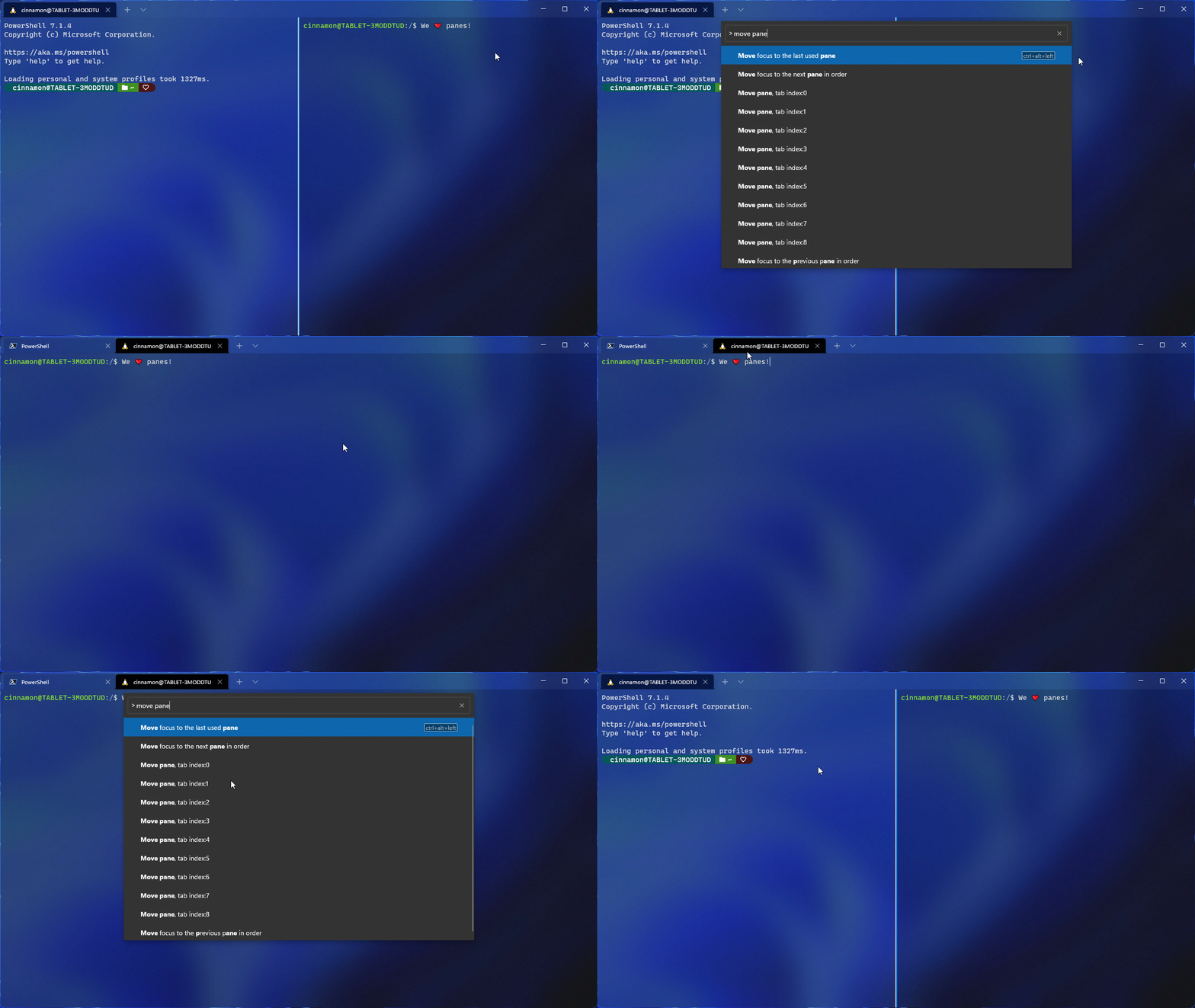
We’ll get into the Pane improvements first. Microsoft is introducing a move pane to tab feature to let you move an open pane to a new or existing tab. Also new is the ability to swap panes within a tab and split the tab in context view. These features should make multitasking in Windows Terminal easier. Microsoft thanks Schuyler Rosefield for most of these contributions.

Windows Terminal

Other than that there’s also a new setting toggle to make your title bar acrylic. This is in the appearance page of the settings UI, and it can be set in your global settings, though you’ll need to restart your terminal to see the difference. We noted the other changes for you below.

  • When adding keys to your actions, you now only have to type the key chord, rather than spelling out all of the keys (i.e. c-t-r-l).
  • The appearance settings that apply to your profile when unfocused are now in the settings UI.
  • The font object now accepts OpenType features and axes in the settings.json file.
  • You can now optionally minimize your terminal to the system tray. Two new global boolean settings were added for this functionality
  • You can now drag and drop directories and files onto the ‘+’ button, which will then open a new tab, pane, or window using the given starting path
  • When launching the terminal via the default terminal setting, the terminal will now use no profile rather than your default profile.
  • You can now choose how you want intense text to appear in your terminal by using the intenseTextStyle profile setting. You can either set your style to be bold, bright, both bold and bright, or have no additional styling added to it

The standard Windows Terminal release will be rolling out via the Windows Insider Program, and will go to retail once testing is finished. This is to ensure that any bugs are squashed. Note that all the features from Windows Terminal 1.10 are also in 1.11, except for the default terminal setting, the editable actions page, and the Defaults page of the settings UI. You can get these bulds today via the Microsoft Store, or from GitHub.

Task Scheduler Software: 7 Best to Download in 2026

If you run a busy office, that is a healthy indication of growth and productivity.

It’s also a good indication that you need a reliable system for scheduling tasks, managing appointments, and keeping track of your clients.

This is where scheduler software comes in handy. Scheduler software lets you schedule tasks easily.

It can open and run any program on your PC, add multiple tasks to its list and give you alert messages before executing any task.

You can also command the scheduler software to shut down or start the computer at a specified time and do more.

The native Windows Task Manager can also do some scheduling but it’s limited in functionality as it only allows users to start or end processes.

Scheduler software programs, on the other hand, are pretty smart and can do more; they can work as a good reminder system and you can even schedule them to set up impromptu scans.

In this article, we will discuss the best free Windows scheduler software.

What are the best free Windows scheduler software?

RoboTask

RoboTask is a software that enables the automatization of repetitive tasks such as AntiVirus Scans or opening e-mails on Windows PCs.

The software has a very simple, visual UI where you can add and schedule different tasks. It will proceed to automatically finish these tasks even when you are not physically near your PC. It is a good solution to save a little bit of time and also to make sure that everything on your schedule is taken care of.

Not only can you create automated tasks, but you can also set certain reaction tasks which will be executed in specific conditions. For example, you can set a task for when your Internet connection is down and if that happens, RoboTask will automatically do the job.

RoboTask manages automated backups, runs applications, opens documents and takes care of process files and folders (copies, moves, renames, deletes). You can also send automated emails and use it as an alarm clock.

RoboTask

RoboTask

Save time with easy to manage task automatization.
Free TrialVisit website

VisualCron

VisualCron is yet another comprehensive task automation tool that can improve your productivity. The software is user-friendly, you do not need any programming skills to use it. However, if you prefer and have the knowledge, it does have a programming interface as well.

The software can automatize over 300 different tasks, which vary from emails to social media posts, to virus scans. You can schedule what needs to get done and VisualCron will proceed with the task at the set time.

In case you are using different productivity software and want to make the switch to VisualCron, rest assured that the transition will be smooth. The task scheduler is able to connect and import data and settings from other similar software and translate them into usable information.

Besides, similarly to RoboTask, VisualCron also has a reactive system that determines certain actions in specific situations. This software calls the specific situations Triggers and it covers a variety of such potential events and their respective reactions.

VisualCron is a paid service with a 45-day free trial.

⇒ Get Visual Cron

Freebyte Task Scheduler

sheduler_software_freebyte_task_scheduler

The Freebyte Task Scheduler is a very effective freeware for task scheduling. You can use it to automatically start programs at pre-defined times.

Available for both Windows and Linux, Freebyte Task Scheduler is a zero-install program that makes it possible for you to schedule multiple programs to launch at different times.

The entire program is wrapped up in a single .exe file that you can save on a USB flash drive, making it very portable. As for the interface, it’s easy to navigate and simple to use.

The application also lets you perform other auxiliary tasks such as full system scans, cleanup, and defragmentation.

⇒ Get Freebyte Task Scheduler

Desktop Reminder

desktop_reminder_sheduler_software

If you are running Windows 10 and simplicity is one of your greatest concerns in scheduler software, then Desktop Reminder will do you good.

This amazing program lets you add and manage tasks efficiently. It includes a unique set of features such as a date navigator, a full calendar, color-coded categories, and a task list that has visual indicators for different types of tasks.

In addition to that, Desktop Reminder comes with other goodies such as automatic time formatting based on different time zones, alarms with customized messages, and automatic notifications for urgent tasks.

It has a clean interface that you can also customize to fit your likes and preferences.

⇒ Get Desktop Reminder

System Scheduler

windows scheduler software-system scheduler

System Scheduler is free software that lets you schedule tasks as well as provide regular reminders as pop-ups.

The program allows you to automate particular actions by running, opening, or closing some programs at a specific time set by you. You can add as many tasks as you wish, run applications, and set pop-up reminders.

For reminders, you can select your favorite audio file as the alert tone as well as allow snoozing. It also allows you to choose which keystrokes activate what programs.

You can even set the program to automatically run for a whole year.

⇒ Get System Scheduler

Task Till Dawn

scheduler_software_tasks_till_dawn

Task Till Dawn is a powerful task scheduler software available for both Windows and Mac OS X.

This is a multilingual program (English, French, Spanish, and German) that can execute repetitive tasks at pre-defined times or intervals.

You can create multiple tasks and set the time in seconds, minutes, hours, days, months or others depending on what and how you want the tasks performed.

Some tasks can be delayed, especially those that require an internet connection to be executed. If a delay was caused by slow or no internet connection, Task Till Dawn displays that error along with other errors in the task list.

⇒ Get Task Till Dawn

Z-Cron Scheduler

scheduler_software_z_cron.1

The Z-Cron Scheduler is a free and robust windows scheduler software that lets you schedule various tasks at different time intervals. Z-Cron serves as a central coordination point for all tasks.

In addition to the time-controlled running of applications, the program performs other auxiliary functions such as directory cleaning, leaving reminders, starting and shutting down the computer.

Quite similar to the Unix Cron, the Z-Cron scheduler is more powerful and can launch all kinds of programs at pre-defined times. You can also configure it to run automatically at the Windows startup.

You can also configure it to send status confirmation via email or Microsoft Messenger service. Z-Cron Scheduler is compatible with Windows 10, 8, 7, XP, and Vista.

⇒ Get Z-Cron Scheduler

Scheduling software is one of the networks of business solutions designed to automate the handling of tasks, simplify your business operations while enhancing your business growth.

The list above highlights the best freeware programs that will help you organize and run tasks smoothly.

There are other advanced scheduler programs (not free) such as Acuity Scheduling that provide convenient functions such as allowing you to invoice and collect payments when a client schedules their visits.

Have you used any of these programs? Let us hear your experiences in the comment section below.

Windows 11 Webcam Requirement: Will Yours Work in 2026?

One of the main focuses of Microsoft, with the official launch of Windows 11, is actually improving performance, and productivity, among others, according to the tech company.

Keep in mind that, even though Microsoft made all these promises about the new OS, the device you are planning to run it on must meet some requirements, in order to properly function.

You need a webcam for your Windows 11 laptop, from 2023

While many of the specifications that Microsoft underlined during this official event are standard, some will become necessities a bit later.

If you have read Microsoft’s documentation, then you most likely know that the file also contained a webcam requirement.

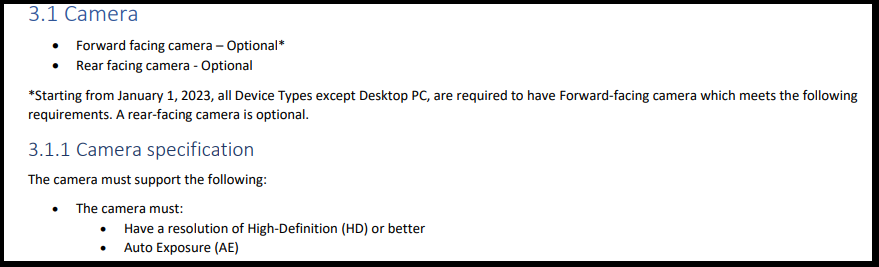
For the moment, Microsoft says that both the front and rear-facing webcams are optional. The tech giant adds that all devices, except for PCs, will be required to have a forward-facing webcam in the near future.

However, this requirement will become mandatory starting with the 1st of January, 2023, a fact which will most likely force many of the manufacturers to also include a webcam in devices like laptops or tablets.

Microsoft doesn’t just want a regular camera on your laptop

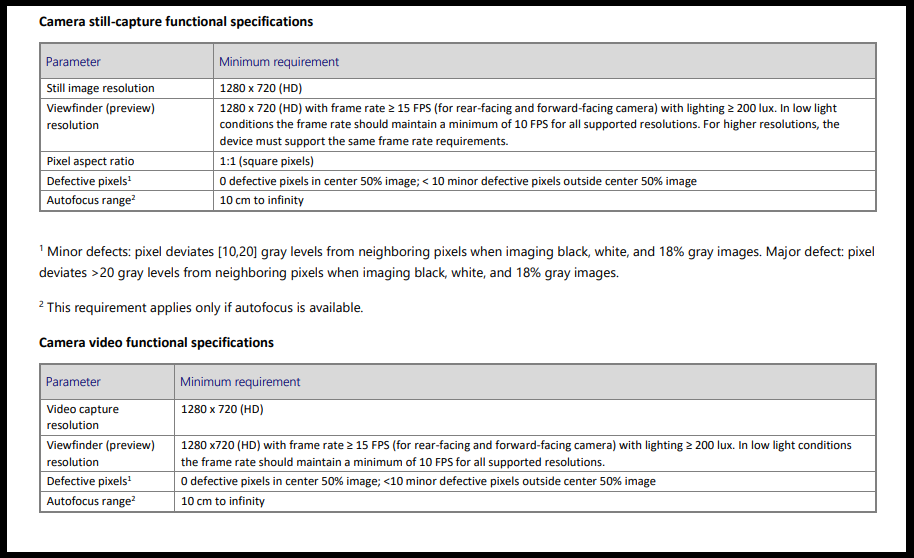
During Windows 11’s major unveil event, Microsoft also stated that the webcam required should have a High-Definition resolution or better.

What this means is that Microsoft is expecting 720p with a resolution of 1280 x 720 and 1:1 aspect ratio. Even more, the tech company also wants the webcam to have support for auto white balance and auto exposure.

Before closing, Microsoft also made public another set of rules for devices that will come with a dedicated camera button.

More exactly, the camera button must be able to wake up the device when needed. With all this being said, Microsoft will give manufacturers the freedom to include either a dual-action camera or a single-action camera.

What is your take on all the requirements that Microsoft wants users to complete before using Windows 11? Share your thoughts with us in the comments section below.

Microsoft 365 Usage Analytics data is becoming anonymous by default

Microsoft has announced that it’s making some privacy changes to its Microsoft 365 configurations starting next month. This update will begin rolling out to business customers on September 1, and it will make all user-level information anonymous by default in Microsoft 365 usage analytics.

“At Microsoft, we’re committed to both data-driven insights and user privacy. As part of that commitment, we’re making a change to Microsoft 365 usage analytics on September 1st to pseudonymize user-level information by default.,” the company explained.

For those unfamiliar, Microsoft 365 usage analytics provides access to a dashboard that provides analytical capabilities to measure adoption trends within an organization. It lets IT Admins analyze usage data of Microsoft 365 services, generate custom reports, as well as share insights. Microsoft says this change will allow companies to comply with local privacy laws, and it will impact user-level information stored and accessed across:

  • Microsoft 365 Reports in the Microsoft 365 admin center
  • Microsoft 365 usage reports in Microsoft Graph
  • Microsoft Teams analytics and reporting in the Microsoft Teams admin center
  • The reportRoot: getSharePointSiteUsageDetail API (1.0 and beta) for SharePoint site detail

Microsoft noted that global admins will need to head to the Microsoft 365 admin center to revert this change and show personally identifiable information in their respective tenants. To do this, go to Settings, Org Settings, Services, and choose the “Reports” option. Once there, select the “Show identifiable user information in reports” option available under the “Choose how to show user information” section.

Once enabled, the personally identifiable information (PII) will be visible to both administrators and report readers, but it won’t be accessible to the Usage Summary Reports Reader as well as Global reader. Let us know in the comments below if you think that these changes will help to improve privacy within your organization.

Fortnite’s Crew Legacy Set is an interesting new evolving feature in the popular video game

With today’s update, Fortnite introduced an evolving item, a first for the popular Battle Royale video game.

Named the Fortnite Crew Legacy Set, this new item is being given away as a free gift to all active Fortnite Crew subscribers and will unlock additional styles and functionality for each additional month that a player stays subscribed.

The Fortnite Crew Legacy Set has a total of six stages with each stage unlocking on the 14th of the month. The first stage is available to unlock until December 31st this year while players will have until August 14th next year (just under a year from now) to unlock all of the stages by having six months of active Fortnite Crew subscription.

These deadlines suggest that, rather than leaving this as a gift for all new subscribers, new evolving items will be added in the future so that Fortnite Crew subscribers have a constant reason to stay subscribed once all of the stages are unlocked.

Here’s the details on each unlock:

  • Stage 1: Unlock the Protocol Pack Back Bling upon being subscribed or subscribing to Fortnite Crew. If you’re not subscribed when the v17.50 update releases, you’ll unlock it immediately when you do subscribe.
  • Stage 2: The Back Bling evolves, adding the Protocol Elite Style. This happens on the 14th of the month after Stage 1.
  • Stage 3: The Back Bling evolves again, adding the Protocol Overdrive Style. The Zen Axe Pickaxe emerges from the Back Bling. Both happen on the 14th of the month after Stage 2.
  • Stage 4: The Pickaxe evolves, adding the Zen Striker Style. This happens on the 14th of the month after Stage 3.
  • Stage 5: The Pickaxe evolves again, adding the Zen Ultra Style. This happens on the 14th of the month after Stage 4.
  • Stage 6: The Pickaxe evolves once more, adding the Zen Assault Axe Style. This happens on the 14th of the month after Stage 5.

Going by the above info, current Fortnite Crew subscribers should get Stage 1 today after installing the update and will likely reach Stage 6 on March 14th 2022. However, if Stage 2 unlocks on September 14th, Stage 6 should unlock in February.

The Fortnite Crew Legacy Set isn’t the only new strategy Epic Games is implementing to encourage Crew subscribers to renew their subscriptions each month. September 1st will also see the first Fortnite Crew outfit that’s part of a set. October and November will each unlock the second and third outfits in the set and those that own all three will get special alternative appearances for each one.

Are you a Fortnite Crew subscriber are these items encouraging you to stay a member? Let us know in the comments below and then follow us on Twitter and Pinterest for more gaming news.

Fortnite
Fortnite
Developer:
Epic Games Inc.
Price:
Free


Fortnite - 1,000 V-Bucks


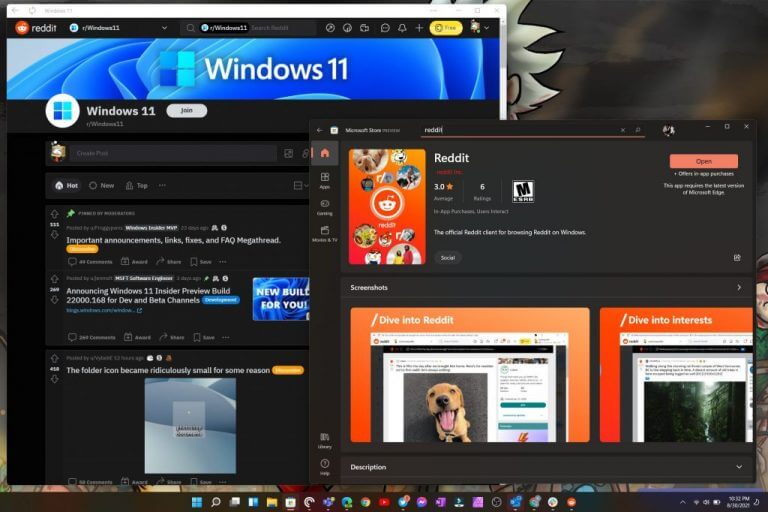
Official Reddit PWA makes its way to the Windows 11 Store

Reddit joins the parade of new apps marching into the Windows 11 Store utilizing Progressive Web App development.

Despite being the front page of the internet since 2005, it wasn’t until 2016 that the company’s technologies caught up to the way its content was being consumed and it came out with its first official app designed for iOS and Android.

While still not offering a dedicated app for the desktop, Reddit eventually released an updated and streamlined user interface refresh two years later in 2018. All this is to say, the notoriously app-stingy social media site surfaced in the new Windows 11 Store as a PWA similar to Instagram, Twitter and TikTok.

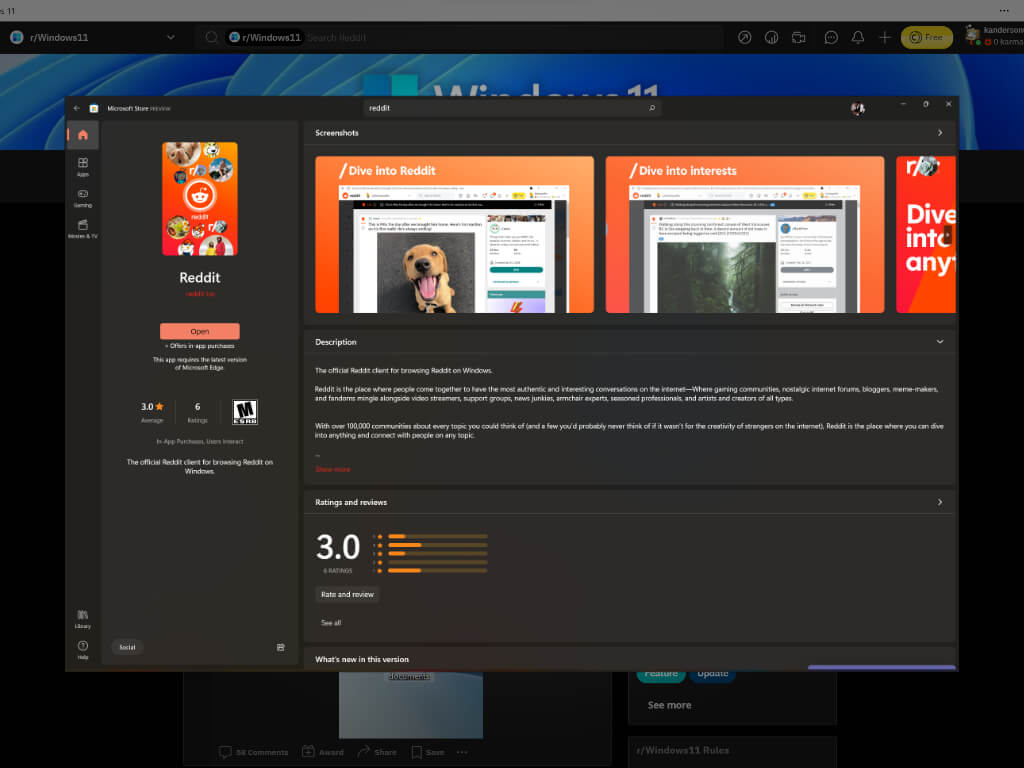
Thanks to modern web development, Reddit could be installed on many desktops as a PWA through Chrome and Edge for a few years now, but earlier today, the app has been added to the Windows 11 Store search list and can now be installed just like any other apps on desktops.

Windows 11 Reddit App

The Reddit PWA is officially made by the company as it’s just a wrapper of the browser experience and as such, is visually identical to the 2018 redesign where there is minimal chrome around the new Reddit desktop view.

While only a PWA, the emergence of an officially sanctioned Reddit app in the Windows 11 Store app helps add credence to Microsoft’s attempt to revitalize a streamlined app platform in Windows 11 as well encouraging developers to bring their varied app experiences to this new version of Windows.

The apps is fairly new to the Windows 11 Store and sits at a 3.0 rating with as little as 6 reviews at the time of the writing.

New phishing campaign is after your credentials, Microsoft warns

The Redmond-based tech company issued a warning for all its users, urging them to take appropriate actions in order to stay protected.

Experts have been tracking a widespread credential-phishing campaign that relies on open redirector links, while simultaneously suggesting it can defend against such schemes.

This is just one of multiple such schemes attempted by malicious third parties in the last few months, so we should really take this warning seriously and do everything we can to protect our sensitive data.

Microsoft raises awareness on new phishing attack

Even though redirect links in email messages are a vital tool to take recipients to third-party websites or track click rates and measure the success of sales and marketing campaigns, there are other ways to go as well.

An open redirect is when a web application allows an HTTP parameter to contain a user-supplied URL that causes the HTTP request to be redirected to the referenced resource.

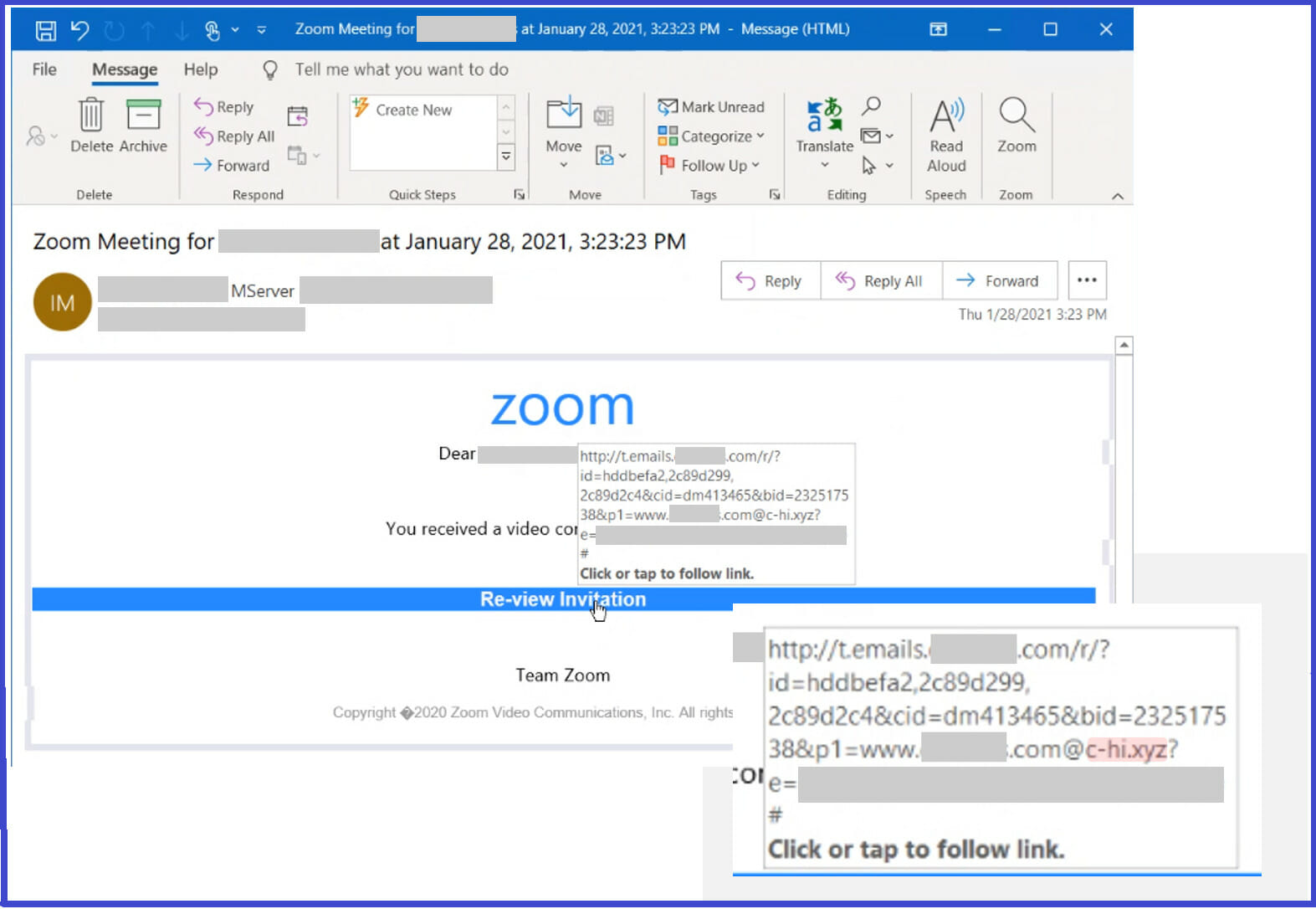
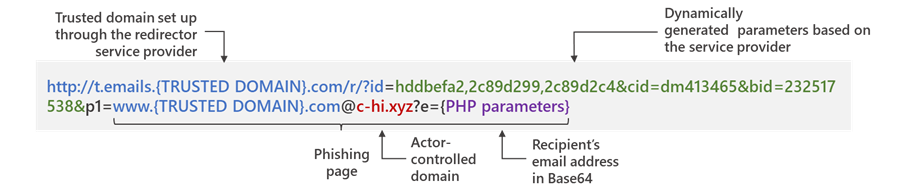
This same technique can be abused by competitors in order to redirect such links to their own infrastructure, at the same time keeping the trusted domain in the full URL intact.

This helps them evade analysis by anti-malware engines, even when users attempt to hover on links to check for any signs of suspicious content.

Source: Microsoft

The Microsoft 365 Defender Threat Intelligence Team developed on this subject and explained how these attacks are conducted, in a detailed blog post.

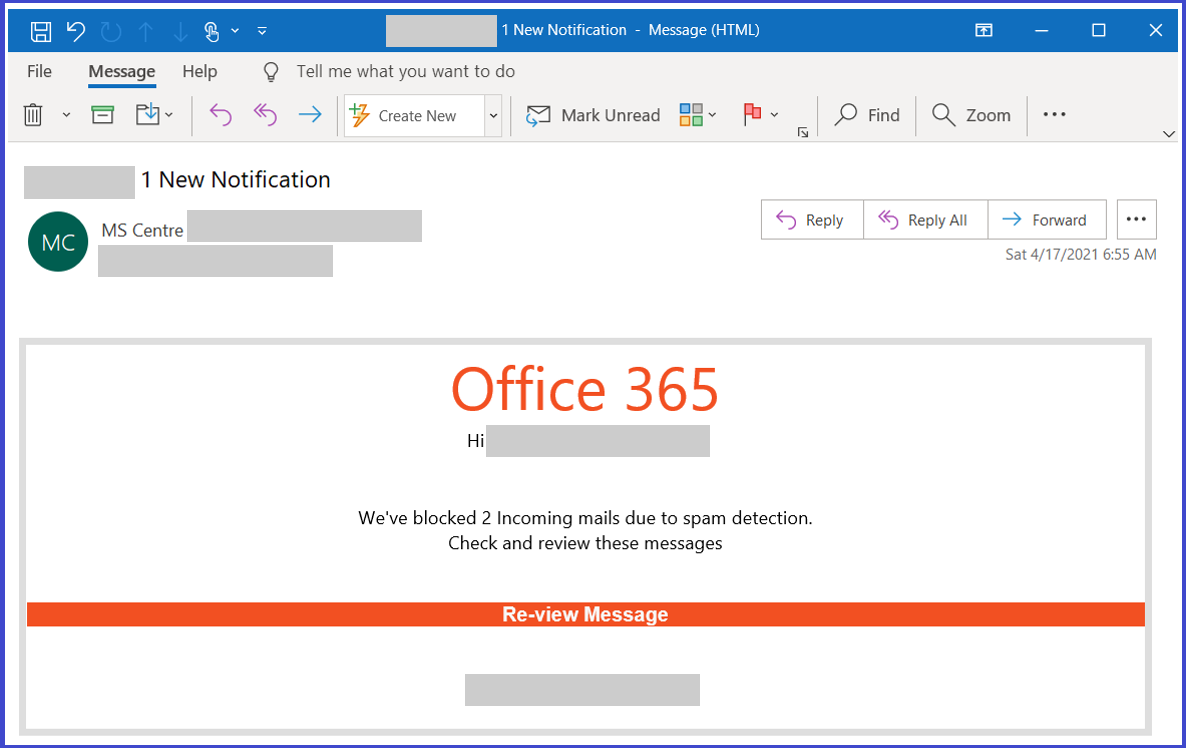
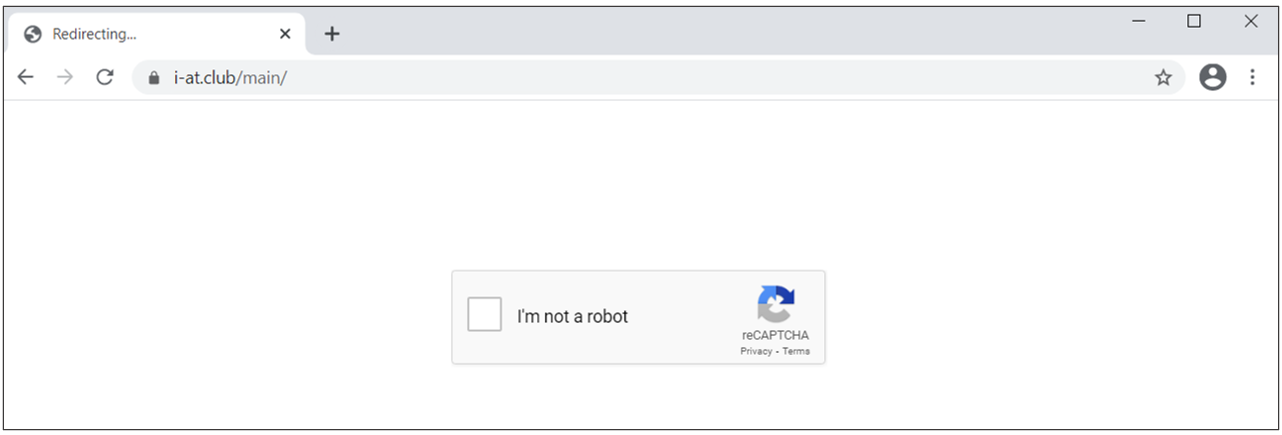
Attackers combine these links with social engineering baits that impersonate well-known productivity tools and services to lure users into clicking. Doing so leads to a series of redirections — including a CAPTCHA verification page that adds a sense of legitimacy and attempts to evade some automated analysis systems — before taking the user to a fake sign-in page. This ultimately leads to credential compromise, which opens the user and their organization to other attacks.

In order to successfully lead potential victims to phishing sites, the redirect URLs embedded in the message are set up using a legitimate service.

In fact, the final actor-controlled domains contained in the link leverage top-level domains .xyz, .club, .shop, and .online, but which are passed as parameters so as to sneak past email gateway solutions.

Microsoft stated that it discovered at least 350 unique phishing domains as part of this hacking campaign.

The most effective tool hackers have is convincing social engineering lures that purport to be notification messages from apps like Office 365 and Zoom, a well-crafted detection evasion technique, and a durable infrastructure to carry out the attacks.

And in order to further bolster the attack’s credibility, clicking the specially-crafted link redirects the users to a malicious landing page that employs Google reCAPTCHA to block any dynamic scanning attempts.

After completing the CAPTCHA verification, the victims are displayed a fraudulent login page mimicking a known service like Microsoft Office 365, only to swipe their passwords upon submitting the information.

If the victim enters a password, the page then refreshes with an error message declaring that the session timed out and directing the visitor to enter the password again.

This is a data validation practice not unlike the double opt-in ritual used by email marketing list services to ensure compliance with spam laws.

Phishing victims get redirected to a legitimate Sophos security website indicating, falsely, that the email message that they were notified to retrieve has been released.

Now that we are aware of the danger, we can go ahead and take immediate appropriate actions, reducing the risk of becoming another statistic in this cyberwar.

Are you doing everything you can to stay protected from phishing attempts? Let us know in the comments section below.

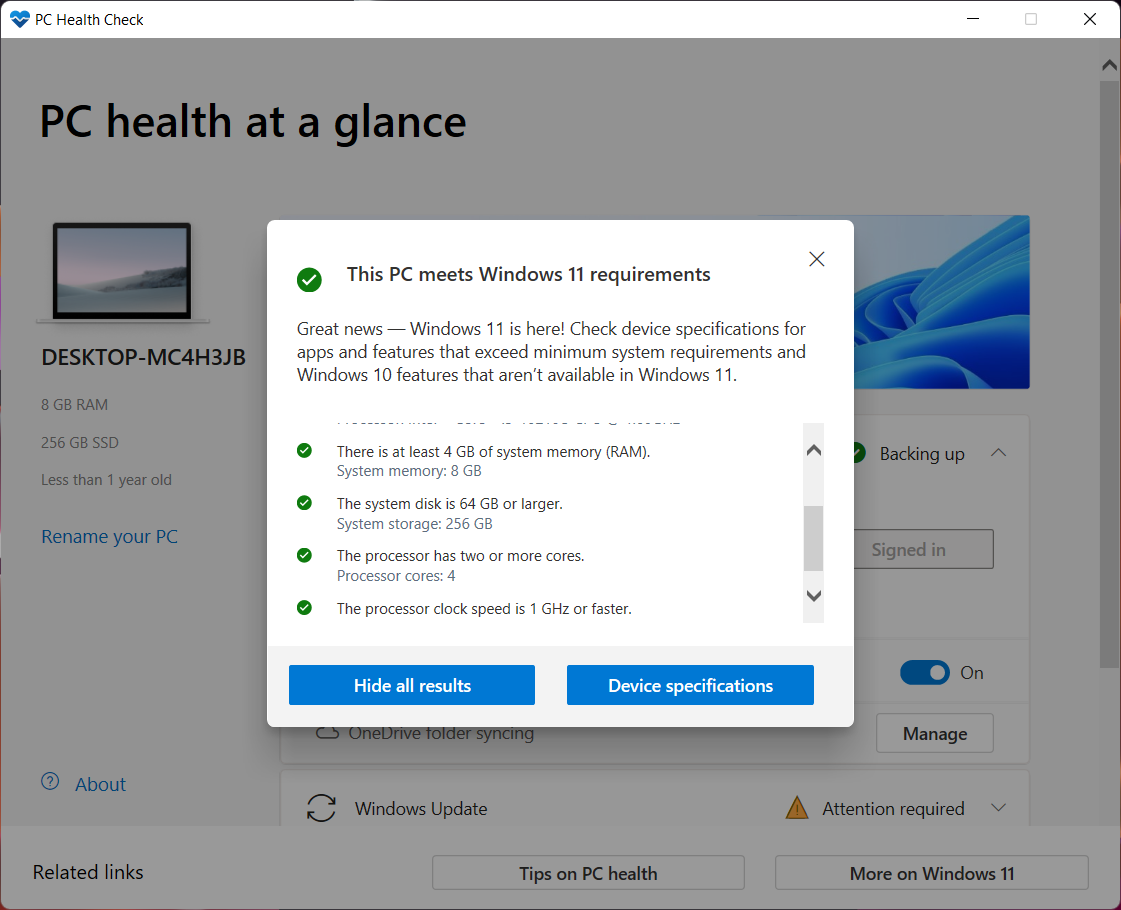
You can get the PC Health Check if you are a Windows Insider

The Redmond tech company had previously launched the PC Health Check app a few months back, software that allows users to quickly check if their systems are Windows 11 compatible.

However, Microsoft took the app down soon after, looking to work on it a little so that it could be a bit more accurate and reliable.

With the provided information, users can either learn how to enable TPM 2.0 on their system or determine what hardware is holding them back.

Microsoft’s diagnosis app is coming back as an Insider preview

Even though it’s been quite a while, Microsoft has returned with an updated version of the diagnosis application.

For the moment you can only find it as a Windows Insider Preview download, most likely since the Windows 11 OS itself is an Insider Preview right now.

So the company likely has plenty more planned for the application by the time Windows 11 is ready to begin shipping.

And of course, as with anything in beta, there is always a chance of bugs and glitches that could ruin our experience.

But the application allows you to get a detailed compatibility check of your system, including the newly added Windows 11 compatible processors that Microsoft recently added to the list.

If your system does not meet the strict requirements of the upcoming OS, the app will give you a checklist of detailed reasons why not, and hopefully ways of fixing them.

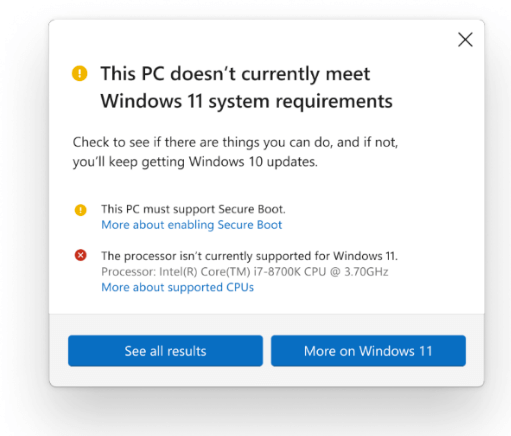
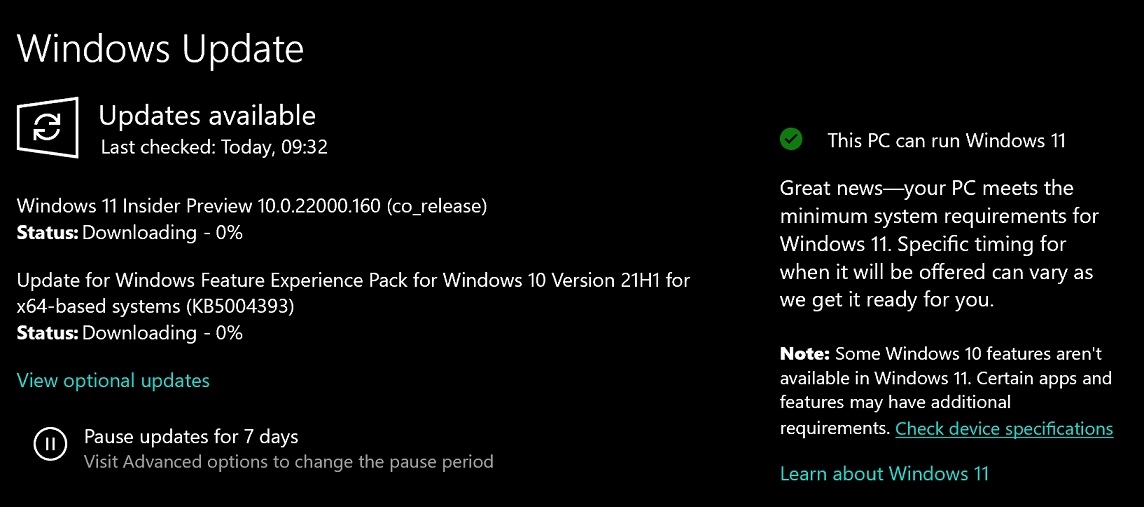
Right now, you need to use PC Health Check Tool to check compatibility issues with Windows 11.

However, the tech giant is currently working on Windows 10 21H2 in the Release Preview channel, and users noticed a new feature in the OS.

Windows 11 compatibility message

You can also find links to relevant support articles that include more information about Windows 11 requirements and removed features.

Microsoft is currently rolling out the above compatibility message to testers in the Release Preview Channel of the Windows Insider program.

It’s likely that a similar compatibility message will appear on devices that do not meet the requirements. Redmond company tries to identify the compatibility issues using telemetry data and the process cannot be tricked.

You can install Windows 11 on older devices, but won’t get any updates

You should know that users can download Windows 11 onto an older PC that doesn’t have the security requirements.

This involves downloading an official ISO online or creating a bootable media disc or thumb drive using a machine that has Windows 11 installed.

But there’s a catch! Microsoft has warned that these devices will be blocked from updates, including important security updates, due to compatibility issues.

So the lesson here is that, although you can find a way around these requirements, it doesn’t seem worth the effort.

We can all understand how this can be a big problem as, without these crucial security patches, we are exposed.

There you have it. After all the fuss about the system requirements for the new OS, the tech giant decided to give everyone a chance to try it out, regardless of device specs.

All that you have to do right now is assess the situation and figure out if it is worth the risk you are taking.

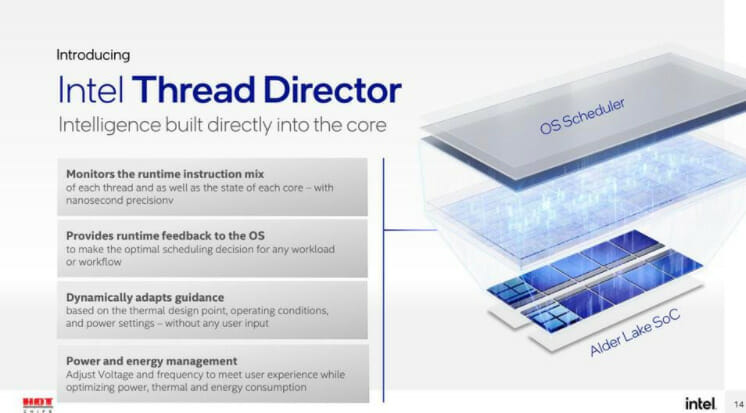
Windows 11 is optimized for upcoming Alder Lake laptops

Windows 11 and Intel’s coming Alder Lake processor promise big changes in performance and efficiency.

For Intel, this will be accomplished via a radical new chip design that divides up tasks between Performance cores and Efficiency cores, P-Core and E-Core respectively. Right now, Intel PC processors only had performance cores.

The manufacturing company expects Performance-core Alder Lake to show a 19% improvement over the current Cypress Cove architecture, aka Rocket Lake, and the mobile curve comparison to show similar gains, citing the ISO frequency standard.

The rollout for these processors has not been announced but could happen this fall. And with Windows 11 supposed to launch around October 20th, 2021, so there isn’t a lot of time left.

Have you diagnosed your device yet? If so, tell us in the comments section below, just how reliable you found the PC Health Check app.

Fax Software for Windows 11 & 10 [Best to Use in 2026]

You might think that fax machines are obsolete when in reality, they are still used by many government agencies and businesses.

Although sending an email is the popular way of sending documents you may be required, from time to time, to send a fax.

Using the PC as a fax machine is not as simple as it may sound because these tools are connected straight to telephone lines.

So since fax machines cannot be connected to computers directly, there are some methods in which faxed files can be sent using a PC.

A dedicated Windows OS fax & scan application enables faxes to be sent. However, this process too requires a dial-up modem and a telephone connection.

How to use a phone line with Windows PC to send a fax

  1. Type Windows Fax and Scan in the search bar to launch the program.
  2. If the program is not activated, open Programs and Features, click on Turn Windows Features on or off, and enable the option under Print and Document Services.
  3. Ensure the telephone line is connected to the PC.
  4. Click on New Fax on the toolbar.
  5. Follow the wizard to connect to the phone line.
  6. Fill out the fax form by entering the recipient number, typing in your message, and attaching your documents.
  7. Click on send to complete.

The line has to be free while sending faxes. An alternative to this is to get a fax telephone landline which is useful if the fax service is used frequently.

Using online faxing software

Online fax services are the most popular way of sending fax documents. They save money but also a lot of stressful time with setting up a machine.

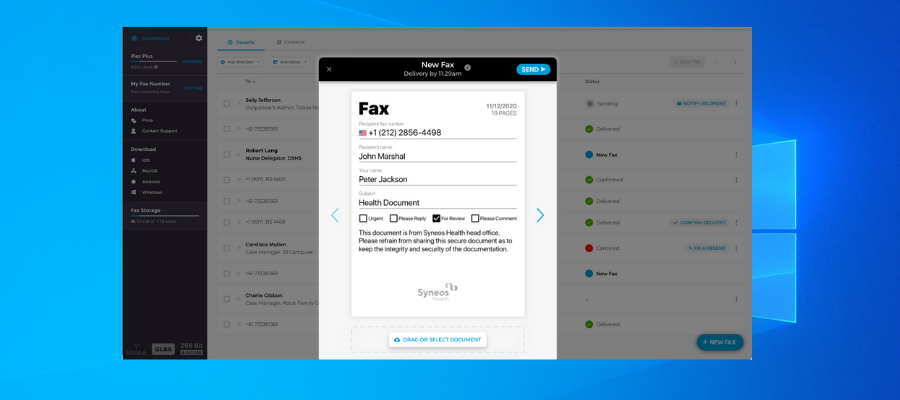
The basic thing with most of these services is to fill the fax form with the recipient number, attach the document, and hit a Send button.

Your PC can be turned into a proper faxing machine using fax software and in this article, we’ll go through a few of these tools.

What is the best fax software for PC?

iFax

iFax is a modern and secure fax software equipped with a set of innovative features that help you send, store, and keep your fax documents secure.

This software helps you fax both digital and physical documents. For the digital documents, you just have to attach them to your message, similarly as you would in an e-mail, but using a fax number as the recipient.

The physical documents need to be scanned beforehand, but iFax has a go-to solution for that. Besides the desktop version, iFax has a mobile app that has an integrated scanner feature. Using your phone camera, you’ll be able to make fax-ready scans.

iFax provides high standard security with secure 256-bit end-to-end encryption, so be sure that no one will have access to the content of your documents without your permission.

Other key features of iFax include:

  • Real-time notifications about delivered or recieved faxes
  • Cover page templates
  • Helps you add company logo, notes, and signatures
  • Compatible with fax numbers worldwide
  • Mobile & Desktop apps in complete sync

iFax is a subscription-based service with 3 different plans. The plans are targeted both towards independent users, small businesses, and big corporations.

iFax

Fax your documents easily and securely, even on the go!
Check price Visit website

RingCentral

RingCentral fax sends all types of file formats to any fax machine worldwide, as well as alerting users on their mobile or email about incoming documents.

The app comes in two paid plans. The basic plan includes:

  • Local fax number
  • Cloud integration
  • The possibility of sending and receiving faxes via email, web browser, or mobile
  • Web and phone support.

Porting your fax number is possible, as are international faxes for a low additional fee.

Enabling your digital signature might come in handy, as well as the option to share faxes to multiple recipients. The software includes the option to schedule faxes to be sent at a later time.

Ring Central

Ring Central

The #1 online service to send faxes quicker than you can say Jack Robinson.
Free trial Visit website

VentaFax

fax software venta

Venta fax can be used via a fax modem or an Internet telephone service provider,  in three different plans: home, network, multi-line, and business.

The multi-line edition supports more than 25 computers while the network edition is installed on a server and supports all computers connected to the server network.

The business version comes with nice features. Some of these are controlling recording time, managing unlimited voice recordings, bulk fax delivery, converting faxes to PDFs, and automatically forward them to email.

These add, of course, to the basic fax features: sending, scheduling, and prioritizing faxes, and creating custom cover pages.

Venta fax lacks smartphone integration or an online website version to send faxes locally, via the Internet.

So Venta fax is a good software option for those who want to discard their fax machines for something simpler.

Venta Fax

Venta Fax

The simplest full-featured fax and answering machine software you can get for your PC.
Free trialVisit website

eFax

eFax fax software

This software’s versatility and user-friendly interface make it one of the best fax software at the moment.

eFax comes with plus and pro plans that differ in the number of available faxes.

Access is provided via mobile devices or an online portal. Faxes can be sent as email attachments, so users simply have to photograph the document and fax it as an image.

eFax has exciting features like a digital signature tool, bulk files sharing to multiple recipients, and unlimited storage capacity.

Customer service is quite responsive, and in the service’s help center users can find helpful FAQs and tutorials. A live chat option is also available.

⇒ Get eFax

Myfax

myfax fax software

MyFax is a feature-rich fax software that enables users to send faxes both locally and internationally, with unlimited storage space, Microsoft Outlook integration, and electronic signature capacity.

One of the unique features of MyFax is the specific number of fax pages offered to users for sent and received faxes.

MyFax works as a cross-platform fax app, available through phone, email, and a web-based site.

Incoming faxes are converted into PDF or .tiff format which gives users easy access to the documents, regardless of their initial format.

MyFax has excellent customer service which can be contacted via email or telephone. Their customer care representatives typically respond to within an hour. There is also a detailed FAQ section for assistance as well as a live chat option.

MyFax is highly recommended for newbies and professionals although the monthly quota on fax pages may be a limiting factor for the software.

⇒ Get Myfax

MetroFax

metrofax fax software

MetroFax is one of the most complete fax software available right now with a myriad of features.

It comes with a monthly subscription fee and a limit of 500 faxes pages.

Users can quickly get the hang of all the features the app offers. In fact, these are basic tools that one would expect in any such application:

  • Sending and receiving faxes
  • Digital signature
  • Fax alert
  • Group fax
  • Microsoft Outlook integration
  • unlimited storage space for faxes
  • PDF or .tiff conversion.

The only downside is the inability to schedule faxes for a later date which is a minor inconvenience against the wide range of features provided by this software.

The customer care service is top-notch with tutorials and demos instructing on how to use the software.

Users can contact the customer care representatives via email or phone call. The email response is quite fast. A live chat option is also available.

⇒ Get MetroFax

Sfax

online faxing service

This software is for anyone who values fax security over other features as it ensures maximum privacy when sending and receiving faxes.

Sfax is more expensive compared to other similar software, but it provides additional features, plus HIPPA compliance, ensuring that every fax is extra secured.

More exactly, unlike other fax software that receives and sends fax as email attachments, Sfax sends faxes as a secure link which is safer.

Sfax also allows users to easily port their fax number to their platform without additional costs. The mobile app is perfect for tracking, sending, or receiving faxes, as well.

Sfax supports different document formats and stores faxes for only one year.

Similar to the previous services, customer support is excellent with Sfax as well. The same contact options are provided – phone, email, live chat – each equally reliable.

⇒ Get Sfax

Fax.com

fax software

Fax.com is a basic faxing online service, cheaper than the previous options, but its array of features is also limited.

The service charges a monthly fee as well as an account creation fee. The fax page limit is set at 300/month, with users having the flexibility of allotting the amount for incoming and outgoing faxes.

One notable detail is the extra cost/ each extra page that is faxed – the highest fee among fax software. Also, faxes are stored for just 39 days – the shortest time compared to rival fax software.

Fax.com enables users to send faxes via email or the online portal. The user interface is intuitive and easy to use.

Fox.com does not have a dedicated mobile application, but one can use the mobile browser to send a fax from the Fax.com account.

The software comes with a digital signature feature and Microsoft Outlook compatibility.

Unfortunately, the service doesn’t include fax scheduling or multiple recipients options

⇒ Get Fax.com

Hellofax

helloFax

Yet another software that offers most of the features that are expected in quality fax software.

The professional plan comes with a limit of 500 fax pages for a monthly fee which is more expensive than most fax software, but as we all know quality is never cheap. At least, the account setup is free.

One interesting aspect is that users can sign up for a toll-free number, that can be integrated with Microsoft Outlook.

Hello fax gives users unlimited storage for fax messages and voice recordings.

When using the mobile version, the service can only be accessed via the mobile browser, since there is no dedicated application.

The software does not have a scheduling feature to send faxes at a later date which can be an inconvenience.

⇒ Get HelloFax

Do share with us your experience on how to use your PC as a fax machine. Feel free to comment below.

Xbox becomes new official gaming partner of the England football teams

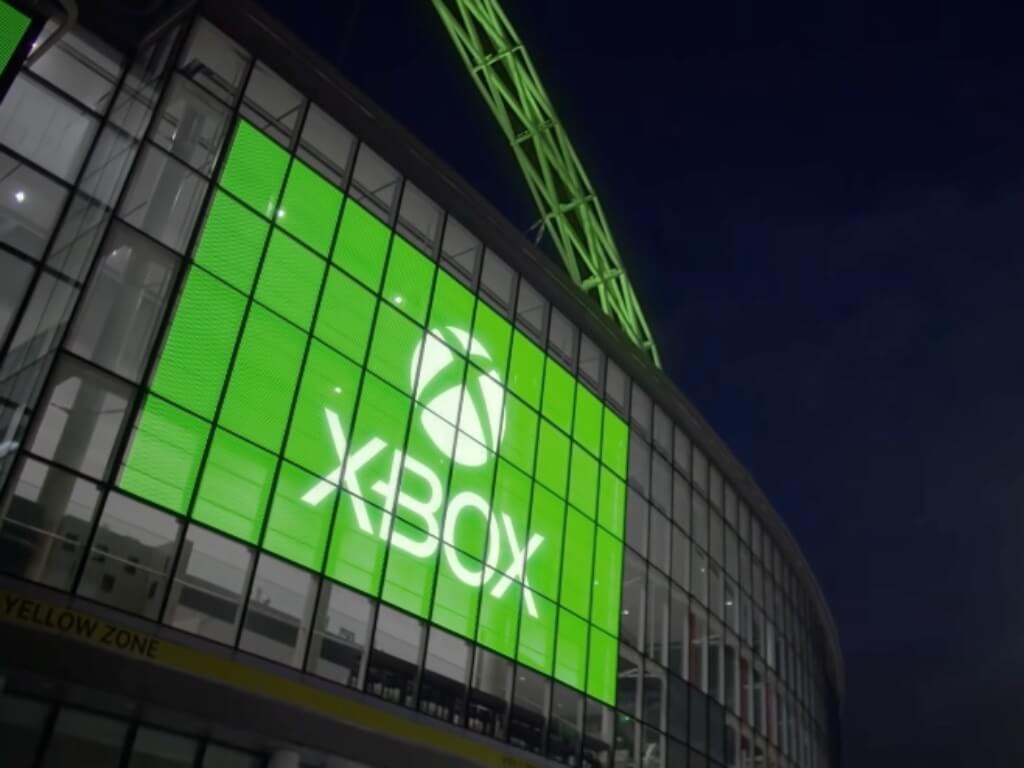
Xbox has announced a new global partnership with The Football Association, which will result in Xbox becoming the new official gaming partner of the England football teams. England is the homeland of football and the new partnership will see Xbox launch a big marketing campaign with The Football Association to reach football and gaming fans in the UK.

“We see a tremendous organization in The FA, which has the same drive and ambition to empower people as we do at Xbox. Through our partnership, we aim to bring further value to the England Football Teams and power the dreams of players and fans everywhere,” explained Marcos Waltenberg, Director, Xbox Global Partnerships.

With this new global partnership, Xbox will be working with prestigious national teams including the Lionesses, eLions, and the Three Lions, as well as the iconic Wembley Stadium in London and St George’s Park National Football Center at Burton up Trent, Staffordshire.

The UK is Xbox’s biggest market in Europe, but it’s still impressive to see Microsoft make such a big marketing move in the old continent. If you’re a soccer fan, you may remember that Xbox used to be a sponsor of the Seattle Sounders MLS team for many years, until the online retailer Zulily replaced it on the team’s shirts back in 2019.

Windows news recap: 64-bit OneDrive sync client rolls out, Razer mice driver update exploit discovered, and more

Welcome back to our Windows news recap, where we go over the top stories of the past week in the world of Microsoft’s flagship operating system.

Microsoft updates Windows 11 minimum specs, confirms upgrade will be possible on unsupported PCs

The minimum specs required for Windows 11 have been updated to allow for more PCs running Intel 7th Gen processors to be supported, having acknowledged that they identified “a set of PC models that meet the principles while running on Intel 7th Gen processors that we did not originally include in our minimum system requirements”. In addition, Microsoft has now confirmed that users with unsupported PCs will be able to upgrade to Windows 11 using ISO files, but will not be offered the upgrade via Windows Update.

Microsoft updates windows 11 minimum specs, confirms upgrade will be possible on unsupported pcs - onmsft. Com - august 27, 2021

Microsoft starts rolling out 64-bit version of OneDrive sync client for Windows

A 64-bit version of the OneDrive sync client for Windows has begun rolling out. The new version should provide enhanced reliability and performance on Windows 10 PCs running a 64-bit version of Windows 10.

Recent Windows 11 survey shows people warming up to the change

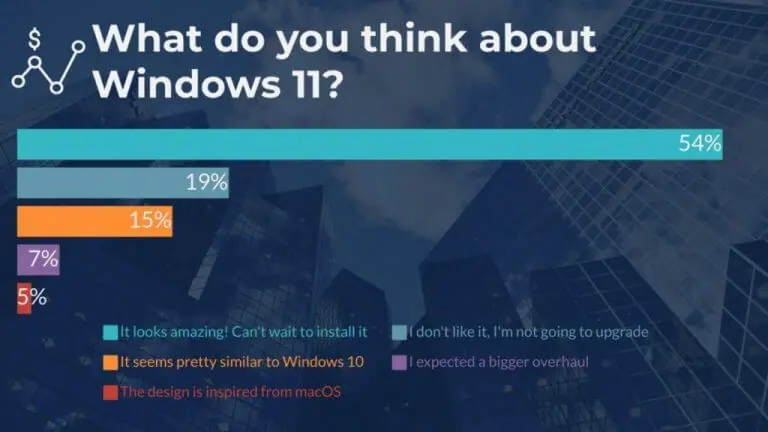
According to a recent survey, people might be warming up to Windows 11, despite initial skepticism. The survey showed that 53 percent surveyed believe Windows 11 “looks amazing. Can’t wait to install it.” Take a look at the full survey results here.

Windows 11 survey

Hackers leverage Razer mice driver updates to access Windows PCs

An exploit has been discovered that allows hackers to essentially take control of a Windows PC, potentially on a long-term basis if installation completes successfully, by making use of Razer mice driver updates. Razer has acknowledged the flaw and is working on a fix.

That’s it for this week. We’ll be back next week with more Windows news.

Asus started rolling out Windows 11 support on older Intel CPU motherboards

If you were wondering if Asus would keep the promise it made not long ago, the answer is yes.

It seems that the company is honoring its previous engagement and has started rolling out Windows 11-compatible firmware, at least for its Z270 series motherboards for Intel 6th and 7th gen processors.

The company had earlier released a list of motherboard chipsets that already had the Trusted Platform Module (TPM) 2.0 module and technically should be able to run Windows 11.

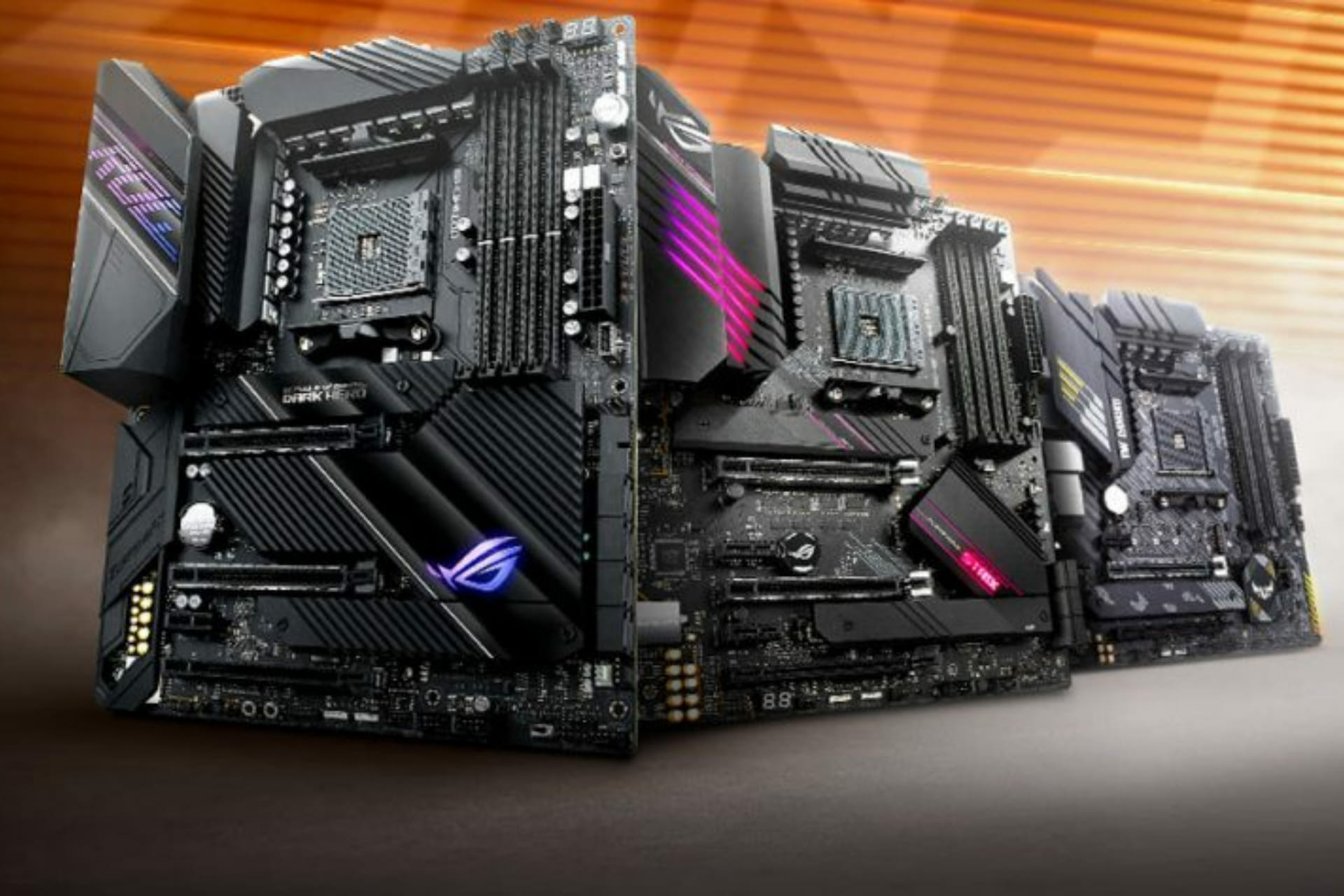
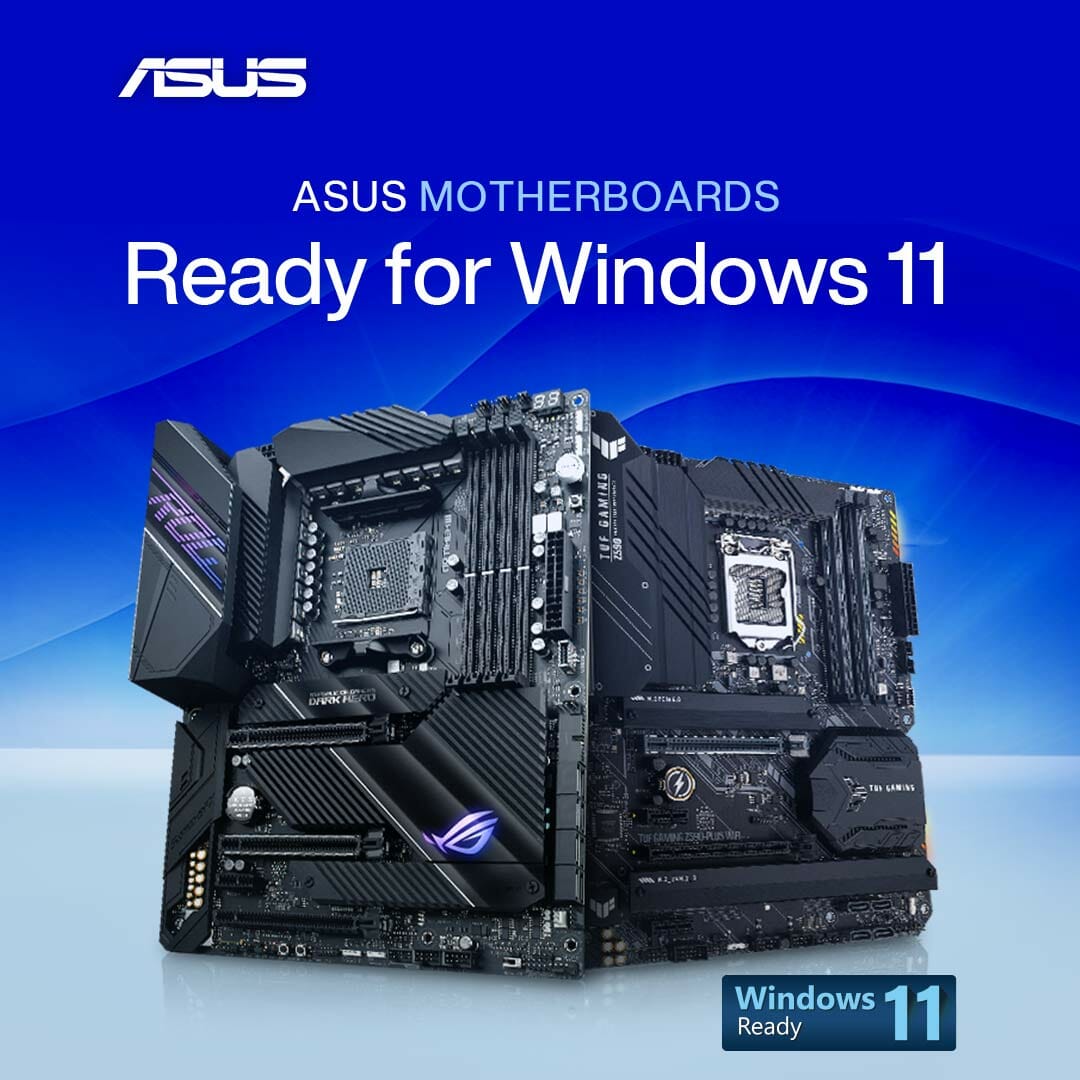
Asus will provide Windows 11 support for older motherboards

In this list of chipsets was Intel’s Z270, which is the tech company’s flagship chipset for the socket LGA1151.

If you weren’t aware, know that the LGA1151 is the predecessor of the firm’s current LGA1200 socket that goes with the 11th gen Rocket Lake-S processors.

The LGA1151 socket supports Intel’s 6th gen (Skylake-S) and 7th gen (Kaby Lake-S) processors.

Almost a week ago and rather quietly, the firm has released the latest BIOS version 1501 on some of its ROG Z270 motherboards.

On models like the Z270F GAMING, the 1501 firmware is still labeled as Beta Version as it is still undergoing final testing before its official release.

Essentially the latest firmware will now enable the TPM or in this case, Intel’s PTT (Platform Trust Technology) in the BIOS by default.

Of course, there could also be other motherboard models too including from other manufacturers which now have compatible firmware available.

If we go just a bit back in time, Microsoft originally stated that the Windows 11 minimum requirements that only 8th gen and newer Intel processors would be compatible with its next OS.

Afterward, the company said that it was testing potential compatibility with Windows 11 on 6th gen Skylake and 7th gen Kaby Lake processors as well.

The official list from Microsoft however still doesn’t have the Skylake and Kaby Lake CPUs listed but that list was updated even before its second statement was released.

So it could be that the tech giant is still testing things out and may update the list later.

Users that are really interested will have to look up that information in their respective motherboard model’s support section.

If you’re unsure what your motherboard model is, you can try running msinfo32 or System Information to find that.

Also, third-party tools like CPU-Z, or Piriform’s Speccy, can be used to look it up.

What motherboard will you be using for WIndows 11? Let us know in the comments section below.

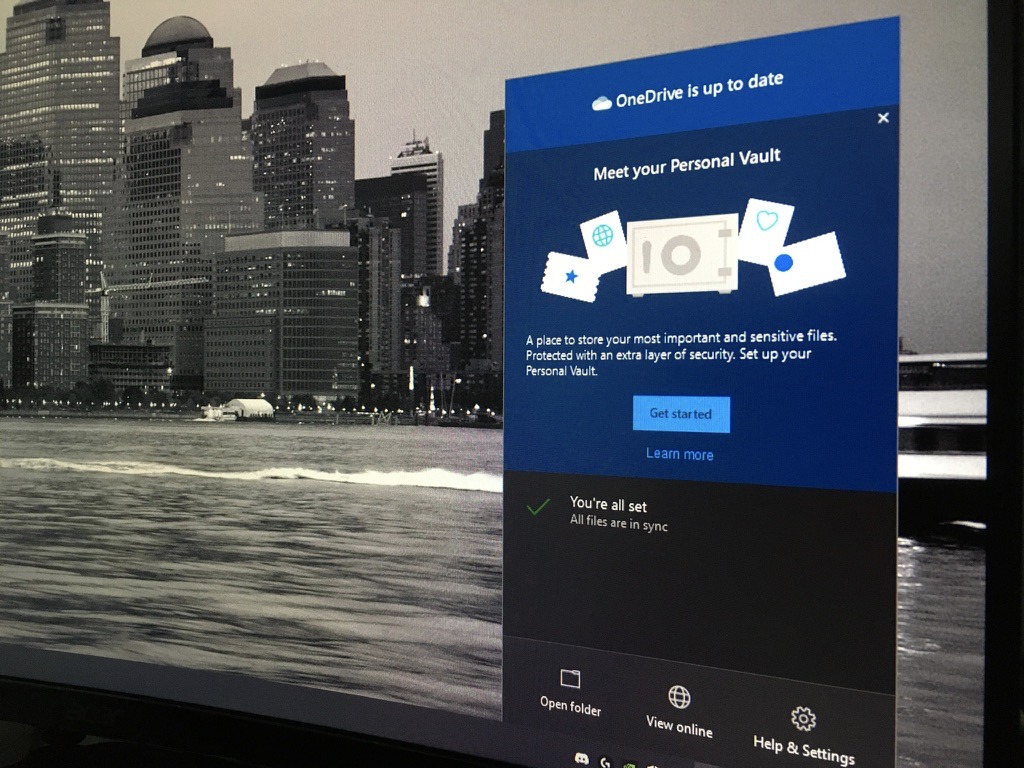
Microsoft starts rolling out 64-bit version of OneDrive sync client for Windows

Microsoft launched a 64-bit version of its OneDrive for Windows sync client in public preview back in April this year. The company announced today that the new 64-bit version of the app has finally started rolling out to all Windows 10 PCs.

Up until now, Microsoft’s OneDrive cloud storage service was only in a 32-bit version for Windows users, and many users have reported performance issues when syncing a large number of files. This 64-bit OneDrive sync app for Windows doesn’t bring any new features, but it should run more efficiently on Windows 10 PCs running a 64-bit version of the OS.

“The 64-bit version is the right choice if you plan to use large files, if you have a lot of files, and if you have a computer that’s running a 64-bit version of Windows. Computers running 64-bit versions of Windows generally have more resources—such as processing power and memory—than their 32-bit predecessors. Also, 64-bit applications can access more memory than 32-bit applications (up to 18.4 million Petabytes),” the OneDrive team explained in a blog post.

The OneDrive 64-bit version is one of the highly requested features, and it is aimed at OneDrive work, school, and personal accounts. Microsoft says the 64-bit OneDrive app will automatically replace the existing 32-bit version if a Windows device meets all the requirements. At this point, the sync client can only be installed on x64 processors, but the company plans to expand its availability to ARM64 devices in the near future.

If you’re interested, you can provide your feedback on the OneDrive UserVoice website. Let us know in the comments down below if you have already received the 64-bit OneDrive sync client on your Windows PCs.

Microsoft Edge Canary now lets select Insiders add text to PDF documents

Microsoft has started testing a new update for its Edge browser that will allow users to add text to PDF files opened in the browser. The feature is gradually rolling out to Edge Insiders in the latest Canary builds (via Windows Latest).

As of today, the built-in PDF reader in Microsoft Edge lets users view documents and annotate them with ink and highlighting directly within the browser. However, users have to rely on some third-party applications (such as Adobe Acrobat Reader) to make minor corrections in their files. This might change soon, as Microsoft plans to bring a new “Add text” tool that should make editing PDFs easier for users.

To try out this feature, users will need to open a PDF document within the browser and click the “Add text” option available besides the “Read aloud” tool. Alternatively, users can also choose to right-click on any part of the document and then select the “Add text” option in the context menu. Users will also be able to change the text color, increase/decrease font size or spacing as well as delete the text note if needed.

Overall, this new Add text feature should be a welcome addition for people who often need to make minor adjustments to the documents. However, it is still in its early testing phases, and there are certain limitations as well. Currently, it doesn’t provide an option to bold, italicize, or underline text and change the font style. We hope that the Edge Insider team will address these issues before making it generally available in the production version of the browser.

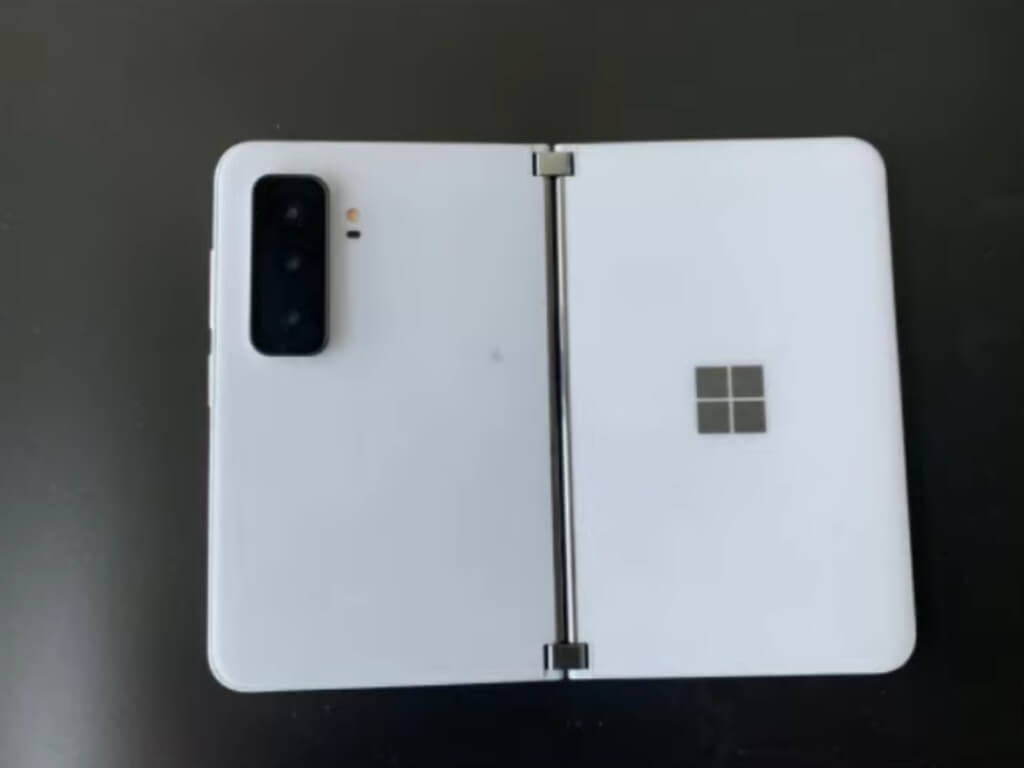
Surface Duo 2 shows up on Geekbench ahead of possible Fall release

The slow leak cycle of smartphone releases has been underway for the Surface Duo 2 and now it’s time for the Geekbench results to begin surfacing.

Thanks to a Geekbench leak first reported on by MySmartPrice, Surface Duo 2 fans are getting concrete spec information regarding Microsoft’s follow up to its dual-screen mobile device.

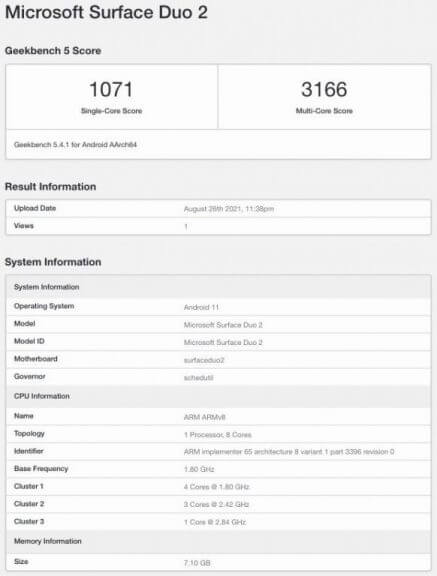
The Geekbench results put a period on the speculation of upcoming upgrades to the Duo line that include a bump up in RAM from 6 to 8GB, the use of a ‘bleeding edge’ SOC in the Snapdragon 888 and what type of performance users can expect from the device.

Based on the results, the Duo 2 is shaping up to be as performative as any other device sporting an 888 SOC, with no additional accelerants built into the software just yet and out putting a 1071 single-core result followed by a 3166 in multi-core testing.

Microsoft-Surface-Duo-2-Geekbench

The guys over at Windows Central are helping to put today’s recent leak into context with their own personal knowledge of the Duo 2 based on conversations with sources familiar with the product.

According to WC, the Surface Duo 2 will come with Android 11 on board and right now that is Microsoft’s focus with few discussions regarding upgrades to Android 12 coming to the Duo 2 in the onset.

Other insider info sourced by WC includes plans from Microsoft to increase the screen sizes (probably by reducing bezels), including NFC, lift to wake gesture support, larger batteries, higher refresh rates, and of course the now infamous camera bump.

With the camera housing on the Duo 2 resides a 12MP standard lens, telephoto and ultrawide sensors which should help address one of the biggest is with the device.

There is still little speculation on how much the end product may retail for, as whereas it may be available for purchase upon launch.

We’ll keep eye out as the story develops.

Researchers reveal now fixed hole in Microsoft’s Azure Cosmos DB security

Microsoft has warned Azure customers in a vulnerability in its Cosmos DB cloud database software after a security company found that they could access information from “thousands of companies,” according to Reuters. The security company, Wiz, found that by exploiting a flaw in Jupyter Notebook, an open source project that allows document and code sharing via a web browser. Jupyter Notebook has been around for years, but has been enabled by default for Azure Cosmos DB customers.

There has been “no evidence that the flaw has been exploited,” but researchers at Wiz were able to gain access to encryption keys that then allowed them access to Cosmos DB databases. Microsoft says it “fixed the issue immediately,” and notified customers via email that although the vulnerability is fixed, they would need to change their access keys.

Microsoft has had its share of problems with cybersecurity as ransomware and other attacks on software vulnerabilities are becoming more and more common. This week, tech CEOs met at the White House to discuss cybersecurity with US President Biden, where Microsoft pledged $20 billion to advance its security solutions over the next five years.

New Halo Infinite dynamic background is now available on Xbox Series X|S consoles

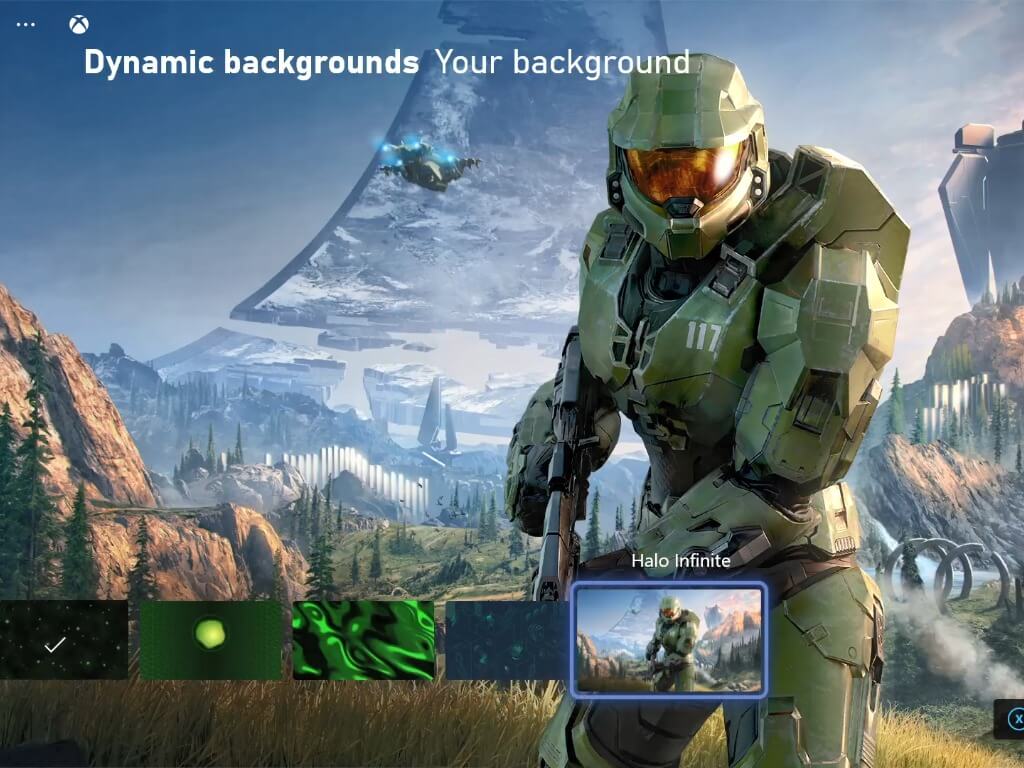
After the Xbox team officially shared the December 8 release date for Halo Infinite at gamescom, the Xbox team has a little surprise for Halo fans this week. If you have an Xbox Series X or Series S console, you can now set a new Halo Infinite dynamic background on your Home dashboard, which looks pretty cool.

The new dynamic background uses Halo Infinite’s cover art, and you’ll notice some lighting changes on Master Chief’s armor as well as the animated Pelican dropship in the background. It’s pretty light on the animations, but this is still good fan service ahead of the game’s release in December.

Microsoft also announced a Limited Edition Halo Infinite Xbox Series X and Xbox Elite Series 2 controller at gamescom earlier this week, although we did earlier with the first technical preview, though both of them are already out of stock on the US Microsoft Store. There’s clearly a lot of enthusiasm for Halo Infinite right now, and now that the game finally has a release date we’re hoping to see more of it soon.

We didn’t get a new look at Halo Infinite’s campaign at gamescom, but it’s now up for pre-order at $59.99 on the Microsoft Store. Of course, Xbox Game Pass members will be able to play it for free on day one, and the game’s multiplayer mode will also be entirely free-to-play on Xbox and PC.

Halo Infinite (Campaign)

Microsoft’s Xbox app updates on Android and iOS devices with new profile improvements

The main Xbox app updated for Android smartphones and tablets today in addition to Apple’s iPhones and iPads.

Both updates are pretty much identical and bring a variety of enhancements to user profiles and Xbox Achievement searching. It should be noted though that while the app updates are live, the added functionality isn’t live yet in all regions (at least not here in Australia) so these new features may take a day or two to show some users.

Here’s the full release notes:

  • New profile updates! You can now tap on the friend and follower buttons to review the full list of users, profile themes are now viewable, and the ‘Where I Play’ section has been added to the About tab.
  • Find your achievements fast with new filter and sort options on the games list.
  • Some people will start seeing industry news and updates with the new “Gaming news” channel on home.

Do you use the Xbox app on your smart device? Let us know what you would add in a future update in the comments below and then follow us on Pinterest and Twitter for more Xbox updates.

‎Xbox
‎Xbox
Price:
Free


Xbox
Xbox
Price:
Free

Classic Myst video game comes to PC and Xbox consoles with 4K, 60 FPS, and raytracing

After almost 30 years since its original release, the classic Myst video game has now been re-released on Microsoft’s Xbox One and Xbox Series X console families and PCs running Windows 10 and Windows 11.

This new version of the game features cloud saves, new accessibility and language options, and Xbox Achievements on all platforms and boasts 4K 60 FPS gameplay with raytracing when played on an Xbox Series X console or a Windows PC with the appropriate hardware.

Cross-buy is supported for this release of Myst which means that buying it on Windows will unlock it for Xbox consoles using the same Microsoft account and vice versa. It’s also now part of the Xbox Game Pass library so subscribers of that service will be able to play it for free from today.

Unfortunately, if you own the original 1993 version, you’re unable to get this new release for free. Apparently enough people were asking about this that the question and answer have both been included on the Microsoft Store listing.

“Thank you for your support over the years!” the official response reads. “We are not giving out free upgrades to previous purchasers of the original Myst. We put a lot of effort into making this new version of Myst and would appreciate your financial support again!”

Here’s the official game description:

Welcome to Myst: a starkly beautiful island, eerily tinged with mystery and shrouded in intrigue. Journey to Myst Island and other stunning, long dormant locations – called “Ages”- and begin to unravel the mystery you have been thrust into. As you learn what happened on the island, you will find that you are playing a key role in an epic story whose ending has not yet been written. Explore deeper connections in these stunning and surreal Ages, uncover a story of ruthless family betrayal, and make choices that will affect both you, and the world of Myst itself.

Cyan, the indie studio that created the beloved classic, has reimagined Myst. Built from the ground up, Myst is teeming with new art, new sound, re-imagined interactions, and even optional puzzle randomization. Finally… the highly anticipated modern Myst experience has arrived!

Are you a longtime fan of Myst or will this be your first time playing it? Let us know in the comments below and then follow us on Facebook and Twitter for more Xbox gaming news.

Myst
Myst
Developer:
Cyan Worlds, Inc.
Price:
$29.99

Microsoft Modern Accessories Review: A nice conference collection on-the-go

Microsoft’s Moden Accessories line dropped at an apocryphal time for customers as the world slowly began to remerge from a pandemic induced quarantine.

During a year and some change, there was a fire sale at most electronic outlets on webcams, microphones, lights, headsets, speakers, and other home office accoutrement as employees revamped makeshift workspaces for extended use.

Microsoft’s answer to the demand was a first party lineup of quality manufactured webcams, speakers, and headsets, unfortunately, its timing was just a few months off.

In April of this year, the company announced its products officially and by May they were on shelves, however, thanks to the increasing number of vaccinated individuals, people were making their way back to offices.

Fortunately, that’s not the end of Microsoft’s Modern Accessories story.

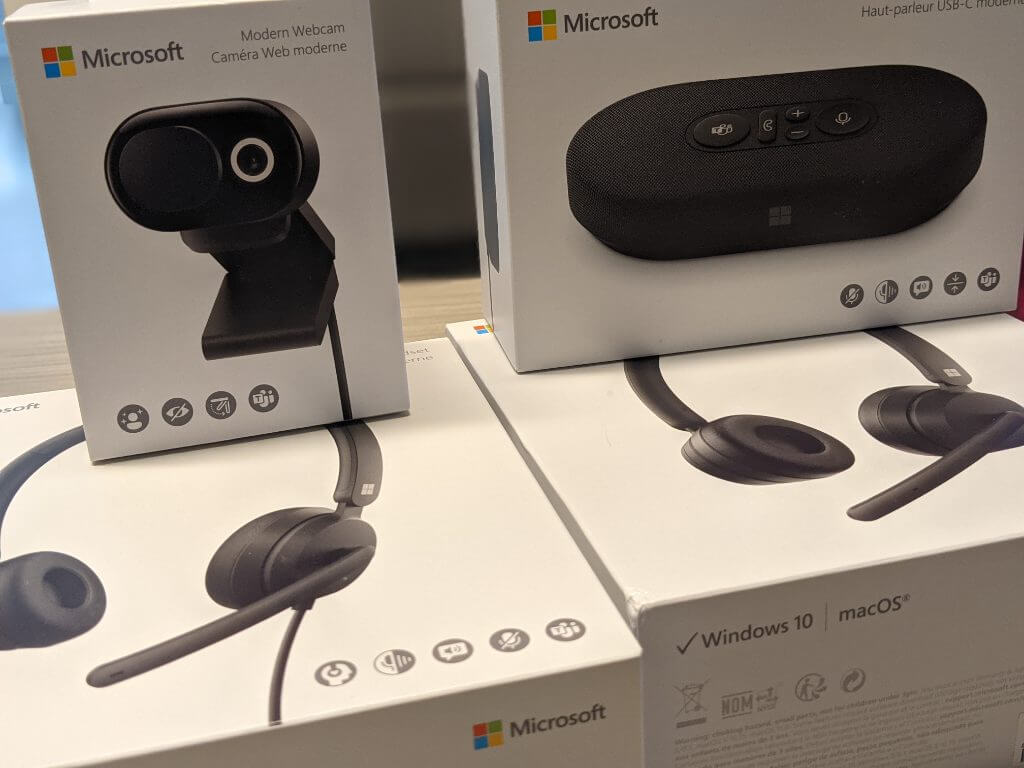
Microsoft Modern Accessories - All

As the pandemic lingers, the landscape of traditional in-person meetings, conferences, or gathers remains influx. People are still opting to meet virtually while in the same building and weary of multi-use equipment which leaves a great opening for Microsoft to fill with its Modern Accessories line and users couldn’t ask for a better quality to price option now.

Look and Feel

Perhaps, it’s a conflation of the Microsoft’s overall design aesthetic and that which the company applies to the Surface lineup, but the Modern Accessories devices seem to borrow from the underlying minimalistic principles, for better or worse.

While none of the devices come in the now-iconic Surface magnesium grey color, they all come in the other most recognized color which is matte black. For anyone adhering to any custom color schemes at their workstations, matte black can often make a muted accent flare that doesn’t distract from the overall look and feel. It’s a trusty go-to color for tech.
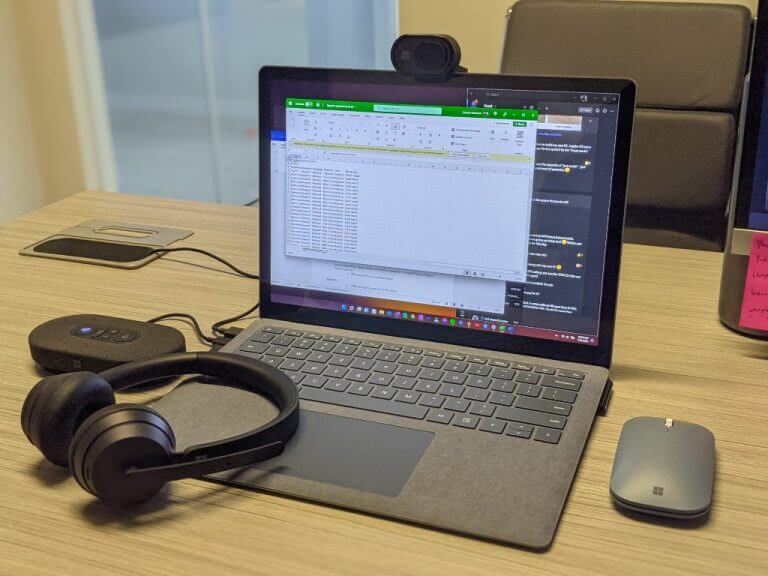
Microsoft Modern Accessories - angled

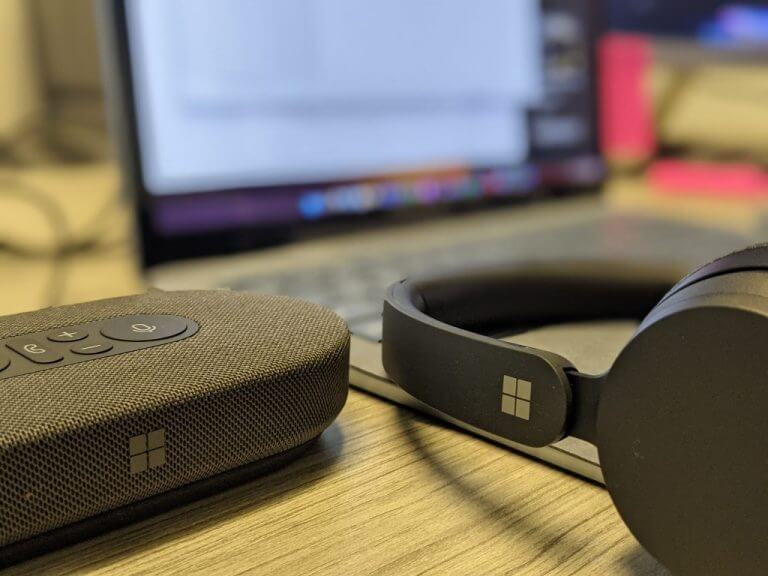
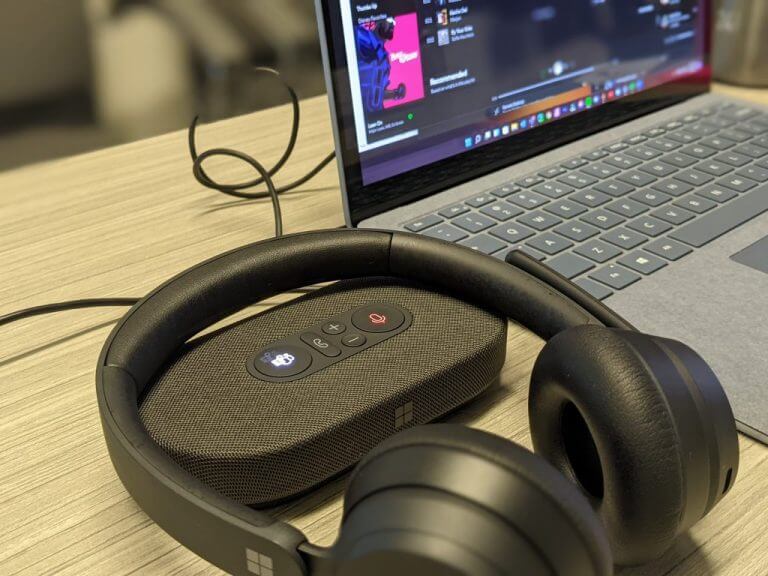
Aside from the iconography of the Teams logo and function indicators, the only other visible marking is the Microsoft logo subtly placed in various spots on the devices.

Lines, breaks in jointing and curves on the devices are mostly unabated and perceptually lend to the notion that the devices are made with minimal tooling which should result in a lasting experience over routine use, but we’ll have to check back in a few more months to confirm.

While the headsets are practically identical in look and feel, it’s the speaker and webcam that really allow Microsoft’s aesthetic to distinguish itself from the market.

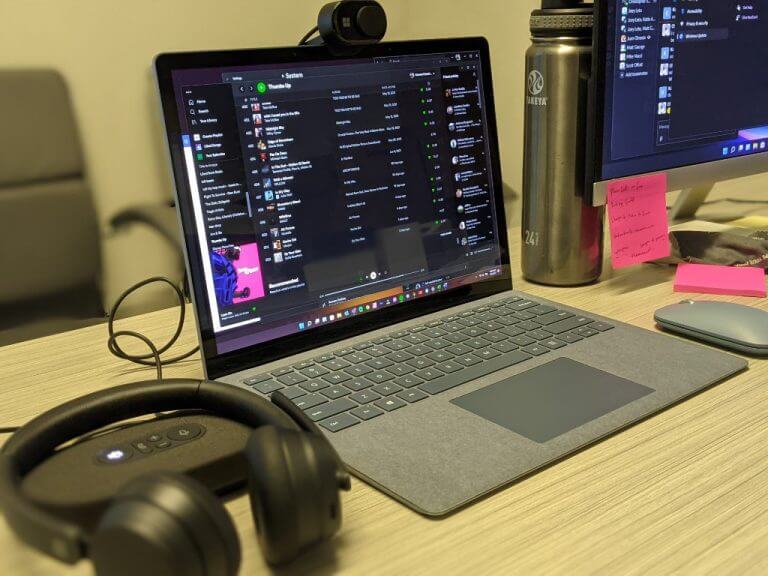
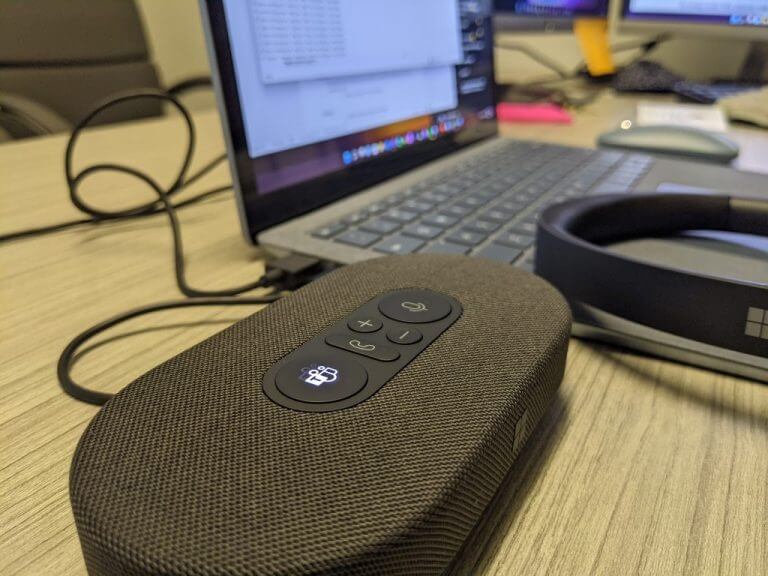
The speaker uses a netted fabric material over 2/3 of the casing which harkens to other speakers such as Google and Apple’s home speakers. The overall size of the speaker is about the size of a large modern external hard drive. The speaker comes in its own travel case which proved to be handy in my use. There is also a USB-C connecting cable that wraps and buries itself within the bottom rubber compartment of the speaker.

Microsoft Modern Accessories - speaker

While I would have preferred to have a Bluetooth connection, the inclusion of a USB-C connector was at least forward thinking of Microsoft.

As for the camera, it straddles the line between the traditional dollar-coin sized rounded design of most cameras and the other option of elongated rectangle casings. Microsoft opted for an oblong design with a manual shutter cover. The overall look is distinguishable in a sea of top mounted rounded webcams in the office.

The camera uses the more traditional USB-A connector, while not as forward thinking as the speaker, does line up nicely with its own modern Surface hardware designs which offer one USB-A and one USB-C port.

The camera doesn’t offer the greatest flexibility for up and down angles but manages to capture a wide field of view, so it compensates.

Performance

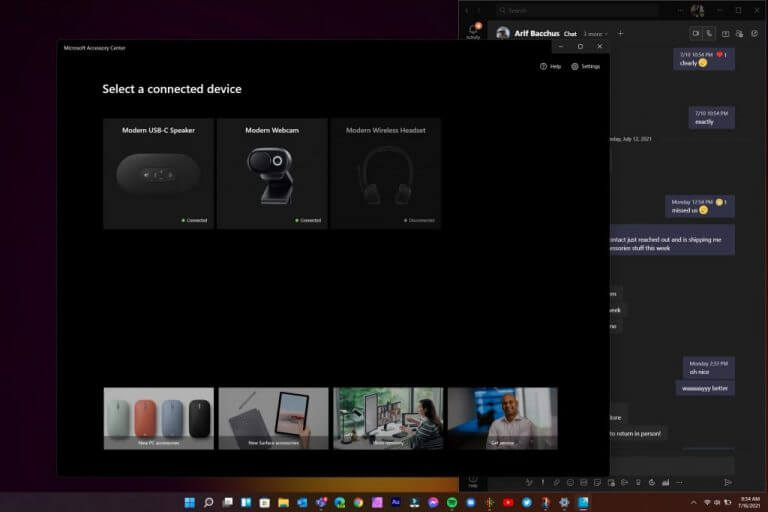
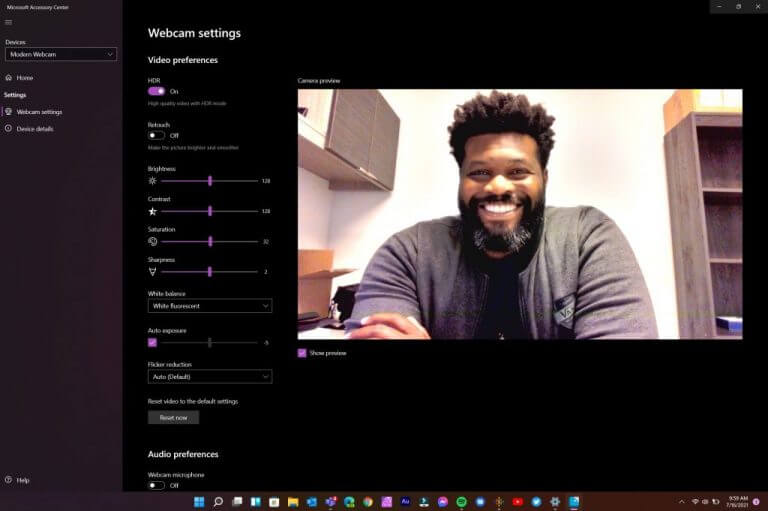
As a software company, Microsoft provides a secondary level of customization with its Microsoft Accessory Center. In the Accessory Center, users can manage their Modern Accessories and tweak settings that include device controls, color temperatures and HDR for the camera, audio profiles for the headsets and more. The Accessory Center is a relatively lightweight app that appears on first connection but not again. A simple search for Modern Accessory will pop up the app once again.

Microsoft Modern Accessories - software

Regarding the headphone situation, Microsoft’s Modern headsets were as impressive if not slightly better than the Sennheiser’s I was previously using and shoulders above depending on the mics and speakers on laptops.

The wired headset does feel dense but not overly so and I’ve worn them for hours on end switching between conference calls, podcast, and music. The function buttons dangle just below the chest and should rest on desk just as easily to reduce addition weight on the head, neck and ears when worn.

The buttons are clearly displayed and jumping in and out of Teams calls worked about 80 percent of the time. There were times when pressing the Teams button to join a call brought up the screen to join but didn’t automatically join the call. Ending calls, adjusting volume and muting worked as displayed.

The Teams integration shined with flares that included letting other members know when you hit the mute button, this was not present when using Zoom, WebEx or even Skype.

As for the call quality, I’ve had no complaints, and I’ve even conducted podcasts simply using the built-in mic on the headset and the quality between this headset and a Blue Yeti was negligible for the most part.

The flexing mic arm also endears the headset to being used like a regular set of headphones during work. While they’re not noise canceling, they do offer remarkable sound quality. For bass heavy fans, the headset will be lacking but for those of us who spend most of their time listening to podcasts, these headsets are amazing.

The Bluetooth headsets mimics the Surface Headphones with its volume control dial, the democratization of the dial functionality is a welcomed feature for the price point.

Microsoft Modern Accessories - headset

However, not all is rosy for the Bluetooth headset. Since Microsoft made concessions with removing the dongle surface area for buttons found on the wired headset, they’ve all been scrunched on the earcups of the Bluetooth headset. On the ears, the buttons are small, and take quite a while to develop muscle memory to nail the no-look muting, speaking and Teams call log in switches.

When in use, there is a voice indicator of battery life and reaming use time. While a full charge implies over 15 hours of use, I’ve been able to use the headsets over three days with moderate call and listening use, without a second prompt of near-ending battery life.

Moving away from the headset, the Microsoft Modern USB-C Speaker has been a pleasant surprise. The MM USB-C may not be Sonos or Apple Homepod levels of sophistication, it more than performs for its price and size.

The speaker sports the same Teams, Call, Speaker and volume keys as the headsets and they sit flush at the top of the device. A large Teams and speaker button flank the other functional buttons and light up when in use or muted.

Microsoft Modern Accessories - speaker - headset

With a rubber bottom, there is little to no worry about the device sliding around, even on a tilted architect’s desk.

The output of the speaker for Teams and other conference calls is noticeably clear and gets plenty loud. As for using the speaker for music, it has its limits in the mids where you could push distortion if you go too loud.

As I mentioned the connecting cord wraps around the base of the body and can clear roughly 26 inches so it doesn’t go far from your computer but can be positioned into some convenient areas just on the outskirts of your main workstation.

Listeners on the other end claim that my voice came through clearly and background noise was minimal, even in a loud open-office setting.

Microsoft’s Modern USB-C Speaker proposition is, however, a bit of a head scratch for individual use. The Modern headsets have better mic quality and becaue they sit directly over the ear; they also have better audio pick up. The speaker may be a must have for multiple speakers in a single room, but those days seem far and away for the moment.

Last up is the Microsoft Modern Webcam that does as good a job as most webcams listed on Amazon to date.

The video quality is clearer and thanks to an embedded light ring also brighter. A lesser known feature of the Modern Webcam includes a built in mic that can record your voice in a pinch, but I recommend carrying the speaker or headset for most occasions.

Microsoft Modern Accessories - software

There are no buttons or additional markings outside of the full Microsoft type font that trails the mount of the device.

The manual shutter is clicky when used, but also is not necessarily stiff enough to remain shut if the device is tossed into a moving bag.

Summary

I’ve managed to not only seamlessly integrate the new Microsoft Modern Accessories into my daily routine which blends a mix of home office dedicated in-person workstation, I’ve also hosted several of our OnPodcast episodes with the devices.

Thanks to their minimalistic and compact design considerations, I keep the webcam, headset and speaker in my messenger bag with no extra bulk. In a pinch they’ve become quite handy and have me reconsidering the few hundred bucks I’ve already sunk into modernizing my workstations both at home and in-person.

There are some features I’m look forward to being adopted in their next iteration of these tools such as Windows Hello face recognition and authentication, heftier bass management in the headsets and speaker as well 2K resolution support.

Leveraging its history with mice and keyboards, Microsoft has proven it can maintain its high-quality device manufacturing while also producing something very functional.

The prices may appear outside the market, yet, for what’s accomplished it feels perfectly in line for the travelling conference employee.

How to Disable File Explorer History [Quick Steps]

By now, there is no more need to mention that the File Explorer is Windows’ way of letting users browse through the files and folders on their system.

And even though most people know the exact locations of the files they require, sometimes searching for them, with the built-in function, is easier.

Whenever you search for anything in the File Explorer, the query is stored in the system and shows up in a drop-down suggestion when your try to search for something else.

For some people, this can be a bit problematic if they are using a shared PC or are trying to search through personal or private data.

And if you find yourself in a similar situation and are looking for a solution to disable the search history feature for the File Explorer in Windows 11 operating system, then you are in the right place.

How do I turn off the search history for File Explorer?

In order to get this done, you will use the built-in Local Group Policy Editor feature. It is a tool that allows you to configure Group Policy settings for a Windows PC or a group of PCs.

Basically, it gives you the ability to control the features and functionalities of the Windows-powered machine.

Here’s what you need to do:

  1. Press Windows key + R to open the Run prompt.
  2. Type gpedit.msc. and press Enter.explorer history step 1
  3. From the left hand side, select User Configuration, followed by Administrative Templates, Windows Components, and then File Explorer.explorer history step 2
  4. From the right hand side, double click on the Turn off the display of recent search entries in the File Explorer search box option.file explorer history step 3
  5. In the new window, select the Enable option, and then click Apply.file explorer history step 4

This is the entire process and once you perform these actions, the search history for your Windows 11 File Explorer will be disabled.

Why should I disable my search history?

First of all, you shouldn’t do anything you don’t want to. Secondly, nobody says it’s absolutely necessary to do so.

As we mentioned at the beginning of the article, this is a safe way to keep your information private if you are using a shared device.

You should only disable this preference if you feel like it’s an efficient way to protect sensitive data.

Recently, we’ve been also talking about the process of uninstalling the FeedbackHub for Windows 11, so you might want to check that out as well.

Was this guide useful for you? Let us know in the comments section below.

Windows 7 Password Recovery Tool: Best We Tested in 2026

Looking for the best Windows 7 password reset tools? You’re in for a treat! Today we look at the best recovery tools that’ll help you get back to your tasks in no time.

What are the best Windows 7 password recovery software?

Stellar Password Recovery – Live Update

Stellar Password Recovery can help you find lost passwords, usernames from apps and games, and lost serial numbers.

Some of the most important features brought to the table by Stellar Password Recovery are:

  • User-friendly interface
  • Windows login password resets through a bootable disc
  • Live Update
  • Wide compatibility with numerous Windows versions
  • Free trial for those who are still undecided
Stellar Password Recovery

Stellar Password Recovery

Stellar Password Recovery provides a password recovery guarantee on Windows 7 and other OS versions.
Free Trial Visit Website

Passware Windows Key Basic – Complex password resetting

Windows Key Basic from Passware has a 100% recovery rate. Moreover, its user-friendly interface is appreciated by users, as it offers quick and comprehensive access to any of its features.

Here are its main features that you need to know about:

  • Fully supports Windows versions higher than Vista
  • Supports SATA, RAID, and SCSI drives
  • Resets complex passwords
  • Back up security settings and roll back your password
  • Resets secure boot options
  • 100% money-back policy
Passware Windows Key Basic

Passware Windows Key Basic

Use Passware to recover your passwords in no time! Ready to try this simple tool?
Check Price Visit Website

PassFab 4WinKey – Locked PCs accessing

PassFab 4WinKey will store and manage your credentials but it can also be used as an emergency recovery option in case you forget them.

Here are some of its main features:

  • Access a locked computer
  • Delete or create new accounts
  • Remove admin/user local passwords
  • Create Windows password reset disks
  • Reset forgotten Microsoft account passwords
PassFab 4WinKey

PassFab 4WinKey

Stay protected no matter what and manage your Windows password instantly using this recovery software.
Check Price Visit Website

Active@ Password Changer Professional – Easy to use

Active@ Password Changer Professional can reset local passwords and attributes on all Windows versions when the administrator password has been forgotten, or lost, or a user account has been blocked, disabled, or locked out.

Check out its essential features:

  • The program is very easy to install and use
  • Great password deleter
  • Deletes all kinds of passwords
  • Compatible with all Windows versions
  • Access to the old password is not required

⇒ Get Active@ Password Changer Professional

Windows Password Reset Standard – Simple interface

Windows Password Reset Standard doesn’t actually recover the password, but instead, it removes it. It can tackle passwords of any kind, successfully removing them despite their complexity.

Take a look at the most important features packed in this software:

  • The program is very easy to burn to a CD using the included image-burning software
  • Windows Password Reset Standard is perfect for beginners
  • The software helps you reset Windows Administrator or other user account passwords
  • It is able to reset any lost or forgotten passwords on Windows systems
  • Works with Windows 7, 10, 8.1, 8, Vista, and XP

⇒ Get Windows Password Reset Standard

Ophcrack – Multi-compatibility

The Ophcrack Windows password cracker is another fantastic Windows password recovery tool, and it is completely free. With this program, you will not need any access to Windows to be able to recover your lost passwords.

Check out the essential features of Ophcrack:

  • Compatible with Windows, macOS, Linux, and more
  • Windows Vista/7 or XP users benefit from free tables
  • Brute-force option to crack simple passwords
  • CSV export and Audit mode
  • LiveCD to simplify cracking
  • Free and open-source

⇒ Get Ophcrack

Trinity Rescue Kit – Effective UI

Trinity Rescue Kit is software that needs to be booted from a disc or USB stick in order to work, but provides useful password recovery features.

Here are some of its main features:

  • Delete passwords entirely
  • Set up new custom passwords
  • Works with USB, CD/DVD
  • Simple yet effective UI
  • Compatible with Windows 7, 8, 10, Vista, and XP

⇒ Get Trinity Rescue Kit

UUkeys Windows Password Mate – Great password remover

UUkeys Windows Password Mate is one of your best choices to remove the login password and security settings that may prevent you from logging in safely and quickly.

Take a look at the most important features packed in UUkeys Windows Password Mate:

  • Simple and intuitive interface
  • Easy-to-understand options buttons
  • Works right after booting
  • Removes login restrictions from disabled accounts
  • Compatible with Windows XP, Vista, 7, 8, 10, and Server 2012

⇒ Get UUkeys Windows Password Mate 

How can I set up a password on Windows 7 after resetting it?

  1. Select the Windows icon, then Control Panel.
  2. Then, select Add of remove user passwords.
  3. Choose the user you want to put a password on.
  4. Then, select Create a password.
  5. Type the password you want to set in both of the boxes, then select Create password (you can also type a password hint).

How can I create a secure password?

When creating a password for your administrator account, you have to think about something that you’ll remember, something noteworthy.

However, don’t pick basic words. They are easy to crack. Also, try to stray away from objects, words, or phrases you use on a daily basis since they might be a dead giveaway.

The safest password should include at least an uppercase letter, a lowercase one, a number, and a special character. It might seem too much but it will ensure no one figures it out.

Don’t share your password with anyone, and never write it down! There are many password managers on the market that will keep track of your different credentials, and they use encrypted security to ensure nobody is going to steal the data.

All these programs will come in handy if you lose your Windows 7 admin password and you don’t have any way of retrieving it.

You definitely wouldn’t want to reinstall everything, and that’s why all these tools for recovering your passwords are the last resort and your final rescue.

Check them out. They will all work smoothly for your system running Windows 7 and they will solve the problem without too much hassle.

As always, we’d like to hear any other suggestions or experiences you had with the software, so feel free to share them with us in the comment section below.

Riders Republic game preview: Full of downhill thrills

The Riders Republic closed beta started on the 23rd of August and allowed a select few players to get an early look at Ubisoft’s upcoming extreme sports game. I’ve been enjoying myself on the slopes ever since and am eager to share my impressions with you in this preview article.

? NEWS: Today, during Gamescom’s Opening Night Live Stream, they announced the beta to be open for all players until the 28th of August. Ride on, everyone!

Let’s first answer a simple question with a complicated response. What is Rider’s Republic? It’s what happens if Steep and The Crew 2 married and had a child with elements from both games showing up. It’s Ubisoft’s attempt to fill a gap in the downhill racing genre that previously really only had indie games like Descenders populating it.

Downhill racing

Let’s start with the best part. The downhill racing is an absolute thrill and screenshots won’t do it justice. In fact, the entire game feels like one big motion blur with how fast things are going. Yet the controls are pretty accurate, no matter if you’re playing in third- or first-person mode and you’ll soon be making sharp turns and performing insane tricks after a jump over a cliff.

And should you make a mistake, there is no need to worry. While a tiny slip-up near the finish could end a 1-hour race (yes, really) in The Crew 2 and leave you frustrated, Rider’s Republic solves this by lending the rewind function that has been so incredibly useful in Forza Horizon games.

Stop. Rewind.

When you crash you can quickly press B to get back on your bike and when you miss a checkpoint, you can simply rewind to where you need. The big difference here is that even in single-player mode, rewinding does not affect the opponents, so while it’s extremely useful and often better than restarting the entire race, it’s best used sparingly.

Similar to The Crew 2, is the trio of activities. Next to downhill biking, you can also perform snowboard tricks on the slopes of a snowy mountain or fly a jetpack through gates above the maps you were riding down from just minutes ago.

Strap on your jetpack or hit the slopes

At least these wings aren’t made of wax.

You’d expect them to go for a simple wingsuit, but you’d be wrong. Rider’s Republic instead lets you fly a fuel-powered jetpack that ironically doesn’t feel as fast as cycling down the mountains, but the variation is welcome.

Similarly, if you tire from racing all the time, you can equip your skis or a snowboard and see how many points you can rack up in trick attacks. The loading happens so fast on Xbox Series X, that changing between different events is only a few seconds away.

Spin to win!

Variety is the name of the game and will be the key ingredient for keeping Riders Republic from feeling stale after hours of playing. And in true Ubisoft fashion, there is always something just within reach that will make you want to keep going.

Speaking of changing it up, fans of The Crew 2 will be happy to see the Vehicle wheel returning. In Riders Republic, you can free roam and go hunting for collectibles and you’re able to switch gear at a second’s notice. See a snowy slope? use your skis. Want to go uphill instead, switch to the snowmobile instead. It’s fast, it’s fun and it’s completely frictionless.

Where’s the snow?

If you don’t want to travel to a checkpoint the hard way, you can always just bring up the map and instantly drop to a point nearby. The world is yours to explore and there is always something to do nearby. And when you get there, there will be rewards.

Unlock rewards

So rewarding.

From earning stars by fulfilling specific requests to gaining levels or unlocking new gear that will make you go faster, the possibility to get addicted and lose a ton of hours is real. Completionists will have their hands full with this one.

In single-player games, part of the reward is usually unlocking the next cut-scene or progressing through the story. And while Riders Republic has a decent amount of focus on story, the characters are just a bit too close to being caricatures for my own liking.

The story

“How do you do, fellow kids?”

I bring up the story only at the end of this preview and that’s because I wasn’t very impressed with it. The characters all try too hard to be cool, like a father trying to impress their kids, wanting to convince them that they are still “cool”.

I may not be much of a judge, as a 33-year-old father of two myself, but there were plenty of cringy moments that missed the mark for me. Experience may vary depending on what you find funny, but I just wanted the cutscenes to be over and get back to racing down dusty hills as soon as possible.

Final thoughts on Riders Republic

Pros
Great sense of speed
Lots to do
Great features like backtrack
Cons
Story and acting doesn't really impress
Not very impressive visually

Having played the Riders Republic beta for around seven hours, I can already tell the full game will take many more hours to complete and it will be a ton of fun. Ubisoft has learned from past mistakes in previous games and added some features like Backtrack or implemented fan favourites like the instant switching between different gear.

You can pre-order Riders Republic for PS4, PS5 and Xbox.

It’s shaping up to be a fantastic release for the end of the year and I look forward to getting my hands on the full release.

See you on October 28th!

*Disclaimer: Previewed on Xbox Series X. Beta code provided by the publisher.

How to install any new Windows 11 build as an ISO effortlessly

Have you ever wondered if you can install any Windows 11 build to test out before its public release later this year? Of course, you can always sign up for the Windows Insider program and download the latest Windows 11 build Microsoft makes available through Windows Update.

Recently, Microsoft released the first official ISO files for Windows Insiders. Microsoft’s dedicated Windows Insider Preview Downloads page is great, but there are only a few Windows 11 versions and builds available.

Moreover, if you want to download and install a different Windows 11 build ISO file, Microsoft does not provide you with any other options. So, what if you want to install say the Windows 11 build using an ISO?

There is a third-party website, not affiliated with Microsoft in any way, called UUP dump, that allows you to “download UUP files from Windows Update servers with ease.”

Here, you can download almost any Windows 11 (and Windows 10 builds too) version you want.

Important disclaimer: Although UUP sources Windows Insider files from Microsoft servers, the UUP website is not an official Microsoft site for downloading ISO files and we take no responsibility if any issues arise. It is not intended to be used as an official source.

Download a Windows 11 build the “official” way

1. Go to Microsoft’s Windows Insider Preview Downloads page.
2. Choose the Windows 11 build you want to download from the list available and click Confirm.
3. Choose your language and click Confirm.
Windows 11 build
4. Download the link to the ISO provided by Microsoft.
Windows 11 build

Download any Windows 10 or Windows 11 ISO file you want using UUP dump

1. Go to UUP dump and choose any Windows 11 build you want. For this example, I chose the latest Dev Channel build.
Windows 11 clean install
2. Next, the Windows 11 build will appear, click on it again to be brought to the next screen to choose your language, Windows versions, and other options.
I decided to download the latest Windows Insider Preview build 22000.160 for the Dev Channel.
Windows 11 clean install
3. Now you have to choose what language, what Windows version, and any additional options you want for the Windows 11 ISO file. Choose “Create download package” when you are ready.
Windows 11 clean install

Now, UUP dump will create a download package (approximately 4 MB) for you that will be download as a zip file. Extract this folder to a folder on your Windows PC.

Inside this folder contains a command file that will download and convert the Windows 11 ISO file. Follow these steps to complete the next process.

1. Right-click the file, “uup_download_windows.cmd” as shown and choose Run as administrator. Windows 11 clean install
2. Confirm your selection via Microsoft User Account Control and choose to Run anyway as shown.
Windows 11 clean install
3. Sit tight, it might be a while; a command box will open and start downloading the necessary files. It will be about 5 GB worth of files, so it may take some time.
Windows 11 clean install
4. Once the download is complete, the command box will automatically launch aria2 to convert the downloaded files into an ISO file.
Available on GitHub, aria2 is an open-source command-line download utility program that UUP dump uses to handle downloading multiple file types from multiple sources.

5. When that process is complete, you can find the ISO file in the same folder as the download package you previously downloaded and extracted.
Windows 11 clean install

Now you have the Windows 11 ISO file, you’ll need to create a bootable drive on USB.

Create a bootable USB

Using Rufus or a similar application, you need to install the ISO file onto a USB drive with at least 8 GB. I used the following settings using Rufus (as seen below). Click Start when you are ready to begin.
windows 11 clean install
When the Rufus process completes, you are all set! Now you have a bootable drive to perform a Windows 11 clean install.

I used this Rufus tutorial provided by Jason Howard, Senior Program Manager of the Windows Insider team at Microsoft.

Just to reiterate, UUP dump is not intended to be used as an official source for Microsoft ISO files. If you are worried at all about it, you can always use the ISO files that Microsoft makes officially available.

Don’t know if your Windows PC can run Windows 11? We got you covered with plenty of Windows 11 How-To articles and more! Don’t forget to check out the OnMSFT podcast, OnPodcast on YouTube!

ZTE Axon 30 Review: A mid-range Android phone that’s almost flagship level

Just like when it comes to buying a laptop, you can find all sorts of Android phones. Some of the most common are flagships like the Samsung Galaxy S21, or even the Pixel 5. But for those on smaller budgets, there are options like the Samsung Galaxy A series or the newly announced Pixel 5A.

Yet the Chinese smartphone maker ZTE also wants to get into this market with the ZTE Axon 30 5G. After the launch of the Azon 30 Ultra 5G, the phone maker is back with another device for a September 8 release in the United States (despite some high-profile legal troubles.)

With what ZTE calls a “next-generation under-display camera,” and also features like a 120 Hz display and a quad-camera setup, this phone has a lot of flagship-level qualities. But for the price of $500, is it worth it? We were sent a review unit, and are here to help in your potential purchasing decision.

Specs

For $500, there’s a lot to the ZTE Axon 30 under the hood. Our review unit comes with the Qualcomm Snapdragon 870 5G processor, 128GB of storage, and a total of 8GB of RAM. Also, included in the box is a 65W fast charger, a USB-C to 3.5mm headphone adapter, and a snap-on case. Other notable specs are below.

  • USB-C connectivity (Gen-1)
  • In-display fingerprint sensor
  • 4200 mAH battery
  • 6.92” FHD+(1080 x 2460 resolution), 120Hz, 20.5:9, AMOLED display
  • 64MP + 8MP + 5MP + 2MP rear-facing cameras
  • 16MP front-facing under display camera
  • 170.2×77.8×7.8mm dimensions and 189g weight
  • NFC support
  • DTS:X Ultra, Hi-Fi audio
  • 802.11 a/b/g/n/ac/ax, Wi-Fi, Bluetooth 5.1
  • Accelerometer, Proximity & Ambient, Compass, Gyroscope
  • Powered by MYOS 11 (based on Android 11)
  • 5G bands: n78(3.4~3.7GHz)/n1/n28/n3/n41/n66(NSA/SA)
  • WCDMA bands: B1/2/5/8;
  • GSM bands: B2/3/5/8;

If you follow ZTE closely for some odd reason, compared to last year’s ZTE Axon 20, there’s a couple of changes. Mainly it’s the 400PPI display, the new Snapdragon processor, 120 Hz screen, Eyecare certifications, and improved in-display camera. Also new are more support for 5G bands, a faster charger, reduced thickness, and the new MyOS operating system.

These specs should not be too surprising for a Chinese-branded phone. Not many American phones have this Snapdragon 870 chip yet but the amount of storage and RAM is consistent with other American devices for the price. It’s even close to some flagships, as we get into later.

Samsung’s $500 A52 5G has a 750 5G processor and similar camera lenses with the same 128GB and 6GB RAM. The Pixel 5A, meanwhile, has the 765G 5G processor and far superior cameras but the same RAM and storage. In most tests, the 870 is close in performance to both the 750G as well as the 765G.

Design & ports

Flagship phones usually come with all-glass designs and feel very premium. And, on the mid-range side, you end up with a mix of premium materials and plastics. To no surprise, that’s what you get with the ZTE Axon 30. It’s a sleek device, with a slim build.

ZTE tells me that the elements used in this phone are a “nanoscale micro-beam” material. It feels like metal, but it also feels like plastic, giving the phone a decent weight in the hands. It’s not too heavy, nor is it too light. The glossy back, however, is really annoying, as it picks up a lot of fingerprints. I’m reviewing the black model, but there’s also an aqua model which might pick up fewer fingerprints.

The camera hump is one of the most noticeable features when it comes to the design of the phone. It’s laughably large and also stops the phone from sitting flat on the table. Interestingly, the display is also curved at the edges of the Axon 30, like the old-school Galaxy S7 phones.


It’s a subtle curve with a waterfall effect where it meets the body of the phone. Software features let you configure how sensitive the curve can be when you hold the phone in your hands. I really like how ZTE finished out the curve so that it’s not too intense as you slip your fingers through the side.

The only metal parts of the phone come at the bottom, where you’ll find the USB-C port and the SIM card tray as well as the single speaker. Note that you can either put in a second sim into the phone or a microSD card for expansion. There is no headphone jack.

Oh, and let me not forget to mention the in-display fingerprint sensor. This sensor is near the bottom of the screen. It works very well and picked up my fingerprints 99% of the time. It’s not noticeable in day-to-day use either and hides perfectly under the display.

Display & audio

A display is everything on a phone and you won’t be let down by the one on the Axon 30. Like its more expensive sibling the Axon 30 5G Ultra, you’re getting a premium setup. The 6.92” FHD+(1080 x 2460 resolution), 120Hz, 20.5:9, AMOLED display will wow you for a mid-range device thanks to its 100% DCI-P3 coverage. (And yes, this does have an always-on display!)

ZTE is using a display panel with 440PPI this year, and a special pixel matrix technology. It says that this can record the time and temperature of each pixel and adjust it in real-time to keep brightness constant to hide that under-display camera. A multi-drive ACE Circuit also ensures that better transitions of both areas of display for a more natural look.

Technical jargon aside, I watched some YouTube nature videos with the brightness turned to 80%, and the Axon 30 really brought out the colors in a blue frog and the oranges of the sunsets. Even scrolling through images on Twitter looked natural. Paired with the 120Hz refresh rate, everything on this phone is smooth and beautiful.

It’s really great to see a 120Hz panel, too, as this is something you’d only find on $1,000 flagship phones like the Samsung Galaxy S21/S20+ & Galaxy S21 Ultra, but ZTE gives you this for $500.

Everything else (resolution and even size) is similar to other devices like the mid-range Samsungs or Google Pixels. Just note that you’ll also find the 120Hz screen on the Galaxy A52 5G, so there is that.

As for audio, the ZTE Axon 30 has speakers and Audio tuned by DTSX Ultra. This isn’t as impressive as the speakers on an iPhone or a Google Pixel, but it gets the job done. I watched NASCAR replays on my devices, and the sounds of cars buzzing around the track shook my desk and felt quite immersive.

The top speaker is also tucked well into the display and is barely noticeable. I didn’t have issues hearing my friends when I hopped on WhatsApp voice calls.

Front-facing camera

The special part of the ZTE Axon 30 is the in-display front-facing camera. This is a tricky task to accomplish. Samsung has this in the latest Galaxy ZFold 3, but ZTE was one of the first phone makers to introduce the technology with last year’s Axon 20.

In this phone, and like on the Fold 3, the front-facing camera is barely visible to the naked eye. This is because the section of the display that houses the under-display camera adopts a Special OLED and more transparent cathode so the 7-layers of the screen are more transmissive to create better conditions for selfies.

The front-facing camera sports a large 2.24μm pixel sensor. It allows for larger light sensitivity for better photos. I tried out the camera, and it’s pretty decent. The sensor overblows some light and can cause some objects to look blurry, but when in the right conditions, images come out clear. See the sample image above.

ZTE tells me it uses an advanced algorithm to automatic adjustments enhance the contrast, image clarity, and transparency to meet a variety of everyday situations. That’s basically post-image processing, but I wish it could be a lot better.

Rear camera

On the back of the ZTE Axon 30 is a quad camera setup. The main camera sports a 64MP Sony IMX662 sensor with an f1.8 aperture. That’s then supported by an 8MP 120-degree wide-angle lens, a 5MP macro lens, and a 2 MP depth lens. Together, the lenses can output some really impressive photos in well-lit scenarios and poor photos in dark situations. (That’s despite the camera saying “night mode” enabled.)

I used the camera to take photos of my front garden, and I was happy with the results. The macro lens really captures close-up details in the flowers (like pollen) that my iPhone or Pixel never could do. The wide-angle lens lets me capture more of the scene. And the raw 64MP mode lets me zoom in on the photo see all the raw details.

Overall. all photos come out very well exposed, with lots of details thanks to the depth sensor. You can see sample photos in the gallery above, at various zoom levels. Note that once you go past 5x zoom, you’ll lose a lot of detail. It’s best to keep the photos basic with this camera.

ZTE also has a multi-camera mode, which lets you take different shots in one exposure. It’s quite fun to use. The only bad thing about the camera app has to be the poor English translations, and common settings for timer, aspect ratio, resolution, and live photos being burned in a hamburger menu.

In video recording, the phone supports up to 4K 60 frames per second video recording, and also 1080p 30 frames per second video recording. The software even offers templates for filming (say slow motion, reverse, micro, dolly zoom so you can stay creative.

Performance

Since this is a Chinese-branded phone, you’d think that the Snapdragon 870 inside the ZTE Axon 30 isn’t well-performing, but you might want to think again. Paired with the 6GB total RAM, this processor can keep the phone chugging along, with little hangups.

For a mid-range phone, the results are surprising, and almost pushing close to the flagship-level performance of Pixels and Samsungs. Tests in Geekbench 5 can back that up.

We got a 932 Single-Core Score and a 3039 Multi-Core score. That’s better than previous flagships like the Galaxy Note 20 Ultra (Snapdragon 865+) which scored 894 on the Single-Core results, and 2628 on the Multi-Core results. It’s even close to the current flagship, the Galaxy S21 Ultra (Qualcomm’s Snapdragon 888,) which nets a 3404 multi-core score, and 1123 single-core score.

When it comes to mid-range devices, meanwhile, the phone edges out the competition with ease. The Galaxy A52 scored 642 on Single-Core testing, and 1905 on Multi-Core testing. Google’s Pixel 5a, meanwhile, netted a 674 Single-Core score and a 1966 Multi-Core score. The ZTE Axon 30 is in a league of its own when it comes to performance on a mid-range device.

Those are just numbers though, and I put the phone through my daily grind to back the results up. In multitasking with two apps open side by side, the phone never once missed a beat. Scrolling in Edge with 4+ tabs open also didn’t slow down the phone.

And, in gaming Call of Duty: Mobile was super smooth, with no skipped frames or lag. The 3D Mark tests can back that up, averaging at 33 to 66 frames in the 3D Mark Slingshot test, and 18 frames in the more demanding Wild Life test.

Operating System

This phone is powered by ZTE’s own MyOS 11. It’s basically a skin of Android 11. It gets monthly security updates like any other Android phone, but I’m not certain about ZTE’s Android upgrade cycle. Granted the legal troubles ZTE is facing in the US (it was deemed a national security threat,) I don’t think that the phone might get the 2+ years of Android updates that Pixels or Samsung phones do, especially after the FCC voted to ban ZTE gear.

Nonetheless, that’s politics. ZTE’s MYOS 11 is a clean version of Android. You get stock Google apps and no bloatware. There aren’t doubles of system apps (photos, calendar, notes) like you get on Samsung phones. Some menus and such might be poorly translated into English, but overall, it’s close to stock Android as you can get.

Network performance

I used the Axon 30 on my T-Mobile plan. It worked fine, and I got speeds closer to LTE rather than 5G of around 25 Mbps down and 39 Mbps up in Queens, New York City. I assume this is because the phone doesn’t support T-Mobile’s band 71, which is more widespread across the US. Calls and texts also worked fine, with no dropped calls, or no issues sending texts.

I included the supported cellphone bands at the top of this review, so you might want to check if this phone supports your carrier before you buy it, as it is catered to more of a European audience rather than the US.

Battery Life

Battery Life on the Axon 30 is great. With my moderate day-to-day use, I easily got around a day and a half worth of battery before I needed to recharge. I also binge-watched NBC Peacock’s Departure on the phone, and it lasted me through 5 episodes before it had to recharge. I’d say you’d easily get 11 hours of battery life out of this phone, which shouldn’t be too much worry since the 65W fast charger can boost the juice up to100% in less than an hour.

A mid-range Android phone that’s almost flagship level

Overall, the ZTE Axon 30 is a mid-range Android phone that’s almost to the flagship level. The device has some great specs, that can help you speed through your tasks, and its 120Hz AMOLED panel is amazing. The operating system is also clean, and all the cameras can get most jobs done right. You can buy the ZTE Axon 30 yourself come September 8 starting at $500.

Halo Infinite’s Xbox Series X and Xbox One digital pre-orders and pre-downloads are now live

The Halo Infinite single-player campaign is now available to pre-order and pre-download on Microsoft’s Xbox Series X and Xbox One console families.

While the multiplayer aspect of the Halo Infinite video game will be free-to-play, the story or campaign mode will need to be purchased separately. It’s currently listed as $59.99 in the US Microsoft Store storefront.

It should be noted that all aspects of Halo Infinite will be playable in full for free for Xbox Game Pass subscribers at launch so those who are active subscribers of the video game subscription service will not need to buy this add-on at all.

Microsoft announced earlier today that both the Halo Infinite single-player and multiplayer modes are set to release on December 8th on Xbox One, Xbox Series X, and Windows PC. The Co-Op and Forge modes, however, will launch at a later time.

To build hype for the release of Halo Infinite, a limited edition Xbox Series X console and Xbox controller were also announced and the Halo Master Chief content has once again returned to the mega-popular Fortnite video game for a limited time.

Are you excited for Halo Infinite? Let us know which platform you’ll be playing it on in the comments below and then follow us on Twitter and Facebook for more Halo news.

Halo Infinite (Campaign)

LEGO Star Wars: The Skywalker Saga video game gets new Spring 2022 release window

After being in limbo for several months, the upcoming, and several times delayed, LEGO Star Wars: The Skywalker Saga video game has been given the new release window of spring 2022. While there’s still no specific release date for the game, it is a good sign that it’s once again on track to get a release in the near future.

LEGO Star Wars: The Skywalker Saga was first announced back in 2019. In early 2020, it was given an October 2020 release date but this was soon changed to a spring 2021 release window due to delays caused by the pandemic and new plans to optimize the title for the newly released video game consoles such as Microsoft’s Xbox Series X.

In April 2021, LEGO Star Wars: The Skywalker Saga was again delayed, this time with no new release date or window given.

LEGO Star Wars: The Skywalker Saga is a brand new LEGO video game revolving around characters, locations, and storylines from all nine episodes of the main Star Wars film series. The Microsoft Store listing for the Xbox version of the game is live and it appears that the one version will be released for both Xbox One and Xbox Series X consoles with 4K and 60 FPS support coming to the latter console.

Have you been waiting for LEGO Star Wars: The Skywalker Saga to come out and do you think it’ll meet this new deadline? Let us know in the comments below and then follow us on Twitter and Pinterest for more Xbox gaming news.

Microsoft Ignite is officially coming back in November

If you weren’t already aware, Microsoft just announced a second Ignite digital event for 2021 and got everyone excited.

The Redmond tech giant revealed that its annual Ignite tech conference will be returning this autumn, starting with November 2nd through the 4th.

Of course, the highlights of this showcase are the latest product demos, Q&A with Microsoft experts, technical deep-dives, and more.

Ignite is returning as a free digital event in November

Don’t get too enthusiastic just yet though, because registrations are not open at this time.

However, you can already add the event to your calendar and we’ll let you know as soon as we have more information about registrations and the session calendar.

This is heartwarming news for everyone who was waiting for another chance to supplement their knowledge or contribute to the further development of technology.

Even though it seems like ages ago, Microsoft’s last Ignite digital event took place earlier this year, between the 2nd and 4th of March.

The tech company used the event to announce new Teams and Outlook features, Power Automate Updates, and a new enterprise-focused Mixed Reality Platform named Microsoft Mesh.

Also, this year’s previous Ignite conference was pretty light on Windows news, with only some vague rumors about Sun Valley circulating on the internet.

But, now that Windows 11 is official, this next Ignite event will be a whole different story, as we might receive more information about the upcoming operating system.

Clearly, we’ll know more about what Microsoft has in store for us once the session catalog will be published. Until then, we can only wait and hope Windows 11 doesn’t cause us too much of a headache.

While we wait, what are your thoughts on Ignite? Are you excited about any potential announcements? Let us know in the comments section below.

Microsoft reveals Limited Edition Halo Infinite Xbox Series X console and Xbox Elite Controller

Microsoft has just confirmed during the gamescom Opening Night Live event that Halo Infinite is launching on Xbox and PC on December 8, 2021. To celebrate Halo’s 20th anniversary, the company will also release the first-ever Limited Edition Xbox Series X console inspired by the much-anticipated game, which will be available on November 15, 2021.

“This design was inspired by the expansive Halo universe and is wrapped with dark metallic paneling accented by iridium gold. Above the armor there is a custom star pattern as seen from the surface of Zeta Halo that extends to the top of the console and onto the fan. Below the stars, the top vent is accented in Cortana-themed blue. To top it off, the console powers on and off with custom Halo-themed sounds,” the Xbox team explained.

This Halo Infinite Limited Edition Xbox Series X console is already available for pre-order for $549.99. The bundle will include a digital copy of the game, as well as a custom controller and it will also custom Xbox controller featuring side-and-back grips as well as an iridium gold 20-year mark on the back.

Last but not least, Microsoft also revealed a Limited Edition Halo Infinite Xbox Elite Series 2 Controller that will also start shipping on November 15, 2021. “This controller features a battle-worn, matte metallic green with an iridium gold D-pad and comes with an arsenal of swappable components and a custom carrying case emblazoned with the iconic UNSC insignia,” the Xbox team explained. The Limited Edition controller is also available for pre-order for $199.99 , and will also come with an exclusive weapon charm to use in Halo Infinite’s multiplayer mode.

A lot of Xbox hardcore fans have probably been waiting to get their hands on a limited edition console, and this Halo Infinite Limited Edition Bundle doesn’t disappoint. It’s possible we could have seen this first custom-designed console last year if Halo Infinite hadn’t been delayed to holiday 2021, but it’s better late than never, right?

10+ best USB drive encryption software for Windows 10/11

USB flash drives are very useful when we need to transfer data. You can use them to save confidential data if you use a public computer for example.

Another great thing about USB sticks is that they are small, easy to carry, and store.

But all these advantages also bring a high risk of accidentally losing them. In such an undesired event, you lose significant information and also facilitate access to your most confidential information to a stranger.

Sadly, you cannot password-protect your entire USB flash drive, like you secure your PC or phone. You can invest in an encrypted flash drive with hardware encryption. Or you can use software to achieve a similar level of USB data protection.

Still, you need to take into account the fact that someday you will need to decrypt the data in order to access it.

If you use the USB stick on your computer only, the encryption software will be already installed. But if you need to transfer files between computers, there will be an issue with the encryption tool.

The easiest way is to store the software on the USB flash drive. Partitioning the USB stick and encrypting only part of it is a solution. The encryption tool can be stored on the partition that it is not encrypted.

This way you can use to decrypt the files on any computer by running the software directly from the stick.

Still, you will need to make sure that the encryption program is compatible with the operating system of the computer.

What’s the best USB encryption software to protect your files?

Gilisoft USB Ecryption

Gilisoft USB Encryption is an easy-to-use solution to secure you data stored on a USB device.

What it does is to separate your USB flash drive into two parts: a secured one and a visible one.

The secured zone can include any type of data that this tool will password-protect.

Some very useful options for Gilisoft USB Encryption is that it’s compatible with most Windows OS, including XP and Vista.

Plus once you install it on your device, you’ll benefit from free upgrades to further software versions.

Supported media:

  • USB flash drives
  • Thumb Drives
  • Memory Sticks
  • Memory Cards
  • Pen Drives
  • Jump Drives
Gilisoft USB Encryption

Gilisoft USB Encryption

Try this efficient and user-friendly tool to keep your USB data safe from prying eyes.
Free trialVisit website

DoGoodSoft

The DoGoodsoft USB Encryptor is advanced software that secures USB drives and external hard disks. It provides fast password encryption of both larger and smaller folders or files.

The software does not need to be installed on each particular folder/partition you want to encrypt. You just have to place it in that location and it will start encrypting right away.

It has an easy-to-use interface that allows you to encrypt and decrypt your data fast. Setting a password is also intuitive and hassle-free. 

Besides password encryption, DoGoodsoftware USB Encryption helps you create read-only files. This feature is very useful when you need to share important data, making sure it doesn’t get altered or deleted in the process.

Other key features of DoGoodsoftware include:

  • Can also be used on local disks
  • Encrypts subfiles and subfolders
  • Encrypts network shared folders

DoGoodsoftware USB Encryptor is a paid software with a free trial and it can be used on Windows 10, Windows 8, Windows Vista and Windows XP.

DoGoodsoft USB Encryptor

DoGoodsoft USB Encryptor

Keep your data protected with advanced and fast password encryption.
Free trialVisit website

USB Secure

USB Secure has been designed to serve the basic purpose of encrypting USB flash drives.

A particular feature of this software is that you can save your contact details with the flash drive That way, when somebody finds your USB stick, in case you lose it, they can contact you.

Once installed on a USB flash drive, you have access to files on any computer, without running the software. You have 2 options to access your files: unlock them or just access them in a virtual drive.

That comes in handy when the USB stick is accidentally unplugged. The interface pattern is of a classic USB stick.

The trial version allows you to use the program 3 times.

USB Secure

USB Secure

Never worry again about data confidentiality and access your files anywhere using USB Secure.
Check priceVisit website

VeraCrypt

VeraCrypt is an updated and improved version of TrueCrypt. Using three different encryption algorithms such as AES 256-BIT, TwoFish, and Serpent, VeraCrypt has been developed to fix many of the security issues in TrueCrypt.

You can run the portable application directly from the USB stick. And it is completely free to use if you utilize it for drive sizes of a maximum of 2GB. Still, some users report that managing VeraCypt can be a bit difficult.

The tool creates password-protected virtual disk volumes. You just plug in the USB flash drive and launch VeraCrypt Volume Creation Wizard. You can choose between creating a volume or encrypting the entire memory stick.

VeraCrypt is available in 37 languages.

⇒ Get Veracypt

SecurStick

Just as VeraCrypt, this program does not require installation and works without administrator rights. You still have to run an .exe file from the USB stick. This will launch a command prompt and a browser window. Just enter a password and select Create to install the Safe Zone.

Once it is built up, it works like an encrypted safe box on the memory stick. You simply copy your files there and they are automatically encrypted.

There is something particular about this program. The encrypted files are available for computers operating on Windows, Mac OS, and Linux. 

The download page and documentation are in German, but the interface is available in English, Dutch, German and Italian.

⇒ Get SecurStick

ENC DataVault

This is another software that runs on Windows and Mac OS operating systems. And just like the software above, you do not have to install the program on the computer. When you set up the encryption on the USB memory stick, you actually install a portable vault that secures your files. The version for the computer has more features than the portable version.

ENC DataVault is not free but during the 14 days trial period you can get an idea of what this software can do.

A positive aspect is that you can use the tool not just with a USB stick, but also on any cloud storage account, and on any laptop or desktop, for the same purpose of encrypting certain data.

⇒ Get ENC DataVault

USB Flash Security

This software works as well with AES 256-BIT encryption. It encrypts the entire USB flash drive except for a part on which it stores the program. The encrypted files are hidden and you can access them, by running the program directly from the memory stick. This way, you do not need to install the software on the computer.

Pay attention to the files that you have already stored on the USB flash drive. USB Flash Security software wipes all your files when setting up.

There are several options for buying this program. However, you can try out the free version which is limited to one USB flash drive with a maximum drive size of 4 GB.

⇒ Get USB Flash Security

Rohos Mini Drive

Rohos Mini Drive protects your USB memory stick, but the developer also has similar products for your PC or external hard drive.

It creates two partitions on the memory stick: a hidden one and an open one. In the open partition, you have to store the Rohos Disk Browser tool from your desktop. This way, you can access your encrypted files on any computer, without administrator rights.

Rohos Mini Drive is freeware but limited to up to 8GB drive store. 

⇒ Get Rohos Mini Drive

LibreCrypt

LybreCrypt is another freeware tool, that used to be named DoxBox. There are no drive size limits and you can encrypt as many USB flash drives as you need.

The program can run only on Windows. Yet, the files that you have encrypted, can be also transferred to PCs running on Linux.

This program comes in two editions. One is developed to run on a desktop and create a vault on your USB stick, called DoxBox.

The other edition is designed to make the encrypted files available on any computer, without installing the software. LibraCrypt works with three different encryption algorithms: AES, Twofish, and Serpent.

⇒ Get LibreCrypt

USBCrypt

USBCrypt is another software designed for Windows that protects files on removable devices. It can encrypt also other drives connected through eSATA or FireWire.

The tool encrypts USB memory flash drives using the AES algorithm just like other software presented in this article do. It creates a password-protected Virtual Encrypted Disk. It comes with a detailed user guide as well as screenshots.

The trial version of USBCrypt comes with a 30-days free license of full use.

⇒ Get USBCrypt

Kruptos 2 Go USB Vault

This software uses the same AES 256-bit encryption algorithm. What makes a difference is the fact that is available for Windows, Android, and Mac operating systems.

The USB encryption version works for USB memory sticks and other USB devices (memory cards, external HDD). Once it is set up, you simply have to drag and drop the files into the Vault and they are automatically encrypted.

Kruptos 2 Go-USB Vault is not free, but the price is rather accessible than other similar paid products.

⇒ Get Kruptos 2 Go

Idoo USB Encryption

Idoo USB Encryption is fairly easy to use. This program can create a safe area and a public area on your USB memory stick. You need to provide a password to disclose the safe area. And you can access the USB encrypted files on any computer, without having to install the program.

Password recovery is a useful feature. However, some users report this can be a bit worrisome sometimes. The password is sent in plain text to a specific email address. This indicates that the password is stored on the developer servers.

According to the number of licenses you are buying, there are a few options for purchasing Idoo USB Encryption. 

⇒ Get Idoo USB Encryption

USB Enforced Encryption

usb enforced encryption

Formerly known as EasyLock, USB Enforced Encryption is actually a complex encryption program. You can use it to encrypt local computer folders, USB storage devices, and even files uploaded to cloud services.

The tool comes with a lot of features and it protects your file with AES 256bit encryption.

With EasyLock, confidential data can safely be transferred between Windows and macOS, by using the password set when encrypting the files.

⇒ Get USB Enforced Encryption

USB memory sticks are essential for storing and transferring important files.

Cloud storage is also a great alternative, but there are users who prefer to use a physical storage device.

In conclusion, keep your data secured by running one of the USB encryption software listed above.

More Xbox news to come at the gamescom Opening Night Live, watch it here at 11AM PT

We’re just a couple of hours away from the gamescom Opening Night Live, a 2 hours digital event that should bring exciting updates from Xbox Game Studios, PlayStation, and many other big publishers. The event will start airing on YouTube and Twitch at 11 AM PT, with a pre-show starting at 10:30 AM.

Geoff Keighley, the host of the event has already confirmed that we will get updates about Call of Duty: Vanguard, Far Cry 6, Saints Row, and many more upcoming games. If Halo: Infinite wasn’t explicitly mentioned, the game is expected to make an appearance during the show, especially after its December 8, 2021 release date leaked earlier today.

We also hope to see updates about other Xbox Game Studios titles that we didn’t see yesterday during Microsoft’s gamescom digital event. It’s been quite a long time since we had any substantial news regarding CrossfireX, an Xbox exclusive game that was expected to be released last year but has since been delayed to 2021, just like Halo Infinite.

Forza Motorsport 8, Hellblade II, or the Fable and Perfect Dark reboots were also absent from Microsoft’s event yesterday, though Microsoft may not want to show games that are still quite early in development. Anyway, Halo Infinite is definitely the game Xbox fans want to hear about these days, and Microsoft will hopefully avoid letting Call of Duty: Vanguard and Battlefield 2042 grab the best seats on the hype train.

Do you think we’re going to get some news about Halo Infinite during the gamescom Opening Night Live later today? Sound off in the comments below.

Visual Studio Community 2019 and Visual Studio Code land in the Windows 11 Microsoft Store

Microsoft is bringing more of its biggest apps to the Windows 11 Microsoft Store, and the latest additions are Visual Studio Code and Visual Studio Community 2019. Windows 11 testers can download the two apps for free from the Microsoft Store, and this should make it more convenient for developers to get their hands on the apps when the OS starts shipping later this year.

With Windows 11, Microsoft will allow all developers to submit unpackaged Win32 apps to its Store, and this should help to make the Microsoft Store the easiest way to discover and install apps on a Windows 11 PC. Visual Studio was one of the big apps that Microsoft said were coming soon to the Windows 11 Store, along with Microsoft Teams, Disney+, Adobe Creative Cloud, Zoom and Canva.

The Microsoft Store has been around for almost 10 years, making its debut with Windows 8 at a time when Microsoft pushed developers to create Metro-style apps for touchscreen PCs. However, Metro apps and UWP apps from the Windows 10 era never reached significant momentum, and Microsoft finally realized that legacy Win32 apps are what Windows users really want to see on the Microsoft Store.

It will likely take some time before we see more big names coming to the Windows 11 Store, and the app also remains a work in progress. Microsoft is also working to bring Android apps on Windows 11 via a partnership with the Amazon App Store, but this integration is still nowhere to be seen in the latest Windows 11 Insider builds.