Updated Windows 10 Console Colors for upcoming build “leaked”

For the first time in twenty years, Microsoft is updating the Windows console with more legible colors. Windows 10 preview build 16257 rumored to be available later today should include the overhaul of the legacy color scheme.

The Verge reports that an official Microsoft blog has been shared early, but the link has since been removed. Through the magic of caching, however, the blog was recovered.

The legacy default scheme was not built for modern displays and does not render as well on newer high-contrast LCD displays. This is particularly apparent with deeply saturated darker colors like blue.

The new default colors will modernize the look of the Windows Console and make it more congruent with other terminal experiences, such as the integrated terminal in VSCode.

A clean install of Windows 10 with the new build will show the new default colors, but simply upgrading will not affect them. Microsoft says that this is because they don’t want to overwrite any existing custom color settings.

We’ll keep our eyes out for Windows 10 Preview build 16257 and more information as it comes.

Public previews are now available for Microsoft account, Azure AD sign in experience to more testers

As far as most industry observers are concerned, Microsoft’s mobile efforts began and ended with the admittance of Windows phones inability to garner a significant developer community leading to its inevitable demise

However, Microsoft is looking to make newer mobility moves in a far more subtle way and it is doing so by rolling out Azure AD sign-in experience to the public.

As part of the roll out, Azure AD & Microsoft account sign-in experiences to a public preview brings a redesign of the account sign in pages that are more “consistent in look and feel.” Users will also be introduced to new prompts based on the company’s telemetry that is designed to encourage a higher success rate of use and authentication.

The Azure team is recommending businesses already using older versions of Microsoft account sign-ins to prepare for the changes coming down the pipe by doing the following checks:

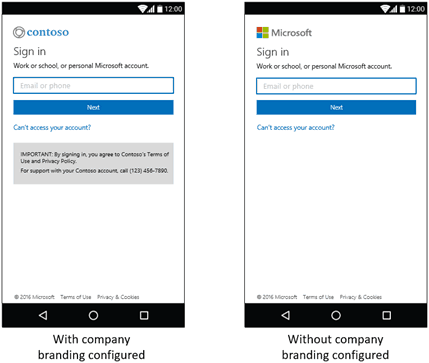
Check to see that your existing company branding, if configured, works well with the new layout

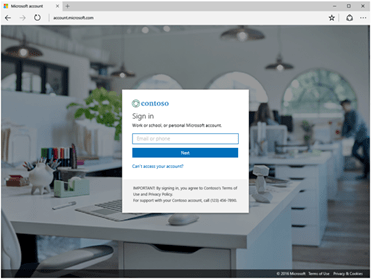
Any company branding you currently have configured will be carried forward to the new UI: sign-in image, banner logo, username hint, sign-in page text and background color. However, the opaque white box in the middle of the new design might obscure the subject focus of your existing image. If you need to make any changes, you can make them in the “Company branding” pane in the Azure Portal.

Verify automation that runs on the sign-in page
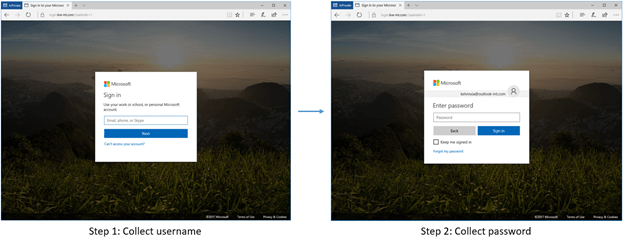
Since sign-in is now done over two screens, any existing automation might break. Do a quick test and update your code if necessary.

Update documentation and training material

Documentation containing screenshots and step-by-step guides for signing in might have to be updated to explain the paginated flow and show the new UI.

While it’s not a shiny new piece of hardware, businesses and online services may appreciate the public preview of Azure AD and Microsoft Account more as Microsoft looks to modernize the experience.

Slack for Windows fixes bugs, enables download pause and resume in latest update

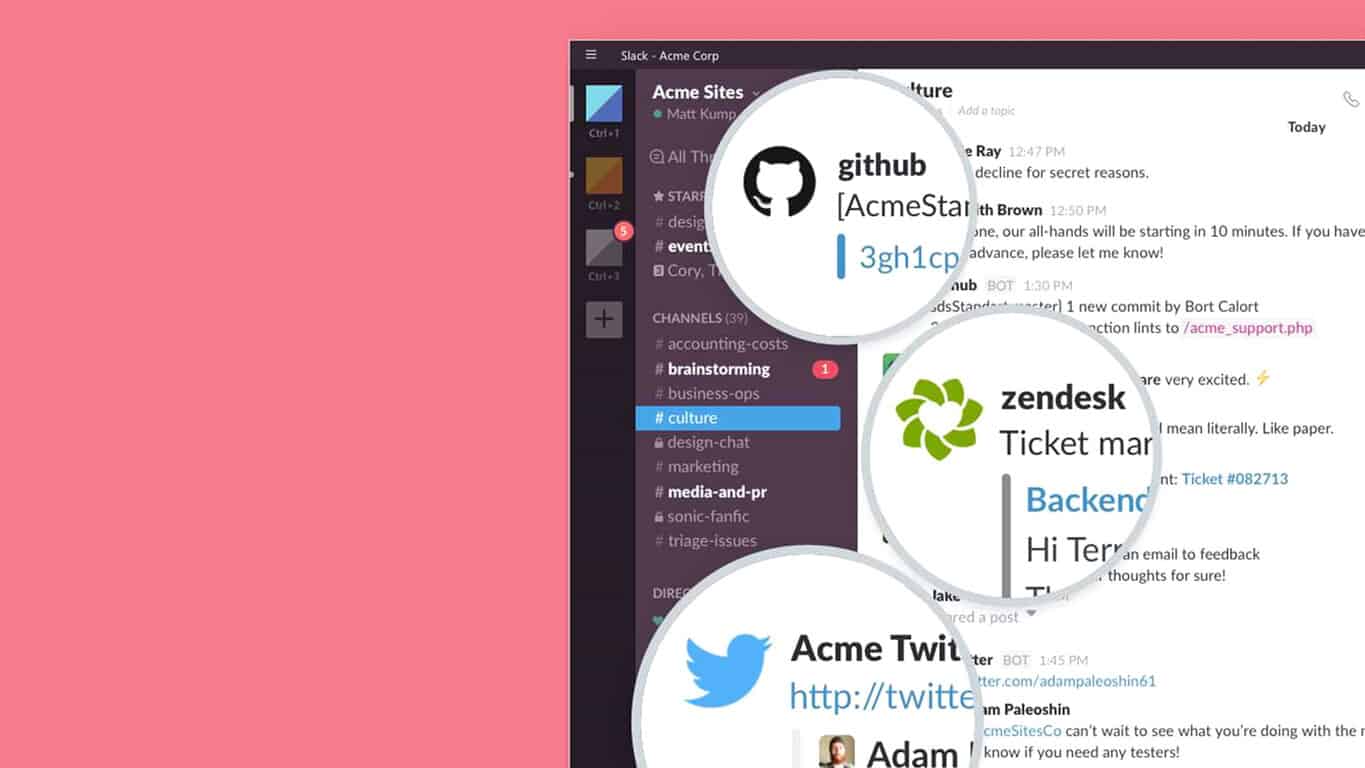
Team collaboration tool Slack continues to improve with each update. The chat based communication app on Windows PC is reporting a new update up to version 2.7.0 with a new feature: pausing downloads. The simple addition is an important one, letting users pause and resume downloads at will instead of having to cancel the item altogether.

Here is the Slack 2.7.0 for Windows PC changelog:

What’s New

  • File downloads are now pausable and – in perhaps a master stroke of matchmaking – resumable too.
  • A bevy of changes to make the app more keyboard navigable.
  • We’ve adjusted the app icon, but just a skosh. Putting our best foot forward.
  • Should the worst happen and the app fail to load, you’ll see a less dreadful error page and perhaps even a code you can share.

Fixed

  • On Windows 7, notifications have been made more reliable, at the expense of a preference: you’ll no longer be able to customize their position on-screen.
  • On Windows 10, we’ve negotiated a truce between notifications and your antivirus. This will keep notifications appearing in a timely manner. They’ll play whatever sound you’ve told them to play more reliably, too.
  • The team sidebar is no longer touch-challenged. Tap, flick, and drag teams to your heart’s content.
  • Cancelling a running download is 38% less crashy. For when you decide you didn’t need that third gif after all.
  • We spliced some wires we shouldn’t have, causing a loading screen to flash briefly after signing into a team. Now it’s as it should be.
  • Those little white dots in the team sidebar that let you know when you have messages to read? They’re no longer obscured when the app is maximized.

The update is live for both Windows Store and Windows desktop versions.

Slack
Slack
Price:
Free

Minecraft Better Together Update will require an Xbox Live sign-in for all online multiplayer play

Some changes are coming to Minecraft, and Mojang recently took to their blog to update Minecraft fans on what they need to know before things take effect. Most importantly, it was revealed that starting with the Better Together Update, a Xbox Live sign-in will be required for all online multiplayer play.

Since the Better Together update will be joining together various platforms, the changes are all part of moves to ensure everyone has a positive and safe experience on Minecraft. Mojang is also inviting Minecraft players to share ideas and submit feedback about these new rules and experiences by visiting their website. Here is a look at a few of the online play changes which Mojang have highlighted:

  • Starting with the Better Together update, you’ll need to have a free Xbox Live gamertag of your own to connect to online multiplayer experiences, whether that’s a Realm, an official server partner or a hosted Minecraft world via an IP address.
  • Because everyone you’ll meet online in Minecraft will have their own gamertag too, you can add new friends, or mute, report or block someone, right from the pause menu in-game.
  • Now you can with new player permissions which you can manage right from the game. You can set custom permissions for each player in your world or Realm, or use pre-set permissions levels.
  • Chat Filters: On our official server partners – CubeCraft, InPvP, Lifeboat and Mineplex – there are some additional filters for email addresses and numbers, including phone numbers and ages.
The pause menu

Several changes are also coming to the way which servers are handled and monitored. These changes bring several moderation tools which will help protect Minecraft players.

  • Each of our server partners work with a fantastic team of volunteers to keep an eye out for bad behavior, including bullying and cheating, and help report issues.
  • At our request, our official server partners – CubeCraft, InPvP, Lifeboat and Mineplex – have removed private messaging, including the /tell command, to allow more thorough moderation across all parts of the server.
  • Each server partner includes their own expanded word filter list to make their server experience friendly for all ages.

These changes come after many news outlets reported that child predators have been using Minecraft to lure young children into sharing personal information and explicit photos. The requirement of an Xbox Live Gamertag in the Minecraft Better Together Update will help to prevent this, and will open access to more privacy, chat, and sharing settings which parents can enable for their children.

Microsoft wants its outside lawyers to quit billing by the hour

Microsoft is looking to build a deeper relationship with their external law firms by cutting out the hourly billing, according to a recent blog post from David Howard. The Corporate Vice President and Deputy General Counsel shared on LinkedIn that the tech giant is leaning towards alternative fee arrangements and is hoping to move 90% of their law partners to the new method within the next two years.

With the beginning of our fiscal year on July 1, we have introduced Microsoft’s Strategic Partner Program, a new type of relationship with the law firms which will be handling most of our most important legal work. While we always want to ensure that we are paying a fair price for our legal work, our primary goal with this program is to get (and give!) more value with our law firm relationships.

The Strategic Partner Program designed to create deeper relationships is an effort to encourage higher quality law firm practices instead of lower rate competition and poor quality. Microsoft intends to work with firms on a retainer basis, promote open forums with advisors, and pay fair prices that don’t interrupt the expected quality of a law firm.

The goal will also coincide with the Law Firm Diversity Program, encouraging a more diverse availability to minority representation. The following firms will be part of the Strategic Partner Program within the year:

  • Arent Fox
  • Covington & Burling LLP
  • Davis Wright Tremaine LLP
  • Fish & Richardson P.C.
  • Greenberg Traurig, LLP
  • K&L Gates LLP
  • Latham & Watkins LLP
  • Merchant & Gould P.C.
  • Orrick, Herrington & Sutcliffe LLP
  • Paul, Weiss, Rifkind, Wharton & Garrison LLP
  • Perkins Coie LLP
  • Sidley Austin LLP
  • Simpson Thacher & Bartlett LLP

“Firms were not only more open to discussing work on an alternative fee basis, many are embracing it,” he assured. Howard also noted that the bidding process will drive competition with prices and keep the law firms fair on significant matters, particularly when deciding which will represent the company.


Xbox One’s Slime Rancher to be Xbox Play Anywhere title in future

Slime Rancher, a life simulation video game from indie developer Monomi Park launched yesterday on Xbox One, Windows and macOS, and the game is currently free for Xbox Live Gold subscribers. The indie title has been positively received by gamers so far (the Xbox One version currently has 4.5 stars rating on the Xbox store), and the simultaneous Steam release made many players wonder if the game could eventually launch on the Windows Store with Xbox Play Anywhere support.

Fortunately, the indie developer confirmed last week on Twitter that the Windows Store version of the game is actually in development, and it should support Xbox Play Anywhere:

The developer didn’t share an ETA for the Windows Store release, but we’ll let you know if we learn more details in the coming weeks. If you already tried Slime Rancher on your Xbox One, let us know in the comments if you’re looking forward to play it on your Windows 10 PC too.

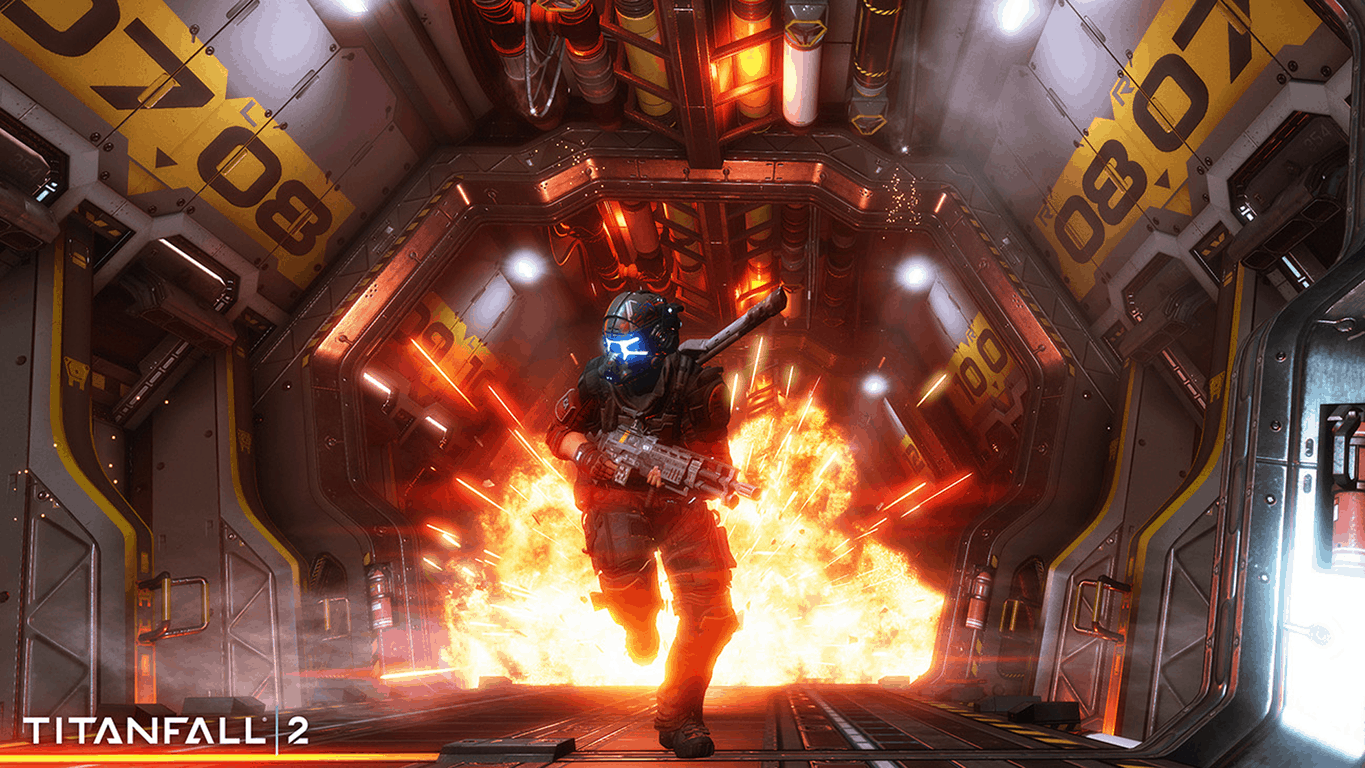
Titanfall 2: Ultimate Edition launched on Xbox One today with loads of content

Titanfall 2: Ultimate Edition is now available to buy and download on the Xbox One. This new version of the game contains the full base Titanfall 2 video game but also all of the content released in the previously released Digital Deluxe Edition and the Jump Start Pack which unlocks a variety of in-game content and skins. Here’s the full official breakdown of what’s included:

The best way to jump into one of the most surprising shooters of 2016 is with the Titanfall™ 2 Ultimate Edition. Not only do you get access to all of the content included in the Digital Deluxe edition, this bundle also includes a Jump Start Pack which instantly unlocks all Titan and Pilot classes and arms you with the funds, Double XP tokens AND a custom warpaint skin for the R-201 Carbine all to get you up to speed on the Frontier. Ultimate Edition includes Titanfall™ 2 base game, Deluxe Edition content (Scorch & Ion Prime Titans, Deluxe Edition Warpaint for 6 Titans, Deluxe Edition Camo for all Titans, Pilots & Weapons, Deluxe Edition Nose Arts for 6 Titans, Deluxe Edition Callsign), and Jump-Starter content (All Titans unlocked, all Pilot tacticals unlocked, 500 tokens to unlock loadouts, cosmetics and gear, 10 2x XP tokens, the Underground R-201 Carbine Warpaint).

Buy Titanfall 2: Ultimate Edition on Xbox One

Titanfall 2 is a relatively new first-person shooter video game and has received positive reviews from players and critics. Its level variety and James Cameron-esque single player story mode in particular have garnered a lot of acclaim.

Are you a Titanfall fan? Let us know in the comments below.

Microsoft Teams to gain new app admin features

Microsoft will be rolling out an update to its Microsoft Teams service over the next few days which will enable a variety of new admin features relating to apps (i.e. connected experiences) within Teams.

“Put simply, there will be three new controls that will allow you to manage in detail which third party apps can be used in Microsoft Teams,” Microsoft’s Luis Carrasco states in a blog post. “As an admin, you can choose to allow or block all third-party apps, individually choose which apps to allow or block, choose what happens as new apps get submitted into the Microsoft Teams app catalog.”

As part of this update, the Tabs and Bots will be renamed Apps and admins will immediately be able to enable or disable an app, allow or block all third-party apps, and sideload external apps for testing without submitting them to the Teams app catalog.

Have you been waiting for this functionality? Let us know in the comments.

Microsoft Ultimate Word Games updates on Windows 10 with cool improvements

Microsoft Ultimate Word Games (previously Wordament) has updated on Windows 10 PCs to Version 3.1. This update adds a variety of new visual changes that should please players who were displeased with the small size of the graphics when the game first launched. The game now also allows players to change languages easier than before and going forward will reward premium (paid) users with double XP on all activities. Here’s the official release notes:

  • We added a language selector to Wordament Multiplayer.
  • Wordament now has a larger board size available. Just press the Zoom button in the game to try it out!
  • Crosswords board was made a bit larger. We plan to increase the board size even further in a future update.
  • Premium users now earn double XP.
  • Various bugfixes and optimizations.

Microsoft Ultimate Word Games is a four-in-one Windows 10 game that connects to Xbox Live for some competitive casual gaming. It’s free to download and play however it does have a premium option which removes the numerous ads that are in the free version.

Microsoft Store drops 1tb Surface Book model

While most people interested in a Surface Book have probably already gotten one, there’s some bad news for people who haven’t yet: The terabyte version of the Surface Book has been dropped from the online Microsoft Store. Without any kind of announcement or other fanfare from Microsoft, the option to get the most high-end version of the laptop has disappeared from the online marketplace.

There are rumors that the Surface Book may be getting the next device in its line sometime soon, but for right now, we can only interpret this as the current Surface Book getting production toned down. If you truly need the 1tb version of the Surface Book, you probably won’t have a problem picking one up using some kind of third party service, like Amazon – or even a retailer.

Microsoft is outpacing the market in cloud share growth

For some analysts and industry observers, the best way to measure the winners and losers in a growing cloud computing market has been to use metrics such as run rate, growth rate, and market share.

To date, Amazon’s AWS cloud compute has reign supreme in most of those categories as it looks to hold onto an almost ten-year head start over its competitors, but it now seems the lead may be shrinking faster than expected.

With most of the larger cloud computing companies posting their quarterly results, Synergy Research Group has been able to compile a report that sums of the gains made by each company and it’s Microsoft marking this quarter with the fast growth among its competition.

Based on Microsoft’s Q4 17 reporting, Azure saw an 11 percent growth in its public cloud offering which put the service at a 3 percent gain over last years position. The increase this past quarter has helped Microsoft snag 34 percent of the total market growth of public cloud computing. Meanwhile, competitors such as IBM, GCP, Alibaba, Oracle, and Google either saw a flat return a couple of percentage point drops in the same time frame as Azure’s growth.

Perhaps Microsoft’s growth is the result of a few attributions working in conjunction with one another as Office 365 gaining users and becomes the face of the company’s expansive cloud services or the recent acquisition of mobile first developing tools are finally having an effect on Azure’s development environment for the positive.

Whatever the case may be, Microsoft is seeing growth in what Synergy analysts believe is a pending downturn in the market.

“The year-on-year market growth rate is nudging down as we expected in such a large market. But it remains at comfortably over 40 percent and AWS alone generated revenue growth of $1.2 billion over the last four quarters.”

While Microsoft’s growth seems rather impressive against the industry, clear cut numbers for its cloud service have yet to be broken out. Despite the seemingly guarded nature of profit Azure alone makes, Microsoft’s cloud computing platform has earned its way into a comfortable second spot with AWS just out reach for the time being.

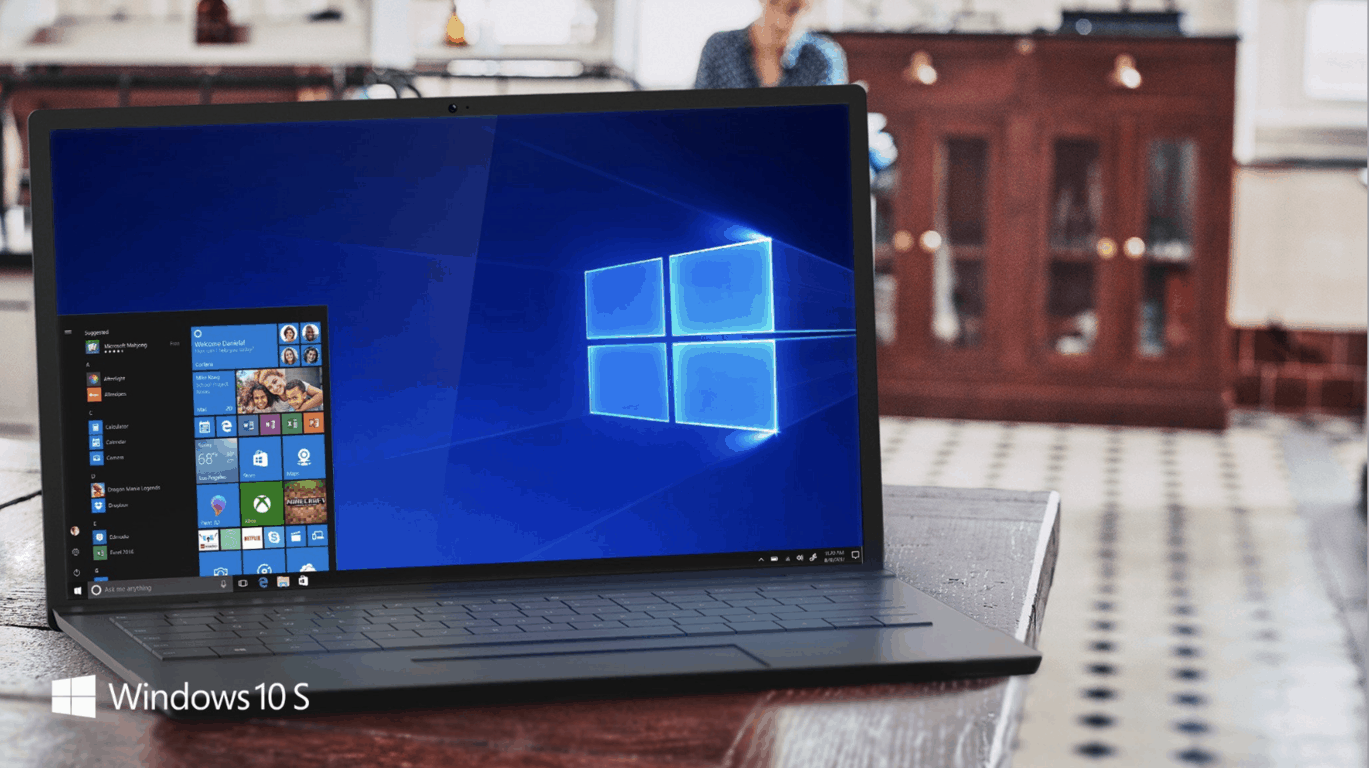
Here is how you can download and install Windows 10 S

Last week, Microsoft made available the ISO files for Windows 10 S to MSDN subscribers. Today, Microsoft has followed up to make it easier for IT Pros in the education field (and also the tech savvy Windows fan) to freely download and install Windows 10 S to a Windows 10 Pro PC (via MSPU.)

To get started, you to visit this website, scroll down to the blue button, and download this Windows 10 S self-installer. To be clear, the website and the installer appears to be generally aimed at Education users, so keep this in mind as you proceed. The page, though, does note, “the Windows 10 S self-installer will allow you to test Windows 10 S on a variety of individual Windows 10 devices.”

The install of Windows 10 S also requires the user to be running version 1703 of Windows 10 Pro, Windows 10 Pro Education, Windows 10 Education, or Windows 10 Enterprise. Windows 10 Home is not supported. All settings and apps will be deleted on install, and it is advised to create a system backup and recovery disc if you would like to return to the standard version of Windows 10. There are also several potential issues which may arise if you choose to run the installer, according to the site:

Before you install Windows 10 S, be aware that non-Windows Store apps will not work, peripherals that require custom drivers may not work, and other errors may occur. In particular, this release of Windows 10 S:

  • Is intended for education customers to test compatibility with existing hardware
  • May not work with some device drivers, which may not yet be ready for Windows 10 S and may cause some loss in functionality
  • May not be compatible with all peripherals that require custom drivers and, even if compatible, may cause aspects of the peripheral to not function.
WIndows 10 S Installer
Windows 10 S Installer

Microsoft’s Windows 10 S installer functions in a similar way to the Windows 10 Update Assistant. It will download Windows 10 S from Microsoft’s servers and will install it to the system. Upon install, Windows 10 S will automatically activate since you’ve upgraded from Windows 10. You will be able to remove Windows 10 S within the first 10 days off installing it by using the Windows Recovery option in settings, but after the 10 day period is up, you will need to re-install Windows 10 manually using your recovery media.

Education customers who have upgraded can switch devices to Windows 10 Pro Education using the Microsoft Store for Education. Education customers, though, must have their PC configured for educational use by applying SetEduPolicies using the Setup School PCs app in order to proceed.

Earlier today Microsoft revealed that Windows 10 S will be coming to third party PCs for the education market.  The install tool appears to be linked to this announcement.

Writer’s Note: We’re in the process of installing Windows 10 S to one of our older PCs and we will update you once things have developed.

Windows 10 S

Update: We managed to successfully install Windows 10 S on our older HP ENVY dv7 laptop with an AMD A8 processor. The install removed all of our Win32 programs, reset the Start Menu, and removed most of our pre-existing settings. We were not prompted with the new Cortana enhanced set up screen, and on the initial boot we rather just received a list and the option to toggle certain settings on and off.

Microsoft eats own dogfood as Bing Ads moves to Azure SQL Database

In a recent post, Microsoft announced it has moved Bing Ads to Azure SQL Database “to address performance and scalability requirements.” Microsoft provided a brief case study on the problems that Bing Ads faced prior to the move and the benefits that Bing Ads will see as a result of the move to Azure SQL Database.

“With millions of Bing Ads customers, hundreds of millions campaigns, and tens of billions of keywords and ads, the Bing Ads engineering team realized they would need to find a way to provide nearly unlimited scale to keep up with customer demand. With the projection of extreme scalability demands, doing everything on-premises was no longer considered to be a practical long-term solution. Scale-up hardware solutions would not accommodate the projected required resources and cost, both in terms of engineering costs and the required hardware resources.”

Microsoft is tasting some of its own medicine by moving the Bing Ads database architecture to the Azure SQL Database. Hopefully, Bing Ads migration to the Azure SQL Database will address the problems Bing Ads faced previously. Azure SQL Database’s nearly unlimited scale for the Bing Ads campaign management system will prove to be a boon for Microsoft and its customers alike.

Xbox Summer Spotlight continues, enter for a chance to win an Xbox One S

Last week, Microsoft kicked off the Xbox Summer Spotlight, shining a light on the latest indie games from various developers. The Spotlight continues on this week, and Major Nelson is adding to the fun by running a giveaway where you can enter for a chance to win a Xbox One S and other great prizes.

Titles which are being highlighted this week include Resident Evil Revelations, Shadow Tactics: Blades of the Shogun, Dead Alliance, and more. Interestingly, Microsoft is choosing to put an extra spotlight on some titles which are just now going up for pre-order and are not yet available for download. You can see the updated list of titles below.

  • August 1: Resident Evil Revelations (pre-order,) Shadow Tactics: Blades of the Shogun, Dead Alliance (pre-order,) The Long Dark
  • August 2: Tacoma (pre-order,) Vostok Inc (coming soon)
  • August 3: Cuphead (pre-order)
  • August 4: The Way (pre-order,) Mr Shifty (pre-order,) Race Arcade (pre-order.)

As an added bonus, you can visit Major Nelson’s blog and watch the Summer Spotlight trailer, and register to take part in a giveaway. First place prizes include a Xbox One S 500 GB Console, an Xbox Wireless Controller, a Seagate 2 TB HDD for Xbox One, a Razer headset, and more. There are also prizes for second place, including a Xbox Wireless Controller, a Controller charging stand, and a back pack. Five winners who come in third place winners

If you’re not so lucky, there are also prizes for second place, including a Xbox Wireless Controller, a Controller charging stand, and a back pack. Five winners who come in third place will receive digital Xbox One Codes for each featured title in the Summer Spotlight.

Windows 10 S comes to 3rd party PCs with Back to School Live program

When Microsoft unveiled Windows 10 S along with its new Surface Laptop back in May, the company said that its OEM partners would soon release cheaper Windows 10 S PCs for the education market. Today, the company finally shared more details about these new devices as part of its general Back to school announcements.

“In the coming months, our partners will introduce many great devices for purchase, pre-installed with Windows 10 S, starting today with the Lenovo N23 ($249 USD) and N24 ($279 USD), available worldwide,” the blog post notes. In addition to these two PCs (apparently based on Lenovo’s pre-existing N23 Chromebook), Microsoft also shared that the following models are coming soon:

  • ASUS Vivobook W202 ($279 USD), available in the US
  • Dell Latitude 3180 ($229 USD) and 3189 ($299), available in the US and Canada
  • Fujitsu LIFEBOOK P727 ($999 USD), available in the US and Canada
  • HP ProBook x360 11EE ($299 USD), available in the US, UK and Australia

Last but not least, schools can already test Windows 10 S on their current guenine Windows 10 Pro PCs for free, and you can find detailed instructions on this page. “This initial release will help us gather valuable feedback to make Windows 10 S work great on a range of devices in schools, so we encourage IT professionals to try it on a variety of devices and let us know what they think,” added Microsoft.

Ubisoft CEO claims Xbox One X console will help industry grow

Ten years after the release of the first Assassin’s Creed game in 2017, Assassin’s Creed Origins is expected to bring the action-adventure series to its roots, as its name suggest it. But unlike the first game which was set during the Third Crusade, the new entry will actually go back to Ptolemaic Egypt and explore the origins of the multi-secular conflict between Templars and Assassins.

As you may know, Assassin’s Creed was one of the first titles to be showcased during Microsoft’s E3 press briefing in June, and Ubisoft said that the game will be one of the few games to be enhanced for the Xbox One X this fall. While the game won’t be a timed Xbox exclusive, Ubisoft CEO Yves Guillemot has nothing but good things to say about Microsoft’s new console. Talking with Gamespot, Guillemot emphasized that Microsoft did the right thing to focus on raw power instead of other features such as Kinect. According to the exec, a significantly more powerful console can make the video games industry grow:

We did a deal with Microsoft on Assassin’s Creed: Origins, which is taking really good advantage of the power of the machine. We like very much what they are doing because instead of having a Kinect or something this time the industry went after more power for the machine, so more immersion, better AI, and overall better games. We like that because it means the industry will grow because of the better the experiences, the more people want to have it. We think it has a good potential. If Microsoft is really behind it, it can do well.

Of course, not everyone will agree with Guillemot, and some analysts still think that the Xbox One X will be overpriced. To be fair, it’s still hard to say before seeing the new hardware and all the games running on it in 4K. This month, Gamescom should give us a good taste of things to come as attendees will be able to try the console for the first time. We can’t wait to see if the new console will continue to gain some momentum after attendees start to share their first hands-on experience later this month.


Buy Tacos and you could win a new Xbox One X with this latest promotion

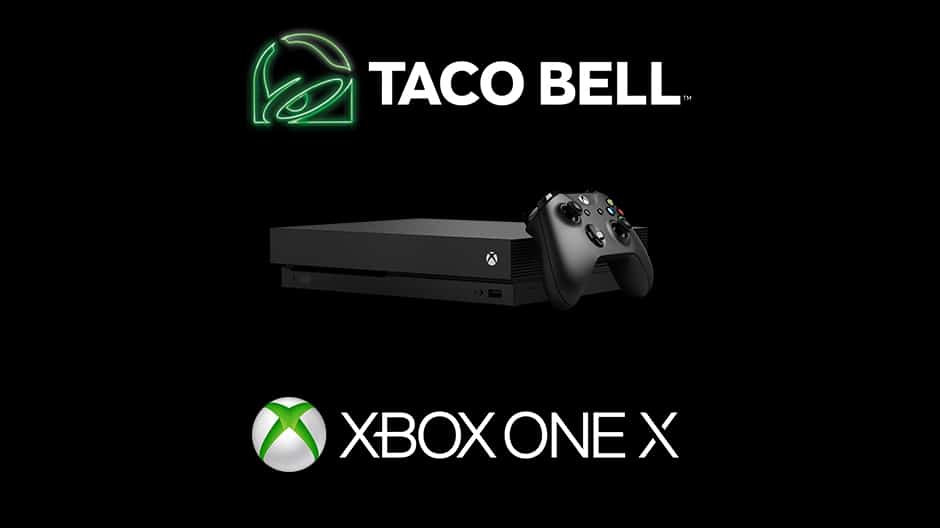
Starting August 31st, Xbox, and Taco Bell will come together in the US to give lucky customers the chance to win a brand new Xbox One X. As part of the promotion, the new Taco Bell Steak Quesarito $5 box will include a code for consumers to text in for a chance to win the Xbox One X.

The boxes will be available from August 31 to October 4th at participating Taco Bell locations, and while supplies last. According to Microsoft, there will be a potential winner every 10 minutes throughout the entire promotion.

In a statement, Mike Nichols, Corporate Vice President, and Chief Marketing Officer, Xbox commented on the promotion.

“When it launches starting November 7, Xbox One X will bring gamers an amazing new level of console power and immersion…We have a long history of partnerships with Taco Bell, dating back to the first Xbox, and are excited to once again work together to reward gamers with the opportunity to win Xbox One X.”

Perhaps this latest promotion might have some die hard Xbox fans and gamers running to their local Taco Bell just to secure an Xbox One X. After all, pre-orders have yet to open up on the Microsoft Store, or many other retailers.

Xbox skipping major New Zealand expo, planning separate Xbox One X event instead

While Microsoft’s Xbox brand usually has a strong presence at the popular Armageddon Expo in New Zealand, this year will be different as the company has chosen to pool their resources and plan for a special Xbox One X launch event later in 2017 instead of attending the next one in Auckland in October.

“To showcase the power of the Xbox One X Microsoft is planning a dedicated launch event for Xbox fans nearer the New Zealand launch on November 7,” Microsoft’s New Zealand category lead, Jane Dore, told Culture Jam. “There will be Xbox One S consoles and games on display at various booths during Armageddon, however.”

Armageddon Expo is a major video game and geek culture convention that’s held in major cities across New Zealand several times a year (not in a dissimilar fashion to Comic-Con in the U.S.). Are you going to be disappointed by Microsoft’s absence or does it make sense for them to hold a separate Xbox One X event instead?

How to fix mouse movement issues on your Windows PC

It’s hard to imagine using PC without a mouse, isn’t it? Even though the touch-screens are growing in popularity, mouse still is and will be the first option when it comes to pointing devices. At least, when it works properly.

It’s not unusual for the mouse to get faulty for various reasons and today we’ll try to cover the majority of workarounds you should take into consideration. If you have problems with the mouse movement, the steps below should help you considerably.

How to resolve issues with mouse movement in Windows 10

Check mouse for defects

The first obvious step is to check your mouse for defects. Peripheral pointing devices are quite prone to issues, both mechanical or optical/laser variations. So make sure to go through these steps before we move on to other workarounds:

  • Check the state of the mechanical ball. If something is blocking it, make sure to remove it.
  • Same goes for optical mice. Remove anything that’s blocking the optical sensor.
  • Connect the mouse to other port or another computer and look for changes.
  • If you use PS2 port for mouse input, restart your PC. This port doesn’t support USB-like Plug’n’Play.
  • Clean the bottom of the mouse from dirt with a wet wipe.
  • Check cable. The culprit for most issues is a cable that cracks after extensive use.
  • If you use a wireless mouse, check battery status or replace them.
  • In case you’re using the trackpad on a laptop, wipe it with a mildly wet wipe.

After you made sure that everything is spot on but the mouse movement is still stalled, erratic or completely absent, continue with the steps below.

Check USB or PS2 ports for defects

It’s not always about the mouse, sometimes your motherboard can be the reason for the movement issues. If you have an alternative mouse, try connecting it. Don’t forget to switch between the ports. If the problems are persistent, there’s a great chance your motherboard is faulty. USB or PS2 ports are also prone to physical damage, especially if you’re not careful while plugging/unplugging devices.

If that’s the case, we don’t advise you to try and repair it yourself, but rather take it to service where a professional technician can check the connectors and hopefully resolve the problem at hand.

Make sure that the surface is appropriate

Mechanical mice are known for problems with an inappropriate surface. The optical mouse is a little bit more tolerant but still, the mouse pad is always a solid solution when the erratic behavior starts. You can use various surfaces and everything may work like intended. But, for safety and precision, mouse pad should provide you with optimal performance and better traction.

Moreover, they are fairly cheap and come in various colors so you can choose basically any pattern you want.

Reinstall drivers

Software. If hardware seems just like before, but everything suddenly took a wrong turn after you reinstalled the system, look no further. As you’re probably aware of, drivers are essential for seamless use of hardware. So, make sure to check them out before you angrily throw away the mouse.

Besides the mouse drivers that are mostly generic, make sure to check the USB peripheral drivers.

If you’re uncertain how to update your drivers, follow these instructions:

  1. Right-click Start and, under Administrative tools, open Device Manager.
  2. If you notice exclamation sign, make sure to right-click and update the troubled device.
  3. Navigate to Mice and other pointing devices.
  4. Right-click on your mouse from the list and click Update Driver Software.

In addition, you can uninstall the mouse driver and restart your PC. The driver should be automatically installed via Windows Update and all possible software-related issues should be resolved immediately.

Check connection

Wireless mice are great but you’ll still need to maintain proper distance in order for them to work as intended. Most of them have an effective signal range up to a few meters. So, don’t go too far if you want optimal performance and seamless use.

Moreover, signal interference can cause problems, too. So make sure to use one wireless mouse or mouse/keyboard combo at the time. In addition, we advise you to disable built-in Bluetooth while using peripheral input devices.

Third-party programs infliction

Even though it’s not common for some third-party application to affect something as simplistic as a mouse, there’s a chance that they might. Especially if you use some tweaking tools for pointing devices that may inflict with the system settings and cause a mayhem.

If you’re still experiencing issues with the mouse, make sure to uninstall them and continue using the system as a main proprietor of the mouse preferences.

Viruses and malware

And last but not least place is reserved for pesky viruses that may cause the whole bundle of issues, including mouse issues. Use your 3rd-party antivirus solution or Windows Defender to scan for possible intrusions and you’ll hopefully resolve issues.

Moreover, if you’re unable to use your mouse while troubleshooting, you can use the keyboard to simulate the mouse movement.

That should do it. We hope that this will help you resolve your issues. If you have any additional questions or alternative solutions regarding the subject, the comments section is just below.

RELATED STORIES YOU NEED TO CHECK OUT:

Titanfall 2 now available in EA Access Vault on Xbox One

Titanfall 2 is now available to play as part of the EA Access paid subscription service. The game is a sequel to the original Titanfall which also launched on Xbox One and has generally scored positive reviews from gamers and critics. Here’s its official description, trailer, and shopping link.

From Respawn Entertainment, the studio that brought you the award-winning Titanfall, comes Titanfall 2. In single player, an aspiring Pilot and a veteran Titan combine forces to save their own lives and combat a powerful enemy against all odds. Multiplayer offers brand new Titans, expanded Pilot abilities, and deeper customization to elevate the fast-paced and exciting gameplay fans expect from the series.

Buy/Download Titanfall 2 on Xbox One

Titanfall 2 continues to be updated on a regular basis with new downloadable content. Are you still playing the game or have you been waiting for it to come to EA Access? Share your thoughts in the comments.

Xbox One launch title Powerstar Golf updated to fix major bugs

Powerstar Golf has updated on the Xbox One to fix a major bug that was causing the game to crash upon launch or from within menus for many users. The game had been experiencing these rather sever issues for several months now so it should come as a relief to many gamers now that they can play again.

Powerstar Golf launched alongside the Xbox One and is still played by many console owners to this day. The game is a fun take on the golf video game genre but features lively locations, special abilities, and a seamless integration of Xbox Live to automatically include the plays of other gamers on a user’s Friends List.

Do you still play Powerstar Golf? Let us know in the comments below.

Slime Rancher now out on Xbox One, free for Xbox Live Gold subscribers

New video game, Slime Rancher, is now available to play on the Xbox One console and is free to play for Xbox Live Gold subscribers as part of August’s Games With Gold campaign. Here’s the official game description:

Slime Rancher is the tale of Beatrix LeBeau, a plucky, young rancher who sets out for a life a thousand light years away from Earth on the ‘Far, Far Range’ where she tries her hand at making a living wrangling slimes. With a can-do attitude, plenty of grit, and her trusty vacpack, Beatrix attempts to stake a claim, amass a fortune, and avoid the continual peril that looms from the rolling, jiggling avalanche of slimes around every corner!

Grab Slime Rancher on Xbox One

Joining Slime Rancher as a Games With Gold title this month is the Xbox 360 game, Bayonetta, which is also playable on the Xbox One due to its support for backwards compatibility. Are you going to play Slime Rancher or Bayonetta this month? Let us know in the comments below.

Microsoft stocks are falling, but analysts expect the company to outperform

Microsoft shares have taken a small hit due to its recent earning reports. Last month, the tech giant shared that a declining 1% profit margin for the 2018 fiscal year. Stocks are now down 1.6% since the announcement.

However, Cowen, an investment and research firm, advises that the concern surrounding Microsoft’s expectations is overstated. CNBC reports that analysts expect Microsoft to be underselling themselves, just like they did this last fiscal year.

“We have confidence that the margin concerns on the Street will fade as the year progresses, and we remain bullish on MSFT’s opportunities over both the medium and long-term,” analyst Gregg Moskowitz wrote in a note to clients Monday entitled “Deeper look into FY18 margins reveals upside potential.”

Furthermore, the analyst also increased his Microsoft price up to $85 from $80, confident in the tech giant’s margin expansion.

“We believe total Office revenue (consumer + corporate) is poised to accelerate, Cowen’s cloud survey work has increased our confidence level in Azure’s [cloud computing business] long-term success, an improving annuity mix meaningfully raises visibility and reduces execution risk,” he wrote. “There are multiple levers of upside to FY18 revenue and EPS (namely, Azure, O365, gross margins, phone hardware sale and mix shift).”

Do you expect Microsoft to outperform the market this year or are you battening down the hatchet? Let us know your thoughts on MSFT stock prices this coming fiscal year.

Microsoft won’t patch 20 yr old SMBv1 vulnerability (you should just turn the service off)

Following the recent WannaCry and Petya ransomware attacks, Microsoft recommended all Windows 10 users to remove the unused but vulnerable SMBv1 file sharing protocol from their PCs. This is because both variants of the ransomware actually used the same SMBv1 exploit to replicate through network systems, even though it seems that Petya mostly affected Windows PCs in Ukraine.

Anyway, if you didn’t turn off the protocol on the PC already, you really should: Not only because new WannaCry/Petya variants could once again use the same vulnerability again to encrypt your files, but because another 20-year-old flaw has just been unveiled during the recent DEF CON hacker conference (via Security Affairs).

The SMB security flaw called “SMBLoris” was discovered by security researchers at RiskSense, who explained that it can lead to DoS attacks affecting every version of the SMB protocol and all versions of Windows since Windows 2000. More importantly, a Raspberry Pi and just 20 lines of Python code are enough to put a Windows server to its knees.

RiskSense discovered the SMB vulnerability when analyzing EternalBlue, the leaked SMB exploit that is the source of the recent ransomware attacks. They disclosed the security flaw to Microsoft in June, but the company said that it won’t fix it. “The case offers no serious security implications and we do not plan to address it with a security update,” a Microsoft spokesperson told Threatpost. “For enterprise customers who may be concerned, we recommend they consider blocking access from the internet to SMBv1.”

Microsoft is planning to entirely remove the SMBv1 protocol in the Windows 10 Fall Creators Update, so it may be not be as bad as it seems. However, everyone still running older versions of Windows will remain affected by the issue, that’s why it’s strongly recommended to simply disable the SMBv1 protocol. To do so, we invite you to check some detailed instructions on our previous post about it.

Want in on the Minecraft cross-platform beta via Windows 10/Xbox One? Here’s how

Today, the Mojang announced the big release of Minecraft Better Together Update into public beta. For those tuning in, the Better Together Update introduces cross-platform play for all Bedrock Editions including console, pocket editions, and Windows 10 PC. Pretty much everything except PlayStation versions basically. The beta is open to everyone that owns digital copies of Minecraft on Windows 10 PC, Xbox One, and Android. Here’s how you can join in the fun:

Xbox One / Windows 10

You will need to own the digital version of the game. For the beta, disc owners are not supported – sorry!
Joining the Minecraft Beta on Windows 10 or Xbox One:

1. Go to the Store app on Xbox One or a Windows 10 PC.
2. Search for the Xbox Insider Hub app.
3. Download and install Xbox Insider Hub.
4. Launch the Xbox Insider Hub.
5. Navigate to Insider content > Minecraft Beta.
6. Select Join.
7. Have fun and find bugs!

Android

JOIN
– Click this Join Beta link and click the “Become a Tester” button as shown below, then wait for an update in the Google Play Store.  If you don’t see the page below, double check you are using the account that owns your copy of Minecraft: Pocket Edition.  Remember to back up your worlds before you start beta testing.

LEAVE
– Click this Leave Beta link and click “Leave the program” as shown below.  Then uninstall your copy of the game from the Google Play Store.  Don’t worry, your worlds will not be deleted and you don’t have to buy the game again.Then wait for the Google Play Store to show the old version and reinstall the game.  Remember to restore any worlds you opened while beta testing because those worlds won’t be compatible with the old version.

Windows 10 and Android Better Together betas are already rolling out this morning but according to Mojang, Xbox One is ‘coming soon’. How soon has yet to be determined. As for other platforms, there is no news for beta or release date to report just yet. Until then, you can keep up with news about Minecraft and it’s upcoming cross-play features here at OnMSFT.

Linking Android and iOS phones to Windows 10 PC has a series of limitations

Microsoft recently revealed a new Windows 10 Fall Creators Update native feature that allows users to link their Android and iOS phones to Windows 10 PCs. Surprisingly, Windows 10 Mobile is not included on the list.

Thanks to this new feature, Microsoft takes the cross-device web-browsing experience to the next level.

Here’s how to enable phone linking on Windows 10

The phone link feature is available under Settings. First, add your phone to be linked. You will then receive an SMS inviting you to install an app called “Microsoft Apps” for Android to complete the link between your phone and PC.

Once you have linked your phone to your PC, you can easily switch your browsing sessions from your phone on to the PC and the other way around.

Phone linking limitations

At the moment, there are a series of limitations to this feature. Most likely Microsoft will further expand it in the coming weeks, adding new options to the table.

Android and iOS phone owners currently don’t have access to all the Windows Phone capabilities. Generally speaking, all the features built into OS come with limitations on Android and iOS phones.

For example, Android and iOS users don’t have access to the whole array of Cortana voice commands and capabilities. In other words, your Cortana experience is quite limited once you’ve linked your non-Windows phone to your PC.

Cortana can do more things on Windows 10 phones because it can access all the settings and features in the OS, including the installed apps and programs. This is not the case for Android and iOS.

Most likely, iOS users will encounter more limitations than Android users. Apple is well-known for its restrictive policy that limits iOS users from using products on other platforms. It will be interesting to see how Microsoft manages to link iOS to Windows 10.

RELATED STORIES YOU NEED TO CHECK OUT:

Windows 10 Creators Update is finally available to all users

Microsoft introduced the Creators Update a few months ago but opted for a fragmented and targeted release. This means that even to this day, there are computers out there that still don’t have the Creators Update installed. This will no longer be the case as Microsoft has now made the Creators Update available worldwide.

Going from a targeted service to a worldwide available one makes it extremely convenient for those who don’t really benefit a lot from waiting until they’re turn comes to get the update.

This change is also implemented for companies and organizations and Microsoft encourages all businesses to start deploying Windows 10 Creators Update across all of their PCs because it is safe and there is no risk involved.

Windows and Office 365 Plus sync up for semi-annual release

As many might be aware of, Microsoft has changed up their update policy quite a bit and the Creators Update was the first major update in a long line of updates that will follow a semi-annual release model. This means that updates will come to the platform twice a year. The rest of the months will only feature security and stability updates, no major features.

The semi-annual release schedule for Windows 10 and Office 365 Plus are aligned. This means that organizations which make use of the two services as a package will stand to benefit. This makes a lot easier for both parties involved. It’s easier for Microsoft to smooth out a deployment process while consumers and businesses have it a lot easier from a sheer convenience perspective.

Companies get to choose

Another very important thing to mention is that businesses also get a very empowering choice thanks to this new update model. Now, they are able to choose exactly when new major updates are deployed. This is extremely convenient and also of great help since there is no risk of hindering internal affairs with unexpected updates. The ability to deploy an update at precise times when the business won’t suffer any drawbacks or downtimes, as a result, is a great ability to have.

Security should encourage users to speed up deployment

While users have the option of choosing when the deployment takes place, it’s also a fact that the latest version of Windows 10 is the most secure one. Yes, there are monthly security patches but there is still a big difference between an inferior build with security updates on top and a brand new major build with baked in improvement for security.

This one of the reasons that Microsoft invokes when it urges consumers to not waste time and update to the latest version of Windows 10 as soon as possible.

RELATED STORIES TO CHECK OUT:
Microsoft news recap: cloud success being measured by usage, Microsoft Teams gets HD audio and more

Microsoft (MSFT) news recap is a weekly feature highlighting the top Microsoft news stories of the past week. Sit back, grab some coffee, and enjoy the read!

Microsoft’s Edge dev team releases new cross-platform version of its Node-ChakraCore engine

2 years ago, Microsoft open sourced its Edge ChakraCore engine. Now, after announcing last year that it wants to bring the engine to macOS and Linux, the company has released a cross-platform version of its Node-ChakraCore engine.

Microsoft’s cloud first strategy has it focusing on usage as InTune adds 2 million users in June

As Microsoft’s strategy continues to be ever-more reinforced with the cloud, the company has begun to focus on usage as a measurement of success, rather than revenue. A recent example is InTune adding 2 million users in June, showing strong usage, leading it to be a successful product.

Microsoft makes cloud moves: joins Cloud Native Group, previews Azure Container Instances service

Microsoft is joining the Cloud Native Computing Foundation (CNCF) as a platinum member as part of its open source strategy. Additionally, the company is aiming to compete with Amazon Web Services offering a public preview of Azure Container Services, a single container that is billed by the second.

Microsoft, Azure

Microsoft Teams iOS apps updated with HD audio and video, new meetings tab and more

Microsoft business communication tool, Microsoft Teams, has received a significant update on iOS, bringing HD audio and video, a new meetings tab and more. With this update, the app on both iOS and Android are nearly identical in terms of features.

That’s it for this week, we’ll be back next week with more Microsoft news.

Killing Floor 2 took 4 hours to bring to Xbox One X, to run at 1800p due to frame rate drops at 4K

Tripwire Interactive, the development studio behind Killing Floor 2, announced that the game is coming to Xbox One on August 29th. The same press release also stated that the studio has been working on bringing enhancements for the game on Xbox One X, namely 4K resolutions.

While the game took “maybe 4 hours of programming effort,” according to the Senior Graphics Programmer, Dave Elder, the game will not be able to run at 4K on Xbox One X, due to the frame rate drop being too significant. Instead, the game will run at a fixed resolution of 1800p (via Wccftech) with no checker boarding. Comparatively, the PlayStation 4 Pro version of the game also runs at 1800p, but with checker boarding, rather than native resolution.

Additionally, there are no plans for HDR support at this time.

The game is coming to Xbox One on August 29th, priced at $39.99 and £29.99 respectively.

Microsoft Paint will still be available in the Windows Store

News regarding Microsoft Paint popped up recently when Redmond announced that the software would be discontinued when the upcoming Windows 10 Fall Creators Update is released.

Unfortunately, news publications from all over the world published the story inaccurately saying that the company will terminate Paint in Windows 10 when ultimately, that’s not the case.

Microsoft Paint is heading to the Windows Store

Microsoft confirmed that the company is not killing Paint and a spokesperson from Microsoft even shared a picture with the words “ We <3 MS Paint”. Instead, Microsoft will bring the software to the Windows Store and its fans will be able to install the app whenever they want to.

The classic features to be included in the new Paint 3D app

What’s even cooler is that Microsoft will also bring some of the features of the classic Paint app into the new Paint 3D app as well. So, in the end, MS Paint is not getting killed and will incorporate brand new 3D features.

Microsoft said that MS Paint would also reach the Windows Store in the future where users will be able to get it for free and will continue to get updates. The company did not mention an exact date for the launch of MS Paint on the Windows Store, but we imagine that it won’t be too far away.

We really hope the app will make its debut there shortly after the launch of the Windows 10 Fall Creators Update, meaning sometime in September or October. Let’s keep our fingers crossed!

RELATED STORIES TO CHECK OUT:
Windows 10 now automatically launches previously opened apps after reboot

Microsoft constantly adds new features to Windows 10 thanks to the tests that take place on the Insiders Preview platform where the latest Windows builds are evaluated before release. One of the most focused-on features from build 16251 targeted the bootup process for Windows 10 machines.

This feature allows Windows to use any kind of sign-in information in order to configure accounts after a computer has been restarted or an update applied, ensuring a user’s account is taken care of prior and after a restart. This will make it so all of the previously opened applications will be re-opened automatically once the reboot process is complete.

To activate this feature, go to Settings > Accounts > Sign-in > (under Privacy) “Use my sign info to automatically finish setting up”.

Jen Gentleman approves

Jen Gentleman is an engineer who is working on the Insiders program and has a lot of good things to say about this new feature. You know a feature is great when one of the people working on it directly acknowledges on social media just how cool they think it is.

Gentleman posted several Tweets about the new features, letting everyone know how cool they are and how people will be able to use them. All the applications that have the RegisterApplicationRestart capability, which is enabled by default in Windows apps, will re-open immediately as the reboot process is complete.

More pleased users

Aside from Jen who really wants to make sure that everyone knows about the new features, other users are beginning to show signs of how pleased they are. That’s great because it means we’ll be getting a cool new addition to Windows 10 in the near future.

Fresh functions

It’s always great to be treated with fresh features and capabilities that make the OS as a whole more interesting. This isn’t just a gimmick, however, as it plays a very important role in the OS from a functionality perspective. It is speculated to improve productivity by quite a margin since there are so many doors that it opens.

Not mandatory

Most people seem really excited about this feature but those that don’t like the sound of it don’t have to fret. It is an optional feature and can be disabled, which means that those who would prefer things to stay the same have the opportunity once the new patch releases.

Falls Creators Update

The Falls Creators Update is the upcoming big patch courtesy of Microsoft. It is the successor of the original Creators Update which was anticipated for a very long time. If the rest of the features coming in the Fall Creators Update are this interesting, users can start getting excited for a great update ahead.

RELATED STORIES TO CHECK OUT:
Windows 10’s “Continue on PC” app arrives on iOS

In Windows 10 build 16251 Microsoft added a new feature dubbed “Continue on PC”. It’s a continuity feature, in which a task on a mobile device, such as Android or iOS, can be carried over and continued on to a Windows 10 PC.

Take a look at the feature in action as our very own Cody Carson explains it:

Now, the “Continue on PC” app for iOS is available from the App Store. Upon installation, opening the app shows a selection of slides on how the process works, and from then on you won’t need to open the app. Just leave it silently installed, and then use the “Share” menu within apps you use to bring the task to your PC.

Here is a look at how the process works:

‎Continue on PC
‎Continue on PC
Price:
Free

Microsoft’s cloud first strategy has it focusing on usage as InTune adds 2 million users in June

In the past, tech companies such as Microsoft often relied on how much revenue a product made to determine its success. With numbers large or small, products pushed out would be judged for continuance based on a simple consumer figure that could be misleading, particularly for products that rely on continuous usage. But for Microsoft, revenue isn’t everything anymore according to Brad Anderson’s recent blog post.

With the focus now on usage, Microsoft can gain insights on how consumers interact with a product. Furthermore, it allows the tech giant to collect feedback, improve, and change a product depending on the amount of usage that it provides. Anderson shared that with the recent fiscal year earnings reports, usage for Azure AD, System Center ConfigMgr, and Intune all saw more growth than expected. Intune itself had 2 million new subscriptions activated in June 2017 alone.

Since the architectures of Intune and Azure AD have been deeply aligned together, both services can update their facets independently and maintain compatibility. Sometimes as quickly as ten times a day, according to Anderson’s post. All of these improvements are based on analyzing the usage and feedback data provided to Microsoft via the cloud.

As technology moves forward, it can advance based on how consumers interact with products and create a cultural change. Read more about Anderson’s thoughts on the Technet blog post.

Kaspersky launches free antivirus in response to Windows Defender pressure

The antivirus business is a rough one, with many top tier companies fighting for first place. Grasping the attention of the user base is not an easy job and the constant introduction of new services and features is how these companies stay afloat.

While most high-end antivirus solutions are paid, Microsoft recently introduced an upgraded version of Windows Defender. This antivirus version was really well received and that means that the top dogs in the antivirus business are suffering as a result. While users do benefit from this intense rivalry, the companies themselves are not so fortunate.

Kaspersky fires back

Windows Defender is so much of a threat that big antivirus service providers like Kaspersky feel the need to offer an alternative. Kaspersky is one of the best antivirus companies in the world. Surprisingly, the company has been busy lately testing a new version of their service called Kaspersky Free. As many might guess, the purpose of Kaspersky Free is to be a direct competitor to the excellent and free Windows Defender.

Protection isn’t cheap

Although users recognize the importance of having their devices protected, many just can’t afford to spend money on premium protection services. This is the reason why Windows Defender is such a saving grace. Not only does it rival companies like Kaspersky in terms of efficiency, but it is also free of charge. Windows Defender is built into the Windows 10 operating system. That means that users automatically get premium antivirus protection when they install the OS.

Kaspersky Free antivirus features

It goes without saying that the free version of Kaspersky won’t have all the features that can be found in the paid version. However, users who want to give Kaspersky Free a try will have access to all the essential tool in an antivirus suite. From the basic antivirus protection to email protection and even a firewall, the bare necessities are there.

Are they enough? Today, so many different threats and problems occur that most people using antivirus software might consider that they need more than standard tools. It’s going to take a while before all supported countries get access to Kaspersky Free. The software will gradually make its way across the world map. The entire deployment process will take about 4 months, or so professionals speculate. The first country to benefit from the service is the U.S., while the update will end its journey in Thailand. There is a nice spread across several continents along the way, as Kaspersky Free will make stops in Asia, Africa, and Europe.

RELATED STORIES TO CHECK OUT:

Windows Insider Program launches redesigned website with lots more info

As promised from Dona Sarkar and the team a few weeks ago, the Windows Insider website had a major overhaul launched today with tons more information about the program. While it looks similar to the previous pages, it now includes details about how builds are released and what to expect in each specific release ring.

Another noticeable feature on the site is the addition of preview build highlights. This page gives prospective new Windows Insiders a glimpse at what they can toy with in the latest releases. Which in this case includes items like Story Remix, My People, and more for the upcoming Windows 10 Fall Creators Update.

Beginners should find the redesigned Windows Insider site easier to navigate and learn from. If mistakes were made, it’s even easier to leave the program with a conveniently easy to find button on the site. Furthermore, a ‘Recover your device‘ section has been added where Insiders can learn how to roll back previous builds including links to recovery images for Windows 7, Windows 8, and Windows 10.


Microsoft’s Edge dev team releases new cross-platform version of its Node-ChakraCore engine

Since Microsoft launched its new Edge browser with Windows 10 two years ago, the company made it clear that it wants to expand its Chakracore Javascript engine beyond Windows 10 devices. Perhaps, that’s why Redmond open sourced the engine two years ago, before announcing efforts to bring it to macOS and Linux last year

Yesterday, the company announced the release of a new preview of Node-ChakraCore, its engine based on Node.js 8 that now runs on Windows, macOS and Linux. The engine now supports the next-generation Node.js API (N-API), which aims to provide a stable Node API for native module developers. “This allows N-API-enabled native modules to just work across different versions and flavors of Node.js, without recompilations,” emphasized the Edge team.

In addition, support for Node.js API, Microsoft also announced that Node-ChakraCore has also been used to make the Node.js Javascript runtime environment run on iOS. “This takes Node.js to iOS for the first time, expanding the reach of the Node.js ecosystem to an entirely new category of devices,” explained the team.

As Microsoft is now done with making Node-Chakracore fully cross-platform, the Edge team will now focus on other priorities such as performance and module compatibility. “These are our primary focus for the immediate future, and we look forward to sharing progress with the community as it happens,” the blog post reads. You can download the latest versions of Node-Chakracore on the dedicated GitHub.