Make Your Kids Happy with Nickelodeon on Windows 8, Windows 10

Nickelodeon is one of the most well known children portals both on the web and on TV. The little ones love it thanks to the great cartoons and shows it has. Also, on the web, the kids can enjoy games with their favorite cartoon characters. Also, the portal offers videos and other information about both characters and TV hosts for children shows.

nick-windows-8

In short, all the entertainment a child could want is available at Nickelodeon. But why should the fun stop there? Of course the Internet is easy to access and with only a few clicks, anyone can get wherever they want, but there is an even faster way: via apps. In this case, we’re talking about the freely downloadable Nick app for Windows 10. Windows 8.

Nick for Windows 10, Windows 8

This app is the official Nickelodeon Windows 10. Windows 8 portal, which users can install on their devices. With it, they have instant access to a host of content, from pictures, videos to games and news or information.

nick-windows-8-app-review

The app features an already classic Modern UI interface, with a main menu containing the major categories. The user can scroll to the right and left to view each of these categories and upon opening one of them, they are greeted with a host of interviews or other content that might interest the little ones.

nick-windows-8-app-review-2

On the technical side, the video streaming is very fast, and although videos are not too long, they have very good quality and they load in an instant. The pictures have decent quality, but where the apps kinda lets down is in the games section.

nick-windows-8-app-review-3

Although there are lots of games featured in the app, when trying to open one it redirects the user to the Nickelodeon website via the desktop browser. It would have been very nice to have at least some games built in the app, but maybe future updates will bring this feature.

nick-windows-8-app-review-4

Apart from this, the app doesn’t have much more to offer. There are no settings that can be made and no sharing or search options either. We do hope that we will see there features in the updates to come, but for now, we can say that the app is great for kids who want to know more about their favorite characters and shows from Nickelodeon.

Download Nick for Windows 10, Windows 8

Five new Microsoft Stores set to open across the United States, including one in Hawaii

Microsoft Store

Microsoft has revealed today that the company plans on opening five new Microsoft Stores across the United States, and one of those locations includes Hawaii. These five new stores are set to open in the coming weeks.

“Our customers continue to tell us that they value our stores for connecting them to the best of Microsoft. This delights us to no end. From the newest touchscreen laptops, desktops, and tablets running Windows 8, to Windows Phones, to Xbox and Kinect consoles and accessories, to a wide array of first and third-party software titles, our goal is to introduce you to the best choice, value and service we have to offer,” Microsoft stated in an official blog post.

So where are the new stores located?

  • Natick Mall, Natick, Massachusetts
  • Ala Moana Center, Honolulu, Hawaii
  • Pioneer Place, Portland, Oregon
  • The Somerset Collection, Troy, Michigan
  • Woodfield Mall, Schaumburg, Illinois

Nokia Windows 8, Windows 10 Tablet Incoming

Update – there are currently no Windows 10 Nokia Tablets, but he hope this will change in the future.

The Surface RT from Microsoft is out in the wild and begs for a question – will the Surface Pro manage to gather more sales? As much as some of us don’t love Microsoft, it’s time to admit that they are very, very late with their tablet and that the single enemy the iPad currently faces is not the Windows 8 tablet spree but the Android army.

A very big problem that users of Windows 8 currently face is the confusion created between the full, Windows 8 or Windows 8 Pro operating system and the Windows RT, the dumbed-down version of Windows 8. So, people who pay around $500-$600 for a tablet expect it to come with a full Windows 8 experience, so when that doesn’t happen, naturally, consumers get frustrated. And that’s Microsoft’s biggest issue right – the dissatisfaction of its users. And if Microsoft doesn’t fix this, Nokia will.

nokia windows 8 tablet

Wait, who, NOKIA? Yes, the Finnish company that has been for so many years synonym with cellphones. But right now, there is a lot of companies out there that have embraced Android, Google’s secret gun and have developed awesome smartphones and tablets. Thus, Nokia, has seriously lost from its previous fame. So, what are Nokia’s options right now? To adapt to the new situation or to die.

Nokia’s Windows 8 tablet – soon on the market?

Obviously, the direct rival for an eventual Nokia tablet with Windows 8 or RT inside would be Microsoft’s own Surface tablet. And if Nokia manages to choose the right pricing strategy, then I think they can sell even more than Microsoft did. Personally, I think that right now Nokia has much more lovers, in terms of hardware, than Microsoft does. Many people would be really curious to see how a Windows 8 tablet from Nokia could look and feel. Nokia needs to be able to catch that curiosity and convert it into money by bringing on the market an astonishing slate.

The Surface tablet didn’t have anything amazing in it, overall, it’s a good product, but it lacks the WOW feeling that you get with the iPad. Nokia can do that with their own tablet. Where did all this buzz came from? Directly from Nokia’s CEO lips:

“We haven’t announced tablets at this point, but it is something we are clearly looking at very closely. We are studying very closely the market right now as Microsoft has introduced the Surface tablet, so we are trying to learn from that and understand what the right way to participate would be and at what point in time.”

What’s very interesting is that Nokia didn’t ditch the possibility of choosing the Android side, as weird as that might not sound for the moment

“We would consider any option [Android or Windows] … It is important to note that the opportunity for companionship is something that any user is looking for. So, when you think about the Lumia 920, running on Windows phone, having a Windows tablet or PC or Xbox is something that will give us the opportunity to have a pretty integrated experience. Our first focus on what we look at is clearly in the Microsoft side”

Albeit Windows is prioritary, we can’t ignore Nokia’s interest for Android. I could even dare to think that they can work on their own operating system. However, they could opt to focus for the development of hardware and just pick the software solution either from Microsoft or Google. Either way, I’m sure Nokia will do a great job and most likely, the tablet could be released under the same recent branding of its smartphones – the Lumia name.

nokia windows rt tablet

The tablet is expected to hit the market by the end of this year but they need to pick up the timing very well, because looking at past year, Apple has been very agressive with its iPad portfolio. Looking at the current Lumia smartphones, one could say they are bulky. But if Nokia keeps the same design line with their tablet, I think many will be impressed.

Sudoku Touch for Windows 10: one of the most Zen-like game we’ve seen

We’ve talked about quite a few puzzle games in the past, and this is mostly due to the fact that they are a favorite for many Windows 8, Windows 10 users. From word puzzle game like Word Twist, or Adlib to number games like SudokuFree of Picture Logic, all of them are favorites for users who like puzzle games.

Luckily for puzzle lovers, Windows 8, Windows 10 has a lot of such games for them , and today we’ll be adding yet another one to the list. The classic game of Sudoku has inspired many developers to create apps that allow players to test their skills, and this app is no exception to that rule. Sudoku Touch is a Windows 8, Windows 10 Sudoku game that deserve your attention if you are interested in such games.

Sudoku Touch for Windows 10, Windows 8: The most Zen-like game we’ve seen

sudoku-touch-for-windows-8-game-review (5)
Although the app itself is not free, users can download the demo version to get familiar with it before they buy the full version (which is pretty cheap also). The demo version of Sudoku Touch is limited to only one difficulty, which I can safely say it’s much better than giving more content and then ruining the app with lots of ads (yes, there are no ads in this game).

Nevertheless, the app itself is simply brilliant, and when I say “simply“, I mean that literally. Apart from the simple menu that welcomes the player into the game, there is not much else apart from the game itself. The menu is very simple, having only each difficulty at the left of the screen and the daily challenge. This makes it look very clean and it is a pleasure to look at.

sudoku-touch-for-windows-8-game-review (4)

Unlike other games, with complex graphics and a boatload of features, Sudoku Touch implements a more Zen-like approach, where it creates a relaxing atmosphere in which the player can relax and enjoy his game. The backgrounds also help achieve this effect, showing that the developers have chosen them wisely.

Also, the player can change the background from the Settings Charm, but unfortunately, there are only a few and they are all variations of the first one, having only one color – blue. Although I’m not complaining, it would have been nice to add a few more choices when it comes to backgrounds.

sudoku-touch-for-windows-8-game-review (1)

The gameplay is very straight forward, being a classic Sudoku game, it doesn’t have anything else apart from the board and the right panel that shows you what numbers you have used up. Also, for those new to the game, in the Settings charm, they can select the option to highlight wrong numbers when they add them to the table. From here, users can also select the font for the right panel (there is the default font and a handwriting font for users to choose).

sudoku-touch-for-windows-8-game-review (3)

The online part of the game consists of daily challenges and users can connect to it with their Microsoft accounts very easy. The difficulties in the full game vary from Easy and all the way up to Extreme, for those who have sufficient experience with Sudoku Games. One other thing I loved about the app are the notifications, which are animated and look almost 3D. A very nice touch, with a subtle effect that really adds to the app‘s overall look.

After playing a few games of Sudoku Touch for Windows 10, Windows 8, I felt that the game is one of the best ones I’ve tested so far. Its user interface is very well designed (I bow my hat to the graphics designers) and the overall quality of the game is top notch. If i were to recommend a Sudoku game for Windows 10, Windows 8 users, then surely this one would be it.

Download Sudoku Touch for Windows 10, Windows 8

Microsoft’s Surface Pro to only have an initial shipment volume of one million units?

Surface Pro

According to Digitimes, Microsoft is only planning on having an initial shipment volume of one million Surface Pro units. This is obviously less than what Microsoft planning with the Surface RT, which had an initial shipment volume of four million units.

“Microsoft’s Windows 8 Pro-based Surface tablet, which is set to release on February 9, will only have an initial shipment volume of one million units, far lower than the four million shipments of the company’s Surface RT tablet when launched, according to sources from the upstream supply chain,” the report stated. If this report is true, is Microsoft not expecting a high demand for the Surface Pro? Or will the Surface Pro be sold out in a matter of hours during its launch on February 9th?

Pricing will start at $899 and will be available in 64GB and 128GB versions. Also, a Surface Pen will be included with the Surface Pro, which allows you to draw with your device! You can read a list of full specs for the device here.

Windows Store passes the 40,000 app milestone, but i’m not impressed (opinion)

Windows Store

MetroStore Scanner, a free tool available to everyone online, is now reporting that there are over 40,000 apps in the Windows Store, for both Windows 8 and Windows RT, as well as different languages. This is an amazing feat for Microsoft but should we be impressed by the quantity of apps rather than quality?

While many will clap their hands towards Microsoft for achieving over 40,000 apps in the Windows Store, we should really take a step back and look at exactly what types of apps are available in the Windows Store and if we should be impressed by the quantity over quality aspect of the Windows Store.

For example, an app called “Foul Bachelor Frog” which shares its wisdom to you. Should this even be called an app? (see image below)

Foul Frog

Another question to ask is how many times are we going to see the same app over and over again? Does Microsoft actively check the Windows Store to weed out “spam” apps or duplicate apps submitted to different categories? For example, lets take a look at an app that appears numerous times but under a different name (see if you can spot it):

Windows Store Spam

This begs the question, is having over 40,000 apps in the Windows Store an impressive milestone or should we laugh at the number and expect Microsoft to do something about the countless number of unnecessary apps in the Windows Store. In my opinion, the success of the Windows Store is dependent on the number of quality apps, rather than just the number of apps available in the Windows Store. Then again, what qualifies as an “app” in Microsoft’s mind? Is it JavaScript/XAML code with fancy transitions wrapped into a nice little package so one can use it on Windows 8 or Windows RT and call it an app? Perhaps my idea of what an app should be is wrong. Here I am fixated on the idea that an app should be something productive and useful, like a news reader app or an app that makes your day-to-day tasks easier. Maybe I am confusing an app with an application. Even Microsoft has admitted in a recent earnings call that they “clearly have more work to do” when it comes to the Windows Store. In fact, “We need more rich, immersive apps that give users access to content that informs, entertains, and inspires,” Microsoft’s CFO Peter Klein recently mentioned. Regardless, should we be impressed by the 40,000 app milestone? I for one am not impressed by this number.

Microsoft officially launches “reinvented” Office 2013 and Office 365 in the United States

Office 2013

Office 2013, which had finally hit RTM (Release to Manufacturing) back in early October of 2011, was expected to be released during the first quarter of 2013. Now, that day is finally upon us as Microsoft officially launched Office 2013 and Office 365 in the United States. Office 2013 brings a new touch friendly design for use with the company’s Windows 8 operating system.

“Today’s launch of Office 365 Home Premium marks the next big step in Microsoft’s transformation to a devices and services business. This is so much more than just another release of Office. This is Office reinvented as a consumer cloud service with all the full-featured Office applications people know and love, together with impressive new cloud and social benefits,” Microsoft CEO Steve Ballmer stated. Take a look at the two promo videos below:

Microsoft recently put up a teaser site for Office 365 revealing the release date to be January 29th. For those in the United States, Office 2013 Home and Student will cost $139.99 and does not come with Outlook 2013. Office 2013 Home and Business will run for $219.99, and Office 2013 Professional will run for $399.99. Office 365 Home Premium will run for $99.99 per year (or $8.33 per month), while Office 365 Small Business Premium will run for $149.99 per year per user (or $12.50 per month per user). Office 365 University will also be available for $79.99 for a four year subscription. Microsoft will be releasing Office 365 for businesses on February 27th.

Office 365 Home Premium seems like the perfect choice, as it offers a $99.99 per year subscription with access to Word, Excel, PowerPoint, OneNote, Outlook, Publisher, and Access. On top of that, you can get up to five installs on your PC or Mac. Users will also get 20GB of additional SkyDrive cloud storage to save their files and access them anywhere, as well as 60 minutes of Skype calls per month.

Office 2013 United States

Microsoft warns about fake Java updates that force you to download malicious software

Microsoft would like to remind users about cyber criminals who attempt to take advantage of users who are aware of Java security alerts by creating fake virus alerts that force you to download malicious software, including malicious anti-virus software.

“In the case of the fake Java updates, cyber criminals are taking advantage of news about security vulnerabilities in Java and recommendations to update Java immediately. We agree that if you use Java on your device you should update it directly from the Oracle website,” Microsoft warns users. There has been several reports about security alerts for Java in the recent months. Since Java is commonly used, cyber criminals often target users by claiming that their computer or device is at risk, forcing users to click a link to download malicious software. Microsoft recommends that Java users get their Java updates directly from Oracle or simply turn on automatic updates for Java, to avoid any problems.

This time last year, Microsoft got word of fake antivirus programs that disguised themselves as official security software. “For some time now, rogue security programs have been trying their hardest to look just like Microsoft security products. I suppose they figure that the more they look like us, the more likely unsuspecting users are to hand over their hard earned cash to have their computers “cleaned” by these imposters,” Microsoft stated in an official blog post back in January 2012. Microsoft’s security products such as Security Essentials, Safety Scanner, and Windows Defender are all available for free. Therefore, if you see such a product asking for credit card information, don’t do it. Secondly, Microsoft would never create a popup that comes up every 30 seconds telling you to buy the malicious security program. Once you see something like this occur, you have most likely been infected. It’s a dangerous world out there on the internet, so stay safe everyone!

Watch this! Montage of recent Microsoft products and services welcomes you to the new company (video)

A new video has surfaced highlighting the new products and services that Microsoft has dished out over the past year. This video is a montage of all the new products and services. Products and services include Windows Phone 8, Surface, Windows 8, Xbox SmatGlass, and Outlook. The video even features music from Girls Aloud (Something New). Grab a cup of coffee and check out the video below!

Microsoft: Avoid choice overload and use Bing as your search engine

Ever heard of “choice overload?” In an official blog post, Microsoft’s Matt Wallaert, who calls himself a behavioral scientist at Bing, has begun a new series of blog posts called “Bing Your Brain.” The idea behind these blog posts is to reinforce to users that Bing is a better search engine.

So what exactly is choice overload? “Eight years ago, social psychologist Barry Schwartz gave an influential TED on “The Paradox of Choice”: that even though it seems like more choices should always be better, we are actually less happy when we have too many choices. This is because of a phenomenon psychologists call choice overload and if you’ve ever stood in the salad dressing aisle at your local supermarket, you know exactly what it is,” Microsoft explained in an official blog post.

Wallaert mentions three reasons that make us unhappy. First, choice overload results in post-decisional regret, sometimes called buyer’s remorse. Second, too many options means our searches take longer. Third, a big choice usually ends up in us giving up completely. “It is like looking at a line of people outside a theater and leaving because you feel like you’ll just never get inside; too much choice can cause us to abandon the things that we truly want,” Microsoft explains.

Microsoft reinforces that friends and experts are the key in making decisions, touting the search engine’s integration with Facebook social sidebar feature. Hit the source link to read more on choice overload.

More shots of Windows RT running on HTC HD2 emerge

It seems the hacking community for the HCT HD2 device doesn’t die, as today more shots of Windows RT running on the device emerged on Twitter, revealing support for 480×800 resolution.


The shots appeared on Twitter, along with information that Windows RT works great with a resolution of 480×800. There was a bit of reworking that needed to be done within a system file to get the 480×800 resolution, but after that it just worked. They also said Metro apps open in 6 seconds, which is fast, especially for the specs of the phone. Also, WLAN is also almost working on the device too.

We’re not sure how long it’s going to be before Windows RT is fulling working on the HTC HD2, if ever. It is amazing to see a practically full version of Windows running on a phone though!

Microsoft’s Windows division earns $5.88 billion in revenue during Q4 of 2012, $21.5 billion total revenue

Windows 8

Thanks to Windows 8, Microsoft has earned $5.88 billion in revenue during Q4 of 2012 in just the Windows Division. In fact, that’s a 24% increase in revenue from the prior year period. Microsoft also revealed that the company has earned $21.5 billion in total revenue for the quarter ending in December of 2012.

“Our big, bold ambition to reimagine Windows as well as launch Surface and Windows Phone 8 has sparked growing enthusiasm with our customers and unprecedented opportunity and creativity with our partners and developers. With new Windows devices, including Surface Pro, and the new Office on the horizon, we’ll continue to drive excitement for the Windows ecosystem and deliver our software through devices and services people love and businesses need,” Microsoft CEO Steve Ballmer stated. Microsoft re-iterated that the company has sold over 60 million Windows 8 licenses so far. Microsoft can go ahead and thank you for purchasing Windows 8 and creating the 24% increase in revenue for the Windows Division!

Microsoft’s Business Division, on the other hand, earned $5.69 billion in revenue, a 10% decrease from the prior year period. The Online Services Division reported revenue of $869 million, an 11% increase from the prior year period. Microsoft’s Entertainment and Devices Division posted revenue of $3.77 billion, a decrease of 11% from the prior year period.

Go on a Epic Journey With Beyond Ynth HD for Windows

Adventures come in all shapes and sizes, and this particularly true for Ynth, a knight of the insect realm that goes in search of a stolen treasure. Windows 8, Windows 10 users can download the app from the Windows Store and start solving the different puzzles needed to help the hero in his quest.

The very popular game for Android and iOS, has now reached Windows 8 and Windows 10 users, making users from around the world happy that they can also take part in this adventure. Although the game is not much different from its other platform versions, we’ll be taking a look at it, for those who didn’t know about it.

Beyond Ynth HD

beyond-ynth-windows-8-game-review (1)

At first glance, the game seems very attractive, mostly thanks to its great graphics and very simple gameplay. Although I won’t reveal the story behind the game, I will say that is it’s more of a classic story with a knight in shining armor.

The game itself is very simple, having four basic level modes: forest, desert, winter and volcano regions. Each of these areas has its own unique dangers and helpful items. One constant throughout the game is the constant pushing of boxes to turn them over and cleverly getting the jewels scattered in the levels.

beyond-ynth-windows-8-game-review (2)

The user controls the hero very easily, something that some games didn’t nail and left gamers struggling to move their characters. In this game however, the movement is fluent and this lets the users hang on to any little edge they want.

The gameplay is not that difficult, having very well explained tutorial levels for every four of the regions in the game. Also, the overall theme of the game is a story, which has the effect of making the player a part of it. The very well designed menus and graphics also add to this effect, but the music in the game, at least in my opinion, does not fit with the overall theme of the game.

beyond-ynth-windows-8-game-review (4)

The player can control the hero via a keyboard, Xbox controller or touchscreen, making it playable on any device possible. Its 80 levels will definitely keep players interested in the game, especially coupled with the very well developed physics elements and smooth overall feel.

beyond-ynth-windows-8-game-review (3)

All things considered, Beyond Ynth HD for Windows 10, Windows 8 is a great games for kids and adults alike. It retains all the nice features of the other versions and brings them to a new operating system, where we are certain that it will have success.

Download Beyond Ynth HD for Windows 10, Windows 8

Surface RT users experiencing Windows Update connectivity issues after Jan 2013 Patch Tuesday

Surface

It appears that the Surface RT is facing another connectivity issue, aside from the recent WiFi issue that was brought up. This time, some Surface RT users are having issues with connecting to Windows Update. Microsoft is already looking into this and hopefully this is fixed in the next round of updates.

“After applying the patches this Tuesday my Surface RT will not connect to Windows Update. It gets stuck on the progress circle after selecting Windows Update from PC Settings and the circle eventually stops…. When I go to PC settings to check Windows Update I get a spinning progress circle of dots. It never gets to the point where you can select check for updates. If I reboot and check updates, all is well,” one Surface RT user posted on Microsoft’s support forums. Several Surface RT owners are already posting their complaints about this issue on the support forums. Microsoft is already looking into this and hopefully an update is provided soon.

Microsoft released a firmware update during this month’s Patch Tuesday (January 8th). The firmware update provided System Firmware (UEFI) improvements and features improvements to audio playback when in Connected Standby and additional capabilities for handling firmware updates during low battery situations. Unfortunately, January’s firmware update did not resolve an ongoing issue with the device’s WiFi feature and several users became upset and made their feelings publicly known on Microsoft’s support forums.

Windows Store app highlight: Sidebar Dictionary, multi-language translator and dictionary

Windows Store

If you need dictionary or translation support that is unobtrusive, and optimized for Windows 8 and Windows RT, Sidebar Dictionary might be exactly what you’re looking for.

Sidebar Dictionary is a great tool for those who need dictionary or translator support when reading and/or writing while online. Minimalist in design, the app can be minimized to the sidebar on either side of the screen. Although text can entered manually using Sidebar Dictionary’s edit function, it’s typically not necessary to do so. Users simply tap or left click to highlight a word, copy it, and then tap or click anywhere in Sidebar Dictionary’s interface for the word’s definition and/or translation to be displayed.

The app also offers text to voice support, and provides translations for nine languages. English, Spanish, Chinese (simplified), Chinese (traditional), German, French, Italian, Korean, and Japanese. In the settings, the user can change the language, clear the screen, watch a brief tutorial, disable the clipboard capture, and change the theme from light to dark or vice versa.

So, there you have it, Sidebar Dictionary, a simple but powerful dictionary and translator. It’s in the Windows Store, check it out!

Microsoft co-founder Bill Gates has no personal use for money, uses it for the poor

Bill Gates Apple

Microsoft’s co-founder and Chairman Bill Gates recently mentioned during an interview that he had no use for money. In fact, Gates wants to take the wealth that he has and give it back to the world. Gates is focusing on “getting the resources out to the poorest in the world.”

“I’m certainly well taken care of in terms of food and clothes. Money has no utility to me beyond a certain point. Its utility is entirely in building an organisation and getting the resources out to the poorest in the world,” Gates stated during an interview. “We’re focused on the help of the poorest in the world, which really drives you into vaccination. You can actually take a disease and get rid of it altogether, like we are doing with polio,” Gates adds.

Gates explains that the vast majority of his money (95%) goes to the Gates Foundation. In fact, the Foundation will spend all of that money within 20 years after Bill and Melinda gates are no longer around. Gates co-founded Microsoft alongside Paul Allen back in 1975 and left the CEO position back in January of 2000. In 2006, Gates announced that he would play a part-time role at Microsoft and the majority of his attention to his Foundation and philanthropic efforts.

Windows Store app highlight: Notepad Classic, a great text editor for your touch device

Notepad Classic

Looking for a Metro-styled text editor for your Windows 8 or Windows RT system, which allows you to do basic functions such as find, replace, save as, etc. Notepad Classic is a free app available in the Windows Store which offers the classic Notepad experience on your touch device.

“Do you ever wish for a simpler time when the a text editor was just a text editor – well travel back to those fantastic times, now in a amazing new UI, with Notepad Classic,” the app description reads. Notepad Classic supports everything that Notepad does, such as find, replace, save, as well as the ability to adjust display settings such as font size, font color, background color, and on-screen touch keyboard support! Notepad Classic even offers a spell checker!

This app is free and available in the Windows Store. Hit the download link below to grab it.

Notepad Classic

Convert Currency with XE App for Windows

Although currency converters are nothing new, finding a good one that has all the currencies available is pretty hard, and harder still is finding one that has up to date rates. XE Currency is one of biggest and most trusted currency conversion websites of all, and this is their official Windows 8, Windows 10 app. The app is both reliable and complete will almost any currency anyone would ever need.

It is freely downloadable from the Windows Store and you can use it to convert any currency into any other currency as you wish.

XE Currency for Windows 8, Windows 10

xe-currency-windows-8-app-review

There is not much to talk about in regards to this app, it’s as simple as they come, having one feature and it does it great. You have all the possible currencies you would want and you add your most used conversions to your home screen.

Also, if you use a certain conversion more frequently, you can pin it to the start menu in the form of a Modern UI tile which will show you the daily rate. The settings menu can be accessed via the Charms Bar, and there you will find the option to toggle symbols for all the currencies, the number of decimals to show or the extra information for each currency.

xe-currency-windows-8

Overall, the app performs very well, having no problems, it updates once every few minutes with the latest rates and it works great. The UI is simple and intuitive allowing users to convert currencies very fast and efficient.

Also check out how to change the Windows 8, Windows 10 Currency in settings if you are looking to do that.

Download XE Currency for Windows 10, Windows 8

Microsoft Security Essentials 4.1 fails another certification test from AV-Test

According to AV-Test, an independent testing lab in Germany, Microsoft’s Security Essentials security software failed a certification test for the second time. In fact, Microsoft Security Essentials 4.1 failed to earn certification by just one point.

“During November and December 2012 we continuously evaluated 25 home user security products using their default settings. We always used the most current publicly-available version of all products for the testing. They were allowed to update themselves at any time and query their in-the-cloud services. We focused on realistic test scenarios and challenged the products against real-world threats. Products had to demonstrate their capabilities using all components and protection layers,” AV-Test stated on their website.

AV-Test publishes test results every two months and usually looks at 25 different consumer antivirus security programs. Three security programs failed certification, including PC Tools Internet Security 2012, AhnLab Internet Security 8.0, and Microsoft Security Essentials 4.1. The top scoring software programs included Bitdefender Internet Security 2013,
F-Secure Internet Security 2013, Kaspersky Internet Security 2013, Norton Internet Security 2013, and Trend Micro Titanium Maximum Security 2013.

Microsoft’s Security Essentials, which is free for those who didn’t know, lacked protection against 0-day malware attacks and detection of a representative set of malware discovered in the last 2-3 months, according to the test results. You can view the full test results here.

UPDATE: Microsoft has issued a statement regarding the test results here. “We continually evaluate and look at ways to improve our processes. We know from feedback from customers that industry testing is valuable, and their tests do help us improve,” the company stated.

Poker Income for Windows Helps you Keep Track of your Money

Poker players have to keep track of their money in a much stricter manner than others. They need to know exactly how much money they have lost and how much they have won. Also, if they participate in many games or tournaments, they have to have a tight schedule.

Poker Income is a free Windows 8, Windows 10 app, downloadable from the Windows Store and what it does is organize your poker games as well as keep information on each of them. Let’s take a look at what the app can do.

Poker Income for Windows 8, Windows 10

Although the app is very useful and it offers lots of features, it is very simple. You only have to two buttons, one for adding a poker match and one for adding a tournament. The single match feature allows you to set the amount of money that will be played in the game, the type of game, the location and time as well as other relevant data.

poker-income-windows-8

For the tournament feature, you can add the type of tournament, what game will be played, the location, buy in amount, the location and time and others. In short, all you need to know about the tournament can be added, as well as notes.

poker-income-windows-8-app-review

The app also shows you a chart where information on your money is being held and there is another area where you will see reports on your games as well as money. Also, based on those reports and charts, you will be able to see where you will have the best chance of winning.

poker-income-windows-8-app-review-2

The prediction is based on your past games, taking into account the types of games you’ve played, and every other bit of information. Although I can’t attest to how well the app will help you improve your poker game, it is still a good poker manager.

Download Poker Income for Windows 10, Windows 8

Create a story with Stickman in Windows 8, Windows 10

To be honest, I never saw anything interesting in Stickman, they seem so lifeless and boring. After seeing the Draw a Stickman: EPIC app for Windows 8 and Windows 10, the Stickman became funny and entertaining.

The app is available in the Windows Store in both free and paid versions, both of which could be excellent for children who want to use their imagination in order to get past each level of the game.

Draw a Stickman: EPIC for Windows 8, Windows 10

At the start of the game, you will have to draw the main hero of the game and his princess. Afterwards, in a almost Mario-like fashion, you will have to go find the hero’s friend that was taken by a book and thrown into a story.

draw-a-stickman-epic-windows-8-game-review

Each level of the game has a pencil that allows the player to draw different tools that he would need. Fire, rain clouds, thunder clouds or freezing snow are just a few of them. Also, each tool you draw is used by the character and they all have a certain animation.

draw-a-stickman-epic-windows-8-game

Overall, the game looks good, and the best part about is the fact that it allows the player to create and give names to the characters in the story. The level menu itself is a open book where the story is drawn and the main character walks from level to level.

draw-a-stickman-epic-windows-8-game-review-2

There are achievements to be earned in the game, each appearing as a prize in the hero’s own garden. Also, throughout the game there are collectibles that can be found in the form of story pages and puzzle pieces.

draw-a-stickman-epic-windows-8-game-review-3

The free version of the game only offers three levels and the winter level, for more levels, you will have to get the full version. The game is pretty good, and I imagine that for kids it will be even better!

Download Draw a Stickman: EPIC Free for Windows 10, Windows 8

Practice your Ninja skills with Shuriken Ninja for Windows

Classic physics games are lots of fun, and they have thousands of fans all over the world. Games like Angry Birds have taken the mobile gaming world by storm and they have witnessed a massive success.

Although not as good looking or diverse as Angry Birds, the game we will talk about today is still quite good. I must admit I didn’t think much of it at first, but once I started playing, I noticed that it became quite interesting, not so much for the game’s features or gameplay, but for the satisfaction of getting the highest score.

Shuriken Ninja for Windows 8, Windows 10

The game’s menu does not have out of the ordinary graphics or other content, like the game we’ve reviewed yesterday, Judge Dredd vs. Zombies, but it does offer easy access to all the content of the game. The game’s objective is to hit all the balloons with your ninja stars, and like all other games that are based on the same principle, you have to do it with as few shots as possible.

shuriken-ninja-windows-8-game-review_1

In terms of content, there are four categories of games. The first three are normal puzzle-shooting, each having 63 different levels that range from easy to impossibly hard! The last category is the Target Challenge, where you have to shoot as many balloons as possible in the time you are given.

Apart from its many levels, the game offers a level creator, where users can create their own unique levels with what elements they want. The creator has different styles for each of three normal categories. Also, users that want to share their creations can upload them to the game’s server, from where they can be downloaded by any other player.

shuriken-ninja-windows-8-game-review-2_1

This brings us to the last feature of the game, which is the Level Downloader. Here, players can find a huge number of levels and level packs that they can enjoy. Although the levels are pretty well designed (at least the ones I’ve tried), I did encounter some issues when trying to load some levels and the game crashed. Apart from this, it all worked flawlessly!

shuriken-ninja-windows-8-game-review-3_2

Shuriken Ninja is a great way to pass your time, and thanks to its level creation feature and the possibility to download other levels, players can enjoy the game for a long period!

Download Shuriken Ninja for Windows 10, Windows 8

Windows Store app highlight: Metro Pong, a simple Pong game for two players

Metro Pong

Looking for a simple Pong game for your Windows 8 or Windows RT device? Metro Pong not only gives you the classic Pong experience but also allows you to play with two players by placing your device on a surface. Pretty cool game for those who want to use their Surface RT as a Pong board.

“A simple pong game. The intent is to play 2-player on a touch device laying flat on a surface, one player on either end. Includes buttons to pause, slow down, and speed up,” the app description reads. Metro Pong also has sounds when the paddle is used. The app is free and available for download by clicking the Windows Store link below.

Microsoft to issue critical patch for zero day flaw found in Internet Explorer 6, 7, and 8 on Jan 14th

A malicious JavaScript was found exploiting a recent found vulnerability in Internet Explorer 6, Internet Explorer 7, and Internet Explorer 8, while Internet Explorer 9 and Internet Explorer 10 are not affected. The zero day flaw came to light after the Council on Foreign Relations website was hacked and was hosting the code as early as December 21st.

Microsoft released a temporary Fix-it patch for IE6, IE7, and IE8 to mitigate risk of being attacked by a infected website nearly two weeks ago and now the company is finally offering a full-fledged security update to fix the remote code execution vulnerability in the older Internet Explorer browsers.

“We recommend that you install this update as soon as it is available. This update for Internet Explorer 6-8 will be made available through Windows Update and our other standard distribution channels. If you have automatic updates enabled on your PC, you won’t need to take any action. If you applied the Fix it released in Security Advisory 2794220, you won’t need to uninstall it before applying the security update,” Microosft explained in an Advanced Notification post.

Microsoft is releasing this patch outside its normal monthly Patch Tuesday cycle and claims to have only seen a limited number of Internet Explorer users affected by this issue. This update will be available January 14th around 1PM Pacific Time.

Killing Zombies at its best: Judge Dredd vs. Zombies for Windows

Most of you have seen the movie Dredd by now, and if you haven’t, I highly recommend it. The movie had such a huge success that game developers have started to make game adaptations of it. One such adaptation is the one we are looking at today.

Judge Dredd vs. Zombies is a free Windows 8, Windows 10 game, and to be honest, it is one of the best games I’ve seen so far. I found it very entertaining and its zombie killing action is awesome. Let’s take a look at the game

Judge Dredd vs. Zombies – Game Impressions

When I first came across this game, I didn’t have too many hopes, but it seems that I was very wrong, and I’ve come to enjoy the game pretty much in the time I’ve tested it. For starters, the graphics look pretty good for a mobile shooter game, although I’ve seen better, this is still pretty good.

judge-dredd-vs-zombies-windows-8-game-review

The gameplay is very intense, as with all zombie games, and after a few levels you will have hordes of zombies coming from every direction. This aspect is more visible in the Arena gameplay where you have a great number of zombies and not much time to kill them all. The arena gameplay is separate from the regular storyline mode, a feature that mobile games have not had in the past.

The storyline mode consists of different levels all throughout a laboratory, the player’s main objective is to clear all the zombies by moving through each room and killing them off. There are three kinds of zombies (from what I could tell) the regular ones will try to get close to you and eat you, the jumpers are like the regulars, but they have a leaping attack and the big ones will smack you and if killed nearby, they will explode and kill you as well.

judge-dredd-vs-zombies-windows-8-game-review-2

What I loved most about the game are the features that the player has. From different styles of gameplay to different weapons that are upgradable, to consumables for each mission. This level of detail has rarely (if ever) been seen in mobile games. One other cool feature is the PSI game mode, where you send your player to solve different crimes and get in-game rewards.

judge-dredd-vs-zombies-windows-8-game-review-3

The game is developed for touchscreen devices, but after playing it on a regular keyboard, I found the experience very pleasing, although when attacked by zombies the camera zooms in on the player and it’s very difficult to get anything done afterwards. Apart from this, Judge Dredd vs. Zombies controls very good, it’s very responsive and while the auto-aim function helps, at times it can get pretty hard.

judge-dredd-vs-zombies-windows-8-game-review-4

I don’t want to spoil any more of the game for those who want to try it out, but I will say this: if you like shooter games and you want a great one for your mobile device, then try this game out! It is without a shadow of a doubt one of the best mobile shooter games I’ve seen! It’s rich content, three game styles, lots of upgrades and much more make it a must-have game for Windows 8 and Windows 10 users.

Download Judge Dredd vs. Zombies for Windows 10, Windows 8

Samsung isn’t too confident with Windows RT, will not be releasing a Windows RT device

Windows RT

Mike Abary, the head of Samsung’s PC and tablet business in the U.S., has made it known that Samsung has no plans on releasing a Windows RT device in the United States due to Windows RT not having a strong enough demand nor do consumers know exactly what Windows RT consists of.

Samsung believes it would have to invest in a lot of training to show consumers how Windows RT is beneficial for them. On top of that, Samsung believes Windows RT should be cheaper than Windows 8, but the company does not want to make the trade-offs (limiting memory in the Windows RT devices to bring the price down). “We didn’t necessarily attain the price point that we hoped to attain. It’s not an issue on Microsoft’s side. It’s more an issue of how the product was built and some of the tradeoffs we had to incorporate in it,” Samsung explains. Here is what Abary stated in an interview with CNET:

There wasn’t really a very clear positioning of what Windows RT meant in the marketplace, what it stood for relative to Windows 8, that was being done in an effective manner to the consumer. When we did some tests and studies on how we could go to market with a Windows RT device, we determined there was a lot of heavy lifting we still needed to do to educate the customer on what Windows RT was. And that heavy lifting was going to require pretty heavy investment. When we added those two things up, the investments necessary to educate the consumer on the difference between RT and Windows 8, plus the modest feedback that we got regarding how successful could this be at retail from our retail partners, we decided maybe we ought to wait.

Outlook Fix: Windows Security Keeps Asking for Password

Security-wise, Windows 10 is probably the most secure Windows iteration to date. However, that enforced security something functions without any logic whatsoever.

And even if there’s any logic, they did a subpar job explaining why something happens when it does. Let’s take the Windows Security pop-up that blocks the connection to Wi-Fi networks and asks for your credentials.

To make things even worse, this is the password protection most users never set. Some associate it with Outlook but it doesn’t seem to be the case every time. Fortunately, there’s a solution to this issue.

Few of them, to be exact. So make sure to check them out below.

How to get rid of the Windows Security pop-up in Windows 10?

  1. Disable Password Protected Sharing
  2. Change Outlook settings
  3. Check Credential Manager
  4. Reset Network settings

1. Disable Password Protected Sharing

It might come as a surprise but there are multiple reasons for this unpleasant occurrence. One that’s common includes HomeGroup sharing. If you have multiple PCs connected via HomeGroup sharing, you’ll need to disable the password protection.

That’s a common bug that bothered users on Windows XP and it seems it found its place in Windows 10, as well. Here’s how to do it easily in Windows 10:

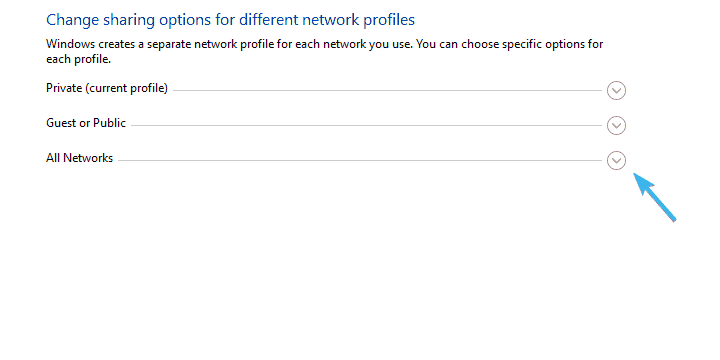
  1. In the Windows Search bar, type Advanced sharing and open ”Manage advanced sharing settings”.windows security popup windows 10
  2. Expand All networks.windows security popup windows 10
  3. Navigate to the bottom and select to Turn off password protected sharing.windows security popup windows 10
  4. Save changes and exit.

2. Change Outlook settings

Outlook security settings are the most common reason for the Windows Security pop-up. Now, there are a lot of variations on the subject and various solutions roaming around. However, the most probable solution is hidden within Outlook’s Account settings.

Here’s what you need to do in order to disable repetitively occurring Windows Security prompts:

  1. Open Outlook.
  2. Open ”File” from the main menu.
  3. Choose Info and then Account Settings.
  4. Choose the E-mail tab.
  5. Right-click on the account that inflicts Windows Security prompt and select Change.
  6. Select More settings.
  7. Under the Security tab, uncheck the ”Always prompt for login credentials” box and confirm changes.
  8. Click OK and save changes.

On the other hand, if you’re still constantly annoyed by Windows Security pop-up asking to sign in with who-knows-what credentials, make sure to check the additional steps.

3. Check Credential Manager

Some users managed to resolve the issue at hand by deleting certain credential inputs from the Credential Manager. During the creation process of an Outlook account, you might have made a slight mistake.

It seems that it’s related to credentials check input, forcing the Windows Security pop-up to reoccur frequently. Follow these steps to delete Outlook-related inputs from the Credential Manager:

  1. In the Search bar, type Credential and open Credential Manager.windows security popup windows 10
  2. Open Windows Credentials.
  3. Look at the Generic section for Outlook-related credentials.
  4. Expand everything associated with Outlook and click Remove.
  5. Restart your PC and look for changes.

If you need more info on how to add, delete, or edit files in Credential Manager, we’ve prepared a complete guide that will help you understand better what it does and how to navigate it.

4. Reset Network settings

Finally, you can try resetting network settings. For some users, the issues started after small Wi-Fi network issues, which are common for various reasons. It seems that resetting the network fixes relentless credential pop-ups.

If you’re not sure how to reset network settings in Windows 10, follow the steps below:

  1. Press Windows key + I to summon the Settings app.
  2. Open Network & Internet.windows security popup windows 10
  3. Select Status from the left pane.windows security popup windows 10
  4. Scroll to the bottom and click on Network Reset.windows security popup windows 10
  5. Enter your Wi-Fi credentials and reconnect.

If Windows 10 forgets your network credentials, check out this simple guide to quickly solve the problem.

That should be it. We hope that at least one of the enlisted solutions helped you address the bothersome Windows Security prompt.

In case you have an alternative solution or questions regarding the ones we posted, make sure to tell us. You can do so in the comments section below.

RELATED STORIES YOU SHOULD CHECK OUT:

Windows RT jailbreak tool released, still needs to be applied every time you reboot

Windows RT

Just recently, we learned about a way to run non-Windows Store apps on a Windows RT device via a circumvention method that requires tinkering with the portion of the RAM that instructs Windows RT on whether it should run unsigned code or signed code.

This jailbreak attempt was brought to Microsoft’s attention and the company issued a statement not only applauding the jailbreak attempt, but also hinting that this circumvention method will most likely be gone in the near future.

Now, a jailbreak tool has been released which is based upon the circumvention method discovered recently. The jailbreak tool is simply a batch file that does most of the work for you so you can run unsigned apps, but will need to be re-applied every time the system is rebooted. Microsoft recently hinted that a patch would be coming soon in an official statement regarding the jailbreak. In response to that, the maker of the jailbreak tool had this to say: “They can patch it through Windows Update, but since we have the ability to reinstall from recovery partitions we can revert any Windows Updates they release.”

This is obviously another step towards a full working jailbreak for Windows RT. Microsoft recently applauded the jailbreak attempt and it is unsure if Microsoft will make a big deal about it. “We applaud the ingenuity of the folks who worked this out and the hard work they did to document it. We’ll not guarantee these approaches will be there in future releases,”Microsoft originally mentioned in an official statement.

Calculator X8 for Windows 8, RT, Windows 10

A good calculator that you can rely on is always a good tool to have handy. Although every operating system comes with an integrated tool to do all your calculations, sometimes these will will not be to the liking of everyone.

Although the integrated Windows 8, Windows 10 Calculator has all the features one could want, its interface is less than appealing, and a good alternative for it comes in the form of Calculator X8, a free app from the Windows Store.

A good tool for day to day use

calculator-x8-for-windows-8-app-review

For normal usage, this tool is perfect, making simple calculations is a breeze, thanks to its awesome interface and fairly big, easy to push buttons. On a laptop or a computer, you can use the number pad for making your calculation, but overall, the app has a pleasant look. It comes with three themes, one being the Windows 8, Windows 10 theme, there is the Windows 7 look and the classic XP theme. These can be changed via the Settings button in the Charms Bar.

On the functionality side, the app offers the basic calculator and a scientific calculator with most of the normal functions that one would need. The interface is split into two areas, one for the scientific functions and one for the number pad, each having the same easy to push buttons.

calculator-x8-for-windows-8

The only drawback of these otherwise awesome app is the lack of more specialized calculations that are present in the pre-loaded app. Features like unit conversion, programmer calculator or currency converter are not present, but we hope to see them in future updates.

calculator-x8-for-windows-8-app-review-2

Overall, Calculator X8 for Windows 8, Windows 10 is a pretty decent tool that can appeal to most users who do not need other functions than the simple arithmetic and basic scientific functions. It’s interface is far superior to the pre-loaded Windows Calculator and with the addition of the missing features, we think it could become the perfect replacement.

Download Calculator X8 for Windows 10, Windows 8

Microsoft confirms Windows Live Messenger service retirement on March 15th

Just recently, we learned that Microsoft plans to retire Windows Live Messenger in favor of Skype. Microsoft officially announced that Windows Live Messenger and Skype will become one back in November of last year and encouraged all Messenger users to update to the latest version of Skype to begin the transition.

In an email to Windows Live Messenger users, Microsoft confirms that the service will retire on March 15th (except for China, which will continue to see the service for a little while until Microsoft announces further). Microsoft continues to urge Messenger users to make the move to Skype by downloading the latest version of Skype for their instant messaging and video chat needs.

Test your Logo Knowledge with 3D Logo Quiz for Windows 8, Windows 10

3D Logo Quiz for Windows 8, Windows 10 is a game where you see how many logos there are, but don’t go search for easy answers as the best way to play this game is the hard way
3d logo quiz windows 8
This day and age we’re constantly bombarded with information coming from all around us, and much of that information is in the form of commercial of diverse companies that try to promote their products. Because of this, we have come to be familiar with most companies and their logos have imprinted in our minds.

This game is based exactly upon this fact and it puts our knowledge of logos to the test. 3D Logo Quiz is a freely downloadable game from the Windows 8, Windows 10 Store that allows users to compete with their friends and see who knows more companies, of just as a tool to see how much are you affected by today’s marketing.

How is the game?

In just a few taps after opening the game you are ready to play. There are no complicated menus or settings, just open and play the game. Although, there is a options bar at the bottom of the main screen, where you have the possibility to turn the sound on or off, access the website of the developer or reset your progress.

The buttons for Facebook or Twitter do nothing more than open the developer’s pages, but there is no real integration to the game that would allow you to play or compare scores with your friends. You can only create an account on their website so you can appear in the leaderboard. This feature would have great to be available in-game, but we hope that future updates will change this.

3d-logo-quiz-windows-8-app-review

Also on the main screen, you can access the Leaderboard, where you can see the top players and their scores and you have your Statistics at the bottom of the screen. For those aggravated by the ads in the game, from the main screen they can access the Remove Ads button which will open the Buy More Coins window, where the option for add removal is also present.

When you get passed the main screen you will see the levels menu, where you can choose what level you want to play at. The game is linear and (I know, strange choice of words for such a game) it does not allow you to play higher levels until you get the necessary number of coins. Keep in mind that this is not that easy, as you will need 300 coins to unlock each level.

At first, you might think that it’s easy to make the necessary coins, but keep in mind that each level allows you to make only 350 coins, and sometimes you will need to use the hints. There are three hints that player can use, the first one costs 10 coins and it gives you a description of the company, the second one gives you the partial name and it costs 20 coins, but it cannot be used until the player has already used the first one, so in a manner, the second hinst costs 30 coins, and the last hint costs 50 coins and it resolves the puzzle for you.

3d-logo-quiz-windows-8-app-review-2

There are 35 logos in each level and you have to correctly type the name of the companies to solve them. Luckily, the game gives you an idea if you are close to the name by showing an “X” for wrong and an approximate sign for names that are almost right.

The logos are not always complete, and for those who incorporate the name of the company within them, you will have only a partial logo to go on, and this can prove quite difficult some times, although most of the time, you will need no help.

3d-logo-quiz-windows-8-app-review-3

One other annoying aspect of the game is the fact that if at any point you complete all the puzzles in one level, but you do not have the necessary 300 coins to advance to the next one, you will have to reset all the progress and start over, or buy coins.

3d-logo-quiz-windows-8-app-review-4

Overall, the game is quite interesting and somewhat entertaining. The graphics are pretty good and to be honest there is not much else we could say. Although I won’t be playing the game regularly, it still is a good game to pass a few minutes of your time while waiting for the bus.

Download 3D Logo Quiz for Windows 10, Windows 8

Microsoft’s Visio 2013 to come in three editions: Standard, Professional, and Pro for Office 365

Microsoft has revealed that its 2D-object drawing application Visio will come in three flavors: Microsoft Visio Standard 2013, Microsoft Visio Professional 2013 and Microsoft Visio Pro for Office 365. Microsoft has also provided a summary of the main functions available in each of the editions (as seen in the below image).

Microsoft Visio Standard 2013 is designed for people looking for a powerful diagramming platform with a rich set of built-in stencils. Visio Professional 2013, on the other hand, has all the features of Standard 2013 but also comes with updated shapes and templates; enhanced support for team collaboration; and the ability to link diagrams to data. Microsoft Visio Pro for Office 365 will be available via a subscription through Office 365 and comes with the same features in Professional 2013 and Visio on Demand. Visio Pro for Office 365 can be installed on up to five PCs running Windows 7 or Windows 8.

Visio 2013 editions

Windows 95 seen running on Windows RT, BOCHS and more ported to ARM

Well, it looks like the jailbreak community for Windows RT is a go, as today it appears that a hacker by the name of Netham45 on the XDA forums has managed to successfully port PuTTy, TightVNC and BOCHS to Windows RT, which means Windows 95 can be seen running on Windows RT here. While most things work, things like networking do not.

Porting Windows applications to ARM is a tricky job, and requires loading and rebuilding apps (.net 4.5 only) in Visual Studio 2012 with a workaround, it involves a lot of trickery and isn’t recommended you do. Also, since many Windows libraries are missing in Windows RT, some programs won’t even run, even if they are ported to ARM.

Microsoft recently commented on the Windows RT jailbreak, saying that they “applaud the ingenuity of the folks who worked this out and the hard work they did to document it,” however they also stated that the exploit may not be in future versions of the Windows RT operating system, which may be a shame for some.

Dropbox for Windows RT, Windows 10 [Review]

The official Dropbox app for Windows 10, Windows 8, Windows 8.1, and Windows RT users is one of the best cloud storage tools. Read our review from beliew and what are our impressions

dropbox-for-windows-8

It’s been a long wait for the Windows 8, Windows 10 Dropbox app, but it’s been worth it! The app is up on the Store, free to download and use by any user worldwide. Although its competitors have already published apps, it seems that the developers of Dropbox have taken their time for developing the app.

The time was well spent, and the Dropbox app for Windows 10, Windows 8 is up and working perfectly! Although it needs some updates and a few features to be added, it looks and works flawlessly. The base for the future features is rock solid, the first sign of a good app.

General Impressions of the Dropbox App

The Dropbox app for Windows 10 is fairly simple. Its interface is very simple, and the developers have adopted Windows 10. Windows 8 Tile look, but also kept to the traditional Dropbox look and created a balance between the two. The service is still as easy to use as ever, and thanks to its intuitive and simple UI, it can be used by anyone.

The app integrates perfectly with any Windows 10 machine, allowing users to share files from other apps to their Dropbox folder, and also share Dropbox files with their contacts or via email.

Also, the app allows users to open and edit files directly from within the app, although when opening videos, the app will forward users to the Windows 8, Windows 10 Media Player.

Sharing is done via the Windows 10 Charms bar, and also from the Charms Bar, users can search their Dropbox folder with great speed. This shows us that the app is properly developed, and when it will have some other features, it will become one of the best apps for cloud storage.

dropbox-for-windows-8-app-review-2

Unfortunately, there is not much else to talk about regarding the app. Currently, it is still limited in features, for instance, there is no upload feature in the app. Delete function is also missing, and when right-clicking on a file, it does not show any options.

dropbox-for-windows-8-app-review

For now, the app could be considered a really good file browser, but with no options for managing your files, such as move, copy or delete. Also, for the moment, there is no “Refresh” option, but we hope that it will be available in future updates, along with the other missing features.

Get Dropbox

Windows Store app highlight: Box, lets you access, edit, and share your files

Looking for an app that lets you access, edit, and share files, images, and videos? Box is a great alternative to Dropbox and offers you 5GB of free space. Check it out!

Very similar to Dropbox, and Sugar Sync, the Box app lets you share folders with colleagues and turn any folder into an online work space. You can invite people to view, share, edit, and upload files; store multiple versions of a file, download previous versions for reference, and use the same sharing link, even as new versions are uploaded. You can also manage files and folders with batch move, copy, and delete operations, save files from other apps to your box account, and access Box files from within other apps.

To use Box, you will need to set up a Box account at Box.com. The Box account gives you 5 GB free, and offers tiered pricing for other storage needs. It also features a desktop application that will allow you to sync files to and from your desktop.

So, if you looking for great online storage and a whole lot more, get Box! The app is available for free for Windows 8, and Windows RT