Microsoft has released KB5053657 to Windows 11 Insiders in the Release Preview Channel. The update, which is part of Windows 11 version 23H2, brings a huge change to the Settings Page.
More exactly, commercial devices will now feature a “Your Accounts” card on the Settings Home Page and “Top cards” displaying key hardware specifications such as storage, graphics, RAM, and more. This should make it easier for Windows 11 users to get essential info quickly when needed.
Elsewhere, KB5053657 introduces increased support for text scaling across File Explorer, File Open/Save dialogs, and copy dialogs, making it more accessible for users with visual impairments.
Update: Microsoft decided to retire the support for text scaling across File Explorer, due to some issues.
A new Gamepad keyboard layout for the touch keyboard has been enabled, allowing users to navigate and type using their Xbox controller. This includes button accelerators and vertically aligned keyboard keys for better controller navigation.
Task Manager will now calculate CPU utilization using standard metrics, ensuring consistent display of CPU workload across all pages. A new optional column called CPU Utility is available on the Details tab for backward compatibility.
Plus, KB5053657 also brings the new system tray icon on the taskbar, which has been introduced to improve the discoverability of the emoji and more panel in Windows 11.
Microsoft just announced the release of the brand-new Live Chat feature for Teams, which is available to commercial customers starting today. The new capability will allow businesses to embed a Teams chat directly on their website so that customers can communicate with them from there.
The Redmond-based tech giant says the new capability should reduce response times and even lead to higher conversion rates and more customers.
With live chat, you can support one-to-one chat with your customers right from your business website—directly from Teams. This reduces response times and moves prospective customers further along the sales journey, leading to higher conversion rates and improved customer satisfaction.
Below, you can watch how this feature works. Microsoft says commercial customers can add the new Live Chat widget in Teams directly to their website starting today.
Along with the new Live Chat, Microsoft Teams now allows businesses to employ the Queues app to take and manage customer calls more easily. The Redmond-based tech giant teased the platform a while ago.
Microsoft released KB5053649 to Windows 11 Beta Channel Insiders. While the patch is small, it contains important fixes for a really frustrating bug regarding Windows Tools.
The platform would cause all of the apps related to it to be broken out into folders instead of being centralized in one point. However, with the release of the KB5053649 pack, Microsoft effectively fixes this issue.
We fixed the issue causing Windows Tools-related apps to break out into folders instead of being in one single app.
Elsewhere, the patch introduces Chinese support for voice access, including Simplified Chinese and Traditional Chinese, additional fixes for Windows updates, and the login screen.
Microsoft released the latest Windows 11 Insider build, KB5053650, to all insiders on the Dev and Beta Channels. With it, the Redmond-based tech giant has made Windows 11’s Voice Access capable of understanding intuitive language.
What does this mean? Windows 11 users will no longer have to use a fixed syntax with Voice Access for the capability to understand what the user is trying to say and perform the said action.
As Microsoft says, you can now say “Can you open Edge application”, or “Switch to Microsoft Edge”, or “Please open the Edge browser”. Voice access understands your intent and executes the right action for the voice command you speak.
You’ll no longer have to pause and remember an exact phrasing for the capability to work. The Redmond-based tech giant also enhanced Voice Access with the ability to suggest real-time commands based on what users just said in case the tool doesn’t pick the sentence correctly.
Voice Access is now capable of something Windows Copilot should have been all along: the ability actually to open applications and navigate Windows using another tool.
Elsewhere, while the KB5053650 patch comes with dozens of fixes for the operating system, it’s also full of known errors ranging from general ones regarding the ability to install Windows updates to Recall, Click to Do, Improved Windows Search, File Explorer, Taskbar, and Task Manager.
A long-time Xbox user has sparked discussion across gaming communities after sharing their experience of being permanently banned from the platform under weird circumstances: the individual, a loyal Xbox player since 2007, claimed to have invested over $40,000 on more than 600 games—only to have their access to all digital purchases revoked.
The ban happened during a recent Call of Duty: Black Ops 1 game, where a random player in the online lobby activated a mod menu that unlocked achievements for everyone present. The user states they did not participate in the modding but were banned the following day for violating Xbox’s community guidelines.
Here’s what happened: I’m playing Black Ops 1 the other night, and some random guy in the lobby uses a mod menu that unlocks achievements for everyone in the lobby. I didn’t do anything, but suddenly a day later I get a message saying I’ve been banned for breaking community guidelines. Now, I’ve been playing Xbox for years with a perfect account—no violations, no strikes, nothing. I’ve literally never cheated in my life. But Microsoft punishes me for something I didn’t even do.
Adding to the frustration, the user’s appeal was allegedly denied within minutes without the opportunity to explain the situation entirely. The ban notice reportedly cited “No details given,” leaving the user with no clear explanation for the penalty.
The user also said explaining the situation to Microsoft was impossible, alleging a lack of direct contact options or responsive support from the Redmond-based tech giant. They expressed their concerns about the risks associated with digital ownership, urging fellow gamers to think carefully about their purchases.
To make matters worse, there’s no way to escalate or contact anyone directly. I tried everything, and Microsoft just ignores me. So basically, if you’re unlucky enough to be in the wrong lobby or even get caught by a stray bullet like I did, they can take everything you’ve ever bought without any explanation or recourse.
However, in a last update, the Xbox gamer says they managed to access their library, as Microsoft lifted the ban after finally getting in touch with the company. Despite the resolution, the case has prompted broader questions about digital content ownership and platform accountability.
What to do in such a case? If you face a similar situation, the best solution is to get in touch with Xbox’s customer support and explain the situation as thoroughly as possible. Provide evidence of the problem and the necessary information about your account, Game Pass, or library information, emphasizing specific data such as when the ban happened.
You can also try to ask for advice from the recently added Copilot for Gaming. The AI will then guide you through the issue and will offer you ways to contact Xbox, or Microsoft.
Microsoft announced the next-gen Xbox console a few weeks ago. According to the company, it’s coming in 2027, but not before releasing an Xbox handheld, which should be available at the end of this year or in 2026.
Touted as the most powerful Xbox console, the next-gen Xbox should reinvigorate the Redmond-based tech giant’s gaming department. This is especially true after recently low sales of the Xbox Series S and X compared to the other consoles on the market, which prompted many to say that Xbox is losing the console war, whatever that means.
Why are we saying this? Well, because, at a quick glance on Reddit, gamers are more than ecstatic about the next-gen Xbox console: they, too, agree that the next console will be the best on the market.
Yes, Microsoft usually nails the hardware and software on consoles (let’s ignore the Xbox One ?), much better than Windows at least.
Most gamers agree that the Xbox consoles are pretty durable, and they’re not crippled with hardware or software issues. Plus, the ability to choose between two types of consoles, one for casual gamers and the other one for more hardcore gamers, has also been received well by the community. However, some said this decision meant that certain games were available on Xbox on release day (with the latest example being Baldur’s Gate 3).
The Reddit thread, although still an unofficial forum, is a good way to get the sentiment regarding the next-gen Xbox, and it’s surprisingly positive.
If the price is right, yeah. I mostly play on pc, but almost all of my friends are on Xbox, and not every game has crossplay.
Yup, while i have a PC and i know its more flexible in terms of games and power, i enjoy the simplicity of my xbox as a gamepass machine to just relax and play on.
Yes. I prefer gaming on consoles as opposed to PC or streaming and I have a large Xbox Library that will go with me to the next console.
Microsoft has acknowledged a peculiar issue affecting the Disk Cleanup tool in Windows 11, version 24H2. Last year, users reported that the tool incorrectly displayed the storage space available for cleanup, even after files had been successfully removed.
The issue appeared when users attempted to clean up “Windows Update Cleanup” files. Although the files were deleted and the space was freed, the tool continued to show the same amount of space as occupied.
The Redmond-based tech giant has clarified that this is a reporting error and does not indicate that the files are still taking up storage.
This bug is linked to Windows 11’s new “checkpoint cumulative updates” feature, which allows for more minor, incremental updates. While the feature is designed to improve the update process, this temporary reporting glitch has confused users.
According to the Windows Health dashboard, Microsoft has resolved the issue and it assures users that their devices are not at risk. In the meantime, users can rest assured that their storage space is being managed correctly, despite the misleading display in Disk Cleanup.
Resolution: Windows updates released October 24, 2024 (KB5044384) and later include improvements to the Windows Disk Cleanup tool which address some of the causes for incorrect estimates. We will continue to improve the accuracy of the free space estimates provided by the Disk Cleanup application in future Windows updates.
Microsoft has added a new video game, a feature match quiz that will appear on the operating system’s OOBE update screen.
Spotted by tech enthusiast @phantomofearth, the new feature match quiz should appear to all Windows users moving forward. The rollout will most likely take place in the following weeks.
The Redmond-based tech giant has been enhancing the OOBE update screen with various interactive elements, over the years, so this little video game shouldn’t come as a surprise to Windows users.
However, it opens up the possibilities of making the experience even more engaging. As we all know, the OOBE usually takes some time.
Microsoft has rolled out the latest update for its Edge Dev Channel, version 135.0.3179.11, introducing many improvements and new features, including AI for further support.
More specifically, the update supports displaying Copilot in the Side Pane, enabling seamless tab switching and navigation within the same tab.
Added support for displaying Copilot in the Side Pane, with contextual ability for tab switching and navigation within the same tab.
Numerous issues have been resolved, such as crashes caused by specific actions like CTRL + TAB on collapsed tab groups or switching profiles in the search bar.
The update addresses platform-specific issues, including display glitches on iOS, toolbar disappearance on Android, and tab shadow effects on macOS. For example, the PDF toolbar will no longer disappear when closing the browser and opening an external PDF with Edge on Android. Some issues regarding the recently released Game Assist crashing links in sidebar apps were also fixed.
If you’re a fan of the action-horror genre, especially the Silent Hill saga, you will be happy to know Konami will also release the game on Xbox and PC. The first Silent Hill game was released in 1999 and is one of the psychological horror genre’s grounding titles.
Konami’s announcement is a bit of a surprise because the publisher has an exclusivity contract with Sony for PlayStation. However, that agreement will expire in October 2025. The same announcement also appears on the Xbox website, together with a brief description of Silent Hill f.
Here’s how the acclaimed writer Ryukishi07 describes his experience with the Silent Hill series:
To me, the SILENT HILL series is more than just a collection of stories, it’s a medium; an amazing, phenomenal way of exploring and experiencing a person’s heart and mind. It’s my hope that players out there will come to appreciate it in the same way. To all of our overseas friends, I hope you’ll enjoy a look at what SILENT HILL might be like if set somewhere a little different, like Japan.
We can’t embed the trailer of Silent Hill f here due to inappropriate content, but you can watch it on YouTube if you’re an adult.
We also need to mention that Silent Hill f will be adapted for Xbox and PC. Konami didn’t recreate it for the other platforms, so you probably need to get a controller ready if you plan to play it on PC.
Konami didn’t disclose the release date for the game, but it’s safe to assume that it will happen sometime after the Sony deal expires. If you’re lucky, this will happen in time for Halloween.
Microsoft will enhance Teams with a peculiar feature, to say the least: Real-Time Text (RTT).
According to a recent entry to the Microsoft 365 Roadmap, Real-Time Text (RTT) is a feature that lets people type during a meeting. Their text shows up instantly for everyone to see. At the same time, the spoken words of others in the meeting are written down automatically as subtitles.
Microsoft says this helps everyone communicate smoothly—whether someone prefers typing instead of talking, finds speaking hard, or wants to use text for any reason. It’s designed to make meetings easier and more inclusive for all.
Real-Time Text (RTT) lets participants type in the meeting while others’ speech is transcribed in real time. Whether for accessibility reasons or simply a preference to chime in via text, RTT ensures seamless, instant communication for everyone. It enables effective collaboration for all users, including those who prefer typing over speaking, and can be especially useful in situations where speaking is difficult or not possible.
The Redmond-based tech giant says the enhancement will be available in May. However, the company is not saying whether the new setting is optional, and it might unveil more when the feature is out.
Why is this important? Well, the description implies that the other users can see what you’re typing even though you haven’t sent the message, which means users will have to be extra careful when writing messages in Teams calls from now on.
Mozilla is working to bring Progressive Web Apps (PWAs) to Firefox on Windows 11 under the name “Taskbar Tabs.” This feature aims to transform websites into app-like experiences, allowing users to pin web apps to their taskbar on desktop for quick access.
PWAs, or Progressive Web Apps, are websites that function like apps on your phone or computer. They load quickly, even with a slow internet connection, and can work offline.
Progressive Web Apps in Firefox
In the past, Mozilla attempted to add PWA support to Firefox in the form of a Single Site Browser (SSB), but the feature was never launched, even in the Nightly version for testing. The company eventually abandoned PWA support. Although there is an extension to support PWAs in Firefox, native support for the feature had not been implemented—until now.
With growing demand, Mozilla is working on Taskbar Tabs for Windows, aiming to make websites feel more like traditional apps.
David Rubino, a Firefox product manager, shared that the team is rethinking how to implement PWAs based on community feedback. The goal is to allow users to turn any website into a web app with a single click, running it in its own window with a simplified browser interface. These web apps would stay open until closed, handle links within their scope, and integrate with the operating system, such as Windows, for quick access—like appearing on the taskbar.
WindowsReport has learned that Mozilla worked on this feature under the name “Taskbar Tabs” as a separate extension before integrating it into Firefox. The feature moves tabs to single-site windows in the taskbar.
How Taskbar Tabs work
Based on our findings, here’s how you can create web apps in Firefox:
When you navigate to a website, an option appears in the URL bar to move a normal window tab into a Taskbar Tab. It may also be possible to move a Taskbar Tab back into a normal window, similar to how PWAs work in Chrome or Edge, where you can reopen them in the browser.
Image Credit: WindowsReport.
Here’s how you can enable Taskbar Tabs and install PWAs in Firefox on Windows:
WindowsReport has noticed that Mozilla has kept Taskbar Tabs behind a hidden preference. Here’s how you can enable it:
Launch the latest Firefox Nightly.
Visit about:config.
Create a boolean preference named browser.taskbarTabs.enabled and set its value to true.
Restart Firefox.
Note: As of now, the feature isn’t working. However, we’ve shared a video below that shows how Taskbar Tabs work, based on the concept made available as an extension in the past.
Progress so far and what’s next
From the Taskbar Tabs meta bug, we have learned that Mozilla has made a significant progress in improving Firefox’s PWA Support. key tasks, such as minimizing the browser UI for Taskbar Tab windows, cleaning up the hamburger menu, have already been completed.
However, some work remains, including adding a URL bar action for Taskbar Tab conversions, handling Taskbar Tab launches, integrating with the Session Store, and improving the Jump List to display only relevant items.
The team is also working on allowing users to revert Taskbar Tabs back to regular windows and updating internal logic to ensure Taskbar Tabs don’t interfere with normal tab restoration.
Video: How Taskbar Tabs Worked as an Extension
Mozilla plans to roll out Taskbar Tabs as an experiment first, followed by a wider release based on user feedback. The team is also looking to bring PWAs feature to macOS, where single tabs could be moved to the dock instead of the taskbar.
However, while Firefox on Android already supports adding website shortcuts to the home screen, it’s unclear whether Mozilla plans to expand PWA support for Linux or further improve Android’s PWA features
WindowsReport has reached out to Mozilla for a statement on this development and an estimated timeline for when Taskbar Tabs will be available to users. We are currently awaiting their response and will update this article as soon as we hear back.
What do you think about Firefox’s new Taskbar Tabs and its PWA install button? Could this feature convince you to switch to Firefox?Let us know your thoughts in the comments below.
However, among the new enhancements and changes, Microsoft also adds new policies, and one, in particular, is important because it will impact Edge users right away.
The new AddressBarTrendingSuggestEnabled will allow Microsoft Edge to enable Bing to display trending suggestions in the address bar. As with any other policy, this one needs to be enabled first, for Edge users to see its impact, but it’s still interesting.
It could especially be helpful to companies looking to optimize their content for Bing Search, as the search engine will show them what’s currently trending on the Internet.
Microsoft is adding two new options, “Article” and “Question,” to the “Create new” button in Viva Engage for premium users. According to a recent entry to the Microsoft 365 Roadmap, this change will start in April 2025 and make it easier for premium users to create these posts.
However, it’s worth noting that the Redmond-based tech giant will not be adding new types of content but will make it simpler to create articles and questions if you already have a premium license, such as the Microsoft Viva Suite or the Microsoft Viva Employee Communications and Communities Suite.
We are excited to announce the addition of two post creation options—Article and Question—to the centralized creation button in Viva Engage for premium users. Starting April 2025, a Viva Engage premium licensed user will be able to create an article or a question post type directly by clicking on the “Create new” button, easing the process of creation of these post types, while also helping users discover them quicker. Kindly note that this roll out does not entail adding new types of content creation, but brings forth a unified and easier way to create these post types when a user is already licensed to use them. By ‘Viva Engage premium licensed user’, we mean this feature is available for users licensed to the Microsoft Viva Suite or the Microsoft Viva Employee Communications and Communities Suite.
The new options will be available worldwide for Desktop and Viva users.
However, a new feature is indeed coming to Microsoft Viva: Republish. The company announced it last month and promises to change content management on the platform.
Microsoft has unveiled its latest innovation, Copilot for Gaming, an AI-driven assistant designed to enhance the gaming experience for Xbox players. It will soon be available everywhere.
Copilot for Gaming aims to help players with strategy, setup, and more, making gaming more accessible and enjoyable. It provides real-time coaching to help players improve their skills and navigate in-game challenges. Whether suggesting the next move in a survival scenario or offering strategic advice, the AI assistant guides players through their gaming journey.
In the latest episode of the official Xbox podcast, the company gives a glimpse of its new AI tool, which will offer personalized game recommendations based on players’ preferences and gaming history.
Copilot for Gaming can also help players download and install games and stay connected with their friends and gaming communities.
The tool will be available as an early preview for Xbox Insiders on mobile. If that is a success, Microsoft will then refine the tool before expanding it to other devices. As always, the Redmond-based tech giant asks Xbox players to provide feedback about it.
Epic Games is making significant strides in expanding gaming accessibility by bringing Windows on ARM support to its Epic Online Services Anti-Cheat system, also known as Easy Anti-Cheat.
This update will also make Fortnite available on Windows on Snapdragon devices later this year. According to Epic Games’ announcement, the collaboration with Qualcomm Technologies aims to enable developers to bring more games to ARM-based Windows devices, powered by Snapdragon processors.
Over the last year, the introduction of Windows 11 Arm-based laptops has transformed the PC landscape, and laptops with Qualcomm’s Snapdragon® X Series processors represent a rapidly growing segment of the PC gaming market. However, the majority of PC games today are compiled for x64, which doesn’t translate directly to the Windows on Snapdragon architecture. Due to the way anti-cheat software works with x64 features, additional tooling is required for compatibility with these devices.
The move addresses a key challenge in the gaming industry: compatibility with anti-cheat software on ARM architecture. By integrating Easy Anti-Cheat support, Epic Games is paving the way for a smoother gaming experience on Snapdragon-powered devices. This update is expected to benefit not only Fortnite but also other multiplayer games that rely on Easy Anti-Cheat to maintain fair play.
The lack of anti-cheat support is one of the reasons why many gamers avoided using Windows on ARM as a gaming platform. The move from Epig Games will certainly smooth the gamers’ relation to ARM.
After launching AI History Search in Chrome, Google has started dispalying images of web pages alongside search results in Canary version. This makes finding websites via History Search using AI even faster and easier.
Chrome AI History Search is a new feature that allows users to search their browsing history using everyday language and even ask questions. AI provides answers based on the content of previously visited pages, even if you don’t remember the exact site or URL.
The feature is evolving. We observed that Chrome Canary now shows thumbnails or preview images next to each result in AI History Search, so users can quickly identify the page they’re looking for. These visual cues reduce the the need to scroll through a long lists of text-based search results in your browsing history.
Chrome AI History Search showing results with webpage images. Image Credit: WindowsReport
According to Google Chrome Gerrit, a commit made in January 2024 explains how this feature works. The commit states:
“Add images to results for history embeddings with answers enabled. If a history embeddings search result’s URL is known to sync, try to get an image for the result through the PageImageService using the same client ID as history clusters. If there is no image, the History page falls back to an SVG, and the side panel falls back to the favicon. Update some styling for the side panel.”
This means Chrome attempts to fetch an image for each result using the PageImageService. If no image is found, it displays a default graphic or the site’s favicon, ensuring users always see some kind of visual aid.
For example, if you’re trying to find a recipe you visited earlier, seeing an image of the dish or the website’s layout can help you locate it much faster than reading through URLs or page titles. Keep in mind, you still need to input a search query in whatever way you remember it.
“Using question words like “what” or “where” helps Chrome give you better answers. Alternatively, you can describe what you’re looking for in a few words. As you visit more sites, you’ll see more AI-powered results” as noted by Chrome on the feature page.
The Notepad update introduces the ability to summarize content using generative AI. Users can select the text they want to summarize, right-click, and choose the “Summarize” option, or use the Ctrl + M keyboard shortcut.
Moreover, Notepad now includes a “Recent Files” section in the File menu, allowing users to quickly reopen recently closed documents. This highly-requested feature enhances the user experience by providing easy access to previously used files.
With recent files, you can now reopen your recently closed files directly within Notepad. To access Recent Files, open Notepad and go to the File menu, where you will find a list of your recently used documents. Click on any file to instantly reopen and continue editing.
The Redmond-based tech giant also updated Snipping Tool with the Draw & Hold feature, which allows users to quickly add shapes and arrows to images by drawing them. Both the new capabilities for Notepad and Snipping Tool were released in the same patch.
Great news for all Snipping Tool users out there: its latest update introduces the “Draw & Hold” feature, allowing users to draw neat lines and shapes easily. Users can use this feature to capture a screenshot and then use the pen tool to draw a line, arrow, rectangle, or oval over the image.
In a blog post, Microsoft says holding the cursor or pen still for a moment before releasing the pen will convert the stroke into a well-formed shape. This feature aims to improve users’ inking markup experience.
Additionally, the Snipping Tool supports a new and improved protocol launch experience. Developers can customize which Snipping Tool capture features are shown when invoked from their applications, offering improved flexibility, security, and ease of use.
For developers, Snipping Tool now supports a new and improved protocol launch experience! App callers can now customize which Snipping Tool capture features are shown when invoked from their experience. The protocol is designed to offer improved flexibility, security, and ease of use, aligning closely with familiar HTTP-based interactions. This shift can make use of the protocol more intuitive for developers, and it expands support for better integration with web technologies. To learn more and get started, check out the Launch Snipping Tool developer documentation page.
The new Draw & Hold capability is available to all Snipping Tool insiders.
In similar news, the tool was recently enhanced with the ability to trim video recordings, allowing users to share a specific part of their recordings with others easily.
Windows 11’s Settings app has come a long way since the operating system’s launch four years ago. Microsoft has steadily migrated features from the classic Control Panel to the more modern and streamlined Settings interface.
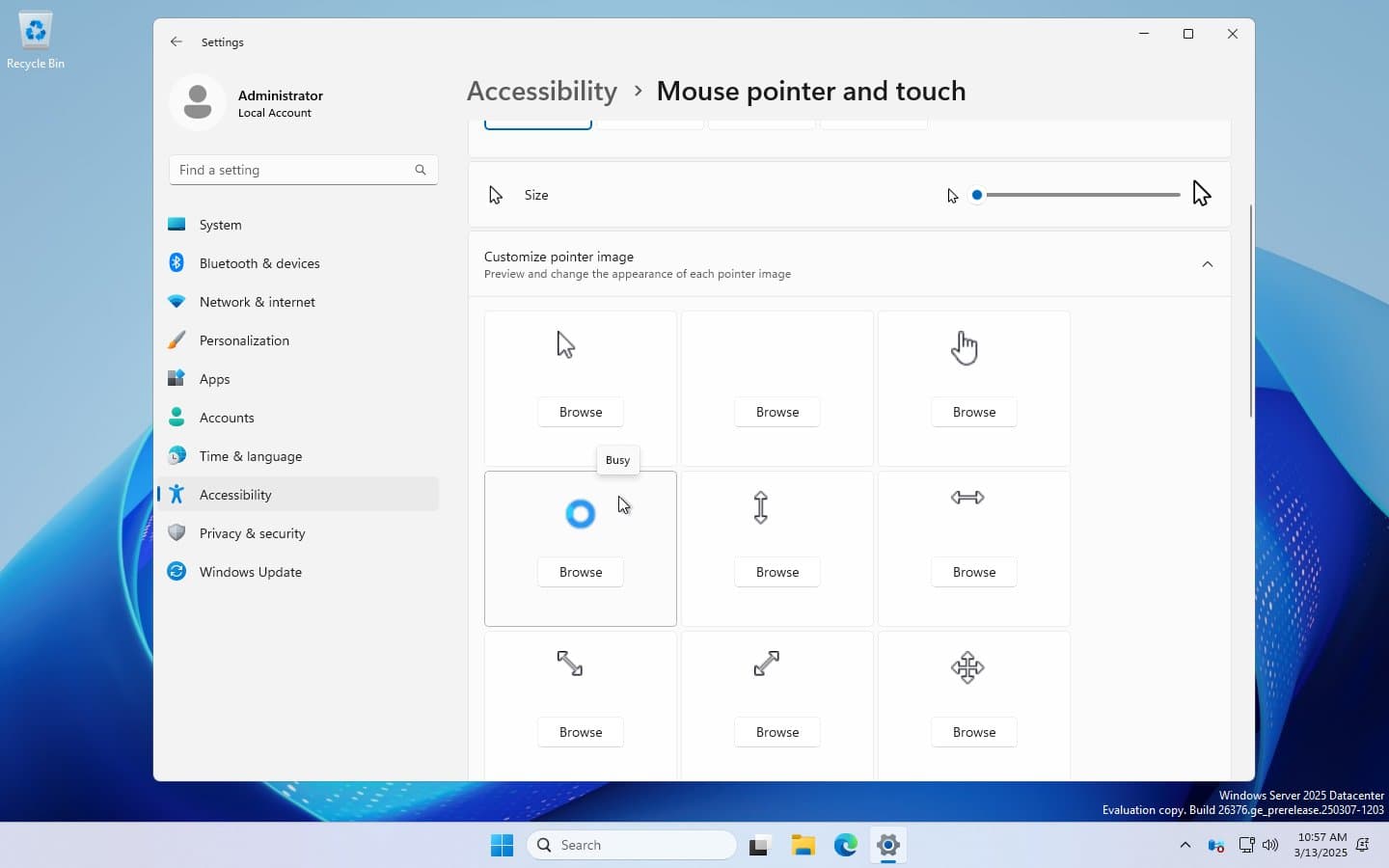
In the latest Windows Server build 26376 for insiders, some exciting updates have surfaced. Phantomofearth posted on X that additional mouse settings have been moved from the Control Panel to the Settings app, making it less likely you’ll need to use the old Win + R > control command.
Hidden in build 26376 (out for server): all of the options in the old mouse properties dialog are now available in Settings, including pointer trails, pointer shadow & pointer image customization!
Newly added mouse options include the ability to enable the mouse indicator (which helps locate the cursor by pressing the Ctrl key), adjust pointer trails and their size, enable cursor shadow, and even customize pointer images individually. Microsoft has also refreshed icons for existing settings like cursor speed and enhanced pointer precision, giving the app a fresh, cohesive look.
Obviously, Microsoft wants to create a unified, user-friendly experience in Windows 11. It’s still a bit strange why you still need to go to the old Control Panel for some features when they can be embedded into Settings.
Anyway, these mouse settings are only accessible in Windows Server build 26376 for insiders, so you won’t see the options on a stable build.
Microsoft has released the KB5053643 patch to Windows 10 Insiders in the Release Preview Channel. The update is not big, but it brings many improvements to the 10-year-old operating system.
For starters, the update provides Noto CJK (Chinese, Japanese, and Korean) fonts in Windows, improving text support for these languages and making writing easier.
The Country and Operator Settings Asset (COSA) profiles have been updated to improve compatibility and performance with mobile operators.
With KB5053643, a fix has been implemented to address an issue where thumbnails in File Explorer may crash, resulting in white pages appearing instead of the actual thumbnail. The patch has also fixed printers using Independent Hardware Vendor (IHV) drivers that might unexpectedly output incorrect or unwanted text.
System processes can now store temporary files in a secure directory “C:\Windows\SystemTemp” by calling the GetTempPath2 API or using the.NET’s GetTempPath API, thereby reducing the risk of unauthorized access.
Certain Get-Help troubleshooters that might not run in a Remote Desktop session have been fixed.
The update introduces improved support in Windows Search for the European Economic Area (EEA), including increased discoverability.
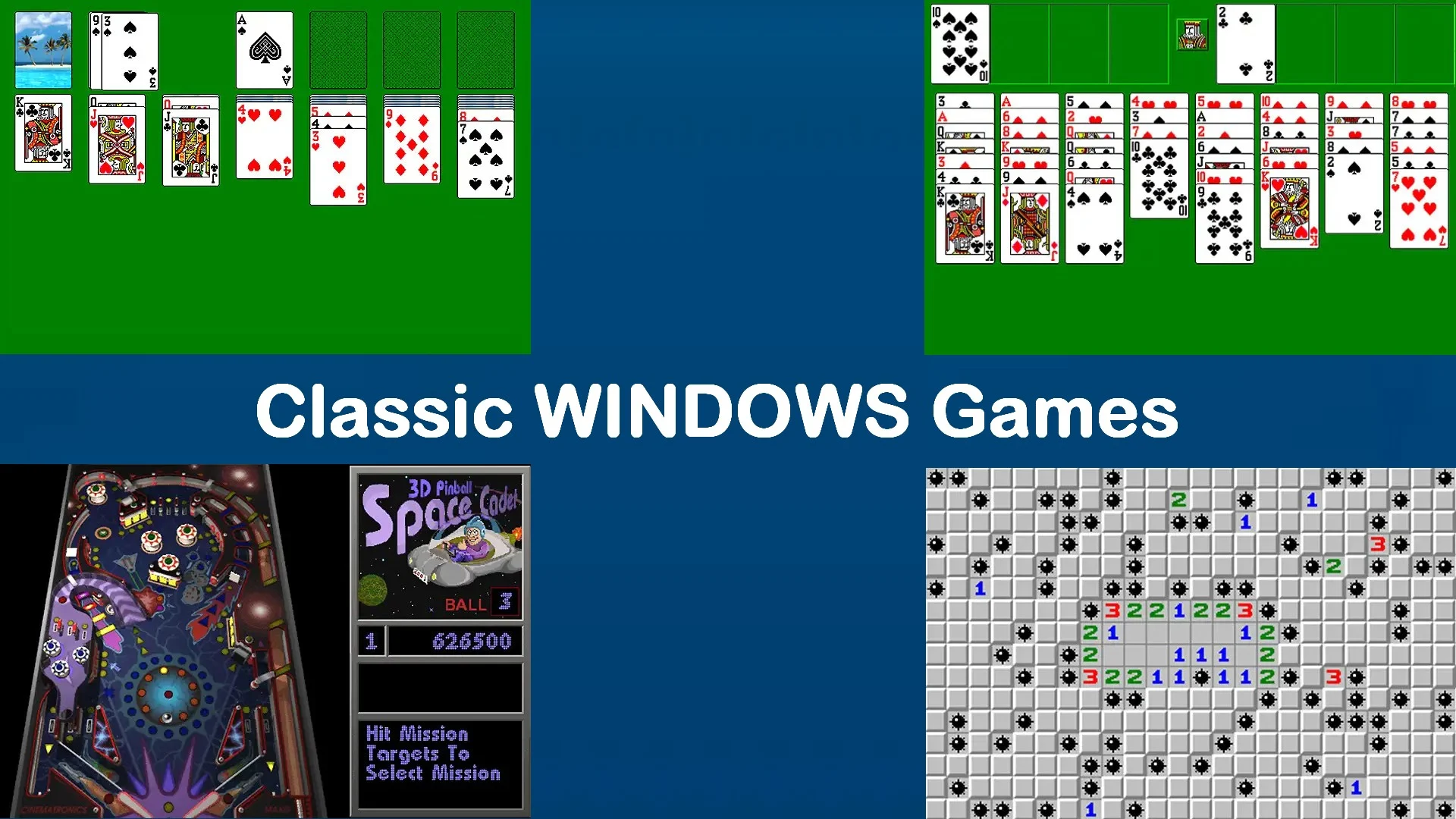
If you had a Windows PC in the 90s or early 2000s, chances are you spent countless hours playing some of its iconic built-in games. These classic Windows games were more than just time-killers, they were a core part of the PC experience. Whether you were clicking frantically in Minesweeper, strategizing your next move in FreeCell or watching the cards bounce after winning a game of Solitaire, these classics hold a special place in gaming history.
But are they still worth playing today? Absolutely! These games were designed for quick, engaging gameplay and even in an era of hyper-realistic graphics and open-world adventures, they remain fun, challenging and strangely addictive. Let’s take a trip back and revisit the five best classic Microsoft Windows games that are still worth playing today.
#1 – Solitaire (Klondike)
Solitaire is the king of classic PC games. If you had a Windows computer in the 90s or early 2000s, you’ve played this at least once. It was the ultimate way to pass time, whether you were taking a break at work or just killing a few minutes at home.
The game’s simple yet addictive mechanics—stacking cards in alternating colors and arranging them by suit from Ace to King—made it easy to learn but sometimes frustratingly difficult to win. The best part? The iconic bouncing card animation that played when you finally beat the game.
Modern versions of Windows do still include Solitaire and it’s still free through the Microsoft Store and other gaming platforms. It may be old, but it hasn’t lost its charm.
#2 – Spider Solitaire
Windows introduced Spider Solitaire in 2000 and it quickly became one of the most played card games on the platform. Unlike classic Solitaire, this version required players to organize cards by suit, making it a bit more complex.
One of the best aspects of Spider Solitaire was its adjustable difficulty. Players could choose between one suit (easiest), two suits (moderate difficulty) or all four suits (the ultimate challenge). This flexibility made it a great game for both casual players and serious card strategists.
Even now, Spider Solitaire remains a staple in Windows card games and can be found in modern versions of Windows or played online.
#3 – Minesweeper
Minesweeper is a game that starts off simple but quickly turns into a mental workout. Originally introduced in Windows 3.1 and included in every version until Windows 8, Minesweeper was one of the most well-known logic puzzle games in computing history.
The premise was deceptively simple: click on tiles to reveal numbers, which indicate how many mines are adjacent. Using logic and deduction, you had to clear the board without clicking on a mine. If you hit a mine… boom! Game over.
It’s a game of patience, strategy and a bit of risk-taking. And while it may not be as flashy as modern puzzle games, it remains just as engaging today as it was decades ago.
#4 – FreeCell
If you thought Solitaire was too reliant on luck, Freecell Solitaire was here to test your strategic thinking. First appearing in Windows 3.1 and becoming wildly popular with Windows 95, FreeCell was a twist on traditional Solitaire that required more planning.
Unlike regular Solitaire, nearly every FreeCell game is solvable, except for a very small number of impossible hands. That meant if you lost, you couldn’t blame the shuffle, you just had to think harder. This made it a favorite among puzzle lovers who enjoyed the challenge of working through difficult layouts. Even today, FreeCell is a timeless classic for those who enjoy strategic card games.
#5 – 3D Pinball for Windows: Space Cadet
This game was the closest thing to an arcade pinball machine you could get on a PC. Originally included with Windows NT and later Windows XP, 3D Pinball: Space Cadet felt revolutionary at the time. It featured 3D graphics (a big deal back then) and had a satisfying physics system that made launching and bouncing the ball around genuinely fun.
The gameplay was simple: hit targets, rack up points and keep the ball in play for as long as possible. It was easy to pick up but tricky to master, which kept players coming back for more.
Unfortunately, newer versions of Windows don’t include 3D Pinball: Space Cadet, but it’s still possible to download it online or run it on an older machine. If you ever get the chance to play it again, you’ll remember why it was so beloved.
Final Thoughts
Classic Microsoft Windows games were part of gaming history, and many still hold up today. They’re simple, fun and strangely addictive, even in an era of ultra-HD graphics and massive open-world games.
So, if you’re feeling nostalgic or just want to experience the games that defined early PC gaming, fire up 3D Pinball: Space Cadet, FreeCell, Minesweeper, Spider Solitaire or Solitaire. You might be surprised at how much fun they still are.
What if we told you that Copilot might soon be able to understand subtext in an email you’re sending or receiving, so that you can send the perfect follow-up? You wouldn’t have to spend hours thinking about the a proper answer, Copilot could just do that for you.
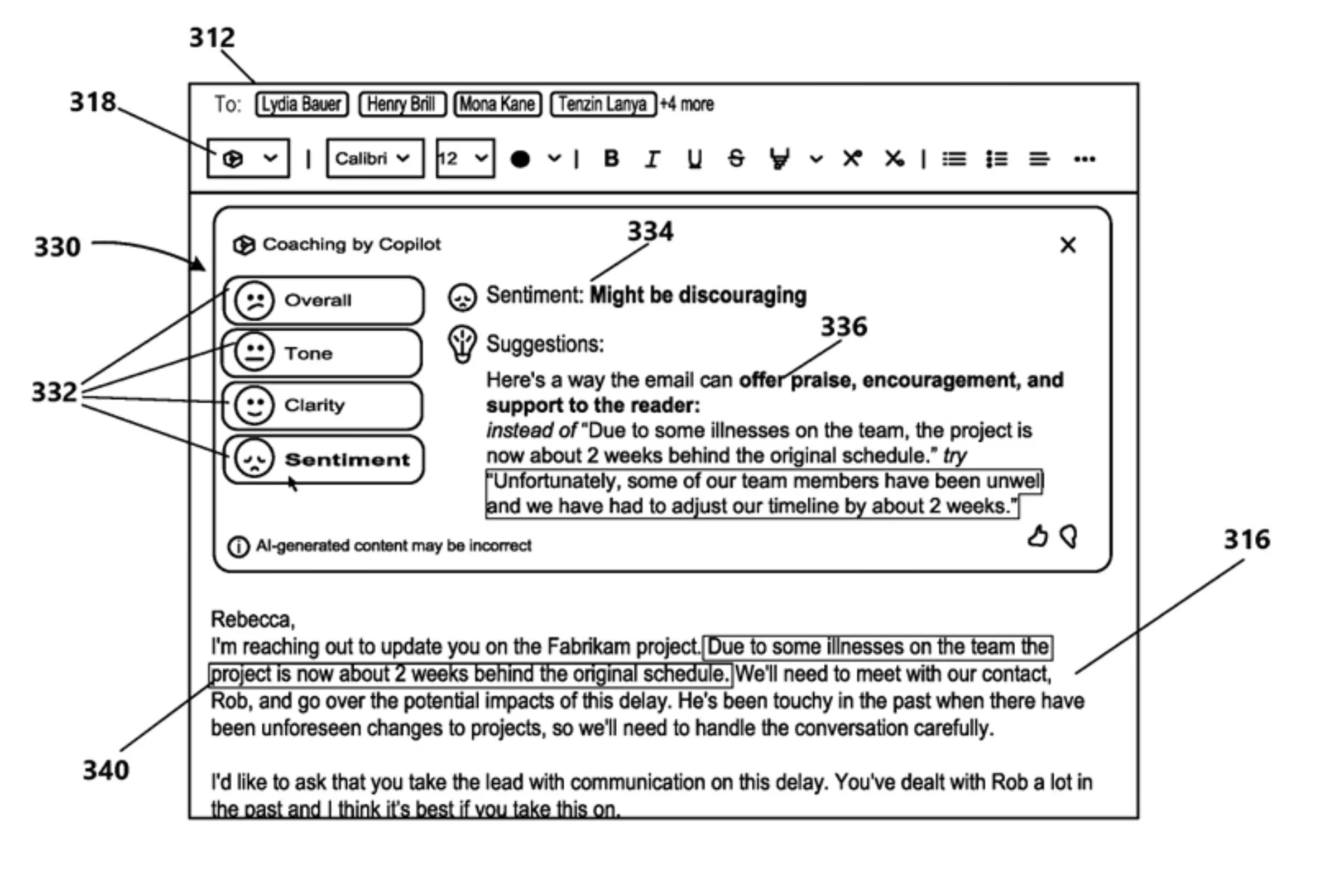
Sounds exciting, right? Well, you should know that Microsoft is indeed designing or developing something of the sort, because we found a recent patent that describes such a technology. The paper, suggestively called Second Chance Message Enhancements, describes a technology that provides advanced feedback for messages you are writing or have sent in a messaging app.
It works in two main scenarios:
For Draft Messages, the system gets the text when you start typing a message. The system analyzes the message’s content using unique models or rules if certain conditions are met (like a long enough message or specific keywords).
Based on the analysis, the system gives the message a score that indicates how good or bad it is. If the score is high or low enough, the system provides detailed feedback to help you improve the message.
For Sent Messages, the system gets the text after you send a message. The system again uses unique models or rules to examine the message’s content and gives the sent message a score indicating how good or bad it is.
If the score is high or low enough, the system sends you an alert in the messaging app. If you interact with the alert, the system provides detailed feedback to help you understand and improve the message.
In both cases, the system uses feedback scores to decide whether to give you more detailed, advanced feedback. This helps you write better messages whether you’re still drafting or have already sent them.
We have reviewed the patent. The paper uses mockup images of Copilot, the said technology, so this is definitely about the AI model, as you can see in the features image above.
It would be interesting if Copilot ends up being able to identify the tone and subtext of each email. Microsoft experimented with an AI model in 2023, Project Rumi, that was capable of using the web camera to analyze the user’s facial expressions and react accordingly, to exceptional results, so this is more than feasible. Copilot is already capable of drafting an email, however, you need to tweak it with specific prompts to make it write a proper follow-up.
This technology would automatically make Copilot detect the tone and help you craft an email specific to each case. In this regard, the AI model might actually become useful, and the paper provides several examples: from dealing with difficult conversations at work to getting suggestions on how to ask for a raise or a promotion.
Copilot now includes Designer, a tool for creating attractive slide layouts and presentation templates.
According to a recent entry to the Microsoft 365 Roadmap, when you use Copilot, it will show you suggestions from Designer in a vertical list. This list includes familiar slide layouts, presentation templates, and new features.
Essentially, Copilot can now help you design your slides more effectively with the help of Designer’s suggestions.
Designer is now part of Copilot. Copilot suggestions now brings you familiar Designer slide layout and presentation template suggestions in a vertical gallery, along with new capabilities.
The integration is rolling out this month, and all Copilot users should have access to Designer. Earlier this month, the Redmond-based tech giant made Designer available in Microsoft PowerPoint with a similar task. Now, it seems the company is expanding the capability to all.
Alibaba Group Holding Ltd. has announced the release of its latest AI model, R1-Omni, which is designed to read and interpret human emotions. This new model is part of Alibaba’s ongoing efforts to establish itself as an AI industry leader and compete with OpenAI’s ChatGPT.
The R1-Omni model, developed by Alibaba’s Tongyi Lab, enhances computer vision technology by allowing it to infer individuals’ emotional states from videos.
In demonstrations, the AI model could describe people’s emotions, clothing, and surroundings. This model builds on a previous open-source model, HumanOmni, created by Jiaxing Zhao, the same lead researcher.
Alibaba’s push into emotional intelligence AI is seen as a strategic move to outpace competitors like OpenAI. The company has made the R1-Omni model available for free on the Hugging Face platform, making it accessible to many users. This move contrasts OpenAI’s GPT-4.5 model, available only to premium subscribers for $200 per month.
The Hangzhou-based tech giant has expanded its AI capabilities, including securing a significant partnership with Apple to bring AI features to iPhones in China.
Alibaba’s CEO, Eddie Wu, has emphasized that achieving artificial general intelligence is the company’s primary objective, with emotional intelligence being a key step toward that goal.
Microsoft has announced the integration of its AI assistant, Copilot, into the GroupMe messaging app. This new feature aims to enhance the group chat experience by providing users AI-powered assistance for various tasks.
According to the announcement, users can now long-press any message to ask Copilot for help in GroupMe. The blog post even has an example of this. Users can also start a new direct message with Copilot from their chat list.
Some of the key features of Copilot in GroupMe include writing the perfect response, using Study Buddy, making decisions, curating playlists, and planning events.
Microsoft has hinted that this is just the beginning of Copilot’s capabilities in GroupMe. Future updates may include AI understanding how specific group chats operate, making conversations smoother and more intuitive.
GroupMe, which was purchased by Skype in 2011 and later acquired by Microsoft, continues to be a popular messaging app, especially among university and college students in the United States. The integration of Copilot is expected to enhance the app’s appeal and functionality further. On the other hand, Skype will be entirely deprecated this May, and the Redmond-based tech giant advises users to migrate to Teams.
Hera is a deep space probe launched last year to study and monitor the Dimorphos and Didymos asteroids which are potentially dangerous for Earth. Right now, the explorer is around Mars and sent beautiful images back home.
Recently, Microsoft announced Hera Space Companion on X, a website that includes all the data from the probe, but also offers a chat service powered by Azure OpenAI. The Hera Companion is basically a way to chat with Hera and ask her about its mission. Of course, you can also ask it the obvious question about aliens, right? Well, we’re way ahead, although we knew the answer: I haven’t encountered any aliens during my journey so far!
Hera Space Companion, powered by Azure OpenAI Service, lets space fans chat with an orbiter in deep space as it studies asteroids to protect our planet. It provides real-time updates and engages with space enthusiasts. ? pic.twitter.com/SAmsvk8eof
After a long pause and without me asking anything, Hera updated me with the actual useful information about its status and mission:
Hey, are you still here? ? I’m thrilled to share the latest—I’m approaching Mars on March 12, 2025! During the flyby, I’ll use Mars’s gravity to fine-tune my trajectory toward the Didymos system. It’s an exciting maneuver that optimizes my journey and helps save energy for the mission ahead. Would you like to hear more about how this gravity assist works or what I might discover along the way?
So, here how this works. All the data from Hera’s position and mission are introduced in a database that Azure OpenAI uses to respond to your natural language question in an equally natural way.
Whether you’re a space exploration fan, or just curious, the new feature powered by Microsoft’s Azure OpenAI is pretty exciting. Check it out and let us know what you think in the comments below.
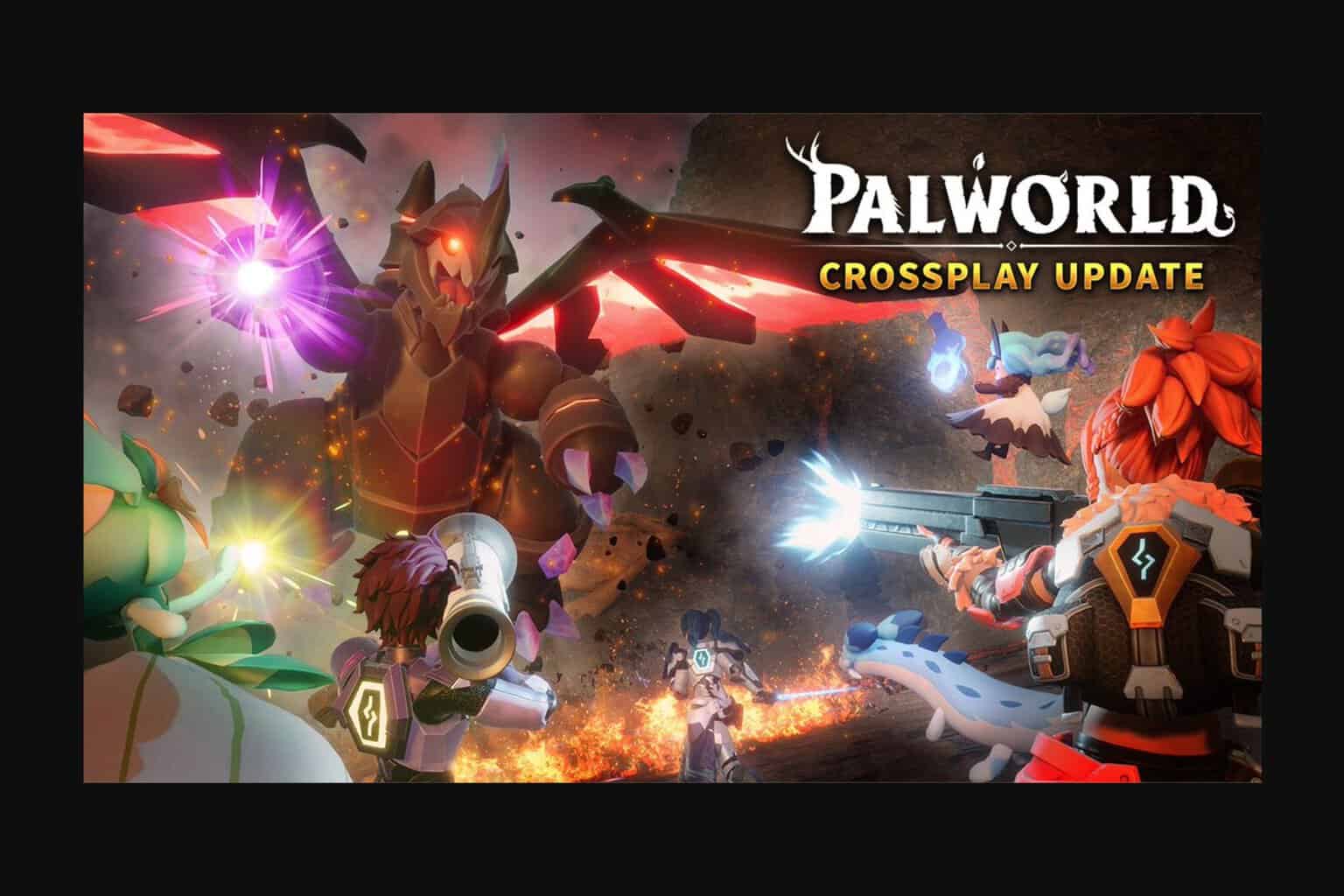
Exciting news for Palworld fans! Developer Pocketpair has announced that the highly anticipated crossplay feature will be introduced later this month. This update will allow players to enjoy multiplayer gameplay across all platforms, including Windows, Xbox, PS5, and Mac.
The cross-play feature has been one of the most requested additions since Palworld’s release. This update allows players to team up with friends regardless of their platform. Believe it or not, the game hasn’t been able to crossplay, and Xbox gamers could only team up with their Windows counterparts, while the Steam, PS5, and Mac gamers of Palworld were separated.
According to the official announcement, the update will include crossplay and a world transfer feature, enabling players to transfer their beloved Pals between different platforms.
?Palworld's Crossplay Update coming in late March!?
Multiplayer across all platforms and world transfer for Pals ?
To celebrate the update, Palworld is 25% off on the PS Store and Steam! Don't miss it ?
To celebrate the upcoming update, Palworld is offering a limited-time 25% discount on the game on the PS Store and Steam.
Pocketpair has also hinted at some “little surprises” in the update, though specific details have not been revealed. As the developer continues to support and expand the game, fans can look forward to more content and improvements throughout the year.
Last year in November, Microsoft stopped Windows 24H2 updates because the OS wouldn’t recognize some printers and scanners. Now, after a recent Windows 11 update, KB5050092, owners of USB-connected printers discovered a new issue.
Microsoft has acknowledged that the update, released in January 2025, can lead to printers producing random text and data, including network commands and unusual characters. This issue primarily affects dual-mode printers that support both USB Print and IPP Over USB protocols.
The problem tends to occur when printers are powered on or reconnected after being unplugged. Users have reported that the printed text often begins with the header POST /ipp/print HTTP/1.1, followed by other Internet Printing Protocol (IPP) headers.
To address this, Microsoft has provided a temporary solution through its Known Issue Rollback (KIR) feature. IT administrators can deploy a special Group Policy to reverse the problematic update. The Group Policy can be found under Computer Configuration > Administrative Templates, and the group policy name. Here are the downloads you need, as listed by Microsoft:
The administrators must restart affected devices to apply the changes. Microsoft has assured users that a permanent fix will be included in a future Windows update. So, you can either apply this workaround or wait until Microsoft rolls out a fix for this bug.
Microsoft has released Windows 11 Insider Preview Build 27813 to the Canary Channel. This latest build includes a series of minor improvements and bug fixes that aim to enhance the overall user experience for Windows Insiders.
One of the notable changes in this build is the removal of the Location History feature. Previously used by the now-deprecated Cortana assistant, this feature allowed access to 24 hours of device history when location services were enabled.
With its removal, location data will no longer be saved locally, and the corresponding settings have been removed from the Settings > Privacy & security > Location page. Microsoft already teased out this deprecation a while ago.
In addition to this change, the build addresses several issues. The WDMAud system driver, which was causing app crashes after recent MIDI work, has been fixed. Furthermore, a problem in the Settings app where the System > Display > Color Management page might not display the expected color profile list for the selected monitor has also been resolved.
However, Microsoft is still working on some known issues. For instance, a d3d9.dll crash is causing multiple apps to fail to launch for some Insiders. Microsoft is actively working on fixing this problem.
Windows Insiders in the Canary Channel should note that the builds released to this channel represent the latest platform changes early in the development cycle. These builds are not tied to any specific release of Windows, and features included in these builds may never be released beyond the Insider program. Features may change, be removed, or replaced based on feedback from Insiders.
Blizzard Entertainment has announced the return of BlizzCon, the ultimate celebration of its games and community.
The event will take place on September 12-13, 2026, at the Anaheim Convention Center. This marks the end of a two-year hiatus, and it was last held in 2023.
BlizzCon has been a big part of Blizzard’s history since its inception in 2005, bringing together fans worldwide to celebrate their shared passion for Blizzard’s universes. The 2026 event promises to elevate this iconic celebration with various activities, including the Opening Ceremony, in-depth panels, the Darkmoon Faire, friendly competitions, and hands-on gameplay.
In the official announcement, Blizzard says it wants to build an unforgettable experience for all attendees. What to expect from BlizzCon 2026? Well, given that this is the first official BlizzCon under Microsoft’s tutelage, Midnight, the second expansion of the WOW Worldsoul Saga, will probably be out by then, so the company might unveil the last part, The Last Titan, which should be released around 2028.
Other surprises might finally be a StarCraft MMO, shooter, or possibly even Warcraft 4. I mean, why not? It could expand on the story that way, too, especially now that RTS games are making a comeback.
However, as BlizzCon 2026 will happen in over a year from now, these are just speculations, but fans can sign up for updates on BlizzCon news, special offers, and ticket sales by visiting the official BlizzCon website.
The company also said it will announce more details as the event approaches.
Microsoft has announced the launch of the in-sim Marketplace for Microsoft Flight Simulator 2024, bringing convenience and accessibility to the popular flight simulation game. The new capability allows users to purchase and manage content directly within the simulator, enhancing the overall experience for both creators and simmers.
According to the official announcement, the in-sim Marketplace features thousands of items from the MSFS 2020 Marketplace, which have been ported into MSFS 2024. Users can access these items in their My Library section, where almost all content is set to Disabled by default. However, content sold by Microsoft and Asobo is enabled by default, and any purchased content will also be enabled automatically.
To provide more context on content compatibility, the Marketplace includes three states based on creator feedback: Not Creator Approved, Not Available, and No Tag. The Not Creator Approved tag indicates that the content is either incompatible or has not been tested by the creator. The Not Available tag means the content was not successfully ported to MSFS 2024. If there is no tag, the creator has confirmed the content is compatible with MSFS 2024.
One of the key features of the in-sim Marketplace is the introduction of Simverse Coins, a new currency that allows users to purchase content. Simverse Coins can be bought directly in the Marketplace or at select retailers for those simming on the Windows Store or Xbox. Prices in the Marketplace will be displayed in Simverse Coins and local currency, allowing users to choose their preferred payment method.
Additionally, the Marketplace includes a feature that allows creators to upgrade MSFS 2020 ported content to optimize it for MSFS 2024. Creators can provide these upgrades for free or charge an upgrade price. Upgraded content will be designated with an “Upgraded” tag in the upper left corner of the image, and users will receive notifications in the simulator when free upgrades are available.
OpenAI has announced the release of a comprehensive suite of tools and APIs designed to simplify the development of AI agents. The company says the new AI agents aim to transform how developers create systems capable of autonomously handling complex, multi-step tasks.
The new tools include the Responses API, which combines the Chat Completions API’s simplicity with the Assistants API’s tool-use capabilities. This API supports built-in tools such as web search, file search, and computer use, making it easier for developers to build agents interacting with real-world systems.
Additionally, OpenAI has introduced the Agents SDK, an orchestration framework that abstracts the complexity involved in designing and scaling agents. This SDK includes built-in observability tools that allow developers to log, visualize, and analyze agent performance, helping identify issues and improvement areas.
The Responses API and Agents SDK are designed to work together, streamlining core agent logic, orchestration, and interactions. By enabling developers to create more efficient and capable AI-driven applications, these tools are expected to enhance productivity and innovation across a wide range of industries.
In the official blog post, the company says these latest tools address several critical challenges in AI development, including retrieving information, automating tasks, and integrating with diverse systems.
With today’s releases, we’re introducing the first building blocks to empower developers and enterprises to more easily build, deploy, and scale reliable, high-performing AI agents. As model capabilities become more and more agentic, we’ll continue investing in deeper integrations across our APIs and new tools to help deploy, evaluate, and optimize agents in production.
In recent news, the company just released GPT-4.5, the new AI model that promises to be better than its previous iteration; however, it hasn’t proven to be.
Microsoft has rolled out its March 2025 Patch Tuesday updates, addressing 57 security vulnerabilities, including seven zero-day flaws. These updates are crucial for maintaining the security and stability of various Microsoft products, including Windows, Microsoft Office, and Azure.
Among the 57 vulnerabilities fixed, six zero-day flaws were actively exploited, while one was publicly disclosed before an official patch was available. The zero-day vulnerabilities include issues in the Windows Win32 Kernel Subsystem, NTFS, and Fast FAT File System Driver, among others. These vulnerabilities could allow attackers to gain SYSTEM privileges, execute remote code, or steal sensitive information.
In addition to the zero-day flaws, the updates also address 23 Elevation of Privilege vulnerabilities, three Security Feature Bypass vulnerabilities, 23 Remote Code Execution vulnerabilities, four Information Disclosure vulnerabilities, one Denial of Service vulnerability, and three Spoofing vulnerabilities. These fixes are essential for protecting users from potential cyberattacks and ensuring the overall security of their systems.
Below, there is the full report of all the vulnerabilities addressed with March 2025 Patch Tuesday updates for Windows 11:
Windows Win32 Kernel Subsystem Elevation of Privilege Vulnerability
Important
As always, it is advisable to download and install the Windows March 2025 Patch Tuesday as soon as possible to benefit from the latest security improvements. You can do so by accessing Windows Update and automatically updating your device. You can also find out more details about the latest updates for Windows 10 and Windows 11 by reading our separate articles.
There is a new handy feature coming to Outlook for Windows in just a few weeks: Reply to Header.
Announced in a recent entry to the Microsoft 365 Roadmap, when you write an email, you can add a “Reply to” field. This field lets you add one or more email addresses where replies to your email should be sent.
So, if someone replies to your email, the reply will go to the addresses you added in the “Reply to” field.
Users will be able to toggle a “Reply to” field in the email compose form, which will allow them to add one or multiple addresses which will be used as the recipients for any replies to that message. #newoutlookforwindows
The new enhancement will be available in the new Outlook for Windows starting in April, and all users should have access to it.
Microsoft has rolled out the latest Patch Tuesday updates for Windows 10 in the KB5053606 pack, which are available for versions 20H2, 21H2, and 22H2.
As with any other security update, the KB5053606 patch mainly addresses urgent vulnerabilities that have targeted Windows 10. As such, the patch doesn’t bring any new features or enhancements, and they will be released later this month when the non-security patch comes out.
On the official support page for the KB5053606 pack, Microsoft says the patch comes with two known errors. One focuses on Citrix components that might have failed to install since the January Patch Tuesday updates were released. However, the error only affects a limited number of devices, and Windows 10 Home users are not expected to be affected.
If you haven’t installed the January Patch Tuesday updates, there is a chance a workaround that can be applied, but if you already have, then it won’t work. However, the Redmond-based tech giant is working with Citrix to address the issue.
The other known error concerns the System Guard Runtime Monitor Broker service, which we reported about a while ago. Microsoft says there is no need to take further action, but a workaround exists to prevent it.