Microsoft will add PST Support to the new Outlook for Windows. According to the latest entry in Microsoft 365 Roadmap, users can open PST files, commonly called Outlook Data Files, read all saved email messages, and search for specific emails.
However, there will be limitations. This first version supports only email messages. Users can see and look for emails but not change or engage with them beyond reading, as they are read-only.
Another limitation is the lack of access to the calendar, Contacts, and Task Data in the PST file. Even if the file contains information like calendar entries, contacts, or tasks, this first help version does not include access to these data types.
The PST file continues to hold this data. However, you cannot see or manipulate it in the first version.
The initial version of PST support in new Outlook for Windows will enable users to open “*.pst” files (a.k.a. Outlook Data Files), read all e-mail messages within the “*.pst” file, and search e-mail messages within the “.pst” file. This initial support is limited to Mail items and is read-only. All Calendar, Contacts, and Tasks data saved in the “*.pst” files are still there, but they cannot be accessed in this initial version.
Microsoft
This capability is useful for several reasons. First, it gives users access to historical emails. Users with archived emails in PST files can open them and read all their historical emails.
This is especially useful for retrieving important information from past communications without using the older version of Outlook or other email clients.
The new PST capability can also be useful for search functionality. Searching emails within PST files helps users quickly find specific messages, attachments, or information without manually scrolling through potentially thousands of emails.
It can also help with data migration, as users transitioning to the new Outlook can still access their old email messages stored in PST files, making the transition smoother and ensuring that important communications are not lost.
Earlier this year, Microsoft enhanced the new Outlook with support for the EML, MSG, and OFT formats, giving users multiple ways to deal with and manage archived emails.
Downloading and installing the Epson L360 driver ensures your printer operates as intended. This guide will show you how to download the latest driver from the official Epson website and how to easily install it on your PC. You can follow the steps on your Windows 7, 10, and 11 PC.
Select your Operating System – in this case either Windows 7, 10, or 11. The site will detect the version you’re using automatically but it’s safer to select it manually.
Click on the Drivers button then tap on Download.
Look through your downloads and double-click on the L360_x64_224JAHomeExportAsiaML.exe file to set it up on your device.
Tick or untick Set as default printer then tap OK.
Read the license agreement, select Agree, pick the language of your choice then tap OK.
Wait for the installation process to complete.
Restart your PC once it’s done to start using the driver.
Using your printer’s driver disc
Connect your printer to your PC and turn it on.
Insert the CD you received with your printer into your PC.
Locate the Autorun.exe file and follow the on-screen instructions. It’ll launch the Epson Printer Utility setup just like it does if you download the drivers from the official website.
Once the utility is installed, your printer should automatically be detected and drivers installed.
If it asks you to connect your printer, just press the power button to turn it off and turn it right back on and it should detect it.
Use Device Manager
Hit the Windows Icon on your keyboard, type “Device Manager” and press Enter to open it.
Expand Print queues.
Right-click on your printer and tap Update driver.
Tap Browse my computer for drivers.
Select Let me pick from a list of available drivers on my computer.
Tap Have Disk, select your driver file, hit Next, and wait for the installation to complete.
Return to the Device Manager, right-click the Epson L360 driver, and tap Update driver.
Tap Search automatically for drivers and complete the update process.
Use Windows Update
This method only works with Windows 11. Version 10 and 7 don’t let you adjust your drivers in Windows Update.
Connect your Epson printer to your PC with a USB cable.
Press the Windows icon on your keyboard + I to open Settings.
Go to Windows Update on the left menu, then select Advanced Options.
Click on Optional Updates under Additional Options.
Tap the Driver updates button, and hit Download & Install.
Restart your computer after the installation is finished.
Use a Third-party Software
Instead of manually installing the Epson L360 driver, you can save time with dedicated third-party software. It’ll automatically install and update any drivers you need, providing the latest compatible versions from the manufacturer.
Overall, these steps will work on your Windows 7,10, or 11 PC. You should regularly update your printer so that it performs optimally. Let me know in the comment section if you have a problem downloading and installing the driver.
Additionally, you can find instructions on how to get drivers for Epson L3110, L120, Et-4850, and L380.
Video pop-out, or PiP (Picture in Picture) mode, facilitates multitasking, allowing you to view videos in a separate standalone frame, with quick media controls, that always stays in the foreground, irrespective of the task at hand. And the best part is that every popular browser supports video pop out, including Opera, Chrome, Firefox, and Edge.
But when it comes to support for multiple PiP, the situation varies from browser to browser. And there are quite a few surprises here!
Does Opera support multiple picture in picture mode?
No, neither Opera nor Opera GX support multiple video pop out, as of now. If you open a video in PiP mode while another is already running, the latter will take over the standalone frame.
At the time of writing, there’s no official confirmation from Opera’s end about adding the feature. So, multiple video pop out in Opera will take some time!
Video pop out settings in Opera
As for running a single video in PiP mode, you will find the feature under Opera’s Advanced settings and can reconfigure things from here. Also, Video pop out is enabled by default in Opera.
Which browsers support multiple video pop out?
As of now, only Mozilla Firefox supports multiple video pop out. The feature has been present in Firefox for quite a few years, making it one of the best browsers for watching videos in Picture-in-Picture (PiP) mode. You just need to open the videos in different tabs.
While testing the multiple video pop out in Firefox, I was able to play up to 4 videos. Firefox users tell me that there’s reportedly no limit to the number of pop outs, but after 2-4, it just isn’t feasible!
Running four videos as pop-outs in Mozilla Firefox
As for Chrome, Opera, Brave, or even the light-weight Vivaldi, none so far support multiple video pop out. But given that there’s no apparent restriction on it, you can expect other browsers to implement the feature in the coming years, given the increasing competition for market share.
Can I use extensions for multiple video pop out?
Yes, you can but only if you manage to find one that’s both useful and secure. Based on my research, there’s already a dearth of options for extensions that introduce multiple video pop out capabilities to the browser.
And the ones that are successful to a limited extent have been reportedly found insecure. So, I would recommend you stay away from the third-party extensions!
If the multiple PiP mode capability becomes absolutely necessary, you always have the option to download Mozilla Firefox.
Can I pop out video over game in Opera GX?
Yes, the video pop out feature in Opera GX works flawlessly with almost all available titles. I tried it with the SimCity 4, and there were no issues whatsoever!
Opera GX’s PiP player on SimCity 4
Although, for a few games, you may have to reconfigure the in-game settings or modify the launch parameters (the Target field in Properties) when using custom launch settings. Or if Opera GX doesn’t seem to work, you can always go with the Xbox Game Bar.
While we so far discussed the positive side of PiP mode, it could also become a source of distraction, preventing you from focussing on the task at hand. In such cases, you can disable video pop-out or Picture in Picture on Windows 11.
Do you plan to switch to Firefox to use multiple video pop out? Share with us in the comments section below.
The Samsung Galaxy Book3 Pro 360 laptop is not ordinary. It’s a game-changer in portable computing, and you can get it now for a limited offer at $1,329. That’s a $570 discount, as the original price is $1,899.
The Galaxy Book3 Pro 360 is visually pleasing and can be acquired in graphite. It’s not simply about good looks; this system has been created as your all-purpose device for various tasks, such as work and entertainment.
The hardware is light and small, incorporating a complete touchpad and a 16-inch screen that responds to touch control. Consider owning a laptop that is simple to move and doesn’t compromise on screen size or features.
This gadget bends over to change from a PC to a tablet within seconds. It’s like having two machines inside one, suitable for people who frequently shift places. And when you add the S Pen with it, turning your smart notions into reality becomes even easier; write notes quickly or draw pictures – everything is possible!
Plus, if you require accuracy for editing images or videos, this tool can do that, too.
Now, we come to what you observe on the screen. The Galaxy Book3 Pro 360 has a sharp display with 3K resolution, making every detail look clear and bright. Furthermore, its 120Hz refresh rate guarantees a smooth scrolling and drawing experience.
Also, less blue light emission is a great relief for your eyes when you spend hours looking at the screen.
Performance-wise, it is a powerhouse. With the latest 13th Gen Intel® Core™ processor, Intel Xe Graphics, 16GB of RAM, and 1 TB SSD, it can handle workloads and games without any problem.
Plus, there’s always good connectivity with an expanded touchpad and various built-in ports. No more carrying around a bag full of dongles!
Battery life is very important, and the Galaxy Book3 Pro 360 is not lacking in this area. It provides as much as 19 hours of video playback. You can also quickly charge it: within only half an hour, you will receive a substantial increase in power.
Additionally, its compact charger can be used with other Samsung Galaxy devices, which makes for a flexible inclusion in your technology collection.
Lastly, to bring enjoyment, the quad-speaker system with AKG and Dolby Atmos technology turns your laptop into a small house cinema.
When it’s time for a video call, Studio Mode guarantees you appear and sound excellent due to AI Noise Cancelling and other intelligent functions.
Security is excellent; there are many layers of protection for your content. For connectivity, it supports very high speeds with 5G and Wi-Fi 6E. This helps to ensure that you always stay connected when working on creative things or watching videos online.
To sum up, the Samsung Galaxy Book3 Pro 360 is not just a laptop. It’s a flexible, strong, and safe device that can meet your needs for both work and fun.
If you love technology or like nice things in tech but don’t want to deal with complicated details, this could be good for you. So now, will you change?
You can get it from here. If you’re not feeling it for this one, you might want to check out these two offers from Lenovo: ThinkPad T14s and Slim Pro 7.
I don’t know what’s going on with Lenovo, but the tech giant is currently having incredible discounts. Earlier today, we found out the company is offering the amazing ThinkPad T14s at a staggering $1500 discount, bringing the laptop from its expensive $$2,429 to only $900.
Of course, nothing can beat that one, and it is probably the deal of the year so far, but the Slim Pro 7 is also quite close. The laptop, originally priced at $1,199, is now just $899, and you should consider it, especially if you have the budget.
Why? Well, it comes with an impressive AMD Ryzen 7 7735HS Processor, with 8 cores and 16 threads, perfect for all sorts of tasks, from creative ones to even light gaming. Its 14.5″ 90Hz Display with 350 nits features a 16:10 2560 x 1600 resolution, so that’s more than enough space to organize everything you need.
Lenovo Slim Pro 7 also has 16GB of RAM for editing videos and pictures and working on the move. The RAM and the display will serve you well if you want to play a bit of gaming on the side because Lenovo Slim Pro 7 has a dedicated 6GB NVIDIA GeForce RTX 3050 graphic card that can support many of the current games on medium to high settings.
The laptop comes pre-installed with Windows 11 and Copilot, so you can access those AI capabilities for almost everything you need. The offer also includes 3 free months of Xbox Game Pass Ultimate because you’ll want to use the Lenovo Slim Pro 7 to play gaming.
The only downside is its 512 SSD, which, by current standards, is not much. Given that just Windows 11 takes a great deal of space, you won’t have much space left to install games, for instance. But maybe that’s a good thing: Lenovo Slim Pro 7 is not a gaming laptop, even if it has the capabilities.
You’ll be more productive knowing you don’t have an array of games (through that sweet Xbox Games Pass) at your disposal.
Smooth Scrolling is an excellent addition to browsers, and Opera GX, although doesn’t feature the option in the dedicated Settings, still supports it via Flags. As expected, this leads to all the confusion surrounding the feature, with many under the impression that Opera has removed Smooth Scrolling altogether.
Smooth Scrolling allows you to smoothly navigate through the content using the scroll wheel rather without any lag or momentary delay, as is often the case. It’s perfect for bigger web pages where you have to swiftly comb through the content.
And the best part, enabling Smooth Scrolling wouldn’t take more than a minute!
How can I enable Smooth Scrolling in Opera GX?
1. Enable the smooth scrolling flag
Launch Opera GX, paste the following path in the address bar and hit Enter: opera://flags
Search for Smooth Scrolling.
Now, choose Enabled from the dropdown menu next to the Smooth Scrolling flag.
Finally, click on Relaunch to restart the browser and apply the changes.
2. Reconfigure the launcher’s properties
Right-click on the Opera GX launcher and select Properties.
Now, in the Target field, paste the following parameter and click on Apply and OK to save the changes: --enable-smooth-scrolling
Relaunch the browser for the changes to come into effect.
3. Use an extension
If the built-in options don’t work or the native feature doesn’t deliver the expected results, you can always use a third-party extension for smooth scrolling.
Upon doing comprehensive research, I came across the following extensions that are top-rated in forums:
SmoothScroll: One of the best extensions for a smoother scrolling experience.
ModernScroll: Not exactly a smooth scrolling extension, it does a lot more by enhancing the entire scrolling experience.
In the above sections, I have tried to include solutions that work for everyone. Besides, if Smooth Scrolling doesn’t exactly feel like an upgrade in Opera GX, you can always disable the feature and switch to default scrolling!
In this era of technological dependency, likening the significance of cyber threats to breathing air is fitting. The healthcare industry faces big danger from these attacks. Picture yourself dwelling in a country region where the nearby hospital functions as the lifeblood of your community; now, envision this lifeline being threatened by hackers who want to disturb and take advantage of it.
This is not a make-believe story but true for many rural hospitals in America. Understanding the seriousness of this situation, Microsoft has introduced a fresh cybersecurity program to protect these crucial institutions. This action offers much-needed hope for rural healthcare, assuring that hospitals can keep providing essential care without constant worry about digital dangers.
Microsoft made a statement on June 10, 2024. They are launching a cybersecurity program to help rural hospitals, which are becoming increasingly targeted in ransomware attacks. Microsoft said that in 2023, healthcare had the most ransomware attacks compared to all other critical infrastructure sectors combined.
Healthcare should be available no matter where you call home, and the rise in cyberattacks threatens the viability of rural hospitals and impact communities across the U.S.. Microsoft is committed to delivering vital technology security and support at a time when these rural hospitals need them most.
Microsoft
There was a 130% increase. The need for strong protection against such threats has become very urgent. Rural hospitals, often the sole healthcare providers for miles around, face an elevated risk because they have limited resources to fight off or bounce back from these dangers.
The program, together with the Biden White House, the American Hospital Association, and the American Rural Health Association, hopes to provide inexpensive or free cybersecurity solutions.
These services are designed for rural hospitals to have top-quality cybersecurity without paying high prices. For smaller hospitals, Microsoft gives nonprofit pricing and discounts of up to 75%, while bigger ones that already use their products will get their most advanced security suite free for a year.
But the help is not just in money. Microsoft promises to give free Windows 10 security updates for a minimum of one year and conduct cybersecurity assessments so that they can find and fix any possible weaknesses. In addition, this program includes training at no cost for hospital workers, which will improve their ability to protect their systems.
This is a step in Microsoft’s commitment to enhance healthcare services in distant areas. Such dedication involves utilizing AI systems for health (the Redmond-based tech giant announced such a system, the TRAIN Initiative, earlier this year) and boosting technology and cybersecurity work opportunities through links with community colleges and local establishments.
Microsoft hopes to make fast internet access more common and construct essential digital structures. By doing so, it hopes to close the gap that often exists between rural and urban communities regarding technology use in healthcare.
Basically, Microsoft’s cybersecurity initiative for rural hospitals is not just about offering tools and price reductions. It’s a connection to life for communities that depend on these hospitals to provide healthcare services.
This program emphasizes the crucial role of everyone in cybersecurity and shows how technology companies can support public health systems. When cyber dangers keep changing, efforts such as this are very important so that rural hospitals can stay watchful and strong against difficulties.
In a time when people are frequently amazed by new technology trends and gaming achievements, it is encouraging to know that Xbox, an early leader in the gaming field, has reached a record console user count. Phil Spencer, the CEO of Microsoft Gaming, recently shared this positive news.
He credited Xbox’s success to strategic choices made through cloud services, Game Pass, and innovative console moves. Even though Xbox had to deal with doubt and talk about its future in the console hardware business, it has shown strength by staying dedicated to making gaming easy for all players.
Spencer’s saying, “When everyone plays, we all win,” highlights a belief that goes beyond selling consoles and emphasizes the happiness and social bond gaming creates.
Xbox user numbers have risen and flourished, and sales of games on Xbox consoles have increased consistently each year for five years. This accomplishment shows how well Xbox can change and create new things, ensuring people can play their preferred games in many ways.
What I can say sitting here today, from our decisions on cloud, on Game Pass, on console, right now we have more Xbox console users than we’ve ever had in the history of Xbox. We’re up double digits, every year over the last five years, on game sales on Xbox consoles.
Phil Spencer
The fact that they made DOOM: The Dark Ages available on other platforms, like PlayStation 5, shows how Xbox is inclusive in its gaming approach.
The Xbox Games Showcase, which happened this past weekend, showed the lively environment of Xbox with a lineup that included Activision and Blizzard as well as Bethesda and Xbox Game Studios. This event underlined the wide-ranging world of Xbox gaming, assuring that there would be more journeys and experiences for players all over the planet, including a potential Xbox handheld console, as also teased by Spencer.
But how will this affect gaming in the future? Could subscription services, cloud gaming, and releases across platforms be factors making the gamer community more extensive?
Feedback from reviewers and supporters has been mixed, with some appreciating Xbox’s tactic of widening its market scope and others questioning the impact on console selling. Xbox’s emphasis on availability and player satisfaction remains significant to gamers worldwide.
Therefore, when considering the changing face of gaming, we are left with one question: What’s coming up for Xbox and the gaming community? Are digital and cloud-based services going to reshape our gaming patterns even more?
Only time can reveal this. Yet, Xbox’s maximum user count currently stands as a significant achievement; it signifies both innovation and inclusivity in this realm of entertainment.
If you are an Opera GX user who finds the built-in/custom themes not working or automatically changing to default, fret not. The problem is more common than you would expect. And it also affects manually set wallpapers!
When an Opera GX theme doesn’t work, it’s likely due to misconfigured browser settings, conflicting extension(s), or formatting issues with the image (in the case of a wallpaper).
To start with, make sure you are running the latest version of Opera GX. If not, install any pending updates!
What can I do if the Opera GX theme is not working?
1. Set the correct Opera GX startup settings
Launch the browser, click the Opera menu near the top left, and select Settings.
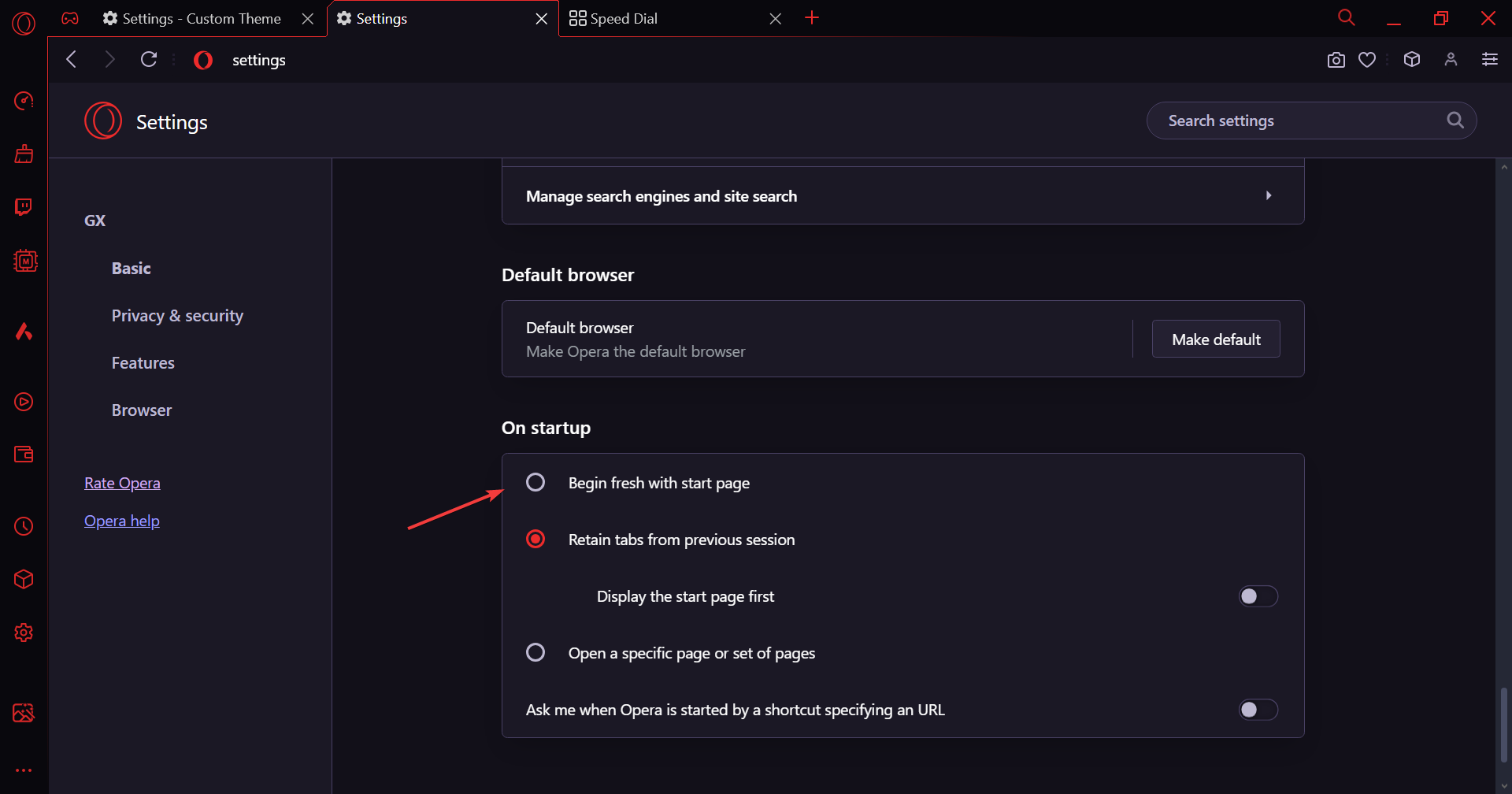
Scroll down to the bottom and disable the Begin fresh with start page option.
Again, set the theme that’s not working, restart Opera GX, and check for improvements.
2. Reconfigure the settings
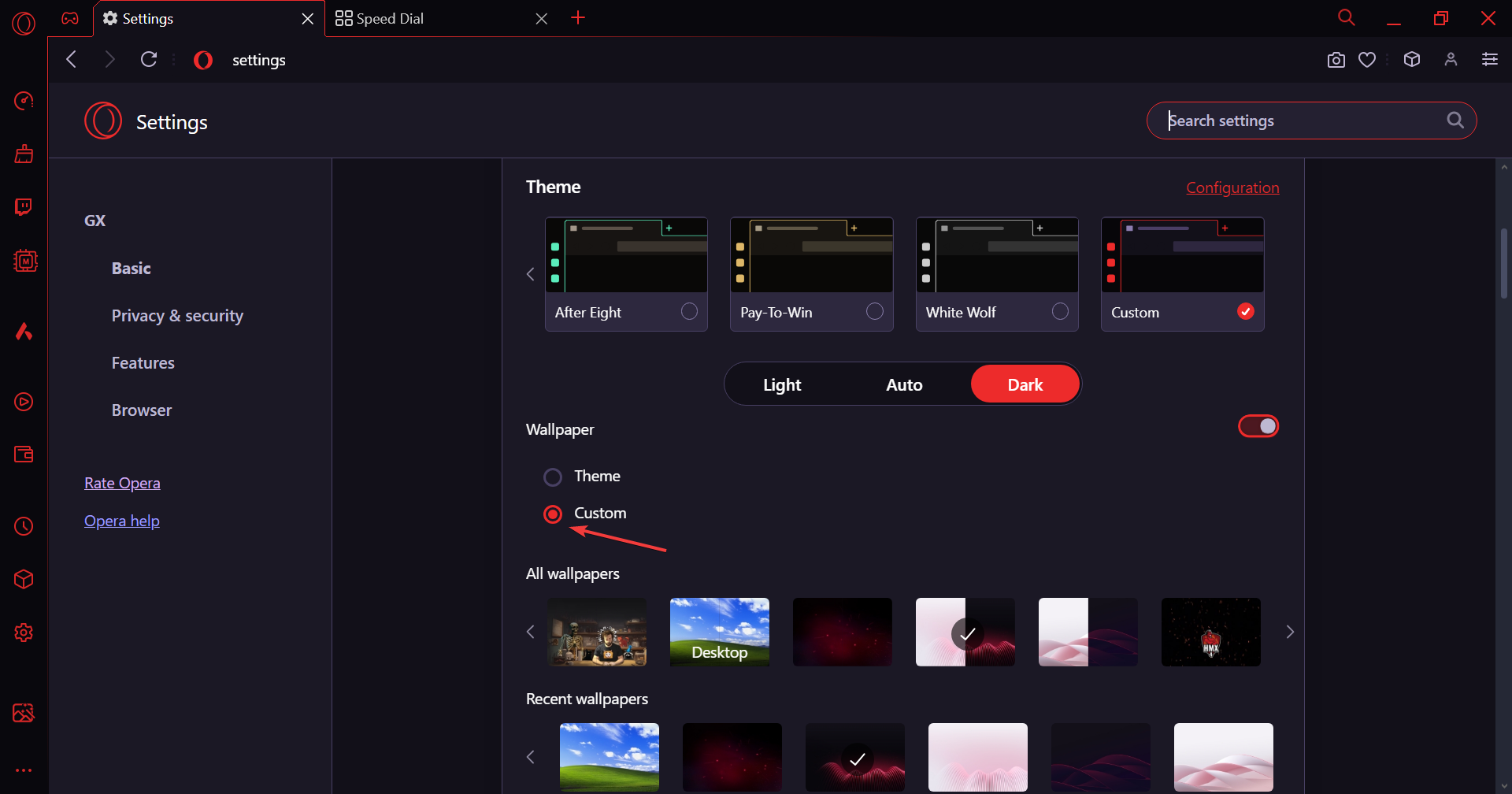
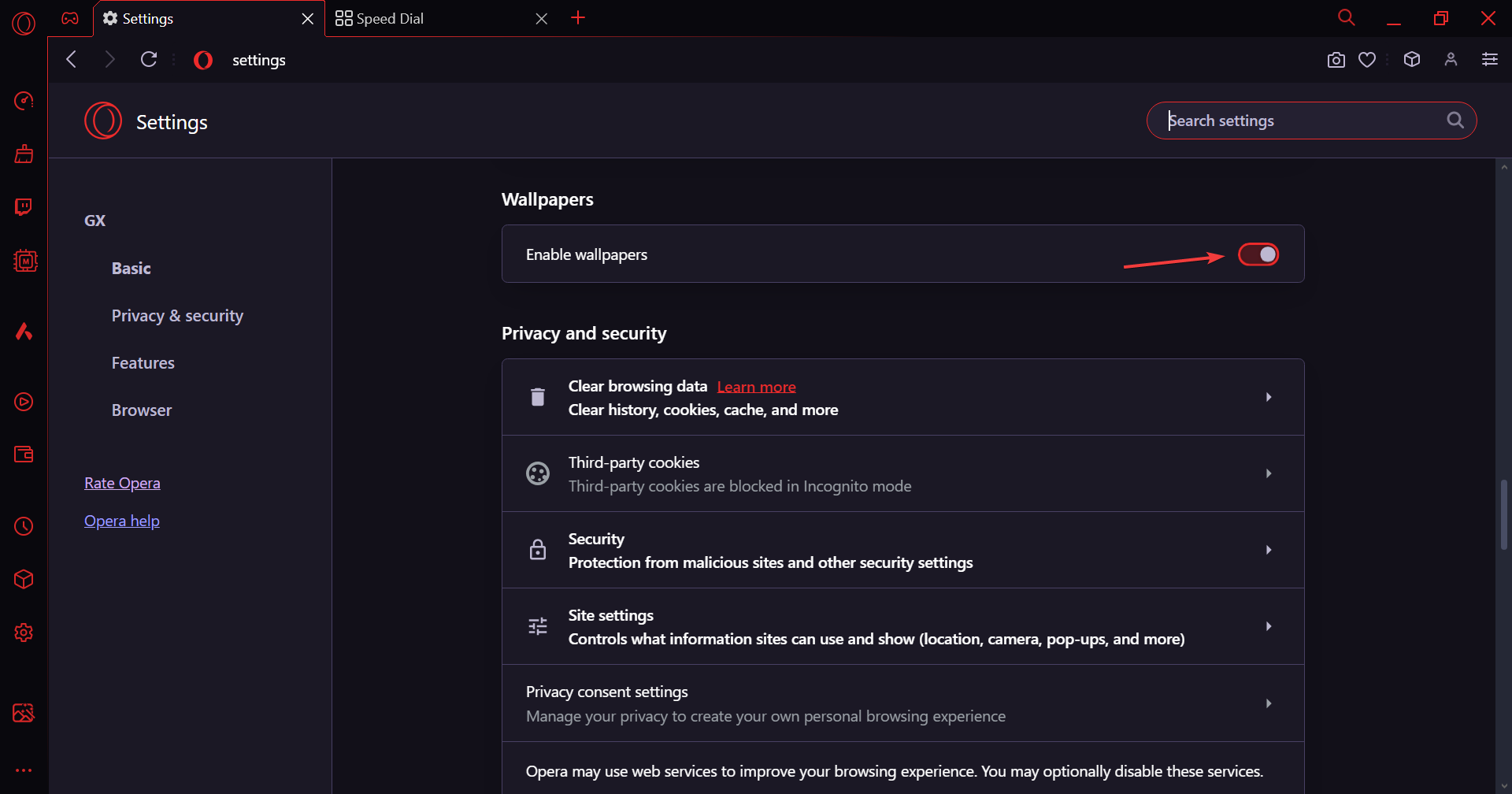
Open the Opera GX browser’s settings, and select Custom under Wallpaper.
Next, scroll down and under Wallpapers, turn on the toggle for Enable wallpapers.
Once done, set the desired theme/wallpaper on Opera GX, and verify whether it now works.
Extensions from third-party developers often conflict with the browser’s core functioning, and removing them is the only solution. This also works when YouTube shows a black screen in Opera GX!
3. Remove conflicting extension(s)
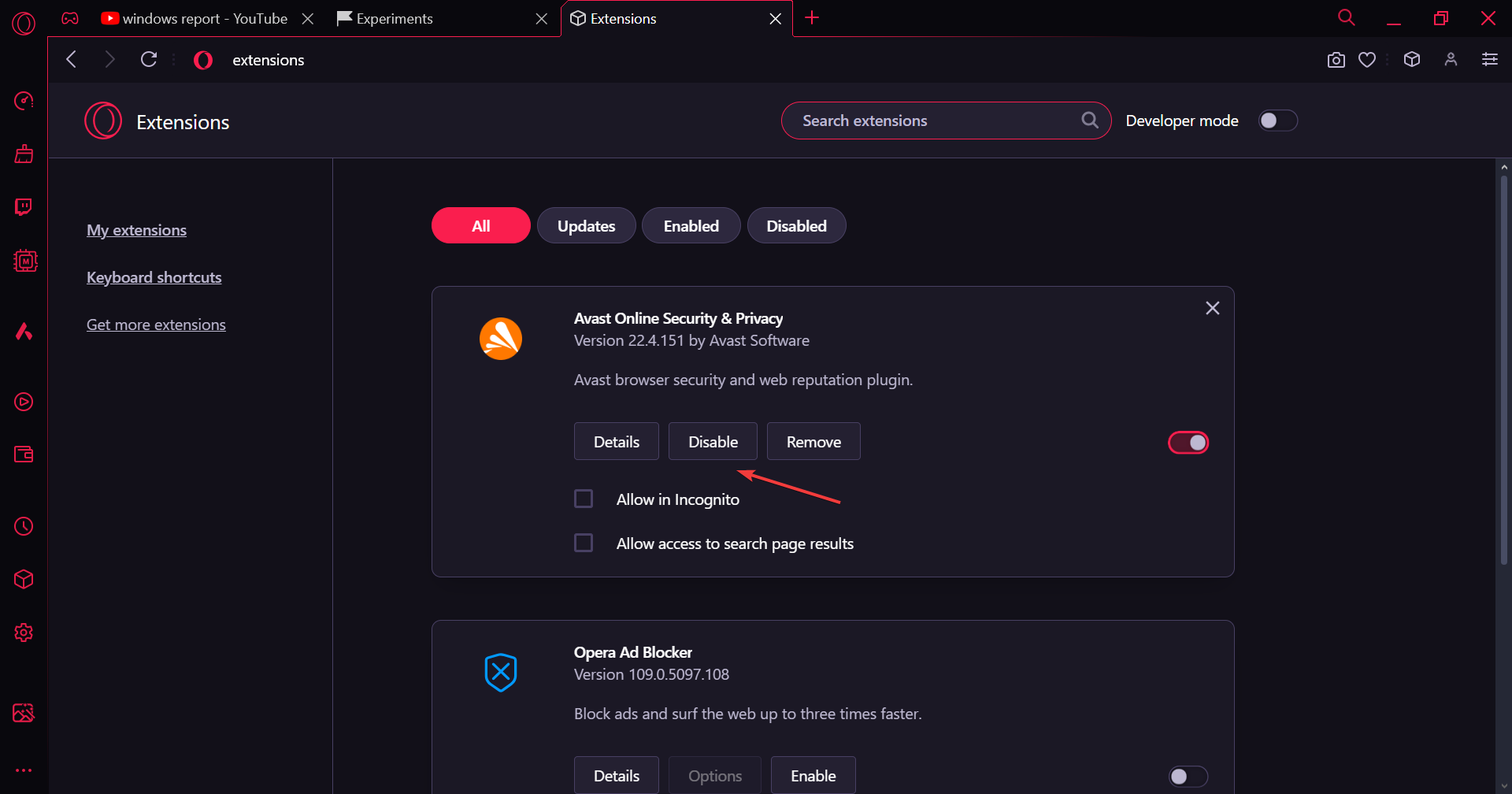
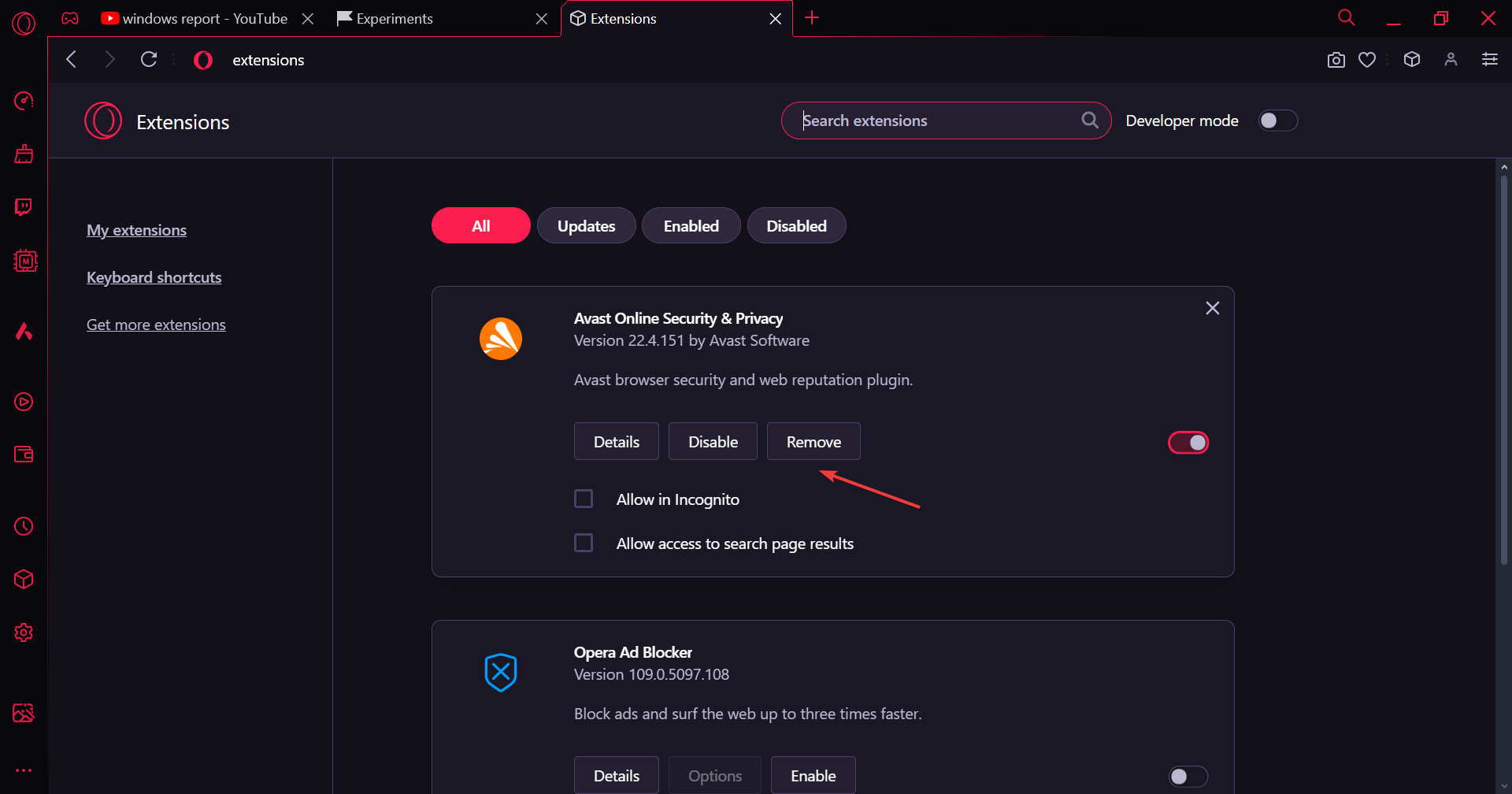
Launch the browser, click the Opera menu near the top left, select Extensions, and again choose Extensions from the flyout menu.
Click the Disable button under any of the third-party extensions, relaunch the browser, and check for improvements.
If the problem is fixed, head to Extensions again, click the Remove button under the same extension, and confirm the change.
In case the Opera GX themes are still not working, you should similarly disable individual extensions one at a time.
4. Resize, rename, or reformat the image (for background wallpapers)
If the issue lies specifically with wallpapers, say the set wallpaper doesn’t work in Opera GX after a crash, it could be due to a minor data corruption, rendering the file unreadable. In this case, we recommend you compress the file by 10-15%.
Also, check the file’s name and remove any special characters or spaces. It should be a simple name comprising only alphabets. Besides, as confirmed by a few on Reddit, changing the wallpaper file’s format from JPG to PNG or vice-versa, too, does the trick!
5. Delete mods
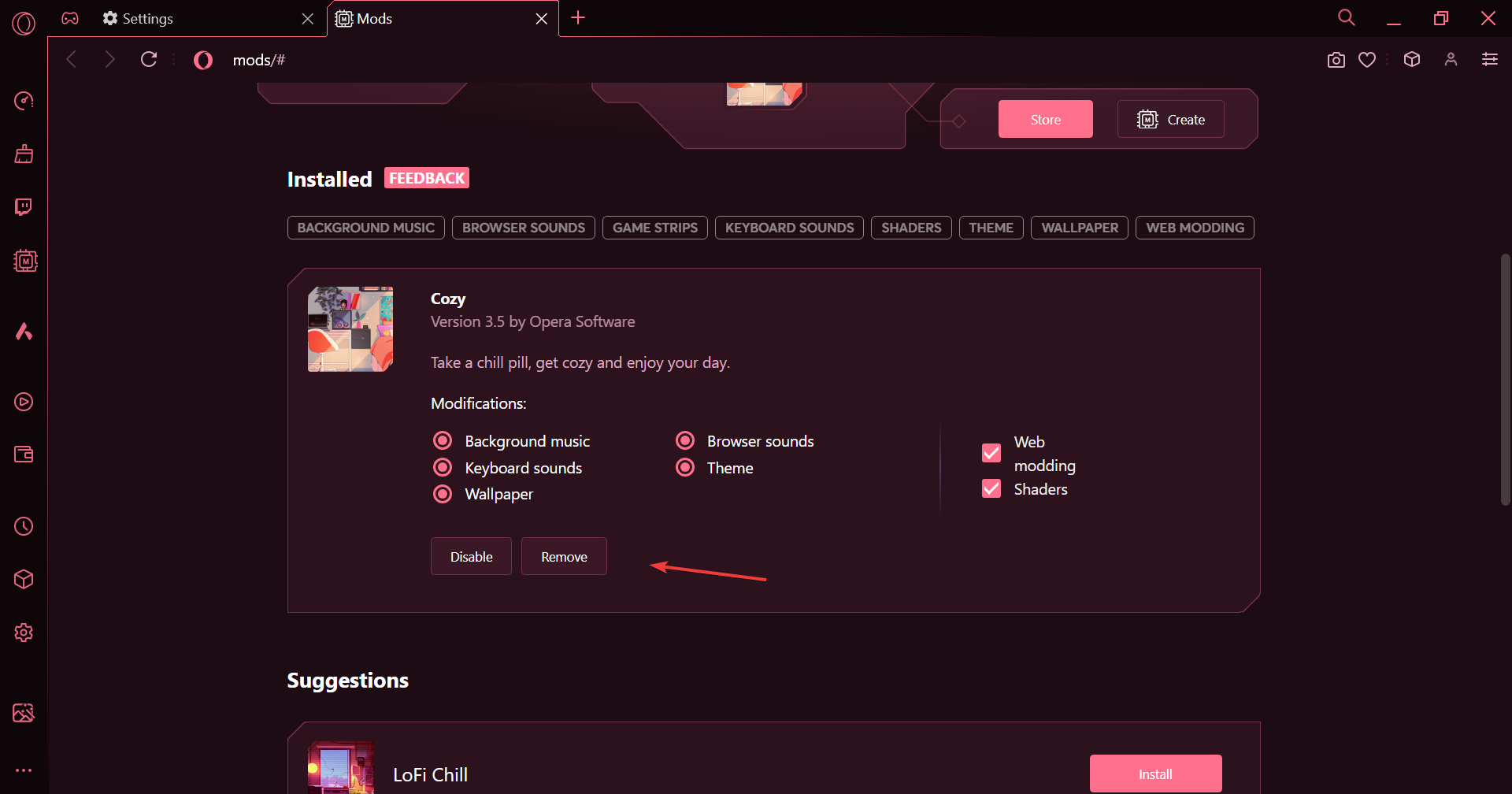
Launch the Opera settings, and click on Manage Mods under Mods.
Click the Remove button individually under all installed mods, and confirm the change.
6. Reinstall Opera GX
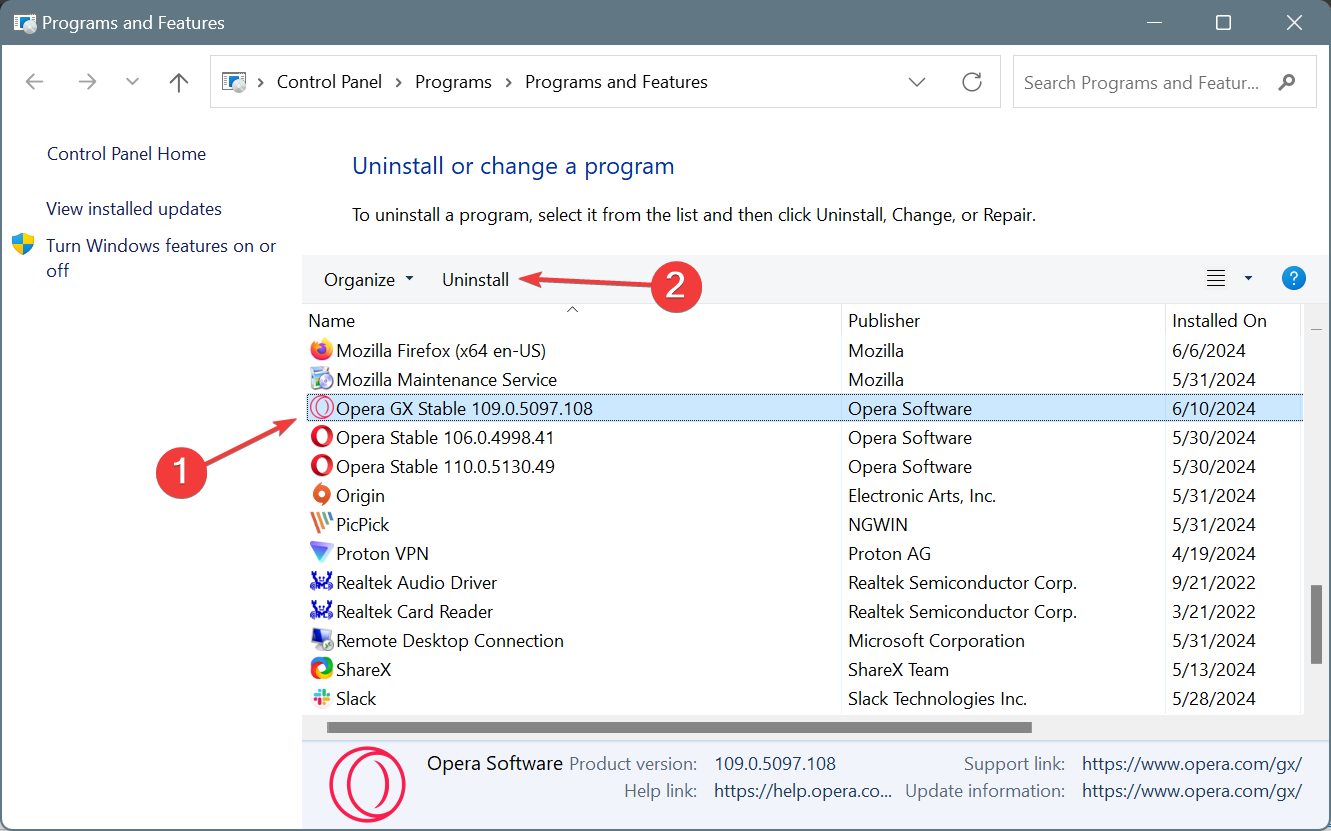
Press Windows + R to open Run, type appwiz.cpl in the text field, and hit Enter.
Select Opera GX from the list of applications and click Uninstall.
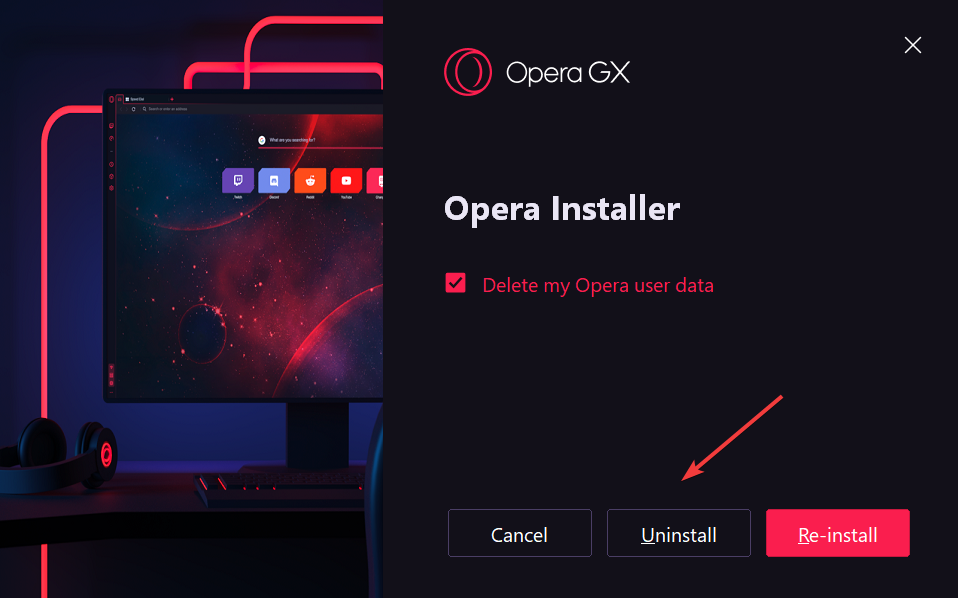
Tick the checkbox for Delete my Opera user data, and click on Uninstall.
Once done, reboot the PC for the changes to apply.
Finally, head to Opera GX’s official website, download the browser installer, run the setup, and follow the on-screen instructions to complete the process.
If Opera GX themes were not working or reverting to default, things should now be up and running. These are the handful of solutions that tend to work for users facing the issue!
Before installing and using Any eBook Converter, you might have concerns related to its safety. Moreover, you may want to know how much resources it consumes, and if its free version is spammy compared to the paid one.
In this guide, I’ll answer all your queries and also discuss its most valuable features.
Sound good? Then, let’s get started!
Is Any eBook Converter Safe?
According to SCAMADVISIER, Any eBook Converter has a 100 trust score. This signifies that this software is likely not a scam, but reliableand legit.
The mentioned rating is based on the online data that SCAMADVISER collects for Any eBook Converter, such as:
Reviews found on other websites
The country in which the website is hosted
If it has a valid SSL certificate.
However, there’s no direct contact information on Any eBook Converter Website. This makes it difficult to identify the real owner of the website or contact the team.
Moreover, it isn’t resource-intensive. On my system, it only used 13.1 MB of memory while I performed the eBook to PDF conversion process.
Features
To write an honest and comprehensive Any eBook Converter review, I tested this software and observed how well it performed.
Now let me discuss its most valuable features and my experiences with them.
1. All-in-One eBook Converter
Any eBook Converter is one of the most popular eBook converters. It’s specifically designed for users who want to convert ebooks from different sources efficiently. That includes eReader, Adobe, Kobo, Kindle, Nook, etc.
To view the supported import options, first, I clicked on the Libary icon from the menubar.
This opened a new sub-window on the left side showing different options, such as Adobe, Kindle, Nook, Kobo, and more.
Moreover, Any eBook Converter allows you to add files from your local system.
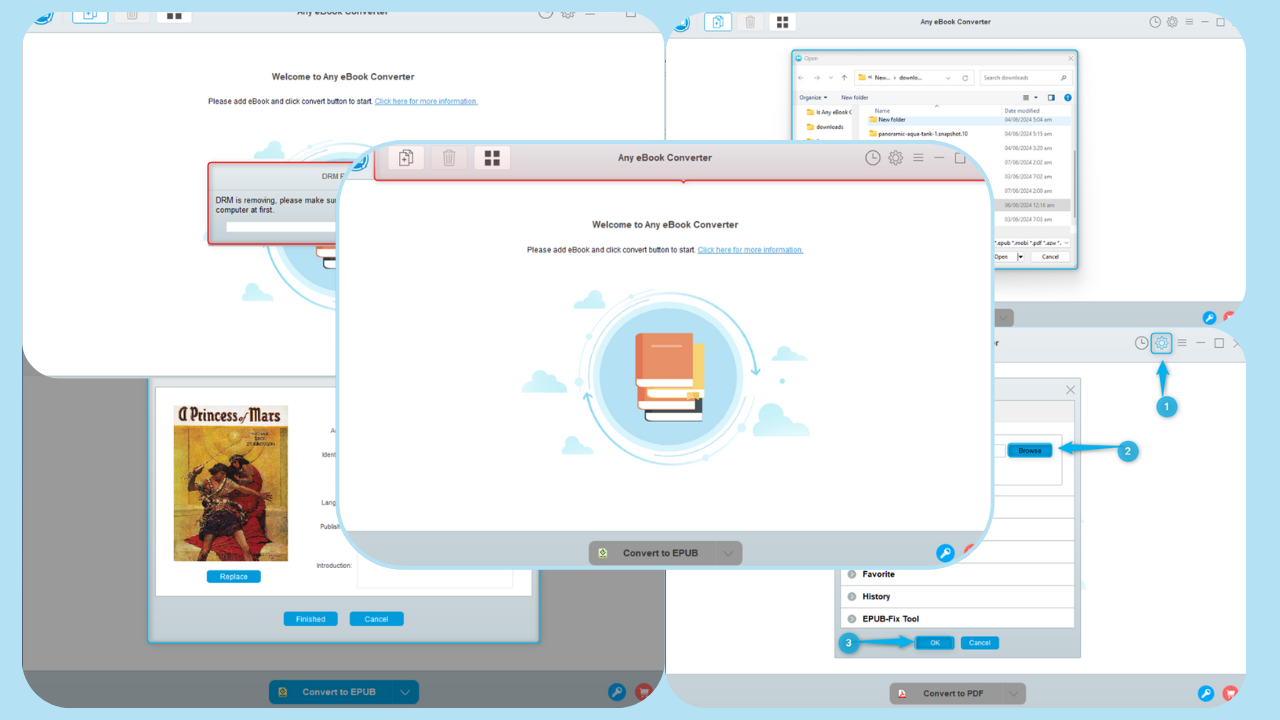
Besides, you can set a default output folder to add or save the converted files. To do so, I clicked on the Settings icon, browsed for the desired folder, and clicked OK.
To verify the added settings, I navigated to its Library and viewed the listed eBook files in the supported formats.
However, in the free version, adding multiple folders might be tedious, especially for extensive libraries.
2. Convert eBooks to Several Formats
The app easily converts eBook files into six formats:
In addition, this software supports almost twenty-four file input formats, such as DOCX, HTMLZ, PRC, EPUB, MOBI, TPZ, etc.
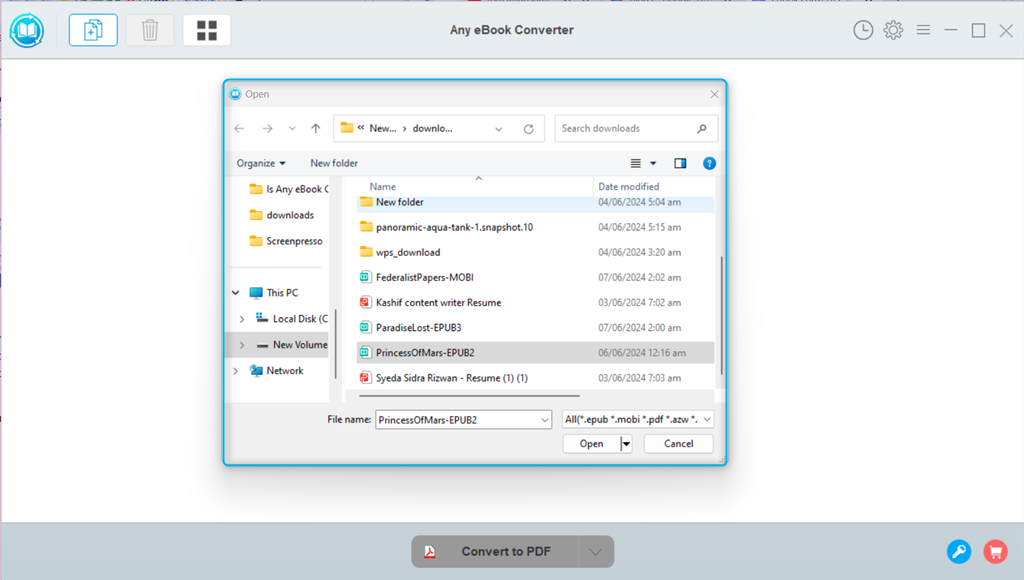
To test the conversion process, I clicked on the Add eBook icon from the menu.
Then, I browsed for the desired file in EPUB2 format, selected it, and clicked Open.
After that, I selected PDF as the required output format and clicked the Convert to PDF button.
While doing so, Any eBook Converter first removed Digital Rights Management (DRM) from the eBook file.
Then, the software took a few seconds for the EPUB2 to PDF eBook file conversion.
You can also repeat the same process, select multiple files, and perform bulk conversion if you subscribe.
Overall, although Any eBook supports multiple input and output formats, the file conversion process could be a bit faster.
3. Edit Necessary Metadata
With this thoughtful feature, you can edit the complete cover and the relevant information of an eBook in case you don’t like it.
Additionally, you can alter the pre-defined metadata before conversion, including:
Title
Author
Identifiers
Cover photo
Publishing date
Language
Publishers
Introduction.
To do this, I selected the file and clicked on the Edit meta icon.
Then, I edited the metadata and clicked the Finished button.
However, the editing options might be limited compared to dedicated eBook editing software, such as Calibre.
4. Detect and Load eBook Library
When you connect your system to an eReader, Any eBook Converter automatically detects and imports the relevant files. This software supports well-known eReaders such as Kindle, Nook, etc.
Moreover, it also offers you the option to load eBooks from your system.
However, users with unorganized libraries on their eReaders might face challenges while importing files.
Interface
Any eBook Converter has a user-friendly and intuitive interface. Its menu bar divides the options into two sections.
The left side contains options to:
Add eBook
Delete selected eBook
Open Library.
Whereas, on the right side, you’ll see the View Histories option, Settings, and a Menu icon.
Moreover, the software supports over fifteen different languages, such as English, Italian, French, and more.
Overall, I’d say that its development team prioritized ease of use in terms of the conversion process. The app doesn’t have advanced management features to avoid complexity.
Customer Support
Any eBook Converter provides help through several channels. This includes a Support Center and FAQ Center. It also maintains a knowledge base of how-to articles.
However, I couldn’t find a Live Chat Support option or direct contact information on the official website. This means that real customer support is practically non-existent.
Pricing
Any eBook Converter offers three different pricing models. Here’s an overview:
Package Name
Price
Details
1 Month Plan
$14.95
– One license for one PC – Auto-Renewal, Cancel anytime – Compatible with Windows 11, 10, 8, and 7 – Five days money-back guarantee – One-month free upgrades
1 Year Plan
$29.99
– One license for one PC – Auto-Renewal, Cancel anytime – Compatible with Windows 11, 10, 8, and 7 – Five days money-back guarantee – One-Year free upgrades
Lifetime Plan
$59.99
– One license for one PC – One-time purchase – Compatible with Windows 11, 10, 8, and 7 – 30 days money back guarantee – Lifetime free upgrades
Any eBook Converter also offers a free trial to experiment with its features. However, it has certain limitations. For instance, the trial version allows you to convert one file at a time.
On the other hand, you can subscribe to its Monthly, Yearly, or Lifetime plans. Both Monthly and Yearly plans offer a money-back guarantee for five days and the Lifetime plan offers a 30-day money-back guarantee.
Notably, it enables automatic renewal by default and doesn’t refund any order exceeding the mentioned refund period.
Furthermore, you can purchase a subscription through Visa, Mastercard, American Express, and UnionPay.
Is Any eBook Converter Safe – Verdict
Overall, I’ve tested the free version of Any eBook Converter and it was trustworthy. This tool allowed me to convert the added eBook into any of the available output formats efficiently. However, the bulk conversion functionality is only included in the paid plans.
So, is Any eBook Converter safe? Yes, it is. However, I’d still suggest that you check the website and its products manually before buying a subscription. Moreover, keep in mind that it’s hard to find info about direct customer support channels.
Have you already used it? Feel free to share your feedback in the comments below! Also, if you need a dedicated eBook manager or reader, we’ve got you covered.
Microsoft is in the news again in the busy business and technology world. This time, it’s because of its new way to improve security for people who use Edge for Business. The tech giant will introduce fresh data leak control features meant to limit the exfiltration of important information—a development that has gained attention and relief from professionals and IT administrators.
As the digital environment changes, protecting private data becomes more crucial. Microsoft’s recent improvement shows its dedication to user privacy and safety.
A highlight of this update is a characteristic that will surely attract the attention of everyone worried about data privacy – screenshot prevention. Imagine attempting to take a screenshot of confidential information; what you see is just a plain black screen.
This is precisely what will occur when these fresh abilities are activated. This method stops unauthorized people from taking and spreading important information and deals with worries about the controversial Windows Recall feature and its security problems.
But Microsoft didn’t end its efforts here. The company has now introduced more security steps for Windows Recall, making enrolling in Windows Hello compulsory if you have a Copilot+ PC. This shows Microsoft’s readiness to respond to users’ mixed reactions and privacy worries.
The updates have important effects on businesses. Microsoft Edge for Business provides more coverage in stopping screenshots across a wider range of applications and AI tools, adding an extra safeguard from data leaks.
It’s especially relevant as we live in a time where taking screenshots of documents, credentials, and other private information can quickly spread within the organization, which creates serious security dangers.
Moreover, Microsoft has stated that these policies can be implemented on platforms such as Microsoft 365, Microsoft Defender for Cloud Apps, Microsoft Intune Mobile Application Management, and Microsoft Purview.
This wide-ranging application guarantees that organizations possess the necessary resources to protect their delicate data.
These features will likely be widely accessible in the next few months. Improvements in leak protection for sensitive Word, Excel, and PowerPoint documents are also underway.
Microsoft’s dedication to security is clear, and with these changes, Edge for Business will provide a safer browsing experience designed for today’s digital difficulties.
Amidst a landscape of data breaches and worries about privacy, Microsoft’s recent changes to Edge for Business provide hope.
With its focus on security and privacy, Microsoft is safeguarding its users and establishing fresh safety expectations for our digital instruments.
In the gaming world, Phil Spencer, the boss of Microsoft Gaming, has been causing a stir with his frank views on recent job losses in his sector and talk about an Xbox handheld device.
It is not usual to have such a clear look into the inside workings of this industry, particularly from someone managing a big company like him. Spencer’s ideas come when people who love playing games talk about what might happen next for Xbox and how it will keep creating new things while staying long-lasting.
Surprise was shown in the gaming world when Microsoft declared two large rounds of layoffs in 2024, affecting 1,900 workers and shutting down three game studios, including Tango Gameworks.
Spencer, who is usually very strong, expressed that these choices were difficult but important for maintaining and expanding the business. This is a serious reminder of the difficulties that even big companies encounter.
But there is not only bad news. Spencer also mentioned the triumph of Xbox Games Pass and the constant increase in game sales on Xbox consoles, emphasizing a flourishing part of their trade. This mix of tough choices and strategic achievements presents a complicated view of what it requires to lead in gaming.
There have been many talks, especially after Phil Spencer’s statements. The rumor of an Xbox handheld device is not new, and Spencer’s comments seemed to support this idea. In an interview, he said he believes Xbox should look into the handheld area because players can enjoy games locally – a reference to many gamers’ wish for a more portable and convenient gaming experience.
So we should have a handheld. I think we should have a handheld, too
Phil Spencer
This statement has caused imaginations and expectations to soar about a possible big growth in the Xbox gaming world.
Spencer’s transparency about the issues and possibilities in Microsoft Gaming gives us a special look at the tactical thoughts that manage one of the industry-leading companies.
The future might include an Xbox handheld device if we believe Phil Spencer and the continuing triumphs of Xbox Games Pass; this implies a tomorrow in which inventive thinking and flexibility still push Microsoft Gaming ahead.
When we consider what’s to come, it becomes obvious that flexibility, inventiveness, and readiness to make difficult choices will be crucial in thriving in this competitive environment.
In a world where the lines between our digital devices continue to blur, Microsoft is taking a significant leap forward with Windows 11. Imagine seamlessly accessing files on your Android smartphone from your computer’s File Explorer. Sounds convenient, right?
That’s exactly what’s on the horizon for Windows 11 users. Microsoft is exploring new ways to deepen the integration between Windows 11 and Android devices, making file transfers a breeze.
This upcoming feature, discovered by Windows enthusiast, @PhantomOfEarth, will allow your Android smartphone to appear in Windows 11’s File Explorer, promising a smoother, more integrated experience.
Looks like the Cross Device Experience Host will let you make your device show up in File Explorer in a future update, a toggle for this has been hidden in the app for some time. pic.twitter.com/9zwomWwdTz
The process to enable this feature seems straightforward. You’ll turn on a toggle in the Cross-Device Experience Host, and voilà, your device will appear in File Explorer. But it’s not all magic; you’ll need to grant permission from your smartphone to ensure a secure connection between your devices.
Once permission is granted, accessing files on your smartphone from your PC could be as easy as clicking through folders in File Explorer.
This integration could revolutionize file management across devices, making it easier to move photos, documents, or any file between your phone and computer without the hassle of emails or cloud services.
While details are still under wraps, and we’re unsure when this feature will officially roll out, the anticipation is building. Microsoft’s track record of integrating Android smartphones as wireless webcams and working on AI-generated smart replies for text messages only adds to the excitement.
But, as with any new technology, there are questions and concerns. How will Microsoft ensure the security and privacy of our data during these transfers? And will this feature work seamlessly across the vast ecosystem of Android devices?
The promise of enhanced productivity and convenience is tantalizing, but monitoring these critical aspects is essential.
In the meantime, for those eager to streamline their digital life, this upcoming feature is a glimpse into a future where our devices work harmoniously, breaking down barriers between mobile and desktop environments.
Have you ever encountered a deal that made you stop and look twice? Forget about Copilot+ PC; Lenovo has just released some big news about their discount on the ThinkPad T14s laptop.
They have reduced the price from $2,429 to only $954 – which means they cut off an incredible $1,475! Now, before you hurry to take hold of this offer, let us explore why this laptop could be the work partner that has eluded you.
The ThinkPad T14s is a powerful machine with an AMD Ryzen 5 Pro 6650U processor, 16GB memory, and 512GB SSD storage. This combination makes sure that multitasking and productivity are like butter.
But it’s not only about what’s in the engine room. The laptop has a 14-inch WUXGA screen that gives clear picture quality with a 1920 x 1200 resolution. It’s designed to be anti-glare, and its brightness of 300 nits provides a comfortable viewing experience for any task you’re doing on your laptop, from working on spreadsheets to relaxing watching videos or browsing photos.
Now, the webcam. In this time when video calls are very common, having a nice webcam is very important. The ThinkPad T14s includes a 720p HD Webcam with Privacy Shutter and an Integrated Microphone.
If you had a full HD webcam, this would be the perfect addition to ensure you are visible and your voice is heard in all your virtual gatherings.
But what about security and ease? Lenovo has thought of this, too—a backlit keyboard with a fingerprint reader is included. This additional function helps increase safety; it becomes more difficult for uninvited people to access your important information.
For those who are always moving, the laptop’s lightness will be a joy to hold. It weighs only 2.71 pounds, making it an ideal companion for travel. You can take it with you anywhere to do your work.
The final touch is high-quality sound. The ThinkPad T14s has Dolby Audio with its speaker system and Dolby Voice AI technology for reducing noise, ensuring your voice sounds very clear during calls. These small details remind us why Lenovo is a strong competitor in business laptops.
Therefore, if you are looking for a fresh work laptop, this could be an opportunity that demands your consideration. The Lenovo ThinkPad T14s is available for $954 and might not last long since it’s part of clearance sales.
Will this be the workhorse you have been searching for? Give it a closer look. Who knows, it might be your best investment this year.
Microsoft has always been a leading name in the ever-changing world of technology, particularly with its Windows operating system. We recently discovered that Microsoft wants Windows 11 users to customize their MSN on the lock screen.
Now, according to Windows Latest, they’ve chosen to add flavor to the lock screen of Windows 11 by giving all users MSN lock screen features.
Picture yourself switching on your computer and seeing an image and a lively exhibition of widgets that give weather changes, news updates, and much more at your disposal. Microsoft’s move is intended to make the lock screen more interactive and informative.
It represents a small but important development towards a computing experience that is more customized for each user.
But it’s important to understand that not everyone loves having a group of pre-arranged widgets you can’t adjust. The great part? Microsoft hears what people are saying. You will soon have the power to modify these widgets as you desire.
Do you wish to remove everything except the weather update on your Windows 11 lock screen? You can do it. Like to keep an eye on your calendar? We understand. It’s about choosing what appears first when your computer wakes up from sleep mode.
However, there is a small problem for those who like minimalistic design. Switching off these lock screen widgets is not as simple as we want.
You must go deep into the Group Policy Editor, which may not suit everyone’s taste—particularly if they use Windows 11 and 10 Home versions. A settings option with a simpler toggle would make it better, don’t you agree?
Microsoft is also improving the Start menu by changing how account management works. With the new update, you can quickly see your account details from the Start menu, such as OneDrive storage information and Microsoft account email.
This update ensures that important information is available without going into many menus.
Yet, there is more. The update also includes changes, such as shifting the switch user and sign-out choices to a context menu inside the account manager—possibly to create space for these fresh characteristics. Surprisingly, the lock screen option has been relocated to the Power menu.
Though the changes are meant to improve user experience, Microsoft is clearly still working on Windows 11 and trying to find a good balance between function and user preferences.
It is uncertain whether these alterations will be welcomed warmly or met with pushback. But we know for sure that there’s always something happening in the world of Windows.
A fresh part is ready to start in the lively realm of video games, where the fights between mighty beings and secrets from ancient stories frequently appear on our screens.
Age of Mythology: Retold will make its magnificent debut on September 4th, with the assurance to revive the beloved fantasy-themed RTS game that initially fascinated us in 2002.
According to the presentation at Xbox Games Showcase 2024, the game is coming for PCs and Xboxes, which means more people can enjoy it. Additionally, it’s a Day One release for Xbox Game Pass subscribers. This makes it even better for people already using the Xbox Game Pass.
We can feel the excitement, especially when a fresh trailer has been released, and it’s making everyone talk more. The game is said to go “way beyond” what we have seen previously, providing better graphics, changes in UI, and higher population limits.
It seems like this will be a full-on treat for our senses. Also, we must remember that the god powers can now be activated more than once per map, which brings an extra level of tactic to the game.
However, the single-player campaign truly captures my attention. Imagine yourself as an admiral from Atlantis, moving across Greek, Egyptian, and Norse areas to find a cyclops. The mix of history and mythology, plus a little bit of fantasy, seems too fascinating to ignore.
Also, for those who like to have a little skirmish amongst themselves, the game assures many of that, too, with head-to-head battles and situations offering endless playability.
Now, suppose you are like me and have already spent money on the “Age of Mythology: Extended Edition” from Steam. In this case, there’s some good news for us, too—we will receive a price decrease when buying the “Age of Mythology Retold Premium Edition.”
This gesture is quite pleasant for those enthusiasts who have supported and played this game over time with much love in their hearts and on their screens.
As we approach September 4, we are left to imagine what new modes and mythical creatures will be released. A world full of wonders, from crocodiles adorned with jewels that draw energy from the sun to Cyclops who possess great strength – all this awaits us in the game.
Also, the “Arena of the Gods” mode can be played alone or with others, which adds more excitement for players. The adventure seems infinite!
Therefore, we wait with anticipation for the arrival of “Age of Mythology: Retold.” Let’s prepare to ask help from gods, set free monsters, and become heroes from myth—perhaps even turning into gods. The world of myths is going to be a lot more thrilling, and I am personally excited about it.
In the last few days, I have seen several reports of YouTube videos or Shorts displaying a black screen on Opera GX. In most cases, the audio runs fine, but for a few, there’s no sound as well on YouTube. Additionally, some see a white glow on YouTube in Opera GX!
The underlying causes for YouTube not working on Opera GX include issues with hardware acceleration, conflicting extensions, corrupt browsing data, problems with the installed GPU driver, and misconfigured settings.
To start with, I recommend you update Opera GX to the latest version, use another YouTube account, or switch the browser profile. If YouTube shows a black screen when opting for Full-Screen mode in Opera GX, first press T to enable Theatre mode and then F for the Full-Screen mode. The workaround seemingly worked for many.
How do I fix Opera GX’s black screen while running YouTube?
1. Disable hardware acceleration
Launch the browser, click on the Opera menu near the top left, and select Settings.
Scroll down, click on Advanced to view more settings, and then turn off the toggle for Use graphics acceleration when available.
Open the browser, click the Opera menu, select Extensions from the list of options, and then again choose Extensions.
Click the Disable button under the first extension here.
Relaunch the browser and verify whether YouTube videos show a black screen on Opera GX. If the problem is fixed, again open Extensions, click the Remove button under the one you just disabled, and confirm the change.
In case the problem persists, disable other extensions individually and check for improvements.
3. Clear the browsing data
Launch Opera, and press Ctrl + Shift + Del to open the Clear browsing data window.
Choose All time from the Time range dropdown menu, tick the checkboxes for Browsing history, Cookies and other site data, and Cached images and files, and then click on Clear data.
4. Roll back the GPU driver
Press Windows + X to open the Power User menu, and select Device Manager from the list of options.
Expand the Display adapters entry, right-click on the GPU, and select Properties.
Now, go to the Driver tab, and click on Roll Back Driver.
Choose a reason for rolling back the update, and click on Yes to confirm the change.
If the Opera GX YouTube black screen first appeared after a driver update, it’s time you roll it back. And in case that doesn’t work, verify if there’s a newer version available and update the graphics driver!
5. Change the graphics backend for ANGLE
Launch Opera, paste the following path in the address bar and hit Enter:opera://flags
Search for the Choose ANGLE graphics backend flag.
Choose D3D9 from the dropdown menu, and then click on Relaunch for the changes to come into effect.
If the D3D9 configuration doesn’t work, choose another one. Keep trying with the different choices until one works!
6. Reinstall Opera GX
Press Windows + R to open Run, type appwiz.cpl in the text field, and hit Enter.
Select Opera GX from the list of apps, and click on Uninstall.
Follow the on-screen instructions to complete the uninstallation process.
Now, go to Opera’s official website, download the installer for Opera GX, run the setup, and perform a fresh install of the browser.
If nothing else helps fix the YouTube black screen or white glow in Opera GX, it’s time you reinstall the browser. This way, you can resolve most of the problems, including when Opera GX is not opening.
In case this too fails, perhaps report the problem to Opera GX support and then switch to another browser, say Opera or Google Chrome, for the time being, until the developers patch the issue in the subsequent updates.
Which fix worked for you? Share with us in the comments section.
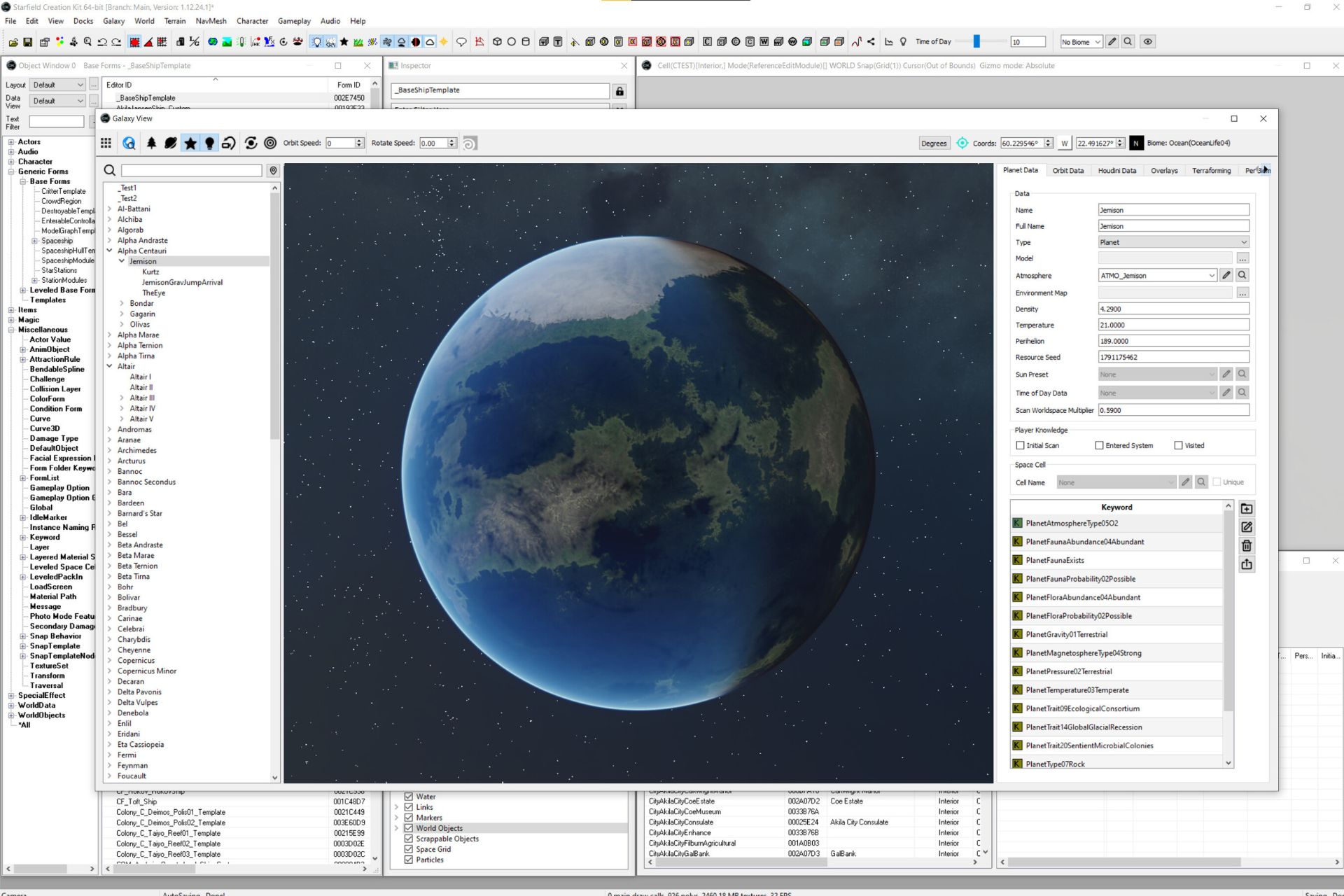
Starfield has made a big jump in the busy gaming world, where the digital universe keeps growing. Bethesda has released mod support for Starfield, an important event for the gaming community, after days of rumors the company had something big in store for it.
Now that Creation Kit tools are available on Steam, players can change and improve their game experience in ways they never thought possible before. This is not a small update but an opening to limitless options, with restrictions limited solely by imaginative power.
The Creation Kit in Starfield is like a magic stick for those who have not encountered it before. It provides the same set of instruments that Bethesda utilizes to create its vast worlds.
Now, these tools are available to players and modders everywhere. The thought alone is exciting. And the cherry on top? It’s free to use on Steam.
But Bethesda didn’t just do this. In their latest update, they also added many new features and fixes, along with mod support. Players now have access to different types of missions, can create ammunition, and can enhance melee weapons.
Bethesda’s dedication to improving player experience, paying attention to feedback, and making important changes for the community is evident.
It is interesting how the Trackers Alliance missions are now part of the game. This gives a fresh twist to gameplay, allowing players to be bounty hunters in space.
The update also includes bug fixes and performance enhancements for those who want to tailor their experience more. This promises a smoother journey through the stars with fewer problems or interruptions.
The probable effect of the Creation Kit on Starfield’s future is really interesting. Mod support has given fresh energy to Bethesda’s past games, such as Skyrim and Fallout 4, helping these titles stay important even many years after they were launched.
As the modding community for Starfield starts to grow, we can only picture what fantastic things will be made.
Looking ahead, the path of Starfield is still long. With Shattered Space DLC coming and an active group for modding forming, the adventure is just beginning.
For anyone experienced in modding or someone new to it, now could be your best chance to discover all that Starfield has to offer you. The stars are calling, and the possibilities are truly limitless.
Activision has unwrapped the release date of Call of Duty: Black Ops 6, it will arrive on October 25th. It is worth noting that the game will launch on Xbox Game Pass on day one. Black Ops 6, developed by Treyarch and Raven Software, features a multiplayer mode with 16 maps at launch. It further comes with a new campaign as well as a new zombie experience.
Call of Duty Black Ops 6 Campaign details
The main campaign, created by Raven Software, includes spy missions and government conspiracies that keep players hooked to the game. Let’s not forget that it is set after Black Ops Cold War and includes flashbacks to Black Ops 2.
The spy action thriller is set in the early 90s during the end of the Cold War and the rise of the US as a single superpower. Black Ops 6 is set across four regions the US, Southern Europe, the Russian Tundra, and the Middle Eastern desert.
The game further includes 90s gadgets and equipment and some iconic characters Frank Woods and Russell Adler which are part of the main campaign. Besides, there’s an abandoned manor that has a Safehouse which formerly served as a KGB black site. The remote manor is the central base of operations between each Campaign mission.
Multiplayer experience in Call of Duty: Black Ops 6
Talking of the Black Ops 6 multiplayer experience, there are a total of 16 new maps at launch that will host which will host 2v2 or 6v6 players. The multiplayer experience includes a new omnimovement feature that lets players have additional motion controls within the game.
Simply put, players can now slide, sprint, and dive in any direction. Plus, there’s the ability to rotate when players are prone. Activision aims to add more maps to the games and other experiences after its release later this year.
Black Ops 6 also brings back the Round-Based Zombies mode where players can take on the undead. Activision says that there’ll be two new maps at launch and an impressive number of secrets to discover.
Phil Spencer who appeared on the livestream said that Call of Duty will no longer feature platform-eclusive content like in the past. Not to forget, Microsoft has already confirmed that Black Ops 6 will launch on day one on Xbox Game Pass without any additional Game Pass tier requirement. It will be available on Xbox One, Xbox Series X|S, PS4, PS5, and PC on October 25th.
Black Ops 6 – Gameplay Reveal Trailer
Are you excited for the release of Call of Duty: Black Ops 6? Let us know in the comments below.
Brace your Xbox Series X|S as Call of Duty: Black Ops 6 will require 309.85 GB of storage at launch. This makes Black Ops 6 potentially the biggest game from the franchise in terms of storage space requirements on day one.
Call of Duty: Black Ops 6 will need a mind-boggling 309.85 GB of storage space at launch
According to the Black Ops 6 page on the Xbox store, the approximate size of the game is 309.85 GB. And, given the frequent patches and updates for COD games, an extra hundred GB is going nowhere.
— COD Warfare All the news (@CODWarfareForum) June 9, 2024
COD players are used to such storage requirements, though
Well, that jaw-dropping storage requirement isn’t a surprise as players are used to seeing games taking over 100 GB at launch. While that is true, COD players have seen huge install sizes in the past. That said, it seems Black Ops 6 will beat other games from the franchise in terms of how much room it will need.
As you may know, Call of Duty players can somewhat reduce their overall footprint by picking and choosing parts of the games to be installed. However, the full-fledged experience of the game will require you to keep a big chunk of storage space free.
In short, you’ll need a decent hard drive plugged into your Xbox console or PC when Black Ops 6 arrives. The game saw a worldwide reveal at yesterday’s Xbox Games event and is coming later this year, on October 25.
Do you have enough storage or you’ll need a new hard drive for the game? Let us know in the comments below.
At the Xbox 2024 Games Showcase, Microsoft shared a brand-new trailer of the game. We got to see some incredible locations alongside multiple new aircraft which players can take flight on when the game launches down the line.
What’s more interesting is that players will be able to fly the new planes to take part in the search and rescue team. Asboso, the developer of the game, worked on VIP chartered services, skydive aviation as well as air racing.
Microsoft says Flight Simulator 2024 is its most ambitious consumer flight simulator ever undertaken. The company further says the game has been designed to take advantage of the latest technologies in simulation, cloud, machine learning, graphics, and gaming.
Finally, the company says the flight simulator game is not all about flying an aircraft. But, also encourages players to pursue their dream wants to make a career in the aviation industry.
Are you excited to play the next installment of a popular flight simulator game when it’s available? Please let us know in the comments below.
The company has also detailed the limitations and operational factors of Bing AI-generated Edge Workspace. Without further ado, let’s dive in to learn more about the new features coming to Windows 11, as well as Mac and Linux.
Everything you need to know about the Bing AI-generated Edge Workspaces
If you are signed into Edge and search for a website on Bing, you might see a widget on the Bing search page. The page includes an option to create a new Edge Workspace. Remember, you will only see it if your topic is on the limited list of queries like Do-It-Yourself, Travel, Recipes, and Real Estate.
When you choose to open the workspace, you’ll see a generated workspace window for your topic. What’s interesting is that AI-generated tabs will open automatically and are organized into tab groups.
You might be wondering what is the intention behind Bing AI-generated Edge Workspaces. Well, Microsoft says it offers a new way to help users jumpstart a project right from the Bing search. That said, there are a few limitations of Bing AI-generated Edge Workspaces.
As mentioned above, there’s a limited set of queries that when searched on Bing will allow you to create an AI-generated workspace. However, if your query fails to meet the predefined list of queries, the feature won’t get triggered, it’s as simple as that. Besides, you can only manually add tabs to your workspace but can’t create additional AI-generated tabs.
Microsoft further mentions even though the queries are pre-screened, there is still a slight chance that the results produced may not match the topic.
Leaving and deleting the AI-powered workspace
If you leave an AI-generated Edge Workspace created by others, it will only get removed from your list of workspaces. However, the workspace along with its history and favorites will still be visible to other members of the Edge Workspace.
You can leave an Edge Workspace by doing the following:
Being on the Edge Workspace you want to leave, select the Workspaces menu at the top left corner of your browser window,
Select Leave workspace,
Lastly, select Leave.
If you want to delete an Edge Workspace that you created and own you can do so by following the steps given below:
Being on the Edge Workspace you want to delete, select the Workspaces menu from the top left of the browser,
Now, select Delete workspace,
Lastly, select Delete, and you’re done.
Remember, when you delete a Bing AI-generated Edge workspace created and owned by you, it’ll be deleted for other members you’ve shared it with too. X user Leopeva64 spotted the feature in December last year which can be seen in the flags attached below.
Will you be using the AI-generated Workspace in the Edge browser when it is generally available? Please let us know in the comments below.
A press kit leak has confirmed the State of Decay 3 trailer will be part of today’s Xbox Showcase event. Interestingly the last paragraph of the leaked press kit confirms the Xbox-exclusive State of Decay 3’s presence at Xbox Showcase. Besides, there’s a mention of the rebranding of the studio as well.
The leak confirms the presence of the new State of Decay 3 trailer at the Xbox Showcase 2024
X (formerly Twitter) user, @Gematsu, first spotted this press kit on Undead Labs’ website and uploaded it.
A new State of Decay 3 trailer will appear at Xbox Game Showcase 2024 tomorrow.
The "Press Kit" link on the Undead Labs website leads to a ZIP with the press release confirming it: https://t.co/xHygAWNTuc (scroll down to find the link)
Here’s what is mentioned in the press kit that leaks State of Decay 3 details:
Undead Labs revealed its new brand during a highly anticipated Xbox Showcase presentation on June 9th, in the newest State of Decay 3 Trailer.
The press kit leaked by @Gematsu further details Undead Labs’ partnership with 51 Eggs. In the leaked document the studio talks about how it worked closely with 51 Eggs to align the studio brand with its evolution from indie to Xbox.
The leaked document has comments from Undead Labs chief of staff, Vicki Ebberts, and Nate Manny, founder of 512 Eggs. Ebberts’ comment is available in the document as well. And, we quote: It felt right — and also the right time — that our brand reflected how much we’ve grown and changed.
Talking of Manny’s comments, here’s what’s available in the press kit that leaks State of Decay 3 info:
The rebrand evolves the Undead Labs brand and elevates the role of the game studio brand within the category by building a brand world that feels substantial and immersive in a way previously reserved for games.
As we write, nothing is available on the company website except for a landing page where you can see five of the studio’s staff standing at the elevator’s door welcoming you to the studio.
Are you excited about the State of Decay 3? Drop your thoughts in the comments below.
Adobe is yet again in the firing line as the recent updates to its Terms of Service involving AI have sparked backlash. What has gone wrong this time around? Well, the revised terms for Adobe’s Creative Cloud Suite have some wording that is bothering users about their data privacy.
Adobe faces backlash over updated Terms of Service
The controversy sparked on Thursday, 6 June, as many Creative Cloud users’ got locked out from using the programs until the new terms were agreed to. Users alleged that they couldn’t uninstall the programs or even contact customer support unless they didn’t agree to the updated Terms of Use.
Some users interpret that Adobe could access, view, or listen to their sensitive content including information protected by NDAs (non-disclosure agreements).
As TechRadar points out, section 2.2 of the Updates to the Terms of Service states that Adobe might use techniques such as machine learning (ML) to scan the content of the users to improve its software and services.
The updated Terms of Service have raised concerns among Adobe Creative users, with some even alleging that the company is keeping an eye on their work. And, it is doing so to train its AI models. Sounds familiar right? Back in April, several users alleged that AI features in apps like Acrobat and Acrobat Reader were scanning documents. However, Adobe later clarified the users’ concerns.
Although the terms and conditions mention that Adobe does this to respond to Feedback or support requests; detect, prevent, or otherwise address fraud, security, legal, or technical issues; and enforce the Terms, users aren’t amused at all.
With the change enforced on users with immediate effect, unhappy ones were quick to criticize Adobe for this. British film director, Duncan Jones, is among the people who have criticized the company.
The focus of this update was to be clearer about the improvements to our moderation processes that we have in place. Given the explosion of Generative AI and our commitment to responsible innovation, we have added more human moderation to our content submission review processes.
The company even pledged that it does not train Firefly Gen AI models on customer content and never assumes ownership of a customer’s work. Adobe’s spokesperson, who is also in line with the company’s clarification, says:
This policy has been in place for many years. As part of our commitment to being transparent with our customers, we added clarifying examples earlier this year to our Terms of Use regarding when Adobe may access user content. Adobe accesses user content for a number of reasons, including the ability to deliver some of our most innovative cloud-based features, such as Photoshop Neural Filters and Remove Background in Adobe Express, as well as to take action against prohibited content. Adobe does not access, view, or listen to content that is stored locally on any user’s device.
Some users don’t seem to buy the clarifications made by the company regarding its Terms of Service and cancel their Adobe subscriptions. Time will tell if Adobe lives up to its pledge after it faced backlash for updated terms and conditions involving AI.
What do you think about the whole situation? We’d love to hear your thoughts. Please comment below.
Are you unable to get your device to Windows 11, version 24H2 even if it is enrolled in the Release Preview Channel of the Windows Insiders program? Well, you are not alone. Microsoft seems to have halted the gradual rollout without making too much noise.
The company decided to drop a subtle notification update in the original Windows 11 24H2 rollout announcement post which was published on May 22. The latest update regarding the rollout halt of Windows 11 24H2 from Microsoft reads:
UPDATE 6/7: We are temporarily pausing the rollout of Windows 11, version 24H2 to the Release Preview Channel. We will resume the rollout in the coming weeks.
Let’s not forget, that there’s no explanation for why the Windows 11 24H2 rollout has been paused for Insiders. However, we can’t rule out the possibility of it being related to making forced changes to the Windows Recall feature which Microsoft announced recently.
A few X (formerly Twitter) users including Neowin’s staff questioned Brandon LeBlanc regarding the same. For those who are unaware, LeBlanc is a senior program manager on the Windows Insider Program Team at Microsoft.
He adds there’s nothing more to share than what’s mentioned in the UPDATE section of May 22’s Windows 11, version 24H2 rollout announcement blog.
I don’t have anything more to share beyond what’s in the blog post and that we are working to get it rolling out again shortly.
Why did Microsoft halted the 24H2 rollout for insiders?
In the absence of an official comment on this matter, we can only speculate that the main reason for this postponed rollout is the whole Recall conundrum that stirred a lot of public debates. Even if Microsoft announced that you can completely opt out from Recall, there are still concerns that people who are not aware of this feature might use it without knowing about the privacy implications.
Furthermore, it was not only the Recall feature that created problems for Microsoft. There were many different issues in the Windows 11 24H2 build, which is quite unexpected because this version was almost prepared for a complete release. Gathering information suggests that developers are probably hurrying to do final modifications not just on Recall but also for other difficulties affecting the build.
So, the bottom line is that Windows 11 24H2 needs a lot more work then Microsoft probably expected. It’s a good decision to postpone the rollout and provide the much needed changes to avoid further issues along the way.
For the uninitiated, Windows 11 version 24H2 could make its way to the Stable Channel in the second half of 2024. And, that too with some of the biggest improvements and features. These include Wi-Fi 7 support, HDR wallpaper support, Sudo for Windows, a refresh button for Wi-Fi flyout, etc.
What do you think about Microsoft’s decision to pause the Windows 24H2 rollout to insiders? Every opinion counts, so let us know about yours in the comments below.
Antitrust worry doesn’t seem to end for major tech companies including Microsoft, OpenAI, and NVIDIA. The New York Times reported that the DOJ and the FTC have agreed on a deal to probe all three for their dominant roles in the AI industry.
The DOJ and FTC to investigate leading AI companies Microsoft, OpenAI, and NVIDIA
Previously, antitrust regulators have voiced their numerous concerns around AI. This includes big tech companies like Microsoft and OpenAI having access to data to train their AI models, generative AI taking a toll on the creative work industry, and a lot more.
The recent deal between the DOJ and FTC is similar to what they agreed upon in 2019. The FTC then probed Meta and Amazon, whereas the DOJ sued Apple and Google for alleged antitrust violations. The cases are ongoing as we write, and all the companies have continued to deny any wrongdoing to date.
Reuters reports that the deal between the two regulators comes after the FTC ordered OpenAI, Microsoft, Alphabet, Amazon, and Anthropic in January. The FTC’s order directs the companies to provide information on recent investments and partnerships involving generative AI companies and cloud service providers.
The Associated Press recently reported that two anonymous sources have confirmed the details of the recent deals between two regulators. As per the sources, the DOJ will launch an investigation of NVIDIA. Whereas, the FTC will scrutinize Microsoft and OpenAI which are close business partners.
Microsoft is already on the FTC’s radar for its deal with AI startup, Inflection AI
The FTC is also investing in Microsoft’s $650 million unusual deal with Inflection AI as reported by the Wall Street Journal. The deal that Microsoft struck to use Inflection’s AI model also allows it to hire startup’s most of its staff including its co-founders.
The agency launched an investigation as it has concerns that the reached agreement is to evade merger disclosure requirements.
For the uninitiated, NVIDIA currently dominates the AI chip industry with roughly 80% of the market share. These include custom AI processors developed by cloud computing giants like Microsoft, Google, and Amazon. This monopoly allows NVIDIA to gain gross margins of up to 80%.
Time will tell how this antitrust investigation against Microsoft, NVIDIA, and OpenAI shapes up, but one thing is certain, antitrust regulators are quite concerned about big tech firms monopolizing the AI market leaving little room for small players.
We can’t shy away from the fact that Visual Studio is one of the most popular IDEs available worldwide. Microsoft which recently revamped Resource Explorer in Visual Studio is now planning to push future updates for the program via Windows update.
The Redmond giant recently said it will be revamping the update experience for Visual Studio by integrating it with the Windows Update system.
Visual Studio updates will soon be delivered via Windows Update
Mads Kristensen, from Microsoft’s Visual Studio team, took to X to inform the intentions of the company. He adds Microsoft wants to make this change for easier security and maintenance automatically in the background.
Wouldn't it be cool if Windows Update could handle updating Visual Studio for you and your organization automatically – keeping you secure and up to date? We think so too. Coming soon… pic.twitter.com/65s32N7mSx
So, how would that work? Well, instead of manually updating the Visual Studio, you can simply click on Check for updates on the Windows Update page. Then, all the available updates will be installed automatically in the background.
Starting in August 2024, Visual Studio security updates will be delivered through the Microsoft Update (MU) system, which is designed to run in the background in a non-intrusive manner. This means that Visual Studio will automatically receive and install monthly security updates on any computer that has opted into “receiving updates from other Microsoft products”.
Per the post, it is the easiest way to stay updated and secure. Microsoft further encourages users to enroll in this feature. Not to forget, the new update mechanism applies to supported releases and LTSC Channels of Visual Studio 2022, 2019, and 2017. Notably, the ability to update Visual Studio via Windows update doesn’t apply to Visual Studio Previews.
That said, Microsoft is quite cautious this time, especially after the Recall controversy, and isn’t planning to force the new update mechanism from day one. Rather, there’ll be a choice for developers to opt for the feature.
Once the new update mechanism is rolled out, Visual Studio settings’ will feature an option to opt in to receive updates via the Windows Update system. As pointed out by Kristensen, you’ll need to enable the option. And, toggle to receive updates of other Microsoft products on the Windows settings page.
Previewing the new update experience is possible, but it’s not straightforward
You can try to preview the new Visual Studio update experience right away, but there’s a catch. The only way to do so is by configuring the given registry key:
Worth noting that the preview phase of the new Visual Studio update experience will last until July. Post that, you won’t need to configure the registry after the specified month. As we write, there’s no date committed when it’ll be out of preview.
However, we do know that the new update experience for Visual Studio will roll out to users starting this August.
Will you opt-in to update Visual Studio via Windows Update when it is available? Please share your thoughts in the comments below.
The 2024 edition of the Xbox Games Showcase will be held tomorrow and if you are a fan of the Xbox game console and PC games, you shouldn’t miss it. As we already know the Xbox Games Showcase 2024 will be more than two hours long.
Taking the stage of the biggest game event of this year, Microsoft is set to reveal a bunch of game titles from first-party developers. Plus, it could make several significant announcements to date. So, brace yourself.
Here we’ll be discussing possible games that could be announced at the 2024 Xbox Games Showcase. We will also drop every detail on where and how you can watch the event without missing any of the major announcements.
When is the Xbox Games Showcase 2024
The 2024 edition of the Xbox Games Showcase will start on June 9, Sunday, 1 PM ET (10 PM Pacific Time). Microsoft has also revealed that new episodes of the Official Xbox Podcast will go live during the week of June 10. The company says the episodes will offer detailed insights about many games showcased at tomorrow’s event.
What to expect from the 2024 Xbox Games Showcase
Let’s not forget that Microsoft has already confirmed that there’ll be a special Call of Duty: Black Ops 6 Direct event right after Xbox Games Showcase. There you’ll most likely get the release dates and a plethora of details about the games.
A lot of rumors about several game titles have been doing rounds online, and we can guess which games will make it to tomorrow’s event. Aside from Call of Duty 2024, we could get release dates, gameplay, and more info about several Xbox-PC game titles. These include:
Age of Mythology: Retold
Towerborne (Xbox Game Studios Publishing)
Ara: History Untold (Xbox Game Studios Publishing)
Besides, a few rumored games like Gears of War 6 Doom: The Dark Ages, and Quake 6 could also make it to the event. Also, Microsoft could show off several games from third-party publishers and developers at the 2024 edition of Xbox Games Showcase.
Where to watch the Xbox Games Showcase 2024 event
The event will be streamed live on the official Xbox’s YouTube channel. You can also watch the event on Betheda’s YouTube channel as well as Activision’s YouTube Channel. The event will be streamed on Xbox’s official social media Xbox accounts including Facebook, X, TikTok, Steam, and Twitch.
Apart from game titles, Microsoft could give us additional insights into the web-based mobile game store coming this year. That’s not all, we might hear about additions coming to Xbox and PC Game Pass. Moreover, we can expect an announcement of a brand-new Xbox handheld at the event.
Downloading and installing the right drivers for the Epson L3110 printer is essential for its smooth operation. On Windows, there are 4 main ways to install them.
Let’s check them out:
How can I install the Epson L3110 printer driver on my desktop?
1. Download & install the driver from the manufacturer’s website
Type devmgmt.msc and click OK to launch the Device Manager app.
Go to Print queues, and click the arrow next to it to expand the category.
Right-click the printer and select Update driver from the context menu.
Click Search automatically for drivers, then follow the on-screen instructions to complete the process.
Restart your computer to let the changes take effect.
3. Install printer driver using Windows Update
Connect your Epson printer to your Windows 11 computer via a USB cable, then press Windows + I to open the Settings app.
Click Windows Update, then Advanced options.
Under Additional options, click Optional updates to check for available updates.
Select the Driver updates you want to install and click the Download & install button.
Once done, restart your PC to save the changes.
4. Use a dedicated software
If you don’t want to download and install the driver updates manually and don’t have the disc, you can rely on a driver updater software for Windows,
This tool can automatically detect the need to add a new driver once you connect your Epson to your PC. It’ll search the web for the latest drivers relsead and install them automatically.
Wrapping up
To download the driver update tool you prefer, all you need to do is connect your Epson L3110 printer. The tool will scan & detect the missing driver; click Download, then follow the installation instructions to complete the job.
If you don’t have an internet connection on the device you want the driver on, you can download the driver from another device, transfer them to a disc or flash drive, and install it offline.
In case you have other models, like the Epson L130, Epson L120, Epson L380, and Epson L360, and want to download their drivers, you can check out the articles with step-by-step instructions.
Which method do you prefer to install the driver? Share your thoughts with our readers in the comments section below.
It is essential to download and install the correct drivers for Epson L120 for smooth operation and optimal performance. Several methods exist for installing the drivers for your Windows 10 and 11 devices; let’s examine some of them.
How can I install the Epson L120 printer driver?
1. Download & install the driver from the manufacturer’s website
Type devmgmt.msc and click OK to open the Device Manager.
Locate Print queues, and click the arrow next to it to expand it.
Right-click the printer and select Update driver from the context menu.
Click Search automatically for drivers, then follow the on-screen instructions to complete.
3. Install printer driver using Windows Update
Connect your Epson printer to your Windows 11 computer via a USB cable.
Press Windows + I to open the Settings app.
From the left pane, select Windows Update, then Advanced options.
Under Additional options, click Optional updates for available updates.
Select the Driver updates and click the Download & install button.
Once done, restart your computer.
4. Use a dedicated driver updater
If you don’t want to download and install the driver updates manually and don’t have the disc, you can rely on driver updater software for Windows 11, Windows 10, or Windows 7.
Wrapping up
In case you have other models, like the Epson L130, Epson L3110, Epson L380, and Epson L360, and want to download their drivers, you can check out the articles with step-by-step instructions.
Which method do you prefer to install the driver? Share your thoughts with our readers in the comments section below.
There is a new zombie game on the horizon: Projekt Z: Beyond Order is creating a lot of noise, and it isn’t just any ordinary game—it’s a cooperative shooter placed in the creepy atmosphere of World War II, set to arrive on PS5 and Xbox Series X.
Think about it: you are stuck on a Nazi-controlled island, and your only chance for survival is to fight against endless armies of zombies. Exciting, isn’t it?
The game offers a deep Hideout System that allows players to enhance their gear and plan for the next round while not fighting zombies.
It’s more than just shooting; it involves surviving, discovering the island’s secrets, and cooperating with friends. Every character has unique skills that require them to work together in teams.
Projekt Z: Beyond Order stands out because of its unique approach to the classic zombie theme. It mixes historical aspects with the undead, creating a gaming experience that feels both recognizable and fresh.
The excitement is growing, particularly since no release date has been shared yet. Although the Xbox Games Showcase is happening this weekend, we might also see a glimpse of this game.
However, you can be certain that whether you are constructing a fortress, wandering around the island, or simply taking pleasure in hunting down zombies – Projekt Z is a game to watch out for.
Team-based shooting games are very attractive for people who like playing games with friends. Projekt Z: Beyond Order’s combination of planning, searching, and fighting against zombies guarantees hours of entertainment.
So, are you eager to jump into the Projekt Z: Beyond Order universe? It seems like this game offers something for everyone, from those who love World War II settings and zombie games to anyone just seeking their next co-op adventure.
We hope more updates and its launch date will be available soon. Until then, the wait continues, but the excitement certainly doesn’t.
Hello, fellow gamers. Have you been in a state of anticipation for any tiny piece of information about the new Fable game? You’re part of a big group. The murmurings in the gaming alleys are growing stronger. They suggest that Fable’s major return might happen in 2025, and it stays true to its Xbox origin. This must be an exciting moment, isn’t it?
So, what are people talking about? It seems like the team behind this long-awaited restart is Playground Games. They have impressed us with the Forza series. And you know what?
They’re finding ideas in none other than The Witcher series. This could mean a delightful mix where we get Fable’s playful magic with The Witcher’s profound and intricate layers. It’s quite an ambitious goal!
But the most interesting part is this: Fable will only be available on Xbox. In a time when console exclusivity is less common, this choice has surely caused a surprise.
Xbox appears to be keeping this special game for itself, at least at the start. And why not? If Fable carries a strong history and brings promise for new, contemporary changes – this could be Xbox’s secret weapon.
Lastly, we should not overlook the Xbox Games Showcase. It’s a known secret in gaming: Fable will make its grand appearance along with a new Gears of War and a possible fresh Doom game. The excitement is strong—it seems like Xbox is readying for an impactful hit.
But think about this: “What does it signal for the future of gaming exclusives?” Seeing Fable firmly rooted in the Xbox team and hearing whispers of other important games possibly crossing console boundaries is a fascinating moment to exist as a gamer. Will we witness more barriers being removed, or will exclusives still shape the battles between consoles?
Heading towards the showcase, one thing is certain: there will be lots of excitement, guessing, and a little impatience. The return of Fable might be a fresh start for Xbox, reviving the console and giving gamers worldwide something to unite around. So, let us fasten our belts and observe where this crazy ride leads us. Who knows? Maybe we’re on the cusp of gaming’s next big revolution.
Good news for all Skype users: The app will soon allow you to generate your AI backgrounds. According to the latest blog post, Skype has been updated to version 8.121.76.205, which includes the new feature.
How will you be able to generate AI backgrounds on Skype? Well, the chat composer will be updated to have an image icon that, when clicked, displays a Create AI Image button to allow you to create an AI image directly on Skype.
You can also select the Image Creator icon at the top of any 1:1 or group chat to personalize the conversation.
The Create AI Image button is handy when you describe something visual and would like to share it with others. It can be especially useful in group chats, where you can create your own memes or sketches for different situations, such as an idea for a gift or something related to a wedding.
As with all other AI-powered capabilities, including Microsoft Designer, the Create AI Image on Skype is also powered by DALLE-3, one of the most advanced visual AI models and the base for any Microsoft-related AI tool.
We’re excited to introduce a creative addition to Skype on desktop with the new “Create AI Image” feature, powered by DALL-E! Now, you can bring your imagination to life right within your chats.
Skype
As always, these updates are gradually rolling out to users, so if you haven’t gotten them yet, you should wait a few more days. Until then, you should know that many users currently have problems sending photos through Skype.
If you’re one of them, Microsoft wants your help. What can you do? If you’re currently facing this issue, let Microsoft know by reporting it and leaving your feedback.
Usually, the Microsoft Answers forum is a place where Windows users are asking for help with problems they encountered with their systems or software. That’s why it’s a bit strange to find a Microsoft employee asking for help in gathering data to solve an issue.
In this case, Irene’s post on the Microsoft Answers forum is asking users to provide any logs concerning possible problems with sharing photos on the Skype Insider app:
We have seen reports by some Skype users facing issues when sending Photos or Audio Messages within Skype. For these users, we are sorry to see that you are facing this issue. So, we need your help, please.
What can I do if I have problems with sending photos in Skype?
So, if you’re an insider using the Skype Insider app, or are willing to download it to help solve this issue, Irene wants you to send a report with a log within the application.
You can do that by going to Settings -> Help & Feedback -> Report a problem -> Send report with logs and attach the so much needed evidence.
We can also help with our guide on how to fix Skype if you can’t send images. This proves that Microsoft is heavily relying on user’s help when it comes to software issues.
Asking for help is not wrong, in fact, it demonstrates that they acknowledge the problems and are willing to do something about it.
If you’ve had problems sending photos in Skype Insider, you may also use the comments section below.
Have you ever imagined diving into Python programming in the comfortable environment of Visual Studio Code? Picture a place where your code moves as effortlessly as your ideas and the instruments available to you are not only strong but also easy.
That’s precisely what the Python and Jupyter extensions for Visual Studio Code release in June 2024 are all about.
According to Microsoft, there is a new VS Code Native REPL for Python. This isn’t merely any ordinary Read-Evaluate-Print Loop (REPL). Rather, you can think of it as the trendy cousin of the classic Python REPL with abilities akin to Intellisense and syntax highlighting.
The most exciting part? It’s not dependent on the Jupyter extension and doesn’t need a separate kernel that you have to install. It focuses on enhancing your Python development process to the best extent possible. You must make some adjustments to your settings.json file for activating this feature, but it could potentially revolutionize things.
Next, we chat about Pytest improvements. If you use Python testing frequently, then you know that even small enhancements can make a big difference in time savings. The team has mainly focused on making Pytest more friendly lately, particularly for working with tests closer to your VS Code workspace root directory.
They have also enhanced the visibility of parameterized tests in Test Explorer even when function names are repeated across classes. It’s about eliminating every obstacle along your testing path and ensuring it is as smooth as silk.
But there is more to this story! The team hasn’t only focused on significant features; they have also made smaller improvements and corrections based on user suggestions.
Whether it’s fine-tuning the way auto-indent works with Pylance or incorporating swift remedies for abstract class implementations, the group pays attention and always wants to improve your coding experience.
Now, it’s your turn. Community feedback is valuable in software development. When design proposals for test coverage or other parts related to Python and Jupyter extensions are presented, you can provide input.
When you download the extensions and give your feedback, you are not just a user; you become involved in the team that is influencing how Python development in Visual Studio Code will look.
So, what is your opinion? Are you prepared to immerse yourself in the June 2024 release and witness how these improvements can rev up your Python projects? Or are you still not over the May 2024 release updates?
I’m not a fan of cables, and you’re probably not either. Everything from keyboard and mouse to headphones and even external storage is wireless, but when it comes to the internet connection, the Ethernet cable is always plugged into my router. And if you disconnect it and switch to even the most fancy WiFi router by mistake, you’ll notice the difference when you start an online game or try to do some 4K streaming.
Now, we’ve got the WiFi 6E and Wi-Fi 7, which are promising to fight with the old Ethernet cable for the crown. In fact, by promising speeds of up to 46 Gbps Wi-Fi 7 is making us think that we should ditch the Ethernet cable altogether. And here’s another thing: the new AI PCs from Qualcomm also support 5G seamless connections and all the new Copilot+ PC will come prepared to support WiFi 7. However, things are not so simple and straightforward as they seem, and you will soon find out why.
Why will WiFi 7 be irrelevant to most of us for a long time?
First, let’s see what is WiFi 7 all about from TPLink, well known as a router manufacturer:
WiFi 7 is the upcoming WiFi standard, also known as IEEE 802.11be Extremely High Throughput (EHT). It works across all three bands (2.4 GHz, 5 GHz, and 6 GHz) to fully utilize spectrum resources. While WiFi 6 was built in response to the growing number of devices in the world, WiFi 7’s goal is to deliver astounding speeds for every device with greater efficiency. If you’re struggling with constant buffering, lag, or congestion, a WiFi 7 router may be your best solution. WiFi 7 introduces 320 MHz ultra-wide bandwidth, 4096-QAM, Multi-RU, and Multi-Link Operation to provide speeds 4.8× faster than WiFi 6 and 13× faster than WiFi 5.
Long story short, it’s about more bandwidth, a better and more intelligent allocation, and, ultimately, an ultra-mindboggling speed of up to 46 Gbps. You are already dreaming about downloading that 200 GB game in a few seconds, right? Wrong, and here’s why.
The ISPs don’t match even a fraction of that bandwidth and speed
The main reason why even WiFi 6E is irrelevant is because the Internet Server Providers (ISP), don’t deliver that kind of service speeds. In a recent HighSpeedInternet review of the fastest ISPs in the U.S., Cox takes the best spot in the top with an average of 238 Mbps speed.
This is just an example. In other reviews, Google Fiber is considered the best and others place Xfinity or Spectrum at the top, but that’s less relevant. The comparison is between WiFi 7’s 46 Gbps and the average offer from ISPs which is at around 230 Mbps. OK, you may argue that this is the average. You might end up peaking at a 500 Mbps or even 700 Mbps in optimal cases, but that’s nowhere near the gigabyte mark, let alone the 46 Gbps we all might dream of.
Even the most potent and fast router can’t output more than the source speed. So, connecting a WiFi 7 router with even the most expensive internet fiber plan from an ISP is like towing a ten-ton machinery with a toy car.
However, the new WiFi 7 routers such as the ASUS ROG Rapture GT-BE98 PRO behemoth that is $790 on Amazon are backwards compatible with WiFi 4, 5 and 6, so you will still be able to use it on 2.4 GHz and 5 GHz channels. However, if you want to use its 6 GHz band, you will need the device to support this technology, which brings us to the next argument: device compatibility.
You need WiFi 7 compatible devices to get a fraction of its speed
We already established that there’s no chance to get those 46 Gbps unless the ISPs are massively updating their infrastructures. Now, even if you get a slightly faster and more stable connection thanks to the router’s capabilities, you still need to have compatible devices. If you’re planning on buying the upcoming Copilot+ PC laptops and new mobile devices with WiFi 7 capability, it still makes little sense to get a WiFi 7 router, but it will offer the intelligent features I’ve mentioned above.
If you have last year devices, buying a WiFi 7 router will be a complete waste of money.
The bottom line is that the WiFi technology is evolving in a more rapid pace than the internet provider infrastructure technology. WiFi begins where that cable from your ISP reaches your living room and it will not perform any magic tricks to multiply the speed and bandwidth of your internet plan. IF you want to talk about this, hit the comments section below.