VASA-1 could become the main generator for deepfakes that will make or break elections

Microsoft’s VASA-1 is a new tool that allows you to create deepfakes with just a photo and an audio clip. After all, wrongdoers can use it in various ways. Fortunately, at the moment, the framework is not accessible because developers are still researching it.

According to Microsoft, Russian and Chinese hackers use similar tools to VASA-1 to generate complex deepfake videos. Through them, they spread misinformation about existing socio-political problems to influence U.S. elections. For instance, one of their methods is to create a fake video of a less-known politician talking about pressing matters. In addition, they use phone calls generated with AI to make it more credible.

What can threat actors do with VASA-1 and similar tools?

Threat actors could also use VASA-1 and tools like Sora AI to create deepfakes featuring celebrities or public people. As a result, cybercriminals could hurt the reputation of the VIPs or use their identity to scam us. In addition, it is possible to use video-generating apps to promote fake advertising campaigns.

It is possible to use VASA-1 to create deepfakes of experts. For instance, a while ago, an advertising company generated a video of Dana Brems, a podiatrist, to promote fake practices and products, such as weight loss pills. Additionally, most threat actors doing this type of fraud are from China.

Even if the deepfakes generated with VASA-1 are complex, you don’t need advanced knowledge to use it. After all, it has a simple UI. So, anyone could use it to generate and steam qualitative videos. Besides that, all others need is an AI voice generator and a voice message. So, others might use it to create fake court evidence and other types of malicious content. Below you can find the post of @rowancheung showcasing it.

Are there any ways to prevent VASA-1 deepfakes?

VASA-1 shows how much AI grew in a few years, and though it feels a bit threatening, officials set new rules in motion. For example, we have the EU AI ACT, the first regulation of Artificial Intelligence, which bans threatening models. Furthermore, Microsoft ensures us that VASA-1 won’t be available too soon. However, it exceeded its training and accommodated new features.

Unfortunately, the existence of VASA-1 shows that it is possible to create an AI generative tool capable of creating deepfakes. So, experienced threat actors could make their own malicious version.

Ultimately, we won’t be able to create deepfakes with VASA-1 too soon. However, this technology has the potential to become a real security threat. So, Microsoft and other companies should be careful when testing it to avoid leaving vulnerabilities. After all, nobody wants another AI incident.

What are your thoughts? Are you afraid that someone could use a deepfake generator against you? Let us know in the comments.

Build your dream PC with this ASUS motherboard and liquid cooling discounts

Getting a high-quality motherboard and cooling isn’t always easy due to pricing, but if you’re looking to upgrade or build a new PC, we have some good news for you.

ASUS has a great discount on motherboards and liquid cooling, so you’ll be able to find something that matches both your needs and budget.

These ASUS motherboards are at a discount, so be sure to get one

According to ASUS Edge Up, the company is having a discount on various motherboards and liquid cooling, so this might be a perfect time to get a new motherboard.

For budget gamers, there’s ROG Strix B550-F Gaming WiFi II and it comes with the following specs:

  • Support for Zen 3 architecture
  • 1 x PCIe 4.0 x16 slot (x16)
  • 1 x PCIe 3.0 x16 slot (x4)
  • Support for Dual channel 5100MHz RAM
  • 2x M.2 slots, one PCIe4 and one PCIe 3.0

You can combine it with ROG Ryuo III 240 ARGB which offers, a 240mm radiator and AniMe Matrix display. Regarding the price, you can get the motherboard for $169.99 and cooling for $139.99 on Amazon.

If you’re a fan of Intel and on a budget, then TUF Gaming Z790-Pro WiFi might be up your alley:

  • LGA 1700 socket with support for 13th Gen processors
  • Single PCIe 5.0 x16 slot
  • 4xDIMM slots for DDR5 7800+ memory
  • 20Gbps USB, Thunderbolt 4
  • 4x M.2 slots

As for cooling, there’s TUF Gaming LC 360 ARGB with a 360mm radiator and premium durability.

You can get the motherboard for $249.99 and cooling for $114.99 on Amazon.

For users that need more power, there’s ProArt X670E-Creator WiFi, with the following specs:

  • AM5 socket for Ryzen 7000 series
  • 4xDDR5 slots, maximum capacity is 128GB
  • 2x PCIe 5.0 x16 SafeSlots (x16 single or x8/x8 dual)
  • PCIe 4.0 x16 slot (Max. x2)
  • 2 x M.2 PCIe 4.0 slots

ProArt LC 420 is recommended and it comes with a large radiator, three 140mm Noctua fans, and an illuminated meter on the pump cover.

The motherboard is priced at $419.99 while the cooling costs $239.99 on Amazon.

For high-end gamers, there’s ROG Strix Z790-E Gaming WiFi II, which comes with the following:

  • LGA 1700 socket for 13th Gen Instal CPUs
  • 4x DIMM slots for DDR5 7800+ memory
  • 1 x PCIe 5.0 x16 Safeslot (x16)​ [CPU]​
  • 2 x PCIe 4.0 x16 slots (x4) [Chipset]
  • Five M.2 slots

To keep your PC cool during gaming sessions, ROG Ryuo III 360 ARGB will help you keep your device at optimal temperature.

Regarding the pricing, you can get both from Amazon. The motherboard will cost you $439.99 while the cooling is priced at $189.99.

These are all amazing motherboards, so if you’re planning to upgrade or you’re building a new PC, be sure to check them out.

In case you’re looking for a graphics card, you can get GeForce RTX 4070 Ti SUPER for 28% off, if you’re quick enough.

Google finally brings Dark Mode to Drive on web

Dark Mode is a standard feature across apps and websites these days. Over the last five years, nearly all have integrated it, owing to increased user requests. Now, it seems Google, too, has finally caved in because the Drive’s web version finally has a Dark Mode.

And it’s not like Google didn’t receive many requests for it. The California-based tech giant admits that Dark Mode was a highly requested feature in the official announcement blog. It reads,

Today, we’re introducing a highly requested feature: Dark mode in Drive on web. This new setting aims to provide you with a more comfortable, customizable viewing experience for Drive.

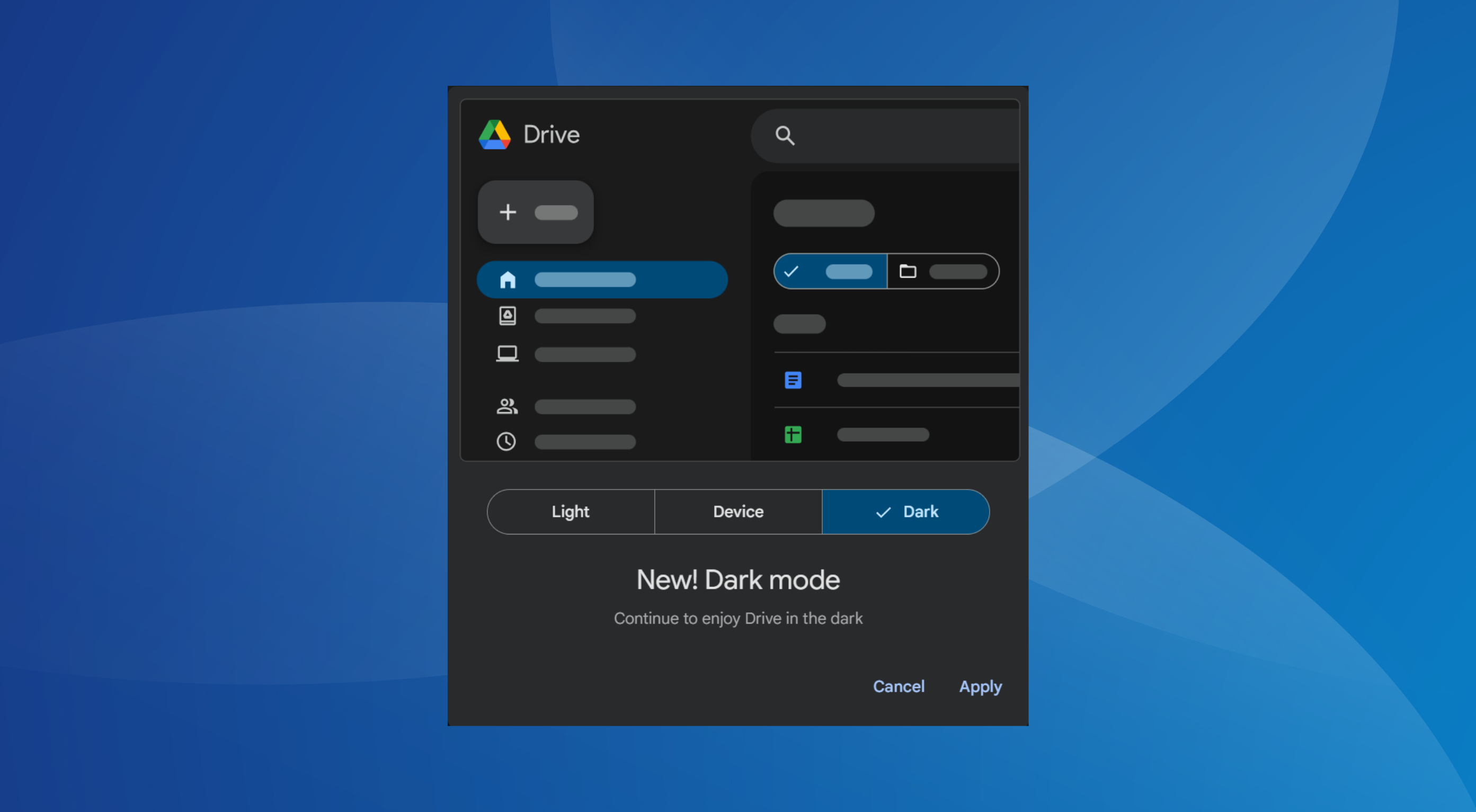
After integration, when I opened Google Drive, it came up with a popup notifying me about the change as well as the option to choose between Light, Device, and Dark modes.

Dark Mode notification on Google Drive

It only pops up the first time. On subsequent visits, the mode set initially will be applied. But you can always manually enable/disable Dark Mode from Drive’s web settings!

How do I enable Dark Mode on Google Drive web?

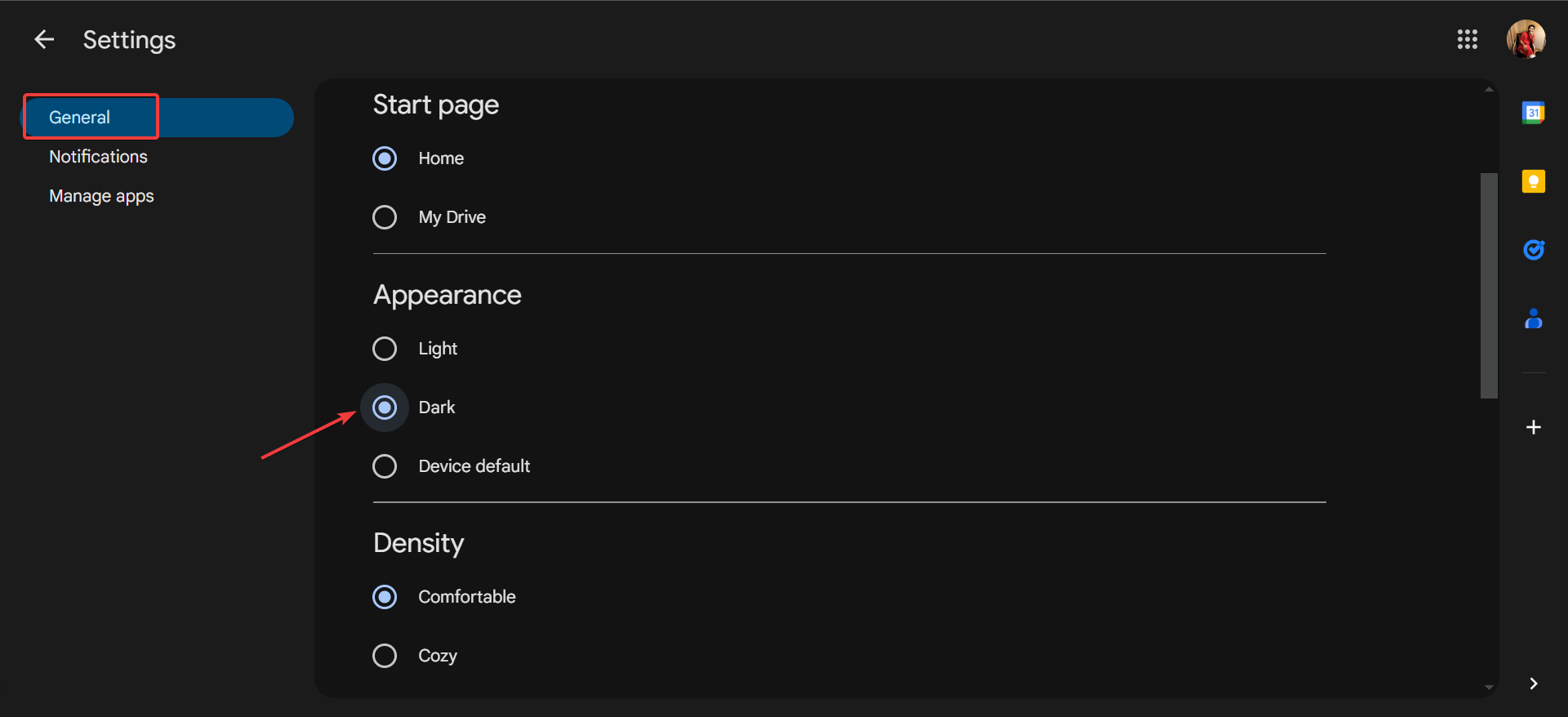
  1. Open Google Drive, click on the gear icon near the top left, and then select Settings.
  2. In the General tab, select Dark under Appearance and the changes will be applied immediately.dark mode

If you don’t see the Dark Mode option yet, remember that it’s a gradual release and may take up to 15 days to show up for everyone, according to Google.

As for the availability, you will get Dark Mode only on the following accounts:

  • Google Workspace customers
  • Google Workspace Individual subscribers
  • Personal Google accounts

Dark Mode has become an essential feature, given the battery savings and reduced stress on the eyes. And with it coming to Google Drive, you don’t need third-party extensions to switch to Dark Mode.

Google is also working on an ultimate Dark Mode for Chrome that automatically applies across websites, irrespective of whether the website supports the mode.

Don’t you want Google to introduce the mode on more of its offerings? Share with our readers in the comments section.

When you will buy the next Xbox console, it will be more like a PC

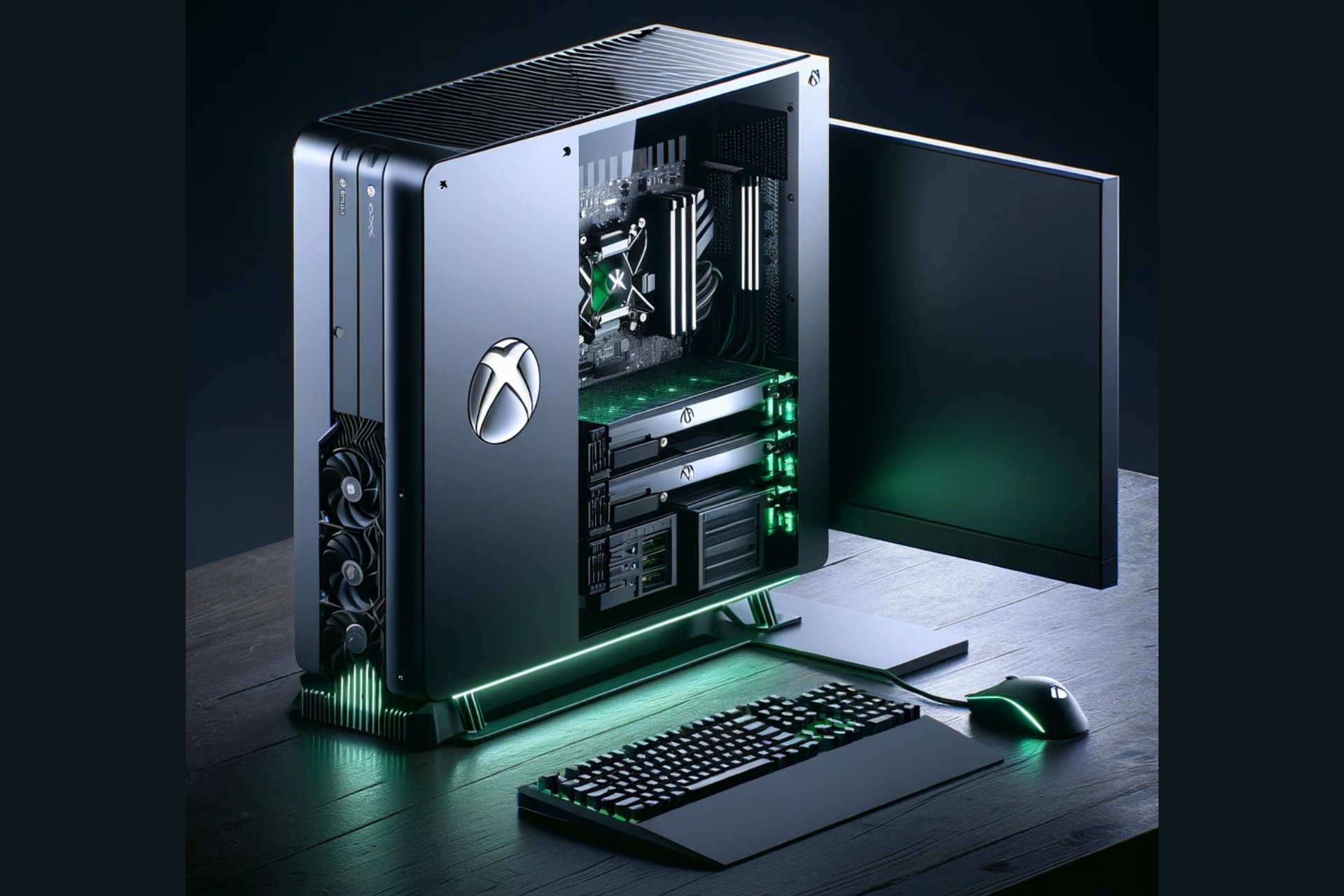
The featured image was generated using DALL-E and it’s not an actual image of an Xbox console

If you’re old enough, like me, to remember the arcade games from pubs, recreation centers, and basically every street corner, you also know that the game consoles were created to transport all that fun into our homes. Back then, the PC was just a big calculator connected to a screen, and no one thought that it could actually be used for games.

The hype of the gaming consoles continued a long time because it was a lot more convenient to start up your games without needing to boot up an OS and deal with other resource-hungry software that compete with what we actually want to do: play!

The gaming market monopolies are at an end

In modern days, gaming consoles were kept alive only by game exclusivities and developer-distributors monopoly and that story is about to be played out as well. Sony is starting to release more and more versions of their games from PS to PC, while Microsoft, with they Xbox on every screen policy is obviously bringing all that Blizzard-Activision goodness on Windows as well.

In the meantime, the Redmont giants is opening up their app stores to all developers and platforms, and bring all the Xbox games to PlayStation, disrupting monopoly across the board.

In fact, Phil Spencer, the visionary behind Xbox, says in an interview for Polygon that everyone should be free to buy their games from their preferred store:

Yes, [Consider] our history as the Windows company. Nobody would blink twice if I said, ‘Hey, when you’re using a PC, you get to decide the type of experience you have [by picking where to buy games]. There’s real value in that.

However, he went further with that idea pointing out that this vision should also apply to gaming consoles.

Then, there is the hardware problem. When you’re buying a console, you can’t upgrade it like a PC. The fear of console modding and other hardware restrictions has limited the potential for console manufacturers and even the developers. The PC components market is moving a lot faster and the upgradeability of the systems gives them the high ground.

The implications of Spencer’s plan are vast and could lead to more possible outcomes. For one, it could lead to a more competitive marketplace within consoles, driving down prices and offering more choices to consumers. It also represents a significant shift in how console makers generate revenue, potentially moving away from the reliance on exclusive titles to a more diversified income stream. But perhaps the most exciting aspect of Spencer’s vision is the potential for innovation it unlocks. By breaking down barriers between platforms, developers could reach wider audiences, and gamers could enjoy a richer tapestry of gaming experiences.

What does this mean for the future of Xbox?

If Spencer’s vision comes to fruition, the Xbox of tomorrow could be shaped up more like a PC, blending the best of both worlds: the convenience and user experience of a console with the openness and versatility of a PC. This isn’t just about playing PC games on Xbox; it’s about reimagining what a console can be. It’s a bold move that could redefine the gaming landscape, making Xbox a central hub for gaming across platforms.

The journey towards this future is filled with technical and regulatory challenges, but Spencer seems confident that he can make it happen.

The bottom line is that for you and I, the consumers, but also the developers, it’s a future that promises more freedom, more choice, and more possibilities. It’s clear that the lines between consoles and PCs are blurring, and Xbox might be leading the change.

What is Sony or Nintendo going to do about that? Adapt, diversify, but make it quick, because things are quickly about to change.

Will you buy that new console if it’s just like a desktop PC? Let’s discuss that in the comments below.

Microsoft Teams webinar organizers can stop attendees from sharing their webinars on social media

In a surprising turn of events, Microsoft has decided that it’s time to give Teams webinar organizers even more control over their projects, by allowing them to stop attendees from sharing their webinars on social media.

The new option will be released in June 2024, and it will impact Teams on all platforms, including Web, Desktop, and Mac versions, according to the latest entry in the Microsoft 365 Roadmap.

Disable the ability for attendees to share the webinar event page to social networking sites for public events post-registration.

Microsoft

While I don’t know which webinar organizer would want to stop participants from sharing their webinar on social media, something that would automatically give the webinar more exposure, thus possibly other participants, it’s good that Microsoft Teams allows them to have the option, at least.

Truth is, the option is useful in corporate situations to control possible exposure to a private corporate webinar.

The Redmond-based tech giant is releasing a bunch of similar features aimed at organizers and presenters. For example, Microsoft Teams will allow webinar organizers to block the sending of attendee emails, which the platform usually does every time someone sets up a webinar, as a way to remind participants to attend.

The platform will also be updated to support a private chat channel for organizers and presenters in Microsoft Teams webinars. This update, slated for release in June, is a way to privately chat about the management of the webinar without participants knowing what’s going on.

These features will all give greater control to organizers to set up their webinars as they want, without having to worry about annoying future participants with too many emails, or even creating a bigger event than it should be.

In many ways, with these features Teams will become a preferred platform for webinar hosting, since the experience of attending one on the platform can be highly customized.

What do you think about it?

HP Omen 17: Perfect blend of gaming power and AI integration

HP has a track record of amazing devices, and speaking of which, the company has just introduced the latest member of the Omen series.

Join us while we take a closer look at the newly announced Omen 17 model.

Omen 17 is a gaming laptop with Copilot integration

HP has just introduced a new laptop, called Omen 17, as XDA Developers writes. Regarding the hardware, you can find the following:

  • 17.3-inch display that comes with Full HD or Quad HD resolution
  • The Quad HD display can support up to 240Hz refresh rate
  • Up to Ryzen 9 8945HS CPU with Ryzen AI
  • Up to Nvidia GeForce RTX 4070 GPU
  • 1TB SSD and up to 32GB RAM

Additional features include a 1080p webcam, a single USB-C port, three USB Type-A ports, HDMI, an Ethernet port, and a headphone jack.

Omen 17 might be a gaming laptop, but it’s AI-focused, and it utilizes AI to improve video and voice quality. It even comes with a trial of Otter.ai Pro which lets you record, transcribe, and summarize meetings.

Lastly, the laptop also has a dedicated Copilot key that you can use to quickly and easily open the AI assistant.

Overall, this is a great device, and it will be available starting April 24th with a starting price of $1,349.99.

If you’re looking for something different from the OMEN series, then you might be interested in this HP OMEN 40L discount.

For more casual users, there’s also a great HP Dragonfly Pro One 14 discount that you shouldn’t miss.

Microsoft Edge on Android is adding Actions to the Omnibox; here’s how they can be useful to you

Currently, Microsoft is testing mobile Omnibox Actions for the Edge browser on Android. This will allow you to open Copilot, Bing Translator, Microsoft Rewards, weather, and more right from your address bar.

The feature is tested in Edge Canary. A similar feature is already available in Google Chrome on both desktop and Android, which supports actions that let you perform tasks like launching a clear browsing data tab or checking updates from the address bar.

This is not it; Chrome has a long list of actions you can perform right through your address bar. Earlier, Microsoft Edge used to support actions behind Omnibox pedal suggestions and another flag.

However, Edge now doesn’t display actions in the Omnibox on the desktop, but the Redmond-based tech giant is working on bringing similar types of actions to the Omnibox for users to save time.

new Omnibox action 1

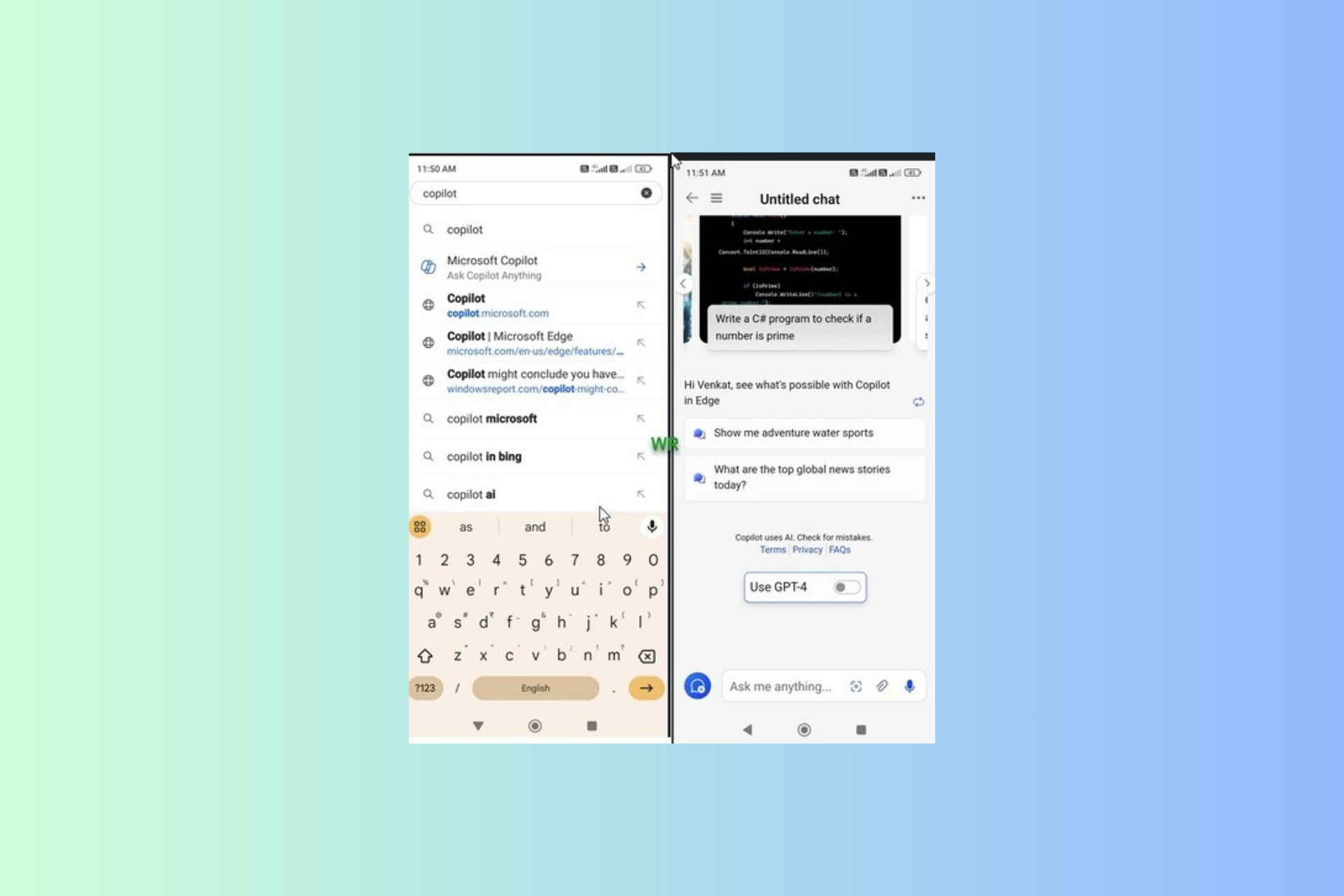
For example, a new Omnibox action displays a weather pedal in the Omnibox that redirects you to a weather website when you type Weather as a query.

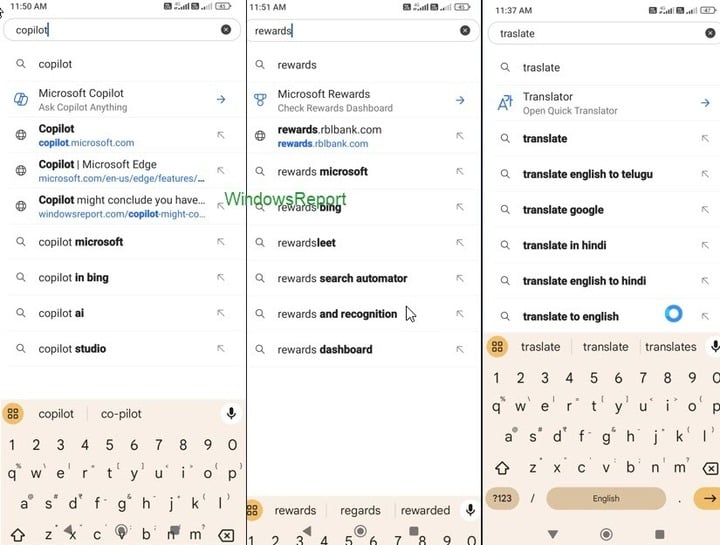
Similarly, an Ask Copilot pedal or icon that launches Copilot will appear in the Omnibox when you type Copilot. We can compare this experience to using the Gemini shortcut in the Chrome address bar on the desktop to chat with Gemini.

new Omnibox action 2

Another omnibox action appears when you type translate, and Edge will show you Translator with the action to Open Quick Translator, which takes you to the Bing translate website. Here are some more:

  •  Image creator – launches Copilot that creates images with words you submit
  • Rewards – Displays the Microsoft Rewards action that opens the Rewards dashboard

How can I Enable Omnibox Actions in Microsoft Edge on Android?

You can launch Microsoft Edge on an Android phone. In the address bar, type edge://flags and press Enter. In the search bar, type mobile omnibox action. Now, enable all the highlighted flags and restart Edge.

edge://flags

Next, launch the browser and start typing in the Omnibox to check out the actions. These actions are currently working on Microsoft Edge for Android in Canary. However, we don’t know when it will make it to the Stable Channel.

However, as they are being tested by Microsoft, there are chances that they will eventually become a stable release, as the action commands include using Copilot from the address bar.

What do you think about this new feature? Share your thoughts with our readers in the comments section below.

Microsoft plans to triple data centers, environmentalists express concern

In the last few years, Microsoft has made significant investments in ramping up its data center infrastructure in a bid to train and run LLMs and meet the growing global demands for AI.

As per a report published in Business Insider based on an internal document titled Commercial Cloud and AI Demands: Fueling our Expansion, Microsoft plans to triple the data center capacity by the first half of the 2025 fiscal year. This requires 200 MW (megawatts) every month. As for mid-2024, Microsoft intends to double the new data center capacity.

Microsoft has, on several occasions, made public its plans to scale up data centers to develop advanced AI solutions. The Redmond-based tech giant recently purchased a 136-acre site to set up a data center in Georgia.

Last month, Microsoft and OpenAI partnered to build a data center for its supercomputer, Stargate, which reportedly cost $100 billion.

Environmentalists raise an alarm

Data centers require processors and related components to train generative AI models. Anticipating a growing demand, Microsoft plans to buy 1.8 million AI chips in 2024. This will undoubtedly have a huge impact on the environment!

As a result, environmentalists worldwide have expressed concerns about this massive increase in data centers and its effects on energy and water consumption. Similar concerns were raised in the past when the whole cryptocurrency mining craze was at its peak, and many had assembled power-intensive setups in their garage.

Data center

Remember, the data center landscape is dominated by just a few tech giants. A report by Synergy highlights how the data center capacity is doubling every four years, and only three companies, Microsoft, Google, and Amazon, account for 60% of it.

So far, it’s unclear whether Microsoft is already witnessing an increased demand for generative AI and is ramping up data centers to accommodate it or is simply planning for the future. Though, the latter looks more probable, given Microsoft’s recent expansion in the AI landscape worldwide!

What do you think about Microsoft’s expansion plans for data centers? Share with our readers in the comments section.

Microsoft 365 GCC customers will get the Cloud policy service which greatly strengthens the security

Microsoft promises a safer environment for GCC customers by updating the 365 productivity platform with the new Cloud policy service, which allows Microsoft 365 admins to forge policies, configure them, and deploy them in Microsoft 365 apps.

Through the new Cloud Policy service, these new policies will be automatically enforced to users upon signing in.

The Redmond-based tech giant will release the new service to Microsoft 365 GCC customers in June 2024, according to the latest entry in the Microsoft 365 Roadmap, and it will happen in stages. Initially, there will only be policies for Microsoft 365 Apps for enterprise on Windows, but more platforms will be included down the road.

Here’s what the entry says:

The Cloud policy service will begin rolling out for Microsoft 365 GCC customers late June 2024. The Cloud Policy service allows Microsoft 365 administrators to configure policies for Microsoft 365 apps and assign these policies using Microsoft 365 or Entra ID groups. Once configured, these policies are automatically enforced as users sign in and use Microsoft 365 apps. The initial release will support policies for Microsoft 365 Apps for enterprise on Windows and future updates will bring support for additional applications and platforms. For additional information about the Cloud Policy service, refer to Overview of the Cloud Policy service for Microsoft 365 Apps for enterprise.

Microsoft

The new Cloud policy service will be particularly useful in these specific situations, where data privacy and security are essential. Managers and government organizations will be able to build specific policies to suit their environments and make sure bad actors can be detected when trying to break in.

Coupled with the new Copilot for Security, this new enhancement should protect government infrastructures from the new AI-based cyberattacks, as well. Unfortunately, according to a Microsoft report, these sorts of attacks are becoming more and more popular and complex, making them hard to beat.

But with efficient policies known only to executives, it should make it harder for bad actors to undergo cyberattacks.

Microsoft will update Copilot in Excel to support formula conditional formatting

The Redmond-based tech giant first released Copilot in Excel last year, but initially, the AI model was capable of simple tasks, such as summarising and editing information in there. However, gradually Microsoft updated it to support different formulas.

For instance, a while ago it introduced two new complex formulas to manage multiple tables, and it also got the ability to generate multiple formula columns from a single prompt.

According to the latest entry in the Microsoft 365 Roadmap, Copilot in Excel will also be soon capable of formula conditional formatting. This will allow the AI model to handle complex tasks, meaning users won’t be alone in handling such tasks anymore, as Copilot can be of assistance.

Additional support for complex conditional formats beyond the basic top and bottom or conditional operators. For example, Copilot analyzes two factors when highlighting all rows where the product is bikes and sales is greater than 100.

Microsoft

The new formula conditional formatting enhancements will be released to Copilot in Excel in May 2024, and those dealing with a lot of Excel information on a daily basis, at their work, should use it.

Why? It could greatly streamline workflows and enhance productivity, as the AI model can extract information from different Excel documents and analyze and process them using the formatting options. The good thing about Copilot is that the AI model is a unified experience meaning it should, theoretically, understand and extract information from different documents.

This makes it a valuable tool to use: it reduces time and provides a relatively stress-free experience with dealing with detailed information such as Excel data.

Razer Kishi Ultra controller can turn almost any portable into a handheld gaming console

Razer, a company known for its gaming hardware and accessories, has recently unveiled a new mobile game controller that’s causing quite a stir in the gaming community. The Razer Kishi Ultra is designed to bridge the gap between mobile gaming and the more traditional PC or console gaming experience.

Unlike its predecessors, which were criticized for their lack of ergonomic design, the Kishi Ultra boasts a look and feel that mirrors the comfort and layout of standard PC and console controllers. This innovative design not only caters to hardcore gamers who are venturing into mobile gaming but also enhances the gaming experience on devices like the iPad Mini, transforming them into formidable gaming handhelds.

Razer Kishi Ultra works with almost any mobile device

Razer Kishi Ultra

The best part about Razers’s Kishi Ultra is its compatibility with a wide range of devices, including Android phones, iPhones, and even smaller Android tablets up to eight inches. It can also double as a PC game controller when connected via a USB C cable. Razer’s focus on ergonomics and gameplay is obvious in the Kishi Ultra’s full-sized handle and button layout, which may rival Razer’s pro console controllers.

One of the standout features of the Kishi Ultra is its Mecha-tactile responsiveness in the D-Pad and ABXY buttons, along with full-sized trigger buttons and thumbsticks. It even includes programmable L4/R4 buttons for customized control setups. For Android and Windows 11 PC users, the controller offers Razer Sensa HD Haptics, providing a multi-sensory gaming immersion that surpasses traditional console controller vibrations.

Chroma lighting on Razer Kishi Ultra

The Kishi Ultra also comes equipped with Razer Chroma RGB lighting and supports the Razer Nexus app, which grants access to thousands of games compatible with the new controller. Priced at $149.99, the Kishi Ultra is now available right from Razer’s website. Additionally, Razer has released a new version of the Razer Kishi V2 mobile game controller with a USB C port, available for $99.99.

Razer Kishi V2

The Razer Kishi Ultra might be a game-changer for mobile gaming because now you will think twice before thinking of buying that handheld mobile game console. With just $150 you can turn your already powerful smarphone or tablet into a mobile gaming rig.

We remind you that Raser also launched the BlackShark V2 Pro headphones for Xbox and PlayStation to enhance your gaming experience.

What do you think about the new Razer Kishi Ultra mobile controller? Share your thoughts in a comment below.

Windows 11 24H2: System requirements leaked, indicates AI Explorer is just for ARM-powered PCs

With Microsoft planning to integrate Copilot into various aspects of Windows 11, we have been hearing a lot about AI Explorer, which will be introduced with the much-anticipated 24H2 release.

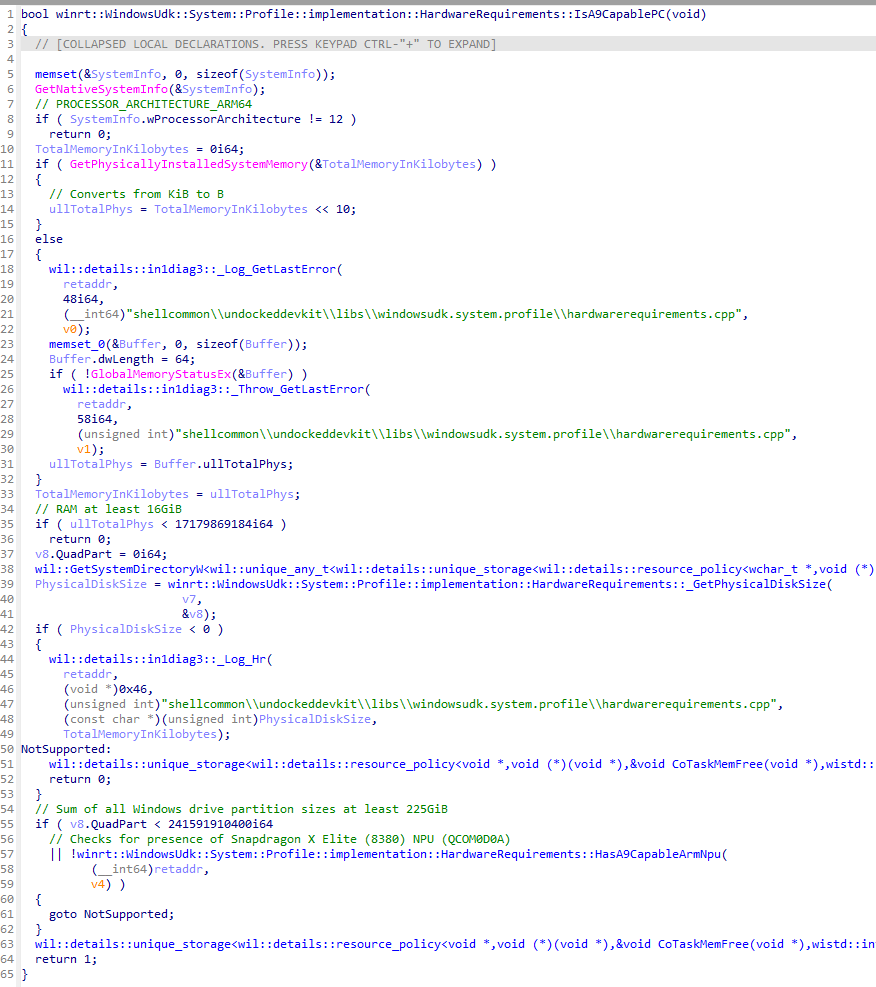
Another leak told us something more about the pending feature; it looks like you will need an ARM64 processor like the Snapdragon X Elite powered with NPU, storage of 225 SSD and 16 GB RAM to use it.

Apart from this, all the other new upcoming features will work on all PCs with minimum system requirements.

This was all confirmed by Albacore’s recent X (Formerly known as Twitter) post, which specifically mentions AI Explorers will only work on Snapdragon’s X Elite processors. Here is what the post said:

Turns out Windows 11 build 26100 (purported 24H2 RTM) contains the AI Explorer requirements baked into the OS

  • ARM64 CPU
  • 16GB of RAM
  • 225GB system drive (total, not free space)
  • Snapdragon X Elite NPU (HWID QCOM0D0A) I guess that’s one way to drive ARM64 adoption
Code

The code in the screenshot implies that it is designed to work with a Snapdragon X Elite processor with a designated NPU ID, meaning that many people, even with newer hardware, won’t be able to use AI Explorer.

He also mentioned:

I suppose this implies all upcoming devices will be offered in at least a 16/256 config? Quite the jump from past Surface baseline SKUs. That, or MS will sell you lower tier SKUs anyway and just go no AI Explorer for you

AI Explorer is not the new File Explorer. Instead, it is similar to the Windows 10 Timeline feature, which keeps a record of everything you do on your computer, such as your tasks, browsing history, and meetings, so that you can search for them later.

We hope that as the feature works locally on your device, we won’t have to worry about sending your data to Microsoft.

Microsoft has stressed enough that 2024 will be the year dedicated to AI integration and innovation around the technology. However, the Snapdragon processor constraint and the company trying to highlight that the Qualcomm processor is the best choice for an AI PC implies that not all of us will be able to experience it.

On the contrary, it could be the initial launch strategy to see how things pan out. The Redmond-based tech giant may eventually bring the feature to other NPU-powered devices. Who knows?

Do you think AI PCs will increase the Windows 11 usage rate or even lower it further due to the constraints? Share your opinions with our readers in the comments section below.

Microsoft’s VASA-1 can generate dangerously accurate talking faces

Microsoft introduced a new framework known as VASA that can create lifelike talking faces. All it needs is a static image and an audio clip. Afterward, VASA-1, the first model, will generate a video featuring lip movements synchronized with the audio, facial expressions, and natural head motions.

Why is VASA-1 better than other video generators?

VASA-1 is a complex model which uses a disentangled face latent space. This feature allows it to store different expressions separately. As a result, it can recreate expressive facial dynamics based on various emotions. So, the videos generated by the Microsoft tool look more accurate than the ones generated through other means.

The tool has the potential to help us develop better avatars. In addition, we can use it in various other applications. For example, @Wisemasters on TikTok uses a similar technology on historical faces for educational purposes. Unfortunately, they look out of place and stiff compared to the ones generated by VASA-1.

The Microsoft VASA-1 framework allows you to gain control over some aspects. For example, you can set the eye gaze location, adjust the head distance, and use emotional offsets. So, you can make the generated face appear angry or happy, making it more credible.

In addition, the Microsoft video generation tool can handle artistic photos, singing, and non-English speech. However, researchers didn’t train the model to do that. So, the fact that it can handle unexpected situations was a surprise. Below you can find an example featuring the Mona Lisa.

Disentanglement plays a great role in the video generation capabilities of the VASA-1 framework. After all, it allows you to control and edit multiple video aspects because it separates them. For instance, you can tweak the 3D head position, facial features, and expressions.

Researchers claim that the framework can offer real-time efficiency because its offline batch processing mode can generate 512×512 videos at 45 FPS. Additionally, it can support 40 FPS in the online streaming mode with a 170ms latency.

Is the VASA framework a potential threat?

Unfortunately, the tool comes with risks. The X user @EyeingAI calls it alarmingly realistic. After all, someone could use your photo and an AI-generated audio featuring your voice for ill intentions. Additionally, hackers could use the model for cyber attacks and to spread misinformation and fake news.

In a nutshell, the VASA-1 framework has surprising capabilities and exceeds other video generators. In addition, you can make the videos more accurate by using its control options. Future models could help us create better avatars. However, there are many risks, and Microsoft should prioritize minimizing the damage the tool can do.

What do you think? Are you eager to try VASA-1? Let us know in the comments.
Meta just released Llama 3, and it outshines other LLMs in almost every way

Many tech giants are working on their AI models, and Meta is no exception.  As we previously wrote, Llama 3 is expected to come sooner than we think, and this is exactly what happened.

The new version of Llama is finally here, so without further ado, let’s see what’s new.

Llama 3 is finally here, bringing enhanced performance and more

As reported by MSPowerUser, Meta has just released the latest version of its language learning model, bringing improved performance and scalability.

This allows the AI to perform multi-step tasks, lower false refusal rates, improve response alignment, and understand nuances and complex tasks.

Llama 3 was trained on 15T token of data, which is seven times larger than was used for Llama 2. This version supports 8K context length doubling the capacity of Llama 2.

Regarding performance, Llama 3 8B and 70B outshine the competition in almost every regard.

Meta will also make Llama 3 available to everyone by making smaller versions of Llama 3 available as open-source models.

The new version is more secure, and it will utilize Llama Guard 2, Code Shield, and Cybersec Eval 2.

The model is already available in action and it’s powering Meta AI assistant that can be found in Meta’s services such as Facebook, Instagram, and WhatsApp.

Meta also has plans to bring video and image support to Llama 3, but no release date for these features is known.

Llama 3 was supposed to change our perspective on AI, and now that the model is finally here, did Meta deliver on its promise? Let us know in the comments!

Microsoft Teams will soon provide unified app management across Teams, Outlook, and Microsoft 365

The Microsoft 365 Admin Center will be updated to allow managers to perform a streamlined Teams app management across Teams, Outlook, and Microsoft 365 App.

According to the latest entry in the Microsoft 365 Roadmap, starting in May 2024, administrators who manage apps that work on Outlook, and the Microsoft 365 App will be able to perform unified management across all these 3 platforms.

Until now, all of the changes made to these apps using the Integrated Apps section (which should provide a unified management experience) would only impact certain apps. With this change, however, all the changes made to these apps in the 365 Admin Center, will affect all of them at once.

Here’s what the entry says:

Administrators using the Microsoft 365 admin center and Teams admin center who manage Teams apps that work on Outlook and the Microsoft 365 App will be able to apply their changes across all three clients (Teams, Outlook and Microsoft 365 App). Before this update, changes made through the Integrated Apps section in the Microsoft 365 admin center would only affect these apps on Outlook and the Microsoft 365 App; similarly, changes made in the Teams admin center would exclusively affect Teams. With this change, management of these apps will be unified across Teams, Outlook and Microsoft 365 App.

Microsoft

The changes will impact admins everywhere. Curiously enough, the Microsoft 365 admin center was plagued with some strange issues that affected users on a global scale: some of its parts were displayed in Croatian when accessed from certain browsers.

With this being said, the 365 Admin Center will also be updated to support organizational messages, allowing managers to edit and schedule organizational messages on Windows 11.

Microsoft is adding them in the Reports section of the 365 admin center, and managers and admins will have a variety of capabilities and features that will allow them to create new messages, review delivery reports, and so on.

Google Chrome now let you annotate PDFs with Pen tool

Google is introducing the ability to add ink signatures to PDFs directly within the built-in PDF Viewer in the Chrome browser. Chrome possibly gets a draw tool to make this possible.

The functionality is currently being tested in Chrome Canary and is available as a flag (features under testing that are not available by default).

Chrome may soon let you sign PDFs with the Draw tool

Google Chrome comes with a native PDF Viewer, which allows quick access to documents along with some pretty basic functionalities, negating the need to rely on third-party PDF viewers.

Until now, Chrome supported a Table of Contents, a Two-Page View, offered controls to Zoom and Fit to Page, and the ability to rotate clockwise/anti-clockwise. You now get the ability to annotate PDFs and add ink signatures, as highlighted on the Chromium Review website.

With the new ink signature feature, you will be able to sign and annotate PDFs directly in Google Chrome. The functionality is currently available behind the PDF Ink Signatures flag in Chrome Canary, the description for which reads,

Enables the ability to annotate PDFs using a new ink library. – Mac, Windows, Linux, ChromeOS, Fuchsia, Lacros

How can I enable ink signatures for PDFs in Chrome?

  1. Launch Chrome Canary, paste the following path in the address bar, and hit Enter: chrome://flags/
  2. Search for the PDF Ink Signatures flag and choose Enable from the dropdown menu next to it.enable PDF ink signatures flag
  3. Relaunch Chrome for the changes to come into effect.
  4. From now on, when you open a PDF, Chrome will have the annotate option within the PDF viewer.

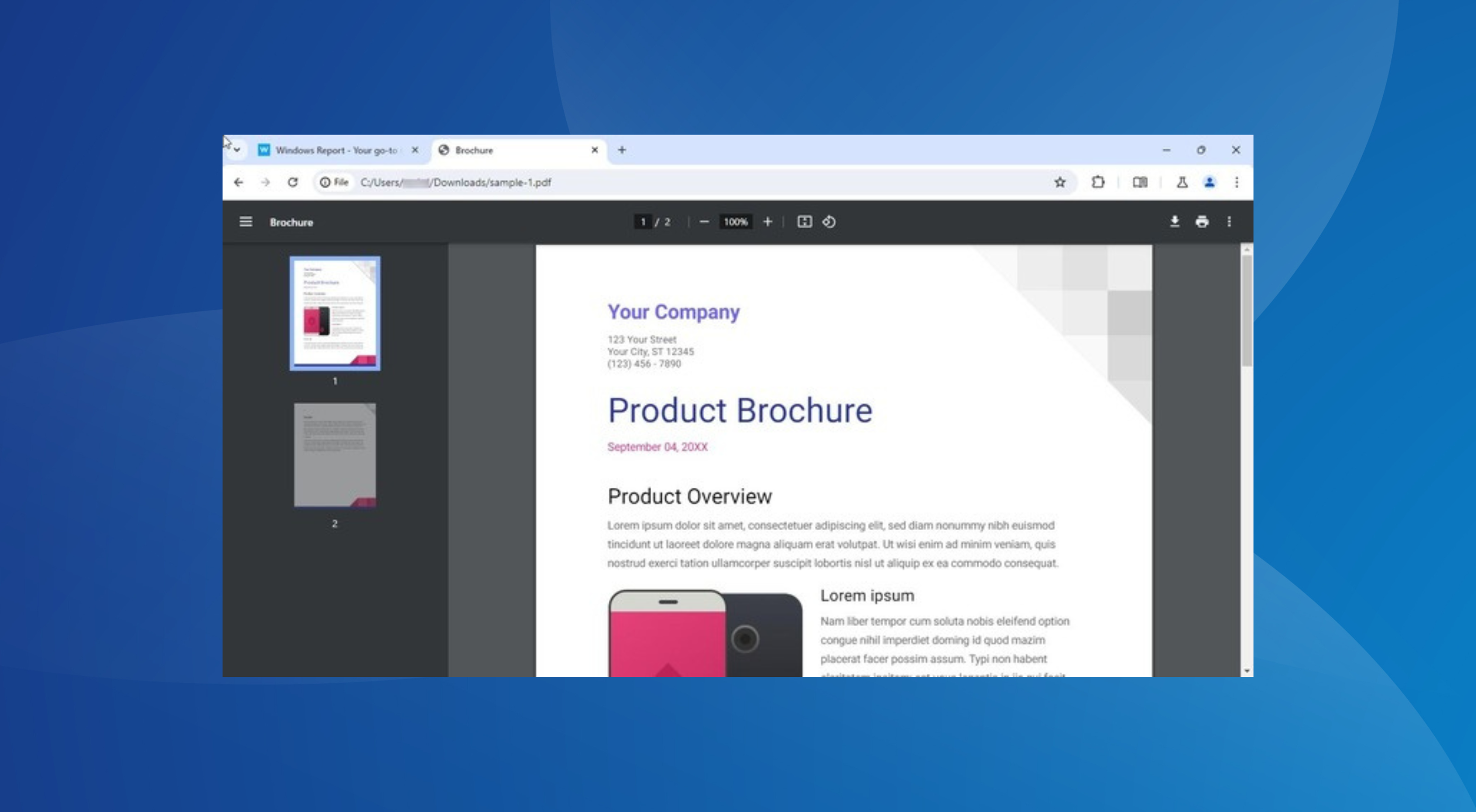
Update: Google has added an Annotate option on the toolbar as well as Pen, Highlighter, and Earser tools when you click it. Please check the screenshot below.

Chrome PDF Viewer with Pen tool in Side Panel. Image Credit:WindowsReport

The newly available annotate option on the PDF Viewer Toolbar offers pen, brush, and eraser options on the side panel with different sizes and colors to choose from. Users can undo any changes with the Ctrl+Z shortcut or by using the undo/redo buttons available on the toolbar. The pen tool lets you draw and highlight text over PDF with different colors.

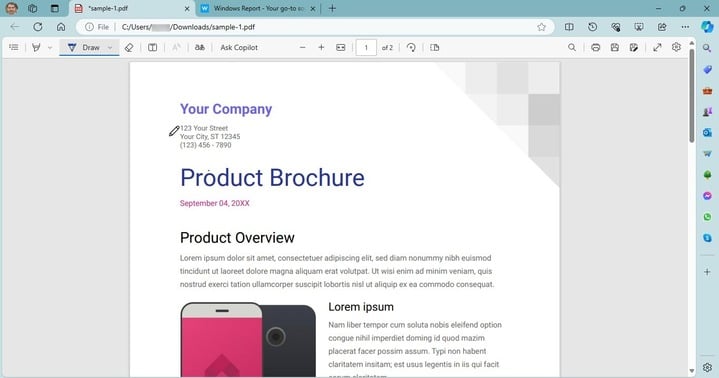
The functionality, however, is not new to browsers. Microsoft Edge, which received most of the PDF features from legacy Edge, comes with a built-in annotation tool that allows you to draw and add handwritten signatures directly in the browser. You can also customize the pen’s color and thickness.

Annotating PDFs in Microsoft Edge

While Google Chrome lacked annotation capabilities earlier, with the feature in the testing phase, you soon won’t have to rely on other software or browsers like Edge to sign PDFs, saving significant time and effort.

In recent months, Google has extensively improved Chrome, from new suggestions in the search experience to security and performance-oriented Chrome’s Real Time Protection. These have helped Chrome retain its top spot in the browser landscape with 65% of the market share, as per StatCounter.

How useful do you believe is the ability to add a signature to PDFs in Chrome? Share with our readers in the comments section.

Microsoft Word integrates Bing Search for effective Internet searching within the platform

Microsoft introduced Copilot to the Word app a while ago, allowing users to summarize, edit, and compose text with AI. However, according to the latest in the Microsoft 365 Roadmap, Word will update Copilot to showcase complex answers to all sorts of questions.

The interesting thing? Microsoft Word will basically use the Internet, more specifically Bing Search, to make Copilot answer this way. So in other words, Word might become a search engine on its own.

Well, not really, but it’s close.

Here’s what the entry says:

Ask Copilot a question in Word chat and Copilot generates an answer using the power of integrated Bing search. And you never have to leave the app.

Microsoft

This is quite useful, as you can do everything in Microsoft Word: for example, if you work on a project, you can use Bing Search within Copilot to look for information without even leaving the platform at all.

It becomes a centralized hub, which streamlines productivity, and allows for a lower power consumption: after all, you’ll only be using Microsoft Word. However, you’ll need to be connected to the Internet to be able to use this.

Copilot will also help you edit the newer information to fit your projects, or it can summarize the information you’ve found to better suit your tone and style.

The update will impact Word users everywhere, and it should be completely rolled out by the end of this month.

In other news, Microsoft is also updating Word to support Designer, which means users will be able to enhance their texts with AI-generated images directly on the platform.

The capability is quite useful for those who want to enrich their texts with images, but don’t have the means or the budget to purchase images or create them by themselves.

In a matter of seconds, Copilot can analyze the text, and create an image based on it, and Microsoft will also allow you to choose from different versions until you get the one that fits the text best.

What do you think about these features coming to Microsoft Word?

Edge 124 just dropped, bringing security improvements, new policies, and more

Microsoft Edge is a solid browser, and Microsoft is constantly working on making it even better with various updates.

Speaking of which, the new version of Edge has just hit the stable channel and it’s available to everyone, so let’s see what this version has to offer.

Edge 124 is rolling out, here’s what’s new

According to Microsoft’s release notes, the new version of Edge is here, and it brings security updates from the Chromium project.

In addition, it also brings fixes for the following Edge vulnerabilities: CVE-2024-29986, CVE-2024-29987, and CVE-2024-29991. These are low-risk vulnerabilities, but it’s still great to see that Microsoft has patched them.

The update brings various new features, and most of them are related to Microsoft Edge management services, including the following:

  • Email notifications for extension requests
  • Enterprise secure AI controls
  • Customization of organizational branding
  • Automatic profile switching controls for Edge for Business

With these features, administrators will be able to receive email notifications if a user requests an extension.

Admins will also be able to manage AI-related policies and customize their organization’s branding.

This version also brings an improved Edge Profile account re-authentication dialog if the SSO fails. Web SQL support is removed, following the changes in the Chromium project.

Cross-device Search Query History suggestions are now available allowing you to see the same search suggestion if you have Edge Sync enabled.

Profile management and customization controls have been improved with the introduction of additional avatars.

Speaking of profiles, the First Run Experience has been improved encouraging users to sign in and create meaningful profiles.

Edge will now also show notifications on Edge updates in the Browser Essentials instead of the Settings page, thus improving visibility.

Lastly, this update introduced CopilotPageContext and CopilotCDPPageContext policies that will allow Copilot to access browser context. As a result, the DiscoverPageContextEnabled policy was removed.

This update is mostly aimed at business users, but personal users can benefit from it thanks to the improved security.

In other news, the Edge Search bar on Windows 11 now supports Google, which is a welcome addition. As for upcoming features, Microsoft Edge’s Magnify Image will now use AI to improve image quality even more.

Microsoft Defender’s Threat Explorer is updated to become a hub for direct cyber protection actions

Microsoft will be updating its Defender app to become more versatile for users. After announcing that it will flag the AIR fixes as automated actions approved by SecOps, the Redmond-based tech giant says it will update Threat Explorer within the platform to become a hub for direct cyber protection actions.

In other words, Microsoft Defender’s Threat Explorer will allow SecOps to perform a variety of actions, from submissions, and purging emails, to blocking Tenant-wide messages.

According to the latest entry to the Microsoft 365 Roadmap, the Redmond-based tech giant will also make Tenant-level block URL and File actions available on this page, later in April.

SecOps can take multiple actions such as purging emails, submissions, and Tenant-level block actions through a single wizard on the bulk of messages. In addition, Tenant-level block URL and File actions are now available directly from Threat explorer.

Microsoft

The change will allow SecOps to take action against cyberthreats faster, and more efficiently, ensuring the companies are responding quickly in such situations, where time is important.

The change is welcomed, considering Defender is also updated to allow administrators or security operators to see results and responses to the submissions they made in the platform much sooner.

This means security experts will have a clearer picture of what’s happening inside an organization by just opening up Microsoft Defender, allowing them to take action when needed.

Microsoft Defender will update its Threat Explorer this month, and it’s expected to be completed by the end of April. All the web versions of the app are impacted, and customers everywhere will have access to the new and enhanced Threat Explorer.

EU greenlights Microsoft’s $13 billion investment in OpenAI, deal still under the radar

In a major relief for Microsoft, EU antitrust regulators have decided not to proceed with a formal probe into the $13 billion investment the Redmond-based tech giant made in OpenAI.

This comes after the regulators came to the conclusion that the $13 billion Microsoft put into OpenAI is an investment, not an acquisition and that the former doesn’t control the latter, negating the need for an investigation, at least for now.

In an email to Reuters, an EU spokesperson said,

The Commission had been following very closely the situation of control over OpenAI before the recent events involving its management. We are checking whether Microsoft’s investment in OpenAI might be reviewable under the EU Merger Regulation.

The investment came under the scanner after sudden reshuffling at OpenAI, which led to its CEO, Sam Altman, being fired. At the time, Microsoft’s CEO, Satya Nadella, spearheaded the negotiations that ultimately led to Sam Altman getting reinstated as the CEO of OpenAI.

Reports suggest that Microsoft wanted Sam Altman to lead the AI team, but after his return to OpenAI, the tech giant went ahead with Mustafa Suleyman.

Microsoft isn’t completely off the hook yet. A report in Reuters suggests that with pressure mounting, Microsoft could still face an investigation by the EU antitrust regulator.

Besides, the investments are also under the radar of authorities in other regions, as well as the Competition and Markets Authority in the UK. The latter is primarily concerned with the deal’s impact on market competition.

Undeterred by these developments, Microsoft’s push for generative AI continues globally, from introducing AI in manufacturing to its $1.5 billion investment in G42 targeting Middle Eastern and African regions to funding AI-based startups worldwide.

Besides, to aid its expansion plans, Microsoft is planning to acquire 1.8 million AI chips to power the infrastructure.

What do you think about the EU’s decision to greenlight Microsoft’s investments in OpenAI? Share with our readers in the comments section.

Russian and Chinese hackers are trying to influence the U.S. elections

Not long ago, Microsoft discovered Russian and Chinese hackers sponsored by their countries. Most of them use social engineering tactics to spread misinformation on social media. In addition, they are targeting the U.S. institutions. On top of that, they are using various ways to exploit the security vulnerabilities of Microsoft.

According to Microsoft, on 17th April Russian hackers started online campaigns to weaken U.S. support for Ukraine. Through their content, they try to generate hostility between us. On top of that, Chinese hackers are trying to diminish our trust in the U.S. democratic systems.

What methods did the Russian hackers use?

The wrongdoers from Russia use multiple methods to catch our attention. For example, besides social media, they engage in covert and overt campaigns and use traditional media.

Russian and Chinese hackers use AI in their campaigns to spread misinformation. One of their methods to spread fake news is to edit videos using AI-generated audio content. Unfortunately, many of us believe their lies without analyzing them.

The Russian group Storm-1516 targets U.S. audiences with fake narratives. To do this, they use the same pattern but multiple languages. Also, they use a three-stage process.

During the first phase of the process, they create a believable persona often posing as a whistleblower or a journalist who promotes an anti-Ukraine narrative. Then, they post the video on an independent channel. In the second phase, multiple websites managed by the Russian group of hackers promote the video to spread their influence. The last phase of their campaign uses Russian expats, officials, and supporters to spread the lies further.

How do Chinese cybercriminals spread misinformation?

Chinese hackers similarly use AI tools like the Russian ones. Thus, they spread misinformation by creating and sharing memes, videos, and enhanced images featuring fake narratives. Also, most of them post as American voters.

In addition, Chinese threat actors use more advanced tactics based on political divisions. Also, they promote content that benefits a political party while spreading misinformation about others.

Besides Russian and Chinese hackers, Iran might launch cyber attacks when we get closer to the U.S. Election Day. Through their attempts, they might try to steal and manipulate data and affect critical systems.

According to the Microsoft Threat Analysis Center (MTAC), the most efficient tactics feature:

  • AI-enhanced media instead of generated content.
  • AI-generated audio tapes instead of deep fake videos.
  • Fake phone calls.
  • Disinformation campaigns when there’s a crisis or during breaking news.
  • Impersonators of lesser-known figures.

Ultimately, Russian, Chinese, Iranian, and other hackers might increase their threat attacks close to Election Day. MTAC will continue to search and analyze malicious uses of AI. However, Microsoft says that hackers are using an unreleased tool. So, the rapid development of AI could be a critical threat. As a result, there’s no way to prevent what will happen in November.

What are your thoughts? Do you think the AI is advancing too fast? Let us know in the comments.

Microsoft 365 A3 and A5 licenses will receive 100 print jobs per license, up from just 5

Microsoft will increase the number of print jobs per license to 100, up from 5, for all organizations with Microsoft 365 A3 and Microsoft 365 A5 licenses, starting May 1, 2024. That is about a staggering 1900% increase.

According to the official announcement, these 100 print jobs will be available per account/month, and each month, the number will be refreshed.

The Redmond-based tech giant says the decision to increase the number of Universal print jobs will benefit many organizations, and it cited the use of the print add-ons as an example, saying that now, this new benefit will eliminate the need to rely on them (thus, not having to spend budget on them, anymore).

100 print jobs is a significant increase from the existing licensing terms, which provided only five print jobs. This means that most organizations can use Universal Print with no extra cost if they have eligible licenses. Also, if you have already purchased volume add-ons, this new benefit may reduce or eliminate the need for you to purchase print job add-ons and may allow you to give more users access to Universal Print. Carefully investigate what volume you need and cancel any additional volume purchases if they are no longer necessary.

Microsoft

Alongside this staggering increase, Microsoft is bringing new capabilities to Universal print: users will soon be able to print from macOS devices, but also from any device with the new pull print feature.

Pull Print (coming soon) simplifies the printing process for users, allowing them to print to any printer. Users can print from any device or app without having to choose a printer in advance. Then, they can go to any corporate printer that’s nearby, verify their identity, and safely retrieve their document.

Microsoft

Microsoft decided to increase the number of Universal print jobs, after many educational organizations, including schools, and universities complained about the rising costs of printing.

The Redmond-based tech giant already implemented this increase in the business sector, with Microsoft 365 Enterprise and Microsoft 365 Business Premium getting 100 print jobs a year ago.

Microsoft has finally made Xbox Mastercard available to users

The Xbox Mastercard is finally available to users after Microsoft announced it last year. It is a no-annual-fee credit card issued by Barclays, that can be used to earn points with everyday purchases and use them to redeem games and other valuables in the Xbox Store.

According to the official announcement, Microsoft is releasing the Xbox Mastercard as a no-annual fee product that can be used to earn points for every $1 spent on a variety of purchases.

Starting today, the Xbox Mastercard with no annual fee is available to all residents in the continental United States, Alaska and Hawaii. 

Microsoft

The places you need to spend your budget to earn points on the Xbox Mastercard are:

  • Xbox & Microsoft – Earn 5x card points on eligible products at the Microsoft Store.  
  • Streaming services – Earn 3x card points on eligible streaming services like Netflix and Disney+. 
  • Dining delivery services – Earn 3x card points on eligible dining delivery services like Grubhub and DoorDash. 
  • Everyday purchases – Earn 1X card points on all other everyday purchases. 

Plus, those who enlist for the new card will receive a handful of new benefits which include 3 months of Premium Spotify, an instant level 2 on the Microsoft Rewards program, and two 3-month codes for Game Pass Ultimate that can be gifted to family or friends.

It does sound like a good deal, but if you want to enlist in the program, you have to take into consideration the Xbox Mastercard’s terms and conditions. Why? Because it can get you in debt if you have no experience with cards.

Xbox Mastercard’s Annual Percentage Rate (APR) for Purchases is 20.99%, 26.99%, or 31.99%, based on your creditworthiness. The APR for Balance Transfers is 20.99%, 26.99%, or 31.99%, based on your creditworthiness.

When considering the Xbox Mastercard’s transaction fees, we have a Balance Transfer, that is either $10 or 5% of the amount of each transfer, whichever is greater.

If you have $1000 on your Xbox Mastercard, for instance, with an interest rate of 31.99%, and a monthly payment of $100, with an introductory balance transfer of 5% for 18 months, you’d need to pay $59 a month on the balance transfer card to pay off your balance before the intro period ends.

If you paid off your balance by the end of the intro period, you’d save $122 in interest. If you fail to do so, you’ll have a penalty fee of $41, whether we talk about late payments or returned payments.
So, owning this card is no easy task, but if you already own several other cards, and you’re comfortable with it, the Xbox Mastercard could end up being a good deal, as long as you’re spending, of course.

Microsoft Clipchamp is now capable of automatically cleaning long videos

And by automatically, we mean that now Clipchamp will clean your videos of long silences in just a matter of seconds. According to the official blog post, Microsoft added a new AI-powered capability that will detect long periods of silence and suggest the user push a button and clean them all.

The new capability is called Silence Removal, and it’s perfect when editing video podcasts, for example, something that Microsoft wants users to use Clipchamp for. In fact, in a previous update, Microsoft added a bunch of audio-related features just for that.

This new AI feature in Clipchamp can remove long boring silences in a snap. Silence removal allows you to find, trim and delete the silent parts of audio or video files. This is perfect for anyone who wants to tidy up their podcasts, meetings, interview videos and voiceovers, without having to spend hours tediously editing out silences bit by bit.  

Microsoft

Users will be able to let AI detect these periods of silence, and they can choose to review and remove them one by one, or all at once.

The best thing? Silence Removal is available for free to all users with a personal account.

And, in case you need an intro and an outro for your podcasts when you edit in Microsoft Clipchamp, the Redmond-based tech giant has you covered with a packet full of over 200 new exclusive stock audio tracks, all copyright-free, and free to use for all users with a personal account.

Our content library has had a major improvement in the quantity and quality of audio tracks. You can now find over 200 new exclusive stock audio tracks, plus intro and outro, 30-second and 60-second versions to use as background music in your next video. These exclusive to Clipchamp songs came from artists and are so catchy you’ll find yourself bopping along to your video as you edit. Not only that, but they are all copyright free, and free to use. You can listen to the full library of new tracks in our stock library and read more about it here.   

Microsoft

If you prefer video podcasts, Microsoft makes it easier for you with these new Clipchamp enhancements:

  • You can now add multiple track items to the timeline at once. Simply hold down the Shift key to select multiple items in your media library, and then click the plus button at the top of the library to add them all to the timeline. This is great news for users creating slideshow videos that contain many media assets.  
  • When freehand editing on the stage, you can now edit multiple items at once. To give it a try, hold down Shift key to select multiple items on the stage and move them around, as well as resize and rotate until your heart’s content.  
  • To allow you to further customize the position of your media in the stage, we’ve added the ability to freely rotate any item.  

You can read the full blog post here.

Microsoft Office LTSC 2026 is now in commercial preview for Windows and Mac users

This is a good day for those commercial users waiting for the new Microsoft Office LTSC 2024: the suite is officially in commercial preview for Windows and Mac users.

We are pleased to announce that the commercial preview of Microsoft Office LTSC 2024 is now available for both Windows and Mac. Office LTSC is built for specialized use cases that require a long-term servicing channel such as regulated devices that cannot accept feature updates for years at a time, manufacturing process control devices that are not connected to the internet, or medical testing equipment running embedded apps that must stay locked in time.  

Microsoft

According to the announcement, Microsoft Office LTSC 2024 will also have a subset of features that are already available in Microsoft 365, but previously unavailable to the Office suite, which means many of them will be useful in modern situations.

Office LTSC 2024 will include features from past Office releases as well as a subset of new features already available in Microsoft 365 Apps for enterprise.

Microsoft

The Redmond-based tech giant also said that Windows 11 LTSC is going to be released later this year, confirming the operating system. Together with the new Microsoft Office 2024, both services will be supported for a total of 5 years, under the Fixed Lifecycle Policy.

This means commercial customers will be able to use these services until 2029, with full support from Microsoft, and regular updates.

Speaking of which, commercial customers are now able to preview the following suites:

  • Microsoft Office LTSC Professional Plus 2024 (includes Word, Excel, PowerPoint, Outlook, OneNote, and Access) 
  • Microsoft Office LTSC Standard for Mac 2024 (includes Word, Excel, PowerPoint, Outlook, and OneNote)  
  • Microsoft Project Professional 2024  
  • Microsoft Visio Professional 2024         

Microsoft announced the preview a while ago, and it stated back then that the suite would be updated to deal with modern issues and infrastructures, introducing new features to Excel, and Outlook to keep up with the current demands.

Microsoft Edge’s Magnify Image now supports AI capabilities that will enhance image quality from low to crystal clear

Microsoft Edge was updated to support Magnify Image a while ago, and the feature allows users to magnify images straight in the Edge browser without opening them in a new tab and zooming in.

It seems that now, the Redmond-based tech giant will add some AI-powered capabilities to the Magnify Image capability in Edge that will let users enhance image quality from low to high. According to the findings of the tech enthusiast, @Leopeva64, the new capability is already enabled in Edge Canary, but it’s not functional.

It can be accessed by selecting an image, magnifying it, and then using AI to enhance it, as you can see in the image below.Edge Magnify image AI

Users will have to wait a few seconds, but the feature should enhance the image to a higher quality than it was before.

As we said earlier, the feature is currently non-functional, which means Microsoft did not intend to release it just yet. As the AI-powered Magnify Image is currently Edge Canary, the capability might not see the light of day, but that is a small chance, given how invested Microsoft is in everything AI.

Speaking of AI and Edge, the browser will also support Designer as its image editor, and it will be capable of Generative Erase, a feature that was first introduced in the Windows Photos app. With it, users will be able to edit images directly in Microsoft Edge, by removing unwanted objects from them.

Users will only need to select the highlit area provided by the Designer, and the tool will the rest. Once the object is removed, the Designer will automatically fill the void using AI, and the results are quite impressive.

These capabilities will most likely be available in the next weeks, giving users a plethora of free ways to edit their images fast and professionally.

Acer’s Predator Z57 is huge, curvy, and has now hit retail & so far, we like it!

Acer announced a few stunning gaming displays before CES 2024, but the one that stood out was the Acer Predator Z57, which features a 57-inch screen, 120Hz refresh rate, and 32:9 DUHD with curved display and 7680×2160 resolution.

It has a 2304-zone MiniLED backlighting for better contrast, VESA DisplayHDR 1000, and 98% coverage of the DCI-P3 color space.

The monitor has adaptable ergonomics, which means you can easily adjust, title, swivel, and change the height to find the perfect viewing angle.

With dual HDMI 2.1 support, you can enjoy next-generation gaming with your PlayStation 5 or Xbox Series X console seamlessly.

It was expected to be priced somewhere around its competitor, the Samsung 57-inch Odyssey Neo G9, which is available at $2499. However, Acer launched it to the retail market at $1999, giving it a competitive edge.

Here is the detailed information about the monitor:

Details
Screen size57 inches
Display curved MiniLED
DUHD (7680×2160) resolution 
Local Dimming Zones: 2304 ZONES
Refresh Rate: Up to 120HZ
DCI-P3 – 98% coverage 
VESA DisplayHDR 1000 
Cinematic immersion – 1000R curvature and a panoramic 32:9 aspect ratio
Speakers Dual 10W 
Adaptable ErgonomicsYes
Ports Twin HDMI 2.1 ports, DP 1.4,
4 USB 10GB/s downstream ports
Type-C 90W PD
Tearing Prevention TechnologyAMD FreeSync Premium technology
Built-in KVM switchYes
Price $1999

Would you be buying this display for your office or gaming setup? Share your opinions with our readers in the comments section below.

Microsoft Teams will add the AI-powered Intelligent Call Recap to your meetings

You might already know some AI tools in Microsoft Teams: Copilot, for instance, or the Intelligent Recap, which lets you process recorded Teams meetings easier and faster.

Well, you should know that Microsoft is planning to add the new AI-powered Intelligent Call Recap to your Teams calls soon, allowing you to easily keep track of everything that’s discussed in the call, automatically.

According to the latest entry in the Microsoft 365 Roadmap, Teams Premium users will be able to use the feature to have it cover the call, extracting information and notes, while letting you pay attention to the discussion. In other words, AI will take notes for you so you won’t have to.

Transcription will have to be enabled for this feature to work, but once that is done, you won’t have to worry about not noting everything down.

Here’s what the entry says:

The Calls app in Teams will soon have AI-generated notes and action items from your calls, so you can pay attention to your conversations and save time coordinating next steps. Intelligent call recap will work for both VoIP and PSTN calls, and summaries will be generated from calls for which transcription was enabled.

Microsoft

The feature will be added to Teams in June 2024, almost a year after the introduction of the Intelligent Recap feature, basically one of the first AI-powered capabilities to be introduced to Microsoft Teams.

Intelligent Recap is a tool that leverages AI to provide a detailed overview of your professional meetings, and it summarizes calls for you with important keynotes and a detailed map of all the speakers. Plus, at the end, it also generates suggestions and recommendations. Microsoft also added it to Teams Mobile.

The new Intelligent Call Recap on Teams is no different, but it does it while you attend the meeting, basically, providing you with notes as you participate in the meeting.

Microsoft Dynamics 365 Field Service gets new Microsoft Copilot capabilities 

Microsoft introduced the addition of Copilot features in Dynamics 365 Field Service. Managers can use Copilot’s generative AI features with Dynamics 365 Field Service, which can help create and manage work orders easily using natural language prompts.

In the blog post, Microsoft stated:

Copilot can assist in retrieving work order details, summarizing them, and presenting them in an easily digestible format. Copilot can also go beyond searching work orders to searching other Microsoft Dataverse records, including accounts, contacts, opportunities, and more. In addition, organizations can now configure the data that Copilot uses to generate work order summaries in Dynamics 365 Field Service to meet their specific business needs.

The Dynamics 365 Field Service users can also access the Outlook email add-in and ask Copilot to make work orders on the basis of emails they get from Outlook.

In addition, the field service managers can ask Copilot to send customers email updates with details of scheduled work orders or suggestions for unscheduled work orders.

The Dynamics 365 Field Service plugin for Microsoft Copilot is generally available. Managers and field workers can use it to ask questions from the Copilot assistant with natural language prompts within Teams. This allows them to collect essential information about work orders and other records saved in Dataverse.

Furthermore, technicians can use this feature to speed up problem resolution by asking Copilot to search extensive product manuals for relevant information.

Amit Nene, Business Applications Director, BW Packaging Platform, Barry Wehmiller said:

The introduction of Copilot in Dynamics 365 Field Service, with its powerful summarization capabilities, is a game-changer. Not only does it benefit our leaders, but it also streamlines internal communications, aids finance, and helps customers stay up to date. By automating this process, we reduce manual work and ensure critical information isn’t overlooked.

Lastly, the Field Service app within Microsoft Teams now allows you to automatically expand shared links to work orders, letting workers access additional details about the work orders right from the Teams interface.

What are your thoughts on the matter? Share your opinions with our readers in the comments section below.

SharePoint will update all News Posts to Made for Email, keeping all benefits of the two labels

SharePoint will be updated to support the newer Made for Email template as the platform’s default one, starting in May 2024.

According to the latest entry in the Microsoft 365 Roadmap, the reception to the Made for Email template has been positive, and this prompted Microsoft to turn it into the default template, replacing the News Posts.

However, the News Posts will not be entirely gone. Instead, you can still create them in any way you want, and you can even copy existing posts and turn them into News Posts. The good thing is that now, due to the new policy, they will be treated through the Made for Email template, effectively giving them additional settings, while keeping their existing ones.

Even more, every News Post user creates will have all the Made for Emails capabilities that can be used to customize and send the post further.

Here’s what the entry says:

Following the positive reception of the “Made for Email” News templates, we are rolling out a change that will make every news post you create “Made for Email” by default. Now, no matter how you create your new News Post, whether it is copying a previous post or using an existing template, you will have access to send that full distribution as an email. With this change, authors will still have access to our full webpart library by selecting “all” webparts in the webpart picker but are defaulted into having additional sending functionality.

Microsoft

Aside from making the Made for Email template the default one, SharePoint will also be updated to support a reporting mode capable of keeping track of a 180-day history of all changes.

This way, IT admins and managers will be able to create custom reports that can be used to strengthen security, and privacy and even plan actions for when issues such as cyberthreats are happening.

Microsoft uncovered an attack that exploits OpenMetadata vulnerabilities on Kubernetes clusters

Microsoft revealed an attack that takes advantage of new critical vulnerabilities in OpenMetadata to access Kubernetes workloads and utilize them for cryptomining activity.

These vulnerabilities (CVE-2024-28255, CVE-2024-28847, CVE-2024-28253, CVE-2024-28848, CVE-2024-28254) are known to affect versions prior to 1.3.1. Attackers could exploit them to outflank authentication and gain remote code execution.

How does the attack happen?

Initially, the attackers detect and target Kubernetes workloads of OpenMetadata that are exposed to the internet for entry.

After identifying the vulnerable version of the app, the hackers exploit the above-mentioned vulnerabilities to execute code on the container running the vulnerable OpenMetadata image.

Once they gain a foothold, these attackers try to validate their successful intrusion and evaluate the level of control over the affected system. This reconnaissance phase usually includes contacting a publicly accessible service.

In this type of attack, the hackers send ping requests to domains ending with oast[.]me and oast[.]pro, linked with Interactsh, an open-source tool used for detecting out-of-band interactions.

OAST domains, publicly resolvable yet distinctive, let attackers determine network connectivity from the infiltrated system to the attacker’s infrastructure discreetly. This allows them to verify successful exploitation without raising any suspicious outbound traffic that could trigger security alerts.

In addition, this method is beneficial for attackers because it allows them to confirm their connection with the infected device before establishing a command-and-control (C2) channel and deploying malicious payloads.

Once they have initial access, hackers execute a series of reconnaissance commands to collect information such as OS version, network and hardware configuration, active users, and more to learn about the infiltrated system’s environment. Moreover, they also read the workload’s environment variables.

In OpenMetadata’s scenario, the variables could possibly involve connection strings and credentials for various services utilized for OpenMetadata’s operation. If these are exploited, this information could be used to execute lateral movement within the network, leading to gaining access to additional resources and escalating attacks.

After confirming their access and ensuring connectivity, the hackers download the payload, a crypto mining-related malware, from a remote server.

This what Microsoft found:

Screenshot of attacker's server showing cryptomining-related malware
Additional cryptomining-related malware in the attacker’s server Source: Microsoft

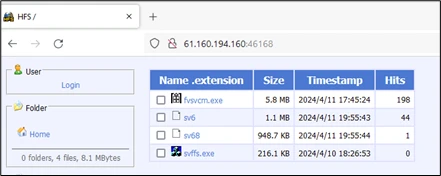
 We observed the attackers using a remote server located in China. The attacker’s server hosts additional cryptomining-related malware that are stored, for both Linux and Windows OS.

The downloaded file’s permissions are then elevated to grant execution privileges. The attacker also added a personal note to the victims:

Screenshot of note from attacker

Once done, hackers run the downloaded malware and remove the initial payloads from the workload. Finally, to engage in hands-on keyboard activity, the attackers establish a reverse shell connection to their remote server with the help of the Netcat tool. This will allow them to remotely access the container and take more control over the system.

Furthermore, these attackers use cronjobs for task scheduling, allowing them to execute malicious code at set intervals.

How do you identify if your cluster is vulnerable?

Admins who use the OpenMetadata workloads in their cluster should make sure that the image they are using is then the latest one.

To avoid OpenMetadata being exposed to the Internet, it is recommended that strong authentication measures be used and that default credentials be avoided.

If you want to get a list of all the images running in the cluster, use this command

kubectl get pods --all-namespaces -o=jsonpath='{range .items[*]}{.spec.containers[*].image}{"\n"}{end}' | grep 'openmetadata'

If you find any of the pods with a vulnerable image, ensure you update the image to the newest version.

How can Microsoft Defender for Containers help?

To avoid these attacks, Microsoft Defender for Containers is a robust security solution that provides agentless vulnerability assessment for Azure, AWS, and GCP. This allows you to detect vulnerable images in the environment before the attack.

Another good security solution to monitor Kubernetes clusters can be Microsoft Sentinel via Azure Kubernetes Service (AKS) solution for Sentinel, which provides an audit trail to keep an eye on user and system actions to detect suspicious activities.

Here are the indicators of compromise (IoCs) mentioned by security researchers in Microsoft:

TypeIoC
Executable SHA-2567c6f0bae1e588821bd5d66cd98f52b7005e054279748c2c851647097fa2ae2df
Executable SHA-25619a63bd5d18f955c0de550f072534aa7a6a6cc6b78a24fea4cc6ce23011ea01d
Executable SHA-25631cd1651752eae014c7ceaaf107f0bf8323b682ff5b24c683a683fdac7525bad
IP8[.]222[.]144[.]60
IP61[.]160[.]194[.]160
IP8[.]130[.]115[.]208

To avoid being victimized by this attack, Microsoft recommends users check clusters that run OpenMetadata workload and ensure the image is up to date (version 13.1 or later).

What are your thoughts on the matter? Share your opinions with our readers in the comments section below.

Edge’s Save as PDF is back, and you can save pretty much anything in this format

It has been over a year since Microsoft retired the Save as PDF option from its Edge browser, but it seems that this super useful capability is making a comeback. According to tech enthusiast, @Leopeva64, Edge Canary, and Edge Dev are now allowing users to use this option once again.

We’ve tried it on both Edge Canary and Dev, and we haven’t seen it yet, which means Microsoft is gradually rolling it out, but if it’s coming, then this feature could steal the show.

Basically, Edge will let you save anything on the webpage as a PDF document. There is currently a way to do it: you can always highlight something on a webpage, right-click it, and select Print, and it will also let you save the webpage as a PDF document with pictures, text, and so on.

But this method is not so direct, and not intuitive as the Save as PDF option. The latter lets you save anything in the format in a matter of seconds, by right click and selecting the option.Edge save as pdf

The Redmond-based tech giant has been making some big changes to the Edge browser: for instance, we found out that the company will lock the Settings page to those using Edge on unactivated Windows devices.

Microsoft will also enhance Copilot on Edge to help users draft emails more easily. With it, users can write emails more efficiently with the desktop version of Outlook, as the AI will suggest text, and complete sentences, and improve the clarity of the message.

Both of these new capabilities are now being tested in Edge Canary, and we don’t know for sure if they’re going to make it to the stable channel, but there is a big change they might. That means that those users browsing on Edge on unactivated Windows devices should consider activating their Windows.

Ultimately, they will have access not only to the full capabilities of Windows but a stable, secure, and safe Edge, as well.

Microsoft has unveiled the Windows AI Explorer requirements, and they’re quite demanding

Microsoft is actually thinking about introducing the new AI File Explorer to Windows 11, as the Redmond-based tech giant has hidden information on its system requirements in the latest Windows Insider builds.

According to a Windows enthusiast, Albacore, who discovered the strings revealing the information, Microsoft wants devices to have 16 GB of RAM, 225 GB free storage space, a Snapdragon X Elite NPU (HWID QCOM0D0A) processor, and ARM64 CPU, which is a relatively new and not so popular among casual Windows users.Windows AI explorer requirements

Turns out Windows 11 build 26100 (purported 24H2 RTM) contains the AI Explorer requirements baked into the OS:

  • ARM64 CPU
  • 16GiB of RAM
  • 225GiB system drive (total, not free space)
  • Snapdragon X Elite NPU (HWID QCOM0D0A)
Albacore

The new AI File Explorer is quite demanding on Windows systems, as you can see, but it should deliver appropriate capabilities. For instance, it will have a built-in history or timeline feature capable of searching everything Windows 11 users tell it to, using natural language.

The AI File Explorer will have access to everything on Windows 11 and it will greatly ease the way users find documents, chats, or any other files on this operating system.

You can even tell it a word, for instance, summer, and the AI File Explorer will display all the documents that include or reference the word summer, and it doesn’t have to be explicit, as this feature is also capable of context. With it, the AI File Explorer automatically suggests tasks when opening up an app on Windows 11.

Prior to unveiling the requirements necessary to run the AI File Explorer on Windows 11, Microsoft also published a paper describing a patented technology strikingly similar to the tool, which means, that one way or another, the company wants to integrate AI into Windows, with experiences especially tailored for usual customers.

Considering that Windows users still don’t use Copilot very much, according to our latest survey, it will be interesting to see how is Microsoft planning to to attract people to use the new AI File Explorer. By all means, it does sound exciting, but it will be a long journey, and these system requirements don’t help either.

Microsoft invests $1.5 billion in G42, marks AI push in Middle East, Central Asia and Africa

In a bid to expand its footprints in the region, Microsoft announced investments to the tune of $1.5 billion in G42, an AI giant headquartered in Abu Dhabi, UAE. With the deal going through, G42 will now run its services on Microsoft Cloud.

According to the official blog post, the partnership had the backing of the UAE and the US governments. After the deal, Microsoft President Brad Smith gets a seat on G42’s Board of Directors. The blog further reads,

G42 will expand its existing commitment to deploying Microsoft Cloud offerings, demonstrating confidence in Microsoft as its preferred partner to enhance services and deliver value-added solutions to its customers. With the partnership, G42’s data platform and other essential technology infrastructure will migrate to Microsoft Azure to benefit from industry-leading performance, scalability and security capabilities.

G42 was also quick to share the news on its official X (previously Twitter) handle and called it a step towards UAE becoming a global AI hub.

The deal is expected to aid industries in the Middle East, Central Asia, and Africa in harnessing the true potential of Artificial Intelligence and Microsoft Cloud.

G42’s past dealings with China

Ever since Microsoft made its investments in G42 public, the latter’s past dealings with China have been widely reported. G42 had to cut ties with China for the deal with Microsoft to go through. It has previously been accused of spying, according to Japan Today.

A Forbes report says that the deal hints at improving ties between the US and UAE, and the former trying to stay ahead of China in the AI race.

The New York Times reports that under the agreement, G42 will cease to deploy Huawei telecom equipment in operations, which the USA believes could be exploited by China to access critical data.

Beyond all the concerns, the deal will prove beneficial to both companies and countries. Going forward, G42, headed by Sheikh Tahnoon bin Zayed of the royal family, will be able to expand operations at an even faster rate with support from Microsoft.

The Redmond-based tech giant Microsoft is also aiming for AI solutions in industries. And to cement its position as the leader in the AI landscape, Microsoft is acquiring 1.8 million AI chips!

What do you think about the implications of Microsoft’s $1.5 billion investments in G42? Share with our readers in the comments section.

Corsair HS35 v2 headsets bring high-quality audio without breaking the bank

Corsair is famous for its gaming peripherals, and if you’re looking for a new pair of headsets, this is your lucky day.

The company has just introduced two new pairs of affordable headsets for PCs and consoles, so without further ado, let’s see what they can offer.

Corsair has just introduced two new HS35 v2 headsets

Finding a quality but affordable headset isn’t always easy, but according to TweakTown, Corsair might have just what you need.

The HS35 v2 headset comes with custom-tuned 50mm neodymium drivers that can produce high-quality sound.

If you need something more advanced, HS35 Surround v2 headset has a USB receiver to deliver Dolby Audio 7.1 surround sound when connected to a PC or Mac.

According to Corsair, this is especially noticeable in games such as Overwatch 2 or Starfield. Both headsets have adjustable headbands, making them comfortable for longer gaming sessions.

In addition, there’s a comfortable and soft fabric used for earpads, so you’ll never feel uncomfortable while using these headsets.
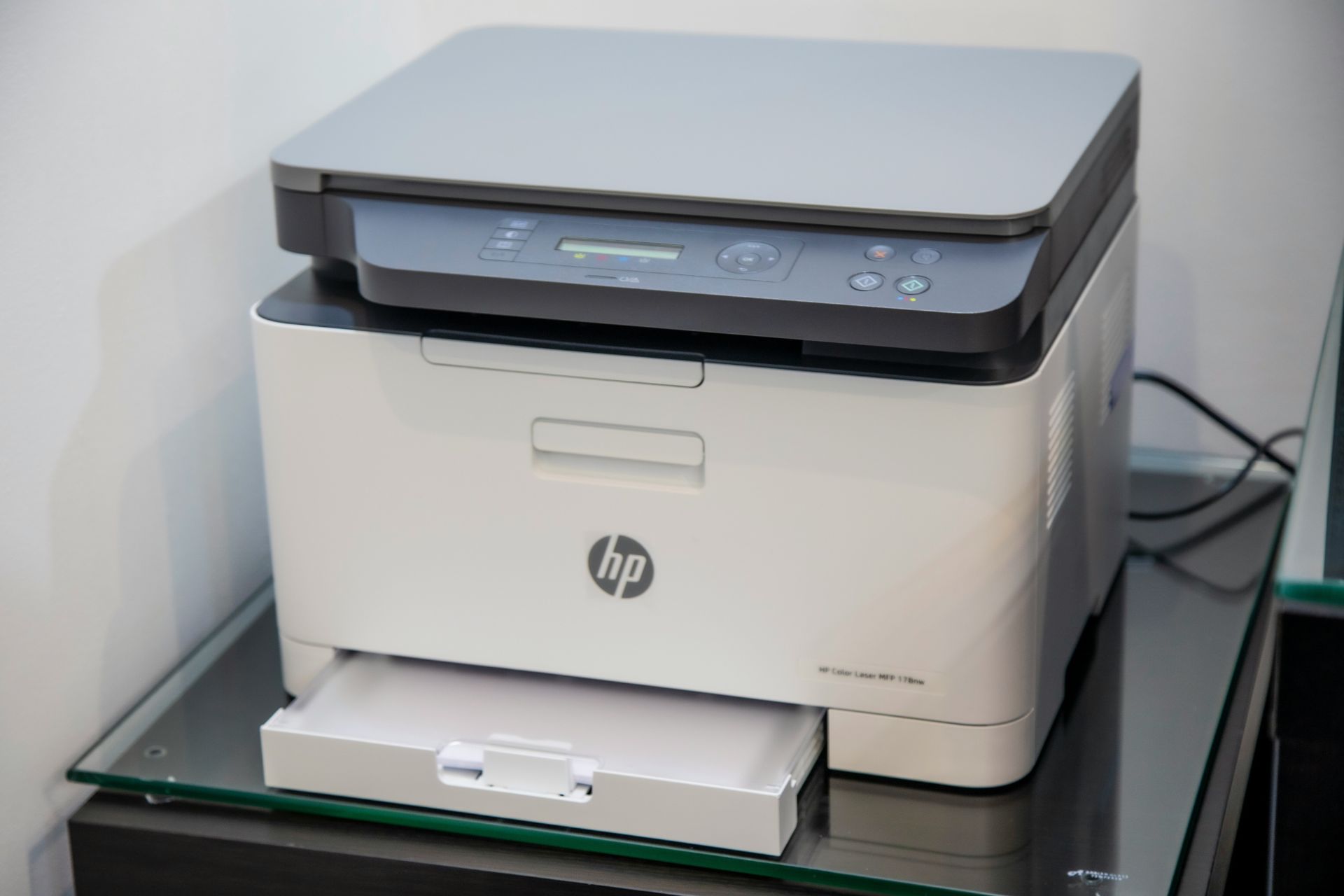
Both headsets have on-ear volume control with a mute button, and thanks to the 3.5mm cable you can connect them to a PC, PlayStation, Xbox or Nintendo Switch.

As for pricing, the HS35 v2 headset costs $49.99 while the HS35 Surround v2 model is priced at $59.99. Both models are now available in North America.

In case you prefer something different, don’t miss the recently released Razer BlackShark V2 Pro headset.

How Windows Security reacts when you type Windows password in Notepad or websites with Enhanced Phishing Protection active

Phishing attacks are fairly common as they allow hackers to obtain your information such as login data.

To prevent this, Microsoft has developed Enhanced Phishing Protection, and we can finally see how it works in action.

Enhanced Phishing Protection can now alert you if you type your password on unsafe websites

Many users tend to save their passwords in Notepad since it’s convenient, but this is a terrible practice since Notepad saves your passwords in plaintext format.

By doing so, anyone who has access to your PC, such as a hacker, malware, or anybody else, can find and read them.

If you happen to do that, Enhanced Phishing Protection will now inform you that it’s not safe to save passwords in this format.

This will even generate an event in the Event Log that your system administrator can later review if needed.

That’s not all, the feature will also detect if you type your Windows password to a known phishing website in any browser and give you an alert in the Defender for Endpoint portal.

By doing so, users will be prevented from sharing their passwords to domains that are associated with phishing attacks.
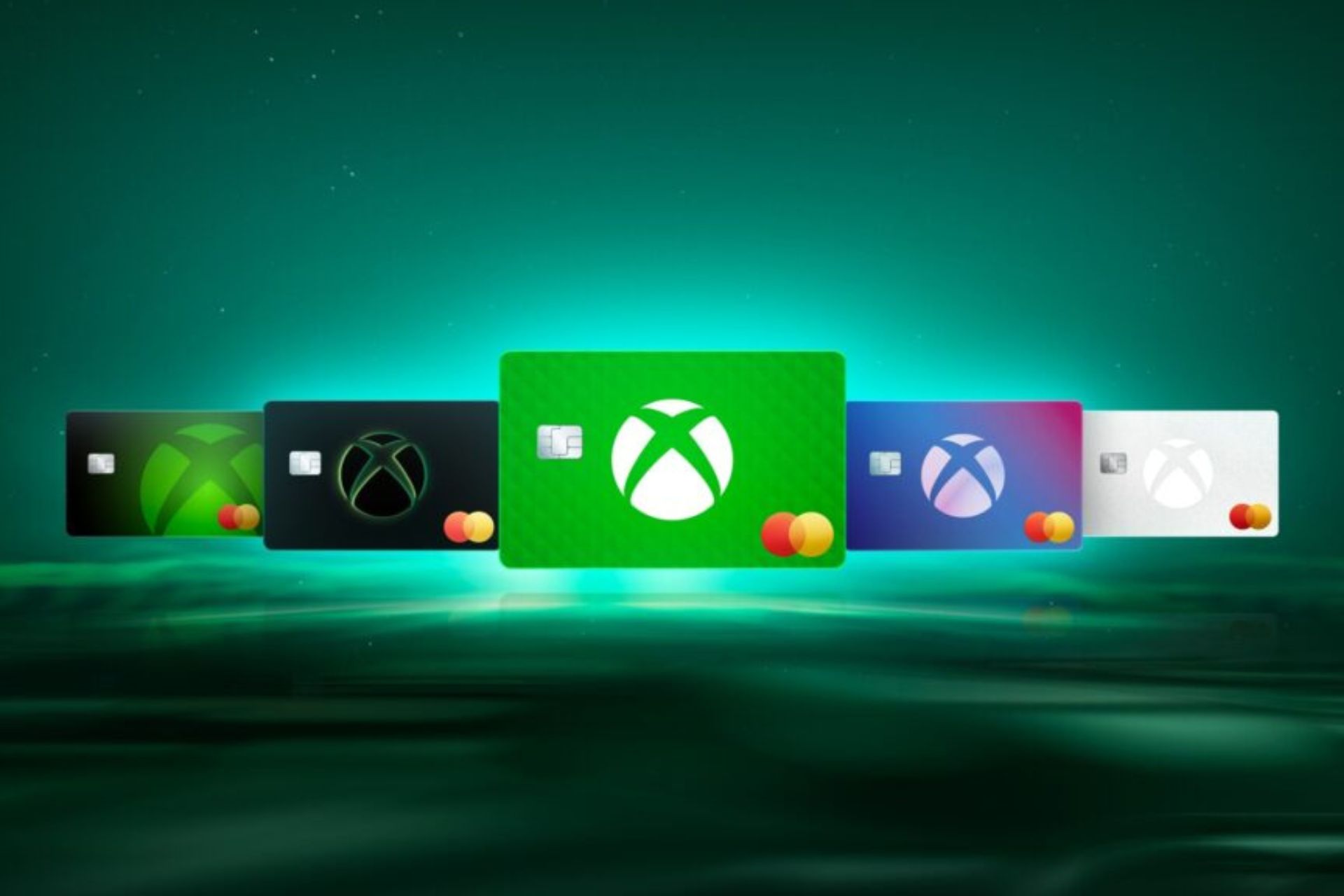
While this sounds great, the feature currently only works with your Windows login password.
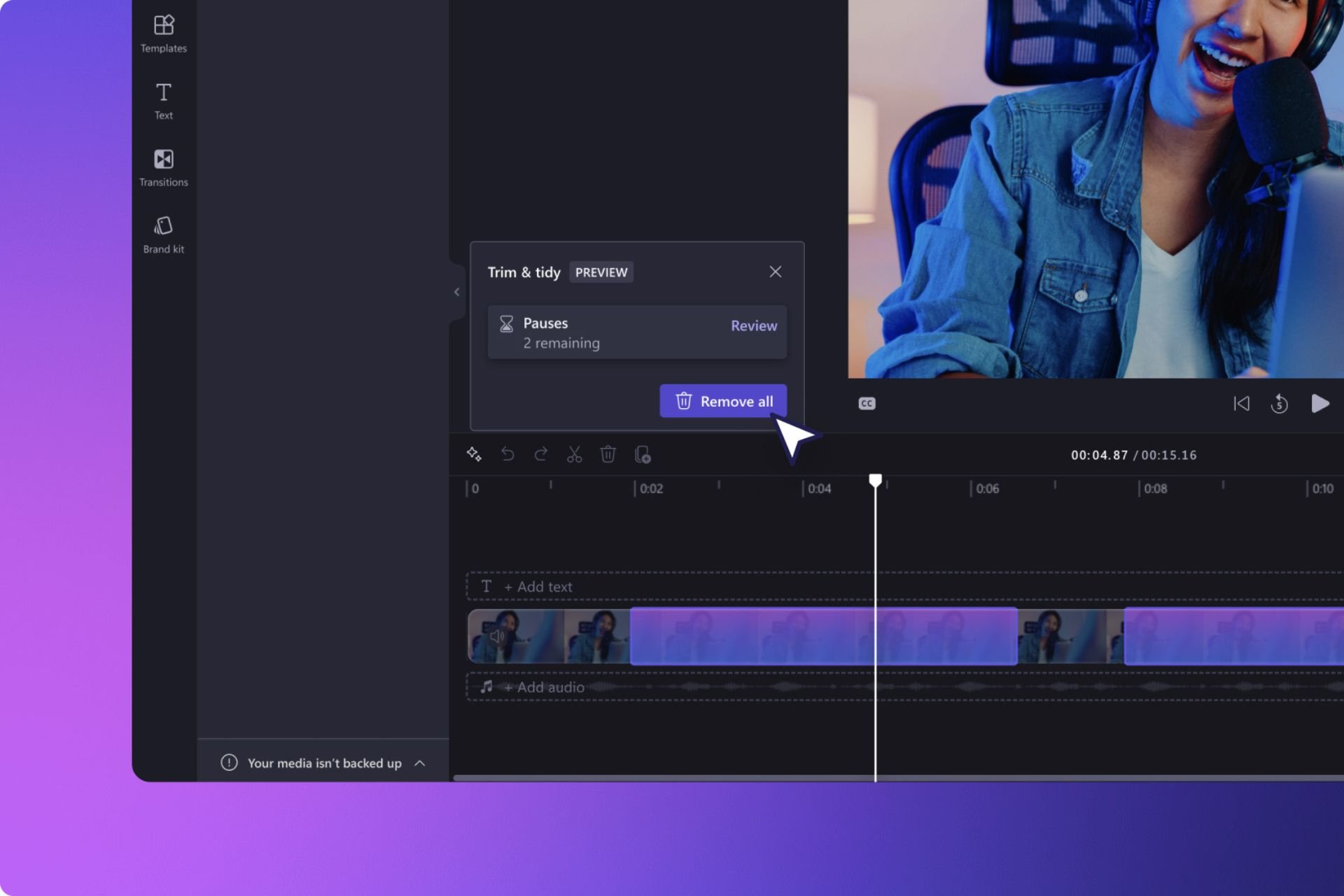
This isn’t a major problem, especially if you have a Microsoft account and you use that account to access various Microsoft services on the web.

Since Microsoft and Google are often impersonated by scammers, a feature such as this can put an end to phishing attacks.

In other news, Duo was struck by a phishing attack, so be prepared for more phishing attacks in the future.