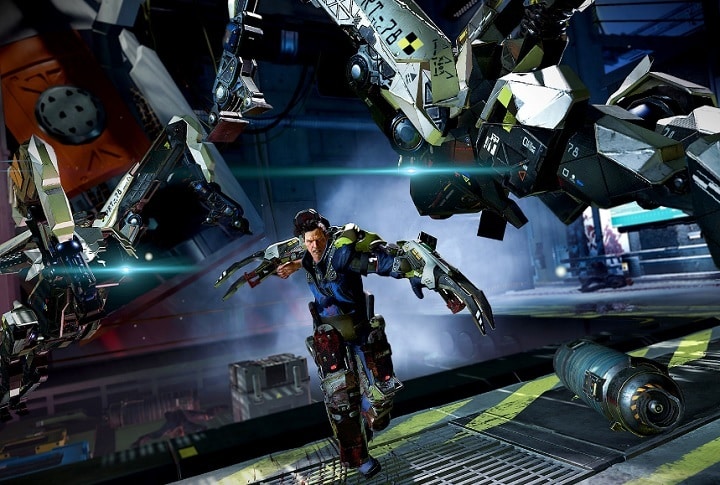
How to fix common The Surge bugs

If you’ve encountered various technical issues while playing The Surge, this article may help you. Follow the troubleshooting steps listed below to fix game crashes, controller issues, and more.

 The Surge bugs [FIX]

The Surge won’t run

1. Make sure that the Surge is correctly installed:

1. Launch Steam > go to Library
2. Right click on The Surge > go to Properties
3. Click the Local Files tab > click the option “Verify integrity of game cache…”

2. Update or repair Microsoft DirectX:

1. Launch Steam > go to Library
2. Right click on The Surge > go to Properties
3. Click the Local Files tab > click the option Browse local files
4. Open the folder “_CommonRedist”, then the folder “DirectX” and “Jun2010”
5. Run DXSETUP.exe.

3. Install or repair Microsoft Visual C++ Redistributable:

1. Launch Steam > go to Library
2. Right click on The Surge > go to Properties
3. Click the Local Files tab > open “_CommonRedist” > go to the vcredist folder >  click 2012
5. Run vc_redist.x64.exe > click Install or Repair
6. Run vc_redist.x86.exe > click Install or Repair

4. Configure the game in administrator mode:

1. Launch Steam > go to Library
2. Right click on The Surge > go to Properties
3. Click the Local Files tab > click the option Browse local files
4. Open the bin folder > right click TheSurge.exe > click Properties
6. Click the Compatibility tab
7. Check Run this program as an administrator > hit OK.

5. Update your GPU driver


Game controller issues

Please remove the game controller from the Steam Big Picture Mode:

1. Launch Steam > switch to Big Picture Mode
2. Go to Settings > go to Controller > click Controller Settings
4. Uncheck Xbox Configuration Support and Generic Gamepad Configuration Support
5. Click OK > exit the Big Picture Mode > run The Surge. The game should now manage the controller natively.


Flickering graphics

1. Install the latest AMD / NVIDIA driver updates from the links below:

2. Reset your graphics settings:

1. Open File Explorer > go to Documents > open the folder “The Surge”
3. Delete the settings.ini file and run The Surge.

If you’ve come across other workarounds to fix various The Surge issues, you can help the community by listing the troubleshooting steps in the comment section below.

RELATED STORIES YOU NEED TO CHECK OUT:

Posted in Fix

Microsoft’s Office Desktop app is available on the Windows Store ahead of its official release

The Office Desktop apps have begun showing up in the Store — even if you can’t download them yet.

You can already see the Office apps on the Windows Store

At the beginning of May, Microsoft announced that it would bring full-blown desktop applications to its Windows Store. This is a huge development, especially as Redmond rolls out the Windows 10 S, a variant of Windows 10 that only runs apps from the Windows Store to improve security.

Even if Microsoft only announced its intention of bringing the Office desktop apps to the Store, opening the Windows Store and searching for Word 2016 will bring the Word app up in your search results. However, you won’t be able to install it or to see the app listings. Because of this, it’s pretty certain by now that Microsoft is ahead of schedule in bring Office Desktop apps to the Windows Store.

The Office desktop app will be a great advantage for Windows 10 S. Microsoft has not yet announced the exact date on which the Office Desktop app will be available for download on the Windows Store, but we’re sure this will happen very soon.

Microsoft is trying hard to show everyone the value of its Windows Store and is the main reason why it keeps bringing classic apps here. Stay tuned, because as soon as we get more information, we will let you know. You’ll also be the first to know once the Office Desktop Apps are available for downloading and working properly. Until then, keep reading our news on Microsoft and its latest operating system.

RELATED STORIES TO CHECK OUT:

New enterprise features points to a Windows Phone resurrection

According to Microsoft, some fresh Windows Phone enterprise features are on their way to bring the platform back from the brink. In what is a surprise to most, it seems that Microsoft has been quietly working on some brand new features on the mobile front, which is good news even if we’re not exactly sure what features to expect. The enterprise focus is no surprise, as the enterprise has become Microsoft’s priority these days, so it makes sense that mobile businesses will be heading in this direction.

Microsoft’s Brandon LeBlanc posted on his Twitter account that “The team is working on delivering some features for enterprise customers later this summer.”

Rumors say that the Surface Phone will mostly focus on enterprises

This device is the thing that comes first in our minds given the fact that Microsoft keeps saying its commitment to the mobile platform is not dead. Considering this, current rumors that the Surface Pro will mostly focus on enterprises may be true. Microsoft is rumored to reveal more versions of the Surface Phone and one of them is targeted at enterprises.

We’ll see whether the consumer market remains or not a priority for the company as well. We just have to wait until this fall for Windows 10 Mobile to come as Redstone 3, even if improvements in the mobile zone might not be groundbreaking.

How to Enable & Use Storage Sense on Windows 10

To keep your system running smoothly, Microsoft has a feature called Storage Sense on Windows 10. The feature is designed to clean your drive and free up space automatically.

In case you’re not familiar with this feature, in today’s guide we’re going to show you how to properly use it on your PC and ensure that you never run out of space.

Benefits of using Storage Sense

  • It’s fully automated, so you won’t have to manually free up storage space.
  • It removes junk files, and files from the downloads folder, and Recycle Bin items, thus ensuring that Windows has enough drive space to work.
  • Highly customizable allowing you to choose which type of file you wish to remove and how often.
  • Supports scheduling, so you can fully automate it and let it run without your input.
  • It can work as a silent assistant and move unused files to cloud storage and convert them to online-only files.

How do I enable Storage Sense on Windows 10?

1. Use the Settings app

  1. Press the Windows key + I to open the Settings app.
  2. Next, navigate to System.
  3. Select Storage in the left pane. In the right pane, make sure Storage Sense is enabled.

2. Enable Storage Sense with GPO

  1. Press Windows key + R and type gpedit.msc.
  2. Navigate to the following path: Computer Configuration\Administrative Templates\System\Storage Sense
     
  3. Double-click on Allow Storage Sense.
  4. Set it to Enabled and click on Apply and OK.

3. Activate Storage Sense on Windows 10 via the registry

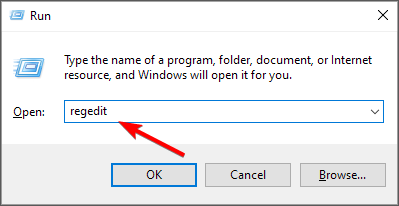
  1. Press the Windows key + R and enter regedit. Click OK.
  2. Navigate to the following path: HKEY_LOCAL_MACHINE\SOFTWARE\Policies\Microsoft\Windows
     
  3. Next, right-click Windows and choose the option to create a new Key.
  4. Name the new key StorageSense and select it.
  5. In the right pane, click the empty space and select New. Now choose a DWORD (32-bit) Value.
  6. Name the value AllowStorageSenseGlobal and double-click it.
  7. Set the Value data to 1 and click OK to save changes.

4. Activate Storage Sense via the command line

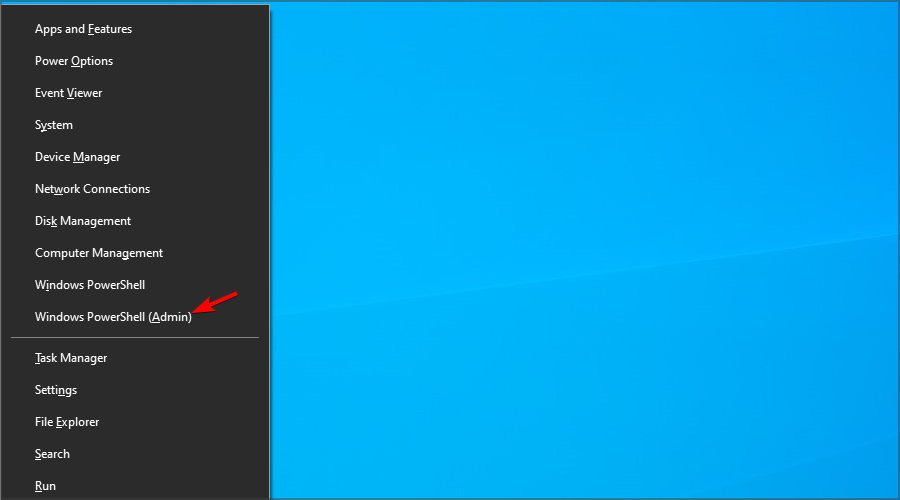
  1. Press the Windows key + X and choose Windows PowerShell (Admin).
  2. Next, run the following command: start ms-settings:storagesense
  3. Storage Sense configuration window will now open.

How do I use Storage Sense on Windows 10?

  1. Open Settings, go to Storage, and select Configure Storage Sense or run it now.
  2. Configure how often you want to clear your drive and the files that you want to remove.
  3. If you want to run the scan now, click the Clean now button.

Is Storage Sense good or bad for Windows 10?

  • Storage Sense is beneficial to Windows since it will remove unnecessary files and allow it to work better.
  • It has no impact on your performance, so you won’t even know that it’s running.
  • It works great with the files on-demand feature and OneDrive.
  • The only issue is that it can delete files from the Recycle Bin or Downloads folder if you’re not careful.

Storage Sense on Windows 10 is a small but useful feature, and it can come in handy if you don’t want to manually clean your system drive. If you need more space, we have a guide on how to free up disk space on Windows that you shouldn’t miss.

Don’t be hesitant to free up space on your PC, because even if you delete something that you shouldn’t, you can easily restore accidentally deleted files.

For Windows 11 users, learn how to use Storage Sense to automatically remove junk files, free up storage space, and keep your system performing at its best without manual cleanup.

Have you ever used Storage Sense on Windows 10? Share your experience with us in the comments section.

KB4020102 causes black screen issues, minimizes game windows, and more

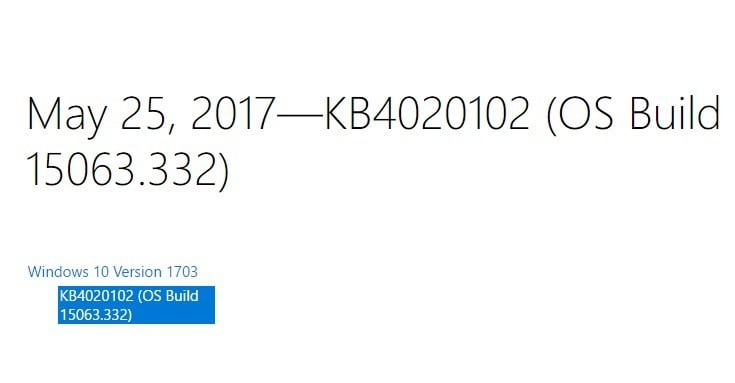
Microsoft recently rolled out a new cumulative update to Windows 10 version 1703. Update KB4020102 brings only quality improvements. No new operating system features are being introduced in this update.

Unfortunately, Windows 10 Creators Update KB4020102 also brings issues of its own. In this article, we’re going to list the most common KB4020102  bugs reported by users, so that you know what to expect in terms of issues.

KB4020102 reported bugs

KB4020102 won’t install

Users report that the download process sometimes stops unexpectedly, preventing them from actually installing KB4020102.

If you’ve encountered this problem, try running Microsoft’s dedicated Update Troubleshooter. You can download the tool from Microsoft’s support page.

Black screen issues

Many users report that KB4020102 makes their PCs unusable. More specifically, after reboot the screen remains black with a box in the left corner. After a few minutes, a message appears on the screen informing users that the OS is waiting for a program to respond. However, it doesn’t specify which programs is not responding.

I just installed the latest update for  W 10 Creators Update (KB4020102). After the restart, I entered my PW for my MS account. It churned a bit but then I got a black screen with a box in the left upper corner saying “Personalized Settings (Not Res….)”. Nothing happens after this. The box is so small that it does not show the whole text! Then after minutes, another box appears where it says : Close the program or Wait for the program to respond. Nothing happens, even waiting for the program to respond. Which program????

[…] So I shut down the PC pulling the plug. Then booted again with the same happening again. Used ALT-CTRL-DEL again and opened Task Manager. For a short moment I saw “Windows Explorer” appearing which then immediately disappeared. […]

KB4020102 causes hard locks

Had to roll this one back. It was causing hard locks in which I had to completely power off the PC before it’d boot again. Been fighting with this since yesterday morning pretty much.

Every time this update would install, hard crash. Computer ran just fine for hours before I allowed it to update, and within 10 minutes of updating it did another hard lock. Removed KB4020102, no problems at all.

Processes spawn erratically and SearchUI.exe keeps hanging

Some users decided to roll back shortly after having installed KB4020102 due to a series of process that spawned erratically.

Had to roll this one back. Some processes were spawning (cmd window flashing and going away) and SearchUI.exe kept hanging when I tried to go to event viewer to see what. Appears to have had trouble installing printer drivers. SearchUI was bugging out after a restart.

Games and movies keep minimizing

If you can’t play your favorite games or watch your favorites movies in full screen, you’re not the only one. Users report that after installing KB4020102, games and movies keep minimizing.

After the update games and movies on fullscreen keeps minimizing… Does this happend to anyone else?

Have you installed KB4020102 on your computer? Did you encounter any other issues apart from those listed above?

RELATED STORIES YOU NEED TO CHECK OUT:

How to fix common Mirage: Arcane Warfare bugs

If you’ve encountered various Mirage: Arcane Warfare issues, you’ve come to the right place. In this article, we’re going to show you how to quickly fix common Mirage: Arcane Warfare bugs so that you can resume playing as soon as possible.

Mirage: Arcane Warfare game issues [FIX]

  • Game crashes

1. If  Mirage: Arcane Warfare crashes, verify your game files through your Steam Library:

Go to Properties > Local Files > select “Verify integrity of the game cache…”

2. Reduce your Ragdolls and Blood Pools to minimum values and set Gore to Off/None

3. Reduce your In-game Browser Pings from Default/Maximum to 500:

Go to Steam > Settings > In-Game and select 500 from the dropdown box

4. If you have an AMD Video Card, install the latest AMD drivers and set Framerate Smoothing to Uncapped in the game’s settings. Also, disable Raptr, aka AMD Gaming Evolved, from your AMD/Radeon settings page.


  • Loading issues

If the game takes more than 5 minutes to load, or hangs on the Mirage Splash screen, close it via the Windows Task Manager. Then launch it again and this time it should load very quickly.


  • FPS drops

1. First, quit the game, launch Steam again and check if this issue persists. Then, make sure that you’ve installed the latest NVIDIA/ AMD/ Intel driver updates on your computer.

2. Open the Windows Task Manager, go to the Details tab, right-click on TBL and set Priority to High.

3. Make sure that your game is using your dedicated video card (GPU) to launch the game.

4. Try using the game’s Auto setting for Video Quality.

5. Reduce Shadow Quality and Effects Quality first, then try lowering other settings, including Resolution Scale.

6. Reduce the Ragdoll Duration and Blood Pools settings as these affect performance.

7. Reduce your FOV (Field of View) setting.

8. Close other CPU-heavy apps and programs.

9. Close web browsers while playing.


  • Matchmaking or Server Browser Issues

To fix these issues, simply restart Steam.


  • Lag

1. Adjust your Matchmaking and Server Browser Settings to a lower Ping value

2. Stop all downloads while playing online games

3. Set your PC as priority on your router if this option is available

4. Play Mirage: Arcane Warfare on an Ethernet connection to avoir packetloss


  • The latest game updates won’t install
  1. Run Command Prompt as administrator, type the netsh winsock reset command and hit Enter
  2. Restart your computer > update the game.

  • Error 2e4
  1. Disable Steam as Administrator and Compatibility Mode and exit the tool.
  2. Open Steam again and launch the game. This simple action should fix this error.

  • Unreal Engine 4 installs everytime when the game is launched

Makes sure that Windows has the latest updates installed. As a side note, this issue appears to affect mostly Windows 7 users.


If you’ve come across other workarounds to fix various Mirage: Arcane Warfare issues, you can list the troubleshooting steps in the comment section below.

RELATED STORIES YOU NEED TO CHECK OUT:

Posted in Fix

Ubisoft releases Far Cry 5 debut trailer, watch it here

If you loved previous Far Cry games, you’re probably very much looking forward to play Far Cry 5, the next installment in the popular action adventure franchise to be released in February. Today, Ubisoft revealed some new details about the game as well as an exciting debut trailer that you can watch below:

Far Cry 5 will be the first episode set in America, more precisely in Hope County, Montana. Just like previous titles though, the game will feature a charismatic villain which happens to be the leader of local religious cult called “Eden’s Gate.” On the Ubisoft blog, Executive Producer and Creative Director Dan Hay explained that the team worked hard to create an atmosphere filled with oppressive uncertainty:

We want to make sure that the game builds a believable pressure. So we built a beautiful world, and we want you to visit it. We want you to be able to experience all the gameplay, the anecdote factory, everything you know from Far Cry. But we want to put a believable pressure on that.

You can watch Hay give more details about the setting, the allies and enemies you’ll meet in Far Cry 5 in this other video published today:

Far Cry 5 will launch on Xbox One, Playstation 4 and Windows on February 27, and you can expect the game to get some stage time during Ubisoft’s E3 press conference on June 12.

Strange NTFS bug can cause web pages to crash Windows 7 and 8.1 PCs

If you’re still running Windows 7 or Windows 8.1 on your PC, your machine is currently vulnerable to a strange bug that can cause it to significantly slow down or even crash. The issue will only surface when browsing a website using a special filename for something like an image source, but Windows 10 PCs are not affected by this bug.

As Ars Technica explains, the special filename in this case is $MFT, which is used by the NTFS filesystem for a specific metadata file. As it turns out, webpages that use $MFT as a directory name will cause Windows 7 and 8.1 PC to slow down or worse, as the web browser will try to access the bad file which is handled in special ways in these version of Windows. The report notes:

If the filename is used as if it were a directory name—for example, trying to open the file c:\$MFT\123—then the NTFS driver takes out a lock on the file and never releases it. Every subsequent operation sits around waiting for the lock to be released.Forever. This blocks any and all other attempts to access the file system, and so every program will start to hang, rendering the machine unusable until it is rebooted.

The unusual bug has already been reported to Microsoft but the company has yet to say when a fix will be available. As it’s not well known yet, you probably have very few chances to encounter malicious websites exploiting it to force you to reboot your PC.

Microsoft’s Xbox One could be dumping OneGuide

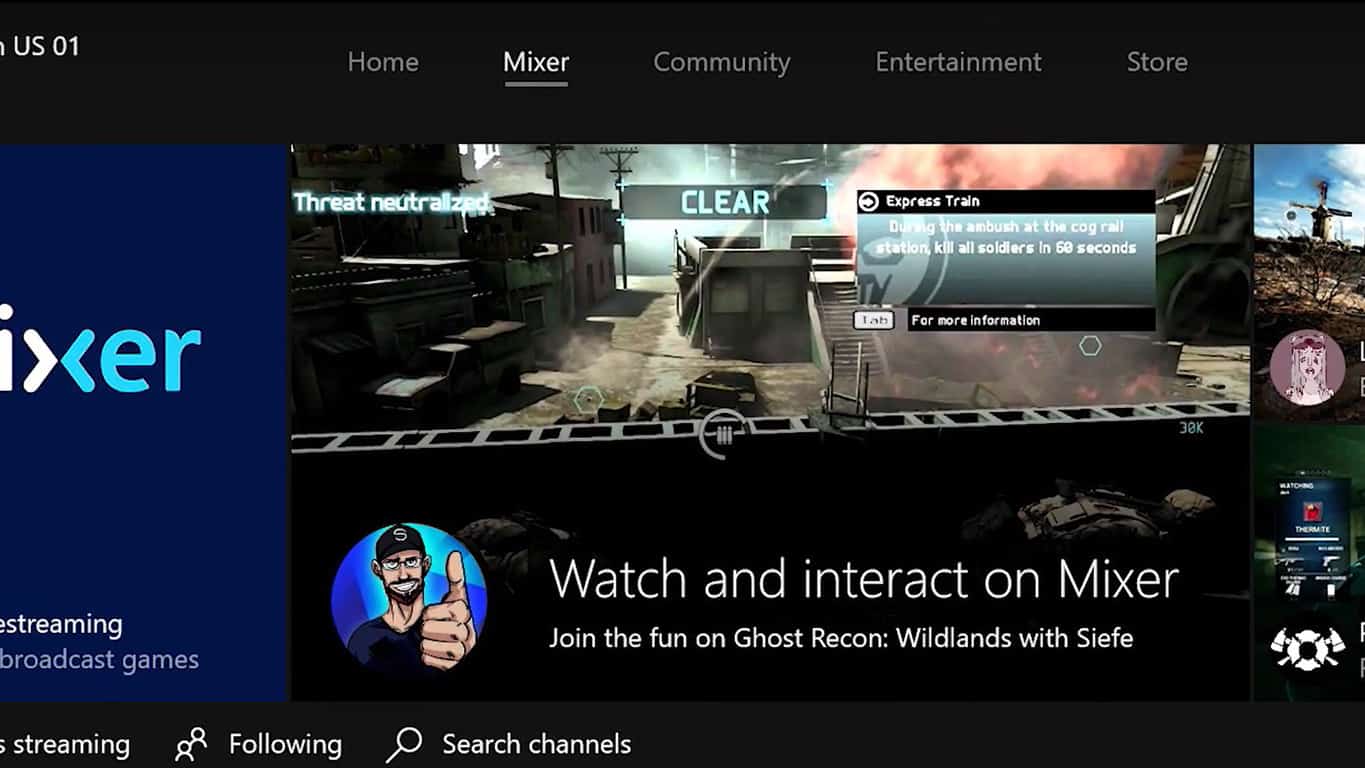
Something rather curious that was revealed (possibly unintentionally) during the Beam/Mixer announcement last night was Microsoft’s apparent plans to either remove the OneGuide section from the Xbox One dashboard or rename it.

The first hint of an evolution or cancellation of OneGuide came in the Mixer announcement YouTube video which offers a brief look at a new Xbox One dashboard, one that’s noticeably missing the OneGuide tab (see above image) and instead has a new section named Entertainment. The second clue is a screenshot of another dashboard (see image below) used in the official Mixer announcement blog post on Xbox Wire which shows neither an OneGuide nor Entertainment tab. In this possible build of the Xbox One operating system, it appears they’ve discarded the feature completely.

Xbox One dashboard - Mixer

It’s worth noting that at the time of this writing, OneGuide is still present on both public and Xbox Insider builds of the operating system. The feature was recently removed from the official Xbox apps though in an update.

OneGuide is a section of the Xbox One dashboard that brings together movies and TV shows from a variety of sources. It’s not used by all Xbox One owners but plenty do and would likely miss it if it was taken away.

Do you use OneGuide and would you miss it if it were gone? Would you be okay with a rename? Let us know in the comments below.

Beam apps update with Mixer name on Xbox One, iOS, and Android

After the official announcement of Beam’s rebranding as Mixer last night, all of the official Beam apps on Xbox One, iOS, and Android have updated to reflect the change. All of the apps have been rebranded as Mixer and boast a new icon however the interior of the apps hint at a rather rushed update attempt by Microsoft with the Beam labelling still being prominent within the Xbox One app and the old name being referenced within the menus on iOS.

Mixer is Microsoft’s attempt to cash in on the increasingly popular live streaming craze which has exploded in the past couple of years. Mixer’s userbase is quite small when compared to the numbers held by YouTube and Twitch (both direct rivals for Mixer) but it is growing and is expected to get even bigger once Microsoft implements it directly into the Xbox One dashboard in the coming months.

Do you use Mixer? Let us know why or why not in the comments below.

The app was not found in the store. ?


The app was not found in the store. ?

Back up your Windows activation data with the Advanced Token Manager

Advanced Tokens Manager is an easy app that helps you with Windows and Office activation backup and restores. The program is currently available only as a release candidate and while Windows 10 is not supported just yet, you can only use the program for Windows 7 or older or phones activated with Windows 8.1 and maybe also Windows 10.

Windows activation backup

You can start the program straight from the location you extracted it to. It will display Windows Activation information from the beginning including the license product key, token information, and license status. Press the Activation Backup button to save the activation tokens.

Here are some important things you need to remember:

  • Restore will work only if you haven’t changed major parts of the hardware.
  • Only permanent activations are supported — limited ones are not.
  • Installing a retail copy of the OS is required for upgrade activations.
  • Avoid activation problems by using the driver status at the time of the backup creation.

The program creates a new folder, Windows Activation Backup, in the root of the program folder. You can use the backup to restore the activation of the OS system later, which works when the program detects that the license status isn’t activated.

Office activation backup

Office activation backup works the same: just click Office Activation backup and you’ll see the connected information such as the Office Product key and license status. Click the activation backup button, confirm and wait for the activation tokens to be saved in Advanced Tokens Manager’s program folder.

Manage Microsoft licenses with Advanced Tokens Manager

The main purpose of the program is to restore activation tokens after installing Windows to avoid activation issues after the system is activated or to restore backups.

It may be used to restore activation data so that the OS will activate without having to go online or you as the user having to call up Microsoft for support.

You can download Advanced Token Manager from JoshCellSoftwares.

RELATED STORIES TO CHECK OUT:

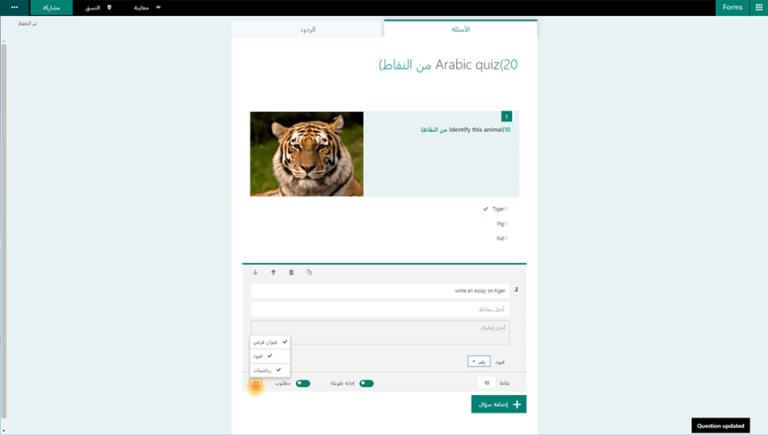
Microsoft Forms improvements include updated portal and right-to-left reading

Yesterday the Office team took the wraps off its updated portal and new languages for its Microsoft Forms software.

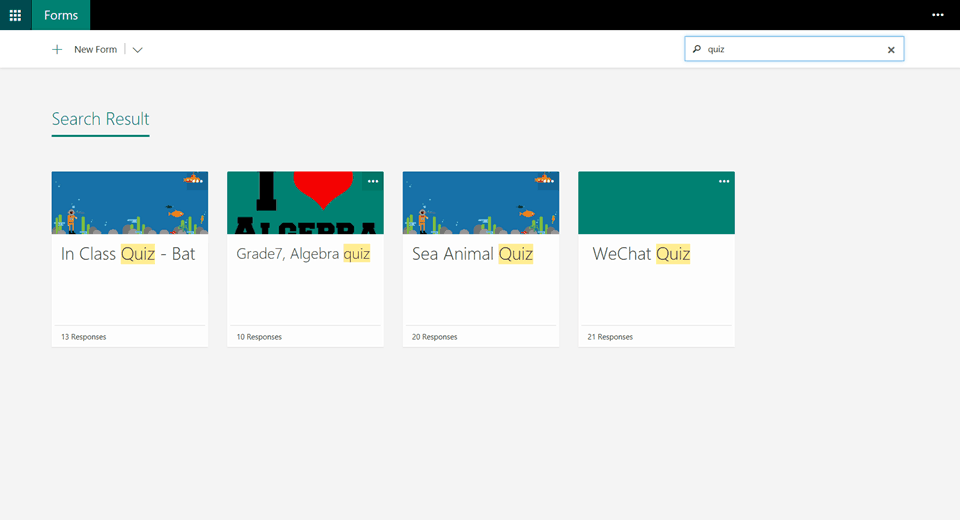
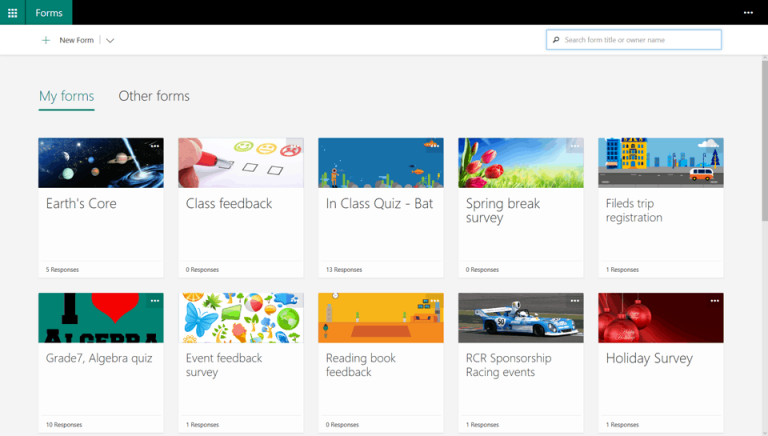
Rolling out to customers is a new look and feel that brings a snapshot view of each form as well visible titles, background images, and responses within the highlighted forms. To ease navigation, the Office team also include a universal search field in the top-right corner of Microsoft Forms where customers can grab forms by just tying in the owner’s name or title.

Perhaps, most importantly, Microsoft Forms is being boosted with additional support for 26 new languages as well a new option of right-to-left reading for languages in Hebrew, Arabic, etc.

To learn more about the new updates rolling out to Microsoft Forms, a customer can visit the Office blogs for information about the new features as well create their first form with the provided instructions.

Let us know your thoughts about the new updates.

Xbox Store is getting 4K HDR content, starting with The Lego Batman movie

Looking to lay your eyes on some nice looking new content? Those who invested in an Xbox One S will finally be getting a peak at the 4K HDR content that they were promised, as the Movies & TV app has begun selling The Lego Batman Movie. Strangely enough, this is the first major film to be sold on Xbox One that’s available in 4K UHD – and the first film period in the marketplace to offer High Dynamic Range (HDR.) The standard definition of the film costs $15, the high def version costs $20, and the fancy 4K HDR version will cost you $30.

Of course, you’re not going to be able to get the full experience of the 4K HDR version of The Lego Batman Movie unless you have a 4K TV that supports High Dynamic Range – so don’t spend the money unless your hardware is up to date. You’ll also need to keep in mind that you’ll need an Internet bandwidth of 20 Mbps on your Xbox One. If that’s all in order, you can go and buy the movie right now in the Movies & TV app on your console.

Forza games still attracts over 4 million players across all platforms

The Forza franchise attracts over four million players each month. With this stat Turn 10 creative director Dan Greenawalt revealed that the racing franchise is still quite popular among the player community in an interview with IGN.

However, four million players is still a decline compared to 17 million players in December a few months after the release of  Forza Horizon 3 was released. Nevertheless, Greenawalt says that the company is satisfied with the number of monthly players and that the Forza community is one of the largest in the world.

“It’s probably worth noting that just this last month, in March, we had 4 million active players in the Forza community. That makes it one of the largest racing communities in the world. And it’s a very diverse group, as you would know.”

Forza Motorsport is available on both Windows 10 and Xbox One and is perfect for multiplayer due to its cross-platform compatibility, something we’re sure plays a big part in the game’s popularity. The title’s number of players will surely go up in the coming months because Turn 10 Studios is preparing a new installment of the game. Forza Motorsport 7 should be announced at E3 2017 and is likely to be released in September, which has become the traditional month for new Forza Motorsport games. While we still don’t know how the game will look, if developers continue with the practice of making good entires in the series, fans surely have something to look for.

What do you think about Forza games? Have you played them? Let us know in the comments below.

RELATED STORIES YOU NEED TO CHECK OUT:

Microsoft releases Code Builder for Minecraft Education Edition

Microsoft just launched Code Builder for Minecraft Education Edition three weeks after announcing it at the MicrosoftEDU event. Thousands of players worldwide downloaded the Code Builder Beta and now every user has the opportunity to try it.

Code Builder for Minecraft is a new tool by Microsoft designed to introduce coding to children in schools through their favorite game. The tool uses a drag and drop method kids can use to construct tsimple programs by putting code blocks one on another.

“Code Builder for Minecraft: Education Edition is a brand-new extension that allows educators and students to explore, create, and play in an immersive Minecraft world – all by writing code. Connecting to learn-to-code packages like ScratchX, Tynker, and a new open source platform called Microsoft MakeCode, players start with familiar tools, templates and tutorials. And, Code.org will bring Code Studio to Code Builder later this year to support even more learning opportunities,” says Microsoft.

With Code Builder for Minecraft Education, Microsoft combined two popular learning methods. First, Microsoft has been used in education if many countries for years. And now, the game has one more benefit to offer. Additionally, coding blocks and drag and drop programming are taking over as one of the most popular ways to start learning to program.

Microsoft also presented a few teaching tips and lesson plans to teachers so they can easily organize their classes and expose students to as many coding techniques as possible.

In addition to Code Builder for Minecraft Educatopm Edition, Microsoft will also release other tools later this year. The list of announced tools includes Command Blocks, texture pack support, villager trading, adventure mode, concrete, llamas, and additional languages.

RELATED STORIES YOU NEED TO CHECK OUT:

StarCrawlers bugs: Game crashes, problems saving, and more

StarCrawlers is a modern version of a classic RPG dungeon crawler set in a spacepunk universe. As a player, your task is to assemble a crew of renegade adventurers to take on dirty jobs that include hunting bounties, sabotaging rivals and conducting corporate espionage.

StarCrawlers will also put your troubleshooting skills to the test. Players report the game is affected by a series of bugs. In this article, we’re going to list the most common StarCrawlers issues reported by gamers so that you know what to expect.

StarCrawlers reported bugs

Game save won’t work

Well, the good news is that I only lost two hours of play time. The bad news is that all of my main character saves, both in the station and in the field, were lost after I exited the game and tried to reload. Field saves gave me a blank screen. […] Thank you for reminding me why day-one purchaces on games are a bad idea. I guess I’ll wait a month for you to fix the problems before coming back.

Hitching

Never had this problem during early access, but after 1.0 today, during combat, attacks are causing a slight hitch. Is this a known issue and is there a workaround? This is really off putting, especially in what up until now has been a very fun game that played flawlessly.

StarCrawlers crashes

So i was playing tonight and, after 40 minutes => game crashed.
Don’t know why, don’t know what caused it, I already played more than 40 minutes on a run without problems …

Dialog won’t scroll

Happened a few times now that when talking with a rep a part of what he’s saying isn’t known to me, because it goes behind the window and I cannot scroll :s Please fix this, it’s quite annoying to miss potentially vital info.

Players can’t start a new game

When startting a new character, and after selecting backstory choices from several pages, I get to the last one and while the “Accept & Begin” button is “active” (it “clicks” when I click on it”), nothing happens. I also cannot choose any of the 3 backstory options on that last page. I’ve tried several times from scratch. […]
As a side note, there doesn’t seem to be any way to return to the main menu from the New Game.

This issue is caused by the Razer SDK. If you’ve encountered this problem, try uninstalling and reinstalling Synapse. StarCrawlers’ devs have already contacted Razer about this issue and a hotfix should soon be available.

How to fix StarCrawlers bugs

StarCrawlers recently received an important update fixing a bevy of issues affecting the game. You can read the patch notes here.

RELATED STORIES YOU NEED TO CHECK OUT:

NVIDIA partners to launch ready-built Battlebox gaming PCs featuring GTX 1060 or 1080 GPUs

NVIDIA is creating some of the best GPUs you can buy these days, and you can usually find them in many gaming PCs from Alienware, ASUS and many other manufacturers. However, it seems that the GPU designer is now interested in competing with more established PC gaming brands, though the company is choosing an interesting way to do it.

“If you’re someone who prefers to buy a ready-built machine there are now new options to consider with the launch of GeForce GTX Ultimate and Essential Battlebox PCs, hand-crafted by our partners to deliver top-level performance in every game, straight out of the box,” the company announced today. A GeForce GTX Battlebox is a “ready-built machine” that comes with Intel Core i5 or i7 CPUs, up to 16GB of RAM, SSDs, GeForce GTX 1080 Ti or GeForce GTX 1060 GPUs and an optional NVIDIA G-SYNC monitor. You can find more hardware details below:

BATTLEBOX ULTIMATE BATTLEBOX ESSENTIAL
GPU GeForce GTX 1080 Ti GeForce GTX 1060 6 GB
CPU Intel Core i7 or AMD Ryzen 7 (minimum) Intel Core i5 or AMD Ryzen 5 (minimum)
Memory 16 GB+ DDR4 RAM 8 GB+ RAM
Storage SSD SSD
OS Win 10 Win 10
Display NVIDIA G-SYNC monitor (if the system ships with a monitor) NVIDIA G-SYNC monitor (if the system ships with a monitor)

According to the company, Battlebox Ultimate PCs will “handle everything you throw at them,” and they are also VR-ready. As for the slightly less powerful Battlebox Essential PCs will still deliver 60 FPS at 1920×1080 in many popular games such as Overwatch, Tekken 7 or League of Legends. “Whichever Battlebox you choose you’ll receive best in class performance, industry-leading stability, and access to the latest bleeding-edge PC and GeForce GTX technologies that enhance visual fidelity and your experience,” added the company.

For now, the company is partnering with eight Battlebox system builders in the US including Digital Storm, Maingear and Cyber Power PC, and some systems are already available for purchase with prices starting at $895. You can check which Battlebox PCs are available in your country on NVIDIA’s website.

This Windows Store collection commemorates Memorial Day, honors whose who have fallen in the line of duty

Memorial Day weekend is coming up here in the United States, and Microsoft is honoring those who have made the ultimate sacrifice. The Redmond giant has released a new Windows Store collection which commemorates the annual holiday, and those who have given their lives and fallen in the line of duty.

Overall, the collection covers a few films, such as Glory, Hacksaw Ridge, The Patriot, and Saving Private Ryan. We’ve included the trailers and links to a few of these films below, and invite you to check out the complete collection by clicking here.

American Sniper:

U.S. Navy SEAL Chris Kyle is sent to Iraq with only one mission to protect his brothers-in-arms. His pinpoint accuracy saves countless lives on the battlefield

Black Hawk Down:

It began as a mission of mercy to feed the starving, but within a year American military forces would be killing and being killed by those they came to save. This film exposes the reality behind America’s troubled intervention in Somalia.

Saving Private Ryan (Plus Bonus Content):

Get an immersive look into how director, Steven Spielberg, brought Saving Private Ryan to life. Experience an incredible mix of interviews from the all-star cast of the film, to the true American heroes who risked their own lives on D-Day.

You can find these movies, and tons more by heading now to the Movies & TV section on the Windows Store. Which of these movies are your favorite? Sound off and let us know your thoughts in the comments below.

Gwent digital card game now in public beta on Xbox One, new modes revealed

Gwent: The Witcher Card Game transitioned into public beta today which means that while it’s still not in its final complete form, it’s now available to play by everyone on Microsoft’s Xbox One console and PC.

“Public Beta is an important step towards GWENT’s final release. We’re opening the gates to everyone who wanted to play, but didn’t make it into the Closed Beta, and at the same time we’re introducing some pretty significant content and gameplay changes like adding animated versions of cards for every card in the game, new starter decks, or how weather cards work,” CD PROJEKT RED’s co-founder Marcin Iwinski says in an official statement. “I’m extra curious how all of the community feedback we’ve incorporated will resonate with both current players and those who’re just starting. Please keep the feedback coming, we’re listening!”

In addition to new changes to existing cards and the launch of many more animated cards, this public beta version of the game also contains a new tutorial fully voiced by The Witcher 3’s actors, customizable avatars and frames, and a variety of Challenges for players to complete. A newly released gameplay trailer teases a full story mode for Gwent however it’s not available to play yet in the public beta.

Gwent got its start as a mini-game in The Witcher 3 on Xbox One but became so popular with players that it was decided to expand upon the concept and make it its own title with more cards and features. The game is expected to launch properly by the end of 2017 and a Windows 10 version is also on the way and will have cross-play and cross-save functionality with the Xbox One version.

Have you played Gwent yet? Let us know in the comments below.

Kinect Sports Rivals is currently the number 1 selling Xbox game on Amazon

A Reddit user by the name of Kim_Woo spotted something rather unusual on Amazon, the 2014 Xbox One video game, Kinect Sports Rivals, is currently in the number one spot for best-selling Xbox games.

While this is pretty surprising, especially because it’s beating the insanely popular Injustice 2 and Overwatch games, its sudden boost in sales is likely due to a sudden decrease in its digital code price (Amazon was selling it for around $7). Kinect Sports Rivals was also fairly well received when it first came out so it makes sense that those Xbox One owners who hadn’t played it yet might be wanting to buy it, especially with it being so affordable now.

Kinect Sports Rivals on Xbox One

Kinect Sports Rivals is a game that uses the Xbox One’s Kinect sensor to not only play the game but also scan in digital versions of the players. This body scanning feature received a significant amount of promotion back in 2014 and was used to showcase just how much better the Xbox One’s Kinect was compared to the Xbox 360 one.

Did you enjoy Kinect Sports Rivals and would you like to see more Kinect games on the Xbox One? Let us know in the comments below.

Satya Nadella, Judson Althoff and Kirk Koenigsbauer will keynote Microsoft Inspire this July

Microsoft Inspire is here, presenting Microsoft partners with a chance to really get to know the tech giant, and its employees. While most consumers probably aren’t going to be getting much out of the conference, it’s a truly meaningful event that lets all of the industry insiders get on the same page – and it’s a place for some great speeches, to boot.

Microsoft’s Gavriella Schuster, CVP of Worldwide Channels and Programs, wrote up a blog post today talking about Microsoft Inspire, and highlighted some of the best parts of previous conferences.

Microsoft Inspire is about more than celebrating cutting edge technology and the partner community’s mutual achievements. Our flagship partner event provides attendees with the opportunity to really connect with Microsoft employees, with industry experts, and with other partners. Even more than that, Microsoft Inspire is about bringing passionate individuals together to give a voice to technology and to drive positive change.

You can check out the blog post to read some of last year’s speeches, but it’s the list of speakers this year that’s especially exciting. Satya Nadella, Ron Huddleston, Judson Althoff, Gavriella Schuster, Toni Townes-Whitley, and Kirk Koenigsbauer are just some of the speakers this year, creating a massive roster of influential people to listen to.

Those of you who would have the opportunity to come to Microsoft Inspire can get your all-access pass right here.

Endless Space 2 bugs: lags, crashes, multiplayer won’t sync, and more

Endless Space 2 is now live. The game challenges you to take on the role of the leader guiding a civilization making its first steps into the depths of interstellar space.

This sci-fi turn-based strategy game will take you to far away, mysterious star systems where you’ll discover the secrets of ancient races, develop advanced technologies, and encounter new life forms.

Unfortunately, for many players, this will be a bumpy ride. Gamers report that Endless Space 2 is sometimes affected by a series of technical issues that range from FPS drops and stuttering to random crashes.

Endless Space 2 reported issues

FPS drops

I purchased Endless Space 2 last night and have been enjoying it immensely. I haven’t ran into any game-breaking issues or bugs but there is something that is bothering me. Every 10-15 seconds, my frames will drop from a solid 60 to somewhere in the low 30’s and then return back to 60 immediately. This isn’t a huge issue because it is a turn-based game and it is barely noticeable, but sometimes when I am panning the camera it hitches for a second.

Endless Space 2 won’t load

when endless space 2 is on the loading screen, the bar gets full, but it just stays that way, it doesnt stop responding or anything, it just does nothing.

Multiplayer sync issues

ALWAYS , when I finished my turn as host, my brother is still doing his turn. I than open ANY INFO screen, like Diplo, Marktplace , doesn’t matter which screen …

and in the meantime brother ends his turn, I am getting a desync on my side as host. My brother had never any. (we already played over 200 turns)  We could continue the game, without any problem, but since that time, I will get now every turn that desync message !

The election screen won’t work

I am not only unable to go to the next election stage, but unable to skip it. This only happens every so often. Not all elections for me.

If you’ve encountered this problem, try pressing  Alt + F4 then load the autosave. The game should bring you back right after the election process.

Players can’t harvest basic resources

Funny bug. Even didn’t happen during beta. Though the strategic resource has always been a pain in the xxx. Like say the first strategic resource you get is titanium, you can never harvest the other one in any way. And the tech has already been researched.

Endless Space 2 crashes

Recently, my game has been crashing roughly every ten turns. […] I thought I could fix an ‘Acces Violation’ by running the game as an admin from the installation directory, which, interestingly, let me play a full 140-turns-game without a crash. Closed the game, turned the PC off, went to bed, played again on the next day, played for 40 turns (as an Admin), CRASH. Now they seem to leave me alone for around 30 to 40 turns after a reboot, then the game crashes every ten turns until I reboot my PC.

Endless Space 2 lags

Anyoone else getting really laaggy performance and stuttering in the late game? Enjoying ES2 a lot, but this is definitely annoying as heck.

Players can’t attack alien races

Has anyone else have an issue where even if you declare war against a race your still unable to attack them?

These are the most common Endless Space 2 issues reported by gamers. If you’ve come across any workarounds to fix the bugs listed above, feel free to add the troubleshooting steps in the comment section below.

RELATED STORIES YOU NEED TO CHECK OUT:

What are the Risks of Using Pirated Windows 10?

Millions of people use pirated Windows worldwide, it’s a fact. And in all honesty, it makes sense for them to do so. Especially in developing countries, where the price of a Windows license is equal to someone’s monthly salary.

The most significant benefit of a pirated Windows copy is, of course, the fact that it’s free. If you’re not a power user, using a non-genuine copy won’t affect your experience, especially with all these online activators and hacking tools.

Pirating Windows has been a practice for years, and it’s also very active with Windows 10. People who use this kind of Windows usually have only the price in mind, but they ignore the risks of pirated Windows.

Since we care about our readers’ security and don’t encourage using pirated software, we will list the most common risks of using a pirated version of Windows 10.

So, if you’re currently using pirated Windows 10, please remember this information.

Why using pirated Windows 10 is risky?

It’s all about a ‘good’ activator

Let’s start with an application that makes this pirated Windows 10 thing possible – Windows Activator.

We won’t dig deep into how this tool works, but the principle is quite simple. You install the pirated operating system, open the Activator, press one button, and have a fully functional Windows 10 OS.

The performance of your pirated Windows 10 highly depends on the Activator’s quality. If the Activator is a ‘good’ one, you should be able to run Windows 10 smoothly for months.

If you pick a ‘non-reliable’ activator, you can end up with a broken system from day one.

But no matter what ‘quality’ Activator you use, you never know when your system may break. When that happens, you’ll be in big trouble.

Missing updates

May pirated copies of Windows 10 fail to receive updates. And since updates are perhaps the most important aspect of the system, you’ll break a big circle.

Back to Activators, some allow you to receive Windows updates on a pirated Windows 10 copy. Still, you never know when the next update will interfere with your modified configuration and make your system non-genuine.

Perhaps the most significant threat of not receiving regular updates is that you’ll miss security patches, making your system vulnerable to various attacks. But we’ll get to that later in this article.

In plain English, you can’t expect to run a non-genuine copy of Windows 10 and receive regular updates forever. You do the math yourself and decide whether it’s worth it.

Performance may suffer

To make your pirated Windows 10 version work, pirates must make certain changes within the system’s ecosystem. These changes often cripple the system, making some other features unusable.

So, there’s a big chance you won’t be able to use everything users with a genuine system can.

Performance depends on how good a pirated copy is. So, you might install a copy that won’t even run on startup or stumble upon a nearly perfect copy. Once again, that’s all plain gambling and can lead to much trouble.

Risk from security attacks

A huge percentage of cyber attacks worldwide happen on pirated systems. And it’s not just systems. Online piracy statistics reveal that downloading or streaming from unofficial sites poses similar risks.

Why? Well, as we said above, you won’t be able to receive all security updates on a pirated Windows copy, which makes your computer a perfect target for various cybercriminals.

Okay, we know you probably think it won’t happen to you, but cybercriminal is at the highest rate now, and it can only go up.

So, think again: do you want to lose your sensitive data to some cybercriminal just because you’re using a non-genuine version of Windows 10?

Keep your Windows 10 PC protected with the best antimalware tools. Find our top picks in this article.

Can’t use all apps and services

And finally, if you’re a fan of Microsoft’s services and apps, we have bad news: they won’t work on a pirated system.

Of course, there are also pirated versions of Microsoft’s programs, like Office, but installing another program can only lead to more problems. And by more problems, we mean more security holes that can attract hacking sharks.

Also, buying apps from the Microsoft Store won’t be the most pleasant experience. Because Microsoft will notice that you’re purchasing a non-genuine system, you might end up with a banned account.

Wrap up

As you can see, using a pirated copy of Windows 10 brings a handful of risks that can go way deeper than just breaking your system. So, even if the original product’s price is too high for someone, it’s usually not worth it in the long run.

What do you think about using pirated Windows 10? Are you willing to take the risk, or you’d rather play it safe and legal?

Let us know your thoughts in the comments section below.

Xbox Groove Music adds Fluent Design System touches

It looks like Microsoft is continuing to roll out more of its new Fluent Design in the background. According to a report by Windows Central, the Groove Music app on Xbox One has received an update with some elements of the new design language.

For those that may not know, Microsoft’s Project NEON was announced at Build 2017 as being renamed into Microsoft Fluent Design System. beyond making apps look sleeker, the goal is to create a responsive and ‘harmonious’ interaction across devices.

The Groove Windows 10 PC and Mobile apps have already seen some a touch of the Fluent Design tweaks. With the Xbox One update, the most noticeable change is the signature transparent menu bar that blurs the background content. Otherwise, the implementation seems to be minor for now.

The Groove Music Xbox One app update is available for many users, but not everyone just yet. No doubt we’ll see more of the Microsoft apps dressing up in Fluent Design as we move closer towards the Windows 10 Fall Creators Update later this year.

Microsoft develops, uses open source GIT Virtual File System to build Windows

Earlier this year, Microsoft announced that their transition to open source has been an undertaking. While the tech giant intends to push the availability of their data on a broader scale through GitHub, Microsoft had admitted difficulty with the sheer scale. Git, after all, wasn’t created for such massive files systems.

Enter the Git Virtual File System, Microsft’s way to maintain the 3.5 million files for Windows. Three months later after the announcement of their transition to the GVFS, nearly 4,000 engineers have transitioned their work over to the new Windows Git making it the largest repository available (via TechCrunch.)

Originally, the Windows OneCore team held baited breath on March 22nd when 2,000 engineers had completely transitioned to the Git experience. Since then, Windows has slowly been transitioning more and more engineers into the repository, processing some impressive numbers daily.

  • There are over 250,000 reachable Git commits in the history for this repo, over the past 4 months.
  • 8,421 pushes per day (on average)
  • 2,500 pull requests, with 6,600 reviewers per work day (on average)
  • 4,352 active topic branches
  • 1,760 official builds per day

Adding onto the availability as an open source project and improving behind the scenes, Microsoft also took the opportunity to improve the Git proxies. The transition was so game changing for Windows that their recent blog post states other tech companies like Google and Facebook may be interested in learning from the new GVFS for future use.

Save on premium features in these design and graphics apps in the Windows Store

If you’re a creative person, the Windows Store currently has a pretty good selection of free apps that let you edit pictures, create vector graphics or any type of art and more. And as Microsoft just announced, you can now save up to 75% off premium in-app features for all apps included in the Windows Store’s collection of creative apps.

Here are some details about these free apps and the premium features you can unlock at a discount:

  • The premium features of drawing app Sketchable, including Layers, Masks and Stencils are currently 25% off ($14.99) , 25% off)
  • You can unlock all templates and remove ads in Zen Coloring Book for just $1.99
  • Alphalina Designer’s Basic and Pro ultimate features and tools are currently 75% off
  • The Pro features bundle in Photo Editor Polarr is also 75% off
  • All in-app purchases for home and interior design app Planner 5D are 50% off

The Windows Store collection also includes PicsArts, Mood Board, Pixel Art Studio, Color Scheme and Live Home 3D, and we invite you to check these apps if you want to learn more about their discounted premium features.

Windows Store gets the Fluent Design acrylic window treatment

There are a lot of things on the way in the Fall Creators Update, but none of them are quite as enticing as the new Fluent Design interface that Microsoft seems to be adopting in most facets of the operating system. While elements of Fluent Design have already spread to other key core apps in Windows 10, the latest update to Windows Store for Windows Insiders in the Fast Ring also now gives Windows 10’s digital app store a brand new acrylic coat of paint.

The new design is great, and offers exactly what Microsoft is promising for the Acrylic focus of the Fluent Design language: backgrounds with a little bit of transparency, making your windows feel more like, well, acrylic windows. It’s a slick look, and while we’ve only been able to see it in the Windows Store, that’s enough to get a good understanding of what Microsoft is trying to get Windows 10 to look like. We’re excited to see how the design translates to other applications.

If Microsoft has already started deploying Fluent Design to things like the Windows Store in their Insider builds, we can expect a big uptick in more Fluent Design in the near future. With a general uniformity between the Microsoft apps already existing, the acrylic windows here should be pretty simple to adapt into all manner of programs.

If you want to try out the fancy new Windows Store, you should be able to download it from the Windows Store updates menu now – given you’re on the latest Insider build in the Fast Ring. And, once you’ve updated, let us know your impressions in the comments below.

Here is how Microsoft’s bots are helping Restaurants cook up success

Dealing with restaurants can be a pain, sometimes. Whether you just don’t want to talk to someone on the phone, have some specific questions that you can’t find the answers to online, or if it’s after-hours and you need to find something out, you can’t always rely on getting a hold of someone for all your questions. If you buy into Microsoft’s vision, this is where the new Bing Business Bots are supposed to come in (via VentureBeat.)

The Bing Business Bot is ready to go for restaurant owners who have been trying to make a better customer support framework. The process of setting it up is simple: the bot will ask you a few basic questions about your business (parking, open hours, etc.) and make a bot on Skype, and similar chat applications. When a customer asks one of those questions to the bot, it’ll provide the answer you gave it.

The bot will become smarter over time, too. If it’s asked a question it doesn’t know the answer to, it’ll come back to you and have you fill in the blank for future customers curious about the same thing. While the Bing Business Bot is currently only able to support restaurants, it’ll be expanding its horizons to other sectors of business in the near future.

Panasonic can help you take Windows 10 to the extreme with the new Toughbook 33

On the Windows blog, Panasonic announced the new Toughbook 33, a new Windows 10-powered 2-in-1 device that looks like it can handle just about anything you can throw at it. The Toughbook 33 is inspired by mobile professionals that need a device that will work in all kinds of weather conditions, which is why the Toughbook 33 was constructed to meet MIL-STD-810G and IP65 standards. Able to handle most drops, this Toughbook is running Windows 10, using an 7th gen i5 or i7 Intel processor, a 3:2 QHD display, and IP55 digitizer pen with Windows Ink support.

The Toughbook 33 can use the infrared webcam with Windows Hello support or the integrated fingerprint reader to log in quickly and securely to keep your work documents safe. The Toughbook 33 2-in-1 laptop works with Cortana and Microsoft Edge with two swappable batteries available, offering 10 hours of battery life or for up to 20 hours in “Long Life Battery” mode when you need the extra battery life. The Toughbook 33 can run as well as a laptop or a tablet, depending on what your job demands.

Here is a look at the other features available from the Panasonic Toughbook 33:

  • 1080p webcam and an 8MP rear camera
  • Up to 10 hours battery life, or up to 20 with the optional Long Life Battery configuration; twin-battery design for hot-swap battery replacement
  • 256GB SSD with heater (optional 512GB), 8GB onboard RAM (optional 16GB)
  • Choice of Barcode or Serial (true) or 2nd USB, Choice of Insertable SmartCard or Contactless Smartcard or Fingerprint readers
  • 12.0” 3:2 QHD 2160×1440 wide-view angle display with direct bonding, and a 1200 nit sunlight-viewable screen
  • Magnesium alloy chassis, MIL-STD-810G and IP65 all-weather design, in addition
  • Available with two different vehicle docks for new deployments: a tablet vehicle dock and a 2-in-1 vehicle dock. For Panasonic’s large customer installation base of Toughbook 31 vehicle docks, Panasonic is also offering a drop-in-replacement 31 Vehicle Dock Adapter (VDA) with removable Lite Keyboard.

The Panasonic Toughbook 33 pricing will start at $3,649.00 and will be available for pre-order later this month.

Five new titles get added to the Xbox One Backward Compatibility catalog, and this time they’re in English

A couple of days ago, Microsoft announced that three Japanese games joined the Xbox One backward compatibility list. These titles were not very exciting, as they were not released in English, but today, Microsoft followed up to release a whopping 5 new titles to Xbox One via Backward Compatibility. As always, we’ve given the titles a look and have included the details for you below.

Assassin’s Creed III: $19.99:

The American Colonies, 1775. It’s a time of civil unrest and political upheaval in the Americas. As a Native American Assassin fights to protect his land and his people he will ignite the flames of a young nation’s revolution. In Assassin’s Creed® III, eliminate your enemies with an array of new weapons including guns, bows, tomahawks, and trusty hidden blades. The game has been in development for over 3 years and features the new Ubisoft-AnvilNext engine, a stunning technology that will revolutionize gaming with powerful graphics, lifelike animations, immersive combat, and advanced physics. With an all new setting, assassin and engine, Assassin’s Creed® III takes you back to the American Revolutionary War, but not the one you’ve read about in history books.

Shinobi: $4.99

As the ninja Shinobi (Joe Musashi) you must stop who the criminal organization called “Zeed” who has kidnapped the children of the Oboro clan. Test your ninja skills through five missions of increasing difficulty as Musashi must make his way to Zeed’s headquarters and free all the hostages. Zeed’s leaders, known as “Ring of Five”, are determined to stop you as you’ll face one at the end of each stage.

Shinobi

Shadow Assault/Tenchu: $9.99

Tenchu, the world-famous ninja action game, is now on Xbox LIVE Arcade. Control your favorite characters as you use a variety of ninja weapons to defeat your enemies and complete your missions. Use traps in multiplayer mode to kill your friends for massive points!

Matt Hazard: BBB: $9.99

Introducing the ultimate arcade action experience for hardcore video game fans! Matt Hazard: Blood Bath and Beyond is an homage to the greatest side scrolling action video games of all time. Starring classic action hero Matt Hazard and all his greatest enemies, it features tons of weapons, nonstop explosions, and gorgeous 3D environments. Battle everything from evil ninjas to killer penguins. Survive incredible boss battles. And – of course – enjoy side-by-side 2 player gameplay. Enjoy nonstop run and gun survival at its finest in an over the top modern vision of timeless video game themes.

ilomilo: $4.99

Explore the visually lush dream world of IloMilo. Challenge yourself with exciting puzzles as you dive deeper and deeper into the story. Play along with a friend or family member and share the journey. Beautiful and full of charm, the game is equally appealing to seasoned gamers and young families alike. The puzzles are easy to learn, but challenging and deeply rewarding to find all the hidden surprises. Experience the unique, fun new co-op experience where you and a friend or family member can take control of ilo and milo and help guide each other through the exciting puzzles

With the addition of these five titles, those who own these games will surely be busy in the days ahead. As always, we invite you to keep it locked into OnMSFT, as more games will likely be added to the Backward Compatibility catalogue very soon. Also be sure to drop us a comment with your other thoughts and remarks.

June Xbox Games With Gold include Watch Dogs, SpeedRunners, Assassins Creed 3, Dragon Age Origins

The end of May is almost upon us, so that means it’s time for a new round of Games with Gold titles. Free for Xbox Live Gold members in June are: Watch Dogs, SpeedRunners, Assassins Creed 3, and a bonus piece of DLC for Phantom Dust. As always, we’ve included all the details for you below the official Xbox video.

Xbox One Games With Gold:

SpeedRunners: June 1-30

Cut-throat multiplayer running game that pits 4 players against each other, locally and/or online. Run, jump, swing around, and use devious weapons and pick-ups to knock opponents off-screen! One of the most competitive games you’ll ever play.

Watch Dogs: June 16-July 15

Play as Aiden Pearce, a brilliant hacker, whose criminal past led to a violent family tragedy. Now on the hunt for those who hurt your family, monitor and hack all who surround you by manipulating everything connected to the city’s network. Access omnipresent security cameras, download personal information to locate a target, control traffic lights and public transportation to stop the enemy. Use the city of Chicago as your ultimate weapon and exact your own style of revenge.

Xbox 360 Games With Gold:

Assasins Creed III: June 1-15th

The American Colonies, 1775. It’s a time of civil unrest and political upheaval in the Americas. As a Native American Assassin fights to protect his land and his people he will ignite the flames of a young nation’s revolution. In Assassin’s Creed® III, eliminate your enemies with an array of new weapons including guns, bows, tomahawks, and trusty hidden blades. The game has been in development for over 3 years and features the new Ubisoft-AnvilNext engine, a stunning technology that will revolutionize gaming with powerful graphics, lifelike animations, immersive combat, and advanced physics. With an all new setting, assassin and engine, Assassin’s Creed® III takes you back to the American Revolutionary War, but not the one you’ve read about in history books.

Dragon Age: Origins: June 16-30

From the makers of Mass Effect comes the dark fantasy epic: You are a Grey Warden, one of the last of a legendary order of guardians. With the return of mankind’s ancient foe and the kingdom engulfed in civil war, you have been chosen by fate to unite the shattered lands and slay the archdemon once and for all. (1) Immerse yourself in a shattered world on the brink of annihilation; (2) Experience complex moral decisions that have game-changing consequences; (3) Sculpt your hero in your own image or fantasy; (4) Engage in bone-crushing, visceral combat against massive and terrifying creatures

Bonus: DLC for Phantom Dust:

Gold members will get free multiplayer content DLC for the re-release of Phantom Dust starting June 1st. It is a $14.99 value and includes a variety of valuable skills and abilities to help you defeat your enemies.

Once the month of June has started, you can get these games by clicking on the Gold area on your Xbox One, on your Xbox 360, or on the Web. Once you download, these games will automatically appear in the ready to download section of your Xbox One. As always, we would love to hear your thoughts on these games, so please do drop us a comment below!

Overwatch Game of the Year Edition is now available on Xbox One, and on sale too!

In a post on Major Nelson’s blog, Microsoft’s Larry Hryb announced the availability of Overwatch Game of the Year Edition on Xbox One. In addition to this exciting news, Overwatch Game of the Year Edition is being offered at a 35% discount for Xbox Live Gold members, available now for just $38.99.

Overwatch Game of the Year Edition features the full Overwatch game, plus 10 Bonus Loot Boxes, Origin Skins for 5 Overwatch heroes, a Baby Winston Pet for adventures in World of WarCraft, the Tracer Hero for battling it out in Heroes of the Storm and more. If that wasn’t enough to get excited about, Blizzard Entertainment is offering Overwatch free to play this weekend, May 26-29, 2017, on Windows 10 and Xbox One.
Microsoft, Games, Overwatch
Buy Overwatch Game of the Year Edition for Xbox One from the Xbox Games Store

Chinese gaming company is hacking Xbox accounts, says Microsoft

According to a story on The Verge, Microsoft claims a Chinese gaming company, iGSKY, has been hacking Xbox accounts since 2015. On its website, iGSKY, offers cheap in-game credits and other bonuses on Xbox Live. However, in actuality, Microsoft alleges, iGSKY is taking those items from actual Xbox Live accounts.

Microsoft claims that iGSKY has made over $2 million in purchases through hacked accounts and using Xbox Live users’ credit cards. The iGSKY website offers deep discounts on in-game points for games like FIFA 17, Forza Horizon 3, Grand Theft Auto V, and other games.

A Microsoft spokesperson gave an official statement to The Verge:

“Microsoft is committed to providing customers with safe and secure online experiences. We filed these lawsuits to protect our Xbox customers from the illegal trafficking of stolen property.”

The Verge offered more details on how Microsoft came to bring the suit against iGSKY:

“Microsoft’s in-house fraud investigators began looking at the site in December, making a number of purchases on iGSKY to build the case. In one case described by senior investigator Jeremy Beckley, Microsoft’s fraud team purchased 11,000 FIFA points on iGSKY.com, paying $60. Immediately afterward, Xbox Live received an email and password change for an eight-year-old account, which then proceeded to purchase 11,000 FIFA points for $127.54. It’s unclear how the group gained access to the account, although there was no indication of a broader breach of Xbox services.

iGSKY delivered the credentials to Microsoft’s investigations team in an email, along with instructions to spend the points as soon as possible. Shortly after that, the original owner of the account contacted Xbox customer support, complaining that he had been locked out of his account and unauthorized purchases had been made.”

By using this evidence, Microsoft is bringing a number of charges against iGSKY, and although it will be very difficult to shut down the website, Microsoft can make it harder for the website by shutting down its PayPal accounts.

Here is a PDF of the lawsuit: Microsoft Virtual Currency Suit

Microsoft announces Windows 10 China Government Edition

Microsoft just wrapped up its Surface-themed event in Shanghai, China, where the company announced new Surface hardware as well as new efforts to develop its presence in the Chinese market. Indeed, the company unveiled Windows 10 China Government Edition, a new version of Windows 10 specifically designed for the Chinese government and state-owned entities.

The new Windows 10 SKU has been created by CMIT, the joint venture between Microsoft and China Electronics Technology Group (CETC). Terry Myerson, Executive Vice President of Microsoft’s Windows and Devices Group explained in a blog post that the company has “earnestly cooperated with the Chinese government on the security review of Windows 10.” He continued:

The Windows 10 China Government Edition is based on Windows 10 Enterprise Edition, which already includes many of the security, identity, deployment, and manageability features governments and enterprises need.  The China Government Edition will use these manageability features to remove features that are not needed by Chinese government employees like OneDrive, to manage all telemetry and updates, and to enable the government to use its own encryption algorithms within its computer systems.

Chinese manufacturer Lenovo will be one the first companies to ship new PCs with Windows 10 China Government Edition in the country. For now, three gorvernment entities will pilot the new OS: border agency China Customs, the City of Shangai and the state-owned company Westone Information Technology.

“Windows 10 is the most secure version of Windows ever, and we’re humbled that governments around the world like the U.S. Department of Defense, the Australian Health Department, and the Italian Ministry of Defense are choosing Windows 10 for their security, and now the Chinese government has a version of Windows created specifically for it,” explained Myerson. “We are committed to work tirelessly to meet their needs,” he added.

Microsoft announces new Surface Pen, twice as responsive as the Apple Pencil

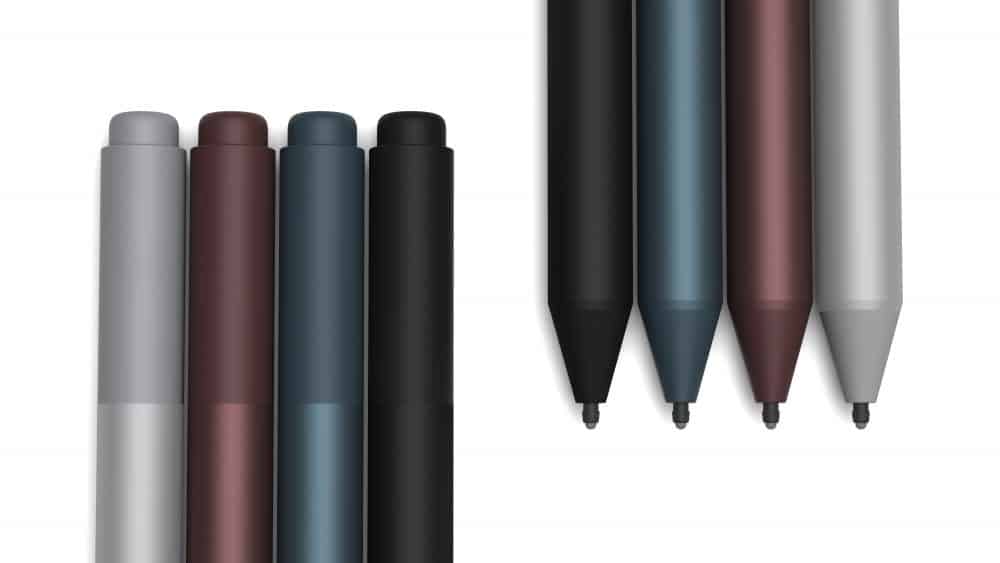
Microsoft today at an event in Shanghai announced a new Surface Pen. The new pen drops the pen clip seen on older pen versions, and now features tilt detection and 4,096 pressure levels and 21 milliseconds of latency. It’s being called the fastest digital pen on the planet and “natural and impressive.” according to Panos Panay.

The total of 4,096 pressure levels is more than quadruple the 1,024 in the current pen. Panos Panay also explained that the activation force has been reduced, and use of the pen now requires less on-screen pressure. Coming in Platinum, Black, Burgandy, and Cobalt Blue, the pen is compatible with most Surface models, including the Surface Studio, Surface Laptop, Surface Book, Surface Pro, Surface Pro 4, Surface Pro 3, and Surface 3.  It keeps the same AAAA  battery, and right click button, and eraser, and you can read the official description below.

The new Surface Pro provides people with the most responsive and natural digital inking experience thanks to the new Surface Pen. Writing and drawing on your new Surface Pro with the new Surface Pen feels like writing or drawing on paper, with features such as tilt for shading, increased pressure sensitivity levels and faster inking. The new Surface Pen not only helps you express your thoughts, ideas and drawings on screen, it reflects your personal style with four new color choices.
Microsoft says that the new Surface Pen doubles the accuracy of the previous pen, and the latency is so low that it is “virtually imperceptible to the human eye.” This, in turn, makes the Surface Pen twice as responsive as the Apple Pencil, according to the company.

Microsoft’s Shanghai announcements filtering in

Ok, this isn’t going well: Microsoft for whatever reason is in Shanghai to make some surface related announcements. Since their live blog is failing miserably so far, with not a single entry, and our previous attempt at peeking in on a Chinese live feed also failed (you can watch a working feed here, but it’s dubbed in Chinese and very hard to hear Panos and company). Anyway, here’s what we know so far (we’ll keep updating as news comes in):

Terry Myerson opened the event with some news about Microsoft’s Chinese government version of Windows 10.

Then the expected announcement of HoloLens coming to China was made:

Panos then announced that Surface Studio is coming to China. Surface Studio is available for pre order in China today, and available June 15th.

Surface Laptop is coming to China also. It’s also available for pre-order in China today, and also available June 15th.

Panos has just introduced the new Surface Pro. LTE, Surface Dial support, 4096 levels of pen sensitivity, 165 degree hinge. It’s the lightest Surface so far, and designed to “feel softer.” 12.3″ PixelSense Display, 3:2 aspect ratio, 267 Pixels Per Inch.

The new Surface Pro comes with a new, faster, more responsive Surface Pen.

1.7x faster than the iPad Pro.

New Surface Pro type covers.

https://twitter.com/danieljwindham/status/866988186152599557

Microsoft Whiteboard on Surface, with AI drawing enhancements, more available late this year

LTE available this fall as an option.