Crown and Council brings the geopolitical drama to Windows 10

If you like empire-building games, then this piece of news will catch your interest: Crown and Council has landed on Windows 10 PCs. Expand your luxurious kingdom, divide and conquer all your enemies and if they refuse, crush them all with no mercy.

Wrench havoc in all 75 available maps and show everybody who the leader is. This is a fast-paced strategy game, there is no time for rest when it comes to conquering land and obliterating rival monarchs. If you are not fast enough, others may get there before you.

The strategy is simple: click adjacent land tiles to subdue them with your army, then pile their gold to fund further expeditions, defensive forts, naval attacks, build universities and other essential structures. Alliances are not tolerated in a worlds where there can be only one ruler.

It’s simple to play, but it’s not so easy to win. Pay attention to the depletion of your resources, if you spend all your money on universities, your army won’t be strong enough to subdue your enemies. Don’t attack too quickly either, hoping to put enough boots on the ground to give you an irreversible early advantage. Recovering after a defeat can be more difficult than expected.

[irp posts=”30534″ name=”Red Dead Redemption sequel leaked map reveals game details”]

As much fun as this game may appear, players have already encountered issues:

Surprisingly good, casual, easy to learn, free game which gets harder and more satisfying as you progress with new units and ways to increase turns. At this point, there are many problems with the interface: click area not responding, window sizing, minor Engllish errors, but hopefully Mojang will fix these in an upcoming patch. Though the game saves progress and continues at the highest level you’ve completed, I don’t see a way to reset progress or any interface options to adjust sound or screen size. The only serious drawback is the random level creation which makes some levels either impossibly difficult or incredibly easy.
There’s no reason to not try this or give it a bad rating since it’s free and delivers what it promises.

And another player adds:

There is a list of things wrong with it however: Window is not resizable, controls are somewhat obfuscated, they’re only really relayed by the loading screens between games, and the game has no real menus, including no start menus.

Maybe all these issues will be fixed in the future, but for the time being, Crown and Council is an excellent game to kill time on your commute way back home after a day’s work.

RELATED STORIES YOU NEED TO CHECK OUT:

The Windows Store gains reading service Wattpad as a Universal Windows app

Wattpad has officially launched as a universal app for Windows 10. Now available for free on both PC and Mobile, the app provides an easier way for users to fall in love with reading. With an extensive list of genres and libraries to choose from, nearly any type of stories can be available at your fingertips. Want to connect with other readers? Wattpad has an active community that loves to discuss everything from the new and popular to the old reliable classics.

Perhaps you’re even interested in writing your own book? Upload your stories to Wattpad as they progress, allowing you to pander to your readers or surprise them with the latest plot twist.

Keyfeatures include:

  • Download stories and books to the app so you can read offline
  • Personalized recommendations of stories to read
  • Stay connected to your stories with a newsfeed of updates and comments from friends
  • Sync all your stories and ebooks between your phone, tablet, and computer

Wattpad is an exceptional tool to reinvigorate a passion for literature and support aspiring writers as they develop their style. Click the box below to download the app for free!

SendPro app for Windows 10 lets you make shipping simpler and easier than ever

Being behind in the curated app game typically means your store offerings are playing catch up rather than exclusives leader. The Windows Store is a prime example of users getting also-ran and me-too apps that appear on other platforms well in advance.

With that being said, every so often, the Windows Store manages to snag a platform exclusive, and today’s release of Pitney Bowes: SendPro app is an example. SendPro is an all-encompassing packaging service that allows users to prepare, manage and monitor their shipments from their PCs.

Furthermore, SendPro also functions as a price comparison tool that enables users to shop shipping options from providers such as UPS, FedEX, and the US Postal Service when managing packages. Being a Windows 10 exclusive app, SendPro also gets tie-ins to operating system features such as Cortana and scale integration allowing for a more streamlined user experience.

Other SendPro features include:

  • Compare rates with access to your existing carrier accounts.
  • Single address book to ship via any carrier.
  • Print professional looking labels.
  • Schedule pickups and track shipments online
  • Easily access contact information from multiple sources including Outlook, Gmail, and LinkedIn via the People App.
  • Print labels from any Windows-configured printer. –
  • Scale integration eliminates the need for additional software downloads. Improve your business processes.
  • Consolidate expense management is leveraging a single set of cost accounts.
  • Manage multiple user access and permissions.
  • Track spending with user level reporting.

SendPro is live in the Windows Store for free with in-app purchases for additional functionality available. Consumers along with small to medium sized business searching for a robust packaging solution may want to give SendPro a try today.

SendPro™
SendPro™
Developer:
Pitney Bowes Inc.
Price:
Free+

Ori and the Blind Forest: Definitive Edition coming to Windows Store and Steam

One of the best video games available for the Xbox One, is the critically acclaimed, Ori and the Blind Forest. It is one of those indie games that get players excited to play more indie games, or the ones that are worth playing.

According to a report from Ori and the Blind Forest developers, the game will be headed to the Windows Store and Steam on April 27 in the form of a definitive edition. The game will support enhanced resolution for higher quality graphics, along with multiple monitor support. Furthermore, players will be able to cross-save across Xbox One and Windows 10 versions of the game.

What the developer had to say:

“Immediately after the release of Ori and the Blind Forest, we heard cries from fans asking for even more content. Instead of ‘just’ releasing DLC, we decided to craft an entirely new package that includes both the new content as well as features that fans have asked us to add to the original game. We spent almost an entire year on this new release of Ori and the Blind Forest and hope that we have now delivered the ultimate ‘Ori experience’ for all of our fans out there!”

If you already own the regular version of the game on Steam, picking up Ori and the Blind Forest Definitive edition will only cost $4.99. It won’t be a separate game, but instead, an upgrade.

The developers said they spent an entire year working on this version of the game, so let’s hope it turns out to be more than just a pretty face.

Paradise Bay lets you build your own world on Windows 10 PC and phone

If you are into world-building strategy games, you will definitely like this new exotic game from the creator of the well-known Candy Crush Saga. Paradise Bay strands you to a tropical island whose configuration depends on your actions.  Don’t wait until your holidays come to create your own tropical paradise.

Put your explorer hat on and discover new lands and adorable animals while trading with friends and merchants. Yes, you got that right, your job is to explore and expand your island in order to unlock its secrets. You will come across long-lost map pieces that will help you to discover new areas of the world.

As you roam through the land, you will also discover the island’s animals. Do a good deed and nurture them. They will thank you later.

You can become a true merchant but first you need to harvest raw resources and craft valuable goods. You will then trade with islanders, merchant ships, and friends. Sell what you don’t need and buy useful resources to help you in your exploration. Go to the bustling marketplace and don’t be afraid to negotiate.

Don’t forget that lost treasures can be found on the ocean floor so dive deep because you never know what you might find. If you have not been diligent enough to find your own resources, you can also use in-app products. A pile of gems costs only $1.99, but if you are greedy you can buy a chest of gems for $99.99.

https://www.youtube.com/watch?v=8I35fEktsh4

If you’re not sure whether or not to download this game, read what other players think of it:

I love this game its the best game in the world of mini games!! Thank you so much for putting it on the computer!

Thank You Kings for supporting great W10.
…. Make Xbox enabled PLEASEE!!!

Let’s see how fast you can restore the glory of this old bay. Download Paradise Bay from the Microsoft Store.

RELATED STORIES YOU NEED TO CHECK OUT:

Microsoft highlights how creative inspiration can make for better apps

Throughout the last few weeks, Microsoft has been covering design topics on their Building Apps for Windows Blog. This week, the company has posted something different and is bringing design thinking, inspiration, and creativity into the UI development process for UWP apps.

The post draws into the app development picture the fact that developers do design while design is something creatives are. Overall, the post also covers three basic questions that both creatives and designers ask:

  1. What are you looking for?
  2. Where are you going to look for it?
  3. How are you going to store it once you’ve found it?

Microsoft then goes on to further divide the answers to these questions into these categories:

  • Understanding what kind of inspiration you’re looking for
  • Where to go for inspiration
  • How to store inspiration
  • Feeding your inspiraton engine.
Searching for inspiration.
Searching for inspiration. (Photo from Microsoft)

Finding inspiration for apps, according to Microsoft, has much to do with deciding what type of inspiration to seek. The authors believe that knowing the kind of inspiration will narrow targets as you hunt down interesting sources for new, creative ideas.

Locations for inspiration, meanwhile include Pinterest, Tumblr, Creative Bloq, and more. Microsoft also notes that this step of seeking out information and inspiration is critical. To them, in the early phases of a project, tracking down the right inspiration can even be a full-time task.

When it comes to storing inspiration, Microsoft believes that it’s not an easy task. They point to digital options such the sites which were previously mentioned, as well as the old-school mood board. Mood boards, according to the Building Apps for Windows team, are effective because having an actual physical thing in front of you that you can touch, rather than something digital on a screen, affects the brain more powerfully.

Design thinking
Design thinking

Lastly, Microsoft also mentions that the purpose of seeking for inspiration, collecting inspiration, and storing inspiration is to feed the unconscious. The unconscious, according to Microsoft, is important because one day a brilliant idea might suddenly appear. Designers, claims Microsoft, understand this, and after collecting and digesting all of their inspirational material, designers know that their real task is to relax and let the mind do its job.

Video game tiles on Xbox One possibly getting a redesign

You can always leave it to Reddit to discover the most obscure and interesting things. Redditor /u/Tyrantes has spotted what looks like a redesign for how Xbox One games will appear as small tiles, which could signify more than meets the eye.

Specifically, the changes were spotted on the newest Xbox Live Games with Gold for May introduction video from the beloved Larry Hryb a.k.a Major Nelson. Nearing the end of the video, when Hryb discussed how to download and install the free games, eagle-eyed viewers can spot a new green stripe adorning the left side Xbox One game tiles, alongside the usual Xbox 360 white-and-green.

The new tile design with vertical green Xbox One banner..
..compare to the current plain images.

The new design brings consistency to how Xbox games are displayed as small tiles, and also arguably makes it easier to distinguish Xbox games from different generations. With rumors abound about a new, improved Xbox One or even a whole new generation of Xbox console on the horizon, and Microsoft seemingly having worked out the backward compatibility equation, the changes may well signify a new, consistent and future-ready approach should the Xbox Store be populated with next-generation games in the near future.

For now, however, these are all just speculations, and indeed, the fact that the tile design changes have only been seen in Major Nelson’s video may mean that it’s nothing more than a mockup. Nevertheless, the possibilities are endless, so stay tuned to get updated about more exciting developments from Xbox and Microsoft.

On the subject of Games with Gold (GoG), May brings a lighter portfolio of free games than April’s lineup, considered by many to be one of the highlights of the program’s history with heavyweights like Sunset Overdrive, The Wolf Among Us, Dead Space, and Saints Row IV. This May, Xbox Gold members will get a rare racing game (for GoG) in GRID 2, as well as quality smaller games like Peggle, Costume Quest 2, and Defense Grid 2. It’s a good time to tread outside of the AAA experience, or simply complete your growing backlog of past blockbusters.

Surface Pro 4 and Surface Book finally start bringing in real cash for Microsoft

Microsoft has made public its Q3 earnings and it seems that the company’s market strategy worked out very well. For some products, particularly phones, the downward spiral continues while sales for other products soared. Judging by the recent report, Microsoft has three main revenue engines: the Xbox One, Surface Book and Surface Pro 4.

Surface revenue increased 61% in constant currency driven by Surface Pro 4 and Surface Book, with general revenue in More Personal Computing up by 1% (up 3% in constant currency) to $9.5 billion, as the financial report reads.

The fact that people preferred to buy a Surface Pro 4 device over an iPad Pro is a clear sign the company is heading in the right direction in its battle against Apple for the ultimate computer replacement. The tech giant has seriously focused on its Surface products by rolling out a series of updates meant to improve their performance. It also offered interesting deals for its Surface Book and Surface Pro 4 devices, deals that fans could not refuse.

The current offer includes a free wireless Xbox controller or $100 discount on Surface Dock if you buy a Surface Book or a Surface Pro 4 (an offer valid for the models equipped with an Intel Core i7 processor). The previous offer, which was by far more interesting, offered a $150 discount for both devices. If you did not take advantage of it back then, we’ll keep on eye on the hottest deals from the Microsoft Store and let you know when there’s a new offer in sight.

As far as updates are concerned, the mammoth April update improved performance and battery management issues in a major way so that both the devices work perfectly now.

The updates are guarantees the company is doing its best to improve its product quality, taking user feedback into account in the process. The discounts represented a “thank you for buying from Microsoft” message. All these actions made people trust Microsoft and purchase a Surface device from them.

What made you buy a Surface Book or a Surface Pro 4? Tell us in the comment section below.

RELATED STORIES YOU NEED TO CHECK OUT:

  • Luxury Surface Pro 4 Signature Type Cover goes up for $160
  • Apple Beats Microsoft as Consumers Buy More iPad Pro Units than Surface

Should Microsoft acquire Canonical for its open source ambitions?

As of late, Microsoft has become friendlier with the open source community,  a great sign for what to expect in the future. Many decisions and steps have been taken to cement the company’s support of open source, but are they enough?

According to a recent Forbes article, if Microsoft wants to break free into the open source world, it needs a big acquisition to prove its dedication towards the idea. Without this key acquisition, the company’s open source dreams will be incomplete. Canonical, the company behind the Ubuntu operating system, would be a great fit. Both companies have been working together for a number of years and Ubuntu was the first Linux-based operating system to officially support the Azure cloud platform.

Both companies also worked together to bring Bash to Windows 10, something developers have come to love since it was released. It is clear that Canonical is Microsoft’s strongest partner in the open source community, but unfortunately we can’t imagine an acquisition even taking place.

Despite what the software giant has done over the years to become closer to the community, many are still not too trusting of Microsoft. Any idea to acquire Canonical would be viewed with scorn, and chances are Canonical would likely say decline. Everything Microsoft has worked for over the past couple of years would be destroyed in the blink of an eye.

There are several areas of Canonical that would work out great under Microsoft’s lead, however. For example, Ubuntu is king in the number of IaaS deployed around the world. We understand the number stands at 200,000 while Amazon sits at 100,000 and Windows Server is struggling with just 26,000.

An acquisition would place Microsoft at the top of the pile and business wise, such a move would likely be great —but at what cost?

In our minds, Microsoft needs to gain more favors from the open source community before deciding to make such a big move. It is not impossible, but the timing needs to be on point or else the backlash could destroy everything

Defense Grid 2 and GRID 2 highlight May’s Xbox Games with Gold

This month’s current Games With Gold, which included Sunset Overdrive, Saints Row IV, The Wold Among Us, and Dead Space, is set to expire soon. We have just learned, however, about May’s Games With Gold, meaning that you Xbox Live Gold members will once more get two dedicated titles as well as two additional Xbox 360 titles to play with.

As posted by Major Nelson, The May titles include Defense Grid 2, Costume Quest 2, Grid 2, and Peggle. Full details on these titles can be seen below.

Defense Grid 2 ($14.99 ERP)

Defense Grid 2 is the next evolution in tower defense. In Defense Grid 2 players will discover new additions that will require the player to change their tower strategy. Defense Grid 2 offers dynamic content where gameplay is constantly changing.

Screen Shot 2016-04-26 at 1.21.45 PM
Defense Grid 2

May 16th to June 15th:  Costume Quest 2 ($14.99 ERP)

Trick, treat and pick a fight with villainous dental soldiers in Costume Quest 2, the sweet sequel to Double Fine’s hit original, Costume Quest, that turned fans of all ages into candy obsessed crusaders. This inspired RPG adventure includes a range of new features and gameplay improvements to double the amount of mischievous fun.

Costume Quest 2
Costume Quest 2

May 1- May 15 GRID 2 ($24.99 ERP)

Be fast, be first and be famous as the race returns in GRID 2, the sequel to the BAFTA-award winning, multi-million selling Race Driver: GRID. Experience aggressive wheel-to-wheel competition, advanced AI, stunning visuals, jaw-dropping damage and feel the thrill of racing iconic cars in a new word of evolving motorsport.

GRID 2
GRID 2

May 16- May 31 Peggle ($9.99 ERP)

Experience the ball-bouncing, peg-busting phenomenon! Do you have what it takes to become a Peggle™ Master? Take your best shot! Conquer 55 levels with 10 mystical Magic Powers and rack up bonus points. Face off against friends in 4-player Xbox LIVE multiplayer play, and test your skills in 75 Grand Master Challenges.

Screen Shot 2016-04-26 at 1.31.23 PM
Peggle

Thanks to a recent update, you can see all these Games with Gold titles, and many other Gold savings, by going to the Gold Slot on your Xbox One from the Gold Members Area. As always, though, once you do download these titles in May, please do let us know how the experience is going by commenting below!

Microsoft Store gets ready for Mother’s Day and graduation with gift buying guides

With Mother’s Day on May 8th and students anxiously waiting for 2016 graduation, Microsoft has updated the Microsoft Store with gift guides for both occasions.

The Mother’s Day Gift Guide highlights multiple Fitbits, watches, tablets, and phones. Here are a few of the items on sale:

Gifts for graduates offers 10% savings for parents on Microsoft products in the Education Store. Other sales for shoppers to note include:

While the pages don’t have significant savings across the board, there are some decent gifts for the tech lover in each family.

HP Elite X3 Windows 10 smartphone expected to launch in June for $599

There aren’t many Windows 10 Mobile devices being released and with market share below 2 percent, we may never see strong manufacturer support. However, this is not stopping HP from pumping out some more devices itself.

One of their newest, the  HP Elite X3, is quite the powerful offering. From our end, it is probably the most powerful Windows 10 Mobile smartphone so fans will have something to go crazy over outside of what Microsoft is offering.

One of the great things about the HP Elite X3 is the fact that it has been designed with Continuum in mind. Yes, users will be able to use it in similar ways to a laptop computer. This is, in our minds, the greatest strength of Windows 10 Mobile right now.

When does this device ship?

HP said the smartphone should ship by summer but T Portal, a Croatian website, is saying they are 90% sure it will ship by June of this year. Furthermore, they believe it will retail for $599, which is not a bad price. Bear in mind, the unit will not come with a laptop dock nor any premium accessories.

What about the specs?

This bad boy is packing a sweet Qualcomm Snapdragon 820 processor with 4 cores and  5.96-inch display with a 2560×1440 resolution. There’s also a powerful Adreno 530 GPU to keep the games running smoothly as possible.

When it comes toe RAM, this thing is rocking 4GB, so powering Continuum among other things should be a breeze. In terms of camera, the HP Elite X3 is rocking a 16MP f/2.0 FHD rear-facing camera and an 8MP FHD front facing and Iris camera.

Overall, this is a great looking phone with similarly great specs. We just worry that by time this device is ready, Windows 10 Mobile Redstone might not be ready. The biggest issue with the Lumia 950 and 950 XL, is the fact that the operating system at the time was a huge mess. Hopefully, this doesn’t come to haunt HP because it could be disastrous for Microsoft.

Refurbished Microsoft Surface 3 tablet discounted to $379.99

Want a new Surface 3 but need a bit more scratch to make it happen? If you’re willing to settle for a refurbished Surface 3, though, then you’re in luck: at the moment, Microsoft is selling its Surface 3 line at a $50 discount. Or, you can head over to Dailydeals.com because these guys have refurbished Surface 3s on sale for $379.99.

This Surface 3 computer comes packed with a 128GB SSD, 4GB of RAM and 4G LTE. For what’s being offered, the price is a steal and much better than the $649 Microsoft is asking for a new Surface 3. Believe us: $649 can purchase a much better system right now, so we wouldn’t recommend throwing down that amount on a new Surface 3.

This deal will be around for just the next few days. However, if you still insist on getting one new from Microsoft, the company’s $50 off deal will run until the end of the month, so there’s ample time to save pennies until then

One could even decide to keep saving more until it’s possible to purchase a Surface Pro 4 if the need for a new computer isn’t as urgent. The Surface Pro 4 is arguably the best of what Microsoft has to offer today.

[irp posts=”23497″ name=”Best Windows 10 Tablets to Buy in 2016″]

Microsoft shows off Hello, Inking, more in new Windows 10 commercials

As the one-year anniversary of Windows 10 fast approaches, Microsoft appears to be firing up their marketing machine to show the world how Windows 10 PC’s can let them do more. In a new series of TV commercials, the Redmond giant is highlighting the story of blogger Doyin Richards, and examples of how Windows 10 helps him do more.

The first ad, titled “Meet Doyin Richards”, highlights how Windows 10 keeps Doyin Richards organized. For a brief moment in the 30-second spot, Doyin shows his blog through the Microsoft Edge Browser, and then goes on to mention how he can use his face to unlock his computer using Windows Hello. He then moves on to show off how he can use Cortana to remind him of playdates for his kids, saying that, “MacBooks are not able to do that.”

The second commercial, “Doyin Richards Does more with Inking,” shows off how Windows 10 is great because of its Inking features.  In the 15-second spot, Doyin mentions that his daughters needed to go to a costume party, and that he needed inspiration. Then, after, the camera pans to him using OneNote to draw a costume over a photo of his daughter. Once again, the commercial ends with, “MacBooks are not able to do that.”

The third commercial in the series, “Doyin Richards Does More with Cortana,” is dedicated to Cortana. Similar to the scene seen in the 30-second commercial, in this 15-second spot, Doyin Richards details how he uses Cortana to make his life easier. He asks Cortana to set up a playdate, and ends by saying, “I need that in my world.”

Lastly, the final commercial of the series, “Doyin Richards Does More with Windows Hello,” highlights the power Windows Hello. Once again similar to what was seen in the longer 30-second spot, Doyin details how Windows 10 is great because of its value for privacy. He goes into how his face can unlock his computer, and once more ends with, “With MacBooks you’re not able to do that.”

These new commercials put a more human take on the latest Microsoft operating system. We would love to hear your thoughts on the commercials, so be sure to drop us a comment below!

The Xbox 360 had an excellent run

On Wednesday, Microsoft stopped making the Xbox 360, the console that launched the company into the living room — or bedrooms — of more than 80 million people.

“The Xbox 360 helped redefine an entire generation of gaming at Microsoft,” wrote Phil Spencer, the head of Xbox within the company. “[It] means a lot to everyone in Microsoft [and] while we’ve had an amazing run, the realities of manufacturing a product over a decade old are starting to creep up on us.”

The writing was largely on the wall for the Xbox 360 ever since its games, which includes over 10-years of backlog, started to be made available to Xbox One owners.

Microsoft knows only too well that annoying Xbox owners can have dire consequences after multiple contradictory statements about the “always on” — i.e. always connected to the Internet — nature of the Xbox One. Ever since, gamers have chosen the PlayStation 4, which launched around the same time, over Microsoft’s offerings.

Making the transition from a 360, which is still widely used, to the One as smooth as possible is a big goal for Microsoft and likely made up part of the reason that the older console is being shuttered. The remaining stock will still be sold, but that’s it.

Gamers are a dedicated user base who, by and large, will buy new versions of a product. The arc of the Xbox — and the PlayStation — has roughly followed gaming becoming a more mainstream form of entertainment. The iPhone, with its App Store, has also been responsible, but it’s no accident that millions upon millions of people participant in “e-sports,” watch gamers live on Twitch, or bet on the outcome of multiplayer games.

Microsoft has been a fundamental part of this movement and it should be proud of what has been accomplished and, as such, the revenues that have been gleaned.

Xbox One
Xbox One

However, it was time for the Xbox 360 — which had not seen an update since the One was released in 2013 — to go and it’s good that Microsoft realised this.

The company’s most recent earnings report suggested that while it is making progress, there is still work that needs to be done. Office 365, the online subscription service, now has over 20 million users, but growth in other areas — namely Azure — is slowing.

According to Business Insider, the Xbox team was considered to be “isolated” from the rest of Microsoft for a time, but recent changes, like putting Windows 10 on the console, have likely changed that.

CEO Satya Nadella has looked to unify the company behind certain products and brands but has also sought to open up lines of communication between divisions. Windows is no longer king — or, at least, no longer gets to dictate what others do — and this has had a positive effect on the products Microsoft has released in recent times.

Pulling Xbox into the mix resulted in the One, which was well-reviewed, and continues the legacy of what made the 360 so good: It was a hub for stuff that extended beyond games. Live, for example, has always been at the forefront of online gaming while the various Hubs, like music or video, offer a wide range of content.

Sony has built similar features into the PlayStation 4, but Microsoft was one of the first to realise the potential of owning the living room by providing everything in one box.

Now, the company is looking to do that through the unified form of Windows 10 which, according to Microsoft, is the “best Windows ever for gaming.”

Unlike previous versions of Windows which ran solely on a PC (or smartphone, etc.), the Xbox was never included and so games, apps, and so on all had to be made specially for the console. Windows 10 changes that by putting the operating system, albeit with a few tweaks, onto the console.

PC games, once they take advantage of the Universal Windows Platform, can run on an Xbox One (and vice versa), increasingly the usefulness of the console massively. Apps designed for Windows 10, which are growing in number, can also run on the console. Essentially, Microsoft has taken the idea of making a hub for the living room and amplified it by one hundred.

While all of this was likely possible on the Xbox 360, it’s easier just to do it on the One. Instead of having to deal with hardware that is, in some cases, over 10-years-old, Microsoft can just work on hardware that is two- and three-years-old. This is, as you can imagine, easier, faster, and better for the end-user.

Internally, killing the 360 was also a good move. Employees who were still working on the console or its software can now move over to the One, bringing their best work to the console and, as Microsoft likely hopes, out-pacing the PS4. This expertise could, if Microsoft was feeling courageous, be used to work on an Xbox “1.5” to compete with Sony’s rumoured-but-all-but-confirmed PS “4.5”.

In the end, the Xbox 360 had a good run: 84 million consoles sold, hundreds of games developed, a loyal following, and commercial success for Microsoft. But, just as with any product, the end always arrives, and it’s good that Microsoft saw this, acted upon it, and can now focus on the future of Windows and Xbox.

King’s Paradise Bay now available as a Universal Windows 10 app

King has made its mark on the world of mobile games, and it’s not going away any time soon. You may know the studio from Candy Crush, a game that is, at this point, synonymous with mobile gaming. The studio launched one of its latest games, Paradise Bay, on iOS about a year ago to some fairly solid reviews, and after that year of waiting the game has finally made its way over to the Windows 10 platform, offering itself to everybody running Windows 10 and Windows 10 Mobile.

Here’s a list of some of the game’s features for you to check out, as described on Paradise Bay’s store page:

  • Create and customize your perfect paradise
  • Explore and expand your island to unlock its secrets
  • Collect long-lost map pieces to discover new areas of the world
  • Discover and nurture the island’s animals
  • Harvest raw resources and craft valuable goods
  • Trade with islanders, merchant ships, and friends
  • Buy and sell valuables in the bustling marketplace
  • Dive deep and uncover treasures lost at sea

Paradise Bay isn’t just a Candy Crush clone – it’s more similar to games like Farmville, which have you place down objects that you can them harvest resources from. Beyond the normal planting of crops that tends to be a hallmark of these sorts of games, Paradise Bay has the additional theme of a tropical paradise. As a result, you’ll spend some of your time in the game healing wounded sea turtles, fishing for exotic sea creatures, and building homes with bamboo.

Some people may be tired of playing games that fit into the farmville-esque genre, but for people who can’t get enough of this style of game, there may be a lot of enjoyment to be had in Paradise Bay. There’s a lot to be said for placing a familiar genre of game into a different setting, and Paradise Bay might just scratch an itch that some gamers might have had.

Paradise Bay
Paradise Bay
Developer:
king.com
Price:
Free

Viber UWP App in the works for Windows 10, beta version to land soon

Viber is one of the most popular VoIP free call apps but for the time being there is no Windows 10 customized Viber app. The company promised many months ago that they would develop a Viber app for Windows 10 but afterwards there was no update on the matter – until recently.

Viber opened registration for a closed beta testing-group of the app in February. Recently, a representative confirmed that they had submitted the beta version to Microsoft for testing. This means that Viber has finally completed the beta version and is waiting for Microsoft’s green light to roll out the app in the Store.

For all of you who registered for the bet testing – We’ve submitted the Build to Microsoft and patiently awaiting their approval before sending it off to you. We’ll keep you in the loop when anything changes!

Viber has also announced it enhanced the security level for the app, adding three important security features: end-to-end encryption, a cryptography key for all devices and Hidden Chats.

Viber currently features:

  • Best-quality HD voice calls
  • Video calls (supported on PC)
  • Text, photo and sticker messages
  • Full sync between your mobile and Windows
  • Transfer ongoing calls between devices
  • Pin specific conversations directly to the Start screen
  • Snap Viber to the side of your screen
  • Syncs with your mobile contact list to detect which of your contacts have Viber.
  • Spell checker
  • Change the chat width option.

The new UWP app may also bring new features since thousands of users expressed their feelings of discontent on the Microsoft Store about the current app version and its unavailability on Windows 10. It’s time for Microsoft and Viber to do something and wash away their clients’ dissatisfaction:

I think it’s very easy to modify win 8 viber app for win 10 and publish it. But still no app after so many months.

There isn’t a native app for Windows 10 YET. The lack of such basic apps in Windows 10, oriented for touch devices, costs users to both Viber and Microsoft. I almost regret buying a Windows 10 tablet…

We’ll keep you updated as things advance with the Viber beta version.

RELATED STORIES YOU NEED TO CHECK OUT:


New boss, shop gameplay revealed in Xbox One’s Cuphead

Xbox One owners and Windows 10 users have been looking forward to Cuphead for a long, long time. We’ve been teased over and over about this game for years, and it seems like every E3 is just bringing us only a little bit closer to finally seeing the game come out. For those who aren’t in the loop, Cuphead is an indie game coming to Windows 10 and Xbox One, touting an incredibly unique art style. The game is done up entirely in the art style of classic Disney cartoons, and it looks absolutely amazing.

In a new video that’s come out of PAX East, we’ve gotten yet another peek at what Xbox and Windows 10 players are going to be looking forward to when Cuphead finally launches. The new video shows off gameplay of a few of the game’s bosses, as well as revealing gameplay of the shop – as you might imagine, that’s where you’ll be able to pick up a few items to enhance your skills while you’re going through the game.

We currently don’t have a release date set for Cuphead, but we’re told that it’s going to be coming out in 2016. It’s entirely likely that the game is going to be delayed, as we’ve already been waiting so long for it. With any luck, the developers behind Cuphead are going to be making an effort to communicate more with the community, giving us some faith that they’re going to be able to push the game out – in good quality – to Windows 10 and Xbox One users sometime in the near future. Until then, we’re going to have to just wait until they decide to tell us precisely what’s going on with the game.

How to make sure Windows 10 is installing updates when you aren’t working

Updates are arguably the most important part of Windows 10. Microsoft constantly releases new features, improvements, and bug fixes through Windows Update, which is essential for running the system. But updates sometimes take a lot of time to install, especially new builds for Windows 10 Preview, and that’s why some users find them annoying.

This was such a big problem that some users even avoided installing updates. However, Microsoft recognized the issue, so it introduced a few options that allow users to choose when updates will install on their computers, and avoid work interruptions.

How to install Windows 10 updates when you’re not working

As we said, there are a few options which will allow you to avoid all potential unpleasantness of installing Windows Updates. If you set everything right, you won’t have to deal with surprising updates ever again.

Option 1 – Set Active hours

The first option is “Active hours,” which allows you to set a specific time when you use your computer, and Windows won’t install any updates during that period. To set Active Hours on your Windows 10 PC, do the following:

  1. Open Settings
  2. Go to Updates & security > Windows Update
  3. Go to Change Active hours
  4. Set Start time and End time
  5. Press Savewindows 10 active hours

Once you set your active hours, Windows 10 won’t install any updates when you’re using your computer. All updates are going to be downloaded normally, but the computer won’t restart so your work won’t be interrupted.

Since the most recent Windows 10 Mobile Insider Preview build, this option is also available on Windows 10 Mobile. So, if you don’t want your device to install new builds while you’re using it, just set active hours and you won’t have any problems. To find out how to set active hours on Windows 10 Mobile, check out this article.

Option 2 – Set a specific restart time

Another option that is maybe even more effective than setting active hours is the ability to set the exact restart time of your computer. So, if you noticed that a new update is available, you can plan ahead and set Windows 10 install the update when you want it. To set a specific restart time, do the following:

  1. Open Settings
  2. Go to Updates & security > Windows Update
  3. Open restart optionswindows 10 restart options
  4. Turn on the option
  5. Set a specific time and date when you want your computer to finish installing updates

This method is more powerful than Active hours, so if the restart time you set conflicts with your active hours, Windows is going to finish installing updates and restart your computer anyway.

These options are currently only available to users of Windows 10 Preview as regular users have yet to receive it. However, this shouldn’t be a problem for regular users as most of Windows 10 updates are cumulative, so your computer won’t restart automatically. We expect the ability to set active hours to arrive for all Windows 10 users with the Anniversary Update for Windows 10.

We hope that after reading this article you won’t have the problem with surprising updates anymore. If you have any questions, please let us know in the comments.

VLC media player UWP app coming to Windows 10

The developers of the VLC app for Windows Store promised in the past to create a Universal Windows Platform version sooner rather than later. Now, the app is finally available for fans to grab.

Thomas Nigro, the programmer working on the app, released a video on Twitter of a work in progress version of the UWP VLC app for Windows 10. It shows off the picture-in-picture features, something the current version lacks.

From the video, we have to say that the picture-in-picture mode looks wonderful and we can’t wait to get our hands on it. Hopefully, it doesn’t require too much processing power to work smoothly.

When will this new VLC app be available for mass consumption?

Nigro wrote in a blog post detailing several things folks should know. First off, the app will be fully released for Windows 10 and mobile come May 2016. However, it appears as if some features won’t be added to the mobile version right away due to lack of important APIs. Nigro said fans should expect to see these features after the Redstone update in 2017.

Redstone only, TH2 will probably not be supported. This is because of technical limitations around Background audio APIs, and bad drivers on the phones not receiving the RS1 bits, says Nigro.

How about VLC for the Xbox One and HoloLens?

According to Nigro, the team has been working on the Xbox One version of the app for quite some time. The reason for the long wait is also due to a lack of relevant APIs, but this has since changed. In terms of HoloLens, he said once the team gets its hands on the hardware and SDK, work will begin on a port.

A list features coming to the new VLC app for Windows 10 and mobile:

  • Updated UI to match the Windows 10 style
  • Choose your own accent color : VLC color or Windows chosen accent-color
  • Dark or light theme following your Windows (on Anniversary update) global settings
  • Windows 10 live tiles and notifications
  • Drag and drop a file in the app
  • Continuum support.
    • Basic Continuum scenarios : docking
    • Hybrid scenarios : control VLC running on your XBOX from your W10 mobile phone.
  • Cortana (experimental)
    • Search in the library
    • Control the playback
    • Playlist creation

Out There: Omega Edition coming to Windows 10 and Windows 10 Mobile

Out There: Ω Edition is coming to Windows 10 PC and Windows 10 Mobile come April 28, 2016. The game has been developed by France-based developer Mi-Clos Studio, an indie developer with a ton of potential.

The studio made the big announcement on Twitter, but unfortunately, pricing details were not disclosed. We do know it is available on Steam for $9.99, so chances are this version may cost the same.

When it comes down to whether or not Out There: Ω Edition is a game that supports the Universal Window Platform, that is something we cannot answer, but seeing as it is coming out for both Windows 10 and Windows Mobile, that could be the case.

Those interested should know that crafting is the lifeblood of Out There: Ω Edition. Not everyone enjoys a game where they are required to create things to stay alive or to progress further. We understand players can craft items from 15 materials and 20 alien technologies.

[irp posts=”26991″ name=”100+ Best Windows 10 Store Games to Play”]

To make things even more fascinating, this game has no form of combat. It is just the player against the environment.

Here’s everything potential players should expect from the game:

  • A dark adventure in deep space
  • 50+ achievements, leaderboard
  • Explore a freshly procedurally-generated galaxy every time
  • 350+ unique text adventures with multiple choices
  • Epic main storyline leading to 4 different endings
  • 10 spaceships with different specs to discover
  • Crafting system with 20 alien technologies built from 15 materials
  • Engage with alien life forms and learn their language
  • No combat! it’s you against the environment
  • Eerie score by award-winning composer Siddhartha Barnhoorn (Antichamber, The Stanley Parable), featuring vocals by Lara Ausensi (Forest Kingdom II, Shevannai – The Voice of Elves)
  • Fantastic pulp comics graphics
  • High replay value

Windows 10 Insider build 14328 gets refreshed Action Center UI and enhanced notifications

For most smartphone, their notification shades or Action Centers are the locations to grab quick glances at updates, text messages, app notifications, and weather predictions among the myriad of other useful information coming through the device. In Windows 10 Insider build 14328, the Windows team is looking to bring that sort of functionality and user behavior to the desktop.

The Action Center in build 14328 has been beefed up from its humble beginnings during the July 2015 release. When Windows 10 first launched to general users, the Action Center was home to a handful of notification features while also still being limited in functionality. Build 14328 has moved the Action Center icon to the far corner of the taskbar and now includes a label with the actual number of updates or notifications waiting for the user.

The new visual update may be a godsend for users who had to meticulously count notifications as they came or just randomly guess as to how many update they have waiting for them in the Action Center. Also, the Windows team also added a subtle animation to the updated icon that shifts the icon to resemble the notification that is coming. Users can now look at the lower corner to see either a Mail, Twitter, Store icon, etc.

ActionCenter
Updated Action Center

While building in more functionality into the Action Center, the Windows team is also paying particular attention to look and styling of the service by reducing visual clutter. Similar to the most recent Windows 10 Mobile Insider release, the Action Center on the desktop no longer show app icons for multiple notifications, as well as tidying up text and spacing among notifications.

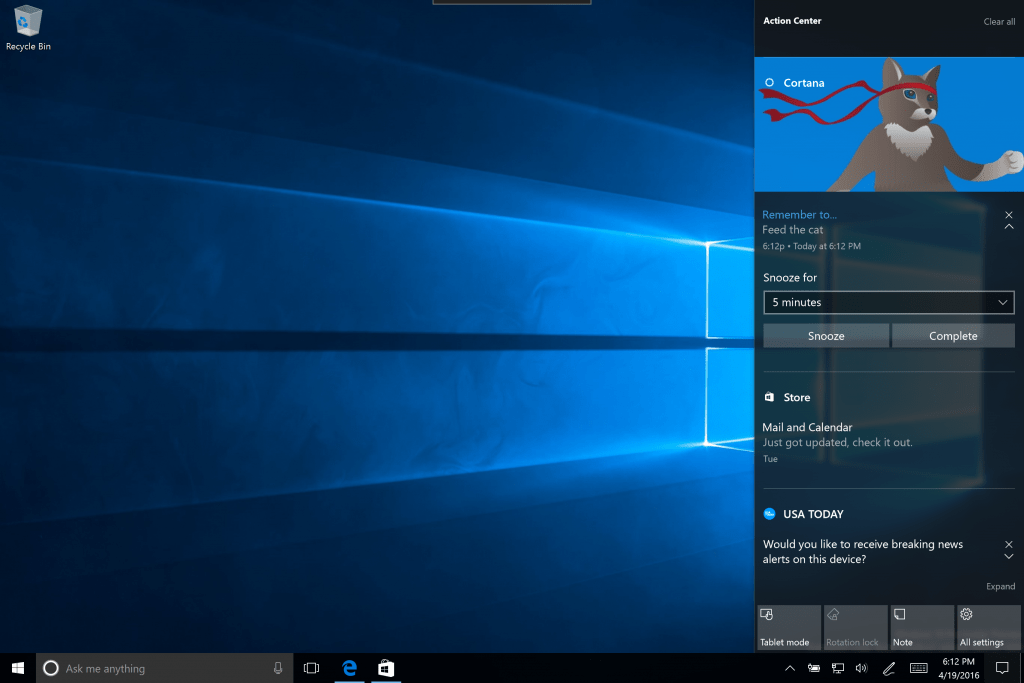
Cortana now spans both sides of the desktop screen by supporting insights from the app in the Action Center. Now users can check the Action Center to keep up on Cortana related scheduled appointments such as meetings, reminders, or mapping options.

Cortana notifications in Action Center
Cortana notifications in Action Center.

Lastly, users can now rearrange their Quick Action icon placements in the Action Center. Before today, users could only highlight four options to appear at the bottom of the Action Center. With build, 14328 users can now head to the Settings page to adjust exactly which icons they want to appear and in what order. To customize your Quick Actions, all you have to do is go to the Settings > System > Notifications & actions and set things up precisely how you want them.

As most smartphone users have become reliant on their notification shade over the years, the Windows team has realized this and is putting its might behind evolving its own Action Center on both PCs and mobile devices.

Windows 10 Taskbar just got better thanks to build 14328

Microsoft released one of the more exciting Windows 10 Insider builds this morning, chock-full of new features and fixes. Build 14328 incorporates a number of the new stuff the company introduced at Build 2016, and so there are quite a bit of new toys for Windows Insiders to check out. One of the newest are updates to the Windows 10 Taskbar, which promise to make things a little easier to manage.

Calendar Integration

First up is the new calendar integration in the Taskbar clock flyout. Simply put, your daily calendar is now displayed in the otherwise far-less-useful TaskBar clock. Just click on it to see what events you have upcoming.

calendar-flyout
Now you can glance at your upcoming calendar events right from the Taskbar.

Taskbar Clock On All Monitors

Just as it sounds, the Taskbar clock will now show up on all monitors. That will be particularly helpful for this author, who uses three monitors to keep up with the Microsoft news cycle.

Taskbar Badging for UWP Apps

If you’ve ever used iOS, you’re likely familiar with app badges, which provide quick insight into apps that have pending notifications. Microsoft has decided to implement the same concept in Windows 10, adding badges to the Taskbar icons for Universal Windows Apps. And so, no need to go to the Start Menu with its live icons just to see if you have any new email messages–just glance at the icon on the Taskbar.

Taskbar badging
Taskbar icons now have badges showing pending notifications.

Taskbar Settings in Settings App

Taskbar settings are no longer contained in their own dialog. Instead, they’re aggregated into the Settings app, which can be accessed by itself from the Action Center or via right-click on the Taskbar itself.

Manage Multiple Playback Devices

If you have more than one audio device available, you can now click on the volume icon on the Taskbar to select which device you’d like to use for playback.

Manage multiple playback devices from the Taskbar
You can now select the playback source from the speaker icon on the Taskbar.

New Explorer Icon and Enhanced Action Center Button

Sometimes it’s the little things that matter, and Microsoft has made a couple of other smaller updates that further enhanced the Taskbar. First, there’s a new File Explorer icon that’s a bit more fancy.

new-file-explorer-icon
Updated File Explorer icon.

Second, the Action Bar button is also badged, showing you any missed notifications, and the button is now moved all the way to the right of the Taskbar to make it easier to access.

Updated entry point for Action Center
New Action Center button.

That’s it for the Taskbar in build 14328. Let us know in the comments what you think of these updates, and what else you’d like to see in future builds.

How to enable Cortana low battery notification on Windows 10 PC

Cortana is improving as your read this article, as Microsoft constantly works on new features and enhancements for its virtual assistant. But the aspect where Cortana improved the most is definitely cross-platform compatibility. There are tons of tasks you can do from one Windows 10 device to another with Cortana, and the number is rising.

The cross-platform option we’re going to talk about in this article is the ability to receive notifications when your Windows 10 Mobile phone’s battery is low on your Windows 10 PC. We already told you some time ago that this feature arrived to Windows 10 Preview, but now we’re going to show you how to use it.

Enable Low Battery notifications in Windows 10 Mobile

There are a few things you need to do on both Windows 10 PC and Windows 10 Mobile to be able to receive cross-platform low battery notifications. But first and the most important thing, make sure you’re logged in with the same Microsoft account on both Windows 10 PC and Windows 10 Mobile.

Enable notifications between devices on Windows 10 Mobile

First thing you need to do is to enable cross-platform notifications on your Windows 10 Mobile. If you’re not sure how to do that, just follow these steps:

  1. Open Cortana on your Windows 10 Mobile device
  2. Tap on the hamburger menu, open Notebook, and choose Settings
  3. Make sure “Send phone notifications” option is turned oncortana low battery notifications

You now allowed Cortana to send notifications from your phone to other Windows 10 devices you know. Cortana won’t send you only notifications about battery status, but also about new messages, missed calls, and more.

Enable notifications between devices on Windows 10 PC

Now that you enabled cross-platform notifications on your Windows 10 Mobile device, you need to do the same thing on your Windows 10 PC. To do so, follow these instructions:

  1. Open Cortana on your Windows 10 PC
  2. Click on Settings in the hamburger menu
  3. Make sure ‘Send notifications between devices’ is toggledcortana low battery notifications pc
  4. If you have multiple Windows 10 Mobile device, you’ll see all of them listed under ‘My devices’, so you can choose which one you want to receive notifications from. But if you have only one device, you’re good to go.
  5. Now, if you have multiple devices, choose a device, and go to “Sync Notifications with mobile device”
  6. Next, click on ‘Mobile App Notifications’
  7. You should see all notifications here, choose Low Battery Warnings

[irp posts=”30486″ name=”Cortana notifications now show up in Action Center on Windows 10 Mobile”]

That should be it, next time your phone’s battery is low, you will receive a notification about in in the Action Center. You can also turn off your phone from that notification window.

As we mentioned above, this option is currently only available to Insiders running the latest Windows 10 Preview build. However, we expect it to arrive to general public with the Anniversary Update for Windows 10 this July.

Microsoft clarifies policy on “changing browsing experience” – enforcement begins May 2nd

Microsoft has published a new post on its TechNet blog to clarify what’s considered, following the company’s newest browser modifier policy update, as “change browsing experience”. The clarification is reportedly in response to software distributors and the monetization industry.

As a quick recap, Microsoft updated its browser modifier policy last month to broaden the scope of the evaluation criteria for adding programs to the definition library and further protect users from malware. Below is the full extended text.

Programs that change the user browsing experience must only use the browsers’ supported extensibility model for installation, execution, disabling and removal. Browsers without supported extensibility models will be considered non-extensible.

In today’s post, Microsoft clarifies programs that changes browsing experience to be programs that modify the content of webpages in any way by inserting new content or changing existing ones, making webpages look differently from before these programs are installed. Programs that do not do this, for example VPNs, parental control programs, will not be affected.

Those that do fall under the “changing browser experience” category, however, will be required to use the browsers’ extensibility models. This means that they will have to ask for user’s permission to be enabled using consistent, straightforward language and placement. All in all, this is a great step from Microsoft towards giving customer choices and controls to their browsing experience, and a good preparation for the upcoming Edge extensions.

Microsoft details Windows Ink Workspace in new Windows 10 Insider build

With today’s new Insider build, Microsoft has detailed the new Windows Ink Workspace, originally announced at BUILD back in March, that enhances Pen functionality for devices that support it by introducing new virtual tools such as a Ruler and sticky notes, as well as new areas to work with the Pen such as in a sketchbook or directly on top of apps.

Windows Ink Workspace

image002
Ink Workspace

Microsoft says that the biggest feature available in build 14328 is the new Ink Workspace, accessible via the taskbar for devices with Pen support. The workspace looks similar to the Action Center, and houses all the Pen tools you need to be productive and creative, with quick access to your most recently used apps with Pen support and more. You can take a closer look at the whole inking experience in this video:

Furthermore, you can access the Ink Workspace directly above the lock screen too, so you can get down to working with your Pen super quickly and easily without having to login first. Lots of exciting stuff arriving with the Ink Workspace, but it doesn’t stop there.

Sketchpad

image004
Sketchpad

The new Sketchpad is basically a clean canvas for doodlers, note-takers and more. Sketchpad is accessible directly from the Ink Workspace, and allows you to write/draw pretty much whatever you like, with support for new Pen tools such as the virtual Ruler, something we know many Pen users are going to love to use.

Screen sketch

In addition to Sketchpad, there is also a new Screen sketch feature which in short allows you to draw directly on top of the system with your pen, allowing you to take notes with ease. Lots of first-party apps are intelligent enough to understand that you’re drawing on top of them, and in some way will communicate with the ink.

For example, drawing onto a photo in the Photos app will actually have the Photos app understand you’re drawing on top of it, and even allow you to save the photo with whatever additions you have added with your pen. Super awesome stuff!

Custom pen experiences

image010
Pen settings

With the new Windows Ink Workspace, Microsoft has added a load of new options in the Settings app for pen users to take advantage of. You can customize what Pen buttons open what, whether the Ink workspace can be accessed via the lock screen, and a whole lot more.

All of these new features are available in todays Windows 10 Insider release build 14238, which is currently being flighted to Windows Insiders. If you want to try the new Ink changes out, make sure you get downloading that new build!

Microsoft and Google agree to play nice, drop regulatory complaints

According to a new report from Re/code, Microsoft and Google have reached an agreement to drop pending regulatory complaints against each other, and to work together to solve future issues between themselves before filing new complaints.

A spokesperson for Google told Re/code that the companies, while they compete vigorously, “want to do so on the merits of our products, not in legal proceedings.”

Both Microsoft and Google are under new leadership that is much less contentious than the past, where Microsoft’s Steve Ballmer and Google’s Eric Schmidt were often at odds. Last September, Microsoft agreed to drop its last patent litigation against Google, although the company still seeks royalties from hardware makers using Android and Linux.

While it’s too early to tell how well this new policy will play out, it’s probably encouraging that Microsoft and Google are becoming a bit less antagonistic toward each other.


Rayman Origins can now be played on Xbox One via backwards compatibility

If you’re a fan of Rayman Origins, there’s some good news for you. The game is now playable on the Xbox One, thanks to the Microsoft’s backward compatibility feature allowing users to play Xbox 360 games on the newer Xbox One (via Major Nelson).

Some of the episodes of the game are already available on the Xbox One in the form of Rayman Legends, but if you’re the fan of the good old Rayman Origins, you can now enjoy it on your new console.

It’s not just Rayman Origins, a handful of other titles are backward compatible on the Xbox One, including the likes of Pac-Man, Lego Star Wars, Duke Nukem, Earthworm Jim and several other titles. You can check out the complete list of games supported by this new feature here.

In the same post the lists the games that recently gained backwards compatibility, Major Nelson also answers frequently asked questions about the feature as there is still some confusion.

Rugby Challenge 3 just launched on Xbox One

The third video game in the Rugby Challenge series has just arrived on Microsoft’s Xbox One console and is now available to buy and play. Here’s a brief official description:

Crouch! Bind! Set! Bringing the realism and fast-paced action of seven a side Rugby. Control your own destiny over 13 action packed seasons starting as a rookie and finishing as a pro.

Rugby Challenge 3 offers detailed character creation (so gamers can play as themselves or someone else), a new tattoo feature where players can design tattoos for their in-game characters and share with their friends online, English commentary by Grant Nisbett and Justin Marshall and French commentary by Eric Bayle and Thomas Lombard, and a variety of different game modes such as Single Match, Multi-team, Competition, Career Mode, Be a Pro Mode, and an Online mode.

Are you a fan of sports video games or do you prefer to spectate? Let us know in the comments below.

Buy Rugby Challenge 3 on Xbox One

Netflix’s Daredevil is now available to own digitally on Windows devices

Marvel’s first Netflix television series, Daredevil, is now available to own digitally via the Movies & TV (or Films & TV) app on devices running Windows 10 and Xbox Video on mobile phones running Window Phone 8.1 and under.

All 13 episodes of the first season can be bought either individually or as a whole season and all of the episodes can be downloaded for offline viewing on all platforms except for the Xbox 360 and Xbox One. Naturally, it’s still cheaper to pay a monthly subscription fee to Netflix and watch the first (and second) season of Daredevil via streaming, but downloading can be a good option for those fans who want to watch the show while travelling or when without a strong internet connection for HD video streaming.

Daredevil was Marvel’s first television show produced for the Netflix streaming service. It’s based on the Marvel Comics character of the same name and was soon followed by Jessica Jones (also based on a Marvel Comics character). The second season of Daredevil recently launched on Netflix and a second season of Jessica Jones has also been announced.

Both shows take place in the larger Marvel Cinematic Universe, which incorporates such properties as the Avengers movies, Guardians of the Galaxy, and Marvel’s Agents of S.H.I.E.L.D., but contain more mature themes and graphic imagery. A third series, Luke Cage, is due to premiere on September 30th 2016 and will be followed by a fourth entitled, Iron Fist. All four Netflix series will crossover in an event mini-series called, The Defenders, in a similar fashion to how Iron-Man, Thor, Hulk, and Captain America all starred in The Avengers.

Microsoft’s Movies & TV video service also currently sells digital versions of Marvel’s Agents of S.H.I.E.L.D. and all of the Marvel movies. Future Netflix series are expected to arrive there a year or so after they premiere on Netflix.

Let us know what your favorite Marvel TV series or movie is in the comments below.

Microsoft releases new cumulative update for Windows 10 build 14295 to fix bugs

Microsoft released a new cumulative update for Windows 10 Insider users running build 14295. The update is only available for users on the Slow ring  and only for build 14295 as Insiders on the Fast ring are already using build 14316.

This cumulative update is a minor one, bringing bug fixes and system enhancements while changing the build number to 14295.1004. Since the update is cumulative, it contains all bug fixes and improvements from previous releases, so users who install it are covered in the case they didn’t install some of the previous updates.

Cumulative update to patch the Anniversary Update SDK Preview

Releasing cumulative updates for Windows 10 Preview builds is unusual for Microsoft. New builds are usually used for delivering new features and bug fixes and therefore, there’s no need for cumulative updates. As such, Microsoft probably released this cumulative update for a reason.

Back at the Build 2016 conference a few weeks ago, Microsoft announced the first version of the Anniversary Update SDK Preview for Windows 10. Shortly after, the SDK was released along with build 14295 to Windows 10 Preview users. However, people think that the initial version contains some bugs so the new cumulative update should fix them.

It’s worth saying that the update isn’t listed on Microsoft’s Update History page, which isn’t a surprise since Microsoft only lists updates for two commercial versions (both the July 2015 release and version 1511) there. However, you can find an article about it in Microsoft’s knowledge base, so if you want to find more details about the update make sure to check it out.

If you’re a developer using the Anniversary SDK Preview on Windows 10 Preview build 14295, go to Settings > Update & security and check for updates. Speaking of the Anniversary SDK Preview, tell us your impressions about it in the comments below in case you tried it already.

RELATED STORIES YOU NEED TO CHECK OUT:

NeverWinter’s optimized Windows 10 version will soon land in Microsoft Store

The popular NeverWinter game is already available on the Xbox and will soon land on Windows 10, according to its developers. This version will allow even more players to explore the mysterious land of Neverwinter and engage in extraordinary adventures.

Neverwinter features fast-paced combat and epic dungeons. You can explore the city of Neverwinter and its surrounding regions while battling vicious enemies who want to cut your head off. The type of action from Neverwinter will never be boring: you can hunt dragons inside crumbling dungeons or battle other players on Icespire Peak. You’ll barely catch your breath before you get attacked by another enemy.

The game will also let players buy the in-game currency called Zen with real-world money. Players can then use the Zen currency to acquire items and accessories and upgrade their character.

ArcGames, the creator of NeverWinter, has not said when the game will actually land in the Microsoft Store. But one thing is sure: this version will be optimized for Windows 10 and will run smoothly on Microsoft’s OS. Some players already play the game on Windows 10 as they confirm on ArcGames’ forum:

I am already running the game on Windows 10, I don’t see what the big whoop de whoop is.

My thoughts exactly. Is there some new win 10 store i dont know about?

[irp posts=”26991″ name=”100+ Best Windows 10 Store Games to Play”]

The issue is related to the game freezing simply because it has not been specially designed for Windows 10. It is almost certain that new features will be added to NeverWinter’s Windows 10 version, but the main update consists of the special optimization for this operating system.

I recently came back to the game and am experiencing issues with its performance. Personally, I am hoping this will mean that the game will be better optimized for Windows 10 users. I’m operating in Windows 10 right now on a new gaming laptop, but I don’t feel the game works too well in this system. It works, but it does strange things sometimes — and it lags.

Players can get NeverWinter for Windows 10 for free but they will need an Xbox Live Gold membership to play it since the game is online.

RELATED STORIES YOU NEED TO CHECK OUT:

Xbox Live sees ‘strong growth’ in transactional revenue at 46 million monthly active users

For anyone who uses Xbox Live, it’s always nice to hear that things are improving for the company maintaining those servers for you. In the FY16 Q3 financial report from Microsoft, we see that Microsoft has received some “strong growth” in revenue from Xbox Live.

Specifically, the number of Xbox Live users from last year has grown 26% to 46 million, making up a significant amount of revenue from Xbox Live subscriptions.

Gaming revenues.

Revenue from gaming overall grew 11%, and since the launch of Windows 10 (and the launch of Windows 10 gaming as well) gamers on both Xbox One and Windows 10 PC’s have streamed over 10 million hours of gameplay, proving that there is a huge number of people that are ready and willing to stream console games on popular websites like Twitch.

The numbers that Xbox is looking at this quarter are very promising, to say the least, showing some marked success in the efforts that they’ve recently made to beef up the amount of games running on Windows 10 and Xbox One – most notably Quantum Break. With any luck, future efforts on the part of Xbox (specifically games like Gears of War 4) will continue to raise the interest in Xbox One and Xbox Live, raising this number even higher for FY16 Q4.

Windows 10 usage helps propel positive search advertising revenue, up 18% for FY16 Q3

Revenue from its More Personal Computing division increased 1% in FY16 Q3 due largely to search advertising. Gross margin dollars increased 2% (up 6% CC) due to search and Surface (which had a significant impact on the quarterly reports).

Search advertising revenue has increased 18% this quarter.

Even with the increase of 18%, we can see a pattern trickling down from last fiscal year’s reports. We’ll be keeping an eye on things going forward to see if Microsoft can continue growing in the lucrative search advertising business.

Microsoft’s Intelligent Cloud sees continued upward trend as Azure revenue grows 120%

We’ve already covered the financial performance of Microsoft’s More Personal Computing and Productivity and Business Processes divisions. Now, it’s time to consider the linchpin of the company’s “cloud-first, mobile-first” strategy, the Intelligent Cloud division. Fortunately for the company, that division as well achieved some growth in FY16 Q3.

Including Server, Azure, and Enterprise Mobility, the division performed fairly well:

Revenue in Intelligent Cloud grew 3% (up 8% in constant currency) to $6.1 billion, with the following business highlights:

  • Server products and cloud services revenue increased 5% in constant currency driven by double-digit annuity revenue growth
  • Azure revenue grew 120% in constant currency with usage of Azure compute and Azure SQL database more than doubling year-over-year
  • Enterprise Mobility customers more than doubled year-over-year to over 27,000, and the installed base grew nearly 4x year-over-year

Clearly, the cloud is important to Microsoft as they transition away from “the Windows company” into something dramatically different. It’s cloud revenues that will be relied upon to make up for losses in Windows sales, and so it’s a huge positive that this division continues to perform.

Microsoft’s executive vice president Amy Hood announces “solid results” for its FY16 Q3

Microsoft has released their earnings report for the third quarter of the 2016 fiscal year and is reporting some great results, with plenty of improvements and solid earnings across the board. In the post put up on Microsoft’s site, Amy Hood, executive vice president, and chief financial officer commented that “Our continued operational and financial discipline drove solid results this quarter. We remain focused on investing in our strategic priorities to drive long-term growth.”

Revenue in Productivity and Business Processes grew 1% (up 6% in constant currency) to $6.5 billion, with the following business highlights:

  • Office commercial products and cloud services revenue grew 7% in constant currency driven by Office 365 revenue growth of 63% in constant currency
  • Office consumer products and cloud services revenue grew 6% in constant currency with Office 365 consumer subscribers increasing to 22.2 million
  • Dynamics products and cloud services revenue grew 9% in constant currency with Dynamics CRM Online seat adds more than doubling year-over-year

Revenue in Intelligent Cloud grew 3% (up 8% in constant currency) to $6.1 billion, with the following business highlights:

  • Server products and cloud services revenue increased 5% in constant currency driven by double-digit annuity revenue growth
  • Azure revenue grew 120% in constant currency with usage of Azure compute and Azure SQL database more than doubling year-over-year
  • Enterprise Mobility customers more than doubled year-over-year to over 27,000, and the installed base grew nearly 4x year-over-year

Revenue in More Personal Computing grew 1% (up 3% in constant currency) to $9.5 billion, with the following business highlights:

  • Windows OEM revenue declined 2% in constant currency, outperforming the PC market, driven by higher consumer premium device mix
  • Surface revenue increased 61% in constant currency driven by Surface Pro 4 and Surface Book
  • Phone revenue declined 46% in constant currency
  • Xbox Live monthly active users grew 26% year-over-year to 46 million
  • Search advertising revenue excluding traffic acquisition costs grew 18% in constant currency with continued benefit from Windows 10 usage

We’ll have stories out throughout the day giving you the full rundown of everything that’s in the Q3 report, but the gist of it is this: Microsoft did exactly as well as they wanted to, if not better. 2016 has been a year where they released some of their coolest products – the Lumia 950, the Surface Book, etc. – and it seems like they’re successfully riding on the numbers that those devices were able to bring them.