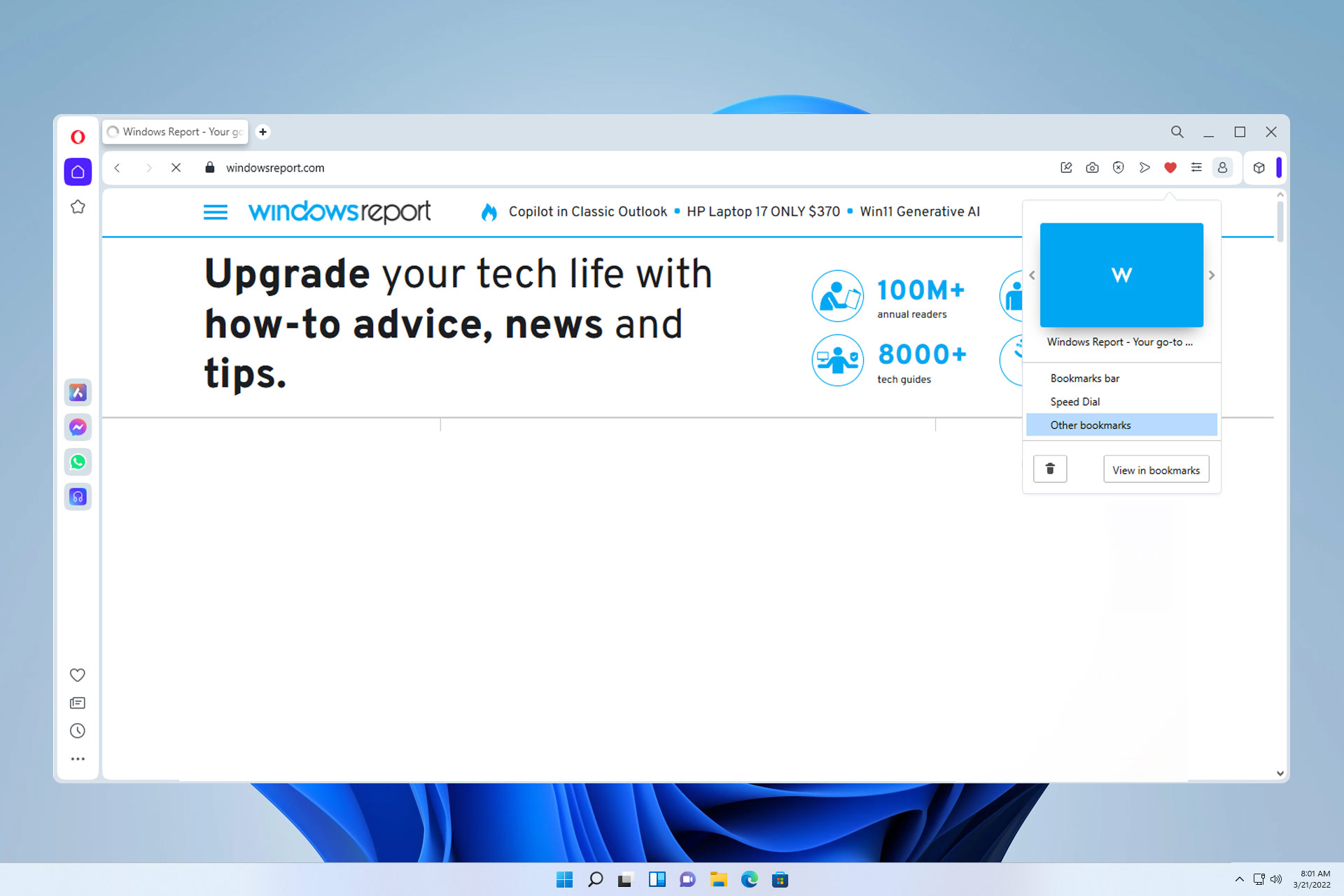
Favorites in Opera Browser: How to View & Add Them

Just like any other browser, Opera allows you to save favorites, and in today’s guide, we’ll show you how to properly use this feature.

How can I use the Opera browser favorites feature?

How to save Opera bookmarks?

  1. Click the heart icon next to the address bar.
     bookmark icon address bar opera
  2. Now choose the desired folder and click Done.
    bookmark save location opera
  3. The current website will be saved to bookmarks.

How do I view favorites on Opera?

  1. Open Opera.
  2. Navigate to opera://bookmarks
    opera://bookmarks in address bar
  3. The Bookmark manager will now open.
    bookmarks manager opera

What is the shortcut for bookmarks in Opera?

You can open the Opera bookmark panel with Ctrl + Shift + B.

Opera bookmark panel

To save a bookmark quickly, use Ctrl + D.

How do I get my bookmarks bar back on Opera?

  1. Click the Easy setup button in the top right corner.
    easy setup icon opera browser
  2. Next, check the Show bookmarks bar option.
    show bookmarks bar opera
  3. The bookmarks bar will now appear.

These are just the basics of using Opera favorites, but if you want to learn more, we have a whole guide dedicated to managing Opera bookmarks.

Keep in mind that you can encounter issues with bookmarks, and many reported that Opera GX bookmarks aren’t showing, but there are ways to get them back.

Speaking of which, you can move bookmarks from one browser to another, and we have an in-depth guide on how to export Chrome bookmarks to Opera, so don’t miss it.

Microsoft Ventures launches Think Next, announces graduation of 17 startups

Microsoft Ventures launches Think Next, announces graduation of 17 startups

Earlier this year, Microsoft Ventures in India selected 16 startups for its Summer 2014 batch. Today, at an event in Bangalore, Microsoft Ventures announced the graduation of all these startups. In addition, a startup from an earlier batch was also graduated.

At the event, the accelerator program also announced a new initiative Think Next – which aims to boost the startup ecosystem in India. Think Next will provide a forum to stakeholders, guiding them to take measurable steps to elevate the growth of the local entrepreneurial ecosystem. “Think Next is that forum, and we are confident it will provide a strong boost to the local entrepreneurial ecosystem,” said Ravi Narayan, Director, Microsoft Ventures in India.

The startup companies from the fourth batch that graduated today are: Appointy, App, Virality, Bookpad, Boutline,  Imly, InstaSafe, IntouchApp, Metaome, Sliderule, Voonik, MyBusTickets.in, Praxify, Thinxtream, Touchfone, ZingHR and Zoom. In addition, Profoundis, a startup from the second batch also graduated today.

“Over the course of the last two years, Microsoft Ventures has emerged as a key player in the Indian startup ecosystem, working closely by pooling its resources with other accelerators, incubators and industry bodies, with the single objective of helping startups,“ Narayan added.

Below you find the list of all the startups that graduated today, along with the progress they made over last few months.

Microsoft Ventures launches Think Next, announces graduation of 17 startups

Microsoft launches ‘Snaps’ to showcase amazing photography

Microsoft launches 'Snaps' to showcase amazing photography from around the world

There is no denying that there are some folks at Microsoft that are a fan of photography and art. After all, the world of Microsoft can be full of amazing moments. Microsoft has launched a new website that showcases the best photography from around the world of Microsoft, in a beautiful layout.

“With every amazing person we meet, and every epic moment we cover, our family photo album gets a little thicker. In fact, it’s pretty much bursting at the seams. So we’ve created a new place where we can share our favorite photos from the world of Microsoft with you. We’re calling it Snaps,” Microsoft stated in an official blog post.

For example, one of the images at the Snaps website features Microsoft CEO Satya Nadella on his first day as the big boss. There are quite a few images on the site right now, and we are sure Microsoft will add some more images soon. Head over to the Snaps website by hitting the VIA link below.

Thousands of Surface Minis have been produced and await a launch date

Thousands of Surface Minis have been produced and await a launch date

There was a great deal of excitement at yesterday’s Surface event, but there was no sign of the Surface Mini that so many people had been hoping and praying for. There had been so many rumors and leaks ahead of the event that the unveiling of a Mini was taken as a given. This only served to make the device’s non-appearance all the more disappointing; but all may not be lost.

Did the Surface Mini not appear because Microsoft has fallen out of love with Windows RT? Did the timing not feel right? Maybe the company did not want to detract from the launch of Surface Pro 3 and wanted to avoid overwhelming consumers with two devices at the same time. It’s not possible that so many sources could have been wrong about the device, is it? All of the usual leak sources have been informing us of the imminent launch of the Surface Mini. Industry insiders have been feeding information to journalists for weeks and month. Could they all have been wrong?

There have been suggestions made that Microsoft simply changed its mind, that the Surface Mini was simply canceled at the last minute — maybe even as late as the weekend before the NYC event. While it is tempting to think that this is possible, it would seem unlikely. But the Surface Mini is real. Very real. According to a report from Neowin 15-20,000 units have already been produced, and it was only a last minute “management directive” that stopped the launch in its tracks. Lack of faith in Windows RT and a failure to stand out from the competition have been cited as possible reasons.

The report agrees with Mary Jo Foley’s suggestion that the launch has been postponed until the touch-optimized Office Gemini is ready. This does make sense, as Office on a smaller tablet will act as a big draw. The current version of office 365 would be usable on a smaller screen, but it would not be ideal — far better to have a version that is specifically designed for a device of smaller dimensions. Remember the Surface Mini will be all about touch; there may be keyboards available at some point, but touch and pen input is going to be where it is at.

It is possible that Gemini will be ready in the fall, so there is a chance that this is when Surface Mini will also make an appearance… but sadly we are back into the realms of speculation once again. But one thing is clear. Microsoft does not want to launch a lame duck. Surface Mini will not see the light of day until it is completely ready, hardware, software and associated infrastructure. This is the new face of Microsoft, remember.

In the meantime, there is the Dell Venue 8 to fill the void, but it is the Surface Mini that remains the most desirable device.

Microsoft Surface Pro 3 vs Surface Pro 2: Should I Upgrade?

As you know, Microsoft officially revealed today the Surface Pro 3, during a press conference in New York. Even though most of us were expecting the Surface Mini instead, Microsoft managed to surprise us with its new generation of Surface, the Surface 3. Well, in order to make a proper idea about this new Windows based tablet, during the following lines we will compare the Surface 3 with Surface 2 in a detailed versus review.
surface-pro-3 vs suface pro 2
Since we are talking about two Microsoft tablets we must first clarify one thing: is it worth to upgrade? Well, we might say a definitely yes since the Surface Pro 3 is now a “laptop killer”; you will learn more details related to this aspect by checking the lines from below. First of all, when comparing the Surface Pro 2 with the Surface Pro 3 we head our attention towards dimensions. The Surface 3 comes with a bigger and better display, the tablet featuring a 12 inch display, which is a big improvement to the Surface 2 which is coming with a 10.6 touchscreen. Now, being this big, the Surface 3 can be easily used as a notebook, or to be more precise as a Windows 8 powered ultrabook. Anyway, if you want to properly compare these two devices, check the dedicated sections from our review.

Microsoft Surface Pro 3 vs Surface Pro 2

Dimensions and Design

Since we have clarified the display dimensions already, now we should talk about other details that might make us want to upgrade from Surface Pro 2 to Surface Pro 3. In that matter, since the third generation of Surface is featuring a larger display we would expect to get a thicker and heavier tablet; but that’s not the case as Surface Pro 3 is the thinnest Intel Core product ever made (9.1 mm thick).

Read Also: Final Draft App for Windows 8 Demoed, Getting Launched Soon

Furthermore, Surface Pro 3 weights around 800 grams, while the Surface Pro 2 weighs only 675.9 g, this difference being insignificant especially if we consider the screen dimension and the processor that is included on each device.Surface-Pro-2-design

Both tablets, the Surface Pro 2 and Pro 3 are compact and impact-resistant – you can even drop your Surface 3 on the floor and the tablet will be without a scratch – so you can safely use your handsets in various situations, in outdoor or indoor activities.

The best is that the Surface Pro 3 can be anytime used as a regular laptop thanks to its dedicated accessories that are ensuring a great user experience whether you want to watch a movie, write a document, take pictures, talk with your friends on social media websites and so on. Unfortunately, we can say the same thing when talking about the Surface Pro 2 which is first of all too small for a laptop purpose. Therefore, the Pro 3 will be the best choice to make when thinking in getting a device that mixes the tablet and the laptop field.

Processor and Performances

Well, this battle is definitely in favor of Microsoft Surface Pro 3. The tablet will be offered in three variants depending on the processor you will choose. Thus, you will be able to buy an Intel Core i3, i5 or i7 powered tablet. On the other hand, as we all know, the Surface 2 is coming with a Quad-core 1.7 GHz Cortex-A15 processor.

Moreover the Pro 2 specs are also including 2 GB of RAM along with 32 or 64 GB of internal storage, while the Surface 3 is available in four new models: for the i3 processor you will be able to receive 64 GB of internal storage and 4 GB of RAM, the i5 model comes with 128 / 256 GB of internal storage and with 4 / 8 GB of RAM while the i7 version will bring 256 / 512 GB of internal storage and 8 GB of RAM.

As you can see, if we are to talk about performances, the Microsoft Surface Pro 3 is definitely our winner as this device can anytime replace a classic ultrabook, while the Surface 2 remains a high end Windows 8 based tablet.

Battery Life

When presenting the Surface Pro 3 in New York, Microsoft declared that the new Surface generation of tablets is providing up to 10 or 20% more battery life which means that the Surface Pro 2 is once more one step behind. But considering that the Pro 2 was released last year we might say that we have a tie in matter of battery life, especially if we consider that on Surface Pro 2 we will be running more apps, processes and programs, so the battery will probably drain faster.

The best though is that Microsoft is providing portable devices that can last a day on a full charge, which is great especially if you travel a lot or if you take your Surface device everywhere you go.

Official Accessories

Now, the Surface accessories are what makes a regular tablet become a great Windows 8 portable device. So, when talking about Surface Pro 2 we all know its official “hardware power-ups” which are being available on Microsoft’s own website – you can have a list of best Surface Pro 2 accessories by checking our dedicated review.surface pro 3 accessories

But, as for the Surface Pro 3, Microsoft stated that this device will be something in between, meaning that we can be able to use the handset as a tablet, or as a regular laptop. In that matter, the device comes with a redesigned kickstand and type cover. The kickstand overs uses on different angles (even to a near-flat angle of 150 degrees) while when the type cover is used along with the kickstand, any user can use the Surface Pro 2 as a regular laptop or desktop.

Prices

The Surface Pro 2 can be yours for a starting price of $899.00 (for the 64 GB model) while the Surface Pro 3 is being offered on a basic price of $799 (for the same 64 GB model). Of course the $799 variant is coming with the i3 processor and with 4 GB of RAM, so if you will want a more powerful device you will have to choose one of the following offers:

  • Surface Pro 3 with i5, 128GB and 4GB of RAM – $999
  • Surface Pro 3 with i5, 256GB and 8GB of RAM – $1,299
  • Surface Pro 3 with i7, 256GB and 8GB of RAM – $1,549
  • Surface Pro 3 with i7, 512GB and 8GB of RAM – $1,949

Since the Pro 3 is now officially out, Microsoft will probably cut the prices for the Surface Pro 2. So, if you are thinking in taking advantage of this aspect, just wait a few more days and then check the new offers for your favorite tablet.

Conclusions

surface pro 3 vs surface pro 2

With the Surface Pro 3 Microsoft has managed to develop a great device that can solve a huge and general dilemma that most of users have nowadays and this dilemma comes with the following question: what should I buy, a laptop or a tablet? Well, with Pro 3 you can buy a device that can be both. On the other hand, if you think that the 12 inch screen is too big for a portable device and you might have problems in using such a device on a daily basis, then you should choose the Surface Pro 2 which, with its 10.6 inch display can fit in any pocket.

As for the performances, the Surface Pro 3 is definitely the better device, though the prices are also quite expensive; therefore, depending on your own preferences and expectation, you can anytime choose between these two Microsoft devices, so what should it be: the Microsoft Surface Pro 3 or the last year launched Surface Pro 2?

Read Also: New York Times Crossword App for Windows 8 Showcased

After Nokia XL launched last week, Nokia X+ launches in India for Rs 8,399

Nokia X+ launches in India for Rs 8,399 (44)

Keeping its promise, Microsoft (on behalf of Nokia) launched the third – also, the last remaining – device in its X lineup, Nokia X+, in India. Priced at Rs. 8,399 ($144), Nokia X+ sits between Nokia X and Nokia XL in terms of specifications and pricing.

At the Mobile World Congress Event, Nokia unveiled its X lineup – three phones that run on a forked version of Android. The company promised that it will roll out the devices to the Asia-Pacific region within 60 days. Nokia X arrived here a couple of weeks ago, and XL was launched last week.

Nokia X+ sports a 4-inch touch screen display with a resolution of 800 x 480. Powered by a 1 GHz dual-core Qualcomm Snapdragon S4 play (MSM8225) processor, coupled with 768MB of RAM, the phone runs a modified version of Android Jelly Bean (4.1). The dual-SIM capable device has a 3MP shooter at the back, but lacks a front facing camera. On the connectivity front it supports 3G, WiFi, and Bluetooth. The phone comes with 4 gigs of internal storage which can be expanded using a microSD slot. The 1500 mAh battery is also a tad low.

It will be interesting to see how Nokia X+ does in the market. The phone is now facing stiff competition from Moto E and entry level Android phones, whereas on the other hand it competes with its own cousin, the Lumia 520. It will be interesting to see if people go with a true Android Phone, a Windows Phone, or find Nokia X+ to be their choice.

NarrowCast Podcast App for Windows 8, 10 Launches with Plenty of Features

narrowcast podcast app windows 8
If you have been on the lookout for a truly professional podcast app for your Windows 8, 8.1 or Windows RT touch or desktop device, then I’m happy to inform you that we might have found it. Touted as a “powerful podcatcher”, NarrowCast has been designed exclusively for Windows 8 devices, which is one of the reasons why it is so great. At the moment, it is available for $1.99 but a future update will make it available for Windows Phone, as well, and its price will go up to $4, so you need to hurry up and get it while the special price is still standing.

Read Also: Where to Watch Live the Surface Mini Event

Thanks to the fact that you can take it for a free trial, I got to try it out and can say that I was pleasantly surprised by its awesome design. You can use it to search for your favorite podcasts through iTunes, as well as import or export your feeds to and from another podcatcher. Thanks to notifications and live tile support, you will be informed when new episodes have been made available.

NarrowCast seems to be the best podcast app for Windows 8

narrowcast podcast app windows 8.1

narrowcast podcast app for windows 8

Pin Indiviudal Subscriptions to Start Screen, complete with their own live tile. Queue individual episodes so you can listen without interruption (smart playlists coming next major update!) Quickly start playing latest episodes using quick play functionality! Download episodes to play offline Sync your Subscriptions, Episode Information & Settings between your Windows 8 and (coming soon) Windows Phone 8.1 devices Play episodes on your Xbox 360, Xbox One or any device that supports PlayTo OneDrive sync support! Turn this on in the sync settings.

Download NarrowCast app for Windows 8 

Ubisoft releases Assassin’s Creed Pirates in partnership with Microsoft, perfect for IE11

 Ubisoft releases the first ever Assassin’s Creed title in partnership with Microsoft

Microsoft has announced a new partnership with Ubisoft, a French multinational video game developer and publisher. The companies have together launched the first ever Assasin’s Creed Pirates for the web. Assasin’s Creed Pirates is free to play and is available in five languages worldwide. 

The game was build with Babylon.JS, which is an easy to use yet powerful, open-source 3D engine build on WebGL, TypeScript, and Javascript by Microsoft developers David Catuhe, David Rousset, Michel Rousseau, and Pierre Lagarde. These technologies offer developers the ability to quickly add collision detection, physics, lighting, camera angles, textures, effects, and new 3D scenes with minimal coding. 

Microsoft has also announced a new developer challenge. It states “Build your own shader with Babylon.JS and you could win an Assassin’s Creed Collector’s Black Chest Edition and an Xbox One! It only takes a few minutes and you don’t really have to be a pro developer to play with code this easy.” If you’re 16 years old or over and reside in United States of America, United Kingdom, France, Germany, Spain or Australia, you can participate in this content. Details can be found here.

Microsoft is touting Internet Explorer 11 as the perfect browser to play this game. Internet Explorer 11 features even better 3D performance, enhanced touch capabilities, and recent improvements to WebGL. 

“When Assassin’s Creed Pirates was released on mobile, it received high praise for its groundbreaking visuals. We wanted to see if a game like this could be possible on the web. It’s difficult to really know where web-gaming is headed, but we can be sure that Babylon.JS and Internet Explorer today, in terms of gaming, are great platforms to demonstrate its potential,” said François Bodson, Studio Manager.


Slovakia’s PC market sees a big increase, thanks to Windows XP’s end of support

Slovakia's PC market sees a big increase, thanks to Windows XP end of support

Slovakia is a state in Central Europe with a popular of over five million people. Thanks to Windows XP’s end of support and cheaper Windows 8 devices, Slovakia has seen a increase in PC shipments after six straight quarters of declining market share. In fact, the Slovak PC market increased in volume by 21% year on year in the first quarter of 2014.

“The market was driven by transitions to a newer Windows OS versions (either Win7 or Win8), as Microsoft ended its support of Windows XP in April. Vendors also increased shipments of new PCs due to Microsoft’s price reduction of Windows 8; some were also compelled to do so in order to meet end-of-fiscal-year targets set by their global or regional HQs,” IDC stated on May 19th.
The top PC vendors in Slovakia as of Q1 2014 include Lenovo with a 25.50% share, HP with a 20.70% share, Acer with a 16% share, and 37.80% comprising of other vendors. Seven out of ten PCs that were sold were notebooks, but the desktop market also saw an improvement. 

Microsoft ended support for Windows XP on April 8th, which along with the price reduction of Windows 8, has helped Slovakia’s PC market see an increase for the first time in six quarters. 

Google lets you schedule a Hangouts video call with other Outlook users with new plugin

Google plays catch up with Microsoft, releases Hangouts for Outlook

Not long ago, Microsoft rolled out a Skype plugin for Outlook which allowed users to do just about every Skype operation without having to leave the Outlook tab. Today, Google has launched a similar plugin, Hangouts for a Google Apps user who also uses Microsoft Outlook. “Schedule meetings in the blink of an eye with Google Apps shared calendars,” Google tweeted.

Once installed, users won’t have to leave the Outlook tab to start, join, or schedule a conversation on Hangouts, Google explained. It’s an interesting move by Google which might actually help some business users, however, it should be reminded that when Microsoft released a tool to bring support for Google Talks (the previous iteration of Hangouts) last year, one of the bosses at Google didn’t really like the move. Larry Page believed that Microsoft was using two companies inter-operation for its own benefits. 

“Schedule a Hangouts video call with other Outlook users in your company with a single click. Join a scheduled Hangouts video call by opening the meeting in Outlook and clicking the Hangouts video call link,” the plugin description reads.

As of now the plugin only works with Windows operating system – Windows 7 or higher (sorry Mac users). You can grab the download from the link below. 

User interface concepts for Office Gemini revealed, shows Word, Excel, Outlook in action

User interface concepts for Office Gemini revealed, shows Word, Excel, Outlook in action

A new document has been uncovered, titled “UX Proposal for Pen and Ink for Office Gemini,” showcasing concept designs for the Word, Excel, Outlook, and OneNote in action. Obviously these are concept designs, but could the final version of Office Gemini look similar? Its a possibility.

Office Gemini, for those that did not know, is the codename for Microsoft’s Office productivity suite that is optimized for touch and ink. These apps are not intended to replace their desktop counterparts, as Microsoft plans to continue to develop and innovate on the desktop front. Gemini simply provides consumers with a Metro/Modern version of the Office productivity suite.

Microsoft also has a video that talks about “Great Inking,” which goes over a unified approach to inking and how it ties into the company’s concept for Office Gemini. According to Microsoft, modern devices have changed the game and as more pen capable hardware is released, the more consumers should be aware of the inking capabilities – especially since consumers are turning to modern touch devices for productivity purposes. 

“In late 2013 and early 2014 Office, Surface, and Windows formed a Cross-Group Inking team to explore One Microsoft needs for a unified approach to inking. In this session Tucker Hatfield presents details about the Cross-Group effort and their conclusions of what is needed for first-class inking and Will Vong shows visionary ways in which these needs might be met with inking features,” Microsoft explained.

You can watch this video below. You can also check out the concepts in the PDF file below.

Credit to @h0x0d for spotting this!

Oops! Emory University accidentally tells all of its Windows PC to format themselves

Oops! Emory University accidentally tells all of its Windows PC to format themselves

Emory University is slightly red-faced at the moment after accidentally deploying a Windows 7 image to all of its computers and servers that started off with instructions to format and repartition drives. The mistake was noticed, but by the time the deployment server was switched off, it had itself been formatted; what then followed was huge clean-up operation.

The fallout was quite dramatic as while the deployed image included a number of key applications such as Office, other such as Visio and Project required manual installation. IT technicians worked through the night to restore “mission critical” computers to help speed up the process of getting others systems back up and running in a somewhat automated fashion.

Although a degree of automation was possible, visits from technician were still needed in many cases. The process as helped by the use of the Microsoft Development Toolkit but, as pointed out by The Next Web, incidents such as this do serve to highlight the importance of having up to date, reliable backups.

But while the accident caused quite a lot of problems, it did also show just how useful group policies are — this made it possible to rollout a lot of system settings. All told, the clean-up took a couple of days from start to finish, although there is still some work to be done to get all system fully operational again.

Oops!

We’re Set to Report Even More Awesome Windows 8 Apps & Games on Wind8Apps!

It’s time for a quick announcement for our faithful readers and for all those of you interested in Windows 8 apps!
awesome windows 8 apps wind8apps
First of all, let me say thank you for remaining a loyal reader of Wind8Apps in times when there are more and more websites appearing by the day. Probably most of you have subscribed with the website in order to receive more updates especially on new Windows 8 apps and games, but some are also interested in tips and tricks related to Windows 8. Today we’re making some internal changes and you will be happy to hear that they are made to please you, the reader.

windows store design 2014
So, starting from today, you will see more reporting done on new Windows 8 apps and games, so that you will get to enjoy the Windows Store at its full power. Also, Microsoft is preparing a number of developer events in order to boost the quality of the apps that get submitted, so we hope to be your first website which comes to mind when looking for another awesome Windows 8 game to play on your tablet.

Get your Windows 8 devices ready, because it’s going to be a helluva ride!

Official Issuu App Released for Windows 8, 10, Download for Free

Issuu is one of the best services in the world when it comes to reading magazines and catalogs, be it on your mobile device or straight on the mobile app. And now, after a long wait, it has finally been launched for Windows 8 users, as well.
issuu windows 8 app
By using the official Issuu app for Windows 8, you will be able to enjoy unlimited access to magazines, catalogs. There are over 20,000 new publications that are added daily in 30 languages from around the globe, so there are big chances that you will find the one that you’re looking for. There is a multitude of topics that you can explore, such as family, fashion, design, sports, photography, weddings, technology, style, science, medicine, food, travel and just about anything which  constitutes a major interested among readers. I’ve downloaded the app right away and used it for a few minutes and realized that it looks great both on my desktop Windows 8 device, as well as on my Windows 8 tablet.

Read Also: Checkers Deluxe Game Released for Windows 8, Download Now

Issue app launches for Windows 8 devices to help you discover free magazines

issuu windows 8

issuu app for windows 8

Experience millions of the world’s best magazines and catalogs, all for free. Discover a world of meaningful content, created by over 1.5 million publishers around the globe. Turn millions of digital pages with the swipe of a finger. Enjoy unlimited access to magazines, catalogs and more from wherever you are, whenever you like, at no cost. Stack collections of your favorite magazines and share them across social networks. Issuu’s smart content recommendation engine learns as you read and delivers a personalized and continuous stream of new, relevant and interesting magazines for you to browse. Keep up with the latest fashion trends from NYT Style or V Magazine. Try out new and interesting dishes from Sauce or Everyday Food. Stay current with your favorite teams and athletes with FIFA Weekly or Red Bulletin. Plan your next project with inspiration from American Craft or Emma.

Download Issuu app for Windows 8 

Rumor: Microsoft to offer a preview release of Windows 9 between Q2 and Q3 of 2015

Rumor: Microsoft to offer a preview release of Windows 9 in February of 2015

Windows 9, codename Threshold, is rumored for an April 2015 release date. This information is known and comes from Paul Thurrott, a well-known Microsoft insider. Now, according to a new rumor, Microsoft will offer a preview version of the new operating system sometime around February of 2015.

Similar to the Developer Preview or Consumer Preview of Windows 8, Microsoft is rumored to offer a public preview build of Windows 9 sometime between Q2 or Q3 of 2015 (around February or March of 2015) – giving consumers a chance to play with the new operating system before it’s official release. This information comes from a leaker by the name of “Faikee,” who was recently responsible for dropping the Windows 365 name, along with other tidbits.

In fact, the rumor goes as far as saying that Microsoft will offer the public preview of Threshold between Q2 and Q3 of 2015. Interestingly enough, it is also speculated that we will see a second update to Windows 8.1 sometime in September of this year, bringing along the return of the Start Menu, the ability to have “windowed” Metro/Modern apps, and the possible combination of Windows RT and Windows Phone. We’ve already taken the first step towards the latter with “universal apps” that work on Windows Phone and Windows 8/RT.

Take this bit of information with a huge grain of salt and remember it is just a rumor. Microsoft, nor any of the well-respected Microsoft insiders, have commented on Windows 9’s “public preview” release date. The word “Threshold” for those that did not know, is derived from the original Halo game, where it was the name of the planet enveloped by the first Halo ring.

Whether this rumor is true or farfetched is just icing on the cake. The point is Windows 9 is happening and we are all excited to hear what it has in store for us. What’s next for Microsoft’s Windows operating system? We’ll begin to find out in the coming months. 

Editor’s note: Post has been updated to reflect a Q2 to Q3 release date for the preview, rather than February 3rd.

How to Set Font Style, Size as Standard for Outlook Email in Windows 10

Some of our readers have been annoyed by a small problem that has a simple fix, but it has been giving them a lot of headaches these days. Read below on how you can easily set the font style and size as standard for email in Outlook.

I’ve recently seen on the Microsoft Community forums that there were several who weren’t able to find a solution on how to change the font style and size and how to make it default for Outlook.

This problem is affecting Windows 8 and Windows 8.1 users, since the software has changed for them. Here’s what one of the affected users has been saying about this, albeit this has reportedly appeared with Thunderbird users, as well.

When typing an email I can set the font size and style after completing it. I want to have a standard typeface for the email that I send.

How can I set Font Style, Size as Standard for Outlook email in Windows 10?

standard font style size outlook

Have a look at the screenshot below to see how to easily change the font size and style and make it default in Outlook, and also follow the steps from below.

  1. Open Outlook and from the File menu, choose Options.
  2. Then, Go to the Mail section, then click Stationary and Fonts.
  3. After that, just choose the fonts, the style, and the size you want.

To learn more about this subject, we have a great guide on how to change font in Outlook, so don’t miss it.

Microsoft announces a partnership with Insteon, gets into home automation business

Microsoft announces a partnership with Insteon, gets into home automation business

Insteon is a technology based company that has been in business for over 20 years. Insteon’s expertise is in home automation, providing technology that enables light switches, lights, thermostats, motion sensors, and other devices to inter-operate through power lines, radio frequency communications, or both.

Today, Microsoft has announced a partnership with Insteon. They’re bringing an enhanced version of its Insteon app with exclusive features and it will be available for Windows 8.1 and Windows Phone 8.1 devices as of June 1st. New features to this app release that are exclusive to the Windows platform are:

  • Visitor Mode – provides restricted access to children or guests in your home
  • Live Tiles – get status on multiple devices directly on your Windows 8.1 Start screen (not currently available on Windows Phone 8)
  • Enhanced Camera Support – view multiple cameras at once, view full-screen, and camera support without the need of an Insteon Hub
  • Multi-House Support – enables you to control multiple homes or businesses from a single account
  • Dashboard View – a quick and organized view of the status of your home

“The Windows 8.1 platform provided INSTEON with an unparalleled opportunity to develop a beautiful and easy-to-use connected home experience. The Live Tile architecture is especially well-suited for home automation,” said Joe Dada, CEO, INSTEON. “Users are going to love controlling their INSTEON-connected home from their Windows devices.”

Marking Microsoft’s retail entry into the connected home market, Insteon home products will also be available for purchase on MicrosoftStore.com and most Microsoft Stores across the U.S. 

“Windows PCs, tablets and phones are supported by a rich app ecosystem that offers a variety of quality apps that take advantage of the platform’s unique features and design such as Live Tiles,” said Todd Brix, general manager, Windows Apps and Store, Microsoft Corp. “The unique camera and control features in the INSTEON app really come to life on both Windows and Windows Phone.”

Microsoft is planning on offering a range of Insteon products that will include three kits, a Starter Kit, Home Kit and Business Kit. Standalone devices will include the INSTEON Leak Sensor, Open/Close Sensor, LED Bulb, On/Off Module and Wireless Wi-Fi Camera. Prices will range from $29.99 to $79.99, with kits starting at $199. 

Time of My Life app gives you a better understanding of how your time is spent

Time of My Life app for Windows Phone gives you a better understanding of how your time is spent

Do you wish you had a way to better understand how your time is spent on any given day? Do you also own a Windows Phone device? Well, guess what. There’s an app for that. Introducing Time of My Life app for Windows Phone, from the kind folks over at Microsoft Research.

“Where did my time go? Use this app to better understand how your time is spent and budget your time better to focus on things that matter most. The application shows daily, weekly and monthly graphs of where time was spent, with automatically inferred places (such as home, work, gym, and restaurant) or activities,” the app description reads.

The idea behind the app is to help you track where you spend your time, since our lives are always so busy. Sometimes we tend to forget how we fill our days. The app showcases daily, weekly, and monthly graphs, showing you places you have been to like home, work, gym, and eateries. You can even add names or new places for personalization.

Grab the app via the download link below and give it a try. Maybe it can help you understand your day.

Microsoft announces it will live stream Surface event on May 20th

Microsoft announces it will live stream Surface even May 20th

In less than a week Microsoft is slated to hold an event in New York City. While we already know it is about Surface, and that Satya Nadella is likely to host, the exact announcements forthcoming have been kept secret. Rumors swirl around a Surface mini tablet and perhaps even the unveiling of the Surface Pro 3, a mere seven months after the second generation tablet hit the market. 

Today the Redmond company let us know that it plans to live stream the big event. In a brief announcement, Microsoft’s Dan Laycock says “The webcast will begin at 8am Pacific Time (11am Eastern). For specific details on the webcast, visit the Microsoft News Center on Tuesday, May 20th”. 

WinBeta will have full coverage on everything at the event, so if you can’t watch the live coverage, then fear not. In the meantime, let the wild speculation continue — what do think, or hope, the software giant will unveil next week? Tell us in the comments.

Microsoft teases us with some more Sunset Overdrive, offers gameplay preview video

Microsoft teases us with some more Sunset Overdrive, offers gameplay preview video

Later this year, Sunset Overdrive will launch on the Xbox One as an exclusive for the platform. Microsoft continues to tease us with yet another video of the game in action. We’ve embedded the video below for your viewing pleasure.

Microsoft recently offered a first-look video on the next generation game, which has been hyped by the company ever since the console was launched back in November of 2013. Sunset Overdrive borrows elements from games like Prince of Persia, Tony Hawk’s Pro Skater, Jet Set Radio, and other games to create what’s called “awesomepocalypse.” 

“Xbox Wires chats with Ted Price, Drew Murray and Marcus Smith from Insomniac Games about irreverent world and gameplay for the Xbox One exclusive, Sunset Overdrive,” the video description reads. You can take a look at the video below. Are you excited for Sunset Overdrive?

Outlook.com rolls out advanced rules, undo, in-line reply, and more in new update

Outlook.com rolls out advanced rules, undo, in-line reply, and more in new update

Microsoft is rolling out an update to Outlook.com over the next few weeks, adding a few new features making the service just a tad bit better to use. These new features build on Microsoft’s commitment to give your inbox new and better ways to work more and save time.

“When it comes to getting organized, Outlook.com has you covered. Starting today, we are releasing Advanced Rules and three other features, all to help you keep your inbox in top shape and make it even easier to see the email that matters to you,” Microsoft stated in an official blog post.

Microsoft has added Advanced Rules to Outlook.com, allowing you to have more control over how your emails are sorted, filed, or placed at the top of your inbox. Users can create multi-condition and multi-action rules, and even combine rules together. Optional conditions include: time constraints, email tallying, checking read/unread state of emails, and checking if the sender is a contact you know.

Here is an example of a rule: “If an unread email is older than 3 days and is from one of your contacts, mark it as important and flag it.”

Microsoft has also added the undo feature to Outlook.com. Users who delete, categorize, flag, mark as junk, or move can now undo by clicking the undo button or by typing Ctrl+Z. In-line reply allows you to directly respond to an email thread without having to launch a new view. This new feature is intended to save you time and help you track your conversations with ease.

The following improvements were also made:

  • Find recent conversations and other contacts you can chat with in the bottom left of your inbox. One click will launch you straight into a conversation with them.
  • If you’re chatting with a friend on one service, but want to continue the talk on another service, now you can switch over from right inside the chat session.
  • You can now browse your People by filtering what service they’re using (Skype, Facebook etc.). You can even see who’s currently available–Icons will now appear alongside names, so you know who’s able to Video, Call or just chat.

Microsoft supposedly working on Windows 365 alongside Windows 9 and Office 2015

Microsoft supposedly working on Windows 365 alongside Windows 9 and Office 2015

Not that long ago, leaker Wzor revealed that Microsoft is working on a prototype operating system called Windows Cloud. This operating system is rumored to require an internet connection for full functionality, acting as a basic operating system when in offline mode. Now, according to a new image that has surfaced online, Microsoft is allegedly referring to this operating system as Windows 365.

In the image, which seems to be a screen capture of a Facebook entry, we see the status of Microsoft’s products including Windows 9, Windows 365, Office 2015, and more. Based on what is listed in this image, Windows 9 (including server and mobile edition) is currently in the development stages. Nothing new here.

The image also mentions that Windows 365 is currently in Alpha and is based on the Windows Core. Windows 365 is an interesting choice for a name, considering Microsoft’s subscription based Office 365. The image also mentions that Windows 8.1 Update 1 is already completed, while Update 2 is blanked out giving us no idea on when it will be released. Rumor speculates that we will see this update sometime in September of this year, bringing along the return of the Start Menu.

Office “Gemini” is also in the works, according to the image. Office “Gemini” is the codename for the next big update to Office, in which we are expecting a Metro/Modern version of the Office productivity suite. The image also mentions Office 2015 as currently in development.

This image surfaced thanks to a leaker known as “Faikee” who has a good track record of leaking or showcasing information that has proven to be true. But we are going to stamp a big fat “rumor” to this image until more details surface. It does sound like Microsoft is looking to create “one user experience” across most if not all of its services.

Most of what is mentioned in the image is already known information, except for Windows 365. How do you feel about this name? It sounds like we are traveling towards a subscription/cloud based operating system. Keep this as a rumor until more concrete details emerge from sources like Mary Jo Foley.

Microsoft supposedly working on Windows 365 alongside Windows 9 and Office 2015


International Nurses Day: Microsoft is launching a new blog specifically about nursing issues

International Nurses Day: Microsoft is launching a new blog specifically about nursing issues

In celebration of International Nurses Day (May 12th), Microsoft is gearing up to launch a new “Nurses in Health” blog and the company is seeking nurses to help contribute. This new blog is specifically about nursing issues and Microsoft wants nurses to help offer stories or perspectives on improving patient care around the world.

“Today, 12 May, is International Nurses Day. Today we pay our respects to those who bravely tackle some of the most demanding tasks in healthcare. Today we remember those who embody the NHS’ 6Cs  – care, compassion, courage, communication, commitment and competence – like no one else. Today we say ‘thank’ you to all nurses. But we also want to ask you for one more thing: Your voice,” Microsoft stated in an official blog post.

The most interesting healthcare stories still go untold and Microsoft wants to change that. “We routinely feature views from doctors, administrators and technology specialists. But what about the people who spend the most time with patients? What about the people who have the closest view of how the health sector is changing? What about nurses?”

If you are a nurse who wants to contribute to the new Nurses in Health blog, email Microsoft at [email protected].

Some Users Unable to Order Windows 8, 10 Backup DVD

More consumers are orienting themselves towards more digital downloads these days, but it’s really a good thing to have a physical back-up of your software purchase, especially when we’re talking about something so important as Windows 8.
unable order windows 8 backup dvd
Having a back-up DVD of your Windows 8 or Windows 8.1 software is extremely useful, as you will definitely need it when you’re going to reinstall it on a new laptop. But a user has been complaining on the Microsoft support forums that he isn’t able to buy a new back-up DVD, no matter what payment method had he tried. Maybe you find yourself in the same situation, so quickly see what he is complaining about:

Ordered my copy of Windows 8 back in Dec 2012, my laptop needs to be wiped and I need to reinstall afterward. I wanted to order a DVD backup but it will not allow me to. It says “There was a problem with your order. Please verify your payment information and try again.” no matter what payment method I select, even though there are MORE than enough available funds in every account. When choosing paypal it doesnt even prompt me to log in. Tried to call into the ordering line, but I’ve been on hold for over an hour now. I just want to order my dvd 🙁

Contact Microsoft support

I’ve looked online for a possible fix on this, but haven’t been able to find one, therefore, what you really need to do is to contact the Microsoft support team in order to have your issue fixed. Also, from what the user is saying, it’s not quite clear whether he is looking to buy a new DVD back-up or just to regain his old one, therefore I’ve reached out to him to leave a comment with the full situation.

Read Also: Age of Empires 3: The War Chiefs Fails to Install in Windows 8.1

Age of Empires 3: The War Chiefs Fails to Install in Windows 8.1, 10

Age of Empires 3 is one of the best strategy games of all time and it’s fully compatible with Windows 8.1, but, as it turns out, there are certain problems especially when trying to install the War Chiefs expansion pack.
age of empires warchiefs windows 8.1
Certain Windows 8.1 users have been complaining that while installing Age of Empires III: The War Chiefs, they have encountered various errors (1628, 1158) which result in a failed installation. As it turns out, the Age of Empires Asian Dynasties and War Chiefs have been working in Windows 8 and the issue has appeared only after the said upgrade to Windows 8.1. Have a look below at the complete message from the user:

installed aoe3 , warchiefs and asian dynasties in win 8 and then upgraded to 8.1. got trouble with my installation and tried to reinstall it altogether. the first to worked and just the warchiefs just dont work! im getting quite frustrated now. i read a lot in the web but all the ‘solutions’ didnt work to me and the link isnt made for 8.1 isnt it?! PLEASE help me i want to play aoe again!!!

As the user has mentioned, there are plenty of solutions online, but from what I’ve research, there’s only one that I can recommend to you.

How to make Age of Empires 3 work in Windows 8.1

  1. Rename the InstallShield folder
  2. Download and install the latest Windows Installer package
  3. Locate and then close the file
  4. Create a new user account
  5. Perform a clean startup
  6. Download and install the latest version of the .NET Framework

If you haven’t managed to understand from the above short step by step guide, you can download this Microsoft Fix it tutorial (completely safe link) or follow these instructions from Microsoft’s official website.

Read Also: Fix: Can’t Eject USB Drives in Windows 8.1

Some Plaxo Users Can’t Sync the Address Book in Windows 8, 10

Plaxo is one of the best software when it comes to managing your address book and, naturally, there are many Windows 8 users who have downloaded and installing the service. But it has proved to be problematic for some.
plaxo windows 8This morning, while browsing through the Microsoft Community support forums and after being pinged by one of our readers, I noticed that some Plaxo users have troubles with their software on Windows 8. Therefore, I decided to make the issue “more public”, so that those affected could get help for their problem. If you have had similar problems, let us know by leaving your comment and we’ll try to find out a solution together. Here’s how the complain sounds like:

Read Also: askSam in Windows 8.1 Doesn’t Work for Some Users

I have paid for PLAXO but now I can’t sync my address book. I have a new computer with WINDOWS 8 and NORTON. When I try and download the required tools from PLAXO it keeps on wanting to connect to OUTLOOK EXPRESS instead of WINDOWS LIVE MAIL. Can somebody help me please. I am not a computer expert.

So, as we can see, the problem arrives when you have to connect your mail account, and, in this scenario, it weirdly requires Outlook Express and not Windows Live Mail. But, we all know that Outlook Express isn’t supported anymore for quite a long time, so the best thing that you can do is go ahead and perform a clean install of Plaxo. If this doesn’t work, then leave your comment below and let’s figure out a solution together.

askSam in Windows 8.1, 10 Doesn’t Work for Some Users

askSam is a really useful software, which works like a free form database aimed at regular users rather than programmers. And now some have started complaining that it doesn’t work in Windows 8.1. Read below for more details.
asksam windows 8
According to recent posts on the Microsoft support forums, some users have been complaining that the askSam software isn’t working as it should in Windows 8.1, after there have been no problems whatsoever with Windows 8, 7, Vista and even Windows XP. We’re thus reaching out to askSam to let us know whether they have not made the software Windows 8.1 ready. Here’s what the affected user is saying:

The askSam free form database worked perfectly with Windows XP, Vista and, as far as I can recall, Windows 8. However it almost always freezes when I try to access an existing database now that I’m running 8.1. I’m left wondering whether it’s compatible with Windows 8.1 or whether I have some other issue. Any ideas, please?

askSam seems to have compatibility issues with Windwos 8.1

For those who don’t know what askSam is all about, here’s a short description of the software:

askSam is a database designed for users rather than programmers. Once your information is in askSam, you’re ready to search. Not only can you search on the contents of fields, but you can search on free-form text. askSam offers a wider variety of searches than any other database program and some of the fastest and most powerful searches you’ll find anywhere.

If you have been experiencing similar problems, let us know by leaving your comment below, so this way we will be able to help those who have problems. Also, if it doesn’t work, you can try to run it in compatibility mode with a previous Windows version, as that does the trick in many situations.

Read Also: Is Microsoft Really Building a Smartwatch?

Official United Airlines app for Windows 8, 10 Now Available for Download

After having released the official app for Windows Phone 8 users, United Airlines has recently released in the Windows Store the app aimed at desktop and tablet users, as well. Read below for more on this.
united airlines windows 8 app
If you are an United Airlines customers and you also own a desktop or touch Windows 8 device or even Windows RT, then you’ll be happy to hear that the official app has made its way into the Windows Store a few weeks ago. It comes as a free download but the bad part about it is that it works just as a “veil” for accessing the website. However, I hope that in the near future this will be changed with the release of an update and that we’ll have a standalone app.

Read Also: Skateboard Party 2 Brings the Skateboarding fun to Windows 8

United Airlines customers welcome the official Windows 8 app

united airlines windows 8 app

Connect with United Airlines using our new app for Windows 8! You can leverage all of the features of United.com to book travel, get boarding passes, plan vacations and more. Share special offers with friends and family, and pin favorite locations to your start screen.

By using the app, you will be able to get quick access to all features on United.com and also share deals and travel plans by using the share charm. Another useful features includes pinning your favorite locations directly to your start screen. At the moment, the app is only available in English, since it’s naturally aimed at those from North America. So, just follow the link from below and get it on your Windows 8 devices.

Download United Airlines app for Windows 8

Skateboard Party 2 Brings the Skateboarding fun to Windows 8, 10

There are more and more new awesome Windows 8 games getting released on the Windows Store and one of the fresh titles is Skateboard Party 2, which instantly transforms your Windows 8 tablet into a skateboarding device.
windows 8 skateboard game
Skateboard Party 2 is a brand new game which has been released in the Windows Store and it brings the awesome joy of skateboarding straight on your Windows 8 and Windows RT devices. I admit that I have no clue when it comes to skateboarding, but I proved to be pretty good at least inside a virtual game. Skateboard Party 2 comes with a price of $1.99 and a size of slightly less than 300 mb. It also comes with Xbox game controller support, if you want to take the gaming to a whole new level.

Read Also: Telegram: Messenger app for Windows 8 Launched in the Store

Popular skateboarding game now in the Windows Store

This is quite a well-done game, with plenty of features, such as the following: online multiplayer mode, fully customizable control system, over 40 unique tricks, massive skateboard locations, the ability to customize your skater, extended Soundtrack featuring songs from Voice of Addiction, Sink Alaska, Beta, Hitplay!, Moovalya, We Outspoken and Melodic in Fusion. The app is available in the following languages: English, French, German, Italian, Spanish, Russian, Japanese, Korean, Portuguese and Chinese and comes with sharing features, as well.
skateboard game windows 8

Skateboard Party 2 brings all the fun of skateboarding to your mobile device allowing you to ride in 8 completely unique locations. Jump on your board, learn new moves and improve your skateboarding skills to land sick combos. Play with your friends using the new online multiplayer mode or challenge skaters from all over the world using the online leaderboards. Complete achievements, gain experience and upgrade your favorite skater. You can also customize your outfits, boards, trucks and wheels with real brands.

So, if you’re a fan of skateboarding or if you just like sport games on your Windows 8 tablet, then waste no more time and follow the download link at the end of this article.

Download Skateboard Party 2 for Windows 8

Microsoft Research Peter Lee talks about Windows 9, making companies productive and smarter

Windows 9 will have digital-assistant tools to make companies more productive: Peter Lee

We are all well aware that Microsoft is working on the next version of Windows. We learned recently that Windows 9 might be cloud-based, compared to what we have now. We’re beginning to learn just a bit more on what Windows 9 could feature.

Peter Lee, head of Microsoft Research, in an interview with Jeremy Kaplan over at DigitalTrends, hinted on what we can expect from Windows 9. “Using machine learning to extract relationships, entities, key ideas being worked on and bring those to the surface in tools. Maybe even digital-assistant tools to make companies more productive and smarter. That’s one area we’re going at” for Windows 9, Lee said.

So what exactly does that mean? Lee wasn’t clear, but it sounds like he is referring to the cloud and Bing technology being the backend to the operating system. Talk about the operating system becoming smarter!

“If I write a document and I want to say, share this with the appropriate people that work with Vikram from the meeting, or say, ‘what’s trending around me at work,’ not in my personal space but at work … answering questions like that requires a very different kind of machine learning,” Lee added.

If anyone remembers Microsoft’s Satya Nadella’s first interview as CEO, he said “Going forward, it’s a mobile first, cloud first world.” Lee hinted that currently Windows OS doesn’t rely on cloud computing, but that may soon change in Windows 9.

Lee also spoke about Cortana during his interview, and mentioned that Cortana is becoming smarter and ‘a bit more human’ in her responses every day thanks to continuous improvement. 

Bitcoin Miner App for Windows 8, 10 Gets Mining Pool Improvements

Albeit Windows 8 is a fairly new Windows version, especially Windows 8.1, there are plenty of interesting apps that make use of its potential, such as Bitcoin apps. And one of the best in the Windows Store – Bitcoin Miner, has now been updated with some much needed features.
windows 8 bitcoin miner app
If you are interested in mining Bitcoins from your Windows 8 device, then chances are that you have heard about this app and you will definitely be interested in the latest version and the new features that have been made available. So, long story short, the app now comes with a simplified mining pool setup and there have been added individual mining pool username and password validation features. Besides this, the detection of invalid credential responses has been improved and there also have been added links to the current mining pool when you are mining, so this is a really useful option. Also, links to user address statistics when applicable have been included, as well.

Read Also: Star Wars: Assault Team for Windows 8 Gets a Massive Update

Let your computer make you money with Bitcoin Miner, the free easy-to-use Bitcoin miner! Earn Bitcoin which can be exchanged for real-world currency. Works great at home, work, or on the go. Download Bitcoin Miner and start earning Bitcoin today! Bitcoin miners perform complex calculations known as hashes. Each hash has a chance of yielding bitcoins. The more hashes performed, the more chances of earning bitcoins. Most people join a mining pool to increase their chances of earning bitcoins. Mining pools pay for high value hashes known as shares.

bitcoin miner windows 8 app

The app comes with a size of less than 2 megabytes and is available as a free download from the Windows Store just by following the link from below. The app will also work on your Windows RT device, if you have one.

Download Bitcoin Miner app for Windows 8.1 

How To Use Microsoft Money in Windows 11 &10 [Install Guide]

If you’re wondering whether Microsoft Money still works on Windows 10 or Windows 11, the short answer is yes, but only with the Microsoft Money Plus Sunset edition. Although Microsoft discontinued the product years ago, many users still rely on it for budgeting and personal finance tracking. Luckily, Sunset Edition runs well on both modern operating systems.

microsoft money windows 8.1

In this guide, we’ll show you exactly how to install and use Microsoft Money on Windows 10 and 11, cover compatibility concerns, and link you to additional help if needed.

For any other relevant information or questions, you can always use the comments section below, and we’ll take care to reply to you so you can use this marvelous software.

How to Install and Use Microsoft Money on Windows 10 and 11?

Microsoft Money doesn’t officially support Windows 10, but the Sunset Deluxe edition works perfectly.

✅ Installation Steps for Windows 10

  1. Download Microsoft Money Sunset Deluxe

    Use the official archive or reputable sources to get the installer (usually named USMoneyDlxSunset.exe). For more help, follow this detailed Windows 10 guide.
  2. Install Normally

    Double-click the .exe file. You don’t need to run it in compatibility mode, just follow the prompts.
  3. No Activation Needed

    This version doesn’t require a product key or activation. It’s preconfigured to work standalone.
  4. Start Using It

    Launch Microsoft Money from your Start menu. You can either create a new file or import an existing .MNY file from a backup.
download microsoft money windows 8

💡 You can also explore this article for troubleshooting installation or file compatibility errors specific to older Money files on Windows 10.

🔧 Compatibility Notes and Fixes

  • Works out of the box: No compatibility mode or special setup required.
  • No online services: Microsoft disabled live banking sync, quotes, and bill pay. You’ll need to manually import OFX or QIF files.
  • Best Use Case: Personal budgeting, checkbook registers, offline account tracking.

✅ Installation Steps for Windows 11

Windows 11 introduced some interface and system-level changes, but Microsoft Money Sunset still works reliably.

  1. Download the Sunset Edition Installer

    You’ll need the same .exe file as with Windows 10. You can learn more in this dedicated Windows 11 article.
  2. Run the Installer Without Compatibility Mode

    Windows 11 handles legacy software fairly well, so just install as usual.
  3. Launch the App

    After installation, find “Microsoft Money Plus Sunset” in the Start menu. Launch it and set up your account or open a backup.
  4. Restore or Import Files

    You can import existing .MNY files or transaction exports from your bank.

🔧 Compatibility Notes and Fixes

  • Startup issues?

    If the file doesn’t open or crashes, try running it as Administrator or use compatibility mode for Windows 7.
  • Data not importing?

    Ensure your .MNY or .QIF files aren’t corrupted. Some banks now offer OFX downloads as well.

For more insights and feature limitations in the app itself, this overview of the Microsoft Money app can help clarify your expectations.


FAQs

Can I still use Microsoft Money online features?

No. Microsoft discontinued all online services. You must manually download transaction files (QIF/OFX) from your bank and import them.

Will Microsoft Money work on future versions of Windows?

As long as Microsoft continues to support 32-bit apps and Win32 architecture, Sunset Edition should remain functional.

Is it safe to use Microsoft Money today?

Yes, just don’t rely on it for online syncing or security-critical tasks. Always keep local backups of your .MNY files.

Final Take

While Microsoft Money is officially discontinued, it still holds value for those who prefer offline, simple budgeting tools. Thanks to the Sunset Edition, you can keep using it on both Windows 10 and 11 with minimal friction.

If you’re just starting or recovering from an old setup, follow the guides above and be sure to check the linked articles for troubleshooting and advanced tips.


Get Unlimited Desktop Space on Windows 8, 10 With This Tool

The ability to extend or expand your desktop in Windows 8 and Windows 8.1 has been made possible, just as with previous Windows version, with the use of third-party software. Today we’re going to talk about the GiMeSpace Desktop Extender 3D tool.
unlimited desktop space windowsSometimes, you just have the feeling that your desktop on Windows is just not big enough and that’s why some are looking to extend their desktops, be it on Windows 8, 8.1 or on previous Windows 8 version, to have unlimited space. And, as you can see in the above image, it lets you extend your desktop so that you can fit in as many programs or apps as possible. After a lot of research, I’ve found a single software that I can recommend to anybody, and it is available for a cheap price. Don’t go for copies or software found on torrents, as they will most likely invade you with Trojans and various other viruses.

Read Also: Microsoft Account Hacked: Critical Things to do

GiMeSpace Desktop Extender 3D brings unlimited desktop space to Windows 8

GiMeSpace Desktop Extender 3D is the deluxe version of the Desktop Extenders. It uses the latest Aero theme desktop technology present in windows Vista and 7/8. Like in the standard edition you can scroll left-right, up-down. But now you can also zoom in and out seamless. So you can navigate your desktop in 3 dimensions! Zooming in is usefull to see details on your screen more clearly. Zooming out is usefull to see the whole overview of your desktop and to see a whole window if that window is bigger then your screen. Windows are scaled down but it is still possible to work with your windows while you are in ‘zoomed’ mode! Bonus: Only available in this edition! You can now assign hotkeys to different places in your desktop!

To get the official software, totally secure from a very secure location, on safe servers (the same website that we used to provide links for Outlook Express on Windows 8), then I recommend you to follow the link at the and of the article which will take you directly to the check-out page. Have a look at the screenshots from below to see how its properties look like, along with its main features.

Get more destkop space with this software

windows unlimited desktop space

GiMeSpace Desktop Extender provides a smarter way to use your desktop. It is a small and very simple program for Windows that will allow you to expand your desktop without any limits. When you move your mouse to the edge of your screen you will notice that your desktop extends beyond the borders of your normal desktop. There is a 3D navigator screen where you can see your whole extended desktop and move your windows around, zoom in and out. It provides a cheap alternative for adding more monitors to your computer. You can resize you windows to a size that is bigger then your physical screen. This can be very handy for computers with a small screen like netbook, etc. You can select the autoarrange option to keep your windows next to each other.

It has the option to make your Desktop scroll always when you move the mouse. This way you much more enjoy your extra space while at the same time you don’t have to move your mouse long distances any more! Other options are: Sticky scrolling, no more scrolling when you hit shortly the border. Scroll one screen at a time. And scrolling using the keyboard. There is a tab where you can select windows that you don’t want to scroll, like toolbars etc. You can limit the virtual desktop to the space used by your application windows. And you can save and restore the positions and sizes of all your windows. Only available in the 3D edition. You can now assign hotkeys to different sections of your desktop!

desktop extender windows 8
Before deciding to buy this program, which comes at a really accessible and cheap price, you may want to have a look at this video, as well, which comes directly from the developer of the software. I have been using it myself and am really pleased with it. If, for a certain reason, you don’t want to acquire it yet, then you can go ahead and get the trial version, also, completely secure.

Download and order GiMeSpace Desktop Extender for Windows 7, Windows 8, Windows 8.1 (completely secure server)

Use Bing and Windows apps to keep up with the Indian elections

Use Bing and Windows apps to keep up with the Indian elections

The world’s biggest election is underway in India. Around 814 million people are eligible for voting to elect a government between the two major national parties, Congress and BJP. To cover this mega event, Microsoft has joined hands with Network 18, and released two apps, in addition to the updates, on Bing called Bing Elections.

India Elections

Head over to India Elections and you will find comprehensive coverage of this year’s elections. From the latest news, to voting schedule, to all the information about parties and candidates, Bing has you covered. Plus, there’s an interesting game too which you might like.

Apps for Windows 8 and Windows Phone

To make it easier to keep track of all the election updates, Network 18 Media has released Indian Elections 2014 apps for Windows Phone and Windows 8 (and higher).

The news and updates are provided by IBN Live and Bing. Using the application you can easily search for parties, candidates and constituencies. Find opinion polls and expert analysis. You can also save this information, as well as share it on your favored social networking websites.

Snag the application from the download links below.

Thanks Rizwan for tipping us!

Do Windows build leaks hurt Microsoft or actually help with hype?

Do Windows build leaks hurt Microsoft or actually help with hype?

Leaks are an issue for many companies and institutions. Governments like to keep a great deal of documentation out of the public domain for reasons of national security. Musicians very much prefer that their albums are not leaked ahead of launch because leaks are likely to harm future sales. The likes of Microsoft are also keen to keep their software projects under wraps until they are ready for an official launch. But do leaks really harm software companies?

There are two sides to the argument. The first being that leaks are Bad Things. Leaks are unofficial releases and will usually mean that copyright is infringed, correct licenses are not in use, and other moral and legal boundaries are overstepped. Just as a band will argue that an early album or single leak will mean fewer sales, a lower chart position, and a decrease in income, a software company could argue that if an early build of a product is made available online, there will be fewer sales when the actual launch date comes around.

But it is not just a matter of profits. The security of software is something that developers take very seriously, and if early builds of an application or operating system fall into the wrong hands, there is potential for security problems to be discovered well ahead of launch — and this could have a devastating impact further down the line.

There is also the risk that early code will fall into the hands of competitors, and there are wide reaching possible consequences for is. A rival company getting to try out your product gives them the opportunity to copy ideas, or even better them. Seeing the innovative feature that have been built into a future product could spur them into beating you to market.

On the flipside, it could be argued that leaks actually serve as a great means of advertising a product. Why wait for a company to wax lyrical about an upcoming piece of software when you can just try it out for yourself? If a product leaks ahead of launch there is more time for hype and excitement to build. There is more time for word of mouth recommendations to be made (although there is obviously potential for this to be a negative thing!).

This is something that has served Microsoft incredibly well over the years. For all of the complaining that has been done about leaks, the fact that early builds of Windows have been used by geeks, fans, and the curious long before launch has helped to create a massive sense of anticipation well ahead of the official release date. Remember Nashville and Longhorn? How exciting was it to be able to play with new features of Windows before everyone (well, not literally everyone!)?

The same has been true of the leaks for Windows 8, Windows 8.1 and even Windows 8.1 Update. It’s all well and good being told what’s going to be in a future release, or even see a demonstration, but it’s something else to be able to try it out.

It also gives companies the chance to respond to feedback and tailor a product before it even hits the market — think of it as a form of market research if you like. If it becomes apparent that those people who did manage to get hold of an unofficial pre-release version are not keen on a particular feature, it makes sense to ditch it or change it. If nothing else, it is cheaper than paying for a proper team of alpha and beta testers!

There will always be two sides to the story, but I’d be interested to hear what you think. Are leaks a good or a bad thing?

Web browser Do Not Track settings will no longer be honored by Yahoo

Web browser Do Not Track settings will no longer be enabled on Yahoo

Yahoo has announced today that they are changing their stance on the Do Not Track browser privacy standard. In fact, Yahoo will no longer recognize a users’ Do Not Track setting across any of its services, including Yahoo Search. This type of tracking protection is intended to prevent your browsing information from being sent to third-party content providers on websites you visit.

“As of today, web browser Do Not Track settings will no longer be enabled on Yahoo. As the first major tech company to implement Do Not Track, we’ve been at the heart of conversations surrounding how to develop the most user-friendly standard. However, we have yet to see a single standard emerge that is effective, easy to use and has been adopted by the broader tech industry,” Yahoo stated. 

Google already ignores this setting, as it relies on collecting browsing data to sell targeted ads.

Microsoft, on the other hand, has supported this setting, especially with Internet Explorer. Basically, when Do Not Track is turned on, Internet Explorer will send a Do Not Track request to the sites you visit and to the third parties whose content is hosted on those sites to let the sites know that you would prefer not to be tracked. Microsoft’s Internet Explorer 11 browser offers this option and it is enabled automatically. Microsoft has had this setting enabled by default since Internet Explorer 10.

However, as Microsoft once noted, this setting is only the beginning towards an increased control over user privacy. “We designed this functionality as a good start to enable consumer choice and protection from potential tracking. We provide a tool in the browser, and consumers choose how to use it. As with everything on the web, we expect it to evolve over time especially as the broader privacy dialog continues. We’re communicating about it now as part of our transparency in the software development process,” Microsoft explained in an official blog post.

The Do Not Track setting is only useful if websites and advertisers honor it. Or they can completely ignore it, rendering it pointless to have it enabled. Microsoft has had a concern over online privacy for years and Yahoo’s move today only solidifies the fact that you should be using Bing for your search needs rather than Yahoo. But, if Yahoo is your cup of tea, fear not, as Yahoo stated it would continue to offer tools for managing user privacy – you just wont be able to utilize the Do Not Track setting.