Outlook.com gains improved Search and Sweep to keep your inbox manageable

Outlook.com gains improved Search and Sweep to keep your inbox manageable

These days we all receive more emails than can be easily managed, and this is precisely why Outlook.com includes designed specifically to make life easier. One of the most popular features of Microsoft’s web-based email service is Sweep which makes light work of banishing unwanted emails.

Sweep has been updated so that it is now quicker and easier to use. Unwanted emails can be cleared out in fewer clicks, leaving you more time to get on with more important things. Also receiving an update is the all-important search tool.

There have been a number of improvements made here. One of the most important updates means that when you search for a contact you will be displayed messages from all of the email addresses they may have used. Coupled with the ability to use even more criteria than before when conducting an advanced search, it is now easier than ever to perform very specific searches to home in on precisely what you’re looking for.

These updates have been timed to coincide with the seventh National Clean Out Your Inbox Week — yes, there really is such a thing! So if you’ve found that your emails have spiraled out of control, there has never been a better time to try to get things back in order.

If you pay a visit to the Outlook Blog, you find a range of advice about how to get your inbox back in order. Whether you’re an Outlook.com newcomer, or a more seasoned user, there’s bound to be something you could learn!

What are you waiting for? Go and give the updated tools a test drive.
Music Maker Jam app: Start a jam session on your Windows 8 tablet!

If you want to transform your Windows 8 tablet into a DJ’s set, then you need to use the right apps for that. Music Maker Jam is one of the best choices at your disposal in the Windows Store. We go through its features below.
windows 8 music maker jam
Recently, we have shared with some interesting Windows 8 drum apps that you could use to spice up the party. Also, we did share with guitar and piano apps, as well. Now, if you are really into music, then what you need next is a reliable Windows 8 DJ app. One of the best such apps available for download in the Windows Store is Music Maker Jam, which makes music creation seem very easy to do.

Music Maker Jam is possibly the best Windows 8 DJ app

Start a jam session – anytime, anywhere! Music Maker Jam is the first app that combines easy music creation with maximum fun. In no time at all you’ll be producing your own hits thanks to a huge selection of professionally produced loops and styles! Simply combine the song parts and instruments to get the sound you want, then adjust the key and the tempo or add some spectacular effects in real-time. Intuitive touchscreen control puts the full studio experience in the palm of your hand! And the best thing is, all of the sounds are perfectly synchronized to keep you on the beat when you’re jamming live in front of your friends and fans.

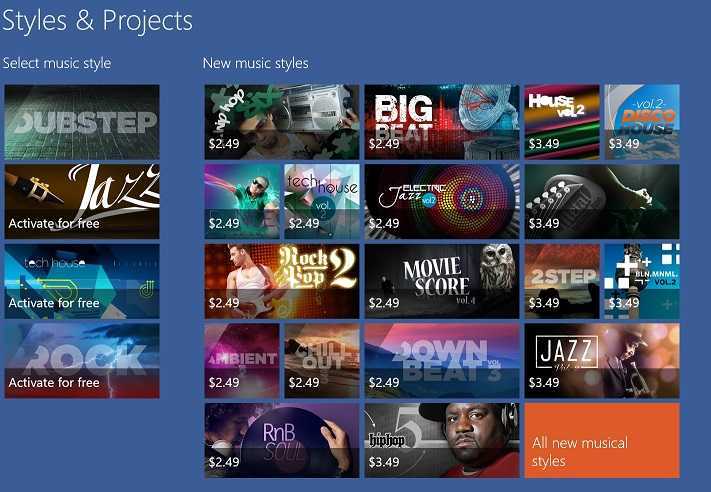
The app looks simply gorgeous on a Windows 8 tablet, and while the looks are vivid, the sound is crystal clear. Once you’re inside the app, you can select from professionally produced loops like dubstep, tech house, jazz and rock and choose to set the tempo and melodic progression as you please. There are plenty of effects that you can add to your songs in real-time. When you think you have created a masterpiece, you save your jam session as an MP3 file and then share the project with your friends.

The 8-track mixer  lets you mix tracks and just by tipping your Windows 8 tablet, you will be able to change the effect settings. Also, you can use loops from several music styles in one project in the same time and buy new music styles. So, if you want to get the music going, waste no time and download it from the Windows Store.

Download Music Maker Jam for Windows 8

Microsoft agrees to share Skype user data with Russian Government

skypeconversationstored

Addressing the Russian government, Microsoft who owns the voice-over-IP and instant messaging service Skype, said that it will provide law enforcement officials with the information about Russian Skype users if required. The software giant will keep data of users during a six month period and share it with Putin’s secret police, the KGB.

Microsoft has made it clear that it will comply by providing any information about its users when necessary, if any such regulation does come into effect in Russia. These sudden changes are the consequence of last month’s terror attacks in Volgograd.

Also to keep in mind, Sochi Winter Olympics are to be held there next month. Their new bill, proposed by a group of Russian deputies in accordance with the Anti-Terrorism law states that the government can demand the “information about the reception, transferring, delivery and processing of voice information, written texts, images, sounds and any activities made by the users.”

Yandex, the leading search engine in Russia expressed its discontentment over this new bill. Yandex says that storing such huge chunk of data for such prolonged duration will require extra cost. 

For those of you who use Skype in Russia, how do you feel about this?

UPDATE: Microsoft has issued the following statement to WinBeta: “Microsoft has not commented on draft legislation in the Russian State Duma or committed to sharing customer data with the Russian authorities. We have clear principles in responding to legal demands for customer information from governments around the world. We review the applicability of any new laws given that many of our internet services may not subject to local jurisdiction if they do not store or process data locally”.

Microsoft extends anti-malware support for Windows XP users until July 2015

Microsoft extends anti-malware support for Windows XP users until July 2015

Not that long ago, we mentioned that Microsoft was killing support for Windows XP on April 8th along with support for Microsoft Security Essentials for Windows XP. Microsoft has now stated, in an official blog post, and anti-malware solutions for Windows XP will continue being supported until 2015 as the operating system reaches its end of life.

“Microsoft has announced the Windows XP end of support date of April 8, 2014. After this date, Windows XP will no longer be a supported operating system. To help organizations complete their migrations, Microsoft will continue to provide updates to our anti-malware signatures and engine for Windows XP users through July 14, 2015,” Microsoft stated in an official blog post.

So what exactly does this mean? Microsoft will continue providing anti-malware support for the operating system by providing updated signatures for System Center Endpoint Protection, Forefront Client Security, Forefront Endpoint Protection and Windows Intune for enterprise customers. Microsoft’s Security Essentials will also receive updated signatures, for consumers running Windows XP until July 14th of 2015.

Microsoft wants to make sure no one feels rushed to migrate from Windows XP – and it sounds like the devices and services giant understands that it is a daunting task to migrate from an operating system that came out in 2001. “Our goal is to provide great anti-malware solutions for our consumer and business customers. We will continue to work with our customers and partners in doing so, and help our customers complete their migrations as Windows XP end of life approaches,” Microsoft adds.

Windows 8, 10 App Check: Wreck-it Ralph Disney Game

There are plenty of Disney games in the Windows Store, and we have reviewed in the past plenty of them – The Little Mermaid Undersea Treasures, Seven Dwarfs: The Queen’s Return, Disney Infinity: Toy Box, Where’s My Water? and Star Wars Tiny Death Star. Now, it’s time to have a look at the popular game Wreck-it-Ralph
windows 8 wreck-it ralph
If you have watched the animated movie Wreck-it Ralph, then you were probably curious to see how a game would look like. Well, you probably know that there was no game that inspire the movie, but it was the movie that then made Disney to release games for all the major mobile platforms. Disney has also released the game for Windows 8 users, so I downloaded it recently, because it was free in the Windows Store.

Read Also: Windows 8 App Check: Periodic Table (Chemistry)

Wreck-it Ralph on Windows 8 brings 5 addictive games

Welcome the new year with these amazing deals – Download 7 of your favorite Disney games FREE for a limited time only! WELCOME TO GAME CENTRAL STATION! Hit the arcade and game-hop between 5 different arcade games all based on the film, Wreck-it Ralph!

Once you will open the game, you will be able to select from 5 different arcade games, all from the movie. The first game that you need to complete is Fix-it Felix Jr. where you have to fix what Ralph wrecked it. The 8-bit graphics will take you back in time. In the second game, Hero’s Duty, you play as Sergeant Calhoun where you fight agaisnt cy-bugs. Sweet Climber is Ralph playing in an endless climbing game; Turbo Time is a classic arcade racer with oldie 16-bit graphics and Flight Command is a flight simulator that means a lot of fun on your Windows 8 tablet. Hit the download button from below and start playing!

Download Wreck-it Ralph for Windows 8

Posterpedia app teaches you about Microsoft technologies in a simple yet beautiful interface

Posterpedia app teaches you about Microsoft technologies in a beautiful interface

There are plenty of apps in the Windows Store for entertainment and fun, but how about an app to teach you about Microsoft’s technologies? Check out Posterpedia for Windows 8.1 and Windows RT – a free app created by a member of Microsoft’s Cloud and Server team.

Curious as to what Windows Azure is all about? Looking to gain a better insight into the Hyper-V architecture? Posterpedia is a simple app that combines graphical content (or posters) with content from MSDN and Technet, and is updated frequently with new material to keep your knowledge up.

The app showcases the poster and gives you the option to download it as well. These posters are a great way to provide visual references for understanding  particular technologies. ​Posterpedia was recently updated to version 2 and contains the following new features:

  • Image hotspots that allow you to get content specific to a part of the poster (new).
  • Semantic zoom that enables easy navigation of the different groups (new).
  • A full-screen viewing mode without the chrome and hotspots (new).
  • The ability to share a link to a poster through email (new).
  • App bar buttons specific to each poster.
  • Technical content for Hyper-V, Active Directory, Remote Desktop Services, Windows Server 2008 R2, Windows Server 2008, Exchange Server 2010, Exchange Server 2007, SharePoint Server 2010, Windows Azure, SQL Server, Lync Server 2010, and Office 2013.

Hit the download link below to snag the app. Try it out and let us know in the comments below if you like it! You can also check out a video of the app in action, embedded below for your viewing pleasure.

Windows 8, 10 App Check: Periodic Table (Chemistry)

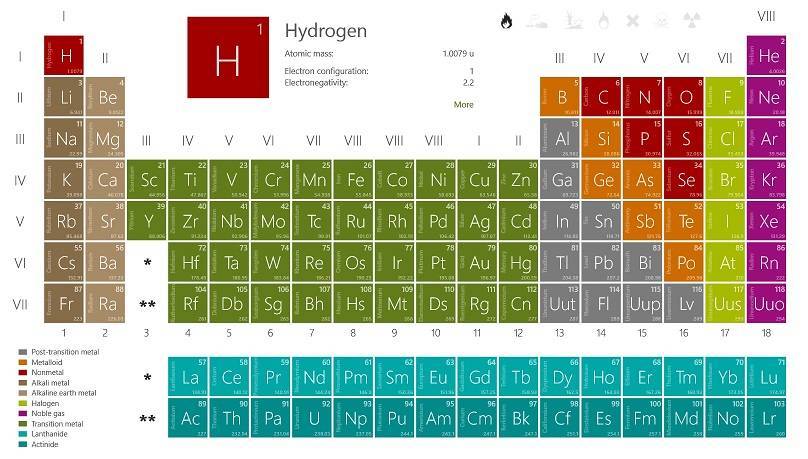
The Windows Store is just at its beginning and there aren’t so many chemistry apps available for download. But the Periodic Tablet (Chemistry) app is definitely among the best and you need to download it right away, if you are in need of such a tool.
windows 8 periodic table app
In the past, my dear colleague Ionut has reviewed another reliable Periodic Table app for Windows 8 devices, so you can feel free and go ahead to read more about it. But I’ve recently discovered the Periodic Table (Chemistry) Windows 8 app and I’ve been pleasantly surprised by its performance. The app is masterfully crafted and comes with impressive content at a pristine quality.

Read Also: Official Windows 8 App Jamie Oliver’s Recipes Launched

This is a simple periodic table of the elements. It shows the different groups in different colors and lets you zoom in and out. It displays the atomic mass, the electronegativity, the electron configuration and much more for each element. There is also a search function included. The perfect companion for school or professional life.

Transform your Windows 8 tablet into a periodic table

Albeit the app is totally free, I couldn’t find any ads at all inside the app, so my guess is that the developer is offering it free for a limited time, so you definitely need to hurry up and download it, as this is definitely one of the best Windows 8 school apps to use. As expected, the app features all the 118 elements and you have atomic mass, electronegativity, electron configuration and much more at your disposal. There’s also a search function for quick access.

The developer has released plenty of updates, as well, and the app is fully optimized for Windows 8.1, which means you can use it in snap mode and also choose different live tile sizes. The latest updates new properties and languages, the bonfey and abubakr view, the ability to choose temperature unit and also, the tooltips for symbol icons has been included.

Download Periodic Table (Chemistry) for Windows 8

Official Windows 8, 10 App Jamie Oliver’s Recipes Launched

When it comes to cooking, there aren’t too many chefs as good Jamie Oliver. So, naturally, if you own a Windows 8 tablet and you want to cook like a boos, then you need some really good Windows 8 cooking and recipe apps. Today, we’re reviewing the Windows 8 app Jamie’s Recipes
windows 8 jamie oliver app
In the past, we have featured more Windows 8 recipe and cooking apps to help you in the kitchen, with Allrecipes Cookbook being among the most important ones. Now, I’ve discovered the official Windows 8 app made under Jamie Oliver’s coordination. At first, I was surprised to see such awesome design, but then I discovered that this was the official Windows 8 Jamie Oliver app, so it all made sense. There’s even a welcome message inside the app, so you can see everything is genuine. This is what Jamie Oliver himself says about the app:

Read Also: Windows 8 HackerNews App Launched in Windows Store

My app is all about giving you the tools and inspiration to create really great-tasting food easily at home. With retina imagery for each and every recipe step, as well as HD video guides for some of the tougher techniques, you really can’t go wrong. I’ve included a free taster pack consisting of ten recipes to get you started, and I’ll be updating the app with my latest and greatest discoveries from all over the world. You’ll find a whole library of recipes to choose from, from classic comfort food and beautiful baking recipes to festive treats, super-quick suppers and a whole lot more – there really is something for everyone. I’ve also included a clever shopping list to make life a bit easier – it sorts ingredients by supermarket aisle and lets you cross off items as you shop.

Is this the best Windows 8 cooking app?

You can download the Jamie’s Recipes Windows 8 app for free (link at the end) but the optional in-app purchases for additional content. The app comes with a free taster pack which contains 10 free recipes and three videos, but for more, you will have to pay. But if you’re seriously into cooking, then you might thinking of investing money in the art of cooking.

There are 200+ recipes that you can buy, and all of them contain unique step-by-step high-quality photos. The videos, as well, have a gorgeous HD quality which will look absolutely stunning on your Windows 8 tablet or desktop device. Besides this, you will find inside the app handy shopping list, personalised notes, favorites and plenty more other features.

Download Jamie Oliver’s Recipes app for Windows 8

Windows 8, 10 HackerNews App Launched in Windows Store

Recently, while browsing through the Windows 8 section on Reddit, I was informed that a new Hacker News app for Windows 8 users had been made available in the Windows Store. Read below to find more details about it if you’re a reader of the popular Hacker News portal.
hacker news windows 8 app
I read Hacker News quite a lot and have always looked for a dedicated Windows 8 app to download and install on my Windows 8 tablet. If  I recall correctly, at a certain moment, there was one, but it was paid, and I didn’t want to invest in something that I could open by going into the browser. Now, be aware that the HackerNews app has recently been launched in the Windows Store, so it is expected for plenty of bugs and glitches to appear, so be indulgent as I’m sure the developer will fix this as users will start reporting.

Read Also: Use Windows 8 App Compass+ to See Cardinal Directions on Your Tablet

HackerNews Reader app lands in the Windows 8 Store

This is an application that allows users to browser the top current stories from the popular technology news site Hacker News. It allows the user to view the top stories as well as visit each one. The user can also read the comment threads for each story.

The app comes with a full list of the top stories, threaded comments and a responsive which is really easy to use. What I didn’t like is the way how articles are structured and I’d personally like something that resembles more than original design of Hacker News. Also, at times, the articles seemed to load quite slow, but besides this, it’s a good start, so go ahead and download it on your Windows 8 tablet or desktop device.

Download HackerNews app for Windows 8

Where is Microsoft’s wearable tech?

Where is Microsoft's wearable tech?

Throughout 2013 we saw the arrival of a raft of wearable device. The likes of Pebble and Galaxy Gear fought for space on wrists all over the world, but it is probably Google Glass that is causing the most excitement. Amongst all the names showing off watches, glasses and other devices that can adorn the body, there’s one name that have been notable by its absence: Microsoft.

There have been rumors for some time that Microsoft is working on its own version of Google Glass, and it would certainly be interesting to see what sort of dent the company would be able to make on the market. Wearable tech is still very much in its infancy, but 2014 could well the year that things really start to take off.

But the question that needs to be asked is “is it what people want?”. There have been a few problems with wearable devices so far. Really, they are not problems unique to this market, but looks and price are major sticking points. Any developing technology is bound to be comparatively expensive, but there is the risk that it makes the technology elitist.

Looks are important to the success of any wearable device. Units that are ugly are going to have very limited appeal, after all. The problem with smart watches being super bulky are starting to be eliminated, and there are now various devices to choose from which are not significantly bulkier than a regular, dumb watch.

Watches are great, but the futuristic look and feel of a pair of glasses like Google Glass really does get people excited. With early adopters used to paying a premium, there has to come a time when pricing levels out to a point that makes it accessible to a wider range of people. We all love the idea of a HUD accompanying our day to day activities, but what price tag would be appropriate?

We already know that headsets and watches are incredibly popular, and it’s likely that Microsoft will go down one or both of these routes at some point in the future. But what other wearable devices would you like to see? Could intelligent jewelry take off? Imagine a necklace or bracelet that acts as portable storage, transferring files using NFC.

This likes of Xbox One’s Kinect show that Microsoft is already capable of producing some impressive smart hardware, and there is potential for use in business as well as the home for the right product.

Shoes with built-in pedometers and other trackers would be another interesting option, but would probably require collaboration with a footwear manufacturer. There’s scope for plenty of other wardrobe additions. Rather than using a plethora of gadgets to monitor your blood pressure, heart rate, body temperature etc, how about simply donning a smart t-shirt that could beam this information to your phone.

What are you looking for from wearable tech? Share your thoughts and ideas below.

Microsoft’s BUILD 2014 Developer conference registration opens tomorrow January 14th

Microsoft's BUILD 2014 Developer conference registration opens tomorrow January 14th

Microsoft is set to hold its Build 2014 Developer Conference at the Moscone Center in San Francisco from April 2nd to April 4th, and registration for the event opens tomorrow, January 14th. It has also been rumored that we will see the official release of the first update to Windows 8.1, dubbed the Spring 2014 update or Update 1, during the event.

“The momentum just keeps building and that is why I’m so excited to announce our next developer conference, Build 2014, which will take place April 2 to April 4 at the Moscone Center in San Francisco. Save the date and mark your calendar for registration, which opens at 9 a.m. PT on Jan. 14 at www.buildwindows.com,” Microsoft stated in an official blog post back in December.

The event runs for $2095 and registration opens at 9AM PST at buildwindows.com. While the price may be a bit steep for some, keep in mind that the event sold out in just one day last year. This resulted in Microsoft re-opening registration and adding more seats.

Microsoft annual BUILD conference is set to happen in April of this year, which is a lot earlier than usual. It’s highly likely that Windows 8.1 Update 1 will be shown and maybe even released around this time, introducing new API’s and features for both developers and consumers.

GoDaddy partners with Microsoft to offer Office 365 to small businesses

GoDaddy partners with Microsoft to offer Office 365 to small businesses

GoDaddy is used by more than 12 million customers all over the world, and thanks to a new partnership with Microsoft, the company will now be offering Office 365 as its core business-class email and productivity service to its small-business customers. In what is described as a “long-term strategic partnership”, Microsoft and GoDaddy are making it easier for smaller businesses to gain access to the best products to drive things forward.

Senior vice president of Business Applications at GoDaddy, Steven Alrich, said “We’ve created a simple way to attach Office 365 to a domain name, helping small-business owners look professional and work anywhere, making the business of running their business easier.”

The new arrangement means that GoDaddy’s business customers will be able to take advantage of professional email through their domain, make use of the full range of Microsoft productivity suite, and enjoy cloud storage. To help very small businesses to get off the ground, Microsoft has created a new, unique way of offering domain-based email and storage.

John Case, corporate vice president, Microsoft Office said “GoDaddy’s relationship with small businesses combined with Office 365, the fastest-growing Microsoft product in history, will help bring the benefits of Office 365 and modern cloud services to even more companies, whether they’re seeking to modernize how they do business or simply starting up.”

For now, Office 365 from GoDaddy is available in the US and Canada, but over the next three months it will roll out around the world.

Check out the video to find out more!

Discounted Windows 8 Apps & Games This Week #6

Another week is here and Microsoft, as always is publishing the discounted Windows 8 apps and games in the Windows Store. For this week, we have four interesting games and two Windows 8 productivity apps. Read below for more details
windows 8 red stripe deals
Last week, we have seen the following apps and games get discounted in the Windows Store – Hydro Thunder Hurricane, Dungeon of Legends, Pettson’s Inventions 2, Big Mountain Snowboarding, Files&Folders and Pocket Yoga. I hope you managed to download and install them on your Windows 8 tablet if they were from your area of your interest. You will find in this week’s discounted Windows 8 Red Stripe Deals some apps that we have previously covered here on Wind8apps, such as Chimpact, Doodle God or the Farming Simulator game.

Windows 8 Red Stripe Deals for this week

  • iStunt 2 ($2.49, regularly $4.99) – an interesting Windows 8 snowboard game
  • Chimpact ($2.49, regularly $4.99) – fun game with a cute chimp that collects gems, medallions and, of course, bananas in the jungle
  • Doodle Kingdom ($1.49, regularly $4.99) – rule over your own kingdom, with castles, knights, warlocks and dragons.
  • Farming Simulator ($1.49, regularly $4.99) – cultivate fields, maintain roads and run your farm in a small village on your Windows 8 tablet
  • MoBu ($3.49, regularly $6.99) – a Windows 8 financial app to help you track and manage your personal finances
  • LCARS Interface ($1.49, regularly $2.99) – an interesting that makes you feel like you’re aboard the computers in  Star Trek: The Next Generation

Read Also: Best 5 Windows 8 Air Hockey Games for Fun Play

SEA attacks official Microsoft News Twitter page and Technet Blogs after recent Skype attack

Social Network Hack

The Syrian Electronic Army is at it again, targeting Microsoft’s social media accounts as a way of spreading information about NSA spying. This isn’t the first time the SEA has hacked one of Microsoft’s social networking accounts, recently Skype’s blog and twitter page were affected. Today, the official Microsoft News Twitter page was affected.

So far, they’ve used the Twitter account to warn users of using Outlook, and have also said that IE’s top two links users visit are download pages for Google Chrome and Firefox. Whether or not this information is true is irrelevant, as it is something Microsoft wouldn’t be touting on its official Microsoft News Twitter account.

It was revealed in 2013 that the NSA had the ability to listen in on Skype calls, among a number of other things. The SEA are simply spreading awareness of such ability, but as Microsoft are denying involvement, things have gotten a little fishy.

Update: It appears the tweets have quickly been taken down. “Microsoft is aware of targeted cyberattacks that temporarily affected the Xbox Support and Microsoft News Twitter accounts. The accounts were quickly reset and we can confirm that no customer information was compromised,” a Microsoft spokesperson stated.

Update 2: Looks like Microsoft’s TechNet blog was also a victim:

Windows 8, 10 App Check: Belote

There are plenty of interesting Windows 8 cards games to be played and Belote is one of them. Not too many have heard about this cards game, but those who do, will definitely find it enjoyable on a Windows 8 tablet.
windows 8 belote
I have been playing Belote as a kid with my friends and even now I won’t refuse a good old game of Belote. This is a cards game that has been allegedly played for the first time by French, but is especially popular in Russia and Eastern Europe. So, if you know how the play the Belote cards game and you also own a Windows 8 tablet, then what you need to do is to download the Belote! app that we’re talking about here.

Read Also: Play Bridge Cards Game in Windows 8

Play Belote on your Windows 8 tablet

Join this great Belote event: the Gardon.org Belote Tour. Practice much as you want on short game. Start the adventure with $ 5,000. Your goal? Win a lot of dollars day after day, and go higher and higher in the world best belote players ranking. Take your chance and challenge the most talented players. Will you be one of the best? Will you be able to get at the top?

The single downside of this interesting Windows 8 Belote app is the fact that you will have to pay $2.49 to get it, but since it is the single such card game in the Windows 8 Store, perhaps it makes sense to price it like that. What is not so great is the fact that there is no trial option available, so that you could see whether or not this game is for you. Inside the app, you will have access to world ranking, full HD support and there is also the option of training with a short Belote game. If you are into cards game, you might check out the recently launched UNO card game, as well.

Download Belote cards game for Windows 8

Microsoft displays themes created by users in Open Call program

Microsoft displays themes created by users in Open Call program

Themes are one of those little behind-the-scenes things that Windows users all take for granted. We all use them, we look for cool new images to add to our desktops, but we tend not to really give the whole thing much thought. Fortunately, Microsoft does — otherwise we would not have as many of them to choose from.

The company adds a continuous stream of new themes, incorporating seasons, holidays, movies, games and more into the mix. But Microsoft has also asked photographers to submit their own creations and promised to push out the best ones in its Personalization Gallery.

Now the company is unveiling its most recent batch of winners. Sets of images include pictures of Queensland, colorful birds, sunsets in the beautiful Sierra region, dragonflies and a whole lot more.

All can be found here. Each theme is free to download and install and works with Windows 7, Windows 8, Windows 8.1 and Windows RT.

Microsoft Surface 2 vs Dell Venue 11 Pro: Who Wins?

2013 did not end without leaving us with something to talk about when it comes to tablets. During the final months of the year, Microsoft and Dell unveiled their latest Windows 8 tablets. Looking at them from a material point of view, both tablets look amazing, and their cost is on par with the performance.
dell-venue-11-pro-vs-surface-2As far as performance goes, both the Microsoft Surface 2 and Venue 11 Pro are extremely fast, among the most powerful Windows tablets money can buy and you can tell Microsoft and Dell really put some thought into their new generation of tablets. Although similar, there are some differences between them so let’s go over a specs and features breakdown. We are not comparing the Microsoft Surface 2 Pro with the Dell Venue 11 Pro, but the second edition of the Surface tablet. We have just finished comparing the Dell Venue 11 Pro with the Asus T100, so head over and see the comparison, if you’re interested.

Read Also: Dell Venue 8 Pro VS Lenovo Miix 2: Who Wins?

Dell Venue 11 Pro vs Microsoft Surface 2: specs compared

  • Price – Microsoft Surface 2 starts at $449 and the Dell Venue 11 Pro at $499. There is a slight difference between the price of both models, and the Microsoft Surface 2 sells $50 cheaper than the Dell counterpart. The lower price helps Microsoft take the lead, however the difference is relatively small and both tablets are in the same price category.
  • Display – Both tablets are similar when it comes to the display and are equipped with IPS with 1920 x 1080 resolution. The slight difference is that the Dell has a 10.8″ and 10-pt capacitive touch compared to Microsoft’s 10.6″ and 5-pt one.microsoft surface 2 vs dell venue 11 pro
  • Processor – The processor tells a different story and Microsoft went with the NVidia Tegra 4 1.7 GHz superior to the Intel Atom 1.33 GHz that is present on the Venue 11 Pro. Although both CPU’s are quad core and very powerful, the Surface 2 is a bit faster and more responsive.
  • Memory – There is no difference between the two when it comes to memory and both have 2 GB of RAM, the same as most of this generation of tablets.
  • Storage – The storage available for the Microsoft Surface 2 is 32/64 GB, in contrast to the 64/128 GB available for the Venue 11 Pro. There’s also a 32 GB version available, but we didn’t manage to find it nowhere. The comparison was done between the basic versions of the tablet from both manufacturers, so the Dell Venue 11 Pro has double the storage available on the Surface 2.
  • Multimedia – Both models offer two microphones and stereo speakers, however the Surface 2 is slightly superior having Dolby sound. Both tablets are designed to offer a great experience for video calls, watching movies or listening to music.
  • Connectivity – The ports on both these tablets are the same, the only difference is that the Venue 11 Pro has a mini HDMI compared to Microsoft’s HD Video out port. Dell takes a small lead when talking about connectivity because the Venue 11 Pro supports NFC, the Surface 2 doesn’t. This might come in handy when pairing the tablet and a smartphone for easy transfers between the two.Dell Venue 11 Pro
  • Battery – The battery life is pretty much the same, both of the models going for the 10 hours mark. This is a huge improvement compared to older versions of Windows tablets and now it’s more than enough to power through a whole work or school day.
  • Camera – Let’s start the comparison with the rear cameras, and give the Dell Venue 11 Pro the lead on this one with an 8 MP camera compared to Microsoft’s 5 MP. Looking at the front cameras, the Surface is clearly superior with a stunning 3.5 MP webcam recording at 1080p way better than the 2 MP on it’s counterpart.
  • Size – The size of the tablets is pretty much the same, both being 11″ and even the weigh is similar. In one corner we have the Surface 2 at 275 mm x 173 mm x 8.9 mm weighing 1.49 lbs and in the other, the Venue 11 Pro at 297.7mm x 176.8mm x 10.2mm weighing 1.57 lbs. The differences are barely noticeable, we are talking about a couple of millimeters and grams in favor of Dell, but the weigh difference present only because the tablet is slightly larger in size.

Seeing the hardware specs of these two state of the art tablets, there is no clear winner and it all breaks down to personal preference. But, there is one thing that puts the Microsoft Surface 2 in a rather big disadvantage, Windows RT. Dell Venue 11 Pro has Windows 8.1 operating system and that resolves all the compatibility issues, allowing you to use any PC software. There is no reason to use Windows RT on a tablet with the specs like the Surface 2, simply because it has more than enough juice to let Windows 8.1 run perfectly.

Read Also: Lenovo Miix 2 vs Acer W4: The 8-inch Windows 8.1 Battle

Windows 8, 10 ChatON App is Now Available for Download

Samsung has released its very first Windows 8 apps in the Windows Store and it’s one that many Samsung users have been expecting for quite a while now – the official ChatON app. Targeted at Windows 8 tablet users, the fresh new ChatON app will also work on Windows 8 desktop devices, as well.
windows 8 chaton app
If you have a Samsung phone, then most likely you have heard about the ChatON application and chances are that you are even using it, as well. Now, if you happen to own a Windows 8 tablet or another Windows 8 device, you can now use the official Samsung ChatON app to chat with your buddies and friends that are also users of the same service.

Read Also: Windows 8 Game Check: World Cricket Championship Pro

No.1 mobile messenger application in the US and France! Create a global social community with over 100 million friends who have ChatON through a Samsung account. You can chat with 70 million friends in ChatON being serviced in 237 countries in 63 langauges. ChatON supports 9 kinds of different platforms including Android, iOS, and web. You can enjoy ChatON on smart phones, tablets, and PCs by signing in with a Samsung account. ChatON is the best social communication service for you. Start now!

ChatON gets released for Windows 8 users

The official ChatON app for Windows 8 users has plenty of features, and among the most important ones you will find the group chat, the sharing multimedia option, the trunk option for chatrooms to see all sent images and videos. Even more, there’s the broadcast function that will let you send the same messages to multiple numbers in individual chat room.

Just like the other apps on iOS and Android, ChatON for Windows 8 comes with the My page function which acts as a personal page and by using the Multi device option, you will get to experience ChatON by connecting a smartphone, Windows 8 tablet or Windows 8 PC.

Download ChatON for Windows 8

Microsoft’s mass appeal makes it a far stronger brand than Apple

Microsoft's mass appeal makes it a far stronger brand than Apple

Microsoft’s “One Microsoft” brand is proving more popular than Apple with the US public. A survey by Forrester Research tested the brand strength of ten top technology firms including Apple, Microsoft, Samsung, and Sony. The results, which found Microsoft coming out on top ahead of Apple and Sony, surprised even those carrying out the survey.

Forrester analyst Tracy Stokes said “Time was definitely a factor. I think the results would have been much different a year or 18 months earlier.” But she also explained that Microsoft has become so ubiquitous that it is more of a household name than many of the others.

But Microsoft scored very highly when rated in terms of “essentiality” and trust. Microsoft is seen as being an essential part of life these days — how many people could live without Office and “Windows ?! — and the research also found that the company received a very high trust rating from people in of all ages.

Apple holds different place in people’s hearts. While Microsoft may be seen as producing essential products, Apple is regarded as producing the must-have ones. “Microsoft has a utilitarian essentiality, not the kind of emotional essentiality that Apple relies on.”

Another factor in Microsoft dominance is the fact that the company manages to appeal to such a broad age range. High rating were received in every category from every age group.

Stokes said that it is too early to tell whether the “One Microsoft” is a success — but perhaps the results speak for themselves. What do you think?

A staggering 422 million Windows devices could ship in 2015

A staggering 422 million Windows devices could ship in 2015 according to Gartner

If the figures from Gartner are to be believed, there are some seriously impressive shipments of Windows devices on the cards over the next 24 months. Truth be told, 2013 was not a great year as there was something of a slump from 2012 — around 328 million devices were shipped compared to 346 million the previous year — but things are on the up!

Gartner is predicting that nearly 360 million Windows devices will ship in 2014, representing an increase of over 9 percent. And 2015 looks like it could be even rosier, with an estimated 422.7 million devices with Windows installed to be shipped.

The figures also show that our love of desktop computers is on the wane. There was a dramatic drop from 341 million PC shipments in 2012 to just 299 million in 2013. In the coming twelve months, it is expected that this will drop further to 278 million, while 2015 could see as few as 268 million desktop shipments.

Perhaps unsurprisingly, tablet shipments are predicted to rocket. Starting off at a fairly lowly 120 million in 2012, numbers jumped to 180 million in 2013. Over the next couple of years there will be further increases to 263 million in 2014 and then 325 million in 2015.

What do you make of the predictions? Any surprises for you?

Office 365 has 10 top tools to help you stick to your New Year’s resolutions

Office 365 has 10 top tools to help you stick to your New Year's resolutions

We’re into the first week of 2014. If today feels like a bit of a downer, it could be because it’s the first Monday of the year! It could also be because you’re already finding it difficult to keep to those New Year’s resolutions you decided to make. But never fear; office 365 is on hand with a series of tools to help you stick to your goals and stay on target over the coming months.

In a post on the Office blog, Jevon Fark from the Office team reveals just how helpful Office 365 can be, no matter what goal you have set yourself. Whether you have decided to shed a few pounds and get into better shape, or you want to get yourself a new job and travel more, it’s all easily managable.

Jevon’s post explains how Excel, OneNote, Word and online tools can be used to help you. You’ll find links to helpful templates — great if you need to give your resume a facelift, or can’t face putting together a budgeting spreadsheet — all of which can be downloaded and used completely free of charge. Work your way through the Office 365 top ten tools, and you’ll find it hard not to stick to your resolutions.

Have you made use of Office to help with your goals for 2014, or are there any other app you turn to? Maybe you find that your Windows Phone is used more than your computer because you have it on you at all times. Share your thoughts and experiences!

Windows 8, 10 App Check: Pin Steam

Unfortunately, Valve said that it is not going to release a Windows 8 Steam app anytime soon, citing “business reasons”, which probably means there are not enough touch Windows 8 users. However, there is a reliable third-party Steam app that you can use for increased Steam functionality on your Windows 8 tablet
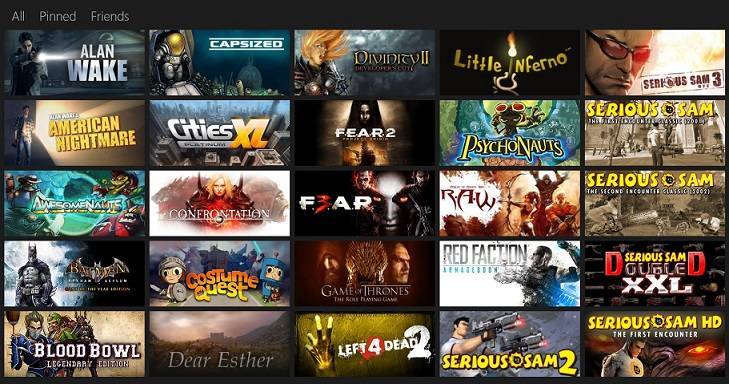
windows 8 steam appIn the past, we have shared with you the Steam Tiles app for Windows 8 users that allowed you to pin Steam games to the start screen of your Windows 8 tablet. Now, another similar Steam app for Windows 8 app has caught our attention, called simply Pin Steam. Just like the Steam Tile app that we have covered, this too lets you pin your Steam games or friends to the Start Menu with good looking tiles.

Read Also: Microsoft Hires Former Steam Boss Holtman to Make Windows Great for Gaming

Windows 8 Steam app for the player in you

UNLIMITED FREE TRIAL! Live tiles show you which of your friends are playing which games. You can also pin friends directly to the start screen and follow their online status. To use Live Tiles, this app requires you to have a Steam account and to have setup a Custom URL in your steam profile. It also requires Steam to be installed on your device to launch games. (NOTE: Steam is not available for Windows RT yet!) Neither this app or it’s creator is affiliated with Valve Software in any way. This app has an unlimited trial! You can do everything except actually launching the game from the Start Menu.

Since the app comes with full Windows 8.1 support, you can change the live tiles to support any tile size – large, wide, medium or small. The app has been recently updated with a new user interface and a lot of bug fixes. This Windows 8 Steam app is really, really fast and this is probably the reason why so many have given it a good rating.

What’s really cool about the app is that it comes with an “unlimited free trial”, which means you can use the app for as long as you want, with no ads at all. If you want to support the developer, the app costs $1.49. The looks really, really gorgeous and fetches your games collection instantly. Follow the link from below to download it from the Windows Store and start enjoying your Steam games!

Download Pin Steam for Windows 8

Windows 8, 10 App Check: Gmail Touch

I have been looking for a dedicated Windows 8 Gmail app for quite a long while to download and install on my Windows 8 tablet. That’s because Google hasn’t yet decided to release an official Gmail client for Windows 8 users. Third-party app Gmail Touch seems to be the best one that is currently available in the Windows Store
windows 8 gmail app
When you go the Windows Store and type “gmail” there, a plethora of Windows 8 apps will appear before your eyes. The problem is that a staggering majority of them are spam and useless apps that you really should avoid downloading on your desktop or touch Windows 8 devices. Gmail Touch is the single one that I can recommend when it comes to trying out the Gmail experience on your Windows 8 tablet.

Read Also: Microsoft’s Latest Scroogled Attack Slams Gmail’s Email-like Ads

Description: Gmail Touch is a mail client for Windows 8. View your inbox, compose messages, search your mail, and more! Features: View your inbox, Compose messages, Search your email, Live Tile, Badge and Toast Notifications, Multiple Accounts Support, Share target

Reliable Windows 8 Gmail app for your Windows 8 tablet

windows 8 app gmailThe app is very basic and comes with a design that isn’t necessarily appealing, but you get used to it really quick. I still rely on the built-in Mail app for my Windows 8 tablet, but if you want a dedicated Gmail app, at the moment, this is the best to choose. Inside the app you will be able to do the basic things – view the inbox, send emails, search through your mail. You can also pin the app to the start screen and thanks to the Windows 8.1 support, you can change its size how you want it to be. At times, I found the app to be slowly loading, so I hope the developer takes care of this in a future release.

Gmail Touch for Windows 8 has been updated multiple times and user interface updates and tweaks have been put in place. The app can be downloaded for free but there’s an advertising square banner in the lower right corner that you will get used to. Or, you can choose to pay $2.99 and get the ad-free version. The app also comes with Badge and Toast Notifications, Multiple Accounts Support and Share target features. We will be monitoring the app and if there will be any worthy updates, we will let you know.

Download Gmail Touch for Windows 8

Windows 8, 10 App Check: BBC Earth Wonders

The BBC Earth Wonders app has been recently launched in the Windows Store for Windows 8 and Windows RT users, joining other apps launched by BBC, such as BBC Good Food, Top Gear News and others. Read below for more details regarding this Windows 8 BBC app.
windows 8 app bbc
First of all, let me start by saying that I absolutely hate paid Windows 8 apps that don’t let you try out the title for a few days, at least. Unfortunately, such is the case with BBC Earth Wonders. Truth be told, for $1.99, its price, you will get access to amazing content, the kind that only BBC can make. More than 500 stunning HD images from the natural world and 50 HD video clips will await for you to discover and enjoy them.

Read Also: Windows 8 App Craigslist Classifieds Launched

BBC Earth Wonders brings high-quality content on Windows 8

This BBC Earth Wonders app showcases some of the most beautiful BBC natural history content, taken from landmark series such as Planet Earth, Frozen Planet and Life, along with stunning images from world-renowned natural history photographers. We won’t give it all away now, of course, but with this app you’ll learn an astonishing fact (or two) about the diminutive spectral tarsier, one of the world’s most unusual and secretive primates. The killer whale is a whale by name only – can you imagine what species it actually is?

By using the BBC Earth Wonders Windows 8 app you will be able to explore awesome content using a simple map interface and the HD video option will bring  50 points of interest with a 30 second clip of pin-sharp HD video. The “Picture of the day” feature will bring you daily a new amazing picture accompanied by a little-known fact. If you’re looking for a Windows 8 BBC app with amazing content to be displayed beautifully on your Windows 8 tablet, then you have found it. Follow the link from below to download it.

Download BBC Earth Wonders for Windows 8

Windows 8, 10 App Check: LEGO Hero Factory Brain Attack

True LEGO fans from all over the world no longer rely only on good old LEGO sets to satisfy their passions, they are now trying out apps to install on smartphones and tablets for even more features. We are now trying out LEGO Hero Factory Brain Attack for Windows 8 and see if it’s worth downloading on your tablets or not.
windows 8 lego app
I am a true LEGO fan and have always wanted to get even more LEGO sets, so I am enjoying anything related to the LEGO gaming industry. In the past, we have featured the Brick LEGO Collection Manager app for Windows 8 users that has received an update recently. The Windows 8 app LEGO Hero Factory Brain Attack will let you enjoy the LEGO Hero Factory game that features “awesome 3D graphics, incredible weapons and an army of evil brains”.

Read Also: LEGO Mindstorms EV3 Robots can Now be Controlled from Windows 8.1

Play LEGO Hero Factory Brain Attack on a Windows 8 tablet

Enjoy the latest, all-action LEGO® Hero Factory game, featuring awesome 3D graphics, incredible weapons and an army of evil brains. Makuhero City is under attack and only you can save the day! Defend Makuhero City and stop the waves of brains attacking the Hero Factory, Customise your hero with fantastic weapons and armour, Select Furno, Bulk, Breez or Rocka to fight as your sidekick, Earn game points to upgrade your firepower and defences, NEW! Stadium level and 6 high powered weapons. The Hero Factory needs your help. Can you be its greatest defender?

windows 8 lego Hero FactoryThe app has also been recently updated, and a new stadium level and 6 high powered weapons have been added, along with several sug fixes and performance improvements. This Lego game will occupy an approximate size on your Windows 8 tablet of 111.5 MB. Your mission is to defend Makuhero City and stop the waves of brains attacking the Hero Factory. You get to select Furno, Bulk, Breez or Rocka to fight as your sidekick and there are game points available to upgrade your firepower and defenses.

Download LEGO Hero Factory Brain Attack

Doom and Destiny Windows 8, 10 Game now Available

Doom and Destiny is one of the most popular indie games for Windows Phone and Xbox users and now it has been made available for Windows 8, Windows 8.1 and Windows RT users as it can be downloaded from the Windows Store. Read below for more details regarding the game
doom and destiny windows 8
Indie games are fun to be played on Windows 8 tablets, but, unfortunately, at the moment, there aren’t too many of them in the Windows Store. For the connoisseurs, Doom and Destiny has been launched and can be yours for $3.49 with a free trial version being available. You will follow the download link from below and you will see that the game as a really, really good rating from those who have downloaded and are playing the game.

Read Also: ASUS to Launch 8-inch Windows 8 Tablet VivoTab Note 8

After the incredible success on Windows Phone, XBOX and Windows 7 D&D arrives on a great new Windows Store edition. You can now control the game with your touchscreen, with an XBOX gamepad or a keyboard! Strange events bring four nerdy friends in a fantasy world made of cliche, strange people and a lot of humor. Featuring more than 25 hours of fun, 200+ skills to defeat the 300+ enemies and over 500 between items and equipment D&D is a must have in your collection. Explore a gigantic world with more than 700 locations and unleash the power of the Spaghetti Monster!

Fun Windows 8 indie game for the connoisseurs

Doom and Destiny is an award winning Windows 8 game that is turn based, easy to learn and combat-based. You will be able to play 25+ hours in the singleplayer campaign as you will be able to employ more than 200 skills and face more than 300 enemies. There are 500+ between items and equipment and
more than 700 locations inside this exciting indie game.

Use your Windows 8 tablet’s touch screen, an Xbox controller, or your Windows 8 desktop keyboard to play the game. As you will travel with four friends across an enormous world in Doom and Destiny, you will be able to use over 10.000 lines of dialog, reach 100 levels of experience and choose from 4 different character classes.

Download Doom and Destiny for Windows 8

Holiday Surface Pro 128GB Deal: Buy it for $599, Save $300

The Surface Pro tablet is a promising device, but Microsoft hasn’t managed yet to sell it in big volumes. That’s why the company had to discount it several times before. Now, the latest update is also the biggest one, as you can get the 128 GB version of the Surface Pro for only $599
surface pro 128 gb deal
If you were looking to buy the original Surface Pro for a really good price, now is the moment to do it. Christmas and New Year is over, but this hot holiday deals has just started, and we know that the available quantities are limited, so hurry up. The 64 GB version of the tablet is discounted by $200, unlike the 128 GB one which has received a serious $300 discount.

Read Also: Surface Pro 2 Gets Significant Battery Boost Thanks to Firmware Update

Buy the discounted 128 GB Surface Pro and save 300 bucks

You will be able to buy the discounted Surface Pro both at Best Buy and in the Microsoft Store (links at the end of the article). Here are the main tech specs that it comes with:

  • Windows 8 Pro, upgradable to Windows 8.1 update
  • 3rd generation Intel Core i5 Processor
  • Intel HD Graphics 4000
  • 4GB RAM
  • 10.6″ ClearType HD Display
  • Screen resolution of 1920×1080
  • Two 720p HD cameras (front and rear).

Buy the discounted Surface Pro 128 GB from Best Buy
Buy the discounted Surface Pro 128 GB from Microsoft Store

Windows 8 Apps in 2014: Preview of Windows Store’s Growth

The year of 2013 is coming to an end and it’s time to recapitulate what has happened for Windows 8 users in terms of apps and where the Windows Store is headed for in 2014. We’re also taking a look back at what we have done here on Wind8apps and what will be our mission for the future
windows 8 apps 2014
Whoa, it’s been quite a ride so far! I remember now the day when I first started the blog, back in October, 2012. Back then I was sure that Windows 8 had a bright future ahead and that more and more people will start looking for reliable Windows 8 apps to download from the Windows Store. Sure, we can’t compared it to Apple’s iOS App Store, nor to Google’s rebranded Play Store, but Windows Store has a bright future ahead and if you have a Windows 8 tablet, then you should join us for this interesting ride.

Read Also: How to Create Windows 8 and Windows Store Apps

Like I was saying, the very first post on this website had been published on the date of October 23, which was just three days before Windows 8 was officially announced. This year, on October 26, Windows 8 has turned only 1, and at this moment, it’s going to face a lot of challenges for the upcoming year. The battle against iOS and Android apps is perhaps the most important one. For that, Microsoft needs the support of developers and OEMs together.

As we are ready to step into 2014, right now, according to multiple third-party services, the Windows Store has approximately 142,000 app available for download. The majority of these apps, obviously, have been submitted this year. The problem still lies in the fact that there are many spam apps that are plaguing the Windows Store and the absence of important ones isn’t helping, as well.

How does 2014 looks like for Windows 8 apps

2014 is going to be an year of important changes and breakthroughs for Windows 8 users. At the moment, the market share of the latest Windows operating system is almost ridiculous, but this will change thanks to two important factors: the increase in Windows 8 and Windows 8.1 tablet ownership and the growth of the available apps.

Two major turning points will be the Consumers Electronics Show and the Mobile World Congress from Barcelona where many OEMs will showcase more Windows 8 tablets that will definitely seem appealing for users. We’ve already shared with you some cheap Windows 8 tablets to get under $400, a price that has been made available by the release of Intel’s low-power Haswell chips.

So, my estimate is this – at the end of 2014, there are going to be more than 400, 000 apps available in the Windows Store, and in the most optimistic case, I see even half a million titles being submitted. Now, the problem is this – let’s hope that many will be important, and not spam, low-quality apps. 2014 will bring many new exciting apps for Windows 8 users, and we are inviting you to join us as we will discover them together. Here’s a list of some articles that we liked the most in 2013 here, on Wind8apps:

Best Windows 8 apps in 2013

Windows Error Reporting could leak data that hackers can exploit

Windows Error Reporting could leak data that hackers can exploit

Research carried out by Websense Security Labs shows that data sent from computers through Microsoft Error Reporting could be intercepted by hackers and used to formulate an attack. The problem stems from the fact that crash reports are transmitted in a very easily interpreted form, and they can contain quite detailed information about the systems from which they were sent — information that could be easily exploited by a hacker.

The research points out that while the sending of error reports to Microsoft in the event of a system or application crash usually requires user confirmation, there are instances when data is transmitted without any user interaction. For example, when a new USB device is connected, details of the device as well as information about the host computer such as the version of Windows that is in use, what Service Packs are installed, BIOS version number and much more.

This may seem like fairly innocuous data, but for a hacker targeting a large corporation, it is invaluable. It makes it possible to pinpoint weaknesses in a network, target known security holes and more. The frequency at which error reports may be generated means that it would be very easy for a potential hacker to build up a detailed picture of a company’s network.

As Websense points out, “crashes are especially useful for attackers since they may pinpoint a new exploitable code flaw for a zero-day attack.”

This is obviously going to be of concern to any business, but there are steps that can be taken to help minimize the risks:

“Websense recommends that organizations set group policies (when possible) to force encryption on all telemetry reports and periodically audit their own network and applications for inadvertent leaking of information with security implications.”

We reached out to Microsoft for a response but were given a generalized answer. “Microsoft does not provide any Government with direct or unfettered access to our customer’s data. We would have significant concerns if the allegations about Government actions are true. Regardless, we continue to review our encryption technologies and practices and have commented on the multiple investments we continue to make, on our Microsoft on the Issues blog,” a Microsoft spokesperson told WinBeta.

Windows 8, 10 App Check: Bitcoin Tradr, a Bitcoin Wallet

A while, we were sharing with you the Windows 8 App Bitcoin Miner that you could use to do some serious Bitcoin mining on your Windows 8 tablet. Now, a new app has been launched in the Windows Store for Windows 8 users, called Bitcoin Trader, which is the most reliable Bitcoin Wallet to be used by Windows tablets.
windows 8 app bitcoin wallet
Bitcoin is growing in the number of users day by day and those who own a Windows 8 tablet are also interested in trying out reliable Windows 8 apps to experience the Bitcoin services better. Bitcoin Tradr is one such app and by using it, you will be able to buy, sell, and send Bitcoin from your Windows 8 tablet or other device completely free.

Read Also: Windows 8 App Check: TripAdvisor

Buy, sell, and send Bitcoin from your Windows 8 device for free! Bitcoin Tradr is an app for the Coinbase.com digital Bitcoin wallet service for Windows 8 that lets you buy and sell Bitcoin, check Bitcoin prices, as well as send and receive Bitcoin from others. Coinbase.com and Coinbase services are provided by Coinbase, Inc. This app and its creators are NOT affiliated with Coinbase, Inc.

Reliable Bitcoin Wallet app for Windows 8 users

The app is available only in English and will occupy only 0.4 MB of your storage space. From inside the app, you will be able to buy, sell Bitcoin at the current market price and also send and receive Bitcoin from other users. There’s also the option of viewing the current price of Bitcoin and the current worth of your Bitcoins.

Bitcoin Trader also comes with the ability of letting you view your recent Coinbase account activity. The app also works well in multi-tasking mode, as you can snap it to the side while working on other things. I am not a Bitcoin users, so didn’t actually manage to try it out so am calling out all of you out there who have a Windows 8 tablet to see how it works.

Download Bitcoin Tradr for Windows 8

Report claims Windows error reporting system bugged by NSA, Microsoft denies it

Report claims Windows error reporting system bugged by NSA, Microsoft denies it

Now, take this report with a grain of salt. The report comes out of Germany and the claims are a bit farfetched. But you be the judge. According to a new report coming from Germany’s Der Spiegel, the US National Security Agency (NSA) has been working with the CIA and FBI to intercept computers and other electronics being purchased online before delivery. The reason? To install malware and other spyware tools. On top of that, the NSA is allegedly tapping into the error reporting system in Windows.

According to the report, hackers exploited the weakness in the error reporting message feature of Windows. For those who do not recall, this error message feature pops up whenever an application crashes. Information is gathered and subsequently sent to Microsoft engineers in an attempt to find a fix.

However, the NSA is allegedly tapping into this mechanism and using it to capture data sent out from the computer. Microsoft, on the other hand, denies that this is even happening. “Microsoft does not provide any Government with direct or unfettered access to our customers’ data. We would have significant concerns if the allegations about Government actions are true,” the company spokesperson told CNBC in a statement.

The NSA is also reportedly intercepting computer shipments and diverting them to a secret NSA workshops where specific software is installed so NSA agents can track users remotely. According to Der Spiegel, this technique is known as “interdiction” and is the NSA’s “most productive” operation.

You can head over to Der Spiegel to read the full report.

How to Get to Mobile World Congress 2014 in Barcelona

We will be attending the Mobile World Congress 2014 in Barcelona and will keep you updated with the most important Windows 8 and overall tech news from the industry. We’ve already shared with you the most important dates and schedules from the MWC event as well as the exact location where it’s going to take place. Now, it’s time to explain transportation options.
mobile world congress 2014 transportation
Getting to the 2014 location of the Mobile World Congress, or MWC, in Barcelona, is easy if you have been to previous editions of the trade show. If this is your first time or you just have forgot how to get there, here’s the full transportation information. Last year, it was really cool, as we could get to the trade show for free with the special permits for press. And this is again possible, as GSM, the organizer, has partnered with the Barcelona municipality to ensure free transportation to the MWC locations.

Free transportation passes to MWC 2014

All MWC attendees using public transportation will receive a free transportation pass valid for the four event days (Monday-Thursday). Transportation passes will be distributed when picking up event badges at all registration locations during the weekend prior to the event, as well as at the transport pass desk in the South Entrance of Fira Gran Via, from Monday to Thursday. The transport pass is valid for unlimited combined journeys using any means of transport within Zone 1 (includes Barcelona city and Fira Gran Via), using Metro, Bus and Train systems.

You will be able to get your free transport pass for MWC 2014 at the following locations:

  • Friday (new for 2014), Saturday and Sunday – at the Airport registration (Terminal 1 & Terminal 2)
  • Hall 1 registration in Gran Via
  • Hall 8 registration in Gran Via
  • The satellite registration point in Fira Montjuïc.

transportation mwc 2014As I was explaining in the article with the location of the 2014 MWC event, the big event will be at the Fira Gran Via location, but there will going to be two halls at Fira Montjuïc, as well. For that, the organizers of the event have set up a free Fira Gran Via/Fira Montjuïc shuttle. Here’s its schedule

Monday 24 to Wednesday 26 February

  • 07:00 – 10:00 (buses run every six minutes)
  • 10:00 – 18:00 (buses run every 15 minutes)
  • 18:00 – 21:00 (buses run every six minutes)

Thursday 27 February

  • 07:00 – 10:00 (buses run every six minutes)
  • 10:00 – 16:00 (buses run every 15 minutes) Thursday 27 February

Also, there is going to be a free official hotel shuttle bus for those who have booked hotels through the official agency that has partnered with MWC. Also, you should know that last year, there wasn’t an official transportation guide on the website, and thank God they have implemented it for this year.

Get to MWC 2014 with the FGC Train or H12 Bus

The Barcelona Metro connects directly to Fira Gran Via through the Ferrocarriles de la Generalitat (FGC). Riders should take the Metro to Plaça Espanya (Red Line, L1) or (Green Line, L3). At Plaça Espanya, follow the signs for Mobile World Congress, and transfer to the FGC train.  The nearest stop to Fira Gran Via is the ‘Europa/Fira’ station; all trains departing Plaça Espanya station stop at Europa/Fira.  Europa/Fira is the third stop from Plaça Espanya, and the journey takes seven minutes.

These are the official guidelines, but I can tell you from my experience that you will be guided at almost every subway stop by GSM workers who will be carrying signs, so, don’t worry, it’s really hard to miss the Mobile World Congress once you’re in Barcelona that time of the year!

Barcelona has added a bus line called the H12 bus. This line runs along Gran Via de les Corts Catalans of Barcelona. This line crosses the city from the Forum area to Fira Gran Via, passing through Passeig de Gràcia and Plaça Espanya. The bus stop nearest Fira Gran Via is located in Plaça Europa, a one-minute walk to the South Entrance. See all of the stops of the H12 Bus here.

And this is the transportation information if you prefer to take the bus and enjoy Barcelona’s views.

3 Useful Windows 8, 10 Spell Check Apps

If you have a Windows 8 tablet and you want to be able to use spell checking software on it, then the best solution is to install some spell check apps that are easily accessible. Alas, there aren’t too many reliable ones to choose as we have identified only 3 that we can recommend
windows 8 spell check app
Windows 8 comes with the ability of turning on the the function to auto-correct and highlight the misspelled words. But that is obviously not enough, and you might be on the lookout for dedicated Windows 8 spell check apps. Without further ado, here are the top three spell checking apps to use on your Windows 8 tablet. As always, if you have knowledge of other reliable apps to use, let us know by leaving your comment.

Read Also: Adlib for Windows 8: a New Take on Word Games

1Checker

1checker windows 8
Windows 8 spelling check app 1Checker is one of the best proofreading solution for Windows 8 touch users and it offers spell, grammar, style checking and helps your vocabulary enrichment. As main features, the app boasts with instant proofreading, professional explanation of the errors that you have made, writing enrichment and the ability to diagnose your weak English language points.

Spelling Assistant

spelling assistant windows 8The Windows 8 app Spelling Assistant has a very nice specific feature that lets it read your words aloud to easier test your spelling. You just have to enter your words and then tap Test Me to hear and see whether the words are correct or not. The single drawback is that the voice doesn’t sound that natural, but you’ll get used to it eventually.

English Spell Check

english spell check windows 8Another very basic Windows 8 spell check app, English Spell Check is described as “a free and straight forward application which helps you correct your emails, assignments or other text based paragraphs”. It is poor in features, but for a basic spell check, it should get the job done with no hassle.

If you know a professional spell check app to be used with Windows 8 touch devices, do let us know in the comments section box from below. We will definitely include it in the list if we find it to be rich in features and reliable. For now, this is what we have at our disposal.

Read Also: Art Text for Windows 8 is Like WordArt at a New Level

Windows 8, 10 App Check: Gym Guide, the Workout Assistant

Who doesn’t like to be in fit and have a beautiful body? Now, we rely more and more on our digital assistants – smartphones and tablets to help with that. Gym Guide is one of the best Windows 8 fitness apps and workout helpers to try. Find below more details about it.
windows 8 gym guide
There are plenty of fitness apps in the Windows 8 store, but Gym Guide is definitely among the most complete workout apps to be used on your Windows 8 tablet. Actually, the developer of the app says that it is the biggest workout encyclopedia app currently on the Windows Store, with a total number if 804 exercises.

Read Also: Windows 8 App Check: Fitbit, the Fitness Tracker

Now comes with videos to help YOU get your workout done! More features coming soon! Lose fat, build muscle or find some new exercises. No matter your goal Gym Guide will help you improve your fitness with 804 exercises and stretches all accompanied with high quality images, videos and step-by-step guides.

Awesome Windows 8 workout app

The app also has a disclaimer, according to which you should always consult a qualified gym instructor because certain exercises might pose health risks. So, we’re also advising you to do only the exercises you know you can do and don’t exaggerate.

windows 8 workout appThe graphics and the texts used in the app are not original and are taken from the bodybuilding.com website, so, you can consider it as a true bodybuilding app for your Windows 8 devices.

The Windows 8 Gym Guide is very well designed and will let you train your shoulders, biceps, forearms, chest, abs, quads, neck, traps, triceps, lats, middle and lower back, glutes, hamstrings and calves. The app is totally free and there’s only a small advertising banner that doesn’t seem that annoying. Follow the link and download it on your Windows 8 tablets.

Download Gym Guide for Windows 8

Windows 8, 10 App Check: Hulu Plus, Unlimited Instant Streaming

Hulu is one of the best known on-demand streaming video services of TV shows, movies and behind-the-scenes footage. The services works with NBC, Fox, ABC, TBS, and many other networks and studios. Below we’re going through the main features of the Windows 8 app Hulu Plus
hulu plus windows 8
Not so long ago, we were reviewing a third-party app for the XBMC service, called XBMC Remote + and now it’s time to go briewfly through the main features and impressions that the official Hulu Plus app for Windows 8 makes. Of course, to be able to use the service and benefit from the unlimited instant streaming, you will need to have a valid Hulu subscription.

Hulu Plus offers unlimited instant streaming of current hit shows and acclaimed movies. Watch current season episodes of shows like Modern Family, The Office, Family Guy and many more. Requires subscription. New to Hulu Plus? Try it FREE.

Hulu Plus on your Windows 8 tablet looks neat

If you want to test the service, you can do it, as both the app and the official Hulu service will let you try it out for free for during an entire month, so that should be enough to make up your mind. Shows like Modern Family, The Office, Family Guy and many, many others will be available right on your Windows 8 tablet. One of the latest updates of the Hulu Plus app has added Windows 8.1 support, which brought new features like integrated search and large live tiles.

Read Also: Set Up TV Tuner on Windows 8 [How to]

Besides the above mentioned shows, your kids will be able to follow their favorite TV Shows straight from your Windows 8 tablet, such as SpongeBob SquarePants, Kung Fu Panda and others, with no ads whatsoever. You can choose to view in fullscreen or snap to the side; so that you can watch while you work. This is a really cool feature that you won’t be able to do on an iPad, since multitasking isn’t Apple’s tablet’s forte point. I, for one, do this a lot of times – write something while watching the latest episode from the witty Family Guy show.

If you want, there’s also the handy option of pinning your favorite TV shows for instant access from the Start screen of your Windows 8 or Windows RT tablet. The database of the Windows 8 Hulu app is synchronized with the Charms bar, so you can search for the desired content without having to open the app. The Hulu Plus HD service is available for $7.99/month with limited advertising and the app is totally free.

Download Hulu Plus for Windows 8

Windows 8, 10 App Check: XBMC Remote+ Controls your Media Library

Unfortunately, we are still waiting for the official XBMC app to be released in the Windows Store for Windows 8 users. However, until that happens, there is an app that you can use to browse your XBMC media library from your Windows 8 tablet, called XBMC Remote+
windows 8 xbmc app
At the moment, the most reliable XBMC app to be used on your Windows 8 tablet is the third-party app XBMC Remote+, and it has been met with mixed reviews so far. By using the app, you should be able to browse and control your entire XBMC media collection from your Windows 8 tablet or any other Windows 8 device. The app has also seen frequent updates, which shows that the developer seeks to implement the feedback he receives from users.

Read Also: Windows 8.1 App Netflix Updated to Fix Streaming Issues

XBMC Remote+ is an application built from ground up let you experience your XBMC media library remotely and then play it on your main display. You can browse your entire catalog while a movie or music might be playing on the TV. It’s especially useful when you TV is turned off and you want to select Audio Albums and queue them to play on the audio receiver.

Manage XBMC library remotely from Windows 8 tablets

The XBMC Remote+ Windows 8 app will let you remotely access your entire XBMC catalog, consisting  with video, music and TV shows and there’s also the semantic zoom option. You will also be able to select and view details of movies and music albums. If you need more accurate sorting, you can do
so by albums, artists, or songs. There’s also the option of viewing movies by genre, released year.

Recently added movies and episodes can also be remotely accessed. From the top bar of the app you can see further information about the media that is currently rendering and the ability to add and manager multiple XBMC server is also present. The latest updates to the app have brought support for Frodo RC3 as well as other various bug fixes.

Download XBMC Remote+ for Windows 8