GoDaddy partners with Microsoft to offer Office 365 to small businesses

GoDaddy partners with Microsoft to offer Office 365 to small businesses

GoDaddy is used by more than 12 million customers all over the world, and thanks to a new partnership with Microsoft, the company will now be offering Office 365 as its core business-class email and productivity service to its small-business customers. In what is described as a “long-term strategic partnership”, Microsoft and GoDaddy are making it easier for smaller businesses to gain access to the best products to drive things forward.

Senior vice president of Business Applications at GoDaddy, Steven Alrich, said “We’ve created a simple way to attach Office 365 to a domain name, helping small-business owners look professional and work anywhere, making the business of running their business easier.”

The new arrangement means that GoDaddy’s business customers will be able to take advantage of professional email through their domain, make use of the full range of Microsoft productivity suite, and enjoy cloud storage. To help very small businesses to get off the ground, Microsoft has created a new, unique way of offering domain-based email and storage.

John Case, corporate vice president, Microsoft Office said “GoDaddy’s relationship with small businesses combined with Office 365, the fastest-growing Microsoft product in history, will help bring the benefits of Office 365 and modern cloud services to even more companies, whether they’re seeking to modernize how they do business or simply starting up.”

For now, Office 365 from GoDaddy is available in the US and Canada, but over the next three months it will roll out around the world.

Check out the video to find out more!

Discounted Windows 8 Apps & Games This Week #6

Another week is here and Microsoft, as always is publishing the discounted Windows 8 apps and games in the Windows Store. For this week, we have four interesting games and two Windows 8 productivity apps. Read below for more details
windows 8 red stripe deals
Last week, we have seen the following apps and games get discounted in the Windows Store – Hydro Thunder Hurricane, Dungeon of Legends, Pettson’s Inventions 2, Big Mountain Snowboarding, Files&Folders and Pocket Yoga. I hope you managed to download and install them on your Windows 8 tablet if they were from your area of your interest. You will find in this week’s discounted Windows 8 Red Stripe Deals some apps that we have previously covered here on Wind8apps, such as Chimpact, Doodle God or the Farming Simulator game.

Windows 8 Red Stripe Deals for this week

  • iStunt 2 ($2.49, regularly $4.99) – an interesting Windows 8 snowboard game
  • Chimpact ($2.49, regularly $4.99) – fun game with a cute chimp that collects gems, medallions and, of course, bananas in the jungle
  • Doodle Kingdom ($1.49, regularly $4.99) – rule over your own kingdom, with castles, knights, warlocks and dragons.
  • Farming Simulator ($1.49, regularly $4.99) – cultivate fields, maintain roads and run your farm in a small village on your Windows 8 tablet
  • MoBu ($3.49, regularly $6.99) – a Windows 8 financial app to help you track and manage your personal finances
  • LCARS Interface ($1.49, regularly $2.99) – an interesting that makes you feel like you’re aboard the computers in  Star Trek: The Next Generation

Read Also: Best 5 Windows 8 Air Hockey Games for Fun Play

SEA attacks official Microsoft News Twitter page and Technet Blogs after recent Skype attack

Social Network Hack

The Syrian Electronic Army is at it again, targeting Microsoft’s social media accounts as a way of spreading information about NSA spying. This isn’t the first time the SEA has hacked one of Microsoft’s social networking accounts, recently Skype’s blog and twitter page were affected. Today, the official Microsoft News Twitter page was affected.

So far, they’ve used the Twitter account to warn users of using Outlook, and have also said that IE’s top two links users visit are download pages for Google Chrome and Firefox. Whether or not this information is true is irrelevant, as it is something Microsoft wouldn’t be touting on its official Microsoft News Twitter account.

It was revealed in 2013 that the NSA had the ability to listen in on Skype calls, among a number of other things. The SEA are simply spreading awareness of such ability, but as Microsoft are denying involvement, things have gotten a little fishy.

Update: It appears the tweets have quickly been taken down. “Microsoft is aware of targeted cyberattacks that temporarily affected the Xbox Support and Microsoft News Twitter accounts. The accounts were quickly reset and we can confirm that no customer information was compromised,” a Microsoft spokesperson stated.

Update 2: Looks like Microsoft’s TechNet blog was also a victim:

Windows 8, 10 App Check: Belote

There are plenty of interesting Windows 8 cards games to be played and Belote is one of them. Not too many have heard about this cards game, but those who do, will definitely find it enjoyable on a Windows 8 tablet.
windows 8 belote
I have been playing Belote as a kid with my friends and even now I won’t refuse a good old game of Belote. This is a cards game that has been allegedly played for the first time by French, but is especially popular in Russia and Eastern Europe. So, if you know how the play the Belote cards game and you also own a Windows 8 tablet, then what you need to do is to download the Belote! app that we’re talking about here.

Read Also: Play Bridge Cards Game in Windows 8

Play Belote on your Windows 8 tablet

Join this great Belote event: the Gardon.org Belote Tour. Practice much as you want on short game. Start the adventure with $ 5,000. Your goal? Win a lot of dollars day after day, and go higher and higher in the world best belote players ranking. Take your chance and challenge the most talented players. Will you be one of the best? Will you be able to get at the top?

The single downside of this interesting Windows 8 Belote app is the fact that you will have to pay $2.49 to get it, but since it is the single such card game in the Windows 8 Store, perhaps it makes sense to price it like that. What is not so great is the fact that there is no trial option available, so that you could see whether or not this game is for you. Inside the app, you will have access to world ranking, full HD support and there is also the option of training with a short Belote game. If you are into cards game, you might check out the recently launched UNO card game, as well.

Download Belote cards game for Windows 8

Microsoft displays themes created by users in Open Call program

Microsoft displays themes created by users in Open Call program

Themes are one of those little behind-the-scenes things that Windows users all take for granted. We all use them, we look for cool new images to add to our desktops, but we tend not to really give the whole thing much thought. Fortunately, Microsoft does — otherwise we would not have as many of them to choose from.

The company adds a continuous stream of new themes, incorporating seasons, holidays, movies, games and more into the mix. But Microsoft has also asked photographers to submit their own creations and promised to push out the best ones in its Personalization Gallery.

Now the company is unveiling its most recent batch of winners. Sets of images include pictures of Queensland, colorful birds, sunsets in the beautiful Sierra region, dragonflies and a whole lot more.

All can be found here. Each theme is free to download and install and works with Windows 7, Windows 8, Windows 8.1 and Windows RT.

Microsoft Surface 2 vs Dell Venue 11 Pro: Who Wins?

2013 did not end without leaving us with something to talk about when it comes to tablets. During the final months of the year, Microsoft and Dell unveiled their latest Windows 8 tablets. Looking at them from a material point of view, both tablets look amazing, and their cost is on par with the performance.
dell-venue-11-pro-vs-surface-2As far as performance goes, both the Microsoft Surface 2 and Venue 11 Pro are extremely fast, among the most powerful Windows tablets money can buy and you can tell Microsoft and Dell really put some thought into their new generation of tablets. Although similar, there are some differences between them so let’s go over a specs and features breakdown. We are not comparing the Microsoft Surface 2 Pro with the Dell Venue 11 Pro, but the second edition of the Surface tablet. We have just finished comparing the Dell Venue 11 Pro with the Asus T100, so head over and see the comparison, if you’re interested.

Read Also: Dell Venue 8 Pro VS Lenovo Miix 2: Who Wins?

Dell Venue 11 Pro vs Microsoft Surface 2: specs compared

  • Price – Microsoft Surface 2 starts at $449 and the Dell Venue 11 Pro at $499. There is a slight difference between the price of both models, and the Microsoft Surface 2 sells $50 cheaper than the Dell counterpart. The lower price helps Microsoft take the lead, however the difference is relatively small and both tablets are in the same price category.
  • Display – Both tablets are similar when it comes to the display and are equipped with IPS with 1920 x 1080 resolution. The slight difference is that the Dell has a 10.8″ and 10-pt capacitive touch compared to Microsoft’s 10.6″ and 5-pt one.microsoft surface 2 vs dell venue 11 pro
  • Processor – The processor tells a different story and Microsoft went with the NVidia Tegra 4 1.7 GHz superior to the Intel Atom 1.33 GHz that is present on the Venue 11 Pro. Although both CPU’s are quad core and very powerful, the Surface 2 is a bit faster and more responsive.
  • Memory – There is no difference between the two when it comes to memory and both have 2 GB of RAM, the same as most of this generation of tablets.
  • Storage – The storage available for the Microsoft Surface 2 is 32/64 GB, in contrast to the 64/128 GB available for the Venue 11 Pro. There’s also a 32 GB version available, but we didn’t manage to find it nowhere. The comparison was done between the basic versions of the tablet from both manufacturers, so the Dell Venue 11 Pro has double the storage available on the Surface 2.
  • Multimedia – Both models offer two microphones and stereo speakers, however the Surface 2 is slightly superior having Dolby sound. Both tablets are designed to offer a great experience for video calls, watching movies or listening to music.
  • Connectivity – The ports on both these tablets are the same, the only difference is that the Venue 11 Pro has a mini HDMI compared to Microsoft’s HD Video out port. Dell takes a small lead when talking about connectivity because the Venue 11 Pro supports NFC, the Surface 2 doesn’t. This might come in handy when pairing the tablet and a smartphone for easy transfers between the two.Dell Venue 11 Pro
  • Battery – The battery life is pretty much the same, both of the models going for the 10 hours mark. This is a huge improvement compared to older versions of Windows tablets and now it’s more than enough to power through a whole work or school day.
  • Camera – Let’s start the comparison with the rear cameras, and give the Dell Venue 11 Pro the lead on this one with an 8 MP camera compared to Microsoft’s 5 MP. Looking at the front cameras, the Surface is clearly superior with a stunning 3.5 MP webcam recording at 1080p way better than the 2 MP on it’s counterpart.
  • Size – The size of the tablets is pretty much the same, both being 11″ and even the weigh is similar. In one corner we have the Surface 2 at 275 mm x 173 mm x 8.9 mm weighing 1.49 lbs and in the other, the Venue 11 Pro at 297.7mm x 176.8mm x 10.2mm weighing 1.57 lbs. The differences are barely noticeable, we are talking about a couple of millimeters and grams in favor of Dell, but the weigh difference present only because the tablet is slightly larger in size.

Seeing the hardware specs of these two state of the art tablets, there is no clear winner and it all breaks down to personal preference. But, there is one thing that puts the Microsoft Surface 2 in a rather big disadvantage, Windows RT. Dell Venue 11 Pro has Windows 8.1 operating system and that resolves all the compatibility issues, allowing you to use any PC software. There is no reason to use Windows RT on a tablet with the specs like the Surface 2, simply because it has more than enough juice to let Windows 8.1 run perfectly.

Read Also: Lenovo Miix 2 vs Acer W4: The 8-inch Windows 8.1 Battle

Windows 8, 10 ChatON App is Now Available for Download

Samsung has released its very first Windows 8 apps in the Windows Store and it’s one that many Samsung users have been expecting for quite a while now – the official ChatON app. Targeted at Windows 8 tablet users, the fresh new ChatON app will also work on Windows 8 desktop devices, as well.
windows 8 chaton app
If you have a Samsung phone, then most likely you have heard about the ChatON application and chances are that you are even using it, as well. Now, if you happen to own a Windows 8 tablet or another Windows 8 device, you can now use the official Samsung ChatON app to chat with your buddies and friends that are also users of the same service.

Read Also: Windows 8 Game Check: World Cricket Championship Pro

No.1 mobile messenger application in the US and France! Create a global social community with over 100 million friends who have ChatON through a Samsung account. You can chat with 70 million friends in ChatON being serviced in 237 countries in 63 langauges. ChatON supports 9 kinds of different platforms including Android, iOS, and web. You can enjoy ChatON on smart phones, tablets, and PCs by signing in with a Samsung account. ChatON is the best social communication service for you. Start now!

ChatON gets released for Windows 8 users

The official ChatON app for Windows 8 users has plenty of features, and among the most important ones you will find the group chat, the sharing multimedia option, the trunk option for chatrooms to see all sent images and videos. Even more, there’s the broadcast function that will let you send the same messages to multiple numbers in individual chat room.

Just like the other apps on iOS and Android, ChatON for Windows 8 comes with the My page function which acts as a personal page and by using the Multi device option, you will get to experience ChatON by connecting a smartphone, Windows 8 tablet or Windows 8 PC.

Download ChatON for Windows 8

Microsoft’s mass appeal makes it a far stronger brand than Apple

Microsoft's mass appeal makes it a far stronger brand than Apple

Microsoft’s “One Microsoft” brand is proving more popular than Apple with the US public. A survey by Forrester Research tested the brand strength of ten top technology firms including Apple, Microsoft, Samsung, and Sony. The results, which found Microsoft coming out on top ahead of Apple and Sony, surprised even those carrying out the survey.

Forrester analyst Tracy Stokes said “Time was definitely a factor. I think the results would have been much different a year or 18 months earlier.” But she also explained that Microsoft has become so ubiquitous that it is more of a household name than many of the others.

But Microsoft scored very highly when rated in terms of “essentiality” and trust. Microsoft is seen as being an essential part of life these days — how many people could live without Office and “Windows ?! — and the research also found that the company received a very high trust rating from people in of all ages.

Apple holds different place in people’s hearts. While Microsoft may be seen as producing essential products, Apple is regarded as producing the must-have ones. “Microsoft has a utilitarian essentiality, not the kind of emotional essentiality that Apple relies on.”

Another factor in Microsoft dominance is the fact that the company manages to appeal to such a broad age range. High rating were received in every category from every age group.

Stokes said that it is too early to tell whether the “One Microsoft” is a success — but perhaps the results speak for themselves. What do you think?

A staggering 422 million Windows devices could ship in 2015

A staggering 422 million Windows devices could ship in 2015 according to Gartner

If the figures from Gartner are to be believed, there are some seriously impressive shipments of Windows devices on the cards over the next 24 months. Truth be told, 2013 was not a great year as there was something of a slump from 2012 — around 328 million devices were shipped compared to 346 million the previous year — but things are on the up!

Gartner is predicting that nearly 360 million Windows devices will ship in 2014, representing an increase of over 9 percent. And 2015 looks like it could be even rosier, with an estimated 422.7 million devices with Windows installed to be shipped.

The figures also show that our love of desktop computers is on the wane. There was a dramatic drop from 341 million PC shipments in 2012 to just 299 million in 2013. In the coming twelve months, it is expected that this will drop further to 278 million, while 2015 could see as few as 268 million desktop shipments.

Perhaps unsurprisingly, tablet shipments are predicted to rocket. Starting off at a fairly lowly 120 million in 2012, numbers jumped to 180 million in 2013. Over the next couple of years there will be further increases to 263 million in 2014 and then 325 million in 2015.

What do you make of the predictions? Any surprises for you?

Office 365 has 10 top tools to help you stick to your New Year’s resolutions

Office 365 has 10 top tools to help you stick to your New Year's resolutions

We’re into the first week of 2014. If today feels like a bit of a downer, it could be because it’s the first Monday of the year! It could also be because you’re already finding it difficult to keep to those New Year’s resolutions you decided to make. But never fear; office 365 is on hand with a series of tools to help you stick to your goals and stay on target over the coming months.

In a post on the Office blog, Jevon Fark from the Office team reveals just how helpful Office 365 can be, no matter what goal you have set yourself. Whether you have decided to shed a few pounds and get into better shape, or you want to get yourself a new job and travel more, it’s all easily managable.

Jevon’s post explains how Excel, OneNote, Word and online tools can be used to help you. You’ll find links to helpful templates — great if you need to give your resume a facelift, or can’t face putting together a budgeting spreadsheet — all of which can be downloaded and used completely free of charge. Work your way through the Office 365 top ten tools, and you’ll find it hard not to stick to your resolutions.

Have you made use of Office to help with your goals for 2014, or are there any other app you turn to? Maybe you find that your Windows Phone is used more than your computer because you have it on you at all times. Share your thoughts and experiences!

Windows 8, 10 App Check: Pin Steam

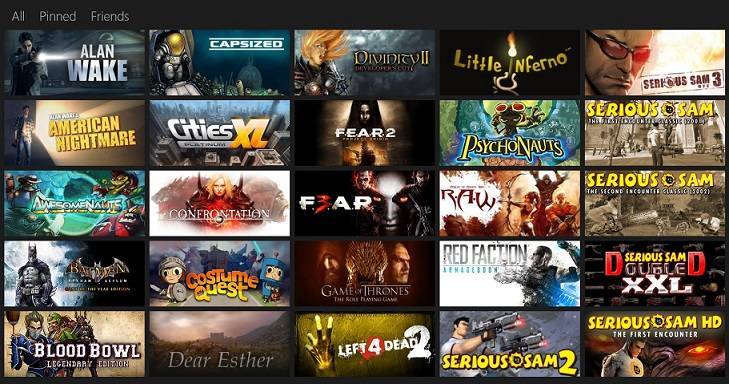
Unfortunately, Valve said that it is not going to release a Windows 8 Steam app anytime soon, citing “business reasons”, which probably means there are not enough touch Windows 8 users. However, there is a reliable third-party Steam app that you can use for increased Steam functionality on your Windows 8 tablet
windows 8 steam appIn the past, we have shared with you the Steam Tiles app for Windows 8 users that allowed you to pin Steam games to the start screen of your Windows 8 tablet. Now, another similar Steam app for Windows 8 app has caught our attention, called simply Pin Steam. Just like the Steam Tile app that we have covered, this too lets you pin your Steam games or friends to the Start Menu with good looking tiles.

Read Also: Microsoft Hires Former Steam Boss Holtman to Make Windows Great for Gaming

Windows 8 Steam app for the player in you

UNLIMITED FREE TRIAL! Live tiles show you which of your friends are playing which games. You can also pin friends directly to the start screen and follow their online status. To use Live Tiles, this app requires you to have a Steam account and to have setup a Custom URL in your steam profile. It also requires Steam to be installed on your device to launch games. (NOTE: Steam is not available for Windows RT yet!) Neither this app or it’s creator is affiliated with Valve Software in any way. This app has an unlimited trial! You can do everything except actually launching the game from the Start Menu.

Since the app comes with full Windows 8.1 support, you can change the live tiles to support any tile size – large, wide, medium or small. The app has been recently updated with a new user interface and a lot of bug fixes. This Windows 8 Steam app is really, really fast and this is probably the reason why so many have given it a good rating.

What’s really cool about the app is that it comes with an “unlimited free trial”, which means you can use the app for as long as you want, with no ads at all. If you want to support the developer, the app costs $1.49. The looks really, really gorgeous and fetches your games collection instantly. Follow the link from below to download it from the Windows Store and start enjoying your Steam games!

Download Pin Steam for Windows 8

Windows 8, 10 App Check: Gmail Touch

I have been looking for a dedicated Windows 8 Gmail app for quite a long while to download and install on my Windows 8 tablet. That’s because Google hasn’t yet decided to release an official Gmail client for Windows 8 users. Third-party app Gmail Touch seems to be the best one that is currently available in the Windows Store
windows 8 gmail app
When you go the Windows Store and type “gmail” there, a plethora of Windows 8 apps will appear before your eyes. The problem is that a staggering majority of them are spam and useless apps that you really should avoid downloading on your desktop or touch Windows 8 devices. Gmail Touch is the single one that I can recommend when it comes to trying out the Gmail experience on your Windows 8 tablet.

Read Also: Microsoft’s Latest Scroogled Attack Slams Gmail’s Email-like Ads

Description: Gmail Touch is a mail client for Windows 8. View your inbox, compose messages, search your mail, and more! Features: View your inbox, Compose messages, Search your email, Live Tile, Badge and Toast Notifications, Multiple Accounts Support, Share target

Reliable Windows 8 Gmail app for your Windows 8 tablet

windows 8 app gmailThe app is very basic and comes with a design that isn’t necessarily appealing, but you get used to it really quick. I still rely on the built-in Mail app for my Windows 8 tablet, but if you want a dedicated Gmail app, at the moment, this is the best to choose. Inside the app you will be able to do the basic things – view the inbox, send emails, search through your mail. You can also pin the app to the start screen and thanks to the Windows 8.1 support, you can change its size how you want it to be. At times, I found the app to be slowly loading, so I hope the developer takes care of this in a future release.

Gmail Touch for Windows 8 has been updated multiple times and user interface updates and tweaks have been put in place. The app can be downloaded for free but there’s an advertising square banner in the lower right corner that you will get used to. Or, you can choose to pay $2.99 and get the ad-free version. The app also comes with Badge and Toast Notifications, Multiple Accounts Support and Share target features. We will be monitoring the app and if there will be any worthy updates, we will let you know.

Download Gmail Touch for Windows 8

Windows 8, 10 App Check: BBC Earth Wonders

The BBC Earth Wonders app has been recently launched in the Windows Store for Windows 8 and Windows RT users, joining other apps launched by BBC, such as BBC Good Food, Top Gear News and others. Read below for more details regarding this Windows 8 BBC app.
windows 8 app bbc
First of all, let me start by saying that I absolutely hate paid Windows 8 apps that don’t let you try out the title for a few days, at least. Unfortunately, such is the case with BBC Earth Wonders. Truth be told, for $1.99, its price, you will get access to amazing content, the kind that only BBC can make. More than 500 stunning HD images from the natural world and 50 HD video clips will await for you to discover and enjoy them.

Read Also: Windows 8 App Craigslist Classifieds Launched

BBC Earth Wonders brings high-quality content on Windows 8

This BBC Earth Wonders app showcases some of the most beautiful BBC natural history content, taken from landmark series such as Planet Earth, Frozen Planet and Life, along with stunning images from world-renowned natural history photographers. We won’t give it all away now, of course, but with this app you’ll learn an astonishing fact (or two) about the diminutive spectral tarsier, one of the world’s most unusual and secretive primates. The killer whale is a whale by name only – can you imagine what species it actually is?

By using the BBC Earth Wonders Windows 8 app you will be able to explore awesome content using a simple map interface and the HD video option will bring  50 points of interest with a 30 second clip of pin-sharp HD video. The “Picture of the day” feature will bring you daily a new amazing picture accompanied by a little-known fact. If you’re looking for a Windows 8 BBC app with amazing content to be displayed beautifully on your Windows 8 tablet, then you have found it. Follow the link from below to download it.

Download BBC Earth Wonders for Windows 8

Windows 8, 10 App Check: LEGO Hero Factory Brain Attack

True LEGO fans from all over the world no longer rely only on good old LEGO sets to satisfy their passions, they are now trying out apps to install on smartphones and tablets for even more features. We are now trying out LEGO Hero Factory Brain Attack for Windows 8 and see if it’s worth downloading on your tablets or not.
windows 8 lego app
I am a true LEGO fan and have always wanted to get even more LEGO sets, so I am enjoying anything related to the LEGO gaming industry. In the past, we have featured the Brick LEGO Collection Manager app for Windows 8 users that has received an update recently. The Windows 8 app LEGO Hero Factory Brain Attack will let you enjoy the LEGO Hero Factory game that features “awesome 3D graphics, incredible weapons and an army of evil brains”.

Read Also: LEGO Mindstorms EV3 Robots can Now be Controlled from Windows 8.1

Play LEGO Hero Factory Brain Attack on a Windows 8 tablet

Enjoy the latest, all-action LEGO® Hero Factory game, featuring awesome 3D graphics, incredible weapons and an army of evil brains. Makuhero City is under attack and only you can save the day! Defend Makuhero City and stop the waves of brains attacking the Hero Factory, Customise your hero with fantastic weapons and armour, Select Furno, Bulk, Breez or Rocka to fight as your sidekick, Earn game points to upgrade your firepower and defences, NEW! Stadium level and 6 high powered weapons. The Hero Factory needs your help. Can you be its greatest defender?

windows 8 lego Hero FactoryThe app has also been recently updated, and a new stadium level and 6 high powered weapons have been added, along with several sug fixes and performance improvements. This Lego game will occupy an approximate size on your Windows 8 tablet of 111.5 MB. Your mission is to defend Makuhero City and stop the waves of brains attacking the Hero Factory. You get to select Furno, Bulk, Breez or Rocka to fight as your sidekick and there are game points available to upgrade your firepower and defenses.

Download LEGO Hero Factory Brain Attack

Doom and Destiny Windows 8, 10 Game now Available

Doom and Destiny is one of the most popular indie games for Windows Phone and Xbox users and now it has been made available for Windows 8, Windows 8.1 and Windows RT users as it can be downloaded from the Windows Store. Read below for more details regarding the game
doom and destiny windows 8
Indie games are fun to be played on Windows 8 tablets, but, unfortunately, at the moment, there aren’t too many of them in the Windows Store. For the connoisseurs, Doom and Destiny has been launched and can be yours for $3.49 with a free trial version being available. You will follow the download link from below and you will see that the game as a really, really good rating from those who have downloaded and are playing the game.

Read Also: ASUS to Launch 8-inch Windows 8 Tablet VivoTab Note 8

After the incredible success on Windows Phone, XBOX and Windows 7 D&D arrives on a great new Windows Store edition. You can now control the game with your touchscreen, with an XBOX gamepad or a keyboard! Strange events bring four nerdy friends in a fantasy world made of cliche, strange people and a lot of humor. Featuring more than 25 hours of fun, 200+ skills to defeat the 300+ enemies and over 500 between items and equipment D&D is a must have in your collection. Explore a gigantic world with more than 700 locations and unleash the power of the Spaghetti Monster!

Fun Windows 8 indie game for the connoisseurs

Doom and Destiny is an award winning Windows 8 game that is turn based, easy to learn and combat-based. You will be able to play 25+ hours in the singleplayer campaign as you will be able to employ more than 200 skills and face more than 300 enemies. There are 500+ between items and equipment and
more than 700 locations inside this exciting indie game.

Use your Windows 8 tablet’s touch screen, an Xbox controller, or your Windows 8 desktop keyboard to play the game. As you will travel with four friends across an enormous world in Doom and Destiny, you will be able to use over 10.000 lines of dialog, reach 100 levels of experience and choose from 4 different character classes.

Download Doom and Destiny for Windows 8

Holiday Surface Pro 128GB Deal: Buy it for $599, Save $300

The Surface Pro tablet is a promising device, but Microsoft hasn’t managed yet to sell it in big volumes. That’s why the company had to discount it several times before. Now, the latest update is also the biggest one, as you can get the 128 GB version of the Surface Pro for only $599
surface pro 128 gb deal
If you were looking to buy the original Surface Pro for a really good price, now is the moment to do it. Christmas and New Year is over, but this hot holiday deals has just started, and we know that the available quantities are limited, so hurry up. The 64 GB version of the tablet is discounted by $200, unlike the 128 GB one which has received a serious $300 discount.

Read Also: Surface Pro 2 Gets Significant Battery Boost Thanks to Firmware Update

Buy the discounted 128 GB Surface Pro and save 300 bucks

You will be able to buy the discounted Surface Pro both at Best Buy and in the Microsoft Store (links at the end of the article). Here are the main tech specs that it comes with:

  • Windows 8 Pro, upgradable to Windows 8.1 update
  • 3rd generation Intel Core i5 Processor
  • Intel HD Graphics 4000
  • 4GB RAM
  • 10.6″ ClearType HD Display
  • Screen resolution of 1920×1080
  • Two 720p HD cameras (front and rear).

Buy the discounted Surface Pro 128 GB from Best Buy
Buy the discounted Surface Pro 128 GB from Microsoft Store

Windows 8 Apps in 2014: Preview of Windows Store’s Growth

The year of 2013 is coming to an end and it’s time to recapitulate what has happened for Windows 8 users in terms of apps and where the Windows Store is headed for in 2014. We’re also taking a look back at what we have done here on Wind8apps and what will be our mission for the future
windows 8 apps 2014
Whoa, it’s been quite a ride so far! I remember now the day when I first started the blog, back in October, 2012. Back then I was sure that Windows 8 had a bright future ahead and that more and more people will start looking for reliable Windows 8 apps to download from the Windows Store. Sure, we can’t compared it to Apple’s iOS App Store, nor to Google’s rebranded Play Store, but Windows Store has a bright future ahead and if you have a Windows 8 tablet, then you should join us for this interesting ride.

Read Also: How to Create Windows 8 and Windows Store Apps

Like I was saying, the very first post on this website had been published on the date of October 23, which was just three days before Windows 8 was officially announced. This year, on October 26, Windows 8 has turned only 1, and at this moment, it’s going to face a lot of challenges for the upcoming year. The battle against iOS and Android apps is perhaps the most important one. For that, Microsoft needs the support of developers and OEMs together.

As we are ready to step into 2014, right now, according to multiple third-party services, the Windows Store has approximately 142,000 app available for download. The majority of these apps, obviously, have been submitted this year. The problem still lies in the fact that there are many spam apps that are plaguing the Windows Store and the absence of important ones isn’t helping, as well.

How does 2014 looks like for Windows 8 apps

2014 is going to be an year of important changes and breakthroughs for Windows 8 users. At the moment, the market share of the latest Windows operating system is almost ridiculous, but this will change thanks to two important factors: the increase in Windows 8 and Windows 8.1 tablet ownership and the growth of the available apps.

Two major turning points will be the Consumers Electronics Show and the Mobile World Congress from Barcelona where many OEMs will showcase more Windows 8 tablets that will definitely seem appealing for users. We’ve already shared with you some cheap Windows 8 tablets to get under $400, a price that has been made available by the release of Intel’s low-power Haswell chips.

So, my estimate is this – at the end of 2014, there are going to be more than 400, 000 apps available in the Windows Store, and in the most optimistic case, I see even half a million titles being submitted. Now, the problem is this – let’s hope that many will be important, and not spam, low-quality apps. 2014 will bring many new exciting apps for Windows 8 users, and we are inviting you to join us as we will discover them together. Here’s a list of some articles that we liked the most in 2013 here, on Wind8apps:

Best Windows 8 apps in 2013

Windows Error Reporting could leak data that hackers can exploit

Windows Error Reporting could leak data that hackers can exploit

Research carried out by Websense Security Labs shows that data sent from computers through Microsoft Error Reporting could be intercepted by hackers and used to formulate an attack. The problem stems from the fact that crash reports are transmitted in a very easily interpreted form, and they can contain quite detailed information about the systems from which they were sent — information that could be easily exploited by a hacker.

The research points out that while the sending of error reports to Microsoft in the event of a system or application crash usually requires user confirmation, there are instances when data is transmitted without any user interaction. For example, when a new USB device is connected, details of the device as well as information about the host computer such as the version of Windows that is in use, what Service Packs are installed, BIOS version number and much more.

This may seem like fairly innocuous data, but for a hacker targeting a large corporation, it is invaluable. It makes it possible to pinpoint weaknesses in a network, target known security holes and more. The frequency at which error reports may be generated means that it would be very easy for a potential hacker to build up a detailed picture of a company’s network.

As Websense points out, “crashes are especially useful for attackers since they may pinpoint a new exploitable code flaw for a zero-day attack.”

This is obviously going to be of concern to any business, but there are steps that can be taken to help minimize the risks:

“Websense recommends that organizations set group policies (when possible) to force encryption on all telemetry reports and periodically audit their own network and applications for inadvertent leaking of information with security implications.”

We reached out to Microsoft for a response but were given a generalized answer. “Microsoft does not provide any Government with direct or unfettered access to our customer’s data. We would have significant concerns if the allegations about Government actions are true. Regardless, we continue to review our encryption technologies and practices and have commented on the multiple investments we continue to make, on our Microsoft on the Issues blog,” a Microsoft spokesperson told WinBeta.

Windows 8, 10 App Check: Bitcoin Tradr, a Bitcoin Wallet

A while, we were sharing with you the Windows 8 App Bitcoin Miner that you could use to do some serious Bitcoin mining on your Windows 8 tablet. Now, a new app has been launched in the Windows Store for Windows 8 users, called Bitcoin Trader, which is the most reliable Bitcoin Wallet to be used by Windows tablets.
windows 8 app bitcoin wallet
Bitcoin is growing in the number of users day by day and those who own a Windows 8 tablet are also interested in trying out reliable Windows 8 apps to experience the Bitcoin services better. Bitcoin Tradr is one such app and by using it, you will be able to buy, sell, and send Bitcoin from your Windows 8 tablet or other device completely free.

Read Also: Windows 8 App Check: TripAdvisor

Buy, sell, and send Bitcoin from your Windows 8 device for free! Bitcoin Tradr is an app for the Coinbase.com digital Bitcoin wallet service for Windows 8 that lets you buy and sell Bitcoin, check Bitcoin prices, as well as send and receive Bitcoin from others. Coinbase.com and Coinbase services are provided by Coinbase, Inc. This app and its creators are NOT affiliated with Coinbase, Inc.

Reliable Bitcoin Wallet app for Windows 8 users

The app is available only in English and will occupy only 0.4 MB of your storage space. From inside the app, you will be able to buy, sell Bitcoin at the current market price and also send and receive Bitcoin from other users. There’s also the option of viewing the current price of Bitcoin and the current worth of your Bitcoins.

Bitcoin Trader also comes with the ability of letting you view your recent Coinbase account activity. The app also works well in multi-tasking mode, as you can snap it to the side while working on other things. I am not a Bitcoin users, so didn’t actually manage to try it out so am calling out all of you out there who have a Windows 8 tablet to see how it works.

Download Bitcoin Tradr for Windows 8

Report claims Windows error reporting system bugged by NSA, Microsoft denies it

Report claims Windows error reporting system bugged by NSA, Microsoft denies it

Now, take this report with a grain of salt. The report comes out of Germany and the claims are a bit farfetched. But you be the judge. According to a new report coming from Germany’s Der Spiegel, the US National Security Agency (NSA) has been working with the CIA and FBI to intercept computers and other electronics being purchased online before delivery. The reason? To install malware and other spyware tools. On top of that, the NSA is allegedly tapping into the error reporting system in Windows.

According to the report, hackers exploited the weakness in the error reporting message feature of Windows. For those who do not recall, this error message feature pops up whenever an application crashes. Information is gathered and subsequently sent to Microsoft engineers in an attempt to find a fix.

However, the NSA is allegedly tapping into this mechanism and using it to capture data sent out from the computer. Microsoft, on the other hand, denies that this is even happening. “Microsoft does not provide any Government with direct or unfettered access to our customers’ data. We would have significant concerns if the allegations about Government actions are true,” the company spokesperson told CNBC in a statement.

The NSA is also reportedly intercepting computer shipments and diverting them to a secret NSA workshops where specific software is installed so NSA agents can track users remotely. According to Der Spiegel, this technique is known as “interdiction” and is the NSA’s “most productive” operation.

You can head over to Der Spiegel to read the full report.

How to Get to Mobile World Congress 2014 in Barcelona

We will be attending the Mobile World Congress 2014 in Barcelona and will keep you updated with the most important Windows 8 and overall tech news from the industry. We’ve already shared with you the most important dates and schedules from the MWC event as well as the exact location where it’s going to take place. Now, it’s time to explain transportation options.
mobile world congress 2014 transportation
Getting to the 2014 location of the Mobile World Congress, or MWC, in Barcelona, is easy if you have been to previous editions of the trade show. If this is your first time or you just have forgot how to get there, here’s the full transportation information. Last year, it was really cool, as we could get to the trade show for free with the special permits for press. And this is again possible, as GSM, the organizer, has partnered with the Barcelona municipality to ensure free transportation to the MWC locations.

Free transportation passes to MWC 2014

All MWC attendees using public transportation will receive a free transportation pass valid for the four event days (Monday-Thursday). Transportation passes will be distributed when picking up event badges at all registration locations during the weekend prior to the event, as well as at the transport pass desk in the South Entrance of Fira Gran Via, from Monday to Thursday. The transport pass is valid for unlimited combined journeys using any means of transport within Zone 1 (includes Barcelona city and Fira Gran Via), using Metro, Bus and Train systems.

You will be able to get your free transport pass for MWC 2014 at the following locations:

  • Friday (new for 2014), Saturday and Sunday – at the Airport registration (Terminal 1 & Terminal 2)
  • Hall 1 registration in Gran Via
  • Hall 8 registration in Gran Via
  • The satellite registration point in Fira Montjuïc.

transportation mwc 2014As I was explaining in the article with the location of the 2014 MWC event, the big event will be at the Fira Gran Via location, but there will going to be two halls at Fira Montjuïc, as well. For that, the organizers of the event have set up a free Fira Gran Via/Fira Montjuïc shuttle. Here’s its schedule

Monday 24 to Wednesday 26 February

  • 07:00 – 10:00 (buses run every six minutes)
  • 10:00 – 18:00 (buses run every 15 minutes)
  • 18:00 – 21:00 (buses run every six minutes)

Thursday 27 February

  • 07:00 – 10:00 (buses run every six minutes)
  • 10:00 – 16:00 (buses run every 15 minutes) Thursday 27 February

Also, there is going to be a free official hotel shuttle bus for those who have booked hotels through the official agency that has partnered with MWC. Also, you should know that last year, there wasn’t an official transportation guide on the website, and thank God they have implemented it for this year.

Get to MWC 2014 with the FGC Train or H12 Bus

The Barcelona Metro connects directly to Fira Gran Via through the Ferrocarriles de la Generalitat (FGC). Riders should take the Metro to Plaça Espanya (Red Line, L1) or (Green Line, L3). At Plaça Espanya, follow the signs for Mobile World Congress, and transfer to the FGC train.  The nearest stop to Fira Gran Via is the ‘Europa/Fira’ station; all trains departing Plaça Espanya station stop at Europa/Fira.  Europa/Fira is the third stop from Plaça Espanya, and the journey takes seven minutes.

These are the official guidelines, but I can tell you from my experience that you will be guided at almost every subway stop by GSM workers who will be carrying signs, so, don’t worry, it’s really hard to miss the Mobile World Congress once you’re in Barcelona that time of the year!

Barcelona has added a bus line called the H12 bus. This line runs along Gran Via de les Corts Catalans of Barcelona. This line crosses the city from the Forum area to Fira Gran Via, passing through Passeig de Gràcia and Plaça Espanya. The bus stop nearest Fira Gran Via is located in Plaça Europa, a one-minute walk to the South Entrance. See all of the stops of the H12 Bus here.

And this is the transportation information if you prefer to take the bus and enjoy Barcelona’s views.


3 Useful Windows 8, 10 Spell Check Apps

If you have a Windows 8 tablet and you want to be able to use spell checking software on it, then the best solution is to install some spell check apps that are easily accessible. Alas, there aren’t too many reliable ones to choose as we have identified only 3 that we can recommend
windows 8 spell check app
Windows 8 comes with the ability of turning on the the function to auto-correct and highlight the misspelled words. But that is obviously not enough, and you might be on the lookout for dedicated Windows 8 spell check apps. Without further ado, here are the top three spell checking apps to use on your Windows 8 tablet. As always, if you have knowledge of other reliable apps to use, let us know by leaving your comment.

Read Also: Adlib for Windows 8: a New Take on Word Games

1Checker

1checker windows 8
Windows 8 spelling check app 1Checker is one of the best proofreading solution for Windows 8 touch users and it offers spell, grammar, style checking and helps your vocabulary enrichment. As main features, the app boasts with instant proofreading, professional explanation of the errors that you have made, writing enrichment and the ability to diagnose your weak English language points.

Spelling Assistant

spelling assistant windows 8The Windows 8 app Spelling Assistant has a very nice specific feature that lets it read your words aloud to easier test your spelling. You just have to enter your words and then tap Test Me to hear and see whether the words are correct or not. The single drawback is that the voice doesn’t sound that natural, but you’ll get used to it eventually.

English Spell Check

english spell check windows 8Another very basic Windows 8 spell check app, English Spell Check is described as “a free and straight forward application which helps you correct your emails, assignments or other text based paragraphs”. It is poor in features, but for a basic spell check, it should get the job done with no hassle.

If you know a professional spell check app to be used with Windows 8 touch devices, do let us know in the comments section box from below. We will definitely include it in the list if we find it to be rich in features and reliable. For now, this is what we have at our disposal.

Read Also: Art Text for Windows 8 is Like WordArt at a New Level

Windows 8, 10 App Check: Gym Guide, the Workout Assistant

Who doesn’t like to be in fit and have a beautiful body? Now, we rely more and more on our digital assistants – smartphones and tablets to help with that. Gym Guide is one of the best Windows 8 fitness apps and workout helpers to try. Find below more details about it.
windows 8 gym guide
There are plenty of fitness apps in the Windows 8 store, but Gym Guide is definitely among the most complete workout apps to be used on your Windows 8 tablet. Actually, the developer of the app says that it is the biggest workout encyclopedia app currently on the Windows Store, with a total number if 804 exercises.

Read Also: Windows 8 App Check: Fitbit, the Fitness Tracker

Now comes with videos to help YOU get your workout done! More features coming soon! Lose fat, build muscle or find some new exercises. No matter your goal Gym Guide will help you improve your fitness with 804 exercises and stretches all accompanied with high quality images, videos and step-by-step guides.

Awesome Windows 8 workout app

The app also has a disclaimer, according to which you should always consult a qualified gym instructor because certain exercises might pose health risks. So, we’re also advising you to do only the exercises you know you can do and don’t exaggerate.

windows 8 workout appThe graphics and the texts used in the app are not original and are taken from the bodybuilding.com website, so, you can consider it as a true bodybuilding app for your Windows 8 devices.

The Windows 8 Gym Guide is very well designed and will let you train your shoulders, biceps, forearms, chest, abs, quads, neck, traps, triceps, lats, middle and lower back, glutes, hamstrings and calves. The app is totally free and there’s only a small advertising banner that doesn’t seem that annoying. Follow the link and download it on your Windows 8 tablets.

Download Gym Guide for Windows 8

Windows 8, 10 App Check: Hulu Plus, Unlimited Instant Streaming

Hulu is one of the best known on-demand streaming video services of TV shows, movies and behind-the-scenes footage. The services works with NBC, Fox, ABC, TBS, and many other networks and studios. Below we’re going through the main features of the Windows 8 app Hulu Plus
hulu plus windows 8
Not so long ago, we were reviewing a third-party app for the XBMC service, called XBMC Remote + and now it’s time to go briewfly through the main features and impressions that the official Hulu Plus app for Windows 8 makes. Of course, to be able to use the service and benefit from the unlimited instant streaming, you will need to have a valid Hulu subscription.

Hulu Plus offers unlimited instant streaming of current hit shows and acclaimed movies. Watch current season episodes of shows like Modern Family, The Office, Family Guy and many more. Requires subscription. New to Hulu Plus? Try it FREE.

Hulu Plus on your Windows 8 tablet looks neat

If you want to test the service, you can do it, as both the app and the official Hulu service will let you try it out for free for during an entire month, so that should be enough to make up your mind. Shows like Modern Family, The Office, Family Guy and many, many others will be available right on your Windows 8 tablet. One of the latest updates of the Hulu Plus app has added Windows 8.1 support, which brought new features like integrated search and large live tiles.

Read Also: Set Up TV Tuner on Windows 8 [How to]

Besides the above mentioned shows, your kids will be able to follow their favorite TV Shows straight from your Windows 8 tablet, such as SpongeBob SquarePants, Kung Fu Panda and others, with no ads whatsoever. You can choose to view in fullscreen or snap to the side; so that you can watch while you work. This is a really cool feature that you won’t be able to do on an iPad, since multitasking isn’t Apple’s tablet’s forte point. I, for one, do this a lot of times – write something while watching the latest episode from the witty Family Guy show.

If you want, there’s also the handy option of pinning your favorite TV shows for instant access from the Start screen of your Windows 8 or Windows RT tablet. The database of the Windows 8 Hulu app is synchronized with the Charms bar, so you can search for the desired content without having to open the app. The Hulu Plus HD service is available for $7.99/month with limited advertising and the app is totally free.

Download Hulu Plus for Windows 8

Windows 8, 10 App Check: XBMC Remote+ Controls your Media Library

Unfortunately, we are still waiting for the official XBMC app to be released in the Windows Store for Windows 8 users. However, until that happens, there is an app that you can use to browse your XBMC media library from your Windows 8 tablet, called XBMC Remote+
windows 8 xbmc app
At the moment, the most reliable XBMC app to be used on your Windows 8 tablet is the third-party app XBMC Remote+, and it has been met with mixed reviews so far. By using the app, you should be able to browse and control your entire XBMC media collection from your Windows 8 tablet or any other Windows 8 device. The app has also seen frequent updates, which shows that the developer seeks to implement the feedback he receives from users.

Read Also: Windows 8.1 App Netflix Updated to Fix Streaming Issues

XBMC Remote+ is an application built from ground up let you experience your XBMC media library remotely and then play it on your main display. You can browse your entire catalog while a movie or music might be playing on the TV. It’s especially useful when you TV is turned off and you want to select Audio Albums and queue them to play on the audio receiver.

Manage XBMC library remotely from Windows 8 tablets

The XBMC Remote+ Windows 8 app will let you remotely access your entire XBMC catalog, consisting  with video, music and TV shows and there’s also the semantic zoom option. You will also be able to select and view details of movies and music albums. If you need more accurate sorting, you can do
so by albums, artists, or songs. There’s also the option of viewing movies by genre, released year.

Recently added movies and episodes can also be remotely accessed. From the top bar of the app you can see further information about the media that is currently rendering and the ability to add and manager multiple XBMC server is also present. The latest updates to the app have brought support for Frodo RC3 as well as other various bug fixes.

Download XBMC Remote+ for Windows 8

Windows 8, 10 App Check: Fitbit, the Fitness Tracker

I’ve been using a Fitbit fitness tracker device for more than a year now and can say that I’m very pleased with it. But I have only recently discovered that there was also an official Fitbit app in the Windows Store. Even more, the Fitbit app has been recently updated to allow syncing on Windows 8.
fibit windows 8 app
The official Windows 8 Fitbit app has been available in the Windows Store for a while now, but I haven’t noticed it until recently. To dissipate the confusion from the beginning, this app is not like the Fitbit Connect tool for Windows 8 and it also doesn’t contain the drivers needed to run Fitbit (links at the end). It’s a standalone app that will also work on desktop Windows 8 machines, but is aimed at Windows 8 touch devices, especially tablets.

The Fitbit family of products motivate you to stay active, live better, and reach your goals. This app enables you to view graphs of your activity levels, sleep and weight and gives you a clear picture of your health and fitness trends. Important: This app is designed to be used with Fitbit devices. Syncing data from your Fitbit tracker via this computer requires the wireless sync dongle be plugged in to this PC.

Fitbit: among the best fitness apps for Windows 8

Many users of the Fitbit Windows 8 app have given it a poor rating because it was lacking an essential ability – the syncing feature. Now, the latest update will let you sync your Fitbit tracker to the app with the wireless sync USB dongle. Here are the Fitbit devices that are supported:

Read Also: Parrot AR Drone and Zik get Windows 8 Support

  • Fitbit Force
  • Fitbit Flex
  • Fitbit One
  • Fitbit Zip

fitbit windows 8Just like the Android or iOS versions, you will also get daily and historical graphs of your step, calorie burn and floor climbing patterns and you will be able to see how you fare against your friends or other competitors. Without any doubts, one of the best Windows 8 fitness apps that needs to be downloaded and installed right away if you have a Windows 8 tablet.

Even more, you will also get feedback on your progress compared to your daily and longer term goals. And this is not all, there’s also a trend graph showing the weight, body dat and BMI (body mass indicator). If your Fitbit device comes with this function, you will also see  your nightly sleep patterns. Follow the direct link from below to the Windows Store and download it.

Download Fitbit for Windows 8

Download Fitbit drivers for Windows 8

Windows 8, 10 App Check: WordPress, the Free Hosted Blogging Platform

Automattic has released the official WordPress app in the Windows Store and it is currently one of the best Windows 8 blogging apps to be used. There’s only the free hosted WordPress version as we are still waiting for the self hosted app to be released, as well. More details are below
wordpress windows 8 app
This website, like many out there, is based on the WordPress free blogging backbone and many are probably looking to be able to create content from their Windows 8 tablets with the use of the self-hosted WordPress app, which is WordPress.org. That kind of app is still absent in the Windows Store as Automattic has released only the app for WordPress.com users

Browse the best original content on WordPress.com, including articles and photography on travel, art, entertainment, food, and much more. Sign in with your WordPress.com account to read blogs you follow and easily share cool content you find on the web by reblogging it on your WordPress.com site.

The best Windows 8 blogging app

So, by using the official WordPress.com Windows 8 app you will be able to create new posts and publish them to your WordPress.com blog very fast. Of course, you will need to have an account first of all. If you don’t have one, you will be able to create one from the app which will take you to a dedicated web page where you will complete the creation of your first blog. Then, you will be able to share photos, links, and quotes from any Windows 8 app on your WordPress.com blog.

Read Also: Fix: Windows 8.1 External Hard Drive Keeps Disconnecting

Besides managing your own WordPress.com blog, you will also have the option of seeing the content from other blogs that you follow, and you will even be able to reblog the content that you find and share it with your readers. After using the app for a while, I’ve seen that it is fast and well-designed, however, I couldn’t help but notice the low rating that it has.

I went to the Windows Store and started looking through the reviews and realized that many of the problems were caused by the fact that there were many bugs caused by crashes and various other bugs. However, the release notes contains a changelog which points to some bug fixes and general improvements. So, go ahead and download the app and see how it works this time. I, for one, was very pleased with it.

Download WordPress app for Windows 8

Windows 8, 10 App Check: Fruit Ninja, the Popular Game

After reviewing dozens of Windows 8 apps, I have realized just now that I missed a very popular one – Fruit Ninja. Many are still wondering whether there is an official Fruit Ninja game available in the Windows Store. We’re giving it a short review along with the description of the features
windows 8 fruit ninja
My wife loves Fruit Ninja, it is her favorite game and whenever she has a free moment, she will grab my Windows 8 tablet and start playing Fruit Ninja on it. I’ve been playing the game on my laptop just as fine, and my mouse has been an equally good tool just like the finger. Of course, nothing can match the fun when interacting with a touchscreen, but at least you know it can be played on a Windows 8 desktop device, as well.

Read Also: Best Windows RT Games For You to Play

Popular Fruit Ninja game is enjoyable on a Windows 8 tablet

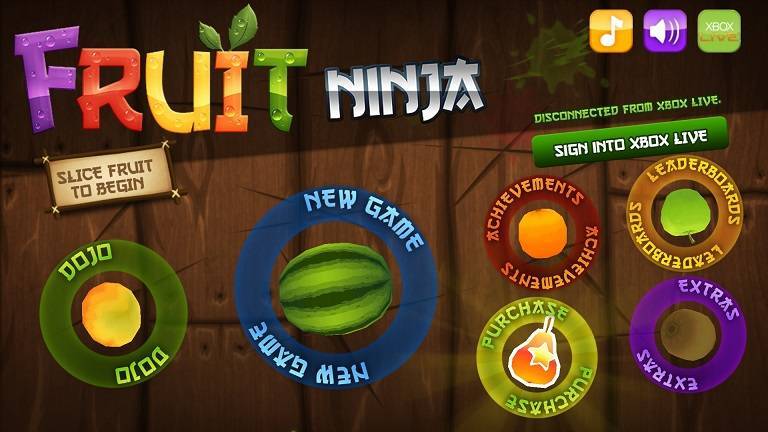
Slice across the screen to deliciously slash and splatter fruit like a true ninja warrior. Be careful of bombs – they are explosive to touch and will put a swift end to your juicy adventure! Fruit Ninja features Classic, Zen and the amazing Arcade mode! Your success will also please the wise ninja Sensei, who will accompany your journey with wise words and fun fruit facts. Fruit Ninja is the messiest and most satisfying fruit game ever!

fruit ninja windows 8Those who have played Fruit Ninja on Android and iOS will find that the Windows 8 version is an exact copy of the original game. Just like always, carve, splatter, and slash piles of colorful fruits. You can choose from three different game modes to play: Classic, Arcade, and Zen. Also, you can choose to customize your gaming experience with unlockable weapons and backgrounds. The game costs $1.99 but there’s a trial available to see whether or not it seems enticing for you.

Download Fruit Ninja for Windows 8

Windows 8, 10 Game Disney ‘The Little Mermaid Undersea Treasures’ Launched

We’ve got a lot of Disney games in the Windows Store coming from Disney itself, but this time, the Little Mermaid Undersea Treasures game is getting launched by Microsoft Studios in the Store. More details are below.
windows 8 disney game little mermaid
Only yesterday were we sharing with you the latest updates to two other Windows 8 Disney games – Where’s my Water and Seven Dwarfs: The Queen’s Return. Now, we’re seeing that another Windows 8 Disney game has been launched in the Windows Store. Not officially launched by Disney, the Disney The Little Mermaid Undersea Treasures game gets published by Microsoft Studios.

Read Also: Windows 8 App Disney Infinity: Toy Box now in the Windows Store

The right Windows 8 Disney game for your kids

Explore the site of an old shipwreck at the bottom of the sea in this exciting preview of The Little Mermaid: Undersea Treasures!  Search for lost items from the mysterious human world above the waves.  Find each treasure quickly to earn bonus points and claim a place on the leaderboard!  Check back often for more updates to Undersea Treasures, including the first full episode of this adventure-filled prequel to the classic Disney film.

disney game windows 8

Inside the Disney game The Little Mermaid Undersea Treasures you will be able to do a lot of fun things, such as  searching an old shipwreck for lost human items and exciting hidden objects. Your accuracy and speed will earn you bonuses and even a place on the leaderboard! Designed with kids as the auditory in mind, the game is just as enjoyable for grown-ups. So, follow the link from below to download this new Disney game on your Windows 8 tablet and start exploring the vibrant world of King Triton’s kingdom.

Download Disney The Little Mermaid Undersea Treasures

Discovery Channel Releases Windows 8, 10 App Discovery News

There is already the Windows 8 Discovery Channel app in the Windows Store with many positive reviews and great feedback from those using it. Besides it, there’s also the TLC and Animal Planet apps for Windows 8 and now the Discovery News app has been launched, as well. Find below more details about it
discovery news windows 8Discovery Communications has just launched a brand new app for Windows 8.1 and Windows 8 users in the Windows Store – Discovery News. The app is one of the best looking apps I’ve seen in a while, with high-quality content. You will discover several categories inside Discovery News for Windows 8, like Earth, Space, Tech, Animals, History, Human and Adventure.

Are you curious about the world? Do you want to be smarter? From the people who bring you the Discovery Channel, Discovery News is the collective effort of a team of experienced journalists dedicated to satisfying the curiosity of our readers by bringing them stories and perspectives they won’t find anywhere else. With the Discovery News app for Windows, you’ll be constantly updated with news articles, videos, photos and more – with a primary focus on explaining the world through a lens of curiosity.

High-quality content inside the Windows 8 Discovery app

Read Also: Windows 8 App Check: PBS Channel

By using the Discovery News app for Windows 8, you will get new stories and videos that will be added daily. In the video section, you will be able to watch countless episodes of DNews and get every weekday from hosts Anthony Carboni, Laci Green and Trace Dominguez. In the Photos section, you will be able to brows through a vast catalog of stunning photo galleries.

An interesting section is the Discovernator where you will be served daily crazy, amazing facts. The apps is really, really snappy on a Windows 8 tablet and I recommend it to anybody, not only to the true fans of the Discovery Channel. Follow the link from below to download and install it on your Windows 8 device.

Download Discovery News for Windows 8

Windows 8, 10 App Check: Grand Theft Auto: iFruit

While we are still waiting for an official game from the Grand Theft Auto series to be launched in the Windows Store by Rockstar Game, you might download the companion app Grand Theft Auto: iFruit on your Windows 8 tablets.
gta ifruit windows 8
A while ago, I was thinking about the fact that an official Grand Theft Auto game would look awesome on my Windows 8 tablet and that I am eagerly expecting the moment when that will happen. Until that happens, we can resort to the single touch app released by Rockstar in the Windows Store for Windows 8 users – Grand Theft Auto: iFruit. For those who don’t know, this is the official companion app for Windows 8 tablets.

iFruit hooks directly into your experience of Grand Theft Auto V with some fun activities to further postpone the need for real social interaction. Keep up-to-date on the latest Grand Theft Auto V news, log into the Rockstar Games Social Club and stay connected on LifeInvader

Use the GTA cmpanion app on Windows 8 for more features

So, by using the Grand Theft Auto iFruit app on your Windows 8, Windows 8.1 or Windows RT tablet, you can satisfy your GTA obsession while not playing the game. Here are the main features of the app:

  • Latest Grand Theft Auto V news
  • Log into the Rockstar Games Social Club
  • Stay connected on LifeInvader
  • Use the Los Santos Customs app to create the ultimate vehicle in Grand Theft Auto V

Read Also: Best 8 Windows 8 Gamepads for Playing Games

gta app windows 8An interesting feature of the app is Chop the Dog:

Depth of content, high production values, defecation. It’s the app that has it all. Because who doesn’t love tending to a virtual pet? Chop is Franklin’s canine sidekick in Grand Theft Auto V. Look after him well in the “Chop the Dog” app and you will reap the benefits when playing as Franklin in Grand Theft Auto V. Pet him, feed and water him, play fetch and tug-of-war, teach him tricks. Too much or too little of an activity, however, will cause Chop to become unhappy, and nobody likes an unhappy Rottweiler. Take Chop on walks to give him a chance to work off last night’s steak and Piswasser and to mark his turf in the hood – defending his ladies, fending off gang members and even protecting the beach babes of Los Santos from unsightly tan lines by removing their bikinis.

Follow the link from below to download the game on your Windows 8 tablets

Download Grand Theft Auto: iFruit for Windows 8

Windows 8, 10 App Check: PBS Channel

While we’re still waiting for the official PBS app to hit the Windows Store for Windows 8 users, there are some third-party apps from developers that we can use. Read below a short review of PBS Channel, a cool PBS app developed by Binto Aden windows 8 pbs app
The Public Broadcasting Service, or PBS, as it is known, is an American non-profit broadcast television network with 354 member television stations. Windows 8 users have long been looking for a reliable PBS app to use on their Windows 8 tablets; but alas, an official one is not released in the Windows Store. However, the PBS Channel seems to be the best replacement, as it has garnered a lot of positive reviews.

Not the greatest, but the single Windows 8 PBS app

PBS’s educational media helps prepare children for success in school and opens up the world to them in an age-appropriate way

pbs app windows 8  Read Also: Valid Key Media Center Activation Doesn’t Work in Windows 8.1

Unfortunately, the app is far from being similar to what an official PBS should look like, but it’s the single one that is currently available. The app is divided in three big categories, with PBS content from Youtube, Flickr and a Twitter section with mentions related to the PBS television network.

It isn’t that easy to follow some PBS programs, such as Frontline, Nova, Masterpiece, or Nature by using this app, as you will have to scout for them. I only have the hope that the developer will manage to release more features in a future update.

Download PBS Channel for Windows 8

Windows 8, 10 App Check: iFixit Repair Manual

Many might not know this, but iFixit has released the official app in the Windows Store for Windows 8 users, called the  iFixit Repair Manual that is available for a free download.
windows 8 ifixit
iFixit is probably the best known repair company, especially thanks to the fact that iFixit is known to have an active presence online. The company already has apps for iOS and Android and if you have been using them, you should know that there is also a Windows 8 version available for download in the Windows Store. I’m not sure when it was released, but I think it happened not so long ago, since there were no updates recently made available in release notes.

The most popular repair manual in the world! Thousands of free how-to guides make it easy to repair your stuff. Fix your own things with step-by-step repair instructions. With step-by-step instructions, you can repair anything! Explore inside thousands of devices—before you take yours apart. Need more detail on a step? Zoom into high resolution images to see all the fine details! Completely free—no in-app purchases.

Your favorite repair manual, now on Windows 8

Read Also: Dell Venue 8 Pro: the Best Windows 8 iPad Mini Competition?

The app is actually a repair manual and you will find there thousands of how-to repair guides for so many different things, like your Xbox, PC, laptop, PlayStation, Nikon, Canon and other digital cameras, smartphones, bikes and even cars! The visual, step-by-step instructions include photos and videos and are very explicit and easy to use.

What’s really, really cool is that you are not bound to your app, as you can download your favorite repair manuals from the Windows 8 iFixit repair app to be available for later use offline. The app is free but iFixit suggests that buying parts and tools from them, you will support further development. Follow the link from below to download and install the official iFixit: Repair Manual app for Windows 8 users.

Download iFixit: Repair Manual for Windows 8

Fun Windows 8, 10 Christmas Game: North Pole Invasion

Christmas is just around the corner and everybody is talking about Santa Claus and his elves. North Pole Invasion is an unusual, but fun game with a Christmas theme where elves get transformed into zombies. Read below for more details.
windows 8 christmas game
North Pole Invasion is not a traditional Christmas game, but one with an unusual twist. If you are also counting how many days there are left until Christmas, you could kill the waiting time with North Pole Invasion. The game is better to be played on your Windows 8 or Windows RT tablet, but you can also enjoy it on your Windows 8 laptop by using your mouse. Your job is to defend Santa Claus’ gift from the elves that have turned into zombies after an invasion on the North Pole.

Read Also: Windows 8.1 Winter Themes for Christmas [Download]

Zombies have invaded the North Pole, infected the elves, and created a zombie elf army! Take control and help defend Santa’s gift bag from the zombie elf invasion. Use your fingers or mouse to toss and fling the zombies around using an advanced ragdoll physics engine! Battle through 70 levels of intense physics action!

Lots of hours of fun gameplay

By using your fingers or your mouse, you can grab the zombified elves and toss, fling or throw them in their to transform them into green gift boxes that will earn you points.  You can then spend your earned gifts in the Workshop to upgrade your attacking means, as there are 15 unlockable weapons to choose from. The game is very well designed, with top notch art and animation. What’s really awesome is that another friend can play along on the same screen! Here are some more important features that it has:

  • 70 progressively difficult missions
  • Up to 10 point multi-touch support for crazy ragdoll tossing action!
  • Survival Mode
  • Bonus rounds
  • 14 unique zombie types
  • 5 big bosses to battle!
  • 15 physics based weapons to deal out massive damage to the zombie elf horde

Download North Pole Invasion for Windows 8

Spark is the Best Windows 8, 10 Campfire Chat Client

Campfire is one of the best team collaboration tools with real time chat built-in. There are plenty of Campfire apps for iOS and Android users, but when it comes to the Windows Store, Spark is the one that stands out from the crowd.
windows 8 campfire
If you’re a frequent user of the 37signals Campfire group chat, you may want to check out Spark which has been released to Windows Store for Windows 8 and looks stunning. Better still; at the moment, you can get it for 50% off the regular price, so hurry up if you were looking for a reliable Campfire chat client for your Windows 8 tablet for a long time.

Read Also: Viber Windows 8 Voice App Released for Download in Windows Store

The best Campfire chat client for Windows 8

As stated in its Windows Store page, Spark is a modern, full-featured, fast and beautiful client for 37Signals Campfire chat designed to let you do what you need and get out of your way on your Windows 8 tablet or Windows 8 desktop device. Designed and optimized for Modern Windows 8, Spark offers a number of useful features, such as the following:

windows 8 campfire app

  • Send messages to your Campfire rooms from other apps via search contract
  • Roaming support — get consistent experience across all your devices
  • Background support — get notified even if app is not running
  • Contacts integration
  • Spark – pin room to start
  • Fast and intuitive interface — works great in snapped mode
  • Advanced notifications settings (sound, live tiles, toast, unread counters) — customizable per room level and per each keyword
  • Upload multiple files at once, paste files from clipboard or take and upload photo using camera
  • Inline previewing of images — whether from uploads, image links, or from a number of other sites (YouTube, Dropbox, Instagram, Imgur, Twitpic, 9 GAG and many more)
  • Support for multiple Campfire accounts
  • Full emoji and Campfire sounds support and autocomplete
  • Highlights any messages that mention you
  • Send messages via voice!
  • Favorite rooms
  • Built-in search and transcripts support
  • Shows user avatars
  • Customizable time zones
  • Ignore enter/leave messages
  • Animated GIFs support
  • Real time streaming of messages for instant notifications

Download Spark Campfire chat client for Windows 8

Colorings is a Fun Windows 8, 10 Color Book App

Your kid can interact with your Windows 8 tablet without harming its healthy growth, if you know the right apps to be used. One such app is Colorings, a color book app that looks great on a Windows 8 tablet.
windows 8 color book
Color books are one of the best tools to increase your kid’s creativity and make him discover the colors that surround us. While I still side with the traditional paper and pencil, there’s no way to stop the technological advance and we must adapt to it. Coloring digital books on a Windows 8 tablet is actually fun, and I’ve tried this myself with the Colorings app.

Simple and fun to use Windows 8 color book app

color book app windows 8With more than 90 shapes to choose from, Colorings impresses with the rich choice that it offers. You will find inside the app a lot of animals, such as donkeys, bears, rams, camels and many others. There are also cooks, doctors, characters from your favorite story tales, cars, planes and many other objects that await you to color them. This is an app that goes into our list of the best educational Windows 8 apps for kids to use.

Read Also: Best 10+ Windows 8 Apps for School

colorbook windows 8After choosing the shape that you want to color, you will be given 18 colors to choose. After you or your kid will have finished the masterpiece, you can choose to go back and select another one or, you can save it directly to your Windows 8 computer or tablet. If you are really proud with your creation, you can also share it with your friends on social networks. Follow the link from below to download Colorings for Windows 8.

Download Colorings for Windows 8