Skype introduces Channels 2.0, giving users full control over channels’ preferences and notifications

It’s been more than 6 months since Skype introduced Channels to the platform, which are new ways for users to get personalized content and subscribe to newspapers, personalities, or other celebrities that they admire.

The channels, introduced back then with the Skype Insider build 8.105, can be used inside the platform, without ever leaving it:

Dive into the realm of content like never before on Skype! We’re excited to unveil our brand-new feature: Skype Content Channels. Stay informed, entertained, and inspired without leaving your chat window.

Skype

Now, according to the latest blog post, Skype has introduced Channels 2.0, the next version of this capability. Coming with the Skype Insider build 8.116, Channels 2.0 aims to give users a plethora of options, including full control over their preferences and notifications, making it easier to have a more private experience when using these tools.

But the channels are also updated to support quick content sharing, swift reporting (in case someone break the rules or the policies of the platform), a channel preview that lets users take a sneak peek before joining, and even a channel store, where new but also old Skype users can a curated list of channels to join based on their interests.

Take a look at all the new capabilities coming to channels with the release of Channels 2.0:

  • ? Channels Store: Dive into a curated selection of channels and find your next favorite community.
  • ? Seamless Transition: Experience the switch to a more robust backend, designed for live broadcasting to all subscribers, bringing the latest stories to your fingertips.
  • ?️ Channels Preview: Peek at channel content before deciding to follow.
  • ? Channel Profile: View detailed profiles of channels to learn more at a glance.
  • ? Follow/Unfollow: Seamlessly join channels that pique your interest and leave those that no longer do.
  • ? Effortless Unsubscribe: Leaving a channel is just a click away, with options to explore new ones in our enhanced Store.
  • ?️ Manage Channels: Full control over your channel preferences and notifications.
  • ? Chat List Header Update: A refreshed look for a more intuitive user interface.
  • ? First Experience Refined: Select and subscribe to your preferred channels with our friendly first-run experience.
  • ? Article Sharing: Share and discuss articles right within your channels.
  • ? Default Mute: Dive into your content without the distraction of notifications unless you opt-in.
  • ? Report a Concern: Easily report content or concerns to keep the community safe.

The Skype Insider build 8.105 also introduces a couple of new rich text pasting enhancements to Android users, including rich text retention, and text integration, meaning Android users on Skype won’t have to format the text anymore.

The features, including Channels 2.0, will be available to users in the next few days, as they are gradually rolling out, so if you don’t get them now, check Skype again in a couple of days.

You can read the full blog post here.

GTA 6’s launch schedule puts PC users at a disadvantage

The PC vs console war heats up with the release of GTA 6 around the corner. This is one of the most anticipated game releases in decades.

As per initial reports, GTA VI for PC will be released in Q1 2026, a year after the console (Xbox and PlayStation) release scheduled for Q1 2025.

A similar pattern has been witnessed in the past. GTA V had a console launch in 2013 while the game arrived on PCs in 2015, almost two years later.

These developments have GTA fans with PCs all worried, and they are exploring possible options, including purchasing a console. According to recent leaks, PS5 Pro will be the perfect choice for GTA 6, when released. A user wrote on Reddit,

I’m literally buying twice. I’m a PC gamer, but I’m buying a PS5 to play GTA6 day 1. Then when it comes to PC I’m buying it again.

PC releases for games are often delayed, as was the case with Red Dead Redemption 2, which came to consoles in Oct 2018 but took another year for the PC.

This improves console sales as players have switched to gaming laptops in recent years, and offers more initial privacy and modding protection to the game.

Would you purchase a console to play GTA 5 or wait for the PC release? Share with us in the comments section.

Microsoft introduces extension support on its Edge Canary app on Android

With browser extensions, we can add many useful tools to our computers’ browsers to make every browsing session productive.

However, mobile browsers had limitations, but not anymore. Microsoft has addressed this concern by adding extension support for the Edge browser on Android devices. This move can revolutionize the way we use browsers on our mobile devices.

A recent update to the Edge Canary version, i.e., 125.0.2487.0, brings extension support, which gives you access to a huge library of Edge-compatible extensions on your mobile phones and tablets.

To use this feature, you need to activate extension support on your Edge Canary app. First, download and install Edge Canary from the Google Play Store on your mobile device.

Then, launch the Edge Canary app, type Edge://flags in the address bar, search for an Android extension or Extension on Edge, tap on it, and select the Enabled option.

Edge://flags Enable extension support

When prompted, restart the browser to enable extension support.

enable extension support

Now, tap the three horizontal bars at the app’s bottom right side and choose Settings. Go to About Microsoft Edge and repeatedly tap the Edge Canary, followed by the version number to enable developer options. At the time of writing, the version number was 125.0.2499.0

enable developer options

Next, click on the three horizontal lines, and from the menu that pops up, select Extensions, choose the extensions you would like to use, and then click Get. Remember, you won’t get a lot of extensions as of now,

Extensions

The timeline for the stable release of the extension support feature in Edge Android is not out. When it is released to the public, the browser will be among the few offering it, including Firefox, Kiwi Browser, and Samsung Internet browser.

The feature is still in the development stage, so you may face some issues while using it, but we hope it will improve with time; therefore, we hope we get an amazing browsing experience.

More companies opting to add extension support to their Android browsers could pressure leading players like Google Chrome to integrate the feature into their platform to stay competitive and meet the demands of users who want a customizable browsing experience.

What are your thoughts on the matter? Share your opinions with our readers in the comments section below.

Many raise concerns about deteriorating Microsoft 365 for Enterprise, explore alternatives

Over the years, users of Microsoft 365 for Enterprise have reported various issues, with the instances increasing each passing day. A solution for organizations with hundreds to thousands of employees or more, should deliver a better all-around experience.

Every aspect of Microsoft 365, from software to licensing and support, has been criticized. It doesn’t work the same way it did a few years ago. A user’s rant on Reddit sheds some light on the abysmal performance of Microsoft 365 for Enterprise.

The list of complaints keeps growing

When we sat down for research, there was so much against Microsoft 365 for Enterprise, starting from issues like unannounced changes to persistent ads. The lack of integration between the different products also comes under heavy criticism.

We’ve had so many issues as of late with unannounced changes or vms being rebooted outside schedules from Azure without clarification.
But honestly, the one that (if you think about it) gets me the most is when you install your paid windows client and get the question: How do you want your advertisement?

I think the most egregious think of late is the retiring of and ever changing list of API’s powershell etc, they treat the sysadmin environment like it’s some agile peice of software, compare to old and trusty and never changing Linux it’s really annoying playing keep up.

As for the customer support response, you will find threads on Reddit and other forums where users detail their experience.

But not everyone is complaining about Microsoft 365 for Enterprise

There’s always a flip side to the coin. Users who find Microsoft 365 for Enterprise functioning optional blame the outdated and misconfigured setup of those questioning. While that could be true, questions will still be raised regarding Microsoft’s customer support and outreach!

Our enterprise just isn’t seeing these issues. Seeing a post like this makes me feel like I am missing something, but I have done a lot of work lately to ensure I am not. But we are a google shop that prefers azure for cloud stuff, so maybe that makes the difference and splits the baby properly.

Our tenant and domain hums along like a finely tuned machine. Also, the deep management tools and logs in the tenant have really impressed me. We can now get detailed reports and threat maps with hunting. The sign in, audit logs, and conditional access tools are fantastic.
We have more native tools today to troubleshoot problems than we ever had before. And there are so many more good things…

The never-ending search for Microsoft 365 alternatives

With plan prices increasing and services deteriorating, many see no point in continuing with Microsoft 365 for Enterprise. But finding an alternative is no easy task either!

Microsoft 365 for Enterprise comprises a wide array of software, services, and cloud-based products. The Redmond-based tech giant has invested years into each of its products, and competing with them will be a challenge for any one company.

Besides, with the integration of AI into more and more products, including Copilot in Microsoft Advertising, the Office suite, and Copilot in Teams, the entire Microsoft 365 for Enterprise experience will witness a significant boost.

If you still plan to switch, maybe look for individual solutions, like Microsoft Office alternatives, a different email client, a suitable cloud storage solution to replace OneDrive, and a new video conferencing app.

What’s your feedback of Microsoft 365 for Enterprise? Share with our readers in the comments section.

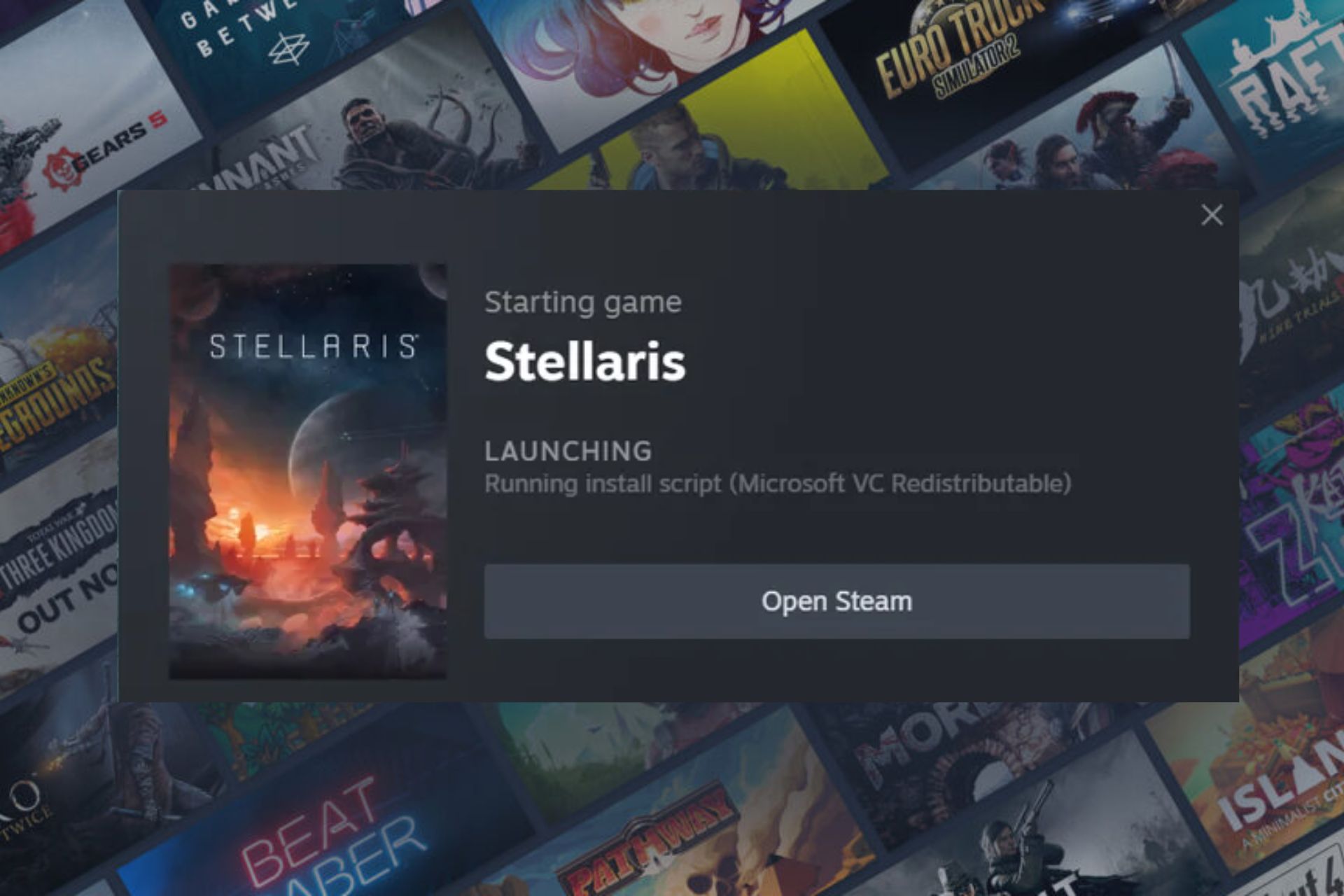
Solved: Steam Running Install Script Microsoft VC Redistributable

When launching a game on Steam and you get a running install script Microsoft VC Redistributable message, it means some critical files are missing.

Install scripts are usually part of the game you’re trying to run and without them, you cannot launch the game on your Steam client.

It’s not peculiar behavior as any necessary components or configurations required before launching a game can be installed but if they take too long or fail to launch your game, therein lies a problem.

How do I fix the Steam running install script Microsoft VC Redistributable error message?

1. Run the Steam client as an administrator

  1. Right-click the Steam client icon on your desktop and select Properties from the drop-down.
  2. On the Steam properties window, go to Compatibility and check the box for Run this program as an administrator, then click OK.
  3. Restart your PC and launch Steam to see if the issue persists.

Also, check that your device meets the game’s minimum system requirements and that your OS is up-to-date.

2. Remove the appinfo.vdf file

  1. Ensure the Steam app is not running. Press the Windows + E key to open File Explorer.
  2. Go to the Steam installation directory: C:\Program Files (x86)\Steam\appcache\appinfo.vdf
  3. Locate the appinfo.vdf file, right-click and select Delete from the drop-down menu.
  4. Confirm any prompts asking if you want to delete the file.
  5. Launch Steam on your computer.

VDF files usually contain configuration settings and other game-related information. By deleting this file, you reset these settings to default and the next time a running install script Microsoft VC redistributable message appears, it will trigger a reinstallation because these files have to be rebuilt.

Forcing a refresh means the corrupt files will no longer be in operation and when a new one is regenerated, the installation will be seamless.

3. Verify game files

  1. Launch Steam on your PC.
  2. Click Library in Steam.
  3. Right-click on the problematic game, then select Properties.
  4. Select the Local files tab then hit Verify integrity of game files.Verify Integrity of Steam Files
  5. Restart Steam.

4. Reinstall Microsft VC manually

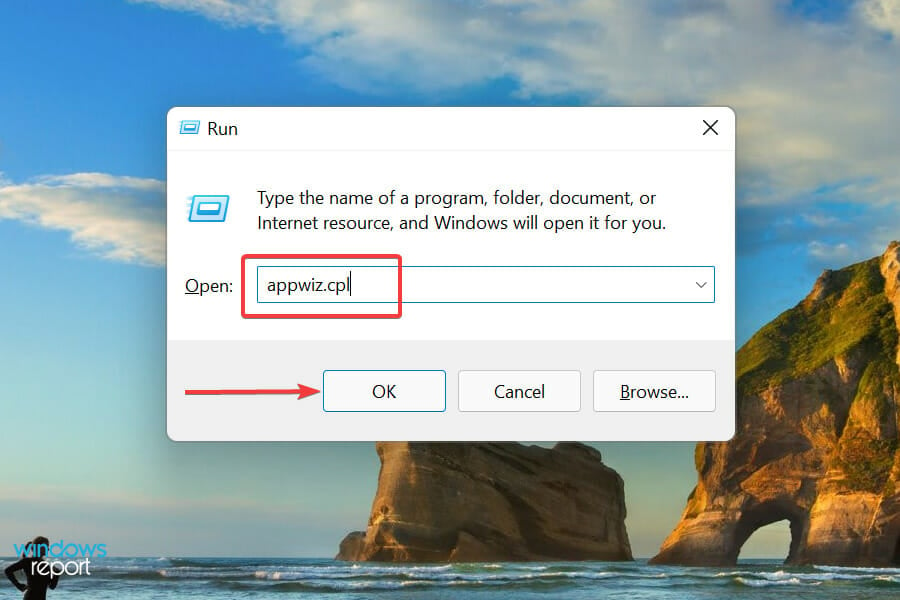
  1. Press Windows + S to launch the Run command, type appwiz.cpl in the text field, and either hit Enter or click OK to launch the Programs and Features window.Launch programs and features to fix runtime error windows 11
  2. Locate and select the Microsoft Visual C++ Redistributable package, and click on Uninstall at the top.uninstall to fix error the vc++ runtime redistributable
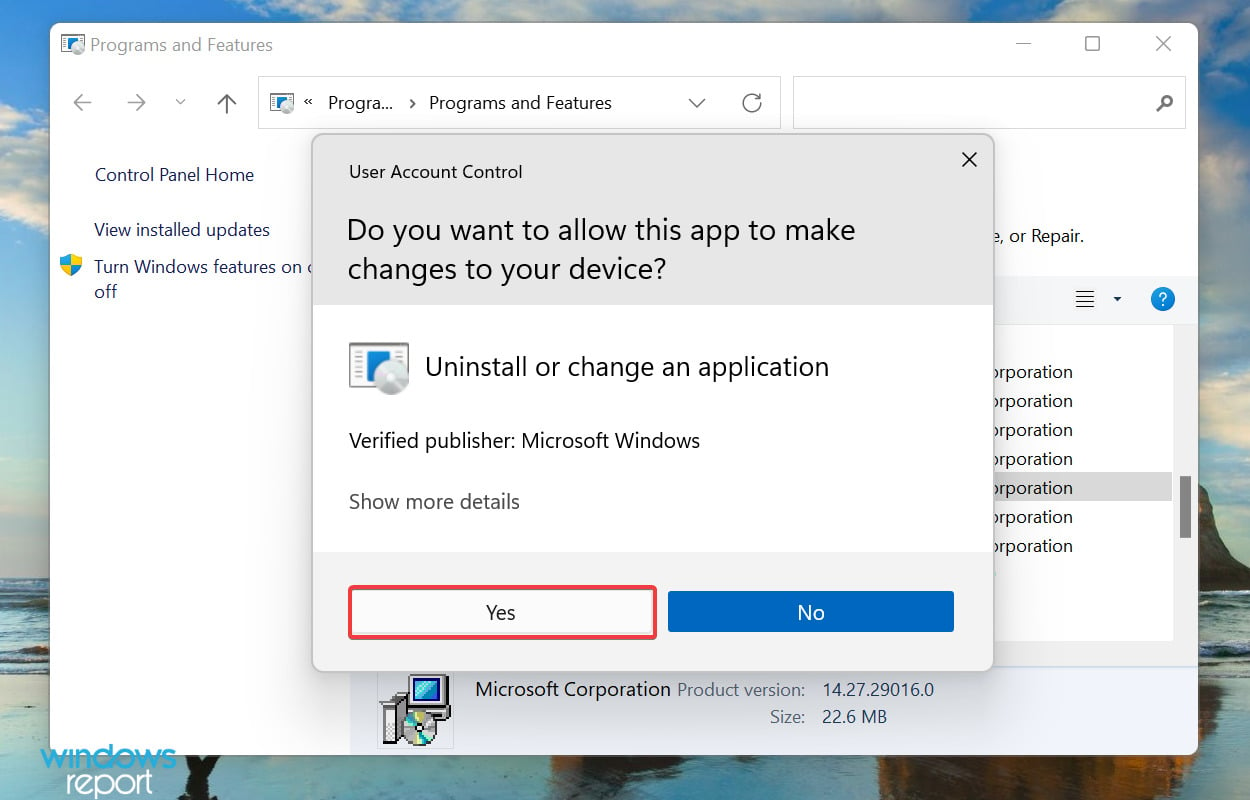
  3. Click Yes on the UAC (User Account Control) prompt that pops up.Click Yes
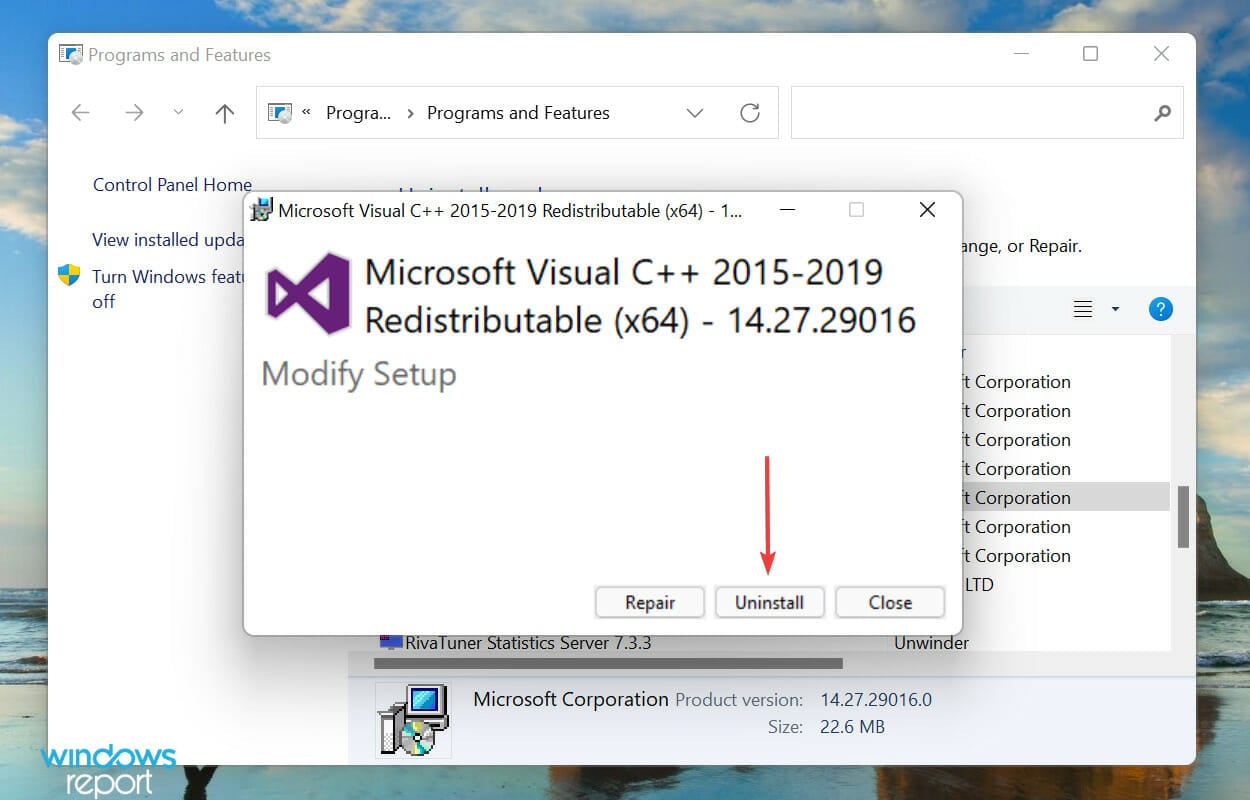
  4. Again, click Uninstall in the window that appears. Similarly uninstall the other similar packages as well.Uninstall
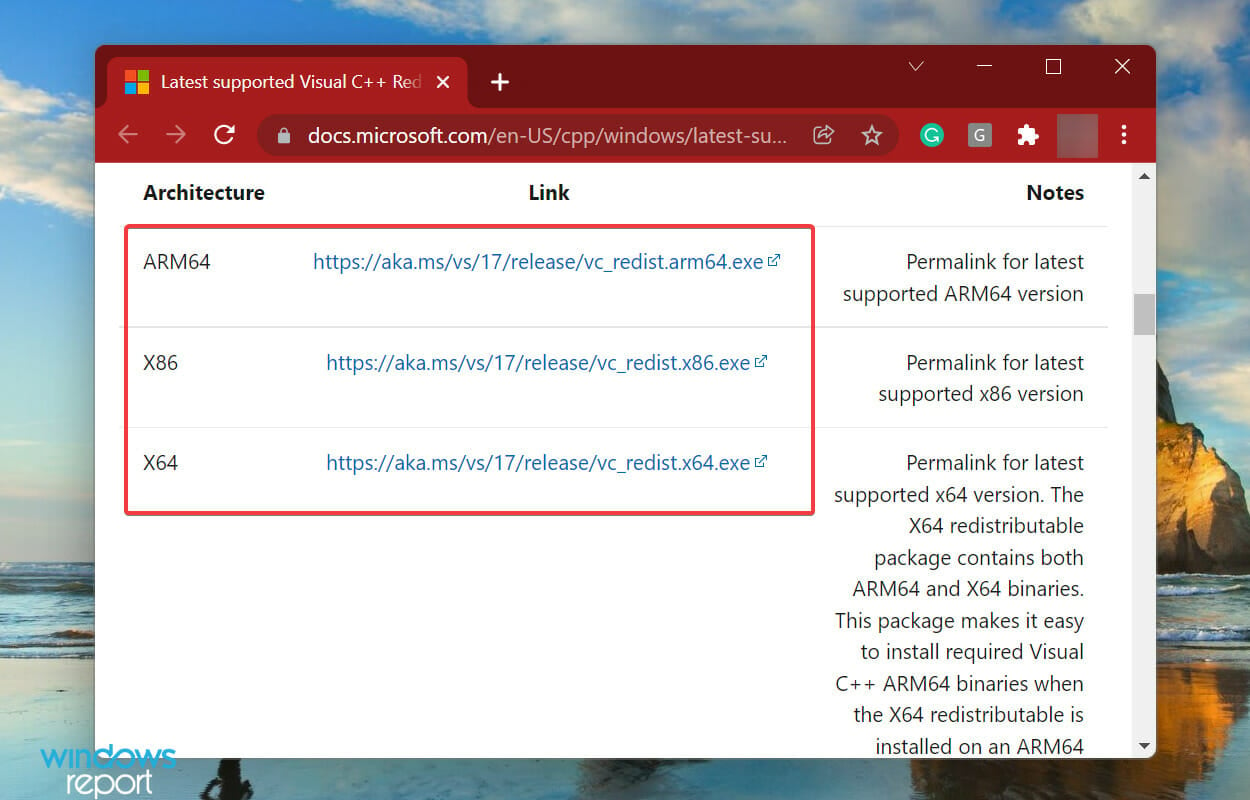
  5. Now, go to the official Microsoft website and reinstall all the packages that you earlier uninstalled.Download Microsoft Visual C++ Redistributable package to fix runtime error windows 11
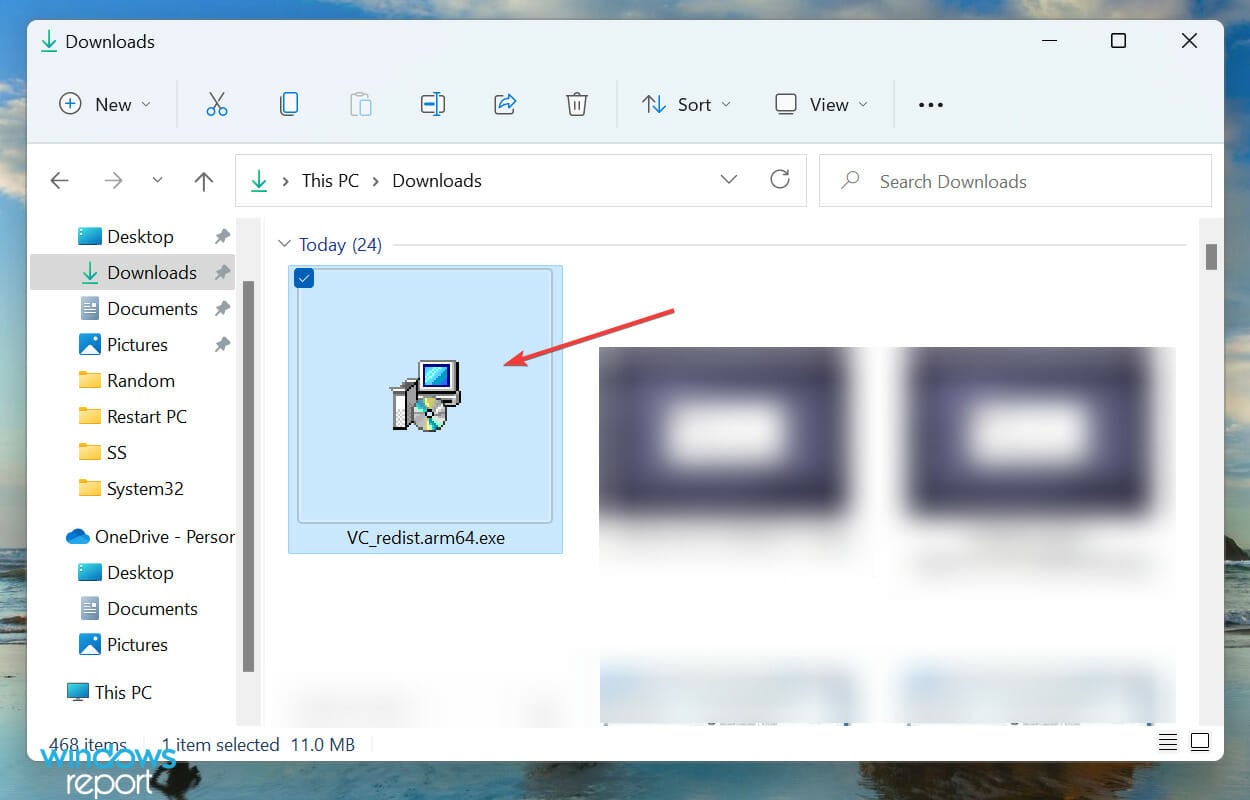
  6. After the download process is complete, double-click on the file to launch the setup.Launch setup
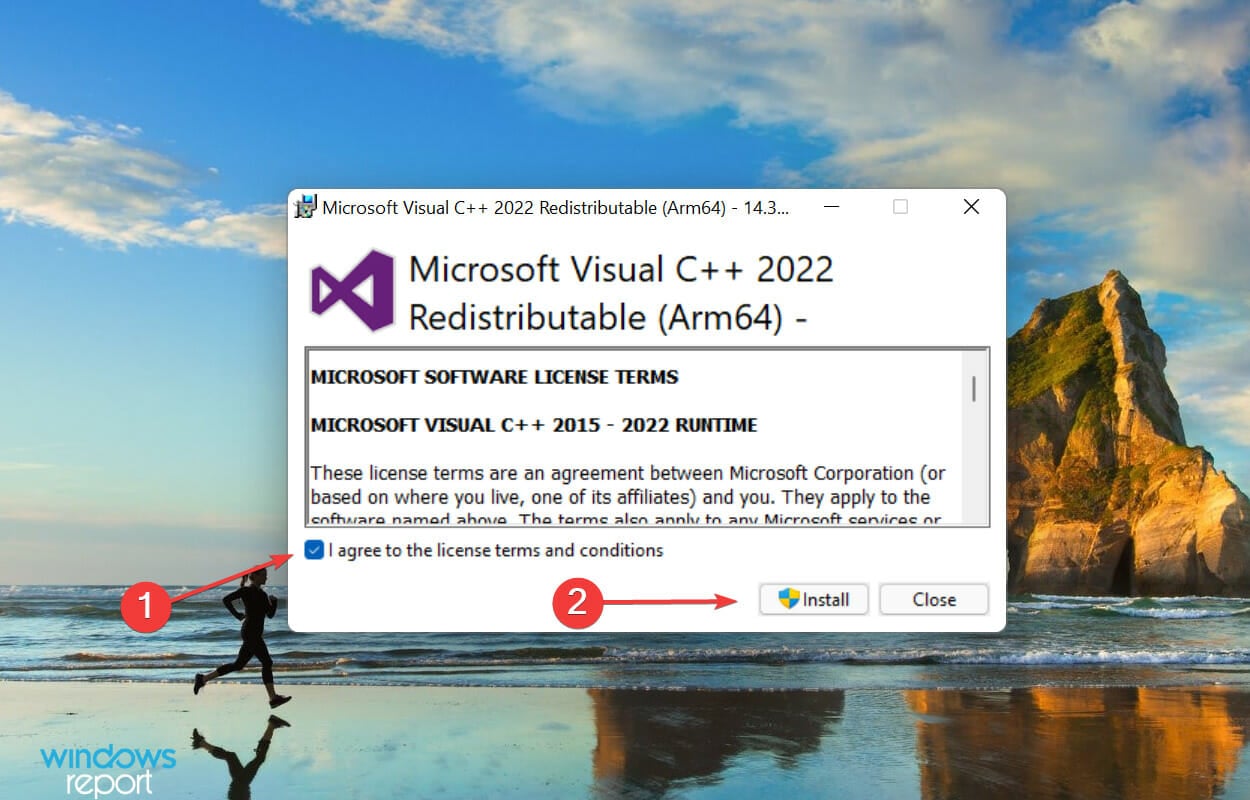
  7. Next, tick the checkbox for I agree to the license terms and conditions and click on Install at the bottom.Install to fix runtime error windows 11
  8. Attempt launching the problematic game on Steam and see if the running install script Microsoft VC Redistributable error message persists.

5. Repair the Visual C++ installer

  1. Press Windows key + R and enter appwiz.cpl. Press Enter.
  2. Select the version of Visual C++ Redistributable that you want to repair and click Change.
  3. Select Repair.
  4. Follow the instructions on the screen to complete the process.
  5. Do this for all other versions of Visual C++ Redistritubatbles.

The installer is responsible for successfully installing Microsoft Visual C++ Redistributable package on your system. If there are any corrupt files or broken registry entries, repairing the installer will ensure these files have been regenerated and are compatible with your system.

6. Disable your antivirus/firewall temporarily

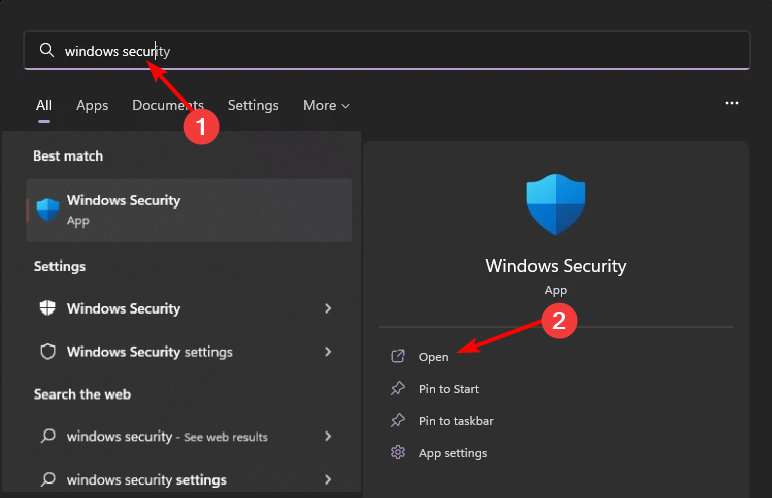
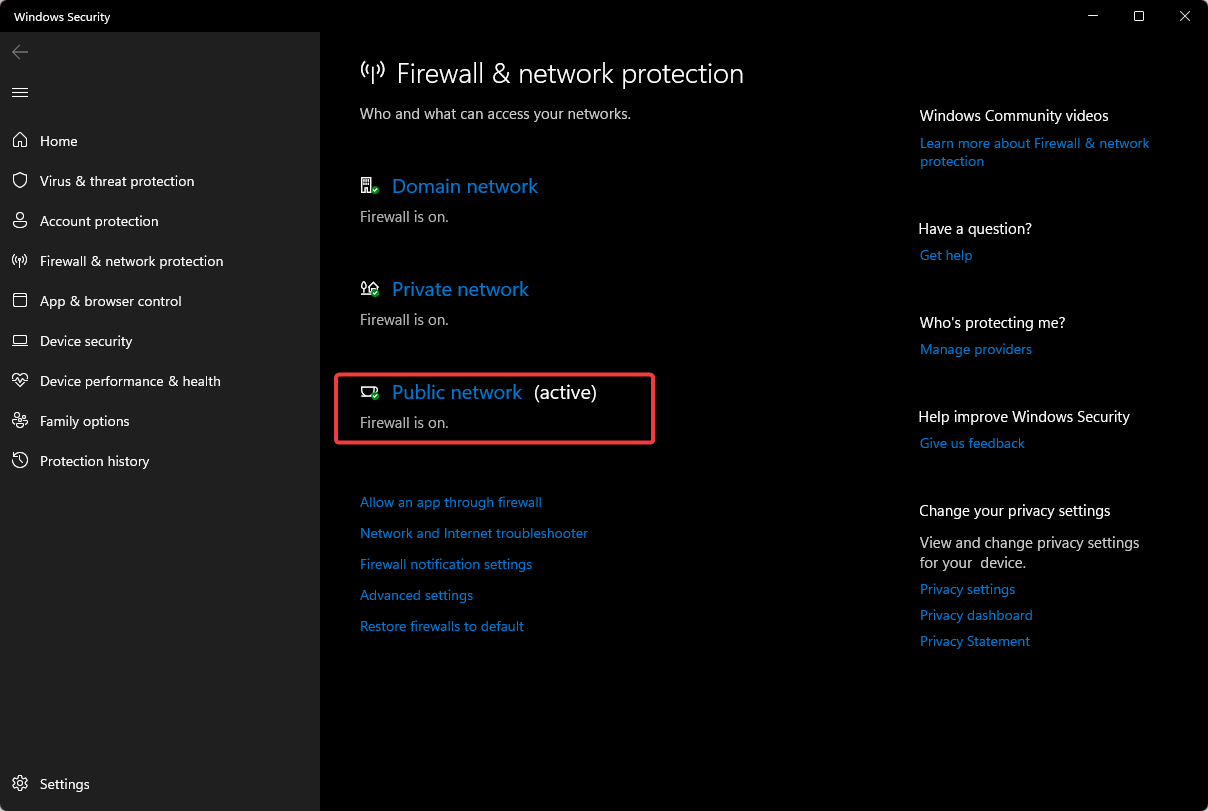
  1. Hit the Start menu icon, type Windows Security in the search bar, and click Open.
  2. Click on Firewall & network protection, then select Public network.league of legends black screen after champion select
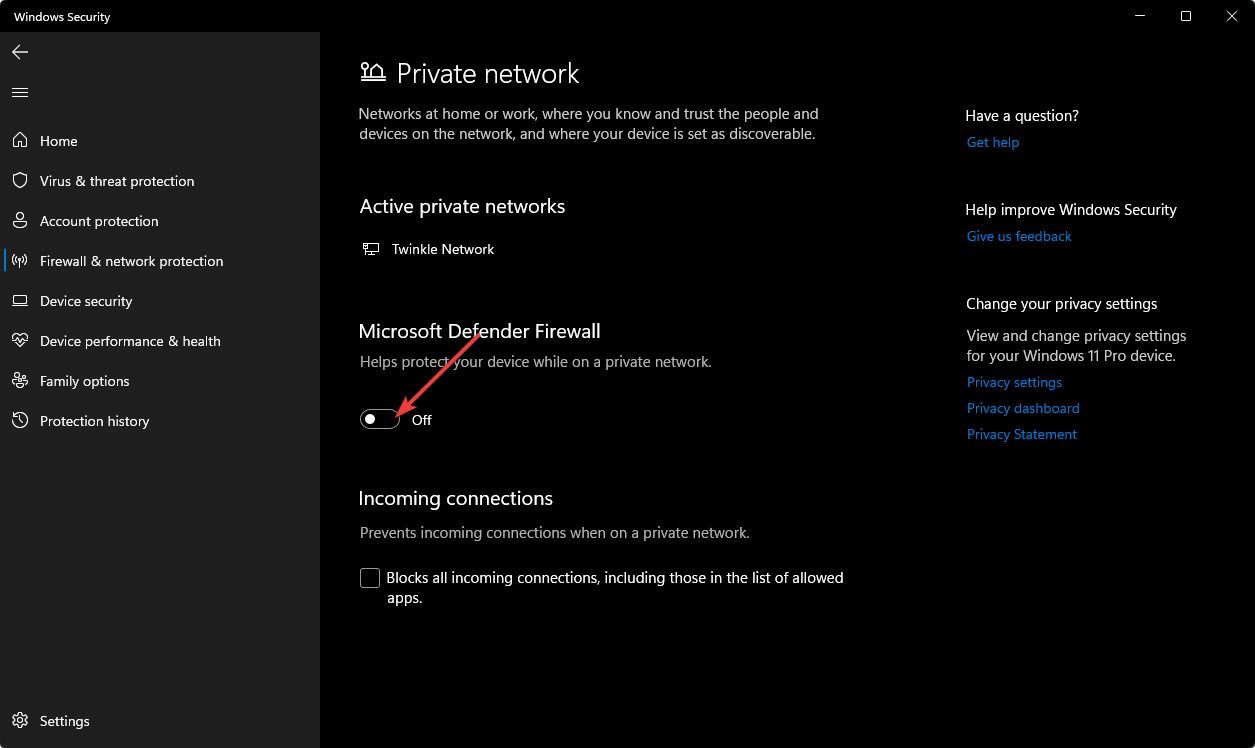
  3. Locate Microsoft Defender Firewall and toggle the off button.turning off Microsoft Defender Firewall Windows

An overzealous antivirus has the ability to block certain game configurations or installations if deemed risky. Temporarily disabling your security software may allow the installation to bypass these restrictions.

7. Clear Steam download cache

  1. Launch Steam and go to Settings.
  2. Click the Downloads tab.steam downloads tab
  3. Select Clear Download Cache.
  4. Confirm, wait for the process to complete, and restart Steam.confirm clearing cache on steam

Summary

If none of these solutions works, the worst-case scenario will have you reinstall the problematic game or the Steam client. Another option is to clean your registry for any corrupt or broken entries.

Aside from the running install script Microsoft VC redistributable error, you may also encounter other errors with games failing to launch on Steam. If so, we’ve compiled some common errors and how to fix them in our expert article.

And in case the game installation is taking forever, we’ve also discussed possible issues and how to resolve them. Still, there is a way to play games while the download continues in the background so you may want to explore this idea too.

Have you encountered this error before? Is there a solution missing from our list that helped you out? We’d like to hear about it. Share it with us in the comment section below.

Hackers might even use the unsubscribe button to attack your email

Until now, the unsubscribe button was a great feature to prevent spammy emails and other types of unwanted content. However, threat actors found a way to use it to verify if your email address is correct. So, to avoid getting scammed by them, think twice before subscribing and unsubscribing.

You can use the unsubscribe option securely when you want to unsubscribe from authorized organizations. After all, the Federal Trade Commission forces them to comply with your subscription cancellation request within ten days.

What could hackers do after you click the unsubscribe button?

According to Joseph Steinberg, a cybersecurity expert, getting spammy emails should be one of your last concerns. Hackers can do much more after you select the unsubscribe button. For example, wrongdoers could infect your device with malware. In addition, they could use your personal information to improve their phishing campaigns. Also, they might attempt to perform identity theft.

The cybersecurity expert says that you should report spammy emails. After all, most platforms have that option. By doing that, you can improve the anti-spam engine and help it filter malicious emails.

To protect your sensitive information, consider changing your email provider. Some of them have better anti-spam filters. Additionally, use more than an email. For example, you can have one for newsletters, one for work, and a personal one for sensitive emails. Also, check the origin of the email before pressing the unsubscribe button to see if it is legitimate.

By the way, the anti-spam engines are not the best. So, Steinberg advises us not to trust any email that makes it into our inbox. However, if you want an extra layer of protection, consider getting an anti-malware. Also, don’t click the links in your email, verify for any misspellings, and use multi-factor authentication.

You can check the FTC guide on stopping junk emails, and while you are at it, check their article on phishing.

Ultimately, think twice before selecting the unsubscribe option, especially if you don’t remember or know the organization behind it. After all, hackers might trick you into pressing it even if you never subscribed in the first place.

What are your thoughts? Did you ever encounter spammy emails after unsubscribing? Let us know in the comments.

Attention Linux users! Hidden backdoor found in XZ Utils, Microsoft warns

Linux has always been a more secure system than Windows, but that doesn’t mean that Linux is safe from all threats.

Speaking of which, according to the reports, several versions of Linux were affected by a critical vulnerability recently.

Two versions of XZ Utils in Linux come with a hidden backdoor

As Neowin writes, Microsoft released a FAQ on XZ Utils that was discovered recently in Linux. The vulnerability has been identified as CVE-2024-3094 and it has been deemed as critical.

It was first discovered by a Microsoft employee by accident while investigating SSH issues on the Debian system. According to the employee, he noticed unusual behavior with XZ Utils, which led to the discovery of a backdoor.

With this backdoor, a hacker with the correct private key can abuse the SSH operations and gain root access to the system.

The backdoor uses a five-stage loader that allows the hacker to perform arbitrary commands remotely.

The good news is that only versions 5.6.0 and 5.6.1 of XZ Utils come with a backdoor, meaning that older versions are unaffected.

As for affected distributions, the following have this backdoor on them:

  • Fedora Rawhide
  • Fedora 41
  • Debian testing, unstable and experimental distributions versions 5.5.1alpha-0.1 to 5.6.1-1.
  • openSUSE Tumbleweed and openSUSE MicroOS
  • Kali Linux (Discovery supported)

To check if your device is affected, Microsoft suggests the following:

  1. Check the version of XZ Utils on your system. You can do that with the following command: xz –version
  2. If you have version 5.6.0 or 5.6.1 installed, update your system. Prioritize updating systems with systemd on publicly accessible SSH ports. This is especially true if you’re using .deb or .rpm-based distribution with glibc.
  3. Review audit logs if you suspect that the system has been compromised.

In order news, Microsoft engineers have improved Rust integration in Linux with module initialization patches.

Intel’s Arrow and Raptor Lake CPUs will be part of the Core 200 series

Intel will brand its new-gen CPUs under the Core 200 series. Thus, Arrow Lake will be the Core Ultra 200, and Raptor Lake will be the Core 200H. In addition, they will be available for both laptop and PC users. Also, the Arrow Lake CPUs will rival the AMD Ryzen Zen 5 in performance and efficiency. On top of that, the Raptor Lake-H series will get a refresh and turn into a new lineup of affordable chips.

What do we know so far about the Core 200 CPUs?

According to Golden Pig Upgrade, a trustworthy leaker from BiliBili, Intel will name Arrow Lake CPUs Core Ultra 200. So, you should expect to see Core Ultra 9 2XXH and Core Ultra 7 2XXU. Also, the new chips will have both U(ultra-low power) and H(high-performance) StockKeeping Units (SKUs).

In addition, the Arrow Lake Core Ultra 200 CPUs come in three flavors: HX, H, and U. On top of that, they will feature 6 Lion Cove P-Cores and 8 Skymont E-Cores. Furthermore, the integrated GPU (iGPU) will use the Xe-LPG Alchemist architecture, and some of the newer SKUs will use the Alchemist+ Xe-LPG+. However, the Arrow Lake HX CPUs will use the same silicone chips as the desktop SKUs. So, they will feature 8 P-Cores and 16 E-Cores.

The Raptor Lake-H Refresh series will fall under the Core 200H branding. On top of that, they will feature 6 P-Cores (Raptor Cove) and 8 E-Cores (Gracemont core architecture). Also, you can use them for high-end gaming.

There aren’t any mentions of a Raptor Lake-U lineup. So, this could mean that Intel will keep its Meteor Lake SKUs for the entry-level segment of the market.

Ultimately, Intel is refreshing the Raptor Lake-H series because the company wants to balance performance and price. By doing this, they will keep the Raptor Lake for mid-range and entry-level segments. Thus, Arrow Lake CPUs will be for premium designs. You can expect to see the new Core 200 series CPUs by the end of this year or early 2025. Also, they might come with the Lunar Lake MX CPUs. Yet, we don’t know much about their branding.

What are your thoughts? Will you wait for the Intel Core 200 series or get the AMD Zen 5 in advance? Let us know in the comments.

For 8 “lucky” users, Opera GX is a cat, but only on April Fools’. How’s yours looking like?

Opera GX, a dedicated gaming browser, came up with its own unique way to celebrate April Fools’ Day this year.

In a post on X (formerly Twitter), Opera GX announced replacing the browser’s icon with that of a cat for eight random users worldwide. There’s no clarity as to why they chose this picture or eight users for the campaign.

What initially caught everyone’s attention was the image’s file name, glorp. Also, for the lucky users who were selected, the app listed glorp instead of Opera GX as its name, with the new image in place.

This got everyone talking about the $GLORP cat crypto coin on the Solana blockchain, although there’s no official confirmation that Opera GX’s prank has anything to do with the blockchain ecosystem. Be wary and verify if someone tells you so!

Within hours, one of the users came to X to enquire why his Opera GX app icon turned into a cat. And the browser’s official handle was quick to point this out.

And this is where the fun began!

Companies join in, a few promote Opera GX while others get free promotion

The first user, Opera GX acknowledged was selected for the prank, had TeamSpeak installed, as evident from the shared screenshot. For the unversed, TeamSpeak is a VoIP software used by gamers to communicate with one another. Discord’s popularity took away a large chunk of TeamSpeak’s user base.

Without wasting any time, TeamSpeak joined the fun prank and dropped a comment.

This started a series of conversations around TeamSpeak.

Honestly I kinda wish more of my friends were open to using TS. Mainly for things like whisper and broadcast. Being able to have separate VCs for people chatting, and then the ability to talk to everyone in all of them is just great.. Sadly not a thing on Discord.

Agreed. TeamSpeak has some really useful features that discord is missing.

This is fake. no real person has teamspeak installed.

Soon, Voicemod, a voice-changing software, hopped the prank train after TeamSpeak and dropped a comment, too.

Gen-Z publisher, Pubity, too, wondered about glorp, which started off another series of discussions regarding the possibilities.

More brands are expected to join the April Fool’s campaign, which will go on for another few hours.

Opera GX users have fun during the April Fools’ prank

Most comments were from users who wanted to be a part of the prank and were feeling left out.

NOOOOOOOOOOOOOOOO IT WAS SUPPOSED TO BE MEEE

i want to be the chosen one

Not gonna lie, I was hoping I would be one of em

screaming crying and throwing up rn why couldn’t it have been me

Others had a hilarious take on the prank or dropped their suggestions to Opera GX.

Jokes on you I use chrome haha can’t get me

yall should make it where every day 1 random person will have their opera gx changed to glorp for the remainder of the day

Irrespective of the engagement numbers, Opera GX remains one of the best browsers. Our detailed review of Opera GX highlights the pros and cons of the browser. If you already have it, discover the best Opera GX settings for gaming.

What’s your review of Opera GX and their April Fools’ campaign? Share with our readers in the comments section.

Now you can get a free YouTube Premium subscription for 3 months with Xbox Game Pass Ultimate

Most Xbox and PC gamers use Xbox Game Pass Ultimate due to its huge collection of games that can be played on your console or computer, plus some additional benefits that make the subscription more interesting. This time, Game Pass Ultimate has come with free access to YouTube Premium.

With YouTube Premium, you can watch content on YouTube without any ads, download videos, and watch them later in a separate tab when offline. It also comes with a picture-in-picture feature, which lets you play the videos in the background even when your device’s screen is locked. You will also get the YouTube Music Premium app for free to listen to ad-free music.

To take advantage of it, go to the Perks tab on your console, the Xbox Game Pass mobile app, or the Xbox app on your PC; there, you will get a subscription to YouTube Premium. You can use it for three months without any extra cost.

If you want to use this perk, you need to claim the offer before May 22, 2024; however, users who already have a YouTube Premium subscription will not be able to avail of this offer.

Have you availed of the offer yet? If so, share your experience with our readers in the comments section below.

Mozilla is quietly working on Vertical tabs for Firefox, asks for community feedback

Firefox has always been a great alternative in a world of Chromium browsers, and it seems that Mozilla is testing some new features.

According to our findings, Mozilla is working on vertical tabs in Firefox, so we might see them available someday.

Mozilla is currently working on vertical tabs for Firefox

Fans of Firefox have been asking for vertical tabs for years, and you can see the most requests for this feature on Mozilla Connect in 2022.

This is an early concept, and currently, this feature is available for download and testing only in Firefox Nightly, in a disposable branch called Larch.

The tabs are showing both horizontally and vertically, and there’s no way to turn off one mode or another entirely.

This feature also sparked a discussion on Reddit with Mozilla employees chiming in on this feature.

We built this very rough proof-of-concept to test an interaction model capable of solving needs that have become table stakes in modern browsers — without utterly overloading Firefox.

Some of the things we looked at include cross-referencing two sources of information handily (as in split view), multi-tasking and scanning lists quickly (as in vertical tabs), prioritizing and returning to your frequently used tools efficiently (as in pinning tabs to the sidebar).

Many (seemingly good, to put it charitably) ideas did not survive this prototype. The good news is that we are working on a subset of improvements to Firefox based on what we learned from this first rough draft.

We will start involving the community for feedback in the upcoming months, once we have laid the foundations for what we are building in Nightly. Please follow Mozilla Connect — we will announce updates there.

As you can see, this is just a rough concept for now, but moving forward Mozilla might focus more on it. If you’re interested in other upcoming features, you should know that Firefox 125 will drop support for HTTP downloads.

Google promises to delete incognito mode data records. Is this an April Fool’s prank or a genuine commitment?

 Chasom Brown, Christopher Castillo, Jeremy Davis, William Byatt, and Monique Trujillo filed a civil lawsuit against Google LLC in June 2020. The lawsuit was based on the company’s surreptitious interception and collection of personal and sensitive user data while users were in private browsing mode. The plaintiffs sought $5 billion in damages.

As per the settlement, the search giant has agreed to destroy billions of Chrome Incognito mode data records. As per the lawsuit, Google is violating California privacy laws by storing the Incognito mode data, a mode that is supposed to be more private.

Furthermore, the company must provide detailed disclosures on how it collects information in Incognito mode. For the next five years, this private browsing mode will, by default, block third-party cookies.

Google Spokesperson José Castañeda said:

We are pleased to settle this lawsuit, which we always believed was meritless. We are happy to delete old technical data that was never associated with an individual and was never used for any form of personalization.

He also mentioned that plaintiffs asked for $5 billion in damages but are not getting any money. Other details of the settlement have not been disclosed as of now.

This is not the first time any tech giant has been caught up with lawsuits for alleged mishandling of data; earlier, it was Meta, and then there was a case against Microsoft, Apple, and Amazon.

We understand that tech companies collect data to personalize user experience, but if a user has opted for your privacy browsing mode, isn’t it wrong to collect data under the pretense of providing privacy? Also, the vulnerability of the data collected by these companies to cybercriminals is a double whammy for us.

We already know about the 2016 Cambridge Analytica scandal, which degraded Facebook’s reputation and forced it to pay $725 million to settle.

If you think you can’t hope the companies will ever stop doing things that put your data at risk and want to move away from Google’s search products, check out our list of browsers that don’t track history and private data.

How often do you use Google’s Incognito mode, and do you feel safe while using it? Share your thoughts in the comments section below.

Level up your game and get ASUS ROG Ally Z1 at 20% discount

ASUS ROG Ally is a great device and a worthy competitor to Steam Deck. Both devices have their pros and cons and picking one isn’t always easy.

If you can’t choose, you’ll be pleased to hear that ASUS ROG Ally Z1 is available at a discount, so you might want to consider it.

You can get ASUS ROG Ally Z1 at a discount at Best Buy

According to Windows Central, ASUS ROG Ally Z1 is currently available at 20% off at Best Buy, and you can get it for $399.99.

If you’re not familiar with this handset, it comes with an AMD Ryzen Z1 processor and a 7-inch IPS touchscreen with VRR support. As for resolution, it’s set at 1920×1080.

Regarding memory, there’s 512GB SSD and 16GB LPDDR5 RAM. The device runs on Windows 11, so you can use it for browsing or other non-gaming tasks as well.

Overall, it’s a great device, and if you’re looking for a handheld, this might be a perfect time to get one. If you’re a gamer, you can also get Xbox Game Pass Ultimate for 46% off today, so be quick about it!

Get the top-rated Razer Blade 15 gaming laptop at just $2299 from Amazon

If you are looking for a gaming laptop from Razer, the top-of-the-line Razer Blade 15 is the perfect pick. With reliable hardware, superior performance, optimal cooling, and excellent customer reviews, it’s a value-for-money option. Right now, you can get Razer Blade 15 for just $2299.99 during the Amazon deal!

Available at an 18% discount, down from $2799.99 to $2299.99, the Razer Blade 15 also finds a place in our top picks for Windows 11 Razer laptops.

With a sleek and professional design, compact size, lightweight, and enhanced vapour chamber solution for cooling the components, the Razer Blade 15 is the perfect laptop for gaming on the go.

The best part about the laptop is its easy upgradability. You can add up to 4 TB storage using the additional M.2 slot or increase the RAM using the available memory slots (support up to 64 GB). It’s all quick and effortless!

Razer Blade 15’s specifications

Processor13th Gen Intel 14-Core i7
GraphicsNVIDIA ‎RTX 4070
Operating SystemWindows 11
Storage1 TB SSD (Solid State Drive)
RAM‎16 GB DDR5
RAM Speed‎5200 MHz
Display Size15″
Display Resolution‎2560 x 1440 pixels
Total USB 3.0 Ports 3

If you find the Razer Blade 15 a value-for-money gaming laptop, get it during the limited-period Amazon deal right away!

Remember, a bloated battery and a malfunctioning fan are common issues faced by Razer Blade 15 users. Besides, users reported slow customer service and had to wait for days to get a response, often delaying the repairs.

So, it’s recommended that you get a 2-3 year extended warranty with the gaming laptop, if possible. So, you never have to worry about out-of-warranty repairs and replacements.

In case you are looking for a more powerful gaming laptop, get the Razer Blade 16 at a discounted price on the official website!

Do not forget to leave your review of the Razer Blade 15 or the first impression, as the case may be, in the comments section below.

ChatGPT ditches the need for an account, making the AI more accessible than ever

ChatGPT has been a go-to assistant for many, and rightfully so. Well, it seems that ChatGPT will get even better with the upcoming changes.

OpenAI has a plan to make ChatGPT easily accessible, and you won’t even need an account to use it.

You will be able to access ChatGPT 3.5 without a user account

Many claim that Copilot is not as good as ChatGPT and some users are disappointed by Copilot. One of the problems is the ease of use, and it seems that OpenAI plans to make additional improvements in that regard.

As reported by MSPowerUser, ChatGPT will be accessible without an account in the future. OpenAI blog post expands on this stating that 100 million people across 185 countries use ChatGPT weekly.

To prevent any potential misuse, OpenAI added additional safeguards that will block prompts and generations in certain categories.

Of course, there are still benefits to using an account, such as the ability to save and review chat history, share chats, and get access to custom instructions, voice conversations, and other features.

This feature is rolling out gradually, so most likely you won’t be able to start using it today. In other news, GPT-5 and Llama 3 might come sooner than expected, so stay tuned for more information.

Customize the Windows 11 Start menu the way you like with a Windhawk mod

Would you believe us if we could tell you that you can remove the search box, change the position of the Power button, and make other changes to your Start menu on Windows 11? With the Windhawk Windows 11 Taskbar Styler mod, you can redesign the Start menu.

The mod can help you tweak the way the Start menu looks by removing unwanted items. You need to have Windhawk version 1.4 or later for it to work.

The mod developer, Michael Maltsev, mentioned how it works:

The settings have two sections: control styles and resource variables. Control styles allow to override styles, such as size and color, for the target elements. Resource variables allow to override predefined variables.

To use it, download Windhawk from windhawk.net and install it. At the time of writing, we installed version 1.4.1. Next, locate Mods from the top right menu and find & install the Windows 11 Taskbar Styler mod. Once it is installed, go to Settings and modify the styles as per your choice.

You can :

  • Remove the search box
  • Move the pinned app list
  • Remove the recommended section
  • Move the power button
  • Remove the user profile button

Here are the detailed instructions for each:

ActionTargetStyles
Remove the search boxStartDocked.SearchBoxToggleButtonHeight=0, Margin=0,0,0,24
Move the pinned app listStartMenu.PinnedListGrid.Row=2
Remove Pinned textWindows.UI.Xaml.Controls.Grid#TopLevelRoot > Windows.UI.Xaml.Controls.GridGrid.Row=1
Remove the All apps button Windows.UI.Xaml.Controls.Grid#TopLevelRoot > Windows.UI.Xaml.Controls.BorderGrid.Row=1
Remove the recommended sectionWindows.UI.Xaml.Controls.Grid#ShowMoreSuggestions, 
Windows.UI.Xaml.Controls.Grid#SuggestionsParentContainer, 
Windows.UI.Xaml.Controls.Grid#TopLevelSuggestionsListHeader
Visibility=Collapsed
Move the power buttonStartDocked.PowerOptionsViewMargin=-580,-1330,0,0
Remove the user profile buttonTarget StartDocked.UserTileView with Visibility=CollapsedVisibility=Collapsed

For more information, you can visit the GitHub page of this Windhawk mod.

If you don’t feel comfortable making changes to the original design with the mods but still want something new in the Start menu, you need to wait a while, as Microsoft is reportedly working on redesigning it.

Have you tried Windows 11 Taskbar Styler mod yet? If so, share your experiences with our readers in the comments section below.

Silksong arrives on Xbox Store, sparking fan frenzy

Hollow Knight was a massive success as a game, and for years fans have been waiting for a sequel. The game was delayed numerous times, and many fans started losing hope.

Well, it appears that we got some information about Silksong on April 1st, leading many to question if this is just a prank.

Silksong just got its Xbox Store page, on April 1st

As written by IGN, Hollow Knight: Silksong just got its Xbox Store page and the page contains all the necessary information about the game.

However, the page went up on April 1st, and the gaming community wonders if this is just an elaborate prank by the developers.

Even Team Cherry’s Matthew Griffin tweeted the page:

This news sent games into a frenzy and the Silksong community on Reddit is actively arguing whether or not this is real.

What are your thoughts, is this real or is this just a marketing trick by Team Cherry? Let us know in the comments!

In other gaming news, Diablo 4 will need Battle.net to run on your PC, but we have a great guide on how to install it.

Copilot for Security: The AI-powered security is now available for all

Microsoft announced that Microsoft Copilot for Security will be available globally starting April 1, 2024. It can process prompts and provide responses in eight languages, with support for an additional 25 languages via its multilingual interface. Therefore, Copilot for Security can be easily used in different regions, including Europe, North and South America, and Asia.

What is Copilot for Security?

Vasu Jakkal, Corporate Vice President, Security, Compliance, Identity, and Management at Microsoft, said:

Microsoft Copilot for Security is a force multiplier for the entire Microsoft Security portfolio, which integrates more than 50 categories within six product families to form one end-to-end Microsoft Security solution. By implementing Copilot for Security, you can protect your environment from every angle, across Security, compliance, identity, device management, and privacy

This is the first generative AI solution that will enable security and IT professionals to catch what others miss, move faster, and strengthen team expertise.

Copilot is empowered with large-scale data and threat intelligence, including over 78 trillion security signals Microsoft processes daily. This data is complemented by large language models, which provide customized insights and assist you in identifying the next steps.

According to the second Copilot for Security economic study:

Experienced security professionals are faster and more accurate when using Copilot, and they overwhelmingly want to continue using Copilot. The gains are truly amazing:

  • Experienced security analysts were 22% faster with Copilot.
  • They were 7% more accurate across all tasks when using Copilot.
  • And, most notably, 97% said they want to use Copilot the next time they do the same task.

You also get Microsoft Defender Threat Intelligence (MDTI) capabilities, including intel profiles, articles, and the analyst workbench, with Copilot for Security, without additional cost. However, you can’t utilize MDTI’s API endpoints for automated enrichment against incidents or develop advanced scripts via Copilot at the moment, and you need to get the MDTI API license.

To get an accurate price for Copilot for Security, visit Azure’s pricing page and mention your region and currency.

How do I use Copilot for Security?

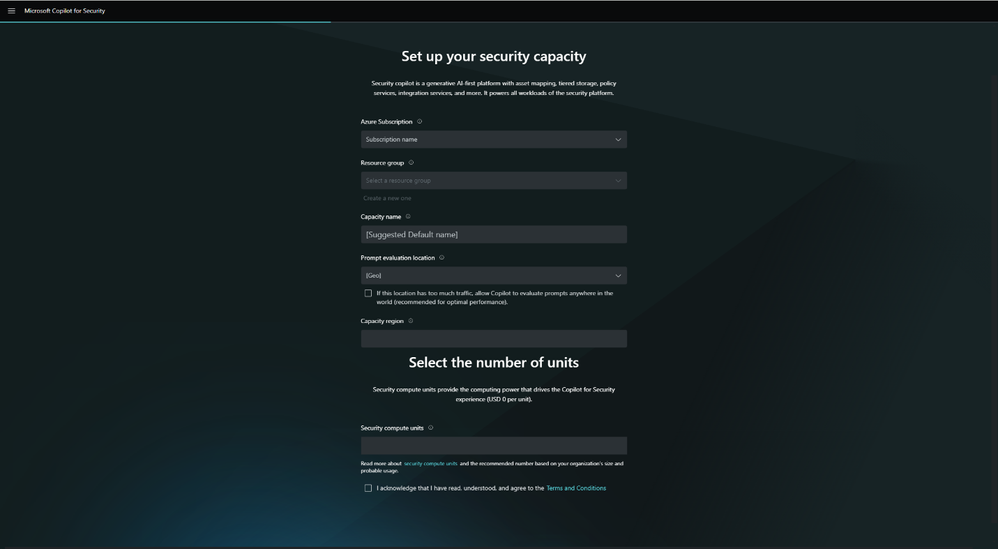
To start using Copilot for Security, you need to have an Azure subscription, or you can get the SCUs (Security Compute Units) from the Copilot for Security portal or Azure portal.

Once you have the subscription, you need to manage your data-sharing settings and define role assignments.

The in-product dashboard allows you to view the organization’s available number of SCUs and monitor usage patterns. This will help you decide whether to allocate more capacity as usage increases.

Before getting started, if you wish to learn more about how Copilot for Security helps you deal with threat actors, check out our detailed guide on the subject.

What do you think about Copilot for Security? Mention your thoughts in the comments section below.

KB5036567 update for Windows 11 just dropped, recovery issues are no more!

Windows KB5035942 update has been out for a few days, but its release was followed by various issues.

Luckily, Microsoft was quick to respond, and it has released a new update that should address some of its issues.

KB5036567 update was just released, here’s what’s new

In case you missed it, KB5035942 brought various fixes to Windows 11, but the update came with its set of issues, as Neowin writes.

Fortunately, Microsoft was quick to respond and it has released a KB5036567 update that fixes this issue.

As per the Microsoft support page, this update addressed the following:

This update makes improvements to the Windows recovery features for Windows 11, version 22H2 and Windows 11, version 23H2.

If you’re having issues with the recovery features, be sure to get this update. Do keep in mind that this update is only available via Microsoft Update Catalog.

Did you have any issues with the KB5035942 update? If so, let us know in the comments.

AMD Zen 5 might dramatically improve your PC gaming performance

AMD’s Ryzen 9000 Zen 5 models might bring a huge performance boost for gaming. The company will release the new CPUs between April and June. In addition, according to @Kepler_L2, a regular leaker, they will have a 40% Instructions Per Clock (IPC) uplift compared to Zen 4. Thus, Zen 5 will have a faster program execution and reduced latency.

The leaker used the Standard Performance Evaluation Corporation (SPEC) standardized benchmarks to compare Zen 5 to Zen 4. Thus, if the leaker is accurate, the new Zen 5 will be the latest AMD innovation milestone. Moreover, Kelper confirmed in a tweet that AMD is mass-producing Granite Ridge CPUs.

Does AMD’s Ryzen 9000 Zen 5 require a new socket?

If you are an AMD 7000 user, you could put the new Zen 5 into your system using the Socket AM5 platform. This option makes the new AMD CPUs easier to use than Intel’s 15th Arrow Lake processors. After all, they require a new CPU socket and architecture.

According to @All_The_Watts, the new CPU could see the following IPC uplifts: 7% in Fortnite, 11% in Passmark, 20% in the Cinebench R23 single-core, 28% in 7-zip, 33% in V-Ray CPU, 38% in Metro Exodus, 71% in Dolphin Bench, and 86% in WPrime. Thus, the Zen 5 might increase its IPC uplifts by 30% instead of 40%. However, the AMD’s Ryzen 9000 Zen 5 might get a re-testing before its official announcement.

The 71% in Dolphin Bench and 86% in WPrime IPC uplifts are due to the AVX-512 instruction set. So, do not expect an over 70% performance in apps that don’t support it. After all, the tool improves 3D modeling, video processing, and machine learning.

Additionally, for the Socket AM4 platform, AMD will release the Ryzen 5000XT on it. So, if you use Ryzen 1000, 2000, or 3000, you might get a cheaper upgrade version.

In a nutshell, if the leaks are right, the new AMD’s Ryzen 9000 Zen 5 models will greatly improve your overall performance and gaming experience. In addition, they will be available faster than Intel’s Arrow Lake. So, if you are in a hurry to upgrade consider getting them, especially since you might not need a new motherboard.

What are your thoughts? Are you going to upgrade to AMD’s Ryzen 9000 Zen 5? Let us know in the comments.

Microsoft Engineer Advances Rust integration in Linux kernel with Module initialization patches

Microsoft has been contributing to the Linux kernel for quite some time now, and the introduction of Rust programming language support is one of the examples.

This time, Wedson Almeida Filho, a Microsoft engineer who works closely in the Rust for Linux initiative, has revealed that patches have been sent to revolutionize module initialization within the kernel.

The latest patches, by Filho, show Microsoft’s commitment to facilitating the growth of Rust within the Linux ecosystem. These patches will refine the Allocation APIs for Rust Kernel code and introduce a new concept, i.e., in-place module initialization for Rust kernel modules

The second iteration of the Rust Allocation APIs for the Linux kernel:

We currently have a fork of the crate with changes to `Vec`; other changes have been upstreamed (to the Rust project). This series removes the fork and exposes all the functionality as extension traits.

Additionally, it also introduces allocation flag parameters to all functions that may result in allocations (e.g., `Box::new`, `Arc::new`, `Vec::push`, etc.) without the `try_` prefix — the names are available because we build `alloc` with `no_global_oom_handling`.

Lastly, the series also removes our reliance on the `allocator_api` unstable feature.

Long term, we still want to make such functionality available in upstream Rust, but this allows us to make progress now and reduces our maintainance burden.

In summary:

  1. Removes `alloc` fork
  2. Removes use of `allocator_api` unstable feature
  3. Introduces flags (e.g., GFP_KERNEL, GFP_ATOMIC) when allocating

Changes in v2: –

  • Updated description of `alloc` crate.
  • Renamed vecext and boxext modules to vec_ext and box_ext.
  • Added derive directive to `AllocError`.
  • Updated safety comment in `BoxExt::new`.
  • Updated `VecExt::push` and `VecExt::extend_from_slice` to use `spare_capacity_mut`
  • Add directive to not compile `destructure` and `rebuild` in when `test` or `testlib` are configured. Otherwise we have a warning because `push` and `extend_from_slice` don’t use them anymore.
  • Updated indentation in `Arc::new_uninit`
  • Moved the removal of `TryReserveError` convesion to `Error` to patch 7, where usage of `TryReserveError` is actually removed.

Earlier, the module initialization in the Linux kernel included returning an instance that would be moved to its designated memory space.

However, with the new patches, modules can be initialized directly in their intended memory location. This eliminates the need for unnecessary memory allocations and lets modules proficiently manage complex data structures such as locks.

Filho further said:

This allows us to have modules whose state hold objects that must be initialized in place like locks. It also allows us to implement registrations (e.g., driver registration) in place and have them similar to their C counterparts where no new allocations are needed.

This development has profound implications. By using Rust’s capabilities for in-place initialization, kernel developers can efficiently initiate modules and optimize memory usage.

In addition, this step will line up Rust-powered modules more closely with their C counterparts, which will reduce the gap between conventional and modern kernel development practices.

What was once thought of as an unusual union now seems to be the attestation of the transformative power of collaboration and innovation

What are your thoughts on the matter? Share your opinions with our readers in the comments section below.

Windows 11 lost market share amid big AI push

Microsoft has quickly been filtering in several artificially intelligent pre-generative and machine learned enhancements to Windows 11, but apparently not fast enough to grow its installed user base in the month of February.

While conventional wisdom would speak to a growing users base as a company adds free features to a product, Microsoft has unconventionally lost operating system market share the more it added to Windows 11 in the month of February, according to Statcounter.

Statcounter, the web traffic analysis website, reported that in February Microsoft’s Windows 11 operating system dropped 1.46 points or from a 28.18 percent share in January to 26.72 percent for the month of February.

Despite some conspiratorial analysis that would attempt to attribute Windows 11’s drop due to a surge in people buying new MacBooks, adopting ChromeOS or this finally being “the year of Linux”, MIcrosoft lost out to another version of Windows.

Tangentially, Windows 10 saw a 1.81-point uptick in market share during the same February period measured by Statcoutner. Windows 10 now sits with a 69 percent overall market share of the total operating system sector.

Microsoft has repeatedly explained the end of support for Windows 10 is just a little over a year away with October 2025 being the official end-of-life date for the nine-year-old operating system.

However, Microsoft also muddied the water with a handful of recent announcements of backward compatibility of its new hot AI features as well as some additional ways to extend support of Windows 10 beyond the October 2025 date for some businesses.

Perhaps, in their attempt to ease the transitional period between Windows 11 and Windows 10, Microsoft has inadvertently provided IT admins who were testing a jump to Windows 11, a bit more runway to stave off a full organization wide shift to the company’s latest OS.

Older Microsoft operating systems have always managed to keep an audience with versions such as Windows XP and Windows 7 still holding to 0.39 and 3.04 percent of the OS market share respectively, despite being unsupported for years.

Microsoft is making a concerted effort to bring a lot of its Windows 11 features to Windows 10 as well as extending support in various circumstances.

The move to obfuscate its traditional hardline support stance is part of a new vision for how Microsoft now views its operating system as more of fluid platform held together by AI rather than truncated by version-number exclusives and hardware limitations.

We’ll have to wait and see how this gambit pays off for the company.

Introducing Intel Next-Gen CPU cores: Douglas Cove For Adams Lake & Sheldonmont For Cooper Forest

According to Intel’s latest Linux Code patches, the company is developing new cores and two new CPU families: Adams Lake Client and Cooper Forest Server chips.

Both new families, Adams Lake and Cooper Forest, have been defined with new core architectures. As the image shows, Adams Lake will feature Douglas Cove P-Core architecture, and Cooper Forest will include the new Sheldonmont E-Core architecture.

However, it is not clear which CPU families these two will replace. So far, we know that Panther Lake is the successor to Arrow Lake and Lunar Lake, and there are also talks about Nova Lake being the successor to Panther Lake.

The new families may show up under the new Family ID around 2027. Adding up new families could be Intel’s attempt to replace its Family 6 CPU name, which has been around since the 1990s.

However, the Intel Family 6 IDs will be present for a few more years as Clearwater Forest and Lunar Lake are using them.

What do you think about it? Share your opinions on the matter in the comments section below.

End of an era: Ubisoft pulls the plug on The Crew, game not playable from April 1, 2026

The Crew, the first game of the franchise released by Ubisoft almost a decade ago, reached its final chapter on March 31, 2024!

That was the last day you could play The Crew. From April 1, one of the most loved racing games won’t be accessible anymore to players on any platform, including PC, PlayStation 4, Xbox 360, Xbox One, Amazon Luna, and Ubisoft+.

Last year, Ubisoft shared the decision with the community in a blog post on December 14. On the same day, the game, all its editions, and virtual currency packs were delisted from digital stores. The Crew was to remain playable to users who had already downloaded it until March 31, 2024.

Some reminisce the good old days of The Crew, others vow to not buy Ubisoft games again

Forums are filled with players sharing their experience of The Crew, what attracted them to the game, their favorite memories with it, and more!

For a game that actually gave you the entire (scaled down) US map to roam around, this is a hard pill to swallow.

Absolutely fell in love playing this game the past few weeks!! , loved the storyline a lot where Alex the main character gets revenge for his brother’s murder with the help of his crew members . Grinded for some good cars for each specs in-game since my season pass dlc cars was not accessible which has been a problem for quite a few ubisoft games now for many people which was a big downside.

Farewell The Crew, we’ve had lots of good memories together.

A few also directed their anger towards Ubisoft for discontinuing The Crew. Many believe that the developers should have kept the already available offline single-player version alive instead of pulling the plug on the game altogether.

If I can’t play at least singleplayer after 31-st of march I will never buy a Ubisoft game ever again.

Welcome to the wonderful world of games as a service. There’s a post like this every other month it seems. Either stop buying games that require a constant online connection or accept that these games have a built-in expiry date when you rent them out.

Thanks Ubisoft for making this game unplayable without a server Now i know to never give you my money again

Not exactly a replacement, but the sequels to The Crew, The Crew 2, and the recently launched, The Crew Motorfest, may deliver a similar experience. Although Ubisoft has made a lot of changes to the two, which is another reason behind the anger directed towards it!

If you are a fan of the genre, discover the best racing games on the Microsoft Store and the top-rated online racing games.

What are your thoughts on Ubisoft shutting down the servers for The Crew? Share with our readers in the comments section.

Microsoft: Teams will no longer be included with Office suite worldwide

Recently, Microsoft announced that it will sell the chat and video conferencing app Teams separately from its Office suite globally. The announcement came six months after the Redmond tech giant unbundled the two products in Europe to prevent the EU antitrust fine.

Microsoft Teams was added to Office 365 in 2017, replacing Skype for Business. Because of its video conferencing feature, it became popular during the pandemic.

However, with its growing popularity, its competitors were not happy, as it was available with the Office suite for free, which gave Microsoft an unfair advantage over them.

The European Commission has been investigating Microsoft because Teams came bundled with Office and the new OS Windows. This irked Slack, the Salesforce-owned messaging app the most, and they complained and urged the regulator to force Microsoft to remove Teams.

Therefore, Microsoft took this step and the company spokesperson said:

To ensure clarity for our customers, we are extending the steps we took last year to unbundle Teams from M365 and O365 in the European Economic Area and Switzerland to customers globally.

Doing so also addresses feedback from the European Commission by providing multinational companies more flexibility when they want to standardise their purchasing across geographies.

So, from now on, the new lineup of commercial Microsoft 365 and Office 365 suites will not include Teams in regions outside the European Economic Area and Switzerland. Also, a new standalone Microsoft Teams app will be available to Enterprise customers.

From April 1, customers can opt to stay with the current licensing deal or update, renew, or get the new offers instead.

As for prices, the new commercial customers can get Office without Teams at $7.75 to $54.75, which depends on the product you choose, and a standalone Teams app will be available at $5.25. The price for the Microsoft Teams app may vary by currency.

Now, we all have to wait and see whether this step of unbundling could save Microsoft from getting fined. Also, we don’t know how other companies will react to the low price of the standalone Teams app.

What are your thoughts on the matter? Share your opinions with our readers in the comments section below.

Microsoft is developing an auto-healing system that automatically repairs cloud virtual machines and it’s a total game-changer

Microsoft recently introduced Windows 365 Switch to the business world, allowing organizations everywhere to run Windows 11 on almost every device, whether we’re talking about a Mac, iPad, or Android device. The system also has multiple capabilities, including the Desktop Indicator, allowing users to easily differentiate between cloud and local PCs.

Windows 365 Switch installs a cloud-based Windows 11 on a device and allows the owner of that device to switch between their local operating system and the cloud operating system. The latter is also called a Virtual Machine. Basically, when installing Windows 365 Switch, the local machine becomes a host for the virtual machine Windows 11.

Now, every time the VM Windows 11 runs into a problem, the IT manager of the organization deals with it by identifying the problem, and manually deploying updates through Microsoft Intune.

However, according to a patent Microsoft recently published, it seems that the Redmond-based tech giant might be coming up with a technology that would transform the IT management of cloud-based virtual machines, such as Windows 365 Switch, into an automatic process.

Microsoft the auto-repair VM system a PEER VIRTUAL MACHINE MONITORING AND AUTO-HEALING SYSTEM, and according to the paper, which can be read here, it functions as follows:

There is a system that keeps track of the health of virtual machines (VMs), by designating leader VMs responsible for keeping the other VMs safe, intact, and healthy.

First, it figures out how many leader VMs are needed for a group of VMs. These VMs are running on multiple computers. Then, it picks a certain number of VMs from the group to be the leaders. The number of leaders matches the count determined earlier.Microsoft repair VM system

This system regularly checks on the VMs. It stores health data for each VM in a database. The leader VMs then use this data to find any VMs that aren’t working well, which we can call “sick” VMs. Once these sick VMs are identified, the system automatically tries to fix them to make them perform better. This is known as the healing process.

Microsoft also envisions this auto-repair VM system as capable of auto-scaling the resources of each cloud device based on their current activity, intending to maintain and preserve the hardware of the device, without overworking it.

The cloud computing system may also include an autoscaler for adjusting the number of available computational resources. Autoscaler may be configured to monitor one of more metrics indicative of the load on the cloud computing system, such as processor usage, memory usage, number of connections, and the like, and then scale the resources accordingly.

If this system sees the light of day, it could potentially revolutionize VM health, and IT management, as a whole: it would not only become an automatic process, sparing time and financial resources for organizations, but its sustainable approach to the cloud environment coupled with the self-sufficient technology means that the system can repair itself even when one of the leader VMs becomes faulty.

With minimal human input, this means IT managers can focus elsewhere in the organization, such as security issues, and cyber threats.

Ultimately, the system can be updated to support newer cloud-based VMs, ensuring not only its longevity but its performance, as well. The future VMs can be built to fit the system’s technicalities: which means it could become the industry’s standard.

For now, the patent is published, as it can be read in its entirety here. The actual technology might take some time to be properly developed and implemented, but it could be done within a few years.

Not-so-obvious tip: Don’t uninstall Steam before uninstalling all your games

As the title suggests, the tip is not so obvious. Most of us who have played on Steam for years don’t know what would happen if the gaming platform is removed without first uninstalling the individual games.

Over the years, we have seen several cases where Steam users had to spend hours trying to figure things out. The situation arises when users hurriedly uninstall Steam, expecting that it will also remove the games. But that’s not always the case!

A user was recently stuck in a similar situation and shared the ordeal on Reddit. He basically couldn’t uninstall any games from the Windows’ built-in settings after uninstalling Steam from the PC.

Our tip here is to check the storage space the game takes on your PC. If it’s negligible, the game has most likely already been uninstalled, but a few Registry entries or leftover files give Windows the impression that it’s still present, but the OS can’t locate those. Subsequently, you get an error while trying to uninstall the game!

In this case, you will need an effective software uninstaller tool that will help clear any leftover files and Registry entries. Or you could manually search for the Registry entries and files, and delete them.

Another option is to reinstall Steam, download all the games that you previously had, then uninstall the games individually using the native method, and finally, uninstall Steam. This way, the leftover files and Registry entries will be re-linked to the game after download and then removed during the uninstall.

Uninstalling games via Steam

A user explained it very well in the same Reddit thread,

The default location Steam places games (you say you aren’t good with computers so I’m assuming you didn’t change it) is inside its own folder. When your wife uninstalled Steam, it deleted its folder and by extension all the game folders contained inside, but those games were never properly uninstalled so Windows still has remnants of them in other places like the Registry. This causes Windows to think the game is still there, even though it isn’t.

You’ll probably have to reinstall Steam, reinstall the games, uninstall the games, and uninstall Steam to get rid of the issue.

In layman terms, think of Windows as a warehouse. Their inventory system says they have the games, but the employee running the game section (Steam) was fired, got mad, and threw all the games into the trash compactor on their way out.

Will uninstalling Steam also uninstall the games?

It all comes down to the location of the steamapps folder!

If the steamapps folder is in the default location (C:\Program Files\Steam\steamapps), uninstalling Steam will remove all the games. However, if you have moved the steamapps folder to another directory, say the D: drive, uninstalling Steam will not remove that game.

Also, if you have games spread across multiple drives, only the ones in the default location, i.e., the C: drive, will be removed.

This Steam uninstall tip will come in handy and save you hours. Besides, it will be of great help to Steam users on a limited Internet plan. The next time you are about to uninstall Steam, the games, or the entire setup, just keep this tip in mind!

Before you leave, discover the most expensive games on Steam and try one out!

Have you ever faced similar problems with Steam? If yes, share it with our readers in the comments section.

Indie devs facing tough times as Epic Store and Xbox Game Pass cut funding

Releasing an indie game does take a lot of hard work and more importantly – funding.

In the past, large publishers would fund indie game studios, but that won’t be the case anymore.

Xbox Game Pass and Epic Store won’t offer deals to indie developers

Until recently, indie developers were able to get exclusivity contracts with Epic Store on with Xbox Game Pass, but that’s not the case anymore according to TwaekTown.

The reason for this is the market crisis with massive layoffs and budget cuts, which makes signing a deal harder than ever before.

Casey Yano from Mega Crit had to say the following:

I talked to at least five small teams during GDC, like 35 people and under, and they’re like: Cuts, cuts, cuts, funding canceled, talks that were going on for a year, canceled.

Epic Games had a loss that exceeded $700 million last year, so it’s obvious why the company doesn’t want to invest in indie games.

It’s not just Epic Games and Microsoft, Sony had to lay off 900 employees, with EA laying off 5% of the workforce.

With the gaming market crisis, this doesn’t come as a surprise, but we hope that the market will recover soon.

This Microsoft Outlook privacy bug will reveal your meeting’s hidden attendees

If you are a regular Outlook user, there’s another bug you should be worried about because this one concerns privacy and could prove detrimental when setting up meetings with hidden attendees.

An Outlook user on Reddit describes that when forwarding the meeting request with hidden attendees to another participant, the latter can see all the other attendees in a quoted message under the invite.

Even upon verifying this by sending a request to another non-Outlook email, the same pattern emerged, highlighting that it was a bug in Outlook itself and not a one-time issue.

The Outlook user goes on to call a Major privacy issue, and it indeed is. Also, such glaring loopholes should be identified in the testing phase and should never make it to the stable version.

Besides, users have, for a long time, been complaining about other aspects of Outlook, for instance, issues with search, problems with sign-in, constraints on the maximum number of emails that can be moved at once, and the slightly tricky UI.

Outlook’s data collection has also been under the radar, especially after Proton flagged it in a blog post!

At the same time, Outlook is introducing new features to keep its existing user base intact, and that has worked to some extent. But unless Microsoft fixes basic issues like the hidden attendees’ bug in Outlook, users may switch to Outlook alternatives.

Have you faced any bugs in Outlook? Share with the our readers in the comments section.

Microsoft Outlook and SharePoint are available as modules on Chrome’s New Tab page. Could Teams be next?

After Google announced that it’s releasing a native ARM Chrome browser for Windows, a few days ago, the tech giant is taking even more steps to offer further integration of its browser with Microsoft apps.

This time we’re talking about Outlook and SharePoint, and according to tech enthusiast @Leopeva64, they will be available as modules on Chrome’s New Tab page, allowing users to quickly access them.

Both platforms can accessed on the New Tab page in Chrome on Windows, Linux, Mac, Chrome OS, Fuchsia, and Lacros, according to the flags, and, fortunately, they are optional, as users can enable/disable them at will.chrome outlook sharepoint

For now, the modules are gradually rolling out to Chrome Canary users, and they will be generally available in the next weeks when the stable version gets updated.

The modules will most likely open up Outlook for Web, and SharePoint for Web, and users will be able to work on the platforms from Chrome. It’s interesting given that both Outlook and SharePoint are Microsoft 365 apps, so this means more modules from this productivity suite are coming.

We wouldn’t mind a Word, Excel, and PowerPoint module, and maybe even a Microsoft Teams module for Chrome. Even though Edge supports them better (and many would say the browser is even superior to Chrome), Chrome is still the most popular browser, by far. However, Edge is coming in second place, and it’s rising in popularity.

However, since they’re both Chromium-based browsers, their capabilities, features, and even vulnerabilities will be similar, down the road. For instance, both Edge and Chrome are currently experiencing a critical vulnerability, and users should update their browsers as soon as possible.

Ultimately, it will be possible for Google to update Chrome to support more Microsoft 365 apps because it has the technical architecture to do so. But it will be down to how much the tech company wants to prioritize the productivity suite of a competitor rather than its own.

What are your thoughts on this?

Microsoft honors Akira Toriyama with a new Xbox dynamic background

The legendary mangaka Akira Toriyama passed away recently and gaming fans are honoring the Dragon Ball creator all over the World.

To celebrate Toriyama’s work, Microsoft is offering a new dynamic background for Xbox as a tribute to the classic Xbox 360 JRPG Blue Dragon brought by the Japanese 17 years ago.

Microsoft posted this announcement on the Xbox X account:

Honoring a true legend. We’ve added a new dynamic dashboard background featuring Xbox 360’s Blue Dragon, with art and character designs by Akira Toriyama.

The Blue Dragon game was launched worldwide in 2007 and it was supervised by Hironobu Sakaguchi, the creator of Final Fantasy. At that time, the game was published by Microsoft as an Xbox 360 exclusive to get attention on the Japanese market.

Toriyama had memorable contributions to video games and its art from the Dragon Quest series is easily recognizable as bearing his magic touch.

Coming back to Microsoft’s homage, the background is free and you can set it up from Xbox’s Personalization options from the Settings menu.

Did you enjoy Akira Toriyama’s ar within games? Tell us all about that in the comments section below.

Act fast or miss out: Samsung Galaxy Book3 Pro is currently 32% off

Samsung is well-known for the quality of its devices with Galaxy Book3 Pro being one of its most popular laptops.

If you’re looking for a new laptop, you’ll be pleased to hear that this model is available at a hefty discount.

You can now get Galaxy Book3 Pro cheaper than ever

According to PC Guide, Galaxy Book3 Pro is available at a 32% discount on Amazon. As for the hardware, this laptop comes with a 16-inch Dynamic AMOLED Screen, 2880 x 1800 resolution, and 120Hz refresh rate.

The device is powered by a Core i7-1360P processor, and it comes with 32GB RAM and 1TB of SSD storage, which should be more than enough for most of your needs.

Regarding connectivity, you can find Wi-Fi 6E, Bluetooth 5.1, Thunderbolt 4, HDMI 2.0, and USB-A ports. Lastly, we have to mention a FullHD webcam and a built-in fingerprint scanner for extra security.

Overall, Galaxy Book3 Pro is an amazing device, so be sure to consider getting it. If you’re looking for something more powerful, new information reveals that Galaxy Book5 Pro will use Intel’s Lunar Lake CPUs, but you might want to wait a bit before they are released.

Microsoft raised the character limit on Edge Copilot to 8000, allowing users to give it more complex inputs

It seems the Redmond-based tech giant raised the character limit on Edge Copilot to 8000 for the More Creative, and More Precise modes, and to 4000 for the More Balanced mode., according to tech enthusiast @Leopeva64.

Previously, in the More Creative, and More Precise modes the limit was 4000 characters, while the Balanced mode was limited to 2000 characters.

The raise is currently rolling out gradually to Edge Canary users, and you might get it in the next few days if you haven’t gotten it already (for instance, we haven’t).

This would allow users for a more complex input. For instance, this is quite useful when copying/pasting large passages of text into Copilot’s text box. With double the amount of characters, users won’t have to break those passages into parts, and potentially lose all the context, as they can now upload all the passages without worrying Copilot won’t be able to explain them properly.

On the same page, Copilot will also allow users to delete their entire chat history at once, without having to delete each entry. This allows for better management, and it’s coming to Copilot on Edge, and Copilot on Windows, as well. One of the best things about the chat history deletion is that it can be done quite easily, with just 3 clicks.

And speaking of characters, Copilot on Edge is also set to introduce the new Notebook capability, which has an impressive limit of 18,000 characters that can be used to visualize complex answers.

Until now, Notebook has been available on the Copilot website and other platforms, but not directly within Microsoft Edge when using Copilot. However, Microsoft has brought it to Edge. By default, Notebook is not available in the release version.

What do you think about all these changes coming to Copilot in Edge?

Easter Sale: Get Windows 11 Pro at $11.5, Office 21 Pro at $15.05, and more at unbeatable prices

If you were planning to upgrade to Windows 11 Pro or get a bunch of software to increase productivity, there couldn’t be a better time!

Godeal24 is offering massive discounts during the Easter Sale on Windows 11 Home and Pro editions, Windows 10 (multiple editions), the Microsoft 365 suite, Ashampoo software, Internet Download Manager, IObit Driver Booster, and CCleaner.

You can get a licensed copy of the Windows 11 Pro key at just $11.5 by buying the 3-key bundle. An individual copy of Windows 11 Pro costs $13.25. If the Pro edition isn’t the right choice, the Windows 11 Home edition is available for $13.05.

In case your PC doesn’t meet the system requirements for the latest iteration, there are exciting deals on Windows 10 Pro, with license keys starting at just $8.25 when purchased individually. Get a bundle of 5 keys, and it effectively costs just $6.83 per key!

As for Microsoft Office 2021 Pro Plus, a 5-PC license is priced at $75.25, which equals $15.05 for individual PCs.

Here are a few other deals that will save you a few hundred dollars combined:

  • Windows 10 Pro + Office 2021 Pro Plus (Bundle) – $32.56
  • Windows 11 Pro + Office 2021 Pro Plus (Bundle) – $36.59
  • Microsoft Office 2021 Pro Plus (100 keys) – $2000
  • Windows 10 Professional (100 keys) – $600
  • Windows 11 Professional (100 keys) – $750

As you can see, the bigger the order, the more discounts there are! It’s a great opportunity for organizations planning to deploy the OS or software.

For comparison’s sake, a Windows 11 Pro key typically costs $20-$75 when purchased from third-party sources and $199 from Microsoft. And with Godeal24, you get it for as low as $13.25, even when purchasing a single copy. Go with bulk orders, and the prices will drop roughly 50%!

Check out all the products available at a discounted price during the Easter Day sale on Godeal24 today!

Tell us how much you saved on Windows and related products during the Easter Sale in the comments section below.

Completing all the monthly Microsoft Rewards tasks will earn you fewer points in 2026 than in 2023

Microsoft Rewards is a pretty awesome program initiated by the Redmond-based tech giant that allows users to complete daily, weekly, and monthly tasks to earn Rewards points that they can use to purchase dozens of goodies from Microsoft, including Game Pass subscriptions, gift cards, and even Xbox consoles.

The program recently added a new app for Xbox, allowing those with a Microsoft account to keep track of their monthly progress, and also make sure they don’t miss on important quests.

However, it seems that no matter how much effort users put into getting their maximum set of points each day (we have a guide for that if you’re interested), it seems that Microsoft has somehow stitched the rules.

According to this Reddit user, who claims they have been completing every quest available in one month, the number of maximum points made in March 2024 is far below the number of maximum points made a year ago, in March 2023.

In March 2024, they managed to earn a maximum number of 20,502 points, while a year ago, in March 2023, that number was much higher: 32,573 points.

The user is from the US, but it seems that the situation is not just bound to this region, as the other regions, such as Brazil, are affected, so it seems that earning Microsoft Rewards points in 2024 is indeed harder:

Damn dude I barely got 8k points this month, and everything is 33% more expensive for Brazil now.

Reddit user


I don’t have pics but that’s about the same as my exp in US. Was regularly hitting 30k last year and checked today it was a little over 20k

Reddit user


Same dude. 20,300 this month and 31K last March. My 15 minute cooldown went away middle of this month so that helped getting more points from search but still no where as much as it used to be, ah well

Reddit user

Are you a Microsoft Rewards points collector in 2024? How much have you earned this year compared to 2023?

Don’t miss out! Xbox Game Pass Ultimate is currently available for 46% off

Xbox Game Pass is great if you want to try new games or get access to multiple titles with a monthly subscription.

If you want to give this service a try, you should know that it’s currently available at a discount, so make sure you get it.

Get your Xbox Game Pass Ultimate subscript for a month at a massive discount

Xbox Game Pass Ultimate subscription allows you to get access to over 100 different titles on Xbox, and PC, and you’ll even get cloud gaming support.

With the subscription, you’ll also get day-one access to Microsoft titles as well as access to the EA game catalog. If this sounds interesting to you, you can get a one-month subscription for just $8 according to CNET.

StackSocial currently has a deal that will allow you to get a one-month subscription for 46%, so this is perfect if your subscription has expired or if you just want to try Game Pass Ultimate.

The deal will end on April 2nd, so be sure to get it while it lasts! With leaks suggesting that the new Xbox might be fully digital, an Xbox Game Pass doesn’t look like a bad option.

As for Game Pass, you should know that Harold Halibut and Flintlock: The Siege Of Dawn are coming to Xbox Game Pass this month, so don’t miss them.