How to Accept All Changes on Microsoft Word

If you’re collaborating on a Microsoft Word document, you can accept all changes for a seamless tracking and editing experience. Accepting changes shows that you agree with the modifications.

How do I accept all changes in Microsoft Word?

1. Enable Track changes

  1. Launch your Microsoft Word document.
  2. On the top ribbon menu, navigate to the Review tab.review
  3. Hit the Track Changes button.disable to fix This image cannot currently be displayed word

The track changes feature records all the modifications you and any other collaborator on the document will be making. This will ensure all edits made are aligned and there’s a point of reference in case confusion happens.

2. Accept changes

2.1 Accept changes one-by-one

  1. Place your cursor at the beginning of the document and select the Review tab.review
  2. Select the drop-down arrow below Accept, and click on Accept this change.

This is a thorough method of reviewing the document so as to not miss any critical changes. However, if the document is rich in content and spans across many pages, it can be a time-consuming task.

2.2 Accept all changes

  1.  Click on the Review tab.review
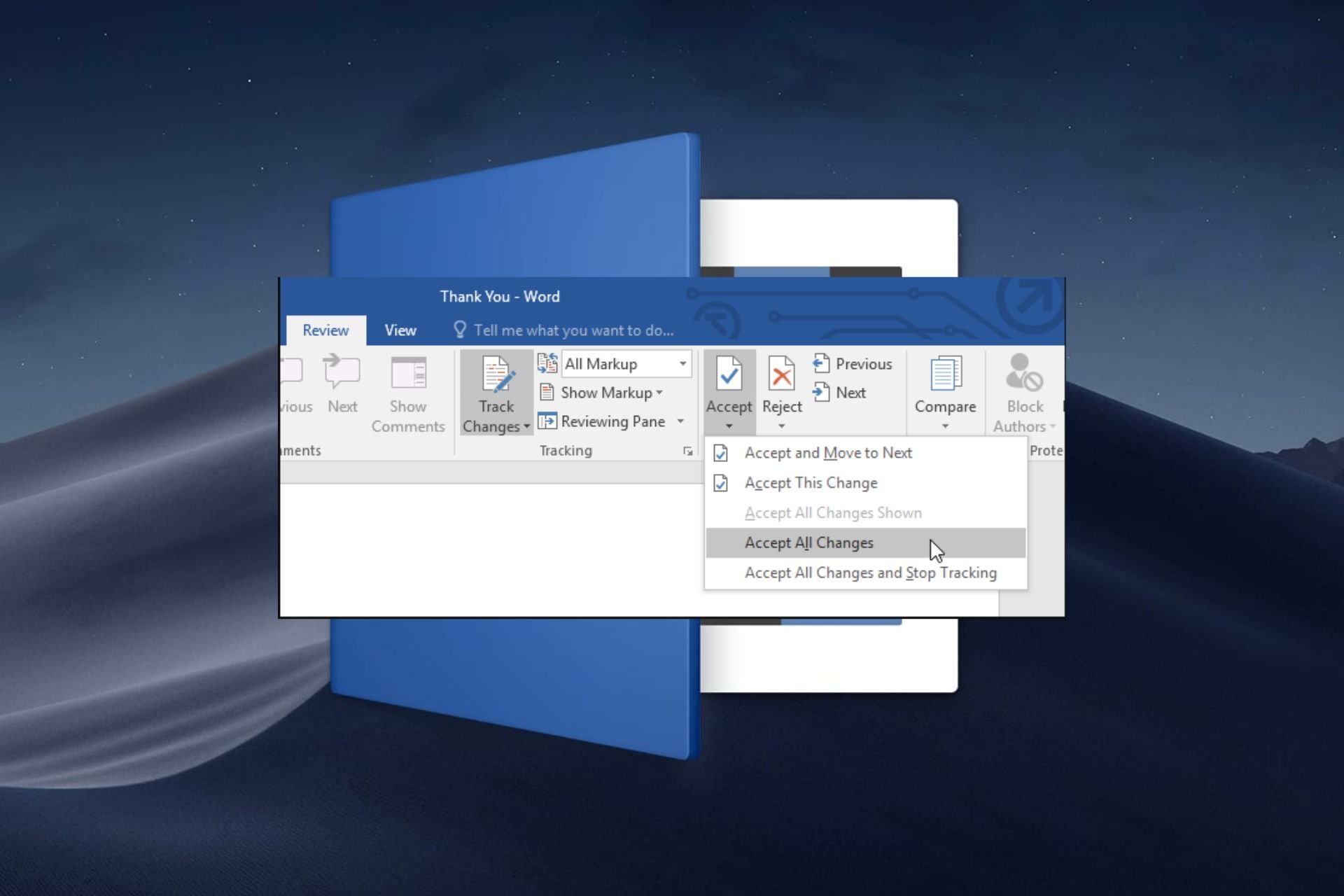
  2. Select the drop-down arrow below Accept, and then select Accept All Changes.

If you’re done with all edits and the document is closed from further collaboration, you can select the Accept changes and stop tracking option.

Why can’t I accept or reject changes in Word?

  • Conflicting versions: If you’re using a different version than the one in which the document was created in, you may not be able to accept or reject changes because of compatibility issues. To avoid such issues, ensure you’re using the most up-to-date and legitimate version of Microsoft Word or use Word on your browser.
  • Disabled settings: To accept or reject changes in Microsoft Word, you have to turn on the track changes feature for the document.
  • Document is protected: If the owner of the document has restricted editing, you may be unable to accept or reject changes. You can remove this protection but some document owners enforce passwords so you may have to request permission before making changes.
  • Corrupt document: Sharing the document over the internet and to multiple devices puts it at risk of infections and can easily be corrupted. You can try to repair the document or create a new one and copy the contents into it.
  • Add-ins or Macros: While third-party add-ins and macros can enhance your experience, sometimes they interfere with some features. Disable your add-ins and see if the issue persists.

As an additional tip, always keep the original document copy especially if you’d like to keep track of the changes. This way, you can compare the two Microsoft Word documents to see whether any crucial information was omitted.

One drawback of Microsoft Word is that after accepting changes and closing the document, you can no longer revert them. However, with advancements in Word processing tools, you can view a history of changes and hide comments in Google Docs.

That’s all we had for this article but be sure to leave us a comment down below on any additional thoughts you may have on this topic.

Google Home for web: Now comes with camera history, clip downloads, and more

Google announced that the company is bringing the most requested camera features to Google Home for web.

The upcoming release will include features like a full camera experience for Nest cameras and doorbells with event and timeline history, the ability to create custom clips to download and share, and picture-in-picture support for live camera views.

With all these features, Google Home for the web will soon be available to the public. However, if you want to try the features early, you can opt-in to the Public Preview.

Nest Cam and Nest Doorbell features

Camera history

  • Will be adding more camera features to home.google.com.
  • Can stay informed even after an event happens & use larger screens to view them
  • Use your browser to check your camera history to ensure everything is fine at your home or office.
  • Check your history with the new event and timeline views.
  • Look for a specific date and time.
  • Can download clips to share your favorite moments.
  • Option to subscribe to Nest Aware Plus for 24*7 video history playback on the web.

Custom clips from your video history 

  • Capture and share important moments.
  • Option to customize the clip’s duration before you download it from the camera’s video history.
  • Allows you to select the start time & adjust the clip by sliding the editor to get the desired length.
  • Use a set of options to choose the start time and clip length to trim an event video clip.
  • With a Nest Aware Plus subscription, you can download clips from any party of your video history.

These features will also come to the Google Home mobile app. As of now, the supported devices as mentioned on the Google Nest Community page are:

  • Nest Cam (indoor, wired, 2nd gen)
  • Nest Cam with Floodlight
  • Nest Cam (outdoor or indoor, battery)
  • Nest Doorbell (wired, 2nd gen)
  • Nest Cam Indoor (1st gen) 
  • Nest Doorbell (battery)
  • Nest Cam Outdoor (1st gen)

If you plan to opt-in to Public Preview Updates, you need to go to the Google Home app, then tap Settings>Public Preview>Join Public Preview. You will be notified once the Public Preview is available and can accept or decline the request.

Here are the features available to try in Public Preview:

  • Script Editor for Home Automation – Navigate to home.google.com to view, create, delete, or deactivate scripted automation for your home. If you have been creating automation and using Help Me Script features, you need to join Public Preview to keep using them.
  • Garage door detection for Nest Aware subscribers—With advanced AI-powered image detection and improved built-in on-device intelligence, this feature is compatible with wired Nest Cams and can notify you if you forget to close the garage door.
  • Expanded support for first-generation Nest Cams – Allows you to transfer your device to the Google Home app to try the new camera history experience, including the ability to review camera history with event list and timeline views in both Google Home in web and app.

Apart from this, in the blog post, Product Manager also mentioned:

Garage door detection is in Public Preview and available in the Google Home app for the US and Canada to users that have a Nest Aware subscription and own a Nest Cam (indoor, wired, 2nd gen) or a Nest Cam (battery) when wired for power.  Camera history on the web prior to 3/7/24 may not include audio in events for the first generation Nest Cam Indoor and first generation Nest Cam Outdoor. Events after 3/7/24 will include recorded audio

What are your thoughts on this announcement, and will you be joining the Public Preview, share your opinions in the comments section below.

Microsoft Advertising Console finally gets revamped with a fresh user interface

To make a service better, sometimes a change is necessary, and often the change comes in the form of new features.

Improvements can also come in as user interface changes, and speaking of which, Microsoft is slowly rolling out a new interface for its Advertising Console.

The new and modern user interface for Advertising Console is finally here

As reported by Search Engine Roundtable, it seems that Microsoft is slowly releasing a new Microsoft Advertising Console interface.

The last interface update was way back in 2020, so this is a welcome change. The first thing you’ll notice are two vertical menus on the left, similar to the Google Ads interface.

The secondary menu can be expanded easily simply by hovering your mouse over the main one, so no clicking is required.

In addition to vertical menus, there’s also a Horizontal menu featuring Copilot allowing you to quickly access it. Copilot in Microsoft Advertising Platform was introduced recently, and it’s not a part of the new design.

Overall, this is a nice improvement, and the new user interface will be gradually released to users, so keep an eye out for it.

Despite its partnership with Microsoft, Mistral promises to keep its AI open-source

Microsoft recently forged a $2.1B partnership with Mistral, the startup responsible for the development and release of the Mistral AI.

While the partnership doesn’t mean Microsoft will forget about OpenAI, it will mostly be focused on integrating and emphasizing AI adoption in Europe.

And, according to a new report by Le Monde, the startup is keen on maintaining the open source characteristic of Mistral AI, despite having a partnership with Microsoft now.

The goal is not to abandon open source. This technology is revolutionary and we have to be transparent – we must enable people to look under the hood and it’s open source that allows this.

Mistral AI

Mistral AI, which is comparable to GPT-4 in performance, is now available to use in the Azure AI platform, and earlier this month when the partnership was announced, Mistral’s co-founder Arthur Mensch said that the startup will not abandon its open-source ways.

Commercial activity will enable us to finance the costly research required for model development. We will continue to have two product ranges.

Mistral AI

However, on discussing the news, on Reddit, users are somewhat not convinced:

Some call for Mistral to release research papers and model weights.

Well… Then release the weights please. They can even release them as non-commercial wrights so people looking to make money still need to use their services, but the home gamers can use the models.

Reddit user

While others think the company is not fully transparent:

Actions speak louder than words. And for the last couple of months words is all we’ve had in terms of Mistral’s open source ambitions, and for most of that time even their words haven’t really suggested they had much interest in releasing anything open in the future.

I honestly think it’s silly to say they are dedicated to transparency while simultaneously refusing to even state the size of their closed models. That seems like it would be the absolute least they could do to showcase transparency.

Ideally they would release full on research papers and weights on top of that but I don’t have much hope of that happening based on their actions the last couple of months.

Reddit user

What do you think about Mistral’s intentions?

Nintendo Switch 2, previously rumored to not be on par with Xbox Series S, now might be as good as Xbox Series X

Nintendo Switch 2, the upcoming handheld console, expected in 2025, and previously rumored to not be able to compete with Xbox Series S, could be, in the end, capable of even outperforming PlayStation 5 and Xbox Series X, thanks to the addition of the NVIDIA DLSS.

However, this is also a rumor, so take it with a pinch of salt.

The Nintendo Switch 2 could be on par with the Xbox Series X by leveraging NVIDIA’s Deep Learning Super Sampling (DLSS) technology, which will maximize image quality. The console was also rumored to sport another NVIDIA technology, the Tegra T239, in the past.

The console will be able to offer backward compatibility with all Switch games, and according to a new report from Moore’s Law is Dead, it will reportedly outperform the Steam Deck, by having a more powerful GPU.

When docked, it will be able to perform at the same level as the Xbox Series S, and if it gets the DLSS technology, it will be as powerful (or even more) as the Xbox Series X, and PlayStation 5.

But again, Moore’s Law is Dead‘s rumors are somewhat tricky, so they shouldn’t be taken entirely seriously. However, given the state of the gaming consoles, there is a degree of truth to it: Nintendo will have to invest in serious technology to keep up with the competition.

Steam Deck, as well Rog Ally, and Legion Go, are all little beasts capable of performing well under demanding conditions. If NVIDIA’s DLSS could bring Nintendo Switch 2 closer to Xbox Series X, it will definitely give the handheld an important advantage against the other three.

MSI also chimed in with a brand new handheld console, Claw, which is the world’s first handheld to sport an Intel Core Ultra processor, so as you can see, the game is getting more crowded and intense with each passing year.

But then Nintendo has always been in a league of its own, and the company has never been affected or impacted by the likes of PlayStation or Xbox.

Hurry and get a cheap Xbox Series X from Dell with this hot deal

Dell is offering the best deal for the new Xbox Series X. However, the deal might only last for a while. So, hurry up to buy the console for $404.99. After all, it is almost a 20% discount. Furthermore, you can use this opportunity to purchase PC accessories with a 10% discount.

How to get the Xbox console deal from Dell?

To get the Xbox console deal from Dell, add the Xbox Series X to your cart. Afterward, go to the accessories section and search for the cheapest ones or get something you need. When you are done, go to your cart and checkout. Furthermore, you can have a maximum of 5 reduced consoles. However, taxes and fees still apply.

In addition, you can also get other accessories with limited offers, such as the Alienware S5000 Gaming Chair. If you get the cheapest accessory, you can use the remaining money to get a few months of Xbox game pass.

While the deals are great, some people are worried that Xbox is trying to get rid of consoles. After all, there were a lot of offers lately. Furthermore, this might be Xbox’s attempt to bring in more players. However, the console was available for a cheaper price a few months back. Thus, if you are willing to wait, you might get it for less.

What are you thinking? Does the Xbox deal appeal to you? Let us know in the comments.

Adobe Firefly is the next AI to get shamed for awkwardly generated images

After Google’s Gemini got backlashed for generating historically inaccurate images Adobe’s Firefly text to image generator gets the whip.

As reported by Daily Mail, Firefly recently created images with black nazis, black Vikings and women and black Founding Fathers.

I suspected that the journalists may have forced the image generator so I have made some experiments of my own.

An image of german soldiers in 1945

To my surprise, when I asked the bot for an image of German soldiers in 1945, one of the images was really awkward. There is nothing about the image to show the context of German soldiers in WW II, not even the uniforms.

After that, I got a realistic representation. However, when I added black skin to the prompt, Firefly happily complied and provided the image below.

Again, not even the ship resembles Viking construction. As for the women in the picture, we can safely say that they have nothing to do with the Norsemen.

I concluded my experiment here, and although I didn’t get the exact outrageous results as the folks from Daily Mail, it’s clear that Firefly doesn’t have any clue about history or drawing.

If you ignore the inaccurate representations of history, in my experiment, Adobe’s tool seriously botched the characters’ faces in almost all the images. Will Adobe close its bot as Google did with Gemini? We can’t tell yet, but they need to do something about these hallucinations.

Did you get any awkward results from Adobe Firefly? Let us know about that in the comments section below.

Lenovo ThinkPad X13 Gen 5 series released, equipped with Intel Meteor Lake

Lenovo recently released the ThinkPad X13 Gen 5 series. It comprises a 13.3″ laptop with an Intel Core Ultra processor priced at $2,799 and the touchscreen 2-in-1 convertible counterpart with similar specifications, starting at $2,999.

The two come with super-fast network connectivity, Dolby Audio for enhanced sound quality and the ThinkShield suite of security tools for advanced protection. For the 2-in-1, you also get an integrated rechargeable stylus.

Coming to the processor, the series features Intel Meteor Lake (Intel Core Ultra 5 125U Processor), the code name for the Intel Core Ultra series. It’s designed for enhanced performance and efficiency, in addition to improved battery life.

Lenovo ThinkPad X13 Gen 5

Lenovo ThinkPad X13 Gen 5 2-in-1, a convertible, can be used as a laptop, tablet, and sketchpad. Since it ships with Windows 11, the Tablet Mode is automatically enabled when you rotate the screen about the 360-degree hinge.

Specifications of the Lenovo ThinkPad X13 Gen 5 series

ThinkPad X13 Gen 5ThinkPad X13 Gen 5 2-in-1
Processor14th Gen Intel Core Ultra 5 125U 12C14th Gen Intel Core Ultra 5 125U 12C
Operating SystemWindows 11 Pro x64Windows 11 Pro x64
StorageUp to 1 TB (SSD)Up to 2TB (SSD)
MemoryUp to 32GB, LPDDR5x-6400 (Soldered)Up to 32 GB, LPDDR5x-6400 (Soldered)
GraphicsIntel integrated graphicsIntel integrated graphics
Display13.3″ WUXGA (1920×1200), 60Hz, non-touch13.3″ WUXGA (1920×1200), 60Hz, touch supported
Camera5.0 MP5.0 MP
WeightStarts 1.17 kgStarts 1.25 kg
Battery lifeUp to 15.2 hoursUp to 12.7 hours
Lenovo ThinkPad X13 2-in-1 Gen 5

Both devices feature a similar set of ports:

  • 1 x USB-A (USB 5Gbps / USB 3.2 Gen 1)
  • 1 x USB-A (USB 5Gbps / USB 3.2 Gen 1), Always On
  • 2 x USB-C (Thunderbolt 4 / USB4® 40Gbps), with USB PD 3.0 and DisplayPort™ 2.1
  • 1 x HDMI 2.1, up to 4K/60Hz
  • 1 x Headphone/mic combo jack (3.5mm)
  • 1 x Smart card reader (option not available)
  • 1 x Nano-SIM card slot (WWAN support models)

To find out more about the two or make the purchase, visit the official website:

We also did an exclusive report about Levono working on a transparent laptop which could be unveiled later this year.

What’s your review of the series? Share with our readers in the comments section.

Windows 11, and Windows 10 now support dozens of new AMD chipsets

After Microsoft revealed support for multiple new Intel chipsets, but no new AMD chipsets, the tech giant, which came in second in revenues in the 2023 Q4 period after Intel, revealed that dozens of the new AMD chipsets will now be supported in Windows 11, and Windows 10.

On the occasion, the tech giant also revealed a new set of Ryzen Chipset drivers (version 6.02.07.2300), which fixes bugs, and acknowledges several known issues:

  • Some driver names on a non-English OS  may appear in English.
  • The Uninstall Summary may incorrectly display the uninstall status as Failed. 
  • Occasionally, Ryzen PPKG may not install/upgrade. 

Below, you can see all the new AMD chipsets and processors that can support Windows 11, and Windows 10.

Chipset Support

 Windows 10Windows 11
AMD WRX90/TRX50YesYes
AMD WRX80YesYes
AMD TRX40YesYes
AMD X670E / X670YesYes
AMD B650E / B650YesYes
AMD X570YesYes
AMD B550YesYes
AMD A520YesYes
AMD X399YesYes
AMD X470YesYes
AMD B450YesYes
AMD X370YesYes
AMD B350YesYes
AMD A320YesYes

Processor Support

 Windows 10Windows 11
AMD Ryzen™ Threadripper™ PRO ProcessorsYesYes
AMD Ryzen™ 8000G Series processorsYesYes
AMD Ryzen™ 7040 Series processorsYesYes
AMD Ryzen™ 7000 Series Desktop ProcessorsYesYes
AMD Ryzen™ 7000 Series Mobile ProcessorsYesYes
AMD Ryzen™ 5000 Series Desktop ProcessorsYesYes
2nd/3rd Gen AMD Ryzen™ Threadripper™ ProcessorsYesYes
1st Gen AMD Ryzen™ Threadripper™ ProcessorsYesNo
2nd/3rd Gen AMD Ryzen™ Desktop ProcessorsYesYes
1st Gen AMD Ryzen™ Desktop ProcessorsYesNo
AMD Ryzen™ 3000G/4000G/5000G Series Desktop Processors with Radeon™ GraphicsYesYes
AMD Ryzen™ 2000G Series Desktop Processors with Radeon™ GraphicsYesNo
AMD Ryzen™ Mobile 3000U/C, 4000U/H, 5000U/H/HS, 6000U/H/HS/HX Series Processors with Radeon™ GraphicsYesYes
AMD Ryzen™ Mobile 2000U Series Processors with Radeon™ GraphicsYesNo
7th Gen AMD A-Series ProcessorsYesNo

You can read the full blog post and download the latest AMD drivers here.

Need a gaming buddy? Google SIMA AI model could be the answer

When it comes to games, artificial intelligence is lacking to say the least, and the behavior of non-playable characters can be questionable.

Google is set to change that by developing a DeepMind-based AI that can play games with you.

Google is developing an AI that will be able to play games

As PC Gamer writes, Google is working on a Scalable Instructable Multiworld Agent, an AI that can follow instructions and understand the game world.

Unlike the current AI that is hard-coded, this AI will act more naturally and human-like. Currently, Google has teamed up with eight different game studios to test its SIMA model.

According to the results, the model has around 600 basic skills, and it’s being tested in games such as Valheim, Goat Simulator 3, and No Man’s Sky.

Google claims that SIMA agent performs almost as well as an agent trained for a specific game. It’s important to mention that this model is in early phases, but if proven successful, it can change gaming forever.

While this sounds impressive, there are some security concerns, especially after researchers managed to hack Gemini AI recently. It’s obvious that AI is already used for cyberattacks, and hopefully one day we might see it used for gaming as well.

ChatGPT and other AIs quickly drain our energy resources, and here’s why

ChatGPT consumes a lot of energy daily for its processes. In addition, it is still in development so that energy usage might increase considerably soon. Furthermore, even if we are at the beginning of AI, we won’t have the power to sustain future projects.

After all, according to The New Yorker, ChatGPT consumes 17,000 times the energy of a US household per day. Moreover, if Google included AI in every search, its energy consumption would exceed the amount consumed by some countries.

How does ChatGPT affect the environment?

ChatGPT dramatically affects the environment due to its energy consumption and carbon emissions. After all, according to Elon Musk, by 2025, we won’t have enough power to support the advancement of AI. On top of that, by 2027, AI might consume half a percent of the global energy. Thus, we may need an alternative energy source to power the AI. However, this could also lead to higher resource exploitations.

ChatGPT is esteemed to answer two hundred million requests per day. Thus, it consumes more than half a million kilowatt-hours of electricity. In addition, ChatGPT is one of many AIs available, and most of them require a lot of energy to process.

Furthermore, AI could become a bigger problem, similar to cryptocurrency mining. We will need a technology breakthrough to further improve ChatGPT and the other large language models. Also, using AI can improve the energy sources and increase the output.

Ultimately, energy usage is not the only problem of ChatGPT and other AI models. After all, they are using far more resources. Furthermore, they produce electronic waste, use large quantities of water for their cooling processes, and emit CO2. However, for now, they are more problematic than others. Yet, they could become a threat in the future.

What are your thoughts? Is AI going to improve energy sources? Let us know in the comments.

Microsoft gets the leading spot in Gartner’s Magic Quadrant for the sixth year in a row

Microsoft announced that Gartner named the company a Leader in their Magic Quadrant in the Integration Platform as a Service (IPS) category for 2024.

Gartner’s Magic Quadrant is an assessment based on many criteria to place companies offering integration platforms as service products. The graph is made up of four squares, where these organizations are placed into the following categories: Leaders, Challengers, Visionaries, and Niche Players.

It is a bit ironical, because Microsoft received this acknowledgement right after they dropped the Azure egress fees due to the European Data Act.

Why did Gartner name Microsoft a leader in the IPS category?

Image source: Gartner

Obviously, Microsoft has a lot to show for in this category but they received the Leader title mostly thanks to their business Azure Integration Services.

Not only that, but the whole Azure cloud services were taken into consideration for this decision.

The Azure Integration Services include Azure API Management, Azure Logic Apps, Azure Service Bus, Azure Event Grid, Azure Functions, and Azure Data Factory providing flexibility for the business clients. You only have to pay for the right component you need and use for your business.

Gartner also took into consideration Microsoft’s support infrastructure in over 50 Microsoft Azure regions and their partner ecosystem with over 1,400 managed partners worldwide.

We also need to acknowledge the other organizations in the Leaders quadrant which are Boomi, Workato, Oracle, SAP, Informatica and Salesforce (MuleSoft).

In the Challenger quadrant, you can spot Amazon Web Services (AWS) who gained a lot of ground lately in this category.

What do you think about Microsoft’s title? Let us know in the comments section below.

Microsoft and Oracle’s Database Azure will be available in 5 more regions

Microsoft and Oracle’s partnership project, Database Azure, will be expanded in 5 more regions, Microsoft announced in a press release, and with them the service is now available to a total of 15 regions globally.

Database Azure will be finally available in Europe, and customers can now place orders for Oracle Database@Azure in the Microsoft Azure Germany West Central region in Frankfurt, according to the Redmond-based tech giant.

Bringing Oracle Database@Azure to Europe will enable customers in the region to locally employ Oracle database services running on OCI hardware deployed in Azure datacenters for the first time. The expansion of our collaboration with Oracle demonstrates our mutual commitment to helping customers streamline the migration of workloads to the cloud so they can combine the best of Oracle with the breadth of Microsoft cloud services, like Azure AI, to empower business innovation.

Microsoft

We have embraced the tremendous global customer demand for Oracle Database@Azure and are hence announcing five additional regions to the road map today. We are energized by the Global 500 companies in financial services, healthcare, manufacturing, oil and gas, pharmaceuticals, and more that are already utilizing Oracle Database@Azure. The increased uptick in demand and emerging and unified use cases across OCI and Microsoft Azure demonstrate just how important the multi-cloud deployments are for our joint customers.

Oracle

Database Azure is currently available in:

  • Australia East
  • Brazil South
  • Canada Central
  • France Central
  • Central India
  • Italy North
  • Japan East
  • Southeast Asia
  • Sweden Central
  • United Kingdom South
  • Central United States
  • South Central United States
  • United Arab Emirates North

By using the Microsoft and Oracle’s Database Azure, customers can get the following benefits:

  • Flexible options to simplify and accelerate migrating their Oracle databases to the cloud, including compatibility with proven migration tools such as Oracle Zero-Downtime Migration
  • The highest level of Oracle database performance, scale and availability, along with feature and pricing parity with OCI
  • The simplicity, security and latency of a unified operating environment (datacenter) within Azure
  • Consistency with on-premises deployments of Oracle Database and Oracle Exadata to reduce the need to rearchitect or refactor solutions
  • The ability to build new cloud-native applications using OCI and Azure technologies, including the rich set of Azure development and AI services
  • Unified customer experience and support from Oracle and Microsoft
  • Simplified purchasing via the Azure Marketplace, and the ability to leverage Oracle and Microsoft licenses, commitments and discount programs
  • The assurance of a unified service and architecture that are tested and supported by two of the most trusted names in the cloud

Microsoft recently unveiled the initiative to build AI data centers in Germany and update the country’s infrastructure with AI technologies, in a $3 billion investment, so this comes as no surprise.

You can read the full press release here.

Google paid $10 million to bug hunters in 2023, $2 million less than the previous year

Every year, Google has been rewarding the bug hunter community for identifying vulnerabilities and exploits in its products, primarily Chrome and Android. In Google’s 2023 Bug Bounty program, the amount stood at $10M, taking the total rewards since 2010 to $59M.

In the official blog post, Google highlights that 359 unique security bugs were reported in its native browser, Chrome, and $2.1M was paid out to the hunters. For Android, Google gave out $3.4M in bug bounty but didn’t disclose the number of vulnerabilities.

In the wearables domain (Nest, Fitbit and others), the tech giant paid $116,000. And for GenerativeAI, the total bounty was $87,000.

The highest reward for the year stood at $113,337, but there’s no official confirmation about who it went to. In the blog, Google thanked two researchers, Zinuo Han and Yu-Cheng Lin, for their contribution to the bug-hunting program.

Bounty falls in comparison to 2022

Though the $10 million bounty is a significant amount, it’s $2M less than the $12M Google paid out the bug hunters in 2022. The Mountain View-based tech giant didn’t reveal a reason for the drop. However, it looks like fewer vulnerabilities were reported in 2023.

Image source: Google

Looking at the last decade, the bug bounty has increased yearly since 2015, except for a tiny $0.1M drop in 2017.

Another interesting fact is that, while in 2022, the highest rewards stood at $605,000, it fell to $113,337 in 2023, an 81.27% drop.

Other tech giants, too, offer such rewards. Interested bug hunters stand a chance to win $20,000 with Microsoft’s bounty program for identifying vulnerabilities and exploits in its products.

What’s your take on Google’s bug bounty report for 2023? Share with our readers in the comments section.

Firefox userbase is surging in the EU after Apple’s compliance with the DMA

Firefox has always been an alternative browser, always living in the shadow of Chrome, but that is slowly changing.

It seems that Firefox is gaining more users in Europe, so let’s see what’s the reason behind this.

Firefox usage is up in Germany and France thanks to the DMA

The Digital Markets Act in the EU aims to limit the power of big tech companies and prevent monopolies from creating.

Microsoft has complied with DMA, allowing its users to now easily remove Edge from Windows. As a result, Brave downloads went up 37.5%, but that’s not all.

Both Apple and Microsoft are affected by DMA, and according to The Verge, Firefox saw an increase in usage after Apple allowed users to choose their default browser.

According to Firefox spokesperson Christopher Hilton, Firefox has 50% more users in Germany and almost 30% in France. Here’s what he had to say:

Despite less than ideal compliance, the recent implementation of the DMA choice screen is a promising step toward true competition online in the EU… Still, there is a lot of room for improvement, and we’ll continue to fight for a web that puts people over profits, prioritizes privacy and is open and accessible to all.

This is great news for all Firefox users, and we can’t wait to see how the browser market share will change following this change.

Claw, the world’s first Core Ultra processor-equipped handheld, is now out

MSI announced the Claw handheld console, a while ago, as the tech company stepped into the gaming console industry, with the world’s first Intel Core Ultra processor-equipped handheld.

As we noted back in February, MSU will release no less than 3 variants of the Claw console, each with its own set of specs, and prices, of course, as you can see below:

Product NameGraphicsProcessorStorageRAMPrice
Claw A1M-050USIntel Arc 5 GraphicsIntel CoreUltra 7-155H 1.4 – 4.8 GHz1TB PCIe Gen4x4 M.2 2230 w/o DRAM16GB LPDDR5-6400MHz$799.99
Claw A1M-051USIntel Arc 5 GraphicsIntel Core Ultra 7-155H 1.4 – 4.8 GHz512GB PCIe Gen4x4 M.2 2230 w/o DRAM16GB LPDDR5-6400MHz$749.99
Claw A1M-052USIntel Arc 5 GraphicsIntel Core Ultra 5-135H 1.2 – 4.6 GHz512GB PCIe Gen4x4 M.2 2230 w/o DRAM16GB LPDDR5-6400MHz$699.99

Claw A1M-052US is now available to users, everywhere, according to MSU’s official website. It sports the following specs:

  • Windows 11 Home
  • Intel® Core™ Ultra 5-135H 1.2 – 4.6 GHz
  • 512GB PCIe Gen4x4 M.2 2230 w/o DRAM
  • 16GB LPDDR5-6400MHz
  • Intel® Arc™ Graphics
  • 7″ FHD (1920 x 1080), 120 Hz Refresh Rate, Touch Screen, 100% sRGB (Typical), 500nits (Typical), IPS-Level panel.
  • Intel® Killer™ Wi-Fi 7 BE1750(x) for Claw
  • Ergonomic design for an optimal gaming experience.
  • Hall Effect triggers and joysticks built to last with microscopic precision.
  • Best-in-class 53Whr battery capacity.
  • Revolutionary Cooler Boost HyperFlow technology redirects airflow to cool internal components.
  • Exclusive Macro Keys cast your ult with just one click.
  • Swift transfers and extensive connectivity with Thunderbolt™ 4.
  • MSI Center M provides dedicated interface designed for handheld devices with easy-to-use settings.
  • MSI AI Engine adjusts various system settings automatically that best fit your needs.

The other two versions, Claw A1M-050US and Claw A1M-051US will be released at a later date, but those interested can be notified when, in case they want those versions.

All three versions are equipped with Windows 11 Home and similar tech specs, the only differentiators being the storage space and processors, and you can see what the Claw handheld console looks like.

Alongside the Claw handheld console, MSU is also releasing its newest 18-inch laptop lineup and a new gaming laptop lineup. The new 18-inch laptops include Titan 18 HX, Raider 18 HX, and Stealth 18 AI Studio, while the gaming laptops are Vector 16/17 HX, Crosshair 16/17 HX, and Pulse 16/17 which also sport AI NPUs.

What do you think about these new devices?

This Halo-inspired original Xbox adapter allows 1080 gaming on the 23-year-old console

If you still have an original Xbox around, you might be interested in this original Xbox adapter that will allow for various benefits, including the 1080 playback feature.

The adapter in question has been developed by Eon Gaming, and its original XBHD adapter, although a little pricy, was well received by the Xbox community. This one is an upgrade to the original adapter and sports a Halo-inspired design.

It also comes with several features such as:

  • 480p
  • 720p
  • 1080i
  • Dual HD Ports
  • 3.5mm MiniTOSlink
  • 3 RJ45 LAN adapter Ports
  • XBHD Firmware 2.0

You can watch the trailer for it, to get an idea of how it looks:

Introducing the XBHD Spartan Edition. The is a brand new limited edition version of the XBHD paying homage to the classic Halo Edition Xbox. This premium Xbox adapter only works on original Xbox consoles and is loaded with a suite of amazing features.

Eon Gaming

The adapter is now available for $149.99, which is still a bit pricy, but it should be worth it, as it will new life to your old Xbox console. Eon Gaming lowered the price from $189.99, as the original adapter initially cost.

You can get it from here.

Talking about the 23-year-old Xbox console, if you still have one around, you can easily tweak it and mod it to your needs and desires, by using a memory card, all due to a newly discovered exploit, called Endgame.

The exploit doesn’t require a game or a functional DVD, and it can be easily deployed using a memory card. It is compatible with all the versions of the original Xbox Dashboard. You could use the exploit to hack your original Xbox and make it compatible with modern softmod solutions. 

However, you should also be aware that you could potentially lose all the data from the original Xbox in question, so you have to consider the risk before implementing the exploit.

But, as you can see, there is still new life to be found in the original Xbox console.

Folks are fuming over the new KB5035853. It’s making the taskbar completely transparent

Windows updates are often known to cause issues on the PC. This time around, KB5035853 for Windows 11 is making the taskbar transparent.

When we took a deeper look at the problem, it appeared to be linked to ExplorerPatcher and other similar tools that customize the taskbar, start menu and other Windows components.

On our workstation running KB5035853, the taskbar didn’t undergo any changes post-update, but as soon as we installed ExplorerPatcher, it became transparent, highlighting that the problem arose due to conflicts with user-enforced taskbar customizations.

Reports of the issue are being increasingly reported on forums, including Reddit and the dedicated Microsoft community.

After an update, my taskbar is suddenly 100% transparent

My taskbar gets TRANSPARENT??????
What happened???
It’s impossible to be corrected!!!!!

Same issue here. Seems like we are not in the minority here folks. so weird they wouldn’t catch such a visible bug before releasing this update. lol.

Verified fixes for transparent taskbar after installing KB5035853

  • Download the latest ExplorerPatcher version: Go to GitHub’s official ExplorerPatcher page and download Build 22621.3296.64.1. The latest build comes with a bug patch.
  • Uninstall the update: Press Windows + I to open Settings > go to Windows Update > select Update history > choose Uninstall updates > click on Uninstall next to Security Update for Microsoft Windows (KB5035853) > confirm the change > restart the PC.
Uninstalling KB5035853 on Windows 11

One of these should have helped. If not, uninstall any apps that can customize the taskbar or any other Windows components!

Ironically, the Windows KB5035853 update, which was meant to fix the 0x800F0922 error on KB5034765, is itself plagued with bugs.

On the bright side, the update allows you to edit your phone’s pictures with Snipping Tool.

What helped you get rid of the transparent taskbar? Share with our readers in the comments section.

Chinese want to develop scientific AI bots infused with prior knowledge

Creating scientific AI bots is nothing new. Many researchers worldwide have programmed their own science AI bots to resolve specific tasks in chemistry, biology, physics, and more. However, a new study published in the Hong Kong Polytechnic University journal delivers another approach to creating such bots by infusing them with prior knowledge in the areas where they are needed.

In other words, the Chinese will train the LLMs to become AI scientists in their field of expertise by teaching them some advanced rules, just instructing students before giving them tasks.

AI bots don’t know anything about physics, yet

Although we got used to the fast-paced development of AI, we still feel amazed by how Sora AI can create elaborate video clips just from text input. Yet, the text-to-video LLM doesn’t have the slightest idea about the laws of physics. It doesn’t know how to extract a piece of cookie from the image after someone bites it or the direction in which the flames of candles should lean when someone blows at them in a clip.

LLMs are traditionally trained using localized data and inputs and don’t start from ground rules in mathematics or physics. Copilot doesn’t even know how to count some objects in a generated image. We gave it hundreds of tests to generate a fixed number of a particular object, and the bot failed at determining the number of items. However, it will respond flawlessly if you ask it to solve a simple math equation.

The Chinese scientists believe that the AI bots will deliver more accurate results by creating an informed machine learning model through base knowledge training. However, they admit it takes work to establish which functional relationships, equations, and logic to include in the training. They found out that inserting too many rules would crash the LLM.

Embedding human knowledge into AI models has the potential to improve their efficiency and ability to make inferences. Still, the question is how to balance the influence of data and knowledge. Our framework can be employed to evaluate different expertise and rules to enhance the predictive capability of deep learning models.

Xu Hao, first author and researcher at Peking University

According to the paper, the Chinese created a framework that assesses rule importance by examining how certain rules or combinations affect the predictive accuracy of the LLM.

The researchers tested their framework to predict a chemistry experiment’s results and optimize a model for solving multivariate equations, and the output was a success.

However, there is an inherent problem with this type of training. During the study, the scientists discovered that if they added more data to the model, the general rules they applied became more important than the local rules. This is an issue because biology and chemistry often don’t have readily available general rules akin to governing equations.

The scientists are creating an open source plugin tool for developers to advance this training model further.

Microsoft Edge: Desktop shortcut for new Enterprise devices

According to Microsoft 365 Roadmap, for the first time, Microsoft is working on bringing a desktop shortcut for the Edge browser on new Enterprise devices, running via Windows Out of Box Experience (OOBE).

The description on the Microsoft 365 Roadmap says:

For new enterprise devices running through Windows Out of Box Experience (OOBE) for the first time, an Edge desktop shortcut will automatically be created. When enterprise users turn on their Windows 11 devices for the first time, they’ll see the Edge shortcut on their desktop. This desktop shortcut will provide users with easy access to their Edge browser without needing to manually pin and configure their setup.

Once the feature is rolled out, the Edge shortcut will be on their desktop once the enterprise users turn on their Windows 11 machines for the first time.

The shortcut will enable users to launch the Edge browser and access the websites and web apps. The feature will be available for all the new Enterprise devices that are running via OOBE for the first time. No existing device will be affected by this change.

The feature, which was added on March 14, 2024, is listed as 388365 on the Microsoft 365 roadmap. It will be released across standard multi-tenant cloud instances and is scheduled to roll out in April 2024.

What are your thoughts on the matter? Share your opinions in the comments section below.

Microsoft drops Azure egress fees following the European Data Act

Azure is one of the most used cloud services, however, it has some questionable policies that negatively affect the users.

That’s about to change, as  Microsoft is changing its policy on data removal from the Azure cloud.

There will be no more egress fees on Microsoft Azure

As reported by The Register, Microsoft won’t charge its former users to remove their data from the Azure cloud.

This comes as no surprise since Amazon Web Services (AWS) and Google do the same, so it feels natural for Microsoft to follow suit.

The reason for this change is the European Data Act, as stated by Microsoft in its announcement post.

To be eligible to move your data, Microsoft documentation states the following:

You must cancel all Azure subscriptions associated with your account after your data is transferred out before you can request your invoice-level credit.

It’s important to mention that Azure offers the first 100GB/month of egress data for free, but now you can easily claim more credit.

Some experts claim that this is just a marketing move to attract new customers and that egress costs affect ongoing users the most.

As for Azure, some believe that Claude 3 is a threat to Microsoft Azure, and we’re still waiting to see how will Microsoft respond to it.

Microsoft’s new pricing model for Copilot for Security is a step in the right direction

Microsoft announced that Copilot for Security will be available to commercial customers starting April 1, and with it, the Redmond-based tech giant also explained that the AI model will be released with a special pricing model: the pay-as-you-go model, which will be $4/hour.

This model means customers will be able to pay for as much as they use the model, and it will allow for versatile budgeting, catering to each company’s unique infrastructure, needs, and situations.

The Redmond-based tech giant calls the new pricing model the Security Compute Unit (SCU), and the consumption will be calculated based on the number of queries, and the complexity of each query, so it’s not going to take into consideration the number of security analysts in a company that is using it, or the number of devices Copilot for Security scans.

Basically, no matter the infrastructure of the company, Copilot for Security will still be billed $4/hour, however, the complexities of each scan, or case, might depend on the organization. For instance, a big company will have a complex infrastructure, so that means Copilot for Security will take more time to complete tasks.

A smaller company won’t have to use Copilot for Security for long, as the tasks will take less time to be completed.

So, ultimately, the pricing gets down to how much time Copilot for Security runs, and it’s not only a fair pricing model but also a good step in the right direction. All companies, no matter their budget, can afford to get the AI tool and use it according to a plan that suits their current financial resources.

Plus, Copilot for Security also comes as a standalone experience, and it won’t be tied to additional platform (although for better results, collaboration is recommended, see Copilot in Intune, for instance), so companies have more than enough ways to plan their budget to include the tool.

Scientists develop a 125 TB optical disc, may revive the obsolete storage technology

In a significant development in the tech world, scientists from China have devised a new technology that will allow optical discs to store data in the petabit range, close to 125 GB. The innovation may rekindle our interest in optical disks, a storage medium now primarily limited to gaming.

Optical disks were a popular storage option until two decades ago. Since then, the costs of USB drives and external hard disks have come down, making these two the preferred forms of storage. Besides, optical disks were rather fragile and prone to scratches, another factor that went against it.

Science behind the 125 TB optical disk

Scientists from China published an article in Nature titled, A 3D nanoscale optical disk memory with petabit capacity, which explained the scientific principles behind the high-capacity storage medium.

It uses dye-doped photoresist with aggregation-induced emission luminogens or AIE-DDPR, a newly developed material with a high areal density (storage capacity per unit area), and is roughly 24 times faster than advanced high-speed hard drives.

As per scientists, the process of manufacturing AIE-DDPR is similar to that of conventional CDs or DVDs. The AIE-DDPR optical discs feature a double-sided design with 100 layers on both sides. Since each layer is unbelievably thin, the distance between any two is just 1 micrometer.

To quote the scientists,

We develop an optical recording medium based on a photoresist film doped with aggregation-induced emission dye, which can be optically stimulated by femtosecond laser beams. This film is highly transparent and uniform, and the aggregation-induced emission phenomenon provides the storage mechanism. It can also be inhibited by another deactivating beam, resulting in a recording spot with a super-resolution scale.

Scope of the optical disk in personal and industrial use

Researchers working on the technology claim that it would help develop exabit-level data centers in closed spaces and reduce the area and cost requirements. Besides, with AIE-DDPR, optical discs have an increased life span of 50-100 years, thus negating the need for data migration and cloud storage.

To boost commercial viability, scientists are working on improving the read and write speed by using more precise laser beams. It will take some time before we have a refined version of the 125 TB optical disc, which finds application at home and in the industrial setup.

Many modern-day laptops don’t feature a built-in drive, but you can always get an external optical disc drive to access data on a CD/DVD.

What would you choose between a 125 TB optical disc and an external hard disk? Share with our readers in the comments section.

Sora AI is coming later this year, OpenAI CTO confirms

Many were blown away when they first saw Sora AI in action, but unfortunately, the service isn’t available to the public yet.

That’s about to change, and we might get a chance to try Sora AI in the near future.

Sora AI will launch sometime in 2024, according to Open AI’s CTO

New Sora AI showcase videos look amazing, we can all agree on that, but the question that has been on everyone’s mind for months is when can we finally use Sora?

As reported by Neowin, that shouldn’t take too long, and it’s expected to see this service available someday in 2024.

The service is currently being tested by a handful of users, but according to OpenAI’s CTO, Mira Murati, we should see Sora AI available to the public later in 2024.

While no exact date was given, she said that it could be a few months before the official release. Murati also stated that the company is working on adding audio to Sora’s clips as well as editing tools.

Regarding the pricing, Murati said that OpenAI would like to price Sora similarly to its DALL-E 3 AI art creator while noting that Sora is much more expensive in terms of power and maintenance.

Lastly, Microsoft’s Mikhail Parakhin confirmed that Sora AI will make its way to Copilot, but it will take some time for the two services to be fully integrated.

Are you excited about Sora AI as much as we are? Let us know in the comments!

Copilot Pro users get GPT-5 Turbo, or is it a mistake?

Microsoft just announced that they included GPT-4 Turbo in the free version of Copilot, so we could only assume that Copilot Pro users will get something better, right?

That’s when a user on X posted a screenshot of the Copilot subscription page showing that Copilot Pro is featuring the GPT-5 Turbo LLM. And that seems off right from the start.

That is because GPT-5 is still far off in development, let alone its alleged Turbo version.

But then, Microsoft’s Mikhail Parakhin commented on this post saying that it’s a typo and they meant GPT-V, and the V is for vision. This, at first, makes sense because GPT-V is the image analyzing component.

However, the mystery is so much easy to solve if you simply click on the subscription button.

On this page, you will see that indeed, there was a typo, but they meant to write GPT-4 Turbo, not GPT-5 Turbo.

With this, we can all return to our regular activities because there’s nothing to see here. However, Microsoft didn’t bother to fix the mistype even hours after it was spotted. This might wrongfully convince people to make a subscription based on the GPT-5 Turbo offering, and it’s really not okay.

By the way, did you make a Copilot Pro subscription because of this? Let us know in the comments section below.

Linux gained a significant market share, and Microsoft might have something to do with it

Linux managed to gain a significant 1.10% market share in only 5 months, bringing it to 4.03% in February 2024, according to the latest Statcounter statistics.

While this might not seem much, it is still significant especially when we tie it to the whole market: Windows still rules at 72.17%, while MacOS comes in second with 15.42%, and the third place is reserved for unknown operating systems, so even if Linux is currently the fourth most popular OS around, it might be the third.

However, the growth is the biggest Linux has ever experienced, and if it keeps it this way, the operating system might become a serious competitor to the likes of Windows or MacOS. The biggest plot twist?

Microsoft might actually have something to do with this growth, and we’re talking about Windows Subsystem for Linux.

In a similar way to the Windows Subsystem for Android, which is going to be deprecated soon, Windows Subsystem for Linux, which can be easily downloaded from Microsoft Store, or installed independently by running a simple command, allows Windows 10, and Windows 11 users to access Linux from the comfort of their Windows devices.

Sure, WSL only gives Windows users a taste of the mysterious operating system, but even so, it’s enough to make them install the whole thing on their devices.

The operating system has been in friendly partnerships with Windows and Microsoft, and recently Windows users (as well, as Linux users) have found out that with some workarounds, Linux can support Windows games.

So, if you think you want a more secure, more stripped experience of an operating system, you might want to try Linux. But for your own sake, try it in the Windows Subsystem for Linux, first, and see how you like it.

However, Linux is not as complex as Windows is, so don’t expect a lot of features, and definitely don’t expect AI tools to complete tasks for you.

While Microsoft surely doesn’t mind the friendly partnership, the fact that one of its Linux-oriented platforms, which the tech giant regularly updates, by the way, is an important factor in the growth of the Linux market share, might make the company reconsider its stance.

Well, let’s hope Microsoft doesn’t deprecate Windows Subsystem for Linux.

Threads app is now available on Windows and you get it from Microsoft Store

Threads was imagined as a Twitter competitor from Meta, and it has achieved decent success.

The company plans to expand its audience, and it has just announced that Threads got its Windows desktop app.

Meta has just released a Threads app for Windows

Threads is slowly but surely gaining more users, and to bring even more users to the service, Meta has released a Windows app, as Neowin reports.

With the Windows app, you can join and use Threads with your current Instagram profile, but you can also browse the service without an account, just like on the web.

Regarding the requirements, the Threads app needs Windows 10 version 19041.0 or newer and at least 2GB RAM. As for available languages, Threads is currently available only in English.

You can go ahead and download the app right now from the Microsoft Store app. This isn’t the only news regarding Meta, there are reports that you’ll soon be able to send files via DM on Instagram.

Meta also has big plans for Llama 3, so stay tuned to keep up with the latest news.

NBA 2K24 was added to Game Pass, and Microsoft might be up to something with it

NBA 2K24 was also recently added to Game Pass, earlier this week, on March 11, and Xbox users can access this game on consoles, but unfortunately, it is only going to be available on the platform until August 2024, as per the official X post (formerly known as Twitter).

The Redmond-based tech giant might be trying something with it, and let us explain.

Microsoft, through Xbox, has been releasing dozens of sports video games lately, with the most recent one being MLB The Show 24, which is going to be released to Xbox Series S, and X, next week, on March 19.

Game Pass also has FIFA, UFC, and Madden that can be accessed with the Ultimate version of the subscription: all of these games are sports games.

It seems Microsoft might be trying to benefit from the interest shown in sports, to boost up its Game Pass numbers. People indeed watch sports: according to Variety, the top 50 MOST-WATCHED PRIMETIME TELECASTS OF 2023, only 3 of them are non-sports related, while the rest of the 47 were all sports events.

But are they playing sports games to the same degree? According to one of its recent blog posts, Microsoft currently racks up an impressive, yet modest 34 million Game Pass subscribers. Why modest? Well, the company only managed to add 9 million subscribers in the last 2 years, compared to, let’s say, 2020 when in just a matter of months, it added more than 5 million subscribers.

So the company might add sports games to the Xbox Game Pass to attract those casual gamers who are not really into games of any sort, except sports video games: what is a better option than letting them have access to an entire collection at once?

We’ll have to see if this really works, and we’ll have to check out the numbers of new Game Pass subscribers in a few months, or maybe a year, to see if indeed this is the point, but Microsoft will nonetheless amass more subscribers in the meantime.

However, with NBA 2K24 leaving Game Pass at the end of August 2024, Microsoft might need to look up for other sports games to add to the platform.

Age of Empires 4 receives crossplay support for Xbox and PC, new features added

Starting with Age of Empires 4, Build 10.0.576, developers have introduced cross-play support, made improvements to each of the civilizations, and fixed a wide array of major and minor bugs. Friends on PC and Xbox can finally play the classic real-time strategy game together!

The latest build, 10.0.576, is available via all three official sources on the PC: Xbox app, Microsoft Store, and Steam. Head to the one from where you initially downloaded the game, check for updates, and the latest build will appear.

Also, Age of Empires 4 will have Spring Tournaments Event rewards from 21 May, 10:00 AM PT, to 18 June, 10:00 AM PT. This includes both challenges and login rewards!

Age of Empires 4 Build 10.0.576 improves gameplay

Fixes for known bugs introduced in Age of Empires 4 include:

  • Shore Fish can no longer be permanently removed when placing structures on them and will automatically return when the building is deleted or destroyed.
  • Fixed an issue where Villagers seeking shelter would sometimes fail to choose the nearest available Outpost for shelter.
  • When unloading units from a garrison, they now exit on the side closest to their destination.
  • It’s now easier to target a live animal with a Villager when the animal overlaps a construction plan. 
  • Fixed an exploit where Monks could duplicate Relics when removing them from Monasteries. 
  • Fixed a bug where Deer would get stuck together after colliding. 
  • Now, if a Siege Tower or Ram containing units passes over a stamped building, it will not cancel the building. 
  • Fixed a crash that could occur when switching control groups quickly while mousing over the command card.
  • When a player is defeated, their units will now fully cease their current actions when they turn neutral. 
  • Fixed a crash that could occur when exiting the Acre mission. 
  • Fixed a crash that could happen when playing on Canal with two teams of unequal player count.

For the complete list of patches and improvements to each civilization, visit the official website.

Before Age of Empires 4, crossplay support was recently added to several popular titles. Playing games between Xbox, PlayStation, and PC is becoming more common and straightforward than ever!

What’s your review of crossplay on Age of Empires 4? Share with our readers in the comments section.

The Vcrums malware targets browsers and popular apps

Fortinet’s FortiGuard Labs discovered the Vcrums malware. The cybercriminals behind the malware used email as their command and control center. Furthermore, they uploaded their malicious files on Amazon Web Services (AWS) and GitHub. In addition, to avoid detection, they used a commercial protector. Moreover, the cybercriminals are using a phishing campaign to lure us into installing the malware.

How does the Vcrums malware work? 

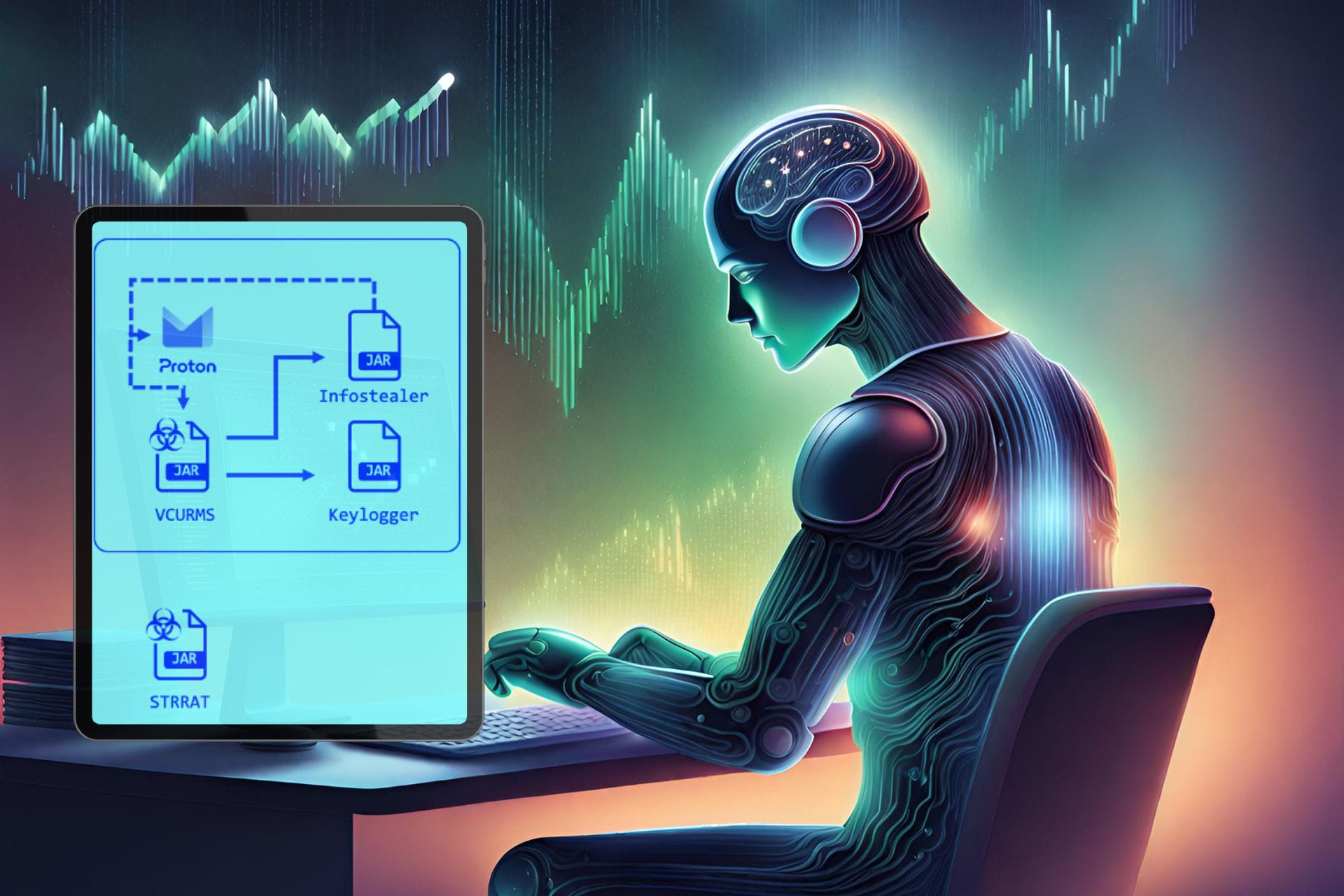
The Vcrums malware users target devices with Java installed. In addition, a successful infiltration into the system grants them full control over it. Furthermore, to spread the Vcrums and StrRAT malware, threat actors trick users into downloading a malicious Java client by sending what seems to be a legitimate email. Also, they disguise the email as an urgent recipient. On top of that, StrRAT acts as a ransomware attack. However, instead of encrypting and locking data, it steals it.

Once you download the Java content of the email, the Vrcums malware starts installing and executing additional malicious JAR files. By doing this, cybercriminals expand their control over your device. Furthermore, the Vcrum malware can monitor you and use password recovery tools and keyloggers to steal your login information. Additionally, the malware steals information from popular browsers such as Chrome, Brave, Edge, Vivaldi, Opera, OperaGX, and Firefox and applications like Discord and Steam.

Ultimately, Vcrums comes with StrRAT and several other malware in a pack. Moreover, it disguises itself as a common file format, such as .jpg. Also, it uses obfuscation services to avoid detection. On top of that, the malware can send data through emails and install more files. Thus, to defend against the Vcrums malware, always verify the source of your emails. Furthermore, according to Fortinet, you should consider deploying updated security solutions. In addition, the company recommends you perform network segmentation.

What are your thoughts? Do you have the latest security solutions to protect you from Vcrums? Let us know in the comments.

A ransomware stole the data of 27,000 people from Stanford last year

Last year, a ransomware attack affected Stanford University’s Department of Public Safety (SUDPS) network. Furthermore, after Stanford investigated the incident, the conclusion was that the ransomware stole the data of 27,000 people. However, the attack didn’t affect any other departments. In addition, according to Stanford, an unauthorized individual gained access to the data.

How does a ransomware attack work?

Threat actors use ransomware attacks to lock and encrypt data, devices, and systems. Afterward, the cybercriminal makes them inaccessible and unusable. Then, the hacker asks for a ransom to unlock them. In Stanford’s case, the main goal of the ransomware attack was to steal and leak the data. Furthermore, according to Dominic Alvieri, the Akira group is responsible for posting 430 GB of Stanford data on the dark web.

Most of the Stanford data stolen by the ransomware attack consists of phone numbers, emails, names, locations, digital signatures, security questions, usernames, passwords, credit cards, and security codes. On top of that, a smaller number of victims had their medical information and driver’s license number stolen.

Unfortunately, it took a long time for Stanford to release an update about the situation. Furthermore, the University announced that the people affected will receive an email. In it, they will find identity protection services free of charge.

Ultimately, this is not the only cybersecurity incident that happened to the University. Stanford dealt with similar ransomware attacks in the past. In addition, it takes a long time for the University to act, especially since they send emails only to the potentially impacted individuals. Fortunately, the investigations started shortly after the attack, and they managed to end it fast. Furthermore, the network is now more secure.

What are your thoughts? Have you ever encountered a ransomware attack? Let us know in the comments.

March 2026 Patch Tuesday: 60 flaws & 18 RCE bugs fixed

The second Tuesday of March 2024 was the Patch Tuesday for the month, which brought security updates for 60 vulnerabilities, including 18 remote code execution issues.

Two critical vulnerabilities, named Hyper-V remote code execution and denial of service flaws, are also addressed.

There were 24 elevation of privilege vulnerabilities, 18 remote code execution vulnerabilities, 3 security feature bypass vulnerabilities, 6 denial of service vulnerabilities, 6 information disclosure vulnerabilities, and 2 spoofing vulnerabilities.

This list doesn’t include 4 Microsoft Edge flaws that were fixed on March 7, 2024. Also, these updates mentioned by Microsoft do not include zero-day fixes.

Here are some important flaws addressed:

CVE-2024-21400 – Microsoft Azure Kubernetes Service Confidential Container Elevation of Privilege Vulnerability

This flaw could enable attackers to get admin rights and steal credentials in Azure Kubernetes Service. It was first reported by Yuval Avrahami, and Microsoft has now fixed it. Microsoft security updates page mentions:

An attacker who successfully exploited this vulnerability could steal credentials and affect resources beyond the security scope managed by Azure Kubernetes Service Confidential Containers (AKSCC)

CVE-2024-20671 – Microsoft Defender Security Feature Bypass Vulnerability

This flaw was discovered by Manuel Feifel with Infoguard (Vurex) and was fixed by Windows Defender Antimalware Platform updates. Version 4.18.24010.12 of the Antimalware platform addressed this flaw.

Microsoft explained how this Defender vulnerability could harm:

An authenticated attacker who successfully exploited this vulnerability could prevent Microsoft Defender from starting.

CVE-2024-26199 – Microsoft Office Elevation of Privilege Vulnerability

An Office vulnerability allows any verified user to get system privileges, but it was fixed this Patch Tuesday. The flaw was first pointed out by Ivan Almuina from Hacking Corporation Sarl. According to Microsoft, this flaw means:

Any authenticated user could trigger this vulnerability. It does not require admin or other elevated privileges.

CVE-2024-21411 – Skype for Consumer Remote Code Execution Vulnerability

This remote code execution vulnerability can be triggered by a malicious image or link. It was first pointed out by Nicole Armua and Hector Peralta, who are working with the Trend Micro Zero Day Initiative. Microsoft explains:

An attacker could exploit the vulnerability by sending the user a malicious link or a malicious image via Instant Message and then convincing the user to click the link or image.

CVE-2024-26201 – Microsoft Intune Linux Agent Elevation of Privilege Vulnerability 

Microsoft explains how this vulnerability works:

This vulnerability could allow an attacker to view potentially restricted information inside of a custom compliance script and tamper with the results of the scripts, but does not allow the attacker to make any other parts of the Intune service unavailable.

You can check out Microsoft’s release notes to learn about other security updates. March Patch Tuesday also brought some changes to Windows 11 and 10, which you can read in this detailed guide.

Have you installed the latest Windows updates? Share your thoughts on the improvements and changes introduced.

Can you run Windows 11 on a mobile phone? Yes, and you can even play AAA games on it

Have you ever wondered if you can install Windows 11 on a mobile phone? And no, we’re not talking about a Windows 11 phone, but the literal operating system running on a mobile phone.

This Reddit user, for instance, tried to install Windows 11 on a new mobile phone, and they managed to do so. Even more, the phone is perfectly capable of running AAA video games on medium to low settings.

How did they manage? By installing an ARM64 build of Windows 11. The user didn’t succeed at first, but then they managed to rewrite the firmware of the phone (hint: it’s a OnePlus phone), and Windows 11 was successfully installed. The best thing: it’s been running since November 2023, so it’s definitely a success.

Lemme explain myself. So a while ago I got a specific phone model, not too expensive and I tried installing the ARM64 build of windows 11 on it. First attempt was a failure and resulted in a bricked device. So after completely rewriting the stock firmware (thanks oneplus for making it so easy) i did the installation again. Its been working since last year’s november.

Reddit user

Windows ARM has been getting increasingly popular lately, and we even questioned if they indeed could be the future: seeing this example, now, they can indeed be the future.

This Windows version is all stripped and optimized for mobile and ultraportable devices, and there are signs Microsoft is thinking about investing more resources into it.

The Reddit user managed to set Windows 11 up with everything: Microsoft Office, Discord, and even some AAA games.

It does everything I need. Microsoft office, a server for my discord bot (I had issues with my hosting provider at the time) and occasional gaming. Windows runs absolutely fine and it can surprisingly play older AAA titles on low-medium settings. Although the gaming experience isnt as pleasant as on a bigger screen.

Reddit user

Some features naturally aren’t going to work, but the limitations are understandable. However, with the right knowledge, a mobile phone can be set up to run Windows 11 just fine.

Some of the drivers are missing for example: Fingerprint, cameras, speakers. Playing audio through a bluetooth speaker works fine. I also have gotten the 4G and mobile hotspot to work after fiddling around with the system registry.

Reddit user

The user concludes by saying that the experience has been challenging, but exciting. And the future seems promising: ARM is indeed the future of computing.

Overall the experience has been a bumpy ride. The phone is dualbooting between android and Windows 11. The x86_64 emulation is great though. ARM may just be the future of computing.

Reddit user

What do you think about this? Can you see yourself playing computer games on a mobile phone? Or transforming your phone into a computer?

Microsoft says Copilot in Intune will mark a new era of endpoint management

Having just announced the availability of Copilor for Security, starting April 1, Microsoft says the date will also mark the beginning of a new era of endpoint management with the release of Copilot in Intune in a public preview.

Microsoft Intune is at the cusp of transforming endpoint management and security with Microsoft Copilot, introducing new ways for organizations to help protect and drive productivity for your workers and simplify IT and security operations. April 1, 2024 will mark the beginning of a new era of endpoint management with the public preview of Copilot in Intune.

Microsoft

Intune, which is an organization-oriented platform, allows for the management of a company’s devices from one single point. Admins might be familiar with the platform, as they use it to set up devices and update them with patches when necessary.

Now, they will be able to set up devices faster and streamline the update process with Copilot, Microsoft says in their blog post:

Copilot in Intune provides AI powered insights that are tailored for organizational needs, such as quickly resolving end user issues and ensuring policies and settings are configured to optimize business outcomes safely.

Microsoft

The Redmond-based tech giant developed Copilot in Intune to be capable of helping admins and Intune users understand not only the context of the organization but also create new policies, and offer guidance when facing a more serious issue in the platform.

Plus, Copilot in Intune will work together with Copilot for Security to provide an encompassing strategy and plan of action in case the organization is targeted by threat actors. These include the detection and management of compromised devices.

Intune is an essential part of the April 1, 2024 general availability of Copilot for Security. Together, Copilot provides a way to swiftly respond to threats, incidents, and vulnerabilities with complete device context in concert with Microsoft Security solutions. This comprehensive approach reduces the complexity of interacting with multiple systems and admin centers to bring together a centralized, generative AI experience and vast information quickly. IT and security teams can all use Copilot for Security to fetch device and user properties and security data when investigating a suspicious or compromised device.

Microsoft

Organizations that have subscribed to Copilot for Security will be able to experience the public preview of Copilot in Intune, starting April 1.

You can read the full blog post here.

Microsoft slightly updates the Windows Server Preview by fixing its Feedback Hub

Microsoft released the Build 26080 to Windows Server Preview, and the build is nearly identical to the previous one, aside from one small update: its Feedback Hub now seems to be working.

Other than that, the build doesn’t include anything new. You can still check the full changelog below:

What’s New

Windows Server Flighting is here!!

If you signed up for Server Flighting, you should receive this new build automatically later today. For more information, see Welcome to Windows Insider flighting on Windows Server – Microsoft Community Hub

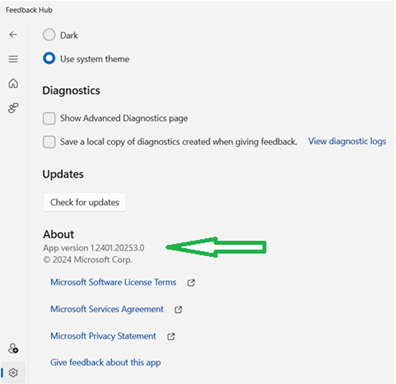
The new Feedback Hub app is now available for Server Desktop users!

The app should automatically update with the latest version, but if it does not, simply Check for updates in the app’s settings tab.

thumbnail image 1 of blog post titled 


							Announcing Windows Server Preview Build 26080

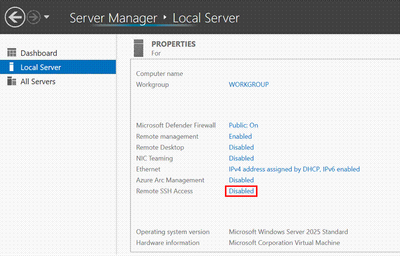
Win32-OpenSSH server component is now installed by default.

Starting in Windows Server 2025 the Win32-OpenSSH server side component (SSHD) will ship installed by default. Previously, the Win32-OpenSSH server component shipped as an optional feature that needed to be installed.  Additionally, there is a new option in the Server Manager UI to enabled/disable SSHD, as well as a new group, “OpenSSH Users”. To use SSHD, the feature only has to be enabled, not installed. When enabled, SSHD is allowed only on private networks on default port 22.

thumbnail image 2 of blog post titled 


							Announcing Windows Server Preview Build 26080

The following new features are specific to Windows Server with Desktop Experience only.  Some of these will require running the OS on physical systems AND having the right drivers on hand.

  • Try the “WinGet” command line utility on Windows Server! The WinGet command line utility enables installing applications and other packages from the command line. Simply type winget on the command line for a list of available commands to get started. For example, you can install the latest version of Powershell using the winget command: 
winget.exe install 'Microsoft.PowerShell'
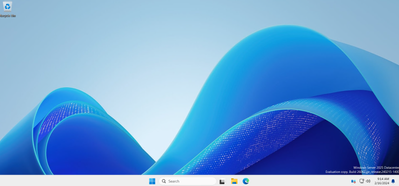
  • Desktop Wallpaper: Our newly modernized desktop experience now includes an updated desktop wallpaper.
thumbnail image 3 of blog post titled 


							Announcing Windows Server Preview Build 26080
  • Additions to <Settings>Accounts:  Email & Accounts is now consistent with Windows 11.  Please note, domain join will still be necessary for most scenarios.
    • Call to action:  Please try adding Microsoft accounts and/or work accounts along with relevant apps that take advantage of this.

Known Issues

Upgrade does not complete: Some users may experience an issue when upgrading where the download process does not progress beyond 0%.  If you encounter this issue, please upgrade to this newer build using the ISO media download option. Download Windows Server Insider Preview (microsoft.com)

VMs created using ISO media may not boot: Some users may encounter boot issues when creating Gen 2 VMs using this build (26063) and attempting to set the DVD ISO as boot preference. The new VM is unable to boot through the ISO and skips to subsequent boot options. This will be addressed in a future release.

Access denied error when using Diskpart –> Clean Image on Winpe.vhdx VMs created using WinPE: Create bootable media | Microsoft Learn. We are working to resolve this issue and expect to have it fixed in the next preview release.

Download Windows Server Insider Preview (microsoft.com)

Flighting: The label for this flight may incorrectly reference Windows 11. However, when selected, the package installed is the Windows Server update. Please ignore the label and proceed with installing your flight. This issue will be addressed in a future release.

thumbnail image 4 of blog post titled 


							Announcing Windows Server Preview Build 26080

Setup: Some users may experience overlapping rectangle voids following mouse clicks during “OOBE” setup. This is a graphics rendering issue and will not prevent setup from completing. This issue will be addressed in a future release.

WinPE – Powershell Scripts: Applying the WinPE-Powershell optional component does not properly install Powershell in WinPE. As a result, Powershell cmdlets will fail. Customers who are dependent on Powershell in WinPE should not use this build.

If you are validating upgrades from Windows Server 2019 or 2022, we do not recommend that you use this build as intermittent upgrade failures have been identified for this build.

This build has an issue where archiving eventlogs with “wevetutil al” command causes the Windows Event Log service to crash, and the archive operation to fail. The service must be restarted by executing “Start-Service EventLog” from an administrative command line prompt.

If you have Secure Launch/DRTM code path enabled, we do not recommend that you install this build. 

Available Downloads

Downloads to certain countries may not be available. See Microsoft suspends new sales in Russia – Microsoft On the Issues

  • Windows Server Long-Term Servicing Channel Preview in ISO format in 18 languages, and in VHDX format in English only. 
  • Windows Server Datacenter Azure Edition Preview in ISO and VHDX format, English only.
  • Microsoft Server Languages and Optional Features Preview

Keys: Keys are valid for preview builds only 

  • Server Standard: MFY9F-XBN2F-TYFMP-CCV49-RMYVH
  • Datacenter: 2KNJJ-33Y9H-2GXGX-KMQWH-G6H67
  • Azure Edition does not accept a key

Symbols:  available on the public symbol server – see Using the Microsoft Symbol Server. 

Expiration: This Windows Server Preview will expire September 15, 2024.

The March update introduces new features for the Snipping Tool, along with other fixes

The KB5035853 update was released on March’s Patch Tuesday for Windows 11 23H2 and Windows 11 22H2, and KB5035854 was released for Windows 11 21H2. This is Microsoft’s monthly ritual for all supported versions of Windows.

With KB5035853, changes to the Snipping Tool & Phone link were introduced, including bug fixes and other improvements. At the same time, the Redmond tech giant released KB5035845 to fix some issues.

KB5035853 – Windows 11 23H2 with build number 22621.3296 and Windows 11 22H2 build 22621.3155

The update also brings some changes to the Settings app and some minor tweaks related to games. Furthermore, you get support for a faster USB4 standard.

Here are the details:

  • The Phone Link settings page has a new name: Mobile Devices. Go to Settings > Bluetooth & devices > Mobile devices.
  • This update affects games you install on a secondary drive. Now, they remain installed on the drive.
  • You can now use the Snipping Tool to edit photos and screenshots from your Android device. Go to Settings > Bluetooth & devices > Mobile. Choose Manage Devices and allow your PC to access your Android device.
  • This update adds support for the USB 80Gbps standard. The next generation of USB4 has twice the bandwidth of USB 40Gbps. To use USB 80Gbps, you must have a compatible PC and USB4 or Thunderbolt peripheral.
  • This update affects games you install on a secondary drive. Now, they remain installed on the drive.
  • This update addresses an issue that affects long-edge fed printers. The alignment of stapling or hole punch locations is wrong.
  • This update addresses an issue that affects the Windows Settings Home page. It randomly stops responding when you go to the page.
  • This update addresses an issue that affects networking. A device fails to make the automatic switch from cellular to Wi-Fi when it can use Wi-Fi.
  • This update addresses an issue that stops a system from going to sleep. This occurs when you connect an external device to the system.
  • This update affects the Windows Backup app. It will no longer show on the user interface in regions where the app is not supported.

If you are running Windows 11 22H2, you get an extra fix. With this update, Microsoft has fixed the issue wherein you get an error while installing the latest updates. The error used to occur when trying to install the update, and your device stopped responding at 96% with an error code 0x800F0922.

KB5035854 – Windows 11 21H2

The update doesn’t bring many changes to Windows 11 21H2, but it has security improvements, changes to the Get Help app and fixes for issues related to Remote Desktop Authentication. Here are the changes mentioned by Microsoft:

  • This update addresses an issue that makes the troubleshooting process fail. This occurs when you use the Get Help app.
  • This update addresses an issue that affects Remote Desktop Web Authentication. You might not be able to connect to sovereign cloud endpoints.

So far, no known issues have been reported for either KB5035854 or KB5035853. If you encounter any issues while installing or updating, go to Feedback Hub to report them.

KB5035845 – Windows 10

This Windows update does not introduce major changes; this March update is for bug fixes and security improvements. Here are the changes mentioned in the changelog.

  • Using Windows share, you can now directly share URLs to apps like WhatsApp, Gmail, Facebook, and LinkedIn. Sharing to X (formerly Twitter) is coming soon.
  • This update affects games you install on a secondary drive. Now, they remain installed on the drive.
  • This update affects the Windows Backup app. It will no longer show on the user interface in regions where the app is not supported.
  • This update addresses an issue that affects Windows Hello for Business. You cannot use it to authenticate to Microsoft Entra ID on certain apps. This occurs when you use Web Access Management (WAM)

You might face some issues like Copilot not working on devices with multiple monitors or Copilot in Windows not supported when your taskbar is docked vertically on the right or left.

To install these updates, you can go to Settings> Windows Update> Check for Updates>Download & Install. Wait for the system to download and install the update, then restart your computer when prompted.

If you don’t wish to download the update via Settings, you can download the update manually from the Microsoft Update Catalog website.

What are your thoughts on the changes introduced on your Windows version? Share your opinions with our readers in the comments section below.