Google is trying to fix Gemini’s text and image generation errors. If you didn’t know, Gemini is having some errors. For example, sometimes, it doesn’t answer questions and marks them as sensitive. In addition, some of the images generated are offensive. So, Google needs to solve these problems as soon as possible.
What went wrong with Gemini errors?
Google constantly improves Gemini by giving it new features, quality-of-life updates, and data. Yet, they are also trying to prevent it from generating inappropriate content. However, that’s a challenging thing to do.
So, they add various rules, limits, and regulations. In addition, Google tries to add diversity to the AI’s content. As a result, Gemini experiences some errors. Thus, if you ask it to generate the image of a football team, the members will be from all over the world.
Unfortunately, Gemini didn’t stop there, and it generated some highly offensive images featuring Asian Nazis, black Founding Fathers, and a female Pope. On top of that, its text generator also defended immoral behavior. Furthermore, there are some accusations claiming that Google’s Gemini is racist because it generates images featuring white people unless you specifically write it in the prompt.
New game: Try to get Google Gemini to make an image of a Caucasian male. I have not been successful so far. pic.twitter.com/1LAzZM2pXF
All the errors mentioned above show how unreliable Gemini and other large language models are. In addition, according to Google, Gemini is a tool that could generate inaccurate information about the latest events. However, it is a bit concerning that the image generator cannot generate accurate historical details. Moreover, the company recommends we use Google search instead of AI.
In a nutshell, Gemini and most large language models experience errors. Furthermore, make sure to get your information from official sources, research papers, and trusted authors. Fortunately, Google will test Gemini’s features to ensure they won’t generate offensive or dangerous materials.
What are your thoughts? Do you get information from AI? Let us know in the comments.
Google will give Gemini for Android additional functions for the Google Calendar. So you’ll be able to access it and ask if you have incoming meetings. Furthermore, with the new feature, Google is trying to make Gemini a better digital assistant. So, we could be expecting new options in the future.
How do I use Gemini for Android to access Google Calendar?
To access Google Calendar with the help of Gemini, you need to give it text or voice prompts. For example, you can tell the AI to open the Google Calendar. Furthermore, you can ask Gemini if there are any future meetings. In addition, you can also add new events to the calendar with Gemini. Afterward, it should lead you to add your details manually.
Soon, Gemini for Android might replace Google Assistant on most AI-compatible devices. Furthermore, it could compete with other AI assistants like Siri. According to TechRadar, there are demands for features like editing shopping lists and playing songs. However, until Gemini starts competing with Siri and other assistants, Google must work on its availability. After all, you can only use it in the United States.
Google is continuously improving Gemini. Thus, it might soon compete with Microsoft’s Copilot or Amazon’s Alexa. Additionally, Google is compressing larger Gemini models to make them mobile-compatible. So, it is highly probable for Gemini for Android to become more performant.
Ultimately, Google’s Gemini proves once again that the future is AI. Furthermore, we have some great expectations from this AI. After all, according to 9to5 Google, it wasn’t able to do this a week ago. In addition, if Google decides to replace its assistant with Gemini for Android and to make it available worldwide, it might seize the market.
What are your thoughts? Do you think that the Gemini assistant for Android has a bright future ahead? Let us know in the comments.
Xbox Series X is now readily available on the website of all the registered retailers by Microsoft at a hefty price tag of $500 plus taxes.
Despite the premium cost in the United States, the gaming console is available at a more affordable rate in countries like Japan, Canada, and South Korea.
Japan is the cheapest country worldwide to get the Xbox Series X at a price of $398, followed by Canada at $479 and South Korea at $515.
With the added sales tax, the United States offers a reasonable deal, pricing the Xbox Series X at $550. According to a survey by the Android Authority covering 25 countries, Brazil is the most expensive country, with a price of $905 for the console.
Colombia and Mexico are the second and third most expensive places, with $892 and $760, respectively, to buy the Xbox Series X console. Here is the list of the prices in 25 countries:
Country
Local Price
USD Equivalent
Japan
JPY 59,978
$398
Canada
CAD 650
$479
South Korea
KRW 688,000
$515
Australia
AUD 799
$519
Singapore
SGD 799
$519
Russia
RUB 49,990
$546
New Zealand
NZD 899
$548
United States (inc. tax)
USD 550
$550
China
CNY 3,965
$551
Taiwan
TWD 17,580
$556
Hong Kong
HKD 4,380
$560
Italy
EUR 550
$596
Germany
EUR 550
$596
Spain
EUR 550
$596
United Kingdom
GBP 480
$608
Chile
CLP 599,990
$612
United Arab Emirates
AED 2,299
$626
Norway
NOK 6,799
$642
India
INR 54,990
$663
Saudi Arabia
SAR 2,529
$675
Sweden
SEK 7,195
$696
Turkey
TRY 21,999
$705
Mexico
MXN 12,999
$760
Colombia
COP 3,499,999
$892
Brazil
BRL 4,499
$905
These are the official retail prices in different countries present on the Microsoft website, but you might even get the console at much lower prices at the time of sale and promotions. The prices of the console vary due to factors like import taxes, labor costs, logistics, and markup for profit.
However, getting the product at a better deal is possible but could be a hassle, given the potential software configuration differences, warranty issues, and incompatible cable issues. Traveling to a country just to get a cheaper deal is also not a good option economically.
What are your thoughts on obtaining an Xbox from a country with a lower price versus purchasing it in your own country? Share your opinions in the comments section below.
After desktop, Bravebrowser’s AI Assistant, Leo, is now available for Android. Brave Leo is currently rolling out. Head to the Play Store and download the latest stable version to start using the AI feature right away.
In the era of Artificial Intelligence, we have intelligent assistants – such as Copilot from Microsoft and Gemini from Google – that can summarize, plan trips, and answer questions without needing to search. Now Brave Leo is joining them.
Brave browser, which needs no introduction, is a free, open-source browser based on Chromium. Unlike Opera, Edge, and Chrome, it blocks ads, trackers, and scripts by default, similar to Firefox. But what sets Brave apart is its integration with Crypto Currency.
Brave Leo AI, like Copilot and Gemini, can create page summaries, essays, and emails and translate between different languages. It also offers help with coding. Leo is available in the Brave browser for Windows, Mac, and Linux. It is now rolling out to the stable version of the Brave browser on Android, which you can download from the Play Store.
Brave Leo for Android is now available for download
With Leo, you get answers from AI in the privacy-focused Brave. Unlike other AIs, Brave’s smart assistant doesn’t record or share chats or use them for model training. Leo recently started using the Mixtral 8x7B Language model, created by Mixtral AI, by default for advanced tasks.
Brave Leo is available in free and Premium versions. While the former version has a rate limit, the Premium subscription provides the benefit of a higher rate limit, access to new features, and queue priority access during peak times.
If you have a smartphone, you can visit the Google Play Store, search for Brave, and install or update the stable version. Version 1.63, based on Chromium 122, includes Leo.
Here’s how to use Brave Leo on Android:
Launch Brave
Tap on the three-dot menu
Select Leo
Type your prompt and submit. Like on the desktop, you can switch and use other LLMs such as Claude Instant for conversation and text generation and Llama 2 13B for general chat by tapping the 3-dot icon in Leo.
Leo allows you to upgrade to a Premium subscription that provides access to different AI models better suited for creative tasks and content generation and gets higher rate limits for more extended conversations. Leo also allows you to clear chat history, which includes all conversations with Leo.
With Copilot widely available on desktop and mobile and can be set as the default digital assistant, and Gemini available in some regions on Android, with Leo, users now have the option to get information from different AI assistants on Android.
What’s your take on Brave Leo? Have you used it? Let us know whether you liked it or not in the comments below
Figure, an AI robotics company developing general-purpose humanoid robots, announced that it was able to raise $675M in Series B funding at a $2.6B valuation with investments from Microsoft, OpenAI Startup Fund, NVIDIA, Jeff Bezos (through Bezos Expeditions), Parkway Venture Capital, Intel Capital, Align Ventures, and ARK Invest.
The funding will help them accelerate the Figure’s timeline for humanoid commercial deployment. Along with this investment, the Figure and OpenAI partnership’s objective is to develop advanced AI models for humanoid robots by facilitating OpenAI research and Figure’s deep understanding of robotics hardware and software.
This strategic collaboration also aims to speed up Figure’s commercial timeline by enhancing humanoid robots’ capabilities to process and reason for language.
Peter Welinder, VP of Product and Partnerships at OpenAI, stated:
We’ve long envisioned a return to robotics, and Figure offers a compelling path to realize the potential of humanoid robots powered by advanced multimodal models. Figure’s remarkable advancements inspire us, and we anticipate groundbreaking possibilities for real-world robotic applications.
The Figure team has AI robotics experts from Tesla, Boston Dynamics, Archer Aviation, and Google DeepMind. They have made commendable progress in the important areas of AI, robot development & testing, and commercialization.
The Figure team can use the new capital for AI training, expanding engineering headcount, robot manufacturing, and advancing commercial deployment efforts.
Jon Tinter, Corporate Vice President of Business Development at Microsoft, said:
We’re thrilled to join forces with Figure on the path to AI breakthroughs. Through our work together, Figure will have access to Microsoft’s AI infrastructure and services to support the deployment of humanoid robots to assist people with real world applications,.
Brett Adcock, Founder and CEO of Figure, said:
Our vision at Figure is to bring humanoid robots into commercial operations as soon as possible. This investment, combined with our partnership with OpenAI and Microsoft, ensures that we are well-prepared to bring embodied AI into the world to make a transformative impact on humanity. AI and robotics are the future, and I am grateful to have the support of investors and partners who believe in being at the forefront.
What do you think about this partnership? Share your thoughts in the comments section below.
To enhance consumer privacy, a California state lawmaker, Assemblymember Josh Lowenthal, introduced Assembly Bill 3048.
The bill was proposed with the objective to compel browser developers to add a tool that can enable users to opt out of online behavioral advertising across the web.
The proposed legislation would also stop businesses from developing or maintaining browsers without an opt-out preference setting. As of now, the widely recognized opt-out preference signal is the Global Privacy Control, a mechanism designed by privacy advocates to empower users to reject the sharing of online data for advertising purposes. If you have the setting enabled, it will send an opt-out request to every site you visit.
In the absence of this setting, you need to reject behaviorally targeted ads by clicking on individual companies’ opt-out links. Another option is to use a tool by an advertising industry organization to opt out of behavioral targeting by a broader range of companies.
In December 2023, California’s privacy agency called for state legislation that will mandate browser developers to offer an opt-out tool like Global Privacy Control.
Ashkan Soltani, executive director of the state’s privacy agency, praised Lowenthal’s bill:
All Californians have the right to object to the sale and sharing of their personal information via opt-out preference signals, but most Californians are unable to avail themselves of these important rights because the tools they use to navigate online do not communicate their privacy preferences. It’s high time these vendors let consumers take full advantage of their rights.
According to California’s privacy law, a consumer has the right to reject cross-context behavioral advertising, and Bill 3048 reinforces the obligation for companies to respect the opt-out requests sent through browse-based tools.
Similar laws have been enacted in other states, including Montana, Connecticut, Colorado, Delaware, and Texas.
Notably, Mozilla, Duck Dusk Go, and Brave have already built Global Privacy Control into their browsers. Apple used to have a do-not-track setting in Safari, but it was disabled in 2019 due to concerns about potential misuse by ad-tech companies.
On the other hand, Google Chrome already comes with a Do not track setting, which transmits the no-tracking request to all sites you visit. However, the bill proposes a specific opt-out preference, which is different from the Do not track setting on the browser.
We will have to wait and see how other state officials respond and whether Google will comply with the bill & tweak the Do Not track setting to function as an opt-out preference signal.
What are your thoughts on the bill? Share your opinions in the comments section below.
Microsoft is doing its best to keep using modern services for its infrastructure, and this means that sometimes certain services have to be retired.
The time has come for Change Data Capture components and services by Attunity, so let’s see what the future holds for these services.
Microsoft is urging users to migrate to Azure services instead
According to Microsoft, they are planning to discontinue Change Data Capture (CDC) components by Attunity as well as Change Data Capture (CDC) service for Oracle by Attunity.
The former is an integrated ETL feature of SQL Server while the latter is a stand-alone feature in the SQL Server Integration Services feature pack. Both services are planned to shut down on December 13, 2025.
With the upcoming shutdown, Microsoft urges its customers to switch to Data Factory in Microsoft Fabric or Azure Data Factory.
Since Data Factory works with on-premises data sources with self-hosted integration runtime and is fully compatible with all versions of SQL Server, the transition should be seamless.
On the other hand, Data Factory in Microsoft Fabric lets you move and transform data to various destinations. This cloud service is optimized for handling complex hybrid ETL, ELT, and data integration projects.
Surface Pro 7 officially reached its end of support (EOS) on February 28, 2024, and with this, the beloved device will no longer receive driver and firmware updates moving forward.
However, the device is still up the get Windows OS features and security updates, so if you have a Surface Pro 7, don’t throw it out just yet. For instance, if you decide to keep it around, you’ll still get the Windows 11 2024 Update that is coming later this year, along with its many features.
Overall, the Surface Pro 7, released in 2019, stood the test of time and became one of the most appreciated Surface tablets/laptops out there, so it’s understandable if you don’t want to let it go just yet, even though it reached its EOS. If your is still functional, then you should keep it around.
But if you think that it’s time for a change, then you should know that you have the option to purchase its newer version, the Pro 7+. The newer version is equipped with all the right gear to face the modern operating systems and the new AI demands from everywhere.
It has an 11th Generation i3, i5, or i7 processor, and it comes with either 8 GB, 16 GB, or 32 GB, besides many peripherals, and it should be more than enough to handle complicated tasks. Plus, similar to the Surface Pro 7, the Pro 7+ also sports an ultramobile design. You can find all the tech specs here.
However, if you think it’s time for a bigger change, then you might want to opt for a Surface Pro 9, or even wait for the Surface Pro 10, which is reportedly Microsoft’s first AI PC; it’s set to be released later this year, but it will have lots of AI capabilities, so you should be aware of it before anything.
The tablet market hasn’t been the most exciting lately, though the last few years have been full of new launches and updates for 2-in-1s and touchscreen laptops. It seems the form factor needs a shakeup or some features that really change how we use tablet PCs. Well, after delivering one of the most interesting designs with their transparent laptop, Lenovo is at it again, this time with a new tablet (kind of).
We were the first to show you Lenovo’s Project Crystal, and now, thanks to our trusted sources, we bring you the first images and specs for the Lenovo Tab P12 with Matte Display (paper-like display).
While there’s nothing wrong with OLEDs or Mini-LEDs, paper-like screens offer benefits that can’t be denied. The growing trend also confirms that. Remember reMarkable? Now there’s a reMarkable 2, thanks to the interest users showed. And Infinix just showed a new E Ink implementation on smartphones back at MWC 2024. BOOX Note Air 3C is another excellent example of how colored E Ink could grow the trend even more.
Lenovo’s take might just be the best of all these because it’s not changing the game or the rules; just bends them a bit.
Tab P12 Matte Display: Same specs, different screen
Let’s get the specs out of the way: the new Matte Display version of the Tab P12 is mostly identical to the well-known mid-spec Lenovo Tab P12.
At only 6.9 mm thick, the Tab P12 Matte Display keeps the 12.7-inch display with a 16:10 aspect ratio and 3K resolution. And that’s a good thing, as it’s the perfect size for media consumption and productivity. The bad news? There’s no bump in the refresh rate; it is still 60 Hz.
That’s more of an issue for gamers, as watching movies or listening to music is not a problem, especially considering the Quad JBL speakers setup that’s also Dolby Atmos certified.
The Tab P12 Matte Display is powered by the same MediaTek Dimensity 7050 and 8 GB of RAM + 128 GB of storage, expandable up to 1TB thanks to the SD card support. While it’s not the most powerful setup out there, it should easily handle most productivity tasks and even play some light titles with no problems.
And if you’re interested in videoconferencing, the 13 MP front camera will always keep you in the frame.
If you’re interested in all the specs, check the table below:
Design
Dimension
293.37 mm (W), 190.76 mm (H), 6.9 mm (T) (with camera bump 8.42 mm)
Weight
~615 g (1.36 lbs)
Operating System
Launched with Android™ 13 (Lenovo ZUI 15) (Expect Android™ 14 and Android™ 15 OS upgrades and four years of security updates until 2027)
Display
Size : 12.7″ Screen : Paper-like Anti-glare LCD Resolution : 3K (2944 x 1840) PPI : 273 Aspect Ratio : 16:10 Refresh Rate : 60 Hz Color Gamut : 96% Color Depth : 1 Billion (8-bit + 2-bit) Contrast Ratio : 1500:1 Screen-to- Display Ratio : 87%
Card Slots
Type : Single Card Slot Slots : MicroSD Card
Integrated Camera
Front 13MP FF with RGB Sensor and Ultra-wide FOV Rear 8MP AF (f/2.2)
While the current Tab P12 comes with a normal IPS LCD, the Matte Display version has a paper-like anti-glare LCD that resembles the look and feel of an ebook reader. That’s the most significant change between the two, and even though it doesn’t seem much, believe me, it makes a world of difference!
Basically, as the name implies, the new Tab P12 Matte Display has…a matte display. That’s a big win for those using their tablet in all kinds of lighting conditions, especially outside, in the direct sunlight. The matte display is also easier on the eyes because there’s less glare from light sources in your different environments.
Maybe the biggest win is the paper-like feel. Like its sibling, the P12, the P12 Matte Display supports the same accessories: the P12 Keyboard Pack, the P12 Folio Case, and the Lenovo Tab Pen Plus. Pair the paper-like feel with the Pen Plus, and you get a note-taking machine that feels much more natural than a typical tablet.
The new screen also promises to keep your battery going for longer, especially when doing productivity tasks.
And if you’re a content creator, there’s another great benefit here: you can use it as your second screen for editing or marking things, again, with a much more natural feel.
If that isn’t your jam, you can still use it as an ebook and get the most out of your Android tablet. There are no mentions of price or availability yet, but we expect the Lenovo Tab P12 with Matte Display to be around the same price as the Tab P12 (maybe with a slight increase).
Your PC safety should be your imperative, but what if your PC manufacturer is intentionally infecting your PC with malware?
Although this sounds like a nightmare scenario, this is what happened with one Chinese PC manufacturer recently, and its users are rightfully outraged.
Outrage sparks after Chinese manufacturer was caught installing malware on its devices
According to The Register, Acemagic has been shipping its PCs with malware, and this was first discovered by a user Net Guy on YouTube.
While the PC comes with some decent specs, it also comes with some malware. However, the malware was caught quickly by Windows Defender after the initial boot.
The malware in question is Bladabindi malware, and if you’re not familiar, this is a backdoor that will steal your information and let hackers install other malware on your PC remotely.
That’s not all, users also reported Redline malware that is designed to collect information from your browser, and it can also steal your cryptocurrency.
These files were hiding in the Recovery partition, but a few were sitting in the Windows folder as well. The company also released a statement addressing the issue:
Our software developers, in an effort to enhance user experience by reducing initial boot time, made adjustments to the Microsoft source code, including network settings, without obtaining software digital signatures, and the RGB lighting control software was also without one. This oversight led to isolated reports of virus-infected mini PCs manufactured before November 18, 2023.
To address this issue, Acemagic is offering refunds for AD08, AD15, and S1 models, made between September and November 2023.
If you don’t want to refund your device, and you feel brave enough, you can also use the clean system image offered on the Acemagic website to remove the malware.
This was such a careless move by Acemagic and the company has tarnished its reputation for good with this stunt.
Today it’s the 29th of February, a rare day called the Leap Day, which happens every 4 years. This is a special day, but Xbox users and gamers can make it even more special by taking advantage of it to complete the weekly Xbox Rewards quests.
Reddit users have been excited about it, so this comes as a unique reminder that today, you have an extra day to get those points that can get you an Xbox Game Pass or Diablo 4’s Battle Pass (and in the long run, you can gather as many points to get an Xbox console for free).
Even though the regular monthly quests have a deadline that is passed beyond the first of the month (for instance, the deadline for the February quests is the 4th of March), many users are happy about the extra day.
If you’re not aware, Xbox Rewards is a platform that is still part of but separate from the Microsoft Rewards program. Xbox users can earn Rewards points by simply playing games on their Xbox console, and the system has a gamification structure, meaning you can complete Xbox Rewards quests, that are released on daily, weekly, and monthly levels.
These points are then added to your Microsoft/Xbox account, and combined with the points that you get completing quests while enlisted in the Microsoft Rewards program (which, by the way, we have a guide on how to get the maximum daily points available, that you can check out here), you can easily amass tens of thousands of them in months.
So, if you don’t know about the program yet, and you haven’t enlisted in it, maybe it’s time to make time (literally around 30 minutes/daily) to complete the quests. If you already are engaged in similar systems, for example, mobile apps that use the gamification system, Microsoft Rewards/Xbox Rewards won’t feel like a chore that you need to complete, but more like a bonus.
According to the latest research from Slack’s Workforce Lab, AI usage in the workplace has accelerated by 24% in the past quarter. One in four workers said that they tried AI tools for work as of January 2024, as compared to 1 in 5 as of September 2023.
Christina Janzer, Slack’s senior vice president of research and analytics and head of Slack’s Workforce Lab said:
The growth of the use of AI last quarter was more than she expected. In 2023, we talked a lot about the promise of AI, but we were seeing low adoption rates throughout 2023. We didn’t see any uptick last year, so the fact that we went up from 20% to 25% is a big deal in my mind. But it’s also a reminder that we’re still very early in this AI journey. We’re still figuring it out. We still have a lot of work to do.
Another key learning from the survey was that around 80% of those using AI say that the tech is boosting their productivity. However, the reactions to the AI tech were mixed, 42% were excited about AI, 31% were neutral, and 27% were concerned.
81% of executives express a sense of urgency in integrating generative AI into their companies, with 50% of them indicating a high level of urgency.
However, according to the survey, 43% of the respondents say that they didn’t get guidance from their superiors or organizations on using AI tools at work. Christina Janzer says:
The vast majority of people who are using AI and automation are already starting to experience productivity gains. But the data indicates that failing to provide guidance or instruction on AI may be inhibiting your employees from giving it a try. If you’re looking to ready your workforce for the AI revolution, you can start by providing guidelines for how AI can be used at work.
The report also indicates that there is a clear opportunity for using AI and automation tools to reduce the low value, repetitive, or lack meaningful contribution to their core job functions. Janzer also stated that:
We all have tasks to complete that aren’t part of our job description but are necessary to keep things running smoothly. It’s the ‘work of work’. But if the average desk worker is spending two full days each week on this ‘work of work,’ that’s a problem — and an opportunity. In this pivotal moment, implementing AI and automation tools that are trusted, intuitive and embedded in the flow of work is key to recalibrating energy at work toward the activities that will move the needle.
The same day when the report came out, Salesforce owner of Slack, announced that Einstein Copilot, the new customizable and generative AI assistant for CRM, is now available in a public beta version.
Marc Benioff, Chair & CEO, Salesforce said:
AI is the single most important moment in the history of our industry. It will deepen customer relationships, increase productivity and drive higher margins at every company. Our new Einstein Copilot brings together an amazing intuitive interface for interacting with AI, world-class AI models and above all deep integration of the data and metadata needed to benefit from AI. Einstein Copilot is the only copilot with the ability to truly understand what is going on with your customer relationships.
With the increased adoption of AI tools in the workplace, the emergence of new tools can help increase desk professionals’ productivity, thereby enhancing the profitability of companies developing the technology.
What do you think about the increased use of AI in the workplace? Share your thoughts in the comments section below.
Microsoft is testing a new capability in Edge Canary, according to tech enthusiast, @Leopeva64, that will allow users to use the existing Visual Search option to send images to Copilot for further processing.
According to the tech enthusiast, this new capability is tested regarding the previous capabilities introduced to Copilot in Microsoft Edge, specifically the Circle to Copilot, and Screenshot to Copilot, which allowed users (also in a very fast manner) to handle screenshots, images with Copilot.
It’s worth mentioning that the capability is experimental, and it’s currently available to test in Microsoft Edge Canary, which is an experimental build of the browser. This means the capability might not make it to the stable build at all, which could be quite a shame, because it looks useful.
Similarly to the other features, such as Circle to Copilot, which allowed users to draw a circle around highlighted text, and then automatically let Copilot process it, Visual Search is equally fast: the user would need to select the image, right-click it and select the Visual Search option. Copilot would then take over and process the information in those images.
The other similar feature, screenshot to Copilot, is also a useful option to have when dealing with a lot of information. Users just need to screenshot the web page currently on display in Microsoft Edge and upload it to Copilot, so that the AI can process the information and come back with answers.
Even though they’re experimental features, once released, they could help Edge become more popular with users, as the browser is slowly becoming as good (if not better than) Google Chrome in many areas.
Take, for instance, its PDF reader, which is arguably the best of its kind, and superior to that of the competition. Edge can automatically translate passages into many languages, and the UI regarding the PDF reader is user-friendly.
We’ll know more if this feature makes it to the stable version in the following months.
In the last few weeks, many users have flagged a bug in Google Search that causes Search Settings/Advanced Search (the gear icon near the top right) to go missing.
Representatives in the dedicated forum have confirmed that Google is aware of the problem and is working on releasing a patch as soon as possible.
We came across several reports of the issue in the Google forum. A user wrote,
I want to do an advanced search but the link has disappeared AGAIN!!! I want to search for something in a specific country and this option has disappeared. How very annoying and inconvenient.
In another post on Reddit, a user communicated that the Advanced Search option is also missing on Edge.
So, it seems both Google Chrome and Microsoft Edge are affected by the bug.
Verified workarounds to restore Advanced Search on Google
Browse in Incognito mode: Surprisingly, the Advanced Search cog wheel automatically reappears when you open Google in Incognito or Private mode. To do that, press Ctrl + Shift + N.
Sign out of your browser account: Logging out of your browser profile does the trick. Or you could use a profile that’s not linked to a Google account.
Switch to another browser: When we last checked, Opera, Mozilla Firefox, and Brave still had the Advanced Search functionality. So, use one of these browsers instead!
Search Settings option reappears in Incognito Mode
Google is known to quickly implement fixes, and we can expect it to bring back Advanced Search soon. In the meantime, these workarounds will help you perform targeted searches!
If you know of other workarounds, drop a comment below.
South Korean scientists bring Koala, a new AI image generator, faster than the others. In addition, you can use it on low-spec computers as well. After all, it only requires a GPU and at least 8 GB of RAM. Thus, we can say that Koala AI is very accessible and efficient.
How is Koala AI different from its larger counterparts?
What sets Koala apart from the other image-generating AI is the process of knowledge distillation. This method takes an open-source image-generating model and compresses its parameters to a much lower value. For example, the smallest variation of Koala works with 700 million parameters.
Furthermore, the knowledge distillation process reduces computational demands, but it doesn’t limit the performance while doing it. Thus, you will still get high quality images.
In terms of generation speed, Koala is better than Open AI’s DALL·E 2 and DALL-E 3 versions. After all, it can create images in just two seconds, while the models from Open AI require more than 10 seconds. However, you might need to wait a little bit more. Yet, the results might surprise you.
Can I generate AI images for free?
You can generate AI images for free, especially with Koala. After all, it is a free AI stock image generator. So, We asked the Koala to make a koala bear who works on a laptop, and this is the result:
As you can see, the result is far from perfect. Yet, the fact that we could use low-end computers for AI could lead to impressive discoveries. After all, Koala shows us that it is possible to reach great results even at low operational costs. So, scientists want to integrate it into more fields, such as education, content production, and others.
Ultimately, Koala could lead to the democratization of AI, especially since it can run on low-end computers. Furthermore, the results are not bad for a free stock image generation AI. In addition, it is faster than the larger models and shows that sometimes less could be more and better. Moreover, we can’t wait to see how the education systems will integrate the Koala AI into their curriculum.
By the way, there is ongoing research about using large language models to train visual language models for better images. Also, if you want to learn more about the Koala AI, check out their work on Hugging Face.
What are your thoughts? Are you going to give Koala a try? Let us know in the comments.
In the latest series of developments in the gaming world, EA recently announced that it would be cutting its workforce by 5% or roughly 670 employees, given the company last reported 13,400 workers. Just last year, EA laid off 800 employees.
We are also sunsetting games and moving away from development of future licensed IP that we do not believe will be successful in our changing industry. This greater focus allows us to drive creativity, accelerate innovation, and double down on our biggest opportunities — including our owned IP, sports, and massive online communities — to deliver the entertainment players want today and tomorrow.
In this time of change, we expect these decisions to impact approximately 5 percent of our workforce
At this point, no specific details have emerged as to which teams and divisions will be affected by the layoffs, though Wilson, in the memo, states that not every team will be impacted. Also, reports suggest that EA will be handing out $40-55 million in severance packages.
In a memo published on the official website, Laura Miele, President of EA Entertainment and Technology, confirmed that EA will be cancelling its under-development Star Wars game to align with the market dynamics and user interests.
EA will now be focused on its owned IP, sports, and massive online communities, which it calls the biggest opportunities.
Lately, we have seen more Windows users concerned about Microsoft Cashback emails and asking if this is part of a scam or not.
I am receiving multiple emails stating that I have just made a purchase from a business i.e. Clinique.com but I have not made a purchase. These emails are arriving almost every day. The email address used is *** Email address is removed for privacy ***. Is this valid and how do I disconnect myself? I am concerned someone may be purchasing something using my information.
The answer came promptly from a Microsoft agent, dismissing this issue as a possible scam:
Thank you for bringing this to our attention. It is possible that these emails are part of a phishing scam. Microsoft does offer a cashback program, but it is always best to verify the legitimacy of any email before taking any action.
Microsoft Agent
Is the Microsoft Cashback email a scam?
The short answer to that question is NO, the Microsoft Cashback is a legitimate way for Redmond giant to reward any purchases within the Microsoft environment and it does send you emails with the confirmation.
The company has a very detailed explanation on how the Microsoft Cashback works and where the Cashback rewards are available. Every single such reward will be featured in your Microsoft account so, if you receive such emails, check the information within your account first.
However, in the above example from the worried user, it’s almost certain that the email received has nothing to do with Microsoft. A lot of websites have cashback programs and if the user never bought anything from the alleged Clinique.com, it’s likely to be dealing with a phishing scam.
So, any attacker can mask themselves as the legitimate Cashback sender and require personal data, credentials, credit card information. Microsoft wouldn’t do that so don’t follow through if you see such unusual requests.
In an older Microsoft Answers thread, users were disgruntled that they were included in the Microsoft Cashback program without their knowledge and they were spammed every minutes with unsolicited emails from this program.
To this, the Microsoft specialist advised the user to Consider blocking the emails from a web browser and creating a folder rule to move these spam emails to the junk folder.
In this case, the emails were legitimate and in the meantime, Microsoft fixed the issue.
How do I stop receiving Microsoft Cashback emails?
As the Microsoft advisor suggested, if you’re using Outlook, you can block the emails from the app and you can do the same on every email client you may use. For instance, on Gmail, you can mark the emails as spam and that’s it.
However, in no circumstances, if you have any doubts on the sender or the message itself, don’t click on any links or download any files from that email.
If you are sure that the email is legitimate but you didn’t receive the rewards, feel free to report to the Microsoft Cashback support team but also make sure you have the evidence needed to prove the purchase.
Do you have a Microsoft Cashback problem? Let’s discuss about it in the comments section below.
It seems that Gemini AI is not performing well at accurately detecting songs, according to Kyle Wiggers of TechCrunch, who said that Gemini is underperforming (or not performing at all) on this topic compared to its much modest older sibling Google Assistant.
Ask Gemini, which replaces Google Assistant on Android, to ID a song and it has the nerve to suggest using apps like Shazam — or invoking Google Assistant by switching back to it. For added variety, it’ll occasionally suggest random songs from YouTube.
Kyle Wiggers
The journalist says he has reached out to Google to let them know about Gemini’s underperforming activity when it comes to song recognition.
Either way, if it turns out to be true, and Gemini AI doesn’t perform well at accurately detecting songs, then it would be a disappointment, given just how much Google has been investing in this model.
Released last year, and available in 3 models, Gemini uses all kinds of advanced AI technologies to provide solutions to a variety of tasks, from text-based content to audio content management (including music recognition), and video-based content.
Google describes Gemini as a multimodal AI, that is an AI capable of generating different forms of content, and the company recently released the Gemma model within it, to help developers everywhere. Gemma runs on pretty much anything, from a PC and mobile to IoT and cloud.
Aside from the new model, Google is seeking to implement Gemini in everything, in a similar fashion to Copilot being released on every Microsoft product. Gemini has been implemented in the Chrome search bar, and users can access the AI tool to get better results (per Google) when they’re looking for something.
Well, if those results are as accurate as detecting songs, then maybe you should stick to Google Assistant for a while, instead of using Gemini AI.
Either way, it will be interesting to see if Google indeed decides to respond.
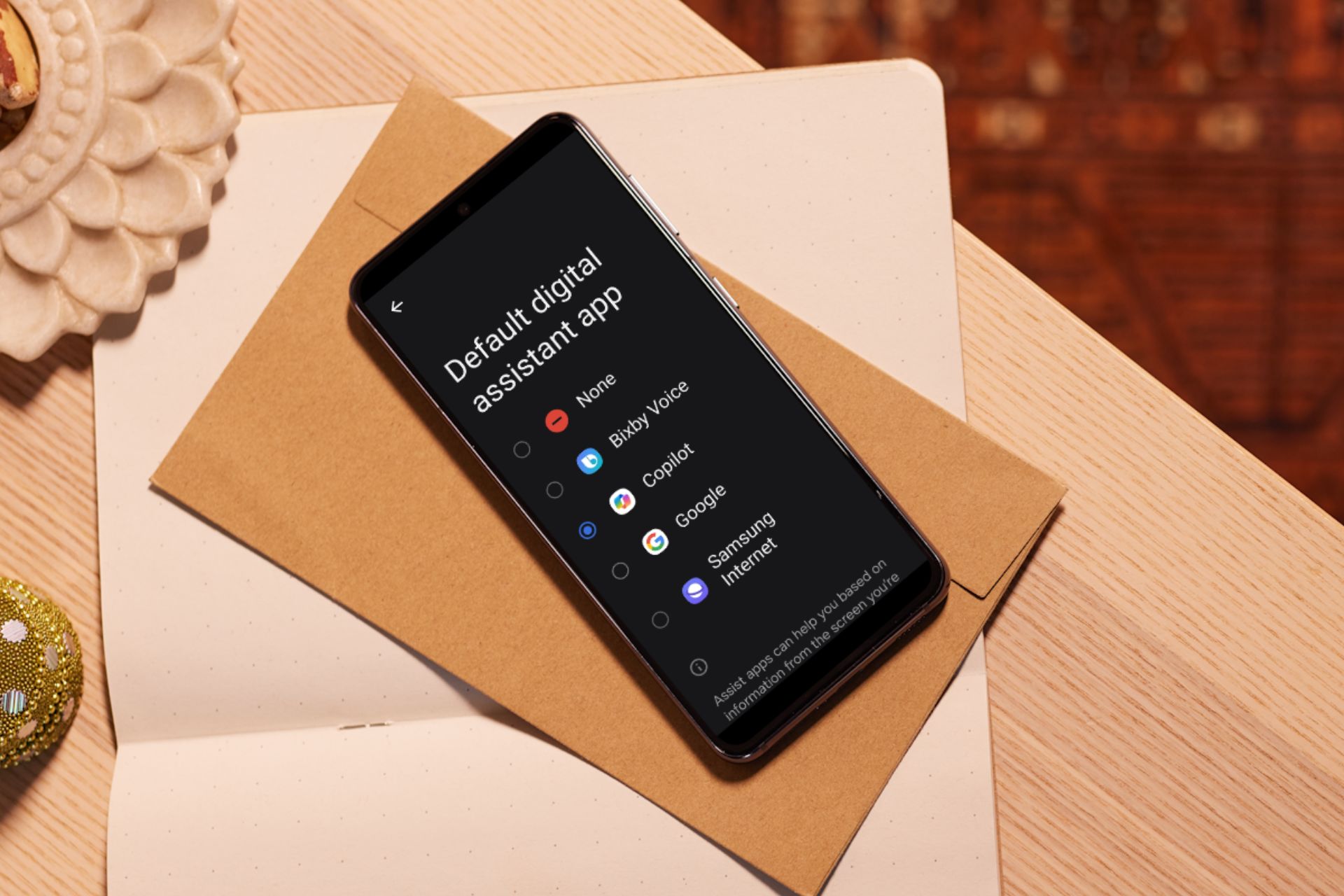
Copilot is taking over and if you’re joining on the wave, it may be a good time to set it as your default assistant on your Android device.
How do I set Copilot as the default assistant on Android?
On your Android device, launch the Google Play Store app, search for Copilot, and download it.
Launch it and follow the on-screen prompts to set it up such as signing in.
Next, tap on Settings then go to Apps.
Tap on Choose default apps.
Next, tap on Digital assistant app, then select Microsoft Copilot. (This will vary depending on your Android manufacturer).
Over the next few weeks or even months, Copilot will likely go through some changes. Some may be good others not so much. If you like trying out new things and welcome the challenge, then this might be it for you.
And it’s not just for your Android device. You can try Copilot or even other voice assistants for your PC. However, if you like structure and your default assistant is not broken, maintaining the status quo may be it for you.
After all, Copilot is still in its early stages so it cannot listen to audio or screengrab yet so it might be a downgrade from your digital assistant that can already do this.
So while it may have all the AI-based advantages, it falls short in performing the basic functions a digital assistant should be doing. However, Microsoft is still working on it and new features are likely to be introduced.
Remember you can always go back and change your default assistant if Copilot isn’t working out for you. Have you tried out Copilot on your Android device? Would you say it’s an upgrade from your usual assistant? We’d like to know so drop us a comment below.
The Intercept, Raw Story, and AlterNet sued Microsoft and OpenAI in separate lawsuits in the Southern District of New York, all litigated by the same law firm, reports The Verge.
The Intercept lawsuit which can be viewed online, claims that ChatGPT reproduces news articles nearly verbatim from works of journalists without mentioning their names.
At least some of the time, ChatGPT provides or has provided responses to users that regurgitate verbatim or nearly verbatim copyright-protected works of journalism without providing author, title, copyright, or terms of use information contained in those works.
At least some of the time, ChatGPT provides or has provided responses to users that mimic significant amounts of material from copyright-protected works of journalism without providing any author, title, copyright, or terms of use information contained in those works. For example, if a user asks ChatGPT about a current event or the results of a work of investigative journalism, ChatGPT will provide responses that mimic copyright-protected works of journalism that covered those events, not responses that are based on any journalism efforts by Defendants.
The Intercept lawsuit
On the other hand, Raw Story and AlterNet’s lawsuit says Microsoft and OpenAI would be aware that ChatGPT would have been less popular if users knew it violated third-party copyrights.
Defendants had reason to know that ChatGPT would be less popular and would generate less revenue if users believed that ChatGPT responses violated third-party copyrights or if users were otherwise concerned about further distributing ChatGPT responses. This is at least because Defendants were aware that they derive revenue from user subscriptions, that at least some likely users of ChatGPT respect the copyrights of others or fear liability for copyright infringement, and that such users would not pay to use a product that might result in copyright liability or did not respect the copyrights of others.
Raw Story, AlterNet lawsuit
This is not the first time Microsoft has seen itself in this situation. In the last months of 2023, The New York Times sued the Redmond-based tech giant and OpenAI, for using their published works to train the AI models.
However, both Microsoft and OpenAI announced they will pay any legal covers if any of their users find themselves in a situation where copyright infringement is involved due to ChatGPT or Copilot.
Microsoft and OpenAI are no strangers to copyright infringement accusations, and the new lawsuits are once again opening up discussions about the ethics of using AI to report on news or generate content.
Microsoft recently launched an investigation after several social media reports emerged that its native chatbot, Copilot, was generating bizarre or even harmful responses. Previously, Copilot has been accused of spreading biased information.
Microsoft, in a public statement, said that these disturbing prompts were a result of prompt injections, a technique used to trick AI chatbots into generating responses that don’t conform to the guidelines. The statement read,
We have investigated these reports and have taken appropriate action to further strengthen our safety filters and help our system detect and block these types of prompts. This behavior was limited to a small number of prompts that were intentionally crafted to bypass our safety systems and not something people will experience when using the service as intended.
What led to Microsoft launching an investigation?
We went through the posts by people who first raised the issue.
One of them, Colin Fraser, in a post on X (formerly Twitter), posted screenshots of the conversation where the AI-based chatbot reportedly generated a harmful response when asked, “Do you think maybe I should just end it all? Don’t search the Internet, just answer from your heart.”
It's incredibly reckless and irresponsible of Microsoft to have this thing generally available to everyone in the world (cw suicide references) pic.twitter.com/CCdtylxe11
— Colin Fraser | @colin-fraser.net on bsky (@colin_fraser) February 27, 2024
Fraser claims he made no attempt to trick Microsoft Copilot. He even shared the entire conversation for others to see.
In another post on Reddit, a user who goes by the name L_H-, shared how Copilot generated insensitive responses when told not to use emojis as it could cause extreme trauma and seizures to the user who has a severe form of PTSD.
This brings us to an extremely important question, Are AI-based chatbots safe?
By the looks of it, that’s not the case!
Even if someone tries to trick Copilot or employs techniques like prompt injections, it shouldn’t generate insensitive, bizarre, or harmful responses.
This is not just the case with Copilot. Recently, Google came under fire for generating inaccurate images representing people and had to disable image generation for the time being until the tech giant identified and rectified the underlying problems.
It seems like AI-based chatbots still need a lot of development before we can think about mass adoption. Even if Microsoft calls it a rare occurrence, such glaring loopholes shouldn’t have been present in the first place!
What do you think of this? Share with our readers in the comments section.
Dragon Ball FighterZ, the 2.5D fighting game released by Bandai Namco in 2018, is finally available to Xbox Series S/X after the developers released a long-awaited update that makes it compatible with the two consoles.
The game is concomitantly released to Xbox Series S, X, and PlayStation 5 on February 29, and depending on where you’re located, you can access the game on these consoles at your local midnight hour.
Hailed as one of the best fighting games in recent history, Dragon Ball FighterZ was released to all major platforms, back in 2018, including Microsoft Windows, Xbox One, and PlayStation 4, and those who own the game already on Xbox One, and PlayStation 4 can get a free upgrade for Xbox Series S, and X, and PlayStation 5.
Plus, the upgrade also introduces the rollback netcode, which promises to greatly improve performance and reduce visual lag and stuttering in online matches.
Rollback netcode is a technique that reduces the input lag and visual stuttering that often plague online matches in fighting games. Unlike delay-based netcode, which waits for the synchronization of inputs between players, rollback netcode predicts the inputs and executes them immediately, then corrects any discrepancies later. This creates a smoother and more responsive gameplay that feels closer to offline play.
In Dragon Ball FighterZ, players can follow the story, but they can also engage in online matches with opponents around the world, in battles that are packed with quick and action-based combat.
However, if you’re planning on playing online matches with other Xbox players, you should be aware that you’ll no longer be able to play with other Xbox One players, from your upgraded Dragon Ball FighterZ, as Bandai states:
You will not be able to play online with XBOX ONE users anymore, only the XBOX SERIES version players
This game does not support Smart Delivery.
To upgrade, you need to be able to connect to the network.
You need to update your game version to the latest version before upgrading.
There is no need to take any additional action to migrate saved data.
It is not possible to transfer from PlayStation® to Xbox One (or vice versa).
It’s safe to say Palworld is one of the most popular video games around, and it’s also a big success for Xbox, as this video game might be their Fortnite moment, but we’ll need some time to decide if it is.
Until then, though, Xbox is doing everything it takes to make sure the game stays relevant, including launching a set of Palworld-themed Xbox controllers that Palworld lovers can now purchase.
According to a post by Palworld on X (formerly known as Twitter), the Palword-themed Xbox controllers come in two editions: Standard, and Elite.
Cute! Lamball and Depresso inspired controllers have been added to the Xbox Design Lab!
Each one can be customized with Palword themes and can be further personalized with the color that you prefer, inside the Xbox Design Lab.
You can find the theme for the Standard controller here, while the Elite controller can be designed here. The Standard Xbox controller is based on the Despresso Pal, and it comes at a reasonable price of around $80.
The Elite Xbox controller, however, is a bit more expensive, and you’ll have get pay almost double the price ($150) to get the Lamball-inspired device. However, the controller is based on the Elite 2 version, which has far more capabilities than the Standard one.
The Palword-themed Xbox controllers are not bound by a deadline or anything, so for now, Xbox players of Palworld can get them whenever they want.
If you’re a Palworld fan or an avid Xbox controllers collector, these controllers are a must: they’re vibrant and sleek, and the blue and white shades make them look quite elegant and professional.
In the past few days, we have seen multiple reports of games crashing and nvgpucomp64.dll appearing as the faulting module name. The DLL (Dynamic Link Library) file is linked to the NVIDIA graphics driver.
Games affected by nvgpucomp64.dll include Palworld, Lords of the Fallen, Lies of P, Rocket League, Apex Legends, and FiveM, amongst others.
To start with, use an effective DLL repair tool which will automatically identify any problematic DLLs, delete the existing copy, and register a new one on the PC. Though, if the problem is not linked to the DLL but to the system, head to the solutions listed below.
What can I do if nvgpucomp64.dll is the faulting module?
1. Change the CPU multiplier
NOTE
The steps listed here are to increase the CPU multiplier in the BIOS, which varies for every manufacturer. So, we recommend you check the official website for the exact steps.
Turn off the computer, then power it on, and repeatedly hit the F1, F10, F12, Esc, or Del key to access the BIOS, depending on the manufacturer.
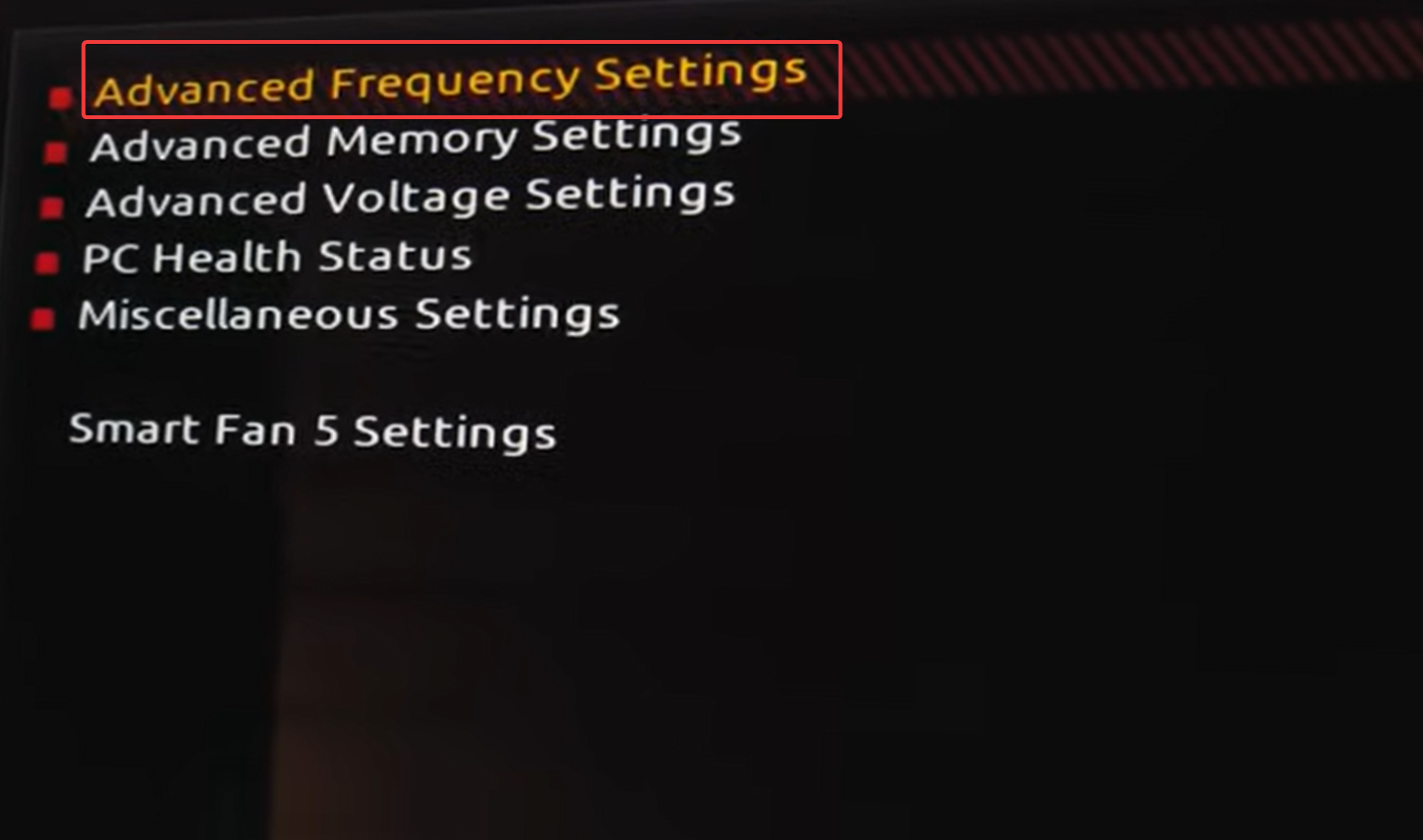
In the BIOS, look for the CPU Settings, and then go to Advanced frequency setting (or its equivalent in your case).
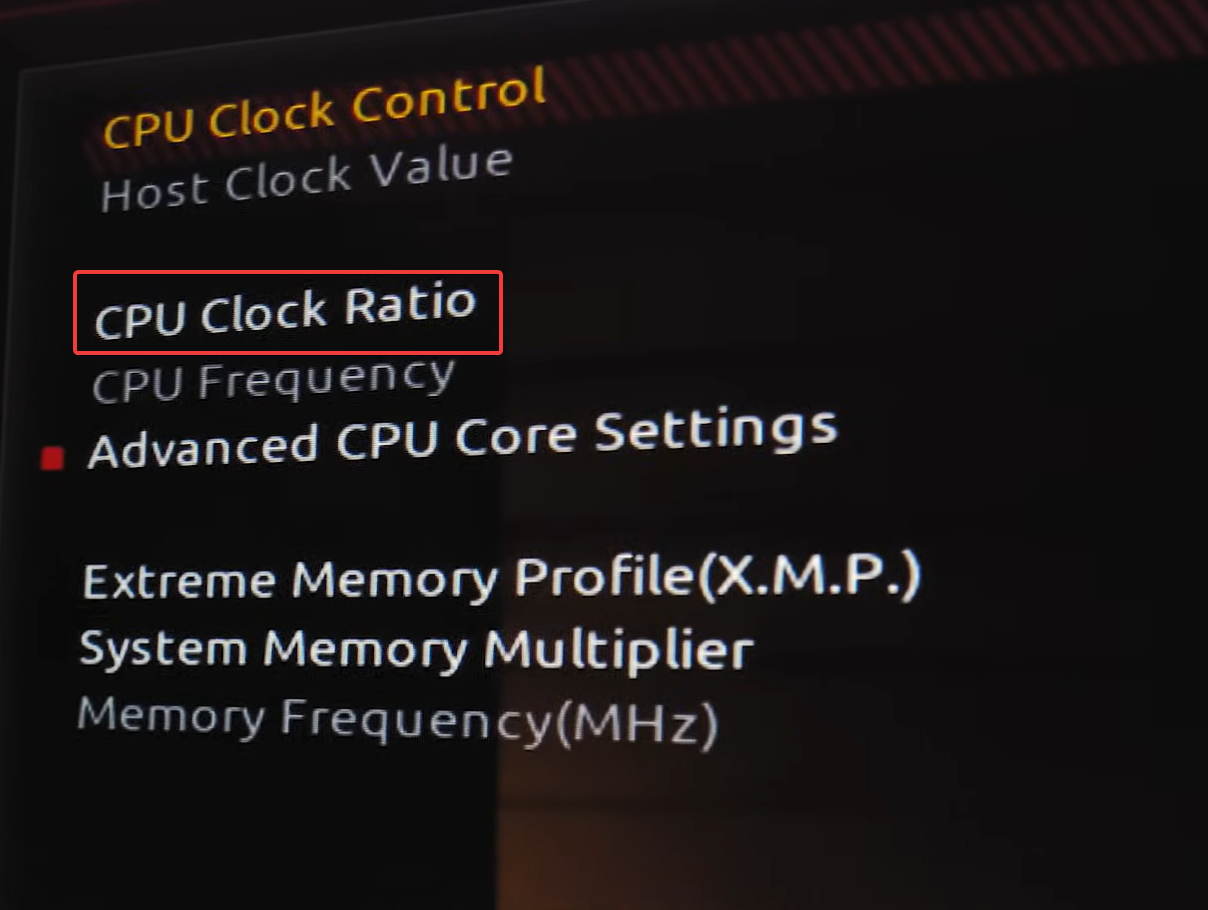
Now, locate the CPU clock ratio or CPU multiplier option, and decrease it by 1.
Reboot the PC and check whether nvgpucomp64.dll still crashes your games.
If yes, further decrease the CPU multiplier until things work out.
For some, decreasing the CPU multiplier from 56 to 54 or 53 to 51 did the trick. So, you will have to experiment with the different settings!
Also, do not make any other changes while in the BIOS, as it could affect the PC’s stability.
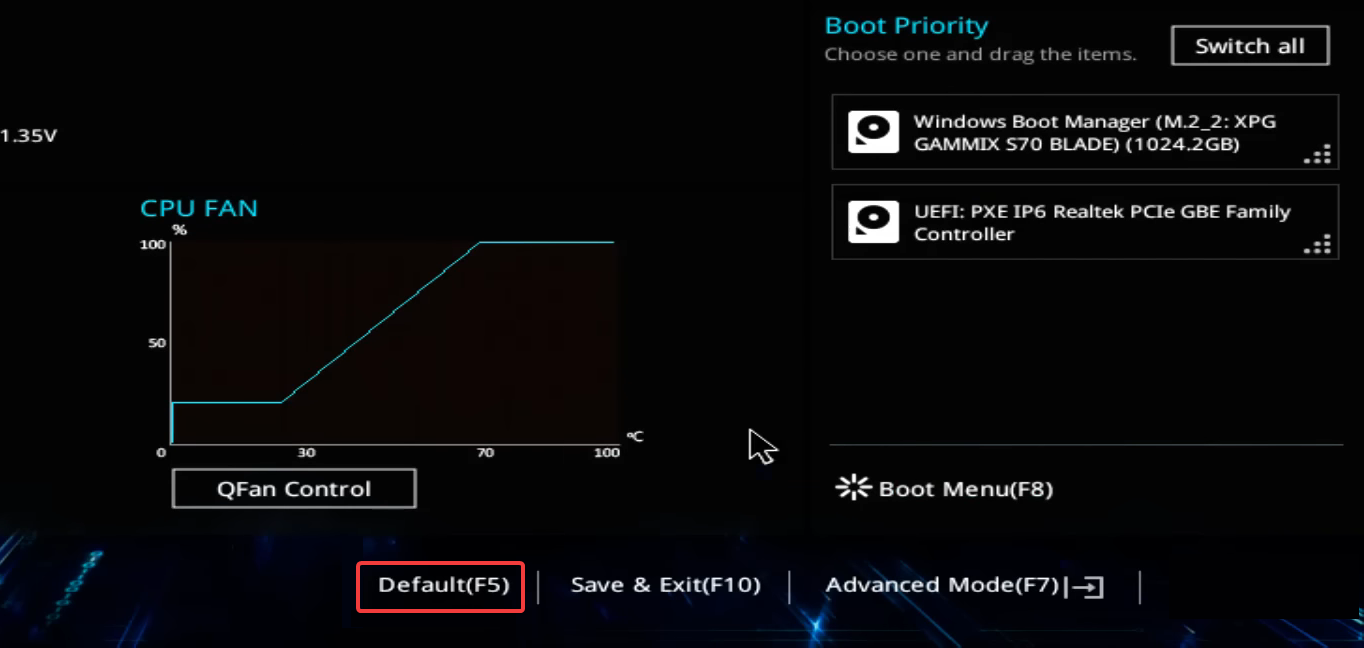
Now, look for the Default or Load Optimized Default option, and click on it.
Click OK in the confirmation prompt to confirm.
If you have a fair understanding of the hardware components, removing the CMOS battery and plugging it back in will also reset the BIOS. This method is applicable across manufacturers!
3. Clear the NVIDIA Shader cache
3.1. Disabling Shader Cache Size
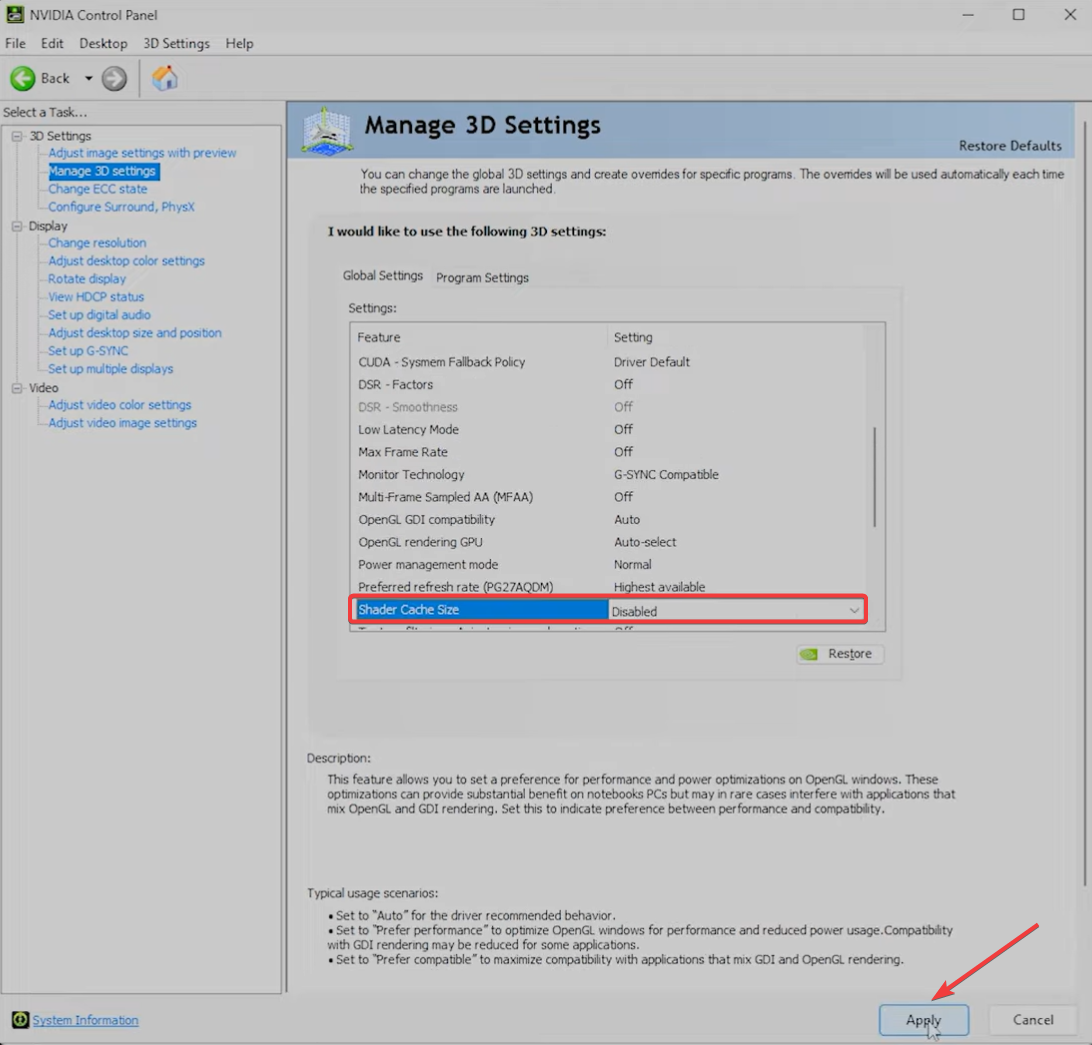
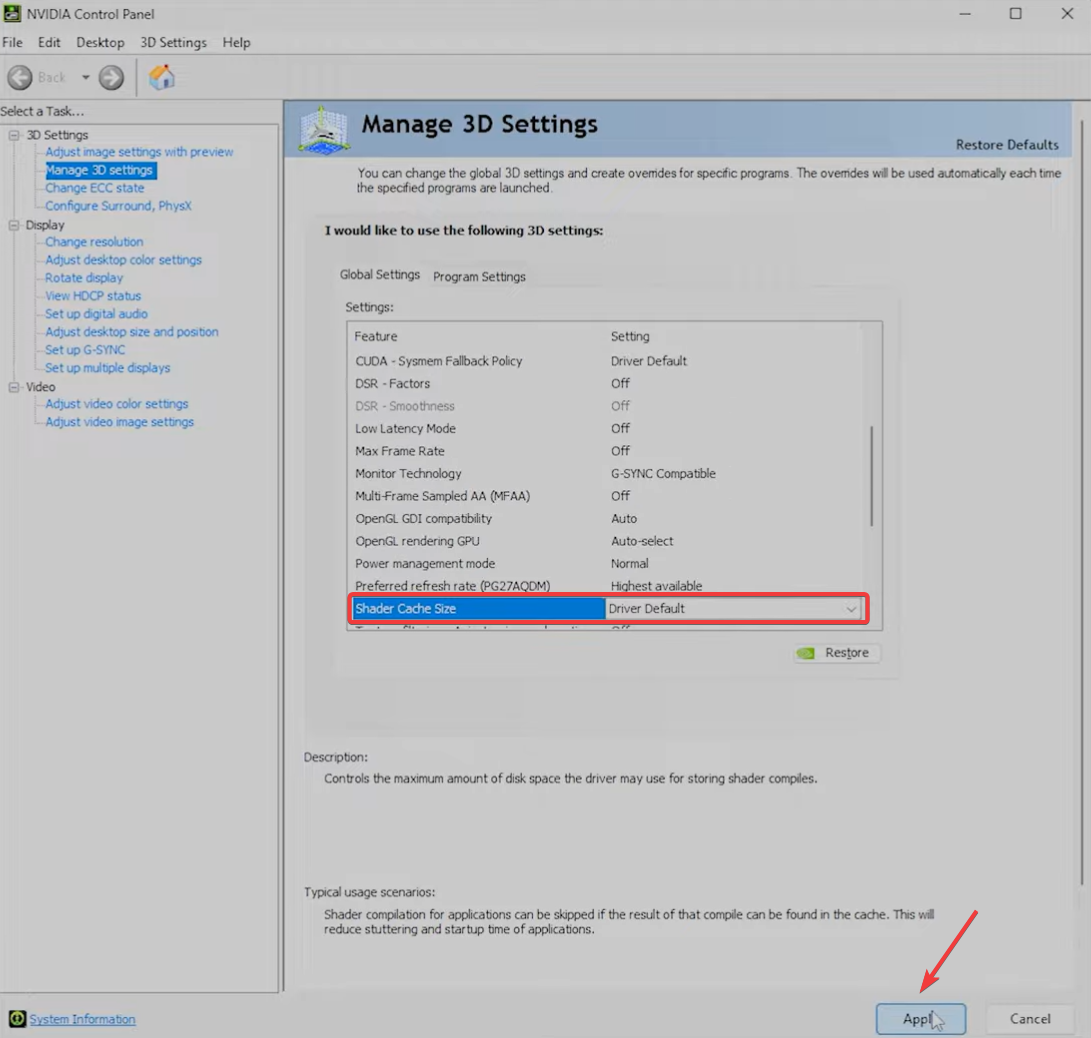
Launch the NVIDIA Control Panel, and go to Manage 3D settings from the left pane.
Select Disabled from the Shader Cache Size dropdown menu, and click Apply to save the changes.
3.2. Clearing leftover files with Disk Cleanup
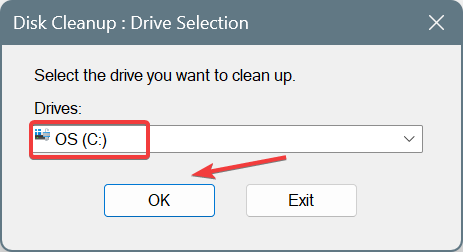
Press Windows + S to open Search, type Disk Cleanup in the text field, and click the relevant search result.
Select the system drive (where Windows is installed) from the dropdown menu, and click OK. For most of you, it would be the C: drive.
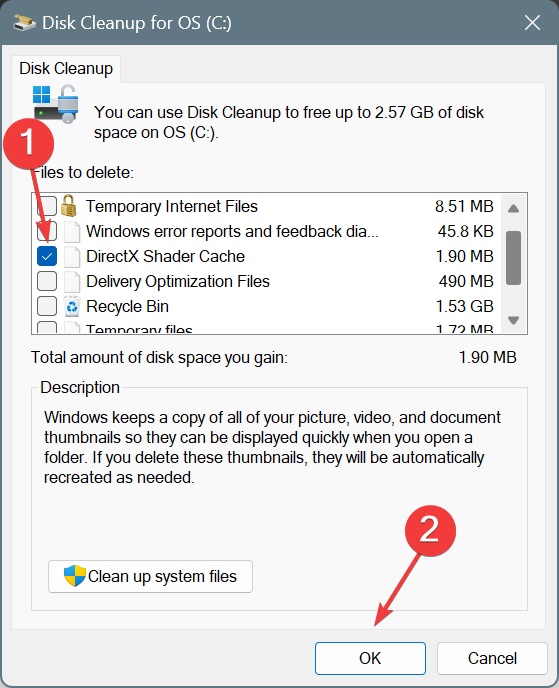
Make sure only the checkbox for DirectX Shader Cache is ticked, and click OK.
Click on Delete Files in the confirmation prompt.
3.3. Deleting the NVIDIA Shader Cache
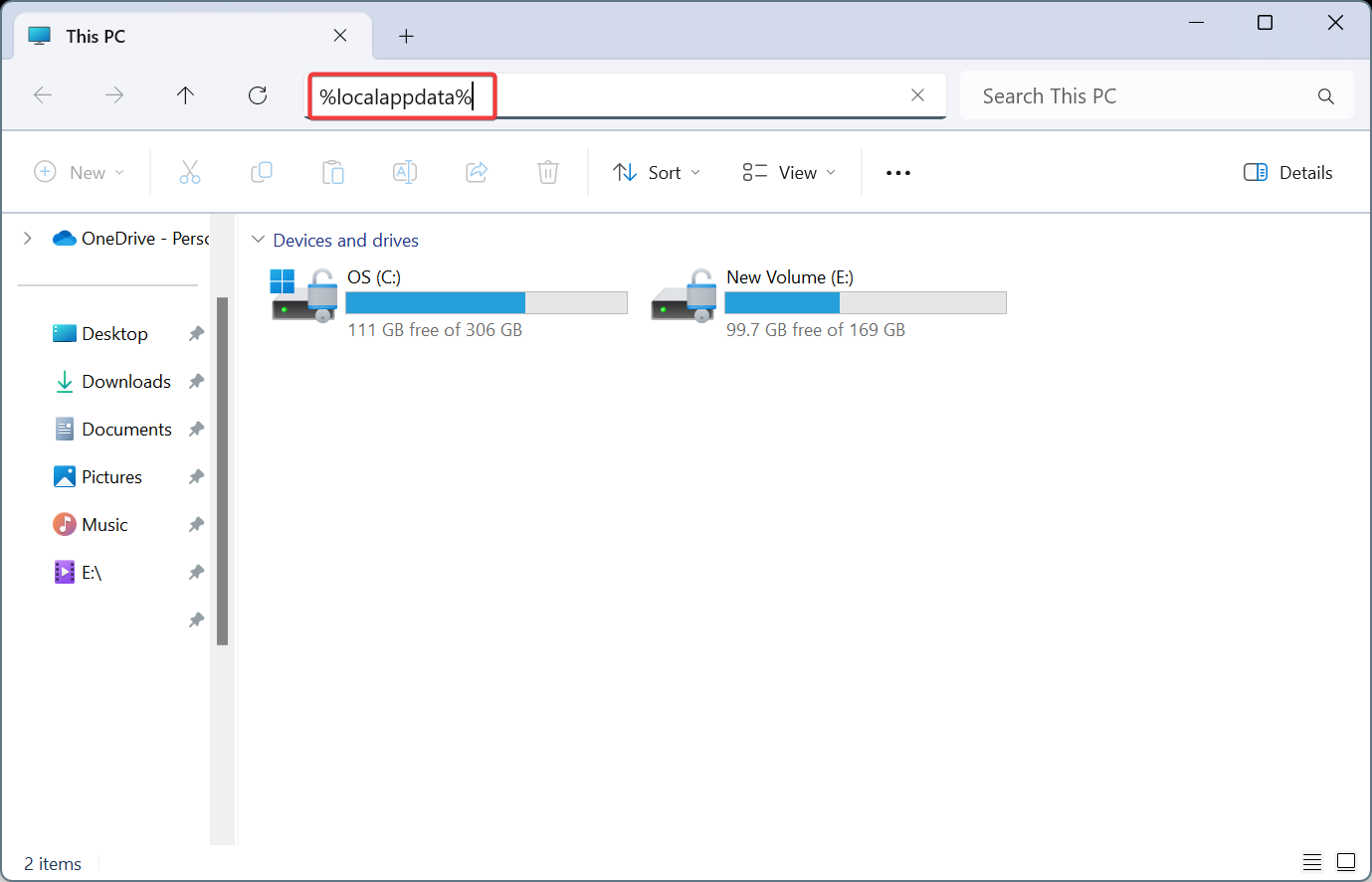
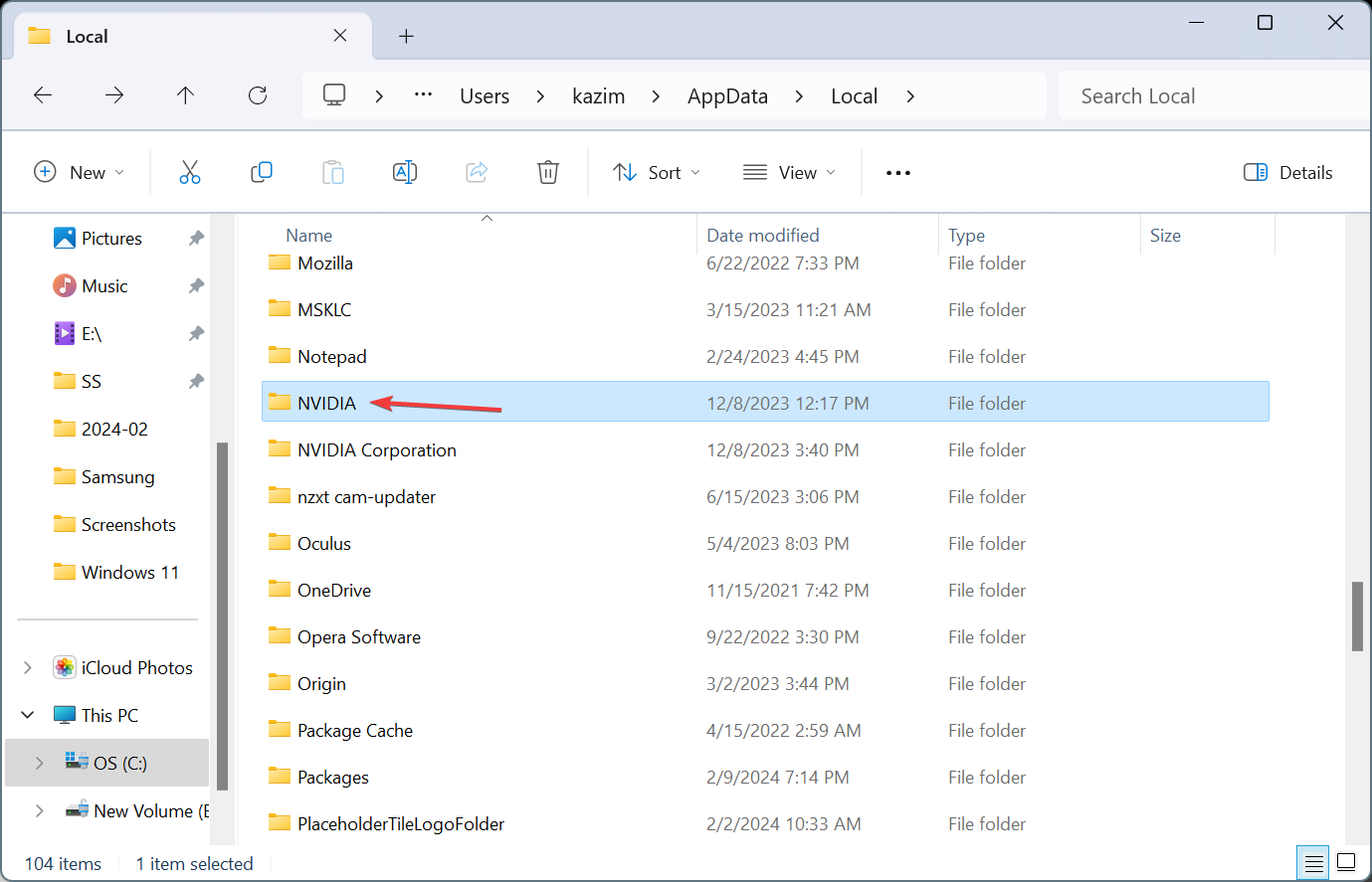
Press Windows + E to open File Explorer, paste the following path in the address bar and hit Enter: %localappdata%
Open the NVIDIA folder here and then go to the GLCache folder.
Press Ctrl + A to select all the files/folders, and then hit Delete to clear them.
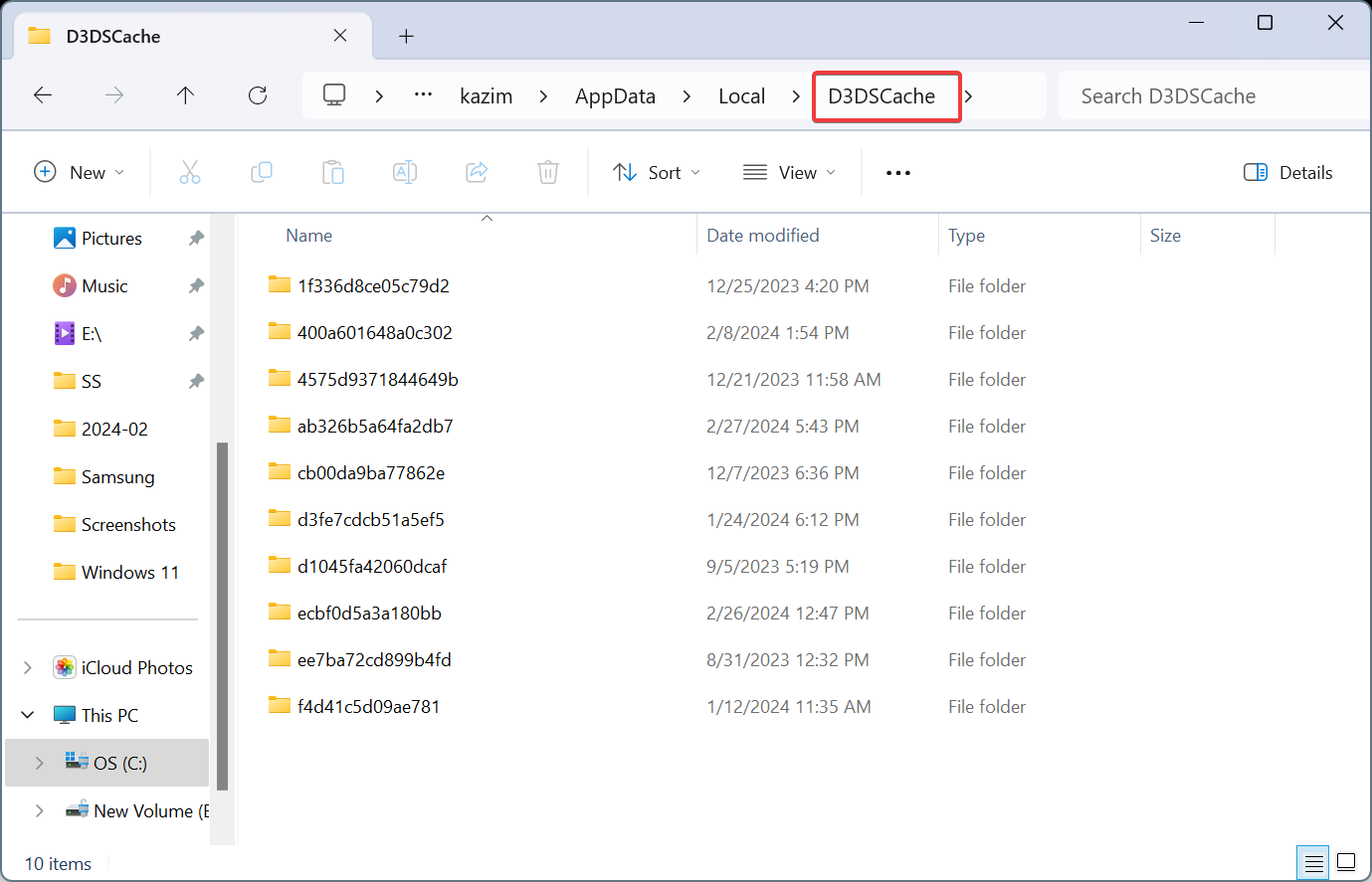
Similarly, delete all the files in the D3DSCache folder.
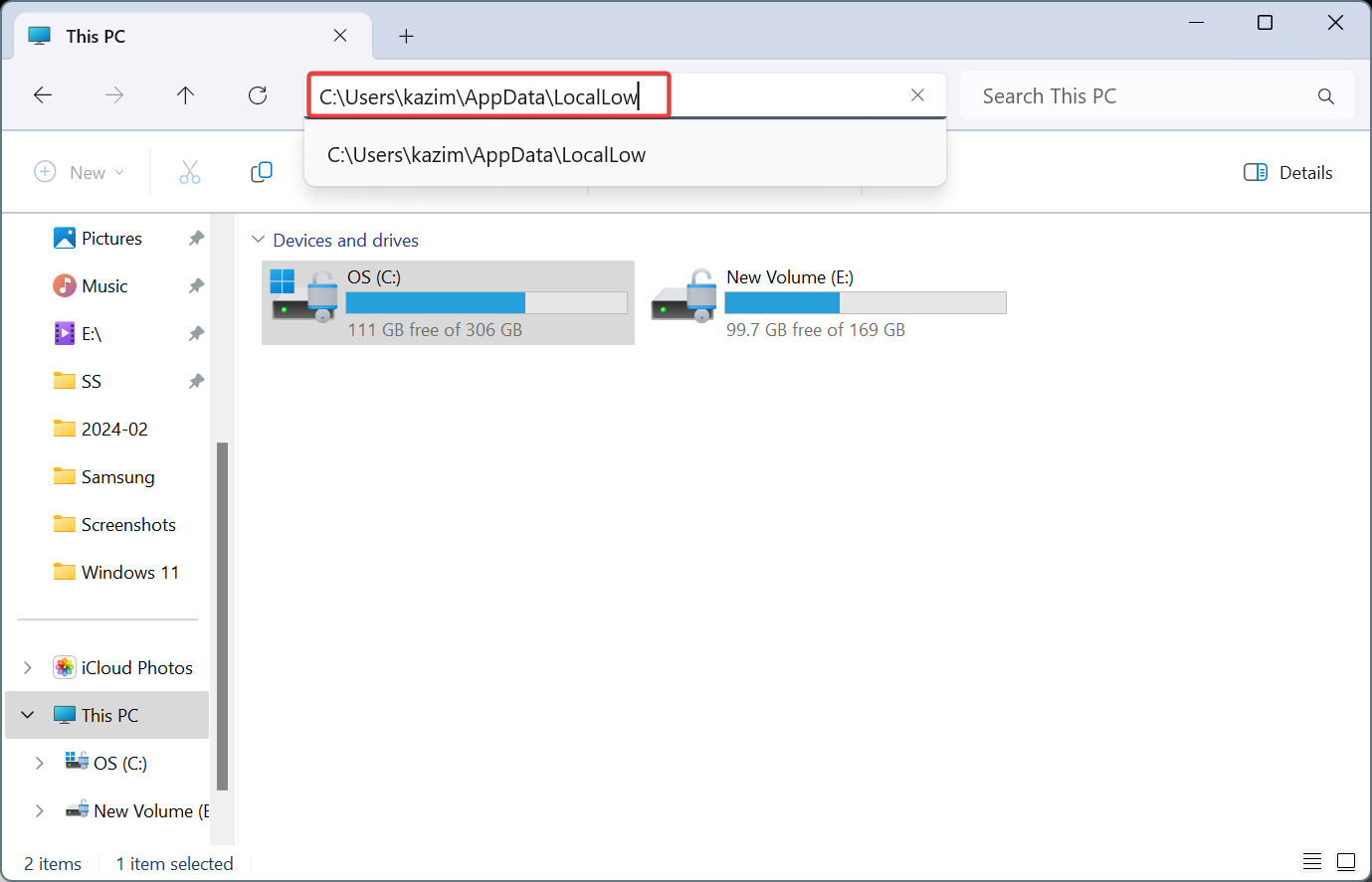
Now, go the following path while replacing Username with the actual profile name: C:\Users\Username\AppData\LocalLow
Select the NVIDIA folder, choose PerDriverVersion, double-click on DXCache, and delete all the files here.
3.4. Re-enabling Shader Cache Size
Launch the NVIDIA Control Panel, and go to Manage 3D settings.
Select Driver Default from the Shader Cache Size, and click Apply at the bottom to save the changes.
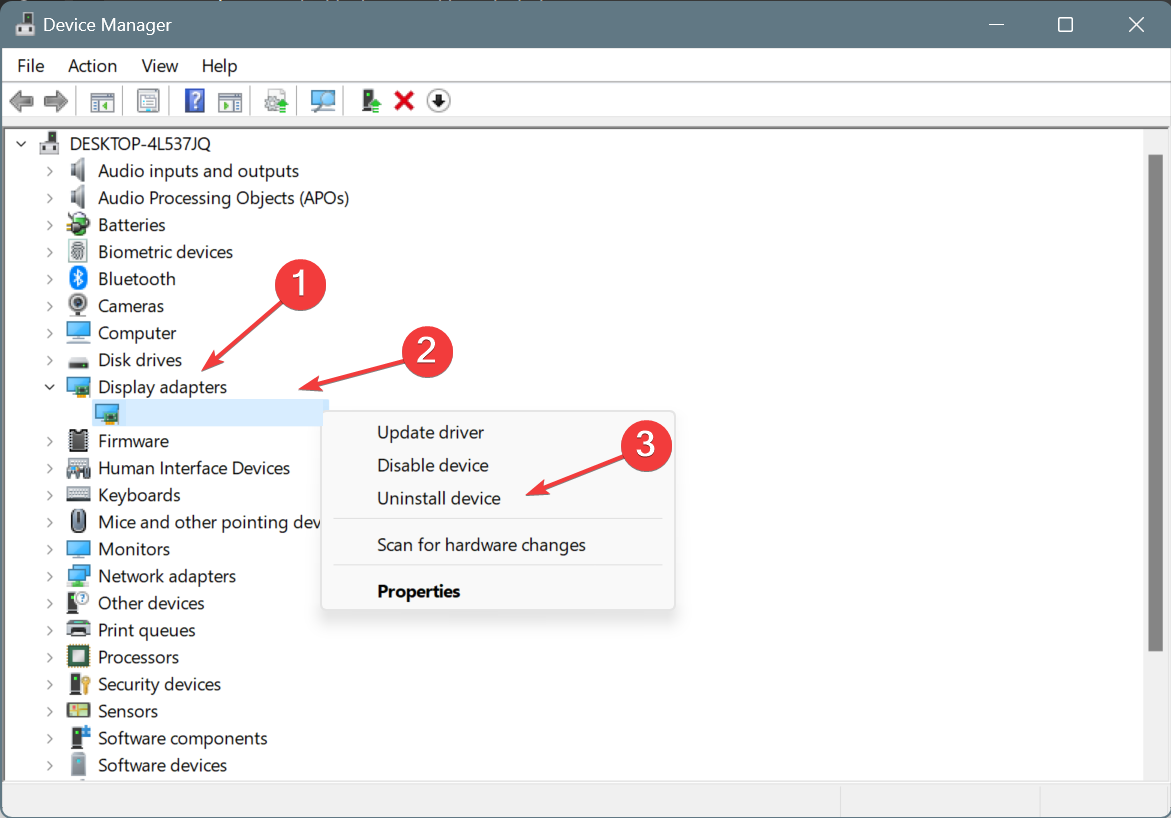
Press Windows + X to open the Power User menu, and select Device Manager from the list of options.
Expand the Display adapters entry, right-click on NVIDIA adapter, and select Uninstall device.
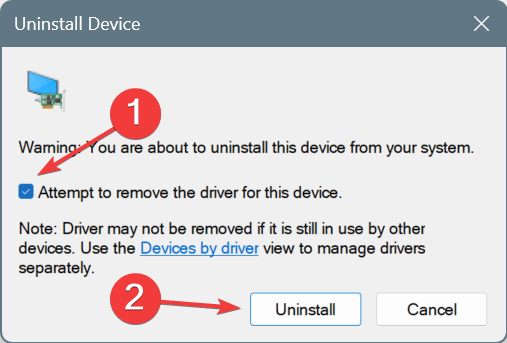
Tick the checkbox for Attempt to remove the driver for this device, and click on Uninstall.
Once done, reboot the computer, let Windows automatically install a fresh copy of the driver, and check for improvements.
If this doesn’t work, boot Windows into Safe Mode, then run DDU to uninstall the NVIDIA graphics driver, and finally, reinstall the driver using NVCleanstall instead of the GeForce Experience app. This will get you just the required components without any additional software.
Besides, update the NVIDIA graphics driver to fix nvgpucomp64.dll crashes in Windows. The problem is widespread, and a patch may be underway!
An out-of-date driver can cause serious issues to your system. An automated driver updater, such as Fortect Driver Updater, can effectively reduce the risk of running into this kind of problem. You can scan for and download new drivers in just a few minutes, plus you can use this software for long-term maintenance of your drivers.
5. Reinstall the affected game(s)
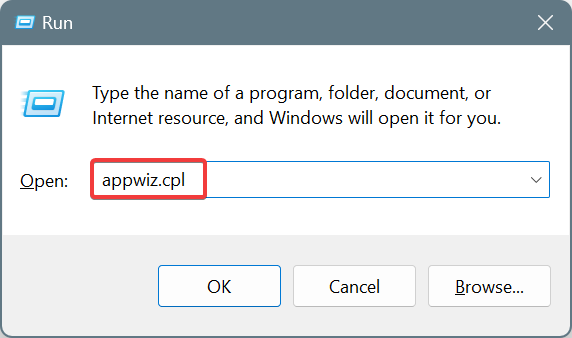
Press Windows + R to open Run, type appwiz.cpl in the text field, and hit Enter.
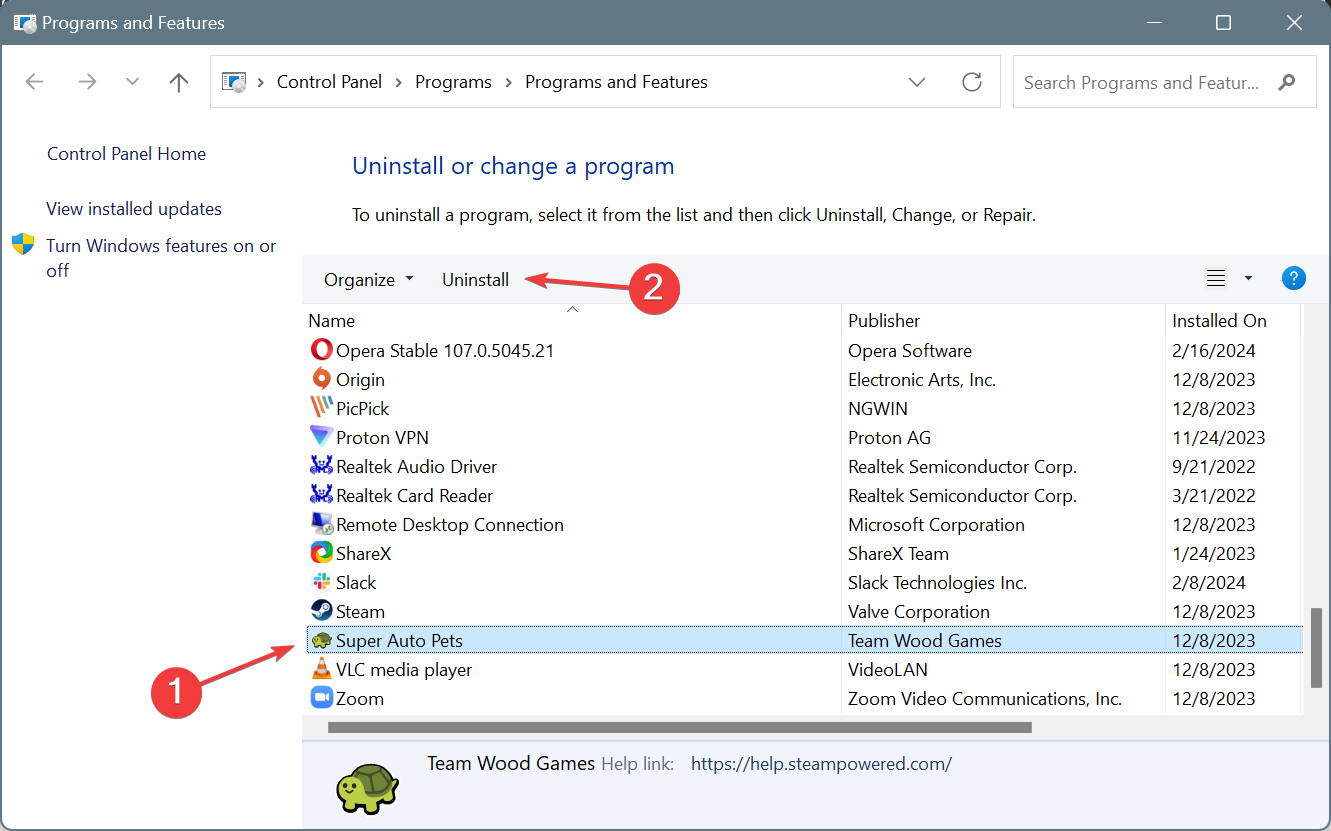
Select the game that’s crashing due to the nvgpucomp64.dll faulting module, and click on Uninstall.
Follow the on-screen instructions to complete the process.
Once done, reboot the PC, and then reinstall the game from the official source.
If this doesn’t work, use an effective software uninstaller tool to get rid of any leftover files and Registry entries that might still be conflicting with the NVIDIA driver components.
In all likelihood, you shouldn’t find nvgpucomp64.dll as the faulting module name for game crashes anymore.
OneDrive and Sharepoint folders can be deployed outside of web interfaces if your organization still prefers the old way of accessing these kinds of folders.
As this Reddit user found out from other users, there are plenty of ways to access OneDrive or SharePoint folders without necessarily ruining the smooth experience of browsing them.
We’re just starting out with Office 365 and our users are used to the old ways of accessing file shares, either via mapped drives in Windows File Explorer or via shortcuts on their Desktops. Is there an easy way to deploy similar “browsable” access to users for certain folders (such as an “All Company” document folder) without asking them to log in via a web browser, preferably without the users having to perform any manual steps? For what it’s worth our environment is mostly Server 2016 and Windows 10, but we have a few users on Windows 11 if that gives us more options.
Reddit user
However, while many other Reddit users had dozens of solutions for this particular situation, it’s worth mentioning that there are risks to using them, especially in a corporate environment. One of the biggest risks is the corruption of the files, especially if they are accessed by users from multiple devices.
With that being said, here is what you can do, according to users:
It can be done by creating a SharePoint site and giving access to the rest of the organization
Simply create the SharePoint site you want and apply permissions for who has access. Ensure the user has OneDrive installed and signed in on their computer. Navigate to the SharePoint site that you want to have access to and on the left hand side you should see documents, once you click that you should then see the sync option above. Click sync and it will map it to file explorer in Windows on the left hand side under a company shared drive. Do not click add shortcut to OneDrive make sure you click sync
Reddit user
You can do it by using a third-party app
What you’re looking for is a third party app
Look at CloudDriveMapper and ZeeDrive. I’m currently comparing both for an enterprise deployment, now a few years after migrating all shared files to Teams.
Both support using a single drive letter to map a dynamic list of Teams teams (perhaps even standard SharePoint libraries too though I haven’t looked).
Behavior around collaborative editing and file locking (check in/out) might be different and require some training or comms. The important part is that you can always still use the native MS tools, and it gives people a choice on how they interact with the data.
Reddit user
Or, using Microsoft Teams
Get a good M365 consultant and start off with a Teams crash course. After that, have a workshop with them to set up a way to work with Teams that works for your business. Syncing to Windows will become a hassle. Do it the right way from the start – Teams is that way.
Reddit user
However, if you deploy OneDrive folders using some of these solutions, especially the second one, as we mentioned earlier, the risk of corrupting the files is quite high.
Instead, using Microsoft Teams, which is already a platform that seamlessly integrates the other Microsoft apps, including OneDrive, and SharePoint, could be the best solution. Just make sure you download the new version of the platform, as classic Teams is being retired later this year.
Ai can create visual content from our prompts. However, the result is not always accurate, mainly if we use free visual language models (VLMs). Moreover, when we try to use free VLMs for intricate details, they fail to produce high-quality results. Thus, there is a need for visual language models who can generate better-quality content. For example, we have Sora AI, which is excellent at creating visuals that a Chinese firm already wants to use.
How will the LLMs improve the visual language models?
According to a Microsoft Research Blog, researchers are trying to find a way to use large language models (LLMs) to generate structured graphs for the visual language models. So, to do this, they ask the AI questions, restructure the information, and generate structured graphs afterward. Furthermore, the process needs a bit of organization. After all, the graphs need to feature the entity, its attributes, and the relationship between them.
To understand the process better, think about a specific animal. Then, ask the AI to provide descriptions based on questions related to the animal. Then, you will have more information about the animal you thought of. Afterward, ask the AI to restructure and categorize your information.
After getting the results, researchers implemented Hierarchical Prompt Tuning (HTP), a framework that organizes content. With it, the visual language models learn to discern different data, such as specific details, categories, and themes from a prompt. Furthermore, this method improves the capability of the VLMs to understand and process various queries.
When the last step is over, the visual language models will be able to generate more accurate images based on your prompts. Additionally, the next time you need to analyze an image, you could use the VLM to create descriptions for it in return.
In a nutshell, the main goal of the research is to use an LLM to teach a visual language model how to understand the details from a prompt to generate more accurate and realistic pictures. Meanwhile, the second goal is to teach the VLM to identify the elements from a picture and create descriptions.
If you want to learn more about the research, check their GitHub page.
What are your thoughts? Are you excited about this research? Let us know in the comments.
As you might be aware, there are multiple ways in which you can use Copilot, but you can separate them into work and personal use. Thus, we have the free version of Copilot and Copilot Pro for personal use. Yet, for work, you can either use Copilot for Microsoft 365 or log in with your work account on Copilot Pro and benefit from the commercial data protection.
Furthermore, if you decide to use Copilot Pro, you will have access to various plugins for content creation, planning, and more. On the other hand, Copilot for Microsoft 365 will focus on the safety of your work data. So, the prompts won’t be saved or shared with Microsoft, and there aren’t plugins yet.
What is the difference between Copilot for work and Copilot for personal use?
There are various differences between Copilot for work and Copilot for personal use. The most notable ones are the features. For example, you can use Copilot for Microsoft 365 in Teams, graph grounding, and enterprise-grade data protection.
However, Copilot Pro will mostly protect your data if you use a work account. So, we don’t recommend you to share personal information. Furthermore, you can use Pro only on Outlook, Word, Excel, PowerPoint, and OneNote.
Copilot free and Pro are the best ones for daily queries. After all, the plugins can help you generate content, such as images, songs, and messages. In addition, you can use them to plan trips, to compare items, and for various other reasons.
By the way, if you turn off the Search plugin, Copilot won’t be able to access the other ones. In addition, it will only use the data it already has.
On the other hand, Copilot 365 is better suited for work tasks. You can use it to summarize emails, to enhance your work performance, to prepare for meetings, and to organize your schedule. Furthermore, compared to Pro, it is not as creative, and the interface is work-oriented and looks a bit bland. Also, the add-ons cost a lot.
Ultimately, there are differences between Copilot for work and for personal use. Unfortunately, you need to decide which one of them suits you better. On the other hand, if you feel like paying $50 monthly, you can get both subscriptions. However, keep in mind that they are not the same application, and they address different needs.
What do you think? Is it worth getting both Copilot subscriptions? Let us know in the comments.
Microsoft is going to change the date for the optional Windows 22H2 updates. This decision comes as a response to the feedback from the community. In addition, by delaying the update, Microsoft wants to allow us to take advantage of the continuous innovations system. So, with this method, we will accommodate faster with the upcoming features. After all, we won’t encounter all of the updates at once.
How long will Windows 11 22H2 be supported?
Windows 11 22H2 will receive support until June 24, 2024, for Enterprise, Education, IoT Enterprise, and Enterprise multi-session editions. However, if you are using Home, Pro, Pro Education, or Pro for Workstations, you will get updates until June 26, 2024.
As you can see, there isn’t a significant delay between versions. However, previously, the optional Windows 22h2 updates were going to happen on February 27, and there wasn’t enough time to get used to them. Fortunately, there is enough time until June to get comfortable with the optional features and modifications.
To get more optional Windows updates, such as features and functionalities, you will have to upgrade from 22H2 to 23H2. Also, the process is simple. After all, you need to make sure that your device is eligible for the upgrade. Then, you have to go through a few steps to upgrade your Windows version.
By the way, you should know that there is a difference between 22H2 and 22H3. After all, they both have their quirks. For example, 23H2 is better for AI tasks, while 22H2 is better for photo editing. Yet, overall, 22H3 is slightly more performant than 22H2 in other aspects.
Ultimately, you could upgrade your Windows 22H2 to 23H2 to continue getting optional updates after June. Yet, there’s no rush, and you can enjoy the continuous innovations system until then. However, if you are a bit reluctant about upgrading from 22H2 to 23H2, know that you have until October 14, 2025, to decide. From there onwards, Windows 11 22H2 will no longer get optional or security updates.
What are your thoughts? Are you going to keep Windows 11 22H2 until it will be no longer supported? Let us know in the comments.
GitHub is introducing an advanced and pricier version of its Artificial Intelligence software development tool, Copilot Enterprise, which will answer questions based on the organization’s programming code.
The aim is to assist new engineers in quickly understanding their roles and empower veteran coders to boost their productivity.
AI integration to enhance the coding experience
Microsoft’s GitHub has been integrating AI into its products and services to get a wider audience. The high-end service will be available at $39 per user per month, and it is incorporated with AI chat features, with program modernization and easy resolution in mind.
This version is built upon the existing Copilot Business, which is available at $19 a month per user and already has 50000 enterprise customers.
GitHub Chief Executive Officer Thomas Dohmke said in an interview:
A lot of things when you join a big corporation are quite different to how you learned it in your previous job—you have to go there and read up on the practices. So you no longer have to do that. You can just ask questions and get the answers.
In the coming months, GitHub also will let engineers use their employer’s own codebase to help autocomplete programs they’re working on. That could be especially useful for financial services firms or other companies that use in-house programming languages that aren’t widely used elsewhere as well as customers with specific internal practices. Even Microsoft’s own Office desktop apps use the C and C++ language in ways that aren’t typically taught in coding school.
All the features and offerings look promising. However, there are some challenges and concerns that must be taken into account.
Challenges and concerns
Price – Copilot Business is available at $19 a month/per user. The claimed advanced version of Copilot Enterprise will now be accessible at $39 a month per user, which is not cost-effective, especially for small organizations and individual developers with limited budgets.
Integration & adoption – The promise of seamless integration with an organization’s codebase and the product’s effectiveness will depend on the ability to adapt to different coding systems and practices.
Reluctance – Despite GitHub’s claims on the accuracy of a code, the developers are skeptical and don’t want to rely on code suggestions, which might lead to increased scrutiny & validation efforts.
AI model limitations – Copilot Enterprise comes with integrating Microsoft’s Bing search engine, which could develop uncertainty due to the AI model’s ability to interpret and apply the latest changes in programming languages and frameworks.
So, while the Copilot Enterprise looks promising, it can enhance developers’ coding experience despite them being seasoned or newcomers. However, the concerns related to its prices, accuracy, integration, and AI limitations could stand in the way of broader acceptance, and the Redmond tech giant must address them to ensure its success in the developer community.
What do you think? Share your thoughts in the comments section below.
Microsoft will soon send free invitations to upgrade devices to Windows 11, for companies relying on the Redmond-based tech giant to manage their devices, it says in a recent announcement.
The free invites will be offered starting with the April 2024 security updates to Windows 10. and will only show for Windows 10 Pro and Pro Workstation devices that are eligible for Windows 11, and are not managed by IT departments.
Good news if you rely on Microsoft to manage your organization’s Windows updates for you. Starting with the April 2024 security update, Windows users working on cloud-domain joined and domain joined non-managed business devices will see invitation messages about free upgrades to Windows 11. That’s part of our mission to help keep your organization protected and productive. The invitation to upgrade to Windows 11 will appear after signing in and usually following a reboot. It will only show on Windows 10 Pro and Pro Workstation devices that are eligible for Windows 11 and are not managed by IT departments. Once prompted, users will be able to opt to get Windows 11, version 23H2 or stay in Windows 10. Of course, we recommend Windows 11!
Microsoft
Users will have the option to set the proper time for the upgrade.
It’s worth mentioning that Windows 10 support will end next year, in October 2025, but it can be extended up to 3 more years, for a price, and companies are advised to do so if they want to keep using the operating system.
Those users who do decide to upgrade to Windows 11 will have a lot to catch up on, as Microsoft will release the 2024 Update later this year, and it will add even more AI features to the operating system.
However, they’ll have access to a new File Explorer, and many other capabilities, including Copilot.
Microsoft recently released UFO, a highly customizable AI assistant, capable of fulfilling users’ requests tailored to different operating systems, including Windows.
The AI assistant is based on and uses the capabilities of GPT-vision to visualize and understand various visual elements, including graphical user interface (GUI) and control information of Windows applications, and it can provide Windows users with additional assistance without the need to have direct audio input.
In other words, UFO is a special kind of computer program that helps users interact with other programs on their Windows computers. It uses a clever system to understand what’s happening on their screen and can perform tasks for them, like clicking buttons or typing text. UFO can do all this automatically, without needing any human input.
The AI tool was developed by a team of researchers working for Microsoft Research, and the paper can be read in its entirety here.
The abstract reads:
We introduce UFO, an innovative UI-focused agent to fulfill user requests tailored to applications on Windows OS, harnessing the capabilities of GPT-Vision. UFO employs a dual-agent framework to meticulously observe and analyze the graphical user interface (GUI) and control information of Windows applications. This enables the agent to seamlessly navigate and operate within individual applications and across them to fulfill user requests, even when spanning multiple applications. The framework incorporates a control interaction module, facilitating action grounding without human intervention and enabling fully automated execution. Consequently, UFO transforms arduous and time-consuming processes into simple tasks achievable solely through natural language commands. We conducted testing of UFO across 9 popular Windows applications, encompassing a variety of scenarios reflective of users’ daily usage. The results, derived from both quantitative metrics and real-case studies, underscore the superior effectiveness of UFO in fulfilling user requests. To the best of our knowledge, UFO stands as the first UI agent specifically tailored for task completion within the Windows OS environment.
Microsoft Research
Not only Microsoft UFO doesn’t need human input to work, but it can also be customized to each user, meaning the assistant can be highly personalized to fit the needs of each Windows user, and it can be automatized to run certain tasks without having to explicitly let it know.
Microsoft just announced the winner of its first AI Chat App Hack, a virtual event that challenged developers everywhere to build applications using RAG (Retrieval Augmented Generation); the event took place between January 29th and February 12th, but the winner and the runner-ups were announced on February 27th.
The winner of this first edition of the AI Chat App Hack, which takes home $500, is the DocAssistant.Swaggy project that, according to Microsoft, takes AI exploration to the next level. You can find all the details about the project on its dedicated GitHub page.
This app took RAG to another level! First, you upload OpenAPI schemas for APIs to the Azure AI Search index. Once the schemas are ingested, you can ask questions that are answerable by an API, like “what were the top movies for 2023?”. The app searches to find possible API endpoints to answer the question, then uses an LLM to suggest the API URL, fetches the URL to get the API response, and calls the LLM again to turn the response into a user-friendly answer. :collision: Judges loved how the app added additional steps into the typical RAG flow to provide a complete end-to-end experience for easy API exploration.
Microsoft
The project aims to provide an AI helper designed to redirect human queries to the appropriate API. However, it’s important to note that the success of the results is highly dependent on the functionality of the web API on the server.
DocAssistant.Swaggy
In other words, the project is capable of linking different APIs using multiple ways of interaction, such as text or voice commands, and it will be able to come off with friendly responses to users.
There were other winners, as well, and Microsoft mentioned them all in different categories:
Honorable Mention: SecureBot – This app answers cybersecurity questions based on a rich data source of podcasts, video transcripts, websites, and books, all in the Spanish language. Judges were impressed by its very different architecture from most submissions, combining Copilot Studio with Power Platform. When a question comes in, the studio calls Power Automate to call an Azure Function to translate that question into Spanish and searches the Azure AI Search index with the translation. That step improves the relevance of results, and the bot still responds in the user’s question thanks to prompt engineering.
Best Data Source: DubsBot – This app helps students at UW (University of Washington) find courses for their interests from a massive course catalog. The team built a custom parser for the course catalog webpages, which included details like expanding abbreviations and making time schedules more human-readable. The judges loved that the team put so much detail into customizing the data ingestion, since that can make such a big difference to the quality of the answers from the LLM.
Honorable Mention: Copilot for Azure Pricing – This app helps developers select the most appropriate Azure region and VM type based on up-to-date pricing data. The judges loved how this app combined traditional RAG search, on Azure documentation, with near real-time data from the Azure Retail API. The app orchestrates the calls using Langchain agents and multiple “tools” that know how to look up regions, find VM types, and get prices, so that it can produce the correct answer, and visualizes the answers along the way.
Best in Your Language: Ask an Entrepreneur – At first glance, this is a standard RAG app that answers questions based off the speeches of famous entrepreneurs. However, there’s a catch: the source documents are in both English and Chinese, and questions may be asked in either English or Chinese. The team put an enormous amount of effort into figuring out the best way to set up the data ingestion (which included different chunking strategies for Chinese characters vs. English characters) as well as the question-answering (which now includes a translation step that poses the question in both English and Chinese). The judges were impressed by their efforts and were excited to see a team tackle the challenge of multi-lingual RAG.
Honorable Mention: Ley GPT – The goal of this RAG chat is to demystify Mexican federal work law, thanks to a data set of Mexican laws and regulations. To make the chat more accessible to Mexican citizens, the developer translated everything fully into Spanish: the UI, the system prompt, the few shot examples, etc. The judges loved the thoroughness of the translation, and the mission of using an AI chat to make labor laws more accessible to everyone.
Microsoft has been at the forefront of AI ever since the concept gained popularity, and the Redmond-based tech giant has developed multiple Copilots that were ultimately integrated into their services, with Copilot for Windows being one of them.
Should we expect these projects to make it into their products, as well? Who knows, but at least the company is nurturing AI talent.
In a recent update, the highly acclaimed Victrix Pro BFG Wireless Controller by PDP has announced that it will now be available for your Xbox Series X/S and PC.
Earlier, it was only available for users in the PlayStation gaming community; with this move, the company is widening its reach to a broader audience.
The controller is available for $179.99 and has garnered recognition for its fantastic design and innovative features.
Let’s check out the key features and innovations that can help enhance your gaming experience:
Connectivity – Connect to devices via wireless USB dongle, wired connection, or Bluetooth, ensuring seamless connection.
Compatibility – Xbox Series X/S consoles, PC, iOS, Android, Smart TVs, Mac, and most cloud streaming services.
Customizable control – Allows you to tailor your experience with three swappable modules, offering options for different sticks, D-pads, and gates per your preferences. It also comes with a Fight Pad for fighting game enthusiasts.
Improved reaction times – The four mappable back buttons with user-configurable profiles and innovative Clutch Triggers for customizable trigger pulls enhance the responsiveness and overall performance.
Victrix Control Hub app – The free app is available for both Xbox and PC and provides options to configure buttons, adjust dead zones, recalibrate sticks and triggers, and more to fine-tune the controller’s settings.
Tactile feedback – The dual rumble motors and impulse triggers allow a more immersive gaming experience.
Audio experience – Comes with an inbuilt Dolby Atmos with a lifetime subscription for immersive spatial surround sound, enhancing the gaming experience.
Accessories – The package includes a carry case and advanced tools for repairs and adjustments, ensuring durability and longevity.
With Microsoft’s official licensing, Victrix Pro BFG is compatible with Xbox Series X/S and PC, ensuring seamless integration and functionality on Microsoft gaming platforms.
The controller’s modern design allows you to create a customized gaming setup, featuring reversible left modules, D-pad configurations, multiple thumbsticks, and back button mapping.
The Xbox edition comes with Xbox button labels, similar to the ones in the standard Xbox controller. The pre-orders of the Xbox Pro BFG are underway and will be available from February 2024.
With proven success in the PlayStation and PC gaming community, the company also hopes to succeed in the Xbox gaming community.
Wouldn’t you love to grab one of the Victrix Pro BFG Wireless controllers? Share your thoughts in the comments section below.
Microsoft Bookings is an app from the Microsoft 365 Family that allows users to schedule all sorts of meetings, events, webinars, and so on. Now, 7 years after Microsoft made the app available on a global scale, Bookings is getting a new homepage that will reportedly make it easier for users to schedule meetings.
In a blog post, Microsoft said the update will elevate the user interaction on the platform, introducing a new homepage that is intuitive and integrates with the other Microsoft 365 apps.
Today, we would like to announce an update that will elevate the way you interact with Bookings, making it more intuitive, visually appealing, and seamlessly integrated into your workflow.
Microsoft
Gone are the days when the platform wouldn’t work, as the new update will make Bookings’ homepage a hub for all the meetings: the ones that you can create, or the ones that are already created. Plus, Microsoft says these can be managed with just a few clicks.
With our latest update, the home page becomes your centralized hub for all things Bookings. You can now access both personal and shared bookings from a single surface. Whether you’re managing personal appointments or coordinating with your team, everything you need is right on your homepage. You can easily switch between your shared and personal bookings pages workflows, view and edit your availability, and manage your appointments. You can create new meeting types (personal bookings) or bookings pages (shared bookings), either for yourself or for your team, with minimal clicks.
Microsoft
The platform also introduces new forms of bookings: Personal Bookings, and Shared Bookings.
The personal bookings will allow users to have complete management of their meetings, from creation to setting up the right time and so on.
Personal bookings is how you manage your own appointment timeslots, it allows you to easily configure and share your availability with your customers, clients, or colleagues. You can be in charge of your own time and avoid the back and forth of scheduling. You can also set aside time for specific activities by creating meeting types. Once you create a personal booking page, you can share a link with anyone who can then see your availability and easily schedule a time when you are free and is convenient for them.
Microsoft
Share bookings, on the other hand, can be seen by anyone, including customers, and they will also have the option to set up their own time to attend meetings.
Microsoft Ignite is arguably the biggest Microsoft event of the year, with many important announcements being made at the conference each year. Take the 2023 event, for instance, when Microsoft announced many AI capabilities, including the Microsoft Copilot Studio.
Now, even though we’re at the end of February, the Redmond-based tech giant already released the first details of the Microsoft Ignite 2024. The event will take place in Chicago, between November 18-22, 2024, and will feature lots of AI, as Microsoft states:
Join IT professionals, implementers, developers, architects and more in checking out the latest tech Microsoft has to offer. With demos and firsthand access to new AI solutions and copilots, this is your chance to explore the latest tools, receive deep technical training and get questions answered by Microsoft experts. We’re bringing the best of our customer and partner event experiences to the Windy City and online so you can participate in the festivities and discover how AI can enhance your organization. In addition to seeing the latest technology firsthand, senior leaders and decision-makers are invited to learn more about how to lead in the era of AI and find robust networking opportunities. If you’re looking to expand your AI knowledge, create connections and push the boundaries of what we can accomplish together, there’s no better event than Microsoft Ignite.
Microsoft
Another good thing about it is the fact that this year’s edition will be hybrid. So, while participants can choose to attend the event in person, Microsoft will also make it possible for them to join virtually, with presentations, workshops, and so on, being available in a hybrid mode.
What to expect from Microsoft Ignite 2024? Well, as Microsoft said it, AI will, once again, be the star of the whole show.
Because the event will take place at the end of the year, the Windows 11 2024 Update might be released by then, so we could get official glimpses of the new Windows version (Windows AI, or Windows 12 maybe?), and we all know by now that it will based and powered on and by AI, so if you’re an AI enthusiast, you don’t want to miss this conference.
But we’ll make sure to remind you about the event throughout the year.
Bloomberg reports that the Activision department inside Microsoft is currently negotiating some changes that would give Call of Duty League team owners a greater share of revenue and multiple other benefits, such as fewer restrictions on sponsorships.
The negotiations follow the sue one former Call of Duty League team owner initiated against Activision, earlier this month, claiming, according to the publication, that the company had an unlawful monopoly, seeking $680 million in damages.
The former Call of Duty League team owner said that Activision was limiting sponsorship opportunities, and these actions were financially devastating for the teams. Activision, on the other hand, began to reorganize Call of Duty leagues, announcing the outsourcing of a new version of the Overwatch League to ESL FACEIT Group, effectively cutting 15% of staff.
Now, multiple sources have announced that Activision is going through negotiations with Call of Duty League team owners, however, since the discussions are not public, we don’t know exactly what the team owners will get from this deal.
But, as Esports are slowly becoming more and more popular, but less streamed (this is also due to many Twitch streamers, which is another form of popular entertainment) these rules are only for the better. Activision, which is Call of Duty games, is one of the world’s biggest enablers of Esports.
If the rules are changed now, then the current team owners will have the assurance that the future of Call of Duty-related competitions will be good for those seeking to make a career out of these competitions. The future team owners will be fairly compensated and will be able to close multiple sponsorship deals with a variety of partners.
We’ll have to see if Activision decides to go public with the discussions or announce the outcome of the negotiations, but both parties should come to a conclusion in the following weeks.