GPT-5.6 Traffic Surge Pushes OpenAI to Reset ChatGPT Usage Limits

OpenAI says the GPT-5.6 launch caused an unprecedented increase in traffic, with usage reaching roughly twice the company’s previous peak.

The model was also quickly introduced to Microsoft 365 Copilot, adding further demand shortly after its release.

The traffic surge affected ChatGPT Work and Codex users over the weekend. OpenAI responded by repeatedly resetting usage limits for affected accounts.

OpenAI temporarily removes five-hour usage limit

OpenAI has temporarily removed the five-hour usage-limit restriction for ChatGPT Plus, Business, and Pro subscribers.

The company has not confirmed how long the temporary change will remain in place or when the restriction may return.

ChatGPT Work and Codex accounts also received several usage-limit resets as OpenAI worked to manage the unusually high demand.

GPT-5.6 Sol users get more usage

OpenAI has introduced new inference optimizations for GPT-5.6 Sol that make the model more efficient to operate.

The company says it will pass those efficiency savings on to subscribers. Users should receive approximately 10% more usage following the change.

The additional capacity should help reduce the impact of usage limits for people running complex or long-running tasks with the model.

Banked resets expand to web and mobile

OpenAI is also expanding its banked reset feature, which allows users to save a usage-limit reset and activate it later.

The feature initially launched through the desktop app. It can now also be accessed through ChatGPT on the web and mobile apps.

OpenAI added a reset to around 500,000 ChatGPT Work and Codex accounts. The company also fixed a bug that prevented some resets from applying correctly.

Anthropic extends Claude Fable 5 promotion

Anthropic has extended its Claude Fable 5 promotion by one week.

The offer was originally scheduled to end on July 12, but Fable 5 will now remain available across all paid Claude plans through July 19.

Claude Code users will also continue receiving 50% higher weekly usage limits during the extended promotional period.

Via Neowin
Chrome for Android’s AI Mode Can Now Pull Answers From Your Recent Tabs

Chrome is expanding its AI Mode integration on Android, with Google testing contextual browsing capabilities that let users ask questions about their recent tabs. We first spotted Contextual Tasks in May, when enabling the flag simply redirected users to AI Mode. Google has since turned it into a much more capable experience.

AI Mode is Google’s conversational search experience, letting users ask follow-up questions and receive AI-generated answers instead of a standard results page. Chrome’s New Tab page has had an AI Mode shortcut for a while, but what happens after you tap it is changing.

Contextual Tasks is what powers that experience. Google first developed the feature for desktop Chrome so AI could work with the pages users are already viewing instead of relying only on typed prompts. The same concept is now making its way to Chrome Canary for Android.

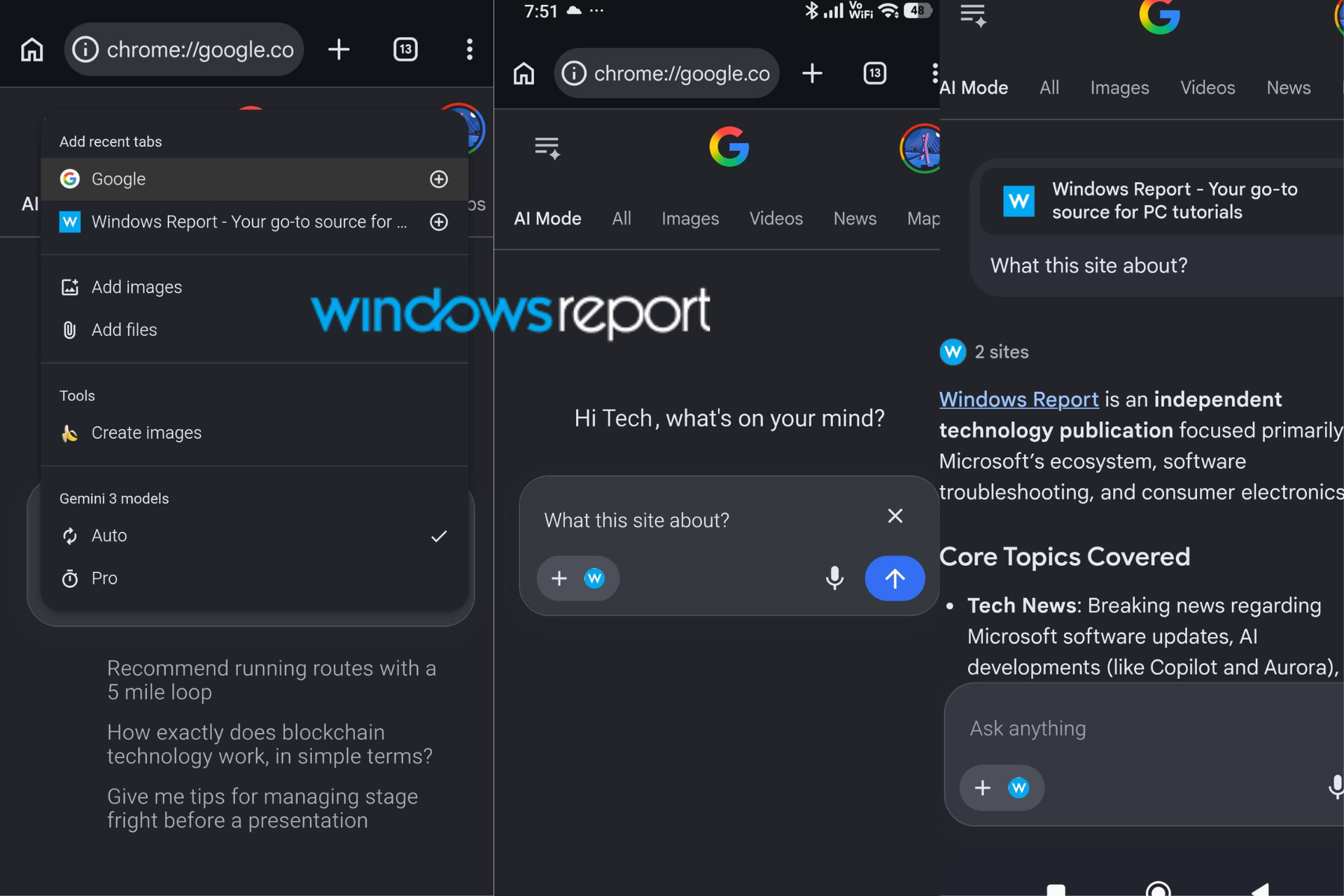
When you tap the AI Mode shortcut, Chrome opens its own AI Mode page before loading google.com/aimode. Chrome injects its own compose interface ahead of the page instead of taking users directly to AI Mode’s standard web interface.

From there, users can attach images and files before submitting a prompt. The compose box also includes an “Add recent tabs” option. Selecting one or more tabs attaches them directly to the prompt, allowing AI Mode to answer questions about those pages without requiring users to copy links or text manually.

For example, attaching an open webpage and asking, “What is this site about?” prompts AI Mode to analyze that tab and generate a summary based on its contents.

Contextual Tasks for Chrome on Android remains under development behind the same flag in Chrome Canary, and while Google hasn’t announced a release timeline, the feature now passes recent tabs into prompts instead of simply redirecting users to AI Mode, making browsing context part of the conversation.

XBOX Game Pass August 2026 Lineup Includes Five Confirmed Games

XBOX is set for an exciting week ahead, with a total of 44 new games scheduled to arrive on the platform next week, and we also have fresh news about the upcoming Game Pass lineup.

Five XBOX Game Pass games have already been confirmed for August 2026, including four day-one releases, according to TrueAchievements.

The early lineup includes Beast of Reincarnation, Monsters are Coming!, Sandustry, Grave Seasons, and Resonance: A Plague Tale Legacy.

XBOX Game Pass August 2026 Lineup

Four of the five confirmed games will join Game Pass on their release dates. Monsters are Coming! is already available through PC Game Pass but will launch on XBOX consoles in August.

Beast of Reincarnation and Resonance: A Plague Tale Legacy headline the current lineup.

Beast of Reincarnation — August 4, 2026

Beast of Reincarnation will launch for XBOX Series X|S and PC on August 4.

The game will be available through XBOX Game Pass Ultimate and PC Game Pass from day one.

Developed by Game Freak, the studio behind Pokémon, Beast of Reincarnation is an action RPG set in post-apocalyptic Japan.

Players control Emma, an outcast travelling alongside her dog, Koo. The pair combine their abilities to fight a corrupted creature threatening the natural world.

Monsters are Coming! — August 6, 2026

Monsters are Coming! will arrive on XBOX Series X|S on August 6 through XBOX Game Pass Ultimate.

The tower-survivor roguelite is already available on PC and will now make its XBOX console debut.

Players must protect a constantly moving city from waves of enemies. They gather resources, improve defenses, and attempt to survive until the city reaches its destination.

Sandustry — August 13, 2026

Sandustry will join XBOX Game Pass Ultimate and PC Game Pass on August 13 as a day-one release.

The PC-only factory automation game features fully destructible environments where every pixel acts as a physical entity.

Players can mine, mix, process, or destroy materials while digging through the planet. The objective involves building automated systems and uncovering treasures left behind by an ancient civilization.

Grave Seasons — August 13, 2026

Grave Seasons will launch through XBOX Game Pass Ultimate and PC Game Pass on August 13.

The game combines farming simulation mechanics with horror, mystery, and narrative-driven investigation.

Players can farm, forage, craft, and build relationships in the unsettling town of Ashenridge. At the same time, they must investigate a series of crimes linked to a supernatural killer stalking the town.

Resonance: A Plague Tale Legacy — August 27, 2026

Resonance: A Plague Tale Legacy will join XBOX Game Pass Ultimate and PC Game Pass on August 27.

The A Plague Tale spin-off follows Sophia, a character introduced in A Plague Tale: Requiem.

Set 15 years before the events of Requiem, the story takes Sophia to Minotaur’s Island, where she must confront a mythical creature connected to a devastating curse.

The gameplay is expected to differ significantly from the stealth-focused structure of previous A Plague Tale games.

Microsoft is expected to reveal additional August 2026 Game Pass additions closer to the start of the month.

In other news, the XBOX Game Pass July 2026 Wave 1 lineup has recently been revealed.

44 New Games Are Coming to XBOX From July 13—17

XBOX is getting 44 new games between July 13 and July 17, 2026, according to PureXbox. Seven of the releases will also join XBOX Game Pass during the week.

The lineup includes action games, co-op extraction titles, horror adventures, simulators, puzzle games, and several collector’s editions.

Notable XBOX releases this week

Denshattack! is a fast-paced action game set in a dystopian version of Japan. Players control a train, perform tricks, and grind across rails while moving through its unusual world.

Quarantine Zone: The Last Check puts players in charge of screening survivors during an outbreak. Players must identify potential threats, manage limited resources, and make decisions that affect the settlement.

The Mound: Omen of Cthulhu is a Lovecraftian adventure set in a dangerous jungle. It combines exploration, treasure hunting, psychological horror, and supernatural threats.

Moss: The Forgotten Relic offers an atmospheric storybook adventure centered on a small hero exploring an ancient magical world.

Wreck Runners is a four-player co-op extraction game set inside the Bermuda Triangle, while FixForce supports up to six players in a chaotic extraction platforming experience.

July 13

  • Ascend To ZERO
  • Beholder: Conductor
  • Forensics: Crime Scene Detective
  • Forest of Deceit

July 14

  • Amazing Weekend Search and Relax Collector’s Edition
  • D-topia
  • Grandpa and Me vs the Numbers
  • I Love Finding Pups Collector’s Edition
  • The Crimson Maid

July 15

  • Cozy Grove: Camp Spirit
  • Dark Town Secrets: Lost Lulu Collector’s Edition
  • Denshattack!
  • Incremental Epic Hero 2
  • Magnetail
  • Mayor May Knott
  • Nom Nom: Cozy Forest Café
  • Quarantine Zone: The Last Check
  • ShapeHero Factory
  • Sweet Home: Look and Find Collector’s Edition
  • The Mound: Omen of Cthulhu
  • War Robots

July 16

  • 70s-style Robot Anime Geppy-X
  • Biomechanical Toy (QUByte Classics)
  • Dual Bunnies
  • Farlands
  • Feudal Baron: King’s Land
  • K-pop Idol Stories: Road to Debut
  • Looking for Fael
  • Moss: The Forgotten Relic
  • Project 7: Escape Room
  • Puppergeist
  • Secrets of Velendar Castle – Escape Room
  • Sir, You Are Being Hunted
  • Wreck Runners

July 17

  • Cat in the Box
  • FixForce
  • Golfish
  • Jack in Space
  • Split Crystal
  • Streetdog BMX
  • Sunny Summer Splash
  • Super Dev Quest
  • Ultra Pixel Survive 2
  • Wrap House Simulator

Seven games are joining XBOX Game Pass

XBOX Game Pass subscribers will receive seven additions between July 13 and July 17:

  • Ascend To ZERO — July 13
  • PBA Pro Bowling 2026 — July 14
  • Denshattack! — July 15
  • Quarantine Zone: The Last Check — July 15
  • Mavrix by Matt Jones — July 16
  • FixForce — July 17
  • Fogpiercer for PC — July 17

The new arrivals follow the announcement of the XBOX Game Pass July 2026 Wave 1 lineup. Microsoft has also confirmed that 16 games will leave XBOX Game Pass next week.

How to Watch England vs Norway LIVE & Free Today

Two nations have already booked their place in the FIFA World Cup 2026 semi-finals, and only two spots remain. Tonight, it’s the Three Lions against the Vikings in what promises to be one of the tournament’s biggest quarter-final showdowns. England arrive after edging Mexico in a thriller, while Norway stunned Brazil to keep its dream run alive. One of them moves on. The other heads home.

England vs Norway kick-off time

  • US (ET) 5:00 PM
  • US (PT) 2:00 PM
  • UK (BST) 10:00 PM
  • India 2:45 AM IST (July 12)
  • Norway 11:00 PM CEST
  • Switzerland 11:00 PM CEST
  • Argentina 6:00 PM ART
  • Brazil 6:00 PM BRT

Where to watch England vs Norway live on PC

Country/RegionOfficial Streaming Platform
United StatesFOX One
United KingdomITVX
IndiaZee5
NorwayTV 2 Play
SwitzerlandSRF Play
BrazilGloboplay / CazéTV
CanadaTSN+

How to stream England vs Norway on PC

Watching the England vs Norway quarterfinal match on a PC is straightforward. Open your region’s official streaming website, sign in if required, and head to the FIFA World Cup live section a few minutes before kick-off. Most services support Chrome, Edge, Firefox, and Safari without requiring additional software.

Can you watch England vs Norway for free?

Yes, if you’re in the UK. ITV1 is broadcasting the match live, while ITVX will stream it online free with a registered account. Availability in other countries depends on local broadcasters and subscription requirements.

England vs Norway match preview

England have grown into the tournament and survived a difficult Round of 16 clash against Mexico. Norway, meanwhile, pulled off one of the World Cup’s biggest upsets by eliminating Brazil, with Erling Haaland continuing his outstanding scoring form. The winner will advance to the semi-finals to face the victor of Argentina vs Switzerland.

England vs Norway World Cup Quaterfinal Match Referees

  • Referee: Clément Turpin (France)
  • Assistant Referee 1: Nicolas Danos (France)
  • Assistant Referee 2: Benjamin Pagès (France)
  • Fourth Official: Alejandro Hernández Hernández (Spain)

England vs Norway Predicted XI

Norway (4-3-3):

Ørjan Nyland, Julian Ryerson, Kristoffer Ajer, Torbjørn Heggem, David Møller Wolfe, Sander Berge, Patrick Berg, Martin Ødegaard, Alexander Sørloth, Antonio Nusa, Erling Haaland

England (4-2-3-1):

Jordan Pickford, Reece James, Ezri Konsa, Marc Guéhi, Nico O’Reilly, Elliot Anderson, Declan Rice, Bukayo Saka, Jude Bellingham, Anthony Gordon, Harry Kane

Who are you supporting today? My pick is England; what’s yours? Do you think Halland’s sensational Norway will come on top of Kane’s magical England?

Microsoft Confirms Teams Screen Sharing Bug on macOS

The Teams screen sharing bug can cause black screens, interrupted sharing, or complete failures on certain Macs. Microsoft has acknowledged the issue and is preparing new in-product troubleshooting guidance.

The problem is tracked under Microsoft 365 Message Center advisory MC1392559.

Teams Screen Sharing May Show a Black or Blank Screen

Affected Microsoft Teams users may see a black or blank screen after starting screen sharing.

In other cases, the sharing session may stop unexpectedly or fail to begin. Microsoft says the problem can occur more frequently on Macs with limited memory or available disk space.

Affected macOS Versions and Teams Environments

The issue affects devices running macOS versions older than macOS Tahoe 26.4.

Microsoft currently lists the affected environments as Government Community Cloud (GCC), GCC High, and Department of Defense (DoD).

The company has not indicated that standard commercial Microsoft 365 environments are affected.

Microsoft Is Adding Screen Sharing Error Guidance

Microsoft Teams will soon display automatic guidance when it detects a screen sharing failure.

Depending on the device and error, Teams may prompt users to retry the screen sharing session, update macOS to a newer version, or switch to an alternative screen sharing method.

Microsoft says the new guidance should help users troubleshoot the problem without immediately contacting their IT support team.

Workaround for Users Who Cannot Update macOS

Users who cannot install macOS Tahoe 26.4 can switch Teams to the native macOS screen sharing method.

To enable it, go to the screen sharing settings in Teams and turn on the Use Mac OS native sharing option. Teams does not require a restart after users change the setting.

What IT Admins Should Do

Microsoft recommends that organizations inform their helpdesk and support teams about the issue.

Admins should also update internal troubleshooting documentation, notify users running affected macOS versions, check devices with limited memory or disk space, upgrade Macs to macOS Tahoe 26.4 where possible, and recommend native macOS screen sharing when an update is not available.

Rollout Starts in July 2026

Microsoft plans to begin rolling out the new in-product screen sharing guidance later in July 2026. The company expects to complete the rollout by mid-August 2026.

In other Teams news, Microsoft is adding a Meeting AI toggle that will give organizers more control over AI features during meetings. The company also released a wide range of new Teams features in June 2026.

Via Neowin
Chrome tests a shortcut to manage Google Search AI Mode Workspace connections

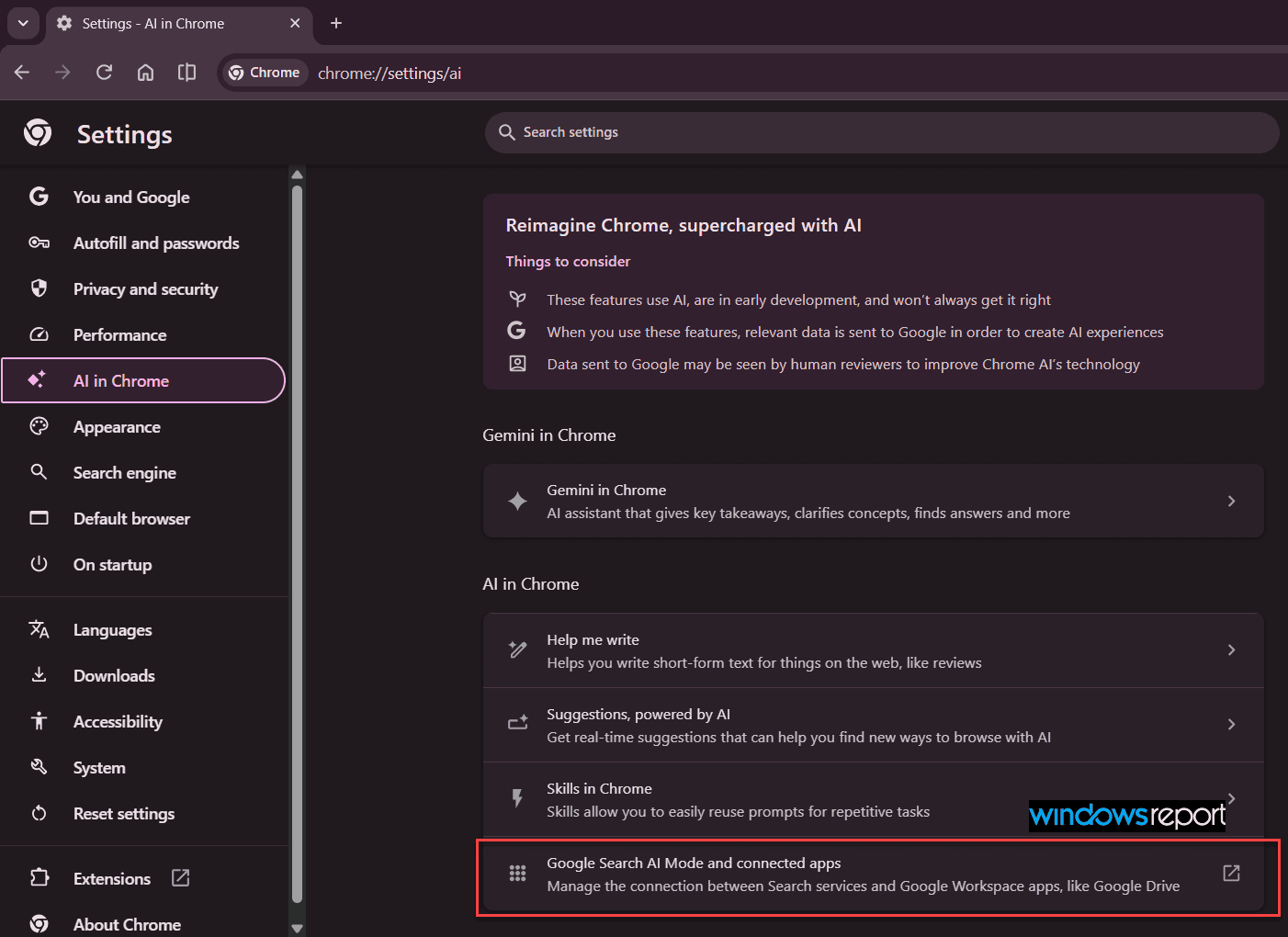
Google has added a new shortcut to Chrome Canary that gives users easier access to the permissions behind Google Search AI Mode. A new option in Chrome’s AI settings takes users directly to a page where they can manage AI Mode’s connection with Google Workspace apps.

Rather than adding new AI features, the change makes it easier to review and manage the permissions that let AI Mode use personal Google Workspace content, such as files in Drive, when answering questions.

The new option appears under “AI in Chrome” settings as “Google Search AI Mode and connected apps”. Its description reads: ” Manage the connection between Search services and Google Workspace apps, like Google Drive.”

Image Credit: Venkat | Windows Report.

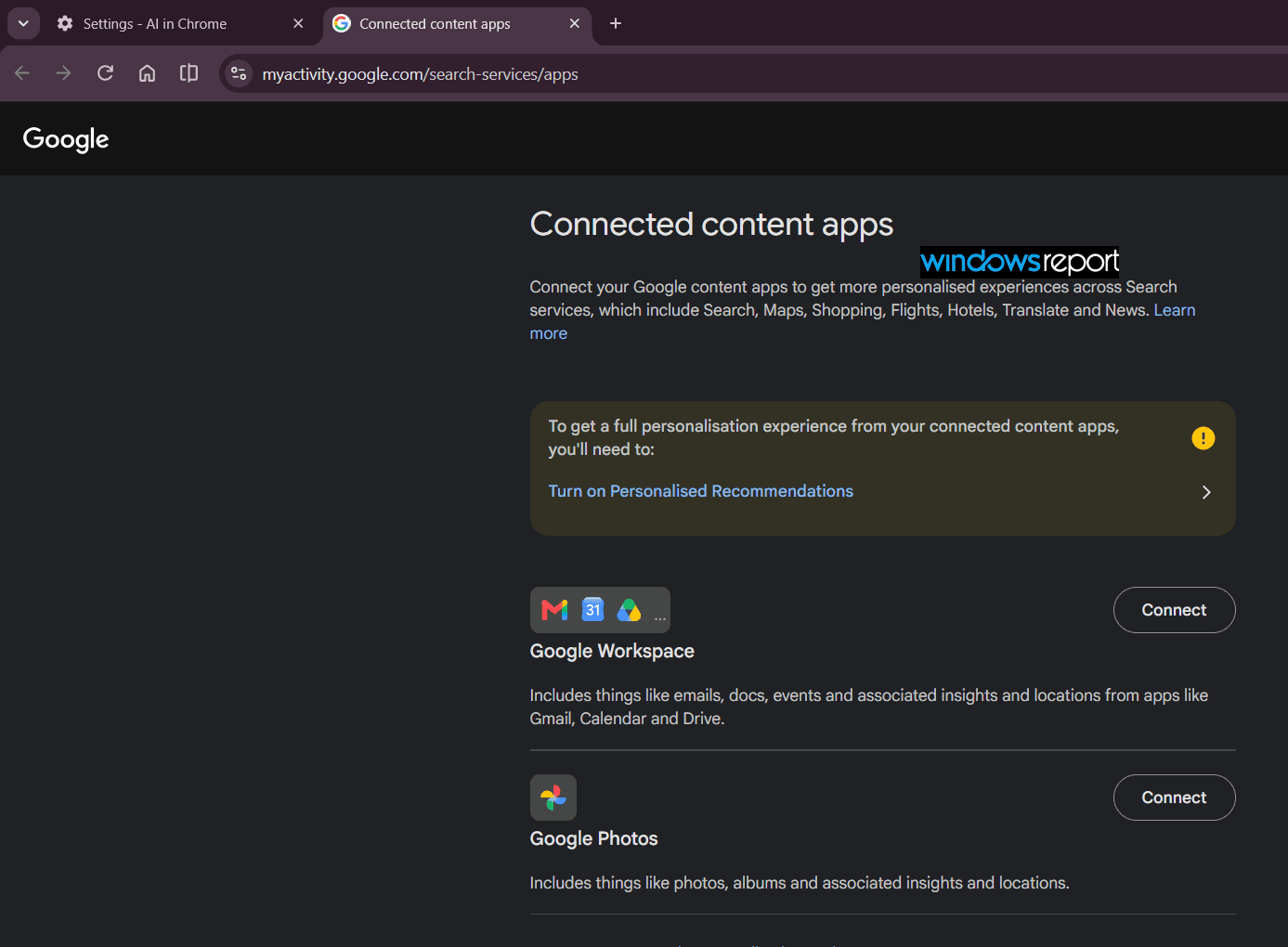
Clicking the option opens Google’s Connected content apps page, where users can manage these connections through their Google Account.

The Chrome setting itself only covers AI Mode’s Workspace connection, though the linked page also lets users connect other Google apps, like Photos, to Search.

Image Credit: Windows Report.

The addition matches a recent Chromium change titled “[aim-drive] – Create a settings linkout for users to manage AIM consent.” The change adds the strings and mappings for the new Google Search AI Mode and Workspace apps connection row in Chrome’s AI settings.

Another code comment further explains its purpose:

Controls whether the Google Search AI Mode Workspace link (Connected Apps) is shown in AI Settings. Acts as a killswitch.

In other words, Chrome isn’t building a new AI feature here; it’s just pointing to a page Google already runs. The connection settings stay managed through Google’s Search services. For now, the shortcut’s only available in Chrome Canary.

Microsoft 365 Will Let Organizations Recall External Emails

Cross-tenant Message Recall will soon let Microsoft 365 organizations recall emails sent to users in trusted external tenants. Until now, Exchange Online only supported Message Recall when the sender and recipient belonged to the same Microsoft 365 tenant.

The expansion gives organizations more control over messages accidentally sent to external partners, subsidiaries, contractors, and affiliated companies.

How cross-tenant Message Recall works

The feature relies on mutual trust between Microsoft 365 organizations.

The recipient organization decides which external tenants can recall messages from its users’ mailboxes. For example, if Company A sends an email to Company B, Company B must add Company A’s tenant ID to its allow list before Company A can recall the message.

If the recipient organization has not approved the sender’s tenant, Exchange Online will reject the recall request and return an error.

This approach prevents unknown or untrusted organizations from attempting to remove messages from recipients’ mailboxes.

Cross-tenant recall remains disabled by default

Microsoft will not enable the feature automatically.

Exchange Online administrators must enable cross-tenant recall and add at least one trusted external tenant to the allow list. Without an approved tenant ID, recall requests from external Microsoft 365 organizations will fail.

Admins can enable or disable the feature with the following Exchange Online PowerShell command:

Set-CrossTenantRecallConfiguration -CrossTenantRecallEnabled $true

To disable it, admins can set the value to $false.

How to manage the trusted tenant list

Administrators can add approved Microsoft 365 tenant IDs with:

Set-CrossTenantRecallConfiguration -AllowedSenderTenantIds @{Add="tenantId 1","tenantId 2"}

They can remove tenants with:

Set-CrossTenantRecallConfiguration -AllowedSenderTenantIds @{Remove="tenantId 1","tenantId 2"}

Organizations will need to coordinate with their external partners before enabling the feature. The recipient tenant must explicitly trust the organization that may need to recall messages.

Recall will work similarly to internal messages

After administrators configure the required trust relationship, cross-tenant Message Recall will behave similarly to recall within the same Microsoft 365 organization.

Recall success will depend on the recipient organization allowing requests from the sender’s tenant.

Rollout starts in August 2026

Microsoft plans to begin rolling out cross-tenant Message Recall in mid-August 2026. The company expects to complete the rollout by mid-September 2026.

The feature will become available across worldwide Microsoft 365 environments, Government Community Cloud, GCC High, Department of Defense environments, and Microsoft 365 operated by 21Vianet.

The gradual rollout means some organizations may receive the feature before others during the August-to-September deployment period.

Microsoft is also preparing other Exchange and Outlook changes. The company plans to disable OWA Light by default in an upcoming Exchange Server update, while the new Outlook will warn users when they attempt to reply to an older message in a conversation that already contains a newer response.

Windows 11 Phone Link Bug Causes Massive RAM Usage, Users Say

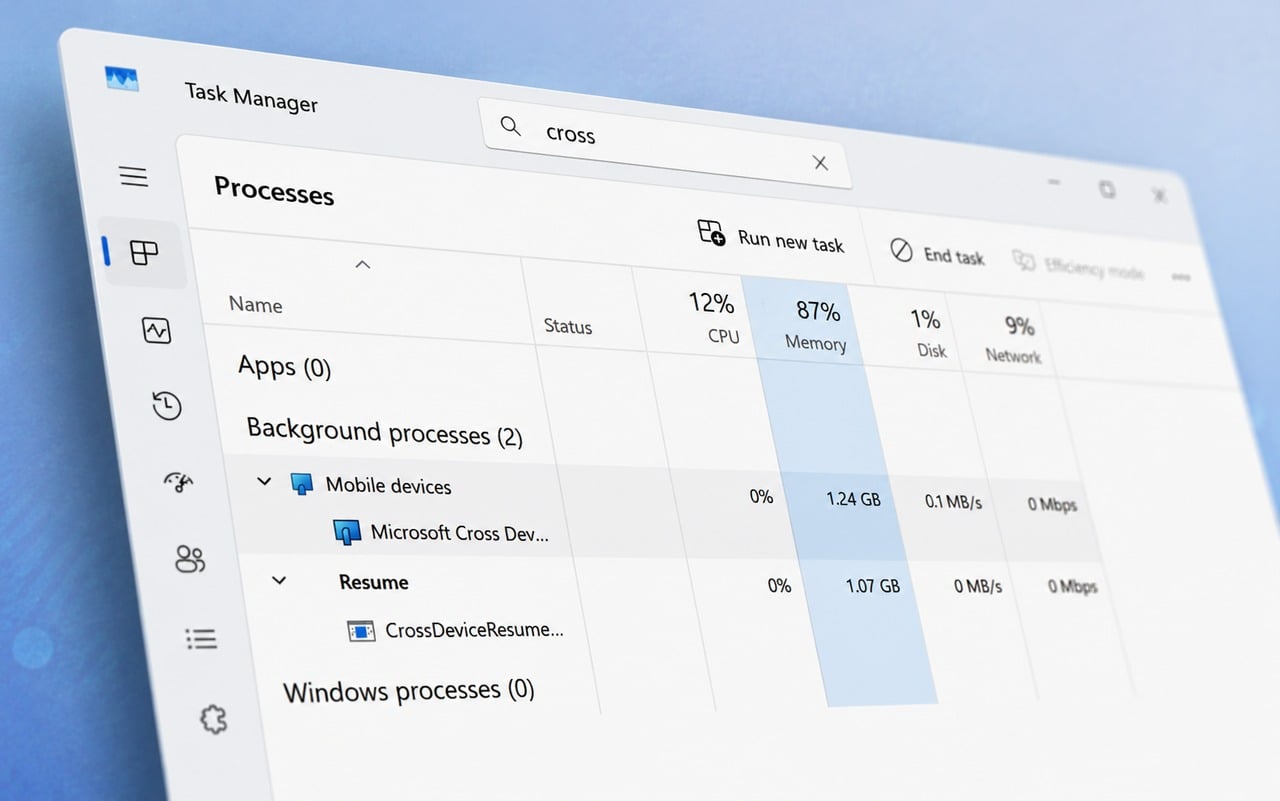
Windows 11 users are reporting a serious Phone Link memory leak that can cause the Cross Device Service to consume tens of gigabytes of RAM.

One recent report claimed the service used between 25GB and 30GB of memory during a gaming session. A related Phone Link process reportedly increased total memory usage even further.

Complaints about unusually high Phone Link memory usage are not new.

Similar reports date back to at least 2023, with some users claiming that Cross Device Service consumes between 15GB and 20GB of RAM approximately once per day.

One user on Microsoft Q&A said the problem regularly pushed total system memory usage above 90%. Affected users often need to manually end the process through Task Manager to restore normal performance.

The issue appears to develop over time rather than causing an immediate spike after startup.

What is Cross Device Service?

Cross Device Service is a Windows background component used by Microsoft Phone Link and other cross-device features.

It supports functions such as clipboard sharing between devices, notification syncing, remote device control, cross-device app continuity, and the Windows Resume feature.

Under normal conditions, the service should remain active in the background while using a relatively small amount of system memory.

However, affected users report that the process continues allocating RAM without releasing it. This can eventually reduce system performance, cause applications to slow down, and leave less memory available for games or other demanding software.

Microsoft has not confirmed the issue

Microsoft has not officially acknowledged the Phone Link memory leak as a known Windows 11 bug.

Most of the current evidence comes from Reddit posts, Microsoft Q&A discussions, and other individual user reports.

However, multiple users have described similar symptoms involving Cross Device Service, Phone Link, and unusually high memory consumption.

It remains unclear whether the issue affects a specific Windows 11 update, Phone Link version, device configuration, or connected smartphone model.

Users experiencing the problem should first install the latest available Windows 11 and Phone Link updates.

Microsoft may address the issue through an app update or Windows servicing update even if the company has not publicly confirmed the bug.

Disabling the Mobile Devices entry under Task Manager’s Startup apps section may also help prevent related services from starting automatically.

Users can temporarily recover memory by opening Task Manager, locating the affected Phone Link or Cross Device Service process, and selecting End task.

This stops the process and releases the consumed RAM, although the memory leak may return after the service restarts.

Users who continue experiencing severe memory usage may need to disable Phone Link entirely.

This removes access to features such as notification syncing, clipboard sharing, messaging, calls, and cross-device continuity. However, it can also prevent Cross Device Service from consuming excessive system memory.

Microsoft is separately testing an option that lets users remove a connected PC directly from the Link to Windows mobile app.

Security researchers have also recently reported that hackers are abusing CloudZ RAT and Phone Link-related functionality to intercept one-time passwords.

Via Neowin

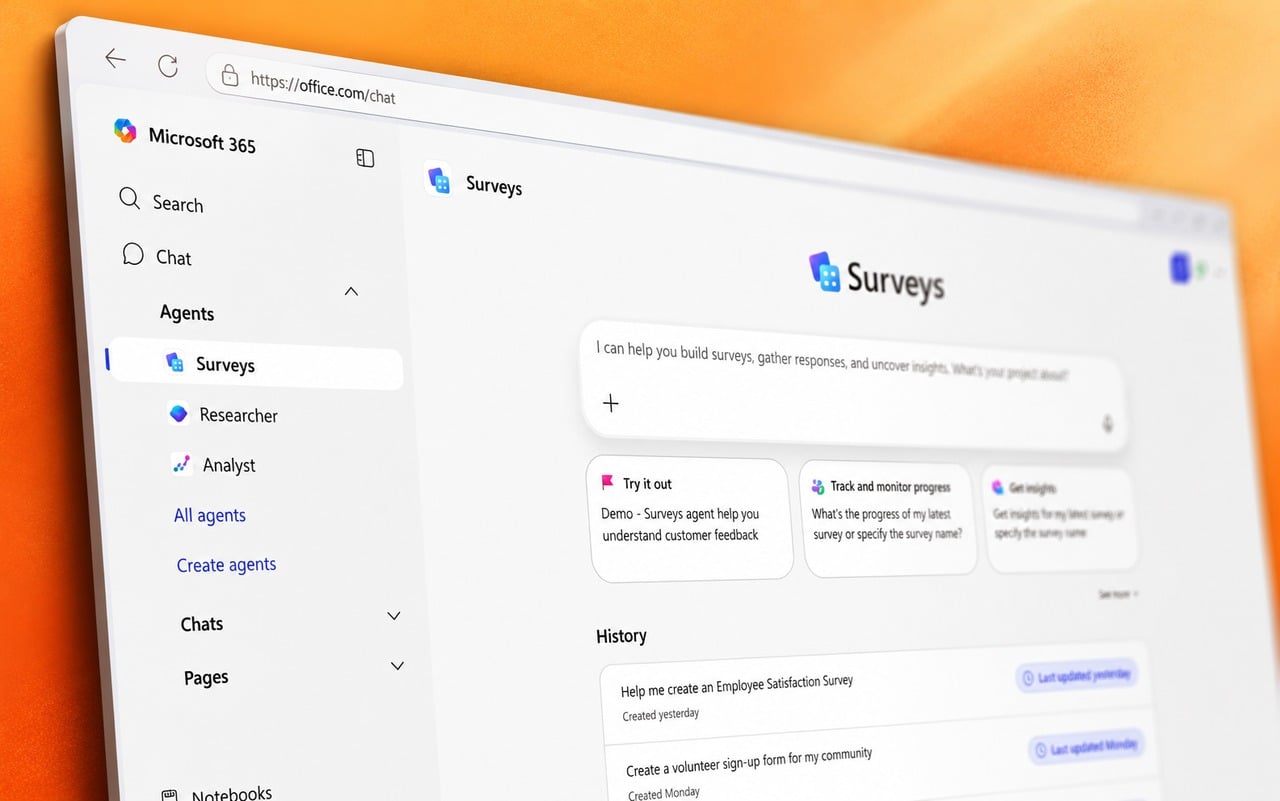
Microsoft Will Remove Surveys Agent From Copilot in August

Microsoft is retiring Surveys Agent, according to MC1421920 in the Message Center, roughly one year after announcing the AI-powered survey tool for Microsoft 365 Copilot. The company will remove it from the Agent Store on August 31, 2026, as it moves the same features directly into Microsoft Forms.

The Surveys Agent will leave the Agent Store

Surveys Agent launched for Frontier customers through Microsoft 365 Copilot after Microsoft announced it in August 2025.

The tool allowed users to create and manage surveys with natural-language prompts, including creating and refining surveys, sending them to selected recipients, reminding participants to submit responses, and exporting survey results to Excel for analysis.

Microsoft now plans to consolidate these features into Microsoft Forms rather than maintain a separate agent.

Copilot features are moving to Microsoft Forms

Microsoft has started integrating Surveys Agent capabilities directly into Forms.

Users can access Copilot through the floating Dynamic Action Button inside the Forms interface. This approach brings survey creation, editing, and management into a single experience.

After August 31, users who attempt to open Surveys Agent will be redirected to the Copilot-powered Microsoft Forms experience.

Existing surveys will remain available

The retirement will not remove content created through Surveys Agent.

Previous conversation history will remain accessible in Microsoft 365 Copilot, while forms created with the agent will continue to appear in Microsoft Forms.

Users will not need to recreate existing surveys or export their content before the retirement date.

No additional license or admin changes required

Microsoft says customers will not need an additional license to access the integrated Copilot capabilities in Forms.

The new experience will remain enabled by default, and IT administrators will not need to change settings or complete additional configuration.

In other news, OpenAI has released GPT-5.6 to the public, and Microsoft has already brought it to Microsoft 365 Copilot.

Via Neowin
Microsoft Edge tests Web Remix using Copilot to customize websites

Microsoft is testing a new Copilot feature in Edge Canary called “Web Remix” that lets users customize how websites appear in their browser. We spotted it in today’s Canary update.
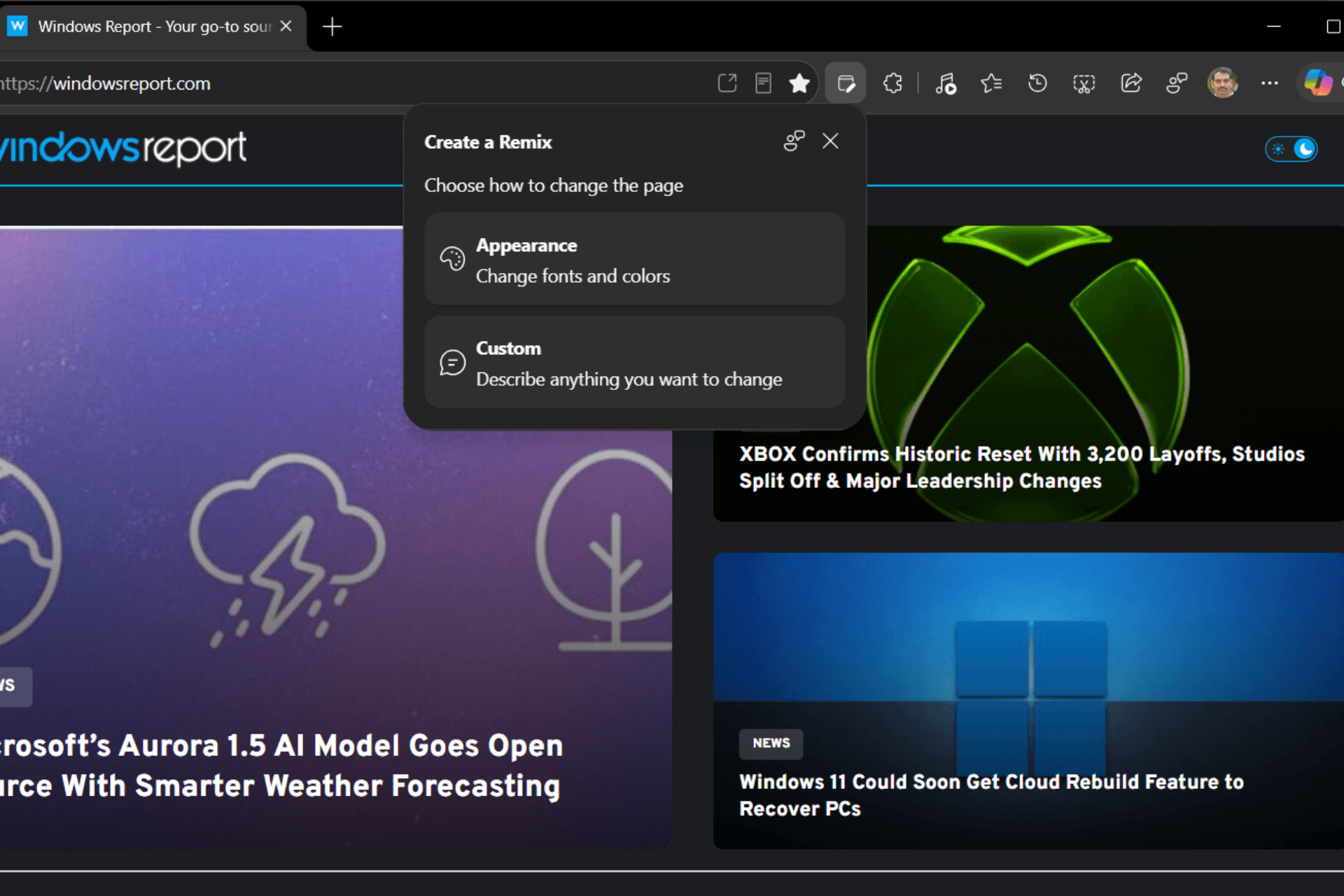
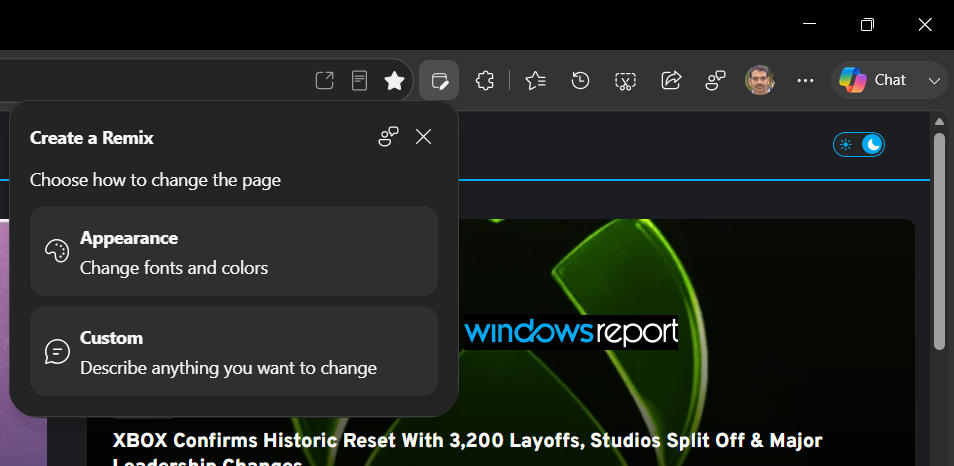
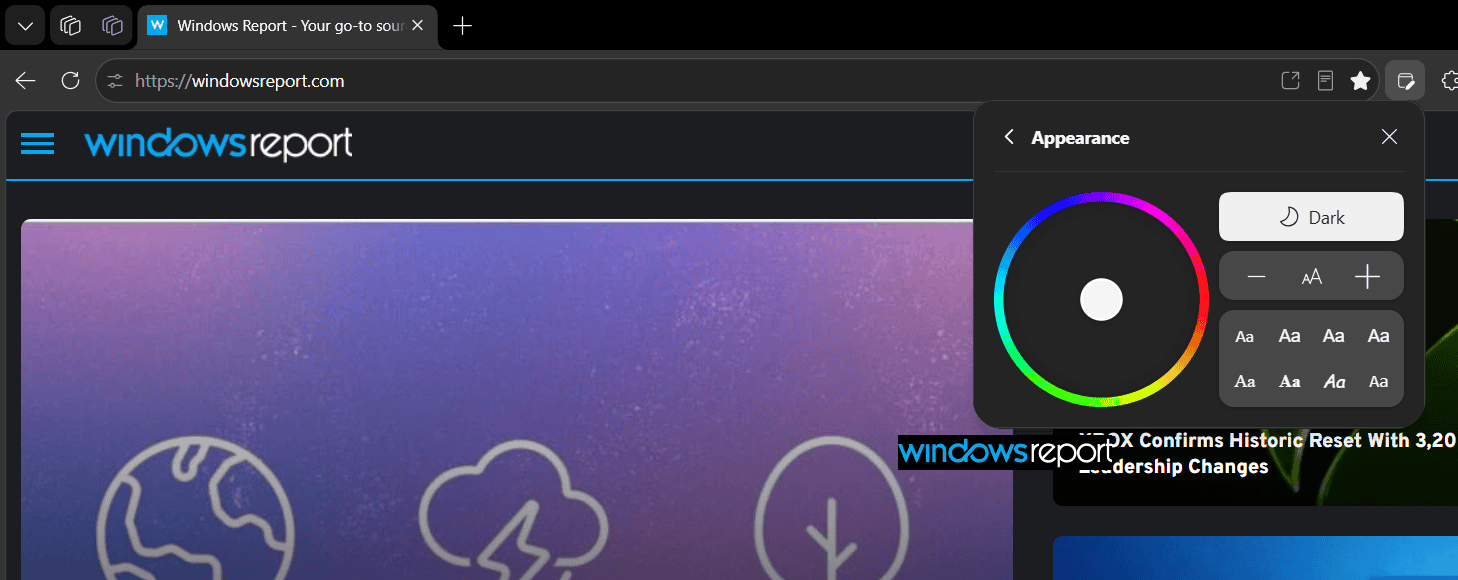
We tested it directly on windowsreport.com. Edge shows a Remix icon in the toolbar that opens the “Create a Remix” panel, with “Appearance” and “Custom” options. Appearance offers a color wheel for the page’s color scheme, a light/dark toggle, a text size stepper, and a grid of font previews.

Image Credit: Venkat | Windows Report.

A Remix can be applied to an entire domain or to individual pages. We switched the page to light mode from dark and changed the font, and both changes applied instantly to the live page in our browser.

Custom works differently. Instead of preset controls, you describe the change in plain English, for example, “a button that scrolls to the top,” and Copilot generates the modification. We tried this exact prompt during testing.

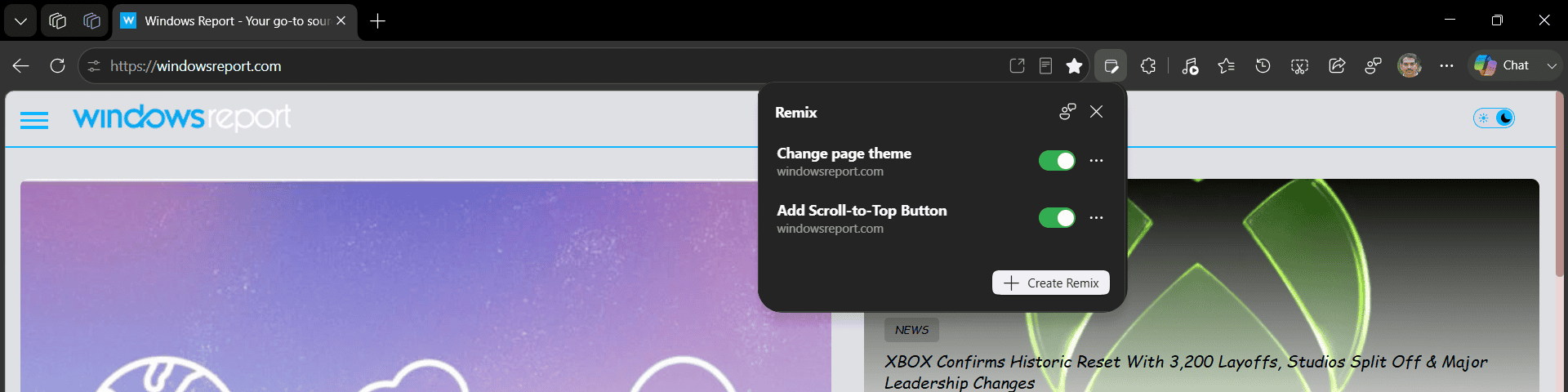
After adding the scroll-to-top button described above, the same panel listed both “Change page theme” and “Add Scroll-to-Top Button” as separate entries for the site, each with its own toggle, rather than one replacing the other.

Image credit: Windows Report.

These changes exist only locally. Other visitors still see the normal site, and opening the page in another profile shows no trace of the remix.

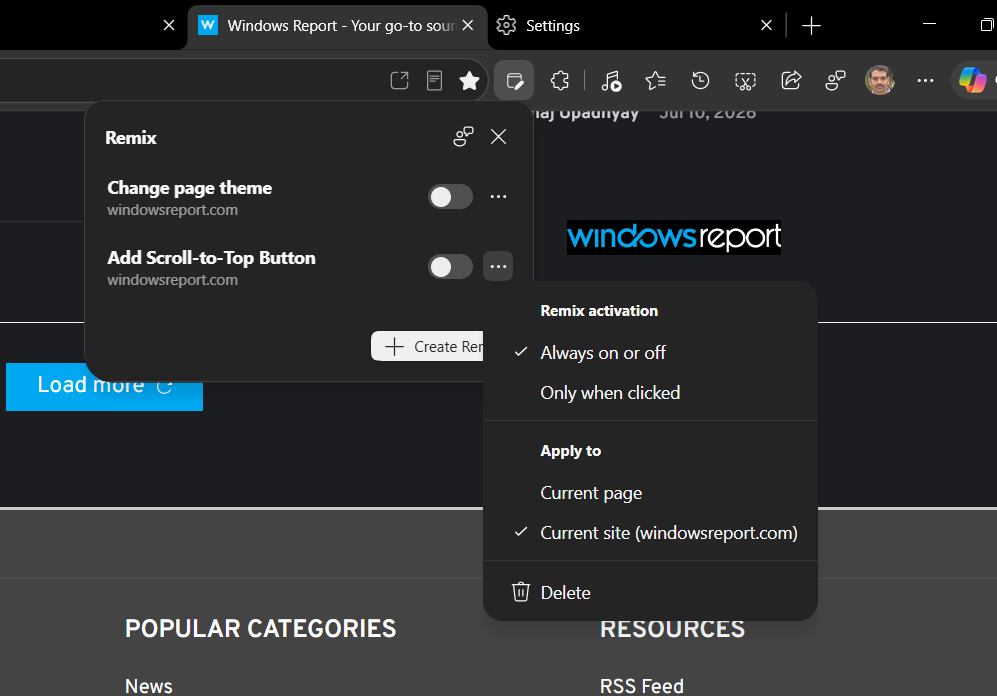
After you create a remix, the panel switches to a management view with toggles to turn each customization on or off. The three-dot menu next to each one lets you choose whether the remix is always active or only runs when clicked, apply it to the current page or the entire site, or delete it altogether.

Image Credit: Windows Report.

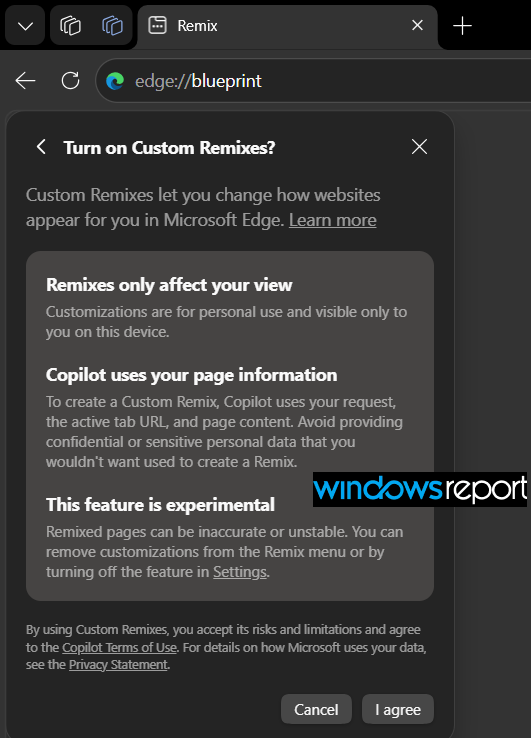
To generate a “Custom Remix”, Copilot uses your prompt, the active tab’s URL, and the page content. Edge tells users not to enter confidential or sensitive information they wouldn’t want factored into a remix.

The feature is experimental. Microsoft warns that remixed pages can be inaccurate or unstable and that users can remove customizations from the Remix menu or turn the feature off in Settings. Enabling Custom Remix also requires accepting the Copilot Terms of Use.

Image credit: Windows Report.

The Web Remix feature is hidden behind the #edge-remix flag in Edge Canary. Enable it and restart the browser to try the feature.

Microsoft Brings GPT-5.6 to Microsoft 365 Copilot

As OpenAI released GPT-5.6 yesterday, Microsoft confirmed that the newest AI model is available in Microsoft 365 Copilot. The rollout started yesterday, which means the latest OpenAI model is now available to Word, Excel, PowerPoint, Copilot Chat, and Copilot Cowork.

Rather than treating GPT-5.6 as a standalone upgrade, Microsoft says it has worked closely with OpenAI to optimize the model specifically for Microsoft 365. The company says GPT-5.6 has been customized for knowledge work, which allows Copilot to handle more complex, multi-step tasks while delivering stronger results across Microsoft’s productivity apps.

In Word, users can expect Copilot to produce better structured drafts, improve writing flow, and transform rough notes into more polished documents with less manual editing. Excel is also receiving a boost, with GPT-5.6 helping Copilot reason through complicated datasets and perform more advanced analysis before presenting actionable insights.

PowerPoint benefits from the upgrade as well. According to Microsoft, Copilot can now generate richer presentation drafts with improved slide layouts, stronger visual balance, and more complete content, reducing the amount of work required before a presentation is ready to share.

That’s not all; GPT-5.6 is also powering Copilot Chat, where Microsoft says the model handles ambiguous requests more effectively by comparing options, building structured plans, and solving more complicated workplace problems. Meanwhile, Copilot Cowork gains stronger agentic capabilities, allowing it to carry out multi-step workflows across files and connected business tools instead of simply generating recommendations.

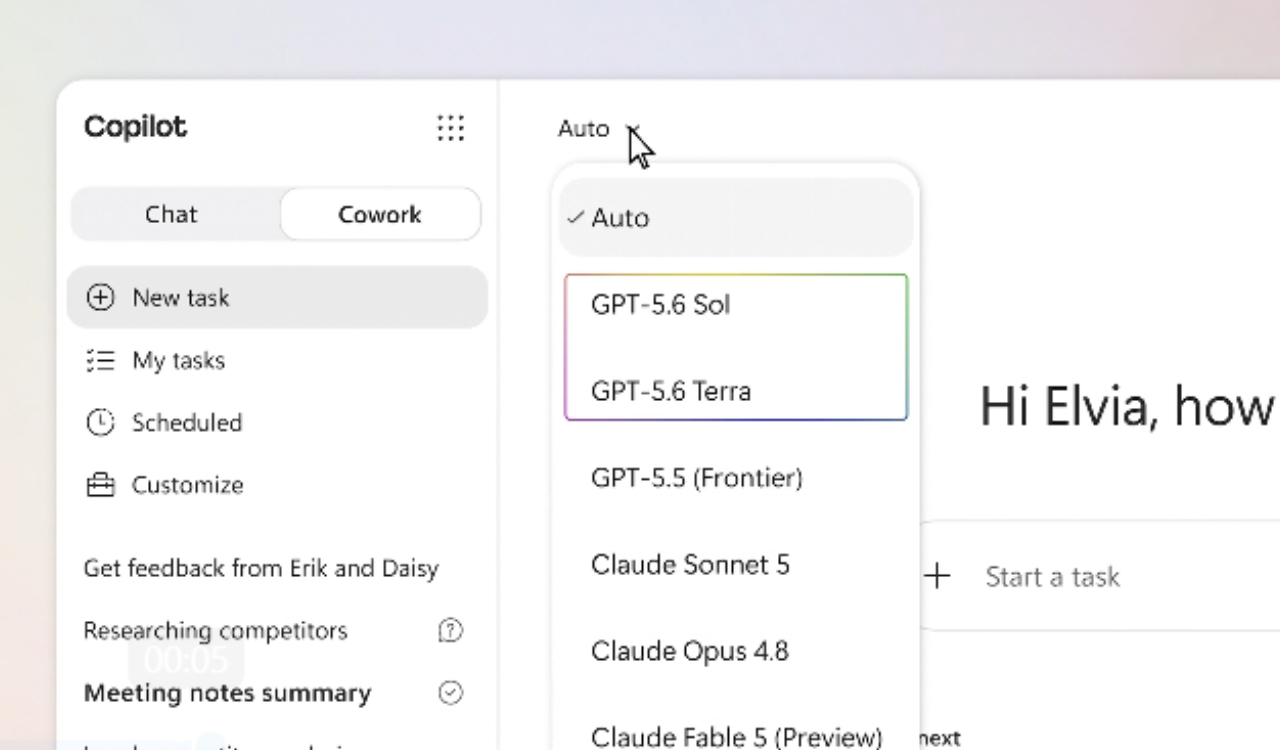
Once GPT-5.6 reaches an organization, Copilot may automatically switch to the new model whenever Microsoft determines it is the best fit for a task. For customers with model selection enabled, GPT-5.6 can also be chosen manually from the model picker.

XBOX CEO Joins Federal Reserve Jobs Task Force Days After Announcing Sweeping Layoffs

Only days after unveiling XBOX’s sweeping restructuring that will slash roughly 3,200 jobs, CEO Asha Sharma has been tapped for another high-profile responsibility. The Federal Reserve has named the XBOX chief to a new advisory task force that will examine how artificial intelligence and emerging technologies are reshaping jobs, productivity, and the broader U.S. economy.

Earlier this week, Sharma confirmed XBOX’s largest restructuring in years, which includes thousands of layoffs, studio spin-offs, leadership changes, and a renewed focus on the company’s core console business. The changes marked the beginning of what she has described as a long-term reset for XBOX.

That being said, Sharma’s latest appointment has little to do with gaming itself. According to the Federal Reserve’s announcement, she will serve on the panel focused on the impact of AI and technology on employment and productivity. She will work alongside venture capitalist Marc Andreessen and Stanford economist Charles I. Jones as part of a broader effort launched by Federal Reserve Chair Kevin Warsh to review how the central bank approaches major economic challenges.

The Fed has established five separate task forces covering communications, inflation, balance sheet policy, economic data, and technology. Recommendations from the groups are expected later this year and could help shape future thinking around monetary policy and workforce trends, although the panels serve in an advisory capacity rather than making policy decisions directly.

Speaking of Sharma, her selection reflects the growing influence of technology leaders in conversations around AI’s impact on the economy. It also places the XBOX boss in an unusual spotlight, as she balances one of the gaming industry’s biggest restructurings while helping advise one of the world’s most influential financial institutions on the future of work.

How to Watch Spain vs Belgium World Cup 2026 LIVE Today on PC, Kickoff Time & Referees

France has already punched its ticket to the FIFA World Cup 2026 semifinals after brushing aside Morocco with a convincing victory, and now all eyes shift to another blockbuster quarterfinal between Spain and Belgium. As far as the journey of two nations are concerned, Spain heads into the knockout showdown riding plenty of momentum after edging Portugal 1-0 in the Round of 16.

Meanwhile, Belgium stunned tournament hosts the United States with an emphatic 4-1 victory in the Round of 16. That attacking display has only raised expectations heading into their biggest test yet.

With a semifinal meeting against France awaiting the winner, neither side can afford any mistakes. Here’s everything you need to know about how to watch Spain vs Belgium live, including kickoff times, streaming platforms across multiple countries, predicted starting XIs, referee details, and more.

How to watch Spain vs Belgium World Cup Quarterfinal Match LIVE

CountryStreaming
United StatesFOX One, Fubo, DirecTV Stream
United KingdomBBC iPlayer / ITVX
CanadaTSN
AustraliaSBS On Demand
IndiaJioHotstar / Zee5
SpainRTVE Play
BelgiumVRT MAX / Auvio

Spain vs Belgium FIFA World Cup 2026 Quarterfinals Kickoff Date & Time

Country/RegionTime ZoneKickoff Time
USA (Pacific)PDT12:00 PM (Noon)
USA (Mountain)MDT1:00 PM
USA (Central)CDT2:00 PM
USA (Eastern)EDT3:00 PM
United KingdomBST8:00 PM
Canada (Pacific)PDT12:00 PM (Noon)
Canada (Mountain)MDT1:00 PM
Canada (Central)CDT2:00 PM
Canada (Eastern)EDT3:00 PM
IndiaIST12:30 AM (July 11)
SpainCEST9:00 PM
BelgiumCEST9:00 PM
Brazil (Brasília)BRT4:00 PM

Who are Spain vs Belgium quarterfinals match referees?

  • Referee: Michael Oliver (England)
  • Assistant Referee 1: Stuart Burt (England)
  • Assistant Referee 2: James Mainwaring (England)
  • Fourth Official: Ramon Abatti (Brazil)

Who do you think will face France in the semis? My pick is Spain; what’s yours? Let us know in the comments below.

Obsession Gets Peacock Release Date After Massive Box Office Run

After months of dominating theaters and becoming one of 2026’s biggest surprise hits, Obsession is finally making the jump to streaming. Universal has officially confirmed when the horror phenomenon lands on Peacock, giving fans another chance to see why Curry Barker’s breakout film became one of the year’s biggest success stories.

Obsession finally heads to Peacock this month

Universal has confirmed that Obsession begins streaming on Peacock on July 17, marking a 63-day theatrical window after its mid-May debut. The move follows an extraordinary theatrical run that few expected, especially for a low-budget horror movie.

Directed by Curry Barker, Obsession follows Bear (Michael Johnston), a young man who uses a mysterious supernatural object to make his longtime crush Nikki (Inde Navarrette) fall in love with him. Instead of getting the romance he always wanted, his wish spirals into a terrifying nightmare as Nikki’s obsession quickly becomes deadly.

Speaking of its theatrical performance, the film has become one of the biggest horror success stories in recent memory. Obsession opened with $17.1 million domestically before growing into a $249.5 million North American run thanks to exceptional word of mouth and an impressive A- CinemaScore, something rarely seen for horror releases. Worldwide, the movie has now crossed the $400 million mark.

You can still buy or rent Obsession today

If you don’t want to wait for the Peacock release, Obsession is already available digitally across several storefronts. You can buy or rent the movie through Amazon Prime Video, Apple TV, Fandango at Home, and other major digital platforms. Digital purchases also include bonus content such as a behind-the-scenes featurette and filmmaker audio commentary, though extras may vary by retailer. Moreover, physical collectors also have options, as the movie released on 4K UHD, Blu-ray, and DVD on July 14.

XBOX’s “Worth the Wait” Update Sparks Fresh Disc-to-Digital Speculation

Despite trending online for all the wrong reasons over the past week following sweeping layoffs and major restructuring, XBOX is teasing what could be a significant console update landing for XBOX Insiders next week.

XBOX may finally reveal its long-rumored disc-to-digital feature next week

Brad Rossetti, who leads the XBOX Insider Program, revealed that Microsoft has paused all new XBOX Insider console updates this week. According to Rossetti, the break is intentional, as the team is preparing something that will be “worth the wait” for Insider members.
That brief message has quickly sparked speculation across the XBOX community.

While Microsoft hasn’t revealed what the update includes, Windows Central’s Jez Corden believes it could finally be tied to Xbox’s long-rumored disc-to-digital feature, internally referred to as “Positron.”

If previous reports are accurate, the feature would allow eligible XBOX owners to convert physical XBOX One and XBOX Series X game discs into digital licenses. The system is also expected to work with XBOX Play Anywhere for supported titles, making it easier to access purchased games across XBOX consoles and Windows PCs without relying on the original disc.

Microsoft has never officially announced the feature, but reports have claimed it has been undergoing internal testing for quite some time. That makes next week’s Insider update a possible opportunity for the company to introduce it publicly, although nothing has been confirmed.

Even if the mystery update turns out to be something else entirely, it appears XBOX Insiders will get early access before any wider rollout reaches the public. With Insider builds temporarily on hold, it likely won’t be long before Microsoft reveals exactly what has been keeping the team busy.

XBOX Summer Sale 2026 Teaser Is Live for Game Pass Members

XBOX Summer Sale 2026 has started with early access for XBOX Game Pass members, giving subscribers a first look at more than 300 discounted games.

According to PureXbox, the promotion is also known as the Ultimate Game Sale. The full XBOX Summer Sale is expected to open to all XBOX players on July 15, 2026.

XBOX Summer Sale 2026 Early Access Is Live

The current version of the sale appears to be a teaser event for Game Pass members.

Players can find the discounts through the Deals section of the Microsoft Store on XBOX. The promotion appears under the “Ultimate Game Sale Teaser” section.

Availability may vary by region or account, so the sale may not appear immediately for every user.

Notable XBOX Summer Sale 2026 Discounts

The early sale already includes major discounts on newer releases, bundles, and popular catalog titles.

GameDiscountSale Price
Warhammer 40,000: Space Marine 2, 1-Year Anniversary70%$29.99
GTA: The Trilogy, The Definitive Edition67%$19.79
Call of Duty: Black Ops 6 Cross-Gen60%$27.99
Kingdom Come: Deliverance 260%$27.99
Assassin’s Creed Shadows55%$31.49
Battlefield 650%$34.99
Borderlands 450%$34.99
Batman: Arkham Collection85%$8.99
Dead Space: Digital Deluxe Edition85%$11.99
Mafia: The Old Country30%$34.99
NBA 2K26 x PGA Tour 2K25 Bundle75%$24.99
Sekiro: Shadows Die Twice, GOTY Edition50%$29.99

More XBOX Deals Are Coming July 15

The current promotion only serves as a preview of the larger Summer Sale.

More games and discounts should arrive when the full event begins on July 15. Players who do not find a deal worth buying in the teaser may want to wait for the wider sale before making a purchase.

XBOX Continues a Busy July

The XBOX Summer Sale comes during a busy month for the platform. XBOX Play Anywhere recently added 30 more games, while the XBOX Game Pass July 2026 Wave 1 lineup was also revealed.

Microsoft also announced the latest XBOX Free Play Days lineup, giving players more limited-time options to try.

XBOX Play Anywhere Adds 30 More Games in July 2026

XBOX Play Anywhere added 30 more supported games in July 2026, expanding the library to more than 2,350 titles.

The expansion follows the recently revealed XBOX Game Pass July 2026 Wave 1 lineup. According to PureXbox, the latest Play Anywhere update adds another large batch of cross-device games for XBOX players.

XBOX Play Anywhere July 2026 Expansion

XBOX Play Anywhere lets players buy a supported game once and access it across XBOX consoles, Windows PCs, and compatible handheld devices.

The feature also supports cross-save progress and shared purchases on supported platforms. This makes it one of XBOX’s strongest ecosystem features, especially as more players move between console, PC, and handheld gaming.

Notable XBOX Play Anywhere Additions

PGA Tour 2K25 stands out as one of the biggest additions in the July 2026 update.

Buckshot Roulette has also joined the XBOX Play Anywhere program, giving players another popular indie title with cross-device support.

Final Fantasy Resonance also appears in the latest list. The game has an October 22, 2026 release date and will support XBOX Play Anywhere at launch.

Full List of New XBOX Play Anywhere Games

American MafiaAsdivine KnotBeholder: Conductor
Blast’N BountyBuckshot RouletteConstruction Simulator: Evolution
Demon Castle StoryDetective Holmes: Hidden ObjectsDragon Quest Monsters: The Withered World
Drug Dealer Simulator 2Fear the TimeloopFinal Fantasy Resonance
Frogging Up: Frog Climb Rage GameHardwired: Ghost In The ResetHela: of Mice & Magic
High TimesIridioMate’Morphosis
PGA Tour 2K25Railbreak DXRedtail Relic Rush
Remothered: Broken Porcelain RemasteredRemothered: Tormented Fathers RemasteredRoll Mad
Sokocat: CastawaySwamp TD 2Tailbreak
Tiny WitchWake Up, Lia!Wreck Runners

XBOX Keeps Building Its Cross-Device Strategy

XBOX Play Anywhere continues to support Microsoft’s broader gaming strategy by connecting console, PC, and handheld play under one purchase.

The update also comes as XBOX Free Play Days received a new lineup. Microsoft reportedly also plans to keep some of its best games exclusive to the XBOX platform to help boost console sales.

With more than 2,350 supported titles, XBOX Play Anywhere remains a key reason for players to stay inside the XBOX ecosystem.

Where to Watch Obsession: Peacock Streaming Release Date, Digital & Blu-ray Guide

One of 2026’s biggest horror surprises has finally made its way beyond theaters. After a blockbuster run that turned it into Focus Features’ highest-grossing movie ever, Obsession is now available to watch from home. If you’re wondering whether it’s on Peacock, when it could reach Prime Video, or where you can rent it today, here’s a complete breakdown.

Where can you watch Obsession today?

Right now, the movie is available as a digital purchase or rental across several major platforms in the U.S., including:

PlatformAvailable
Amazon Prime VideoRent or Buy
Apple TVRent or Buy
Fandango at HomeRent or Buy
YouTubeBuy

Rental pricing starts at around $19.99, while buying the film costs approximately $24.99, depending on the storefront. Rental access remains active for 48 hours after playback begins.

Is Obsession streaming for free?

No. Obsession has not joined any subscription streaming service yet. That means you’ll currently need to rent or purchase the movie if you want to watch it at home.

When is Obsession coming to Peacock?

Although NBCUniversal hasn’t confirmed an official streaming date, Obsession is widely expected to arrive on Peacock first because it’s a Focus Features release. Based on previous Universal release patterns, the movie could begin streaming between late August and mid-September 2026, though that remains an estimate until Peacock announces a date.

When will Obsession come to Prime Video?

Yes, eventually. Universal’s current licensing arrangement typically moves movies from Peacock to Prime Video later in the release cycle. If that schedule remains unchanged, Obsession could become part of Prime Video’s subscription catalog around February 2027.

When does the Blu-ray release of Obsession take place?

Well, thankfully, collectors won’t have long to wait:

FormatRelease Date
DVDJuly 14, 2026
Blu-rayJuly 14, 2026
4K UHDJuly 14, 2026

Obsession plot & cast

Directed by Curry Barker, Obsession stars Michael Johnston as Bear, a record store employee who uses a mysterious supernatural artifact to make his childhood friend Nikki, played by Inde Navarrette, fall in love with him. Instead of getting the romance he imagined, Bear unleashes an increasingly disturbing chain of events that turns his wish into a nightmare.

The horror film became one of 2026’s biggest surprise hits, earning more than $371 million worldwide and setting a new box office record for Focus Features.

Bottom line

If you’re planning to watch Obsession this week, digital rental is currently your only option. Streaming subscribers will likely have to wait a little longer, with Peacock expected to get the movie first before it eventually moves to Prime Video. Just in case you are eager to watch/stream Project Hail Mary, don’t forget to check our linked guide.

Microsoft Edge tests replacing the HTTPS lock icon with a tune icon

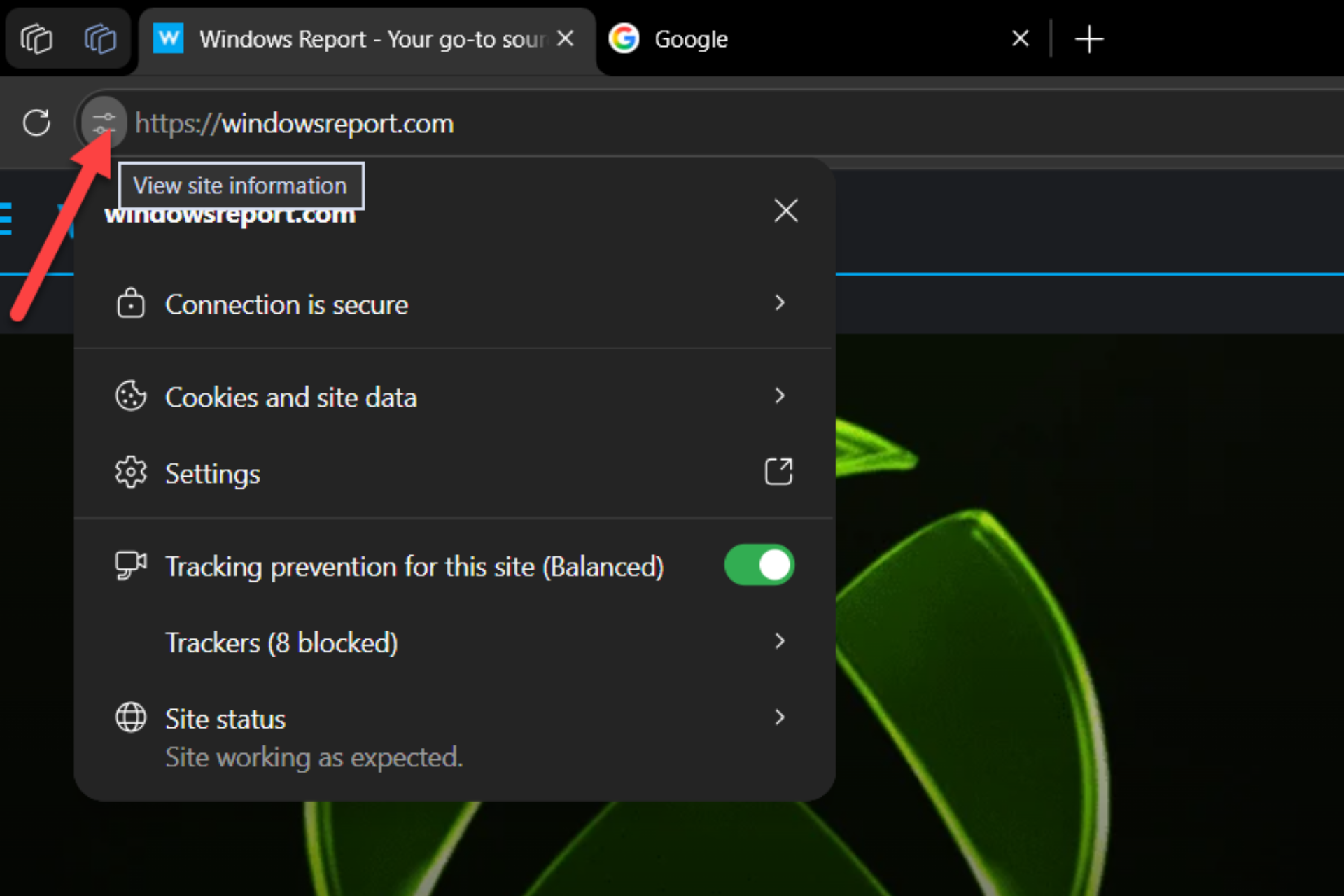
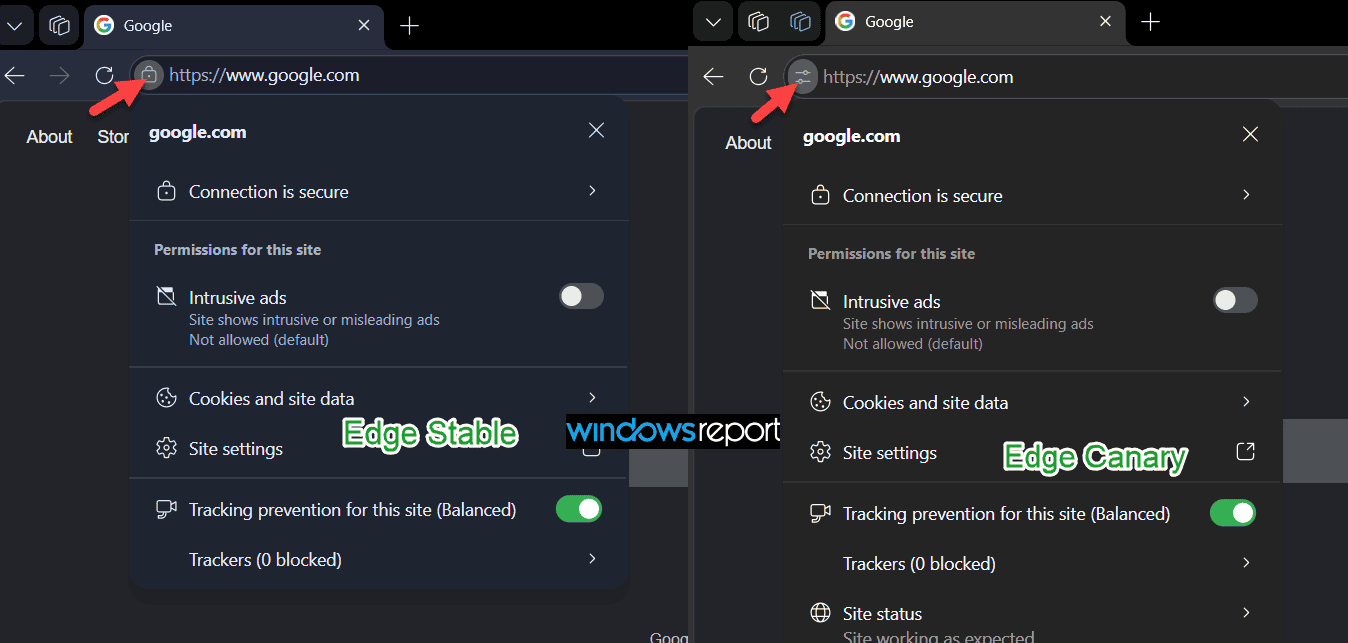
Microsoft is testing a visual change to the Edge Canary address bar. The browser now shows a tune-style icon instead of the familiar padlock on HTTPS websites, the same design Google introduced in Chrome years ago.

Chrome made the switch with version 117 in 2023 after concluding that the padlock no longer conveyed the right message. The company said its research found that many users interpreted the icon as proof that a website was trustworthy, when it actually only indicated that the connection between the browser and the website was encrypted.

Phishing sites routinely use HTTPS too, so the padlock shows up there just as often as on legitimate ones. The tune icon was chosen because it better represents site controls and permissions rather than website trust.

Other browsers have taken different approaches since. Some adopted similar site information icons, while others retained the traditional padlock. Edge, despite sharing Chromium with Chrome, continued using the lock icon long after Google made the change and never publicly explained why.

In the latest Edge Canary builds, that’s starting to change. Microsoft is testing the tune icon without any announcement.

Functionally, nothing is different. Clicking the icon still opens the same panel with connection status, site permissions, cookies, and other site information. Only the icon itself has changed, and even that transition looks unfinished. The site information panel still shows the familiar padlock next to “Connection is secure,” suggesting Microsoft has updated the address bar entry point but not the panel itself yet.

Edge Stable (left) still shows the padlock, while Edge Canary (right) has switched to the tune icon, both captured on the same site for direct comparison. Image Credit: Venkat | Windows Report.

Even so, the change is notable because the address bar is one of the most visible parts of a browser. If Microsoft rolls out the new icon, Edge would follow the design Chrome introduced nearly three years ago, replacing a browser icon that’s been part of the web since the Netscape era. Since the change is currently limited to Canary, it’s still unclear whether it’ll reach stable releases.

Microsoft’s Aurora 1.5 AI Model Goes Open Source With Smarter Weather Forecasting

Microsoft has quietly dropped one of its biggest AI announcements of the year, and this one isn’t about Copilot or Windows. Instead, the company has unveiled Aurora 1.5, the latest version of its AI-powered weather foundation model, bringing broader forecasting capabilities, open-source availability, and enterprise-ready improvements. The update was announced through the Microsoft Research Blog and marks the next major step for Microsoft’s AI weather ambitions.

Microsoft expands Aurora with hourly forecasts and open-source access

Unlike the original Aurora model, Aurora 1.5 dramatically expands what the AI can predict. Microsoft says the new release adds 22 additional weather variables, increasing coverage from just four variables previously. These include temperature, humidity, wind, precipitation, radiation, and several atmospheric measurements that are useful across industries such as agriculture, transportation, energy, and climate planning.

Another major addition is hourly forecasting. Previous versions focused on broader forecast windows, but Aurora 1.5 now delivers much finer time resolution, allowing organizations to better predict events such as heavy rainfall, cloud cover, or tropical cyclone landfalls.

Microsoft is also introducing ensemble forecasting, one of the most requested features from researchers. Instead of generating a single prediction, Aurora 1.5 produces multiple forecast scenarios to estimate uncertainty and improve confidence when planning around severe weather. According to Microsoft, Aurora 1.5 outperformed the ECMWF ensemble system across 88.9% of evaluated forecast targets during internal testing.

The company has also made Aurora 1.5 open source, publishing the model on GitHub alongside checkpoints on Hugging Face. Microsoft says researchers and developers can freely evaluate, fine-tune, and extend the model for their own projects.

In addition to research, Microsoft plans to integrate Aurora 1.5 more deeply into Microsoft Weather services, Azure AI Foundry, and Planetary Computer Pro. The company also highlighted collaborations with organizations including the UK Met Office and climate startup Terradot to explore real-world forecasting and climate applications.

While Aurora 1.5 is aimed primarily at researchers and enterprise customers, the release signals Microsoft’s growing investment in AI-powered weather forecasting, an area the company says already powers weather experiences across Windows, Bing, Edge, Copilot, and MSN, reaching more than a billion devices worldwide. According to Microsoft, the model is designed to complement traditional physics-based forecasting systems rather than replace them.

In related Microsoft news, the company is expanding its AI-driven Windows security strategy while warning that delaying Windows updates is becoming increasingly dangerous as AI helps attackers identify and exploit vulnerabilities more quickly.

Helix Targets Microsoft 365 Accounts in SharePoint Data-Theft Attacks

Helix is a newly identified data-extortion group targeting Microsoft 365 and SharePoint environments through identity compromise rather than software exploits.

The group uses voice phishing, device-code phishing, and MFA abuse to gain access to corporate Microsoft accounts. Once inside, attackers steal data from SharePoint and use it to pressure victims into paying a ransom or sell it to other cybercriminals.

Helix Uses Voice Phishing to Steal Microsoft 365 Access

Helix operators contact employees by phone and impersonate trusted people inside the company.

In some cases, attackers pose as the victim’s manager. They may use the manager’s name or spoof caller ID to make the call look legitimate.

The victim is then guided through a device-code phishing process. This allows the attacker to gain access to the employee’s Microsoft account without exploiting a software vulnerability.

Attackers Register New MFA Methods for Persistence

After gaining access, Helix quickly registers a new MFA authenticator app.

This gives the attacker a persistent authentication method under their control. From there, the group explores the compromised Microsoft 365 environment and searches for accessible SharePoint resources.

SharePoint Data Theft Is Helix’s Main Fingerprint

Helix’s strongest technical fingerprint is its automated SharePoint enumeration and download activity.

Researchers observed searches using contentclass and wildcard queries to inventory accessible content. The attackers then downloaded files in bulk from SharePoint.

The operations used the python-requests/2.28.1 user agent for both enumeration and exfiltration activity.

ReliaQuest believes Helix may have links to the now-defunct BlackFile or ShinyHunters group.

Both operations rely heavily on social engineering and identity-based attacks rather than traditional ransomware deployment.

Researchers said this could point to shared infrastructure or a continuation of previous activity, but they found no definitive proof of a direct connection.

How Organizations Can Defend Against Helix

Organizations can reduce exposure by disabling device-code authentication where it is not required.

They should also limit SharePoint access to managed and compliant devices, closely control the registration of new MFA methods, and scrutinize communications involving newly registered domains.

Security teams should train employees to independently verify unexpected calls from managers or IT staff, especially when the caller asks them to complete a login or authentication process.

Microsoft 365 monitoring should also focus on unusual device-code sign-ins, new MFA registrations, SharePoint searches, and bulk downloads.

The discovery of Helix comes as several phishing platforms have recently been exposed, including Forg365 and ARToken. Kaspersky has also warned about device-code phishing attacks, while Microsoft 365 users were recently targeted in another voice phishing campaign.

Via BleepingComputer

Forg365 Phishing Platform Targets Microsoft 365 Accounts With AI and Device-Code Abuse

Forg365 is a new phishing-as-a-service platform designed to steal Microsoft 365 accounts through several attack methods, including adversary-in-the-middle phishing, device-code abuse, AI-generated phishing emails, and post-compromise tools.

The platform has emerged shortly after the exposure of the ARToken phishing platform. Researchers at ZeroBEC found similarities between Forg365 and other phishing platforms such as Kali365 and Sneaky2FA, but they could not confirm a direct connection.

Forg365 campaigns use trusted cloud services

Forg365 campaigns send phishing emails disguised as trusted business documents.

Observed campaigns used Amazon SES for email delivery and SendGrid-hosted images or tracking resources. The platform also uses Cloudflare Pages for landing pages and Gophish infrastructure for campaign delivery.

By combining legitimate cloud services with malicious infrastructure, Forg365 can make phishing emails blend into normal business traffic more effectively.

Operators get a full phishing dashboard

Forg365 includes a central dashboard for creating and managing phishing campaigns.

Operators can configure phishing links, OAuth applications, SMTP profiles, tokens, and stolen account data from the panel. The dashboard also includes tools for managing cookies and carrying out post-compromise actions after an account has been accessed.

The platform also includes AI-generated email content directly inside the control panel, allowing operators to create, edit, and refine phishing messages without using separate tools.

Forg365 abuses Microsoft device-code authentication

One of Forg365’s key features is device-code phishing.

The platform can show victims a fake Microsoft-style verification page and ask them to enter a device code. The victim then authorizes a device controlled by the attacker through Microsoft’s legitimate OAuth device-code flow.

This technique does not always require the attacker to steal the victim’s password directly. Instead, the victim can unknowingly approve access for the attacker’s device.

AiTM phishing captures session cookies

Forg365 also supports traditional adversary-in-the-middle phishing attacks.

In this setup, a proxy sits between the victim and Microsoft’s authentication infrastructure. The platform captures authentication data and session cookies as they pass through the proxy.

Stolen session cookies can allow attackers to bypass some multi-factor authentication protections and access Microsoft 365 accounts without repeating the full login process.

ForgCookie extension helps maintain access

Operators also receive a browser extension called ForgCookie.

The extension works with Google Chrome, Microsoft Edge, and Brave. It retrieves account information from the Forg365 backend and refreshes Microsoft single sign-on cookies.

ForgCookie clears existing session cookies and triggers a silent OAuth process to obtain fresh ones. This can help attackers maintain access without forcing the victim to authenticate again.

Forg365 can monitor compromised mailboxes

Forg365 also includes mailbox monitoring features.

The platform can scan compromised mailboxes for predefined keywords and alert operators when matching messages appear. This could help attackers find sensitive conversations, financial information, credentials, or business opportunities inside a victim’s mailbox.

AntiBot features target researchers and security tools

Forg365 includes an AntiBot system designed to block researchers and automated security tools.

Its advertised protections include encrypted redirects, debugger traps, sandbox checks, bot detection, and polymorphic code. When VPN usage gets detected, visitors may land on harmless content instead of the real phishing page.

How organizations can reduce Forg365 risk

Organizations should disable or restrict Microsoft device-code authentication unless they genuinely need it.

Security teams should monitor Microsoft Entra logs for unusual device-code authentication events, unexpected OAuth grants, mailbox rules, new device sign-ins, and Microsoft Authentication Broker activity.

If an account may have been compromised, administrators should revoke all active sessions and tokens immediately. They should also reset credentials, review authentication methods, and check any affected OAuth permissions.

Forg365 is not the only recent campaign targeting Microsoft 365 users. Another campaign recently targeted Microsoft Entra passkeys, while Microsoft has also advised organizations not to delay Windows updates and has expanded its AI-driven security strategy.

Via BleepingComputer

Meta Launches Muse Spark 1.1 With 1 Million Token Context

Meta has announced Muse Spark 1.1, a major upgrade to the original Muse Spark model released in April. The new model was developed by Meta Superintelligence Labs, the group Meta created to work on advanced AI systems.

The company says Muse Spark 1.1 improves several key areas, including coding, multimodal reasoning, long-context work, and tool-based agentic tasks.

Muse Spark 1.1 focuses on agentic workflows

Muse Spark 1.1 can use native tools, MCP servers, and custom skills. Meta says the model can act as a primary agent, create a plan, and assign tasks to multiple subagents.

Those subagents can work in parallel, which should help the model complete more complex workflows faster. Meta is also positioning Muse Spark 1.1 as a stronger model for computer-use tasks, where AI systems interact with apps and interfaces to complete user requests.

Meta adds a 1 million token context window

One of the biggest upgrades is the new 1-million-token context window. This gives Muse Spark 1.1 far more room to process large documents, long conversations, codebases, and complex project instructions.

Meta says the model does more than store large amounts of information. According to the company, Muse Spark 1.1 can actively manage its context during long workflows, which should make it more useful for extended tasks that require memory, planning, and follow-through.

Muse Spark 1.1 targets frontier benchmark performance

Meta says Muse Spark 1.1 reached state-of-the-art results on MCP Atlas, JobBench, Humanity’s Last Exam, and FinanceBench.

The company also claims the model competes with more expensive frontier models, including GPT-5.5 and Claude Opus 4.8, on other benchmarks.

These results suggest Meta wants Muse Spark 1.1 to compete directly with leading AI models used for coding, reasoning, enterprise workflows, and research-heavy tasks.

Meta Model API opens to developers

Muse Spark 1.1 is also Meta’s first model available through a public API. Developers can access it through the new Meta Model API.

At launch, new Meta Model API accounts receive $20 in free credits. Pricing starts at $1.25 per million input tokens, while output tokens cost $4.25 per million.

Meta says this makes Muse Spark 1.1 substantially cheaper than competing frontier models from OpenAI and Anthropic.

Meta says Muse Spark 1.1 passed safety checks

Meta evaluated Muse Spark 1.1 under its Advanced AI Scaling Framework. The assessment covered frontier risk areas, including cybersecurity, chemical and biological risks, and loss of control.

The company says the model stayed within its defined safety margins across those categories.

Muse Spark 1.1 is available now

Muse Spark 1.1 is available now in Thinking mode. Consumers can access it through the Meta AI app and the meta.ai website. Meta is also reportedly working on another model codenamed Watermelon.

The launch comes as competition in AI models continues to intensify. OpenAI has also launched GPT-5.6 to the public and introduced ChatGPT Work, giving users more options for advanced reasoning, coding, and agentic workflows.

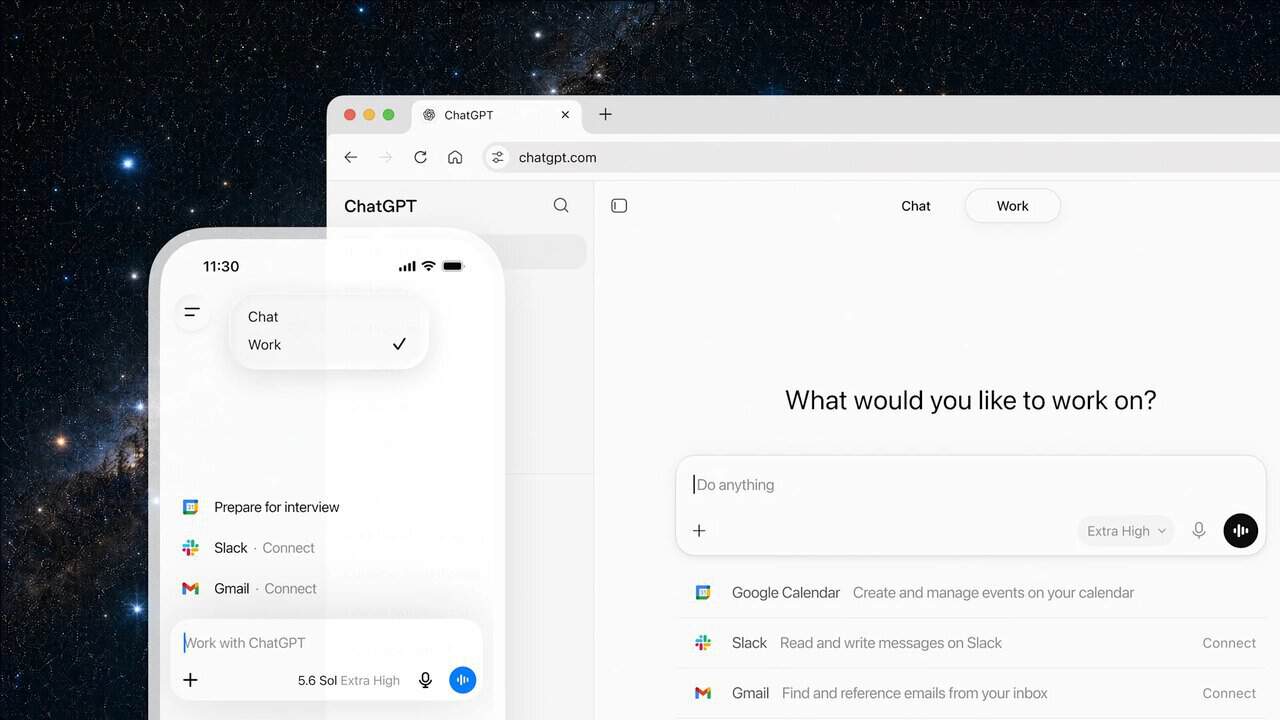
OpenAI Launches ChatGPT Work for Apps, Files, and Business Tasks

ChatGPT Work is OpenAI’s new agentic experience for handling work across apps, files, and business workflows. The feature can gather information from multiple sources, create business artifacts, and complete multi-step tasks inside ChatGPT.

OpenAI is positioning ChatGPT Work as a workspace where users can create spreadsheets, presentations, documents, dashboards, web apps, and reports without switching between multiple tools.

ChatGPT Work focuses on business workflows

ChatGPT Work runs on GPT-5.6 and can manage longer, multi-step tasks. It can also follow templates, use reference files, and apply business context from connected tools.

The feature gives ChatGPT a broader role inside workplace tasks. Instead of answering a single prompt, it can collect data, organize it, and turn it into a finished file or app.

Similar enterprise AI workspaces already exist from Anthropic, Microsoft, and Google, so OpenAI is moving deeper into the business productivity market.

Enterprise apps can connect through plugins

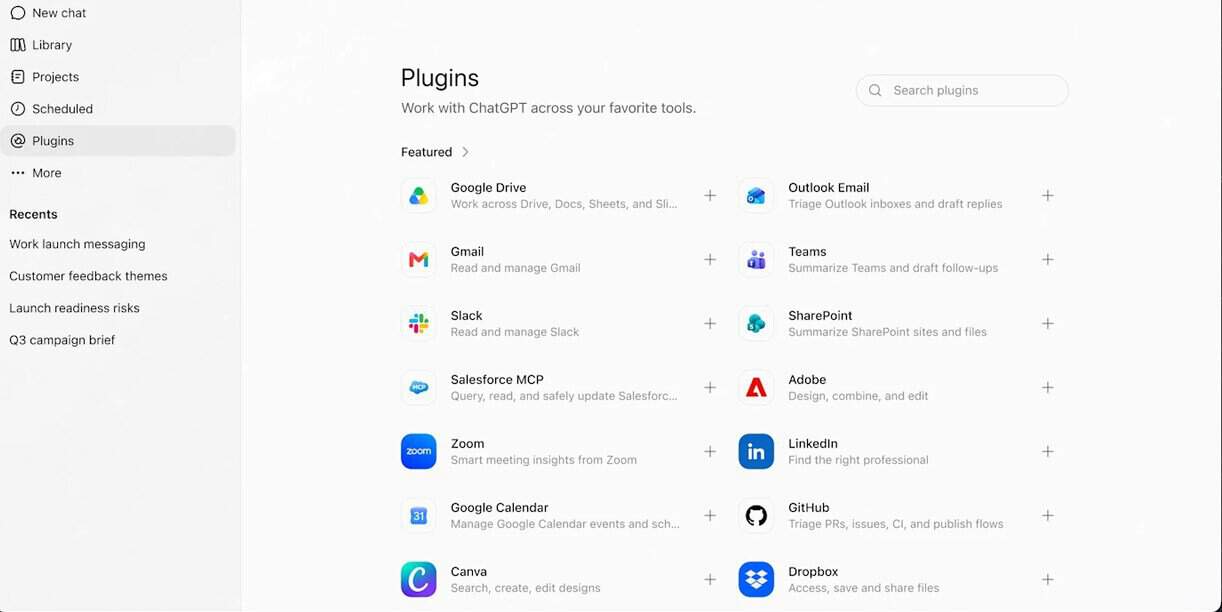
ChatGPT Work can connect to Slack, Microsoft Teams, Google Drive, SharePoint, email, calendars, CRMs, and project-management tools.

OpenAI handles these connections through plugins. Users can mention an app with @ inside a prompt to tell ChatGPT where to retrieve information.

Image credit: OpenAI

The goal is to combine information from several workplace services inside one workflow.

Sites enters public beta

OpenAI has also launched a public beta of Sites. The feature can turn information into interactive websites or web apps.

Sites can support dashboards, internal portals, project trackers, launch calendars, and reports. ChatGPT can also update these sites automatically when the underlying data changes.

This gives teams a way to create internal tools without starting from a blank development project.

ChatGPT Work availability

ChatGPT Work is rolling out to ChatGPT Pro, Enterprise, and Edu users on mobile and the web.

Plus and Business users are expected to receive access over the next few days.

OpenAI is also making its unified ChatGPT desktop app available globally for Mac and Windows. The desktop app is free for all ChatGPT users.

Codex moves into ChatGPT desktop

OpenAI is merging the standalone Codex app into the ChatGPT desktop app.

Codex will remain available as a specialized coding agent inside the broader ChatGPT experience. Existing Codex app installations will update to the new ChatGPT desktop app.

Developers can make Codex the default view and use the Codex logo as the desktop app icon.

Desktop app gains agent capabilities

The ChatGPT desktop app can use local files and applications through the Codex harness. It also includes a built-in browser for web-based tasks.

Computer Use capabilities allow ChatGPT to work across local apps, tools, files, websites, and workflows.

As part of the change, OpenAI will rename the existing ChatGPT desktop app to ChatGPT Classic.

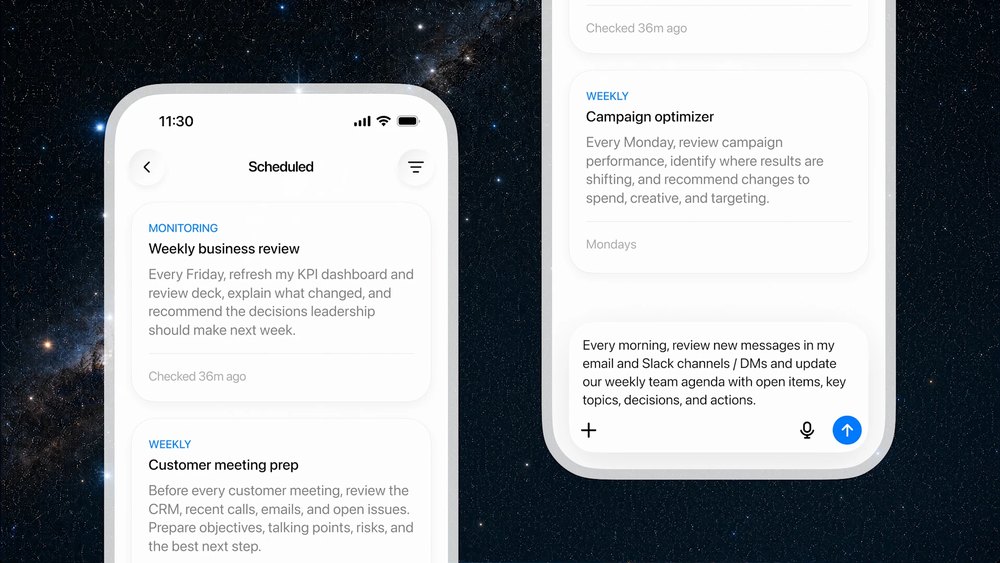
Scheduled Tasks adds automation

Scheduled Tasks will allow ChatGPT to perform actions once, on a recurring schedule, or when an event occurs.

Image credit: OpenAI

The feature can also monitor sources for changes over time. One example is summarizing customer feedback emails automatically and sending the results to the relevant teams.

This brings automation features previously linked to Codex into the unified ChatGPT desktop experience.

Chrome extension replaces Atlas browser

OpenAI is also releasing an updated Chrome extension that lets users access ChatGPT from Chrome’s sidebar.

At the same time, OpenAI is discontinuing the standalone Atlas browser. Browser-based work will instead move to the Chrome extension and ChatGPT’s built-in desktop browser.

The changes show OpenAI’s plan to consolidate its workplace, coding, browser, and automation tools around one ChatGPT experience.

OpenAI Expands GPT-5.6 Access Across ChatGPT, Codex, and API

GPT-5.6 availability is expanding as OpenAI rolls out its full GPT-5.6 model family across ChatGPT, Codex, and the OpenAI API.

The new lineup includes GPT-5.6 Sol, GPT-5.6 Terra, and GPT-5.6 Luna. The models were previously available in a limited preview and are expected to become available over the next 24 hours.

GPT-5.6 Sol is the flagship model

GPT-5.6 Sol is the most capable model in the new family. OpenAI designed it for complex reasoning, coding, scientific research, cybersecurity, and long-running agentic tasks.

The model supports a new max reasoning effort setting for harder problems that need more computation. It also introduces ultra mode, which uses multiple subagents to speed up complex reasoning workflows.

OpenAI will also offer a faster version of GPT-5.6 Sol through Cerebras, with speeds of up to 750 tokens per second.

GPT-5.6 Terra targets balanced performance

GPT-5.6 Terra is the balanced model in the lineup. OpenAI says it delivers performance competitive with GPT-5.5 at about half the price.

The model targets users and developers who need strong performance without the higher cost of Sol. ChatGPT Free and Go users will receive access to GPT-5.6 Terra.

GPT-5.6 Luna is the low-cost option

GPT-5.6 Luna is the smallest and most affordable model in the GPT-5.6 family.

It is designed for fast, lower-cost workloads where users do not need the full reasoning power of Sol. Plus, Pro, Business, and Enterprise users can choose Luna alongside Sol and Terra.

GPT-5.6 adds stronger reasoning and agent features

GPT-5.6 Sol introduces max reasoning effort for tasks that benefit from deeper analysis. Ultra mode goes further by delegating work to subagents instead of relying on a single-agent workflow.

Max mode will be available to users with GPT-5.6 access in ChatGPT Work and Codex. ChatGPT Work users on Pro and Enterprise plans can access GPT-5.6 Sol ultra, while Codex users on Plus and higher plans can also use ultra mode.

GPT-5.6 Sol improves benchmark performance

OpenAI says GPT-5.6 Sol scored 53.6 on Agents’ Last Exam, beating Claude Fable 5 by 13.1 points. At medium reasoning effort, Sol still led by 11.4 points while using roughly one-quarter of the estimated cost.

On the Artificial Analysis Intelligence Index, Sol came within one point of Fable 5. OpenAI says it completed those tasks 61% faster at around half the estimated cost.

On the Coding Agent Index, GPT-5.6 Sol scored 80, beating Fable 5 by 2.8 points. It reportedly used less than half the output tokens and time, with about one-third lower estimated cost.

Sol also surpassed Claude Opus 4.8 on OSWorld 2.0 while using 85% fewer output tokens.

GPT-5.6 Sol brings cybersecurity gains

GPT-5.6 Sol also shows major gains in cybersecurity benchmarks.

The model scored 73.5% on ExploitBench 1, compared with 47.9% for GPT-5.5 at a similar output-token budget.

On ExploitGym 2, Sol reached a 24.9% pass rate within two hours, up from GPT-5.5’s 15.1%. With a six-hour limit, the score increased to 33.7%.

On SEC-Bench Pro, GPT-5.6 Sol scored 71.2%, compared with 45.8% for GPT-5.5. OpenAI also reported lower latency for Sol on cybersecurity tasks.

GPT-5.6 API pricing

GPT-5.6 Sol costs $5 per million input tokens and $30 per million output tokens, while GPT-5.6 Terra costs $2.50 per million input tokens and $15 per million output tokens.

GPT-5.6 Luna is the most affordable option, priced at $1 per million input tokens and $6 per million output tokens.

Who gets GPT-5.6 in ChatGPT?

ChatGPT Plus, Pro, Business, and Enterprise users can access GPT-5.6 Sol with medium and higher reasoning settings.

Pro and Enterprise users can select GPT-5.6 Sol Pro for especially complex tasks. Free and Go users will get access to GPT-5.6 Terra.

Plus, Pro, Business, and Enterprise users can choose between Sol, Terra, and Luna. Eligible users can also select a reasoning effort level for each model.

The rollout gives OpenAI a broader GPT-5.6 lineup for different needs, from high-end reasoning and agentic workflows to lower-cost everyday tasks.

Microsoft Expands AI-Driven Windows Security Strategy

Microsoft is expanding its AI-driven security strategy for Windows as cyberattacks become faster, more automated, and harder to detect. The company says AI now affects both attackers and defenders, so Windows security needs a new development model.

The company is updating its Software Development Lifecycle to account for AI-assisted attack techniques. Microsoft says the goal is to make Windows more secure by design while helping engineers find, validate, and fix vulnerabilities faster.

Microsoft Uses MDASH to Scan Windows Code

A key part of this strategy is MDASH, Microsoft’s Multi-Model Agentic Scanning Harness.

Microsoft has deployed MDASH across Windows development to automatically scan code for potential vulnerabilities. The system uses AI to identify security issues, but it does not send every result directly to engineers.

Instead, MDASH forwards only high-confidence findings for human review. Microsoft says this reduces review time and helps its teams discover zero-day vulnerabilities more quickly.

The Microsoft Security Response Center also uses MDASH data to study rollout patterns and customer feedback. This helps Microsoft understand how fixes perform after release and where more validation may help.

AI Is Becoming Part of the Vulnerability Lifecycle

Microsoft says AI will support more parts of the vulnerability lifecycle, not just bug discovery.

The company plans to use AI to help discover security bugs, analyze vulnerabilities, validate fixes, and support secure-by-design development. Human engineers will still make key decisions, which means Microsoft does not plan to rely only on automated systems.

This approach gives Microsoft faster scanning and analysis while keeping security reviews under expert control.

Microsoft Plans More Security Investments

Microsoft also plans to invest more in the Security Update Validation Program, internal testing, and AI-powered agentic harnesses.

These systems will focus on finding bugs earlier and helping teams fix them before they affect customers. Microsoft says this should improve both security quality and update reliability.

The company also expects Windows releases to include more security updates as AI helps its teams uncover more vulnerabilities.

What Windows Customers Can Expect

For customers, Microsoft’s strategy means security updates may become more frequent or include more fixes as the company finds vulnerabilities faster.

If an update causes problems, organizations can still use support channels to report issues. Microsoft also points to Known Issue Rollback, when available, as a way to quickly reverse problematic non-security changes without removing the entire update.

The company says organizations should not delay security updates for long periods, especially as AI helps attackers move faster.

Microsoft Urges Faster Patch Deployment

Microsoft recommends that organizations install security updates as soon as possible and regularly review CVE advisories.

IT teams can also deploy optional preview D releases about two weeks before Patch Tuesday. This gives organizations time to validate upcoming non-security fixes and prepare for the next monthly update cycle.

Microsoft also recommends using built-in Windows protections such as Windows Hello and Microsoft Defender.

Tools for IT Administrators

For organizations managing Windows at scale, Microsoft recommends tools such as Windows Autopatch, Hotpatch, Microsoft Intune, Conditional Access, and compliance policies.

These tools can help IT teams deploy security updates faster while reducing the risk of widespread disruption.

Microsoft says the broader goal is clear: use AI to strengthen Windows security before attackers can exploit new weaknesses.

In other security news, Microsoft has patched the RougePlanet flaw, while Microsoft 365 users face a separate Entra Passkey phishing campaign.

XBOX Free Play Days Brings MLB The Show 26, The Alters, and Stuffed This Weekend (July 9-12)

Looking for something new to play without spending extra money this weekend? XBOX has kicked off another Free Play Days event for this weekend, giving Game Pass members full access to three very different games for a limited time.

The latest lineup is headlined by MLB The Show 26, alongside sci-fi survival game The Alters and spooky co-op shooter Stuffed. All three games are available to play from Thursday, July 9, through Sunday, July 12.

Three XBOX games are free to play this weekend
Unlike free demos, Free Play Days unlocks the complete games throughout the event. However, players will need an active Xbox Game Pass Ultimate, Premium, or Essential membership to participate.

MLB The Show 26 brings new Road to the Show mechanics, deeper Franchise features, expanded customization, and updated on-field gameplay. The Standard Edition is also available at a limited-time discount, dropping from $69.99 to $34.99.

Speaking of discounts, The Alters is currently down to $17.49 from its regular $34.99 price. The survival game places players on a hostile planet, where they must create alternate versions of themselves based on different life choices. It supports XBOX Play Anywhere and is available through the event on both console and PC.

Meanwhile, Stuffed takes a much lighter but equally chaotic approach. Players become a teddy bear tasked with defending its owner from waves of nightmares. The first-person shooter can be played solo or with up to four players through online co-op.

Do note that Any achievements, Gamerscore, or saved progress earned during the free weekend will carry over if you decide to purchase a game afterward.

Microsoft Confirms WSL Containers Support for Windows 10

Windows 10 support for WSL Containers has been confirmed, meaning users can run Linux containers through WSL without Docker Desktop, as Windows Latest writes.

Microsoft confirmed that WSL Containers, also called WSLc, works anywhere WSL currently runs. That includes Windows 10 version 2004, Build 19041, or newer.

The confirmation matters because early discussion around WSLc created confusion about whether the feature would require Windows 11 or arrive as part of a future WSL 3 release. Microsoft has confirmed that WSL 3 does not exist, and WSLc is simply an update to the current WSL platform.

WSL Containers Work on Windows 10

WSL Containers will not stay limited to Windows 11. Microsoft’s Craig Loewen confirmed that the feature works across the “vast majority” of supported Windows versions where WSL already works.

That means Windows 10 users can test Linux containers directly through WSL 2, without installing Docker Desktop or manually setting up Docker Engine inside a Linux distro.

The feature arrives through a WSL update, not a separate Windows 11-only platform upgrade.

How Windows 10 Users Can Enable WSL Containers

Users need WSL 2 before they can try WSL Containers. After that, they must install the pre-release WSL build and restart the WSL environment.

The basic setup involves installing WSL 2 on Windows 10, updating WSL to the latest pre-release build, shutting down WSL completely, and then checking the installed WSL Containers version with wslc –version.

If the system shows wslc 2.9.3.0, WSL Containers support has been enabled.

WSLc Is Still a Pre-Release Feature

WSL Containers remains in pre-release, so Windows 10 users should treat it as a testing feature for now.

Some users have reported a “Catastrophic failure” error with the E_UNEXPECTED code when launching a container for the first time. A full system reboot has reportedly fixed the problem in many cases.

Because of that, WSLc currently makes more sense for testing, local development, and single-container projects than important production workflows.

How WSL Containers Work

WSLc builds OCI-compatible images, which use the same container image format as Docker.

Behind the scenes, WSL Containers rely on WSL and Moby, the open-source container engine that also powers Docker. WSLc communicates directly with the WSL service that manages the Linux virtual machine.

This approach removes one of the common setup steps for Windows developers. Users no longer need to install Docker Engine inside a WSL 2 distro just to run Linux containers.

GPU Passthrough Works on Windows 10

WSL Containers also support GPU passthrough on Windows 10.

Users can pass the GPU to supported containers with the –gpus all flag. The feature uses the regular Windows NVIDIA driver, and supported CUDA libraries become available inside compatible containers.

That makes WSLc useful for local AI and GPU-accelerated development tasks. Users can test workloads with tools and frameworks such as PyTorch, TensorFlow, Ollama, llama.cpp, and CUDA-based projects.

Docker Desktop Still Has Advantages

WSL Containers does not currently offer the full graphical experience that Docker Desktop provides.

Users who want a visual dashboard, easier multi-container management, or a more mature container workflow may still prefer Docker Desktop. WSLc looks more useful for developers who want a lighter command-line container option inside WSL.

Craig Loewen also has a text-based dashboard called lazywslc, which can help users manage WSL Containers without a full GUI.

What This Means for Windows 10 Users

The biggest takeaway is that Microsoft has not restricted WSL Containers to Windows 11.

Windows 10 users on version 2004 or newer can test Linux containers through WSL 2, including GPU-enabled workloads, without installing Docker Desktop. However, since WSLc remains in pre-release, users should expect rough edges and avoid relying on it for critical daily work just yet.

GTA 6 Could Require Age Verification in Australia

GTA 6 is only months away from release, but Australian players may have one more step to complete before entering Rockstar’s latest open world. New online safety rules of the country could require players to verify that they are adults, while failing to comply may expose Rockstar Games to penalties worth tens of millions of dollars.

Australia’s online safety rules could change how players access GTA 6

According to a report from news.com.au, content carrying an R18+ classification must have measures in place to verify that users are adults. GTA 6 has not received its final Australian classification yet, but its mature themes and the history of the Grand Theft Auto franchise make an adult rating widely expected.

The report claims Rockstar could face civil penalties of up to AU$49.5 million for each breach if the applicable age-verification requirements are not followed. However, several details remain unclear. There is currently no confirmation that every Australian player will be asked to provide a driver’s licence, nor has Rockstar explained what verification method it may use.

It is also unclear whether the requirement would apply to GTA 6’s story mode, its expected online component, or both. That being said, age verification does not necessarily mean players will have to upload government identification directly to Rockstar. Depending on how the rules are implemented, other methods could potentially be used to confirm that a player meets the required age without exposing unnecessary personal information.

Speaking of GTA 6, Rockstar has yet to publicly detail the game’s online experience or explain how regional age restrictions will be handled. Any verification system could also involve PlayStation and Xbox account services, although nothing has been confirmed at this stage.

We’ll learn more about age check to access GTA 6 only after Rockstar details its launch requirements.

New Outlook Will Warn Users Before Replying to Older Emails

Microsoft is testing a new Outlook warning that alerts users when they reply to an older email while a newer message already exists in the same conversation thread, as spotted by Windows Latest.

The feature is being tested in the new Outlook for Windows 10 and Windows 11. Microsoft’s roadmap indicates that testing began around July 7, with rollout expected by the end of August 2026.

The warning will be enabled by default and will also come to Outlook.com.

New Outlook will warn users before outdated replies

The feature targets a common problem in long email conversations. Users can open an older message, start replying, and miss a newer response that arrived later in the same thread.

That can create confusion, especially in group conversations where multiple people are replying at different times.

With the new warning, Outlook should make it clearer when users may be responding to an outdated part of the conversation. Microsoft says the goal is to help users feel more confident that they are replying to the correct message.

Outlook is also getting template-based automatic replies

Microsoft is also preparing rule-based automatic replies for Outlook.

Starting in September 2026, users should be able to create Outlook rules that automatically respond to incoming emails using a pre-made template.

This will make auto-replies more flexible than traditional out-of-office messages. Instead of sending the same response to everyone, users will be able to create rules that trigger only in specific cases.

Category management is being improved

The new Outlook for Windows is also getting better category controls.

Users will be able to right-click an email, open the Categorize menu, and apply a label more quickly.

Microsoft is also adding support for categories in Favorites. Once pinned, users will be able to drag emails onto a category to apply that label automatically.

These changes should make categories easier to use for users who rely on labels to sort messages, tasks, clients, or projects.

More Outlook improvements are planned

Microsoft expects these Outlook improvements to arrive by the end of September 2026.

The broader update should include up to 15 additional minor improvements for the new Outlook experience.

The changes are part of Microsoft’s continued effort to bring more classic Outlook features and workflow improvements to the new Outlook app.

Speaking of which, the company is bringing Quick Parts to the new Outlook, giving users another classic Outlook feature that was missing from the newer app.

Microsoft also recently fixed a crash in classic Outlook that happened when users tried to draft emails with Copilot.

Separately, Microsoft plans to disable Outlook Web App Light in Exchange Server with an upcoming cumulative update.

Nintendo May Not Have Given Up on Switch 2 Docked VRR Support Yet

Nintendo has kept itself busy lately. Just days after confirming the end of sales of the original Switch via its official Store and detailing the European launch timeline of revised Switch 2 hardware with user-replaceable batteries, a newly spotted job listing may have quietly offered hope for another long-awaited Switch 2 upgrade. Here we are talking about the Variable Refresh Rate (VRR) support while playing in docked mode.

Nintendo is looking for an engineer with VRR experience

As spotted by Nintendo Patents Watch on Bluesky, the company is hiring a Senior Display Engineer who will help design and develop display drivers for current and future hardware. The role also involves improving Nintendo’s display software and researching new technologies that could eventually be deployed across its gaming consoles.

Interestingly, Nintendo lists knowledge of display technologies such as HDR and Variable Refresh Rate (VRR) among the preferred qualifications. The listing doesn’t directly mention Switch 2 or confirm that docked VRR support is under development. However, the timing is interesting because the console already supports VRR through its built-in display, but loses the feature when connected to a TV through the dock.

For those unaware, VRR allows a compatible display to synchronize its refresh rate with a game’s frame rate. In simple terms, it can reduce visible screen tearing and make games with unstable performance appear smoother.

Before Switch 2 launched, Nintendo’s regional websites appeared to suggest broader VRR support. Those references were later removed, with Nintendo eventually confirming that the feature would only work in handheld mode.

That being said, hiring an engineer with VRR knowledge isn’t proof that Nintendo plans to add the feature via a future update. The role covers both existing and upcoming products, meaning the expertise could also be intended for entirely new hardware. However, docked VRR remains one of Switch 2’s most noticeable display omissions. Nintendo hasn’t announced any plans to address it, but the new listing suggests the company may not be finished exploring the technology.

All that said, we’ll keep an eye on every bit of rumors and leak reagarding it. If we hear anything officially, we’ll update this article.

Following Chrome, Microsoft Edge could soon walk users through setting Edge as the default browser on Windows

Recently, we reported that Google Chrome is working on a visual walkthrough to make it easier for Windows users to set Chrome as their default browser. Now, Microsoft appears to be testing a similar experience for Edge.

We found a related change to Edge’s default browser experience in pre-release builds. Microsoft has prepared an edge://default-browser page, similar to Chrome’s approach, that works as a visual walkthrough.

Ideally, instead of opening the Windows Settings dialog as a separate window, the page resizes it to display alongside instructions, with Edge already selected and an arrow pointing to the Set default button users need to click.

The wording also closely mirrors Chrome’s version, with Microsoft’s own branding. The page reads “Use Microsoft recommended browser settings,” with the heading “Set Edge as your default,” followed by: “Get easy access to the features you know, love, and trust by setting Edge as your default browser.”

If the Windows Settings dialog doesn’t appear, Edge falls back to a page with a link that opens Windows Settings directly.

Image Credit: Venkat | Windows Report.

The overall experience is still unfinished. During our testing, the placeholder reading “Your Windows settings will be resized to fit here” remained visible in some cases instead of loading the Windows Settings dialog, suggesting the feature is still under active development.

Nothing here is confirmed or final. Microsoft is testing these changes in pre-release versions of Edge, and, as with other experiments, they may or may not roll out to users.

We noticed the experience and messaging closely resemble what we recently spotted in Chrome’s hidden default browser walkthrough. Edge is the second major Windows browser we’ve found testing this approach.

TypeScript 7.0 Launches With Major Speed and Memory Improvements

TypeScript 7.0 release is now public, and Microsoft says the new version is production-ready after months of preview testing.

The release follows TypeScript 6.0, which arrived in March 2026 and focused mainly on cleanup work. With TypeScript 7.0, Microsoft shifts the focus back to performance, editor responsiveness, and larger project workflows.

TypeScript 7.0 delivers major performance improvements

Microsoft says TypeScript 7.0 runs significantly faster than TypeScript 6.0 in several key development workflows.

Some large open-source codebases reportedly compiled almost 12 times faster. Microsoft also reduced memory usage during builds, which should help developers working with large projects or complex codebases.

The editor experience also gets a major boost. In Visual Studio Code, the time needed to show the first error in a newly opened file dropped from 17.5 seconds to 1.3 seconds.

That makes diagnostics around 13 times faster in that specific case.

New scaling options arrive in TypeScript 7.0

TypeScript 7.0 adds new scaling options for larger projects.

The release includes type-checker parallelization and project reference builder parallelization. Developers also get a single-threaded mode for cases where they need more predictable behavior.

Microsoft has also improved watch mode, which should make ongoing development faster when TypeScript needs to track and rebuild changes.

Unicode and JavaScript improvements included

TypeScript 7.0 now preserves Unicode code points in template literal types.

The release also includes JavaScript differences, editor experience improvements, embedded language support, and behavior changes carried over from TypeScript 6.0 and earlier TypeScript 5.x versions.

These changes should make the upgrade more useful for both TypeScript-first projects and JavaScript projects that rely on TypeScript tooling.

TypeScript 7.0 keeps compatibility in mind

Microsoft says TypeScript 7.0 does not include a new API.

That means TypeScript 7.0 can run side by side with TypeScript 6.0 in compatibility scenarios. Developers who need the updated API will need to wait for TypeScript 7.1.

Microsoft expects that update to arrive in the coming months.

Editor support works out of the box

TypeScript 7.0 works out of the box with editors such as Visual Studio Code, Visual Studio, and WebStorm.

Microsoft says common editor tasks should feel faster, including project loading, auto-completion, diagnostics, and find-all-references.

The release should make the biggest difference in large projects, but day-to-day coding should also feel more responsive.

Developers can install TypeScript 7.0 through npm with:

npm install -D typescript

Microsoft plans to continue improving TypeScript performance while adding more features in future releases.

TypeScript 7.1 should bring the updated API and continue the work started in TypeScript 7.0.

If you are a developer, you may also want to check out VS Code 1.128, which was recently released.

How to Live Stream France vs Morocco Quarterfinals FIFA World Cup 2026 on PC

After an action-packed and controversial Round of 16, FIFA World Cup 2026 has entered its quarterfinals stage. France, England, Spain, Morocco, Belgium, Spain, Switzerland, and Argentina have qualified for the same.

Starting today, the quarterfinal matches are set to get underway, with Kylian Mbappé’s France and Achraf Hakimi’s Morocco set to lock horns at Boston Stadium in Foxborough, Massachusetts. The last time the two nations met on the pitch was in the semifinals of the FIFA World Cup 2022, where Les Bleus ended Morocco’s historic run.

No wonder it will be a cracker of a game, and we are here to ensure that you don’t miss a second of it. If you are wondering where to live stream or watch Morocco vs France on PC, in this guide, we have included live stream links by country.

Where & When to Watch France vs Morocco FIFA World Cup 2026 LIVE on PC

France vs Morocco will be available through different official broadcasters depending on where you live. The match kicks off at 4:00 PM ET in the United States, 9:00 PM BST in the UK, 10:00 PM in France and Morocco, 1:30 AM IST in India, and 6:00 AM AEST in Australia.

CountryOfficial broadcasterFrance vs Morocco live stream
United StatesFOX / FOX OneWatch France vs Morocco live on FOX
United States (Spanish)Telemundo / PeacockWatch the World Cup on Peacock
United KingdomBBC / ITVWatch live on BBC iPlayer or watch live on ITV
FranceM6 / beIN SportsWatch live on M6+ or watch through beIN Sports France
MoroccoSNRT / ArryadiaWatch through SNRT Live
IndiaOfficial regional World Cup broadcasterWatch Live on Zee5
AustraliaSBS / SBS On DemandWatch France vs Morocco free on SBS On Demand
BrazilGlobo / Globoplay / CazéTVWatch through Globoplay or CazéTV on YouTube
CanadaTSN / CTVWatch through TSN or CTV
SpainRTVEWatch France vs Morocco on RTVE Play
GermanyARD / ZDF / MagentaTVWatch on ARD Mediathek or ZDF Live

France’s predicted lineup (4-2-3-1):

  • Maignan (GK)
  • Koundé
  • Upamecano
  • Saliba
  • Digne
  • Koné
  • Rabiot
  • Dembélé
  • Olise
  • Barcola
  • Mbappé

Morocco’s predicted lineup (4-2-3-1):

  • Bounou (GK)
  • Hakimi
  • Diop
  • Riad
  • Mazraoui
  • El Aynaoui
  • Bouaddi
  • Díaz
  • Ounahi
  • El Khannouss
  • Rahimi

France vs Morocco FIFA World Cup 2026 Referee

The referee for the France vs. Morocco World Cup quarterfinal is Facundo Tello from Argentina. FIFA appointed a full five-person officiating crew from Argentina for this match. The full crew is as follows:

  • Referee: Facundo Tello (Argentina)
  • Assistant Referee 1: Juan Pablo Belatti (Argentina)
  • Assistant Referee 2: Gabriel Chade (Argentina)
  • Fourth Official: Dario Herrera (Argentina)
  • Reserve Assistant Referee: Cristian Navarro (Argentina)

Who do you think will enter the semis of the FIFA World Cup 2026? Are you going all in with France or Morocco? Let us know in the comments below.

Microsoft Patches RoguePlanet Flaw in Defender Engine Update

Microsoft Defender RoguePlanet vulnerability has been patched after a zero-day flaw was disclosed following the June 2026 Patch Tuesday updates.

The vulnerability, tracked as CVE-2026-50656, reportedly affected fully patched Windows 10 and Windows 11 systems. Microsoft has now addressed the issue through an updated Microsoft Malware Protection Engine.

RoguePlanet could allow SYSTEM-level privileges

RoguePlanet involves a race condition in Microsoft Defender. According to the researcher who disclosed the flaw, attackers could potentially exploit it to gain SYSTEM-level privileges on affected Windows devices.

The researcher said the exploit did not behave the same way on every system. It was inconsistent on some machines but highly reliable on others.

More concerning, the researcher claimed the flaw could work regardless of whether Microsoft Defender real-time protection was enabled.

The disclosure drew attention because RoguePlanet reportedly worked on fully patched Windows 10 and Windows 11 systems after the June 2026 Patch Tuesday updates.

That means users who had already installed the latest monthly Windows security updates may still have needed the separate Defender engine update to close the vulnerability.

Microsoft patched CVE-2026-50656

Microsoft fixed the issue in Microsoft Malware Protection Engine version 1.1.26060.3008.

The Malware Protection Engine powers Microsoft Defender and several other Microsoft security products, so the update matters for both consumer and enterprise environments.

Microsoft says the engine update addresses CVE-2026-50656. Users and IT admins should confirm that their devices have received the latest Malware Protection Engine version.

This is not the first exploit disclosed by the same researcher. They were also linked to the earlier BlueHammer exploit, which has been used in ransomware attacks.

With the rapid advancement of AI-driven attack techniques, the risk of delaying security updates is greater than ever, as threat actors can more quickly identify and exploit newly disclosed vulnerabilities.

Microsoft has repeatedly advised users and organizations not to postpone updates, emphasizing that the timely installation of both Windows patches and Defender engine updates is critical to maintaining protection against evolving threats.

Via BleepingComputer