The mobile pairing app Phone Link certainly have seen a lot of developments recently. Of course, the most important of them is the OCR feature, or otherwise said, scanning the text from images. However, in the Windows 11 preview build 22635.3646, there is also a nice share link feature pointed out by PhantomOcean3 on X.
Upcoming share sheet change: the addition of a new "My Phone" button for sharing content to your phone via Phone Link in the nearby share section (instead of having Phone Link shown next to other apps in the "Share using" section.)
According to his post, soon, you will be able to share a link by selecting My Phone from the Nearby Share option, of course, if you turn it on first, because this feature is disabled by default.
How does the link share feature work?
The whole thing is a little bit blurry because the first thing that crosses your mind is that you first need to turn on the Nearby Share feature, but it’s not the case.
If you installed the Phone Link app and synced it with your phone, you just need to click on the My Phone button and you will see a pop-up confirming that your link was sent to your phone.
This function is pretty useful if you want to avoid using a different communication platform that would require an extra step. However, you may also create a QR code from the link in the Share link feature and scan it with your mobile directly.
That could be a lot easier and quicker for those of you who are comfortable with using a WR scanning app.
Microsoft Edge is improving the editing abilities of its Screenshot Tool (formerly Web Capture) to allow users to customize and annotate captures directly within the browser. This new feature is currently being tested in the Edge Canary build.
Microsoft is making it easier to Edit Screenshots in Edge
Normally, when capturing a specific area on a webpage in Edge, you’d see a toolbar with options to copy, save, markup (limited editing), and perform a visual search. The markup option only allowed basic drawing on the capture with a pen.
Microsoft is now expanding the editing toolbar with various tools like square, circle, arrow, freehand draw, mosaic blur, text insertion, undo, download, cancel, and save to clipboard. Once you click anywhere on the screen or select “Done,” the capture will be automatically copied to your clipboard.
This change significantly improves the screenshot and editing experience in Microsoft Edge, potentially avoiding the need for third-party screenshot tools or extensions. The new toolbar will allow users to annotate and customize captures more effectively.
Additionally, Edge now allows you to change the Screenshot keyboard shortcut from Ctrl+Shift+S to Alt+A, Alt+S, or Alt+Shift+A. Ideally, choose Ctrl+Shift+S or Alt+A based on your comfort level and other keyboard shortcuts used by your Windows applications.
We found the current method for changing the Screenshot keyboard shortcut to be somewhat unintuitive, and hopefully, Microsoft will improve this process in the future.
In addition to the shortcut customization, Edge allows to control the magnifying glass visibility directly within its settings. This would allow you to show or hide the magnifying glass as needed, potentially when using the screenshot tool to zoom in on specific details.
Opera’s Aria browser AI, unlike conventional alternatives, doesn’t rely on a single LLM or AI model but picks one that’s best based on the user’s query. And to further enhance the experience, the Opera team recently integrated Google Gemini into Aria browser AI!
According to Opera’s official press release, post-integration, Opera’s native AI chatbot, Aria browser AI, will provide you with the latest information faster and more accurately. Besides, it will also expand the feature set, adding two new capabilities to Aria browser AI: image generation and voice output. The two features were earlier available in the Opera’s developer version.
Powered by the Imagen 2 model on Vertex AI, Opera’s Aria browser AI will now be able to create images based on text prompts. For voice output, it will rely on Google’s text-to-audio model to read out the responses in a conversational style.
Image creation in Opera’s Aria browser AI
Speaking about the collaboration and the integration of Google Gemini, Per Wetterdal, EVP of Partnerships at Opera, said,
Our companies have been cooperating for more than 20 years. We are excited to be announcing the deepening of this collaboration into the field of generative AI to further power our suite of browser AI services.
On the occasion, Eva Fors, Managing Director, Google Cloud Nordic Region, talked about the future of generative AI and the role played by Google,
We’re happy to elevate our long standing cooperation with Opera by powering its AI innovation within the browser space. We believe the future of AI will be open, so we’re providing access to the best of Google’s infrastructure, AI products, platforms and foundation models to empower organizations to chart their course with generative AI.
Opera is making significant strides in the AI space, hoping to capture a larger share of the browser landscape, currently dominated by Google Chrome. Last month, Opera introduced a feature that lets you run LLMs locally on the PC, becoming the first browser to do so!
What do you think about the integration of Google Gemini in Opera? Share with our readers in the comments section.
Nvidia and Microsoft collaborate to improve and innovate the Healthcare system. Their AI, Cloud services, and computing tools can bring new opportunities for Healthcare providers, pharmaceutical companies, biotechnology pioneers, and medical device developers. After all, the AI can help calculate dosages, discover new materials, perform virtual trials, and more.
Nvidia is actively working with Microsoft on various AI tools
Nvidia developed an AI platform known as BioNeMo to accelerate drug discovery. It is powered by Nvidia DGX Cloud on Microsoft Azure. The platform simplifies the AI training using your data. Besides, it can analyze datasets to help developers deploy new AI models faster.
Scientists can use the Nvidia AI platform to find the right models for their processes. For example, they can use AI to find potential drug candidates, perform virtual trials, and develop medicine faster.
Besides Microsoft, Nvidia works with Flywheel, which developed a cloud-based platform to make it easier for professionals to prepare medical imaging data. Together, they want to create an automated way to classify anatomical studies. In addition, Nvidia and Microsoft developed Nvidia MONAI (Medical Open Network for AI) to speed up imaging data preparation.
MONAI and Nuance Precision Imaging Network (PIN) are working with multiple institutions to develop AI models for medical imaging analysis. For example, during the pandemic, Mass General Birgham used AI to predict the oxygen levels of symptomatic patients.
In addition, SOPHiA GENETICS can enhance SOPHiA DDM, its cloud-based platform, with the help of Nvidia Parabricks, a scalable genomics analysis software from the Nvidia Clara suite, and Microsoft Azure to develop a tool that analyses whole genomes. Also, they can improve treatment decisions and advance drug development.
Professionals can access various AI services and tools from the Azure Marketplace
Developers, researchers, and practitioners can access more Nvidia tools and services, such as the Nvidia AI enterprise platform, which includes Nvidia NIM, a set of microservices developed to speed up the process of AI deployment. Healthcare professionals can find the set on Azure Marketplace.
Ultimately, the collaboration between Nvidia and Microsoft will most likely democratize AI adoption and lead to discoveries and breakthroughs in the Healthcare sector. Hopefully, more tech giants will join the race to provide AI tools and platforms for healthcare professionals.
Do you think AI will become a dependable resource for the Healthcare sector? Let us know in the comments.
Microsoft’s new markup-first architecture for its Edge browser should help speed up the overall experience of the company’s first party web browser.
According to a new entry in the Microsoft Edge blog, Microsoft’s months-long update release roadmap for 2024 will culminate with the rollout of a new architecture intended to address feature updates within the company’s web browser.
Over the past handful of months, Microsoft has quietly been updating features within its Edge browser that include History, Downloads, Wallet, Favorites, and more. Since Edge 122 began rolling out, Microsoft claims its browser UI is “now 42% faster for Edge users,” and up to 76% faster for people on lower end spec’d devices such as 8GB of RAM and even lack an SSD.
Thanks to feedback and a collection of data from Edge users, the company has been able to determine that its bundles of code for the browser has been crippling its ability to be a snappier experience for users,
However, Microsoft isn’t through with improving Edge, as stated in the blog post, the company will roll out a new web rendering architecture that will allow the company to deliver more modular updates to components of Edge dubbed WebUI 2.0.
In this project, we built an entirely new markup-first architecture that minimizes the size of our bundles of code, and the amount of JavaScript code that runs during the initialization path of the UI. This new internal UI architecture is more modular, and we now rely on a repository of web components that are tuned for performance on modern web engines. We also came up with a set of web platform patterns that allow us to ship new browser features that stay within our markup-first architecture and that use optimal web platform capabilities.
Microsoft Edge Team
Microsoft has already begun using WebUI 2.0 and did so with the release of Edge 122 which brought the aforementioned Browser Essential responsiveness improvements back in late February 2024.
Microsoft plans to apply its small bundled and modular architecture to more of its first-party browser soon to help reduce the amount of UI-rendering JavaScript code it currently relies on, while optimizing the overall speed of the browsing experience for Edge users in the future.
Microsoft introduces video page templates in SharePoint Pages and News, allowing you to create video-centric page content. The templates are available in both SharePoint and Stream, making it easier to show videos with branded page experiences from both apps.
How can I create a video page?
1. Using the Stream app
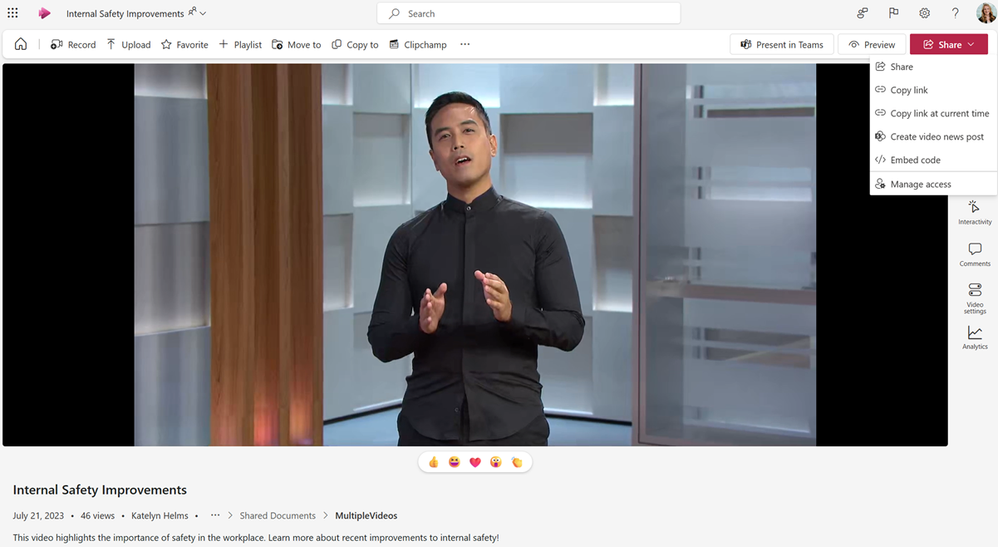
This feature lets you create Pages and News outside the SharePoint platform. To do so, go to a video on the Stream Web app, locate and click Share, then select Create video news posts from the drop-down menu.
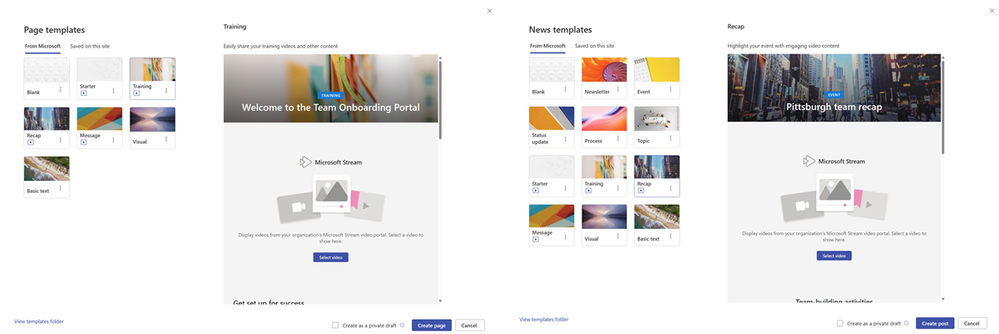
In the template picker, choose a template type, page type, and all other related documents you want to add to the page. Once you’ve done this, navigate to the canvas for editing, edit the video page in the same way you edit the SharePoint pages, and click Publish to complete.
2. Using the SharePoint site
In the Page and News template pickers within a SharePoint site, you will find video page templates. Select one that you like, add it to your video to the Stream web part, and then edit the rest of the page. Once you’ve done this, click Publish.
The feature has been rolled out to Targeted Release customers and will be rolled out to other customers by the end of June.
This is not it; Microsoft is also planning to create more video page templates with the latest and greatest features, and could also bring a new template picker experience and support for custom templates.
At the Build Conference 2024, Microsoft discussed many new things, including Surface, Windows 11 24H2, Copilot, and more.
The event focused on the future of computing, Copilot + PC, the Recall feature in the new Windows version, and AI integration in Microsoft products.
However, the main focus was on the Copilot + PC and how it runs. The Copilot + PCs come with an NPU, an essential part that is cost-effective and more powerful than the usual CPU-GPU combo.
Copilot+ PCs are the fastest, most intelligent Windows PCs ever built. With powerful new silicon capable of an incredible 40+ NPU TOPS (trillion operations per second), they offer efficient AI workload processing at the edge. Today, we featured designs powered with Snapdragon X Elite and Snapdragon X Plus processors. We’re thrilled to begin this journey with Qualcomm Technologies, Inc. on their latest processors for the Windows platform — and we’re excited for the innovation coming from our partners at AMD and Intel over the coming months.
Neural Processing Units, or NPUs, are designed for neural networks, are very efficient, and allow Copilot PCs to run large language models locally on the device.
Microsoft’s researcher Steven Bathiche explains in a video:
The cool things that happened with our devices, especially Copilot+ PCs, is that we’ve kind of crossed that threshold. So now, our devices can run these types of (AI) models locally on the device to do amazing things.
An NPU chip in a Copilot+ PC can run 45T operations per second with 4 watts less power, enabling it to support up to 40 AI models.
One of the most talked about upcoming features, the Recall feature, is based on it. Recall uses AI models to monitor your activity in the background and can help you retrace the steps to learn about a past activity.
However, many users expressed privacy concerns as they don’t want Microsoft to snoop around in their computers. Still, the Redmond tech giant clarified that the Recall feature only works locally in the background, addressing all the concerns.
Soon, we will see Copilot+ PCs by Microsoft device partners, including laptops from Acer, Asus, Dell, HP, Lenovo, and Samsung.
What do you expect from NPU-powered Copilot+ PCs? Share your views with our readers in the comments section below.
ADATA’s newest handheld gaming console, the brand-new XPG NIA, will be unveiled and released at this year’s Computex conference, which takes place from June 4 to June 7 in Taipei, Taiwan.
In a press release published recently (via TechPowerUp), the tech company didn’t share any pictures or details about the new handheld, other than a brief, but exciting description.
The company says gamers will be able to mod their XPG NIA handheld gaming console to suit their gaming preferences and unique style. The console will also combine superior ergonomics to create comfortable gaming experiences. This is a clear sign the upcoming console was made to be played for hours.
Additionally, the XPG NIA handheld gaming console will also be the first of its kind to pioneer the EYEWEAR eye-tracking technologies to allow for more immersive gaming sessions. Here’s what ADATA says:
In addition to a full range of mobile peripherals to simplify the lifestyles of consumers around the world, ADATA’s gaming brand XPG will be launching a gaming handheld PC at Computex. XPG’s stunning masterpiece, the new XPG NIA, combines superior ergonomics with a circular computing design to create an ultra-comfortable experience so gamers can play nonstop or mod the device to their liking. XPG NIA will also pioneer the use of EYEWEAR eye-tracking technology which lets you enjoy the ultimate immersive gaming experience from anywhere!
ADATA
The new XPG NIA will most likely use Windows 11 and its main operating system, and it’s a smart choice, considering the operating system is perfect for gaming.
Since ADATA is betting on the comfortable gaming experiences side of it, we’re expecting it to have a large battery that could make it last for about 3 to 4 hours of uninterrupted gaming. Maybe this could be the field the new XPG NIA might excel, as all the other handheld consoles are currently struggling with it. Fortunately, we don’t have to wait that long.
Aside from the new handheld console, which could become serious competition to the likes of Legion GO, Steam Deck, or Asus Rog Ally, ADATA will also showcase several new devices: the world’s first AI gaming laptop, XPG XENIA 15G, which can carry up SSDs of up to 24 TB, and 96 GB of DRAM.
The company will also showcase an overclocked DDR5 8000 R-DIMM, which is designed to make AI computers run faster and smoother. The age of AI computing is already upon us, so ADATA will be joining the crowd with its new LPCAMM2 memory products. They comply with the JEDEC standards and are capable of achieving speeds of up to 7,500 MT/s due to their integration with LPDDR5/5X DRAM ICs.
ADATA will be releasing them in 16 GB, 32 GB, and 64 GB variants.
ExpressVPN comes with several built-in privacy and security features that help you enjoy a safer experience online. For instance, it protects your data with advanced AES-256encryption. It also contains its own encrypted private DNS and doesn’t log DNS queries, or log traffic data that can be used for identification.
Furthermore, it supports a Network Lock that keeps your data safe in case your VPN connection drops. Moreover, its Threat Manager restricts your system from communicating with known trackers or malicious sites.
ExpressVPN uses a Lightway protocol that provides excellent speed and allows you to easily switch between mobile and Wi-Fi networks with strong security. Best of all, it serves over 105 countries.
Proton VPN is a secure and reliable VPN that hides your real IP address. It uses HMAC with SHA384 for message authentication, 4096-bit RSA to exchange keys, and encrypts all network traffic with AES-256. More specifically, this VPN generates a new encryption key each time you connect.
Moreover, with full disk encryption, Proton VPN protects your data from resource-intensive man-in-the-middle attacks. It also has a NetShield filtering feature that prevents your system from loading unnecessary content from websites, protects it from malware, and blocks ads.
Furthermore, Proton’s VPN Accelerator overcomes your CPU limitations. It utilizes advanced networking techniques to reduce latency. Additionally, its Secure Core architecture enables you to defend against network-based attacks.
Proton VPN comes with built-in Tor support, a Kill Switch, and an always-on VPN. If you lose connection with the VPN server, the Kill Switch blocks all network traffic and the always-on VPN helps you automatically re-establish your connection.
Pros:
Comes with a NetShield filter, VPN Accelerator, and VPN Profiles
Includes DNS leak protection, a Kill Switch, a Secure Core, and Split Tunneling
Offers 5,029 servers in 91 countries
Follows a no-logs policy
Cons:
Its free plan has limitations compared to paid plans
Crashes occasionally
Only a few servers are available for free plan users
3. NordVPN – Threat Protection and Double VPN Security
NordVPN is a popular VPN that offers threat protection to stop malware, ads, and web trackers. It also includes various other security features, such as reliable leak protection, AES-256 encryption, two Kill switches, and specialized server categories.
Best of all, you can create your own private encrypted network to ensure safe file sharing, work, or LAN parties. For this, it assigns you a dedicated IP to skip denylists, access IP-restricted networks, and maintain your online reputation. Moreover, with its Split Tunneling, you can select which apps need VPN protection and which ones don’t.
NordVPN also keeps your account safe with multi-factor authentication. It combines Tor with extra VPN security. In addition, it helps hide the fact that you’re using a VPN, even from your Internet Service Provider (ISP).
Regarding connection speed, it utilizes NordLynx which is an in-house variant of the WireGuard protocol. It provides service across 6000+ servers in 111 countries.
Pros:
Consistently delivers fast speed
Simple and easy-to-use interface
Allows you to choose from multiple server locations
Provides a secure and fast connection with a stable IP address
Double-VPN and Tor-over-VPN servers
24/7 helpful customer support
Works with many streaming sites, including Netflix
Cons:
Sometimes its server crashes and you have to switch
4. CyberGhost VPN – High-Speed Streaming and P2P Optimized Servers
CyberGhost VPN features 10 Gbps streaming-optimized servers to ensure access to your favorite platforms with minimal buffering and high speed. It also offers P2P torrenting and gaming-optimized servers that shield you from DDoS attacks.
This VPN service supports several secure protocols including IKEv2, OpenVPN, L2TP/IPSec, and Wire Guard. Notably, these protocols are quite effective for maintaining connection stability, lag-free streaming, bypassing geo-restrictions, and more.
CyberGhost VPN also contains a content blocker that helps you avoid malicious and disruptive ads from tracking your internet activity. With its dedicated IP, you can securely access sensitive information and avoid blocklisting. Moreover, if your connection drops by chance, CyberGhost’s automatic Kill Switch blocks all internet traffic and protects your data.
With every reboot, CyberGhost VPN’s servers wipe your data for maximum anonymity. It also provides direct internet access to local content. Furthermore, its VPN service automatically activates if you connect to an exposed network.
Pros:
Decent WireGuard speed
Covers 9200+ servers and 100 countries
RAM-only servers
Provides dedicated streaming servers
Offers free trials to its users
Swift replies from live chat support
Cons:
Its ad-blocker isn’t so good
Some users might feel its user interface is complex
It doesn’t support obfuscation on any of its servers
OpenVPN is a well-known service provider that offers flexible solutions to secure data communications. It has gained a lot of attention because of its open-source and free-to-use nature. You can easily deploy this protocol on-premises using virtual appliances, standard servers, or CloudConnexa.
OpenVPN has a built-in Cyber Shield that protects your data against threats without tunneling internet traffic. It defines and enforces identity-based policies to assist you in establishing zero-trust network access. Moreover, it uses military-grade ciphers, 256-bit encryption, and supports Perfect Forward Secrecy (PFS) implementation for creating a new key per session.
OpenVPN supports tunneling through the Secure Sockets Layer (SSL) and Transport Layer Security (TLS). These protocols enable you to share the keys for encoding and decoding information sent through tunnels. In addition, it also contains TLS-auth which verifies that only the desired users and devices can interfere with the data.
For your data protection, OpenVPN utilizes different methods and protocols such as OpenSSL, HMAC authentication, and shared keys. It supports multiple cryptographic algorithms which include 3DES, AES, and Blowfish.
Overall, these features allow you to hide data traffic from third parties, like your ISP, any employer, hackers, or agencies.
Pros:
It’s free to download and use
Highly customizable
Can easily bypass firewalls
Implement 256-bit encryption keys and high-end ciphers
Supports PFS to code your data
It has an active worldwide community
Cons:
Newbies may find it difficult to install and configure
Requires installation and configuration of additional software
Supports limited version of servers in free version
Private Internet Access (PIA) VPN is a full-featured, configurable, and secure VPN. It utilizes WireGuard protocol and 256-bit encryption to increase stability, speed, and overall security.
You can choose between 22,500+ servers from 91 countries, each with a 10Gpbs server network. On each PIA VPN server, you can enjoy P2P support for torrenting and sharing files more privately. It also activates port forwarding on the selected server to optimize the torrent performance.
Moreover, PIA masks IP addresses automatically to stay one step ahead of trackers and snoops. Its MACE tool blocks trackers, malware, and ads at the DNS level. Furthermore, its Advanced Kill Switch prevents data transmission when the VPN is turned off.
Notably, PIA follows the No Logs policy. It never stores, tracks, sells, or records your browsing data. With an unbreakable SSL encryption, it stops prying eyes and even your ISP to monitor your online activities. Additionally, with its Split Tunneling feature, you can direct traffic through and around PIA simultaneously.
During my tests, I prioritized the following characteristics to choose the best Windows Server 2016 VPNs. I selected the options that:
Deploy advanced protocols to protect user data
Have a global network of fast and reliable servers for smooth performance
Easily bypass geo-restriction
Have a user-friendly interface
Support additional features, such as data leak protection, ad blocker, kill switch, etc.
So, now you have all the info you need to find the best Windows Server 2016 VPN. Also, if you need an antivirus or virtual machine, I’ve got you covered as well. Let me know which option you prefer in the comments below!
Machine learning (ML) and artificial intelligence (AI) are useful tools that we use in limited ways to enhance our product mission. We do not develop LLMs or other generative models using customer data. To develop non-generative AI/ML models for features such as emoji and channel recommendations, our systems analyze Customer Data (e.g. messages, content and files) submitted to Slack as well as Other Information (including usage information) as defined in our privacy policy and in your customer agreement.
The last line implies that the company uses Customer Data, including content, files, and messages, to develop non-generative AI/ML models for features such as emojis and channel recommendations. This is not a new trend; apparently, most AI and ML tech-using companies are using it; the news was not shocking. However, it made the users very upset.
When Neowin reached Slack and asked for a comment, a Slack representative said:
Slack has used machine learning for other intelligent features (like search result relevance, ranking, etc.) since 2017, which is powered by de-identified, aggregate user behavior data. These practices are industry standard, and those machine learning models do not access original message content in DMs, private channels, or public channels to make these suggestions
Slack then also mentioned the type of data that could be used to train the global models:
A timestamp of the last message sent in a channel can help Slack recommend channels to archive.
The # of interactions between two users is incorporated into the user recommendation list when a user goes to start a new conversation.
The # of words overlapping between a channel name and other channels can inform its relevance to that user.
The company further explains that it uses industry-standard, privacy-protective machine learning techniques, and the data doesn’t leak across workspaces. Thus, it doesn’t allow learning, memorizing, or reproducing customer data to build or train ML models.
If customers still don’t want their data used in any way, they can opt out. However, the requirement to compose an email to opt out instead of facilitating the process within the Settings section further annoyed the enraged customers.
Now you must be wondering how to do it. The company mentioned:
To opt out, please have your org, workspace owners or primary owner contact our Customer Experience team at [email protected] with your workspace/org URL and the subject line ‘Slack global model opt-out request’. We will process your request and respond once the opt-out has been completed.
Here is one of the Twitter posts of annoyed customers:
I'm sorry Slack, you're doing fucking WHAT with user DMs, messages, files, etc? I'm positive I'm not reading this correctly. pic.twitter.com/6ORZNS2RxC
We saw some amazing games on Xbox Game Pass, and the great thing about it is that new games are being added constantly.
Speaking of which, Moving Out 2 has just made its way to Xbox Game Pass.
Moving Out 2 has landed on Xbox Game Pass
As TrueAchievements writes, the latest game to join the Xbox Game Pass and PC Game Pass is Moving Out 2.
In case you’re not familiar with this title, it’s a multiplayer co-op game that has players solving environmental puzzles and moving objects.
The game can be played online, as well as locally, which is a major bonus if you want to play it with your friends on a single device.
Moving Out 2 is a wacky physics-based game, and it will provide you with hours of fun, so if you’re looking some something less stressful, this might be the perfect game for you.
Email management can be a hassle, especially when you have multiple accounts on a range of services. Today I got my hands on eM Client, which aims to be a one-stop solution for improving email productivity across desktop and mobile.
What is eM Client?
eM Client is a feature-rich email management software designed for Windows and macOS, and now with Android and iOS apps too. On desktop it’s free indefinitely for 2 email accounts and scaled back features, while all the app features are free with no limitations.
The client easily streamlines multiple email accounts from a single interface, with calendars, tasks, contacts, and notes coming soon to the mobile apps. It supports the likes of Gmail, Outlook, Yahoo, and Exchange, with integration with popular productivity tools like Google Workspace and Microsoft 365.
Let’s take a closer look at what I liked and didn’t like about the software and emerging apps, which continue to add more features.
eM Client Review – Key Features
Here’s how to get started and some of eM Client’s most notable features:
Getting Started on Mobile and Desktop
eM Client supports automatic configuration for most popular email services. On the Android app I simply had to enter my Gmail address on launch, and it automatically configured the necessary settings following a simple wizard. Choose how far back to sync, and you’re good to go.
Virtually any email account that uses IMAP, POP3 or Exchange mail protocol is supported.
On the desktop eM Client you can quickly import your data from popular desktop email accounts like Microsoft Outlook, Mozilla Thunderbird, and Windows Live Mail.
If you start with the the desktop client and want an easy way to migrate your data and settings to the mobile eM Client app, a simple QR code brings everything over.
Cross-Device Experience
While you can maintain different settings between devices, mail itself is synchronized thanks to the IMAP or EWS protocol.
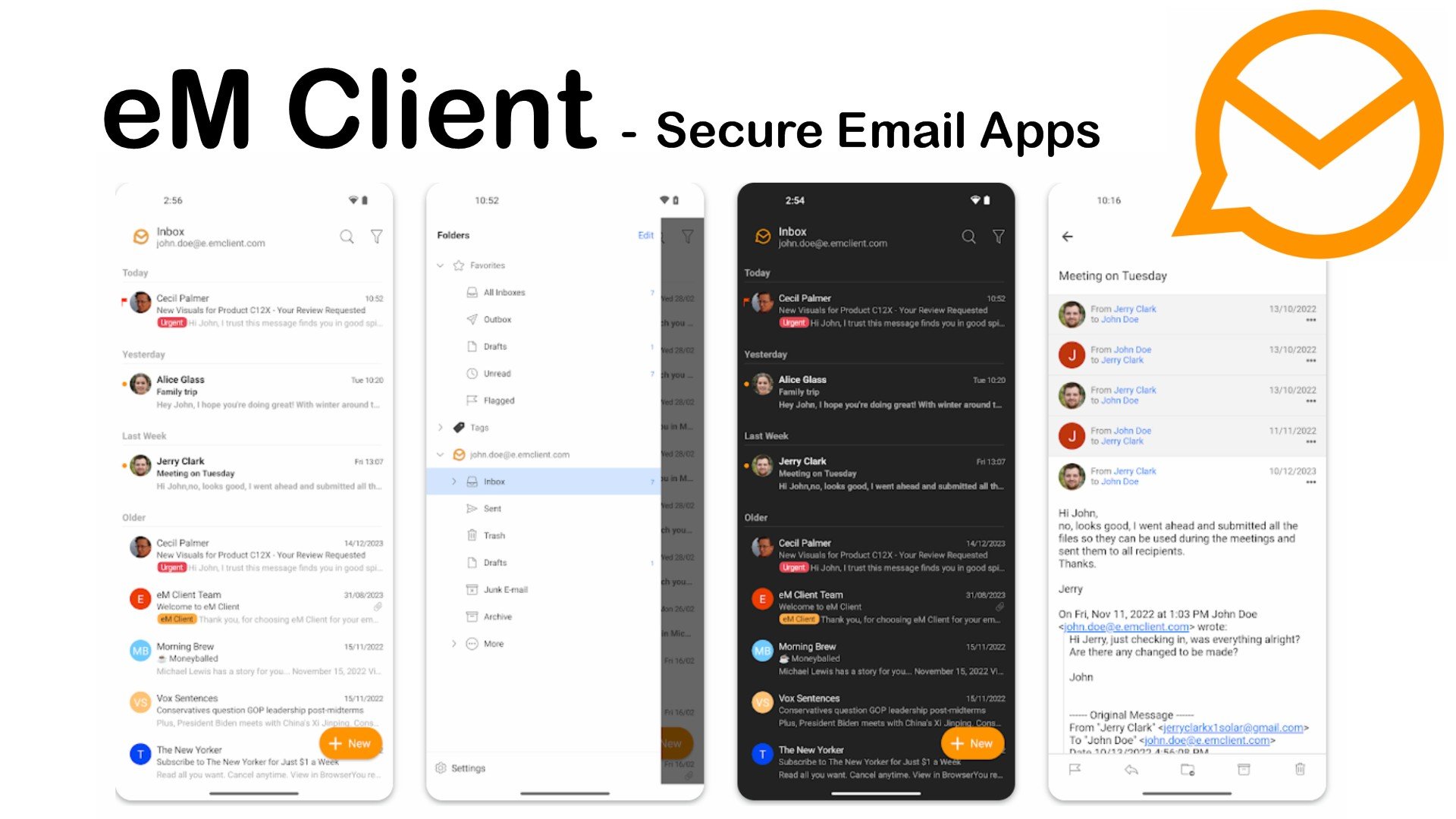
The iOS and Android apps closely mimic the desktop interface, providing a consistent and familiar user experience. You get push notifications to stay up to date with all your emails and other communications while on the go, which is a must for a solution like this.
Multi-account Management
eM Client offers robust multi-account handling capabilities to help you manage various email accounts efficiently. I particularly liked its:
Global Folders/Inbox – Merge your email across all your accounts into a single, unified view. This allows for easy organization and access to emails from different services without having to switch between them constantly.
Favorites –Your favorites are easily accessible from the sidebar for quick reference, and can include everything from your All Inbox, flagged and unread emails, and drafts, to any of your existing folders from other accounts.
Search Folders – Create customized search folders based on specific criteria, such as emails from a particular sender or subject. These search folders automatically update to display emails that meet your criteria. Simply perform the search in the search bar, then using the downward arrow you will find the options to create a search folder.
Advanced Search
Its advanced search features really help you dig down and find exactly what you’re looking for. This includes date ranges, attachments with filenames, tags, file type, size. As well as message status, such as read, unread, flagged, or replied.
Boolean logic is set for v10, which will soon let you find emails based on AND, OR, NOT, and parentheses to create complex search queries. This will enable you to search for emails that meet multiple criteria at once.
Security
eM Client allows you to use S/MIME and PGP to encrypt or digitally sign emails, keeping them hidden from prying eyes.
The process can be a little involved if you are not used to encryption, but the settings are easily found by go to Menu > Settings > Signing and Encryption. It also walks you through the process the first time you add an account on the mobile apps.
Other Useful Features
Instant Translation – Open an email written in a foreign language, and then tap/click translate, with support for upwards of 40 languages.
Snooze –Set a time for a less important email to re-arrive later.
Watch Reply – Set an additional notification for an important incoming response or set a reminder time if you need to follow up yourself.
Block Tracking Pixels – Protect your privacy by blocking email tracking attempts from external sources and auto-downloading of potentially dangerous images.
Templates and Signatures – Have all your professional signatures and templates ready to do.
eM Client Review – Cons
Some things could be improved, particularly on mobile:
Depending on your device you might experience some input lag and slowness.
New mail sometimes lags or needs a manual refresh.
Calendar, tasks, and other desktop features are not yet implemented on the mobile apps.
Pricing
The best thing about eM Client mobile apps is they’re absolutely FREE.
On desktop is it’s free to get started and if you are more of a personal user like me, two accounts may be all you need.
Its premium plans are a one-time deal, so no annoying subscriptions, and it will unlock unlimited accounts and extra features like notes, snooze, watch reply, tracking blocking, mass mail, and much more.
Pro – $59.95 per device/ $129.95 for lifetime upgrades
Business Pro – $69.95 per device/ $139.95 for lifetime upgrades
Business Pro brings with it a license manager to remotely configure settings and remove old licenses for your team, employees, etc.
eM Client Review – Verdict
Overall, eM Client is a formidable desktop software that’s easy to use and has everything you need to manage all your accounts and emails in exactly the way you desire. It’s also one of the best IncrediMail alternatives.
The addition of the free mobile apps is a no brainer. They already work well in most aspects and when the next features are released, there won’t be much not to like.
If you are a Windows 10 enthusiast and love the floating window wallpaper, you will be shocked to learn that a 3D rendering app does not create it. Instead, designer Bradley Munkowitz sets it up and photographs it.
Bradley Munkowitz created the signature wallpaper using mirrors, lasers, smoke machines, and glass window construction. He took over 3000 shots, tried different alternatives, and used different angles, colors, and lights to achieve the final result.
Here is what Munkowitz said about his approach to creating the default wallpaper for Windows 10:
When I first looked at the Windows logo, I saw more than four tiled squares. I saw the space behind it, and the energy that shines through and gives it a sense of propulsion. The logo makes an impression with that use of curated perspective. In focusing in on the logo, we’re not just telling the story of Windows: we’re telling the story of everything behind and traveling through it, of the advances and techniques that keep the brand moving forward into the future.
He also mentioned:
Our approach involved a live-action shoot using different variables and customizations. Our core concept wanted to position the logo as a portal into the world behind it. We customized and art directed each image to speak to the timelessness of Windows, and its ability to take us anywhere we want to go. We though the best way to achieve this is to build and shoot it practically.
So we built the actual Windows logos and brought them to life through our use of inventive camera angles and evocative volumetric lighting. Using a 9k Phase One Camera system, we shot multiple exposures of the Windows logo, and combined those exposures in post to create a fantastic assemblage of volumetric lighting. The aim was to create a huge variety of desktop images, all of them real and practical, which in essence rendered the desktop image timeless.
The final result was an image what was vivid and tangible, like you could reach into your screen and touch it. The advantage of doing this practically is that we can literally shoot thousands of images, which meant once we had our hero image, we kept shooting and got endless varieties out of each set-up. We wanted to create a whole library of images that can be used throughout multiple Windows applications.
The Windows logo is a true icon. Using the best techniques available, we wanted to re-envision this classic image, defining what makes Windows 10 so forward thinking and accessible. We think our live action images will stand the test of time, placing this logo in a class of its own within the physical world.
Only one of the 3000 photos made it out and became the iconic Windows 10 wallpaper we all love. However, other shots are also stunning; you can find them on the official Gmunk website.
It’s almost unbelievable that the default Windows 10 wallpaper required such an immense effort to produce. With the advent of AI capable of generating high-definition wallpapers with a single command, it’s unlikely we’ll witness a similar endeavor.
In other news, Microsoft is bringing new AI-themed wallpapers for the new ARM AI PCs with Windows 11 24H2; you can read about them here.
Which wallpaper do you like Windows 10 or Windows 11? Share your opinions with our readers in the comments section below.
Windows 11 OOBE will soon have new visuals that will enrich the experience of installing the operating system on PCs and laptops. According to the latest findings of the Windows enthusiast and Insider, @PhantomOfEarth, the new designs will appear when you clean install Windows 11 24H2 (build 26100.1) and Windows 11 22H2 (22621.1).
The OOBE Windows update in progress screen got some visual updates recently. Only seen the updated screen on version 24H2. (top: old, bottom: new) pic.twitter.com/EpWdxb3YXa
The new visuals are clean, colorful, and modern, and they carry on the general theme of Windows 11: the vibrant blue, the airy light blue, and the well-known font of the operating system.
The Redmond-based tech giant will let you check out for more information on Windows 11’s features in this new OOBE: users are encouraged to find out more, by hovering between slides, as you can see in the image below.
Microsoft also updates the OOBE to show installation progress in a more modern look, and the company doesn’t shy away from showing you suggestions: you can take a walk while installation is undergoing, but you can also stop the updates altogether, and just go back to the desktop, as seen by another Insider, @XenoPanther.
It seems that it somehow works, as spotted by X users.
I ran into it the other day, funniest part is that it’ll just reboot and do updates anyway.
The new Windows 11 OOBE will most likely be generally available to all users later this year when the 23H2 update is fully released.
The Redmond-based tech giant recently made the update available in the Preview Channel of the Windows Insider Program, earlier than expected, so those already enlisted in the program, with access to the build might experience the new visuals.
Google didn’t learn from its past mistakes. The AI Overviews feature added to the search engine became dangerous from the start. If you didn’t know, the tool generated alarming solutions to simple questions. For example, one user typed Cheese not sticking on pizza, and the answer to that was to add non-toxic glue.
When someone asked how many rocks they should eat, the AI Overview told them to eat at least one small rock daily. There are more unhinged answers, but they are even more dangerous.
Why is Google’s AI Overviews feature not working?
Google’s AI Overviews feature became dangerous because it does what it was programmed to do. It provides answers based on the information gathered from various sources such as Reddit, Quora, and satirical sites. Unfortunately, nobody noticed the problem during its preview phase.
In addition, Google should know best what lingers on the internet and prohibit its AI from using any source. After all, Gemini experienced bugs not too long ago, and the company removed its image generation feature and limited the others.
Besides being dangerous, users dislike the AI Overviews feature. So, plenty of videos show ways to turn it off, and they take just a few minutes.
A Google spokesperson told Business Insider that these results are rare, and most answers use high-quality information. Yet, it is difficult to believe that. Users shared various dangerous solutions provided by the AI Overviews feature. For example, according to the AI, a dog played in the NHL, and 1919 was 20 years ago.
Ultimately, the AI Overviews feature from Google is somewhat dangerous. After all, nobody wants to stumble across misinformation while searching for meaningful answers. In addition, some business owners complain that the new feature could make users interact with articles less.
Do you consider the AI Overviews feature dangerous? Let us know in the comments.
Microsoft Office is the most used office suite in the world, with cornerstone apps including Word, Excel, PowerPoint, and others.
Office Suite might not be the most affordable collection of software, but thanks to today’s deal, you can get it with an amazing discount.
Microsoft Office 2021 discount lets you get it for $50
As reported by ZDNet, Microsoft Office Professional 2021 is available at a massive discount, and you can save 77% on Office.
This means you’ll get the entire suite for just $50. This is a lifetime license, so once you buy it, you’re free to use it indefinitely.
With the discount, you’ll get Word, Excel, PowerPoint, Outlook, Teams, OneNote, Publisher, and Access. Regarding the compatibility, you’ll need Windows 10 or 11.
If you’re looking to get a lifetime Microsoft Office Professional 2021 license this is an opportunity that you shouldn’t miss, so visit StackSocial to get it.
Mozilla is working to get weather information in Firefox right from the New Tab Page. The company which previously blocked Protect content playback in Private windows, now allows, for instance, it supports Playing Netflix videos in Private browsing mode. These features are being tested in Nightly.
Weather Widget on New Tab Page
Following the recent addition of Wallpapers to the New Tab Page, Firefox is now adding the Weather widget. Yes, whether to become another new tab Page feature in Firefox in addition to displaying most visited sites, recommended stores from Pocket, Acitivy on recent sites, and content.
Firefox is introducing a Weather Widget on the New Tab Page. This feature displays weather information for your region, including the current temperature and conditions. By default, the temperature is shown in Fahrenheit, but you can switch to Celsius if you prefer.
Firefox allows us to hide the weather on the new Tab Page. For that, click the three-dot icon next to the Weather card on the NTP and select “Hide weather on New Tab.”
Alternatively, click the gear icon at the extreme right of the NTP, scroll down, and uncheck the “Weather” option.
How to enable Weather on New Tab Page in Firefox
Open Firefox
Visit about:config
Change the following Preferences values to true browser.newtabpage.activity-stream.showWeather browser.newtabpage.activity-stream.system.showWeather
Firefox 128 to support Netflix video playback in Private browsing mode
Previously, Firefox did not support playing protected content (such as Netflix videos) in Private Browsing Mode. However, starting from version 128, Firefox allows users to watch Digital Rights Management (DRM) content in Private windows. If you’re a Netflix user running Firefox, this is great news! You can enjoy your favorite shows and movies even when browsing privately.
It seems LinkedIn, a member of the Microsoft family since its acquisition in 2016, is next in line to get a taste of this AI magic. Well, in fact, Microsoft already implemented Copilot in LinkedIn since their announcement in January. However, according to an internal document discovered by Business Insider, Microsoft has bigger plans with Copilot on LinkedIn.
How is Microsoft going to change Copilot’s functions in LinkedIn?
Microsoft already presented Copilots that are powered by AI in services such as GitHub, Security and Azure with the goal to automate tasks and make our digital life a little simpler. However, the reference to LinkedIn in this setting is intriguing as it hints that Microsoft may be preparing to elevate the AI abilities of this platform. Think about having an AI helper for writing posts, sales and hiring on LinkedIn. Sounds pretty handy, right?
Over time, Microsoft has been adding more artificial intelligence features to this platform. The idea of a LinkedIn Copilot appears to be quite an advancement in their plans. This has the potential to contribute towards AI research and development that is focused on professional networking. It’s a plan that Elon Musk is currently implementing with his X social-media company, and Meta through Instagram, attempting to improve user engagement and advertising using artificial intelligence.
Recently, Microsoft made known its fresh AI products and services in its yearly developer conference. It includes a Copilot+ series of PCs, as well as Team Copilot for workplace chats and meetings in Microsoft Teams. However, there was no talk about a LinkedIn Copilot yet. The absence of this information causes us to ponder on the details of what is planned for LinkedIn by Microsoft and how it will change the professional networking process.
LinkedIn Copilot could provide personalized writing help, enhance sales and hiring processes, and possibly even give insights into trends for professional networking. But like any AI advancement, there are issues concerning privacy, security of data and proper use of AI in work-related areas.
What is your opinion? Are you enthusiastic about an AI-powered LinkedIn experience, or are you uncertain regarding the consequences of this technology? Microsoft’s step to combine AI with LinkedIn seems quite daring and it will be fascinating to observe its progress.
The Singapore Cyber Emergency Response Team found that hackers have been exploiting a high-severity vulnerability that affects old browser versions, including Google Chrome and Microsoft Edge.
Therefore, they have requested that users and admins update Google Chrome and other Chromium browsers to the latest version.
SingCERT, which comes under the Cyber Security Agency of Singapore (CSA) said in an advisory:
There have been reports of active exploitation of a high-severity vulnerability affecting Google Chrome.
Type Confusion in V8 in Google Chrome prior to 125.0.6422.60 allowed a remote attacker to execute arbitrary code inside a sandbox via a crafted HTML page.
To be secure, Chrome has already patched it; therefore, you need to update the browser to the latest version.
SingCERT further mentioned that the vulnerability is caused by a type confusion bug in the V8 JavaScript engine, which is also affecting other Chromium-based browsers like Edge.
The United States National Institute of Standards and Technology has also asked users and administrators affected by the vulnerability to apply mitigations per vendor instructions or discontinue the use of the product if mitigations are unavailable.
Given the security vulnerabilities being exploited now and then, keeping every software in your computer up to date is important.
How do you keep track of your outdated apps? Share your views with our readers in the comments section below.
Xbox fans will get a new addition to the console’s library as September starts. Aaero2 is a sequel from Aaero that fascinated players in 2021. The people at Mad Fellows made this game and they say it will improve your experience with its special mixture of rhythm and rail-shooting, all wrapped up beautifully for you (Xbox Wire).
Why are gamers so excited about Aaero2?
To start, Aaero2 is a console exclusive for Xbox Series X|S with a time limit. This makes it highly desired by Xbox gamers. The feeling of excitement can be felt greatly, particularly because the original game was included in Xbox Games with Gold and received praise from critics as well as having many fans who liked it too.
The goal of this sequel is to continue this achievement by offering an improved combat system for players and incorporating both cooperative play along with Player versus Player mode into its feature set. Just picture it: you and a buddy partnering together or competing against each other, all while exploring fascinating extraterrestrial realms. Fun-filled joy!
Monstercat has joined hands with the developers to create an amazing official soundtrack. It’s not just about matching the music to the game, but making sure that each level is designed with detail around it. This guarantees a distinct adventure through every stage for players who are keen on experiencing something new in their gaming sessions.
As for those who are eager to start, there is a chance to assist Aaero2 on Indiegogo. By supporting the project, gamers can obtain a restricted Xbox Backer Pack that has the game along with special benefits and even their name in credits. But, with only 30 copies left, swiftness is quite important.
For people who love playing games on their computers, they will not need to worry. Aaero2 is coming to Steam before December finishes and there are plans for it to be released on other platforms too. This plan of release means more people can enjoy this game sooner or later.
In a gaming world where many experiences tend to be solitary, Aaero2 stands out as an opportunity for people to join forces. Whether they’re sitting next to each other on the sofa or linking up from various parts of the planet, it serves as a reminder that cooperative play can bring us together and create joy in tackling obstacles with a companion.
Therefore, when September is near, it’s not only about if you will play Aaero2 but also who will be your partner in this adventure. Are you going to become a special owner of the Xbox Backer Pack, or will you wait for others in gaming community and then join rhythm to shoot your path across alien scenes?
Let’s talk about this exciting new Co-Op Aaero2 game in the comments below.
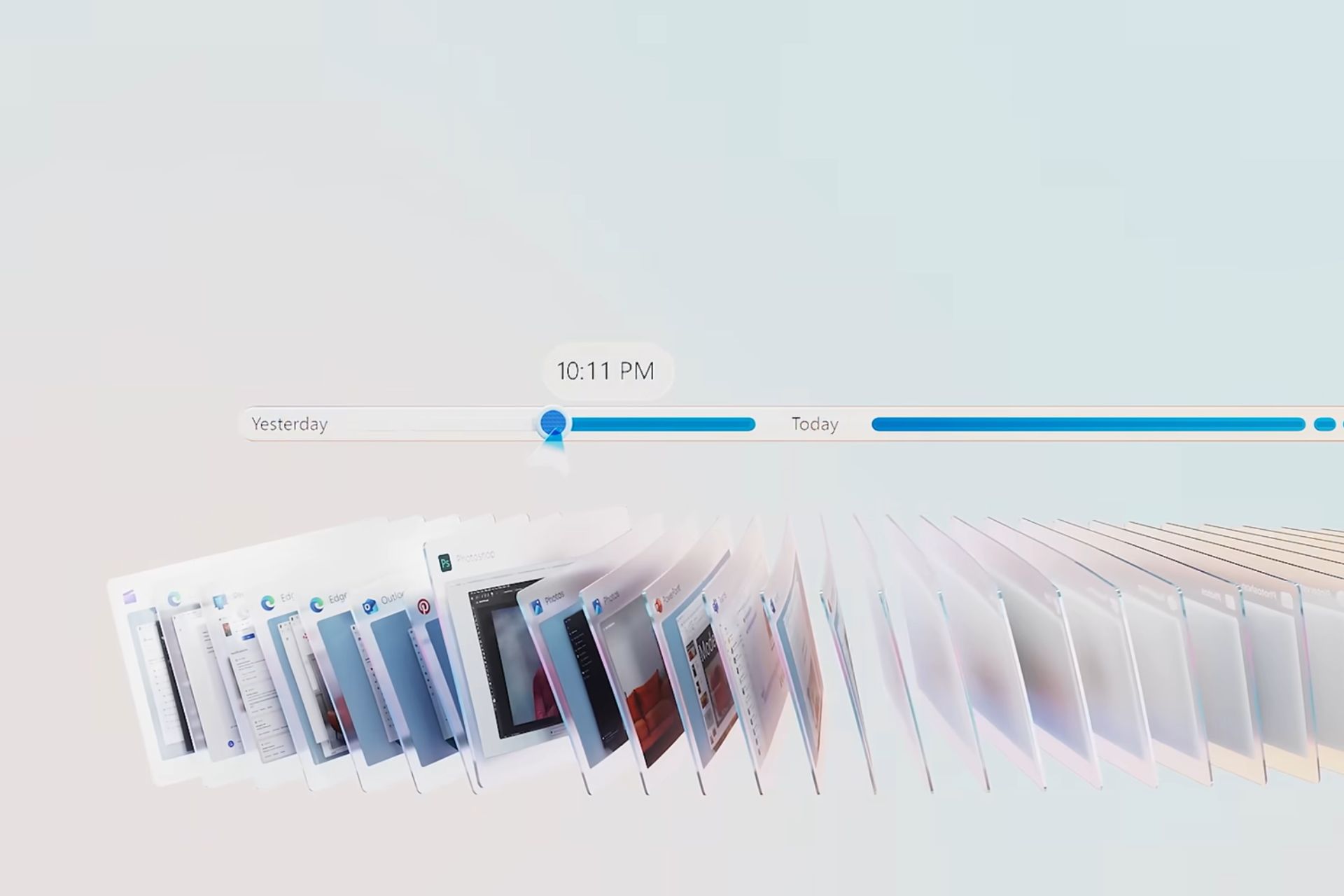
Windows Recall AI, which was arguably Microsoft Build 2024’s most controversial announcement, will be coming on Copilot+ PCs starting this summer. The tool can record everything you do on Windows 11, effectively acting like a PC historian allowing you to have access to the entire of your activity timeline (assuming you’ll have the space for it, of course).
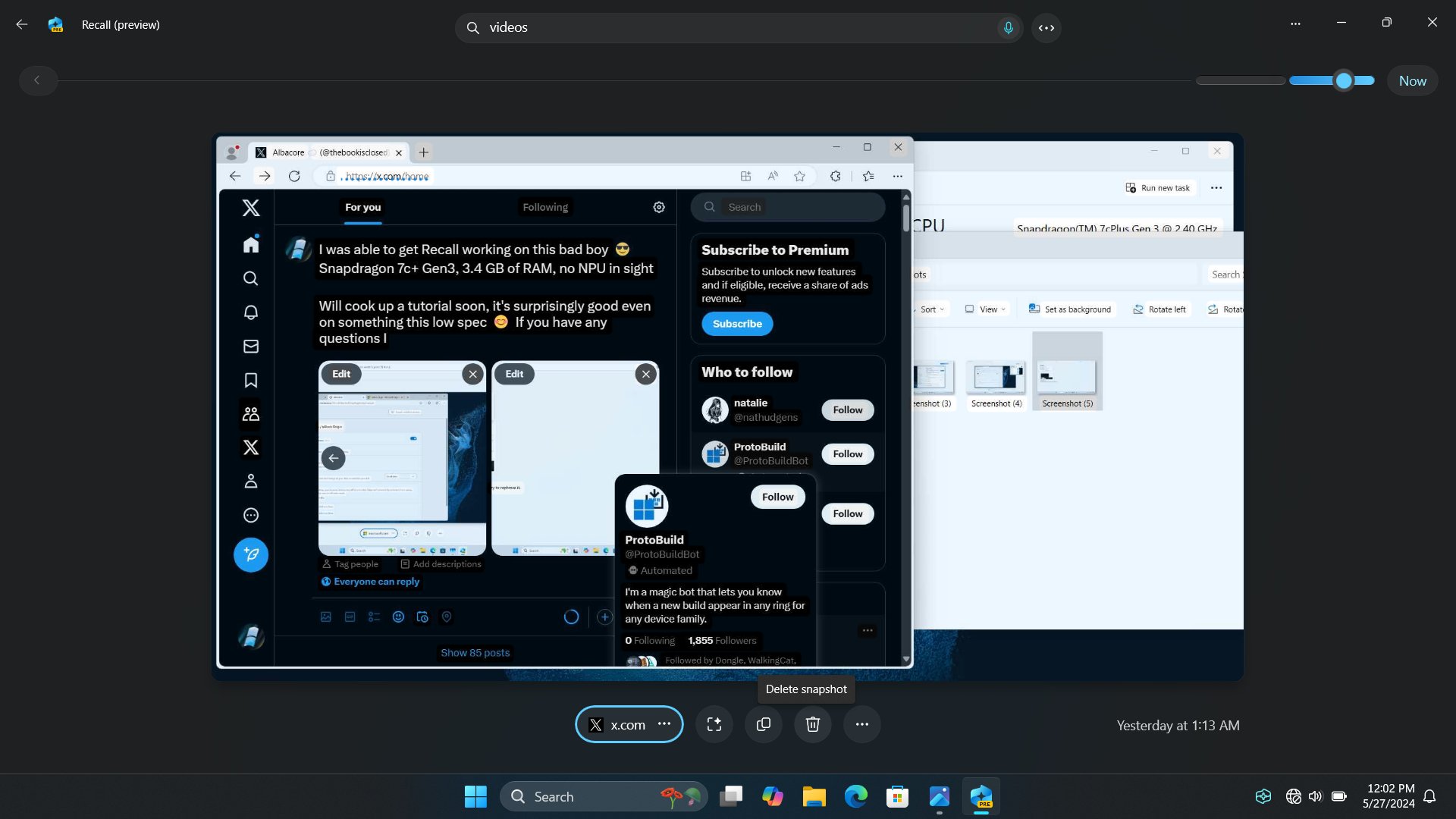
The Redmond-based tech giant has touted it as a Copilot+ PC exclusive, meaning only devices that sport an NPU (so far, the only one is the Snapdragon Elite X), can support it, but Windows enthusiasts out there, like Albacore, already found a way to install it on non-NPU devices, and it works on low-spec devices, as well.
So, theoretically, despite needing an NPU to function, Windows Recall AI can essentially work on any Windows 11 device, which could lead the way for Microsoft to expand it beyond Copilot+ PCs officially.
Ultimately, this only means one thing: more worries for the regular Windows 11 user. Why? Well, the idea of Recall recording pretty much everything is striking a chord with many users, who see it as Microsoft wanting their data to train its AI models.
However, the same Windows enthusiast who discovered that Recall can be installed in non-NPU and low-spec devices also wants to restate the worries: Windows Recall stores everything on the device, allowing users to delete snapshots of their sensitive information.
I've seen a few people concerned about Recall and whether all the processing is done locally. That indeed is the case. I am able to save snapshots, OCR them, access the timeline, and perform text as well as visual searches across it, all offline. You can see the ?? icon here.… pic.twitter.com/BPKAfFhOmT
And, Microsoft wasn’t kidding when it said Recall is safe: you can use it entirely while offline.
As you can see in the image above, the Windows enthusiast was able to work on Recall AI while offline, and the platform is displaying several options, such as the ability to delete the snapshot it just took.
One of the biggest concerns about using Recall AI in Windows 11 was that the tool would somehow bypass its security and privacy policies to provide Microsoft with users’ data. Aside from the fact that Recall is entirely optional and can be simply disabled, the tool works just as fine offline.
So, ultimately, the only real concern this app could pose is the gigantic space it will occupy. But that’s a story we already covered.
The Microsoft Launcher app for Android phones and tablets received a beta update in August 2023. This update allows users to ask questions using the Bing Chat chatbot with text prompts. Users can also input the prompts using their voice.
In November 2023, Microsoft changed the chatbot’s AI name to Copilot, but Microsoft Launcher continued using the Bing icon in its search widget. However, this has changed now. As reported by Windows Central, people who signed up for the app’s beta version can now use Copilot in the latest version.
If you are signed in for Microsoft Launcher beta, you can get this version with Copilot integration from the Google Play Store. The new version, as mentioned on the Play Store, is v6.240402.2.1139391.
The UI of Copilot is the same as the app or the web version, which allows you to ask questions by typing, using audio, or uploading photos. However, some of the advanced features of Notebook, Cooking Assistant, and Vacation Planner are unavailable with Microsoft Launcher.
Here is what the release notes say:
Copilot in Your Feed We’re thrilled to enhance your Microsoft Launcher experience with the integration of Copilot right into your feed. This update brings your everyday Al companion closer to you:
Effortless Access: Copilot is now just a swipe away, ready to assist you with answers and content creation.
Creative Power: Generate images and text directly from your mobile feed using simple words.
Pro Performance: For our Copilot Pro users, enjoy a more responsive and swift interaction.
With this, the update also brings optimized performance for Copilot Pro users and has become more responsive.
Currently, the feature is available in beta, and there is no formal announcement about when it will be available to the general masses.
What do you think about the Copilot integration coming to Microsoft Launcher on Android smartphones and tablets? Share your views with our readers in the comments section below.
Ever since the introduction of ChatGPT, all major companies have started developing their language models to compete with it.
OpenAI, creator of ChatGPT, recently stated that they are training a new language model, so let’s see what that means.
The new flagship language model is already in training
As the New York Times reports, OpenAI stated that it has begun training a new AI model that will replace GPT-4.
According to OpenAI, they expect the new model to bring the next level of capabilities while planning to build artificial general intelligence. The new model would act as an engine for various AI products.
The company is also creating a new Safety and Security Committee as Axios writes, that will assess the risk of this technology. OpenAI stated the following:
While we are proud to build and release models that are industry-leading on both capabilities and safety, we welcome a robust debate at this important moment.
The committee is advisory, and it will collaborate with an array of security experts, its first task is to enhance the OpenAI’s processes and safeguards.
It’s great to see that OpenAI plans to push the boundaries of artificial intelligence while seriously taking into consideration all the possible risks that come with it.
Do keep in mind that training an AI model can take months or years to complete. Once the training is finished, there’s a period of internal testing and tweaking before it can be released to the public.
While this announcement has many excited, it will be months before we can see this new model available to the public.
OpenAI CTO stated that a successor to GPT-4 will be unveiled later this year, so we can just sit tight and wait for the official announcement.
In case you missed it, OpenAI announced GPT-4o recently and it brings various improvements, including the ability to recognize voice input and hold conversations.
In an unexpected happening that has the gaming community talking, Microsoft appears to have released the cat from its bag a bit earlier than anticipated. People using Xbox Game Pass app – both fans of iPhone and Android – got a message that must have been intended as secret for more time. The statement was straightforward: Just announced: Call of Duty: Black Ops 6 is coming to Game Pass on day one later this year! This small mistake has started a storm of guessing and excitement.
This is definitely a mistake because according to The Verge, the announcement links to a page that doesn’t exist yet. However, that might also be used in the future as an incentive to get the Xbox Game Pass premium account and get the newest scoop about game launches hours earlier before everyone else.
The leak has come out at an interesting time, with discussions and arguments about the Xbox and Activision Blizzard merger still happening. A main focus of these talks is whether Call of Duty in Game Pass could give Xbox an unfair boost in the console wars. Sony especially has raised worries on how this might affect competition between different gaming systems.
Now, the Call of Duty: Black Ops 6 game official reveal is set to happen in a presentation that lasts for an hour, following the June Xbox Showcase event. This will provide fans with their initial and detailed glimpse into what is coming next.
As FTSE Russell started sharing details about companies about to enter or leave the Russell 3000 and Russell Microcap indexes, the news of Microsoft reclaiming its position at the top in the Russell 1000 (large cap) index after three years became the topic of conversations in business circles.
This comes on the heels of Microsoft increasing its total market cap by 26.7%, from $2,284.6B to $2,893.6B. The top spot was previously held by Apple since 2021, which has slid to the second spot after losing 2% market cap in the last year.
At the third position in the Russell 1000 index is NVIDIA, which climbed 3 spots (previously at 6), fueled by a 215.20% increase in market cap.
Alphabet and Amazon are in fourth and fifth positions, respectively. Both, despite an increase in market cap (47.60% for Alphabet, 68.30% for Amazon), slipped in the rankings this year due to the annual gains made by NVIDIA.
All companies that comprise the magnificent seven (Microsoft, Google, NVIDIA, Alphabet, Amazon, Meta, Tesla) are a part of the top 10 in the Russell 1000 index.
In the 2024 rankings, Tesla slipped two spots to the 10th position. Amongst the top 10, it also posted the second-worst growth in market cap, only next to Apple.
The two new entrants to the list of top-10 companies by market cap are Eli Lilly and Broadcom. In 2023, Eli Lilly was placed at the 15th position and has moved up seven spots in the last year. As for Broadcom, the company, fueled by a 130.7% rise in market cap, has moved to the 9th position, fifteen spots up from the previous year’s ranking.
For the unversed, the Russell 3000 index comprises the top 3000 stocks in the United States. Of it, the top 1000 are categorized as Russell 1000 (large cap) while the bottom 2000 form a part of the Russell 2000 (small cap) index.
This ExitLag vs NordVPN comparison can help you if you’re torn between the two services.
The former is a specialized service designed mostly for gamers. It aims to reduce lag, lower ping, and provide a more stable connection by optimizing your data’s route to the game server.
The latter is a widely recognized VPN service focusing on privacy, security, and bypassing geo-restrictions. But it also has several features to help gamers enjoy their sessions.
So, let’s find out which one suits you better!
ExitLag vs NordVPN: Feature Comparison
Below is a table showing how ExitLag and NordVPN compare:
1 month – $12.99/month (Basic) 1 year – $4.59/month (Basic) 2 years – $3.69/month (Basic)
Customer Support
Live chat, Email/Ticket, Q&As, Discord community, and Social Media
Live chat, Email, and Q&As
Free Trial
3-day free trial
7-day free trial for Mobile
Now, let’s look at them in detail!
FPS Boost
High FPS can lead to smoother and more responsive gameplay.
ExitLag has different buttons in its FPS Boost that claim to help improve your FPS. However, it’s not a helpful feature. Most of the settings don’t result in what ExiLag says about them and you can modify most of them on your own without depending on the app.
Instead of relying on buttons that are vague about what they do, you can try a few modifications on your own to boost the performance. For example, you can check on your CPU/GPU temperatures, update drivers, and avoid using internet and speed boosters.
On the other hand, NordVPN doesn’t offer any tool or settings to improve your device’s graphics performance. Its primary focus is on maintaining a secure and private connection rather than optimizing game performance.
Traffic Sharper
ExitLag’s Traffic Shaper aims to help you manage and prioritize network traffic. That way, important applications receive the necessary bandwidth for optimal performance. It’s beneficial for gamers and streamers as it can reduce latency and prevent lag.
Moreover, ExitLag allows you to pick the gaming applications that shouldn’t be affected when the connection slows down.
NordVPN doesn’t have a Traffic Sharper feature but Split Tunneling works similarly. This feature allows you to select which gaming apps to use for a VPN-encrypted tunnel and which ones to use for regular traffic.
Winner: NordVPN. It supports advanced Split Tunneling similar to Traffic Sharper so you can enable or disable the VPN for selected apps.
Multi Internet
Multi Internet allows users to connect to multiple Internet connections simultaneously to improve network stability and speed. That way, you can balance the load across different networks.
ExitLag’s Multi Internet lets you connect to more than one network. In case one network drops or loses connection, others keep you active on your game.
This feature has some similarities with NordVPN’s Kill Switch. However, a Kill Switch will shut down the internet when the VPN connection drops to avoid leaking important information during online gaming.
Furthermore, it has two types: Internet and App. The Internet one can disconnect you when the connection drops or when you disconnect the VPN manually. The App Kill Switch allows you to quit your gaming apps when you aren’t connected.
Winner: Tie. ExitLag will allow you to continue with your game through the active network while NordVPN will disconnect you for security and privacy purposes.
Speed
Both ExitLag and NordVPN are known to lower ping during gaming. I got a ping of 366.41ms before connecting to either tool on the Roblox racing game.
After connecting to ExitLag, the ping was reduced to 194.40ms.
However, NordVPN was less successful — it reduced the ping to 221.14ms.
Winner: ExitLag. It had a lower ping than NordVPN.
Simultaneous Device Connections
ExitLag only supports one device per subscription. When the platform detects you’re using another device for gaming on the same account, it’ll terminate it. You also won’t receive a refund as per its terms of service. However, you can subscribe to more.
NordVPN supports up to 10 simultaneous connections. You can play your favorite game on your mobile device, PC, or PlayStation without termination issues. If you want to connect to more devices, you can set up NordVPN on your router. Alternatively, you can subscribe for more.
Winner: NordVPN. It allows up to 10 devices on a single subscription while ExitLag only grants you one.
Servers
ExitLag has no exact number of servers but it claims to have hundreds of servers distributed globally. However, NordVPN has over 6,000 servers worldwide spread through 100+ countries.
Winner: NordVPN. It has more servers than ExitLag.
Protocols
A VPN protocol is a set of rules that governs how data is transmitted securely between your device and a VPN server.
NordVPN has NordLynx, TCP (Transmission Control Protocol), and UDP (User Datagram Protocol) protocols. UDP is commonly used in gaming because it prioritizes speed. It’s faster than TCP but doesn’t guarantee that data packets will reach their destination.
TCP is more reliable than UDP as it ensures that all data packets reach their destination in the correct order. However, this reliability comes at the cost of slightly higher latency.
Still, NordLynx combines the best features of both UDP and TCP. It aims to offer the speed of UDP with the reliability of TCP. This makes it ideal for gamers looking for optimal performance while maintaining security and privacy.
ExitLag on the other hand has UDP, TPC, and ICMP Protocols. ICMP (Internet Control Message Protocol) helps gamers troubleshoot network problems and optimize their connection.
Winner: Tie. NordVPN has NordLynx for better speed while ExitLag has ICMP to help with troubleshooting.
Compatibility
NordVPN is compatible with Windows, macOS, Linux, Android, and iOS. It also works with different browser extensions like Chrome, Firefox, and Edge. Moreover, you can use it with Firestick, Xbox, Chromecast, Playstation, and more.
ExitLag is only compatible with Windows and Android. At the time of writing, it also doesn’t work with gaming consoles. However, the company is looking into ways to make it compatible. The team is also working to release the iOS version.
Winner: NordVPN. It’s highly compatible compared to ExitLag which only works with Windows and Android.
Pricing
This ExitLag vs NordVPN analysis wouldn’t be complete without their pricing. Here’s how they compare.
ExitLag has three main subscription plans. It costs $6.50/month for the monthly subscription, $4.33/month for the 2-month plans with one free month, and $3.58/month for the annual package. All these plans are discounted but the discount depends on the location.
ExitLag also offers a 3-day free trial instead of the 30-day money-back guarantee policy.
Meanwhile, NordVPN has monthly, 1-year, and 2-year subscription packages divided into three parts (Basic, Plus, and Complete).
Monthly:
Basic – $12.99/month
Plus – $13.99/month
Complete – $14.99/month
Yearly:
Basic – $4.59/month
Plus – $5.49/month
Complete – $6.49/month
2-Years:
Basic – $3.69/month
Plus – $4.69/month
Complete – $5.69/month
All packages in the 1-year and 2-year have an additional 3 extra months. Also, all plans come with a 30-day money-back guarantee policy to help you ask for a refund if the service doesn’t meet your needs. Additionally, you can enjoy a free 7-day trial but only for mobile devices.
Winner: NordVPN. Despite NordVPN being costly compared to ExiLag, It has a longer free trial and a 30-day money-back guarantee policy. This will help you use the service risk-free.
Customer Support
Both ExitLag and NordVPN have customer support channels to answer questions and guide users. ExitLag has Live chat, Email/Tickets, Discord community, Q&As, and social media to help you with any gaming concerns. However, the live chat support only works during business hours.
The Discord community allows you to chat with other gamers and also start a private conversation with ExitLag experts. Its live chat provided the fastest response of around two minutes and it took five hours for an email response.
NordVPN on the other hand has Q&As, Live chat, and Email channels. The Q&As provide different articles that can help answer user’s concerns. Moreover, the live chat button operates 24/7. You can also reach NordVPN via email but it’s a slower method.
The response time for live chat was less than a minute and around three hours for email. Overall, the support team was knowledgeable and I could get help.
Winner: Tie. ExitLag has more support channels than NordVPN. However, you can only consult them during business hours and most replies took longer than NordVPN.
Verdict – ExitLag vs NordVPN
If gaming performance and latency reduction are your top priorities, ExitLag is the better choice. It performed better than Nord in my ping test. ExitLag can deliver better ping results once configured properly. To learn the full setup process, follow our detailed ExitLag guide.
However, if you’re looking for a VPN solution with strong security, privacy, and multi-device support, NordVPN is superior.
Hopefully, this ExitLag vs NordVPN comparison will help you reach a decision.
If you’ve spotted a yellow border around your screen on your Windows 11 PC, it’s actually a security and privacy measure but we understand it can be annoying or unsightly so here’s how to get rid of it.
You’ll most likely spot the yellow border around the screen whenever you’re doing a screen capture or recording. This is due to Windows Capture API which provides a secure way to capture your screen. It’s basically notifying you that screen recording is in session.
If it wasn’t previously visible, it could be due to a Windows update, misconfigured display or calibration settings or your display drivers are damaged/outdated or missing. If you’re using custom calibration settings, they may inadvertently change your colours and birth the yellow border.
How do I remove the yellow border around the screen on Windows 11?
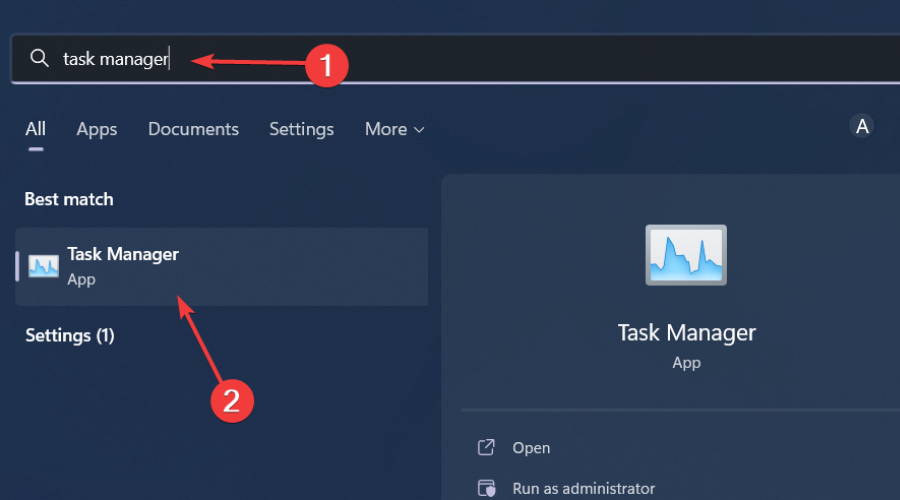
1. Close screen snipping processes
Hit the Windows key, type Task Manager in the search bar, and click Open.
Navigate to the Processes tab, and find the Screen snipping process.
Right-click on it and select End task.
2. Uninstall recent Windows update
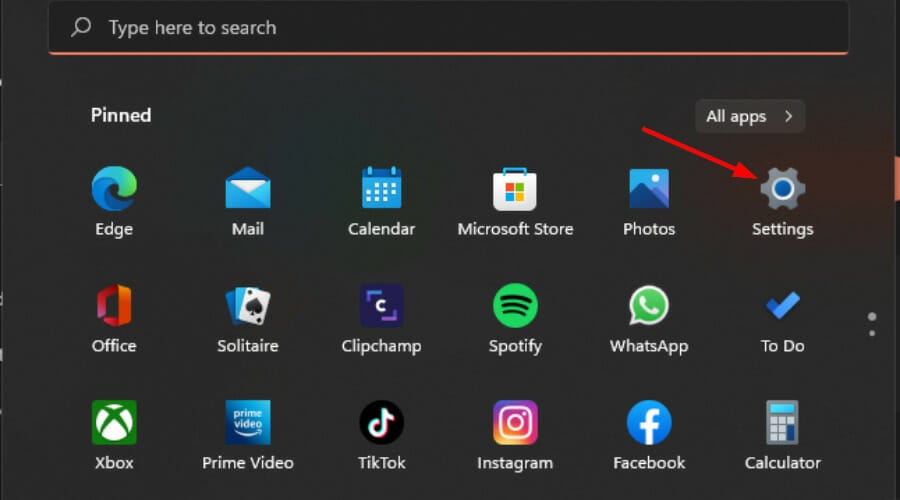
Press the Windows + I keys simultaneously to open Settings.
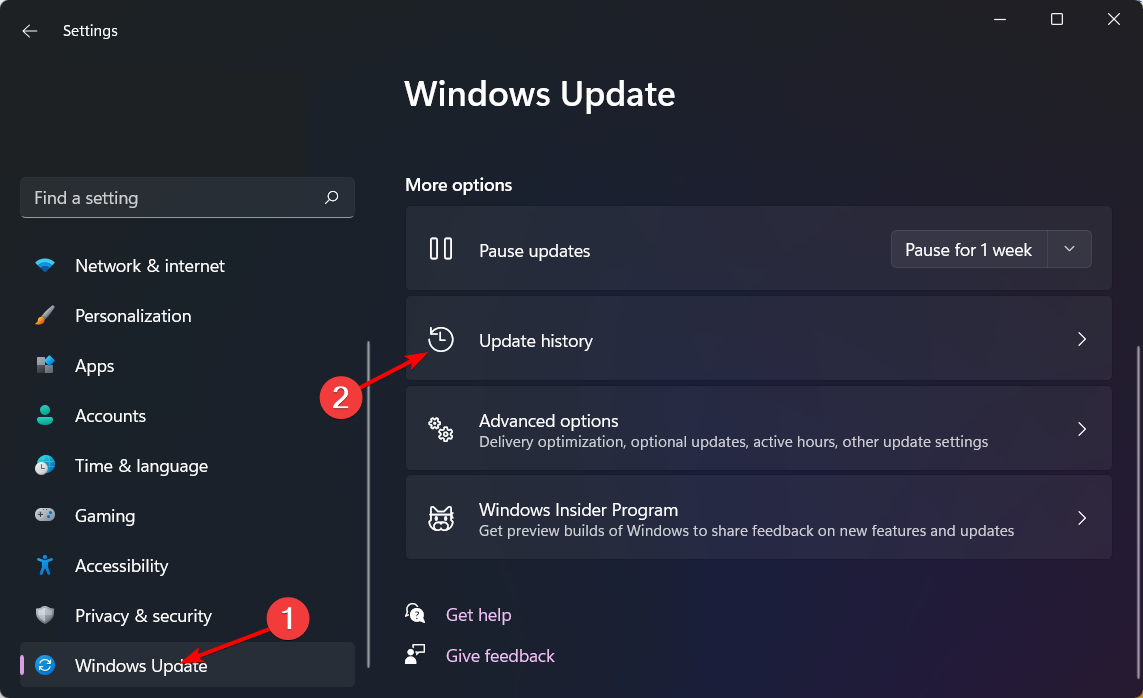
Navigate to Windows Update, then go to Update history.
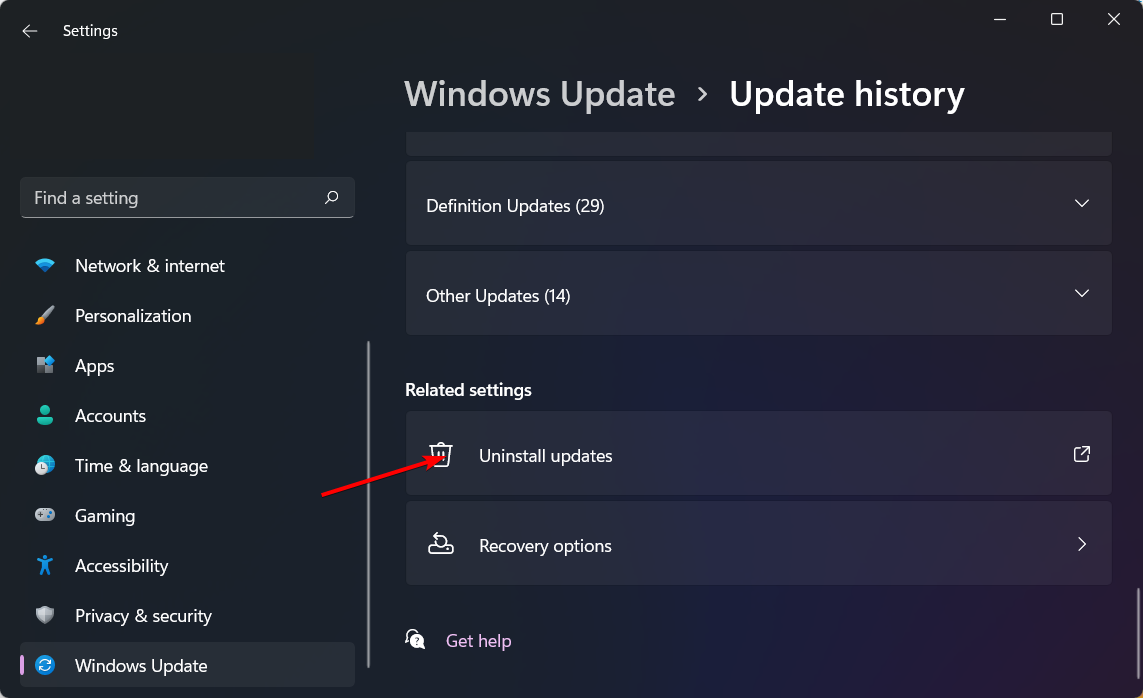
Click on Uninstall updates.
Select the most recent update, then click Uninstall.
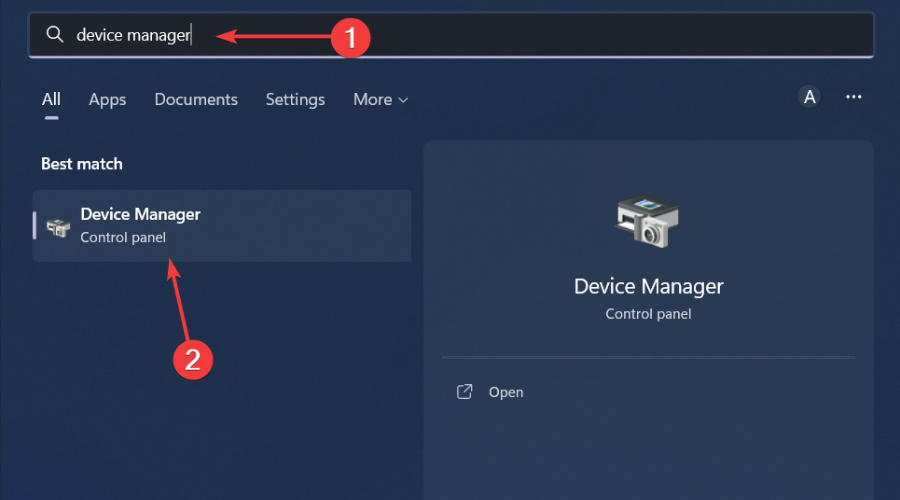
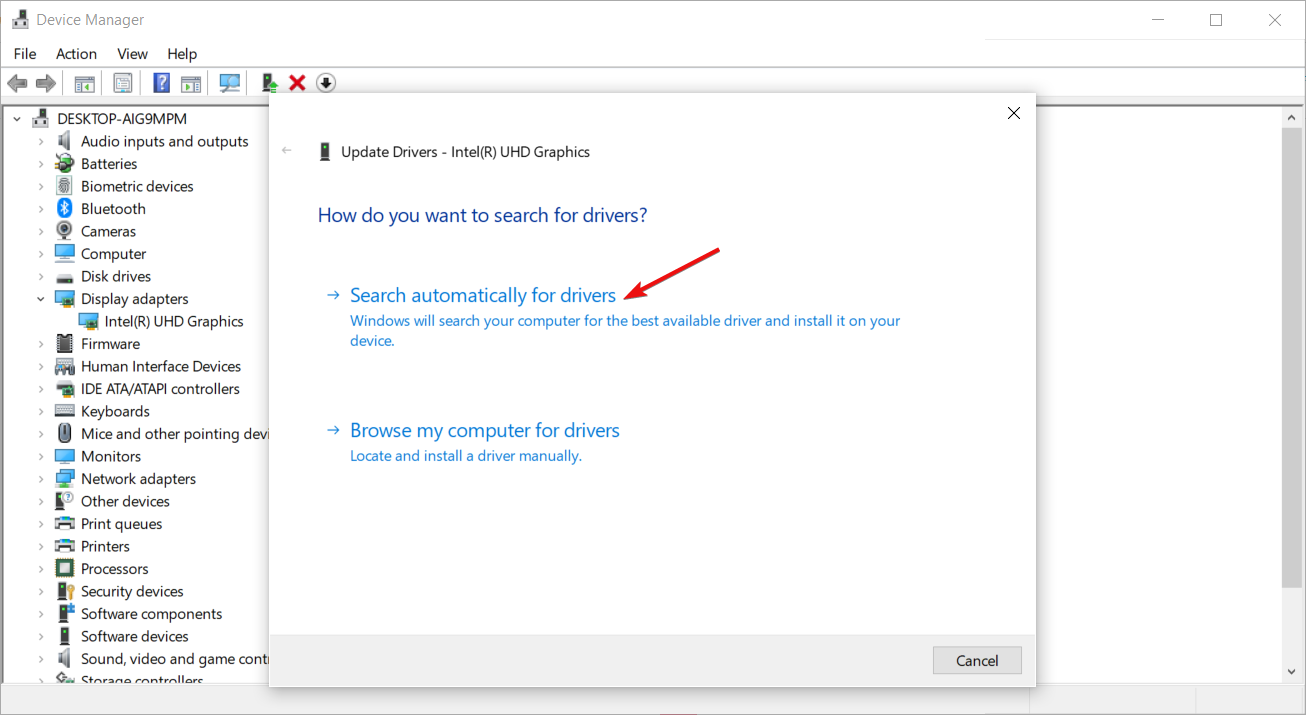
Click the Windows button, type Device Manager in the search bar, and click Open.
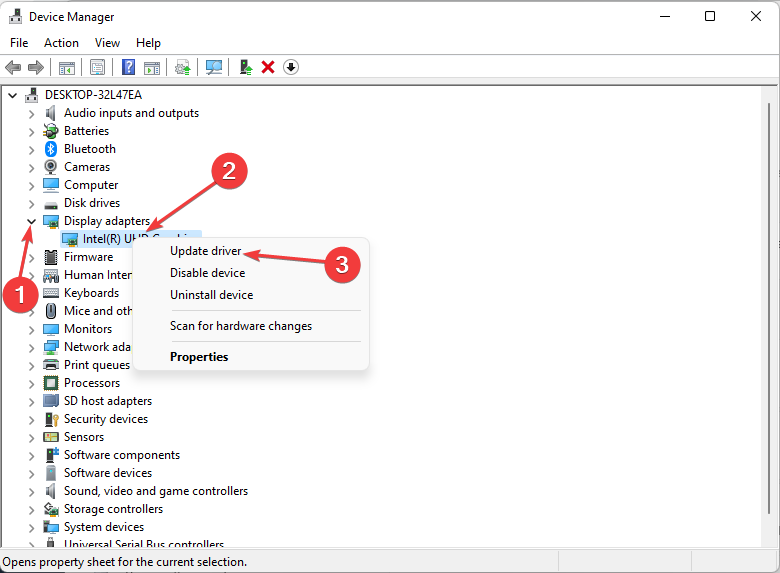
Navigate to Display adapters to expand, right-click on your graphics card and select Update driver.
Select Search automatically for drivers.
Additional tips and best practices
Although the yellow border around your Windows 11 screen is not a threat and doesn’t appear on your screen captures, it can be annoying. You can also change your Windows border colour to match the hue and hopefully, it will not be too distracting.
However, in some instances and with frequent use of the snipping tool, your PC’s performance may be affected. Screen capture may start leaving a huge memory footprint, lagging, random crashes and freezes on your PC.
If you notice any of these, consider doing a Disk Cleanup. Further, consider other screen capture tools. The good thing about them is they don’t have a yellow border around your screen and offer more advanced features compared to the built-in Windows snipping tool.
Still on borders, a yellow border on Discord also seems to be another headache for gamers but we’ve already cracked the code on how to get rid of it.
Have you managed to get rid of the yellow border around your screen with any other method that is not mentioned here? If so, we’d love to know about it. Share it with us in the comment section below.
xAI, Elon Musk’s generative AI company recently announced to have secured $6 billion in Series B funding. This announcement is more than just about money; it is a clear sign that Musk doesn’t want to lose sight of the more powerful competitors such as Microsoft, OpenAI, and Google.
The market entrance of Grok, an AI chatbot belonging to xAI, was thei initial step in this area. It started with a small number of users but has grown now. Grok-1.5V is the latest version that has increased its abilities to include vision aspects along with assisting text prompts for more advanced interactions – and there’s much more coming soon from multiple exciting technology updates and products.
Will xAI be able to hold a candle against Microsoft’s AI empire?
xAI doesn’t have the powerful software and hardware behindit, like Microsoft and Google, so it has to build it. It’s not just about the big money and famous support; xAI also plans to create a supercomputer by 2025. This supercomputer will not be like any other; it is believed to use groups of Nvidia H100 GPUs for power, which makes it four times larger than present AI GPU clusters.
The impacts of xAI’s arrival are wide-ranging. It doesn’t just mean a fresh phase in the AI arms contest, it hints at what the future might hold for AI development. Musk’s involvement with xAI could disrupt things as usual, so we might see some surprises.
What kind of reaction can we expect from industry towards this fresh challenge? We have to wait and see, but one thing is sure, we’ll be seeing more from xAI and Grok soon.
If you have any comment about this story, feel free to write it in the dedicated section below.
The new Jump back in feature shows you nine recently played games on the main page, allowing you to quickly launch any of them.
This is rather useful, especially if you’re multitasking and it’s perfect if you want to quickly switch between games.
Of course, launching games is just as simple, and you can do it by pressing the Menu button. We have to mention that this feature only works with games that are obtained from the Xbox app or Microsoft Store.
To make matters worse, Jump back in won’t even show games from Steam or from other platforms, which limits its functionality.
Threats and vulnerabilities go hand in hand with technological advancements. As companies continue to ramp up the security infrastructure, threat actors have always found ways to exploit the existing vulnerabilities, especially in the Microsoft ecosystem.
Recently, in an interview with Edge Middle East, James Maude, Field CTO at BeyondTrust, discussed the changing trends in the landscape, expressed concern about the relative stability in critical vulnerabilities, talked about the role of Microsoft, and highlighted how some third-party vendors are unwilling to engage with security researchers, let alone make amends.
When asked about the key findings pertaining to Microsoft’s vulnerabilities, Maude said,
One of the most notable findings is the plateau in critical vulnerabilities. These used to constitute nearly 50% of all vulnerabilities reported by Microsoft each year. Over the past few years, however, this number has stabilised around 100, with recent figures showing 104, 89, and 84 critical vulnerabilities, respectively.
But he didn’t shy away from acknowledging that Microsoft needs to put in more concerted efforts for us to witness a gradual decline in critical vulnerabilities. Because, at present, the numbers have largely been stable.
The lack of a significant decrease suggests that these measures are not as effective as they could be. This plateau indicates that more must be done to address and mitigate vulnerabilities proactively for a company as significant and influential as Microsoft, which dominates much of the IT landscape.
When asked why the stability in critical vulnerabilities should be a concern, James Maude explained that with Microsoft’s expansion in cloud services and the release of new, more secure products, expectations were high that vulnerabilities would reduce. But that hasn’t been the case because the existing vulnerabilities have not yet been completely patched!
Maude then sheds light on why patching vulnerabilities in legacy products turns out to be a challenge, even for tech giants like Microsoft.
The Print Spooler service, for instance, has been a constant source of vulnerabilities year after year. Despite focused efforts, it has taken years to stem the tide of new vulnerabilities in the Print Spooler. This indicates the broader difficulties in managing and securing legacy systems, which often contain old, complex, and sometimes poorly documented code that can be difficult to update and secure without introducing new issues.
Maude also blamed third-party vendors for this concerning trend. Because not all of them tackle such situations with the same energy.
Some companies lack responsible disclosure programs or are unwilling to work with security researchers. For instance, some vendors do not entertain reports of vulnerabilities unless they come from paying customers, while others might issue legal threats to researchers reporting vulnerabilities.
When asked about the future trends in the security landscape, Maude called for increased focus on identity security.
One of the significant trends we’re seeing is a shift towards identity security. With more data moving to the cloud, attackers find it easier to capture user credentials than to exploit endpoint vulnerabilities. This shift necessitates a focus on identity and privilege access management. This trend highlights the need for robust security measures and a holistic approach to managing and securing identities.
Finally, while sharing his views on the role played by generative AI in the vulnerability landscape, Maude explained that it’s both good and bad for the industry. For instance, the use of generative AI to develop codes often introduces vulnerabilities, which, if not detected, can cause significant damage at a later stage.
He also mentioned how threat actors leverage AI to detect and exploit vulnerabilities. That’s evident, as we have all seen a rise in AI-powered cyberattacks!
On the bright side, security analysts can also deploy AI-based tools to augment the security infrastructure. Microsoft, on its part, is using AI to tackle cyberattacks.
It’s an insightful interview that helped me gain an understanding of what goes on behind the curtains when it comes to vulnerabilities in the Microsoft ecosystem and how we could improve the overall landscape!
What do you think? Share with our readers in the comments section.
Azul, the Brazilian Airline, partnered with Microsoft to launch AzulGPT, an AI platform that uses Microsoft Azure OpenAI Service and Avanade. The AI will increase productivity and deal with processing and data analysis tasks. Also, it will follow the security and privacy rules of the company.
How does AzulGPT improve work efficiency?
AzulGPT greatly helped the Airline company improve its productivity. Now, tasks that used to take a few weeks, such as categorizing Customer feedback and NPS analyses, take a few minutes.
The AI tool facilitates the integration and sharing of information between different teams. The crew members can use the AzulGPT platform to ask questions about the programs and events happening within the company.
The AI from Azul also assists employees with the creation of materials, campaigns, and forms. This feature allows them to save time and focus on more important aspects such as strategic planning and development.
According to Felipe Starling, the airline’s IT Director, Azul is one of the first airlines to have their AI. So, he looks forward to receiving internal feedback and service metrics about AzulGPT. Also, Roberto Sória, vice president of Customer Success at Microsoft Brazil, says the AI platform runs in a closed environment to meet compliance, protection, and security requirements.
What are the challenges of having a custom-made AI?
There are a few challenges that come with AzulGPT. For example, the AI has to be periodically updated to maintain the best security practices and protect the company’s data.
In addition, Azul needs to train its employees on how to use AI, and the process can be time-consuming. On top of that, updating and maintaining it can become costly.
In a nutshell, Azul is one of the first Brazilian Airlines with a personal AI platform. AzulGPT increases the performance of employees and speeds up various processes. Also, it assists crew members to do easier data transfers across different sectors. Besides, the AI helps them create media content and categorize Customer feedback and NPS analyses.
Do you think that more Airlines will implement their GPTs? Let us know in the comments.
YouTube is constantly evolving and it seems that the company is testing a new feature.
The feature in question is related to Super Chat messages, so without further delay, let’s see what’s new.
The ability to reply to Super Chat messages is currently in testing
If you’re not familiar, Super Chat messages are highlighted messages that you can send during a livestream for a certain fee.
While this feature is a great way for streamers to earn money and for the community to interact with streamers, it’s fairly limited. But as PhoneArena writes, that’s about to change.
YouTube is currently testing a feature that lets creators reply to a Super Chat message during a livestream. By doing so, it allows streamers to better interact with their fans.
This is currently in testing and available only to a handful of users. However, the company has plans to bring this feature to more users in the upcoming months, so stay tuned.
The whole point about the new AMD latest-generation Ryzen processor is that it not only can power desktop computers, but also small, yet strong, mini-PCs. And the rumors in tech world say August is important month to note down on our calendars for new such devices powered by AMD’s Strix Point APUs.
Now, let’s get to the main point. As we’ve learned from Videocardz, the excitement comes from AOOSTAR, a name you probably don’t know because they have been quietly operating in the Mini-PC and eGPU markets. They giving clues about new product using latest AMD Ryzen CPU, and it not just any Ryzen. It is the Strix Point series, allegedly featuring the Zen5 architecture. This not only concerns laptops or tablets; it also aims to introduce this advanced technology into Mini-PCs and maybe even new handheld gadgets.
But there’s a catch – buying one of these Mini-PCs might need some waiting. Even though the official release is planned for August, it appears we will have to wait until October before these gadgets are available in stores. It is kind of a waiting game, like what we saw with Intel’s Meteor Lake chips in the mini-PC area.
And just when you think AMD finished showing everything, there is more. AOOSTAR is now testing a new Radeon RX 7650M XT eGPU solution, which should be available in July. This new upgrade aims at making your graphics experience better, using the same Navi 33 GPU but now with power limit allowing up to 130W TGP.
For people who have been watching AMD carefully, this news might not be a big surprise. And with a special keynote coming up at Computex next week, we are very excited and can’t wait to see what AMD will present for desktop and mobile platforms.
I will be very interesting to see how these new Ryzen processors change the Mini-PC world. And what about that eGPU solution – maybe it is the upgrade we all hope for? Let’s see if AMD will make these exciting rumors come true.
In the meantime, we can discuss about all this in the comments section below.
Gaming PCs are slowly gaining prominence, with many new products entering the market. The latest on the list is Lenovo Legion 7000K, a gaming tower that just debuted in China.
The Lenovo Legion 7000K is different from the rest for one reason: it packs a mobile CPU/processor (usually used in laptops) into the PC. The reason is that by adopting a MoDT (Mobile on Desktop) design, the gaming PC can deliver better performance, lower the power consumption, and improve the form factor.
But there’s a significant drawback to the design. You can’t upgrade or replace the processor as it’s soldered to the board, unlike conventional designs that opt for socketing. This aspect may draw seasoned PC enthusiasts away from the Lenovo gaming tower!
We previously discussed the MoDT design in Lenovo Legion 7000K in great detail.
About the Lenovo Legion 7000K
As for the hardware configuration, the gaming tower offers two options, Intel Core i9-14900HX and Intel Core i7-14650HX. There are four choices for the GPU, RTX4060, RTX4060Ti, RTX4070 SUPER, and RTX4070Ti SUPER.
However, there aren’t many storage options, and you are limited to a 1 TB PCIe Gen4 storage that comes built-in with the Lenovo Legion 7000K. Similarly, for RAM, you have a 32 GBDDR5 5600 configuration, according to the official product listing. But the two can be upgraded later!
Lenovo claims that the gaming tower can perform efficient cooling for up to 190W. Having reviewed many different Lenovo Legion gaming PCs, I know that these are designed for effective heat dissipation, so that shouldn’t be a concern.
Lenovo Legion 7000K (Image source: Lenovo)
Connectivity wouldn’t be a problem either with this gaming tower, as it features a wide array of ports on the front and back panels, including USB 3.2Gen1, USB 3.2 Gen2, USB 2.0, and headphone/microphone jacks.
Next on the list is the customizable RGB lighting, which really amps up the whole experience. Unlike the old days, CPUs are no longer placed under or behind the workdesk but usually find a place right next to the monitor and keyboard. In my opinion, the Lenovo Legion 7000K’s design won’t disappoint you!
Besides, the Lenovo Legion 7000K‘s capabilities aren’t limited to gaming but offer seamless multitasking. To facilitate that, a genuine Office Home and Student Edition comes pre-installed with the gaming tower.
Regarding pricing, the Lenovo Legion 7000K starts at $1,303 (8299 RMB) for the i7 14650HX – RTX 4060 model and goes to $2,356 (14999 RMB) for the i9 14900HX – RTX 4070 Ti model.
If you want to discover more similar options, check out our top picks for overclocked gaming PCs!
What do you think about the gaming tower? Share with our readers in the comments section.
Microsoft Phone Link has proven to be a useful tool especially if you want to keep your notifications and pictures synced between the PC and your phone.
Speaking of which, it seems that Microsoft is testing some new features in the Phone Link, so let’s see what’s new.
Phone Link will let you copy text from images soon
As The Verge writes, version 1.24051.91.0 of Phone Link allows you to extract text from synced images.
The OCR feature offers solid results, but it can make mistakes. Compared to other tools it makes more mistakes than Samsung or Apple’s text extractors.
Overall, it’s a small and useful feature, and we hope that Microsoft will reliability improvements to it before it officially launches.
This version of the Phone Link is available in the Release Preview Insider builds, and we expect to see it available soon to everyone.
There’s a whole dispute around the new Windows 11 Recall feature, or the AI Explorer. Some users don’t even want to hear about it due to privacy concerns. As we’ve shown recently, Recall is pretty harmless and you may even disable it. Others are curious to learn more about it and test it but as we know before, the feature was exclusively designed for the latest Snapdragon, or at least for SoCs with NPU on board.
I was able to get Recall working on this bad boy ? Snapdragon 7c+ Gen3, 3.4 GB of RAM, no NPU in sight
Will cook up a tutorial soon, it's surprisingly good even on something this low spec ? If you have any questions I'll do my best to answer them ✍️ pic.twitter.com/zzswm44Hy1
He shared his success in getting the Recall feature to run on a system equipped with a Snapdragon 7c+ Gen 3, 3.4GB RAM, and one again, without an NPU. The developer described the performance as surprisingly good, despite the system’s modest specs. This revelation suggests that Recall might still be functional on lower-end systems, albeit without the NPU, challenging the initial assumptions about the feature’s requirements.
For those who know less about this whole story, Microsoft’s new CoPilot+ PC was designed to bring advanced AI features to the Windows 11 OS, with Recall being one of its flagship functionalities. This feature, aimed at enhancing productivity, allows you to access content you’ve viewed in the past. It was initially thought that Recall would demand high-end specs, specifically new processors like Snapdragon X chips and next-gen Intel and AMD processors, along with a CoPilot+ PC, 16GB RAM, and a powerful NPU.
The ability to run Recall on lower-end PCs without an NPU opens up the feature to a wider audience, but it also raises questions about the balance between functionality and security. What’s your take on this new feature? Do you think the benefits outweigh the potential privacy risks? Let us know your thoughts in the comments below.