Xbox dashboard and party chat now coming to the web

Microsoft is updating Xbox Cloud Gaming’s browser user interface, making it look more like the one on your Xbox PC app or console.

With the revamped interface, you get upgraded social features and Xbox party chat in the web version, which will allow you to join a call with friends right from your browser. So, you don’t need the dedicated Xbox app for that anymore.

You will also be able to find & manage Xbox friends, view user profiles and achievements, send messages, and check notification inboxes and toasts. In addition to this, you can also start parties outside of playing games and continue party chats between game sessions.

Microsoft is testing this with Alpha Skip-Ahead Xbox Insiders, and they can preview these updated features on supported browsers, the Meta Quest Headsets, & the Xbox app for Smart TVs.

To ease connecting the controller when playing on a browser, the insiders playing cloud games through xbox.com/play will notice a controller icon in the guide when connecting.

Here are the System Update Details mentioned in the Xbox Wire post,

  • OS Version: XB_FLT_2408GE\26100.1508.240404-2000
  • Available: 2 p.m. PT – April 8, 2024
  • Mandatory: 3 a.m. PT – April 9, 2024

With this version, Microsoft has introduced updates that will help properly reflect local languages across the console. Microsoft also acknowledged the issues related to audio & networking and assured that the team is working to find a fix for them.

To stay connected and informed about the release notes on the upcoming Xbox Insider features, follow Xbox Insider on X (formerly known as Twitter).

The Alpha Skip-Ahead ring on Xbox is an exclusive testing group; you have to enroll to get the pre-release versions. Given the potential for errors in these builds, Microsoft only restricts access to them by invitation.

However, if you want to join the group, navigate to the Xbox Insider Hub> Activities > Available > Joining new rings from your console, then complete the survey.

Have you opted in Xbox Insider Program? If so, share your experience using new features in the preview with our readers in the comments section below. 

How to Fix Your HP Laptop When the Caps Lock is Blinking

Your HP laptop caps lock key blinking is not a good sign but it is an indicator of an underlying problem and if you address it early enough, you could save your device from catastrophic damage.

The most common reason why your caps lock blinking is a hardware issue but in some rare cases, it can also be due to associated software. Common culprits include incompatible or faulty RAM, corrupted BIOS or a bad graphics card.

What can I do if my HP laptop Caps lock is blinking?

1. Reseat your RAM module

  1. Power off your HP laptop and unplug it from a power source.
  2. Remove the RAMs like you must have done in the past.
  3. Try placing them back and listen for a click sound. In most cases, this shows it is well seated on the RAM mount.
  4. Reboot your HP laptop.

Pay special attention to the technique while inserting the RAM stick. Slightly tilting it to a 30-degree angle will ensure it is seated properly in its slot.

Alternatively, if you have more than one RAM slot, you can remove it and put it in a different slot. Sometimes, only one RAM slot is working and you’ll have to test all of them to find one that isn’t damaged.

If all these don’t work, try with another RAM stick especially if you just did an upgrade. Your laptop may fail to boot after a RAM upgrade if it is incompatible or faulty.

2. Run the HP diagnostics tool

  1. Navigate to your browser and download the HP Hardware Diagnostics tool from the HP website.
  2. Open the file and follow the on-screen instructions to install the tool.
  3. Launch the tool and click on the System Tests button.Hardware Diagnostics tool
  4. The test will start running. Let it finish until it reaches 100%.
  5. Restart your HP laptop once the test is complete.
  6. If the caps lock is still blinking after completing the Quick Test, choose to perform the Extensive Test.

3. Reset BIOS and reinstall it

3.1 Reset BIOS

  1. Restart your HP laptop and repeatedly press ESC/F1/F2/F8 or F10 during the startup to get into the BIOS menu.
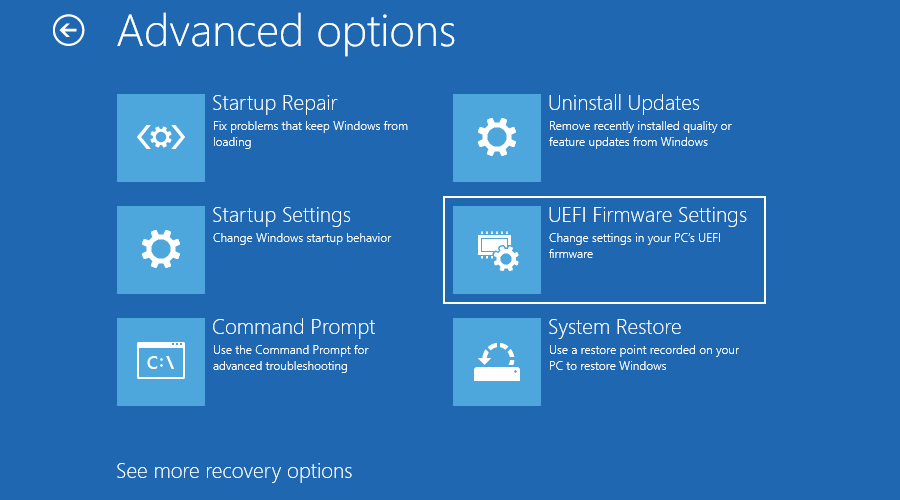
  2. Hit the Windows + I keys to open the Settings app and click on System>Recovery>Advanced startup. Go to Troubleshoot > Advanced Options > UEFI Firmware Settings and click on Restart.
  3. Once you are in the BIOS menu, press F9 to open the Load Default Options dialogue box.
  4. Select Yes using the arrow keys to reset BIOS settings to factory default.
  5. Exit and restart your HP laptop and check for any improvements.

3.2 Check the BIOS version

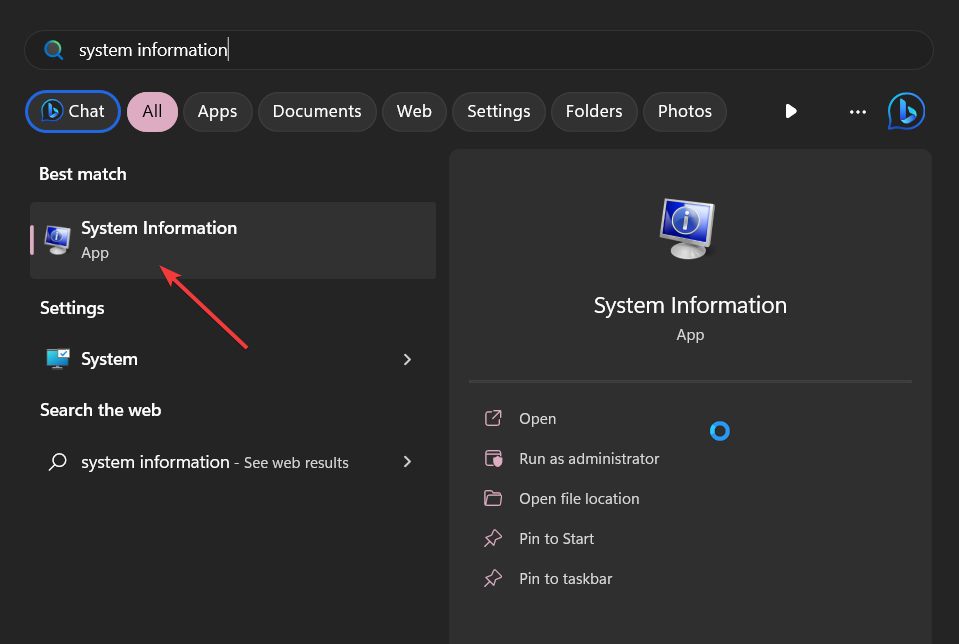
  1. Open the Start menu by pressing the Windows key.
  2. Type System Information and open the top result.
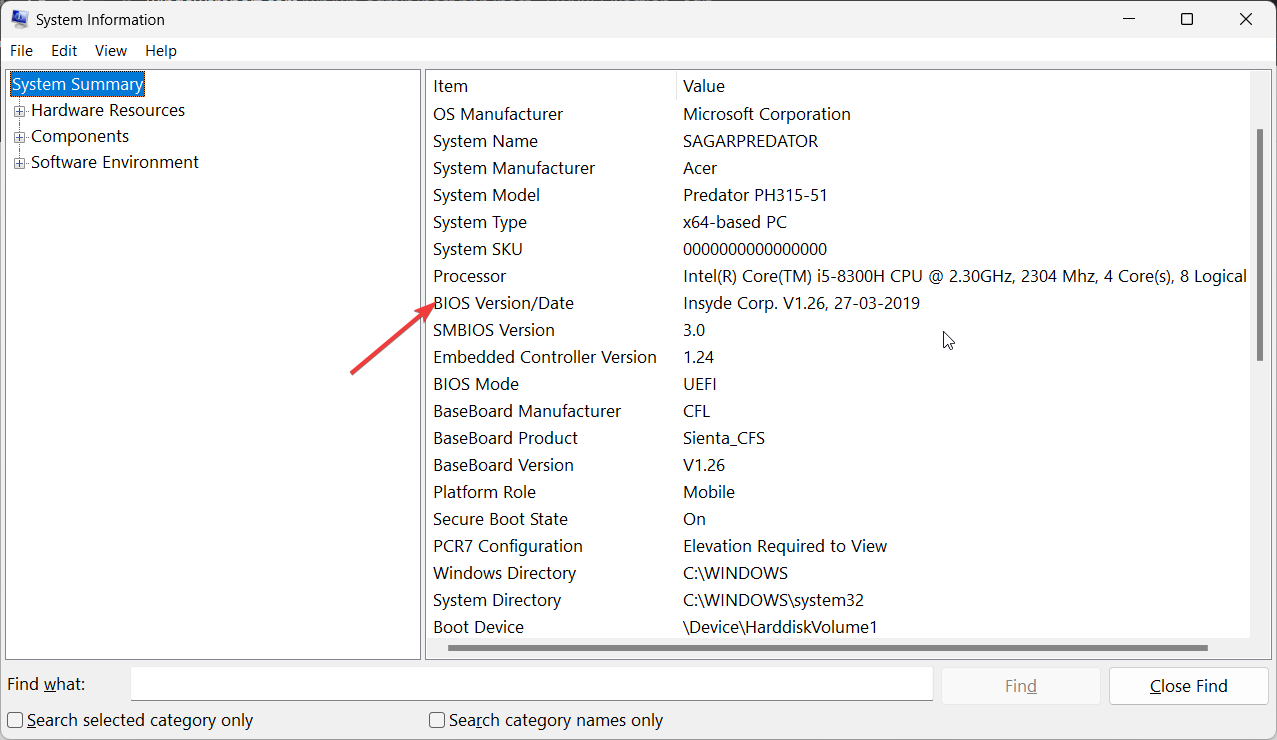
  3. Locate BIOS Version/Date section on the right side.

3.3 Update BIOS

  1. The process of updating BIOS will differ depending on your motherboard. For this step, we shall be updating the HP motherboard.
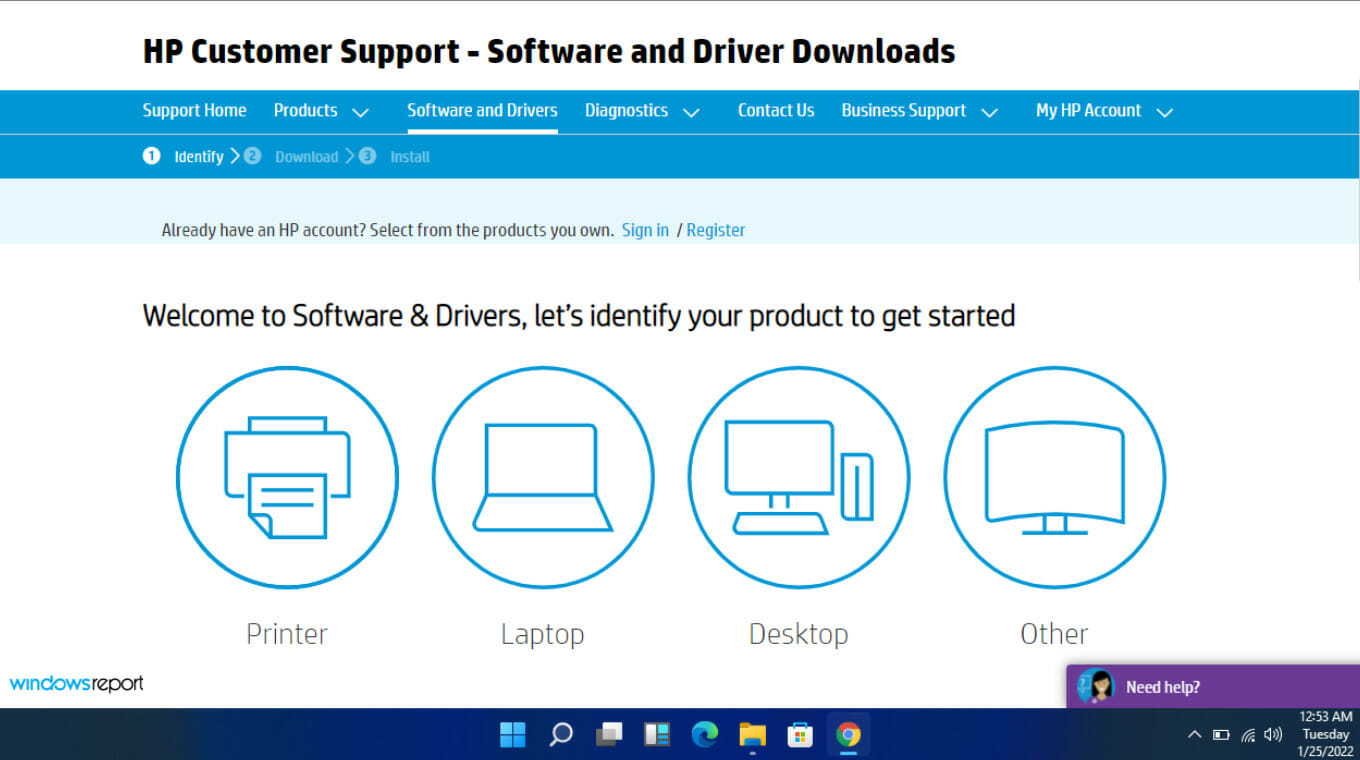
  2. Navigate to the HP driver and software download website.
  3. Choose laptop or desktop, depending on the type of computer you’re using.
  4. Enter your exact serial number or your exact computer model.
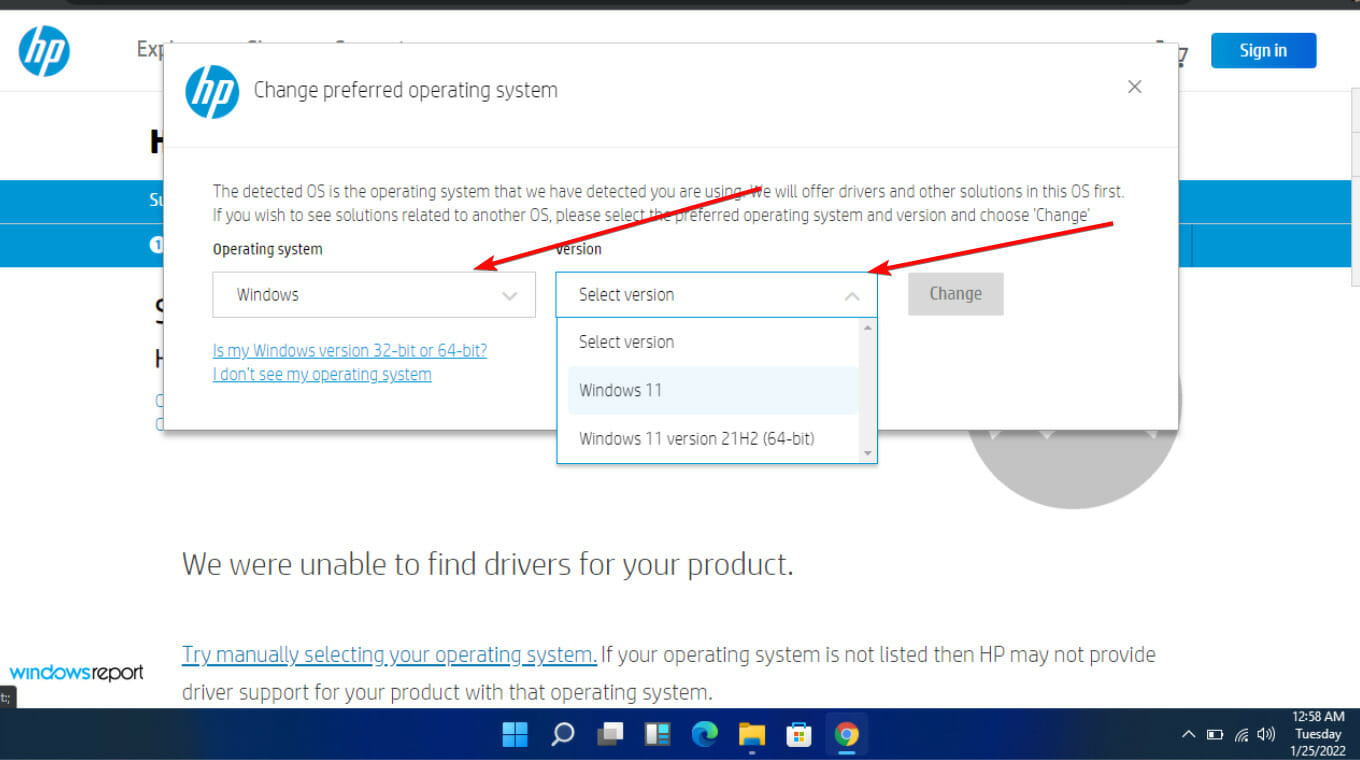
  5. Select your OS and OS version, then click Submit.
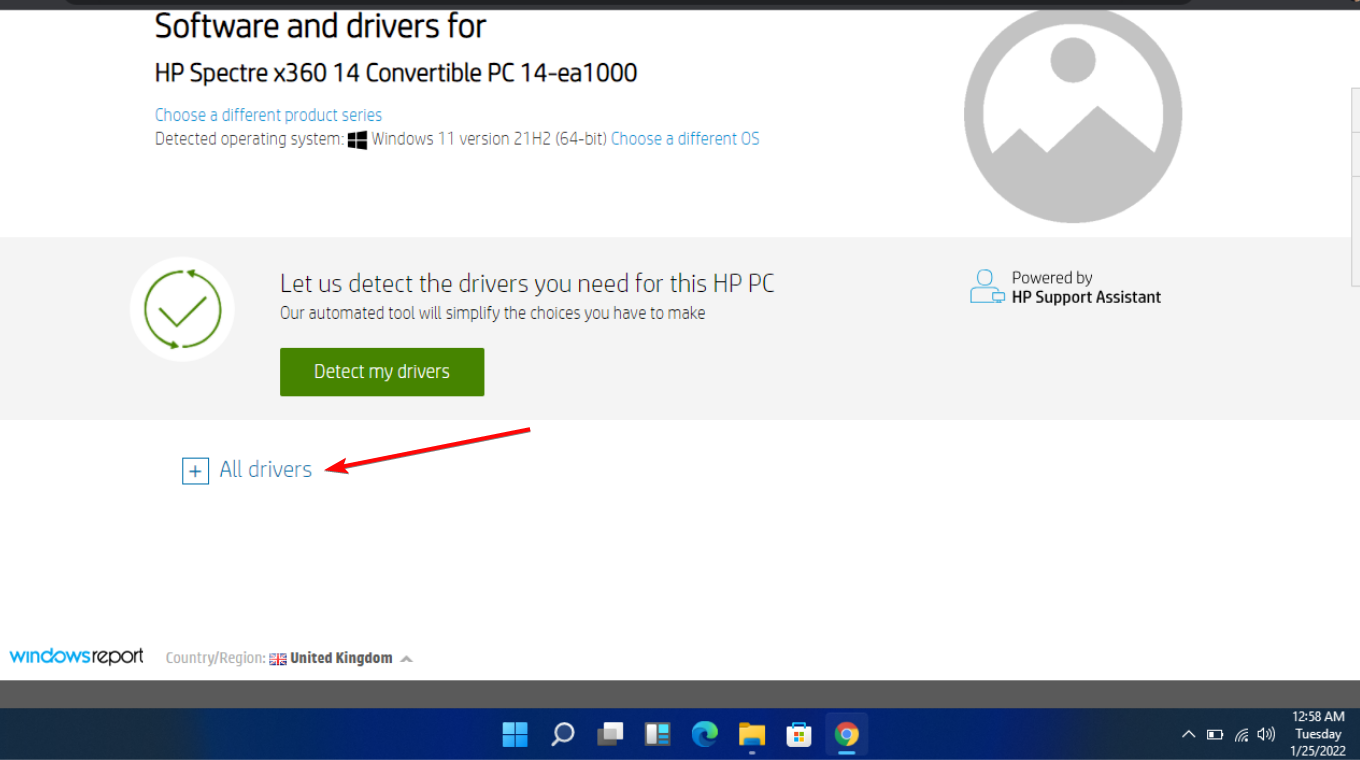
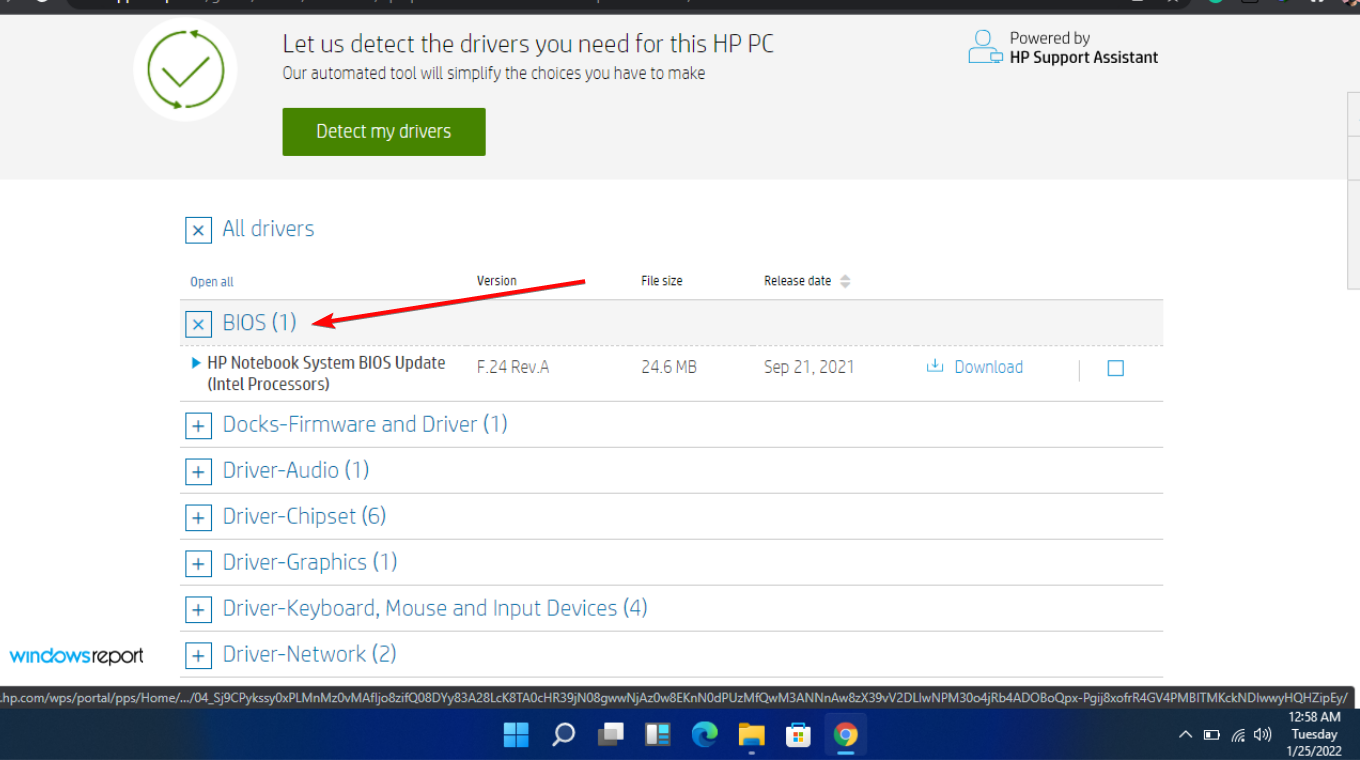
  6. Click on All drivers and then expand BIOS to see available updates.
  7. Click the download icon.
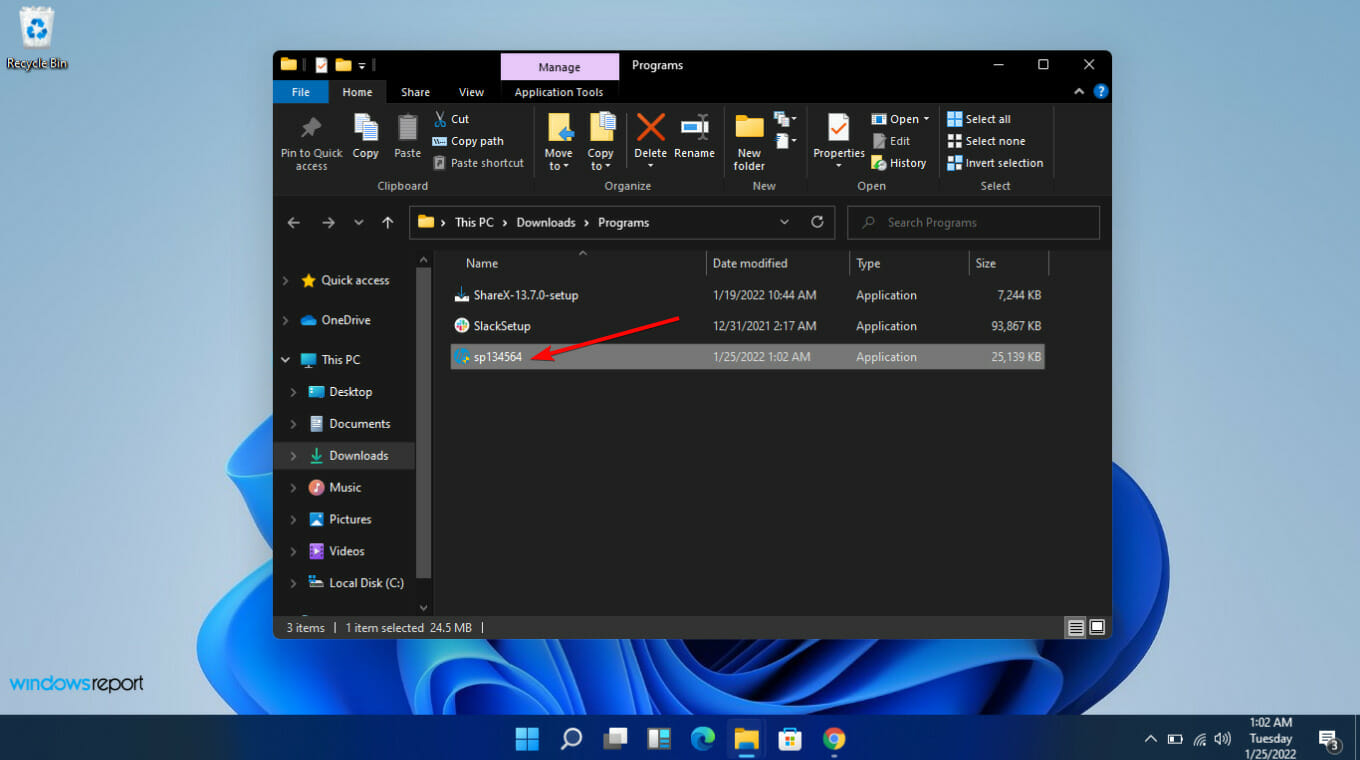
  8. Install the .exe file, following the on-screen instructions.
  9. Restart your HP laptop and observe whether the caps lock is still blinking.

3.3.2 Use a BIOS updater utility

  1. Disable your firewall temporarily as it may flag off this program as malware and prevent it from installing or making any changes on your laptop.
  2. Navigate to your browser and download the HP Support Assistant.
  3. Open the HP Support Assistant and log in with your account or continue as a guest.
  4. Right under your device picture, you will find an Updates option.
    hp support assistant interface
  5. Click on it to check if you are up-to-date or have any pending updates.
    hp support assistant update check
  6. If you see a new BIOS update available, click Download and install.
  7. Wait for the Support Assistant to finish the job and close the application.

You can opt for the BIOS updater if doing it manually is too tedious.

Note icon NOTE
HP Support Assistant only works with HP motherboards, so if you have one from another manufacturer, be sure to check their website to see whether they have a BIOS updater program as well.

4. Update your graphic drivers

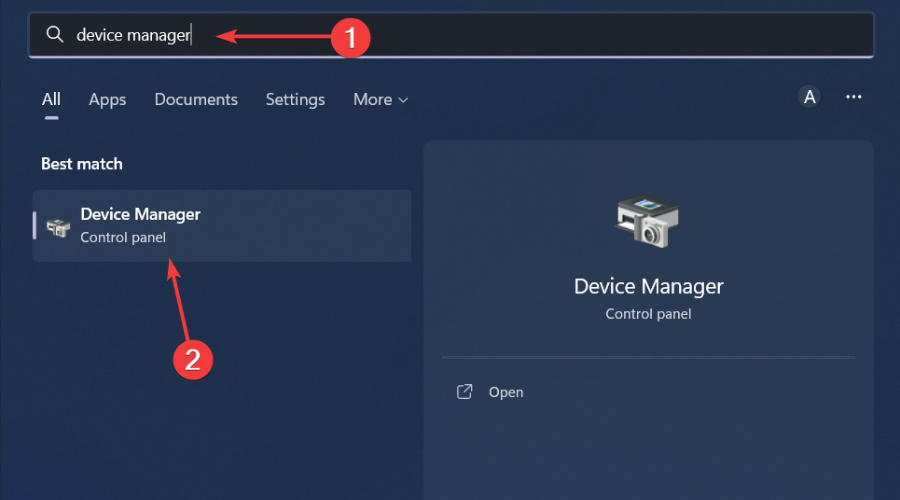
  1. Hit the Windows key, type Device Manager in the search bar, and click Open.device manager w11
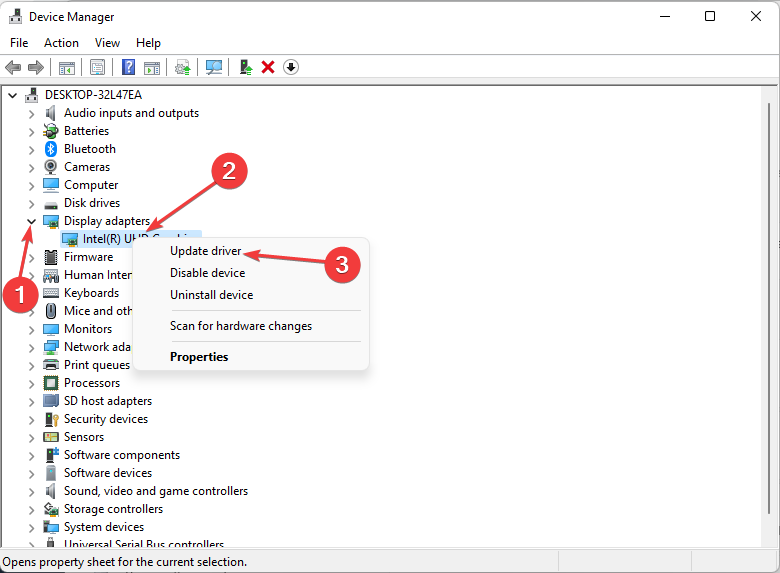
  2. Navigate to Display adapters to expand, right-click on your graphics card, and select Update driver.Graphic Driver Update
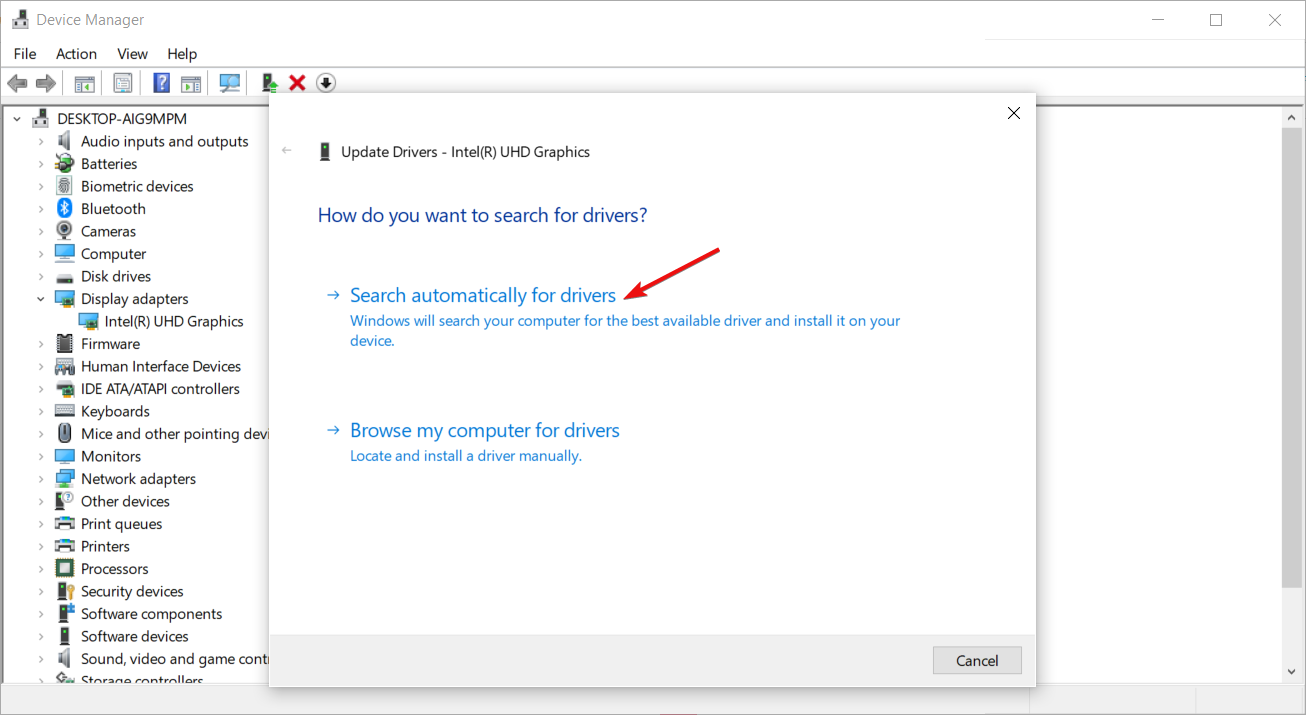
  3. Select Search automatically for drivers.

Even though Windows does a good job of finding compatible drivers, in some instances, it may fail. However, a good driver updater utility can fill in the gaps in such situations.

5. Perform a hard reset

  1. Shut down your laptop completely. 
  2. Unplug the charger from the laptop and power source. 
  3. Remove the battery and hold down the power button for 15-20 seconds. 
  4. Reinsert the battery and plug in the charger. Change the power supply this time.
  5. Now turn on your laptop and check if the caps lock blinking issue is fixed. 

If you’re using an additional keyboard, they tend to have connection problems so try unpairing then pairing back. Also, ensure you’ve charged the batteries fully or as an alternative, use your phone as a keyboard as a temporary solution.

In the worst case scenario your motherboard has malfunctioned, we’ve lined up a list of the best motherboards for your Windows 11 that won’t disappoint you.

Aside from keyboard issues, your mouse may also flicker when you’re using it so you may want to check our article on how to bypass this error.

Have you experienced a similar issue? Is there any solution above that was successful or do you have any other that we may have missed? Let us know in the comment section below.

Microsoft BUILD sessions hint at Windows 11 AI and ARM developer focus

Microsoft has unofficially and officially hinted at its big Windows 11 artificial intelligence push scheduled for later this year, and now session lists from their upcoming developer conference further buttress the company’s focus on AI and Windows on ARM (WoA) development for 2024.

The Verge reported that Microsoft plans to hold a special Surface and AI event a day before the company hosts its annual BUILD developer conference. The event is rumored to highlight Microsoft and Qualcomm’s partnership on ARM powered Surface devices and highlight several demos aimed directly at competing with Apple’s M3-Series CPUs. In addition to persuading developers that WoA this year is worth considering, Microsoft will also be unveiling a “big new Windows AI” feature during this special Surface and AI event.

Over the past couple of years, Microsoft has minimized its focus specifically on Windows development during its BUILD conference in favor of pushing other company objectives such as Azure, Quantum Computing and Security.

However, this year seems to be a bit of a return to Windows being a larger priority for the company as it schedules a special event prior to its developer conference while also hosting several sessions that emphasize specific Windows 11 and WoA development.

The BUILD developer sessions list was revealed earlier today and includes Designing for a brand-new Windows AI feature hosted by Rebecca Del Rio and Adrienne Pauley who are both product managers at Microsoft. Another session labeled Build richer experiences with Copilot in Windows hosted by product manager Ryan Forstie also hints at the company courting developers to expanded Windows 11 functionality because of its most recent AI push.

Perhaps the most standout session highlighting Microsoft’s confident venture into Windows on ARM once again might be the Introducing the Next Generation of Windows on Arm which is described as,

The Windows on Arm platform is bringing industry leading performance and experiences to applications. Learn about the exciting new experiences for Arm-powered Windows this year, such as intelligent Windows apps that leverage rich capabilities of the NPU. Get the inside scoop on what Microsoft and our partners have been doing for developers with runtimes, tooling, and infrastructure for Arm. Leave this session feeling inspired, with a newfound vision for the platform’s potential.

BUILD 2024 Session Catalog

With BUILD 2024 a little over a month away, it’s already been teased that Microsoft plans to introduce a new AI-infused experience simply called AI Explorer that will be coming to Windows 11 devices later this year as part of that continued push of machine learning and pre-generative AI packaging for the OS.

AI Explorer is rumored to work like a timeline of local events that can be recalled on a PC, giving users a robust search of almost any and every activity that occurs on a device.

Microsoft is also rumored to only be displaying Windows on ARM powered Surface devices during its May Surface hardware event, which hints at a first-ever divided in its Surface line up that delineates between Intel-powered commercial devices and soon-to-be ARM-powered consumer PCs.

It’s been a while since Microsoft has taken such big bets with its Surface devices as well as with Windows development. It’ll be interesting to see how these investments pay out for the company as well as consumers in the Fall.

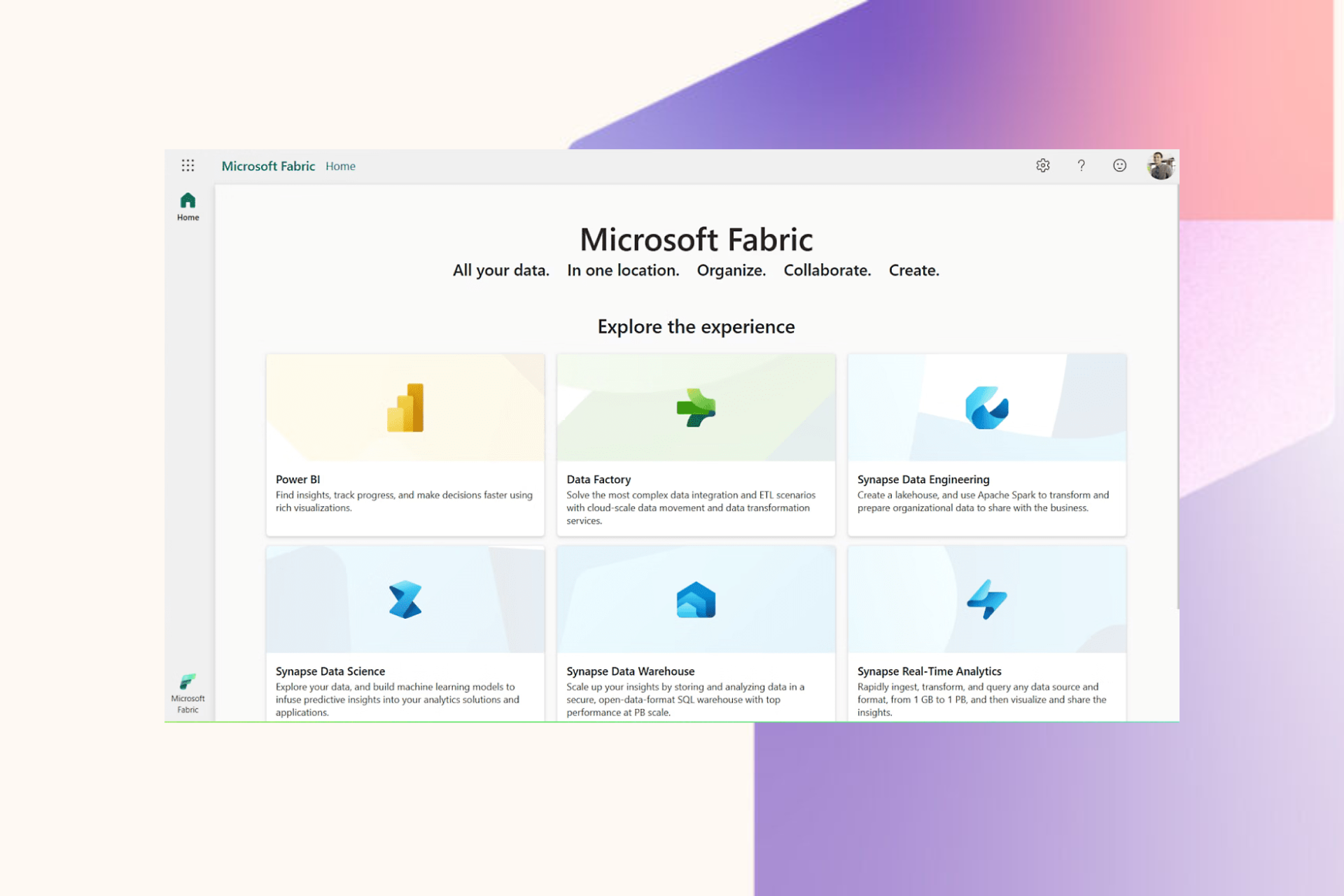
Microsoft Fabric introduces new security features and other enhancements to revolutionlize data analytics

Microsoft held a Fabric Community Conference in Las Vegas last month and announced exciting and groundbreaking new features and capabilities, aiming to reshape the landscape of data analytics within the Fabric ecosystem.

Complete platform enhancements

With the latest advancements, Fabric, Microsoft’s flagship analytics platform, will emphasize on delivering a unified SaaS platform equipped with end-to-end security, governance, and data management capabilities.

Security reinforcement

As security is an important aspect within the Fabric ecosystem and with the introduction of new features like Trusted Workspace Access, Azure Private Link support, and Managed Private Endpoints, and deeper integration with Microsoft Purview, it has further strengthens data security and compliance.

Furthermore, this will enable seamless enforcement of data loss prevention and access permissions within Fabric ecosystem.

CI/CD Transformation

Another update is the transformation of Fabric’s Continuous Integration/Continuous Deployment (CI/CD) experience. It includes robust support for data pipelines and data warehouses within Fabric Git integration and deployment pipelines, which empowers to streamline project management and deployment processes.

Dataflow and Pipeline Enhancements

New features like Fast Copy in Dataflows Gen2 and expanded support for on-premises data connectivity via the on-premises Data Gateway in dataflows and data pipeline functionalities promise to speed up data ingestion and transformation.

User experience improvements

You will now be able to create folders in workspaces and soon be able to create multiple apps within the same workspace.

Moreover, the tags have been added to Fabric items to improve discoverability, compliance, and resource reuse within the platform.

In future updates, you will also get the task flows feature, which will provide a complete visualization of data projects, to simplify project management and collaboration.

Governance advancements

Microsoft also introduced subdomains, which will allow your organization to redefine data governace structure as per your business needs.

The domain management tools are enhanced to simplify governance processes to empower businesses to keep control and compliance across their Fabric data estates

Integration with Microsoft Purview

Along with these Fabric advancements, Microsoft Purview provide a reimagined data governance experience customized for federated data governance practices with its seamless integration with Fabric to expedite multi-cloud data governance initiatives

Lake-Centric approach and openness

Fabric uses lake-centric approach and is committed to openness and all of that is can be seen through features such as Shortcuts and Mirroring, which enables seamless data virtualization and real-time data replication on all multi-cloud environments.

Now, it also has external data-sharing capabilities, which will further enhances collaboration and data accessibility, which will make secure data exchange with stakeholders and external partners easier.

Empowers business users

With the vision to empower every business user, Microsoft Fabric now has introduced enhancements to the core Power BI visuals, by providing additional formatting options for all cartesian charts, more layout options for the matrix visual, and new visual types such as button slicer and the new 100% stacked line area chart.

It also has added a metrics layer, which can enable your organization to create resuable standardized business metrics for several Fabric artifacts.

AI-Powered capabilities

Fabric now comes with Copilot, which will offer generative AI features to speed up the data exploration and analysis process.

With features like Explore and DAX query view, you can now deriver insights from data without any difficulty

In Explore section, you will now find Data overview button which will give you summary powered by Copiloit of the semantic model to help you get started.

Looks like Microsoft is just started, and with its commitment to continue pushing boundaries of data analytics, it can empower your organization to unlock the complete potential of your data and get the best outcomes.

These features will be available in preview in start of April and will roll out to regions slowly. What do you think about these enhancements of Microsoft Fabric? Share your opinions with our readers in the comments section below.

Limited time offer:  Lenovo ThinkPad X13 Gen 3 with AMD Ryzen 7 Pro 6850U is now available for  $849

Lenovo ThinkPad X13 Gen 3 AMD model is mentioned as a lightweight, ideal business laptop with 13 13-inch screen. It is now available at a discount of approx 23, i.e., $323, which means you can now get the laptop at $849, all thanks to this attractive offer.

This compact yet reliable business notebook comes with an AMD Ryzen 7 Pro 6850U processor, 16GB RAM, and a spacious 512GB SSD.

To take advantage of this limited-time discounted price, visit Woot, an Amazon-owned online store that offers free shipping for Amazon Prime members.

The ThinkPad X13 Gen 3 stands out with a 13-inch IPS display that offers vibrant colors, 100% sRGB coverage, 1920 by 1200 resolution, and 300 nits of brightness, which provides crisp visuals.

This robust laptop has a strong build chassis, a long-lasting battery life of up to 10 hours, and powerful performance.

The laptop doesn’t have a good webcam, and an SD card slot is also missing; however, it can be an attractive option if you want a laptop for use on the go.

Here is the detailed information about the laptop to ensure you make an informed decision

Specifications
Display WUXGA (1920 x 1200) IPS, anti-glare, 300 nits
WUXGA (1920 x 1200) IPS, anti-glare, touchscreen, 300 nits
WUXGA (1920 x 1200) IPS, anti-glare with Privacy Guard, 500 nits
ProcessorAMD Ryzen™ 5 PRO 6650U Processor (2.90 GHz, up to 4.50 GHz Max Boost, 6 Cores, 12 Threads, 16 MB Cache)
AMD Ryzen™ 7 PRO 6850U Processor (2.70 GHz, up to 4.70 GHz Max Boost, 8 Cores, 16 Threads, 16 MB Cache)
RAMUp to 32GB LPDDR5 6400MHz
SSD512 GB
OS Windows 11 Pro
GraphicsAMD Radeon 680M
Webcam FHD 1080p + IR Hybrid with Privacy Shutter
Back lit keyboardYes
Network ConnectionQualcomm Wi-Fi 6E NFA725A, 11ax 2×2 + BT5.1
Ports1x USB4® 40Gbps (support data transfer, Power Delivery 3.0 and DisplayPort™ 1.4a), 1x HDMI® 2.1, up to 4K/60Hz, 1x Headphone / microphone combo jack (3.5mm)
AudioFHD RGB camera option with Dolby Voice for immersive videocalls
Screen size 13.3 inches
BatteryUp to 10.5 hours* 41 Whr (MM18)
Up to 15 hours* on 54.7 Whr (MM18)
Supports Rapid Charge (up to 80% in 60 minutes) with 65W adapter
Warranty 3 Years

So, if this laptop fits your preferences, this is the best deal you can get! Grab it while you can! What do you think about it? Share your thoughts in the comments section below.

Another desperate attempt to slip ads into Windows by Microsoft

Microsoft is developing a way to display ads on the Windows 11 Start Menu, with the aim of encouraging users to download its recommended apps.

In the past, Microsoft used the upper part of the Start menu to showcase general ads, and users didn’t like it. So, this time, it is putting the app promotions at the bottom of the Start menu.

According to  PhantomOfEarth‘s post on X(formerly known as Twitter):

Looks like the Start menu’s Recommended section will be getting app promotions, similar to suggested apps in Start in Windows 10. This can be toggled off from Settings (Show recommendations for tips, app promotions, and more).

These app promotions would appear in the Recommended section of the Windows start menu with a Promoted ticker to differentiate it from other things.

However, if you don’t look at it carefully, you might end up installing the prompted app. Also, the prompted ad could come with an installed app, making it more confusing. Fortunately, you can disable or opt out of it from the Personalization section of Settings.

This is not the first time Microsoft has tried to do this; when we install Windows, it comes with a handful of pinned apps in the Start menu, and surprisingly, some of these apps are not even on the system.

So, if the presumptions are correct and if the promoted ads go live, we need to be extra careful when clicking on items shown in the Recommended section to avoid unwanted app installation.

What are your thoughts on the matter? Share your opinions with our readers in the comments section below.
Looking for a Nvidia H100 AI GPU? You can get it a bit faster now, says Dell

These days, AI is front and center, especially when it comes to ChatGPT, Copilot, and Gemini, but few know the raw processing power needed to keep them constantly running. Nvidia’s H100 AI GPUs are a great example of just that, being one of the leading graphics processing units used in AI.

But there aren’t that many of them lying around, and the demand is constantly increasing. Take, for example, Sora AI, which needs an estimated 4,200-10,500 Nvidia H100 GPUs for one month just to train one model. Factor in the recent shortage of H100 GPUs, and you can imagine how the wait time for new hardware has skyrocketed.

The wait times for H100 AI GPUs have significantly shortened.

Imagine a scenario where businesses and tech enthusiasts alike faced a grueling 40-52-week wait for their GPU orders at the end of 2023. Fast-forward to the present, and the landscape has dramatically changed, with lead times plummeting to a mere 8-12 weeks. According to DigiTimes, this shift, as reported by Terence Liao, the General Manager of Dell Taiwan, marks a pivotal moment in the tech industry, particularly for those vested in artificial intelligence (AI) and high-performance computing.

But what’s behind this sudden ease in GPU availability? The supply constraints that once throttled the availability of Nvidia’s H100 AI GPUs are apparently dissipating. The journey from a staggering 11-month wait to a more accessible 2-3 month timeframe is nothing short of remarkable. This improvement is not just a win for Dell but a beacon of hope for the entire tech ecosystem, signaling a potential end to the supply chain woes that have plagued the industry.

Despite the easing of supply constraints, the demand for AI-capable hardware remains sky-high. Businesses increasingly opt for AI servers over general-purpose ones despite the hefty price tag associated with the former. This trend underscores the critical role of AI in shaping the future of technology and business strategies. The reduction in lead times is a testament to the industry’s resilience and adaptability.

It seems that previous H100 stock also plays a role in this

Interestingly, this positive shift in GPU availability is partly attributed to companies having a surplus of H100 GPUs and choosing to resell some of their stock to mitigate the high maintenance costs of unused inventory. Additionally, Amazon Web Services (AWS) has played a role in alleviating some of the demand pressure by making it easier to rent Nvidia H100 GPUs through the cloud.

For large companies like OpenAI, which are at the forefront of developing their large language models (LLMs), the easing of supply constraints couldn’t come at a better time. These companies require thousands of GPUs to train their models efficiently and effectively. The continued shortening of lead times is a promising sign that they might soon have all the resources they need to push the boundaries of AI even further.

In essence, the GPU landscape is undergoing a significant transformation, and this shift not only benefits the big players in the field but also opens up new possibilities for innovators and creators everywhere.

Microsoft quietly pushes private notifications in Windows 11

It seems that Microsoft might finally update Windows 11 to support private notifications soon, as many users now claim that their notification badges appear to be private: that is not previewing anything aside from the app that pushes the notification.

The update is somehow disparate, as many users have started to get them since January 2024. This user, in particular, was stunned to find out Microsoft Defender pushed up a private notification on their Windows 11, which led them to believe they were hacked.

Earlier this week Twitter (now going as X) users shared that they were being hit with private notifications on Windows 11, as Windows enthusiast, @XenoPanther shared an image of the update.

So, it seems that Microsoft is releasing the update randomly, both to Insiders and non-Insiders, as well. For example, when we accessed the notification settings within the latest Dev build of Windows 11, we couldn’t find anything that would enable the hiding of notification context, as you can see below.windows 11 notifications private

There is an option to enable the hiding of notification context on Windows 11’s lock screen, as you can see below.

For that to happen, though, you’ll need to select each app and enable the option.

Many Windows users believe this might be a bug, and there is even a Feedback Hub post where users let Microsoft know about it.

However, even if it’s not a bug, it could be quite useful to Windows 11 users who often share their devices with others or are using it in public spaces where people can take a peak (not everybody has a screen protector, but Microsoft is working on a similar technology, so there you go).

For instance, I often find myself in such situations, where I have to use my Windows 11 device in public. The notifications show private and sensitive information, and I end up being all anxious about it.

So this update, or bug, or whatever it is, should be an optional feature in Windows 11. Yes, I want to be notified when someone texts me, or when an app does something, but it would be good if it’s private when I’m sharing my device with others.

Microsoft recently updated Windows 11 with new notification badges for Windows 11 widgets, and users can now be reminded of them when they access the weather widgets on the operating system. This means Microsoft could, and in fact, it already has updated notifications to hide context when you’re not on the lock screen.

Let’s hope it’s not treated as a bug.

Don’t want websites spying on your keyboard? This Chrome feature will put an end to that

The security of your browser should be your main priority, and Google is determined to make Chrome even safer.

Currently, the company is testing new settings that should prevent mouse and keyboard hijacking.

Chrome will prevent websites from hijacking your mouse and keyboard

Sometimes websites can access your mouse and keyboard, and if the website is malicious, that can be abused. According to the Android Police, Google plans to stop this with new privacy features.

This was first spotted by Leopeva64 on X in the Canary version of Chrome:

The new settings can be found in the Additional permissions section inside of the Privacy and Security settings.

There are three new features, and you’ll be able to prevent websites from scrolling and zooming shared tabs and prevent them from locking your keyboard or mouse pointer.

By enabling these features, you can prevent pages from capturing keyboard inputs or prevent websites from locking your mouse pointer on a certain page.

This is a small but useful feature, and we can’t wait to see it available in action in the stable version of Chrome. As for other privacy features, Google is updating privacy information in Chrome, however, this is still a work in progress.

We also have to mention that the V8 Sandbox has been released and is available in Chrome 123, thus beefing up your security further.

RDNA3+ architecture might stick around until 2027, according to a new leak

There’s an everlasting race for graphics supremacy, mainly between Nvidia and AMD. While this space would benefit from a bit more competition, there’s no lack of advancements and innovation. Nvidia is constantly working on monopolizing the market, and AMD is pushing through with improvements that might level the playing field.

RDNA is a great example of that, but with enough rumors about AMD’s upcoming RDNA4 architecture, what will happen with RDNA3+?

Well, it seems that RDNA 3+ is not going anywhere, at least for now. First seen by VideoCardz, it’s been whispered through the tech grapevine, specifically by the known insider Golden Pig Update, that AMD APU-powered laptops will stick with RDNA3+ until at least 2027. Now, isn’t that something? It’s like discovering your favorite series was renewed for several more seasons.

RDNA4 & RDNA5 on the horizon, but RDN 3+ holds its own

Why is this important, though? For starters, RDNA3+ is no small fry in the graphics world. It’s the same tech that’s powering the Ryzen 7000 Series processors. That means, even though it might not be the newest kid on the block in a few years, it will still pack quite the punch. AMD is expected to tweak it here and there to ensure it meets the demands of its users, but don’t hold your breath for any groundbreaking changes. After all, it’s based on what will be considered older technology.

With the tech world being as fast-paced as it is, rumors are already swirling about AMD’s next moves, with RDNA4 and even RDNA5 making rounds in the rumor mill. It’s a reminder of how quickly things can change and how today’s cutting-edge technology can quickly become tomorrow’s standard. But for now, RDNA3+ is here to stay in AMD’s APUs, promising to deliver solid performance for the foreseeable future.

Maybe AMD will shed more light on their plans for these APU models, but for tech enthusiasts and casual users alike, watching what’s to come is an exciting time. Whether you’re in the market for a new GPU or considering a processor upgrade, the landscape in 2024 is looking promising.

So, what’s your move going to be? Will you jump on the latest tech or wait to see how these developments unfold? Either way, AMD’s RDNA3+ will be a significant player in the tech game in upcoming years.

Hackers are using Windows script files to spread the Raspberry Robin and steal data

To avoid detection, threat actors are constantly using different techniques. In addition, sometimes they bring back old ones and tweak them to fit their needs and to bypass security systems. That’s why some wrongdoers are now using a new version of the Windows worm Raspberry Robin.

OpenAI researchers created an AI worm a while ago. Their virus managed to bypass security systems and steal data. In addition, the AI malware is capable of infecting multiple devices. So, the new Raspberry Robin worm used by cybercriminals could be similar.

Are computer worms still around?

Hackers used the Raspberry Robin worm to target tech companies and manufacturing businesses in 2021. Threat actors didn’t distribute the virus by using online methods. Instead, they sent USB flash drives to targeted organizations.

Employees unknowingly used the infected USBs and allowed attackers access to their company’s network. However, this incident is fascinating because it shows that we are more likely to defend our devices from online threats than offline ones.

How did threat actors use the Raspberry Robin Windows worm?

According to a new report by HP Wolf Security, threat actors are now using Windows script files (WSFs) to distribute the Raspberry Robin worm. IT admins and legitimate software use the WSFs to automate Windows tasks.

HP Wolf Security researchers believe threat actors used malvertising or spam emails to direct their victims to their domains and subdomains. Using this technique, attackers trick some of us into downloading their infected WSF files.

The WSF files infected with the Raspberry Robin worm can bypass security software. Additionally, the malware-tracking website VirusTotal doesn’t categorize these files as malicious. Thus, hackers can run them almost freely.

The Raspberry Robin worm is dangerous because it can inflict other malware such as SocGholish, Cobalt Strike, IcedID, BumbleBee, and Truebot. Additionally, the virus can migrate to other devices by infecting your network.

Don’t open email attachments from untrusted sources to protect your system from the Windows worm. Additionally, consider asking the email sender directly about their email. After all, the wrongdoers using the worm could steal the sender’s login information and commit identity theft. Also, you can get a paid antivirus or an identity theft protection software.

In a nutshell, the Raspberry Robin worm is a dangerous malware you can find in .wsf files. Threat actors might try to make you download it using malicious emails and malvertising. Additionally, if you receive a USB, consider not using it unless you have a way to test it.

What are your thoughts? Did you ever hear about this malware? Let us know in the comments.

The LG Gram 16 business laptop is 35% OFF for its lowest price ever

Although the LG Gram Laptop 16Z90Q has a big 16-inch screen, it weighs only 2.6 pounds thanks to its magnesium alloy chassis. That and its 0.66 inch thickness make it a highly portable business laptop. We tell you all this because this device is now only $750 down with $450 from its original price of $1,200.

Why should I but the LG Gram 16 laptop?

Well, the LG laptop is not only looks and feel, but there also some raw power in there. It comes with an 12 gen Intel Core i7 CPU and the Intel Iris Xe onboard GPU.

Yeah, you only get 16 GB of RAM, but it’s the LPDDR5 high speed one, clocking at 5,200 MHz, so it’s nothing to sneeze at. As for storage, that’s the job of a PCIe4 M.2 NVMe SSD with 256GB capacity.

We remind you that this is not nearly a gaming machine but a slim and lean laptop for business and travelling and at $750, it’s really a bargain.

Add to this a Full HD IR webcam and a 80 Watt-hour battery that will keep you live over that long overnight flight. LG Gram 16 also comes with Windows 11 Home and two USB-C ports, plus a HDMI out connection.

LG is preparing the next line of AI laptops and that’s why they are discounting their older laptops.

If you already have an LG Gram 16 laptop, tell us about your experience in the comments below.

Xbox users really want Microsoft to do something about the console’s home screen

It’s been almost a year since Microsoft introduced a new home screen for Xbox to the community, and users are not entirely pleased with it. The new UI is more spacey, and at first look, it doesn’t appear to be overcrowded. It looks clean and spacious, and very intuitive to use, but despite this, many users agree that it lacks originality.

It’s also not customizable, which angers a lot of people from the Xbox community, including this user who took it to Reddit to express their disappointment.

As a massive fan of console menus, I must say that the current UI is really not that great. I’ve always thought that Microsoft should let us have more control over them. Even just simple things like being able to pin games to the bar, or controlling the order of tabs, to larger things like letting us toggle on/off home music, or allowing us to change the way the guide looks.

I really want to be able to have more control over the way my home menu looks. It’s just kinda flat and has zero personality as of now.

Reddit user

As the Reddit post has gotten more popular, other Xbox users expressed their anger at Microsoft for not only taking away their power to customize and personalize the home screen, but also splashing it with ads every time the Redmond-based tech giant has the chance.

Everyone was talking about ads upon login a year or so ago and I never saw one, thought they were crazy. I finally got one today that popped up before my home screen loaded. It made me irrationally angry.

Reddit user

how are they gonna push ads?!

Reddit user

100%, I hate the new UI, full of bloat that I don’t care about and no ability to remove it.

Reddit user

However, Xbox users are also disappointed that Microsoft doesn’t consider their feedback about the home screen. Despite dozens of similar opinions about it, the Xbox Insider Program ignores it.

We’re asking for this every week at Insiders but they keep ignoring it.

Reddit user

Everywhere where they “take feedback” from insiders from the Insider Program they are getting spammed with actual good feedback about the homescreen.

They never actually really care about the feedback. Not just about the homescreen, but in general. They don’t even ask important questions anymore through their app, the last couple of weeks they asked what type of pizza toppings we prefer. Yes, i am 100% serious.

Reddit user

The Redmond-based tech giant recently released Game Hubs to the Xbox App for PC, which is a new platform meant to improve the gaming experience, and along with the new Game Hubs, the company also said it will gradually release a new sub-navigation experience allowing users to choose from different new settings.

However, these changes are all coming to the Xbox App for PC, which ironically are not intended for the console, yet.

The users’ anger is justified, and Microsoft should indeed give back some customization options to the Xbox community. Some even agreed that Microsoft can keep an area for ads if the company sees fit, but users should at least get to personalize their Xbox experience.

What do you think about it? Do you think Microsoft had taken it too far?

Google Cloud brings the text-to-live image feature to Imagen & other updates for Gemini, Gemma, and MLOps

All the popular tech companies are working on their AI technology to improve user experiences. On April 10, 2024, Google Cloud announced model updates for Gemini, Gemma, Imagen, and platform capabilities that continue to enhance Vertex AI.

Imagen, a task-specific generative AI model, has become an important tool for companies that leverage AI-driven creativity at a large scale. It has received significant updates. Let’s discuss them.

Text-to-Live image capabilities

One of the standout features discussed was the preview of Imagen 2.0’s text-to-live image capabilities. This feature empowers creative and marketing teams to transform text prompts into animated images, like GIFs.

Google Cloud mentioned that live images will be delivered at 24 frames per second with a resolution of 360*640 pixels, and the time taken to generate the image will be 4 seconds. The search giant assured us that they plan to improve the quality and reduce the time taken by providing further updates.

Focused design of enterprise apps

Imagen 2.0’s design emphasizes its suitability for enterprise applications, with its focus on delivering extraordinary results in themes like food imagery, nature, and animals.

The model is capable of generating a diverse range of camera angles and motions successfully while maintaining consistency throughout.

To maintain the integrity and authenticity of the generated content, Imagen 2.0 for live image generation also comes equipped with powerful safety filters and digital watermarks.

Advanced photo editing features

Along with text-to-live image capabilities, Imagen 2.0 also comes with photo editing features, including inpainting and outpainting. These will allow you to remove unnecessary elements from your image and add new elements, as well as expand image borders to create a wider field of view.

The digital watermarking feature, powered by Google DeepMind’s SynthID, lets you generate invisible watermarks, thereby providing a layer of security and verification for images and live images generated by the Imagen family of models.

Big companies like Shutterstock and Rakuten are already using Imagen 2.0 to create high-quality, accurate images at the enterprise level.

The text-to-live image capabilities will expand Imagen’s potential applications, allowing companies across different industries to unlock new avenues of creativity.

Other announcements

Furthermore, Google Cloud’s Vertex AI platform introduced a suite of updates to revolutionize AI development and deployment. Gemini 1.5 Pro is now available in public preview, allowing developers to access the world’s largest context window, facilitating multimodal reasoning over vast amounts of data.

This capability can be used in diverse fields, from customer service automation to financial document analysis

With the expansion of MLOps capabilities for gen AI, including new prompt management and evaluation services for large models, organizations can manage and deploy models in production, thereby streamlining the transition from experimentation to scale.

Vertex AI also offers integration with Google Search, which will enhance response accuracy, providing a better user experience while surfing the web.

In the blog post, Amin Vahdat, VP/GM ML, Systems, and Cloud AI, Google also mentioned the expansion of data residency guarantees and said:

Today we’re also expanding data residency guarantees — which cover data stored at-rest for Gemini, Imagen, and Embeddings APIs on Vertex AI — to 11 new countries: Australia, Brazil, Finland, Hong Kong, India, Israel, Italy, Poland, Spain, Switzerland, and Taiwan. Customers can now also limit machine learning processing to the United States or European Union when using Gemini 1.0 Pro and Imagen.

In conclusion, these announcements about advancements in AI tech via Vertex AI and Imagen AI show a significant leap forward with the aim of empowering enterprises to leverage the potential of generative AI.

What are your thoughts on the matter? Share your opinions with our readers in the comments section below.

Microsoft accidentally left one of its Azure servers without password protection

Microsoft surprisingly left one of its Azure servers open without a password on the internet for a month or more. So, until a few days ago, anyone had access to it and its information. On top of that, the server had company data, such as login credentials for other databases and systems.

Unfortunately, Microsoft’s negligence of this Azure server might have repercussions. After all, we don’t know how long the data was available. So, threat actors might have found ways to break into other secured servers, including the operating services available. This incident could lead to additional data leaks and compromise services.

How did Microsoft find out about the Azure server data breach?

The researchers from SOCRadar were the first to notice the Azure server breach on February 6 and notified Microsoft. Also, they are the ones who confirmed that the company fixed the issue. However, like many times before, Microsoft refused to comment on the incident.

Microsoft refused to give additional information about the Azure server breach. However, this is not the first time the company has done that. After all, the US government has an ongoing dispute with the tech giant due to its poor security systems.

The US Cyber Safety Review Board accused Microsoft of carelessness. After all, the security breach considered preventable allowed threat actors to steal 60,000 emails and a list of employee email addresses from the US State Department.

In addition, we don’t know if Microsoft changed all of the passwords from their Azure servers and systems. On top of that, we don’t know who accessed the company’s data.

In the past, Microsoft faced various data breaches and leaks. According to Firewall Times, there have been 21 incidents since 2010. Also, the company is responsible for most of them. For example, in 2019, a data breach caused by a server misconfiguration exposed the information of 250 million Microsoft customers dating back to 2005. In addition, it took Microsoft more than 20 days to fix the issue.

Ultimately, Microsoft should prioritize the security of its Azure servers. On top of that, the company should focus on its safety features, especially since threat actors keep finding ways in. Also, the tech giant could assign some of its AI developers to work on security. After all, Microsoft keeps adding employees to their AI teams.

What are your thoughts? Do you think that Microsoft should focus on its overall security? Let us know in the comments.

Copilot isn’t the new Metaverse, but its value will sit more on huge companies than your average Joe

The term Metaverse was coined back in 1992, in the Snow Crash S.F. novel and it was defined as virtual worlds where real people are represented by their virtual avatars. The most prominent iteration of this concept is Second Life.

Much later, Facebook was rebranded as Meta to cash in on second wave of this concept by including the VR and AR goggles and enhance the immersion. They even rebranded Oculus Quest to Meta Quest, but let’s face it, it didn’t catch on.

Now, a user on Reddit is asking if Copilot could be the next Metaverse after watching the Microsoft Business Application Summit, and it really got me thinking.

It is hard to compare Copilot with Metaverse

The person obviously didn’t take the real meaning of the Metaverse term, but I see where this is going. Copilot is getting so much hype and attention these days that we’re all wondering how long this overexcitement will last.

We’ve all played with Copilot on our PCs or smartphones, but except for some laughs and giggles, most of us didn’t get much of the the advertised benefits. And it’s easy to see why: Copilot and other AI bots had such a steep evolution that we didn’t even get to know how to use it. Recently, Microsoft announced the launch of what they call a Copilot Adoption Community to teach employees on how to use it.

That’s where we get to the root of this matter. Microsoft didn’t created Copilot for the average Joe, but for organizations. They are now training (or already did) specialized bots for finance, collaboration, security, taxes, automation, etc. This post is too short to take into consideration all the applications of Copilot and its base LLM, GPT.

For the rest of us and our PCs, Copilot will turn into an AI personal assistant that is just a few steps up than the good ol’ Siri (that frankly, was useless from the beginning).

Copilot is useful where the money is

So, no, Copilot is not Metaverse, and I don’t think it could become one. Of course, there’s the Matrix saga plot where the AI takes control of all of us and creates a virtual simulation for our minds to live in. All jokes aside, Copilot’s real value is not from its presence on our PCs. That’s just the marketing awareness side. The real money is in the companies and employees who are now learning how to use it.

The Metaverse, or at least the way it was implemented, was and is a market, a meeting place. Copilot is a tool. While you can sell almost anything in a place where people are gathering, a tool can be used to do almost any task in the digital world. They are only comparable in the hype that they received during their evolution.

I am almost certain that the Metaverse will soon coexist with LLMs and if someone manages to join them in a clever way, we will have another huge spark for it. In the meantime, Microsoft is cashing in on their AI bot because they implemented in all the cloud, office and security solutions. And they jumped in because Copilot shortly started to reduce their costs, improve productivity and ultimately, grow their businesses.

Other LLM developers moved slowly and implemented their solutions locally. Google is slowly getting Gemini AI into all their products such as Gmail. The latest feature is one that will help you formulate email replies. That’s great, but it’s free, and you probably wouldn’t pay for something like that unless you have to reply to hundreds of emails a day. Again, the answer is into company productivity, not your personal comfort.

However, if everybody is talking about Copilot, that means Microsoft did their job, and that translates into more business contracts for them.

By the way, are you working with Copilot at work? How is it for you? Let’s talk about this in the comments below.

Looking to get a gaming PC? This GeForce RTX 3060 bundle is a steal!

Building your PC can be satisfying, and if you’re planning to upgrade your PC or build a new one from scratch, you might be interested in this bundle.

Newegg is currently offering a bundle and you can get several key components cheaper than ever before.

Use this GeForce RTX 3060 bundle and build your gaming PC

As PC Guide writes, Newegg is offering GeForce RTX 3060 12GB GDDR6 at a 6% discount, and while this isn’t impressive, you can get additional components in a bundle and save some money.

You can choose one of the following components:

  • MSI MEG Ai1300P 1300W Power Supply
  • AMD Ryzen 5 5600G
  • Team T-FORCE VULCAN Z 16GB (2x8GB)

If you choose the following components, you can all the key components for about $731. In case you already have one of these components, you can swap it for an MSI B550 GAMING motherboard or GIGABYTE G24F 2 monitor.

Overall, it’s a great deal if you’re planning to get a new graphics card along with some additional components, so be sure to use this bundle.

Speaking of discounts, you can get desktop PCs for $600-$700 at Costco. In case you prefer laptops, you can get ASUS Aorus 15 at a discount.

If you’re a fan of Acer, you can get Acer Nitro 17 for 18% off on Amazon, so don’t miss it.

Microsoft Planner will increase the number of maximum tasks per Premium account to 1500

To all who use Microsoft Planner to schedule their days, come up with checklists, and set their daily, weekly, and monthly tasks, we have good news: the Redmond-based tech giant will increase the number of maximum tasks per Premium account to 1500, according to the latest entry in the Microsoft 365 Roadmap.

Create and manage up to 1,500 tasks within a Microsoft Planner premium plan (formerly known as a Project for the web project).

Microsoft

The new changes will impact Premium users everywhere starting May 2024.

The Redmond-based tech giant came under a lot of fire a while ago, when users bumped into a lot of issues when accessing the new Planner’s public preview.

Microsoft promised new capabilities to its Planner app, last year at the Ignite 2023, including the addition of Copilot, the creation of personal plans, and many more features that would make Planner users excited.

However, not everything went as planned, and many users were not able to access the new version, which left many disappointed. A month has passed since then, and many users are now able to access it.

In May, with the increase of the maximum number of tasks in Microsoft Planner to 1500, users will be able to organize months in advance at the tiniest detail.

Plus, it’s worth mentioning that users can also access Microsoft Planner within Teams, now, after the Redmond-based tech giant released the platform last month. For more details about how to access it from Teams, you can check our story.

Microsoft is working on a system that restores lost fragments of code, and digital documents

Microsoft is working on a system that uses AI to restore missing parts of a digital document using only some fragmented parts of that document.

In a paper published recently, the Redmond-based tech giant patented the technology under the name of Automated notebook completion using sequence-to-sequence transformer, and it could be a revolutionary way to restore and remaster older digital documents, such as old video games, for instance, with AI, by being able to restore old fragments of code.

The system can automatically complete parts of a digital notebook by employing the following process. Each digital document has two types of cells: markdown cells, which contain text, and code cells, which contain code.

The system works by creating examples of inputs and outputs. It does this by hiding (or masking) the content of either a markdown cell or a code cell and then using the content of the other cell as an input. The hidden content is used as the output for that example.

After creating these examples, the method trains a natural language processing model (a type of AI that understands and generates text) using these examples. The trained model can then predict the content of a hidden cell based on the content of the other cell, and it comes with several results, which are then tested until one of them resembles the original best.

The method can further include executing the natural language processing model to generate multiple hypotheses of solutions that are consistent with content in the grading cell.

In other words, the system teaches the computer to fill in the blanks in a notebook by showing examples of how the blanks have been filled in before.restore fragments of code

While the system can be used in various applications, from language programming courses to restoring digital documents of various natures (the paper mentions Word, Excel, and even PowerPoint documents), in theory, it can also be used to restore old and lost fragments of code, which can potentially become a way to remaster old video games by only using some parts of the code.

This is a sort of an unfortunate issue in the gaming industry: for instance, back in 2014, when Ubisoft announced the release of the HD version of the popular Heroes of Might and Magic 3, the company said it would only release one edition of the game because it didn’t have all the original code of the complete edition.

This was quite unfortunate because the company found some fragments of the original code, but it was rendered unusable. However, with a tool like this system, those fragments could be used to restore the original code entirely.

Given how much focus Microsoft is putting into AI development, this system might actually be released sooner or later, depending on how accurate AI is. But with Copilot in GitHub being able to assist programmers, the system can actually be released in a few years.

Costco clearance: Awesome desktop PCs for $600-$700, but you need a membership (or a friend with one)

Costco has a warehouse clearance sale so now it’s time to grab some awesome deals on a lot of laptops and desktop PCs at incredibly low prices.

We’ll tell you about some of the most awesome deals and a scoop that could turn out to be golden on a gaming desktop PC.

Best Costco warehouse clearance deals right now!

The no.1 deal for laptops is this Lenovo LEGION Pro 5i gaming laptop with a 16-inch 165 Hz screen and 2560×1600 pixels resolution. It comes with a 13th Gen Intel Core i9-13900HX and a GeForce RTX 4060 graphics card at only $1.199, down from $1.499. Hurry up and snag it because this gaming powerhouse is in very limited supply.

Another steal is Dell Inspiron 15.6″ touchscreen Laptop with the 8-core AMD Ryzen 7 7730U and AMD Radeon onboard graphics. It comes with 16GB of RAM and a 1TB PCIe NVMe M.2 SSD for storage for only $499 ($250 OFF!). It has Windows 11 installed and it’s great as a school or second laptop because it’s very light and portable.

We have saved the best for last because someone posted on Reddit that they’ve got this CyberpowerPC GX13400BS for only $600. A commenter in the thread added that he saw the exact rig on Costco for $700 in the clearance offers. However, you need a Costco membership to see it, if it’s still available.

From the user, we understand that the PC comes with an Intel Core i5 i58400 CPU and GeForce RTX 3060 Ti, and a similar configuration is priced at around $900 – $1000, so his purchase was a real steal. If you have a Costco membership, check out the listings. You may also find them at your local Costco shop.

If you get new deals from Costco, let everyone know in the comments section below.
Get your blasters ready as Star Wars Outlaws is set to release this summer

Recently we saw several great Star Wars games, so it’s no wonder that companies want to cash in on the popularity of the franchise.

Start Wars Outlaws is the latest upcoming Star Wars game, and we finally got some news about the game’s story and the release date.

Star Wars Outlaws is set to release on August 30

According to Neowin, the Star Wars Outlaws story trailer was recently released, and it has revealed important information about the game.

This is an open-world action-adventure game, and it’s developed by Massive Entertainment. In case you’re not familiar, it’s the team behind The Division and Avatar: Frontiers of Pandora.

The story revolves around Kay, a thief, and she needs to repay a debt to a crime boss Sliro, and to do that, she needs to perform a heist.

During the game, our protagonist will have to cross paths with other groups such as Pyke Syndicate, the Hutt Cartel, the Ashiga Clan, and Crimson Dawn.

Regarding the availability, the game is set to launch on August 30 on Xbox Series X/S, PlayStation 5, Amazon Luna, and PC.

If you’re an Xbox gamer, you’ll be pleased to hear that Game Hubs are now available on the Xbox app. Many are also speculating that Microsoft is making a handheld Xbox, but that hasn’t been confirmed yet.

GTA+ price increase leaves Xbox users fuming, and rightfully so

GTA V is still rather popular, mostly due to GTA Online, and while the online mode is great, it does require a subscription on consoles.

However, it seems that the cost of a subscription just went up, and many gamers aren’t happy with it.

GTA+ price was just increased, but only for Xbox users

Bad news for GTA Online players, as the price for GTA+ was recently changed as Sportskeeda writes.

This was spotted by Tez2 on X, claiming that the price went up from $5.99 to $7.99 for Xbox Series X/S users. However, the price for PS5 users remains the same.

Gamers are outraged by this change, and many have voiced their concerns on Reddit:

ain’t gonna lie, gta+ is completely irrelevant now on xbox, 7.99 for these crappy benefits is a joke, and also why does this increase only apply to xbox?

Just rockstar things. But, some people still pruchase it.

I’ll rather do money exploits than paying for this scam.

So far, there hasn’t been an official statement from Microsoft or Rockstar, so we don’t know why has the price changed.

In other news, GTA 6’s launch schedule will negatively affect PC gamers, but looking at the recent GTA+ price change, PC still might be a better option in the long run.

Microsoft Edge will finally discard inactive/sleeping tabs automatically, but users can reload them anytime

Microsoft Edge will soon automatically discard inactive/sleeping tabs, allowing the browser to consume less power and run better. According to the latest entry in the Microsoft 365 Roadmap, Edge will receive a couple of new policies in May 2024, allowing users to set up the browser to auto-discard tabs.

It can be done through the new AutoDiscardSleepingTabsEnabled policy which automatically enables when the SleepingTabsEnabled policy is enabled.

Tabs that have been sleeping for a long time will be discarded to save memory. When a user navigates back to a discarded tab, the tab will need to be reloaded. This can be managed through the AutoDiscardSleepingTabsEnabled policy. This policy will be enabled if the SleepingTabsEnabled policy is enabled.

Microsoft

This is excellent news for those Internet browsers who have tens of tabs opened in Microsoft Edge. We often forget about many tabs out there, allowing them to chew on memory, which makes our devices slower.

With this new policy, all those tabs that haven’t been used in a while will be discarded, and if users want to go back to them, Microsoft Edge will reload them. This comes with a drawback: all the browsing information of that tab will be lost, so filling up tables, or reading an article means users will have to restart the process.

However, it’s not inconvenient compared to the memory that’s been used by having all those tabs open in the first place.

The new policies are coming in May. But Microsoft Edge is also getting some other useful features: for instance, users will be delighted to know that the browser will skip ads when translating video’s audio and subtitles.

We don’t know yet if Microsoft intended Edge to skip ads when translating, but it’s happening, and it could the browser the advantage it needs over its competitors.

Acer unveils new Nitro 14 and 16 gaming laptops, promises high-end performance

Acer is well-known for its devices, with the Nitro series being very popular among gamers due to its great performance.

If you’re a fan of this series, today we’re pleased to inform you that Acer has added two new members so let’s see what they offer.

Acer has just announced new Nitro 14 and 16 gaming laptops

The two new laptops were recently announced on Acer’s website, and both models will be powered by Ryzen 8040 Series CPUs.

Acer Nitro 14 specifications:

  • Up to an AMD Ryzen 7 8845HS processor
  • Up to NVIDIA GeForce RTX 4060, with DLSS 3.5 technology
  • Up to 32 GB of LPDDR5X SDRAM
  • Up to 1 TB PCIe Gen 4 NVMe
  • 14.5-inch IPS display with up to 2560×1600 resolution.
  • 76 Whr battery
  • USB 4 and USB 3.2 Type C ports, dual Type-A ports, HDMI 2.1, microSD slot

Acer Nitro 16 specifications:

  • Up to AMD Ryzen 9 8945HS CPU
  • Up to an NVIDIA GeForce RTX 4060 with DLSS 3.5
  • Up to 32 GB of DDR5 SDRAM
  • Up to 2 TB PCIe Gen 4 NVMe
  • 16-inch IPS display up to 2560×1600 resolution
  • 76 Whr battery
  • USB Type C, 3x USB Type-A ports, HDMI 2.1, microSD slot

It’s also worth mentioning that both models support Ryzen AI and Acer PurifiedVoice 2.0 technology that will block external noise using AI. Lastly, Acer PurifiedView is there to ensure optimal performance during video calls.

These are both great devices, and we should see them available in May in the US. The starting price for Nitro 16 is set at $1,399.99 while Nitro 14 will cost $1,299.99. As for worldwide availability, Nitro 14 will be available in June.

In case you need something different, you can get Acer Nitro 17 now at a discount, so don’t miss it.

Get the biggest deal on Lenovo Tab Extreme 2 in 1 laptop

The tablet convertible or 2-in-1 laptop is not that crowded although the idea to get a tablet that can be turned into a business or leisure laptop is extremely appealing for portability. There are some interesting devices out there such as Microsoft’s Surface, Samsung’s Galaxy Tab, or even the iPad Pro. However, none of them can really compete with the huge 14.5-inch Lenovo Tab Extreme tablet that turns into a very powerful business laptop when docked with the full keyboard and a stylus.

Lenovo Tab Extreme was already a pretty good deal at Best Buy for $1099, but now it’s $150 off and you can grab it for $949.

The device is not only one of the biggest tablets you can buy right now, but it’s also great for a business device in terms of tech specs. It’s powered by a Mediatek Dimensity 9000 4nm architecture chipset, which is aided by 12GB of RAM and 256GB of storage.

Galaxy Tab S9 Ultra is close to these specs but Lenovo Tab Extreme’s display has a 3000×1876 pixels resolution while the slightly bigger screen of the Samsung tablet is 2960×1848 pixels. However, Lenovo’s tablet also comes with the docking station that includes a big keyboard and a stylus (Precision Pen 3) which is a big plus.

Other significant advantages of Lenovo Tab Extreme are the microSD slot, the great battery life and the two USB-C ports. Adding to all that, there’s a 2160p (4K) front camera on board that is excellent for those video call meetings.

We don’t know how long this Best Buy offer will last so hurry up and grab it right now.

Microsoft will invest in the cloud computing and AI infrastructure of Japan

Microsoft plans to invest $2.8 billion in Japan to boost its AI and cloud computing and AI infrastructure. Additionally, the company wants to train 3 million people to use AI through its digital skilling programs. On top of that, the Redmond giant wants to build its first Microsoft Research Asia lab in the country.

In Microsoft’s 46-year history in Japan, there wasn’t an investment like this one. Through it, the company hopes to accelerate Japan’s digital transformation and adoption of AI. As a result, the Redmond giant could improve its cybersecurity collaboration with the Government of Japan.

How will Microsoft accelerate Japan’s adoption of AI?

This investment allows Microsoft to bring advanced computing resources with cutting-edge graphics processing units (GPUs) within Japan. Thus, it will be easier for the company to speed up AI workloads. By the way, this investment doubles the initial one made by Microsoft towards this goal.

Japan’s Ministry of Economy, Trade, and Industry and Microsoft collaborate on the Generative AI Accelerator Challenge (GENIAC) program. This project aims to help innovative startups and established enterprises develop foundational models as a core technology for generative AI.

Microsoft will enhance people’s capabilities to use AI in different fields

The company’s plan to train 3 million people will focus on organizations, developers, and students. In addition, Microsoft will expand its Code Without Barriers program in Japan. So, the tech giant will provide dedicated training for women interested in AI to address gender equity in AI. 

Furthermore, in collaboration with the United Nations Institute for Training and Research (UNITAR), Microsoft will bring free and accessible online training materials on AI, cybersecurity, and digital skills to Japan. Also, the company will use GitHub Copilot to assist advanced developers and tech companies. Apart from this, Microsoft will provide vocational high schools with AI programs.

The Microsoft Research Asia lab will open in Tokyo. It will focus on research in important areas relevant to the country’s needs. Thus, the lab will prioritize AI and robotics, societal AI and well-being, and scientific discovery. The new Microsoft Research Asia lab should also strengthen the company’s historical collaborations with universities from Japan.

In addition, Microsoft will provide $10 million in resource grants to The University of Tokyo and the Partnership on Artificial Intelligence Research between Keio University and Carnegie Mellon University.

Japan’s Cabinet Secretariat will collaborate with Microsoft to enhance its cybersecurity systems. They will focus on information sharing, talent development, and technology solutions. Also, Microsoft will provide advice and its advanced cloud and AI-driven security services.

Ultimately, Microsoft’s $2.8 billion investment in Japan will contribute to the country’s economic goals. After all, they will expand the digital infrastructure, create a skilled AI workforce, strengthen cybersecurity, and accelerate Japan’s adoption of AI. Hopefully, the company won’t affect the country’s security or environment with its cooling systems for AI.

What are your thoughts? Do you think that Japan will benefit from Microsoft’s investment? Let us know in the comments.

Microsoft will update Windows Copilot to allow users to build AI plugins

The Microsoft Build 2024 event is slowly approaching, and while we already told you what to expect (lots of AI, obviously), the Redmond-based tech giant has revealed almost all the sessions taking place at the conference, and some of them are quite exciting.

Microsoft will unveil new Windows AI features, as well, as new C# 13 capabilities. The Redmond-based tech giant will also present the new Advanced Paste with Local AI in PowerToys, with Clint Rutkas showcasing his excitement for the new feature on X (formerly known as Twitter).

Windows enthusiasts everywhere will also finally get to see the Next Generation of Windows on Arm, which is going to be NPU-based. However, one of the most useful new capabilities is the update of the Windows Copilot to support AI plugin development.

In a session called Build richer experiences with Copilot in Windows, Microsoft will show Windows users how to personalize their Windows experience by developing AI plugins.

In this breakout session we will take a deep dive into how you can extend Copilot with your Windows native app. It’s a great session to complement the hands-on lab on building a Copilot plugin for your Windows app. At the end of this session you’ll understand the components that make a plugin, how Copilot invokes actions defined by your app and how to design a plugin that is relevant and valuable to your users.

Microsoft

While we don’t know what the actual process of building an AI plugin implies, it’s not hard to guess. Not so long ago, Microsoft announced the Copilot GPT Builder, a platform that allows Windows users to build their own Copilot without coding knowledge.

The Copilot can be customized with prompts, and users can choose to publish it or keep it for themselves. The AI plugin builder will most likely follow the same process. This way, all Windows users, including those who don’t have technical backgrounds, can build their own AI plugins.

Microsoft is planning to add many restrictive policies to its upcoming Paint LiveCanvas

Microsoft teased the new Paint LiveCanvas a while ago, which is an upcoming AI-based capability on the platform that will allow users to create drawings, sketches, and projects with the help of Artificial Intelligence.

The Paint LiveCanvas were spotted a while ago and they are part of the new Paint NPU platform, which might be released to Windows 11, later this year.

It’s worth mentioning that this is not Cocreator, the existing AI tool that creates images in Paint. No, LiveCanvas is entirely a new concept that not only creates art but interacts with the user, as well.

However, it seems that the Redmond-based tech giant might splash it with some restrictive policies, according to the strings spotted by Windows enthusiast, @PhantomOfEarth.

Some strings read the following:

Looks like the input image has been blocked as per Microsoft’s Responsible AI guidelines. Please modify your image and try again.

Unsafe content warning

Paint LiveCanvas can only be used with a Microsoft account, it seems, contrary to Cocreator, which can used without having to log in.

Microsoft account is required

Sign-in with your Microsoft account to use LiveCanvas.

More guidelines policies:

Looks like the generated image has been blocked as per Microsoft’s Responsible AI guidelines. Please modify your image and try again.

It seems that the capability can run into errors, as well:

An internal error has occurred. Please modify your settings and try again.

And as always, image sizes seem to be a big problem for AI:

Image size exceeds limits.

The provided input image exceeds the maximum allowed dimensions of 2000×2000 pixels. Please resize the image to meet the specified limits and try again.

So, ultimately, despite the hype around this upcoming advanced AI capability, if we are to take into account these policies, Microsoft would need to work more on the advanced part. While some policies are alright, especially the responsible AI guidelines, the fact that advanced AI technology wouldn’t support a certain image size makes it invaluable right from the start.

The Redmond-based giant should develop Paint LiveCanvas to offer solutions, and complete tasks, not come up with errors.

What’s your take on this?

Windows 11’s Snipping Tool has been updated with a QR code, emojis, and HDR color corrector

Microsoft has quietly updated Windows 11’s Snipping Tool to support the detection of QR codes in screenshots, the addition of emojis inside these screenshots, and a brand-new HDR color corrector.

According to Windows enthusiast, @PhantomOfEarth, these new features will be coming soon to the app, most likely with the next Insider builds.

You’ll be able to place emojis on every part of the screenshot, and edit them to your needs: you can make them bigger, or smaller, and you can move them around.

With the QR code support, Snipping Tool will be able to detect QR codes, as the spotter says, not generate them. So, you won’t be able to generate QR codes to access the screenshot from your Android device, for instance, but that feature might be added in the future.

After all, the Redmond-based tech giant recently updated the tool to allow users to edit screenshots from Android devices by connecting them to Windows 11.

Ultimately, the HDR color corrector will correct the colors of the captures taken on HDR displays, allowing them to be darker. The new corrector is an optional feature that can enabled/disabled at will, and the changes might be instant.

These new features were spotted this week, which is interesting, as many users claimed the Snipping Tool is missing its ruler. Apparently, the Redmond-based tech giant removed it, but there is a way to get it back if you need it.

However, the solution might not be preferable to many, as it requires users to install an older version of Snipping Tool. So, say goodbye to the upcoming emojis, QR codes, and HDR color corrector.

If you still want to install an older version of Snipping Tool for the ruler, we have a guide on how to get the old Snipping Tool app back on Windows 11.

So, Snipping Tool is getting some useful features, while losing other useful features. Is this a win-win situation a la Microsoft?

Microsoft finally added Game Hubs to the Xbox App for PC, after teasing it earlier this year

Earlier in 2024, Microsoft announced Game Hubs, a new platform coming to the Xbox App that encompasses all things gaming, and it was built upon users’ feedback.

Game hubs were built on your feedback around depth, progression, and more ways to connect with your games. With game hubs, you’ll be able to track your progress over time, discover the latest content and add-ons, connect or compete with your friends, get the latest news from developers, and more.

Xbox

Back then, the Redmond-based tech giant said the new platform comes with several sections focused on improving the gaming experience. These are:

  • The essentials
  • Featured content
  • Friends who play
  • Achievements
  • All add-ons
  • HowLongToBeat
  • From the developer

Now, almost 2 months later, Game Hubs are available in the Xbox App for PC users, according to the company’s latest blog post.

Today, we’re excited to share that all PC players can now enjoy game hubs inside the Xbox app on PC. Navigate to any game in your library or in the sidebar to track your progress, discover the latest content and add-ons, connect and compete with your friends, and get the latest news from developers.

Xbox

The Redmond-based tech giant has also started to roll out a new sub-navigation experience in the Xbox App for PC, allowing users to choose from several new settings, and explore a new layout under the “What’s happening” section.

We have started previewing a new sub-navigation experience under the “What’s Happening” section of the Game Pass tab in the Xbox app on PC with a subset of players and with all Xbox Insiders. 

Xbox

These are all part of the April console update which is now starting to roll out to users everywhere. The update brings several enhancements to the app, including improvements to Discord Voice and game captures.

You can read the full blog post here.

Copilot in Excel debuts two new complex formulas to manage multiple tables

It’s been a while since Copilot made its introduction in Excel, but Microsoft has made sure to update the AI tool regularly, with useful features.

Some of these features are the addition of formulas to Copilot that make the AI tool comprehend, edit, and come up with complex solutions to manage data from dozens of tables, effectively enhancing productivity, and coming up with solutions to a variety of inputs.

A couple of new formulas are slated to be added to Copilot in Excel this month, according to the latest entry in the Microsoft 365 Roadmap. Copilot will support the XLOOKUP and SUMIF formulas which allow the AI model to look up for certain data faster, and sum it up according to the input received from users.

The XLOOKUP function is used in Excel to find things in a table or range by row. The SUMIF function is used to sum the values in a range that meets the criteria that users specify. Copilot will now be able to use these functions.

Utilize complex formulas such as XLOOKUP and SUMIF to create formula columns bringing together data from multiple tables.

Microsoft

The two functions should be available to use by the end of the month, according to the roadmap. However, if you haven’t tried Copilot in Excel yet, maybe this is the sign to do it. We have a comprehensive guide on everything you need to know to start using it.

You can use it to ease your work, but if you don’t know where to start, here are 4 ways you can use this AI assistant.

You can edit, create tables, ask Copilot to validate and verify data, and even retrieve data from you from other platforms, such as Word, or PowerPoint. The AI assistant can also be used to summarize information, and in Excel that can be quite useful in reports.

Microsoft is also releasing a Copilot Adoption Community for organizations to teach their employees how to use Copilot at work. If you haven’t used it before, maybe you should wait until your organization opens up the community.

Microsoft will introduce Copilot Adoption Community, a platform where employees learn to work with AI

Are you using Copilot at work? ‘Cause if you’re not, and your company has access to it, you might soon learn how to use it to enhance your productivity within a new platform, the Copilot Adoption Community.

According to the latest entry in the Microsoft 365 Roadmap, Viva Engage is set to introduce a new templatized Copilot adoption community that employees can join to learn how to use Copilot at work. Microsoft says employees can ask questions about AI there, seek help from their colleagues and managers, and even share prompts with others.

The Copilot Adoption Community will also provide them with useful articles, tips, and how-to guides to learn all about the AI model.

Plus, managers won’t have to worry about coming up with ideas to motivate employees to try out Copilot, as the platform will be released with templates designed to grow the engagement between Copilot and employees. We’re talking about checklists, suggested members, and suggested content. The template will even contain an automatic Q&A panel for those who want to start conversations.

We are introducing new capabilities in Engage that will help organizations with their M365 Copilot rollout and adoption journey by bringing together employees in a community of practice. This community will provide a place for employees to ask questions, seek support from both their peers and IT admins, share best practices, and learn more from articles and quick tips on how best to use Copilot. This templatized Copilot adoption community will take away much of the work from the community manager with a set-up checklist, suggested content, suggested members (based on Copilot license assignment), and other features like conversation starters and top Q&As to help with community member engagement.

Microsoft

The Copilot adoption is not going as Microsoft envisioned a year ago. Instead, according to our latest survey, only 11% of users who have access to the AI tool use it professionally. On the other hand, when it comes to personal use cases, 50% of those users have Copilot to guide them.

11% is low, considering Copilot has been around for quite a while, and Microsoft is placing all the bets on AI as an essential part of work, and life, in the future, but people are hesitant.

With the new Copilot Adoption Community, which is coming to all platforms, the Redmond-based tech giant intends to approach the adoption from a more humane side: have employees encourage each other to use the AI tool at work.

Will it work? We’ll see. What do you think?

Microsoft Teams finally lets webinar organizers block the sending of attendee emails

Webinar organizers on Microsoft Teams will soon be able to block the sending of attendee emails from the platform during these events, according to the latest entry in the Microsoft 365 Roadmap.

This feature allows the organizers of webinars to block the sending of attendee emails from Microsoft Teams.

Microsoft

The new ability will be available in Microsoft Teams for desktop and Mac devices, starting May 2024, and it will make webinars less overwhelming for everybody. Why? Because it gives webinar organizers more control over the communication process of the event.

Usually, when a webinar is organized, there are often automated emails sent to attendees. These can include invitations, reminders, updates, and follow-up messages. However, these emails can become quite overwhelming to participants, possibly discouraging them from attending any other future webinars.

In situations where the organizer doesn’t want these emails to be sent out, they will soon have the possibility to do so, by blocking them entirely and choosing a different way to communicate with attendees.

Organizers will have the option to stop the sending of these emails by enabling the new feature, however, they will have to find other means to get the info out, if they want to, so that attendees can be informed.

However, the process of doing so can become more organic, and it can lead to increased engagement, so, as you can see, the feature has its perks, aside from the obvious flexibility.

Speaking of webinars, Microsoft Teams will introduce a private chat channel for organizers and presenters that will allow them to privately talk to each other without the attendees knowing. The feature is set to be released in June, and it could make a webinar flow better, without interruptions.

The new private chat channel will be available on desktop, and Mac platforms, meaning organizers and presenters accessing Teams from different devices, such as Windows or Mac devices, will be able to communicate in the same private channel.

Are you excited about these new features coming to Teams?

Edge scores an own goal on X, trolled by Firefox, Vivaldi, and Brave for a recent tweet

Microsoft Edge is a popular browser in the Windows ecosystem that has introduced some great features in the last year. Its official X handle is quite active, posting regularly on the social media giant. But one of the recent trending posts with over 2M views led to extensive trolling of Microsoft Edge!

The episode started with Edge posting a tweet aimed at creating awareness about the dangers of running an outdated browser.

The first few hours went by fine, with a healthy engagement between Microsoft Edge’s official handle and its active users.

Soon, someone at Firefox’s social media team saw a chance at trolling Edge and took it. And why not? Healthy banter between market competitors should always be encouraged.

Then came Brave with its hilarious response to Microsoft Edge’s (now failed) awareness campaign.

Amongst major browsers, Vivaldi was the last one to jump in, but it had quite a humorous jibe.

While one expects that this would have put an end to the trolling, users, too, took a dig at Edge. Probably, for all the times it automatically reappeared on the desktop, kept sending notifications, or launched at startup.

Talking about yourself? ??

You ain’t that bad. Better than chrome?

But, the trolling amongst users was limited. Most of the responses, as expected, were positive, not because it’s an exceptional browser (not denying it either), but because most users don’t bother complaining, especially under the comments section of a post on a social media platform!

Anyway, we had a great 15 minutes going through the comments section of the post, and the responses by Firefox, Brave, and Vivavdi were spot on!

Don’t make an impression of Edge based on these comments. Edge has AI-powered features, making it one of the first browsers to do so. Besides, recent improvements in Microsoft Edge have helped it increase its market share.

Do you have any comments for Microsoft Edge, or maybe continue the trolling? If yes, share it with our readers in the comments section.

The LogoFAIL vulnerability allows image file attacks on your device

AMD partners started rolling out firmware updates to fix the LogoFAIL vulnerability. To do this, they upgraded AGESA (AMD Generic Encapsulated Software Architecture) to version 1.2.0.B. In addition, they added a patch for the LogoFAIL UEFI vulnerability. On top of that, Aorus Elite V2 and Gigabyte B550 received the update last month.

Asus, MSI, and ASRock are also starting to roll the LogoFAIL UEFI vulnerability patch. However, the AMD firmware is a bit late in updating. After all, Intel started releasing patches in December 2023.

How does the LogoFAIL vulnerability work?

According to Kaspersky, the LogoFAIL vulnerability (CVE-2023-40238) allows threat actors to exploit the process of customizing boot logos on computers. When you turn your PC on, the UEFI firmware starts first and displays the manufacturer’s logo.

You can use the feature to change your logo. However, it also allows hackers to do it. Thus, they can access your PC before the OS starts and gain control over it. On top of that, they can do it remotely and use UEFI bootkits.

Hackers can exploit the LogoFAIL vulnerability to modify system files and run malicious codes with the highest privileges. On top of that, the malware can still exist after reinstalling the OS and replacing the hard drive.

Cybercriminals can trigger the vulnerability by changing the resolution of the Boot image. As a result, they cause a calculation error. Through it, they can inject malicious code into a memory area for an executable code.

Some manufacturers like Lenovo, Intel, and Acer allow you to change your Boot logo. So, they make it easier for hackers to attack your device. Also, some security features, like Intel Boot Guard and AMD Hardware-Validated Boot, don’t protect you against the LogoFAIL vulnerability because it happens before the boot.

The UEFI firmware allows the usage of multiple image formats such as BMP, GIF, JPEG, PCX, PNG, and TGA. As a result, there are more chances for threat actors to attack your system.

Ultimately, AMD systems started to roll updates to patch the LogoFAIL vulnerability late. Also, it is hard to get rid of it. However, some systems, such as Apple laptops or Dell devices, don’t permit a Boot logo change or have many restrictions.

What are your thoughts? Did you know that you could change your Boot logo? Let us know in the comments.

Gemini 1.5 Pro is here! Get ready to experience the next level of audio recognition

All major tech giants are working on AI models, and speaking of which, it seems that Google has released a new version of Gemini.

The Gemini 1.5 Pro has been released, and it offers some interesting features, so let’s dive into it and see what’s new.

Gemini 1.5 Pro is here, comes with an audio recognition feature

Google has recently updated its AI model, and Gemini 1.5 Pro is available in more than 180 countries through Google AI Studio’s public preview, as MSPowerUser writes.

Gemini now has a 1 million context window that allows developers to better analyze and understand information.

That’s not all, this version also has an audio recognition feature, so it can process spoken language. File upload is also supported, so you can upload an audio file and Gemini will analyze it.

Here’s what developers had to say about this feature:

You can upload a recording of a lecture, like 117,000+ token lecture from Jeff Dean, and Gemini 1.5 Pro can turn it into a quiz with an answer key.

The update also brings greater control and functionality to the developers, and there’s also support for system instructions so you can easily specify roles, formats, and goals.

Lastly, there’s JSON mode available that allows structured data extraction from both images and text. cURL is currently supported, and Python SDK support is coming soon, according to developers.

That’s not all from Google, there are also reports that Gemini will bring replay suggestions to Gmail for Android soon, so stay tuned.