The latest Start11 update lets users auto-hide the Taskbar in just two clicks

Windows 11 brought a revamped user interface, and as a result, certain features had to be removed, and users weren’t happy.

This is why many have turned to third-party solutions such as Start11 to get them back. Speaking of which, the new update has been released, and it brings one missing feature back.

The latest Start11 update lets you auto-hide the Taskbar more easily

Start11 lets you pin websites to the Start Menu, but it also offers a wide array of other customization options, and according to the XDA Developers, the software just got better with a new update.

The update is filled with various bug fixes, and you can read the whole changelog on the Stardock forum post. Some quality-of-life improvements have been added as well, and one of them is the ability to quickly auto-hide the Taskbar.

To hide the Taskbar in Windows 11, you need to use the Settings app, but Start11 brings it to your fingertips. You can now hide or show the Taskbar right from its context menu.

The new update also brings you the option to set a tab as the default one in a group in the menu. It also adds Universal apps, and all apps as options for quick access shortcut menu links.

If you’re a Start11 user, this is a great update that brings much-needed quality-of-life improvements and bug fixes, so be sure to download it.

Forget Cocreator because Microsoft Paint might be going full AI

On March 21, Microsoft is set to hold a new digital event called New Era of Work with Copilot, and it will be all about AI advances in platforms and devices such as Copilot, Windows, and Surface laptops.

However, reportedly the event will also be about Paint NPU, a brand-new Microsoft Paint that incorporates even more AI features, and no, we’re not talking about the existing Copilot, but more than that: it will leverage NPU resources to allow users to quickly draw with the help of AI in real-time.

The folks over at Windows Latest, for instance, revealed that the Paint app could get these live canvas features after they spotted references to them in what seems to be hidden .xbf files.

It wouldn’t come as a surprise: Microsoft Paint already has Cocreator, which is an AI tool that you can use to generate certain images based on various prompts. It has several art styles and several credit points that can be refreshed, and the results are quite gorgeous, the last time we checked it.

Plus, we recently reported that Microsoft is planning to unveil a new AI File Explorer in Windows, so the operating system is getting multiple AI features this year. The new AI-powered File Explorer will most likely be released with the Windows 11 2024 Update, and it will be quite exciting: Windows users will be able to talk naturally to the operating system, and Windows 11 will complete various complex indexing and searching tasks.

We don’t know exactly what Paint NPU will be capable of, but as Microsoft taught us with Copilot, the AI-powered Paint might not only help the user draw, but it could also offer artistic suggestions, invest new colors, refine certain brush strokes, and it could become an important tool for those artists at the beginning of their career, as the tool can also be a teacher and a guidance model for them.

Paint NPU can also work as a creative asset for those who want to draw but don’t have the artistic capabilities for it, and the platform might come up with suggestions, sketches, or even entire drawings on just mere prompts.

Whoever, leaving the speculations aside, we’ll have to wait until March 21, and see what Microsoft has in store for us!

Are you excited about it?

Fix: Voice Chat Error [-1002] in Overwatch

Of late, we have seen multiple reports of users dropping out of voice chat in Overwatch. The message reads, Voice Chat Error [-1002] You have been removed from voice chat. If this problem persists, please check your audio devices and your networking setup.

The error has been present for several years and is seen across devices, be it PC, Xbox, PlayStation, or Nintendo Switch. In most cases, changing the microphone or switching from Bluetooth to a wired connection does the trick.

For Xbox and PlayStation, you can try re-entering the voice chat or restart the console. It may take a few attempts. Also, in case you are connected to a mobile hotspot, switch to Wi-Fi or Ethernet. If that’s not possible, connect your PC to the mobile via a cable to access the Internet.

How can I fix Overwatch voice chat error 1002?

Tip icon Editor’s tip
The solutions listed here are illustrated on a PC. However, most of these apply to Xbox, PlayStation and Nintendo Switch. So, if you are on one of these three consoles, execute the equivalent steps.

1. Use a VPN

As confirmed by Blizzard agents in technical support forums, using an effective VPN solution should help get rid of the Voice Chat Error 1002 in Overwatch on all four: PC, Xbox, PlayStation, and Nintendo Switch.

This works when your local network setup does not prioritize VoIP (Voice over Internet Protocol) data. By encrypting that data, a VPN like ExpressVPN in my experience, will allow it to be treated the same way, thus fixing the voice chat error.

Moreover, with this VPN, you can easily connect to a server that is physically closer to the games server, or bypass local networking issues.

⇒ Get ExpressVPN

2. Re-enable voice chat in the Battlenet app

  1. Open a web browser, and sign in to your Battlenet account on the official website.
  2. Click on your account name near the top right and select Account settings.account settings
  3. Go to Privacy & Communication from the left pane, and click on Update next to Social Settings.update
  4. Select Off from the Voice Chat dropdown menu, and click Save.disable to fix voice chat error 1002 overwatch
  5. Again, click on Update, then select Listening & Speaking from the Voice Chat menu, and click on Save.enable
  6. Once done, relaunch Overwatch and check for improvements to the voice chat.

3. Disable IPv6

  1. Press Windows + R to open Run, type ncpa.cpl in the text field, and hit Enter.ncpa.cpl
  2. Right-click on the active network adapter, be it Wi-Fi or Ethernet, and select Properties.properties
  3. Untick the checkbox for Internet Protocol Version 6 (TCP/IPv6), and click OK to save the changes.turn off to fix voice chat error 1002 overwatch
  4. Relaunch the game and verify whether you are still kicked out from voice chat.

4. Reinstall the audio driver

  1. Press Windows + X to open the Power User menu, and select Device Manager from the list.
  2. Double-click on Audio inputs and outputs, then right-click on the Microphone entry, and select Uninstall device.uninstall device
  3. Tick the checkbox for Attempt to remove the driver for this device, if available, and then click on Uninstall.
  4. Restart the PC and check whether the Voice Chat Error 1002 in Overwatch on the PC is fixed.

5. Update the audio and network adapter drivers

  1. Press Windows + R to open Run, type devmgmt.msc in the text field, and click OK.
  2. Expand the Audio inputs and outputs entry, right-click on the Microphone device, and select Update driver.update driver to fix voice chat error 1002 overwatch
  3. Select Search automatically for drivers, and let Windows install the best locally available version.search automatically
  4. Restart the computer and check for improvements.

Similarly, you can update the network adapter driver, depending on the one in use. Updating the network driver also helps fix the Unexpected Server Error in Overwatch.

If Windows couldn’t find an update, head to the manufacturer’s website, find the latest version, and then manually install the driver.

6. Repair the game files

  1. Open the Battle.net app, go to the games library, and choose Overwatch.
  2. Click the Settings (gear) icon next to the Play button, and choose Scan and Repair.scan and repair
  3. Click on Begin Scan in the confirmation prompt.repair files to fix voice chat error 1002 overwatch
  4. Wait for the process to complete. It took less than a minute in our case.
  5. Now, relaunch Overwatch, and verify whether the Voice Chat Error 1002 is fixed.

7. Contact Blizzard support

If nothing works, the last option is to contact Blizzard support and raise a ticket. They may ask for the Overwatch.log file to identify why the Overwatch voice chat is not working and then share a relevant solution.

The log file is stored in: Documents/Overwatch/Log/Overwatch.log

One of these solutions should have helped with the Voice Chat Error [-1002] in Overwatch, and you shouldn’t be removed from the voice chat anymore.

If not, try the fixes from our general Overwatch voice chat problems guide, and see if they work out!

For any queries or to share which fix did the trick in your case, drop a comment below.

Microsoft’s Copilot is getting a new feature to help you fill out forms

Microsoft is giving Copilot a new feature to assist you with filling out forms. So, AI will make this task easier, especially if you had trouble with it in the past. Furthermore, Copilot will save you time.

However, you should also check the forms afterward to ensure that nothing is left out. In addition, if you are worried about your data, you could turn off this feature. After all, AI is causing problems related to copyright infringement.

By the way, Copilot’s form-filling feature is available on Power Apps and Dynamics 365 model-driven apps.

Can I use AI to fill forms?

You can use AI to fill forms, in fact some of them have that purpose. However, Microsoft went one step ahead and attributed this feature to Copilot. Thus, now it will be able to assist you with this task and lessen the time you spend on it. Yet, you should always check the results. After all, you might have to add some new data or to modify the existing one. Also, Copilot might use suggestions to fill the forms based on your data patterns and app usage. On top of that, an option to fill in the fields will appear when you click on them.

Another important aspect of the form-filling feature is that you can opt-in and out of it. Thus , to protect your data, you can disable the feature. Moreover, you have three available options for it. To reach the settings, you need to go to the Enable this feature for. Afterward, you can choose from No One, All users immediately, and Users as the feature becomes available (default).

In a nutshell, Copilot’s becoming a far greater assistant than we expected. After all, it helps us reduce the time we spend on tasks like filling out forms. Additionally, it is nice that it can use personalized suggestions instead of generated content. Furthermore, the feature is very accessible and allows us to overwrite the data. On top of that, the suggestions do not save unless we accept them. Thus, we can double-check everything.

Copilot's Accept All suggestions button

By the way, if you don’t want to let Copilot help you, check out these 8 Form Filling Software.

What do you think? Are you going to try this new form filling feature of Copilot? Let us know in the comments.

Google Play might finally allow users to download multiple apps at once, but people are not impressed

Google might finally let users download multiple apps at once on Play Store, according to an upcoming feature spotted by thespandroid.com, and starting with version 40.0.13 of the app, Android users will be able to download up to 5 apps simultaneously, for now. However, in a weird turn of events, Google Store won’t update more than an app at the time.

Either way, people are not impressed by this. The tech giant experimented in the past with simultaneous app downloads on Android devices, so this is not entirely new. On Reddit, there are posts as old as 4 years ago, with users saying that they can download multiple apps at once. But even then people were not entirely impressed:

This has been going on for months, if not years, and it only happens when one of the apps is Chrome or WebView.

This is a false alarm in my experience.

Reddit user

In 2019, an article on Android Police reported that the Play Store tested the idea. However, why Google has never released it, we don’t know why. The feature probably ran into issues, or the idea of managing multiple apps at once was not generally viable.

Either way, its main competitor, Apple Store, already has this feature available for iOS users, so Google might release it for good, this time.

According to the site, Google might initially let users download 2 apps at once on Play Store, and although the limit can be changed up to 5 apps by enabling a flag, the tech giant should raise the initial limit to more apps.

The spotters also mention that the feature will be gradually rolled out and it is prone to more tests before release.

On another stance, talking about Android apps, the Windows Subsystem for the Android platform is getting deprecated, and it is due to the lack of Google Play Store support.

The platform, which some users claim that it runs Microsoft apps, such as Outlook, better than the actual Windows operating system, will be entirely deprecated next year, so users will still have one more year to use apps on it. However, you can’t install new apps.

Microsoft Edge 122.0.2365.80 update just dropped, beefing up your security

Microsoft recently pulled back an Edge update because it was causing issues for the users, but it seems that those issues have been resolved since a new update is upon us.

What does this update bring? Let’s dive right into it and see for ourselves.

The latest Microsoft Edge update improves stability and security improvements

We are all waiting to see these 3 experimental features added to Edge, but sadly, that’s not the case with this update.

Instead, this update focuses on security improvements according to Neowin, so it doesn’t have any new features, such as Ad Selection API.

According to release notes, the update addresses various bugs and performance issues. It also brings the latest security updates of the Chromium project, as well as Edge-specific security updates from the CVE-2024-26196 page.

Regarding reliability, this update fixes a crash that occurs when the BrowsingDataLifetime policy is enabled.

While this isn’t an exciting update, it beefs up your security and it fixes certain stability issues, so we encourage you to get it as soon as possible.

Cognizant inaugurated a new Advanced AI Lab in San Francisco

Microsoft and Cognizant Technology Solutions Corporation are going to launch the Innovation Assistant, a new generative AI. As a result, Cognizant inaugurated an AI Advanced Lab in San Francisco. On top of that, it is going to house Ph.D. scholars and industry veterans. Furthermore, the lab already has 75 issued and pending patents.

What is the Advanced AI Lab for?

The Advanced AI Lab, made by Cognizant, is for developing and researching AI systems capable of enhancing decision-making and improving business outcomes. In addition, it will collaborate with research institutions and startups. Also, Cognizant announced that they will invest $1 billion into AI over the next three years. This commitment shows that the lab is going to be a durable project. As a result, San Francisco might soon become an AI hub for multiple companies and startups.

Cognizant’s Advanced AI Lab is going to focus on researching, designing, evaluating, building, and showcasing innovative AI tools capable of supporting strategic business decisions for the financial, sales, product, and IT support sectors. On top of that, research shows that companies are prioritizing gen AI. Also, they are looking forward to increasing their tech investments. So, they could make use of Cognizant’s tech as soon as it becomes available.

Babak Hodjat, the AI entrepreneur and inventor, leads the Advanced AI Lab. Thus, if you want to learn more about him or his team, check out the 14 papers. In addition, the team got the Best Pathway to Impact Award at NeurIPS 2023 Climate Change Workshop for the Discovering Effective Policies for Land-Use Planning paper.

In a nutshell, the inauguration of the Advanced AI Lab by Cognizant will make some important changes in the research of AI. Furthermore, the company will bring tools that promote day-to-day productivity. Additionally, San Francisco could become an AI hub in the future.

What are your thoughts? Are you impressed by the AI lab by Cognizant? Let us know in the comments.

IDrive will bring unlimited cloud-to-cloud backup for Microsoft Office 365

Soon, IDrive will have an unlimited cloud-to-cloud backup for Microsoft Office 365 and Google Workspace. From our experience, we can assure you that having an additional cloud backup is always a good idea. After all, it is a fail-safe that you won’t need. On top of that, the IDrive unlimited cloud-to-cloud backup has unlimited storage.

Why do you need cloud-to-cloud backups?

It would be best if you had cloud-to-cloud backups to protect your data. After all, system failures and other errors could damage it. In addition, it is easier to restore files from a save than to repair damaged ones. On top of that, it is cheaper and faster.

IDrive is one of the best cross-platform cloud backup services. In addition, according to Tom’s Guide, it is both reliable and affordable. On top of that, it supports file sharing and has great cloud storage. After all, for $20/seat, you can benefit from unlimited cloud-to-cloud backup for a year. Furthermore, according to IDrive, it runs on automated backups, keeps previous versions of the backups, and allows you to recover specific data. Also, IDrive lets you search, restore, monitor, and control your organization’s data from a single platform. Additionally, you can use the 7-day free trial to check it out.

Additionally, IDrive will perform three automated daily backups and retain them for 30 days. On top of that, you will be able to perform point-in-time restores. Also, you will have great control over your unlimited cloud-to-cloud backups from a centralized web console. After all, it will help you download, migrate, export, and perform cross-user restores.

Ultimately, the unlimited cloud-to-cloud backup service IDrive provides is qualitative and cheap. In addition, it has various features that help you manage data. Furthermore, with automated backups, you can ensure everything is in order. Also, the feature that lets you search and recover specific data is valuable. On top of that, controlling your backups from a single platform comes in handy.

What do you think? Are you going to give the unlimited cloud-to-cloud backup service from IDrive a try? Let us know in the comments.

Copilot for Microsoft 365 data will be stored in the same region as the existing 365 content

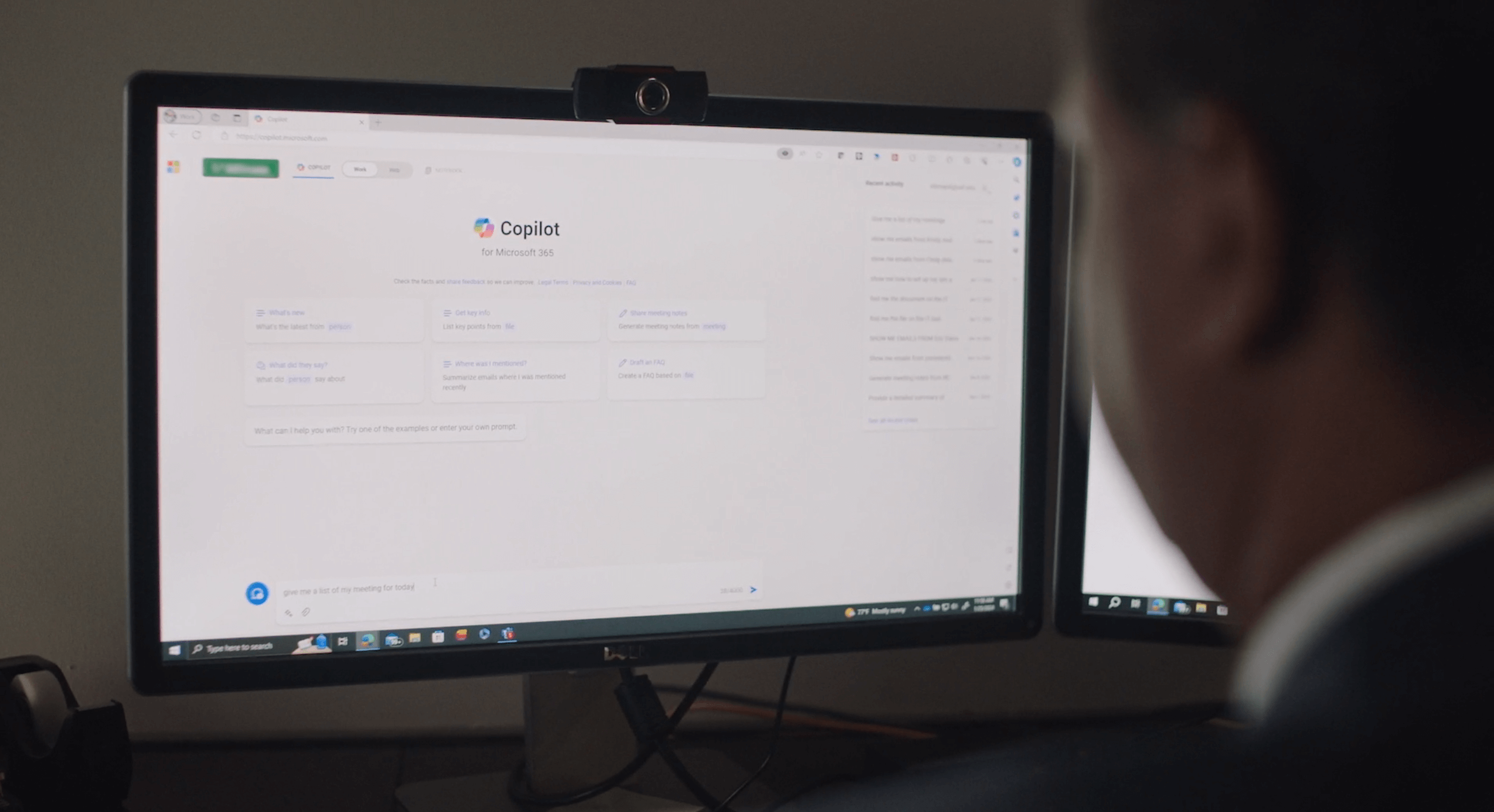
Microsoft updated Copilot for Microsoft 365 to store its data (all the chats and interactions) in the same country/region as it stores the 365 content of a specific account, announced the Redmond-based tech giant in a blog post (ironically, edited by Copilot itself), saying:

Now we’re excited to announce the expansion of Microsoft’s data residency capabilities by adding content of interactions with Microsoft Copilot for Microsoft 365 to our portfolio of data residency commitments and offerings. We are expanding our product terms and Microsoft 365 data residency offerings to contractually guarantee that we will store the content of your interactions with Copilot for Microsoft 365 in the same country or region in which you store your existing Microsoft 365 content.   

Microsoft

However, it’s worth mentioning the option to store Copilot data in the same region/country as the Microsoft 365 data is only available to those customers whose tenants are bound to specific geographies, as in the case of European users, where the EU Data Boundary compels Microsoft to allow users to keep their data in the EU.

The Redmond-based tech giant has been under the radar in Europe, as the EU put it on the black list, and its Digital Market Acts is stopping the company from releasing Windows Copilot in the region, although Bing and Edge remain unaffected, and Copilot can be accessed on Microsoft Edge in Europe.

On the other hand, Microsoft is making its products, including Windows, more EEA-compliant, and the recent AI investments in the continent are signs that Europe might allow Microsoft to release its native AI tools there.

To support data and privacy obligations, the Redmond-based tech giant added multiple storage options to Microsoft 365, and its Copilot, as follows:

  • Product Terms Data Residency provides data residency commitments for Exchange Online, SharePoint Online, and Microsoft Teams in the following country and regions: Australia, Brazil, Canada, France, Germany, India, Japan, Norway, Qatar, South Africa, South Korea, Sweden, Switzerland, the United Kingdom, the United Arab Emirates, United States, and the European Union.  
  • Advanced Data Residency add-on (ADR) provides eligible customers with expanded coverage of Microsoft 365 workloads, committed data residency in local datacenter regions, and prioritized tenant migration services. ADR is available in all the regions covered by Product Terms Data Residency, as well as Poland, Italy, and Israel with new local data center regions in Mexico and Spain coming soon. 
  • Multi-Geo Capabilities add-on provides customers with the ability to expand their Microsoft 365 presence to multiple geographic regions within a single existing Microsoft 365 tenant. Multi-Geo Capabilities are available in the same set of local regions as ADR plus the three macro regions—Americas, Asia-Pacific, and European Union. Please review details for covered workloads. 
  • EU Data Boundary allows customers in the European Union and the European Free Trade Association to keep their data in the EU. 
Microsoft

Later this year, Microsoft will also add the option to view the specific geographic storage location for Microsoft 365, including Copilot, through the Data Location Card, which can be accessed in the 365 Admin Center.

Test Base for Microsoft 365, used for remote and global app testing, will be deprecated

Microsoft will deprecate the Test Base for Microsoft 366 entirely in the future months, as the Redmond-based tech giant announced that the platform will transition to an end-of-life (EOL) state on May 31, 2024.

Test Base for Microsoft 365 will transition to end-of-life (EOL) on May 31, 2024. We’re committed to working closely with each customer to provide support and guidance to make the transition as smooth as possible. If you have any questions, concerns, or need assistance, submit a support request.

Microsoft

The platform will no longer be usable after its retirement, which is quite disappointing because it was a very useful tool to test apps, at a global scale, and in a remote way.

According to Microsoft, Enterprises/Businesses, Independent Software Publishers, System Integrators (SIs), and IT Professionals who want to validate their line-of-business (LOB) applications through integration with Microsoft Intune, are the perfect candidates for this platform, as it could accommodate each customer’s needs.

From expanding the testing matrix to ensuring technical integrity, compatibility, and usability of applications, Test Base for Microsoft 365 gave customers all the necessary tools to develop viable apps. In addition, the platform also tested applications for security and privacy issues within virtual machines.

Creating a Test Base for Microsoft 365 required an active Azure subscription, but overall setting up and working inside the platform was quite simple. Customers to complete a few details, and then they could create projects where they could test their applications.

The whole platform is not just easy to use, but also intuitive and versatile. Microsoft hasn’t specified the reason why it’s deprecating the platform, but there is a chance the Redmond-based tech giant will reveal it in the months coming up to the deprecation.

The company recently announced the deprecation of the beloved WSA (Windows Subsystem for Android) platform, and many users of it were disappointed by the news. However, in that case, the lack of Google Play support is what drove Microsoft to deprecate it, as financially speaking, the platform was a dead end.

Could it be the case with Test Base for Microsoft 365?

Boosteroid now supports Game Pass and Microsoft Store Xbox games, and you can play them now

Xbox and Booosteroid have a history together, with many Xbox titles being available on the platform, but according to the latest announcement on Xbox Wire, Xbox players can now access Game Pass and Microsoft Store Xbox games on Boosteroid, starting today.

We’re bringing more high-quality, immersive PC games by giving players another option to stream select games purchased through Microsoft Store on Windows, or available with a Game Pass membership. Our partnership continues to accelerate access to players by letting them choose how and where they play their games.

Xbox

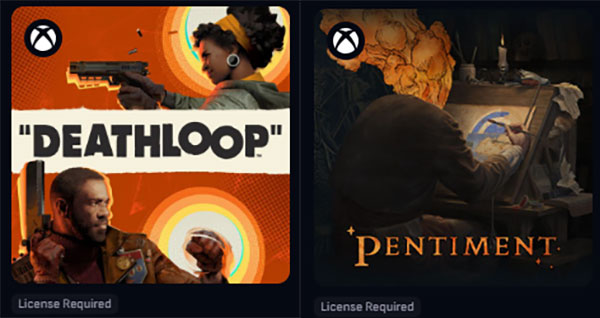
The first Xbox titles that can be played on Boosteroid are Deathloop, Dishonored, Dishonored 2, Dishonored: Death of The Outsider, Gears 5, Gears Tactics, Ghostwire: Tokyo, and Pentiment, and users will be able to cross-play and cross-save with their Xbox console and Windows PC for these games.

However, Xbox is not planning to stop here, and the company will add more games from its catalog to the Boosteroid platform in the months to come. Plus, aside from making its games available to many cloud gaming services, Boosteroid will see the addition of Xbox titles from Activision Blizzard, Bethesda, and Xbox Game Studios.

This means you’ll be able to stream games such as Starfield, Diablo IV, and many others on Boosteroid. Setting it all up is also quite easy, as Xbox says:

  • Log into your Boosteroid account on any supported device.
  • Go to Library > Xbox.
  • Browse the Xbox PC library and select the game you want to play.
  • Click on the Play button to launch the game on Boosteroid.
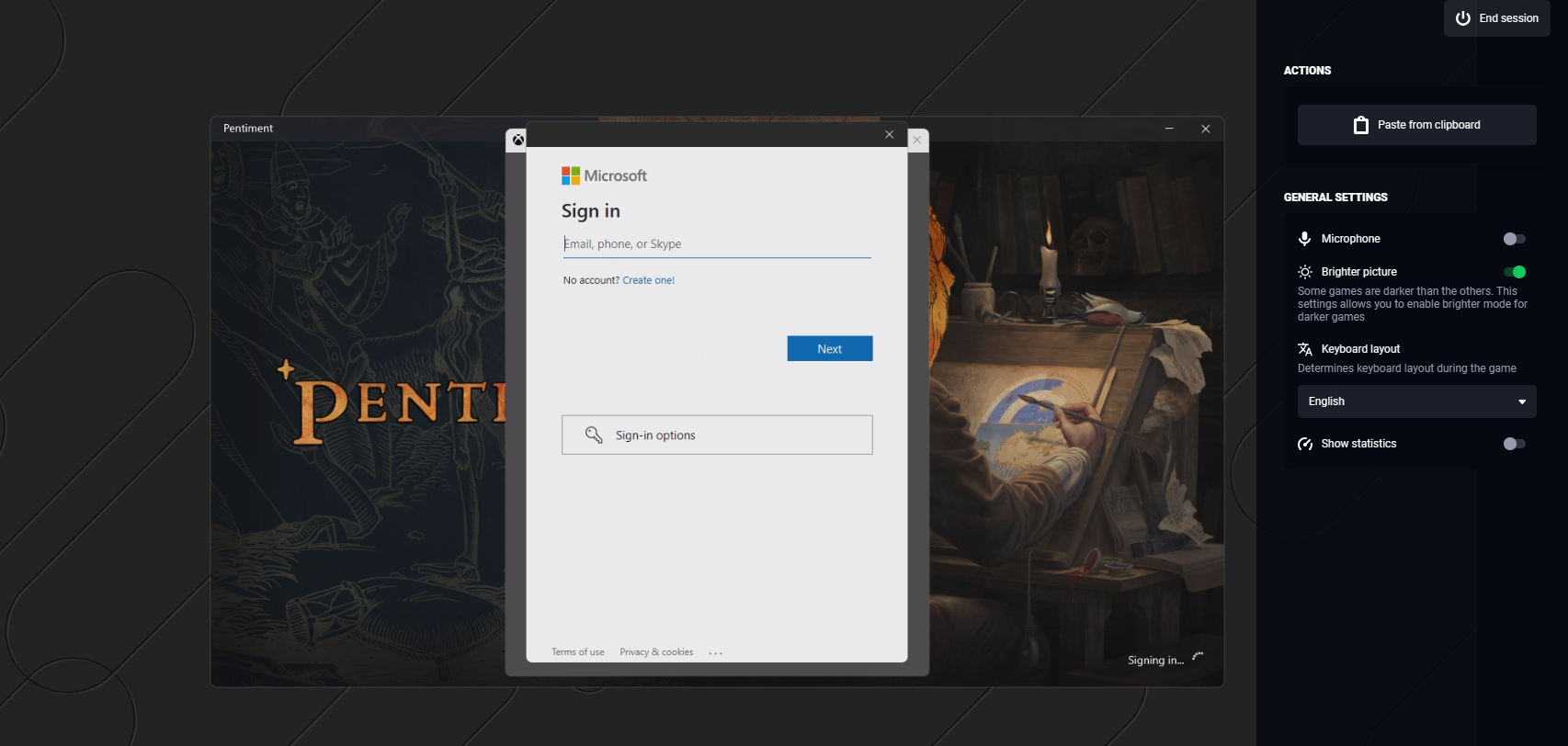
  • Log into your Microsoft account that owns the game or has your Xbox Game Pass membership.
  • Confirm your Microsoft account and you’re good to go.

You’ll have to keep in mind that running Game Pass and Microsoft Store games on Boosteroid will vary in experience depending on your location, Internet connection speed, hardware, and software, so you might have a better experience on one certain device in one certain location, than other locations.

Word for the Web’s new capabilities brings it closer to its desktop version

Word for the Web, the version of Microsoft Word that can be accessed on an Internet browser, introduces new formatting options that bring it closer to its standard desktop version.

According to the official blog post, Word for the Web now has no less than 3 exciting new features: support for headers/footers, multi-column layouts, and line numbers.

What can you do with them? Well, according to Microsoft, you can:

  • Add headers and footers to your document—this supports consistency and organizational goals and adds a more professional look to your documents.
  • Change the layout from single- to multi-column—this helps you increase the readability of your content, optimize the space, offer design flexibility, and much more.
  • Display line numbers—this is particularly useful when you need to refer to specific lines in a document, such as a script or a legal contract.
Microsoft

They’re also quite easy to use.

1. Open a new or existing Word document inside Word for the Web.

2. To add headers and footers, select Insert > Header & Footer, and then choose your preferred settings.

Adding headers and footers in Word for the web.

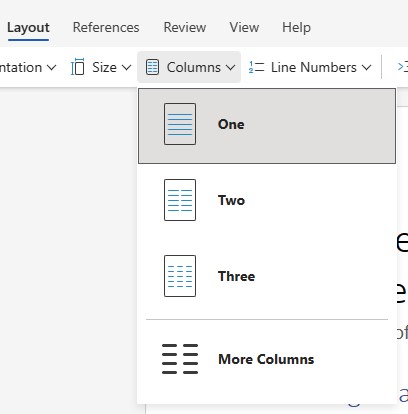
3. To add columns, select Layout > Columns.

Creating columns in Word on the web.

4. You can select one of the preset options (One, Two, or Three), or More Columns, depending on your preferences.

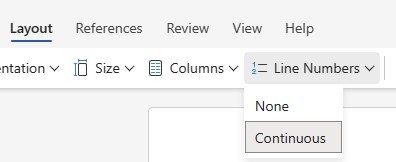
5. To add line numbers, select Layout > Line Numbers > Continuous.

Adding line numbers in Word for the web.

These new capabilities are now available to all users, immediately, and you can also leave your feedback about them, and Microsoft will consider it in the next patches.

Word for the Web has seen several other updates lately, with the most recent being the ability to create checklists. Believe it or not, the feature was not available to this version of the Word app, and similar to these features, that one also brought Word for the Web closer to the classic Word experience.

While it’s not much, considering this is just a web-based version of the vastly efficient Word platform, it still gets the job done for many tasks.

Microsoft says it needs more data centers for AI development, but Dell disagrees

On February 29, Dell held its quarterly conference call where it released information about its fourth-quarter results, and its COO, Jeff Clark, revealed that the company is also enjoying the benefits of AI adoption, as Dell saw an increased demand of almost 40% for its AI servers, compared to the previous quarter.

There was a huge demand for the H100, H800, H200, and MI300X, GPUs, which pleased manufacturers NVIDIA, and AMD, and Clark stated that while this demand continues to outpace GPU supply, and users are excited about AI, he also said that the future of AI is on-premises, as 83% of all data is currently stored this way.

We believe the long-term AI action is on-prem, where customers can keep their data and intellectual property safe and secure. AI will ultimately get deployed next to where the data is created, driven by latency.

Jeff Clark, Dell

Clark’s opinion is the opposite of Microsoft’s actions. Microsoft, arguably one of the biggest players in the AI industry at the moment, has been actively investing in, developing, and releasing AI-related technology, and is planning to integrate its future Windows versions with AI.

The company has also been investing in multiple data centers that can support AI development, as well as AI data storage, across the world, the latest of these investments being done in countries all over Europe: from Spain to France, Germany, Italy, Greece, and many others.

Even more, Microsoft has taken a pledge to make these data centers environment-friendly, with many of them being able to function in a carbon-negative, water-positive, and zero-waste situation.

These data centers will be the ones that will support the local AI infrastructure, and Microsoft will use them to update these countries’ systems with AI technologies. But they will also support AI-based cloud technologies, and they will effectively be able to become storage units for AI data.

But if the general shift is directed towards on-premises AI, as Dell argues (and it has the data to prove it), then why isn’t Microsoft seeing it? It could be very well that the Redmond-based tech giant might be trying to become the trendsetter here: as in, if the company builds more data centers specifically for AI development, then the industry will follow, and this would become the norm.

The AI journey is only at the beginning, as Clark said in the Dell conference call, so it’s too early to call the shots on the topic of AI on-cloud vs. AI on-premises.

However, given the excitement for a local AI, from companies (Nvidia Chat with RTX, for example), to developers (Windows AI Studio), and even regular users (the excitement for Windows Copilot being a local AI), it seems that AI on-premises will indeed be the future of AI.

So, Microsoft should act accordingly.

Microsoft unveils ResLoRA, a method capable of advanced AI training faster than ever

Microsoft has been at the forefront of AI research ever since the concept gained popularity, and the Redmond-based tech giant has been investing in new AI models and new methods to train them.

The results are not shying away: the latest AI innovation comes in the form of ResLoRA, developed by a group of AI researchers at the School of Computer Science and Engineering, Beihang University, Beijing, China in collaboration with Microsoft.

The method is capable of advanced AI training in a much faster time, and it’s suited to train AI models with specific capabilities, including natural language generation (NLG), natural language understanding (NLU), and task-to-image tasks.

ResLoRA is an improved version of LoRA, which is an existing PEFT (techniques to fine-tune large language models efficiently) method used for fine-tuning LLMs. When LoRA couldn’t be updated to suit the needs of the current AI training technologies, the scientists at Microsoft added extra paths (or residual paths) to it.

Then, while using the model, they merged the extra paths to get better results in training. They managed to do it: ResLoRA achieved better performance with fewer training steps and without any extra parameters or inference costs compared to LoRA.

The paper, which can be read in its entirety here, explains that ResLoRA works well for tasks such as natural language generation (NLG), natural language understanding (NLU), and text-to-image tasks, and it’s capable of providing advanced training to AI models in regards to them, much faster.

Microsoft made the code for ResLoRA available on GitHub, and AI enthusiasts can use it to train their own AI models with advanced capabilities in generative tasks. Plus, as the team behind it says, the tech requirements are not impossible.

Our experiments run on 8 NVIDIA Tesla V100 GPU. The results may vary due to different GPU models, drivers, CUDA SDK versions, floating-point precisions, and random seeds.

AI modeling and training are known to consume a lot of power and need advanced computing to work, but ResLoRA doesn’t ask for much.

The method seems to be light years away from models such as Project Rumi, Orca 13B, or many others that Microsoft helped research and develop. But with AI technology growing at an incredible rate, this is expected.

What do you think of the model?

Microsoft expands its ‘built-in security’ with new Secure Future Initiative

In the wake of several highly publicized security breaches, Microsoft’s CVP and chief cybersecurity advisor announces expanded security efforts to safeguard the company’s software development process.

Microsoft’s Bret Arsenault announced a renewed commitment to software security for the company that incorporates a new Secure Future Initiative (SFI).

SFI was originally announced by Microsoft vice chair and President Brad Smith back in November of 2023 under three tenants of advancing engineering development that include transforming software development, implementing new identity protections, and driving faster vulnerability responses.

Fast forward to earlier this week and Arsenault is adding to that initiative with additional details and updates to SFI.

Evolving development lifecycles

Since announcing SFI, Microsoft has quickly evolved its previous security development lifecycle to a more flexible continuous SDL that supports CodeQL to 100 percent of its commercial products.

  • While our code repos go through rigorous SDL assessment leveraging traditional tooling, as part of our SFI work we now use CodeQL to cover 86% of our Azure DevOps code repositories from our commercial businesses in our Cloud and AI, enterprise and devices, security and strategic missions, and technology groups. We are expanding this further and anticipate that completing the consolidation process of the last 14% will be a complex, multi-year journey due to specific code repositories and engineering tools requiring additional work. 

Microsoft also broadened its adoption of memory safe languages, donated to the Rust Foundation to help advance the Rust programming language, as well as investing $3.2M into the Alpha-Omega project, and partnering with Google, Amazon, and Alpha-Omega tangentially on the Open-Source Security Foundation (SSF). Through this strategic support initiative, Microsoft predicts it will hasten its ability to cover, analyze and deploy more open-source projects in the near-future.

Fending off identity attacks with tighter protections

Microsoft has also improved its SFI efforts by enforcing the used of standard identity libraries that includes Microsoft’s own Authentication Library (MSAL).

  • Furthermore, over 99% of internal service-to-service authentication requests, using Microsoft Entra for authorization, now utilize MSAL, highlighting our dedication to boosting security and efficiency in inter-service communications. Ultimately, these milestones further harden identity and authorization across our vast estate, making it increasingly difficult for threats and intruders to move between users and systems.

Eventually, Microsoft would like to automate more of its security infrastructure, and by the end of the year it predicts it will be able to fully automate the management process through Microsoft Entra ID and Microsoft Account (MSA) keys by standardizing the identity libraries used in the company’s most used apps.

Transparency into future security efforts

While it might feel counterintuitive to be transparent about security efforts that aim to undercut evolving threats, Microsoft “remains unwavering in its commitment to continuously evolve our security posture and provide transparency in our communications.”

Without giving any solid dates or times, Microsoft is saying that in the ‘coming months’ it will share further progress on its SFI efforts to strengthen the security process surrounding its software development process.

Chrome is testing a shared dictionary compression that allows for instant website access

Google is set to release Chrome 123 on March 19, 2024, and aside from the home network protection capabilities that are going to be introduced to the browser with this version, the tech company will also debut a new way to compress website data.

This new method called shared dictionary compression, will be tested in the upcoming Chrome 123, and it is capable of delivering impressive results, almost reducing the waiting time when accessing websites to 0.

The shared dictionary compression works by detecting and replacing identical data with a piece of data that indicates that it already appeared on the website. In other words, this kind of compression will use a single data unit for all the identical data found on a website.

This way, the compression of a website by using a shared dictionary can be done right from the start, which will greatly reduce the time users wait for the website to load.

Chrome already has a compression method called Brontli, which was the second in a series of methods that started with gzip. Brontli is set to be replaced by the new ZStandard method in the upcoming Chrome 123, and users will be able to see better loading times for websites when browsing the Internet.

Users can also join the trial for the new shared dictionary compression capability that Chrome will generally release sometime in the next months to years. If you’re interested in joining the trial, you can do so by accessing this link. The trial will end on May 1, 2024, and it can be done on Chrome versions 117 to the current 122.

The shared dictionary compression can also be enabled on websites with massive traffic by accessing chrome://flags/#enable-compression-dictionary-transport, and setting the Compression dictionary transport flag to Enabled.

chrome://flags/#enable-compression-dictionary-transport > Compression dictionary transport > EnabledChrome shared dictionary compression

However, this will only work if the website is accessed on Google Chrome.

Did you know you can now join Teams meetings in your car?

Microsoft Teams introduced support for Android Auto, effectively allowing Teams users to connect their Android mobile phones to their cars. This feature will enable them to join meetings from the Teams calendar view, quickly call their speed dial contacts, and see their recent Teams calls while in their car.

Microsoft Teams’ support for Android Auto is not the first time the Redmond-based tech giant has sought to integrate its services into automobile devices. Microsoft recently partnered up with transportation unit manufacturer, Bosch, to integrate cars with generative AI, so that drivers can enjoy safer road trips.

This new capability is part of a wider array of new features released to Microsoft Teams in February 2024, and according to the official blog post, Teams users on mobile will greatly benefit from them.

Take, for instance, the Teams private line capability: we reported on it a while ago, when we spotted it in the Microsoft 365 Roadmap, but the feature is now available to users and, as Microsoft says, administrators can now enable a private second phone number for a user so they can receive incoming calls directly, bypassing delegates, admins, or assistants. A unique notification and ringtone distinguish calls to the private line.

Plus, Teams’ Operator Connect, which is another option for providing Public Switched Telephone Network (PSTN) connectivity with Teams and Phone System, has been expanded to 94 countries, and it will give companies more options to choose from when it comes to managing mobile services.

Android devices are also the topic of another Microsoft Teams update: the daily maintenance restart window for Teams Rooms on Android devices, which enables an automatic maintenance period for Teams Rooms on these devices, every morning between 2 AM and 3 AM, in the local time zone, but IT admins can change or customize the time period as they see fit.

By default, a Teams Rooms on Android device is set to restart between 2:00 AM and 3:00 AM based on its local time zone, unless it is being used during that time. In that case, the restart is postponed to the next day. IT administrators can disable this feature or modify the restart window from the device settings.

Microsoft

The Redmond-based tech giant also added Copilot for Finance to Microsoft Teams, which will help professionals make better and faster financial assessments, create customer account summaries, and generate meaningful presentations based on the available data.

So, as you can, February was a big month for Microsoft Teams.

Lack of Google Play support killed WSA on Windows 11, according to Microsoft employee

One of the selling points of Windows 11 was much-anticipated support for Android apps. In a shocking turn of events, Microsoft decided to retire Windows Subsystem for Android next year.

Many users were shocked by this decision, since the company didn’t give an official reason for this decision, until today.

Microsoft veteran speaks out on the abrupt Windows Subsystem for Android retirement

As reported by Windows Central, Microsoft’s Andrew Clinick, who worked as Partner Group Program Manager of WSA for two years, decided to shed some light on this sudden decision.

According to him, WSA failed to generate profit, and the lack of Google Play support was the nail of the coffin for this feature.

Many, including us, doubted the success of this feature because Amazon Appstore offers a fraction of the apps that are available on the Google Play store.

Andrew was asked why didn’t Microsoft just host the apps themselves, but it was impossible to find apps to host that don’t rely on Play services.

Amazon has already stopped downloads of its Appstore from Microsoft Store, preventing any future app downloads.

It’s sad to see that this feature got shelved, and we hope that someday we might see Android apps on Windows again.

Microsoft’s new Feed Label allows grouping products, simplifies cross-country advertising

It seems like Microsoft is on a spree to release products and introduce new features. The latest in the series is Feed Labels, an upcoming feature in Microsoft Advertising that lets you group products across different feeds using a common attribute, be it category, brand or language.

For instance, if you sell products across different countries, simply create a Feed Label and apply it to all the concerned feeds.

Now, when you create a campaign and choose the pre-set Feed Label, the system will run ads that showcase products across the feeds that are a part of it.

Source: Microsoft’s blog

Also, based on the chosen Feed Label, the system will automatically identify the feeds from the selected Merchant Center stores to be included in the ad campaign. Though, the option to showcase all products in a single campaign is also available.

In the official blog post, Microsoft confirms that the Feed Labels feature will start rolling out by mid-March 2024, and all advertisers should have access to it by the end of the month.

Remember, Feed Labels are different from Custom labels. Microsoft, in the official blog post, explains it as,

Custom labels are useful for creating granular bid strategies and reporting within a campaign, while feed labels are useful for creating broad targeting strategies across multiple feeds and campaigns.

Feed Labels will help advertisers take their minds off the trivial things and let them focus on creating ideas for campaigns. At least, that’s our initial impression of the feature. For a first-hand review, we will have to wait for the official rollout later this month.

Also, Microsoft’s release of Performance Max on the advertising platform will help you leverage the capabilities of AI for effective campaign management.

What’s your initial impression of Feed Labels? Share with our readers in the comments section.

Teams: New feature will allow you to send video clips in replies to channel posts, but it can be harmful

According to the Microsoft 365 roadmap website, Microsoft is developing the ability to send video clips to the channels, set to roll out in April 2024. The description of the feature says:

You can now use Teams video clip in channel, in addition to chat. Record yourself, your screen, or an audio-only clip and attach the video clip to your channel post or reply.

As the description indicates, you can record yourself and your screen to explain a new project, showcase your Excel skills to your buddy, or provide details about a case. When rolled out, the feature will be available on Windows, Android, Mac, and iOS.

The feature aims to help users express themselves efficiently in the team channels and is good for communication and collaboration; however, it could be potentially misused. People might send inappropriate content, use the feature for spamming, or share irrelevant content.

With that being said, this feature is good for effective communication, but we must always remember to practice secure communication practices while using it to maintain a healthy work environment.

What are your thoughts on this feature? Share your opinions in the comments section below.

The latest Gemini update brings response customization to new level

Google has introduced some new features to its AI chatbot that allow you to modify the responses given by Gemini.

This sounds impressive at first glance, and it works even better in practice, so keep on reading to learn more.

Gemini update gives you the ability to modify responses more intuitively

Google recently updated Gemini, and this change was spotted by Gadgets 360. This update gives users the ability to modify a specific part of the response with just a few clicks.

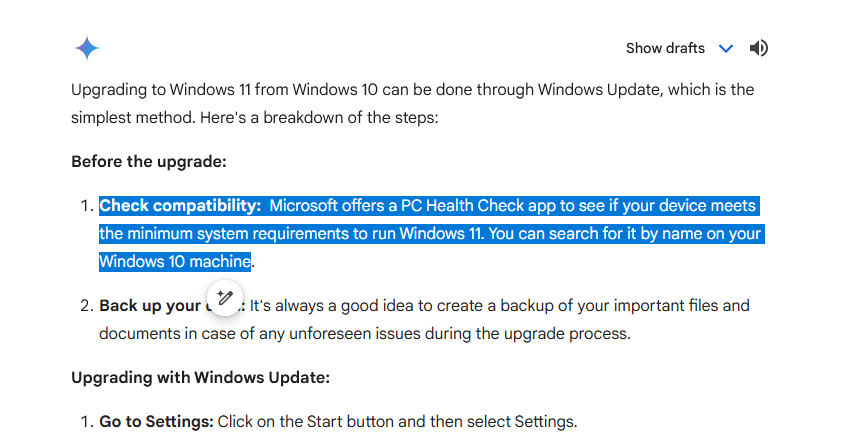
In the past, users had to regenerate the entire response, but that’s not the case anymore. Simply select the part of the response you want to modify and click the pencil icon to edit it.

From the menu, you’ll get the option to regenerate the response, make it longer or shorter or remove it completely.

You can also apply prompts to the selected text and change it accordingly. Of course, it’s just as easy to revert the changes, and it takes just a single click.

This is an amazing feature, and it will allow users to fine-tune their responses and get perfect results every time.  We hope that other AI chatbots will soon follow suit and add a similar feature.

We’re happy to see that Google is improving its service, especially since Gemini won’t generate images of people anymore after the recent controversy.

Upcoming Microsoft event: New Surface devices & exciting Windows 11 features

Microsoft confirmed the date of its special event by publishing it on its special event webpage. The event is called New Era of Work and will take place on March 21, 2024, at 9 am PDT.

The event description for Microsoft’s March event says

Tune in here for the latest in scaling AI in your environment with Copilot, Windows, and Surface.

The Redmond tech giant will announce new Surface hardware, new features for Windows 11, and Microsoft Copilot, and the event is targeted at the company’s business customers.

In an earlier report, we informed you about Microsoft’s plans to refresh its hardware line with the new Surface Pro 10 and Laptop 6.

Surface Pro 10 will come with an OLED display, and the new Surface Laptop 6 will have thin display bezels, a haptic touchpad, rounded corners, one USB-A, and two USB-C ports.

These upcoming devices are expected to have improved CPU and NPU pairing and are supposed to perform better than their predecessors as they will come packed with Intel Core Ultra and Snapdragon X Elite-based processors.

With Copilot integrated into Windows 11 and superior hardware, Microsoft is planning to call them AI PCs. These devices will launch in the coming weeks.

The ones with Intel hardware will be available from the beginning of April, while the ones with ARM-powered hardware will be out in June. The prices for the new Surface devices are presently not mentioned anywhere, guess we have to wait for the event.

For the first time, both Microsoft Surface Pro 10 and Surface Laptop 6 will have the ARM. However, if you want to learn more about them, we need to wait a bit longer.

The company will also discuss new Copilot and Windows features, probably connecting them with the next-generation NPU found in the new devices. Rumor has it that Microsoft is also working on AI Explorer, which will act as an advanced Copilot, cataloging every action on your PC so that all of it becomes searchable with the help of natural language.

You can expect the company to announce the much anticipated Windows 11 update, Windows 11 version 24H2, and upcoming AI improvements and new features in the operating system.

Microsoft Surface fans have high expectations for this hardware event, as they have been waiting for a new Surface device for two years.

With new hardware and advanced technology emerging every year, Microsoft has to introduce exciting features and advanced hardware devices to ensure they remain competitive in the market.

We will keep tabs on the event and talk about the announcements more after the event. If you have any questions or suggestions, feel free to mention them in the comments section below.

Alan Wake 2 lowers system requirements for PCs, now supports GTX 1070 and RX 5600 GPUs

In a surprising turn of events, Remedy has announced lowering the minimum system requirements for Alan Wake 2 on PC, starting with version 1.0.16.1.

In a post on X (formerly Twitter), the team shared the new system requirements.

The difference, as clearly visible in the post, is with respect to the GPU (Graphics Processing Unit). While the minimum GPU requirements previously were GeForce RTX 2060 and Radeon RX 6600, it’s now lowered to GeForce GTX 1070 and Radeon RX 5600 XT.

New system requirements for Alan Wake 2

Also, those on the GTX 10xx series should get a decent performance after the rollout of the latest version, 1.0.16.1. This isn’t just a performance-based update but will also let millions run Alan Wake 2 on PCs that were previously unsupported.

However, there are still concerns about the 16 GB RAM requirement, an Intel i5-7600K or AMD equivalent CPU, and 90 GB free SSD storage.

While it’s understandable, given the experience (graphics and rendering) developers intend to deliver, slightly cutting back on these will allow millions more to play the action-packed horror game!

On supported PCs, you can download the Alan Wake 2 from the Epic Games store.

If you have already played Alan Wake 2, share your review with our readers in the comments section.

Viva Engage’s new Articles tool helps you write blog posts with style

According to Microsoft’s announcement, the Viva Engage customers wanted to use the tool for blogging so that’s what they’ve got now.

The new Articles tool helps them insert rich media in their post like on WordPress, but also keeping everything under corporate supervision.

This new feature is addressed to the communication specialists within organizations to be able to convey their message to all the staff. It’s just like an inside corporate blog. After the post is live, everyone within the organization members will be able to view, react and comment.

What’s new about Articles in Viva Engage?

With Articles, you will be amble to write long-style posts and newsletters using the whole range of formatting tools

For example, you will be able to use quote blocks, images, and even code blocks within the posting. Also, the design will be automatically adapted to mobiles, and email inclusion.

You can also schedule the content for publishing content at a certain time and admins will have access to analytics data for each post.

However, the most important part is that you will be able to work with Copilot to create and improve the content and, obviously, that will make everything faster for the communication managers.

Another interesting feature is that you can split the content feeds within your organizations. In other words, you could have separate blogs created by the leaders and employees and send notifications based on the content of the posts.

How do I get Articles in Viva Engage?

The new Articles feature is available to all the customers that have a Microsoft Viva or Employee Communications and Communities license.

Certainly, the new Articles feature from Viva Engage will spring up the action and communication within organizations. Or, at least, the internal blogs will look a lot better.

Does your organization use Viva Engage? Tell us about your experience in the comments section below.

San Francisco and Ivato Airports set to join Flight Simulator as add-ons

Flight Simulator is a popular gaming series, and if you want to take it to another level, you can add various new content to it.

The game has a very active community that constantly releases new add-ons, and today we’re going to show you a couple of great ones that we came across recently.

These community add-ons will introduce new airports to Flight Simulator

As reported by TechRaptor, Flight Simulator has some impressive add-ons, and the first on our list comes from Flightbeam Studios. This one adds San Francisco International Airport (KSFO) to the game.

According to the developers, they have passed an important milestone and we expect to see finished results before the summer.

Another airport is being developed but by a different group called VueloSimple. Currently, they are developing Ivato International Airport in Madagascar. No release date is available, but we hope to see it soon.

The last mod is a something bit different, and it comes from Red Wing Simulations and it lets you fly LZ 129 Hindenburg Zeppelin in the game.

These are some impressive add-ons, and we have to give credit to the passionate and dedicated community.

Speaking of add-ons, Microsoft released a Dune expansion for Microsoft Flight Simulator recently, so you might want to check it out.

Spotify’s high data usage is a cause for concern, workarounds come to aid for many

If you run the Spotify app, be it on a mobile or PC, do check the data usage when on a limited plan. As it turns out, a few are complaining about Spotify’s high data usage, sometimes to the tune of 100-300 GBs, even when the app usage was barely a few hours per day.

In a recent case, a user through a Reddit post claimed that Spotify consumed 300GB after using it for a few hours daily. This is extremely high with no possible justification!

When we further investigated, it appears that the problem has been present for years, with complaints from as far as September’13 available on Reddit.

When I checked the data consumption on my devices (a Windows PC and an iPhone), it was in the normal 1-5 GB range. I personally use it less than an hour a day for a handful of songs and podcasts.

So, the problem is most likely limited and does not affect everyone, as is evident from what many others have to say.

I believe it wouldn’t use up that much data. I have a 100GB plan and throughout workdays I do spend around 3 hours daily, sometimes more sometimes less, watching some YouTube, or anime while going places. The highest total I’ve gotten was on a work trip abroad since mostly on mobile data since my hotel room had horrible wifi, and it was 60gb. Now if they watched that much on 4-8k, possible. But afaik in most cases you won’t even get it as an option…
So I’m likely to believe that it’s not quite possible.

I listen to Spotify on my phone A LOT. I’m talking podcasts and music for the bulk of my 8 hour shift, and during my commute in and out of the office and I’m only at 65 gb for the month.

Verified workarounds to reduce Spotify’s high data usage

  • Choose Low quality for Cellular streaming: Open Spotify Settings from the top-right corner > go to Audio Quality > choose Low under Cellular streaming.
  • Turn on Data Saver mode: In Spotify Settings, go to Data Saver > enable the Data Saver toggle, as well as the ones for Download audio only and Stream audio only.
  • Limit Spotify’s data usage in Settings: You can turn off an app’s access to mobile data from the built-in device settings. Doing so would only let it connect to the Internet when on Wi-Fi.

Besides, Spotify should not be set to download playlists and podcasts automatically. This turned out to be the underlying cause for most.

With one of these tricks, you should be able to lower Spotify’s data usage, but raising a ticket with Spotify support is vital as it will highlight the problem to the developers.

Also, discover which of the two better suits your needs, Spotify app or Spotify web, and choose one!

To share your issue or more possible workarounds, drop a comment below.

Sora AI unleashes new demo videos, equally amazing

Recently, we have told you a few things about a new text-to-video tool called Sora AI, and why it will change the ad and video industry as a whole.

While it’s still in the testing phase, Open AI released a lot more demo videos that are equally amazing, showing the new LLM capabilities.

The new Sora AI clips are breathtaking

https://www.youtube.com/watch?v=Ua5dGqBDlb4

In the clip above, you will see only a few examples collaged by AI-nstein, but there are a lot more featured on the Open AI’s Sora webpage you can browse and watch.

It’s pretty hard to talk about all of them, but as you can see, the AI bot managed to recreate the image of the world globe into a virtual character’s eye and it has drawn a very realistic alien roaming through New York as it belonged there.

But that’s not all. Sora AI can combine cartoon charters and blend them into realistic representations and depict virtual animals playing and acting.

The text-to-video bot still has weaknesses. Some, as described by the Open AI team, are the difficulty of getting the right spatial details, mixing directions and following the camera path:

The model may also confuse spatial details of a prompt, for example, mixing up left and right, and may struggle with precise descriptions of events that take place over time, like following a specific camera trajectory.

Open AI

As there is a lot of fuss nowadays about the legitimacy of AI-generated content, the Sora AI team wants to include C2PA metadata in the clips to prevent misleading these videos with actual real footage, or to prevent any inappropriate prompts:

Once in an OpenAI product, our text classifier will check and reject text input prompts that are in violation of our usage policies, like those that request extreme violence, sexual content, hateful imagery, celebrity likeness, or the IP of others. We’ve also developed robust image classifiers that are used to review the frames of every video generated to help ensure that it adheres to our usage policies, before it’s shown to the user.

Open AI

Besides that, the new Sora AI demo clips are amazing and show a promising future for video-generated content. However, this might be bad news if you’re working in the film industry.

What do you think about Sora AI? Share your thoughts in the comments section below.

Copilot for Microsoft 365, available for students starting April 1, and it’s not a prank

At the Reimagine Education 2024 event, Microsoft announced innovative ways to use its AI tools to explore new possibilities, establish strong foundations, and prepare students for the future.

One of them was the introduction of Copilot to the additional educational audience. Microsoft Copilot with commercial data protection is available with all the Microsoft 365 Education offers, including the zero-cost license.

Earlier, Microsoft announced the availability of Microsoft Copilot with commercial data protection to all faculty users and to higher education students ages 18+.

Now, a private preview program for Copilot with commercial data protection will be available for students younger than 18 starting in the Spring of 2024.

Microsoft announced:

Starting April 1, 2024, Copilot for Microsoft 365 will be available for higher education institutions to purchase as an add-on for their students aged 18+.

To be able to access it, a student must have Microsoft 365 or Office 365 A3/A5 licenses.

Microsoft further mentioned in the post:

Integration across Microsoft 365 applications provides seamless performance, so you can: 

  • Stay on top of all your chats, remote classes, meetings, and calls with Microsoft Teams.
  • Create, comprehend, and elevate your documents in Microsoft Word. 
  • Keep up with your inbox and manage follow-ups in Microsoft Outlook.
  • Turn your inspiration into stunning presentations in Microsoft PowerPoint. 
  • Analyze, comprehend, and visualize data with ease in Microsoft Excel. 

The company also ensures that Copilot’s commercial and academic version comes with a Customer Copyright Commitment, meaning the users won’t have to worry about copyright claims while using the services.

Apart from this, Microsoft also announced the introduction of free AI features to streamline teachers’ tasks along with The Microsoft Education AI Toolkit.

Furthermore, the Redmond tech giant also introduced new updates to  Learning Accelerators and Teams for Education.

Additionally, they also mentioned in the event that Microsoft Defender for Endpoint, a feature specially designed for protecting student devices, will soon be available at a discounted price to Microsoft 365 A5 customers.  

If you want to watch the complete event, you can watch it here. What are your thoughts on this matter? Share your opinions in the comments section below.

Can you handle Horizon Forbidden West on PC? Here are the official requirements

After many rumors regarding the Horizon Forbidden West PC release, we’re happy to say that the game’s hardware requirements have been revealed!

The game is coming on March 21st, but can you run this game once it launches? Keep on reading to find out!

Horizon Forbidden West PC requirements have been revealed by Sony

Many have speculated what kind of hardware would be necessary to run Horizon Forbidden West and the latest Sony blog post answers this question.

The game requires Windows 10 1909 or higher and 150GB of SSD storage to install. RAM requirement is the same for all presets and it’s set at 16GB.

You’ll be able to get around 30 FPS at 720p with Intel Core i3-8100 or AMD Ryzen 3 1300X and NVIDIA GeForce GTX 1650 4GB or AMD Radeon RX 5500XT 4GB.

To experience the game at 1080p and 60pfs, you’ll need an Intel Core i5-8600 or AMD Ryzen 5 3600 and NVIDIA GeForce RTX 3060 or AMD Radeon RX 5700.

If you’re looking for 4K resolution at 60FP you’ll need Intel Core i7-11700 or AMD Ryzen 7 5700X and NVIDIA GeForce RTX 4080 or AMD Radeon RX 7900XT.

MinimumRecommendedHighVery High
PresetVery LowMediumHighVery High
AVG Performance720P @ 30 FPS1080P @ 60 FPS1440P @ 60fps / 4K @ 30 FPS4K @ 60 FPS
ProcessorIntel Core i3-8100 or AMD Ryzen 3 1300XIntel Core i5-8600 or AMD Ryzen 5 3600Intel Core i7-9700 or AMD Ryzen 7 3700XIntel Core i7-11700 or AMD Ryzen 7 5700X
Memory16GB RAM16GB RAM16GB RAM16GB RAM
GraphicsNVIDIA GeForce GTX 1650 4GB or AMD Radeon RX 5500XT 4GBNVIDIA GeForce RTX 3060 or AMD Radeon RX 5700NVIDIA GeForce RTX 3070 or AMD Radeon RX 6800NVIDIA GeForce RTX 4080 or AMD Radeon RX 7900XT
Storage150GB SSD space150GB SSD space150GB SSD space150GB SSD space
OSWindows 10 64-bit (version 1909 or higher)Windows 10 64-bit (version 1909 or higher)Windows 10 64-bit (version 1909 or higher)Windows 10 64-bit (version 1909 or higher)

Many users on the SteamDeck subreddit aren’t too happy with the requirements but since this is a PS5 game, high requirements are expected:

That’s rough, but not ridiculous. Also, it’s a PS5 game, no one was expecting it to run well on SD.

We also have a great article on Forbidden West vs Zero Dawn, so don’t miss it for an in-depth comparison between the two games.

Thousands affected in the latest WordPress brute force attack, poses a challenge for cyber experts

Cyber attacks are getting advanced in nature, and it’s becoming increasingly difficult to tackle them. In the latest developments, a new WordPress brute force attack is employing the end user’s browser to target thousands of websites.

First reported by Sucuri Security, the new brute force attack is an advanced iteration of the already prevalent Web3 Crypto Wallet Drainers, an active threat for over a month that uses drainers to steal crypto assets from compromised wallets.

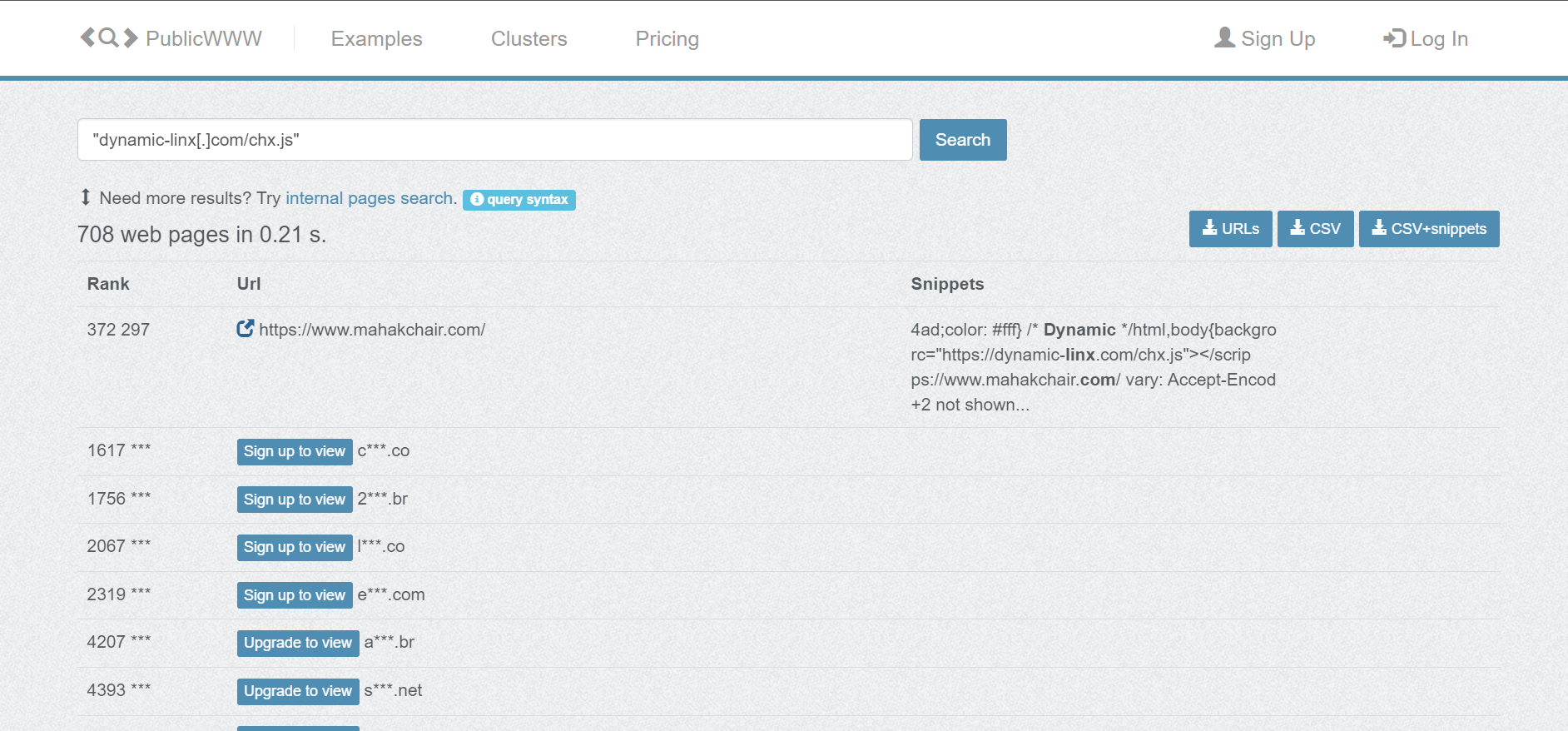
According to Sucuri Security, the new 3Kb long script, dynamic-linx[.]com/chx.js, has been injected on over 700 websites and counting. Once a website is compromised, attackers can automatically use the visitors’s web browser to attack more, and the chain continues!

The challenge for cyber security experts here is filtering requests from real, legitimate users who were exposed to such websites.

How does the attack work?

It’s a complex multi-step process, and we have tried to break it down for you in simple terms:

  • Threat actors identify WordPress websites that can be compromised, extract details of admins with access to them, and then inject the dynamic-linx[.]com/chx.js script.
  • When you open a compromised webpage, the script gets into motion, your browser asks hxxps://dynamic-linx[.]com/getTask.php for a task. The task is basically conducting a brute-force attack on another website using the provided set of credentials.
  • If the brute-force attack from the end user’s browser succeeds, it automatically creates and sends a small text file with the correct credentials to the threat actors.
  • Once a task is completed, another is automatically shared with the browser, which continues until the infected webpage remains open.

For the unversed, a Brute Force Attack works by bombarding the authentication servers with a wide array of login credentials (starting with simpler ones and then moving to complex sets) with the hope that one would work.

Searching for the script on PublicWWW

According to Sucuri Security, the only plausible reason why threat actors moved from Web3 Crypto Wallet Drainers to WordPress brute force attacks is that the former couldn’t be scaled and was easy to detect. As a result, infected websites were soon blocked.

So, threat actors could be trying to infect as many websites with different unnoticeable scripts before launching an attack that’s more profitable.

Measures to prevent the attack

At present, with minimal information about the scale and intricacy of the WordPress brute force attack, having a secure password and deploying IP-based restrictions on access to critical parts of the website could help.

Brute force attacks are getting complex in nature, and protecting your website or data is becoming all the more difficult. So, it’s time you gear up and choose an advanced website security software!

For users, a combination of an antivirus and firewall will provide the necessary web-based protection. Besides, practicing good cyber hygiene will keep you safe from similar attacks.

If you know more about the attack that could help our readers, share it in the comments section.

Understand GitHub Copilot in no time with the new Learning Pathway

GitHub released a new Learning Pathway for businesses called AI-powered development with GitHub Copilot. It has eight guides to help you and your team understand the AI. Furthermore, with it, you can use GitHub Copilot as an assistant. With its help, you will deliver better products in a shorter time. In addition, the new Learning Path covers multiple commonly asked questions. So, you should check it out. Maybe they already covered some of your curiosities.

What is GitHub Copilot used for?

GitHub Copilot is for coding, and it can complete your code, verify it, and add suggestions. Furthermore, it can explain everything to you. In addition, with the new Learning Pathway, it will be easier for you to comprehend its features, and you will be able to use most of them better. Also, you can explore the eight guides available at your own pace. After all, it is important to learn about the GitHub Copilot and not to rush for an achievement. On top of that, at the moment, the new Learning Pathway covers just the essentials.

The eight guides available on the new Learning Pathway cover various subjects, such as quality and security improvements, user and data management, improved learning, contractual protection, and more. So, you and your team should take your time and go through each one of the sections. On top of that, from this pathway, you will also learn how to improve your prompt generation. After all, it is one of the most important practices when you work with AI.

In a nutshell, the new Learning Pathway from GitHub will offer you the essentials needed to start using GitHub Copilot. Furthermore, with it, you will understand AI better and gradually generate better results. In addition, the new Learning Pathway is free, and you don’t need to rush through it, especially since it covers commonly asked questions.

In addition, each guide contains insights from representatives of ASOS, CARIA, Cisco, Lyft, Philips, Redfin, and Shopify. So, give the Learning Pathway a try. By the way, consider using GitHub Copilot Enterprise because it has the most features.

What are your thoughts? Are you going to give it a try? Let us know in the comments.

The S.T.A.L.K.E.R Trilogy is now available on Xbox Series X/S and Xbox One

GSC Game World announced the arrival of the S.T.A.L.K.E.R  Legends of the Zone Trilogy on Xbox Series X/S and Xbox One. The Trilogy includes all three popular S.T.A.L.K.E.R. games: Shadow of Chornobyl, Clear Sky, and Call of Pripyat. Available via backward compatibility, players can enjoy the game in a high-fidelity mode.

You can purchase these titles separately for USD 19.99 each or get the Legends of the Zone Trilogy bundle from the Xbox Store for USD 39.99.

In a post on Xbox Wire, Mike Nelson wrote:

Every element from the original games has been maintained and faithfully ported to console thanks to the hard work of GSC Game World and their partners at Mataboo.

This all makes for a great opportunity for Xbox gamers everywhere to get some foundational knowledge of S.T.A.L.K.E.R.’s universe in the lead-up to the launch of S.T.A.L.K.E.R. 2: Heart of Chornobyl, coming day one to Game Pass on September 5, 2024. 

He further mentioned that bringing these hardcore PC games to an Xbox controller was not easy. As the series is a blend of first-person shooter, horror, immersive sim, and exploration genres, getting it right was vital.

He also said:

Speaking with GSC Game World PR Specialist Zakhar Bocharov, we wanted to learn more about what this process was like, bringing these cult-classic, hardcore PC titles to console, and some of the innovative design and UI adjustments the team had to make to bring all three games to Xbox. 

Zakhar Bocharov, GSC Game World PR Specialist, stated:

S.T.A.L.K.E.R. has been a PC franchise for a long time, so the key priorities were concentrated around adapting the experience for consoles as a whole (including, but not limited to, native controller support for console interfaces).

We created everything from scratch, ensuring that the game was both easy to control and comfortable to play.

From the weapon selection wheel, aiming system, to menu navigation, the development team had to work on everything to make sure the game could be compatible to an Xbox controller. Also, they ensured that the essence of the classic PC game, its unique gameplay loop, and the feeling of conquering the hostile environment of The Zone stayed intact.

Bocharov also mentioned:

We wanted to bring S.T.A.L.K.E.R. to consoles for quite some time, and we worked closely with our trusted partners at Mataboo to make that happen. Despite the new release date for S.T.A.L.K.E.R. 2, we decided to keep S.T.A.L.K.E.R. Legends of the Zone Trilogy in early 2024 to give the players some time to complete the originals before hopping into the sequel. S.T.A.L.K.E.R. 2 is a direct continuation of the plot and a standalone title, but obviously knowing the previous events and characters would help you to enjoy certain story moments, nods, and Easter eggs better.

The version available for Xbox consoles is similar to the classic PC version of S.T.A.L.K.E.R. The Development team is working on releasing a patch with graphical enhancements and other features to the game soon.

The console version will also have mod support through mod.io, but this feature will also be released at a later date.

Launching the trilogy as the release date of S.T.A.L.K.E.R. 2 approaches seems like a strategic move by both Microsoft and GSC Game World. They aim to set the market for the upcoming title, intending for players to get hooked on the trilogy, learn about its background, and provide feedback and insights to the companies in anticipation of the new release.

Have you played S.T.A.L.K.E.R. on your PC? If yes, share your experience and your thoughts about launching it to the console world.

Bing’s Deep Search is back, offering AI help for enhanced results

Apparently, many reported seeing Bing’s Deep Search feature in Edge, but not everyone can find it. An X post from Berry Schwartz as spotted by MSPU blew the whistle on the rebirth of this feature which was initially introduced late last year.

Microsoft initially abandoned testing the feature and that’s why its return comes as a surprise.

The company is testing it now with plans of introducing Deep Search everywhere, according to Microsoft’s Mikhail Parakhin.

What is Deep Search and what does it do?

If nothing has changed, Deep Search is a tool that uses Bing’s web index and GPT-4 to expand the search query with a more accurate description and search results.

For example, let’s say I’m researching loyalty programs in different countries and search for “how do points systems work in Japan”. Deep Search might generate a more comprehensive description like this:

Provide an explanation of how various loyalty card programs work in Japan, including the benefits, requirements, and limitations of each. Include examples of popular loyalty cards from different categories, such as convenience stores, supermarkets, and restaurants. Show a comparison of the advantages and disadvantages of using loyalty cards versus other payment methods in Japan, including current rewards and benefits. Highlight the most popular services and participating merchants.

Microsoft Bing Blog

Parakhin also mentioned on X that Deep Search had more hype than anticipated and meanwhile, the Microsoft team has worked on fixing the caching and making it more robust.

Do you see the Deep Search feature in Bing? Tell us all about your experience in the comments section below.

Final Fantasy 14 release date for Xbox announced, and it’s sooner than you think

Final Fantasy 14 Online has been available on PC for more than a decade, but just recently, Xbox users got the chance to participate in Final Fantasy 14 open beta.

If you were excited about open beta, you’ll be happy to hear that the final release is not too far behind.

Final Fantasy 14 Online is coming to Xbox later this month

It seems that Final Fantasy 14 open beta was a success on Xbox Series X/S since the release date for the full game has just been announced according to NotebookCheck.

Microsoft has recently released its Xbox Partner Preview’s March update and it states that the game is coming out on March 21st.

To make this news even better, you can get the game’s starter edition for free via a Game Pass Ultimate subscription starting from March 21st to April 19th.

The starter edition has the same basic content as the free trial, but you don’t have restrictions on levels, in-game currency, and other features.

If you’re not familiar with the series, you can still enter the open beta on Xbox and give the game and its first two expansions a try.

Windows 365 Customer Lockbox feature aims to keep Cloud PCs more secure

In a blog post, Microsoft recently announced that the Customer Lockbox feature is generally available for all companies with Microsoft 365 E5 or Office 365 E5 subscriptions.

The objective of this feature is to ensure that Microsoft can’t access content in your Cloud PCs to do service operations without your direct instruction or order.

It supports requests to access data in SharePoint Online, Windows 365, Exchange Online, OneDrive for Business, Microsoft Copilot for Microsoft 365, and Teams.

In the post, the Redmond tech giant mentioned how the feature should work:

Microsoft support engineers may need to access your content to determine the root cause of an issue and address it. Windows 365 Customer Lockbox requires the engineer to request access from you as a final step in the approval workflow.

With Customer Lockbox, you have the option to approve or deny the request for your organization, and provide direct-access control to your content.

Customer Lockbox is included in Microsoft 365 E5 or Office 365 E5 subscriptions and can be included in other plans that have Information Protection and Compliance or an Advanced Compliance add-on subscription.

To enable Customer Lockbox controls on your Microsoft 365 subscription, go to Microsoft admin center> Sign in. Now, navigate to Settings>Org settings>Security & Privacy> Customer Lockbox.

Customer Lockbox.

Click Customer Lockbox, place a checkmark next to Require approval for all data access requests, and click Save to confirm.

Support, then click Customer Lockbox Requests.

Now that you have enabled the feature go to Support, then click Customer Lockbox Requests. You’ll see the list of data access requests, if any. To allow or reject a request, select it and choose Approve or Deny.

If you want to learn more about Customer Lockbox Requests, Microsoft has a dedicated page with detailed information.

Microsoft is committed to improving and increasing the security of its Windows 365 services for companies with Cloud PCs running Windows 11, and introducing the Lockbox feature is proof of this commitment.

What do you think about this feature? Share your thoughts in the comments section below.

RAT malware is targeting Zoom, Skype and Google Meet users

Back in 2021, we reported about Remote Access Trojans (RAT) malware attacks delivered through email phishing attacks and it seems like it’s happening again. This time, the attackers who seem to be Russian, trigger other channels like Zoom, Skype and Google Meet.

From the Zscaler’s ThreatLabz security report, the threat actor spreads SpyNote RAT to Android users and NjRAT and DCRat to Windows users.

The RAT is downloaded from fake websites

According to the security firm study, this situation started in December 2023 and it is ongoing so you really need to be cautious on what apps and files you download.

Zscaler’s diagram explains how the scam unfolds. It all starts with visiting a fake download page for the aforementioned communication tools. When you click the download button for Android, you get a malicious APK, and when you click the download for Windows button, you get an infected BAT file.

If you execute the files on your phone or PC, you eventually download the RAT payload.

For instance, the fake join-skype[.]info website was created in early December for Skype malicious download while the online-cloudmeeting[.]pro fake website is mimicking the Google Meet download page.

In the same way, if you downloaded a file called updateZoom20243001bit.bat to install Zoom, your PC finally got a malicious payload in the form of ZoomDirectUpdate.exe, a WinRAR archive that contains the DCRat payload.

What happens if my device got infected with a RAT?

Eventually, the malicious batch script will run a PowerShell script, which, in turn, downloads and executes the remote access trojan.

That means that the attacker will have access to your device and will be able to steal passwords, accounts, credential, possibly getting to your credit card data and steal money from your accounts.

As you see, it’s very dangerous and you should check the legitimacy of the website you’re downloading an app from. We should also discuss how you got to the fake website in the first place. Maybe you have clicked on a link in a fake email that seemed like coming from Zoom, Skype or Google Meet offering you benefits or advertising a false update.

If your device is already infected, use a strong antivirus or reset your device to factory settings to remove the threat. If you didn’t download it yet, watch out for the tale tail signs to discover if the website is real or fake and always use the original source to get the app you need.

Did you download any of the apps above lately? Tell us all about that in the comments section below.