Classic Neo Geo video game Sengoku comes to Xbox One

The latest Neo Geo video game to relaunch on Microsoft’s Xbox One video game console is here and it’s one that many 90s gamers might remember. Called Sengoku, this game is an action game set in the modern day with a mix of the traditional supernatural. Here’s the official game description:

“SENGOKU” is an action game released by SNK in 1991. Players will fight against past ghosts that have been revived to the present age in a devastated Washington City. Players can use special characters who are confined, after releasing them. Fighting by switching to Armour-clad Wolf, Samurai, or Ninja according to the situation will be your key to success. The “ACA NEOGEO” series has faithfully reproduced many classic NEOGEO masterpieces. Players can change various game settings such as game difficulty, and also reproduce the atmosphere of arcade display settings at that time. Players can also compete against each other from all over the world with their high scores. Please enjoy the masterpiece that built a generation for video games.

Buy Sengoku on Xbox One

Late last year, Microsoft announced that a variety of Neo Geo games would be coming to the both the Xbox One and Windows 10. While no Neo Geo titles have made their way to Windows 10 just yet, several have already been released on the Xbox One.

Are you a fan of Neo Geo games? Let us know which ones you’re waiting for in the comments below.

How to fix Mass Effect: Andromeda black screen issues

The EA Access and Origin Access trial for Mass Effect: Andromeda is now live. Fans can now download the full game and enjoy 10 hours of playtime ahead of the game’s official launch scheduled for March, 21.

Mass Effect: Andromeda is a challenging game that takes players to the edge of space. Your mission is to explore distant galaxies and find a new home for mankind. This is not an easy task and you’ll confront many hostile alien forces that will put your will to survive to the test.

It appears that the game will also put your patience and troubleshooting skills to the test. Many players who entered Mass Effect: Andromeda’s early access trial reported that they can’t actually play the game due to a black screen error that occurs on launch.

Mass Effect: Andromeda black screen

Here’s how one gamer describes this issue:

I am currently downloading the trial and it says it is playable however when it starts up its just a black window and never progresses past that. what should i do?

Fortunately, Mass Effect: Andromeda players are resourceful and they’ve come up with a series of workarounds to fix the black screen issue.

Fix: Mass Effect Andromeda black window issue

1. Uninstall the Corsair Utility Engine

If you have the Corsair Utility Engine installed on your system, you’ve found the culprit. Try uninstalling it and then relaunching the game.

That is not a perfect solution for gamers who rely on the Corsair Utility Engine for their mice, keyboards, and headphones. When you uninstall the CUE, you’ll lose all of your settings because you’ll uninstall your profile too.

However, the black screen issue also affects players who don’t have Corsair Utility Engine on their computers. If this is the case for you, use the solutions listed below.

2.  Switch to windowed mode

Players confirm that switching to windowed mode or borderless windowed mode quickly fixes this problem.

I fixed it by using atl enter to put the game into windowed and then setting it to borderless windowed in the options.

3. Launch the game from MassEffectAndromedaTrial.exe

Go the game’s install folder and locate the MassEffectAndromedaTrial.exe file. Double-click it to launch the game.

I managed to get it working by going to the install folder and running the game from MassEffectAndromedaTrial.exe rather than MassEffectAndromeda.exe. Hope this helps other people.

4. Disable your firewall

It is possible that the black screen issue is triggered by your firewall blocking the game’s connection to the Internet. Try disabling your firewall and launching the game again.

Disabling windows firewall solved it for me (Domain, Private and public ones)

We hope the solutions listed above helped you to launch Mass Effect: Andromeda. Enjoy your game!

RELATED STORIES YOU NEED TO CHECK OUT:

Microsoft now blocks Windows 7 updates on Ryzen and Kaby Lake systems

Many Windows 7 and Windows 8.1 users are angry with Microsoft due to the recent update limitations the company has imposed on AMD Ryzen and Kaby Lake systems. According to a recently updated support page, users running Windows 7, 8 and 8.1 on new generation of processors will get an error message when they try to install the latest OS updates.

New processors + old Windows OS = no match

More specifically, Microsoft warns users that the following error message may appear on the screen when they scan or download Windows updates: Your PC uses a processor that isn’t supported on this version of Windows.

The Redmond giant also explains that Windows 10 is the only version of Windows that is supported on the following processor generations:

  • Intel seventh (7th)-generation processors
  • AMD Bristol Ridge
  • Qualcomm 8996

In other words, due to this support policy, Windows 7 and Windows 8.1 computers that have a seventh generation or a later generation CPU may no longer be able to scan or download updates through Windows Update or Microsoft Update.

Microsoft recommends users to upgrade their Windows 8.1 and Window 7 computers to Windows 10 if the devices are equipped with a seventh generation or a later generation CPU.

A new attempt to force Windows 10 on users?

Many Windows 7 and Windows 8.1 users accused Microsoft of trying to force them to install Windows 10. They believe that this update install limitation is just another attempt to forcefully increase Windows 10’s market share.

The processors in question are fully backwards compatible and have all the capabilities of the older processors. As such they can run Windows 7 and 8.1 in the same way that the old processors can without extra support from Microsoft. […]

Now, before some fanatics come out to remind me that Microsoft announced that they were not supporting the new CPU’s months ago, I’ll remind everyone that “no support” is not at all the same thing as actively preventing users who installed Windows 7 or 8.1 on the new CPU’s from using the software.

It seems that this is the latest of Microsofts tactics intended to force people to Windows 10.

On the other hand, other users praise Microsoft for making such a decision. When a new Windows update is released, many users usually complain that the patch breaks their computers.

The supporters of this decision say that the new updates are blocked because they haven’t been tested for that configuration. Indeed, it’s likely they would still work, but being untested means that whether they work or not is uncertain.

If one of those untested updates was to cause, say, an unbootable system, that’s going to incur support costs regardless of whether the system configuration is unsupported, even if they turn everybody away.

Basically, Something being “unsupported” doesn’t mean they will continue to support your use of unsupported configurations.

Does this recent update constrain influence your choice of software and hardware? Share your thoughts in the comment section below.

RELATED STORIES YOU NEED TO CHECK OUT:

Microsoft’s commitment to clean energy is awarded as NA Wind Deal of the Year

Microsoft is becoming a bigger name in green energy with each passing day, and the latest award from IJGlobal adds another notch to the tech giant’s eco-friendly belt. The company has been named “North American Wind Deal of the Year,” and its Director of Energy Strategy, Brian Janous, was placed on the 2017 Energy Manager Today 50.

Microsoft’s acceptance of the award was accompanied by an interesting Q&A session from Brian Janous, in which he answers some burning questions about renewable energy, and Microsoft’s place in a green world. It’s an interesting read for Microsoft fans and environmental activists alike, and offers some perspective into the company’s strategy for keeping the world green.

Street Fighter IV, Poker Smash, two other titles arrive on Xbox One via Backwards Compatibility

It has been a while since new titles were added, but the list of Backward Compatible titles on the Xbox One is always growing, and today four additional titles have entered the fray. Joining the list this week are Street Fighter IV, Poker Smash, Madballs Babo: Invasion, and Luxor 2. As usual, we’ve included download links, descriptions, and trailers for you below.

Street Fighter IV: $19.99

Capcom’s world renowned hit fighting series returns after a 10 year hiatus! Step into the ring with familiar characters like Ryu and Chun-Li or try your hand at brand new, never before seen fighters! Jump straight into online matches directly from Arcade Mode with an all new online system that mimics the feel of the arcade by allowing other players to challenge you in real time. Show the world what kind of warrior you are!

Poker Smash: $9.99

Poker Smash delivers classic match-three gameplay with a poker twist: you can either match the color of the cards, or make a valid poker hand! Unlock the full version of Poker Smash to experience seven unique game modes, eleven immersive environments, next-gen 3D graphics, original music, and innovative gameplay.

Madballs Babo: Invasion $9.99

Enlist in the Babolon Defense Initiative, graduate Boot Camp and embark on your first mission. Then join a multiplayer combat arena as one of the Madballs or play as your own Xbox 360 Avatar to see if you’ve got what it takes to be the baddest ball around!

Luxor 2: $9.99

Set — the Egyptian god of chaos — and his minions are threatening the land of Ancient Egypt. Use your mystical winged scarab to destroy encroaching colored spheres by making matches of three or more. Unleash the powers of Isis by catching the falling power-ups, and collect Golden Ankh coins to earn extra lives.

Which of these titles is your favorite? Do you already own any of these titles? Are there ay Xbox 360 titles that you wish would be added to the Backward Compatibility Catalogue? Let us know your thoughts below!

Microsoft launches Bug Bounty Program for Office Insider Builds on Windows

Office Insiders on Windows are being called into action to improve Microsoft Office. The MSRC Team posted an announcement today that they have launched a new Bug Bounty Program. This initiative is an attempt to get Office Insiders involved in developing a more secure and efficient Office, similar to other programs before it.

Inside the Bug Bounty Program, users will be able to hunt down bugs in early access Office builds and get awarded rather large sums of payout. In fact, Microsoft is offering qualifying contributions a minimum of $500 up to $15,000 USD. It even seems like a competition in some regards considering Microsoft will be awarding the bounty to the first eligible submission received.

What qualifies as an “eligible submission”? Microsoft has conveniently listed that off for us:

  • Identify an original and previously unreported vulnerability in the current Office Insider build on a fully patched Windows 10 Desktop
  • The vulnerability must reproduce on the most recent Office Insider slow build to qualify for a bounty (If a submission reproduces in a previous Office Insider slow build but not the current Office slow build available at the time of your submission, then the submission is ineligible)
  • Include concise reproducibility steps that are easily understood. (This allows submissions to be processed as quickly as possible and supports the highest payment for the type of vulnerability being reported.)
  • Include the Office version number and slow build number on which the vulnerability reproduces (To find the number, go to File -> Account -> Office update (version and build number) )

The Bug Bounty Program will only run for three months, as of yesterday to June 15. If you’re interested in becoming involved, check out the full FAQ and read the program’s terms on Technet.


Ink math assistant can now draw graphs of your equations in OneNote for Windows 10.

Back last summer, the Microsoft OneNote team introduced math assistant to OneNote. At the time, the new feature helped users by giving them step-by-step instructions on how to solve handwritten math problems. Today Microsoft has followed up to announce that the OneNote math assistant can now draw graphs of your equations in OneNote for Windows 10.

As noted by Microsoft, the Ink math assistant will now quickly plot an interactive graph to help you visualize those difficult math concepts. The graphs are fully functioning, and you can even zoom in and move the graph to observe intersection points or change values of parameters in your equations. And, for those times when graphs get too tricky, you even can save a screenshot of the graph directly in the OneNote Notebook page to check it again later.  Here is how you can get started using the feature.

  1. Begin by writing your equation. For example: y=x+3 or y=sin(x)+cos(2x).
  2. Next, use Lasso tool to select the equation and then, on the Draw tab, click the Math button.
  3. From the drop-down menu in Math pane, select the option to Graph in 2D. You can play with the interactive graph of your equation—use a single finger to move the graph position or two fingers to change the zoom level.
  4. Use + and – buttons to change the values of the parameters in your equation.
  5. Finally, click the Insert on Page button to add a screenshot of the graph to your page.

This feature is only available in OneNote for Windows 10, for Office 365 subscribers. Given that OneNote has been proven by some to have much value in the education world, it will be very interesting to see how this feature can change learning in the math classroom. Let us know your thoughts on this feature below.

Need to keep up with your favorite sport teams? The Bing Sportscaster bot can help

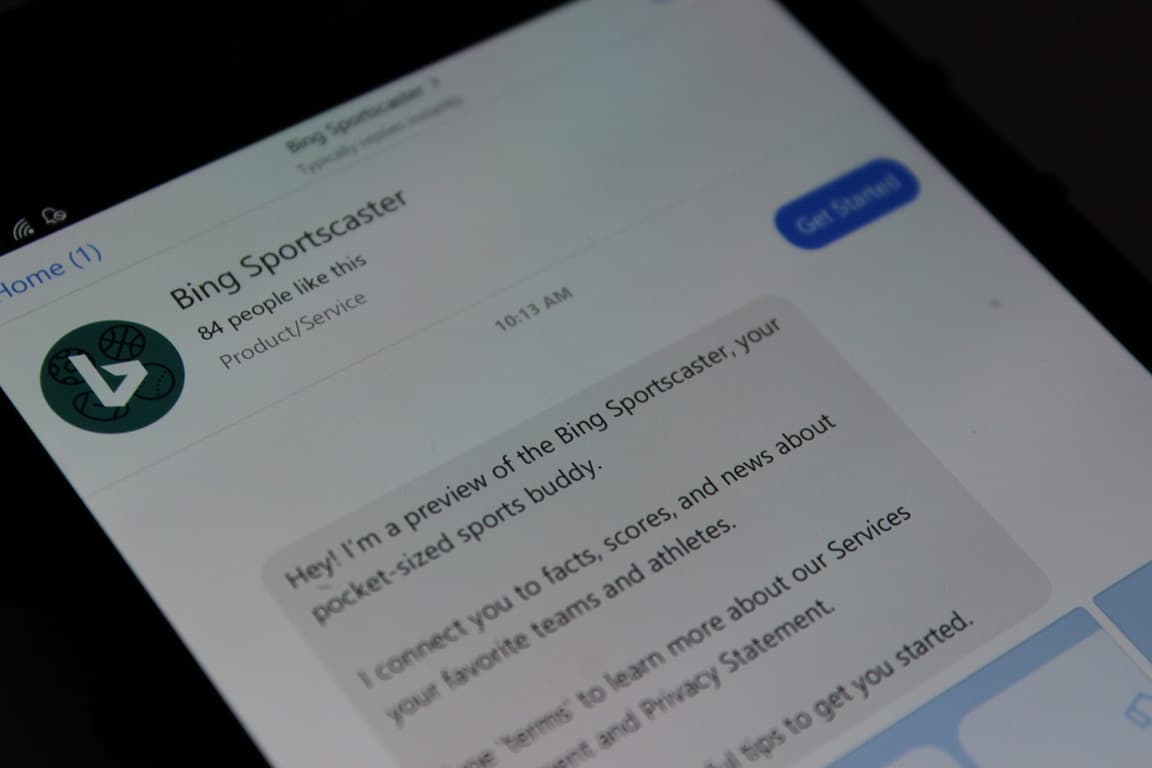
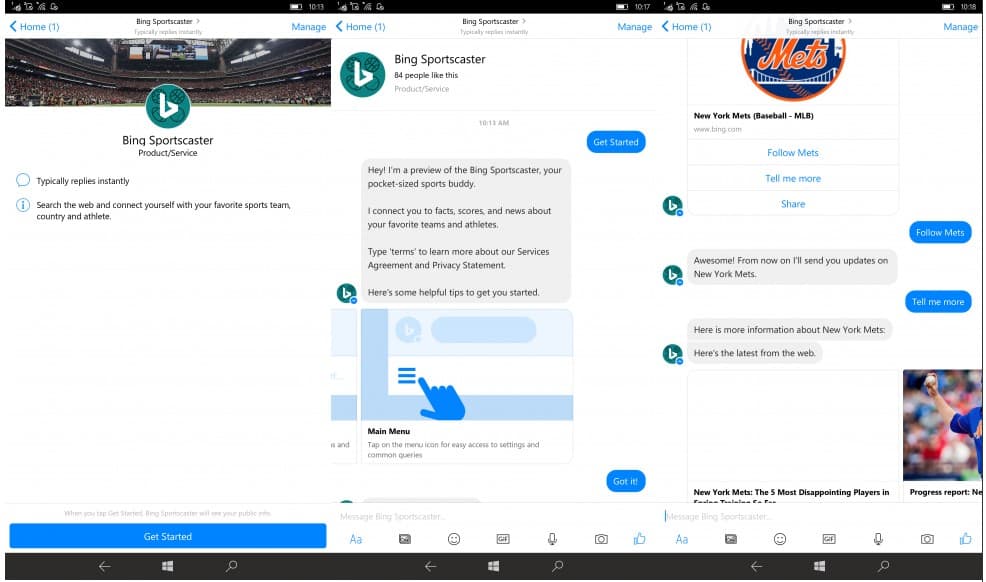
From NFL, MLB, NHL, NASCAR, and Soccer, there are plenty of sports out there to keep up with. So, if you’re too busy to follow all of your favorite sports, then you might want to check out the Bing Sportscaster bot, a new Facebook Messenger bot which is designed to get all the news you want about your favorite teams and players.

To get started with the Bot, all you need to do is head over to Facebook Messenger and start a new message with “Bing Sportscaster.” You can then tell Sportscaster your favorite team’s name, and the bot will take everything from there. For NCAA basketball, the Bing Sportscaster bot can show you the team schedule, and even who Bing predicts thinks will win the game. Additonally, you also can follow NCAA basketball teams and get messages when there is a scoring play or other interesting news.

Bing Sportscaster
Bing Sportscaster

For extra security in knowing that you won’t miss out on your favorite team, you also can keep your schedule clear of any conflicts at game time by using Outlook’s Interesting calendars. Do you think it’s cool that the Bing team created a Bot to help you keep up to date on your sports? As always, we invite you to check out this Bot for yourself, and would love to hear your thoughts in the comments below!


EA Access subscribers can now try Mass Effect: Andromeda for free on Xbox One

EA/Origin Access subscribers can now play a 10 hour free trial of Mass Effect: Andromeda before the game’s worldwide launch next week. The Play First trial will let gamers play both the game’s campaign and multiplayer mode, and as an EA/Origin Access subscriber, you can also take advantage of a 10% discount on the game if you want to keep playing it after its release.

Over the past few weeks, EA published an interesting series of videos showcasing various aspects of the futuristic open-world game. Just like in the previous Mass Effect trilogy, you can expect exploration to be a very important part of the gameplay:

Mass Effect: Andromeda is one of EA’s most anticipated titles this year, especially after Titanfall 2 struggled to stand out against Battlefield 1 and Call of Duty: Infinite Warfare last fall. The game will be released on Tuesday, March 21 in North American and on Thursday, March 23 in the rest of the world.

Final Fantasy XV for Xbox One is over 40% off on Amazon

If you missed out on the initial launch of Final Fantasy XV, you can now save almost half off on the title online at Amazon.com. The online retail giant has the latest Final Fantasy Xbox One title in stock for the low price of $34.73, or roughly 42% off.

In case you were curious, the World of Final Fantasy XV is filled with epic action-packed battles along your journey of discovery. You play as Noctis, the Crown Prince of the Kingdom of Lucis, and you are on a quest to reclaim your homeland from the clutches of the imperial army.  You are also joined by your closest friends and take the wheel to experience a voyage like no other, travelling through the breath-taking world of Eos encountering larger-than-life beasts and unforgiving enemies. In the game, you also will learn to master the skills of weaponry and magic, channelling the power of your ancestors allowing you to effortlessly warp through the air in thrilling combat.

Will you be taking advantage of this latest offer? Let us know what you think in the comments below.

Evolve Ultimate Edition and Heavy Weapon are now free for Xbox Live Gold members

We’re about halfway through the month of March, and that means the second round of Games With Gold titles for March are now available for free for Xbox Live Gold members. This means that Xbox gamers with an active Xbox Live Gold subscription can now enjoy Evolve Ultimate Edition and Heavy Weapon on their home consoles for free!  As usual, we are including game descriptions, download links, and pricing for you below!

Evolve Ultimate Edition: March 16th- April 15th, $49.99 ERP

Join The Hunt With The Deepest And Most Diverse Selection Of Hunters And Monsters To Choose From In The Most Complete 4V1 Hunting Experience Yet.With 20 Hunters, 5 Monsters, 16+ Maps, And 5 Game Modes To Play, No Two Hunts Will Ever Be The Same. It’s Survival Of The Fittest And Any Side Can Win. Includes: Evolve Main Game, The Monster Expansion Pack, Hunting Season 1, And Hunting Season 2. 4V1: Team up with 3 friends to hunt a powerful evolving beast or go it alone as the Monster.HUNTERS: Whether you play as Assault, Trapper, Medic or Support, every role is vital to Survival.MONSTERS: Play as BEHEMOTH, GORGON, GOLIATH, KRAKEN and WRAITH, all diversely savage. RANKED PLAY: Hunt 2.0 pits you against players of equal skill. Win and climb your way up to the top of your class.OFFLINE PLAY: Experience the thrill of the hunt offline.

Heavy Weapon: March 16th- March 31st, $9.99 ERP

Sure, you can defend our way of life for free. For a while. But if you’re serious about liberty and committed to dealing out gigajoules of destructive power, there’s only one way to go.

As an extra bonus, Xbox One gamers can enjoy both of these titles for free on their consoles via Backwards Compatibility. These latest Games With Gold offers are set to expire on March 31st, so it’s best to act fast and download away! Once you’ve downloaded or played these games, feel free to drop us a comment below to let us know how the gaming experience is going for you!

Microsoft will soon begin transcribing in-game Xbox voice chats

Microsoft announced yesterday the release of a Game Chat Transcription feature on Xbox One and Windows 10 PCs, which brings speech-to-text and text-to-speech capabalities on both platforms. (Via Windows Central) Once it’s enabled, players can convert in-game voice communications into text that they can read on their screen, or have their chat text spoken aloud to other players in the game.

The new capability was introduced on Microsoft’s Accessibility blog, where the company described it as “a new way to communicate that creates a more accessible and inclusive gaming experience for everyone.” Game Chat Transcription will first be supported in the Xbox Play Anywhere title Halo Wars 2, but Microsoft plans to bring it to other games in the future. You can see how it works in the screenshot below:

Speech-to-text capability in Halo Wars 2.

To turn on the feature, you’ll have to head over to Settings > All settings > Ease of Access > Game chat transcription on the Xbox One. On a Windows 10 PC, you can enable it by opening the Xbox app and go to Settings > General > Game chat transcription.

The new capability seems definitely promising, though it’s still not clear if there will be some limitations: will it work in games that support cross-play multiplayer between Xbox One and Windows 10 (Halo Wars 2 doesn’t)? And more importantly, will Microsoft work with game developers to enable it on PC games that are not sold on the Windows Store? That would make sense, considering that Microsoft wants more PC gamers to use built-in Windows 10 features such as Game DVR, the upcoming Game Mode and its Beam live-streaming service.

Do you think Game chat transcription is a nice to have feature for gamers, and do you hope to see more games support it going forward? Let us know your thoughts in the comments below.

Exportizer helps you copy, edit, and export databases on Windows XP/Vista/7/8/10

If you are interested in converting databases from one format to another, you might want to take a look at Exportizer, a tool that lets you view, filter and copy a database to the clipboard to initiate a conversion. The program works with databases through the ADO or BDE interfaces.

You can convert DB, DBF, text, CSV, XLS, RTF, XML, HTML, DBF, PDF, SLK, DOC, and SQL script as dbf to txt, txt to xls, dbf to csv, txt to dbf, and other formats. The program is easy to install and comes with an intuitive environment, with a simple user interface comprised of a menu bar, a few buttons, and a panel to show database content. If you have a basic knowledge about databases, using Exportizer should be a no-brainer.

Exportizer features

Exportizer also allows you to perform the following tasks:

  • Open file-based database tables (.db, .dbf, .txt, .csv, .xml)
  • Open tables from multi-table database files like XLS, XLSX, XLSM, XLSB, MDB, ACCDB, HTML, GDB, IB, FDB, UDL, and other multi-table databases like ODBC data sources etc.
  • Browse data
  • Edit data
  • Ability to specify custom increment number for Increment Field Value function
  • Export to text file (with field separators or fixed length fields)
  • Export to CSV file
  • Export to HTML document
  • Export to XLS file
  • Export to XML document
  • Export to RTF document
  • Export to PDF document
  • Export to SYLK file
  • Export to DBF III, IV, V
  • Export to SQL script
  • Export to Excel (OLE) workbook
  • Export to Word (OLE) document
  • Export to Excel (XLSX) workbook
  • Export to Excel (XML-based) format
  • Export to DATABASE of any format, supported by ODBC, OLE DB, and connection string interfaces
  • Export data from all (or selected) files, which are located in one folder, or all (or selected) tables from a multi-table data source, at once (from interface or via command line)
  • Use extra export modes like Append, Empty+Insert, Update, Append+Update, and Delete
  • Using template file when exporting to HTML
  • Using dynamically calculated expressions when exporting to text file
  • Open and export databases through the command line
  • Use extra command line options like /Silent, /LogFile, /CloseOnError etc.
  • Copy data to clipboard
  • Print data
  • Build custom SQL queries
  • Enhanced database grids, which allow to view and manipulate the data in the most convenient way, including sorting by clicking column header, changing row heights, resizing columns, using single record view mode etc.
  • Filter data according to user’s criteria
  • Export images from BLOB fields
  • Edit and export databases to the Clipboard or other formats

You can also duplicate records and field values, edit and remove bookmarks, hide or display certain columns, and print tables. In addition to its numerous features, Exportizer has a quick response time and does not interfere with your PC’s performance. You can download the program from Vitaliy Levchenko Software.

RELATED STORIES YOU NEED TO CHECK OUT:

Visual F# tools now have a new nightly release schedule

It was announced a few days ago, and it’s finally a reality – Visual F# Tools will be getting nightly updates.  The proper announcement came in a blog post from the Visual F# team today, where they covered all of the most important information for developers who want to sign on with the new update model.

https://twitter.com/_cartermp/status/842070115797495808

The Visual F# team strongly suggests that developers start getting the nightly builds, as they’ll frequently be filled with important bug fixes and tweaks that will help tune the experience. If you want to learn just how to start getting your nightly updates – and to get an idea about what these updates will entail – you can check out the team’s blog post. Enjoy!

Microsoft’s Project Torino helps visually impaired kids participate in coding classes

As it stands now, teaching younger children how to write code is still a new art – certainly not one that’s been perfected. One of the primary ways to do it takes the form of programs like Scratch, which has users arrange pieces of code together in colored blocks. Microsoft’s Project Torino plans to bring that concept to the physical realm, opening up coding avenues for the visually impaired and other challenged learners.

Microsoft wrote up a blog post talking about the inception and development of the project, and it’s an excellent read. The researchers behind Torino insist that development was a group effort with the children, noting that “We thought we were going to be doing something for them but we ended up designing with them.”

The beta period for Project Torino isn’t here yet, but the Microsoft Research team has put up a mailing list to sign up for if you’d like to stay up to date on things. When the team starts offering units for testing, you’ll get notified.

Microsoft details the top 10 grammar mistakes made in Word and Outlook

When you’re typing up a storm in Microsoft Word, or writing an email in Outlook, there no doubt will come a time when you’ll be faced with some grammar and spelling errors. With that being so, have you ever wondered how your errors stack up against other users? Well, a recent report done by the folks at Business Insider revealed the top 10 grammar mistakes in Outlook and Word according to Microsoft.

According to the report, which used data from “millions of subscribers,” to Word and Outlook, the top mistakes include leaving too many white spaces between words, missing commas, missing hyphens, and more. Please have a look at the list which Microsoft compiled below.

  1. Leaving too many white spaces between words
  2. Missing a comma
  3. Missing a comma after an introductory phrase
  4. Missing a hyphen
  5. Incorrect subject-verb agreement
  6. Incorrect capitalization
  7. Mixing up possessive and plural forms
  8. Incorrect agreement with noun phrases
  9. Commonly confused words
  10. Incorrect verb form after auxiliary

Have you ever made one of these mistakes? If you have, you may want to check out Editor and Researcher, new tools in Microsoft Word and Outlook which will help you become a better writer. There won’t be a need to feel bad, either, since writer, speaker and self-proclaimed millennial expert, Maxie McCoy used the new Office Research and Editor tools to write a book.

OneLogin extension is now available for all in Windows 10 Edge

Microsoft has announced via Twitter that the OneLogin extension is now available for all users to install on the Microsoft Edge web browser. The extension provides single sign-on (SSO), password management, and identity management (IAM) for organizations that embrace cloud computing.

Key Features for OneLogin include the fact that the extension Provides a list of all online accounts and company apps and also allows users to sign in to any app or online account with a single click. According to the Windows Store listing for the extension, because OneLogin itself is hosted in the cloud, you can get up and running in a matter of minutes. The extension is also pre-integrated with popular business applications such as Salesforce.com, NetSuite, Google Apps, Zoho, Sugar CRM, GoToMeeting, Yammer as well as personal applications like Facebook and Twitter.

OneLogin for Edge
OneLogin for Edge
Developer:
OneLogin
Price:
Free

Microsoft Teams makes it to Good Morning America on ABC, watch it here

If you watched ABC’s Good Morning America this morning, you may have seen Microsoft Teams being featured in the show’s “Boosting your Business” segment. For those unfamiliar with the morning TV show, this two minute sequence is sponsored by Microsoft and provides tips for entrepreneurs and small businesses looking to unlock their productivity and creativity.

As noted by Microsoft, today’s episode featured career expert Maxie McCoy visiting WeWork, a New York-based provider of co-working and office space. While speaking about collaboration tools with the WeWork Creator Awards team, McCoy presented various Microsoft Teams features that helps teams stay on the same page.

WeWork may not be completely unfamiliar with Teams as the company is already an Office 365 customer. As Microsoft Teams is now generally available to all Office 365 commercial customers, it seems likely that many organizations that already use the Microsoft Cloud will start experimenting with Teams. According to Microsoft, more than 50,000 organizations have started using the new chat-based workspace during the preview period.

Microsoft is #2, but way behind Google in US search ad revenue

Microsoft’s US search ad revenue is expected to keep growing over the next two years, but the company will also continue to trail far behind market leader Google. This what noted eMarketer in its latest report on the US digital ad market, which sees Google claiming 77.8% of US search ad revenues this year and 80.2% in 2019 (via Search Engine Land).

In comparison, eMarketer is forecasting Microsoft’s share of US search ad revenues to decrease from 7.6% this year to 6.6% in 2019, with search revenue still growing from $2.79 billion to $3.02 billion in the same period. While Microsoft will remain #2 over the next two years, eMarketer sees Yelp and Amazon have the strongest growth rates US search ad revenue and a very slight growth for Yahoo, AOL and Ask.

eMarketer US Search ad revenue Bing

According to eMarketer forecasting analyst Monica Peart, Google will continue to thrive thanks to more consumers using the search engine on their smartphones. “Google’s dominance in search, especially mobile search, is largely coming from the growing tendency of consumers to turn to their smartphones to look up everything from the details of a product to directions,” she explained. “Google and mobile search as a whole will continue to benefit from this behavioral shift,” she added.

“Bsplayer Exe an Error Occurred in the Application” Error

When it comes to multimedia, everybody has its own favorite multimedia player. Some users prefer using the default applications, while others use third-party tools such as BSPlayer. Speaking of which, some Windows 10 users reported certain issues with BSPlayer. According to them, they are getting bsplayer exe an error occurred in the application message. This error will prevent you from using BSPlayer, but there are few ways to solve this problem.

“Bsplayer exe an error occurred in the application” error, how to fix it?

Fix – “Bsplayer exe an error occurred in the application”

Solution 1 – Make sure that BSPlayer is added to the list of exceptions in your antivirus

Antivirus is one of the most important applications on your PC. Security software will protect you from harmful files and malicious users, but sometimes antivirus can cause certain problems. According to users, Avast can sometimes detect BSPlayer as a suspicious application and prevent it from running. This will usually generate bsplayer exe an error occurred in the application error. To fix this problem, you need to add BSPlayer to the list of exceptions in your antivirus.

If that doesn’t help, you might want to try disabling your antivirus or removing it from your PC. If removing the antivirus solves the issue, you might want to consider switching to a different antivirus software.

Solution 2 – Downgrade LAV Splitter

Sometimes LAV Splitter software can interfere with BSPlayer and cause bsplayer exe an error occurred in the application error to appear. If you have this problem on your Windows 10 PC, we recommend that you install the latest version of LAV Splitter. If the issue persists, downgrade to the older version of LAV Splitter. Several users reported that their issue was fixed after installing an older version of LAV Splitter, so be sure to try that.

Solution 3 – Reinstall your graphics driver

Your PC relies on graphics drivers in order for multimedia to work. However, if your drivers are corrupt or not the latest, you might experience bsplayer exe an error occurred in the application error on your PC. To fix the problem, you need to reinstall your graphics card driver. This is a relatively simple procedure, and you can do it by following these steps:

  1. First, you need to open Device Manager. To do that press Windows Key + X and choose Device Manager from the list.
  2. When Device Manager opens, locate your graphics card, right click it and choose Uninstall from the menu.
  3. Confirmation dialog will now appear. Check Delete the driver software for this device and click OK.
  4. Wait for the driver to uninstall.

In addition to using Device Manager, some users are recommending using a dedicated driver management tool that will help you safely remove faulty drivers and also install the newest version.

It is highly recommended to use such tools because they will automatically identify what type of driver you need for your hardware. This removes the risk of permanent damage that may come with installing faulty drivers.

An automated driver updater software can also repair your damaged drivers and detect whether there are any missing drivers in your system and install them in just a few minutes.

The tool is able to constantly keep your drivers in check with regular automatic scans and updates.

⇒ Get Fortect Driver Updater

Solution 4 – Update / reinstall BSPlayer

If bsplayer exe an error occurred in the application message is preventing you from running BSPlayer, you might need to reinstall it or update it. This is a simple process, and you just need to do the following:

  1. Press Windows Key + I to open the Settings app.
  2. Go to the System section and navigate to Apps & features tab.
  3. List of all installed applications will appear. Locate BSPlayer on the list, select it and choose Uninstall option.

Another way to uninstall BSPlayer is to use Programs and Features. To do that, follow these steps:

  1. Press Windows Key + S and enter programs. Select Programs and Features from the list.
  2. When Programs and Features window opens, locate BSPlayer and double click it to uninstall it.

After uninstalling BSPlayer by using one of the aforementioned methods, download the latest version of BSPlayer and install it. After doing that, the error message should be fixed.

Bsplayer exe an error occurred in the application message will prevent you from using BSPlayer, but you can fix it by checking your antivirus or by updating your drivers. If that doesn’t help, be sure to reinstall BSPlayer completely.

Update: Twitter user finally gets his rare Xbox Onesie

Earlier this month a user on Twitter was contacted by Microsoft Support and offered a rare, previously thought discontinued, Xbox Onesie. These limited edition collectors items were created as part of a marketing plan by Xbox Australia in 2016 and they were mostly given to members of the press and to consumers through several online competitions. There was a reasonable level of suspicion when someone online claimed to have been offered one but the user posted a new topic on Reddit earlier today and has posted photos of his much-wanted item to prove that he was in fact telling the truth.

Xbox Onesie Update: OP Delivers!

Would you like Microsoft to start making more Xbox Onesies or would you prefer something else like the inflatable Xbox One controller which was also made for Australian Xbox One fans? Let us know in the comments below.

Utopia is an indie platformer game exclusive to the Windows 10 universal platform

UK-based game studio, Layrhead, has announced the launch of Utopia, an indie platformer game exclusive to the Universal Windows Platform (UWP) and available for Windows 10 PCs, tablets, and smartphones.

Built on the Construct 2 game engine, Utopia is exclusively built for Windows 10 Universal Windows Platform. The UWP game is available for both Windows 10 as well as Windows 10 Mobile, and the company has shared that the game would be released for Xbox One via the Xbox Creators Program in Summer 2017.

In Utopia, you play John, a cave explorer planning to escape from the danger of the utopia dark secret world. John has to escape into different portals from the cave but there is no way. Except hope. So, you have to go through dangerous obstacles throughout each level of the game.

Utopia is built for keyboard and touch-friendly controls while the support for game controller is coming soon in a future update.

While there’s a free trial demo for the game, you can grab the full edition for $1.99. The company has announced that more level updates are coming soon to the Windows Store.

Utopia™
Utopia™
Developer:
Benjamin Akhigbe
Price:
Free

Save now on some hit comedies on the Windows Store

Looking for some entertainment this week? The Windows Store is hosting the Comedy Sale from now until the 20th, offering a selection of some relatively recent comedy movies for your viewing pleasure, along with some classics. Movies like Sausage Party and Swiss Army Man are on tap for the sale, but you’ve also got access to films like Spaceballs, Hot Rod, and Dodgeball. An exceptionally strong lineup, to be sure.

The highest price tag you’ll find on this sale is just $10.99, but discounts can go as low as $2.99 if you’re looking to enjoy a dive in the bargain bin. If you’re on the east coast of the US and snowed in right now – or you’re just looking to have a lazy night sometime this week – you should definitely take a look at the selection and pick something up.

Reservoir Dogs Bloody Days is a new video game bearing the classic movie’s namesake

Reservoir Dogs is a title that many will recognize not for the mediocre video game that was released quite some time ago but for the movie that game was inspired by. The movie bears the mark of Quentin Tarantino and has become a classic which is still celebrated by enthusiasts all over. While the game wasn’t the kind that would pass the test of time, it would seem that there are people willing to give the franchise another shot.

A new Reservoir Dogs game is coming

The new supposed Reservoir Dogs video game will be available for PC and Xbox One. The game’s developer is Big Star Gaes, the company behind the popular and much discussed Hotline Miami.

Featuring something called the Time Back system, the new Reservoir Dogs game has already spawned a reveal trailer. From that piece of video, the game gives off an indie vibe for sure but it yet unknown how much of that vibe will be carried over to the actual experience.

Many are confused

As it was to be expected, reviews were mixed. From the trailer. it is hard to figure out if there are any shred of actual content related to the movie aside from character names. While it bears the name Reservoir Dogs, a lot of people failed to see anything that could tie this game to the franchise.

That’s quite understandable as from a distance it looks like the developer made a game and just slapped a well known name on it to bank some easy cash. Since the only thing made available so far was the reveal trailer, every naysayer might be proven wrong in the near future.

If the game turns out to be as much Reservoir Dogs as it can be, that still leaves out the story aspect. It is unknown if the game will try to retell the story of the movie, re-do the first game, or set itself in the past or future of the universe of the first game.

J. Walter Thompson sees Microsoft Teams beating its rivals in the team collaboration space

Earlier today, Microsoft announced that its Teams collaboration app was now generally available to Office 365 customers. The new chat-based workspace in Office 365 has been available in preview since November, and more than 50,000 different organizations have already started using it.

One of them is J. Walter Thompson, a global marketing communications agency. In a new guest post on the Office blog, Jamie McLellan, chief technology officer at J. Walter Thompson explained how embracing Microsoft Teams allowed the company to improve collaboration among its 12,000 employees. According to him, Teams can really appeal to anyone already using other Office 365 apps:

Microsoft Teams connects our organization with an interface that supports the way we work, and I have seen firsthand how diverse working styles and demographics can all flourish within the Teams framework. For the employees in our company who are excited about technology that mirrors the software they use at home, the immediate chat-based collaboration and feedback across devices and the engaging Teams interface are very familiar and appealing. At the same time, employees who prefer a structured working environment, or who are concerned with policy, find that Teams fully meets their needs as well. It’s the best of both worlds and it’s not often that you find a single tool that has such a wide appeal.

The CTO also praised the advanced Office 365 security and compliance capabilities, adding that high-security standards also matter for the company’s clients. “Clients are likely to feel safer interacting with us in a Microsoft platform like Teams as opposed to a third-party or start-up program,” he added.

Overall, McLellan expects Teams to beat its rivals in this highly competitive space. “We see it outpacing third-party tools that are not designed for enterprise collaboration, and enticing users back onto a single platform,” he explained. You can learn more about how J. Walter Thompson uses Microsoft Teams by reading the full case study.

Microsoft Teams started off on a fruit farm, now launching in over 121 countries

It’s hard to believe how far a small project can become a worldwide software program, but it’s a story that Microsoft isn’t stranger to. With Microsoft Teams becoming generally available today, the collaborative software team explained to The Verge in an exclusive interview that it’s nowhere near where it started.

In fact, Microsoft Teams was conceived as a close-knit model pitched in February 2015 to compete for business interest against Slack and Hipchat. Brian MacDonald, head of Microsoft Teams, wanted to go to offsite locations to learn more about what businesses would need for their tools. One of these, as you might have guessed, was a fruit farm in Hawaii. The other, a Las Vegas hotel room where the engineering team bunkered down.

The idea was to simulate a digital workspace that incorporated global offices and a need for remote tools. Apparently, their month at each location proved just what the coder ordered with a working prototype already built as of April 2015. According to Jigar Thakkar, engineer head of Microsoft Teams, using the early build daily helped them make it that much better.

“Every Friday we used to have these 60-second demos,” explains Jigar Thakkar, head of engineering for Microsoft Teams. “Every developer on the team would come and demo what they had built in that week to all the developers, program managers, and designers. Week after week we’d see the whole product coming together very quickly.”

When they weren’t using the prototype of Microsoft Teams, they also used competitor products to compare the two. The Teams focus on business integration in Office 365, however, makes it unique to its predecessors. It already has 150 third-party integrations and over 50,000 organizations have adopted Microsoft Teams. All before it even went generally available just earlier today.

Learn more about what’s coming to Microsoft Teams for Office 365 on its official launch event page.

Overwatch announces Orisa release date; here’s a behind-the-scenes video

Seems like Overwatch fans have been waiting just long enough, according to a Blizzard tweet posted earlier today. After months of speculation and teasing, the dev team is ready to bring Orisa out of testing and into the live game (via Tech.Mic.)

On March 21, the ‘spider tank’ modeled after the OR-15 robots in Overwatch lore will be busting onto the battlefield. Her serve and protect artificial intelligence renders her quite the capable tank, joining the lineup to fight the good fight. Blizzard also released a behind-the-scenes video showing the process. From concept, Orisa is inspired by African tones and design. Her unique place in Overwatch makes her the youngest not only in gameplay but in the game’s team of heroes.

After two weeks in PTR, this patch will be launching across PC, Xbox One, and PS4 simultaneously.

Microsoft Teams throws off preview tag, reaches general availability

Microsoft Teams, the company’s much-talked-about Slack competitor is now generally available to Office 365 commercial customers. The global launch was announced today during a live streamed event from Microsoft headquarters, where the company announced that more than 50,000 different organizations including Accenture, Hendridck Motorsports and Expedia have started using Teams during the public preview.

Starting today, Teams is now automatically provisioned within Office 365 and Microsoft hopes that its 85 million monthly active Office 365 commercial e users will quickly adopt the new offering. From the beginning, Microsoft emphasized that Teams is not a replacement for email, SharePoint, Yammer and Skype for Business but a flexible chat-based workspace in Office 365. The native integrations with the Office apps, OneNote, SharePoint and PowerBI also give Office 365 customers a big incentive to choose Teams over its competitors.

Microsoft teams channels
Microsoft Teams.

“Microsoft Teams is a digital workspace built on four core promises: chat for today’s teams, a hub for teamwork, customization options, and security teams trust,” explained Microsoft.

During the preview, Microsoft delivered more than 100 new features including built-in audio and video calling on mobile, public teams, a scheduling assistant, support for bots in channel and more. And while Teams is already highly customizable by organizations, Microsoft also announced today new integrations with SAP SuccessFactors and Trello. “These partnerships give users shared perspective on all their work without having to switch tools,” explained Microsoft.

Among the companies that are already on board with Microsoft Teams, Trek Bicycle highlighted that adopting the new chat-based workspace allowed its employees to significantly improve their workflow. Laurie Koch, Vice President, Global Customer Service, Trek Bicycle, explained:

Across Trek’s global teams, the integrated collection of Office 365 applications serves up a common toolset to collaboratively drive the business forward. We see Microsoft Teams as the project hub of Office 365 where everybody knows where to find the latest documents, notes, and tasks, all in-line with team conversations for complete context. Teams is quickly becoming a key part of Trek’s get-things-done-fast culture.

Microsoft is committed to improving Teams with new features in the coming months: in June a new update will bring guest access capabilities, deeper integration with Outlook and a richer developer platform. “Expect our pace to be rapid and responsive to customer needs,” explained Microsoft. If you want to learn more about the Teams, make sure to follow Microsoft’s Ask Us Anything session on March 22nd at 9:00AM PST on Microsoft’s Tech Community website.

Resident Evil: Revelations is bleeding over to Xbox One later this year

Survival horror video game Resident Evil: Revelations will be re-released on the Xbox One in Fall 2017, Capcom announced on Twitter yesterday (via Polygon). The game originally launched on the Nintendo 3DS back in 2012, but an HD version of the game was released a year later on Windows, the Xbox 360 and other 7th gen consoles.

Resident Evil: Revelations will be the last remastered episode to land on the Xbox One following the launch of Resident Evil 4, 5 and 6 last year. The game is set between the events of Resident Evil 4 and Resident Evil 5 and features fan-favorite characters Jill Valentine and Chris Redfield. The action takes place aboard a ghost ship in the Mediterranean Sea where players have to fight off a bioterrorist organization trying to infect the Earth’s ocean with a deadly virus.

Capcom shared that the game will be available in both digital and physical editions, and we should get more details about features and pricing in the coming weeks. If you didn’t play the game on other platforms already, let us know in the comments if you’re looking forward to discovering it on the Xbox One.

‘The Great Wobo Escape’ is the latest Windows Store game from Game Troopers

Game Troopers has always been known for their loyalty to the Windows Store, and the developer is at it yet again and has released “The Great Wobo Escape” for Windows 10 PC and Windows 10 Mobile. As always, we’ve included all the details for you below, complete with a download link.

As noted by Windows Central, the game is available for $7.99 and even supports Xbox achievements. In the world of “The Great Wobo Escape,” you’re alone and unarmed, and your only chance is to hide in shadows and use the environment to your favor while crushing dieselpunk enemy robots. You must also create diversions and chaos, and use stealth approaches, shift into fast-paced escape mode to be successful in this game. Other features of the game include the following.

  • STEALTH & ACTION Fast-paced action-filled stealth game full of puzzles, deadly enemies, hidden passages, dangerous traps and tricky hazards.
  • BEAUTIFUL 3D GRAPHICS Pushing limits of mobile devices with detailed, high-res textures, environments and characters.
  • VISUALLY UNIQUE Unique visual style – play as a futuristic high-tech robot, fight dieselpunk enemies of various sizes and shapes.
  • SCI-FI STORY Rich story in an absorbing sci-fi world exploring a thin line between a machine and a living intelligence, where colony’s AI went rogue and persecutes robots.
  • FAMILY FRIENDLY FUN Approachable by young audience – no blood, just a comic mischief with a pinch of sabotage towards evil robots!
  • CONSOLE-LIKE EXPERIENCE Enjoy playing in 1080p* resolution and full gamepad controller support.

What are your favorite Windows 10 and Windows 10 Mobile games? Let us know your thoughts in the comments, and feel free to check out the game by clicking below!

The Great Wobo Escape
Developer:
GAME TROOPERS
Price:
Free

The best secure chat software to protect your privacy online

One of the most popular ways to communicate with others online is via instant messaging software. There are many great chat clients available online, but not all of them protect your privacy. Even though many clients encrypt their messages, that doesn’t mean that the provider can’t read them. If you’re concerned about your privacy and you’re looking for secure chat software for Windows 10, you might want to check out some of the tools from our list.

What is the best secure chat software for Windows 10?

CryptoCat

CryptoCat is free chat software for Windows, Linux and Mac. Unlike many other chat programs, CryptoCat encrypts your data before it leaves your computer. This means that the service provider is unable to read your messages. This makes communication with your friends completely secure from malicious users and third-parties, including your provider. Regarding your privacy, CryptoCat uses forward secure encryption, certificate pinning, code signing, and open source publication.

In addition to being free, CryptoCat is also open source, so anyone can examine the code and suggest future improvements. As we previously mentioned, every message in CryptoCat is encrypted by default, thus remaining completely secure and only visible to you and your contacts. Thanks to the forward secure technology, your message will remain secure even if the security keys are stolen by third party. It’s also worth mentioning that users will receive message even when offline. Lastly, the application supports secure file sharing, so you can easily and securely share files with your contacts.

CryptoCat is completely free and multi-platform chat software. The application is simple to use, and if you want to keep your chats secure and private, feel free to try this application out.

  • READ ALSO: New Notepad update fixes Vault 7 privacy vulnerabilities

Signal

If you’re looking for a secure chat software, Signal might be the best choice for you. Signal is an Android and iOS app, but there’s also a Chrome extension available. Before you can use Chrome extension on your PC, you need to install the application on your iOS or Android device. After that, you need to use the QR code to verify your PC. Once the verification process is complete, you’ll be able to have secure chats from your PC with ease.

The application works like any other chat client, and it allows you to send text, pictures and videos to your contacts. We also have to mention that application supports group texts as well. The application uses your phone number and your address book, so there’s no need to add your contacts again.

Signal encrypts your messages using end-to-end encryption so your message will remain secure at all times. Your messages are completely secure and not even Signal or your service provider can read them. The application also allows you to archive your messages, so it’s rather easy to keep your important messages.

Application also allows you to make free calls, and all your voice calls are completely private. Signal is a great application, and it’s completely free. In fact, the application doesn’t have any ads and it fully relies on community donations. If you want to protect your privacy online, Signal is one of the best applications. However, in order to use it on your PC, you need to install it first on your Android or iOS device.

Jitsi

Jitsi is another free and multi-platform chat software. The application offers secure text chat and video calls. In addition, Jitsi supports conferencing, desktop sharing and file transfer. Regarding desktop sharing, this application allows you to share your desktop with any user that has video capable XMPP or SIP client. In fact, you can even allow other Jitsi users to interact with your applications.

  • READ ALSO: Windows 10 Creators Update adds more control to update installation and privacy

The application encrypts all communication, so your messages won’t be visible to third parties. Jitsi is available for Windows, Mac and Linux, and since it’s completely free, there’s no reason not to try it. The application might be bit harder to use than our previous entries, so Jitsi might not be the best solution for first-time users.

Pidgin

Another great chat software for Windows is Pidgin. This application allows you to work with wide range of chat networks. Pidgin supports AIM, Google Talk, IRC, XMPP, Yahoo, ICQ and many other chat networks. In total, the application supports 15 different chat networks. If you need support for more chat networks, you can get it by using one of many available plugins.

Pidgin supports file transfer, away massages, buddy icons, custom smilies and many other features. The application offers simple user interface, and it allows you to connect to different chat networks simultaneously. We have to mention that setting up different chat networks is relatively simple, but in order to use different chat networks you need to configure them properly first.

Pidgin is a universal chat software, but its main strength is in its plugins. Pidgin supports various plugins that can bring new features and improve your security and privacy online. If you want to have secure chats with your friends, be sure to download and install the appropriate Pidgin plugins. One plugin that can help you protect your privacy is Off The Record plugin, so be sure to download it.

RetroShare

If you’re looking for a free and secure chat software, RetroShare might be just what you need. This application is completely decentralized and it doesn’t use any servers. It’s also worth mentioning that the application is open source and free, so you can distribute it and use it without any restrictions. In fact, the application doesn’t even have ads, which is also a major plus.

  • READ ALSO: Windows 10 privacy gets major changes to win over suspicious users

Just like any other chat software, RetroShare allows you to send text or images. If you want, you can also chat with various people in chat rooms. The application uses distant chat feature that allows you to chat securely with your friends’ friends. In addition to text messages, RetroShare allows you to make video and voice calls thanks to plugins.

This application also supports encrypted email messages. This means that you can send secure messages to other members of the network. The application will deliver emails to your friends, even if they are currently offline. RetroShare also supports file sharing within your network. The application uses swarming system similar to the BitTorrent thus providing you with fast transfer speed. The tool supports large files, and your privacy will be protected while sharing files with others. RetroShare uses anonymous tunnels, and only your friends can learn which files you download.

Another feature is the ability to write and read forum posts online. The application supports decentralized forums, so you won’t have to worry about censorship. There’s also support for channels, and you can even publish files to channels in order to share them. It’s also worth mentioning that this application works with Tor and I2P, so you can hide and protect your IP address.

RetroShare offers wide range of features, and if you’re looking for secure and free chat software, this might be the perfect application for you. The application offers some advanced features, so it  might not be the best choice for novice users.

Telegram

Another secure chat software for Windows is Telegram. This application is available for most mobile platforms including Android, iOS and Windows Phone. This application also works with Mac, Linux and Windows PCs. In fact, there’s even a web version so you can use this tool on almost any PC or operating system.

Just like many other chat applications, Telegram allows you to connect with others and send messages and files. The application allows you to create groups, and you can create groups up to 5000 members. As we already mentioned, this is a multi-platform application, and all your messages will be synced across all your devices. Application also supports encryption, and you can even auto delete your messages after a predefined time period.

Telegram offers fast massage delivery and encryption, so your messages will remain private at all times. Since all your messages are encrypted, they will remain safe from third parties and hackers. It’s worth mentioning that this application is free, and it doesn’t have any subscription fees or ads.

Telegram is a simple chat application that will protect your privacy online. We have to mention that there’s a portable version available, so you can use it on any PC without installation.

Wire

If you’re concerned about your privacy, and you don’t want companies to sell your personal information to advertisers, you might want to consider Wire. According to the developer, Wire uses high-quality encryption that protects data. This application supports text, voice and video, and each message will always be encrypted end-to-end. We also have to mention that this tool supports secure group chat. Since this is a multi-platform application, all your conversations are available on multiple devices.

All messages are encrypted on your device before sending, and they can only be decrypted by the receiver. Wire doesn’t have any decryption keys on their servers, so your messages will remain protected even from Wire. If you want maximum protection, you can also verify identify of other users thanks to the fingerprint scanner. The application also supports encrypted file sharing as well as voice and video calls.

Wire offers amazing features, and it’s completely open source and free to use. If you’re looking for a secure chat software, Wire is probably one of the most secure applications available.

Tox

Another secure chat software that we want to show you is Tox. Just like any other chat software, Tox allows you to send text messages or to have voice or video calls. Of course, all your text messages and video and audio calls are encrypted and completely private. The application supports both screen sharing and file sharing, so you can easily share your files with others. Tox also supports group chats and calls, thus allowing you to easily communicate with multiple people.

As we already mentioned, all data sent trough Tox is encrypted by using open-source libraries. In addition, Tox doesn’t use central servers for communication, which means that only you and your recipient can see your messages. Lastly, Tox is completely free, and you can download, distribute and modify it without any limitations.

Tox is a solid chat software, and if you’re concerned about your privacy online, be sure to try out Tox. Regarding availability, the application is available for all major PC and mobile operating systems.

Threema

Another secure chat software that can encrypt your messages is Threema. According to the developer, this application will store as little information as it can on its servers. Groups and contacts are stored on your device, and all messages are deleted from the servers after the delivery. The application offers end-to-end encryption which means that all your chats, group chats and files are encrypted. As a result, only you and your recipient can decrypt and view your messages.

The application offers full anonymity to the users, and each users gets a random ID. In addition, Threema doesn’t require email or phone number in order to use it. The application also allows you to verify your contacts. You can do that by scanning their QR code or by comparing key fingerprints. This ensures that you’re communicating directly to your contacts and not to a third party or malicious user.

Threema is available on iOS, Android and Windows Phone devices, but you can also use it on your desktop PC. There isn’t a desktop version available, but there’s a web version that you can access from any PC. Before you can use the web version, you need to authenticate your phone using a QR code. We also have to mention that Threema isn’t a free application, so if you want to use it, you’ll need to purchase it first.

LAN Messenger

Unlike the previous tools on our list, this one works in LAN environment. This application is perfect for your office because it allows you to chat with your colleagues. All messages are encrypted with AES-256 encryption, so they will remain protected from third parties. The application has a simple user interface, and in order to use it, you just need to install it on every PC in your network. Speaking of simplicity, LAN Messenger doesn’t require dedicated server in order to run. Instead of a server, the application users peer-to-peer connection.

Just like any other chat application, LAN Messenger allows you to send individual or group messages. We also have to mention that this application supports offline messages. This means that you can send messages to offline users, and they’ll receive them once they come online. In addition, the application supports file sharing, so you can share files easily with other users on your local network. LAN Messenger also allows you to create user groups, and it also supports Remote Desktop feature. Using this feature a college can take control over your PC remotely and help you solve a specific problem. The application also supports Message History, so you can easily keep track of all old messages. If needed, you can also restrict the access to certain features of this application.

LAN Messenger is a solid secure chat software, but its biggest limitation is that it only works in local environment. This means that this software isn’t the best choice for personal use, but it will be perfect for any office environment.

Pryvate

If you’re looking for a secure chat software, Pryvate might be perfect for you. The application offers free instant messages as well as voice calls. Of course, both messages and voice calls are encrypted and safe from third parties. Pryvate doesn’t have encryption keys on its servers which means that your data will remain hidden even from Pryvate. Each message is encrypted on your device, so only the receiver can decrypt it and view it. In addition, Pryvate doesn’t keep record of communication, thus keeping your messages completely private.

Pryvate Pro offers secure video calls as well as private emails. The Pro version also supports secure file transfer and secure conference calls. If you want to use Pryvate on your PC, you’ll have to purchase a Premium plan. We also have to mention that Pryvate is working on self-destructing messages, and we should see this feature available for all versions of the app in near future.

Pryvate offers solid security, so it perfect for both basic and advanced users alike. Even though the basic version is free, you’ll have to purchase a premium package if you want to use a desktop version.

BeeBEEP

This application allows you to send message securely to other users in your local network. BeeBEEP is a free application, and it’s available on all major desktop platforms. The application uses Rijndael Algorithm (AES) encryption that allows you to send encrypted messages to groups or individual users. Thanks to the peer-to-peer structure, you also easily share files with others.

BeeBEEP doesn’t use a dedicated server, but it allows you to send messages to offline users. Of course, the application supports message history, and you can see all your previous messages. The application is completely free to use, but its biggest limitation is that it only works in local network. It’s wroth mentioning that the portable version is also available, so you can run this tool without installing it on your PC.

Tor Messenger

Tor Browser is probably one of the most famous private browsers available. In addition to Tor Browser, there’s also a Tor Messenger available that allows you have secure chats. This application supports wide range of networks, and it works with Jabber (XMPP), IRC, Google Talk, Facebook Chat, Twitter, Yahoo and many others. The application also has Off The Record messaging feature enabled by default.

This tool is built on Instantbird client, and it routes all your data through Tor network thus masking your route to the server. Tor Messenger requires a bit of configuration in order to work properly, so it might not be the best choice for novice users.

Bleep

If you want a simple and secure chat software, you might want to consider Bleep. This application doesn’t require you to create an account in order to use it. To use it, simply download it and install it, invite your friends and start chatting. The application offers total privacy, and since there’s no dedicated server, your messages won’t be stored in the cloud.

Bleep also supports whisper messages that will delete themselves once you read them. This feature is great if you don’t want to leave any records of your messages. Bleep is a simple application that offers end to end encryption over P2P network thus keeping your data secure at all times. The application is available for free, and you can download it for Windows, Mac, Android or iOS.

Bopup Messenger

If you’re looking for a secure LAN chat software, Bopup Messenger might be just what you need. The application offers simple and lightweight interface, so it will be perfect even for first-time users. Bopup Messenger is designed for corporate environments, and using it you can connect all colleagues, even ones from other offices and locations.

  • READ ALSO: WhatsApp changes privacy policy, shares phone numbers with Facebook

Just like any other chat application, Bopup Messenger allows you to send chat messages and files. In addition, the application also allows you to to have group chats. We have to mention that all your messages are encrypted so third-party users won’t be able to see them. The application also allows you to send files and messages to offline users. If a user is offline, your message will be stored on the IM server. After the user comes back online, the message will be delivered.

Bopup Messenger users Terminal Server/Citrix environment, and it allows multiple users to use this application on a single PC. The application uses a central server that logs all activity and archives all messages. You can also manage messaging groups, user’s contact information and permissions from the server. The application also supports several authentication methods.

Bopup Messenger requires IM server in order to work, so you’ll have to configure a server in your office before you can use it. The server also allows you to update all Bopup Messenger clients remotely from the server.

Bopup Messenger offers secure and encrypted chat, and it even works as a portable application, so it doesn’t require installation in order to work. This application is made for corporate environment, so it might not be the best choice for home users.

Office Chat

Another secure chat software for your office is Office Chat. This application is available on smartphones and PCs, and it works on Windows, Mac, iOS and Android. The application allows you to easily organize your contacts into groups, which can be quite useful. Office Chat allows you to send message without hitting the Send button. Thanks to the Hyper Real-Time Mode, the recipient can view your message while you’re typing it. This can be useful for sharing sensitive information, since you won’t leave any record of the message.

  • READ ALSO: Windows 10 privacy concerns draw criticism from the EFF

Just like any other chat software, this application uses notifications so you won’t ever miss a message. In addition to instant messages, the application supports file sharing, and you can upload and share files up to 2GB in size. Besides files, you can also share video and audio with ease. Just like many other applications, Office Chat supports end-to-end delivery confirmation, so you’ll see when the recipient reads your message.

This software also supports self-destructing messages. As a result, selected messages will delete themselves once they’re read by the recipient. This is a useful feature, especially if you’re sharing sensitive information. The application also offers unlimited chat history, thus allowing you to view all previous messages easily. Office Chat also indexes all your messages and files, and you can easily find any message or file in a matter of seconds.

This application also offers email integration that allows users to respond to messages via email. This is a handy feature for all users that don’t have Office Chat installed. In addition, Office Chat offers integration with various business apps. The application also supports encryption, and if you purchase Enterprise plan, all your messages will be encrypted while sending.

Office Chat offers wide array of features, and it will be perfect for your working environment. We have to mention that this application requires you to purchase a yearly or monthly plan if you want to use it. Encryption isn’t available by default, and if you want to use end-to-end encryption, you need to purchase Enterprise plan.

CoyIM

Another free and secure chat software is CoyIM. This is a relatively new software, and according to the developer, the software isn’t audited, so you might not want to use it to send sensitive information. The application has Tor support, and in order to achieve the best results, we advise to install Tor alongside CoyIM. In addition to Tor, CoyIM protects your privacy by using OTR and TLS. Both OTR and TLS encrypt your messages thus protecting your privacy.

  • READ ALSO: Over 60% of Windows users would switch to MacOS for more privacy

The application is simple to use, and it doesn’t require any additional configuration. Encryption is enabled by default, so you can have secure chats simply by installing this application. We also have to mention that this application doesn’t require Tor in order to work. However, Tor can add another layer of protection, and you can turn it on or off at any time.

CoyIM is a solid secure chat software, but since it’s not audited yet, you might want to use a different client if you need to share extra sensitive information. We have to mention that this application is portable, so you can use it on any PC without installation.

Linphone

Another free and secure chat client that you might want to try is Linphone. The application is available for all major mobile and desktop platforms. Linphone offers instant messaging as well as audio and video calls. There’s also ability to pause and resume calls as well as call transfer. In addition, you can also merge calls into a conference. Just like any other chat software, Linphone offers contact list, call history and the ability to share files. In order to provide the best audio quality, the application uses echo cancellation technology. The application also works with 2G networks, and it allows you to have calls in low bandwidth mode. You can also have a call without any interruptions when switching from one type of network to another. This is useful if you start a call on Wi-Fi network and then switch to 3G.

We also have to mention that this application provides secure communication thanks to the zRTP, TLS and SRTP technologies. Linphone is a decent secure chat software, and since it’s open source, you can use it or modify it without any restrictions.

Ring

If you’re looking for a multi-platform chat software, Ring might be perfect for you. This is an open source application and it’s released under GPLv3 license. The application has an active community that is constantly improving the software. Ring uses OpenDHT protocol and decentralized communication. In addition, the application relies completely on peer-to-peer discovery and connection. As a result, Ring doesn’t use a dedicated server, therefore messages are shared only between you and your contacts.

The application is also secure and it offers end-to-end encryption with authentication. Speaking of authentication, the application offers identity management by X.509 standards. As for the security, it’s based on RSA/AES/DTLS/SRTP technologies.

The application allows you to send text messages and to perform calls with multiple contacts. In addition, Ring supports media sharing, and you can easily share video, audio or photos. Ring is still in beta version, but it offers great features, and it will allow you to have secure chats on your PC. The application is also available on Linux, Mac and Android, and there’s also a Universal app for Windows.

Bit Chat

This secure chat software is still in alpha version, which means that major changes in terms of protocol and interface can occur in the future. This also means that this application still has few bugs, so it’s not the most stable chat software on the market.

Bit Chat is an open source chat software that uses secure peer-to-peer connection. By doing so, this application provides you with end-to-end encryption. The application can work in your local network, but it can also work over the Internet. Bit Chat supports instant messages, but it also supports file transfer, so you can easily and securely share files with others.

In order to ensure your privacy, this application doesn’t use metadata. Only thing that this application requires is your email address so you can register for a digital certificate. Since this application uses peer-to-peer technology, it means that there are no dedicated servers so the communication is direct between you and your contacts.

Regarding the security, each Bit Chat profile is signed with RSA-4096 and SHA-256 certificate. End-to-end encryption uses Perfect Forward Secrecy (PFS) with DHE-2048 or ECDHE-256. Of course, there’s also AES 256-bit encryption that will keep your messages secure.

Bit Chat is still in development, but so far it offers great features to its users. This might not be the best secure chat software since it probably has few bugs, but we’re positive that developers will fix that in near future. The application is available for Windows and Ubuntu Linux, so feel free to try it out. It’s also worth mentioning that there’s a portable version available, so you can use this tool without installing it.

Cyphr

Another application that deserves a mention is Cypher. This is Android and iOS application, but according to the developer, desktop and Web version are in development. To use this application you just have to register a free account and generate your private and public key. Although the application uses a dedicated server, the server can’t read or decrypt your messages. This means that only your recipient can decrypt and view the message.

According to the developer, the application stores minimal metadata on the server. Dedicated server stores temporarily message “blobs” that are inaccessible by the server. The server also stores the recipient and the time stamp of your message. As soon as your message is received, this information is deleted from the server. The application uses public key verification in order to confirm the identity of the recipient, thus preventing man in the middle attacks. In addition, Cyphr uses symmetric, public and private keys to protect your messages.

The application also allows you to adjust the level of privacy and disable certain features if you want. Cyphr is a great application, and with its servers located in Switzerland, your messages should be completely safe. According to the developer, they can’t read or store your messages, so your privacy will remain protected. Cyphr sounds like a promising application, however, it’s only available for Android and iOS. According to the developer, we’ll see a desktop and web version in near feature, so keep an eye out for it.

Although many chat clients offer encryption, not all chat clients are secure. Popular chat applications often store messages on the server, thus allowing the provider to read and analyze your messages. We showed you some of the most secure chat software, but before you decide to download and use a specific tool, be sure to do a little research and check if the application offers the desired security and privacy features.

READ ALSO:

Check out this rare Nike Air Max 1 Atmos Xbox One console design

German shoes company, 43einhalb, teamed up with Microsoft and Nike to create a special limited edition Xbox One video game console for the Lased Up Sneakermesse shoe event in Frankfurt yesterday.

The new console design was inspired by Nike’s Nike Air Max 1 Atmos footwear and even came boxed with two specially colored Xbox One controllers and a pair of the much-hyped shoes. Only 10 units were created for the promotion and all of them were awarded to fans who visited the 42einhalb stall at the event.

Microsoft often releases design variants of its console to help promote sales and reward users and while most of these designs revolve around new game titles, occasionally some rather fascinating creations emerge such as the Year of the Monkey designs from China and Taiwan.

Do you have a limited edition Xbox One console? What do you think of this Nike one? Let us know in the comments below.

Xbox Play Anywhere title Gears of War 4 is 55% off on Amazon

Been waiting to play Gears of War 4 for Xbox One until all the reviews have been accounted for, or simply waiting to squeeze the game into a tight household or college budget?

Well, Amazon has your back by offering this late deal on Gears of War 4 for Xbox One for the low cost of $27.29. Gears of War fans can now pick up the latest installment in the franchise for a steep 55% discount and start enjoying the fan favorite split screen co-op while leveling up skills and narrowly escaping horde upon horde of enemies until their heart’s content.

For our international readers, it, unfortunately, seems the deal is only for US residents, but a quick change of location in the settings menu could net a sweet deal for anyone interested.

Head over to Amazon to see the rest of the details for this amazing deal.

ThisIsMyFile lets you easily unlock or delete protected files

As a matter of course, Windows prevents users from deleting, replacing, or moving a file when it is opened by another program. The best thing to do, therefore, to delete or alter protected files is to look for the program that is using the file in question and end the process.

However, rummaging through a mass of files could be arduous. Thanks to ThisIsMyFile, you have a tool that displays the locked and/or protected files and lets you modify or delete them.

ThisIsMyFile has a simple layout and quick options to add the file or folder that you intend to unlock, delete or modify. There are three methods to add the target file or folder: use the browse button to search for the file, drag and drop the file in the main window, and drag and drop the file on top of the ThisIsMyFile icon or desktop shortcut.

Features

The program’s features include:

Create a copy

  • If you want to copy the file before delete it.

Only info

  • Shows who program that taken the file.

Unlock only

  • Only unlock the file not deleted

Reboot & Delete

  • For very stubborn candidates, activate this option.
  • The system will be shut down and the file and folders will be deleted at system startup.

Reboot & Delete without request

  • There is no query, whether the file / directory is locked.

Process killer

  • Can be found under “More ThisIsMyFile”. This can be used to terminate or kill specific processes.
  • Info: In some cases it is enough, to kill or to terminate the program that has several files and folders in use.

More ThisIsMyFile

  • Here you can see more details about the locked files.
  • The process killer can be used here, Selects the process or program and terminate it.
  • Info: Automatically starts when deleting or unlock directories.
  • Use this in any case when it comes to the delete or unlocking of loaded modules (DLL-s).

Select files

  • Simply drag and drop the locked file to ThisIsMyFile and perform the desired action!

Program Parameters

  • For example: ThisIsMyFile.exe c:\file1.txt c:\file2.txt “c:\file with spaces.txt”
  • The Files with blank e.g. spaces, please always start with and end ‘”‘.

You can download ThisIsMyFile from SoftwareOK.com and check out the program.

RELATED STORIES YOU NEED TO CHECK OUT:

Microsoft announces Dynamics 365 for Operations preview release next month

Once again, Microsoft is opening up one of its services and expanding its preview program to include on-premises Dynamics 365 for Operations. The new program will be open to eager testers next month in April allowing customers to test three different deployment options which will include on-premises/local version specifically for its Dynamics 365 for Operations ERP product.

According to a report from ZDnet’s Mary Jo Foley, Microsoft made the announcement earlier today that detailed the company’s rebranding of its Dynamics AX7 and its combined Dynamics 365 CRM and ERP efforts to Dynamics 365 for Operations along with plans to release both the hybrid and the on-premises versions of Dynamics 365 later this summer.

“In order to obtain the on-premises/local version, customers will need a Dynamics 365 for Operations license with Software Assurance/Enhancement Plan or a subscription model.”

Despite today’s announcement, Microsoft was relatively scant on the details and Foley believes there will be more news revealed in Seattle, Washington at the company’s Dynamics 365 Tech Conference this week.

We’ll update accordingly.

Skype extension for Google Chrome expands integration in latest update

Those who prefer Google Chrome as their preferred browser often do so praising its massive library of extensions. Even Microsoft has its hands in the competition’s interface through the popular Skype extension, which boasts over 10,000,000+ users on Chrome’s Web Store alone. Today, the Skype extension was updated to expand integration into email, calendars, and social media.

Until now, the Skype extension for Google Chrome was mainly a way to access Skype for Web on the fly, making calling significantly easier. With the integration into these everyday tools, users can create/insert Skype call links with the convenient browser button.

The announcement post by the Skype Team explains as follows:

  • Email – Add a Skype call link from within the email composition window in Gmail, Google Inbox, and Outlook.com.
  • Calendar – Create Skype call links right inside your calendar items in Google Calendar and Outlook.com.
  • Twitter – Add a Skype call link for an “Ask Me Anything,” webinar, or open meeting while you’re composing your tweet.

You can download the Skype extension in the Google Chrome store to install it easily into that browser.