Microsoft to lower Windows 10 licensing for low-cost notebooks on March 1, says DigiTimes

PC sales have been on a steady decline for the last five years according to recent reports from Gartner and IDC, but Microsoft may well try to do something about it this year. Indeed, Taiwan-based supply chain makers told DigiTimes that the Redmond giant has agreed to lower Windows 10 licensing rates for under 14.1-inch low-cost notebooks to be launched in 2017. The Taiwanese newspaper added:

2017 licensing rates will come into effect on March 1, the sources said. As usual, charges vary with notebook screen size, emerging markets and markets in developed countries, high-end, mid-range and entry-level models, and type of notebook such as 2-in-1 hybrid or conventional clamshell, the sources indicated.

DigiTimes’ sources also indicated that Chromebooks are becoming increasingly attractive to manufacturers as Google doesn’t charge a license for Chrome OS. Anyway, it seems that Microsoft already had other plans to compete with Chromebooks: a month ago, the company announced that it was working on a new Windows 10 on ARM SKU that will allow manufacturers to build cheaper laptops that can run all legacy Win32 apps through emulation. Licensing details for this new SKU are not not known yet, though we expect these ARM-based laptops to be cheaper than Intel-based ones.

Former Microsoft veteran Soma Somasegar promoted to Managing Director at Madrona Ventures

Former corporate vice president of Microsoft’s developer division chief, S. “Soma” Somasegar, has been given the new role of managing director at venture capital firm, Madrona Venture Group.

“Madrona is in a unique position,” Somasegar told TechCrunch. “We sit at the center of the cloud industry with Microsoft and Amazon at our front and back doors – and Google’s cloud team growing quickly. There is a tremendous amount of talent base here.  The opportunity for entrepreneurs is immense and I’m looking forward to taking on a bigger role helping founders build and scale successful companies, which in turn will foster the vibrant and growing Pacific NW technology ecosystem.”

Somasegar joined Madrona as recently as 2015 when he came on board as venture partner after his stint at Microsoft where he worked on programs such as Visual Studio and .NET. Madrona Venture Group is known for its support of entrepreneurs in the tech industry. “One of the most valuable benefits we offer is a deep network to help founders grow their startups,” reads a statement on their official website. “We’re connected to global technology and consumer companies, world-class educational institutions, and a vibrant entrepreneur and engineering community.”

Would you like to hear about more ex-Microsoft employees? Let us know in the comments below.

Beam video game streaming service could use a new Xbox One feature

When asked if Microsoft’s own video game streaming service, Beam, would be snappable on the Xbox One when it launches in the near future, Mike Ybarra responded with a rather cryptic reply, “Better than snappable”, that left followers equally excited and scratching their heads.

Right now, multitasking on the Xbox One requires the snapping of an app to the side of the screen in a similar fashion to how apps are snapped on a Windows 10 PC or tablet. Twitch’s gaming streaming app on Xbox One currently incorporates this functionality and it was assumed by many that Beam would do something similar. Guess not.

Microsoft and Beam staff have stated several times in recent months that, while there will be a Beam app for Windows 10 and Xbox One, the service itself would be built into the Windows 10 operating system, which is what the Xbox One now runs on.

In the same Twitter thread, a Windows platform developer, Martin Suchan, mentioned coding in an early version of the Windows 10 Creators Update that makes reference to a new ‘AppOverlay’ feature on Xbox One. While there’s not much to go on, the text shown does imply that future Xbox apps could be positioned over content rather than pushed aside and snapped like they are now. There are also visible options for app opacity, size, and even pinning. It’s possible that this new overlay ability could work in a similar way to how the Windows 10 Xbox app’s recording feature works right now.

Microsoft bought Beam in 2016 and has rapidly been seen building up the company from within and attracting more streamers to the platform. Beam will be getting a major push sometime in early-2017 though no specific dates have been mentioned. In addition to being incorporated into Windows 10 devices, there are also numerous new Beam apps planned for mobile devices and a variety of new features planned.

Do you use Beam? Let us know your thoughts on the video game streaming service in the comments below.

Fix: “Please uninstall KB3172605 and/or KB3161608 before installing this driver” error

Many Windows 7 users report they are randomly getting a strange cmd.exe error, inviting them to uninstall two updates in order to install a driver. This annoying error message has been nagging thousands of Windows 7 users for since Monday.

Lenovo computer owners are affected by this bug

Judging by the comments that Windows 7 users posted on Microsoft’s forum, it appears that this error message is prevalent for Lenovo computer owners. Also, it seems that this error occurs on particular Lenovo computers. Users confirm that the following Lenovo computer models are affected: Lenovo T440, Lenovo Thinkpad W540, Lenovo W541 and Lenovo T540.

Here is the exact error message that appears on the screen:

KB3172605 and/or KB3161608 are installed in your system. Please uninstall KB3172605 and/or KB3161608 before installing this driver.

The message is clearly referring to a driver that the system is trying to install. Strangely enough, there are no alerts or notifications of any kind in Device Manager.

All clues indicate that Lenovo pushed out a System Update that is trying to change a driver from the KB3172605, KB3161608 roll-up.

Fix KB3172605, KB3161608 error on Lenovo computers

After analyzing his computer’s log, one resourceful users managed to identify the culprit. He found a scheduled task on his machine called TVSUUpdateTask, that executes “C:\program files (x86)\Lenovo\System Update\tvsuShim.exe (etc…)“.  This confirms indeed the hypothesis that the error is caused by a recent Lenovo system update.

More info that answers this better – I found a Scheduled Task on my machine called TVSUUpdateTask, that runs at 10:53am every Monday, and executes “c:\program files (x86)\Lenovo\System Update\tvsuShim.exe (etc…)”. I changed it to run 3 minutes in my future, and waited. Within a minute following it’s start time, it popped up the error prompt. So I’m satisfied that it is specifically this bluetooth update within the Lenovo System Update tool that is indeed the culprit for the past error prompts I’ve experienced.

To fix this error, use the following workaround:

  1. Create a valid system image
  2. Uninstall  KB3172605 and KB3161608
  3. Let your system install the latest Lenovo system update
  4. Manually download KB3172605 from the Microsoft Update Catalogue website.

This should fix the problem.

RELATED STORIES YOU NEED TO CHECK OUT:

Xbox tallies biggest sales month ever in December, says Aaron Greenberg

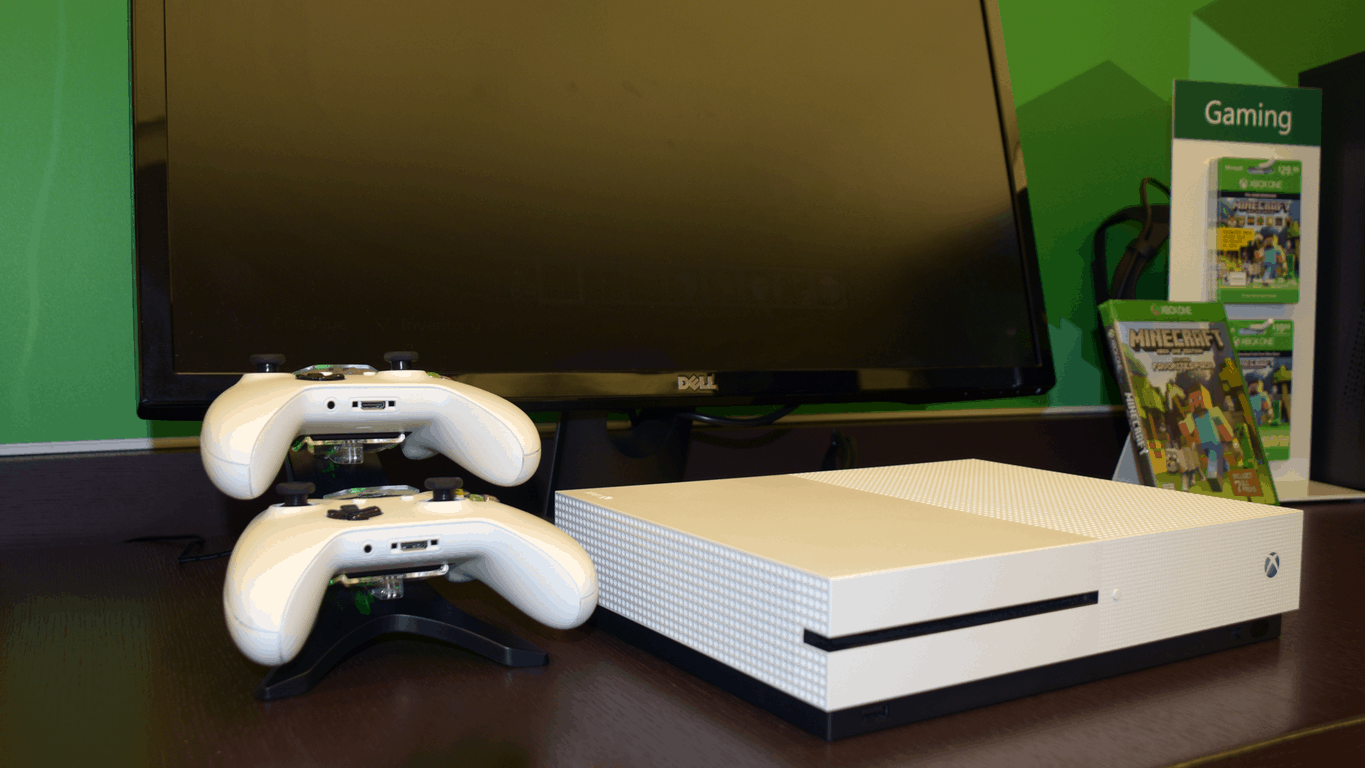
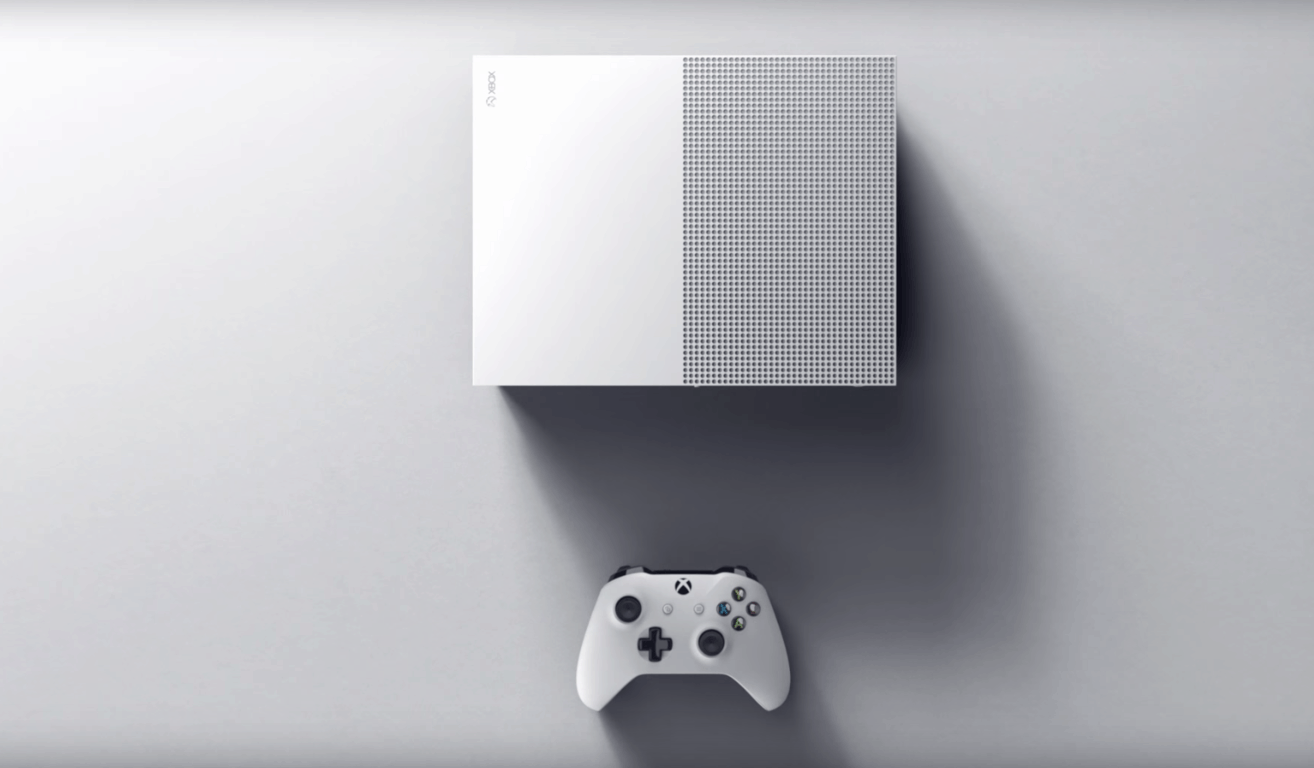
Microsoft has been aggressively marketing the Xbox One family, pushing deals on Xbox bundles, introducing a new Xbox One S version, and generally going head to head with rival Sony, and it appears to be paying off. Aaron Greenberg, head of marketing for Microsoft’s Xbox, just tweeted out that not only did the Xbox have its best sales month ever, it also won the console sales battle for the second half of 2016:

Microsoft isn’t stopping there, either, with a solid lineup of new titles lined up for 2017, and a whole year to build up to “the year of the beast”:

Microsoft took the somewhat unusual step of pre-announcing its next generation gaming console, code named Project Scorpio, at last year’s E3, along with the generation bridging Xbox One S, which it began selling in time for last year’s holiday season.

That strategy seems to be paying off, as sales were up, the company got an early start into 4K compatibility, and now it has a whole year to stir up a frenzy for Project Scorpio.

Of course, Microsoft isn’t releasing any hard numbers on sales of consoles, and there’s still some healthy skepticism about the Xbox platform coming from the Sony camp. Naysayers have been quick to point out failures like this week’s announcement that Scalebound, the long awaited and much touted Xbox exclusive, has been cancelled, and Microsoft’s spin on sales numbers doesn’t mean that Sony sales are in any great danger, with PS4 sales beating Xbox on Amazon in 2016.

Still, it’s good to see some positive momentum for Xbox heading into 2017, which should indeed be a very good year.

Second Windows 10 Creators Update Bug Bash taking place in February

Today, Microsoft surprisingly hit everyone with yet another exponential Windows 10 Insider build, 15007, bringing a vast array of new features, improvements and fixes. In addition to announcing build 15007, Microsoft also took the spotlight moment to announce the second Bug Bash for the Windows 10 Creators Update.

This Bug Bash will take place in February, between Friday 3rd and Sunday 12th. During this time, the Engineering team will post several Quests for Windows 10 Insiders to be looking through and then sharing their feedback. Pieces of feedback submitted will be triaged and reviewed by the various Engineering teams within the company to resolve as many issues as possible. These fixes will then later be rolled out in a Windows 10 Insider build full of bug fixes.

Microsoft explained that they would have liked to have held a Bug Bash over the holiday season, however, due to employee’s taking their holiday and lacking many of the features that arrived in build 15002 and 15007, they decided to wait:

You all gave us feedback that you LOVED the last Bug Bash and wanted to do one during the holidays. We didn’t have the feature set we wanted in Insider Preview builds nor did we have the team available to help triage Feedback Hub items at that time so we decided to wait.

Continuing, the team aims to host a webcast where everyone can Bug Bash together. More details on this will arrive in the near future.

We are also planning at least one webcast so we can all Bug Bash together.

Not sure what a Windows 10 Insider Bug Bash is or how to take part? Here is our explanation of what a Windows 10 Insider Bug Bash is and how to get involved!

Microsoft adds Bing Maps .Net REST Toolkit to the open source list

The Bing Maps REST services are an important part of using Bing maps technology – they’re crucial for making geospatial inquiries, and pulling off some of the other things that make Maps so good. Unfortunately, up to this point, it could take a bit too much time to implement REST services in a .NET application.

This issue is being addressed by Microsoft in the form of a shift to open source. As of right now, Bing Maps REST services are available on GitHub for anyone who wants to use them. You can find the REST GitHub page right here, and you’ll find pretty much everything about the program available for your perusal.

Here are a few other open source projects that the Bing team put up recently:

So if you’re using Bing Maps .Net REST services, you can now find them on GitHub.

Windows 10 free upgrades still available: Here’s how

Windows 10 was introduced to the world as a free upgrade. This means that as long as you had an official copy of Windows 7, Windows 8 or Windows 8.1 installed on your machine, you could upgrade to Windows 10 free of charge. It was a very convenient gift for users and a sure way to rack up surefire market share for the newly released OS.

Some time after Windows 10 was launched, Microsoft announced that the 29th of July 2016 was the last day in which Windows 7/8/8.1 users could upgrade for free. Of course, no one expected things to be otherwise so when that date came, people pretty much forgot about the free upgrade feature which supposedly was shut down.

Ed Bott, a ZDNet representative, is the one credited with the discovery. Upon trying to undergo the free upgrade process on a machine using a valid copy of Windows 7, he was able to discover that there was nothing stopping him from completing its. The Microsoft page which hosts the option of downloading Windows 10 for free is still up and running and people can get their free Windows 10 copy even now.

There a couple of interpretations of this situation, but all of them are speculation since Microsoft has decided not to comment so far. No one can blame them since there isn’t a positive answer. The explanation for what happened could be as simple as Microsoft rewarding curious adventurers that visited the page after July 29, but that’s unconfirmed. Some are going for the funnier version of the story where Microsoft simply forgot to shu down the whole thing.

RELATED STORIES TO CHECK OUT:

Microsoft pulls the mysterious Windows 10 Mobile build 14998

Microsoft recently rolled out Windows 10 build 15002 for PC, adding a series of interesting new features to the OS. It appears that the company just pushed a new Windows 10 Mobile build today, although no official confirmation is available yet.

The latest Windows 10 Mobile update is called “Localization for English” and installs build 10.0.14998.1000 on Insider phones. Apart from that, Windows 10 Mobile build 14998 doesn’t seem to bring any new features or significant improvements.

Windows 10 Mobile build 14998 is shrouded in mystery

The fact that Microsoft hasn’t yet published any post on its Windows Insider blog about this update suggests that somebody accidentally pushed it out, and the lucky Windows 10 Mobile users who first spotted the build about a couple of hours ago managed to install the update.

However, if you search for updates now, build 14998 doesn’t show up anymore. This could mean that Microsoft’s Insider Team realized they made a mistake and pulled it.

This is likely as Microsoft labelled build 14998 an update. Moreover, not all Insiders were able to install this mysterious build on their phones, which suggests that it still needed polish.

This mysterious “Localization for English” update could actually be a solution Microsoft is testing to fix the languages and speech packs bugs listed as known issues on build 14977:

Please avoid attempting to install new languages, keyboards, and speech packs on your phone. There is a chance these downloads may get stuck and not finish downloading. If you have existing languages, keyboards, and speech packs installed – they will carry over when you update to new builds. You can use Windows Device Recovery Tool to go back to Windows Phone 8.1 or Windows 10 Mobile, install any languages, keyboards, and speech packs you need and then update to the latest build in the Fast ring as a workaround.

If you’ve installed build 14988 on your Windows 10 phone, use the comment section below to tell us more about your experience.

RELATED STORIES YOU NEED TO CHECK OUT:

On-screen Touchpad goes missing in Windows 10 Insider build 15002

As you may recall, Windows 10 build 14965 introduced an on-screen touchpad to Windows 10. At the time, the feature let users with tablet devices replace their mouse whenever necessary. Thanks to a tip from a reader (thanks, Justice!), however, the feature appears to have gone missing in the latest Windows 10 insider build 15002.

To clarify, Microsoft is also aware of the issue, and has pointed out in the changelog in build 15002 that the option to enable the Virtual Touchpad is missing from the taskbar context menu. It’s safe to assume that as Windows Insiders continue to submit their feedback to the team at Microsoft, the feature will soon reemerge. There is still no reason to be vexed, though, as build 15002 introduced a ton of new features to the Windows 10 experience.

Did you notice that the on-screen touchpad has gone missing? Have you found it? Let us know what you think by dropping us a comment below!

Red Dead Redemption 2 release date possibly leaked by UK retailer

When the rumors of a Red Dead Redemption sequel turned into an actual Rockstar announcement, fans went wild. It was borderline irrelevant when the game would come out as the only thing people cared about was the fact that it was actually coming out. After the dust settled, people revisited the subject with newfound curiosity about when players might see the game on shelves.

With nothing but “Fall of 2017” as an indication, all there was left was to speculate. That might no longer be the case, as a UK retailer managed to potentially leak the release date of the long anticipated game. On their website, UK retailer Littlewoods listed Red Dead Redemption 2 as available for pre-order.

Not only that, but they also provided a release date for the title: October 2nd. Some are rightfully skeptical of this release date and there is every reason for it to be false. However, it is completely possible the date is actually correct.

From a marketing perspective, there are no major flaws in choosing this date as it would respect the “Fall of 2017” announcement made by Rockstar while also strategically positioning the game on a release time frame that doesn’t include other Game of the Year contenders such as Star Wars Battlefront 2 or the new Assassin’s Creed game.

Regardless of what date turns out to be correct, we still have a long wait ahead of us with the game definitely coming out no sooner than fall. That means that a lot can happen before we get our hands on it, including more news, trailers or general information about the fame coming from Rockstar themselves.

RELATED STORIES TO CHECK OUT:

Gears of War 4 to support crossplay by the end of January

The Coalition really means business in 2017. The company recently rolled out a massive GoW 4 Title Update 3, deploying a long list of game changes and bug fixes. Good news follows that up: The Coalition’s PezRadar recently confirmed that crossplay is in the works and could be implemented by the end of January.

Gears of War 4 crossplay support confirmed

Likewise, weapon tuning and crossplay are still in the works and we are hoping to have those items finalized by end of month. We will be providing updates over the coming weeks regarding both of these items.

For the time being, no further details are available regarding crossplay support, but TC should offer more information in the coming weeks.

As a quick reminder, TC held a crossplay weekend test at the end of November but has yet to publish the results of this experiment.

Crossplay is a highly divisive subject and TC itself stated from the very beginning that its intention is to keep both platforms separate in non-cooperative game modes in order to preserve competitive balance. The purpose of the crossplay weekend was to give Crossplay a trial run in a public playlist.

There are many players requesting crossplay support, especially because there just aren’t enough GoW 4 PC players out there. The data collected during the public crossplay trial allows The Coalition to see whether crossplay is feasible or not. Judging by the company’s latest statement, it appears the experiment yielded positive results. Whether GoW 4 players need to meet certain requirement to access crossplay or not is still unknown, however.

We’ll keep and eye on this matter and update this article as soon as new information is available.

RELATED STORIES YOU NEED TO CHECK OUT:

Two Mega Man titles and Beat’n Groovy have been added to the Xbox One Backward Compatibility catalog

Just two days ago Microsoft added seven new titles to the Xbox One Backward Compatibility catalog.  Today, Microsoft has followed up by adding three more new titles, including Mega Man 9, Mega Man 10, and Beat’n Groovy. As is usual we have included download links, game descriptions, and trailer for your convenience below.

MEGA MAN 9:

The wait is over! Everyone’s favorite side-scroller is back! Mega Man returns to his roots with a new adventure in classic 8-bit style!

MEGA MAN 10:

Thanks to the support of all the fans, we at Capcom are proud to announce the release of Mega Man 10! Now fans of all ages can enjoy the newest entry into this historic 8-bit franchise. As a special service to new players, we added an Easy Mode – a first for a classic Mega Man game! We also have some special treats in store for all the fans. This time you can play as Proto Man and try out Time Attack Mode from the beginning

Beat’n Groovy:

Beat’n Groovy is a music video game distributed over Xbox Live Arcade. It was released on October 8, 2008. The game is based on Pop’n Music.

Which Xbox One backward compatible titles do you own? Let us know what you think by dropping us a comment below!

Microsoft, Epic Games sued over Gears of War character, likeness “stolen” from former pro wrestler

Lenwood Hamilton, a former pro football player and wrestler thinks that his likeness has been used to create Gears of War character Augustus Cole aka “Cole Train,” and he’s not happy about it. According to TMZ, Hamilton has filed a suit against Gears of War developer Epic Games, publisher Microsoft and Augustus Cole voice actor Lester Speight, claiming that the latter used a video game idea with Hamilton that both of them discussed during the late 90’s.

GameIndustry.biz obtained a copy of the suit, which gives more details about why Hamilton, who also hired aforensics services company to compare his voice to the one of Augustus Cole is convinced that the Gears of Wars character has been inspired by him without his consent:

According to the suit, “The similarities of the avatar ‘Cole Train’ and Hard Rock Hamilton include that both are black (and ‘Cole Train’ is the only black avatar in the Gears of War series), they both played professional football (although in Gears of War the game is called ‘thrashball’), Cole Train’s number is 83 (same year that Hamilton played for the Philidelphia Eagles – 1983), the derby hat, wristbands, a front gold tooth, and a striking resemblance of both physiognomy and body build.”

Hamilton is suing for sales of profits according to TMZ, which reports that the former football player never heard about Gears of War or Augustus Cole before his son’s friend showed him the game last January.

Microsoft highlights a growing list of Windows Hello enabled companion devices

Microsoft has taken to the Windows Experience blog to point out the ever-growing list of Windows Hello enabled companion devices. The company points out that 100 unique biometric-enabled Windows devices and accessories are available across form factors, with growing opportunity for partners.

In case you did not know, Windows Hello is Microsoft’s password free solution to logging into your computer and Windows 10 device. With Windows Hello, you can use your face, your fingerprint, your eyes, or a PIN to quickly and more securely log into your Windows 10 device. Microsoft notes in the blog post:

Since first announcing the companion device framework at Build 2016, we have had more than 20 partners join our efforts to make passwords a thing of the past. By opening the Windows Hello companion device framework to the hardware industry, our partners are delivering differentiated and innovative Windows Hello devices that meet the needs of both consumers and businesses, including those in heavily regulated industries.

The first examples of companion devices for Windows Hello is the Nymi Band. Unlike other Windows Hello devices, The Nymi Band is a wearable device and allows you to just walk up to your PC with the band to log in. All you need to do is tap the band to your PC, and you will be automatically logged in. According to Microsoft, the works based on Nymi’s HeartID technology confirms it’s actually you using your heartbeat and their unique electrocardiogram (ECG) based authentication technology.

Next up is the YubiKey. YubiKey is a connected Windows Hello companion hardware device which can be plugged into a USB port on a Windows 10 device to allow you to quickly and more securely log in. The device is indestructible and even supports additional two-factor authentication, including NFC.

Other notable companion devices for Windows Hello which were mentioned in the Microsoft post include The RSA SecureID Access Authenticator, which turns existing devices into a Windows Hello companion device. According to Microsoft, this works by downloading an app on your mobile phone, and then logging into your Windows 10 PC based on the distance to your device, or through the use of a PIN.

What are your impressions of these companion Windows Hello devices? Do you see yourself using one of these devices in the future? Let us know what you think by dropping us a comment below!

LinkedIn, a G Suite customer, may soon switch to Office 365

Last year, Microsoft paid $26 billion to purchase LinkedIn, its biggest acquisition to date. But if you thought that the Redmond giant would do everything it could to assert its power over the professional social network, you’re wrong: CEO Satya Nadella promised LinkedIn CEO Jeff Weiner that the company could continue to operate independently.

That doesn’t mean that Microsoft doesn’t plan to integrate data from the professional social network into its own products though: as we previously reported, Microsoft want to leverage LinkedIn’s data to improve its CRM products, but you can also expect to see more integrations with Windows 10, Outlook, the Office suite and more.

But while Microsoft is planning to improve its own products with LinkedIn’s data, the social network may soon be forced to move its 10,000 employees from Google’s G Suite to Microsoft’s Office 365 according to Business Insider. However, it’s not for the reasons you may imagine:

According to someone close to the company, this change is not being driven by demands from Microsoft that LinkedIn switch to Office 365. We hear that Google is the one that isn’t thrilled to have such a large G Suite customer owned by Microsoft. Google doesn’t want to be put in a position where it’s sharing product road map and other tidbits with a company its biggest rival, this person tells us.

Google declined to comment, but Business Insider added that “employees are increasingly hearing that this change may be coming soon.” If this change does happen, LinkedIn wouldn’t be the first social network to switch to Microsoft’s cloud productivity suite. Last year, Facebook announced that its moved its 13,000 employees to Office 365, which led many to comment that Microsoft had become cool again in the Valley.

Thanks Marc for the tip!

After Scalebound’s demise, Xbox fans reassured about Phantom Dust

Microsoft and Platinum Games cut the cord on Scalebound this week, cutting in to its already meager Xbox-exclusive lineup for 2017. Xbox gamers are understandably jittery about the fate of other upcoming games, none more than the also elusive Phantom Dust.

The 2004 game from Microsoft Game Studios has been slated for a revamp since its announcement at E3 2014, which even Microsoft’s Xbox chief Phil Spencer then promptly forgot about. Not much has been heard about the game since then, and fans have had to be content holding on to this 2014 trailer:

Even though Shannon Loftis told Spencer more than six months ago that Phantom Dust was “almost done,” we still haven’t seen much about the game since 2014. However, Loftis has just given fans new hope with a pair of tweets responding to questions about the game:

https://twitter.com/shannonloftis/status/819300690300313602

https://twitter.com/shannonloftis/status/819306336886263808

(via thewolfhall.com)

Anyway, it’s good to hear that Xbox fans have some good news to look forward to on the exclusive game release front


Microsoft Azure achieves US Department of Defense Level 5 provisional authorization

Microsoft today has announced that Azure has achieved a US Department of Defense Level 5 provisional authorization. According to the company, this “allows DoD mission owners and officials the ability to plan, assess, and authorize workloads for Impact Level 5 controlled unclassified information.”

Today’s achievement of US Department of Defense Level 5 provisional authorization adds to what is already a large list of Azure Government cloud authorizations and assessments which demonstrate adherence to U.S. federal, DoD, and state and local standards. In fact, Microsoft has even established two physically isolated and geographically separated Azure Government regions exclusively for the Department of Defense.  These regions are designed to support Impact Level 5 workloads with stringent DoD security requirements.

Microsoft is no stranger to the US Government, and as recently as last month, the company scored a $927 million support contract with the US Defense department. As always, please do let us know what you think of the latest Azure news by dropping us a comment below!

Poll: How do you run Windows Insider builds?

Hey, it happens. Sometimes Windows Insider builds, like any beta software, are buggy. Our own Kareem Anderson has been experiencing some frustrations with the latest Windows 10 Insider PC build 15002, and as it so happens my phone is downloading the “Localization for English” update, aka build 14998 for Windows 10 Mobile (wish me luck!).

Some Windows Insiders just grit their teeth and run the latest Fast Ring offering on their main or only PC, hoping to get their hands on all the latest cool new stuff as soon as possible, and hoping to avoid showstopping bugs in the process. Others run Windows Insider builds in a VM, or on a secondary machine.

What do you do? Let us know by voting in the poll below:


Do you live life in the fast lane? Do you check out the latest builds, but with some protection for your main machine, or do you shy away from potential problems altogether? Let us know by taking the poll and tell us about your Windows Insider setup in the comments below!

New Windows 10 video game Doodle Mafia launches in Windows Store

JoyBits, the developer of the popular Doodle series of mobile games has just released a new title called Doodle Mafia on the Windows Store (via Windows Central). The official description notes that this is the “biggest Doodle game ever,” with the ability to play as a gangster or cop. “You decide how you want to play as you play through multiple hard-nosed storylines & play modes,” added the developer.

Here is a list of gameplay features:

  • OVER 500 Puzzles to Solve & Items to Create.
  • Play as a Gangers or Cop
  • Watch your Crime City come alive as you play
  • Multiple Game Modes and Storylines to play through
  • Earn money and weapons in the “Crime Slots” mini-game
  • Available in 6 languages: English, German, French, Russian, Chinese & Portuguese.

The game is a $2.99 purchase, with in-app purchases going from $0.99 to $89.99. It’s available on both Windows 10 PCs and mobiles and you can get it from the download link below.

Doodle Mafia
Doodle Mafia
Developer:
JoyBits Ltd
Price:
$2.49

New action-adventure video game Nevermind launches on Xbox One

A new video game called, Nevermind, is now available to buy on Microsoft’s Xbox One video game console in several regions. The game is an adventure title with a strong psychological aspect. Here’s the official game description:

Nevermind is an adventure thriller game in which you must explore strange worlds and solve puzzles to unlock the mystery that lurks within the inner psyche of psychological trauma survivors. Within the game, you are a Neuroprober – a unique physician who, through the use of cutting-edge technology, is able to venture into the minds of your Clients for whom traditional treatment methods have proven ineffective. Traumatic experiences, especially those left untreated, take their toll in countless ways, often triggering other serious problems as each Client’s subconscious mind desperately tries to cope. As a result, their psyches doesn’t take kindly to those who attempt to peel back these layers, often prompting it to lash out in terrifying, unexpected ways. Only the most vigilant of Neuroprobers can survive the horrors of the mind to help their Client find peace at last.

Buy Nevermind on Xbox One

Have you bought any new video games for the Xbox One recently? Share what you’re playing with the community in the comments below.

Edge vs Chrome: here’s what makes Microsoft stronger than Google

The battle between Microsoft Edge and Google Chrome is not over yet, although for the time being the latter seems to be the winner: Google Chrome is the most popular browser among Windows 10 users — despite Microsoft’s perpetual efforts to convince users to switch to Edge.

According to the latest data provided by NetMarketShare, Google Chrome has an impressive 56.43% market share, with the good old Internet Explorer coming second. The Edge browser has a fairly decent market share of 5.33%, one that is slowly but surely growing. Nevertheless, the difference between Chrome and Edge remains huge. This could change when Microsoft rolls out the Windows 10 Creators Update.

Here’s why more users will adopt Edge in early 2017

Microsoft should release Windows 10 Creators Update sometime in early 2017. With it, the general public will have access to the latest and most impressive features ever available on Microsoft’s browsers.

The Redmond giant recently rolled out the biggest build update in recent months, revealing many juicy features the upcoming Creators Update will pack, including a plethora of new and interesting Edge features and improvements that will definitely make it more appealing to users.

Microsoft Edge new features

1. Tab preview bar: This feature allows you to easily preview every tab you have opened without leaving your main page. You can easily scroll through the list and keep better track of what’s in your tabs especially when you have tens of tabs open.

Microsoft Edge Tab Preview

2. Set these tabs aside: Edge now features two new buttons next to your tabs to help you manage all your tabs without losing your flow. That’s a very inspired solution to keep your tabs organized and pick up where you left off at any time.

Microsoft Edge Set these tabs aside

3. Jump List: Windows 10 now lets you launch a new window or new InPrivate window straight from its Taskbar icon. Simply right-click on the Microsoft Edge icon in the Taskbar and select the task that you want to launch.

Microsoft Edge Jump List

4. Component UI: Microsoft Edge now features a new UWP architecture, a new visual tree, and new input model. Thanks to these changes, Edge is now more stable, responsive, and resilient to slow or hung web page content.

5. Flash Click-to-Run: Microsoft Edge now blocks untrusted Flash content by default until the user chooses to play it. This means that Edge is now more secure, reducing the risk of falling prey to malicious programs.

Microsoft Edge Flash Click-to-Run

6. Web Payments: Microsoft Edge now has preview support for the new Payment Request API. You can now checkout faster because websites use the payment and shipping preferences stored in your Microsoft Wallet.

Microsoft Edge Web Payments


New Microsoft Edge web platform features

  1. Untrusted Flash content is now blocked by default.
  2. Enabled TCP Fast Open by default.
  3. Added support for Content Security Policy 2.0 (on by default).
  4. Added support for WebVR APIs (on by default). This feature requires Windows Holographic hardware which is not yet available.
  5. Limited setTimeout(), setInterval() and Disabled requestAnimationFrame() callbacks for cross-origin iframes when not in view, to improve energy consumption.
  6. Enabled independent rendering of HTML5 video elements by default.
  7. Enabled Media over Fetch and XHR over Fetch by default.

Other Edge improvements:

  1. If the Microsoft Edge window is narrow and Cortana has a tip, Cortana only appears as an icon in the address bar. To see the full suggestion, you need to expand the window.
  2. Tooltips for the Microsoft Edge favorites bar wrap around in order for the browser to display longer website names.

Have you already installed the latest Windows 10 build on your computer? What do you think about the new Edge experience?

RELATED STORIES YOU NEED TO CHECK OUT:

Kaspersky System Checker helps detect issues on your PC

While PC scanners cannot fix issues once they detect the problems on your machine, they offer a way to help you address the trouble. One such tool is the Kaspersky System Checker 1.1.0.228.

Kaspersky System Checker is portable freeware that scans your computer for potential issues, including things like malware and out-of-date programs to more mundane issues like not having enough hard drive space and having wrong Windows configuration or application settings.

After downloading the software, run the program to scan your machine by clicking the Run Diagnostics button. The tool lets you monitor everything happening with your PC through a logging pane.

system_diagnostics

After a less than five minute scan, the program lists major issues in the Detected Items pane. It may also include a list of passed tests where no malware was detected or no PC issue was found. Critical items are marked in red and mild issues are represented by blue.

It’s worth noting that the scanning process requires an internet connection to work. For your privacy, the program does not send dump files or traces to Kaspersky without your consent.

Kaspersky System Checker, however, can produce vague results after the scan. For example, the first result says the display of known file type extensions is disabled.

Malicious software often masks its executable file by giving it the appearance of popular file formats (documents, images, music, movies, etc.), replacing the icons for these categories. When display of a known type of file extensions is disabled, the file “image.jpg____.exe” appears to the user as “image…”. Thus, the user can run a malicious program that allows an intruder to gain control over the system and user data.

Scan_results

The other results are ambiguous as well, as shown in the screenshot above. Fortunately, other results indicate clear details about the problems on some of the programs on your PC. For instance, Kaspersky System Checker found vulnerabilities in Photoshop CS5 and 7-Zip during our test. Still, the program does not give actionable information on the problems it finds.

Kaspersky System Checker is available to download for users of Windows XP and later.

RELATED STORIES YOU NEED TO CHECK OUT:

Microsoft releases Windows 10 cumulative update KB3213986

Those keeping up with Microsoft’s updates for Windows 10 are certainly familiar with Patch Tuesday, and today we got the latest installment for both the PC and Mobile versions of Windows 10.

Both platforms are now updated to Windows 10 14393.693, also referred to as KB3213986. Before you get too excited, we aren’t looking at anything major here, just a regular “bug fixing, feature tweaking” patch. That doesn’t mean that it’s not worth your while or useful, though. Media playback has been strongly improved in this update, as well as the playback for Groove Music while in the background.

Here are some of the more important changes that users can expect from the update:

  • Groove Music background playback stability increased;
  • Multiple input devices of the same type will now be detected simultaneously;
  • Enhanced Protected Mode no longer hinders the functionality of opening URL files;
  • Server Core problems while switching from evaluation to retail version were looked into;
  • Remote Assistance should now work with Request Control while using Windows Server 2008 R2 (Windows Server 2012 as well).

Remember, we are talking about a Live patch, not a Windows Insider program build, meaning that these fixes were investigated and addressed so that users shouldn’t have to experience any additional issues regarding these same problems. As long as you are using Windows 10 on either a PC or Mobile device, you are free to download this update. The Anniversary Edition of Windows 10 is also included on the list of eligible platforms.

RELATED STORIES TO CHECK OUT:

Half of Windows 10 business migrations could be leaving machines at risk, study says

When it comes to Windows 10, enhanced security features such as Device Guard are one key reason that many business and organizations from across the globe are putting their trust in Microsoft’s operating system. A new report out by enterprise software company 1E, however, finds that half of Windows 10 business migrations could be leaving machines at risk (via Business Wire.)

While 1E is known for selling solutions for automating clean installs of Windows, their report still points out that in-place upgrades to Windows 10 may be leading many organizations to miss out on enabling advanced security features. For instance, the report highlights that an in-place upgrade fails to provide the full suite of Windows 10 security features including Secure Boot, Device Guard, and biometric authentication.

Funny enough, the survey in the study also found that of the more than 500 U.S. IT decision makers, 47 percent believe that security is the single biggest driver behind an enterprise moving to Windows 10.  Other interesting points in the study include the following:

  • A clean install delivers those benefits but with traditional approaches, it needs a lot of manual intervention. That puts a load on busy IT teams, it interrupts end-user’s work and can’t be scaled to handle thousands of machines in hundreds of locations.
  • Even though the majority of respondents are taking the in-place update route which, in theory, should eliminate the need for manual intervention, that doesn’t seem to be the case. 94% say they still expect to perform some manual steps. That could be arranging for an IT expert to visit every desktop or having those systems handed over to IT to perform the update. Either of these options are expensive in terms of staff time and interruption to business.
  • Human intervention is the key limiting factor to how fast you can roll out Windows 10. It’s easy to work out: How many systems
    can each person update per day and scale that up to your total number of systems. Automation and zero-touch processes are critical to success.
  • The longer the project takes, the more risk your systems are exposed to as well as increasing numbers of dis-satisfied end users.

Do you agree with the findings in this report? Or do you think that your organization is more secure with Windows 10? Let us know your thoughts!

Microsoft to hold Developer Day livestream event to show off Windows 10 Creators Update

While many rumors and indications have pointed to an April release date of the Windows 10 Creators Update, Microsoft is soon set to hold a Developer Day live stream event to show off what will be the next featured update to Windows 10.

The Live stream will run on February 8th, and is focused on what’s new for developers in the Windows 10 Creators Update. By watching the stream, developers can see what the Creators Update has in store for their apps, games, and more. The stream will be hosted by Kevin Gallo, and will feature other members of the Windows engineering team. Other topics covered in the stream include:

  • What’s new with Windows developer tooling: UWP tooling, BASH, Developer mode, and more.
  • Learn about the latest XAML advancements and how UWP helps you build Windows apps that are more personal and productive
  • Hear the developer story behind the recent announcements of Cortana skills and the new Windows mixed-reality headsets.

According to Microsoft, the stream will then end with a live Q&A panel which will answer other remaining questions. If you’re a developer and would like to tune into the live stream, you can RSVP by visiting this website now! Once you’ve RSVP’ed please do let us know which part of the program you look forward to the most.

Xamarin announces new Release candidate for cross platform development, try it now

Xamarin has announced a new release candidate for cross-platform development and you can try it now. The new release brings features to all platforms, including Android, iOS, Mac, Visual Studio, and Xamarin Studio.

The new additions to this release candidate include a Forms Previewer, multiprocess debugging in Visual and Xamarin Studio, Connected Services and .NET Standard support, and NuGetizer3000. Please have a look at the official descriptions of the features below.

Forms Previewer:

  • The Xamarin.Forms Previewer renders a live preview of a page side-by-side with the XAML markup, allowing you to see your user interface come to life as you type. With this release, we’re promoting the Xamarin.Forms Previewer feature to stable and bringing many enhancements to it to increase the range of supported controls and XAML constructs.

Multiprocess Debugging:

  • Visual Studio and Xamarin Studio now allow you to launch and debug multiple projects at once, giving you the ability to debug, for example, a phone and a companion watch app at the same time. Multiprocess debugging works just like single-project debugging—you can set breakpoints, add watches, view locals, and inspect variables—and will seamlessly jump back and forth between each process.

Connected Services and .NET Standard support:

  • This RC introduces the ability to log in to Xamarin Studio with your Microsoft account. This enables Xamarin Studio to provide you with several benefits, including the ability to provision new Azure App Services with our Connected Services feature and automatic subscription management—no more need to have both a Xamarin account and a Microsoft account!
  • Xamarin Studio’s new Connected Services feature brings cloud capabilities, such as data storage and authentication with Azure Mobile Apps, to your mobile app with the click of a button. Adding a service to your project will add all required dependencies and any required initialization code to your mobile targets.
  • Xamarin Studio can now load projects that target the .NET Standard framework (or .NETPortable,Version=5.0). The Project Options panel for Portable Class Library (PCL) projects allows you to switch back-and-forth between PCL and netstandard code sharing projects.

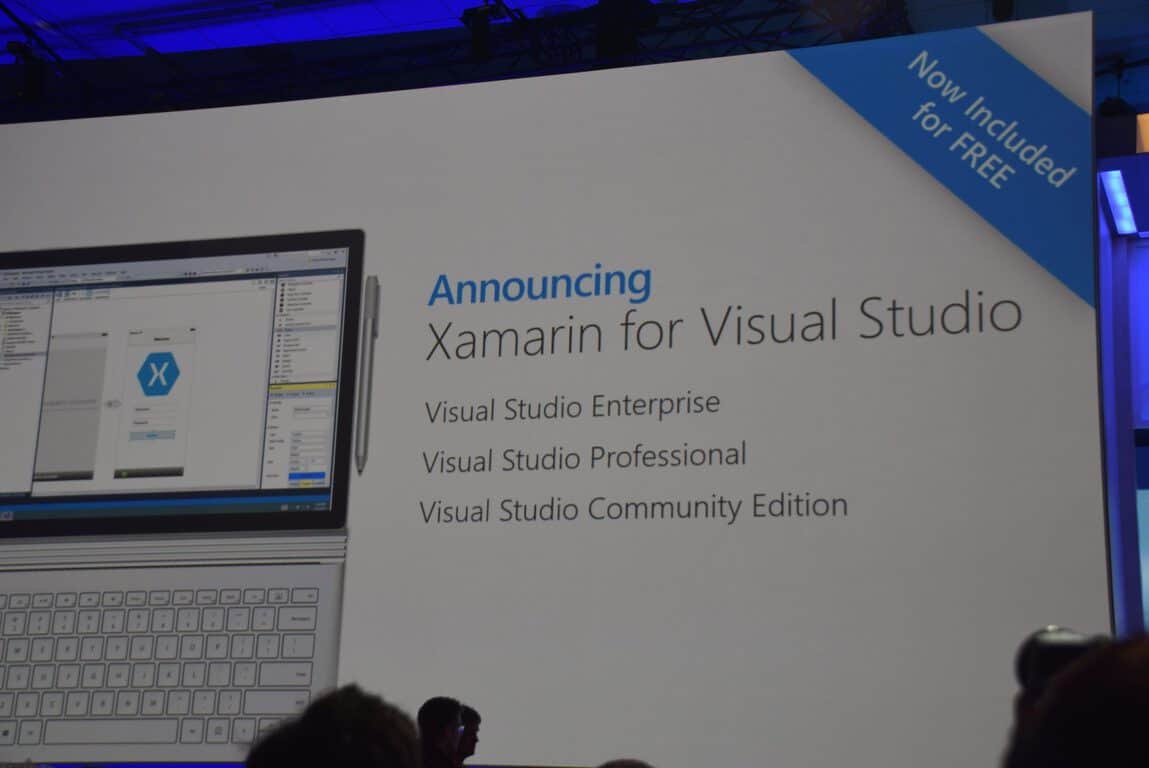
Other notable features in this release candidate include the NuGetizer3000, which aims to help you create your own, with integrated IDE support and build tooling for creating NuGet packages. To get this Release Candidate now, nonetheless, you can click this link for Mac, and this link for Windows. Once you’ve checked it out, let us know what you think by dropping us a line below.

Microsoft reportedly ready to move into downtown Detroit as connected cars loom large

The Motor City is welcoming a new tenant, according to businessman Dan Gilbert, and that very well could be Microsoft (via Detroit Free Press.)

During a fireside chat with Gilbert, the billionaire founder of Quicken Loans, he hinted to the press about a new tenant that was worth uprooting even some of his own employees in downtown Detroit.

“We have a 50,000 square-foot tenant we’re announcing in a week or so, and we have to displace Quicken Loans employees and we have to put them somewhere else,” Gilbert, Quicken Loans founder and chairman, said from a Cobo Center stage.

Detroit Free Press reports that their anonymous real estate source is pointing the finger towards Microsoft. The speculated move from Southfield Town Center into the heart of Detroit could be related to the development of connected cars we saw at CES 2017 just last week. Supposedly, it’s been something the office had been considering “for months”.

If the rumor is to be believed, Microsoft’s Windows 10 and Cortana integration for Nissan and BMW Connected could be driving the tech giant to get closer to vehicle manufacturers.

For now, it is only speculation and rumor that the Microsoft office is moving at all. Even the exact location is a bit obscure since Gilbert owns multiple downtown Detroit buildings. Neither Gilbert or Microsoft have made an official statement to prove or disprove the source.

We’ll keep you up to date on more information as it becomes available so watch OnMSFT follow us on Twitter.

Microsoft to make security changes to Windows 10, avoids Swiss court

In 2015, the Swiss Federal Data Protection and Information Commission started an investigation of Microsoft’s Windows 10 operating system and found data protection gaps under Swiss law. Today it was announced that Switzerland’s data protection czar will not take Microsoft to court after the company agreed to adopt recommendations for improving data processing transparency for its Windows 10 operating system (via Reuters.)

The issue at heart in the situation is Windows 10’s “get going fast” option during installation, which automatically activated nearly all data transfer and access processes and sent location details, browser and search history, keyboard entries and nearby WiFi networks automatically to Microsoft.  According to Reuters, the Switzerland government investigations found that “this  data processing in connection with Windows 10 did not conform in every respect with the data protection legislation.”

Since then, however, Microsoft has announced a new privacy dashboard and a new privacy setup experience in Windows 10. And, as a result of these recent developments, and proposals which were made by Microsoft to the commission and agreed to after adjustments, the Switzerland government agency has decided that “there is no need for court proceedings.” They went on to say in a statement:

“The technical implementation of the modifications requested by the FDPIC will be carried out worldwide as part of the two Windows 10 software releases planned for 2017.”

A Microsoft spokesman, meanwhile, appreciated the opportunity to discuss Windows 10 with the Swiss Data Protection Authority. A statement from the spokesman reads:

“As a global business, Microsoft is committed to complying with all applicable laws in the countries in which we offer our services and products.”

Do you think this latest news is good for Microsoft? Let us know what you think by dropping us a comment below!

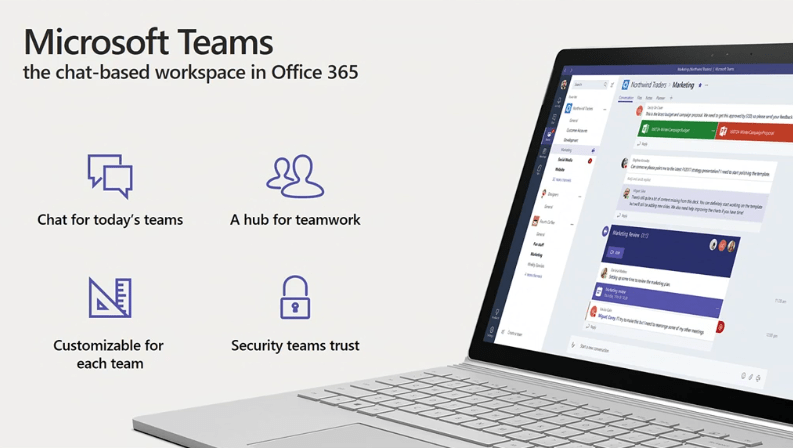
Microsoft Teams expected to pass Google Hangouts, Slack for enterprise chat

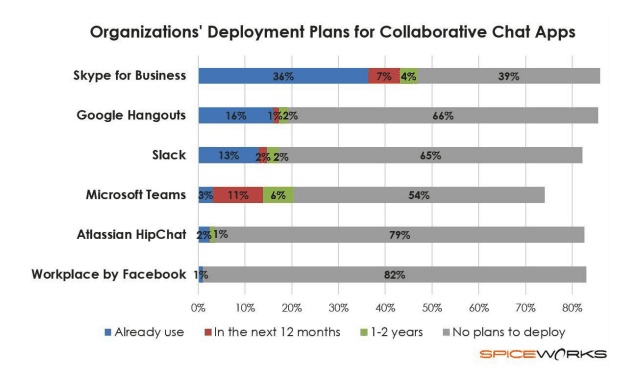
Microsoft Teams was first unveiled by Microsoft at an event in New York City back in November of 2016, and the group collaboration service has yet to get to the general public, but it would appear that it is becoming more popular and is catching up to the competition. A new study out by IT network Spiceworks which was noted by GeekWire has found that Microsoft Teams is expected to pass Google Hangouts and Slack for enterprise chat.

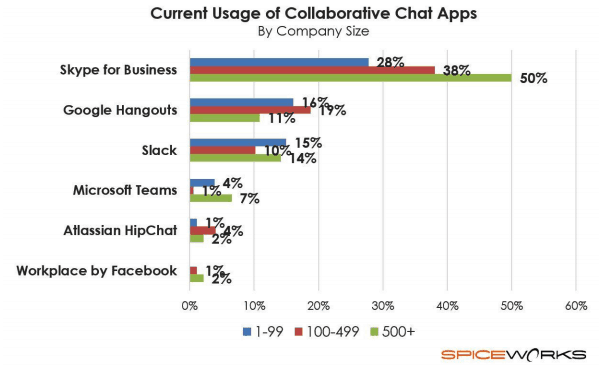
Usage of Collaborative Chat Apps

According to the study, which surveyed IT pros, Microsoft’s Skype for Business application is the most commonly used apps for collaboration inside businesses, with a total of 36% deployment. Google Hangouts and Slack followed next with deployment rates of 16% and 13 %, respectively. The study, however, also found that 17% of surveyed businesses have plans to deploy Microsoft Teams in the next two years and that only 3% of surveyed businesses currently use Microsoft Teams.  The study reads:

If these plans hold true, Microsoft Teams will be the second most commonly used messaging platform in the workplace by the end of 2018, surpassing Slack and Google Hangouts, and coming in behind only Skype for Business…This bodes well for Microsoft, who owns Skype, and could speak to the fact that Microsoft Teams is free to use for companies that subscribe to Office 365.


Deployment Plans for Collaborative Chat Apps

Microsoft Teams is currently available in a preview to eligible Office 365 commercial customers in 180 different countries, and is expected to become generally available in the first quarter of the calendar year 2017. It will be interesting to see if these predictions hold up as the service rolls out to a more wider audience of businesses. As always, please do let us know what you think of this latest news by dropping us a comment below!

Chinese social network Weibo launches official Xbox One app

The Windows 10 Weibo app has updated with added support for Microsoft’s Xbox One video game console. Weibo is a hugely popular social network in China and kind of works like a combination of Twitter and Facebook. Microsoft even runs an official Xbox Weibo account and it’s worth checking out for those that can read Traditional Chinese or have an interest in the brand’s activity in China.

Here’s the official description for the Windows 10 Weibo app:

Weibo is the official client of Weibo for Windows Phone. Weibo, an informal mini-blog product, is a latest Internet service that publishes information instantly. It is also recognized as the user-active communication media. Weibo, innovated by Sina Corporation (NASDAQ: SINA), is the new inter-active application that will be widely used, fast spread and it surely will be distinguished to the world.

For users who have already downloaded the app on another device, Weibo should show up in the “Ready to install” list in “My games & apps” on the Xbox One console. For new Weibo users, the app can be found by doing a search for “Weibo” in English in the Store tab. Be warned that the app’s name is written in Traditional Chinese so look for the logo (above) in the search results.

It’s interesting to note that Weibo has beaten all of the other major social networks in getting an app on Xbox One. Twitter currently has an Xbox One app but it’s dedicated almost entirely to video and users are unable to actually compose tweets or view their own timelines.

Are you a Weibo user and have you been waiting for an Xbox One app? Let us know in the comments below.

Windows 10 video game Halo Wars 2 to get physical release

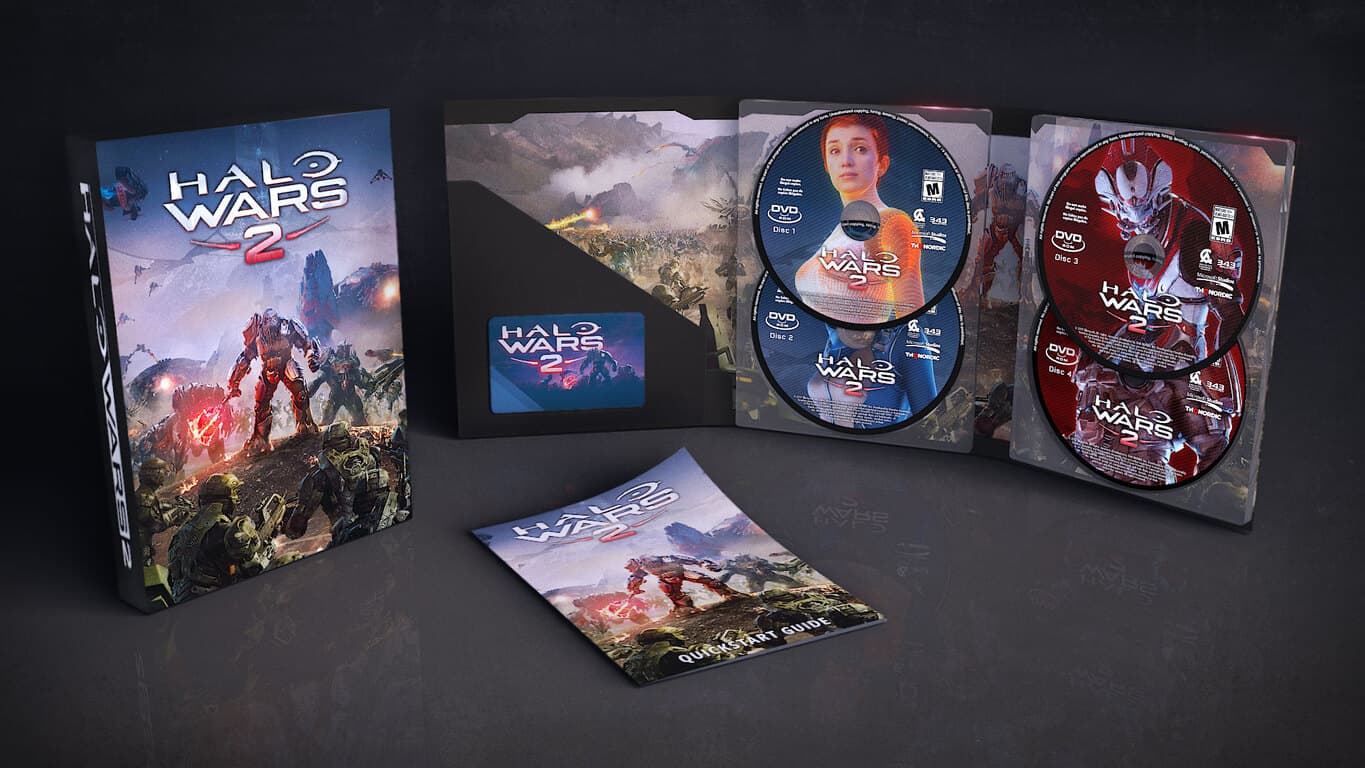
Through a collaboration with THQ Nordic, Microsoft Studios and 343 Industries’ upcoming video game, Halo Wars 2, will be getting a physical disk release in stores alongside its digital launch in the Windows Store on Windows 10 devices.

There will be physical releases of both the Standard and Ultimate versions of Halo Wars 2 and each will provide free access and cross-save capability for the Xbox One version via a digital access code and Microsoft’s new Xbox Play Anywhere initiative.

Founder & Group CEO of THQ Nordic, Lars Wingefors, said of the partnership, “After working on so many titles together with Microsoft in 2016, we are stoked to start the year with another partnership. Being able to deliver such a big franchise to RTS and Halo fans alike, the opportunity to buy and own this game in a beautiful physical shape is something we appreciate a lot.”

The Standard Edition of Halo Wars 2 is planned for a February 21st release while the Deluxe Edition launches on February 17th. Are you planning to buy Halo Wars 2? Let us know if you’re getting the physical or digital version in the comments below.

Halo Wars 2 - Pre-Order

Windows 10 build 15002 issues: Install fails, unresponsive taskbars, Edge browser that doesn’t load

Microsoft recently rolled out the biggest Windows 10 Creators Update build yet, packing a plethora of new features under the hood. Windows 10 build 15002 massively upgrades Microsoft Edge, making it a fiercer competitor for Google Chrome, letting users group their Start tiles into folders, and adding more capability to Cortana.

Windows 10 builds are rough versions, which means that Insiders should expect to encounter various issues after installing them. Windows 10 build 15002 is no exception and also brings issues of its own.

In this article, we’re going to list the most frequently encountered Windows 10 build 15002 bugs as reported by Insiders. In this manner, you’ll know what to expect and you won’t be taken by surprise should you experience any of them.

Windows 10 build 15002 reported issues


Windows 10 build 15002 won’t download

Some Insiders can’t even download build 15002 due to error 0x80070057. This is actually an old Windows Update error and fortunately there are workarounds available to fix it.

I just tried to download this Build and I am receiving the following error: Windows 10 Insider Preview 15002 (rs_prerelease) – Error 0x80070057

We suggest you follow the troubleshooting steps listed in our article on how to fix error 0x80070057 and then try to install the latest Windows 10 build again.


Build 15002 install fails, followed by GSOD

windows 10 GSOD bugs

Insiders now have the chance to experience the new Windows 10 Green Screen of Death, although we’re sure this is not something you’d particularly want to see in the new build.

After the first reboot into the upgrade to 15002, computers remain stuck at the Windows logo screen for a few minutes. Then, the GSOD appears with an error message related to driver issues. Try updating your drivers before installing the latest Windows 10 build and see if this fixes the problem.

After the first reboot into the upgrade from 14986 to 15002 My computer sits at the windows logo for about 5 mins then BSODs with an error on the storport.sys driver with stop code DRIVER IRQL NOT LESS OR EQUAL. The event viewer log contains little information […]


Taskbar programs are unresponsive

Insiders report that build 15002 removes the programs previously installed on the taskbar on two-monitor systems. Moreover, the programs that do remain there (Start button, Cortana, Task View, and Date and Time) are unresponsive. The only manner to quickly access your programs is to create desktop shortcuts.

Disconnecting the second monitor and rebooting your system usually fixes this problem. Still, this bug can be quite annoying especially if you really need to use your two monitors at the same time.

Lenovo T420 with 2nd Monitor and Keyboard added for Desktop Work. I installed the new preview version 15002. After completing boot, none of my taskbar programs were on the taskbar. On the taskbar were the Start button, Cortana, Task View, Date and Time only. However, clicking on any of them was useless. They did not respond. So I had no access to any of my programs unless they were on the desktop. […]
I disconnected the 2nd monitor and did a hard reboot. This time everything came up fine. […]
I booted again with 2nd monitor attached. Same problem. I rebooted with 2nd monitor not attached. Everything seemed to work fine except Windows Repair again Blue Screened.


Build 15002 breaks certain programs

Insiders also report that build 15002 breaks a series of programs, such as Quicken 2017, Windows Explorer and the Start menu. More specifically, Quicken 2017 won’t start on build 15002 and displays an error message informing users that Net framework 4.6.1 is not installed. Reinstalling Quicken 2017 and .Net 4.6.1 framework doesn’t fix the problem, either.

The same is valid for Windows Explorer and the Start menu, except for the error message. Users confirm that any attempts to access Windows Explorer, the Start menu or Settings through alternative means is unsuccessful.

Long time user of Windows insider builds, long time user of Quicken.  Both have been working well for a long time…After upgrading to Win 10, build 15002, Quicken 2017 won’t start.  Error indicates that .Net framework 4.6.1 is not installed.


Websites won’t load in Edge

Windows 10 build 15002 brings a long list of new features and improvements to Microsoft Edge. As a quick reminder, Edge now blocks untrusted Flash content by default, offering users the option to explicitly choose to play it. However, this new feature may also cause various issues on particular websites.

One of the side effects are evident: Insiders report that Facebook won’t run under Edge. The page opens, starts to load and then displays an error page. This issue could indeed be related to the new Flash-blocking feature, but the good news is that Facebook runs fine on other browsers, such as Chrome and Internet Explorer.

Just upgraded to 15002 and Facebook will not run under Edge. It starts to load and reloads, then shows an error page (reload etc…). […]However this is a show stopper for me. a lot of my work is done in Facebooks Website not the crappy App or mobile. […] With Edge out of action (for now hopefully) I’ll need to find another browser to work with and to be honest that was the only reason I used IE or Edge to begin with.

Other users also confirm that Edge loads, but shows only the toolbar and won’t populate any websites. Pages are completely blank where the web page should show.


There are the most common build 15002 issues reported by Insiders so far. If you’ve come across other bugs that we didn’t mention in this article, use the comment section below to tell us more about your experience. Also, don’t forget to use the Feedback Hub to report the bugs to Microsoft.

RELATED STORIES YOU NEED TO CHECK OUT:

Microsoft scrubs media for cancelled exclusive Xbox game Scalebound

Scalebound was a game that was anticipated by a whole lot of people and produced by one of the most prestigious names in game development – Platinum Games. Since the game’s announcement years ago its development was rarely talked about, and it only ever got a couple of brief looks at E3 conferences. Just recently, the game was officially canceled altogether.

The cancellation came with something of a nuclear option on Microsoft’s part, which removed mentions of the game from blogs and set all trailers and gameplay demonstrations to “private” on YouTube. Microsoft hasn’t commented yet on why they’ve removed all of these trailers, or why the cancellation happened.

Chances are that Scalebound will remain a memory for Microsoft. Cancellations like this can happen for any number of reasons, but they’re almost always final. Scalebound was looking like it was on the verge of entering “development hell” – that purgatory of eternal revision and financial disaster that did in games like Duke Nukem Forever. If that’s the case, it might be better in the long run that Scalebound didn’t see the light of day.

Slack’s Windows 10 desktop app is now available in the Windows Store

If you frequently do team collaboration in your work, there’s a good chance you use – or have at least heard of – Slack. The collaboration software has been around for a while now, creating an effective hub for teams that want to collaborate in the most efficient way possible. Now, you can use Slack directly through its own Windows Store app – foregoing the Win32 version.

There really isn’t that much difference apart from the Slack app’s newfound place in the Windows Store. The app was a direct conversion of the Win32 app, meaning it didn’t have to be rebuilt. If you’ve been using the normal Slack app up to this point, you’re going to feel very at home with the new version.

If you’re trying to keep together all of your apps inside the Windows Store, the new Slack app is going to be a good option for you. Otherwise, this doesn’t have much of an impact. The two versions of Slack should stay identical as far as features are concerned.

Slack
Slack
Price:
Free

The Chrome extension Honey helps you save money when you shop online

For some people, shopping is a hobby. For others, it’s a curse. When we do our shopping, we often waste precious minutes searching for all the items we’ve got on our shopping list or standing in line to check out, not to mention that sometimes the sale assistant may not be the nicest person on earth.

Thankfully, there is an alternative to all that which is actually cheaper that the traditional retail shopping. Online shopping saves you the hustle and bustle of holiday shopping, online stores are open 24/7, and reviews help you decide whether a particular product is worth your money or not.

If you’re an online shopping fan or you just discovered this shopping method, you should also check out Google Chrome’s Honey extension. This tool automatically finds and applies coupon codes when you shop online, helping you get the best possible price for the items you want to buy.

Chrome’s Honey extension finds the best shopping coupons

With Honey, you no longer need to desperately search for coupon codes and sales or get frustrated when codes like Novafam 2023 fail to work. This tool does it for you. All you need to do is click on the Honey button on checkout and the extension will automatically apply coupon codes to your shopping cart.

Honey currently supports shopping sites in the United States, Canada, Australia, United Kingdom and India. You can also use it on sites that serve global customers.

Thanks to Honey, you can save hundreds of dollars every year. For more information about the full list of websites Honey supports, you can check out the tool’s official webpage.

Honey is also compatible with Mozilla Firefox and Opera, two other popular browsers among Windows 10 users. It is worth mentioning that Honey uses Google Analytics to collect extension usage statistics.

You can download Honey for free from the Chrome Web Store.

RELATED STORIES YOU NEED TO CHECK OUT: