If you are looking for a mid-range gaming laptop, don’t settle for less. Because, at a 25% discount, the Dell Alienware x14 R2 wouldn’t burn a hole in your pocket and let you enjoy all your favourite titles. Originally priced at $1999.99, the Dell Alienware x14 R2 is now available for only $1499.99!
Not to forget, Dell is offering a Price Match Guarantee. This means that if you can find the laptop for a lower price online, Dell will match it!
As for the gaming laptop’s performance, there’s an Intel Core i7-13620H processor and the GeForce RTX 4060 graphics card. The AI-powered graphics are an added advantage. So, even for the most demanding games, the Alienware x14 R2 will deliver smooth gameplay and graphics.
Coming to the design, the laptop features a smooth metallic finish. It’s easy to carry around and weighs only 4.22 lbs. I like the Alienware x14 R2 because the ports are positioned at the back end, reducing clutter around the desk.
For a gaming laptop, the Alienware x14 R2 also has an impressive battery life, boasting up to 6.5 hours of seamless gameplay. And with the Gallium Nitride power adapter, you can quickly charge the laptop. Although, if you are away, any Type-C charger will do!
Dell Alienware x14 R2’s specifications
Processor
13th Gen Intel Core i7-13620H (24 MB cache, 10 cores, 16 threads, up to 4.90 GHz Turbo)
In case you want a more performance-oriented laptop, get the Dell Alienware x16 R2 for $2199 instead. It’s powered by the Intel Core Ultra 7 processor 155H.
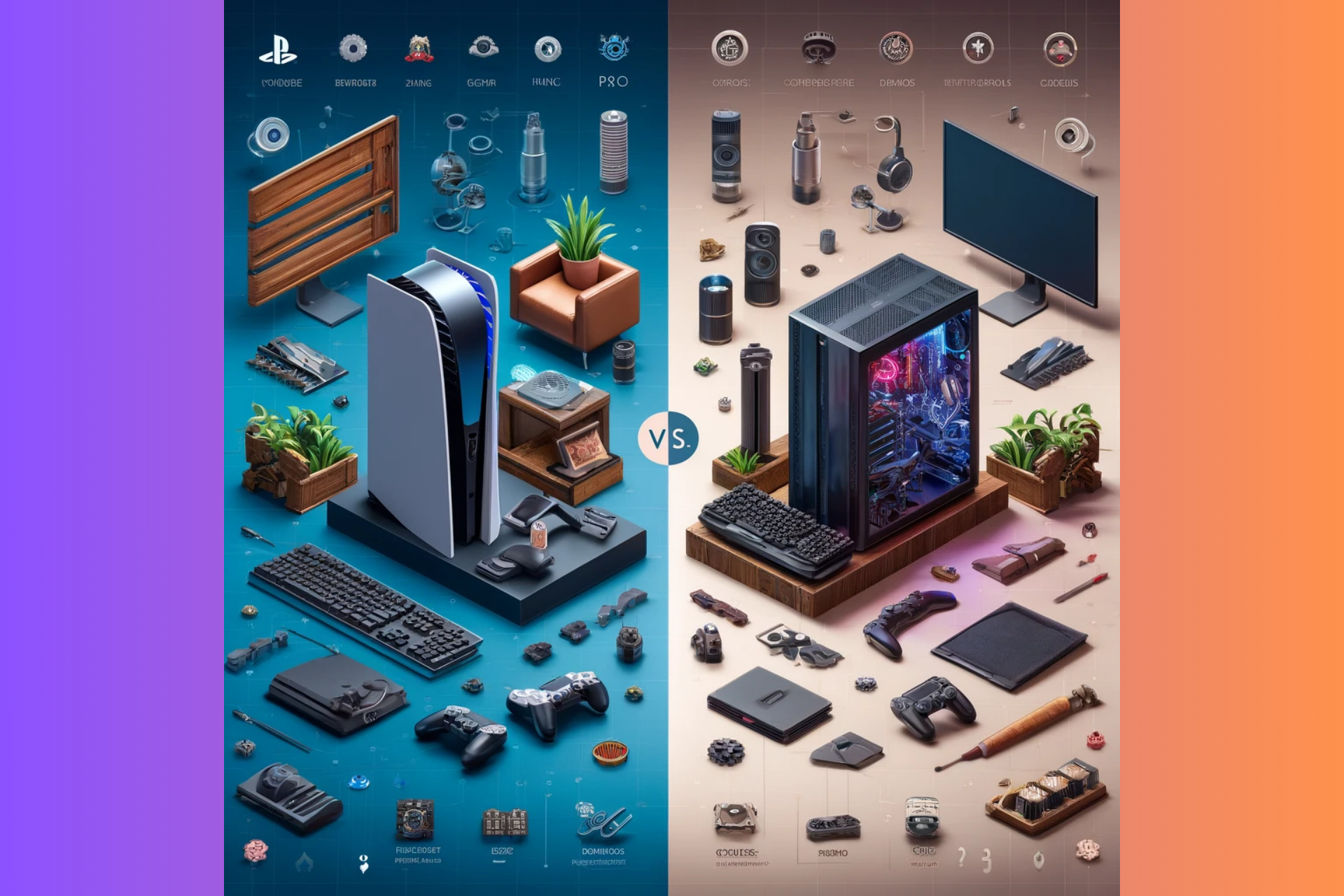
In a new console saga twist, the soon to be PlayStation CEO Hermen Hulst, stepped up and dropped a bomb on gamers in a recent keynote:
We are releasing our titles simultaneously, so day and date, on PlayStation 5 and PC, but with out tenpole titles we’re taking a more strategic approach and we introduce our new franchises to new audiences. We’re finding new audiences that are potentially going to be very interested in playing, for example, sequels on the PlayStation platform.
Hermen Hulst
What’s the new PlayStation strategy on releasing games on PC?
In a more simple, non-formal translation, Hulst believes that bringing those titles to PC will eventually lure you into buying a PlayStation console because you will want to play some sequels to those games. So, if we’ve got this right, the strategy is pretty obvious: get the first game on PC to make players interested and know about your games, then drop the sequel exclusive to PS 5. So, if you really like the game and want to see what’s going on next, you’ll need to hit the store and buy a PlayStation.
While we understand the business model for this strategic move, there might actually be two outcomes here. In the first one, it might really work and some of the players will really go and buy those PS 5 consoles.
The second scenario is grimmer because if the players don’t know from the start that the sequels will only be featured on PS 5, Sony will deal with many angry gamers.
If we didn’t understand the strategy correctly and Sony will keep launching the sequels to the same title on PC, why would players flock to buy a PlayStation 5 console? PC players are usually tech savvy and nowadays, they can build gaming rigs that are a lot more powerful than a PS 5.
We’ve learned about this whole story from Tom Warren X post and the gamers’ comments point out exactly the same arguments:
Entice PC players to spend another $500 on a system weaker than the one they prefer to play on. Okay. Lol.
In the end, the gamers will actually decide if this strategy is right or wrong, but it’s potentially damaging to lure players this way, unless you clearly point out that the sequels will be exclusive titles.
It’s a lot to debate on this, so let’s talk about it in the comments below.
YouTube is constantly adding and testing new features to improve its service, and recently the company started testing something that nobody expected.
So what is this new feature? For the first time, you can finally play games directly on YouTube.
Playables are finally available on YouTube, here’s what you should know
According to the YouTube support page, the company is testing games, known as Playables, on both desktop and mobile devices.
The feature was tested by a limited group of users, and now it’s available for testing to more users in the US, Great Britain, Canada, and Australia.
You can find Playables in the Explore menu or you might see the games in the Home feed or search results.
It’s worth mentioning that you can view and control the Playable’s history and progress through the YouTube History section.
Regarding the available games, the YouTube blog states that there are more than 75 games to choose from, including classics such as Angry Birds Showdown, Cut the Rope, Trivia Crack and more. You can even share games with your friends using the three-dot menu.
If you ever get tired of watching videos and you want to relax, be sure to give these games a try, if you’re in a region that has them available.
Google has started to work to warn Manifest V2 Extensions deprecation in Chrome Canary, beta, and dev versions. Chrome will begin alerting about these extensions in June 2024.
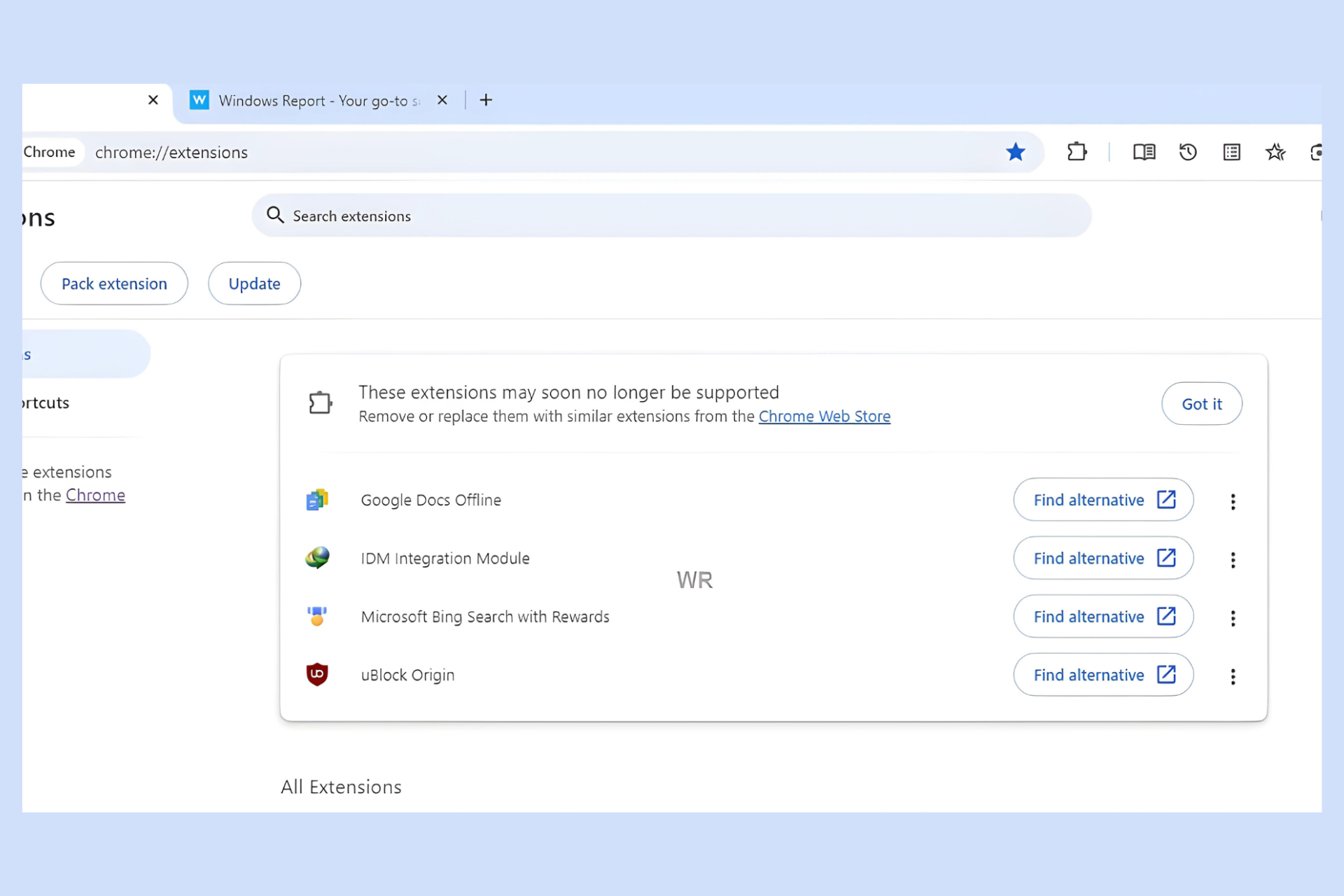
Guess what, Chrome Canary has already started alerting users that UBlock Origin and other MV2 extensions may soon no longer be supported, with alternate and other options for you to act on.
Chrome and the Chrome Web Store are transitioning from Manifest V2 to Manifest V3 for extensions, citing performance and security improvements. According to the proposed timeline, Google will disable Manifest v2 extensions in Chrome 127, starting with Canary, Dev, and Beta channels.
This means affected extensions will be disabled, and users will no longer be able to install Manifest v2 extensions from the Chrome Web Store.
Chrome Canary will display a header at the top of the chrome://extensions page warning users that these extensions may soon no longer be supported. The message will suggest removing affected extensions or replacing them with similar ones from the Chrome Web Store.
For each affected Manifest v2 extension, Chrome will offer a Find Alternative link on the Web Store alongside menu options to Keep for now and Remove from Chrome. Selecting Keep for now removes the warning for the specific extension, but it may reappear in the future and eventually lead to the extension being disabled entirely.
The curious case of UBlock Origin
As shown in the screenshot above, UBlock Origin, which relies on Manifest v2, is included in the list of affected extensions. This has caused concern among users and developers, including those associated with UBlock Origin. While Google seems to be favoring Manifest v3 extensions, you might still be able to use UBlock Origin temporarily. However, it’s likely to become incompatible eventually.
UBlock Origin Lite
The developer has prepared a Manifest v3 version of UBlock Origin called UBlock Origin Lite. However, as the name suggests, this is a basic version and may not offer the same functionality as the full UBlock Origin extension.
Are you using UBlock Origin? What do you think about Chrome blocking the Manifest v2 extension? Let’s talk about it in the comments below.
Microsoft discovered Moonstone Sleet, a group of hackers from North Korea. Their malware and ransomware are similar to the ones used by the Lazarus Group. On top of that, the group of cyber terrorists targets individuals and organizations related to technology, education, and more.
How does the Moonstone Sleet operate?
The wrongdoers from the Moonstone Sleet use fake identities or businesses to attract their targets. Then, they send trojanized versions of legitimate tools. In addition, the attackers created a playable malicious game and a new custom ransomware.
Moonstone Sleet uses a mix of malware and techniques. Some are unique to the group, while others are similar to the ones used by other hacking groups from North Korea, such as the Lazarus Group. For example, the wrongdoers from Moonstone are reusing the code of the Comebacker malware.
The members of the Lazarus Group previously used Comebacker in Python and npm packages. This allowed them to download malicious tools from a server controlled by them.
The wrongdoers targeted IT workers using popular platforms
In August 2023, the Moonstone Sleet started using Linkedin, Telegram, and developer freelancing platforms. This way, they tricked IT workers into downloading a trojanized version of PuTTY, an open-source terminal emulator.
For instance, in most cases, the threat actors sent a .zip file containing two files: a trojanized version of putty.exe and an url.txt with an IP and password. If the target typed the data from the url.txt, the malicious code would have started decrypting a hidden payload. Then, the malware would allow the Moonstone Sleet to steal data, access the system, or deploy more viruses.
The trojanized version of PuTTY also drops another malware known as SplitLoader. During the last stage of infection, the virus drops a trojan that decompresses, decrypts, and executes a PE file received from a C2 server.
Besides using the PuTTY malware, the hackers from Moonstone Sleet also sent .zip files containing malicious npm packages, claiming they were technical skills assessments. Once executed, the packages connected to an actor-controlled IP address and deployed payloads similar to SplitLoader.
In addition, the Moonstone Sleet deployed malicious npm loaders that facilitated credential theft via Windows Local Security Authority Subsystem Service (LASS).
The attackers developed a malicious game
These threat actors developed a game that works, known as DeTankWar, and distributed it through emails and messaging platforms. Also, they set up fake websites and X accounts for the game.
The group often presented itself as a game developer looking for investments or developer support. Additionally, they either disguised as legitimate companies or created fake ones. For example, they used the name C.C. Waterfall and sent the malicious game to developers pretending to be a blockchain-related project.
The .exe file of the game contained YouieLoad, a malware that loads next-stage payloads into the memory. On top of that, it creates viruses for network and user discovery and data collection.
Moonstone Sleet had another fake company known as StarGlow Ventures. They pretended to be a software development company seeking collaborations for web apps, mobile apps, blockchain, and AI.
The hackers from the Moonstone Sleet also targeted a defense technology company with the FakePenny ransomware and asked for a $6.6 million ransom in Bitcoin.
Ultimately, to protect your company from threat actors like the Moonstone Sleet, Microsoft advises you to be on the lookout for supply chain attacks. In addition, you should use antimalware software and inform other people working with you about ransomware and malware. After all, your whole network might be affected.
Do you think that the Moonstone Sleet is a real threat? Let us know in the comments.
Logitech announced the release of the second version of its popular MeetUp camera, MeetUp 2, which will be released in August. It can already be pre-ordered here.
The new camera costs around $899.00, and if you think that is way too much for such a tool, you’re not entirely wrong. But Logitech says it’s worth it.
MeetUp 2 is an AI-enhanced camera prepared for use in different situations. It can be connected to a PC-based setup, but it will also work in a bring-your-own-device (BYOD) situation. It also has a speaker with a bass reflex enclosure and patented suspension design, microphones with AI-powered noise reduction and echo cancelation, and voice detection.
The entire list of specifications can be found on the official site, but they’re many and varied, and Logitech made sure its new MeetUp 2 camera meets the current expectations of AI technologies.
Interestingly enough, MeetUp 2 might be the right camera for Microsoft Teams. Like its predecessor, this camera is compatible with the platform, but its new AI capabilities might make a perfect match with Teams.
As you already know, Teams has dozens of AI capabilities for peripheral tools, such as cameras. One of them is called Intelliframe, and with it, Microsoft Teams can automatically detect who’s speaking following the participants in a meeting.
It uses the camera to visualize the participant, and then it looks for that participant in the meeting database, automatically identifying them and displaying them from various perspectives. Intelliframe was announced last June, but it was only added to Teams in November 2023, so the capability is still new.
Using a camera such as MeetUp 2, Teams’ Intelliframe will be enhanced to provide an almost natural interaction of a hybrid setting, bringing these sorts of meetings closer to face-to-face meetings.
Logitech seems to be pointing in that direction, too, with the newest AI-powered capabilities of the MeetUp 2 camera, RightSight 2, and RightSsound 2. Both will create a natural-looking and sounding perspective, even when from afar.
Unlock AI video and audio features through the built-in CollabOS operating system. Additionally, users can experience integrations with Microsoft, Zoom, and Google for a more intelligent meeting experience.
Logitech
If your organization already uses Teams as its main productivity platform, consider getting one later this year.
After they departed from Rocksteady, Sefton Hill and Jamie Walker, the co-founders of the gaming studio, created a new one named Hundred Star, and Xbox Gaming Studios offered them a deal for a new game. It should be a AAA-standard, single-player, action-adventure game based on Unreal Engine 5.
The new game from Hundred Star and Xbox might be similar to Batman: Arkham
There aren’t many details about the game. It could be related to Batman: Arkham. Yet, the chances are slim because Rocksteady might be working on it. However, now, they are focused on updating Suicide Squad: Kill the Justice League.
Even if the game created by Hundred Star with the help of Xbox Gaming Studio isn’t related to Batman: Arkham, we might see some gameplay similarities.
Because Xbox Gaming Studio is financing the game from Hundred Star, it can be a platform exclusive. Yet, it might become available on PC. However, Xbox is trying a multiplatform approach with some games like Hi-Fi Rush. So, after a while, other consoles might receive the game.
Hundred Star has around 100 employees, and 20 of them previously worked on Suicide Squad: Kill the Justice League. Besides, Sefton Hill is responsible for some of the best games from Rocksteady, such as Batman: Arkham Asylum, Batman: Arkham City, and Batman: Arkham Knight. So, the new game made by Hundred Star in collaboration with Xbox is in good hands.
Hundred Star is hiring
According to Great Place to Work, employees at the Hundred Star are happy with the company. If you want to work with them, go to their website. However, to find details about their careers, you will have to send an email to [email protected] or [email protected].
We might hear more about the new Hundred Star game from the Xbox Games Showcase on June 9, 2024. In addition, we will most likely see new games from Activision, Blizzard, Bethesda, and Xbox Game Studios.
Ultimately, the new game from Hundred Star, funded by Xbox Gaming Studios, could become the next big title. After all, the co-founders of the studio are experienced. We can’t wait for the Xbox Games Showcase, and we hope that they will tell us more details about this project.
Do you think the new game will be similar to Batman: Arkham Knight? Let us know in the comments.
If you were wondering how often to clean the Xbox consoles, there’s no one-size-fits-all answer. As long as the console is in a well-ventilated environment with minimal airborne dust, perhaps once every few years. But if you are a heavy smoker or the console is in a dusty area, consider cleaning it once or twice a year.
Most of us often forget to do so because the console doesn’t show any signs of malfunction. Remember, dust accumulation, in the early stages, causes issues like minor overheating and stuttering in games.
The real problem appears later down the line when the air vents get choked, impacting effective heat dissipation. If you haven’t woken up by this point, the fan, optical drive, or internal components run the risk of getting damaged.
But why discuss it today? That’s because I recently came across a post on Reddit where a user who goes by the name DarthLigMauI shared a rather frightening experience, at least to me, it is!
DarthLigMauI lent the Xbox to a brother and, upon receiving it a year later, found that it kept shutting down automatically when overheating. Out of curiosity, he opened the console up and was shocked to find a significant dust buildup.
One look at the photo got me wondering how the device ever turned on in the first place!
This is your reminder to regularly clean the Xbox console. And if you are not sure how to do so, perhaps get in touch with a professional. Although, a brush and a can of compressed air should be sufficient to clear minor dust deposits.
Unbated dust accumulation can also trigger the Xbox ventilation error, which is another sign to clean the console!
When was the last time you cleaned the Xbox console? Share with us in the comments section.
Dragon Age series has introduced modern audiences to the fantasy RPG genre, and it’s no surprise that many are waiting for the latest installment impatiently.
Speaking of which, it seems that the game was spotted on the Xbox app and it reveals some important information.
Dragon Age: Dreadwolf is coming this summer, Xbox app reveals
As Gamereactor reports, a few keen-eyed users spotted the new Dragon Age game on the Xbox app for mobile.
If you search for the game, you can see its page in the app with the option to download it to the console. Of course, this option doesn’t work since the game isn’t out yet.
However, there’s a description available that states Full release summer 2024. This is exciting news if it turns out to be true, however, Bioware is keeping all the information under wraps.
Many are hoping that the game will be shown during Xbox Games Showcase on June 9th and that we’ll finally get the official release date.
There is nothing worse than trying to launch Tarkov and getting hit with error 103003. Being a multi-player game, this means you’ll be missing out on all the online matches fun.
Typically, the error 103003 means you’re unable to connect to the servers so always check for a maintenance or downtime schedule. If everything checks out, it could indicate an issue with the game files or an antivirus that is blocking the connection.
How do I fix error 103003 in Tarkov?
1. Run the BSG launcher as administrator
Open File Explorer and navigate to: C:/Battlestate Games/BsgLauncher/
Right-click on the BSGLauncher.exe and open Properties.
Choose the Compatibility tab. Check the Run this program as an administrator and click Apply and OK to save changes.
Now start the Tarkov game again and check if the error 103003 makes an appearance.
2. Adjust your resolution settings
Press the Win + I buttons to open Settings.
Select Display.
From the Display resolution drop-down, select the resolution that matches your Tarkov game.
3. Reset game settings
Hit the Windows + E keys to open File Explorer.
Navigate to the following folder: C:\users\USERNAME\documents\escape from tarkov
Locate the local.ini and shared.in files then delete them. If you can’t find them in this folder, do a search in all drives.
Try launching Tarkov again and see if the error 103003 reappears.
Whereas tailor-made configurations can make the game more enjoyable, some may conflict with each other and throw up errors. Deleting these files will reset the game to its default configurations and the deleted files will be recreated.
Locate Tarkov, right-click it, and choose Properties.
Navigate to Local Files. Next, click on Verify integrity of game files.
Wait for the process to complete.
Once finished, check if the problem is resolved.
5. Bypass firewall
First, you’ll need to have total control over the Escape From Tarkov folder.
Go to the Escape From Tarkov folder on your computer.
Right-click the folder and in the context menu, select Properties.
Click on the Security tab.
Under the Security tab, click Advanced.
Click Change next to the owner’s name near the top.
In this new window, click Advanced.
Now in another new window, click Find Now.
Locate your username and then click the OK button.
Click OK in this new window.
Click Apply in the following window and then close everything.
Now search for and open Windows Defender Firewall on your computer.
Click Advanced Settings on the left-hand side.
In this new window, click Inbound Rules on the left-hand side.
Select New Rule on the right hand side.
In Rule Type, select Program and click Next.
Click This program path and then Browse. Locate the Escape From Tarkov file.
Once you’ve found Escape From Tarkov and added it to the Inbound Rule, click Next.
If you’re using a private computer, click Allow the connection. Or if you prefer, Allow the connection if it is secure – for that extra level of security.
Click Next when done.
Select when to apply the rule.
Give a name to the rule and a description if you like. Then click Finish.
6. Reconfigure the NVIDIA 3D settings
NOTE
This solution only applies to PCs with the NVIDIA graphics card.
Open the NVIDIA Control Panel, expand 3D Settings, and then click on Manage 3D settings.
Click on the Restore button.
Choose the appropriate response in case a confirmation prompt appears.
The NVIDIA Control Panel ensures that the game’s graphic settings are optimized for compatibility and performance purposes. Over time, these settings may become incompatible especially with software conflicts so resetting it to default will clear any issues and reset values to their default state.
You can also try using another VPN or reinstalling the game and see if the error 103003 disappears. Sometimes, when the server is overloaded, Tarkov may fail to launch or experience packet loss. Changing servers can help address such issues or the backend error.
Another frequent problem is Tarkov error 228, which you can fix with a few quick steps.
When it comes to Escape from Tarkov, errors on post are quite common but we’ve narrowed down the causes and how to fix them.
To minimize the occurrence of such errors, ensure to keep your game updated at all times, and regularly check the server status for any updates.
If you have managed to fix this error with any of the solutions above, let us know in the comment section below. And if you have any other solution not mentioned here, do let us know.
Windows Autopilot has been around since 2017, helping IT administrators set up new devices. Over the years, it has undergone some change, but this time around, Microsoft is rolling out the next generation of Windows Autopilot device preparation with a wide array of new features.
With the next-generation Windows Autopilot device preparation, Microsoft plans to simplify the experience for existing customers and cater to a new segment, the government cloud customers. And the Redmond-based tech giant has confirmed that none of the existing features are being deprecated. Instead, they will be available alongside the latest innovations.
The improvements include profile configuration from a single screen, simplifying adding devices to groups, and better reporting with more detailed reports. Exhaustive reports will allow you to quickly identify what went wrong with the deployment and fix it, if that’s the case.
Using the upgraded Windows Autopilot device preparation, admins can now specify apps that must be installed during out-of-box experience (OOBE). This way, the critical apps are present on the device before it’s ready for use!
Microsoft also improves the OOBE for end users, allowing them to monitor the progress as the device is set up. And, there will be more recovery options.
Besides, Microsoft is committed to bringing additional features to the next-generation Windows Autopilot device preparation. These include,
1. Customize OOBE and rename devices during provisioning based on organizational structure. 2. Self-deploying and pre-provisioning mode. 3. Additional admin-specified configurations delivered before allowing desktop access. 4. Enhanced optional desktop onboarding experience inside the Windows Company Portal app. 5. The ability to associate a device with a tenant.
Right now, Microsoft is asking for your suggestions and feedback. You could share them in the comments section on Microsoft’s official blog. Perhaps your suggestion would make it to the new Windows Autopilot device preparation.
Everyone wants to convert non-editable PDFs to editable documents as seamlessly as possible, but currently, no one on the market has a converter that turns a PDF (or any other document) into an editable file while preserving its original layout.
Microsoft knows it, so the Redmond-based tech giant has been working on a technology that does that: converting non-editable documents into editable documents while preserving all of their original aspects, including fonts, colors, layouts, and visual elements such as images of different formats.
The system looks at the non-editable document and figures out the arrangement of various elements (like text, images, and tables), and it determines the positions and sizes of these elements using bounding boxes.
As used herein, the terms “non-editable document”, refers to an electronic document that cannot be edited by word proessing, presentation or design creation applications. Examples of non-editable documents include images (e.g., jpeg, GIF, PNG, etc) and PDF documents.
The system identifies the fonts used in the text within the non-editable document and then uses the AI model to choose the color scheme based on the colors used in the original document.
The system creates a new, editable document using the identified layout, fonts, and color scheme. This new document maintains the look and feel of the original non-editable document but allows for editing.
The technology converts non-editable PDFs into editable documents while keeping their original elements, but it also allows for resizing them while keeping everything intact.
In some implementations, the technical solution also offers automatic resizing of the editable document by preserving resizing the document in a manner that preserves aspect ratio of various elements in the document.
The technology would be a game changer for various reasons. It allows for faster conversion without worrying about misplaced parts or wrong fonts. Even though there are currently dozens of PDF converters on the market (we even have some recommendations for you), none truly converts a non-editable document into an editable one while keeping it intact.
Plus, the tech’s innovation lies in its resizing and visual preserving, which could be quite useful in a handful of situations, from preserving and editing archived files to giving new life to old documents.
Mini PCs might not be the most popular choice, especially when it comes to gaming, but ASUS plans to change that.
The company has unveiled a new mini-PC that packs quite a punch and can handle the latest games without breaking a sweat.
ASUS NUC 14 Performance announced, here’s what to expect
As reported by NotebookCheck, ASUS has unveiled a new high-end mini PC that is similar to ROG NUC. Regarding the specs, here’s what you can find:
CPU:
up to an Intel Core Ultra 9 185H, 16 cores (6 performance and 10 efficiency) and 22 threads, up to 5.1GHz
GPU:
up to an Nvidia RTX 4070 laptop
RAM:
up to 64 GB of DDR4-4400
Connectivity:
4x USB 3.2 Gen 2 Type-A ports One HDMI 2.1 port 2x DisplayPort 1.4a Thunderbolt 4 USB-C, 2.5G Ethernet port SD Express slot Audio combo jack
Weight:
800 g
Power supply:
330W
ASUS NUC 14 Performance offers an incredibly small and light design, so it can easily fit on any desk, and unlike its ROG counterpart, it has a sleeker design, so it’s suitable for business environments.
Sadly, there’s no information about the price, but it’s expected to be similar to ROG NUC, with a starting price of around $1600.
Last week, the PowerToys 0.81 version was released. A significant update introduced a new AI feature, Advanced Paste, which can convert anything you copy into another format.
Soon after the release, many users complained about issues with the newly added feature. One of the users, brainfoolong reported the issue on GitHub, in his comment, he mentioned:
Microsoft PowerToys version 0.81.0
Installation method – PowerToys auto-update
Running as admin – None
Area(s) with issue? – Advanced Paste
Steps to reproduce
I attach a video the shows the behaviour. On Windows, when i have closed slack into systray and then open a chat window, all clipboard data is automatically inserted into slack. Even files i have copied in file explorer.
This does not happen when i just minimize to task bar instead of systray.
I do not press any key. Just open with a click on the systray icon.
The only plugin i have activated is Advanced Paste (Screenshot bellow). If i disable just this plugin or close power toys, the auto insert is gone.
This started immediately after todays update to 0.81.0.
This behaviour can lead to serious data breach if you do not pay attention.
Once he mentioned the issue, many other users shared their experiences and issues with Advanced Paste. Therefore, the developers worked on the issues and released an update fixing them.
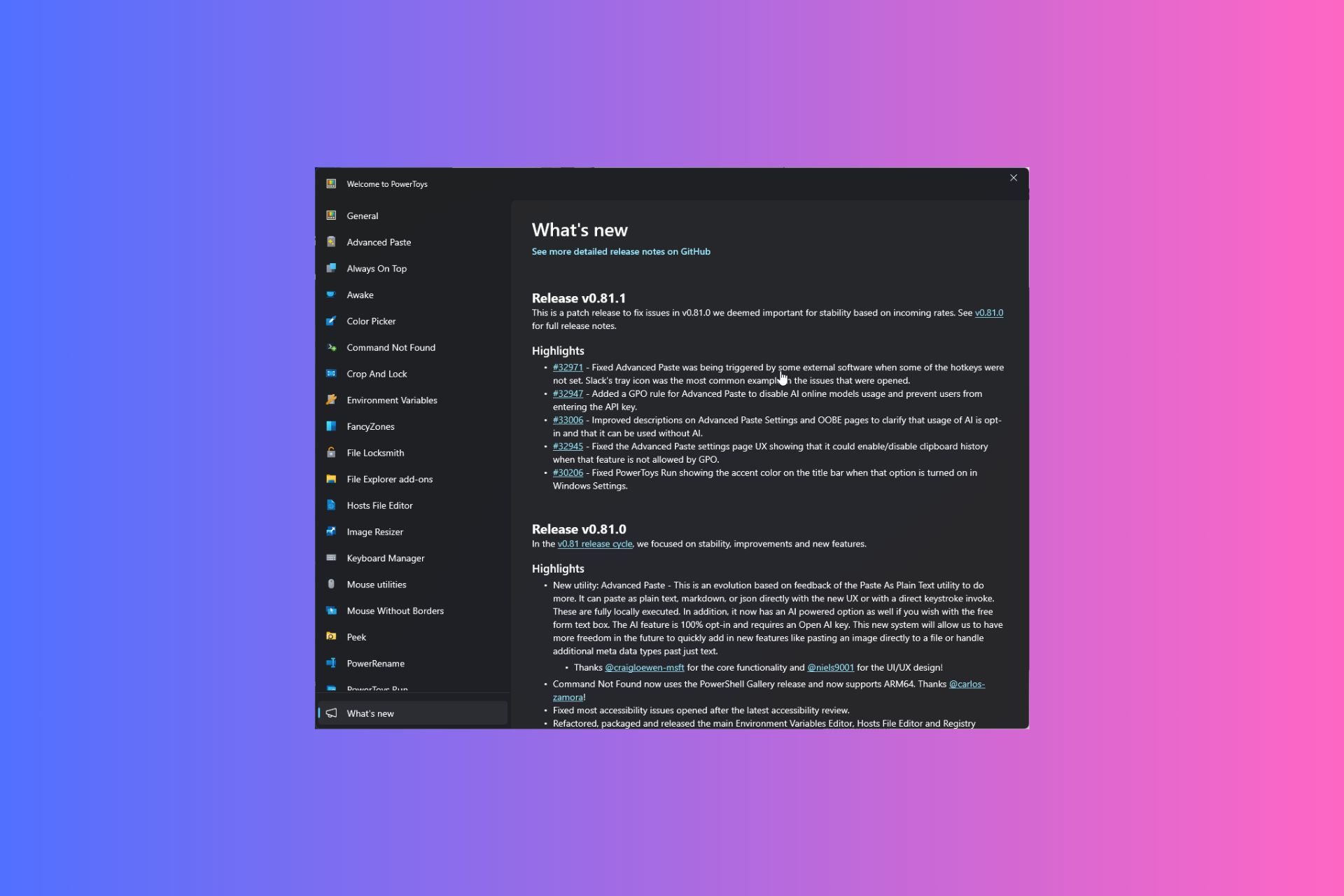
Here is the complete changelog for PowerToys version 0.81.1:
Fixed Advanced Paste was being triggered by some external software when some of the hotkeys were not set. Slack’s tray icon was the most common example in the issues that were opened.
Added a GPO rule for Advanced Paste to disable AI online models usage and prevent users from entering the API key.
Improved descriptions on Advanced Paste Settings and OOBE pages to clarify that usage of AI is opt-in and that it can be used without AI.
Fixed the Advanced Paste settings page UX showing that it could enable/disable clipboard history when that feature is not allowed by GPO.
Fixed PowerToys Run showing the accent color on the title bar when that option is turned on in Windows Settings
You can get the latest version of PowerToys from GitHub or download it from Microsoft Store. However, if you already have PowerToys, launch it, go to Settings> General, and click Check for updates to install the newest version.
Were you also facing issues with PowerToys’ Advanced Paste function? If so, download the latest update and share your experiences with our readers in the comments section below.
In the last month, several reports have emerged of a potential HubSpot acquisition by Google, talks for which are reportedly ongoing.
Yesterday, CNBC’s David Faber also hinted at an acquisition. He said,
There have been many reports about HubSpot being in conversations with Google. My understanding is absolutely true, all-stock deal for Alphabet to acquire HubSpot.
Following these reports, HubSpot stocks jumped 9% in Tuesday’s trade.
The potential HubSpot acquisition by Google was first reported by Reuters in April’24. It mentioned that Google’s parent company, Alphabet, had reportedly met with investment bankers at Morgan Stanley to discuss a suitable offer and whether the regulators would green-light the deal.
Sources privy to the matter suggest that negotiations between Google and HubSpot are ongoing, but a deal hasn’t been finalized yet. Another potential buyer may also emerge, according to a report in Bloomberg.
If it goes through, the deal would be the biggest this year and in Alphabet’s history, given HubSpot’s market evaluation of roughly $30 billion. However, both the involved parties have remained tight-lipped about the ongoing negotiations. A HubSpot spokesperson told Reuters,
As standard practice, HubSpot does not comment on rumors or speculation. We continue to focus on building a great business and serving our customers.
Google’s HubSpot acquisition a concern for Microsoft:
For the unversed, HubSpot develops marketing software for small and medium-scale enterprises, a key factor setting it apart from companies like Salesforce and Oracle, which specifically cater to large-scale clients.
It is HubSpot’s inherent focus on smaller companies that makes it a perfect investment for Google, which itself is eying a comfortable position in cloud computing, a landscape where Microsoft Azure poses a formidable challenge to Google Cloud and AWS (Amazon Web Services).
According to Statista, in Q1 2024, AWS, the biggest in the space, commands a 31% market share, followed by Microsoft Azure’s 25% and Google Cloud’s 11%.
Microsoft, in many recent collaborations, has had its partners switch their services to Microsoft Azure, including Seimens and Khan Academy.
With the acquisition in place, Google’s parent company, Alphabet, would make inroads into the small and mid-sized client base, in addition to providing it with crucial data that would help streamline the integration of AI in the native search engine.
As of now, we can only wait for an official confirmation from Google or HubSpot about the ongoing negotiations. But given how these deals usually proceed, it could take a while!
Do you think Google’s acquisition of HubSpot, if it goes through, would affect Microsoft’s standing? Share with our readers in the comments section.
Since the pandemic, Microsoft Teams has been facilitating hybrid work and communication, intending to make them more seamless and inclusive than ever before, whether it is creating meaningful connections via end-to-end event platforms, large-scale one-to-many digital events, or one-to-one meetings.
Microsoft introduced a new digital streaming event solution focusing on large events, Town Hall, in September 2023, and the Redmond tech giant has been working on evolving it with new and exciting features, including bringing multiple presenters on stage, accessing real-time health analytics for events and sending attendee emails,
This time, the company discussed its plans for Teams’ digital event platforms for the upcoming year, including two big news.
Based on customer feedback, Microsoft plans to support Teams Live Events until Town Hall gets the new features mentioned on the Town Hall adoption page, which are:
Engagement capabilities (certain Q&A functions: voting, filters, sorting, and archive questions; export questions to CSV/download Q&A report)
Device capabilities (MTR-W support for presenters and attendees and CVI and VDI support)
Advanced production experiences (producer role, queuing shared content, and preview scenes)
This shows the company’s commitment to making the transition seamless and useful for customers. Earlier, Microsoft was planning to retire the Teams Live Events in September 2024 but according to this new update, you can continue to use it to schedule instances beyond this date.
However, the company encourages users to upgrade to Town Hall and take advantage of new features as and when they are ready for the transition.
If you want to learn more about the upcoming update and feature timelines, you can check the Town Hall adoption page. For information related to Teams Live Events plans, you can read blogs, MC posts, and other relevant channels.
To conclude, Microsoft is working on adding new features and capabilities to Town Hall to enhance the streaming digital event experience, thereby making it more impactful for presenters and attendees. The company mentioned an increase in new customers trying Town Hall, total usage, and the number of hosted events, looks like there are on the right path.
What are your thoughts on the matter? Share your views with our readers in the comments section below.
Due to its faulty deployment, Google AI Overviews quickly became a dangerous tool. It generated erroneous solutions, and some of them were problematic. For example, when asked about the health benefits of bathing with a toaster, it said it is a fun way to unwind and wash away stress. So, users might move to Bing, especially since it has a better AI-based search.
Bing is the second most-used search engine
Other Google competitors might see this AI-generated problem as an opportunity. However, Bing is already the second most-used search engine with a 3.64% market share. Compared to Google’s 90.91%, Microsoft’s percentage is small but significant.
Bing’s AI-based search is superior to AI Overviews. For example, if you type how to make pizza in the search engine, Copilot will give you an AI-generated guide and a few prompt suggestions afterward to enrich your experience.
Sometimes, the AI-powered search will change its format, and you will see the Copilot box on the right side of the screen or at the top of your searches. In addition, you can use the Copilot button to start chatting with the AI directly.
Copilot will give you a source for the answers it provides, and It will be easier for you to check the accuracy of the information. Also, the AI assistant won’t grab any Quora or Reddit answers and present them to you as reliable answers.
Microsoft’s AI-based search engine has additional features
Compared to Google, Bing has additional features. For example, besides Copilot’s help, the AI-based search engine will provide other information related to your query and images. If you search for how to make pizza, it will give you an expanding list of recipes. Also, if you want to know where to find raccoons, it will provide information about their habits, environment, and more.
In addition, Bing’s AI-based search engine features a related search box on the side. Also, Microsoft has a Rewards program that gives points for using Bing. You can donate them to non-profit organizations and get gift cards and sweepstakes.
Unfortunately, even if Bing has a better AI-based search, people have a negative perspective of the search engine. After all, it used to provide inaccurate answers. On top of that, Microsoft keeps trying to force Bing onto us.
Ultimately, Microsoft could seize some of Google’s market share with its Bing AI-based search engine. However, before doing that, the company has to find a method to change our perspective about it and redirect us to it without overdoing it. After all, it is a great opportunity to make us like it.
Will you try using the Bing search engine? Let us know in the comments.
We’ve all seen what the new Gemini 1.5 can do. Now, in the advent of the new Copilot+ PC avalanche of devices from Microsoft, Google is fighting back by announcing their Chromebook Plus laptops powered by Gemini.
It’s a prompt response and Google states that now you have all you need from an AI PC right on the new Chromebook Plus laptops, but beyond advertising, you’re pretty stuck with Chrome OS and Google’s apps. Is that enough? Let’s discuss a bit about the new laptops and their capabilities.
What’s so special about the new Chromebook Plus laptops?
First of all, to get the best out of Gemini and other AI features, you will need the Google One AI Premium plan. Luckily, you will get it for free if you buy a Chromebook Plus laptop, but only for 12 months.
Right now, you can try this plan for 2 months and then it will cost you $32.99/month, and that includes access to Gemini Advanced, 2TB of storage and Gemini in Docs, Sheets, Slides, Gmail and more.
Now, let’s go through some of the new features promised by Google:
Simple set up with your Android phone. Set up your new Chromebook with an assist from your phone. Scan a QR code and your phone will share Wi-Fi credentials and your Google account credentials — no need to remember and enter long passwords.
Setting up your laptop by using your phone is certainly a great selling point, but you may also set up your Microsoft account using your Gmail credentials, so we don’t actually see the exclusive innovation here.
If you’re using Google Tasks, on the new Chromebook Plus laptops, you will see your to-dos right on your screen:
One click access to your Google Tasks. A new built-in view of Google Tasks lets you add or check off to-dos — just tap on the date in the bottom right corner of your homescreen. Access your to-dos from across Google Workspace apps and devices, so if you’ve added a task from Gmail on your phone you can pick it up from your Chromebook without missing a beat.
Screen recording as a GIF is also a new feature advertised for the Chromebook Plus laptops. It’s great, but Snipping Tool has been doing that in Windows 11 for some time and it’s not limited to GIFs.
Seamless GIF screen recording. With the built-in screen capture tool, you can choose to automatically save screen recordings in GIF format to make your own homemade demos or reaction GIFs.
Probably the most attractive feature of all is that Google integrated a new Game Dashboard that will get more out of your mobile gaming on your laptop.
Uplevel your gaming with the new Game Dashboard. Game Dashboard lets you control your gaming experience with new features like mapping game controls, so you can play any mobile game and map controls to your keyboard. Learn more about new gaming features and the new Acer Chromebook Plus 516 GE (available in the U.S.)
Certainly, Acer’s Chromebook Plus laptop really packs a punch. It comes with a 16-inch, WQXGA 120Hz display, a 13th generation Intel CPU, Wi-Fi 6E, up to 2 TB of storage, and up to 16 GB of fast RAM.
Generally speaking, the 6 new Chromebook Plus laptops from ASUS, Acer, and HP will be great for Google’s AI applications and mobile gaming. Even the prices of the new laptops are pretty attractive. For instance, Acer Chromebook Plus 514 will be available at Costco for $349.
Will the new Chromebook Plus rival the Copilot+ PCs?
The short answer is no, not even close. And the low prices of the new Chromebooks should be a basic orientational factor for that. While the Copilot+ PCs are opened to the much more popular Windows environment and come with powerful hardware configurations, Google’s Plus are nothing more than large screen smartphones with a few added perks.
But hey, if you’re only opting for Google’s apps and want to turn Android into your productivity exclusive environment, you can make a small investment and see how it goes.
What do you think about the new Chromebook Plus laptops and features? Let’s discuss in the comments below.
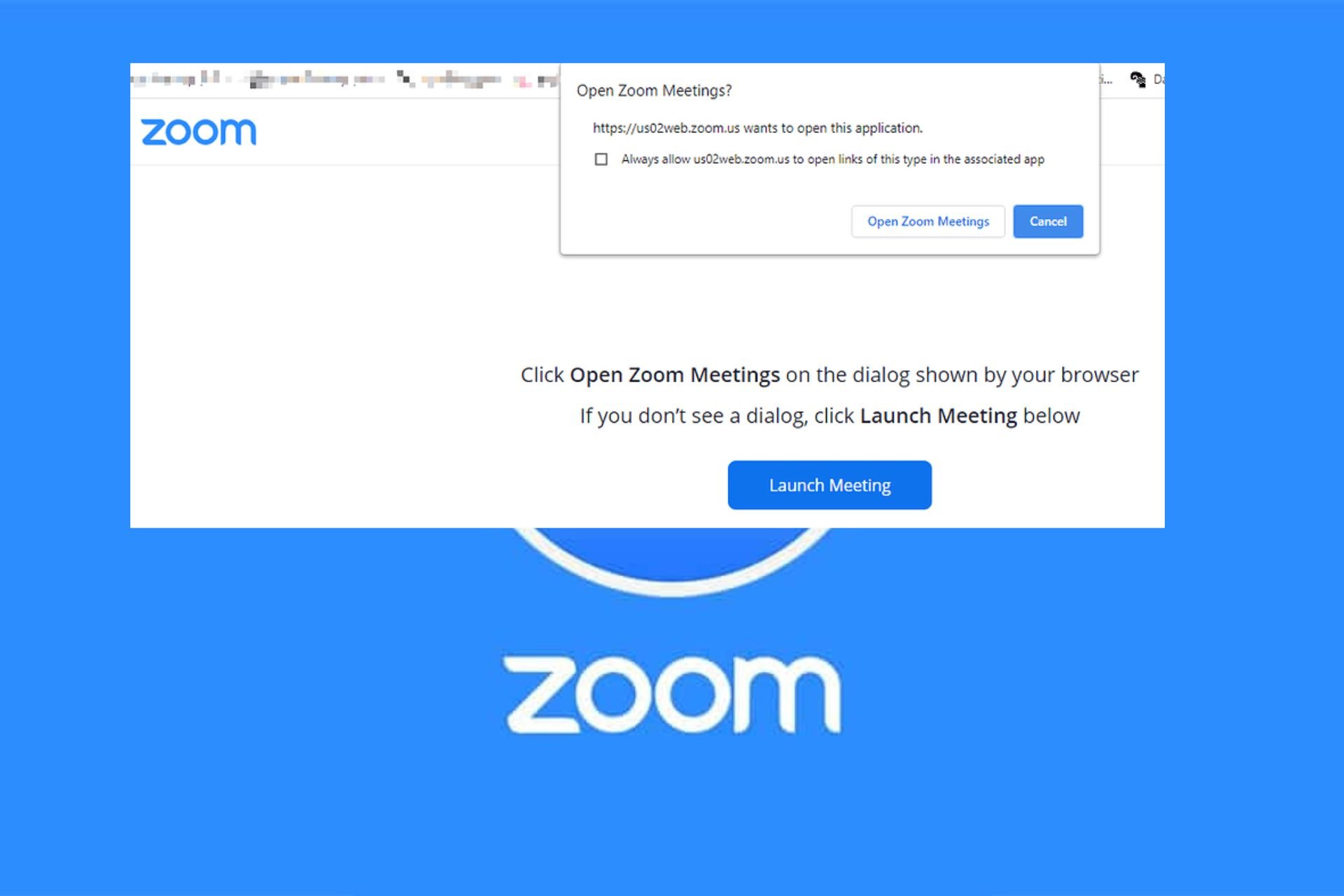
Ever clicked endlessly on your Zoom app but it wasn’t budging? Well, this is a classic case of your Zoom app not launching.
When an app fails to launch, it could be a myriad of issues ranging from insufficient permissions, installation errors, failure to meet system requirements, outdated apps or even insufficient resources.
What can I do if my Zoom desktop app is not launching?
1. Force stop Zoom
Press the Windows key + X and select the Task Manager option.
Right-click the Zoom app.
Now, select the End task option and relaunch Zoom.
Navigate to the Zoom app on your desktop, right-click on it, select Properties on the menu and click on Shortcut.
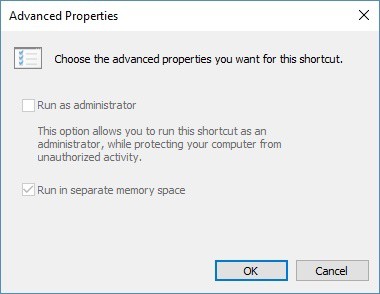
Next, click on Advanced.
Select the box that says Run As Administrator and click on Apply.
Try launching the Zoom app and see if the issue persists.
If you don’t have the requisite permissions or you’ve set up security settings to prevent other users from launching apps, your computer may block Zoom from launching. Launching it as an admin bypasses these settings.
2. Clear Zoom app cache
2.1 Clear Zoom cache and cookies on a Web browser (Chrome)
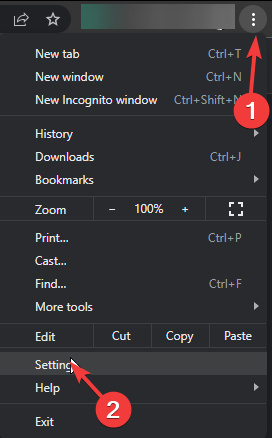
Launch your Chrome browser and click the three vertical ellipses in the top right corner.
Select Settings.
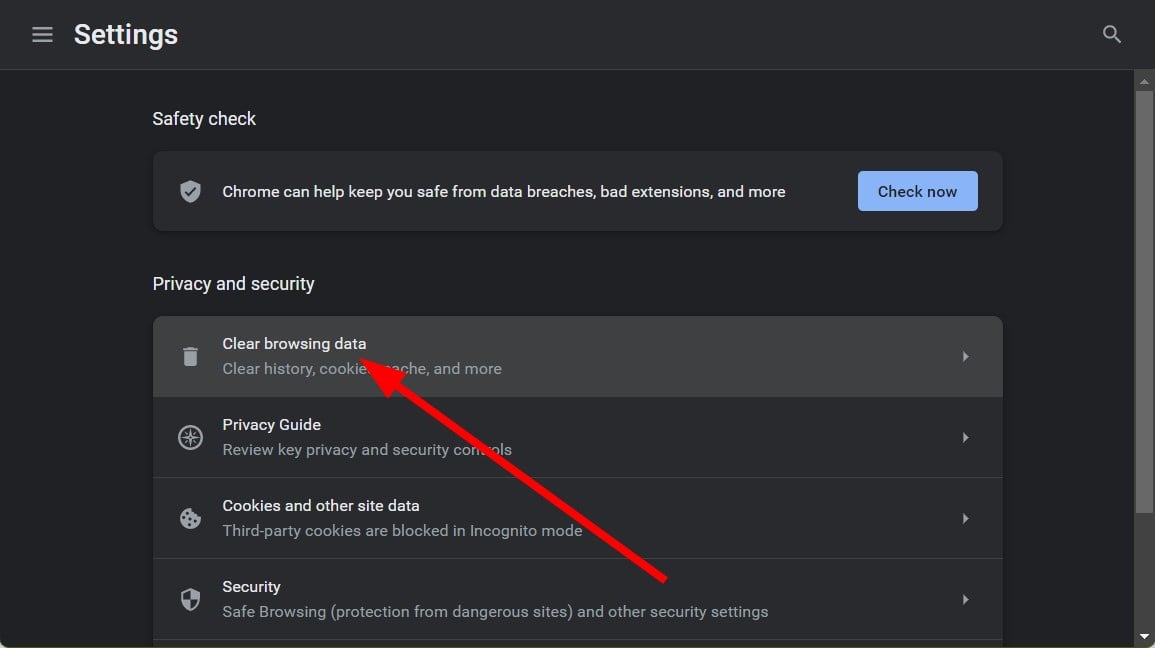
Click on Privacy and security, then select Clear browsing data.
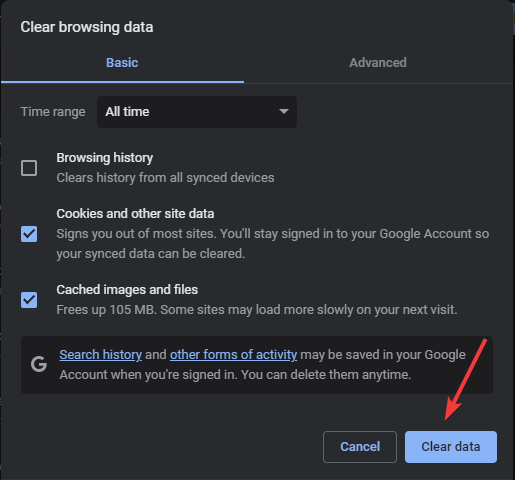
Check Cookies and other site data and Cached images and files, then hit Clear data.
2.2 Clear Zoom cache and cookies on Windows
Press the Windows + E to open the File Explorer window.
Navigate this path after replacing the Username with your user profile name: C:/Users/Username/AppData/Roaming/Zoom
Locate and select the data folder, then click the Delete icon to clear the Zoom cache.
While you’re clearing the cache, also do overall housekeeping on your PC. Check whether it is low on memory and do a Disk Cleanup. This will ensure your Zoom app has enough resources to launch and run.
3. Add Zoom to the Firewall exception list
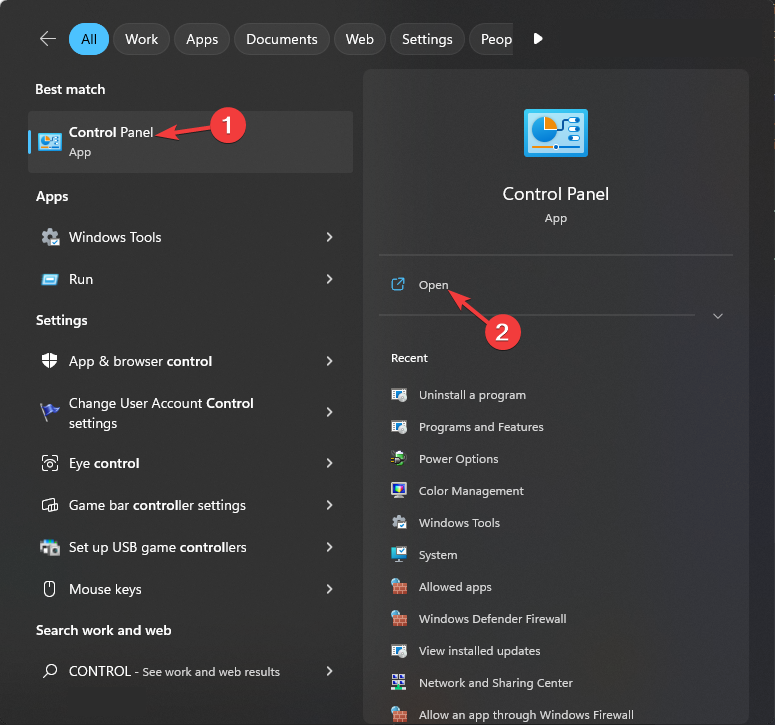
Press the Windows key, type control panel, and click Open.
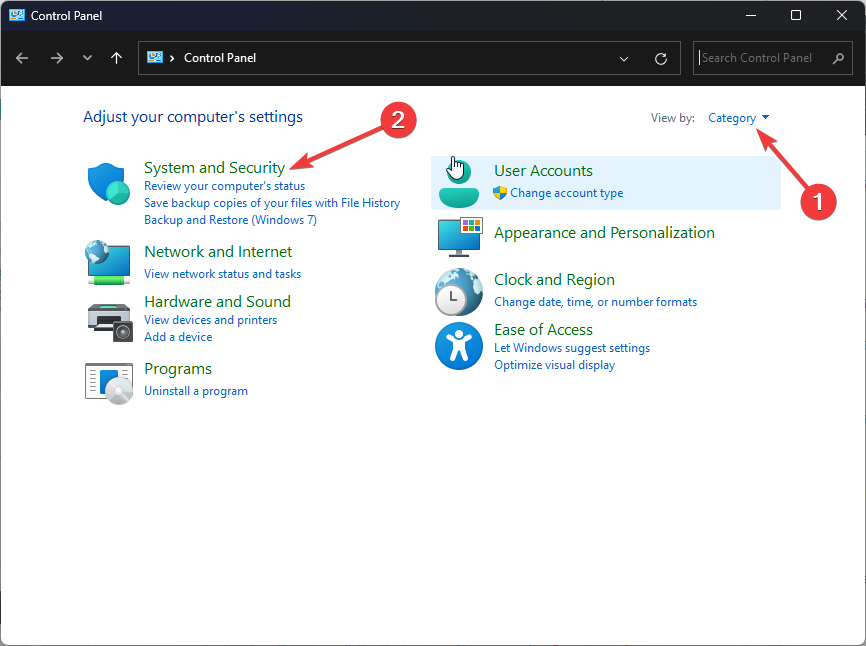
Select View by as Category and click System & Security.
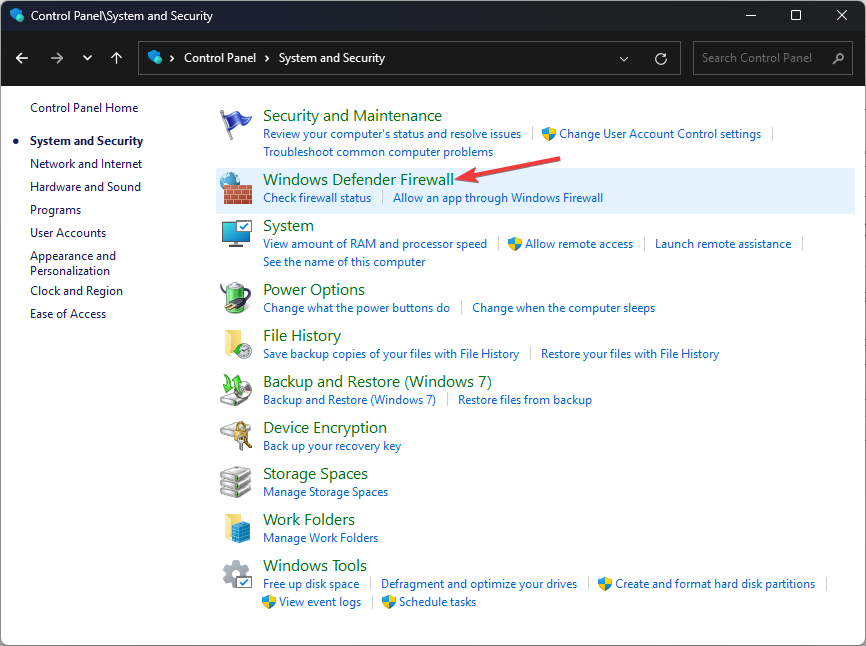
Click Windows Defender Firewall.
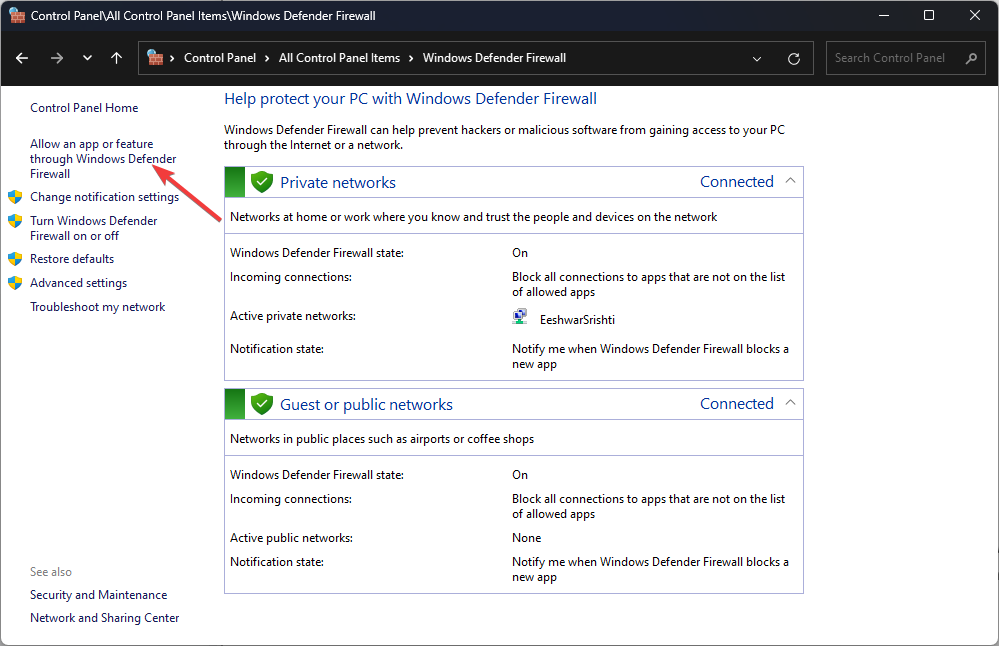
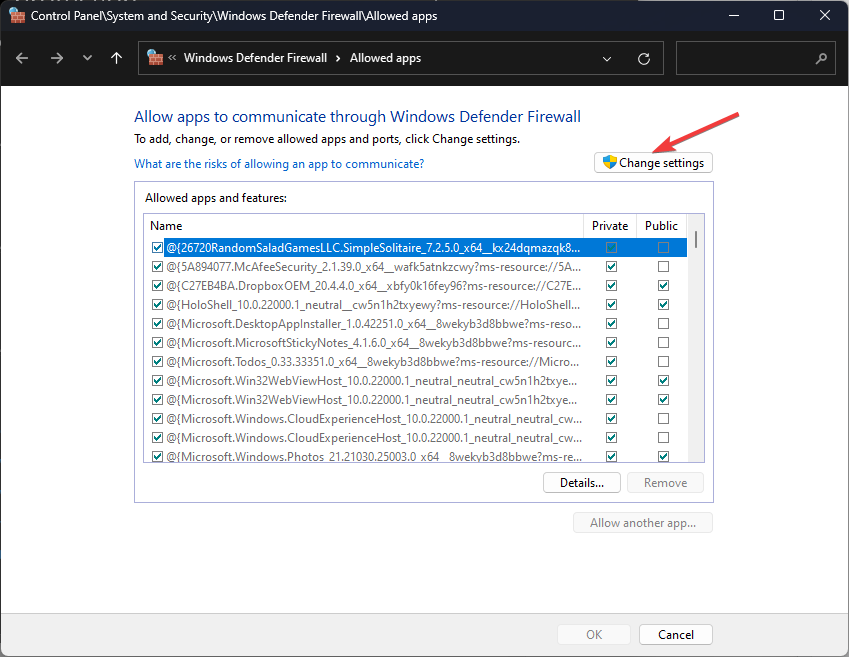
Now click Allow an app or feature through Windows Defender Firewall.
Click Change settings.
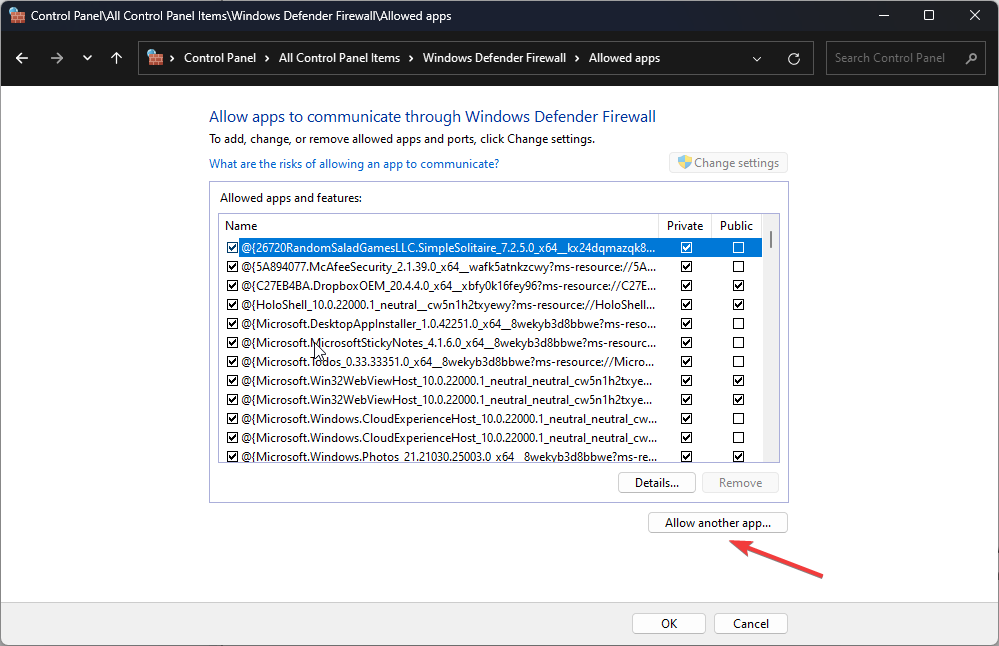
Select Allow another app.
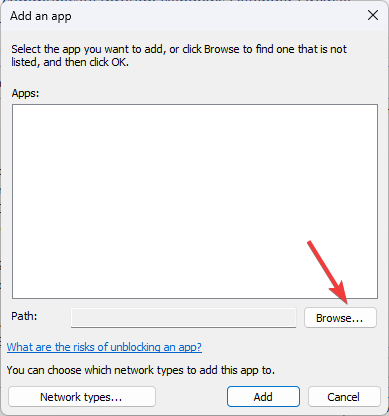
Click the Browse option and select Zoom.
Next, click the Add option.
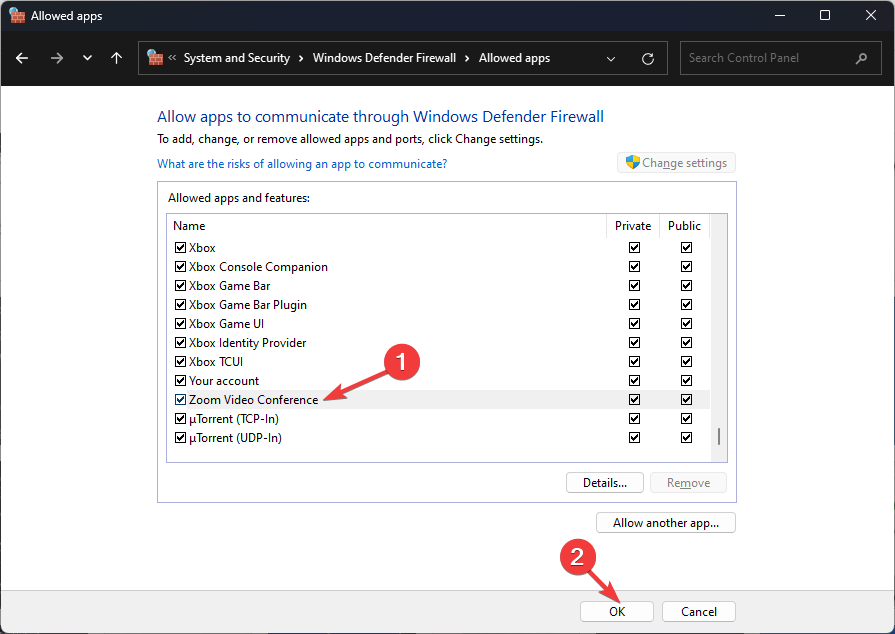
Make sure for the Zoom Video Conference app, Private and Public options are select
Click OK to close the window.
An overzealous antivirus software may quarantine Zoom as a risky app and prevent it from launching. You can start off by temporarily disabling your antivirus and try launching Zoom. If it works, turn it back on and whitelist it.
Once the executable file is downloaded, double-click it to install the app.
It is possible that your current Zoom app is not launching because of a corrupt update that did not install properly or has some missing files. Reinstalling it afresh can help resolve this issue.
5. Install an older app version
NOTE
WindowsReport is not affiliated with the Uptodown.com site. Do your due diligence and ensure you have an antivirus before downloading any files from this site.
Launch your web browser and navigate to the Uptodown site.
Scroll down and click on Older versions.
Search for a specific version number you may have noted down using the CTRL + F combination then paste it to locate it faster. If you don’t have a specific version, simply pick the second one from the top.
Wait for the download to complete then follow the on-screen prompts to install Zoom.
If Zoom is now launching after downgrading your version, it is possible the current update is buggy. It is also possible that there is a hardware compatibility issue and your device no longer meets the system requirements for the new Zoom app.
If you’re sure your device is up to par, try contacting Zoom support and see what they have to say about it not launching. However, in the meantime, you can try Zoom on your web browser. It may not have the same features as the desktop app but it does the job.
First, it’s important to note that it’s different from a peripheral webcam you can connect to your PC. I’m talking about built-in laptop cameras which are much finer and fragile from the hardware point of view.
In this DIY troubleshooting guide, I’ve outlined tried and tested fixes you can try at home. I’ve reproduced the Windows 11 laptop camera’s black screen and no signal issues to ensure that the fixes actually work. So, let’s begin!
Why Is My Laptop Camera Not Working on Windows 11?
When a laptop camera doesn’t work on a Windows 11 OS, you’ll get the following preview when you open the Camera app or API:
The root cause behind this could be any of the following issues:
Windows 11 Camera app crashing in the background.
The camera is suffering from a driver error or the firmware is outdated.
Third-party apps don’t have camera feed permission.
The device’s access to the camera driver and feed has been blocked with privacy restrictions.
Windows 11 is outdated.
Camera hardware issue (require advanced technical assistance from manufacturer’s support team).
Supported Windows 11 Laptop Models
The troubleshooting instructions below are suitable for Windows 11 laptop devices rather than desktop PCs. The fixes I’ve mentioned are generic and will apply to any of the following laptop manufacturers and brands:
HP
Lenovo
ASUS
Acer
Dell
Microsoft
ACEMAGIC
MSI.
How To Fix Laptop Camera Not Working Windows 11
Now that you understand the basics of why your laptop camera isn’t working, try these fixes. I’ve listed them from the simplest to the most complex.
Basic Troubleshooting Steps
Try these quick checks you go ahead with more time-consuming troubleshooting methods:
Switch to an appropriate camera: Windows 11 allows you to use network cameras as well as the built-in ones. Open the Windows Settings app by pressing the Windows + I keys. Type Camera in the Search field and go to the Add or remove a network camera page. There, click on the Enable button of the appropriate camera.
Allow access to the laptop webcam: If you’re unable to access the webcam feed from a specific app, like Microsoft Teams, it might be due to Privacy & security settings. Go to Settings and search for the Camera privacy & settings window. Ensure that the global camera feed is online by moving the Camera access toggle button to the right edge. Also, scroll down to the specific app on which the webcam isn’t working to allow the camera feed.
Update Windows 11: Press the Windows + I keys together to open the Settings. In the Find a setting field, type Update. Click on the Windows Update settings on the search result drop-down. On the Windows Update screen, choose either Resume updates, Download and install updates, or Restart or reboot device. Restart the PC once the update is done. If Windows doesn’t ask you to reboot, force restart by pressing the PC case power or reset button.
Reboot the device: Restart the laptop and test the camera again.
Reset the Windows 11 Camera App
The Camera app is the default interface that relays the digital signal received from the camera hardware. Since this is a built-in app, it might suffer from a temporary bug caused by the latest Windows Update. Follow these steps to reset it:
Press Windows + I to bring up the Settings app.
Type Apps in the Find a setting field and access the Add or remove programs menu.
Beneath the Installed apps heading, look for the Camera app in the Search apps field.
Click on the three dots menu on the right edge of the Camera app block and choose Advanced options.
You should now see the Specifications page of the Camera app.
Once repaired, check if the laptop camera is working.
If it works, that’s great! If it doesn’t, click on the Reset button.
Wait for the Camera app to be reset.
Restart the PC once done and test your webcam again.
Run Windows 11 Camera Troubleshooter
Open the Windows 11 Settings and click on the Bluetooth & devices menu on the left-side navigation panel.
On the right side, below Mobile devices, click on the Cameras settings block.
Below the Connected cameras menu, you should see the built-inlaptop camera. Click on that.
You should see a small preview screen for the camera feed on the top.
There, find the Troubleshoot button and click on that.
You’ll see a new window, named We’re here to help.
On this window, scroll down to the Do we have your consent… section and click Yes.
Let the Check for automation capabilities tool run.
Then, the troubleshooter will show Reset camera services. Click on that.
Now, go to the Desktop and run any app that uses the laptop webcam.
Alternatively, run the Camera app from the Start menu.
If the issue is fixed at this phase, close the Camera troubleshooter tool.
If the issue persists, click No for Did this solve your problem? prompt.
The tool will run a camera diagnostics.
Choose Built In for Is the camera connected… dialog.
Now, the troubleshooter will ask you to shut down the device and disconnect the power cable.
After 30 seconds, connect the power cable again and boot up the laptop.
Check if the camera is working now.
Update Camera Driver
Open the Device Manager app from the Start menu.
You should find the Cameras hardware tree just below the Bluetooth tree. Click on the Cameras tree to expand it.
The listed hardware is your built-in laptop webcam.
Right-click on it and choose Update driver from the context menu.
On the next window, click on the Search automatically for drivers option.
When you see The best drivers… notification, click Close.
If you would like to streamline the driver updating process you can always opt for specialized tools, such as Fortect Driver Updater for example. This tool will fix any issues related to drivers and you will gain control over your laptop camera in no time at all.
Uninstall and Reinstall Camera
Open the Device Manager tool.
Find the built-in Camera and right-click.
On the context menu, click on the Uninstall device option.
Click Uninstall on the Uninstall Device dialog box to approve the action.
Don’t checkmark the box for the Attempt to remove the driver… option.
Device Manager will refresh. You won’t see the Cameras tree anymore.
Click on the Action tab in the top menubar.
Select the Scan for hardware changes option in the context menu.
You should now see the Cameras tree again.
Download and Install Camera Firmware
You can also try to run the built-in webcam using the manufacturer’s own camera app and utilities. For that, you must download the relevant software from your laptop’s driver support page. Find below the steps for an Asus VivoBook X509JA laptop. The instructions are similar for other laptop make and models.
Visit the Product Support portal for the specific model on the manufacturer’s website.
Click on the Driver & Utility tab.
Select an appropriate Windows 11 edition in the Please select OS field. Most devices will be 64-bit.
Scroll down on the list of drivers until you find the Camera section.
The latest camera driver will be on the top.
Click the Download button next to the driver you want to get.
Your browser will download a software package.
Double-click on it to install.
Once the installation is over, restart the PC.
Now, use this newly installed Camera app and see if the webcam is working or not.
If none of these troubleshooting ideas work for you, don’t hesitate to reach out to the manufacturer’s support team for advanced technical support.
Find below a list of support page links for the top Windows 11 laptop brands:
Is your laptop camera not working on Windows 11? If you follow this guide until the end, it should be back in proper shape. I included quick fixes that usually resolve this issue and more advanced solutions with step-by-step instructions.
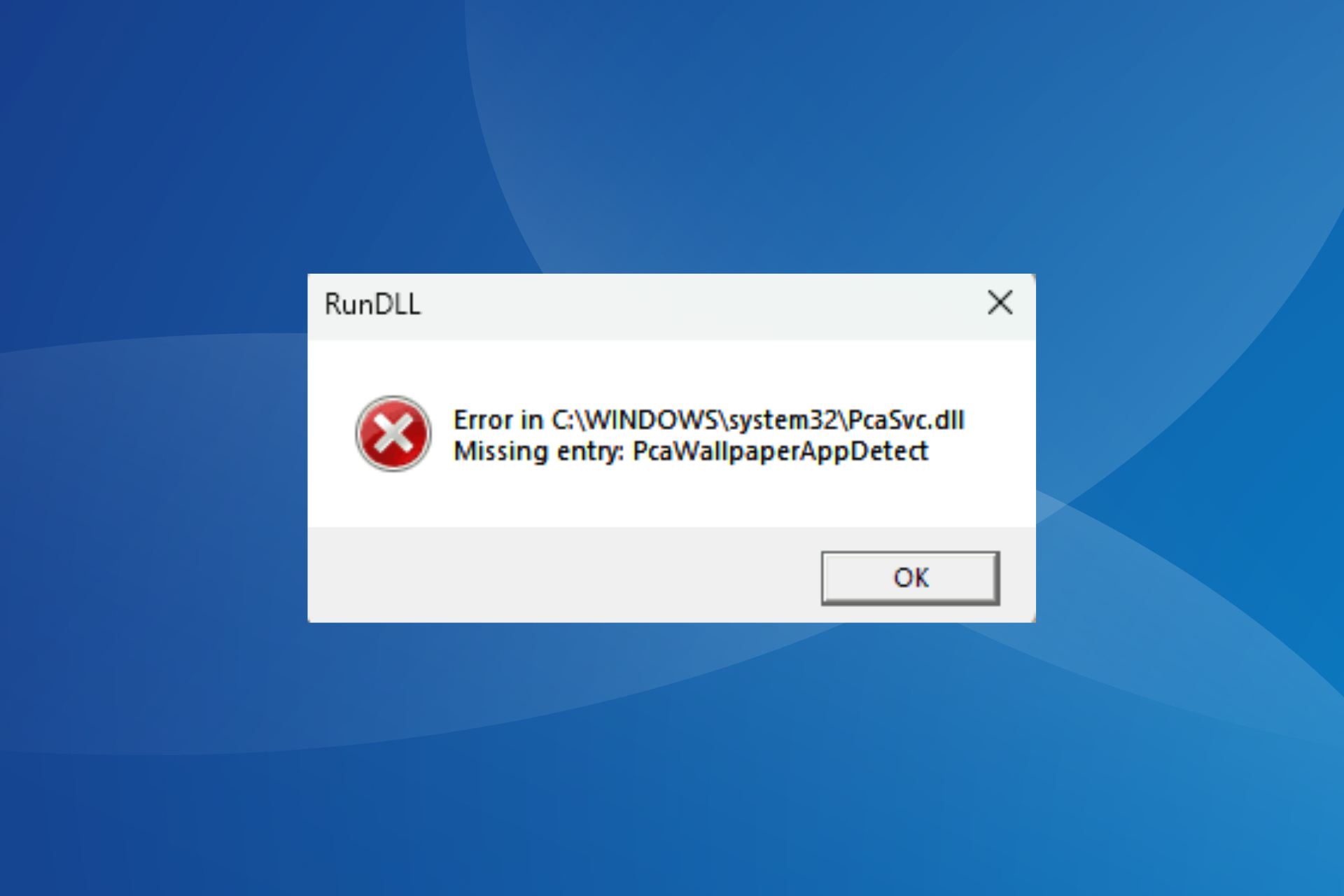
If you just upgraded to Windows 11 24H2 and have been persistently seeing the PcaWallpaperAppDetect RunDLL error, you are not alone. In the last 48 hours, I have seen several cases emerge across the globe.
The error message reads,
The pop-up appears frequently for most. And conventional fixes for DLL errors don’t work this time around, as verified by many Windows 11 24H2 users facing the error.
Forums are filled with reports of the PcaWallpaperAppDetect error
Users who upgraded multiple PCs to Windows 11 24H2 are seeing the error across all devices, indicating that it’s triggered by an OS-related problem. We found several such reports in the Microsoft forum.
I’m seeing this on multiple PCs running 24H2 (Release Preview ring) but not all the time. It randomly comes up, typically (it seems) after resuming from sleep mode or from having been logged on but locked. Spotlight is being used on the lock screen.
I have also the same error popping randomly on the 2 pc’s i upgraded to 24h2
I’m getting this on all of my 24H2 installs. I don’t think it’s something to be worried about, it’s just a bug that Microsoft missed and will hopefully be fixing soon.
A user even took to Reddit to report the PcaWallpaperAppDetect error in Windows 11 24H2.
A task triggers the PcaWallpaperAppDetect error in Windows 11 24H2
According to Dypsis, a Windows Insider, the error is triggered by the PcaWallpaperAppDetect task in the Task Scheduler, and deleting it fixed the error.
The PcaWallpaperAppDetect task can be found in the following path: Task Scheduler Library\Microsoft\Windows\Application Experience
PcaWallpaperAppDetect task in the Task Scheduler
As to what created the task, some suggest that it was PowerToys, a set of free tools that allow you to customize Windows. However, I have never had PowerToys on my laptop, and the task was still present. So, there’s certainly some confusion there!
Nevertheless, deleting the PcaWallpaperAppDetect task will fix the error without affecting any critical OS-related operations.
This is amongst the first reported errors in Windows 11 24H2. I hope Microsoft identifies the underlying cause and patches it in the next build!
Did this work for you? Let us know in the comments section below.
Microsoft released Microsoft Edge version 126.0.2592.11 to the Dev channel for Edge insiders. This version includes a toggle for OTP within the edge://flags settings on Android, improved reliability, and fixes to make the browser more stable.
Introduced a toggle for One-Time Password (OTP) within the edge://flags settings on Android.
Improved Reliability:
Fixed an issue that caused the browser to crash when the ‘Join now and activate cash back’ button was clicked again after signing into the MSA account.
Resolved a problem that caused unexpected crashes during the capture of toolbar snapshots.
Changed Behavior:
Resolved an issue when using Narrator within the pane indicating ‘This page is open in Internet Explorer mode,’ the Narrator’s focus would incorrectly land on the ‘Learn more’ link twice without providing any audio feedback.
Resolved a problem where the focus sequence was not in proper order when selecting the ‘Manage Performance Settings’ menu option.
Fixed an issue where a favorites folder required a double-click to open after being renamed.
Resolved an issue that caused app icons to not appear when the Sidebar settings page was refreshed.
Resolved a problem that caused the display of an incorrect favicon.
Resolved a problem that prevented tab groups opened from separate profiles from being displayed collectively.
Resolved a problem where the ‘Delete site’ message was overlapping with other options in the edge://settings/starthomeNTP section.
Fixed an issue where pressing Enter on the Back button resulted in no response within the Microsoft Rewards section.
Android:
Fixed an issue where rapidly clicking on ‘Set as default browser’ would inadvertently open two separate windows.
Fixed an issue where the word ‘Active’ was partially hidden on the history page on android.
Resolved a problem where there were some inconsistencies in the UI colors within the favorites section.
You can download Microsoft Edge Beta from the official Edge Insider website. Version 126 is expected to be released to the general public in June 2024.
If you encounter any problems while using the new version, you can report them through the Feedback Hub app, which you can open by pressing Windows + F.
Not an Insider yet? You can join the Edge Insider Program. and try the new features before they are released to the general public.
Have you installed the latest version yet? If so, share your experiences with us in the comments section below.
Microsoft Stream on SharePoint will soon be enhanced with new updates that will change the version of the videos uploaded on the platform to save up more space.
According to the latest entry in the Microsoft 365 Roadmap, the new updates will no longer trigger an entirely new version of the file history. They will soon make it so that only changes to the video itself will create a new version, while metadata changes will update the existing version
Currently, any change to video metadata (like title or description) creates a new version of the video, using more storage. Stream video files on SharePoint and OneDrive can take up a lot of storage space because of that.
However, these updates aim to change that. Additionally, SharePoint will introduce new limits and controls to help manage storage by reducing the number of low-value file versions. It’s also worth mentioning that these changes only apply to Microsoft Stream videos stored in OneDrive and SharePoint.
Here’s what the entry says:
Stream (on SharePoint) video files tend to be large and consume considerable space against your OneDrive and SharePoint storage quotas. Currently, when you make changes to video metadata, such as adjustments to the video title, description, transcript, chapters, interactivity, thumbnails, or media settings, those changes trigger a new version (that includes both the video and metadata) to be created and stored in the version history for that file. Each of these versions consumes storage that counts towards your storage quota. To reduce the storage footprint driven by small changes, we are adjusting how Stream (on SharePoint) handles versions. Soon we will release an update to Stream version history. Once released, any changes made to the metadata of Stream files will no longer trigger an entirely new version in the file’s version history. Instead, it will update the metadata of the most current version of the video in version history. If you edit the video itself, then a new version that includes both the video and metadata will be created and stored in the version history. Note: The update to Stream version history applies to Stream videos stored in OneDrive and SharePoint. SharePoint is also introducing new version history limits and controls that help tenant and site admins or document library owners reduce the storage footprint driven by low value file versions. These new version history limits and controls will only apply to Stream videos if changes to the video are made from within a SharePoint document library without opening the video in Stream (e.g. a file name change from within a SharePoint doc library).
Microsoft
The changes will impact Microsoft Stream videos starting in August. In other news, Microsoft will also update Stream to support an engagement-based analytic report that allows managers to see which content is the most engaging among employees.
With it, managers can get the general feeling of the company: what kind of content works and what doesn’t, and plan accordingly.
What do you think about all these changes coming to Stream?
Microsoft just announced that its Weather API on Windows is the overall most accurate weather forecast provider globally, according to ForecastWatch. From their 2023 report, the analysts write that the Redmond giant’s predictions were the most accurate, seriously outranking the famous Weather Channel.
Microsoft scored the most first-place finishes (50,624) globally in 2023 for all 13 metrics and one through five days out. The Weather Channel had the second most with 39,145, and Foreca/Vaisala had the third most with 12,917. Weerplaza was fourth with 8,696, AccuWeather had 7.364, and CFAN had 5.482. The other 16 providers had fewer than 4,000 each.
Why is the Microsoft Start Weather app so accurate?
In a nutshell, Microsoft attributes this win on its new approach to weather forecasting, that implicates the use of AI.
Weather forecasting has traditionally used supercomputers and large-scale physics simulations. Weather from Microsoft Start reimagined weather forecasting using AI, bringing together massive weather datasets, large scale computation models, mapping and topography data plus real-time reports from users.
Even with the classic model of doing things, weather forecasting specialists use simulations and previous data to predict the future developments. However, it’s obvious that an AI model can analyze a lot more data a lot faster, which also results in better and more accurate predictions.
What’s more interesting is that Microsoft’s Weather app received the same title in 2022. Here’s how ForecastWatch assessed the various weather prediction services:
This independent study of 22 weather services for the entire year of 2023 evaluated 13 different metrics. Weather from Microsoft Start had the top scores for multiple metrics including high and low temperature predictions and cloud cover forecasts. This included forecasts for 1-5 days out. In fact, Weather from Microsoft Start’s total first place percentages were 11% higher than last year and the lead from the nearest competitor grew by 4%.
So, Weather from Microsoft Start’s increased its weather prediction accuracy by 11% from last year, a lot more than the competitors. Microsoft also states in their announcement that it used the Weather app to send over 150 billion notifications to users all over the world, including 9 billion severe weather alerts.
You should also know that the same app is also included in Edge, MSN and Bing. We could also bet that Copilot will also use data from the same source if you ask the bot about the weather in your area.
So, if you want to know whether you need to grab your umbrella on your way out or schedule that barbeque next weekend, you should definitely check out Microsoft’s Weather app.
Yes, you’ve heard that right: Teams will allow users to change the notification sound on all desktop versions of the platform. This long-requested feature should have been released in 2017 when the Redmond-based tech giant released Teams. But somehow, Microsoft only realized now, more than 7 years later, that this basic but so-needed capability should be added to the platform.
According to the Microsoft 365 Roadmap, users can change their Teams’ notification sound starting in July 2024. Currently, this feature is available only on Android devices, and users have been asking for it to be expanded to other versions of the platform, but the Redmond-based tech giant hasn’t wanted to hear about it until now.
However, these will end in July, when Microsoft will allow users to personalize their notification sounds. Here’s what the entry says:
You can change the sound of your notifications to help you stay focused, prioritize quickly and avoid distractions. You can as well make urgent notifications and priority contact notifications more prominent. You can also mute notification sounds when you are busy or in a meeting.
Microsoft
The Redmond-based tech giant hasn’t offered any details about the new option, but the company will most likely share about this groundbreaking (pun intended) capability as July approaches. It’s a bummer that Microsoft enhanced Teams with Copilot, and AI capabilities such as the new Team Copilot, but has completely forgotten about such a fundamental option.
Sure, maybe the company wanted users to associate the notification sound with Teams, but given just how many people asked for the ability to change it, maybe it hasn’t worked as intended. Either way, this could very well be a drawback too. Users will have to get used to the new notification sounds, and many might find themselves in trouble for avoiding notifications simply because they don’t sound like notifications.
But that’s an amazing problem if you ask me. Anyways, what sounds will you choose? I’m thinking about Darude – Sandstorm!
On the support page for Codecs in Media Player, Microsoft confirms that starting from Windows 11 24H2, the AC-3 codec (Dolby Digital) is no longer included with Windows. However, the older version of Windows will still support AC-3 codec.
AC-3 is an audio codec that supports multi-channel (“surround sound”) audio. It’s also known as Dolby Digital.
On versions of Windows prior to Windows 11, version 24H2, the AC-3 codec is included.
Beginning with Windows 11, version 24H2, the AC-3 codec is no longer included with Windows. However, many device manufacturers will pre-install an AC-3 codec. In these cases, you will still be able to play files encoded with the AC-3 audio codec.
This means that after you install Windows 11 24H2 on your computer, you won’t be able to play old media content in the AC-3 codec, as the Media Player will not launch.
The document also mentioned that Microsoft will continue supporting other popular codecs, such as FLAC, AAC, M4A, ALAC, MP3, MP2, WAV, WMA, 3GP, 3G2, and AMR.
AC-3 codec is old, and popular media companies and streaming platforms have stopped using it, so Microsoft removed it.
The company has also provided a list of additional codec packs from the Microsoft Store, including MPEG-2 Video Extension, HEVC Video Extension, VP9 Video Extension, Web Media Extension, and AV1 Video Extension.
This is not the only feature not included in Windows 11 24H2; you will also not see WordPad, Steps Recorder, Cortana, and other legacy tools. If you have some old files that you want to play, you can always download a third-party app or convert them to another audio format.
Will you miss the support for AC-3 codec (Dolby Digital)? Share your views with our readers in the comments section below.
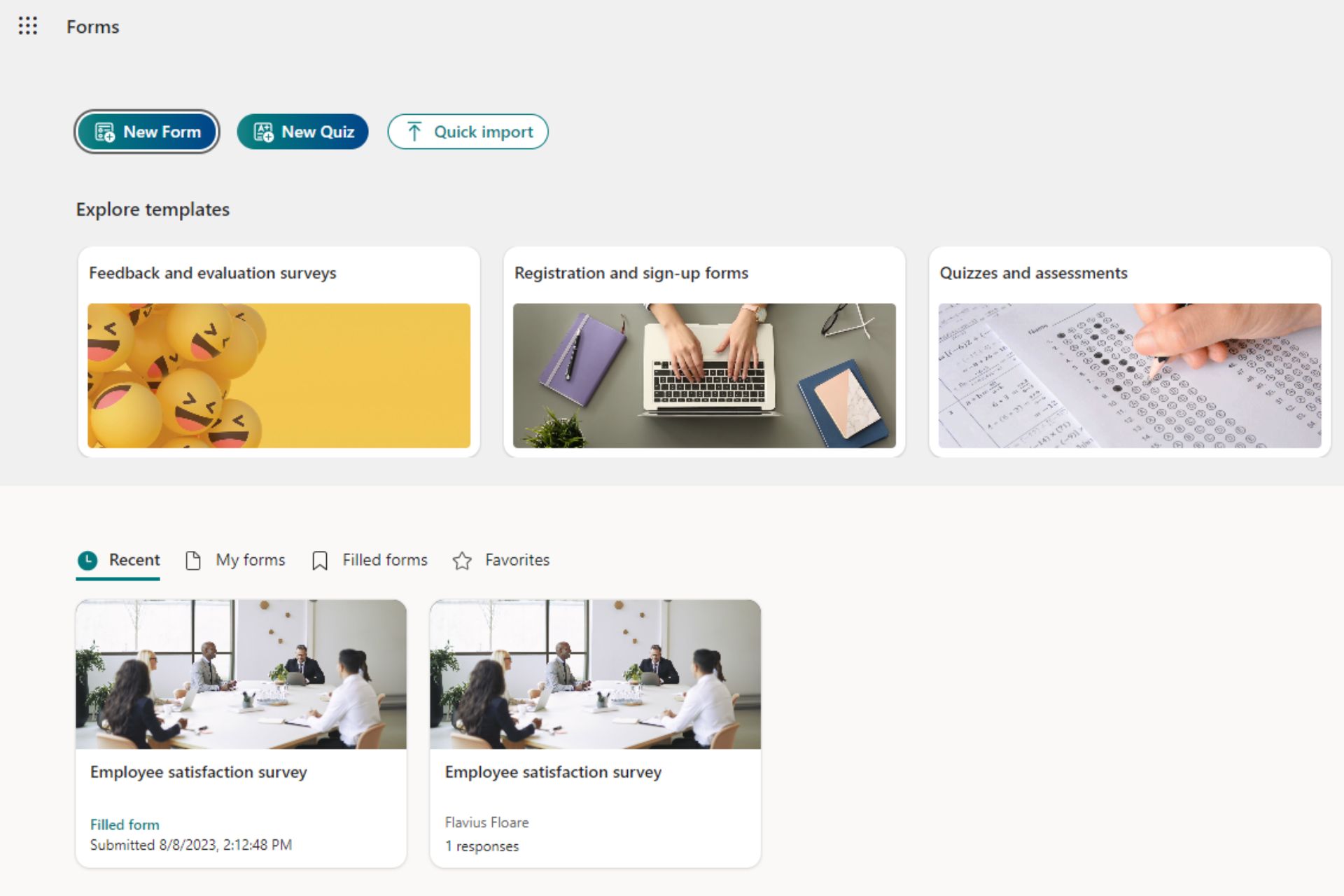
Microsoft Forms, the platform that allows users to create forms, quizzes, and similar tools for various purposes, will be enhanced to let managers add or remove people from the response notifications emails.
According to the latest entry in the Microsoft 356 Roadmap, the new enhancement will impact the web version of Microsoft Forms starting June 2024. Currently, all those editing a form in Microsoft Forms will be notified via email every time someone answers their form.
With the new enhancement, however, Microsoft Forms will only notify the form owner and those designated by this form owner. Here’s what the entry says:
Now form owners can add or remove people from the response notification emails. Currently only the form owner or the group alias is notified when someone responds to a form.
Microsoft
With the new enhancement, Microsoft Forms strives to provide a relatively stress-free experience to all those creating forms and quizzes on the platform. This is a good thing, considering these emails are a good indicator of the form’s success. If the form doesn’t meet the quota, those working on it will be notified about it.
With this enhancement, only a handful of people designated by the form owner will know about it.
Speaking of stress-free experiences, the platform will allow admins to manage notification emails in Microsoft Forms and provide them with Copilot to fine-tune their forms to the next level. With the new addition, forms will be made in seconds, and using company data, the AI model will consider each organization’s specificities to create a form that could address various issues.
The new enhancements will be generally available to all Microsoft Forms users this year, and with them, the Redmond-based tech giant will create an encompassing platform for all things quizzes, forms, or surveys.
What do you think about these new enhancements coming to the platform?
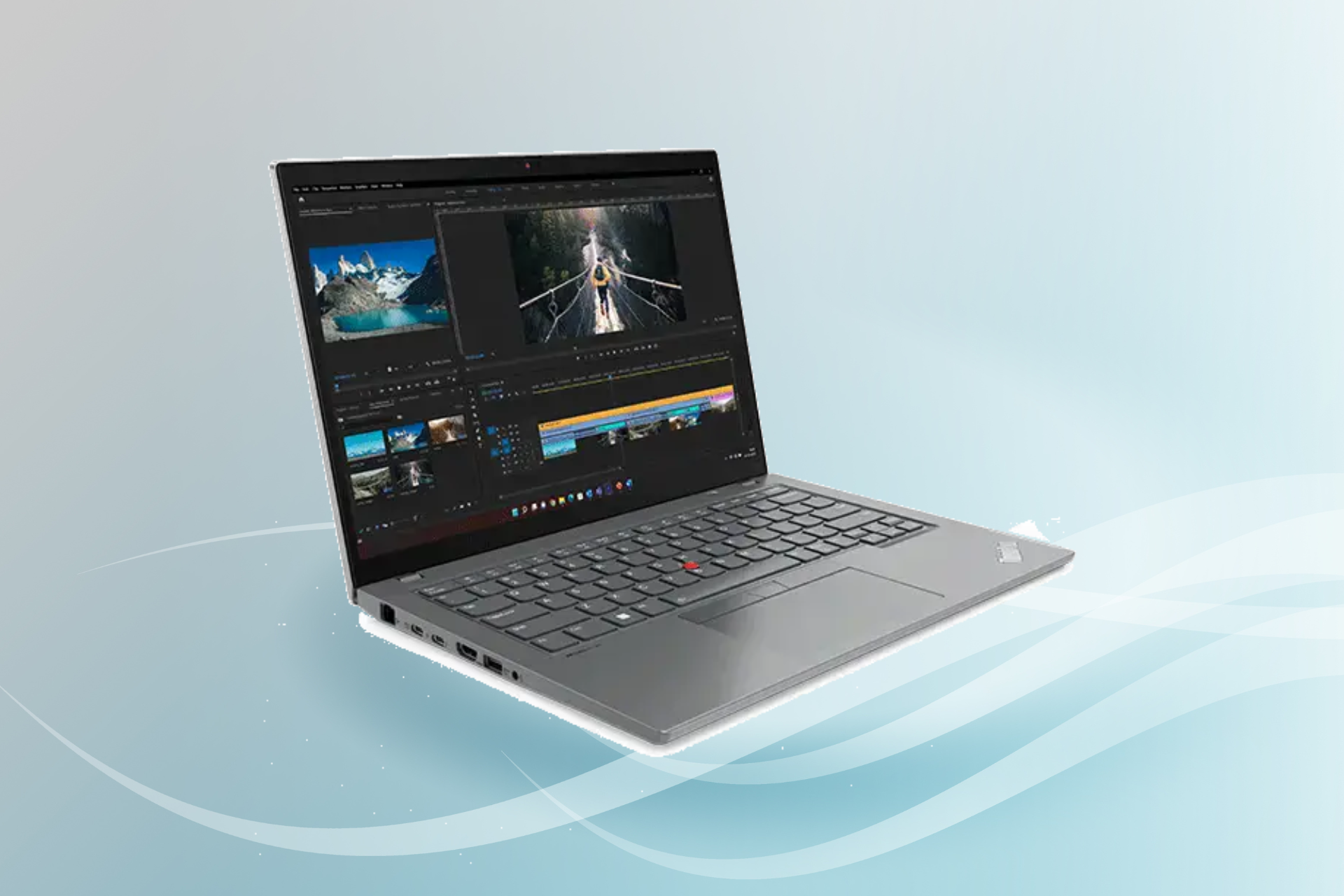
If you are looking for a laptop that fulfills all work-related needs, the Lenovo ThinkPad T14 Gen 4 is the perfect option. And right now, it’s available at a 50% discount, dropping the price from $2,529.00 to only $1,263.99!
To avail the discount, use coupon code THINKMEMDAY3.
The laptop boasts high performance, power, and convenience, especially in corporate setups where admins prioritize remote deployment and manageability. Besides, the 14″ display is designed to reduce stress on the eyes, which becomes vital if the laptop is to be used for extended periods.
As for storage and RAM, you have a 512 GB SSD and 16 GB memory, respectively. The latter, however, is soldered, meaning you will have a tough time replacing it, if required.
Connectivity on the Lenovo laptop remains hassle-free with a wide range of built-in ports and jacks. Most of you wouldn’t need a USB hub with the ThinkPad T14 Gen 4.
When it comes to durability, the ThinkPad T14 Gen 4 meets the MIL-STD 810H standards, delivering longer life and reliability, even under extreme conditions.
Lenovo has done a splendid job in integrating the much-needed security features. The laptop features a built-in fingerprint sensor and facial recognition software (works with an optional IR camera). To top it off, you have Human-presence detection, which automatically locks the laptop as soon as you step away!
Lenovo ThinkPad T14 Gen 4’s specifications
Processor
13th Generation Intel Core i5-1345U vPro Processor (E-cores up to 3.50 GHz P-cores up to 4.70 GHz)
Graphics
Integrated Intel UHD Graphics
Storage
512 GB SSD M.2 2280 PCIe
RAM
16 GB DDR5-4800MHz
Operating system
Windows 11 Pro 64
Display
14″ WUXGA (1920 x 1200), IPS, Anti-Glare, 300 nits
If you constantly have to sieve through interview transcripts and don’t want to go through the time-intensive process, you can use Azure AI/ML. It is a revolutionary solution that automates creating summaries and extracting themes from interview transcripts.
What is document and conversation summarization?
Summarization is one of the key features of Azure AI-Language services, a collection of ML and AI algorithms in the cloud for developing intelligent applications that involve written language.
Document summarization – Accepts plain text blocks only
Conversation summarization – Accepts various speech artifacts so the model can learn more.
Here are the main features mentioned by Microsoft in the official blog:
Extractive summarization: Produces a summary by extracting salient sentences within the document.
Multiple extracted sentences: These sentences collectively convey the main idea of the document. They’re original sentences extracted from the input document’s content.
Rank score: The rank score indicates how relevant a sentence is to a document’s main topic. Document summarization ranks extracted sentences, and you can determine whether they’re returned in the order they appear, or according to their rank.
Multiple returned sentences: Determine the maximum number of sentences to be returned. For example, if you request a three-sentence summary extractive summarization returns the three highest scored sentences.
Positional information: The start position and length of extracted sentences.
Abstractive summarization: Generates a summary that doesn’t use the same words as in the document but captures the main idea.
Summary texts: Abstractive summarization returns a summary for each contextual input range within the document. A long document can be segmented so multiple groups of summary texts can be returned with their contextual input range.
Contextual input range: The range within the input document used to generate the summary text.
How does it work?
Azure AI/ML services is a suite of tools for summarization. With Azure AI-Language service and Azure OpenAI GPT-3, you can automate the summarization process.
Furthermore, the extractive summarization API provides a way to highlight key sentences that highlight important information in a transcript.
Summarization: Azure AI-Language service can generate summaries of these transcripts. It uses advanced algorithms to identify and condense the most salient points into a coherent summary.
Theme Extraction: Alongside summarization, Azure AI services can extract key phrases and themes from the text. This is particularly useful for identifying recurring topics or important concepts within a series of interviews.
Refinement: Researchers can then review and refine these automated summaries and themes, ensuring they align with the research objectives and provide the necessary depth of insight.
How can I get started?
You need an Azure account with a subscription. To create one, go to the Azure portal. You also need an Azure blob storage account to store documents that need to be extracted.
With minimal machine-learning expertise and Azure’s AI Language Service, you can identify jey terms and phrases, determine the emotional tone to understand the context, summarize documents using extractive and abstraction techniques, and create intelligent chatbots and virtual assistants.
What are the steps to summarize a transcript?
First, go to the Azure Portal and sign in with credentials for access or subscription to your resource. On the Azure Portal landing page, click the Search button, and under Services, select Language.
Click Create to create an Azure AI language service on the Language service page. On the Select additional features page, choose Option 2 to select custom summarization and text analytics, then click Continue to create your resource.
On the Create Language page, select a subscription, create a resource group, choose the region to deploy in, type in the resource name, select the pricing tier, and click Next.
On the following page, choose a storage account, type the inn storage account name and account type, and then click Next. Once you have entered the details, you can click Review + create to complete the process.
Once it is deployed, go to the resource and open it, then click Language Studio. Choose a preferred language or Azure resource that you deployed, mention the number of sentences you want in the summary, and specify your summary interest.
Now upload the .txt file with the interview transcript, place the checkmark next to the I acknowledge box, and click Run. If you have selected everything correctly, you will get a response like this. This output is available for 24 hours to retrieve.
To conclude, the Azure AI/ML services streamline transcript analysis, saving time and improving accuracy. The user-friendly interface and powerful algorithms, you can extract insights from text data without any issues.
It is safe to say that Azure AI/ML is revolutionizing the way we process information, offering a game-changing tool for researchers and professionals alike.
What are your thoughts on the matter? Share your views with our readers in the comments section below.
Since the launch of the Fallout series on Amazon Prime, the Fallout games had seen a surge of players on all platforms. Usually, Fallout 76 is $70 which can be considered a hefty price for a game. That’s why grabbing an Xbox CD key for only $4.97 from StackSocial, which represents a 92% discount, is a really big deal.
In fact, we recently wrote about a Steam, PlayStation Store, and GOG deal which promised a 75% discount on all the Fallout series. That’s why the new offer is awesome.
What’s all the hype about Fallout 76?
If you don’t know about this title, Fallout 76 is a post-apocalyptic an open-world, multiplayer, role-playing game (RPG) developed by Bethesda Game Studios. We won’t provide here any spoilers but the action involves building, customizing and defending your settlements across an American post atomic wasteland. However, please note that the game is addressed only to mature audiences.
Here’s another tip: If you’re an Amazon Prime subscriber, you can get Fallout 76 and Fallout Tactics: Brotherhood of Steel for free.
The Halo franchise has been one of the most popular multiplayer shooters, but its popularity dwindled over the years.
We have some good news for Halo fans, as today we have a fresh leak that states that the franchise is going back to its roots.
Halo 7 will be based on Halo 5, leaks claim
This information comes from Pirat Nation on X and it states the direction of the Halo 7.
HALO 7 Leak:
“Seeing the massive failure of Halo Infinite, it has been determined that "classic style gameplay" (which fans and 343's management insists Halo Infinite is based on) will no longer work for the Halo franchise. The severe drop off in player numbers as well as… pic.twitter.com/XA2SPtNpR2
According to this information, Halo Infinite was a massive failure and everything done by this game will be scrapped.
Halo 7 will be based on Halo 5 gameplay and expand it further. This means that mechanics such as sprint, clamber, thrust, slide, and stabilization are making a comeback.
We’re also getting two new abilities called jet boost and wall run. Here’s a quick overview of all abilities:
Sprint is unlimited but if you get shot you’ll stop sprinting.
Clamber and slide are the same as in Halo 5.
Thrust lets you keep your momentum again.
Stabilization will let you float in the air while zooming in, and the float time is doubled.
Jet boost works as a double jump.
There is also a rumor that an ability that allows players to place portals is being tested, but it will probably be scrapped.
Stabilization float time has received negative feedback as well, so it will probably be reduced. Lastly, one multiplayer map is almost finished while others are still in the process of development.
This sounds exciting, but do keep in mind that this information comes from an unreliable source, so it might not be true at all.
Yesterday, Microsoft moved to the top of the Russell 1000 index, depriving Apple of a position it held for the last three years, which slipped to the second spot. A major reason behind Microsoft’s dominance and expansion amongst the magnificent seven is the cloud and AI push.
During the recently concluded Microsoft Build 2024 event, the Redmond-based tech giant, riding on the AI wave, unveiled Copilot+ PCs, a new class of devices featuring an NPU (Neural Processing Unit). Explaining Copilot+ PCs, Microsoft says,
Copilot+ PCs are the fastest, most intelligent Windows PCs ever built. With powerful new silicon capable of an incredible 40+ TOPS (trillion operations per second), all–day battery life and access to the most advanced AI models, Copilot+ PCs will enable you to do things you can’t on any other PC. Easily find and remember what you have seen in your PC with Recall, generate and refine AI images in near real-time directly on the device using Cocreator, and bridge language barriers with Live Captions, translating audio from 40+ languages into English.
Also, we can’t ignore Microsoft’s success in the cloud landscape. After decades of trailing AWS (Amazon Web Services) and Google Cloud, Microsoft Azure has finally managed to emerge as a formidable force. This, again, can be attributed to AI integration and recent partnerships that entailed the other parties switching to Microsoft Azure as their cloud platform.
For Microsoft to continue its expansion, foray into new markets, and retain the top spot in the Russell 1000 index in the coming years, AI adoption at the enterprise and user level is a must!
The native Windows Copilot, which ships with the OS, has received mixed reviews, but it’s increasing awareness around AI amongst the masses, a factor that could fuel future adoption. Similarly, for enterprises, Microsoft offers a diverse range of services, from cloud hosting to AI integration, which resulted in many switching to Microsoft Azure.
Amongst the magnificent seven, Microsoft has the best chance of enduring the ups and downs of the ever-evolving landscape. Although, for now, everyone seems fixated on AI, the next big thing!
And Microsoft, with its deep pockets and reported government backing, can both regulate and dominate the market. Microsoft’s recent partnership with UAE-based G42 set off speculations that the deal had US backing, reportedly in an effort to diminish China’s influence in the region.
In my opinion, Microsoft’s future looks promising, and based on current projections, it has the highest chance of becoming the first 10 trillion company. If you didn’t know, Microsoft pays the highest dividends in the US and is spending heavily on buybacks, in an effort to incentivize investors. At the moment, everything seems to be going Microsoft’s way!
What do you think of Microsoft’s recent expansion and future prospects? Share with our readers in the comments section.
Microsoft recently deprecated WSA and they didn’t say why. We can only assume that the Amazon Appstore downloads for Windows 11 were not on par with the predicted outcome. Also, actually getting to run the Android apps on your PC was not so simple as advertised. Ultimately, the lack of Google support probably decided Windows Subsystem’s for Android faith.
Well, that’s why it’s very confusing that the Microsoft Chinese website announced (translated) a partnership with the Tencent company to download and run mobile games right from the Microsoft Store.
Why is Microsoft allowing WSA in China?
Before clarifying this move, here’s how Lin Songtao, vice president of Tencent, describes the fruition of this partnership in the press announcement:
The PC side has a huge user base. We hope to work with Microsoft Store and Intel through the PC version of Yongyongbao to provide technology, traffic and commercialization support for mobile developers on cross-terminal integration, and jointly promote the PC application ecosystem. prosperous development and provide users with a better cross-terminal experience.
Lin Songtao, vice president of Tencent
Long story short, China is a huge market, and Tencent has a large user base and a lot of apps to justify this exception. And, if you’re looking for more reasons, the Chinese probably brought up sheer numbers to the meeting with Microsoft, also suggested in the press release excerpt from Microsoft:
According to reports, the scale of new additions to some games currently on the PC version of Yongyongbao has increased by 100% compared with the single mobile version. The PC scenario payment of some games accounts for more than 40% of the market turnover. The next-day retention of new games is 1.9 times that of the market.
Well, there you have it. While Microsoft didn’t quite match Google and their store, China laid out a red carpet for the Redmond giant. So, will we see a comeback for WSA in other parts of the world? I would clearly say that it’s not feasible without the big input from a large Android app base such as the one from Google Play.
We’ve learned about this from Neowin. Were you using WSA on Windows 11? Let’s talk about this story in the comments below.
After thorough research and testing, I found the top three third-party software that work perfectly with major Cricut Maker models. Moreover, these tools can help you cut your materials, add unique fonts, and design stamp elements with ease. I’ll also demonstrate how to use them.
Sounds like a good deal? Let’s roll in!
3 Best Software to Create Stamp Design for Cricut Maker 3
Check out these amazing software:
1. Adobe Photoshop – Powerful Editing Options and Cloud Collaboration
Adobe Systems deployed Adobe Photoshop in the late 1990s. However, it has maintained its popularity since then.
You can use this graphic design and photo editing program to create and edit digital images, animations, paintings, and drawings, including stamp designs for Cricut Maker. Notably, most designers switch to it when they need to handle image masking and alpha compositing, retouch images, or create bitmaps in multiple layers.
To be more specific, it can help you to:
Apply smart portrait and colorize neural filters
Use live shape enhancements and pattern preview
Make large objects disappear
Instantly expand images
Edit with next-step suggestions
Add and edit gradients on canvas
Utilize generative AI effects and adjustment presets
Use auto-selection tools and more.
Besides, Adobe Photoshop allows you to collaborate with your team members to track projects.
To create a stamp design, open the app, and click on New file.
Add elements to your canvas according to the idea you’ve in mind. For instance, I wanted to create a rectangular stamp design stating “VERIFIED”.
For this, I clicked on the Shape tool and added a Rectangle.
Next, I filled the rectangle with the red color.
Then, I use the highlighted pointers to round the corners of the rectangle.
Likewise, I’ve added another rectangle to the canvas and filled it with white color.
Then, I rounded its corners.
After that, I clicked on the Text tool to add “VERFIFIED” as the stamp text and aligned it to the center.
Adobe Photoshop also allows you to customize the text and set its:
Font style
Font size
Alignment
Color.
Moreover, you can right-click on the selected text and apply any Warp Text… effect.
In my case, I clicked on the Filter menu, moved to the Render section, and applied the Clouds filter.
Here’s the final look of the created stamp design.
Pros:
Stands out as an industry standard for editing and manipulating images
Provides various raw camera file tools
Customizable brushes
Offers unlimited filters, masks, and layers
Supports several high-quality templates, typography, and drawing tools
CorelDRAW is a multi-functional graphic designing software mostly used by professional designers and photo artists. This vector-based tool helps you to create logos, stamp designs, architectural layouts, 3D illustrations, and other complex marketing materials.
Furthermore, you can create your own designs from scratch or customize existing ones with ease. It provides access to 100+ predesigned templates, ranging from geometric patterns to floral designs.
Some of the new standout features of CorelDRAW include:
Multipage view
Live comments
Perspective drawing
Multi-asset export
Image adjustment
HEIF support
Pages docker
Pan and Zoom.
CorelDRAW also allows you to customize its interface using icon sizes, color schemes, windows borders, toolboxes, and document opening options. Moreover, you can import text from popular word-processing programs, such as Microsoft Word. Additionally, CorelDRAW’s Learning Center provides step-by-step tutorials to get started with it.
To test it, I opened the app, clicked on the New File icon, and specified a custom size for the stamp design.
With the help of the left-side toolbar, I added a circle to the canvas.
Then, I changed its color using the color palette placed on the right side.
Next, I opened the Effects menu, navigated to Texture, and selected the Brick Wall… option.
From the opened dialog box, I adjusted some options for the Brick Wall texture and clicked OK.
After doing so, I added some text to the canvas and customized its style and size.
Then, I pressed CTRL+A to select the canvas with all of its added elements, moved to the Texture menu, and selected the Elephant Skin… option
Next, I adjusted the Age and Color of the Elephant Skin texture and clicked OK.
So here’s the final look of my stamp design.
Pros:
Offers a 15-day trial version
Highly customizable interface
Support for TTF files
Smoothly integrates with popular plugins for cutting
Easier to learn compared to Adobe Photoshop
Converts files to SVG format
Perpetual licenses and subscriptions are available at reasonable prices
Cricut Design Space is a free and easy-to-use tool that comes with your Cricut machine and can be installed manually. It allows you to use its pre-made projects or designs called Cartridges or create a stamp design project from scratch.
Moreover, it’s a cloud-based software. This means you can easily access your design from anywhere. It’s also explicitly designed for Cricut, so it contains certain features that won’t be available in other software.
It offers thousands of free and paid templates that can help you especially if you’re a newbie. Furthermore, to create a more detailed multi-layer design, you can choose any element from its library:
30+ built-in and other online shapes
300K+ phrases
21K+ free and premium editable images
100+ classic and thematic monograms
1000+ fonts in over 20 languages.
Additionally, you can export the created design in SVG format or save it as a project in your workspace for later use.
The best thing about Cricut Design Space is that you can directly connect it to your Cricut machine. This ultimately enables you to preview the created designs and cut almost everything on the fly.
To create a stamp design, first, open your Cricut Design Space app and click on the + New Project button.
From the left side panel, choosethe required elements that you want to add to the canvas.
In my case, I added a rectangle and set its material color to white.
Then, I navigated to the Editable Images section, applied the Free filter, and clicked Add to Canvas.
After adding an image, I resized it to fit within the rectangle.
Additionally, Cricut Design Space allows you to customize the editable image, including its:
Color
Arrangement
Flip position
Font
Style
Letter Space, and more.
Here, I changed the text color to green.
Other than this, you can Slice, Combine, Attach, Flatten, or Contour selected elements with ease.
Select the added elements and click the Group icon under the Layers tab.
Click Make to directly print the stamp design with your configured Cricut Maker machine.
Otherwise, click Save to store it on your cloud storage or local system.
From the pop-up window, click Create New Collection.
Enter the New Collection name and click Create.
Specify the Title of the stamp design, mark the collection checkbox, and click Save.
Choose your save location and click Apply.
Here, I’ve successfully added the created stamp design as a project to my Cricut Design Space workspace.
Pros:
Easy to learn and navigate, even for beginners
Allows you to upload your own images and fonts
Accessible from PC, phone, or tablet for on-the-go free designs
Helps you print designs and then use Cricut to cut them out precisely
Offers custom-designed stamped elements to add to your project
Cons:
Professional artists may not prefer it
Requires subscription to access extra features
Free designs and font collection aren’t as extensive compared to the paid library
How I Chose the Best Software to Create Stamp Design for Cricut Maker 3
During my tests, I prioritized the following qualities to select the best tools for Cricut designs. All options need to:
Have a user-friendly interface
Let you personalize text, colors, and add special effects
Provide features like shapes, fonts, images, and editing tools
Smoothly integrate with Cricut Design Space
Cater to different project complexities.
So now you’ve all the info you need to find the best software to create a stamp design for Cricut Maker 3. Feel free to let me know which option you liked the most in the comment section!
Gaming laptops are incredibly popular if you would like to game on the move or if you simply don’t have enough space for a desktop PC.
While brands from China might not be as popular as others, they still offer amazing specs, and speaking of which, today we have leaked information about REDMAGIC’s upcoming gaming laptop.
REDMAGIC GN001J hardware specs have been leaked
This information comes from Gizmochina, and while the information is scarce, we do know that this gaming laptop will utilize a Core i9-13950HX processor and RTX 4070 graphics.
Certifications from various agencies have been spotted including Bluetooth SIG, Wi-Fi Alliance, and CMIIT radio transmitter. All of these certifications refer to the Redmagic Gaming Notebook thus proving its existence.
According to these certifications, it’s safe to assume that this device will use an Intel Wi-Fi 6E and Intel AX211 network card.
Do keep in mind that this is just information spotted on the Geekbench listing, and it might not be completely reliable, so we should wait for an official announcement for more details.