Hellblade 2 has been a highly anticipated game, and it was released a few days ago on popular platforms.
However, the game has made its way to the cloud, and it’s available on NVIDIA GeForce NOW.
Hellblade 2 is now available on NVIDIA GeForce NOW
As you probably know, Hellblade 2 has been released, and we got some official Hellblade 2 merchandise that celebrates the release of the game.
The game became available on Xbox Game Pass on the release day, but as The Verge reports, Hellblade 2 also made its way to GeForce NOW on the same day.
A brutal saga of survival has come to the cloud. ?️
This is the first Microsoft Xbox game to hit the NVIDIA cloud on launch day, but this comes as no surprise as NVIDIA promised to bring new Microsoft titles as soon as they are released.
If you use GeForce NOW, you’ll be pleased to hear that you can even use a PC Game Pass subscription as proof of ownership and play the game.
If you have been excited about Windows 11 24H2 and are eagerly awaiting an opportunity to install and try it out, we have good news. Microsoft has rolled out Windows 11 24H2 in the Release Preview channel months before the release in the stable channel later this year!
Given the fact that the Release Preview channel is comparatively more stable than Canary, Dev, and Beta, with refined versions and patches being released here, the likelihood of encountering any critical errors is bleak!
But we still recommend you create a backup. This way, you could prevent data loss in case things go south while installing Windows 11 24H2.
How can I install Windows 11 24H2?
You have two options, either install Windows 11 24H2 via Windows Update or use the dedicated ISO file. Here are the steps for both:
Via Windows Update: Open Windows Update settings > click on Windows Insider Program > click Get started > link a Microsoft account > choose Release Preview > click Continue > restart the PC > go to Windows Update settings > enable the toggle for Get the latest updates as soon as they are available > click on Check for updates > download Windows 11 24H2 when it appears.
Via ISO file: Go to Microsoft’s official website > download the ISO for Build 26100.712 > right-click the ISO file > choose Mount > run the setup.exe file > follow the on-screen instructions to complete the installation.
Installing Windows 11 24H2 via Windows Update (Image source: Microsoft)
If the Windows 11 24H2 update is not listed immediately, wait for a few days. These are often gradual rollouts, meaning everyone gets the update at a different time. But it will be there sooner or later!
Also, the update makes a major change to Copilot. Besides being more advanced and user-friendly, Windows Copilot will now be pinned to the taskbar, providing users with an app-like experience. This means, you can finally resize and reposition Copilot in Windows 11!
In addition to that, Microsoft has deprecated WordPad, Cortana, and Tips in Windows 11 24H2. so the apps won’t be available anymore.
There’s also some bad news. The much-anticipated and recently announced Recall feature, along with other AI-powered enhancements, won’t be available after installing Windows 11 24H2 as these require a Copilot+ PC, a new lineup powered by Arm-based processors.
As you see, it’s not that tricky to install Windows 11 24H2. On the contrary, it’s straightforward and doesn’t add more than a minute to the entire process. So, get the latest Windows version, and benefit from all the new features!
If you face any issues while installing or running Windows 11 24H2, drop a comment below and let us know!
Microsoft Stream will be enhanced with new interactivity analytics metrics that will allow managers to see the engagement rate on interactive video Stream videos. According to the latest entry in the Microsoft 365 Roadmap, all those users who have the privilege to edit access to a Stream video will be able to check out these metrics.
The new analytics will measure the engagement metrics on interactive Stream videos, meaning all those videos that contain interactive elements, such as polls, links, or callouts. The Redmond-based tech giant says these metrics will measure pretty much anything, from the number of unique viewers to the ones that have clicked on the interactive elements.
But there will also be metrics about the number of interactions, or the average attention time. Basically, everything managers need to know about engagement.
This feature gives audience engagement metrics on interactive Stream videos. Users with edit access to a Stream video that contains links, polls, or callouts will be able to see the number of unique viewers and the percentage of those who viewed or clicked on interactive elements in the video, as well as average number of interactions and average attention time. These metrics help video owners understand which content is most engaging.
Microsoft
The new Interactivity analytics in Microsoft Streams are definitely useful and here’s why: as Microsoft mentioned in the description, managers (and organizations) can understand which content is most engaging, and they roll out similar content in the future to spark conversations, keep employees engaged and offering them ways to relax at work.
Managers can get the general feeling of the company: what kind of content works and what doesn’t, and plan accordingly. For example, if the company wants to conduct a survey, it can do so by creating a funny video with polls, especially if employees seemed more engaged when watching funny videos in the platform, in the past.
Visual Basic Script has been used in Windows for decades, but as the technology develops, older languages become less useful over time.
This is why Microsoft has decided to finally retire Visual Basic Script on Windows.
Visual Basic Script is getting discontinued later this year
It’s no surprise that Microsoft is planning to retire Visual Basic Script, especially after disclosing plans to deprecate NTLM in Windows 11.
As The Hacker News writes, the VBScript will be retired in the second half of the year in favor of JavaScript and PowerShell.
Microsoft Program Manager Naveen Shankar explained the reason for this change:
These languages offer broader capabilities and are better suited for modern web development and automation tasks.
The retirement process will have three phases, and it all starts by making VBScript an on-demand feature in Windows 11 24H2 later this year.
Around 2027, VBScript will still be on demand, but not enabled by default, and it will be completely removed at a later date.
Naveen Shankar provided the following clarification:
This means all the dynamic link libraries (.dll files) of VBScript will be removed. As a result, projects that rely on VBScript will stop functioning. By then, we expect that you’ll have switched to suggested alternatives.
VBScript has been known to be a target of many attacks, so it’s no wonder that Microsoft decided to phase it out.
Microsoft is making a ton of investments in its cloud computing platform, Azure. From integrating AI capabilities to introducing new VMs (Virtual Machines), every action right now is customer-centric. And the latest on the list is the Microsoft Azure ND MI300X v5 VM!
Powered by the AMD Instinct MI300X, the new VM delivers the best high bandwidth memory (HBM) capacity among all available options, according to Microsoft’s official blog. Its primary use case is to help organizations scale their AI efforts.
Microsoft tells us that the new Azure VMs are powered by 8x AMD MI300X GPUs. Individually, each VM delivers 1.5 TB of high bandwidth memory (HBM) and 5.3 TB/s of HBM bandwidth.
High HBM capacity and HBM bandwidth are ideal for AI applications, and help process scores of data in no time. And given the compact size, high bandwidth, and low power consumption, HBM becomes key to AI applications.
Besides, the Microsoft Azure ND MI300X v5 VM runs on the AMD ROCm open-source software platform, which comes with a wide array of built-in tools and libraries that facilitate seamless AI development and deployment.
For the end customer, it directly results in cost and time savings!
Image source: Microsoft
While highlighting the different aspects of the new Azure ND MI300X v5 VM, Jason Henderson, CVP of Office 365 Product Management at Microsoft, said,
These new Azure VMs based on AMD’s latest Instinct GPUs, MI300X, have delivered impressive performance results for our Microsoft Copilot Service. Microsoft’s heterogenous approach to silicon investments across AI accelerators ensures we are delivering continuous performance benefits to the thousands of Copilot customers, and we are excited to add the unprecedented power of these new VMs to our fleet. These VMs are part of the leading AI infrastructure platform that runs GPT-4 Turbo and underpins critical M365 Copilot scenarios, including M365 Copilot chat, Word Copilot, and Teams Meeting Copilot.
Microsoft also shared that Hugging Face was one of its first partners to switch to the Azure ND MI300X VMs and has since then reported 2-3 times performance gains.
The statement of Victor Peng, President of AMD, on the new VM, as available in AMD’s official press release, reads,
The AMD Instinct MI300X and ROCm software stack is powering the Azure OpenAI Chat GPT 3.5 and 4 services, which are some of the world’s most demanding AI workloads. With the general availability of the new VMs from Azure, AI customers have broader access to MI300X to deliver high-performance and efficient solutions for AI applications.
The availability of the new Microsoft Azure ND MI300X v5 VM is currently limited to Canada Central and Sweden Central. As per reports, this is due to central Canada having the most amount of computing capacity, given the presence of massive data centers.
Game Pass is amazing since it gives you the ability to always try various titles, and to experience new games that are published by Microsoft on the day of release.
It has been an affordable solution for many gamers, but it seems that Microsoft might change its price in the future.
Xbox Game Pass prices might go up, and here’s why
This news comes from TweakTown, and it seems that Microsoft is considering raising the subscription price for the Game Pass.
This isn’t the first time Microsoft raised its prices, and the first time it happened was after the FTC lost its case against Microsoft, and then in July 2023, Microsoft raised the price of Xbox Game Pass Ultimate in the US.
If you frequently work on programming projects, Microsoft is rolling out a new feature that will save a lot of your time. At the recent Microsoft Build Event, the Redmond-based tech giant announced adding support for version control with integration for systems like Git in File Explorer.
This means, you won’t have to switch between different apps to view comments and track recent changes to the projects, saving significant time and freeing up the PC’s resources. It will all be available within Microsoft’s native File Explorer under the Last commit date and Last commit message column.
File Explorer will provide even more power to developers with version control protocol integration (including Git). This allows developers to monitor data including file status, commit messages, and current branch directly from File Explorer.
At the time of writing, there’s no official confirmation about the feature’s rollout date. But given that the announcement has been made, Git integration in File Explorer should already be in the works and ready for release in Windows.
Microsoft released a new wireless keyboard for Surface Pro 9, 10, and 11. It uses Bluetooth LE technology, has a 95 mAh minimum capacity battery, lasts up to 41 hours after a charge, and requires Windows 11 to work while detached. Also, the Surface Pro Flex keyboard is almost as big as an A4 paper because it measures 11.38 x 8.71 x 0.21 inches (289 x 221 x 5.25 mm). Also, it weighs 0.75 pounds (340 g).
However, the Surface Pro Flex keyboard doesn’t come with a Slim Pen, but you can get it for an additional $100.
The Surface Pro Flex keyboard has useful features
The Surface Pro Flex keyboard can transform your tablet into a small laptop, and you can fold it behind the screen if you don’t use it. Besides, thanks to its wireless capabilities, you can place it wherever you see fit, and it is quite stable.
Microsoft integrated a Copilot key into the Surface Pro Flex keyboard to access the AI assistant faster. This new feature is part of the company’s goal to bring AI closer to us. It offers you the chance to access Copilot whenever you need it. For example, you can use this feature when you need the AI assistant to summarize documents or generate email replies.
There are no mentions of an option to disable the Copilot key from the Surface Pro Flex keyboard. You might not even have a reason to do so because future Surface devices will have it integrated. After all, it is rumored that the upcoming Windows on Arm PCs will know everything you do.
Another interesting feature of the Surface Pro Flex keyboard is the customizable haptic touchpad that senses different pressures. However, to use it at maximum potential, you need to tweak its settings for each application.
In addition, the keyboard has keys to mute your microphone and launch the Windows screen snipping tool, but they replace the play/pause and PrtScn buttons.
Ultimately, the Surface Pro Flex keyboard is useful because you can place it wherever you see fit. Also, the integrated Copilot key might convince you to use the AI assistant more, and the Windows screen-snipping tool button will most likely be handy at some point. If you want the keyboard, you can buy it for $350 or $450 with the Silm Pen.
Do you think that $350 is a fair price? Let us know in the comments.
To have your Minecraft character draped in the purple heart cape is one way to stand out and show your badge of honour but sometimes, it is not showing up. One of the best feelings aside from playing and winning on Minecraft is to boast of your achievements to your friends.
Potential reasons why the purple cape may not be showing up are a system glitch, issues in credibility when redeeming the cape, or account authentication issues. It is also possible that you’re redeeming at a time when there’s significant traffic and it may take time to reflect on your side.
If everything else checks out, you might have to contact the Minecraft support team. They may be able to provide guided support and answers as to why your purple cape is not showing up.
Otherwise, you might just have to wait for it to appear. It may take a few hours but eventually, it shows up. Also, beware that the purple cape is not yet available on all Minecraft editions. If you’re on the Java edition, you may have to wait a little bit longer to early July.
Best practices to avoid such issues in the future
Ensure your account is eligible – Before you redeem your codes for a purple cape or any other, make sure that your Minecraft and Microsoft accounts make the cut. These are special achievements and there are terms and conditions to be met before you’re awarded.
Verify you’re using the correct Minecraft edition – Aside from having an up-to-date Minecraft client, you should also be on the eligible version that displays such achievements.
Sync your account regularly– It is not uncommon to have multiple Microsoft accounts and play Minecraft on multiple devices or platforms. However, keep an eye on your achievements and sync your accounts to ensure your capes are displayed regardless of the platform or device you’re using.
Keep off unofficial Minecraft versions and mods – We all love mods but not all of them are greenlit by Microsoft. Unofficial Minecraft clients may also not enjoy all the perks that come with the official version like capes. For the best Minecraft mods, we’ve curated the perfect article for you.
Other tips include having a stable internet connection or simply being patient. Sometimes, Minecraft is just not working.
After all, you do work hard for your purple cape so you can practice a little bit of patience. If you’ve adhered to all rules, your purple cape should show up on your profile in no time.
That’s all we had for this article but if you have any additional solutions that worked for you, we’d like to hear about them. Drop us a line below.
Apart from these, the Redmond tech giant also mentioned that IT and system admin can manage the deployments of feature updates on their organization’s devices. Windows Update for Business will now include an option for IT heads to select whether the update is optional or required.
This means that IT admins can choose whether to install feature updates like 24H2 on the devices under them unless they are important or required.
What are the benefits of the change?
In a blog post on the Microsoft tech community site, Surabhi Calla, a Senior Program Manager at the company, mentioned the benefits:
Starting today, it’s even easier for the users at your organization to upgrade early if you offer them feature updates as optional. This gives you the following benefits:
Early feedback: You can gather valuable feedback and insights early by letting some users opt in as early testers of a new feature update. Then proceed with confidence.
Risk prevention: Testing prevents risks. You can test new feature updates, realize benefits, and evaluate risks before organization-wide deployment.
Greater productivity: If users choose when to install an update, you don’t have to worry much about disruption to organizational workflow and productivity.
How can I deploy and monitor feature updates as optional using Microsoft Intune?
Go to the Microsoft Intune admin center. Navigate to Devices > Windows 10 and later updates > Feature Updates and select Create new Profile.
Choose the new deployment setting to set deployment as optional or required. Next, select Make available to users as an optional update to allow users to choose the update timing.
Once the deployment is created and the update is available, you can go to Settings>Windows Update to download and install it whenever you want.
Once the policy is added, the optional update is available for users within 1-2 days. The feature will roll out gradually and is expected to be available to all by May 24, 2024.
What do you think about this change? Share your views with our readers in the comments section below.
At the Microsoft Build 2024, which is happening these days, the Redmond-based tech giant introduced various tools designed for software developers to build AI apps.
The conference unveiled the new Windows Copilot Runtine, an all-encompassing platform gathering up everything developers need to have to enhance their productivity: from Copilot extensions, to Live Captions, or Windows Studio Effects, Windows Copilot Runtime is a whole software development department within a single platform.
However, the existing Dev Home platform will also get a fair share of new features, and enhancements, including the new Windows Customization section. The new panel was spotted a while ago and was even circulating on X (formerly known as Twitter) before Microsoft officially announced it at Build 2024.
What does it do, you might ask? Well, the Redmond-based tech giant says developers will have access to advanced File Explorer settings, Dev Drive insights, virtual machine management, and the ability to quiet background processes, which is indeed a good thing if you ask us.
In other words, Dev Home allows developers to have detailed control over their Windows devices in just a few clicks, as Microsoft said in the official blog post.
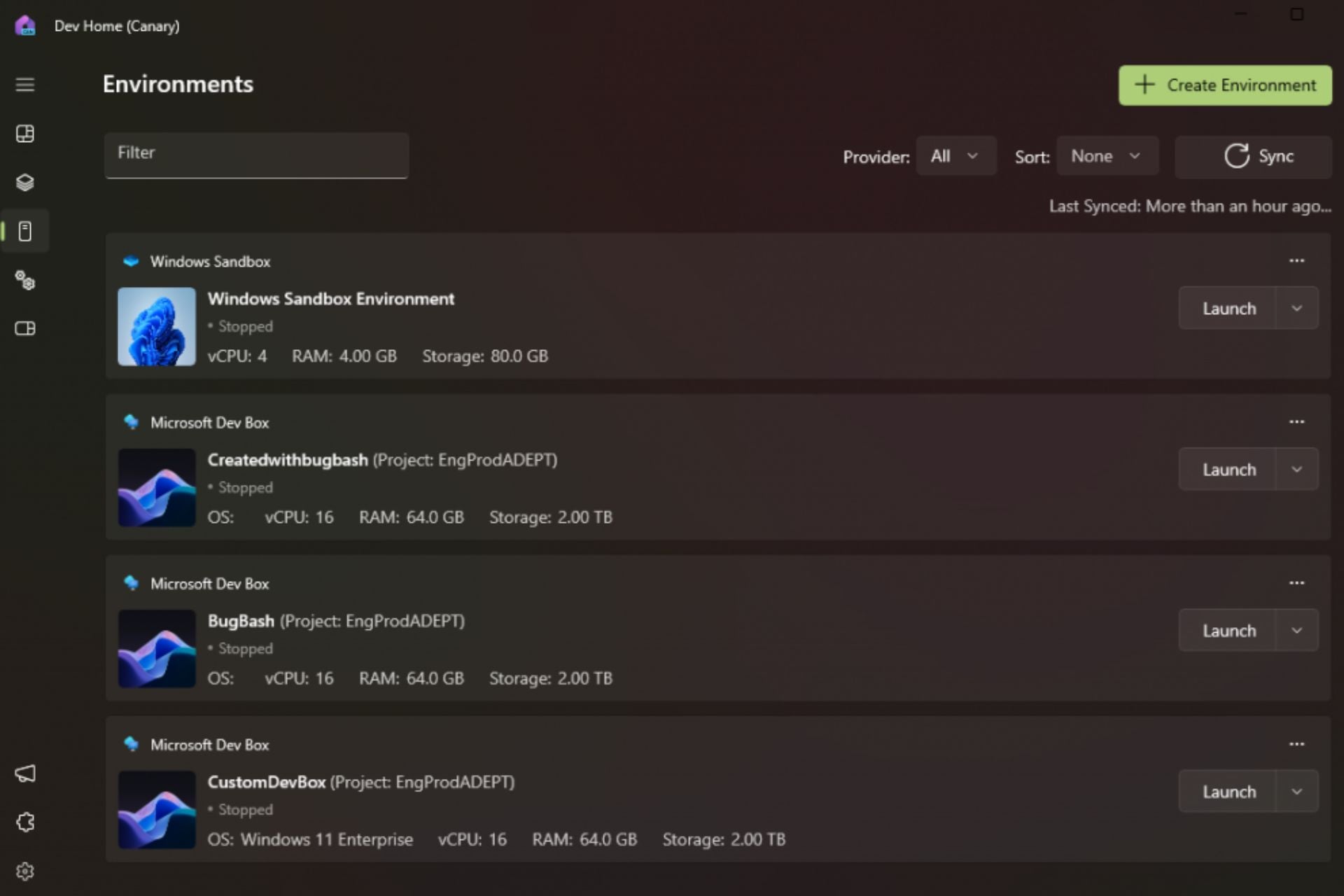
However, Microsoft didn’t stop here: aside from Windows Customization, Dev Home will also get enhanced with the so-called Environments, spaces where software developers can have an overview of all the virtual machines connected to the platform.
Even more, if you’re a software developer, you can create Environments with apps, repositories, and virtual packages, using Hyper-V VMs and Microsoft Dev Boxes. You’ll be able to take snapshots and pin environments in the taskbar, from where you can control them more easily.
Another interesting feature is that Environments in Dev Home are open source, and other software developers can contribute to your environments, as much as you can contribute to theirs. These spaces are now available in preview, with general availability coming out later this year.
Microsoft also added the ability to export configuration files that you set up and share them with your team, for a consistent workspace.
For a streamlined experience, try the new export feature in Dev Home which allows you to generate a configuration file based on the choices you made in Dev Home’s Machine Configuration setup flow, allowing you to quickly create configuration files to share with your teammates for a consistent machine setup.
Microsoft
And, probably one of the most useful features Dev Home could get: Microsoft will allow software developers to block clone large files. This means you’ll be able to instantaneously copy/paste large files in Dev Home in just a matter of seconds.
Here’s how fast it’s going to be:
File(s) Copied
NTFS
Dev Drive w/ Block Cloning
% Improvement
10GB file
7s 964ms
641ms
92%
1GB file
681ms
38ms
94%
1MB file
11ms
9ms
18%
18GB folder(5815 files)
30s 867ms
6s 306ms
80%
On X (formerly known as Twitter), Windows enthusiasts can already see the impact.
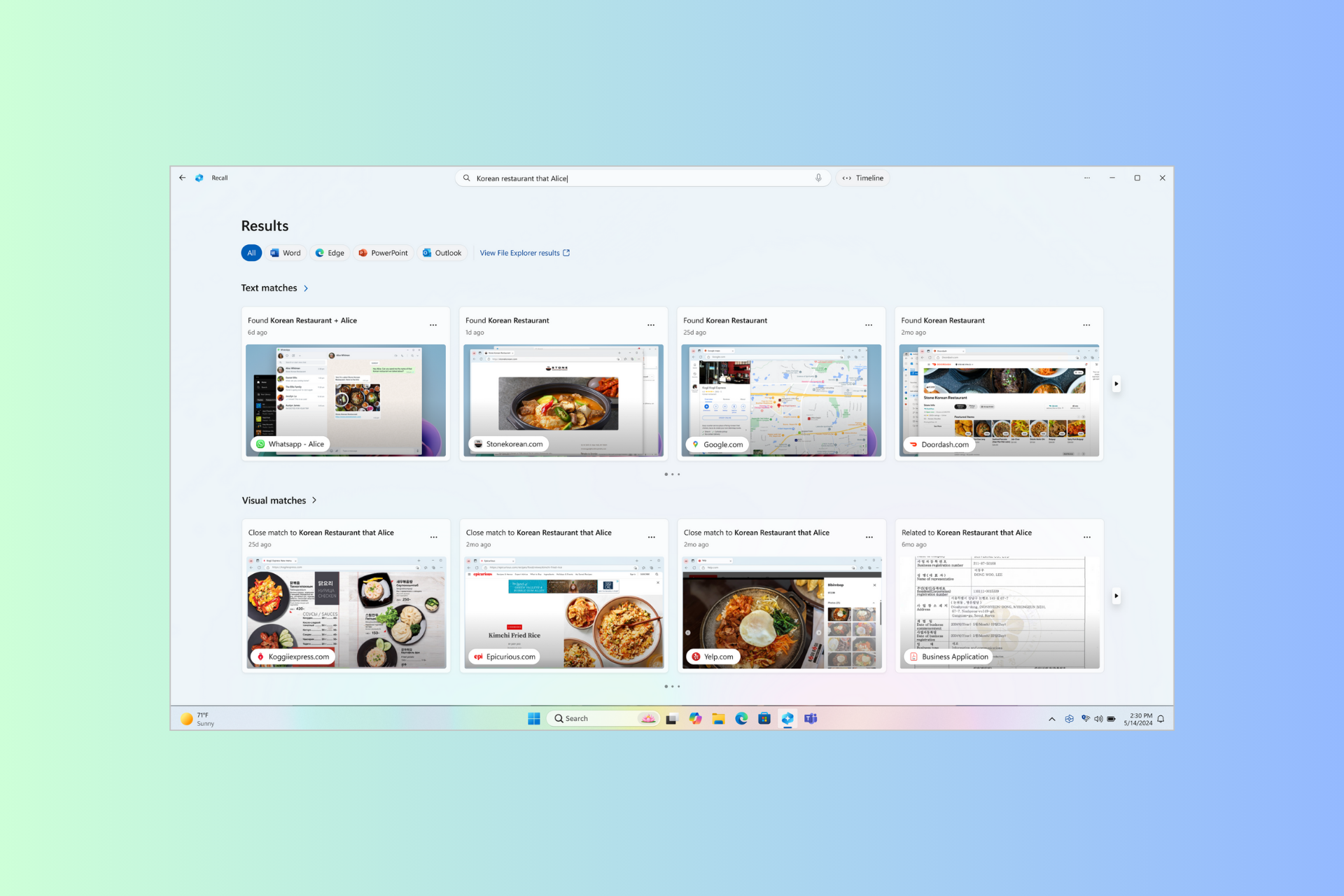
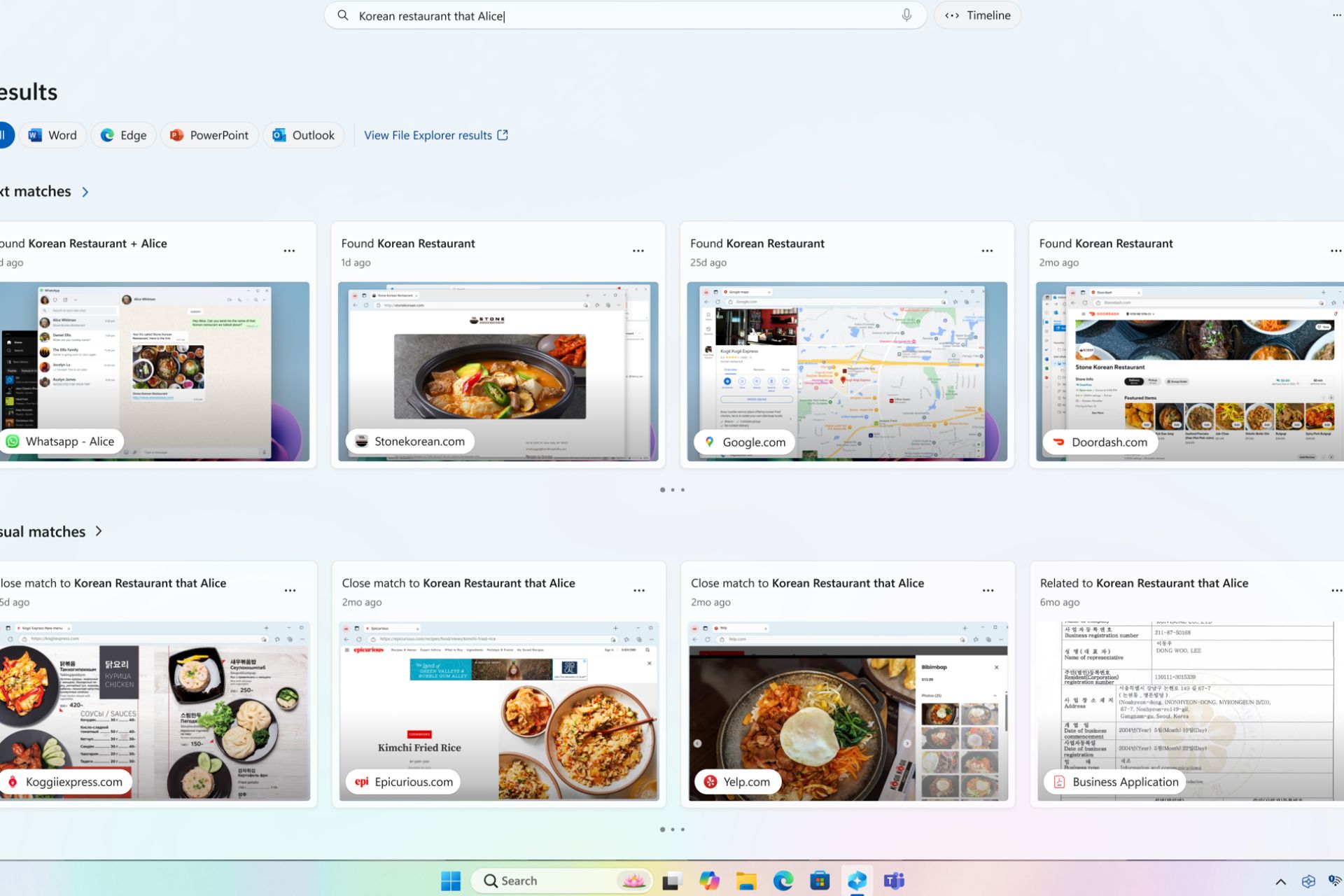
At the Microsoft Build Conference 2024, Microsoft discussed the complexities of the latest AI-powered feature, Windows Recall, which focuses on revolutionizing user experiences on Windows 11.
The Redmond tech giant provided insights into integrating Recall with app functionalities, ensuring a seamless interaction between snapshots and applications.
They also informed us that Windows Copilot Runtime and Semantic Index technology power AI features like the Recall function on Windows 11. Let’s learn more about it in detail.
Empowering the future of AI Experiences
Windows Copilot Library has over 40 on-device AI models and algorithms and is now an integral part of the Windows ecosystem, which will elevate user experiences to extraordinary levels. Recall is one of the most highlighted features introduced, including Live Captions, Studio Effects, and OCR in Snipping Tool, and it leverages on-device AI models to reshape interaction paradigms.
Enhanced app integration
Another important facet of Windows Recall is its seamless integration with third-party apps. With the help of User Activity API, developers can enhance the Recall experience by incorporating contextual data.
This, in turn, enables Recall to navigate users to specific app states captured by the feature and foster a fluid transition between snapshots and app interactions.
Microsoft PowerPoint and Teams are the first Microsft apps to support this flow, and a third-party app, Concepts, also supports this.
Microsoft has mentioned how the Windows Recall feature works
Recall database is powered by Windows Semantic Index, a new OS capability that redefines search on Windows. Recall is grounded in several state-of-the-art AI models, including multi-modal SLMs, running concurrently and integrated into the OS itself.
These models understand different kinds of content and work across several languages, to organize a vast sea of information from text to image to videos, in Windows. This data is transformed and stored in a vector store called Windows Semantic Index. The semantic index is stored entirely on the user’s local device and accessible through natural language search. This deep integration allows a uniquely robust approach to privacy as the data does not leave the local device.
The Redmond tech giant also emphasized its commitment to ethical AI practices and affirmed that it didn’t use data generated from Recall to train the AI model.
Windows Recall will come to Copilot + PCs, the first of which will be available next month. To use Recall, you must have 16 GB RAM, 8 logical processors, and 256 GB storage (50 GB free space).
Go to Settings>Privacy& security>Recall & Snapshots to access Recall options. Here, you can change the space reserved for snapshots, filtered websites, apps, and more.
To conclude, the Recall feature and its integration with app functionalities are revolutionary and can help developers improve their apps using the User Activity API.
What do you think about Recall Feature on Windows 11? Share your views with our readers in the comments section below.
Are you looking for the best antivirus for Windows Server 2016? Your search ends here!
Protecting your apps, databases, and files from the server side ensures that the client PCs don’t get infected or play a role in infecting the whole network. An antivirus for Windows Server consoles plays a pivotal role in such situations.
However, researching numerous server endpoint security tools and selecting the best ones is a challenge. So, for your convenience, I’ve created this ultimate list.
I’ve collected over 35 server antiviruses and tested them on Windows Server 2016. After stringent evaluation, the following 11 tools have secured their places on my list.
11 Best Antivirus Software for Windows Server 2016
ESET Server Security is another trusted choice for multi-purpose servers, general servers, and network file storage built with Windows Server 2016. It devises a multi-layered mechanism to catch and block malware in different stages: before, during, and after execution.
Furthermore, it offers a lightweight cloud app named ESET PROTECT management console. You can use it with a compatible web browser like Google Chrome and Mozilla Firefox. Since you don’t need to install the security management interface on the server itself, you save on memory, internal storage, and processor bandwidth. Therefore, the tool doesn’t impact the overall performance of your server.
It also supports cross-platform file server security. It works with Office365, Linux, OneDrive, or Windows Server.
Moreover, ESET comes with the latest Fileless malware prevention technology. The ESET Advanced Memory Scanner continuously scans your server’s memory pool. If it locates any suspicious process, it immediately quarantines it and notifies you. Also, the tool looks for avenues to detect cloaked memory exploits when they decloak themselves in the memory pool for execution.
Additionally, there’s a minimal number of false positives. If in doubt, ESET will send malware or exploit process-related reports to ESET LiveGuard Advanced and ESET’s Advanced Threat Defense teams. These security experts analyze the threat manually and instruct the software according to their findings.
Other must-have server defense features include:
Network Attack Protection and Unwanted Server Storage Encryption Prevention ensures your business network doesn’t fall prey to a ransomware attack.
ESET Threat Intelligence tool constantly notifies you of the latest trends of zero-day threats.
Pricing: Starts at $211 for five devices for one year.
Pros
Cons
Supports full disk encryption.
Managed detection and response aren’t available even in the top-tier subscription plan. You’ll have to buy it as an additional service.
There’s a free interactive demo to learn the tool.
EDR isn’t available in premium subscriptions, like ESET Protect Complete. You must buy it as an add-on.
Offers a mobile threat defense solution.
Option for cloud and on-premise server security management consoles.
Offers an advanced mail server security module.
Lets you enforce multi-factor authentication across the network.
The Data Shredder feature lets you delete files permanently with a very narrow chance of recovery.
Bitdefender GravityZone comes with a single point of control web app from which you can oversee malware protection and client PC policy enforcement for private data centers, cloud servers, and more. Its advanced technology and security architecture ensure there’s minimal impact on the server.
Furthermore, it uses integrations from Amazon, Azure, VMware, Nutanix, and more to distribute the server load for security scans and security policy implementation.
It also acts as a secured and customized gateway to the Bitdefender Global Protective Network. There are necessary on-premise and cloud interfaces in place.
It includes the following features:
1. GravityZone Control Center: A graphical user interface on your Windows Server endpoint to configure your security profile settings.
2. Security Server: This is a central virus and malware scanning tool installed on the main server. You can run security scans for viruses and policy violations remotely on client PCs.
3. Control Center Dashboard: It’s divided into Dashboard network status bar and Dashboard portlets. The server monitoring dashboard enables you to remotely observe overall server network health without physically checking each endpoint server and client PC. It also shows notifications for security incidents related to threatened endpoints, in-progress incidents, already detected threats, etc.
4. Bitdefender Endpoint Security Tools: These are dedicated client security tools configured specifically for Windows, Linux, and Mac devices on your network. Your server-side control panel remotely interacts with these client apps to collect system security data and shows it on your own server GUI.
Pricing: The GravityZone Small Business Security subscription starts at $199.49 per year for 10 endpoints.
Pros
Cons
It offers cost-effective subscription plans for small and medium businesses.
Server-side security configuration and client-side deployment is a complicated process.
You can get custom pricing for enterprise-level businesses.
Comes with a moderate-level learning curve.
Includes out-of-the-box ransomware and phishing protection.
There are no lifetime purchases. You incur a recurring fee per year.
The Endpoint Risk Analytics algorithm helps you spot and quarantine client PCs vulnerable to security threats.
Machine learning technology prevents security incidents even before they occur.
Scan optimization algorithm and caching system ensure the same file isn’t being scanned twice to reduce the impact on the system performance.
Windows Security is the basic server-side antivirus for most Windows Server editions including Server 2016. It offers the following protective features to your setup:
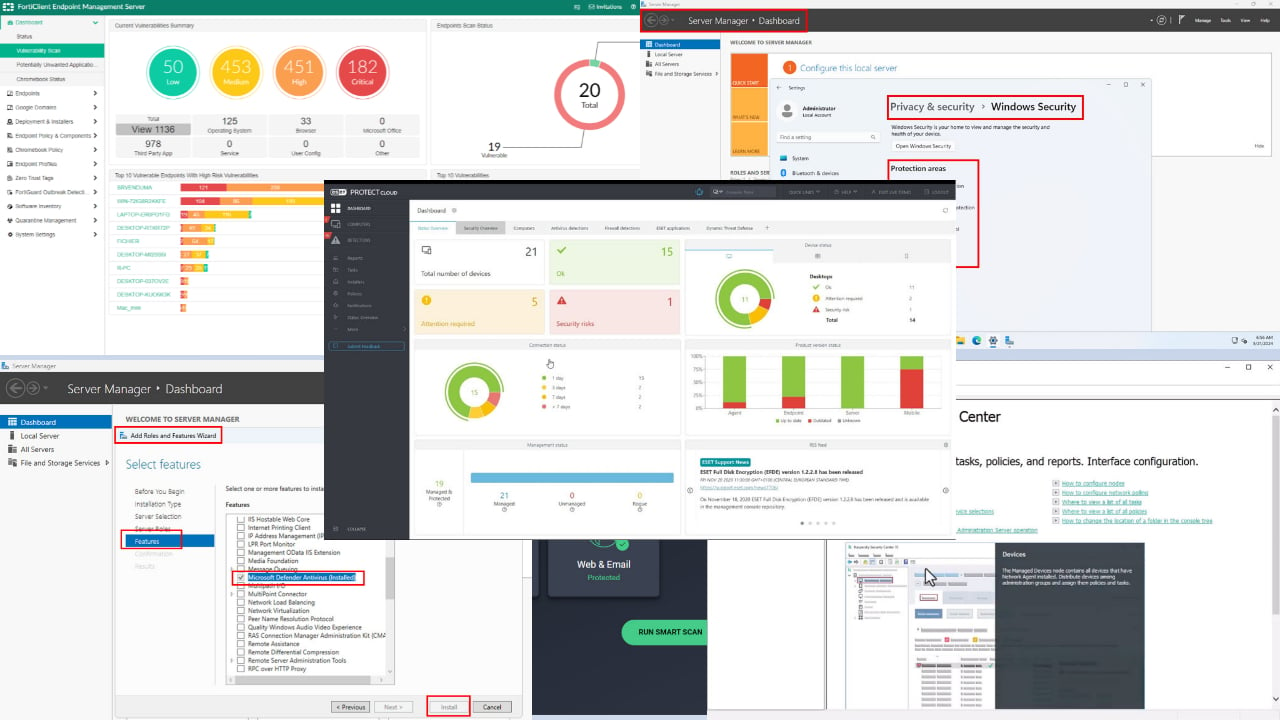
1. Virus & threat protection: It facilitates manual quick and deep scans of your Windows Server workstation as well as scheduled background scans. Here, you can modify the Windows Security virus database to allow specific threats that you think are false positives. The Virus & threat protection settings module also allows you to control Real-time protection, Cloud-delivered protection, Automatic sample submission, and Tamper Protection.
2. Firewall & network protection: This feature safeguards your server network from malicious activities and access requests. Here, you can check if firewall security is active for the Domain, Private, and Public network. Also, you can use the Allow an app through firewall option to give access to third-party apps that Windows Security has automatically blocked.
3. App & browser control: By running in the background, this module automatically protects your Windows Server workstation from known threats coming from apps, files, and websites. Moreover, you can use the Isolated browsing feature to access malicious webpages in a sandboxed Microsoft Edge browser.
4. Device security: It includes the Core isolation feature. When combined with Memory integrity, it provides robust protection against sophisticated threats by isolating critical system processes. Additionally, it leverages virtualization-based security (VBS) to create an isolated environment for extra device security.
However, sometimes Windows Security might not run out of the box in your Windows Server 2016. In that case, you can activate the service in the following ways:
Services: Activate the Windows Security Service from the Services tool.
Server Manager: You can also enable the security feature from the Add Roles and Features Wizard. After selecting the appropriate feature from the Select features list, click Install.
Pricing: It’s available with your Windows Server 2016 purchase. You don’t need to buy it separately.
Pros
Cons
Developed and managed by Microsoft.
Doesn’t offer advanced endpoint security and policy controls.
Built-in and freeware server antivirus.
Not ranked by independent antivirus testing agencies like SE labs.
No need to install any additional tools.
You need a third-party antivirus with Windows Security to boost its protection capabilities.
Pretty easy to operate even by a beginner Windows Server user.
Not suitable for large and enterprise-grade server networks.
Runs in the background without impacting the system.
Microsoft Defender Antivirus – Best Lightweight Solution
Microsoft Defender is another Microsoft-developed and built-in antivirus software for your Windows Server 2016 setup. It comes in two parts as outlined below:
Windows Defender Firewall: Active by default.
Microsoft Defender Antivirus Feature: Disabled by default.
Windows Defender Antivirus collects the latest virus, malware, and spyware definitions from the Microsoft Security servers. It also runs automatic scans to check if your Windows Server is infected with any malware listed in the latest definitions update. If detected, it immediately activates the Windows Security features to eliminate or quarantine the detected threat.
To manually activate Windows Defender Antivirus, you can access Server Manager > Add Roles and Features Wizard > checkmark the Microsoft Defender Antivirus > click Install.
Pricing: Built-in malware protection service for Windows Server for free.
Pros
Cons
Freeware server security tool by Microsoft.
Basic protection against malware. Not suitable against advanced threats.
Minimalistic and easy-to-use UI
Getting replaced by Microsoft Defender Endpoint security.
Runs in the device background without impacting its performance.
After setting up your Windows Server, you must manually activate this feature. Not activated out-of-the-box.
Offers both network and malware protection.
Collects latest virus definition updates from Microsoft Security servers.
AhnLab EPP is a collection of endpoint security products to safeguard all types of devices connected to your Windows Server 2016 network. Besides conventional security threats, it’ll also protect you from new-age cyber threats.
Additionally, AhnLab EPP follows a multi-layered approach to threat detection and mitigation. Its security toolkit includes:
An advanced security sandbox for threat containment
An anti-malware module to trap and eliminate conventional viruses
Endpoint detection & response (EDR) policies.
It also creates a central security monitoring system so you can oversee thousands of client PCs and smartphones connecting to your business network.
Behind its robust and ever-evolving security features is the AhnLab Smart Defense (ASD) engine. Multiple groups of IT security professionals are continuously researching and adding EDR policies to protect you from the latest threats.
Here’s the complete security stack of AhnLab EPP:
V3 – one of the most highly rated and tested antimalware tools.
MDS – detects and analyzes a new threat in a virtual environment.
EDR – offers a contextualized analysis of threats at the endpoint level.
V3 Mobile – provides state-of-the-art smartphone security for business transactions and communications.
Pricing: Offers custom pricing for different business scenarios and sizes.
Pros
Cons
Web filtering and application control policy enforcement in the entire network.
Its free trial and pricing packages aren’t transparent. You must contact sales for a custom offer.
Deep protection against phishing, malware, and ransomware.
It might occasionally generate false positives.
Vulnerability scanning of endpoints to detect security incidents much faster.
Comes with a steep learning curve.
Graphical user interface for Windows Server 2016.
The endpoint security software interface might impact the system’s performance.
Kaspersky Security is highly competent in protecting your business resources on a complex network of Windows Servers and client PCs. It promptly responds to malware and cyber threats to protect business resources hosted on your server.
Moreover, it uses its proprietary HuMachine framework for malware detection. This framework is so fast that the malware gets quarantined as soon as it enters the Windows Server environment. Best of all, it also barely impacts the overall performance of your server’s responsiveness.
Additionally, it’s constantly collecting virus definition updates from the dedicated Kaspersky Security Network (KSN).
It also includes a system memory exploit prevention module. This Exploit Prevention mechanism continuously monitors all the protected system activities in the Windows Server memory modules. It prevents zero-day vulnerabilities or unpatched processes immediately upon detection.
Furthermore, its Default Deny feature lets you create a list of trusted apps, websites, and processes. It’ll block everything else through the Application Launch Control. This is a great way to prevent client PC users from becoming targets for scammers and phishing attacks.
Other notable security features that come with Kaspersky Security for Windows Server include:
Log Inspection and File Integrity Monitor help you enforce the integrity of your network systems.
It protects Windows Servers from getting hacked remotely through the server terminal access via Xen Desktop, Microsoft Terminal Services, etc.
Windows Server container security ensures that the Docker containers use the same kernel as the server does.
Security support exists for hybrid and virtual server infrastructures.
Web resource control, traffic malware filtering, and web link verification for external traffic security.
Moreover, the installation process is fairly easy. The setup wizard guides you through all the technical stuff like setting up security servers, connecting your admin account, and so on. As soon as you arrive on the home screen for the first time, it shows you quick tutorials so you can get started.
Pricing: It offers custom pricing to businesses and interested parties. You must set up a virtual meeting by submitting a lengthy form and wait to see if Kaspersky finds your case convincing.
Pros
Cons
Offers a 30-day free trial.
Doesn’t offer an integrated business mobile device antivirus.
Comes with a high load tolerance.
Its pricing system is opaque.
Low maintenance requirements like rebooting the server after antivirus installation.
You must contact the sales team and explain your case to get the free trial. It’s not open to everyone.
It suits most server roles like file servers, corporate infrastructures, network storage, etc.
The user interface is a bit cluttered.
Works for on-premise, public cloud, and data center server setups.
You can check out Avast Antivirus along with Essential Business Security for your Windows Server 2016 protection. It also includes SharePoint and Exchange Server protection if you host your business sites and file systems on the Microsoft 365 suite.
Its malware defense system can promptly find and quarantine malicious software, batch scripts, spyware, etc. Moreover, its real-time security module constantly tracks all the uploads and downloads from the Windows Server. If any cloaked or decloaked malware tries to slip in, Avast Antivirus efficiently moves the process into a sandbox for further treatment.
The security modules are also adaptive and intelligent. They sync with the threat intelligence engine to understand new cyber security threats. Then, the security tool automatically devises action plans to deal with such advanced security incidents without compromising your business confidentiality.
Furthermore, the server malware protection system works on the network level. Therefore, if you use your Windows Server 2016 setup for collaborative work, the antivirus automatically detects if a participant’s device tries to infect the central server. Once it does, the security measures kick in to isolate the malicious program as well as the connection with the client PC.
Moreover, the Avast security system for servers works completely on the cloud. Its control panel, the Business Hub is a web app and doesn’t require on-premise installations. Therefore, you don’t impact the server performance by installing a resource-hungry antivirus software.
Pricing: Its subscription package starts at $148.36 per year for the Essential Business Security package. You can protect up to five endpoint devices with this.
Pros
Cons
Includes advanced ransomware protection capabilities.
Doesn’t offer a free trial.
Stops phishing across the network by preventing users from accessing potentially harmful sites, apps, and emails.
The affordable essential plan lacks sensitive server security features.
Supports personal VPN tunneling to share sensitive data on a public network without compromising the data transfer.
The server security doesn’t include mobile security tools. You must buy that separately for corporate mobile devices.
Comes with the Patch Management features to prevent server vulnerabilities coming from common third-party apps.
You can easily configure access or denied modes for server USB ports.
Have you set up a Windows Server 2016 as a file server to manage business and customer data securely? It’s high time you explore AVG File Server Business Edition for comprehensive file and document security.
Its network virus scanner constantly monitors the incoming and outgoing data packets of your server workstation to keep hackers away. The latest AVG Scanning Engine also introduces the Smart Scanner feature. It runs in the background and silently scans without showing its presence. It’s so low-key that you won’t know an antivirus is running in as a background process.
Additionally, its Remote Management console is a super-efficient tool. It lets your IT admin install updates and security policies in the client PCs without slowing down an existing task. Also, you can conveniently schedule updates, installs, patches, etc., while idle.
In a nutshell, all the network endpoints, including your server stay updated throughout the year. There’s no need for the PC client or server terminal user to manually apply security updates.
Moreover, you can use the AVG Management Console on the cloud to enforce endpoint security to newly added PC clients, monitor threats, manage security policies, and schedule updates. It also offers security features for MS SharePoint Server 2010 and newer and MS SharePoint Services 3.0 applications.
Pricing: Its Small Business subscription plan starts at $20.41 for one year for one endpoint device.
Pros
Cons
Includes stringent malware scanning and isolation mechanisms.
It doesn’t support the isolated networks feature.
You can remotely control hundreds of PC clients and server endpoints from a central server.
No free trial to get to know the tool before buying.
No need to install the remote management tool on the server. You can use it on the cloud using Chrome or Firefox.
It comes with a moderate-level learning curve.
Lightweight antivirus that doesn’t impact your server’s responsiveness.
You must buy the Patch Management feature separately.
Comes with a conditional 30-day money-back guarantee.
Fortinet Endpoint Agent is a lightweight solution of the Fortinet Fabric Agent for Windows Server 2016. It facilitates advanced server content protection, secure remote access for collaborators, and security compliance across the network.
Primarily, it creates highly secured access to and from the server with its networked PC clients. Moreover, it relies on VPN-encrypted tunnels, Universal ZTNA, cloud access security broker (CASB), and URL filtering for its remote communication security.
Speaking of server endpoint security, it brings AI-based next-generation antivirus (NGAV) to the table. Other server security features include application firewall, endpoint quarantine, USB device control, ransomware protection, and cloud sandbox.
Fortinet FortiClient is also available in two flavors. You can get the whole suite and set it up on your Windows Server 2016 workstation, manage it, and prevent security incidents in your business network yourself.
Alternatively, you can opt for managed services from Fortinet. Its team of experts will deploy and configure the FortiClient solution on your server. The team will also ensure constant vulnerability monitoring for your server as well as all other networked devices.
Pricing: Fortinet offers custom pricing for different business use cases. You must contact the sales team to get a personalized quote.
Pros
Cons
It includes AI in endpoint security for advanced vulnerability assessment.
Setting up Fortinet on your own can be a great challenge.
You can set up a role-based access policy for the server network to reduce the chances of infection.
It comes with a steep learning curve.
It handles zero-day vulnerabilities and never-seen-before malware files with FortiSandbox.
The managed service for endpoint security could incur unexpected costs.
Automatically enforces organizational security policies to all the networked PCs with Fortinet Security Fabric.
Fortinet has a robust threat intelligence and analysis team.
Check Point(Harmony Endpoint) offers an all-in-one security solution for your Windows Server, its content, hosted sites and apps, and networked devices. Its security services include:
Additionally, Check Point protects all data communications in use, at rest, and in transit with advanced encryption protocols. So, if hackers target your network and some of its vulnerable client PCs, they’ll have a hard time cracking the encryption code.
It also offers quick security measures against completely new and unseen malware, threats, and zero-day vulnerabilities using its robust threat intelligence engine. For example, Log4j recently surfaced as a vulnerability in servers. Check Point claims that it offers full protection against executed Log4j attacks.
Furthermore, Check Point provides the Capsule Mobile Secure Workspace to make smartphone usage safe within the organization network. The tool creates a virtual data access and browsing environment that’s completely separate from the internal and public networks. That way, users can work on corporate data on their smartphones within the office premises.
Pricing: Its pricing is on a case-to-case basis. You need to sit on a sales call to get a custom quote.
Pros
Cons
It offers toll-free customer care numbers to report an attack or get technical support.
It has a steep learning curve.
The remote endpoint management console works on-premise and on the cloud.
It might not be cost-effective for small to medium businesses.
All-in-one server security solution.
Full ransomware protection for servers, client PCs, mobile devices, networks, email, apps, and websites.
EDR, XDR, and EPP in one single agent.
Check Point’s Threat Cloud Al includes over 60 AI engines to provide Zero-Day protection.
If you’re running a Windows Server 2016 setup as a data center, CrowdStrike Falcon should be your first choice for server security. Besides the physical server, it can also protect Windows Servers deployed in virtual environments and cloud-based data centers.
To help you prevent network infection with malware and spyware, Falcon uses multiple mechanisms:
Indicators of attack (IOAs), artificial intelligence (AI), and machine learning–based approaches prevent Advanced Persistent Threats (APTs), stealthy nation-state attacks, ransomware encryption of server storage, and spyware intrusions.
It promptly blocks known malicious codes and scripts using data from a proprietary threat intelligence server.
You can remotely quarantine and fix vulnerable systems without visiting the PC client physically.
The endpoint security engine silently hunts for stealthy attacks throughout the day.
Moreover, Falcon’s end-to-end visibility of websites, apps, mobile devices, and so on lets you quickly locate security issues, isolate them, and plan remedial actions. It also lets you pinpoint unknown or rogue network devices and revoke their access from your business network.
If you follow the container-based approach to software development and experience attacks on the same, Falcon can help you fix those infected containers without disturbing others. The tool also paces up with the speed of the DevOps projects in your server for detection, isolation, and remediation of container vulnerabilities.
Pricing: Its Small Business packages are cost-effective. You can get started for just $4.99/ device/ month. Additionally, subscription packages for enterprise needs start at $99.99/ device/ year.
Pros
Cons
Offers a free trial.
The affordable plan, Falcon Go, lacks critical server security features like threat intelligence and firewall.
Falcon includes AI and ML in endpoint security for quick decision-making.
Enterprise plans, like Falcon Pro come at a high cost per device.
Its notification system informs you quickly if any malicious code is running on a networked PC client.
There’s a steep learning curve.
Protects containerized projects in your DevOps cycle.
Single control panel running on-premise or cloud to monitor server and cloud workload activities.
It offers efficient API access for third-party security tool integration purposes.
How I Chose the Best Antivirus for Windows Server 2016
Here are all the factors I considered while choosing these server antiviruses:
1. WCL Checkmark Certified
I ensured that the antivirus software I’ve chosen is Checkmark Certified by West Coast Labs. It’s one of the most trusted and oldest IT security accreditation institutes in the world.
2. SE Labs Approval
SE Labs is yet another reputed software testing organization that tests and certifies antivirus apps. Upon rigorous testing, it releases a quarterly list of the top-performing endpoint security solutions. I’ve ensured my chosen apps are also SE Labs certified.
3. AV-TEST Performance
AV-TEST is also a reputed IT security products testing body. While choosing the best antivirus for Windows Server 2016, I checked if they performed well in the AV-TEST process.
4. Compatibility With Windows Server 2016
I only picked options with exclusive and dedicated supportability for Windows Server 2016 64-bit edition. I excluded tools that claimed that they supported this operating system but failed to do so practically.
5. Real-Time Threat Detection and Mitigation
I looked only for those endpoint security tools that can detect and stop viruses as they happen, keeping the server safe immediately. This feature helps prevent damage before it starts.
6. Minimal System Performance Impact
The antivirus has to run without slowing down the server’s performance. This way, the server can handle all its tasks efficiently while still being protected.
7. Frequency of Virus Definition Updates
I chose antivirus software that updates its virus database frequently. Regular updates help the software recognize and stop the latest threats.
8. Centralized Management and Deployment
I picked only those endpoint security tools that allow easy management of multiple servers from one central dashboard. This makes it simpler to deploy and control security settings across all servers.
9. User-Friendly Interface
The antivirus needs to have a clear and simple interface so that even novices can navigate and use it effectively.
10. Customer Support and Service Quality
Good customer support is crucial, so I chose companies known for helpful and responsive service. This ensures that any issues can be quickly resolved.
11. Pricing and Licensing Options
I considered the cost and flexibility of licensing options. The antivirus needs to offer good value for money and scalable solutions as the server grows.
12. Customization and Configurability
The endpoint security tool has to be customizable to fit specific security needs. I only picked flexible software that you can tailor to unique server environments.
Summary
So, now you can choose your best antivirus for Windows Server 2016. You can use any of the above to protect your server. I’ve also considered different server roles, like file server, multipurpose role, app server, data center, and more.
PC Gaming made more money in 2023 than in 2022, thanks to multiple factors such as the success of high-rated video games like Baldur’s Gate III and cross-platform play. According to data from Newzoo, 2023 was the recovery year for the gaming industry because profits went back to normal.
PC Gaming had a significant increase in profits
Traditional PC Gaming recovered the most and had the biggest increase in revenue. The platform’s game sales, microtransactions, and other digital purchases increased by 8.4% in 2023 compared to 2022. The sector that suffered the most was mobile gaming because the profits dropped by 2%. Meanwhile, consoles almost didn’t change because they only had a 0.3% rise.
In 2023, PC Gaming had a revenue of $39 billion, but compared to mobile and console gaming, it is significantly lower. Mobile Gaming had a revenue of $89.9 billion, while consoles had $52.4 billion.
Publishes focus more on PCs
The revenue of PC Gaming also increased because game developers started implementing cross-platform strategies. For example, you can play games like Warframe on PC, PS, and Xbox. Not only that, but you can use the same account on all platforms, and you will have your items and characters. Also, some games are not available on all consoles. For instance, you can’t play Palworld on PS.
Consoles are becoming similar to mini-PCs. They now support keyboards, mods, and crossplay. On top of that, Microsoft and Sony are not selling as many console exclusives as they used to, and publishers focus more on PCs. Also, the era of AI PCs is here, and AI technologies can improve gaming performance and user experience.
According to Kotaku, gamers are less likely to invest in newer consoles because they play older games like Grand Theft Auto V, Counter-Strike 2, Roblox, and Fortnite. Also, cloud streaming became more popular because it is an affordable way to play newer games with high requirements.
Ultimately, PC Gaming could grow in the upcoming years, and we might see more games from Microsoft and Sony releasing their big games on PCs. Helldivers 2 proves that game sales can increase significantly on PC because gamers play it more on Steam than on PS5.
Do you play more on your mobile, PC, or console? Let us know in the comments.
Whenever we hear about layoffs, our first thought is that the company must be under financial stress. However, that’s not always the case. Right now, layoffs at major tech companies aren’t a result of a financial crunch but have more to do with reassessment and realignment.
Microsoft, which recently shed 1900 jobs in the gaming division soon after the Activision Blizzard acquisition, is registering record ROI. Similarly, layoffs at Meta, Google, and Amazon, amongst other tech giants, led to thousands losing their income source while these companies continue to pump billions in technologies like Artificial Intelligence and Virtual Reality.
According to Layoffs.fyi, approximately 84,060 employees lost their jobs across 293 tech companies in 2024 alone.
So, what do the two terms, reassessment and realignment, mean in this context? The moment you understand this, it all starts to make sense!
Massive layoffs are a result of over-hiring and changing priorities
When the Covid-19 pandemic first hit, everyone was forced into their homes. We used websites and apps to make the simplest of purchases, be it groceries, clothes, or household appliances because going out was practically impossible.
Suddenly, there was a dearth of workers in the tech sector, people who could keep the systems going, streamline the user experience, and come up with new ideas. As a result, all major tech corporations went on a hiring spree.
According to a report in CNN, in the period between 2019 and 2022, Amazon recorded a 106% increase in workforce, Meta 103%, Alphabet 64%, Twitter 63%, Microsoft 53%, and Apple 20%.
Everyone knew this bubble would eventually burst. And that happened as we neared 2023!
Google laid off 12,000 workers in 2023
News of layoffs across the tech landscape became common, with roughly 263,180 employees losing jobs across 1191 tech companies in 2023, according to Layoffs.fyi. The same trend followed into 2024.
This happened because companies reassessed the demand, identified roles that were no longer critical, and proceeded with the layoffs.
That’s one factor. Another is the changing priorities or companies realigning their strategies according to the market demand, as has always been the case, even during the period of pandemic.
Companies are now looking for people well-versed in Artificial Intelligence, because, even in its infancy, AI is delivering results. Companies that integrated generative AI have reported positive results, and others will follow suit. And that needs employees who can help organizations adapt to the change!
Besides, even if we ignore the financial aspect, Artificial Intelligence remains key to consumer-centric products. For instance, AI assistants like Copilot in Windows 11 and Google Gemini. So, that’s where most of the jobs are right now.
Nonetheless, it’s also a fact that AI is taking up jobs. Even Bill Gates has expressed reservations about this aspect of the latest technology. But there’s another side to it!
Adopting AI in the workplace is no longer optional. Ultimately, recruiters want people with AI skills. So, the sooner you move, the better your chances of landing a suitable job or keeping the current one.
What’s your take on layoffs across tech companies in 2024? Share with our readers in the comments section.
The Microsoft Build conference started in Seattle on May 21, and the company is ready to unveil new products and inform the world about improvements in existing products.
Amidst all this, Power BI users were looking forward to the announcement about the analytics platform. They were concerned about the limited time to transition to the new landscape as Microsoft speeds up the migration to the new Fabric analytics platform.
The migration was set in motion last year, with the announcement of the analytics platform, Fabric in June of last year.
Ancy Philip, the program manager has already signaled the retirement of Power BI Automated Machine Learning (AutoML) models for Dataflows V1, on February 27, 2024, and said :
AutoML is a valuable feature in Power BI that enables customers to easily create and deploy machine learning models for predictive analytics. However, we have received feedback that customers want more control and flexibility over the end-to-end AutoML pipeline. The AutoML solution based on Synapse Data Science in Microsoft Fabric will help address this by offering customers a powerful and more customizable AutoML experience, with access to advanced tools and features.
With the new AutoML feature in Fabric, you can automate your machine learning workflow and get the best results with less effort. AutoML in Fabric, or Automated Machine Learning, is a set of techniques and tools that can automatically train and optimize machine learning models for any given data and task type. You don’t need to worry about choosing the right model and hyperparameters, as AutoML will do that for you.
And, by April 22, 2024, all the AutoML models for Dataflows V1 were officially deprecated, and Philip said:
We encourage customers to migrate their solution to the AutoML solution based on Synapse Data Science in Microsoft Fabric, which has been released in Preview.
Andrew Snodgrass, an analyst with Directions on Microsoft, has also warned that this is only the beginning, and Power BI users could expect many other services to deprecate quickly. He also stressed the complexity of migration to Fabric and cautioned PowerBI users to prepare for future announcements as Microsoft works to align licensing and features with the Fabric platform.
Andrew Snodgrass further said:
I don’t think this will be the end of retiring Power BI features, as there are several features in danger, whether Microsoft has publicly admitted it or not. The way I see it, any Power BI feature that is not part of visualization and can be replaced by a Fabric feature will be replaced, and probably with very little notice.
Snodgrass identified various Power BI features at risk of retirement, including Datamarts, Data Compliance, Streaming Data, and Desktop Developer mode.
Many users have expressed concern about Microsoft’s hasty approach to forcing the transition, especially considering that some of the retiring features lack fully functional equivalents in Fabric or are still in preview. For example, the AutoML feature in Fabric Data Science is still in preview, raising doubts about its suitability for production environments.
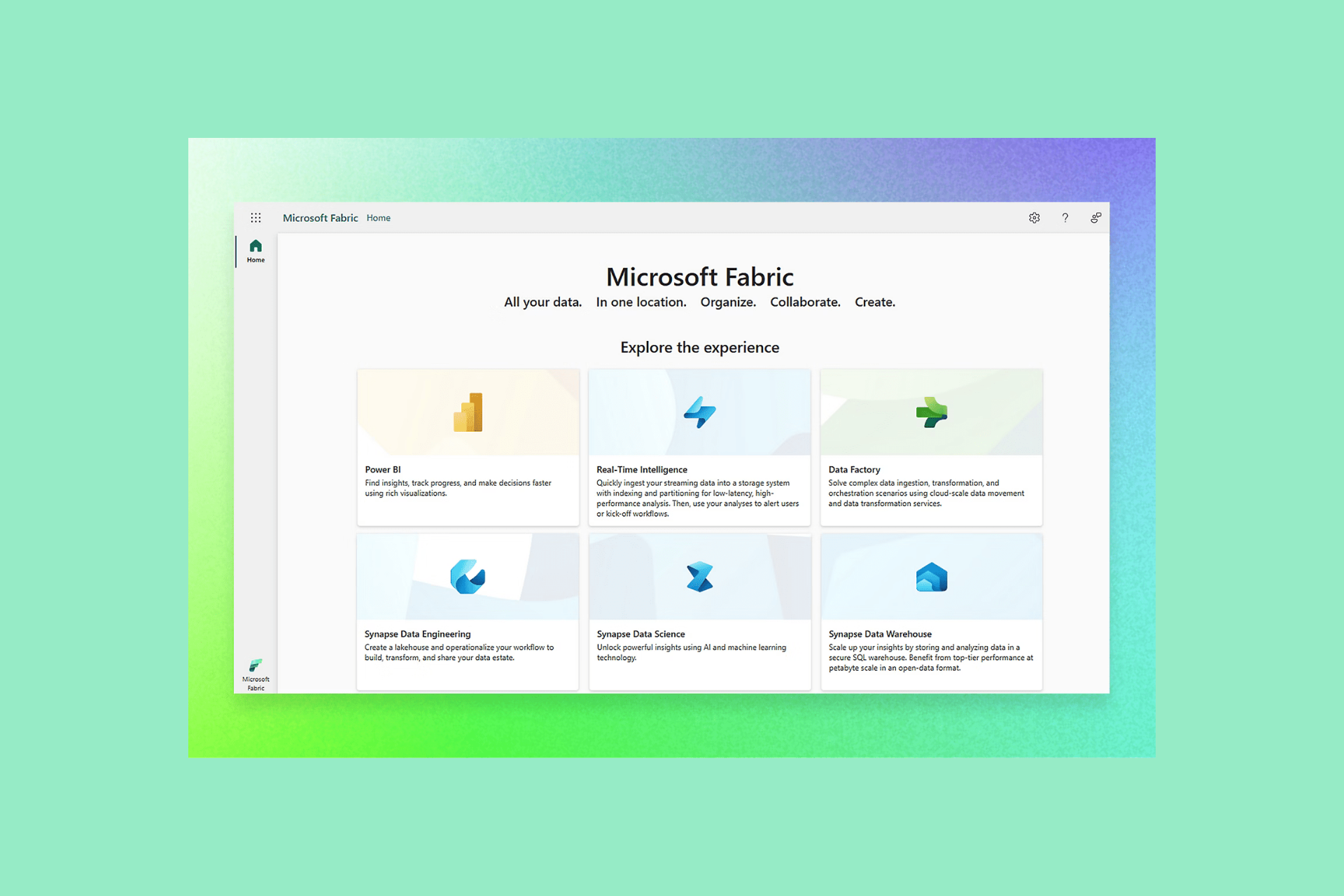
While introducing Fabric, Microsoft announced that the analytics platform will address every aspect of an organization’s analytics needs. This meant that the platform would have a robust set of core workloads, including Synapse Data Engineering, Data Factory, Power BI, Synapse Data Warehousing, Data Activator, Synapse Real-Time Analytics, and Synapse Data Science.
Snodgrass also mentioned that PowerBI’s replacement with Fabric is a long-term objective. However, PowerBI users must not expect to have years to make the transition.
He also said:
If you have deployments that depend on Power BI/Fabric overlapping features, make plans to migrate them to Fabric soon… Ultimately, I’m not sure there will be an option to have a Power BI–only environment.
To conclude, Microsoft is moving PowerBI functionality to Fabric. If you want to stay with the new Microsoft analytics platform, you must be prepared for seamless migration as and when it happens.
What do you think about this change as a PowerBI user? Share your view with our readers in the comments section below.
Microsoft Build 2024 is happening these days in Seattle, and the Redmond-based tech giant has been having a great week so far: the company announced a plethora of new devices (Copilot + PC), Copilot enhancements, including Team Copilot, and many other features coming to Windows, such as the brand-new Recall.
However, at Build 2024, software developers were met with Windows Copilot Runtime, a new platform, meant to encapsulate many tools necessary for building apps. In the official blog post, Microsoft seems very excited about the new platform. Developers should feel that way, too. Why? Because it’s quite versatile.
The new Windows Copilot Runtime is that system. Developers can take advantage of Windows Copilot Runtime in a variety of ways, from higher level APIs that can be accessed via simple settings toggle, all the way to bringing your own machine learning models.
Microsoft
For example, the platform will include many tools making it, as Microsoft says, the end-to-end Windows ecosystem. These include:
Applications and Experiences: software developers can access apps made by other developers and curated by Microsoft.
Windows Copilot Library which encompasses over 40 models that ship with Windows, so that developers can use them to build apps.
AI frameworks such as DirectML, ONNX Runtime, PyTorch, WebNN, along with toolchains like Olive, AI Toolkit for Visual Studio Code. These will be useful to scale the AI-based apps.
Microsoft says that the new features coming to Windows 11 are also going to be quite useful to software developers and they’re also part of the new Windows Copilot Runtime. Windows Recall is one of them, and it’s an AI-based tool that will record everything you do on your PC. This is especially useful when running into error and not knowing why, as you can trace it back.
Other tools such as Cocreator, Restyle Image, Live Captions, or Windows Studio Effects will also be quite useful, as they offer you access to rendering art in seconds, following up with a tutorial in a foreign language, or even designing your apps to follow special Windows Studio Effects actions.
Windows Copilot Library is also quite the rich baggage for every kind of Copilot extension that you might need, and some of them will be released to the platform as soon as next month, Microsoft says:
Windows Copilot Library consists of ready-to-use AI APIs like Studio Effects, Live captions translations, OCR, Recall with User Activity, and Phi Silica, which will be available to developers in June. Vector Embeddings, Retrieval Augmented Generation (RAG), Text Summarization along with other APIs will be coming later to Windows Copilot Library. Developers will be able to access these APIs as part of the Windows App SDK release.
Microsoft
While some can be integrated using code, others follow a no-code policy, allowing developers to easily integrate effects such as Creative filters, Portrait light, Eye contact teleprompter, Portrait blur, and Voice focus, into their apps.
The Windows Copilot Runtime is basically an entire software development department in one laptop with everything in one place. Not only you’ll be able to build your apps, but you’ll have Copilot extensions and apps, such as Cocreator to come up with design sketches.
If your app implies adding multiple languages, the Live Caption capability can help you translate or come up with a sketch of a translation for it. Plus, assuming you’ll want to build apps for Windows, the Studio Effects integration will help you build them natively for the OS.
Coforge, a leading global digital services and solutions provider, recently collaborated with Microsoft to set up the Coforge Copilot Innovation Hub, with a primary focus on developing industry-specific generative AI solutions.
The India-based company also announced two new copilots, Underwriter Copilot and Advisor Copilot. The former is aimed at reducing the workload of insurance carriers, streamlining work, and helping them make informed decisions, which will, in turn, boost returns.
The Advisor Copilot is for financial advisors, allowing them to seamlessly go through scores of data seamlessly on a user-friendly interface, thereby eliminating the need for third-party tools.
Speaking on the collaboration with Microsoft, Coforge’s Executive Director & CEO, Sudhir Singh, said,
Coforge is taking advantage of its deep industry strengths and customer partnerships in building industry specific generative AI solutions on the Microsoft platform to drive transformation and enhance productivity. This collaboration with Microsoft will further accelerate our efforts to deliver industry leading generative AI solutions to our customers.
With the collaboration between Microsoft and Coforge in place, the latter will integrate its generative AI solutions into Microsoft Azure OpenAI Service, Microsoft Power Platform, and Microsoft Copilot, according to the official announcement.
The Coforge Copilot Innovation Hub is a testament to our joint commitment to transform and scale organizational capabilities of financial services organizations worldwide. The use of generative AI has nearly doubled in the last six months, with 75% of people using AI at work, according to the 2024 Work Trend Index Annual Report. Together, Coforge and Microsoft are committed to leading the way in AI adoption, driving innovation, and unlocking business value for enterprises globally.
In recent months, most of Microsoft’s collaborations have entailed the other parties moving their product to Azure AI, the Redmond-based tech giant’s native cloud computing and AI platform, be it with Siemens or Khan Academy.
These efforts have helped Microsoft Azure emerge as a key player in the cloud computing landscape, especially against formidable opponents like Google and Amazon!
We will have to wait and see how beneficial the Coforge-Microsoft collaboration is for the former’s clients. If you have any insights, share them with our readers in the comments section.
NVIDIA has launched a new GeForce Game Ready Driver that is made especially to improve the gaming experience for games like EA SPORTS™ F1® 24, Senua’s Saga: Hellblade II, and Serum. GeForce Game Ready 555.85 WHQL driver is not a simple driver release; it’s designed to enhance gaming performance and visual quality by including various features.
F1 24 gets new ray tracing effects
For individuals who enjoy the fast-paced excitement of Formula 1 racing, the fresh driver promises EA SPORTS™ F1® 24 to show its brilliance fully. Including DLSS 3 and Reflex means that players will likely experience more polished frame rates and lower system latency – every quick decision you make on track matters significantly less now. The new ray-traced effects incorporated into this game boost its realism even more, giving you a feeling that it’s happening right in front of your eyes.
Hellblade 2 now with DLSS 3 and Reflex
Also, for those who like gaming with more focus on the story, Senua’s Saga: Hellblade II is an exciting choice. The driver provides DLSS 3 and Reflex, which give a smooth mix of stunning graphics and quick responses in gameplay. In Viking Iceland, as you explore the haunting landscapes or confront formidable foes, the driver ensures that Senua’s journey remains full of depth and involvement.
Oh, we also have Serum, a game that claims to combine survival with conspiracy. It will surely provide excitement for players. This is a post-apocalyptic adventure in which DLSS 3, DLAA, and Reflex support from the beginning promise visually amazing performance along with quick reaction times to keep gamers fully engaged in this world-ending journey.
XDefiant with Reflex is snapier
However, NVIDIA’s dedication to improving the gaming experience is not limited to these games. The driver also supports XDefiant, Ubisoft’s new first-person shooter that blends quick and strategic play. When Reflex is turned on, players will see a decrease in the delay time associated with rendering frames, making sure each shot matters.
In addition to the games, the GeForce Game Ready 555.85 WHQL driver supports 11 new G-SYNC Compatible displays, which gives gamers many choices on different screens to enjoy a seamless and deep gaming experience.
It doesn’t matter if you play your game using a high-resolution monitor, like 4K, or one with fast speed, such as 1080p—this fresh driver will ensure all aspects of the game look great and perform at their highest level possible.
Keep in mind that some users reported a couple of bugs on Reddit after installing the GeForce Game Ready 555.85 WHQL driver:
Driver seems to install fine, but Geforce experience still showing the prompt to download the new driver.
Here’s what another user said:
Just updated the drivers to this version and both of my screens flicker when I launch any game. Anyone got a solution?
If you encounter the same issues, you can try some of the solutions from this guide to get past the flickering screen. Hopefully, there won’t be any other issue with installing Nvidia’s driver.
In the world of gaming, technology is always moving forward. NVIDIA’s newest driver update shows this trend by giving gamers better gaming performance and graphics and a view into what could be next in the gaming landscape.
We saw all sorts of AI improvements during the Build event, such as new features and new devices.
Speaking of new features, Microsoft has just introduced a new, AI-powered gaming feature called Automatic Super Resolution.
Microsoft Automatic Super Resolution will be initially available only on Snapdragon X Elite devices
Many companies have their upscaling feature, and Microsoft decided to join in by releasing its own feature called Automatic Super Resolution.
This feature is designed to enhance the frame rate as well as visual details of existing games in real time. However, as the Microsoft FAQ page states, this feature will be available only to Qualcomm Snapdragon X Elite processors and certain games.
As ExtremeTech writes, this will be only at launch, and we expect to see this feature available on other CPUs as Microsoft plans to partner with AMD and Intel on their Lunar Lake and Strix CPUs.
At the conference, Microsoft introduced a new .NET update, Preview 4 for .NET 9. This update focuses on improving .NET support by enhancing performance and optimization.
The Redmond tech giant wants to improve the application-building experience for cloud-based web apps and generative AI apps.
As mentioned on the release notes, the latest .NET 9 preview includes:
OpenTelemetry: Make activity linking more flexible
PDB support for System.Reflection.Emit.PersistedAssemblyBuilder
Let’s take a look at the changes in the latest preview:
Artificial intelligence integration – .Net 9 introduces end-to-end scenarios for building AI-enabled applications. Using futuristic libraries like Milvus, OpenAI, and Qdrant, developers can seamlessly integrate AI functionality into their apps.
.NET Aspire – It is a new addition focusing on building cloud-native distributed applications, and it promises to ease the development process with comprehensive templates and tools.
C# 13 improvements – Improvements in flexibility and performance will make coding in C# better than ever.
Performance optimization – Reduces memory usage and execution time with critical benchmarks to enhance the overall performance of .NET applications.
AI fundamentals with Tensor<T> – .NET 9 will come with a new Tensor<T> type, which will assist in effective data handling and information flow for AI applications.
Enhanced libraries and frameworks – Enhancements to popular .NET libraries and frameworks, including ASP.NET Core, Blazor, and .NET MAUI, to ensure developers can access the latest tools and features.
Expanded AI ecosystem – To enrich the .NET AI ecosystem, Microsoft has collaborated with OpenAI, Qdrant, and Milvus, allowing developers to access various tools and resources for AI development.
Cloud-native development – .Net 9 now has features like Chiseled containers and NativeAOT & Trimming, along with improved libraries for ASP.NET Core, enabling developers to build secure and scalable cloud-native apps.
Quick start for AI apps – With quick-start samples for AI applications, developers can tap into the AI ecosystem easily. The smart components offer prebuilt controls integrated with AI functionalities, speeding up development for Blazor and MVC/Razor applications.
Future investments in monitoring AI apps – The integration of.NET Aspire and Semantic Kernel with Azure will allow developers to monitor and observe capabilities for AI apps
You can download the .NET 9 Preview 4 today and update the version to 9.0.100-preview.4.24267.66. It includes runtimes, .NET Runtime 9.0.0-preview.4.24266.19ASP.NET, Core Runtime 9.0.0-preview.4.24267.6 and .NET Desktop Runtime 9.0.0-preview.4.24267.11.
The languages supported by the version are C# 12.0, F# 8.0, and Visual Basic 16.9
Have you tried the Preview 4 for .NET 9 yet? If so, share your experience with our readers in the comments section below.
For the last few years, there have been rumours that Microsoft will unveil a dedicated Xbox game store for mobile, a platform it has yet to tap into. Earlier this month, Sarah Bond, President of Xbox, confirmed these reports and shared that the mobile game store will be launched in July’24.
In July, we are going to be launching our mobile store experience. We’re going to start actually by bringing our own first-party portfolio to that, so you’re going to see games like Candy Crush show up in that experience, games like Minecraft. And then we are going to extend that capability to partners, so that they can also take advantage of it and have a true closs-platform, gaming-centric mobile experience. We’re going to start on the web, and we’re doing that because that really allows us to have it be an experience that’s accessible across all devices, all countries, no matter what and independent of the policies of closed ecosystem stores. And then we’re going to extend from there.
Now, reports coming in suggest that the Xbox game store for mobile will only support in-game transactions, like cosmetics and currency, and not actual game purchases, at least initially.
Stephen Totilo, who extensively covers video games, shared the developments in a post on X(formerly Twitter).
Heard from PR today that this mobile web store will initially be for in-game items for Candy Crush, Minecraft, etc. (Sounds like workaround from paying unpopular platform fees to Apple/Google)
Bond calls it "first step…to building a trusted app store with its roots in gaming” https://t.co/RCnht4OC2g
Besides, for now, the Xbox game store will be available as a website and not a downloadable app. Using a website, Microsoft can easily bypass restrictions enforced by Apple and Google on apps hosted in their dedicated stores. Additonally, this will help Xbox offer higher discounts, given it doesn’t have to pay any fees to Apple or Google.
At the end of the day, the good news is that, with Sarah Bond already confirming the introduction of first-party and third-party titles, your favourite games will be available on the Xbox mobile game store some time down the line.
With this, the Redmond tech giant also introduced GitHub Copilot Extensions, which aim to enable developers to build and deploy to the cloud in natural language and with tools and services of their choice within IDE or GitHub.com.
What extensions will be available?
With the announcement, Microsoft mentioned a handful of extensions, including Docker, DataStax, LambdaTest, McKinsey & Company, LaunchDarkly, Microsoft Azure and Teams, Octopus Deploy, MongoDBPangea, Pinecone, ReadMe, Product Science, Sentry, and Stripe.
These extensions are supported in GitHub Copilot Chat on GitHub.com, VS code, and Visual Studio. The GitHub Marketplace will provide extensions that are open to all, but it will also allow organizations to create private Copilot Extensions for their toolmaking, making things easier for company developers.
How does the GitHub Copilot work?
If you often use many tools while resolving database-related errors or any other development issues, you would have to hop from one tool to another to figure out the issue, find a solution, apply the fix, and then deploy it. However, now, with Copilot Extensions, you can do it all in one place.
They can use GitHub Copilot Chat and invoke all of these tools to gather context, troubleshoot, implement solutions, reduce the time it takes to fix a problem and streamline the workflow.
Cody De Arkland, Product Incubation, LaunchDarkly, said:
The LaunchDarkly extension for GitHub Copilot integrates directly where teams are already building software. With it, developers can access documentation and best practices, right alongside their code. Minimize context switching, maintain flow state, and accelerate software delivery—all from one place.
Tillman Elser, Engineering Manager at Sentry, said:
This is the future of software development, where developers spend less time searching and more time building. Working in natural language, they can write code, retrieve data, and solve problems, all using a single intuitive workflow.
Here is what other extensions can do
DataStax extension -Interact with databases and build applications with AstraDB
Octopus extension – View the status of your deployments
Sentry extension – Resolve pipeline issues in natural language
GitHub Copilot for Azure – Get answers to your questions about Azure
GitHub Copilot for Azure preview is limited and offered directly through Microsoft. To try it, you can sign up from this page.
For now, all these extensions, including DataStax, Docker, Lambda Test, LaunchDarkly, McKinsey & Company, Octopus Deploy, Pangea, Pinecone, Product Science, ReadMe, Sentry, and Teams Toolkit on the GitHub Marketplace are limited to invitation only.
However, in the coming weeks, extensions from Stripe, MongoDB, and Microsoft (including Teams Toolkit and Microsoft 365) will be generally available on Visual Studio Marketplace for VS code.
How do you think these GitHub Copilot extensions will help? Share your views with our readers in the comments section below.
Microsoft and Qualcomm revealed the Works on Arm Ready Software (WorksOnWoA) website designed for gamers during the Build 2024 conference. The WorksOnWoA site shows which games are compatible with Arm-based Windows PCs. For now, the site has reports for over 1.400 games tested using devices with Snapdragon X Elite processors and Surface laptops.
What can you find on WorksOnWoA?
The WorksOnWoA website displays the compatibility of games in four categories: unplayable, runs, playable, and perfect. Here’s what each one of them means:
Perfect: The games run flawlessly at 60+ FPS at 1080p resolution with no bugs, glitches, or other issues that might affect their performance.
Playable: This means the game will run at 30+ FPS at 1080p resolution, but you might experience some minor issues.
Runs: This category has the most bugs, errors, and problems
Unplayable: This means that the game you are trying to play will most likely not run on your device due to failures or because the anti-cheat software is not compatible with Arm-based PCs.
In addition, WorksOnWoA allows you to browse games by their categories, check if they are Auto Super Resolution compatible, and see if the testing included used fps boost. Unfortunately, it doesn’t specify anything about the graphic settings used.
The Auto Super Resolution is a handy mechanic because it enhances your FPS by rendering the games at lower resolutions and using the AI on the NPU to improve visuals.
Some popular games are unplayable
Of the 1.400 games available on WorksOnWoA, 747 games work perfectly. However, there are 19 unplayable games, including Fortnite, Roblox, League of Legends, and Pubg. Most of them don’t work due to their anti-cheat software.
According to Linaro, the Arm engineering group behind the website, WorksOnWoA is more of a guide. So, games might not run on your device regardless of their category. If you have an Arm-based PC or plan on getting one, you can contribute to the site.
Ultimately, you can use WorksOnWoA to see which games are compatible with the future Windows Arm-based PCs. Maybe in the future, Linaro will add the specifications of the devices used to test the games. Unfortunately, the only method to play the unplayable games is to use a streaming service.
Will you get a Windows on Arm PC for gaming? Let us know in the comments.
Microsoft is ready to take on Apple with the new Windows devices running on the Snapdragon X Elite processor, but many are wondering how well these devices perform while gaming.
The speculation is finally over as Microsoft has showcased these devices in action while running different titles.
Microsoft showcases the new Snapdragon X Elite devices handling various gaming titles
The new devices offer some incredible features, such as Windows Recall, but can they handle gaming? As Windows Central writes, during the Build event, Microsoft showcased Baldur’s Gate 3 on new Surface devices running at around 30FPS unlocked.
The company also showcased Borderlands on Windows on ARM using the Auto Super Resolution feature that renders games in lower resolution and then upscales the image using AI to boost the framerate.
While these results can’t compare to gaming laptops and PCs, it’s great to see that ARM CPUs can handle gaming at 720p or 1080p.
Regarding compatibility, Microsoft says that over 1000 games should work at 1080p at 30FPS, which should be enough for light gaming.
ExpressVPN, NordVPN, Surfshark, CyberGhost VPN, and PureVPN are some of the best options you can use with it. They’ll help you avoid ISP throttling, bypass restricted websites, and keep your online activities private. They can also aid you with downloading torrents securely, even on networks in the US or AT&T.
ExpressVPN offers fast, automatic obfuscation to all its servers. This feature is important to bypass the firewall blocks from AT&T on some websites by disguising VPN traffic as regular. Other services like NordVPN and Surfshark also offer obfuscation but it results in a connection drop.
However, ExpressVPN allows you to stream high-quality US content up to 4K when obfuscation is enabled. It makes it one of the best VPNs for video streaming.
This British Virgin Islands VPN provider has over 3,000 servers in 105 countries. This allows you to get IP addresses from different locations to access geo-blocked content. Also, it has more than 20 servers in the United States.
AT&T is a US-based Internet Service Provider (ISP). However, you’ll still need to connect to the US servers for the following reasons:
Encrypt your internet connection to prevent AT&T from monitoring your online activity.
Avoid account bans on financial apps like Venmo and PayPal.
To prevent ISP throttling.
Access local US content like Netflix, CNN Go, etc.
Enjoy lower ping and latency for gaming over AT&T’s mobile network.
ExpressVPN also has the Lightway Protocol to provide faster speeds, better security, and improved reliability.
Pros:
Fast, automatic obfuscation.
Over 20 servers in the US.
Has the Lightway Protocol.
Capable of streaming US content up to 4K.
Strong privacy features.
Cons:
One of the more expensive VPN options on the market.
NordVPN has over 6,300 servers globally. It’s among the providers with the most US servers (more than 1950) in 16 US locations. This allows you to switch to a different server if one is congested or not working with a platform.
But that’s not all.
It has specialty servers to ensure you’re safe online. They allow you to use a server without sharing it with any user. This prevents bans or congestion caused by other users.
Moreover, NordVPN has a double VPN, Onion over VPN, and obfuscated servers making it difficult for AT&T to monitor your online activities.
Additionally, NordVPN has P2P servers optimized for file-sharing and torrenting. The Nordlyx Protocol also ensures better overall speed.
Pros:
It has over 6,300 servers globally, with more than 1,950 in the US across 16 locations.
Includes dedicated servers, double VPN, Onion over VPN, and obfuscated servers for enhanced security.
Has P2P servers optimized for file-sharing and torrenting.
It has NordLynx Protocol for better speeds and enhanced security.
Surfshark is known for its unlimited simultaneous connection feature. It allows you to connect to as many devices as you can on a single subscription.
Furthermore, it has more than 600 US servers in 25 cities. You can also automatically connect to allow the service to pick the nearest server. This will make your connection fast with lower ping.
Additionally, this VPN provider has a MultiHop feature which works similarly to NordVPN’s Double VPN. It connects you to two servers, encrypting your data twice. This makes it difficult for AT&T to track your online activities. However, it slows down the speed due to double encryption.
Surfshark is located in the Netherlands, which is among the 14-Eye Surveillance Alliance. However, its no-log policy is verified by Deloitte to assure users that their online activities can’t be shared with the US Government or Internet Service Providers like AT&T.
CyberGhost VPN has over 2,000 servers in the US alone. They’re spread over 11 locations. It also has a “Best server location” button that automatically connects to the nearest one without picking manually.
Furthermore, this service provider has a NoSpy Servers feature. It’s independently operated and located in privacy-friendly Romania. It ensures a more secure browsing experience, free from the US government or AT&T spying on your online activity.
Moreover, If you’re a fan of gaming, streaming, and torrenting, CyberGhost VPN has special servers for the tasks.
CyberGhost VPN is also among the few services with a server in China. You can get a Chinese IP address and access content in the region through the AT&T network.
In addition, CyberGhost supports anonymous subscriptions through cryptocurrency as well.
Pros:
This service provider has over 2,000 servers in 11 locations.
Supports NoSpy Servers.
Offers dedicated servers for gaming, streaming, and torrenting for optimized performance.
User-friendly interface.
Allows access to a Chinese IP address for regional content.
Cons:
Some users reported slower speeds compared to top competitors.
5. PureVPN – Best For Quantum-Resistant US Servers
PureVPN has more US servers than ExpressVPN and Surfshark. It boasts over 1,800 servers in 13 cities. Moreover, it adds quantum-resistance technology to servers to prevent governments, ISPs like AT&T, and spying eyes from accessing your internet activity.
This provider also has a split tunneling feature. It allows you to encrypt some apps, especially the geo-restricted ones, and use local ones on regular traffic.
Furthermore, PureVPN has an automatic Kill Switchand a manual one that you can activate anytime. This feature will shut down your AT&T traffic when the VPN connection drops or stops. It helps to prevent IP/DNS leaks.
While testing and making my selection, I considered the following factors:
The number of servers offered.
Security and privacy features.
Ability to bypass ISP throttling and restrictions.
Affordable pricing.
Number of simultaneous connections.
The jurisdiction.
The five services that I ultimately picked satisfied most of these requirements.
So, does AT&T allow VPN usage?
Thankfully, yes. The best options include ExpressVPN, NordVPN, Surfshark, CyberGhost VPN, and PureVPN. These services will help you bypass ISP throttling, access restricted websites, and ensure your online activities remain private.
Which provider did you pick? Let me know in the comment section below!
It’s official: GPT-4o, the groundbreaking new AI model from OpenAI, capable of sounding like a human, is coming to Copilot across all platforms, sometime this year.
At Microsoft Build, the Redmond-based tech giant made the announcement and it even teased Windows users with the enhanced Copilot, by showcasing a video of the AI model talking to someone playing Minecraft, and offering them tips and tricks: it took only a few seconds to provide the player with an intuitive and human tutorial on how to create items in the game.
The GPT-4o-based Copilot is also capable of a wide range of convincing human emotions: it not only jokes with the player, but it’s also afraid when the player encounters some zombies, although, it does keep on offering ways to deal with these threats.
When presenting it, Yusuf Mehdi, Executive Vice President and Consumer Chief Marketing Officer at Microsoft, said that Copilot will change the way users interact with Microsoft devices and services, by allowing them to talk to Windows using natural language.
The new Copilot should be available to all platforms, whether they’re Copilot + PC devices, or not. Imagine all the Copilot versions, everywhere, enhanced with the new GPT-4o.
You’ll be able to talk to Microsoft Teams, or Microsoft Word (having a fiery discussion about a text would be quite the uncanny valley), and manage your projects using natural language.
This could finally be the way Copilot gets widely adopted by Windows users. Alongside the new and enhanced Copilot, the Redmond-based tech giant will debut Windows Recall to Windows users, as well, although that feature will only be available to Copilot + PC devices, for now.
But something tells me that Microsoft will make it available to regular Windows users as well, eventually. Maybe not now, but sometime in the future.
Talking to your devices is now becoming a reality. How do you feel about it?
Microsoft Build 2024 is happening these days, and the Redmond-based tech giant is taking advantage of it to announce changes coming to the rollout of Windows feature updates with Intune.
In a recently published blog post, Microsoft said it wants to make Windows feature updates more flexible by allowing organizations, through IT managers, to optionally roll them out, so as to not disrupt the workflow and productivity.
Starting May 24, Microsoft will gradually roll out significant changes to how these Windows feature updates can be installed through Intune, and there are plenty of benefits:
Early feedback: You can gather valuable feedback and insights early by letting some users opt in as early testers of a new feature update. Then proceed with confidence.
Risk prevention: Testing prevents risks. You can test new feature updates, realize benefits, and evaluate risks before organization-wide deployment.
Greater productivity: If users choose when to install an update, you don’t have to worry much about disruption to organizational workflow and productivity.
In other words, IT managers can choose which devices get a Windows feature update (Windows 11 23H2, for example, which came with huge changes), and can delay their installations by making these updates optional.
How to deploy feature updates as optional using Microsoft Intune
Devices > Windows 10 and later updates > Feature Updates and select Create new Profile.
Select the new deployment setting to set deployment as either optional or required.
Select Make available to users as an optional update.
After everything is done users can choose to download and install the update by going to Start > Windows Settings > Windows Update.
The new option is definitely welcome, but it will be interesting to see how it will play in the greater Windows roadmap. After all, the Windows feature updates are huge, and disruptive, yes, but they also come with changes and enhancements that improve the Windows experience altogether.
Windows 23H2 brought Copilot, and an improved File Explorer, allowing users to get work done faster and easily. Windows 24H2 will no doubt have huge changes, as well, and its AI capabilities (from Recall to the new GPT-4o-based Copilot), might be a bit much, but it would provide enhanced productivity all around.
Plus, while some devices can get these updates, and others not, all within the same organization, could be disruptive on its own, as not all employees have access to the same features and capabilities.
Microsoft is releasing a much-requested feature on its native browser, Edge, but it’s limited to the Business edition. The new feature will automatically block attempts to capture screenshots on Microsoft Edge, and a black screen will be displayed instead of the on-screen content!
The Redmond-based tech giant made the announcement in an official blog post detailing improvements to Microsoft Edge for Business.
We’re excited to announce that the data leak control capabilities in Edge for Business are expanding to support screenshot prevention policies. When these policies are set, screenshot attempts while using Edge on desktop will be prevented by showing a black screen instead of the protected content. This protection also applies to Copilot in the Edge sidebar so prompts and responses in Copilot cannot be captured by screenshot. These policies can be set across Microsoft 365, Microsoft Defender for Cloud Apps (MDA), Microsoft Intune Mobile Application Management (MAM) and Microsoft Purview.
IT administrators can seamlessly set the policy, reducing data exfiltration, a common problem across organizations. This may, in rare situations, affect day-to-day work. For instance, cases where the screenshots are to be shared within the organization. I hope Microsoft has a solution for that!
Also, the video shared by Microsoft shows Edge for Business blocking screenshots captured by the native Snipping Tool. We will have to wait to confirm whether it works the same way across third-party screenshot-capturing software.
As for availability, Microsoft has said that the screenshot prevention policies will be rolled out in the coming months. Although, an exact timeline has not been provided.
WhatsApp rolled out a similar feature that prevented users from capturing screenshots for photos set to View Once.
Microsoft Build 2024 is happening these days and the Redmond-based tech giant has made some important announcements.
Aside from the ever-present focus on AI, with the release of Copilot + PC devices, Copilot extensions, Team Copilot, and so on, the company announced that it finally added Maps control, one of the most requested capabilities, to WinUI 3, and Windows App SDK.
WinUI 3 is a user interface framework for Windows apps. This feature, which lets apps display maps, uses WebView 2 and Azure Maps, and developers are now able to experience by downloading and installing the latest version of the interface (WinUI 3 Gallery App) here.
WinUI 3, and Windows App SDK also support .NET 8, and thanks to it apps can start up faster, take up less space on your device, and use new features available in the .NET 8 runtime.
And, Microsoft also announced that some Microsoft apps, such as Photos and File Explorer, as well as apps from other developers (Apple’s TV, Music, iCloud) have been updated to use WinUI 3, making them faster and more efficient all-around.
You can read the full blog post on WinUI 3 and its map control capabilities here.
As IGN writes, there are no plans to close the studio anytime soon, as the company is already working on a new game called Project Mara.
That’s not all, as it seems that the team is ready to start working on an entirely new game, and the project has been reportedly approved by Microsoft.
Microsoft hasn’t commented on these claims, but so far, it doesn’t seem that Ninja Theory is going anywhere.
As you might know already, Microsoft announced the new Windows Recall capability coming to all Copilot + PC devices (this is the new official name for AI PCs), starting next month, in July. Now Windows Recall has been expected to be released, although it was teased under another name, AI Explorer.
The capability allows Windows users to navigate the operating system easier, and access forgotten information faster, as Recall will trace everything you visited or did on your Windows and show it back to you in snapshots.
And yes, that’s right. For it to trace everything, it means Windows Recall will also record everything you do, and so that means the tool can have some serious privacy issues. However, at the Build 2024, the Redmond-based tech giant assured us it’s not the case: Windows Recall privacy issues should not be an issue at all, as the tool works locally.
That means it will store all the recordings (aka snapshots) on your device, without uploading them to the cloud. It will then encrypt them using BitLocker. They are tied to one Microsoft account only, and the Redmond-based tech giant won’t use them to target you with ads. Even more, other people having access to your Copilot + PC device won’t be able to see these snapshots, unless they log in using your credentials.
So, as you can see, Windows Recall is quite safe. Aside from malware, and other bad actors threatening your device (assuming you leave it completely defenseless), bypassing its security, and accessing your snapshots, theoretically, you should be fine.
The Redmond-based tech giant has indeed released a blog post full of information regarding Windows Recall’s privacy issues. Here are the most important points you should remember:
It records everything you do on Windows.
You can limit the snapshots Recall collects: you can select specific apps or websites visited in a supported browser to filter out of your snapshots
You can pause Windows Recall from collecting snapshots, clear some of the snapshots, and even delete them all.
It won’t record browsing sessions done in Incognito Mode.
It will also not record content from streaming platforms, such as Netflix, Disney+, and such. In fact, Windows Recall won’t record any DRM (protected media) content.
Recall won’t record special text messages, such as one-time images/videos.
Important: Windows Recall won’t moderate content, and it won’t hide sensitive information, such as passwords, or account credentials.
However, there is one big problem with Windows Recall, and it has nothing to do with privacy. And that is the storage space.
Suddenly, privacy issues are not a worry anymore, as Windows Recall will occupy a lot of space on your already ill-equipped Copilot + PC devices. How? Well, most of these devices come with 256 or 512 GB SSD storage, and Recall will require a minimum of 25 GB to function properly, and at least 50 GB to work as intended. In a 256 GB Copilot + PC device, that’s 10%, and 20% respectively.
25 GB accounts for approximately 3 months of snapshots, Microsoft says.
Copilot+ PC storage size determines the number of snapshots that Recall can take and store. The minimum hard drive space needed to run Recall is 256 GB, and 50 GB of space must be available. The default allocation for Recall on a device with 256 GB will be 25 GB, which can store approximately 3 months of snapshots.
Microsoft
Here’s how much disk space Windows Recall needs:
Device storage capacity
Storage allocation options for Recall
256 GB
25 GB (default), 10 GB
512 GB
75 GB (default), 50 GB, 25 GB
1 TB, or more
150 GB (default), 100 GB, 75 GB, 50 GB, 25 GB
The price of SSDs is not exactly the best right now, and they’re expected to rise over the year. Microsoft releasing a capability that uses a lot of space is not exactly the best idea. Sure, you can highly customize your Snapshots, and you can clear and delete some of them, but if the whole idea of Windows helping you remember what you looked for a year ago is not standing up, is Recall really worth it, then?
Or it might suffer the same fate as Copilot, and that is a poor adoption rate? We’ll see. Time will tell.
In the recent Microsoft Build 2024 event, the Redmond-based tech giant made a series of Arm-related announcements, including the Azure Cobalt 100 processor powering Azure VMs (Virtual Machines). To preview the VMs, you just need to fill out a quick form!
The Cobalt 100 processor is based on the Neoverse N-series (N2) Arm CPU design, which is optimized for the performance of scale out cloud-based applications. The preview includes the general purpose (Dpsv6-series and Dplsv6-series) and memory optimized (Epsv6-series) VM series.
Coming to the performance of Azure Cobalt 100, it will deliver up to 2x on web servers, 1.5x on Java-based workloads, and 1.4x CPU. You also have different VMs to choose from depending on the CPU and memory needs, along with the option to go with or without a local disk. Deploying them is no hassle either!
Speaking about their use case, Microsoft says,
These VMs are ideal for small to medium open-source databases, application servers and web servers. These VMs also excel with containerized applications and can be leveraged by Arm developers in CI/CD pipelines, development and test scenarios. The new Dplsv6 and Dpldsv6 VMs are ideal for media encoding, small databases, gaming servers, microservices and any workloads that do not require higher RAM per vCPU.
When it comes to OS, you will find support for Insider Preview of Windows 11 Pro, Insider Preview of Windows 11 Enterprise, Canonical Ubuntu, CentOS, Debian, Red Hat Enterprise Linux, SUSE Enterprise Linux, Alma Linux, Azure Linux (via AKS), and Flatcar Linux.
As for their availability, the new Azure Cobalt 100-powered VMs will be free during the preview phase. You can access them in Central US, East US, East US 2, West US 2, Southeast Asia, North Europe, and West Europe, with support for other regions expanding in the coming months.
The release of Azure Cobalt 100 VMs is a testament to Microsoft’s increasing focus on the high-performance and power-efficient Arm architecture. It also unveiled a new class of devices, Copilot+ PCs. Powered by Arm processors, these are 20x more powerful and 100x more efficient for running AI workloads.
Have you tried the new Azure Cobalt 100 processor VMs in preview? If so, share your experience with our readers in the comments section.
Not so long ago, the U.S. Cyber Safety Review Board (CSRB) accused Microsoft of neglecting its security systems after the country was affected by multiple cyberattacks that could have been prevented. The recent CSRB report reaffirmed that Microsoft neglected enterprise security. Google saw this as an opportunity to pitch its security systems and new approaches to protect the public sector.
According to Google, the CSRB report shows that the lack of commitment to security can lead to preventable mistakes and serious breaches. Besides, the tech giant believes major platform providers should be responsible and develop capable security practices.
Google dealt with similar security issues before
One of the key arguments from Google was that it dealt with similar threat actors more than a decade ago. After the encounter, the company changed its infrastructure and found new ways to defend against cyber attacks. Now, Google develops products that are safe by design.
Google has three recommendations to fix the security issues mentioned in the CSRB report. The first one is that governments should focus on products secure by design instead of having the security feature added later. The second suggestion is to conduct regular security recertification for products with security issues. The last recommendation for governments is to avoid using the same vendor for multiple products and services. This practice increases the chances for a single breach to compromise various systems.
Microsoft’s CEO Satya Nadella has a plan to build back the trust, but it might take a while to do that, especially since the company is still dealing with ongoing breaches.
Ultimately, the U.S. government could continue using Microsoft. However, Google’s security pitch might lead to some changes, especially since the tech giant showcased the capabilities of Google Workspace. Additionally, Google might open the way for other companies to compete for government customers.
Do you think that Google’s security system can challenge Microsoft’s? Let us know in the comments.
AI has been a focal point of this year’s Build conference, and we saw various AI-related innovations from Microsoft.
It seems that the company has no plans of stopping since they have announced a new language model.
Microsoft announces Phi Silica, a new small language model
Microsoft has its small language model called Phi-3, and the Phi-3 Vision model was recently announced as the latest member of the Phi family.
The company has also revealed another small language model called Phi Silica as Neowin reports. This new model will join the Windows Copilot Library, and unlike other models, it only has 3.3 billion parameters.
Here’s what a Microsoft spokesperson had to say regarding the new model:
It is optimized to run on the NPUs in Copilot+ PCs, bringing local inferencing and achieving first-token latency performance. Developers can access the Phi Silica API and deliver user experiences across the Windows ecosystem.
Windows Copilot Library provides a rich set of functionalities that will enhance developers’ ability to take advantage of AI in Windows. Developers will be able to access Studio Effects, Live captions translations, Phi Silica, OCR and Recall User Activity APIs as part of the Windows App SDK release in June. More APIs like Text Summarization, Vector Embeddings and RAG API will be coming later.
As previously stated, Phi Silica will be a part of Copilot Library, and it has a set of APIs that is powered by more than 40 on-device models that will ship with Windows.
This is all part of the Copilot + PC brand, and if you want to get access to this feature, you’ll need a compatible device, such as one of the newly announced Snapdragon Surface laptops.
Microsoft is making it easier to understand Edge settings related to Copilot. In the Canary version, the company has renamed the “Use Compose (AI-writing on the web)” setting under Languages to a more descriptive name that uses the Copilot branding.
Copilot has been a revelation for Microsoft. It is included everywhere in the Edge browser and is available as separate platforms and in different Microsoft services and products. Copilot has become an integral part of Windows, keyboards as well as PCs. Going forward, you can’t expect to use a Microsoft product or service without Copilot being integrated into it.
The new description clarifies that it helps you write with AI to generate ideas for writing, elaborate, rewrite, change tone and format, and more, all while collaborating with Copilot as you write on the web.
The renamed setting uses simpler wording in its description to convey that it uses AI assistance to help you draft, rewrite text, and adjust styles.
Present Setting Name with Description:
“Use Compose (AI-writing) on the web : When this is on, you’ll get help writing on the web with AI that allows you to generate ideas for writing, elaborate, re-write, change tone, format and more.”
New Setting name with description:
“Collaborate with Copilot as you write on the web: Use AI writing assistance to help you draft, rewrite text, and adjust your style.”
Why the change?
The change makes sense. Regular users might not understand the “Compose” whereas the new setting reveals that they can utilize Copilot for writing, which they may find useful. This change highlights Copilot branding within Edge Settings.
The setting name has been changed, but the feature’s function and everything else remain the same. When you post something in a text box and select the option, “Rewrite with Copilot” will still appear to rewrite the content generated by AI.