Microsoft has just rolled out the latest version of Windows Holographic, version 24H1, and it’s packed with a lot of exciting features for professionals. They were designed to make the HoloLens 2 even more intuitive and user-friendly, especially for those in the workplace.
For those who are not familiar, the Windows Holographic is the software that powers Microsoft’s mixed reality headpiece, HoloLens 2. Let’s dive into what makes this release stand out and how it’s set to revolutionize the way we interact with mixed reality.
What’s new with the Windows Holographic 24H1 update?
First off, the introduction of shared Microsoft Entra accounts is a game-changer. Imagine being able to pick up any HoloLens 2 device, click a single sign-in button, and jump straight into your work. This feature is perfect for environments where devices are shared among multiple users, streamlining access to corporate resources and significantly reducing downtime.
For IT Admins, the update brings a sigh of relief with new policies that simplify device management. Whether it’s controlling user access when the device wakes up from a suspended state or scheduling device maintenance, these policies are designed to keep things running smoothly without constant oversight.
Network connectivity issues can be a major headache, especially when you’re relying on cloud services to get the job done. The addition of a network connectivity report to Offline Diagnostics is like having a diagnostic wizard at your fingertips, ready to pinpoint and solve connectivity issues so you can get back to work without skipping a beat.
Microsoft also brought some improvements to the Intune app update experience and eye tracking calibration. These enhancements ensure that your apps are always up to date and that your device understands your gaze with pinpoint accuracy.
Lastly, the update introduces policies to set device standby actions, giving admins even more control over how the HoloLens 2 behaves in different scenarios. It’s about making the device work for you, not the other way around.
Whether you’re an IT Admin, a frontline worker, or just a tech enthusiast, there’s something in this update for you. What do you think about the Windows Holographic 24H1 update? Let us now in the comments below.
Someone leaked Dell’s 2027 XPS roadmap on Scribd. It contains information about future Intell, AMD, and Qualcomm releases. Also, there are additional details about future Nvidia mobile GPU release dates. After all, the upcoming XPS laptop series might use the new Nvidia GENxx GPUs.
Is Dell going to use AMD?
Dell is considering using an AMD processor for its upcoming XPS 16 Performante. This decision is interesting because Dell hasn’t released an XPS device containing an AMD chip since 2009.
Based on Dell’s 2027 roadmap, the XPS 16 Performante could also use Intel and Qualcomm chips. In addition, Dell plans on updating XPS 14 PISTA and XPS 16 Diablo in 2025 with Arrow Lake-H processors.
Dell will also introduce new versions of the XPS 13 Tributo featuring the Qualcomm Snapdragon X processor with 10 and 12 cores. Also, according to Dell’s 2027 roadmap, the company will bring XPS 13 laptops with Intel Lunar Lake-MX processors in August or September. So, this model will be the first to have Intel Core Ultra 200V chips.
Dell’s 2027 roadmap leak features new updates for the XPS series
The company plans to update the XPS 16 Diablo with a Panther Lake-H processor in 2026. In addition, there are two new entries on Dell’s 2027 roadmap. The first one is XPS 14, it comes with Panther Lake-Px40 and Qualcomm Snapdragon X Gen2 and a Thermal Design Power (TDP) of 40W. The second one is the XPS 13 Divo, which features the same chips but has a TDP of 20W.
In addition, according to Dell’s 2027 roadmap leak, Intell will release the following processors:
Lunar Lake-MX: Intel might release this processor in August or September 2024.
Arrow Lake-H: The processor might be out in February or March 2025.
Panther Lake-H: Intel might release this one in February or March 2026.
Nova Lake: This one might appear in the first quarter of 2027.
The end of the roadmap also shows that Qualcomm will most likely launch Oryon V3 in 2027. However, there are no mentions of XPS laptops showcasing this processor.
Ultimately, Dell’s 2027 roadmap is subject to change. However, VideoCardz might release more information about it in the future. After all, they discovered a 300-page document that features more aspects of Dell’s laptop development process. On top of that, the company might introduce more laptops to stay competitive and to bring us more options based on our preferences and budget.
What are your thoughts? Are you going to wait for the official news? Let us know in the comments.
While the news hasn’t been officially confirmed, several recent developments suggest a new DOOM game release and an announcement could be made as early as June 9 during the Xbox Games Showcase 2024.
Last year, documents accidentally shared during the proceedings of the Activision Blizzard acquisition listed a project titled Doom: Year Zero, in addition to Dishonored 3 and Ghostwire: Tokyo, amongst others. That was the first time the Xbox community got a whiff that a new DOOM game might be on the cards!
Early this year, in January’24, we reported about a trademark filed by Bethesda titled IDFKA. For the unversed, IDFKA is a popular in-game cheat code in DOOM. So, it’s highly likely that a DOOM sequel is under wraps!
Not to mention, a recent cryptic post on X(formerly Twitter) by Tom Warren, Senior Editor at The Verge, highlighted the possibility of Microsoft releasing another DOOM game to recover from recent failures and quell the resentment amongst the community.
“Microsoft will be banking on some new game announcements lifting the DOOM around Xbox.” https://t.co/064MLz8aWq
Amongst all these developments, rumours of a new DOOM game being announced at the Xbox Games Showcase come as a relief to fans of the series. It’s been almost four years since the release of DOOM Eternals. That’s like an eternity for fans!
Fans rejoice over the possibility of a new DOOM game
I came across multiple players in communities and forums who shared the same level of excitement during discussions about a new DOOM release on Xbox.
Doom Eternal is the last game in years to make me smile from ear to ear from start to finish.
So new Doom rumors seem to be legit in that case, a surprise, but a welcome one.
The last two were phenomenal so I’m all for it.
If it happens I’ll play it, but I sure do want a bit of variety from them.
Not to mention, some were surprised by the move while a few wanted a sequel for Quake instead. I hope their wish comes true, because the two titles do have a massive fan base.
Right now, a DOOM sequel for Xbox is all everyone’s talking about. Wait for the Xbox Game Showcase until June 9, and we shall have a confirmation!
How excited are you about a DOOM sequel on Xbox? Share with our readers in the comments section.
2-in-1 laptops are rather useful since they can work as both standard laptops or tablets depending on your needs.
Lenovo is known for such devices, and speaking of which, you can find one of its models with a nice discount.
Lenovo Yoga 9i is available at a discount, so don’t miss it
If you’re looking for a new laptop, but you don’t want to break the bank, you might be interested in the latest sale from Lenovo. We did review Lenovo Yoga 9i, but in case you missed it, here are the key specs:
CPU:
13th Generation Intel® Core™ i7-1360P Processor up to 5.00 GHz
RAM:
16 GB LPDDR5-5200MHz
Storage:
1 TB SSD M.2 2280 PCIe Gen4 TLC
Graphics:
Integrated Intel® Iris® Xe Graphics
Display:
14-inch 3840 x 2400, 60Hz, touchscreen OLED
Connectivity:
USB-C 3.2 Gen 2, USB-A 3.2 Gen 2, 2 x USB-C Thunderbolt™ 4.0 with DisplayPort and power delivery, headphone and mic combo
This is a great laptop for users who want a powerful PC that can handle everyday tasks, multimedia, and basic gaming.
It’s worth mentioning that RAM is soldered, so it’s not possible to upgrade it, so that might be a problem for some users.
As for the price, this device is currently available on Lenovo’s website for 27% off, and you can get it for just $1,199.99.
Have you been eyeing the Surface Pro 9 but waiting for the right moment to snag a deal? Well, it seems like the stars have aligned for Windows enthusiasts because Amazon is currently offering a sweet discount on this gem of a tablet. With a whopping 30% off, the Surface Pro 9, specifically the version with an Intel Core i5 processor, 8GB RAM, and 256GB storage, is $772 on Amazon. That’s a 30% saving right there!
Why should I get Microsoft Surface Pro 9?
NOTE
Prices and offers are prone to change so check out the deal before hitting that buy button.
This deal isn’t just about the numbers, though. The Surface Pro 9 shines with its built-in kickstand and a 13-inch PixelSense display, boasting refresh rates between 60-120Hz. Its performance is pretty solid, especially for those of us who lean heavily into the Windows ecosystem. Sure, it’s not the cheapest tablet even with the discount, but considering its usual price tag hovers around $1,100, it’s a steal.
Now, if you’re wondering whether this deal is exclusive, it kind of is. While other retailers like Walmart and Best Buy are also in the race, they haven’t matched Amazon’s generosity.
But let’s talk specs for a second. The Surface Pro 9 isn’t just any tablet. It’s a premium device through and through, with a lightweight design that’s easy to carry around. The kickstand is great for hands-free use, and the display is nothing short of gorgeous. Under the hood, the 12th Gen Intel Core i5 processor ensures that your work tasks run smoothly, although it’s worth noting that it might not hold the crown in the power department compared to, say, the latest iPad Pro models.
Video chats and work meetings are a breeze thanks to the tablet’s respectable camera, and with up to 15 hours of battery life, it’s quite the workhorse. For those willing to invest a bit more, there’s an option to bundle the tablet with a compatible keyboard and pen, essentially transforming it into a desktop experience.
In conclusion, while the Surface Pro 9 might not be the undisputed champion of tablets, it certainly holds its ground among its Windows-powered peers.
Do you already own a Microsoft Surface Pro 9? Tell us about your experience in the comments below.
Microsoft is constantly improving its services, and it seems the company plans to focus on enhancing Windows experience on ARM.
The next Build event will take place soon, and we finally have some details about the upcoming conference.
Build 2024 event will take place soon, and ARM will be in the spotlight
Microsoft Build 2024 event will take place on May 21 and will last until May 23, as Windows Latest writes.
The event details are finally available, and the one that gained the most interest is titled Next Generation of Windows on ARM.
During this presentation, attendees will be able to learn more about ARM-powered Windows and intelligent Windows apps that utilize the power of the NPU.
Hopefully, we’ll get to see some of the native AI features of Windows 11 in action. Despite the ARM session, Microsoft also plans sessions on AI and its advantages, as well as several sessions on Copilot.
If you use VMware Workstation Pro on Windows or Linux or the Fusion Pro on macOS, there’s good news. The two products are now absolutely free for personal use after VMware’s acquisition by Broadcom!
However, users who need the software for work will need a commercial license.
In the official blog, Michael Roy from VMware, announcing the change and highlighting the reasons behind it, says,
For many in our community, Workstation and Fusion are the first VMware products that they’ve ever used, and it’s an important tool for understanding Virtualization as well as the fundamentals of vSphere. Going beyond that, commercial organizations get value from VMware Desktop Hypervisor apps for a number of reasons including development and testing of apps and systems and interacting with their vSphere environments.
The products, VMware Workstation Pro and Fusion Pro, will now have two license models, a free option for personal use and a paid one for commercial use. The two software are now available for free download on Broadcom’s website.
Trying to download them for VMware’s official website led us to the message, VMware Store Down for Maintenance. Seems like the transition to Broadcom’s system is not yet complete!
As for the commercial license, VMware introduced a new VMware Desktop Hypervisor that reduces the group offerings to a single SKU. It’s a subscription-based plan priced at $120 per year, significantly lower than earlier!
VMware discontinues Workstation Player and Fusion Player
Citing the recent changes in pricing models, VMware has decided to discontinue Workstation Player and Fusion Player, and the two are no longer available for purchase.
Those who have the Fusion Player software for personal use can upgrade to the Pro version for free. You only need to update to Fusion 13.5.2 and delete any saved license key. As for the Workstation Player, you will have to download the Pro version separately from Broadcom’s website.
VMware has also confirmed that the two subscriptions, free and paid, don’t differ in terms of functionality. So, even if you are a free user who works on VMware Workstation Pro or Fusion Pro for everyday tasks, you won’t miss out on anything.
Since we are on the subject, do check out our top picks for Windows 11 virtual machines. VMware, of course, makes it to the list!
Aren’t you excited that VMware Workstation Pro and Fusion Pro are now free? Share with our readers in the comments section.
Xbox 360 was a great console, despite its flaws, and the console has been discontinued for a while now.
However, the Xbox 360 online store is still active, and Microsoft plans to have a few sales before the store completely shuts down.
Two big sales are coming to the Xbox 360 store before the shutdown
Xbox 360 store is shutting down on July 29th, but before that happens, Microsoft plans to have two big sales as Pure Xbox writes.
There will be two sales, and the first one is scheduled for June 18th while the second one will take place on July 16th.
Microsoft plans to bring as many games as possible, and it will keep the same discounts until the store shuts down.
To celebrate the legacy of Xbox 360, we’re working with our amazing publishing partners to bring you as many price reductions from our online store or from the Xbox 360 Store on the console. We’ll be updating this list with more games on June 18, 2024, and on July 16, 2024, bringing you as many repriced games as possible before the end of July. These price reductions will remain in place for each game through the 360 store closing on July 29, 2024.
Once the store closes, you won’t be able to purchase Xbox 360 digital games any longer. However, that doesn’t mean that the games are permanently lost.
Xbox 360 games that are available on Xbox One, or Series X|S will be available for purchase from their stores.
If you still own and use your Xbox 360, keep an eye out for these sales and make sure to get your favorite games before they are gone forever.
Earlier this month, we reported that a bug in the April’24 update broke the VPN functionality, affecting Windows 10, 11 and Server. Microsoft soon acknowledged the issue and has now released a patch for the broken VPN bug in Windows.
This update addresses a known issue that might cause your VPN connection to fail. This occurs after you install the update dated April 9, 2024, or later.
As for Windows 10 users, the KB5037768 update will patch the VPN bug, and for Windows Server, it’s the KB5037782 update!
To install the latest update in Windows 11, press Windows + I to open Settings > go to Windows Update from the navigation pane > click on Check for updates > wait for KB5037771 to download and install > restart the PC for the changes to come into effect.
Installing the KB5037771 update
Remember, the latest update introduces a new bug, as confirmed by Microsoft. After installation, you may be unable to change the user account’s profile picture. Instead, you get the 0x80070520 error and will have to resort to a workaround to change the account’s profile picture.
Not to forget, the KB5036893 update that introduced the broken VPN bug also caused a range of other issues in Windows 11, including slow boot time, random reboots, unresponsive taskbar and icons, and black screen errors. And Microsoft has yet to fix these problems!
Broken and buggy updates are one of the primary reasons for the decline in Windows 11’s market share, an aspect Microsoft must seriously look into.
Did the latest Windows update fix the broken VPN bug on your PC? Let us know in the comments section.
Google is upgrading the Lens features in Chrome on desktop. The feature is getting expanded beyond images with possible Gemini AI integration and is now prepared to identify objects similarly to how Copilot does in Edge. You can “search anything on a page with Google Lens” going forward in Chrome. The Google Lens Search redesign is being tested in Chrome Canary.
Google has integrated “Search with Google Lens” in the context menu as well as Chrome menu. When you initiate Lens Search for the first time, it asks for your consent informing screenshot the page is sent to Google.
Unlike the previous Lens search with images that offered related searches and the ability to extract text, the feature under testing sees a huge AI upgrade, and of course, you should expect it to be powered by Gemini.
The feature, hidden in the context menu, provides an overview of the object or Lens Search you’ve performed. It limits people’s results in search, which Gemini does.
The smart search bar that appears on the side panel after your search, comes prepopulated with queries users expect to enter. For instance, if you capture the Copilot logo, it provides results and an AI overview of what Copilot is.
On foreign pages, the selected region offers ‘Copy and Translate’ options for highlighted words.
Apart from the Context menu, Chrome’s 3-dot menu also features the “Search with Google Lens” option.
We noticed The search with Google Lens is integrated into the Find dialog also in Chrome.
Like Circle to Copilot in Edge, the new Google Lens Search in Chrome powered by Gemini AI is useful for identifying gadgets, phones laptops, or new devices.
How to enable and use redesigned Google Lens Search in Chrome Powered by Gemini AI
Close Chrome Canary, if already open
Right-click on its desktop shortcut and select Properties
In the Target field, at the end, append the following and click Apply and Ok --enable-features=LensOverlay
Launch Chrome, visit a webpage, right click on page and select “Search with Google Lens”.
If you are a part of the Microsoft ecosystem, it’s vital to understand what vulnerabilities were fixed in the latest Patch Tuesday. In May 2024, Microsoft released patches for 60 vulnerabilities, including two zero days.
For the unversed, Zero Day vulnerabilities are the ones that have been identified and disclosed, but a patch hasn’t been released yet.
Vulnerabilities addressed in Microsoft Patch Tuesday, May 2024
One of the most severe existing vulnerabilities, it received a CVSS rating of 7.8. Other than that the fact that it allowed an attacker to gain access to the system, Microsoft failed to share much about the vulnerability.
Available reports suggest that the vulnerability was being actively exploited to load malware on the end user’s PC, including the Qakbot banking trojan.
Granted a CVSS score of 8.8, Microsoft explains that for this vulnerability to be exploited, attackers have to convince the end user to load a malicious file (even a document), which would then allow them the code execution privileges.
Both these vulnerabilities are critical and actively exploited. We recommend you download the patch right away from the dedicated page, depending on the Windows version and the system architecture.
These include security updates for Microsoft Edge (Chromium-based), Microsoft 365, Power BI, Windows Cloud Files Mini Filter Driver, Windows Task Scheduler, Microsoft Windows Search Component, and Windows Common Log File System Driver, amongst others.
An authenticated attacker with Site Owner permissions or higher could upload a specially crafted file to the targeted Sharepoint Server and craft specialized API requests to trigger deserialization of file’s parameters. This would enable the attacker to perform remote code execution in the context of the Sharepoint Server.
Download the security patches for all the vulnerabilities that apply to you, and work stress-free in a secure environment.
Also, Microsoft has confirmed that the hotpatching feature is now available. So you won’t have to reboot the device after installing the update for the changes to come into effect!
Do you know any vulnerabilities that weren’t addressed in this Microsoft Patch Tuesday? Share with our readers in the comments section.
It has been more than three years since most of our work lives have changed, and due to perks like flexible work hours and the comfort of home, people still want to continue working from home while maintaining connections at work.
To solve this, Microsoft has developed a new innovative AI-powered connected workplace app, Microsoft Places, which promises to transform your spaces into engaging places.
In the official Microsoft blog, the company mentioned:
In addition to fostering improved coordination and connection, Places optimizes the effectiveness and engagement of the workplace. Importantly, Places features are accessible across surfaces you regularly use for coordination and collaboration, like Outlook and Microsoft Teams, so flexible work coordination and connection can happen within your normal flow of work.
How does Microsoft Places cater to your needs?
Enhances In-office collaboration
With Microsoft Places, you can:
Effortlessly coordinate office schedules and spaces with coworkers.
A location plan lets you set & share your proposed location schedule and view your coworkers’ plans.
Modify or update location within the Places app or access it in your Outlook calendar
With the Peek card feature, you can access coworker schedules and get quick access to space booking. You also get a link on the peek card, which allows you to see all coworkers’ schedules with the app.
Team guidance facilitates communication between managers and their teams. Managers can easily plan when they should all be in the office, and it clarifies team priorities for in-office days.
You can also look at your manager’s schedule to manage their expectations.
Integration with Microsoft Copilot
With Copilot, Microsoft Places
Can analyze office attendance days, considering things like in-person meetings and coworker attendance.
Enables you to ask Copilot to adjust your schedule based on information such as changing work locations and rescheduling in-person meetings.
This feature is not currently available in Microsoft Places but will be in the second half of 2024.
End-to-end booking solution
Places finder – Accessible in Outlook, allows you to search for rooms and desks and obtain more information to help you decide on a booking. It also shows you images of rooms and desks with additional information such as space in the office and amenities available.
Bookable desk capabilities – Enables you to walk up to a shared work desk, connect your laptop to a monitor and reserve the spot automatically.
Calendar reminders – Offers timely reminders if no desks or rooms are booked for an in-office day. You can click the location pin and access the peek card to check the suggestions for available rooms and desks.
Microsoft also mentioned that end-to-end booking will be refined in the future with the addition of Copilot in the second half of 2024. Based on the booking suggestions, Copilot will find and book suitable spaces for recurring meetings according to your meeting requirements.
Facilitating spontaneous interactions
Expanded presence – As the feature is available across Microsoft 365 apps, you can see your coworkers’ whereabouts so that in-person quick chats can happen when needed.
Presence indicators – You can modify or change your presence status to indicate the in-office presence and even specify which build you are in.
Integration with Teams group chats – In group chats, participants can view each other’s locations or use the @nearby to inform nearby colleagues about activities or meeting room changes.
With all these features promoting real-time collaboration, people could be concerned about privacy, so the Redmond tech giant has ensured that all location data collection adheres to Microsoft’s stringent privacy standards.
However, if you are still uncomfortable with features like expanded presence, you can always opt-out whether you are an admin or a user.
Empowering workplace optimization
Intent and actual occupancy patterns – Allows IT admins to see a clearer picture of the space available and actual usage patterns, thereby helping in decision-making.
Improved utilization management – Let admins adjust policies to automatically release unused rooms or desks that have been booked, giving a better idea of the availability and utilization of spaces.
Microsoft Teams Rooms Pro Management – Provides valuable space and device utilization data for meeting and collaboration spaces and shared desks.
As we have already mentioned, Copilot integration will be available in the second half of 2024, and the data from Places will allow Copilot to offer additional intelligence on space management strategies.
Furthermore, IT admins will be able to manage and adapt space according to insights from Places and Copilot, which can significantly impact operational budgets and sustainability goals.
Threat actors sent millions of phishing emails through the Phorpiex botnet since April. Their goal was to conduct a LockBit Black ransomware campaign. According to New Jersey’s Cybersecurity and Communications Integration Cell (NJCCIC), the wrongdoers used ZIP files containing the LockBit Black payload. The ransomware can encrypt your system once you launch it.
In addition, according to Bleeping Computer, attackers built the malware using the LockBit 3.0 builder, which surfaced on Twitter in September 2022.
The phishing emails share some characteristics. For example, they use the same aliases, Jenny Green or Jenny Brown. Additionally, the message usually states that a document or a photo from the ZIP attachment belongs to you. Also, the hackers send emails from 1.500 IP addresses worldwide, including Kazakhstan, Uzbekistan, Iran, Russia, and China.
How does the LockBit Black ransomware campaign work?
The threat actors sent the emails containing a ZIP doc through the Phorpiex botnet. Afterward, when someone opens the document, it starts running the malware inside. Then, the virus installs LockBit Black ransomware from the Phorphiex botnet. When the installation finishes, the malicious program tries to encrypt files, steal data, and terminate services.
The approach used by hackers is not new. However, the LockBit Black ransomware campaign is efficient due to the high number of sent emails. Yet, compared to other cyberattacks, this one lacks complexity.
According to the cybersecurity experts from Proofpoint, cybercriminals target companies across various industry verticals worldwide. Also, they begin their operations on April 24, 2024.
What is the Phorpiex botnet?
The Phorpiex botnet is an IRC-controlled trojan. It used to spread through USB drives, Skype, and Windows Live Messenger. On top of that, it has been active for over a decade. In addition, cybercriminals used it for more operations besides the LockBit Black ransomware campaign.
The virus gained control over millions of devices. So, its developers tried to sell it on a hijacking forum after they shut down the Phorpiex infrastructure. In addition, wrongdoers used it to spam over 30,000 sextortion emails per hour and delivered over a million emails.
Recently, cybercriminals used aclipboard hijacker module with malware. This method allowed them to replace the cryptocurrency wallet addresses copied to the Windows clipboard of their victims with other ones controlled by them. After a year, they hijacked 969 transactions and stole 3.64 Bitcoin ($172,300), 55.87 Ether ($216,000), and $55,000 worth of ERC20 tokens.
Ultimately, to protect your device from the LockBit Black ransomware and Phorpiex malware, use endpoint security solutions, email filtering tools, or features, and implement ransomware mitigation strategies. In addition, do not open any ZIP files from shady emails, and double-check the sender.
Do you have some ransomware mitigation strategies? Let us know in the comments.
According to a joint study from the University of Chicago and University of Michigan, the push from tech giants such Apple, Microsoft, Google and SpaceX to force employes back to the office resulted in high percentage of senior level employees leaving the company.
Shortly after the Biden administration declared the COVID-19 pandemic over, many employers sought to regain a sense of normalcy by ushering in relatively harsh RTO mandates to employees who had been working remote for the past two and half years.
Despite overwhelming statistical evidence that remote work had little to no impact on productivity across the labor market, companies including Apple, Amazon, Google, Microsoft, Tesla, and SpaceX began mandating RTO orders or favoring in-office promotions as policy.
However, it seems those RTO mandates may have had the opposite effect than what was envisioned by the companies pushing for them.
The Washington Post reported on the joint study published by both the University and University of Michigan which specifically covers Microsoft, SpaceX, and Apple RTO mandates and “its negative effects on the tenure and seniority of their respective workforce.”
The specifics of the study include looking at resume date from People Data Labs while also viewing “260 million resumes matched to company data.” While the study on examined the effects of RTO mandates from Apple, Microsoft and SpaceX, the three were large enough to account for roughly thirty percent of the tech industry’s revenue and just over two percent of the sectors workforce.
The findings of study implied “that return to office mandates can imply significant human capital costs in terms of output, productivity, innovation, and competitiveness for the companies that implement them.”
“We find experienced employees impacted by these policies at major tech companies seek work elsewhere, taking some of the most valuable human capital investments and tools of productivity with them.
Austin Wright, an assistant professor of public policy at the University of Chicago
Following Apple’s RTO mandate back in May of 2022 that supported some work-from-home time as well as in office requirements it saw senior level departures decrease by five percentage points. Microsoft, which held a similarly revised RTO mandate saw a similar decline in its executives and senior developers leaving the company.
However, SpaceX which stuck to an ardent full-time RTO mandate saw its senior-level employee rate drop by fifteen percentage points, according to the joint study.
While Apple was the only company to respond to the joint-study with spokesperson Josh Rosenstock claiming that report represented an “inaccurate conclusion” because the company is seeing “historically low levels” of attrition, it should be noted that another analysis of 457 S&P 500 companies also buttress the notion that RTO mandates decrease moral and ultimately affect a company’s value and productivity.
Microsoft began 2022 with much harsher RTO mandates than they currently have, and it may be due to the level of attrition or employee feedback, but the company has evolved its stance over time.
Newer WFH policies include part-time off-site work as well as revisiting their position on promotions for WFH employees. With over seventy five percent of the tech sector accommodating flexible work environments, Microsoft’s RTO mandates feel outdated and could lead to long term harm to the company as its valued employees leave for positions at rival companies that support better work/life balances.
Netflix is working on a new Windows 11 app experience. Unfortunately, Netflix looks to ostensibly be developing a web wrapper of its browser-based app equipped with all the same features and downsides.
If you’ve visited your Netflix app on a Windows 11 powered device, a new pop up appears that informs the user that streaming service is working on a “new Windows app experience.”
The update includes access to live events, compatibility with ad-supported plans, and more! Downloads will no longer be supported, but you can continue to watch TV shows and movies offline on a supported mobile device.
Netflix
The folks over at WindowsLatest got in contact with Netflix’s support team and were able to confirm that the prompt is correct and that the ‘new experience’ will be similar to visiting Netflix.com from a supported browser.
When combing through support documents on the proposed new app experience, Netflix echoes the same talking points of better streaming quality, live event support, and still no offline download support for Windows devices.
WindowsLatest was also able to nail down an upgrade timeframe of June 2024, at which point Netflix will begin to shuffle users off the old, useful app and onto its new web wrapper via automatic updates in the Microsoft Store.
Eventually the old Windows 11 Netflix app will cease to work, and users will be forced to make do with the same web experience they can get from visiting Netflix.com.
At this time, it is unclear why Netflix has chosen this development path for Windows users who use devices offline when traveling, on insecure networks, in rural areas without broadband or poor connections.
The functional degradation of the Netflix app for Windows will not go unnoticed and comes at a time when Microsoft and partners are gearing up to deliver more mobile device experiences with a crop of devices powered by enhanced mobile processors.
No matter how careful you are while sharing your email address, you will eventually get spam emails, which bother you more when they land in your inbox.
These spam emails are usually from companies trying to sell their products or services. However, some could be phishing emails disguised as a credible source with the motive to steal your information.
Microsoft has tried to make some improvements to help you protect yourself from these threats in Outlook. Let’s check out how!
Shows sender’s email address in Junk message section
Now, you can see the sender’s email address next to the name of the sender in the Junk folder message list. This will help you filter if the email is legit or not without even opening it, thereby minimizing the risk of being a victim of malicious infection.
The feature is available for Outlook for Windows, the new Outlook for Mac, iOS, and Android, and you can even use it on Outlook on the web.
Warning before opening links in the Junk folder
If you can’t recall the email address but the message could be important, you can open it. However, if you click on any of the links in the message by mistake, you will get a Junk Email Security pop-up warning you about the same.
The feature is available for Outlook on the web, Outlook for Windows, and the new Outlook for Mac, iOS, & Android.
Option to Report and unsubscribe
While reporting a spam or junk email, you can also block or unsubscribe to avoid getting emails from that sender.
Earlier, even after reporting, you would get emails from the same sender as reporting the message didn’t block or unsubscribe emails from that sender.
This feature is now available for Outlook on the web and New Outlook for Windows and it will be coming soon for iOS and Android users.
Manage your mailbox
With the new changes, you get two unsubscribe suggestions: you can use them to unsubscribe from unwanted messages from a specific sender and declutter your inbox.
If you are using Focused Inbox, the unsubscribe suggestions will show for messages in the Other tab. The feature is only available for New Outlook for Windows and Outlook on the web.
Unverified (spoofed) sender warning
Outlook now adds an Unverified sender warning to the reading pane and message list to alert you that a sender may be suspicious or an email could be spoofed. The warning also presents you with the option to delete the email. Here is what the warning says:
Warning: Unverified sender This message may not bbe sent by the sender that’s displayed. If yoiu aren’t certian this message is safe, please be cautious when interacting this email, and avoid clicking on any links or deonloaing attachments that are on it.
The feature will be available for New Outlook for Windows and Outlook on the web by June 2024. However, users of Outlook for iOS, Android, and New Outlook for Mac might have to wait sometime.
What do you think about these improvements introduced in Outlook? Share your opinions with our readers in the comments section below.
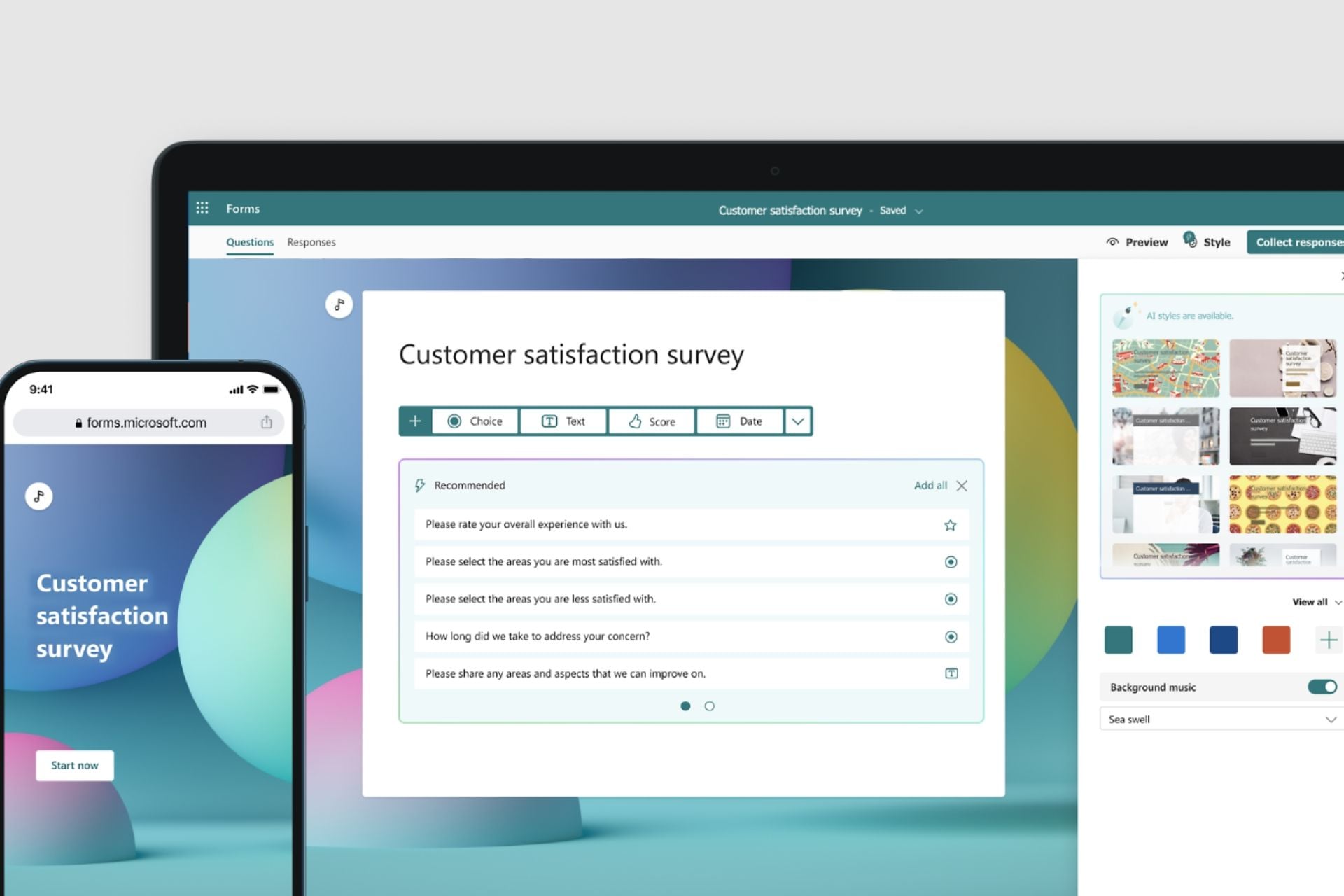
Microsoft has recently updated its surveys/quizzes-based platform, Forms, to support AI capabilities through Copilot, and the AI model is more than capable of doing some fantastic work over there.
For starters, the AI model will generate quizzes based on your data, in just a few seconds. Then, when rolling them out, Copilot will also come up with smart reminders to increase their engagement by proactively checking the status of forms made on the platform, auto-notifying those participants who didn’t fill out the form or have forgotten to do so.
And if your surveys and quizzes still don’t meet expectations, Copilot will have one more trick under its sleeves. According to the latest entry in the Microsoft 365 Roadmap, the Redmond-based tech giant will update the Copilot to come up with solutions should this situation ever happen.
Copilot will assist Microsoft Forms users in suggesting ways to share surveys and quizzes. The AI model will then come up with different recommendations, such as email marketing, sharing on different social media platforms, and generating QR codes for faster and more efficient quiz campaigns.
Copilot in Forms assists form owners by recommending optimal distribution channels and settings for sending forms or quizzes. This includes leveraging email, social media, and QR codes to maximize the benefits of digital forms and quizzes.
Microsoft
The new enhancements should be entirely rolled out by the end of this month, giving managers more than enough time to get used to it, before Microsoft updates Copilot to come up with the ability to generate quizzes on its own, in June.
Either way, these features are more than welcome for those small companies, or small creators who don’t have the budget to develop quiz campaigns. In just a matter of minutes, Copilot will be able to provide you with forms and quizzes based on your data, and the AI model will also help get the maximum number of responses you can get.
Microsoft Research team developed MatterSim, an innovative deep-learning model for accurate and efficient materials simulation and property prediction over a broad range of elements, temperatures, and pressures, to enable in-silico materials design.
MatterSim uses deep learning to comprehend atomic interactions on the basis of fundamental principles of quantum mechanics
It covers an extensive range of elements and conditions, spanning from 0 to 5,000 Kelvin (K) and from standard atmospheric pressure to 10,000,000 atmospheres.
Microsoft mentioned in the blog:
In our experiment, MatterSim efficiently handles simulations for a variety of materials, including metals, oxides, sulfides, halides, and their various states such as crystals, amorphous solids, and liquids. Additionally, it offers customization options for intricate prediction tasks by incorporating user-provided data.
Uses large-scale synthetic data
The model’s learning foundation is based on large-scale synthetic data generated via a combination of generative models, active learning, and molecular dynamics simulations.
This approach ensures comprehensive coverage of material space, enabling MatterSim to predict energies, atomic forces, and stresses. It functions as a machine learning force field, boasting an accuracy level on par with predictions derived from first principles.
Furthermore, MatterSim attains ten times more accuracy than the previous state-of-the-art models in terms of material property predictions at finite temperatures and pressures.
Adaptable design & has high data efficiency
As MatterSim is trained on broad synthetic datasets, it can adapt to specific design requirements by adding additional data.
With active learning and fine-tuning, it can customize predictions with high data efficiency. Compared to conventional methods, the model only needs 3% of data to match experimental accuracy and versatility.
Narrowing the gap between Models and Real-World Measurements
Decoding material properties from atomic structures is complicated and challenging if done using existing statistical methods like molecular dynamics.
MatterSim addresses this by mapping these relationships directly via machine learning. The model has custom adaptor modules that refine it, allowing it to predict material properties without requiring intricate simulations.
How MatterSim can be useful?
MatterSim can be beneficial in a lot of ways:
Accurate – Offers high accuracy in predicting material properties, thereby ensuring reliable simulation results and helping informed decision-making.
Versatile – Can simulate materials across various elements, temperatures, and pressures, allowing you to explore various material compositions and conditions.
Efficient – Allows faster experimentation and iteration, thereby saving time and resources in the materials design process.
Customization – Offers customization options for intricate prediction tasks by incorporating user-provided data.
Streamlined workflow – Simplifies the translation of material properties from structural data, thereby eliminating the requirement of complex simulations.
What is the future?
As the research progresses, Microsoft plans to shift its focus towards experimental validation to reinforce its potential role in pivotal sectors, including the design of catalysts for sustainability, energy storage breakthroughs, and nanotechnology advancements.
The integration of MatterSim with generative AI models and reinforcement learning signifies a transformative shift in the methodical generation of innovative materials customized to meet a wide range of applications.
Furthermore, this advancement ensures speed-up material development and sustainable industrial practices, thereby addressing critical challenges in the materials engineering industry.
What do you think about this development? Share your opinions with our readers in the comments section below.
Windows 11 brought many changes in terms of user interface, but the old Windows interface is still available, and it still works.
Tech-savvy users have found a way to swap Windows 11 shell and use the one from the previous version, and it’s easier than you think.
You can easily swap the Windows 11 shell with the one from Windows 10
This discovery comes from X user Bob Pony, and he has managed to swap his Windows 11 shell.
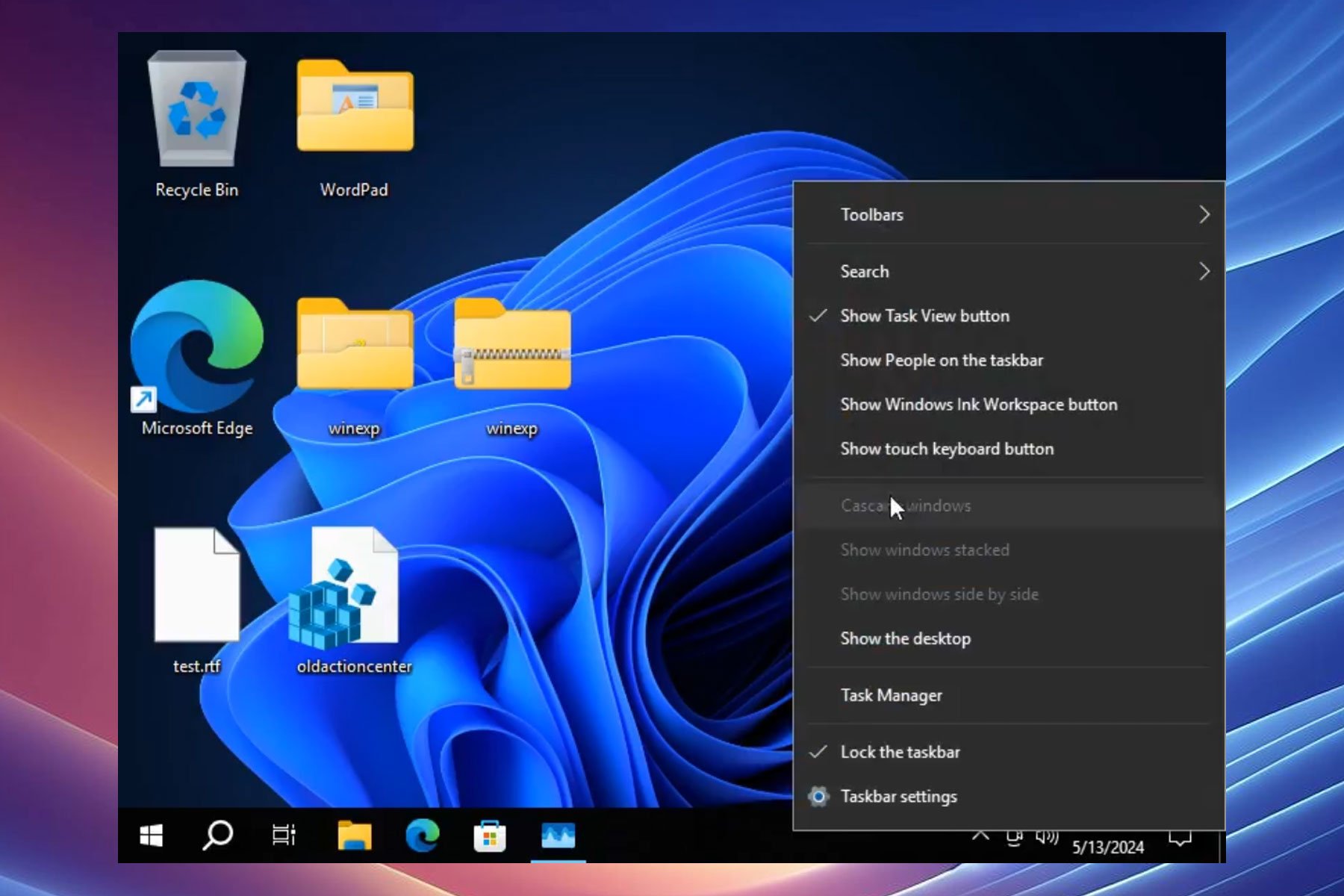
It's possible to swap the Explorer shell in Windows 11 Version 24H2 with the one from Windows 10 (20H1-22H2, Server 2022 works too). Half of it works such as the taskbar from Windows 10 and tray area, but there's quirks such as non-working task view and improperly aligned menus. https://t.co/a0RcS5oDXXpic.twitter.com/wEqNkvphX1
As you can see, the process is incredibly simple, and it requires you to shut down Windows Explorer entirely.
Then you need to open Windows Explorer from an older version of Windows, such as Windows 10 20H1-22H2 or Server 2022.
During his demonstration, Bob used version 10.0.19041.4355 of Windows Explorer. Once you do that, you’ll get the old Taskbar back as well as the old context menu.
Do keep in mind that some components won’t work properly, such as Task View, and there are also issues with the alignment of certain menus.
While it’s great to see that Windows 11 version 24H2 can handle the old shell, this isn’t something that you should use daily.
After thorough research and testing, I identified eight apps that offer a speedy and safe browsing experience with low memory usage.
Read on for detailed overviews with their pros and cons!
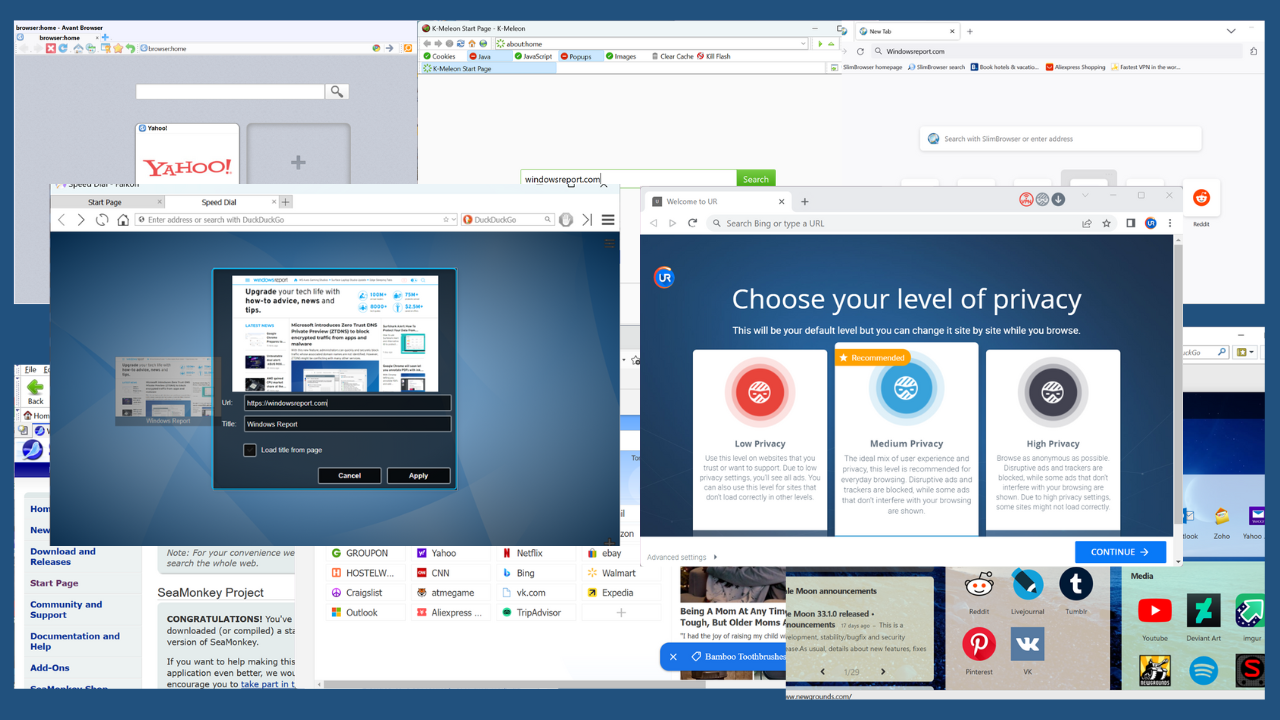
8 Best 32-bit Browsers
Check out these amazing tools:
1. UR Browser– Privacy Suite with Built-in VPN and Ninja Mode
Think of UR Browser as a lighter version of Chrome for your 32-bit system. This browser uses limited resources and offers the same benefits as Safari and Chrome but with better security and some innovations.
UR Brower supports three privacy suites with different types of protection:
Low Privacy Level: Only supports HTTPS Redirect and Anti-Fingerprinting.
Medium Privacy Level: Includes Low Privacy level features and also blocks Ads and Trackers.
High Privacy Level: Includes Medium Privacy level features, blocks cookies, and also supports Ninja mode.
In my case, I tested the High Privacy Level suite, which consequently blocked 2 trackers, 28 ads, and 59 cookies.
Additionally, the Ninja mode feature of the High Privacy Level suite allows you to browse privately. In this mode, all your browser history, search history, and store cookies get erased as soon as you close the tabs.
However, it keepsthe bookmarks and the downloadedfiles after quitting the tabs.
This isn’t a new feature since all popular browsers offer an incognito mode. However, UR Browser permits you to use the private or Ninja mode and the normal mode within the same window, which is quite impressive!
It also comes with a built-in VPN that hides your IP address and spoofs your location to protect your online privacy.
This browser also has its own Download Manager, which separately organizes images, videos, audio, and documents. Specifically, in terms of downloading files, it utilizes advanced parallel technology. It results in a 4x faster download speed than usual.
Moreover, UR Browser also allows you to search for specific downloaded files within the Manager.
Notably, every time you download something from the internet, it undergoes the built-in virus scanner and is verified for threats. If UR Brower finds the file suspicious, it flags it and generates an alert for the dangerous file. The same goes for browsing websites.
To protect your privacy even more, it disables text prediction on web searches, automatic updates, and password filling. Other than this, you can use its Settings window, the same that Chrome supports, and tweak the options.
Pros:
Supports multiple privacy levels: Low, Medium, High
Contains a Built-in VPN, Ad Blocker, Cookies Blocker, and more
Offers an integrated virus scanner
Uses advanced parallel technology for faster download speed
Efficiently organizes downloaded files
Provides a highly private Ninja browsing mode
Cons:
Its user interface may seem cluttered, especially with the privacy features
Looking for a lightning-fast 32-bit browser? Try SlimBrowser!
It uses the Gecko engine, which is why it quickly loads pages even on older machines. It also includes a Turbocharged Download Manager which boosts download speed and efficiently organizes all of your files.
Moreover, SlimBrowser supports a built-in ad blocker that filters out and removes obstructive ad images within the web pages.
Also, when you watch YouTube videos, it automaticallyblocks video ads. I personally tested this feature and found it quite impressive!
Furthermore, it embeds a Download Video button behind the title of each video. This permits you to download the currently played YouTube video in different formats.
Additionally, you can drag your favorite items into the toolbar or overflow menu.
It integrates different extensions and themes as add-ons, which you can add with a single click.
Last but not least, SlimBrowser also offers various tools, such as Language File Manager,Eyedropper, Responsive Design Mode, and more.
Pros:
Supports a multi-threaded Download Manager
Built-in Ad blocker
10x-20 photo upload speed
Built-in Video Downloader
Allows you to upload clipboard images
Easy customization of toolbar and menus using drag and drop option
Ideal for older machines with limited resources
Cons:
Limited extension library compared to other 32-bit browsers
Might not be fully compatible with websites built with newer technologies
Falkon, formerly known as QupZilla, is a KDE web browser, based on QtWebEngine. It was originally designed for education purposes only.
The service has a simple user interface and consumes minimal memory. It utilizes DuckDuckGo as the default search engine and offers other options such as Google, Wikipedia, and StartPage.
Moreover, its Manage Search Engines feature allows you to add, edit, remove, or set a desired default search engine.
Similar to Opera, Falkon has a Speed Dial. It doesn’t auto-add pages to the home page, so you’ll have to manually pin them.
Both the Standard and Portable versions contain essential features you’d expect from a typical web browser. For instance, it has a Session Manager, Bookmarks, History, Tabs, and more.
Overall, Falkon is pretty customizable. It lets you tweak different options in the Preferences. For instance, you can set yourtheme to Mac, Windows, or Chrome and apply changes immediately.
As you scroll down, through the left-side panel of the Preferences window, you may find built-in Extensions, such as:
AdBlock
AutoScroll
GreaseMonkey
Flash Cookie Manager
Mouse Gestures
PIM
Tab Manager
Status Bar Icons
Vertical Tabs.
From here, you can simply mark the checkbox of the Extension which you need to use.
Besides this, the online repository of Falkon contains 17 extensions and 4 themes to date.
I’ve also explored other settings like managing passwords, adding bookmarks, and managing notification access. It didn’t crash and worked well on my Windows system.
Pros:
A simple interface for a user-friendly browsing experience
Efficient history and bookmarking features
Runs smoothly on older machines and consumes minimal resources
Offers a built-in collection of extensions
Cons:
Lacks some advanced features compared to other 32-bit browsers
4. K-Meleon – A Lightweight Version of Mozilla Firefox
K-Meleon is a simple yet very customizable web browser. It’s based on the Gecko Engine, the same one that SlimBrowser and Mozilla Firefox use. To be more specific, you can consider K-Meleon as an alternative to Firefox, as it offers almost the same features while consuming minimal system resources.
By default, it uses DuckDuckGo as a default search engine. However, you can change this setting anytime.
To use K-Meleon for web browsing, simply enter your query and click the search button. Consequently, it quickly loads the page or the relevant results.
What’s more, the K-Meleon team paid special attention to the user’s security. This browser automatically protects you from ActiveX elements and malicious programs. Additionally, its privacy bar provides separate controls for Popup blockers, Cookies, JavaScript, Java, Clear Cache, Images, and Kill Flash.
To configure the other settings, click on the gear icon from the top right side and view a list of options in a tree-like structure. From here, you can further navigate and tweak settings accordingly.
With the help of the layers plugin, K-Meleon manages multiple sites you visit during a browsing session. Moreover, the Tabbed Browsing option enables you to navigate between multiple pages and keep them open simultaneously.
One of the other standout features is importing your desired bookmarking system through related plugins. For instance, you can use your existing Opera Hotlist, Internet Explorer Favorites, or Netscape/Mozilla-style bookmarks with ease.
Furthermore, you can enable or disable the Mouse Gesture plugin to configure which specific actions it’ll perform when moving the mouse in the specified direction.
The same Preferences window also contains different options to customize the Appearance, Page Display, File Handling, History, Proxy, Cache, Themes, Skins, and other browser-related settings.
Additionally, to explore more tools of K-Meleon, such as Translation, User Agent mode, Hotlinks, Mail And News, and Error Console, click on the gear icon from the address bar.
Overall, K-Meleon is one of the best 32-bit browsers for old or configurationally weak systems.
Pros:
Light and efficient
Offers customization options for interface and features, similar to Firefox
Contains a privacy bar to manage pop-up blockers, JavaScript, and more
5. Pale Moon – Fast and Efficient for Both New and Old Systems
Pale Moon is a popular browser that’s well-optimized for both newer and older systems. It loads pages quickly and offers an efficient web browsing experience. Moreover, its stable and portable versions are specially designed to consume few system resources.
The homepage of Pale Moon grants you quick access to frequently visited websites, news feeds, and other useful resources. In addition, it supports different search engine options, such as:
DuckDuckGo (default)
Mojeek
Yahoo
Bing
Ecosia
Ekoru
Twitter
Wikipedia (en).
Pale Browser allows you to open a new browser window in a private mode. In such a case, it won’t save temporary files, cookies, passwords, and other data from the visited websites.
It has also maintained compatibility with Mozilla Firefox add-ons. You can use different extensions to expand its functionalities, personalize it with themes, and utilize specialized external plug-ins.
Each available add-on category further navigates you to a list of extensions or themes. For instance, I explored the Privacy & Security section, and it has 35+extensions that can secure your web browsing experience in different ways.
By default, Pale Moon supports plugins forMicrosoft SharePoint and Microsoft Lync. However, you can install supported plugins through its library or using a file.
Pale Moon also handles a separate Permissions Manager to adjust individual permissions for the visited URLs. For each domain, it allows you to set permissions for these elements:
Store Passwords
Load Images
Open Pop-up Windows
Store Cookies and Site Data
Show Notifications
Install Extensions or Themes
Share Location
Allow Plugins.
As Pale Moon is based on theGoanna search engine, it’s updated frequently. These updates help to add or build new features, repair problems, and improve the overall quality of the browser.
Notably, Pale Moon runs pretty well on low-end or 32-bit systems. However, for modern hardware or 64-bit PCs, it uses multi-threading for optimal performance.
Pros:
Offers optimal performance for both newer and older systems
Receives regular updates for bug fixes, security patches, and performance improvements
Consumes minimal system resources
Enhances privacy with features such as an Ad-Blocker and Permission Manager
Cons:
Limited compatibility with the latest web technologies
Lacks some advanced features present in modern browsers
6. SeaMonkey – All-in-One Suite with an Email Client, IRC Chat, and Composer
SeaMonkey is one of the most comprehensive 32-bit browsers I’ve encountered. For instance, you can use it as an emailcomposer, IRC chat client, newsgroup client, and more.
In SeaMonkey, you can search the web using DuckDuckGo, Google, Google Groups, Google News, etc.
Moreover, it can open all of the search engine options in separate tabs so you can use them simultaneously.
With just one click, you can open several pages at once. Additionally, your homepage can have multiple pages in different tabs.
SeaMonkey also offers other tools such as:
Cookie Manager
Image Manager
Add-ons Manager
Popup Manager
Data Manager
Password Manager
Download Manager.
Additionally, SeaMonkey allows you to browse using multiple profiles. For each profile, it saves information related to your bookmarks, preferences, settings, user items, and stored messages.
Moreover, it supports an extensive add-on library with thousands of extensions. You can easily add a personal touch to the overall browser look. In addition, it permits you to develop your own extensions and share them with the community of SeaMonkey.
On the bottom right side of the SeaMonkey window, you’ll see twoicons. You can use the first one to turn on or off the offline mode and the second one to view the current page info.
Similar to Pale Moon, you can set permissions for the current website with the second option. This includes accessing locations, installing add-ons, loading images and stylesheets, blocking pop-up windows, and more.
I also loved how little memory SeaMonkey consumes. However, its complex and outdated interface may deter users who prefer a more modern look.
Pros:
All-in-one suite with email, newsgroup, and chat functionalities
Provides an extensive collection of add-ons for customization
Allows creating and managing of separate user profiles
Supports offline mode
Cons:
Its interface is busy and outdated
It won’t suit users who want a simple browser without all the add-ons
7. Maxthon – Includes Unique Features Like Snapping and Maxnote
Maxthon is a light Chromium-based browser that might not be as popular as other 32-bit browsers, but it has some unique advantages.
It supports MaxAsk, Google, Bing, Yahoo, DuckDuckGo, Yandex, where MaxAsk is set as default. However, you can change this setting as per your preferences.
Furthermore, it contains a built-in notepad known as Maxnote. You can easily open it on the left side panel or using the address bar component.
Specifically, it assists in creating notes as you navigate through web addresses, or copying information from any website.
The address bar contains quick launchers for different features such as:
Read Aloud
Reading Mode
Add to Maxnote
Bookmark this page.
Snapping is another stand-out feature which allows you to either take a screenshot of a screen section or the whole page. Furthermore, you can directly crop the area before taking a snap.
Maxthon also supports Passkeeper, a password manager that lets you autosave passwords and manage private notes, account credentials, payment info, and addresses. The next time you try to log in, it automatically fills in the details on your behalf.
In addition, the latest versions of Maxthon support BrightVPN. When enabled, this VPN service encrypts your data to secure your browsing experience and online activities.
You can also explore different Features in the Settings, and toggle them on or off.
Pros:
Offers unique features, including Maxnote and Snapping tools
Excellent customization options
Securely stores password and login credentials in the password manager
Provides an additional layer of privacy with BrightVPN
Cons:
Limited online support and resources due to a smaller user base
8. Avant Browser – Highly Customizable With Multiple Rendering Engines
Avant Browser is a fast, stable, memory leak-free browser for any Microsoft Windows user. It beats Mozilla Firefox at speed, Internet Explorer at features, and Opera at rendering.
You can easily customize all its toolbars. For instance, it allows you to select the buttons and their positions on the toolbar. You can also customize the menu bar which by default contains these buttons:
Back
Forward
Stop
Refresh
Home
History
AutoFills
Bookmarks
Re-open Last Closed
Address bar
Search bar.
What’s more, you can choose between AvastFind and Yahoo. It offers four rendering engine options, where IE11 Standards is stated as the best for low memory usage.
To view each option in a more detailed view, click on Avant Browser Settings. This opens a sub-window with different options related to changing its style, setting rendering engines, clearing records, opening files, and more.
For instance, I opened the Browsing Options, which lets me block unwanted pop-up pages, disable pictures, flash animations, videos, sounds, scripts, Java Applets, and ActiveX.
By default, the AD Blockercontains a list of rules as the Black List. You can also add or import a new list or export the current one.
Within the Add-ons section, you can select the Internet Explorer plugins you’d like to use in Avant Browser.
Similarly, you can explore and tweak other categories from the same Settings window.
Pros:
Supports four rendering engine options
Allows using some Internet Explorer plugins
Runs efficiently on older systems with minimal resource consumption
Offers different customization options for toolbars and menu
During my tests, I prioritized the following qualities to choose the overall best 32-bit browsers. I picked options that:
Use minimal resources for smooth performance on older machines
Prioritize speed
Deliver fast browsing and download speeds
Have built-in security features
Offer personalization options
Support a decent collection of add-ons for enhanced functionality.
So, now you’ve all the essential information related to these 32-bit browsers. Feel free to share which one you liked the most in the comments below! Moreover, if you need good options for browsing on your smart TV, I’ve got you covered.
Microsoft is about to update the Teams Phone Mobile app with the exciting brand-new Call My Phone feature, which allows users to transfer their 1-to-1 calls between the app and their phones, while on that call, without any interruptions.
According to Teams enthusiast, Tom Arbuthnot, the Redmond-based tech giant will preview it in June 2024, followed by a general release in July, and it’s quite an exciting new capability.
Here’s why: currently, the Teams Phone Mobile app lets certain service providers give you one number for both your mobile phone and Teams Phone, and the new Call my Phone feature takes advantage of that to offer users a lag-free Teams call experience when entering regions with weak data signal.
Currently, you can switch a call from your mobile phone to the Teams app, by opening the app (on your phone or computer) and clicking the Move to Teams button.
But with the new Call my Phone button in the Teams app, which will be available to both Android and iOS devices, you can move a call to your mobile phone in the middle of the call without any interruptions.
This could be useful if you answered a call using the Teams app over Wi-Fi or mobile data, but you’re about to go to a place with a weak data signal.
However, it’s worth noting that this new feature will only work for calls between two people, not for group calls, as it taps into the user’s Audioconferencing service to connect the call to the user’s mobile phone.
Speaking of Microsoft Teams, the platform should let admins experience unified app management across Teams, Outlook, and Microsoft 365, starting this month, allowing them to manage apps that work on Outlook, and the Microsoft 365 App directly from the platform.
Plus, starting next month, in June, the Teams mobile app will also allow easier integration of SharePoint files, such as selecting and attaching files from SharePoint sites directly in Teams chats and conversations in the mobile app.
If you are an avid Xbox user or simply a gamer, there are times when you are about to play a game, but it starts installing updates instead. It’s frustrating, right? That’s why the revolutionary Xbox’s Update Pre-Download feature is getting all the attention!
Introduced in the Xbox Update Preview via update 2406.240509-2000 to insiders, the feature, when enabled, will pre-install game updates for supported titles before they are available for manual installation.
The update’s release notes describe the new feature as,
Games that enable support for update pre-download will allow updates to be downloaded days before they are scheduled to release, so you can jump in and start playing right when the update goes live!
The feature is especially helpful to users on a slow Internet connection or when a big update is released. So, from now on, an update screen can’t stop you from playing your favourite titles!
Xbox has confirmed that the first game to support the Update Pre-Download feature is Sea of Thieves. To discover more, go to My games & apps > Manage > Updates right away.
Remember, the feature is still in the preview testing mode. Based on the initial feedback, Xbox may make some modifications before releasing it in the stable builds.
While the developers haven’t shared a timeline, based on our assessment, it could take a few months for the Update Pre-Download feature to be available on your console.
Given the wide application and usability of the feature, we hope similar changes will soon be implemented across consoles and gaming platforms, including PlayStation, Nintendo, and Steam.
During the pandemic, some of us started using delivery services for groceries. Besides, there aren’t many of us who prefer spending our free time grocery shopping, especially after a long day at work. So, due to the changes in our behavior, traditional stores have fewer customers. That’s why Walmart auctioned off items from its closed stores.
What is the future of supermarkets?
Some of the traditional retailers moved to the online shopping platforms. After all, they cost less because they don’t have to pay rent, utilities, and staff. Also, some of them are using both traditional and online stores. Yet, some retailers didn’t adapt to the omnichannel approach. However, they might do it soon.
Many retailers need to reevaluate their business models. In addition, after closing their shops, they were left with many products and tools. That’s one of the reasons why Walmart auctioned various items from its stores.
Is Walmart closing stores in 2024 in the USA?
Walmart’s online operations are going well. Yet, some of its physical stores are not generating profits. So, the brand closed 24 stores in 2023. According to TheStreet, this decision affected 14 states and Washington, D.C. Also, the retailer is closing eight additional stores in 2024.
In addition, Walmart will close its health centers and terminate its health division because they are not a sustainable business model. On top of that, the retailer might focus more on grocery e-commerce, especially since it has a growing online marketplace and competes with Amazon.
Walmart announced in October that it would shut down one of its stores in Columbus, Ohio. The retailer took this decision because the store did not meet financial expectations. However, its associates have the option to move to other locations. Also, they received severance payments.
Last week, Walmart held a liquidation auction and sold some of its merchandise. The action was run online by Grafe Auction. Some of the items people auctioned for are:
Cash registers
Checkout counters
Display racks
Electronics and technology
Flat-screen TVs
Laptops
Tablets
Furniture
Small appliances
Coolers
Cleaning supplies
Shelving units
Security monitors
Anti-theft systems
Stock carts
Hand trucks
Ladders
In a nutshell, you should keep an eye on the auction sites. After all, it’s hard to know when traditional stores will auction their equipment for a fraction of their retail price like Walmart did. Also, more retailers might resort to auction sites.
Did you know about the auction? Let us know in the comments.
Nintendo Switch is an amazing console that revolutionized handheld devices, leading many manufacturers to develop their handhelds.
Some tech-savvy users managed to hack Nintendo Switch and run Windows 11 on it, and the results aren’t impressive.
Nintendo Switch can run Windows 11, just barely
It seems that with a little tweaking, you can run Windows 11 ARM, as Tom’s Hardware writes. This was done by PatRyk on X, and according to his tweets, it seems that Windows 11 runs inside of QEMU on Linux.
Scientists have discovered the world's slowest PC and it looks like this
This genuinely took like 3 hours in total to get to install. Every operation takes like 10 seconds pic.twitter.com/94UowMGCNP
While Windows 11 works, its performance is abysmal, and navigation is painfully slow while gaming is impossible.
We assume that emulating Windows 11 inside of Linux drastically affects performance, and so far, we don’t know whether it’s possible to run Windows 11 outside of the virtual environment on Switch.
If you’re looking to run PC games on Switch, then Linux OS might be a better option, since Windows 11 barely works.
While it’s cool to see that Switch can do this, if you need a handheld gaming device that runs on Windows, ASUS ROG Ally X or its predecessor would be a much better solution.
In other news, Switch 2 will have 12GB of RAM, according to leaks, so it might be able to handle Windows, unlike the current model.
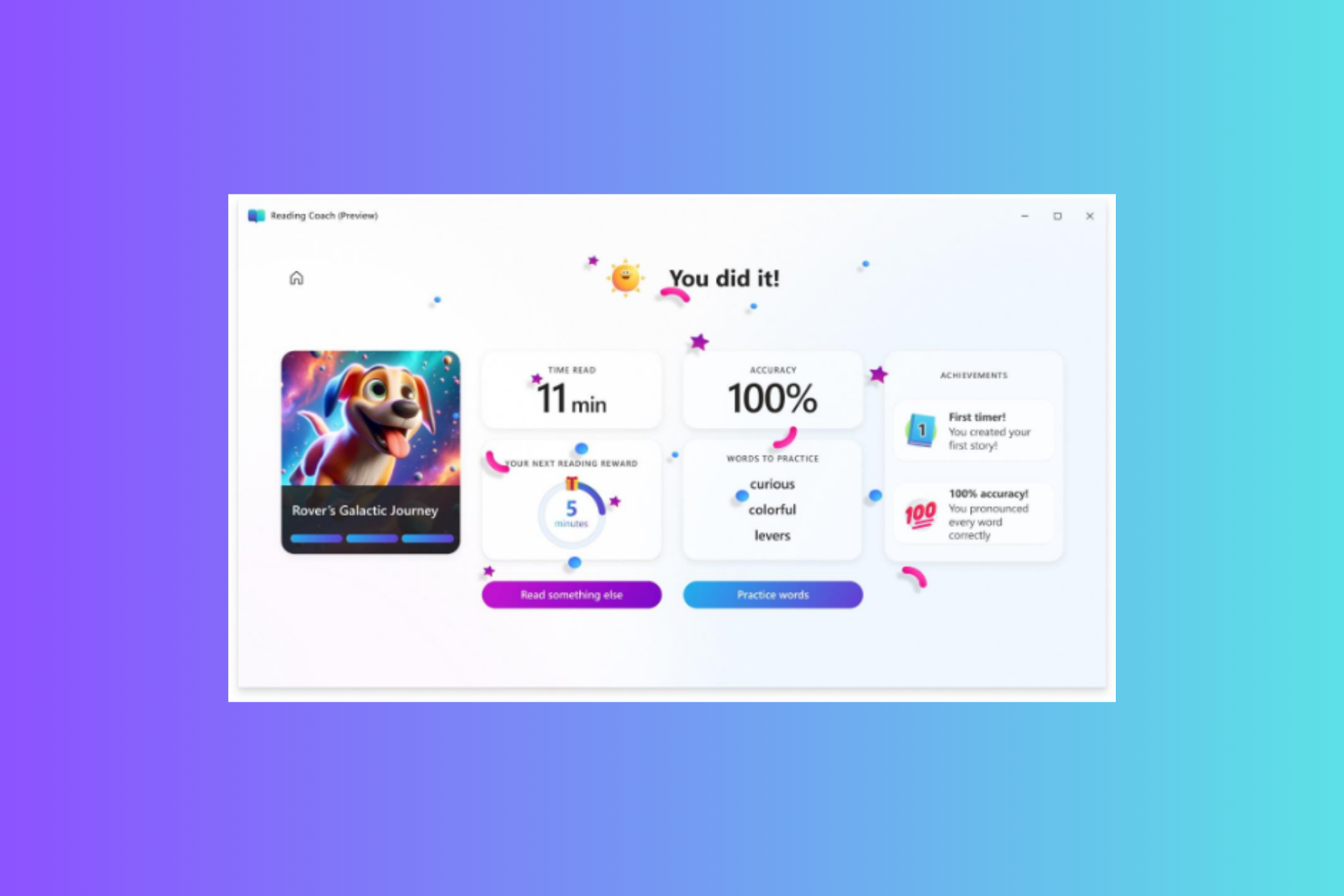
Microsoft has recently launched an AI Reading Coach, a free and standalone AI-powered app that is developed to make reading fun this summer.
The aim is to provide personalized and consistent reading fluency practice and make learners productive this summer.
One of the main features of Reading Coach is to generate unique stories for each individual using AI. Now, you might be thinking about how to ensure that your kid is reading a story appropriate to their age.
The AI-generated story is moderated for content quality, safety, and age appropriateness according to Microsoft’s Responsible AI guidelines.
What can AI Reading Coach do?
Here is what you can try:
AI-generated stories: Learners can navigate the story chapters, unlock characters and settings to compose new stories, and add depth and variety to the storytelling experience.
Leveled library: The library contains fiction and nonfiction passages sorted by difficulty level, allowing learners to choose content that suits their reading level and interests.
Immersive Reader: A fully accessible reading tool that gives a comfortable reading experience for all learners, with features including customized font sizes, background colors, and text-to-speech.
Coaching on challenging words: The AI reading coach can help improve vocabulary and comprehension skills by assisting with difficult words using definitions, contextual explanations, or pronunciation guides.
User-generated content: Learners can add their content to read, allowing them to personalize the platform as per their liking
Rewards: Earn badges as you achieve milestones or display proficiency in the learning areas. You can also track your progress to see your development over time.
You will be prompted to sign in using your Microsoft personal account or with your school login (if your school admins have Reading Coach enabled for your account)
Click on Create a Story, Read a Passage, or Add a Passage to get started on your learning journey.
To use AI Reading Coach, you need to log in with your Microsoft personal account or create a new one. You can open the website on any of your favorite browsers or use its Windows application.
If you want to use a Microsoft account provided by your school, ensure the IT administrators of your school have enabled the app by signing up for the preview and following the instructions. Once done, you can access Reading Coach using your school account.
Have you tried using the new AI Reading Coach app? If yes, share your experience with our readers in the comments section below.
If you are using an Intel GPU, the latest driver version, 31.0.101.5518 (non-WHQL), expands the support to Ghost of Tsushima Director’s Cut and Homeworld 3.
Intel® Game On Driver support on Intel® Arc™ A-series Graphics GPUs and Intel® Core™ Ultra with built-in Intel® Arc™ GPUs for:
1. Ghost of Tsushima DIRECTOR’S CUT 2. Homeworld 3
The latest driver supports all versions of Windows 11 (64-bit), including 21H2, 22H2, and 23H2, in addition to Windows 10 22H2 (64-bit).
As for the hardware support, the Intel driver version 31.0.101.5518 will work on the 11th, 12th, 13th, and 14th Gen Intel Core Processors, Intel Core Ultra Processors (Meteor Lake), Intel Iris Xe Dedicated Graphics, and Intel Arc Graphics family.
Besides the added game support, the new driver also fixes performance issues in Dragon’s Dogma 2 and Dead Space. So, no more lags or FPS drops while gaming on the PC.
Intel has confirmed that a series of issues exist in the latest driver version as highlighted in the release notes. Popular titles that might be affected include Suicide Squad: Kill the Justice League, Doom Eternal, Uncharted: Legacy of Thieves Collection, and Dragon Quest X Online, amongst others.
To install the latest driver, go to Intels’ official website > download the driver setup > run the gfx_win_101.5518.exe file > click Yes in the UAC prompt > follow the on-screen instructions to complete the installation.
Connecting your HP printer to your wireless network doesn’t have to be an uphill task once you figure out where the WPS pin is located. If it isn’t straightforward, we help you find it.
The WPS (Wi-Fi Protected Setup) pin is an 8-digit code that you’re supposed to enter when setting up your HP printer for a seamless connection. Once connected, you can send commands to the printer.
If you’re lucky, your printer will have a WPS push button that only needs to be pressed to connect to your router. However, for the push button, your printer must be close to the router to connect. If not, you’ll have to set up the printer and wait for the WPS to be generated, enter it and connect to your router.
Where can I find my WPS PIN on my HP printer?
NOTE
Both your router and printer must have the WPS button otherwise the connection won’t work.
On your HP printer, press the Control Panel button and go to Settings.
Next, go to Wireless Settings > Wi-Fi Protected Setup.
Tap on PIN and the WPS PIN will be displayed on the screen. Note this PIN down.
For modern printers, press the Wireless button and information button at the same time on your HP printer. This will print the Network configuration page. Locate the WPS PIN usually on the top of the page.
Next, press and hold the Wireless button on your printer until the Wireless lights start blinking.
Open the Router software on your computer and enter the WPS PIN generated from the printer to connect it to the network.
Should you encounter any trouble locating your WPS pin, you may have to restart your PC, and your network settings and reconnect with your HP printer. Remember, the WPS pin is only valid for a short while depending on your specific printer model.
And if all these fail, you can contact HP support for additional support. Alternatively, you should consider other ways of connecting your printer to your network such as an Ethernet cable, USB connection or manually setting up the connection via password.
The HP Smart app can also come in handy especially, for modern HP printers that support the tool for a seamless setup.
If you manage to locate your WPS PIN but it is not working, it’s probably a case of outdated printer firmware or drivers. Update all drivers and software then try again.
Should you successfully enter the PIN but your HP printer fails to connect, it is possible there’s a signal interference or too many devices are connected to the network. Try switching off the devices you’re not using and move closer to the router.
If your HP printer is not responding to the connection, your network configuration may have a problem. Try restarting or power-cycling your router.
Once you’ve successfully located your WPS PIN and connected your HP printer, you can now start printing. And if you make a mistake, you can cancel the print job to avoid wasting resources. Further, you can also print envelopes on your HP printer for a variety of paper sizes and formats.
That’s a wrap from us but do let us know how easy it was to find where your WPS PIN is on your HP printer. Drop us a line below.
Bethesda has recently rolled out an update for Fallout 4, aimed at enhancing the gaming experience for next-gen console and PC players that has been awaited with excitement. This update, intriguingly dubbed Next Gen Update 2, brings to the table a slew of new graphics and performance options, alongside a handful of fixes aimed at ironing out some of the kinks that have emerged since the game’s last major overhaul.
It’s a move that has sparked a mix of excitement and skepticism among the Fallout community, especially in light of the mixed reception to the game’s previous next-gen update. And certainly, it’s not good news for modders, that’s for sure.
What are the new additions and why gamers are not happy?
Bethesda’s latest patch makes it possible for gamers to tweak their visual and performance settings more granely. You now have the option to set the frame rate target to 30, 40, or the default 60 FPS, with a notable caveat for the 40 FPS setting requiring a display capable of 120Hz. Now, while this is great for gamers to match the graphics performance to their hardware, we’re certainly paused to that 40 FPS recommendation setting.
The update also introduces a choice between prioritizing visuals or performance to maintain the desired frame rate. While performance mode is recommended for those aiming for 60 FPS, the game will dynamically adjust internal resolution in response to demanding scenes or actions, regardless of the selected mode. However, it’s worth noting that these changes can only be made from the main menu, adding a layer of pre-planning to your gaming session.
Despite these enhancements, Bethesda’s advisement to stick with the default settings has raised a lot of eyebrows. This recommendation comes off the back of the initial next-gen update, which didn’t quite hit the mark for many players, leading to a wave of technical complaints across social media platforms. The developers’ caution suggests a preference for stability over customization, hinting at potential underlying issues with these new options.
The patch isn’t just about graphics and performance tweaks; it also addresses a range of bugs and stability issues. From general stability improvements to specific fixes for auto HDR re-enablement on Xbox Series X/S and character name field issues in widescreen mode on PC, Bethesda seems committed to polishing the Fallout 4 experience. Yet, the mention of a possible Next Gen Update 3 suggests that the journey to perfecting this post-apocalyptic adventure is far from over.
People are complaining about UI being displayed wrong, about the long lasting Weapon Debris crash and problems with the frame rate on PC.
However, the real blow comes for the gamers who want to mod their game. Frequent updates don’t provide the necessary time for coders to create them on a proper stable release, so modders are now probably praying to every digital god there is to stop Bethesda from making such small incremental updates.
However, Fallout 4’s popularity surges anew, thanks in part to the buzz around Amazon’s TV adaptation, so this update could be a crucial step in sustaining the game’s resurgence. However, the developers’ own reservations about straying from default settings, are not helping players gain confidence in their work. Will this update be the key to unlocking the ultimate Fallout 4 experience, or is it a stopgap on the way to further enhancements? Only time, and perhaps another update, will tell.
In the meantime, if you do find any problems with Fallout 4’s Next Gen Update 2, let us know in the comments below.
Remember the Copilot Dashboard that Microsoft announced a while ago? Well, brace yourselves, because the platform will be available to all Viva Insights users, regardless of license, and you can tell your company how you feel about using Copilot at work.
According to the latest entry in the Microsoft 365 Roadmap, the Copilot Dashboard will be available to all with no additional cost, and users can access it either by opening Microsoft Teams or through the Viva Insight App.
In the coming months, the Microsoft Copilot Dashboard will become available to all Copilot for Microsoft 365 customers at no additional cost and will not require a Viva or Viva Insights license. Users will be able to access the dashboard in the Viva Insights app in Microsoft Teams or the web app.
Microsoft
The Redmond-based tech giant will make it available to virtually all platforms, and devices, starting July 2024, and we might have a clue on why the company is releasing it this way.
Back when Microsoft announced it, the company said the Copilot Dashboard would be a useful tool to track all the Copilot-related activity going on in organizations, as well as letting managers conduct surveys on the state of the AI model within their companies.
The company also said that this integration would eventually occur, as a way to measure the impact and effectiveness of AI at work.
With this in mind, Viva Pulse and Viva Glint will soon integrate into the Microsoft Copilot Dashboard, powered by Viva Insights, to provide a way for organizations to capture sentiment data and workplace patterns to measure the effectiveness and usage of Copilot and AI tools. Microsoft Copilot Dashboard will enable leaders and organizations to maximize the value of Copilot for Microsoft 365 with actionable insights for AI readiness, adoption, and usage.
Microsoft
Releasing it to all platforms, with no license required means that Microsoft wants the Dashboard to include and consider as many users as possible, for accurate and transparent data regarding the Copilot usage.
So, whether you’re using Copilot at work eagerly or not, this is your chance to tell management how you feel about working with the AI model. And if you’re not using it yet, the Copilot Dashboard will also feature success stories and examples of other users working with it on tasks.
The decision is most likely tied to Microsoft’s ambition to grow the tool’s adoption rate among professionals. A survey conducted by us and published at the beginning of 2024 showed that while over 70% of Windows users know what Copilot is and does, only 11% of them use it professionally, and even then, Copilot is mostly used to search the internet, write and compose emails, or just have a casual chat with.
If that percentage won’t grow, Microsoft might be in big trouble considering the time and resources the company is investing into it.
The Copilot Dashboard might not do much to help grow that adoption rate, but at least it could offer companies clarity to decide if Copilot is a fit for them or not.
Many reported that Zbrain.desktop is opening Command Prompt and web browser on its own, and causing issues to users, so today, we’re going to take a look at this file and see what it does.
What is ZBrain?
ZBrain is a generative AI platform that is designed to optimize workflows. However, a handful of users reported that some files related to this service are causing problems.
How to get rid of ZBrain desktop?
1. Scan for viruses
Press the Windows key, search Windows Security, and click Open.
Select Virus & threat protection.
Next, press Quick scan under Current threats.
If you don’t find any threats, proceed to perform a full scan by clicking on Scan options just below Quick scan.
Click on Full scan, then Scan now to perform a deep scan of your PC.
Wait for the process to finish and restart your system.
However, some files and programs can go undetected so give it another spin but this time, try running one with a comprehensive antivirus program.
For example, TotalAV will allow you to run a more in-depth scan than the default Windows tool, erasing any virus trace from your device, and keeping it safe in the future from other possible threats.
2. Uninstall problematic file
Click on the Start Menu icon, type Control Panel on the search bar, and click Open.
Select Uninstall a Program under Programs.
Find the problematic app or any other suspicious one in the list that you did not install, click on it, and select Uninstall.
OpenAI recently released the GPT-4o model, an improvement over GPT-4 in terms of performance and capabilities. Immediately, Microsoft confirmed the availability of GPT-4o in Azure AI in preview mode!
Microsoft is thrilled to announce the launch of GPT-4o, OpenAI’s new flagship model on Azure AI. This groundbreaking multimodal model integrates text, vision, and audio capabilities, setting a new standard for generative and conversational AI experiences. GPT-4o is available now in Azure OpenAI Service, to try in preview, with support for text and image.
GPT-4o will currently be available only in two US regions, with a global release likely planned for later. Available in Azure OpenAI Studio, the latest OpenAI model will initially focus on text and vision inputs. Audio and video capabilities are expected to be enhanced next!
Microsoft also shared scenarios where GPT-4o can help enterprises overcome existing challenges or streamline current tasks. This includes customer service, advanced analytics, and content innovation.
Given the ability to quickly and efficiently analyze the data, GPT-4o will considerably enhance the experience for the enterprise’s customers. The content creation capabilities also received a significant upgrade in the latest model, allowing the generation of more engaging content.
For the unversed, OpenAI has also unveiled a dedicated ChatGPT app for macOS. A Windows app is under development and will be released before the end of the year.
What do you feel is the best application for GPT-4o in Azure AI? Share with our readers in the comments section.
Assassin’s Creed series has many installments, with the latest one being released last year. Ubisoft already has plans for the next game, and as we know, the game will be set in Japan.
Today we finally have some official news about the game, so let’s dive into it.
The trailer for the new Assassin’s Creed game is coming tomorrow
For a while, we heard rumors about the new Assassin’s Creed game being set in Japan, but we now finally have some official news about it.
As Games Radar writes, the game had a cone name Assassin’s Creed Red, but the official name was revealed as Assassin’s Creed Shadows.
That’s not all, the cinematic trailer is expected to drop on May 15, at 9 AM PT, as announced on Ubisoft’s X profile.
Journey across the sprawling expanses of the American West and Mexico in Red Dead Redemption, and its zombie-horror companion, Undead Nightmare. Now playable on PC.
When asked about the source of the information, Tez2 confirmed that the shared image was pulled from Rockstar’s launcher site file, which was recently updated. He also claimed that the market strings were in line with how Rockstar promotes GTA V and shared an image of the same.
Rockstar's launcher site file. They updated it today and added those strings.
Based on the available information, the developments do look credible, but we couldn’t independently confirm it with Rockstar. However, if there are plans to release Red Dead Redemption on PC, Rockstar should make it public soon since the news is already out. There’s no surprise element anymore!
If that happens, it means Red Dead Redemption will finally come to PC 14 years after its initial release on May 18, 2010. That seems like a long wait, especially since the desktop version of the sequel, Red Dead Redemption 2, was out within 13 months of the initial release.
Unless you change app recommendation settings in Windows 11 S Mode, you won’t be able to use any apps outside of Microsoft Store.
Instead, you’ll get an error that reads For security and performance, this mode of Windows only runs verified apps from the Store. Here’s what you need to know to get rid of it:
How to change my app recommendation settings in Windows 11 S Mode
The only way to change app recommendation settings is to switch from S Mode to Windows 11 Pro/ Windows 11 Home and allow Windows to get apps from anywhere.
NOTE
This change is irreversible, so if you’re not 100% sure you won’t want to go back to using Windows 11 S Mode, please create a system image before you switch it off.
Follow these steps to switch Windows 11 S Mode off:
Type Windows key + I to open Settings.
Go to System> Activation.
Click on the downward arrow next to S Mode, then click on Open Store.
You’ll get a Microsoft Store page explaining what the change entails and that it’s not reversible. Click on theGet button to continue.
When the process is complete, you’ll get a confirmation window.
Go back to Settings.
Select Apps> Advanced app settings.
Make sure Choose where to get apps is set to Anywhere.
Now you will be able to install and use any application, no matter the source.
Suppose you want to maintain high security of your system, make sure to always use a reliable antiviurs.
It’ll detect any possible issues with problematic apps before they get a chance to do any damage.
Can S mode be turned back on in Windows 11?
Once you disable Windows 11 S Mode, you won’t have any option to re-enable it from Settings – just as Microsoft warns you when you’re about to make the change.
The only way to get back to using it is to create a system image backup before you switch it off and restore it.
Bottom line
Changing Windows app recommendation settings in Windows S Mode is only possible if you switch to a regular version of Windows.
Doing this will give you more freedom with the apps you download. To maintain the safety of you system, only download from reputable sources and always keep your real-time antivirus protection on.
Microsoft Teams can soon be included, next to all of the other social media platforms, in the digital marketing strategy for every organization.
Why? Well, the Redmond-based tech giant will introduce the ability to customize Teams Rooms with custom backgrounds for all those using the platform on Android devices.
This new feature will be added to Microsoft Teams in June 2024, according to the latest entry in the Microsoft 365 Roadmap, and the Redmond-based tech giant says it is a good opportunity for companies to brand their Teams Rooms, as well, effectively integrating Teams as another platform to be considered in a marketing strategy plan.
However, not everyone can update Teams with custom backgrounds, as only admins can upload and set images as custom backgrounds in the platform.
Administrators can upload and set images as custom themes in the Teams admin center for Teams devices, allowing images that reflect their organization’s branding. The feature will first launch for Teams Rooms on Android devices and then gradually release for other device types.
Microsoft
This particular feature can become a way for companies to brand themselves in events such as conferences, webinars, or virtual presentations where Teams is used as the main platform of communication.
The platform already allows users to customize their meeting backgrounds, and there are a lot of options to choose from if you don’t want to upload your own image; the Microsoft Teams app also allows for a similar feature, but Team Rooms, which are usually special rooms designed for special events, was not part of it, yet.
As Microsoft mentions in the entry, Teams Rooms for Android will be the first to experience the new feature, but other devices, such as iOS, will be gradually added, as well.
So, at the next meeting, tell your marketing managers to include Microsoft Teams in the marketing strategy, as well.
Windows on ARM uses a different architecture than the traditional x86-64 systems. ARM processors are energy-efficient and performant. Also, they are suitable for cloud computing, edge computing, and AI implementation. However, most manufacturers design their accessories and peripherals for the x86-64 systems. So, they might not be fully compatible with Windows ARM devices.
What are the limitations of Windows on ARM devices?
According to Microsoft, there are some limitations for the ARM-based systems. For example, drivers will only work if they are specifically for Windows on ARM devices. So, you should check if the hardware developer designed its drivers for ARM systems.
In addition, you won’t be able to install some third-party antivirus software. Besides, some apps that customize the Windows experience don’t support the ARM architecture.
Some devices compatible with Windows on ARM lack the ports you need. So, to make them compatible with the ARM architecture, you might want to get a dongle. Additionally, wireless accessories that use a Bluetooth connection should work smoothly as long as they don’t require third-party drivers for specific features.
Monitors are also compatible with Windows on ARM. However, according to Windows Central, some devices using this architecture might lack support for 4K. On top of that, you can use multiple screens freely with the help of a dongle. In addition, you can wirelessly connect LG TVs via webOS.
Can you play games on ARM PCs?
Windows on ARM devices work well with Xbox Cloud gaming and Nvidia Geforce NOW. So, you can use cloud streaming to play games on your device. Yet, most ARM devices are not for gaming, especially the older Windows on ARM PCs.
Some games will not work unless their anti-cheat drivers are compatible with the architecture or if they are using an OpenGL version above 3.3.
The Windows Fax and Scan aren’t working well or at all with Windows on ARM-based systems. There are some options, but they offer basic printing support and not scanning. However, you could use the optical character recognition feature of the stock Snipping tool to decipher the text on a photographed page. Additionally, you can easily connect wireless printers.
In a nutshell, most wireless accessories and peripherals work with ARM-based systems. However, you might have problems with the ones needing specific drivers for different functions. Yet, you should always check if your devices are compatible with Windows on ARM. The biggest issue is the lack of scanning, but there are workarounds.
Are you already using an ARM device? Let us know in the comments.