FCC raises broadband speed benchmark, 100 MBPS is the new standard

The US Federal Communications Commission (FCC) raised the benchmark for high-speed fixed broadband, setting 100 Mbps and 20 Mbps as the new download and upload standards, respectively.

In a press note released on March 14, 2024, the commission confirmed increasing the benchmark four-fold from the previous 25 Mbps download and 3 Mbps upload.

The FCC came to the decision after analyzing the standards used by state programs and consumer usage patterns.

The increase in the Commission’s fixed speed benchmark for advanced telecommunications capability is based on the standards now used in multiple federal and state programs (such as NTIA’s BEAD Program and multiple USF programs), consumer usage patterns, and what is actually available from and marketed by internet service providers.

Higher Internet speeds become vital as we move ahead. Websites are becoming more complex than ever, increasing the loading time. Improvements to video quality on streaming platforms necessitate switching to better Internet plans. Even social networking platforms have become more speed demanding than ever.

High-speed Internet plans aren’t as expensive anymore, costing as much as what we shelled out on significantly lower speeds a decade ago.

15% Americans don’t have access to high speed Internet

FCC, in the report, also highlights how a large portion of the population has not benefitted from advanced telecommunications capabilities.

The Report concludes that advanced telecommunications capability is not being deployed in a reasonable and timely fashion based on the total number of Americans, Americans in rural areas, and people living on Tribal lands who lack access to such capability, and the fact that these gaps in deployment are not closing rapidly enough.

The report states that 45 million Americans don’t have access to 100 Mbps download and 20 Mbps upload Internet speed, the new benchmark set by the commission.

FCC’s long-term goal is to reach the 1 Gbps/500 Mbps (download/upload) broadband speed benchmark. It aims to deliver this to the maximum people, ensuring those in the rural or tribal parts are not left out.

Use a speed test software to find out whether your connection meets the benchmark set by the FCC. Even if it doesn’t, there’s nothing to worry about. You can speed up the Internet without upgrading the plan or shelling out any extra money.

Do you believe the new 100/20 Mbps speed benchmarks by FCC will improve the overall experience? Share with our readers in the comments section.

Microsoft is showing pop-ups in Chrome, pushing users to switch to Bing

Microsoft is notorious for promoting its services and pushing users to use them, and it has been doing that for years.

This is getting even worse, and there are reports of Bing pop-up ads in Chrome on Windows.

Microsoft is brazenly showing Bing ads in Chrome

It’s nothing new for Microsoft to promote its services and we already saw prompts forcing users to update to Outlook, as well as a reminder to upgrade to Windows 11.

That’s not all, and according to Windows Latest, Microsoft is showing pop-ups while using Chrome asking them to switch to Bing.

Microsoft confirmed this by stating the following:

This is a one-time notification giving people the choice to set Bing as their default search engine on Chrome. For those who choose to set Bing as their default search engine on Chrome, when signed in with their MSA they also get more chat turns in Copilot and chat history.

We value providing our customers with choice, so there is an option to dismiss the notification

The pop-up also states that installing Bing Search Chrome extensions will give you new features in Copilot. The reason for this message are BCILauncher.EXE or BingChatInstaller.EXE, and they can be found in C:\Windows\Temp\mubstemp

This kind of shameless promotion is nothing new for Microsoft, and acts such as this are the reason why users want to uninstall Edge and Bing. If you’re tired of Microsoft promotions, you can also stop Microsoft from promoting Edge permanently.

Instagram: Soon, you might share backdated posts

Alessandro Paluzzi, a leaker and mobile developer, disclosed the underdevelopment feature of Instagram. His post on X (formerly Twitter):

According to this post, Instagram is developing a feature that will allow users to share backdated posts on the social media platform.

The screenshot shared by the leaker also mentioned that the feature will be called Post to the Past on Instagram.

We don’t know whether the feature will be released for the general public or for limited business accounts, or whether it will be open to all on the platform.

Meta has a feature on Facebook that allows you to change the publish date on your timeline. However, the feature is limited to changing the date of content that you have already posted on Facebook.

However, it doesn’t have a feature that enables you to post in the past, whether it is a post or a story. There are more unreleased features that are under development, including Notes Prompts, adding a reason to your follow request, and animated emojis in DMs.

Although the post in the past features seem to be interesting, it will allow you to add old pictures and images to your social media account on the date they were taken.

However, it could also be dangerous if misused. It could cause a lot of issues for people in custody battles or other legal problems.

No matter how innovative and interesting the feature may sound, the social media platform must ensure that it is not misused or decide whether to release it to the general public.

What are your thoughts on the matter? Share your opinions with readers in the comments section below.

WhatsApp Beta rolls out a user-friendly app lock on Android

WhatsApp is testing a new app lock in Beta version 2.24.6.20 on Android, which will allow users to employ a wider array of authentication methods to unlock the app, including face detection, fingerprint, and passcode. This will enhance the whole WhatsApp experience.

The information was first shared by WABetaInfo in a post on X (formerly Twitter).

The feature description reads, When enabled, you’ll need to use fingerprint, face or other unique identifiers to open WhatsApp. You can still answer calls if WhatsApp is locked.

Based on reports, the feature is currently not available to everyone who updates the app. Surprisingly, a few users have claimed that the improved app lock was already available in WhatsApp beta version 2.24.6.19 on Android, though we couldn’t independently confirm the claim.

As for the WhatsApp beta version 2.24.6.20 on Android, it’s reportedly highly unstable and keeps crashing on launch. Several users shared this on X and other forums.

Critically bugged. App immediately crashes. Completely unusable.

I am unable to open the application with the latest Beta update.

At the moment, experts recommend against installing this bugged WhatsApp beta version 2.24.6.20 and waiting for the subsequent release, which hopefully features a patch.

Last month, WhatsApp beta simplified navigating through stories on Android. Around the same time, a new feature in WhatsApp Beta for Windows allowed users to create stickers.

What do you think of the new app lock in WhatsApp Beta for Android? Share with our readers in the comments section.

Epic Games Launcher says goodnight to old Windows versions

Windows 7 and Windows 8 have reached their end of life, and many applications don’t support them anymore.

It seems that Epic Games Launcher will also drop support for these operating systems soon.

Epic Games Launcher won’t support Windows 7, 8 and 10 (32-bit) anymore

Maintaining software and optimizing it for legacy systems can take extra effort, so it’s no wonder that many companies aren’t releasing software updates for those systems.

As you may remember, Riot dropped support for Windows 7 and 8.1 recently, and it seems that Epic Games is next.

According to a recent post on the Epic Games website, the company announced that it won’t support Windows 7, Windows 8, or Windows 10 (32-bit) anymore starting June 2024.

If you’re using one of these systems, you’ll still be able to use Epic Games Launcher, so you won’t have to upgrade just yet. However, Epic Games won’t offer any support or release new features.

This means that eventually, the launcher will stop working entirely. This announcement comes as no surprise, and if you’re using a legacy operating system, perhaps this is the right time for you to consider upgrading.

Microsoft inches closer to a unified domain, teams.cloud.microsoft will go live in June’24

In April last year, Microsoft announced plans for a unified domain (cloud.microsoft) for all its cloud services, be it Teams, OneDrive, Loop, Outlook, or Viva, amongst others.

Now, the Redmond-based tech giant has sent out a reminder to developers of Teams apps and shared a series of steps to undertake in order to switch to the unified domain system. This pertains to both developers running on Outlook and Microsoft 365.

If developers don’t take any action by June 2024, the app will not render in the new domain (teams.cloud.microsoft). Instead, it will be accessible on the existing domain (teams.microsoft.com). If opened on the new domain, you will be presented with an error message.

Microsoft has confirmed that the existing domain won’t be retired after June’24, at least for now, and will work as expected.

Microsoft, in the official blog post, recommends these two changes,

  • Upgrade Teams JS library to version 2.19 or higher.
  • Update your x-frame-options/CSP headers to allow for the new domains. To ensure the app keeps working across existing and future Microsoft 365 hosts, allow “*.cloud.microsoft”.

Microsoft has kept the entire process really simple, ensuring minimal effort from the user’s end. Admins will find *.cloud.microsoft already added to the Office 365 URLs.

Image source: Microsoft

The idea behind a unified domain for Microsoft Teams and other apps is to ensure simplicity, minimize the number of redirects, reduce delay, and make things all the more seamless for both end users and developers.

The company plans to use microsoft.com for non-product experiences, say, support, e-commerce and marketing, while the new domain, cloud.microsoft, will only host authenticated, user-facing product experiences.

Since Microsoft has exclusive rights over the .microsoft TLD (Top Level Domain), it will allow more advanced security protocols to be enforced and grant a higher level of control.

It seems like Micorosft has bigger plans for the native video-conferencing software. Teams got many new features in recent days. Even the Teams mobile app is more user-friendly than ever. Reports suggest, we should see a wide array of improvements in the coming months.

What do you think of Microsoft’s plan to switch to a unified domain? Share with our readers in the comments section.

Threat Actors disguise the Remcos RAT malware in PDF files

Threat Actors use PDF files to infect us with Remcos Remote Access Trojan (RAT) malware. They operate in Latin America, but their influence might spread to other regions. In addition, the wrongdoers are using emails to spread the virus. As a precaution, you shouldn’t download anything unless you check the sender and verify the message’s authenticity.

What is Remcos RAT?

The Remcos RAT is a type of malware that allows threat actors to access and control your device. Once in your system, the hackers get more options for it. For example, they can gain access to your microphone and camera, log keystrokes, and take screenshots. Also, the RAT malware can steal your data, such as usernames, passwords, and browsing history.

Unfortunately, the Remcos RAT can stay hidden as a regular file until a cybercriminal activates it. In this way, it avoids detection. While inactive, it can still do you harm using its built-in offline keylogger, which records and keeps track of your keystrokes.

According to a tweet from ANY.RUN, the attackers disguise themselves as Colombian government agencies and send fake emails addressing legal issues. Each message contains a PDF file that you shouldn’t download or open. Also, hackers use a Visual Basic Script (VBS), a deprecated active script language, to help the virus avoid detection.

The wrongdoers mainly target individuals affiliated with the Colombian government infrastructure. However, they might include other people and regions as well. So, approach this security threat as a serious issue, especially now since they might change their tactic.

In a nutshell, if you receive emails from Colombian government agencies, verify their source. To protect yourself, consider installing an antimalware application with the latest security updates. Additionally, try not to download or install files from untrusted sources, as they might contain the Remcos RAT malware. As a final precaution, back up your data on an external device and tell people around you to be extra careful.

What are your thoughts? How do you select an antimalware software? Let us know in the comments.

Consumers beware! StopCrypt ransomware becomes more stealthy

Ransomware is one of the nasty types of malware that will permanently lock your files and prevent you from accessing them.

Speaking of which, there’s a lesser-known ransomware on the Web that has been causing trouble for years, and its name is StopCrypt.

What is StopCrypt ransomware and how does it work?

StopCrypt or STOP Djvu, is one of the most distributed ransomware according to the BleepingComputer. Unlike other ransomware that targets large companies, this one goes after everyday users.

This malware is distributed via websites that are used for sharing copyrighted software, and once you download that software, this nasty malware gets downloaded as well.

This isn’t a new malware, and it has been around since 2018, however, it has changed over the years to make itself harder to detect.

The latest version of this malware uses multi-stage execution, and it uses API calls on the stack to allocate the necessary memory, thus making its detection harder.

After that, the malware will hijack other processes and use them to run its code in the background.

Lastly, malware will change access control lists and deny users permission to delete important malware files and directories.

After all that is done, you’ll get a _readme.txt message in every directory giving you instructions on how to unlock your files.

This malware has been a problem for years, and since it’s almost impossible to get rid of it, always practice vigilance and stay off shady websites.

Ransomware in general is a major threat, and it has been reported that ransomware stole the data of 27,000 people from Stanford.

This isn’t the only malware that is causing trouble, and a recent threat is a Vcrums malware that targets browsers specifically.

Jim Ryan sheds light on the Call of Duty deal with Microsoft, confirms initial reluctance

Jim Ryan, set to retire in March 2024 after nearly 30 years at Sony, recently, at length, talked about the various aspects of the PlayStation console, including the ups and downs. He also shared what went on behind the scenes regarding Sony’s Call of Duty deal with Microsoft.

For the unversed, after Microsoft acquired Activision Blizzard, the studio behind Call of Duty, there were talks of the game being discontinued on PlayStation. Later, Sony and Microsoft confirmed that Call of Duty would be available on PlayStation consoles for another 10 years.

The Call of Duty deal didn’t go through immediately

In the interview with CNBC, Jim Ryan, when pressed about Sony’s initial reluctance and what took so long for the deal to be sealed, said,

You know what? We’re at risk of getting very granular here, but there are deals and deals. And, you know, the deal that was offered at a certain point in time may not have been the deal that was actually signed.

While Ryan didn’t share the terms of the new deal, it was evident that the updated terms were better aligned with Sony’s goals, given the excitement on their part.

We were absolutely thrilled to be able to negotiate a deal with Microsoft to ensure that that franchise remains on PlayStation platforms for the next ten years, and that was very important to us, and we’re very happy to have done that deal.
Call of Duty: Vanguard

When enquired about Sony’s skepticism of Microsoft’s acquisition of Activision Blizzard, especially when the company itself made similar deals in the past to have PlayStation-exclusive games, Ryan said,

The reason that we felt this one was different to anything that had happened in the past was the sheer size and importance of the Call of Duty franchise.

The last few years have witnessed tremendous activity in the gaming industry, acquisitions, deals, and more.

However, things haven’t been too positive in recent weeks, with Sony firing 900 employees and EA letting go of 5% workforce. Smaller studios are also downsizing the headcount, with Radical Forge releasing 6 employees.

What’s your take on the Sony-Microsoft Call of Duty deal? Share with our readers in the comments section.

Tor browser added the WebTunnel feature to avoid Government censorship

Government censorship is a worldwide problem. After all, it limits our access to various types of content. In addition, some governments use it to restrict people’s freedom of speech. On top of that, VPN applications are not available all over the world. For example, in Russia, China, Turkey, and Iraq, they are illegal. Fortunately, Tor added the WebTunnel feature meant to help us avoid censorship.

What does Tor’s Webtunnel feature do?

Tor’s WebTunnel feature allows people from regions affected by censorship to access the Tor network through the Tor Browser. This new option disguises your activity as regular browsing when checked. On top of that, you can use this feature, especially when some protocols are blocked and others are allowed. Moreover, the WebTunnel feature can coexist with a site on the same server. Also, it will allow anyone from a country that prohibits Tor to use the browser.

You will need the latest version of Tor and additional bridge addresses to use the WebTunnel feature. Thus, it could become difficult for some people to use it. However, you might be able to get it from some applications such as Telegram. Furthermore, if you are in a country with a lot of censorship, consider giving your feedback to Tor’s developers after using the option.

How can I get bridge addresses for Tor?

You can get bridge addresses for the WebTunnel feature from Tor’s website. In addition, you can email [email protected] from a Gmail account. Also, there’s a way to get bridges from Telegram by messaging the @GetBridgesBot. Once you start messaging the bot, write /start or /bridges.

To insert bridges you have two options.

  1. On your Android: Open the Tor Browser, go to Settings, next to Config Bridge, and toggle on Use a Bridge. Afterward, select Provide a Bridge I Know and enter the address given.
  2. On your Desktop: Open the Browser, go to Settings, select Connection from the sidebar, then Bridges, and from the Enter a bridge address you already know, select Add a Bridge Manually

In a nutshell, the new WebTunnel feature from Tor allows you to browse freely and to bypass Governmental censorship. However, it requires bridge addresses that you can request from various places. Furthermore, you need the latest version of Tor to use the feature. Also, if you are from a region with censorship, consider giving your feedback to the developers.

What do you think? Are you going to use Tor’s WebTunnel feature? Let us know in the comments.

Former Microsoft CVP launches new creator-oriented AI assistant

While Microsoft offers Copilot as its artificial general intelligence platform across Windows, Azure, and Office, a former Microsoft CVP is looking to cater to creatives specifically with a new AI tool for authors, creators, media producers and YouTubers.

Former Microsoft CVP Joseph Sirosh, who had, until recently been working over at Amazon in its Alexa division, is now part of a new company called CreatorsAGI. After its founding in January of this year, CreatorsAGI recently soft-launched a new AI model that’s designed to support content creators with media that reflects their own personalities as well as draw finances from new revenue streams.

During his time at Amazon, Sirosh led the company’s development of AI-enhanced customer interactions, and while at Microsoft he sat as CTO of AI.

As Geekwire reports, CreatorsAGI could supplant the process and flow of ghostwriting for authors such as Jame Patterson, Tom Clancy, Danielle Steel, and others.

“It is a two-sided marketplace platform, where authentic creators (authors or others with their own proprietary content) can build a conversational AI that is grounded in the content they bring,” Sirosh told GeekWire via email. “This means that the creator has control over the conversational output of the AI, creating authenticity and credibility.”

Joseph Sirosh – CreatorsAGI

Sirosh’s CreatorsAGI project is one of thirty-six like-minded specialized AI efforts brought forth by several new AI-led companies and represents the evolution of AI differentiation. While OpenAI may have pierced the general AI bubble and absorbed an unfounded amount of investor and enthusiasm buy in, companies such as CreatorsAGI stand to make benefit from a more tailored audience with specific AI needs that result in direct revenue and profit for its customers.

Another way CreatorsAGI differentiates itself from the larger generalized AI tools is its training models which leverage verified and approved data from users. While many of the current generalized AI models leverage unverified language models for training data which have led to several privacy and copyright issues, CreatorsAGI seems able to address those issues head on due to its limited AI goals.

Like the streaming app bubble, general AI use will eventually pass through a more customer scrutinized phase where paying for host of unused features and settings gets whittled down finding the hyper-focused AI tool that makes the more financial sense for customers and CreatorsAGI could be the face of YouTube faster than Google’s own Gemini based on its scope of features.

As of now, CreatorsAGI only offers a website for more information. For anyone looking to sign up or get started with the AI tool will need to wait a bit longer until the company allows more people to get their hands on it in larger trials.

Did you know Microsoft ended Halo MCC development last July?

In an unexpected turn of events, recently, it was discovered that Microsoft silently stopped support for one of its flagship games, Halo, last July. The game was originally developed by Bungie.

According to reports, development for Halo: The Master Chief Collection (TMCC) stopped in 2023, which shocked the game’s fans.

The game franchise changed the first-person shooter genre on consoles with its gameplay mechanics and charming storyline.

The Master Chief Collection is a collection of all mainline Halo titles that was launched in 2014. It comes with a lot of campaign missions, multiplayer maps, and modes in one package. It was successful initially. However, recent reports suggest that support for the collection was ended quietly.

Microsoft shared the decision with developers last May and never renewed the contract, which ended in July. The last major update for Halo: The Master Chief Collection was released in July 2023, and the decision to stop support was likely made due to a lack of sustainable revenue streams for the game.

Rebs Gaming, a gaming news reporter and content creator, tweeted on X (formerly Twitter):

One reason Microsoft ended Halo MCC development last July is because it lacks a revenue stream. 343 Industries wasn’t happy with Microsoft’s decision. Btw 343 tried to create revenue for MCC with purchasable Spartan Points but scrapped the idea due to backlash from Halo fans.

The news has shocked Halo fans and left them confused about the future of the franchise. Fans are also wondering about the future of other existing titles, as the developers seem to have shifted the focus towards Halo Infinite, the latest game in the series.

As of now, Microsoft and 343 Industries have not spoken on the matter, but fans are hoping that the company provides them with an update related to the franchise’s future.

Halo: The Master Chief Collection and Halo Infinite are available on Xbox One, Xbox Series X/S, PC, and Xbox Game Pass subscription services. To learn about what’s next in the Halo franchise, you can read this guide

What are your thoughts on the matter? Share your opinions with our readers in the comments section below.

Xbox Insider Alpha Skip-Ahead – No Copilot Chat, Outlook, Teams, and Games on Edge

Recently, a new Xbox Update Preview was released for the Alpha Skip-Ahead ring(2408.240311-2200). The update introduces changes to Microsoft Edge on the Xbox.

The Redmond tech giant is removing all first-party hub apps like Outlook, Copilot, Teams, and Games to make it lighter and yield better performance. Furthermore, the ability to add websites to the sidebar and the section in Settings has also been removed while the shopping and browser essentials features are still present. A small group of Xbox users is currently testing the change.

With this update, there are other fixes and improvements to features like Capture & Share, which was introduced with the Alpha Skip-Ahead 2408.240306-2200 update.

The update also addresses errors when reviewing recent captures or transferring content, checking subscriptions in Settings, and translating across the console.

Here are the System Update Details mentioned in the Xbox Wire post,

  • OS Version: XB_FLT_2408GE\26080.1502.240311-2200
  • Available: 2 p.m. PT – March 13, 2024
  • Mandatory: 3 a.m. PT – March 14, 2024

The update also listed known issues of audio and networking, along with their workaround and troubleshooting methods.

The Alpha Skip-Ahead ring on Xbox is an exclusive testing group; you need to enroll to get the pre-release versions. As these builds might be prone to errors, Microsoft keeps it invite-only.

However, if you are interested in joining the group, go to Xbox Insider Hub> Activities > Available > Joining new rings from your console, then complete the survey.

The Xbox Wire post also encouraged Xbox Insiders to visit the community subreddit if they need any support.

The post also mentioned using Report a Problem to mention the issue, which could help the Xbox staff understand the issue.

Also, to stay connected and informed about the Release Notes on Xbox Insider features, you can follow Xbox Insider on X (Formerly known as Twitter)

Have you opted in Xbox Insider Program? If yes, share your experience using new features in the preview with our readers in the comments section below. 

How to Accept All Changes on Microsoft Word

If you’re collaborating on a Microsoft Word document, you can accept all changes for a seamless tracking and editing experience. Accepting changes shows that you agree with the modifications.

How do I accept all changes in Microsoft Word?

1. Enable Track changes

  1. Launch your Microsoft Word document.
  2. On the top ribbon menu, navigate to the Review tab.review
  3. Hit the Track Changes button.disable to fix This image cannot currently be displayed word

The track changes feature records all the modifications you and any other collaborator on the document will be making. This will ensure all edits made are aligned and there’s a point of reference in case confusion happens.

2. Accept changes

2.1 Accept changes one-by-one

  1. Place your cursor at the beginning of the document and select the Review tab.review
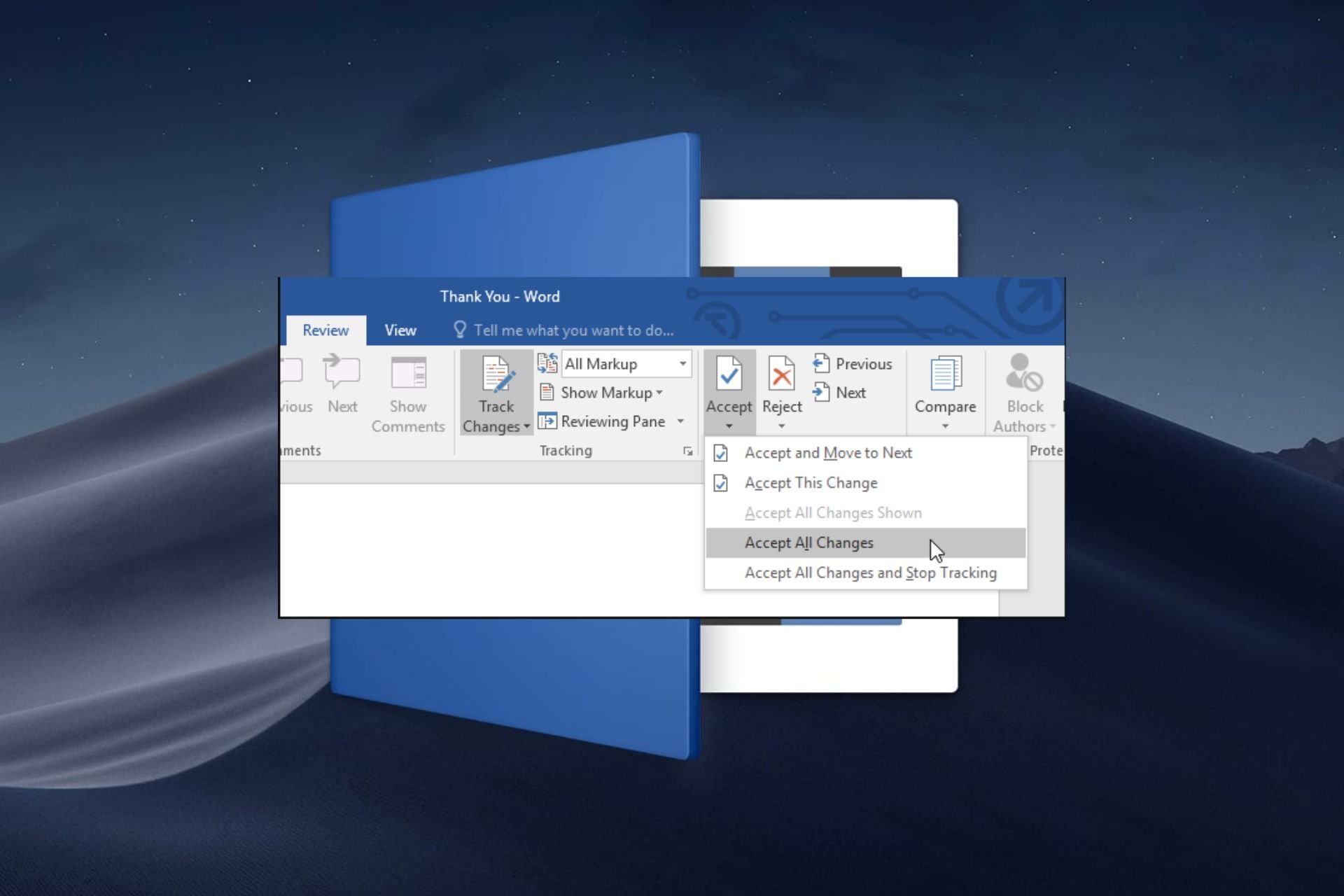
  2. Select the drop-down arrow below Accept, and click on Accept this change.

This is a thorough method of reviewing the document so as to not miss any critical changes. However, if the document is rich in content and spans across many pages, it can be a time-consuming task.

2.2 Accept all changes

  1.  Click on the Review tab.review
  2. Select the drop-down arrow below Accept, and then select Accept All Changes.

If you’re done with all edits and the document is closed from further collaboration, you can select the Accept changes and stop tracking option.

Why can’t I accept or reject changes in Word?

  • Conflicting versions: If you’re using a different version than the one in which the document was created in, you may not be able to accept or reject changes because of compatibility issues. To avoid such issues, ensure you’re using the most up-to-date and legitimate version of Microsoft Word or use Word on your browser.
  • Disabled settings: To accept or reject changes in Microsoft Word, you have to turn on the track changes feature for the document.
  • Document is protected: If the owner of the document has restricted editing, you may be unable to accept or reject changes. You can remove this protection but some document owners enforce passwords so you may have to request permission before making changes.
  • Corrupt document: Sharing the document over the internet and to multiple devices puts it at risk of infections and can easily be corrupted. You can try to repair the document or create a new one and copy the contents into it.
  • Add-ins or Macros: While third-party add-ins and macros can enhance your experience, sometimes they interfere with some features. Disable your add-ins and see if the issue persists.

As an additional tip, always keep the original document copy especially if you’d like to keep track of the changes. This way, you can compare the two Microsoft Word documents to see whether any crucial information was omitted.

One drawback of Microsoft Word is that after accepting changes and closing the document, you can no longer revert them. However, with advancements in Word processing tools, you can view a history of changes and hide comments in Google Docs.

That’s all we had for this article but be sure to leave us a comment down below on any additional thoughts you may have on this topic.

Google Home for web: Now comes with camera history, clip downloads, and more

Google announced that the company is bringing the most requested camera features to Google Home for web.

The upcoming release will include features like a full camera experience for Nest cameras and doorbells with event and timeline history, the ability to create custom clips to download and share, and picture-in-picture support for live camera views.

With all these features, Google Home for the web will soon be available to the public. However, if you want to try the features early, you can opt-in to the Public Preview.

Nest Cam and Nest Doorbell features

Camera history

  • Will be adding more camera features to home.google.com.
  • Can stay informed even after an event happens & use larger screens to view them
  • Use your browser to check your camera history to ensure everything is fine at your home or office.
  • Check your history with the new event and timeline views.
  • Look for a specific date and time.
  • Can download clips to share your favorite moments.
  • Option to subscribe to Nest Aware Plus for 24*7 video history playback on the web.

Custom clips from your video history 

  • Capture and share important moments.
  • Option to customize the clip’s duration before you download it from the camera’s video history.
  • Allows you to select the start time & adjust the clip by sliding the editor to get the desired length.
  • Use a set of options to choose the start time and clip length to trim an event video clip.
  • With a Nest Aware Plus subscription, you can download clips from any party of your video history.

These features will also come to the Google Home mobile app. As of now, the supported devices as mentioned on the Google Nest Community page are:

  • Nest Cam (indoor, wired, 2nd gen)
  • Nest Cam with Floodlight
  • Nest Cam (outdoor or indoor, battery)
  • Nest Doorbell (wired, 2nd gen)
  • Nest Cam Indoor (1st gen) 
  • Nest Doorbell (battery)
  • Nest Cam Outdoor (1st gen)

If you plan to opt-in to Public Preview Updates, you need to go to the Google Home app, then tap Settings>Public Preview>Join Public Preview. You will be notified once the Public Preview is available and can accept or decline the request.

Here are the features available to try in Public Preview:

  • Script Editor for Home Automation – Navigate to home.google.com to view, create, delete, or deactivate scripted automation for your home. If you have been creating automation and using Help Me Script features, you need to join Public Preview to keep using them.
  • Garage door detection for Nest Aware subscribers—With advanced AI-powered image detection and improved built-in on-device intelligence, this feature is compatible with wired Nest Cams and can notify you if you forget to close the garage door.
  • Expanded support for first-generation Nest Cams – Allows you to transfer your device to the Google Home app to try the new camera history experience, including the ability to review camera history with event list and timeline views in both Google Home in web and app.

Apart from this, in the blog post, Product Manager also mentioned:

Garage door detection is in Public Preview and available in the Google Home app for the US and Canada to users that have a Nest Aware subscription and own a Nest Cam (indoor, wired, 2nd gen) or a Nest Cam (battery) when wired for power.  Camera history on the web prior to 3/7/24 may not include audio in events for the first generation Nest Cam Indoor and first generation Nest Cam Outdoor. Events after 3/7/24 will include recorded audio

What are your thoughts on this announcement, and will you be joining the Public Preview, share your opinions in the comments section below.

Microsoft Advertising Console finally gets revamped with a fresh user interface

To make a service better, sometimes a change is necessary, and often the change comes in the form of new features.

Improvements can also come in as user interface changes, and speaking of which, Microsoft is slowly rolling out a new interface for its Advertising Console.

The new and modern user interface for Advertising Console is finally here

As reported by Search Engine Roundtable, it seems that Microsoft is slowly releasing a new Microsoft Advertising Console interface.

The last interface update was way back in 2020, so this is a welcome change. The first thing you’ll notice are two vertical menus on the left, similar to the Google Ads interface.

The secondary menu can be expanded easily simply by hovering your mouse over the main one, so no clicking is required.

In addition to vertical menus, there’s also a Horizontal menu featuring Copilot allowing you to quickly access it. Copilot in Microsoft Advertising Platform was introduced recently, and it’s not a part of the new design.

Overall, this is a nice improvement, and the new user interface will be gradually released to users, so keep an eye out for it.

Despite its partnership with Microsoft, Mistral promises to keep its AI open-source

Microsoft recently forged a $2.1B partnership with Mistral, the startup responsible for the development and release of the Mistral AI.

While the partnership doesn’t mean Microsoft will forget about OpenAI, it will mostly be focused on integrating and emphasizing AI adoption in Europe.

And, according to a new report by Le Monde, the startup is keen on maintaining the open source characteristic of Mistral AI, despite having a partnership with Microsoft now.

The goal is not to abandon open source. This technology is revolutionary and we have to be transparent – we must enable people to look under the hood and it’s open source that allows this.

Mistral AI

Mistral AI, which is comparable to GPT-4 in performance, is now available to use in the Azure AI platform, and earlier this month when the partnership was announced, Mistral’s co-founder Arthur Mensch said that the startup will not abandon its open-source ways.

Commercial activity will enable us to finance the costly research required for model development. We will continue to have two product ranges.

Mistral AI

However, on discussing the news, on Reddit, users are somewhat not convinced:

Some call for Mistral to release research papers and model weights.

Well… Then release the weights please. They can even release them as non-commercial wrights so people looking to make money still need to use their services, but the home gamers can use the models.

Reddit user

While others think the company is not fully transparent:

Actions speak louder than words. And for the last couple of months words is all we’ve had in terms of Mistral’s open source ambitions, and for most of that time even their words haven’t really suggested they had much interest in releasing anything open in the future.

I honestly think it’s silly to say they are dedicated to transparency while simultaneously refusing to even state the size of their closed models. That seems like it would be the absolute least they could do to showcase transparency.

Ideally they would release full on research papers and weights on top of that but I don’t have much hope of that happening based on their actions the last couple of months.

Reddit user

What do you think about Mistral’s intentions?

Nintendo Switch 2, previously rumored to not be on par with Xbox Series S, now might be as good as Xbox Series X

Nintendo Switch 2, the upcoming handheld console, expected in 2025, and previously rumored to not be able to compete with Xbox Series S, could be, in the end, capable of even outperforming PlayStation 5 and Xbox Series X, thanks to the addition of the NVIDIA DLSS.

However, this is also a rumor, so take it with a pinch of salt.

The Nintendo Switch 2 could be on par with the Xbox Series X by leveraging NVIDIA’s Deep Learning Super Sampling (DLSS) technology, which will maximize image quality. The console was also rumored to sport another NVIDIA technology, the Tegra T239, in the past.

The console will be able to offer backward compatibility with all Switch games, and according to a new report from Moore’s Law is Dead, it will reportedly outperform the Steam Deck, by having a more powerful GPU.

When docked, it will be able to perform at the same level as the Xbox Series S, and if it gets the DLSS technology, it will be as powerful (or even more) as the Xbox Series X, and PlayStation 5.

But again, Moore’s Law is Dead‘s rumors are somewhat tricky, so they shouldn’t be taken entirely seriously. However, given the state of the gaming consoles, there is a degree of truth to it: Nintendo will have to invest in serious technology to keep up with the competition.

Steam Deck, as well Rog Ally, and Legion Go, are all little beasts capable of performing well under demanding conditions. If NVIDIA’s DLSS could bring Nintendo Switch 2 closer to Xbox Series X, it will definitely give the handheld an important advantage against the other three.

MSI also chimed in with a brand new handheld console, Claw, which is the world’s first handheld to sport an Intel Core Ultra processor, so as you can see, the game is getting more crowded and intense with each passing year.

But then Nintendo has always been in a league of its own, and the company has never been affected or impacted by the likes of PlayStation or Xbox.

Hurry and get a cheap Xbox Series X from Dell with this hot deal

Dell is offering the best deal for the new Xbox Series X. However, the deal might only last for a while. So, hurry up to buy the console for $404.99. After all, it is almost a 20% discount. Furthermore, you can use this opportunity to purchase PC accessories with a 10% discount.

How to get the Xbox console deal from Dell?

To get the Xbox console deal from Dell, add the Xbox Series X to your cart. Afterward, go to the accessories section and search for the cheapest ones or get something you need. When you are done, go to your cart and checkout. Furthermore, you can have a maximum of 5 reduced consoles. However, taxes and fees still apply.

In addition, you can also get other accessories with limited offers, such as the Alienware S5000 Gaming Chair. If you get the cheapest accessory, you can use the remaining money to get a few months of Xbox game pass.

While the deals are great, some people are worried that Xbox is trying to get rid of consoles. After all, there were a lot of offers lately. Furthermore, this might be Xbox’s attempt to bring in more players. However, the console was available for a cheaper price a few months back. Thus, if you are willing to wait, you might get it for less.

What are you thinking? Does the Xbox deal appeal to you? Let us know in the comments.

Adobe Firefly is the next AI to get shamed for awkwardly generated images

After Google’s Gemini got backlashed for generating historically inaccurate images Adobe’s Firefly text to image generator gets the whip.

As reported by Daily Mail, Firefly recently created images with black nazis, black Vikings and women and black Founding Fathers.

I suspected that the journalists may have forced the image generator so I have made some experiments of my own.

An image of german soldiers in 1945

To my surprise, when I asked the bot for an image of German soldiers in 1945, one of the images was really awkward. There is nothing about the image to show the context of German soldiers in WW II, not even the uniforms.

After that, I got a realistic representation. However, when I added black skin to the prompt, Firefly happily complied and provided the image below.

Again, not even the ship resembles Viking construction. As for the women in the picture, we can safely say that they have nothing to do with the Norsemen.

I concluded my experiment here, and although I didn’t get the exact outrageous results as the folks from Daily Mail, it’s clear that Firefly doesn’t have any clue about history or drawing.

If you ignore the inaccurate representations of history, in my experiment, Adobe’s tool seriously botched the characters’ faces in almost all the images. Will Adobe close its bot as Google did with Gemini? We can’t tell yet, but they need to do something about these hallucinations.

Did you get any awkward results from Adobe Firefly? Let us know about that in the comments section below.

Lenovo ThinkPad X13 Gen 5 series released, equipped with Intel Meteor Lake

Lenovo recently released the ThinkPad X13 Gen 5 series. It comprises a 13.3″ laptop with an Intel Core Ultra processor priced at $2,799 and the touchscreen 2-in-1 convertible counterpart with similar specifications, starting at $2,999.

The two come with super-fast network connectivity, Dolby Audio for enhanced sound quality and the ThinkShield suite of security tools for advanced protection. For the 2-in-1, you also get an integrated rechargeable stylus.

Coming to the processor, the series features Intel Meteor Lake (Intel Core Ultra 5 125U Processor), the code name for the Intel Core Ultra series. It’s designed for enhanced performance and efficiency, in addition to improved battery life.

Lenovo ThinkPad X13 Gen 5

Lenovo ThinkPad X13 Gen 5 2-in-1, a convertible, can be used as a laptop, tablet, and sketchpad. Since it ships with Windows 11, the Tablet Mode is automatically enabled when you rotate the screen about the 360-degree hinge.

Specifications of the Lenovo ThinkPad X13 Gen 5 series

ThinkPad X13 Gen 5ThinkPad X13 Gen 5 2-in-1
Processor14th Gen Intel Core Ultra 5 125U 12C14th Gen Intel Core Ultra 5 125U 12C
Operating SystemWindows 11 Pro x64Windows 11 Pro x64
StorageUp to 1 TB (SSD)Up to 2TB (SSD)
MemoryUp to 32GB, LPDDR5x-6400 (Soldered)Up to 32 GB, LPDDR5x-6400 (Soldered)
GraphicsIntel integrated graphicsIntel integrated graphics
Display13.3″ WUXGA (1920×1200), 60Hz, non-touch13.3″ WUXGA (1920×1200), 60Hz, touch supported
Camera5.0 MP5.0 MP
WeightStarts 1.17 kgStarts 1.25 kg
Battery lifeUp to 15.2 hoursUp to 12.7 hours
Lenovo ThinkPad X13 2-in-1 Gen 5

Both devices feature a similar set of ports:

  • 1 x USB-A (USB 5Gbps / USB 3.2 Gen 1)
  • 1 x USB-A (USB 5Gbps / USB 3.2 Gen 1), Always On
  • 2 x USB-C (Thunderbolt 4 / USB4® 40Gbps), with USB PD 3.0 and DisplayPort™ 2.1
  • 1 x HDMI 2.1, up to 4K/60Hz
  • 1 x Headphone/mic combo jack (3.5mm)
  • 1 x Smart card reader (option not available)
  • 1 x Nano-SIM card slot (WWAN support models)

To find out more about the two or make the purchase, visit the official website:

We also did an exclusive report about Levono working on a transparent laptop which could be unveiled later this year.

What’s your review of the series? Share with our readers in the comments section.

Windows 11, and Windows 10 now support dozens of new AMD chipsets

After Microsoft revealed support for multiple new Intel chipsets, but no new AMD chipsets, the tech giant, which came in second in revenues in the 2023 Q4 period after Intel, revealed that dozens of the new AMD chipsets will now be supported in Windows 11, and Windows 10.

On the occasion, the tech giant also revealed a new set of Ryzen Chipset drivers (version 6.02.07.2300), which fixes bugs, and acknowledges several known issues:

  • Some driver names on a non-English OS  may appear in English.
  • The Uninstall Summary may incorrectly display the uninstall status as Failed. 
  • Occasionally, Ryzen PPKG may not install/upgrade. 

Below, you can see all the new AMD chipsets and processors that can support Windows 11, and Windows 10.

Chipset Support

 Windows 10Windows 11
AMD WRX90/TRX50YesYes
AMD WRX80YesYes
AMD TRX40YesYes
AMD X670E / X670YesYes
AMD B650E / B650YesYes
AMD X570YesYes
AMD B550YesYes
AMD A520YesYes
AMD X399YesYes
AMD X470YesYes
AMD B450YesYes
AMD X370YesYes
AMD B350YesYes
AMD A320YesYes

Processor Support

 Windows 10Windows 11
AMD Ryzen™ Threadripper™ PRO ProcessorsYesYes
AMD Ryzen™ 8000G Series processorsYesYes
AMD Ryzen™ 7040 Series processorsYesYes
AMD Ryzen™ 7000 Series Desktop ProcessorsYesYes
AMD Ryzen™ 7000 Series Mobile ProcessorsYesYes
AMD Ryzen™ 5000 Series Desktop ProcessorsYesYes
2nd/3rd Gen AMD Ryzen™ Threadripper™ ProcessorsYesYes
1st Gen AMD Ryzen™ Threadripper™ ProcessorsYesNo
2nd/3rd Gen AMD Ryzen™ Desktop ProcessorsYesYes
1st Gen AMD Ryzen™ Desktop ProcessorsYesNo
AMD Ryzen™ 3000G/4000G/5000G Series Desktop Processors with Radeon™ GraphicsYesYes
AMD Ryzen™ 2000G Series Desktop Processors with Radeon™ GraphicsYesNo
AMD Ryzen™ Mobile 3000U/C, 4000U/H, 5000U/H/HS, 6000U/H/HS/HX Series Processors with Radeon™ GraphicsYesYes
AMD Ryzen™ Mobile 2000U Series Processors with Radeon™ GraphicsYesNo
7th Gen AMD A-Series ProcessorsYesNo

You can read the full blog post and download the latest AMD drivers here.

Need a gaming buddy? Google SIMA AI model could be the answer

When it comes to games, artificial intelligence is lacking to say the least, and the behavior of non-playable characters can be questionable.

Google is set to change that by developing a DeepMind-based AI that can play games with you.

Google is developing an AI that will be able to play games

As PC Gamer writes, Google is working on a Scalable Instructable Multiworld Agent, an AI that can follow instructions and understand the game world.

Unlike the current AI that is hard-coded, this AI will act more naturally and human-like. Currently, Google has teamed up with eight different game studios to test its SIMA model.

According to the results, the model has around 600 basic skills, and it’s being tested in games such as Valheim, Goat Simulator 3, and No Man’s Sky.

Google claims that SIMA agent performs almost as well as an agent trained for a specific game. It’s important to mention that this model is in early phases, but if proven successful, it can change gaming forever.

While this sounds impressive, there are some security concerns, especially after researchers managed to hack Gemini AI recently. It’s obvious that AI is already used for cyberattacks, and hopefully one day we might see it used for gaming as well.

ChatGPT and other AIs quickly drain our energy resources, and here’s why

ChatGPT consumes a lot of energy daily for its processes. In addition, it is still in development so that energy usage might increase considerably soon. Furthermore, even if we are at the beginning of AI, we won’t have the power to sustain future projects.

After all, according to The New Yorker, ChatGPT consumes 17,000 times the energy of a US household per day. Moreover, if Google included AI in every search, its energy consumption would exceed the amount consumed by some countries.

How does ChatGPT affect the environment?

ChatGPT dramatically affects the environment due to its energy consumption and carbon emissions. After all, according to Elon Musk, by 2025, we won’t have enough power to support the advancement of AI. On top of that, by 2027, AI might consume half a percent of the global energy. Thus, we may need an alternative energy source to power the AI. However, this could also lead to higher resource exploitations.

ChatGPT is esteemed to answer two hundred million requests per day. Thus, it consumes more than half a million kilowatt-hours of electricity. In addition, ChatGPT is one of many AIs available, and most of them require a lot of energy to process.

Furthermore, AI could become a bigger problem, similar to cryptocurrency mining. We will need a technology breakthrough to further improve ChatGPT and the other large language models. Also, using AI can improve the energy sources and increase the output.

Ultimately, energy usage is not the only problem of ChatGPT and other AI models. After all, they are using far more resources. Furthermore, they produce electronic waste, use large quantities of water for their cooling processes, and emit CO2. However, for now, they are more problematic than others. Yet, they could become a threat in the future.

What are your thoughts? Is AI going to improve energy sources? Let us know in the comments.

Microsoft gets the leading spot in Gartner’s Magic Quadrant for the sixth year in a row

Microsoft announced that Gartner named the company a Leader in their Magic Quadrant in the Integration Platform as a Service (IPS) category for 2024.

Gartner’s Magic Quadrant is an assessment based on many criteria to place companies offering integration platforms as service products. The graph is made up of four squares, where these organizations are placed into the following categories: Leaders, Challengers, Visionaries, and Niche Players.

It is a bit ironical, because Microsoft received this acknowledgement right after they dropped the Azure egress fees due to the European Data Act.

Why did Gartner name Microsoft a leader in the IPS category?

Image source: Gartner

Obviously, Microsoft has a lot to show for in this category but they received the Leader title mostly thanks to their business Azure Integration Services.

Not only that, but the whole Azure cloud services were taken into consideration for this decision.

The Azure Integration Services include Azure API Management, Azure Logic Apps, Azure Service Bus, Azure Event Grid, Azure Functions, and Azure Data Factory providing flexibility for the business clients. You only have to pay for the right component you need and use for your business.

Gartner also took into consideration Microsoft’s support infrastructure in over 50 Microsoft Azure regions and their partner ecosystem with over 1,400 managed partners worldwide.

We also need to acknowledge the other organizations in the Leaders quadrant which are Boomi, Workato, Oracle, SAP, Informatica and Salesforce (MuleSoft).

In the Challenger quadrant, you can spot Amazon Web Services (AWS) who gained a lot of ground lately in this category.

What do you think about Microsoft’s title? Let us know in the comments section below.

Microsoft and Oracle’s Database Azure will be available in 5 more regions

Microsoft and Oracle’s partnership project, Database Azure, will be expanded in 5 more regions, Microsoft announced in a press release, and with them the service is now available to a total of 15 regions globally.

Database Azure will be finally available in Europe, and customers can now place orders for Oracle Database@Azure in the Microsoft Azure Germany West Central region in Frankfurt, according to the Redmond-based tech giant.

Bringing Oracle Database@Azure to Europe will enable customers in the region to locally employ Oracle database services running on OCI hardware deployed in Azure datacenters for the first time. The expansion of our collaboration with Oracle demonstrates our mutual commitment to helping customers streamline the migration of workloads to the cloud so they can combine the best of Oracle with the breadth of Microsoft cloud services, like Azure AI, to empower business innovation.

Microsoft

We have embraced the tremendous global customer demand for Oracle Database@Azure and are hence announcing five additional regions to the road map today. We are energized by the Global 500 companies in financial services, healthcare, manufacturing, oil and gas, pharmaceuticals, and more that are already utilizing Oracle Database@Azure. The increased uptick in demand and emerging and unified use cases across OCI and Microsoft Azure demonstrate just how important the multi-cloud deployments are for our joint customers.

Oracle

Database Azure is currently available in:

  • Australia East
  • Brazil South
  • Canada Central
  • France Central
  • Central India
  • Italy North
  • Japan East
  • Southeast Asia
  • Sweden Central
  • United Kingdom South
  • Central United States
  • South Central United States
  • United Arab Emirates North

By using the Microsoft and Oracle’s Database Azure, customers can get the following benefits:

  • Flexible options to simplify and accelerate migrating their Oracle databases to the cloud, including compatibility with proven migration tools such as Oracle Zero-Downtime Migration
  • The highest level of Oracle database performance, scale and availability, along with feature and pricing parity with OCI
  • The simplicity, security and latency of a unified operating environment (datacenter) within Azure
  • Consistency with on-premises deployments of Oracle Database and Oracle Exadata to reduce the need to rearchitect or refactor solutions
  • The ability to build new cloud-native applications using OCI and Azure technologies, including the rich set of Azure development and AI services
  • Unified customer experience and support from Oracle and Microsoft
  • Simplified purchasing via the Azure Marketplace, and the ability to leverage Oracle and Microsoft licenses, commitments and discount programs
  • The assurance of a unified service and architecture that are tested and supported by two of the most trusted names in the cloud

Microsoft recently unveiled the initiative to build AI data centers in Germany and update the country’s infrastructure with AI technologies, in a $3 billion investment, so this comes as no surprise.

You can read the full press release here.

Google paid $10 million to bug hunters in 2023, $2 million less than the previous year

Every year, Google has been rewarding the bug hunter community for identifying vulnerabilities and exploits in its products, primarily Chrome and Android. In Google’s 2023 Bug Bounty program, the amount stood at $10M, taking the total rewards since 2010 to $59M.

In the official blog post, Google highlights that 359 unique security bugs were reported in its native browser, Chrome, and $2.1M was paid out to the hunters. For Android, Google gave out $3.4M in bug bounty but didn’t disclose the number of vulnerabilities.

In the wearables domain (Nest, Fitbit and others), the tech giant paid $116,000. And for GenerativeAI, the total bounty was $87,000.

The highest reward for the year stood at $113,337, but there’s no official confirmation about who it went to. In the blog, Google thanked two researchers, Zinuo Han and Yu-Cheng Lin, for their contribution to the bug-hunting program.

Bounty falls in comparison to 2022

Though the $10 million bounty is a significant amount, it’s $2M less than the $12M Google paid out the bug hunters in 2022. The Mountain View-based tech giant didn’t reveal a reason for the drop. However, it looks like fewer vulnerabilities were reported in 2023.

Image source: Google

Looking at the last decade, the bug bounty has increased yearly since 2015, except for a tiny $0.1M drop in 2017.

Another interesting fact is that, while in 2022, the highest rewards stood at $605,000, it fell to $113,337 in 2023, an 81.27% drop.

Other tech giants, too, offer such rewards. Interested bug hunters stand a chance to win $20,000 with Microsoft’s bounty program for identifying vulnerabilities and exploits in its products.

What’s your take on Google’s bug bounty report for 2023? Share with our readers in the comments section.

Firefox userbase is surging in the EU after Apple’s compliance with the DMA

Firefox has always been an alternative browser, always living in the shadow of Chrome, but that is slowly changing.

It seems that Firefox is gaining more users in Europe, so let’s see what’s the reason behind this.

Firefox usage is up in Germany and France thanks to the DMA

The Digital Markets Act in the EU aims to limit the power of big tech companies and prevent monopolies from creating.

Microsoft has complied with DMA, allowing its users to now easily remove Edge from Windows. As a result, Brave downloads went up 37.5%, but that’s not all.

Both Apple and Microsoft are affected by DMA, and according to The Verge, Firefox saw an increase in usage after Apple allowed users to choose their default browser.

According to Firefox spokesperson Christopher Hilton, Firefox has 50% more users in Germany and almost 30% in France. Here’s what he had to say:

Despite less than ideal compliance, the recent implementation of the DMA choice screen is a promising step toward true competition online in the EU… Still, there is a lot of room for improvement, and we’ll continue to fight for a web that puts people over profits, prioritizes privacy and is open and accessible to all.

This is great news for all Firefox users, and we can’t wait to see how the browser market share will change following this change.

Claw, the world’s first Core Ultra processor-equipped handheld, is now out

MSI announced the Claw handheld console, a while ago, as the tech company stepped into the gaming console industry, with the world’s first Intel Core Ultra processor-equipped handheld.

As we noted back in February, MSU will release no less than 3 variants of the Claw console, each with its own set of specs, and prices, of course, as you can see below:

Product NameGraphicsProcessorStorageRAMPrice
Claw A1M-050USIntel Arc 5 GraphicsIntel CoreUltra 7-155H 1.4 – 4.8 GHz1TB PCIe Gen4x4 M.2 2230 w/o DRAM16GB LPDDR5-6400MHz$799.99
Claw A1M-051USIntel Arc 5 GraphicsIntel Core Ultra 7-155H 1.4 – 4.8 GHz512GB PCIe Gen4x4 M.2 2230 w/o DRAM16GB LPDDR5-6400MHz$749.99
Claw A1M-052USIntel Arc 5 GraphicsIntel Core Ultra 5-135H 1.2 – 4.6 GHz512GB PCIe Gen4x4 M.2 2230 w/o DRAM16GB LPDDR5-6400MHz$699.99

Claw A1M-052US is now available to users, everywhere, according to MSU’s official website. It sports the following specs:

  • Windows 11 Home
  • Intel® Core™ Ultra 5-135H 1.2 – 4.6 GHz
  • 512GB PCIe Gen4x4 M.2 2230 w/o DRAM
  • 16GB LPDDR5-6400MHz
  • Intel® Arc™ Graphics
  • 7″ FHD (1920 x 1080), 120 Hz Refresh Rate, Touch Screen, 100% sRGB (Typical), 500nits (Typical), IPS-Level panel.
  • Intel® Killer™ Wi-Fi 7 BE1750(x) for Claw
  • Ergonomic design for an optimal gaming experience.
  • Hall Effect triggers and joysticks built to last with microscopic precision.
  • Best-in-class 53Whr battery capacity.
  • Revolutionary Cooler Boost HyperFlow technology redirects airflow to cool internal components.
  • Exclusive Macro Keys cast your ult with just one click.
  • Swift transfers and extensive connectivity with Thunderbolt™ 4.
  • MSI Center M provides dedicated interface designed for handheld devices with easy-to-use settings.
  • MSI AI Engine adjusts various system settings automatically that best fit your needs.

The other two versions, Claw A1M-050US and Claw A1M-051US will be released at a later date, but those interested can be notified when, in case they want those versions.

All three versions are equipped with Windows 11 Home and similar tech specs, the only differentiators being the storage space and processors, and you can see what the Claw handheld console looks like.

Alongside the Claw handheld console, MSU is also releasing its newest 18-inch laptop lineup and a new gaming laptop lineup. The new 18-inch laptops include Titan 18 HX, Raider 18 HX, and Stealth 18 AI Studio, while the gaming laptops are Vector 16/17 HX, Crosshair 16/17 HX, and Pulse 16/17 which also sport AI NPUs.

What do you think about these new devices?

This Halo-inspired original Xbox adapter allows 1080 gaming on the 23-year-old console

If you still have an original Xbox around, you might be interested in this original Xbox adapter that will allow for various benefits, including the 1080 playback feature.

The adapter in question has been developed by Eon Gaming, and its original XBHD adapter, although a little pricy, was well received by the Xbox community. This one is an upgrade to the original adapter and sports a Halo-inspired design.

It also comes with several features such as:

  • 480p
  • 720p
  • 1080i
  • Dual HD Ports
  • 3.5mm MiniTOSlink
  • 3 RJ45 LAN adapter Ports
  • XBHD Firmware 2.0

You can watch the trailer for it, to get an idea of how it looks:

Introducing the XBHD Spartan Edition. The is a brand new limited edition version of the XBHD paying homage to the classic Halo Edition Xbox. This premium Xbox adapter only works on original Xbox consoles and is loaded with a suite of amazing features.

Eon Gaming

The adapter is now available for $149.99, which is still a bit pricy, but it should be worth it, as it will new life to your old Xbox console. Eon Gaming lowered the price from $189.99, as the original adapter initially cost.

You can get it from here.

Talking about the 23-year-old Xbox console, if you still have one around, you can easily tweak it and mod it to your needs and desires, by using a memory card, all due to a newly discovered exploit, called Endgame.

The exploit doesn’t require a game or a functional DVD, and it can be easily deployed using a memory card. It is compatible with all the versions of the original Xbox Dashboard. You could use the exploit to hack your original Xbox and make it compatible with modern softmod solutions. 

However, you should also be aware that you could potentially lose all the data from the original Xbox in question, so you have to consider the risk before implementing the exploit.

But, as you can see, there is still new life to be found in the original Xbox console.

Folks are fuming over the new KB5035853. It’s making the taskbar completely transparent

Windows updates are often known to cause issues on the PC. This time around, KB5035853 for Windows 11 is making the taskbar transparent.

When we took a deeper look at the problem, it appeared to be linked to ExplorerPatcher and other similar tools that customize the taskbar, start menu and other Windows components.

On our workstation running KB5035853, the taskbar didn’t undergo any changes post-update, but as soon as we installed ExplorerPatcher, it became transparent, highlighting that the problem arose due to conflicts with user-enforced taskbar customizations.

Reports of the issue are being increasingly reported on forums, including Reddit and the dedicated Microsoft community.

After an update, my taskbar is suddenly 100% transparent

My taskbar gets TRANSPARENT??????
What happened???
It’s impossible to be corrected!!!!!

Same issue here. Seems like we are not in the minority here folks. so weird they wouldn’t catch such a visible bug before releasing this update. lol.

Verified fixes for transparent taskbar after installing KB5035853

  • Download the latest ExplorerPatcher version: Go to GitHub’s official ExplorerPatcher page and download Build 22621.3296.64.1. The latest build comes with a bug patch.
  • Uninstall the update: Press Windows + I to open Settings > go to Windows Update > select Update history > choose Uninstall updates > click on Uninstall next to Security Update for Microsoft Windows (KB5035853) > confirm the change > restart the PC.
Uninstalling KB5035853 on Windows 11

One of these should have helped. If not, uninstall any apps that can customize the taskbar or any other Windows components!

Ironically, the Windows KB5035853 update, which was meant to fix the 0x800F0922 error on KB5034765, is itself plagued with bugs.

On the bright side, the update allows you to edit your phone’s pictures with Snipping Tool.

What helped you get rid of the transparent taskbar? Share with our readers in the comments section.

Chinese want to develop scientific AI bots infused with prior knowledge

Creating scientific AI bots is nothing new. Many researchers worldwide have programmed their own science AI bots to resolve specific tasks in chemistry, biology, physics, and more. However, a new study published in the Hong Kong Polytechnic University journal delivers another approach to creating such bots by infusing them with prior knowledge in the areas where they are needed.

In other words, the Chinese will train the LLMs to become AI scientists in their field of expertise by teaching them some advanced rules, just instructing students before giving them tasks.

AI bots don’t know anything about physics, yet

Although we got used to the fast-paced development of AI, we still feel amazed by how Sora AI can create elaborate video clips just from text input. Yet, the text-to-video LLM doesn’t have the slightest idea about the laws of physics. It doesn’t know how to extract a piece of cookie from the image after someone bites it or the direction in which the flames of candles should lean when someone blows at them in a clip.

LLMs are traditionally trained using localized data and inputs and don’t start from ground rules in mathematics or physics. Copilot doesn’t even know how to count some objects in a generated image. We gave it hundreds of tests to generate a fixed number of a particular object, and the bot failed at determining the number of items. However, it will respond flawlessly if you ask it to solve a simple math equation.

The Chinese scientists believe that the AI bots will deliver more accurate results by creating an informed machine learning model through base knowledge training. However, they admit it takes work to establish which functional relationships, equations, and logic to include in the training. They found out that inserting too many rules would crash the LLM.

Embedding human knowledge into AI models has the potential to improve their efficiency and ability to make inferences. Still, the question is how to balance the influence of data and knowledge. Our framework can be employed to evaluate different expertise and rules to enhance the predictive capability of deep learning models.

Xu Hao, first author and researcher at Peking University

According to the paper, the Chinese created a framework that assesses rule importance by examining how certain rules or combinations affect the predictive accuracy of the LLM.

The researchers tested their framework to predict a chemistry experiment’s results and optimize a model for solving multivariate equations, and the output was a success.

However, there is an inherent problem with this type of training. During the study, the scientists discovered that if they added more data to the model, the general rules they applied became more important than the local rules. This is an issue because biology and chemistry often don’t have readily available general rules akin to governing equations.

The scientists are creating an open source plugin tool for developers to advance this training model further.

Microsoft Edge: Desktop shortcut for new Enterprise devices

According to Microsoft 365 Roadmap, for the first time, Microsoft is working on bringing a desktop shortcut for the Edge browser on new Enterprise devices, running via Windows Out of Box Experience (OOBE).

The description on the Microsoft 365 Roadmap says:

For new enterprise devices running through Windows Out of Box Experience (OOBE) for the first time, an Edge desktop shortcut will automatically be created. When enterprise users turn on their Windows 11 devices for the first time, they’ll see the Edge shortcut on their desktop. This desktop shortcut will provide users with easy access to their Edge browser without needing to manually pin and configure their setup.

Once the feature is rolled out, the Edge shortcut will be on their desktop once the enterprise users turn on their Windows 11 machines for the first time.

The shortcut will enable users to launch the Edge browser and access the websites and web apps. The feature will be available for all the new Enterprise devices that are running via OOBE for the first time. No existing device will be affected by this change.

The feature, which was added on March 14, 2024, is listed as 388365 on the Microsoft 365 roadmap. It will be released across standard multi-tenant cloud instances and is scheduled to roll out in April 2024.

What are your thoughts on the matter? Share your opinions in the comments section below.

Microsoft drops Azure egress fees following the European Data Act

Azure is one of the most used cloud services, however, it has some questionable policies that negatively affect the users.

That’s about to change, as  Microsoft is changing its policy on data removal from the Azure cloud.

There will be no more egress fees on Microsoft Azure

As reported by The Register, Microsoft won’t charge its former users to remove their data from the Azure cloud.

This comes as no surprise since Amazon Web Services (AWS) and Google do the same, so it feels natural for Microsoft to follow suit.

The reason for this change is the European Data Act, as stated by Microsoft in its announcement post.

To be eligible to move your data, Microsoft documentation states the following:

You must cancel all Azure subscriptions associated with your account after your data is transferred out before you can request your invoice-level credit.

It’s important to mention that Azure offers the first 100GB/month of egress data for free, but now you can easily claim more credit.

Some experts claim that this is just a marketing move to attract new customers and that egress costs affect ongoing users the most.

As for Azure, some believe that Claude 3 is a threat to Microsoft Azure, and we’re still waiting to see how will Microsoft respond to it.

Microsoft’s new pricing model for Copilot for Security is a step in the right direction

Microsoft announced that Copilot for Security will be available to commercial customers starting April 1, and with it, the Redmond-based tech giant also explained that the AI model will be released with a special pricing model: the pay-as-you-go model, which will be $4/hour.

This model means customers will be able to pay for as much as they use the model, and it will allow for versatile budgeting, catering to each company’s unique infrastructure, needs, and situations.

The Redmond-based tech giant calls the new pricing model the Security Compute Unit (SCU), and the consumption will be calculated based on the number of queries, and the complexity of each query, so it’s not going to take into consideration the number of security analysts in a company that is using it, or the number of devices Copilot for Security scans.

Basically, no matter the infrastructure of the company, Copilot for Security will still be billed $4/hour, however, the complexities of each scan, or case, might depend on the organization. For instance, a big company will have a complex infrastructure, so that means Copilot for Security will take more time to complete tasks.

A smaller company won’t have to use Copilot for Security for long, as the tasks will take less time to be completed.

So, ultimately, the pricing gets down to how much time Copilot for Security runs, and it’s not only a fair pricing model but also a good step in the right direction. All companies, no matter their budget, can afford to get the AI tool and use it according to a plan that suits their current financial resources.

Plus, Copilot for Security also comes as a standalone experience, and it won’t be tied to additional platform (although for better results, collaboration is recommended, see Copilot in Intune, for instance), so companies have more than enough ways to plan their budget to include the tool.

Scientists develop a 125 TB optical disc, may revive the obsolete storage technology

In a significant development in the tech world, scientists from China have devised a new technology that will allow optical discs to store data in the petabit range, close to 125 GB. The innovation may rekindle our interest in optical disks, a storage medium now primarily limited to gaming.

Optical disks were a popular storage option until two decades ago. Since then, the costs of USB drives and external hard disks have come down, making these two the preferred forms of storage. Besides, optical disks were rather fragile and prone to scratches, another factor that went against it.

Science behind the 125 TB optical disk

Scientists from China published an article in Nature titled, A 3D nanoscale optical disk memory with petabit capacity, which explained the scientific principles behind the high-capacity storage medium.

It uses dye-doped photoresist with aggregation-induced emission luminogens or AIE-DDPR, a newly developed material with a high areal density (storage capacity per unit area), and is roughly 24 times faster than advanced high-speed hard drives.

As per scientists, the process of manufacturing AIE-DDPR is similar to that of conventional CDs or DVDs. The AIE-DDPR optical discs feature a double-sided design with 100 layers on both sides. Since each layer is unbelievably thin, the distance between any two is just 1 micrometer.

To quote the scientists,

We develop an optical recording medium based on a photoresist film doped with aggregation-induced emission dye, which can be optically stimulated by femtosecond laser beams. This film is highly transparent and uniform, and the aggregation-induced emission phenomenon provides the storage mechanism. It can also be inhibited by another deactivating beam, resulting in a recording spot with a super-resolution scale.

Scope of the optical disk in personal and industrial use

Researchers working on the technology claim that it would help develop exabit-level data centers in closed spaces and reduce the area and cost requirements. Besides, with AIE-DDPR, optical discs have an increased life span of 50-100 years, thus negating the need for data migration and cloud storage.

To boost commercial viability, scientists are working on improving the read and write speed by using more precise laser beams. It will take some time before we have a refined version of the 125 TB optical disc, which finds application at home and in the industrial setup.

Many modern-day laptops don’t feature a built-in drive, but you can always get an external optical disc drive to access data on a CD/DVD.

What would you choose between a 125 TB optical disc and an external hard disk? Share with our readers in the comments section.